Numbering Systems
- Popular numbering systems used in digital circuit design are binary, octal, decimal, and hexadecimal:
- Binary (base 2) has 2 digits (0 or 1).
- Octal (base 8) has 8 digits (0-7).
- Decimal (base 10) has 10 digits (0-9).
- Hexadecimal (base 16) has 16 digits (0-9, A-F).
- Numbers are written using a positional numbering system, where each digit represents the coefficient in a power series: N=a_{n-1}r^{n-1}+a_{n-2}r^{n-2}+...+a_{2}r^{2}+a_{1}r^{1}+a_{0}r^{0} $$ - where $n$ is the number of digits, $r$ is the base, and $a_i$ are integer coefficients in the range of $0\le a_i < r$
Decimal Number
- We all use decimal numbers every day without thinking about it. (ใช้ทุกวันจนชินละ จริง ๆ มันก็เหมือนฐานอื่น ๆ เนี่ยแหละ แค่ฐานอื่น ๆ เราไม่ค่อยได้ใช้กัน)
- Decimal numbers (base 10) are also based on the same positional numbering system described previously, where . The digits used by decimal numbers range from 0 to 9.
Binary Numbers
- Binary numbers are commonly employed by computer systems, and consist of HIGH (1) and LOW (0) states. This also referred to in Boolean logic as TRUE or FALSE states, respectively.
- Binary numbers (base 2) also use the same positional numbering system described previously, where . The digits used by binary numbers range from 0 to 1.
Octal Numbers
- Octal numbers were commonly used in the beginning days of computing, but have since become rare.
- Octal numbers (base 8) use . The digits used by octal numbers range from 0 to 7.
Hexadecimal Numbers
- Hexadecimal numbers are commonly used in computer programming, due to their ability to express large numbers in a compact manner.
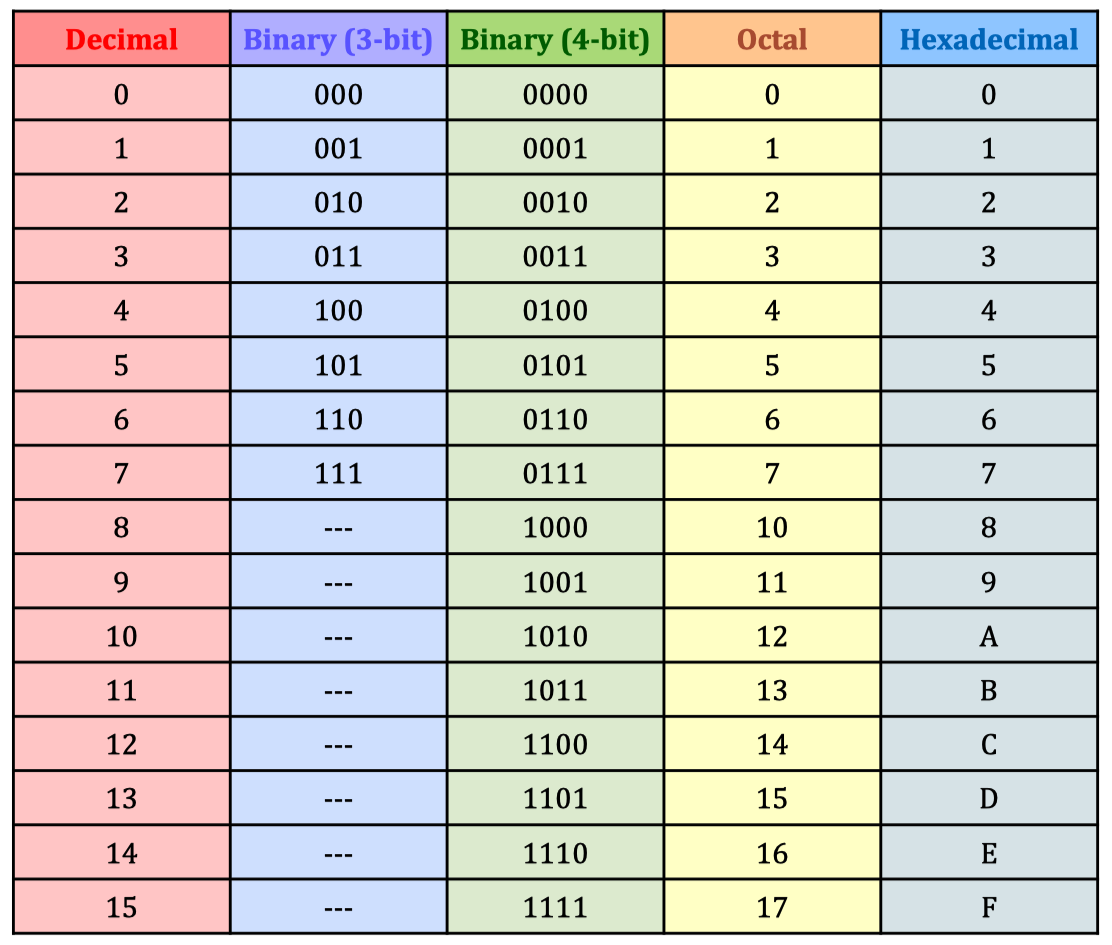
- Hexadecimal numbers (base 16) use . The digits used by hexadecimal numbers range from 0 to F, and have the following numerical values:

Fractional Numbers
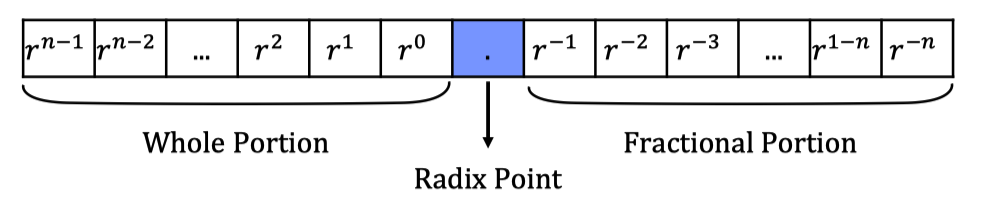
- Fractional numbers can also be written using the positional numbering system, where the fractional portion is represented by a negative power series. Therefore, the weights of each position is given as follows:
- เลขข้างหน้าสามารถให้เครื่องคิดเลขแปลงค่าให้ได้ → แต่!!! เลขทศนิยมข้างหลังยังไม่ได้นะ!!
- ถ้าเป็นฐาน 16 (อื่น ๆ ก็ได้) แล้วมีทศนิยมก็ทำคล้าย ๆ กัน แค่เปลี่ยน เคนะ!?!
Base Conversions
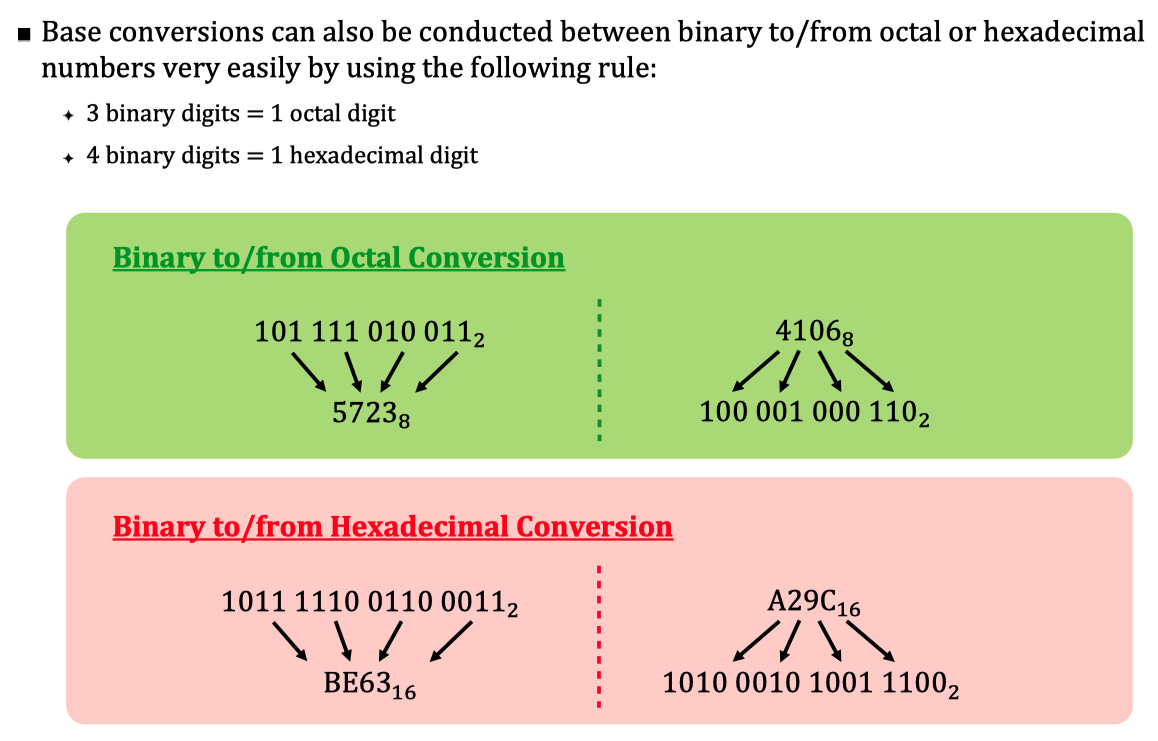
- The previous examples show how binary, octal, and hexadecimal numbers can be converted into decimal values. But what about the other way around? Or conversions between binary and octal, or binary and hexadecimal?
- ข้างบน ๆ ดูไปแล้วว่าแปลงจากเลขฐานต่าง ๆ ไปฐาน 10 ได้ยังไง? ตอนนี้มาดูบ้างว่า ฐาน 10 จะแปรงไปเป็นฐานต่าง ๆ ได้ยังไง
- To convert from any decimal number to base
- Use repeated divide-by-r process (for whole numbers) → จำนวนเต็ม
- Use repeated multiply-by-r process (for fractional numbers) → พวกทศนิยมต่าง ๆ
Repeated Divide-by-r (Whole Numbers)
- หาร Decimal Number นั้นด้วย เลขฐาน (base number )
- เก็บเศษ (Remainder) – โดยเศษตัวแรกคือ LSB (least significant digit → สำคัญน้อยสุด ให้อยู่ตัวท้าย)
- ทำไปเรื่อย ๆ จนกว่าจะได้ Remainder เป็น 0
- อ่านจากล่างขึ้นข้างบน (MSB → LSB)
Process นี้สามารถลดเวลาได้ด้วยการกดใน Calculator เอาเลย
Repeated Multiply-by-r (Fractional Numbers)
- คูณทศนิยมนั้น ๆ ด้วย เลขฐาน (base number )
- แล้วก็เอาเฉพาะเลขจำนวนเต็ม เช่น ก็เอาแค่ 1 หรือแม้กระทั่งเป็น 0 ก็ยังเอานะ เก็บไว้
- ทำไปเรื่อย ๆ จนกว่าเลขทศนิยมที่ได้จากการคูณเป็น
- อ่านจากบนลงล่าง (MSB → LSB)
Complements
- จริง ๆ อันนี้มันก็แค่วิธีการ Flip – Complement อะ ตรงกันข้าม!
- Signed (negative and positive) numbers can be stored by using complements.
- There are two complement forms: (ดันมี 2 ฟอร์มอีก แบบเก่า และ แบบใหม่)
- radix-1
- radix
radix-1
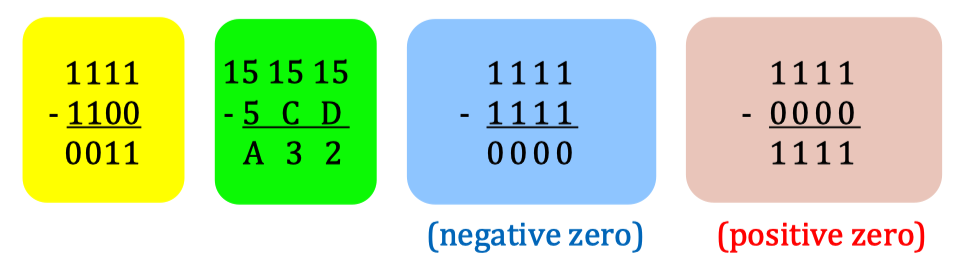
- Used in early days of computer technology, obtained by subtracting each digit from the highest possible value of each digit
- The main problem is the existence of positive and negative zeros. – นี่แหละคือปัญหา มันมี +0 กับ -0 ซึ่งจริง ๆ แล้วเป็นไปไม่ได้ตามหลักคณิตศาสตร์ใช่มั้ยล้า!
- Also known as one’s complement and fifteen’s complement.
ไอ่เจ้านี่ใช่วิธีแบบนี้: ถ้าสมมติว่าเป็น Binary มันก็ Flip ง่ายใช่มะ แต่ถ้าเป็นอย่างอื่น ฐานอื่นอย่าง Hexadecimal ล่ะ? ก็เอาตัวมากที่สุดที่เป็นไปได้ แล้วลบด้วยตัวนั้นไง (แต่อย่าลืมนะ ว่าวิธีนี้มีปัญหา ก่อให้เกิด -0 และ +0 ไง
radix
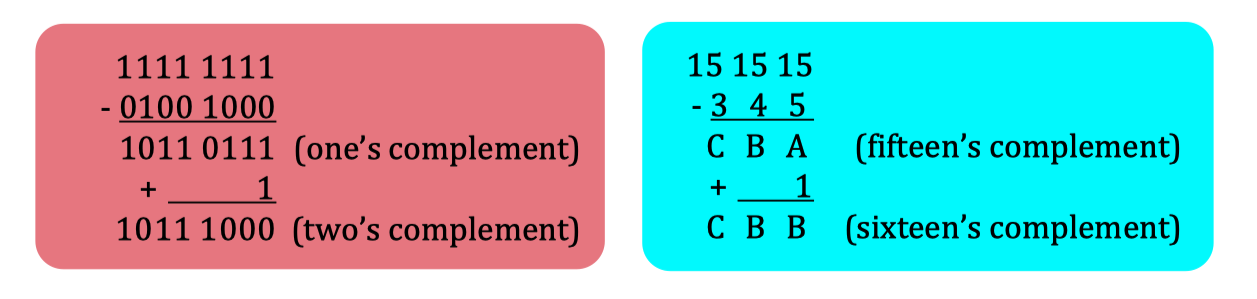
- Used in modern system, obtained by performing radix -1 conversion and adding 1. Thus, only one zero value can exist
- Also known as two’s complement and sixteen’s complement.
หลักการไม่มีอะไรเล้ยยยย ก็แค่ทำ radix-1 นั่นแหละ แล้วอย่าลืมมมมมม บวก 1 ตอนท้าย แบบนี้ก็มีแค่ 0 เดียวแล้วววว!
Signed Numbers
- Signed numbers in a binary digital system are represented using one of the following conventions: (จะเขียนเลขติดลบของตัวนึงเนี่ย ก็มีหลายแบบ ซึ่งคำตอบก็ไม่เหมือนกันด้วยนะ → ได้เลขติดลบของตัวที่ต้องการเหมือนกัน แต่หน้าตาจะไม่เหมือนกันใน Terms ของ เลขฐาน 2)
- Sign-magnitude form
- 1’s complement form
- 2’s complement form
Sign-magnitude form
- The left-most bit in a signed binary number is the sign bit, which tells you whether the number is positive or negative (0 sign bit = positive number, 1 sign bit = negative number).
- The remaining bits are the magnitude bits, which are in true (uncomplemented) binary for both positive and negative numbers.
- The decimal values of positive and negative numbers for sign-magnitude are determined by summing the weights in all the magnitude bit positions and considering the sign bit.
สรุปสั้น ๆ คือ แค่เปลี่ยนหลักข้างหน้า เป็น 1 ก็จะได้เลขติดลบแล้ว เช่น
(3 ตัวหลังคือ Magnitude, ตัวแรกเรียกว่า Sign bit)
แต่อันนี้ก็คือจะมีปัญหาเหมือนกัน คือมันเกิดได้ทั้ง +0 และ -0 ซึ่งผิดพลาดมากก!
1’s complement form
- The decimal values for 1’s complemented positive numbers are obtained by summing the weights in all bit positions.
- The decimal values for 1’s complemented negative nu bers are obtained by assigning a negative value to the weight of the sign bit and summing the weights in all bit positions and adding 1 to the result.
อันนี้ก็ง่าย ๆ เช่นกัน แค่ Flip ตัวเลข แล้วใส่ Weight ให้มันแต่ละตัว หลักแรกต้องใส่ลบด้วยนะ (Sign bit) แล้วก็ Sum Weight กันแล้ว ต้องบวก 1 ด้วย! ก็ได้คำตอบละ!
2’s complement form
- The decimal values for 2’s complemented positive numbers are obtained by summing the weights in all bit positions.
- The decimal values for 2’s complemented negative numbers are obtained by assigning a negative value to the weight of the sign bit and summing the weights in all bit positions.
ง่ายแสนง่ายเหลือเกินอันนี้5555 ก็คือว่า Flip เหมือนกัน แล้ว +1 ก่อน แล้วก็ Assign weight ให้แต่ละตัว แล้วสุดท้าย Sum Weight (โดยไม่ต้อง +1) แล้วนะรอบนี้ ได้คำตอบเลยทันทีจ้า!
Floating Point Numbers
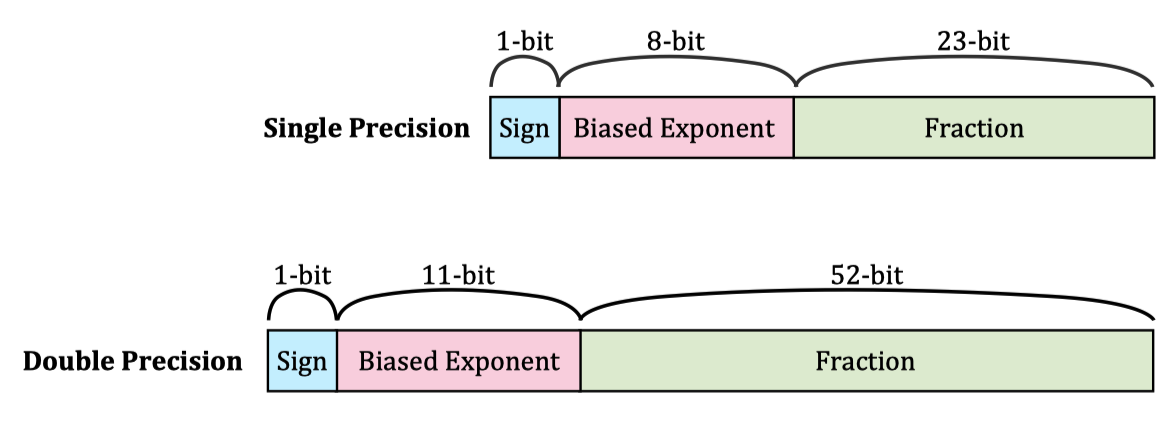
- Real Numbers ~ also called floating-point numbers, can be stored as single-precision (4-byte) or double precision (8-byte) form,using the IEEE 754 standard
- It consists of three portions: the sign-bit, the biased exponent and the significand (fraction, mantissa).
Floating-Point Numbers Conversion
- วิธีการแปลงก็ง่ายมาก มีทั้งหมด 3 steps:
- Note the sign of the number and set the most-significant bit as 0 for positive, 1 for negative numbers ... this is the sign portion “s”.
- Convert the number into binary and normalize (write in “” form where “” is the fraction portion, and “” is the exponent).
- Take the exponent term “” and add bias value (+127 for single precision, +1023 for double precision). This is the biased exponent portion. Biasing is necessary because of negative exponents.
แบ่งออกเป็น 3 ส่วนนะ
- เริ่มต้นโดยการมองตัวเลขที่ให้มาก่อน ถ้าติดลบ “s” เป็น 1, ถ้าไม่ติดลบ “s” ก็เป็น 0
- แปรงเลขที่ให้มาเป็น Binary (อย่าลืม เลขจำนวนเต็มก็ใช้เครื่องคิดเลขหาได้ ส่วนเลขทศนิยมก็ใช้ Multiply-by-r หาเอานะะ) → สุดท้าย Normalise ให้อยู่ในรูป
- แล้วก็เอา something นั้นอะมาเป็น มาจัดให้ครบ 23-bit เติม 0 ไปจนกว่าจะครบ 23 ตัว
- เอา ที่ได้ มา +127 ก็จะได้คำตอบตรงกลาง (Biased Exponent) → แปรงให้เป็นฐาน 2 ด้วยนะ
Binary-coded Decimal
- อันนี้ง่ายเกิน อาจารย์บอก ไม่ออกสอบหรอก! “TOO EASY FOR THE EXAM”
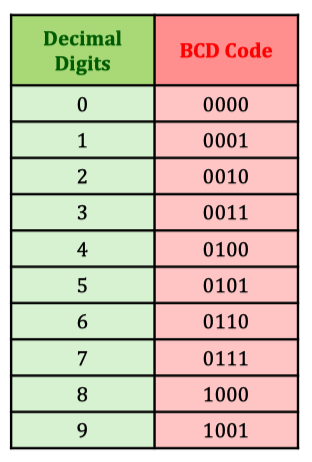
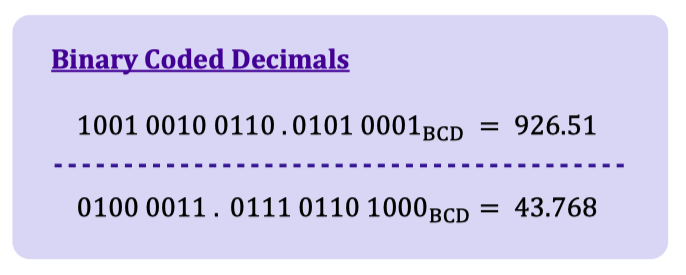
- BCD คือ Alternative to directly convert between binary and decimals numbers
- Each decimal digit is represented by 4 bits (-) according to the table
The Gray Code
- อันนี้ก็สำคัญในการทำ K-map
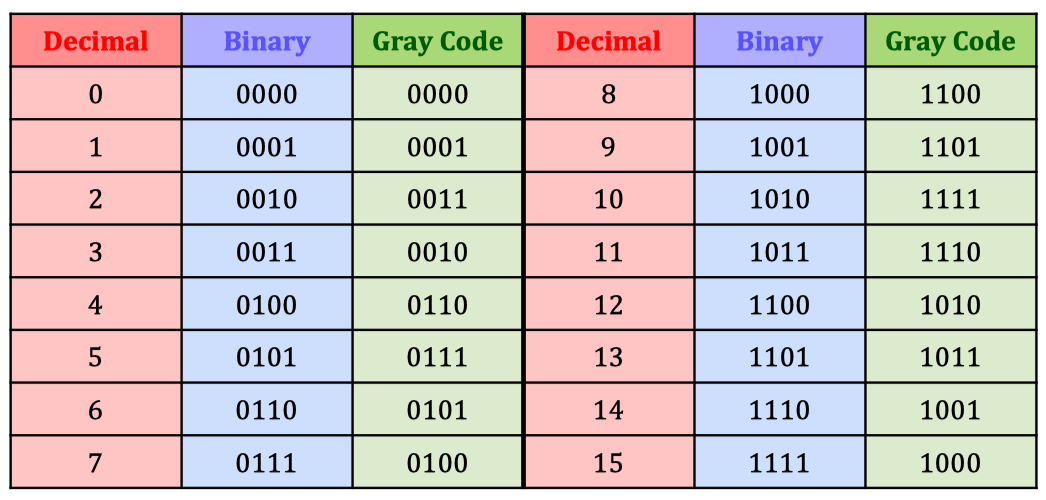
- The Gray code is unweighted and is not an arithmetic code. It has no specific weights assigned to each bit position. (ไม่ได้เอาไปคำนวณไรนะ)
- The advantage of the Gray code is that it exhibits only a single bit change from one code word to the next in sequence to reduce the possibly of error. (เลขเปลี่ยนแค่ 1-bit)
- ไม่ต้องจำ แต่ควรรู้ Conversion (อยู่ใน Exam For Sure)
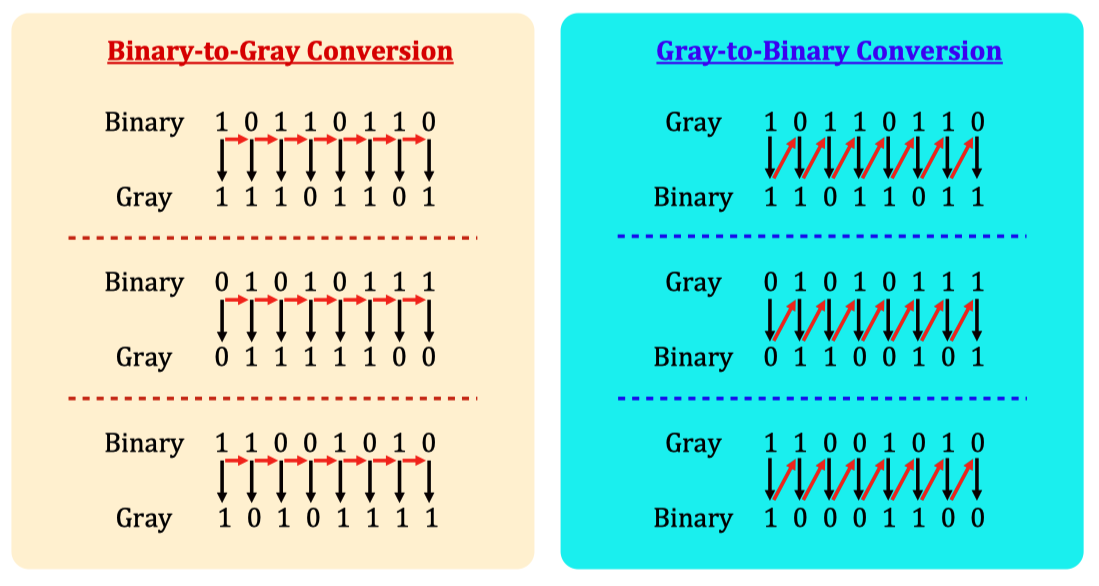
Binary-to-Gray code conversion
- The most significant bit (left-most) in the Gray code is the same as the corresponding MSB in the binary number.
- Going from left to right, add each adjacent pair of binary code bits to get the next Gray code bit. Discard carries.
ตัวหน้าสุด Bring it down แล้วก็เอาตัวหน้า ไปบวกกับตัวหลัง โดยไม่ต้องสนใจ Carry นะ ไปเรื่อย ๆ จนได้ตัวสุดท้าย
Gray-to-binary code conversion
- The most significant bit (left-most) in the binary code is the same as the corresponding bit in the Gray code.
- Add each binary code bit generated to the Gray code bit in the next adjacent position. Discard carries.
อันนี้ทำคล้าย ๆ กัน ตัวหน้าสุด Bring it down แล้วก็เวลาจะบวกกับตัวต่อไป ต้องเอาจากข้างล่าง ขึ้นมาบวกเฉียง ๆ นะ