คำแนะนำ
Instructions Introduction
What Are Instructions?
- Instructions are the ==sequence of steps explaining how to complete a task==
Audience - Who Reads Instructions?
Different Types of Readers:
- People who need to perform a task they don't know how to do
- People who buy a new product and are using it for the first time (owner's manual)
- Some readers read instructions carefully, paying attention to every word
- Some readers rely more on graphics
- Others will try to go through the steps without reading the instructions first
Key Consideration:
ไม่ว่าผู้อ่านจะเป็นใคร สิ่งที่เราต้องสนใจมากที่สุดก็คือ Hazard alerts เนี่ยแหละ (ความปลอดภัยของผู้อ่าน)
- Always ensure the reader's safety with appropriate hazard alerts
Exercise 1: Analyzing Instructions (BlackBerry Example)
Discussion Questions (Work in Pairs)
- Organization Analysis:
- How are the instructions organized?
- How would you describe the structure?
- Reasoning:
- Why are they organized like this?
- Consider:
- Order: What comes first and why?
- Formatting: Whitespace, bolding, etc.
- Diagram locations
- Cautions/warnings
- Alternatives:
- Are other forms of organization possible?
- Is there anything you would change?
BlackBerry Setup Example Structure
- Title: "Welcome to BlackBerry®"
- Introduction paragraph explaining the setup process
- CAUTION box at the top (before steps)
- Main section: "Insert the SIM Card and Battery"
- Numbered steps (1-9) with sub-steps
- Four figures at the bottom showing the process visually
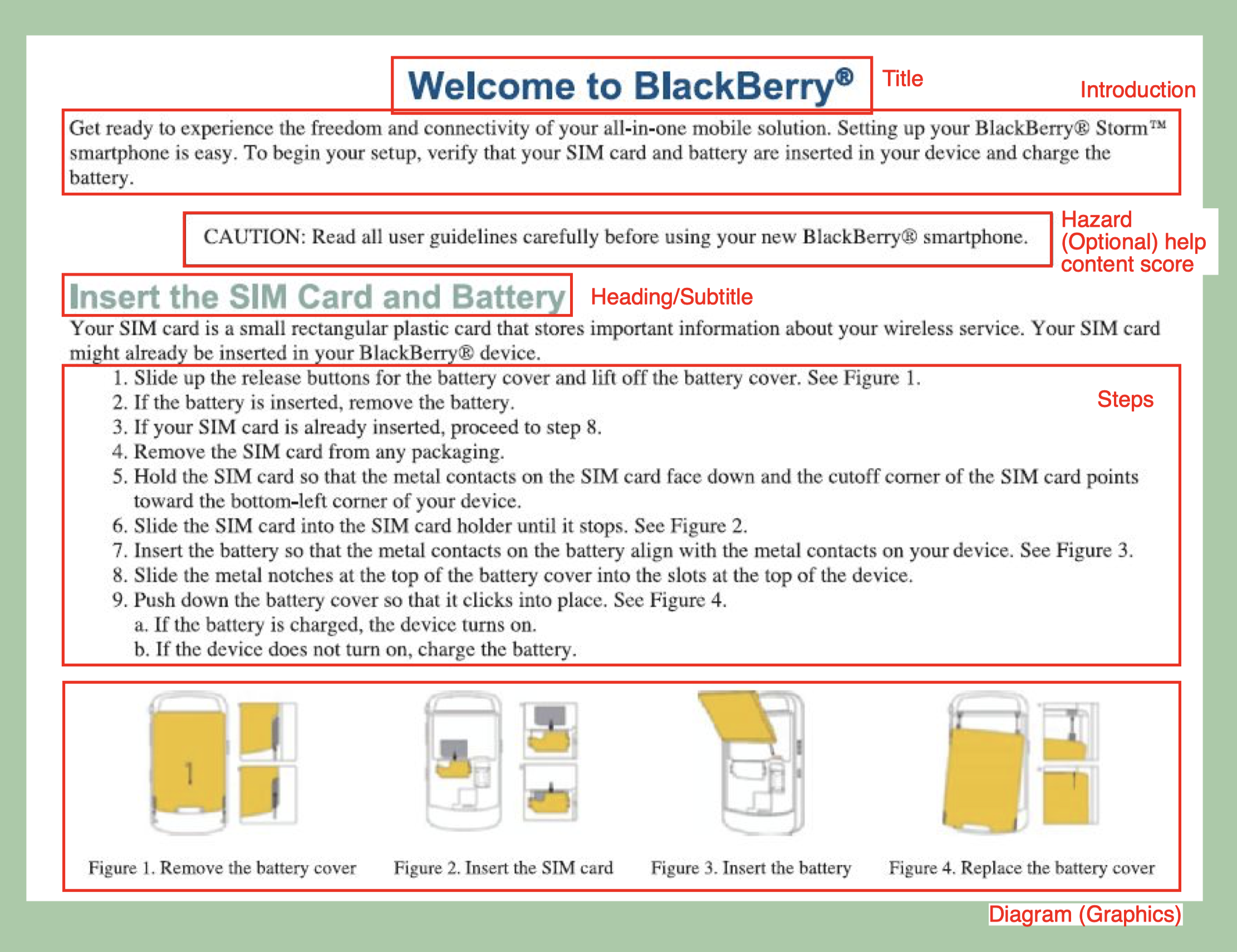
Where to improve:
- Make some texts bold, and red
- Whitespace management
- Move the diagram to right side of the steps (2 columns)
Exercise 2: Analyzing Driving Directions
Discussion Questions (Oral)
- How are these instructions organized?
- What is different from the organization of the other instructions?
- Do you think the organization makes sense? Could it be improved?
Driving Directions Example Features
- Title: "Driving Directions"
- Physical Address provided
- Multiple sections based on starting point:
- "From the North or South via I-95"
- "From East on HWY 264"
- Numbered steps in each section
- No graphics
- Simple list format
Important Notes About Instructions
ในห้องสอบ เวลาฟังก็เขียน Notes ไว้ก่อนนิดนึง พอเสียงจบเลยเริ่มเขียน
Key Principles
DO:
- Clearly understand the sequence of events before writing
- Organize instructions logically
- Use visual aids (diagrams/graphics) if necessary
- PLAN to make sure you have the order correct before writing
- Use whitespace effectively
- Arrange graphics appropriately
- Use warnings when necessary
DON'T:
- Confuse instructions with a list of tips and advice
- Create visual layouts that confuse the reader
- Use unclear or unhelpful formatting
Goal:
- The visual layout should increase understanding, not confuse the reader
Instructions Structure
Primary Structure (Compulsory Elements)
- TITLE
- STEPS
Secondary Structure (Optional but Recommended)
ถ้าอยากได้คะแนนดี ๆ ใน Graded Writing Test
- INTRODUCTION (after the title)
- WARNINGS/HAZARD ALERTS
- GRAPHICS
Note: Which secondary elements are necessary depends on the type of instruction text
Structure 1: Title
Requirements
- Should be simple and clear
- Tell the reader exactly what the instructions are about
Two Main Title Types
- **"How to..." Format:
- How to Cook an Omelette
- How to Install the J112 Shock Absorber
- Gerund (-ing) + Object Format:
- Cooking an Omelette
- Installing the J112 Shock Absorber
Structure 2: Introduction
Purpose
- Inform the reader briefly about the process you are about to explain
Content May Include
- Background information
- Purpose
- Scope
- Organization
- Advice
- (Varies depending on text type)
Key Vocabulary
- Use words such as:
- Steps
- Procedure
- Process
- Directions
- Instructions
Example
"The following 8 steps can help you to cook the perfect omelette."
Structure 3: Steps
What Is a Step?
- A step is the action a reader performs
- All instructions require a list of chronological steps
Characteristics of Effectively Written Steps
Must:
- Contain an action (something the reader does)
- Proceed forward in time
- Use the imperative mood (command verb + object) - ขึ้นด้วยคำกริยาเลย
- Use short sentences
- Include only one action per step (3c)
- Include sufficient, precise details
May:
- Include sub-steps if necessary (3d)
Structure 3b: Two Ways to Write a Step
Method 1: Begin with Imperative Verb
Format: Command verb + object
Examples:
- Push the red button to start the machine
- Insert the USB cable into the USB port
Method 2: Begin with Dependent Clause/Phrase
Format: Dependent clause/phrase + comma + imperative verb
แต่สังเกตว่า ส่วนของการกระทำหลัก ๆ ก็ยังเป็น Imperative Mood อยู่ดีนะ Add the ingredients
Examples with Dependent Clauses:
- After the pan gets hot, add the ingredients
- If you need a receipt, press the green button
Example with Adverbial Phrase:
- At the junction, turn left
Structure 3c: One Action Per Step
Rule
- Include only one action per step
- Exception: Two actions can be combined if they occur simultaneously
Example: Before vs. After
❌ BEFORE - Overloaded Step:
"Start the engine and run it to idling speed while opening the radiator cap and inserting the measuring gauge until the red ball within the glass tube floats either to the acceptable green range or to the dangerous red line."
- ไม่ต้องเขียน Paragraph อะไรขนาดนี้
✅ AFTER - Separated Steps:
- Start the engine
- Run the engine to idling speed
- Open the radiator cap
- Insert the measuring gauge
- Determine whether the red ball within the glass tube floats to the acceptable green range or up to the dangerous red line
Key Principle
"Limit the information within each step. Don't overload your reader by writing lengthy steps."
Structure 3d: Sub-Steps
When to Use Sub-Steps
- Use sub-steps only when the major step is too broad to be understood or followed
Example: Guitar Chord
✓ Correct Use of Substeps:
- Main Step: Play a G major chord
- Sub-steps:
- a. Place your first finger on the third fret of the bottom string
- b. Place your second finger on the second fret of the fifth string
- c. Place your third finger on the third fret of the first string
✗ Overgeneralized (No Substeps):
- "Play a G major chord" → (Too vague without further detail)
Important Note:
"Whether to use substeps depends on your audience's knowledge and experience with the procedure."
Structure 3e: Explanations
What Is an Explanation?
- An extension of the step it explains
- A sentence that comes after the step (if necessary)
- NOT another step or action
Typical Explanations Include
- Why a step is important
- What will happen after the step
- More details on how to perform the step
- What not to do and why
- Quick definitions
Examples of Explanations
คือพวกนี้มันก็ไม่ได้อยู่ใน Primary Structure หรือว่าอะไร แต่ถ้าเขียนใน #FinalExam จะช่วยในเรื่อง Content Score
Format
Step (imperative). Explanation (additional sentence).
Examples
Example 1:
- Step: Rinse the boiled egg with cold water
- Explanation: The cold water will make the egg easier to peel
Example 2:
- Step: Press the PROGRAM button on the remote control
- Explanation: The MENU will appear on the screen
Example 3:
- Step: Take the first left onto Highway 5
- Explanation: Liberty Community College will be on your right
Structure 4: Graphics
Purpose
- Graphics are used to help readers do the steps
Guidelines
DO:
- Make each graphic correspond to a specific step or steps
- Let the reader know when to look at each graphic
- Place the graphic next to the step, or refer to it in the text
- Include plenty of white space
DON'T:
- Include useless or confusing graphics that don't help the reader do a step
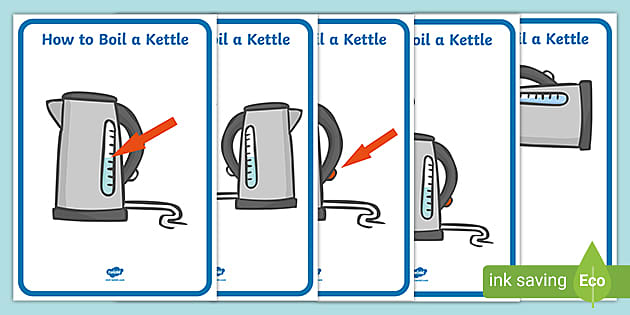
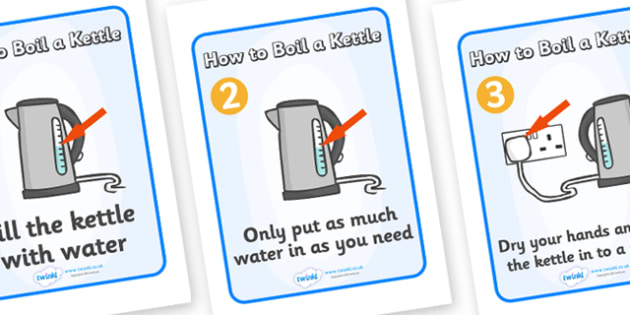
Exercise 3: Kettle Instructions Practice
Task
Make a title and copy the following steps. Add graphics and more explanations (if necessary)
Steps Provided
- Open the lid of your kettle and pour in water
- Close the lid and place your kettle on the base
- Turn your kettle on and wait for the orange light (When the kettle has boiled it will automatically stop)
- Remove it from the base and pour the boiling water into your cup
Requirements
- Graphics are there to HELP UNDERSTANDING
- Use them carefully and logically
- Consider layout/size/necessary detail
- You should be able to EXPLAIN your choices
Graphics Examples from Document
Example 1: Brewing Espresso
Features:
- Title split across two pages: "Brewing the Espresso" and "Brewing the Espresso (Continued)"
- Numbered steps integrated with numbered graphics
- Graphics placed adjacent to corresponding steps
- Clear visual flow
Example 2: Ventilator Controls
Features:
- Large, bold graphics for low-tech audience
- Single detailed diagram referenced by multiple steps
- High contrast and clear labeling
- Minimal text, maximum visual information
Example 3: HP Tri-Color Installation
Features:
- Six-panel sequential graphics
- Numbered panels (1-6)
- Graphics-only approach (no text steps)
- Clear visual progression
- Caption: "Instructions Using Pictures Only"
Structure 5: Hazard Alerts
Three Levels of Hazard Alerts
Make sure to include square around it
\boxed{}
| Alert Type | Use When |
|---|---|
| CAUTION | Your reader could damage equipment by doing a step incorrectly. Insert cautions before readers are likely to do anything harmful. Often accompanied by a symbol or graphic. (ของพัง) |
| WARNING | Your reader could get hurt by overlooking a step or not doing a step correctly. Place warnings before the reader is likely to do anything dangerous. Often accompanied by a symbol or graphic representing danger. (ผู้อ่านอาจได้รับความบาดเจ็บ) |
| DANGER | [Highest level - for life-threatening situations] |
Formatting Requirements
**CRITICAL: **
- Write CAUTION, WARNING, and DANGER in ALL CAPS
- Use BOLDFACE FONT so the reader does not miss it
- Place them BEFORE the reader makes the mistake
- Explain WHY it is dangerous
- Use text boxes and white space so the reader sees it
Hazard Alert Best Practices
Writing Safety Information
Key Principle:
"When you write safety information, be clear and concise. Avoid complicated sentences."
Examples
❌ COMPLICATED:
"It is required that safety glasses be worn when inside this laboratory"
✓ SIMPLE (Option 1):
"You must wear safety glasses in this laboratory"
✓ SIMPLE (Option 2):
"Wear safety glasses in this laboratory"
✓ EVEN SIMPLER (Phrase):
"Safety Glasses Required."
Pro Tip
"Sometimes a phrase works better than a sentence"
Operating Instructions Example
Frypan Operating Instructions
Steps:
- Before first use, the frypan must be cleaned. Ensure the temperature control probe is not attached to the frypan during the cleaning process. Wash your frypan and lid with hot water and mild detergent. Rinse with fresh water and dry thoroughly. Your frypan is now ready for use
- Season the cooking surface by applying a thin coat of cooking oil and rub in with paper toweling
- Insert the control probe into the inlet on the side of the frypan
- Plug the power cord into the power outlet and turn on
- Set the temperature control probe to the desired temperature setting
Exercise 4: Warning Practice
Task
Think of a warning to write after step 5 of the frypan instructions
Hint
Consider making it about:
- How you use the apparatus
- What you should put in it
- What you should NOT put in it
- When to use certain features
Instructions: Recipes
Tested in Graded Writing 2 - เจาะมาเรื่องอาหารโดยเฉพาะเลยนะอันนี้
Recipe-Specific Structure
Primary Structure (Required):
- Title
- Ingredients/Equipment list
- Steps
Secondary Structure (Optional but Recommended):
- Graphic (after title)
- Introduction (after title/graphic)
Important Notes
About Optional Structures:
- Including optional structures is likely to improve your content score
- It will NOT affect your structure score
About Secondary Structure Score:
- Determined by how you logically organize and connect the steps
- Key questions:
- Did you include all steps?
- Do they match the order and organization of the video/source?
Recipe Scoring Guidelines
Content Score Improved By
Structural Elements:
- Including main optional structures (introduction and graphics)
- Including both equipment AND ingredients
- Including warnings and explanations
- Making sure layout is visually attractive and helpful to the reader
- Writing more detail (as long as it is relevant)
Language Score Improved By
Grammar & Vocabulary:
- Using the imperative in the steps
- Using correct vocabulary for:
- Equipment
- Ingredients
- Instructions
- General grammatical accuracy
Important Note
"The recipe examples that follow are not models, just examples. They are not perfect and can be improved, e.g., in layout"
Recipe Requirements Summary
Must Include
- List of ingredients before the steps (REQUIRED)
May Include
- List of equipment (pots, pans, forks, etc.)
Optional
- Introduction
- Graphics
Recipe Examples from Document
Example 1: Chilli con Carne
Structure:
- Title: "1. Chilli con Carne"
- Graphic (photo of dish)
- Introduction paragraph
- Ingredients list (detailed with measurements)
- Method section (numbered steps 1-5)
- Serving suggestion at end
- ไม่มี Equipment แต่ไม่มีไม่เป็นไร แต่ถ้ามีก็ช่วย Content Score
Example 2: Sweet-and-Sour Chicken
Structure:
- Title with prep/cook time
- Subtitle describing the dish
- Two-column layout:
- Left: Ingredients with measurements
- Right: Numbered steps (1-8)
- Steps correspond to circled numbers
- Efficient use of space
Assignment: Write a Recipe
Requirements
Must Include:
- Title
- Introduction
- Ingredients and equipment
- At least 8 steps
- At least 2 explanations
- At least 1 graphic
- At least 1 CAUTION statement
Important Rule
"Don't COPY from the internet"
Exercise 5: Peer Correction
Use the Rubric to Score Your Peer
Scoring Categories:
- Content /5
- Structure /5
- Language /5
Guidance
- Use the earlier slides to guide your marking
- Be constructive and specific in feedback
- Consider all elements discussed in the lesson
Key Takeaways
Essential Elements of Good Instructions
- Clear Title - Reader knows exactly what to expect
- Logical Organization - Steps flow chronologically
- Precise Steps - One action per step, using imperatives
- Helpful Graphics - Placed strategically to aid understanding
- Safety First - Hazard alerts placed before dangerous steps
- Reader-Focused - Consider audience knowledge level
Remember
- Instructions guide action
- Clarity is paramount
- Visual layout matters
- Safety cannot be compromised
- Test your instructions with real users when possible