Data Ingestion = Handle a large volume of data, to organize to make it manageable, finally stored in the Hadoop
Typical Enterprise Data Architecture
- Data Sources → Ingestion → Batch / Speed Processing → Service Layer
- Common stack: Kafka + Hadoop + Spark + NoSQL + SQL
- Ingestion tools: Apache Kafka, Akka, Hadoop
- Batch: Spark, Hadoop (MapReduce)
- Speed: Spark Streaming, Apache Storm
- Service: Cassandra, HBase, MongoDB, Splunk, Oracle, Teradata, Hive
Motivation: Why Actor Model?
- Writing concurrent and parallel programs is tough
- Programming with threads, locks, atomic transactions, etc. is:
- Error-prone
- Leads to spaghetti code that is difficult to read, test, and maintain
- Two common outcomes:
- Outcome 1: Panic and write messy multithreaded programs
- Outcome 2: Use single-threaded applications that rely on external services (DBs, file systems) to handle concurrency for them
- Solution: The Actor Model!
We can support parallelism, ถ้าแต่ละ code ไม่ dependent
Model of Data Flow
Three main dataflow patterns between processes:
| Model | Characteristics |
|---|---|
Dataflow through Databases  | Information storage and retrieval |
Dataflow through Services  | Service calls with responses |
Message-Passing Dataflow  | Asynchronous messages |
Comparison
| Property | Databases | Message-Passing | Services |
|---|---|---|---|
| Unit | Data | Messages | Function calls |
| Response | No response | Maybe response | Response |
| Blocking | Non-blocking | Usually non-blocking | Blocking |
| Sync style | Asynchronous | Asynchronous | Synchronous |
| Addressing | No addressing | Addressing recipient | Addressing recipient |
Analogy: Think of Databases like a shared whiteboard (anyone reads/writes), Services like a phone call (you wait for an answer), and Message-Passing like sending a text (fire and forget — you don't wait).
Asynchronous (ไม่พร้อมกัน)
- ผู้ส่งข้อความ ไม่ต้องรอ ให้ผู้รับประมวลผลเสร็จก่อนจึงจะทำอย่างอื่นต่อได้
- ส่งแล้วก็เดินหน้าต่อได้เลย (fire-and-forget)
- ตรงข้ามกับ Synchronous ที่ต้องหยุดรอ
เหมือนส่ง LINE แล้วไปทำอย่างอื่นต่อได้เลย ไม่ต้องยืนรอให้คนอีกฝั่งอ่านและตอบก่อน
Blocking / Non-blocking
- Blocking — Thread/process ถูก "หยุด" ไว้จนกว่าจะได้ผลลัพธ์กลับมา ทำอย่างอื่นไม่ได้ระหว่างรอ
- Non-blocking — ยิงคำขอออกไปแล้ว ไม่ถูกหยุด สามารถทำงานอื่นต่อได้ระหว่างรอ แล้วค่อยรับผลลัพธ์ทีหลัง
Blocking เหมือนยืนต่อแถวซื้อกาแฟแล้วทำอะไรไม่ได้เลยจนกว่าจะได้แก้ว — Non-blocking เหมือนกดสั่งผ่านแอปแล้วไปนั่งทำงานก่อน พอกาแฟพร้อมค่อยไปรับ
Addressing Recipient (การระบุผู้รับ)
- การที่ผู้ส่งต้อง ระบุปลายทางชัดเจน ว่าจะส่งข้อความไปหาใคร (เช่น Actor Address, Service Endpoint)
- ตรงข้ามกับ Databases ที่ "ทิ้ง" ข้อมูลไว้กลาง ๆ โดยไม่ได้ระบุว่าใครจะมาอ่าน
เหมือนความต่างระหว่างส่งพัสดุระบุชื่อ-ที่อยู่ผู้รับ (Addressing) กับวางของไว้บนโต๊ะกลางออฟฟิศแล้วให้ใครก็ได้มาหยิบ (No Addressing)
Actor Model
What is it?
- Provides a higher level of abstraction for writing concurrent and distributed systems
- Alleviates the developer from explicit locking and thread management
- Originally defined in 1973 paper by Carl Hewitt
- Popularized by Erlang — used at Ericsson to build highly concurrent and reliable telecom systems
Core Concepts
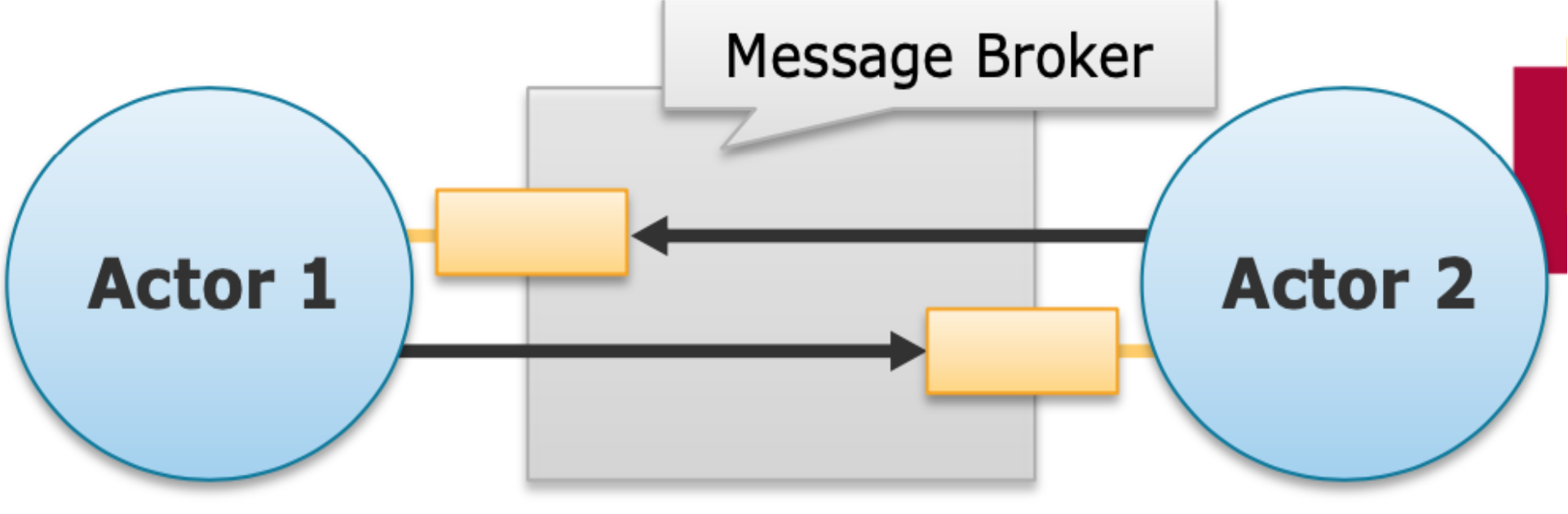
- Actor = a stricter message-passing model that treats actors as the universal primitives of concurrent computation
- Each actor:
- Is a computational entity with private state/behavior
- Owns exactly one mailbox (cannot subscribe to more or less queues)
- Reacts on messages one at a time
Actor Reactions (What an actor can do when it receives a message)
- Send a finite number of messages to other actors (no-blocking)
- Create a finite number of new actors (มันสามารถ spawn new actor ได้)
- Modify its own internal behavior (state) for the next message
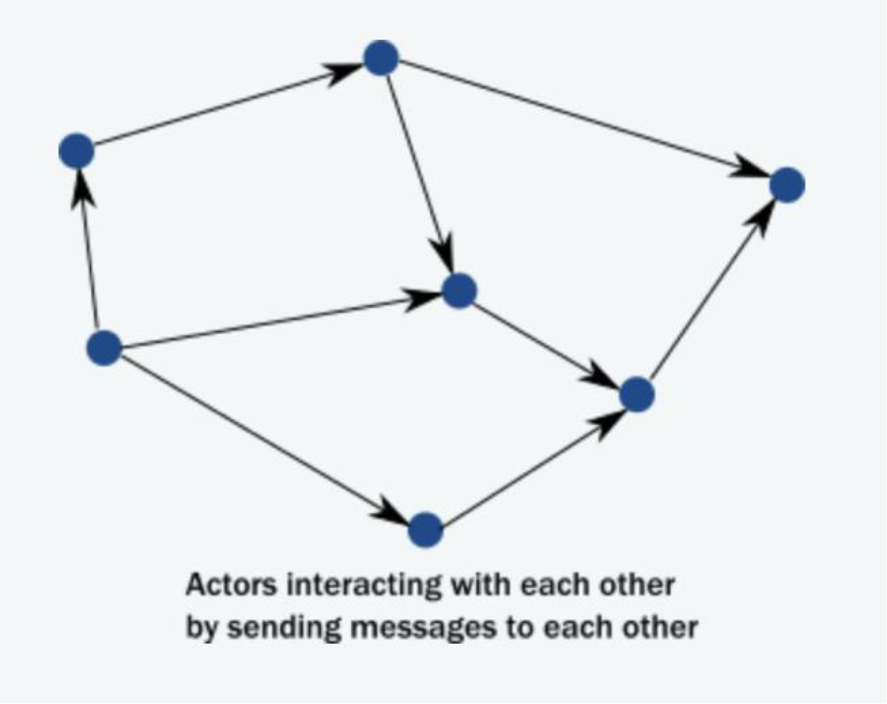
Key Properties
- Messages are always sent asynchronously
- No requirement on order of message arrival
- Queuing and dequeuing of messages in an actor mailbox are atomic operations → no race conditions!
Analogy: Actors are like post office boxes. You drop a letter in (send a message), the person checks their box when they're ready (non-blocking), and they respond on their own time. No one is standing at the door waiting.
When to Use the Actor Model?
- When the problem can be decomposed into independent tasks
- When the problem can be decomposed into a series of tasks linked by a clear flow
- In short: when the problem can be parallelized
- Remember Amdahl's Law: speedup is limited by the sequential portion of the program
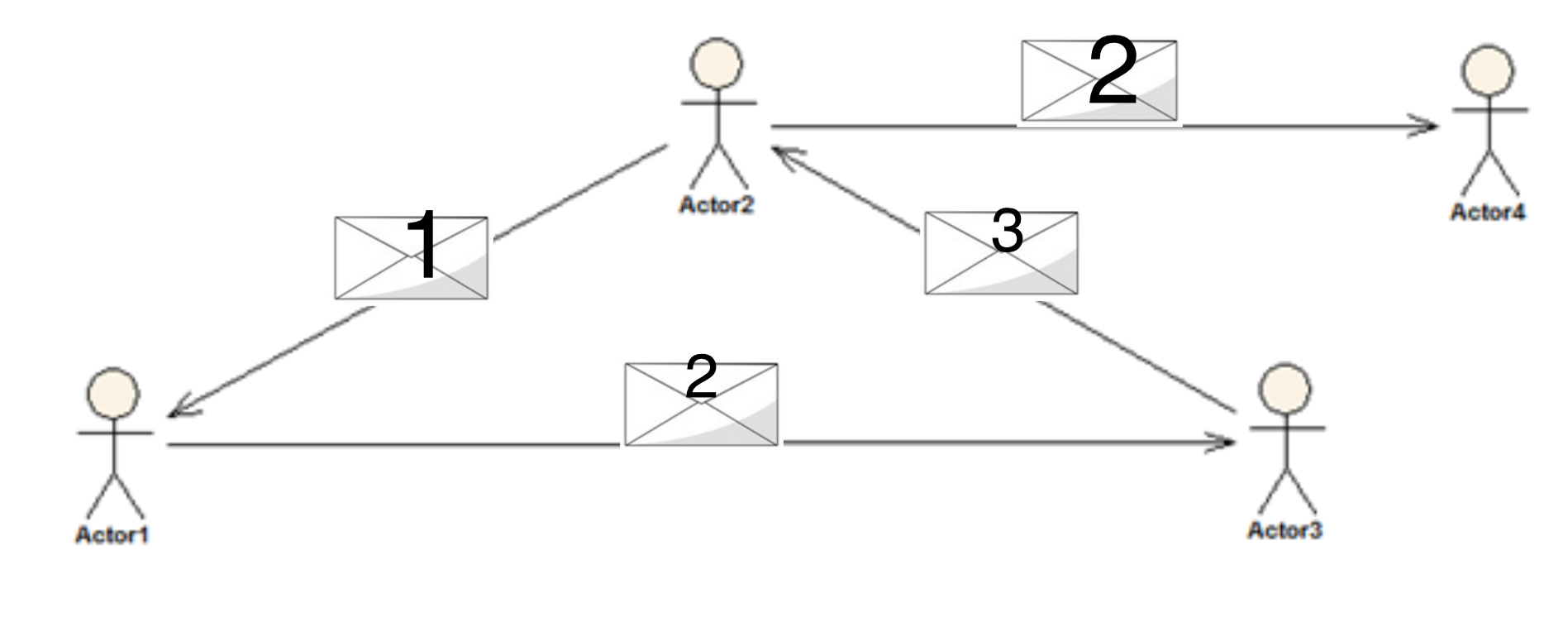
Advantages over pure RPC
- Fault-tolerance:
- "Let it crash!" philosophy to heal from unexpected errors
- Automatic restart of failed actors; resend/re-route of failed messages
- Deadlock/starvation prevention:
- Asynchronous messaging and private state actors prevent many parallelization issues
- Parallelization:
- Actors process one message at a time but different actors operate independently
- Actors may spawn new actors if needed (dynamic parallelization)
- ก็มี multiple actor จะได้ parallel ได้ดีขึ้น (more worker ไงงง)
How Communication Works (Step by Step)
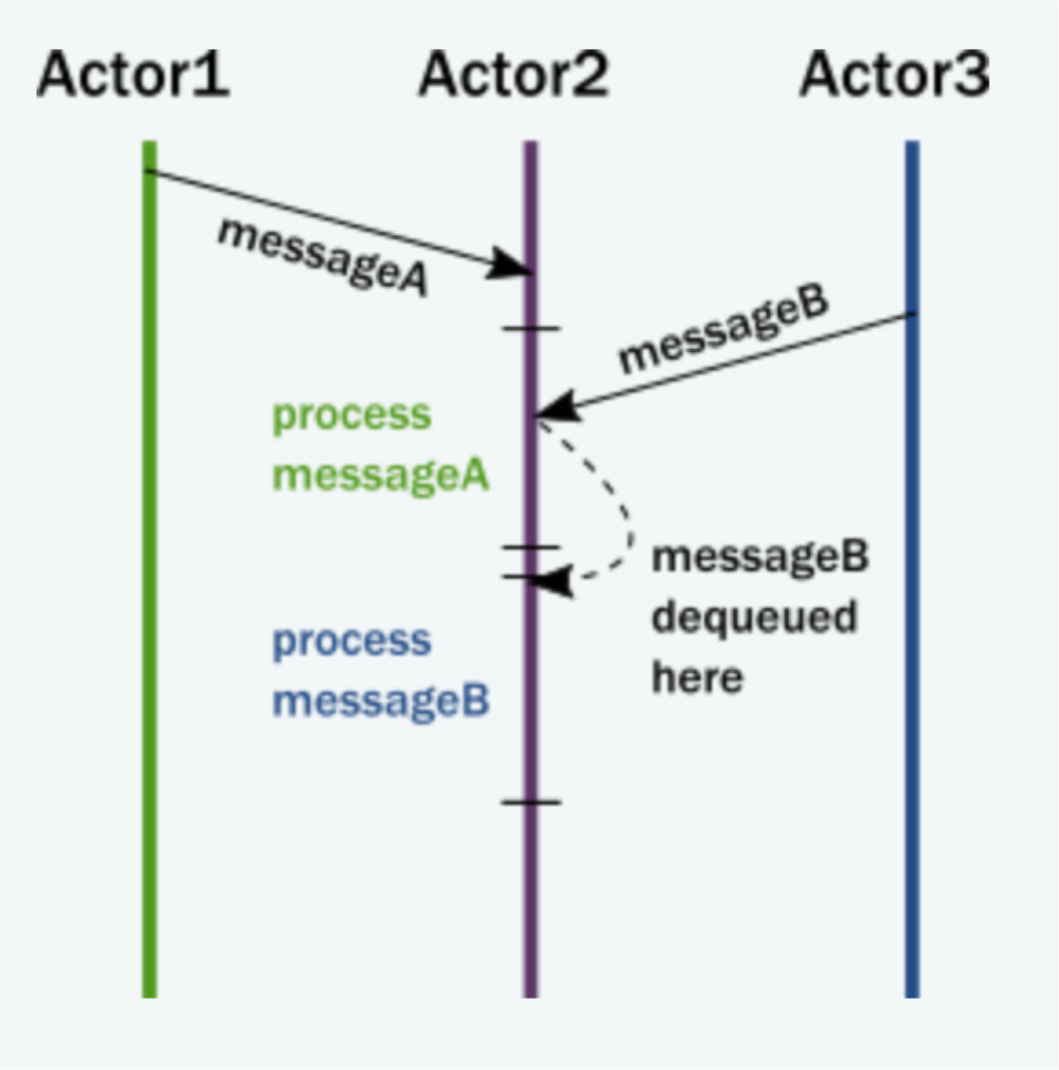
- The actor adds the message to the end of a queue
- If not scheduled, it is marked as ready to execute
- A hidden scheduler entity takes the actor and starts executing it
- Actor picks the message from the front of the queue
- Actor modifies internal state, sends messages to other actors
- The actor is unscheduled
Actor Components
| Component | Description |
|---|---|
| Mailbox | The queue where messages end up |
| Behavior | The state of the actor, internal variables |
| Messages | Pieces of data (like method calls + parameters) |
| Execution Environment | The machinery that invokes message handling code |
| Address | Used to send messages to a specific actor |
Actor Programming Paradigms Comparison
| Object-Oriented | Actor Programming | Task-Oriented |
|---|---|---|
| Objects encapsulate state and behavior | Actors encapsulate state and behavior | Application split into task graph |
| Objects communicate with each other | Actors communicate + activities scheduled transparently | Tasks are scheduled and executed transparently |
| Separation of concerns → easier to build | Combines OO + Task advantages | Decoupling of tasks allows async/parallel programming |
Advantages and Drawbacks of Actor Model
Advantages ✅
- Extends OOP benefits by splitting control flow and business logic
- Allows decomposition into interactive, autonomous, and independent components that work asynchronously
Drawbacks ❌
- Creating actors may dramatically affect responsiveness
- Deciding where to store and run new actors requires archiving records → can cause performance penalties in highly distributed systems
- No. of actor to be active = computation (latency) + storage cost
Popular Actor Frameworks
| Framework | Language | Special Feature |
|---|---|---|
| Erlang | Erlang | Native language support, strong actor isolation |
| Akka | Java/Scala (JVM) | Actor Hierarchies |
| Orleans | Microsoft .NET | Virtual Actors (persisted state, transparent location) |
Akka
What is Akka?
- Open-source framework for Java and Scala on the JVM
- ==Aimed to solve concurrent/parallel problems using the actor model==
- Written in Scala, included in the Scala standard library
- Inspired by Erlang
- Invented by Jonas Bonér; maintained by Lightbend
- Website: https://akka.io/
Key Features
- Simple, high-level abstractions for concurrency and parallelism
- High-level abstractions = easy to understand, syntax, blah blah
- High-performance: event-driven, asynchronous, non-blocking
- Actors communicate via asynchronous messages (sender doesn't wait)
- Supports hierarchical actor networks → ideal for fault-tolerant apps
- How can the hierarchical networks support fault-tolerant, one actor die, send task to another to do! (ถามใน Quiz)
- Actor can self heal, restart, spawn a new child in order to the the task.
- Can deploy actors across different JVMs in distributed environments
- Purely designed for distributed environments
Akka Modules
| Module | Description |
|---|---|
| Akka Actors | Core actor model classes for concurrency and distribution |
| Akka Cluster | Resilient and elastic distribution over multiple nodes |
| Akka Streams | Asynchronous, non-blocking, backpressured reactive streams |
| Akka Http | Streaming-first HTTP server and client classes |
| Cluster Sharding | Decouple actors from their locations, reference by identity |
| Akka Persistence | Persist actor state for fault tolerance and state restore |
| Distributed Data | Eventually consistent, distributed, replicated key-value store |
| Alpakka | Stream connector classes to other technologies |
- Persistence ≠ Ephemeral (Temporary)
Akka Actor Internals
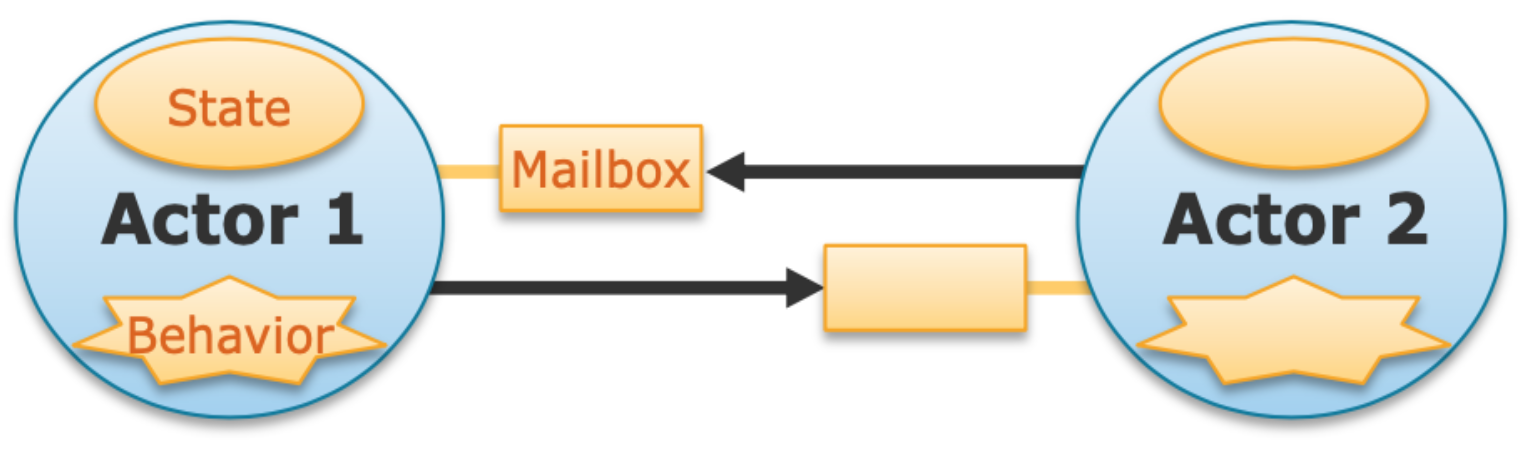
This is the fundamental formula for an Akka Actor.
Communication
- Send messages to mailboxes → unblocking, fire-and-forget
- Messages are immutable, serializable objects
- Mutable messages are possible, but DON'T use them!
- Object classes known to both sender and receiver
- Receiver interprets a message via pattern matching
Java Code Structure
public class Worker extends AbstractActor {
    @Override
    public Receive createReceive() {
        return receiveBuilder()
            .match(String.class, this::respondTo)
            .matchAny(object -> System.out.println("Could not understand received message"))
            .build();
    }

    private void respondTo(String message) {
        System.out.println(message);
        this.sender().tell("Received your message, thank you!", this.self());
    }
}AbstractActor→ Inherit default actor behavior, state, and mailboxReceiveclass → Performs pattern matching and de-serialization.build()→ Builder pattern for constructing aReceiveobjectthis.sender().tell(...)→ Send async, non-blocking response to sender
Actor Hierarchies
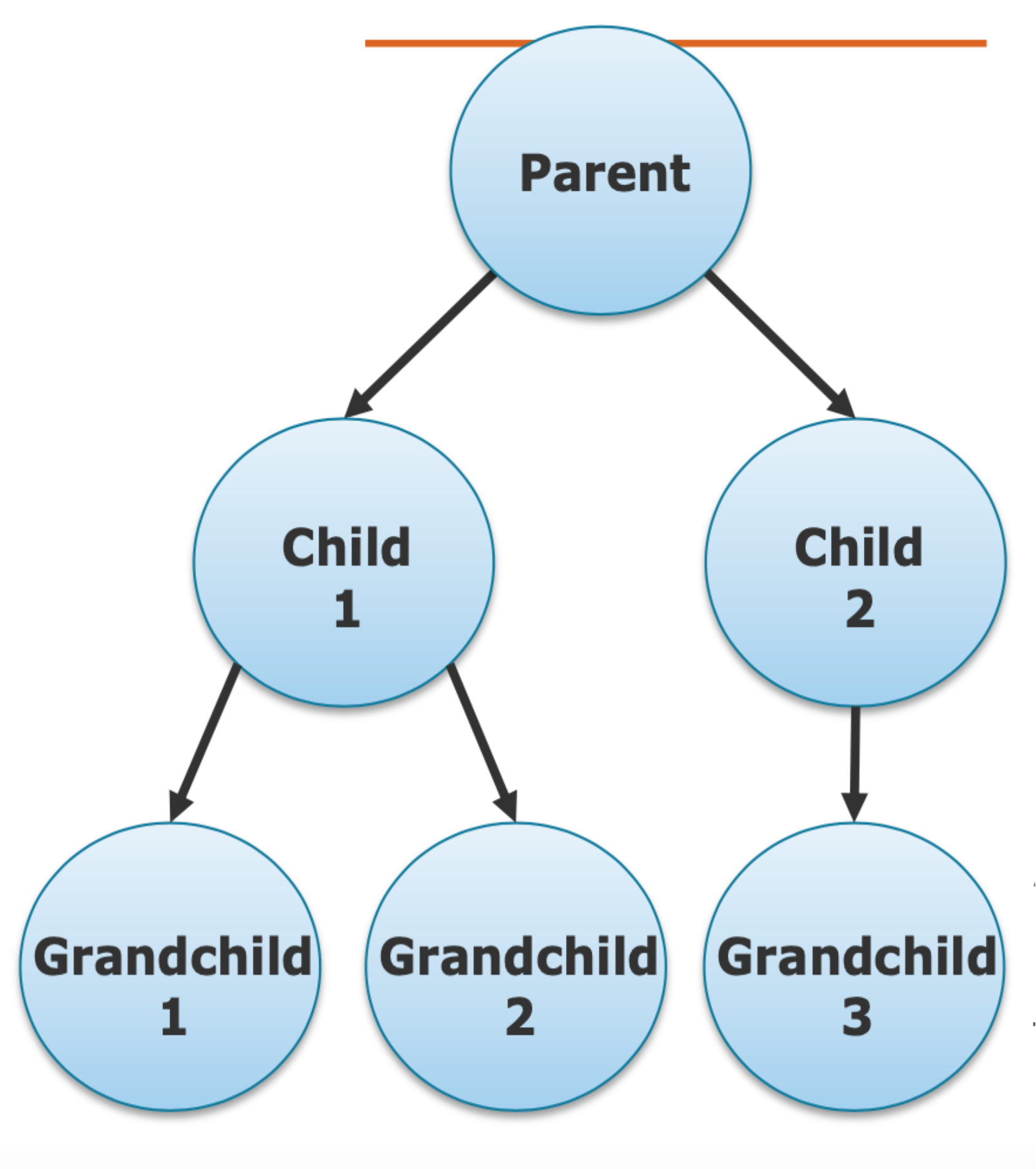
- Actors can dynamically create new actors (delegate work!)
- Supervision hierarchy: creating actor (parent) supervises created actor (child)
- Structure: Parent → Children → Grandchildren (tree structure)
Fault-Tolerance Options When Child Fails
| Action | Description |
|---|---|
| restart | Restart the child actor |
| resume | Ignore the failure and continue |
| stop | Stop the child actor permanently |
| escalate | Pass the failure up to the parent |
- If parents fail → system crash (we don’t have standby parent)
Actor Lifecycle
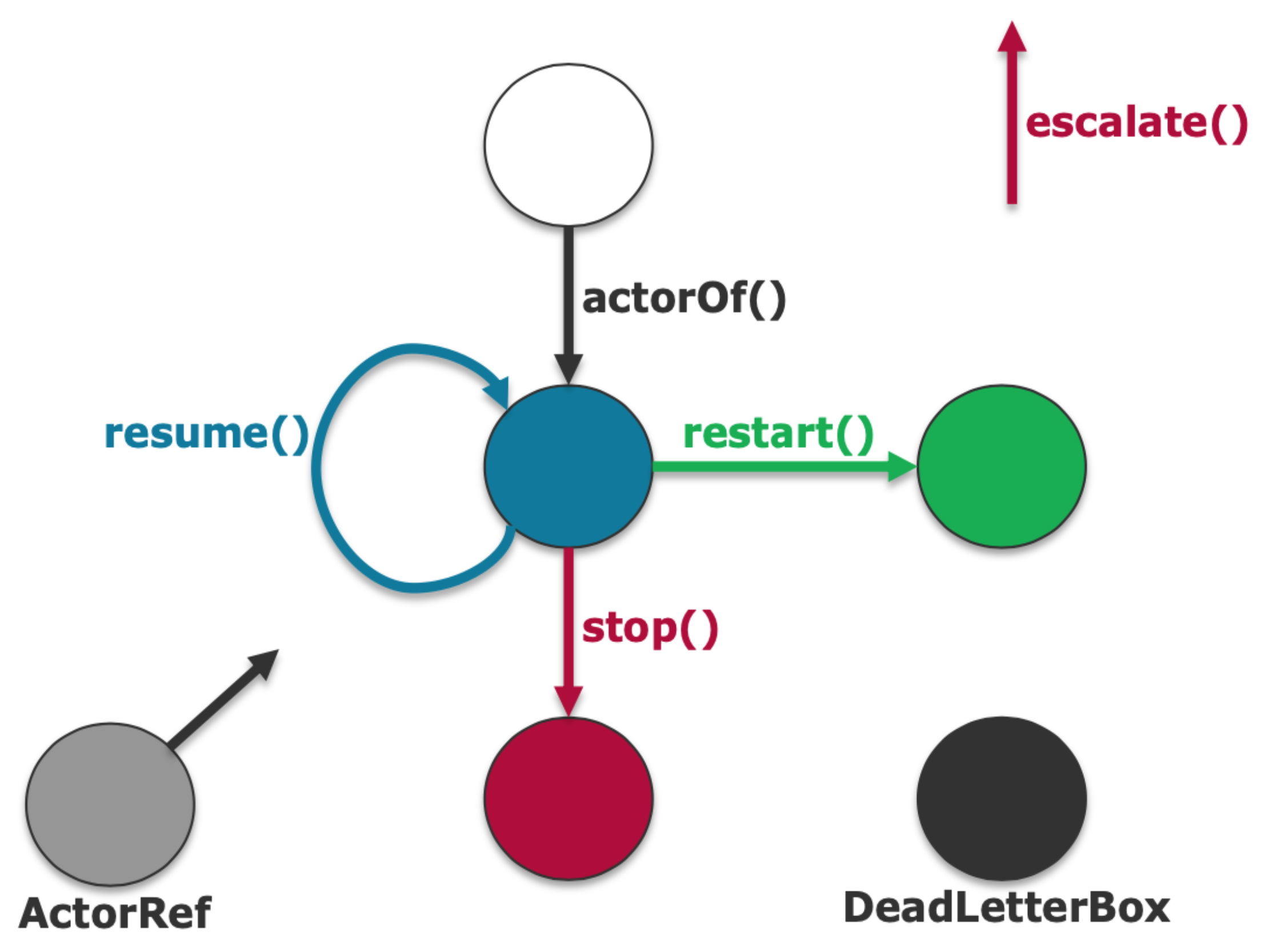
actorOf()→ Creates and starts the actorresume()→ Continue after failure (keep state)restart()→ Fresh restart after failurestop()→ Permanently stop the actorescalate()→ Escalate failure to parent- ActorRef remains even after actor stops (grey = dead reference)
- DeadLetterBox → receives messages sent to stopped actors
Message Delivery Guarantees
Three Types
| Type | Description | Characteristics |
|---|---|---|
| at-most-once | Delivered 0 or 1 times | No guaranteed delivery, no duplication, highest performance, fire-and-forget |
| at-least-once | Delivered 1 or more times | Guaranteed delivery, possible duplication, ok performance, send-and-acknowledge |
| exactly-once | Delivered exactly once | Guaranteed delivery, no duplication, bad performance, send-acknowledge-deduplicate |
Note: With TCP, Akka basically guarantees exactly-once, but failures can still cause message loss!
You can implement at-least-once and exactly-once with at-most-once!
Analogy: at-most-once = sending a letter with no tracking. at-least-once = certified mail (may resend if unconfirmed). exactly-once = notarized delivery with deduplication check.
Push vs. Pull Propagation
Work Propagation
- Producer actors generate work for consumer actors
| Model | Description | Trade-off |
|---|---|---|
| Push | Producers send work to consumers immediately; work queued in consumer inboxes | Fast work propagation; risk for message congestion/drops |
| Pull | Consumers ask producers for work when ready; work queued in producer state | Slower work propagation; no risk for message congestion |
| ![[Pasted image 20260325095616.png | center | 500]] |
Apache Kafka
What is Kafka?
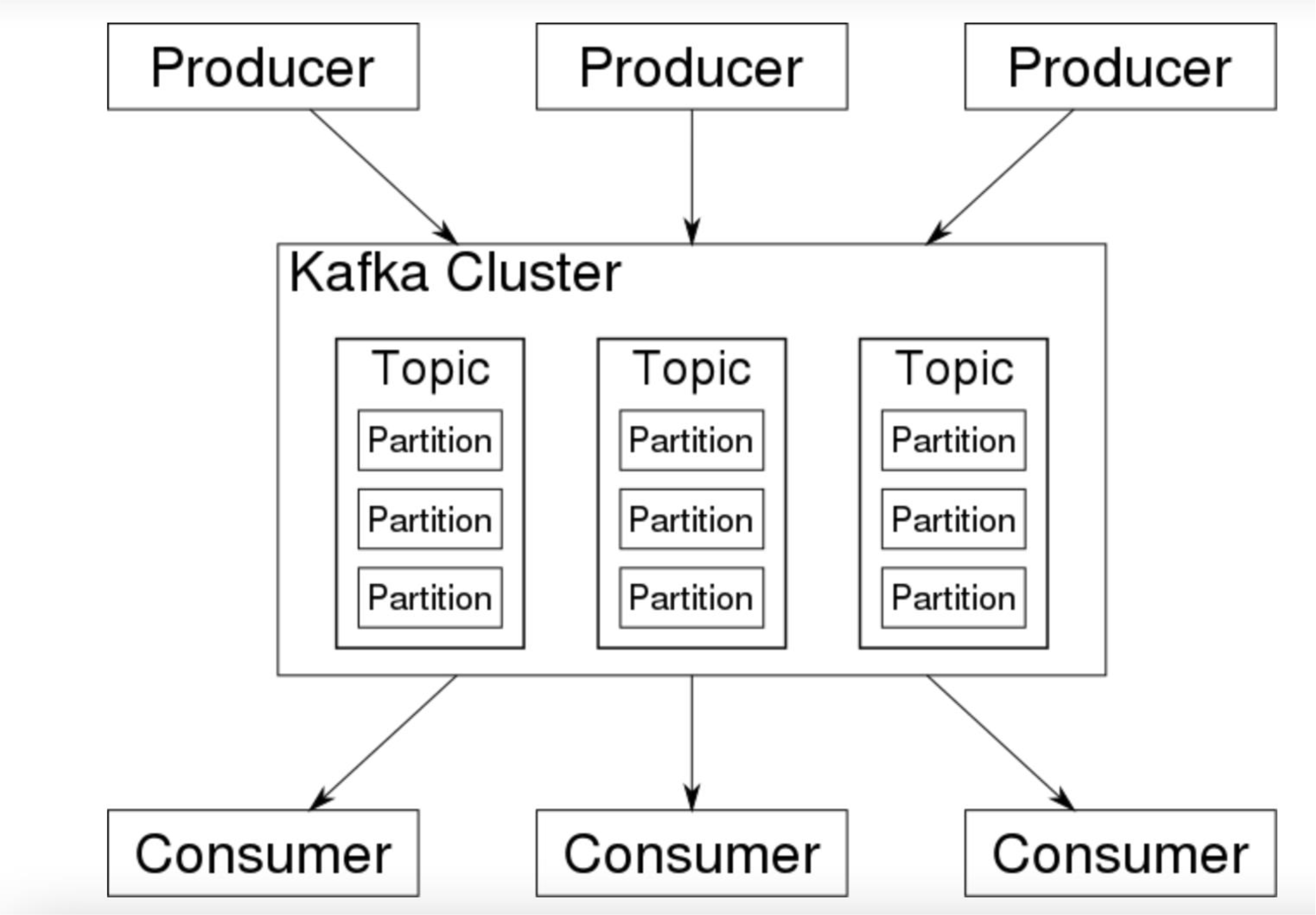
- A distributed streaming platform
- High Scalable via partitioning
- Fault Tolerant via replication
- Allows high level of parallelism and decoupling between data producers and consumers
- De facto standard for near real-time store, access and process data streams
- Critical component of most Big Data Platforms and the Hadoop ecosystem
Kafka Adoption & Use Cases
- LinkedIn: activity streams, operational metrics, 400 nodes, 18k topics, 220B msg/day (peak 3.2M msg/s)
- Netflix: real-time monitoring and event processing
- Twitter: part of Storm real-time data pipelines
- Spotify: log delivery (reduced from 4h down to 10s), Hadoop
- Uber, Airbnb, Cisco, Mozilla, Square, and many more
Kafka Basic Concepts
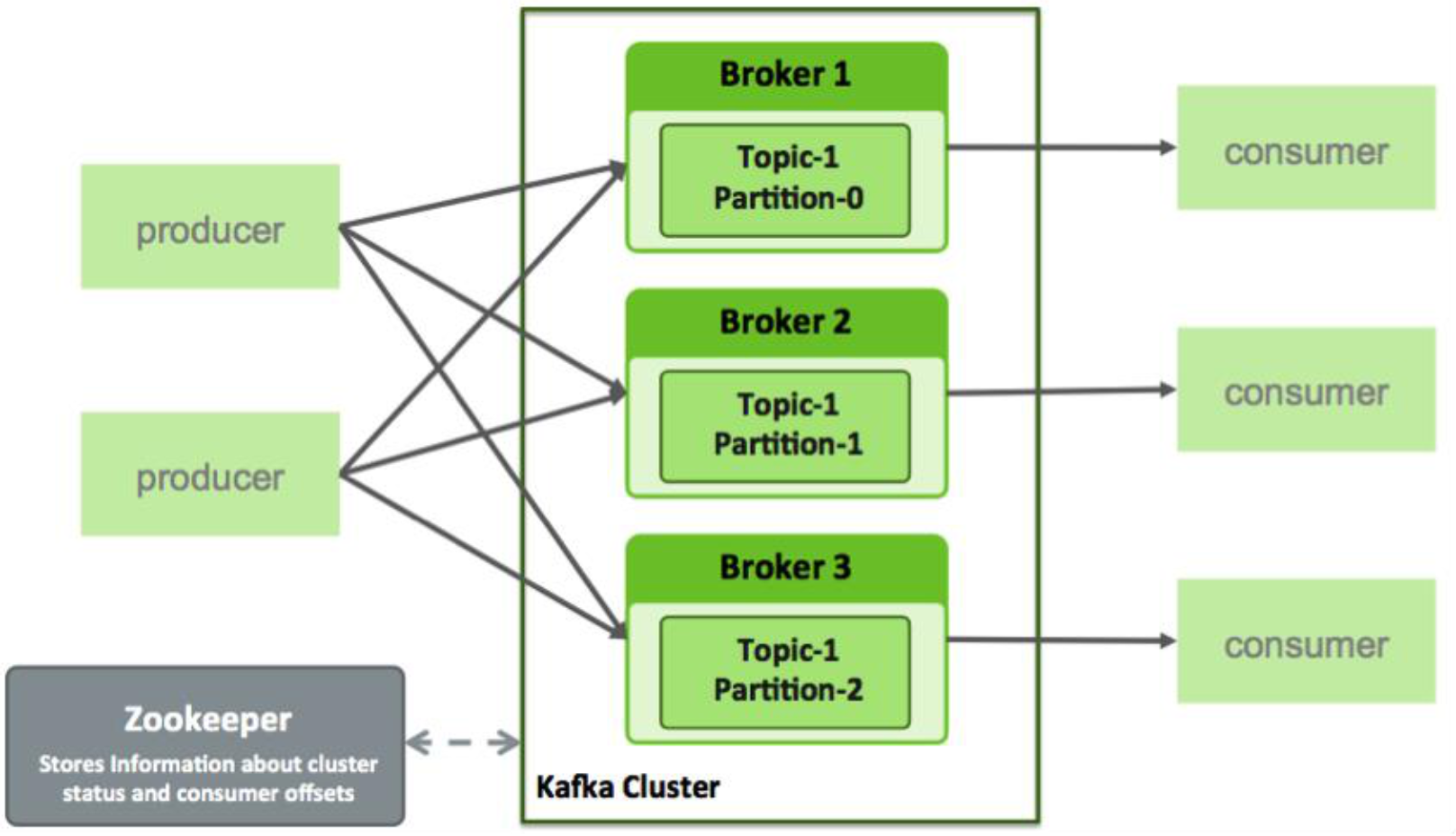
| Concept | Description |
|---|---|
| Broker | A Kafka node on the cluster |
| Topic | A stream of records category — supports multiple writers/readers, partitioned, replicated (support fault tolerant) |
| Producer | Pushes messages into a Kafka topic |
| Consumer | Pulls messages off of a Kafka topic |
| Data Retention | Based on time or size |
| Zookeeper | Stores Kafka metadata (cluster status and consumer offsets) |
| 
Kafka Broker
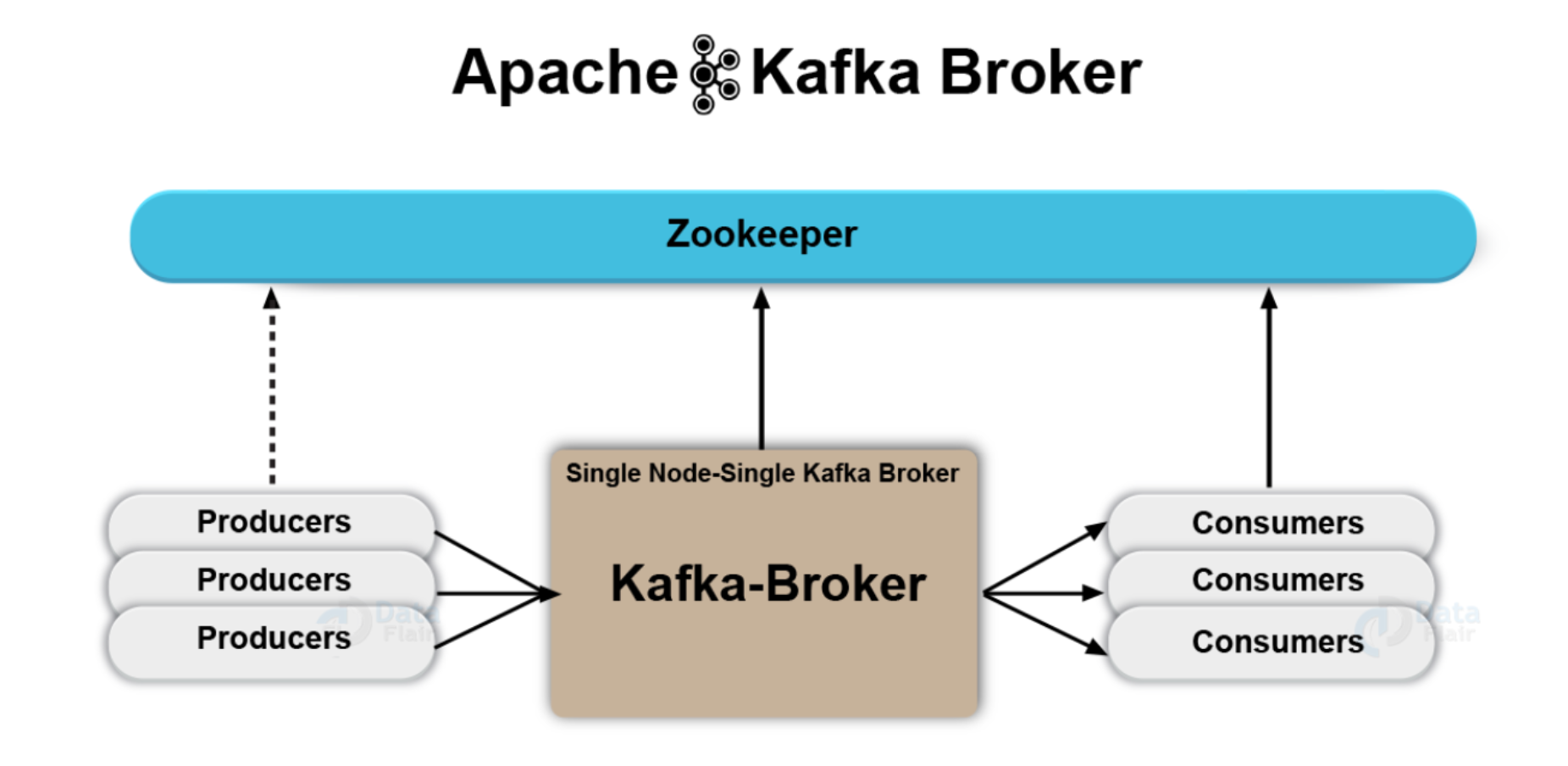
- A Kafka broker arranges transactions between producers and consumers
- Brokers handle all requests from clients to write and read events
- A Kafka cluster = collection of one or more Kafka brokers
- Architecture:
Producers → Kafka-Broker → Consumers(all coordinated via Zookeeper)
Topics
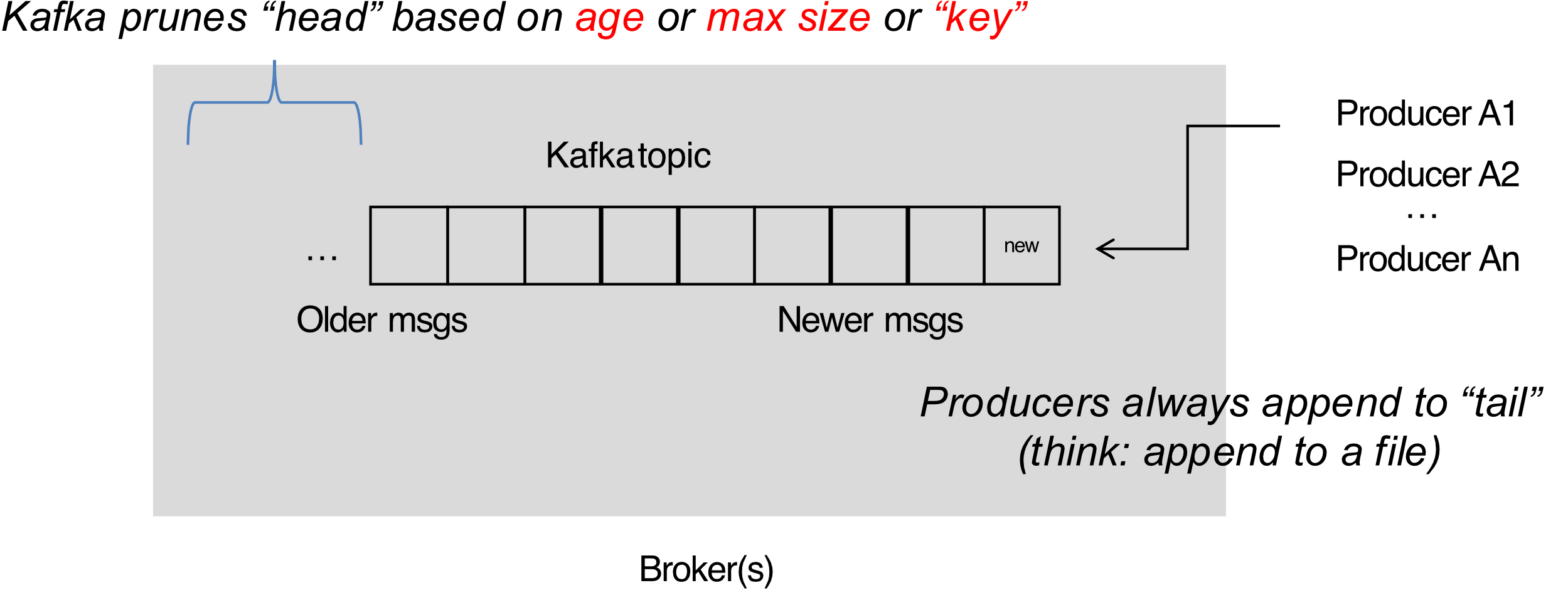
- Topic = feed name to which messages are published (e.g., "zerg.hydra")
- Producers always append to "tail" (think: append-only file)
- Kafka prunes the "head" based on age or max size or "key"
- Consumers use an offset pointer to track/control their read progress
- เหมือนกับ index นั่นแหละ
Partitions
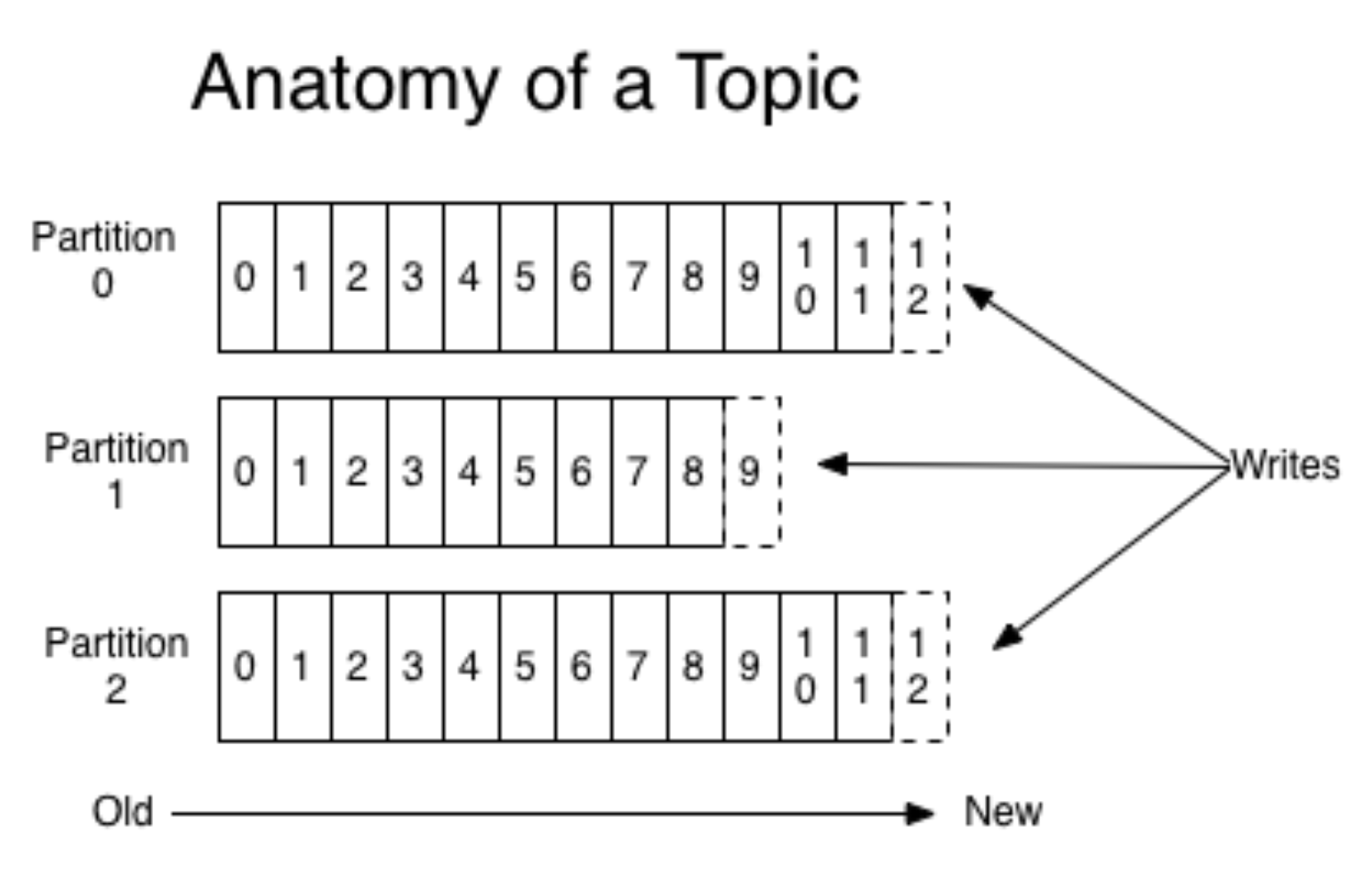
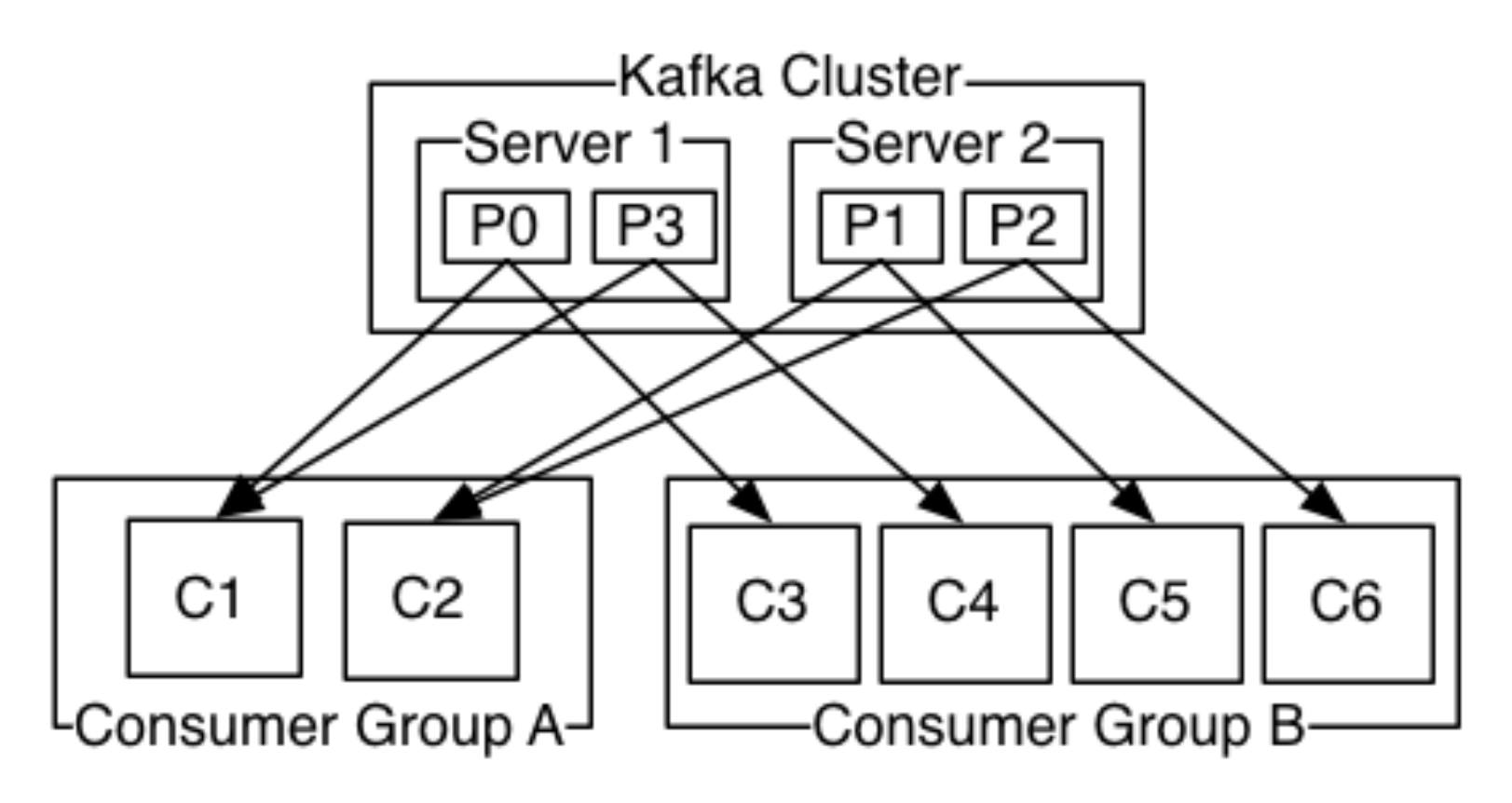
- A topic consists of partitions
- Partition = ordered + immutable sequence of messages that is continually appended to
- Number of partitions is configurable
- #partitions determines max consumer (group) parallelism
Analogy: A topic is like a highway; partitions are individual lanes. More lanes = more cars (consumers) can travel simultaneously.
Consumer Groups Example
- Consumer Group A (2 consumers) reads from a 4-partition topic → each consumer handles 2 partitions
- Consumer Group B (4 consumers) reads from the same topic → each consumer handles 1 partition
- If you have more consumers than partitions, some consumers are idle
Partition Offsets
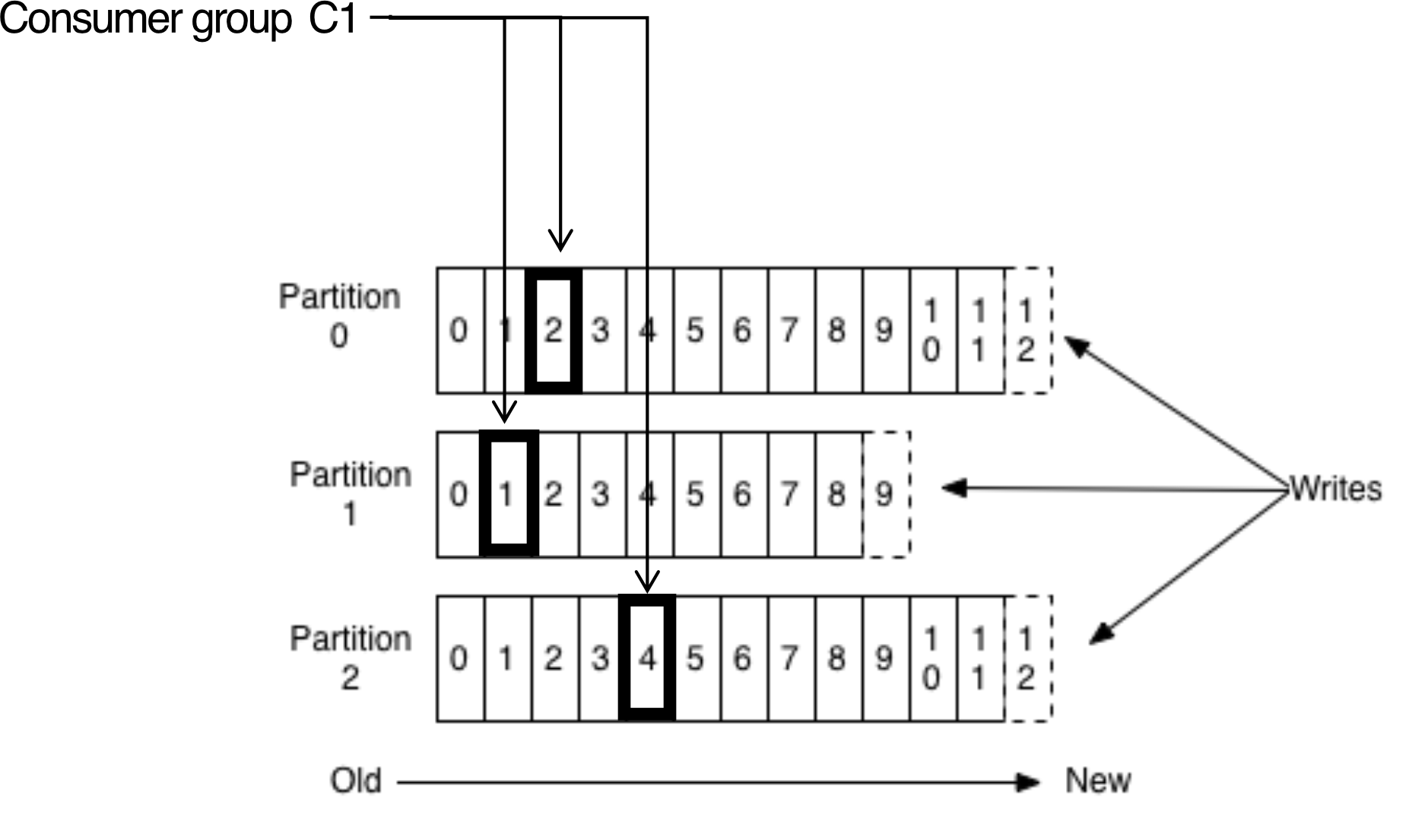
- Offset = unique (per partition), sequential ID assigned to each message
- Consumers track their position via tuples:
- This allows each consumer group to read independently at its own pace
- Consumers can rewind or skip ahead by changing their offset pointer
- ==Offset = Message ID==
Replicas
- Replicas = "backups" of a partition
- They exist solely to prevent data loss
- Replicas are never read from, never written to directly
- They do NOT help to increase producer/consumer parallelism!
- Kafka tolerates dead brokers before losing data
- LinkedIn uses
numReplicas = 2→ can tolerate 1 broker dying
Kafka Entry Points
- Custom producer/consumer using Kafka Client API (Java, Scala, C++, Python)
- Kafka Connectors: LogFile, HDFS, JDBC, ElasticSearch…
- Logstash: source and sink
- Apache Flume: can use Kafka as source, channel, or sink
- Other tools: Apache Spark, LinkedIn Gobblin, Apache Storm…
Kafka for Data Integration
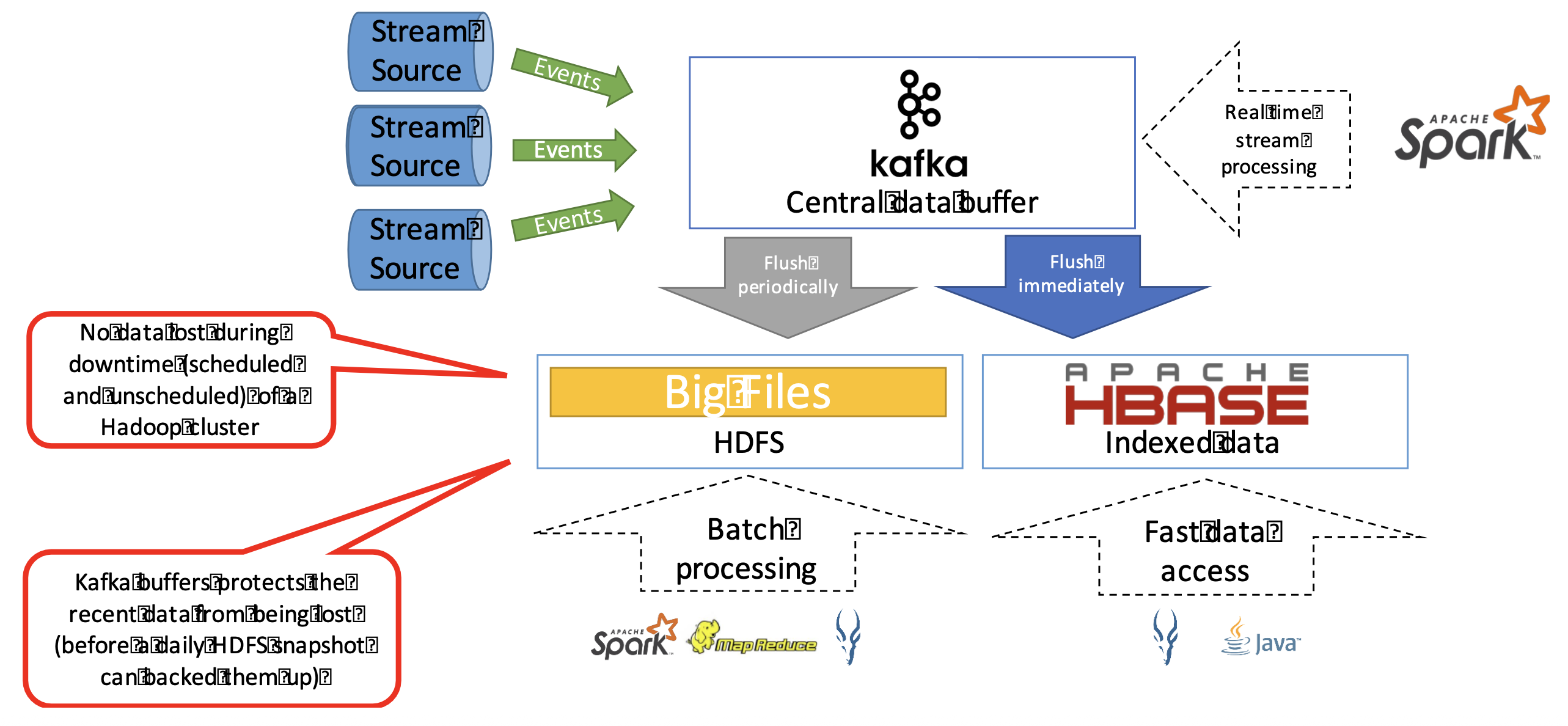
Stream Sources → [Events] → Kafka (Central Data Buffer)
                                ↓               ↓
                         Flush periodically   Flush immediately
                                ↓               ↓
                              HDFS           HBase (Indexed)
                         (Batch Processing) (Fast Data Access)
                                             ↑
                                       Real-time Spark
- No data lost during downtime (scheduled and unscheduled) of a Hadoop cluster
- Kafka buffers protect recent data from being lost before daily HDFS snapshots
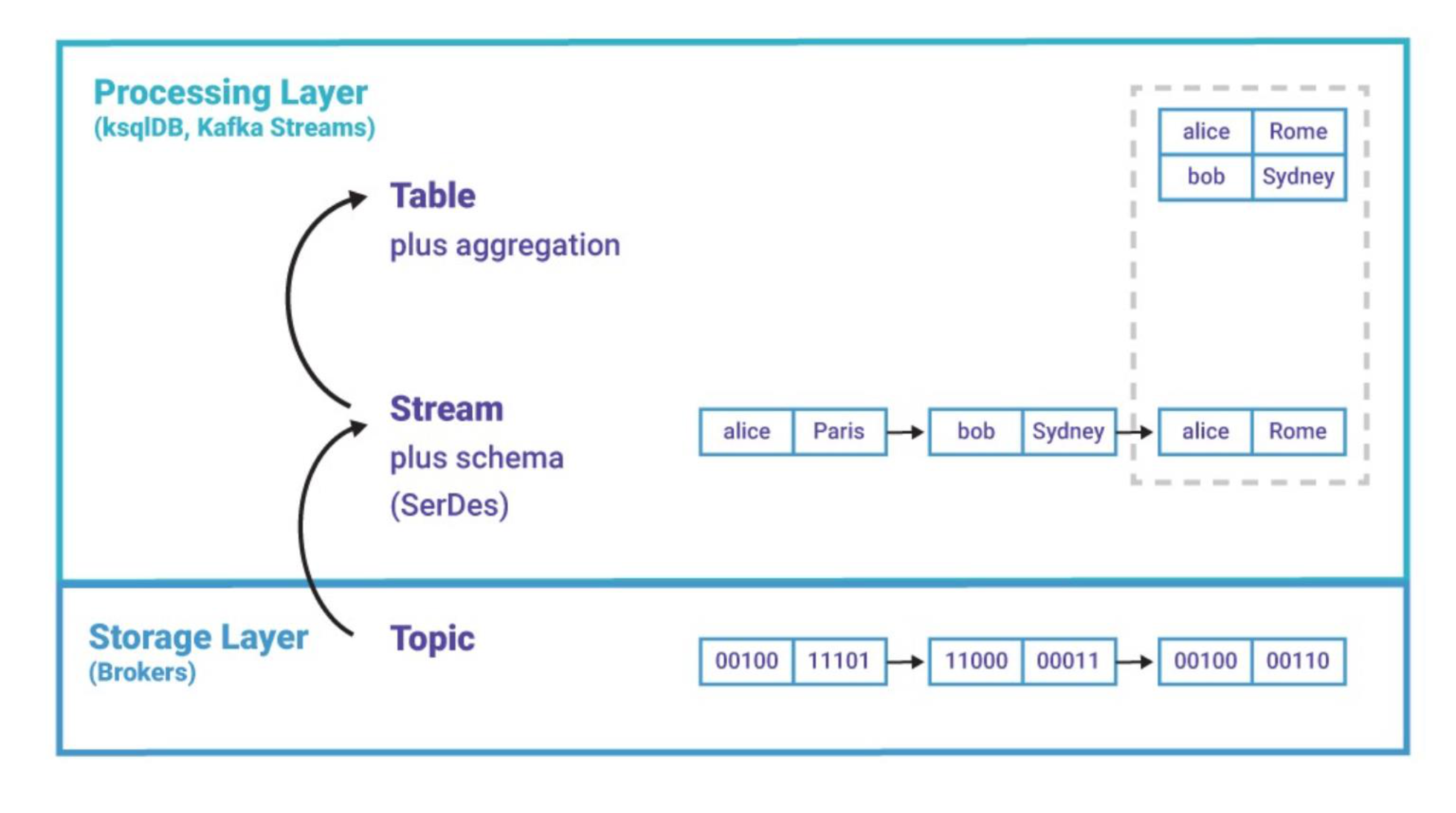
KStream and KTable
KStream
- Represents an unbounded sequence of immutable events
- Each record = event (append-only)
- Events are NOT updated or deleted
- Order matters (time-based processing)
- Supports windowing (e.g., last 5 minutes)
- Example — IoT Sensor data:
(sensor1, 30°C)
(sensor1, 32°C)
(sensor1, 31°C)
KTable
- Represents the latest value per key (state)
- Each key has only one current value (new records overwrite old ones)
- Represents a table (like a database view)
- Example:
(sensor1, 30°C)
(sensor1, 32°C)
(sensor1, 31°C)
→ KTable stores: sensor1 → 31°C  (latest value only)
KStream vs KTable
| Property | KStream | KTable |
|---|---|---|
| Interpretation | Record stream (INSERT / append) | Changelog stream (UPSERT / overwrite) |
| Use case | All values Alice has ever been at | Where Alice is right now |
| When you need | All values of a key | Latest value of a key |
Analogy: KStream is like your bank statement (every transaction ever). KTable is like your current account balance (just the latest state).
Relationship Between KStream and KTable
KStream → KTable: by grouping and aggregating the streamKTable → KStream: by emitting changes (changelog stream)
Actual data located →
KStream
IoT Device Monitoring Example
KStream Input
(dev1, 30°C, ON, 90%)
(dev2, 28°C, ON, 80%)
(dev1, 32°C, ON, 88%)
(dev2, 29°C, OFF, 78%)
Convert to KTable (Device State)
KTable<String, DeviceState> deviceTable =
    stream
    .groupByKey()
    .reduce((oldValue, newValue) -> newValue);
Resulting KTable
- KTable keeps the latest value!
dev1 → (32°C, ON, 88%)
dev2 → (29°C, OFF, 78%)
How Kafka Handles This in Reality
Device events → Kafka topic (full log) → KStream
                                              └→ derived KTable (latest state)
- All device events are written to a normal Kafka topic
- The topic keeps event history according to retention policy
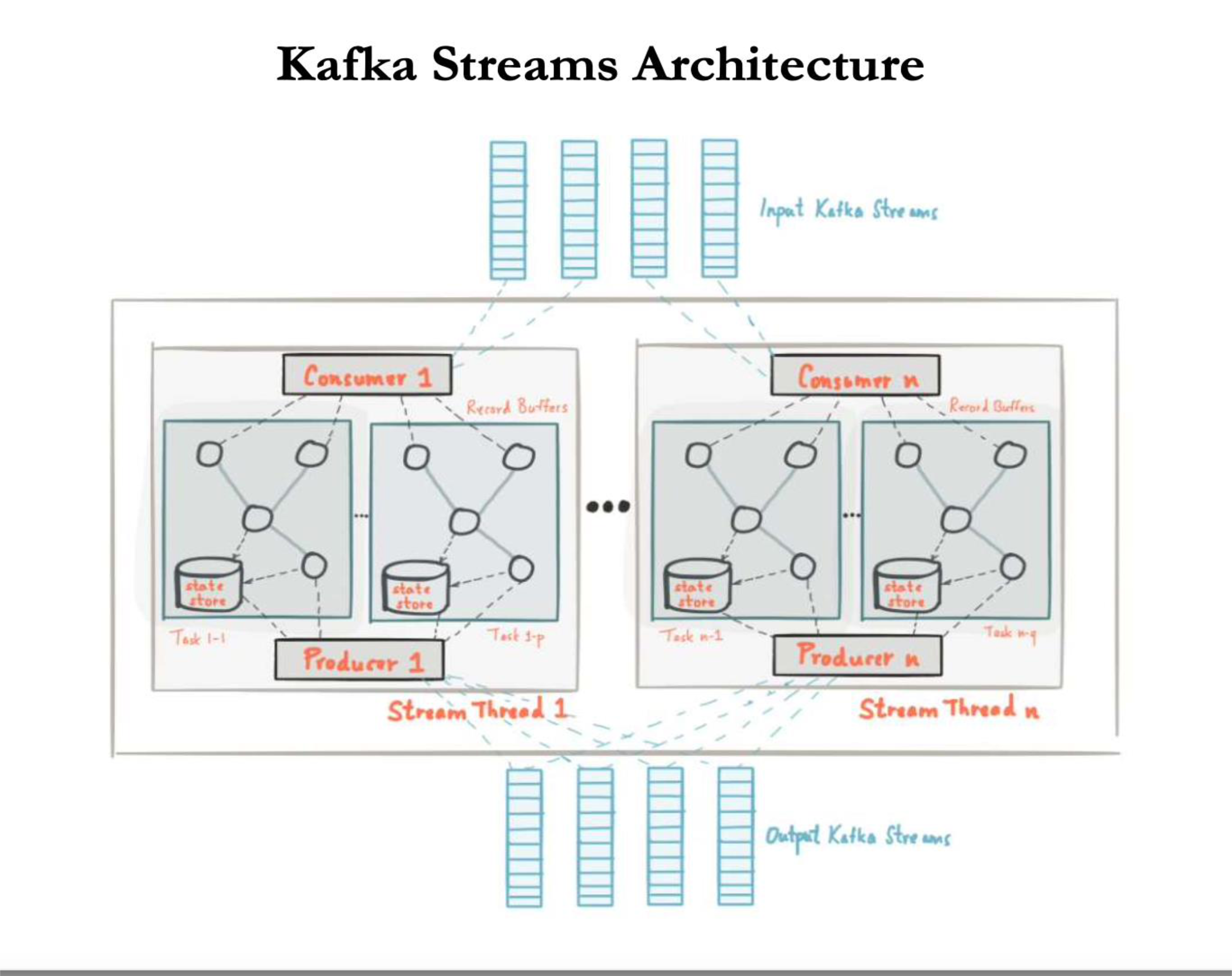
- Kafka Streams reads that topic as a KStream
- The application builds a KTable from that stream for current-state queries
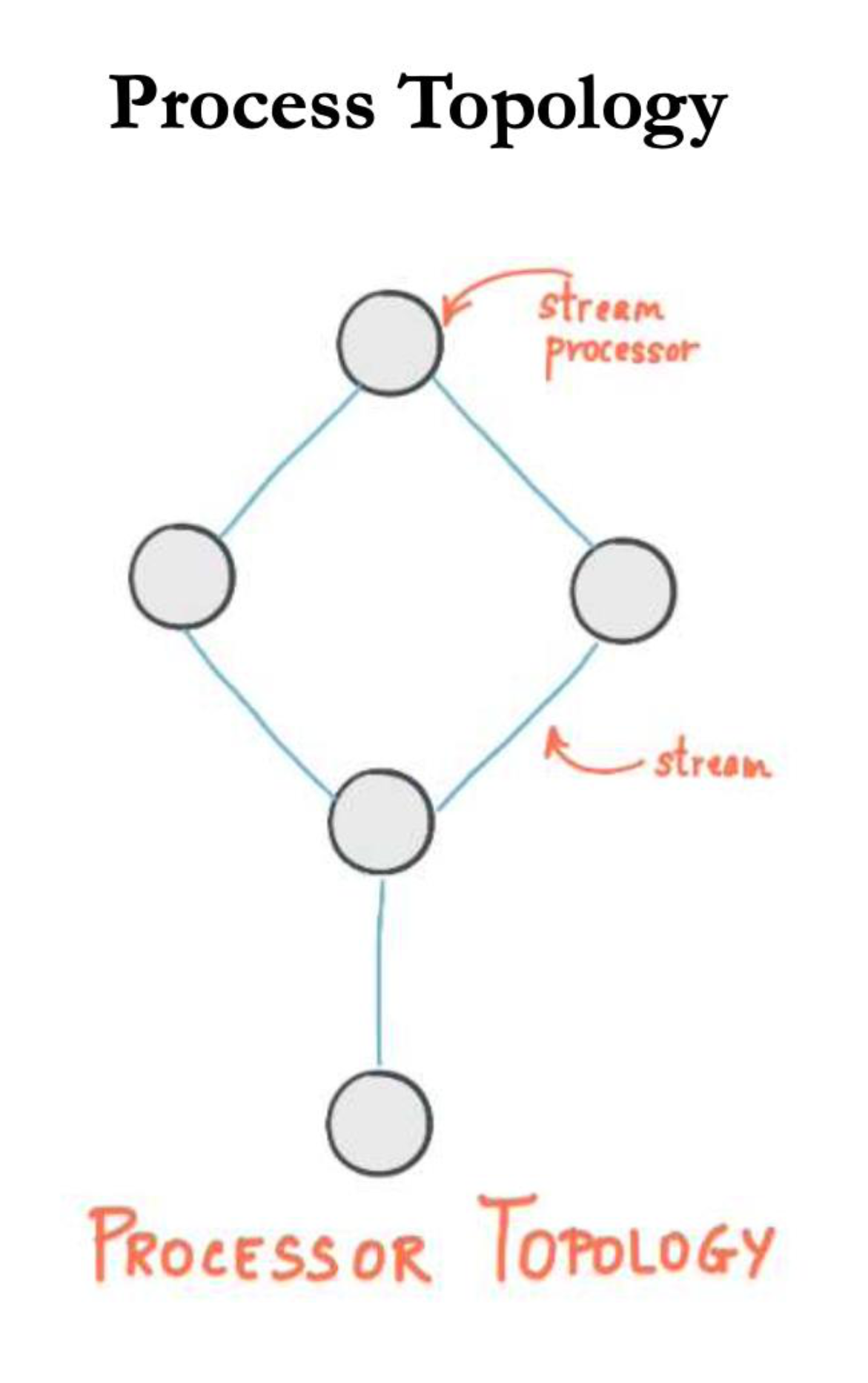
Process Topology
- A processor topology = graph of stream processors (nodes) connected by streams (edges)
- Stream = unbounded, continuously updating dataset; ordered and fault-tolerant sequence of immutable key-value pairs
- Source Processor = produces an input stream from a Kafka topic; consumes records and forwards to downstream processors
- Sink Processor = sends records from upstream processors to a Kafka topic
Processing Data in Kafka Streams
Stateless Transformation Operations
| Operation | Description |
|---|---|
filter | Creates a new KStream containing only records that meet specified criteria |
map | Creates a new KStream by transforming each element into a different element |
mapValues | Creates a new KStream by transforming only the value of each element |
flatMap | Creates a new KStream by transforming each element into zero or more elements |
flatMapValues | Creates a new KStream by transforming only the value into zero or more values |
Stateful Transformation Operations
| Operation | Description |
|---|---|
countByKey | Counts number of instances of each key → results in a new, ever-updating KTable |
reduceByKey | Combines values using a supplied Reducer → results in a new, ever-updating KTable |
Analogy (Swift parallel): These are just like Swift's higher-order functions!
filter=.filter {},map=.map {},flatMap=.flatMap {}. The difference is Kafka does it on a live, infinite stream of data rather than a fixed array.
Can We Compute Aggregates on KStream?
YES, but only after grouping (ก่อนเป็นอย่างแรก) (and usually windowing), and the result becomes a KTable (stateful view).
Example
Input stream:
(dev1, 30), (dev2, 25), (dev1, 32), (dev2, 28)
After groupByKey:
dev1 → [30, 32]
dev2 → [25, 28]
Now you can compute: sum, avg, max, min, count
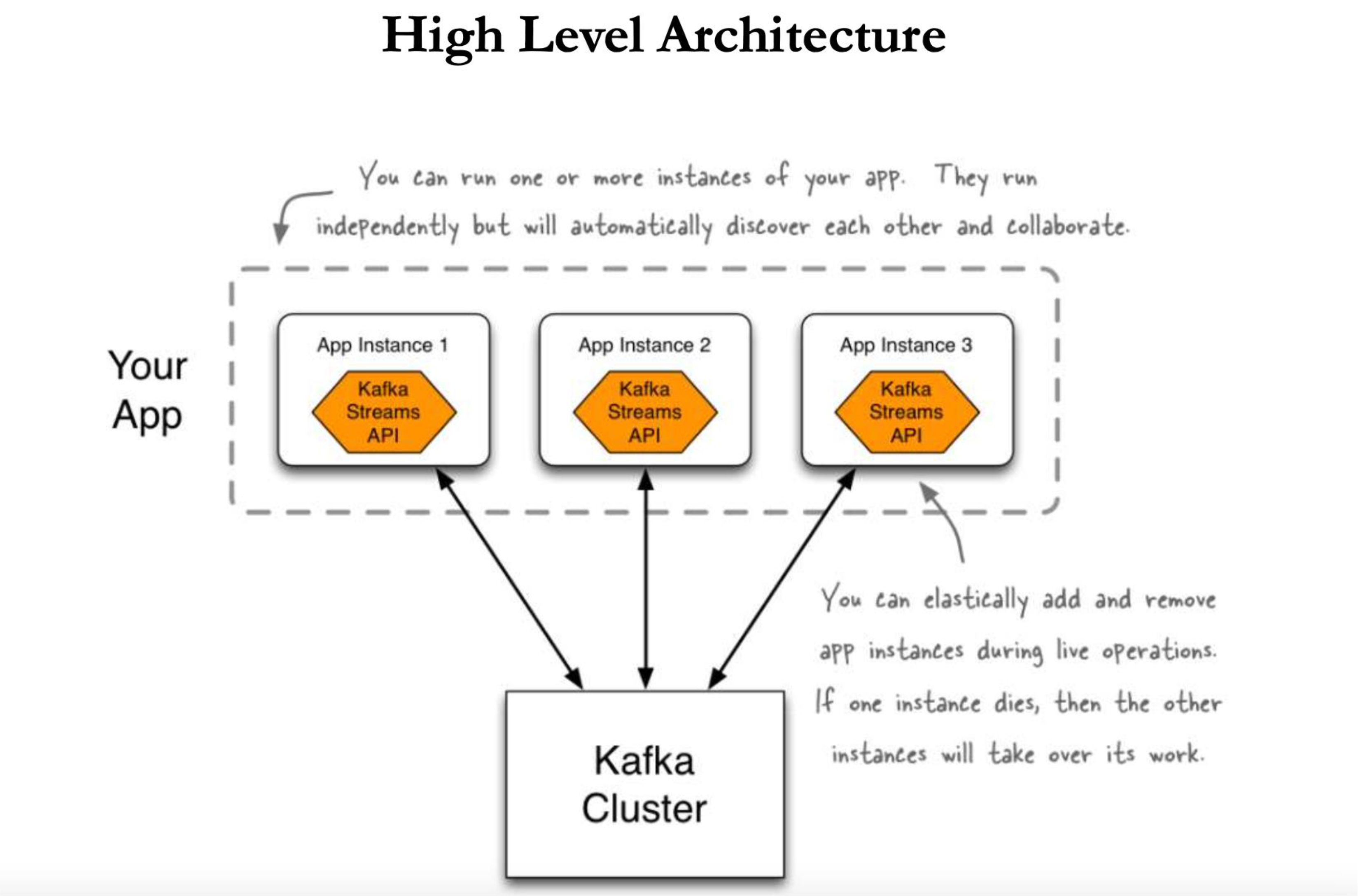
Kafka Streams & Fault Tolerance
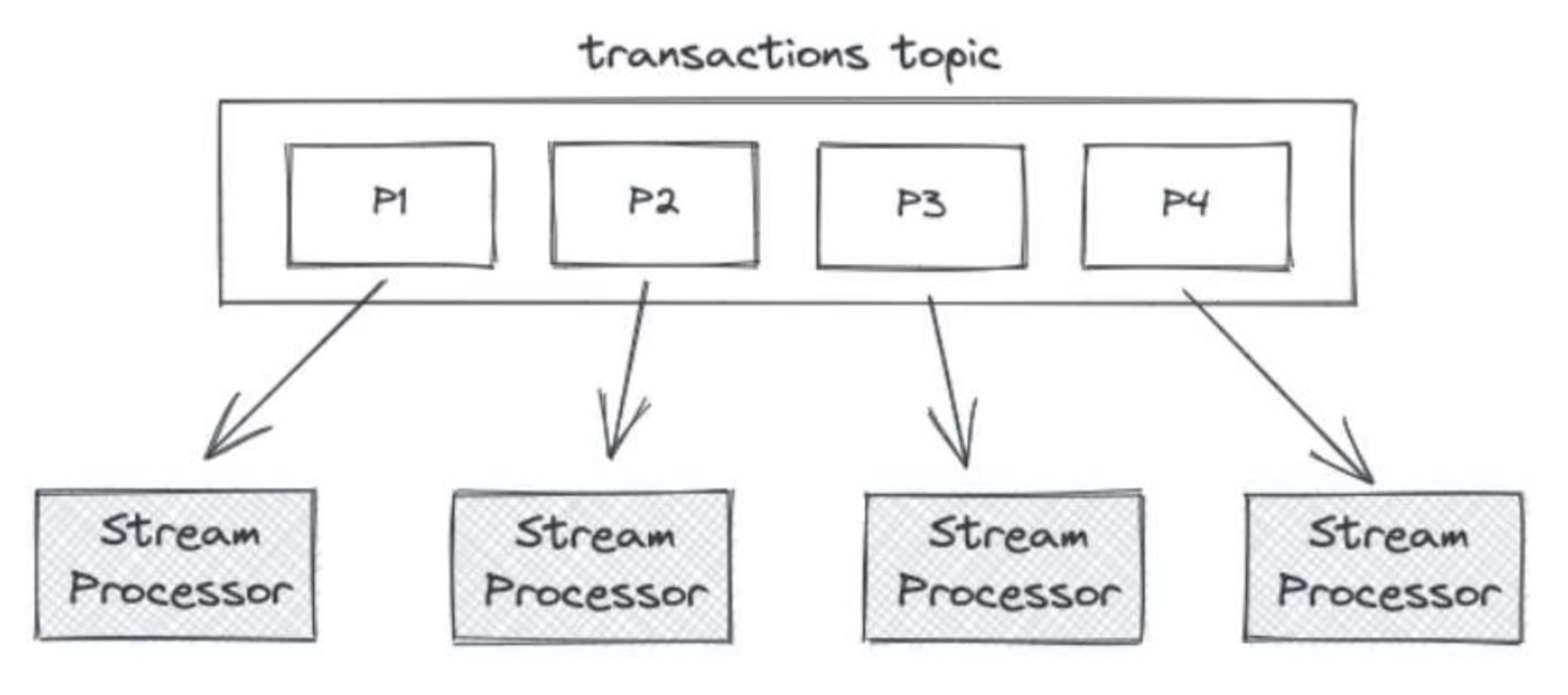
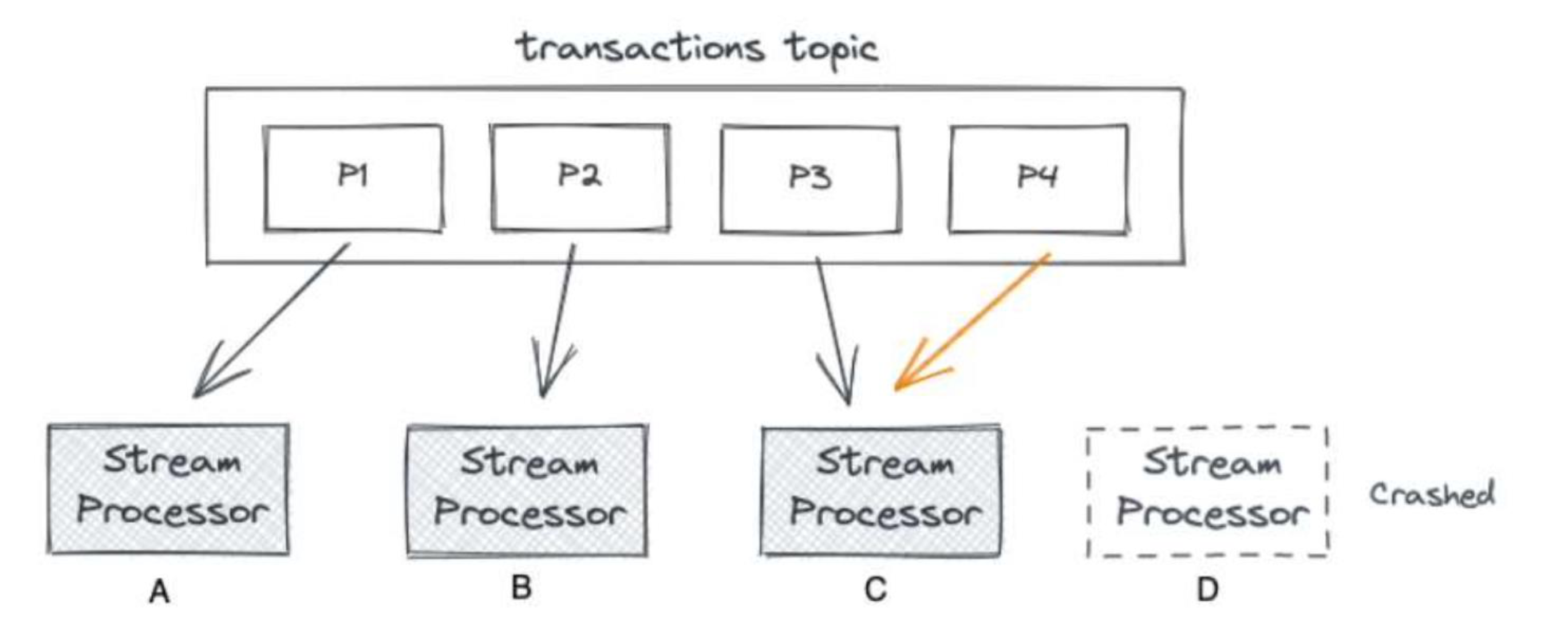
- If a Stream Processor crashes (e.g., D crashes), its partition (P4) is reassigned to another processor (C handles both P3 and P4)
- The crashed processor's changelog (state changes) is stored as a separate Kafka topic
- When a new processor takes over, it replays the changelog to restore the materialized state
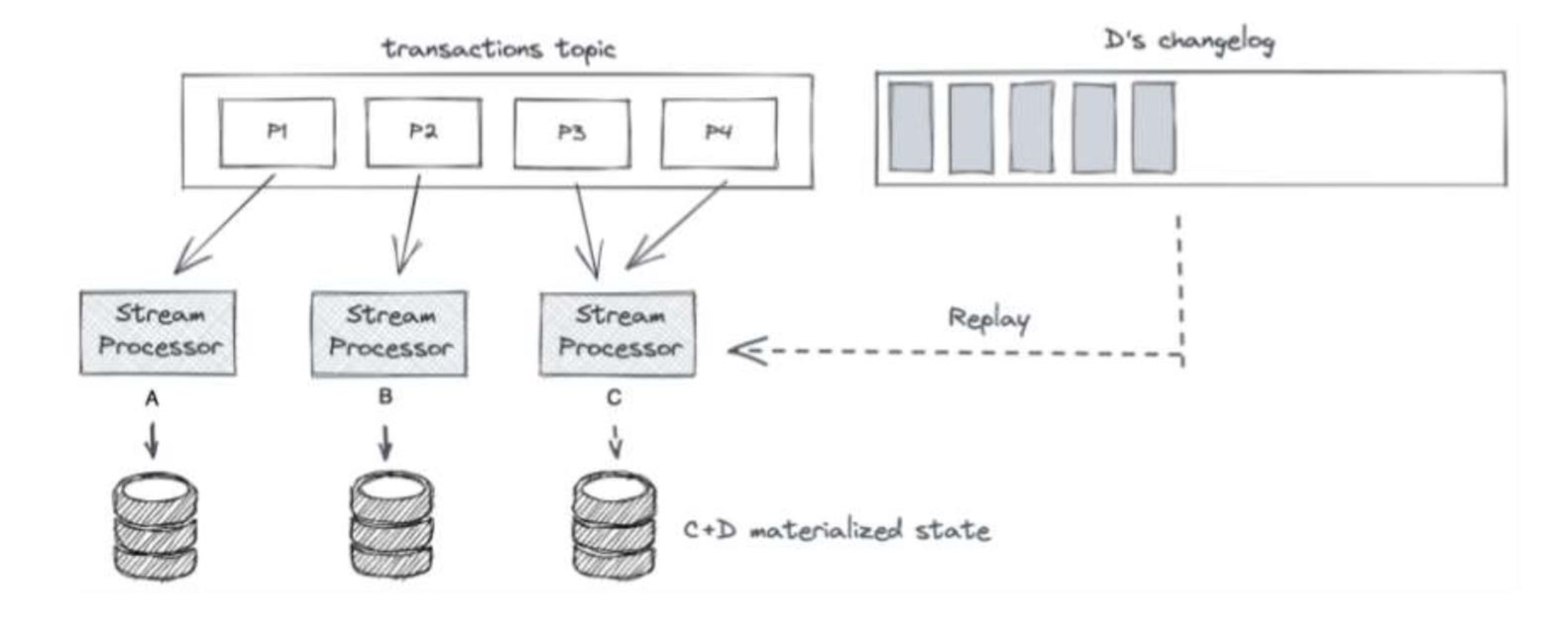
- This means: no data is lost, state is fully recoverable!
Kafka vs. Spark Streaming
| # | Spark Streaming | Kafka Streams |
|---|---|---|
| 1 | Divides live data into micro-batches for processing | Processes per data stream (real real-time) |
| 2 | Requires a separate processing cluster | No separate processing cluster required |
| 3 | Needs re-configuration for scaling | Scales easily by just adding Java processes |
| 4 | At-least-once semantics | Exactly-once semantics |
| 5 | Better at processing groups (groupBy, ML, window functions) | Better for row parsing, data cleansing, record-at-a-time |
| 6 | Standalone framework | Can be used as part of microservice (it's just a library) |
| 7 | Spark uses RDD to store data (distributed, cached) | Kafka stores data in Topic (buffer memory) |
| 8 | Supports Java, Scala, R, Python | Java is primary language |
IoT EHR Pipeline Example
IoT Device (Producer)
    ↓
Kafka Topic (patient-vitals)
    ↓
KStream (event processing)
    ↓
┌──────────────────┬─────────────────┐
↓                  ↓                 ↓
Alert Stream      KTable           Archive
(filter HR>100)  (latest state)   (history DB)
↓                  ↓
Alert System    Dashboard (Consumer ไง comsume data)
Top 5 Kafka Use Cases
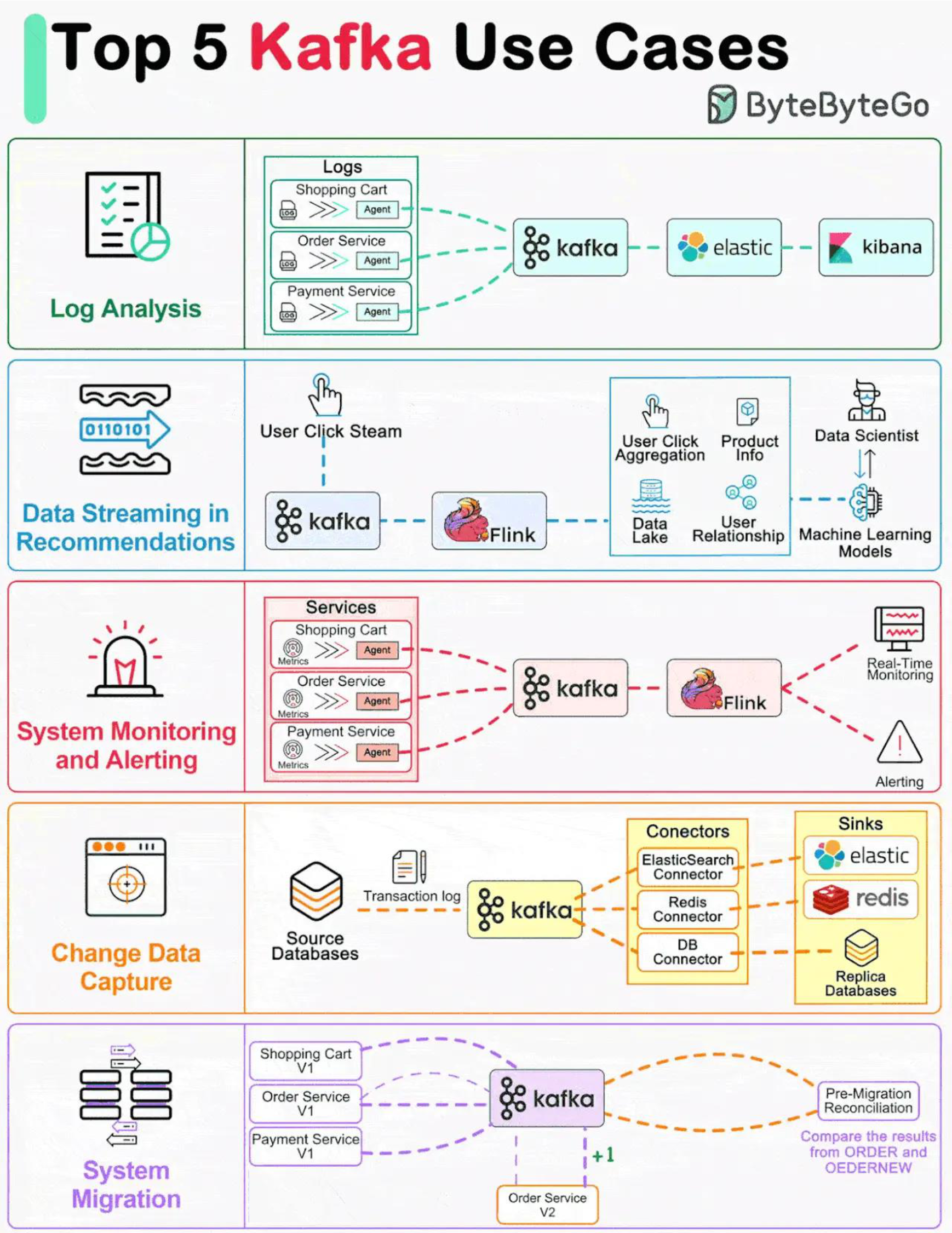
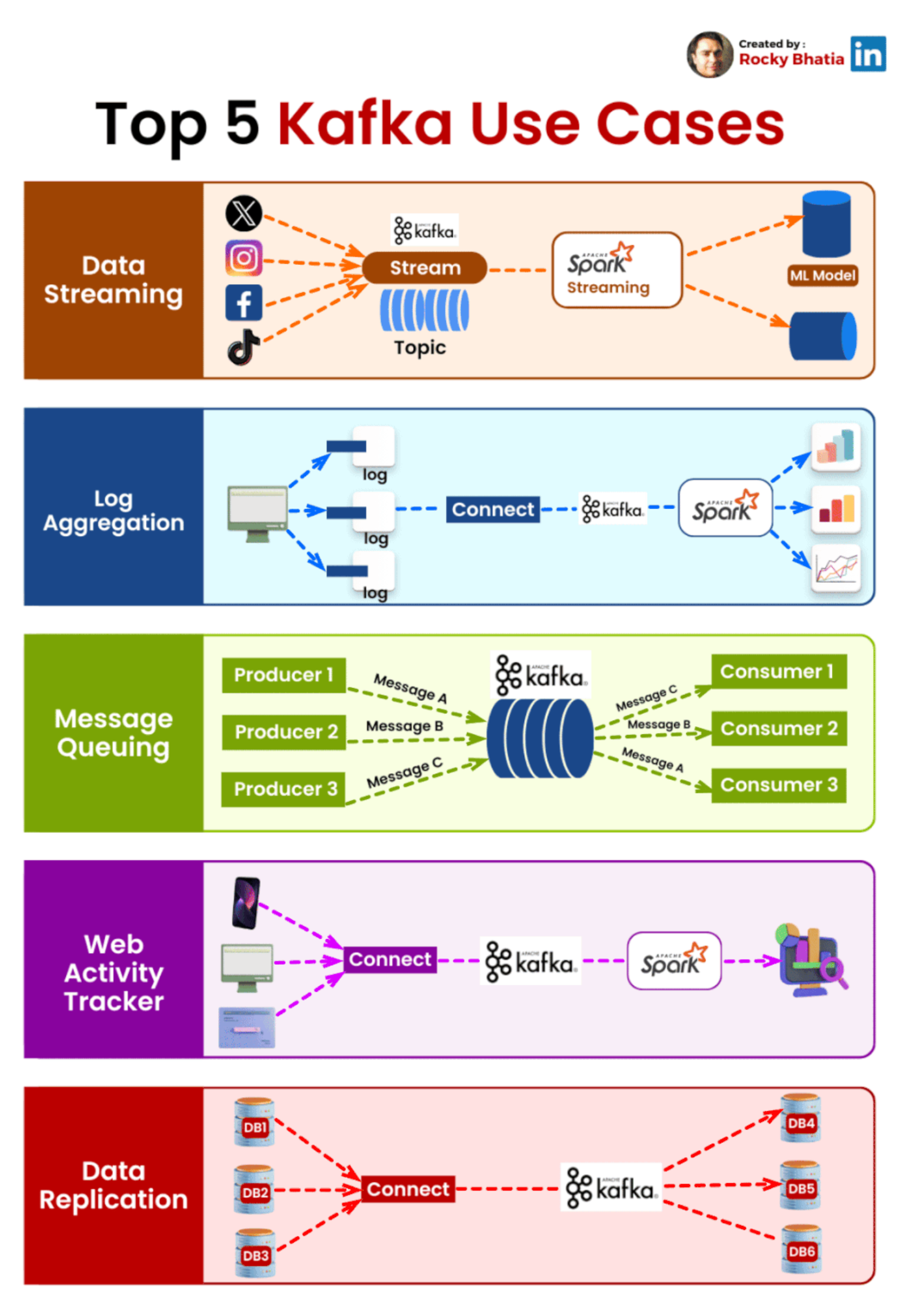
- Log Analysis — Services → Kafka → Elastic → Kibana
- Data Streaming in Recommendations — User clicks → Kafka → Flink → ML Models
- System Monitoring and Alerting — Metrics → Kafka → Flink → Real-time Monitoring / Alerts
- Change Data Capture — Source DBs → transaction log → Kafka → connectors → replica DBs
- System Migration — Old services → Kafka → new services (reconciliation)
Kafka Ecosystem at Uber (Real World)
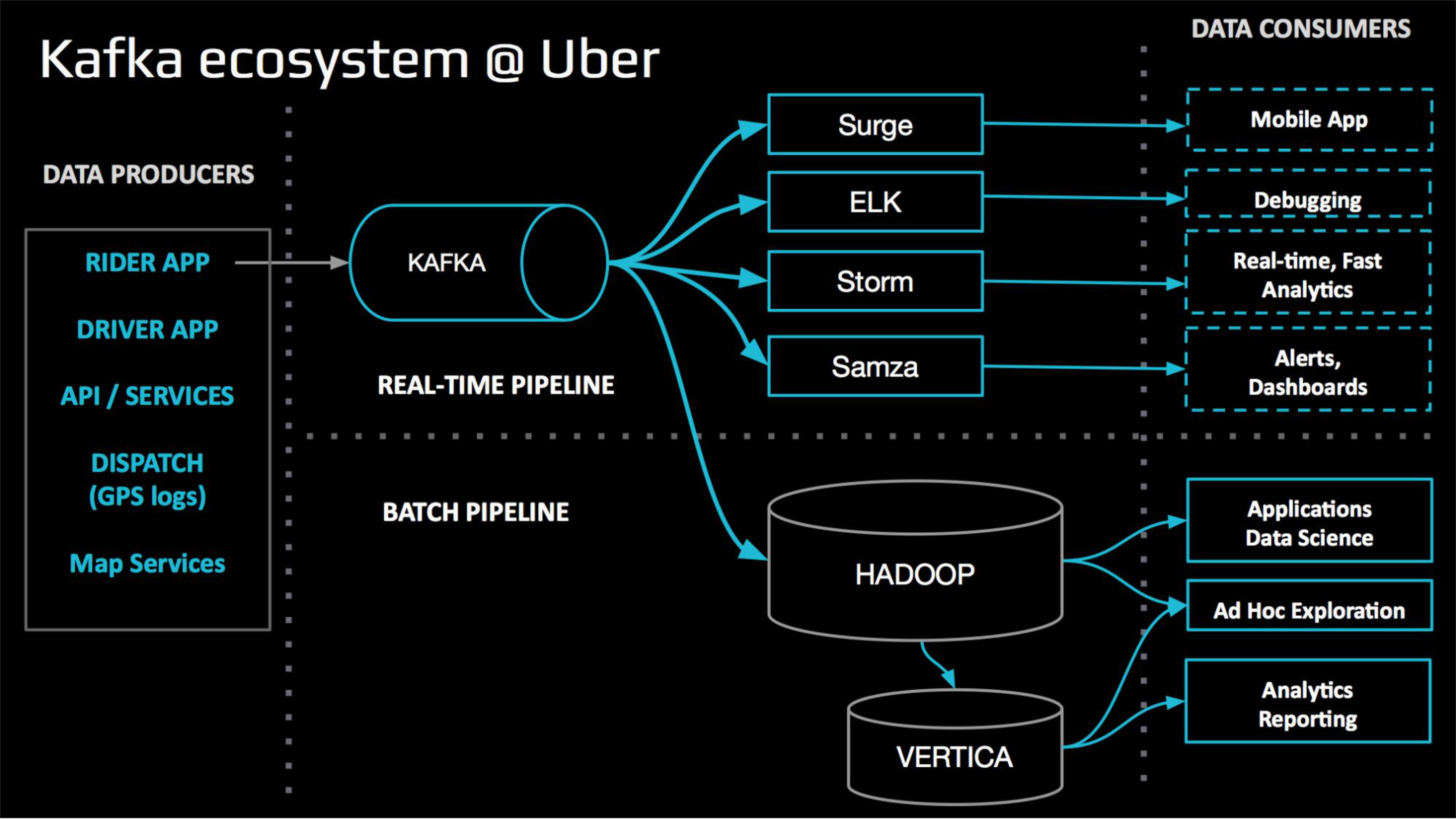
Data Producers:
  Rider App, Driver App, API/Services, Dispatch (GPS logs), Map Services
      ↓
  KAFKA (Real-time Pipeline)
      ↓ ↓ ↓ ↓
  Surge    ELK    Storm    Samza    → Mobile App, Debugging, Real-time Analytics, Alerts

      ↓ (Batch Pipeline)
  HADOOP
      ↓
  VERTICA → Analytics Reporting, Ad Hoc Exploration
Logstash
- Acquired by Elastic, integrated in the ELK stack (Elasticsearch, Logstash, Kibana)
- Ingests, transforms, and pushes for any types of events
Pipeline Architecture
beats → Kafka → logstash → elasticsearch
Three Core Concepts
| Stage | Description |
|---|---|
| Inputs | Ingest data of all shapes, sizes, and sources (Beats, S3, DB, Kafka…) |
| Filters | Parse & transform your data on the fly (GROK, GEO IP, FINGERPRINT, DATE) |
| Outputs | Route data where you want (Elasticsearch, SYSLOG, statsd, Slack…) |
Logstash Filters Can
- Derive structure from unstructured data with grok
- Decipher geo coordinates from IP addresses
- Anonymize PII data, exclude sensitive fields
- Ease overall processing, independent of data source, format, or schema
CDN Pipeline Example (from slides)
- Split Traffic Server key/value logs (kv filter)
- Calculate approximate profile bitrate for a linear stream
- Based on bytes transferred and knowledge about segment duration
- Raw Ruby code + GROK (extract and filter log strings)
- Remove unnecessary fields/tags
- HTTP Header extractions
References
- Baeldung: Kafka Streams vs Kafka Consumer
- Confluent Kafka Streams Docs
- Kafka DSL API Guide
- [Kafka Streams Hands-on Session — Matteo Nardelli]