Today's Outline
- Part I: Select with JOIN
- Part II: Set Operators
- Part III: Sub Queries
Part I: SQL JOIN OPERATIONS
RECAP: Relationship between Entities
- Relationships are formed by primary keys and foreign keys of tables
- We can use these relationships to merge two tables
Example Tables
PROJECT Table:
PNUMBER(Primary Key)PNAMEDEPT_NO(Foreign Key)
DEPARTMENT Table:
DNUMBER(Primary Key)DNAMELOCATION
Analogy: Think of foreign keys as "bridges" between tables. Just like you need a bridge to connect two islands, you need foreign keys to connect related data across tables.
Merging Tables
- We can merge two tables using the relationship:
PROJECT.dept_no = DEPARTMENT.dnumber - This creates a combined table with columns from both tables
Example Result:
- Combined table shows project information alongside department information
- Only projects with matching departments are included (based on
dept_no = dnumber)
SQL JOIN Overview
- SQL join clause combines columns from one or more tables in a relational database
- Use when you want to have data from more than one table
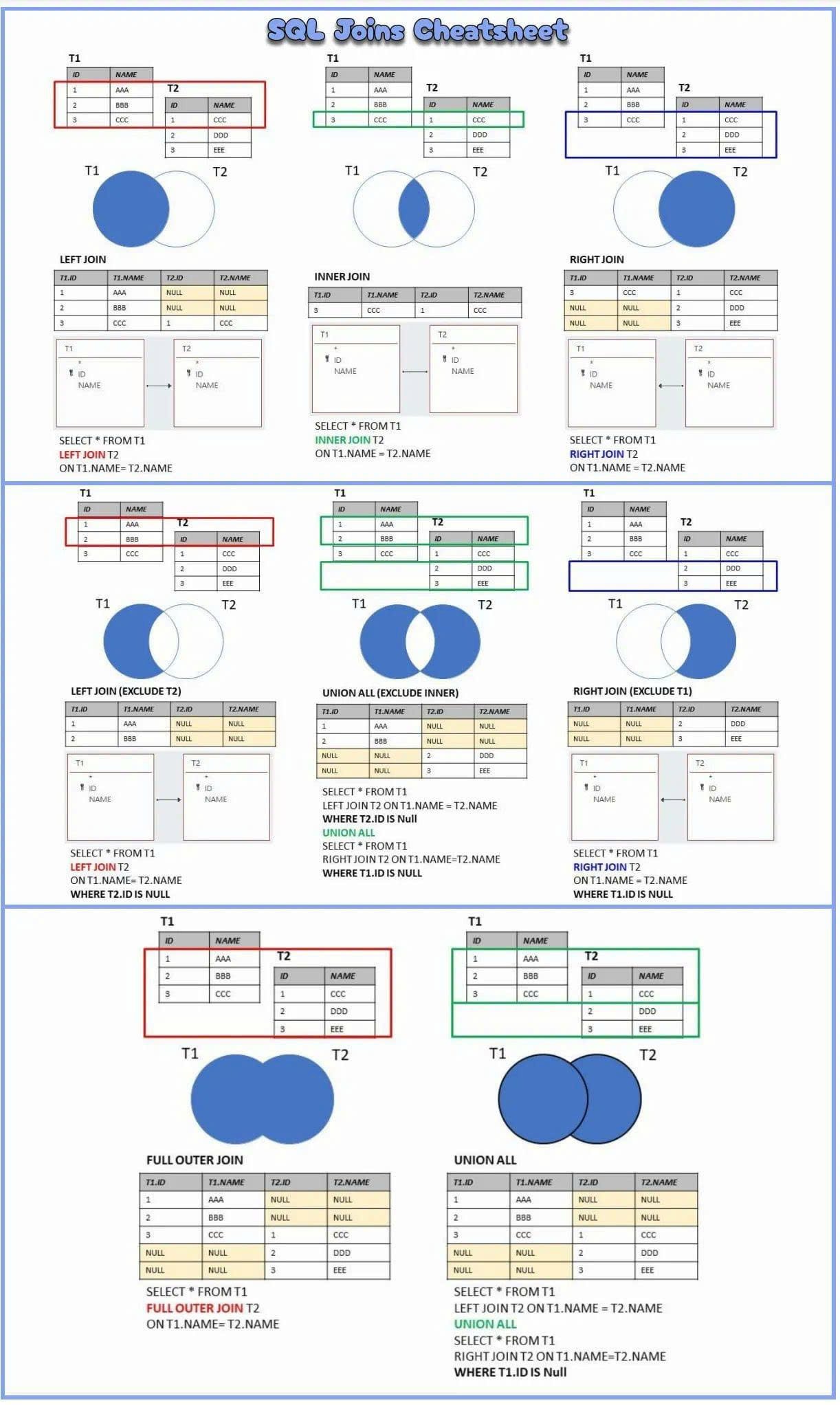
Types of SQL JOIN:
- CROSS JOIN: Cartesian product of 2 tables
- INNER JOIN: Returns rows that meet given criteria
- Equality condition → Natural join / equijoin
- Inequality condition → Theta join
- OUTER JOIN: Returns matching rows AND unmatched attribute values for 1 or both tables to be joined
SQL JOIN Syntax
SELECT [columns]
FROM tablename
[CROSS|INNER|LEFT OUTER|RIGHT OUTER|FULL OUTER] // HERE
JOIN table2 ON conditions
[WHERE [conditions]]
[GROUP BY [columns]]
[HAVING [conditions]]
[ORDER BY [columns] ASC|DESC];
SQL JOIN – CROSS
- Produces a Cartesian product between two tables
- Returns all possible combinations of all rows
Example:
- If
projecttable has 7 rows - If
departmenttable has 7 rows - CROSS JOIN will have: rows
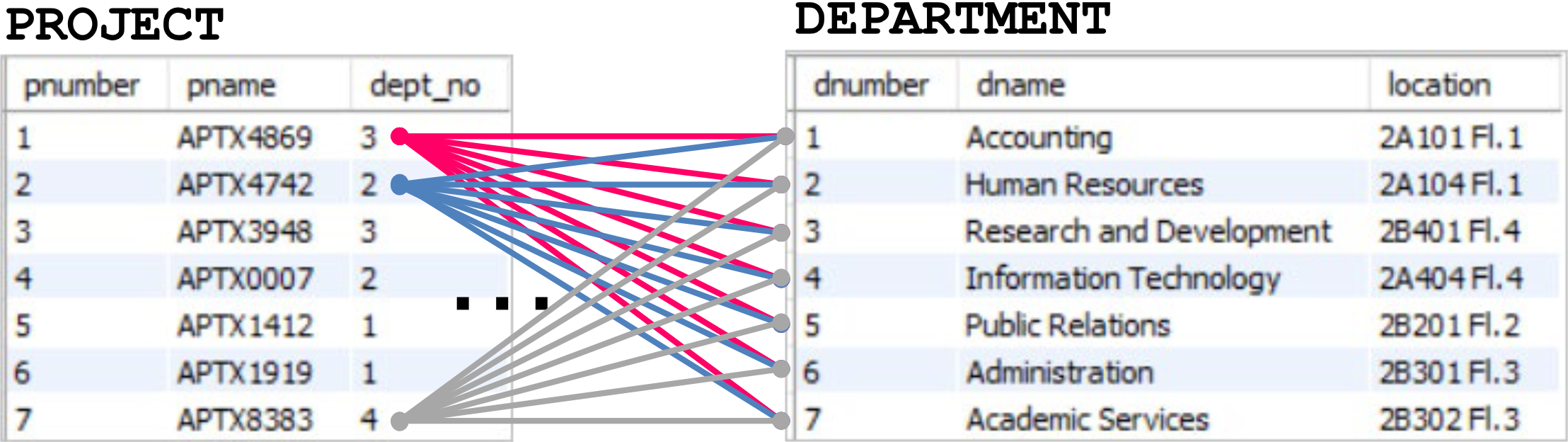
SELECT *
FROM project
CROSS JOIN department;
SELECT COUNT(*) AS nrows
FROM project
CROSS JOIN department;Result: 49 rows
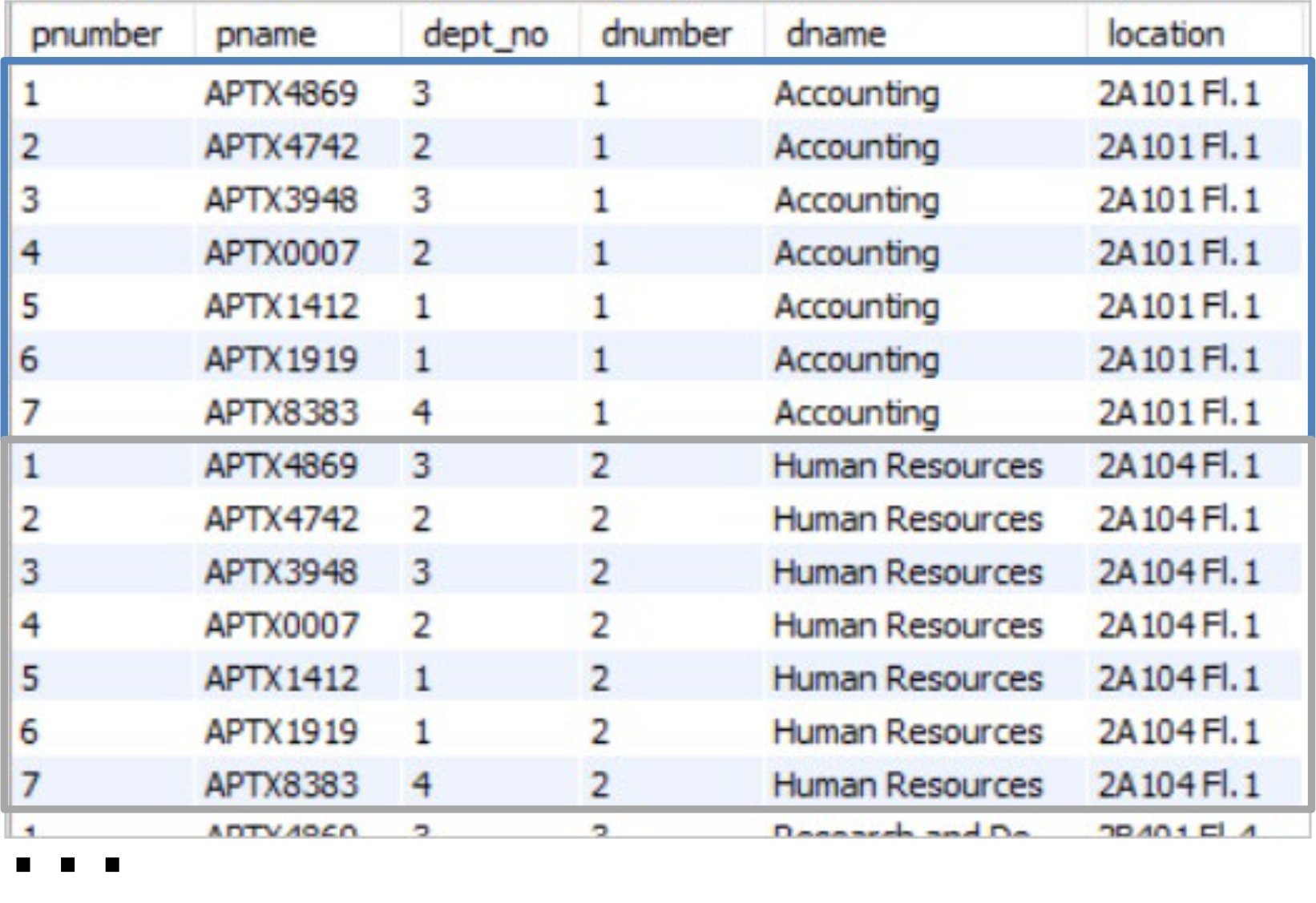
Analogy: CROSS JOIN is like matching every shirt in your closet with every pair of pants you own. If you have 7 shirts and 7 pants, you get 49 possible outfit combinations!
Note: CROSS JOIN lists all combinations but this is ==not really useful in most practical scenarios.==
SQL JOIN - INNER
- Returns rows when there is at least one match on the given condition in both tables
- INNER คือ Default ของ MySQL ไม่ต้องพิมพ์
INNERก็ได้
Example: INNER JOIN of project and department
SELECT *
FROM project
INNER JOIN department
ON project.dnumber = department.dept_no;
Condition: project.dnumber = department.dept_no
Result: Only shows projects that have matching departments (7 rows with matched department information)
Analogy: INNER JOIN is like a guest list where only people who are invited AND have RSVP'd show up. If someone isn't on both lists, they don't appear.
SQL JOIN – INNER (Multiple Tables)
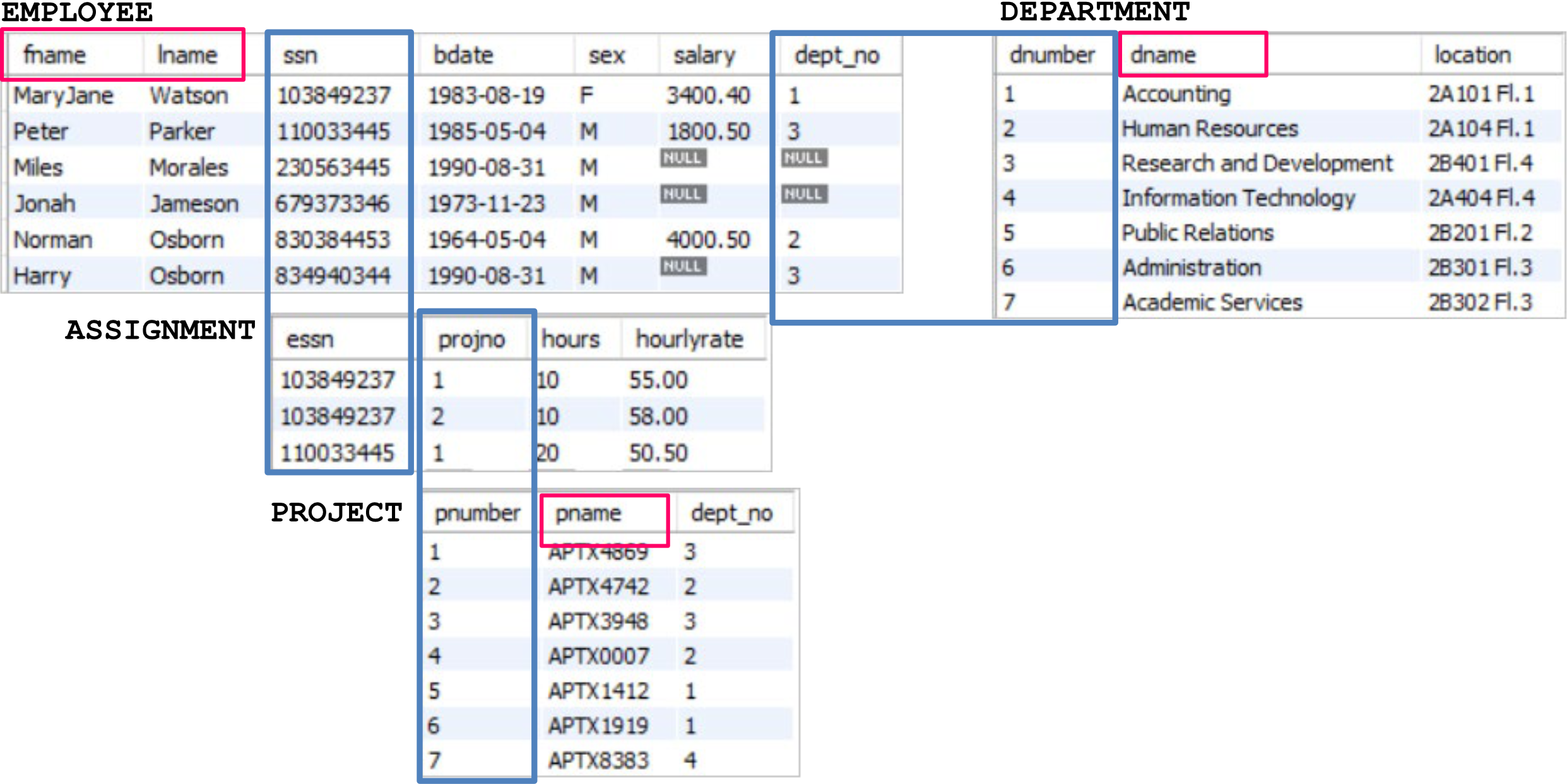
Example: Show all employees (name and last name), their department and their working project
Data needed:
employee.fnameemployee.lnamedepartment.dnameproject.pname
Tables involved:
- EMPLOYEE
- DEPARTMENT
- ASSIGNMENT
- PROJECT
Relationships needed:
- EMPLOYEE ↔ DEPARTMENT (via
dept_noanddnumber) - EMPLOYEE ↔ ASSIGNMENT (via
ssnandessn) - ASSIGNMENT ↔ PROJECT (via
projnoandpnumber)
INNER JOIN of 4 Tables
SELECT fname, lname, dname, pname
FROM employee e -- Using alias for shorter references
INNER JOIN department d ON e.dept_no = d.dnumber
INNER JOIN assignment a ON e.ssn = a.essn
INNER JOIN project p ON a.projno = p.pnumber;
Result:
| fname | lname | dname | pname |
|---|---|---|---|
| MaryJane | Watson | Accounting | APTX4869 |
| Peter | Parker | Research and Development | APTX4869 |
| MaryJane | Watson | Accounting | APTX4742 |
Analogy: Joining 4 tables is like connecting the dots in a constellation. Each table is a star, and the relationships (foreign keys) are the lines connecting them to form a complete picture.
SQL – Outer Join
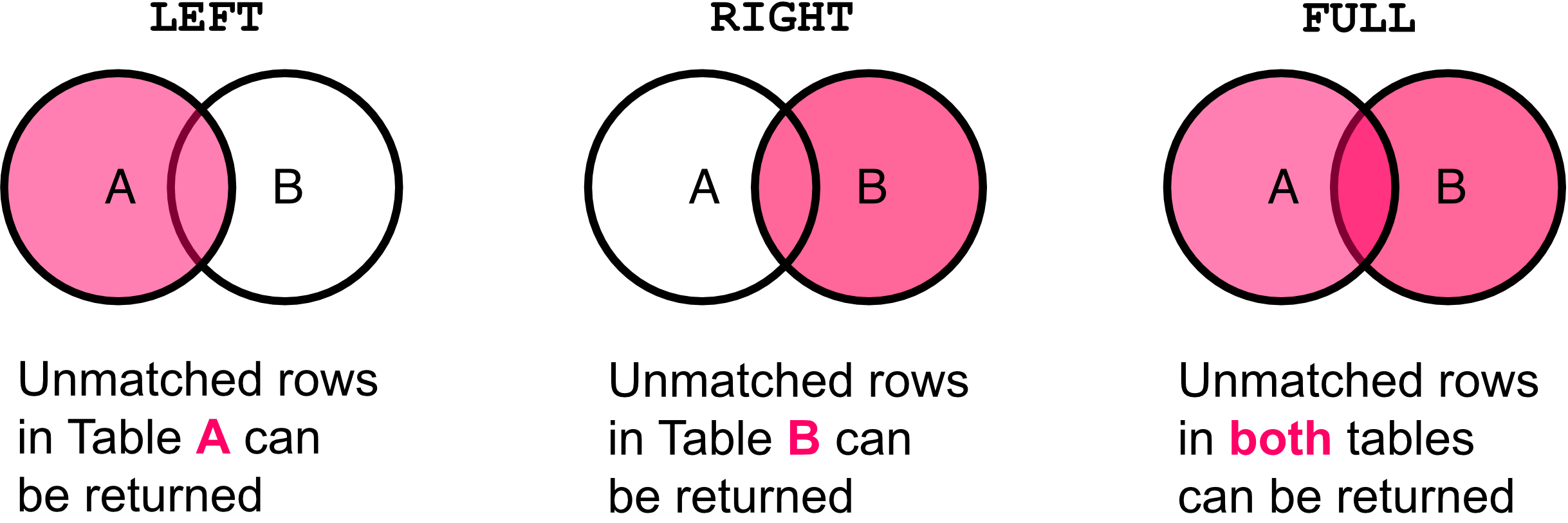
- Returns matched and unmatched rows in one or both tables
- Depends on the outer join type
Types of OUTER JOIN:
- LEFT OUTER JOIN: Unmatched rows in Table A can be returned
- RIGHT OUTER JOIN: Unmatched rows in Table B can be returned
- FULL OUTER JOIN: Unmatched rows in both tables can be returned
Left Outer Join
- Returns all records from the left table (A), and the matched records from the right table (B)
- Unmatched records from table B will show NULL
Example:
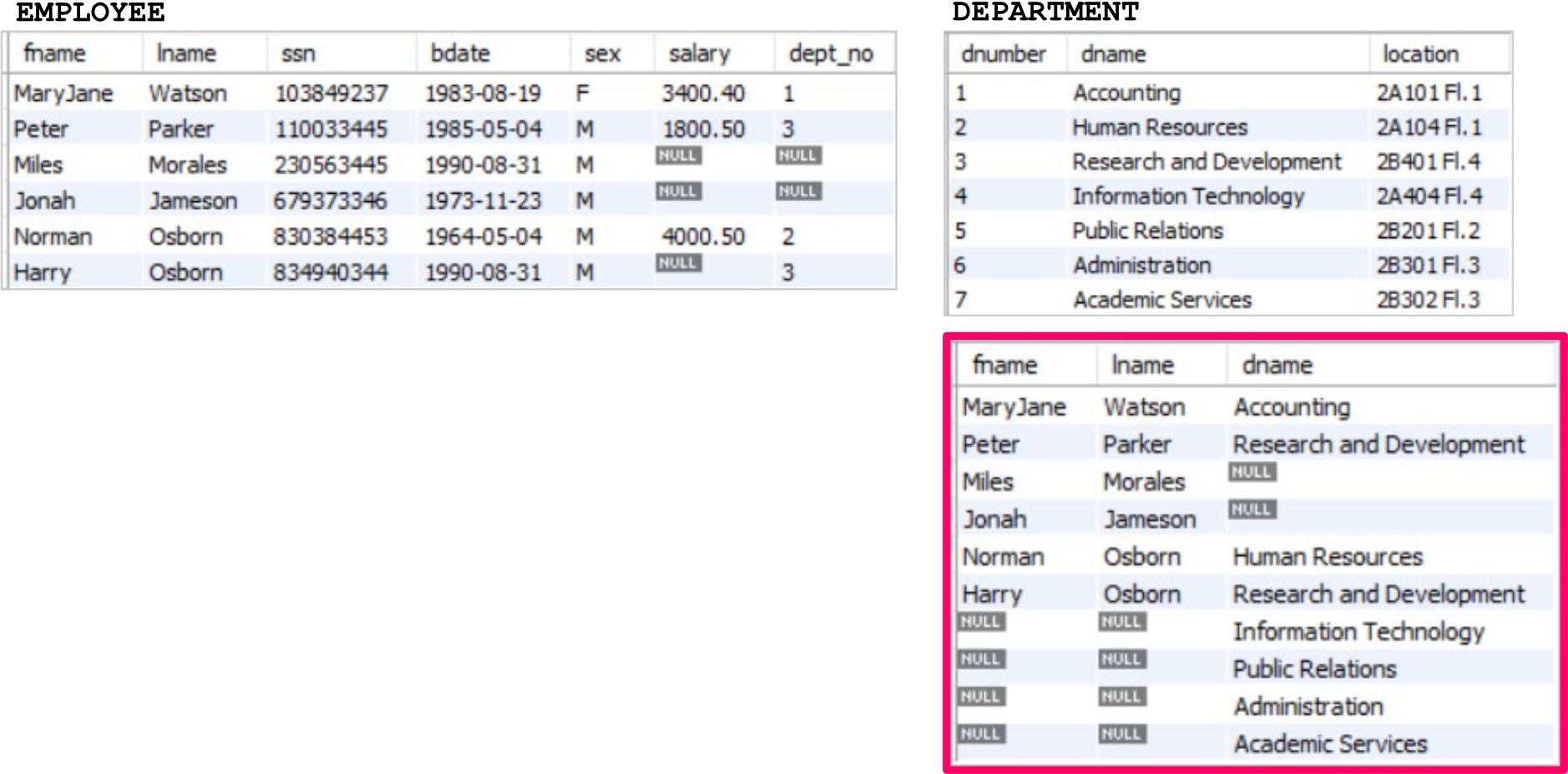
SELECT fname, lname, dname
FROM employee e
LEFT OUTER JOIN department d
ON e.dept_no = d.dnumber;
ฝั่งซ้ายจะเป็น employee, ฝั่งขวาจะเป็น department
Result:
| fname | lname | dname |
|---|---|---|
| MaryJane | Watson | Accounting |
| Peter | Parker | Research and Development |
| Miles | Morales | NULL |
| Jonah | Jameson | NULL |
| Norman | Osborn | Human Resources |
| Harry | Osborn | Research and Development |
Analogy: LEFT OUTER JOIN is like taking a class photo where everyone from Class A must be in the picture, but students from Class B only appear if they have a matching partner from Class A. Students from A without partners still appear alone.
Right Outer Join
- Returns all records from the right table (B), and the matched records from the left table (A)
- Unmatched records from table A will show NULL
Example:
SELECT fname, lname, dname
FROM employee e
RIGHT OUTER JOIN department d
ON e.dept_no = d.dnumber;
Result:
| fname | lname | dname |
|---|---|---|
| MaryJane | Watson | Accounting |
| Norman | Osborn | Human Resources |
| Peter | Parker | Research and Development |
| Harry | Osborn | Research and Development |
| NULL | NULL | Information Technology |
| NULL | NULL | Public Relations |
| NULL | NULL | Administration |
| NULL | NULL | Academic Services |
Analogy: RIGHT OUTER JOIN is the opposite of LEFT. Now Class B students must all be in the photo, but Class A students only appear if they have a match. Class B students without partners still appear alone.
Full Outer Join
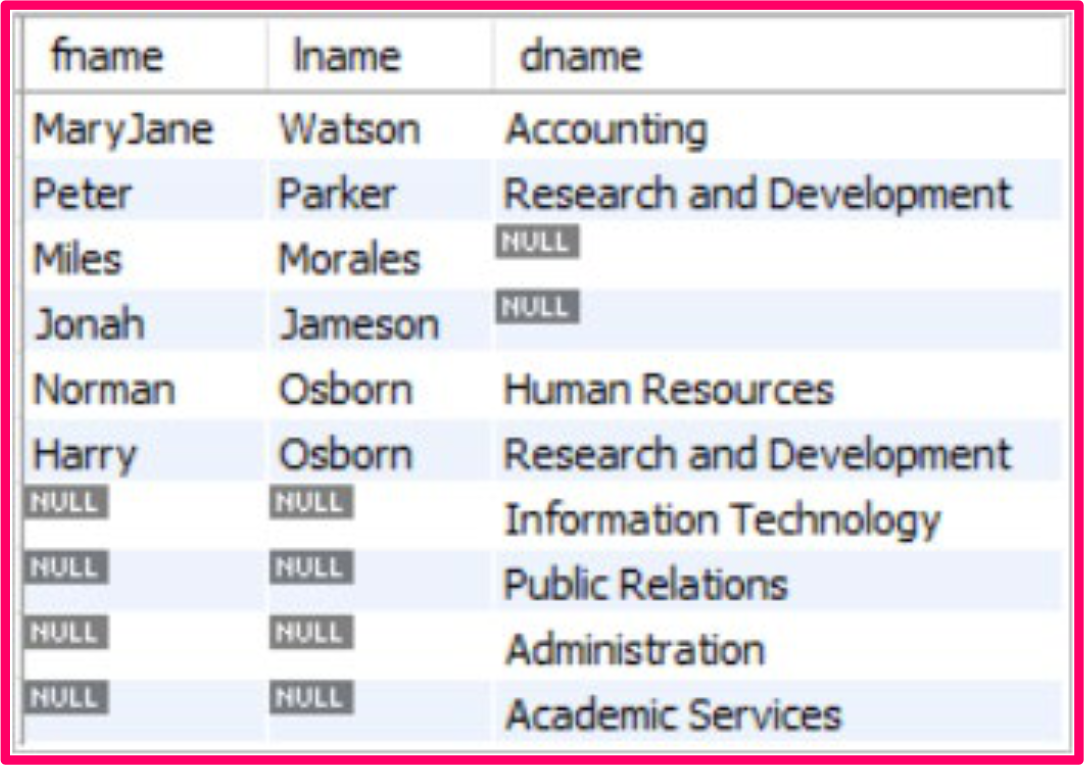
- Returns all records (matched and unmatched) from both tables
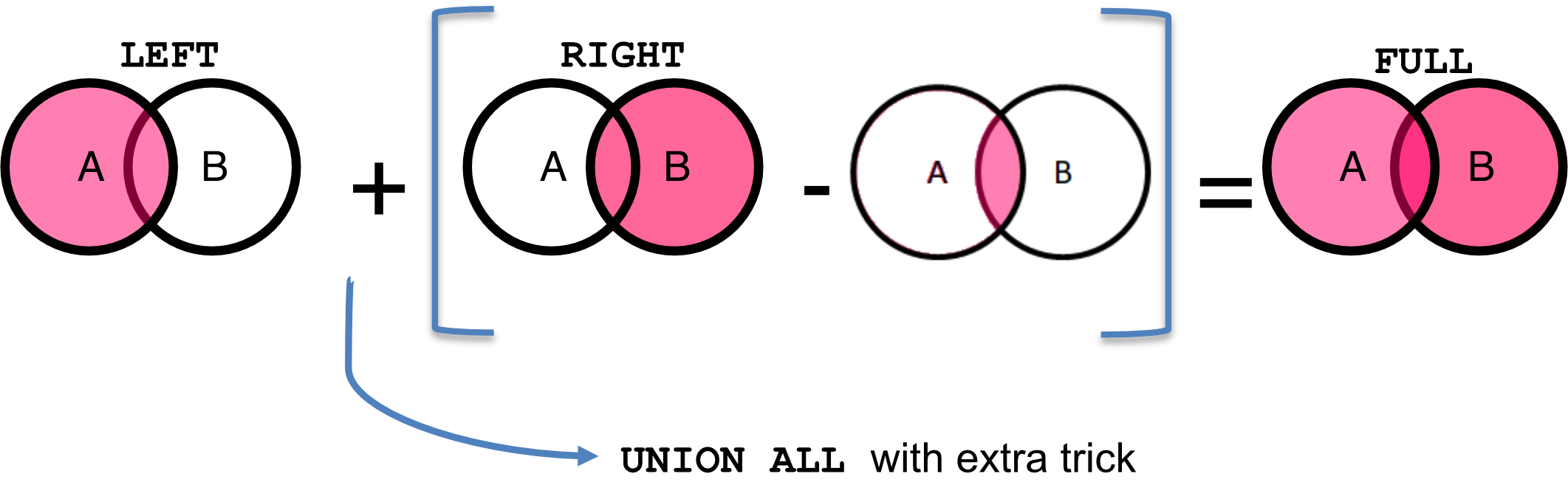
- Combines the results from LEFT and RIGHT OUTER JOIN
Standard SQL:
SELECT fname, lname, dname
FROM employee e
FULL OUTER JOIN department d
ON e.dept_no = d.dnumber;
⚠️ NOTE: There is no FULL OUTER JOIN implemented in MySQL server
Full Outer Join (Implementation)
Can we implement FULL OUTER JOIN with existing functions?
Yes! Using UNION ALL:
MySQL Implementation:
SELECT fname, lname, dname
FROM employee e
LEFT OUTER JOIN department d
ON e.dept_no = d.dnumber
UNION ALL
SELECT fname, lname, dname
FROM employee e
RIGHT OUTER JOIN department d
ON e.dept_no = d.dnumber
WHERE e.dept_no IS NULL;
Result: Shows all employees and all departments, with NULLs where there's no match
Analogy: FULL OUTER JOIN is like combining two incomplete guest lists. You want everyone from both lists, even if they don't have a match. The result is a complete list showing who's paired and who's alone.
Key Points:
- Use LEFT OUTER JOIN to get all from left table
- Use RIGHT OUTER JOIN with
WHERE left_key IS NULLto get unmatched rows from right table only - UNION ALL combines them without removing duplicates
Summary of SQL Join
CROSS JOIN
SELECT * FROM t1
CROSS JOIN t2;- Description: Return a Cartesian product of t1 and t2
INNER JOIN
SELECT * FROM t1
INNER JOIN t2 ON t1.atr=t2.atr;

-- (Shorter version)
SELECT * FROM t1
JOIN t2 ON t1.atr=t2.atr;- Description: Return only matched rows in the conditions
LEFT OUTER JOIN
SELECT * FROM t1
LEFT OUTER JOIN t2 ON t1.atr=t2.atr;

-- (Shorter version)
SELECT * FROM t1
LEFT JOIN t2 ON t1.atr=t2.atr;- Description: Return all rows in t1 (left table) and matched row in t2
RIGHT OUTER JOIN
SELECT * FROM t1
RIGHT OUTER JOIN t2 ON t1.atr=t2.atr;

-- (Shorter version)
SELECT * FROM t1
RIGHT JOIN t2 ON t1.atr=t2.atr;- Description: Return all rows in t2 (right table) and matched row in t1
FULL OUTER JOIN
-- MySQL Syntax
SELECT * FROM t1
LEFT OUTER JOIN t2 ON t1.atr=t2.atr;
UNION ALL
SELECT * FROM t1
RIGHT OUTER JOIN t2 ON t1.atr=t2.atr;
WHERE t1.atr IS NULL;- Description: Return all records (matched and unmatched) from both tables
Part II: SQL SET OPERATORS
Join operation → Merge schema from multiple tables
Set operation → Merge instance from multiple tables
Relational Set Operators
- SQL relational set operators are set-oriented
- Require tables to be union-compatible
Definitions:
Set-oriented: Operate over entire sets of rows and columns at once
Union-compatible:
- Number of attributes are the same
- Corresponding data types are alike
Examples of Relational Set Operators:
- UNION
- UNION ALL
- INTERSECT
- MINUS
Relational Set Operators – UNION, UNION ALL
UNION
- Combines rows from two or more queries
- Excludes duplicated rows
Example:
SELECT fname, lname FROM employee WHERE lname = "Osborn"
UNION
SELECT fname, lname FROM employee WHERE salary IS NULL;
Result:
| fname | lname |
|---|---|
| Norman | Osborn |
| Harry | Osborn |
| Miles | Morales |
| Jonah | Jameson |
(4 distinct rows)
UNION ALL
- Produces a relation that retains duplicate rows
Example:
SELECT fname, lname FROM employee WHERE lname = "Osborn"
UNION ALL
SELECT fname, lname FROM employee WHERE salary IS NULL;
Result:
| fname | lname |
|---|---|
| Norman | Osborn |
| Harry | Osborn |
| Miles | Morales |
| Jonah | Jameson |
| Harry | Osborn |
(5 rows, including duplicate Harry Osborn)
Analogy:
- UNION is like combining two guest lists and removing duplicate names – each person appears once.
- UNION ALL is like stacking two guest lists on top of each other – duplicates remain.
Relational Set Operators – INTERSECT, MINUS
INTERSECT
- Combines rows from two or more queries
- Returns only the rows that appear in both sets
Example:
SELECT fname, lname FROM employee WHERE salary IS NULL;
INTERSECT -- NO INTERSECT in MySQL; Use IN, subquery
SELECT fname, lname FROM employee WHERE lname = "Osborn"
Result:
| fname | lname |
|---|---|
| Harry | Osborn |
(Only Harry Osborn appears in both sets)
MINUS
- Produces a relation with rows from first query that don't appear in second query
Example:
SELECT fname, lname FROM employee WHERE salary IS NULL
MINUS -- NO MINUS operator in MySQL; Use LEFT JOIN, subquery
SELECT fname, lname FROM employee WHERE lname = "Osborn";
Result:
| fname | lname |
|---|---|
| Miles | Morales |
| Jonah | Jameson |
(Employees with NULL salary who are NOT named Osborn)
Analogy:
- INTERSECT is like finding people who are members of BOTH the gym AND the yoga class.
- MINUS is like finding people who go to the gym but DON'T go to yoga class.
⚠️ Important: MySQL doesn't have native INTERSECT and MINUS operators. Use alternative methods:
- For INTERSECT: Use
INwith subquery - For MINUS: Use
LEFT JOINwithWHERE NULLorNOT INwith subquery
Relational Set Operators – INTERSECT (Emulated)
Standard SQL (not in MySQL):
SELECT fname, lname
FROM Employee e
WHERE lname='Osborn'
INTERSECT
SELECT fname, lname
FROM Employee e
WHERE salary IS NULL;
Emulated Version using Subquery:
SELECT fname, lname
FROM Employee e
WHERE lname='Osborn'
AND (fname, lname) IN
    ( SELECT fname, lname
      FROM Employee e
      WHERE salary IS NULL);
Result: 1 row returned (Harry Osborn)
Note: Use the
INoperator with a subquery to achieve INTERSECT functionality in MySQL.
Relational Set Operators – MINUS (Emulated)
Standard SQL (not in MySQL):
SELECT fname, lname
FROM Employee e
WHERE lname='Osborn'
MINUS
SELECT fname, lname
FROM Employee e
WHERE salary IS NULL;
Emulated Version using Subquery:
SELECT fname, lname
FROM Employee e
WHERE lname='Osborn'
AND (fname, lname) NOT IN
    ( SELECT fname, lname
      FROM Employee e
      WHERE salary IS NULL);
Result: 1 row returned (Norman Osborn)
Note: Use the
NOT INoperator with a subquery to achieve MINUS functionality in MySQL.
Part III: SUBQUERY (OR NESTED QUERY)
Subquery (or Nested Query)
- Sometimes we need to process data based on other processed data
- A SELECT statement inside another SELECT statement
- Expressed inside parentheses
- Has outer query and inner query
Execution Order:
- Inner query is executed first
- Output of inner query is used as input for the outer query
Basic Structure:
-- Outer query
SELECT …
FROM (
    -- Inner query
    SELECT …
    FROM …
)
Analogy: A subquery is like a recipe within a recipe. First, you make the sauce (inner query), then you use that sauce in the main dish (outer query).
Example 1: Subquery
Problem: List all employees who do not have project assigned
Break down to subquery:
- Q1: Find the employees who have project assigned
- Q2: Find the employees who are NOT IN the employee list from Q1
Tables involved:
- EMPLOYEE
- ASSIGNMENT
Q1: Find employees who have projects assigned
-- Q1. Employee with project
SELECT DISTINCT essn
FROM assignment;
Result:
| essn |
|---|
| 103849237 |
| 110033445 |
After we get the list of SSNs of employees who have projects, we can find the remaining employees.
Q2: Find employees who do NOT have projects
ใน #FinalExam จะถามว่าให้ทำแบบนี้ โดยห้ามใช้ LEFT RIGHT JOINI ไรงี้
-- Q2. Find all employees without projects
SELECT ssn, fname, lname
FROM employee
WHERE ssn NOT IN
    -- List of emp. with project (Q1)
    (SELECT DISTINCT essn
     FROM assignment);
Result:
| ssn | fname | lname |
|---|---|---|
| 230563445 | Miles | Morales |
| 679373346 | Jonah | Jameson |
| 830384453 | Norman | Osborn |
| 834940344 | Harry | Osborn |
Key Concept: The inner query finds employees with projects, then
NOT INfilters out those employees from the main query, leaving only employees without projects.
Example 2: Subquery
Problem: List all employees who are older than the average age of employees in the "Research and Development" department
Break down to subquery:
- Q1: Find the average age of employees in the "Research and Development" department
- Q2: Find employees whose age is greater than the age calculated from Q1
Tables involved:
- EMPLOYEE
- DEPARTMENT
Q1: Find average age of R&D employees
-- Q1. Find AVG of ages of RD employee
SELECT AVG(YEAR(Curdate())-YEAR(e.bdate)) AS avgRDAge
FROM employee e
JOIN department d ON e.dept_no=d.dnumber
WHERE dname="Research and Development";
Result:
| avgRDAge |
|---|
| 32.5000 |
After we get the average age (32.5), we can find employees who are older than this.
Q2: Find employees older than the average
-- Q2. Find all older employees
SELECT fname, lname, (YEAR(CurDate()) -YEAR(bdate)) AS age
FROM employee
WHERE (YEAR(CurDate()) -YEAR(bdate)) >
    -- Average Age from Q1
    (SELECT AVG(YEAR(CurDate()) -YEAR(e.bdate)) AS avgRDAge
     FROM employee e
     JOIN department d ON e.dept_no=d.dnumber
     WHERE dname="Research and Development");
Result:
| fname | lname | age |
|---|---|---|
| MaryJane | Watson | 37 |
| Peter | Parker | 35 |
| Jonah | Jameson | 47 |
| Norman | Osborn | 56 |
Note: The subquery calculates a single value (average age) that the outer query uses for comparison.
Correlated Subquery
- A subquery that uses values from the outer query
- Unlike simple subquery, the correlated subquery cannot be executed independently
- It is driven by the outer query
อาจารย์พูดในคาบมันก็เหมือน Host Language นั่นแหละ
for i in 1...9 {
	for j in 1...9 {
		if i == j {
			 print("WOW")
		}
	}
}
Execution Flow:
- GET candidate row from outer query
- EXECUTE inner query using candidate row value
- USE values from inner query to qualify candidate row
- REPEAT for each row in outer query
Structure:
-- Outer query
SELECT …
FROM outer
WHERE column1 operator
    -- Inner query (references outer)
    (SELECT …
     FROM inner
     WHERE expr1 = outer.expr2)
Analogy: A correlated subquery is like checking each student's grade against their class average. For each student (outer query), you calculate their specific class's average (inner query using that student's class info), then compare.
Correlated Subquery Example
Problem: List all employees who have the highest salary in each department
-- Outer query
SELECT fname, lname, salary, dept_no
FROM employee e1
WHERE salary =
    -- Correlated subquery
    (SELECT MAX(salary)
     FROM employee e2
     WHERE e1.dept_no = e2.dept_no);
Key Point: WHERE e1.dept_no = e2.dept_no correlates the inner query with the outer query
Result:
| fname | lname | salary | dept_no |
|---|---|---|---|
| MaryJane | Watson | 3400.40 | 1 |
| Peter | Parker | 1800.50 | 3 |
| Norman | Osborn | 4000.50 | 2 |
How it works:
- Outer query examines each employee (e1)
- For that employee's department, inner query finds MAX(salary) in that specific department
- If employee's salary equals the max for their department, they're included in results
Subquery in SQL Clauses
You can include a subquery in:
- SELECT clause – to specify a certain column
- FROM clause – to specify a new table
- WHERE clause – to filter data
Example: Subquery in SELECT
Problem: Show number of employees per department, and the average age of each department
Task Breakdown:
- T1: Show department name and number of employees per department
- T2: Show average age in the given department along with the result from T1
Tables involved:
- DEPARTMENT
- EMPLOYEE
Final Output columns:
dnamenumEmp(from T1)avgAgeDept(from T2)
T1: Department name and employee count
SELECT d.dname, COUNT(e2.ssn) AS numEmp
FROM Department d
LEFT OUTER JOIN Employee e2
ON d.dnumber = e2.dept_no
GROUP BY d.dnumber
Result:
| dname | numEmp |
|---|---|
| Accounting | 1 |
| Human Resources | 1 |
| Research and Development | 2 |
| Information Technology | 0 |
| Public Relations | 0 |
| Administration | 0 |
| Academic Services | 0 |
T2: Adding average age using subquery in SELECT
SELECT d.dname,
       COUNT(e2.ssn) AS numEmp,
       -- T2: Correlated subquery in SELECT
       (SELECT AVG(YEAR(CURDATE())-YEAR(e1.bdate))
        FROM Employee e1
        WHERE d.dnumber = e1.dept_no
       ) AS avgAgeDept
FROM Department d
LEFT OUTER JOIN Employee e2
ON d.dnumber = e2.dept_no
GROUP BY d.dnumber
Result:
| dname | numEmp | avgAgeDept |
|---|---|---|
| Accounting | 1 | 40.0000 |
| Human Resources | 1 | 59.0000 |
| Research and Development | 2 | 35.5000 |
| Information Technology | 0 | NULL |
| Public Relations | 0 | NULL |
| Administration | 0 | NULL |
| Academic Services | 0 | NULL |
Note: The subquery in SELECT clause is correlated – it references
d.dnumberfrom the outer query to calculate average age for each specific department.
Example: Subquery in FROM
Problem: What is the average amount of total wages per project?
Task Breakdown:
- T1: Calculate total wages per project
- T2: Find the average of the total wages from T1
T1: Calculate total wages per project
SELECT projno, SUM(hourlyrate * hours) AS totalwage
FROM Assignment
GROUP BY projno;
Result:
| projno | totalwage |
|---|---|
| 1 | 1055.0000 |
| 2 | 580.0000 |
T2: Average of total wages using subquery in FROM
SELECT AVG(t1.totalwage) AS avg_wage
FROM (
    SELECT projno, SUM(hourlyrate * hours) AS totalwage
    FROM Assignment
    GROUP BY projno
) t1;
Result:
| avg_wage |
|---|
| 817.50000000 |
Key Concept: The subquery in FROM clause creates a temporary table (aliased as
t1) that the outer query can use. This is also called a "derived table."
Analogy: It's like making a summary sheet first (T1), then calculating statistics from that summary sheet (T2).
Example: Subquery in WHERE
Problem: Find project names that have no employee assigned
Task Breakdown:
- T1: Find the projects that have employees
- T2: Find project names that are NOT IN the list from T1
T1: Find projects with employees
SELECT DISTINCT projno
FROM Assignment;
Result:
| projno |
|---|
| 1 |
| 2 |
T2: Find projects with no employees
SELECT pname
FROM Project
WHERE pnumber NOT IN
    (SELECT DISTINCT projno
     FROM Assignment);
Result:
| pname |
|---|
| APTX3948 |
| APTX0007 |
| APTX1412 |
| APTX1919 |
| APTX8383 |
Key Concept: The subquery in WHERE clause filters the main query results. Only projects whose
pnumberis NOT in the subquery result set are returned.
Analogy: It's like making a list of "assigned projects" first, then checking your full project list to find which ones aren't on the "assigned" list.
Summary: Subquery Usage
When to use subqueries:
- In SELECT: When you need to calculate a value for each row based on related data
- In FROM: When you need to create a temporary result set to query from
- In WHERE: When you need to filter based on results from another query
Types of Subqueries:
- Simple Subquery: Can be executed independently, result used by outer query
- Correlated Subquery: References outer query, executed once per outer query row
Key Points:
- Inner query executes first (or repeatedly for correlated)
- Result of inner query used by outer query
- Subqueries must be enclosed in parentheses
- Can be nested multiple levels deep
Best Practices
- Use aliases for tables, especially in complex queries
- Test inner queries separately before combining
- Consider performance – correlated subqueries run once per outer row
- Use appropriate JOIN when possible – often more efficient than subqueries
- Comment complex queries to explain logic
Key Takeaways
JOINs:
- Use INNER JOIN for matched records only
- Use LEFT/RIGHT JOIN to keep unmatched records from one table
- Use UNION ALL to emulate FULL OUTER JOIN in MySQL
- CROSS JOIN rarely used in practice
Set Operators:
- UNION removes duplicates, UNION ALL keeps them
- MySQL lacks native INTERSECT and MINUS – use subqueries instead
Subqueries:
- Powerful tool for complex queries
- Can appear in SELECT, FROM, or WHERE
- Correlated subqueries reference outer query
- Consider performance implications
End of Lecture Notes