Today's Outline
- Transactions in Database
- ACID Properties of Transactions
- What concurrency control is and what role it plays in maintaining the database's integrity
Transactions in Database
What is a Transaction?
Definition
- Transaction: A sequence of one or more SQL operations treated as a single logical unit
- Logical unit of work that must be entirely completed or aborted
- Supports daily operations of an organization
Example: Money Transfer
- Scenario: Transfer $20 from Account A to Account B
- Account A: 20 = $80
- Account B: 20 = $220
- Total must remain $300
- Outcomes:
- Completed: Transaction succeeds, balances updated
- Aborted: Transaction fails, balances remain unchanged (200)
Analogy: Think of a transaction like ordering food online. Either the entire order goes through (payment processed, food delivered) or nothing happens (payment refunded, no food). You can't have partial completion where money is taken but no food arrives.
BEGIN มีไว้ทำไมเอ่ย batch command ใช่มั้ย ข้างใน Begin มีกี่ Command ก็ตามจะถูก store ไว้ใน memory เมื่อเจอ commit ตอนท้าย ถึงจะย้ายไป Harddisk
ถ้าระหว่างที่ execute อยู่มี user จะมา insert into บ้างจะไม่ยอมนะ ต้องรอก่อน
Transaction from DBMS Perspective
User vs DBMS View
User's Transaction (at ATM):
- Make a transfer request
- Prints the receipt
DBMS's Transaction (what the database sees):
- Series of read/write operations:
READ(A:100)WRITE(A:100-20=80)READ(B:200)WRITE(B:200+20=220)READ(A:80)READ(B:220)
Key Points
- User submits a specific request to a user's program (e.g., ATM)
- The user's program may carry out all sorts of operations on the data
- The DBMS is only concerned about what data is read from or written to the database
- A transaction is the DBMS's abstract view of a user program: a series of reads/writes of database objects
Transaction Components
A transaction can consist of:
- SELECT statement
- Series of related UPDATE statements
- Series of INSERT statements
- Combination of SELECT, UPDATE, and INSERT statements
ATM Transaction Example
START TRANSACTION
  Display greeting
  Get account number, pin, type, and amount
  SELECT account number, type, and balance
  If balance is sufficient then
    UPDATE account by posting debit
    UPDATE account by posting credit
    INSERT history record
    Display message and dispense cash
    Print receipt if requested
  End If
  On Error: ROLLBACK
COMMIT
Transaction and Concurrency
Why Concurrency?
- Concurrent execution of user programs is essential for good DBMS performance
- Disk access is frequent and slow
- Want to keep the CPU busy
- Concurrency is achieved by the DBMS, which interleaves actions of various transactions
Issues with Concurrency
- Interleaving transactions
- Crashes
Issue 1: Interleaving Transactions
Example Scenario
- User A: Transfer $20 from Account A to Account B
- Account A: 20 = $80
- Account B: 20 = $220
- User C: Transfer $50 from Account C to Account B
- Account C: 50 = $250
- Account B: 50 = $250
Problem: User A and User C make transfers to Account B at the same time
- What should Account B's final balance be?
- Without proper control, one transaction might overwrite another's changes
Analogy: Imagine two people trying to edit the same Google Doc simultaneously without version control. If both try to change the same sentence at the same time, one person's changes might get lost.
Issue 2: System Crashes
Example Scenario
- User A: Transfer $20 from Account A to Account B
- Account A: 20 = $80 ✓ (completed)
- System crashes 💥
- Account B: $200 (unchanged)
Problem:
- Money was deducted from Account A ($80)
- But never added to Account B ($200)
- Consistency violated: $20 disappeared from the system!
Analogy: Like mailing a package where the post office records it as "sent" but it never arrives at the destination. The package (money) is lost in transit.
ACID Properties
Overview
ACID is an acronym representing four critical properties that ensure reliable transaction processing:
A - Atomicity
Definition
- "All or Nothing" – Atom is the smallest particle that cannot be broken down
- All operations of a transaction must be completed
- If not, the transaction is aborted
How It Works
ต้อง Complete ทุกอย่างที่อยู่ใต้
BEGINถ้าไม่ Complete ทั้งหมดจะ Rollback
- A transaction can:
- Commit after completing its actions, or
- Abort (Rollback) if it is interrupted
- DBMS removes any effects of partial transactions to ensure atomicity
- DBMS maintains a record called a log of all writes to the database
- The recovery manager component handles this
Example
START TRANSACTION
  READ(A:100)
  WRITE(A:100-20=80)
  READ(B:200)
  WRITE(B:200+20=220)
  READ(A:80)
  READ(B:220)
  On Error: ROLLBACK
COMMITAnalogy: Like a light switch – it's either completely ON or completely OFF. You can't have a light switch stuck halfway.
C - Consistency
Definition
- The database must remain in a consistent state after any transaction, whether it succeeds or is rolled back
- Database integrity is maintained before and after a transaction
Key Principle
- If each transaction is consistent, and the database is initially consistent, then it is left consistent
- Example criterion: Any bank account transfer transaction does not change the total amount of money in the accounts
Example
- Initial state: Account A (200) = $300
- After transfer: Account A (220) = $300
- Total amount must remain $300 before and after executing the transfer transaction
Database Consistency
- Every transaction sees a consistent database instance
- Ensures database integrity before and after a transaction
Analogy: Like the law of conservation of energy in physics – energy cannot be created or destroyed, only transformed. In banking, money cannot appear or disappear, only move between accounts.
I - Isolation
Definition
- Transactions are isolated or protected from the effects of other scheduled transactions
- Even though transactions may be interleaved, the net effect is identical to executing the transactions serially
Guarantee
If transactions T1 and T2 are executed concurrently (and probably interleaved), the net effect is equivalent to executing:
- T1 followed by T2, or
- T2 followed by T1
Visual Representation
T1 followed by T2:    ████ ████ T1  ████ ████ T2
T2 followed by T1:    ████ ████ T2  ████ ████ T1
─────────────────────────────────────────────────
T1 interleaved by T2: ████ ████ T1  ████ T2  ████ T1
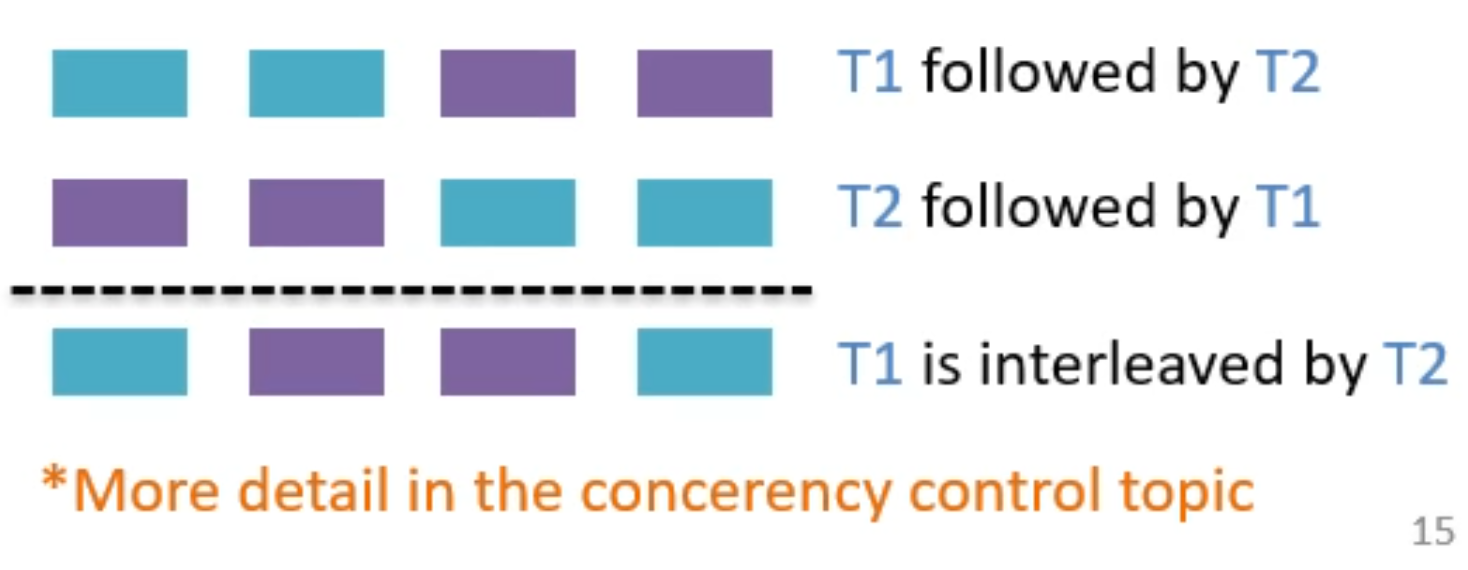
The interleaved execution must produce the same result as one of the serial executions.
More detail in the concurrency control topic
Analogy: Like separate cooking stations in a restaurant kitchen. Even though multiple chefs are working simultaneously, each order is prepared as if it were done one at a time, without ingredients from different orders getting mixed up.
D - Durability
Definition
- If a transaction is committed, then its effects persist forever
- Changes survive system failures
How It Works
- DBMS uses the log to ensure durability
- If the system crashes before committed changes are written to disk:
- The log is used to remember and restore these changes when the system restarts
- Handled by the recovery manager
Analogy: Like writing in permanent ink versus pencil. Once you commit (use permanent ink), the writing stays even if the paper gets wet (system crashes). The log is like a backup copy that ensures nothing is lost.
Transaction Properties Summary
Single-user Databases
- Atomicity: Unless all parts are executed, the transaction is aborted
- Consistency: Indicates the permanence of the database's consistent state
- Durability: Once a transaction is committed, it cannot be rolled back
Multi-user Databases
- Isolation: Data used by one transaction cannot be used by another transaction until the first transaction is completed
- Serializability: The result of concurrent execution of transactions is the same as though the transactions were executed in serial order
Serializability
Definition
- When multiple transactions are being executed, operations of one transaction may be interleaved with other transactions
- Schedule: A chronological execution sequence of a transaction
- Can have many transactions, each comprising multiple operations
- Serial Schedule: Transactions are executed in a serial manner
- When the first transaction completes its cycle, then the next transaction is executed
Key Concept
- Serializability ensures that the schedule for concurrent execution of several transactions should yield consistent results
- When multiple transactions work on the same data, results may vary and cause data inconsistency without proper control
Transaction Management with SQL
SQL Transaction Commands
Main Commands
- COMMIT: Saves all changes made during the transaction
- ROLLBACK: Undoes all changes made during the transaction
Transaction Sequence
Transaction sequence must continue until:
- COMMIT statement is reached
- ROLLBACK statement is reached
- End of program is reached
- Program is abnormally terminated
Transaction Log
Purpose
- Keeps track of all transactions that update the database
- DBMS uses information stored in log for:
- Recovery requirement triggered by a ROLLBACK statement
- A program's abnormal termination
- A system failure
Log Contents
A transaction log contains:
- A record for the beginning of the transaction
- For each transaction component (SQL statement):
- The type of operation being performed (INSERT, UPDATE, DELETE)
- The names of the objects affected by the transaction (table name)
- The "before" and "after" values for fields being updated
- Pointers to previous and next transaction log entries for the same transaction
- The ending (COMMIT) of the transaction
Example Transaction Log
[Image: Transaction log table showing TRL_ID, TRX_NUM, PREV_PTR, NEXT_PTR, OPERATION, TABLE, ROW_ID, ATTRIBUTE, BEFORE_VALUE, AFTER_VALUE]
Key components:
TRL_ID= Transaction log record IDTRX_NUM= Transaction number (automatically assigned by DBMS)PTR= Pointer to a transaction log record ID
Example entries:
- Entry 341: START transaction
- Entry 352: UPDATE PRODUCT table (PROD_QOH: 25 → 23)
- Entry 363: UPDATE CUSTOMER table (CUST_BALANCE: 525.75 → 615.73)
- Entry 365: COMMIT transaction
Concurrency Control
What is Concurrency?
Why Concurrency is Essential
- Any application with decent traffic would have a single entity updated by "n" concurrent transactions
- A transaction is a collection of read/write operations
- Database management systems apply ACID rules to transactions
The Challenge
- The problem comes with "I" (Isolation)
- Each transaction should occur independently
- Transactions should not affect each other
- In such scenarios, the database uses a transaction isolation technique called "serializable"
- Uses physical-locking
- Outcome is the same as if transactions were executed one after another
Serializable Schedule
Definitions
Schedule:
- A chronological execution sequence of a transaction
- Can have many transactions, each comprising multiple operations
Serial Schedule:
- Transactions are executed in a serial manner
- When the first transaction completes its cycle, then the next transaction is executed
Serializable Schedule:
- Interleaved execution of transactions yields the same results as the serial execution of the transactions
Example
Given two transactions:
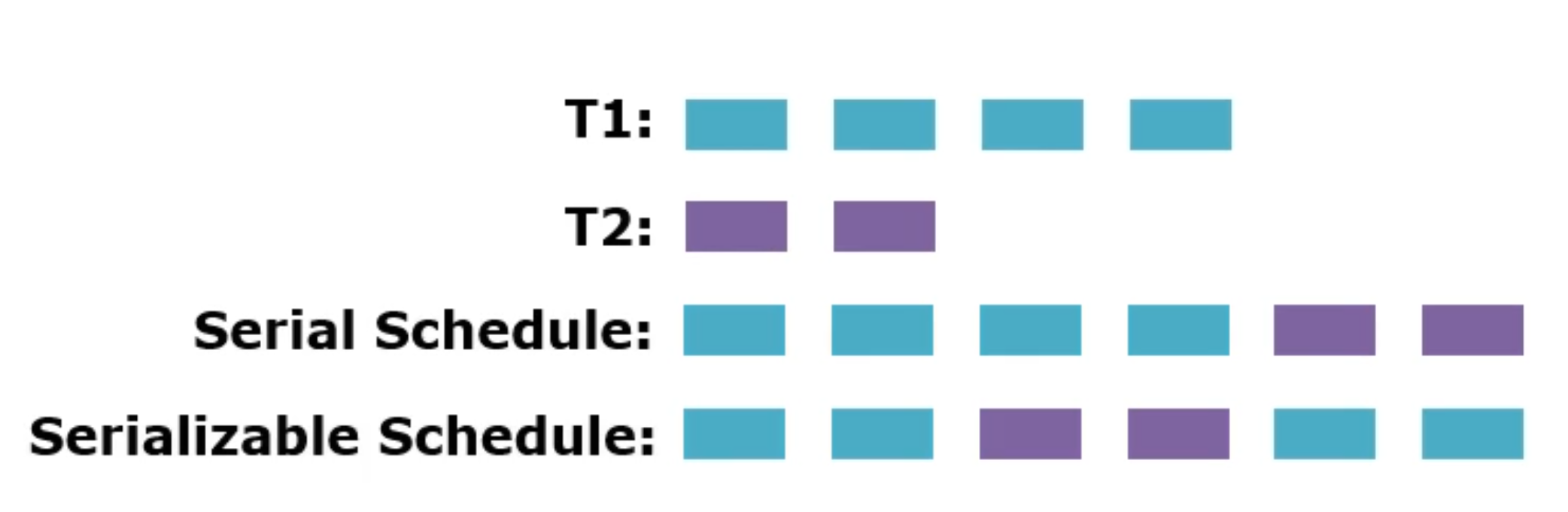
- Serial Schedule: Execute T1 completely, then T2 completely
- Serializable Schedule: Interleave operations of T1 and T2, but produce the same final result as serial execution
Key Point
Serializability ensures that concurrent execution of transactions should yield consistent results
Problems in Concurrency Control
Overview
- When multiple transactions are reading the same data:
- Usually no conflict
- Serializable schedule is easily managed
- When multiple transactions are writing on the same data:
- Results may vary
- Causes data inconsistency
- Called Transaction Anomalies
Types of Transaction Anomalies
- Dirty Read
- Non-Repeatable Read
- Lost Update
- Phantom Read
- Others
Transaction Anomaly 1: Dirty Read
Definition
จะเป็นปัญหาของ Interleave & Queue
A transaction reads data that has been modified by another transaction but not yet committed. If the other transaction is aborted (or rolled back), this transaction may rely on invalid data causing potential errors.
Example
| Transaction A | Time (t) | Transaction B |
|---|---|---|
| BEGIN | t₁ | |
| Read QTY (10) | t₂ | |
| QTY = QTY - 1 | t₃ | |
| Write QTY (9) | t₄ | |
| t₅ | BEGIN | |
| t₆ | Read QTY (9) ← Reads updated but uncommitted data | |
| ROLLBACK | t₇ | |
| t₈ | ... |
Problem:
- Transaction B reads QTY = 9 (updated by Transaction A)
- Transaction A is rolled back, so QTY returns to 10
- Transaction B reads dirty data (value that shouldn't exist)
Analogy: Like reading a draft email that someone is still writing. If they delete the draft before sending, you've read information that was never meant to exist.
Transaction Anomaly 2: Non-Repeatable Read
Definition
The problem of interleave
A transaction reads the same data twice but gets different values because another transaction modified and committed the data between the reads.
Example
| Transaction A | Time (t) | Transaction B |
|---|---|---|
| BEGIN | t₁ | |
| t₂ | BEGIN | |
| t₃ | Read QTY (10) | |
| Read QTY (10) | t₄ | |
| QTY = QTY - 10 | t₅ | |
| Write QTY (0) | t₆ | |
| COMMIT | t₇ | |
| t₈ | Read QTY (0) ← Different value! | |
| t₉ | ... |
Problem:
- Transaction B reads QTY twice
- First read: QTY = 10
- Second read: QTY = 0
- Gets different values in the same transaction
Analogy: Like checking your bank balance twice during the same session, but someone else withdraws money in between. Your two balance checks show different amounts, which could lead to incorrect decisions.
Transaction Anomaly 3: Lost Update
Definition
Two transactions simultaneously update the same data, with one update overwriting the other without any awareness. The other's update is lost.
Example
| Transaction A | Time (t) | Transaction B |
|---|---|---|
| BEGIN | t₁ | |
| Read QTY (10) | t₂ | |
| t₃ | BEGIN | |
| t₄ | Read QTY (10) | |
| Update QTY = QTY - 2 | t₅ | |
| COMMIT | t₆ | |
| t₇ | Update QTY = QTY - 5 | |
| t₈ | COMMIT |
Expected Result (serial execution):
- QTY = 10 - 2 - 5 = 3
Actual Result (concurrent execution):
- Transaction A updates: QTY = 8 (but this is lost)
- Transaction B updates: QTY = 10 - 5 = 5
- Final QTY = 5 (Transaction A's update is lost!)
Analogy: Like two people editing a shared document. Person A makes changes and saves. Person B, who opened the document before Person A's changes, also makes edits and saves. Person A's changes are completely overwritten and lost.
Transaction Anomaly 4: Phantom Read
Definition
A transaction reads a set of rows based on a condition, but another transaction inserts, updates, or deletes rows that affect the original query's result set.
Example
Initial Table:
| ID | Name | Qty |
|---|---|---|
| P097 | DBMS Book | 2 |
| P098 | AI Book | 8 |
| Transaction A | Time (t) | Transaction B |
|---|---|---|
| t₁ | BEGIN | |
| t₂ | COUNT rows WHERE QTY < 10 → Result: 2 rows | |
| BEGIN | t₃ | |
| INSERT INTO Product VALUES ('P099', 'xyz', 5) | t₄ | |
| COMMIT | t₅ | |
| t₆ | COUNT rows WHERE QTY < 10 → Result: 3 rows | |
| t₇ | COMMIT |
Table After Insert:
| ID | Name | Qty |
|---|---|---|
| P097 | DBMS Book | 2 |
| P098 | AI Book | 8 |
| P099 | XYZ | 5 |
Problem:
- Transaction B counts rows twice with the same condition
- First count: 2 rows
- Second count: 3 rows (a "phantom" row appeared)
Analogy: Like counting people in a room twice, but someone enters the room between your counts. The second count shows more people (phantoms) even though you didn't expect anyone to enter.
Summary: Transaction Anomalies
| Anomaly Type | Description | Example Scenario |
|---|---|---|
| Dirty Read | Reading uncommitted changes from another transaction | Reading a balance before a rollback |
| Non-Repeatable Read | Re-reading data gives different results due to a committed change | Checking a balance twice during a transfer operation |
| Lost Update | One transaction overwrites changes made by another | Two users updating stock levels simultaneously |
| Phantom Read | Querying a range gives different results due to inserts, updates, or deletes | Counting rows matching a condition before and after insert |
Non-repatable read vs Phantom Read – Phantom Read might operate some data like aggregate ไรงี้ แต่ ถ้า non-repeatable read ก้คือจะอ่านเฉย ๆ
Practice Problem 1
#FinalExam
Given
Table R(X, Y):
| X | Y |
|---|---|
| 1 | 10 |
| 2 | 20 |
Transaction Execution
| Transaction A | Time(t) | Transaction B |
|---|---|---|
| Begin Transaction | t₁ | |
| Insert into R value (3, 30) | t₂ | |
| t₃ | Begin Transaction | |
| t₄ | Select Y from R where X=3 | |
| t₅ | Update R set Y = Y+10 where X=3 | |
| t₆ | Commit Transaction | |
| Rollback Transaction | t₇ |
Question
What kind of problem may occur?
Answer: Dirty Read
- Transaction B reads and updates a row (X=3, Y=30) that was inserted by Transaction A
- Transaction A then rolls back
- Transaction B operated on data that never actually existed in the committed database
Practice Problem 2
Given
Table R(X, Y):
| X | Y |
|---|---|
| 1 | 10 |
| 2 | 20 |
Transaction Execution
| Transaction A | Time(t) | Transaction B |
|---|---|---|
| t₁ | Begin Transaction | |
| Begin Transaction | t₂ | |
| t₃ | Select Y from R where X=2 | |
| Select Y from R where X=2 | t₄ | |
| t₅ | Update R set Y=Y+10 where X=2 | |
| t₆ | Commit Transaction | |
| Update R set Y=Y-5 where X=2 | t₇ | |
| Commit Transaction | t₈ |
Question
What kind of problem may occur?
Answer: Lost Update
- Both transactions read the same initial value (Y=20)
- Transaction B updates: Y = 20 + 10 = 30
- Transaction A updates based on old value: Y = 20 - 5 = 15
- Final result: Y = 15 (Transaction B's update is lost)
- Expected result should be: 20 + 10 - 5 = 25
Transaction Management with MySQL
Transaction Management in SQL
SQL Transaction Commands
Main commands:
- COMMIT: Saves all changes permanently
- ROLLBACK: Undoes all changes
Transaction Sequence Rules
Transaction sequence must continue until:
- COMMIT statement is reached
- ROLLBACK statement is reached
- End of program is reached
- Program is abnormally terminated
MySQL Transaction - COMMIT Example
Initial State
Before Transaction:
| account_id | account_name | Balance |
|---|---|---|
| 1 | Alice | 1000.00 |
| 2 | Bob | 1500.00 |
| 3 | Charlie | 2000.00 |
SQL Code
START TRANSACTION;

UPDATE accounts SET balance = balance - 100
WHERE account_name = 'Alice';

UPDATE accounts SET balance = balance + 100
WHERE account_name = 'Bob';

-- Check intermediate state
SELECT * FROM accounts;

-- COMMIT the transaction
COMMIT;

-- Check after the transaction
SELECT * FROM accounts;
Results
Inside Transaction:
| account_id | account_name | Balance |
|---|---|---|
| 1 | Alice | 900.0 |
| 2 | Bob | 1600.00 |
| 3 | Charlie | 2000.00 |
After Transaction (same as inside, changes are permanent):
| account_id | account_name | Balance |
|---|---|---|
| 1 | Alice | 900.0 |
| 2 | Bob | 1600.00 |
| 3 | Charlie | 2000.00 |
MySQL Transaction - ROLLBACK Example
Initial State
Before Transaction:
| account_id | account_name | Balance |
|---|---|---|
| 1 | Alice | 1000.00 |
| 2 | Bob | 1500.00 |
| 3 | Charlie | 2000.00 |
SQL Code
START TRANSACTION;

UPDATE accounts SET balance = balance - 50
WHERE account_name = 'Alice';

UPDATE accounts SET balance = balance + 50
WHERE account_name = 'Bob';

-- Check intermediate state
SELECT * FROM accounts;

-- ROLLBACK the transaction
ROLLBACK;

-- Check after the transaction
SELECT * FROM accounts;
Results
Inside Transaction:
| account_id | account_name | Balance |
|---|---|---|
| 1 | Alice | 850.0 |
| 2 | Bob | 1650.00 |
| 3 | Charlie | 2000.00 |
After Transaction (reverted to original):
| account_id | account_name | Balance |
|---|---|---|
| 1 | Alice | 900.0 ← Reverted! |
| 2 | Bob | 1600.00 ← Reverted! |
| 3 | Charlie | 2000.00 |
Note: The "After Transaction" table shows values from a previous transaction, not the original 1000/1500. The key point is that ROLLBACK undoes the changes made within the current transaction.
Isolation Levels
Overview
Purpose
- To manage transaction anomalies, Isolation levels instruct the database engine on how to manage multiple transactions being performed concurrently
- Define what violations are possible
Trade-offs
- Higher isolation levels: Stronger protection against anomalies, but may reduce performance due to locking or serialization
- Lower isolation levels: Better performance, but more susceptible to anomalies
Standard Isolation Levels
Provided by DBMS software/providers (e.g., MySQL, MS-SQL Server):
- Read Uncommitted
- Read Committed
- Repeatable Read
- Serializable
Isolation Level 1: Read Uncommitted
Characteristics
- Lowest isolation level
- Effectively allows all violations
Behavior
- Transactions can read data modified by other transactions even if not committed yet
- No locks are placed to prevent reads
- Maximizes concurrency but risks data inconsistency
Use Case
- When performance takes priority over data consistency
- Example: Finding the number of likes a popular post has
- Returning an approximation over the exact value is usually acceptable
Syntax
SET TRANSACTION ISOLATION LEVEL READ UNCOMMITTED;Allowed Anomalies
- ✅ Dirty Reads
- ✅ Non-Repeatable Reads
- ✅ Phantom Reads
Isolation Level 2: Read Committed
Characteristics
- One step above Read Uncommitted
- Prevents dirty reads
Behavior
- Transactions can only read data that has been committed by other transactions
- Shared locks are placed on data during reads
- Locks are released immediately after the read
- Common default level for many systems
Use Case
- Suitable for scenarios where dirty reads are unacceptable, but some inconsistency is tolerable
Syntax
SET TRANSACTION ISOLATION LEVEL READ COMMITTED;Allowed Anomalies
- ❌ Dirty Reads (prevented)
- ✅ Non-Repeatable Reads
- ✅ Phantom Reads
Isolation Level 3: Repeatable Read
Characteristics
- Prevents dirty reads and non-repeatable reads
- Default MySQL isolation level
Behavior
- Ensures that if a transaction reads the same data multiple times, it will see the same result throughout its execution
- Accomplished by holding shared locks on read rows until the transaction completes
Use Case
- Suitable for systems where consistency is more important
- Example: Financial applications
Syntax
SET TRANSACTION ISOLATION LEVEL REPEATABLE READ;Allowed Anomalies
- ❌ Dirty Reads (prevented)
- ❌ Non-Repeatable Reads (prevented)
- ✅ Phantom Reads
Isolation Level 4: Serializable
Characteristics
- Highest isolation level
- Prevents all violations
Behavior
- Transactions are executed as if they were serialized (one after another)
- Achieved by placing locks on all data that a transaction accesses
- Includes range locks
- Greater risk of deadlocks occurring
- Decreased performance due to higher contention
Use Case
- Best for scenarios requiring strict consistency
- Examples: Financial ledgers, critical systems
Syntax
SET TRANSACTION ISOLATION LEVEL SERIALIZABLE;Allowed Anomalies
- ❌ Dirty Reads (prevented)
- ❌ Non-Repeatable Reads (prevented)
- ❌ Phantom Reads (prevented)
Isolation Levels Comparison Table
| Isolation Level | Dirty Reads | Non-Repeatable Reads | Phantom Reads | Concurrency | Consistency |
|---|---|---|---|---|---|
| Read Uncommitted | ✅ Allowed | ✅ Allowed | ✅ Allowed | High | Low |
| Read Committed | ❌ Not Allowed | ✅ Allowed | ✅ Allowed | Moderate | Moderate |
| Repeatable Read | ❌ Not Allowed | ❌ Not Allowed | ✅ Allowed | Low | High |
| Serializable | ❌ Not Allowed | ❌ Not Allowed | ❌ Not Allowed | Very Low | Very High |
Key Takeaways
Lower Isolation Levels:
- Allow more concurrency
- Increase the risk of transaction anomalies
Higher Isolation Levels:
- Ensure stricter consistency
- Reduce concurrency
- Potentially cause performance bottlenecks
Analogy: Think of isolation levels like security levels in a building:
- Read Uncommitted = Open door policy (anyone can enter anytime, chaos possible)
- Read Committed = Basic security (must check in at reception)
- Repeatable Read = Secure access (badge required, movements tracked)
- Serializable = Maximum security (one person at a time, all actions logged)
Summary
Key Concepts Covered
- Transactions: Logical units of work that must complete entirely or be aborted
- ACID Properties: Atomicity, Consistency, Isolation, Durability
- Concurrency Issues: Dirty reads, non-repeatable reads, lost updates, phantom reads
- Isolation Levels: Different levels of protection vs. performance trade-offs
- Transaction Management: Using COMMIT and ROLLBACK in SQL
Important Formulas
Transaction consistency example:
Before transaction: 200 = 80 + 300