Content Overview
- IP Address
- Classless Inter-Domain Routing (CIDR)
- Variable Length Subnet Mask (VLSM)
- IPv6
- Network Address Translation (NAT)
- ICMP
IP Address: Network/Subnet
4 Main Techniques to Split IP Range
- IP address classful (A, B, C)
- Public/Private IP
- Classless Inter-Domain Routing (CIDR)
- Variable Length Subnet Mask (VLSM)
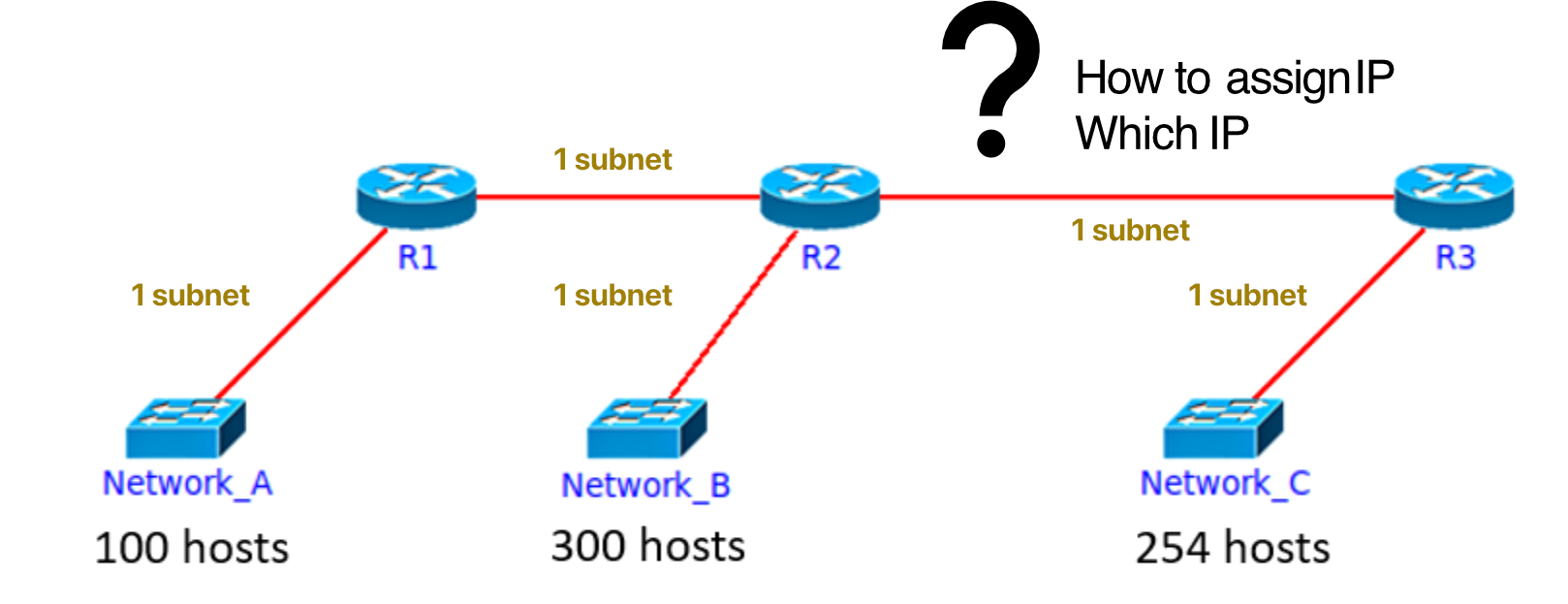
บอกแล้วว่าอย่าลืมนับระหว่าง Router นะ
ตัว Router จะเป็นตัวต่อระว่าง Network/Subnet
ถ้ามี Computer มาต่อกับ Network A 50 เครื่อง ก็ไม่ได้มี Subnet เพิ่มนะ
When to Use Which?
| Condition | Method |
|---|---|
| No condition | Classful private |
| Given a range (easy split) | CIDR |
| Given a range (efficient split) | VLSM |
Design IPs for Network
Using Classful (Inefficient)
| Network | Need | Allocate | Address |
|---|---|---|---|
| Network A (100 hosts) | 100 IP | 254 IP | 192.168.0.0/24 |
| Network B (300 hosts) | 300 IP | 65,534 IP | 172.16.0.0/16 |
| Network C (254 hosts) | 254 IP | 254 IP | 192.168.1.0/24 |
| R1-R2 link | 2 IP | 254 IP | 192.168.2.0/24 |
| R2-R3 link | 2 IP | 254 IP | 192.168.3.0/24 |
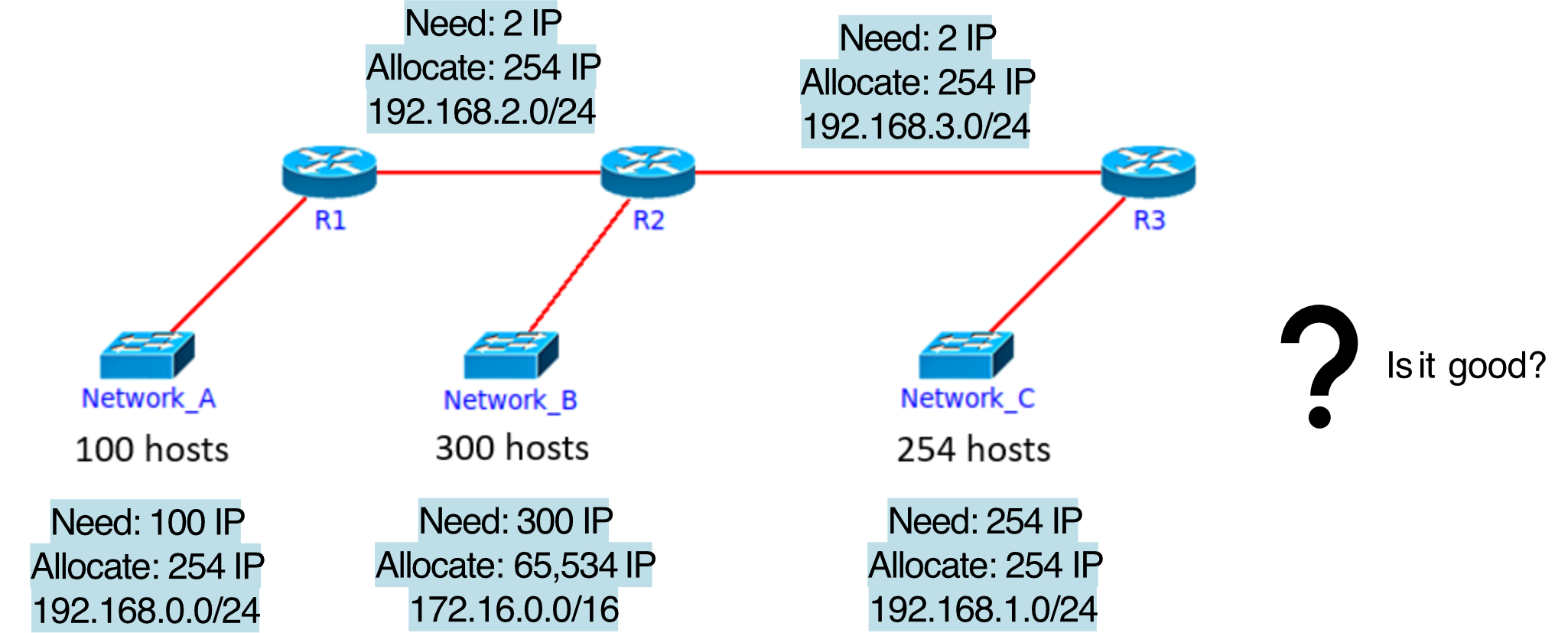
⚠️ Problem: Using classful wastes a massive amount of IPs. For example, Network B only needs 300 IPs but gets 65,534 — like renting an entire warehouse just to store a bicycle.
Subnetting a Class A/B/C Address
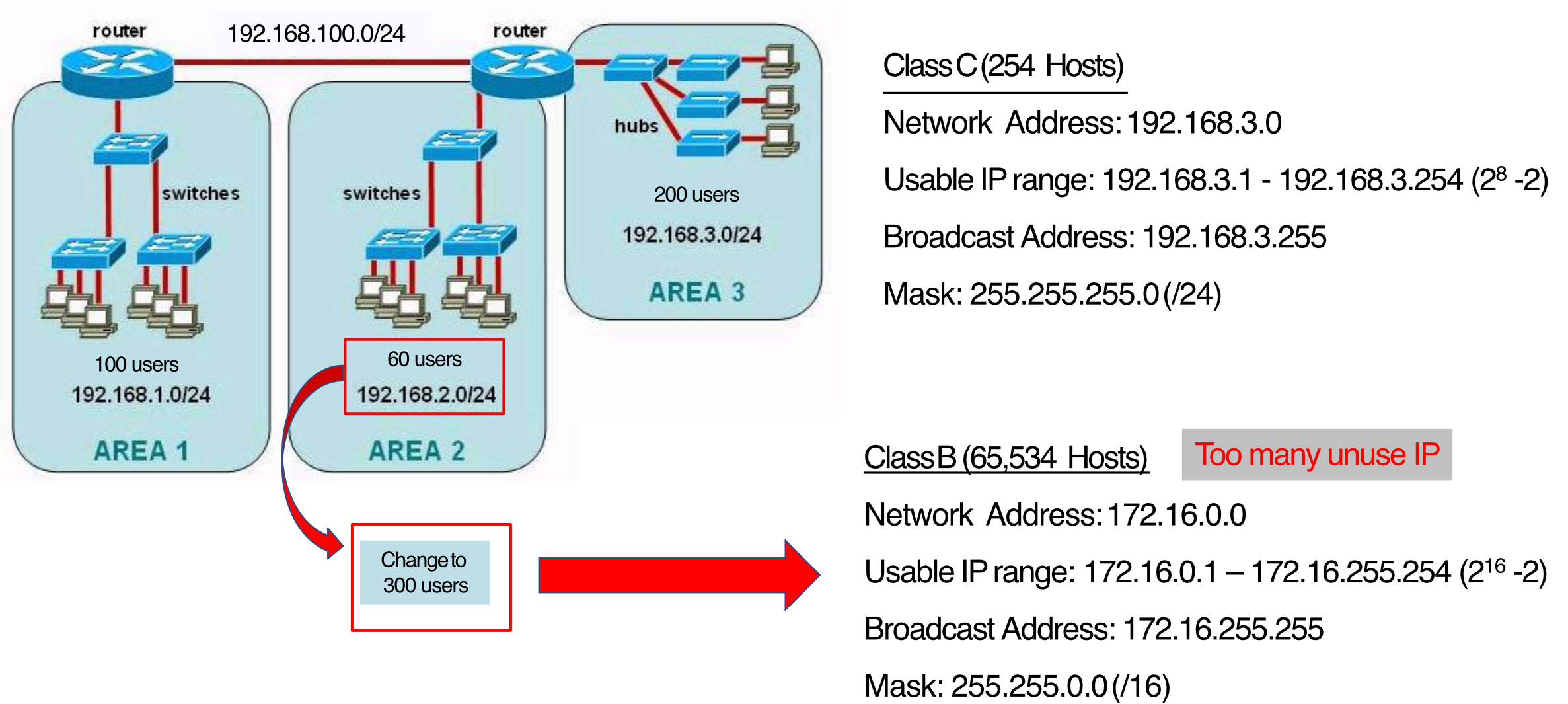
Class C (254 Hosts)
- Network Address: 192.168.3.0
- Usable IP range: 192.168.3.1 – 192.168.3.254 ()
- Broadcast Address: 192.168.3.255
- Mask: 255.255.255.0 (/24)
Class B (65,534 Hosts)
- Network Address: 172.16.0.0
- Usable IP range: 172.16.0.1 – 172.16.255.254 ()
- Broadcast Address: 172.16.255.255
- Mask: 255.255.0.0 (/16)
- ⚠️ Too many unused IPs! → ทำไงอะ มีครึ่ง ๆ กลาง ๆ ระหว่าง /24 กับ /16 ได้ป้ะะะ??
Classless Inter-Domain Routing (CIDR)
CIDR is pronounced "cider" 🍎
What is CIDR?
- A method for allocating IP addresses and for IP routing
- Subnet portion of address has arbitrary length (not fixed to class boundaries)
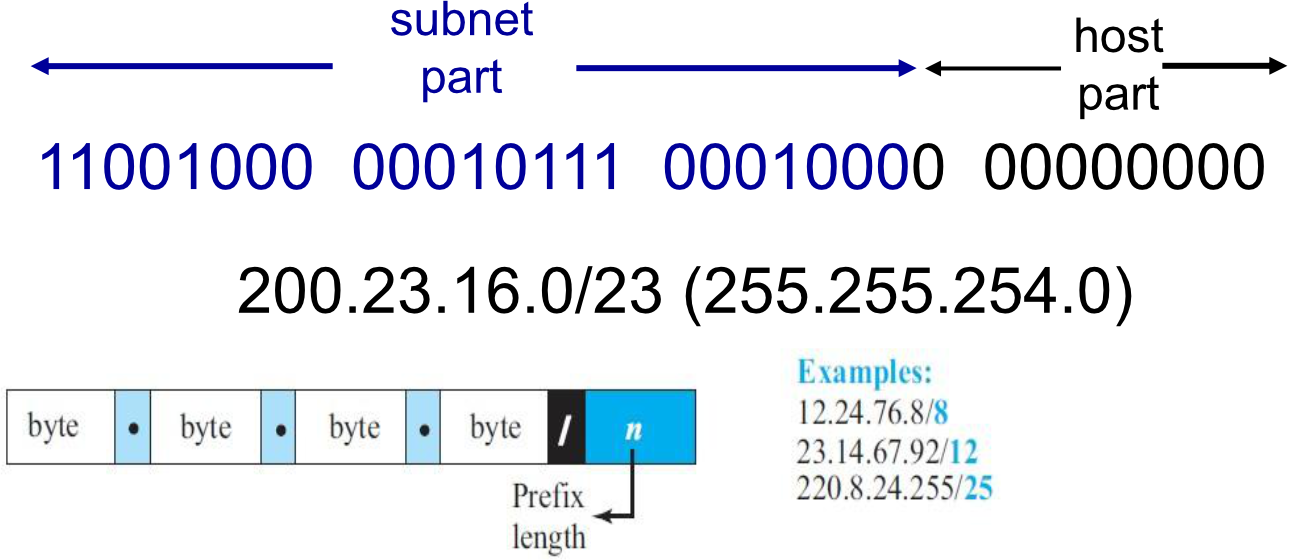
- Address format: where = number of bits in subnet portion
Binary Example
11001000 00010111 00010000 00000000
|________ subnet part ________|host|
         200.23.16.0/23
Key Questions for Any Subnet
- How many subnets does the chosen mask produce?
- How many valid hosts per subnet?
- What are the valid subnets (network addresses)?
- What is the broadcast address of each subnet?
- What are the valid hosts in each subnet?
#FinalExam → 192.168.100.0/24, we want to split into 5 subnet (How?)
What are the number of the host for each subnet
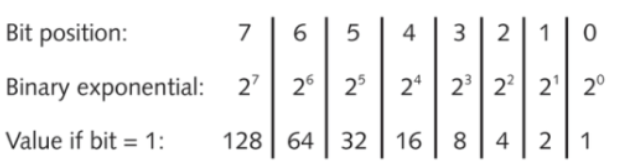
CIDR: Key Formulas
Think of it like slicing a pizza: the prefix length tells you how many slices you've already "locked in" as the network. The remaining bits are your slices to give to hosts. You always lose 2 slices — one for the network address and one for the broadcast.
CIDR Examples
แต่ถ้าเป็น Classful ข้างหลังสุดต้องเป็น 0 เสมอหรอ? (แต่ถ้าเป็น Classless ไม่จำเป็นต้องเป็น 0 นะ)
Contents
บางครั้งคำถามจะถามว่า IP Address อันนี้เป็น Regular IP, Brodcast IP Address หรือว่าอะไร
เจอแน่ #FinalExam
- ตอน #FinalExam อย่าลืมเอาเข้าไปด้วย ช่วยนะ
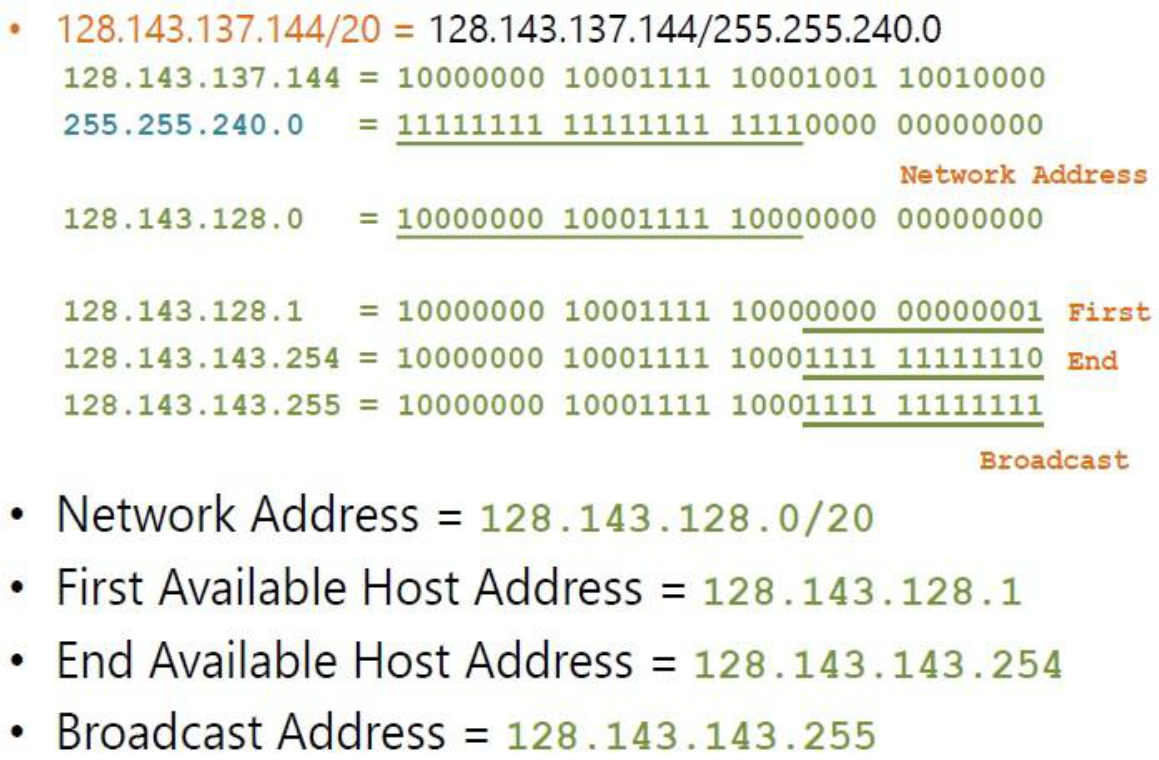
Example 1: 128.143.137.144/20
- Host bits = 32 - 20 = 12
- Total IPs =
- Network Address = 128.143.128.0/20
- First Host = 128.143.128.1
- Last Host = 128.143.143.254
- Broadcast = 128.143.143.255
Example 2: 192.168.10.0/25 (mask 255.255.255.128)
- Host bits = 32 - 25 = 7
- Total IPs per subnet =
- Subnets:
- 192.168.10.0/25 → Host: .1–.126, Broadcast: .127
- 192.168.10.128/25 → Host: .129–.254, Broadcast: .255
CIDR Notation to Subnet Mask Reference
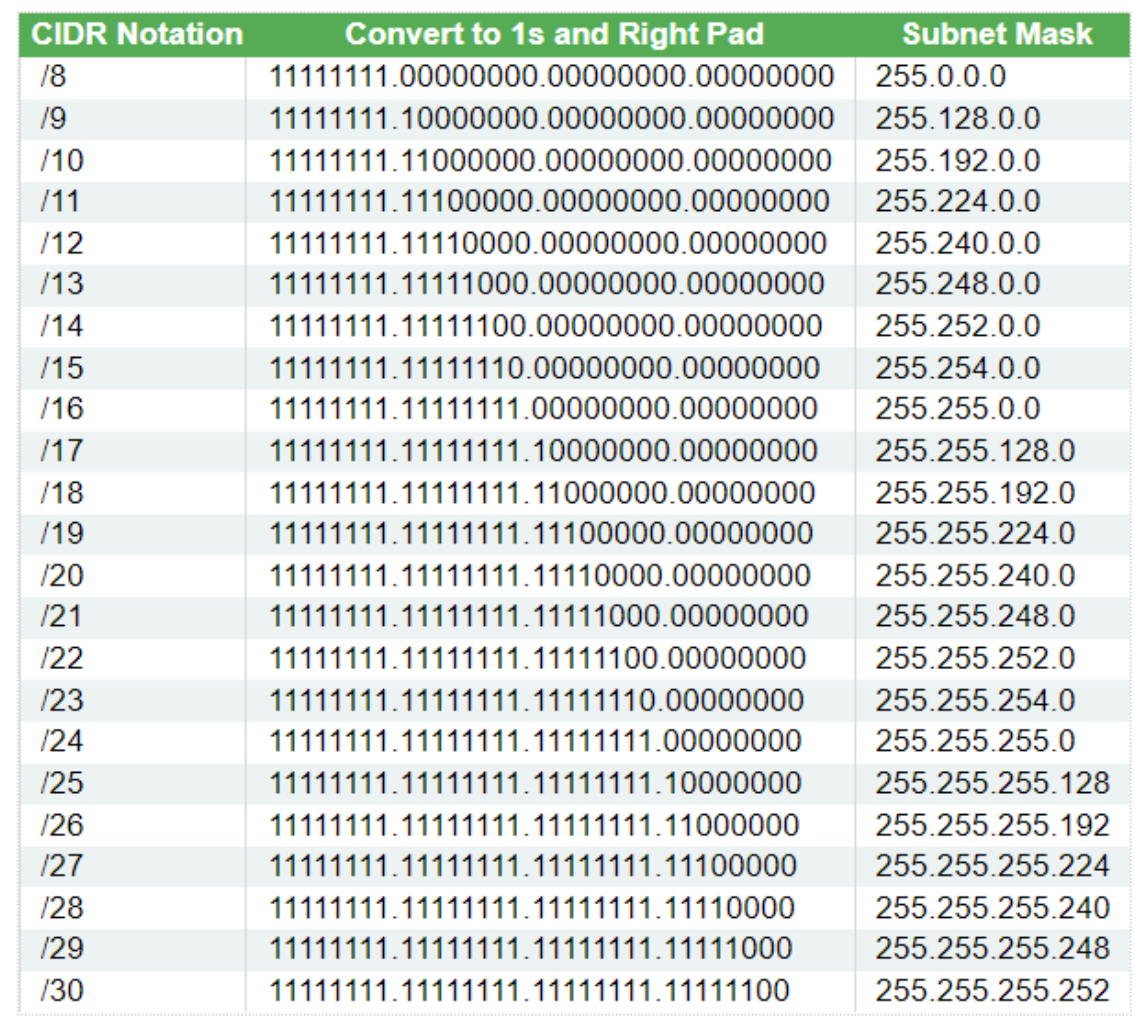
| CIDR | Subnet Mask |
|---|---|
| /8 | 255.0.0.0 |
| /16 | 255.255.0.0 |
| /20 | 255.255.240.0 |
| /23 | 255.255.254.0 |
| /24 | 255.255.255.0 |
| /25 | 255.255.255.128 |
| /26 | 255.255.255.192 |
| /27 | 255.255.255.224 |
| /28 | 255.255.255.240 |
| /29 | 255.255.255.248 |
| /30 | 255.255.255.252 |
CIDR: Splitting a /24 into Smaller Subnets
Split 192.168.10.0/24 into 2 subnets → /25
- Subnets needed: 2 = → borrow 1 bit → mask becomes /25 (255.255.255.XXX)
- IPs per subnet: total, usable
- Valid subnets: 0, 128
| Subnet | Network | Broadcast | Host Range | Total |
|---|---|---|---|---|
| 1 | 192.168.10.0/25 | .126 | .1–.125 | 126 |
| 2 | 192.168.10.128/25 | .254 | .129-254 | 126 |
| ![[Pasted image 20260312143522.png | center | 400]] |
Split 192.168.10.0/24 into 4 subnets → /26
- Subnets needed: 4 = → borrow 2 bits → mask becomes /26 (255.255.255.192)
- IPs per subnet: total, usable
- Valid subnets: 0, 64, 128, 192
| Subnet | Network | Broadcast | Host Range | Total |
|---|---|---|---|---|
| 1 | 192.168.10.0/26 | .63 | .1–.62 | 62 |
| 2 | 192.168.10.64/26 | .127 | .65–.126 | 62 |
| 3 | 192.168.10.128/26 | .191 | .129–.190 | 62 |
| 4 | 192.168.10.192/26 | .255 | .193–.254 | 62 |
Split 192.168.10.0/24 into 5 subnets → /27
- Subnets needed: 5 → round up to → borrow 3 bits → mask /27 (255.255.255.224)
- IPs per subnet: total, usable
- Valid subnets: 0, 32, 64, 96, 128, 160, 192, 224
| Subnet | Network | Broadcast | Host Range | Total |
|---|---|---|---|---|
| 1 | 192.168.10.0/27 | .31 | .1–.30 | 30 |
| 2 | 192.168.10.32/27 | .63 | .33–.62 | 30 |
| … | … | … | … | … |
| 8 | 192.168.10.224/27 | .255 | .225–.254 | 30 |
Design IPs for Network (CIDR)
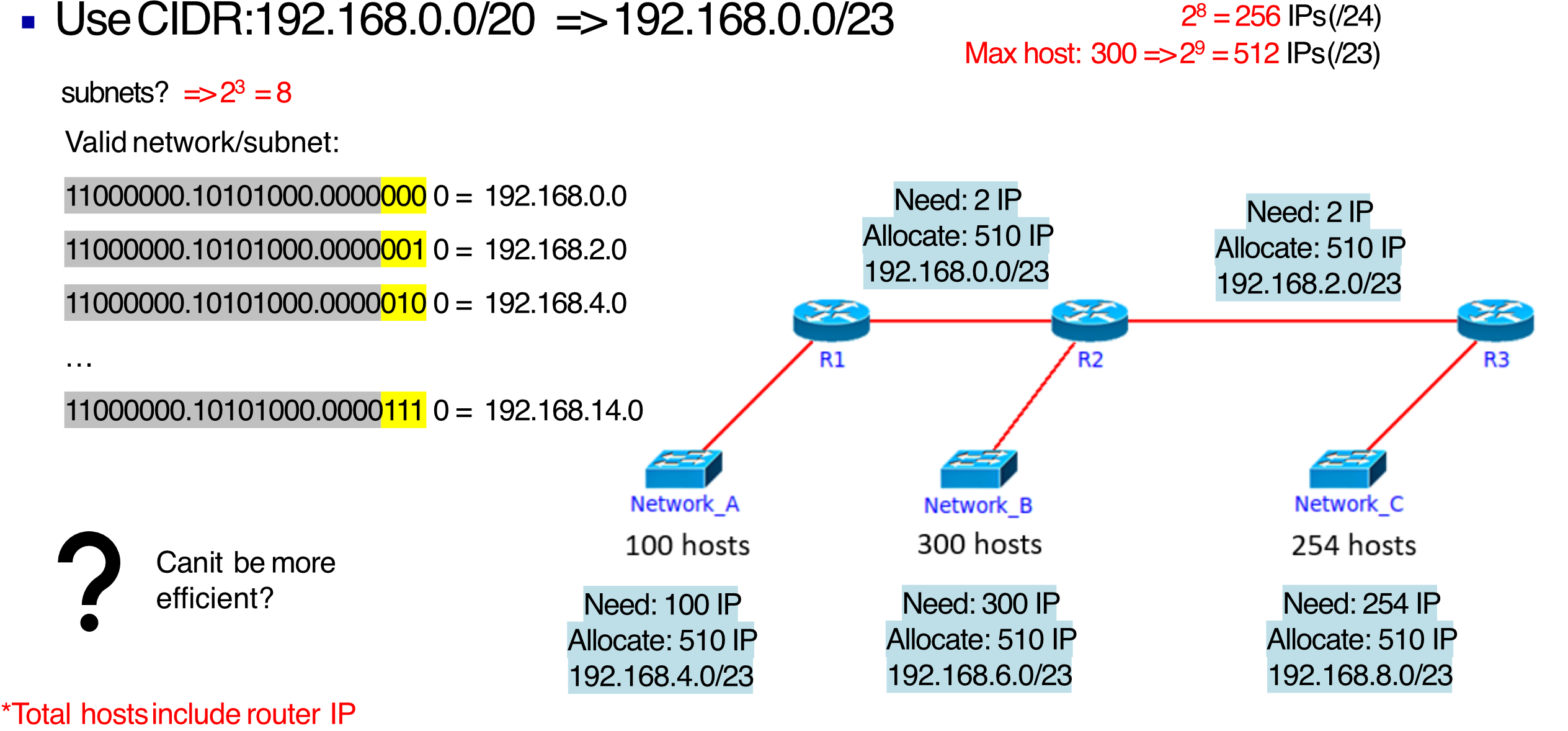
Given 192.168.0.0/20, use CIDR → /23
- Max hosts = 300 → IPs → /23
- Total subnets =
| Network | Need | Allocate | Address |
|---|---|---|---|
| R1-R2 | 2 IP | 510 IP | 192.168.0.0/23 |
| R2-R3 | 2 IP | 510 IP | 192.168.2.0/23 |
| Network A (100 hosts) | 100 IP | 510 IP | 192.168.4.0/23 |
| Network B (300 hosts) | 300 IP | 510 IP | 192.168.6.0/23 |
| Network C (254 hosts) | 254 IP | 510 IP | 192.168.8.0/23 |
⚠️ Still wasteful — every subnet gets 510 IPs regardless of actual need. This is where VLSM shines.
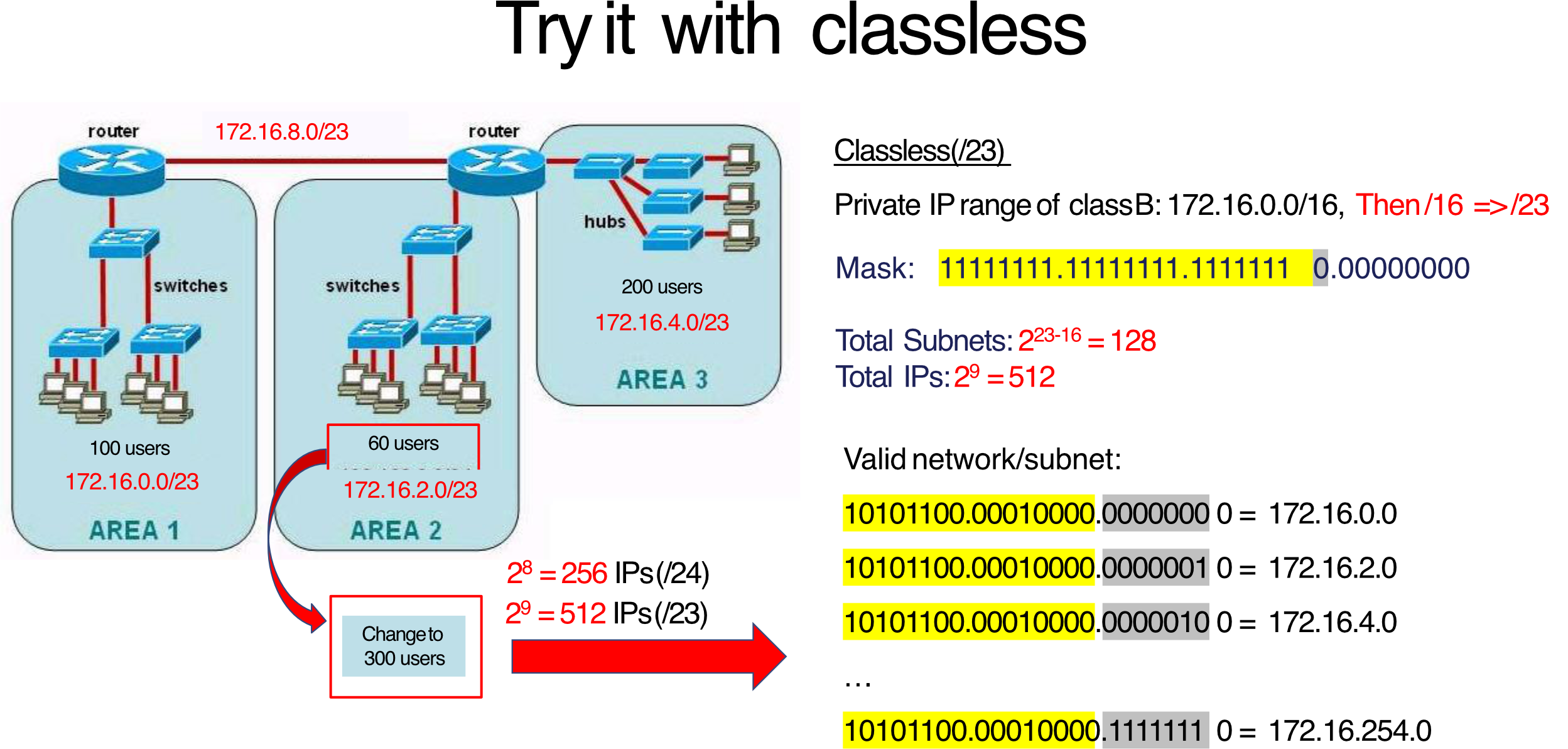
เวลาใช้ CIDR ต้องใช้
/XXเท่ากัน ถูกป้ะ ตรงระหว่าง Router เปลืองมาก ใช้แค่ 2 IPs ทำยังไงให้มัน Efficient กว่านี้ได้มั้ย
โจทย์ให้มาแบบนี้ ไม่ให้ CIDR Prefix มาทำไง
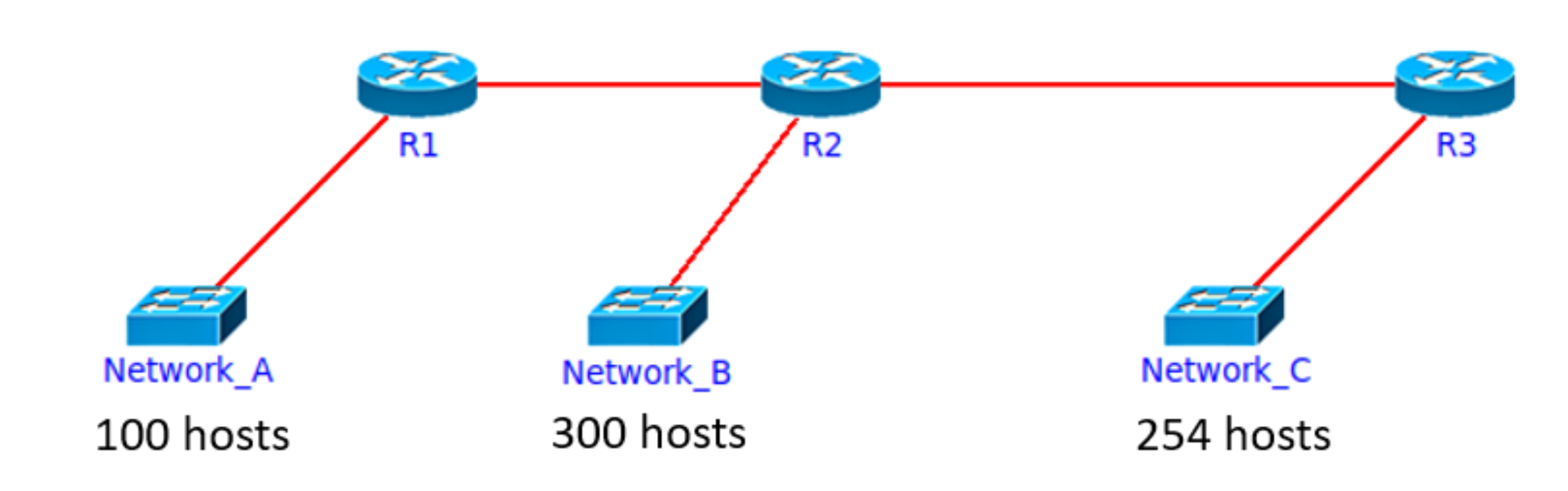
- เช็คก่อนว่ามีกี่ Subnet → 5 ใช่ม้า
- เช็ค maximum number of host required → 300
- เอายังไงให้พอ ก็เลือกเองได้เลย รู้เองได้เลย
/23,/22(ก็ได้นะ แต่เปลืองว่ะ)
Variable Length Subnet Mask (VLSM)
What is VLSM?
- An extension of CIDR that allows different subnets to use different prefix lengths
- Each subnet gets exactly (or closely) what it needs
- Key rule: Assign the largest subnet first
VLSM is like cutting a rope into pieces of different sizes for different purposes, instead of cutting equal chunks and wasting the shorter ones.
VLSM vs CIDR Comparison
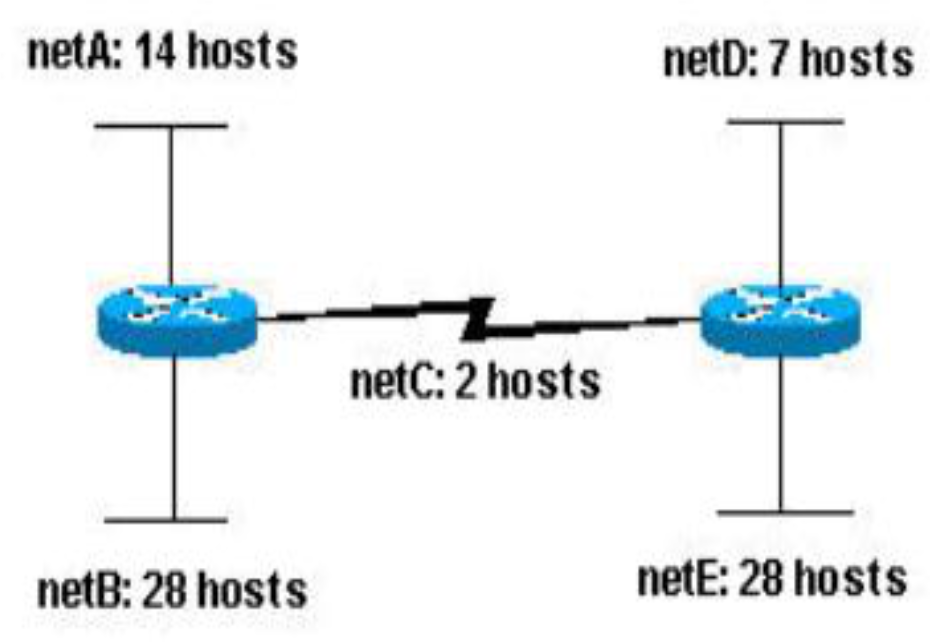
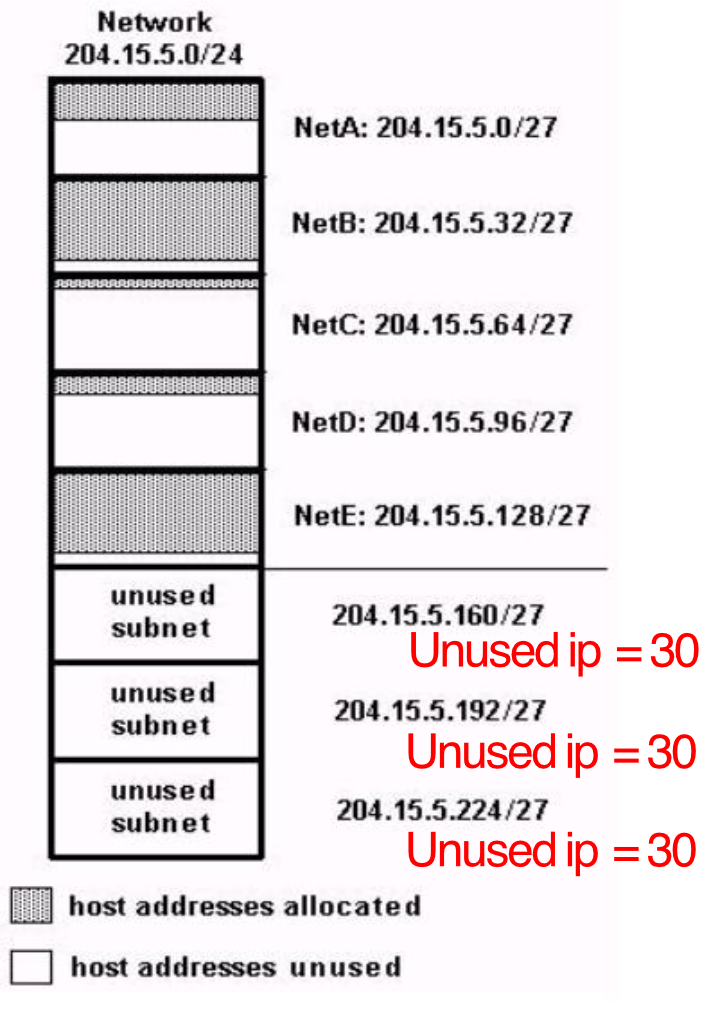
Given network: 204.15.5.0/24 with 5 subnets (netA=14, netB=28, netC=2, netD=7, netE=28)
With CIDR (/27 for all):
- 5 subnets used, each with 30 hosts
- 3 unused subnets available
- Unused IPs: 161 | Available: 3 subnets = 90 hosts
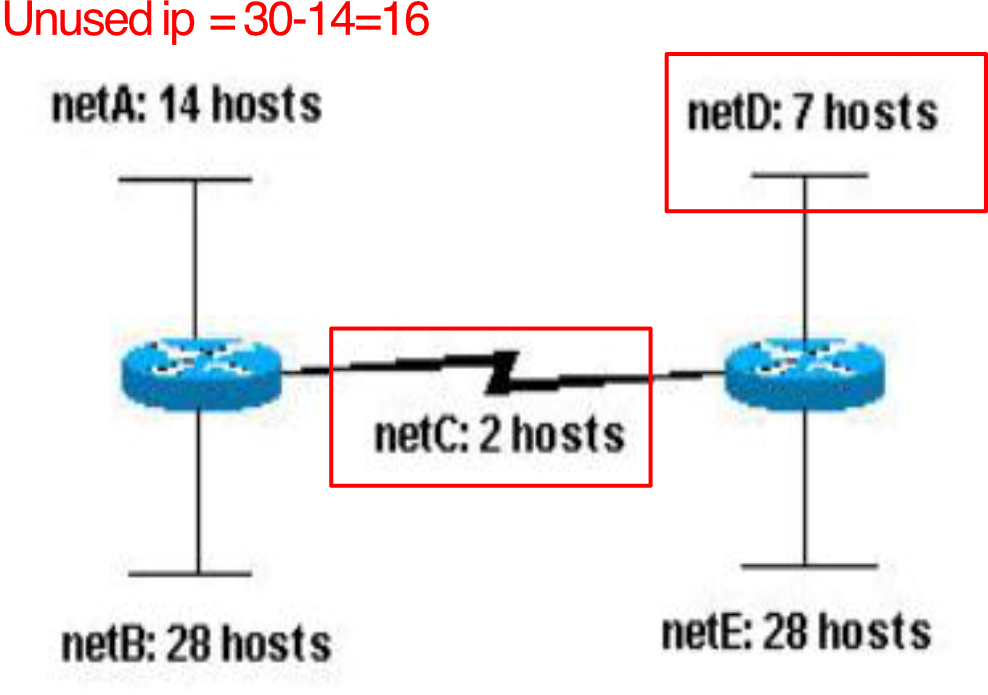
With VLSM (size-matched):
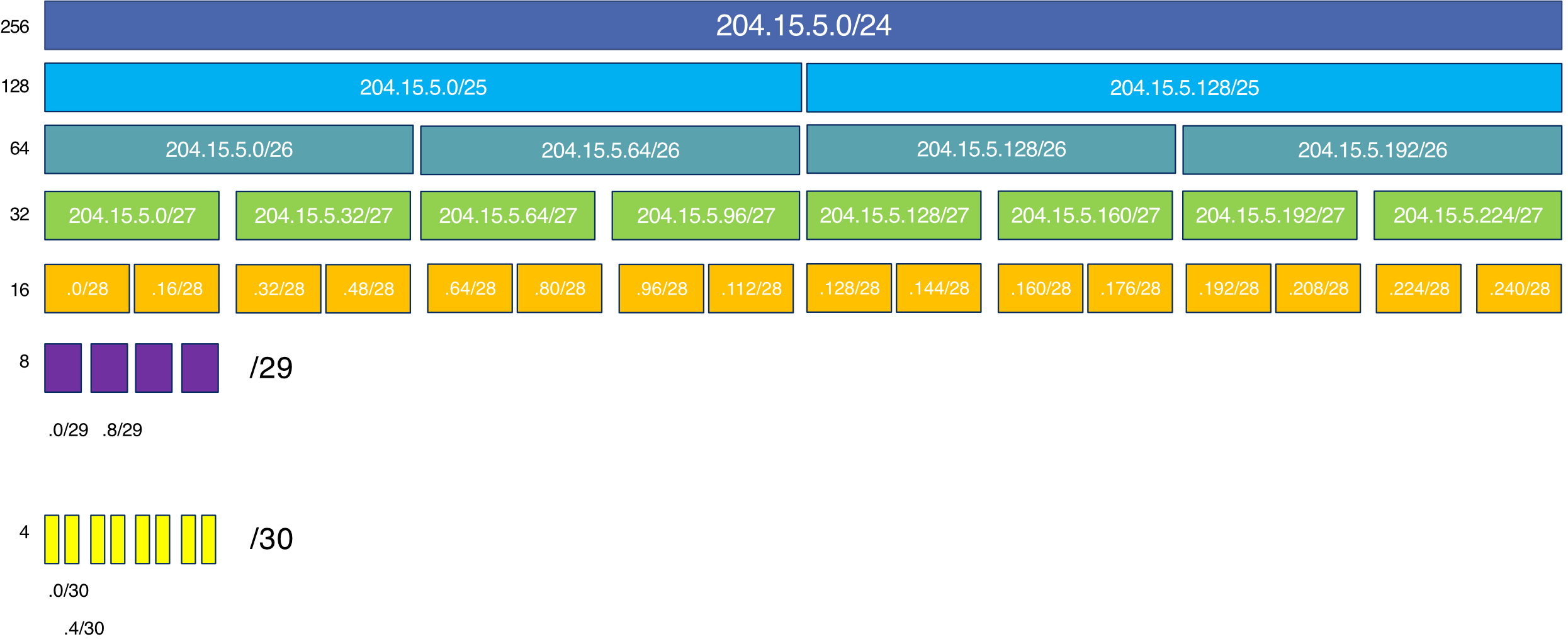
- Unused IPs: 145 | Available: 11 subnets = 134 hosts
- Far more efficient!
CIDR
/XXต้องเท่ากันหมด
แต่ VLSM it can be different based on the number of IP required!
VLSM Step-by-Step Example
Network: 204.15.5.0/24
Requirements:
- netA: 14 hosts
- netB: 28 hosts
- netC: 2 hosts
- netD: 7 hosts
- netE: 28 hosts
Step 1: Determine masks needed per subnet
| Subnet | Hosts Needed | Mask | Prefix | Usable |
|---|---|---|---|---|
| netB | 28 | 255.255.255.224 | /27 | |
| netE | 28 | 255.255.255.224 | /27 | |
| netA | 14 | 255.255.255.240 | /28 | |
| netD | 7 | 255.255.255.240 | /28 | |
| netC | 2 | 255.255.255.252 | /30 |
Step 2: Assign largest first
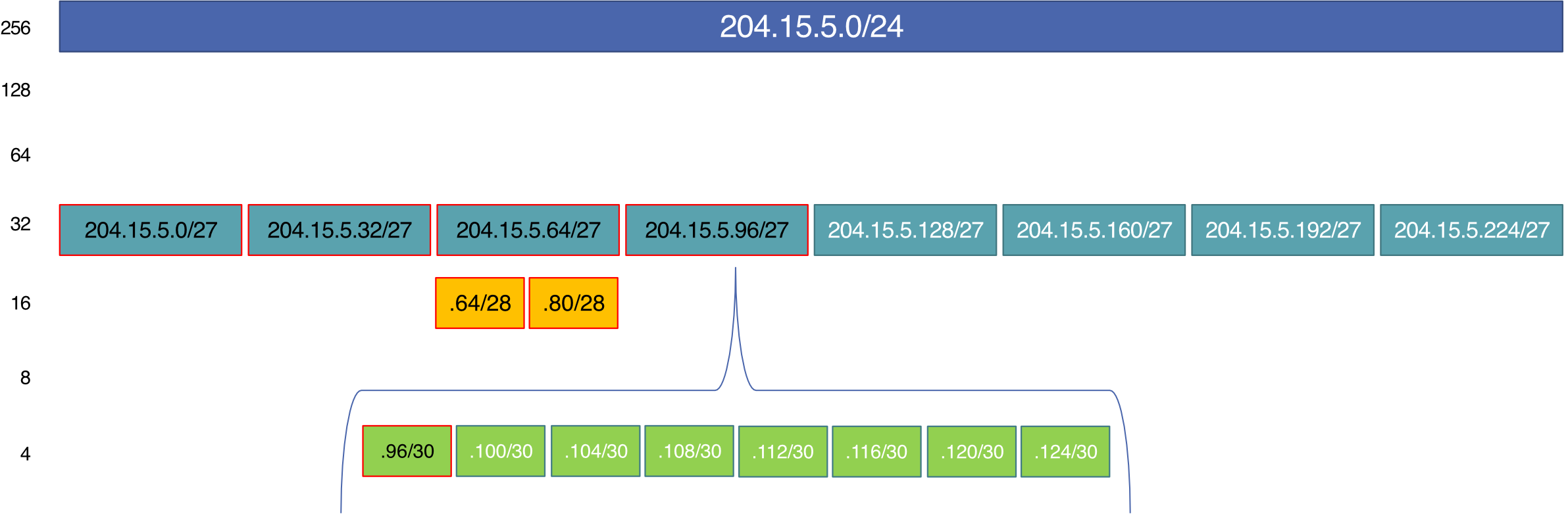
204.15.5.0/24 → /27
- Hosts =
- Subnets = : {
0, 32, 64, 96, 128, 160, 192, 224}
204.15.5.64/27 → /28 (split for netA, netD)
- Hosts =
- Subnets = : {
64, 80}
204.15.5.96/27 → /30 (split for netC)
- Hosts =
- Subnets = : {
96,100, 104, 108, 112, 116, 120, 124}
Step 3: Final Assignment
| Subnet | Needed | Allocated | Address | Mask | Range | Broadcast |
|---|---|---|---|---|---|---|
| B | 28 | 30 | 204.15.5.0/27 | 255.255.255.224 | .1–.30 | .31 |
| E | 28 | 30 | 204.15.5.32/27 | 255.255.255.224 | .33–.62 | .63 |
| A | 14 | 14 | 204.15.5.64/28 | 255.255.255.240 | .65–.78 | .79 |
| D | 7 | 14 | 204.15.5.80/28 | 255.255.255.240 | .81–.94 | .95 |
| C | 2 | 2 | 204.15.5.96/30 | 255.255.255.252 | .97–.98 | .99 |
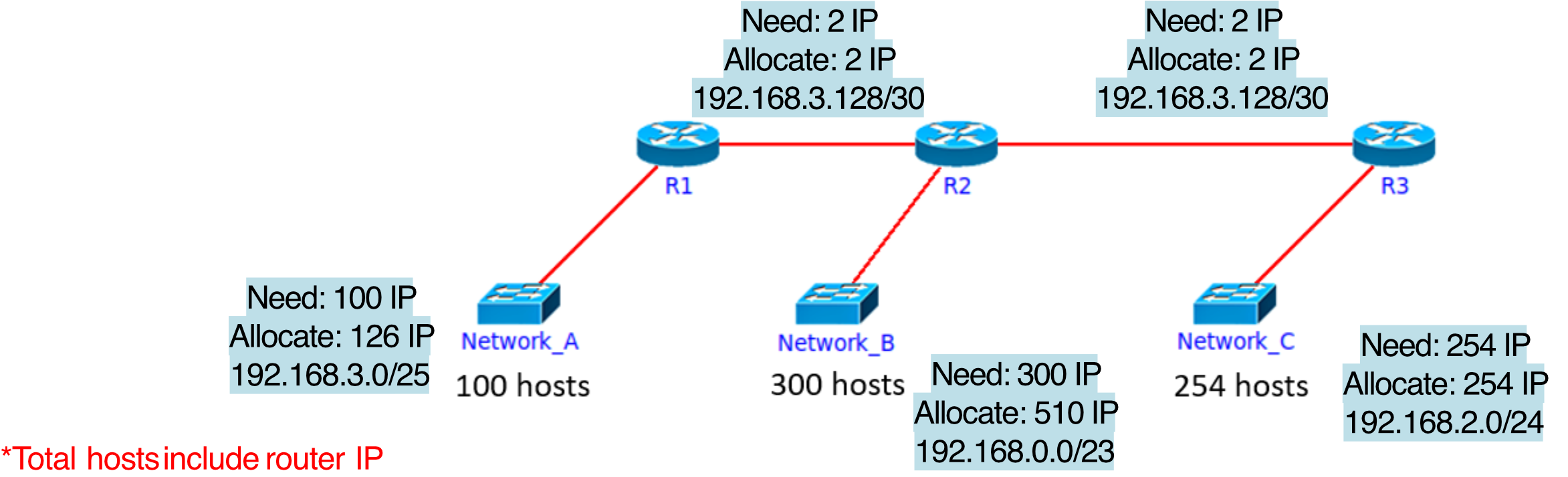
Design IPs for Network (VLSM)
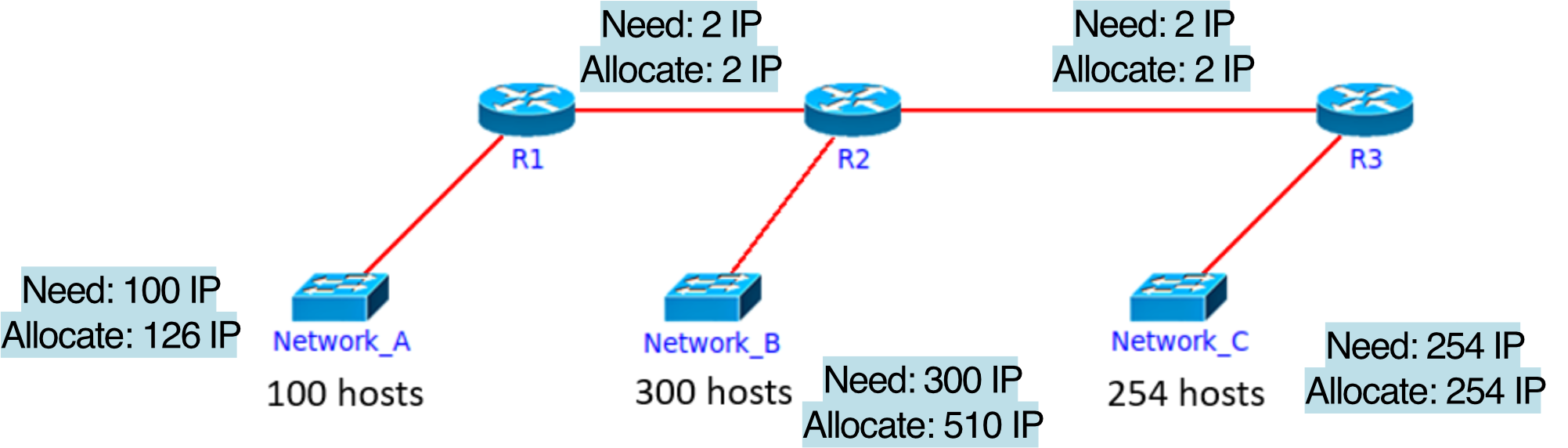
Given 192.168.0.0/20, use VLSM
Requirements:
- Network A: 100 hosts
- Network B: 300 hosts
- Network C: 254 hosts
- R1-R2 link: 2 hosts
- R2-R3 link: 2 hosts
Assign largest first:
| Subnet | Hosts | Mask | Address | Range | Broadcast |
|---|---|---|---|---|---|
| B | 300 | /23 | 192.168.0.0/23 | .0.1–.1.254 | 192.168.1.255 |
| C | 254 | /24 | 192.168.2.0/24 | .2.1–.2.254 | 192.168.2.255 |
| A | 100 | /25 | 192.168.3.0/25 | .3.1–.3.126 | 192.168.3.127 |
| R1-R2 | 2 | /30 | 192.168.3.128/30 | .3.129–.3.130 | 192.168.3.131 |
| R2-R3 | 2 | /30 | 192.168.3.132/30 | .3.133–.3.134 | 192.168.3.135 |
Step breakdown:
- 192.168.0.0/20 → /23: Hosts = , Subnets = → [0,2,4,6,8,10,12,14]
- 192.168.2.0/23 → /24: Hosts = , Subnets = → [2,3]
- 192.168.3.0/24 → /25: Hosts = , Subnets = → [0,128]
- 192.168.3.128/25 → /30: Hosts = , Subnets = → [128,132,136,…,252]
IP Addressing: How to Get One?
- Q: How does a network get its subnet part?
- A: Gets allocated a portion of its provider ISP's address space
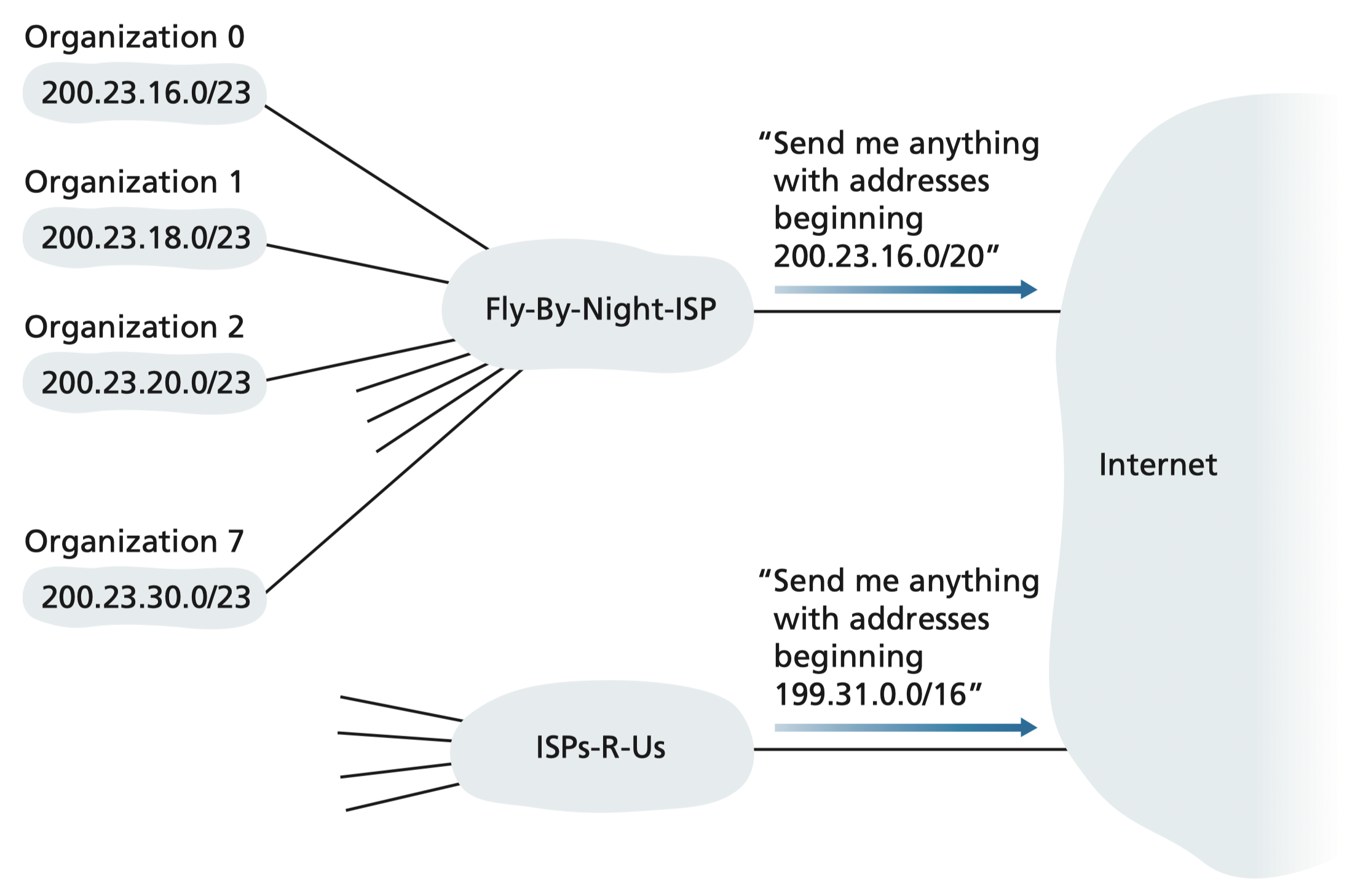
Example: ISP Block Allocation
- ISP block: 200.23.16.0/20
- ISP splits into 8 /23 blocks for organizations:
| Org | Address |
|---|---|
| 0 | 200.23.16.0/23 |
| 1 | 200.23.18.0/23 |
| 2 | 200.23.20.0/23 |
| … | … |
| 7 | 200.23.30.0/23 |
Hierarchical Addressing: Route Aggregation
- ISP advertises a single prefix (200.23.16.0/20) to the internet
- This covers all 8 organizations efficiently
- Hierarchical addressing allows efficient advertisement of routing information
ISP แต่ละเจ้าก็จะมี AS Number, เป็น Unique Identifier ของแต่ละเจ้า
End class Mar 12
IPv4 Address Exhaustion
- ICANN allocated the last chunk of IPv4 addresses in 2011
- IPv4 = 32-bit = ~4.3 billion addresses (not enough!)
- Solutions:
- NAT (short-term workaround) → separate public range, and private range
- ถ้า network จะ go outside ก็ต้องใช้ NAT แปลงเป็น Public IP
- IPv6 (long-term solution)
- NAT (short-term workaround) → separate public range, and private range
IPv6
Motivation
มันไม่มี Fixed date ไง ว่าจะเปลี่ยนไปใช้วันนี้ ๆ, hardware บางอย่างก็ไม่รองรับ
เราก็เลยต้องใช้ IPv4 and IPv6 ร่วมกันไป
- IPv4 32-bit address space nearly exhausted
- IPv6 has 128-bit address space
- Fixed-length 40-byte header for faster processing/forwarding
- Enables different network-layer treatment of "flows"
IPv6 Datagram Format
|-------- 32 bits --------|
| ver | pri |  flow label  |
| payload len | next | hop |
|    source address       |
|      (128 bits)         |
|   destination address   |
|      (128 bits)         |
|     payload (data)      |
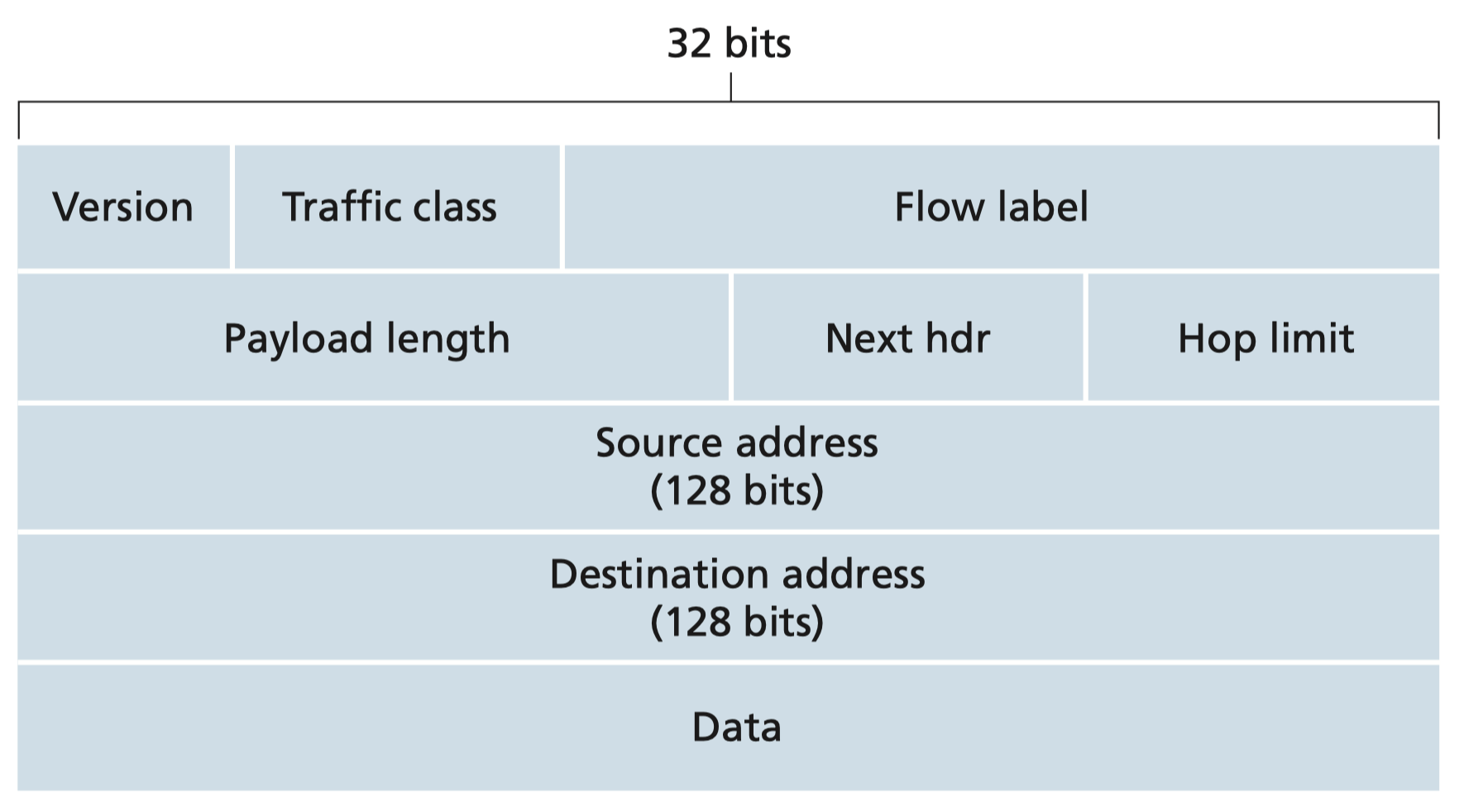
- ver: IP version (6)
- pri (priority): identify priority among datagrams in same flow
- flow label: identify datagrams in same "flow" (not well defined)
- next hdr: identifies upper-layer protocol
- hop limit: replaces TTL
What's Missing Compared to IPv4?
- ❌ No checksum (speeds up router processing)
- ❌ No fragmentation/reassembly (done at endpoints only)
- ❌ No options (available as next-header extension)
IPv6 is like a streamlined express lane — it removed all the extra checks IPv4 had at every router to make packet forwarding blazing fast.
IPv4 to IPv6 Transition
อาจจะถามใน #FinalExam นะ พาร์ทข้อเขียน
Challenge
- Not all routers can be upgraded simultaneously
- No "flag day" where everything switches at once
- Mixed IPv4 and IPv6 routers must coexist
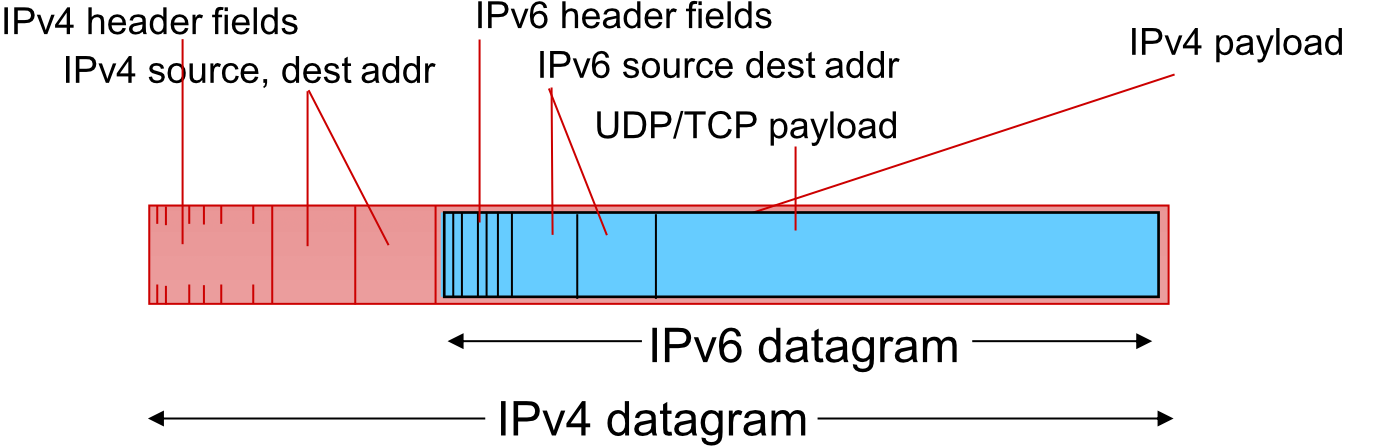
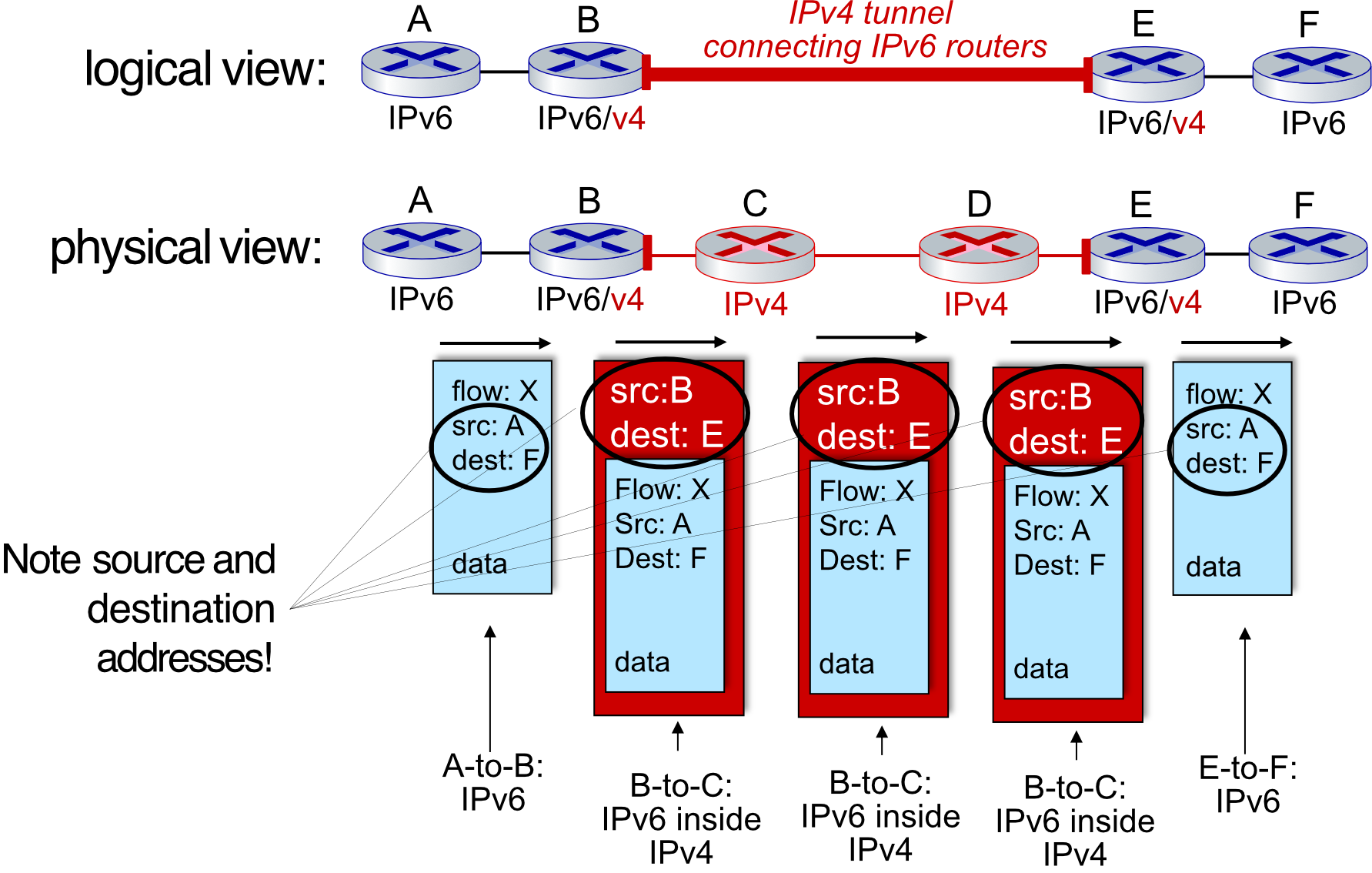
Solution: Tunneling
- IPv6 datagram carried as payload inside an IPv4 datagram between IPv4 routers
- Called "packet within a packet"
- Also used in 4G/5G networks
IPv4 datagram:
+---IPv4 header (src:B, dst:E)---+
|  IPv6 datagram:                |
|  +-- IPv6 header (src:A,dst:F) |
|  |   payload (data)            |
|  +-----------------------------+
+--------------------------------+
Tunneling Flow (A→B→C→D→E→F)
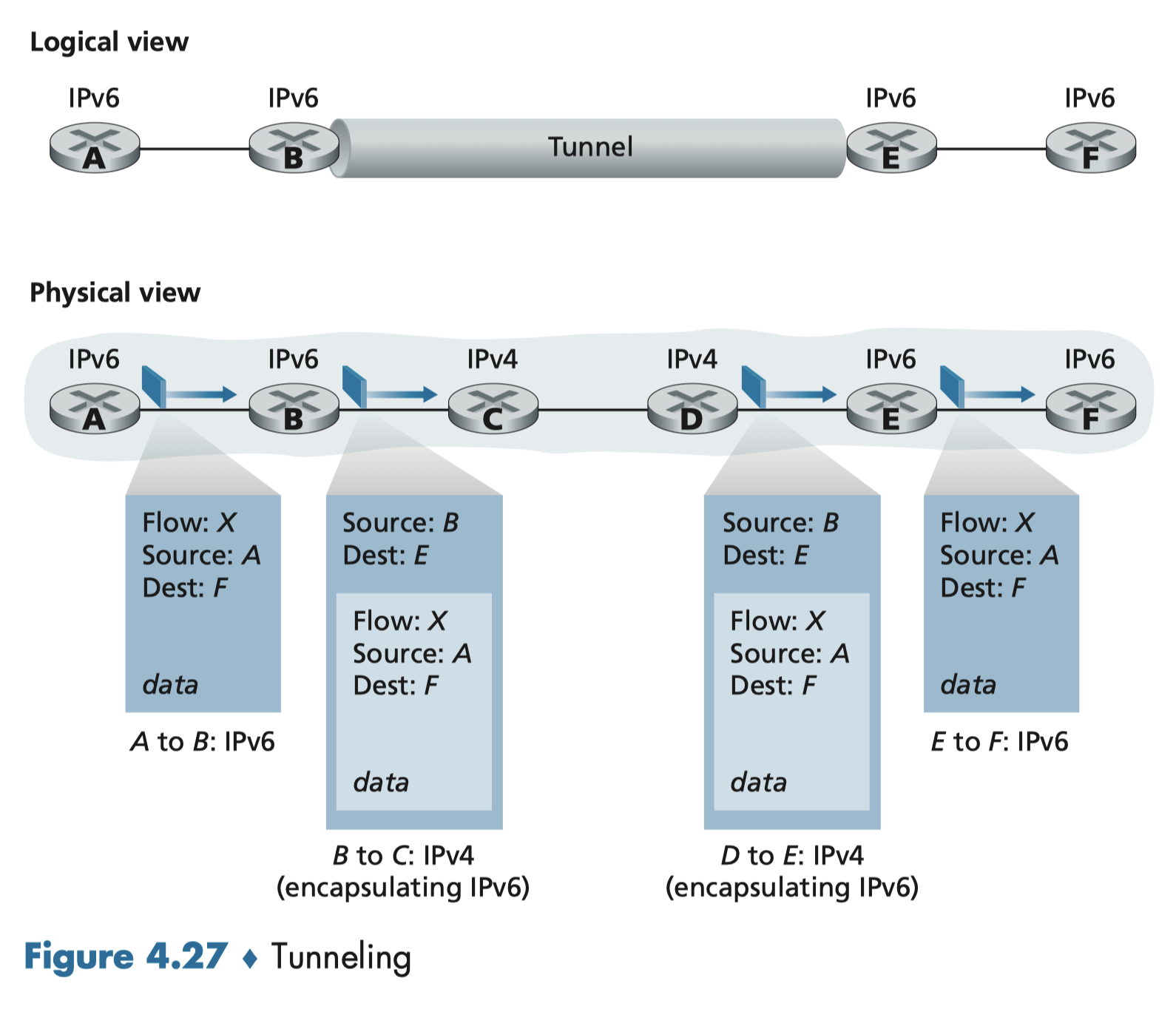
- A→B: Native IPv6
- B→C→D→E: IPv6 inside IPv4 tunnel (B wraps, E unwraps)
- E→F: Native IPv6
IPv6 tunneling through IPv4 is like putting an international package into a domestic shipping box — the outer box travels through the local system, but inside is the real package destined internationally.
NAT: Network Address Translation
Translate private to public IP addresses.
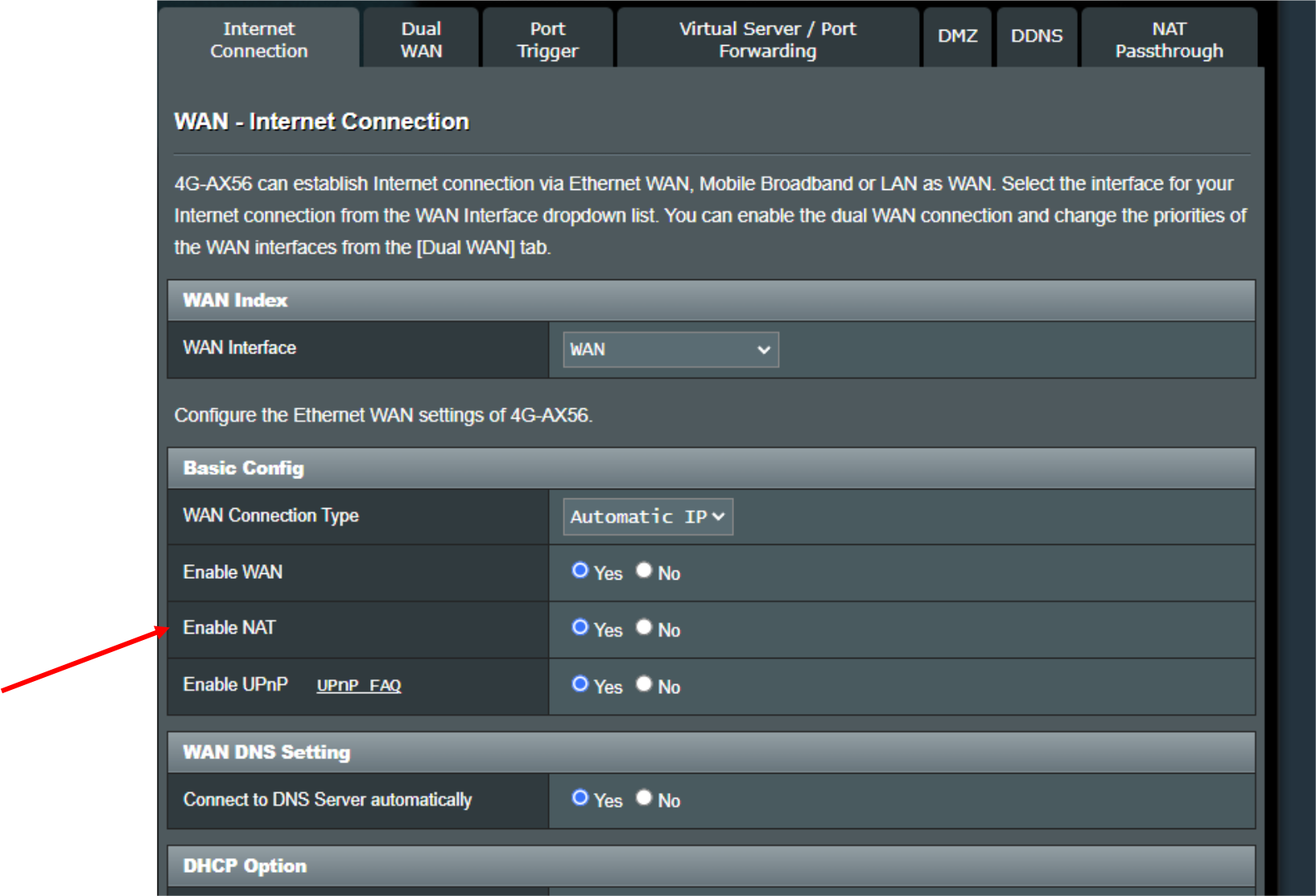
What is NAT?
- All devices in a local network share just one public IPv4 address as seen by the outside world
- Devices inside use private IP addresses
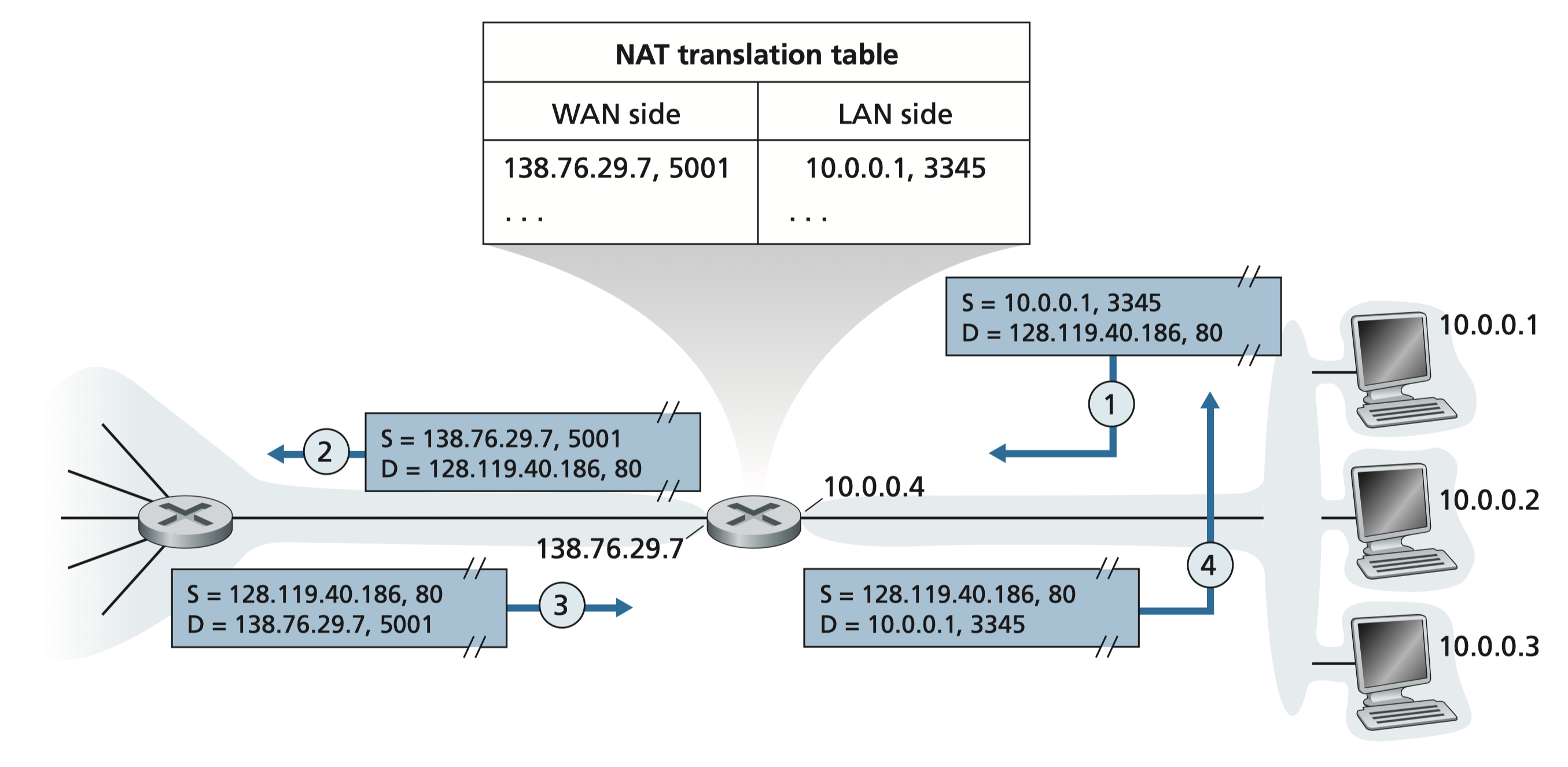
- WAN side (Public), LAN side (Private)
- ใน NAT trasnaltion table ไม่ได้มีแค่ (Mapping) IP อย่างเดียว
- ไม่งั้น Public IP outside จะมีแค่อันเดียวอะดิ
- เราต้องมี Port ด้วย → It allows us to map in the table around (16 bits = 65k)
Private IP Address Ranges
| Range | Prefix |
|---|---|
| 10.0.0.0 – 10.255.255.255 | 10/8 |
| 172.16.0.0 – 172.31.255.255 | 172.16/12 |
| 192.168.0.0 – 192.168.255.255 | 192.168/16 |
NAT is like an apartment building: many residents (private IPs) share one street address (public IP). The lobby receptionist (NAT router) knows which apartment each incoming parcel goes to via a mapping table.
NAT Advantages
- Only one public IP needed from ISP for all internal devices
- Can change internal addresses without notifying outside world
- Can change ISP without reconfiguring internal devices
- Security: internal devices not directly addressable from outside
How NAT Works
Outgoing Datagram (LAN → WAN): (Internal → External (Public Internet))
- Replace (source IP, source port) → (NAT IP, new port)
- Replace at the packet!
- Record mapping in NAT translation table
เก็บข้อมูลเหล่านี้ทำไม? ใน NAT Translation Table: ก็เวลามีของเข้ามา มันก็จะเช็คในตารางก่อนไง แล้วถึงจะ forward ไปถูก
Incoming (WAN → LAN):
- Look up (NAT IP, port) in translation table
- Replace with stored (original IP, original port)
- Forward to correct internal host
NAT Example
Host 10.0.0.1:3345 → 128.119.40.186:80

Step 1: Host sends datagram
  S: 10.0.0.1:3345  D: 128.119.40.186:80

Step 2: NAT router rewrites source
  S: 138.76.29.7:5001  D: 128.119.40.186:80
  [NAT table: 138.76.29.7:5001 ↔ 10.0.0.1:3345]

Step 3: Reply arrives
  S: 128.119.40.186:80  D: 138.76.29.7:5001

Step 4: NAT router rewrites destination
  S: 128.119.40.186:80  D: 10.0.0.1:3345
ถ้าสมมติ
10.0.0.3 ให้เป็น Web server, แล้วโลกภายนอกจะเข้าถึงได้ยังไง ทั้ง ๆ ที่ เครื่องนั้นไม่ได้มี Public IP มันทำได้ป้ะ
- Ngrok? https://ngrok.com
- ก็คือแค่ใส่เข้าไปใน NAT Table?
- This technique is called Port Forwarding
- แล้วถ้า IP ของ Server(?) เปลี่ยนไปเรื่อย ๆ
- DDNS = Dynamic DNS
- Map subdomain to specific IP คืออะไรนะ555
NAT Controversies
- ⚠️ Routers "should" only process up to Layer 3 (NAT touches Layer 4 port numbers)
- ⚠️ Address shortage "should" be solved by IPv6
- ⚠️ Violates end-to-end argument (port manipulation by network device)
- ⚠️ NAT traversal problem: hard for external client to connect to server behind NAT
- ✅ But NAT is widely used in home, institutional, and cellular networks
ICMP: Internet Control Message Protocol
What is ICMP?
- Used by hosts and routers to communicate network-level information
- Sits logically above IP (carried inside IP datagrams)
- Handles:
- Error reporting (unreachable host/network/port/protocol)
- Diagnostic tools (
ping,traceroute)
ICMP Message Format
- Type + Code + first 8 bytes of the offending IP datagram
Common ICMP Messages
| Type | Code | Description |
|---|---|---|
| 0 | 0 | Echo reply (ping response) |
| 3 | 0 | Destination network unreachable |
| 3 | 1 | Destination host unreachable |
| 3 | 2 | Destination protocol unreachable |
| 3 | 3 | Destination port unreachable |
| 3 | 6 | Destination network unknown |
| 3 | 7 | Destination host unknown |
| 4 | 0 | Source quench (congestion control — deprecated) |
| 8 | 0 | Echo request (ping) |
| 9 | 0 | Router advertisement |
| 10 | 0 | Router discovery |
| 11 | 0 | TTL expired |
| 12 | 0 | Bad IP header |
Traceroute and ICMP
How Traceroute Works
- Source sends sets of UDP segments to destination
- 1st set: TTL = 1
- 2nd set: TTL = 2
- th set: TTL =
- When TTL expires at nth router:
- Router discards the datagram
- Sends back ICMP TTL Expired message (Type 11, Code 0)
- Message may include router name and IP
- Source records RTT for each hop
Stopping Criteria
- ✅ UDP segment reaches destination host
- ✅ Destination returns ICMP Port Unreachable (Type 3, Code 3)
- ✅ Source stops
Traceroute is like shouting "Marco Polo" with a timer that resets at each pool wall. Each router along the way shouts back "Polo!" when the timer runs out, telling you how far away it is.
TTL = Time To Live
Summary
| Topic | Key Concept |
|---|---|
| Classful | Fixed A/B/C blocks — wasteful |
| CIDR | Arbitrary prefix length, efficient splitting |
| VLSM | Variable masks per subnet — most efficient |
| IPv6 | 128-bit addresses, fixed 40-byte header |
| NAT | Many private IPs share one public IP |
| ICMP | Network error reporting + diagnostics |