#Summarized
Virtual Memory
The CPU can only execute instructions stored in main memory
Core Concept
Virtual memory is like how iOS manages apps in the background. Just as your iPhone doesn't keep all apps fully loaded in RAM but swaps them in when needed, a computer can execute processes larger than physical memory by keeping only essential parts in main memory.
Scenario: Paging as the Memory Management Technique
The CPU will execute only processes (or parts of them) stored in the main memory.
- To run a process, the process must be stored in the main memory.
- In this lecture note, we consider a computer system using the paging method in the memory management to store processes in the main memory.
- In the conventional paging method (Lecture 7), all pages of a process will be stored in the main memory.
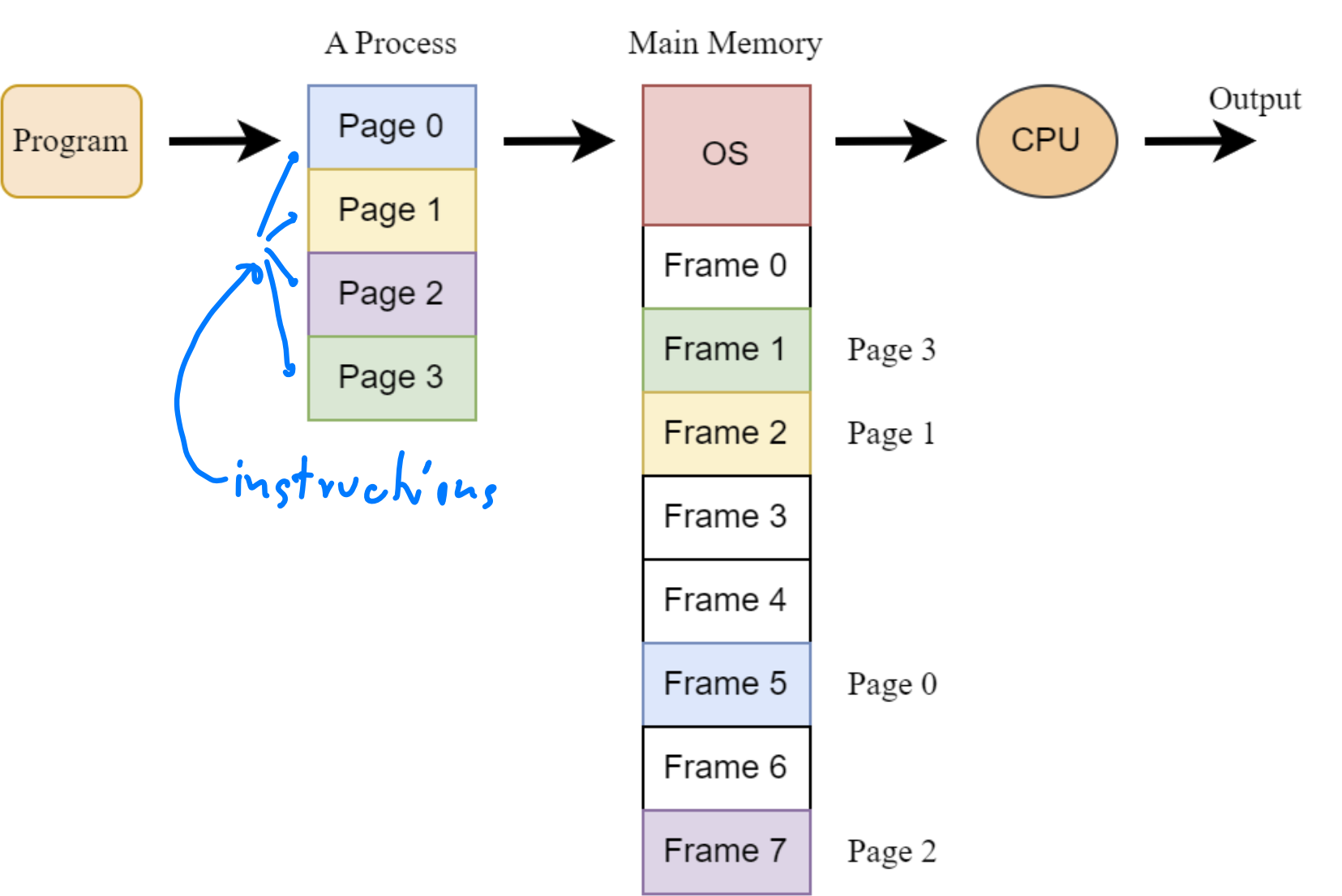
- สมมติ CPU จะ Execute Page 0 (หรืออาจจะ Instructions ข้างใน ไม่ต้องทั้งหมดก็ได้ อาจจะ 1/100), Page นั้นจะต้องถูกย้ายไปอยู่ใน Main Memory
Problem Statement of Conventional Paging
By using the conventional paging method (in Lecture Note 7), where all pages of each
process must be stored in the main memory, we have the following two problems.
- Process Size Limitation: A process larger than available main memory cannot run
- Limited Multiprogramming: Small main memory allows only few concurrent processes (low degree of multiprogramming)
Example: Problem 1 - Process Too Large
In this scenario, we have 9 pages but only 8 frames in main memory. Using conventional paging, this process cannot run at all because not all pages fit in memory.
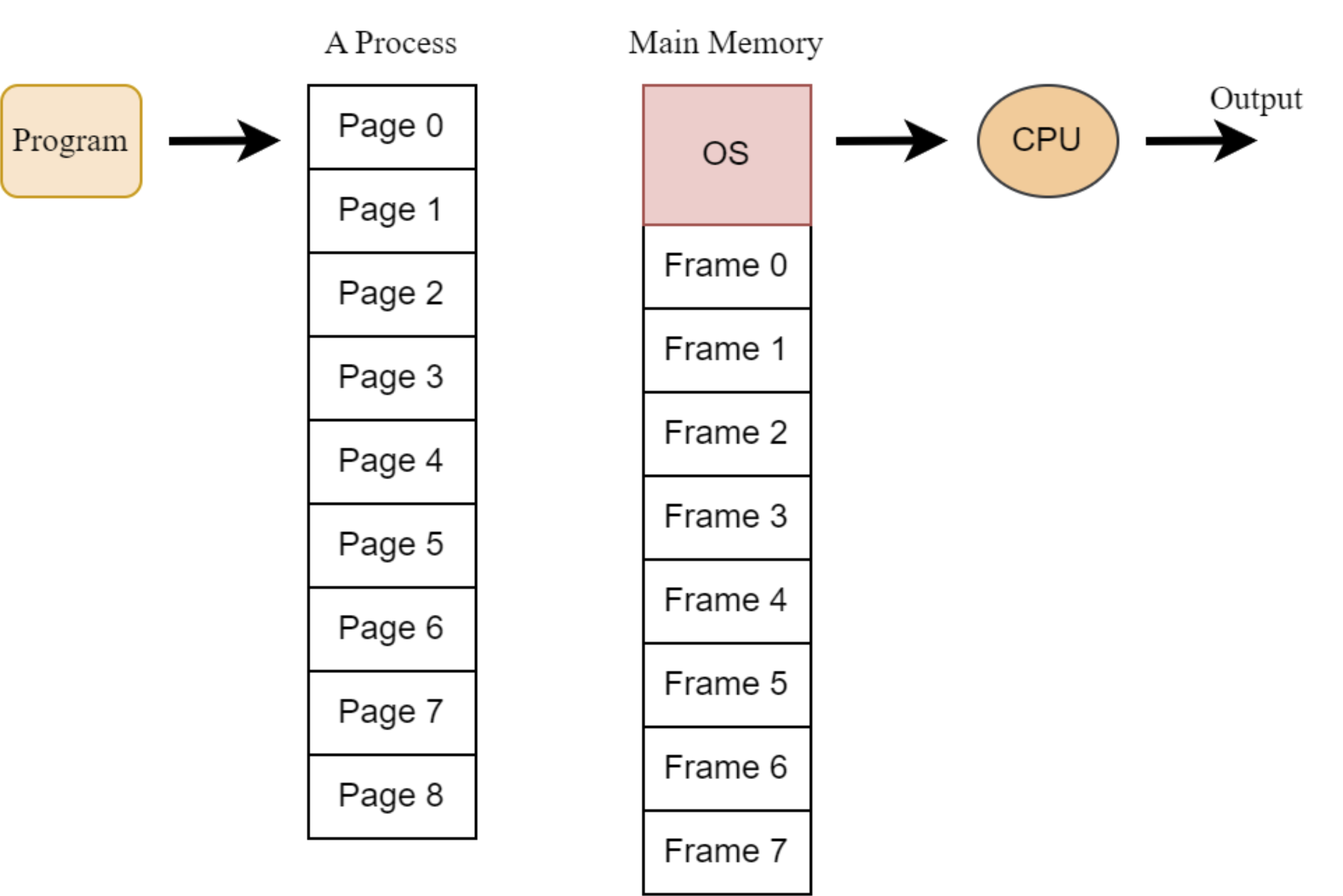
- มีทั้งหมด 9 Processes, แต่มีแค่ 8 Frames.
- We can not store the whole process into main memory. → เราไม่สามารถ Run Program นี้ได้เลย!
Example: Problem 2 - Limited Concurrent Processes
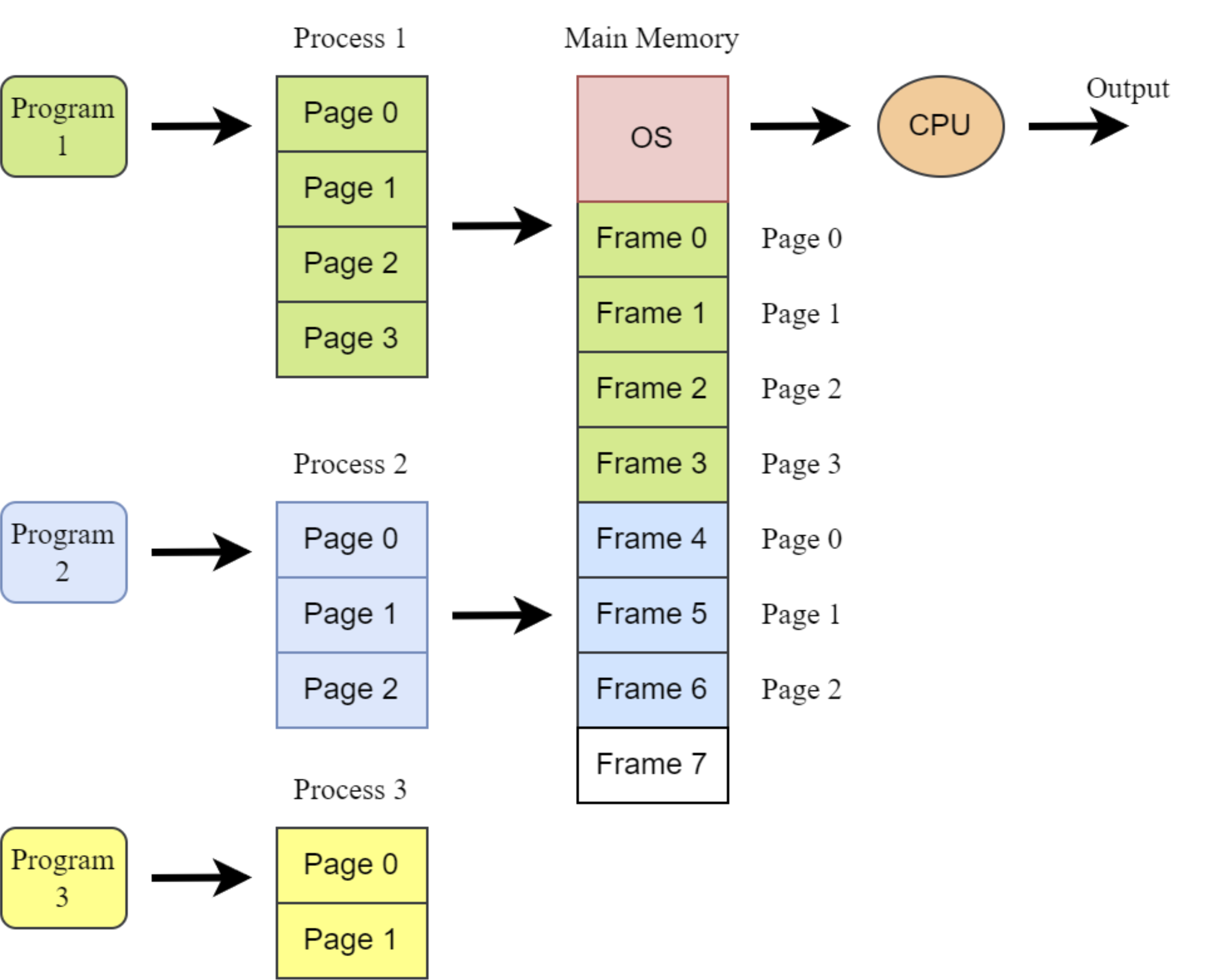
With conventional paging, Programs 1 and 2 can run, but Program 3 requires 2 frames when only 1 is available, so it cannot run ไงง
Solution: Virtual Memory
- ทางแก้ปัญหาข้างบนคืออะไร ก็คือ Virtual Memory ยังไงล่ะ!
Virtual memory solves these problems by allowing execution of processes not completely loaded in memory.
- Key concept: Some pages can be stored on hard disk while others are in main memory
- Virtual addresses = logical addresses (terminology used in virtual memory contexts)
- Benefit: Increased degree of multiprogramming (more concurrent processes)
- Drawback: Overhead from loading pages from disk when needed
การใช้ Virtual Memory เนี่ย Some pages in a process สามารถไป store ที่ Hard disk (HD) หรือ Main memory ก็ได้
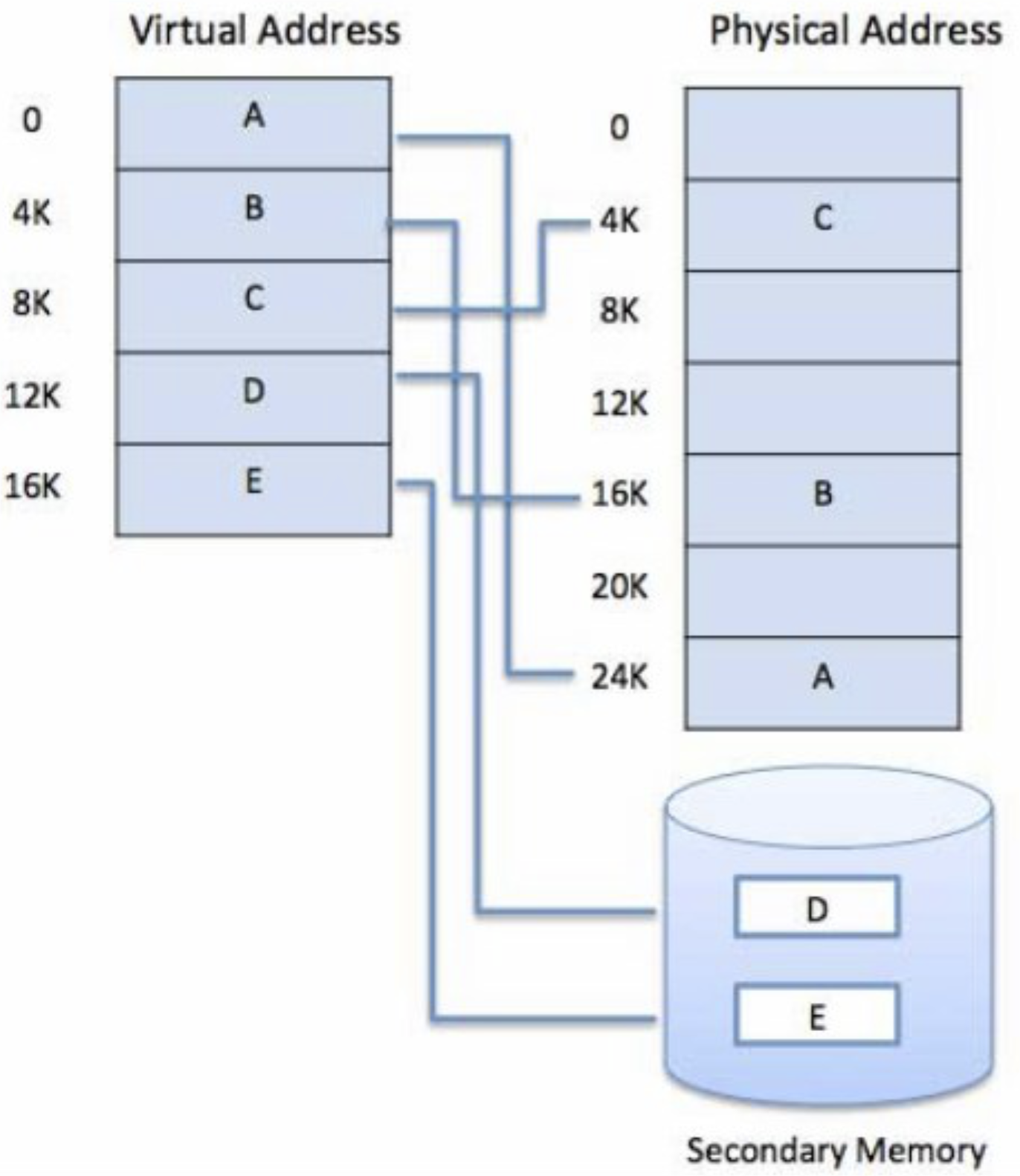
- แต่ถ้า CPU อยากจะ Execute Page D (or Instruction in Page D) ในภาพอะนะ ต้อง Move จาก HD เข้า Main memory ก่อนนะ
Page Table Implementation
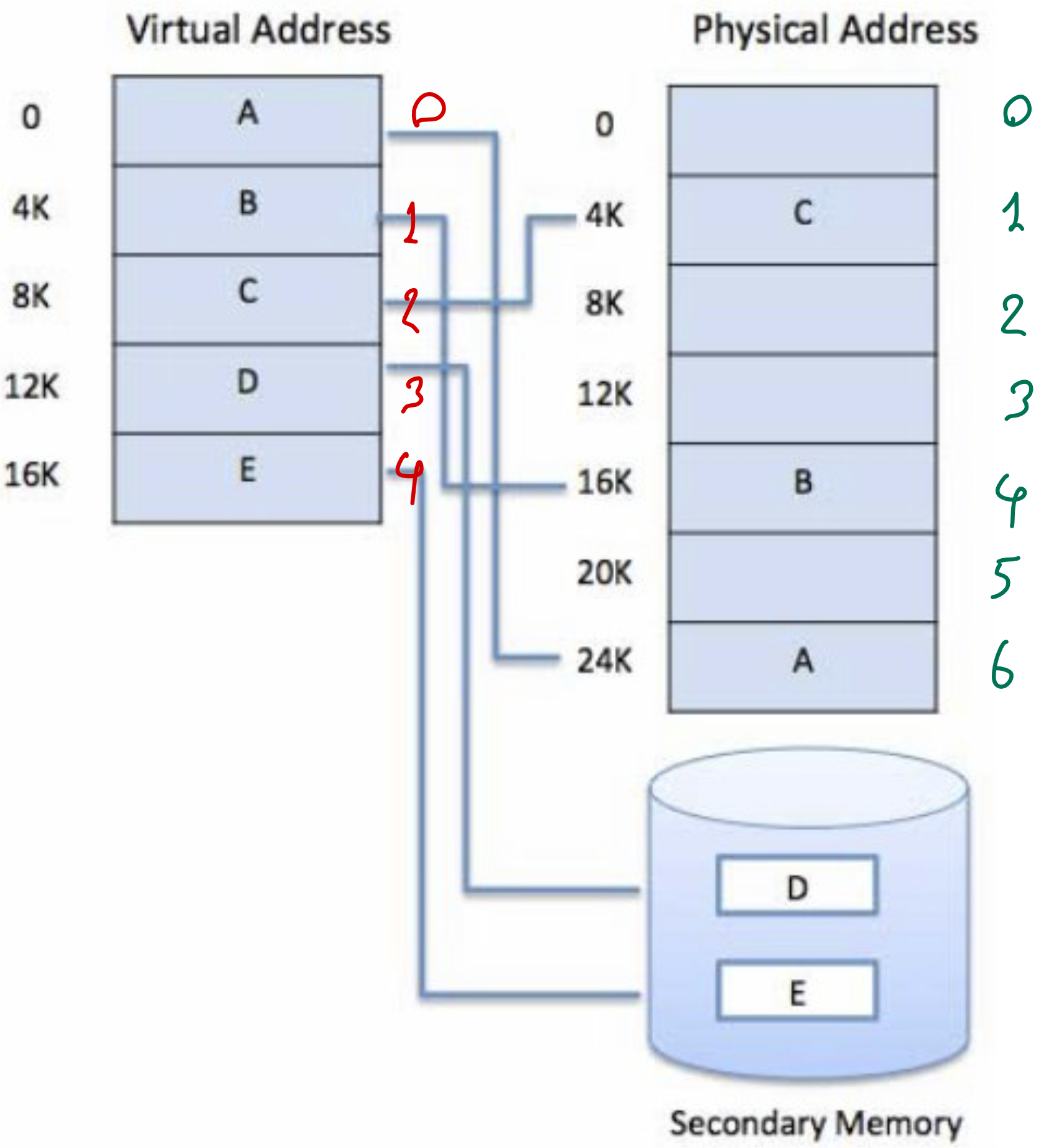
- Draw a page table consisting of three columns (page number, frame number, valid/invalid bit) of this process.
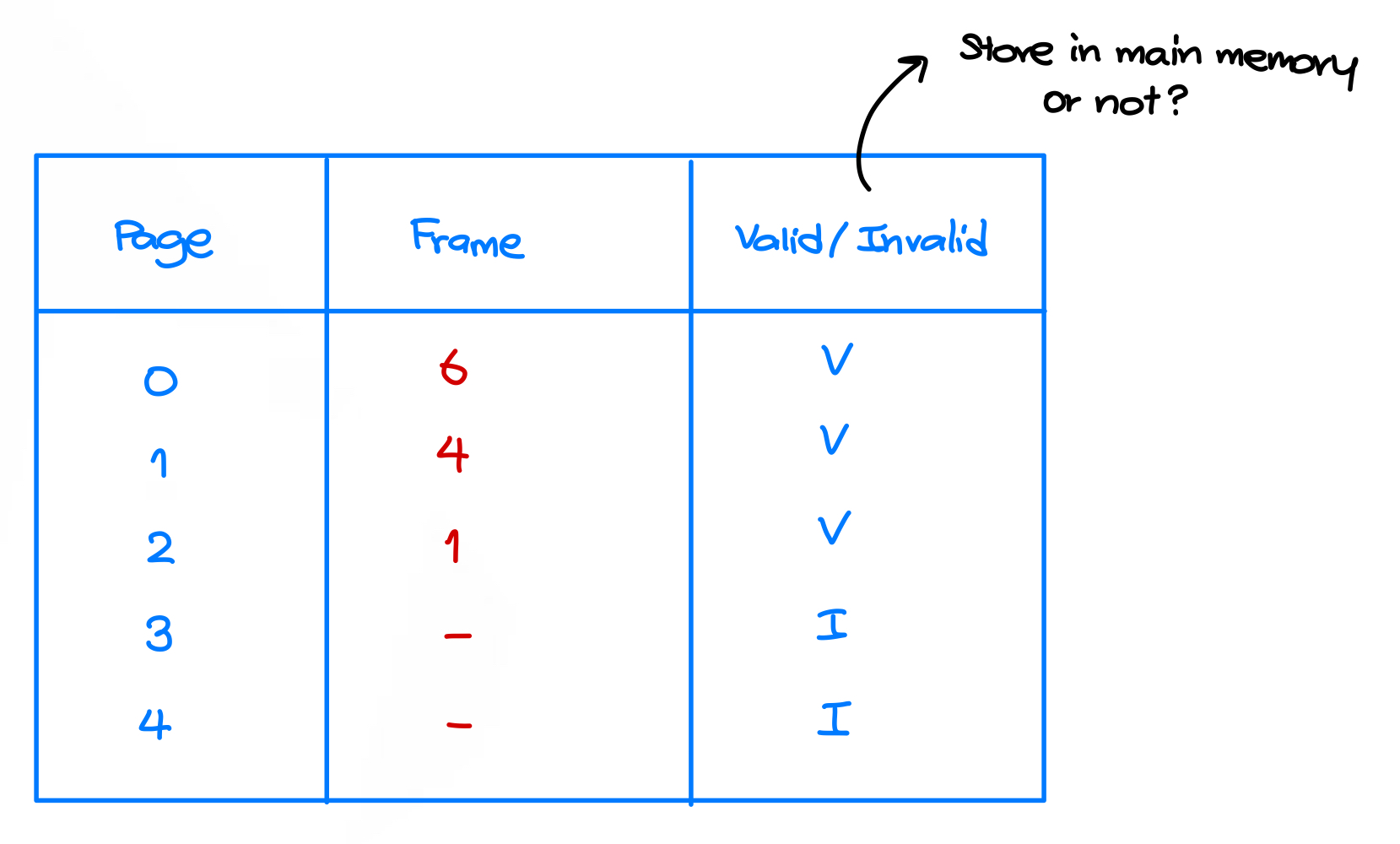
Note: Pages 0, 1 and 2 are in main memory (valid), while pages 3, and 4 are on disk (invalid).
Demand Paging, Page Fault, and Page Replacement
- 3 Terms นี้ต้องรู้ก่อนจบคาบนี้!!
Question
When should we move a page from the hard disk and store it in the main memory? (Open Question, not in the exam)
Demand paging
Demand Paging
- Definition: Pages are loaded from disk to memory only when they are needed (when the CPU needs to execute them)
- Pager: A system unit responsible for swapping pages between main memory and disk
- Swap Space: The area on disk that stores "valid but not in memory" pages
- Page Table: Tracks which pages are in memory and which are on disk
- Valid-Invalid Bit: Indicates a page's location
- Valid (1): Page is in memory
- Invalid (0): Page is either on disk or unused
Example: Page Locations
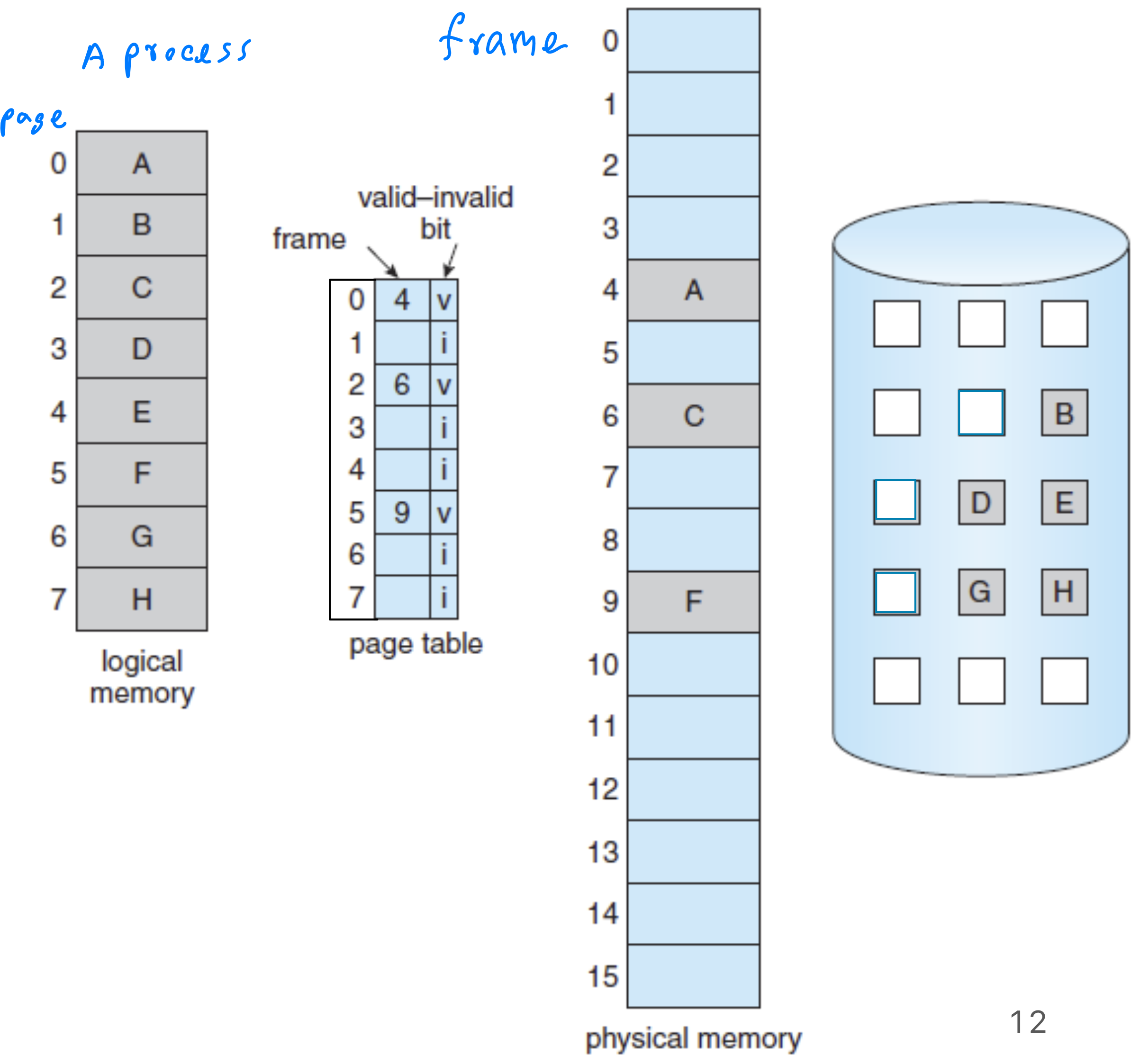
Virtual memory of a process consisting of 8 pages.
- Pages 0, 2, 5 are in main memory
- Pages 1, 3, 4, 6, 7 are on disk
Page Fault
Demand-Paging Operation
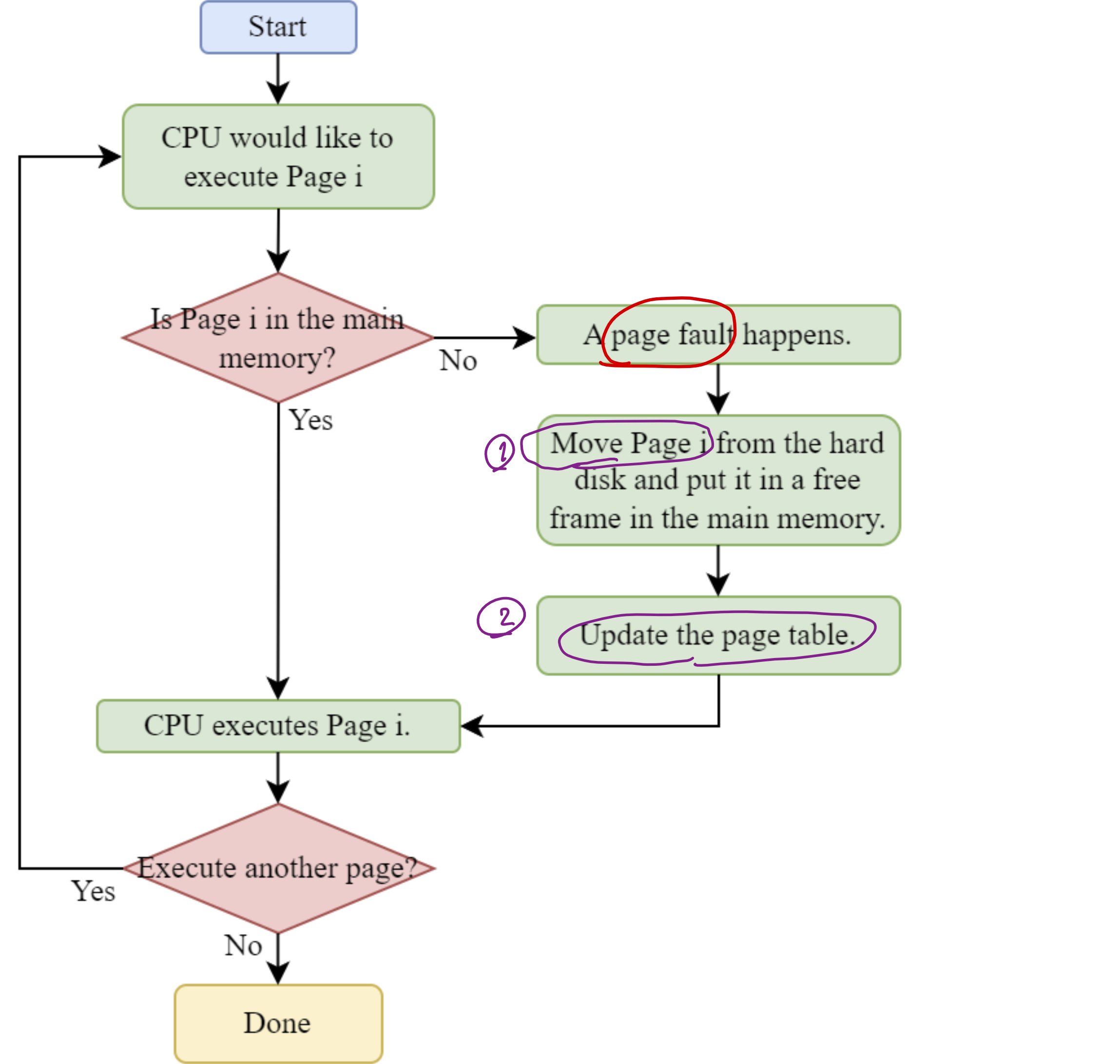
When running a process, if the CPU needs a page that's not in memory:
- Accessing an invalid page triggers a page fault
- The OS transfers the needed page from disk to memory
- Execution continues
This may happen multiple times during a process's lifetime.
A page fault is the situation that the CPU would like to execute a page that is in the hard disk. After having the page fault, the OS will move this page from the hard disk and store it in the main memory.
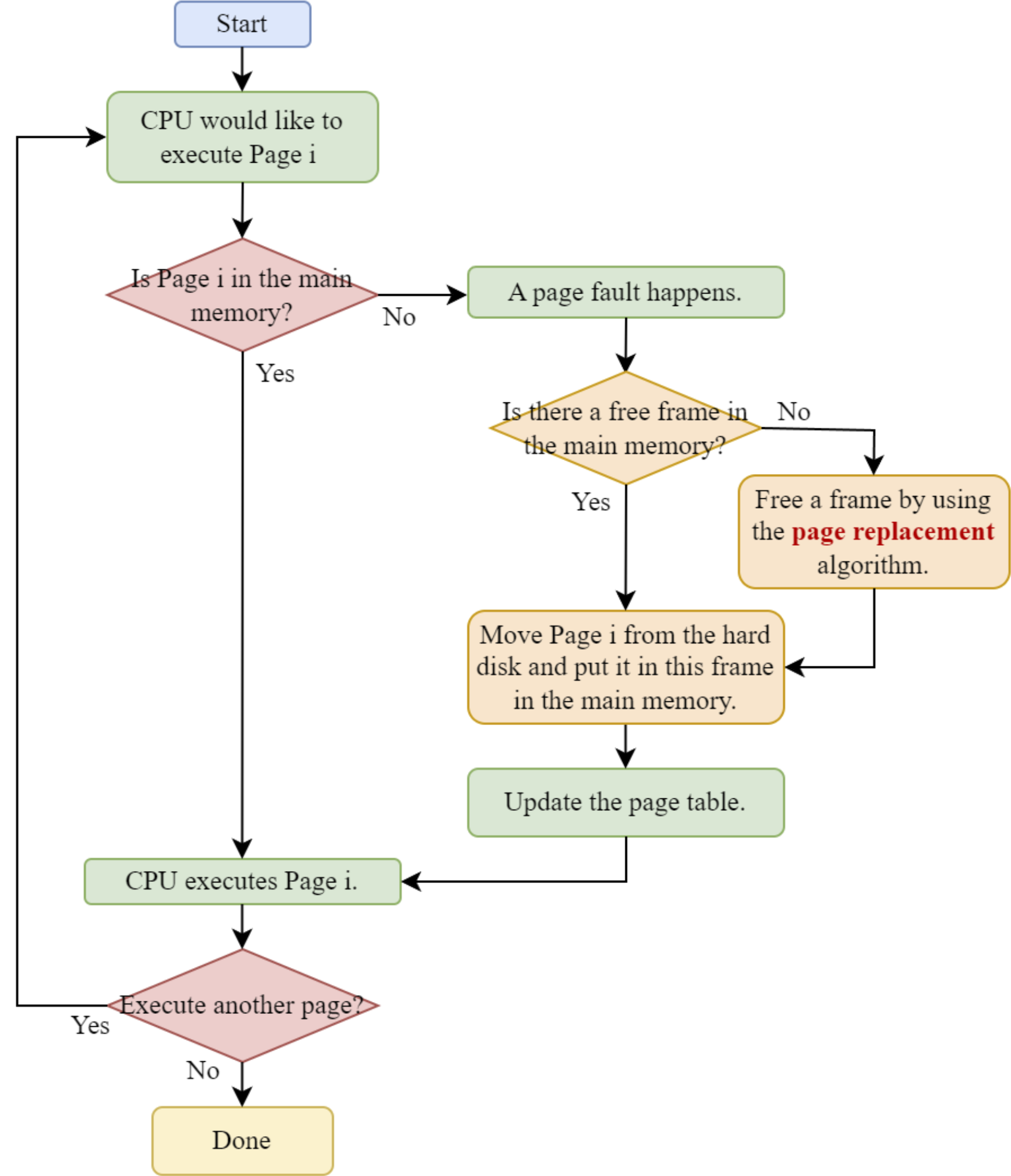
Page Fault Handling Flow
Example of Page Faults
Process P1 has 4 pages distributed between memory and disk as shown:
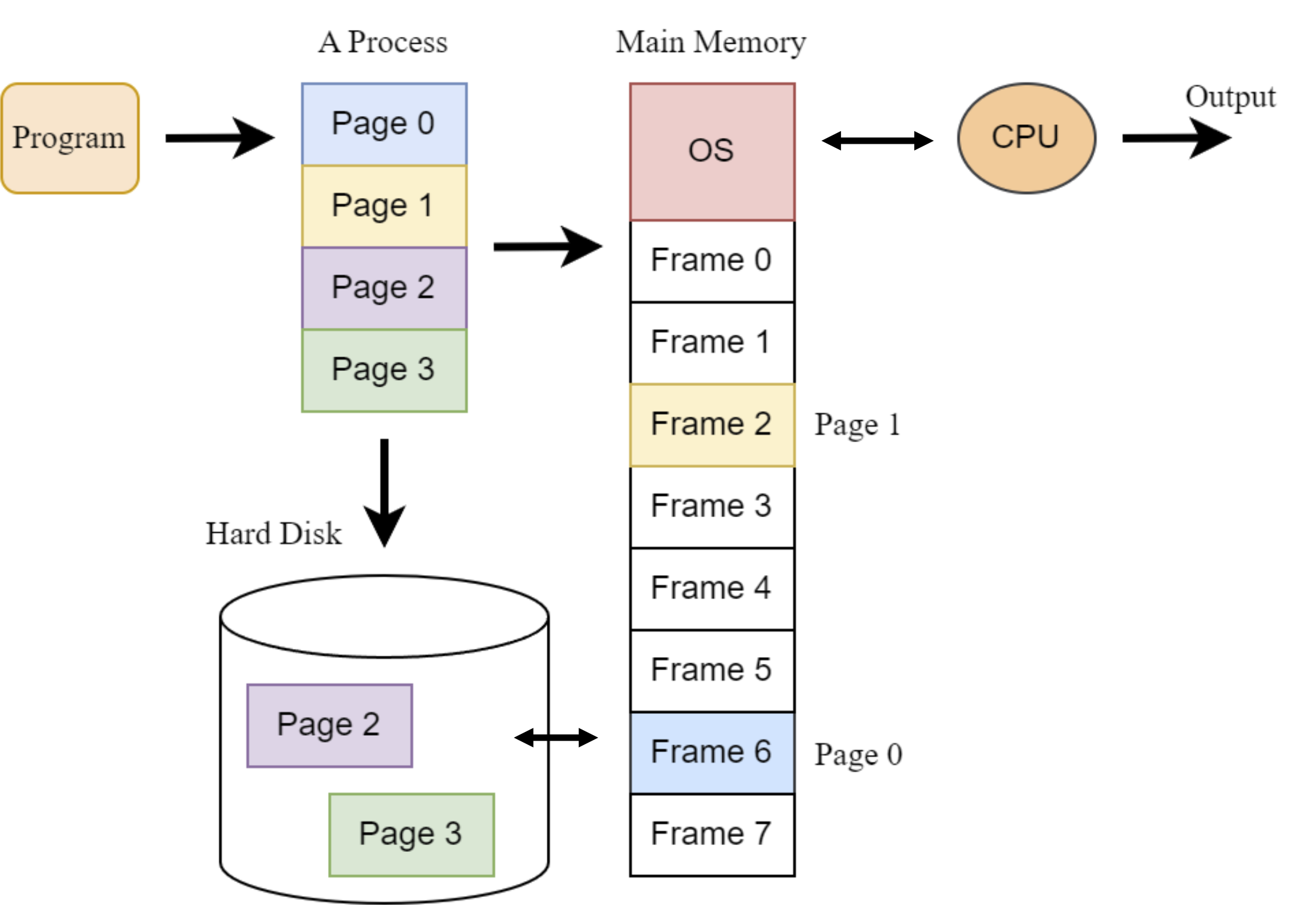
When the CPU executes pages 0, 1, 2, 3 in sequence:
- Page 0: Already in memory (frame 6) - No page fault
- Page 1: Already in memory (frame 2) - No page fault
- Page 2: On disk - Page fault occurs, loads into frame 4 (จะเป็นเลขอะไรก็ได้ที่มันว่างอยู่)
- Page 3: On disk - Page fault occurs, loads into frame 7 (จะเป็นเลขอะไรก็ได้ที่มันว่างอยู่)
Question
Consider that we are moving Page i from HD to main memory. If there is no free frame in the main memory. What should we do? Which frame should we store Page i?
We do page replacement, and we’ll studying Page-Replacement Algorithms and Trashing (Section 3) (We have 3 algorithms, which will all be in the exam.)
- ส่วน Frame ที่เราจะไปเอาเขาออกเนี่ย (Occupied Frame) จะเรียกว่า Victim
Page-Replacement Algorithms and Thrashing
#FinalExam — IN CASE ALL FRAMES ARE OCCUPIED
Page Replacement Process
- When a page fault occurs and memory is full, the operating system must decide which page to evict to make room for the needed page.
- The page replacement process follows these steps:
- Find the location of the needed Page i on disk
- Find a frame to store Page i:
- If a free frame exists, use it
- If no free frames available, use a page-replacement algorithm to:
- Select a victim frame to evict
- Write victim page contents to swap space (if modified)
- Update page tables to show the page is no longer in memory
- Load Page i into the newly freed frame
- Update tables and continue execution
Flow Chart for Page Replacement
- Flow Chart เดิม แต่ว่าอันนี้คำนึงถึง All frames are occupied
Example 1: Free Frame Available
- Process P1 with 4 pages distributed as shown, with CPU needing to execute Page 2 (currently on disk) = A page fault happens:
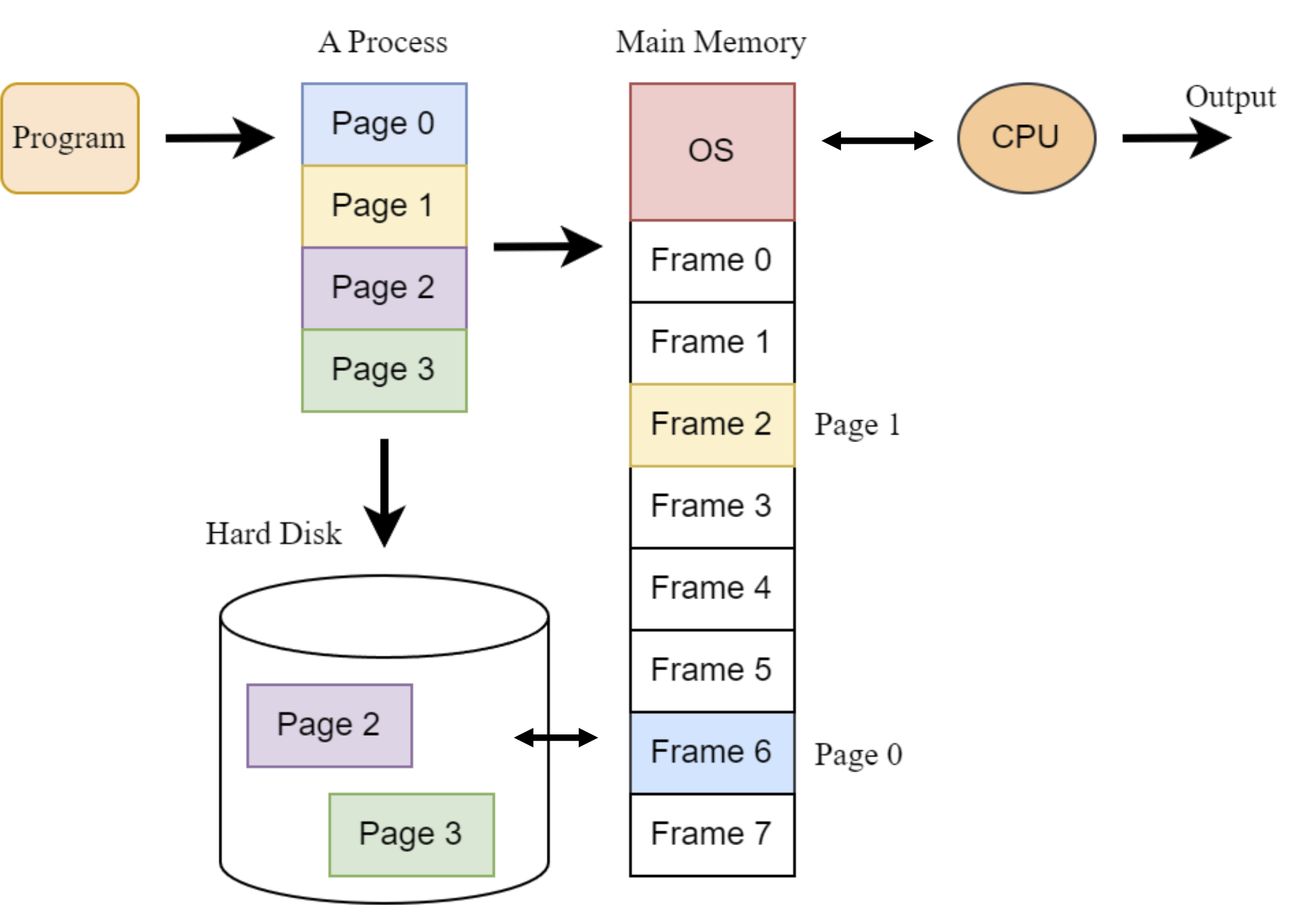
Since Frame 4 is free, the system:
- Finds Page 2 on disk
- Loads it into Frame 4
- Updates the page table
- Continues execution
Example 2: No Free Frames
- Process P1 with 4 pages, where all frames are occupied and CPU needs to execute Page 2:
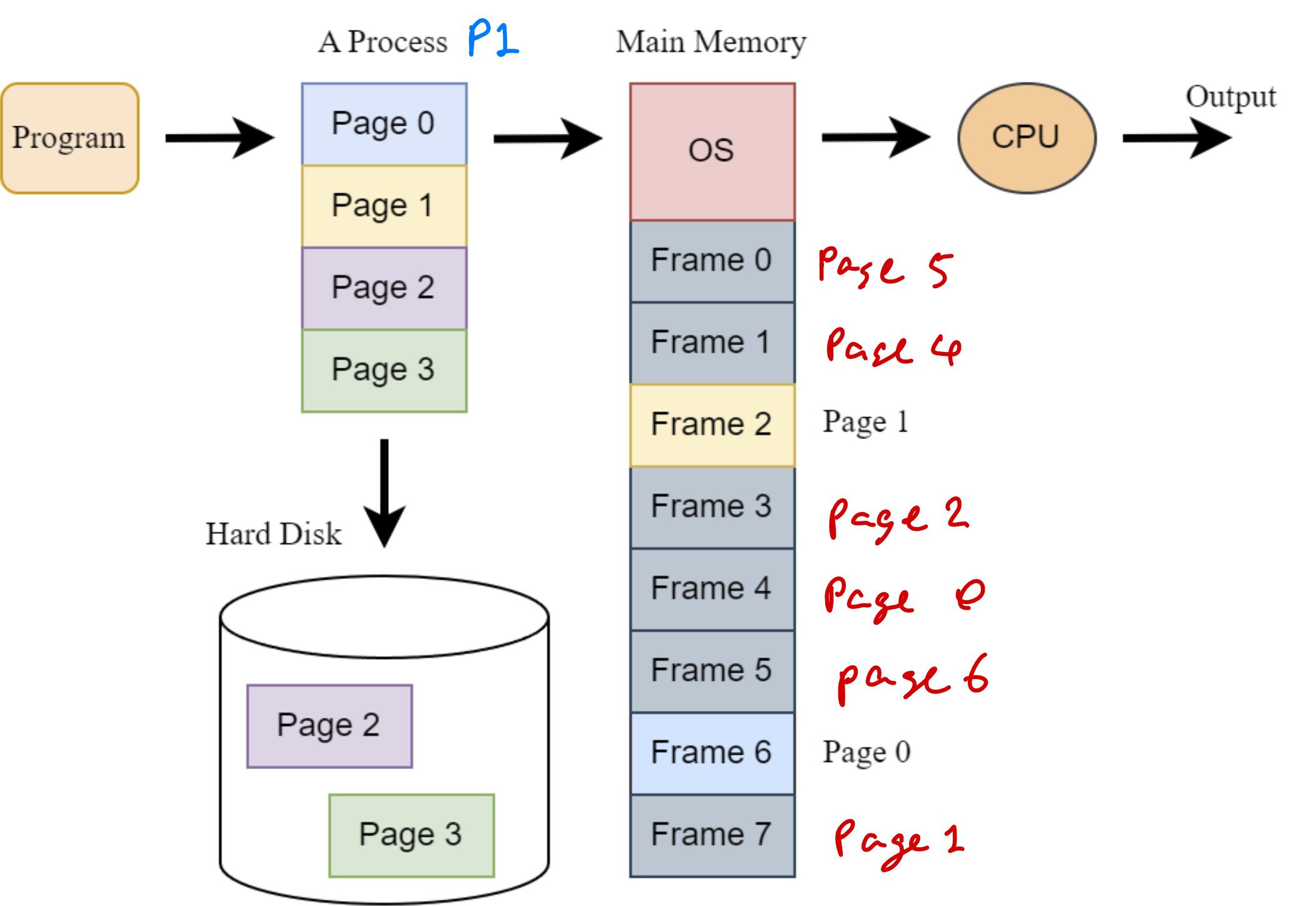
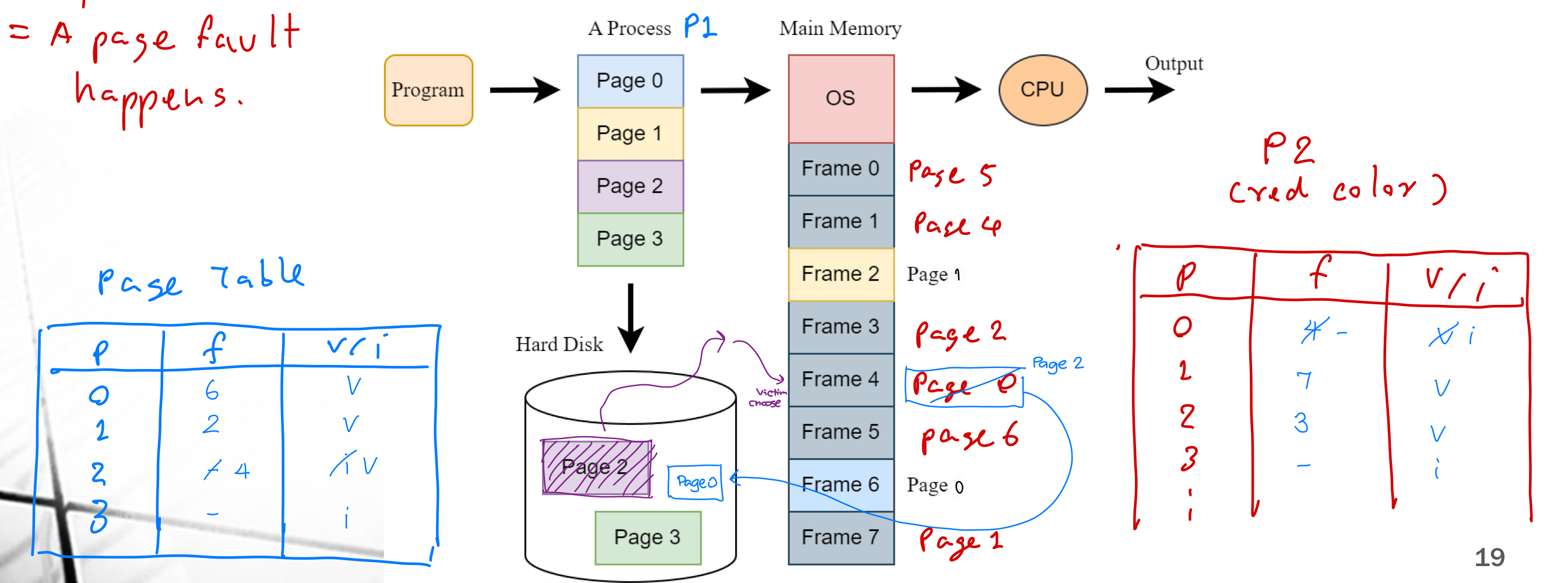
In this case, a page replacement algorithm must select a victim frame. The system:
- Selects Frame 4 as the victim (containing Page 0)
- Writes Page 0 to disk (if modified)
- Loads Page 2 from disk into Frame 4
- Updates the page table
- Continues execution
Page-Replacement Strategy
There are two fundamental approaches to selecting victim frames:
1. Global Replacement
- Selects victim frames from any process in memory
- Generally provides better system throughput
- More commonly used in modern operating systems
2. Local Replacement
- Selects victim frames only from the process that caused the page fault
- Requires careful frame allocation to each process
- Can lead to inefficient memory utilization
Analogy:
Global replacement: Borrowing money from any parent (yours or someone else's)
Local replacement: Borrowing money only from your own parents
Example: Global vs. Local Replacement
Consider four processes in memory with the following page distribution:
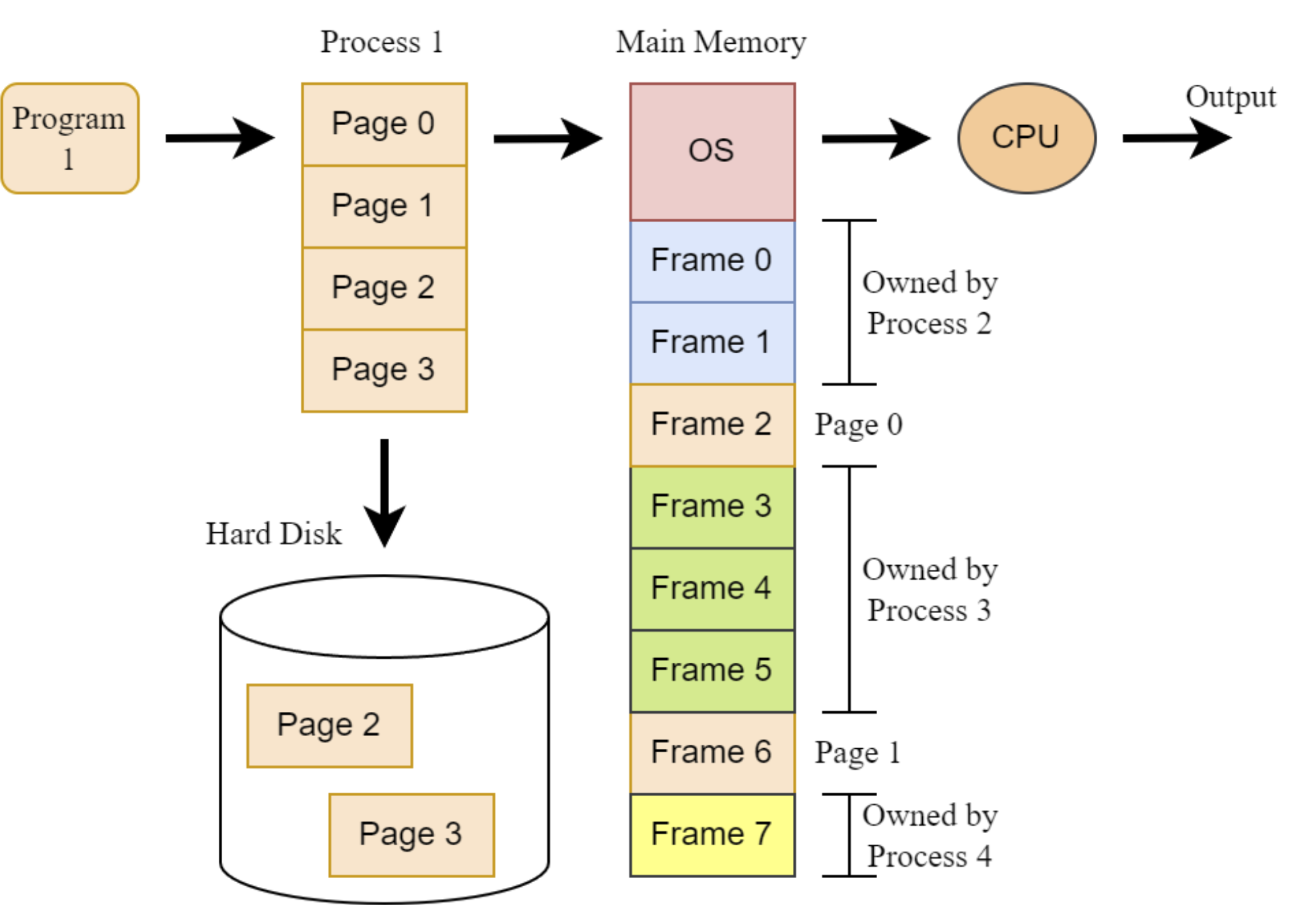
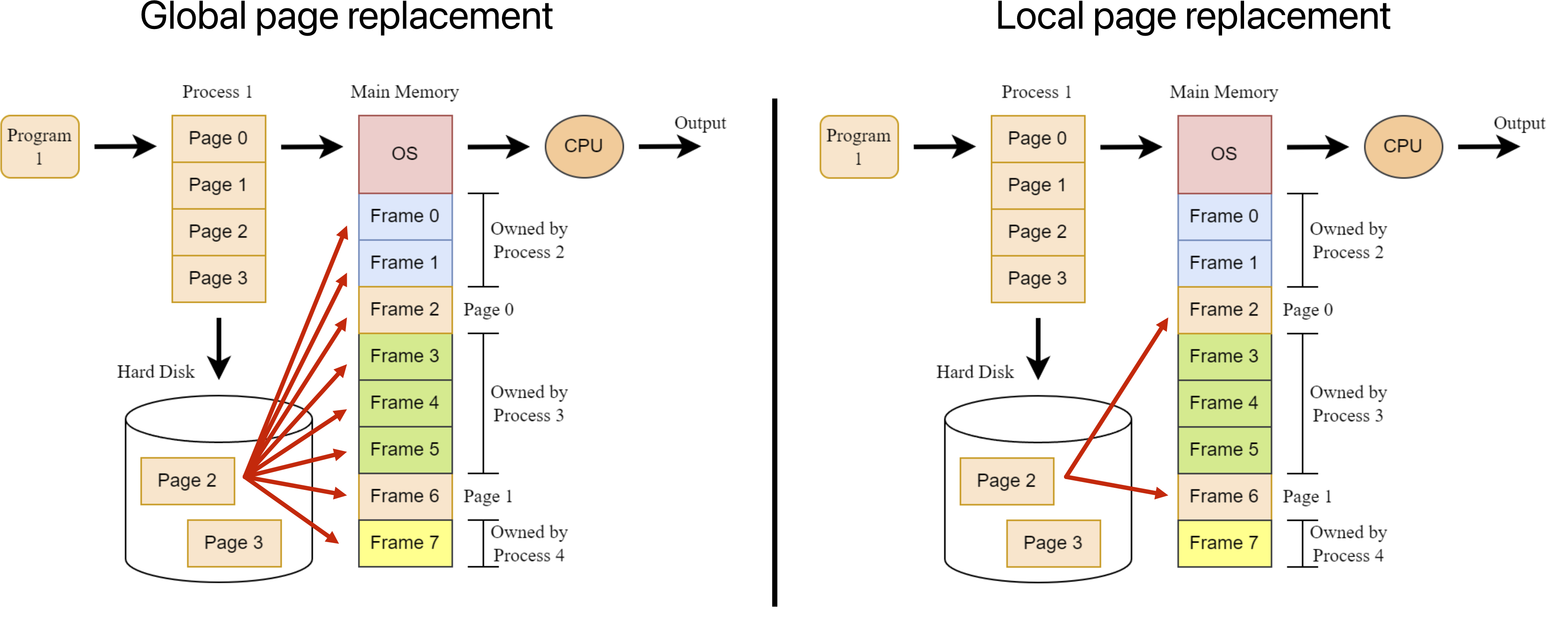
If CPU needs to execute Page 2 (on disk) of process P1:
- Global replacement allows the OS to select any frame as victim, including those owned by processes P2, P3, and P4.
- Local replacement restricts victim selection to only frames currently owned by P1 (Frames 2 and 6).
Question
By using the page replacement, how should we choose a victim (= an occupied frame)?
เรามีตั้ง 3 Algorithm มาดูกันเลย
Page-Replacement Algorithms
- Objective:
- To determine which page in memory should be swapped out to disk when a new page needs to be loaded
- Three page-replacement algorithms are studied:
- First-in first-out (FIFO) algorithm
- Optimal algorithm
- Least recently used (LRU) algorithm
Assumption for Examples
For all algorithm examples:
-
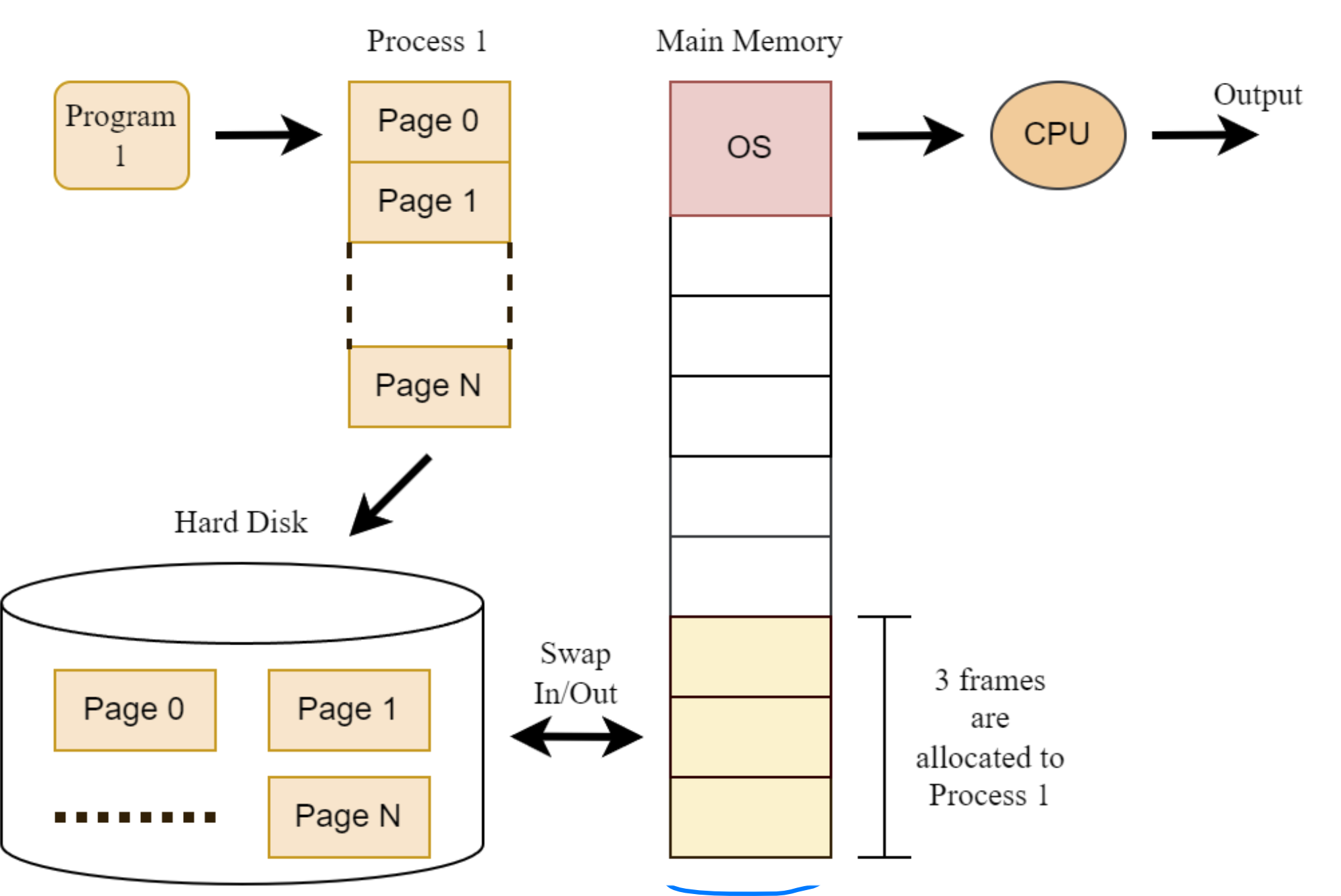
We're considering page-replacement for a single process
-
Initially all pages are stored on disk
-
Three frames are allocated to this process (local page replacement)
-
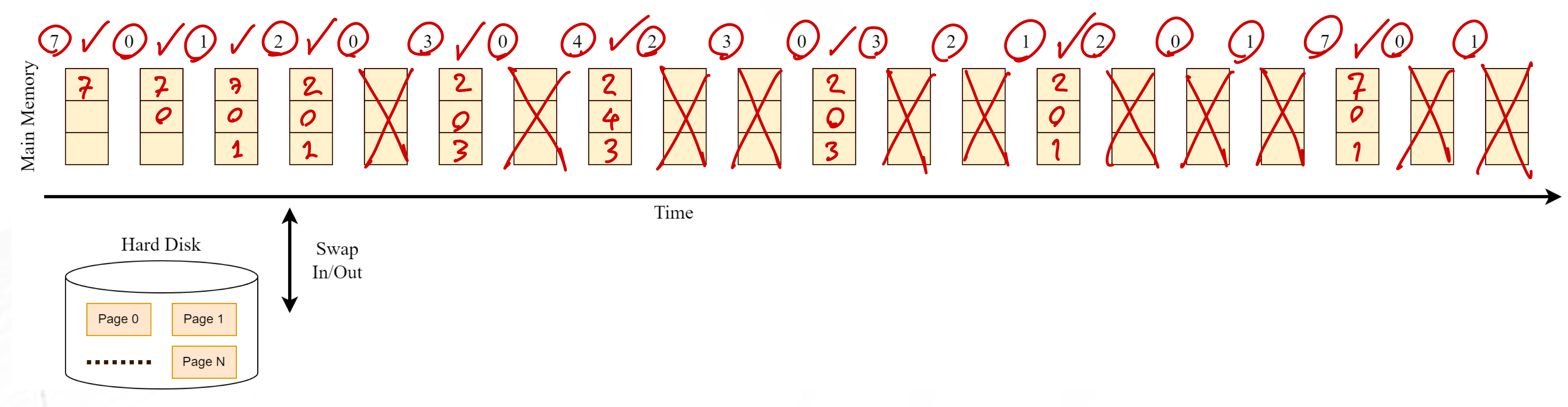
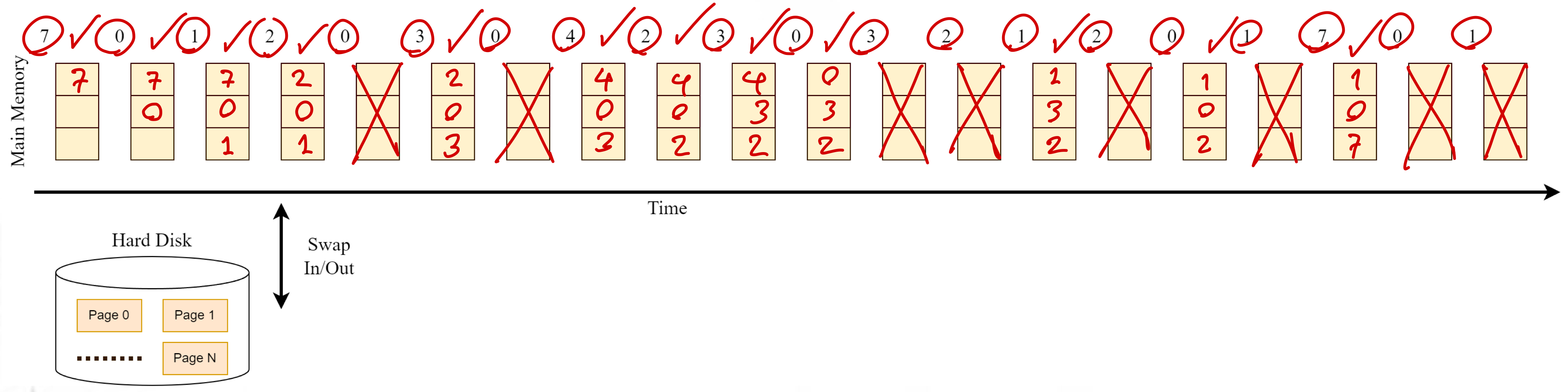
The CPU executes the following sequence of page numbers (the reference string):
7, 0, 1, 2, 0, 3, 0, 4, 2, 3, 0, 3, 2, 1, 2, 0, 1, 7, 0, 1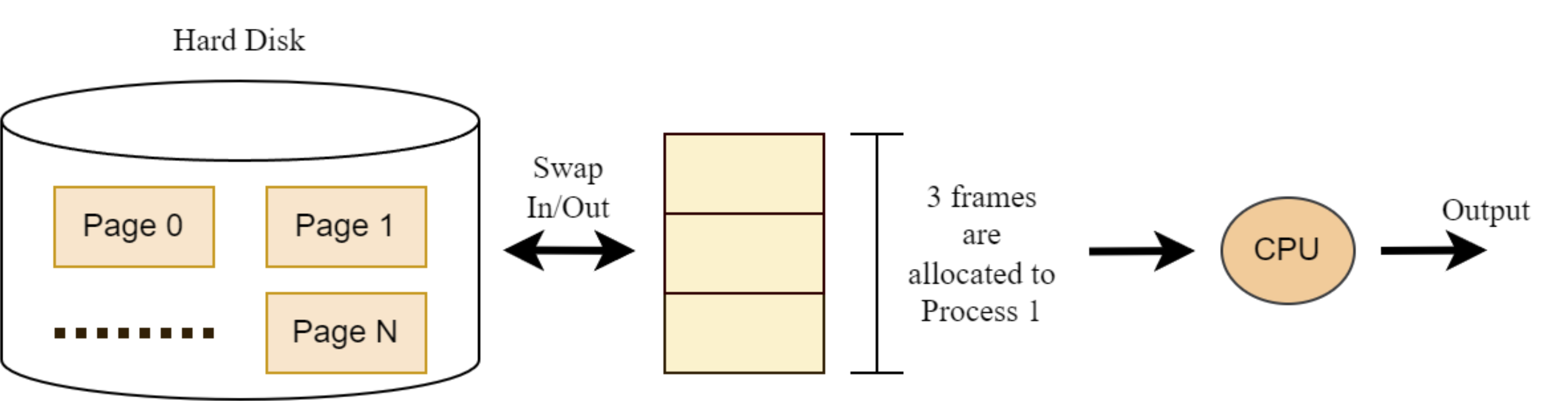
-
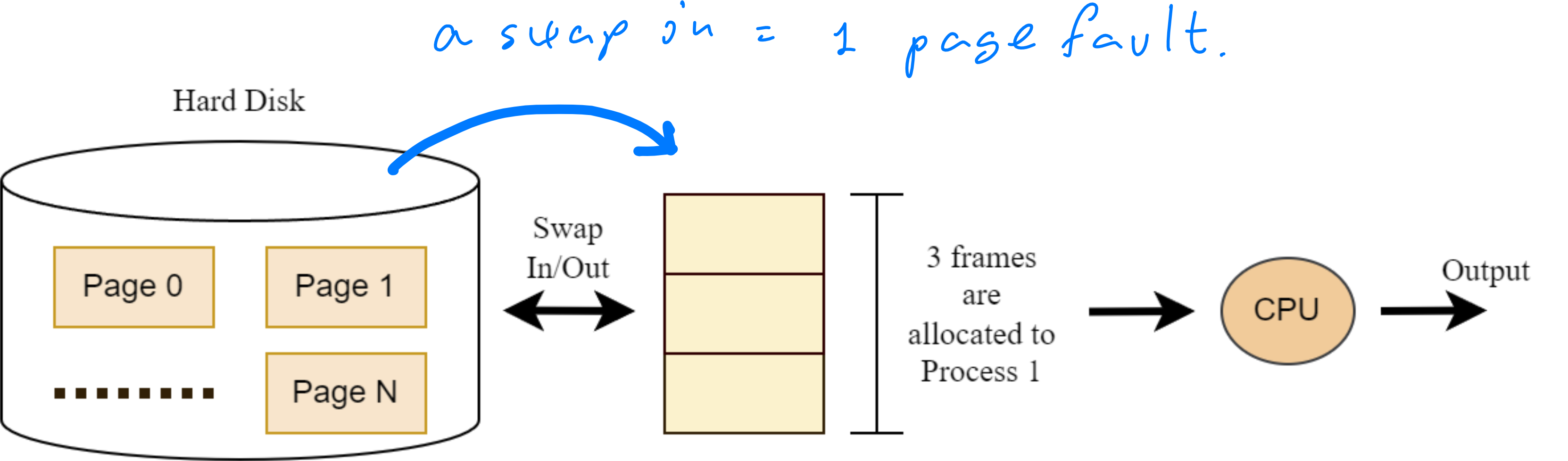
Performance is measured by the page-fault rate - the number of times a page must be loaded from disk to memory
- Lower page fault rate = better performance
- Each page fault creates overhead time
1. FIFO (First-In, First-Out) Algorithm
Principle: "When a page must be replaced, choose the oldest page in memory to swap out."
Example
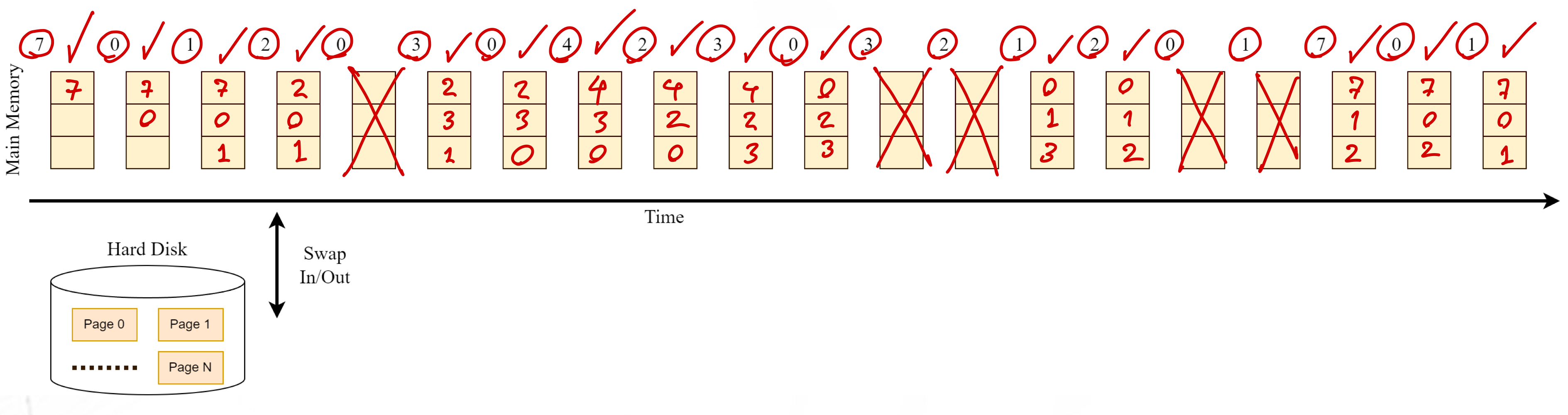
- With three frames and our reference string:
7, 0, 1, 2, 0, 3, 0, 4, 2, 3, 0, 3, 2, 1, 2, 0, 1, 7, 0, 1 - The FIFO algorithm produces 15 page faults (including the first three pages loaded into empty frames). นับจำนวน Check
FIFO's Problem: Belady's Anomaly
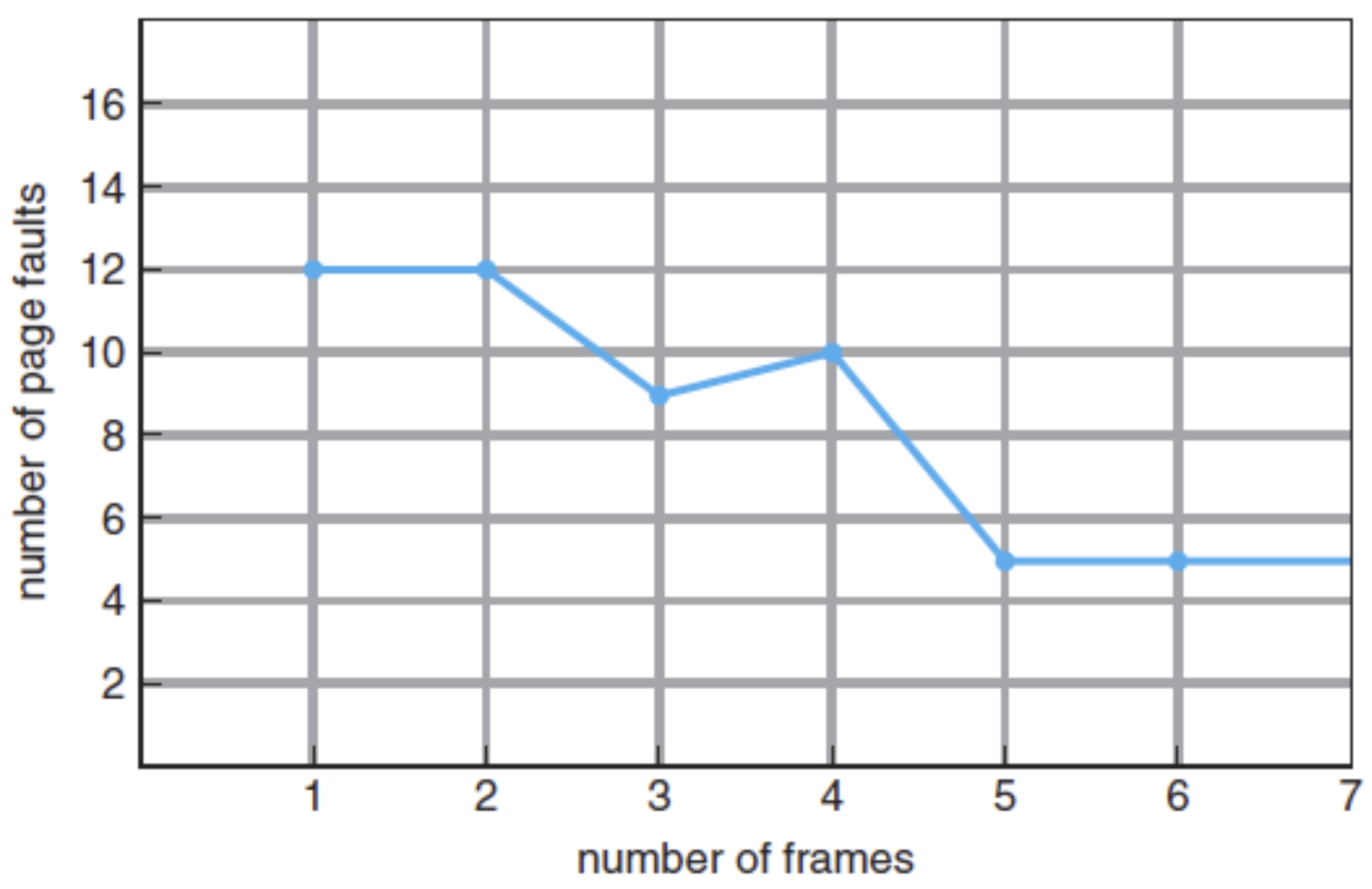
- Intuitive idea: Increasing the number of available frames should lower the page fault rate.
- Reality: This is not always true with FIFO!
- ==Belady's anomaly:== For some page-replacement algorithms (including FIFO), the page-fault rate may increase as the number of allocated frames increases.
2. Optimal Page-Replacement Algorithm
Principle: "When a page must be replaced, choose the page that will not be used for the longest period of time." → ลากไปข้างหน้า อันนี้ยาวสุดเอาออก!
- Assumption: The operating system knows the entire reference string in advance
- Advantages:
- Guarantees the lowest possible page fault rate for a fixed number of frames
- Does not suffer from Belady's anomaly
- Disadvantage:
- Impractical in real systems because future page references are unknown
Example
- With the same three frames and reference string, the Optimal algorithm produces 9 page faults (including the initial three loads).
3. Least-Recently-Used (LRU) Page-Replacement Alg.
Principle: "When a page must be replaced, choose the page that hasn't been used for the longest time." → ลากไปข้างหลัง อันนี้ยาวสุดเอาออก!
- Advantages:
- LRU algorithm is practical and popular.
- Does not suffer from Belady's anomaly
- Disadvantage:
- Implementing the LRU algorithm needs additional hardware to memorize the time when each frame/page has been recently used.
Example
- With the same three frames and reference string, the Optimal algorithm produces 12 page faults (including the initial three loads).
Thrashing from High Page-Fault Rate
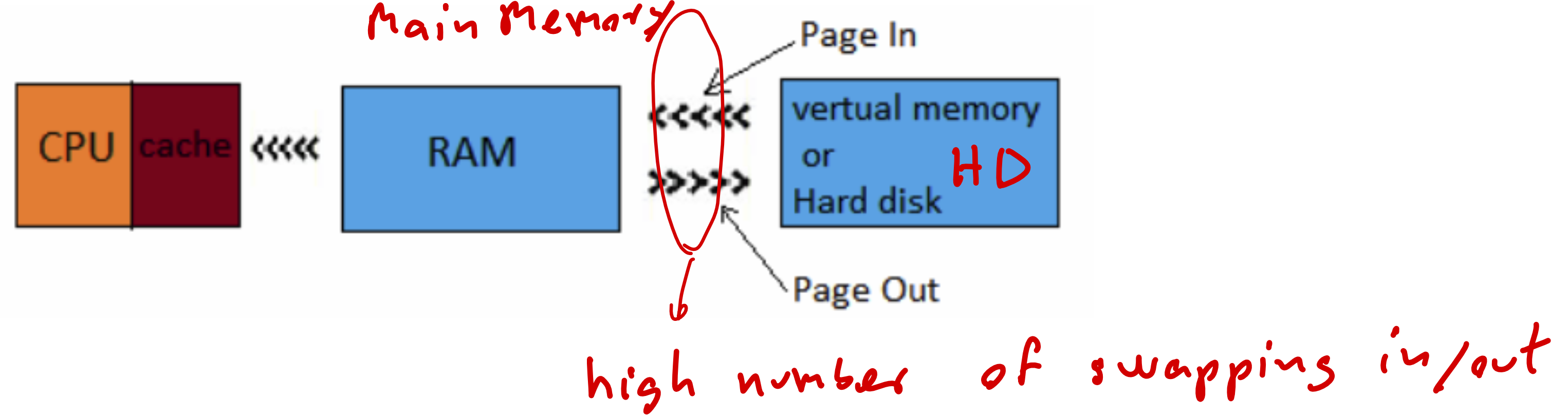
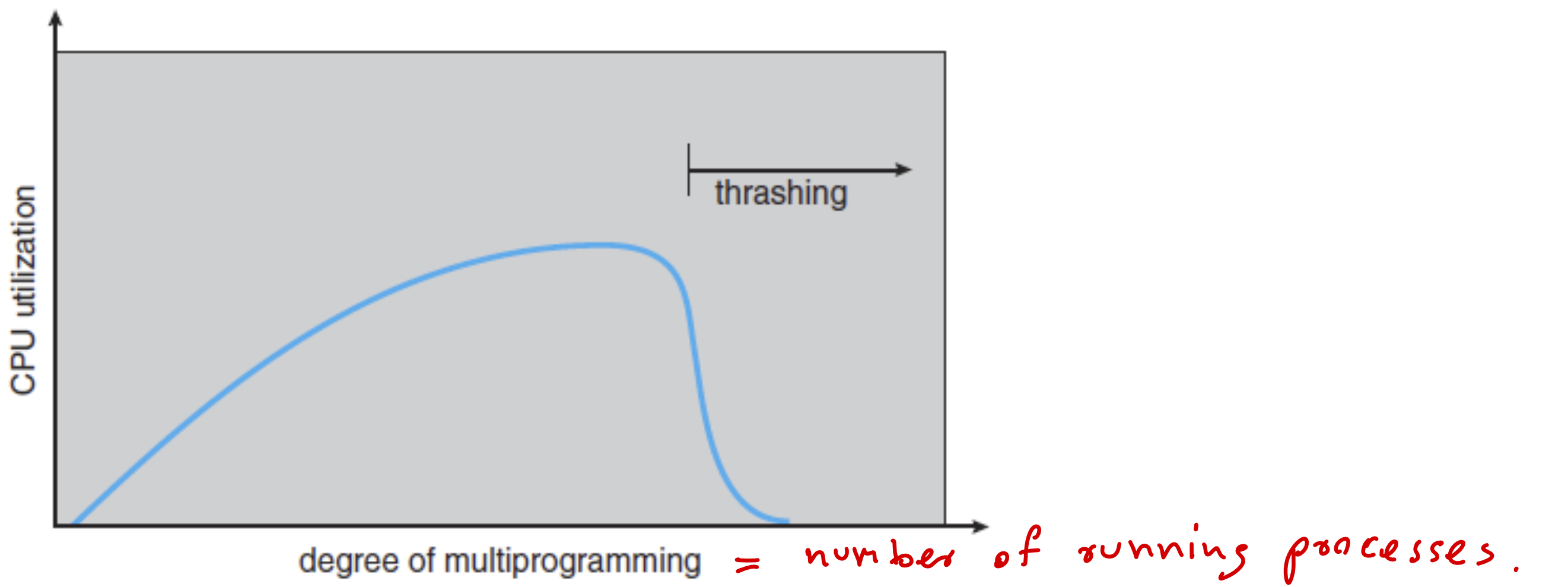
- Thrashing occurs when the system spends more time paging than executing processes
- This situation mainly happens when most of the frames are being used and few of them can be swapped in/out. Then, these frames will be reused again and again.
- As a result, a computer system that is thrashing can be perceived as either a very slow system or one that has come to a halt.
Definition: A high page-fault rate situation where the CPU spends most of its time swapping pages rather than executing instructions.
Causes of Thrashing
- Excessive Multiprogramming: Trying to run too many processes simultaneously
- Insufficient Memory: Each process has too few frames, causing constant page faults
- Poor Locality: Access patterns that don't exhibit temporal or spatial locality
Frame Allocation
Problem Statement
When starting a computer system with all frames in user space free:
- Multiple processes need to be loaded into memory
- We must decide how many frames to allocate to each process
- Some frames should be reserved for handling future page faults
Two Basic Allocation Algorithms
1. Equal Allocation
- Divides available frames equally among all processes
- Simple to implement and understand
- Formula:
- Each process gets frames
- Where = total available frames, = number of processes
- Remaining frames are kept as free frames for page faults
Example: With 93 free frames and 5 processes:
- Frames allocated to each process: frames
- Free frames for page faults: frames
2. Proportional Allocation
- Allocates frames based on process size (larger processes get more frames)
- More fair when processes have significantly different memory requirements
- Formula:
- Frames allocated to process =
- Where = size of process , , = total available frames
Example: With 62 frames and 2 processes:
- P1 has 10 pages
- P2 has 127 pages
- Total size
- Frames allocated to P1: frames Frames allocated to P2: frames
- Free frames for page faults: frame
Other Related Topics in Memory Management
Non-Uniform Memory Access (NUMA)
NUMA is a memory architecture used in multiprocessor systems where:
- Each CPU has its own local memory
- CPUs can access memory from other CPUs
- Access to local memory is faster (low latency, high bandwidth)
- Access to remote memory is slower (high latency, lower bandwidth)
- Optimal performance requires allocating processes to frames in memory belonging to the CPU running the process
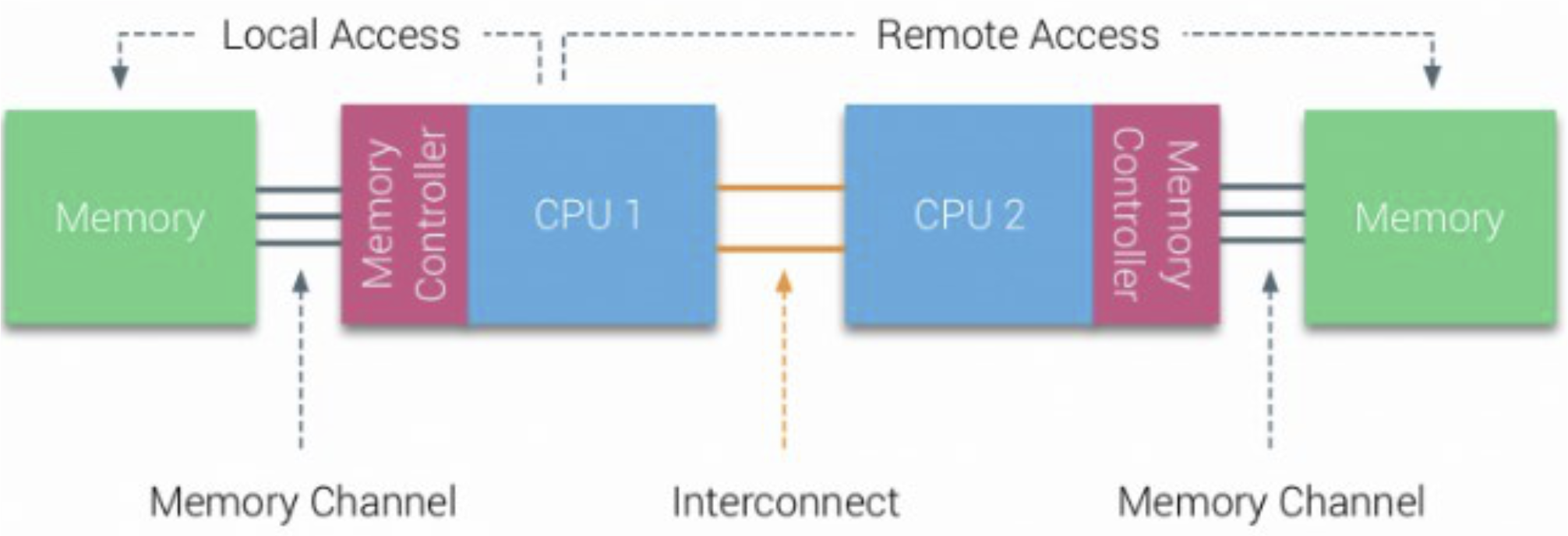
The diagram shows how in a NUMA system:
- Multiple CPUs each have their own local memory
- Each CPU can access both its local memory and the memory of other CPUs
- Local memory access is faster than remote memory access
Shared Pages and Copy-on-Write
Shared Pages
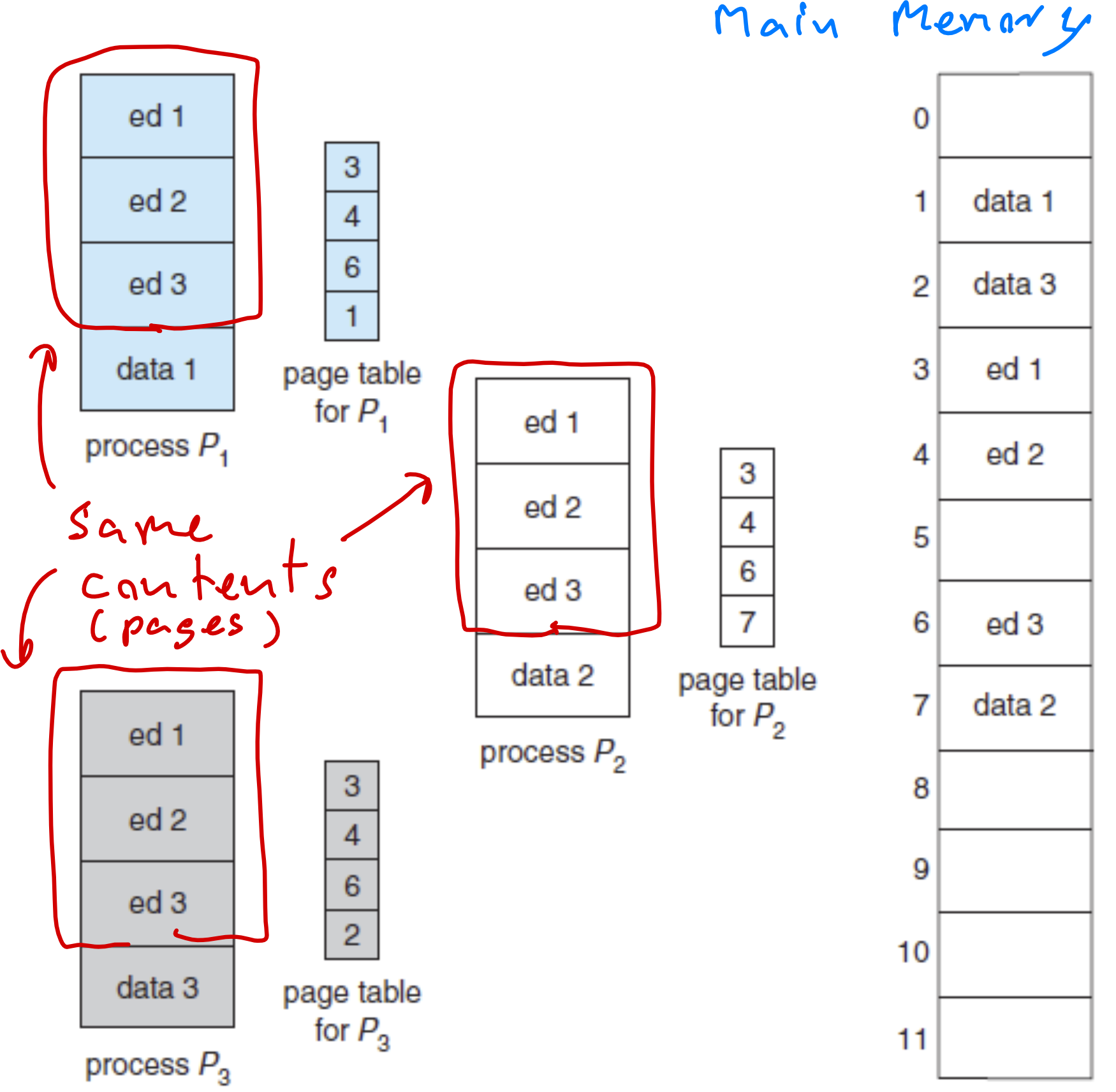
- Many processes often have similar code sections or data
- Identical pages from different processes can share the same physical frames
- This saves memory by avoiding duplication
Copy-on-Write Mechanism
- Pages shared between processes are marked as "copy-on-write"
- When a process needs to modify a shared page:
- The system creates a copy of the page in a new frame
- The process's page table is updated to point to the new frame
- The process can then safely modify its own copy
- This approach maximizes memory efficiency while maintaining process isolation
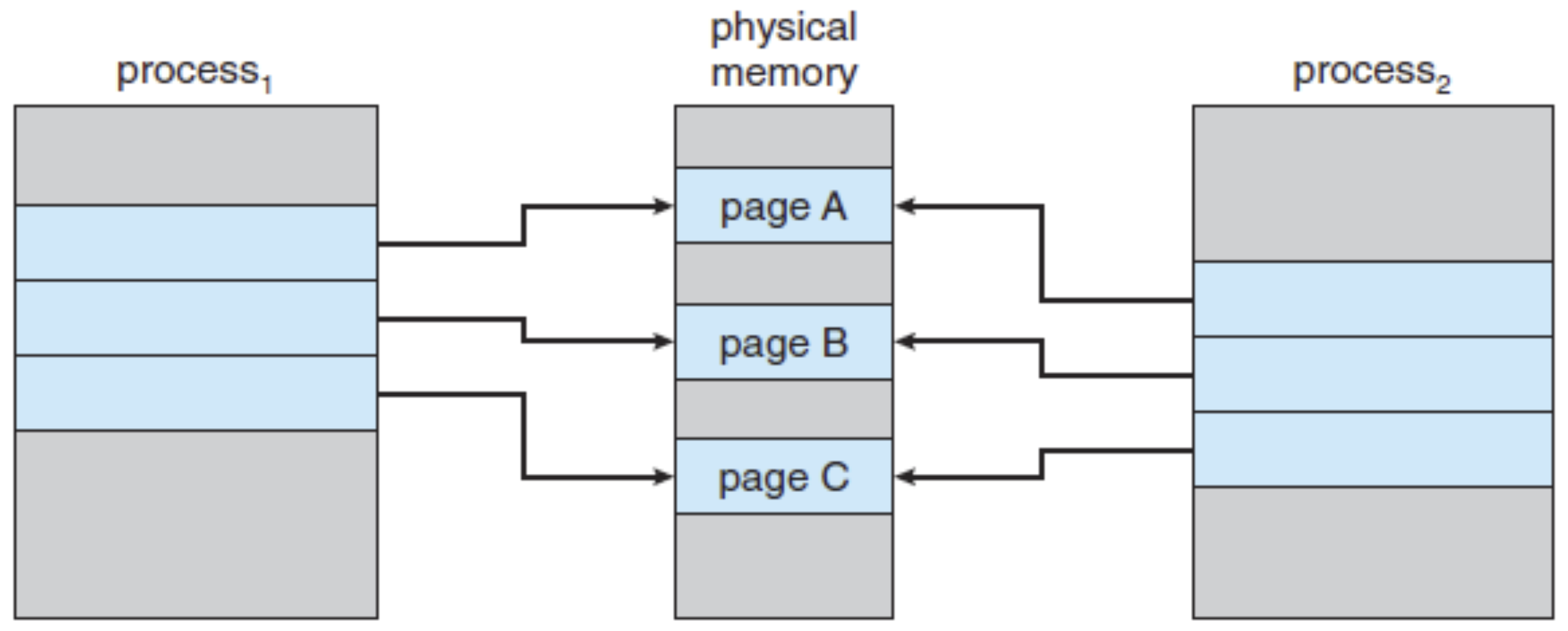
Example: Copy-on-Write
Initial state:
- Process1 and Process2 share Pages A, B, and C (all marked as copy-on-write)
- Both processes' page tables point to the same physical frames
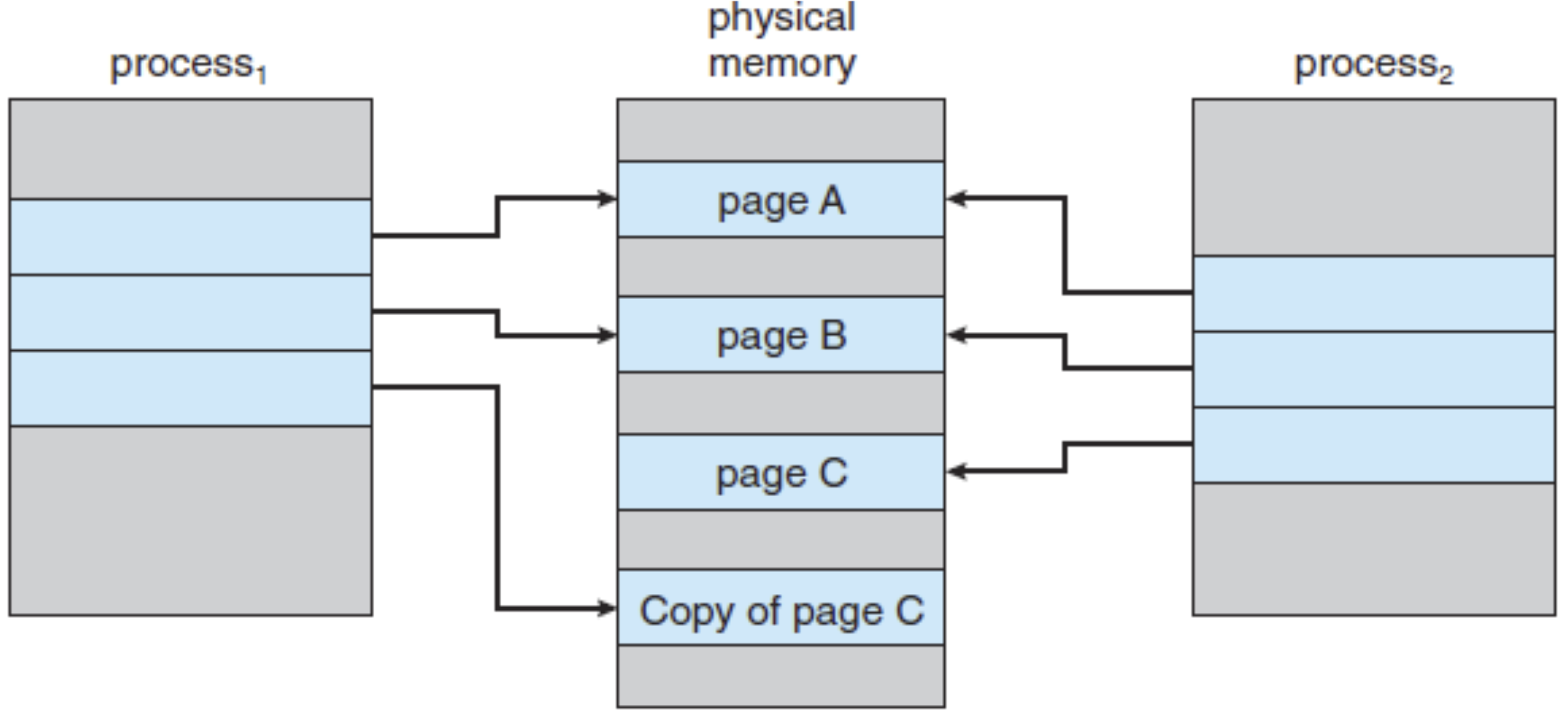
After Process1 modifies Page C:
- Process1 needs to edit Page C
- The system creates a copy of Page C in a new frame
- Process1's page table is updated to point to the new frame
- Process1 can now safely modify its copy of Page C
- Process2 continues using the original Page C
This mechanism ensures memory efficiency by:
- Sharing identical pages between processes when possible
- Only creating copies when modifications are needed
- Maintaining process isolation and memory protection