Lecture Contents
- What is Cloud Computing?
- Early models of Cloud Computing
- Delivery models and services
- Ethical issues in Cloud Computing
- Cloud vulnerabilities
- Parallel Computing
- Distributed Systems
Future Trends in Cloud Computing (2025)
Top 10 Future Trends
- Multi-cloud
- Edge Computing
- Going Serverless
- Disaster Recovery
- ไปในระดับของ Earthquake, Diaster ของจริง!
- Most business should have both
- DC - Data Center (Primary Site)
- DR - Disaster Recovery Site (Secondary Site) Resource 100% = (should be) DC
- เดี๋ยวนี้อาจจะเป็น DR on Cloud ก็ได้ แทนที่จะเป็น Physicsal, so we don’t need to build a new building or hire a person.
- Recovery Process: DC - DR
- Hot-hot: Run service 100% at DC, you need to run the same one at DR too!
- Hot-warm: DC (Fully operate), but in DR some services may turn off (Active - Partial services can be activated within SLA (Service Level Agreement ว่าสัญญา uptime ไว้เท่าไหร่))
- Hot-cold: (Active - Standby (require full restoration))
- DevSecOps
- Combine development, security, and operations across the entire software development lifecycle (SDLC).
- Service Mesh
- Cloud Migration
- Open-source
- Artificial Intelligence
- IoT Platforms
Why not cloud?
- Security, privacy
- Lack of control (Cloud Provider เป็นคนจัดการหมด, we have less control)
Emerging Cloud Trends: What to Expect in 2025
- Edge Computing & 5G
- Lower Latency: Faster local processing
- Use Cases: Smart cities, autonomous vehicles
- Capabilities in process that data in the resource-constraint devices
- AI & Machine Learning
- Enhanced Analytics: AI-driven insights and automation
- Use Cases: Customer support, fraud detection
- Multi-Cloud & Hybrid Cloud
- Flexibility & Security: Combine public and private clouds
- Use Cases: Disaster recovery, data security
- Serverless Computing
- Focus on Code: No infrastructure management
- Use Cases: Real-time data processing, scalable app backends
- Docker, Kubernetes
- Enhanced Security & Compliance
- AI-Driven Security: Real-time threat detection
- Use Cases: Data encryption, identity management
What is Cloud Computing?
Definition 1 (Wikipedia)
"Cloud computing is an information technology (IT) paradigm that enables ubiquitous access to shared pools of configurable system resources and higher-level services that can be rapidly provisioned (คำนี้ก็คือ Scalability นั่นแหละ) with minimal management effort, often over the Internet. Cloud computing relies on sharing of resources to achieve coherence and economies of scale (ยิ่งเยอะยิ่งถูก), similar to a public utility."
Resource Sharing!
Definition 2 (Microsoft Azure)
"Simply put, cloud computing is the delivery of computing services — servers, storage, databases, networking, software, analytics and more — over the Internet ("the cloud"). Companies offering these computing services are called cloud providers and typically charge for cloud computing services based on usage, similar to how you're billed for gas or electricity at home."
Analogy:
Think of cloud computing like electricity from a power grid. Instead of generating your own power (running your own servers), you plug into a shared infrastructure and pay only for what you use.
Top 10 Cloud Service Providers
Major Providers
- AWS (Amazon Web Services)
- Microsoft Azure
- Google Cloud Platform
- Alibaba Cloud
- Oracle Cloud Infrastructure
- IBM Cloud (Kyndryl)
- Tencent Cloud
- OVHcloud
- DigitalOcean
- Linode
Cloud Computing Models, Resources, and Attributes
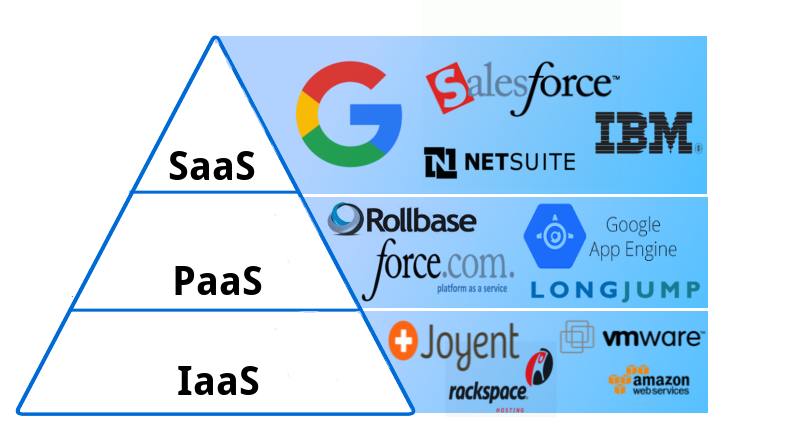
Delivery Models
- Software as a Service (SaaS)
- Platform as a Service (PaaS)
- Infrastructure as a Service (IaaS)
Deployment Models
- Public Cloud
- Private Cloud
- Community Cloud
- Hybrid Cloud
Resources
- Networks
- Compute & Storage Servers
- Services
- Applications
Infrastructure
- Distributed Infrastructure
- Resource Virtualization
- Autonomous Systems
Defining Attributes
- Massive Infrastructure
- Accessible via the Internet
- Utility Computing, Pay-per-usage
- Elasticity
Early Models of Cloud Computing
Basic Reasoning
Information and data processing can be done more efficiently on large farms of computing and storage systems accessible via the Internet.
Two Early Models
1. Grid Computing
- Initiated by the National Labs in the early 1990s
- Targeted primarily at scientific computing
"Grid computing is the collection of computer resources from multiple locations to reach a common goal. The grid can be thought of as a distributed system with non-interactive workloads that involve a large number of files." — Wikipedia
2. Utility Computing
- Initiated in 2005-2006 by IT companies
- Targeted at enterprise computing
"Utility computing is a service provisioning model in which a service provider makes computing resources and infrastructure management available to the customer as needed, and charges them for specific usage rather than a flat rate." — Wikipedia
Cloud Computing Characteristics
"Cloud Computing offers on-demand, scalable and elastic computing (and storage services). The resources used for these services can be metered and users are charged only for the resources used."
Shared Resources and Resource Management
- Cloud uses a shared pool of resources
- Uses Internet technology to offer scalable and elastic services
- The term "elastic computing" refers to the ability of dynamically and on-demand acquiring computing resources and supporting a variable workload
- อันนี้แหละคือ Dynamic resource provisioning
- ถ้าไม่มีก็: Poor resource utilization (ไม่ fit demand at that time)
- Resources are metered (measurable) and users are charged accordingly
- ไม่งั้นเขาจะมาคิดตังเราได้ยังไงล่ะ
- It is more cost-effective due to resource-multiplexing. Lower costs for the cloud service provider are passed to the cloud users
Data Storage
- Data is stored:
- In the "cloud", in certain cases closer to the site where it is used
- Appears to users as if stored in a location-independent manner
- The data storage strategy can increase reliability, as well as security, and can lower communication costs
Management
- The maintenance and security are operated by service providers
- The service providers can operate more efficiently due to specialization and centralization
Analogy:
Elastic computing is like having a rubber band infrastructure — it stretches when you need more resources and contracts when demand decreases, and you only pay for the stretched portion.
Dynamic Provisioning
Traditional Computing Problems
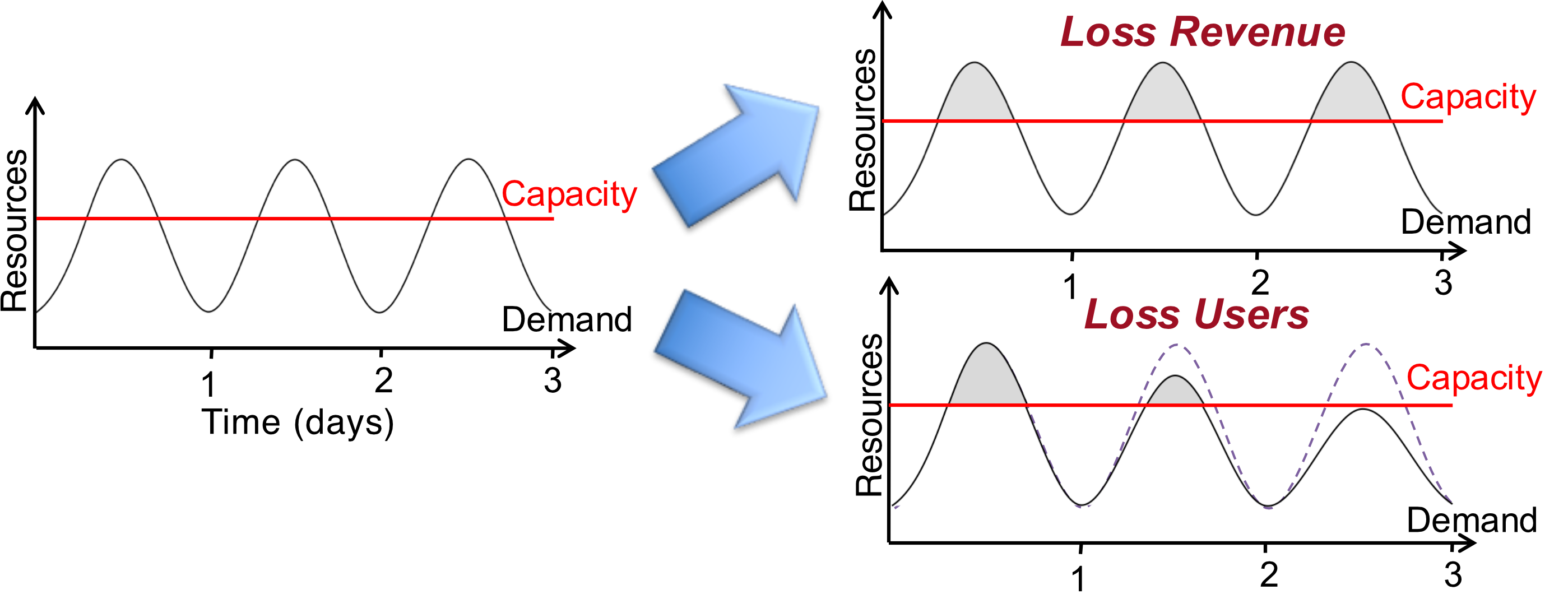
In traditional computing model, two common problems:
- Underestimate system utilization → results in under-provisioning
- Leads to Loss of Revenue
- Leads to Loss of Users
- Overestimate system utilization → results in low utilization
- Leads to Unused Resources
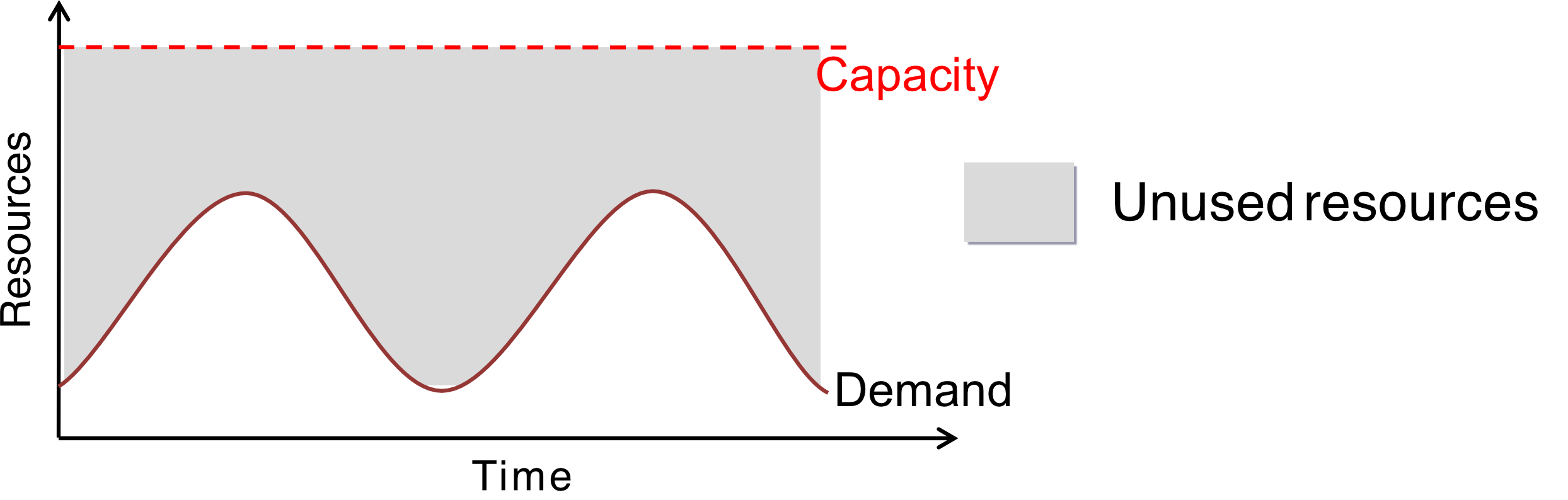
- Leads to Unused Resources
Cloud Solution
Cloud resources should be provisioned dynamically to:
- Meet seasonal demand variations
- Meet demand variations between different industries
- Meet burst demand for extraordinary events
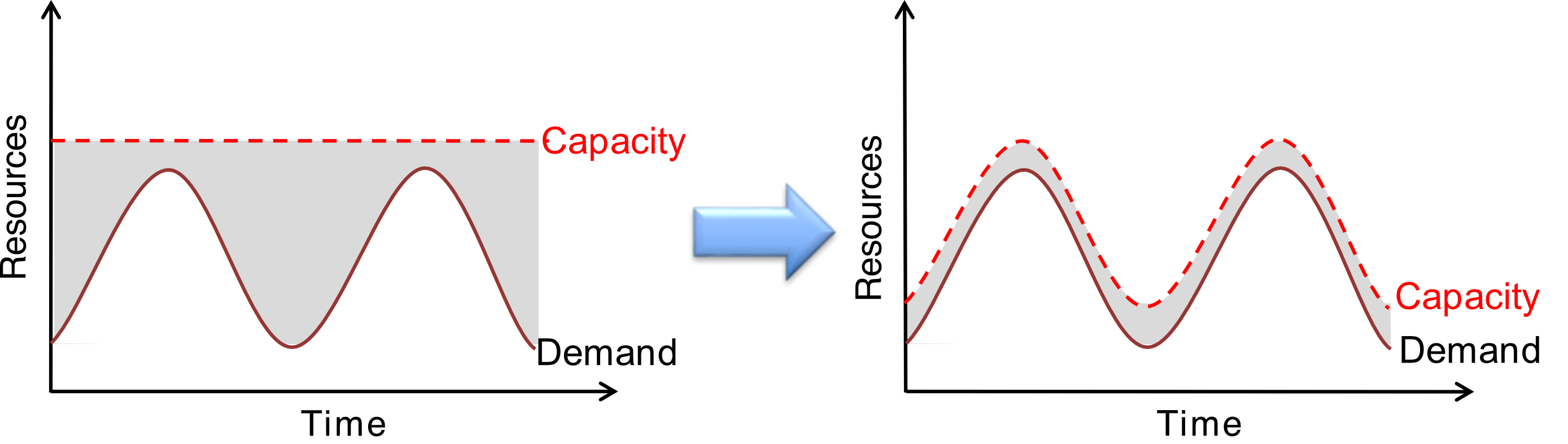
Analogy:
Traditional IT is like building a stadium that's either too small (users can't get in during peak times) or too large (empty seats waste money). Cloud computing dynamically adjusts capacity like expandable seating.
Cloud Computing Advantages
-
Resources such as CPU cycles, storage, network bandwidth are shared
-
When multiple applications share a system, their peak demands for resources are not synchronized thus, multiplexing leads to higher resource utilization
-
Resources can be aggregated to support data-intensive applications
-
Data sharing facilitates collaborative activities. Many applications require multiple types of analysis of shared data sets and multiple decisions carried out by groups scattered around the globe
-
Eliminates the initial investment costs for a private computing infrastructure and the maintenance and operation costs
-
Cost reduction: concentration of resources creates the opportunity to pay as you go for computing
- Investment cost, Operation cost, Maintenance cost (MA) - 20% of purchased SW/HW
-
Elasticity: the ability to accommodate workloads with very large peak-to-average ratios
-
User convenience: virtualization allows users to operate in familiar environments rather than in idiosyncratic ones
Types of Clouds
1. Public Cloud
The infrastructure is made available to the general public or a large industry group and is owned by the organization selling cloud services.
2. Private Cloud
The infrastructure is operated solely for an organization.
![[private-cloud-compute-header@2x.png|center|300]]

3. Hybrid Cloud
Composition of two or more Clouds (public, private, or community) as unique entities but bound by a standardized technology that enables data and application portability.
4. Other Types: Community/Federated Cloud
The infrastructure is shared by several organizations and supports a community that has shared concerns.
Why Cloud Computing Could Be Successful
When other paradigms have failed:
-
It is in a better position to exploit recent advances in software, networking, storage, and processor technologies promoted by the same companies who provide Cloud services
-
Economical reasons: It is used for enterprise computing; its adoption by industrial organizations, financial institutions, government, and so on has a huge impact on the economy
-
Infrastructure Management reasons:
- A single Cloud consists of a mostly homogeneous (now more heterogeneous) set of hardware and software resources
- The resources are in a single administrative domain (AD). Security, resource management, fault-tolerance, and quality of service are less challenging than in a heterogeneous environment with resources in multiple ADs
Challenges for Cloud Computing
-
Availability of service: What happens when the service provider cannot deliver?
- Five 9s SLA (Service Level Agreement) → 99.999% Service Availability
-
Data confidentiality and auditability: A serious problem
- คือเราไม่สามารถไปขอ Google ขอดู Log เครื่องนี้หน่อย ไม่ด้ายยยยย
- อยากจะ Audit ก็ต้อง Log เอง บน App ตัวเอง!
-
Diversity of services: Data organization, user interfaces available at different service providers limit user mobility; once a customer is hooked to one provider it is hard to move to another
-
Data transfer bottleneck: Many applications are data-intensive
-
Performance unpredictability: One of the consequences of resource sharing
- How to use resource virtualization and performance isolation for QoS guarantees?
- How to support elasticity, the ability to scale up and down quickly?
-
Resource management: It is a big challenge to manage different workloads running on large data centers. Are self-organization and self-management the solution?
-
Security and confidentiality: Major concern for sensitive applications, e.g., healthcare applications
Note: Addressing these challenges is ongoing work!
Cloud Delivery Models
Three Main Delivery Models
- Software as a Service (SaaS) — High level
- Platform as a Service (PaaS)
- Infrastructure as a Service (IaaS) — Low level
Visual Hierarchy
Cloud Clients
Web browser, mobile app, thin client, terminal emulator, ...
↓
SaaS
CRM, Email, virtual desktop, communication, games, ...
↓
PaaS
Execution runtime, database, web server, development tools, ...
↓
IaaS
Virtual machines, servers, storage, load balancers, network, ...
Service Model Overview
Application Layer (SaaS)
- Mobile Device
- Web-based Application
- General Application
- Business Services
Platform Layer (PaaS)
- Development Tools
- Runtime Environment
- Control Interface
- Resource Management
- Fault Tolerance
- Dynamic Provisioning
- Load Balancing
Fault Tolerance
- The system capability that is able to resist/tolerate (partial) failure → The service is still running.
- System components usually run at 100%
- Some failure occurred at (e.g. disk, program) - some functions may not be working properly (20%)
- However, the system still keeps running!
Example: Backup (Replication), Load Balancer (Indirect), RAID (Disk/storage Redundancy)
ก็น่าจะ System พังแค่บางส่วน มันไม่ควรพังทั้งระบบ
Infrastructure Layer (IaaS)
- Resource Management Interface
- System Monitoring Interface
- Virtualization
- Network
- Computing
- Storage
- IO
Infrastructure-as-a-Service (IaaS)
Definition
Infrastructure is compute resources: CPU, VMs, storage, etc.
User Capabilities
- The user is able to deploy and run arbitrary software, which can include operating systems and applications
- The user does not manage or control the underlying Cloud infrastructure but has control over operating systems, storage, deployed applications, and possibly limited control of some networking components (e.g., host firewalls)
Services Offered
- Server hosting
- Storage
- Computing hardware
- Operating systems
- Virtual instances
- Load balancing
- Internet access
- Bandwidth provisioning
Example
Amazon EC2
Platform-as-a-Service (PaaS)
Definition
Allows a cloud user to deploy consumer-created or acquired applications using programming languages and tools supported by the service provider.
User Capabilities
- Has control over the deployed applications and, possibly, application hosting environment configurations
- Does not manage or control the underlying Cloud infrastructure including network, servers, operating systems, or storage
Not Particularly Useful When:
- The application must be portable
- Proprietary programming languages are used
- The hardware and software must be customized to improve the performance of the application
Examples
- Google App Engine
- Windows Azure
Software-as-a-Service (SaaS)
Definition
Applications are supplied by the service provider.
User Capabilities
The user does not manage or control the underlying Cloud infrastructure or individual application capabilities.
Services Offered
Enterprise services such as:
- Workflow management
- Communications
- Digital signature
- Customer relationship management (CRM)
- Desktop software
- Financial management
- Geo-spatial services
- Search
Limitations
Not suitable for:
- Real-time applications
- Applications where data is not allowed to be hosted externally
Examples
- Gmail
- Salesforce
The Three Delivery Models of Cloud Computing
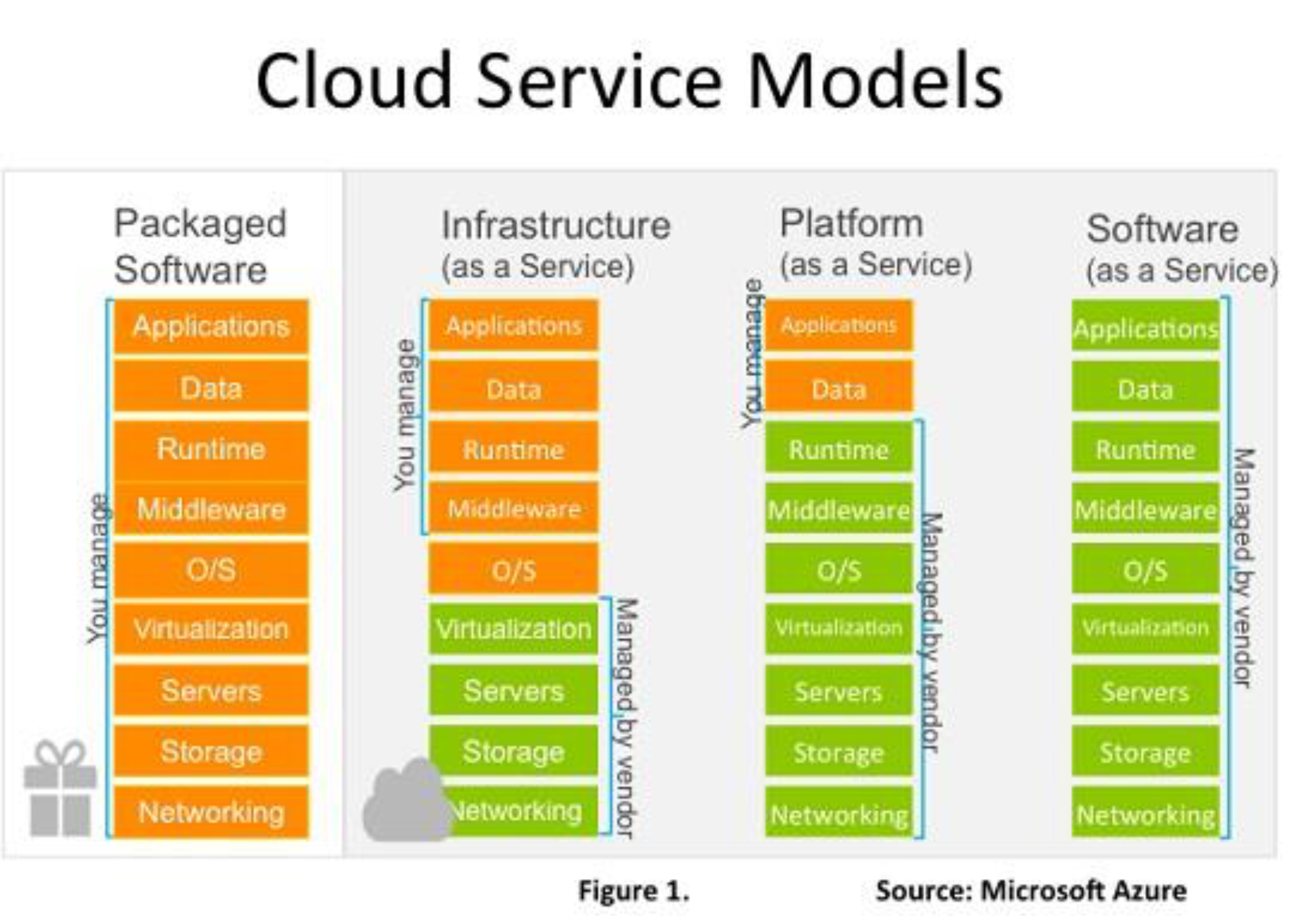
Packaged Software (Traditional On-Premises)
- You manage: Applications, Data, Runtime, Middleware, O/S, Virtualization, Servers, Storage, Networking
Infrastructure (as a Service)
- You manage: Applications, Data, Runtime, Middleware, O/S
- Managed by vendor: Virtualization, Servers, Storage, Networking
Platform (as a Service)
- You manage: Applications, Data
- Managed by vendor: Runtime, Middleware, O/S, Virtualization, Servers, Storage, Networking
Software (as a Service)
- Managed by vendor: Applications, Data, Runtime, Middleware, O/S, Virtualization, Servers, Storage, Networking
Analogy:
- IaaS = Renting a plot of land (you build everything)
- PaaS = Renting an apartment building frame (you add rooms and furniture)
- SaaS = Renting a fully furnished apartment (move in and use)
Cloud Layer Architecture
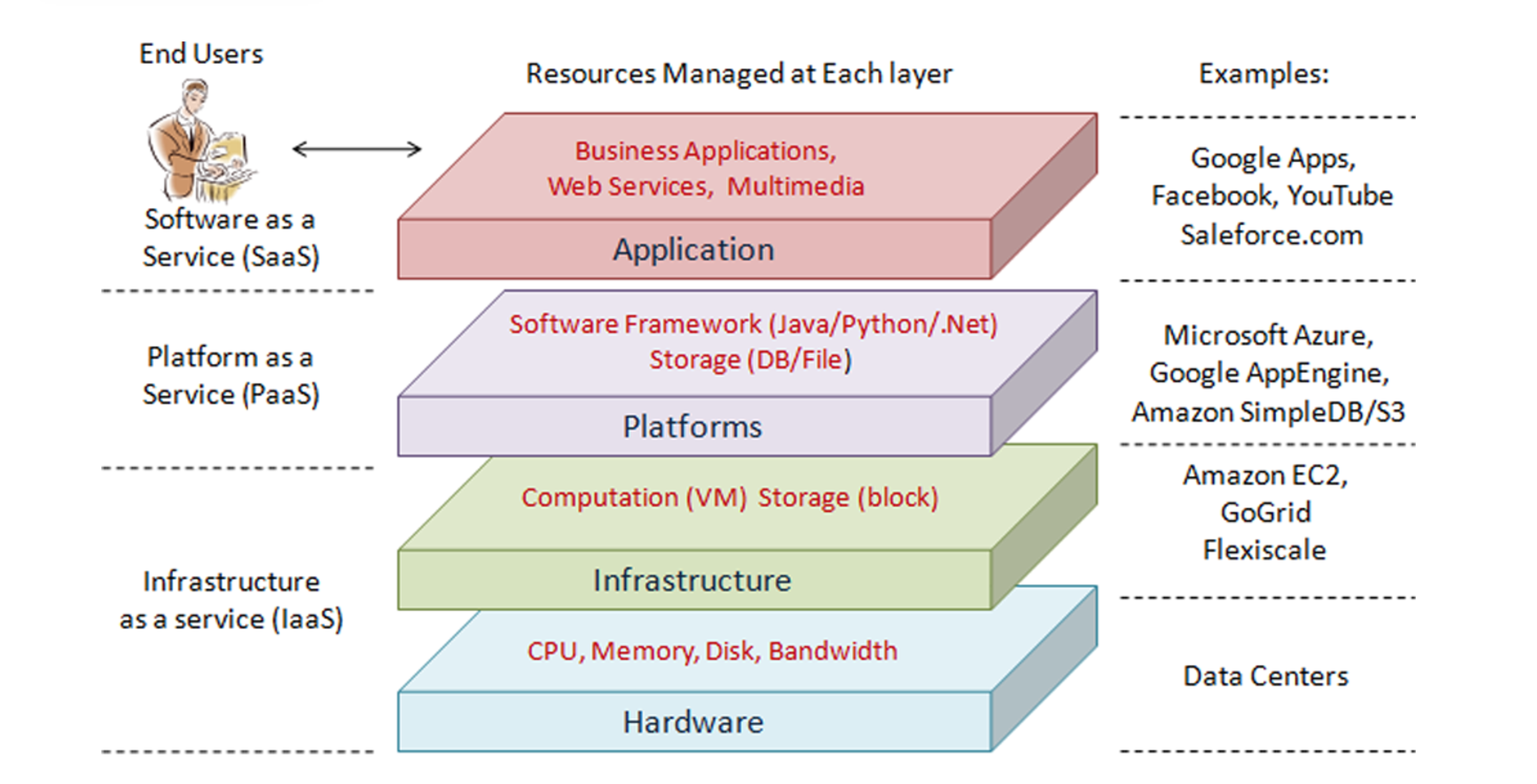
Split of Responsibilities: Provider-Side and Consumer-Side
Traditional On-Premises
Client manages:
- Applications
- Data
- Runtime
- Middleware
- O/S
- Virtualization
- Servers
- Storage
- Networking
Infrastructure as a Service
Client manages:
- Applications
- Data
- Runtime
- Middleware
- O/S
Vendor manages in the cloud:
- Virtualization
- Servers
- Storage
- Networking
Platform as a Service
Client manages:
- Applications
- Data
Vendor manages in the cloud:
- Runtime
- Middleware
- O/S
- Virtualization
- Servers
- Storage
- Networking
Software as a Service
Vendor manages in the cloud:
- Applications
- Data
- Runtime
- Middleware
- O/S
- Virtualization
- Servers
- Storage
- Networking
Cloud Deployment Models
Multiple clouds coexist:
- Private
- Public
- Community
- Hybrid
Public Cloud
- Elasticity
- Utility Pricing
- Leverage Expertise
Private Cloud
- Total Control
- Regulation
- Flexibility
Community Cloud
- Meets shared concerns
Hybrid Cloud
- Combination of public and private clouds
Cloud Deployment Models (Detailed)
Customers choose a variety of cloud models to meet their unique needs and priorities
Private Cloud
On or off premises cloud infrastructure operated solely for an organization and managed by the organization or a third party.
Community Clouds
Provisioned for exclusive use by specific consumers with shared concerns (e.g., security requirements, policy, and compliance considerations). It may be owned, managed, and operated by one or more of the organizations in the community.
Hybrid Cloud
Traditional IT and clouds (public and/or private) that remain separate but are bound together by technology that enables data and application portability.
Traditional IT
Appliances, pre-integrated systems and standard hardware, software, and networking.
Public Cloud
Available to the general public or a large industry group and owned by an organization selling cloud services.
Private Cloud
Characteristics
- Also known as an internal cloud or corporate cloud
- Provides computing services to a private internal network (within the organization) and selected users instead of the general public
- Provides a high level of security and privacy to data through firewalls and internal hosting
- Ensures that operational and sensitive data are not accessible to third-party providers
Examples
- HP Data Centers
- Microsoft
- Elastra-private cloud
- Ubuntu
Advantages
- More control
- Security & Privacy
- Improved Performance
Disadvantages
- High cost
- Restricted area of operation
- Requires skilled people
Public Cloud
Cloud ≠ On-Premise
Benefits
- No upfront capex
- Pay as you go
- No maintenance
- Highly scalable
- Highly reliable
Limitations
- Low visibility and control
- Compliance and legal risks
- Cost concerns
Use Cases
- Unlimited scalability
- Varying peak demands
- Fast growing businesses
- Backup & disaster recovery solutions
When to Use Public Cloud?
-
We never run out of resources in a public cloud. It provides near-unlimited scalability. So, if you want to dynamically scale up and down at will, then public cloud is your solution.
-
Businesses with varying peak demands greatly benefit from the public cloud. When there is high demand you scale up and when the demand subsides, you scale down and pay only for what you use.
-
Fast growing businesses also greatly benefit from the public cloud. They can use the public cloud and quickly scale up operations rather than having to build your own private cloud which not only has huge upfront capital expenditure but also time consuming.
-
Businesses can also benefit from the public cloud by using it for backup and disaster recovery solutions.
Business Benefits of Cloud Computing
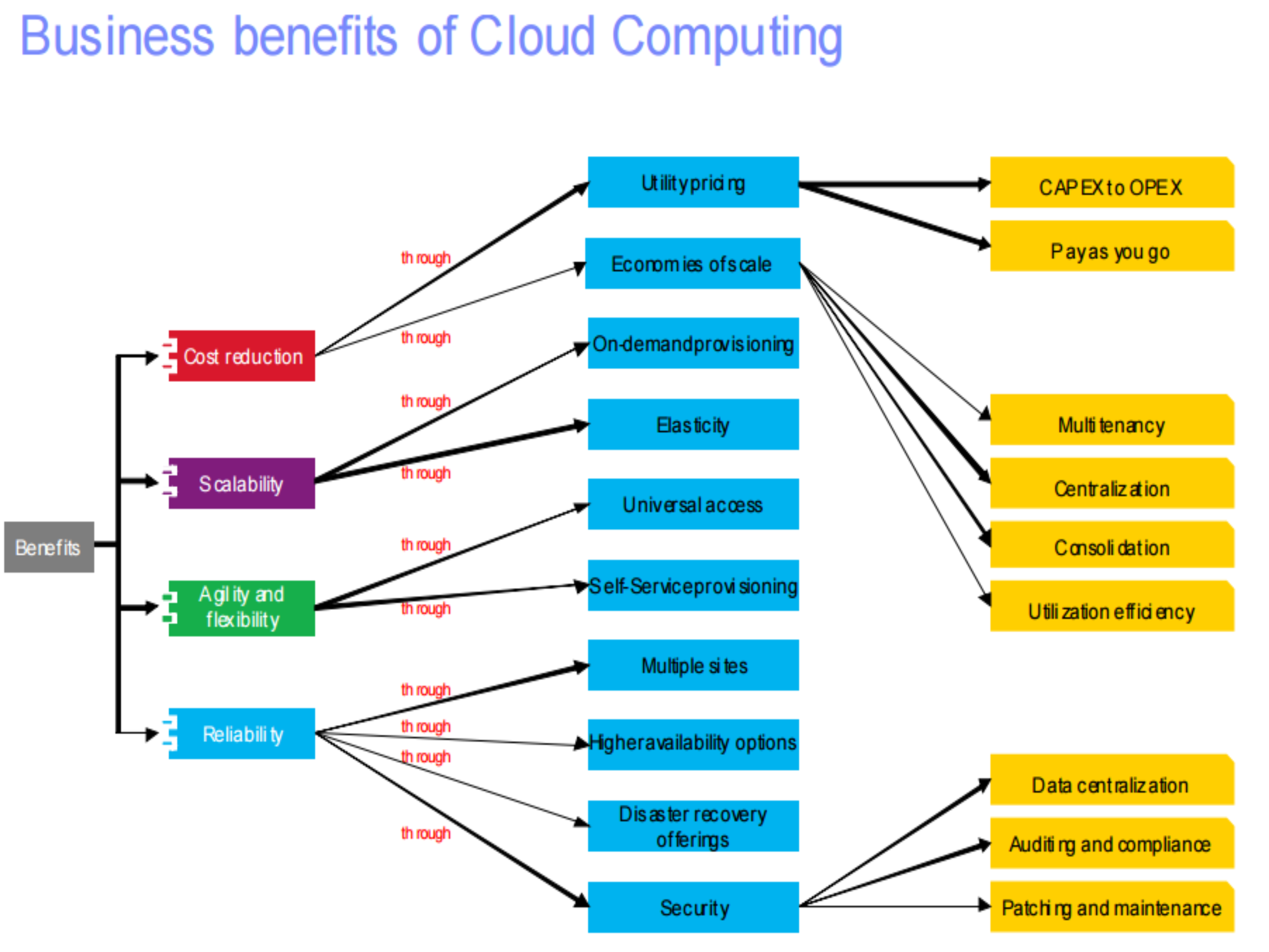
Through Cost Reduction
- Utility pricing → CAPEX to OPEX, Pay as you go
- Economies of scale → Multi-tenancy, Centralization, Consolidation, Utilization efficiency
Through On-demand provisioning
- Elasticity
- Universal access
- Self-Service provisioning
Through Agility and Flexibility
- Multiple sites
- Higher availability options
- Disaster recovery offerings
- Security
Final Benefits
- Data centralization
- Auditing and compliance
- Patching and maintenance
The Importance of Cloud Computing for Development and Test
Traditional Challenges → Cloud Solutions
High deployment costs to deliver software
→
- Reduced installation and administration costs
- Lower TCO by improved utilization of software assets
Control and governance chaos in software processes
→
- Better governance through standardized delivery of services
- Preconfigured software embodying best practices
Onramp and on-boarding of teams to support software delivery
→
- Tools can be provisioned in minutes. No download, installation or setup
- Self-administered portal to access to software resources for a globally distributed team
IT Benefits from Cloud Computing
Results from IBM Cloud Computing Engagements
Increasing Speed and Flexibility
| Metric | Before | After |
|---|---|---|
| Test provisioning | Weeks | Minutes |
| Change management | Months | Days/hours |
| Release management | Weeks | Minutes |
| Service access | Administered | Self-service |
| Standardization | Complex | Reuse/share |
| Metering/billing | Fixed cost | Variable cost |
Reducing Costs
| Metric | Before | After |
|---|---|---|
| Server/storage utilization | 10–20% | 70–90% |
| Payback period | Years | Months |
Current Thoughts on Cloud Computing Adoption Risks
- Shifting computing power to cloud brings many benefits
- Cost savings
- Scalability
- Increased agility in software deployment
But don't ignore the risks
Categories of Cloud Computing Risks
Less Control
Many companies and governments are uncomfortable with the idea of their information located on systems they do not control. Providers must offer a high degree of security transparency to help put customers at ease.
Compliance
Complying with SOX, HIPAA and other regulations may prohibit the use of clouds for some applications. Comprehensive auditing capabilities are essential.
Reliability
High availability will be a key concern. IT departments will worry about a loss of service should outages occur. Mission critical applications may not run in the cloud without strong availability guarantees.
Security Management
Providers must supply easy controls to manage firewall and security settings for applications and runtime environments in the cloud.
Technology Immaturity
- Lack of world-wide adopted Standards
- Use of closed proprietary technologies
- Lack of knowledge and trust
- API Jungle
- Legal uncertainties
Vendor Lock-in
- Interoperability constraints
- Low level of portability of application and services based on cloud
- Contract and exit strategies
- Limitations on sharing or transferring data
Data Security
Migrating workloads to a shared network and compute infrastructure increases the potential for unauthorized exposure. Authentication and access technologies become increasingly important.
Cloud Computing Security Risks
Security is among a top concern with cloud computing
People and Identity
Mitigate the risks associated with user access to corporate resources
Data and Information
Understand, deploy and properly test controls for access to and usage of sensitive data
Application and Process
Help keep applications secure, protected from malicious or fraudulent use, and hardened against failure
Network, Server and End Point
Optimize service availability by mitigating risks to network components
Physical Infrastructure
Provide actionable intelligence on the desired state of physical infrastructure security and make improvements
Managed services, Hardware and software
How Can Consumers Think About Their Cloud Journey?
Plan
- Understand strategic direction
- Analyze workloads (apps, data, etc.)
- Determine delivery model
- Define architecture
- Build the business case
Build
- Design and construct
- Quality assurance (test)
- Security and compliance
- Lifecycle management
Deliver
- Deploy
- Consume
- Manage
- Optimize
Create a Roadmap for Cloud as Part of the Existing IT Optimization Strategy
Consolidate
- Reduce infrastructure complexity
- Reduce staffing requirements
- Manage fewer things better
- Lower operational costs
Virtualize
- Remove physical resource boundaries
- Increase hardware utilization
- Reduce hardware costs
- Simplify deployments
Standardize and Automate
- Standardize services
- Reduce deployment cycles
- Enable scalability
- Flexible delivery
Movement from Traditional Environments to Cloud Can be in One Step or an Evolution
Clients will make workload-driven trade-offs among functions such as security, degree of customization, control and economics
Standard Managed Services → Cloud Delivered Services
-
CONSOLIDATE physical infrastructure per defined transformation objectives
-
VIRTUALIZE servers/applications for increased utilization and automation
-
STANDARDIZE operations via reference architecture & standard implementation & management
-
AUTOMATE dynamic delivery of capacity with policy-based workload automation & SELF SERVICE
-
Leverage SHARED infrastructure based on defined workload profiles
-
CLOUD based provisioning for standardized workloads
A New Model For Building Cloud Computing Environments
Ensembles are scalable pools of computing power and storage that are manageable as single systems
They will replace multitudes of individual IT systems and reduce the labor required for physical systems management.
Stack Oriented
- Servers
- Networks
- Disk
- Tape
↓
Cloud Computing Environment
- Ensemble (multiple instances)
Cloud Activities
Service Management and Provisioning including:
- Virtualization
- Service provisioning
- Call center
- Operations management
- Systems management
- QoS management
- Billing and accounting, asset management
- SLA management
- Technical support and backups
Security Management including:
- ID and authentication
- Certification and accreditation (อาจารย์แอบมีโพยตรงนี้)
- Intrusion prevention
- Intrusion detection
- Virus protection
- Cryptography
- Physical security, incident response
- Access control, audit and trails, and firewalls
Cloud is considered as Honest but Curious
Customer Services such as:
- Customer assistance and on-line help
- Subscriptions
- Business intelligence
- Reporting
- Customer preferences
- Personalization
- They know your preferences!
Integration Services including:
- Data management
- Development
Ethical Issues
Paradigm shift with implications on computing ethics:
- The control is relinquished to third party services
- Data is stored on multiple sites administered by several organizations
- Multiple services interoperate across the network
Implications:
- Unauthorized access
- Data corruption
- Infrastructure failure, and service unavailability
De-perimeterisation
-
Systems can span the boundaries of multiple organizations and cross the security borders
-
The complex structure of Cloud services can make it difficult to determine who is responsible in case something undesirable happens
-
Identity fraud and theft are made possible by
- Unauthorized access to personal data in circulation
- New forms of dissemination through social networks
- Could pose a danger to Cloud Computing
Privacy Issues
Key Concerns
- Cloud service providers have already collected petabytes of sensitive personal information stored in data centers around the world.
- The acceptance of Cloud Computing therefore will be determined by privacy issues addressed by these companies and the countries where the data centers are located.
Cultural Factors
- Privacy is affected by cultural differences
- Some cultures favour privacy, others emphasize community.
- This leads to an ambivalent attitude towards privacy in the Internet (a global system).
Cloud Vulnerabilities
- Clouds are affected by malicious attacks and failures of the infrastructure, e.g., power failures
- Such events can affect the Internet domain name servers and prevent access to a Cloud or can directly affect the Clouds:
- In 2004 an attack at Akamai caused a domain name outage and a major blackout that affected Google, Yahoo, and other sites
- In 2009, Google was the target of a denial of service attack which took down Google News and Gmail for several days
- In 2012 lightning caused a prolonged down time at Amazon
- In 2021, Verizon, Microsoft and Google were just some cloud providers to see their services interrupted so far this year from a variety of issues, from a change in the authentication system to a deadly winter storm
- In the cloud computing era, some experts say we can only expect more outages — but with less severity
Back to Basics: Parallel Computing
Definition
"Parallel computing is a form of computation in which many calculations are carried out simultaneously, operating on the principles that large problems can often be divided into smaller ones, which are then solved concurrently (in parallel)." — Wikipedia
Hardware and Software Systems Allow Us To:
- Solve problems demanding resources not available on a single system
- Reduce the time required to obtain a solution
Parallel Computing – Amdahl's Law
The speedup measures the effectiveness of parallelization:
Where:
- → the execution time of the sequential computation
- → the execution time when parallel computations are executed
Amdahl's Law
- If is the fraction of running time a sequential program spends on non-parallelizable segments of the computation then:
This is a theoretical upper bound on the best speedup we can get from parallelizing a certain program.
ถ้า เยอะ เช่น จะไม่สามารถทำ parallelization ได้ ???
คือ fraction of running time of non-parallized task
Analogy:
If 10% of your program must run sequentially (), the maximum speedup is 10×, no matter how many processors you add. It's like having 10 cooks in a kitchen — if the recipe requires 10 minutes of sequential steps, you can't finish faster than 10 minutes.
Example 1: 10% Sequential Code
- Assume
- Interpretation: Even with an unlimited number of processors, the program can be at most 10x faster.
Example 2: 20% Sequential Code
- Assume
- Interpretation: Even with an unlimited number of processors, the program can be at most 5x faster.
Example 3: 1% Sequential Code
- Assume
- Interpretation: Even with an unlimited number of processors, the program can be at most 100x faster.
When we code, try to make the code not run sequentially. In order to make run parallell.
Amdahl's Law (Graph)
Graph showing speedup vs number of processors for different parallel portions
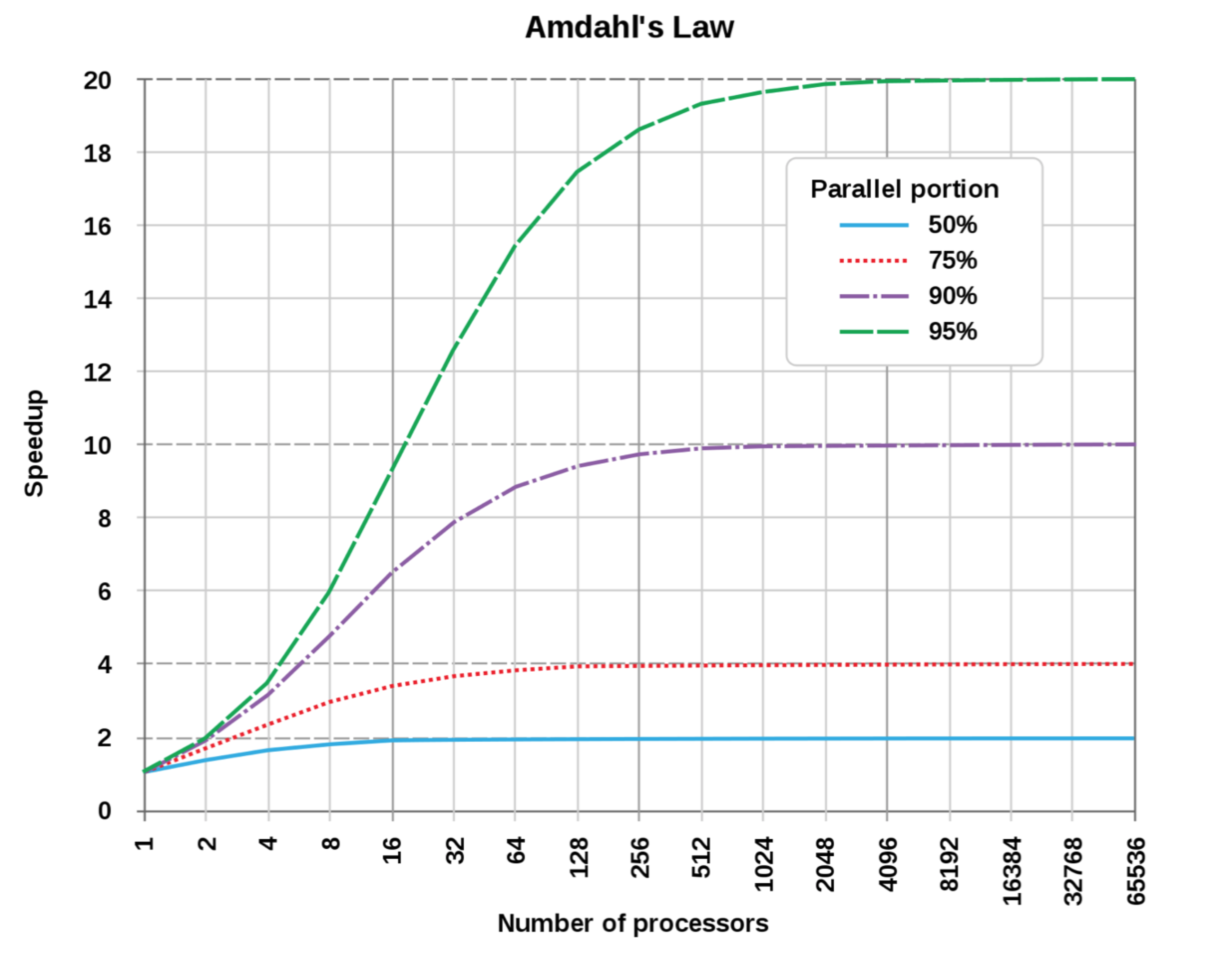
Parallel portion:
- 50%
- 75%
- 90%
- 95%
As the number of processors increases, the speedup eventually plateaus based on the sequential portion of the code.
Back to Basics: Distributed Systems
Definition
Collection of autonomous computers, connected through a network and distribution software (often called middleware) which enables computers to coordinate their activities and to share system resources for a common goal.
Characteristics:
- The users perceive the system as a single, integrated computing facility
- The components are autonomous
- Scheduling and other resource management and security policies are implemented by each system
- There are multiple points of control and multiple points of failure
- ก็จะดีกว่าใช้ Server ตัวเดียวที่อาจจะ suffer from single point of failure ไง ?? (CHECK)
- The resources may not be accessible at all times
- Can be scaled by adding additional resources
- Can be designed to maintain availability even at low levels of hardware/software/network reliability
Analogy:
A distributed system is like a team of specialists working remotely. Each has their own tools and expertise, but they coordinate through communication channels to achieve a common goal.
NOTE
Centralized System
- Pro: Easy to manage/control
- Con: Single point of failure, bottleneck (latency)
Distributed System
- Pro: Higher processing capability (higher parallel computation), alternative processing unit (backup)
- Con: More cost on handling multiple computing units/multiple points of failure
Decentralized System
- Decentralized is a subset of distributed system.
Cloud Computing vs Distributed Computing
| Cloud Computing | Distributed Computing | |
|---|---|---|
| Definition | Cloud computing defines a new way of computing based on the network technology. Cloud computing takes place over the common network like internet. It usually comprises of a collection of integrated and networked hardware, software and internet infrastructure resources. | Distributed computing contains multiple software components from multiple different computers which work together as a single system. Cloud computing can be referred as a virtualization achieved from distributed computing. |
| Goals | • Reduced Initial Investment and Proportional Costs • Increased Scalability • Increased Availability • Increased Reliability | • Resource Sharing • Openness • Transparency • Scalability |
| Types | • Public Clouds • Private Clouds • Community Clouds • Hybrid Clouds | • Distributed Computing Systems • Distributed Information Systems • Distributed Pervasive Systems |
| Characteristics | • It provides a shared pool of configurable computing resources. • An on-demand network model is used to provide access • The clouds are provisioned by the Service Providers. • It provides broad network access. | • A task is distributed amongst different machines for the computation job at the same time. • Technologies such as Remote Procedure calls and Remote Method Invocation are used to construct distributed computations. |
| Disadvantages | • More elasticity means less control especially in the case of public clouds. • Restrictions on available services may be faced, as it depends upon the cloud provider. | • Higher level of failure of nodes than a dedicated parallel machine. • Few of the algorithms are not able to match with slow networks. • Nature of the computing job may present too much overhead. |
Quote
Cloud is an opportunity—will you be able to take advantage? LOVE