Software Development Life Cycle (SDLC)
Definition
- Software development process divides software development work into distinct phases to improve:
- Design
- Product management
- Project management
- Also known as Software Development Life Cycle (SDLC)
Analogy: Think of SDLC like building a house - you need clear phases (foundation, framing, electrical, plumbing, finishing) rather than doing everything randomly.
SDLC Components
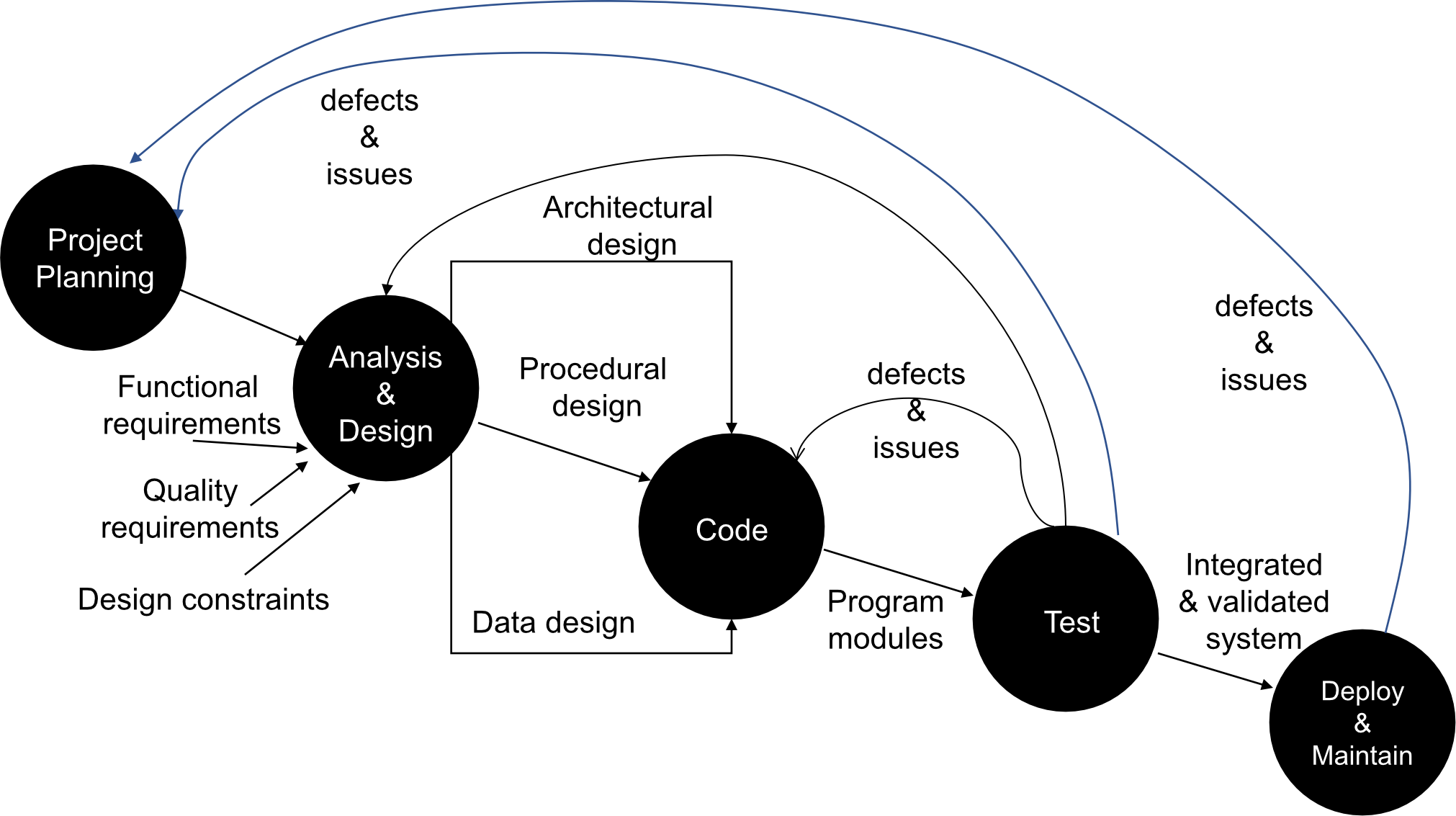
Inputs:
- Functional requirements - what the system should do
- Quality requirements - how well it should do it
- Design constraints - limitations and boundaries
Phases:
- Project Planning
- Analysis & Design
- Data design
- Architectural design
- Procedural design
- Code - Program modules
- Test - Integrated & validated system
- Deploy & Maintain
- Handle defects & issues throughout
Software Development Process Models
Help project to manage in an effective way, there are these models.
Five Main Models:
- Waterfall Model
- Evolution Model
- Incremental Model
- Spiral Model
- Agile Mode
1. Waterfall Model
Phases (Sequential):
- System Planning
- System Analysis
- System Design
- System Implementation
- System Testing
- System Maintenance
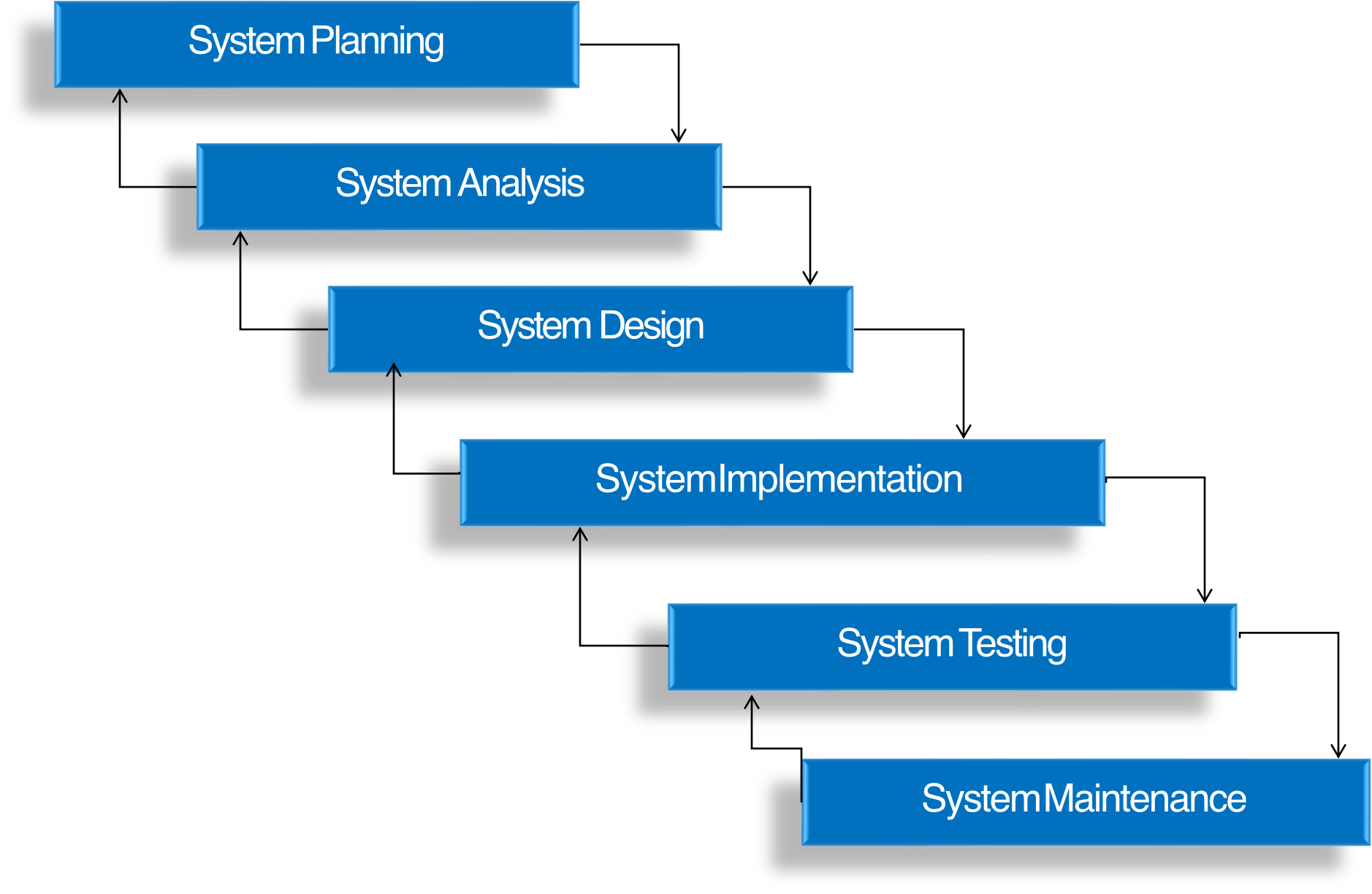
Each steps need to completely finished, before proceed to the next step!
Suitable for project that you know what to do (clear scope)
Characteristics:
- Easy to understand and track status
- Previous steps need to be completed before next step can begin
- Best appropriate for clear and stable requirements
Analogy: Like a waterfall flowing down - water can't flow back up. Each phase "cascades" into the next, and you can't easily go backwards.
2. Evolution Model
แต่ในชีวิตจริง มันก็ไม่ได้ Clear scope ขนาดนั้นหรอก ก็เลยมี Evolution Model มารองรับสำหรับ Unstable Requirement
Deliver in various version. (Because customer always want to change something in the project)
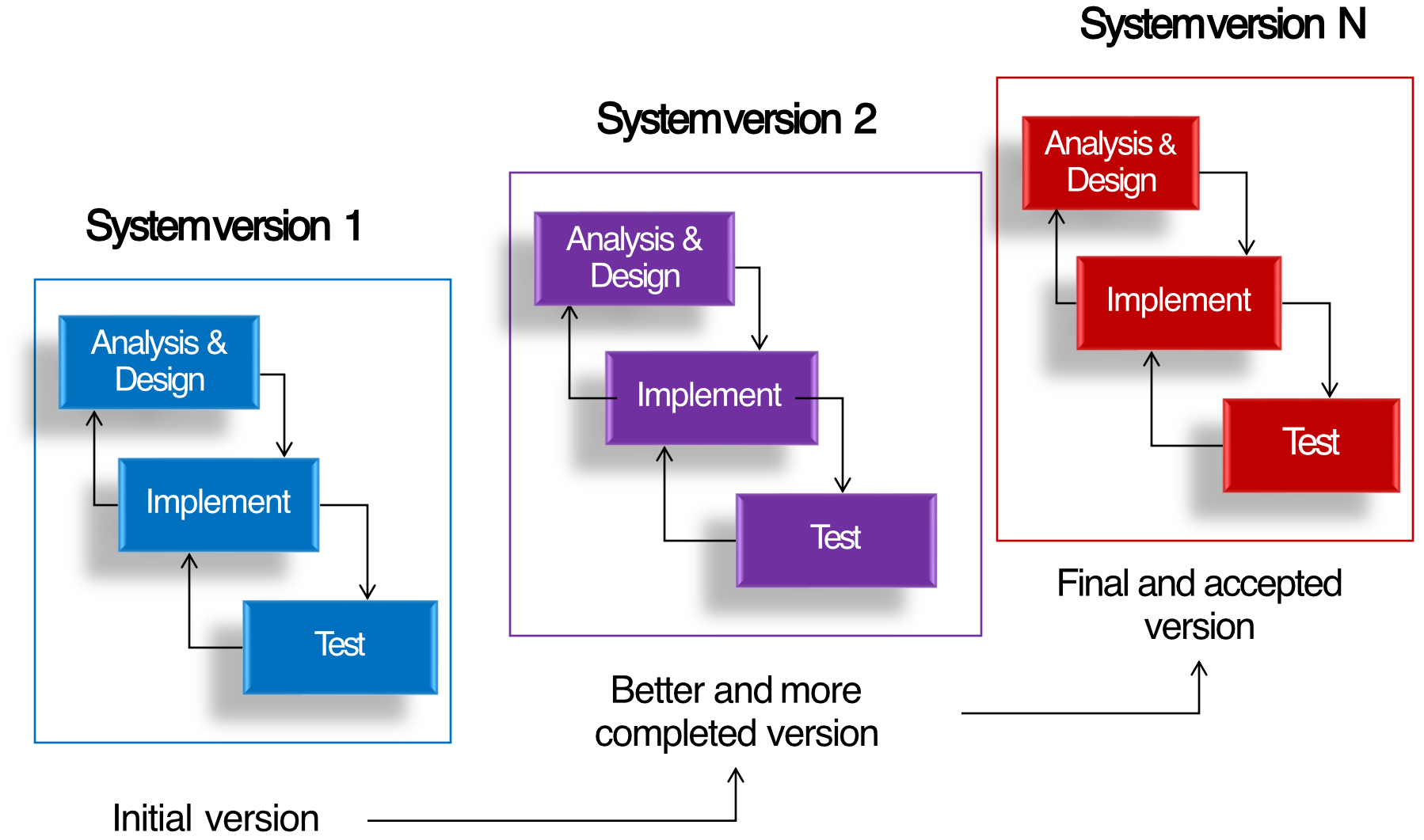
But we need to manage well, otherwise it’ll go on endlessly.
Process:
- Creates multiple system versions iteratively
- Each version improves upon the previous one
Versions:
- System version 1 (Initial version)
- Analysis & Design → Implement → Test
- System version 2 (Better and more completed version)
- Analysis & Design → Implement → Test
- System version N (Final and accepted version)
- Analysis & Design → Implement → Test
Analogy: Like drafting an essay - your first draft is rough, second draft is better, and you keep revising until you have a polished final version.
3. Incremental Model
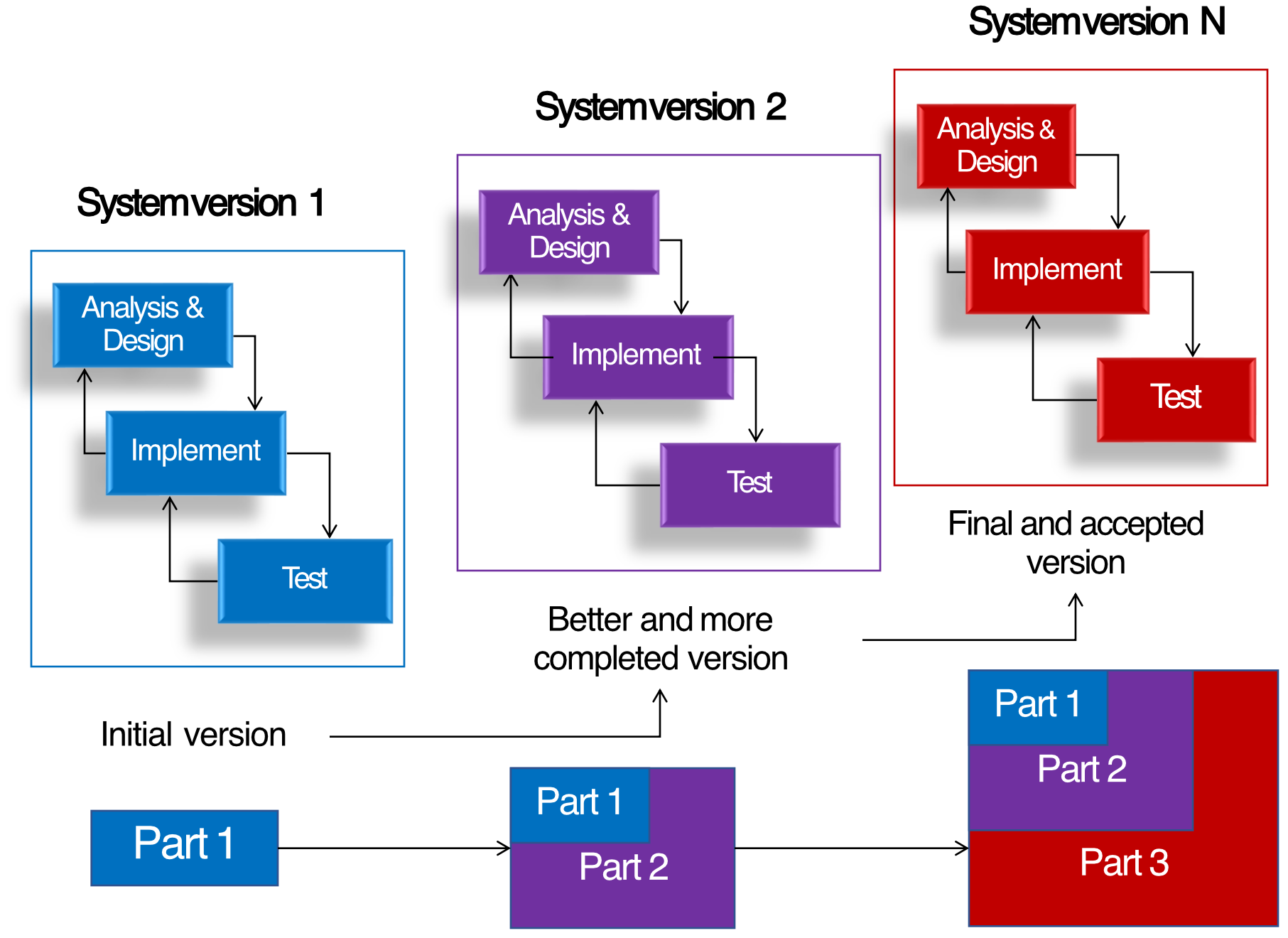
Process:
- Similar to Evolution Model but adds functionality incrementally
- Each version adds new parts/features to existing ones
Build Process:
- System version 1: Part 1
- System version 2: Part 1 + Part 2
- System version N: Part 1 + Part 2 + Part 3 (Final and accepted version)
Analogy: Like building with LEGO blocks - you start with a base (Part 1), then add the second floor (Part 2), then the roof (Part 3), building up piece by piece.
4. Spiral Model
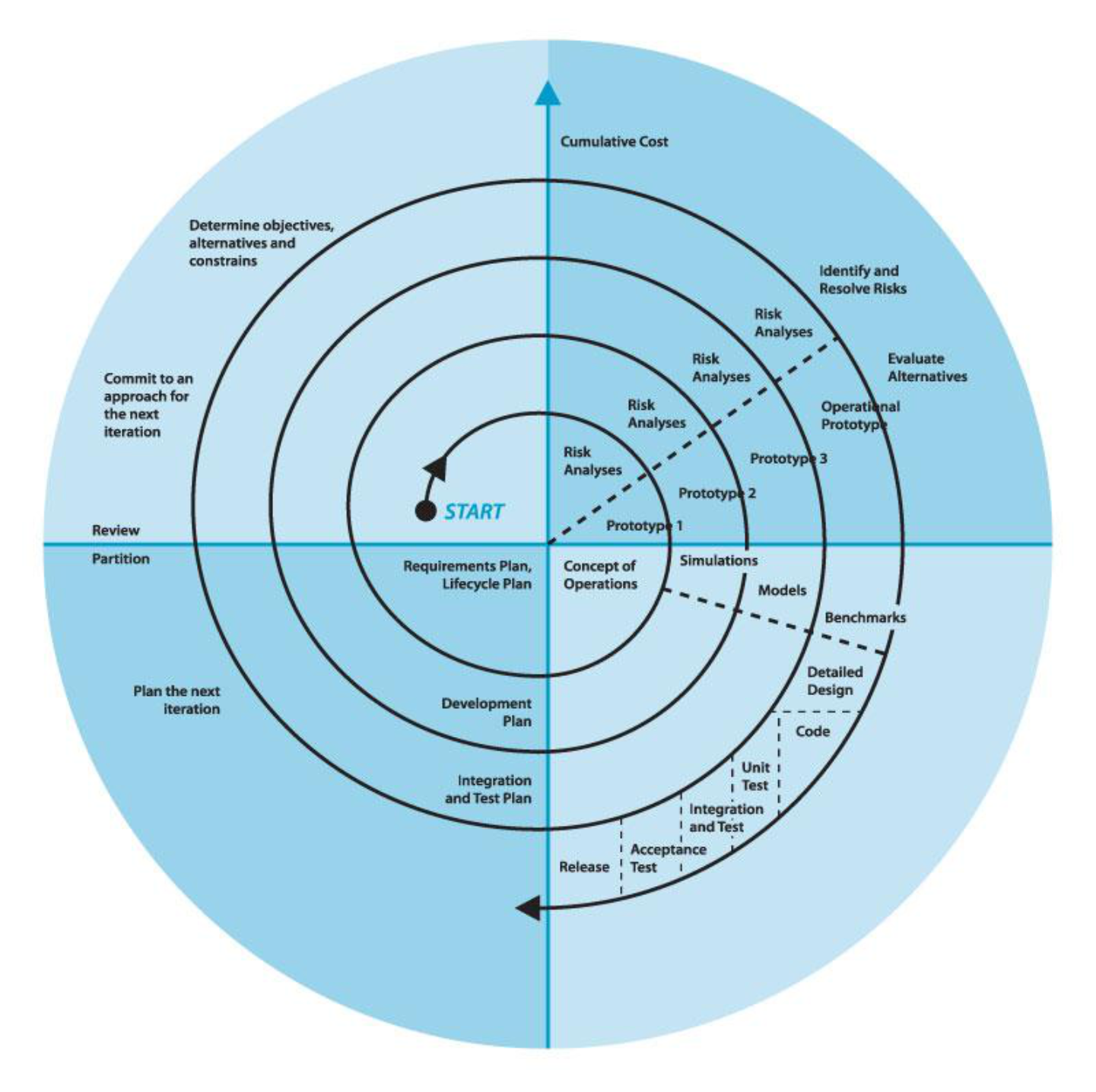
Key Features:
- Combines elements of design and prototyping
- Risk-driven approach with emphasis on risk analysis
- Iterative process that spirals outward
Phases (Repeated in spirals):
- Determine objectives, alternatives and constraints
- Risk Analysis (with prototypes for evaluation)
- Development and Test (Implementation)
- Plan the next iteration
Activities by Quadrant:
- Upper Left: Planning phase
- Upper Right: Risk analysis and evaluation
- Lower Right: Development phase
- Lower Left: Review and next iteration planning
Elements:
- Requirements Plan & Lifecycle Plan
- Concept of Operations
- Simulations, Models, Benchmarks
- Detailed Design → Code → Unit Test
- Integration and Test
- Acceptance Test
- Release
Analogy: Like climbing a spiral staircase around a building - you keep going around in circles but getting higher each time, constantly evaluating risks before taking the next step up.
5. Agile Model (Agile Methods)
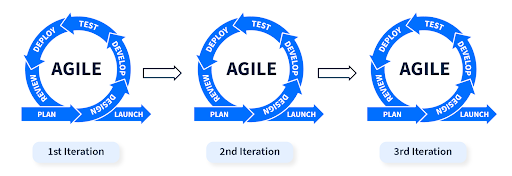
Document ใน Agile ไม่ได้ Formal ขนาดนั้น (ไม่เท่า 1. Waterfall Model)
Definition:
- Group of software development methods based on iterative development (evolution + incremental)
- Speed up or bypass one or more life cycle phases
- Usually less formal and reduced scope
When to Use:
- Time-critical applications
- Organizations that employ disciplined methods
Agile Manifesto (Agile Alliance 2001)
Four Core Values:
- Prefer face-to-face communication (real time) rather than written documents
- Invest time in producing working software rather than comprehensive documents
- Focus on customer collaboration rather than contract negotiation
- Concentrate on responding to change rather than creating a plan
Analogy: Agile is like jazz improvisation vs. classical orchestra. Instead of following a rigid musical score (plan), musicians adapt and respond to each other in real-time, creating something flexible and dynamic.
Popular Agile Methods
Agile Cycle: Define → Build → Release → Repeat
Extreme Programming (XP)
Overview
- For small-to-medium-sized teams developing software with:
- Vague requirements
- Rapidly changing requirements
- Coding is the key activity throughout the project
- Communication through code among teammates
- Test-driven development - define life cycle and behavior in test cases
XP Rules and Practices
Planning Phase
User Stories
- User stories drive the development process
- Written by customer in customer terminology
- Short descriptions of desired functionality
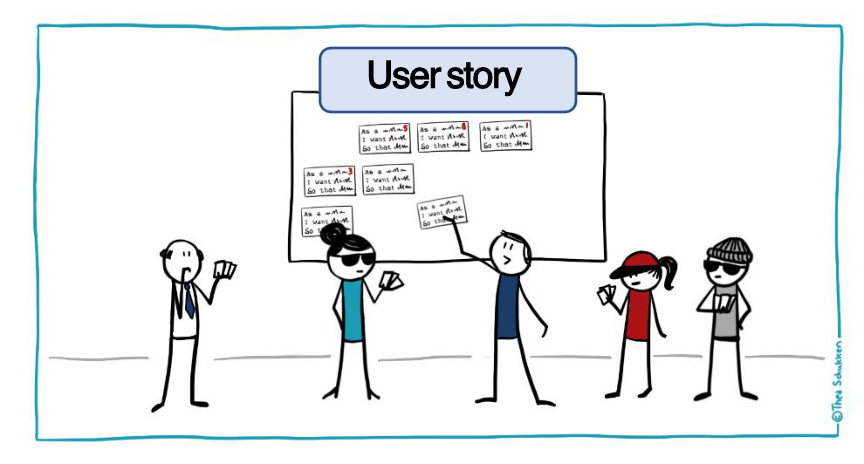
center
Key Practices:
- User stories (user collaboration)
- Release planning (small releases)
- Project Velocity and Iteration planning
- Move people around
- Developer should be cross-function: ทำอะไรก็ได้!
- Stand-up meeting
- To make it fast, they don’t want to stand for long!
Analogy: User stories are like ordering at a restaurant - you tell the waiter what you want in simple terms ("I want a cheeseburger with no pickles"), not the technical recipe.
Designing Phase
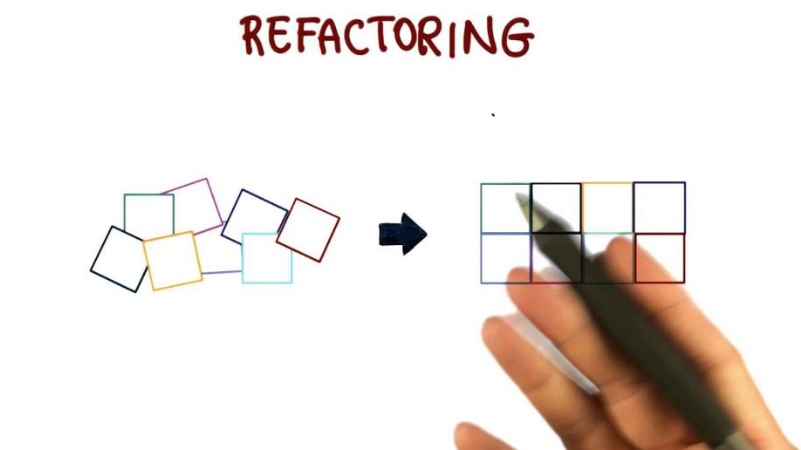
Key Principles:
- Simplicity - keep the design as simple as possible
- Spike solutions to reduce risk (Proof of Concept: POC)
- Refactoring - continuously improve code structure
Analogy: Refactoring is like reorganizing your closet - the clothes (functionality) stay the same, but you arrange them better for easier access.
Coding Phase
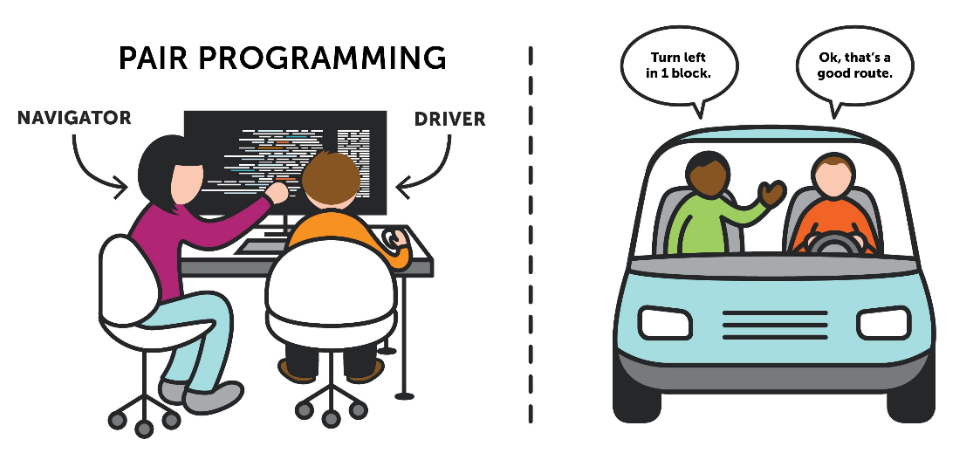
Practices:
- Code standards (coding style consistency)
- Pair programming - two programmers at one machine
- Navigator - reviews and guides
- Driver - writes the code
- Integrate often - continuous integration
- Collective code ownership - anyone can change any code
- Optimization till last - don't optimize prematurely
- No overtime - sustainable pace (40-hour week)
Analogy: Pair programming is like driving with a co-pilot in a rally race - one person focuses on steering (writing code) while the other navigates and spots potential issues.
Testing Phase

Requirements:
- All code must have and pass critical tests before release
- Acceptance tests are run often
- Acceptance tests = asked user to perform the test
XP Life Cycle
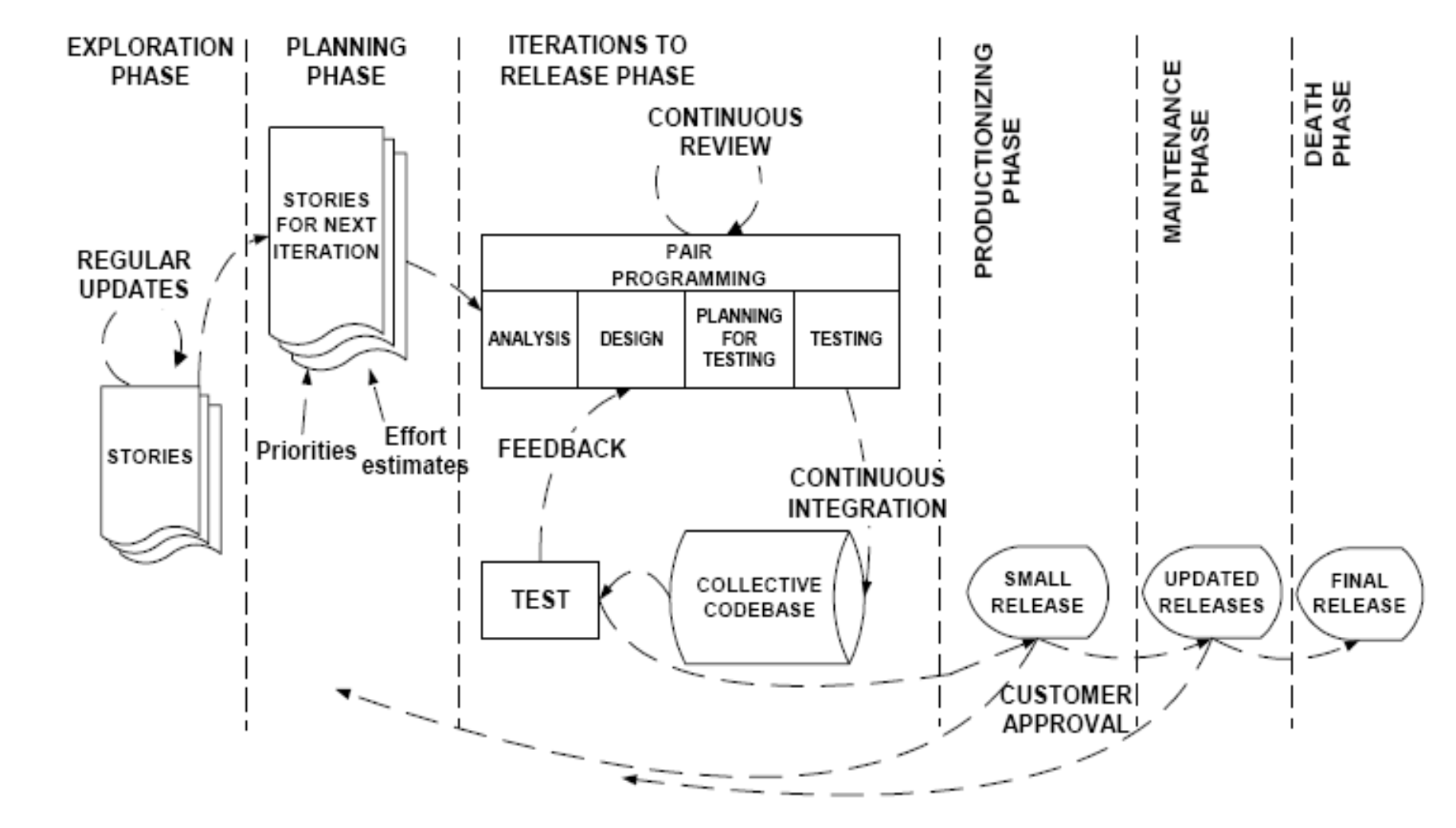
Phases:
1. Exploration Phase
- Regular updates
- Stories collected
2. Planning Phase
- Stories prioritized for next iteration (some functions are very important)
- ถ้า Bug ก็ต้องรีบเอามาเป็น Priority แรก ๆ หน่อย
- Effort estimates created
- How many days
- Scrum Poker ไงงงงงง
3. Iterations to Release Phase
- Continuous review of progress
- Pair Programming with:
- Analysis
- Design
- Planning for Testing
- Testing
- Feedback loops
- Continuous integration
- Collective codebase with testing
4. Productionizing Phase
- Small releases with customer approval
5. Maintenance Phase
- Updated releases
6. Death Phase
- Final release
User Stories - The 3C's
- Need to do this in our project as well.
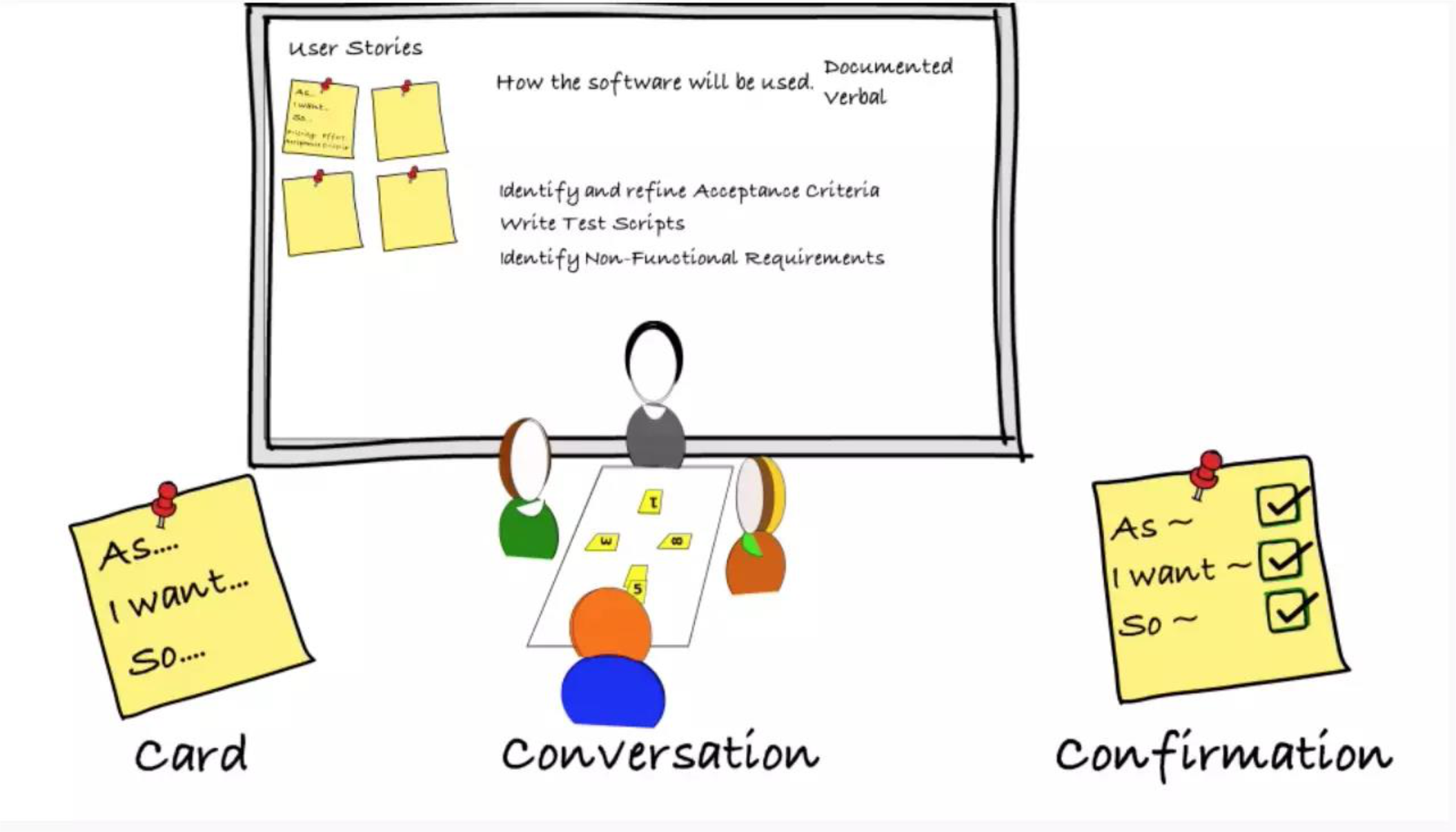
Card
- Physical card with basic story written on it
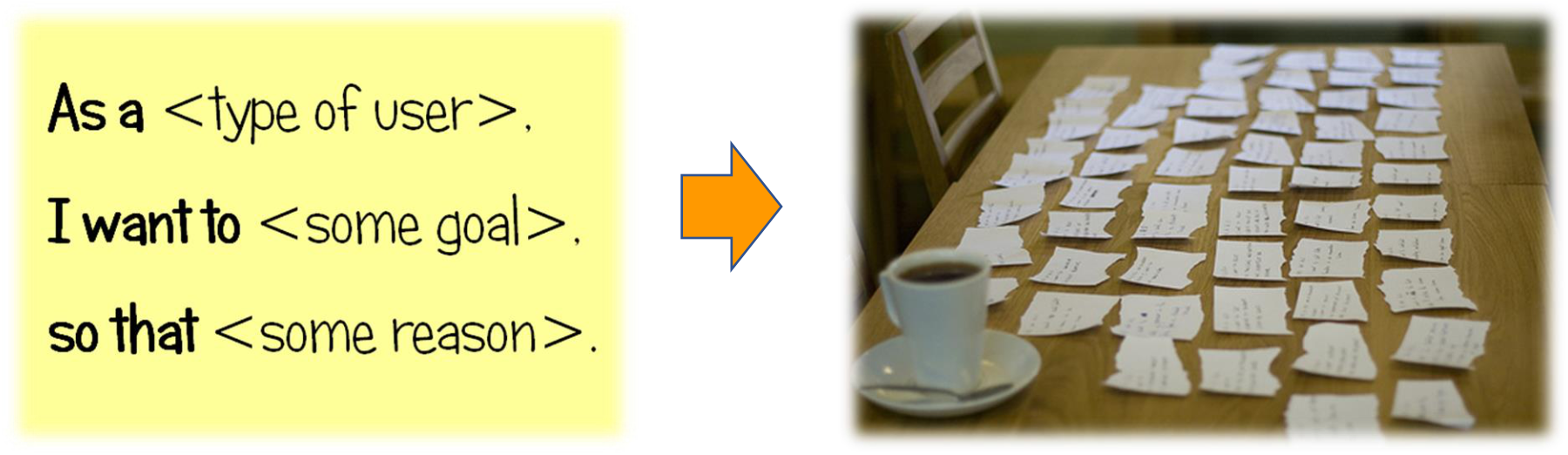
- Format:
As a <type of user>,
I want to <some goal>,
so that <some reason>.
Conversation
- Team discusses the story details
- Clarifies requirements
- Identifies non-functional requirements
Confirmation
- Acceptance criteria defined
- Test scripts written
- Confirms story is complete
Example User Stories:
Story ID: US001
As an employee,
I want to check my available leave days online
So that I can make a new leave request within my available quota.

Critical level: 2 (rank 1-5, 5 is most critical)
User name: Mr.A
Story ID: US002
As a supervisor,
I want to see the leave summary of the employees
So that I can approve or reject online.

Critical level: 3 (rank 1-5, 5 is most critical)
User name: Mr.B
Purpose of User Stories
Three Main Uses:
- Create time estimates for release planning meeting
- Replace large requirements document - lightweight alternative
- Drive creation of acceptance tests - define "done"
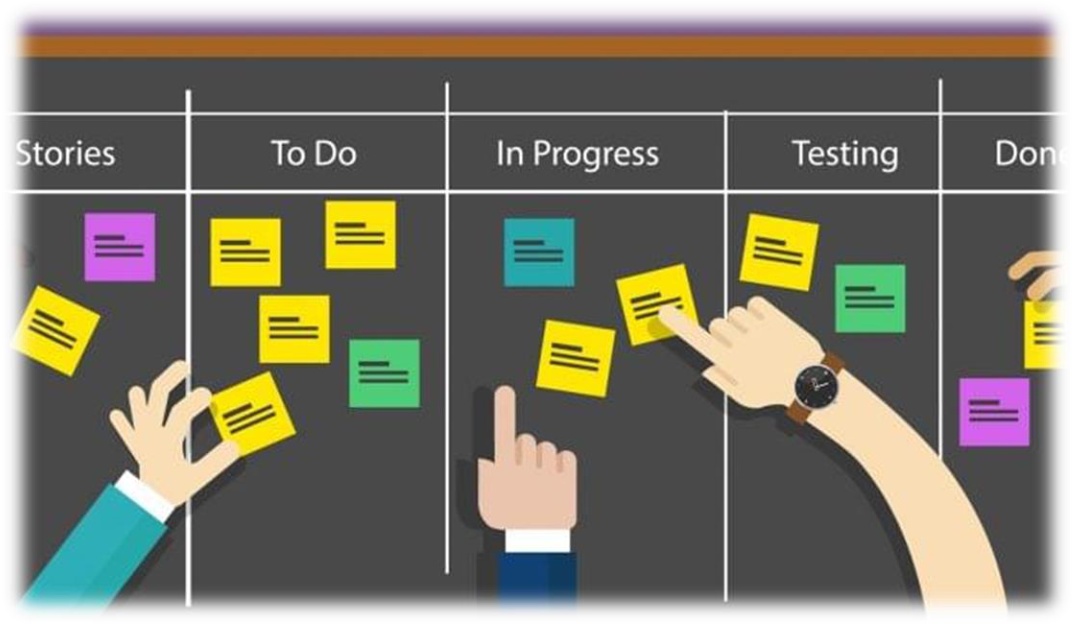
Analogy: User stories are like sticky notes on a kanban board - quick, moveable, and focused on delivering value rather than detailed documentation.
User Stories & The Planning Game
Goal:
- Create a release plan
Players:
- Customers and Developers
Process (The Rules):
- Developers estimate how long stories might take to implement
- Business decides which stories are implemented for each release and the release dates
Release Planning:
Release version 1 → Release version 2 → ... → Final Release (All stories completed)

Development Flow:
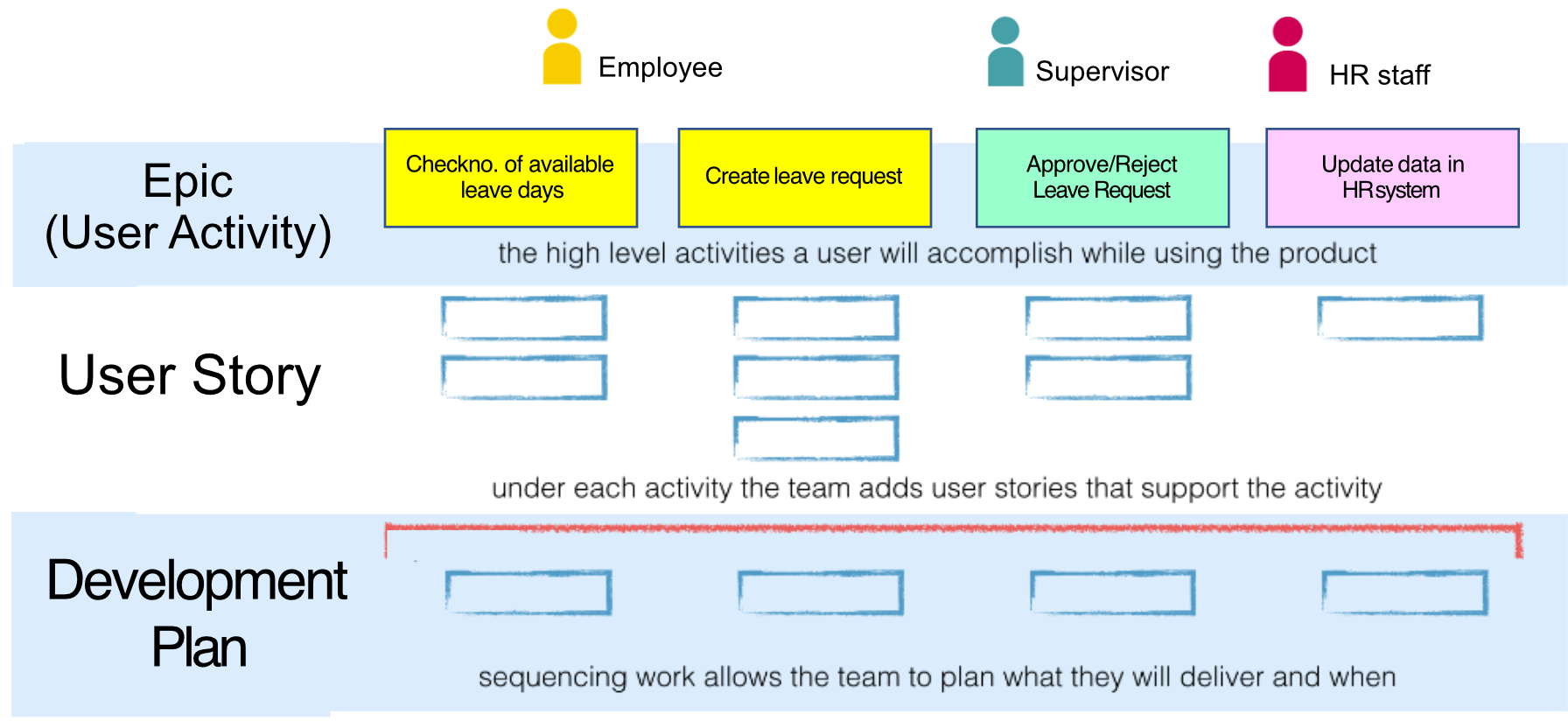
Epic (User Activity) → High level activities user will accomplish
↓
User Story → Support each activity with specific stories
↓
Development Plan → Sequence work to plan delivery timeline
Example Epic Breakdown:
- Epic: Leave Management System
- User Story 1: Check no. of available leave days (Employee)
- User Story 2: Create leave request (Employee)
- User Story 3: Approve/Reject Leave Request (Supervisor)
- User Story 4: Update data in HR system (HR staff)
Story Estimation:
- Each story gets a 1, 2 or 3 week estimate in "ideal development time"
User Stories vs. Requirements Specifications
Key Differences:
Level of Detail:
- User stories are short and to the point
- Provide enough detail to make reasonably low-risk estimates
- NOT detailed technical specifications
Focus:
- User needs and benefits (not GUI layouts)
- What users want to accomplish
- Avoid details of:
- Specific technology
- Database layout
- Algorithms
Analogy: A requirements document is like a detailed blueprint with measurements; a user story is like a quick sketch showing what room you want and why.
XP Practices Summary
- Planning game - Combine business priorities and technical estimates for next release scope
- Small releases - Simple system in production, then very short release cycles
- Metaphor - Simple shared story guides all development
- Simple design - System as simple as possible; remove extra complexity immediately
- Testing - Programmers write unit tests continuously; customers write feature tests
- Refactoring - Restructure system continuously without changing behavior to remove duplication and simplify
- Pair-programming - All production code written by two programmers at one machine
- Collective ownership - Anyone can change any code anywhere, anytime
- Continuous integration - Integrate and build many times daily (every task completion)
- 40-hour week - Work no more than 40 hours per week as a rule
- On-site customer - User on team, available full-time to answer questions
- Coding standards - Code emphasizes communication, written per agreed rules
Why XP is "Extreme"
Taking Commonsense Practices to Extreme Levels:
- Code reviews → Review code ALL the time (pair programming)
- Testing → Everybody tests ALL the time
- Simplicity → Keep system in SIMPLEST design supporting current functionality
- Design → Everybody designs DAILY (refactoring)
- Architecture → Everybody works defining/refining architecture (metaphor)
- Integration testing → Build and integrate test SEVERAL TIMES a day
- Short iterations → Make iterations REALLY short (hours rather than weeks)
Analogy: If brushing your teeth once a day is good, XP says brush after every meal. Taking good practices and doing them constantly, not occasionally.
Scrum
Origin
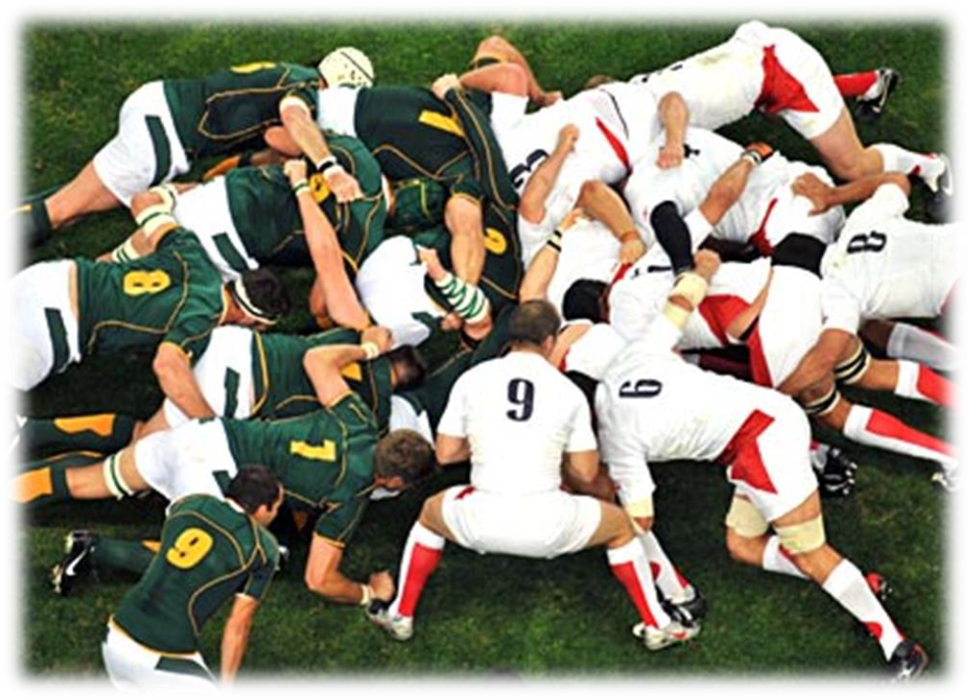
- Term "Scrum" derived from Rugby
- Represents: Getting out-of-play ball back into the game with teamwork
Scrum Definition
An agile, lightweight process for managing and controlling software/product development in rapidly changing environments
Key Features:
- Iterative, incremental process
- Team-based approach
- Develops systems/products with rapidly changing requirements
- Controls chaos of conflicting interests and needs
- Improves communication and maximizes cooperation
- Protects team from disruptions and impediments
- Maximizes productivity
Scrum Roles
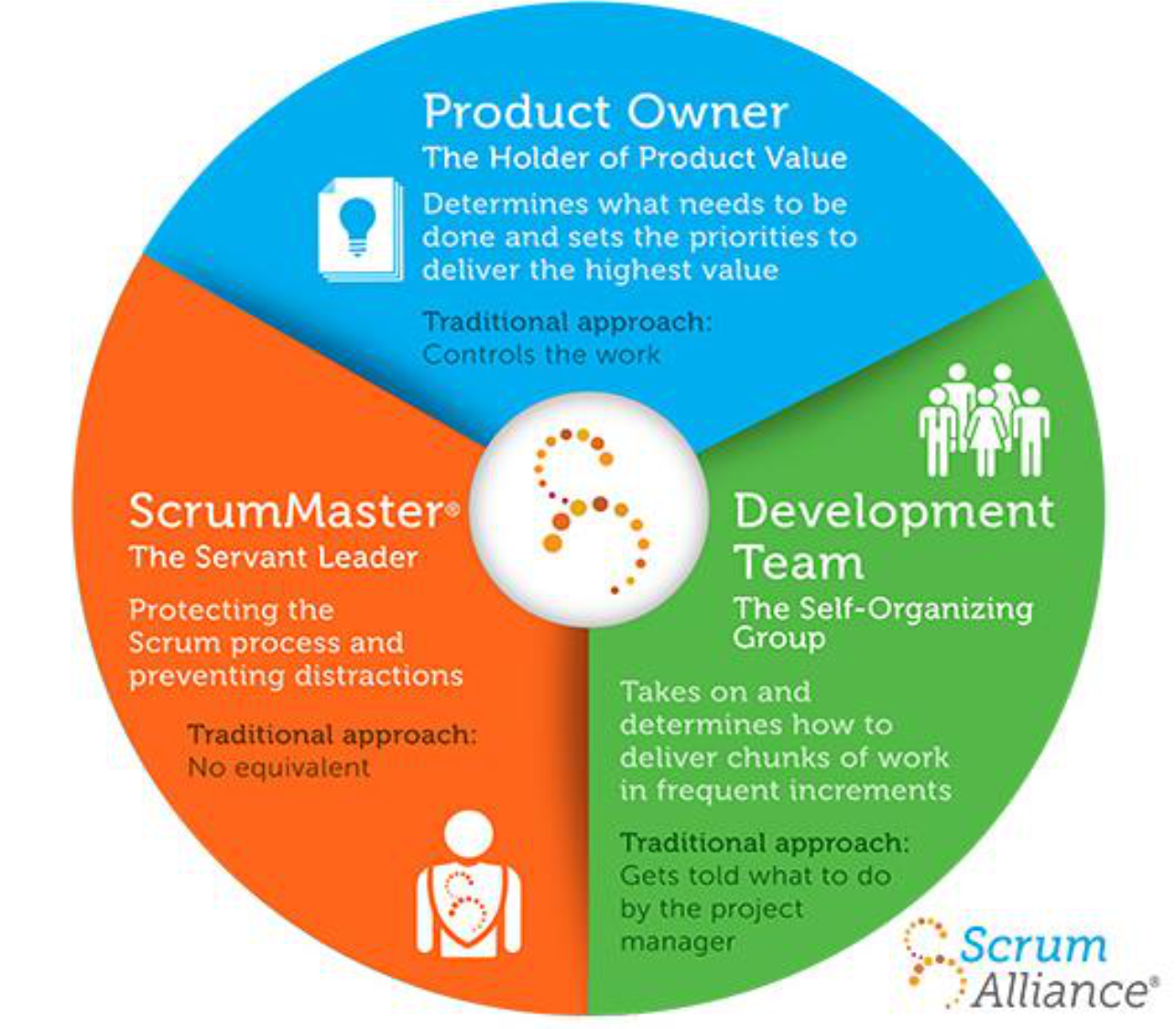
1. Product Owner
- Product Owner ในที่นี้ก็คือ Customer นั่นแหละ
The Holder of Product Value - The hub of business value - Determines what needs to be done
- Sets priorities to deliver highest value
- Traditional approach: Controls the work
2. ScrumMaster
The Servant Leader - Project Manager equivalent
- Protects Scrum process
- Prevents distractions
- Traditional approach: No equivalent role
3. Development Team
The Self-Organizing Group - The autonomous collective & cross-functional group
- Takes on and determines how to deliver chunks of work in frequent increments
- Small to medium size team
- Membership can change only between sprints
- Traditional approach: Gets told what to do by project manager
Analogy: Product Owner is the "what" and "why," ScrumMaster is the "how can I help," and Development Team is the "how we'll do it."
Overview of Scrum Model
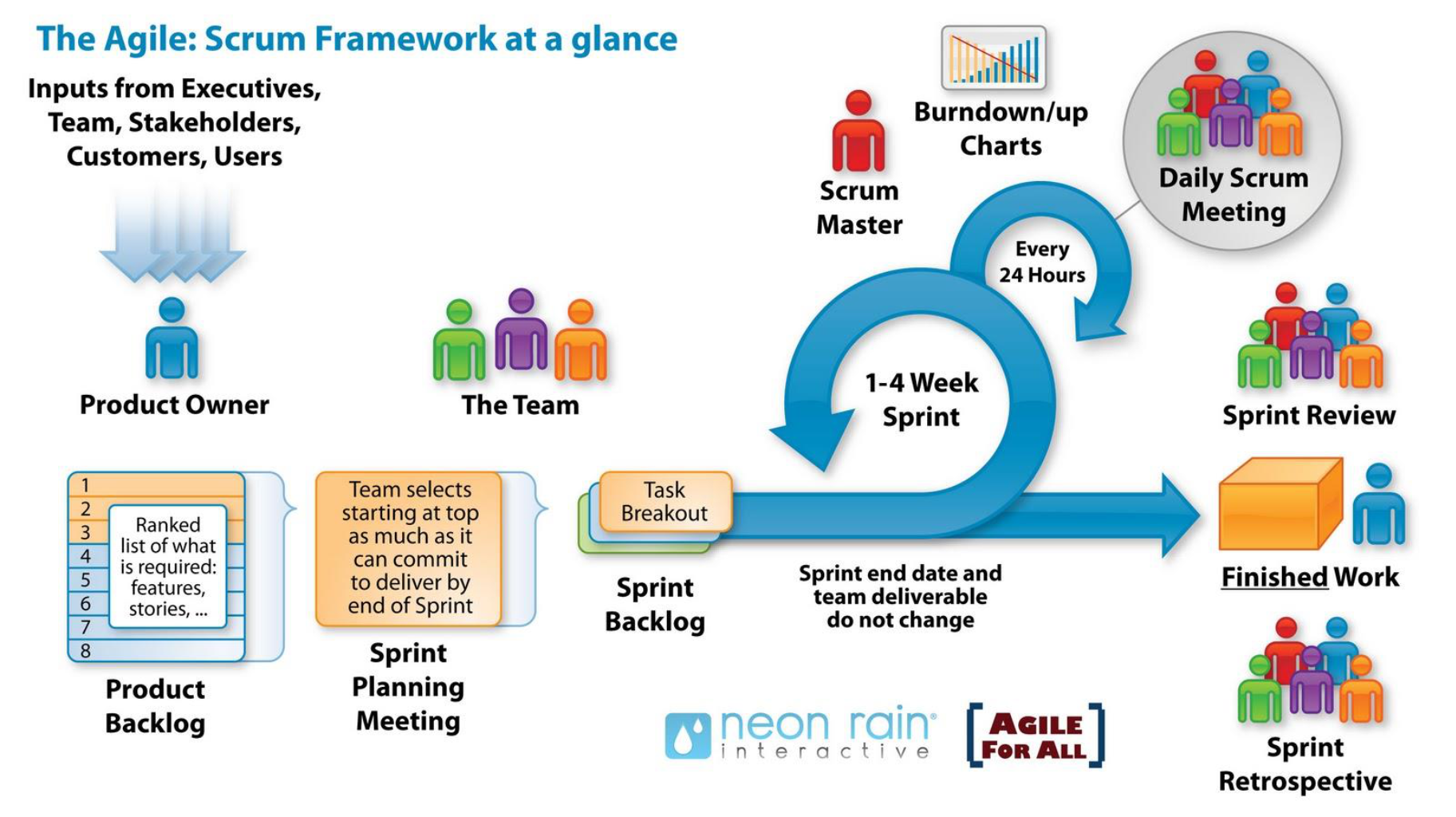
Inputs:
- From Executives, Team, Stakeholders, Customers, Users
Key Artifacts:
- Product Backlog
- Ranked list of what is required
- Features, stories, etc.
- Numbered priority list (1, 2, 3, 4, 5, 6, 7, 8...)
- Sprint Backlog
- จะเอาเหล่านี้ ๆ มาทำใน Sprint นี้นะ (เลือกมาจาก Product Backlog)
- Team selects starting at top
- As much as can commit to deliver by end of Sprint
- Task breakout of selected items
Sprint Cycle (1-4 Week Sprint):
- Every 24 Hours: Daily Scrum Meeting
- Sprint end date and team deliverable do not change
- Results in Finished Work
Scrum Ceremonies:
- Sprint Planning Meeting
- Daily Scrum Meeting (with Burndown/up Charts)
- Sprint Review Meeting
- Sprint Retrospective Meeting
- Lesson learned, …
Scrum Process Phases
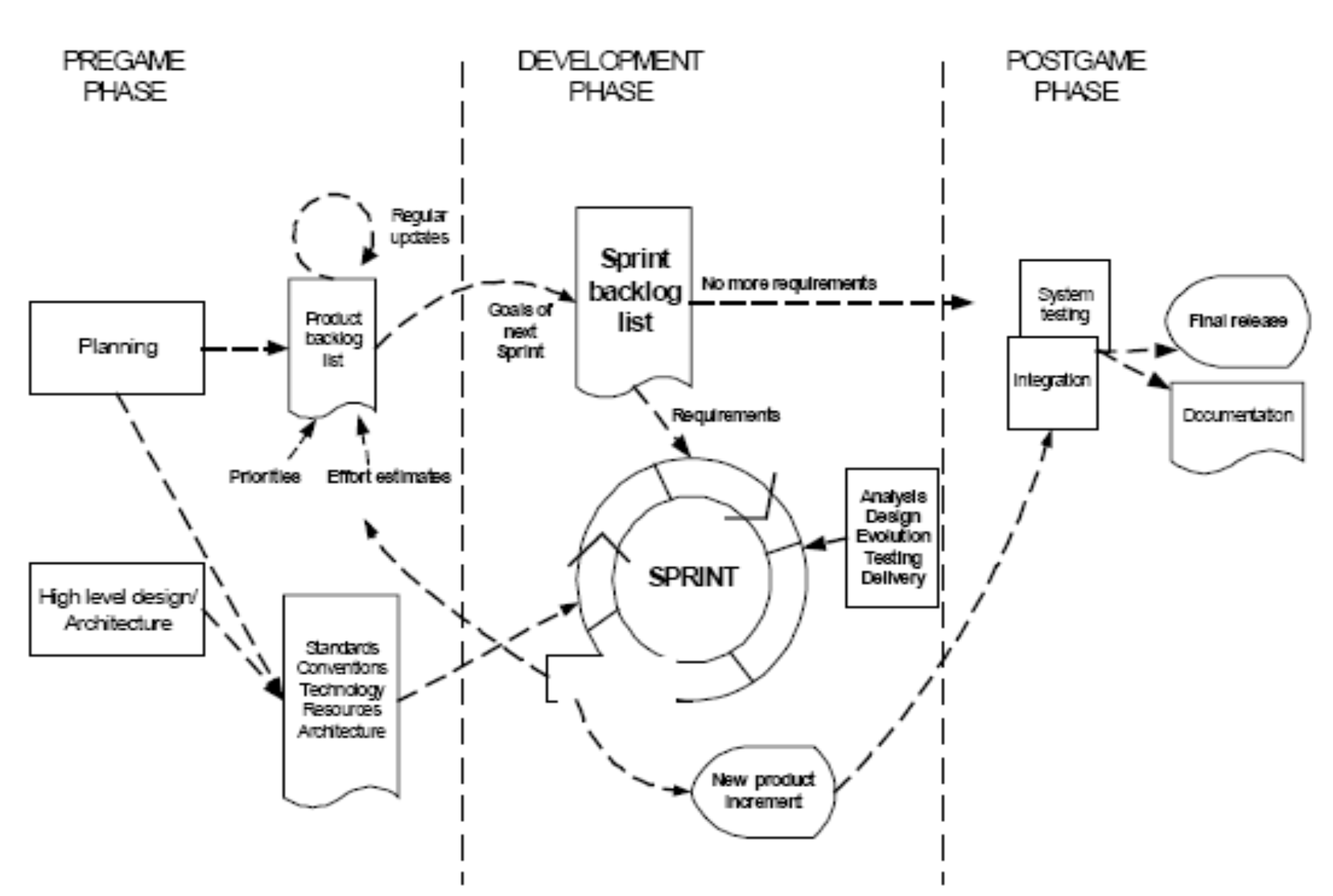
Pregame Phase:
- Planning (with High level design/Architecture)
- Product backlog list (with Priorities and Effort estimates)
- Regular updates
Development Phase:
- Sprint cycle (Goals of next sprint)
- Sprint backlog list
- Requirements feed into Sprint
- Analysis, Design, Evolution, Testing, Delivery
- Results in New product increment
Postgame Phase:
- System testing
- Integration
- Final release
- Documentation
- No more requirements
Scrum Practices
Key Practices:
- Product Backlog
- Sprint Planning Meeting
- Effort Estimation
- Sprints (Iterations)
- Sprint Backlog
- Daily Scrum Meeting
- Sprint Review Meeting
Product Backlogs & Sprint Backlogs
Product Backlog:
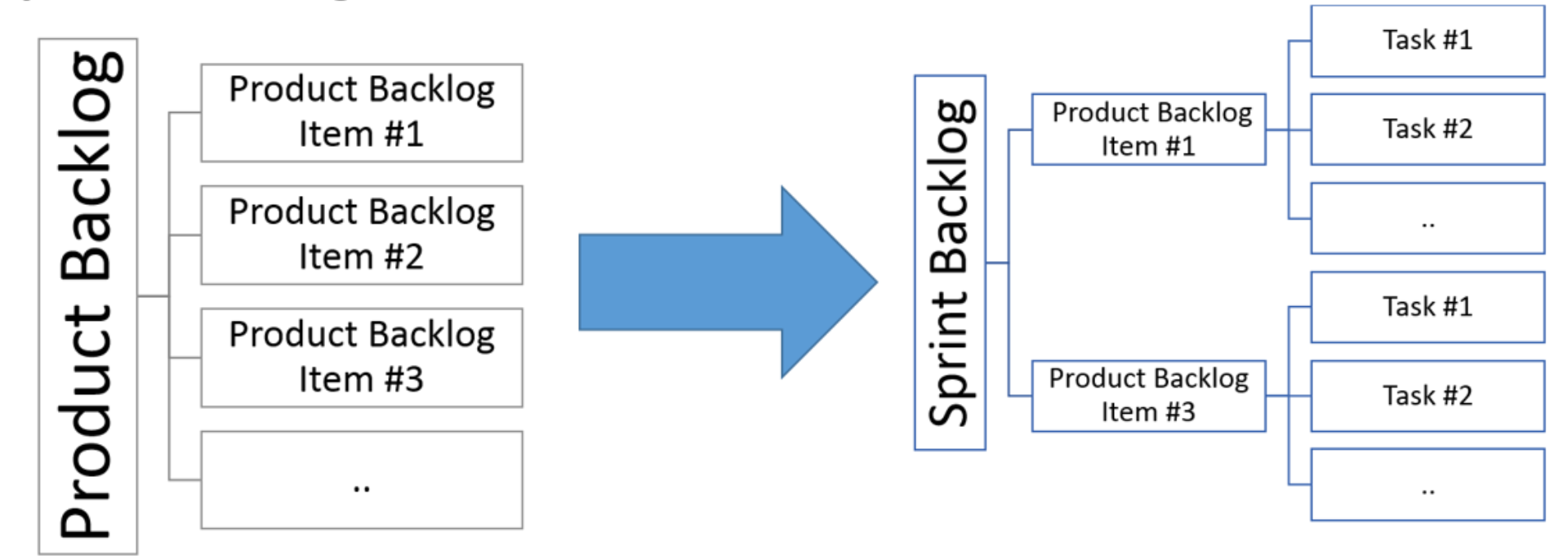
- Requirements for a system expressed as prioritized list of Backlog Items
- Similar to XP User Stories
- Managed and owned by Product Owner
- Usually created during Sprint Planning Meeting
- Can be changed and re-prioritized
Sprint Backlog:
- Subset of Product Backlogs defining scope of work for a Sprint
- Created ONLY by Team members
- Each item has its own status
- Should be updated every day
Relationship:
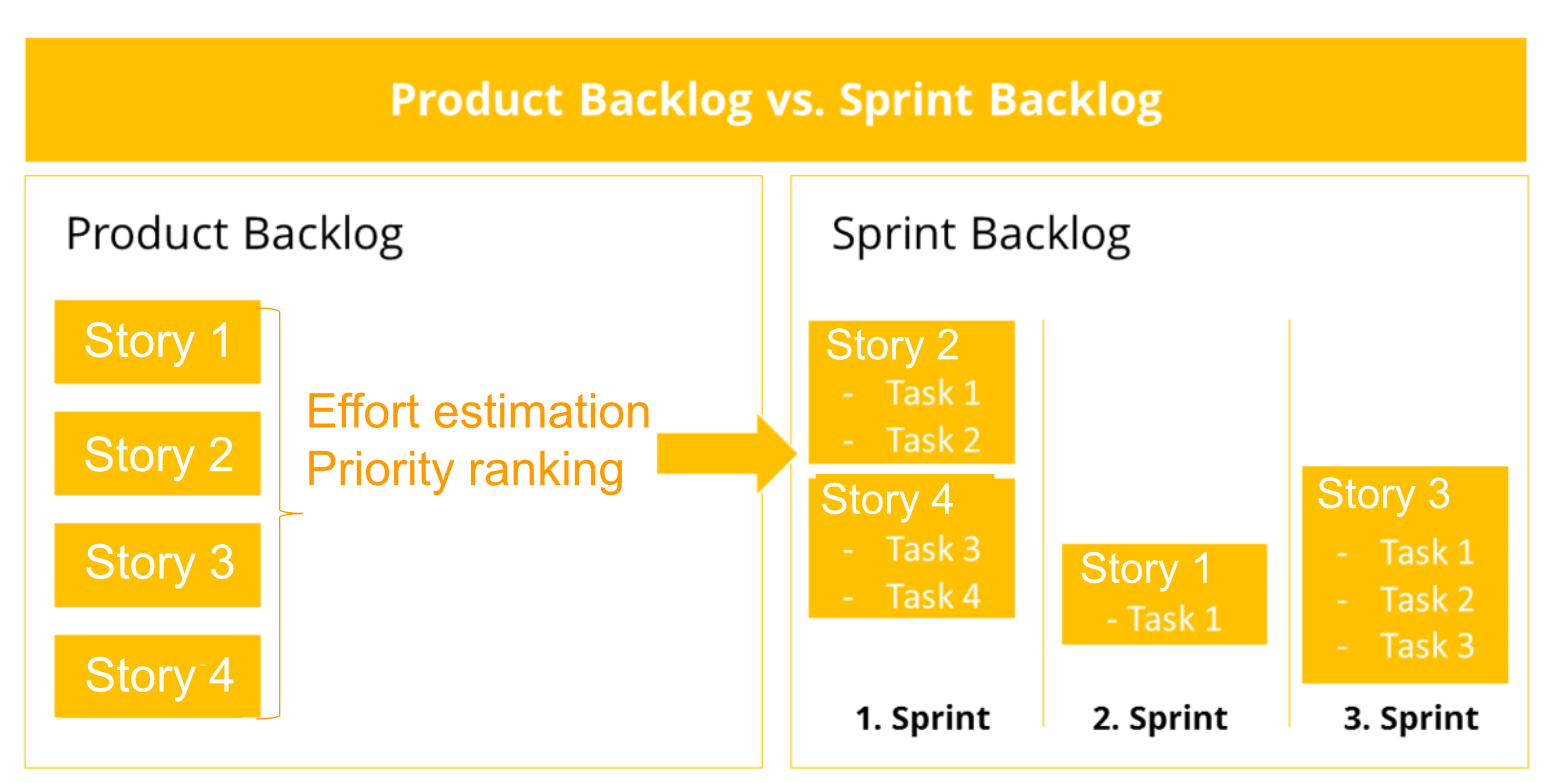
Product Backlog → [Effort estimation + Priority ranking] → Sprint Backlog

Product Backlog:        Sprint Backlog:
- Story 1               1. Sprint: Story 2 (Task 1, Task 2)
- Story 2               2. Sprint: Story 4 (Task 3, Task 4) + Story 1 (Task 1)
- Story 3               3. Sprint: Story 3 (Task 1, Task 2, Task 3)
- Story 4
Product Backlog Items → Sprint Backlog Tasks:
Product Backlog Item #1 → Task #1, Task #2, ...
Product Backlog Item #3 → Task #1, Task #2, ...
Sprint Planning Meeting
Details:
- Collaborative meeting at the beginning of each Sprint
- Duration: 8 hours (split into 2 parts: "before lunch and after lunch")
- A special form of Pre-Project/Kickoff Meeting
Participants:
- Product Owner
- Scrum Master
- Scrum Team
Two Parts:
1st Part (Morning):
- Creating Product Backlogs
- Prioritize Product Backlogs
- Determining the Sprint Goals
- Participants: Product Owner, Scrum Master, Scrum Team
2nd Part (Afternoon):
- Creating Sprint Backlog
- Participants: Scrum Master, Scrum Team (Product Owner optional)
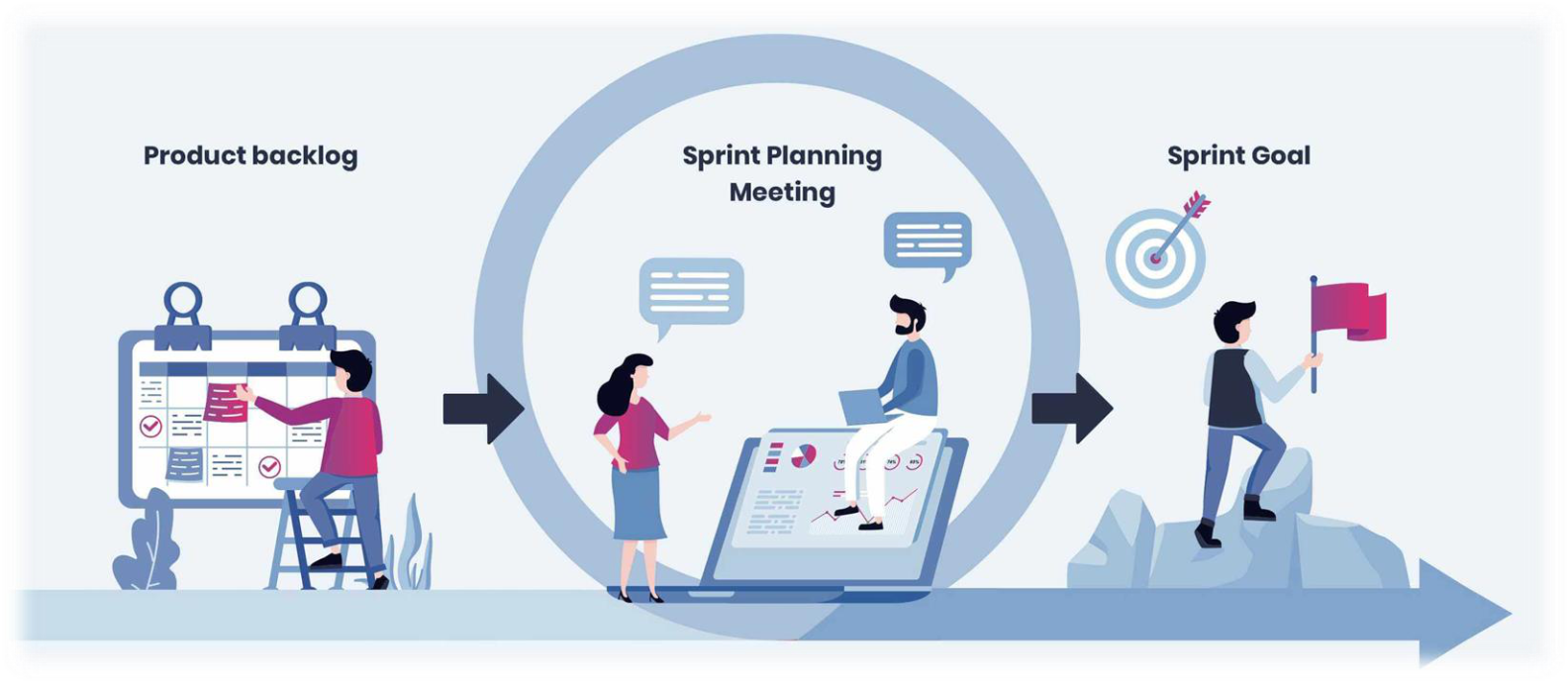
Flow: Product backlog → Sprint Planning Meeting → Sprint Goal
Sprint (Iteration/Cycle)
Definition:
- Month-long iteration (typically 1-4 weeks) during which product functionality is incremented
- NO outside influence can interfere with the Scrum team during the Sprint
- Each Sprint begins with Daily Scrum Meeting
Sprint Backlog:
- Subset of Product Backlogs defining scope of work for a Sprint
- Created ONLY by Team members
- Each Item has its own status
- Should be updated every day
Daily Scrum Meeting
Format:
- 15 minutes long stand-up meeting
- Held every day before Team starts working
- NOT a problem-solving session
- NOT a way to collect information about who is behind schedule
Participants:
- Scrum Master (chairman)
- Scrum Team
Three Questions (Each team member answers):
- What did you do yesterday?
- What are you doing today?
- What is stopping you getting on with the work?
Purpose:
- Team members make commitments to each other and Scrum Master
- Good way for Scrum Master to track team progress
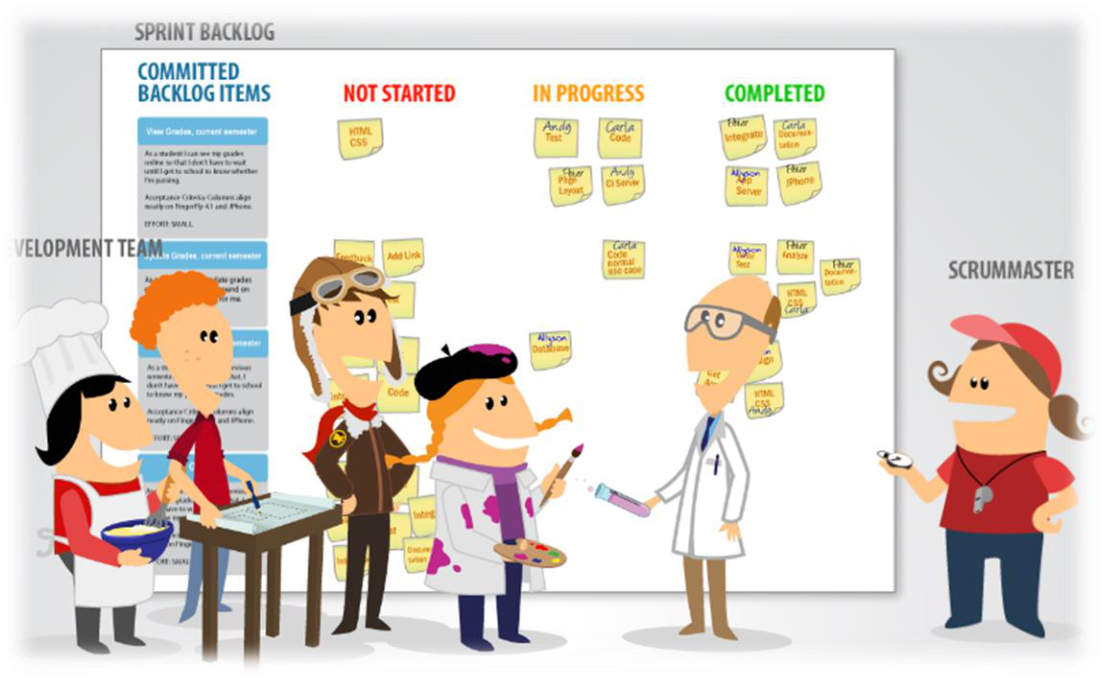
Sprint Backlog Board Columns:
- Committed Backlog Items
- Not Started
- In Progress
- Completed
Analogy: Daily Scrum is like a quick huddle in sports - everyone briefly shares their status, not a full strategy meeting.
Sprint Review Meeting
When:
- Held at end of each Sprint
Purpose:
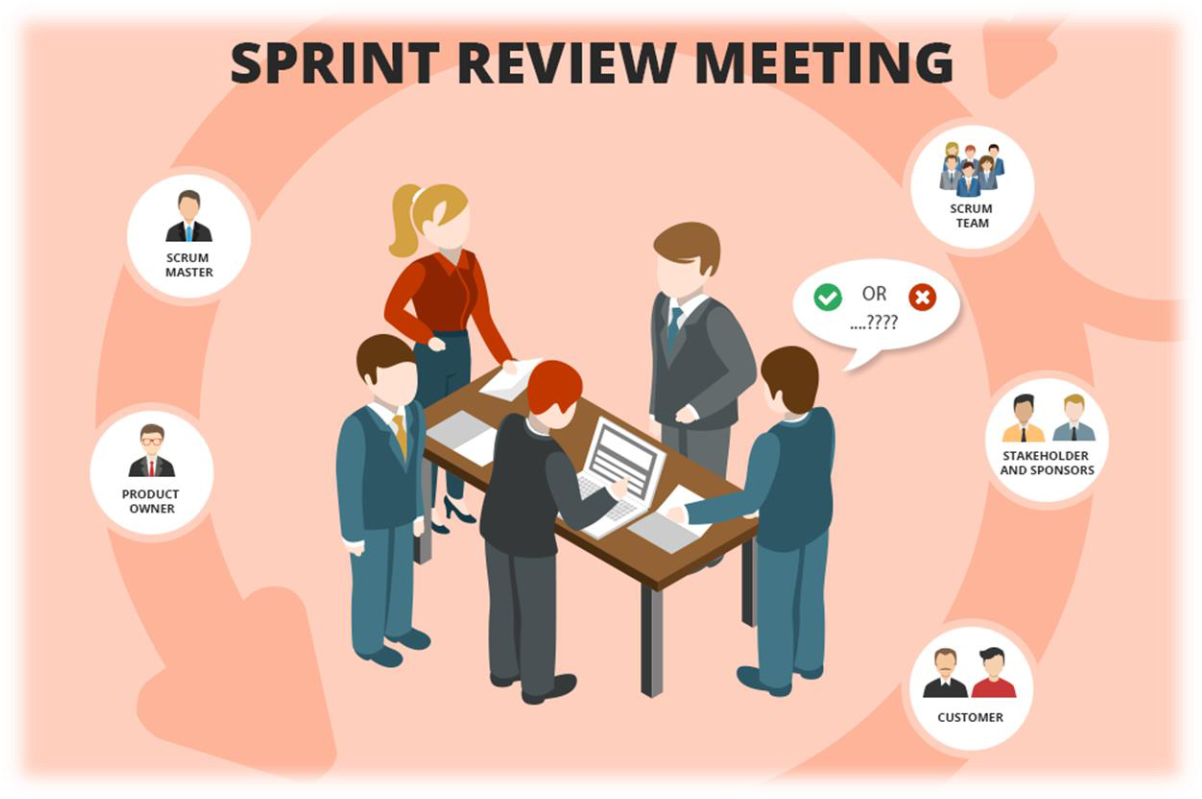
- Business functionality created during Sprint is demonstrated to Product Owner
- Informal - should not distract Team members from their work
Participants:
- Scrum Master
- Scrum Team
- Product Owner
- Stakeholders and Sponsors
- Customer
Outcome:
- Product Owner provides feedback (OK or ???)
Analogy: Like showing your completed homework to the teacher - they check if it meets requirements and provide feedback.
Scrum Ceremonies (Summary)
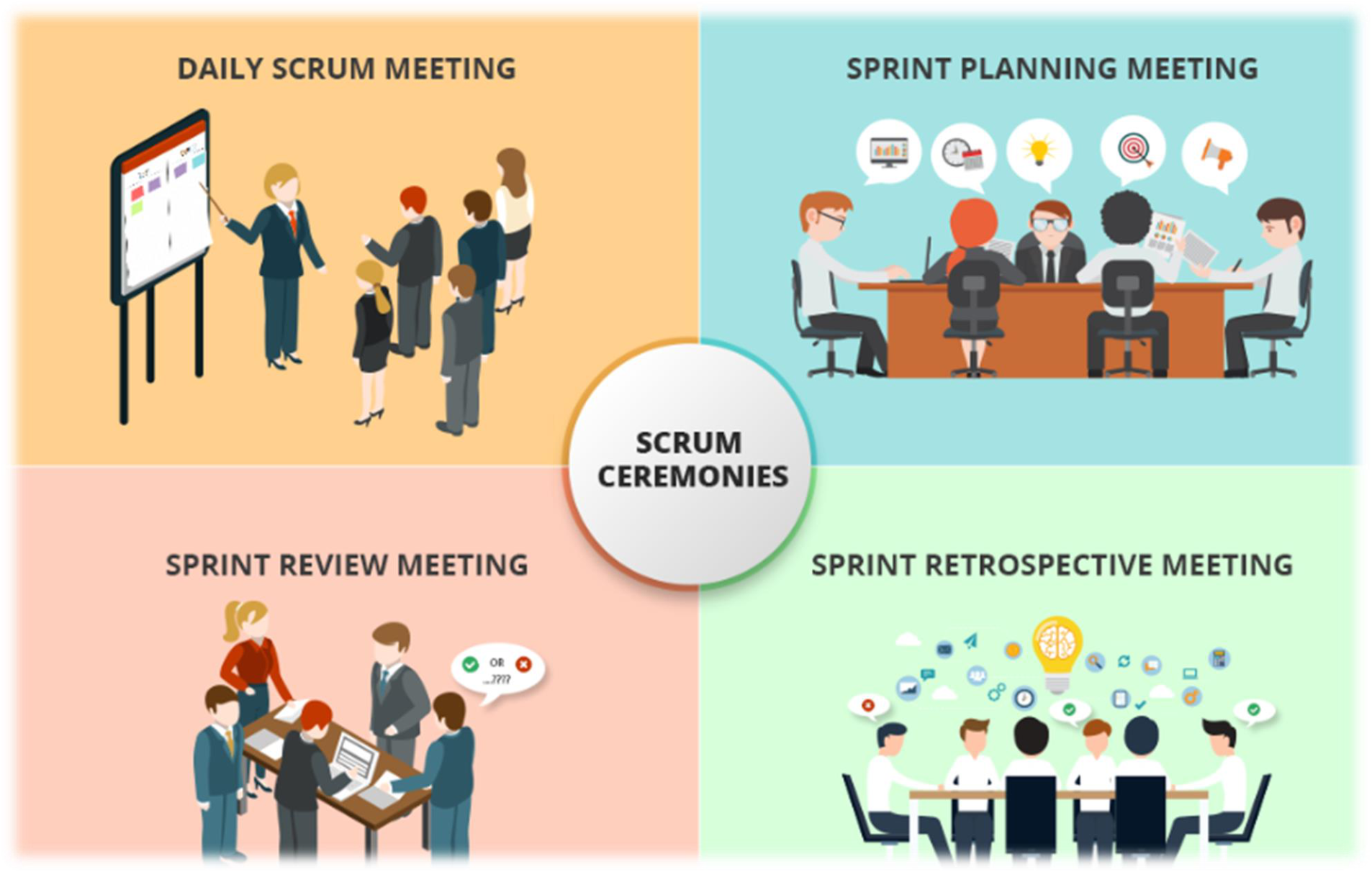
Four Main Ceremonies:
- Daily Scrum Meeting (Every 24 hours)
- Quick stand-up
- Team synchronization
- Impediment identification
- Sprint Planning Meeting
- Define Sprint goals
- Select backlog items
- Plan Sprint work
- Sprint Review Meeting
- Demo completed work
- Gather feedback
- Product Owner acceptance
- Sprint Retrospective Meeting
- Team reflection
- Process improvement
- Action items for next Sprint
Scrum Artifacts
Three Main Artifacts:
1. Product Backlog
- Prioritized list of features
2. Sprint Backlog
- Selected items for current Sprint
- Task breakdown
3. Burn Down Charts
- Visual representation of "work done"
- Wonderful Information Radiators
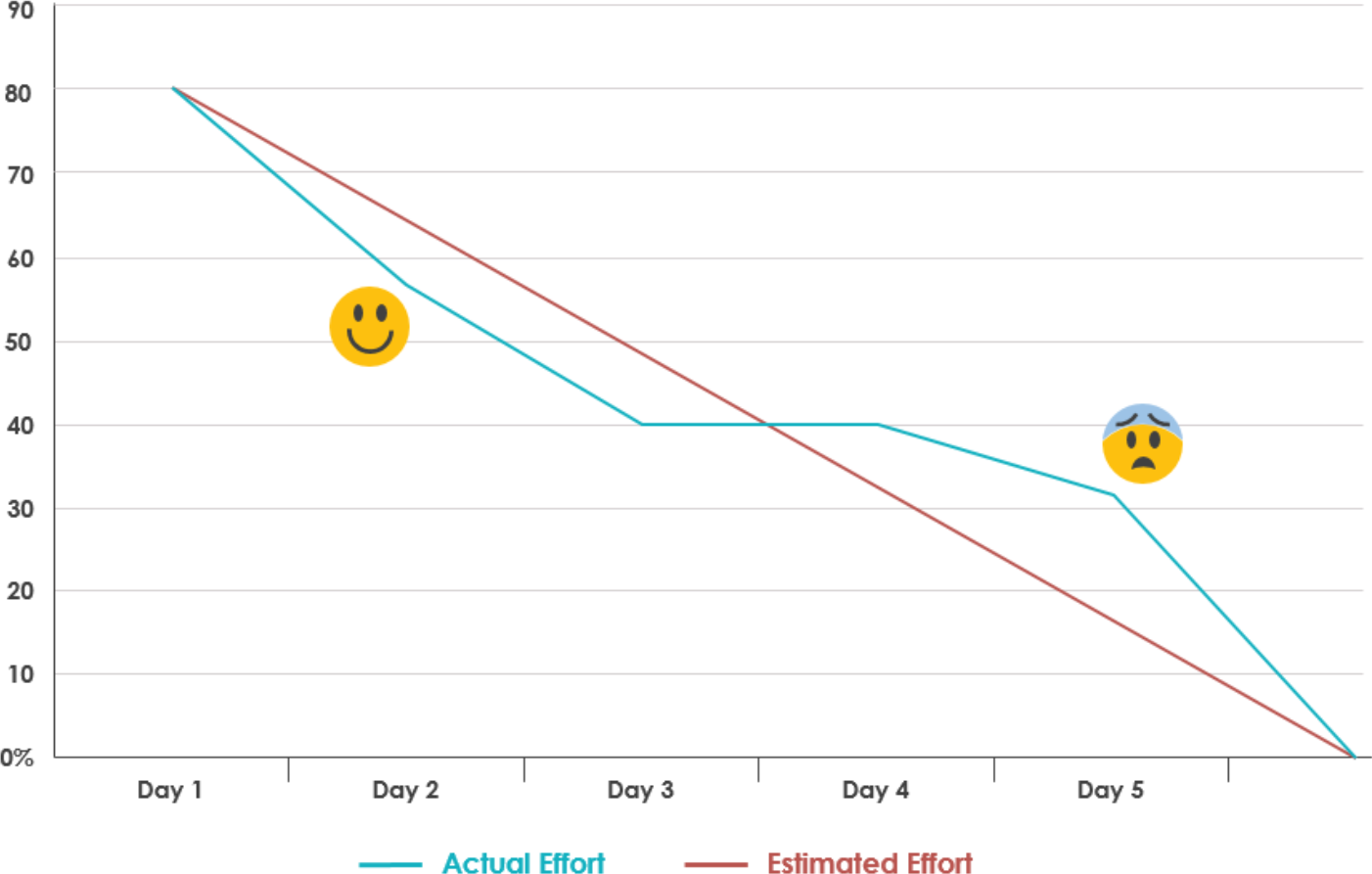
แกนตั้งเป็นจำนวนของงาน เหลืออีกกี่ card ประมาณนั้นน55555
Burn Down Charts
- 3 Types:
- Sprint Burn Down Chart
- Progress of a Sprint
- Shows remaining work vs. days
- Release Burn Down Chart
- Progress of a release
- Shows remaining work vs. Sprints
- Product Burn Down Chart
- Progress of the Product
- Sprint Burn Down Chart
Chart Components:
- X-axis: Time (Days for Sprint, Sprints for Release)
- Y-axis: Work remaining (Story Points, Hours, or Tasks)
- Estimated Effort (red line) - ideal progress
- Actual Effort (blue line) - real progress
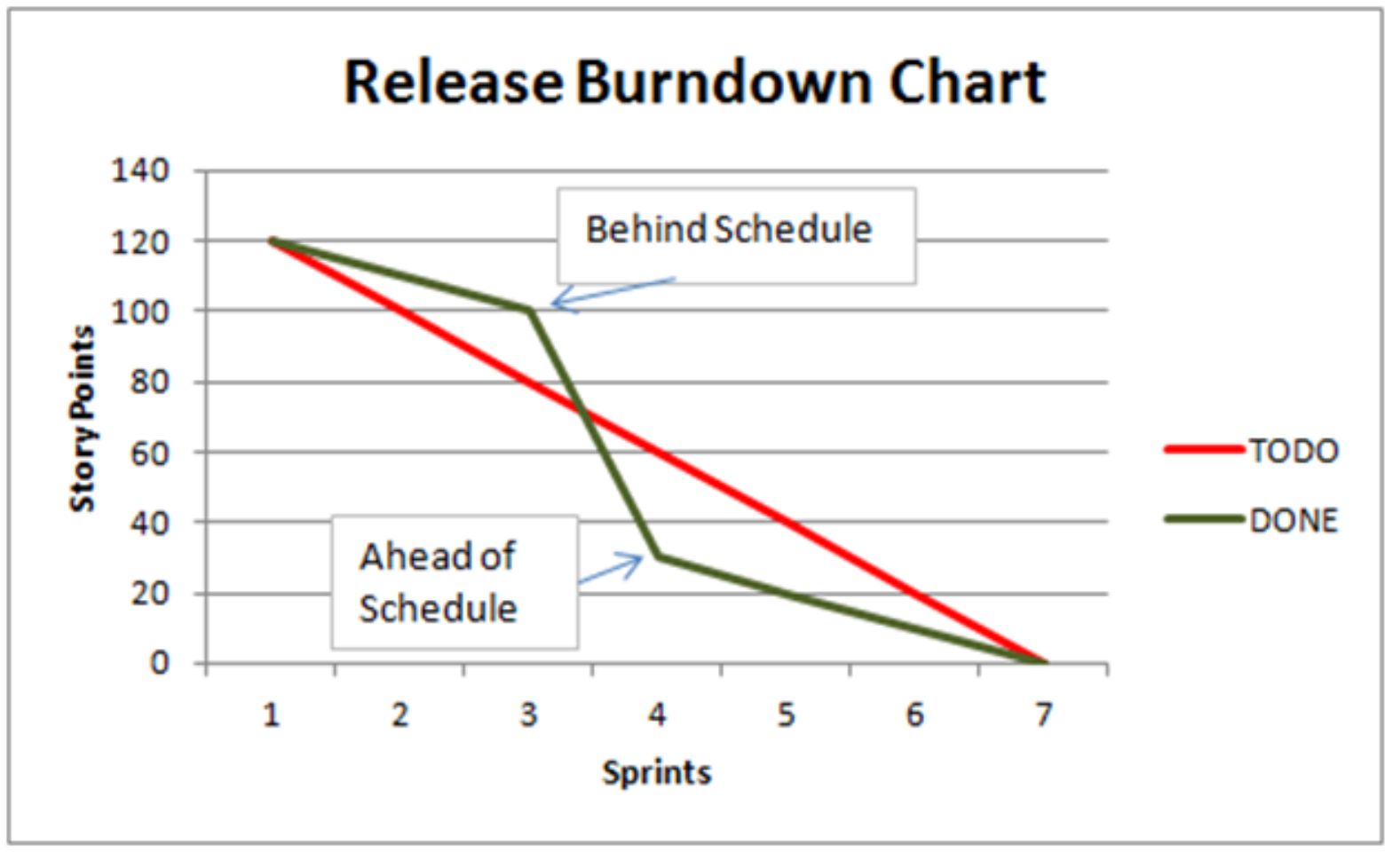
Interpretation:
- 😊 Below estimated line = Ahead of schedule
- 😟 Above estimated line = Behind schedule
- Goal: Reach 0% by end date
Example Sprint Burndown:
90% |
80% |■────
70% |     ─────
60% |
50% |     😊
40% |          ────
30% |               ────  😟
20% |                    ────
10% |                         ────
0%  |_________________________________
    Day 1  Day 2  Day 3  Day 4  Day 5

    ─── Actual Effort  ─── Estimated Effort
Example Release Burndown:
Story Points
140 |
120 |■────  Behind Schedule
100 |     ──────
80  |           ─────
60  |                ───── TODO
40  |    Ahead of           ─────
20  |    Schedule                ■ DONE
0   |_________________________________
    1    2    3    4    5    6    7
              Sprints
XP @ Scrum
Extreme Programming (XP) + Scrum
Combination:
Scrum is an effective project management wrapper for eXtreme Programming development practices
Benefits:
- Enables agile projects to become scalable
- Allows distributed teams of developers
- Combines best of both methodologies:
- Scrum - Project management framework
- XP - Engineering practices
Analogy: Scrum provides the race strategy and pit crew coordination (management), while XP provides the driving techniques and car maintenance (engineering practices).
Pros and Cons of Agile Model
Advantages ✅:
- Completely developed and tested features in short iterations
- Simplicity of the process
- Clearly defined rules
- Increasing productivity
- Self-organizing - each team member carries responsibility
- Improved communication
- Combination with Extreme Programming
Drawbacks ❌:
- "Undisciplined hacking" - no written documentation
- Violation of responsibility - can be unclear
- Currently mainly carried by the inventors - less widespread adoption initially
System Transition
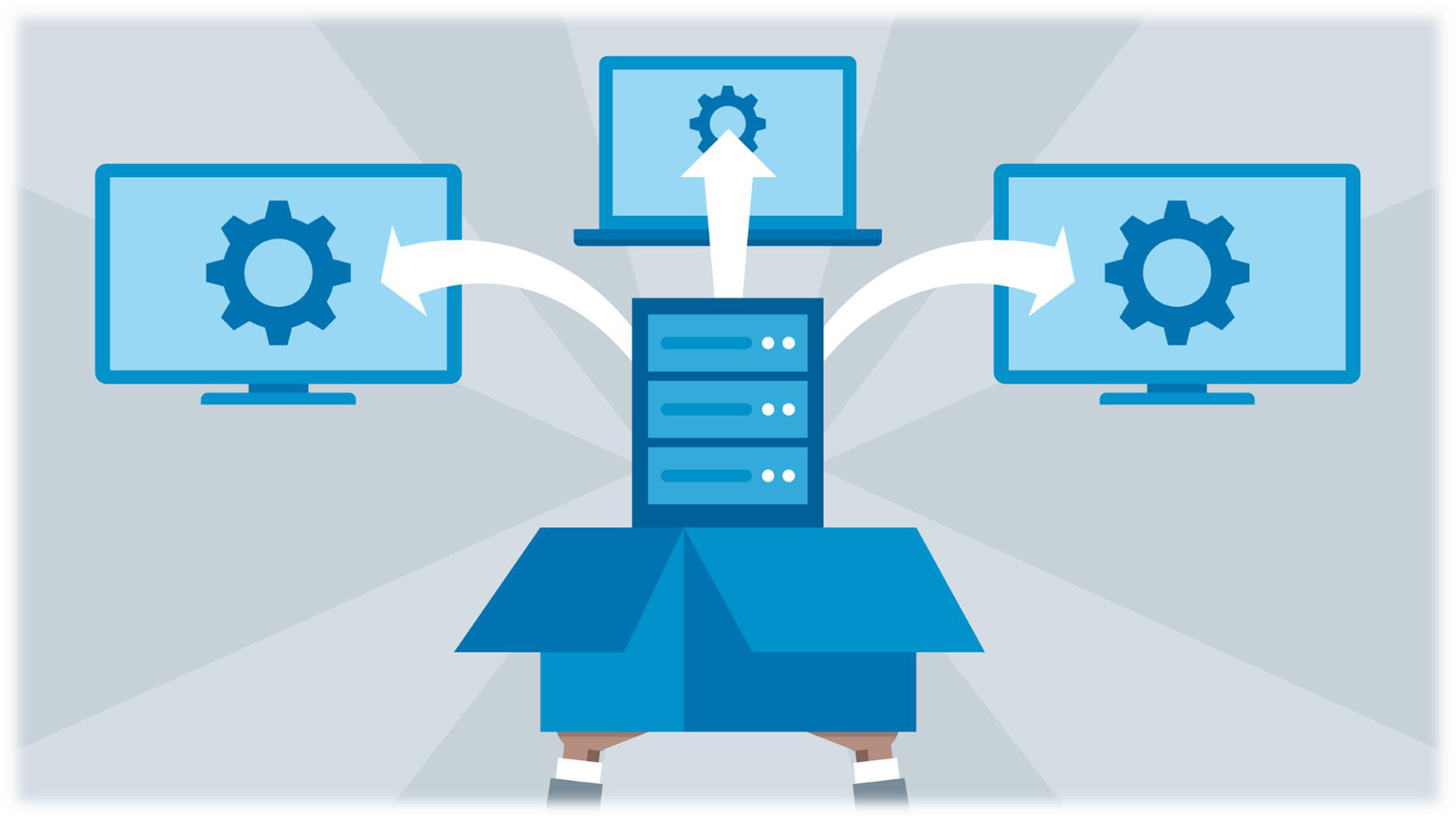
Definition
Process of migrating from an old system to a new system
Approaches for System Transition
Four Main Approaches:
- Direct Conversion
- Parallel Conversion
- Phased Conversion
- Pilot Conversion
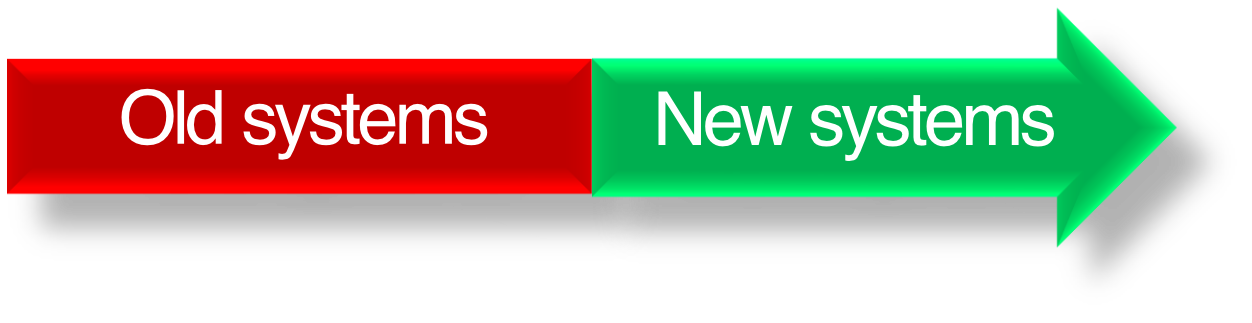
1. Direct Conversion
Process:
Old systems → | → New systems
Characteristics:
- Stop the old system immediately
- Start using new system right away
- ⚠️ High risk approach
- No fallback option
Analogy: Like jumping off the high dive - once you jump, you're committed. No going back!
When to Use:
- When old system is completely obsolete
- When new system is thoroughly tested
- When downtime is acceptable
2. Parallel Conversion
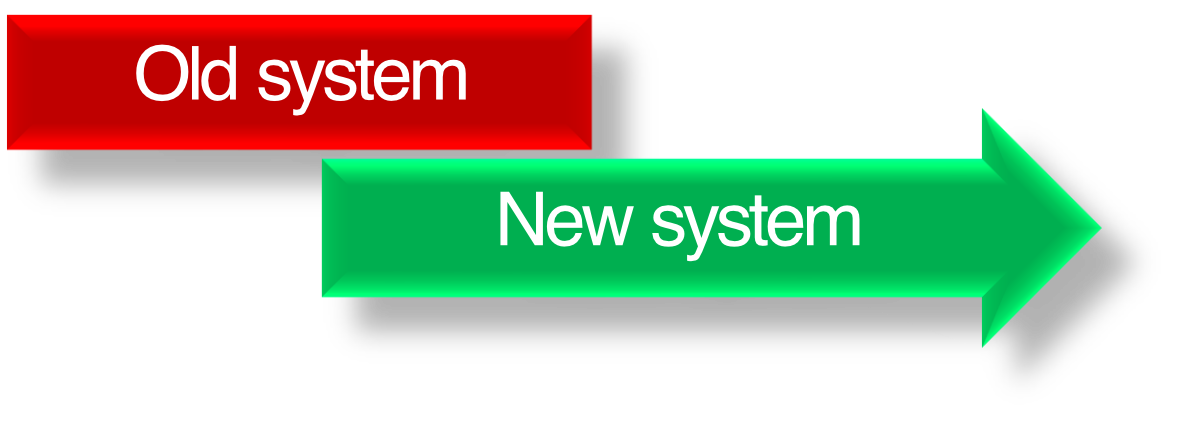
Process:
Old system  ─────────────
New system      ────────────────→
Characteristics:
- Use old and new systems in parallel for some time
- Continue until new system has no defects and can be used 100%
- More reliable but users have more work during parallel operation
- Can compare outputs between systems
Analogy: Like learning to ride a bike with training wheels - you have the safety of the old way while learning the new way.
When to Use:
- Critical systems that cannot fail
- When verification is needed
- When users need training time
3. Phased Conversion
Process:
Old system  ─────────────
New system      ████████████████→
(Gradual replacement of parts)

Characteristics:
- Install and deploy parts of the new system
- Old system still in use during phased rollout
- Continue until new system is completely installed and deployed
- Suitable for large systems
Analogy: Like renovating a house room by room - you keep living in the house while gradually updating each room.
When to Use:
- Large, complex systems
- When functionality can be separated into modules
- When gradual user adaptation is needed
4. Pilot Conversion
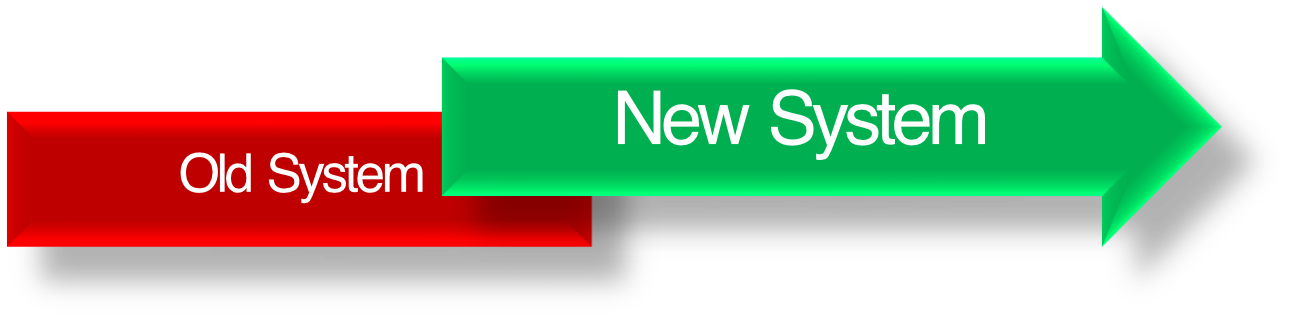
Process:
Old System  ─────────────────
New System      ████──────────→
(Test with limited group first)
Characteristics:
- Install and deploy new system at some departments as pilot projects
- Evaluate the performance
- If successful → deploy to all other departments
- Lower risk than direct conversion
Analogy: Like testing a new restaurant menu item at one location before rolling it out to all franchises.
When to Use:
- When multiple locations/departments exist
- When risk assessment is important
- When user feedback is valuable before full deployment
Comparison of Transition Approaches
| Approach | Risk Level | Cost | Time | Best For |
|---|---|---|---|---|
| Direct | High | Low | Fast | Simple systems, obsolete old systems |
| Parallel | Low | High | Medium | Critical systems, need verification |
| Phased | Medium | Medium | Slow | Large complex systems, modular |
| Pilot | Medium-Low | Medium | Medium | Multiple locations, need feedback |
Summary: Software Process Models Comparison
Traditional Models:
- Waterfall - Sequential, stable requirements
- Spiral - Risk-driven, iterative with prototypes
Agile Models:
- Evolution - Refine same features each iteration
- Incremental - Add new features each iteration
- XP - Engineering practices, small teams
- Scrum - Project management framework, any size
Key Takeaway:
Choose the model based on: project size, requirement stability, team expertise, and acceptable risk level.
End of Lecture Notes
Key Concepts Covered:
- ✅ SDLC and its importance
- ✅ Five software development process models
- ✅ Agile methodology and manifesto
- ✅ Extreme Programming (XP) practices
- ✅ Scrum framework and ceremonies
- ✅ System transition approaches
Remember: No single model fits all projects - adapt based on context!