Today we’ll focus about Authorization
Access Control Principles
- RFC 4949 defines computer security as:
- RFC = Request for Comment
- "Measures that implement and assure security services in a computer system, particularly those that assure access control service."
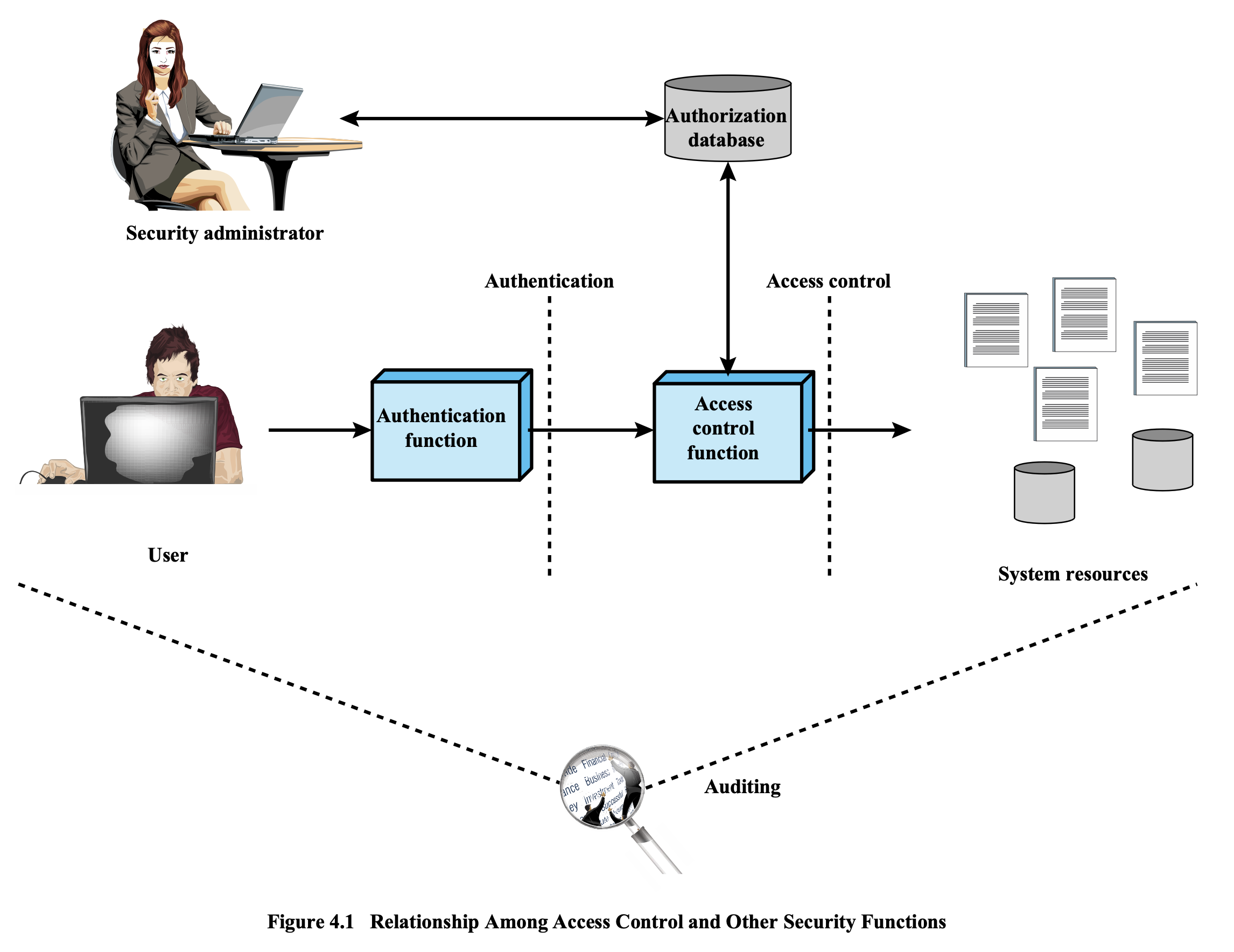
Relationship Among Access Control and Other Security Functions
- The flow of access control involves:
- User → Authentication Function → Access Control Function → System Resources
- Security Administrator ↔ Authorization Database ↔ Access Control Function
- Auditing monitors all interactions
Access Control Policies
Discretionary Access Control (DAC)
- Controls access based on the identity of the requestor and on access rules (authorizations)
- States what requestors are (or are not) allowed to do
Mandatory Access Control (MAC)
- Controls access based on comparing security labels with security clearances
Role-Based Access Control (RBAC)**
- Controls access based on the roles that users have within the system
- Uses rules stating what accesses are allowed to users in given roles
Attribute-Based Access Control (ABAC)**
- Controls access based on attributes of the user, the resource to be accessed, and current environmental conditions
Subjects, Objects, and Access Rights
- Subject
- An entity capable of accessing objects
- Three classes:
- Owner
- Group
- World
- Object
- A resource to which access is controlled
- Entity used to contain and/or receive information
- Access Right (Privilege, Permission)
- Describes the way in which a subject may access an object
- Could include:
- Read
- Write
- Execute
- Delete
- Create
- Search
Discretionary Access Control (DAC)
- Scheme in which an entity may enable another entity to access some resource
- The owner of a resource determines access to that resource
- The owner is often the creator of the resource
- Often provided using an access matrix
- One dimension = identified subjects (who may attempt data access)
- Other dimension = objects (that may be accessed)
- Each entry in the matrix = access rights of a particular subject for a particular object
Analogy: Think of DAC like a Google Drive file — the creator/owner decides who can view or edit the file.
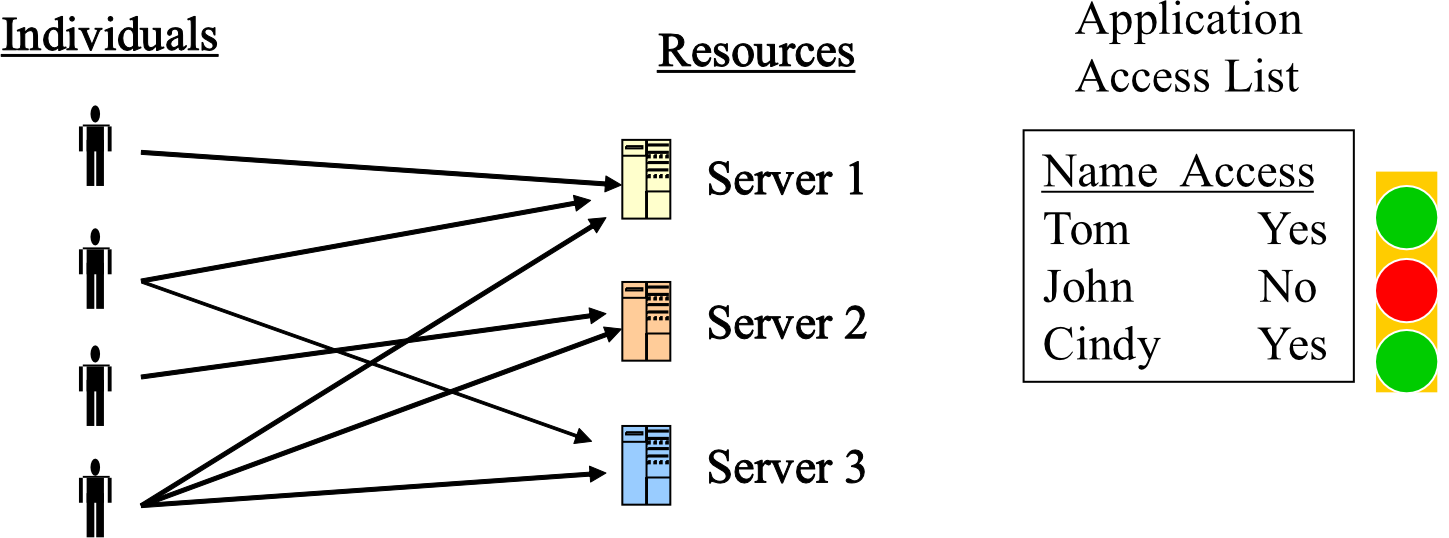
Access Control Structures
- (a) Access Matrix — a table showing subjects vs objects with permissions (Own, Read, Write)
| SUBJECTS | File 1 | File 2 | File 3 | File 4 |
|---|---|---|---|---|
| User A | Own, Read, Write | — | Own, Read, Write | — |
| User B | Read | Own, Read, Write | Write | Read |
| User C | Read, Write | Read | — | Own, Read, Write |
อาจารย์ให้ Access Matrix มา อยากให้วาดเป็น ACL, Cap List ใน #FinalExam
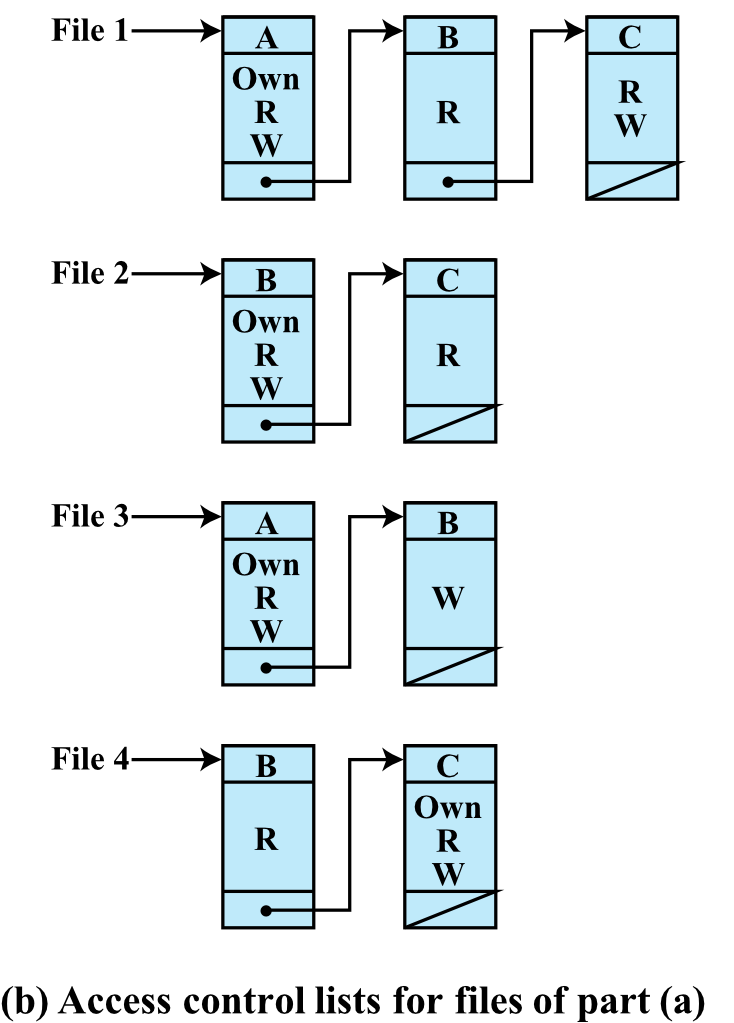
- (b) Access Control Lists (ACL) — each file has a list of users and their permissions
- e.g., File 1 → A: Own/R/W, B: R, C: R/W
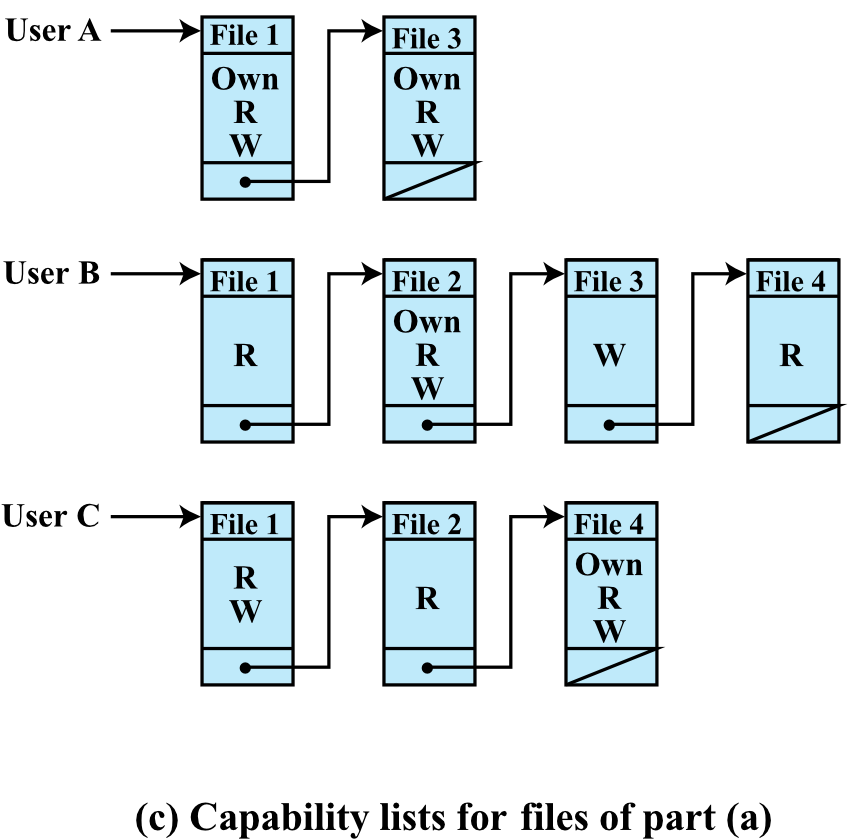
- (c) Capability Lists — each user has a list of files and their permissions
- e.g., User A → File 1: Own/R/W, File 3: Own/R/W
Authorization Table
| Subject | Access Mode | Object |
|---|---|---|
| A | Own | File 1 |
| A | Read | File 1 |
| A | Write | File 1 |
| A | Own | File 3 |
| A | Read | File 3 |
| A | Write | File 3 |
| B | Read | File 1 |
| B | Own | File 2 |
| B | Read | File 2 |
| B | Write | File 2 |
| B | Write | File 3 |
| B | Read | File 4 |
| C | Read | File 1 |
| C | Write | File 1 |
| C | Read | File 2 |
| C | Own | File 4 |
| C | Read | File 4 |
| C | Write | File 4 |
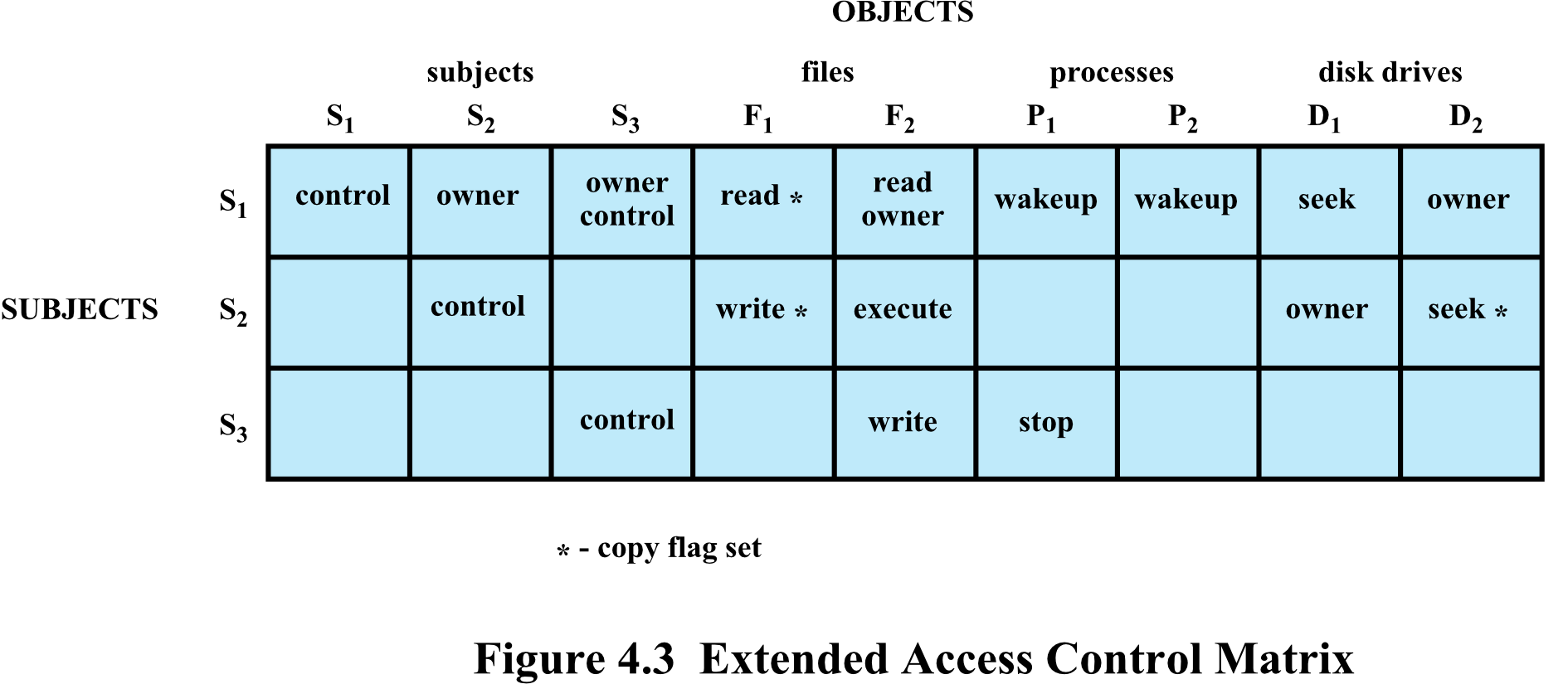
Extended Access Control Matrix
- Subjects can also be objects (e.g., has control over )
- Includes process operations like wakeup, stop, execute
- Includes disk drive operations like seek
- Copy flag (
*) — permission marked with * can be transferred to others
Protection Domains
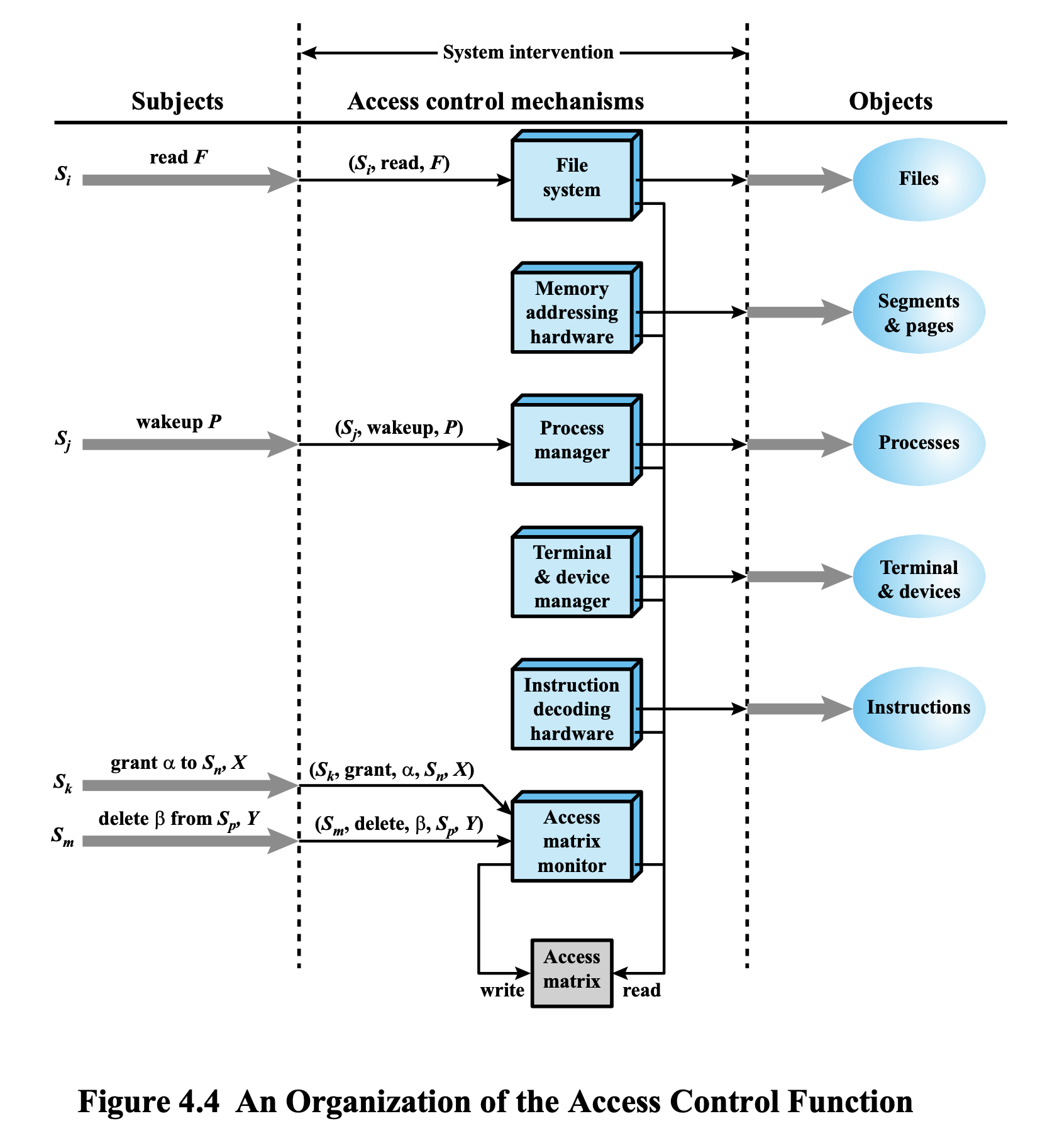
Component we need to consider, to ensure that access control is ….
- A set of objects together with access rights to those objects
- In terms of the access matrix, a row defines a protection domain
- User can spawn processes with a subset of the access rights of the user
- User mode — certain memory areas are protected, certain instructions cannot be executed
- Kernel mode — privileged instructions (I/O related) may be executed, protected memory may be accessed
Analogy: Protection domains are like different security clearance levels in a building — a regular employee can access the lobby, but only authorized personnel can enter the server room.
UNIX File Access Control
Inodes (Index Nodes)
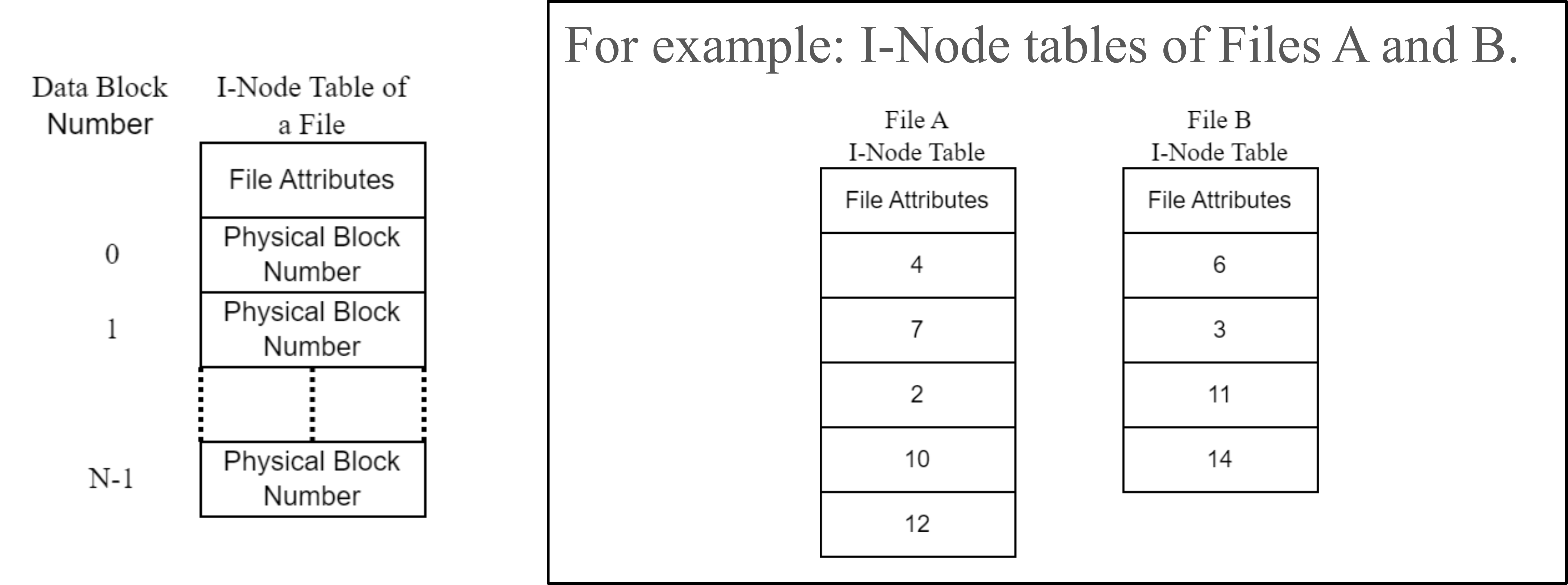
- UNIX files are administered using inodes
- Control structures with key information needed for a file
- Several file names may be associated with a single inode
- An active inode is associated with exactly one file
- File attributes, permissions, and control information are stored in the inode
- On disk: inode table (or inode list) containing inodes of all files → From 09 File System
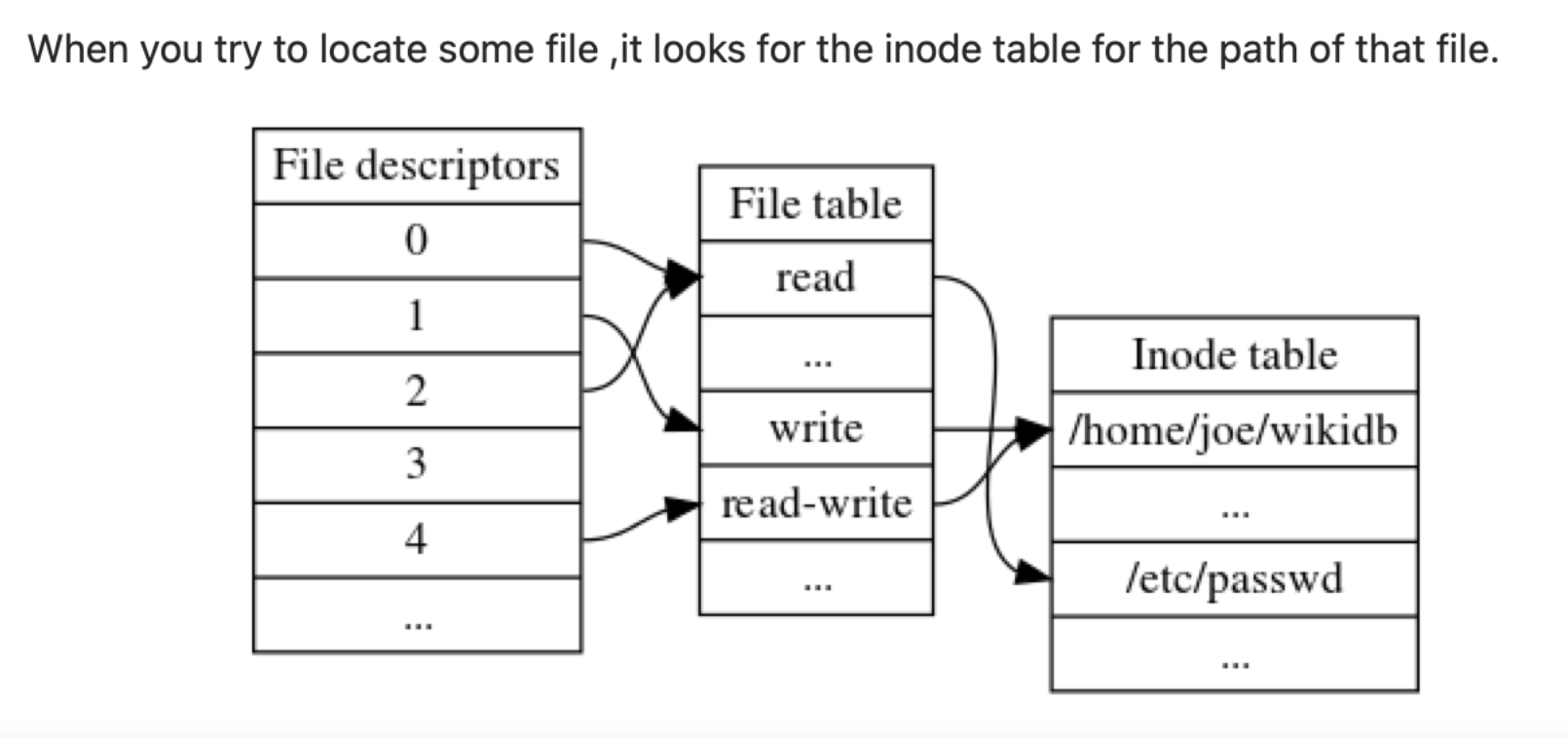
- When a file is opened, its inode is brought into main memory (memory-resident inode table)
- Directories are structured in a hierarchical tree
- May contain files and/or other directories
- Contains file names plus pointers to associated inodes
UNIX File Permissions
- Each user has a unique user ID and is a member of a primary group ID
- 12 protection bits specify:
- Read, Write, Execute permission for:
- Owner class
- Group class
- Other class
- Read, Write, Execute permission for:
- The owner ID, group ID, and protection bits are part of the file's inode
Traditional UNIX format:
rw-  r--  ---
[Owner] [Group] [Other]
Analogy: Think of UNIX permissions like a library card system — the owner can borrow and return books, group members can only read in-library, others have no access.
Mandatory Access Control (MAC)
- MAC mechanisms:
- Assign a security level to all information
- Assign a security clearance to each user
- Ensure users only access data for which they have clearance
- Better security than DAC
MAC Principles
- Read Down — a user can only read objects with equal or lower classification
- Write Up — a user can only write to objects with equal or higher classification
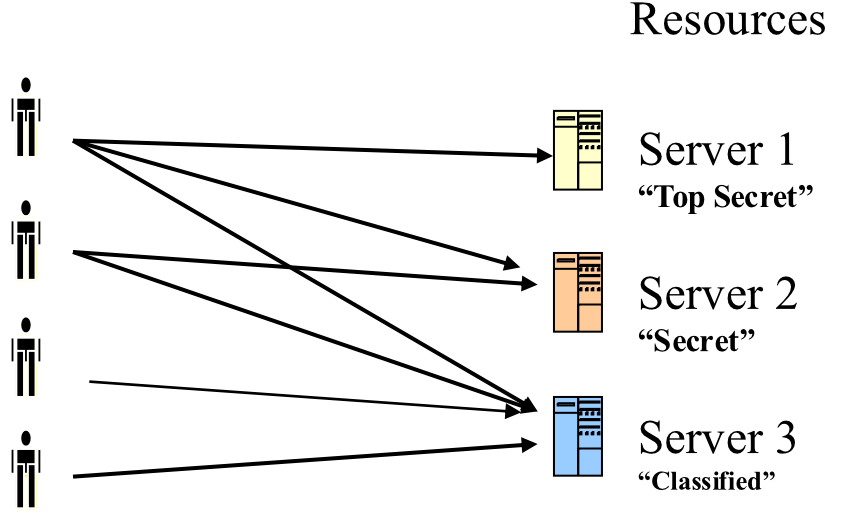
Analogy: Like military clearances — a "Top Secret" cleared person can read "Secret" docs but cannot write data to a "Classified" file to prevent data leakage downward.
Role-Based Access Control (RBAC)
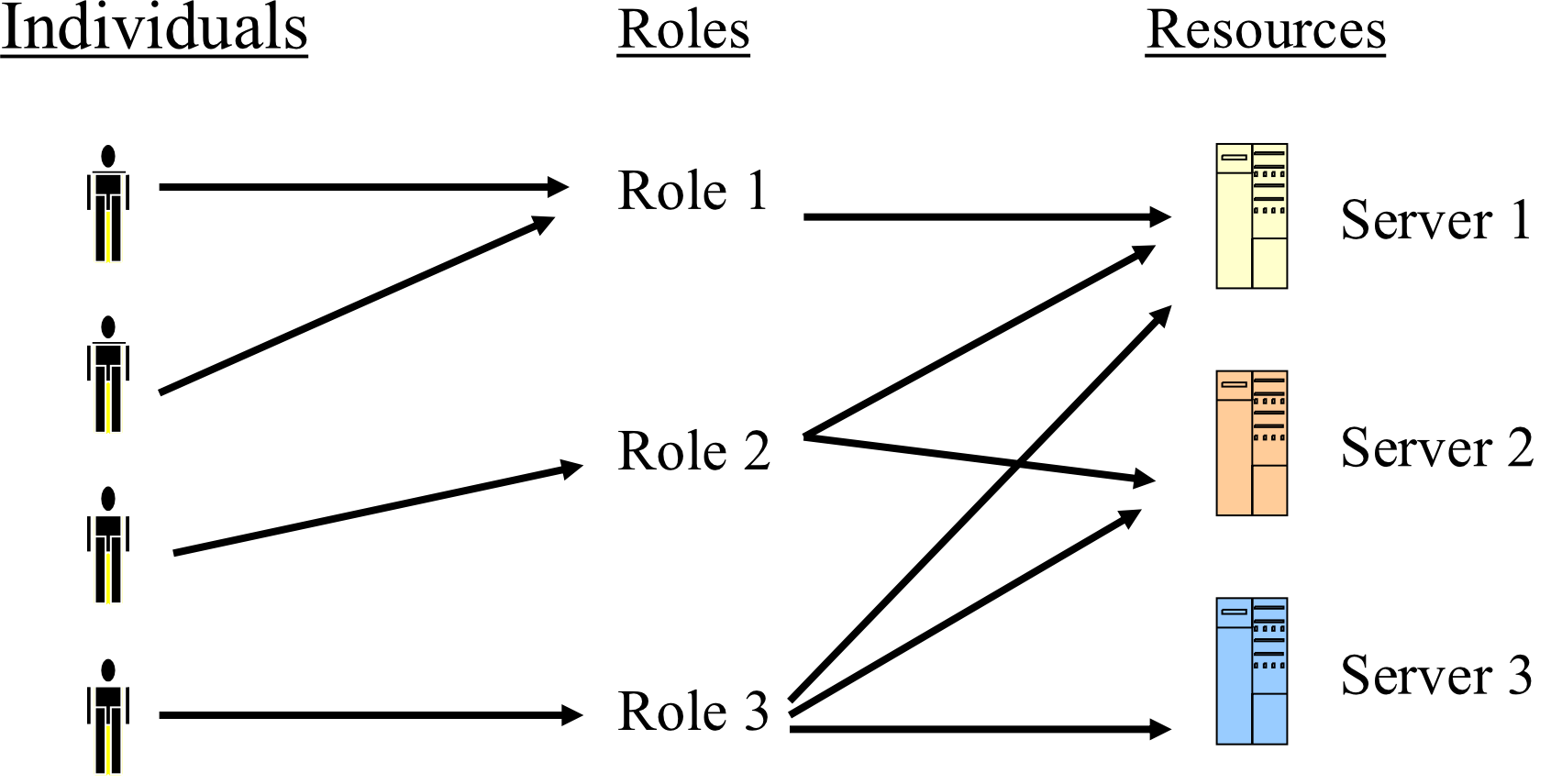
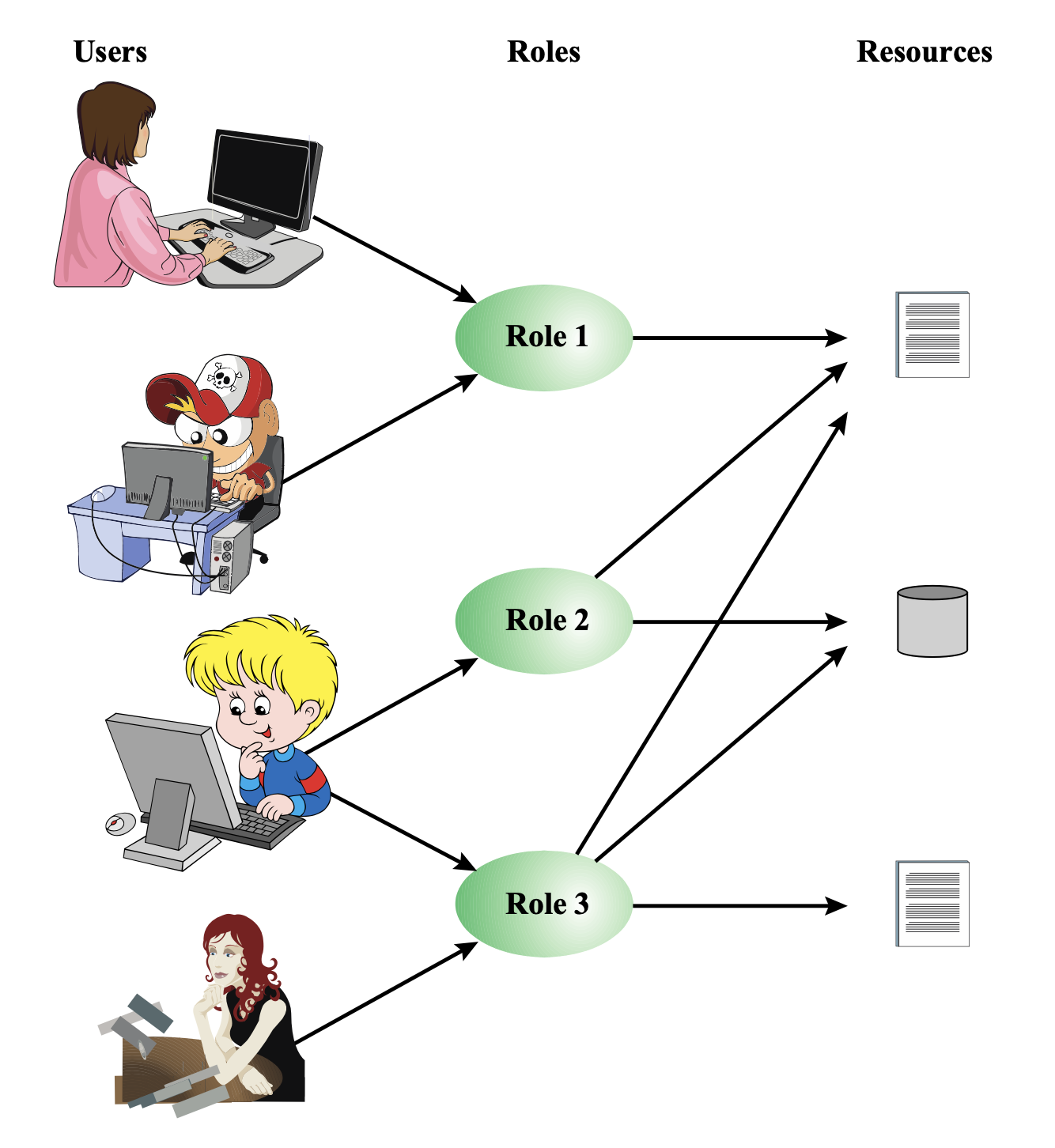
- A user has access to an object based on the assigned role
- Roles are defined based on job functions
- e.g., Accountant, IT Support, IT Manager, CFO, CEO, CIO
- IT Department → Programmer, System Analyst, Tester, Security Admin, System Admin, Network Staff
- Permissions are defined based on job authority and responsibilities
- Operations on an object are invoked based on the permissions
- The object is concerned with the user's role, not the user itself
Analogy: RBAC is like a hospital — a nurse can administer medication, a doctor can prescribe, but a janitor cannot access patient records. When a person leaves a role, they automatically lose those permissions.
Key Advantage
- Users change frequently, Roles don't
- Reduces administrative overhead when people join/leave
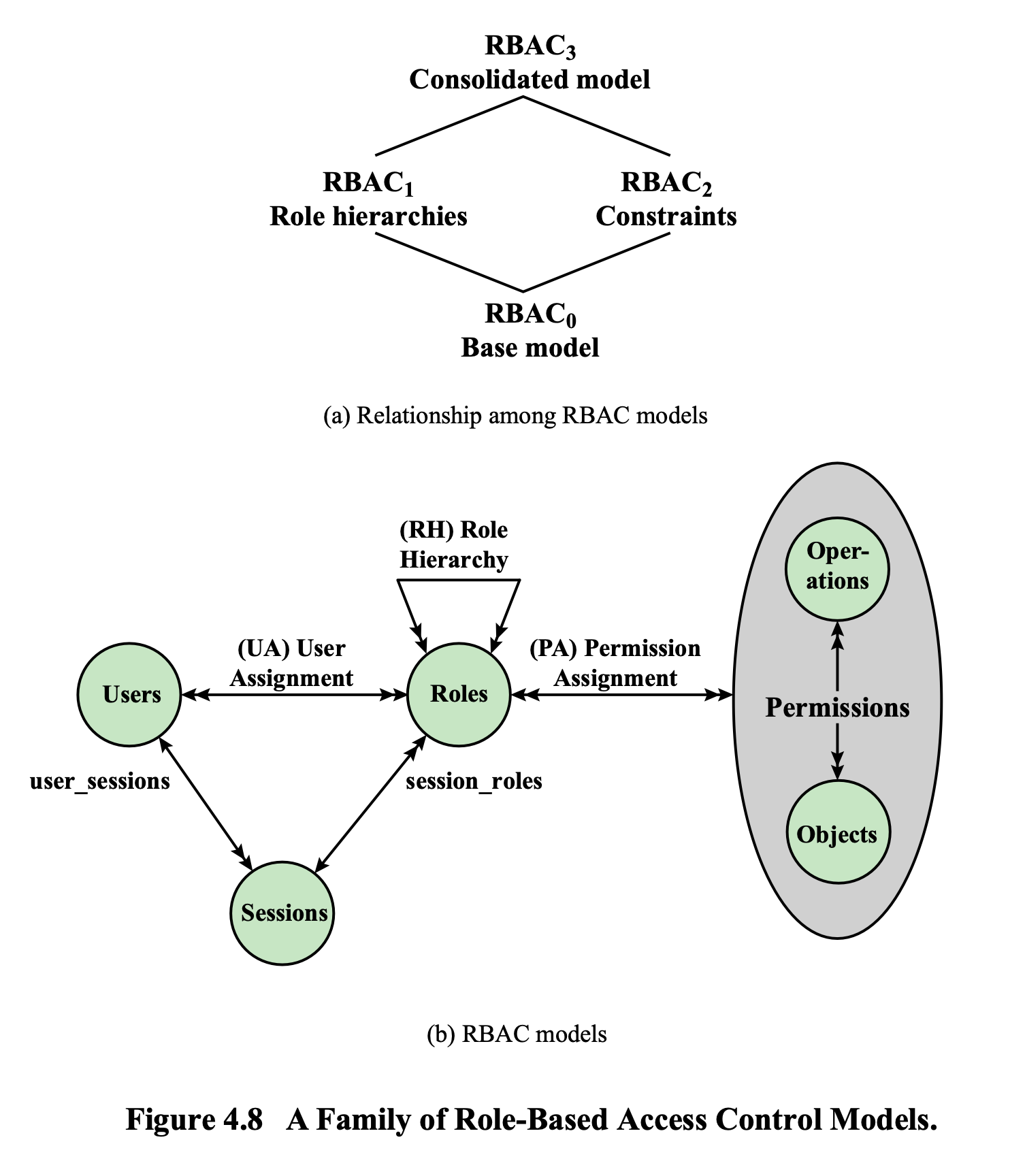
RBAC Framework Model Components
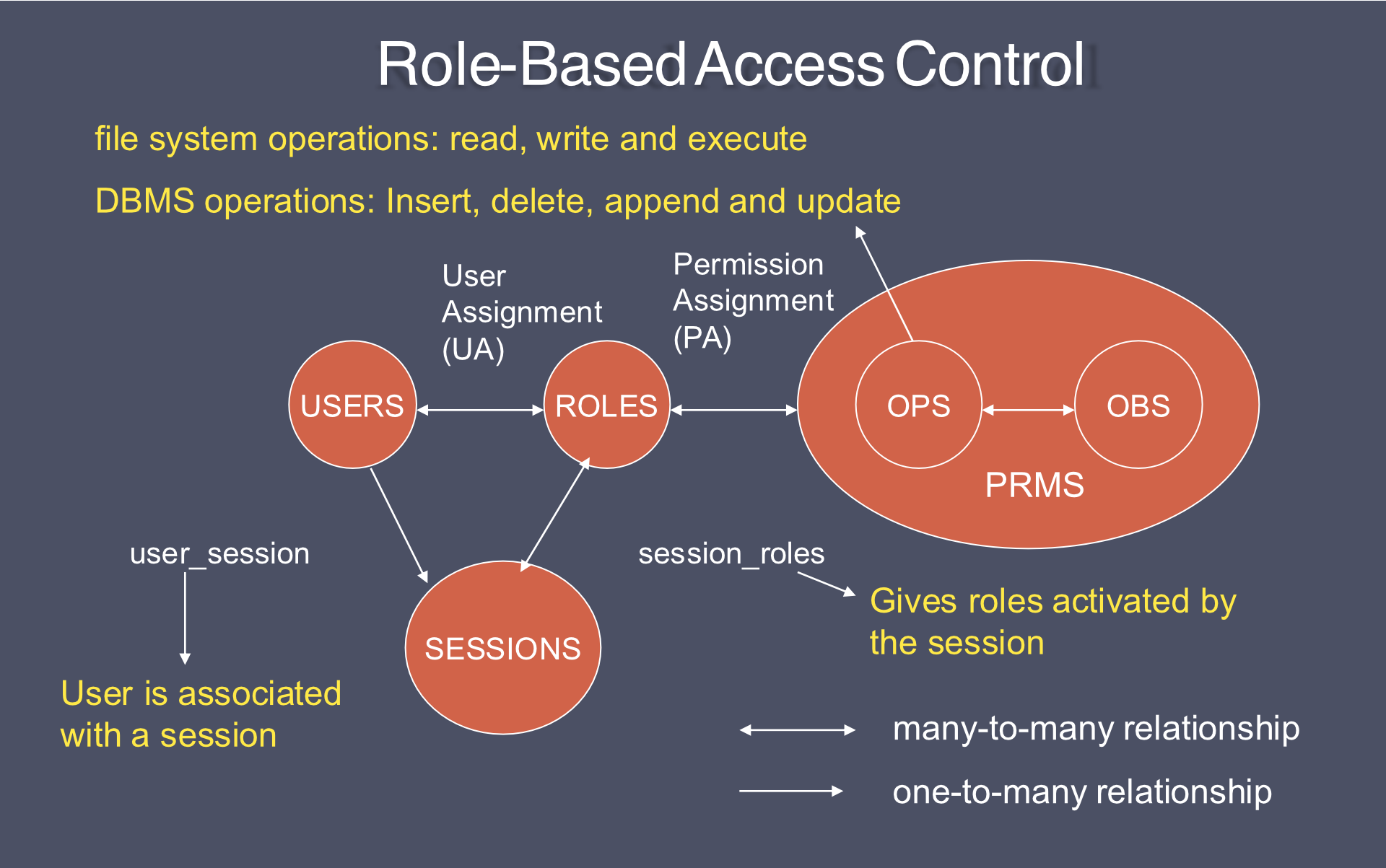
1. Core RBAC ()
- Introduces role activation as part of a user's session
- Required in any RBAC system
- Other components are independent and may be implemented separately
- Entities: USERS, ROLES, SESSIONS, OPS (Operations), OBS (Objects), PRMS (Permissions)
- User Assignment (UA): many-to-many relationship between users and roles
- Permission Assignment (PA): many-to-many relationship between roles and permissions
- user_session: user is associated with a session (one-to-many)
- session_roles: gives roles activated by the session
- File system operations: read, write, execute
- DBMS operations: insert, delete, append, update
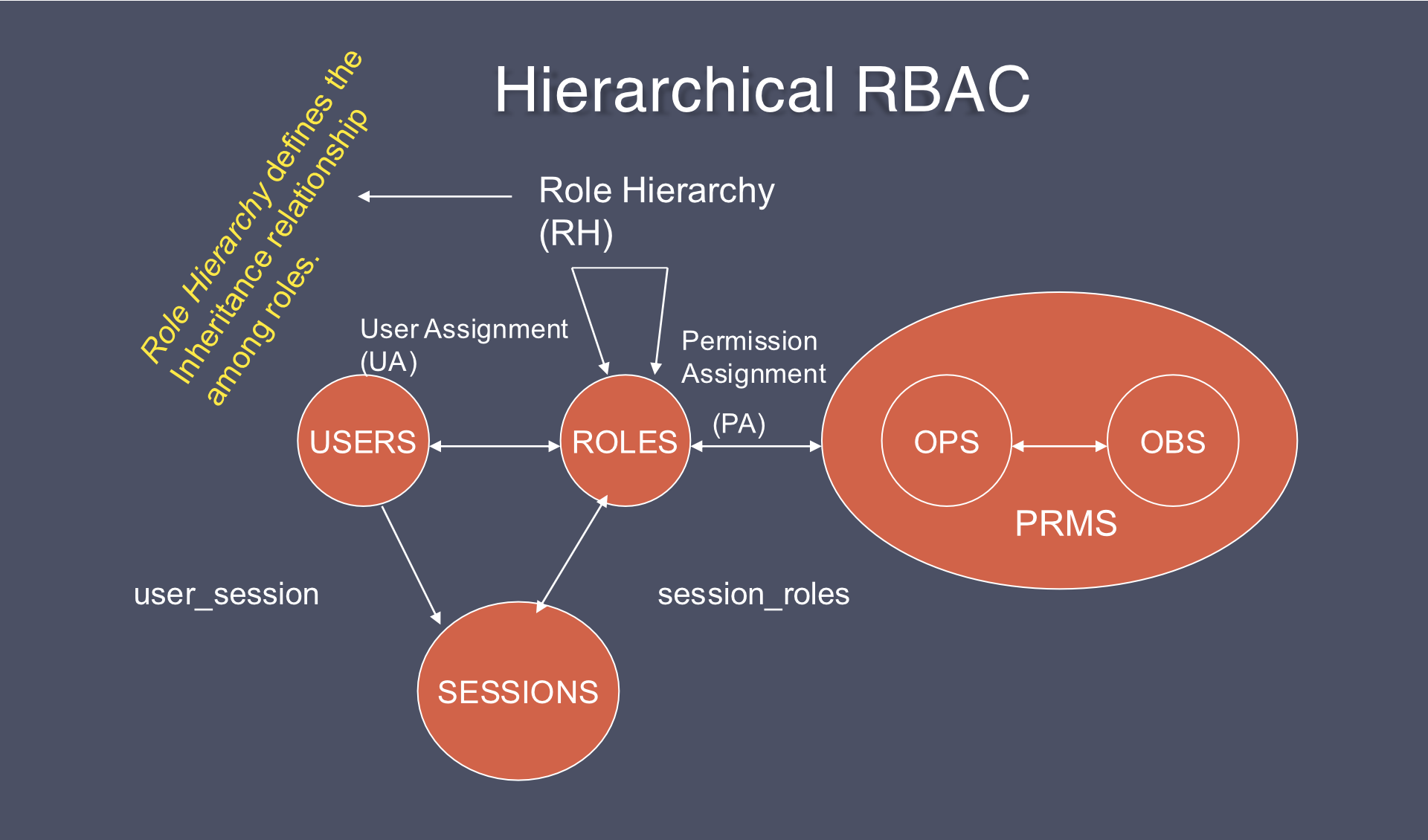
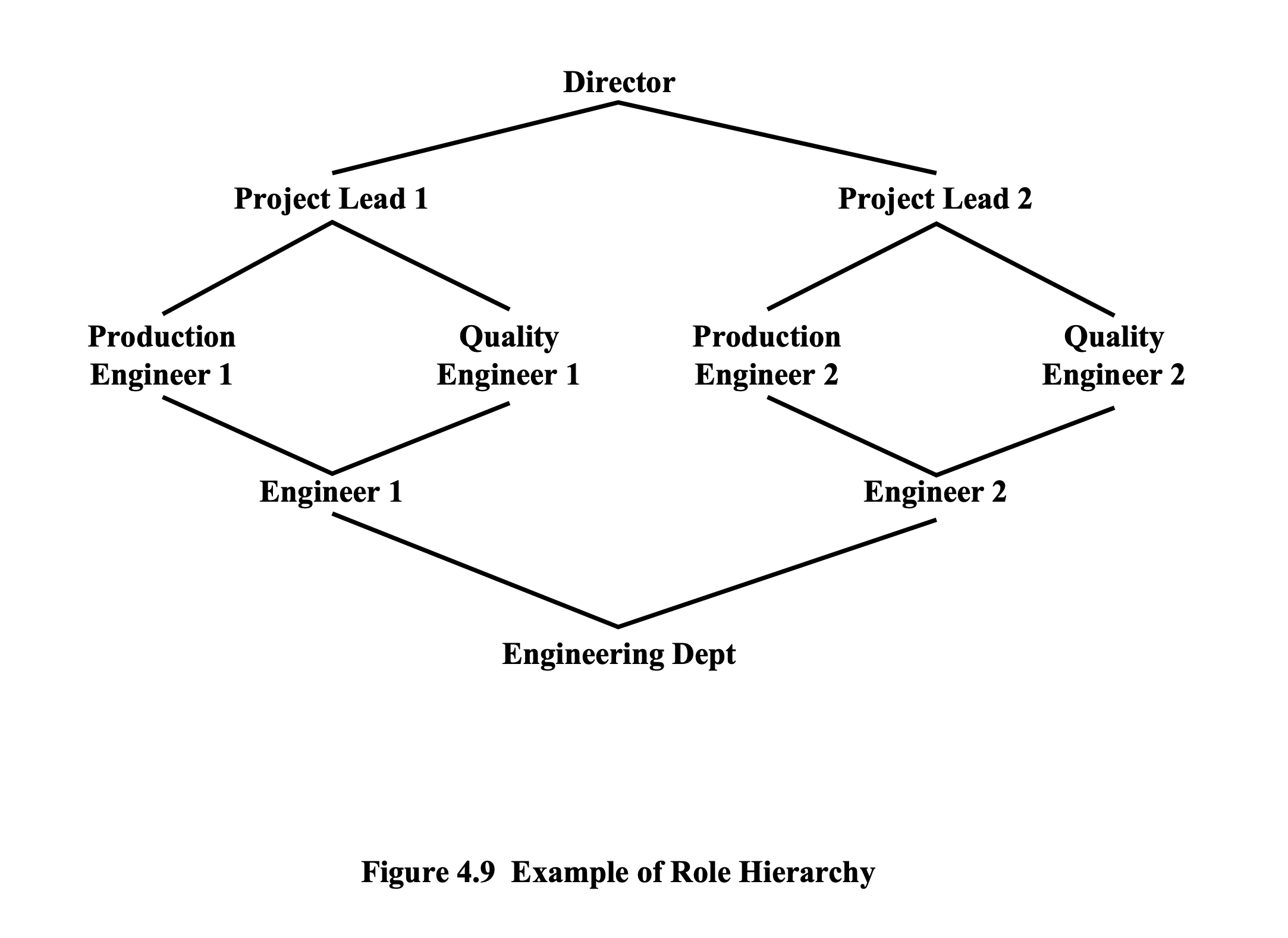
2. Hierarchical RBAC ()
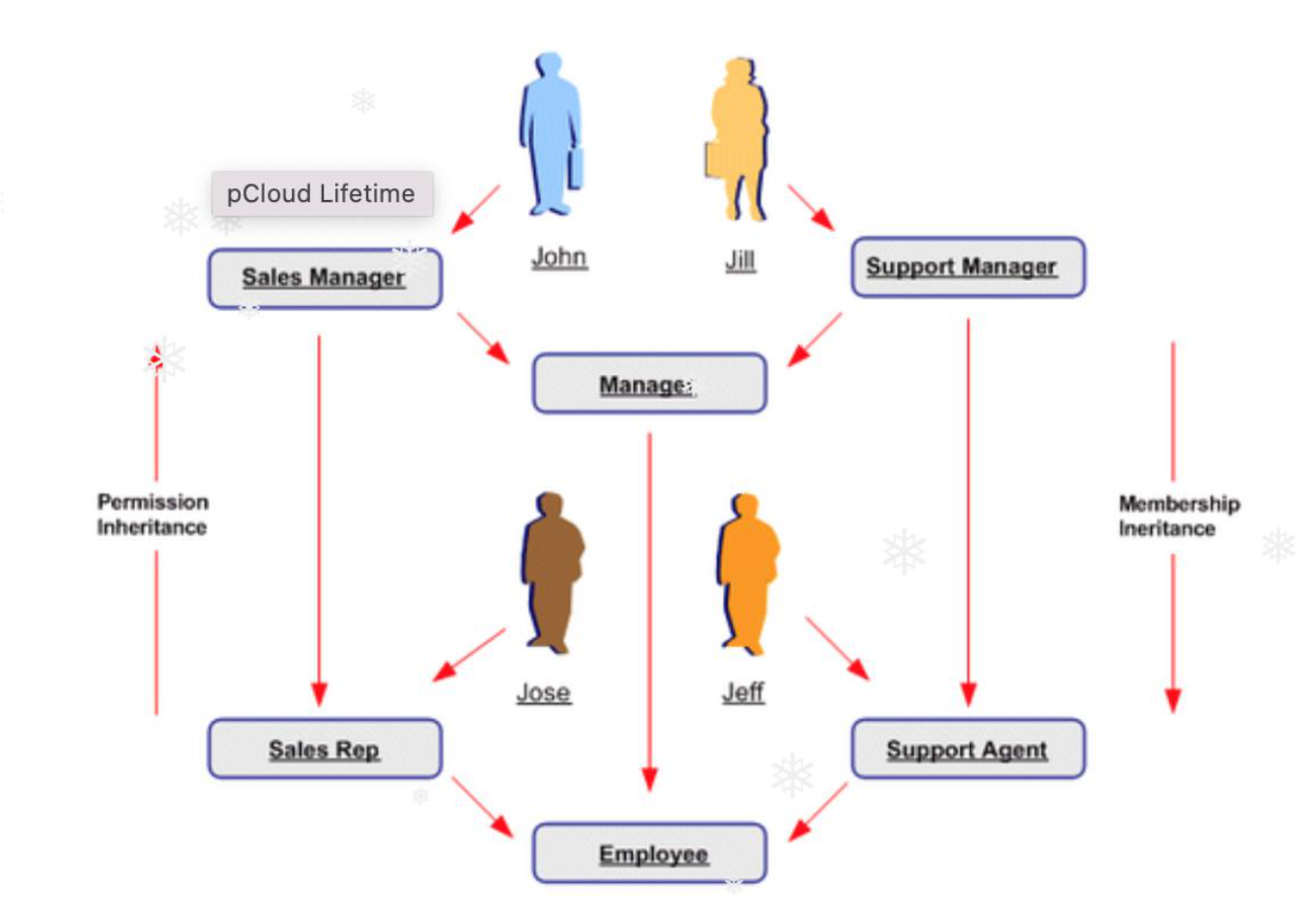
- Adds Role Hierarchy (RH) for inheritance among roles
- General role hierarchies — multiple inheritance of permissions and user membership
- Limited role hierarchies — role may have multiple ascendants but only one immediate descendant
- Example:
- Role Specialist inherits permissions of Doctor and Intern
- Role Cardiologist inherits from Specialist
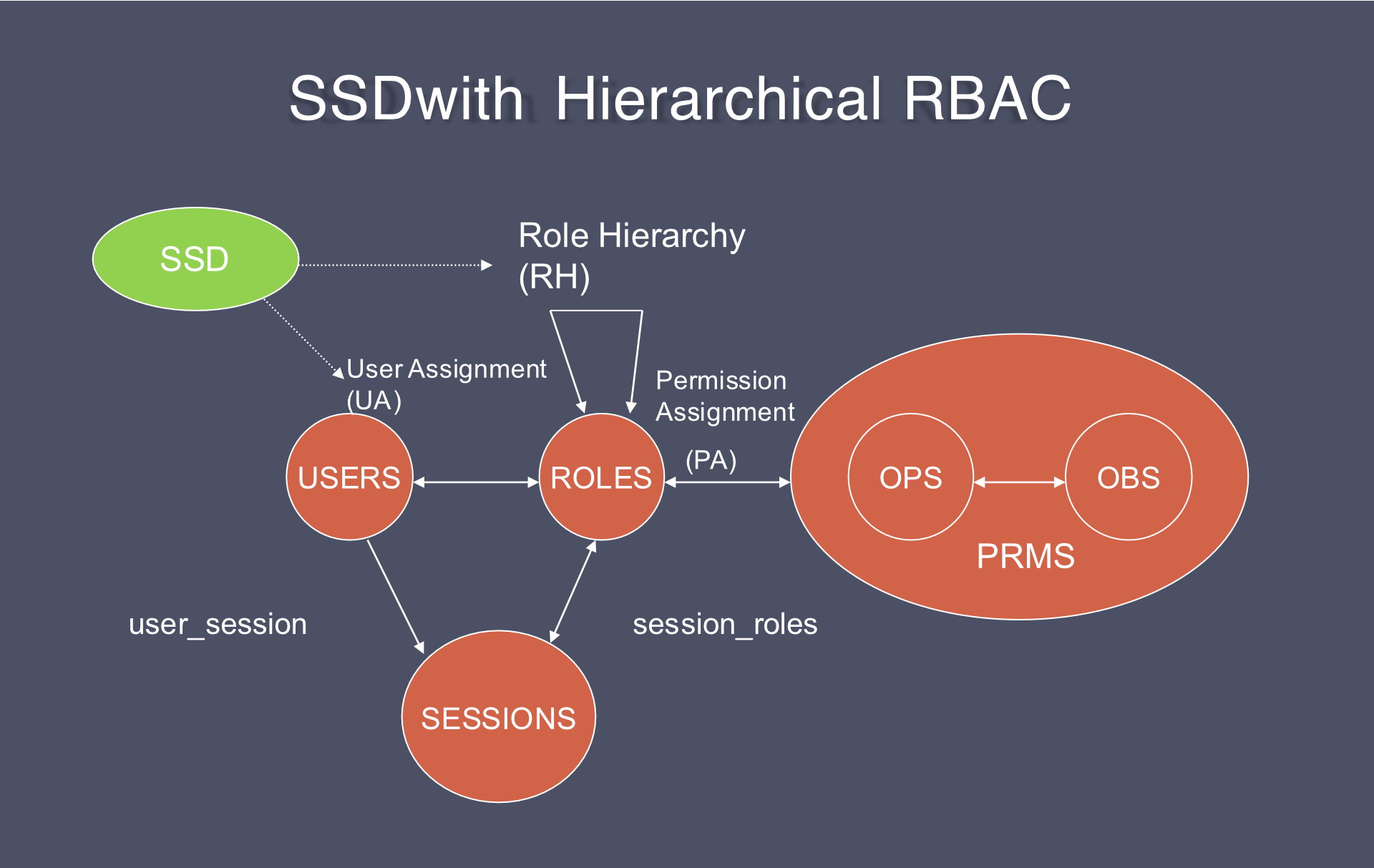
3. Static Separation of Duty (SSD) Relations
- Adds exclusivity constraints among roles w.r.t. user assignments
- Prevents conflict of interests: ==user cannot be authorized for both conflicting roles==
- SSD relations are specified for any pair of roles that conflict
- Example: A bank employee cannot be both Teller and Auditor
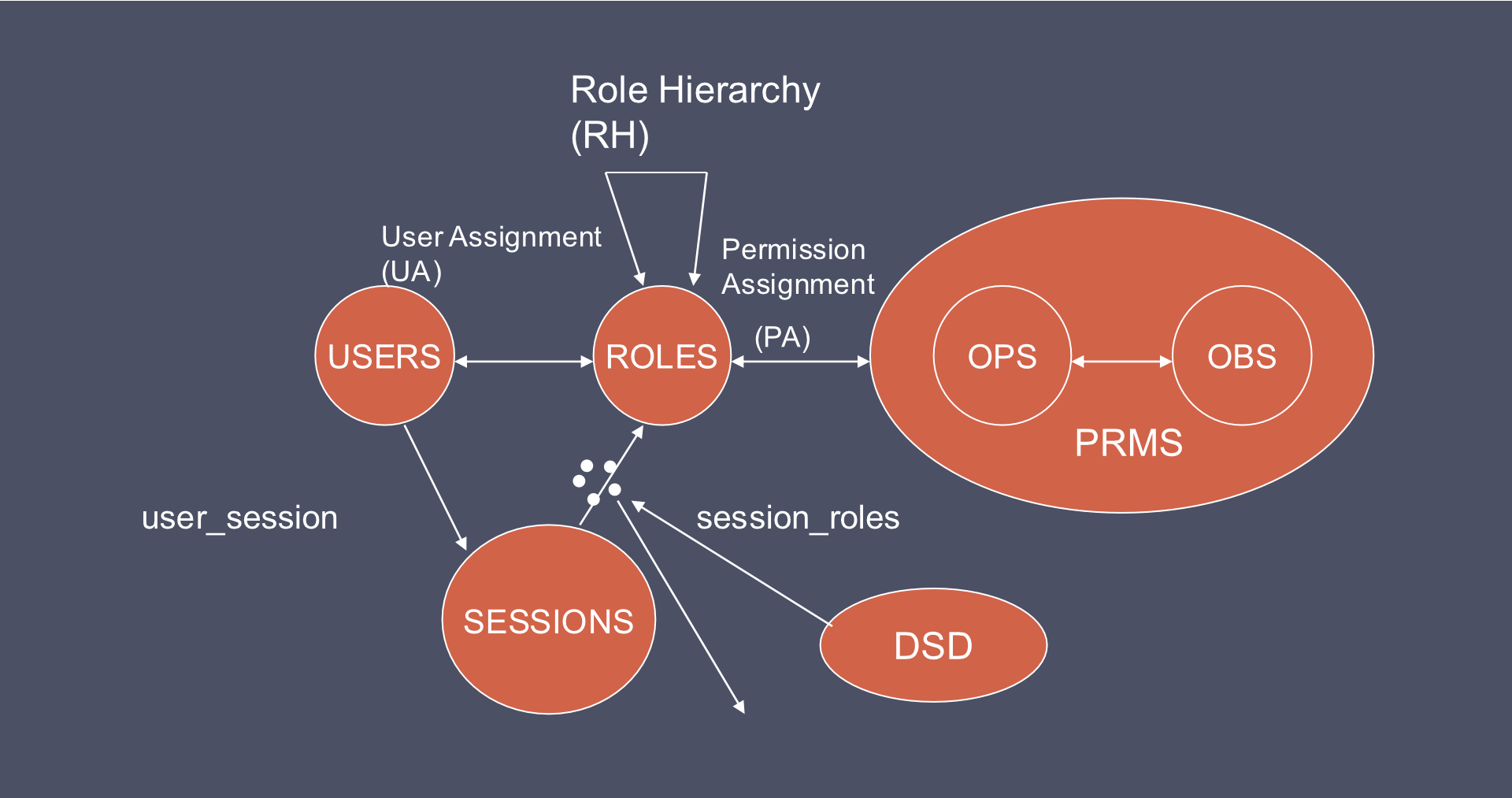
4. Dynamic Separation of Duty (DSD) Relations
This constraint is enforced on the session.
- Adds exclusivity w.r.t. roles activated in a user's session
- User cannot act simultaneously in both conflicting roles
- If one role in a DSD relation is activated, the related (conflicting) role cannot be activated in the same session
- Provides greater operational flexibility than SSD
SSD vs DSD
| Aspect | SSD | DSD |
|---|---|---|
| Constraint scope | Authorization level (permanent) | Session level (runtime) |
| Example | Teller ≠ Auditor (cannot hold both) | Teller ≠ Account Holder (cannot act simultaneously) |
| Flexibility | Less flexible | More flexible |
Analogy: SSD = You can never have both a driver's license and a taxi driver permit. DSD = You can have both, but can't use them at the same time.
RBAC Models Family
- — Base Model (Core RBAC)
- — Role Hierarchies (Core + Hierarchical)
- — Constraints (Core + SSD/DSD)
- — Consolidated Model (Core + Hierarchical + Constraints)
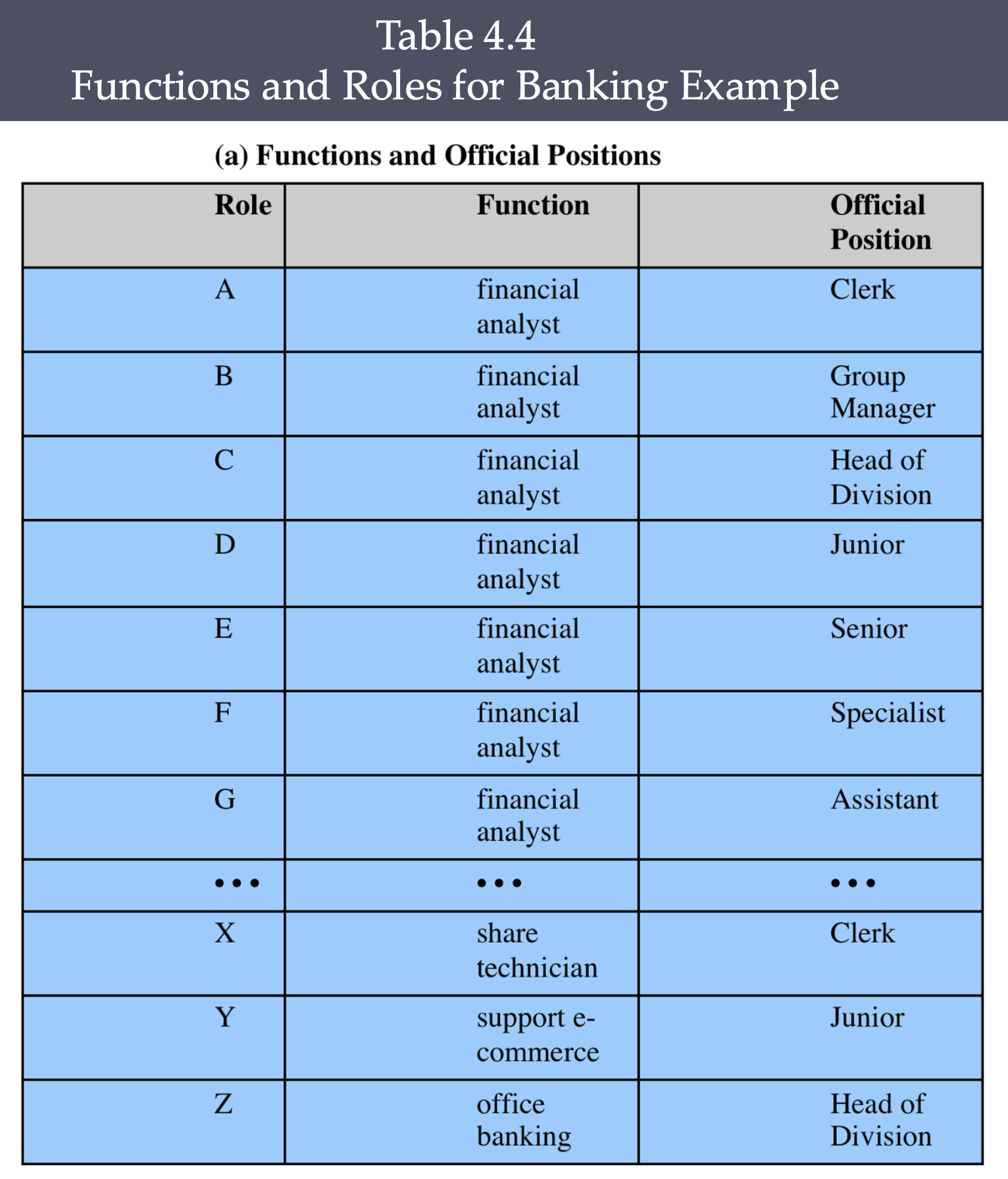
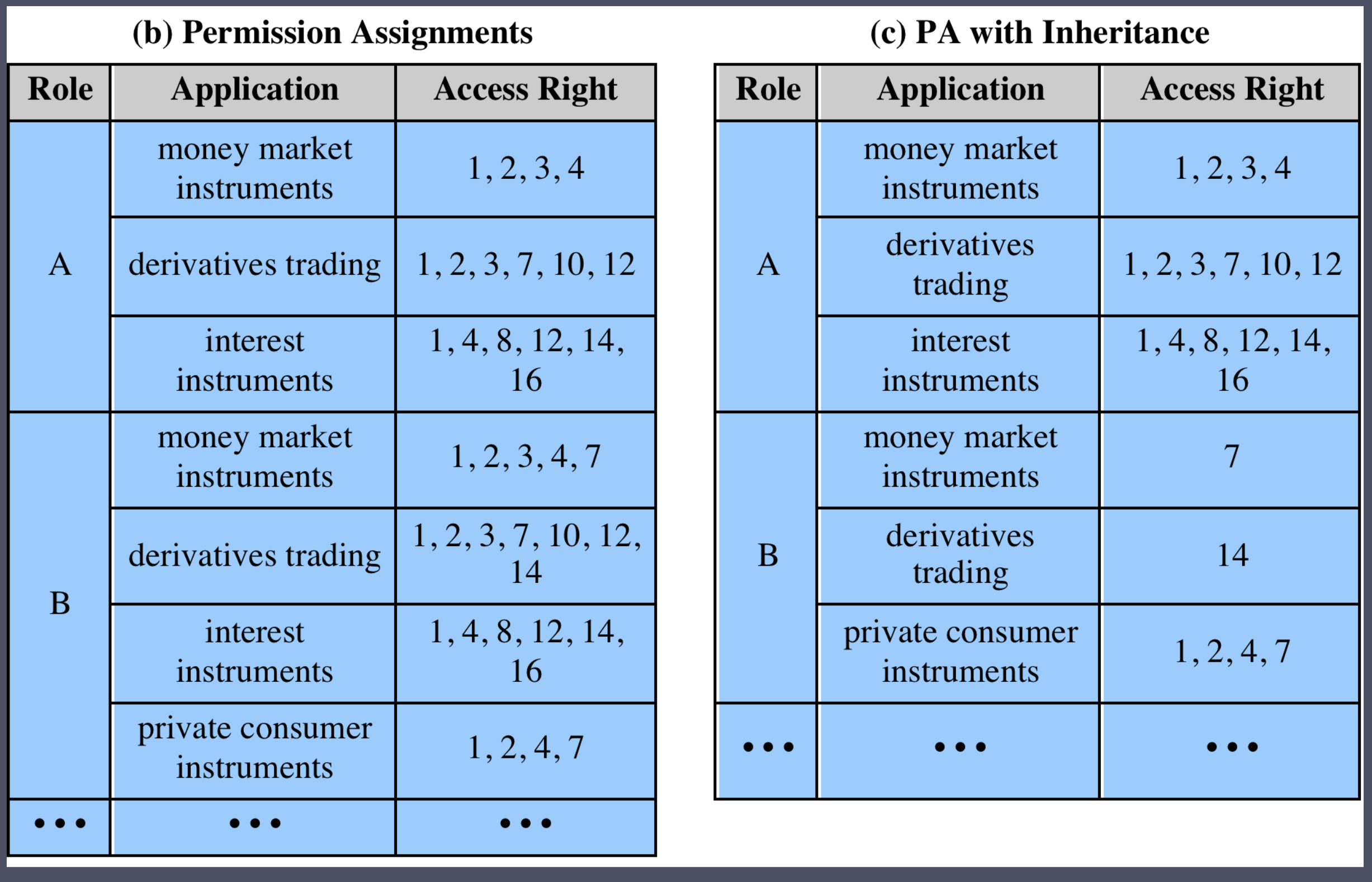
#FinalExam ให้ตารางมาเป็นแบบนี้ แล้วให้แปลงเป็น Code
.jsonอะไรวะ งง / XACML รึเปล่า
Constraints in RBAC
- Provide a means of adapting RBAC to administrative and security policies
Types of Constraints
- Mutually Exclusive Roles
- A user can only be assigned to one role in the set
- Any permission can be granted to only one role in the set
- Cardinality
- Setting a maximum number with respect to roles
- e.g., Role Approver (max 3), Role Maker (max 10)
- Prerequisite Roles
- A user can only be assigned to a role if already assigned to some other specified role
- e.g., TA Role requires the person to already be a graduate student
Privilege (Least Privilege Principle)
- Roles are engineered based on the Principle of Least Privilege (PoLP)
- Least Privilege = minimal privilege to be given to each individual user
- A role contains the minimum amount of permissions to instantiate an object
- A user is assigned to a role that allows only what's required for that role
- No single role is given more permission than the same role for another user
Least Privilege
This concept is very important, maybe in #FinalExam , do not over-privilege assignment
- Users receive only essential permissions for their tasks
- e.g., A database retrieval account should not have admin rights
- e.g., A code developer should not have access to financial data
Zero-Standing Privilege (ZSP)
Very secure!! ออกสอบแน่นอน ไปทำความเข้าใจด้วย!
- Core Goal: Remove all persistent, standing privileged access rights to minimize the attack surface.
- How it Works: Instead of a user having permanent admin rights, they request access for a specific task, which is automatically revoked after a set time.
- Benefits: Reduces cyber risk, aids in regulatory compliance (e.g., GDPR, HIPAA), and mitigates insider threats.
- Implementation: Requires a Privileged Access Management (PAM) solution to manage, monitor, and audit privileged sessions.
- Challenges: Potential for reduced user productivity, complexities in implementation, and the need for robust, automated workflows.
Attribute-Based Access Control (ABAC)
- Can define authorizations that express conditions on properties of both the resource (object) and the subject
- Strength: flexibility and expressive (comprehensive, very detailed) power
- ABAC → Higher expressiveness (compared to RBAC)
- It’s called ‘‘Fine-grained AC Policy’ → individual level, while RBAC is Coarse-grained because it’s enforce on role level.
- Main obstacle: performance impact of evaluating predicates on both resource and user properties for each access
- Web services pioneered ABAC through XACML (eXtensible Access Control Markup Language)
- Considerable interest in applying ABAC to cloud services
ABAC Model: Attributes
- Subject Attributes
- Active entity causing information to flow or changing system state
- Attributes define identity and characteristics
- Examples: Username, Employee ID, Job Title, Department, Clearance
- Object Attributes
- Passive information system entity containing or receiving information
- Objects have attributes that can be leveraged for access decisions
- Examples: Type, Author/Owner, Classification, Date Created, Last Updated
- Environment Attributes
- Context-based
- Describe operational, technical, and situational context
- Examples: Location, Time Zone, Current Time, Current Day, Device
- Often largely ignored in most access control policies
- Action Attributes
- Examples: Read, Write, View, Transfer, Delete
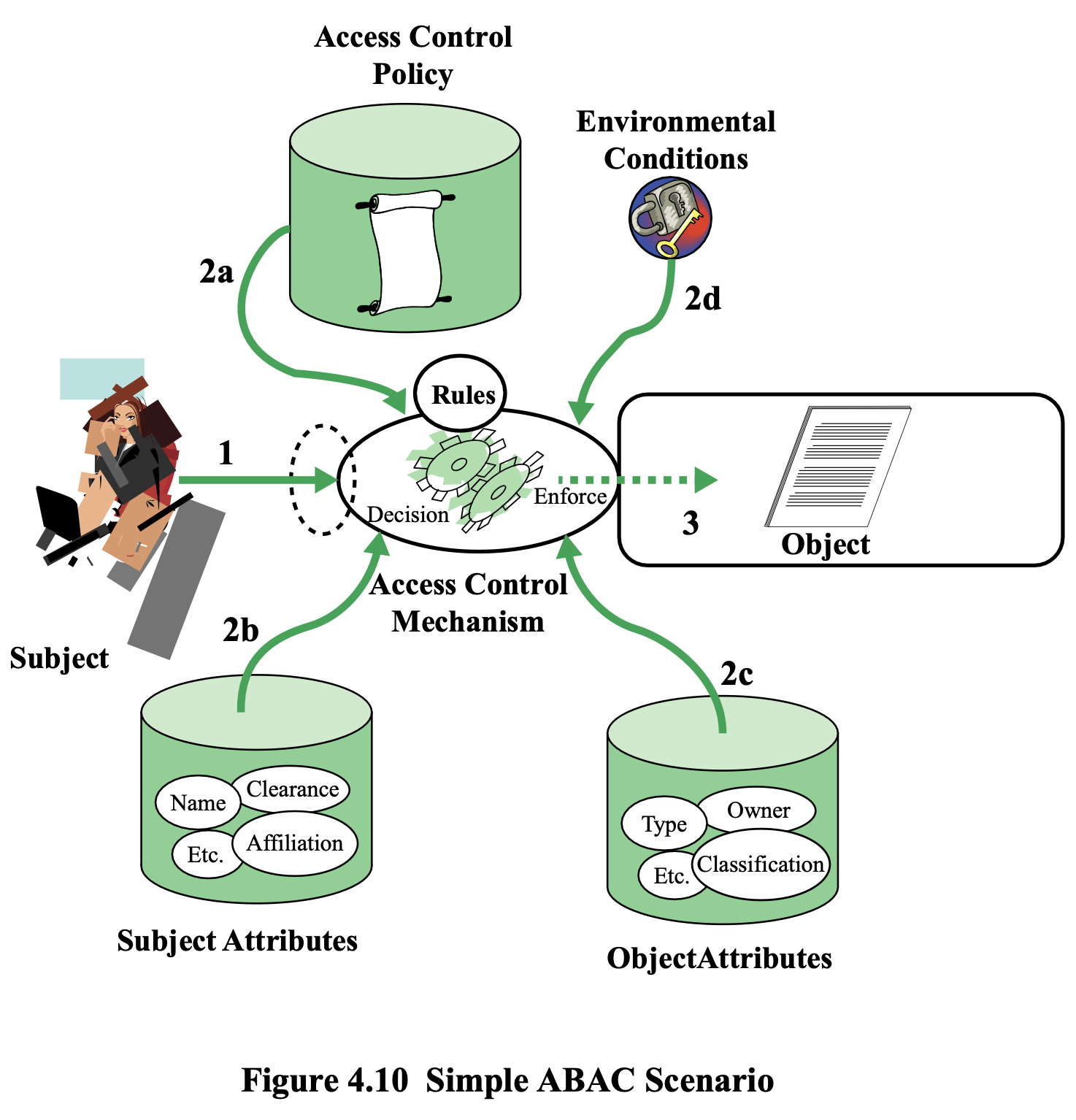
How ABAC Works
- Subject makes an access request
- Access Control Mechanism evaluates:
- 2a. Access Control Policy (rules)
- 2b. Subject Attributes
- 2c. Object Attributes
- 2d. Environmental Conditions
- Decision is made and enforced on the Object
ABAC Characteristics
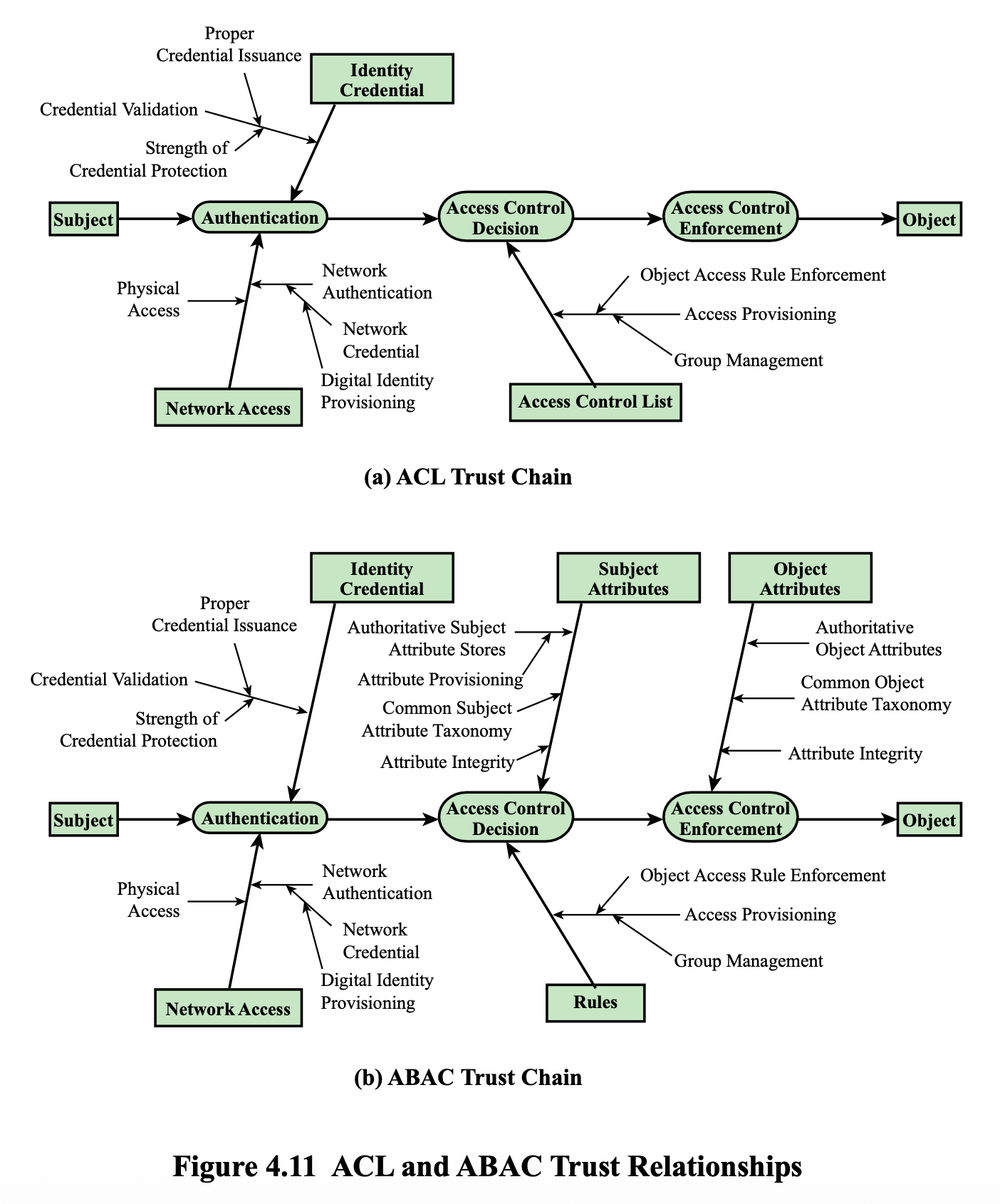
- Distinguishable because it controls access by evaluating rules against attributes of entities, operations, and the environment
- Relies upon subject attributes, object attributes, and a formal relationship/access control rule
- Systems are capable of enforcing DAC, RBAC, and MAC concepts
- Allows an unlimited number of attributes to be combined to satisfy any access control rule
ABAC Policies
- A policy = a set of rules and relationships governing allowable behavior, based on:
- Privileges of subjects
- How resources/objects are to be protected
- Under which environment conditions
- Typically written from the perspective of the object that needs protecting
- Privileges = authorized behavior of a subject, defined by authority, embodied in policy
- Other terms: rights, authorizations, entitlements
ABAC Policy Examples
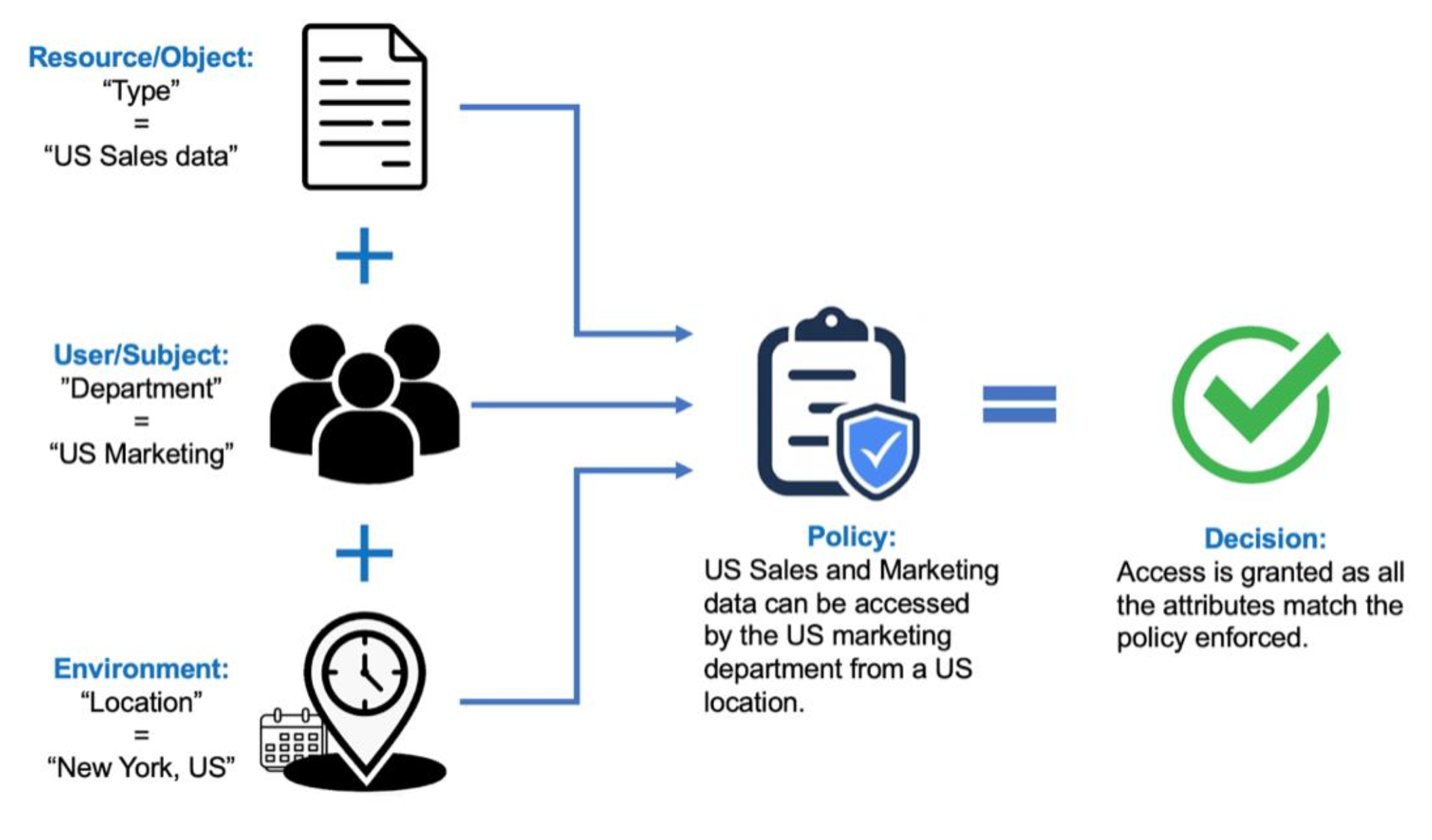
Example 1 — Access Granted:
- Resource/Object: Type = "US Sales data"
- User/Subject: Department = "US Marketing"
- Environment: Location = "New York, US"
- Policy: US Sales and Marketing data can be accessed by the US marketing department from a US location
- Decision: ✅ Access Granted (all attributes match)
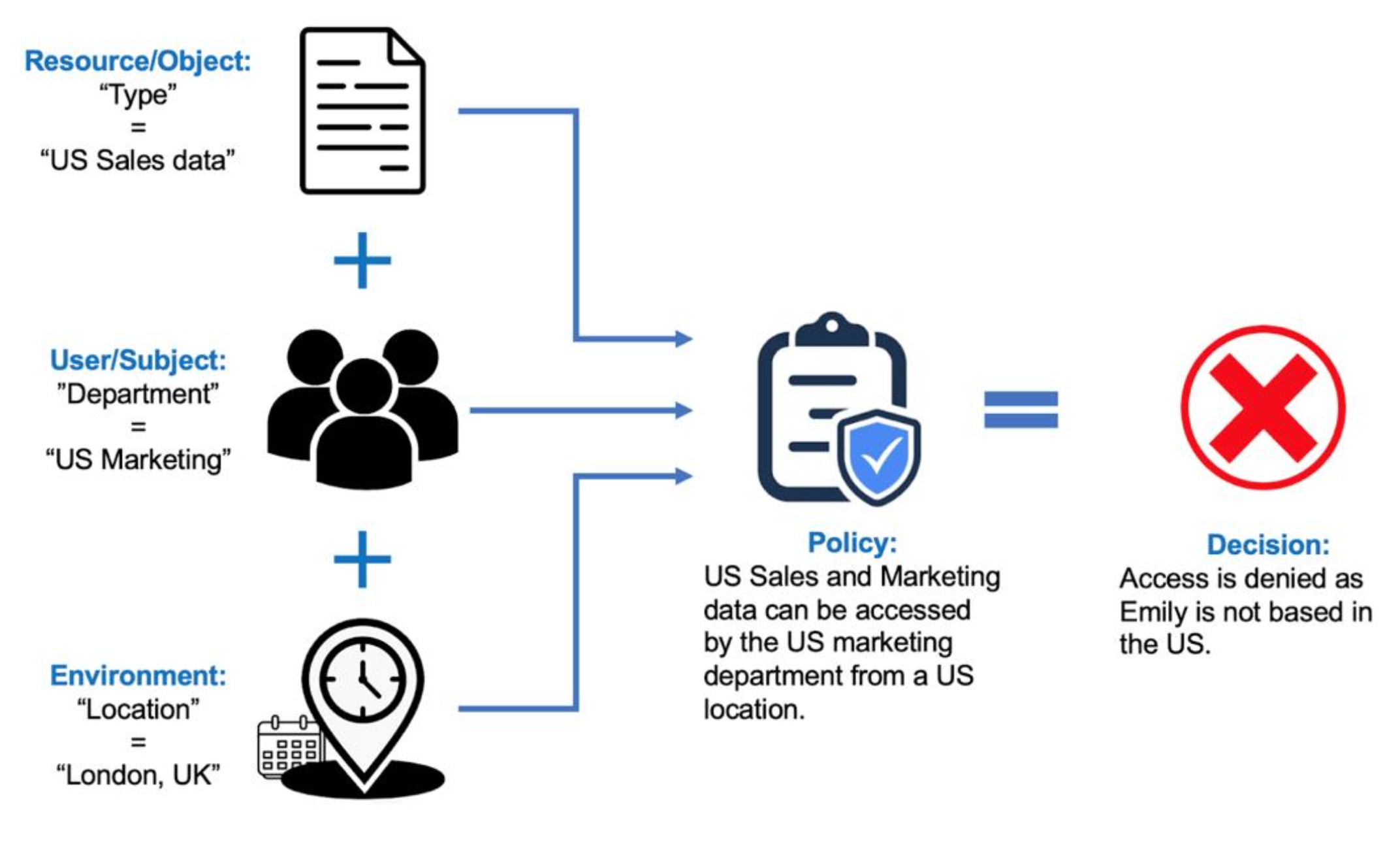
Example 2 — Access Denied:
- Resource/Object: Type = "US Sales data"
- User/Subject: Department = "US Marketing"
- Environment: Location = "London, UK"
- Policy: Same as above
- Decision: ❌ Access Denied (Emily is not based in the US)
RBAC vs ABAC
| Aspect | RBAC | ABAC |
|---|---|---|
| Granularity | Coarse-grained AC | Fine-grained AC (individual user level) |
| Implementation | Easy to maintain and implement (เรา assign แค่ role ไง มันไม่ต้องมาทำทุกคน) | More difficult to implement |
| Policy format | Rule-based, DB | Rule-based, XACML |
Identity, Credential, and Access Management (ICAM)
- A comprehensive approach to managing and implementing digital identities, credentials, and access control
- Developed by the U.S. government
- Designed to:
- Create trusted digital identity representations of individuals and nonperson entities (NPEs)
- Bind those identities to credentials that may serve as a proxy in access transactions
- A credential = an object/data structure that authoritatively binds an identity to a token
- Use the credentials to provide authorized access to an agency's resources
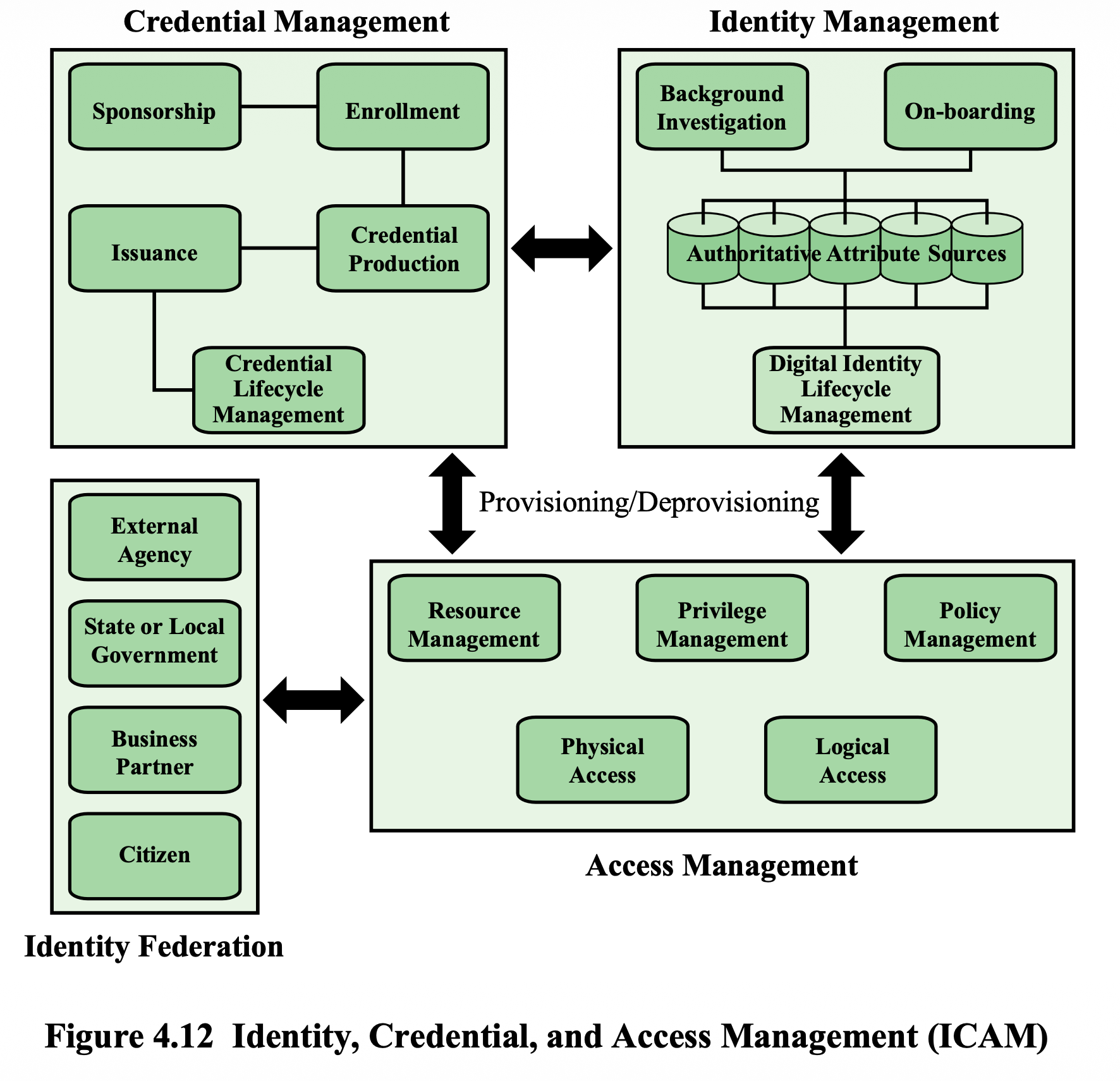
Three Core Components
1. Identity Management
- Concerned with assigning attributes to a digital identity and connecting it to an individual/NPE
- Goal: Establish a trustworthy digital identity independent of a specific application or context
- Most common approach: create a digital representation of identity for specific application use
- Lifecycle management includes:
- Mechanisms, policies, and procedures for protecting personal identity information
- Controlling access to identity data
- Techniques for sharing authoritative identity data with applications that need it
- Revocation of an enterprise identity
2. Credential Management
- Manages the life cycle of the credential
- Examples of credentials: smart cards, private/public cryptographic keys, digital certificates
- Encompasses five logical components:
- An authorized individual or entity specifying the need for a credential
- Credential Enrollment
- Generation of Credential
- Credential Issuance
- Maintenance
3. Access Management
- Deals with management and control of how entities are granted access to resources
- Covers both logical and physical access
- May be internal to a system or an external element
- Purpose: Ensure proper identity verification when accessing security-sensitive buildings, systems, or data
- Three support elements for enterprise-wide access control:
- Resource management — defining rules for a resource requiring access control (credential requirements, user/resource/environment conditions)
- Privilege management — establishing and maintaining entitlement/privilege attributes that form an individual's access profile; privileges are attributes linked to a digital identity
- Policy management — governs what is allowable and unallowable in an access transaction
Identity Federation
- Describes the technology, standards, policies, and processes that allow an organization to trust digital identities created by another organization
- Addresses two questions:
- How do you trust identities of individuals from external organizations who need access to your systems?
- How do you vouch for identities of your own individuals when they need to collaborate externally?
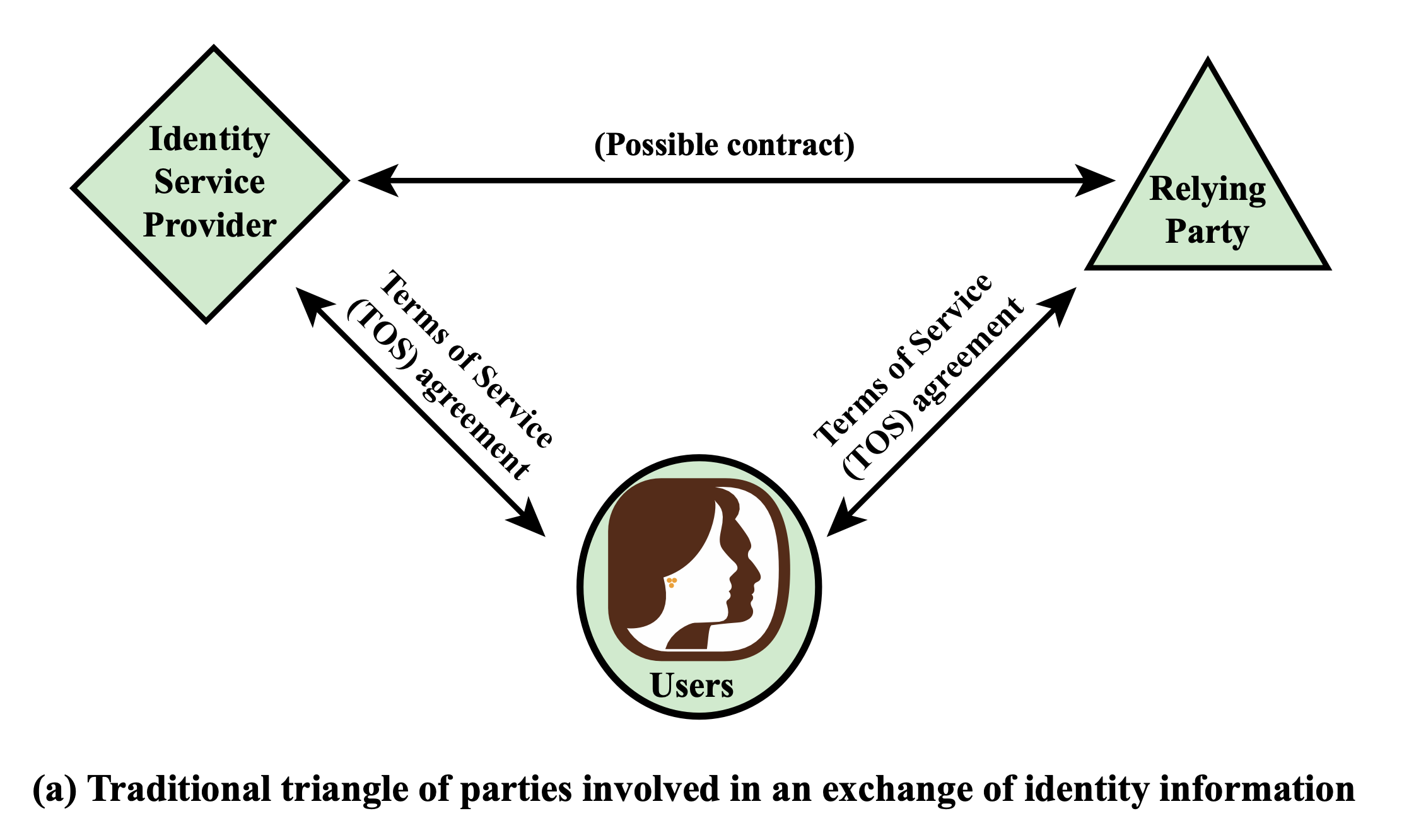
- ถ้า service เรา host บน cloud, relying party ก็อาจจะเป็น cloud proivder
Analogy: Identity Federation is like a university student ID being accepted at a partner university library — you trust the other institution's verification process.
Process
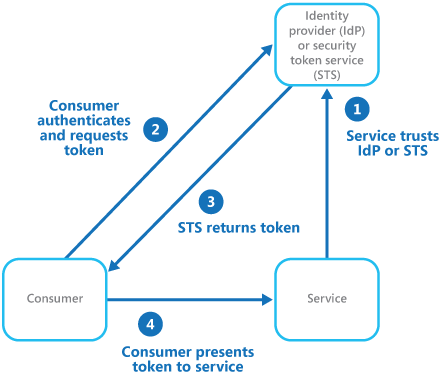
User → Service Provider (SP) → Redirect Authentication → Identity
Azure ID Federation
Google Cloud ID Federation
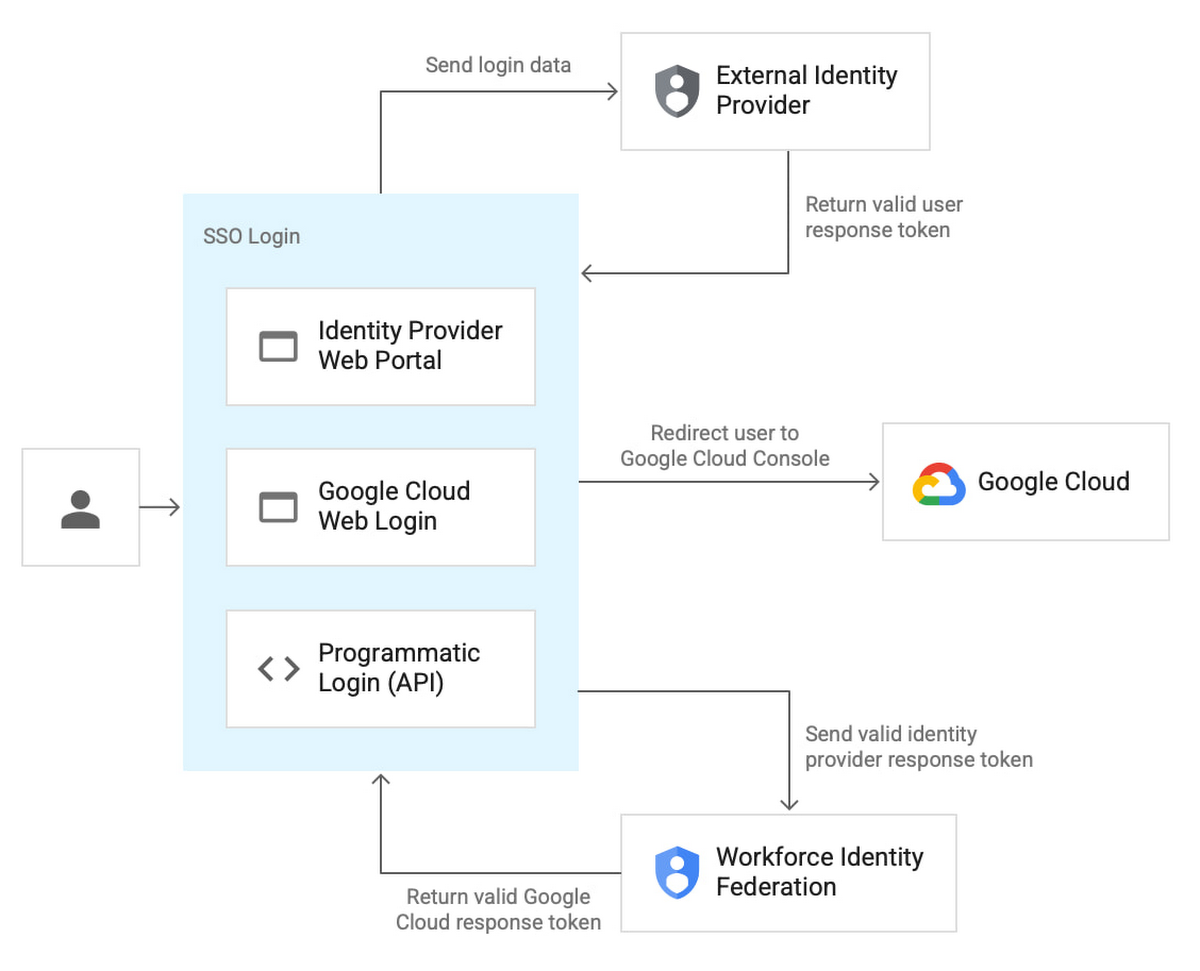
Key: GET ID TOKEN FROM THE ID PROVIDER AND USE THAT TOKEN TO ACCESS MULTIPLE SERVICES
AWS
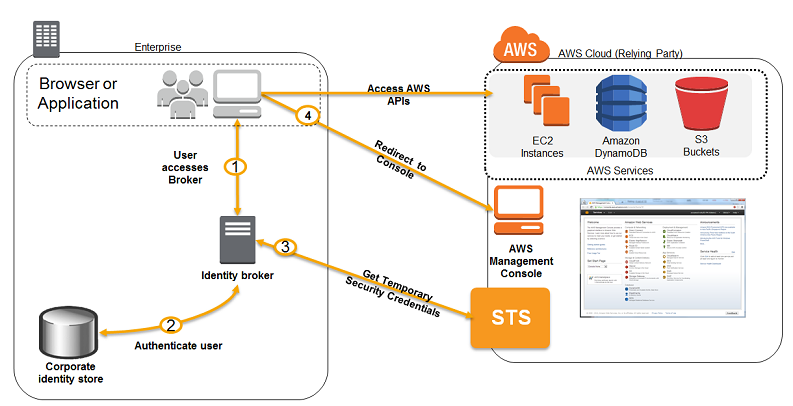
- Zero Trust Identity (Never trust, always verify!!!) → Access decisions depend on:
- identity
- device
- location
- behavior
- Identity Federation in Cloud
- Examples:
- AWS IAM Federation
- Azure AD Federation
- Google Cloud Identity
- Examples:
- Future (Emerging ID Fed) Direction
- Decentralized Identity (DID)
- Self-Sovereign Identity (SSI)
- Blockchain-based identity systems
Federation Attacks and Prevention
Attack
- Token replay attacks
- Man-in-the-middle attacks
- Assertion/Token forgery
Prevention
- Short life-time
- Token binding (to device, certificate, TLS session)
- Use Nonce (prevent reuse)
- Encrypted token payload
- Sign token
- TLS everywhere
- Strict Certificate Validation
Summary
| Topic | Key Concepts |
|---|---|
| Access Control Principles | Context, Policies |
| Subjects, Objects, Access Rights | Three entities in every access control decision |
| DAC | Access matrix, Protection domains |
| UNIX File Access Control | inodes, 12 protection bits, ACLs |
| RBAC | Reference models (RBAC₀–RBAC₃), Hierarchies, SSD, DSD |
| ABAC | Attributes (subject/object/environment/action), XACML |
| ICAM | Identity management, Credential management, Access management, Identity federation |
In-class Group Quiz