Introduction
- In Lecture 2, we discussed processes, assuming each process is single-threaded (a process with one thread).
- Modern operating systems support multi-threaded processes to speed up execution.
The computer system actually runs threads, NOT processes/programs!
- Types of Threads:
- Software Threads – Created by code.
- User Threads – Exist in user space, created by applications.
- Kernel Threads – Exist in kernel space, created by the OS.
- Hardware Threads – Provided by processors (virtual/logical CPU cores).
- Essentially, hardware threads are a set of registers.
- Software Threads – Created by code.
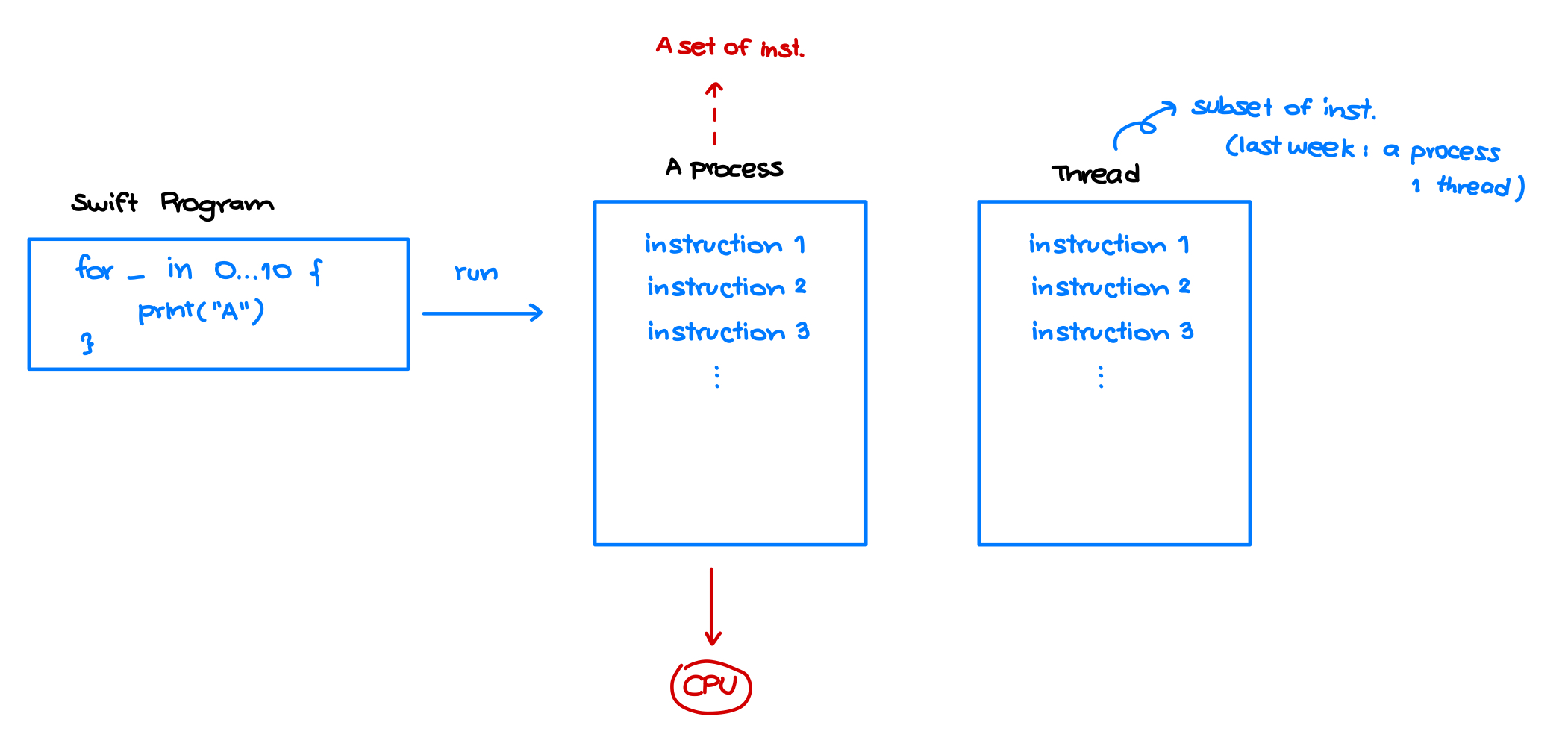
What is a Thread?
- The smallest entity executed by a CPU Core.
- Each thread has its own ID, program counter, registers, and a stack.
- A process can be single-threaded or multi-threaded.
- Threads improve speed through parallel execution.
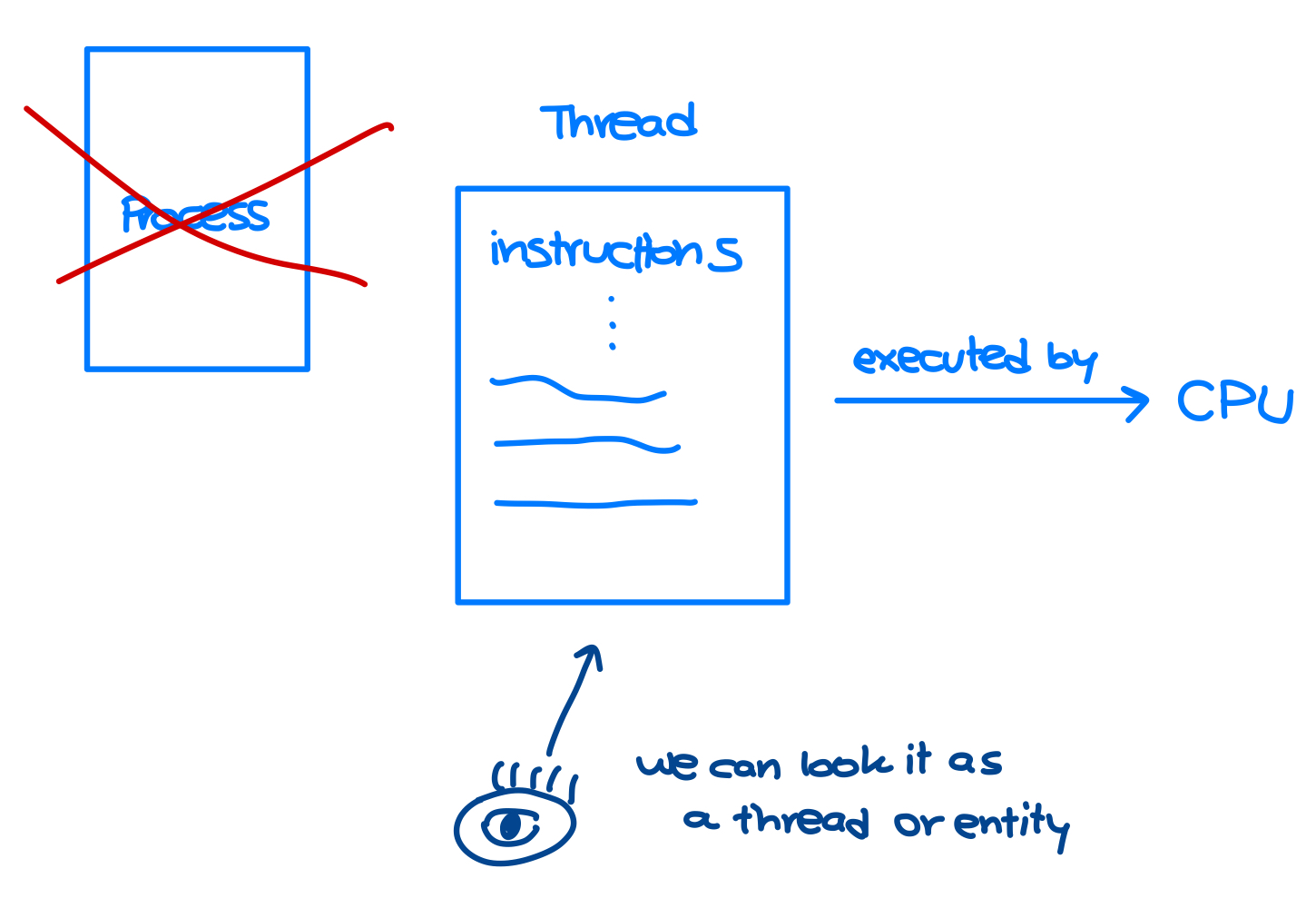
User Threads
- A software thread is an abstraction representing miniprocess.
Program – Process – Thread
-
Program: Executable file with instructions (e.g.,
chrome.exe).Source code written by humans.
-
Process: Running instance of a program (e.g., opening Google Chrome).
Running a program creates a process.
-
Thread: A subset of instructions from a process that runs independently. Each part here is called a (user) thread.
A subset of instructions from a process
-
ข้อดีของ Thread ก็คือ เราสามารถใช้ Multiprocessing ได้ ถ้าเราแบ่ง Thread ออกเป็นหลาย ๆ ส่วนแล้ว ก้ทำงานได้เร็วขึ้นนั่นเอง!
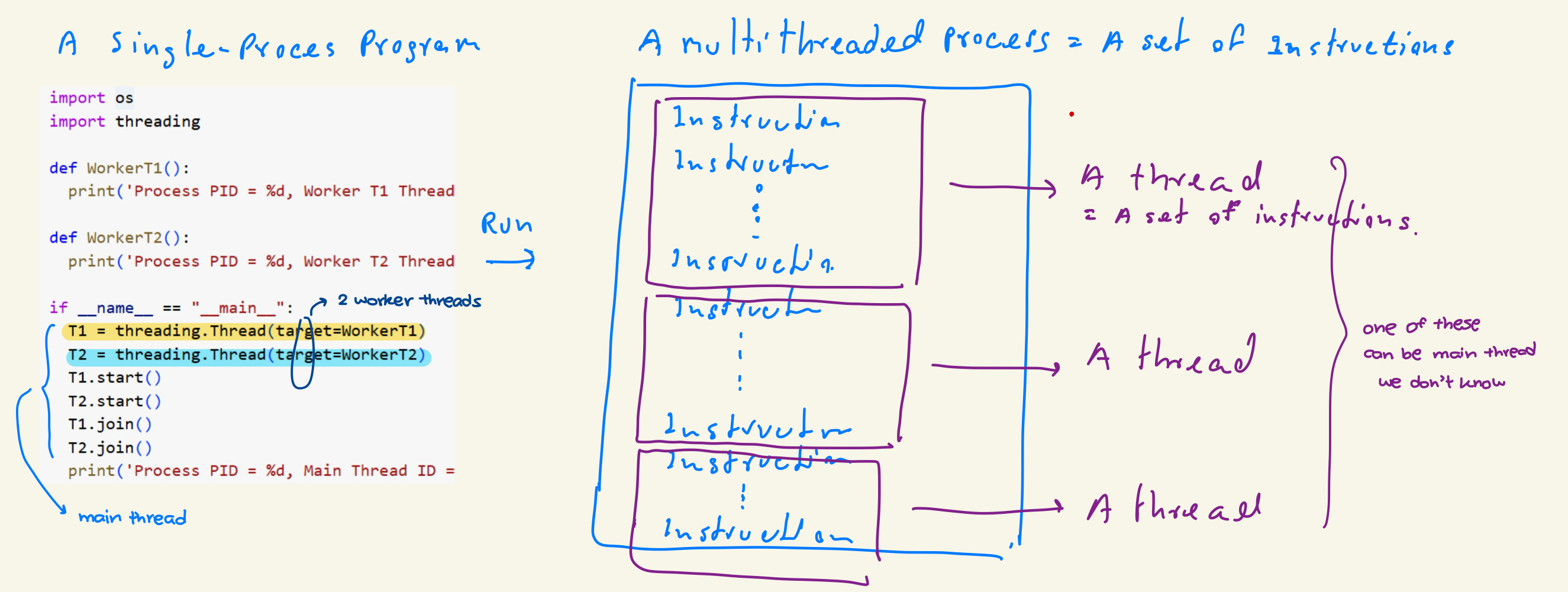
About Threads
- A thread represents an entity executing instructions.
- Also called a mini-process.
- A thread has its own:
- ID, Program Counter, Registers, Stack (Similar to process นะ)
- The thread model operates similarly to the process model.
- Multi-threaded processes use thread APIs provided by the OS.
- We will explore thread APIs later.
Program – Process – Thread
- A process can consist of many threads, known as a multi-threaded process.
- When a process is created, it automatically has one thread called the main thread.
- Additional threads can be created using thread APIs, referred to as worker threads.
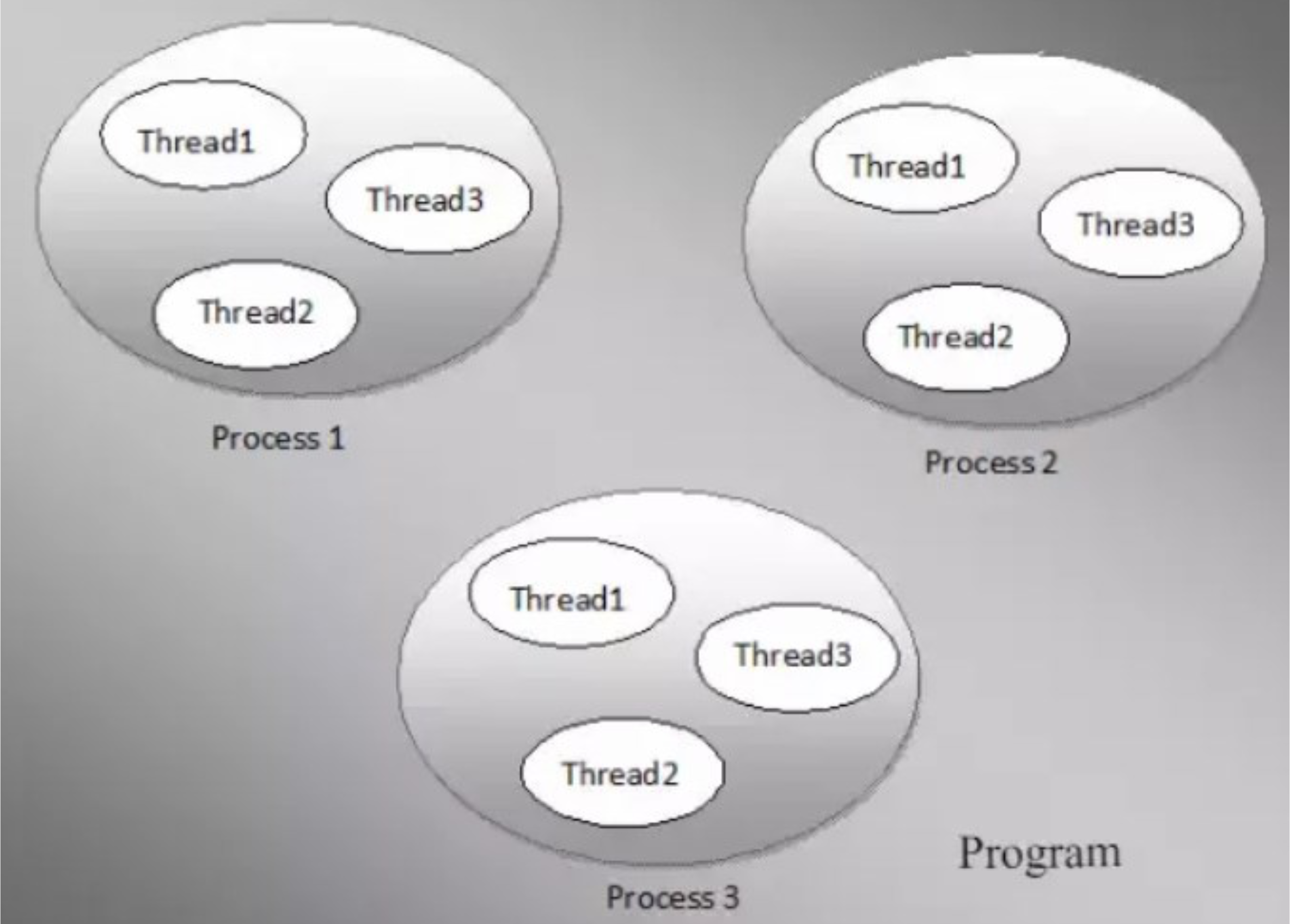
- จากรูปเนี่ย ไม่จำเป็นต้องจำนวน Thread เท่ากันนะ จริง ๆ จะเท่าไหร่ก็ได้ ขึ้นอยู่กับ Programmer
- ถ้ามีอันเดียวจะเรียกว่า Single-threaded process
- มีหลายอันจะเรียกว่า Multi-threaded process
- An application may consist of multiple processes.
- A process may consist of multiple tasks.
- A task is executed by a thread.
Example: Threads in A Webpage
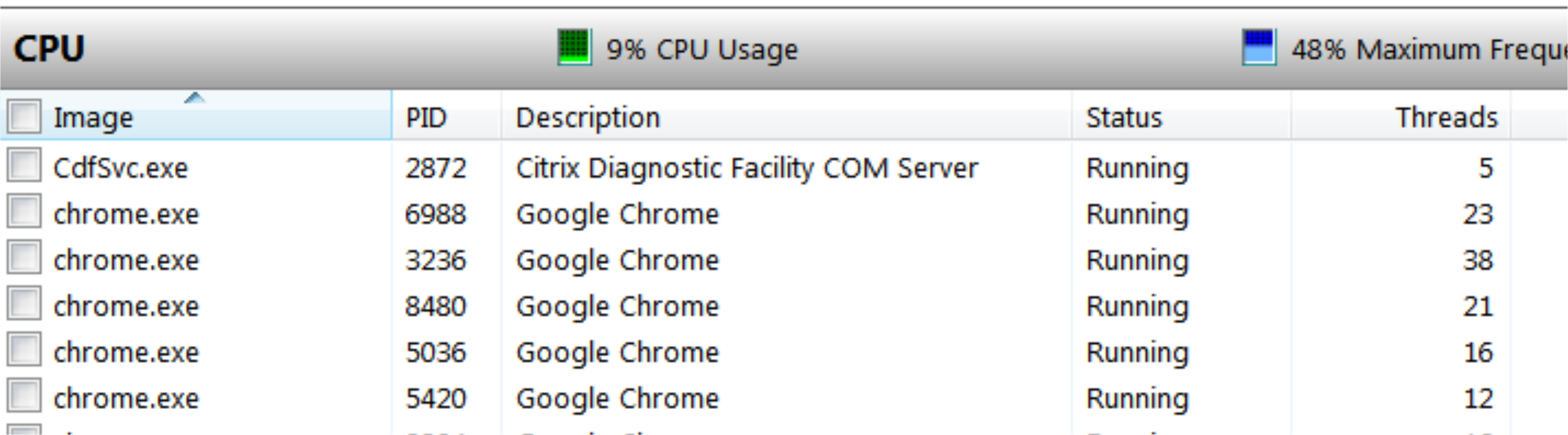
- When using a web browser to open multiple webpages:
- Each webpage is handled by a process.
- Each webpage contains multiple tasks, such as text, graphics, audio, and video, which are handled by separate threads..
Example: Threads in a Word Processor
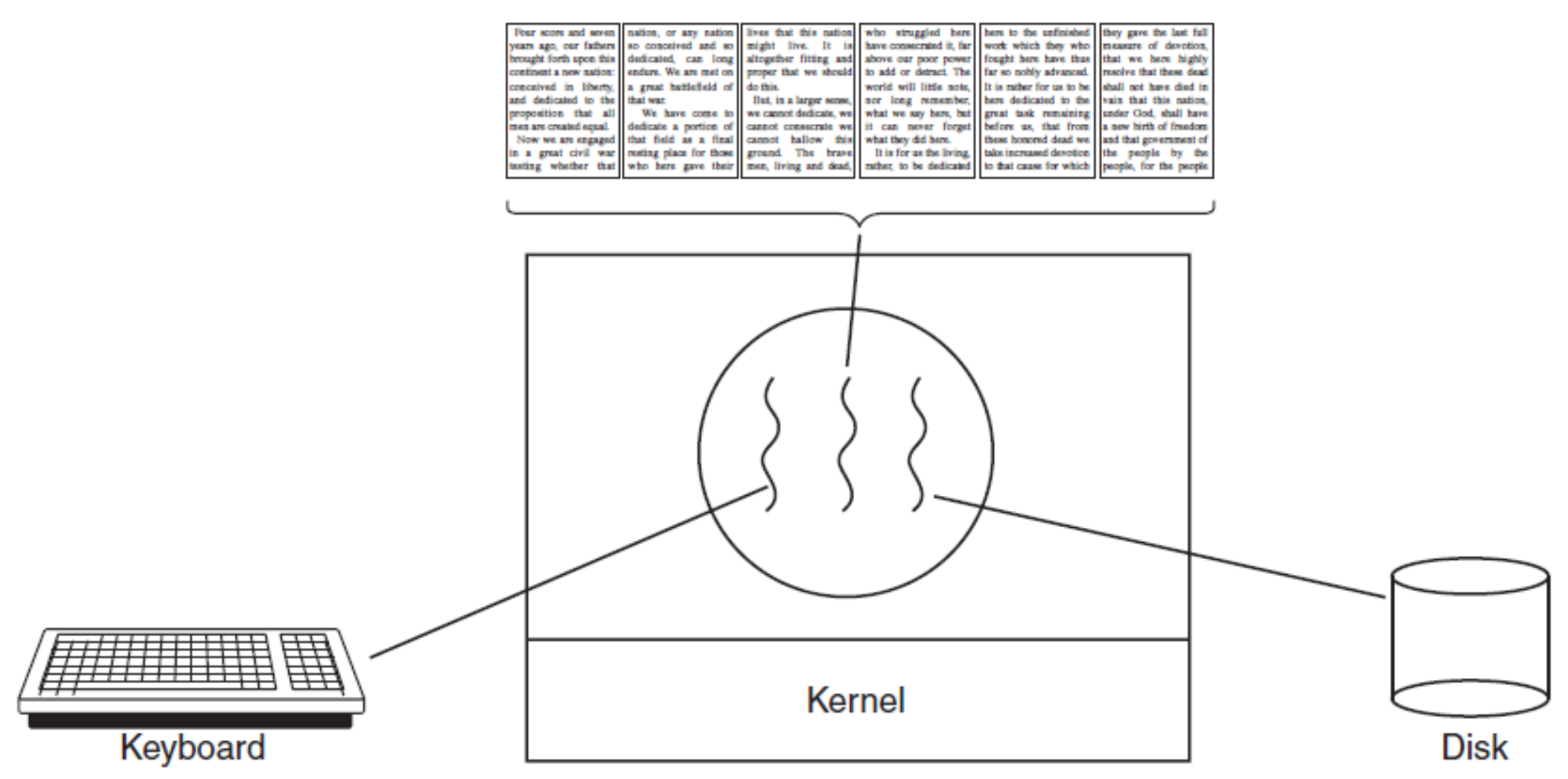
- A word processor application may have threads for different tasks:
- One thread monitors keyboard and mouse inputs.
- Another thread handles autosave functionality.
- Another thread performs spell-checking.
- In a single-threaded program, autosave operations would block user inputs, causing poor performance.
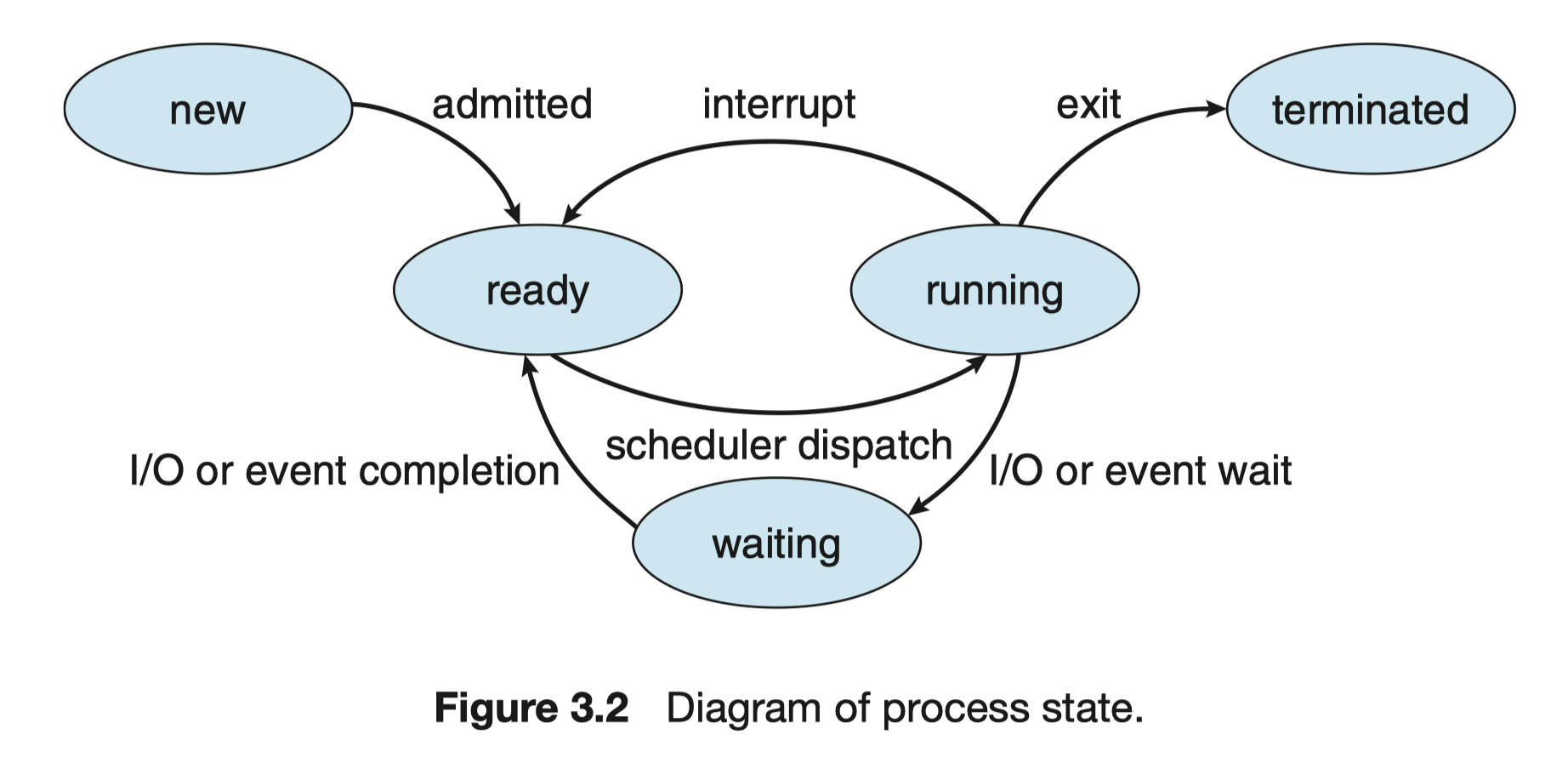
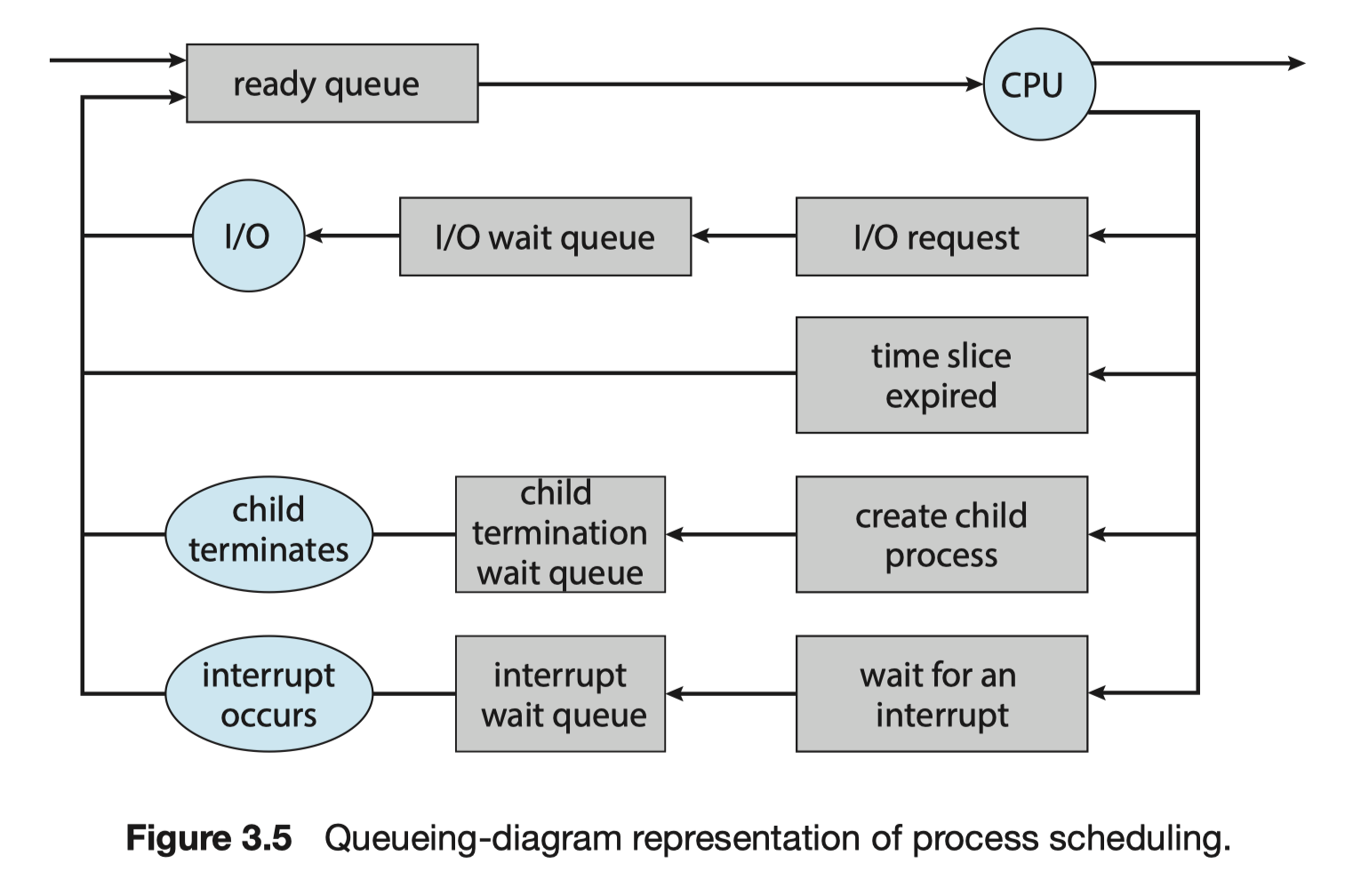
Thread: State Diagram and Queueing Diagram
- The state and queueing diagrams of threads resemble those of processes.
Screenshot 2025-02-06 at 2.03.26 PM.png
Multi-Threaded Processes
- From the Main Memory Perspective
- Regardless of whether a process is single-threaded or multi-threaded, it must be loaded into main memory.
- A segment of main memory storing a process is called an address space.
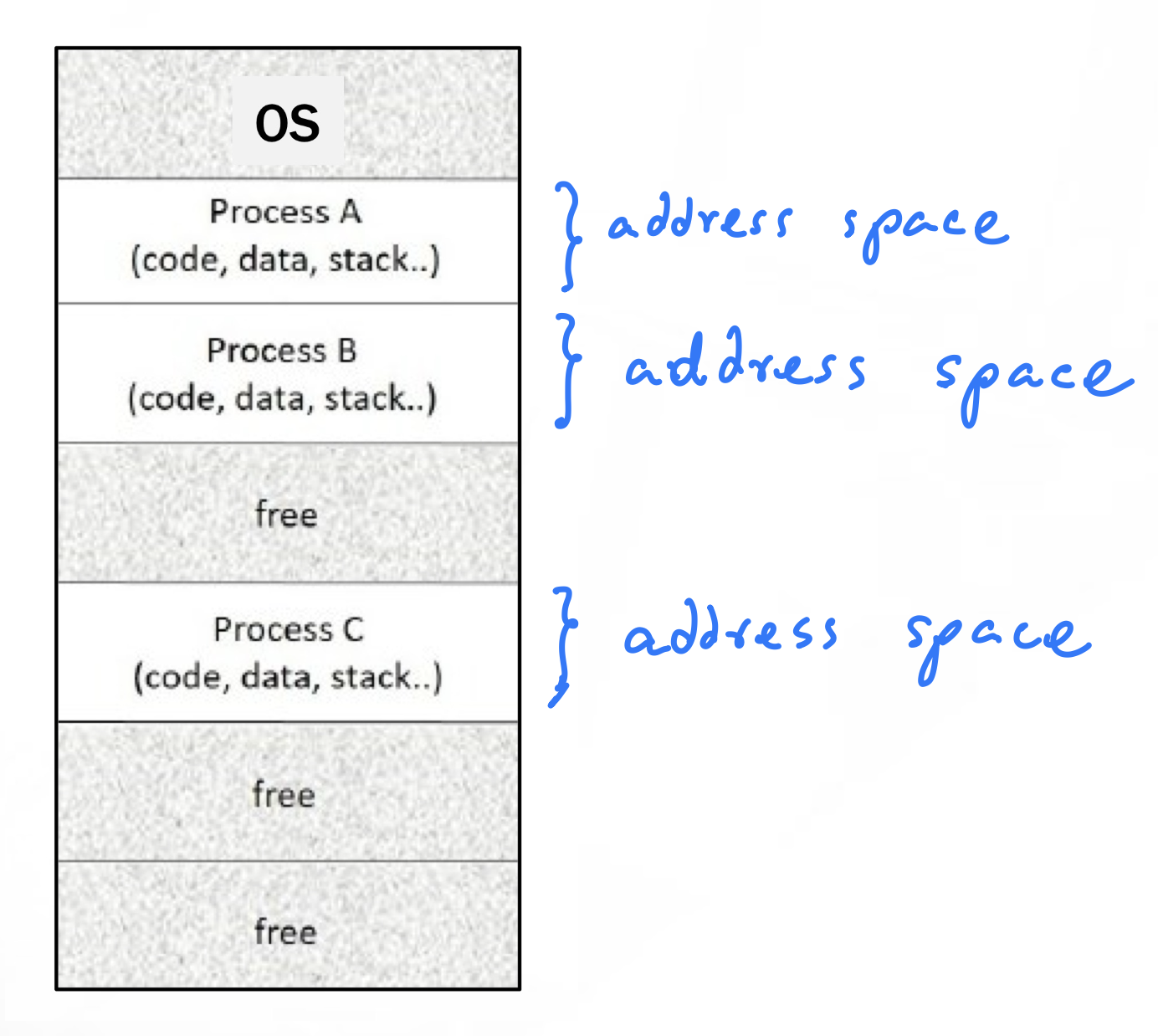
- Each process occupies a single address space, whether single-threaded or multi-threaded. (One room)
- The following diagram compares address spaces of single-threaded and multi-threaded processes:
- In a single-threaded process, there is only one thread (the main thread).
- In a multi-threaded process, all threads share the same address space but maintain separate stacks.
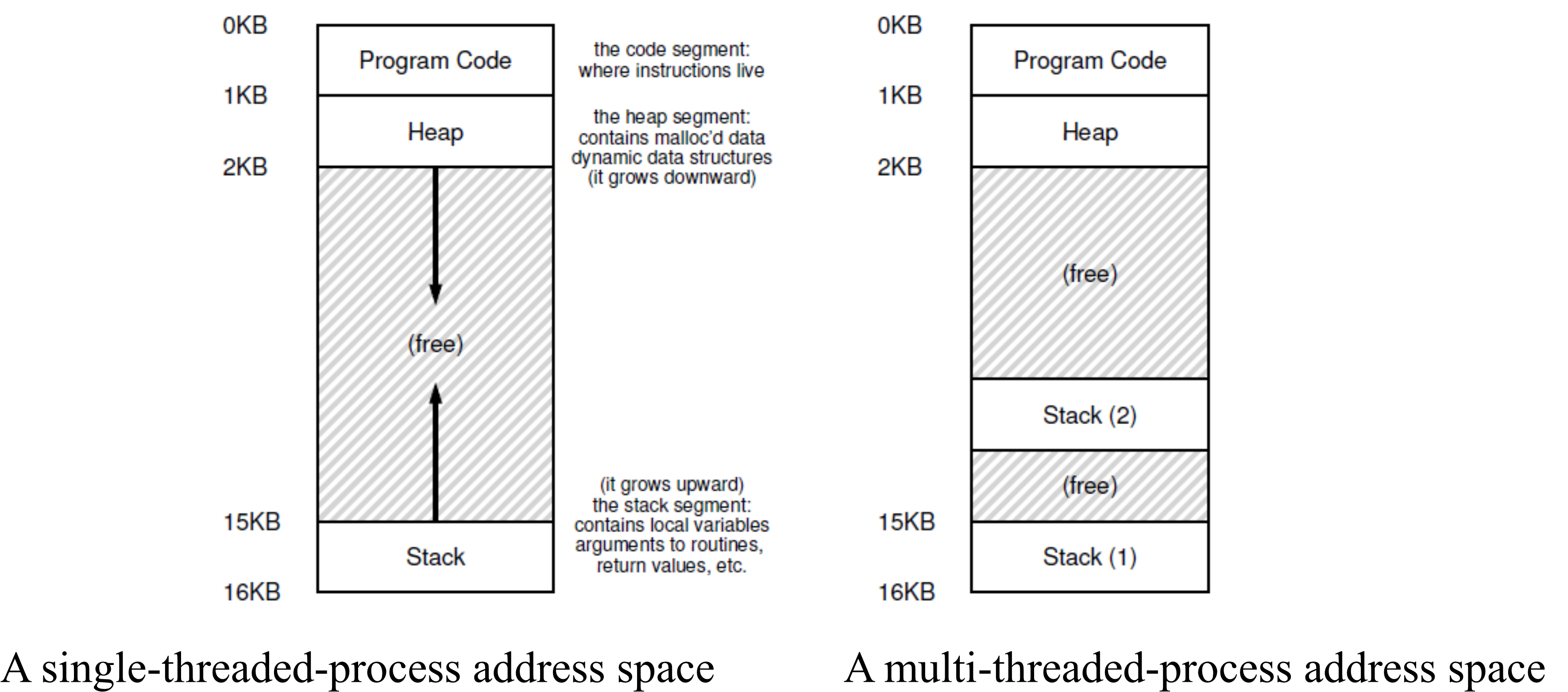
- รูปข้างบนก็คือ 1 ห้องใน Address Space! (Same structure we studied 02 Processes and IPC (Interprocess Communication)
- Each stack represent a thread. (อย่างในภาพขวามือก็หมายถึงมี 2 Threads: อาจจะ 1 Main thread, 1 worker thread)
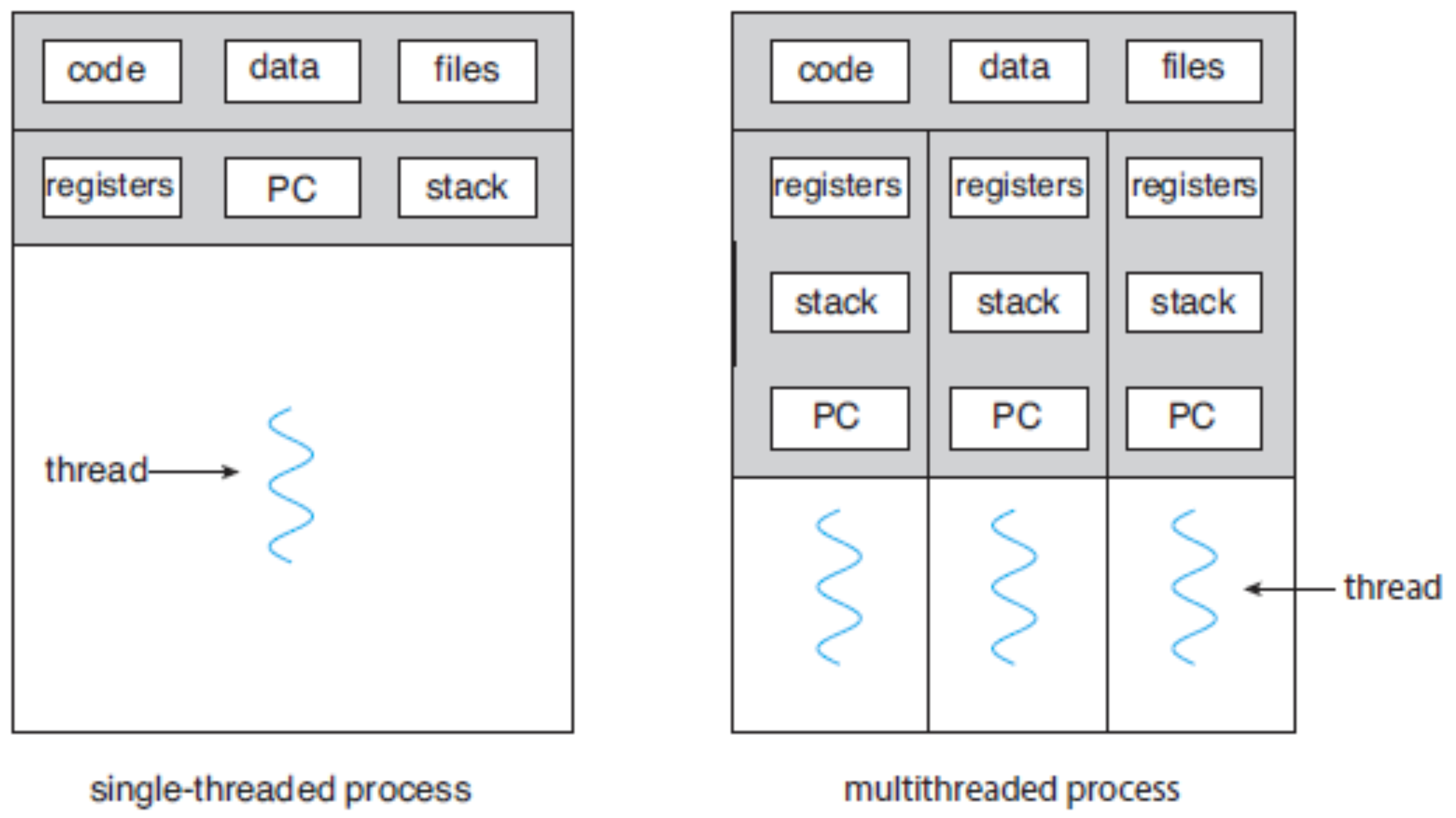
- In a multi-threaded process:
- Each thread has its own Thread ID (TID), Program Counter (PC), registers, and stack.
- All threads share the program code and data (e.g., global variables).
Similarly, in Swift, class instances are stored in the heap, and multiple threads can access the same instance if it is shared globally or passed between threads. However, just like in multi-threading, race conditions can occur if multiple threads modify the shared data simultaneously without proper synchronization.
Multi-Threaded Processes in Execution
Thread Execution on a Single-CPU System
- In a single-CPU system, threads take turns running by rapidly switching among them.
- Thread switching is faster than process switching (measured in nanoseconds).
Shared Address Space in Multi-Threading
- All threads in a process share the same address space.
- They also share global variables.
- ==⚠️ If one thread modifies a variable, the change affects all threads.==
- Any thread can read, write, or even overwrite another thread’s stack.
Thread States (Same as Process States)
- A thread can be in running, waiting, ready, or terminated states, just like a process.
- A process usually starts with a single thread (main thread), which can create additional worker threads.
Why We use Threads
1. Speeding Up a Process
- Single-core processor: Threads get more frequent execution compared to a single-threaded process.
- Multi-core processor: Threads run in parallel on different CPU cores, improving performance (true parallelism).
2. Avoiding Blocking Due to Slow I/O
- Traditional execution waits for long-running operations (e.g., I/O) before continuing.
- With threads, slow operations can run in separate threads, allowing the rest of the process to continue normally.
Other Benefits of Threads
- A single application may need to handle multiple tasks at once (e.g., a web application handling multiple requests).
- Creating a thread is faster and uses fewer resources than creating a full process.
- If one thread is blocked, others can still run, keeping the process active.
- Multi-threading suits multicore processors:
- A single-core CPU creates the illusion of parallelism by switching between processes (time-sharing).
- A multi-core CPU can run multiple threads simultaneously.
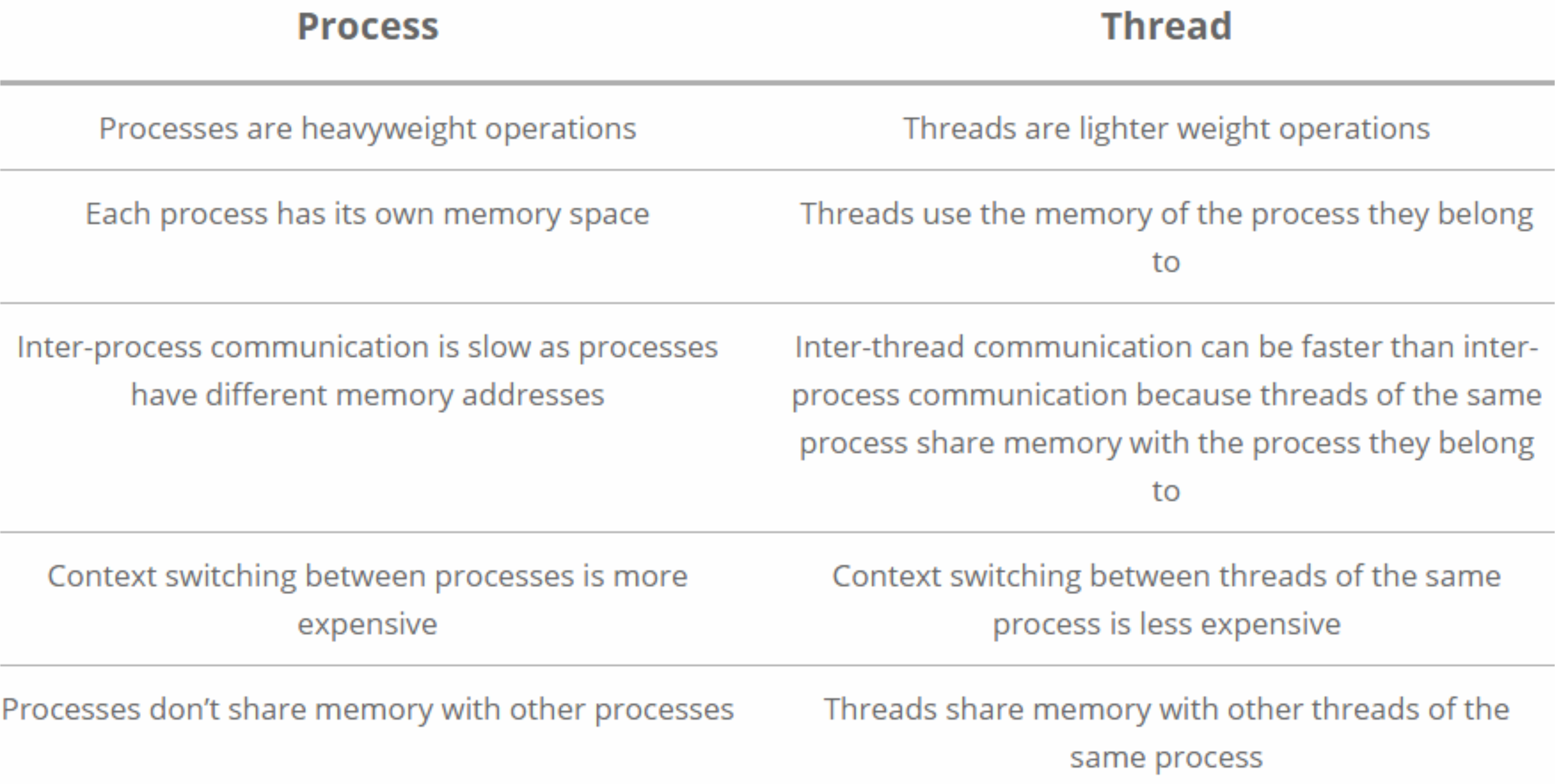
Comparison between Processes and Threads
Thread Investigation by Python threading Module
Python Commands for Thread Creation
| Python Command | Explanation |
|---|---|
import threading | Imports the Python threading module. |
T1 = threading.Thread(target=Func, args=(Arg,)) | Creates a worker thread T1 that executes Func with input argument Arg. The name T1 can be changed. |
T1.start() | Starts the worker thread T1. |
T1.join() | Makes the main thread wait until T1 finishes. |
threading.get_native_id() | Returns the thread ID (TID), assigned by the OS kernel. |
Thread Creation-Termination Flow
1. Synchronous Threading
- The main thread creates one or more worker threads.
- The main thread waits for all worker threads to complete their tasks.
- Once all worker threads finish, the main thread resumes execution.
2. Asynchronous Threading
- The main thread creates worker threads and does not wait for them to finish.
- The main thread continues executing concurrently with the worker threads.
💡 Analogy: Think of synchronous threading like macOS waiting for all system updates to install before letting you use your Mac again. Asynchronous threading is like downloading an iOS update in the background while still using your iPhone.
Example: Thread creation and TID
Creates two worker threads and prints their thread IDs.
import os
import threading

def WorkerT1():
  print('Process PID = %d, Worker T1 Thread ID = %d\n' %(os.getpid(), threading.get_native_id()))

def WorkerT2():
  print('Process PID = %d, Worker T2 Thread ID = %d\n' %(os.getpid(), threading.get_native_id()))

if __name__ == "__main__":
  T1 = threading.Thread(target=WorkerT1)
  T2 = threading.Thread(target=WorkerT2)
  T1.start()
  T2.start()
  T1.join()
  T2.join()
  print('Process PID = %d, Main Thread ID = %d\n' %(os.getpid(), threading.get_native_id()))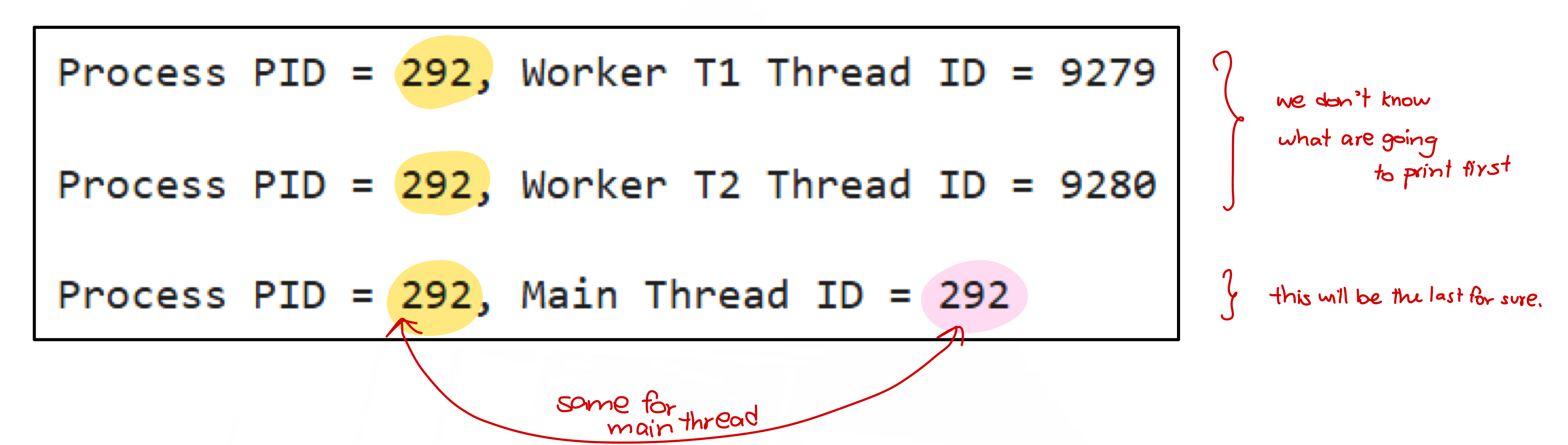
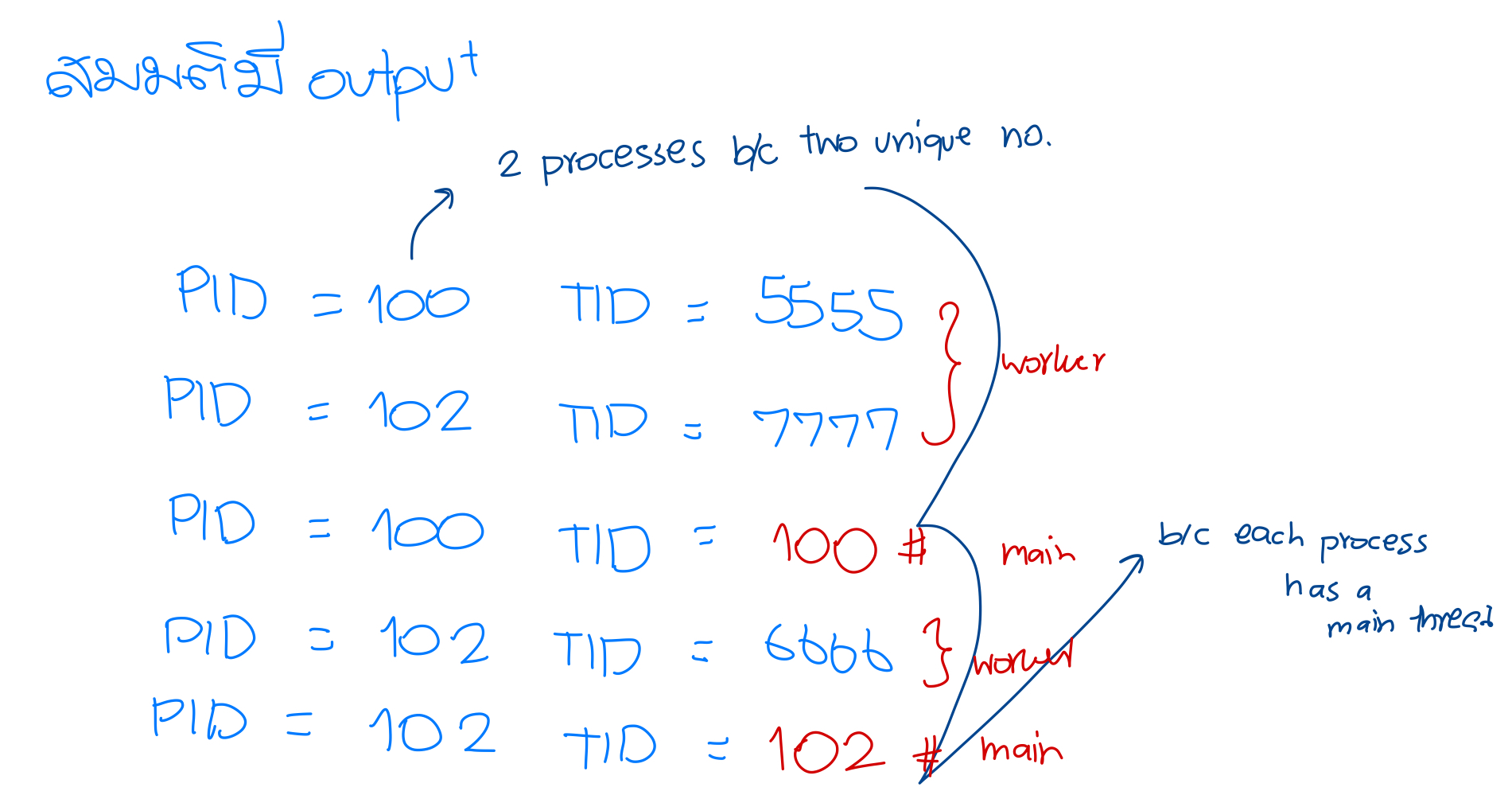
- What is the relationship between the PID and main thread’s TID?
- All PID is the same as main thread’s TID
Example: Find the number of threads
Consider the following Python program. Find the number of threads that were created after finishing it.
import os
import threading

def WorkerT():
  print('Process PID = %d, Worker Thread ID = %d\n' %(os.getpid(), threading.get_native_id()))

if __name__ == "__main__":
  T1 = threading.Thread(target=WorkerT)
  T2 = threading.Thread(target=WorkerT)
  T3 = threading.Thread(target=WorkerT)
  T4 = threading.Thread(target=WorkerT)
  T1.start()
  T2.start()
  T3.start()
  T4.start()
  T1.join()
  T2.join()
  T3.join()
  T4.join()
print('Process PID = %d, Main Thread ID = %d\n' %(os.getpid(), threading.get_native_id()))- Number of threads = 5
- Number of main threads = 1
- Number of worker threads = 4
Example: Order of worker thread execution can be indeterministic
Consider the following Python program. We show that the order of worker thread execution can be indeterministic (random).
import os
import threading
from time import sleep

def WorkerT():
  sleep(10)
  print('Process PID = %d, Worker Thread ID = %d\n' %(os.getpid(), threading.get_native_id()))

if __name__ == "__main__":
  T1 = threading.Thread(target=WorkerT)
  T2 = threading.Thread(target=WorkerT)
  T3 = threading.Thread(target=WorkerT)
  T1.start()
  T2.start()
  T3.start()
  T1.join()
  T2.join()
  T3.join()
  print('Process PID = %d, Main Thread ID = %d\n' %(os.getpid(), threading.get_native_id()))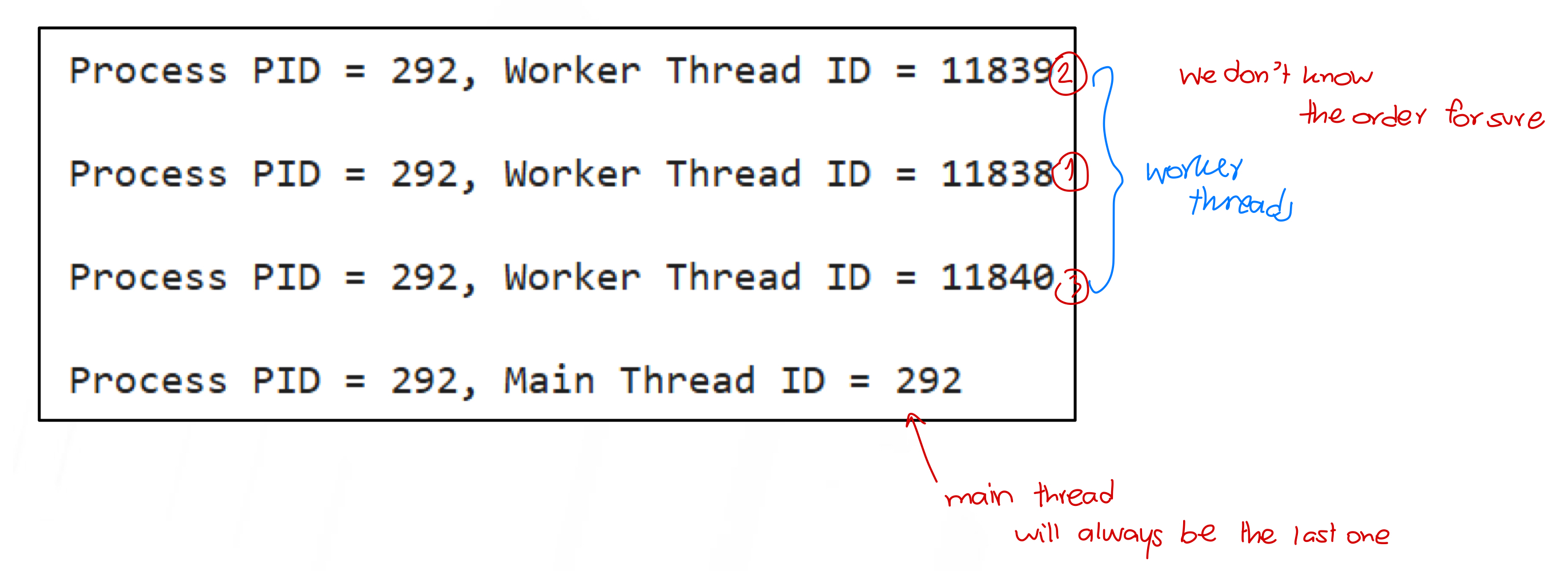
Example: Worker theads run concurrently/parallelly
import os
import threading
from time import sleep, time

def WorkerT():
  sleep(10)
  print('Process PID = %d, Worker Thread ID = %d\n' %(os.getpid(), threading.get_native_id()))

if __name__ == "__main__":
  T1 = threading.Thread(target=WorkerT)
  T2 = threading.Thread(target=WorkerT)
  T3 = threading.Thread(target=WorkerT)
  time0 = time()
  T1.start()
  T2.start()
  T3.start()
  T1.join()
  T2.join()
  T3.join()
  print('Process PID = %d, Main Thread ID = %d\n' %(os.getpid(), threading.get_native_id()))
  time1 = time()-time0
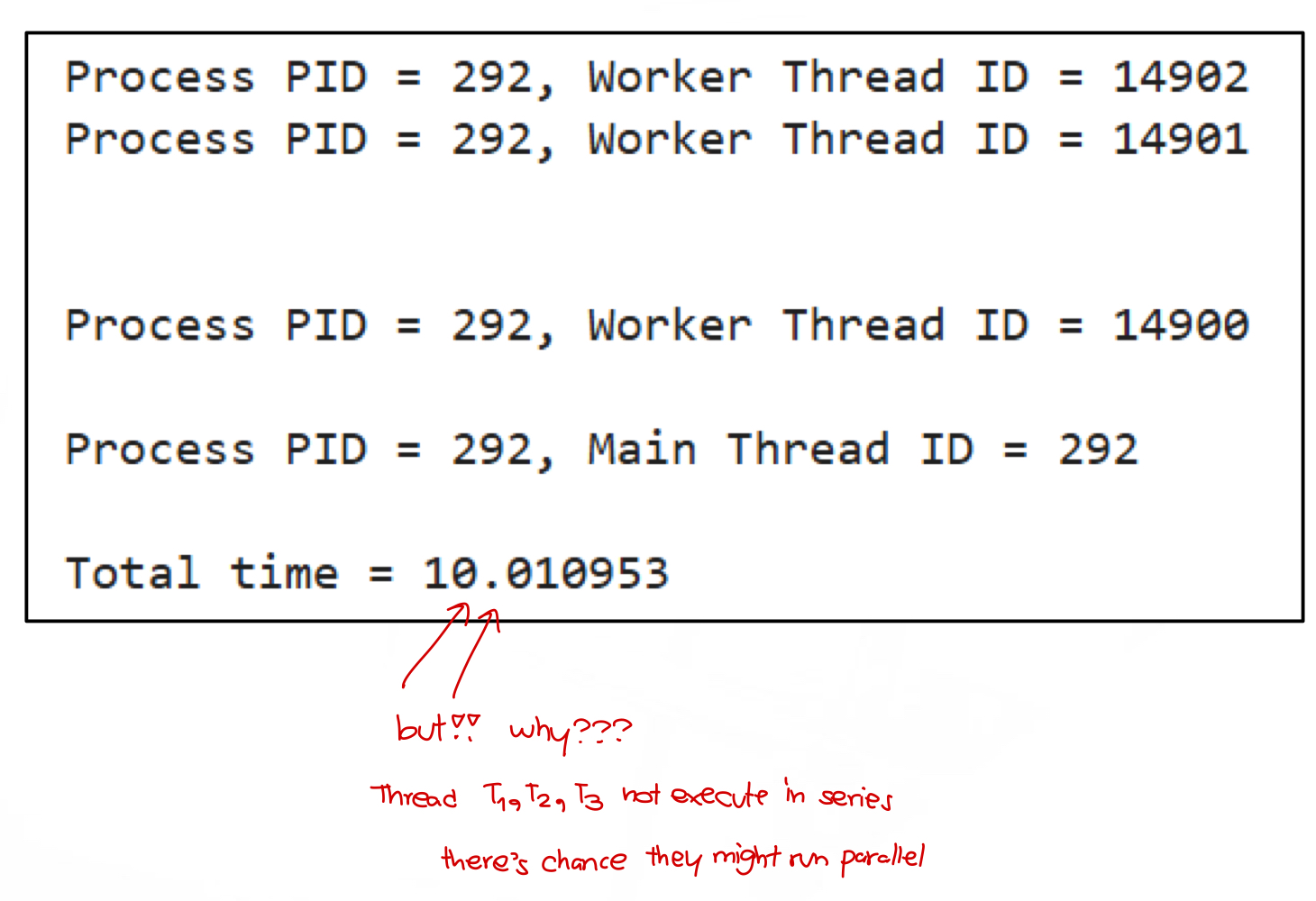
print('Total time = %f' %time1)- The output of this program is shown below. If the worker threads run sequentially (one-by-one), the program could take time at least 30 seconds to finish. However, we notice that the program finished by 10.01 seconds
Example: Threads in a process are in the same memory block and share global variables.
import threading

def Task_Add(a):
  global Num
  Num = Num + a
  print('Process PID = %d, Worker T1 Thread ID = %d: Num = %d' %(os.getpid(), threading.get_native_id(), Num))

def Task_Sub(a):
  global Num
  Num = Num - a
  print('Process PID = %d, Worker T2 Thread ID = %d: Num = %d' %(os.getpid(), threading.get_native_id(), Num))

if __name__ == "__main__":
  Num = 10
  T1 = threading.Thread(target=Task_Add, args=(10,))
  T2 = threading.Thread(target=Task_Sub, args=(5,))
  T1.start()
  T1.join()
  T2.start()
  T2.join()
  print('Process PID = %d, Main Thread ID = %d: Num = %d' %(os.getpid(), threading.get_native_id(), Num))
Race Condition, Critical Section, and Mutual Exclusion
- Race Condition: Occurs when multiple threads access and modify shared data unpredictably.
- Critical Section: A part of the program that accesses shared resources.
- Mutual Exclusion (Mutex): Ensures that only one thread can access the critical section at a time.
💡 Analogy: Think of a race condition like two people editing the same note in Apple Notes without synchronization—one user’s changes might overwrite the other’s.
For solutions, see Lecture 5.
Multiple Threads and Multiple Processes
Example: Multiple threads and multiple processes with fork
Consider the following Python program. Compute the numbers of processes and threads that will be created.
import os
import threading

def WorkerT():
  print('Child PID = %d, Worker TID = %d\n' %(os.getpid(), threading.get_native_id()))

rc = os.fork()
if (rc > 0):
  os.wait()
  print('Parent PID: %d, Main TID = %d\n' %(os.getpid(), threading.get_native_id()))
elif (rc == 0):
  print('Child PID: %d, Main TID = %d\n' %(os.getpid(), threading.get_native_id()))
  T1 = threading.Thread(target=WorkerT)
  T2 = threading.Thread(target=WorkerT)
  T1.start()
  T1.join()
  T2.start()
  T2.join()
  os._exit(os.EX_OK)
else:
  print('Error!')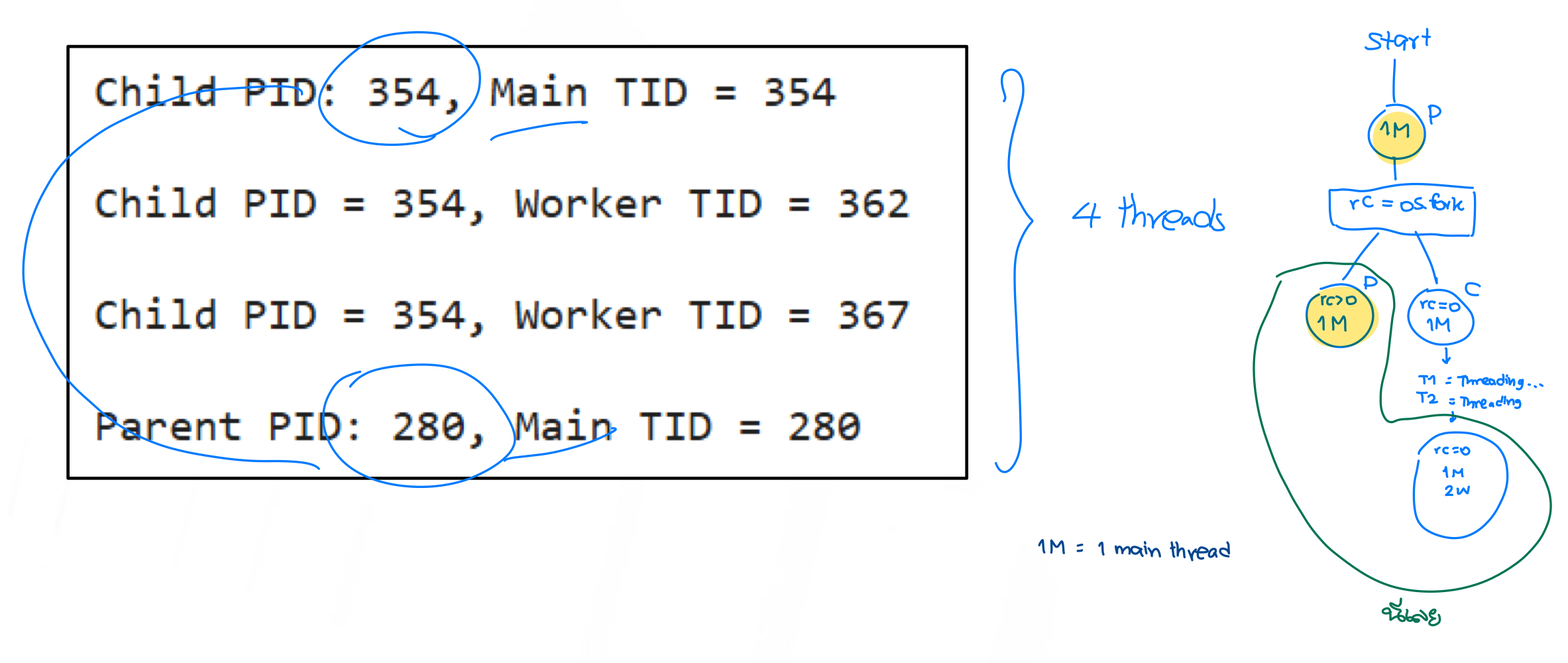
- Number of processes = 2
- Number of threads = 4
- Number of main threads = 2
- Number of worker threads = 2
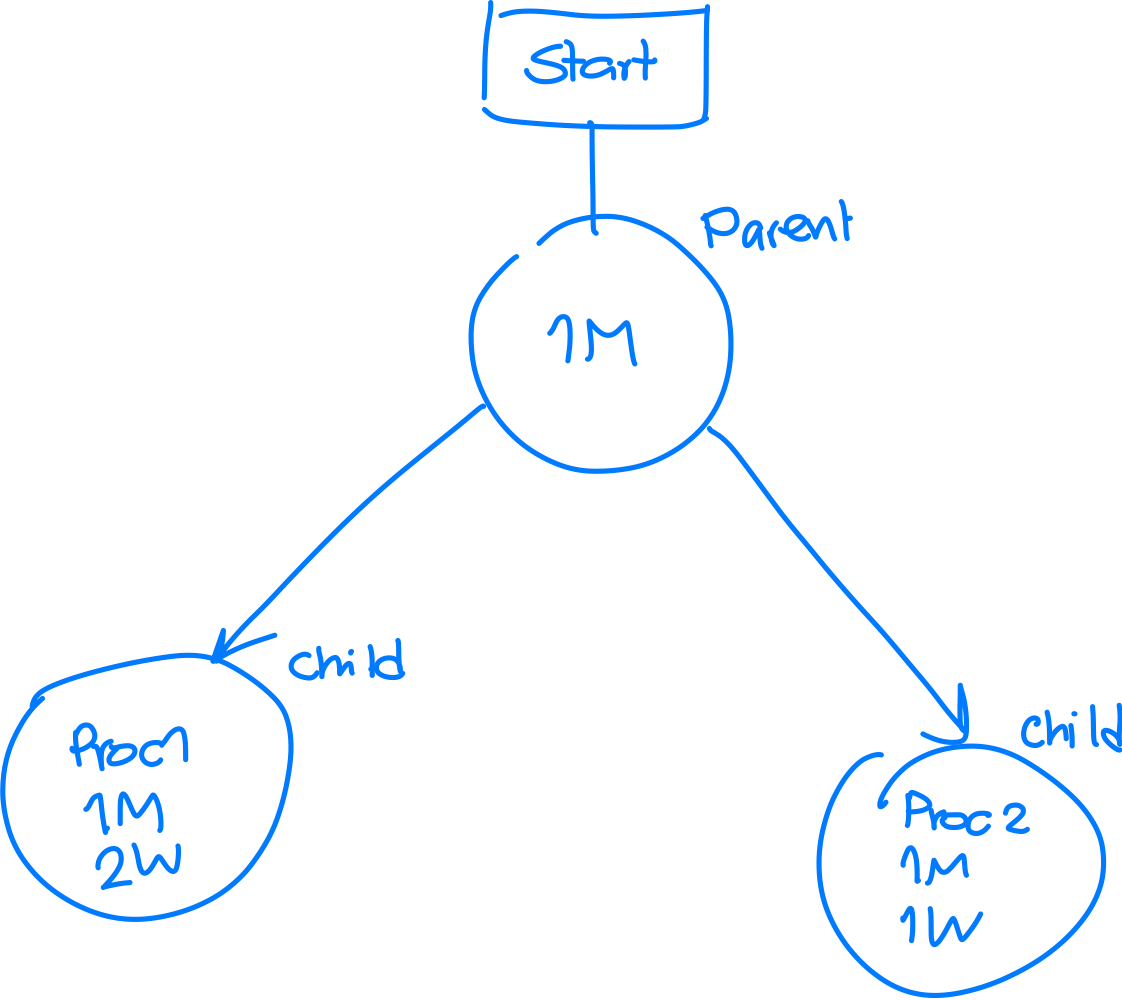
Example: Multiple treads and multiple processes with multiprocessing
Consider the following Python program. Compute the numbers of processes and threads that will be created.
import os
import threading
from multiprocessing import Process

def ChildTask1():
  print('Child PID = %d, Main TID = %d\n' %(os.getpid(), threading.get_native_id()))
  T1 = threading.Thread(target=WorkerT)
  T2 = threading.Thread(target=WorkerT)
  T1.start()
  T2.start()
  T1.join()
  T2.join()

def ChildTask2():
  print('Child PID = %d, Main TID = %d\n' %(os.getpid(), threading.get_native_id()))
  T1 = threading.Thread(target=WorkerT)
  T1.start()
  T1.join()

def WorkerT():
  print('Child PID = %d, Worker TID = %d\n' %(os.getpid(), threading.get_native_id()))

if __name__ == "__main__":
  Proc1 = Process(target=ChildTask1)
  Proc2 = Process(target=ChildTask2)
  Proc1.start()
  Proc2.start()
  Proc1.join()
  Proc2.join()
print('Parent PID = %d, Main TID = %d\n' %(os.getpid(), threading.get_native_id()))- Whenever we create
Proc1it will automatically move to executeChildTask1 - Number of processes = 3
- Number of threads = 6
- Number of main threads = 3
- Number of worker threads = 3
Multicore Systems
Traditional Single-Core Systems
- A traditional computer system has a single-core CPU.
- Only one thread can execute at a time.
- The system rapidly switches between threads/processes, creating the illusion of multitasking.
→ This is called concurrency (multitasking), where multiple applications seem to run at the same time.
Multicore Systems
- A multicore CPU has multiple cores, where:
- Each core can handle one thread at a time (concurrency).
- Multiple threads/processes can run truly in parallel (parallelism).
Concurrency vs. Parallelism
- Concurrency: Multiple tasks are allowed to make progress by switching execution among them.
- Example: Opening multiple apps, where each gets a small time slice to run.
- Time-sharing is used to manage threads/processes.

- Parallelism: Multiple tasks are running at the exact same time.
- Example: If you have 4 cores, then 4 tasks can run truly simultaneously.
- The number of parallel tasks = number of cores.
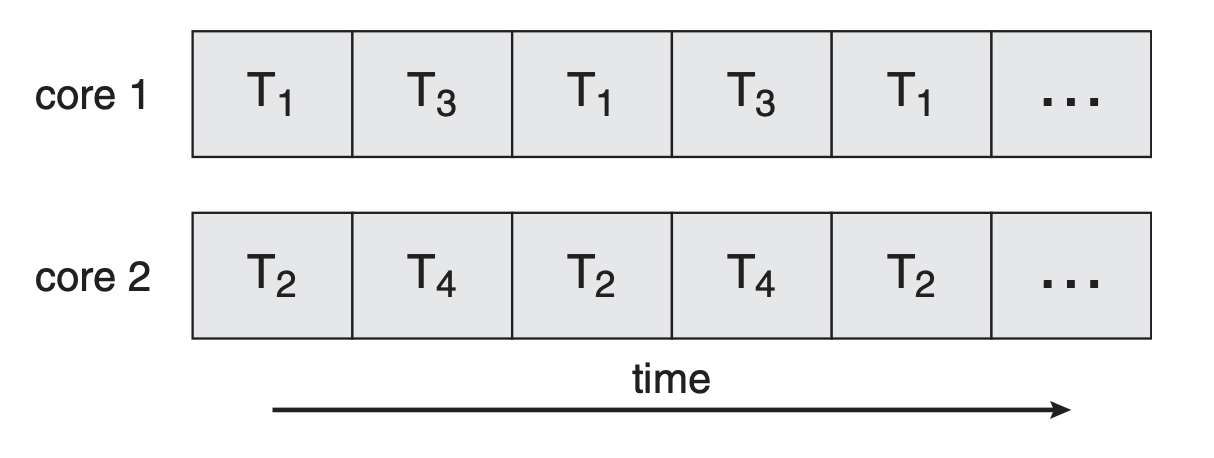
Parallelism is a subset of concurrency, meaning all parallel executions are concurrent, but not all concurrent executions are parallel.
Programming Challenges in Multicore Systems
Developers need to handle the following challenges when programming for multicore systems:
- Identifying Tasks
- Deciding which tasks can run in parallel and assigning them to different threads.
- Load Balancing
- Ensuring each core gets an equal amount of work to prevent bottlenecks.
- Data Splitting
- Distributing data correctly across cores so they can process independently.
- Data Dependency
- Ensuring shared data is updated correctly to avoid inconsistencies.
- Testing & Debugging
- Debugging is harder due to unpredictable execution orders—careful analysis of execution paths is required.
Software Threads and Hardware Threads
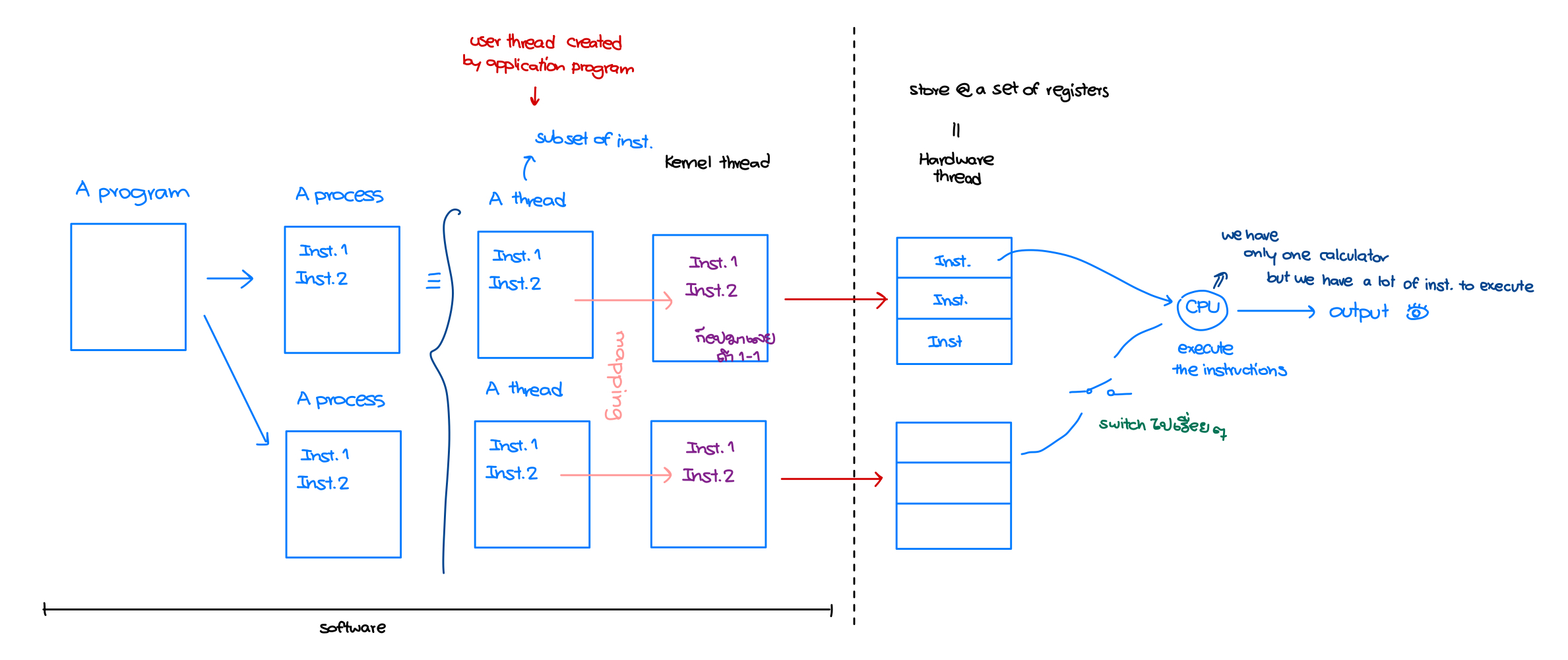
Software Threads
Software threads are created through programming and fall into two categories based on where they are created:
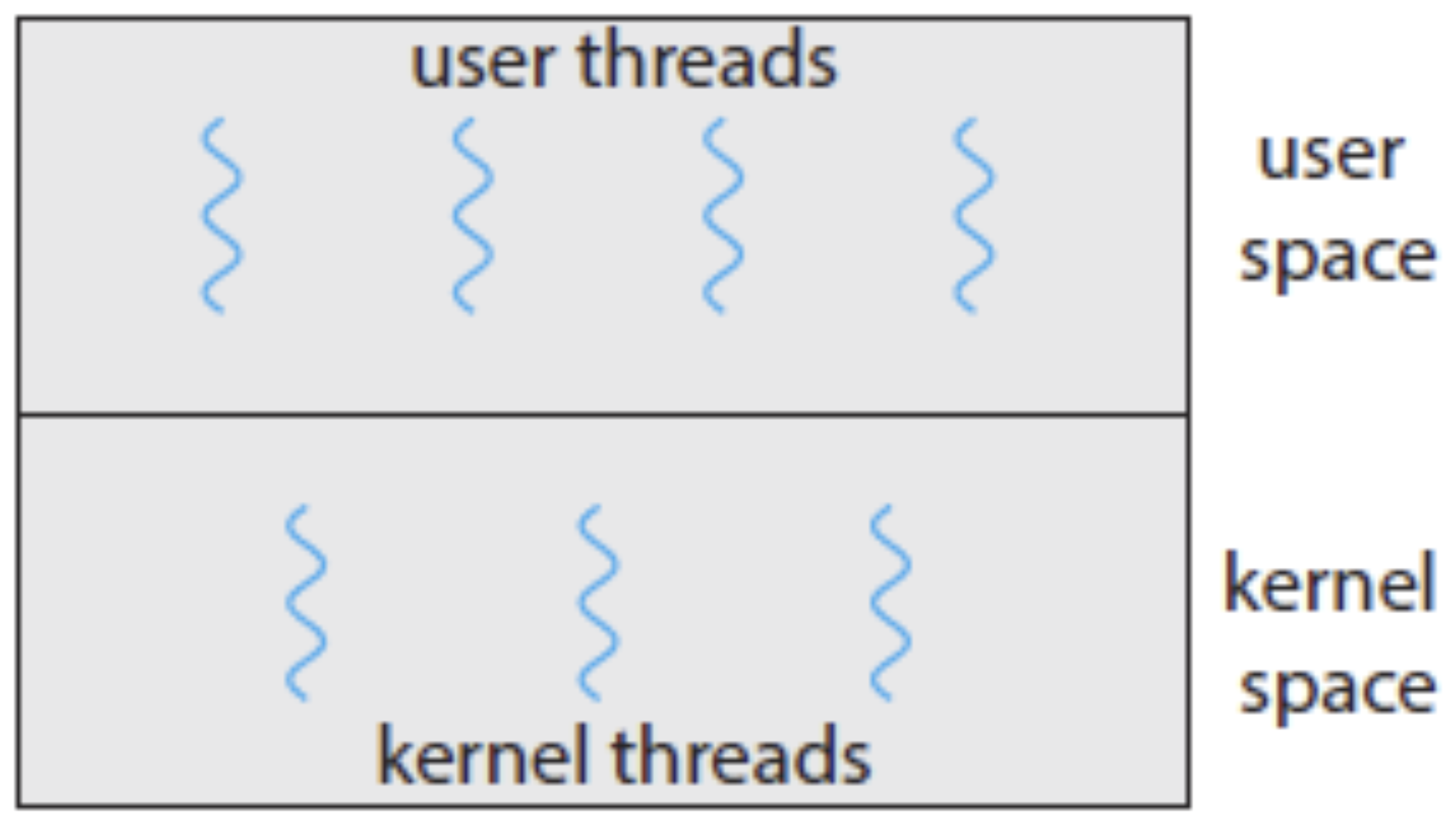
User Threads
- Created by application programs (e.g., Python scripts).
- Exist in user space and are not recognized by the OS.
Kernel Threads
- Created by the operating system to manage execution.
- Two interpretations of kernel threads:
- Kernel threads from OS processes.
- Kernel threads that support user threads (this is the meaning we focus on).
- Only kernel threads are recognized by the OS.
- CPU cores execute kernel threads, not user threads directly.
- A user-kernel thread mapping is required to run user threads.
Multithreading Models
Thread libraries manage the mapping between user threads and kernel threads.
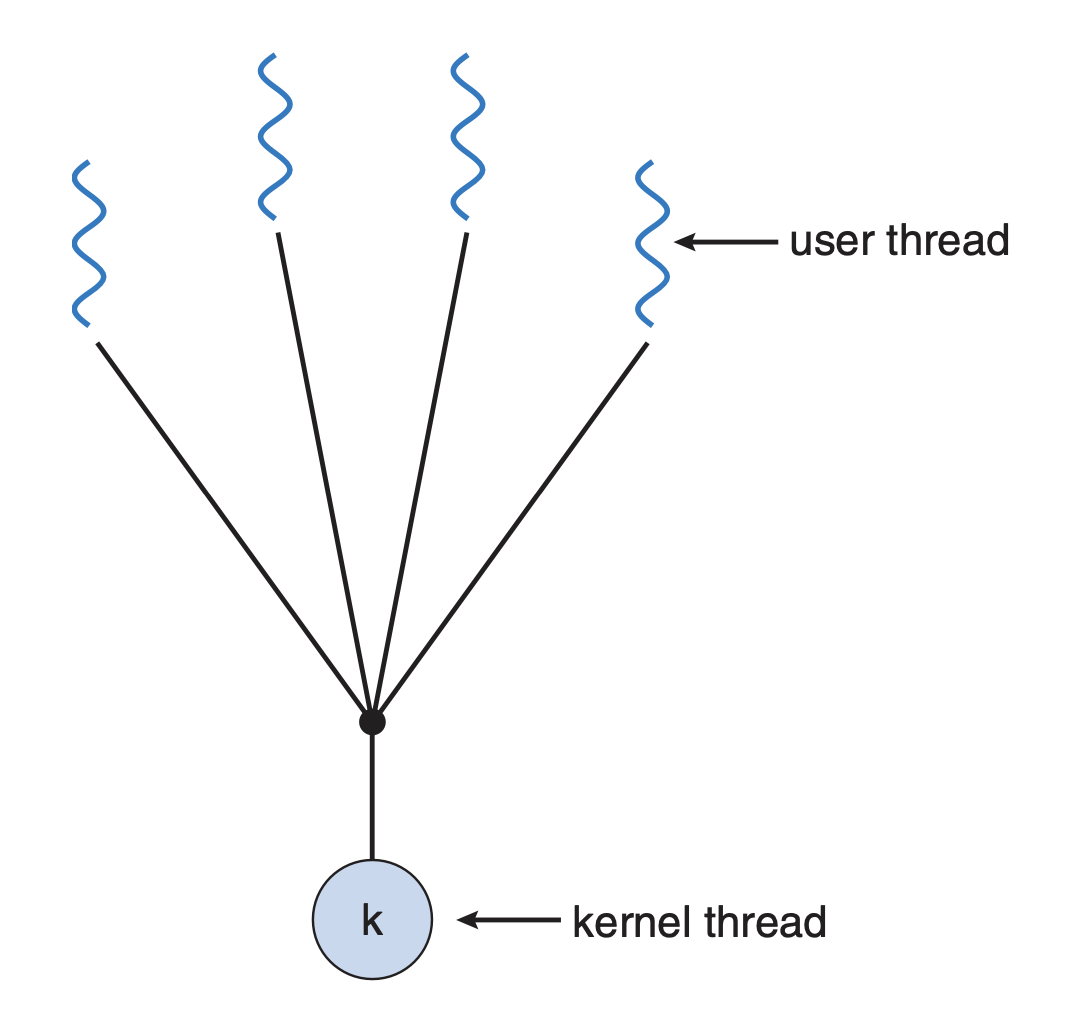
1. Many-to-One Model
- Many user threads are mapped to one kernel thread.
- Simple, but if the kernel thread blocks, all user threads block too.
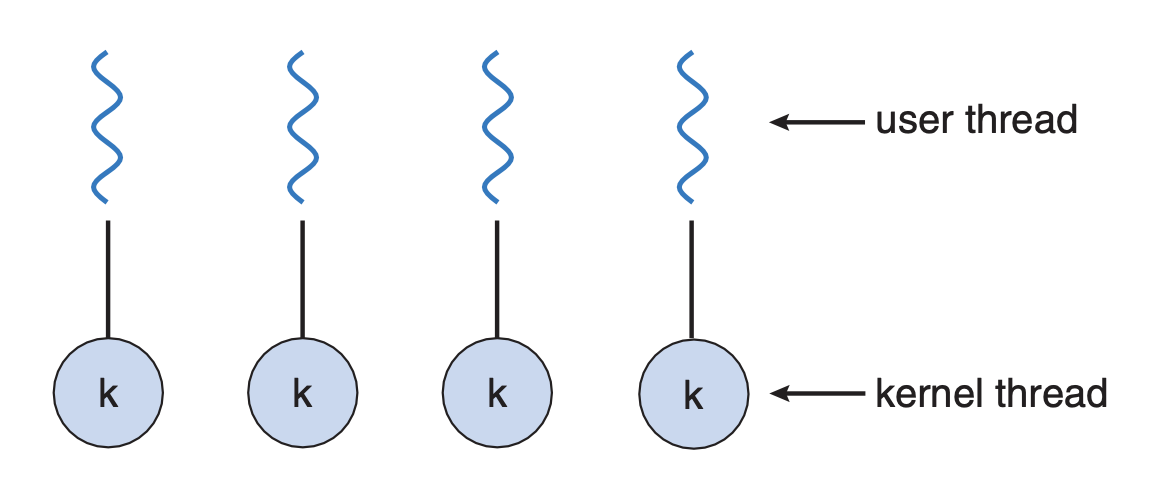
2. One-to-One Model
- Each user thread is mapped to one kernel thread.
- The number of kernel threads = number of user threads.
- Used by Linux and Windows.
- ==We assume this model is used.==
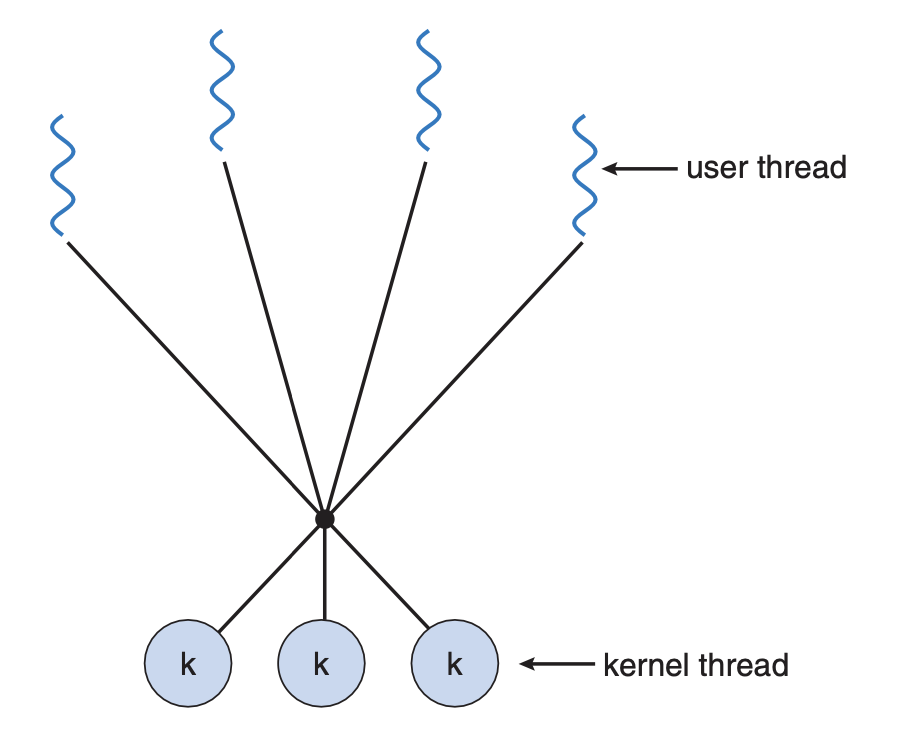
3. Many-to-Many Model
- Maps many user threads to a smaller or equal number of kernel threads.
- More flexibility, but requires extra management.
Hardware Threads
Hardware threads are a modern CPU feature designed to improve CPU utilization. → Think of hardware threads as virtual CPU cores that allow one physical core to handle multiple tasks.
- How are hardware threads created?
- By adding a set of registers (small storage units inside the CPU).
- A hardware thread = a set of registers that stores instruction sets.
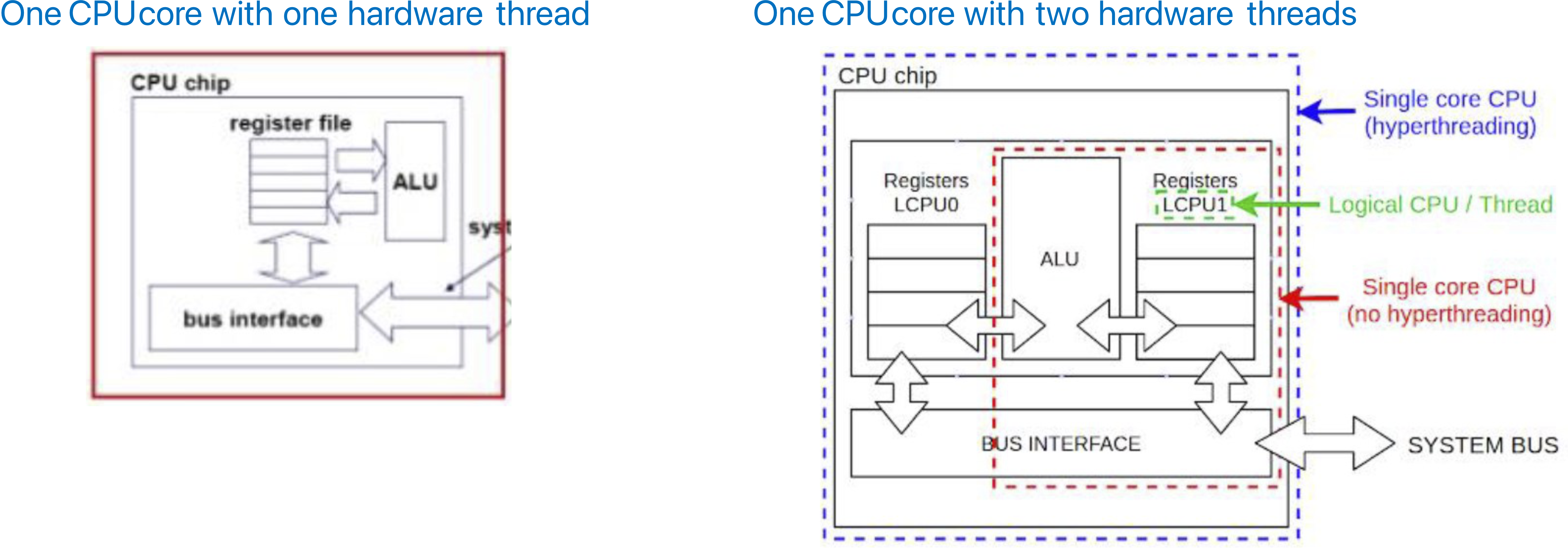
Thread Mapping
- Execution flow:
- User Thread(s) → Kernel Thread → Hardware Thread → Executed by a Physical CPU Core
- Another way to view it:
- A set of instructions → A container → A set of registers → Executed by a CPU Core
- A system with hardware threads (virtual CPU cores) can run up to kernel threads simultaneously.
Hardware-Thread Execution
- Kernel threads are scheduled on a hardware thread, which is then executed by a physical CPU core.
- Inside a hardware thread execution, we observe two alternating cycles:
1. Compute Cycle – CPU executes a set of instructions.
2. Memory-Stall Cycle – CPU waits for instructions/data from main memory.

Problem: Memory Stall
- Memory stall occurs when a CPU waits for data to load from memory.
- This reduces CPU efficiency since the CPU spends time idling.
Multithreading
To increase CPU efficiency, a CPU concurrently executes multiple hardware threads.
There are two types of multithreading, based on how the CPU switches between threads:
1. Coarse-Grained Multithreading
- The CPU runs a thread until a memory stall occurs.
- When a stall happens, the CPU switches to another thread.
- Example: A CPU core with two hardware threads.
2. Fine-Grained Multithreading
- The CPU switches between threads frequently (e.g., every CPU cycle).
- More efficient, but requires faster switching mechanisms.