Continued from Lecture 3 - Application Layer (Part 1)
DNS: Domain Name System
What is DNS?
People have many identifiers:
- SSN (Social Security Number)
- Name
- Passport number
Internet hosts and routers have:
- IP address (32-bit) - used for addressing datagrams
- Name (e.g., cs.umass.edu) - used by humans
Question: How to map between IP address and name, and vice versa?
DNS Definition
Domain Name System (DNS):
- Distributed database implemented in hierarchy of many name servers
- Application-layer protocol: hosts and DNS servers communicate to resolve names (address/name translation)
- Core Internet function implemented as application-layer protocol
- Complexity at network's "edge"
Analogy: DNS is like a phone book for the internet - instead of remembering phone numbers (IP addresses), you can just remember names (domain names).
DNS Process Example
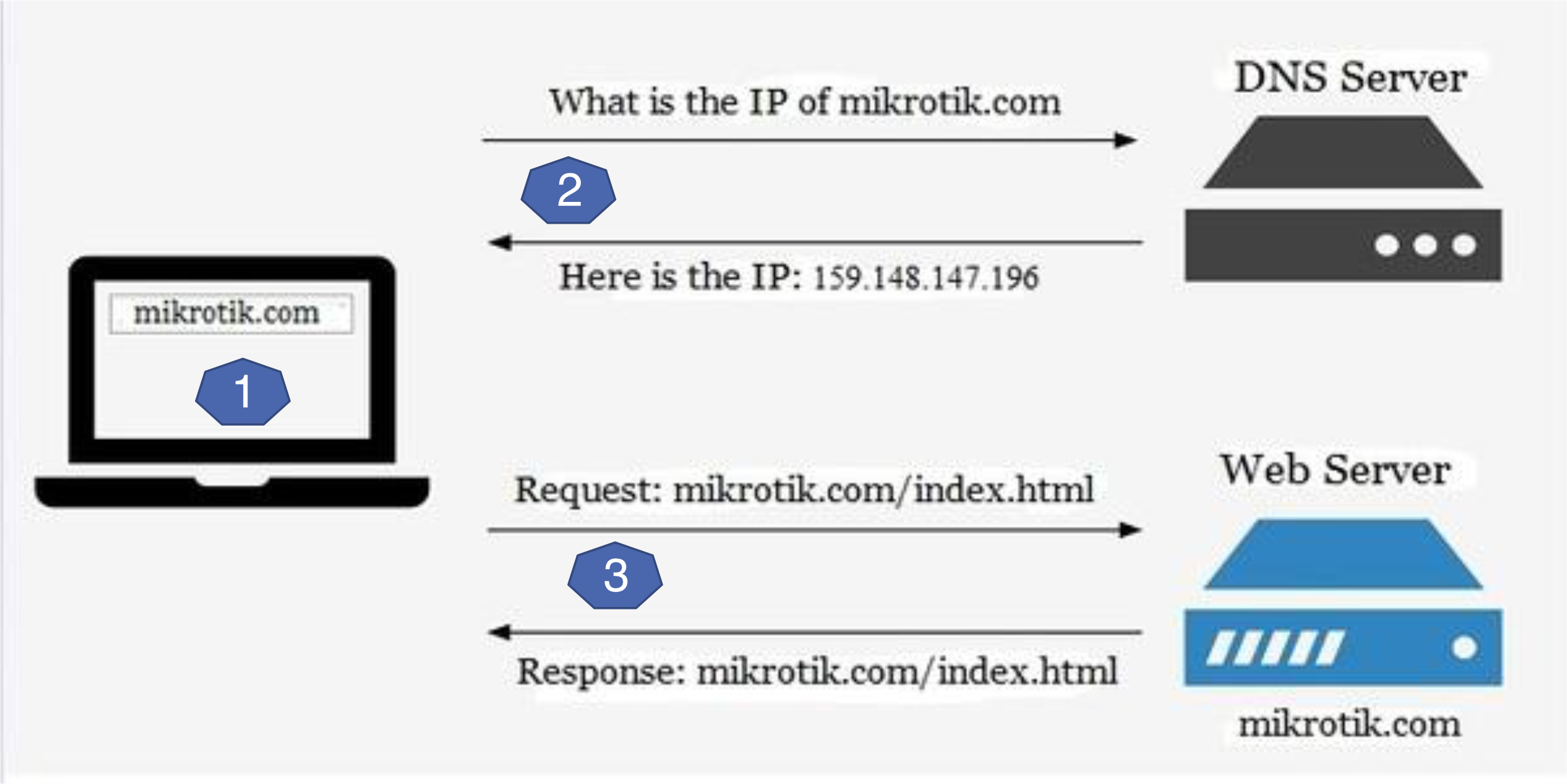
DNS Query Process:
- User types "mikrotik.com" in browser
- Browser asks DNS server: "What is the IP of mikrotik.com?"
- DNS server responds: "Here is the IP: 159.148.147.196"
- Browser requests: "mikrotik.com/index.html" from web server
- Web server responds with the requested page
Domain Names and URLs
URL Structure
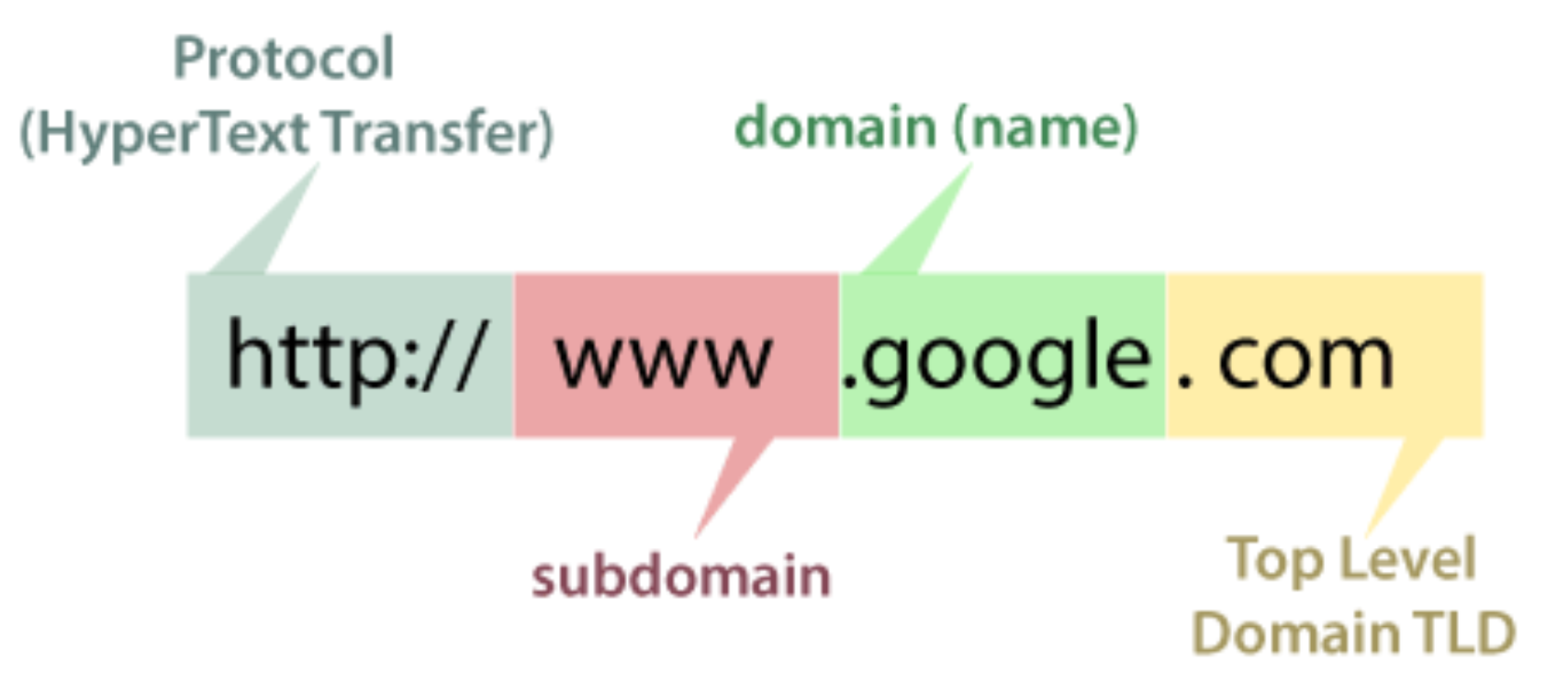
Uniform Resource Locator (URL):
http://www.google.com
Components:
- Protocol:
http://(HyperText Transfer) - Subdomain:
www - Domain name:
google - Top Level Domain (TLD):
.com
Domain Name Costs
| Top Level Domain | .com | .net | .info | .org |
|---|---|---|---|---|
| Wholesale registry fee | $7.85 | $9.77 | $10.84 | $9.93 |
| ICANN fee | $0.18 | $0.18 | $0.18 | $0.18 |
| Cloudflare fee | $0.00 | $0.00 | $0.00 | $0.00 |
| Your annual cost | $8.03 | $9.95 | $11.02 | $10.11 |
| Key Points: |
- Domain names can be purchased (yearly payment)
- Need to check availability before purchasing
- Registrar (e.g., Network Solutions) handles registration
Getting Your Domain into DNS
Example: New startup "Network Utopia"
Steps:
- Register domain (e.g., networkutopia.com) at DNS registrar
- Provide information:
- Names and IP addresses of authoritative name servers (primary and secondary)
- Registrar inserts Resource Records (RRs) into .com TLD server:
- NS Record:
(networkutopia.com, dns1.networkutopia.com, NS) - A Record:
(dns1.networkutopia.com, 212.212.212.1, A)
- NS Record:
- Create authoritative server locally with IP 212.212.212.1:
- Type A record for
www.networkutopia.com(for web) - Type MX record for
networkutopia.com(for email)
- Type A record for
Note: RRs (Resource Records) are DNS data records
Checking Domain Availability
You can check domain availability at registrars like GoDaddy:
- Search for your desired domain name
- System shows if available or taken
- Shows alternative available domains
- Displays pricing for registration
WHOIS - Domain Details
WHOIS Lookup provides:
- Domain registration information
- Registry domain ID
- Registrar information
- Creation and expiration dates
- Name servers (authoritative DNS servers for the domain)
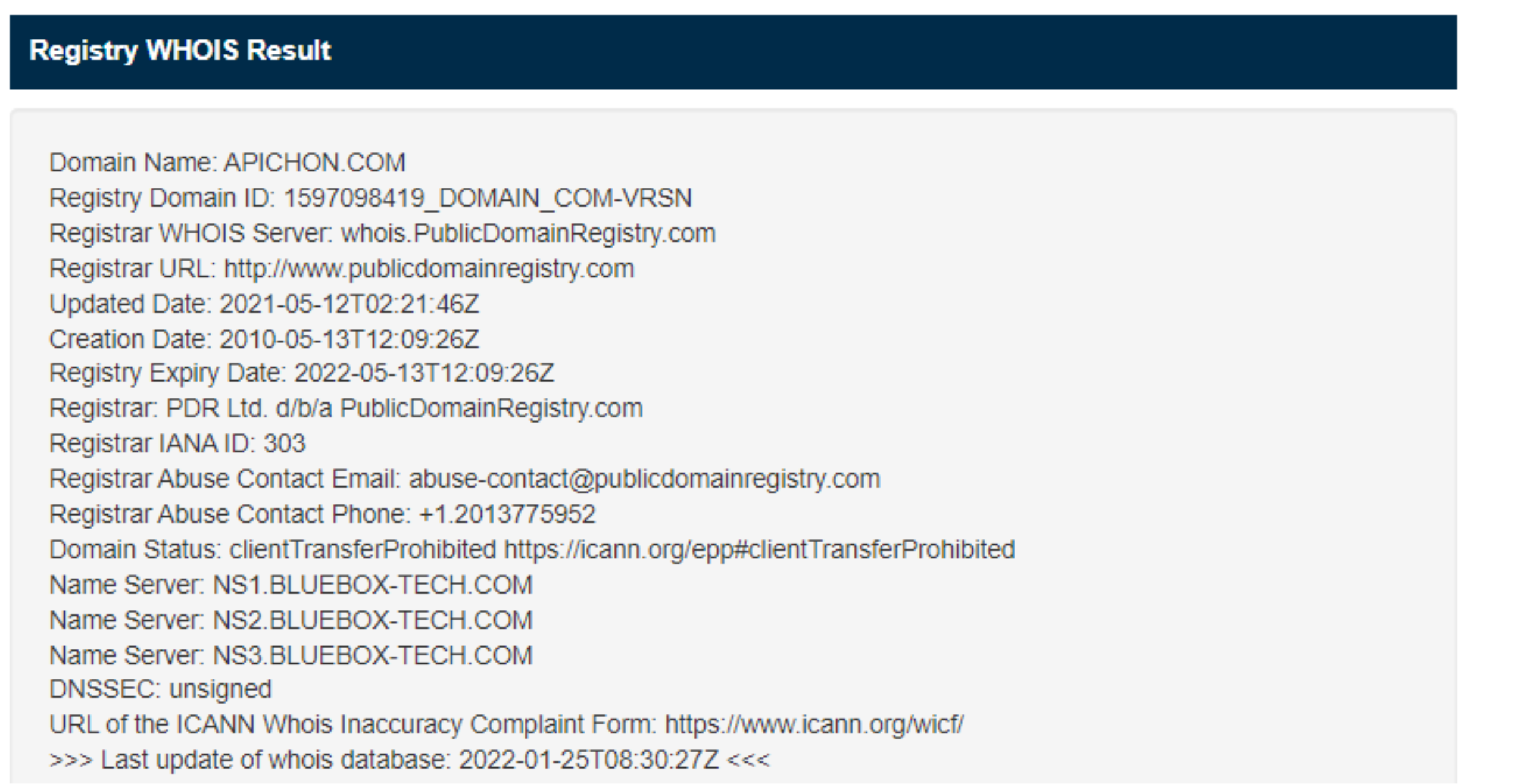
Example WHOIS information for apichon.com:
- Name Server: NS1.BLUEBOX-TECH.COM
- Name Server: NS2.BLUEBOX-TECH.COM
- Name Server: NS3.BLUEBOX-TECH.COM
These name servers are the authoritative servers that store the actual DNS mapping information for this domain.
WHOIS Service: https://who.is
DNS Services and Structure
Why NOT Centralize DNS?
Problems with centralized DNS:
- ❌ Single point of failure
- ❌ Traffic volume overload
- ❌ Distant centralized database (latency)
- ❌ Difficult maintenance
Answer: Doesn't scale!
Reality:
- Comcast DNS servers alone: 600 billion DNS queries/day
- Akamai DNS servers alone: 2.2 trillion DNS queries/day
DNS Services
- Hostname-to-IP-address translation
- Host aliasing
- Canonical and alias names
- Mail server aliasing
- Load distribution
- Many IP addresses can correspond to one name
- Used for replicated web servers
DNS Characteristics
Extremely large distributed database:
- ~1 billion records, each simple
Handles many trillions of queries/day:
- Many more reads than writes
- Performance matters: Almost every Internet transaction interacts with DNS - milliseconds count!
Organizationally and physically decentralized:
- Millions of different organizations responsible for their records
"Bulletproof" requirements:
- High reliability
- Strong security
DNS Hierarchy
Distributed, Hierarchical Database
Three-tier structure:
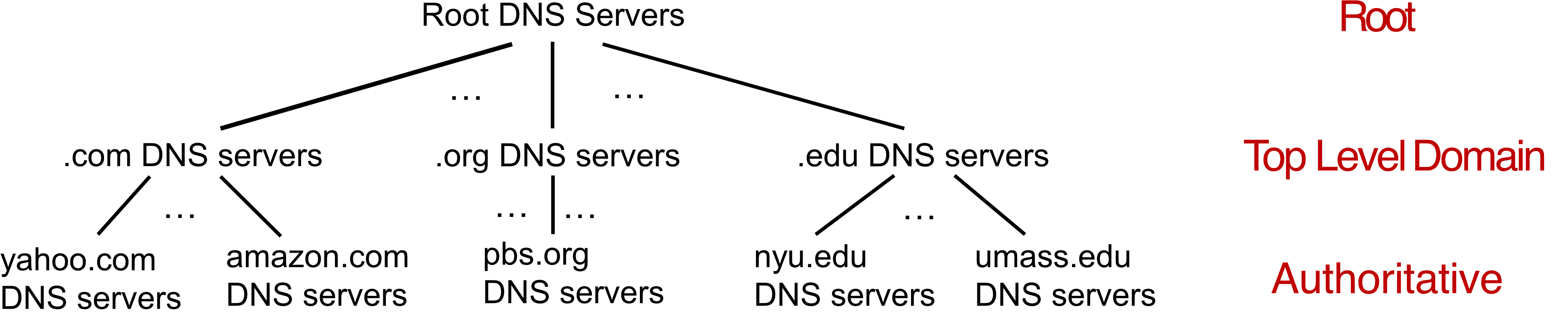
                   Root DNS Servers
                          |
        +-----------------+-----------------+
        |                 |                 |
    .com DNS          .org DNS          .edu DNS
    servers           servers           servers
        |                 |                 |
    +---+---+         +---+---+         +---+---+
    |   |   |         |   |   |         |   |   |
  yahoo amazon      pbs.org           nyu  umass
   .com  .com       DNS                .edu .edu
  servers servers  servers           servers servers
Query Process (1st approximation):
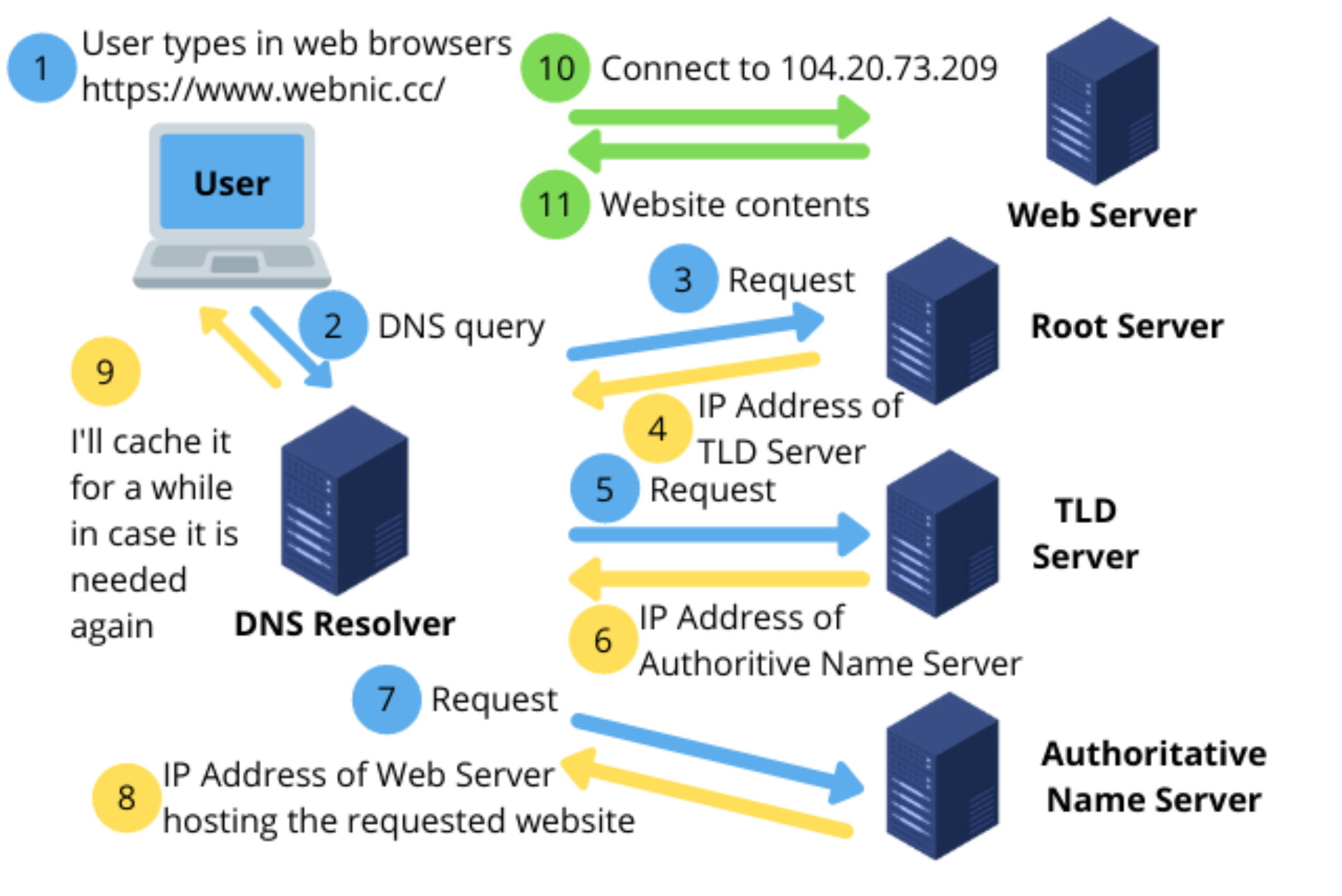
- Client queries root server to find .com DNS server
- Client queries .com DNS server to get amazon.com DNS server
- Client queries amazon.com DNS server to get IP address for www.amazon.com
Root DNS Servers
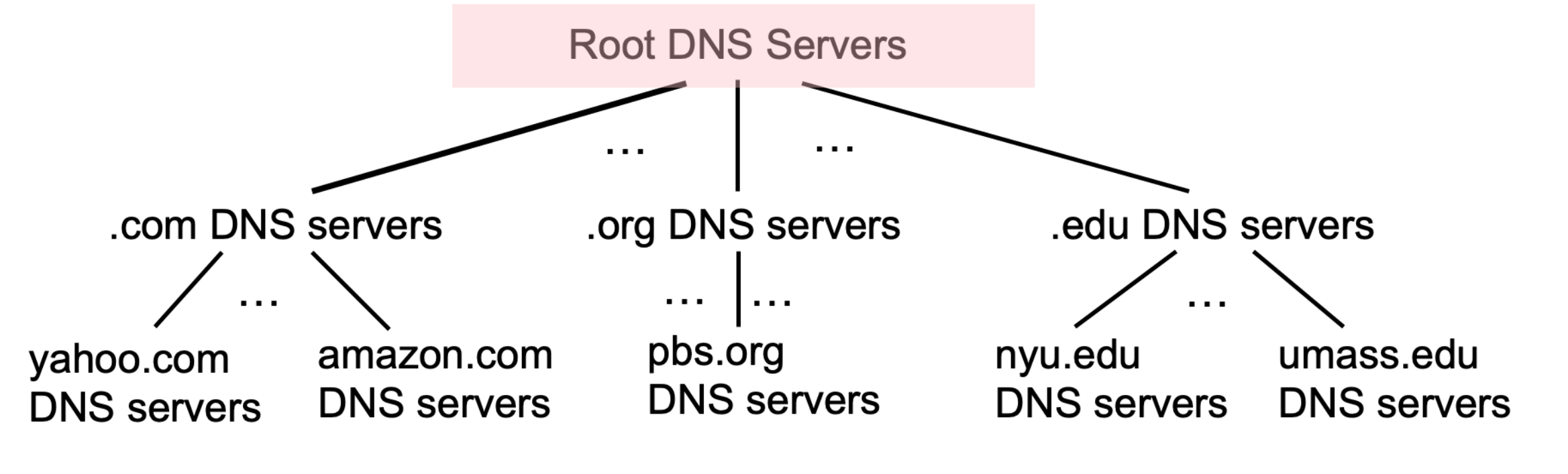
Role:
- Official contact-of-last-resort by name servers that cannot resolve name
- Incredibly important Internet function
- Internet couldn't function without it!
- DNSSEC provides security (authentication, message integrity)
Management:
- ICANN (Internet Corporation for Assigned Names and Numbers) manages root DNS domain
Infrastructure:
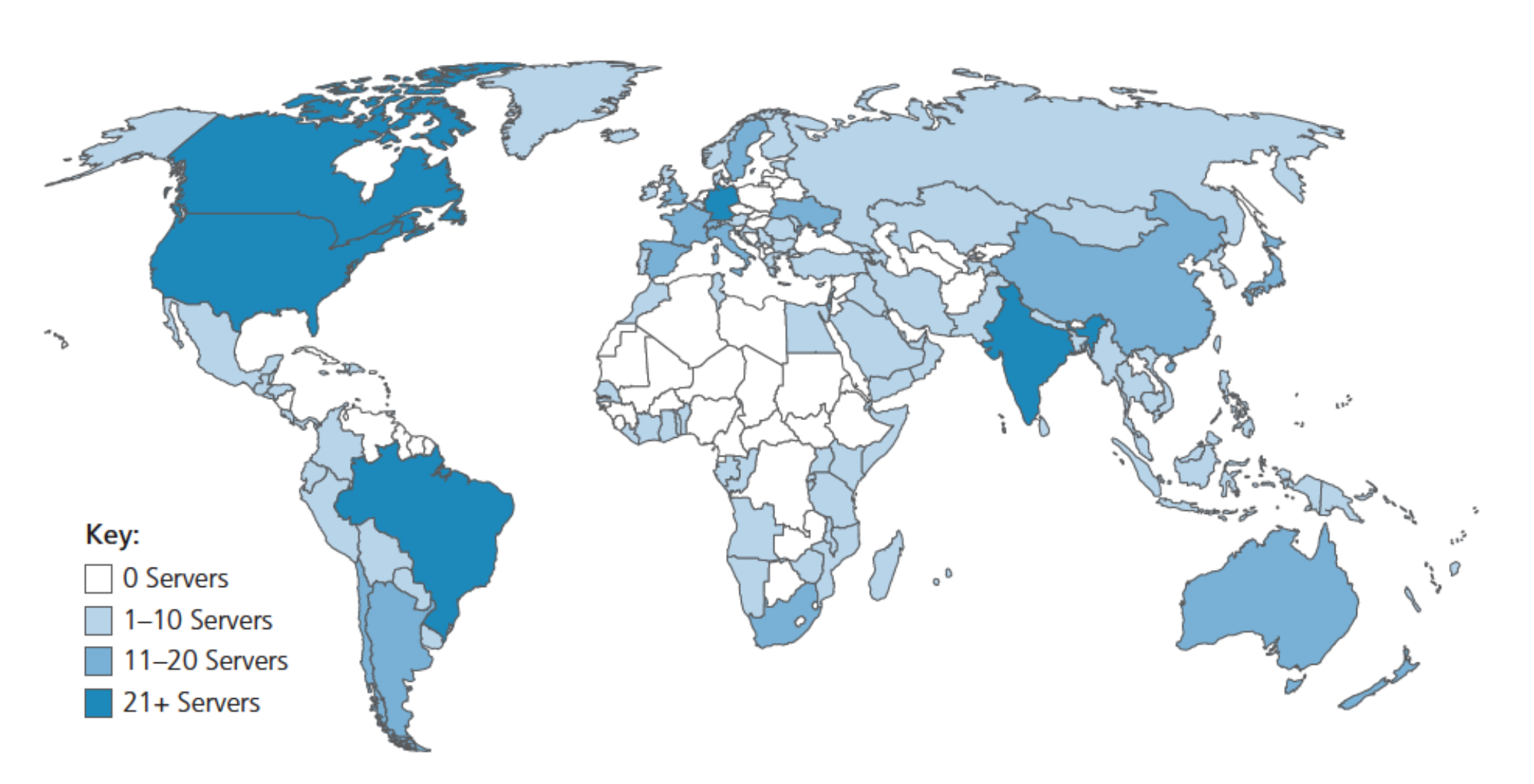
- 13 logical root name "servers" worldwide
- Each "server" replicated many times (~200 servers in US alone)
- Distributed globally for redundancy and performance
Top-Level Domain (TLD) Servers
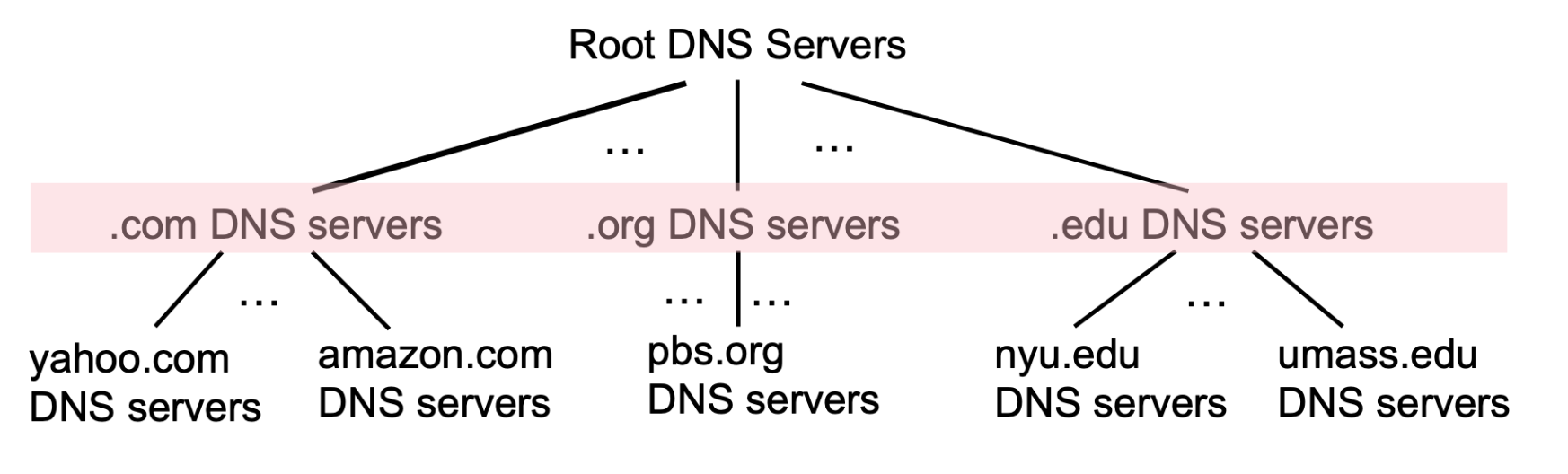
TLD Servers responsible for:
- Generic TLDs:
.com,.org,.net,.edu,.aero,.jobs,.museums - Country-code TLDs:
.cn,.uk,.fr,.ca,.jp,.th
Management:
- Network Solutions: authoritative registry for
.com,.netTLD - Educause:
.eduTLD
Authoritative DNS Servers
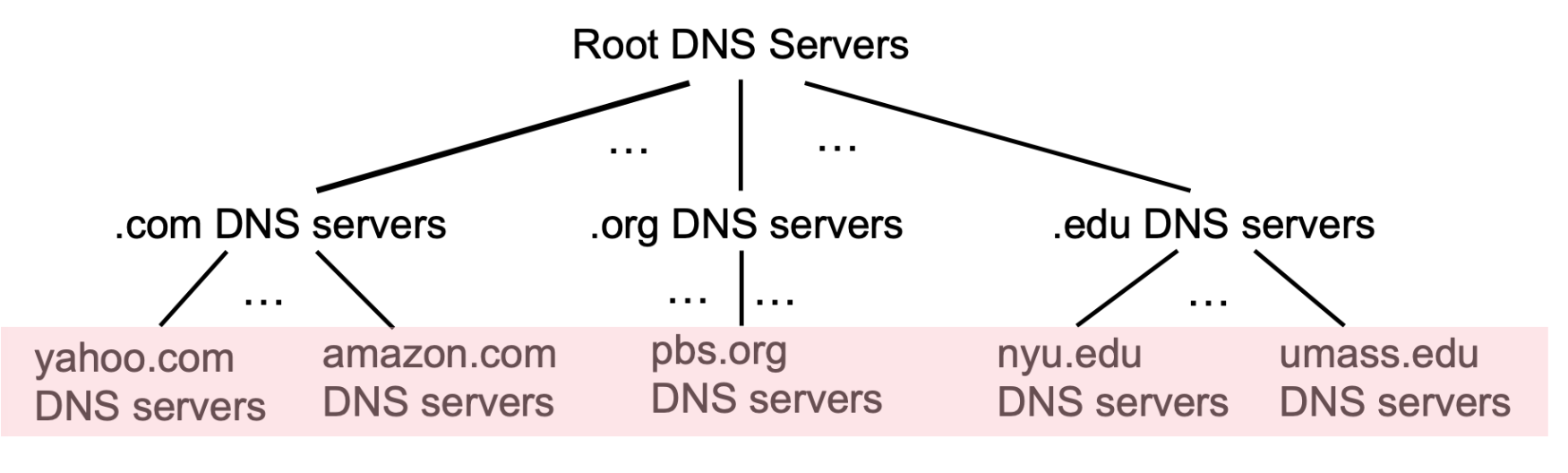
Definition:
- Organization's own DNS server(s)
- Provides authoritative hostname-to-IP mappings for organization's named hosts
Maintenance:
- Can be maintained by organization OR service provider
Example servers:
- yahoo.com DNS servers
- amazon.com DNS servers
- umass.edu DNS servers
Local DNS Name Servers
Function:
- When host makes DNS query, sent to local DNS server
- Returns reply by:
- Using local cache of recent name-to-address translations (possibly out of date!)
- Forwarding request into DNS hierarchy for resolution
Characteristics:
- Each ISP has local DNS name server
- Doesn't strictly belong to hierarchy
- Acts as proxy, forwarding queries into hierarchy
Finding your local DNS server:
- MacOS:
scutil --dns - Windows:
ipconfig /all
Example output from ipconfig /all:
DNS Servers: 115.178.58.26
             115.178.58.10
             192.168.1.1
เวลาเรา set up DNS locally (ถ้าอย่างในบ้านก็เป็น router) เนี่ย พอถามมาก็ forward ไปเลย ไม่ต้อง consume external bandwidth ออกไปถามข้างนอก
DNS Name Resolution Methods
1. Iterated Query
Process:
- Contacted server replies with name of server to contact
- Response: "I don't know this name, but ask this server"
Example: Host at engineering.nyu.edu wants IP for gaia.cs.umass.edu
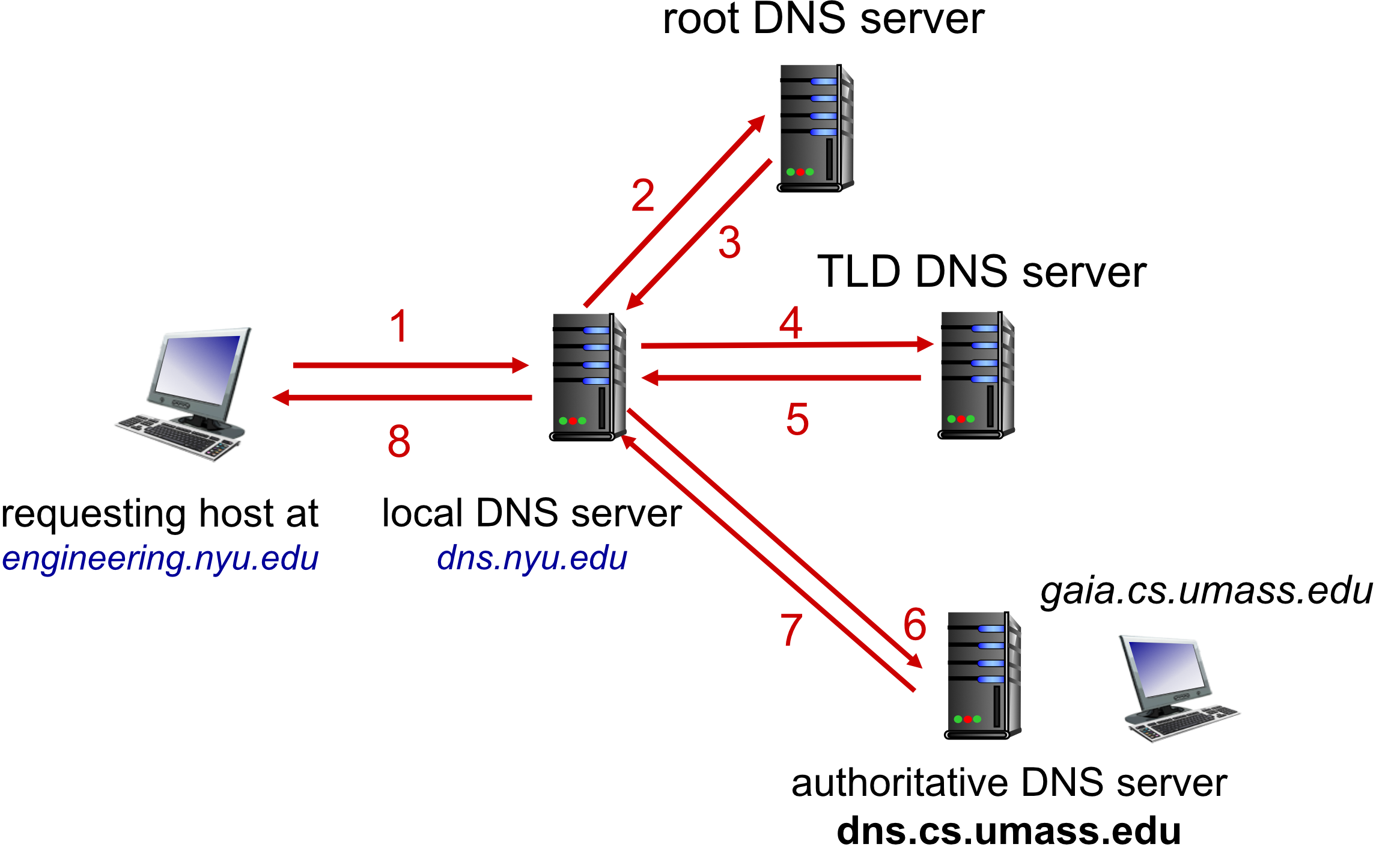
Steps:
- Request goes to local DNS server
- Local DNS queries root server
- Root returns TLD server address
- Local DNS queries TLD server
- TLD returns authoritative server address 6-7. Local DNS queries authoritative server
- Response returned to requesting host
2. Recursive Query
Process:
- Puts burden of name resolution on contacted name server
- Each server in chain performs the next query
Concern: Heavy load at upper levels of hierarchy?
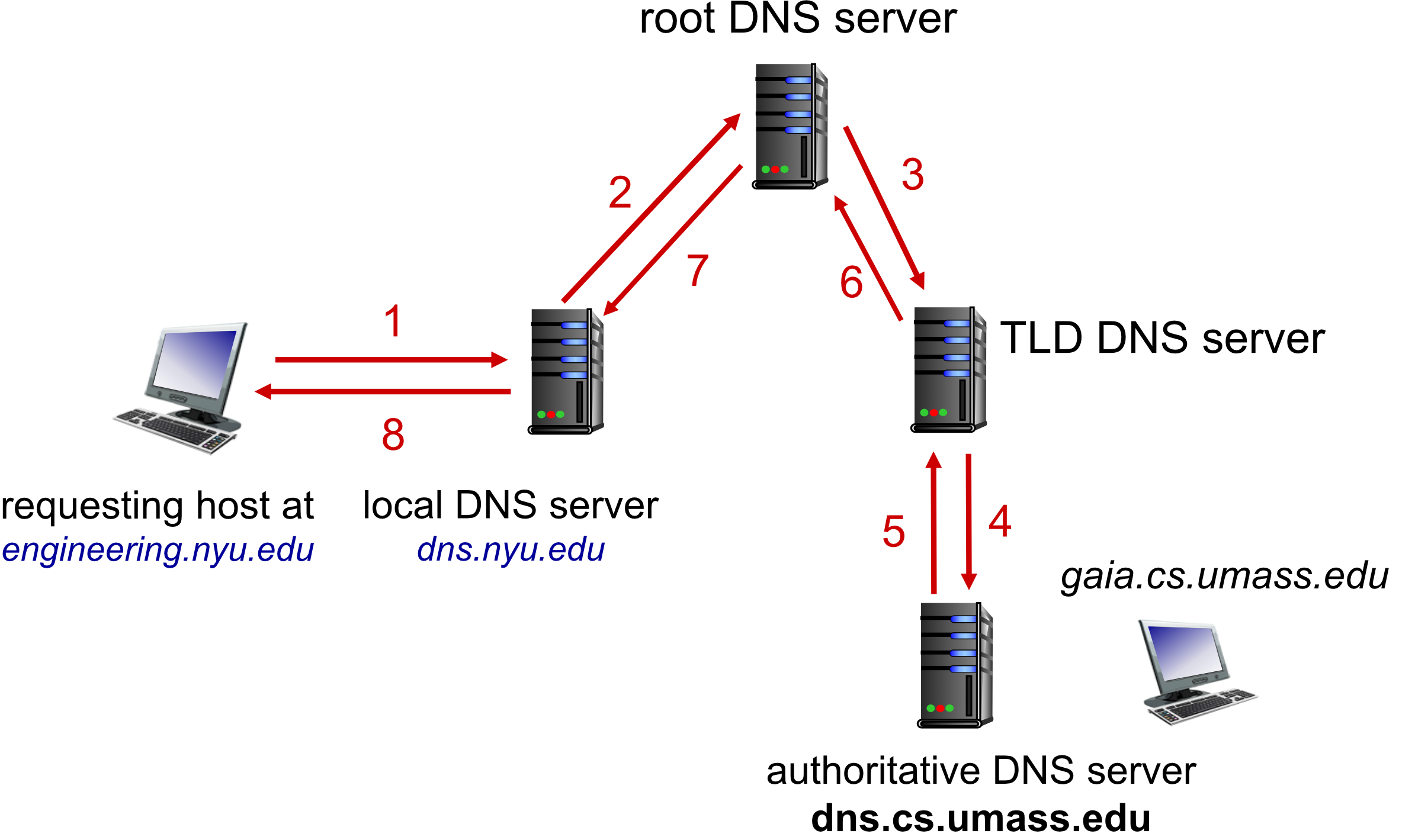
DNS Caching
Purpose:
- Improve response time
- Reduce load on DNS servers
How it works:
- Once any name server learns mapping, it caches the mapping
- Immediately returns cached mapping in response to query
- TLD servers typically cached in local name servers
- Root servers don't need to be visited often
Important considerations:
- Cache entries timeout (disappear) after some time (TTL)
- Cached entries may be out-of-date
- If named host changes IP address, may not be known Internet-wide until all TTLs expire
DNS TTL (Time To Live):
- Setting that tells DNS resolver how long to cache a query before requesting a new one
DNS Records (Resource Records)
Format: (name, value, type, ttl)
Record Types
Type A (Address)
- name = hostname
- value = IP address
- Example:
(cs.umass.edu, 128.119.40.12, A)
Type NS (Name Server)
- name = domain (e.g., foo.com)
- value = hostname of authoritative name server for this domain
- Example:
(foo.com, dns.foo.com, NS)
Type CNAME (Canonical Name)
- name = alias name for some "canonical" (real) name
- value = canonical name
- Example:
www.ibm.comis reallyservereast.backup2.ibm.com (www.ibm.com, servereast.backup2.ibm.com, CNAME)
Type MX (Mail Exchange)
- value = name of SMTP mail server associated with name
- Example:
(example.com, mail.example.com, MX)
DNS Protocol Messages
Format: DNS query and reply messages both have same format
Message Structure
+------------------+------------------+
|  identification  |      flags       |  ← 2 bytes each
+------------------+------------------+
|   # questions    |   # answer RRs   |
+------------------+------------------+
| # authority RRs  | # additional RRs |
+------------------+------------------+
|                                     |
|  questions (variable # of questions)|
|                                     |
+-------------------------------------+
|                                     |
|   answers (variable # of RRs)       |
|                                     |
+-------------------------------------+
|                                     |
|   authority (variable # of RRs)     |
|                                     |
+-------------------------------------+
|                                     |
| additional info (variable # of RRs) |
|                                     |
+-------------------------------------+
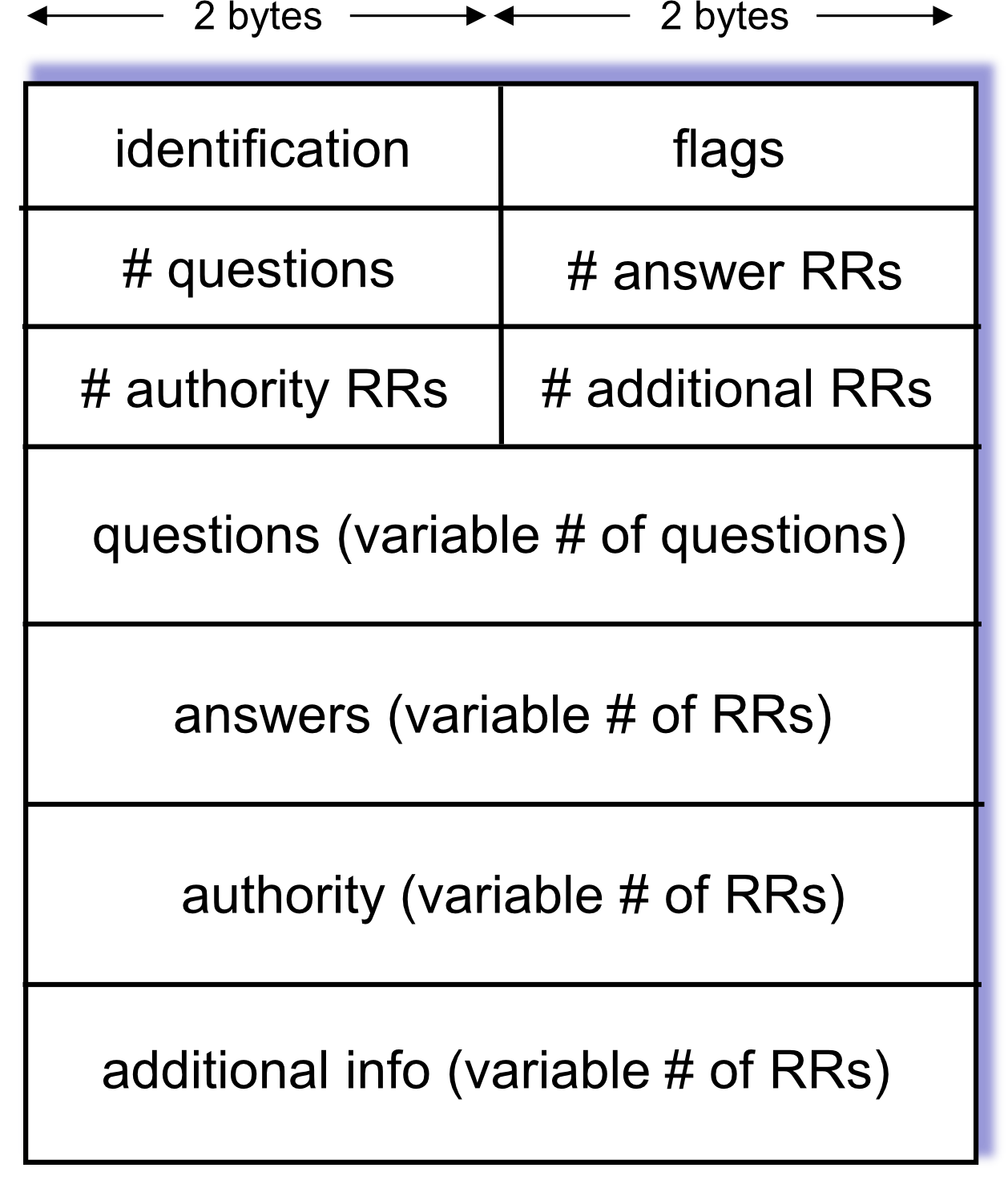
Message Header Fields
Identification:
- 16-bit number for query
- Reply to query uses same number
Flags:
- Query or reply
- Recursion desired
- Recursion available
- Reply is authoritative
Message Body Sections
- Questions: Name and type fields for a query
- Answers: RRs in response to query
- Authority: Records for authoritative servers
- Additional info: "Helpful" information that may be used
DNS Query Example
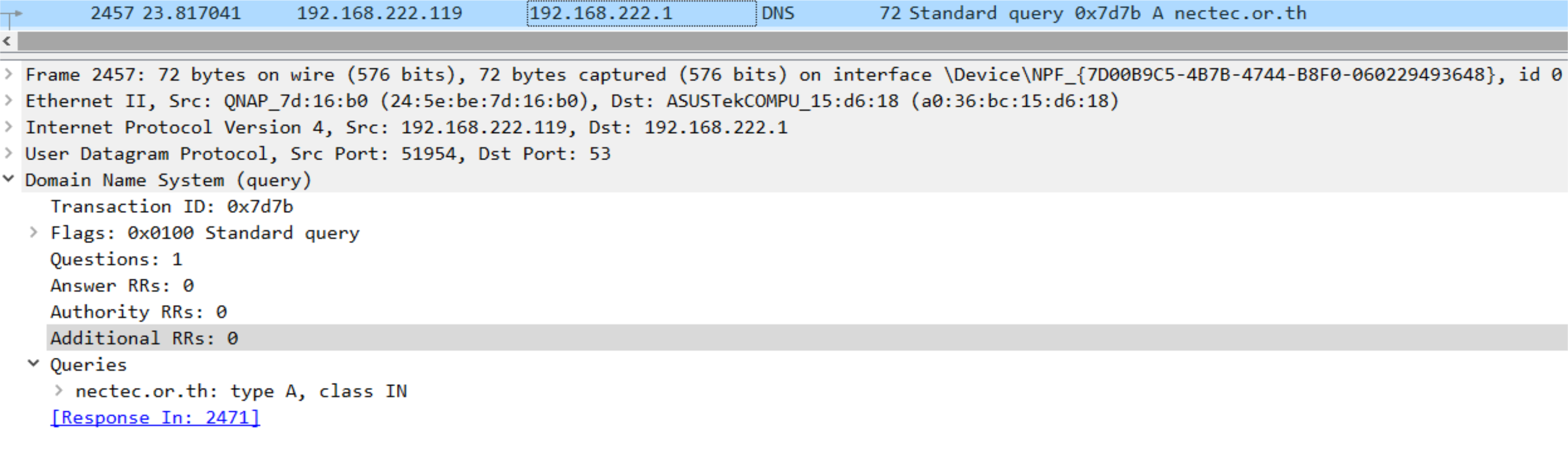
Query for nectec.or.th
Transaction ID: 0x7d7b
Flags: 0x0100 Standard query
Questions: 1
Answer RRs: 0
Authority RRs: 0
Additional RRs: 0

Queries:
  nectec.or.th: type A, class IN
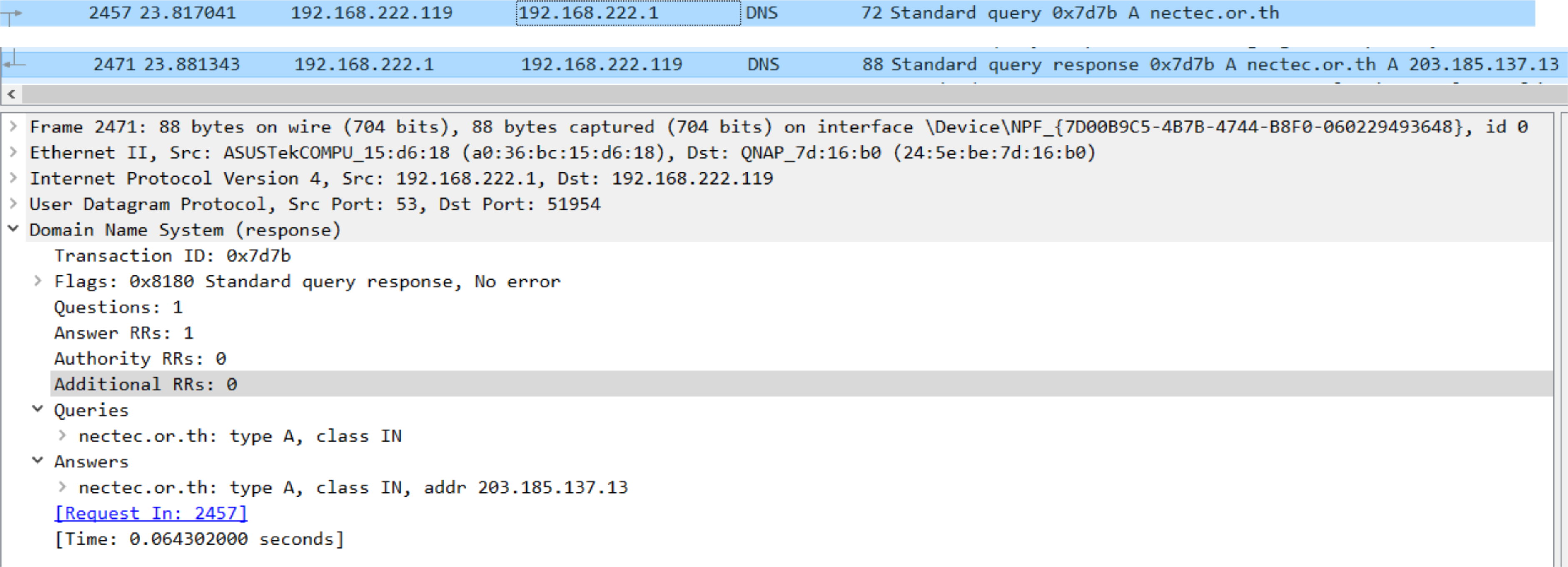
Response for nectec.or.th
Transaction ID: 0x7d7b
Flags: 0x8180 Standard query response, No error
Questions: 1
Answer RRs: 1
Authority RRs: 0
Additional RRs: 0

Queries:
  nectec.or.th: type A, class IN

Answers:
  nectec.or.th: type A, class IN, addr 203.185.137.13

[Time: 0.064302000 seconds]
DNS Security
DDoS Attacks
To make the DNS do not work!
Bombard root servers with traffic:
- Not successful to date
- Mitigations:
- Traffic filtering
- Local DNS servers cache IPs of TLD servers, allowing root server bypass
Bombard TLD servers:
- Potentially more dangerous
- Harder to bypass with caching
Spoofing Attacks
Attack method:
- Intercept DNS queries
- Return bogus replies
Consequences:
- DNS cache poisoning
- Users redirected to malicious sites
Protection:
- RFC 4033: DNSSEC
- Authentication services
- Message integrity
- Cryptographic verification
Peer-to-Peer (P2P) Applications
P2P Architecture Characteristics
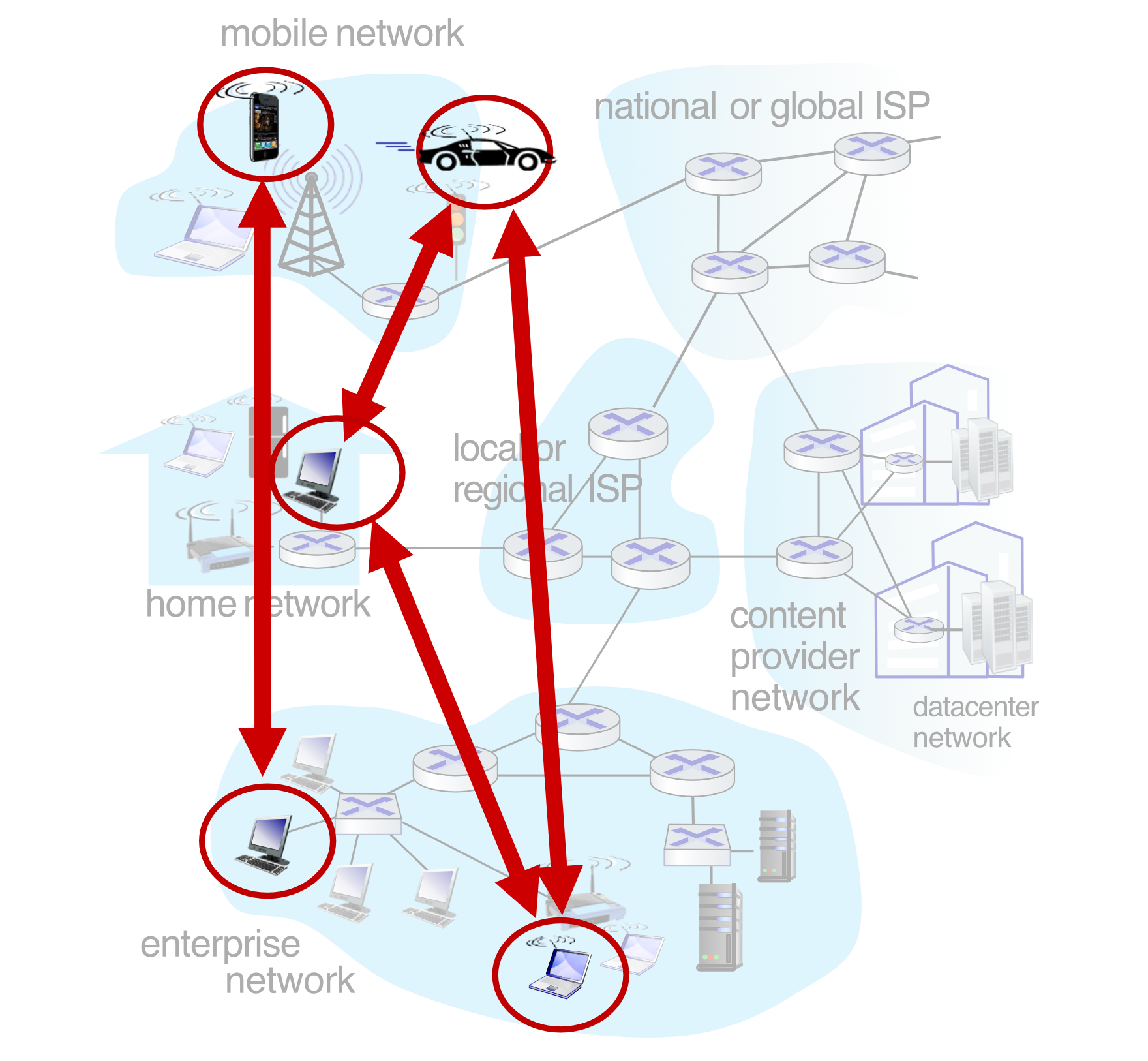
Key features:
- No always-on server
- Arbitrary end systems directly communicate
- Peers request service from other peers, provide service in return
- Self-scalability: New peers bring new service capacity AND new service demands
- ⚠️ Peers are intermittently connected and change IP addresses
- Complex management challenge
Examples:
- File sharing: BitTorrent
- Streaming: KanKan
- VoIP: Skype
Analogy: P2P is like a potluck dinner - everyone brings food (resources) and everyone eats (consumes resources). The more people join, the more food is available!
File Distribution: Client-Server vs P2P
Question: How much time to distribute file (size ) from one server to peers?
- Peer upload/download capacity is limited resource
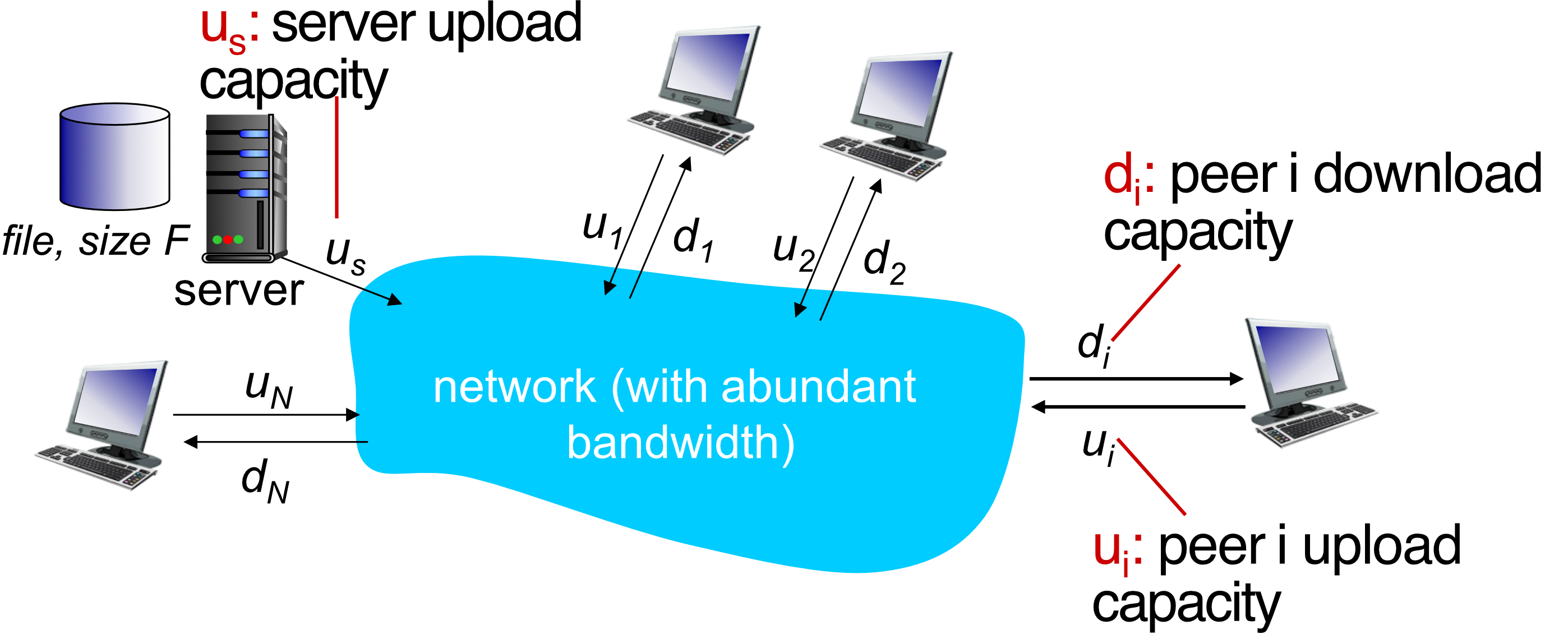
Variables:
- = server upload capacity
- = peer upload capacity
- = peer download capacity
- = minimum client download rate
Client-Server Distribution Time
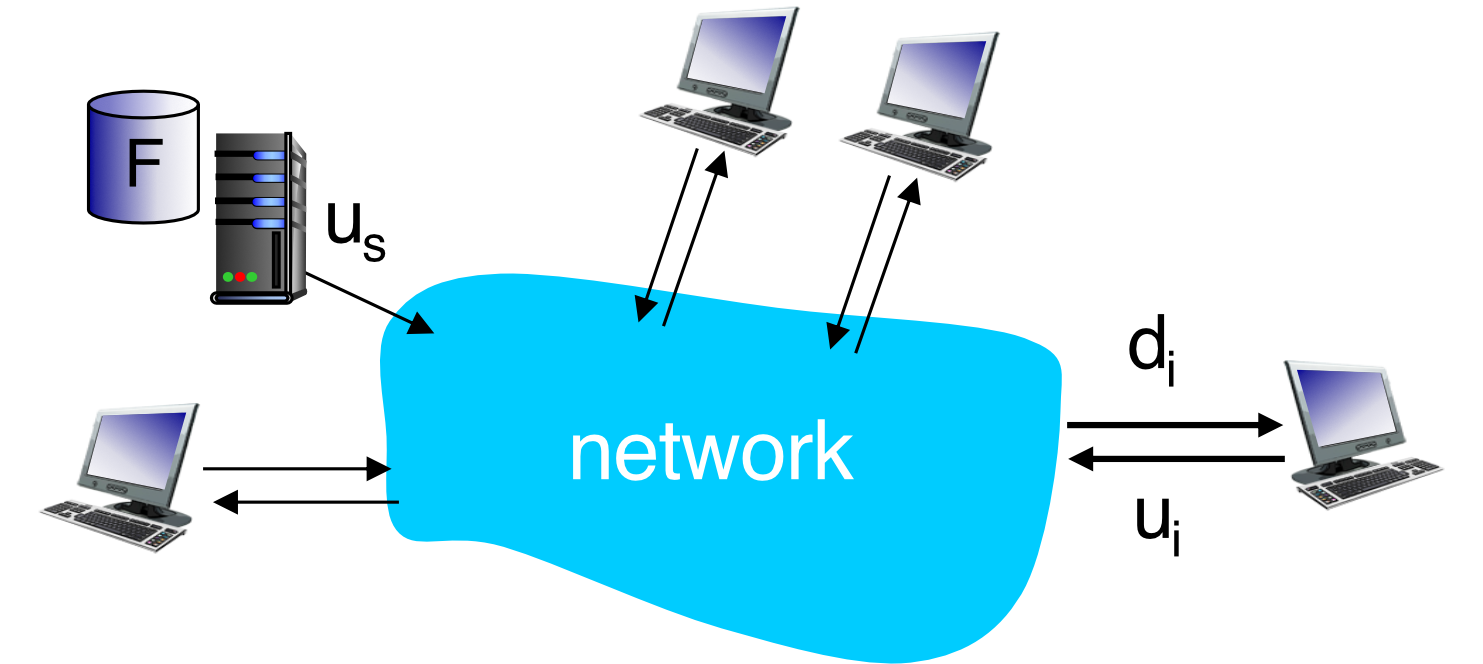
Server transmission:
- Must sequentially send (upload) file copies
- Time to send one copy:
- Time to send copies:
Client download:
- Each client must download file copy
- Min client download time:
Formula:
\boxed{D_{c-s} \geq \max\left{\frac{NF}{u_s}, \frac{F}{d_{min}}\right}}
Key characteristic: Increases linearly in
P2P Distribution Time
Server transmission:
- Must upload at least one copy:
Client download:
- Each client must download file copy
- Min client download time:
Clients as aggregate:
- Must download bits total
- Max upload rate (limiting max download rate) is
Formula:
\boxed{D_{P2P} \geq \max\left{\frac{F}{u_s}, \frac{F}{d_{min}}, \frac{NF}{u_s + \sum u_i}\right}}
Key characteristics:
- Increases linearly in ...
- BUT denominator also increases as each peer brings service capacity
- Much more scalable!
Comparison Example
Scenario: Client upload rate = , = 1 hour, ,
Graph comparison:
- Client-Server: Linear growth (reaches ~3.5 hours for 35 clients)
- P2P: Sub-linear growth (stays under ~0.8 hours for 35 clients)
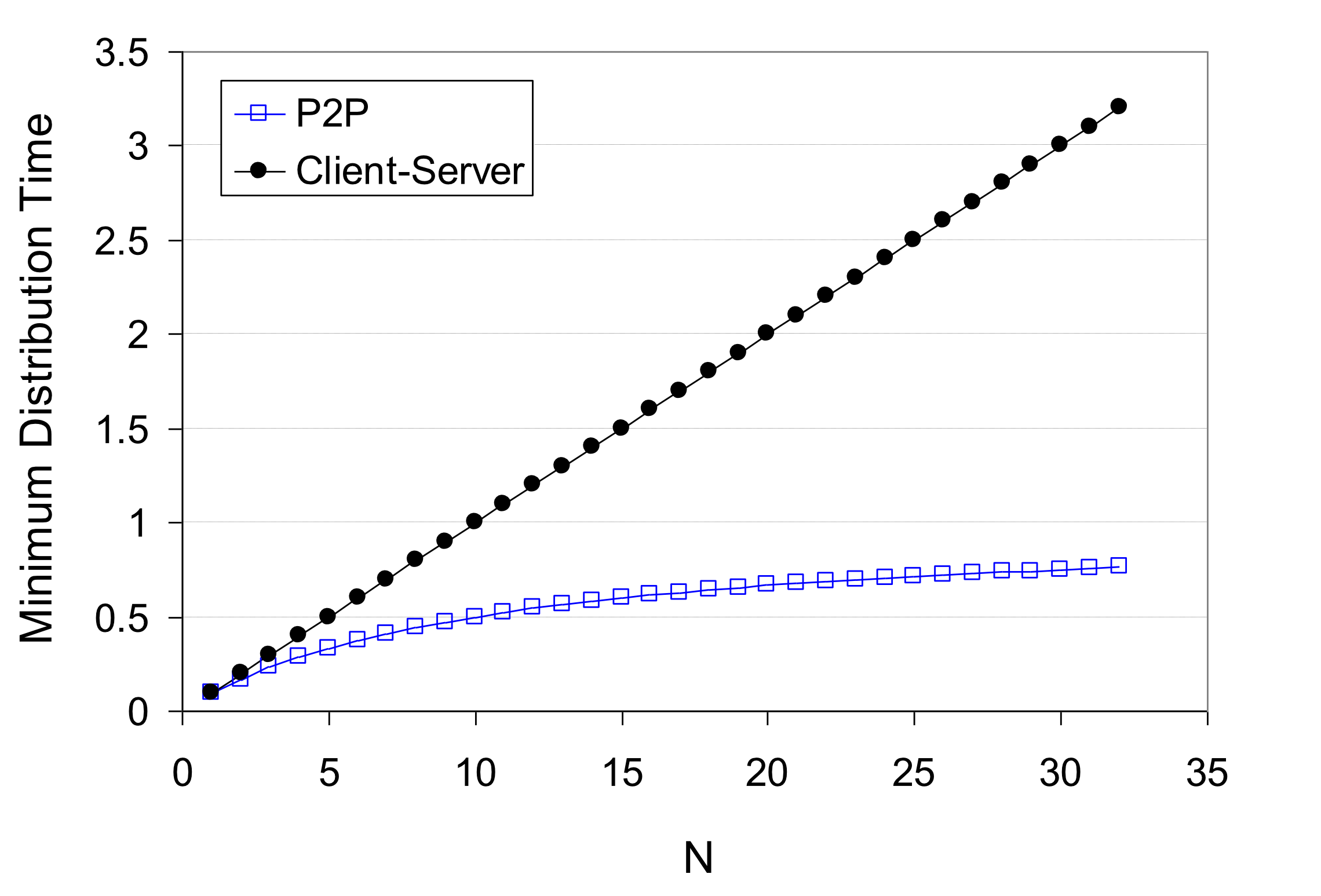
P2P becomes increasingly efficient as more peers join!
P2P File Distribution: BitTorrent
BitTorrent Basics
File structure:
- File divided into 256KB chunks
- Peers in torrent send/receive file chunks
Key components:
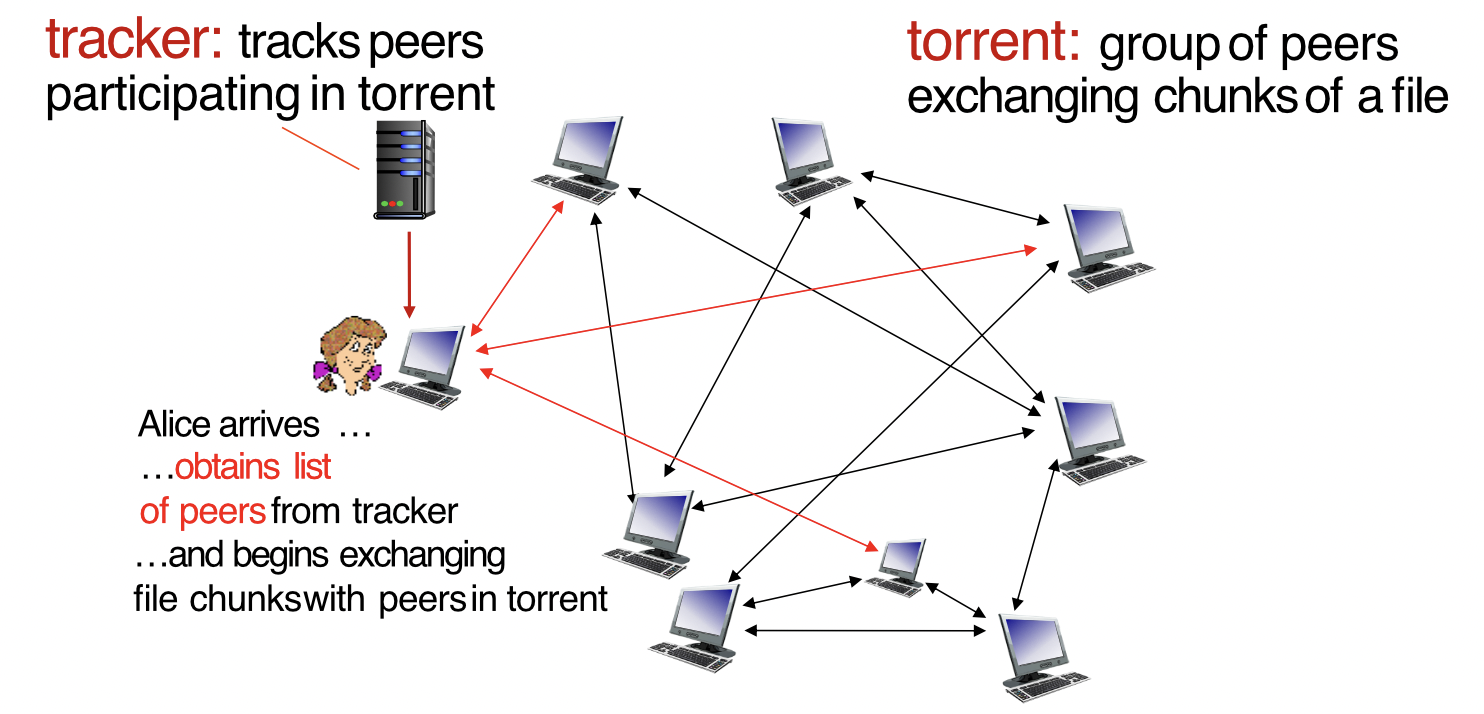
- Tracker: Tracks peers participating in torrent
- Torrent: Group of peers exchanging chunks of a file
BitTorrent Process
When Alice joins:
- Alice arrives at torrent
- Obtains list of peers from tracker
- Begins exchanging file chunks with peers in torrent
Characteristics: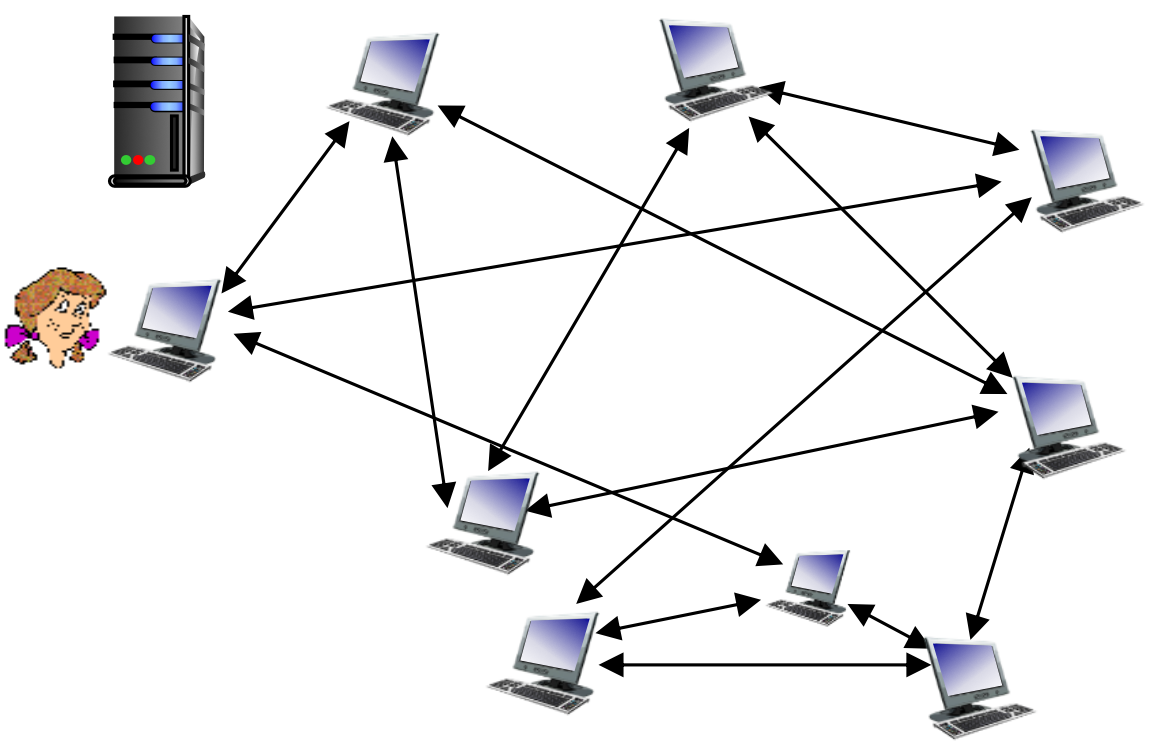
- Peers accumulate chunks over time from other peers
- While downloading, peer uploads chunks to other peers
- Peer may change peers with whom it exchanges chunks
- Churn: Peers may come and go
- Once peer has entire file:
- May (selfishly) leave torrent, OR
- May (altruistically) remain in torrent to help others
BitTorrent Chunk Selection
Requesting Chunks
Strategy:
- At any time, different peers have different subsets of file chunks
- Periodically, Alice asks each peer for list of chunks they have
- Alice requests missing chunks from peers using "rarest first" strategy
Rarest first ensures that rare chunks get distributed quickly, improving overall swarm health.
Sending Chunks: Tit-for-Tat
Alice's strategy:
- Sends chunks to the four peers currently sending her chunks at highest rate
- Other peers are "choked" by Alice (do not receive chunks from her)
- Re-evaluates top 4 every 10 seconds
Optimistic unchoking:
- Every 30 seconds: randomly select another peer, start sending chunks
- "Optimistically unchoke" this peer
- ไปหามาแปลว่าไร
- Newly chosen peer may join top 4
Tit-for-tat process:
- Alice "optimistically unchokes" Bob
- Alice becomes one of Bob's top-four providers → Bob reciprocates
- Bob becomes one of Alice's top-four providers
Result: Higher upload rate → find better trading partners → get file faster!
Video Streaming and Content Distribution Networks (CDNs)
Context and Challenges
Video Traffic Statistics
Stream video traffic: Major consumer of Internet bandwidth
- Netflix, YouTube, Amazon Prime, Apple TV: 80% of residential ISP traffic (2020)
Challenges:
- Scale: How to reach ~1 billion users?
- Heterogeneity:
- Different users have different capabilities
- Wired vs mobile
- Bandwidth rich vs bandwidth poor
Solution: Distributed, application-level infrastructure (CDNs)
Multimedia: Video Basics
Video Characteristics
Definition:
- Video: Sequence of images displayed at constant rate
- Example: 24 images/sec (frames per second)
Digital image:
- Array of pixels
- Each pixel represented by bits
Video Coding Techniques
1. Spatial Coding (Within Image)
Concept: Use redundancy within a single image
Example:
- Instead of sending values of same color (all purple)
- Send only two values:
- Color value (purple)
- Number of repeated values ()
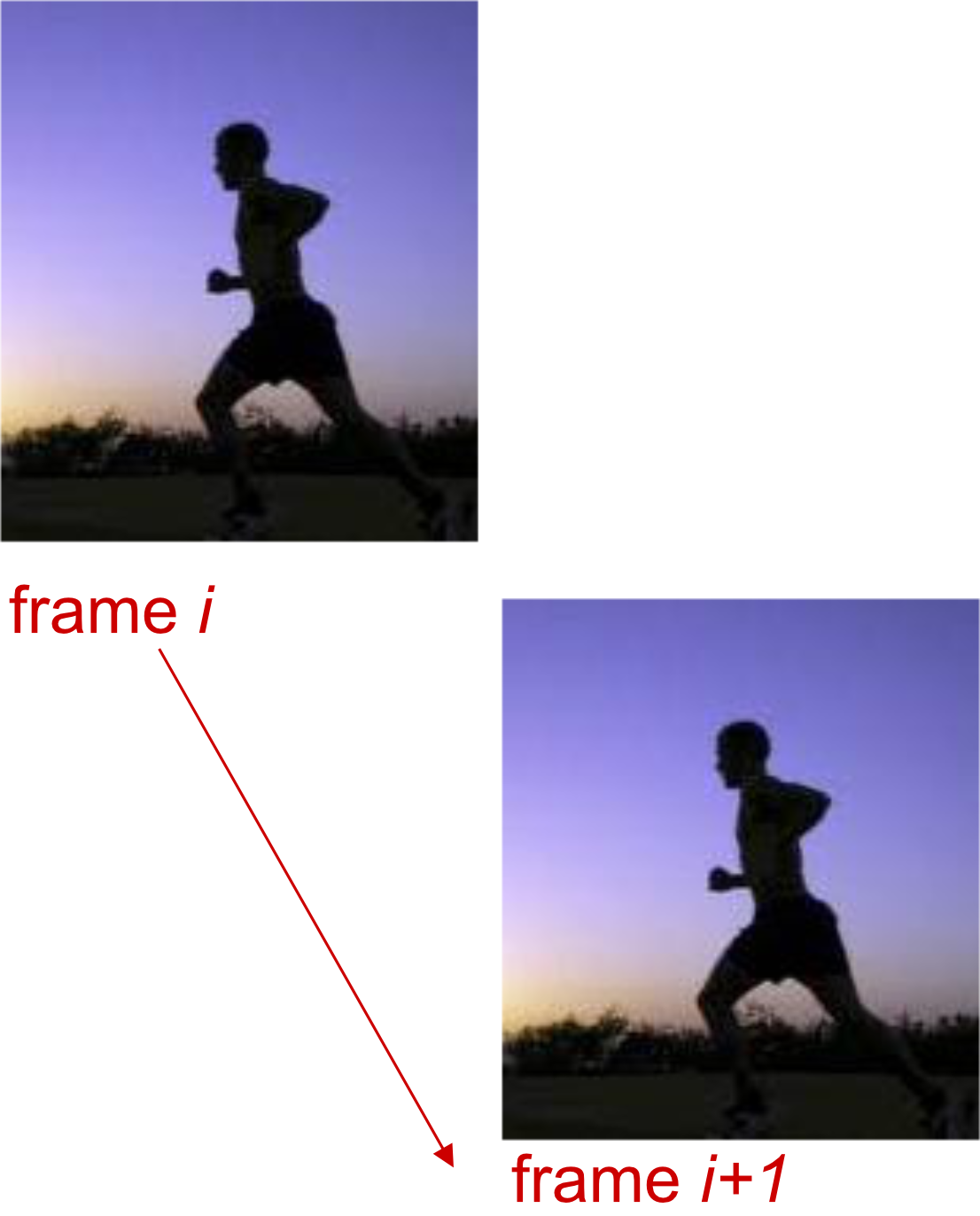
2. Temporal Coding (Between Images)
Concept: Use redundancy between consecutive frames
Example:
- Instead of sending complete frame at
- Send only differences from frame
Analogy: Spatial coding is like using "ditto marks" in a list; temporal coding is like describing only what changed in a "before and after" photo.
Video Encoding Rates
Lecture 11 - Asynchronous Transfer Mode (ATM)
CBR (Constant Bit Rate):
- Video encoding rate fixed
- Predictable bandwidth usage
VBR (Variable Bit Rate):
- Video encoding rate changes
- Varies with amount of spatial/temporal coding changes
- More efficient use of bandwidth
Common formats:
- MPEG1 (CD-ROM): 1.5 Mbps
- MPEG2 (DVD): 3-6 Mbps
- MPEG4 (Internet): 64 Kbps – 12 Mbps
Encoding vs transposing (ต่างกันยังไง??)
Streaming Stored Video
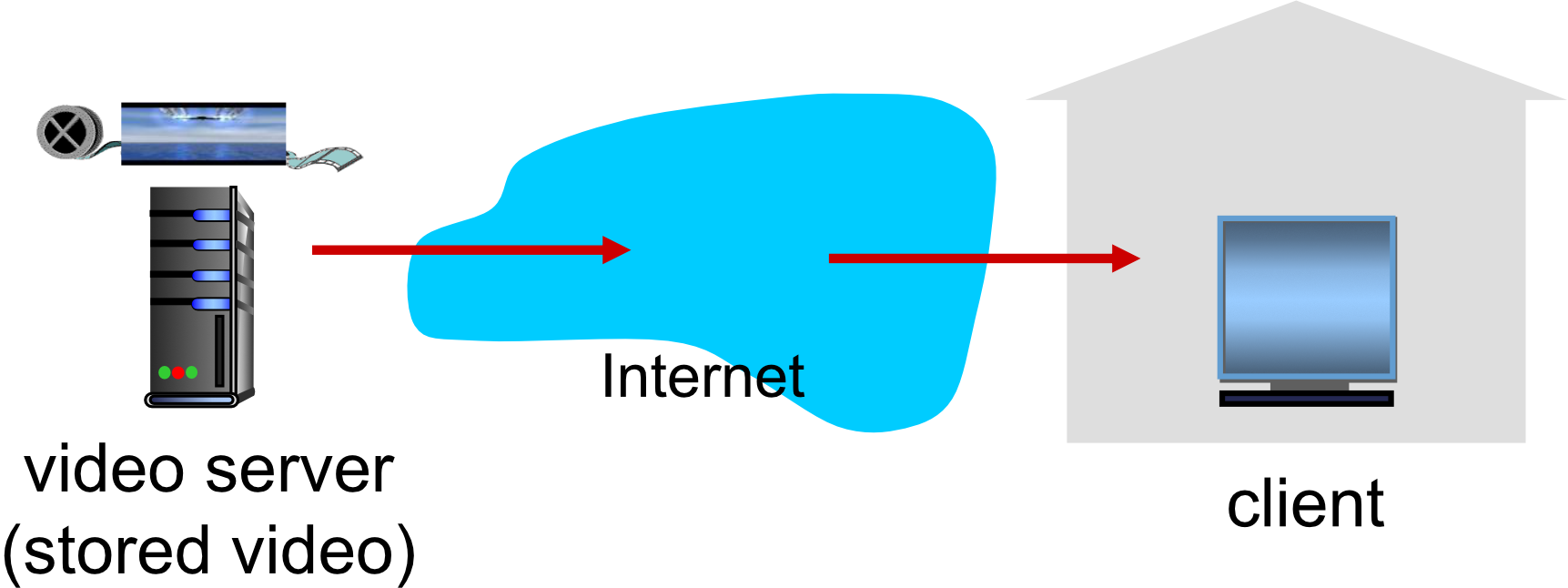
Main Challenges
Network variability:
- Server-to-client bandwidth varies over time
- Changes due to network congestion (home, access network, core, video server)
Packet issues:
- Packet loss and delay due to congestion
- Can delay playout or result in poor video quality
Streaming Process
Timeline:
Time →
[Video recorded]
       [Video sent from server]
              [Video received by client]
                     [Video played out]

← Network delay (variable) →
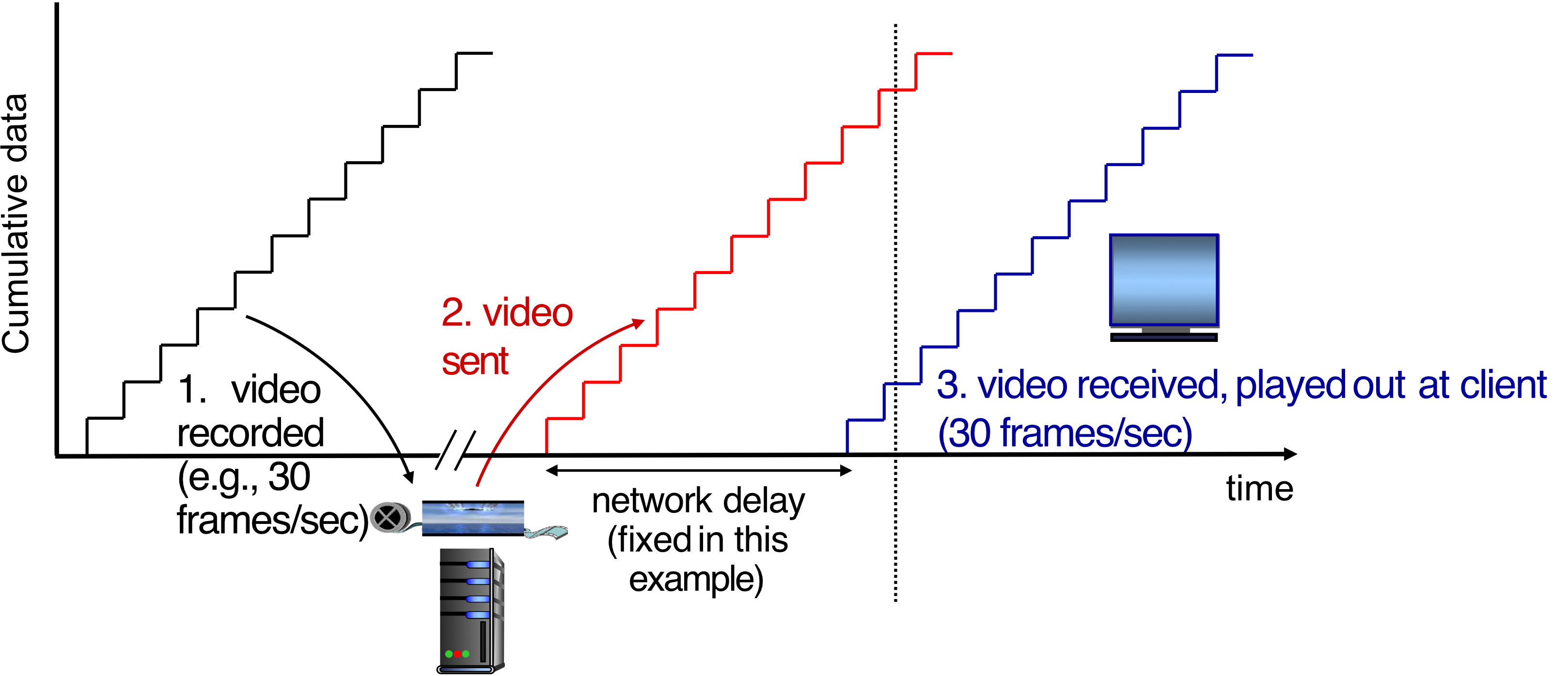
Key concept: Streaming
- At any time, client playing out early part of video
- While server still sending later part of video
Streaming Challenges and Solutions
Continuous Playout Constraint
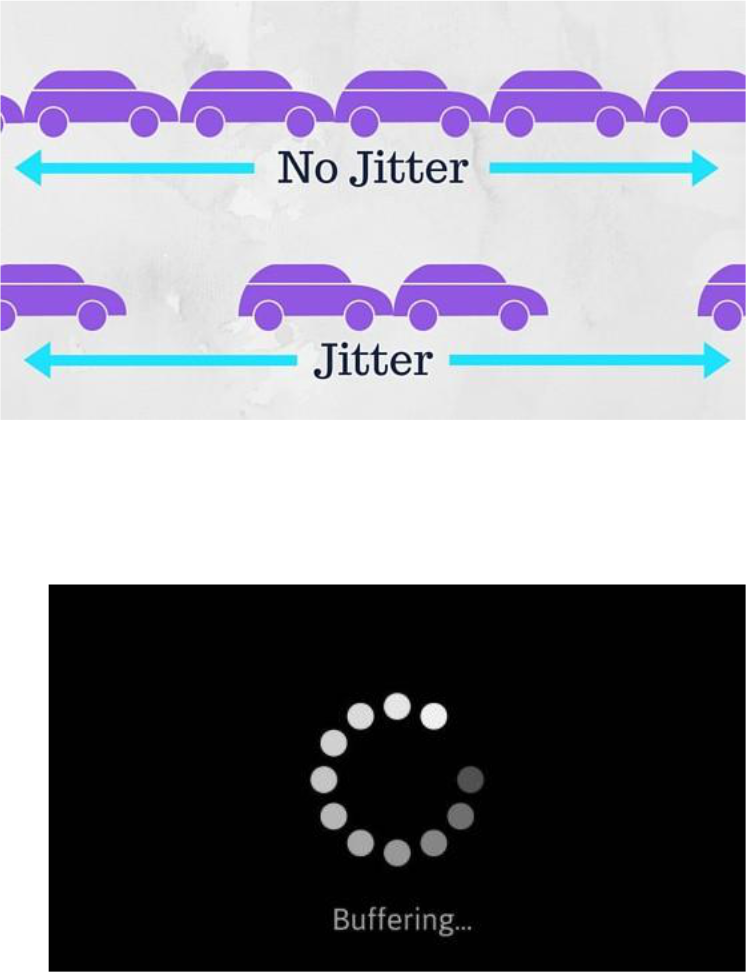
Requirement:
- During client video playout, playout timing must match original timing
Problem:
- Network delays are variable (jitter)
Solution:
- Need client-side buffer to match continuous playout constraint
Analogy: Buffer is like having a water tank - even if water supply is irregular, you can maintain steady output.
Other Challenges
- Client interactivity:
- Pause
- Fast-forward
- Rewind
- Jump through video
- Reliability:
- Video packets may be lost
- Packets may need retransmission
Playout Buffering
How It Works
Constant bit rate    Variable         Constant bit rate
video transmission   network delay    video playout

[Server] ──────→ [Network] ──────→ [Buffer] ──────→ [Screen]
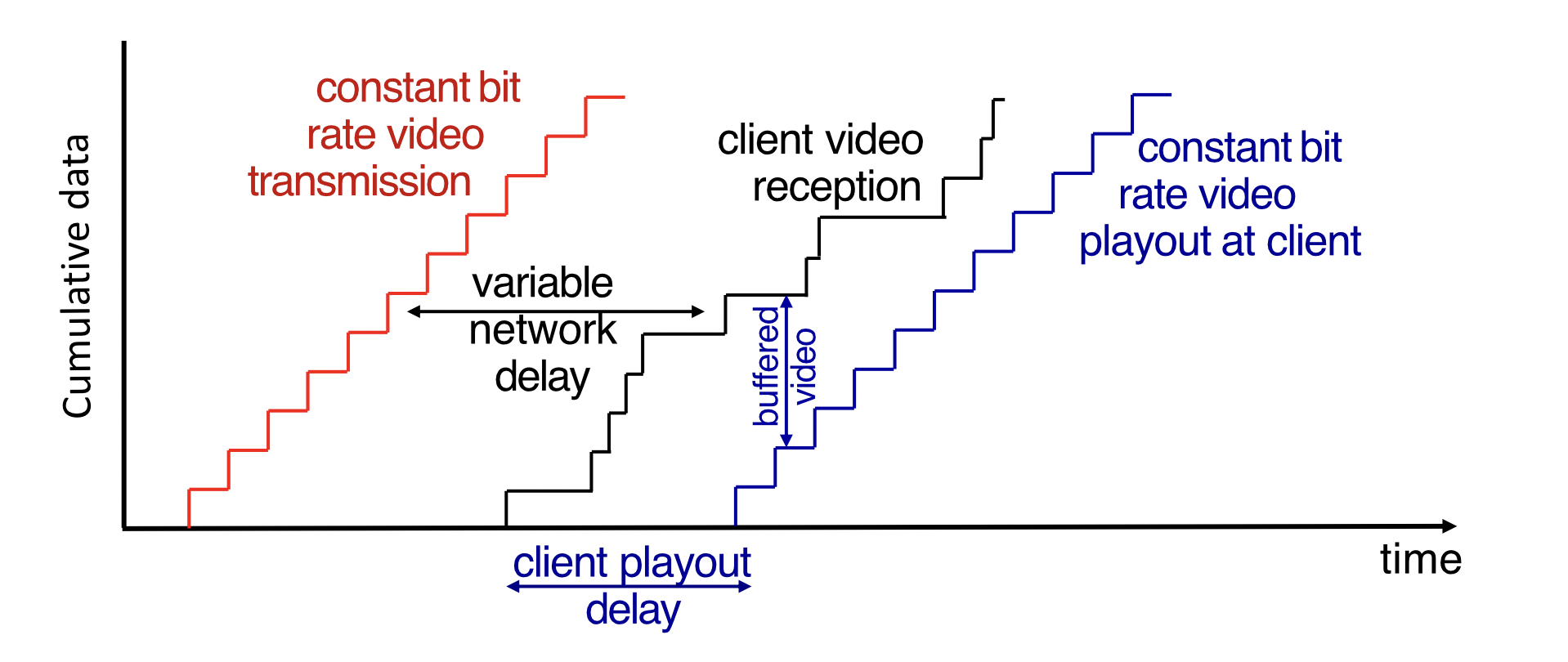
Client-side buffering:
- Compensates for network-added delay
- Compensates for delay jitter
- Creates client playout delay
Buffered video:
- Accumulates in client buffer
- Played out at constant rate
- Smooths out network variations
DASH (Dynamic Adaptive Streaming over HTTP)
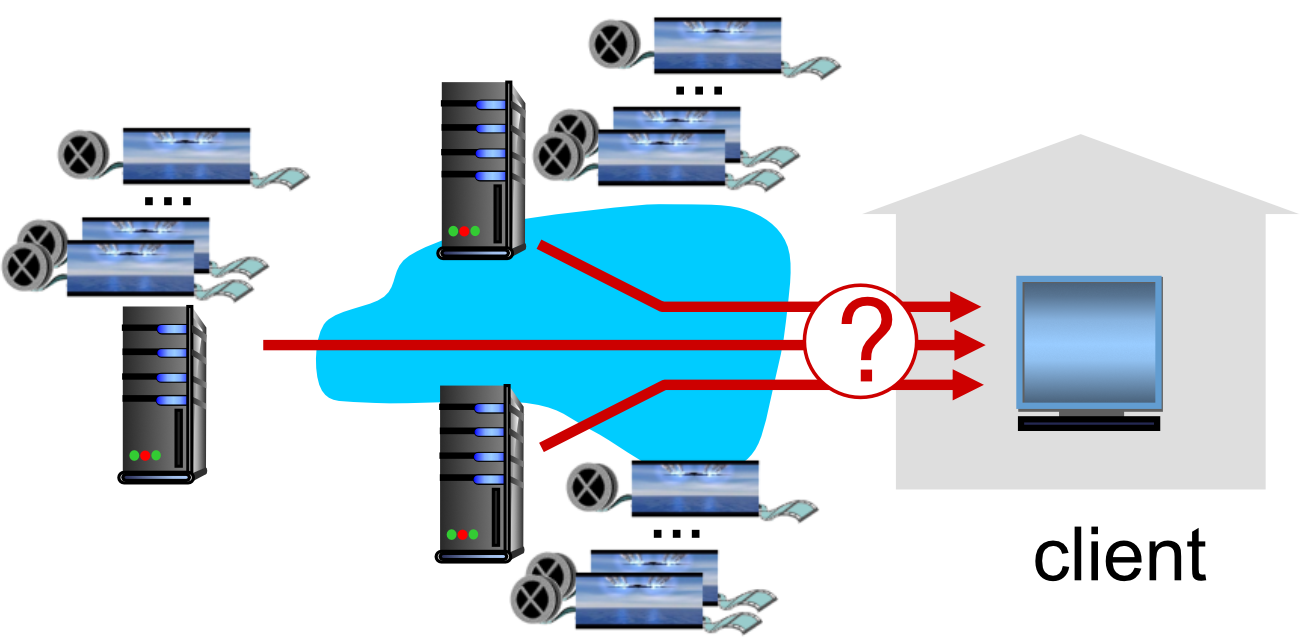
Server Side
Video preparation:
- Divides video file into multiple chunks
- Each chunk encoded at multiple different rates
- Different rate encodings stored in different files
- Files replicated in various CDN nodes
- CDN = provide fast retrieval (อยู่ไทย ก็เอาจาก server ใกล้ ๆ ละกัน)
- Manifest file provides URLs for different chunks
Client Side
Adaptive streaming process:
- Periodically estimates server-to-client bandwidth
- Consulting manifest, requests one chunk at a time
- Chooses maximum coding rate sustainable given current bandwidth
- Can choose different coding rates at different points in time
- Can request from different servers
"Intelligence" at client determines:
- When to request chunk (avoid buffer starvation/overflow)
- What encoding rate to request (higher quality when more bandwidth available)
- Where to request chunk (from nearby or high-bandwidth server)
Manifest File Example
<MPD ...>
  <Period>
    <!-- Video Adaptation Set -->
    <AdaptationSet contentType="video" mimeType="video/mp4">
      <!-- 720p rendition at 4 Mbps -->
      <Representation id="1" bandwidth="4000000"
                      width="1920" height="1080"
                      codecs="avc1.4D4028">
      ...
      </Representation>

      <!-- 360p rendition at 500 Kbps -->
      <Representation id="2" bandwidth="500000"
                      width="640" height="360"
                      codecs="avc1.4D401E">
      ...
      </Representation>
    </AdaptationSet>

    <!-- Audio Adaptation Set -->
    <AdaptationSet contentType="audio" mimeType="audio/mp4">
      <!-- single rendition at 192 Kbps -->
      <Representation id="3" bandwidth="192000"
                      codecs="mp4a.40.2">
      ...
      </Representation>
    </AdaptationSet>
  </Period>
</MPD>
DASH Adaptive Quality
Visualization:
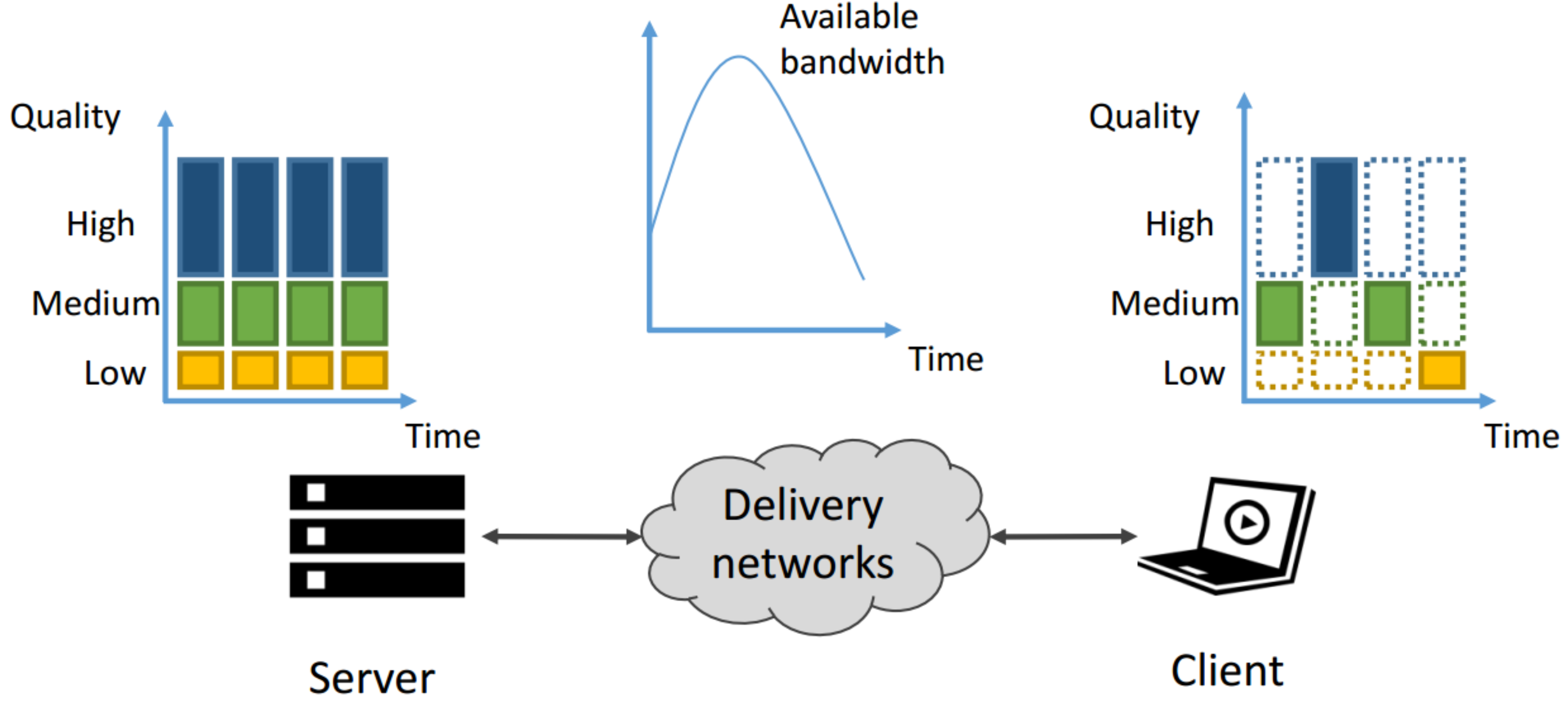
Server Side:                    Client Side:
Quality                         Quality
  High ████████                   High █ █ █
Medium ████████        →       Medium █ █ █ █
   Low ████████                    Low █ █████
       Time                            Time
                                   (adapts to
                                    bandwidth)
Formula for streaming:
Content Distribution Networks (CDNs)
The Challenge
Problem: How to stream content (selected from millions of videos) to hundreds of thousands of simultaneous users?
Option 1: Single Mega-Server (Doesn't Scale)
Problems:
- ❌ Single point of failure
- ❌ Point of network congestion
- ❌ Long path to distant clients
- ❌ Multiple copies of video sent over same outgoing link
Conclusion: Simply doesn't scale!
Option 2: CDN (Scalable Solution)

Concept:
- Store/serve multiple copies of videos
- At multiple geographically distributed sites
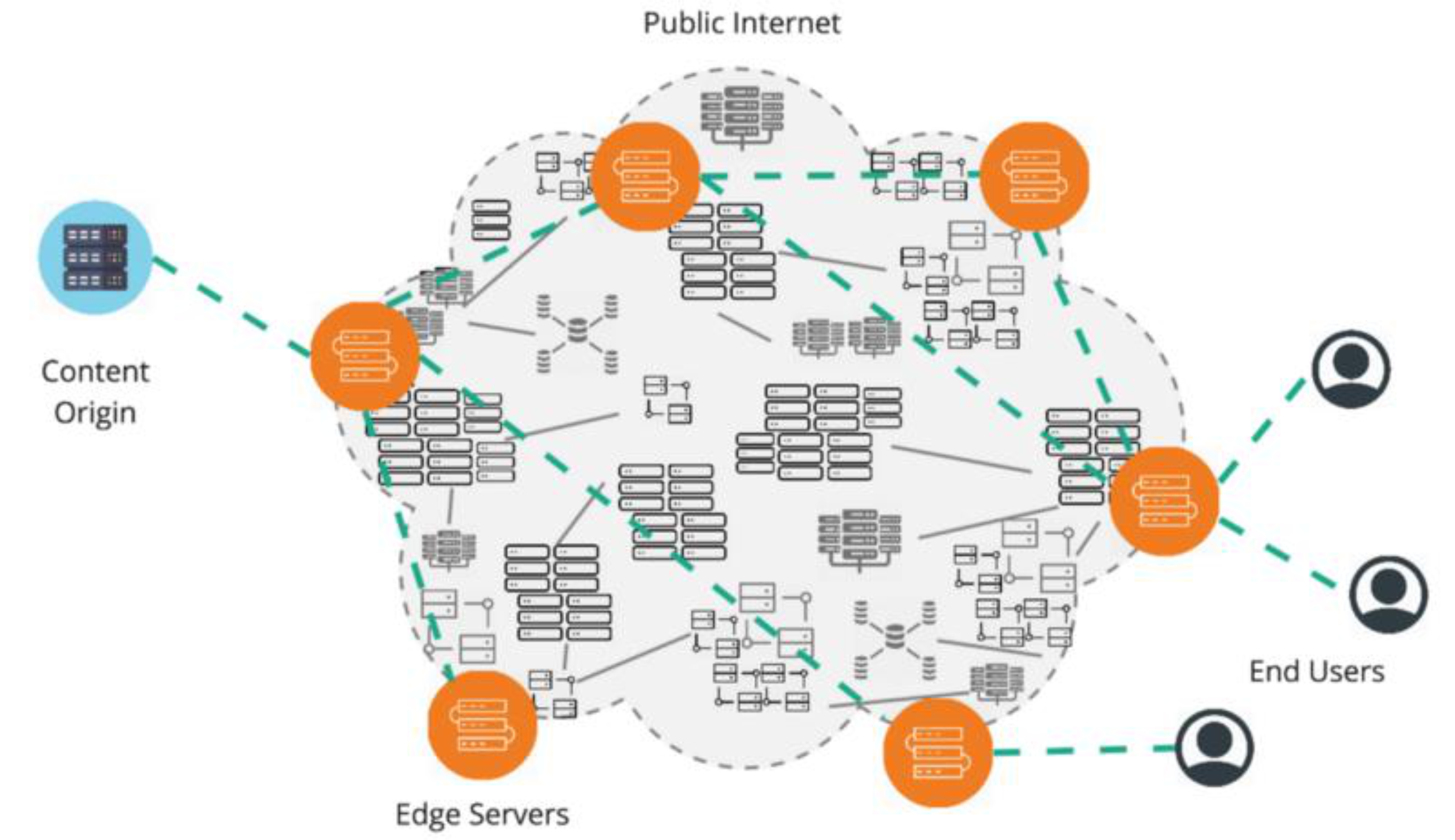
CDN Deployment Strategies
1. Enter Deep (Akamai)
Strategy:
- Push CDN servers deep into many access networks
- Close to users
- More servers, closer proximity
Stats:
- Akamai: 240,000 servers deployed in >120 countries (2015)
2. Bring Home (Limelight)
Strategy:
- Smaller number of larger clusters
- At key points in Internet
- IXPs (Internet Exchange Points)
CDN Operations
How CDN Works
Process:
- Subscriber requests content
- User goes to Netflix, selects video
- Service provider returns manifest
- Contains URLs for video chunks at various CDN nodes
- Client retrieves content
- Using manifest, requests chunks at highest supportable rate
- May choose different rate if path congested
- May choose different CDN node if closer/faster
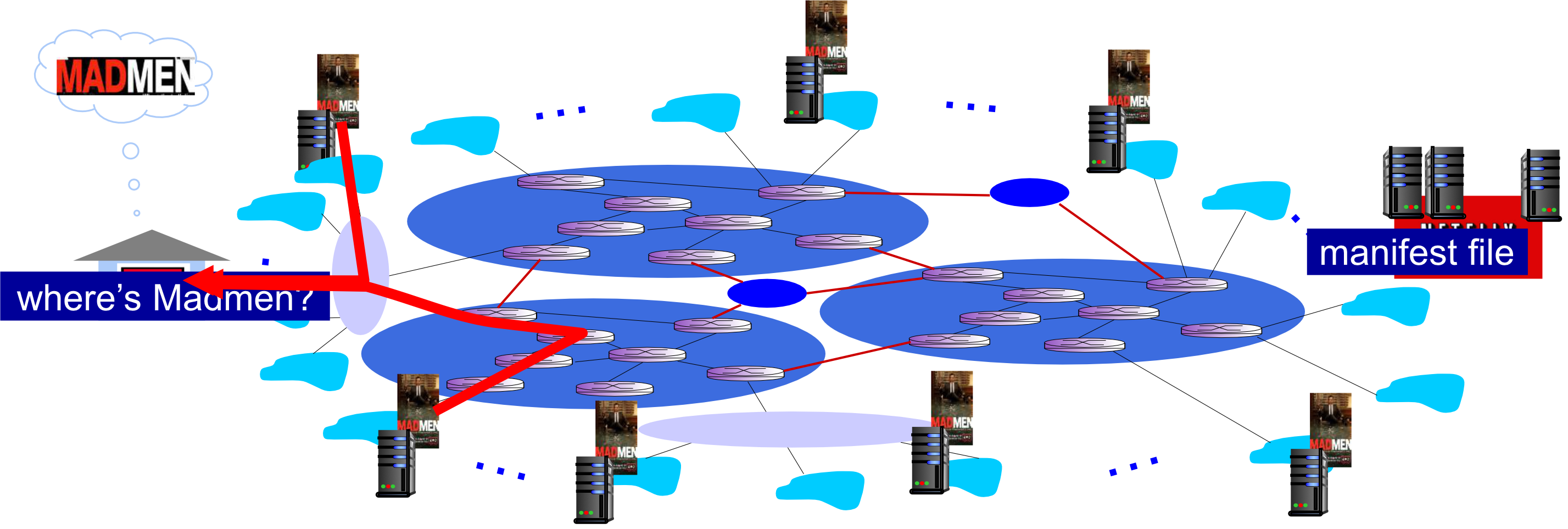
CDN stores copies:
- Content (e.g., "Mad Men") replicated at multiple CDN nodes
- Strategically placed around Internet
CDN Challenges
Key decisions:
- What content to place in which CDN node?
- From which CDN node to retrieve content?
- At which rate to retrieve content?
Netflix Architecture Example
Complete system:
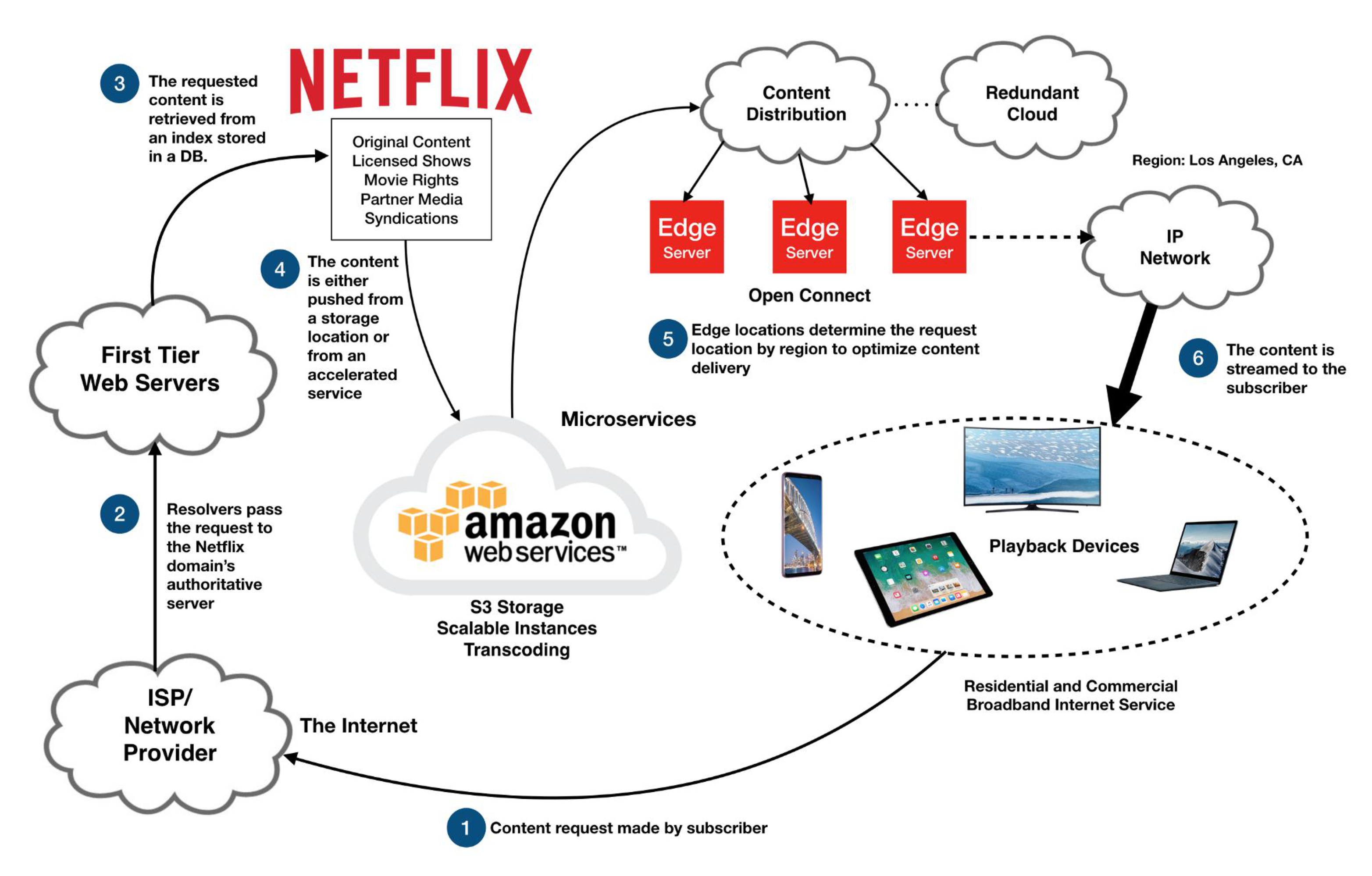
[Subscriber] → [ISP] → [Netflix Web Servers] → [Content Distribution]
                                                      ↓
                                                  Amazon AWS
                                                  - S3 Storage
                                                  - Transcoding
                                                      ↓
                                             [Edge Servers (CDN)]
                                              Open Connect
                                                      ↓
                                             [Playback Devices]
Process:
- Content request made by subscriber
- Resolvers pass request to Netflix domain's authoritative server
- Requested content retrieved from index stored in DB
- Content pushed from storage location or from accelerated service
- Edge locations determine request location by region to optimize delivery
- Content streamed to subscriber
End class Feb 5
Socket Programming
Socket Basics
Goal: Learn how to build client/server applications that communicate using sockets
Socket definition:
- Door between application process and end-to-end transport protocol
[Application Process]
       ↕ (controlled by app developer)
    [Socket]
       ↕ (controlled by OS)
[Transport Layer]
[Network Layer]
[Link Layer]
[Physical Layer]
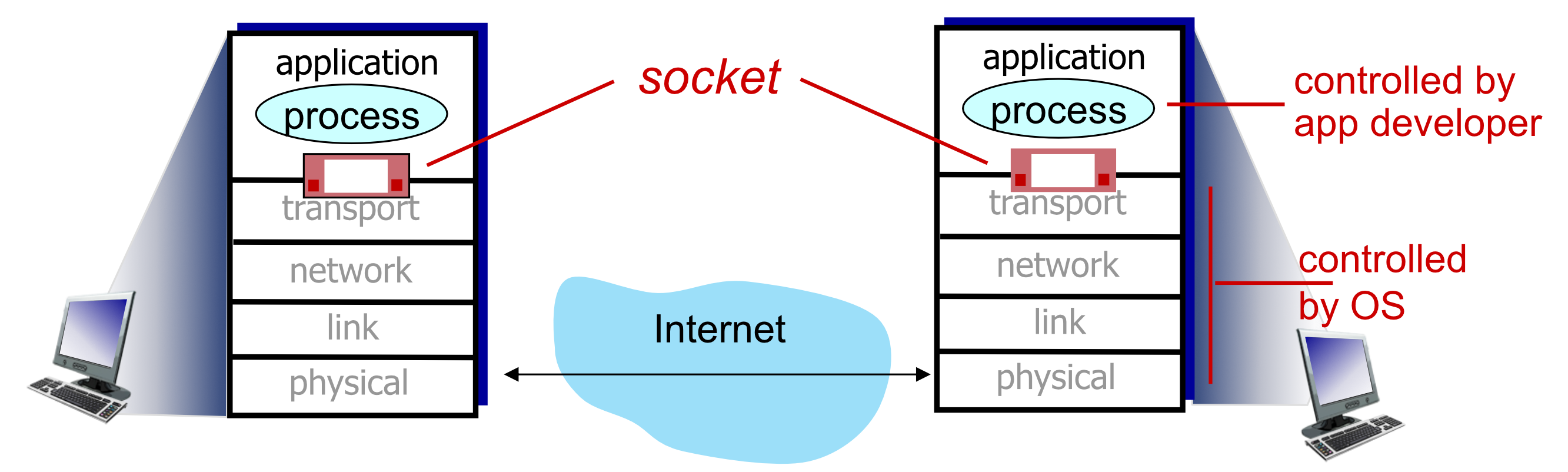
Analogy: A socket is like a mailbox - you put messages in (send) and take messages out (receive), but you don't control how they get delivered.
Two Socket Types
1. UDP Socket
- Unreliable datagram service
- No connection between client and server
SOCK_DGRAM
2. TCP Socket
- Reliable, byte stream-oriented service
- Connection established between client and server
SOCK_STREAM
Comparison
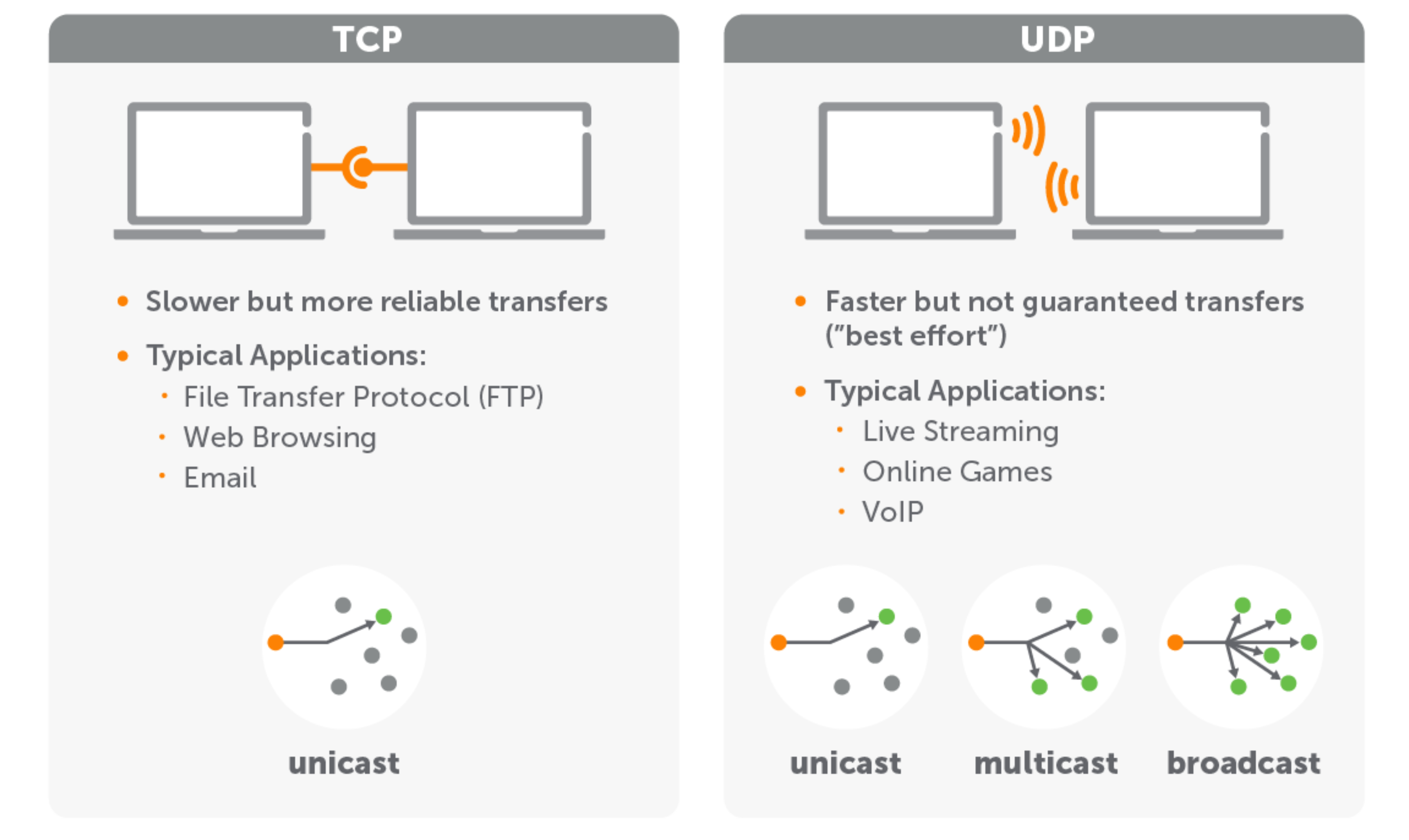
TCP:
- Slower but more reliable transfers
- Typical applications:
- File Transfer Protocol (FTP)
- Web Browsing
- Unicast: One-to-one communication
UDP:
- Faster but not guaranteed transfers ("best effort")
- Typical applications:
- Live Streaming
- Online Games
- VoIP
- Unicast, Multicast, or Broadcast
Application Example
Common example for both UDP and TCP:
- Client reads line of characters from keyboard
- Client sends data to server
- Server receives data and converts characters to uppercase
- Server sends modified data back to client
- Client receives modified data and displays on screen
Socket Programming with UDP
UDP Characteristics
No "connection" between client and server:
- No handshaking before sending data
- Sender explicitly attaches:
- IP destination address
- Port number to each packet
- Receiver extracts sender IP address and port from received packet
Transmission characteristics:
- ⚠️ Transmitted data may be lost
- ⚠️ Data may be received out-of-order
Application viewpoint:
- UDP provides unreliable transfer of groups of bytes ("datagrams")
- Between client and server processes
UDP Socket Interaction
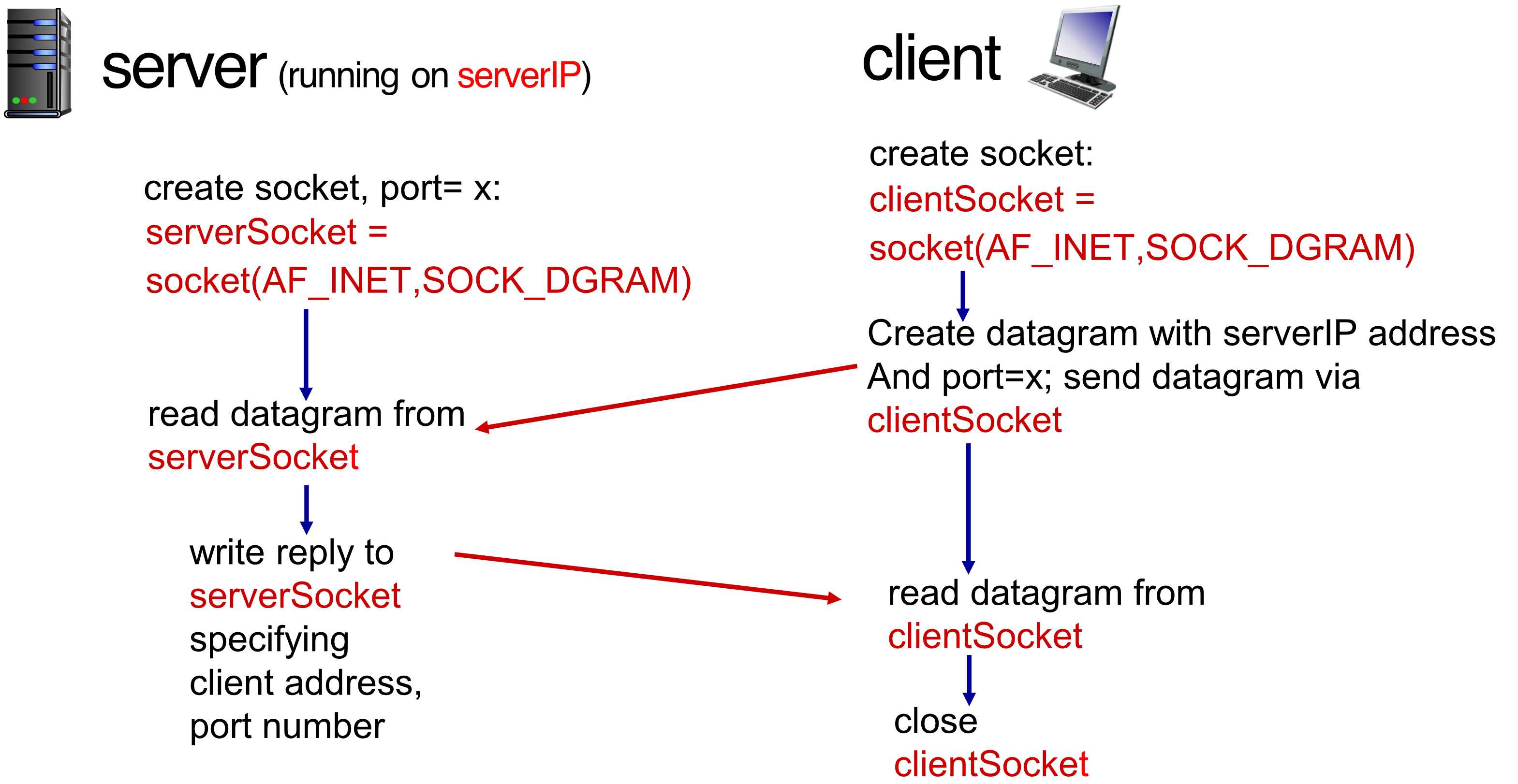
Server Side
# Create socket, bind to port
serverSocket = socket(AF_INET, SOCK_DGRAM)
serverSocket.bind(('', serverPort))

# Wait for incoming datagram
while True:
    message, clientAddress = serverSocket.recvfrom(2048)

    # Process and respond
    modifiedMessage = message.decode().upper()
    serverSocket.sendto(modifiedMessage.encode(),
                       clientAddress)
Client Side
# Create socket
clientSocket = socket(AF_INET, SOCK_DGRAM)

# Create datagram with server IP and port
# Send datagram via clientSocket
clientSocket.sendto(message.encode(),
                   (serverName, serverPort))

# Receive response
modifiedMessage, serverAddress = clientSocket.recvfrom(2048)

# Close socket
clientSocket.close()
Socket Parameters
- AF_INET: Address family for Internet Protocol v4
- SOCK_DGRAM: Socket type for unreliable, individually-addressed packets
Example: UDP Server Code
from socket import *

serverPort = 12000
serverSocket = socket(AF_INET, SOCK_DGRAM) # Create UDP socket
serverSocket.bind(('', serverPort)) # Bind socket to local port 12000

print("The server is ready to receive")

while True: # Loop forever
    message, clientAddress = serverSocket.recvfrom(2048) # Read from UDP socket into message, getting client's address (wait until data arrive)
    modifiedMessage = message.decode().upper()
    serverSocket.sendto(modifiedMessage.encode(),
                       clientAddress)
Key points:
- Create UDP socket
- Bind socket to local port 12000
- Loop forever
- Read from UDP socket into message, getting client's address
- Send uppercase string back to client
Example: UDP Client Code
from socket import *

serverName = 'hostname'
serverPort = 12000
clientSocket = socket(AF_INET, SOCK_DGRAM) # Create UDP socket for server

message = input('Input lowercase sentence:') # Get user keyboard input
clientSocket.sendto(message.encode(),
                   (serverName, serverPort)) # Attach server name and port to message, send into socket

modifiedMessage, serverAddress = clientSocket.recvfrom(2048) # Read reply from socket
print(modifiedMessage.decode()) # Print out
clientSocket.close() # Close socket
Key points:
- Create UDP socket for server
- Get user keyboard input
- Attach server name and port to message
- Send into socket
- Read reply from socket
- Close socket
Socket Programming with TCP
TCP Characteristics
Reliable protocol
Connection-oriented:
- ✅ Client must contact server first
- ✅ Server must be running with created socket
- ✅ Connection must be established before data exchange
Reliable, in-order transfer:
- Provides reliable, byte-stream transfer ("pipe")
- Between client and server processes
Server handling:
- When contacted by client, server TCP creates new socket for that client
- Allows server to talk with multiple clients
- Source port numbers distinguish different clients
TCP Socket Interaction
Process Flow
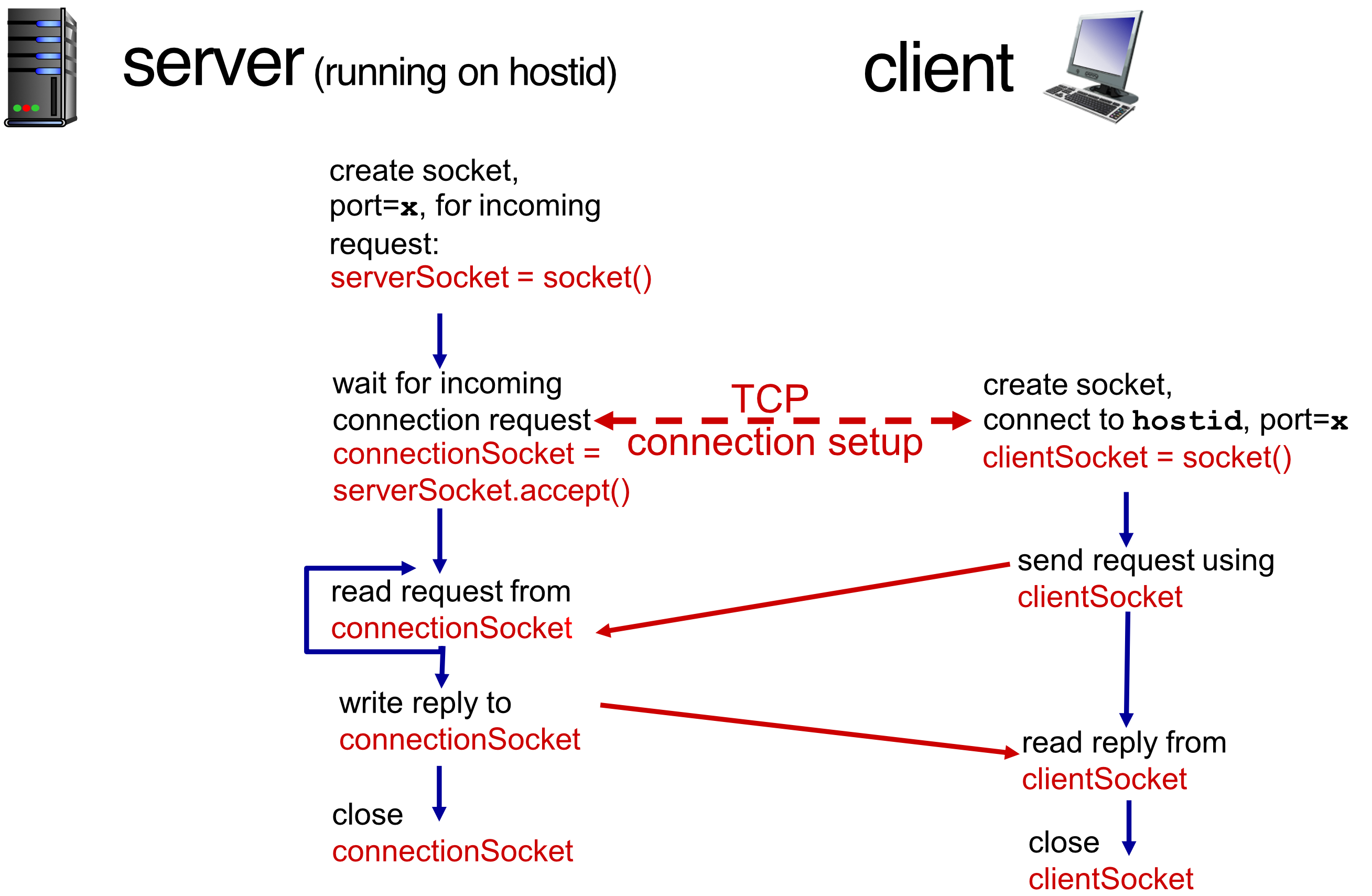
Server side:
- Create welcoming socket:
serverSocket = socket() - Bind to port
x - Listen for incoming requests:
serverSocket.listen(1) - Accept connection:
connectionSocket = serverSocket.accept() - Read request from
connectionSocket - Write reply to
connectionSocket - Close
connectionSocket
Client side:
- Create socket:
clientSocket = socket() - Connect to server (
hostid, portx) - Send request using
clientSocket - Read reply from
clientSocket - Close
clientSocket
TCP Connection Setup:
- Occurs between steps 3 (client) and 4 (server)
- Three-way handshake establishes connection
Example: TCP Server Code
from socket import *

serverPort = 12000
serverSocket = socket(AF_INET, SOCK_STREAM) # SOCK_DGRAM (คือ UDP นะ จำ!)
serverSocket.bind(('', serverPort))
serverSocket.listen(1)

print('The server is ready to receive')

while True:
    connectionSocket, addr = serverSocket.accept()
    sentence = connectionSocket.recv(1024).decode()
    capitalizedSentence = sentence.upper()
    connectionSocket.send(capitalizedSentence.encode())
    connectionSocket.close()
Key points:
- Create TCP welcoming socket
- Server begins listening for incoming TCP requests
- Loop forever
- Server waits on
accept()for incoming requests - New socket created on return
- Read bytes from socket (no address needed like UDP)
- Close connection to this client (but not welcoming socket)
Example: TCP Client Code
from socket import *

serverName = 'servername'
serverPort = 12000
clientSocket = socket(AF_INET, SOCK_STREAM)
clientSocket.connect((serverName, serverPort))

sentence = input('Input lowercase sentence:')
clientSocket.send(sentence.encode())
modifiedSentence = clientSocket.recv(1024)

print('From Server:', modifiedSentence.decode())
clientSocket.close()
Key points:
- Create TCP socket for server, remote port 12000
- No need to attach server name and port explicitly
connect()establishes connection- SOCK_STREAM means connection-oriented TCP protocol
- Send and receive through connected socket
- Close socket when done
Summary
Application Architectures
- ✅ Client-Server: Centralized server, multiple clients
- ✅ P2P (Peer-to-Peer): Distributed, no central server
Application Service Requirements
- Reliability: Data must arrive correctly
- Bandwidth: Amount of data transfer capacity
- Delay: Time sensitivity of application
Internet Transport Services
TCP
- ✅ Connection-oriented
- ✅ Reliable delivery
- ✅ Flow control
- ✅ Congestion control
UDP
- ⚡ Fast, lightweight
- ⚠️ Unreliable
- ⚠️ No connection setup
- ⚠️ No guarantees
Specific Protocols Covered
- HTTP (1.0, 1.1, 2.0)
- Web page transfer
- Request/response model
- SMTP, IMAP
- Email protocols
- Send and retrieve messages
- DNS
- Domain name resolution
- Distributed hierarchical database
- P2P: BitTorrent
- Distributed file sharing
- Tit-for-tat chunk exchange
Video Streaming
- DASH: Dynamic Adaptive Streaming over HTTP
- CDNs: Content Distribution Networks
- Geographic distribution
- Load balancing
- Reduced latency
Socket Programming
- TCP sockets: Reliable, connection-oriented
- UDP sockets: Unreliable, connectionless
- Building client-server applications