Roadmap
- Lecture 5 - Transport Layer (Part 1)
- Transport-layer services ✅
- Multiplexing and demultiplexing ✅
- Connectionless transport: UDP ✅
- เรียนไปแล้วอาทิตย์ก่อน แบบพวก Checksum
- Checksum: ที่เคยพูดว่าใส่ใน Exam บ่อย
- Principles of reliable data transfer ✅
- Lecture 6 - Transport Layer (Part 2)
- Port Numbers ⏳
- Connection-oriented transport: TCP ⏳
- Connection management ⏳
- Segment structure ⏳
- Reliable data transfer ⏳
- Flow control ⏳
- Control sender by receiver (แบบ receiver ไม่อยากให้ sender ส่งไวเกิน)
- Principles of congestion control ⏳
- TCP congestion control ⏳
Reliable Data Transfer (RDT) Summary
ไปทวนมาด้วย น่าจะออกเลยล่ะ
- RDT 1.0 – Over reliable channel
- RDT 2.0 – Handle bit error, ACK/NAK
- RDT 2.1 – Handle corrupted ACK/NAK, duplicate, resend
- RDT 2.2 – NAK-free with ACK seq#
- RDT 3.0 – Handle error and loss, timeout
- RDT 3.1 – Handle performance issue with pipeline
- Go-Back-N – No buffer at receiver
- Selective Repeat – Buffer at receiver
Two Principal Internet Transport Protocols
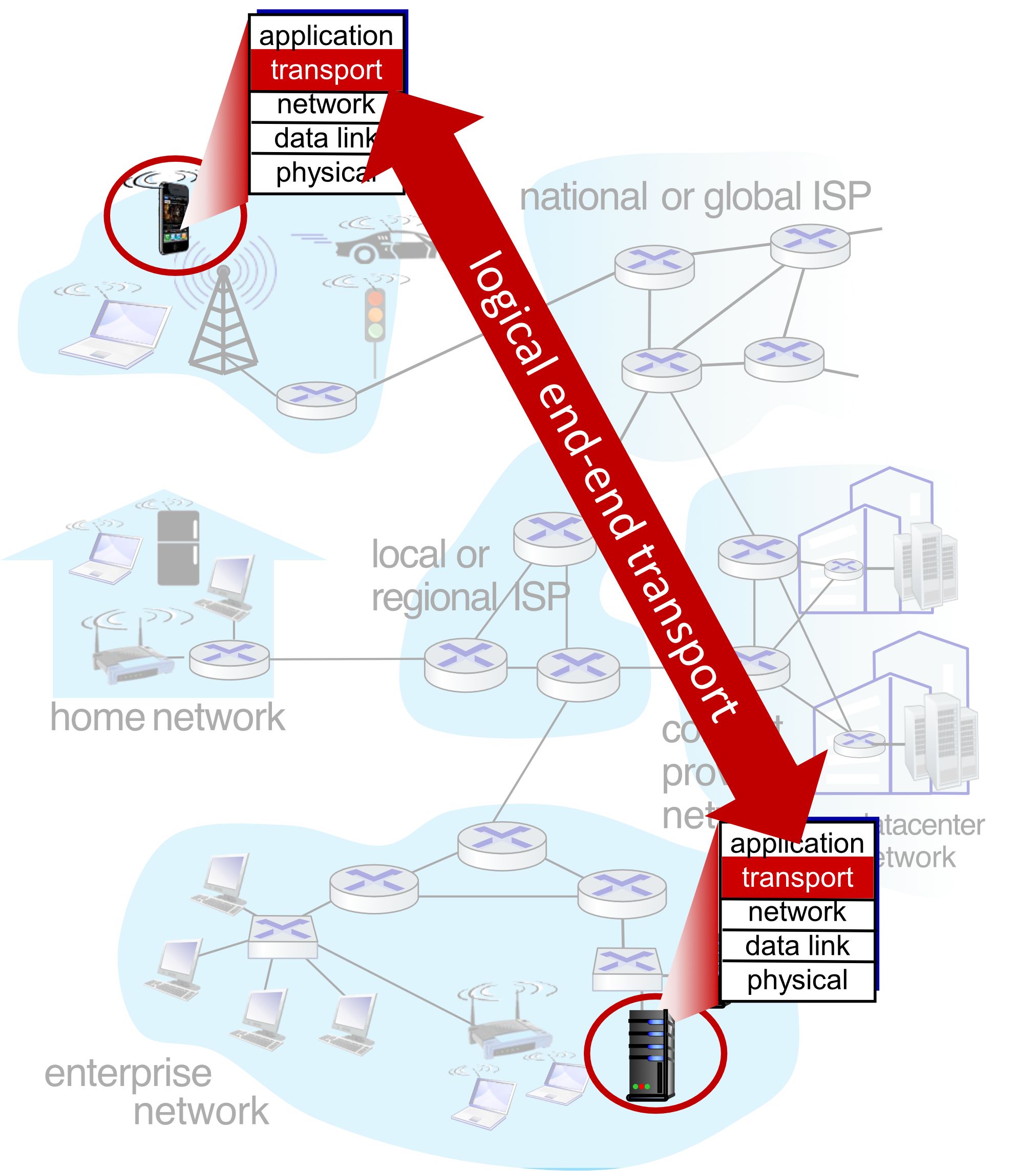
UDP – User Datagram Protocol
- Unreliable, unordered delivery
- No-frills extension of "best-effort" IP
- Fast, low overhead
TCP – Transmission Control Protocol
- Reliable, in-order delivery
- Congestion control
- Flow control
- Connection setup
Analogy: UDP is like sending a postcard — fast, no guarantee it arrives. TCP is like sending a registered letter — slower but confirmed delivery.
Port Numbers
ถือว่าเป็น Identifier ใน TCP เลย
Applications that use TCP
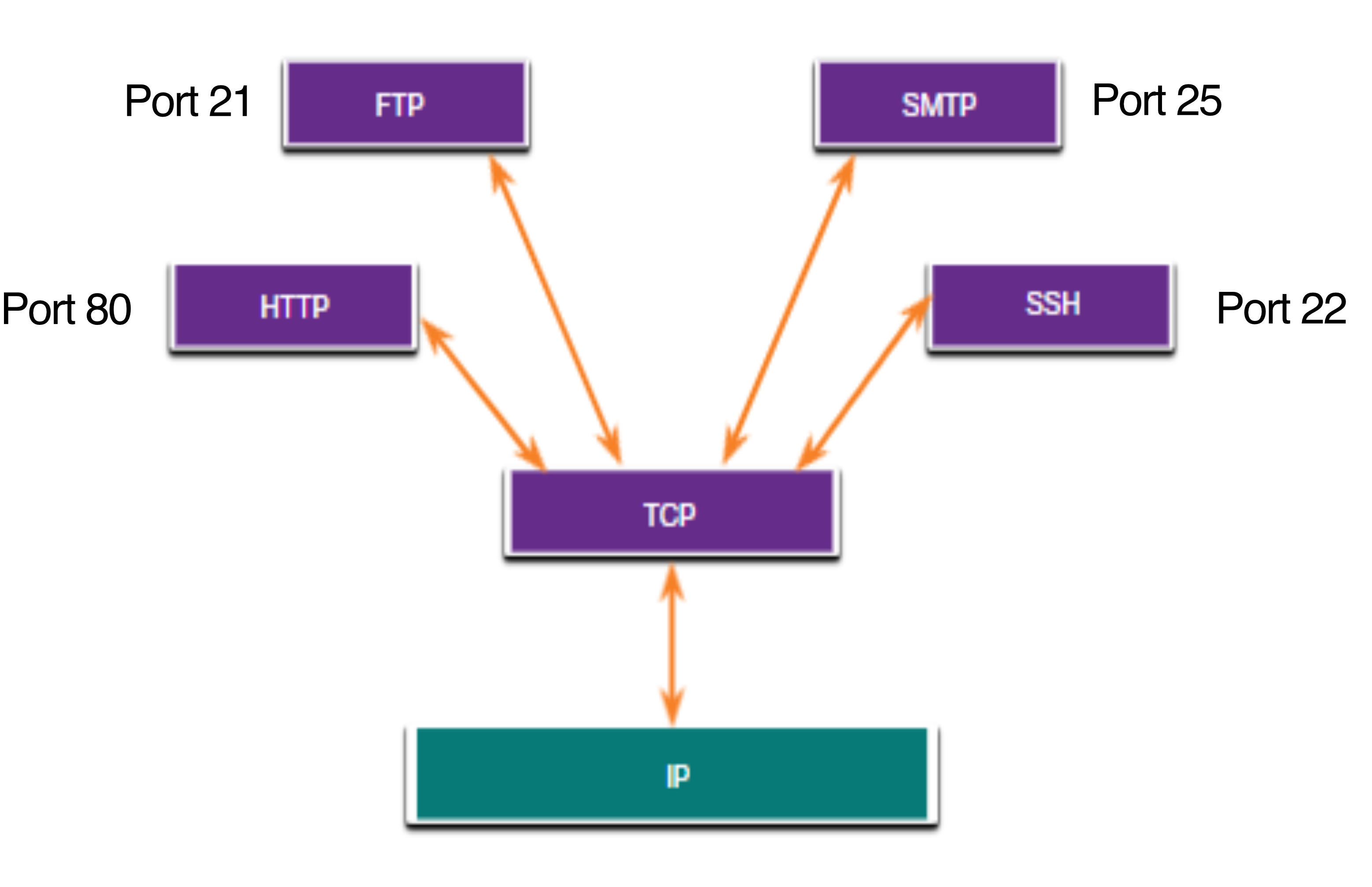
| Port | Protocol |
|---|---|
| 21 | FTP (File Transfer Protocol) |
| 22 | SSH (Secure Shell) |
| 25 | SMTP (Simple Mail Transfer Protocol) |
| 80 | HTTP (HyperText Transfer Protocol) |
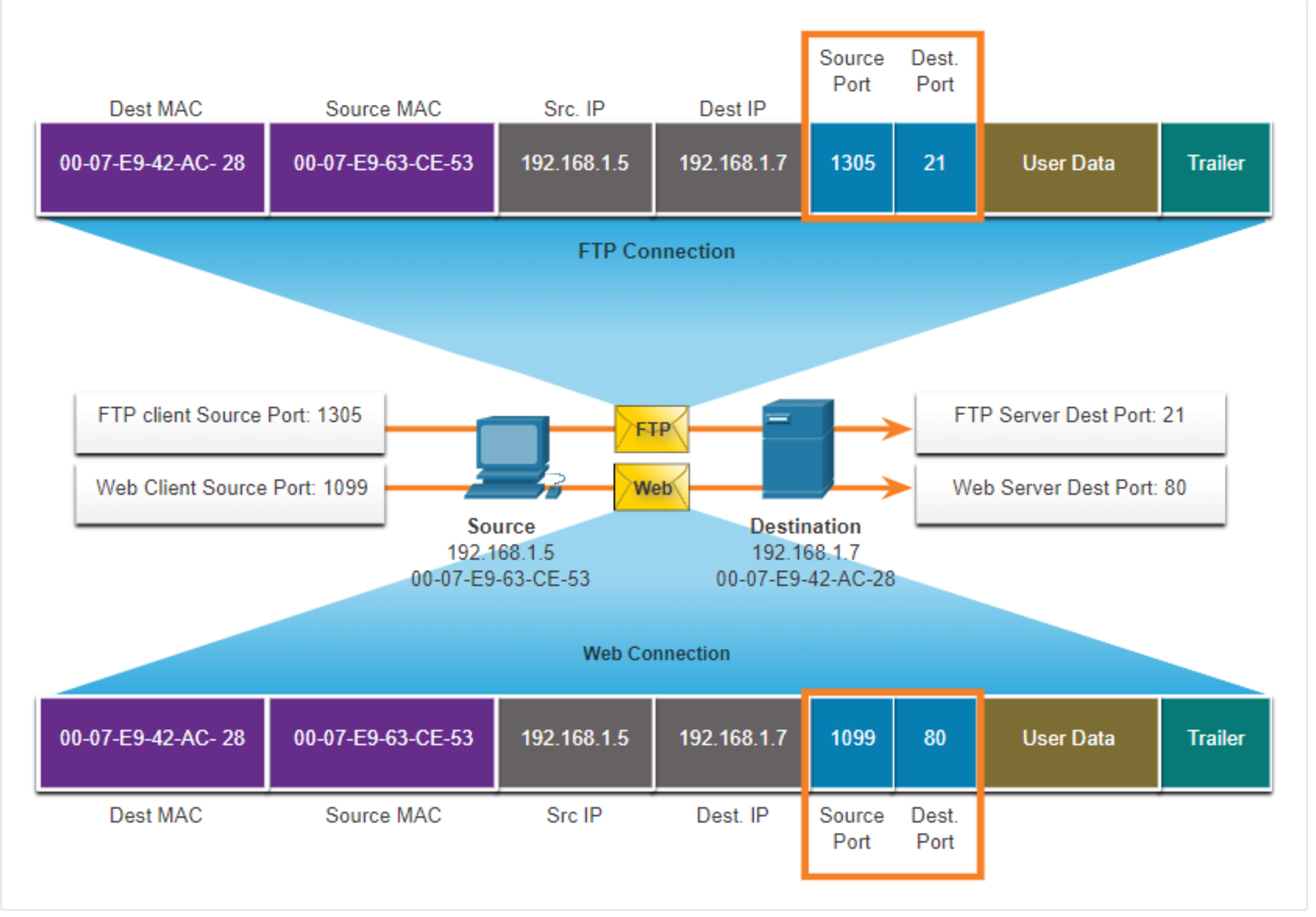
- เชื่อมหา Process โดยผ่าน Socket นี้ ๆ นะ
- UDP →
sock_dgram - TCP →
sock_stream
- UDP →
- Src, Dest IP identify host
- Dest MAC, Source MAC identify next hop.
Port Number Groups
| Group | Range | Description | Example |
|---|---|---|---|
| Well-known Ports | 0 – 1,023 | Reserved for common/popular services (web, email, remote access). Clients can easily identify the associated service. | 80 – HTTP, 443 – HTTPS, 25 – SMTP, 22 – SSH, 53 – DNS |
| Registered Ports | 1,024 – 49,151 | Assigned by IANA to a requesting entity for specific processes/applications. e.g., Cisco registered port 1812 for RADIUS server authentication. | 3306 – MySQL, 5432 – PostgreSQL, 1812 – RADIUS, 3000 – Dev Web Server (Node/React) |
| Private / Dynamic Ports | 49,152 – 65,535 | OS dynamically assigns when a client initiates a connection. Used to identify the client application during communication. | 49152–65535 – Ephemeral client ports (e.g., 53124 when accessing https://google.com) |
จริง ๆ แล้ว Port number มี 16 bits = = 65k
If used up ALL the port, they cannot create socket, cannot connect to another computer. นี่ก็เป็นอีกวิธีนึงในการทำ DDoS as well
แล้วเราสามารถเพิ่ม Port ได้มั้ย
Port เกี่ยวกับ IP Address โดยตรง ???
Well-Known Port Numbers Table
| Port | Protocol | Application |
|---|---|---|
| 20 | TCP | FTP – Data |
| 21 | TCP | FTP – Control |
| 22 | TCP | SSH (Remote connect, file transfer, port forwarding) |
| 23 | TCP | Telnet |
| 25 | TCP | SMTP |
| 53 | UDP, TCP | DNS |
| 67 | UDP | DHCP – Server |
| 68 | UDP | DHCP – Client |
| 69 | UDP | TFTP |
| 80 | TCP | HTTP |
| 110 | TCP | POP3 |
| 143 | TCP | IMAP |
| 161 | UDP | SNMP |
| 443 | TCP | HTTPS |
Port Number Rules
- One IP cannot have two services assigned to the same port number within the same transport protocol (TCP or UDP)
- TCP Port range: 1 – 65,535
- UDP Port range: 1 – 65,535
Examples:
- HTTP Server: TCP 80 + NGINX: TCP 80 → ❌ Not OK (same protocol, same port)
- HTTP Server: TCP 80 + NGINX: TCP 8080 → ✅ OK (different port)
- HTTP Server: TCP 80 + APP: UDP 80 → ✅ OK (different protocol)
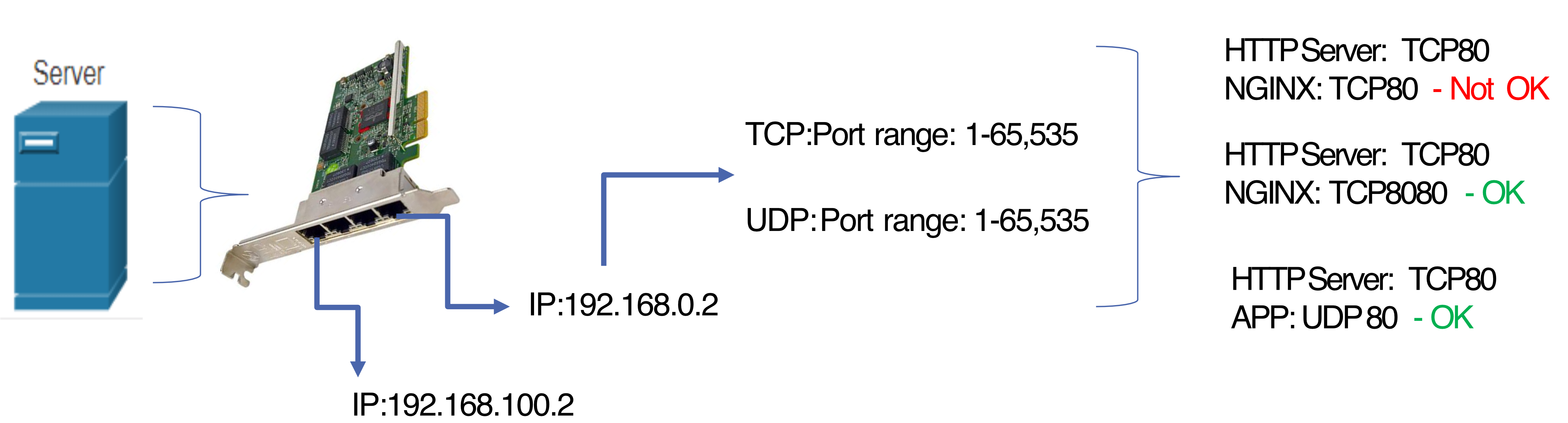
Analogy: Like two stores can't be in the exact same room (same IP + same port + same protocol), but they can share a building number if they're in different rooms (different port) or different buildings entirely (different protocol).
จำได้มั้ย Python ที่อาจารย์เคยให้ดู
bind()→ Indicate that you want to reserve this port number (available or not?)accept()→ I want to start accept the connection (from the client), ready!
ถ้าอยากมี HTTP Server สองอันใช้ Port เดียวกันได้มั้ย
แบบนั้นต้องมีหลาย IP (Multiple IP): 192.168.0.2, อีกอันอาจจะเป็น 192.168.0.3
ซึ่งแต่ละ IP ก็จะมี Port เป็นของตัวเอง (1-65,353)
Server ที่ทำ Load Balance ก็ใช้ Technique ประมาณนี้
Netstat Command
netstatShows active TCP connections, including local address, foreign address, and connection state (ESTABLISHED / LISTENING).
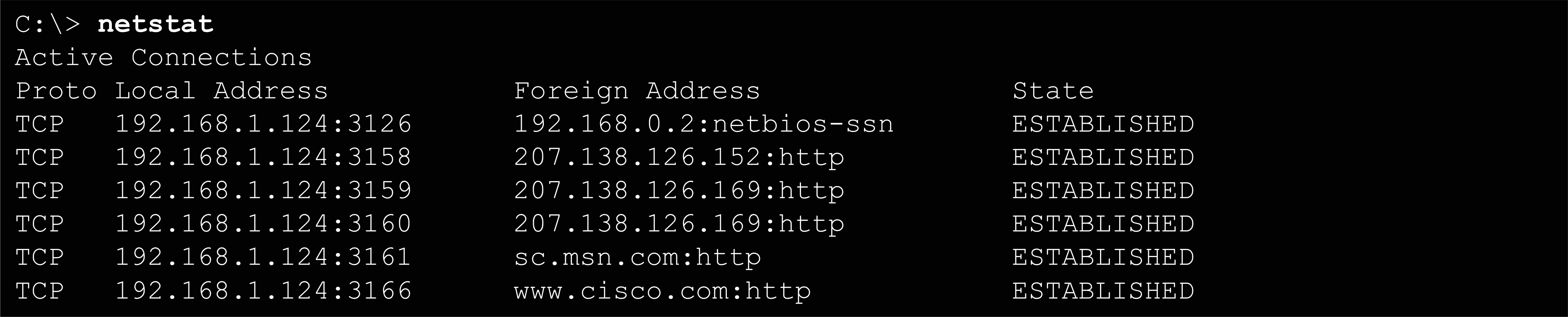
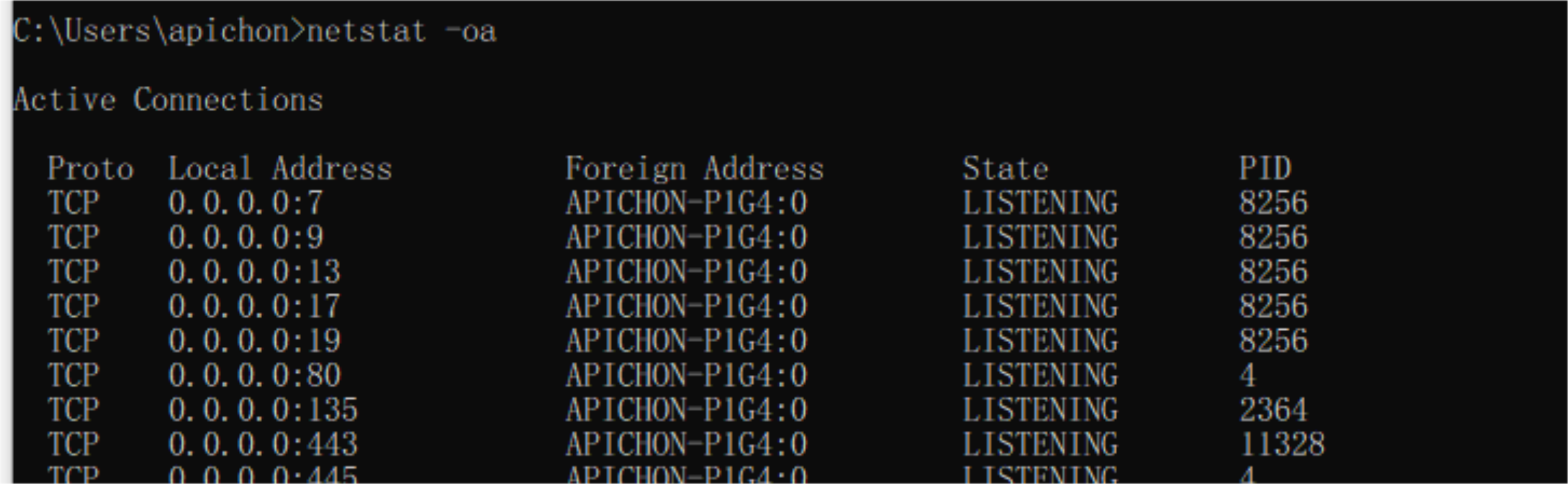
สังเกตว่า
netstatจะโชว์ PID ด้วย เผื่อเห็นว่า Process ในมันกิน Port นี้ไปก็killทิ้งได้เลย555
ใน TCP จะเห็นคำว่า LISTENING หลังจากเรา call
accept()
TCP Overview
(RFCs: 793, 1122, 2018, 5681, 7323)
- Point-to-point – One sender, one receiver
- Reliable, in-order byte stream – No "message boundaries", the size can be very large
- Full duplex data – Bi-directional data flow in same connection; MSS = maximum segment size
- ปกติไม่ต้องสนใจมากว่า MSS คืออะไร แต่ถ้าคุณเป็น Network Administrator ก็ต้องรู้
- เช่น TCP: MSS = 1460
- Cumulative ACKs
- อ๋ออ ก็จะเพิ่ม ACKs ไปเรื่อย ๆ เช่น แบบส่งไป 3 ได้ ACKs กลับมา
100 - แต่ ACKs กลับมาแค่อันเดียว ที่เหลืออีก 2 หาย
- แต่พอได้กลับมาอีกรอบเป็นเลข
140แปลว่ามันรู้ละว่าก่อนหน้านั้นส่ง OK
- อ๋ออ ก็จะเพิ่ม ACKs ไปเรื่อย ๆ เช่น แบบส่งไป 3 ได้ ACKs กลับมา
- Pipelining – TCP congestion and flow control set window size
- Connection-oriented – Handshaking initializes sender/receiver state before data exchange
- Flow controlled – Sender will not overwhelm receiver
TCP Segment Structure
 0                   1                   2                   3
 0 1 2 3 4 5 6 7 8 9 0 1 2 3 4 5 6 7 8 9 0 1 2 3 4 5 6 7 8 9 0 1
+-+-+-+-+-+-+-+-+-+-+-+-+-+-+-+-+-+-+-+-+-+-+-+-+-+-+-+-+-+-+-+-+
|          Source Port          |       Destination Port        |
+-+-+-+-+-+-+-+-+-+-+-+-+-+-+-+-+-+-+-+-+-+-+-+-+-+-+-+-+-+-+-+-+
|                        Sequence Number                        |
+-+-+-+-+-+-+-+-+-+-+-+-+-+-+-+-+-+-+-+-+-+-+-+-+-+-+-+-+-+-+-+-+
|                    Acknowledgement Number                     |
+-+-+-+-+-+-+-+-+-+-+-+-+-+-+-+-+-+-+-+-+-+-+-+-+-+-+-+-+-+-+-+-+
|  Data |       |C|E|U|A|P|R|S|F|                               |
| Offset|  Res. |W|C|R|C|S|S|Y|I|         Receive Window        |
|       |       |R|E|G|K|H|T|N|N|                               |
+-+-+-+-+-+-+-+-+-+-+-+-+-+-+-+-+-+-+-+-+-+-+-+-+-+-+-+-+-+-+-+-+
|           Checksum            |         Urgent Pointer        |
+-+-+-+-+-+-+-+-+-+-+-+-+-+-+-+-+-+-+-+-+-+-+-+-+-+-+-+-+-+-+-+-+
|                    Options (variable)                         |
+-+-+-+-+-+-+-+-+-+-+-+-+-+-+-+-+-+-+-+-+-+-+-+-+-+-+-+-+-+-+-+-+
|                    Application Data                           |
+-+-+-+-+-+-+-+-+-+-+-+-+-+-+-+-+-+-+-+-+-+-+-+-+-+-+-+-+-+-+-+-+
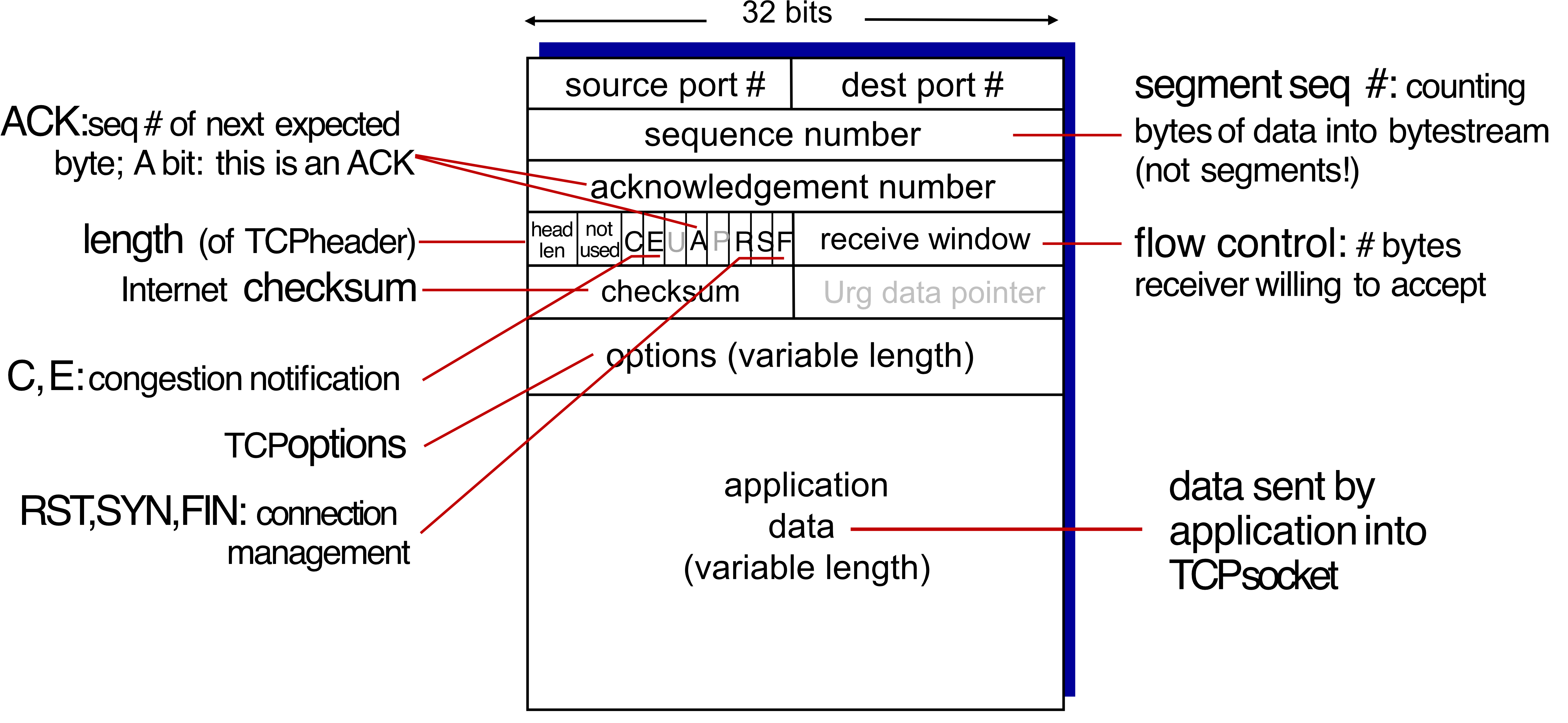
Key fields:
- Sequence number – Byte-stream number of first byte in segment's data (not segment count)
- Acknowledgement number – Seq# of next expected byte; cumulative ACK
- Receive window (
rwnd) – Flow control: number of bytes receiver is willing to accept - RST, SYN, FIN – Connection management flags
- C, E – Congestion notification flags
- They’ll know there’s congestion in the network
TCP Connection Management
3-Way Handshake 🤝 🤝 🤝
Before exchanging data, sender/receiver must:
- Agree to establish connection (each knows the other is willing)
- Agree on connection parameters (e.g., starting sequence numbers)
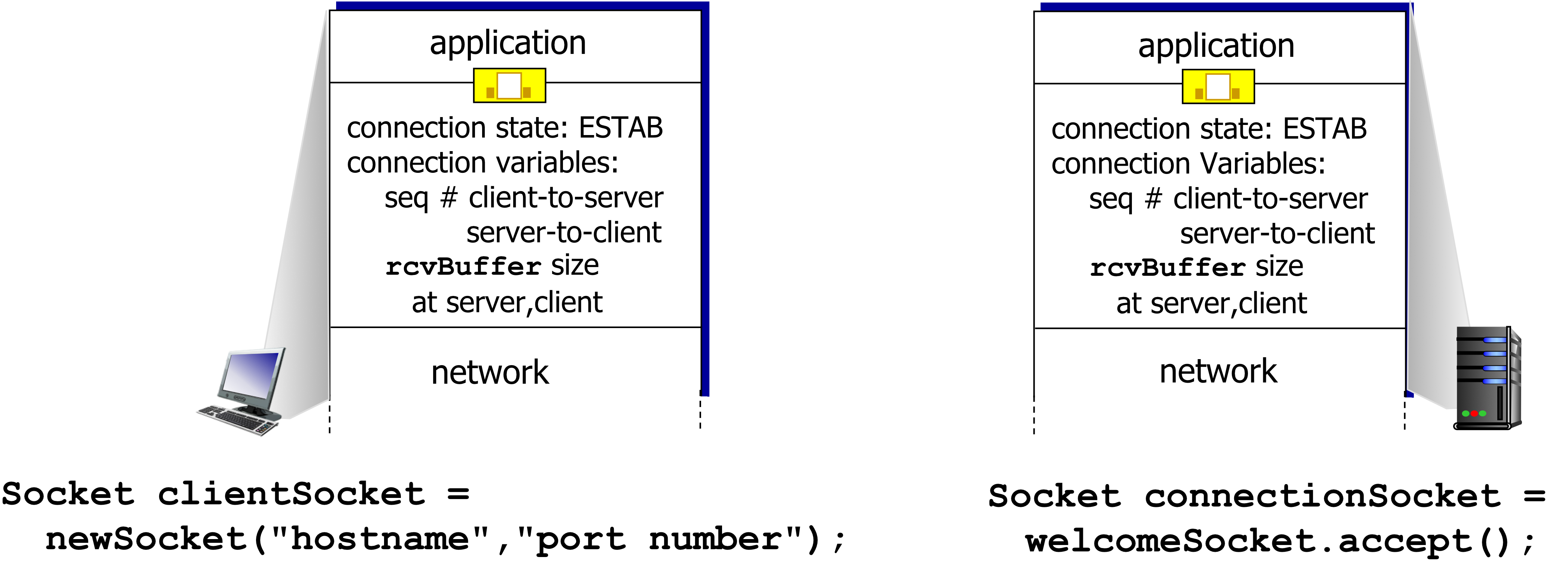
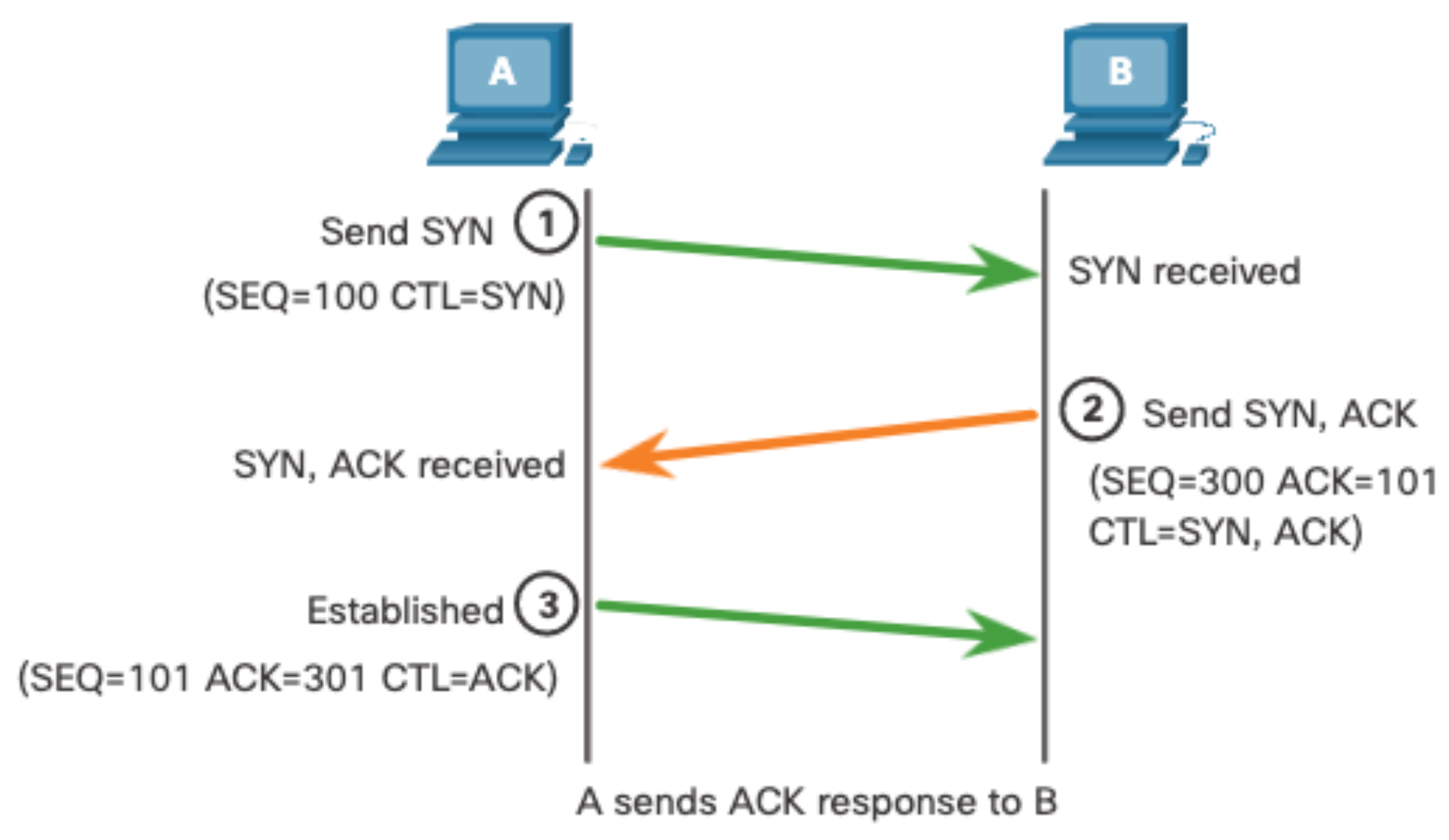
- The initiating client requests a client-to-server communication session with the server.
- The server acknowledges the client-to-server communication session and requests a server-to-client communication session.
- The initiating client acknowledges the server-to-client communication session.
Syn Flood: The client initiate the syn flag to the server, the server will crate half-connection. (So server hold that socket) → Kinda DoS
TCP Connection Management Python
Steps:
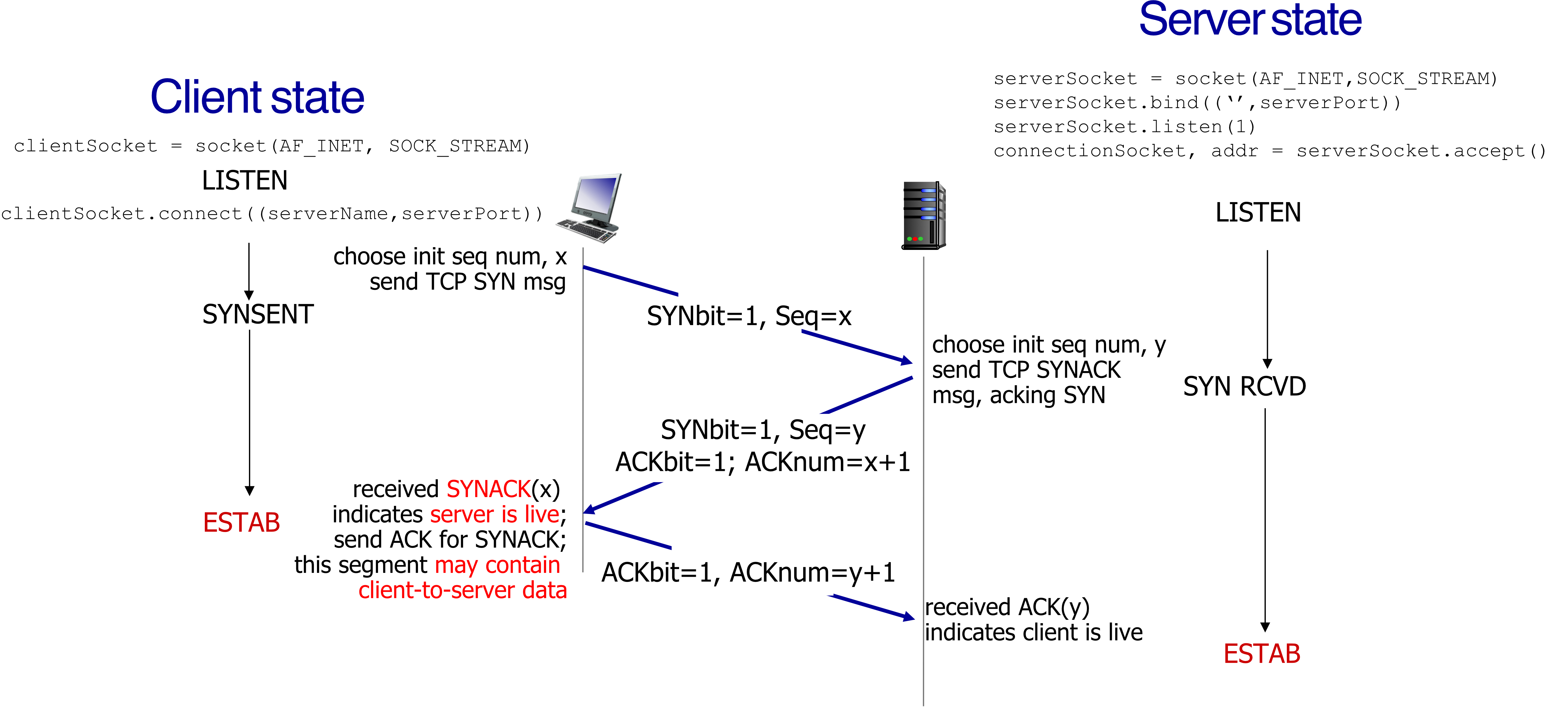
Step 1 – SYN (Client → Server)
- Client chooses initial seq number
- Sends:
SYNbit=1, Seq=x - Client state:
SYNSENT
Step 2 – SYN-ACK (Server → Client)
- Server chooses initial seq number
- Sends:
SYNbit=1, Seq=y, ACKbit=1, ACKnum=x+1 - Server state:
SYN RCVD
ACKnum → next expected number
แต่ถ้าเป็นฝั่งของ Data ก็อาจจะเปลี่ยนเป็น x + len(byte) จะได้รู้ไงว่า Data ส่งมาถึงไหนแล้ว ส่งอะไรต่อ
Step 3 – ACK (Client → Server)
- Sends:
ACKbit=1, ACKnum=y+1 - This segment may contain client-to-server data
- Client state:
ESTAB; Server state:ESTAB
The connection is now established.
Analogy: Like a phone call — "Can you hear me?" (SYN) → "Yes, can you hear me?" (SYN-ACK) → "Yes!" (ACK). Now both sides confirm the line is open.
Establishment Example (with rwnd):
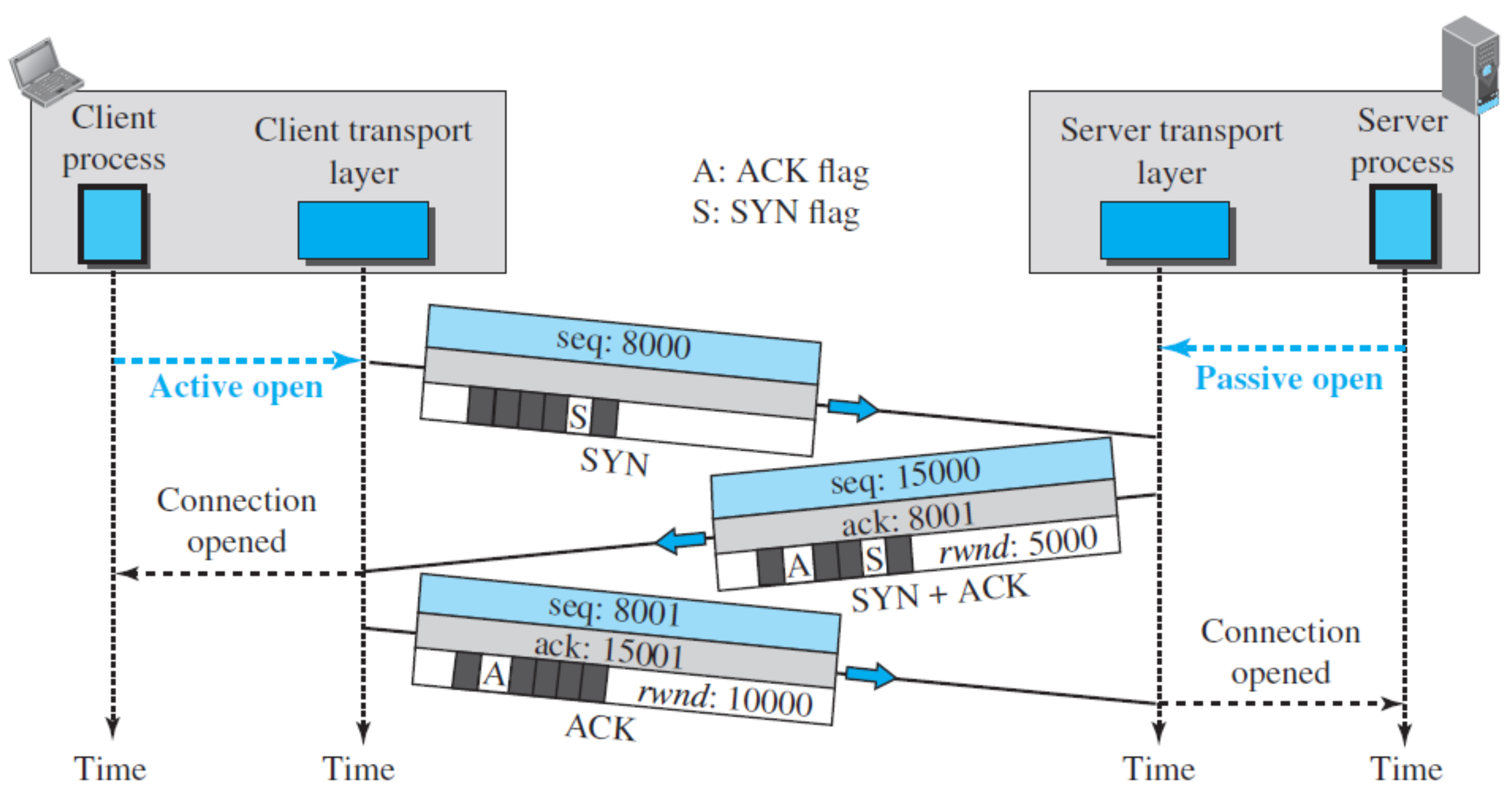
rwndensures that the client will not send the data larger than this amount!
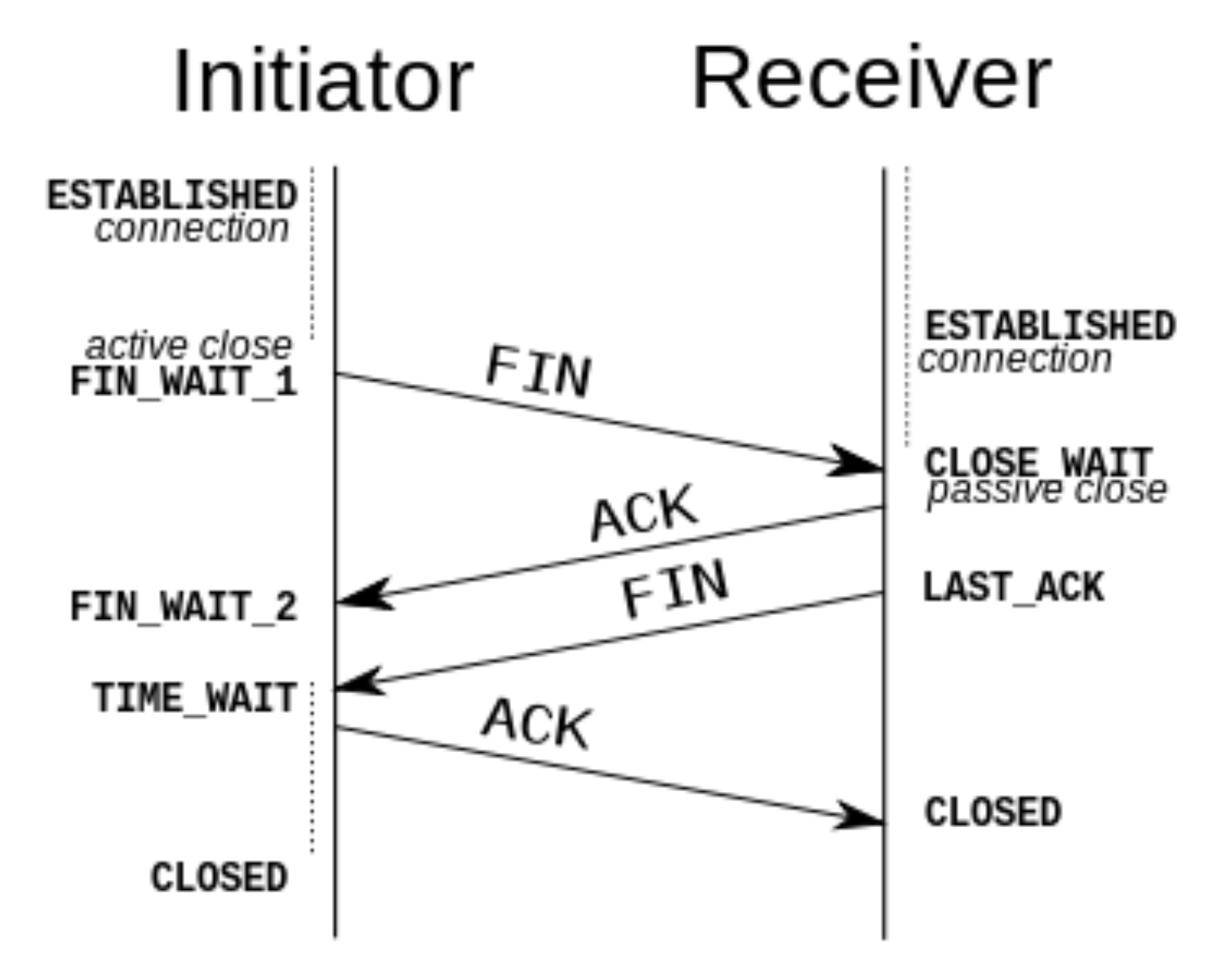
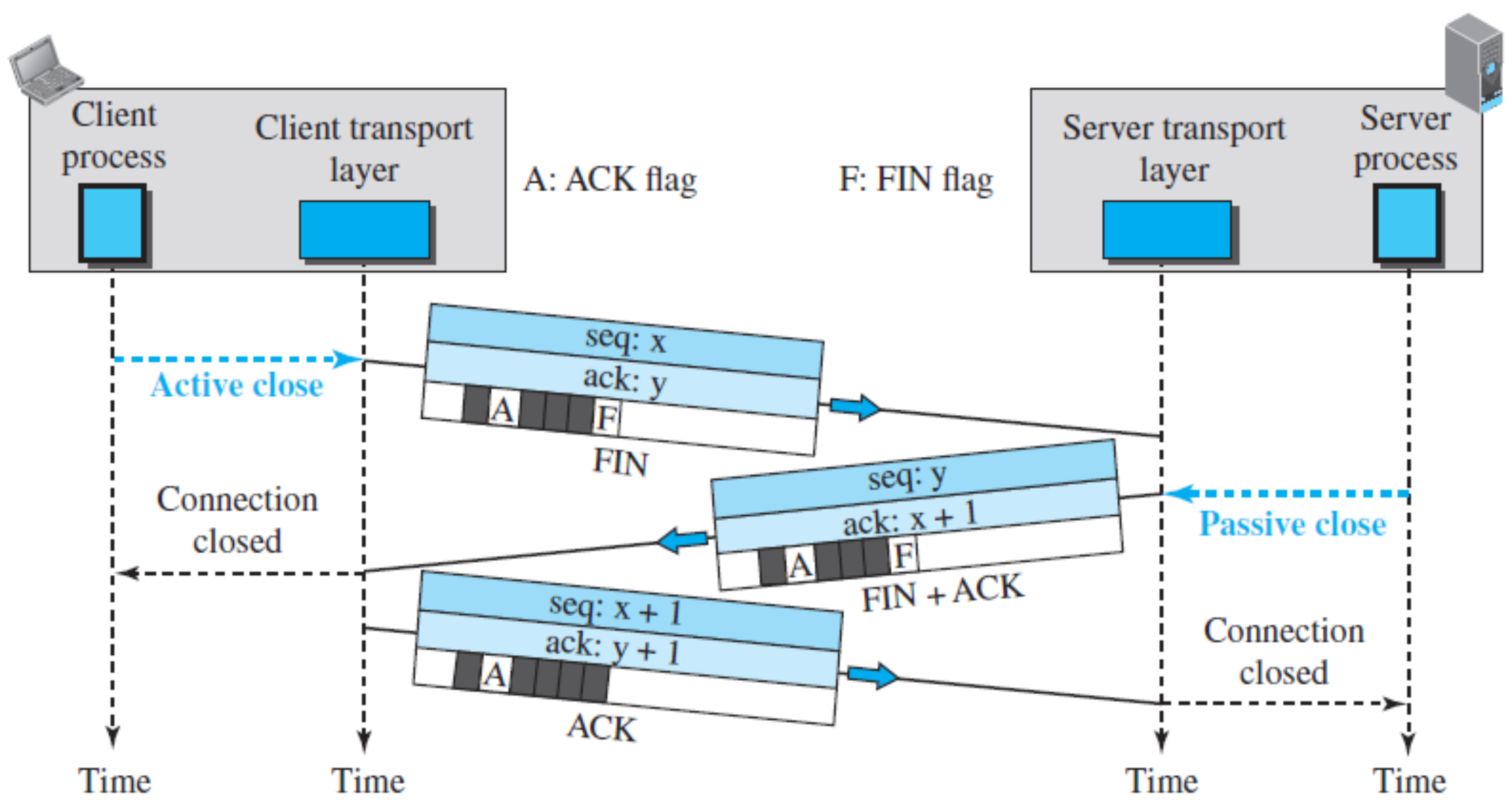
Closing a TCP Connection
- Each side closes its own half of the connection
- Send TCP segment with FIN bit = 1
- Respond to received FIN with ACK
- On receiving FIN, ACK can be combined with own FIN
- Simultaneous FIN exchanges can be handled
TCP Close Sequence:
ปกติเวลาเรามีเว็บ เราเข้าเว็บ TCP Connection จะ Close ตอนไหน เราปิดหน้าเว็บ หรือว่า เว็บโหลดเสร็จแล้ว
มันก็แล้วแต่นะ (เว็บเดี๋ยวนี้) ถ้าเป็นอย่าง HTTP 1 มันก็จะปิดเลยหลังโหลดเสร็จแล้ว เดี่ยวนี้ก็จะมีแบบ WebSocket ที่เราสามารถ Configure ได้ ให้เป็น App Chat ตลอดเวลา
Analogy: Like ending a phone call — "I'm done talking" (FIN) → "OK, I'm also done" (FIN+ACK) → "Acknowledged" (ACK). The connection is fully closed.
TCP Sequence Numbers and ACKs
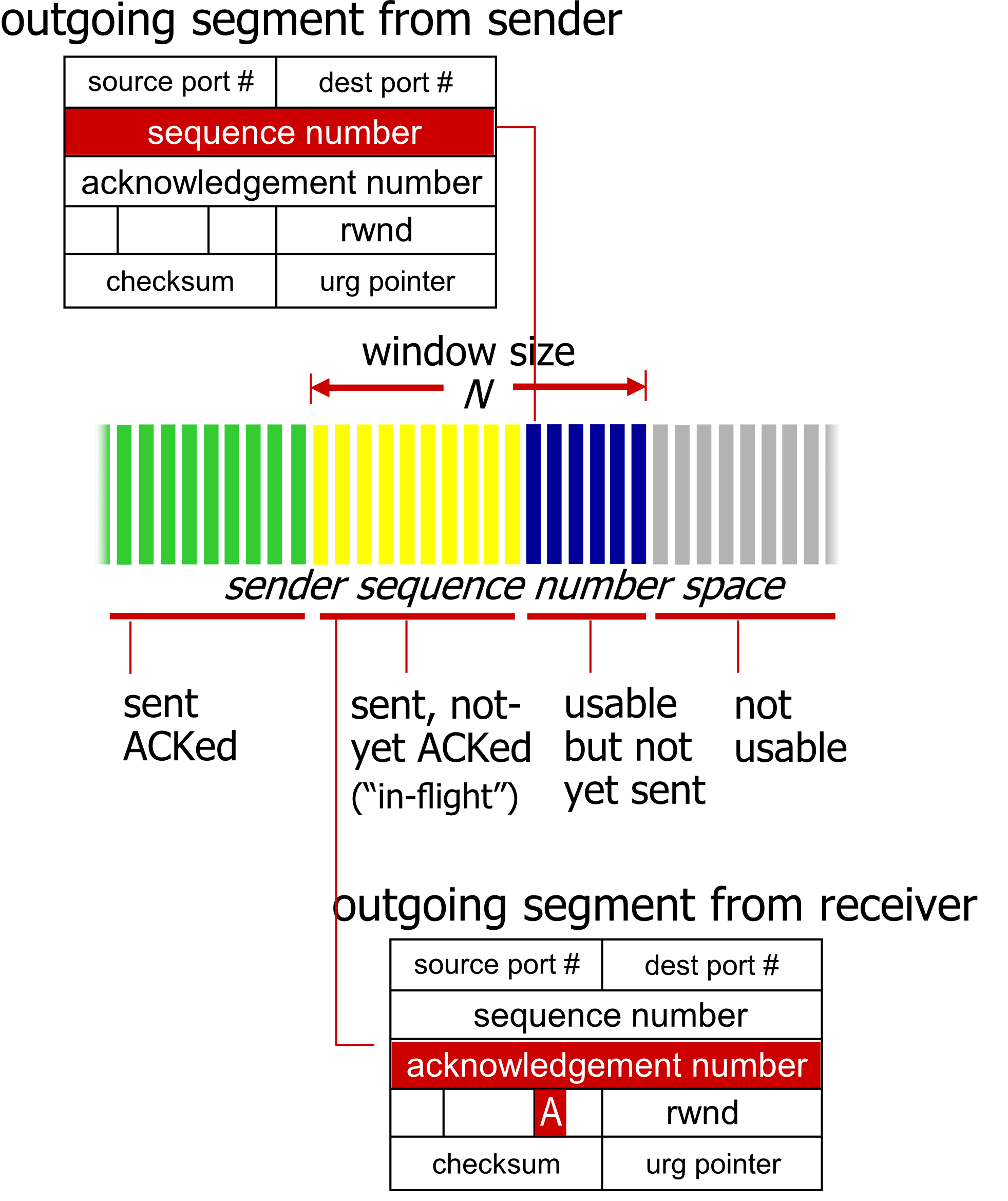
- Sequence numbers – Byte-stream number of the first byte in the segment's data
- Acknowledgements – Seq# of the next byte expected from the other side; cumulative ACK
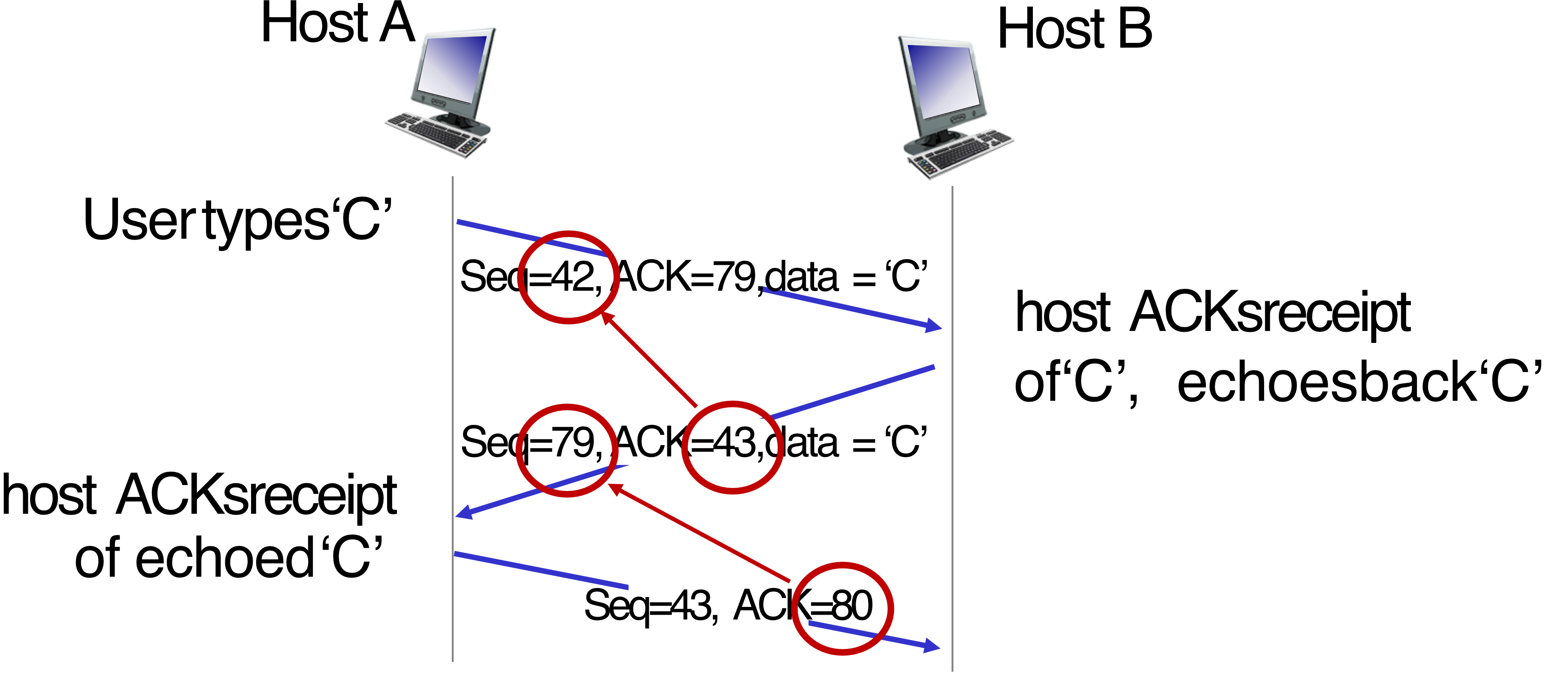
Telnet Example
Host A                        Host B
  |  Seq=42, ACK=79, data='C'   |
  |---------------------------→ |  ← receives 'C', echoes back
  |  Seq=79, ACK=43, data='C'   |
  |←--------------------------- |
  |  Seq=43, ACK=80             |
  |---------------------------→ |  ← ACKs the echoed 'C'
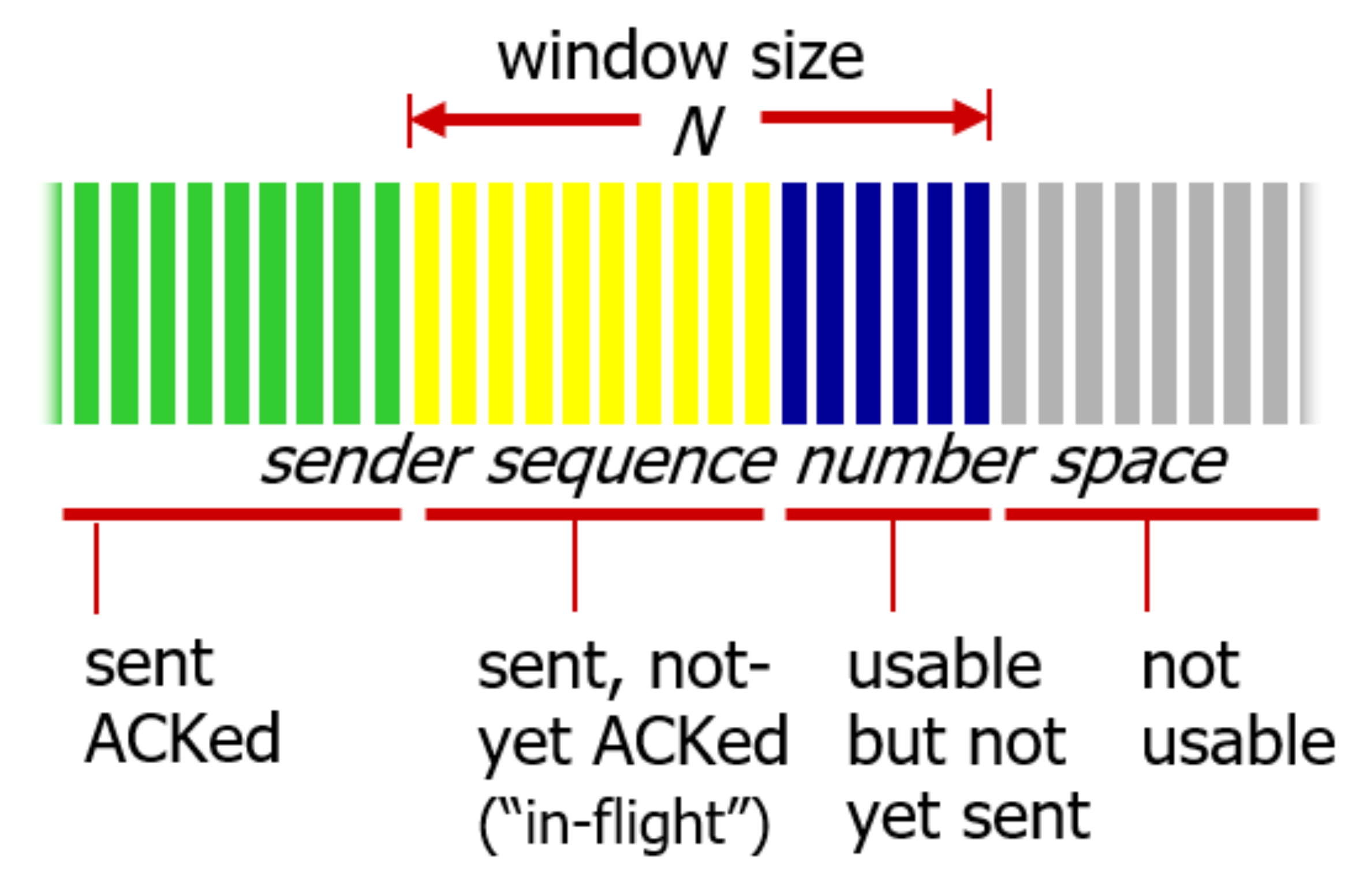
- ข้อมูล “In-flight” ยังคงอยู่ใน Window Size
- ย้อนกลับไป Principles of Reliable Data Transfer
- เพื่อให้สามารถ Re-transmit ได้
TCP Reliable Data Transfer
TCP Sender (Simplified)
Event: Data received from application
- Create segment with
seq# Seq#= byte-stream number of first data byte in segment- Start timer if not already running (timer = oldest unACKed segment)
- Expiration interval:
TimeOutInterval
Event: Timeout
- Retransmit the segment that caused the timeout
- Restart timer
Event: ACK received
- If ACK acknowledges previously unACKed segments:
- Update what is known to be ACKed → Shift the window(?)
- Start timer if there are still unACKed segments
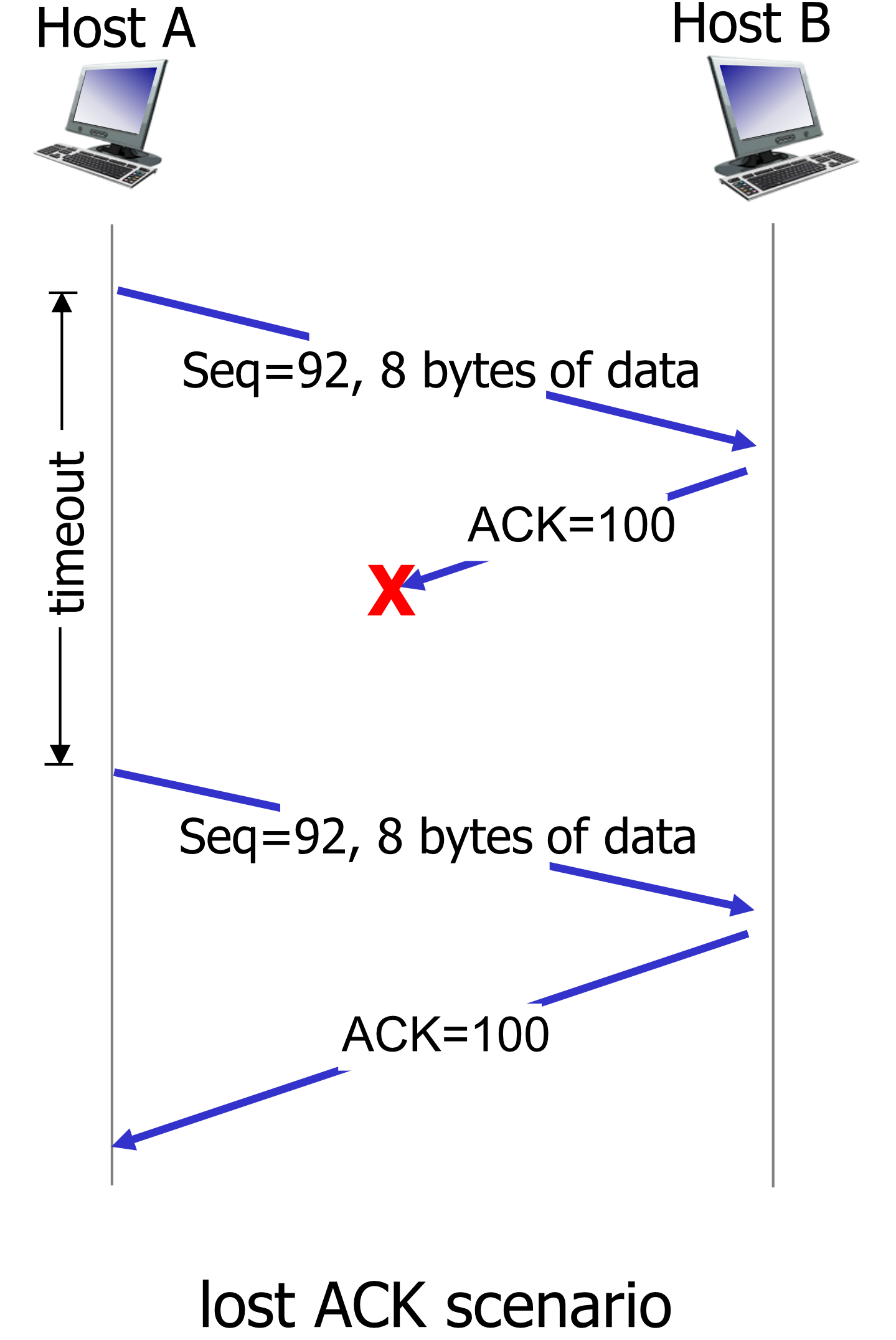
TCP Retransmission Scenarios
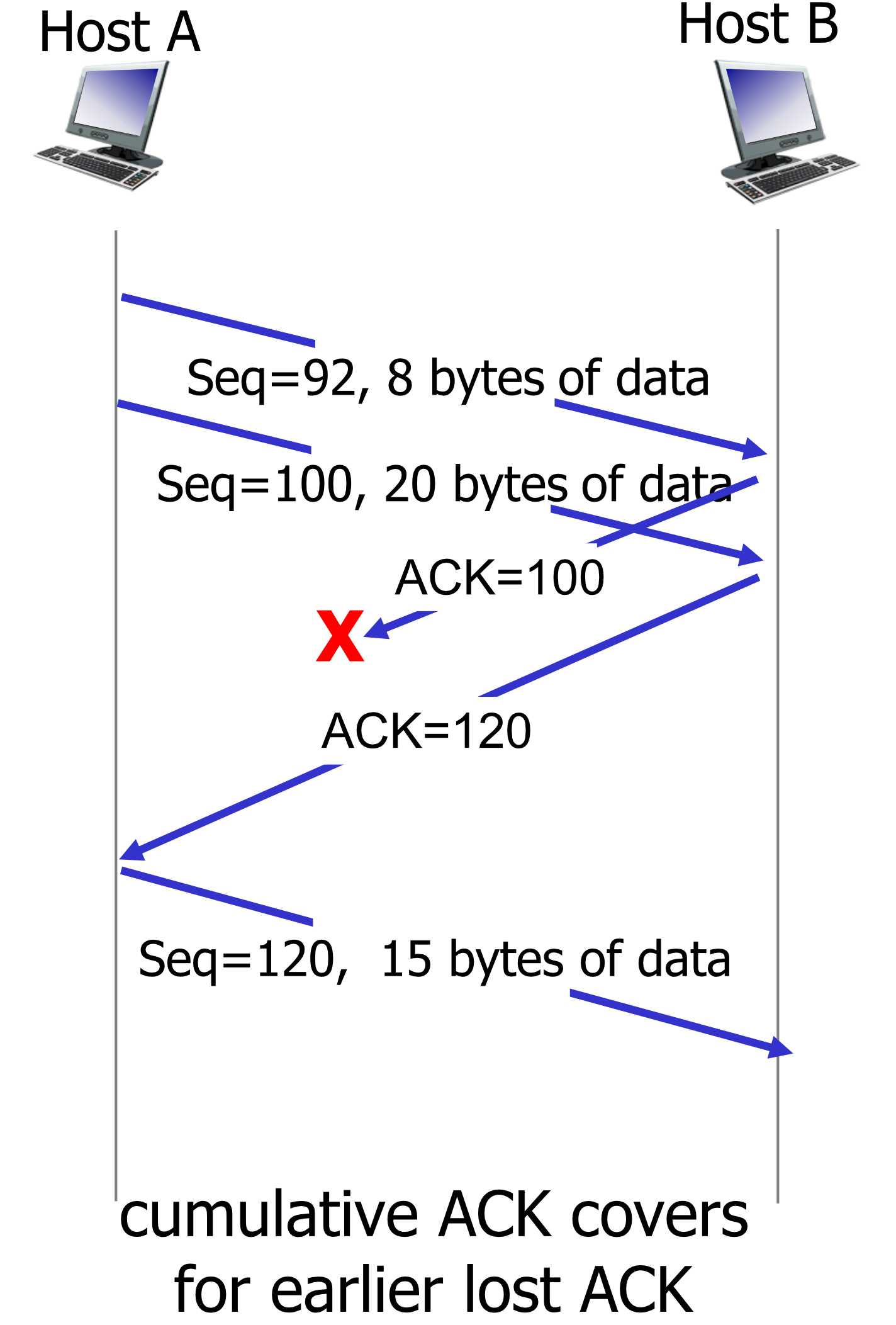
Lost ACK Scenario
Premature Timeout Scenario
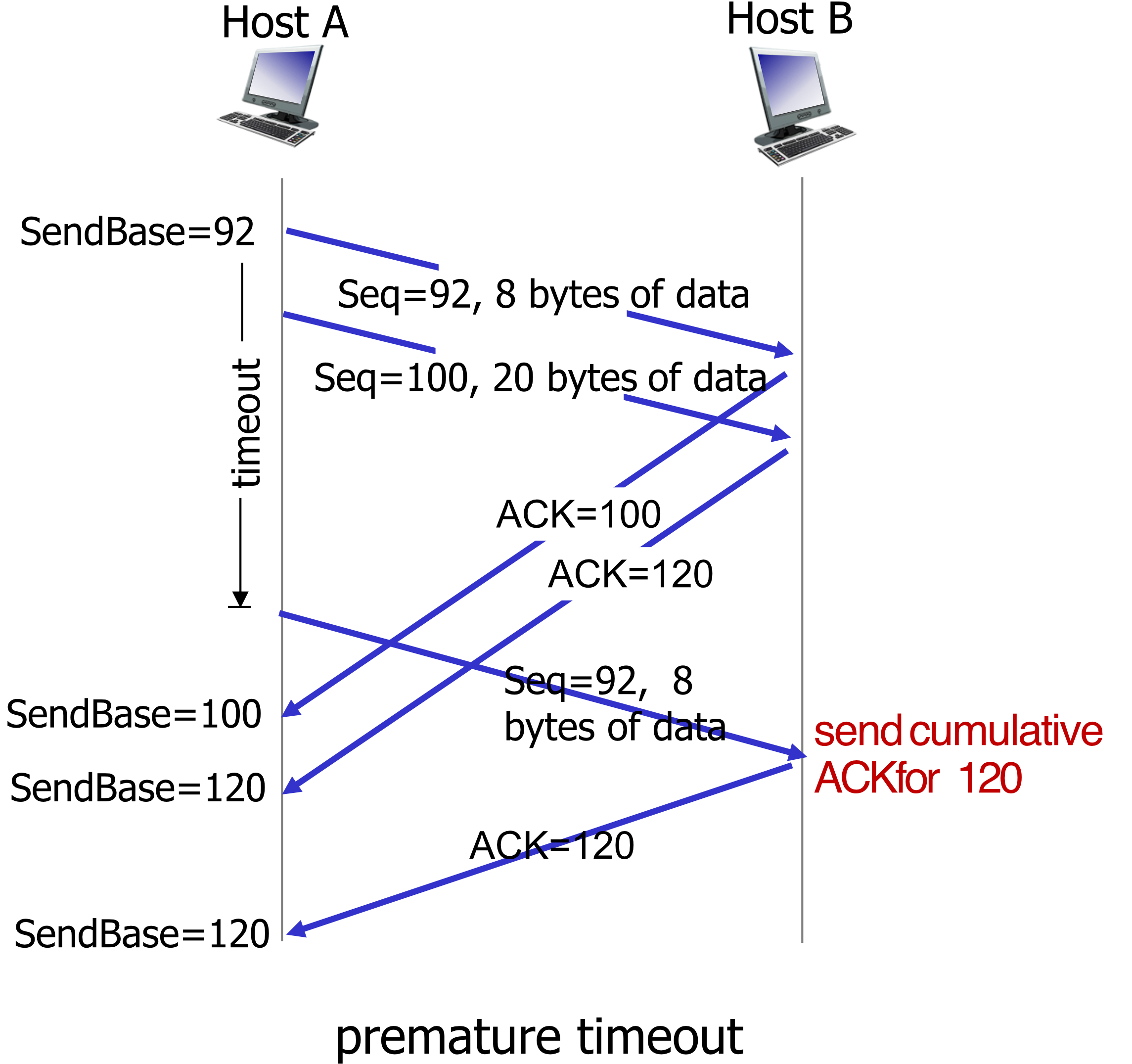
Cumulative ACK Covers Lost ACK
TCP Fast Retransmit
DO NOT WAIT FOR TIMEOUT! → But this works only if you used the pipeline
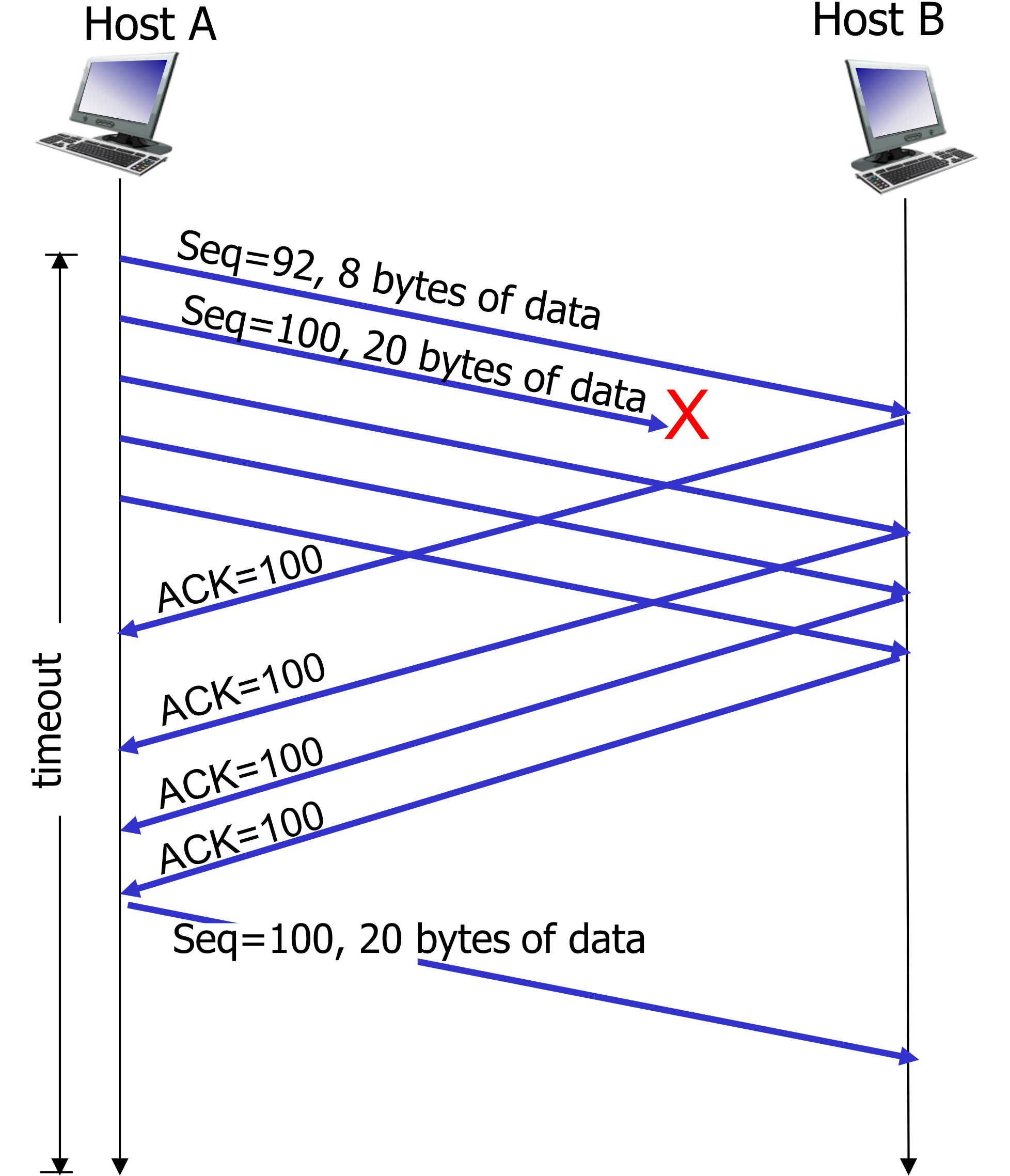
If the sender receives 3 additional (duplicate) ACKs for the same data ("triple duplicate ACKs"), resend the unACKed segment with the smallest seq#.
- Why? Receipt of 3 duplicate ACKs indicates 3 segments were received after a missing segment → lost segment is likely
- Don't wait for timeout — retransmit immediately
Analogy: If your friend keeps asking "what did you say after part 2?" three times, you know they missed part 3 — just repeat it without waiting for a long pause.
TCP Flow Control
Problem
clientSocket.send(sentence.encode())
modifiedSentence = clientSocket.recv(1024)
# 1024 = amount of byte, wanted to be read
# smaller = slow down the system, slow read

print('From Server:', modifiedSentence.decode())
clientSocket.close()
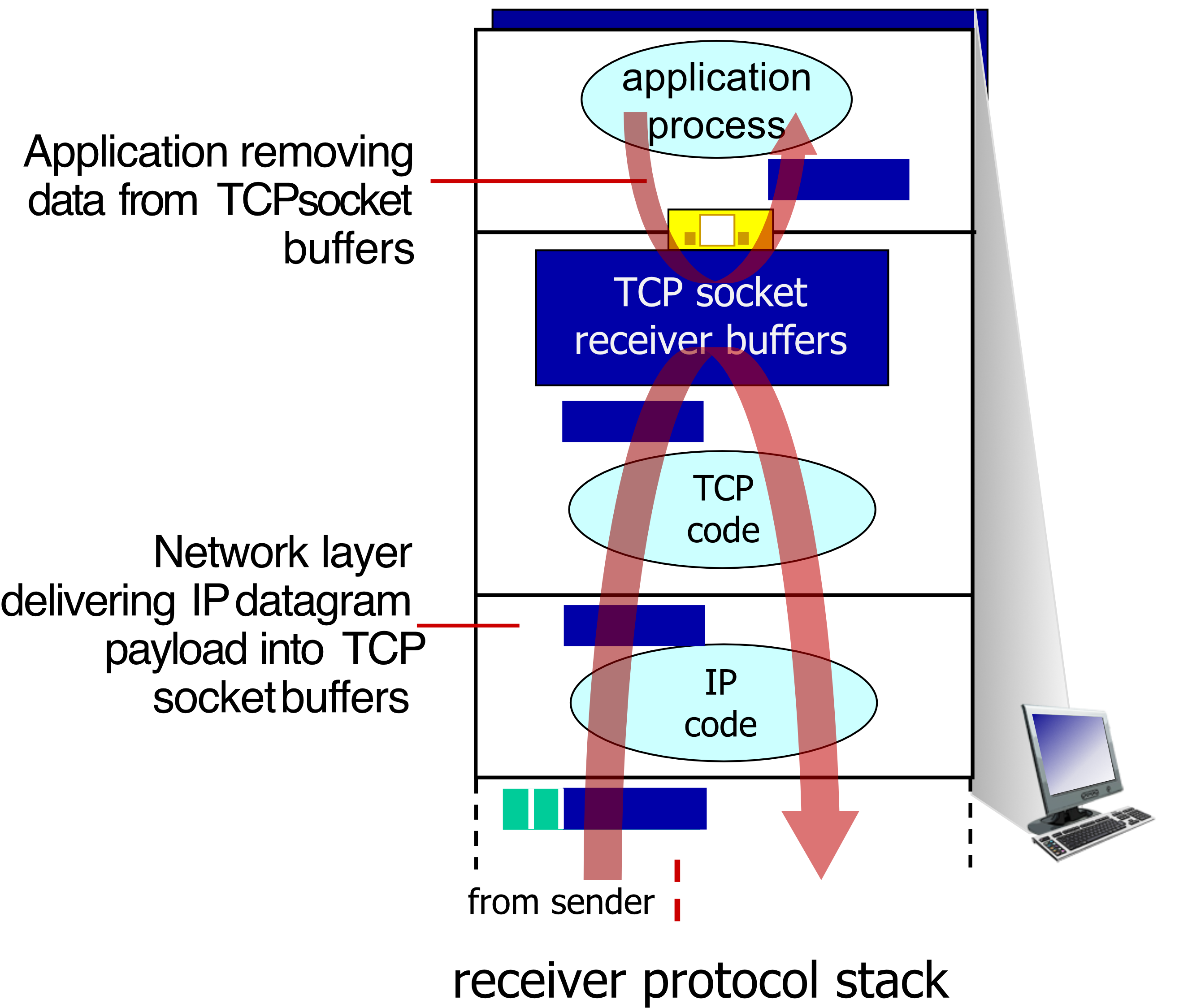
What happens if the network layer delivers data faster than the application layer removes data from socket buffers?
→ Buffer overflow at the receiver!
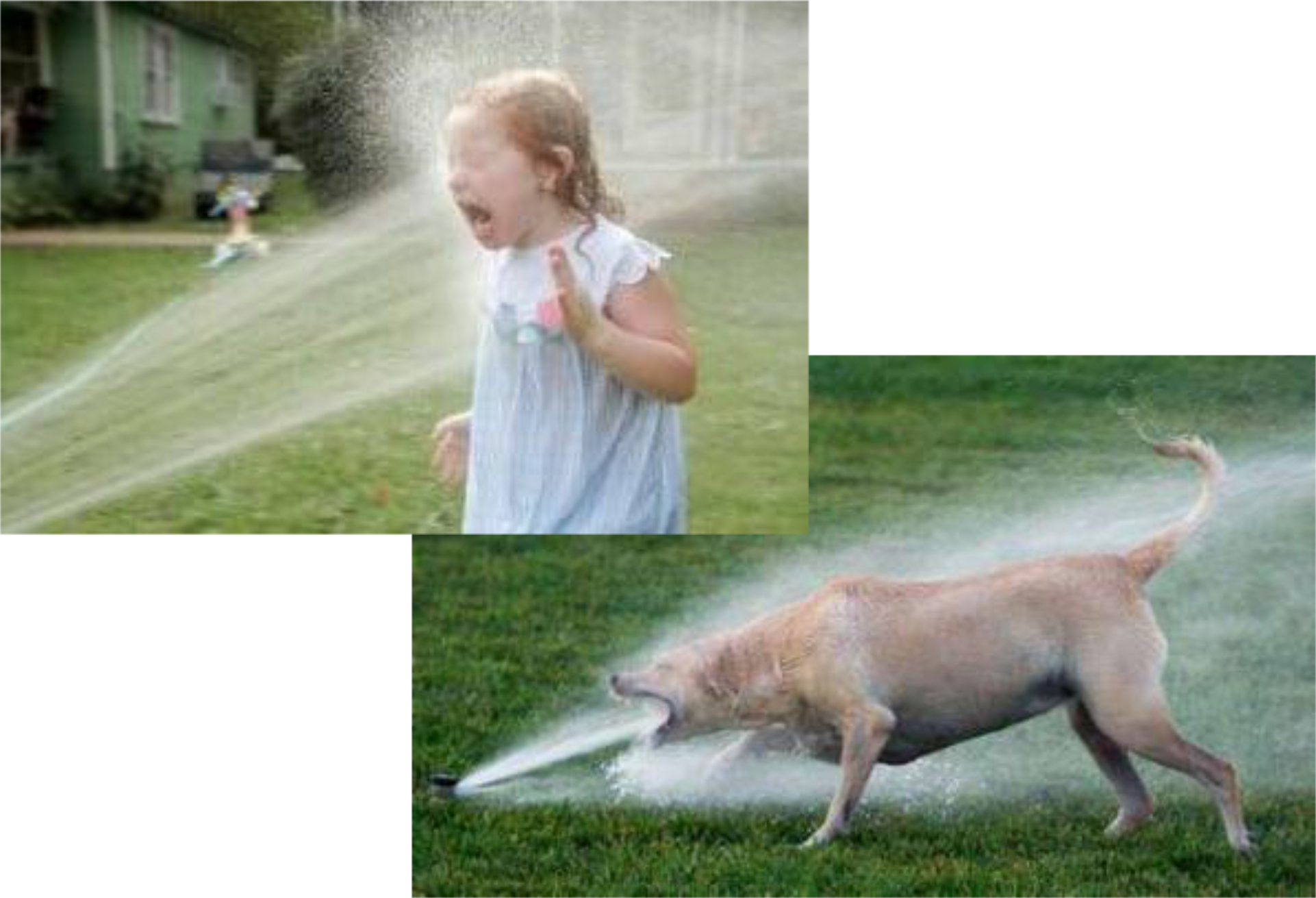
Solution: Flow Control
Receiver controls sender, so sender won't overflow receiver's buffer by transmitting too much, too fast.
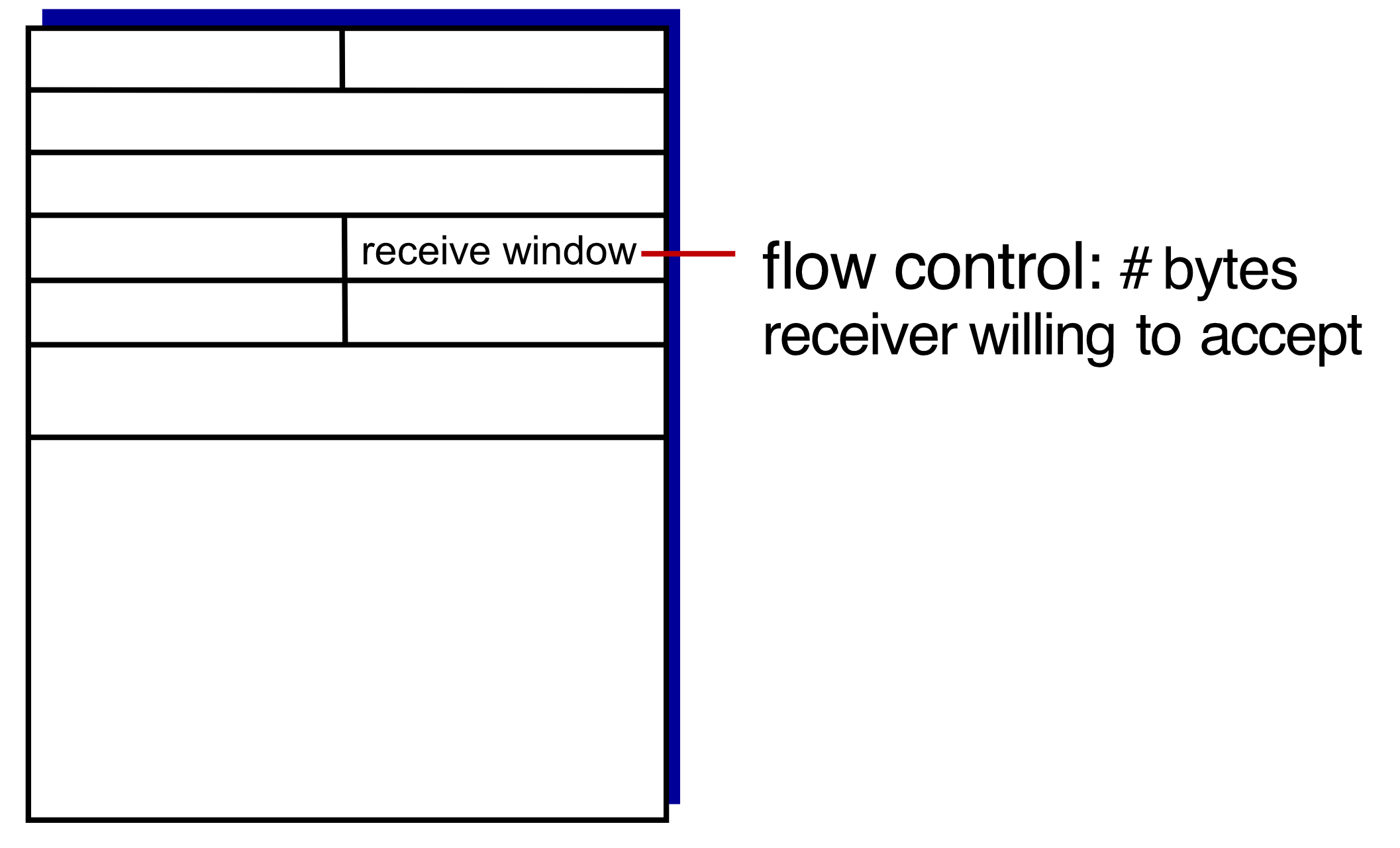
Mechanism: Receive Window (rwnd)
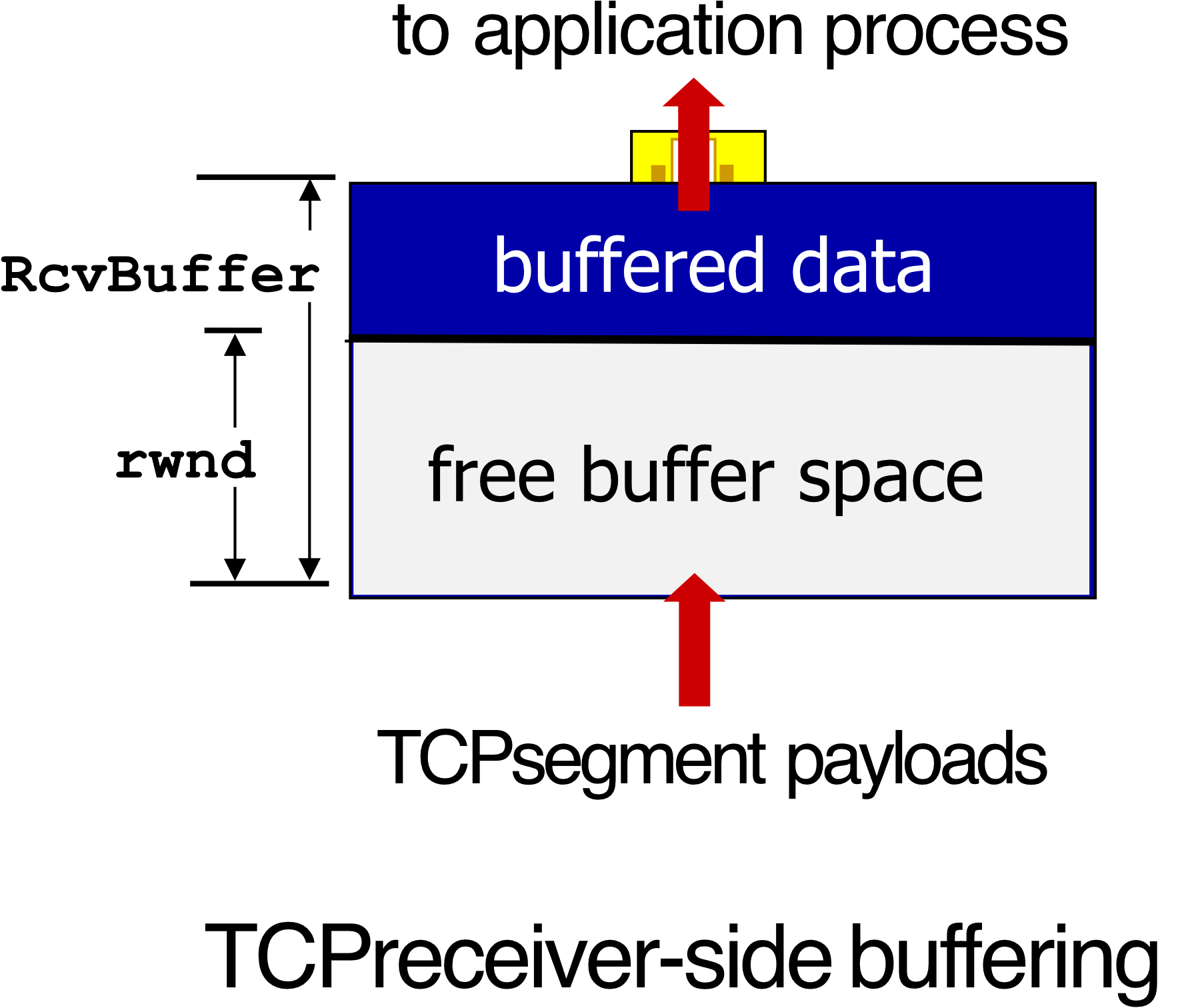
- TCP receiver advertises free buffer space in the
rwndfield in the TCP header RcvBuffersize set via socket options (typical default: 4096 bytes); many OS auto-adjust- Sender limits amount of unACKed ("in-flight") data to the received
rwnd - Guarantees receive buffer will not overflow
Analogy: Like a water tank with a faucet — the receiver tells the sender how much room is left in the tank (
rwnd). The sender won't pour more water than the tank can hold.
Principles of Congestion Control
What is Congestion?
เรามองเป็นภาพรวมของ Network, ไม่มี Flow control ที่ดู 1-1 (Client-server)
Informally: "Too many sources sending too much data too fast for the network to handle"
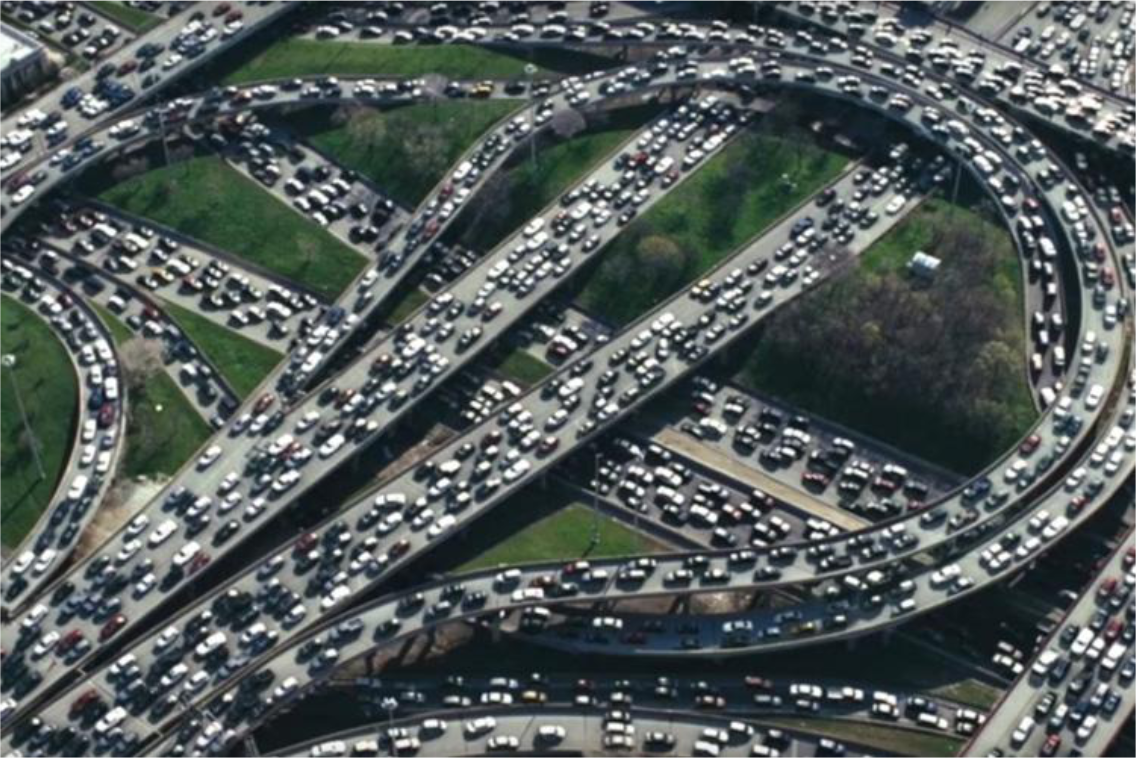
Problems caused by congestion:
- Long delays (queueing in router buffers)
- Packet loss (buffer overflow at routers)
Flow Control vs. Congestion Control
| Flow Control | Congestion Control | |
|---|---|---|
| Scope | One sender, one receiver | Many senders, the network |
| Problem | Sender too fast for receiver | Too many senders too fast for network |
| Mechanism | rwnd in TCP header | cwnd adjusted by TCP |
Analogy: Flow control = one garden hose overwhelming one bucket. Congestion control = too many garden hoses filling up the city's water pipes.
Causes/Costs of Congestion
Scenario 1 – One Router, Infinite Buffers, No Retransmissions
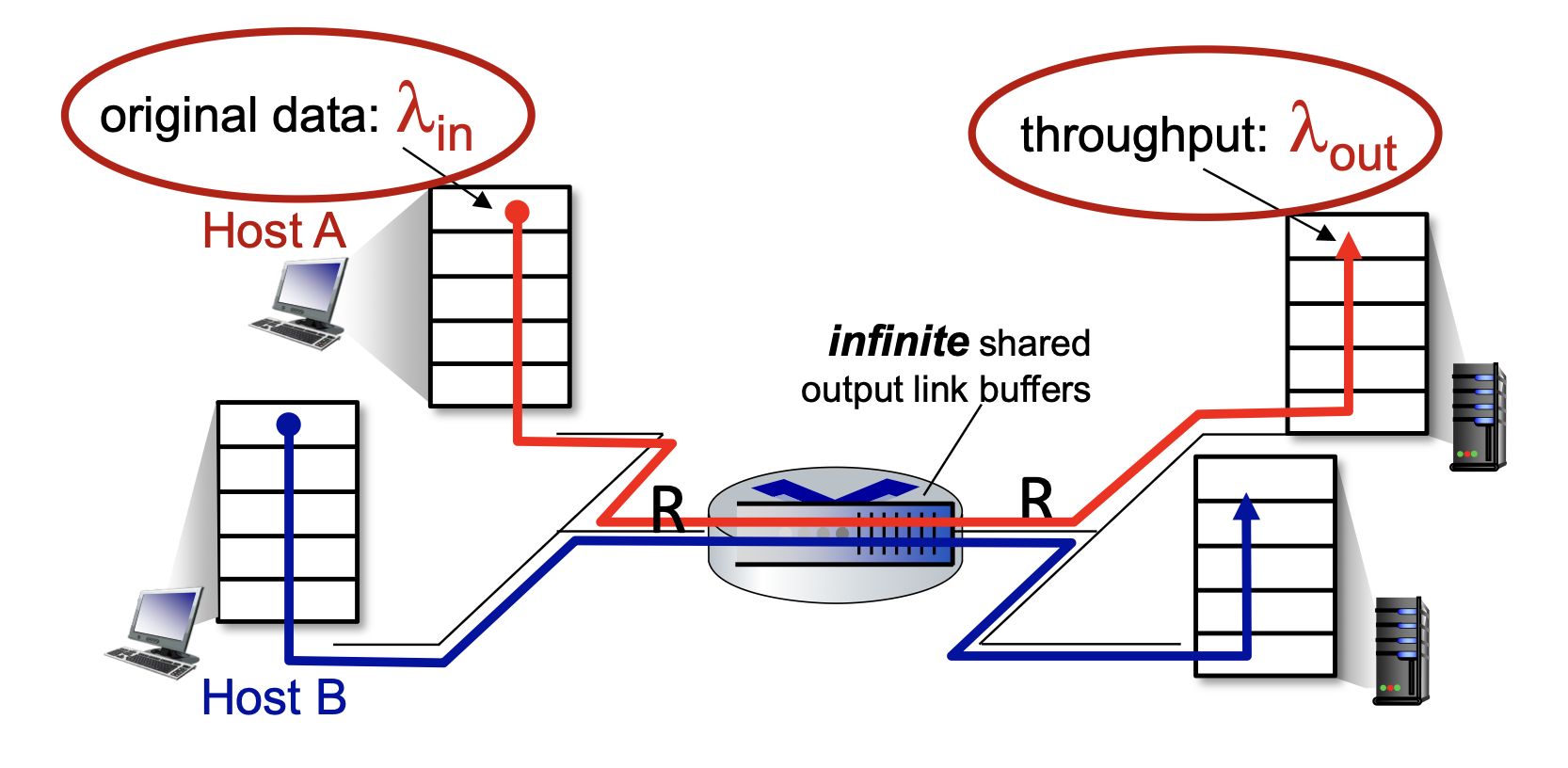
- Two flows sharing one router with capacity
- Maximum per-connection throughput:
- As approaches : large delays (queueing)
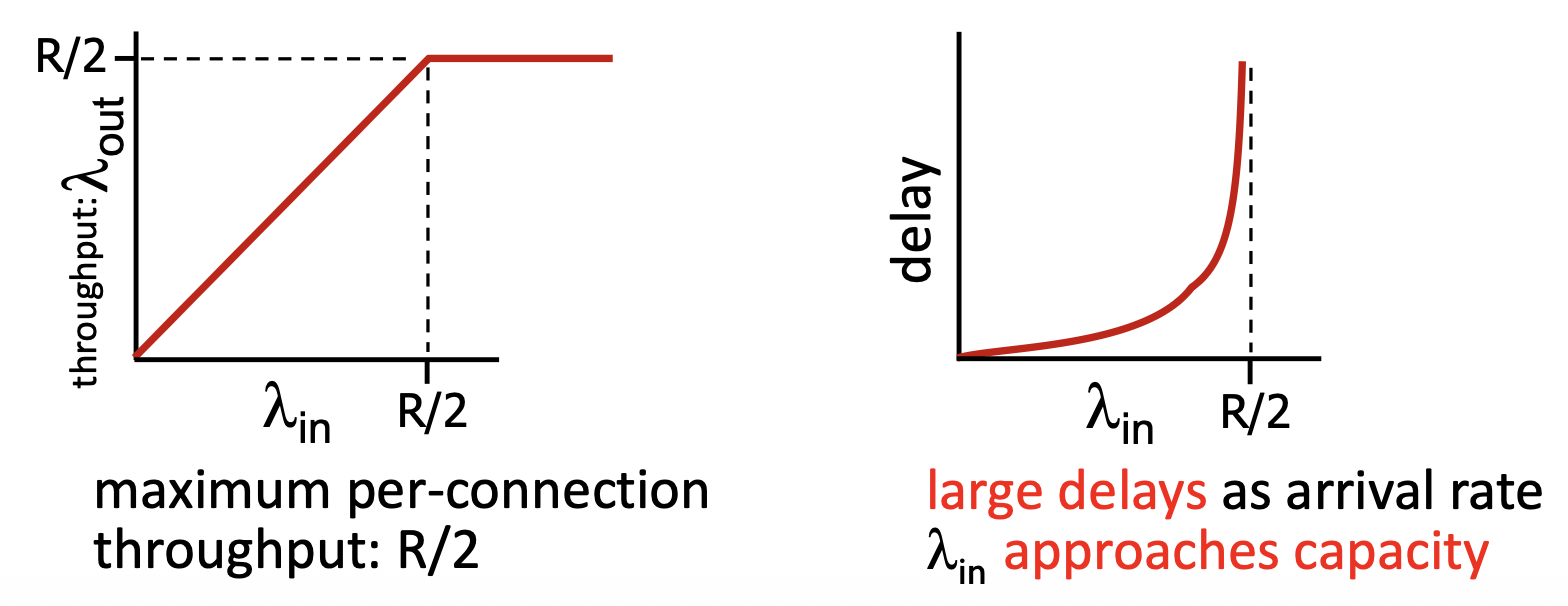
Delay เป็น Exponential เลยล่ะ เพราะอะไร เกี่ยวกับ Queue theory
Scenario 2 – One Router, Finite Buffers, Retransmissions
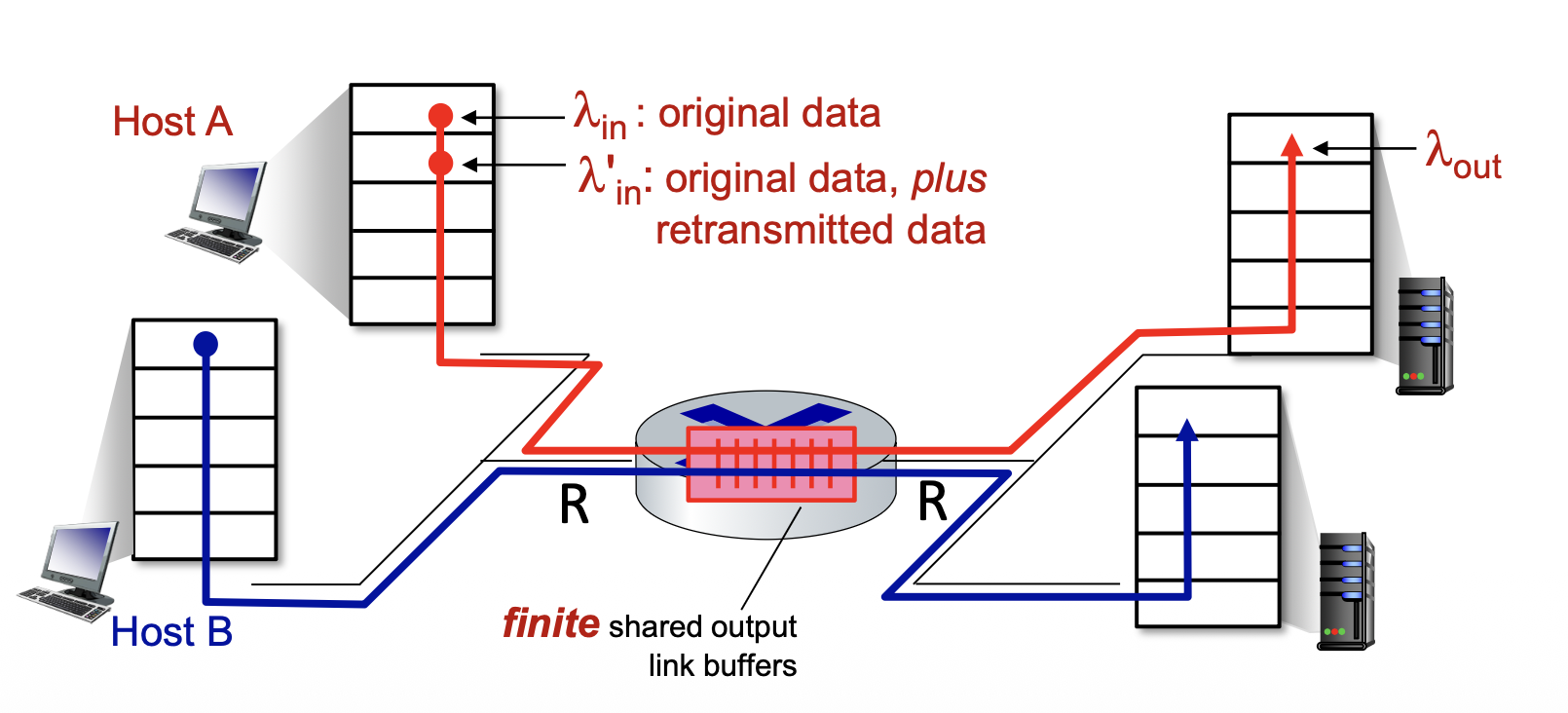
ลองเช็คนิดนึง ข้อมูลหายรึเปล่า???
- Packets can be dropped at router due to full buffers → sender must retransmit
- Transport-layer input includes retransmissions:
Idealization (perfect knowledge):
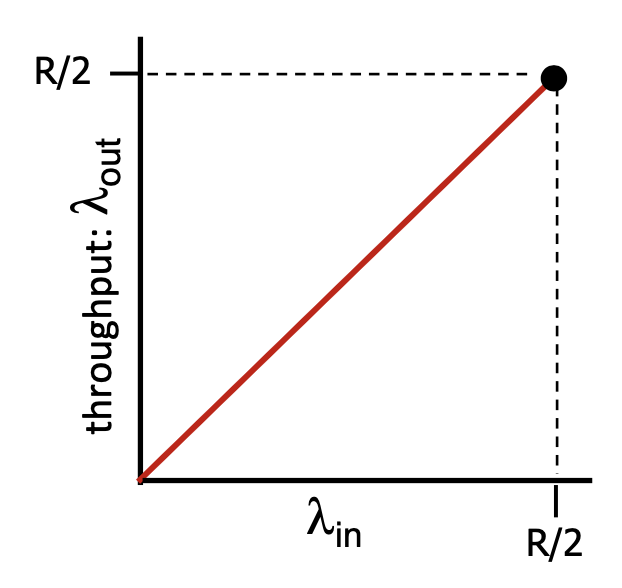
- Sender only sends when router buffer is available → throughput can reach
Idealization (some perfect knowledge):
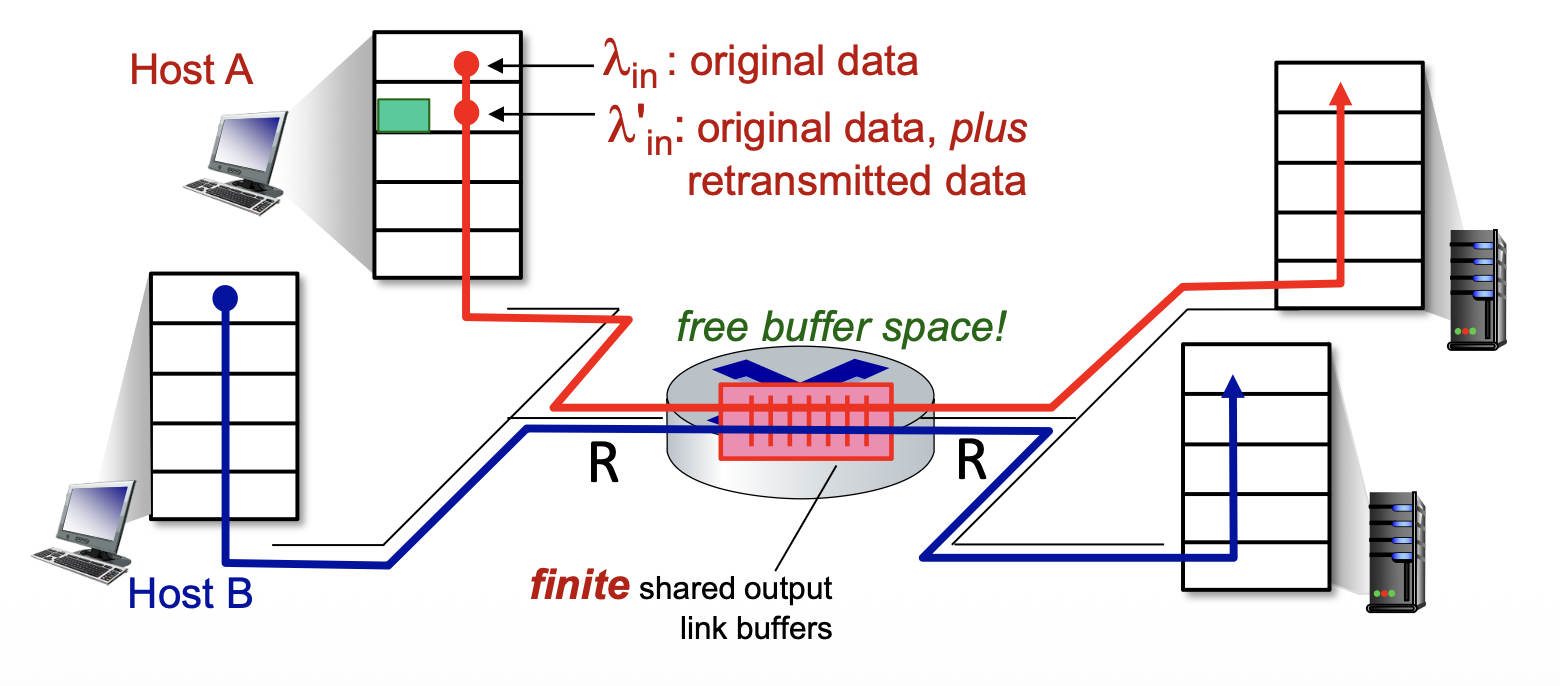
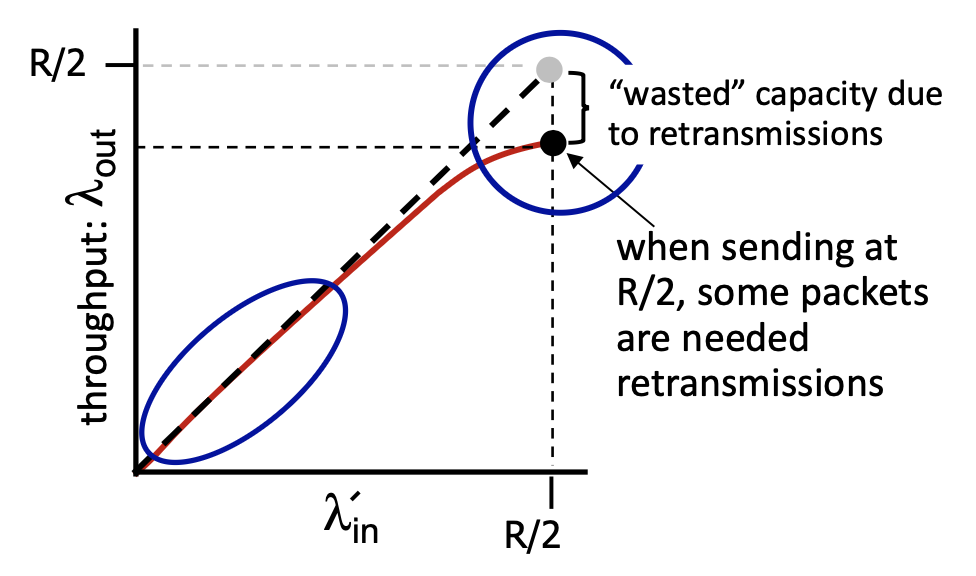
- Sender knows when packet dropped → only resends if packet known to be lost
- Some bandwidth wasted on retransmissions
Realistic scenario (premature timeout / un-needed duplicates):
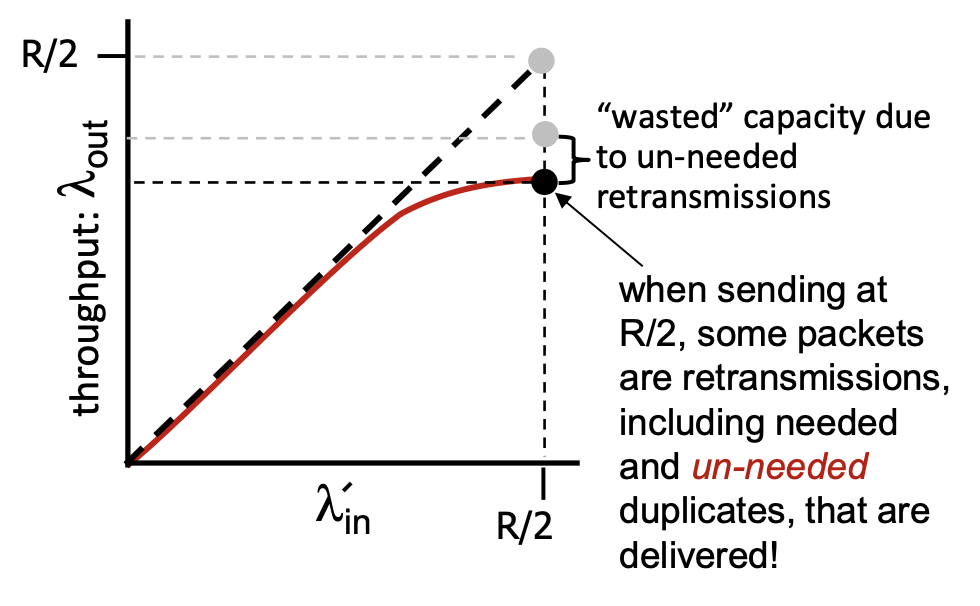
- Sender times out too early → sends two copies, both delivered
- "Wasted" capacity due to un-needed retransmissions → effective throughput further decreases
Key Insights
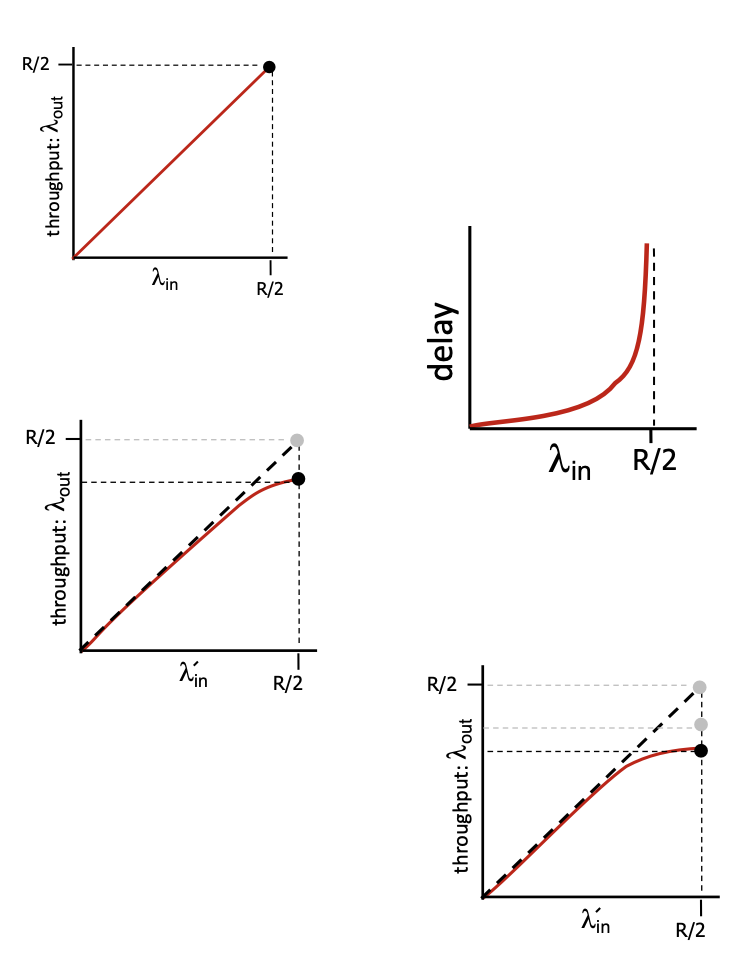
- Throughput can never exceed capacity
- Delay increases as capacity is approached
- Loss/retransmission decreases effective throughput
- Un-needed duplicates further decrease effective throughput
Approaches to Congestion Control
1. End-to-End Congestion Control
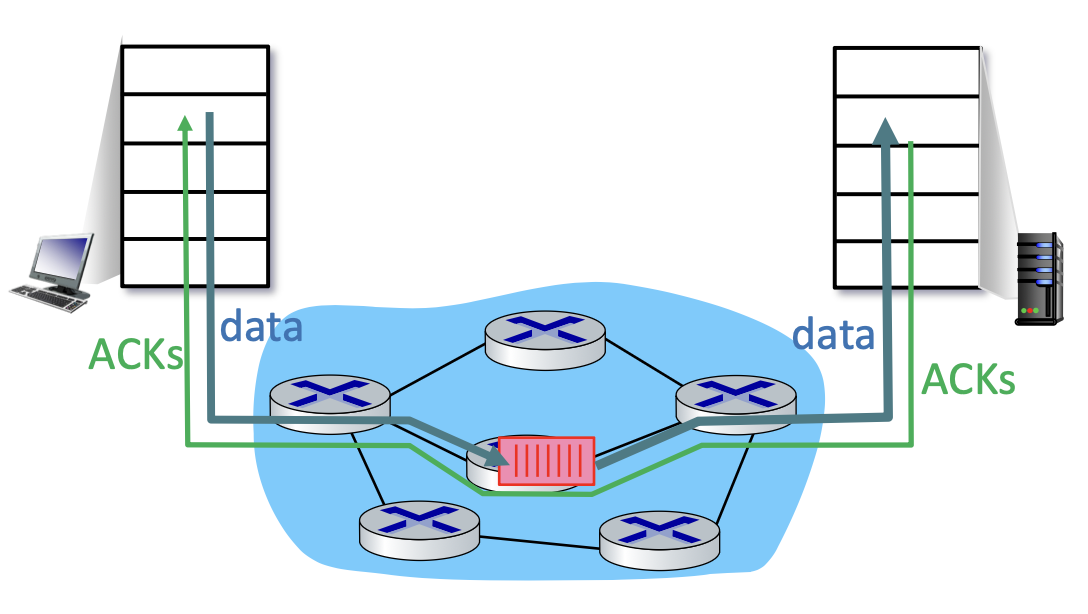
- No explicit feedback from network
- Congestion inferred from observed loss and delay
- ✅ Approach taken by TCP
2. Network-Assisted Congestion Control
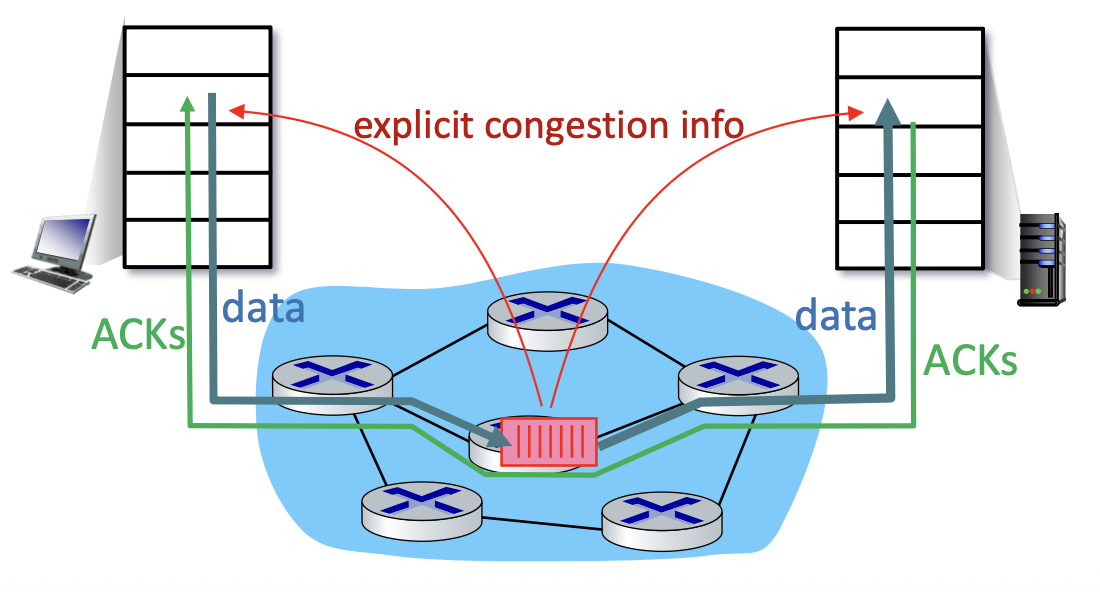
- Routers provide direct feedback to sending/receiving hosts
- May indicate congestion level or explicitly set sending rate
- Examples: DECbit+, TCP ECN
TCP Congestion Control
Topics covered:
- AIMD (Additive Increase Multiplicative Decrease)
- Slow Start
- TCP Reno (Fast Retransmit, Fast Recovery)
- TCP Tahoe
- TCP CUBIC
- Delay-based TCP congestion control
- Explicit Congestion Notification (ECN)
TCP Congestion Window (cwnd)
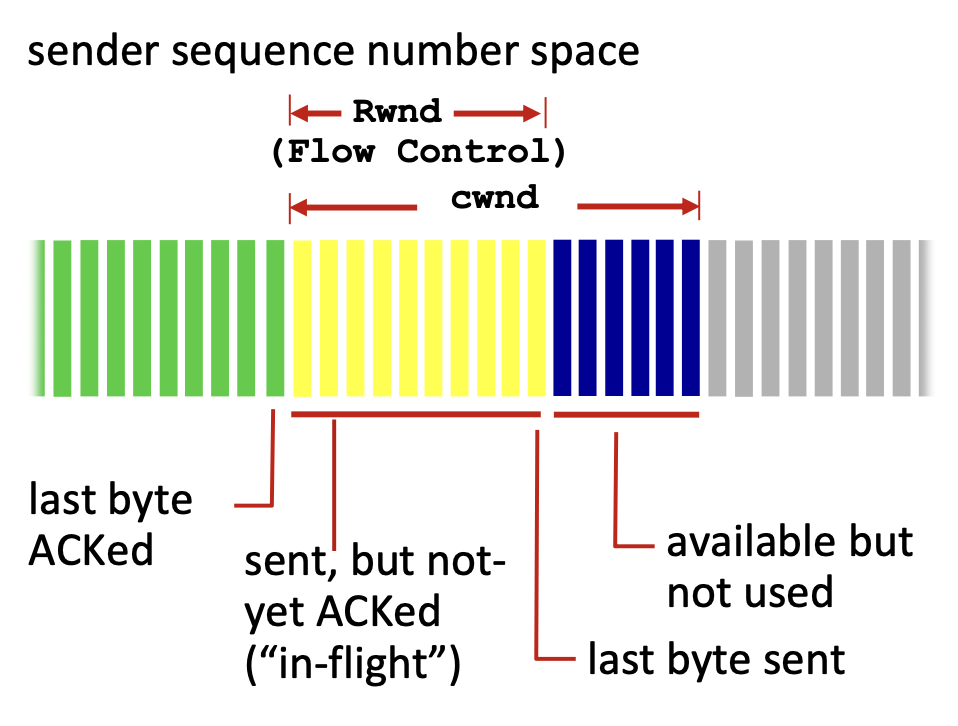
TCP sender limits transmission:
cwndis dynamically adjusted based on observed network congestion- TCP sending rate ≈ bytes/sec
Note: The actual send window = — both congestion control and flow control apply. (สำคัญนะะะ!!!)
AIMD – Additive Increase, Multiplicative Decrease
Senders increase sending rate until packet loss (congestion) occurs, then decrease on loss.
- Additive Increase – Increase sending rate by 1 MSS every RTT until loss detected
- Multiplicative Decrease – Cut sending rate in half at each loss event
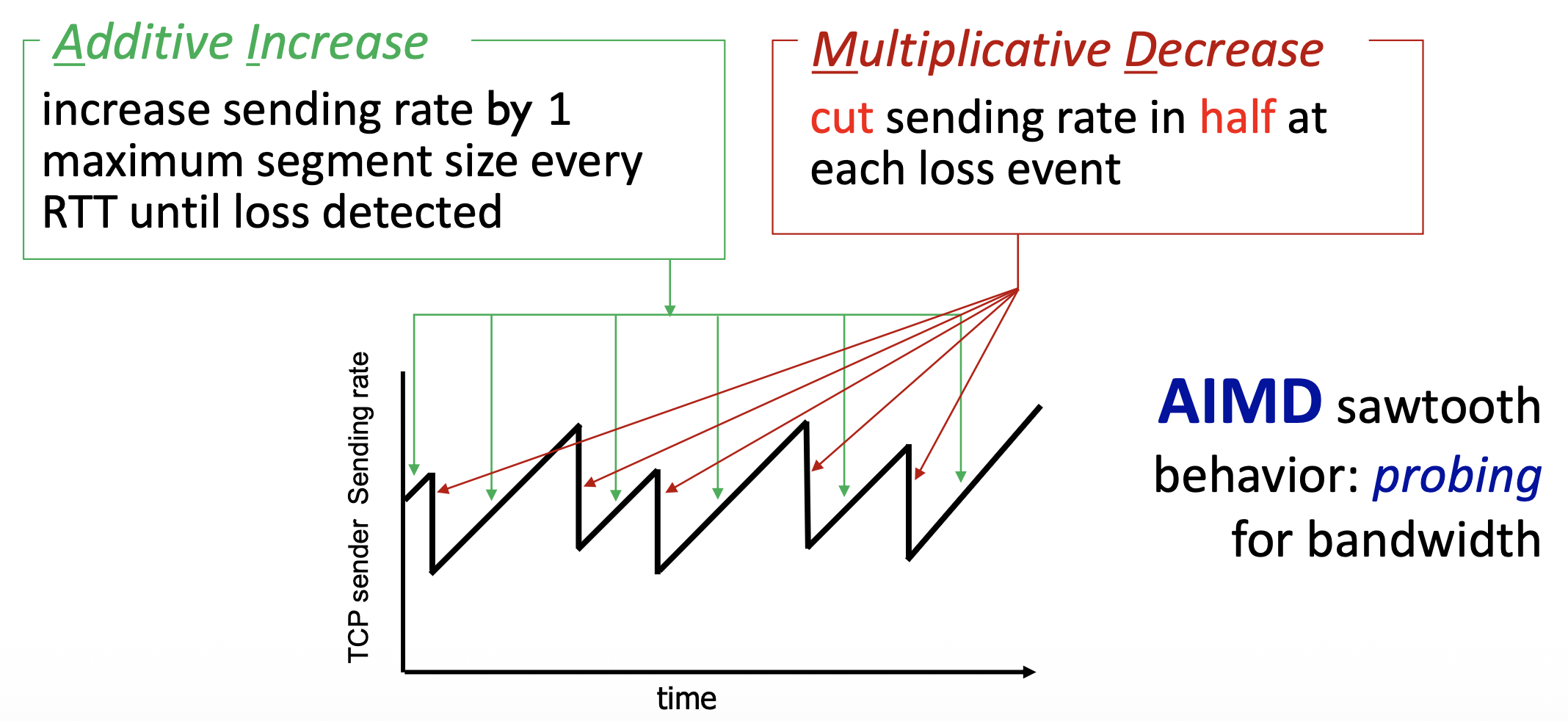
This creates the characteristic AIMD sawtooth behavior — probing for bandwidth.
Analogy: Like driving on a highway — you gradually speed up, and when you see brake lights (congestion), you cut your speed in half immediately.
Problem
If you have a large bandwidth, it takes time!
Slow Start
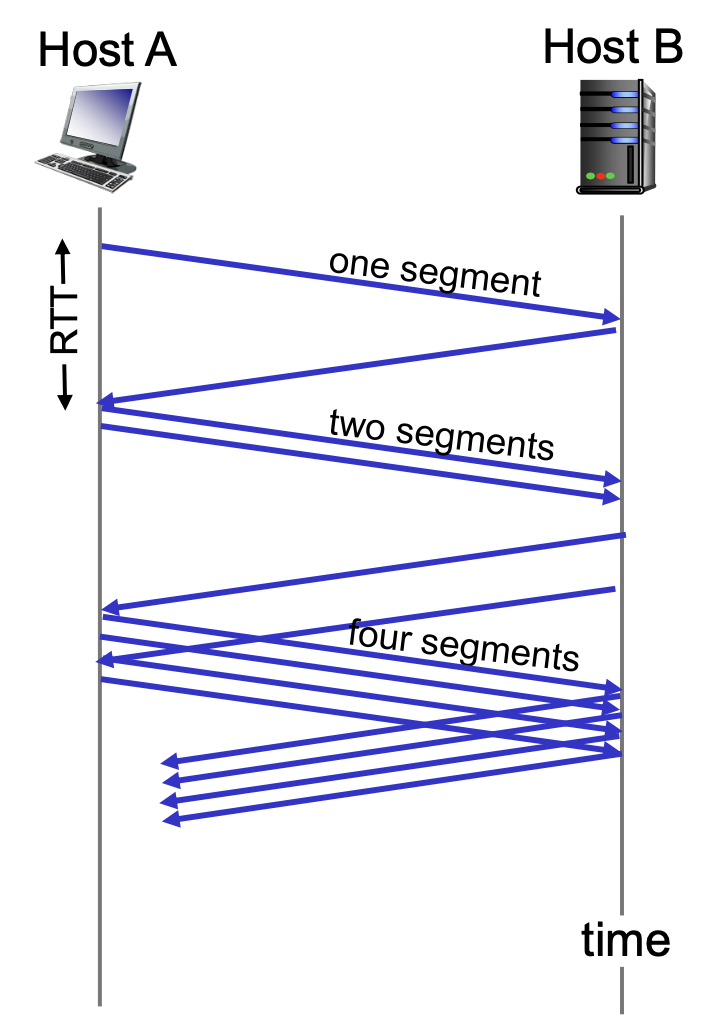
- When connection begins, increase rate exponentially until first loss event
- Initially
cwnd = 1 MSS - Double
cwndevery RTT - Done by incrementing
cwndfor every ACK received
- Initially
RTT 1: send 1 segment
RTT 2: send 2 segments
RTT 3: send 4 segments
RTT 4: send 8 segments
...
Summary: Initial rate is slow, but ramps up exponentially fast.
Analogy: Like starting a car — you start slow, but accelerate quickly before reaching your cruising speed.
Slow Start → Congestion Avoidance Transition
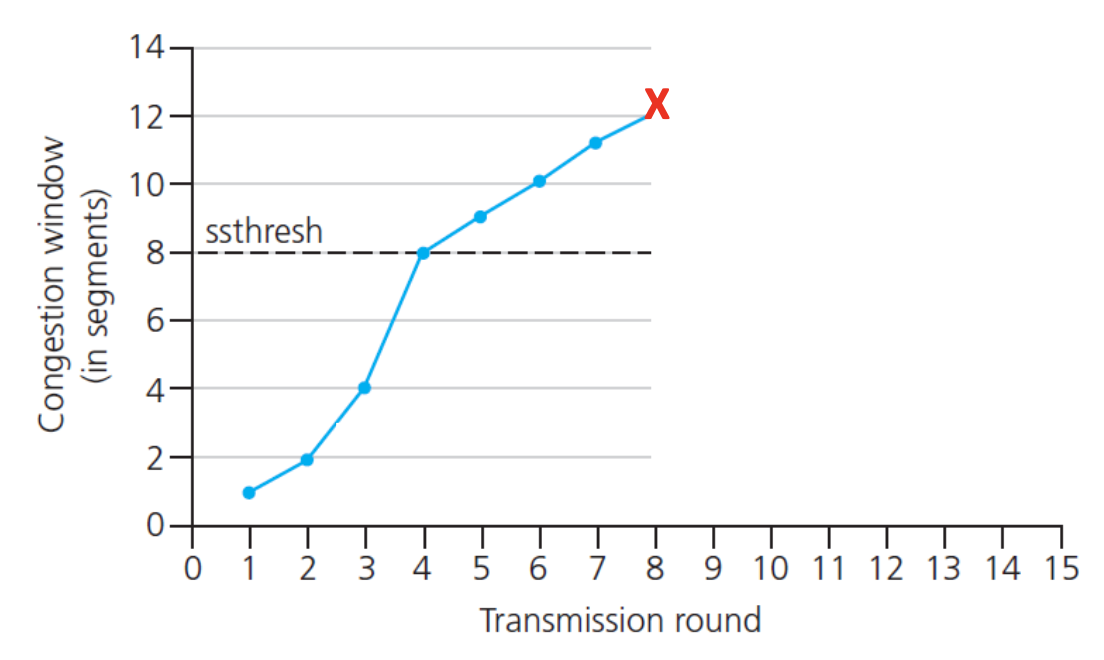
Q: When should exponential increase switch to linear?
A: When cwnd reaches ½ of its value before the last timeout.
Implementation — ssthresh (Slow Start Threshold):
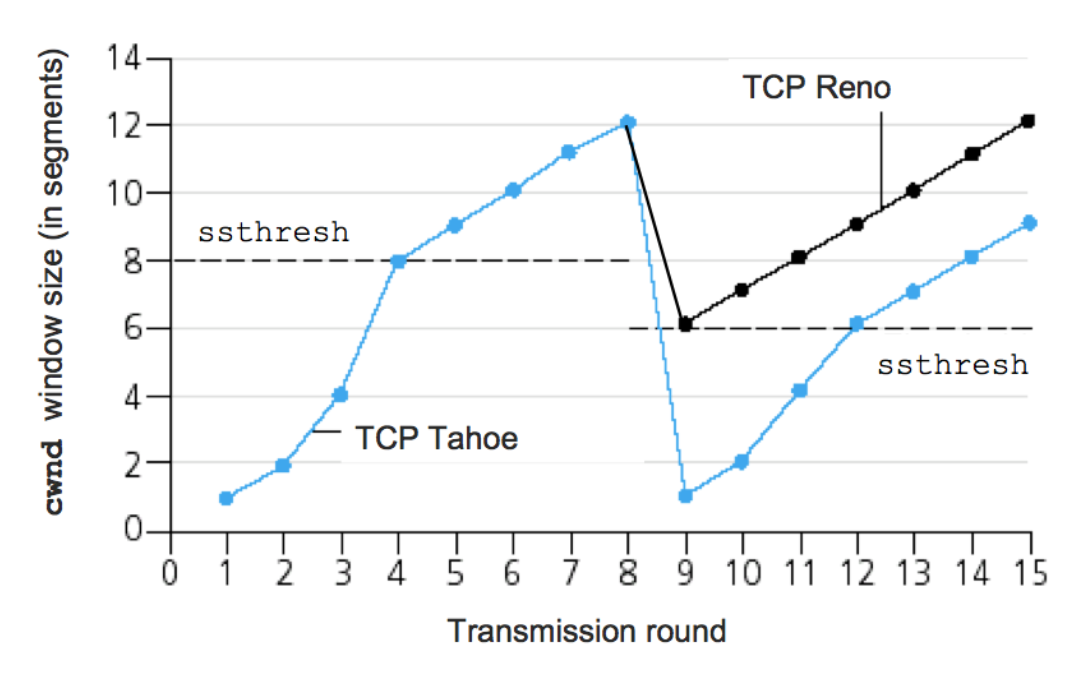
- On loss event: (just before loss)
- When
cwnd < ssthresh→ Slow Start (exponential) - When
cwnd ≥ ssthresh→ Congestion Avoidance (linear, +1 MSS per RTT)
TCP Tahoe vs TCP Reno
TCP Reno – Loss by Triple Duplicate ACK
- No wait for timeout (Fast Retransmit)
cwndis cut to half window, then grows linearly (Fast Recovery)- ssthresh = cwnd/2
TCP Tahoe – Loss by Timeout
cwndis cut to 1 MSS- Enter TCP Slow Start
| Event | TCP Tahoe | TCP Reno |
|---|---|---|
| Triple duplicate ACK | cwnd → 1 MSS, slow start | cwnd → cwnd/2, linear growth |
| Timeout | cwnd → 1 MSS, slow start | cwnd → 1 MSS, slow start |
Analogy: Reno is more optimistic — 3 duplicate ACKs means some data got through, so just halve the rate. Tahoe is more conservative — timeout means the network is really struggling, so reset completely.
TCP CUBIC
Is there a better way than AIMD to "probe" for usable bandwidth?
Key Insight:
- : sending rate at which congestion loss was detected
- After cutting rate in half on loss, initially ramp to faster, then approach more slowly
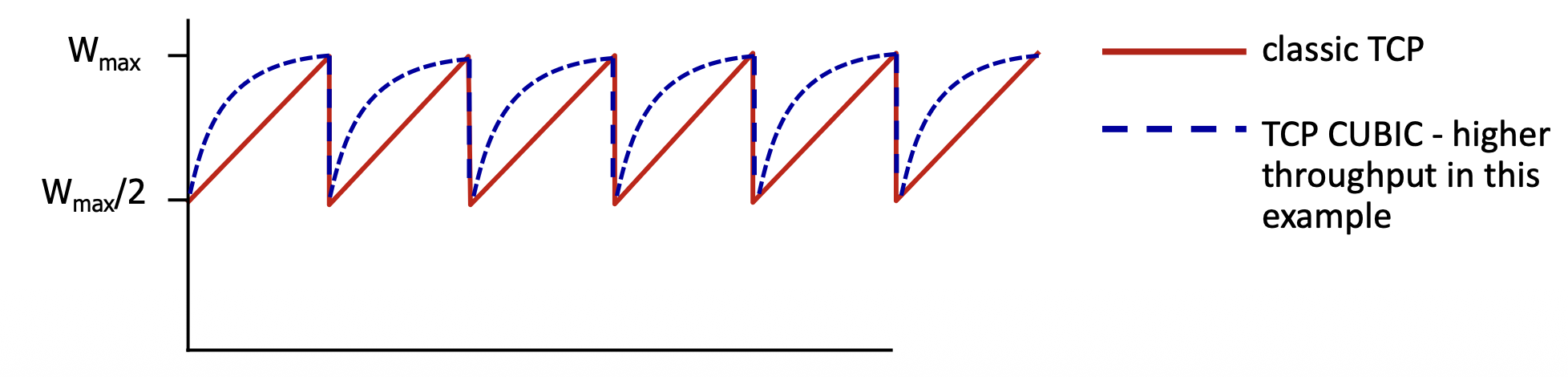
- Go very fast and slow down later, เหมือนเปลี่ยน animation curve อะ55555
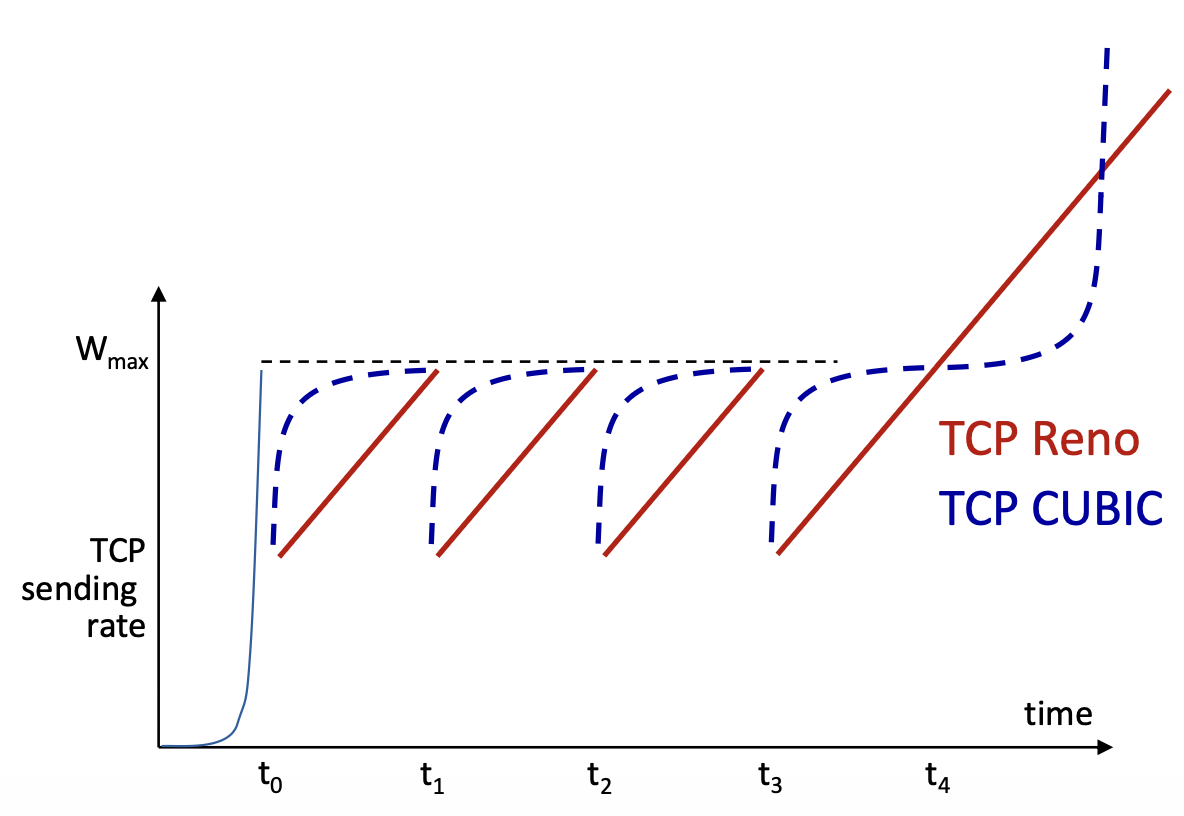
K = point in time when TCP window will reach
- Larger increases when farther from K
- Smaller increases (cautious) when nearer to K
- Window increases as a function of the cube of the distance from K
- TCP CUBIC is the default in Linux and most popular TCP for popular Web servers
- Higher throughput compared to classic TCP
TCP Bottleneck Link
- TCP (classic, CUBIC) increases sending rate until packet loss occurs at some router's output: the bottleneck link
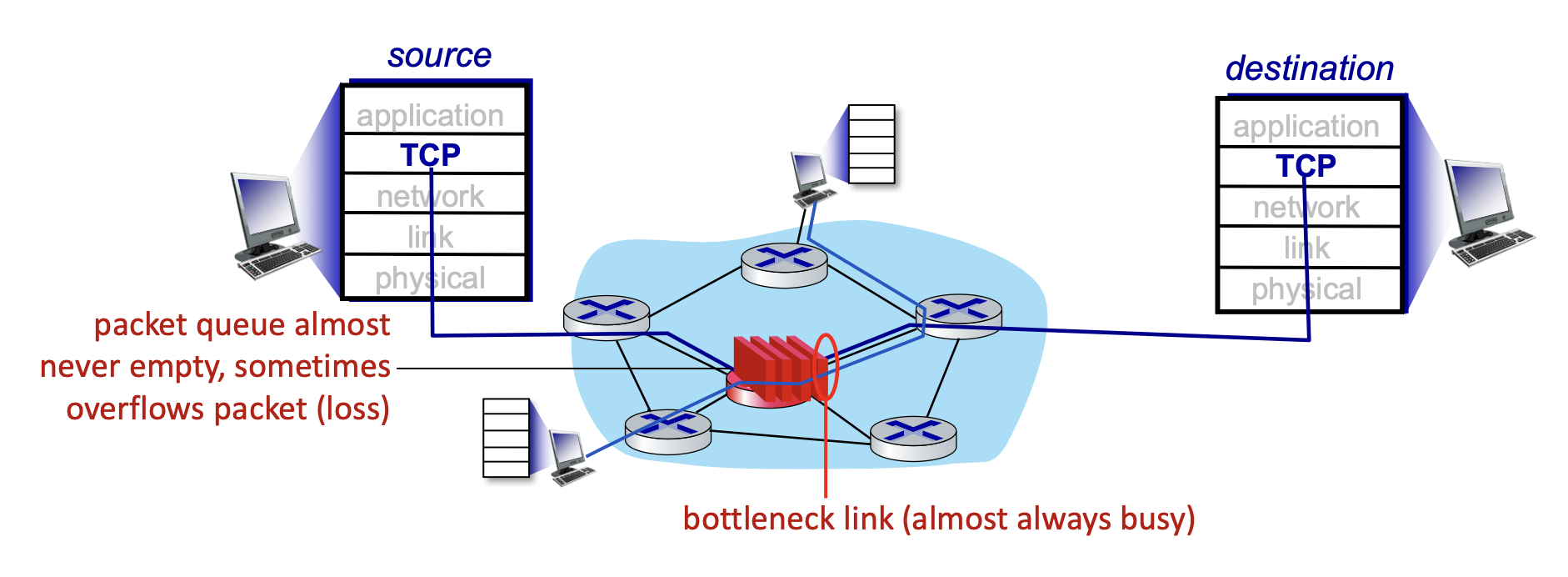
- The bottleneck link's packet queue is almost never empty, and sometimes overflows (packet loss)
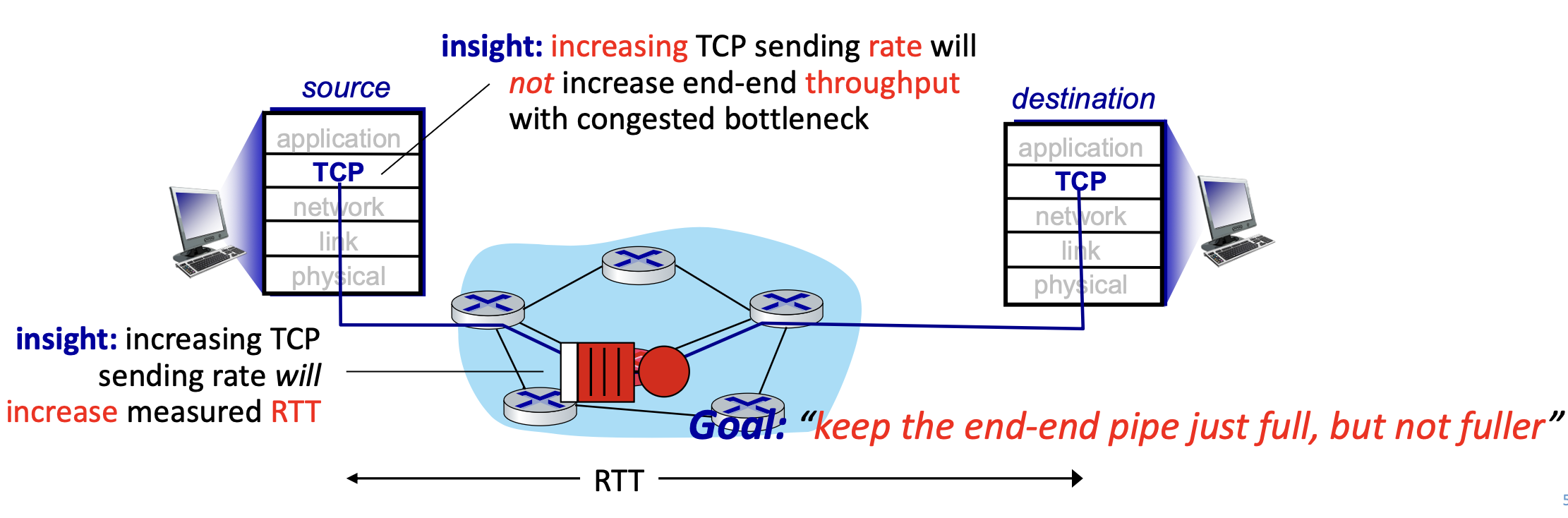
Key Insights: - Increasing TCP sending rate will NOT increase end-end throughput with a congested bottleneck
- Increasing TCP sending rate WILL increase measured RTT
Delay-Based TCP Congestion Control
Keeping sender-to-receiver pipe "just full enough, but no fuller."

Algorithm:
- = minimum observed RTT (uncongested path)
- Uncongested throughput with
cwnd=
if measured throughput ≈ cwnd/RTT_min:
    increase cwnd linearly   # path not congested
else if measured throughput << cwnd/RTT_min:
    decrease cwnd linearly   # path is congested
Analogy: You're on a highway — if your actual speed matches the speed limit (uncongested), speed up a bit. If you're stuck at 40 mph when the limit is 80 mph, you slow down to avoid making things worse.
Explicit Congestion Notification (ECN)
Network-assisted congestion control built on top of TCP:
- Two bits in IP header (ToS field) marked by network router to indicate congestion
- Congestion indication carried to destination
- Destination sets ECE bit on ACK segment to notify sender of congestion
- Involves both IP (ECN bit marking) and TCP (C, E bit marking)
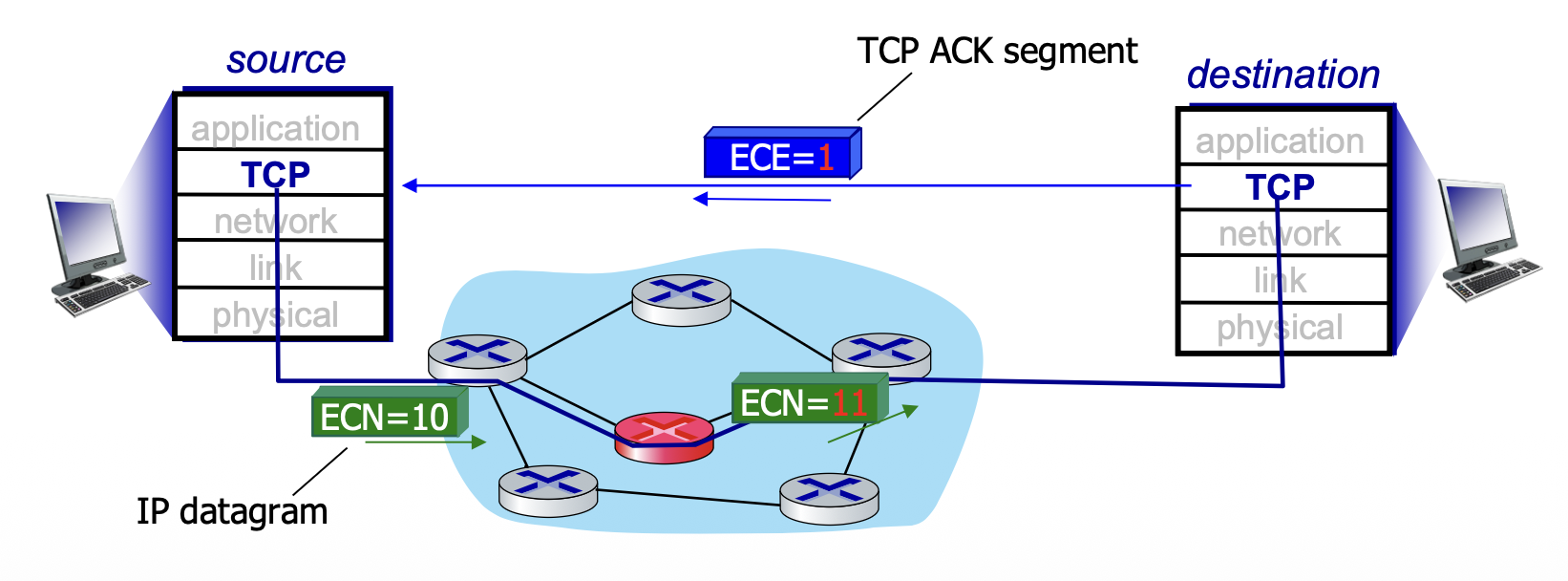
Source           Router        Destination
  |  ECN=10         |              |
  |────────────────→| (congested)  |
  |           ECN=11|              |
  |                 |────────────→ |
  |  ECE=1 (in ACK) |              |
  |←────────────────────────────── |
TCP Fairness
Fairness Goal: If TCP sessions share the same bottleneck link of bandwidth , each should have average rate of:
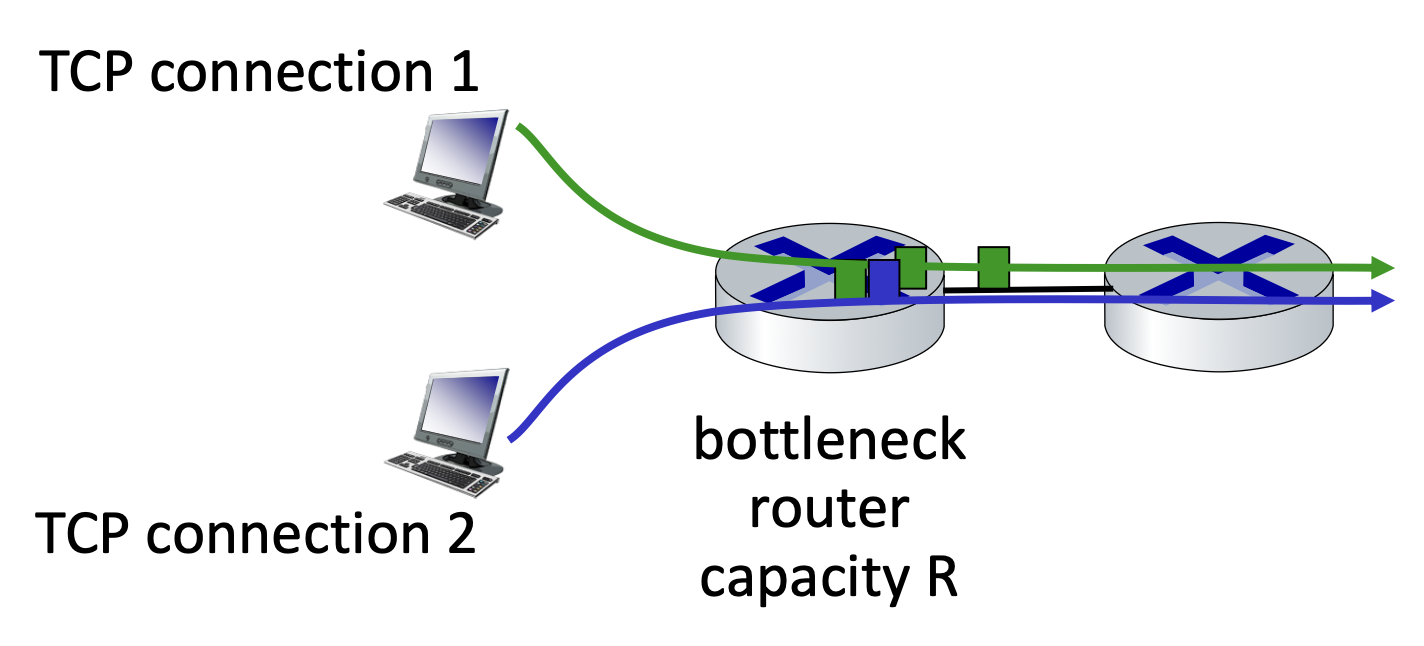
Is TCP Fair?
- Under idealized conditions, AIMD leads to equal bandwidth sharing
- Multiple TCP connections between same two hosts will get proportionally more bandwidth
Fairness and UDP
- Multimedia apps often use UDP (not TCP) — they do not want rate throttled by congestion control
- Send audio/video at constant rate, tolerate packet loss
- There is no "Internet police" enforcing use of congestion control
Fairness and Parallel TCP Connections
- Applications can open multiple parallel TCP connections between two hosts
- Example: link with rate , 9 existing connections:
- New app asks for 1 TCP → gets
- New app asks for 11 TCPs → gets (unfair!)
Summary
| Topic | Key Points |
|---|---|
| Port Numbers | Well-known (0–1023), Registered (1024–49151), Dynamic (49152–65535) |
| TCP Connection | 3-way handshake (SYN, SYN-ACK, ACK); Close with FIN |
| Sequence & ACK | Byte-stream numbering; cumulative ACK |
| Retransmission | Timeout or triple duplicate ACK triggers retransmit |
| Fast Retransmit | 3 dup ACKs → retransmit without waiting for timeout |
| Flow Control | rwnd field — receiver advertises free buffer space |
| Congestion | Too many senders; causes delay and packet loss |
| AIMD | +1 MSS/RTT additive increase; ÷2 on loss |
| Slow Start | Exponential increase until ssthresh or loss |
| TCP Reno | dup ACK → cwnd/2 + linear; Timeout → cwnd=1 + slow start |
| TCP Tahoe | Both dup ACK and Timeout → cwnd=1 + slow start |
| TCP CUBIC | Cubic function probing; default in Linux |
| ECN | Router marks IP header bits to signal congestion before loss |
| Fairness | TCP AIMD converges to fair sharing; UDP bypasses this |