เวลาเราใช้เน็ต สิ่งหนึ่งที่เราไม่เคยเห็นเลยคือ ข้อมูลมันเดินทางยังไง และ มันพังหรือหาย ระหว่างทางบ้างมั้ย ในโลกจริง ข้อมูล (frames) มีโอกาส พัง / หาย / มาช้า เสมอ มาดูกันเล้ยยย
Lecture 2 - Protocol Architectures
Learning Objectives
- Explain the need for flow control and error control
- Present an overview of the basic mechanisms of stop-and-wait flow control and sliding-window flow control
- Present an overview of the basic mechanisms of stop-and-wait ARQ, go-back-N ARQ, and selective reject flow control
Lecture Contents
1. Error Control
- Stop-and-Wait ARQ
- Go-Back-N ARQ
- Selective-Reject ARQ
2. Flow Control
- Stop-and-Wait flow control
- Sliding-Window flow control
Error & Flow Control Overview
Why Error & Flow Control Together?
- We study two main functions of the data-link layer: Error and Flow Control
- Data-link protocols used for error control are also used for flow control
Error Control Definition
What is Error Control?
จัดการกับพัสดุที่เสียหายระหว่างทาง หรือว่าหายไปเลย เป็นสาเหตุที่เรารู้สึกว่าเน็ตช้า ค้าง ๆ อะไรประมาณนี้
- Error Control is the second type of methods used to "handle" errors in frames
- Error Control methods use retransmission when an error occurs in a frame
- This process is called Automatic Repeat Request (ARQ)
When is Retransmission Needed?
- Frame is erroneous (e.g., coding is not capable of correcting it)
- Frame is lost (i.e., does not arrive or arrives too late)
- Reasons include: noise, network congestion, etc.
Flow Control Definition
Flow Control is defined as:
"The set of procedures used to restrict the amount of data that a TX can send before waiting for an acknowledgement from the RX"
- TX: Transmitter
- RX: Receiver
- Purpose: To avoid overwhelming the RX by the flow of data from TX
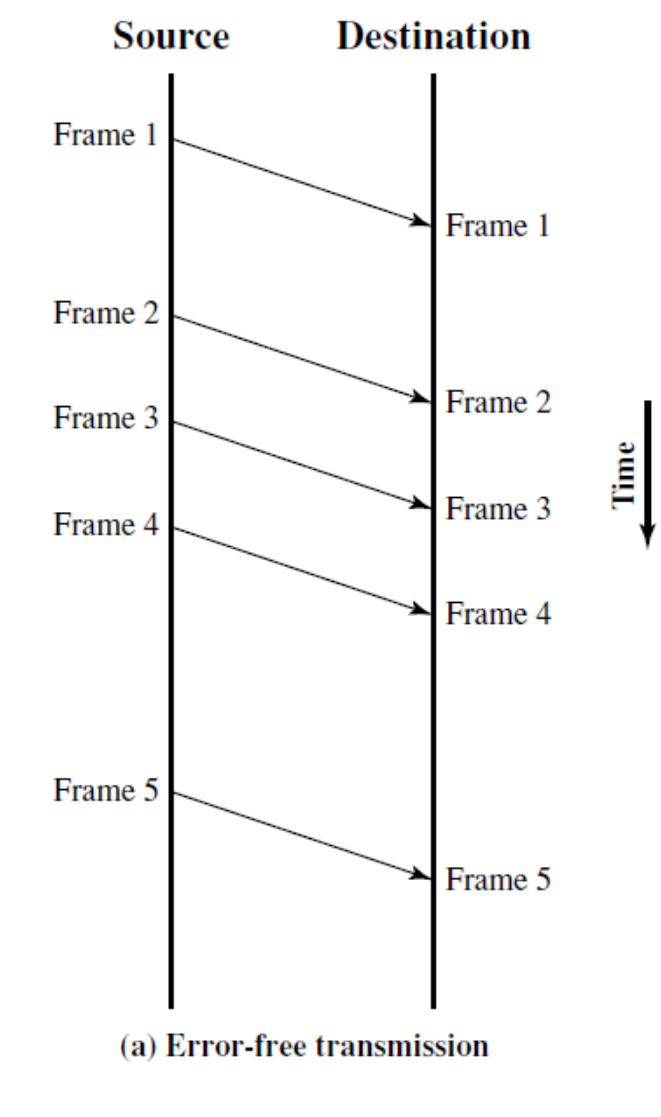
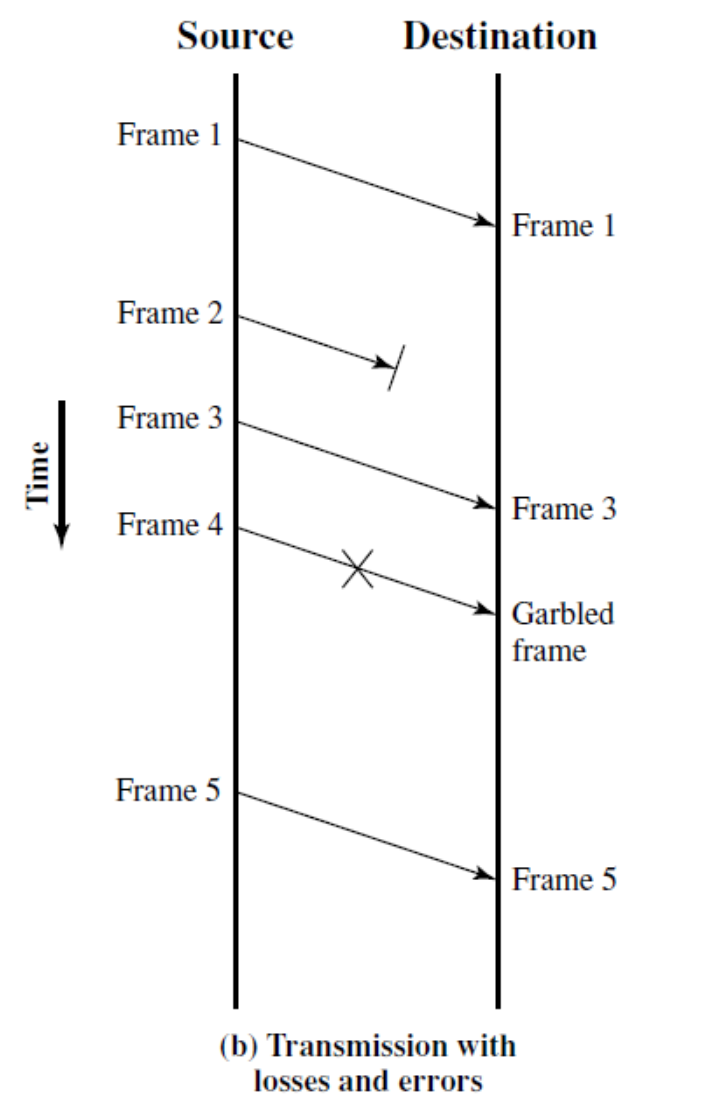
Model of Frame Transmission
(a) Error-free transmission
Image: Shows frames 1-5 being transmitted successfully from Source to Destination
(b) Transmission with losses and errors
Image: Shows frames being transmitted with Frame 2 lost and Frame 4 becoming garbled
Error & Flow Control Protocols
แต่สองอย่างนี้เกิดขึ้นพร้อมกันนะ
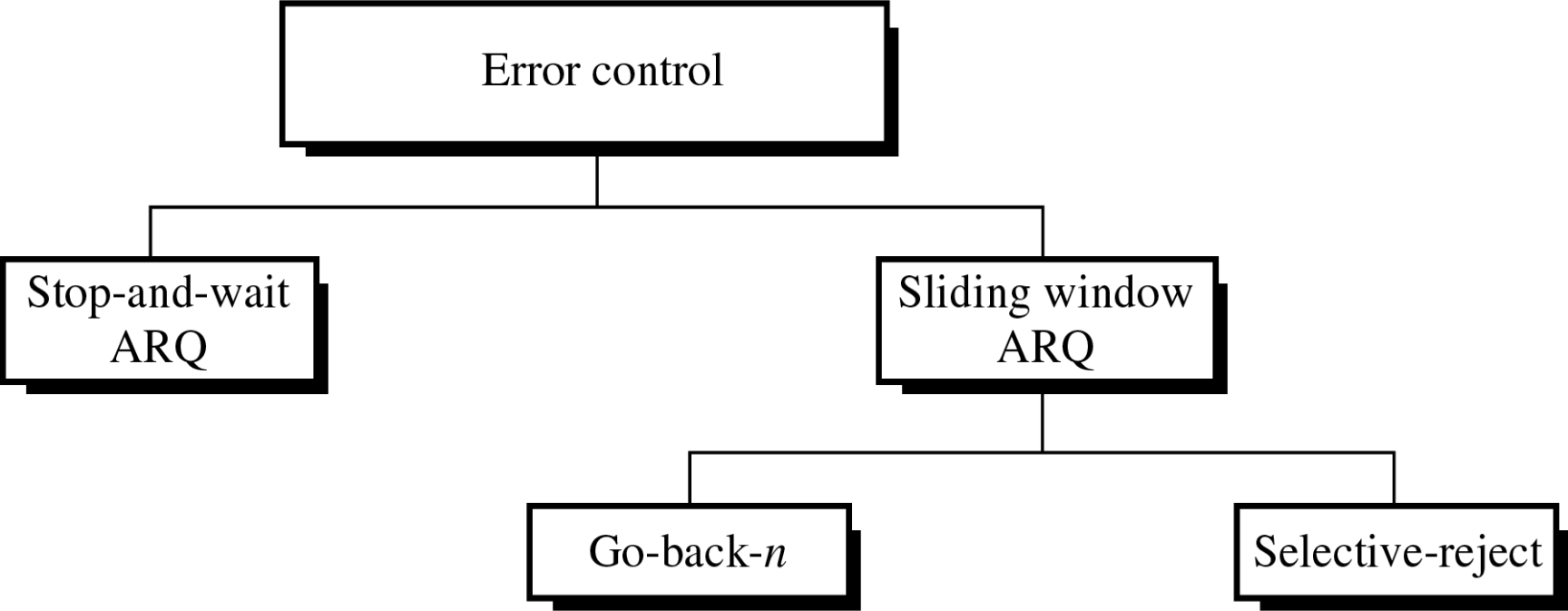
Types of Error Control Protocols (ARQ-based):
- Stop-and-Wait ARQ
- Sliding Window ARQ
- Go-back-N ARQ
- Selective-Reject ARQ
Types of Flow Control Protocols:
- Stop-and-Wait
- Sliding Window
Categories of Flow Control
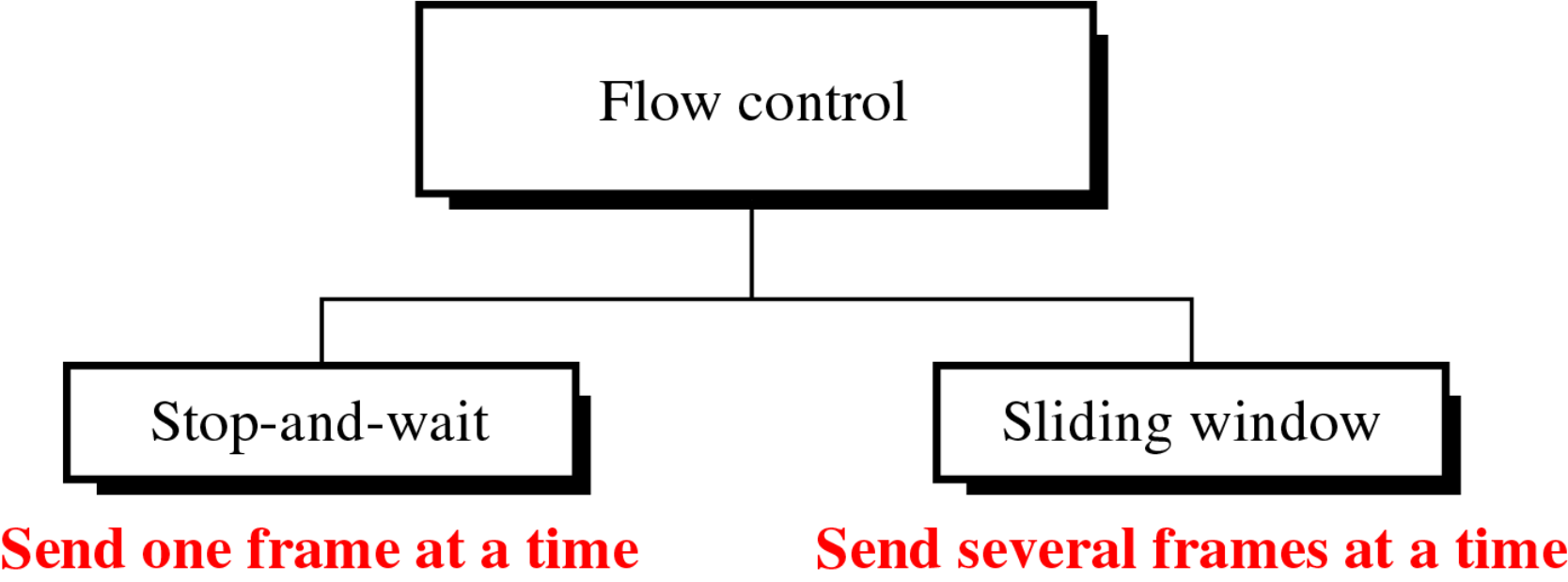
- Stop-and-wait: Send one frame at a time
- Sliding window: Send several frames at a time
Categories of Error Control
Stop-and-Wait ARQ
Protocol Description
- TX keeps a copy of the last frame sent
- After receiving the frame, RX sends back an ACK
- After receiving this ACK, TX sends another frame and so on...
Frame Numbering
- Both Data & ACK frames are alternately numbered with "0" or "1"
- Data Frame "0" is acknowledged by ACK "1"
- Data Frame "1" is acknowledged by ACK "0"
Stop-and-Wait ARQ: Normal Operation
Image: Diagram showing sender and receiver with sequence numbers S and R, frames alternating between 0 and 1
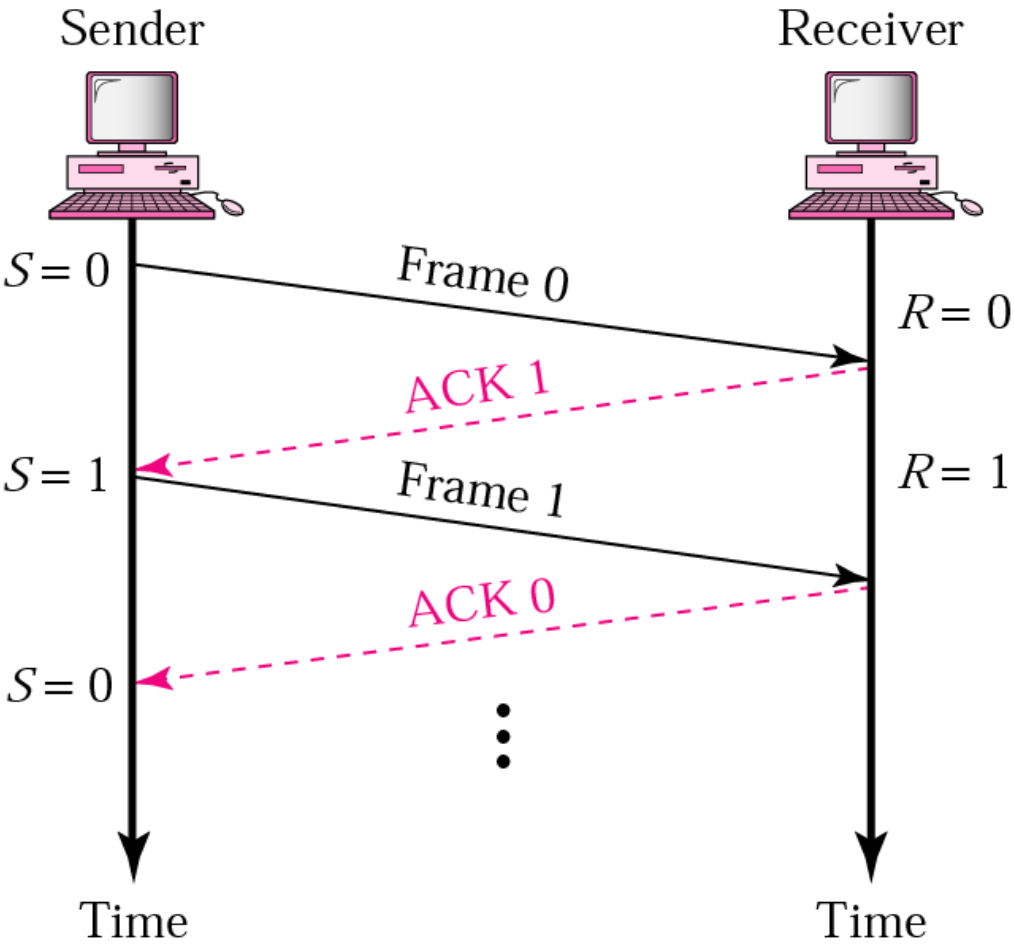
Variables:
- S: Sender's sequence number
- R: Receiver's expected sequence number
Flow:
- Sender (S=0) sends Frame 0 → Receiver (R=0)
- Receiver sends ACK 1 → Sender (S=1)
- Sender sends Frame 1 → Receiver (R=1)
- Receiver sends ACK 0 → Sender (S=0)
- Continue...
Stop-and-Wait ARQ: Abnormal Operation
How Stop-and-Wait ARQ Deals with Anomalies:
1. Lost or Damaged Frames
- RX discards them silently (without sending Negative-ACK/NACK back to TX)
- RX keeps its current value for R
2. Lost or Damaged ACK
- TX discards damaged ACK
- TX keeps a timer after sending a frame, within which ACK must be received
- Otherwise, ACK is considered lost
- In both situations (Lost and Damaged ACK), the TX sends the frame again
Stop-and-Wait ARQ: Lost Frame
Image: Timeline diagram showing Frame 1 being lost and retransmitted after timeout
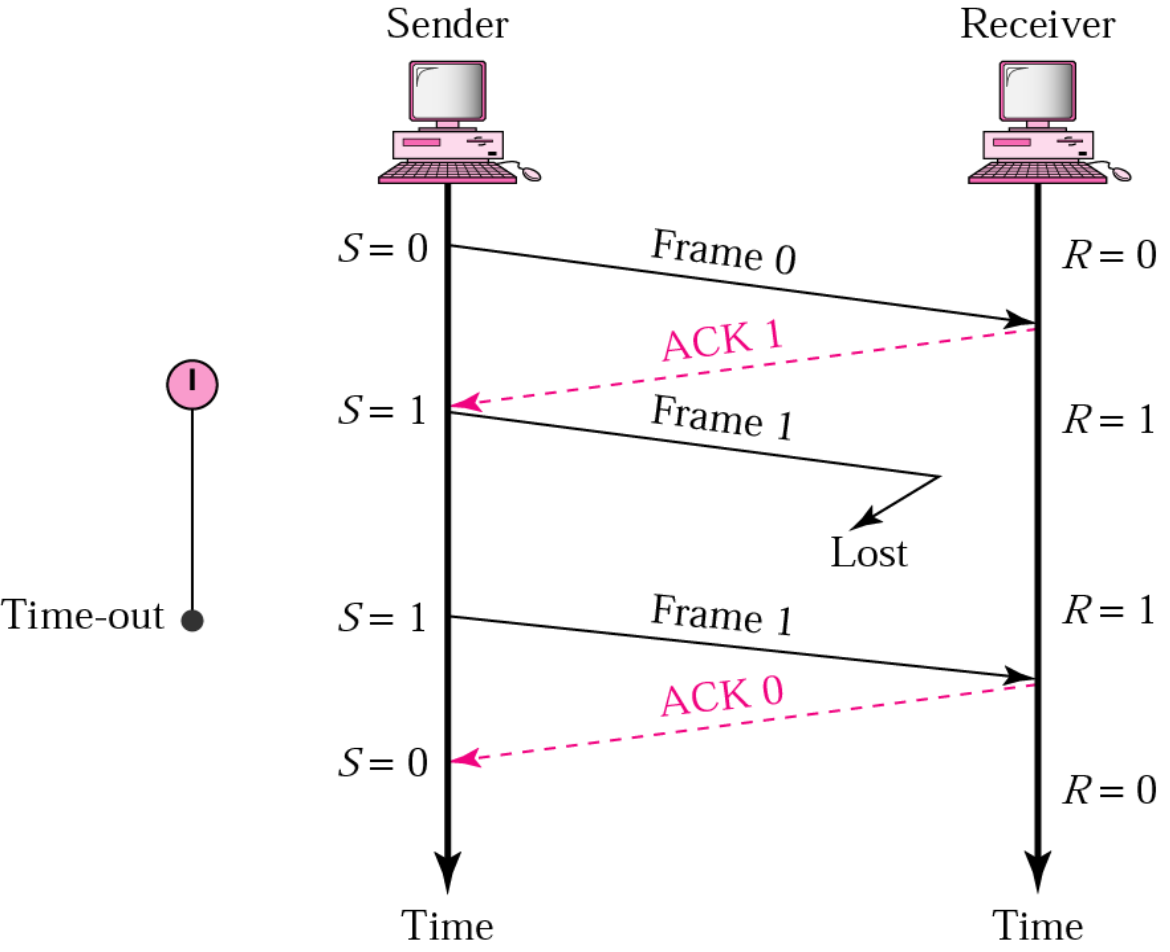
Sequence:
- S=0 sends Frame 0 → R=0 (received)
- R sends ACK 1 → S=1 (received)
- S=1 sends Frame 1 → Lost
- Timeout occurs
- S=1 resends Frame 1 → R=1 (received)
- R sends ACK 0 → S=0
Stop-and-Wait ARQ: Lost ACK
Image: Timeline diagram showing ACK 0 being lost and duplicate frame being discarded
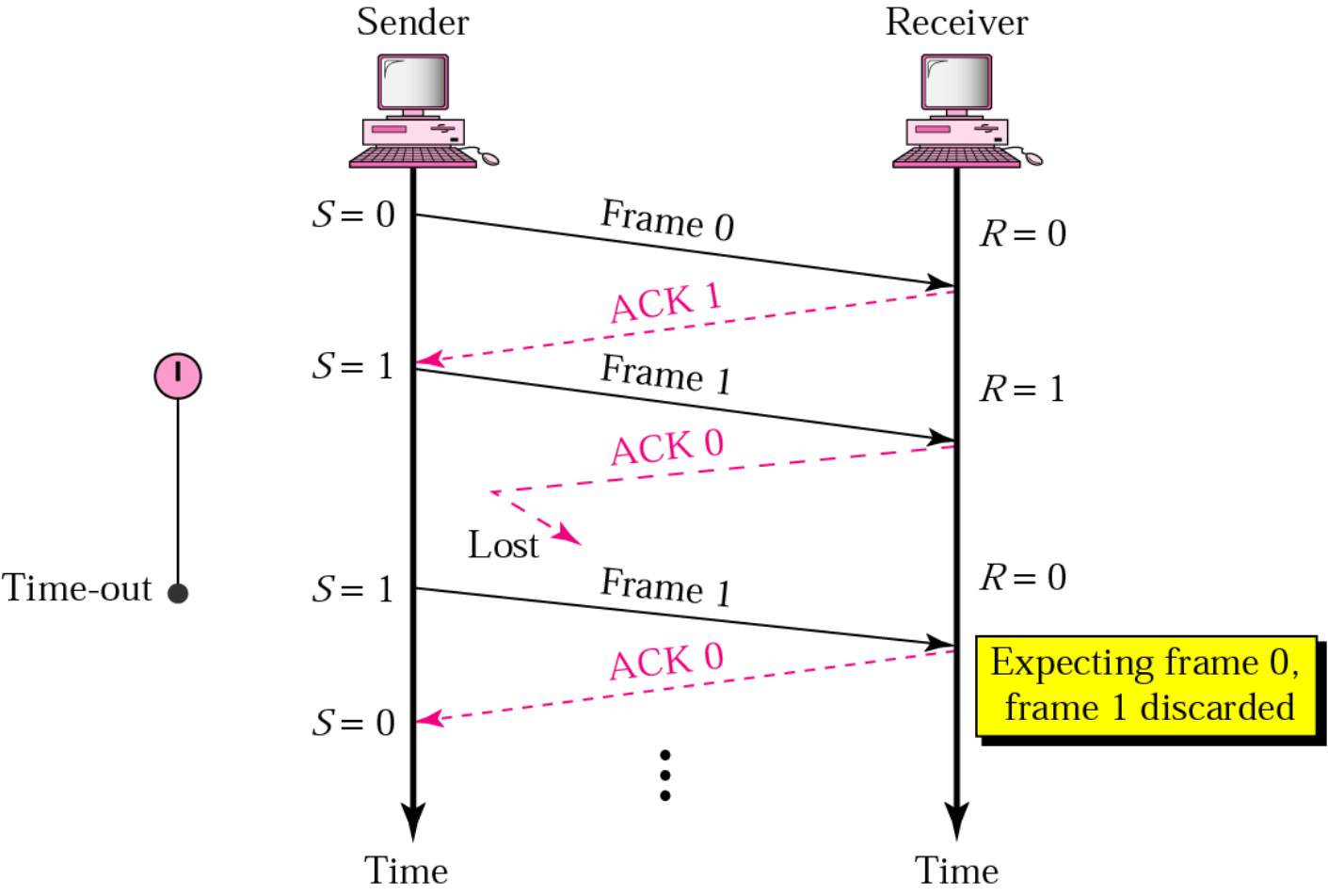
Sequence:
- S=0 sends Frame 0 → R=0 (received)
- R sends ACK 1 → S=1 (received)
- S=1 sends Frame 1 → R=1 (received)
- R sends ACK 0 → Lost
- Timeout occurs
- S=1 resends Frame 1 → R=0
- R expects Frame 0, discards Frame 1 as duplicate
- R sends ACK 0 → S=0
Stop-and-Wait ARQ: Delayed ACK
Handling Late ACK:
3. TX Receiving a Late ACK
- Timer has already expired → ACK was considered lost
- Frame is re-sent again
- This frame will be duplicate at RX and discarded
- Its ACK will be discarded when received back at TX
- Then the late ACK arrives
- Now TX can send the next frame
Image: Timeline showing delayed ACK scenario with multiple timeouts and frame retransmissions
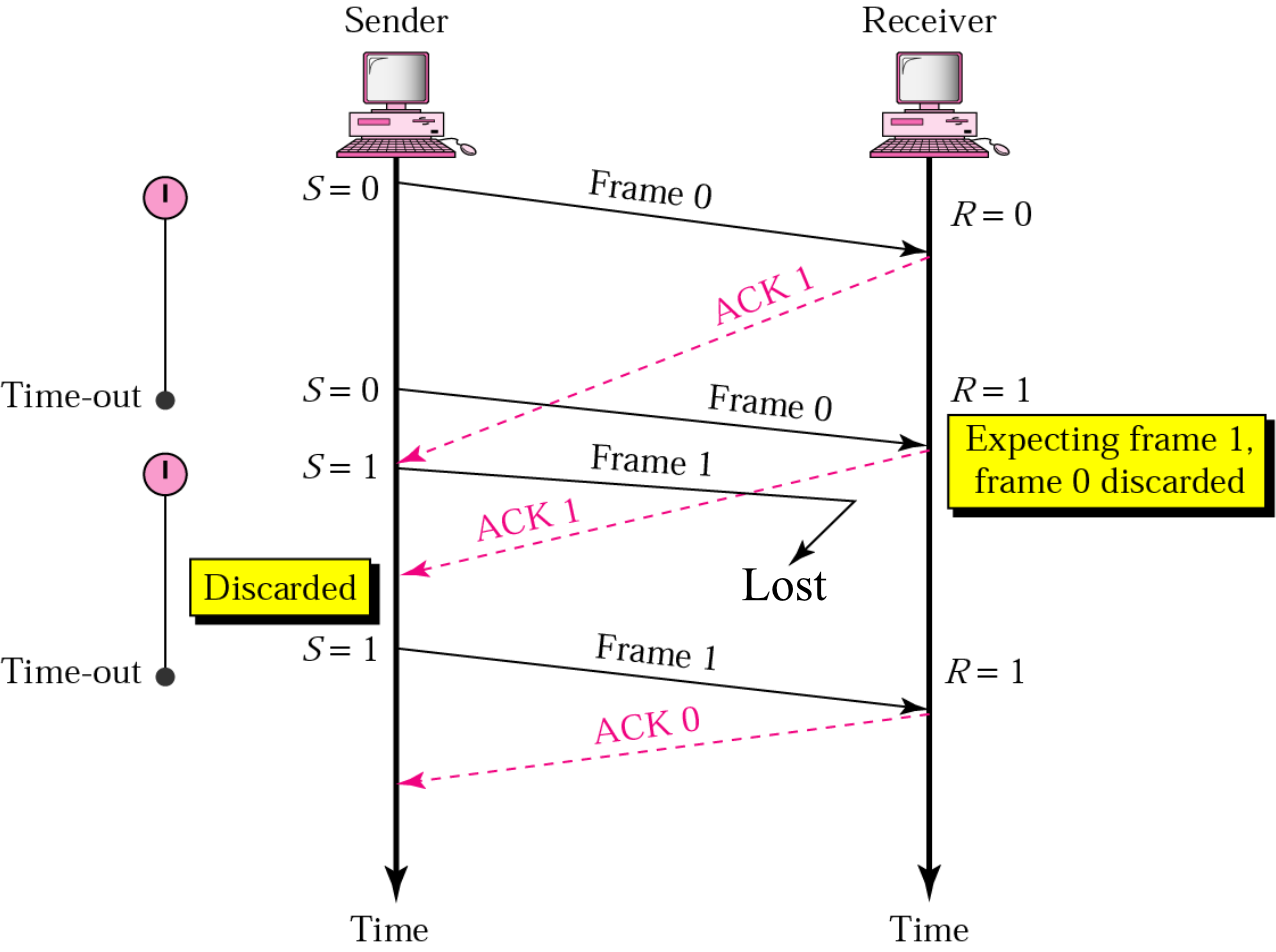
Stop-and-Wait ARQ Piggybacking
In order to improve the time and utilise the bandwidth better!!
What is Piggybacking?
- Piggybacking is a method that combines the data and the ACK in one frame
- Useful in bidirectional communications
How it Works:
- Stations can send their data along with ACK to data previously received
- Piggybacking is faster and saves bandwidth
Image: Diagram showing bidirectional communication between nodes A and B with piggybacked ACKs
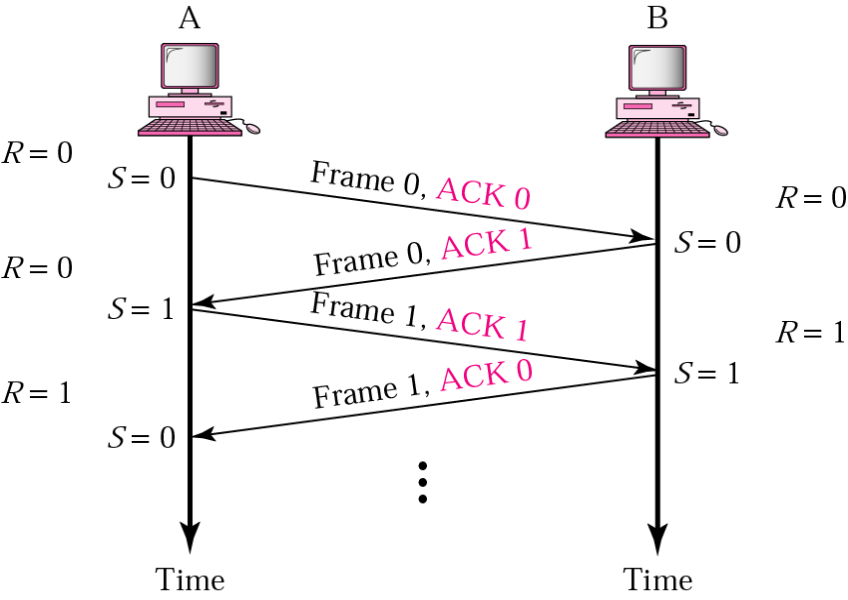
Example:
- A sends Frame 0 with ACK 0 → B
- B sends Frame 0 with ACK 1 → A
- A sends Frame 1 with ACK 1 → B
- B sends Frame 1 with ACK 0 → A
- Continue...
Stop-and-Wait ARQ Timing Diagram
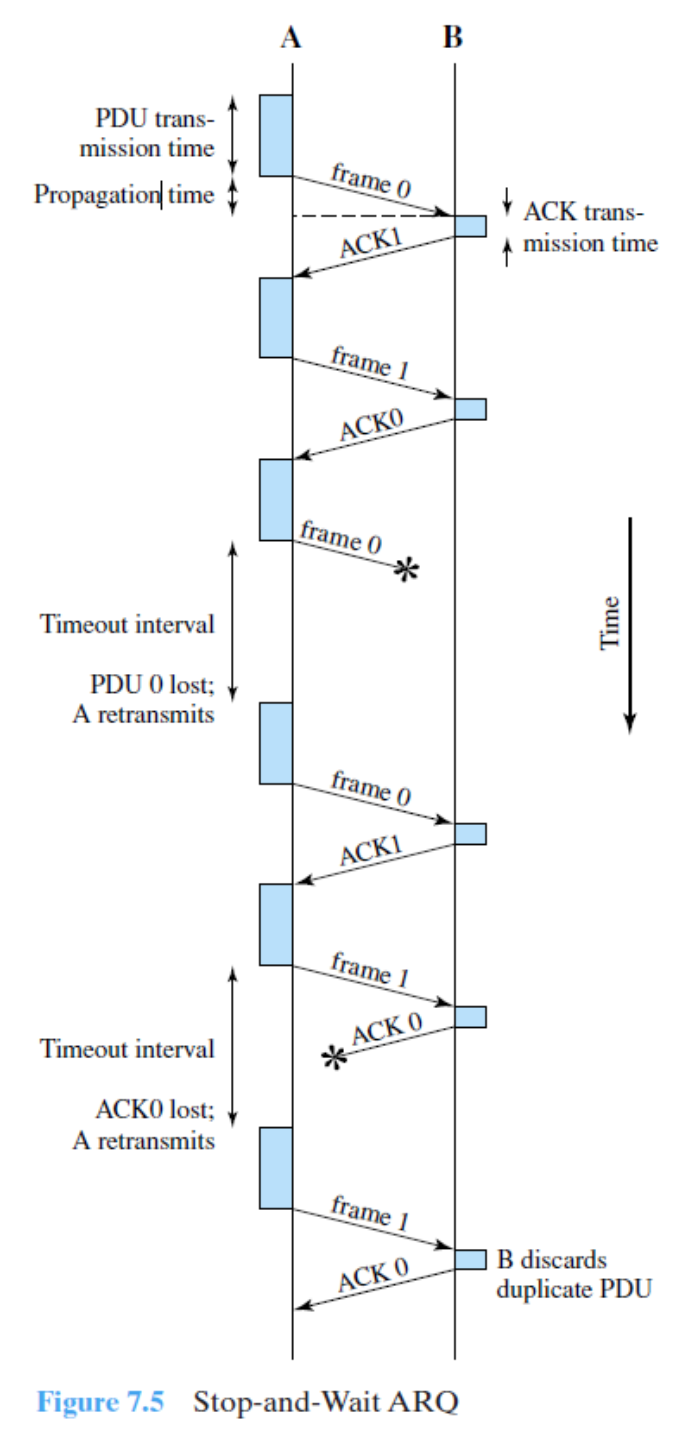
Components:
- PDU transmission time: Time to send the frame
- Propagation time: Time for signal to travel
- ACK transmission time: Time to send acknowledgment
- Timeout interval: Duration before retransmission
- Retransmit events: When timeout occurs
Stop-and-Wait ARQ Drawback
Inefficiency Issues:
- The line is not efficiently utilized because only one frame is sent at a time
- Must wait for ACK
- During waiting period, no frames are sent
Inefficiency Gets Worse When:
- TX speed is high
- TX quickly sends frame then sits idle
- Propagation distance is high
- Takes longer for frame and its ACK to reach destination
- Both cases leave TX waiting idle for longer times
Stop-and-Wait: Efficiency
Time Definitions:
- : Time to transmit a frame (data transmission)
- : Time to transmit an ACK
- : Propagation time
- : Processing time
Frame Total Time:
Link Utilization:
Stop-and-Wait Efficiency (Simplified)
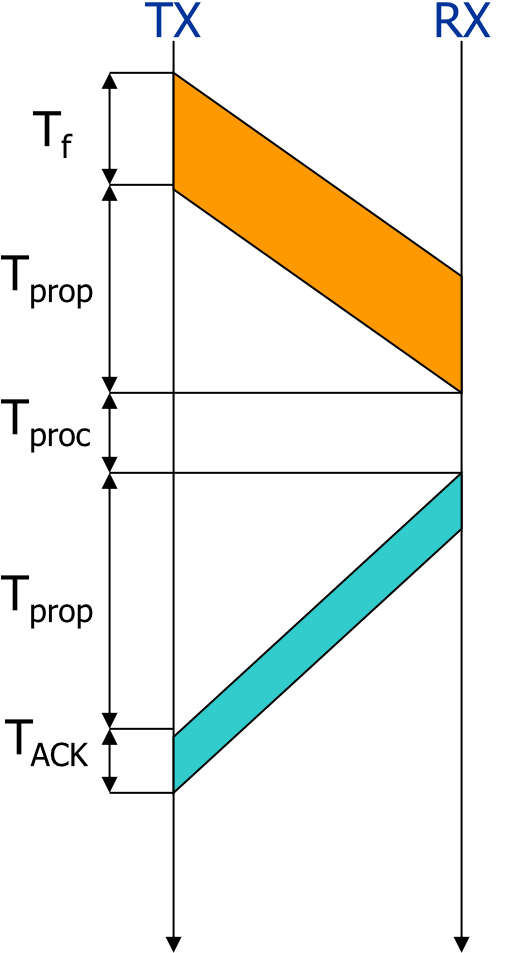
Common Simplification:
- Ignore and (negligible compared to other times)
Simplified Utilization:
Where:
- a is called the "length of the link in bits"
Performance Analysis:
- For very small (1st transmitted bit reaches RX while source still transmitting):
- For very large (frame transmission completed before 1st bit reaches destination):
Conclusion:
- Efficient for links where (long frames compared to propagation time)
- Very inefficient when
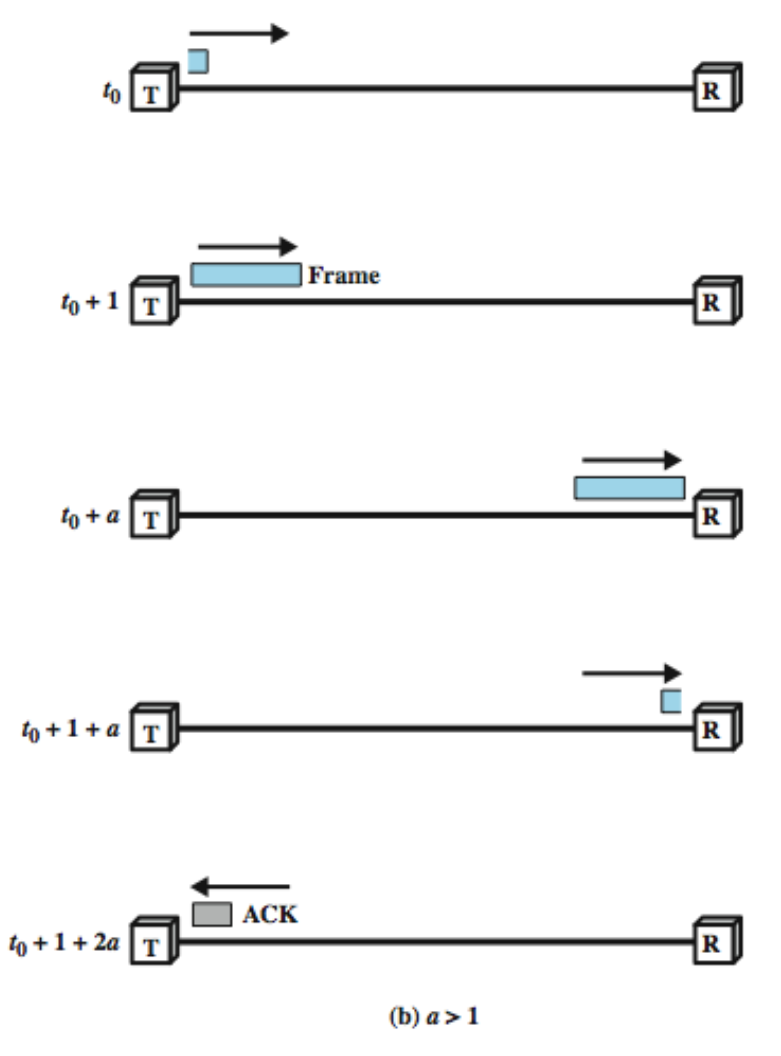
Stop and Wait Link Utilization
(a) When (propagation time is less than transmission time)
Image: Diagram showing frames filling the link efficiently
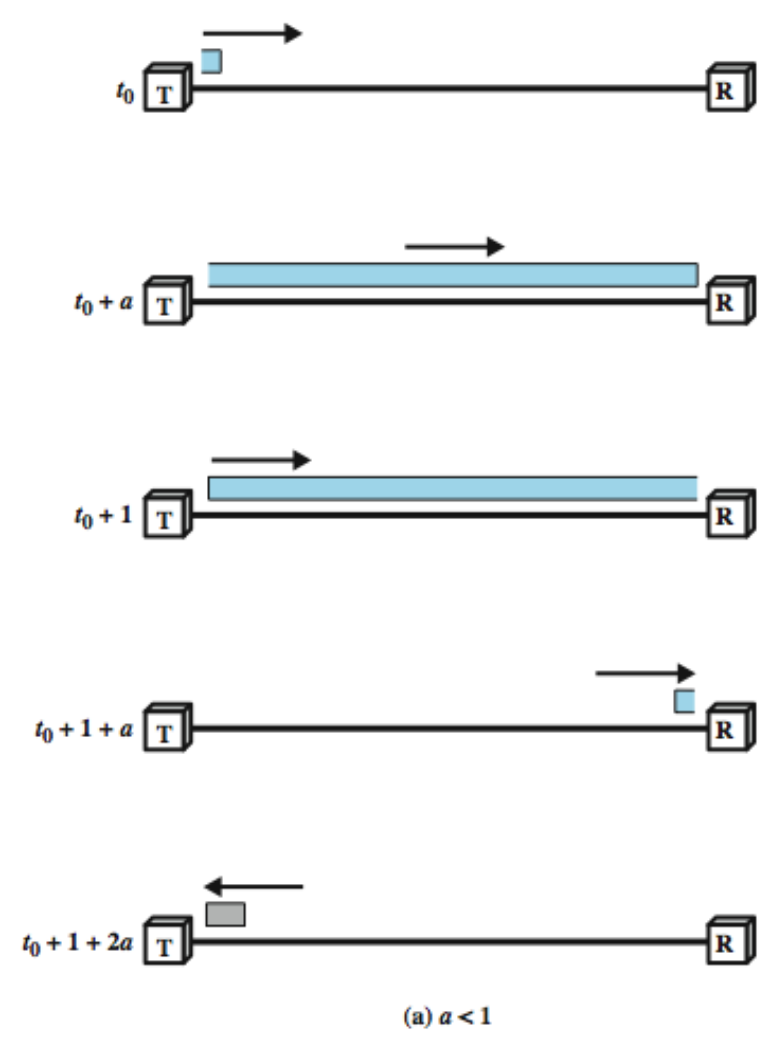
(b) When (propagation time is greater than transmission time)
Image: Diagram showing wasted bandwidth with gaps between frames
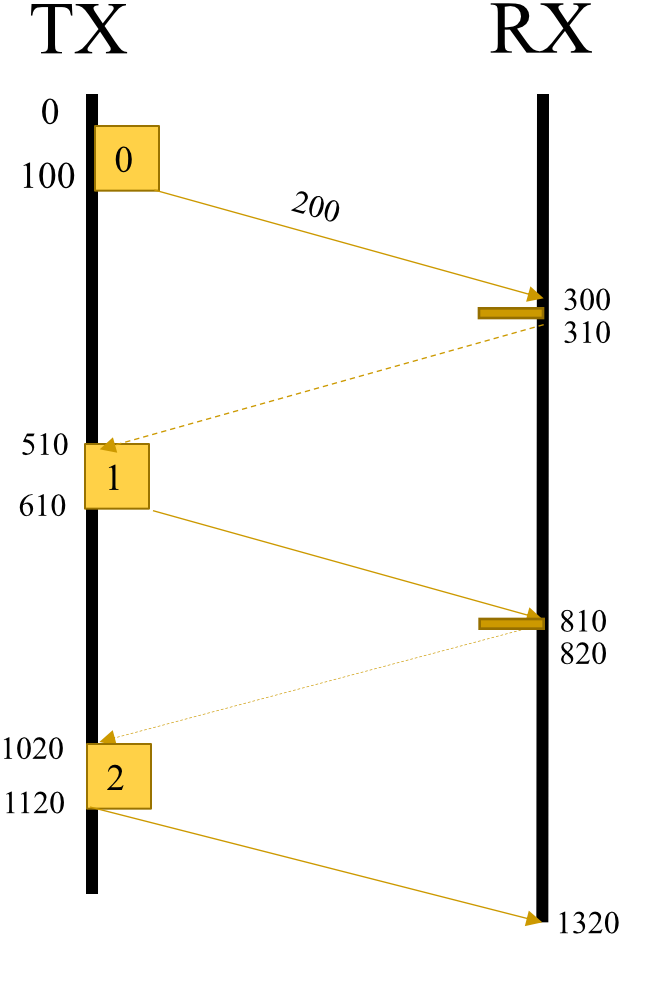
Example: Single Frame Transmission
Given:
- Propagation time = 200
- DATA transmission = 100
- ACK transmission = 10
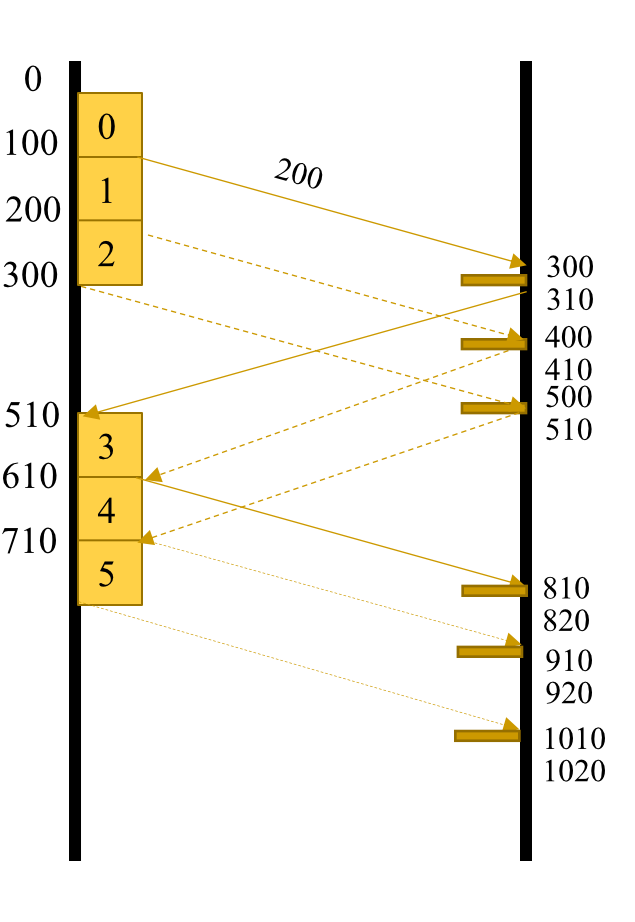
Example: Multiple Frame Transmission
Given:
- Propagation time = 200
- DATA transmission = 100
- ACK transmission = 10
Sliding Window Protocol
แบบนี้คือส่งไปก่อนเลยหลาย ๆ อัน ต้องใช้เลขลำดับมากขึ้น ไม่ใช่แค่ 0, 1 ละ
Protocol Overview:
- Assumes ==full duplex line==
- Source A and Destination B have buffers each of size W frames
For m-bit Sequence Numbers:
- Frames are numbered:
- ACKs (RRs) are numbered:
How it Works:
- A is allowed to transmit up to W frames without waiting for an ACK
- B can receive up to W consecutive frames
- ACK J (or RR J), where , means:
- B has received frames up to frame J-1
- B is ready to receive frame J
- B can also send RNR J:
- B has received all frames up to J-1
- B is not ready to receive any more
Window Size Constraint:
บอกว่าส่งล่วงหน้าได้กี่เฟรม โดยไม่ต้องรอ ACK
Example: If we use 2 bits for sequence number, the window size is
- อ่าวแต่อาจารย์เฉลยเป็น 3 อะไรเนี่ย
Sliding Window Protocol Example
Example: bits,
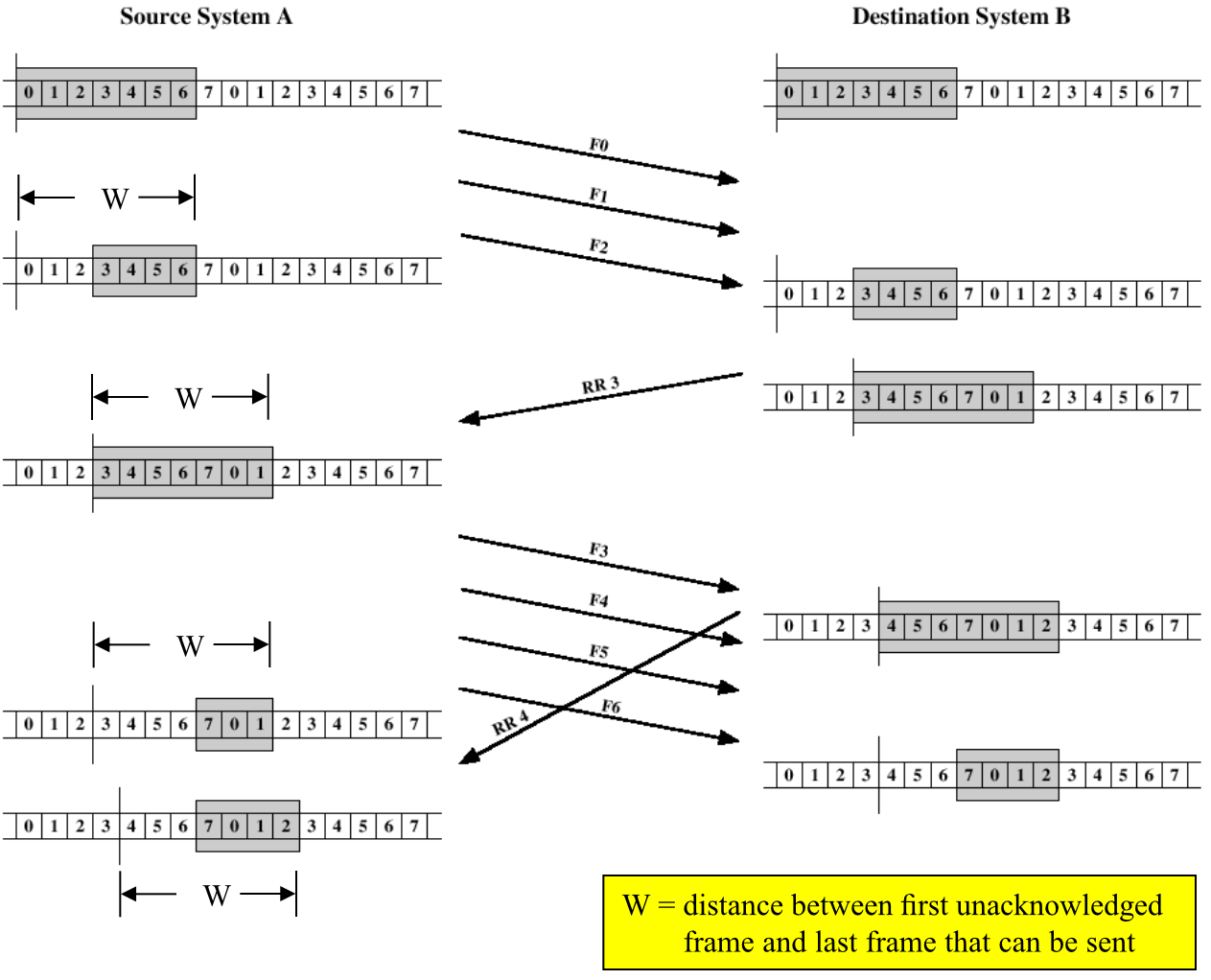
Source System A:
- Window shows frames that can be sent: 0, 1, 2, 3, 4, 5, 6
- As ACKs are received, window slides forward
Destination System B:
- Window shows frames expected to receive
Observations:
- A may send frames (F0, F1, ..., F6)
- After F0, F1, & F2 are sent, window shrinks (can only transmit F3, F4, ..., F6)
- When B sends RR3, A knows F0, F1 & F2 have been received and B is ready to receive F3
- Window advances to cover 7 frames (starting with F3 up to F1)
- A sends F3, F4, F5, & F6
- B responds with RR4 when F3 is received
- A advances the window by one position to include F2
Window Definition:
Go-back-N ARQ
Overview:
- Go-back-N ARQ improves line efficiency by sending up to W frames before worrying about ACK
- This is called Pipelining (several tasks started before 1st is finished)
Frame Numbering:
- Frames must be sequentially numbered
- Sequence number included in the header of the frame
- If m bits are reserved for sequence number:
- Sequence numbers range from to
Example:
- bits
- Sequence numbers:
Go-back-N ARQ Sliding Window
TX Side Window:
- Holds outstanding frames until individually ACKed
- Window size cannot exceed
- is fixed in this protocol (may be variable in others like TCP)
Window Operation:
- Each time a proper ACK is received for a frame, window slides past this frame
- Hence the name Sliding Window
- Acknowledged frames can be purged from TX memory
Example:
- Frame 0 and Frame 1 have been acknowledged
- Sliding window slides just past them
TX Sliding Window
Variables:
- S: Sequence number of the recently sent frame
- SF: Sequence number of the first frame in the window
- SL: Sequence number of the last frame in the window
Relationship:
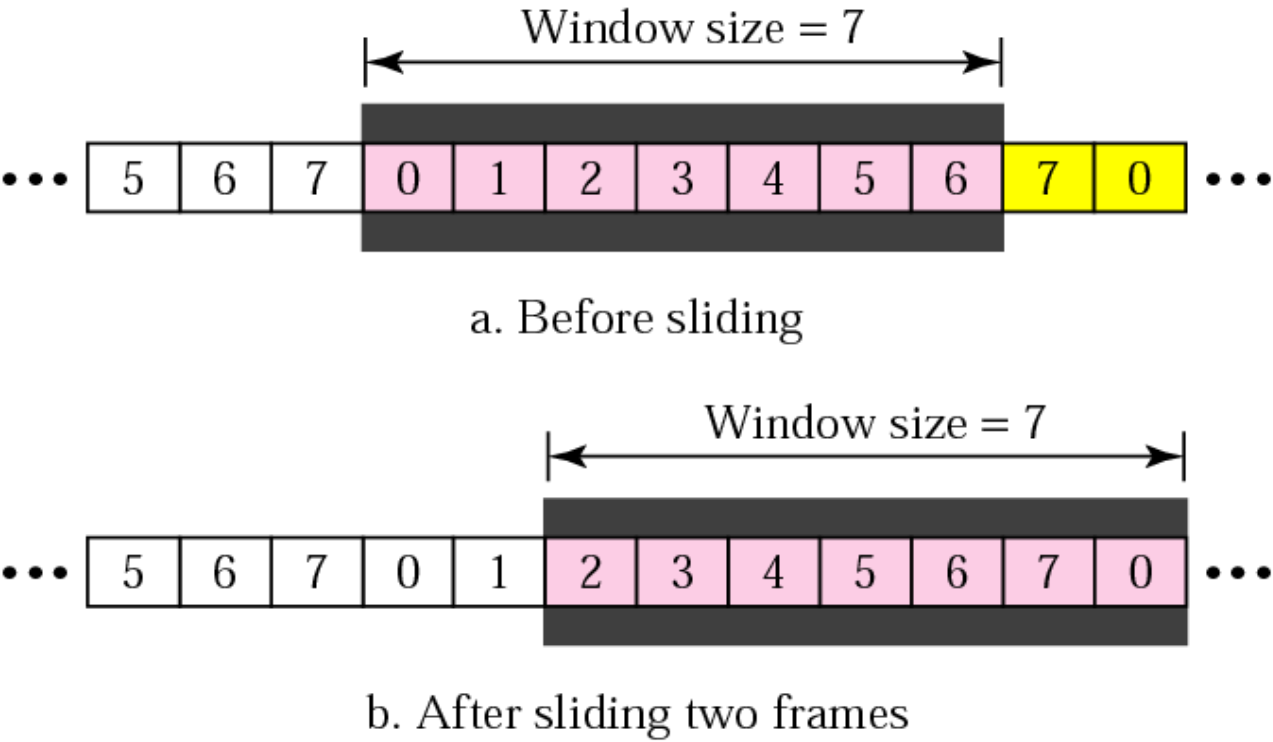
Before sliding:
- Window: [..., 5, 6, 7, 0, 1, 2, 3, 4, 5, 6, 7, 0, ...]
After sliding two frames:
- Window: [..., 5, 6, 7, 0, 1, 2, 3, 4, 5, 6, 7, 0, ...]
RX Sliding Window
RX Window Characteristics:
- Size of window is always 1
- Window is centered on the next expected frame number
- If any other frame arrives (out of sequence), it is immediately discarded
- If the right frame arrives, window slides past it to zoom on next expected frame
RX Variable:
- R: Expected frame sequence number
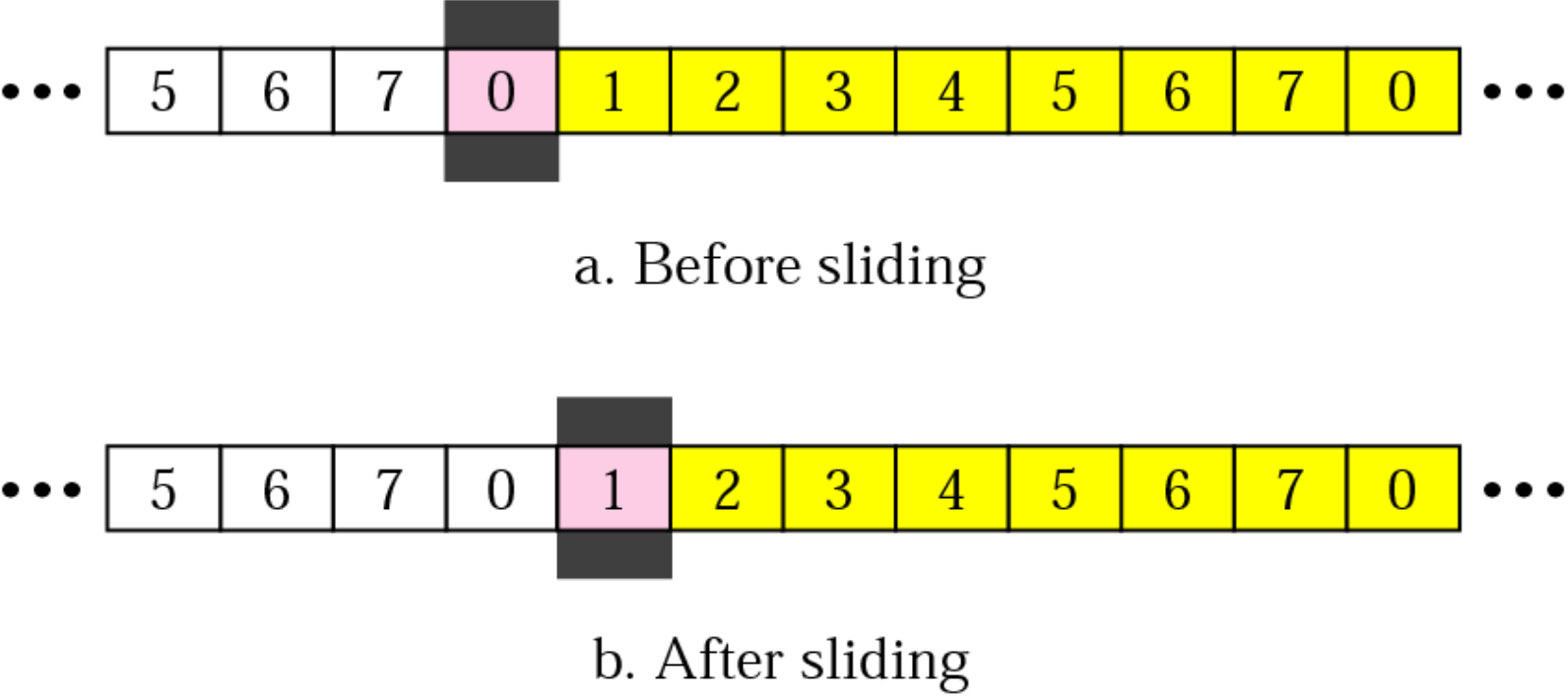
Before sliding:
- Window at position 0: [..., 5, 6, 7, 0, 1, 2, 3, 4, 5, 6, 7, 0, ...]
After sliding:
- Window at position 1: [..., 5, 6, 7, 0, 1, 2, 3, 4, 5, 6, 7, 0, ...]
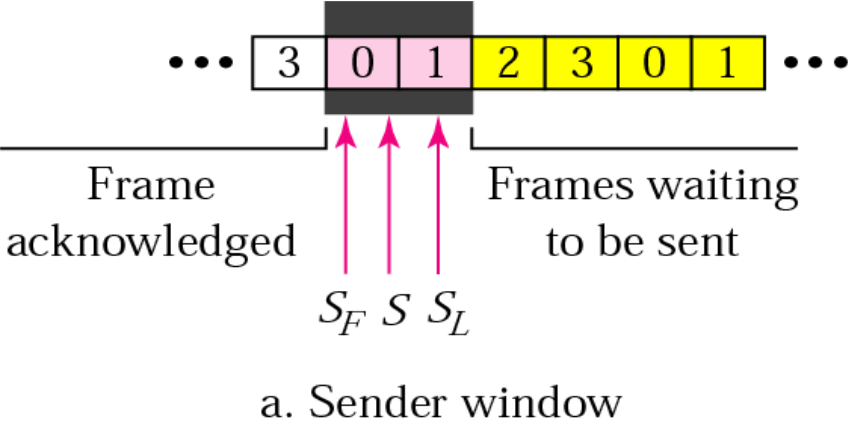
Go-back-N ARQ: TX & RX Control Variables
Sender Window:
Image showing frames acknowledged (3, 0, 1, 2) and frames waiting to be sent (3, 0, 1)
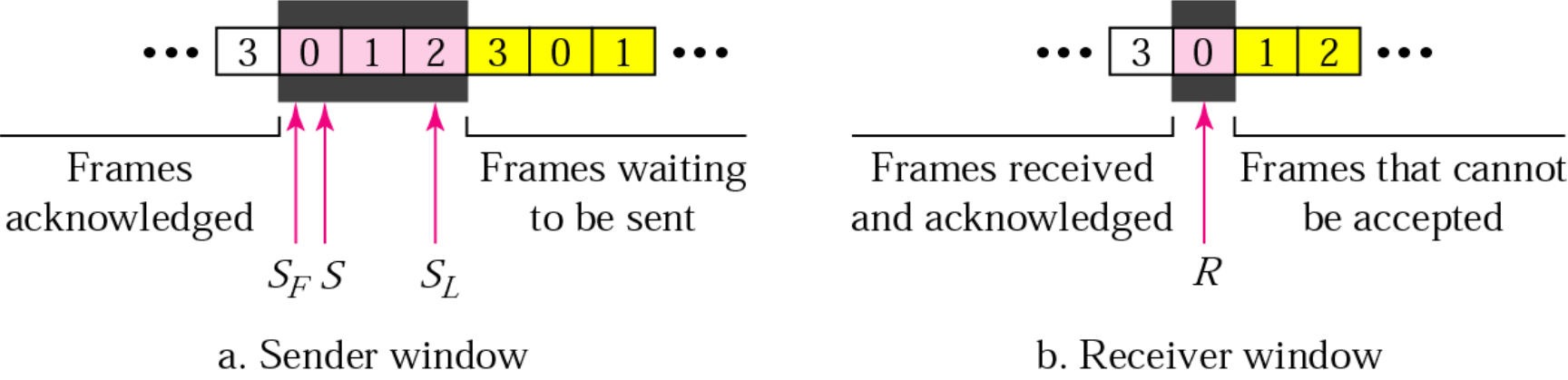
Variables:
- SF: First frame in window
- S: Recently sent frame
- SL: Last frame in window
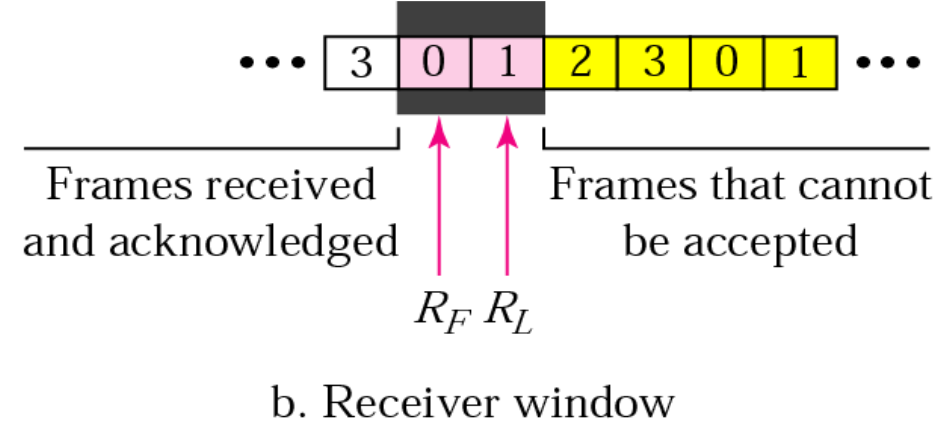
Receiver Window:
[Image showing frames received and acknowledged (3, 0) and frames that cannot be accepted (1, 2)]
ก็คือรูปด้าบน
Variable:
- R: Expected frame
Go-back-N ARQ Control Variables (Summary)
TX keeps track of three variables:
- S: Sequence number of the recently sent frame
- SF: Sequence number of the first frame in the window
- SL: Sequence number of the last frame in the window
Frame Window Size:
RX has only one variable:
- R: Expected frame sequence number
Timers & Acknowledgments
TX Timers:
- TX sets a timer for each frame sent
RX Behavior:
- RX has no timers
- RX sends an ACK if a frame arrives with no errors and in order
- If RX receives damaged or out of sequence frame:
- Silently discards them until expected frame received
- Silence causes TX timer to expire
- TX goes back and sends all frames starting from non-acknowledged frame
- This is why it's called Go-back-N ARQ
Example:
- If TX has sent frame-6 but timer for frame-3 expires without ACK:
- TX goes back and sends frames 3, 4, 5, 6
Go-back-N ARQ Normal Operation
Image: Timeline showing sender and receiver with windows sliding as frames are acknowledged
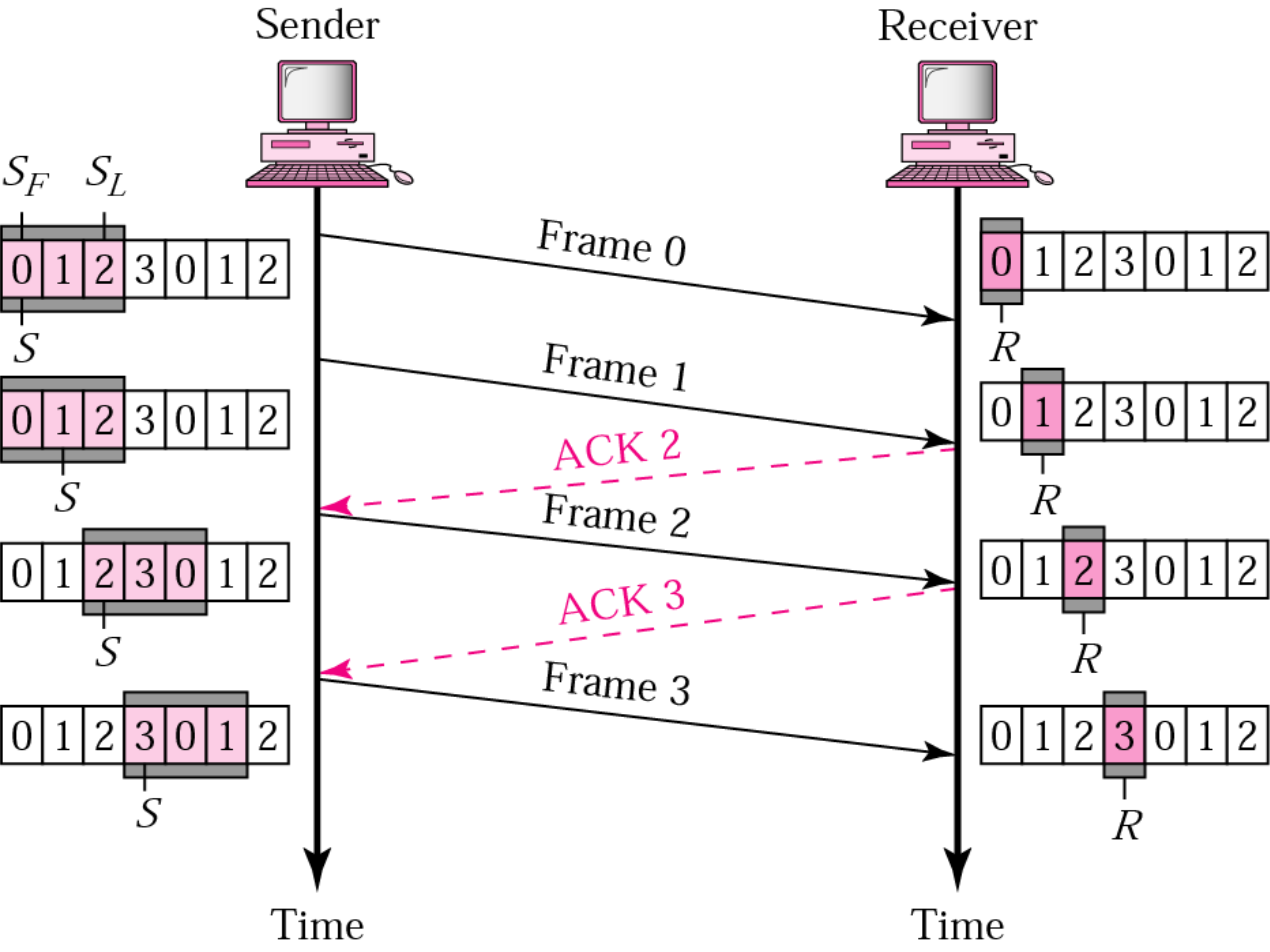
Note: ACK2 acknowledges frames 0 & 1 at the same time
Sequence:
- Sender (SF=0, SL=2) sends Frame 0
- Sender sends Frame 1
- Receiver (R=2) sends ACK 2
- Sender window slides, sends Frame 2
- Receiver sends ACK 3
- Sender window slides, sends Frame 3
- Continue...
Go-back-N ARQ Lost Frame Operation
Image: Timeline showing Frame 2 being lost and subsequent retransmission of Frames 2 and 3
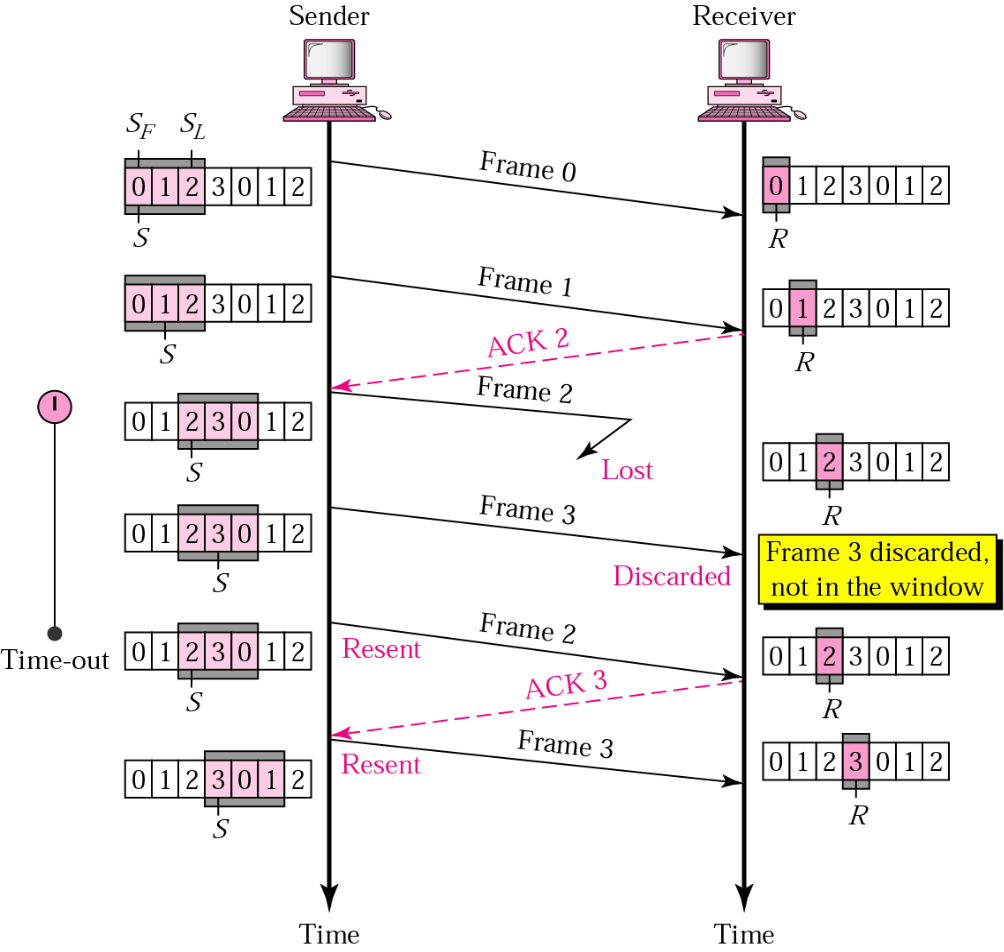
Note: ACK2 acknowledges frames 0 & 1 at the same time
Sequence:
- Sender sends Frame 0 → Receiver (R=0)
- Sender sends Frame 1 → Receiver (R=1)
- Receiver sends ACK 2
- Sender sends Frame 2 → Lost
- Sender sends Frame 3 → Receiver (R=2)
- Frame 3 discarded, not in the window
- Timeout occurs
- Sender resends Frame 2 → Receiver (R=2)
- Receiver sends ACK 3
- Sender resends Frame 3 → Receiver (R=3)
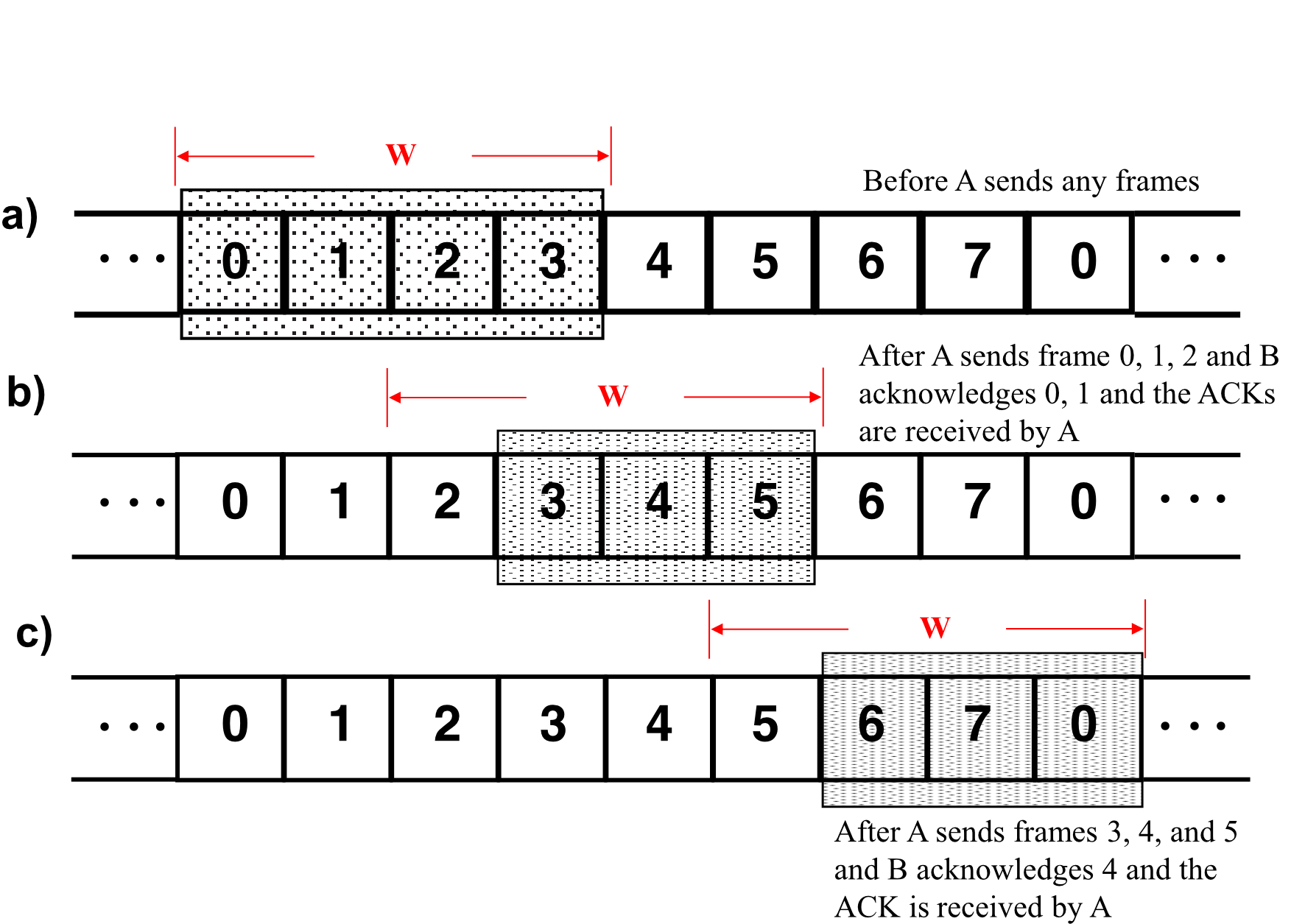
Exercise 1: Sliding Window Protocol
Problem:
Two neighboring nodes (A and B) use a sliding-window protocol with a 3-bit sequence number. As the ARQ mechanism, go-back-N is used with a window size of 4. Assuming A is transmitting and B is receiving, show the window positions for the following succession of events:
a) Before A sends any frames
b) After A sends frame 0, 1, 2 and B acknowledges 0, 1 and the ACKs are received by A
c) After A sends frames 3, 4, and 5 and B acknowledges 4 and the ACK is received by A
Exercise 1: Answers
Selective Repeat (Selective-Reject) ARQ Overview
Problems with Go-Back-N:
- Go-Back-N ARQ simplifies the process at receiver
- Receiver only keeps track of one variable
- No need to buffer out-of-order frames (simply discarded)
- However, Go-Back-N is inefficient for noisy links
- Bandwidth inefficient
- Slows down transmission
Selective Repeat ARQ:
- Only the damaged frame is resent
- More bandwidth efficient but more complex processing at receiver
- Defines a negative ACK (NAK) to report sequence number of damaged frame before timer expires
Selective Repeat ARQ: Sender and Receiver Windows
Sender Window:
Image: Window showing frames acknowledged (3, 0, 1), recently sent (2), and frames waiting (3, 0, 1)
Variables:
- SF, S, SL: Same as Go-back-N
Receiver Window:
[Image: Window showing frames received/acknowledged (3, 0, 1, 2) and frames that cannot be accepted (3, 0, 1)]
Variables:
- RF: First frame expected
- RL: Last frame that can be accepted
Key Difference: Receiver window size > 1 (can buffer out-of-order frames)
Selective Repeat ARQ: Lost Frame
Image: Timeline showing Frame 2 lost, Frames 0, 1, and 3 accepted, NAK2 sent, and only Frame 2 retransmitted
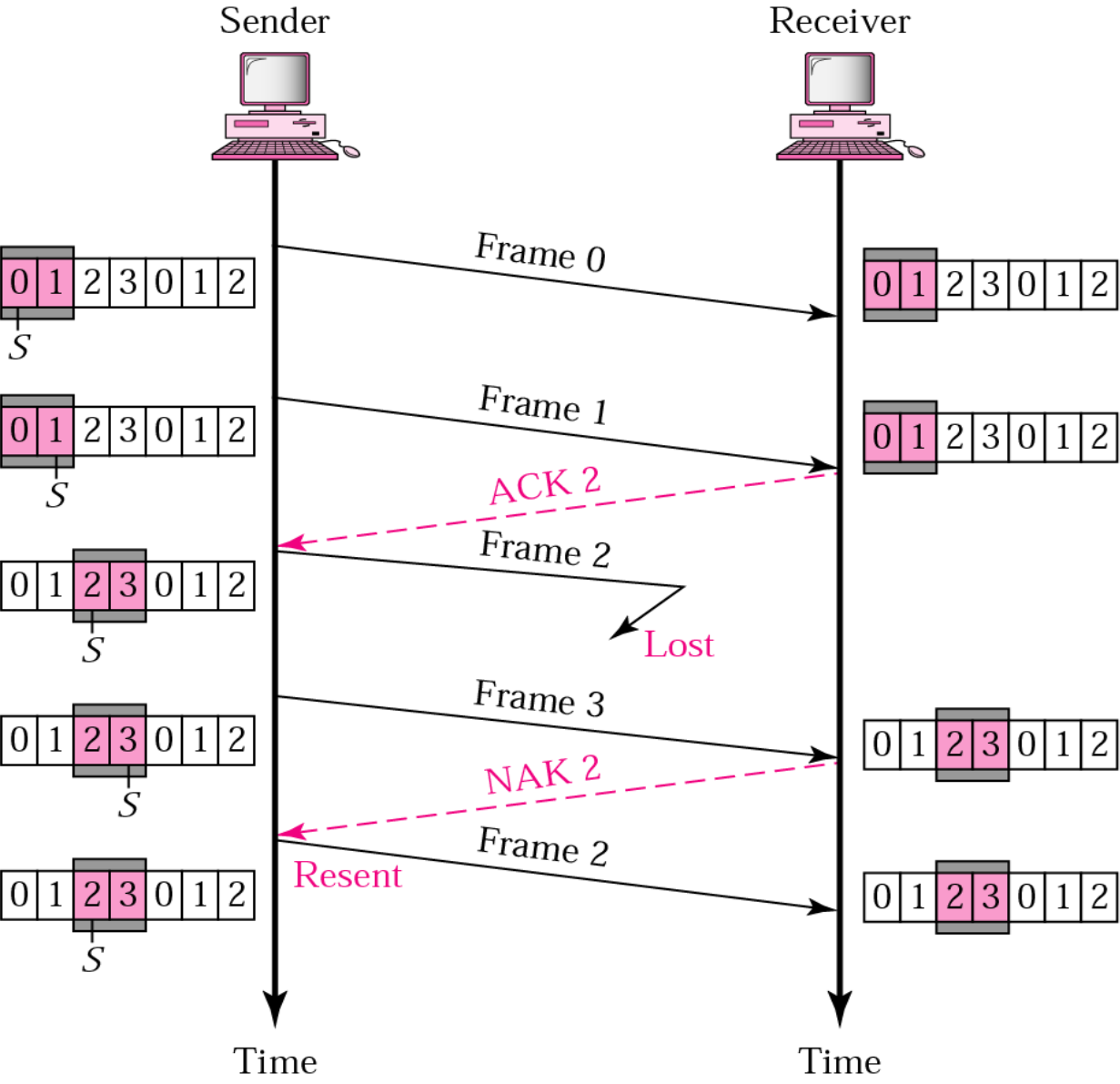
Note: ACK2 acknowledges frames 0 & 1 at the same time
Operation:
- Frames 0 and 1 are accepted when received (in range of receiver window)
- Frame 3 is also accepted (in range of window)
- Receiver sends NAK2 to show Frame 2 not received
- Sender resends only Frame 2
- Frame 2 is accepted as it is in range of window
Selective Repeat ARQ: Sender Window Size
Window Size Constraint:
- Size of sender and receiver windows must be at most one-half of
เหตุผลป้องกันการสับสน
Example:
- Window size should be
Why This Constraint?
Image: Comparing window size = 2 vs window size > 2
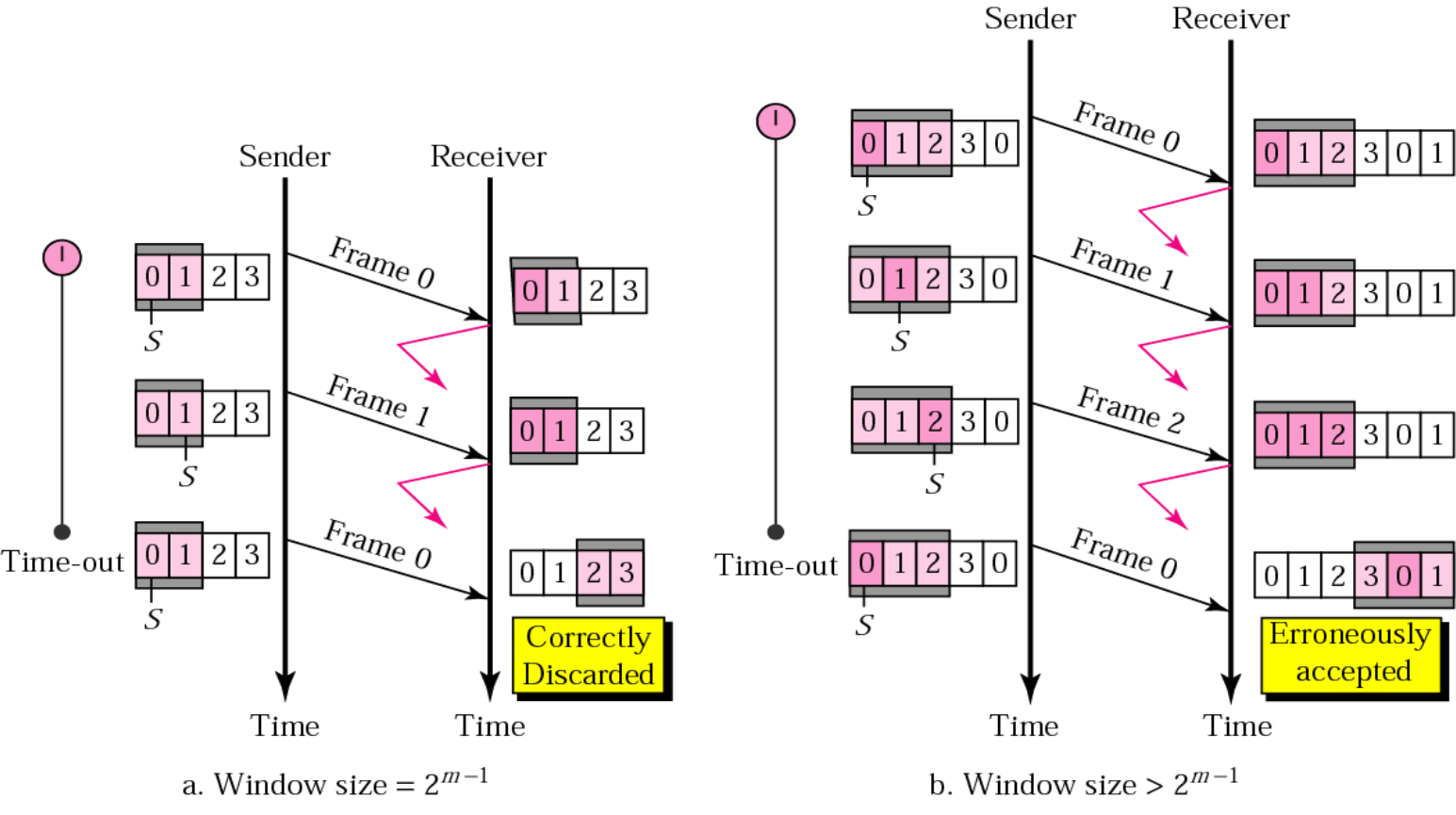
Problem with larger window (size = 3):
- All ACKs are lost
- Sender sends duplicate of Frame 0
- Receiver window expects Frame 0 (part of window)
- Receiver erroneously accepts Frame 0 as 1st frame of next cycle
- This is an error!
With correct window (size = 2):
- Duplicate Frame 0 is correctly discarded
Sliding Window Protocol - Efficiency
Link Utilization Formula:
When window size is (for error-free transmission):
1 & W \geq (2a + 1) \\ \frac{W}{2a + 1} & W < (2a + 1) \end{cases}}$$ Where: $a = \frac{T_{prop}}{T_f}$ (length of link in bits) ### Achieving 100% Utilization: - Sliding window protocol can achieve **100% utilization** if: $$\boxed{W \geq (2a + 1)}$$ ## Sliding Window Protocol - Piggybacking ### When Using Sliding Window in Full Duplex: - Node A maintains its own **transmit window** - Node B maintains its own **transmit window** - A frame contains: - **Data field** + **ACK field** - Two sequence numbers per frame: - Sequence number for **data field** - Sequence number for **ACK field** --- ## Piggybacking ![[Pasted image 20251002103849.png]] ### Features: - A method to **combine a data frame with ACK** - Station A and B **both have data to send** - Instead of sending separately: - Station A sends a data frame that **includes an ACK** - Station B does the same thing - **Piggybacking saves bandwidth** ### Example Flow: - A (R=0, S=0): Frame 0, ACK 0 → B (R=0) - B (S=0): Frame 0, ACK 1 → A (R=0, S=1) - A: Frame 1, ACK 1 → B (R=1, S=1) - B: Frame 1, ACK 0 → A (R=1) - Continue... --- # Summary ### Stop-and-Wait ARQ: - Simple protocol with alternating 0/1 sequence numbers - Inefficient for high-speed or long-distance links - Efficiency: $U = \frac{1}{1+2a}$ ### Go-back-N ARQ: - Pipelining with window size $W \leq 2^m - 1$ - Retransmits all frames from error point - More efficient than Stop-and-Wait ### Selective Repeat ARQ: - Only retransmits damaged frames - Window size $W \leq \frac{2^m}{2}$ - Most bandwidth efficient but complex ### Piggybacking: - Combines data and acknowledgments - Saves bandwidth in bidirectional communication # Key Formulas ### Stop-and-Wait: - $\boxed{U = \frac{1}{1+2a}}$ where $\boxed{a = \frac{T_{prop}}{T_f}}$ ### Sliding Window: - $\boxed{W = SL - SF + 1}$ - $\boxed{U = \begin{cases} 1 & W \geq (2a+1) \\ \frac{W}{2a+1} & W < (2a+1) \end{cases}}$ ### Window Size Constraints: - **Go-back-N:** $\boxed{W \leq 2^m - 1}$ - **Selective Repeat:** $\boxed{W \leq \frac{2^m}{2}}$