Application Layer Overview
- Principles of network applications
- Web and HTTP
- E-mail, SMTP, IMAP
- The Domain Name System (DNS)
- P2P applications
- Video streaming and content distribution networks
- Socket programming with UDP and TCP
OSI Model vs TCP/IP Model (Internet Protocol Stack)
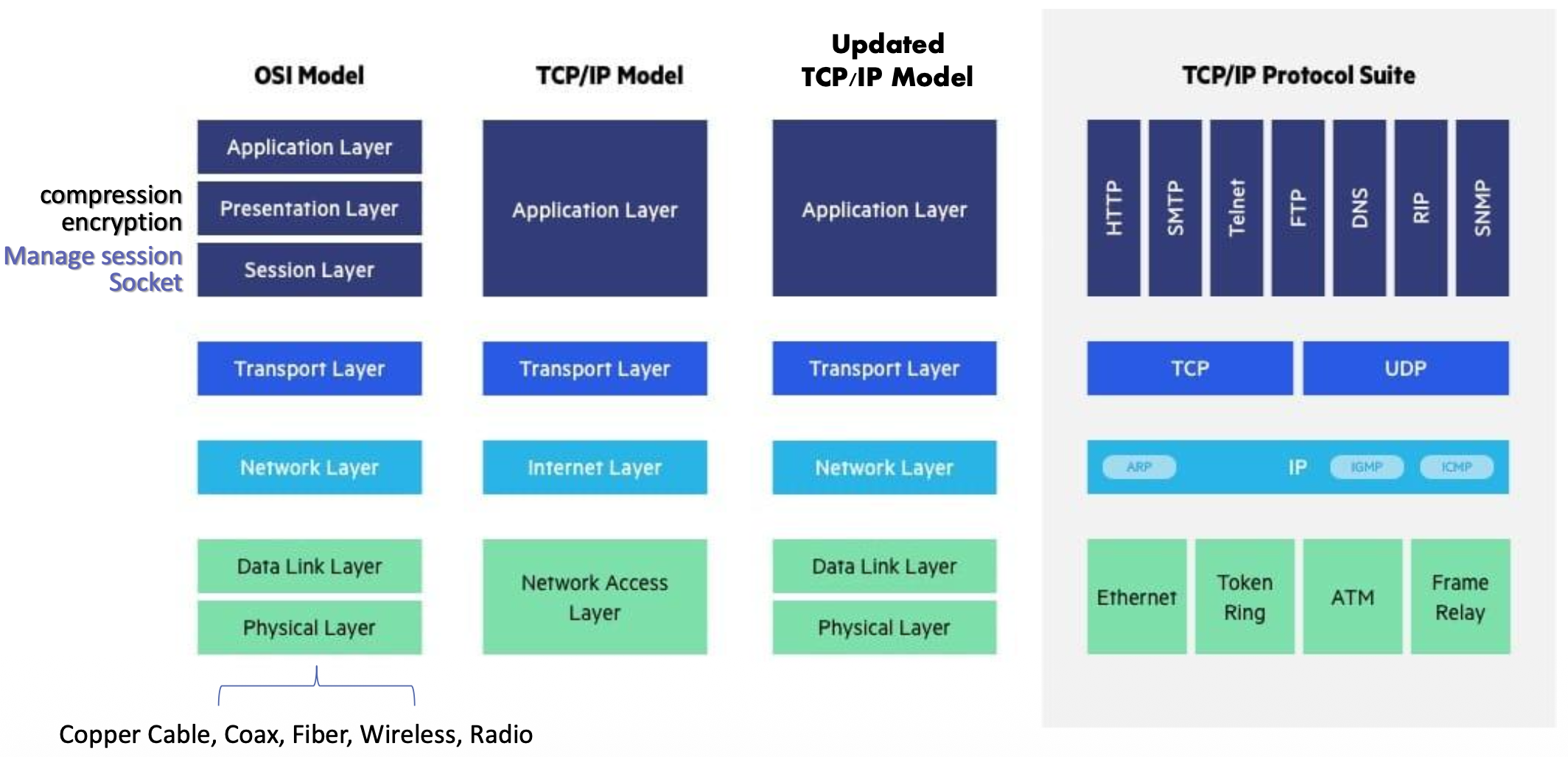
Updated TCP/IP Model Components:
Application Layer:
- Handles compression, encryption, and session management
- Equivalent to OSI layers: Application, Presentation, Session
- Uses sockets for communication
Transport Layer:
- มี Idea เรื่อง Socket (Src, Dest)
- TCP (Transmission Control Protocol)
- UDP (User Datagram Protocol)
Network Layer:
- IP (Internet Protocol)
- Identifying the host
- ARP, IGMP, ICMP
Data Link Layer:
- Ethernet, Token Ring, ATM, Frame Relay
Physical Layer:
- Copper Cable, Coax, Fiber, Wireless, Radio
TCP/IP Protocol Suite Examples:
- Application protocols: HTTP, SMTP, Telnet, FTP, DNS, RIP, SNMP
- Transport protocols: TCP, UDP
- Network protocols: IP, ARP, IGMP, ICMP
Some Network Applications
- Social networking
- Web
- Text messaging
- Multi-user network games
- Streaming stored video (YouTube, Hulu, Netflix)
- P2P file sharing
- Voice over IP (e.g., Skype)
- Real-time video conferencing (e.g., Zoom, Google Meet)
- Internet search
- Remote login
- Database
- ...and many more
Creating a Network App
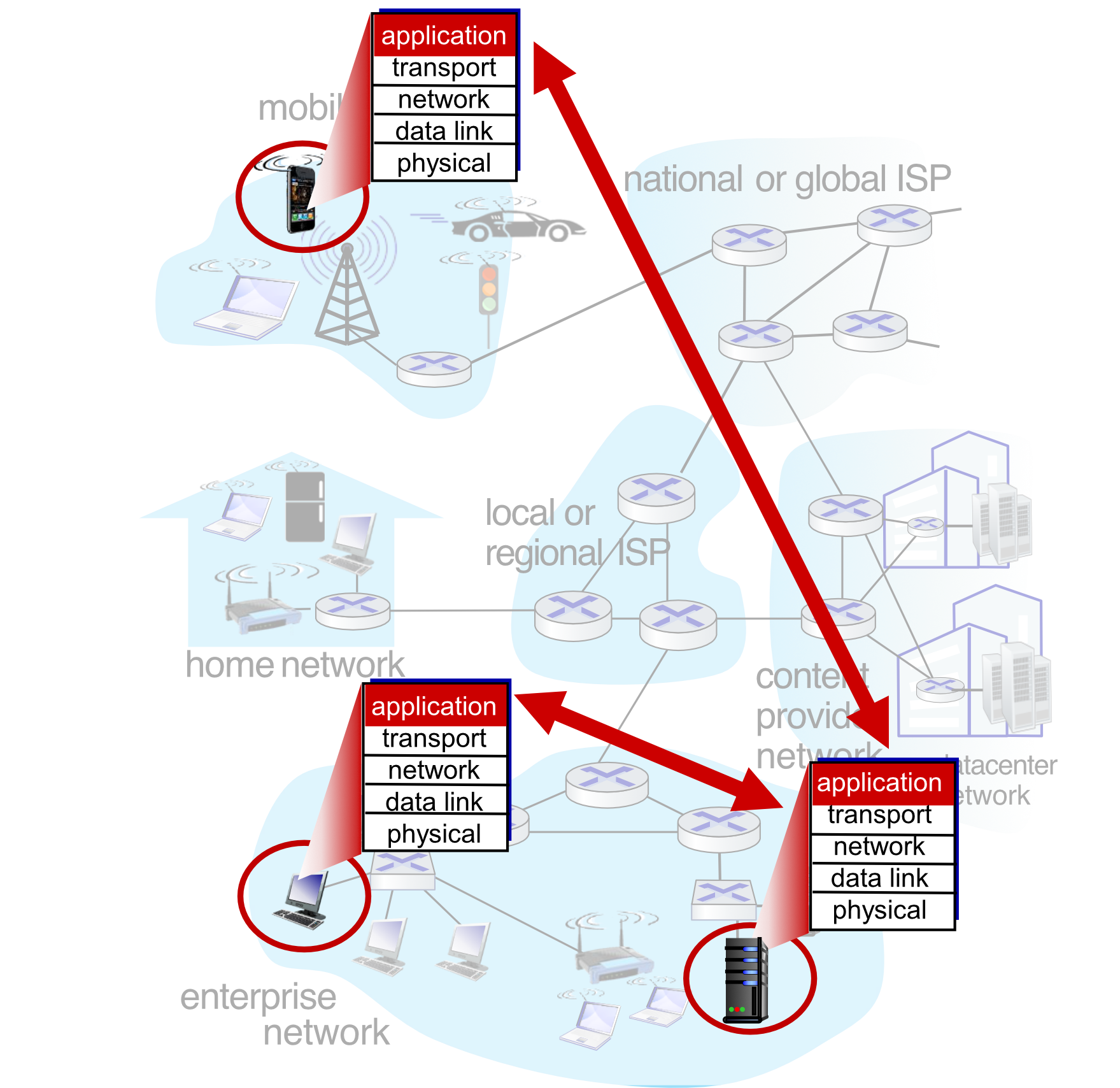
Write programs that:
- Run on (different) end systems
- Communicate over network
- e.g., web server software communicates with browser software
No need to write software for network-core devices:
- Network-core devices do not run user applications
- Applications on end systems allows for rapid app development and propagation
Analogy: Think of network-core devices as the postal system infrastructure (post offices, sorting facilities). You don't need to write software for them - you just need to write the letter (application) and address it properly. The postal system handles delivery automatically.
Client-Server Paradigm
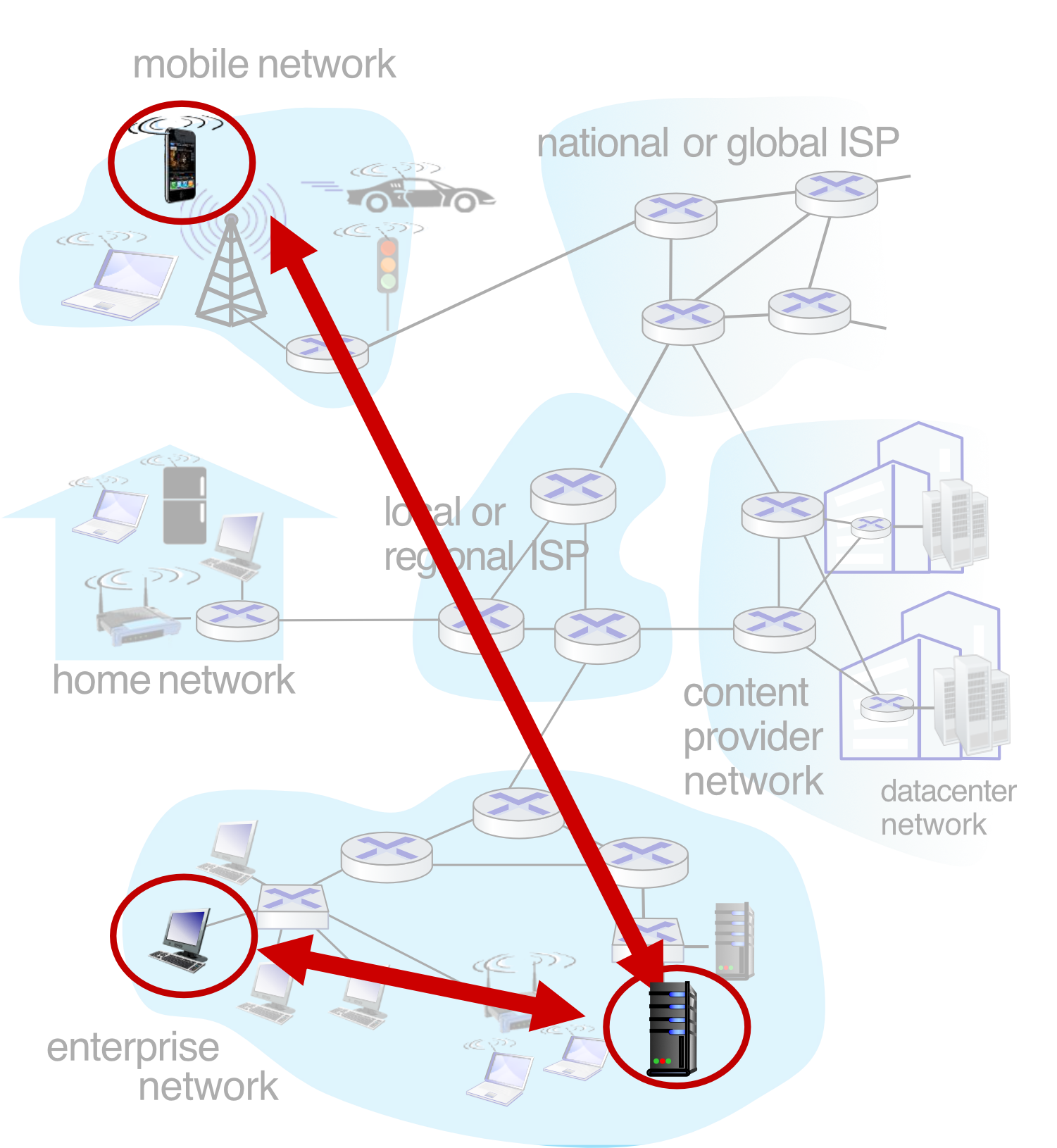
Server:
- Always-on host
- Permanent IP address (fixed)
- Often in data centers, for scaling
Clients:
- Contact and communicate with server
- May be intermittently connected
- May have dynamic IP addresses
- Dynamic IP จริง ๆ ได้รับการช่วยมาจาก DHCP protocol, แต่เดี๋ยวค่อยไปเรียน
- Do not communicate directly with each other
- Examples: HTTP, IMAP, FTP
Analogy: A client-server model is like a restaurant. The server (restaurant kitchen) is always available at a fixed location. Clients (customers) come and go, have temporary table assignments, and don't directly share food with each other - everything goes through the kitchen.
Peer-to-Peer Architecture
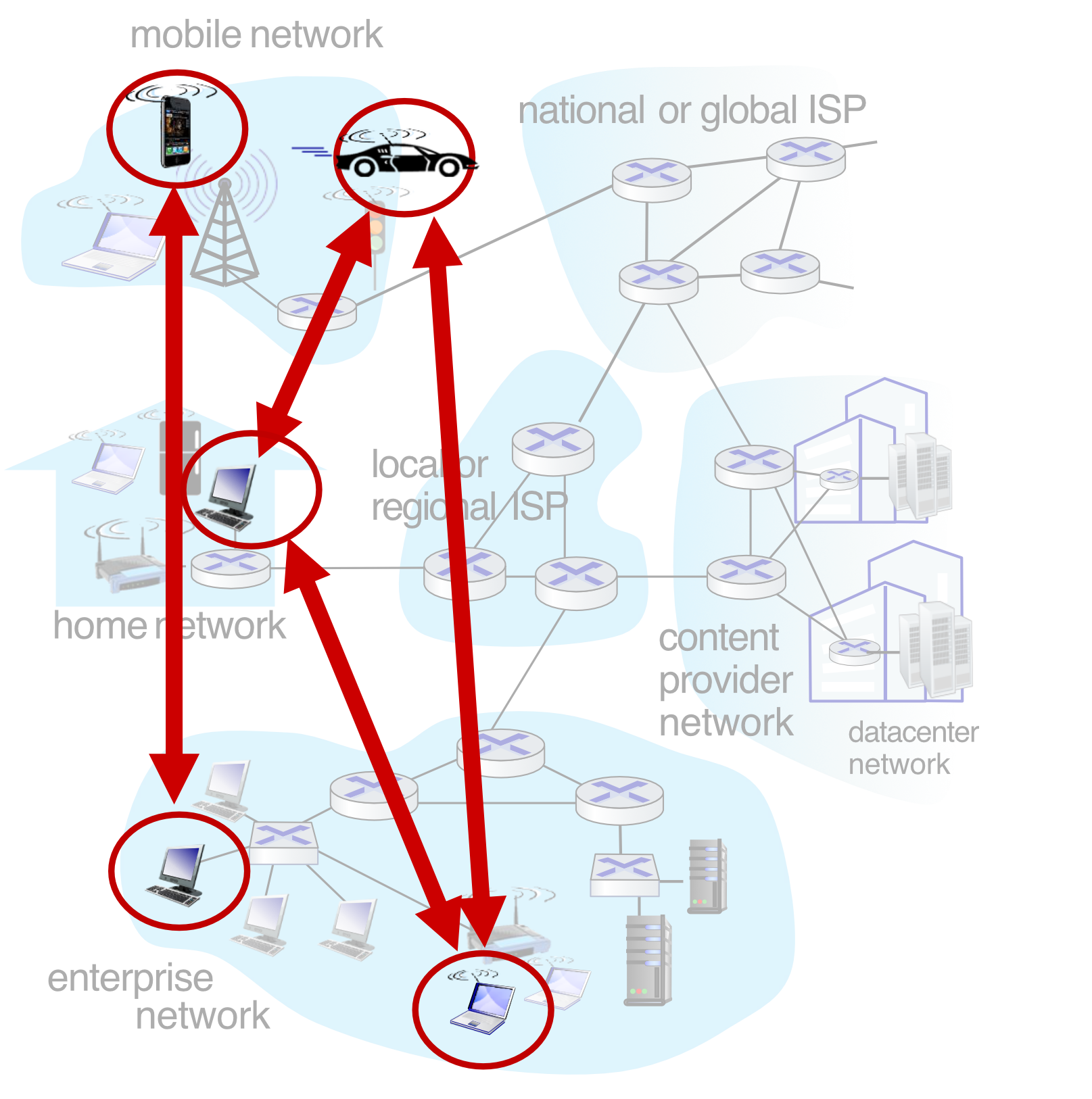
Characteristics:
- No always-on server
- Arbitrary end systems directly communicate
- Peers request service from other peers, provide service in return to other peers
- Self scalability: new peers bring new service capacity, as well as new service demands
- Peers are intermittently connected and change IP addresses
- Complex management
- Example: P2P file sharing, BitTorrent
Analogy: P2P is like a potluck dinner where everyone brings a dish and shares directly with others, versus a catered event (client-server) where all food comes from one central kitchen.
TCP/IP and Communication (Web Request)
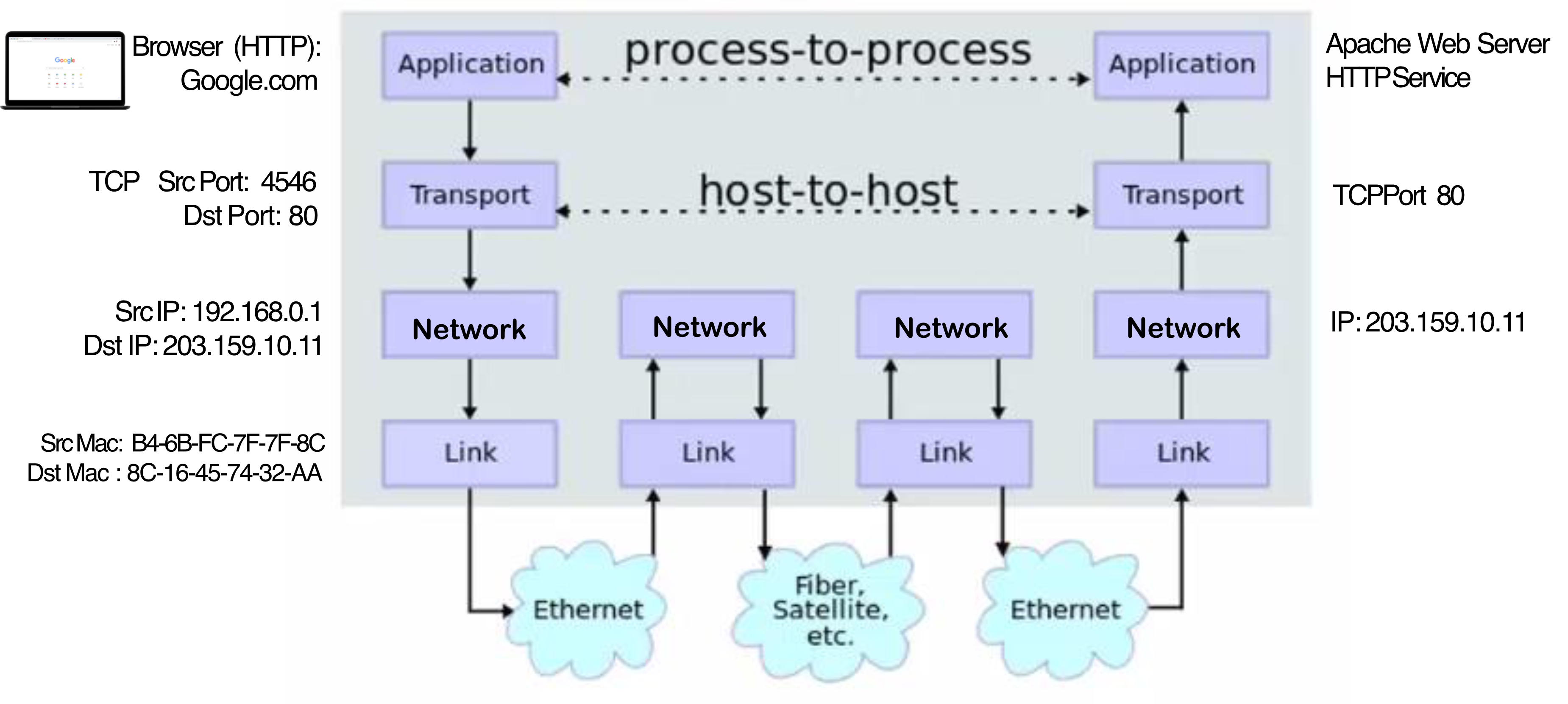
Communication Flow:
Browser (HTTP Client):
- Google.com
TCP Layer:
- Src Port: 4546
- Dst Port: 80
IP Layer:
- Src IP: 192.168.0.1
- Dst IP: 203.159.10.11
Link Layer:
- Src Mac: B4-6B-FC-7F-7F-8C
- Dst Mac: 8C-16-45-74-32-AA
Web Server:
- Apache Web Server
- HTTP Service
- TCP Port 80
- IP: 203.159.10.11
TCP/IP Model with Windows Socket
Layered Architecture:
Process Layer:
- Process (Process ID)
Socket Layer:
- Socket (Port)
- TCP or UDP
Protocol Stack (TCP/IP):
- Windows Sockets API
- IP
- Network System
Network Driver
Network Interface:
- MAC Address
Processes Communicating
Process Definition:
- Process: program running within a host
Within Same Host:
- Two processes communicate using inter-process communication (IPC) (defined by OS)
In Different Hosts:
- Processes communicate by exchanging messages
Process Types:
- Client process: process that initiates communication
- Server process: process that waits to be contacted
Note: Applications with P2P architectures have both client processes & server processes
Process Requirements:
- Process needs socket for network communication
- Socket acts as a door for sending/receiving messages
Sockets
Socket Characteristics:
- Process sends/receives messages to/from its socket
- Socket analogous to door
- Sending process pushes message out door
- Sending process relies on transport infrastructure on other side of door to deliver message to socket at receiving process
- Two sockets involved: one on each side
Control Layers:
- Controlled by app developer: Application layer
- Controlled by OS: Transport, Network, Link, Physical layers
Analogy: A socket is like a mailbox at your house. You put letters in (send) and receive letters from it, but you don't control the postal service (OS-controlled layers) that actually delivers the mail.
Addressing Processes
Process Identification:
- To receive messages, process must have identifier
- Host device has unique 32-bit IP address
Question: Does IP address of host suffice for identifying the process?
- Answer: No, many processes can be running on same host
Complete Identification:
- Identifier includes both IP address and port numbers associated with process on host
Example Port Numbers:
- HTTP server: 80
- Mail server: 25
Example:
To send HTTP message to siit.tu.ac.th web server:
- IP address: 128.119.245.12
- Port number: 80
Application-Layer Protocol Defines
Message Structure:
- Types of messages exchanged
- e.g., request, response
- Message syntax:
- What fields in messages & how fields are delineated
- Message semantics:
- Meaning of information in fields
- Rules for when and how processes send & respond to messages
Protocol Types:
Open protocols:
- Defined in RFCs, everyone has access to protocol definition
- Allows for interoperability
- e.g., HTTP, SMTP
Proprietary protocols:
- e.g., Skype, Zoom
What Transport Service Does an App Need?
Data Integrity:
- Some apps (e.g., file transfer, web transactions) require 100% reliable data transfer
- Other apps (e.g., audio) can tolerate some loss
Timing:
- Some apps (e.g., Internet telephony, interactive games) require low delay to be "effective"
Throughput:
- Some apps (e.g., multimedia) require minimum amount of throughput to be "effective"
- Other apps ("elastic apps") make use of whatever throughput they get
Security:
- Encryption, data integrity, etc.
Transport Service Requirements: Common Apps
| Application | Data Loss | Throughput | Time Sensitive? |
|---|---|---|---|
| File transfer/download | No loss | Elastic | No |
| No loss | Elastic | No | |
| Web documents | No loss | Elastic | No |
| Real-time audio/video | Loss-tolerant | Audio: 5Kbps-1Mbps Video: 10Kbps-5Mbps | Yes, 10's msec |
| Streaming audio/video | Loss-tolerant | Same as above | Yes, few secs |
| Interactive games | Loss-tolerant | Kbps+ | Yes, 10's msec |
| Text messaging | No loss | Elastic | Yes and no |
- Loss-tolerant, ถ้ามี interruption นิดนึงก็ acceptable น้า
Internet Transport Protocols Services
Transmission Control Protocol (TCP):
- Reliable transport between sending and receiving process
- Flow control: sender won't overwhelm receiver
- Congestion control: throttle sender when network overloaded
- Connection-oriented: setup required between client and server processes
- Does not provide: timing, minimum throughput guarantee, security
User Datagram Protocol (UDP):
- Unreliable data transfer between sending and receiving process
- Does not provide: reliability, flow control, congestion control, timing, throughput guarantee, security, or connection setup
Analogy: TCP is like certified mail with tracking and delivery confirmation - you know it will arrive safely. UDP is like dropping a postcard in a mailbox - faster, simpler, but no guarantees.
Internet Applications and Transport Protocols
| Application | Application Layer Protocol | Transport Protocol |
|---|---|---|
| File transfer/download | FTP [RFC 959] | TCP |
| SMTP [RFC 5321] | TCP | |
| Web documents | HTTP 1.1 [RFC 7320] | TCP |
| Internet telephony | SIP [RFC 3261], RTP [RFC 3550], or proprietary | TCP or UDP |
| Streaming audio/video | HTTP [RFC 7320], DASH | TCP |
Common Port Numbers:
| Application Protocol | Transport Protocol | Port Number | Description |
|---|---|---|---|
| HTTP | TCP | 80 | Used by web browsers and web servers |
| Telnet | TCP | 23 | Used for terminal emulation |
| SSH | TCP | 22 | Used for secure terminal emulation |
| FTP | TCP | 20, 21 | Used for file transfer |
| DNS | UDP | 53 | Used for name-to-IP resolution |
| SMTP | TCP | 25 | Used to send Email |
| POP3 | TCP | 110 | Used to receive Email |
| IMAP | TCP | 143 | Used to receive Email |
| SSL | TCP | 443 | Used to encrypt data for secure transactions |
| SNMP | UDP | 161, 162 | Used to manage TCP/IP networks |
Web and HTTP
Quick Review:
- Web page consists of objects, each of which can be stored on different Web servers
- Object can be HTML file, JPEG image, Java applet, audio file, etc.
- Web page consists of base HTML-file which includes several referenced objects, each addressable by a URL
URL Structure:
www.someschool.edu/someDept/pic.gif
└──────┬──────┘ └───────┬────────┘
   host name         path name
HTTP Overview
HTTP: HyperText Transfer Protocol
Web's application-layer protocol
Client/Server Model:
Client:
- Browser that requests, receives (using HTTP protocol) and "displays" Web objects
Server:
- Web server sends (using HTTP protocol) objects in response to requests
HTTP Characteristics:
HTTP uses TCP:
- Client initiates TCP connection (creates socket) to server, port 80
- Server accepts TCP connection from client
- HTTP messages (application-layer protocol messages) exchanged between browser (HTTP client) and Web server (HTTP server)
- TCP connection closed
HTTP is "stateless":
- Server maintains no information about past client requests
Note: Protocols that maintain "state" are complex!
- Past history (state) must be maintained
- If server/client crashes, their views of "state" may be inconsistent, must be reconciled
HTTP Connections: Two Types
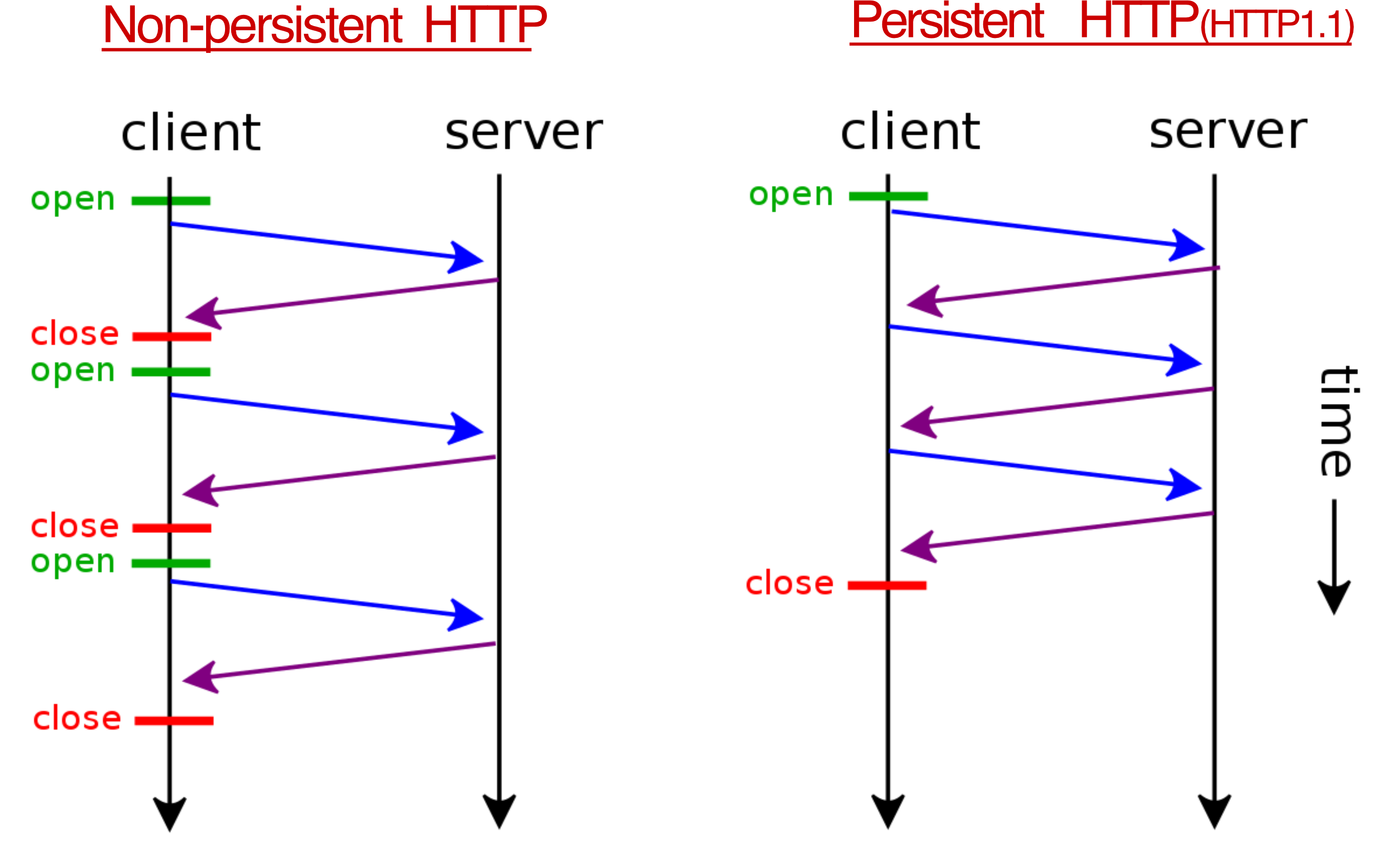
Non-persistent HTTP:
- TCP connection opened
- At most one object sent over TCP connection
- TCP connection closed
- Downloading multiple objects required multiple connections
Persistent HTTP:
- TCP connection opened to a server
- Multiple objects can be sent over single TCP connection between client and that server
- TCP connection closed
Non-persistent HTTP: Example
User enters URL: www.someSchool.edu/someDepartment/home.index
(containing text, references to 10 jpeg images)
Steps:
1a. HTTP client initiates TCP connection to HTTP server (process) at www.someSchool.edu on port 80
1b. HTTP server at host www.someSchool.edu waiting for TCP connection at port 80 "accepts" connection, notifying client
2. HTTP client sends HTTP request message (containing URL) into TCP connection socket. Message indicates that client wants object someDepartment/home.index
3. HTTP server receives request message, forms response message containing requested object, and sends message into its socket
4. HTTP server closes TCP connection
5. HTTP client receives response message containing html file, displays html. Parsing html file, finds 10 referenced jpeg objects
6. Steps 1-5 repeated for each of 10 jpeg objects
Non-persistent HTTP (1.0): Response Time
Round-trip Time (RTT):
- Time for a small packet to travel from client to server and back
HTTP Response Time (per object):
- One RTT to initiate TCP connection
- One RTT for HTTP request and first few bytes of HTTP response to return
- Time to transmit file
Analogy: RTT is like the time for a messenger to run to someone's house and back. Non-persistent HTTP requires two round trips PLUS the time to actually carry the package back.
Persistent HTTP (HTTP 1.1)
Non-persistent HTTP (1.0) Issues:
- Requires 2 RTTs per object
- OS overhead for each TCP connection
- Browsers often open multiple parallel TCP connections to fetch referenced objects in parallel
Persistent HTTP (HTTP 1.1):
- Server leaves connection open after sending response
- Subsequent HTTP messages between same client/server sent over open connection
- Client sends requests as soon as it encounters a referenced object
- As little as one RTT for all the referenced objects (cutting response time in half)
HTTP/2
Key Goal:
Decreased delay in multi-object HTTP requests
HTTP 1.1:
- Introduced multiple, pipelined GETs over single TCP connection
- Server responds in-order (FCFS: first-come-first-served scheduling) to GET requests
- With FCFS, small object may have to wait for transmission (head-of-line (HOL) blocking) behind large object(s)
- Loss recovery (retransmitting lost TCP segments) stalls object transmission
HTTP/2: [RFC 7540, 2015]
Increased flexibility at server in sending objects to client:
- Methods, status codes, most header fields unchanged from HTTP 1.1
- Transmission order of requested objects based on client-specified object priority (not necessarily FCFS)
- Push unrequested objects to client
- Divide objects into frames, schedule frames to mitigate HOL blocking
HTTP/2: Mitigating HOL Blocking
HTTP 1.1 Behavior:
Client requests 1 large object (e.g., video file) and 3 smaller objects
- Objects delivered in order requested: O₂, O₃, O₄ wait behind O₁
HTTP/2 Behavior:
Objects divided into frames, frame transmission interleaved
- O₂, O₃, O₄ delivered quickly, O₁ slightly delayed
Analogy: HTTP 1.1 is like a single-lane toll booth where a slow truck blocks all the cars behind it. HTTP/2 is like breaking cargo into smaller packages and alternating which packages go through, so small items don't wait for large ones to finish.
HTTP/2 to HTTP/3
HTTP/2 over single TCP connection means:
- Recovery from packet loss still stalls all object transmissions
- As in HTTP 1.1, browsers have incentive to open multiple parallel TCP connections to reduce stalling, increase overall throughput
- No security over vanilla TCP connection
HTTP/3:
- Adds security, per object error- and congestion-control (more pipelining) over UDP
- More on HTTP/3 in transport layer
HTTP Message
Two types of HTTP messages:
HTTP Request:
- Client make request (browser)
HTTP Response:
- Server response to the request (Web Server)
HTTP Request Message
HTTP request message format (ASCII - human-readable):
GET /index.html HTTP/1.1\r\n
Host: www-net.cs.umass.edu\r\n
User-Agent: Mozilla/5.0 (Macintosh; Intel Mac OS X 10.15; rv:80.0) Gecko/20100101 Firefox/80.0\r\n
Accept: text/html,application/xhtml+xml\r\n
Accept-Language: en-us,en;q=0.5\r\n
Accept-Encoding: gzip,deflate\r\n
Connection: keep-alive\r\n
\r\n
Components:
- Request line: GET, POST, HEAD commands
- Header lines: Various metadata about the request
- Blank line:
\r\n(carriage return, line feed at start of line indicates end of header lines) - Body: (if present)
Notes:
\r\n= carriage return character + line-feed character
HTTP Request Message: General Format
method sp URL sp version cr lf
header field name value cr lf
header field name value cr lf
...
...
cr lf
~ entity body ~
...
Legend:
sp= spacecr= carriage returnlf= line feed
Other HTTP Request Messages
POST Method:
- Web page often includes form input
- User input sent from client to server in entity body of HTTP POST request message
GET Method (for sending data to server):
- Include user data in URL field of HTTP GET request message (following a '?'):
www.somesite.com/animalsearch?name=monkey&type=2 - Max 2,048 characters
HEAD Method:
- Requests headers (only) that would be returned if specified URL were requested with an HTTP GET method
PUT Method:
- Uploads new file (object) to server
- Completely replaces file that exists at specified URL with content in entity body of POST HTTP request message
HTTP Response Message
Example Response:
HTTP/1.1 200 OK
Date: Tue, 08 Sep 2020 00:53:20 GMT
Server: Apache/2.4.6 (CentOS) OpenSSL/1.0.2k-fips PHP/7.4.9 mod_perl/2.0.11 Perl/v5.16.3
Last-Modified: Tue, 01 Mar 2016 18:57:50 GMT
ETag: "a5b-52d015789ee9e"
Accept-Ranges: bytes
Content-Length: 2651
Content-Type: text/html; charset=UTF-8
\r\n
data data data data data ...
Components:
- Status line: Protocol, status code, status phrase
- Header lines: Server metadata, content information
- Data: e.g., requested HTML file
HTTP Response Status Codes
Status code appears in 1st line in server-to-client response message.
Sample Codes:
-
200 OK
- Request succeeded, requested object later in this message
-
301 Moved Permanently
- Requested object moved, new location specified later in this message (in Location: field)
-
400 Bad Request
- Request message not understood by server
-
404 Not Found
- Requested document not found on this server
-
500 Internal Server Error
- Generic error response. Server encountered an unexpected condition that prevented it from fulfilling the request
-
505 HTTP Version Not Supported
Trying Out HTTP (Client Side) for Yourself
Using Telnet:
1. Telnet to your favorite Web server:
% telnet siit.tu.ac.th 80- Opens TCP connection to port 80 (default HTTP server port) at siit.tu.ac.th
- Anything typed in will be sent to port 80 at siit.tu.ac.th
2. Type in a GET HTTP request:
GET / HTTP/1.1
Host: siit.tu.ac.th
- By typing this in (hit carriage return twice), you send this minimal (but complete) GET request to HTTP server
3. Look at response message sent by HTTP server!
Alternative: Use Wireshark to look at captured HTTP request/response
Maintaining User/Server State: Cookies
Recall: HTTP GET/response interaction is stateless
No notion of multi-step exchanges of HTTP messages to complete a Web "transaction"
- No need for client/server to track "state" of multi-step exchange
- All HTTP requests are independent of each other
- No need for client/server to "recover" from a partially-completed-but-never-completely-completed transaction
Contrast with stateful protocol: Client makes two changes to X, or none at all (requires coordination and state management)
Maintaining User/Server State: Cookies
Web sites and client browser use cookies to maintain some state between transactions
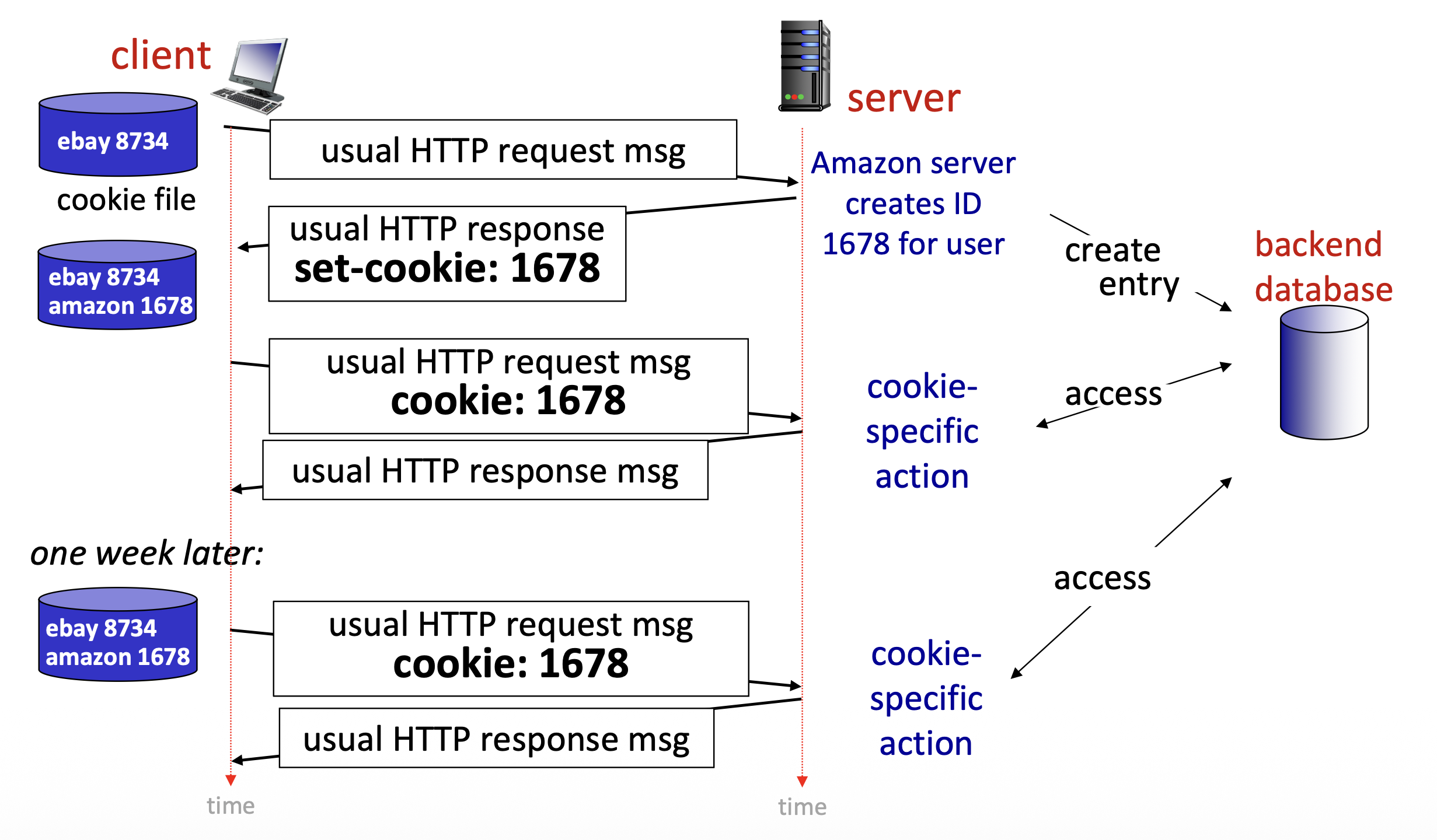
Four Components:
- Cookie header line of HTTP response message
- Cookie header line in next HTTP request message
- Cookie file kept on user's host, managed by user's browser
- Back-end database at Web site
Example:
- Susan uses browser on laptop, visits specific e-commerce site for first time
- When initial HTTP requests arrives at site, site creates:
- Unique ID (aka "cookie")
- Entry in backend database for ID
- Subsequent HTTP requests from Susan to this site will contain cookie ID value, allowing site to "identify" Susan
Maintaining User/Server State: Cookies (Example Flow)
First Visit:
Client → Server:
usual HTTP request msg
Server → Client:
usual HTTP response
set-cookie: 1678
- Amazon server creates ID 1678 for user
- Creates entry in backend database
Cookie file updated:
ebay 8734
amazon 1678
Later Request:
Client → Server:
usual HTTP request msg
cookie: 1678
Server:
- Accesses backend database
- Cookie-specific action
One week later:
Client → Server:
usual HTTP request msg
cookie: 1678
Server:
- Cookie-specific action
HTTP Cookies: Comments
What cookies can be used for:
- Authorization
- Shopping carts
- Recommendations
- User session state (Web e-mail)
Cookies and Privacy:
- Cookies permit sites to learn a lot about you on their site
- Third party persistent cookies (tracking cookies) allow common identity (cookie value) to be tracked across multiple web sites
Challenge: How to keep state?
- At protocol endpoints: maintain state at sender/receiver over multiple transactions
- In messages: cookies in HTTP messages carry state
Web Caches (Proxy)
Goal:
Satisfy client requests without involving origin server
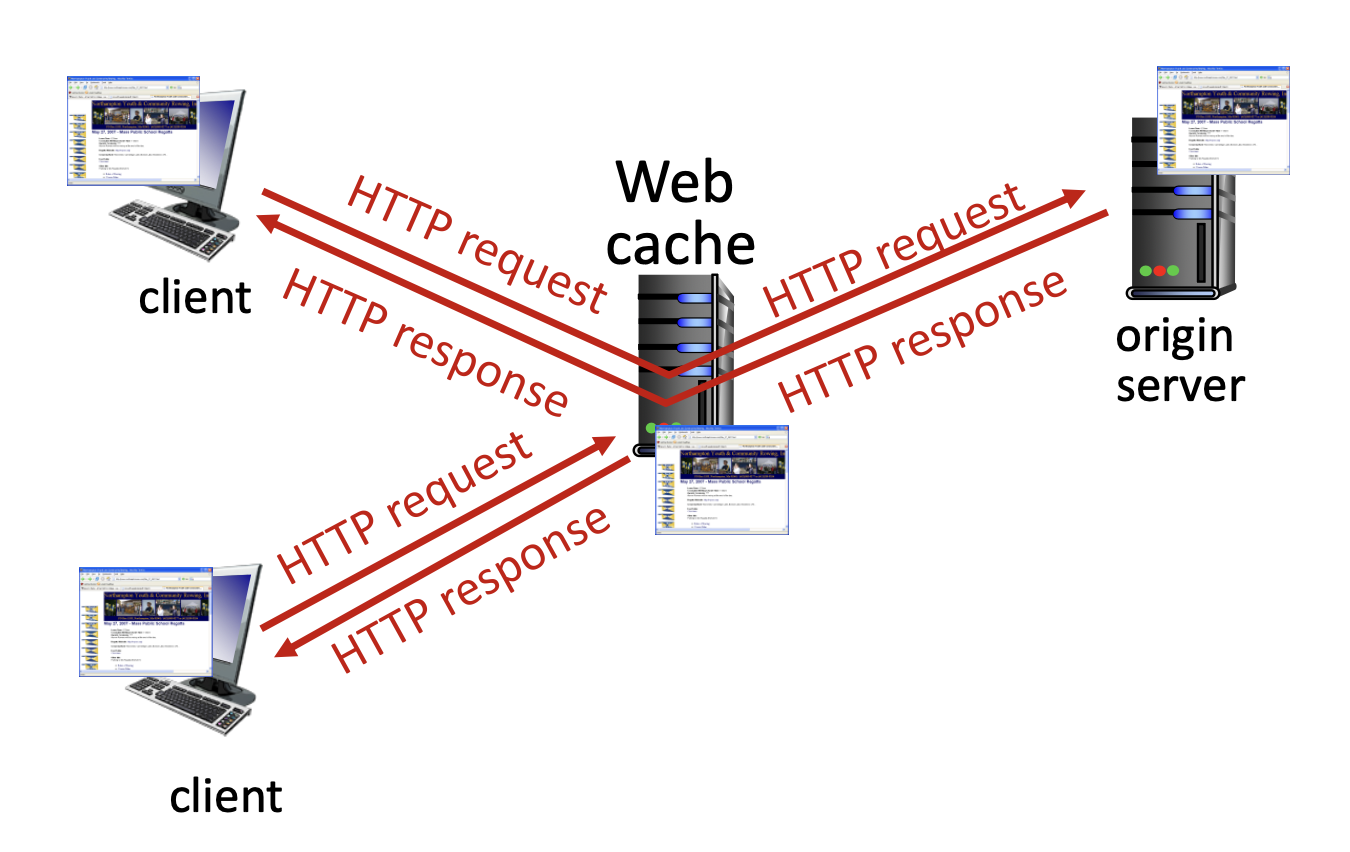
How it works:
- User configures browser to point to a (local) Web cache
- Browser sends all HTTP requests to cache
- If object in cache: cache returns object to client
- Else: cache requests object from origin server, caches received object, then returns object to client
Title
Finsihes class Jan 29
Web Caches (aka Proxy Servers)
Web cache acts as both client and server:
- Server for original requesting client
- Client to origin server
Why Web caching?
- Reduce response time for client request
- Cache is closer to client
- Reduce traffic on an institution's access link
- Internet is dense with caches
- Enables "poor" content providers to more effectively deliver content
Server Caching Control:
Server tells cache about object's allowable caching in response header:
Cache-Control: max-age=<seconds>
Cache-Control: no-cache
Caching Example
Scenario:
- Access link rate: 1.54 Mbps
- RTT from institutional router to server: 2 sec
- Web object size: 100K bits
- Average request rate from browsers to origin servers: 15/sec
- Avg data rate to browsers: 1.50 Mbps
Performance (Initial):
- Access link utilization = 0.97
- LAN utilization: 0.0015
- End-end delay = Internet delay + access link delay + LAN delay
Problem: Large queueing delays at high utilization!
Option 1: Buy a Faster Access Link
Scenario (Upgraded):
- Access link rate:
1.54 Mbps→ 154 Mbps - RTT from institutional router to server: 2 sec
- Web object size: 100K bits
- Average request rate from browsers to origin servers: 15/sec
- Avg data rate to browsers: 1.50 Mbps
Performance:
- Access link utilization =
0.97→ 0.0097 - End-end delay = Internet delay + access link delay + LAN delay
Cost: Faster access link (expensive!)
Option 2: Install a Web Cache
Scenario:
- Access link rate: 1.54 Mbps
- RTT from institutional router to server: 2 sec
- Web object size: 100K bits
- Average request rate from browsers to origin servers: 15/sec
- Avg data rate to browsers: 1.50 Mbps
Cost: Web cache (cheap!)
Performance:
- LAN utilization: ?
- Access link utilization = ?
- Average end-end delay = ?
Question: How to compute link utilization, delay?
Calculating Access Link Utilization, End-End Delay with Cache
Suppose cache hit rate is 0.4:
40% requests served by cache, with low (msec) delay
60% requests satisfied at origin
- Rate to browsers over access link =
- Access link utilization = means low (msec) queueing delay at access link
Average end-end delay:
Conditional GET
Goal:
Don't send object if cache has up-to-date cached version
- No object transmission delay (or use of network resources)
Client Side:
Specify date of cached copy in HTTP request:
If-modified-since: <date>
Server Side:
Response contains no object if cached copy is up-to-date:
HTTP/1.0 304 Not Modified
Flow Examples:
Object NOT modified:
Client → Server:
HTTP request msg
If-modified-since: <date>

Server → Client:
HTTP response
HTTP/1.0 304 Not Modified
Object modified:
Client → Server:
HTTP request msg
If-modified-since: <date>

Server → Client:
HTTP response
HTTP/1.0 200 OK
<data>
HTTPS (SSL 443)
HTTP vs HTTPS:
HTTP (Unencrypted):
- Helen sends to
http://www.example.com - Password: abc123
- Without password encryption
- Hacker can see "abc123"
HTTPS (Encrypted):
- Carol sends to
https://www.example.com - Password: abc123
- With password encryption
- Hacker sees "xyaerXzabc" (encrypted)
Certificate Information:
- This certificate is intended for the following purpose(s):
- Ensures the identity of a remote computer
- 2.23.140.1.2.1
- Issued to: *.google.com
- Issued by: GTS CA 1C3
- Valid from: 09-Dec-21 to 03-Mar-22
Three Major Components:
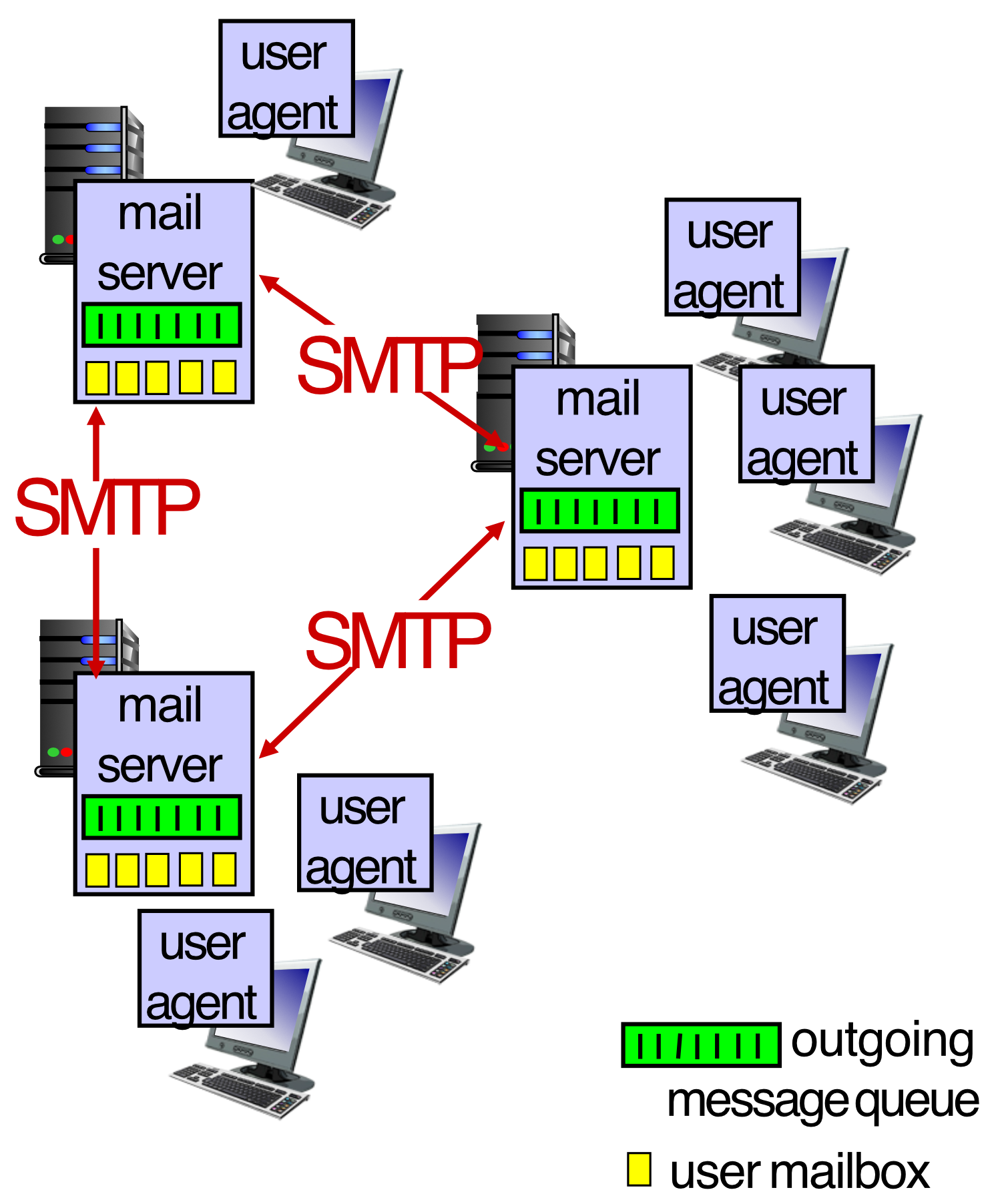
- User agents
- Outlook, gmail.com, whatever.
- Application running on your computer, phone.
- Mail servers
- Simple mail transfer protocol: SMTP
- Protocol ไว้ส่ง mail
User Agent:
- a.k.a. "mail reader"
- Composing, editing, reading mail messages
- e.g., Outlook, iPhone mail client
- Outgoing, incoming messages stored on server
แต่ก็มี Protocol ไว้ check email อีก เช่นพวก IMAP, POP3
Mail Servers:
- User mailbox (incoming messages)
- Outgoing message queue
- SMTP protocol between mail servers to send email messages
E-mail: Mail Servers
Mail servers:
- Mailbox contains incoming messages for user
- Message queue of outgoing (to be sent) mail messages
SMTP Protocol Between Mail Servers:
- Client: sending mail server
- "Server": receiving mail server
Example of MailEnable Software
Image showing MailEnable architecture with components:
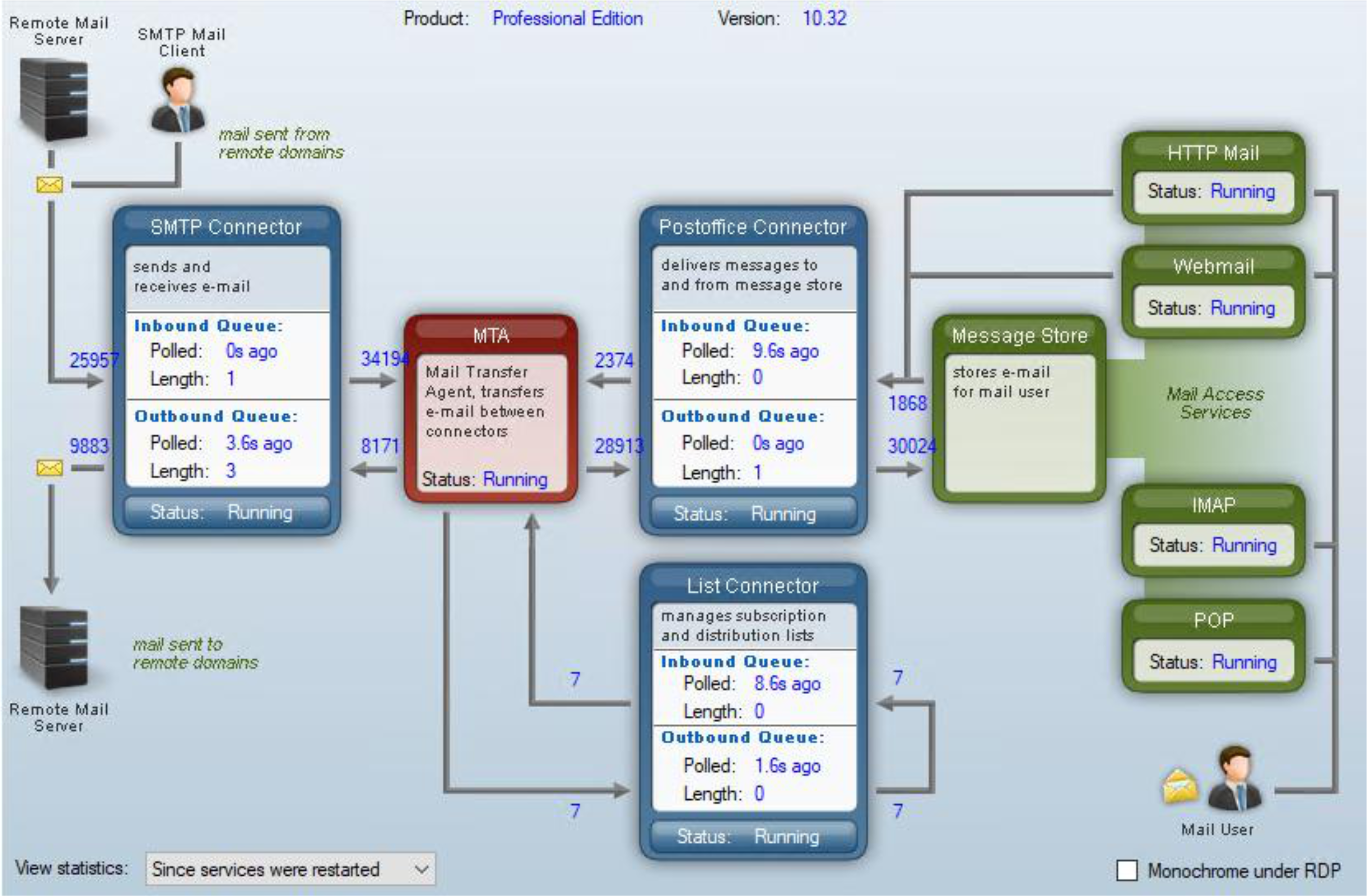
Software ที่สามารถ manage หลาย domain ได้
MTA = Post office: Transfer
List connector = Mailing List
SMTP RFC (5321)
Main protocol for sending an email
SMTP Characteristics:
- Uses TCP to reliably transfer email message from client (mail server initiating connection) to server, port 25
- Direct transfer: sending server (acting like client) to receiving server
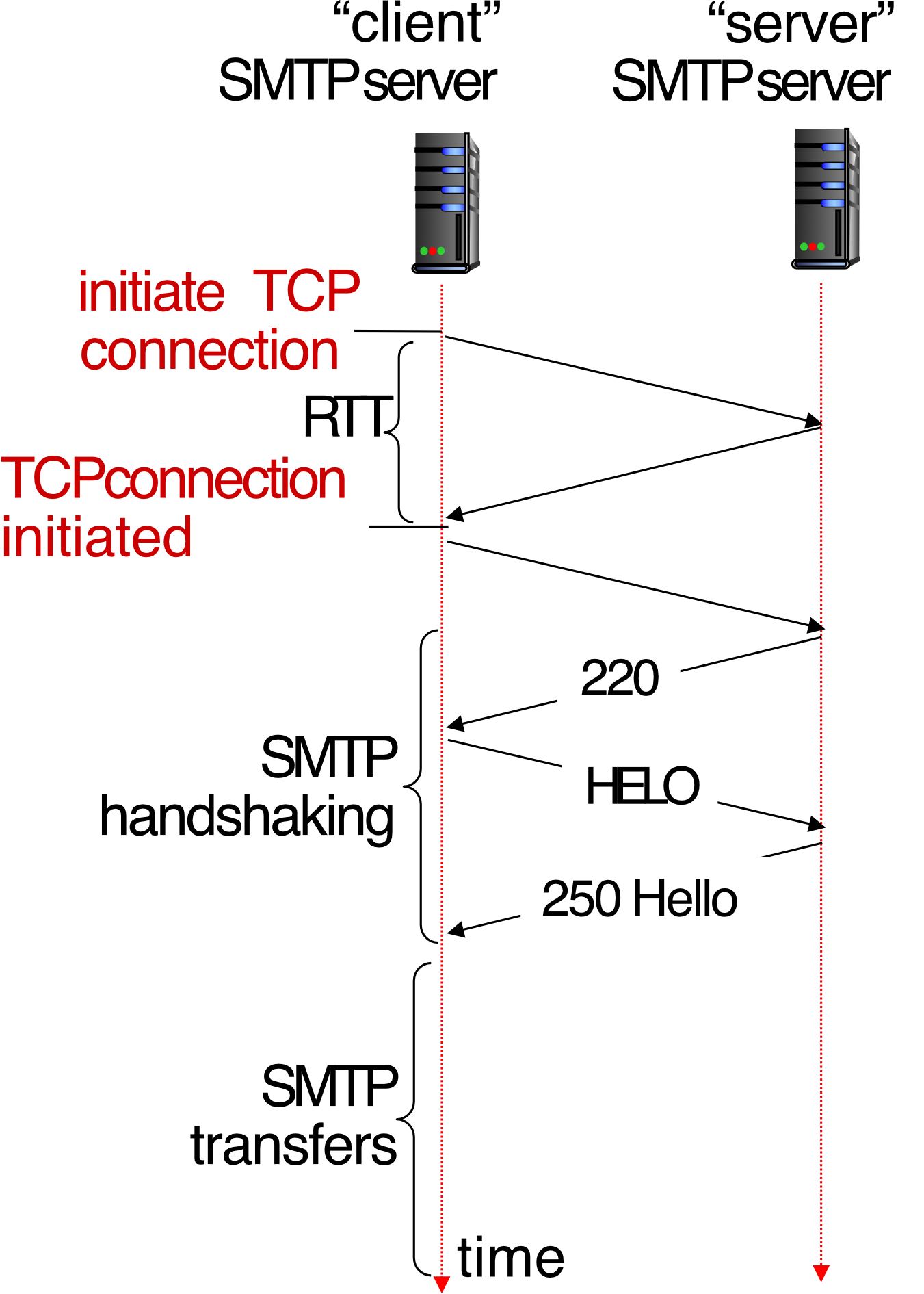
Three Phases of Transfer:
- SMTP handshaking (greeting)
- SMTP transfer of messages
- SMTP closure
Command/Response Interaction (like HTTP):
- Commands: ASCII text
- Response: status code and phrase
Example Handshake:
Client → Server:
initiate TCP connection

Server → Client:
220 (Ready)

Client → Server:
HELO

Server → Client:
250 Hello
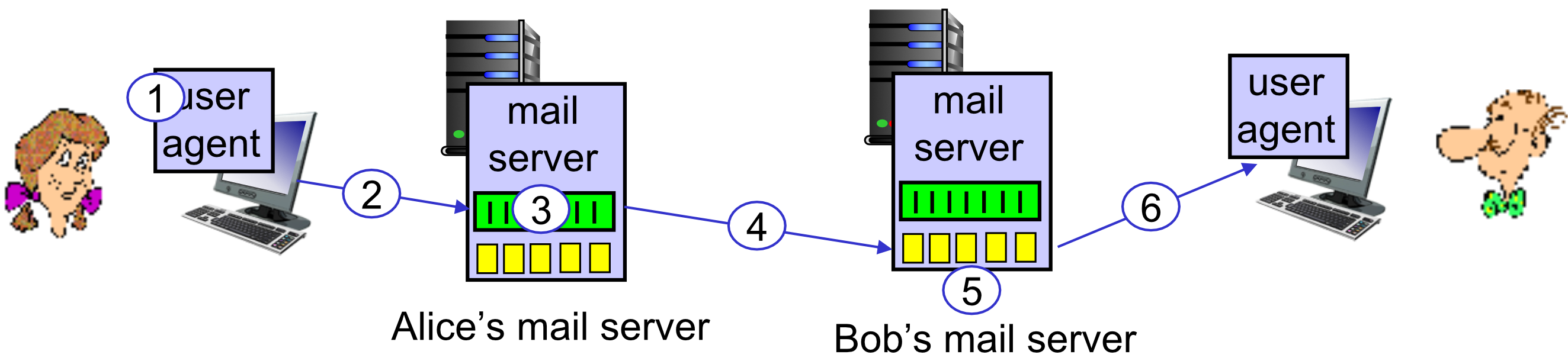
Scenario: Alice Sends E-mail to Bob
Steps:
- Alice uses UA to compose e-mail message "to" bob@someschool.edu
- Alice's UA sends message to her mail server using SMTP; message placed in message queue
- Client side of SMTP at mail server opens TCP connection with Bob's mail server
- SMTP client sends Alice's message over the TCP connection
- Bob's mail server places the message in Bob's mailbox
- Bob invokes his user agent to read message (อาจจะใช้ IMAP, POP3)
Sample SMTP Interaction
S: 220 hamburger.edu
C: HELO crepes.fr
S: 250 Hello crepes.fr, pleased to meet you
C: MAIL FROM: <alice@crepes.fr>
S: 250 alice@crepes.fr... Sender ok
C: RCPT TO: <bob@hamburger.edu>
S: 250 bob@hamburger.edu ... Recipient ok
C: DATA
S: 354 Enter mail, end with "." on a line by itself
C: Do you like ketchup?
C: How about pickles?
C: .
S: 250 Message accepted for delivery
C: QUIT
S: 221 hamburger.edu closing connection
Key Points:
C:= Client commandS:= Server response- Message body ends with line containing only "
."
SMTP: Observations
SMTP Characteristics:
- SMTP uses persistent connections
- SMTP requires message (header & body) to be in 7-bit ASCII
- SMTP server uses CRLF.CRLF to determine end of message
Comparison with HTTP:
HTTP:
- Client pull (client requests data)
- Each object encapsulated in its own response message
SMTP:
- Client push (client sends data)
- Multiple objects sent in multipart message
- Plaintext, HTML, Base64 → MIME Lecture 15 - Email Systems
Both:
- Have ASCII command/response interaction, status codes
Mail Message Format
SMTP vs RFC 2822:
- SMTP: protocol for exchanging e-mail messages, defined in RFC 5321 (like RFC 7231 defines HTTP)
- RFC 2822: defines syntax for e-mail message itself (like HTML defines syntax for web documents)
Message Structure:
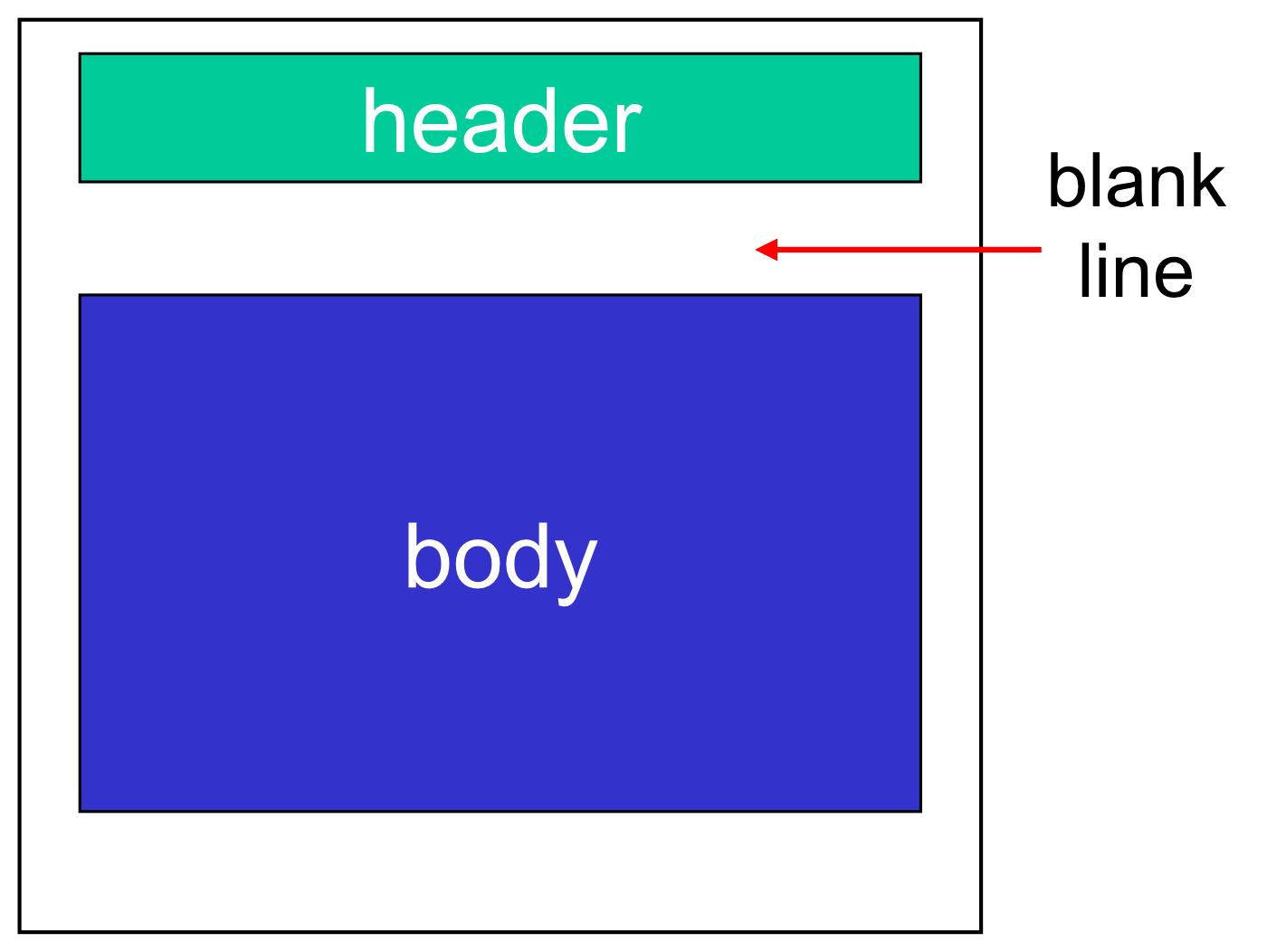
header lines, e.g.,
To:
From:
Subject:

blank line

Body: the "message", ASCII characters only
Note: These lines within the body of the email message are different from SMTP MAIL FROM:, RCPT TO: commands!
Retrieving Email: Mail Access Protocols
Email Flow:
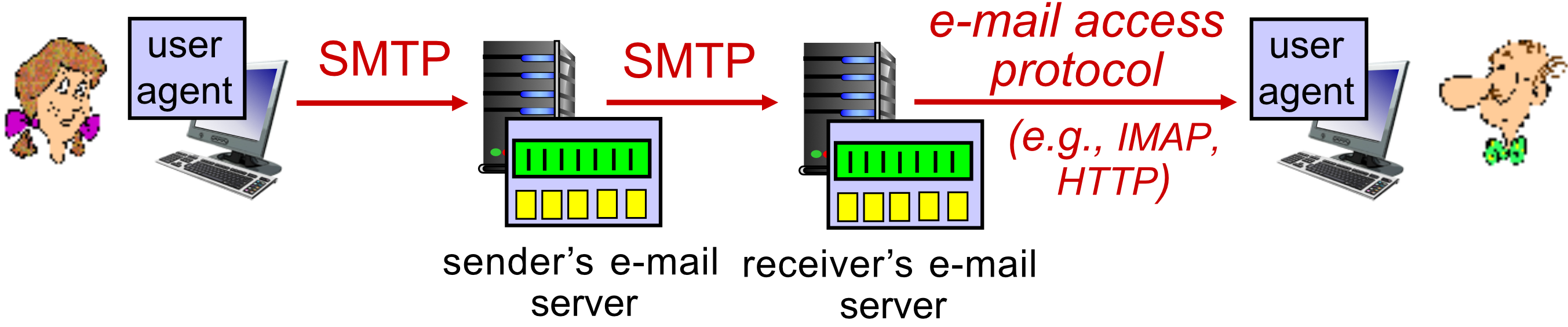
Protocols:
- SMTP: delivery/storage of e-mail messages to receiver's server
- Mail access protocol: retrieval from server
- IMAP: Internet Mail Access Protocol [RFC 3501]
- Messages stored on server
- IMAP provides retrieval, deletion, folders of stored messages on server
- IMAP: Internet Mail Access Protocol [RFC 3501]
- HTTP: gmail, Hotmail, Yahoo!Mail, etc.
- Provides web-based interface on top of SMTP (to send), IMAP (or POP) to retrieve e-mail messages
IMAP vs POP3
IMAP (Internet Message Access Protocol):
- Ideal server when user want to access through multiple devices
- Changes on one device will be implemented on other connected devices too
- Assigned port number: 143 & Secure Socket Layer – 993
- Allows modification in the email account
Common!
POP 3 (Post Office Protocol Version 3):
- Ideal server when the user wants to have access only using one device
- Changes will not be shown on other devices
- Assigned Port Number: 110 & Secure Socket Layer – 995
- Do not allow modifications in the email account
POP 3 download ALL email to your computer, can delete mail from the server (reduce storage size on server)
Analogy: IMAP is like cloud storage (Google Drive) - access your files from anywhere, changes sync everywhere. POP3 is like downloading files to one computer - once downloaded, they're only on that device.
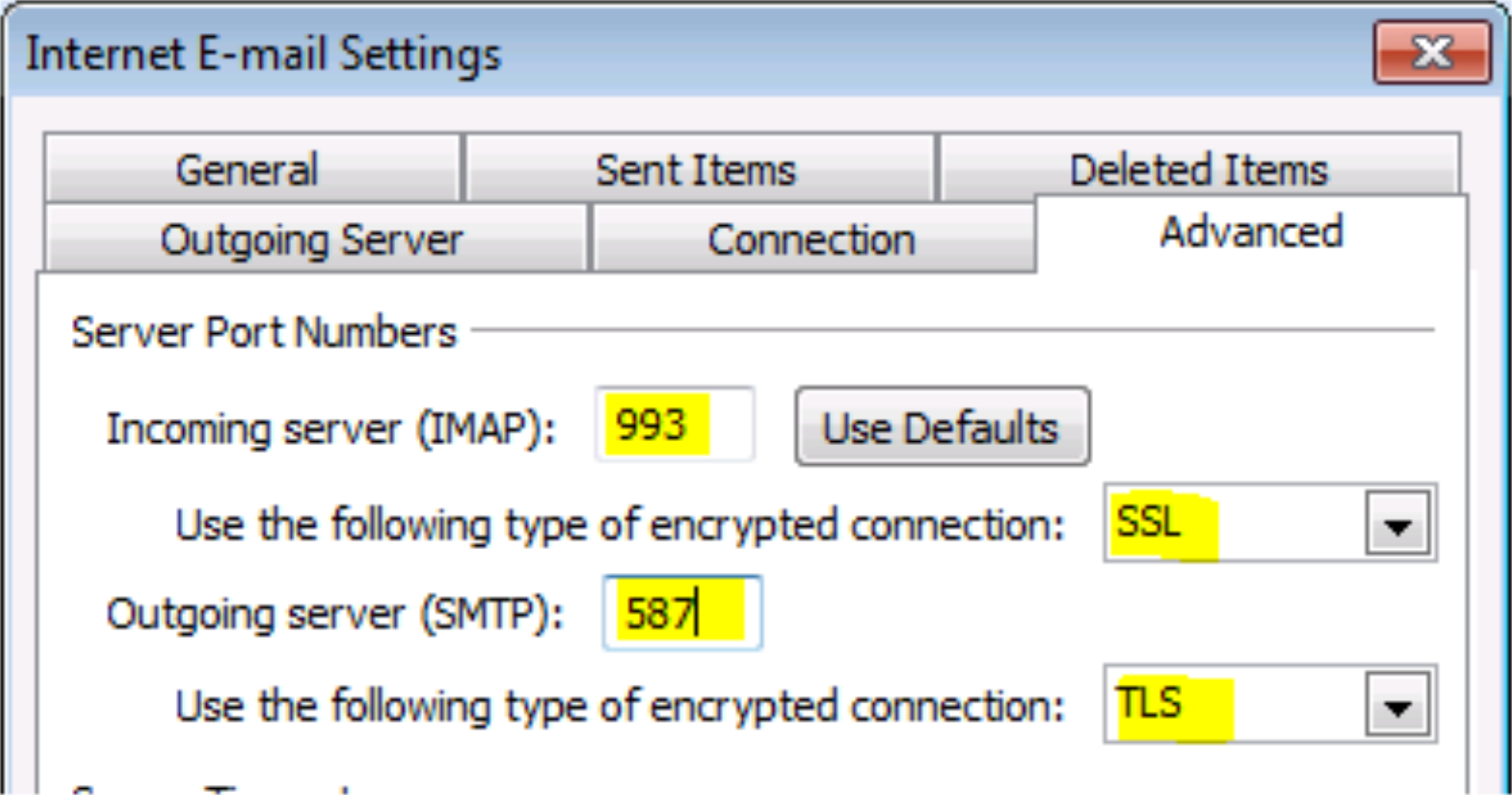
Mail Setting with Alternative Port
Port Numbers:
- SMTP: port 25, 587 (TLS)
- IMAP: port 143, 993 (SSL)
Example Configuration:
Server Port Numbers:
- Incoming server (IMAP): 993
- Use the following type of encrypted connection: SSL
- Outgoing server (SMTP): 587
- Use the following type of encrypted connection: TLS