Traditional vs. Web-Based Systems Development
Traditional Development
- Designed to run on local and wide-area networks (LAN/WAN)
- Utilizes Internet links and resources
- Scalability is limited by network constraints
- Requires substantial desktop computing power
- Security issues are less complex than web-based systems
- Development paths:
- In-house development
- Purchase of software package (with possible modification)
- Use of outside consultants
Think of traditional systems like a local restaurant — it serves the neighborhood well, but scaling to multiple cities requires a lot more infrastructure.
Web-Based Development
- Treats the web as the platform (not just a communication channel)
- Easily scalable — can run on multiple hardware environments
- Less dependent on desktop computing power
- Common use cases: CRM, order processing, materials management
- Requires middleware to communicate with legacy systems
- Has more complex security issues to address
- Two representative environments:
- Microsoft's .NET
- MERN stack (MongoDB, Express, React, Node.js)
Like a cloud kitchen — you don't need a storefront; operations happen online and can scale globally with minimal physical infrastructure.
Evolving Trends
Web 2.0
- Second generation of the web
- Enables people to collaborate, interact, and share information more effectively
- Enhances interactive experiences (social networks, wikis, etc.)
Cloud Computing
- Applications and services accessed via Internet connection
- No need to install software locally
Mobile Devices
- Smartphones and tablets require many new platforms
- Many modern development tools support web-based and mobile development simultaneously
In-House Software Development Options
Overview
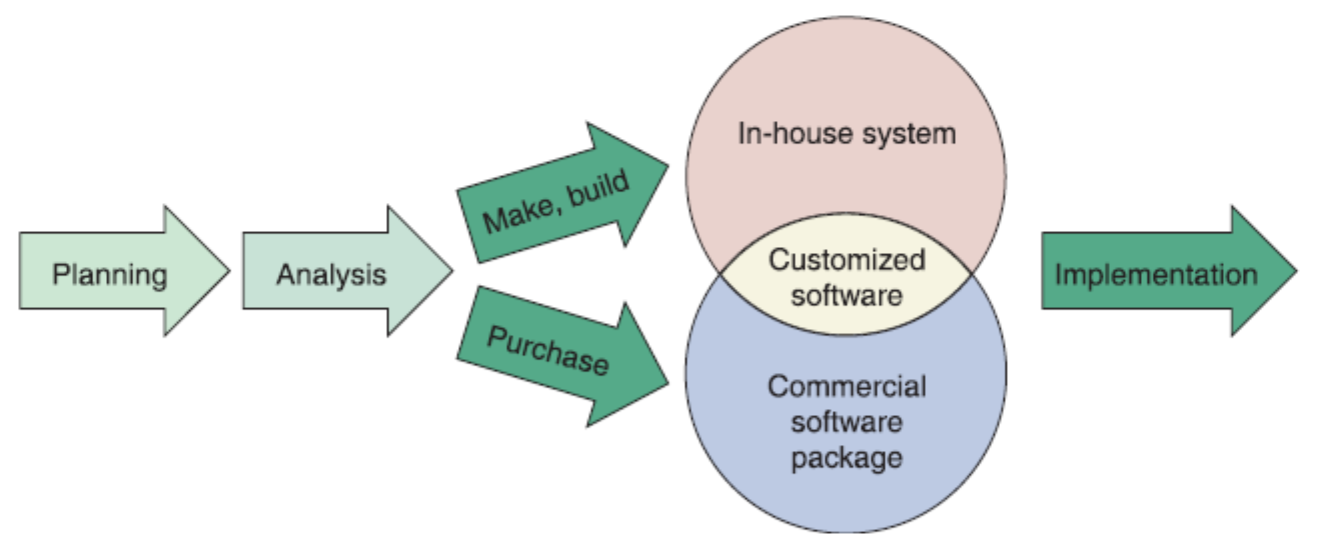
- Key question: Make or Buy? (also called Build or Buy)
- Most important consideration: Total Cost of Ownership (TCO)
TCO = not just purchase price, but also installation, training, maintenance, upgrades, and support costs over the system's entire life.
Key Terms
- Software package — obtained from a vendor or ASP
- Software vendor — develops software for sale
- Value-added reseller (VAR) — enhances a commercial package with custom features/config
- Horizontal application — used across many types of organizations (e.g., payroll software)
- Vertical application — handles specific business requirements (e.g., hospital management)
Option 1: Develop In-House
- Best when:
- Unique business requirements exist
- Standard packages can't satisfy requirements
- Need to minimize changes to existing business procedures/policies
- Must meet constraints of existing systems/technology
- Want to build internal capabilities
Option 2: Purchase a Software Package
- Advantages:
- Lower costs
- Less time to implement
- Proven reliability and performance benchmarks
- Requires less technical development staff
- Vendor provides future upgrades
- Can get input from other companies using the same package
Option 3: Customize a Software Package
Three approaches:
- Purchase a basic package → have the vendor customize it
- Negotiate with the vendor to make enhancements and pay for the changes
- Purchase the package → make project-specific modifications yourself
Option 4: Create User Applications
- User application — utilizes standard business software
- Requires a good user interface for effective interaction
- Supported by a service desk for user support
Outsourcing
Definition
- Transfer of IS development, operation, or maintenance to an ==outside firm==
- Can be temporary or long-term
Key Players
- Service provider — offers outsourcing solutions
- Application Service Provider (ASP) — delivers application by charging a fee
- Internet Business Services (IBS) — web-based support for transactions
Outsourcing Fee Models
| Model | Description |
|---|---|
| Fixed fee | Set fee based on specified service level |
| Subscription | Variable fee based on number of users/workstations |
| Usage/Transaction | Variable fee based on volume of transactions |
Concerns
- Mission-critical systems should only be outsourced if cost-attractive AND reliable
- Overseas outsourcing raises issues with control, culture, communication, and security
- Must review the outsourcing firm's history and financial condition
- Mergers and acquisitions of the outsourcing firm can affect you
- Employee job security is a major concern
Offshoring
- Also called offshore outsourcing or global outsourcing
- Shifting IT development, support, and operations to other countries
- Main motivation: lower bottom-line costs
Risks & Concerns
- Impact on the domestic economy
- Project control difficulties
- Security issues
- Disparate cultures
- Effective communication challenges
Offshoring is like hiring a contractor in another country — cheaper, but coordination, time zones, and cultural differences add invisible costs.
Software as a Service (SaaS)
- Application is hosted and delivered over the Internet
- Reduces the customer's need for:
- Software maintenance
- Operations and support
- Customer gets the functionality without the infrastructure costs
- Vendor handles: installation, configuration, maintenance
SaaS is like renting an apartment instead of buying a house — you get full use without worrying about repairs or property taxes.
The Systems Analyst's Role
- Evaluation is based on current and future needs
- Evaluation and selection team = systems analysts + users
- Team responsibilities:
- Eliminate alternatives that don't meet requirements
- Rank feasible alternatives
- Present viable alternatives to management for a final decision
Analyzing Cost and Benefits
Financial Analysis Tools
Payback Analysis
- Determines how long it takes for the system to pay for itself
- Based on reduced costs and increased benefits
Return on Investment (ROI)
Net Present Value (NPV)
ROI tells you the percentage gain, NPV tells you the actual dollar gain after accounting for time value of money.
Cost-Benefit Analysis Checklist
- List each development strategy considered
- Identify all costs and benefits
- Consider future growth and scalability
- Include support costs for hardware and software
- Analyze various software licensing options
- Apply financial analysis tools to each alternative
- Study the results and prepare a report
The Software Acquisition Process
บริษัทต้องการ ระบบ software ใหม่ แล้วต้องตัดสินใจว่าจะ ซื้อจาก vendor / outsource / หรือเลือก package ไหน
Step 1: Evaluate Information System Requirements
- Identify key features
- Consider network and web-related issues
- Estimate volume and future growth
- Specify hardware, software, or personnel constraints
- Prepare a Request for Proposal (RFP) or Request for Quotation (RFQ)
- Describes the company
- Lists IT services/products needed
- Specifies required features
ต้องมี feature:
- Employee database
- Leave management
- Payroll
รองรับพนักงาน 500 คน และอาจโตเป็น 1000 คน
ต้องเป็น web-based
จึงเขียน RFP ส่งให้ vendor
Step 2: Identify Potential Vendors or Outsourcing Options
- Sources: Internet, consulting firms, online forums
บริษัทอาจ shortlist vendor เช่น
- Workday
- SAP SuccessFactors
- BambooHR
Step 3: Evaluate the Alternatives
- Talk to existing users
- Conduct application testing
- Benchmarking — measures the time a package takes to process a certain number of transactions
บริษัทจะ ขอ demo ทดลองใช้
benchmark performance เช่น ระบบ payroll ใช้เวลาคำนวณเงินเดือนพนักงาน 1000 คนกี่วินาที
Step 4: Perform Cost-Benefit Analysis
- Calculate TCO for each option
- Study software license conditions
- Consider a supplemental maintenance agreement if purchasing
Step 5: Prepare a Recommendation
- Evaluate and describe each alternative with:
- Costs & Benefits
- Advantages & Disadvantages
- Submit a formal system requirements document
- Deliver a presentation
ทีม IT เสนอ
บริษัทควรเลือก Workday นะ
เพราะ scalable, support ดี, security สูง
แล้วทำ presentation ให้ hirer management ฟัง
Completion of Systems Analysis Tasks
System Requirements Document
- Contains requirements for the new system
- Describes alternatives considered
- Makes a specific recommendation to management
- Acts like a contract — identifies what developers must deliver
- Must be easy to read and use
Presentation to Management
Tips for effective presentations:
- Start with a brief overview
- Summarize primary viable alternatives
- Explain why the team chose the recommended alternative
- Allow time for discussion
- Obtain a final decision or agree on a timetable
Possible Outcomes After Management Decision
- Implement an outsourcing alternative
- Develop an in-house system
- Purchase or customize a software package
- Perform additional systems analysis work
- Stop all further work
Transition to Systems Design
Documentation Required
- Detailed specifications for:
- Output
- Input
- Data
- Processes
- Other requirements
Logical vs. Physical Design
| Type | Description |
|---|---|
| Logical design | Defines what must take place |
| Physical design | Describes the actual process of entering, verifying, and storing data |
Logical design = the blueprint/floor plan; Physical design = the actual construction with materials and measurements.
Both are closely related and work together.