Learning Objectives
- Explain system requirements and the challenges associated with the requirements engineering process
- Compare and contrast functional and non-functional requirements
- Apply team-based requirements engineering techniques:
- Joint Application Development (JAD)
- Rapid Application Development (RAD)
- Agile methods
- Develop a fact-finding plan for gathering requirements
- Conduct interviews to gather system requirements
- Use other requirements gathering techniques:
- Document review
- Observation
- Questionnaires and surveys
- Brainstorming
- Sampling
- Research
- Explain how requirements are gathered in agile projects
- Utilize different requirements representation techniques:
- Natural language
- Diagrams
- Models
- Explain how to validate and verify requirements
- Explain how tools can help with requirements engineering activities
System Requirements
Definition
- System Requirement: A feature that must be included in an information system to satisfy business requirements
- Serves as benchmarks to measure overall acceptability
Analogy: Think of requirements as the ingredients list and recipe for baking a cake. Just as you need specific ingredients and instructions to make the perfect cake, you need specific requirements to build a system that satisfies business needs.
Requirements Engineering Activities
Three Main Activities:
- Gathering Requirements
- Collecting what the system needs to do
- Representing Requirements
- Documenting requirements in understandable formats
- Validating and Verifying Requirements
- Ensuring requirements are correct and complete
Types of Requirements
Requirements are classified according to their characteristics:
1. Functional Requirements
- Define what the system should do
- Describe specific behaviors or functions
2. Non-Functional Requirements
- Define how the system should perform
- Include quality attributes like performance, security, usability
Requirements Challenges
Three major challenges in requirements engineering:
1. Imprecision
- Requirements are often vague or ambiguous
- Different stakeholders may interpret requirements differently
2. Agreement
- Getting all stakeholders to agree on requirements
- Conflicting needs between different user groups
3. Creep
- Scope creep: Uncontrolled changes or continuous growth in requirements
- Requirements keep being added after initial definition
Analogy: Requirements creep is like continuously adding more items to your shopping cart while at the store, causing your budget and time to spiral out of control.
Additional Considerations
1. Scalability
- The ability to handle increased business volume and transactions
- System must grow with the organization
Analogy: Like a restaurant that can handle 50 customers now but should be designed to accommodate 200 customers in the future without major renovations.
2. Security
- Making systems harder to infiltrate
- Protecting sensitive data and resources
3. Total Cost of Ownership (TCO)
- Includes both direct costs (hardware, software, development)
- And indirect costs (training, maintenance, downtime)
Team-Based Techniques
Joint Application Development (JAD)
Overview
- ==Brings users into the development process as active participants==
- Users take active roles rather than passive
- Can be formal or informal
JAD Participants and Roles
- Project leader: Facilitates the JAD sessions
- Team member(s): Users, managers, developers, and stakeholders
User Involvement Types
- Active roles: Direct participation in design decisions
- Formal involvement: Structured meetings and sessions
- Informal involvement: Ad-hoc discussions and feedback
JAD Advantages
- Allows key users to participate effectively
- Users feel a sense of ownership in the system
- Produces more accurate statement of system requirements
- Better understanding of common goals
- Stronger commitment to the success of the new system
JAD Disadvantages
- More expensive than traditional methods (we need to ask the user to take part in the development team)
- Can be cumbersome if the group is too large
- Requires significant time commitment from participants
Analogy: JAD is like planning a wedding with the couple, family, and wedding planner all in the room together, making decisions collaboratively instead of the planner making all decisions alone.
Rapid Application Development (RAD)
Overview
- Uses a group approach similar to JAD
- End product: A complete, working information system
- Represents a complete methodology
RAD Characteristics
- Includes a four-phase life cycle that parallels traditional SDLC
- Reduces cost and development time
- Increases probability of success
- Relies heavily on:
- Prototyping
- User involvement
The Four Phases of RAD
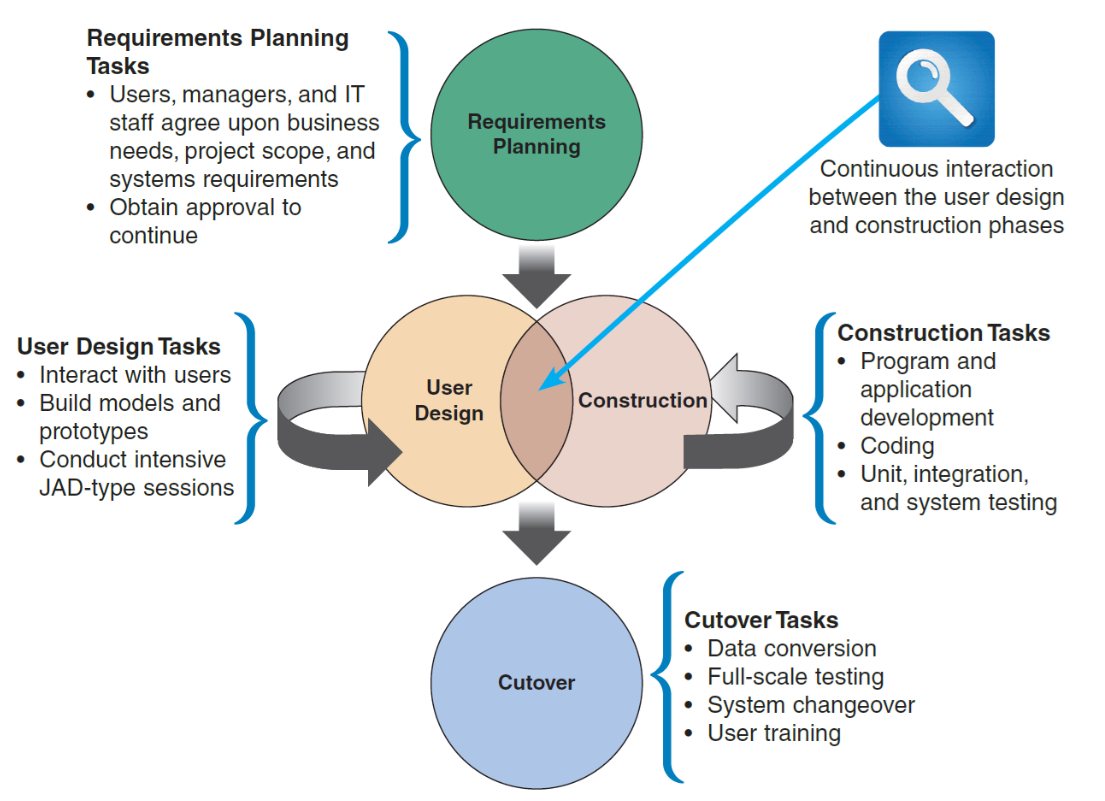
FIGURE 4-4 The four phases of the RAD model are requirements planning, user design, construction, and cutover. Notice the continuous interaction between the user design and construction phases.
[Requirements Planning]
         ↓
    [User Design] ⟷ [Construction]
         ↓           (continuous interaction)
     [Cutover]
Phase 1: Requirements Planning
Tasks:
- Users, managers, and IT staff agree upon business needs, project scope, and systems requirements
- Obtain approval to continue
Phase 2: User Design
Tasks:
- Interact with users
- Build models and prototypes
- Conduct intensive JAD-type sessions
Phase 3: Construction
Tasks:
- Program and application development
- Coding
- Unit, integration, and system testing
Note: Continuous interaction between User Design and Construction phases
Phase 4: Cutover
Tasks:
- Data conversion
- Full-scale testing
- System changeover
- User training
RAD Objectives
- Cut development time and expense
- Involve users in every phase of development
RAD Advantages
- Helps develop systems quickly with significant cost savings
- High user satisfaction due to involvement
RAD Disadvantages
- Does not emphasize strategic business needs
- Less time to develop quality, consistency, and design standards
- May sacrifice long-term maintainability for speed
Analogy: RAD is like speed-dating for software development - you quickly iterate through prototypes to find the right fit, rather than spending years planning the perfect system.
Agile Methods
Overview
- Attempt to develop a system incrementally
- Build a series of prototypes and adjust them to user requirements
- Developers revise, extend, and merge earlier versions into the final product
Key Principle: Continuous Feedback
- Each incremental step is affected by what was learned in prior steps
- Adaptation and refinement throughout the process
Analogy: Agile is like sculpting clay - you start with a rough shape and continuously refine it based on feedback, rather than trying to carve the perfect statue from marble in one attempt.
Scrum
- A specific agile framework
- Scrum sessions: Meetings with specific guidelines
- Emphasizes:
- Time blocks (sprints)
- Interaction (daily standups)
- Team-based activities
- Results in deliverable software at the end of each sprint
Agile Method Advantages
- Very flexible and efficient in dealing with change
- Frequent deliverables constantly validate the project
- Reduces risk through early and continuous testing
- High customer satisfaction
Agile Method Disadvantages
- Team members need high level of:
- Technical skills
- Interpersonal skills
- Lack of structure and documentation can introduce risk factors
- May be subject to significant scope change
- Difficult to predict final cost and timeline
Gathering Requirements
Overview
- First step in requirements engineering process
- Also called requirements elicitation or fact-finding
The Five W's and One H
Key questions to answer:
- Who? - Who are the users? Who are the stakeholders?
- What? - What does the system need to do?
- Where? - Where will the system be used?
- When? - When are functions needed? When are deadlines?
- How? - How should the system work?
Analogy: These questions are like being a detective investigating a case - you need to gather all the facts before you can solve the problem.
Gathering Requirements Through Interviews
The Interview Process
Seven-step systematic approach:
Step 1: Determine the People to Interview
- Select the right people and ask the right questions
- Consider candidates from both:
- Formal structures (org chart positions)
- Informal structures (influential users, power users)
- Decide between:
- Group interviews (efficient, but may inhibit some)
- Individual interviews (more detailed, but time-consuming)
Step 2: Establish Objectives for the Interview
- Determine areas to be discussed
- List facts that need to be gathered
- Objectives depend on the role of the person being interviewed:
- Executives: Strategic goals
- Managers: Operational needs
- End users: Daily tasks and pain points
Step 3: Develop Interview Questions
Types of Questions:
- Open-Ended Questions
- Encourage spontaneous and unstructured responses
- Example: "How do you currently process orders?"
- Use when: You want to explore and discover
- Close-Ended Questions
- Limit the response to specific answers
- Example: "Do you use the current system daily?"
- Use when: You need specific facts
- Range-of-Response Questions
- Provide a range of possible answers
- Example: "How often do you use the system? (Daily/Weekly/Monthly)"
- Use when: You want quantifiable data
Question Guidelines:
- Avoid leading questions that suggest a desired answer
- Phrase questions clearly and simply
- Sequence questions logically
Analogy: Interview questions are like different types of fishing - open-ended questions are like casting a wide net to see what you catch, while close-ended questions are like spear fishing for specific information.
Step 4: Prepare for the Interview
- Careful preparation is essential
- Limit interview to no more than one hour
- Verify in advance:
- Time
- Place
- Length
- Topics to be covered
- If questions involve documents, ask the interviewee to have samples available at the meeting
Step 5: Conduct the Interview
- Develop a specific plan for the meeting
- Begin by:
- Introducing yourself
- Describing the project
- Explaining your interview objectives
- Practice engaged listening:
- Pay full attention
- Don't interrupt
- Show you're listening (nods, notes)
- Allow the person enough time to think about the question and arrive at an answer
- After the interview, summarize the session and seek confirmation
Step 6: Document the Interview
- Note-taking should be kept to a minimum during the interview
- Too much writing disrupts flow and eye contact
- After conducting the interview, record the information quickly
- While memory is fresh
- Expand on brief notes
- Send a memo to the interviewee:
- Express appreciation
- Summarize key points
- Confirm understanding
Step 7: Evaluate the Interview
- Record the facts obtained
- Try to identify any possible biases
- Personal preferences
- Departmental politics
- Hidden agendas
- Assess the quality and completeness of information
- Identify follow-up questions needed
Gathering Requirements Using Other Techniques
1. Document Review
Purpose
- Review current documentation of the existing system
- Includes:
- User manuals
- Forms
- Reports
- Existing system documentation
- Policies and procedures
Benefits
- Provides baseline understanding
- Identifies gaps between documentation and actual practice
Analogy: Document review is like reading a restaurant's menu and recipes before redesigning it - you need to know what currently exists before making improvements.
2. Observation
Purpose
- Provides additional perspective and better understanding of system procedures
- Watch users perform their actual work
Key Points
- Should be planned in advance
- Notify users beforehand
- Don't disrupt normal operations
- Document what you observe, not what you think you see
Benefits
- Reveals unstated requirements
- Identifies workarounds and informal processes
- Shows the difference between documented and actual procedures
Analogy: Observation is like shadowing a chef in the kitchen - you learn techniques that aren't in any cookbook.
3. Questionnaires and Surveys
Purpose
- Collect data from large groups efficiently
- Gather quantitative data
Key Considerations
- Make sure questions collect the right data in a form that can be used
- Questions should be:
- Clear and unambiguous
- Appropriate for the audience
- Easy to analyze
Delivery Methods
- Traditional paper forms
- Fill-in electronic forms
- Internet or company intranet surveys
Interviews vs. Questionnaires
Interviews:
- ✅ More familiar and personal
- ✅ Can probe and clarify
- ✅ Can adapt questions based on responses
- ❌ Costly and time-consuming process
- ❌ Limited number of participants
Questionnaires:
- ✅ Reach large numbers of people
- ✅ Recipients can answer at their convenience
- ✅ Easier to analyze quantitatively
- ✅ Provides opportunity for anonymous feedback
- ❌ No opportunity to probe or clarify
- ❌ Low response rates
- ❌ May get incomplete answers
4. Brainstorming
Definition
- Small group discussion of a specific problem, opportunity, or issue
Two Types:
Structured Brainstorming
- Follow specific rules
- Each person contributes in turn
- No criticism during idea generation
- Quantity over quality initially
Unstructured Brainstorming
- Free-flowing discussion
- Anyone can contribute at any time
- Build on others' ideas
- Encourage wild ideas
Benefits
- Generates creative solutions
- Encourages participation
- Builds team consensus
Analogy: Brainstorming is like a jazz jam session - everyone contributes ideas, building on each other's creativity without judgment.
5. Sampling
Purpose
- Examine a representative subset when reviewing all items is impractical
Types of Samples:
Systematic Sample
- Selection of every item
- Example:
- Use when: Regular pattern doesn't introduce bias
Stratified Sample
- Selection from each subgroup
- Example:
- Use when: You want representation from all categories
Random Sample
- Selection where every item has equal chance
- Example:
- Use when: You want to avoid systematic bias
Objective
- Ensure sample represents the overall population accurately
- Sample size affects confidence level
Analogy: Sampling is like tasting soup - you don't need to eat the whole pot to know if it needs more salt, just a representative spoonful.
6. Research
Sources:
Online Resources
- Internet resources
- IT magazines and blogs
- Technical books and papers
Professional Activities
- Attending professional meetings
- Seminars and conferences
- Discussions with other IT professionals
- Online forums and communities
Site Visits
- Visit organizations with similar systems
- Learn from their experiences
- See best practices in action
Purpose
- Obtain background information
- Learn about technical material
- Stay current with industry trends and developments
- Learn from others' successes and failures
Gathering Requirements in Agile Projects
Agile Approach to Requirements
Key Differences from Traditional Methods
- Requirements are gathered and successively refined
- Continuous interaction with users
- Less formal documentation
- More emphasis on working software
Agile Requirements Techniques
Features
- High-level capabilities the system should provide
- Business-focused descriptions
User Stories
- Short, simple descriptions of a feature from user perspective
- Format:
- Example: "As a customer, I want to save my shopping cart so that I can complete my purchase later"
Scenarios
- Specific examples of how users will interact with the system
- Step-by-step walkthroughs
- Concrete examples of user stories in action
Storyboards
- Visual representations of user interactions
- Sketches or wireframes showing screen flows
- Help users visualize the system
Characteristics
- Variation on interviews that focuses on user-centered artifacts
- Emphasis on conversation over comprehensive documentation
- Requirements evolve as the project progresses
Analogy: Agile requirements are like a conversation at a restaurant - the chef (developer) continuously checks with you (user) about how your meal is progressing and adjusts accordingly, rather than taking your order once and disappearing into the kitchen.
Representing Requirements
Principles for Documentation
Four key principles:
- Record information as soon as it is obtained
- Don't rely on memory
- Details fade quickly
- Use the simplest recording method
- Don't over-complicate
- Match the method to the audience
- Record findings in a way that can be understood by someone else
- Clear and unambiguous
- Include context
- Organize documentation so related material is located easily
- Logical structure
- Good indexing and cross-references
Representation Techniques
1. Natural Language
Characteristics
- Vast majority of requirements are represented using unstructured natural language
- Written in plain English (or appropriate language)
- Most accessible to all stakeholders
Guidelines
- Be clear and concise
- Avoid jargon when possible
- Use consistent terminology
- Number requirements for reference
Advantages
- Everyone can understand
- No special training needed
- Flexible
Disadvantages
- Can be ambiguous
- May be imprecise
- Difficult to verify completeness
2. Diagrams
Purpose
- Graphical methods using nontechnical language
- Represent the system at various stages
Functional Decomposition Diagrams (FDD)
Definition: Top-down representation of a function or process
Structure:
- Shows hierarchy of functions
- Breaks complex processes into smaller sub-processes
- Multiple levels of decomposition
Example - Library System:
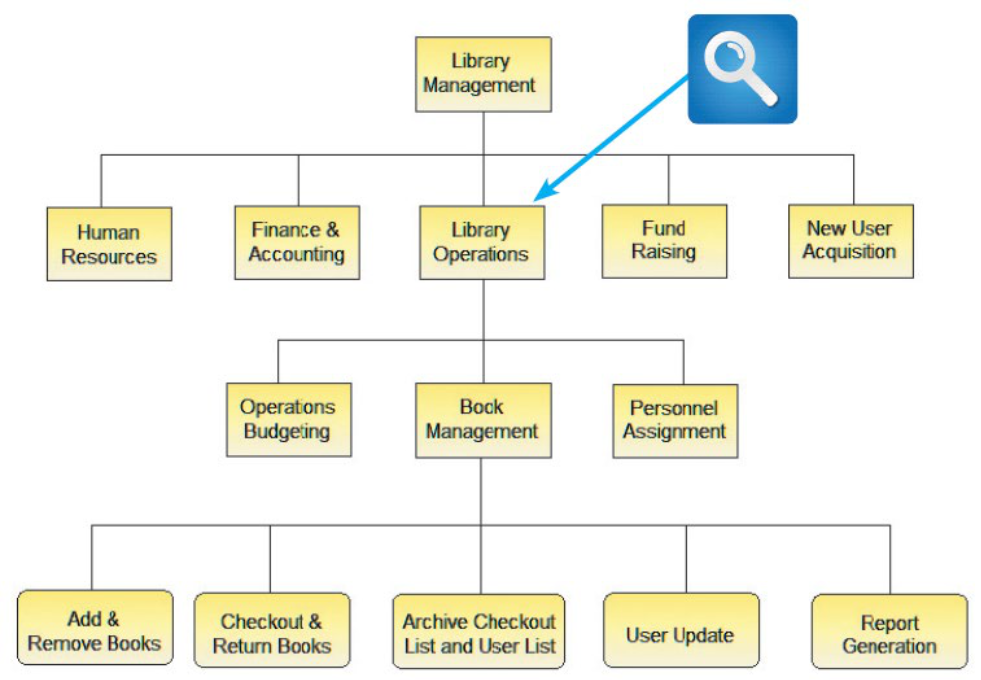
FIGURE 4-15 This Visible Analyst FDD shows a library system with five top-level functions. The Library Operations function includes two additional levels of processes and sub-processes. Source: Screenshot used with permission from Visible Systems Corporation.
Library Management
├── Human Resources
├── Finance & Accounting
├── Library Operations
│   ├── Operations Budgeting
│   ├── Book Management
│   │   ├── Add & Remove Books
│   │   ├── Checkout & Return Books
│   │   ├── Archive Checkout List and User List
│   │   ├── User Update
│   │   └── Report Generation
│   └── Personnel Assignment
├── Fund Raising
└── New User Acquisition
Analogy: FDD is like a company org chart - it shows how the big picture breaks down into departments, teams, and individual roles.
Business Process Diagrams
Purpose: Represent one or more business processes
Business Process Modeling Notation (BPMN): Chapter 3 - Requirement Engineering Part I
- Includes various shapes and symbols
- Represents:
- Events: Things that happen
- Processes: Work being performed
- Workflows: Flow of control
- Shows:
- Start and end points
- Decision points
- Parallel activities
- Sequence flows
Data Flow Diagrams (DFD)
Purpose: Show how the system stores, processes, and transforms data
Key Elements:
- Processes: Transform data
- Data stores: Where data is held
- Data flows: Movement of data
- External entities: Sources and destinations of data
Analogy: DFD is like a plumbing diagram for data - it shows where data comes from, how it flows through the system, where it's stored, and where it goes.
3. Models
Characteristics
- Provide more formal representation of system requirements
- Abstract representations of system
- Can be analyzed for consistency and completeness
Unified Modeling Language (UML)
Definition: Standardized modeling language for object-oriented systems
Common UML Diagrams:
Use Case Diagram
- Purpose: Visually represents the interaction between users and the information system
- Elements:
- Actors: Users or external systems
- Use cases: Functions or services
- Relationships: How actors interact with use cases
- System boundary: Scope of the system
When to use: Early stages to capture functional requirements
Sequence Diagram
- Purpose: Shows timing of interactions between objects
- Elements:
- Objects: Participants in the interaction
- Lifelines: Object existence over time
- Messages: Communication between objects
- Activation boxes: When objects are active
When to use: Detailed design to show specific scenarios
Analogy: If use case diagrams are like a map showing all possible routes between cities, sequence diagrams are like turn-by-turn GPS directions for a specific journey.
Validating and Verifying Requirements
Requirements Validation and Verification (V&V)
Purpose
Concerned with demonstrating that the requirements define the system that the customer really wants
Two Key Activities:
1. Validation
Question: Are the correct requirements stated?
Focus:
- Right problem being solved?
- Requirements meet business needs?
- Stakeholders agree these are the right requirements?
Techniques:
- Requirements reviews with stakeholders
- Prototyping
- User acceptance criteria
- Test case development
Analogy: Validation is like confirming your friend's birthday wish list matches what they actually want - are these the right gifts?
2. Verification
Question: Are the requirements stated correctly?
Focus:
- Requirements clear and unambiguous?
- Requirements consistent with each other?
- Requirements complete?
- Requirements testable?
Techniques:
- Formal inspections
- Consistency checking
- Completeness checking
- Traceability analysis
Analogy: Verification is like proofreading the birthday wish list - is it written clearly enough that anyone can read and understand it?
Key Differences
| Aspect | Validation | Verification |
|---|---|---|
| Question | "Are we building the right product?" | "Are we building the product right?" |
| Focus | Correctness of requirements | Correctness of representation |
| Timing | Throughout project | After each documentation phase |
| Involves | Customers/users heavily | Development team primarily |
V&V Benefits
- Reduces costly rework
- Improves customer satisfaction
- Decreases project risk
- Ensures common understanding
Tools for Requirements Engineering
Overview
All requirements engineering activities can be helped through the judicious use of tools
Types of Tools
1. Productivity Software
Personal Information Manager (PIM)
- Schedule interviews and meetings
- Track contacts
- Manage tasks and to-dos
- Set reminders
Word Processing Software
- Document requirements
- Create reports
- Format documentation
- Track changes
Spreadsheet Software
- Organize and analyze data
- Create requirement matrices
- Track requirement status
- Perform calculations and analysis
Database Management Software
- Store requirements systematically
- Query and filter requirements
- Generate reports
- Maintain traceability
Presentation Graphics Software
- Create visual presentations
- Communicate findings to stakeholders
- Present alternatives
- Facilitate decision-making
2. Collaboration Software
Purpose
- Enable team communication
- Share documents
- Coordinate activities
- Support distributed teams
Examples
- Project management tools
- Document repositories
- Video conferencing
- Shared workspaces
- Version control systems
3. Graphic Modeling Tools
Purpose
- Create professional diagrams
- Maintain consistency
- Support multiple diagram types
- Enable analysis
Examples
- Visible Analyst: CASE tool for various diagrams
- Microsoft Visio: General diagramming
- Enterprise Architect: UML modeling
- Lucidchart: Cloud-based diagramming
- Draw.io: Free diagramming tool
Capabilities
- Functional decomposition diagrams
- Data flow diagrams
- UML diagrams (use case, sequence, class, etc.)
- Business process diagrams
- Entity-relationship diagrams
Benefits
- Professional appearance
- Easy to modify
- Maintain diagram consistency
- Repository for reusable elements
- Support impact analysis
Summary
Systems Analysis Phase Overview
Components
- Requirements modeling
- Data and process modeling
- Consideration of development strategies
Objective
- Understand the proposed project
- Ensure it will support business requirements
- Build a solid foundation for the systems design phase
Popular Team-Based Approaches
Joint Application Development (JAD)
- Collaborative approach with active user participation
- Produces accurate requirements and strong commitment
Rapid Application Development (RAD)
- Four-phase life cycle
- Reduces development time
- Relies on prototyping and user involvement
Agile Methods
- Incremental development
- Continuous feedback
- Flexible and efficient with change
Requirements Gathering Process
Primary Techniques
- Interviewing: Direct interaction with stakeholders
- Document review: Examining existing documentation
- Observation: Watching users perform tasks
- Questionnaires and surveys: Collecting data from large groups
- Sampling: Examining representative subsets
- Research: Learning from external sources
Requirements Representation
Systems analysts use various tools and techniques:
- Natural language: Written requirements
- Diagrams: FDD, BPD, DFD
- Models: UML (use case diagrams, sequence diagrams)
Tools Support
All requirements engineering activities can be supported by:
- Productivity software
- Collaboration tools
- Graphic modeling tools
- Specialized CASE tools
Critical Success Factors
For successful requirements engineering:
- Involve users actively and continuously
- Document requirements clearly and systematically
- Validate and verify throughout the process
- Use appropriate tools to support activities
- Manage change through the project lifecycle
- Communicate effectively with all stakeholders
Key Takeaways
Remember: Requirements engineering is iterative, not linear. You'll cycle through gathering, representing, and validating activities multiple times throughout a project.
Critical Insight: The cost of fixing a requirements error increases exponentially as the project progresses. Investing time in good requirements engineering saves money and time later.
Best Practice: Always validate requirements with actual users, not just their managers. End users often have insights that managers may miss.