Outline
- Physical vs. Digital Identity
- Identification, Authentication, Authorization
- User Authentication
- Electronic User Authentication
- Password-Based Authentication
- Token-Based Authentication
- Biometric Authentication
- Remote User Authentication
- User Authentication Security Issues
- Practical Applications
Physical Identity
What is Physical Identity?
- Physical identity refers to real-world attributes of:
- People
- Things
- Money
- Places
- Transportation
- etc.
How We Identify Physical Things
- People are unique, non-duplicable individuals - but how well can we identify someone in real life?
- Identification is never perfect
- Authentication: Three Ways
- Something you are: Biometrics (fingerprints, face recognition)
- Something you have: ATM card, Passport, ID card
- Something you know: Password, PIN number
Analogy: Think of authentication like entering a secure building. You might need your ID badge (something you have), enter a PIN code (something you know), and scan your fingerprint (something you are).
Digital Identity
Definition
-
Digital identity is information on an entity used by computer systems to represent an external agent
-
An agent may be:
- Person
- Organization
- Computer
- Application
- Device
-
ISO/IEC 24760-1 defines identity as "a set of attributes related to an entity"
-
We use the term "digital identity" to describe the personal/individual presents across all the digital spaces that he/she is represented in
Digital Identity is a Set of Attributes
- Digital Identity is a set of attributes of a person or company in a specific domain
Examples of Digital Identities
An entity has multiple Digital Identities:
- Email account (private and corporate)
- Social network accounts (Facebook, Twitter, LinkedIn...)
- E-Commerce identities (Amazon, eBay)
- Banking identity
- Account to purchase flights or trains
- SIM phone
- E-Passport
- Health cards
- National ID card
Structure of Digital Identity
Digital Identity consists of:
- Attributes
- Identifiers
One Person, Many Digital Identities
e-Commerce
- Amazon, PayPal
e-Banking
- Various bank accounts, Visa, Credit Suisse
Identity Providers
- OpenID, VeriSign, Thawte
e-Government
- Voting ID
Travel
- Expedia, Delta
Professional Communication
- Monster, LinkedIn, Google
Private Communication
- Google, Verizon, Match.com
Games & Fun
- YouTube, Facebook, TripAdvisor
Analogy: Just like you have different personas in different social contexts (professional at work, casual with friends, formal with family), you have different digital identities for different online services.
Identity and Access Management (IAM)
The Four Pillars of IAM
IAM is built on four fundamental pillars (the four A's of IAM):
1. Authentication
- Authentication is the process of verifying a user's identity
- Methods include:
- Passwords
- Biometrics (facial recognition scanning)
- Multi-factor authentication (MFA)
2. Authorization
- Once a user's identity is confirmed, the next step is determining what information they are allowed to access and what actions they can take
- Authorization methods:
- RBAC (Role-Based Access Control): Restricts network access based on a person's role or job in an organization
- ABAC (Attribute-Based Access Control): More flexible and can be based on specific user characteristics
3. Administration
- Administration focuses on managing users inside the system from creation to deletion
- Includes:
- Granting access during onboarding
- Managing changes in roles
- Revoking access when a user leaves the company
4. Auditing
- To ensure compliance and security within a network, user activity must be tracked and monitored
- Auditing can:
- Detect suspicious behavior
- Enforce security policies
- Alert administrators to potential threats
- Ensure accountability and compliance with security regulations
Analogy: IAM is like the security system of a company building. Authentication is checking your ID at the entrance, authorization is determining which floors you can access, administration is managing who gets which access cards, and auditing is reviewing security footage to ensure no unauthorized access occurred.
Digital Identity Limitations
- In the real world:
- Identity need not be human
- Limited by authentication factors
- Authentication inherently more difficult on the Internet
Why is Digital Identity Management Important?
- Inventory: Keep track of all digital identities
- Access control: Control who can access what
Digital Identity Authentication
Digital Identity Authentication uses multiple methods:
- Mobile Soft Token
- Device Authentication
- Grid/eGrid
- OTP Tokens
- Password
- Transaction Signing
- Transaction Certificates
- Mutual Authentication
- Biometrics
- Software Authentication Platform
Risks and Consequences
Risks
- Identity theft
- Impersonation
- Bank fraud (unauthorized transfers through mobile banking, ATM, and POS)
- Credit card fraud (unauthorized withdrawals on Internet, from ATM and POS)
- Mail identity theft
- Fraud to the State (taking advantage of special benefits without having the rights)
Consequences
- Unauthorized withdrawal of money
- Reputation damage for misappropriation of identity
- Economic and reputation damage for the organization that manages the identity
- Defamation
- Attribution of responsibility
- Loss of confidential information
- Violation of electronic correspondence
- Computer intrusion
- Violation of privacy
Real-World Examples
- 2012: Hackers steal data of 1.5 million Visa and MasterCard customers in North America
- 2011: Theft of credit card details of up to 77 million Sony users with estimated damage of $172 million
- 2010: Bank tellers, retail workers, waiters and alleged criminals steal data from credit cards to a value of $13 million
- 2009: Data robbery of more than 130 million credit and debit card numbers from Hannaford Brothers, 7-Eleven and two other companies
2025 Identity Theft Statistics
- The FTC received 1.4 million identity theft reports (25% of total 5.7 million cases)
- Identity theft is classified as a specific category separate from fraud
Analogy: Identity theft is like someone stealing your house keys and pretending to be you. They can access everything you own and cause damage while pretending to be you.
Identification
Methods of Identification
- Identification badge (Staff card, Student card)
- User ID/Password
- Account Number/PIN
- MAC Address
- IP Address
- Email Address
- Radio Frequency Identification (RFID)
Three Essential Security Characteristics
- Uniqueness
- Non-descriptiveness
- Secure issuance
Identification, Authentication, Authorization
Simple Summary
- Identification provides uniqueness
- Authentication provides validity
- Authorization provides control
Detailed Explanation
- Identification is a point of assignment and association to a user entity within a system
- Digital identification (such as a certificate or one-time session identifier) is used to identify system, network or application
Steps for Access Control
The access control process follows these steps:
- Identification - Who are you?
- Authentication - Prove it!
- Authorization - What can you do?
- Accountability - What did you do?
Access Control Review
Identification
- Subjects supplying identification information
- Username, user ID, account number
Authentication
- Verifying the identification information
- Passphrase, PIN value, biometric, one-time password, password
Authorization
- Using criteria to make a determination of operations that subjects can carry out on objects
- "I know who you are, now what am I going to allow you to do?"
Accountability
- Audit logs and monitoring to track subject activities with objects
Strong Authentication
-
Strong authentication contains two out of these three methods:
- Something a person knows
- Something a person has
- Something a person is
-
Using a biometric system by itself does not provide strong authentication because it provides only one out of the three methods
-
For a strong authentication process to be in place, a biometric system needs to be coupled with a mechanism that checks for one of the other two methods
- Example: Many times the person has to type a PIN number into a keypad before the biometric scan is performed
Analogy: Strong authentication is like having both a key and a code to open a safe. Using just one method is like having only a key - if someone steals it, they can open the safe. With two methods, even if someone steals your key, they still need the code.
Mutual Authentication
- Mutual authentication is when the two communicating entities must authenticate to each other before passing data
- An authentication server may be required to authenticate to a user's system before allowing data to flow back and forth
Mutual SSL Authentication
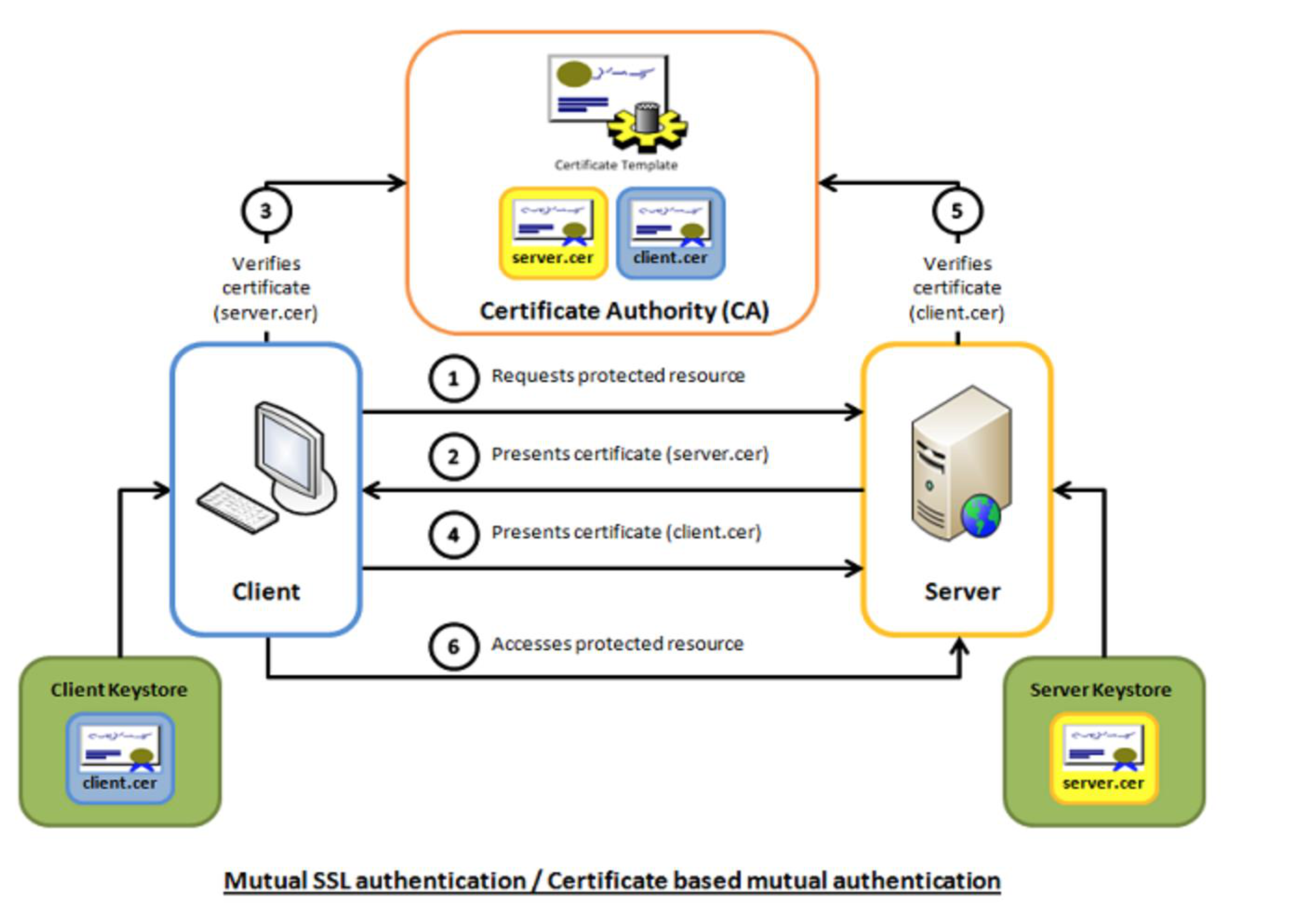
Process:
- Verifies certificate (server.cer)
- Client requests protected resource
- Verifies certificate (client.cer)
- Client accesses protected resource
Analogy: Mutual authentication is like two secret agents meeting - both need to show their credentials to each other before they can share information, not just one showing credentials to the other.
User Authentication
Fundamental Security Building Block
- Basis of access control
- User accountability
Definition
- The process of verifying an identity claimed by or for a system entity
Authentication Has Two Steps
- Identification: Specify a claimed identifier
- Verification: Validate bind entity (person) and the claimed identifier
User Authentication Process
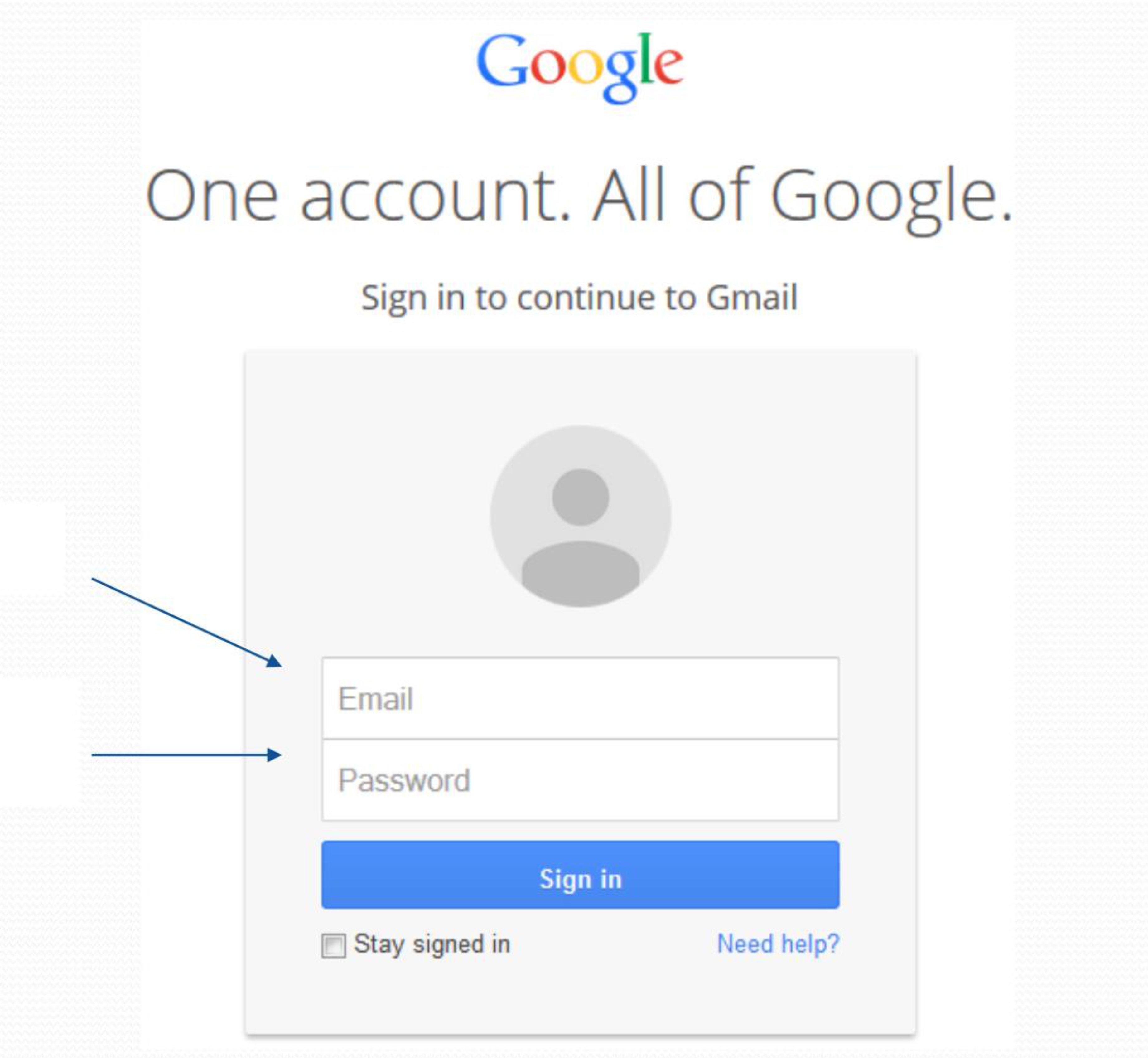
Two Steps: Identification and Verification
Identification Step
- Presenting an identifier to the security system
- Identifiers should be assigned carefully, because authenticated identities are the basis for other security services, such as access control service
Verification Step
- Presenting or generating authentication information that corroborates the binding between the entity and the identifier
E-User Authentication
- NIST defines E-user authentication as "the process of establishing confidence in user identities that are presented electronically to information systems"
- It is used to determine authorization functions:
- Locally across LAN
- Across an open network (Internet)
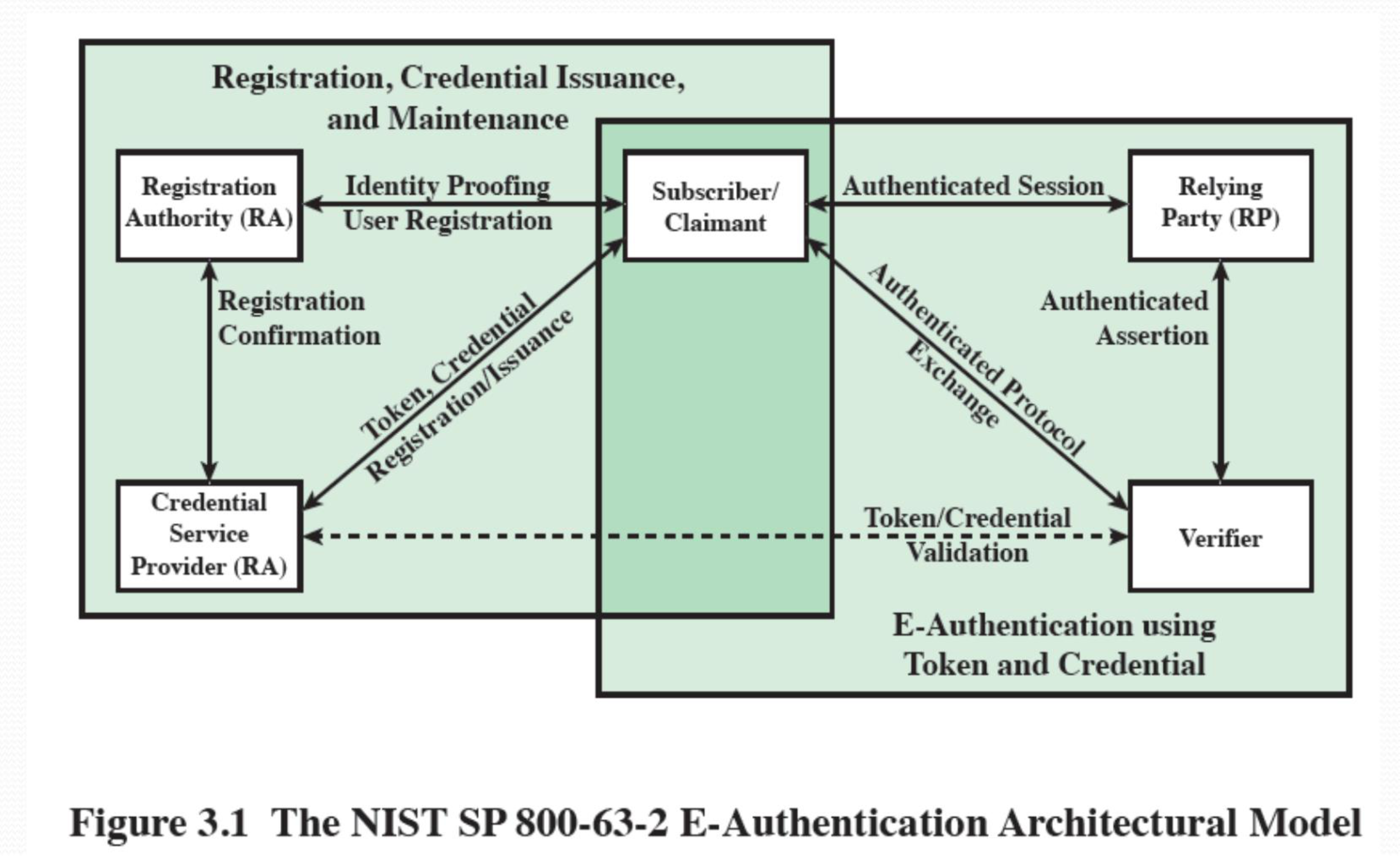
Registration, Credential Issuance, and Maintenance
NIST SP 800-63-2 E-Authentication Architectural Model
Components:
- Registration Authority (RA): Handles registration and identity proofing
- Subscriber/User/Claimant: The entity being authenticated
- Credential Service Provider (CSP): Issues tokens/credentials
- Verifier: Validates tokens/credentials
- Relying Party (RP): The service being accessed
Process Flow:
- Registration → Identity Proofing
- Registration Confirmation
- Credential/Token issuance
- Token/Credential validation
- Authenticated Session
- Authenticated Assertion
User Authentication Methods
4 Ways to Authenticate a User's Identity
1. Something You Know
- Examples: Password, PIN, or answers to a prearranged set of questions
- Characteristic: Knowledge-based
2. Something You Own
- Examples: Cryptographic keys, electronic keycards, smart cards, and physical keys
- Called: Token
3. Something You Are (Static Biometrics)
- Examples: Recognition by fingerprint, retina, and face
- Characteristic: Physical attributes
4. Something You Do (Dynamic Biometrics)
- Examples: Recognition by voice pattern, handwriting characteristics, and typing rhythm
- Characteristic: Behavioral patterns
หรือจริง ๆ จะ Add factor ก็ได้ เช่น Location ที่ผู้ใช้อยู่ไรงี้ ว่าต้องอยู่ตรงนี้เท่านั้นถึงจะ log in ได้
Summary of Authentication Means
- Knows - e.g. password, PIN
- Possesses - e.g. key, token, smartcard
- Is (static biometrics) - e.g. fingerprint, retina
- Does (dynamic biometrics) - e.g. voice, handwriting
- Each way can be used alone or combined with others
- Each way has its own strength and weakness
- Have a variety of problems:
- False positive
- Not but in: Shouldn’t be in the set but it included.
- False negative
- Yes but out: Should be in, but excluded.
- Cost
- Acceptance
- Convenience
- False positive
Analogy: Think of these four methods like different ways to prove you own a house: showing the deed (something you know - password), showing your key (something you have - token), showing your face to a security camera (something you are - biometric), or demonstrating your unique way of unlocking the door (something you do - behavioral).
Password-Based User Authentication
Overview
- Based on what a user knows
- Widely used
- User provides name/login and password
- System compares password with the saved one for specified login
Functions
- Authenticate the ID of user logging in
- Verify that the user is authorized to access system
- Determines the user's privileges
Example: JCT's e-learning system
Password Vulnerabilities
1. Offline Dictionary Attack
- Attack: Gain access to pwd-file, compare pwd-hashes with commonly used pwd-hashes
- Counter Measure:
- Prevent unauthorized access to pwd-file
- Intrusion detection
- Rapid re-issuance of passwords
2. Specific Account Attack
- Attack: Guess password targeting at a specific account
- Counter Measure:
- Account lockout mechanism
3. Popular Password Attack
- Attack: Guess popular password against wide range of IDs
- Counter Measure:
- Policy not allow to use simple password
- Scanning IP address of authentication request
4. Password Guessing Against a Single User
- Attack: Try to gain knowledge about a user, system password-policy and guess the password
- Counter Measure:
- Training
- Password-policy
- Difficult to guess password
5. Workstation Hijacking
- Attack: Take over unattended workstation
- Counter Measure:
- Log off or lock workstation with a password
- Auto-logout
- Intrusion detection
6. Exploiting User Mistakes
- Attack: Writing password, share password, social engineering
- Counter Measure:
- Training
- Intrusion detection
- Combine with other authentication mechanism
7. Exploiting Usage of Multiple Passwords
- Attack: Share password among different network devices
- Counter Measure:
- Policy not allow share passwords
8. Electronic Monitoring
- Attack: Eavesdropping for passwords communicated across network, e.g., in remote login
- Counter Measure:
- Secure password communication
- Secure protocol
Analogy: Password vulnerabilities are like different ways a thief might try to break into your house - through the front door (guessing), through a window (hijacking), or by bribing someone inside (social engineering). Each requires different security measures.
Password Cracking of User-Chosen Passwords
Traditional Approach
Dictionary Attacks
- Try each word and obvious variants in a large dictionary against hashes in the password file
Rainbow Table Attacks
- Pre-compute tables of hash values for all salts
- A very big table of hash values
- Example: Using 1.4 GB table, 99.9% of alphanumeric Windows passwords can be cracked in 13.8 sec
- Not feasible if larger salt values are used
Password File with Salt
How Salt Works
(a) Loading a new password:
User ID + Password → Salt → Slow hash function → Hash code
                            ↓
                    Password File: UserID | Salt | Hash code
(b) Verifying a password:
User ID + Password → Salt (from file) → Slow hash function → Hash code
                                                              ↓
                                                         Compare → Match?
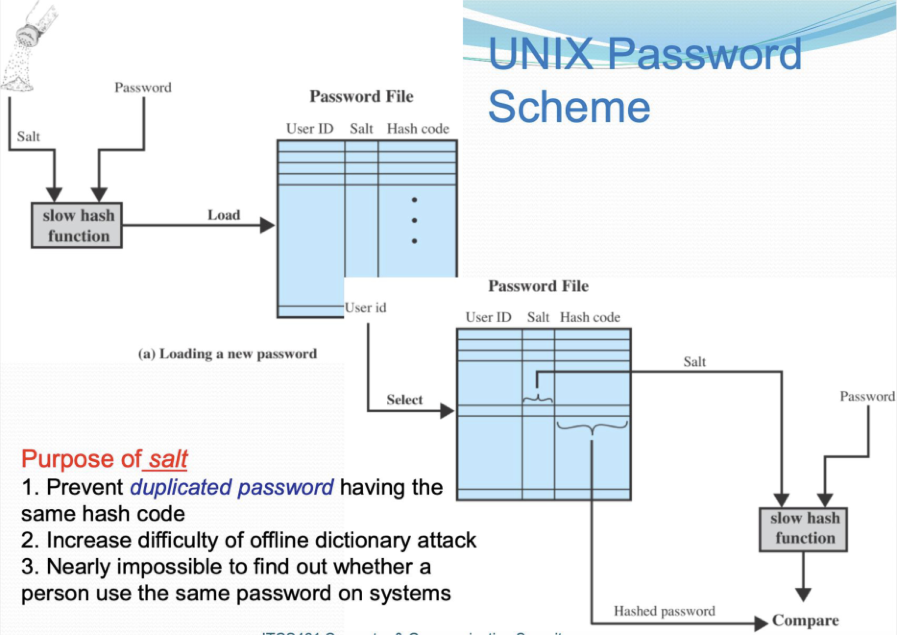
Purpose of Salt
- Prevent duplicated passwords from having the same hash code
- Increase difficulty of offline dictionary attack
- Nearly impossible to find out whether a person uses the same password on multiple systems
Password Hash Salting Process
User Password + Salt Added → Hashing Algorithm → Hashed Password + Salt (Stored)
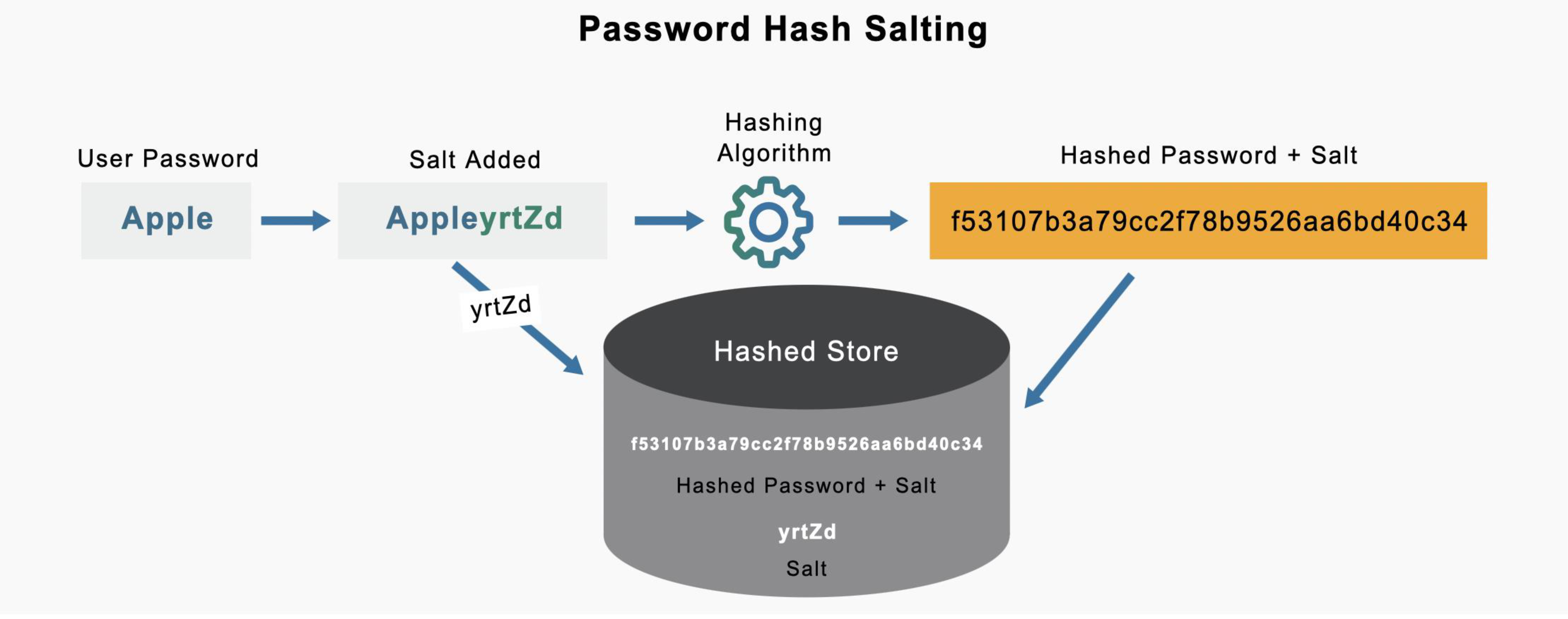
Example:
- Password: (user password)
- Salt:
yrtZd - Hashed:
f53107b3a79cc2f78b9526aa6bd40c34 - Stored: Hash + Salt
Problem with Same Passwords
| Password | p4s5w3rdz | p4s5w3rdz | p4s5w3rdz | p4s5w3rdz |
|---|---|---|---|---|
| Salt | - | - | et52ed | ye5sf8 |
| Hash | f4c31aa | f4c31aa | 1vn49sa | Z32i6t0 |
Notice: Without salt, same passwords have same hash. With different salts, same passwords have different hashes.
Analogy: Salt is like adding a unique ingredient to each person's recipe. Even if two people make the same dish (password), the unique ingredient (salt) makes the final result (hash) different, so you can't tell they started with the same recipe.
Password File Access Control
Strategy
- Block offline guessing attacks by denying access to encrypted passwords
- Make available only to privileged users
- Often using a separate shadow password file
Still Have Vulnerabilities
- Exploit OS bug
- Accident with permissions making password file readable
- Users use the same password on other systems
- Access from unprotected backup media
- Sniff passwords in unprotected network traffic
Password Selection Strategies
Trade-off
- Balance between guessable and random passwords
- Goal: Eliminate guessable passwords
- But, it should still be easy for users to remember
Approaches
- User Education
- Be told the importance + guideline
- Computer-Generated Passwords
- Generate pronounceable syllable password
- Reactive Password Checking
- System periodically runs to check for guessable passwords
- Proactive Password Checking
- Allow users to select password
- System will check and reject if it is not allowable
Strong Password Policy
From Microsoft Recommendation
A strong password is:
- At least 12 characters long but 14 or more is better
- A combination of:
- Uppercase letters
- Lowercase letters
- Numbers
- Symbols
- Not a word that can be found in a dictionary or the name of a person, character, product, or organization
- Significantly different from your previous passwords
Analogy: A strong password is like a complex lock with multiple tumblers - the more unique components it has, the harder it is to pick.
Six Types of Password Attack
Reference: https://www.onelogin.com/learn/6-types-password-attacks
- Brute Force Attack
- Dictionary Attack
- Phishing
- Rainbow Table Attack
- Credential Stuffing
- Keylogger
Traditional Session-Based Authentication
How It Works
- User logs in
- Server creates a session
- Session ID stored on server
- Browser stores session cookie
Limitations
- Server-side state ✗
- Poor scalability ✗
- Hard to use with APIs & mobile apps ✗
Token-Based Authentication
Definition
- Token-based authentication is a protocol which allows users to verify their identity, and in return receive a unique access token
- During the life of the token, users then access the website or app that the token has been issued for, rather than having to re-enter credentials each time
- Auth tokens work like a stamped ticket
- User retains access as long as the token remains valid
- Once the user logs out or quits an app, the token is invalidated
Advantages
- Token-based authentication is different from traditional password-based or server-based authentication techniques
- Tokens offer a second layer of security
- Administrators have detailed control over each action and transaction
Analogy: Token-based authentication is like getting a wristband at an amusement park. You show your ticket once at the entrance, get a wristband (token), and then you can access all rides (resources) by showing your wristband without having to show your original ticket every time.
JWT - JSON Web Tokens
Overview
- JWTs can be sent as:
- URLs
- POST limits
- HTTP headers
- Can be imparted quickly due to small size
- To avoid various database requests, the JWT contains all the necessary information about the component
- To verify the token, the JWT recipient doesn't need to contact the server
JWT Structure
A JWT is made from three segments:
1. Header
- Contains information about:
- The kind of token
- The encryption computation that was used
2. Payload
- Contains authorization capabilities
- Additional information about the client or record
- Contains claims (statements about the user)
3. Signature
- A signature that consolidates a cryptographic key
- Can be used to support the payload's validity
Example of a JWT
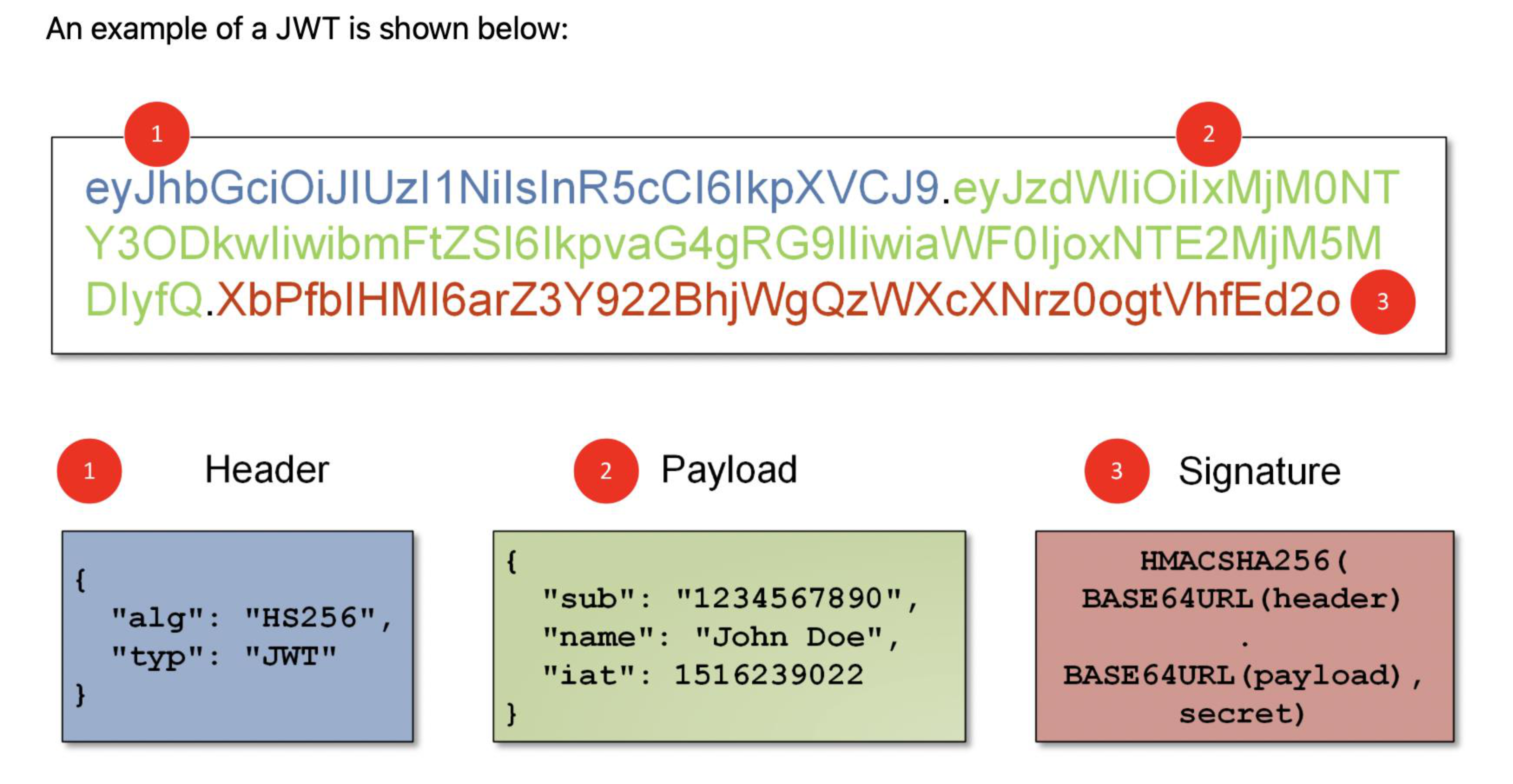
eyJhbGciOiJ!UzI1NilsiInR5cCI6IkpXVCJ9.eyJZdWIiOilxMjNOT
Y30DkwliwibmFtZS|6lkpvaG4gRG9lliwiaWFOljoxNTE2MjM5M
DiyfQ.XbPfblHMI6arZ3Y922BhijWgQzWXcXNrz0ogtVhfEd2o0
Breaking it down:
@ Header . @ Payload . @ Signature
Payload Example:
{
  "sub": "1234567890",
  "name": "John Doe",
  "iat": 1516239022
}
JWT Authentication Flow
- User logs in with credentials
- Server verifies credentials
- Server issues JWT
- Client stores JWT
- Client sends JWT with each request
- Server verifies JWT signature
Credentials = อะไร ความหมายเต็ม ๆ
Role of HMAC in JWT
HMAC Ensures:
- The token has not been modified (Integrity)
- The token was issued by a trusted server (Authenticity)
- The payload cannot be tampered with by clients
HMAC Usage in JWT
HMAC is used in the Signature part of the JWT
Header | Payload
   \      /
    Base64
       |
       v
HMAC-SHA256(secret key)
       |
       v
   Signature
Verification Logic
Formula:
Process:
- Server receives JWT
- Extracts Header + Payload
- Recomputes HMAC using the same secret key
- HMAC ต้องใช้ Secret Key ด้วยนะ
- Compares signatures
Analogy: HMAC is like a tamper-evident seal on a package. If someone tries to open and modify the contents, the seal breaks, and you know the package has been tampered with.
JWT Token Based Authentication
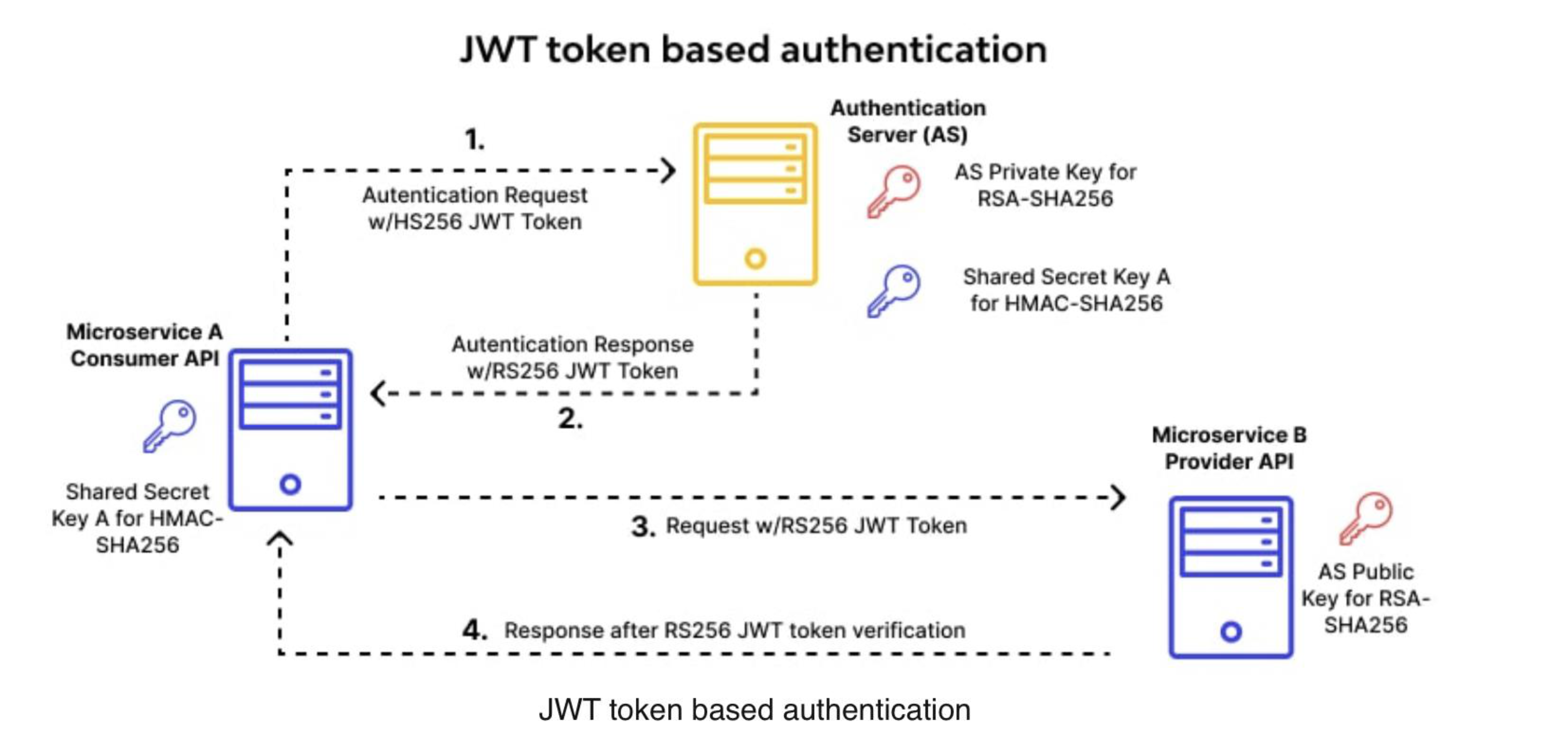
Authentication Server (AS)
1. Authentication Request
   → AS Private Key for RSA-SHA256
   → w/HS256 JWT Token
   → Shared Secret Key A for HMAC-SHA256

2. Authentication Response
   ← w/RS256 JWT Token
Microservice B Provider API
3. Request w/RS256 JWT Token
   → Shared Secret Key A for HMAC-SHA256
   → AS Public Key for RSA-SHA256

4. Response after RS256 JWT token verification
Key Advantage of JWT
Stateless Authentication
- Server does NOT store session data
- Each request is self-contained
Ideal For:
- REST APIs
- Microservices
- Cloud systems
- Mobile apps
JWT in Real Systems
- OAuth 2.0
- OpenID Connect
- Cloud APIs
- Mobile backends
- Microservice gateways
Analogy: JWT stateless authentication is like a self-contained passport. Instead of the border control (server) keeping a record of everyone who passed (session storage), your passport (JWT) contains all the information needed to verify you, so the border control just checks the passport itself.
Hardware Token
Description
- A hardware token is a small device, resembling a credit card or keychain fob, that is used for authentication purposes
Features
- Typically contains a certificate or unique identifier
- May have additional features:
- LCD display
- Keypads
- Biometric readers to enhance security
Examples
- RSA SecurID
- Various USB tokens
- Keychain tokens
Analogy: A hardware token is like a physical key that generates a unique code that changes every minute, making it nearly impossible for someone to copy or reuse.
Smart Card
Characteristics
- Credit-card like form factor
- Has own processor, memory, I/O ports
- Wired or wireless access by reader
- May have crypto co-processor
- Memory types: ROM, EEPROM, RAM
- Execute protocol to authenticate with reader/computer
- Also available as USB drive (flash memory)
Physical Dimensions
- Width: 85.6 mm
- Height: 54 mm
Typical Chip Layout
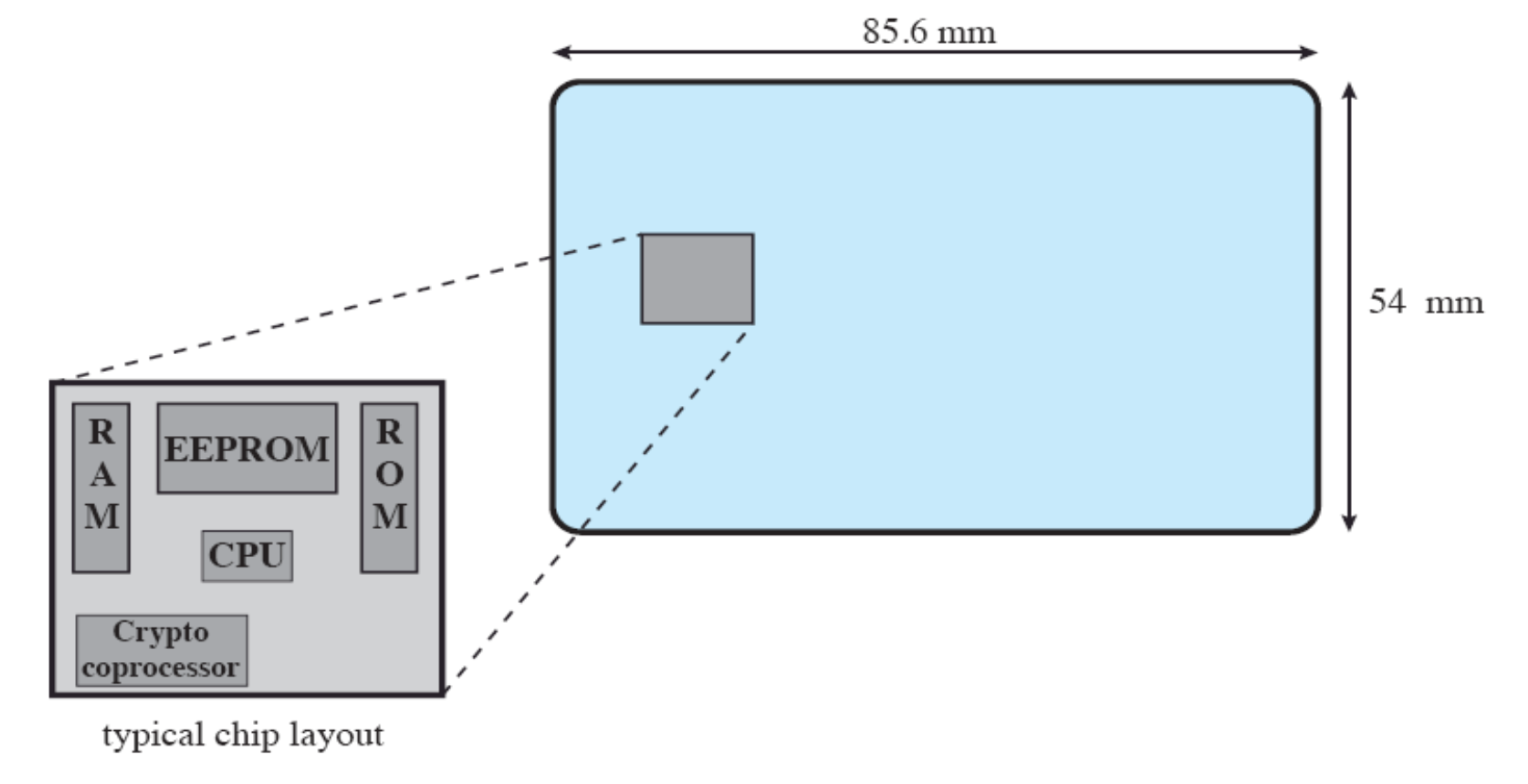
Components:
- ROM (Read-Only Memory): Stores permanent data
- e.g., card number, cardholder's name
- EEPROM (Electrically Erasable Programmable ROM): Holds application data and programs
- Some data that may vary
- RAM (Random Access Memory): Holds temporary data generated when executing application
- Coprocessor: Handles cryptographic operations
Note: Dimensions conform to ISO standard 7816-2
Smart Card Activation
Smart Card/Reader Exchange Process
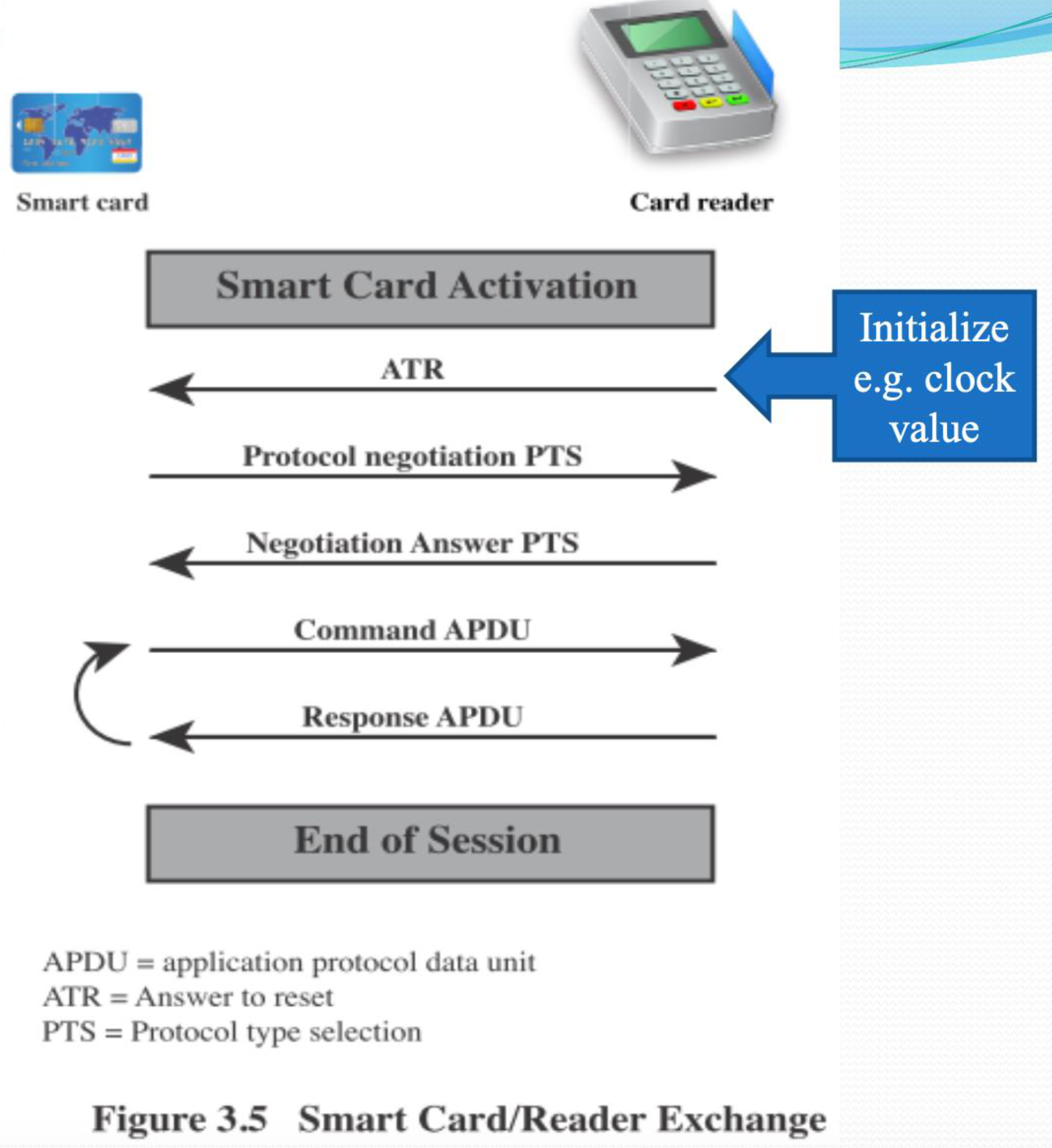
Smart card                          Card reader
    |                                    |
    | <------ Initialize (ATR) -------> |  e.g. clock value
    |                                    |
    | <--- Protocol negotiation (PTS) -- |
    |                                    |
    | <-- Negotiation Answer (PTS) ----- |
    |                                    |
    | <------ Command APDU -----------> |
    |                                    |
    | <------ Response APDU ------------ |
    |                                    |
    | <------ End of Session ----------> |
Abbreviations:
- APDU: Application Protocol Data Unit
- ATR: Answer to Reset
- PTS: Protocol Type Selection
Analogy: Smart card activation is like a formal handshake protocol between two diplomats - they first introduce themselves (ATR), agree on language to speak (PTS), then exchange messages (APDU).
Electronic Identity Cards (eID)
Characteristics
- Has human-readable data printed on its surface
- Can serve the same purposes as other national ID cards and similar cards such as a driver's license
- Provides access to government and commercial services
Data on eID
Front of Card:
- Personal data
- Document number
- Card access number (CAN)
- Machine readable zone (MRZ)
- Photo
- Birth date
Benefits
- Can provide stronger proof of identity
- Can be used in a wider variety of applications
- In effect, it is a smart card that has been verified by the national government as valid and authentic
Electronic Functions and Data for eID Cards
Offline Functions
ePass (Mandatory)
- Offline inspection systems read the data
- MRZ (Machine Readable Zone)
- Family and given names
- Date and place of birth
- Address and community ID
- Expiration date
eID PIN (Optional)
- Authorized fingerprint for offline biometric identity verification
- Reserved for government data access
- Online applications read the data or access eID functions as authorized
- Offline inspection systems read the data and update the address and community ID
Online Functions
eID PIN
- Verification: Identity verification
- Restricted identification: Pseudonymous
- Revocation query: Certificate authority
eSign (Optional)
- Citizens make electronic signature with eSign PIN
- A certification authority installs the signature certificate
- Electronic Signature key
- X.509 certificate
Abbreviations:
- CAN: Card Access Number
- MRZ: Machine Readable Zone
- PACE: Password Authenticated Connection Establishment
- PIN: Personal Identification Number
User Authentication with eID
Process Flow
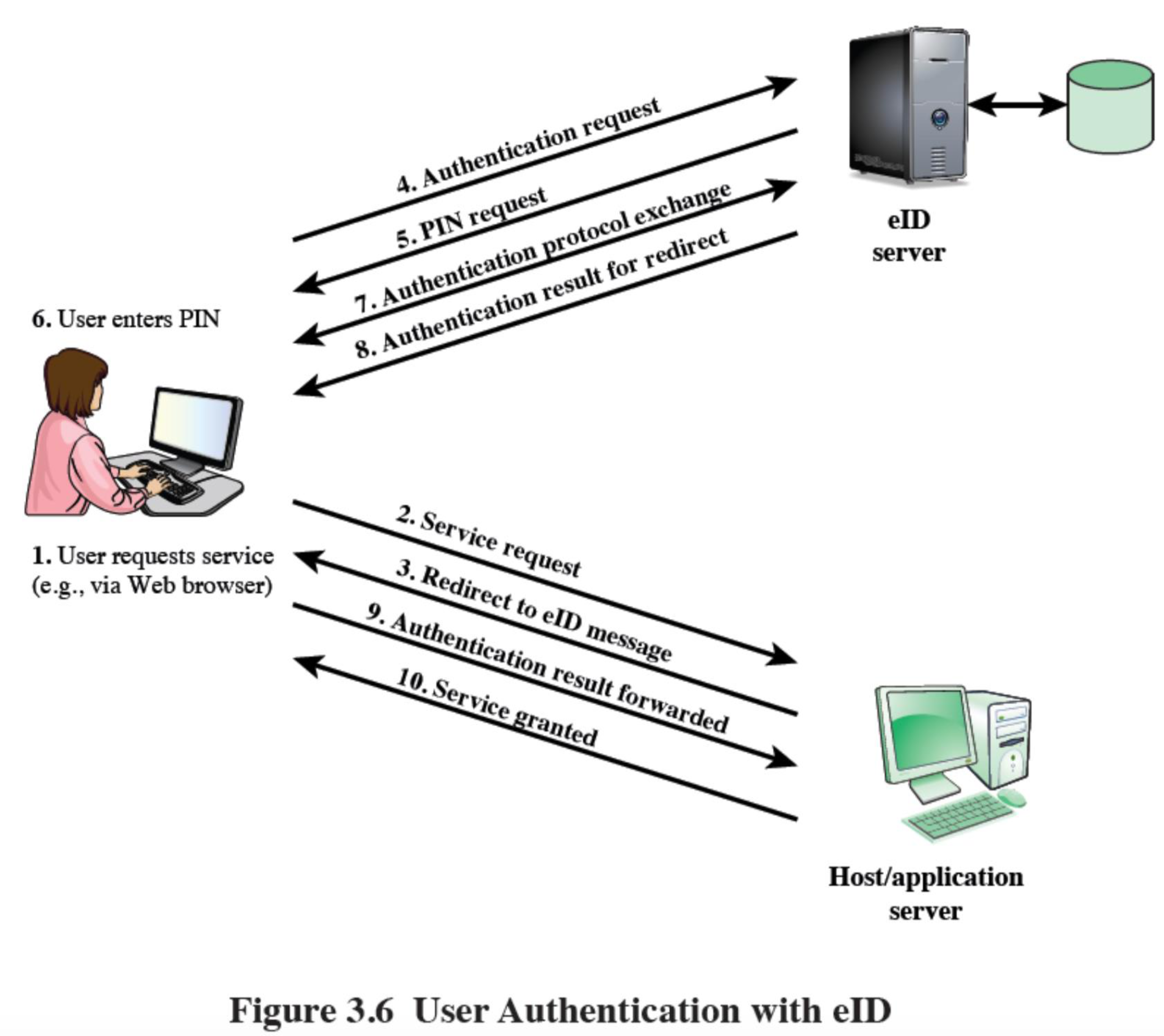
1. User requests service (e.g., via Web browser)
   ↓
2. Redirect to eID server
   Authentication request
   ↓
3. Service provider redirects
   ↓
4. eID server requests authentication
   ↓
5. User enters PIN
   ↓
6. Authentication result forwarded
   ↓
7. User accesses service
Components:
- User (via web browser)
- Host/Application Server
- eID Server
Analogy: Using eID for authentication is like showing your ID card to a bouncer who then calls security to verify your identity before letting you into an exclusive venue.
Using a Certificate to Authenticate a Client to a Server
Process
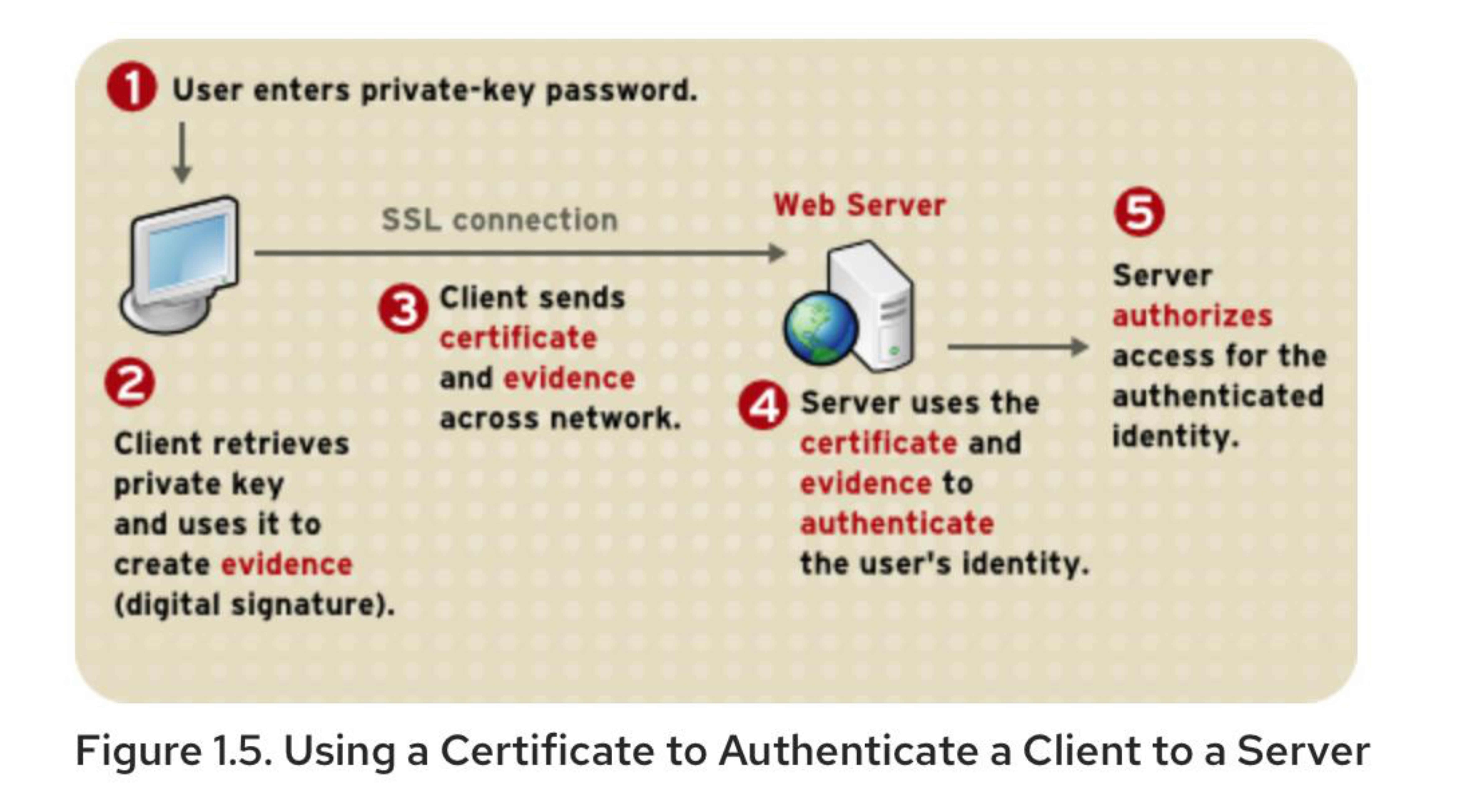
                SSL connection
                     |
                     v
    Client ←――――――――――――――→ Web Server
      |                         |
      |                         |
      v                         v
1. User enters               2. Server
   private-key                  establishes
   password                     SSL across network
      |                         |
      v                         v
2. Client retrieves          4. Server uses
   private key and              the certificate
   uses it to create            and identity
   evidence (digital            evidence to
   signature)                   authenticate
                                the user's
                                identity
                                   |
                                   v
                            5. Server authorizes
                               access for the
                               user
Analogy: Certificate authentication is like using a government-issued ID with holographic security features - the server can verify the certificate is genuine by checking its digital signature, just like a security guard checks the holographic features on your ID.
Biometric Authentication
Based on Unique Physical Characteristics
Static Characteristics
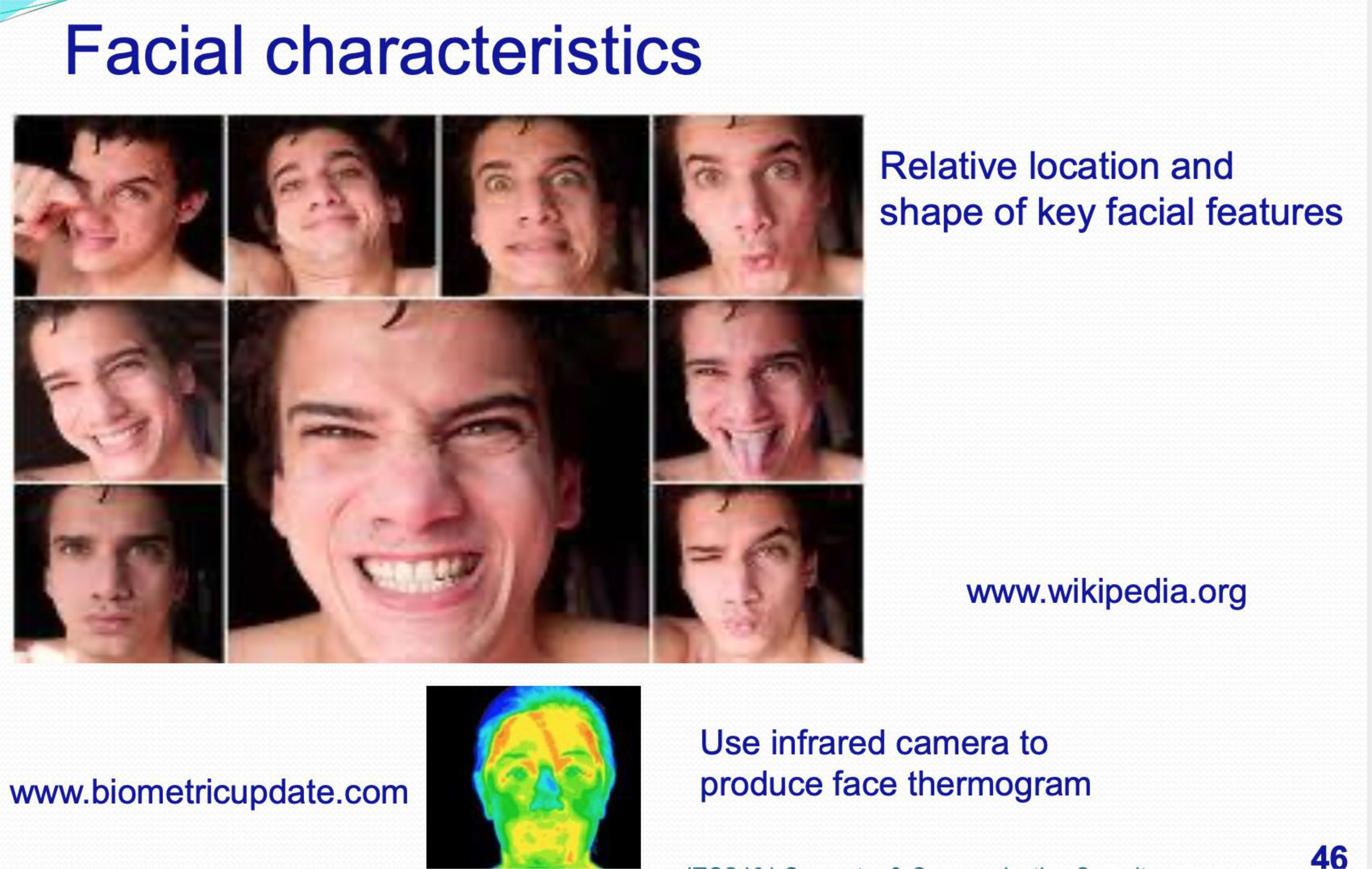
- Facial characteristics
- Relative location and shape of key facial features
- Use infrared camera to produce face thermogram
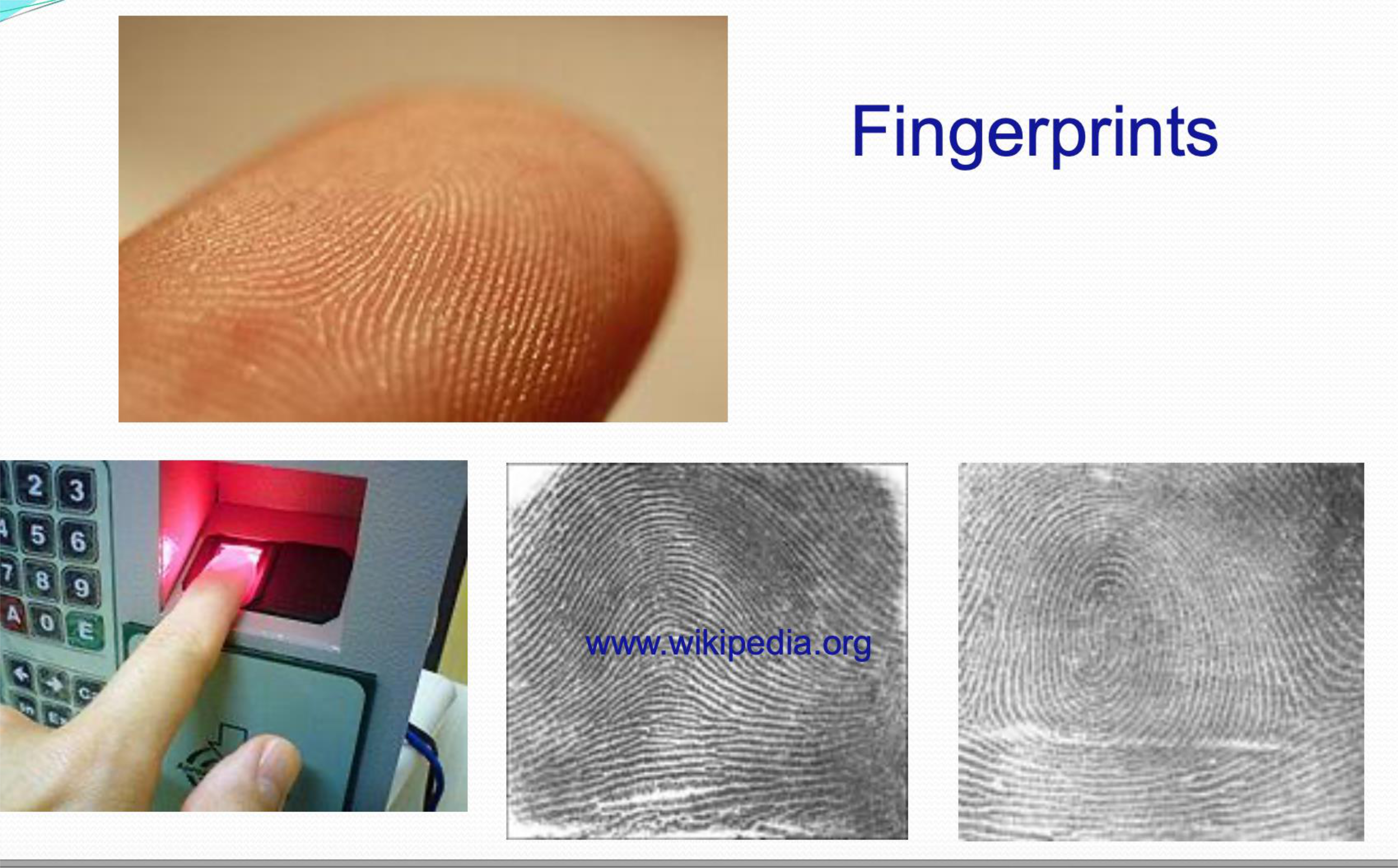
- Fingerprints
- Ridge endings and bifurcations
- Minutiae (detailed characteristics)
- Hand geometry
- Hand anatomy and structure
- Measurements of fingers and palm
- Retina pattern
- Blood-vessel pattern on the backside of the eyeball
- Iris structure
- Colored portion of the eye that surrounds the pupil
- Has unique patterns, rifts, colors, rings, coronas, and furrows
Dynamic Characteristics
- Signature
- Handwriting patterns
- Voice
- Voice pattern and characteristics
Analogy: Biometric authentication is like using your body as a key. Just as no two snowflakes are identical, no two fingerprints, irises, or voice patterns are exactly the same, making them excellent identifiers.
Biometric Details
Fingerprint
- Fingerprints are made up of:
- Ridge endings
- Bifurcations exhibited by friction ridges
- Other detailed characteristics called minutiae
Retina Scan
- A system that reads a person's retina scans the blood-vessel pattern of the retina on the backside of the eyeball
Iris Scans
- The iris is the colored portion of the eye that surrounds the pupil
- The iris has unique:
- Patterns
- Rifts
- Colors
- Rings
- Coronas
- Furrows
- Iris scans are the most accurate
How Iris Scanners Record Identities
Process
- Scanner reads from outer to pupil edge of iris and maps
- Scanner plots distinct markings within the iris
- Data is saved to a database
- Compare this data to verify individual identities
Cost Versus Accuracy of Biometric Characteristics
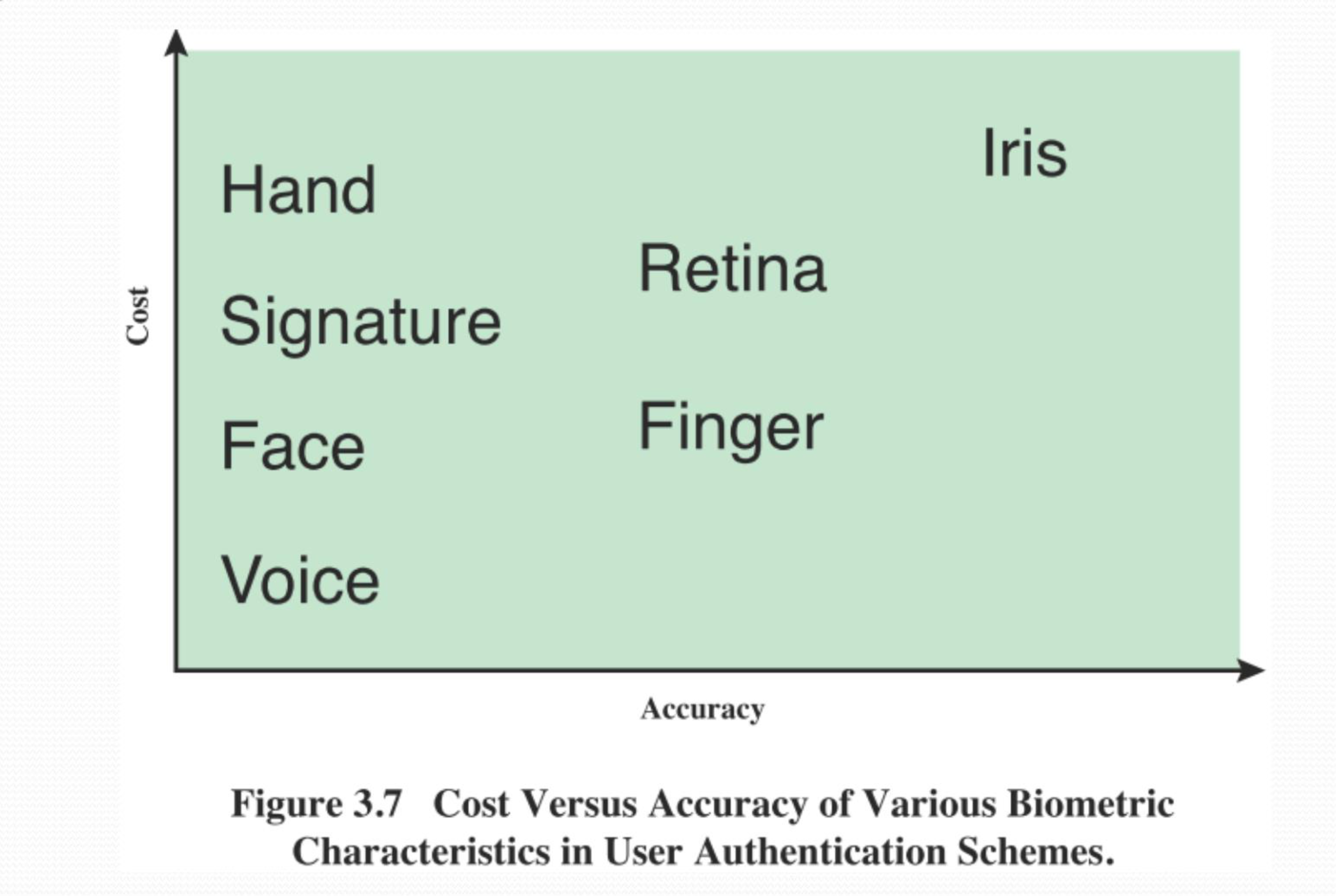
Analysis:
- Iris: High accuracy, high cost
- Retina: High accuracy, medium-high cost
- Fingerprint: Medium-high accuracy, medium cost
- Hand: Medium accuracy, medium cost
- Voice: Medium-low accuracy, low cost
- Signature: Low-medium accuracy, low cost
Analogy: Biometric authentication methods are like different types of locks - iris scans are like high-security biometric locks (expensive but very secure), while voice recognition is like a basic combination lock (cheap but less secure).
A Generic Biometric System
Accuracy depends on the set threshold
(a) Enrollment
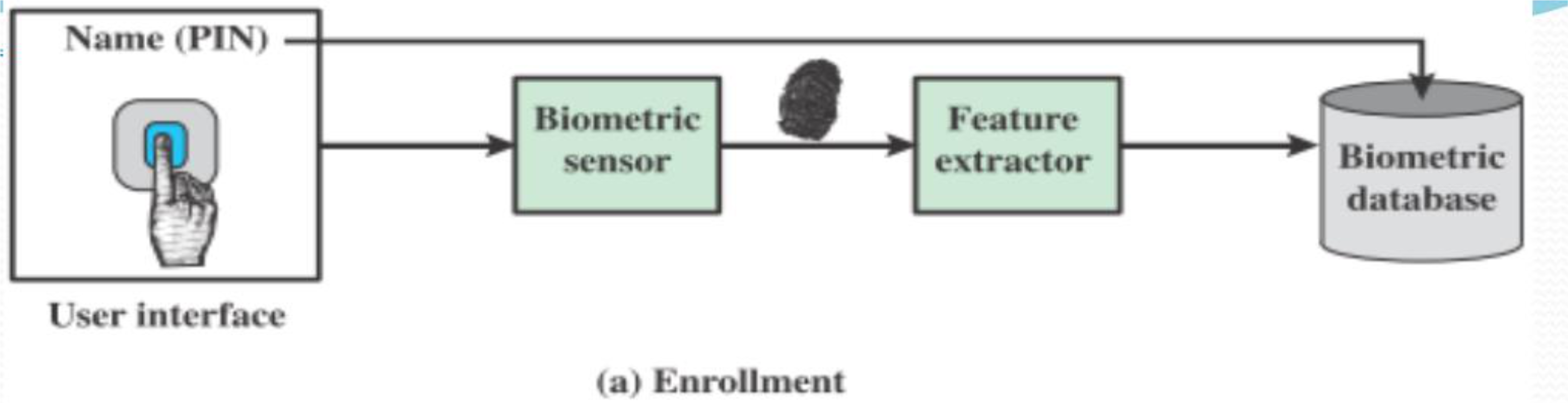
User → Name (PIN) → Biometric Feature
                           ↓
                        sensor
                           ↓
                      extractor
                           ↓
                    Biometric database
(b) Verification
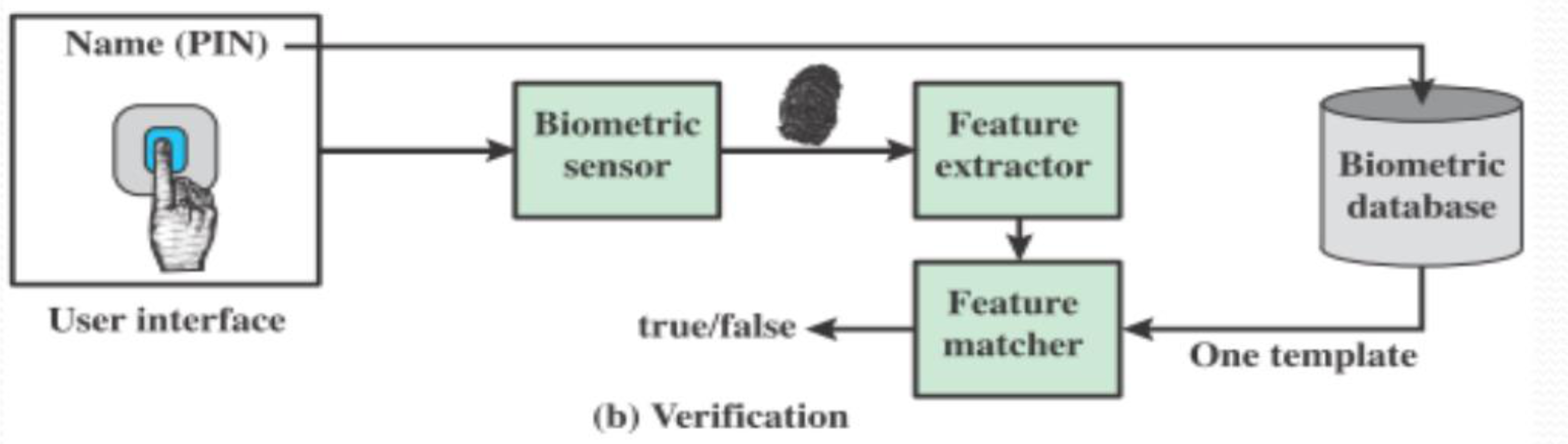
User → Name (PIN) → Biometric Feature
                           ↓
                        sensor
                           ↓
                      extractor → Feature matcher → Yes/No
                           ↓
                    Biometric database
                    (One template)
(c) Identification
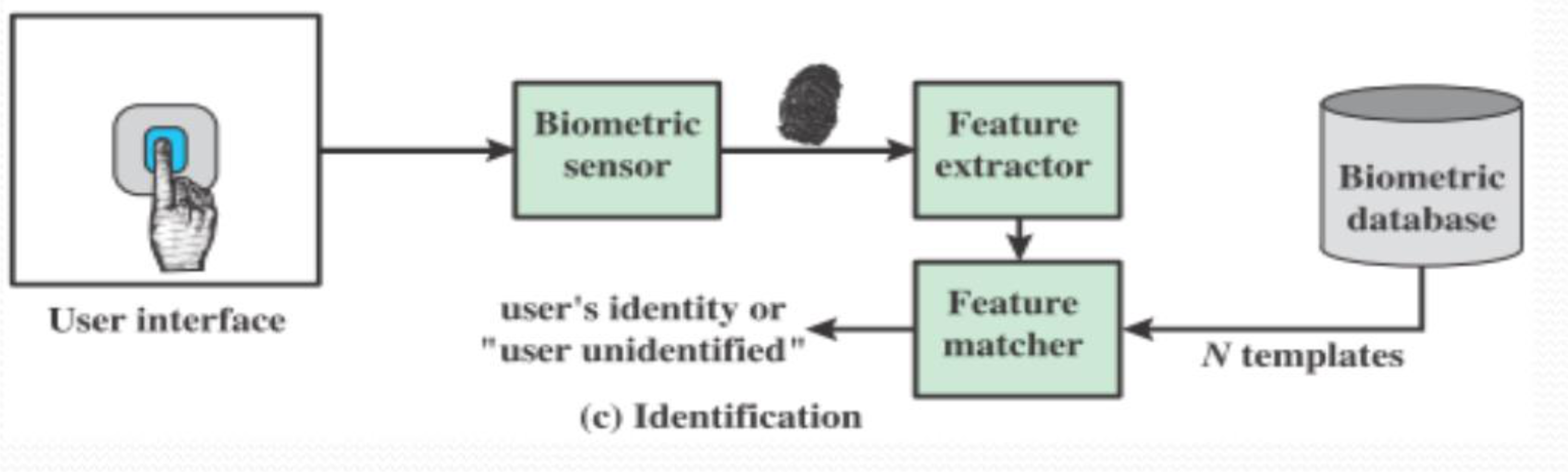
User → Biometric Feature
            ↓
         sensor
            ↓
       extractor → Feature matcher → User's identity or
            ↓                         "user unidentified"
    Biometric database
    (N templates)
Biometric Image Processing
Biometric    Image         Template      Biometric
capture  →  processing  →  extraction  →  matching
              ↓               ↓              ↓
          10110011        10110011       10110011
          01011000        01011000       01011000
          11001011        11001011       11001011
          01101101        01101101       01101101
          01011000        01011000       01011000
False Match Rate
Definitions
False Match Rate (FMR)
- Definition: When two pieces of biometric data from different people are judged to be from the same person
- Also known as False Accept Rate
False Non-Match Rate (FNMR)
- Definition: The rate at which a biometric matcher miscategorizes two captures from the same individual as being from different individuals
- Also known as False Reject Rate
Analogy: FMR is like a security system that lets the wrong person in (false positive), while FNMR is like a security system that locks out the right person (false negative).
Biometric Accuracy
Idealized Biometric Measurement Operating Characteristic Curves
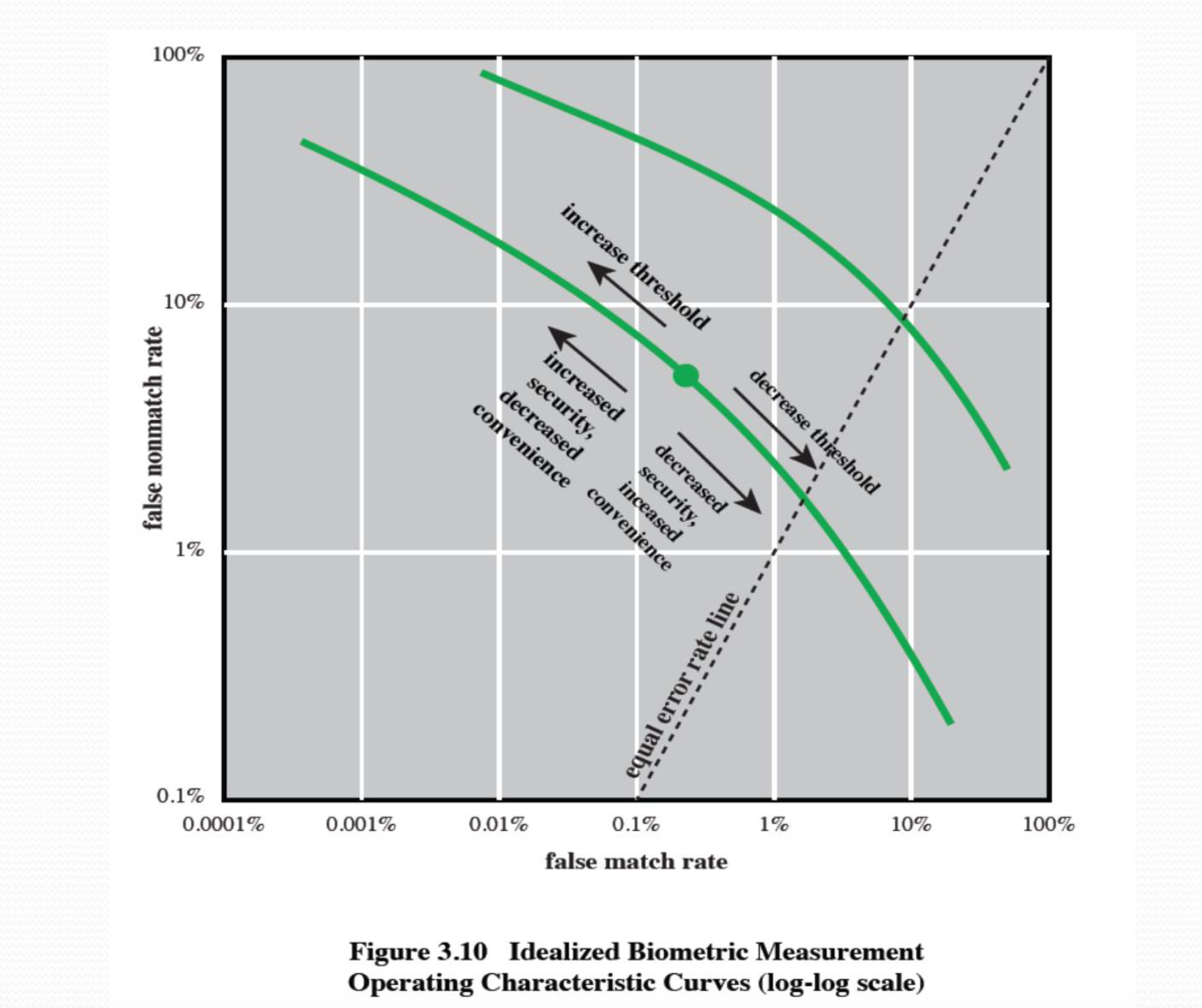
Comparison of Biometric Methods
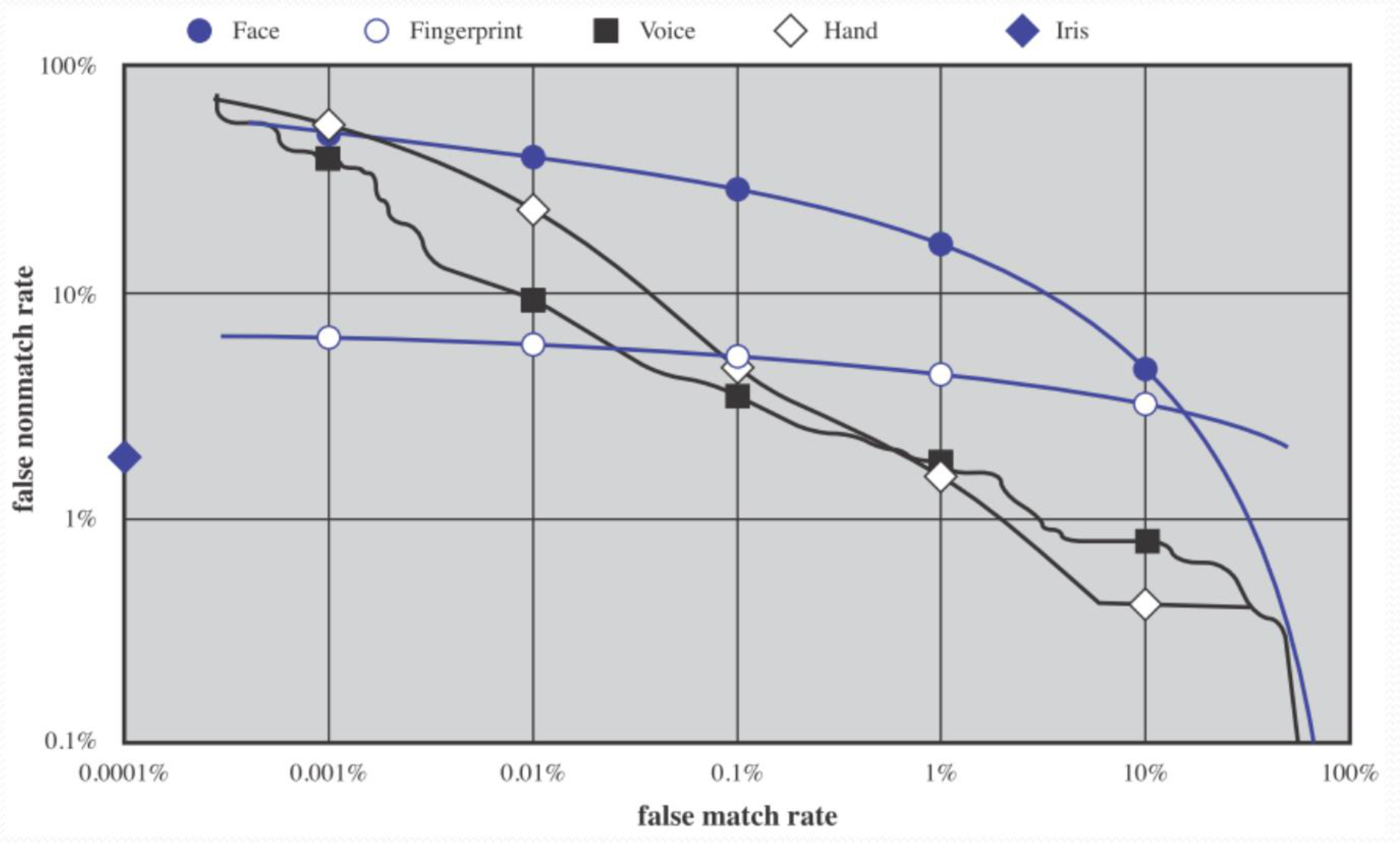
Trade-off:
- Can plot characteristic curves
- Pick threshold balancing error rates
Analogy: Biometric accuracy is a balancing act - like adjusting a scale. If you make it too strict (low FMR), you'll reject legitimate users more often (high FNMR). If you make it too lenient (low FNMR), you'll accept imposters more often (high FMR).
Finish Class Feb 10
Remote User Authentication
Challenges
- Authentication over network is more complex
- Due to:
- Eavesdropping
- Replay attacks
Solution: Challenge-Response
Process:
- User sends identity
- Host responds with a random number,
- User computes and sends back
- Host compares a value from the user with its own computed value
- If it is matched, the user is authenticated
Protects Against
- Number of attacks including replay attacks
Remote Authentication Protocols
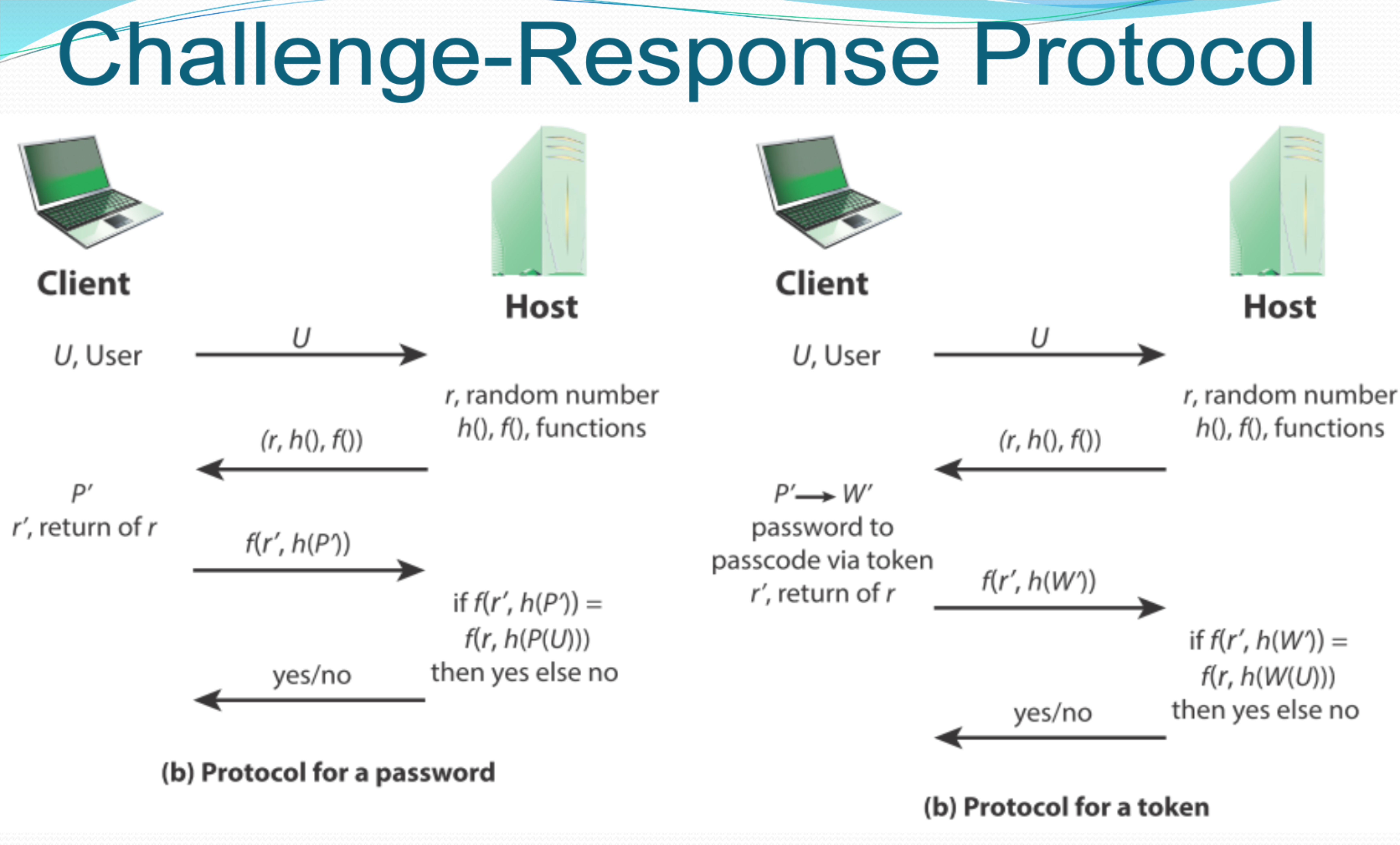
Token auth → Best for SSO (Single sign on) ไม่ต้อง reauthentiaction all the time!
(a) Protocol for a Password
Client ←――――――――――→ Host
   |                   |
1. U, User ――――――→
   |                   |
2.         ←―――――― r, random number
   |                   |
   P' (password)       r, h(), f() functions
   |                   |
3. If f(r', h(P)) =
   f(r, h(P(U)))
   then yes else no
   |                   |
4.         ←―――――― yes/no
(b) Protocol for a Token
Client ←――――――――――→ Host
   |                   |
1. U, User ――――――→
   |                   |
2.         ←―――――― r, random number
   |                   |
   P'→ W' (password    r, h(), f() functions
   to passcode via     |
   token)              |
   |                   |
3. r', return of r
   If f(r', h(W)) =
   f(r, h(W(U)))
   then yes else no
   |                   |
4.         ←―――――― yes/no
Analogy: Challenge-response authentication is like a secret handshake - the server gives you a random challenge (like asking you to shake hands in a specific way), and you respond using your secret knowledge (password or token) to prove you know the secret handshake.
Security Issues for User Authentication
Remote User Authentication Attacks
Remote user authentication is subject to a variety of attacks.
Principal attacks consist of:
- Client attacks
- Host attacks
- Eavesdropping
- Replay
- Trojan horse
- Denial-of-service
Attack Types and Defenses
Client Attack
| Authenticator | Attack | Typical Defenses |
|---|---|---|
| Password | Guessing, exhaustive search | Large entropy; limited attempts |
| Token | Exhaustive search | Large entropy; limited attempts; physical object requires presence |
| Biometric | False match | Large entropy; limited attempts |
Host Attack
| Authenticator | Attack | Typical Defenses |
|---|---|---|
| Password | Plaintext theft, dictionary/exhaustive search | Hashing; large entropy; protection of password database |
| Token | Passcode theft | Same as password; 1-time passcode |
| Biometric | Template theft | Capture device authentication; challenge response |
Eavesdropping, Theft, and Copying
Password
| Attack | Typical Defenses |
|---|---|
| "Shoulder surfing" | User diligence to keep secret; administrator diligence to quickly revoke compromised passwords; multifactor authentication |
Token
| Attack | Typical Defenses |
|---|---|
| Theft, counterfeiting | Multifactor authentication; hardware tamper resistant/evident token |
Biometric
| Attack | Typical Defenses |
|---|---|
| Copying (spoofing) biometric device | Copy detection at capture device and capture device authentication |
Replay Attack
| Authenticator | Attack | Typical Defenses |
|---|---|---|
| Password | Replay stolen password response | Challenge-response protocol |
| Token | Replay stolen passcode response | Challenge-response protocol; 1-time passcode |
| Biometric | Replay stolen biometric template response via challenge-response | Copy detection at capture device and capture device authentication |
Trojan Horse and Denial of Service
Trojan Horse
| Authenticator | Attack | Typical Defenses |
|---|---|---|
| Password, token, biometric | Installation of rogue client or capture device | Authentication of client or capture device within trusted security perimeter |
Rogue = fake
Denial of Service
| Authenticator | Attack | Typical Defenses |
|---|---|---|
| Password, token, biometric | Lockout by multiple failed authentications | Multifactor with token |
Analogy: These security issues are like different ways someone might try to break into a vault. Client attacks are like trying to crack the combination, host attacks are like trying to steal the vault blueprints, eavesdropping is like listening to someone entering the combination, replay attacks are like recording and replaying the combination, Trojan horses are like hiding inside a delivery to the vault, and denial of service is like gluing the lock so nobody can use it.
SAML - Security Assertion Markup Language
Overview
- SAML (pronounced SAM-el, /ˈsæməl/) is an open standard for exchanging authentication and authorization data between parties
- In particular, between an identity provider and a service provider
- SAML is an XML-based markup language for security assertions
SAML Components
SAML is also:
- A set of XML-based protocol messages
- A set of protocol message bindings
- A set of profiles (utilizing all of the above)
Important Use Case: Web-Browser Single Sign-On (SSO)
- Single sign-on is relatively easy to accomplish within a security domain (using cookies, for example)
- Extending SSO across security domains is more difficult and resulted in the proliferation of non-interoperable proprietary technologies
- The SAML Web Browser SSO profile was specified and standardized to promote interoperability
What Is SAML Assertion?
Definition
- In simple terms, it is an XML-formatted document that comprises the user authorization status information
- This detail is offered by an IdP (Identity Provider) to a service-giver
3 Types of Assertions
1. Authentication
- All about the validation of user's credibility
- Related technique
- Session duration tracking details
2. Attribute
- Takes care of successfully passing SAML tokens to the SP
- IdP as well as SP directory use the same attributes to confirm the trustworthiness of request-creator
3. Authorization-Decision
- Explains whether or not the user is given access as per his request
- Detailed reason behind denied access is also offered if it happens
SAML Authentication Process
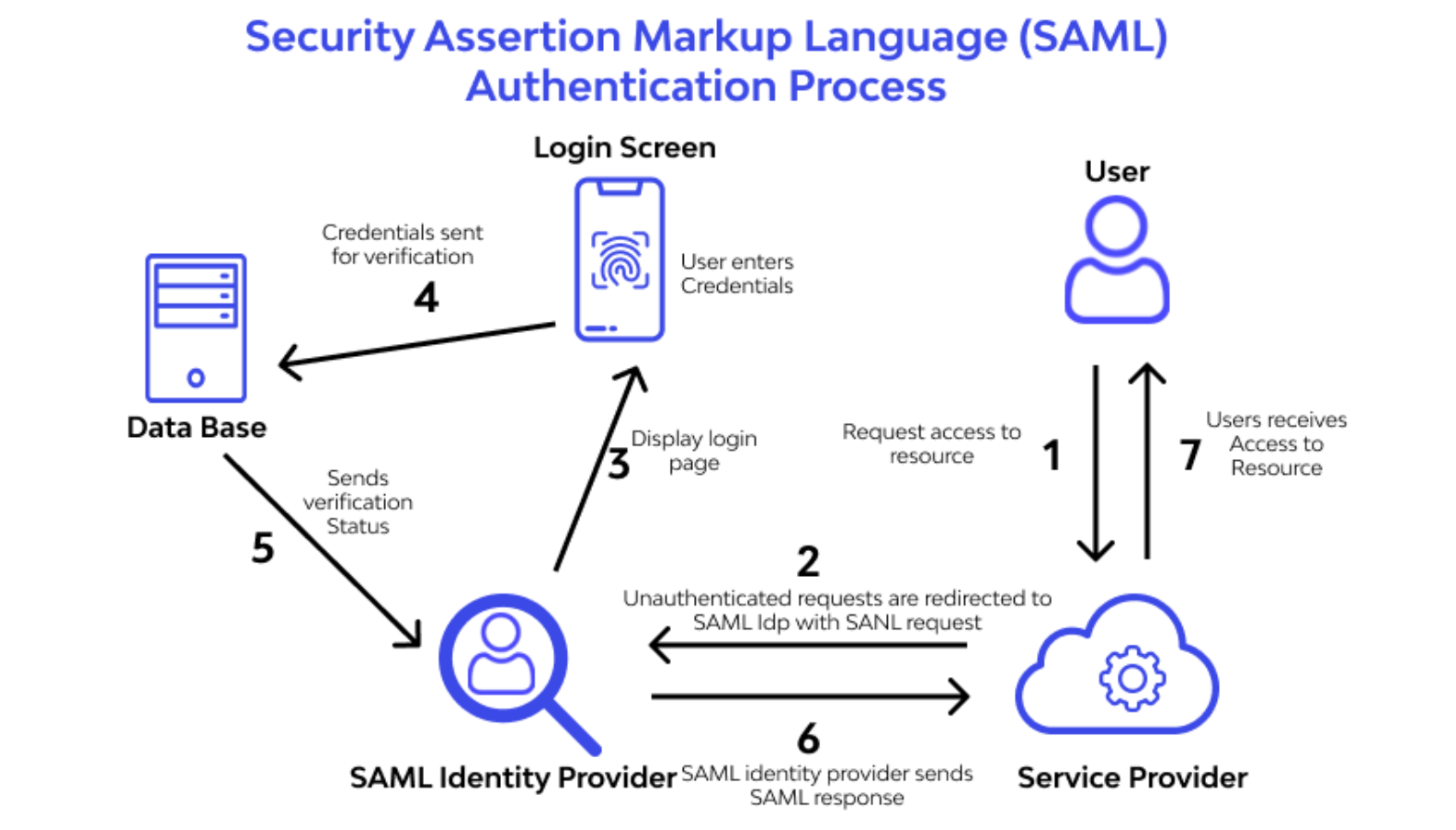
                          User
                            |
                     1. User enters
                        Credentials
                            |
        ┌──────────────────┴──────────────────┐
        ↓                                      ↓
    Login Screen                         Request access to
        |                                    Resource
        |                                      |
        ↓                                      ↓
   Data Base                            Service Provider
   Sends verification                         |
   Status                                     |
        |                              2. Unauthenticated
        ↓                                 requests are
   Display login                          redirected to
   page                                   SAML IdP with
        ↑                                 SAML request
        |                                      |
   Credentials sent                           |
   for verification                           ↓
        |                            SAML Identity Provider
        |                                      |
        └──────────────┬───────────────────────┘
                       |
                6. SAML identity provider
                   sends SAML response
                       |
                       ↓
                Access to Resource
Analogy: SAML is like a diplomatic passport. Instead of showing your regular passport (credentials) at every country (service), you show your diplomatic passport (SAML assertion) once, and all allied countries (services) accept it as proof of your identity without asking for your regular passport again.
Okta เหมือนก็จะใช้ SAML นะ เริ่ด ๆ
OAuth 2.0
Definition
"The OAuth 2.0 authorization framework enables a third-party application to obtain limited access to an HTTP service, either on behalf of a resource owner by orchestrating an approval interaction between the resource owner and the HTTP service, or by allowing the third-party application to obtain access on its own behalf."
Simple Explanation
- OAuth 2.0 is a protocol that lets people grant limited access to their resources on their behalf
Overview
- OAuth 2.0 is an authorization framework that enables applications to obtain limited access to a user's resources without exposing their credentials (e.g., username and password)
- It is widely used for third-party authentication and authorization
- Examples: Logging into websites using Google, Facebook, or GitHub
Key Concepts of OAuth 2.0
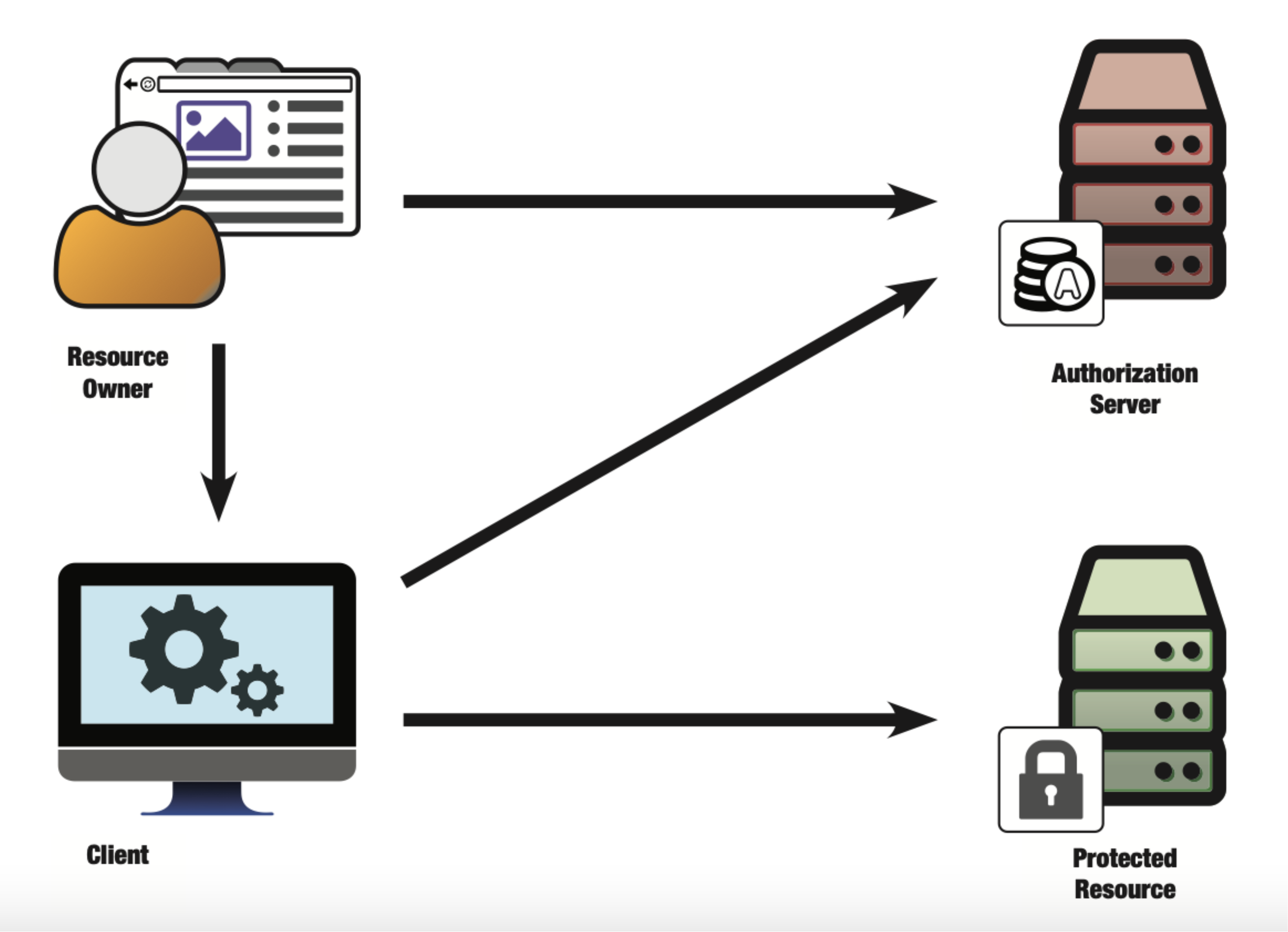
Entities
Resource Owner
- The entity that owns the resource (usually a user)
Client
- The application requesting access to the resource
Authorization Server
- The server that authenticates the resource owner and issues tokens
Resource Server
- The API or service that holds the protected resources
- Examples: Google Drive, GitHub API
Tokens
Access Token
- A short-lived credential issued by the authorization server
- Allows access to protected resources
Refresh Token
- A long-lived token used to obtain a new access token
- Without requiring user re-authentication
OAuth 2.0 Flow
Steps
- User Authorization
- The client redirects the user to the authorization server
- User Consent
- The user logs in and grants permission
- Authorization Code Issued
- The authorization server redirects the user back to the client with a one-time authorization code
- Token Exchange
- The client exchanges the authorization code for an access token from the authorization server
- Accessing Resources
- The client uses the access token to make requests to the resource server
OAuth 2.0 Authorization Code Flow
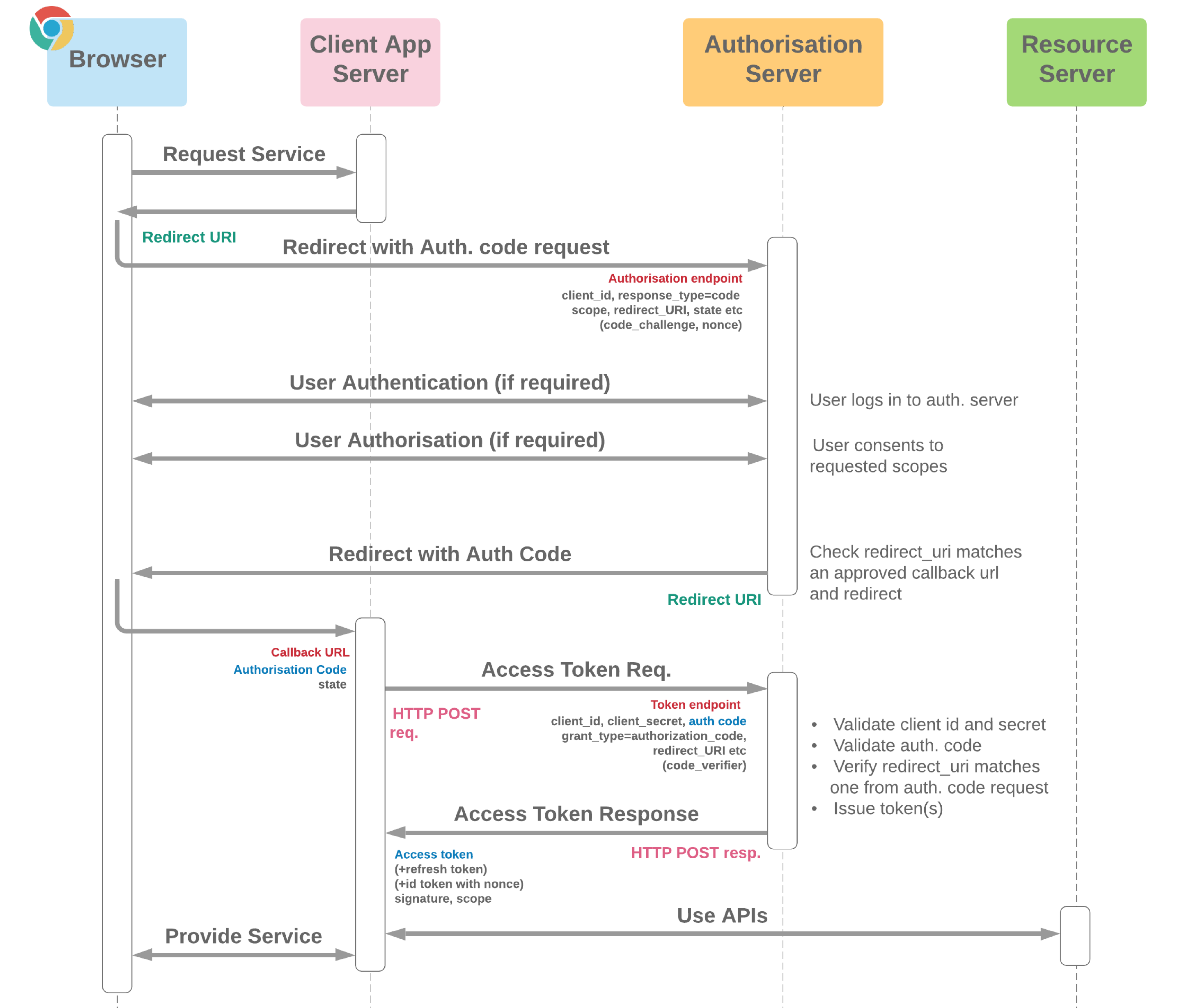
    Browser                Client App              Authorization
                            Server                    Server
       |                       |                         |
   1. Request Service ――――→
       |                       |                         |
   2. ←―――――――――――――――――― Redirect URI
       |                       |                         |
   3. Redirect with Auth. code request
       ――――――――――――――――――――――――――――――――――――――――――――→
       |                       |                         |
       |                       |    Authorisation endpoint
       |                       |    client_id, response_type=code
       |                       |    scope, redirect_URI, state etc
       |                       |    (code_challenge, nonce)
       |                       |                         |
   4.  |           User Authentication (if required)
       ←―――――――――――――――――――――――――――――――――――――――――――
       |                       |    User logs in to auth. server
       |                       |                         |
   5.  |           User Authorisation (if required)
       ←―――――――――――――――――――――――――――――――――――――――――――
       |                       |    User consents to requested scopes
       |                       |                         |
   6. Redirect with Auth Code
       ――――――――――――――――――――――――――――――――――――――――――――→
       |                       |    Check redirect_uri matches
       |                       |    an approved callback url
       |                       |    and redirect
       |                       |                         |
       Callback URL            |                         |
       Authorisation Code      |                         |
       state                   |                         |
       |                       |                         |
   7.  |    Access Token Req.  |                         |
       |                       ――――――――――――――――――――――→
       |                       Token endpoint
       |                       HTTP POST
       |                       client_id, client_secret, auth_code
       |                       grant_type=, redirect_URI etc
       |                       (code_verifier)
       |                       |    * Validate client id and secret
       |                       |    * Validate auth. code
       |                       |    * Verify redirect_uri matches
       |                       |      one from auth. code request
       |                       |    * Issue token(s)
       |                       |                         |
   8.  |    Access Token Response
       |                       ←――――――――――――――――――――――
       |                       HTTP POST resp.
       |                       Access token
       |                       (+refresh token)
       |                       (+id token with nonce)
       |                       signature, scope
       |                       |                         |
   9.  |         Use APIs      |
       ←―――――――――――――――――― Provide Service
       |                       |                         |
OAuth Best Practices
Reference
CSRF Protection
- Clients MUST prevent CSRF and ensure that each authorization response is only accepted once
- One-time use CSRF tokens carried in the "state" parameter, which are securely bound to the user agent, SHOULD be used for that purpose
What is a CSRF Token?
- A CSRF (Cross-Site Request Forgery) token is a unique security measure designed to protect web applications from unauthorized or malicious requests
- It's a specific type of token, often referred to as a synchronizer token or challenge token, that verifies the authenticity of requests made by a user
- Each CSRF token is unique to an individual user session and is embedded in web forms or requests
How Cross Site Request Forgeries (CSRFs) Work
Attack Process
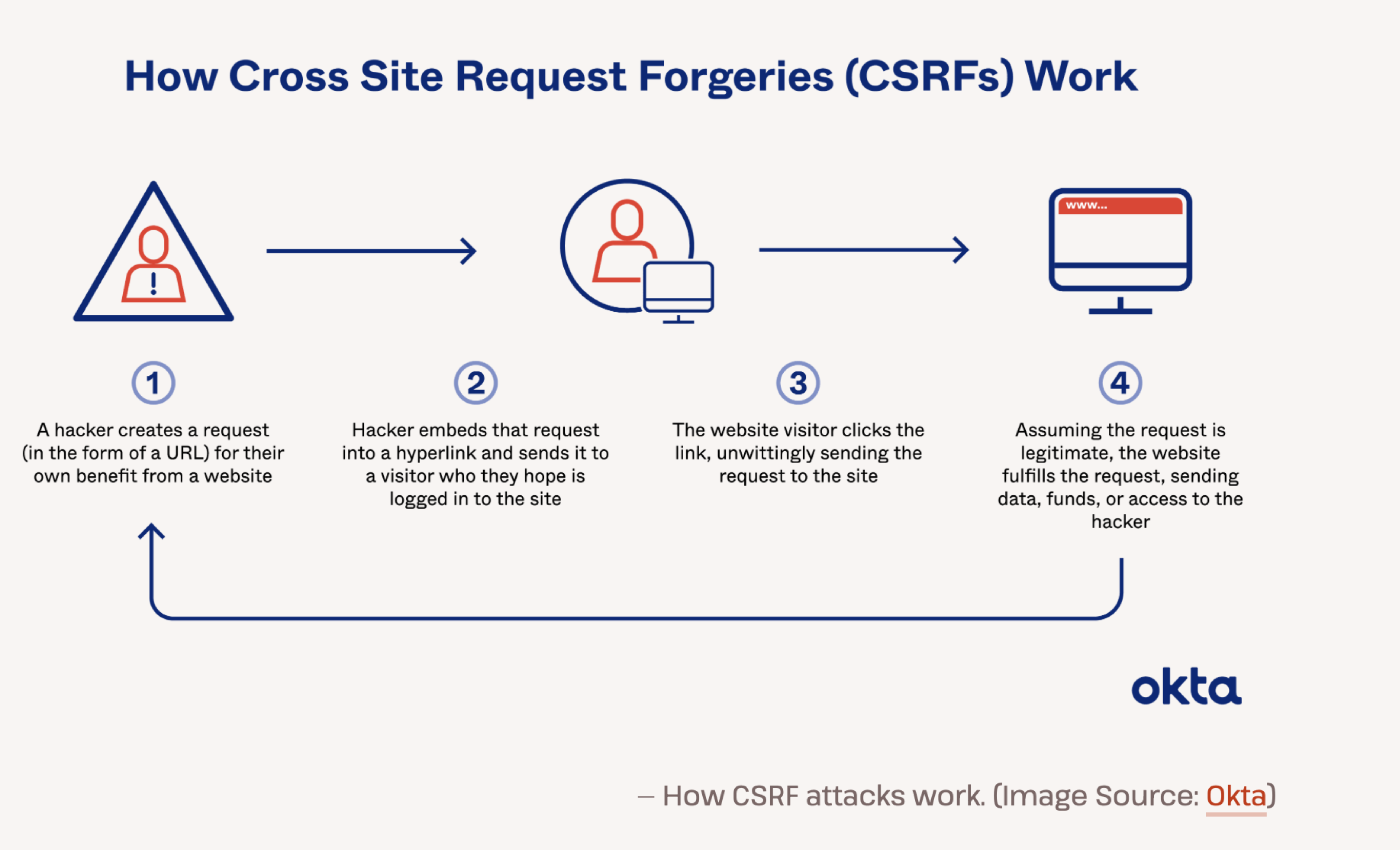
   Hacker                   Hacker                   Website Visitor         Website
     |                         |                            |                    |
     |                         |                            |                    |
1. Creates a request     2. Embeds that request     3. Clicks the link,      4. Assuming the
   (in the form of a        into a hyperlink           unwittingly sending      request is
   URL) for their own       and sends it to            the request to           legitimate, the
   benefit from a           a visitor who              the site                 website fulfills
   website                  they hope is                                        the request,
                            logged in to                                        sending data,
                            the site                                            funds, or access
                                                                                to the hacker
Analogy: CSRF is like a forged check - someone tricks you into signing a check (clicking a link) that withdraws money from your account (performs an action on a website) and gives it to them, all while pretending it's a legitimate transaction.
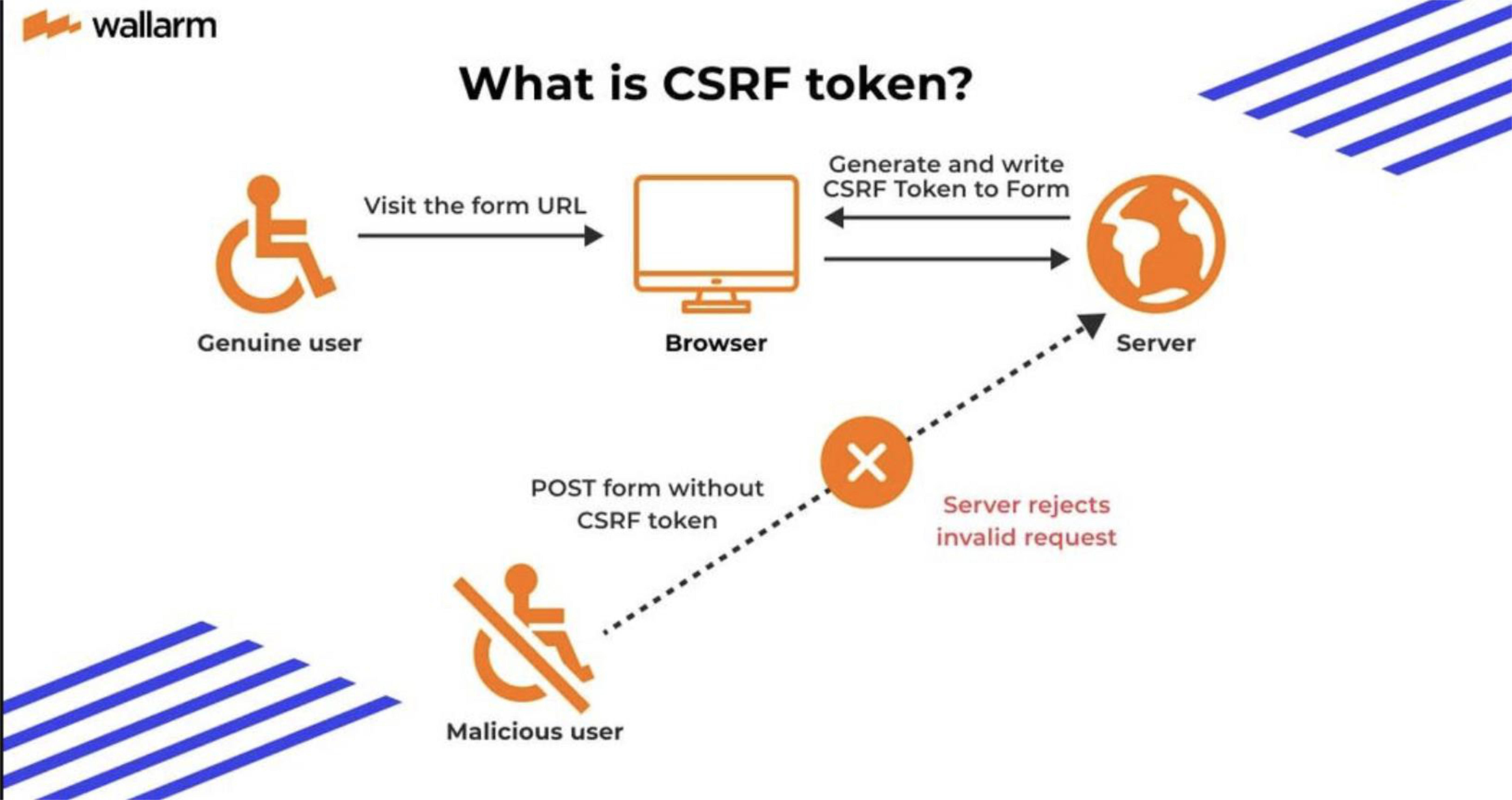
What is CSRF Token?
Workflow
                 Genuine user
                      |
                      |
             1. Visit the form URL
                      |
                      ↓
                  Browser ←――――――――――――――――→ Server
                      |                          |
                      |                          |
                      |    2. Generate and write |
                      |       CSRF Token to Form |
                      ←――――――――――――――――――――――――
                      |
                      |
             2. POST form without
                CSRF token
                      |
                      ↓
                 Malicious user
                      |
                      ↓
                  Server
                      |
                      ↓
              Invalid request
Process:
- Genuine user visits the form URL
- Server generates and writes CSRF Token to Form
- Malicious user tries to POST form without CSRF token
- Server rejects as invalid request
OAuth v2.0 In More Detail
- OAuth v2.0 is a RESTful API
- Let's look at each step in the Authentication Code process
- Time to do it yourself!
- Practice URL: https://oauth.com/playground
OAuth 2.0
- Why authorization not authentication?
- OAuth = pseudo-authentication
- User authorizes app
- App gets access token
- App calls user
The application assumes “If I can fetch user profile, then the user is authenticated” → This is not true authentication → Authorization used as proof of authentication.
Discussion: Authentication and Authorization Choices
Questions to Consider
If you are developing an application, what authentication and authorization would you use?
For Web App?
- Consider traditional OAuth 2.0
- JWT for stateless authentication
- Session-based vs. token-based
For Mobile App?
- Token-based authentication (JWT)
- Biometric authentication
- OAuth 2.0 for third-party services
For Social Media?
- OAuth 2.0
- OpenID Connect
- If not Facebook, what alternatives?
OpenID Connect (OIDC)
No Authentication in OAuth v2.0
- But we really want it! (Said Facebook, and others)
Pseudo-Authentication with OAuth 2.0
- A client accesses endpoint with an access token
- If a client has access to the resource, then a user profile is returned
Introducing OpenID Connect
- OpenID Connect (OIDC) is an authentication protocol, based on the OAuth 2.0 family of specifications
- It uses simple JSON Web Tokens (JWT), which you can obtain using flows conforming to the OAuth 2.0 specifications
History
- Facebook Connect and SAML 2.0 were combined to create OpenID Connect
- OIDC extends OAuth 2.0 with:
- A new signed
id_tokenfor the client - A UserInfo endpoint to fetch user attributes
- A new signed
Standardization
- Unlike SAML, OIDC provides a standard set of scopes and claims for identities
- Examples include:
profileemailaddressphone
Purpose
- While OAuth 2.0 is about resource access and sharing, OIDC is all about user authentication
- Its purpose is to give you one login for multiple sites
- Each time you need to log in to a website using OIDC, you are redirected to your OpenID site where you login, and then taken back to the website
Example
- If you chose to sign in using your Google account, then you used OIDC
- Once you successfully authenticate with Google and authorize the app to access your information:
- Google will send back information about the user and the authentication performed
- This information is returned in a JSON Web Token (JWT)
- You'll receive an Access Token and, if requested, an ID Token
More Introduction to OIDC
Dynamic and Scalable
- OIDC was created to be internet scalable by making things completely dynamic
- There's no longer downloading metadata and federation like SAML requires
Built-in Features
- Built-in registration, discovery, and metadata for dynamic federations
- You can type in your email address, then it:
- Dynamically discovers your OIDC provider
- Dynamically downloads the metadata
- Dynamically knows what certs it's going to use
- Allows BYOI (Bring Your Own Identity)
Enterprise Support
- Supports high assurance levels and key SAML use cases for enterprises
Early Adopters
- OIDC was made famous by Google and Microsoft, both big early adopters
Analogy: OIDC is like a universal adapter for different electrical plugs. Instead of carrying different adapters (authentication methods) for different countries (services), you have one universal adapter (OIDC) that works everywhere and automatically configures itself for each destination.
OAuth 2.0 vs. OpenID Connect (OIDC)
OAuth 2.0 and OpenID Connect (OIDC) are often used together but serve different purposes.
| Feature | OAuth 2.0 | OpenID Connect (OIDC) |
|---|---|---|
| Purpose | Authorization (granting access to resources) | Authentication (verifying user identity) |
| Token Type | Access Token (used to access APIs) | ID Token (contains user identity information) |
| User Authentication | Not handled (relies on another mechanism) | Yes, provides authentication & user details |
| Token Content | Permissions (scopes) for resource access | User identity (name, email, etc.) in JWT format |
| Standardization | Flexible, used for many types of authorization | Built on top of OAuth 2.0, standardized authentication |
| Use Case | API access (e.g., Google Drive, GitHub API) | Logging into an app (e.g., "Sign in with Google") |
Example: OAuth 2.0 & OIDC Flow
Scenario
Let's say you're developing a fitness app that connects with Google Fit to pull user step counts.
OAuth 2.0 Usage
- Your app requests authorization to access Google Fit step data
OIDC Usage
- If your app also needs authentication (e.g., logging in with Google), it will request an ID token in addition to the access token
Flow
- User clicks "Sign in with Google" in your app
- They are redirected to Google's OAuth 2.0 Authorization Server
- The user logs in and grants permission
- If using OAuth 2.0: Your app gets an Access Token to retrieve user's Google Fit data
- If using OIDC: Your app also gets an ID Token, which confirms the user's identity
Key Takeaway
- If you just need API access, use OAuth 2.0
- If you need authentication + API access, use OIDC on top of OAuth 2.0
Analogy: OAuth 2.0 is like having a valet parking ticket (access to your car), while OIDC is like having both a valet ticket and a driver's license (proof of identity) - you need both if you want to prove you own the car and drive it.
OIDC Initial Request
Request
GET https://accounts.google.com/o/oauth2/auth?
scope=openid email&
redirect_uri=https://app.example.com/oauth2/callback&
response_type=code&
client_id=8127415063918&
state=af@ifjsldkj
Response
HTTP/1.1 302 Found
Location: https://app.example.com/oauth2/callback?
code=MsCeLvlaQm6bTrgtp7&state=af0ifjsldkjExplanation:
- The
codereturned is the authorization grant stateis to ensure it's not forged and it's from the same request
OIDC Token Exchange
Request
POST /oauth2/v3/token HTTP/1.1
Host: www.googleapis.com
Content-Type: application/x-www-form-urlencoded

code=MsCeLvlaQm6bTrgtp7&client_id=8127415063918&
client_secret={client_secret}&
redirect_uri=https://app.example.com/oauth2/callback&
grant_type=authorization_code
OIDC Authorization Grant Response
Response
{
  "access_token": "2YotnFZFEjrizCsicMWpAA",
  "token_type": "Bearer",
  "expires_in": 3600,
  "refresh_token": "tGzv3JOkFOXGSQx2T1KWIA",
  "id_token": "eyJhbGci0iJSUzI1INiIsImtpZCI6IjFlOWdkazcifQ..."
}Components:
- access_token: For accessing APIs
- token_type: Usually "Bearer"
- expires_in: Token lifetime in seconds
- refresh_token: To get new access tokens
- id_token: JWT containing user identity information
OAuth 2.0 Authorization Server & OpenID Connect Provider (OP)
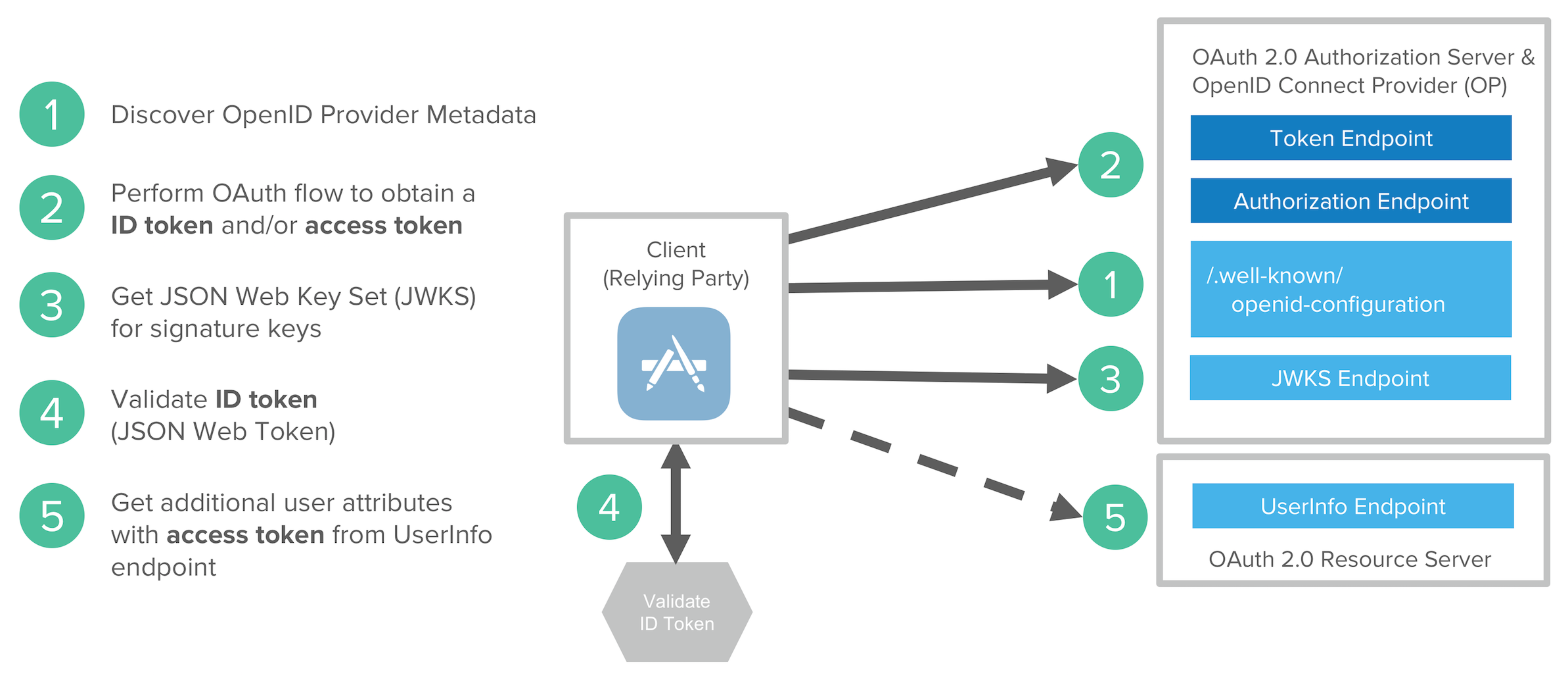
                OAuth 2.0 Authorization Server &
                OpenID Connect Provider (OP)
                          |
            ┌─────────────┴─────────────┐
            |                           |
    Authorization                  JWKS Endpoint
    Endpoint                            |
            |                           |
            └─────────────┬─────────────┘
                          |
                /.well-known/
                openid-configuration
                          |
                          ↓
                     Client
                (Relying Party)
                     |
                     |
        ┌────────────┴────────────┐
        |                         |
        ↓                         ↓
0. Discover OpenID          6. Get JSON Web Key
   Provider Metadata           Set (JWKS) for
                               signature keys
1. Perform OAuth flow           |
   to obtain ID token           |
   and/or access token          ↓
        |                  4. Validate ID token
        |                     (JSON Web Token)
        |
        ↓
2. Get additional user
   attributes with access
   token from UserInfo
   endpoint
        |
        ↓
   OAuth 2.0 Resource Server
OpenID Connect and JSON Web Token
Token Usage
- When a user successfully logs in using their credentials, an ID Token is returned
- According to the OpenID specs, an ID Token is always a JWT (pronounced "jot")
Access Token
- Once logged in, an application may request to access routes, services, or resources on behalf of that user
- To do this, it uses an Access Token, which may be in the form of a JWT
Subsequent Requests
- Each subsequent request includes the JWT
SSO Usage
- Single Sign On widely uses JWT nowadays because of:
- JWT's small overhead
- Cross-platform support
ID Token
Definition
- The ID Token is a JSON Web Token (JWT) that contains identity data
- It is consumed by the application and used to get user information like:
- User's name
- And so forth
- Typically used for UI display
Structure
- ID Tokens conforms to an industry standard (IETF RFC 7519)
- Contains three parts:
- Header
- Body
- Signature
Why JWT?
- Self-contained
- Light weight (especially compared to the XML used in SAML)
JWT Sample
- Explore JWT at: https://jwt.io/
Alternative Solutions
OAuth is Not the Only Solution
Inside (and outside) of corporate networks, different solutions are used:
1. Kerberos
- Authentication and Authorization
2. LDAP
- Lightweight Directory Access Protocol
3. Active Directory (AD)
- Microsoft's directory service
Kerberos
Overview
- Computer Network Authentication Protocol
- Developed at MIT
Version History
- Published version 4 in the late 1980s
- Version 5: RFC 1510
- Version 5 was made obsolete by RFC 4120 in 2005
Export Restrictions
- US banned its export because it used Data Encryption Standard (DES) (with 56-bit keys)
- Non-US Kerberos 4 implementation developed at Royal Institute of Sweden made it available outside of the US
- Before the US changed its cryptography export regulations (around 2000)
Modern Usage
- Windows 2000 and later use Kerberos as its default authentication method
2005 IETF Updates
- Encryptions and Checksum specification (RFC 3961)
- AES Encryption for Kerberos 5 (RFC 3962)
- New Kerberos v5 specification
- New edition of the Generic Security Services Application Program Interface (GSS-API)
Unix and Kerberos
Many Unix implementations include software for Kerberos authentication:
- FreeBSD
- MacOSX
- Red Hat Enterprise Linux
- Oracle Solaris
- IBM AIX
- HP HP-UX
- OpenVMS
Analogy: Kerberos is like a ticket system at a theme park - you buy a ticket once (authenticate), and then you can use that ticket to access various rides (services) without having to show your ID at every ride.
LDAP - Lightweight Directory Access Protocol
Overview
- Lightweight Directory Access Protocol
- Created at the University of Michigan
- Works like a Phonebook
Technical Details
- Subset of X.500 (Standard for directory services in a network)
- Organized as a simple "tree" hierarchy
Can You Authenticate with LDAP?
Yes, LDAP can be used for authentication.
Many Different Implementations
- OpenLDAP
- Microsoft Active Directory (Microsoft platform)
- Contacts (LDAP Aware address book built into MacOS)
- OpenDJ (Cross-platform)
Analogy: LDAP is like a company phone directory organized by departments - you can quickly find someone's information by navigating the organizational tree structure.
Active Directory
Overview
- Directory Service by Microsoft
- A server running Active Directory Domain Services (AD DS) is called a domain controller
- It authenticates and authorizes all users and computers in a Windows domain type network
Technologies Used
- Active Directory uses:
- Lightweight Directory Access Protocol (LDAP) versions 2 and 3
- Microsoft's version of Kerberos
- DNS
Analogy: Active Directory is like the central management office of a large company - it keeps track of all employees (users), their departments (groups), what resources they can access (permissions), and verifies their identity when they try to access company resources.
More Discussion
Future of Identity Providers
Questions to Consider
- What do you think is the future of OpenID Connect, Facebook Connect, etc.?
- Is there still room for an independent ID Provider?
- Very difficult for cross authentication.?????? (แปลว่าไร)
- Will we eventually have just one ID provider, and use it for personal and professional access?
The Future of OIDC & Facebook Connect
OIDC's Future
- OIDC remains the standard for authentication but will likely be integrated with privacy-preserving technologies
- Example: Zero-Knowledge Proofs
Decline of Social Logins
- Facebook Connect and similar social logins are declining due to:
- Privacy concerns
- Data leaks
- Regulatory pressures (GDPR, CCPA)
Emerging Technologies
- More services are shifting towards:
- Passkeys (FIDO2/WebAuthn)
- Device-bound authentication
- Instead of federated logins
Analogy: The future of identity is moving from showing your Facebook ID everywhere (centralized, privacy-risky) to using biometric keys like your fingerprint (decentralized, privacy-preserving) - just like we're moving from using the same key for every door to using unique keys or biometric locks for different spaces.
IoT: เราใช้ PUF Authentication Technique
Summary
This chapter covered comprehensive topics in identification and authentication:
- Physical vs. Digital Identity - Understanding different identity types
- IAM Four Pillars - Authentication, Authorization, Administration, Auditing
- Authentication Methods - Passwords, Tokens, Biometrics
- Password Security - Vulnerabilities, salt, hashing, selection strategies
- Token-Based Auth - JWT, Hardware tokens, Smart cards
- Biometric Auth - Static and dynamic characteristics, accuracy metrics
- Remote Authentication - Challenge-response protocols, security issues
- Modern Standards - SAML, OAuth 2.0, OIDC
- Enterprise Solutions - Kerberos, LDAP, Active Directory
- Future Trends - Privacy-preserving technologies, passkeys, FIDO2
End of Chapter 7
Dr. Somchart Fugkeaw somchart@siit.tu.ac.th