Communication Protocols
Definition
- Communication protocol: A system of rules that allow two or more entities of a communications system to transmit information via any kind of variation of a physical quantity
- Defines:
- Rules, syntax, semantics and synchronization of communication
- Possible error recovery methods
- Can be implemented by:
- Hardware
- Software
- Combination of both
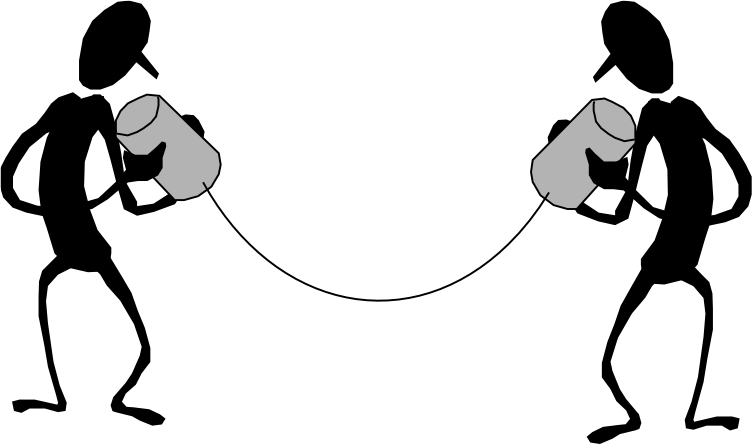
The Need for Protocol Architecture
To transfer data, several tasks must be performed:
- Source activation: Must either activate the direct communications path or inform the network of the identity of the desired destination system
- Destination readiness: Must ascertain that the destination system is prepared to receive data
- Application readiness: File transfer application on source must ascertain that the file management program on destination is prepared to accept and store the file for this particular user
- Format translation: May need to be performed if the file formats used on the two systems are different
Functions of Protocol Architecture
- Modular approach: Instead of implementing communication logic as a single module, the task is broken up into subtasks, each implemented separately
- Vertical stack arrangement: Modules are arranged in a vertical stack
- Layer functions:
- Each layer performs a subset of functions
- Relies on next lower layer for primitive functions
- Lower layers provide services to the next higher layer
- Layers should be defined so that changes in one layer do not require changes in other layers
Key Features of a Protocol
- Syntax: Format of data blocks
- Semantics: Control information for coordination and error handling
- Timing: Speed matching and sequencing
Simple Protocol Architecture
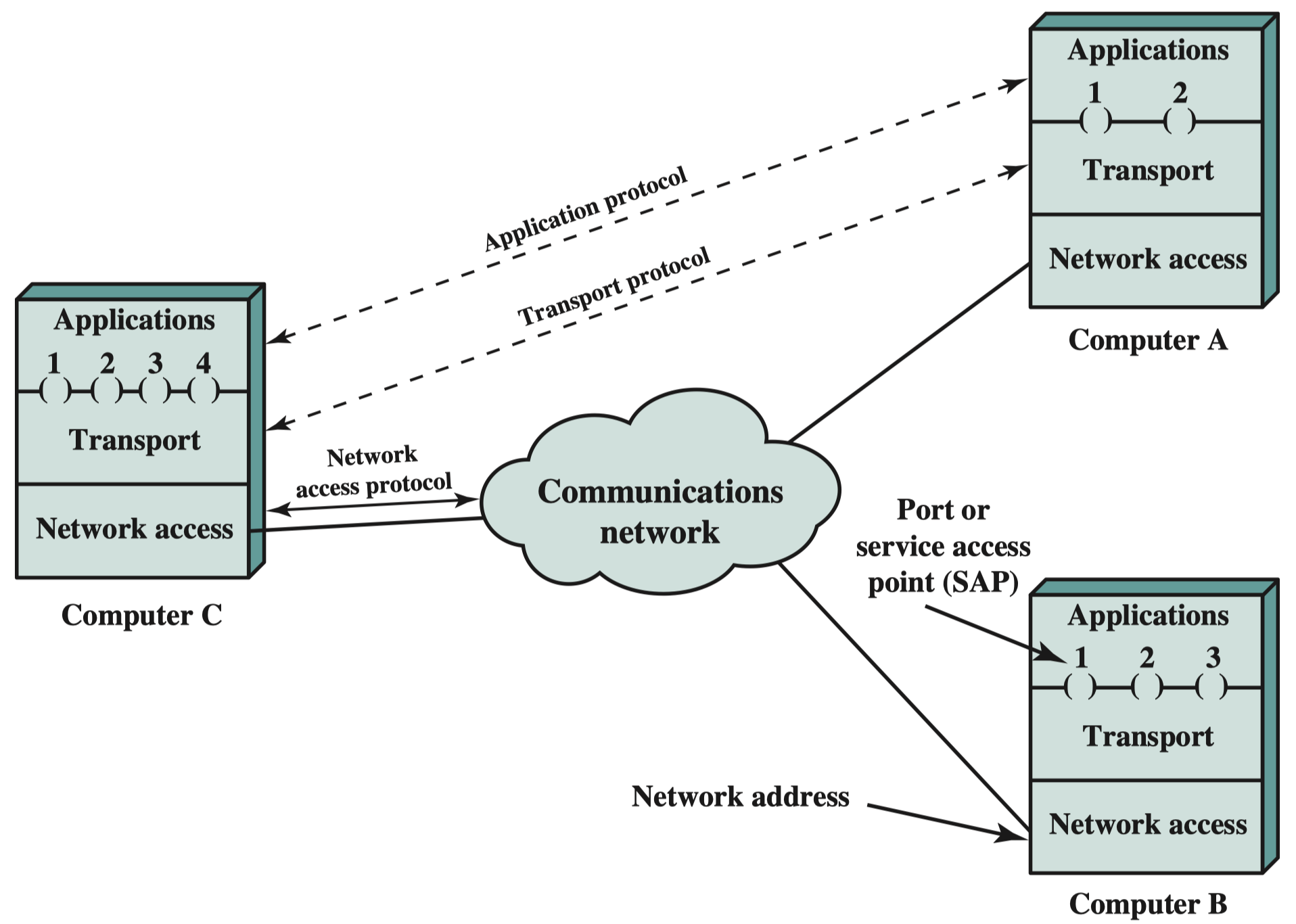
Agents Involved
- Applications: Examples include file transfer and electronic mail
- โปรแกรมที่เราใช้จริง เช่น Gmail, LINE, Zoom
- Computers: Execute applications that support multiple simultaneous applications
- เครื่องที่รันแอปพวกนี้ ซึ่งสามารถเปิดหลายแอปพร้อมกันได้
- Networks: Communication infrastructure
- โครงสร้างพื้นฐานที่ใช้ส่งข้อมูล (Wi-Fi, 5G, Fiber)
Communication Layers
Three relatively independent layers:
- Application Layer
- Contains logic to support applications
A ส่ง Gmail จาก Port 1, เปิด LINE จาก Port 2
C อาจจะเปิด Gmail จาก Port 3, LINE จาก Port 4
ไม่จำเป็นต้องตรงกัน เพราะแค่รู้ว่า port ไหนคุยกับแอปไหนก็พอ - Transport Layer
- Collects mechanisms in a common layer shared by all application
รับข้อมูลจากหลายแอป แล้วจัดให้ไปส่งถูกแอปที่ปลายทาง
ใช้ Port number / Service Access Point (SAP) เป็นตัวแยกว่า “ของชิ้นนี้เป็นของ Gmail” หรือ “ของชิ้นนี้เป็นของ LINE” - Network Access Layer
- Concerned with the exchange of data between a computer and the network to which it is attached
คือการสื่อสารจริง ๆ ระหว่างเครื่องกับเครือข่าย
ที่นี่เราจะใช้ IP Address → ระบุ “เครื่องปลายทางอยู่ที่ไหน”
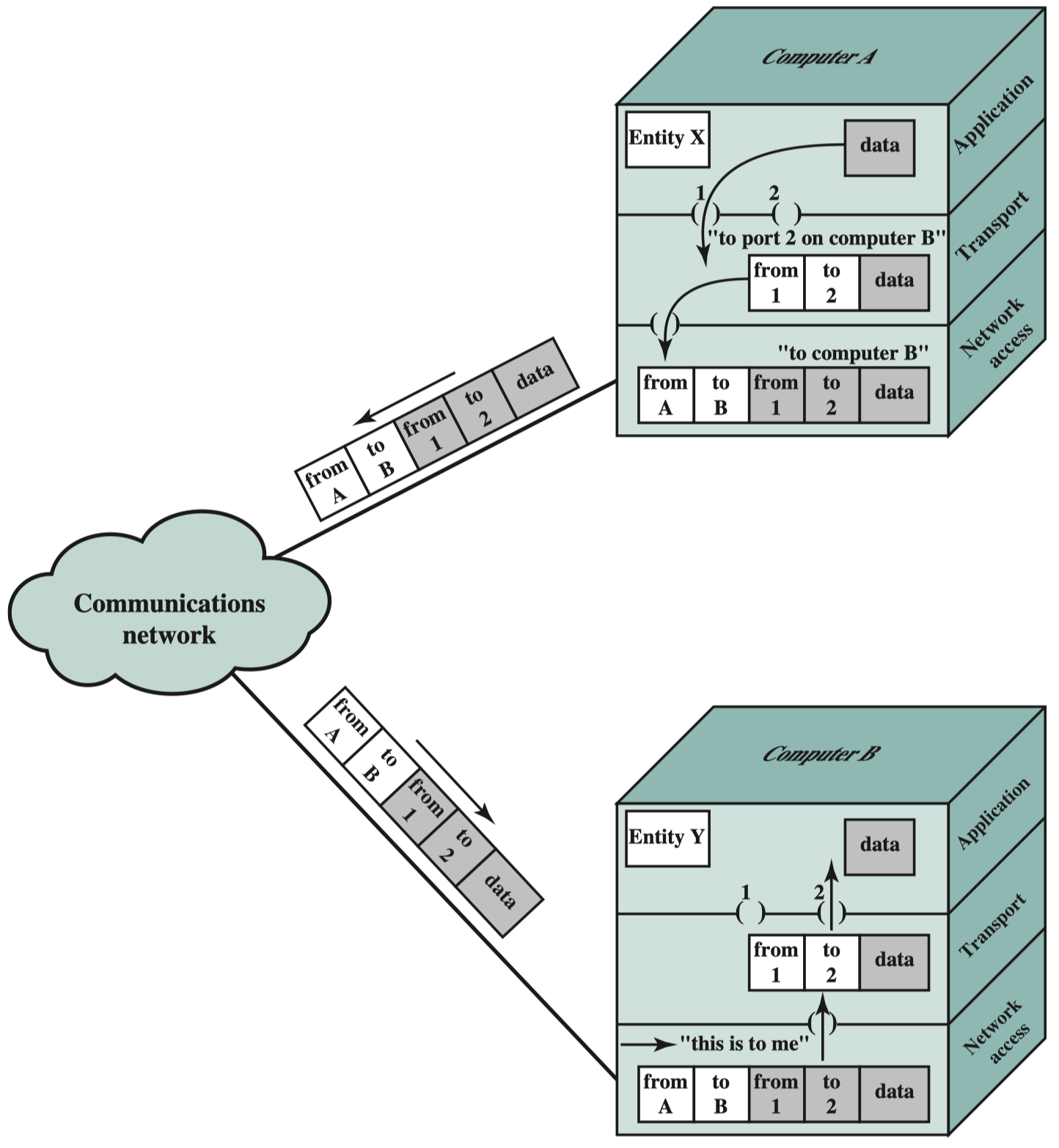
แล้ว Computer A จะรู้ได้ไงว่า Mail เปิดอยู่บน Port 2 ของอีกเครื่อง?
Contents
แล้วอะไรทำให้ computer มี port ไม่เท่ากัน (RAM หรอ?)
Contents
Protocol Models
Comparison of Protocol Models
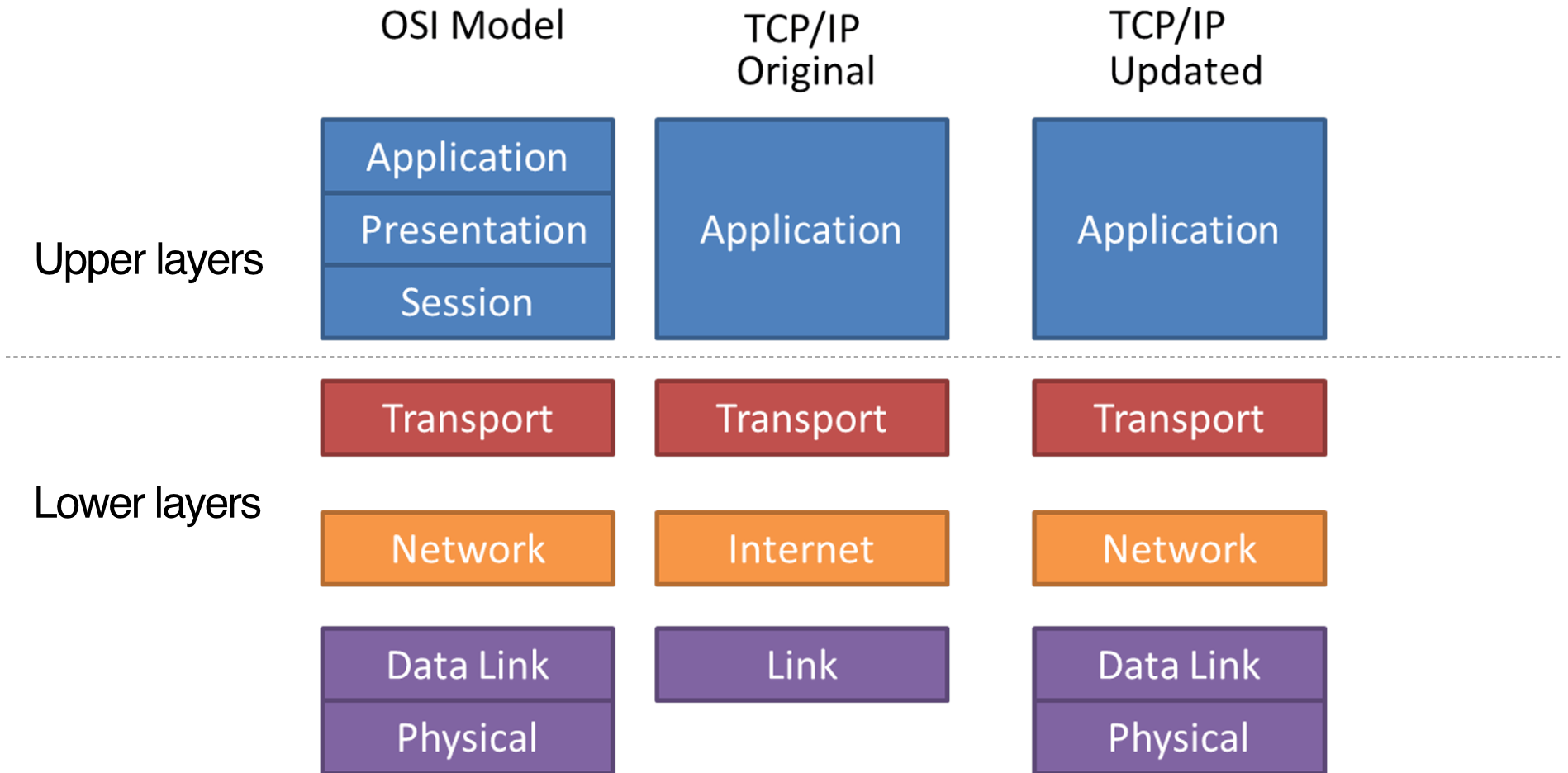
- Upper layers: Handle application-specific functions
- Lower layers: Handle network communication functions
OSI Reference Model
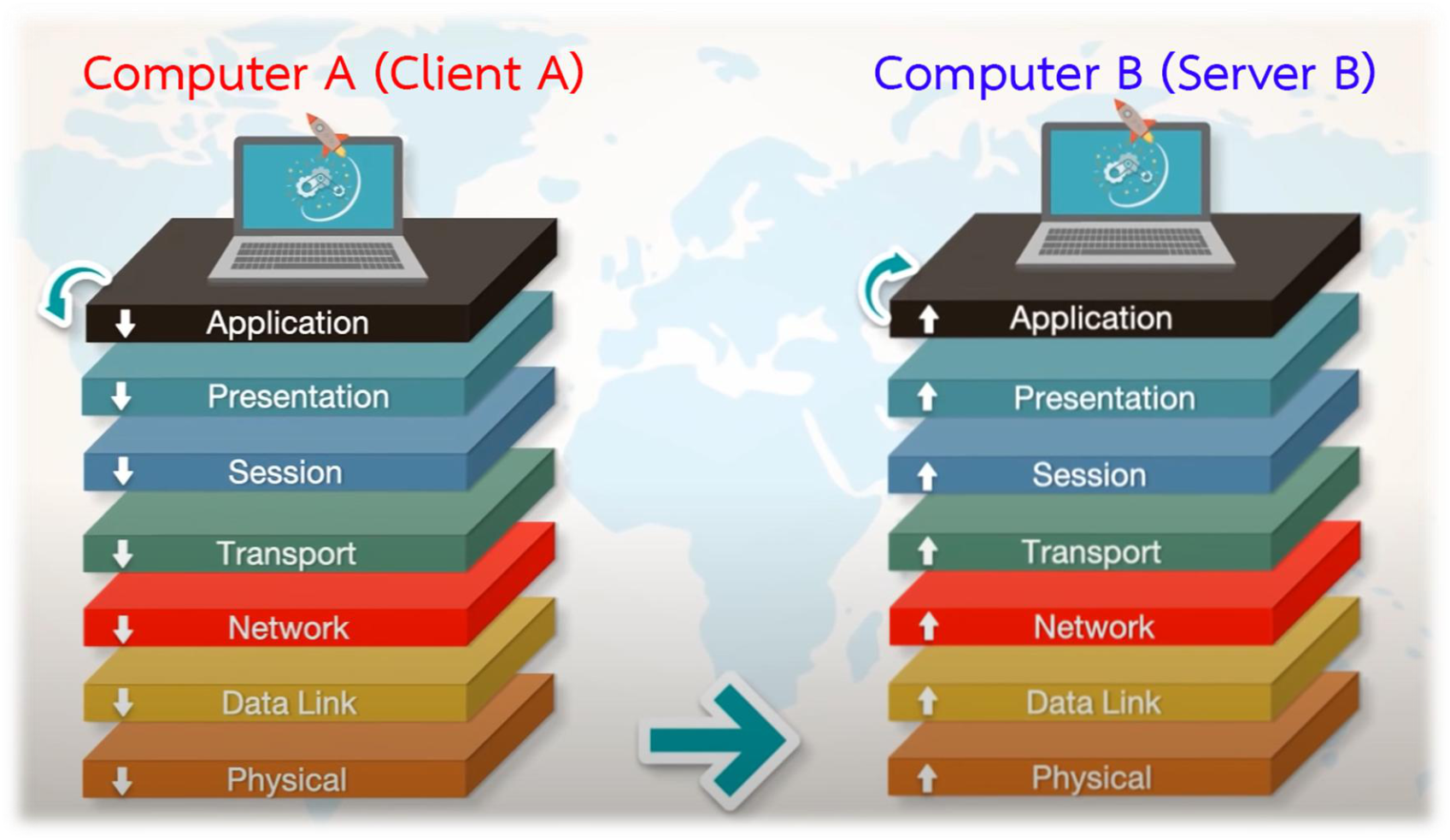
Seven Layers Overview
Example
Layer 7: Application Layer
- Purpose: Provides interface between host's communication software and external applications
- Functions:
- Synchronization of client/server applications
- Error control and data integrity between applications
- System-independent processes to a host
- Example Protocols: HTTP, FTP, SMTP, Telnet, SNMP
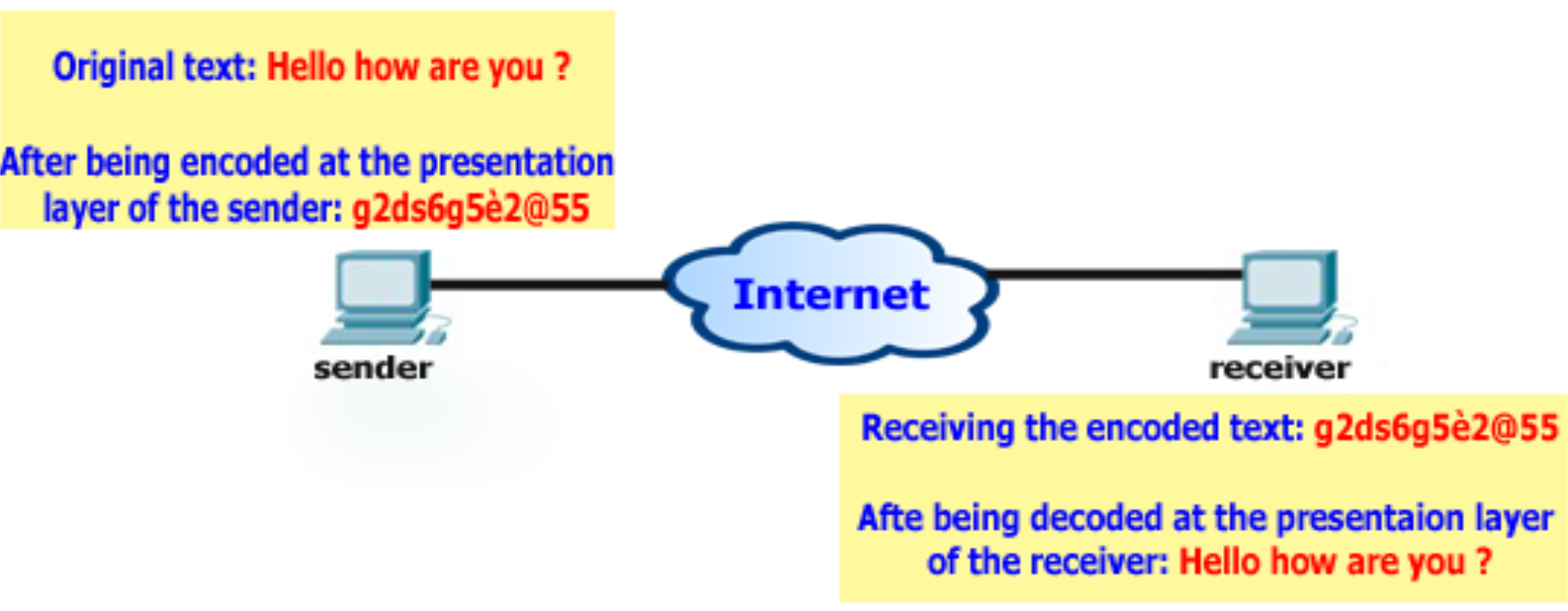
Layer 6: Presentation Layer
- Purpose: Acts as data format translator
- Functions:
- Format translation to ensure data can be read by applications
- Data structuring and negotiating data transfer syntax
- Data encryption, decryption, compression, and decompression
- Note: Only layer that can actually change data
- Examples: JPEG, ASCII, EBCDIC, TIFF, GIF, PICT, MPEG, MIDI, QuickTime, RTF
Layer 5: Session Layer
- Purpose: Dialog control among devices
- Functions:
- Determines beginning, middle, and end of sessions/conversations
- Acts as intermediary for applications
- Protocols: NFS, SQL, RPC, AppleTalk Session Protocol, X Window, DNA SCP
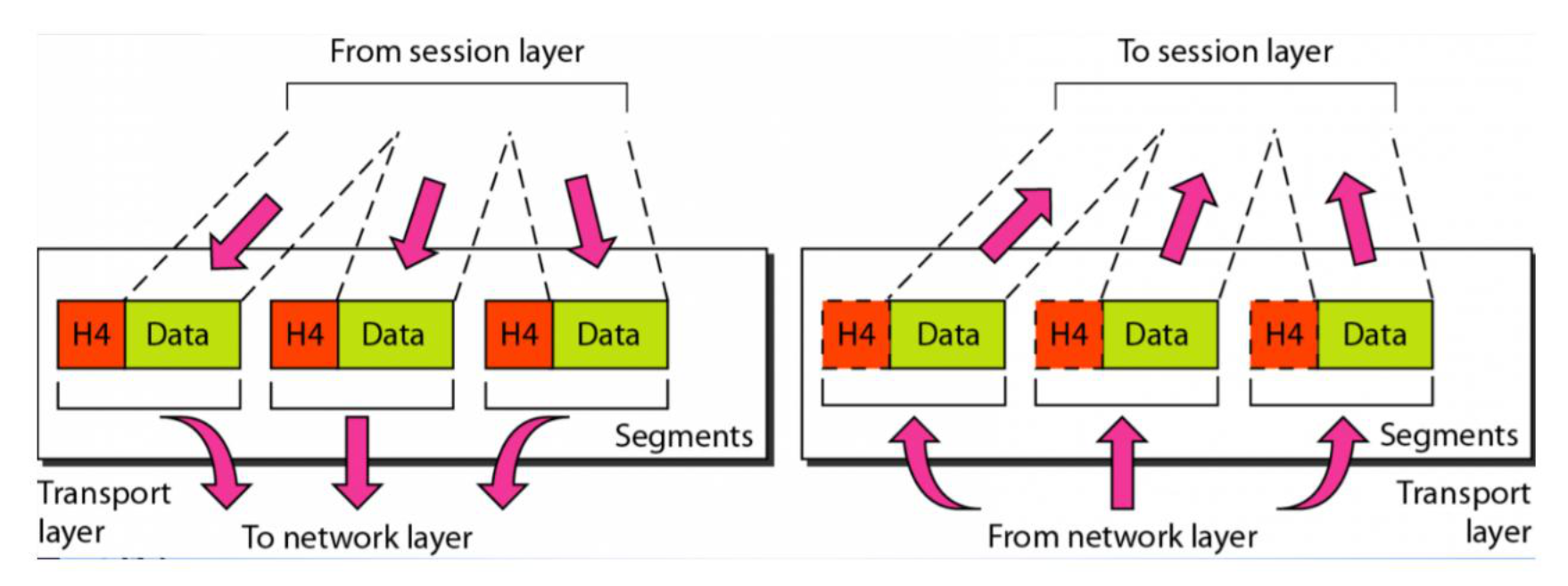
Layer 4: Transport Layer
- Purpose: End-to-end connections and data delivery between hosts
- Functions:
- Segmentation and reassembly of data
- Fault detection and error recovery
- Establishing, maintaining, and tearing down virtual circuits
- Reliable networking via acknowledgments, sequencing, and flow control
- Protocols: TCP, UDP, SPX
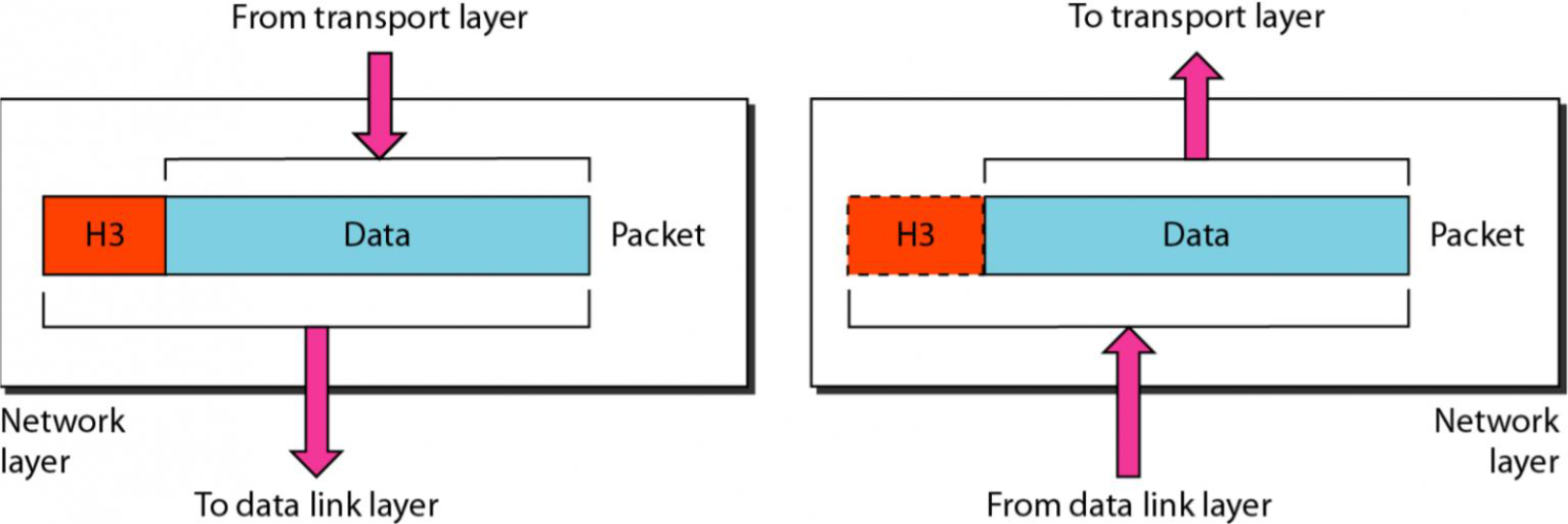
Layer 3: Network Layer
- Purpose: Best path determination for packet delivery across networks
- Functions:
- Routed protocols (IP) for logical addressing
- Router operations for packet forwarding
- Routing table contains:
- Network Address
- Interface (exit interface for forwarding packets)
- Metric (distance to reach remote network)
- Packet types:
- Data Packets: Transport data across internetwork (IP, IPX)
- Route Update Packets: Send updates to neighbor routers (RIP, EIGRP, OSPF)
- Protocols: IP, IPX, AppleTalk DDP
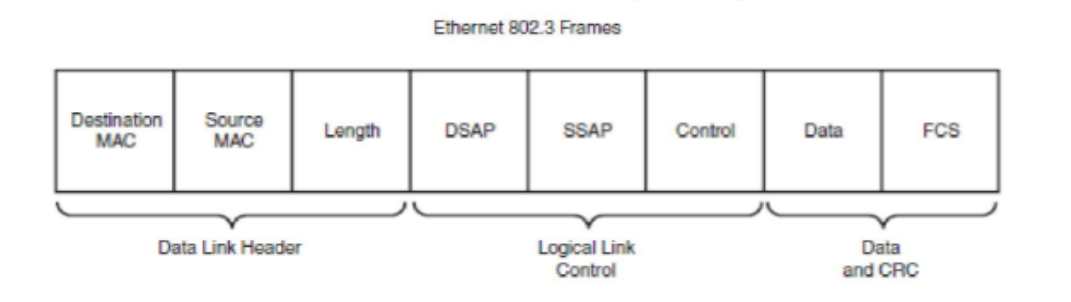
Layer 2: Data Link Layer
- Purpose: Reliable data transfer from Network layer to Physical layer
- Functions:
- Data formatting into frames for Physical layer transmission
- Error notification (not correction)
- Network topology and flow control
- Sublayers:
- MAC (Media Access Control): Hard-coded address on NIC (48 bits, 12 hexadecimal digits)
- LLC (Logical Link Control): Framing, error control, flow control, SAP identification
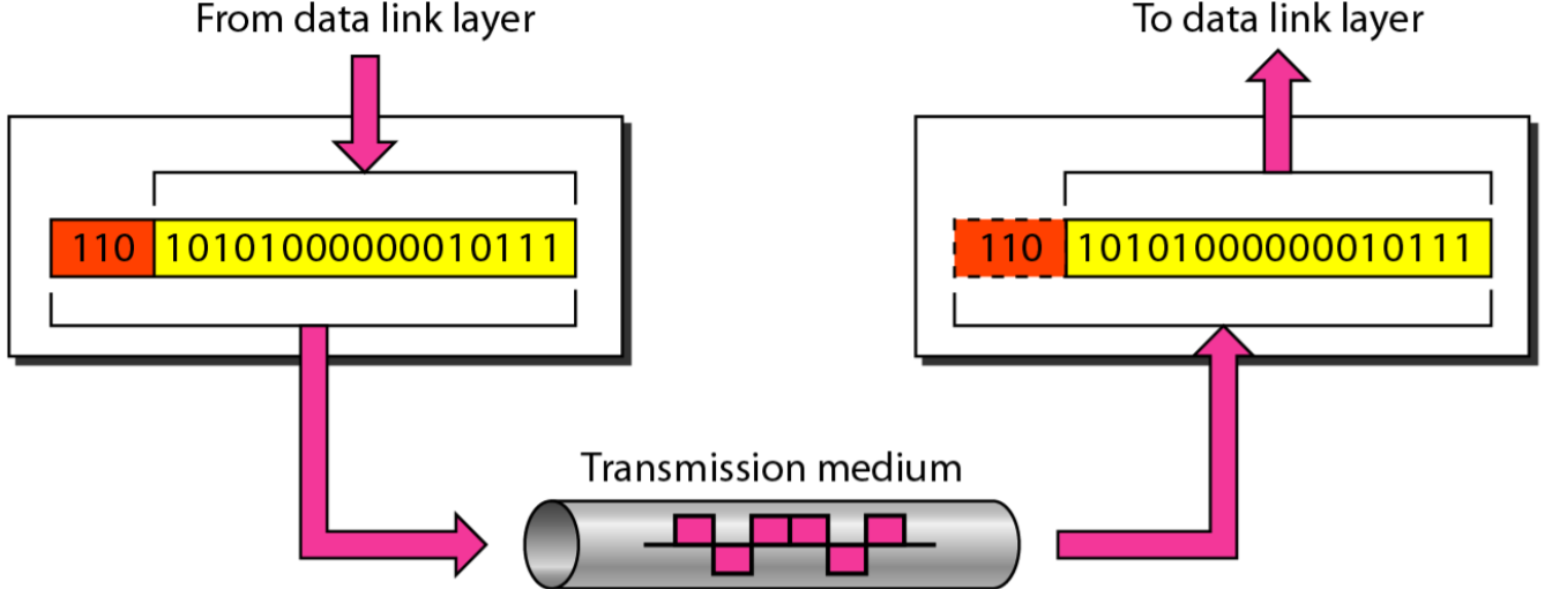
Layer 1: Physical Layer
- Purpose: Moves bits between nodes
- Functions:
- Electrical, mechanical, procedural, and functional requirements
- Activation, maintenance, and deactivation of physical connectivity
- Voltage specifications, wire speed, pin-out cables
- Interface setup between DTE and DCE
Encapsulation Process
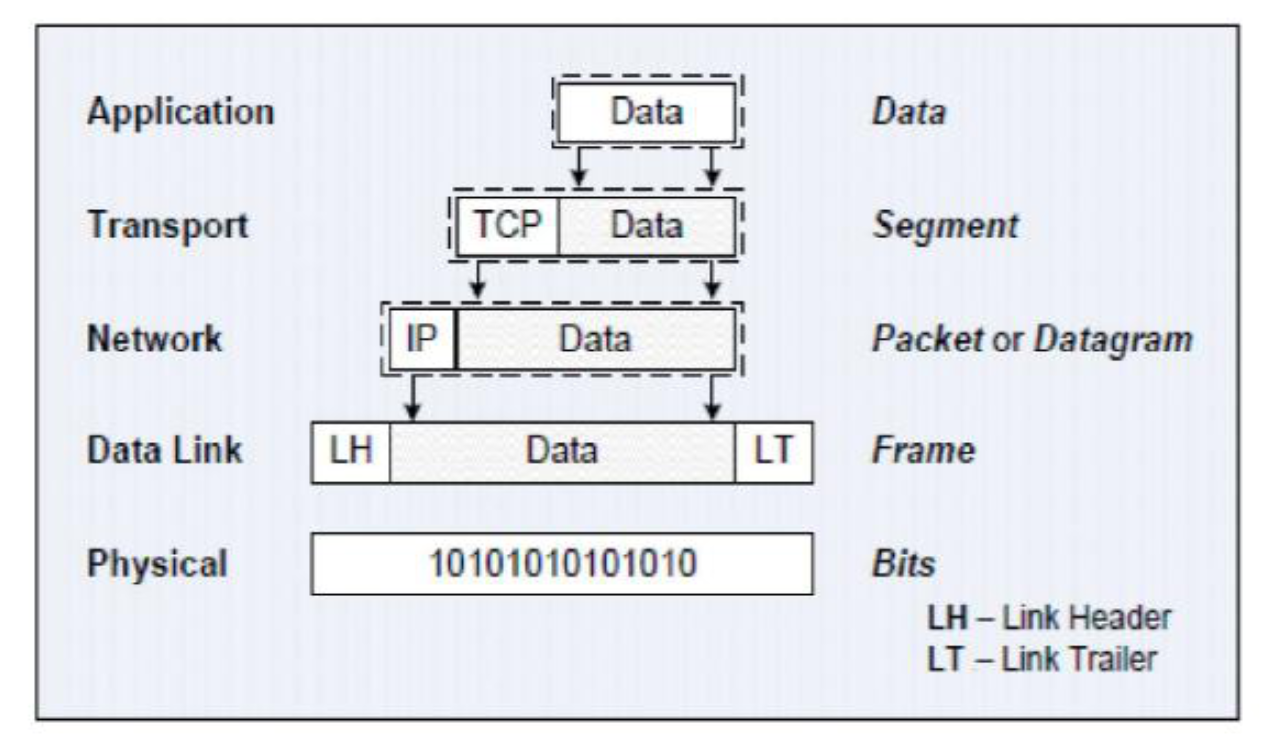
- Encapsulation: Process of adding header or trailer to PDU at each layer
- Protocol Data Unit (PDU): Layer n control information + layer n+1 encapsulated data
- Examples: L7PDU, L6PDU, L2PDU
- Data naming by layer:
- Application: Data
- Transport: Segment
- Network: Packet or Datagram
- Data Link: Frame
- Physical: Bits
TCP/IP Protocol Architecture
We actually use this one! (Above is like the standards)
Overview
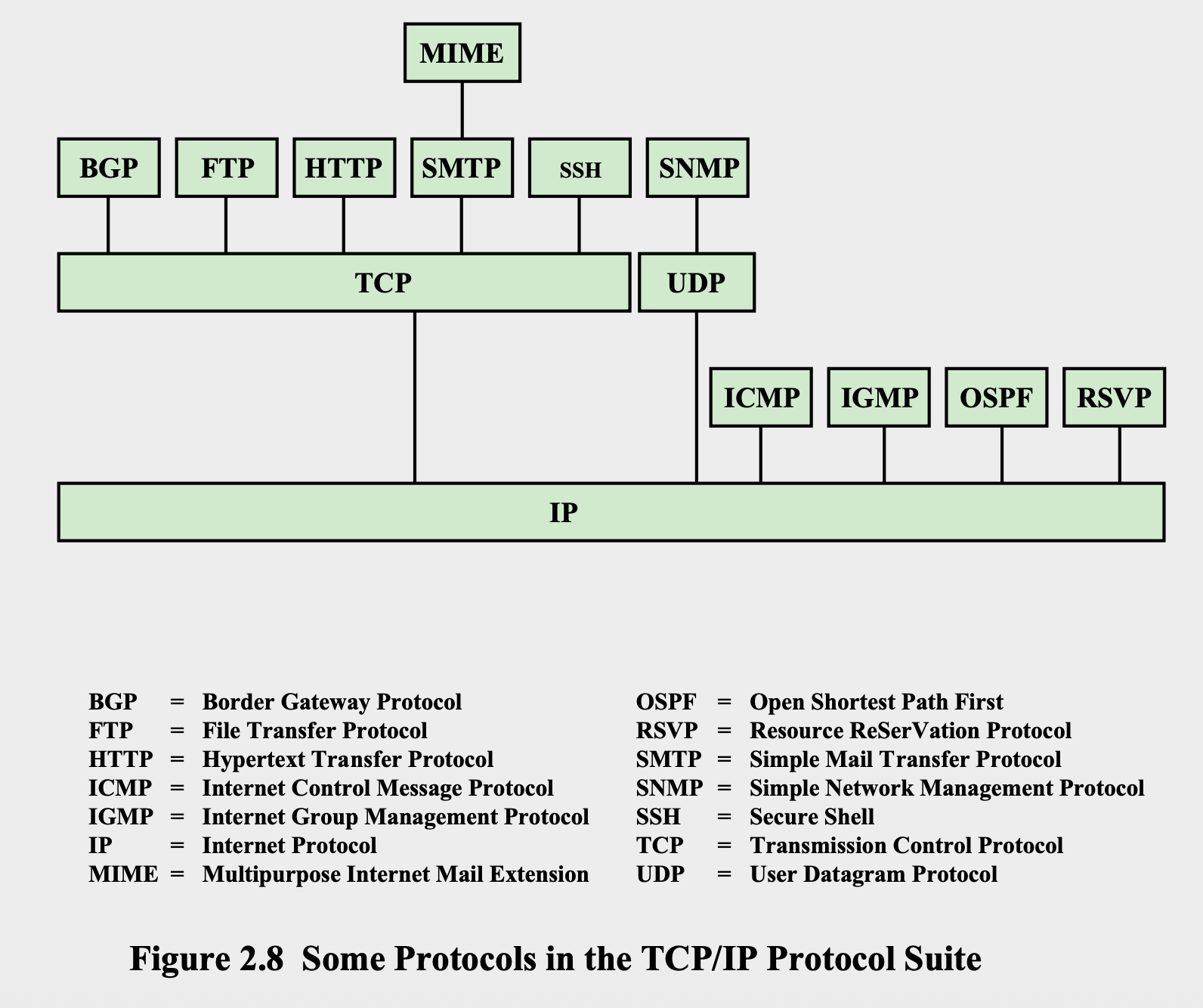
- TCP: Transmission Control Protocol
- IP: Internet Protocol
- We need to use both of them together!
- Result of protocol research and development conducted in the ARPANET project
- Referred to as TCP/IP protocol suite
- Comprises a large collection of protocols that are Internet standards
TCP/IP Layers
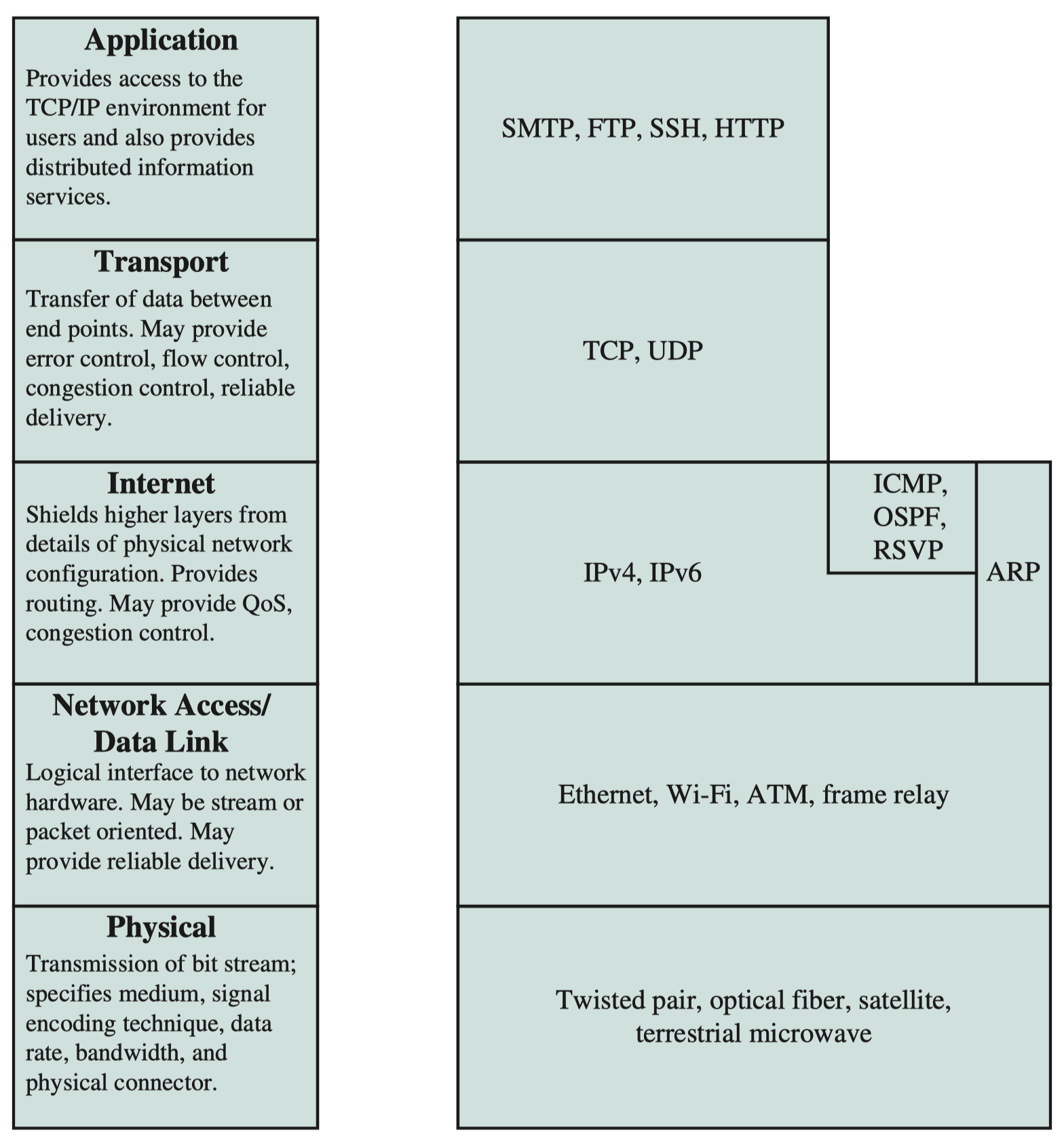
5. Application Layer
- Purpose: Interacts with software application programs on source and destination computers (closest to end-user)
- Functions:
- Identify communication partners
- Determine resource availability
- Synchronize communication
- Allow users to log on to remote hosts
- Provide various e-mail services
- Offer distributed database sources and access for global information
4. Transport Layer (Host-to-Host)
- Purpose: Provides data transport from process on source system to process on destination system
- Functions:
- Determines how much data should be sent where and at what rate
- Ensures data units are delivered error-free and in correct sequence
- Controls reliability through flow control, error control, and segmentation
- Offers acknowledgment of successful data transmission
- Primary Protocol: TCP (best-known example)
3. Network Layer (Internet Layer)
- Purpose: Send packets from source to destination
- Layer-management protocols:
- Routing protocols
- Multicast group management
- Network-layer address assignment
2. Network Access/Data Link Layer
- Purpose: Defines how data should be sent using the network
- Functions:
- Responsible for transmission of data between two devices on same network
- Includes how bits should be optically signaled by hardware devices
- Interfaces with network medium (coaxial, optical, fiber, twisted-pair cables)
1. Physical Layer
- Purpose: Covers physical interface between data transmission device and transmission medium
- Concerns: Characteristics of transmission medium, nature of signals, data rate, and related matters
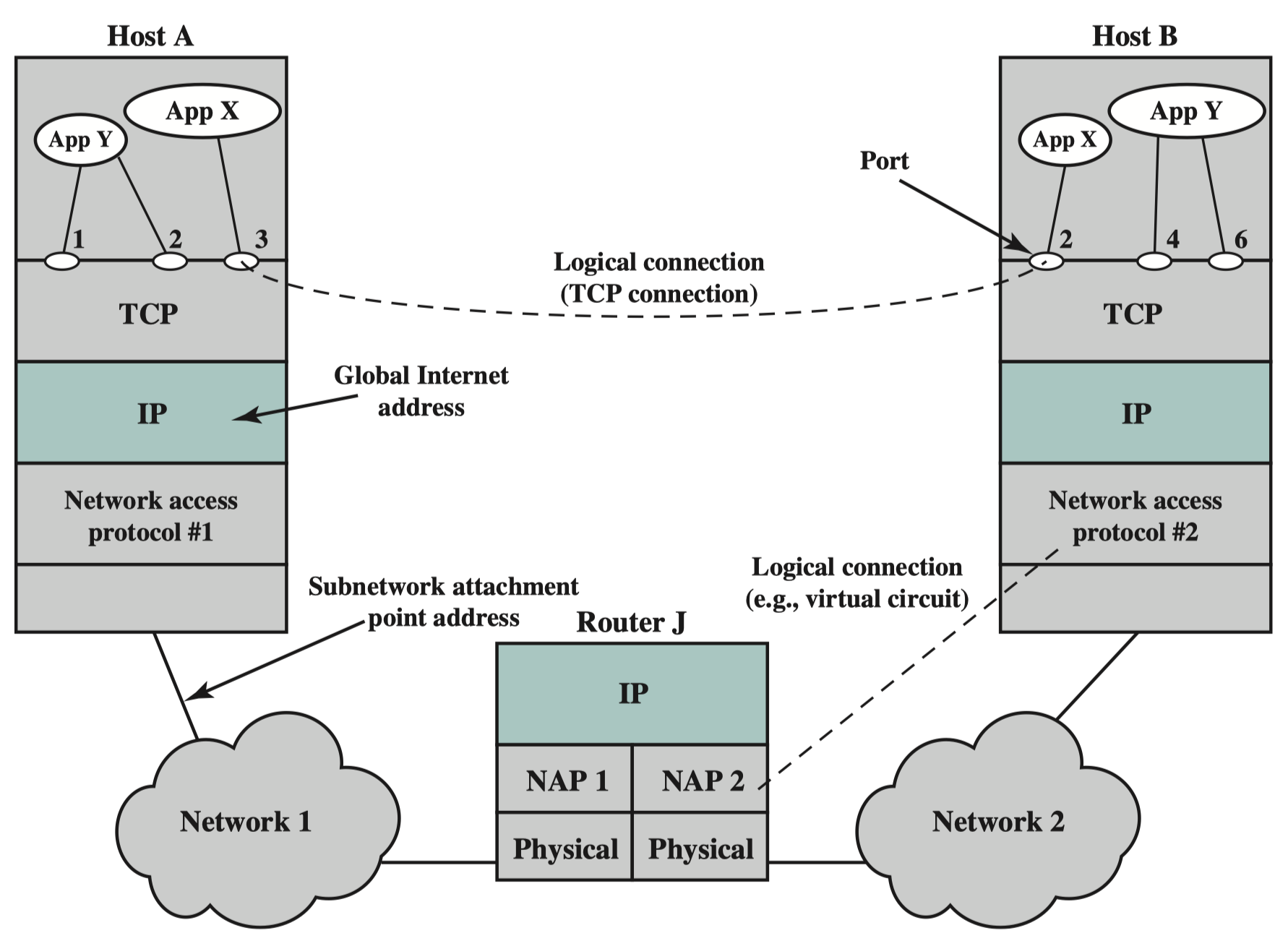
TCP/IP Address Requirements
Two levels of addressing needed:
- Global Internet Address: Each host on subnetwork must have unique global internet address
- Port Address: Each process must have address (port) that is unique within the host
Protocol Data Units (PDUs) in TCP/IP
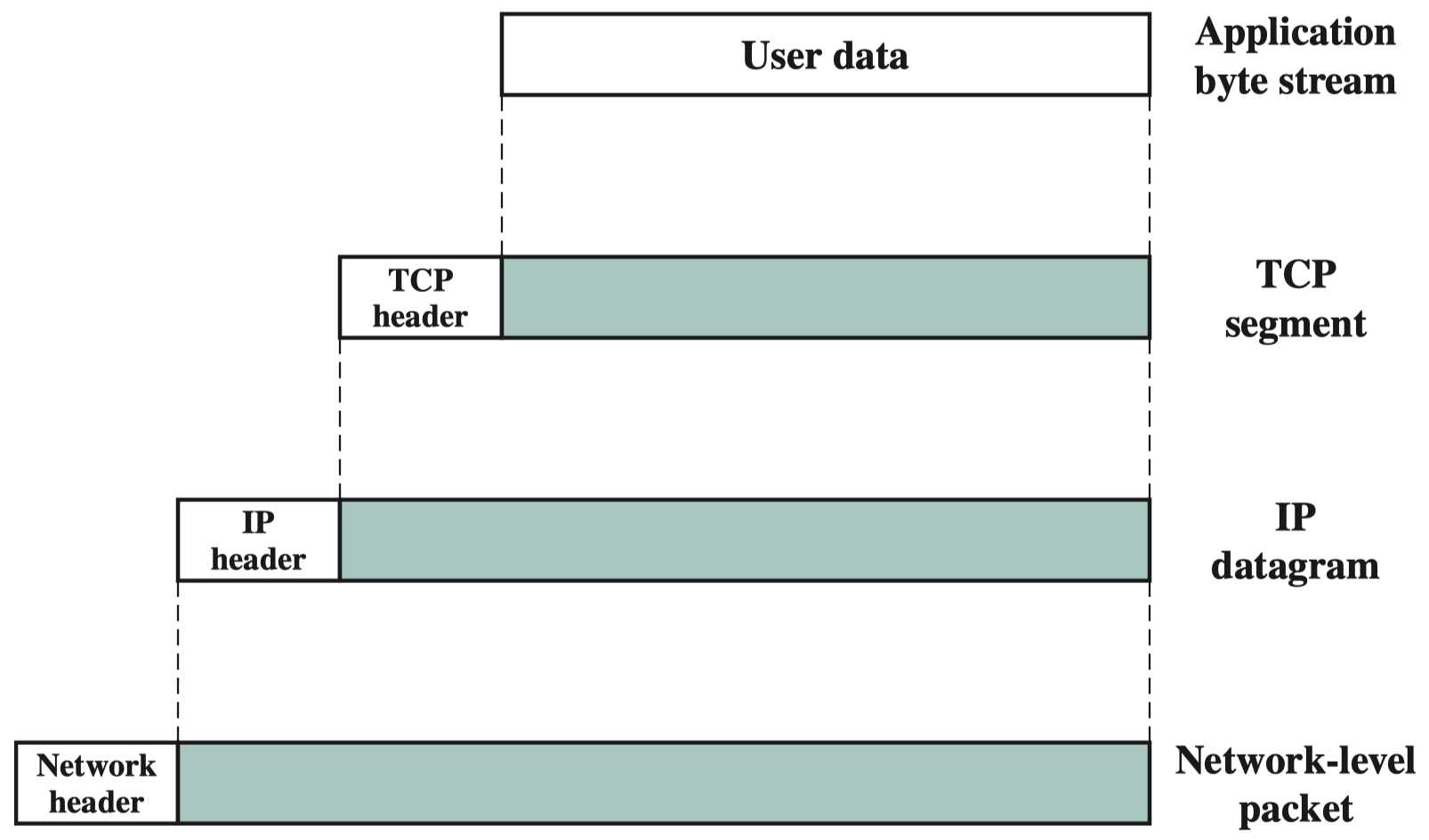
- Application byte stream: User data
- TCP segment: User data + TCP header
- IP datagram: TCP segment + IP header
- Network-level packet: IP datagram + Network header
Transport Layer Protocols
Transmission Control Protocol (TCP)
- Purpose: Transport layer protocol for most applications
- Characteristics:
- Provides reliable connection for transfer of data between applications
- TCP segment is the basic protocol unit
- Tracks segments between entities for duration of each connection
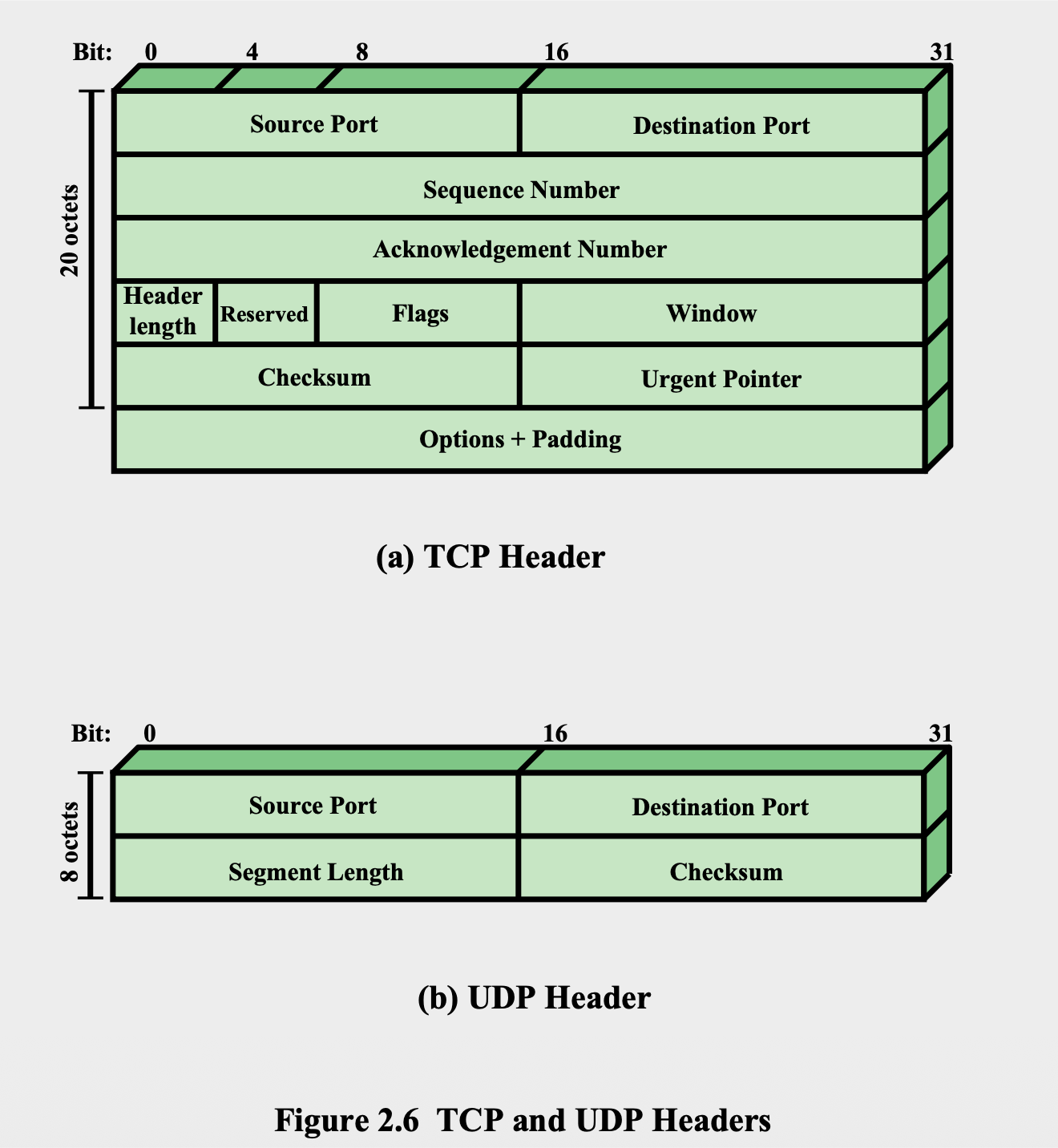
TCP Header Fields (20 octets)
- Source Port and Destination Port
- Sequence Number
- Acknowledgment Number
- Header Length, Reserved, Flags, Window
- Checksum and Urgent Pointer
- Options + Padding
User Datagram Protocol (UDP)
- Purpose: Alternative to TCP
- Characteristics:
- Does not guarantee delivery, preservation of sequence, or protection against duplication
- Enables procedure to send messages with minimum protocol mechanism
- Adds port addressing capability to IP
- Used with Simple Network Management Protocol (SNMP)
- Includes checksum to verify no error occurs in data
UDP Header Fields (8 octets)
- Source Port and Destination Port
- Segment Length and Checksum
Internet Protocol (IP)
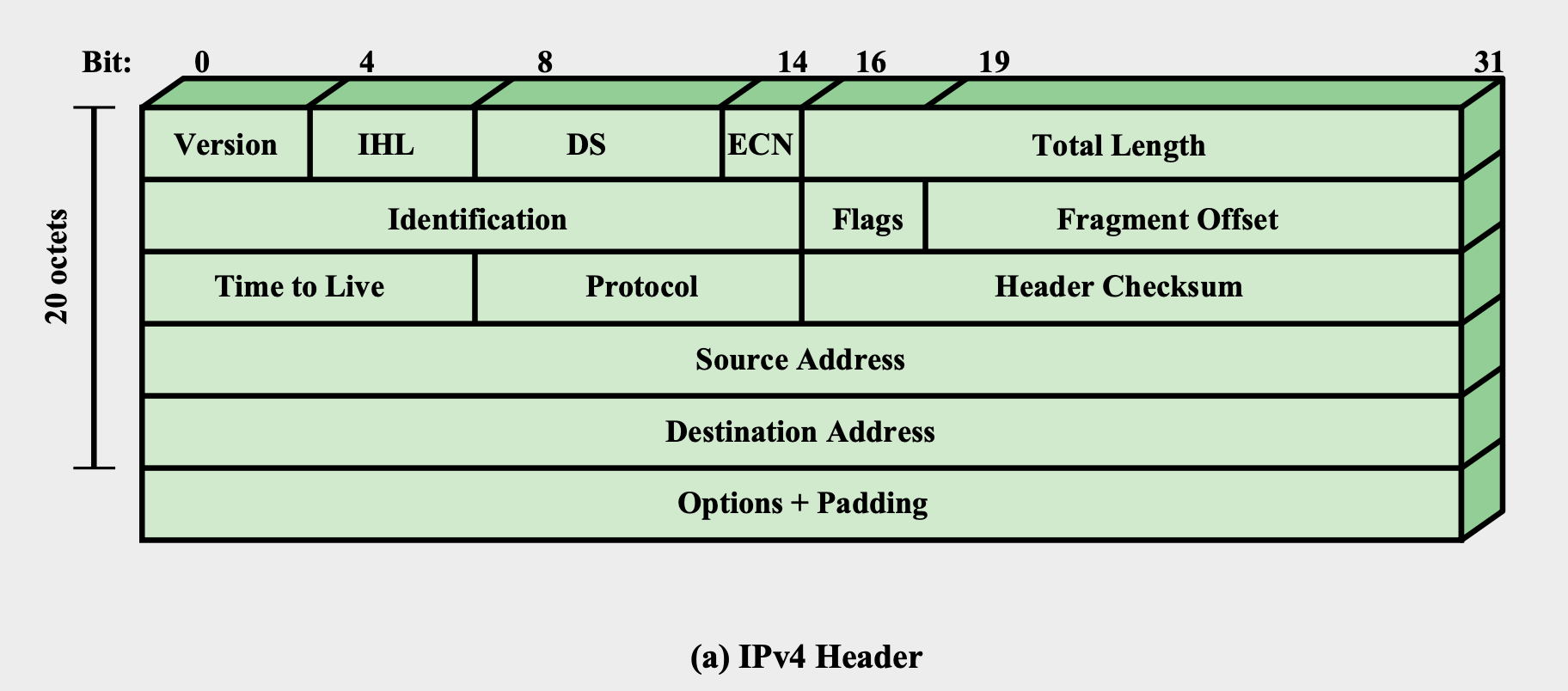
IPv4 Header (20 octets)
- Version, IHL, DS, ECN, Total Length
- Identification, Flags, Fragment Offset
- Time to Live, Protocol, Header Checksum
- Source Address, Destination Address
- Options + Padding
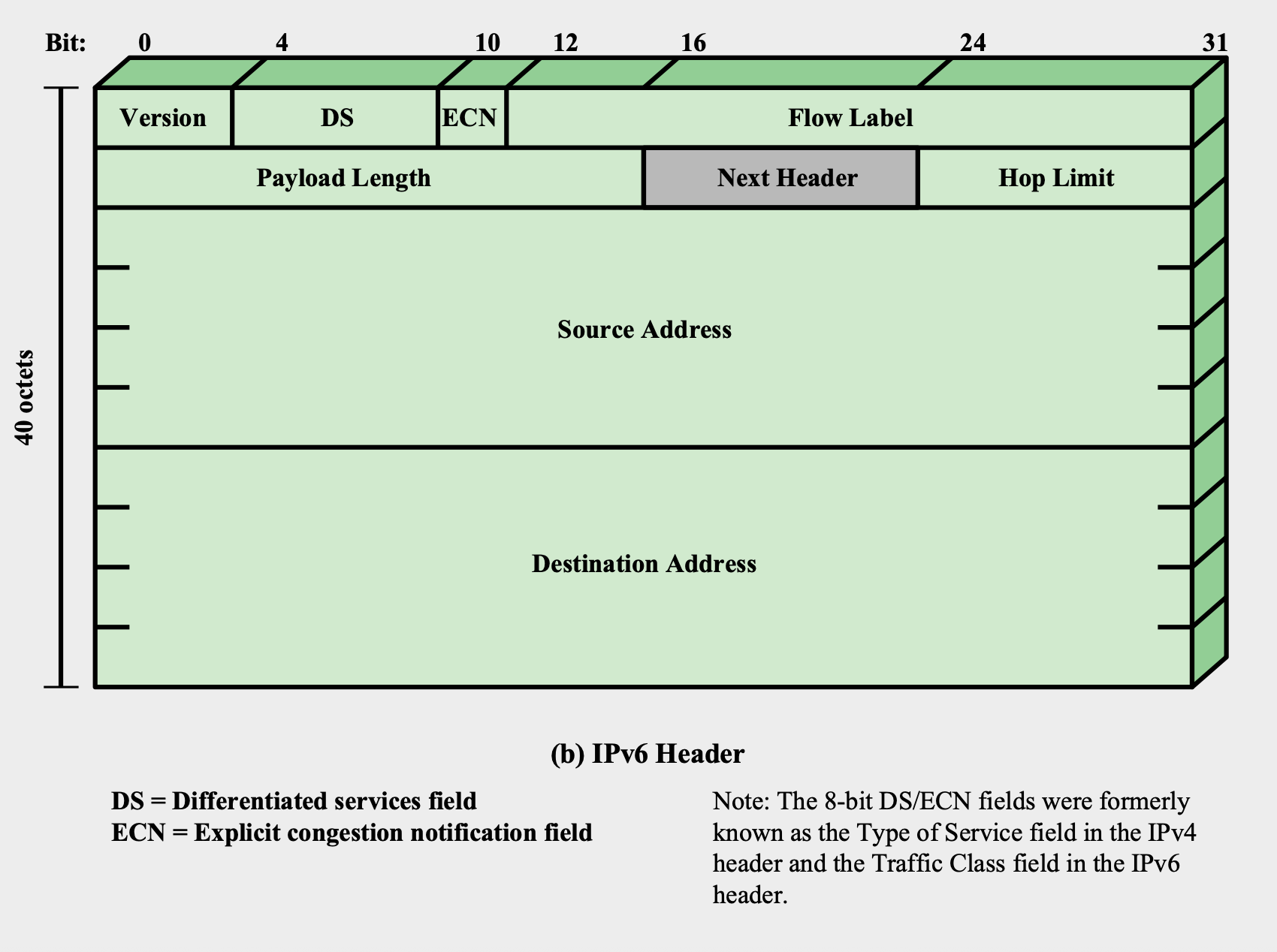
IPv6 Header (40 octets)
- Version, DS, ECN, Flow Label
- Payload Length, Next Header, Hop Limit
- Source Address (128 bits)
- Destination Address (128 bits)
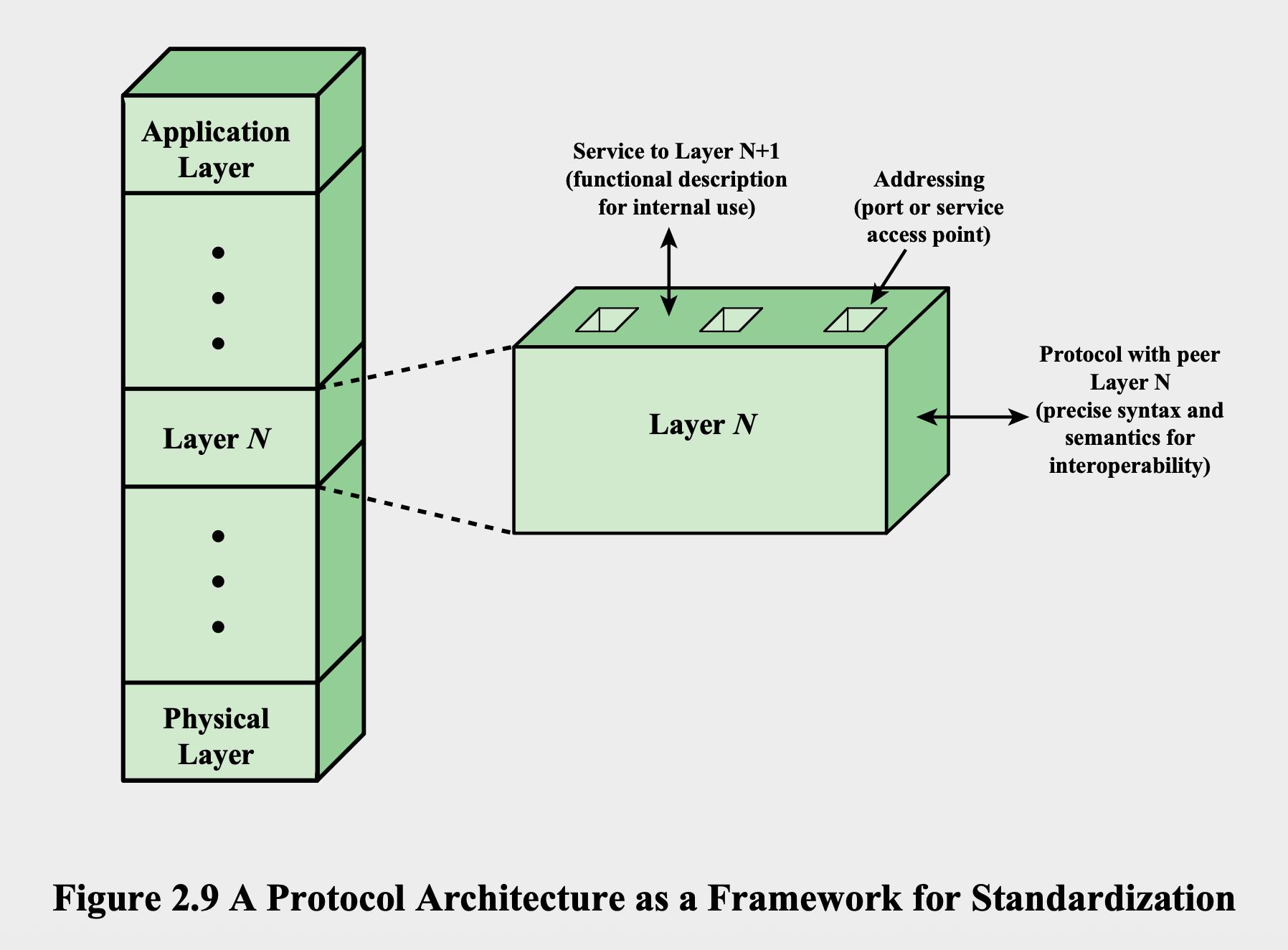
Protocol Architecture Standardization
Service Primitives and Parameters
Services between adjacent layers expressed as:
- Primitives: Specify the function to be performed
- Parameters: Used to pass data and control information
Service Primitive Types
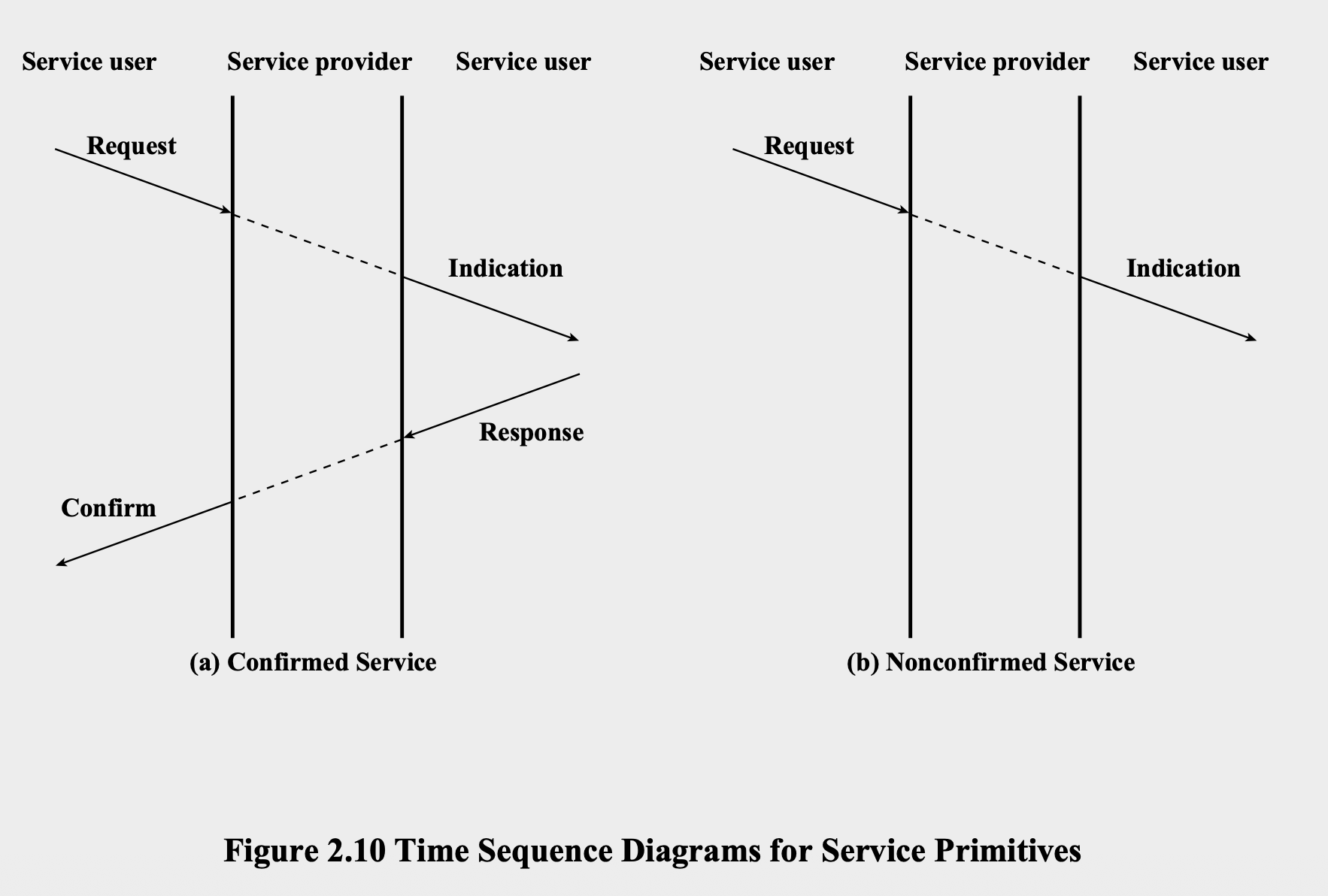
- REQUEST: Primitive issued by service user to invoke service and pass parameters
- INDICATION: Primitive issued by service provider to:
- Indicate procedure has been invoked by peer service user
- Notify service user of provider-initiated action
- RESPONSE: Primitive issued by service user to acknowledge or complete procedure previously invoked by indication
- CONFIRM: Primitive issued by service provider to acknowledge or complete procedure previously invoked by request
Service Types
- Confirmed Service: Uses Request → Indication → Response → Confirm sequence
- Nonconfirmed Service: Uses only Request → Indication sequence
- ฝั่งขวาพวก UDP Only
ใช่พวก 200 OK, 404 Not found อะไรพวกนั้นมั้ยนะ
Contents
Traditional Internet-Based Applications
Three common applications standardized to operate on top of TCP:
Simple Mail Transfer Protocol (SMTP)
- Provides mechanism for transferring messages among separate hosts
File Transfer Protocol (FTP)
- Used to send files from one system to another under user command
- Accommodates both text and binary files
Secure Shell (SSH)
- Provides secure remote logon capability
Multimedia Applications
Multimedia Terminology
- Media: Form of information including text, still images, audio, and video
- Multimedia: Human-computer interaction involving text, graphics, voice and video; also refers to storage devices for multimedia content
- Streaming media: Multimedia files that begin playing immediately or within seconds after received by computer from Internet/Web
Media Types
- Text: Information entered via keyboard, directly readable and printable
- Audio: Sounds produced by human speech mechanism
- Image: Communication of individual pictures, charts, or drawings
- Video: Sequences of pictures in time
Multimedia Application Domains
| Domain | Example Applications |
|---|---|
| Information management | Hypermedia, multimedia-capable databases, content-based retrieval |
| Entertainment | Computer games, digital video, audio (MP3) |
| Telecommunication | Videoconferencing, shared workspaces, virtual communities |
| Information publishing/delivery | Online training, electronic books, streaming media |
Sockets Programming (เพิ่มเติม)
If we need to create network ourselves
Overview
- Concept developed in 1980s in UNIX environment as Berkeley Sockets Interface
- De facto standard Application Programming Interface (API)
- Basis for Windows Sockets (WinSock)
- Enables communication between client and server process
- May be connection-oriented or connectionless
The Socket
- Definition: Formed by concatenation of port value and IP address
- Characteristics:
- Unique throughout the Internet
- Used to define an API
- Generic communication interface for writing programs using TCP or UDP
Socket Types
- Stream sockets: All data blocks guaranteed for delivery and arrive in order sent
- Datagram sockets: Delivery not guaranteed, order not necessarily preserved
- Raw sockets: Allow direct access to lower-layer protocols
Core Socket Functions
| Function | Purpose | Key Parameters |
|---|---|---|
socket() | Initialize a socket | domain, type, protocol |
bind() | Bind socket to port address | sockfd, localaddress, addresslength |
listen() | Listen on socket for inbound connections | sockfd, queuesize |
accept() | Accept inbound connection | sockfd, remoteaddress, addresslength |
connect() | Connect outbound to server | sockfd, remoteaddress, addresslength |
send()/recv() | Send/receive data on stream socket | sockfd, data, datalength |
sendto()/recvfrom() | Send/receive data on datagram socket | sockfd, data, datalength |
close() | Close a socket | sockfd |
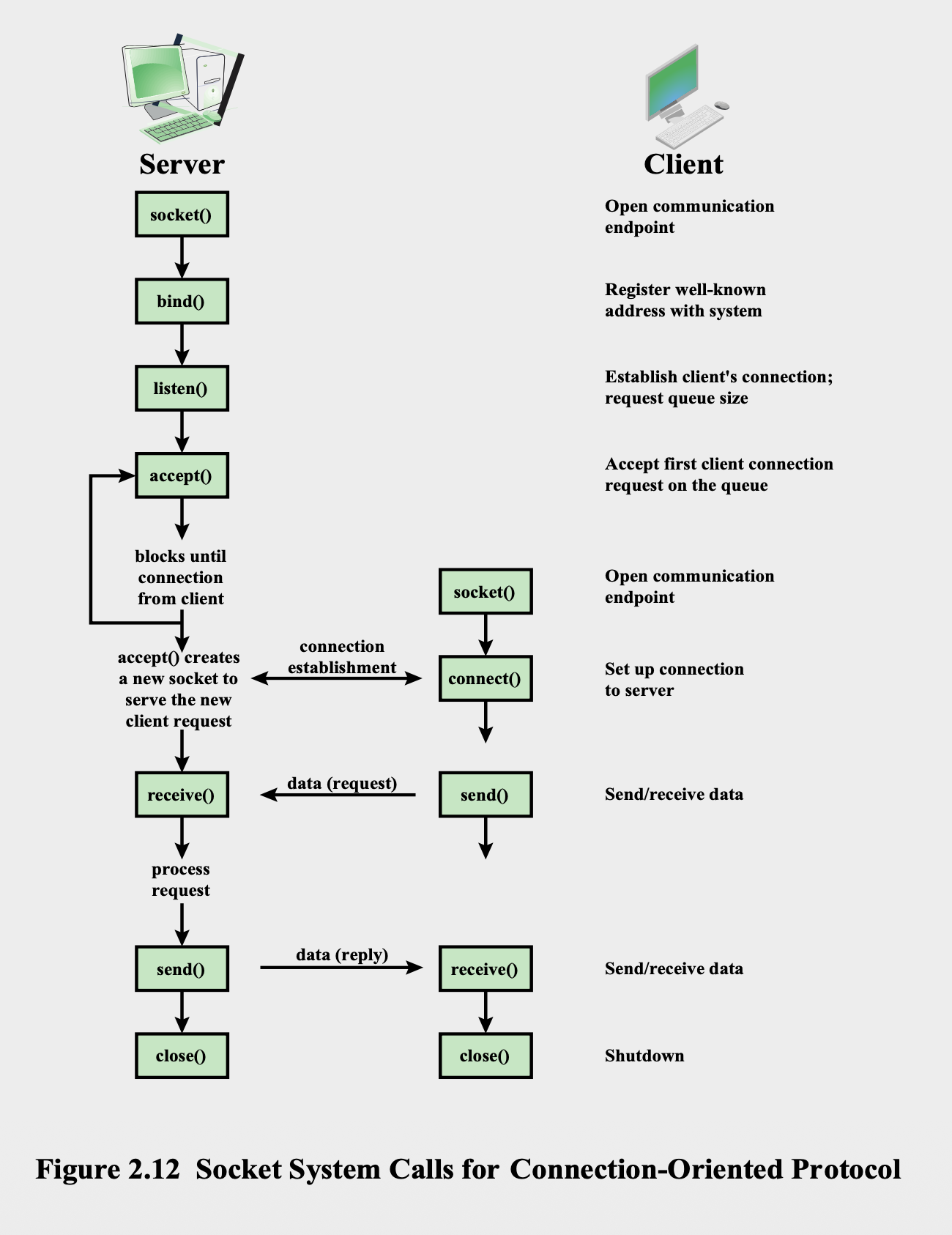
Connection-Oriented Socket Flow
Server Side:
socket()- Open communication endpointbind()- Register well-known address with systemlisten()- Establish client's connection; request queue sizeaccept()- Accept first client connection request on queuesend()/recv()- Send/receive dataclose()- Shutdown
Client Side:socket()- Open communication endpointconnect()- Set up connection to serversend()/recv()- Send/receive dataclose()- Shutdown
Summary
Key Concepts Covered
- Protocol Architecture Need: Modular approach to communication tasks
- Simple Protocol Architecture: Three-layer model (Application, Transport, Network Access)
- TCP/IP Protocol Architecture: Internet standard protocol suite
- TCP/IP Layers: Application, Transport, Network, Data Link, Physical
- TCP and UDP: Reliable vs. unreliable transport protocols
- IP and IPv6: Network layer protocols for packet delivery
- Protocol Interfaces: Service primitives and parameters for layer communication
- Standardization: Framework for protocol development within architecture
- Internet Applications: SMTP, FTP, SSH as traditional applications
- Multimedia: Media types and application domains
- Sockets Programming: API for network application development