Going Beyond MapReduce
- MapReduce provides a simple abstraction to write distributed programs running on large-scale systems on large amounts of data
- In terms of
<key, value>ไง
- In terms of
- MapReduce is not suitable for everyone
- MapReduce abstraction is low-level — developers need to write custom programs which are hard to maintain and reuse
- Sometimes user requirements differ:
- Interactive processing of large log files
- แต่ถ้าเป็น Streaming Data, MapReduce ก็ไม่เหมาะอยู่ละ มันเหมาะกับ Batch มากกว่า
- ถ้า process streaming data ก็ไปใช้ Spark นู้น Chapter 5 - Data Stream Processing (Spark Streaming)
- Process big data using SQL syntax rather than Java programs
- Warehouse large amounts of data while enabling transactions and queries
- Data file → Database (Relational, NoSQL) → Data Warehouse → Data Lake → Big Data
- Write a custom distributed application but don't want to manage distributed synchronization and co-ordination
- Interactive processing of large log files
Disadvantages of MapReduce (MR)
- It's not always very easy to implement each and everything as a MR program
- When your intermediate processes need to talk to each other (jobs run in isolation)
- When your processing requires a lot of data to be shuffled over the network
- MR is not dynamic enough to deal with those stuff.
- When you need to handle streaming data — MR is best suited to batch process huge amounts of data which you already have
- When you can get the desired result with a standalone system — it's obviously less painful to configure and manage a standalone system compared to a distributed system
- When you have OLTP (online transaction processing) needs — MR is not suitable for a large number of short on-line transactions
Analogy: MapReduce is like a factory assembly line — great for bulk processing but terrible for quick custom orders or live interactions.
อยากให้ MapReduce ไวขึ้นก็แค่ add worker, ให้มันทำงานแบบ parallel
OLTP ≠ OLAP (multi-dimensional database)
Unstructured vs. Structured Data
Structured Data
- Data with a corresponding data model, such as a schema
- Fits well in relational tables
- e.g., Data in an RDBMS (rows and columns with defined types)
Unstructured Data
- No data model, schema
- Textual or bit-mapped (pictures, audio, video, etc.)
- e.g., Log files, E-mails, web server logs
Analogy: Structured data is like a spreadsheet — each column has a name and type. Unstructured data is like a pile of sticky notes — no standard format.
Hadoop Spin-offs
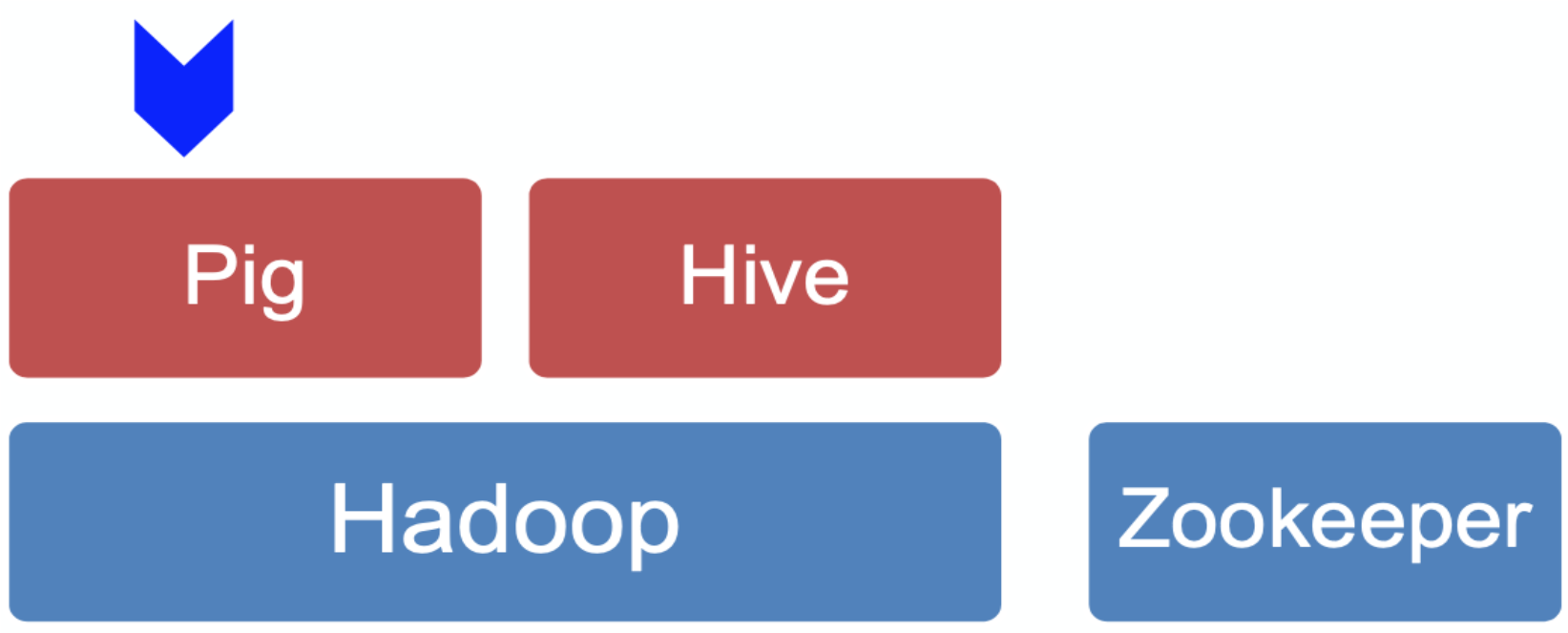
- Pig and Hive run on top of Hadoop (HDFS + MapReduce)
- ZooKeeper is a standalone distributed coordination service
Apache PIG
Why Pig?
- Many ways of dealing with small amounts of data:
- Unstructured logs on single machine:
awk,sed,grep, etc. - Structured data: SQL queries through an RDBMS
- Unstructured logs on single machine:
- How to process giga/tera/peta-bytes of unstructured data?
- Web crawls, log files, click streams
- Converting log files into database entries is tedious
- SQL syntax may not be ideal (for all type of data)
- Strict syntax, not suited for scripting-centric programmers
- MapReduce is tedious!
- Rigid data flow — Map and Reduce only
- Custom code for common operations such as joins — and difficult!
- Reuse is difficult
Grep, Sed, awk Commands (for reference)
grep— used for search operationssed— used for search and replace operationsawk— particularly well suited for tabular data, lower learning curve
What is Apache Pig?

Pig Latin Language
- High-level language to express operations on data
- User specifies the operations on the data as a query execution plan in Pig Latin
Apache Pig Framework
- Pig Pen — debugging environment
- Interprets and executes Pig Latin programs into MapReduce jobs (ออกข้อสอบแน่!)
- Grunt — a command line interface (CLI) to Pig
Analogy: Pig Latin is like a scripting language that automates the tedious job of writing raw MapReduce Java code. You describe what to do step-by-step, and Pig figures out how to translate that into MapReduce.
Pig Use Cases
- Ad-hoc analysis of unstructured data
- Web crawls, log files, click streams → Unstructured data! (จะใช้ SQL ได้ไง)
- Pig is an excellent ETL tool
- "Extract, Transform, Load" — for pre-processing data before loading it into a data warehouse
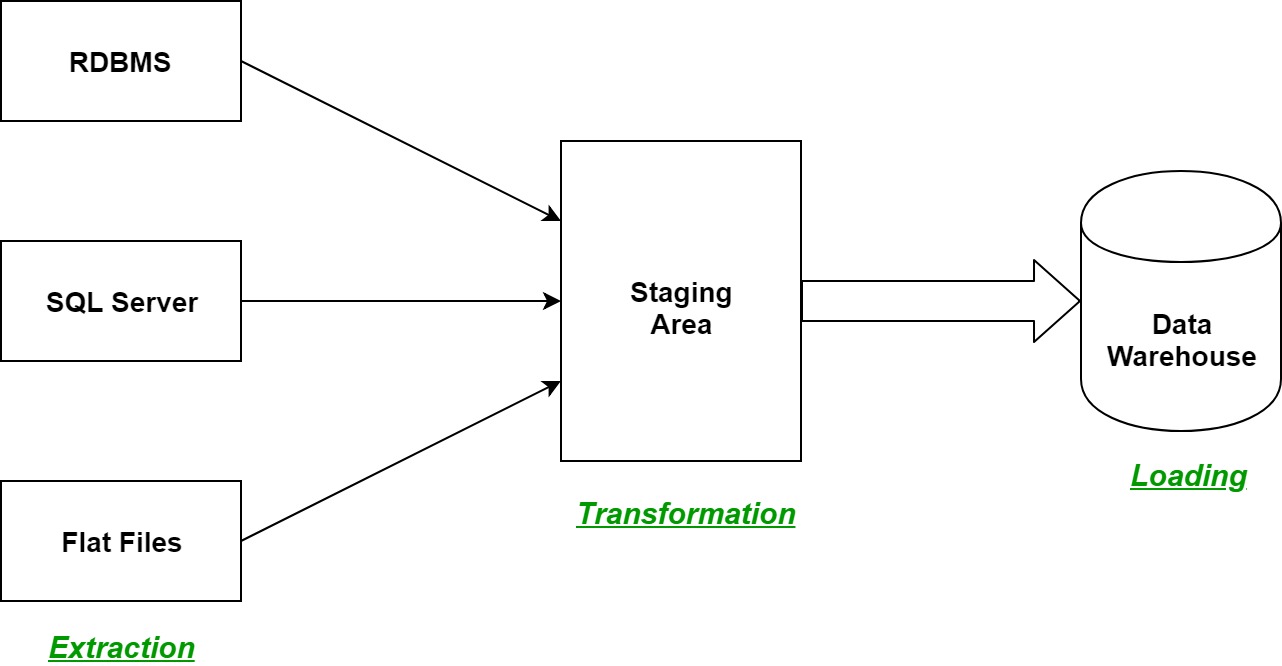
- "Extract, Transform, Load" — for pre-processing data before loading it into a data warehouse
- Rapid Prototyping for Analytics
- You can experiment with large data sets before you write custom applications
DB, DW, DL (Data Storage Hierarchy)
| Level | Description |
|---|---|
| File | Raw files on disk |
| Database (DB) | Structured, queryable data |
| Data Warehouse (DW) | Historical, analytics-oriented storage |
| Data Lake (DL) | Raw, unprocessed, multi-format storage |
| Big Data | Distributed, massive-scale processing |
ETL Process
[Source DBs] --EXTRACTION--> [Staging Area] --TRANSFORM & LOAD--> [Data Warehouse] --TRANSFORM--> [Analytics]
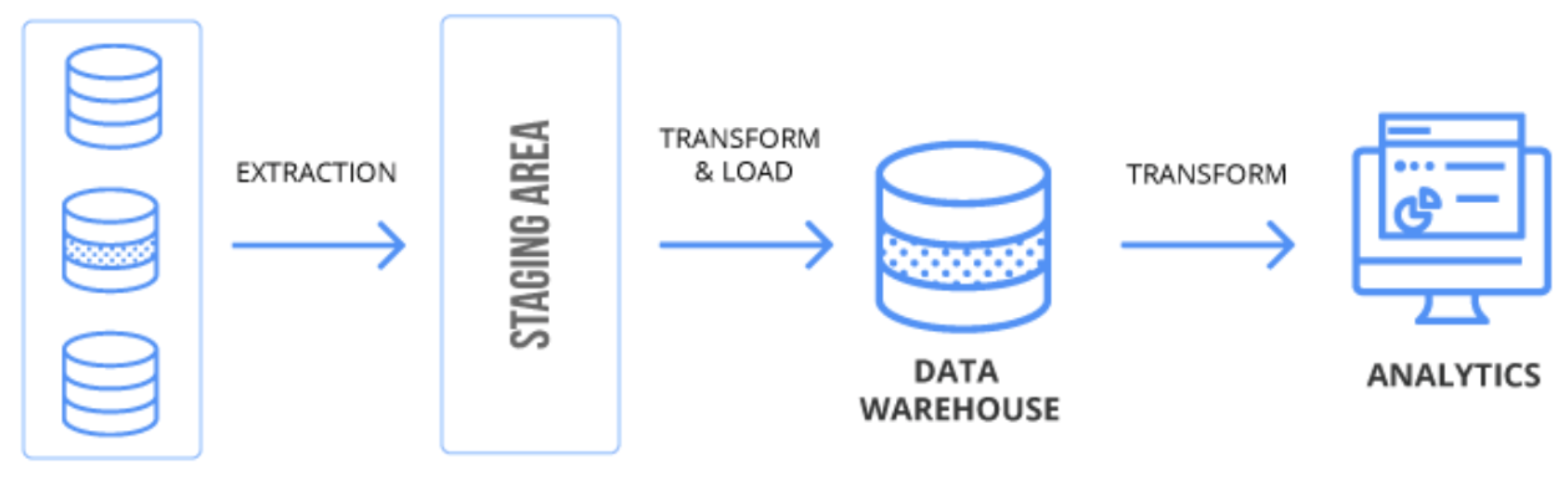
- Extract: Pull data from source systems
- Transform: Clean, format, and restructure the data
- Load: Push transformed data into the target warehouse
DW Model: Star Schema
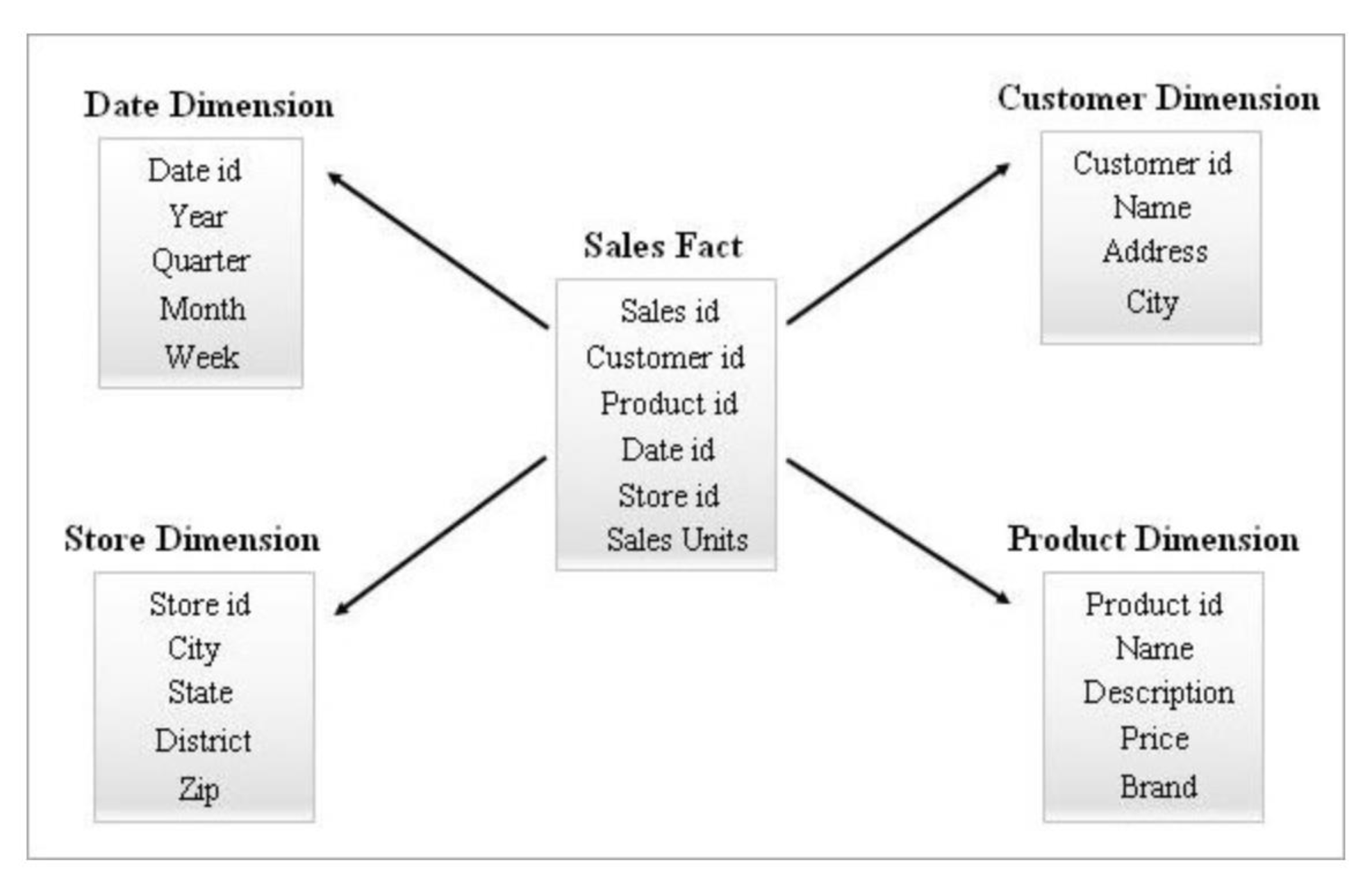
   [Date Dimension]         [Customer Dimension]
        |                          |
        +--------[Sales Fact]------+
        |          - Sales id      |
        |          - Customer id   |
   [Store Dim]    - Product id    [Product Dim]
                  - Date id
                  - Store id
                  - Sales Units
- Fact table (center): Holds measurable, quantitative data (e.g., Sales Units)
- Dimension tables (surrounding): Descriptive context (Date, Customer, Store, Product)
- ในแต่ละอัน มี hierarchy ของมันนะ เรียกว่า DL (Year, Quarter, Month, Week, Day, Hour)
Analogy: Star Schema looks like a star — fact table at the center, dimension tables pointing outward like rays. (Fact + Dimension)
Querying a Star Schema (Example)
SELECT   pdim.Name Product_Name,
         Sum(sfact.sales_units) Quantity_Sold
FROM     Product pdim,
         Sales sfact,
         Store sdim,
         Date ddim
WHERE    sfact.product_id = pdim.product_id
         AND sfact.store_id = sdim.store_id
         AND sfact.date_id = ddim.date_id
         AND sdim.state = 'Kerala'
         AND ddim.month = 1
         AND ddim.year = 2018
         AND pdim.Name in ('Novels', 'DVDs')
GROUP BY pdim.Name
Design Goals of Pig Latin
Dataflow Language
- Operations are expressed as a sequence of steps, where each step performs only a single high-level data transformation
- Unlike SQL where the query should encapsulate most of the operation required
Quick Start and Interoperability
- Quickly load flat files and text files, output can also be tailored to user needs
- Schemas are optional — fields can be referred to by position (
$1,$4, etc.)
แปลว่ามัน support both structured and unstructured data!
Fully Nested Data Model
- A field can be of any data type; a data type can encapsulate any other data type
UDFs as First-Class Citizens
- User defined functions can take in any data type and return any data type
- Unlike SQL which restricts function parameters and return types
Pig Latin — Data Types
| Type | Description | Example |
|---|---|---|
| Atom | Simple atomic value | 'alice' |
| Tuple | A sequence of fields, each can be any data type | ('alice', 'lakers') |
| Bag | A collection of tuples | |
| Map | A collection of data items associated with a dedicated atom |
Pig Latin — Expressions
Given tuple: with fields f1, f2, f3
| Expression Type | Example | Value for tuple |
|---|---|---|
| Constant | 'bob' | Independent of |
| Field by position | $0 | 'alice' |
| Field by name | f3 | ['age' → 20] |
| Projection | f2,$0 | {('lakers'), ('iPod')} |
| Map Lookup | f3#'age' | 20 |
| Function Evaluation | SUM(f2.$1) | |
| Conditional Expression | F3#'age'>18? 'adult':'minor' | 'adult' |
| Flattening | FLATTEN(f2) | 'lakers', 1 / 'ipod', 2 |
ใน #FinalExam เดี๋ยวจะให้หา value for tuple ออกมาเนี่แหละ
Pig Latin — Commands / Operators
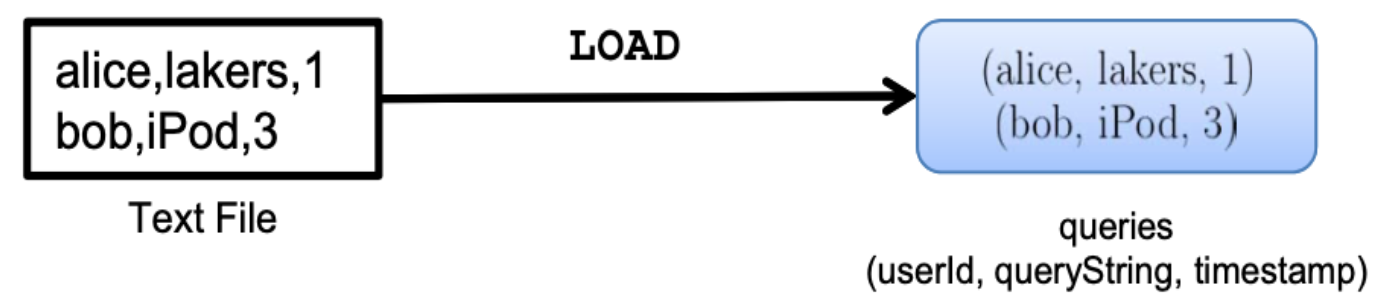
LOAD — Specify Input Data
queries = LOAD 'query_log.txt' USING myLoad()
AS (userId, querystring, timestamp);myLoad()is a user defined function (UDF)- Loads flat text file → produces a bag of tuples
FOREACH — Per-Tuple Processing
expanded_queries = FOREACH queries GENERATE userId,
expandQuery(queryString);- Applies a function to each tuple in a bag

FLATTEN — Remove Nested Data in Tuples
FLATTEN(expandedQueries);- Converts nested bags into flat tuples
- e.g.,
(alice, {(lakers rumours), (lakers news)})→(alice, lakers rumors),(alice, lakers news)

FILTER — Discarding Unwanted Data
FILTER expandedQueries BY userId == 'alice'- Keeps only tuples that satisfy the condition

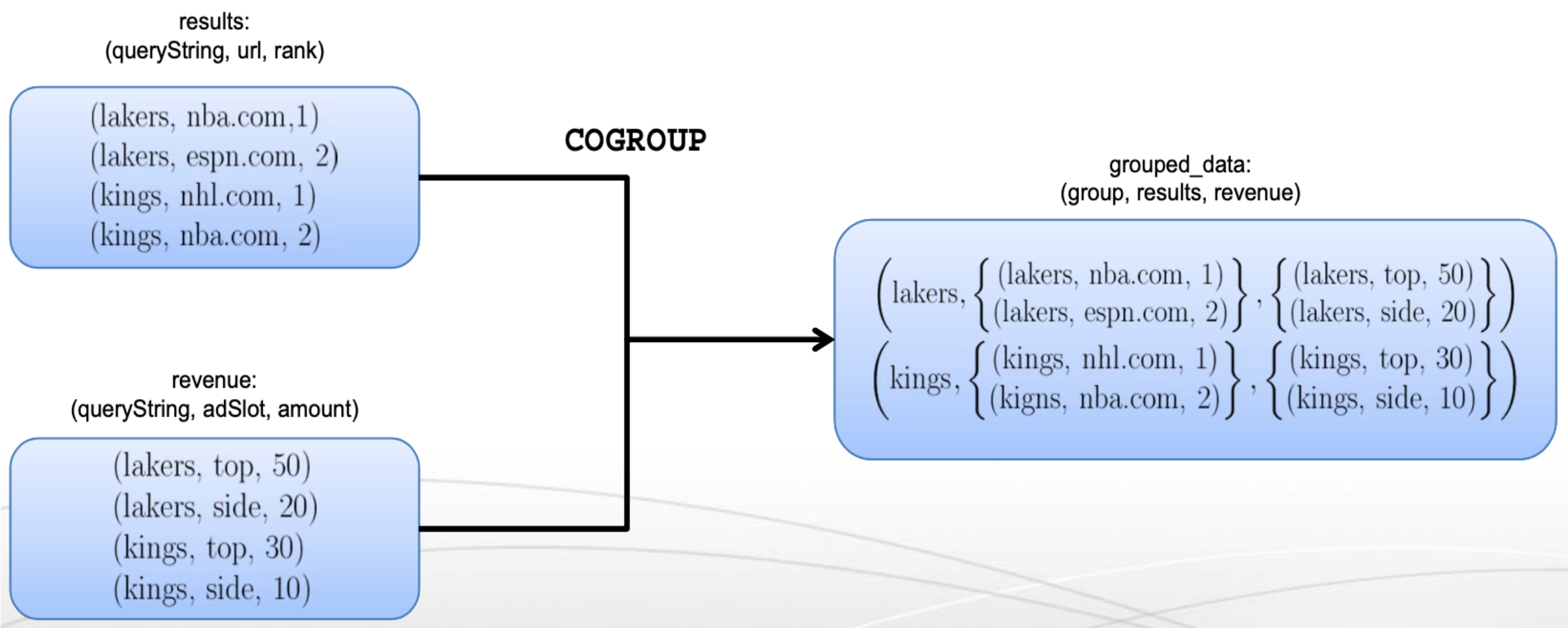
COGROUP — Getting Related Data Together
grouped_data = COGROUP results BY queryString,
revenue BY queryString;- Groups tuples from multiple relations by a common key
GROUPis a special case ofCOGROUP(single relation)
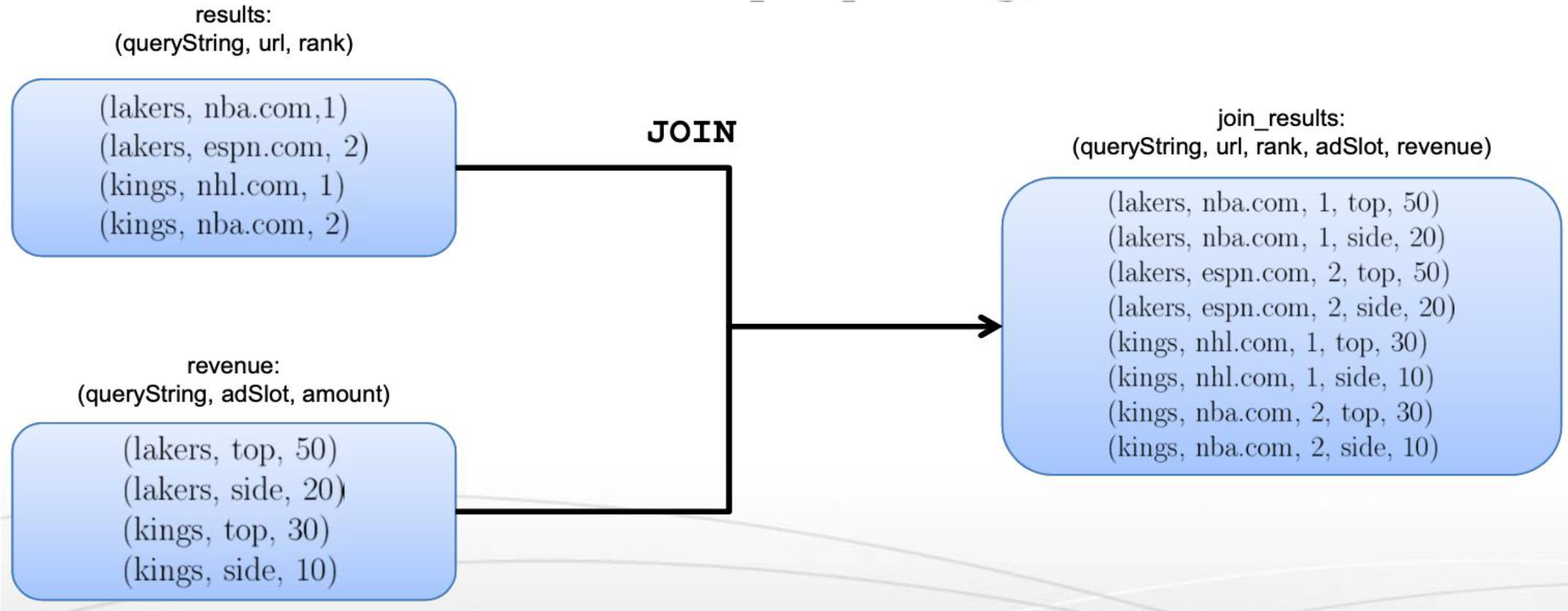
JOIN — Cross Product of Two Tables
join_result = JOIN results BY queryString,
revenue BY queryString;JOINis the same asCOGROUP + FLATTEN- Produces the full cross product of matching tuples
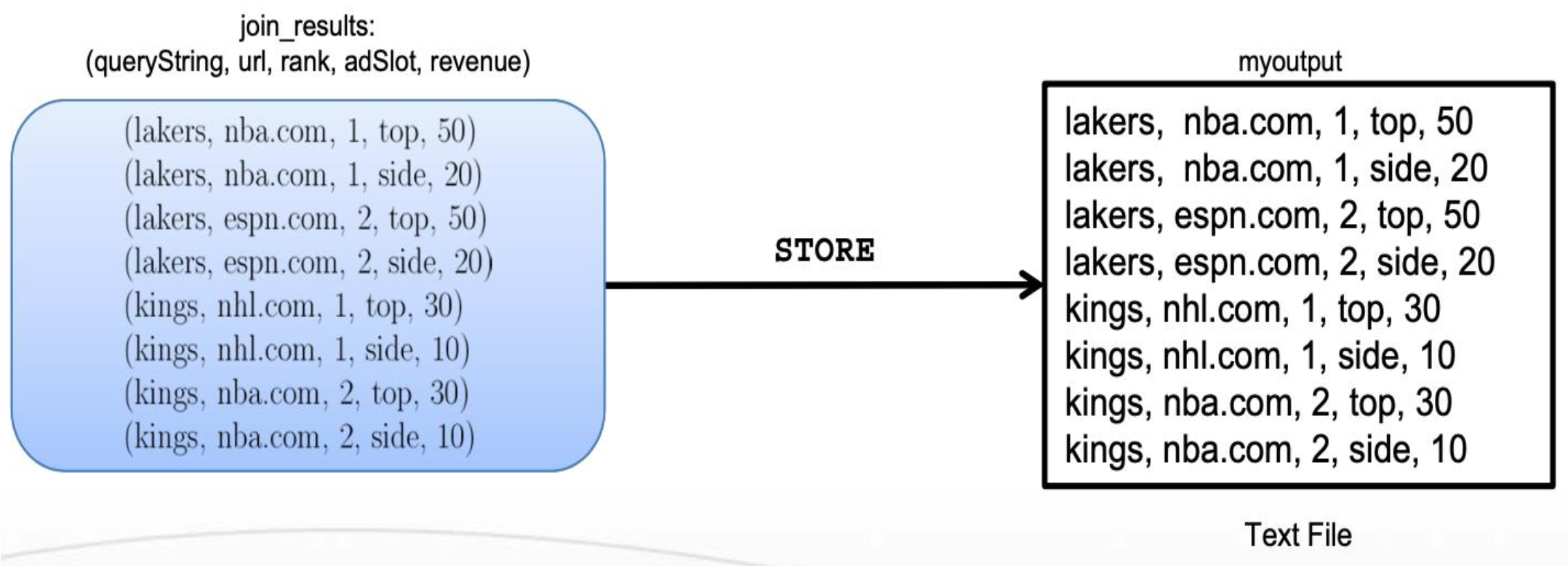
STORE — Create Output
final_result = STORE join_results INTO 'myoutput',
USING myStore();- Writes results to a file using a UDF or default output format
Architecture of Pig
[Grunt (CLI)] ---> [Pig Driver] ---> [Hadoop Cluster]
[PigPen]      -/        |
                    [Logical Plan]
                  Query Parser | Semantic Checking | Logical Optimizer
                         ↓
                    [Physical Plan]
                  Logical to Physical Translator
                         ↓
                    [MapReduce Plan]
                  Physical to MR Plan Translator
                         ↓
                    [Execution on Hadoop]
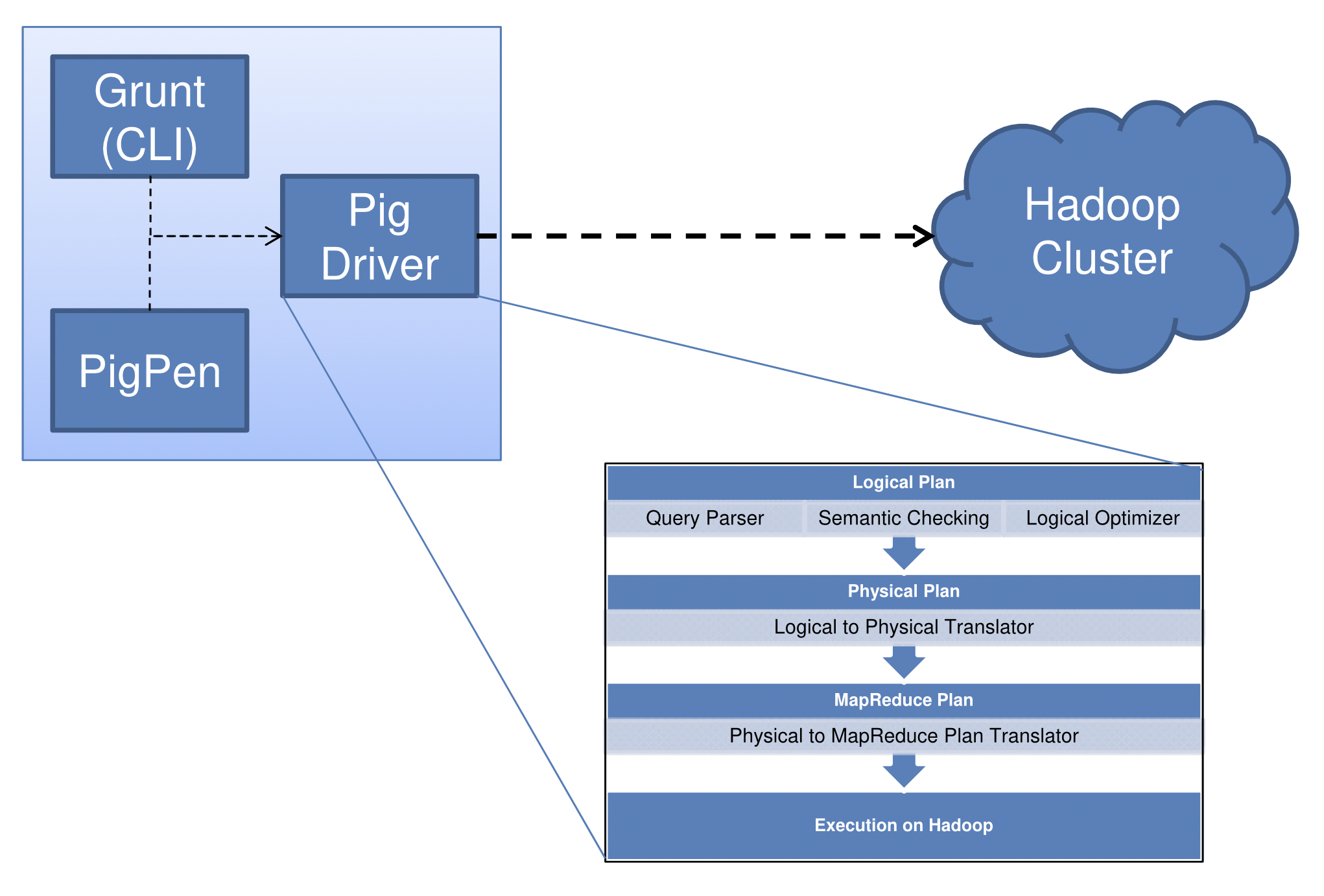
Interpretation of a Pig Program
- The Pig interpreter parses each command and builds a logical plan for each bag created by the user
- The logical plan is converted to a physical plan
- Pig then creates an execution plan of the physical plan with maps and reduces
- Execution starts only after output is requested — lazy compilation
Analogy: Lazy compilation is like a GPS that only starts calculating the route when you actually start driving — it waits until the output is needed before executing.
Pigs Eat Anything: Pig can work with many different kinds of data.
Apache HIVE
Motivation for Hive
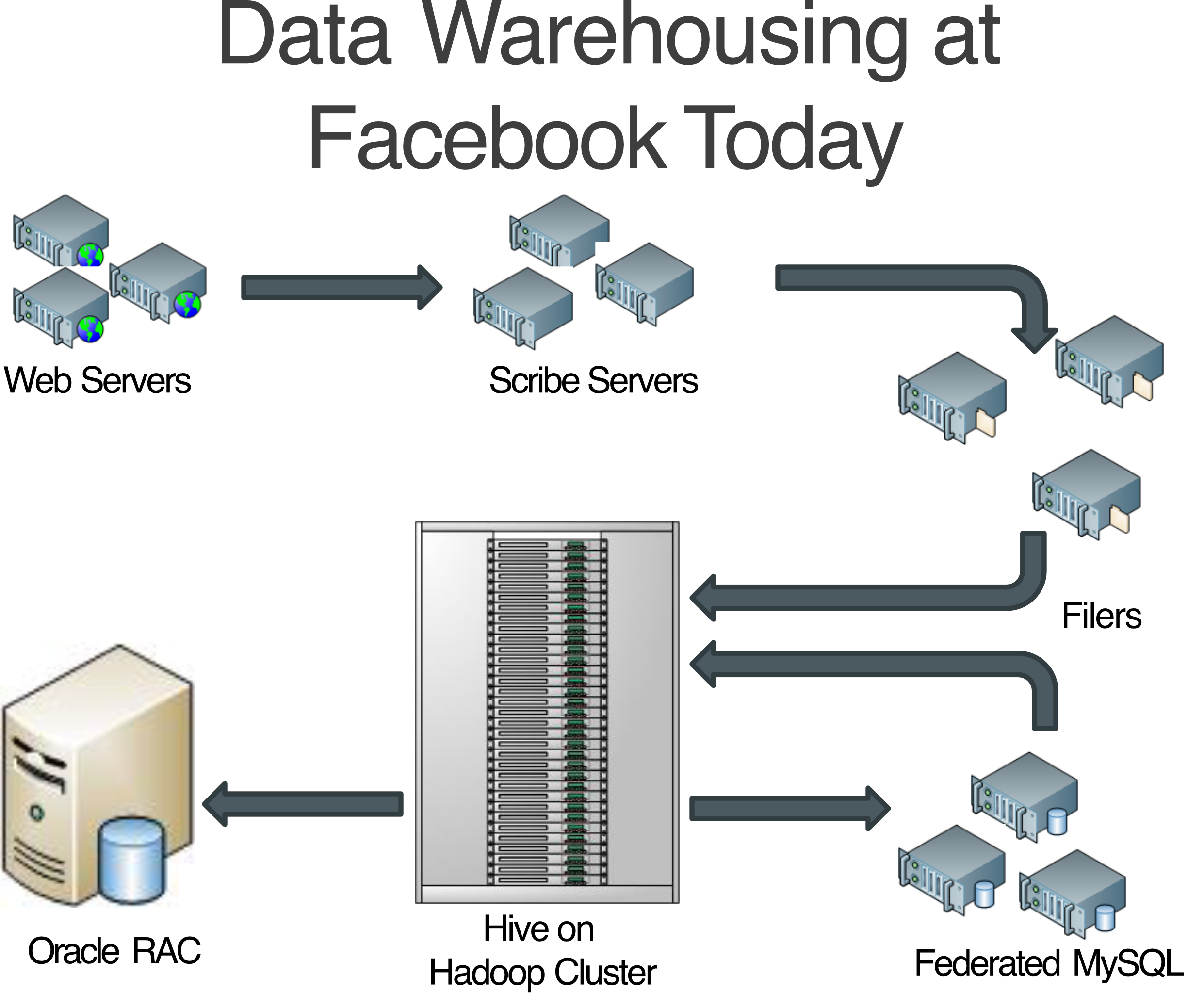
- Organizations that have been using SQL-based RDBMS for storage (Oracle, MSSQL, MySQL, etc.)
- The RDBMS has grown beyond what one server can handle:
- Storage can be expanded to a limit
- Processing of queries is limited by the computational power of a single server
- Traditional business analysts with SQL experience:
- May not be proficient at writing Java programs for MapReduce
- Require SQL interface to run queries on TBs of data
Hive Key Principles
- Defines SQL-like query language called HiveQL (QL)
- Data Warehouse Infrastructure on top of Hadoop
- Allows programmers to plug-in custom mappers and reducers
- Provides tools to enable easy data ETL
What is Apache Hive?

- Hive is a data warehouse infrastructure built on top of Hadoop that can ==compile SQL-style queries into MapReduce jobs== and run these jobs on a Hadoop cluster
- MapReduce for execution
- HDFS for storage
- Key principles of Hive's design:
- SQL Syntax familiar to data analysts
- Data that does not fit traditional RDBMS systems
- To process terabytes and petabytes of data
- Scalability and Performance
Compared to Pig (pig support more type of data), but HIVE supports structured data
Analogy: Hive is like putting a SQL interface on top of a massive Hadoop cluster. You think you're querying a database, but under the hood, Hive is converting your SQL into MapReduce jobs.
Hive Use Cases
Large-scale data processing with SQL-style syntax:
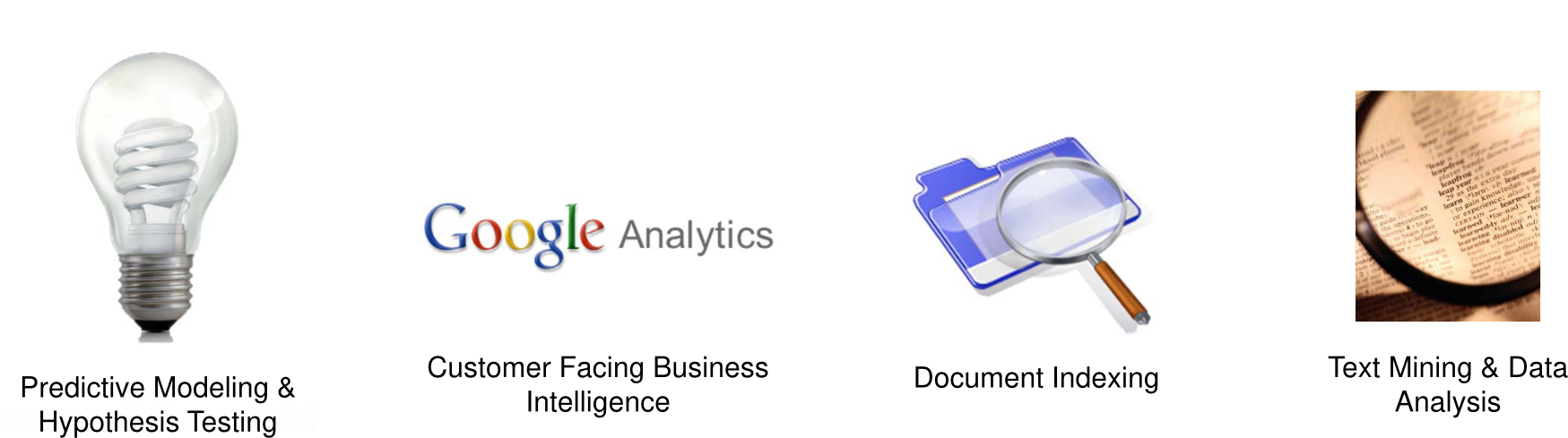
- Predictive Modeling & Hypothesis Testing
- Customer Facing Business Intelligence
- Document Indexing
- Text Mining & Data Analysis
Hive Components
HiveQL
- Subset of SQL with extensions for loading and storing
Hive Services
- The Hive Driver — compiler, executor engine
- Web Interface to Hive
- Hive Hadoop Interface to the JobTracker and NameNode
Hive Client Connectors
- For existing Thrift, JDBC, and ODBC applications
HiveQL to MapReduce Flow
Data Analyst
    |
    v (HiveQL query: SELECT COUNT(1) FROM Sales;)
[Hive Framework]
    - CLI / Web Interface / Thrift Server / JDBC / ODBC
    - Driver (Compiler, Optimizer, Executor)
    - Metastore
    |
    v
[MR JOB Instance]
    Map nodes emit: (rowcount, 1)
    Reduce node: final count = N
    |
    v
Result N returned to analyst
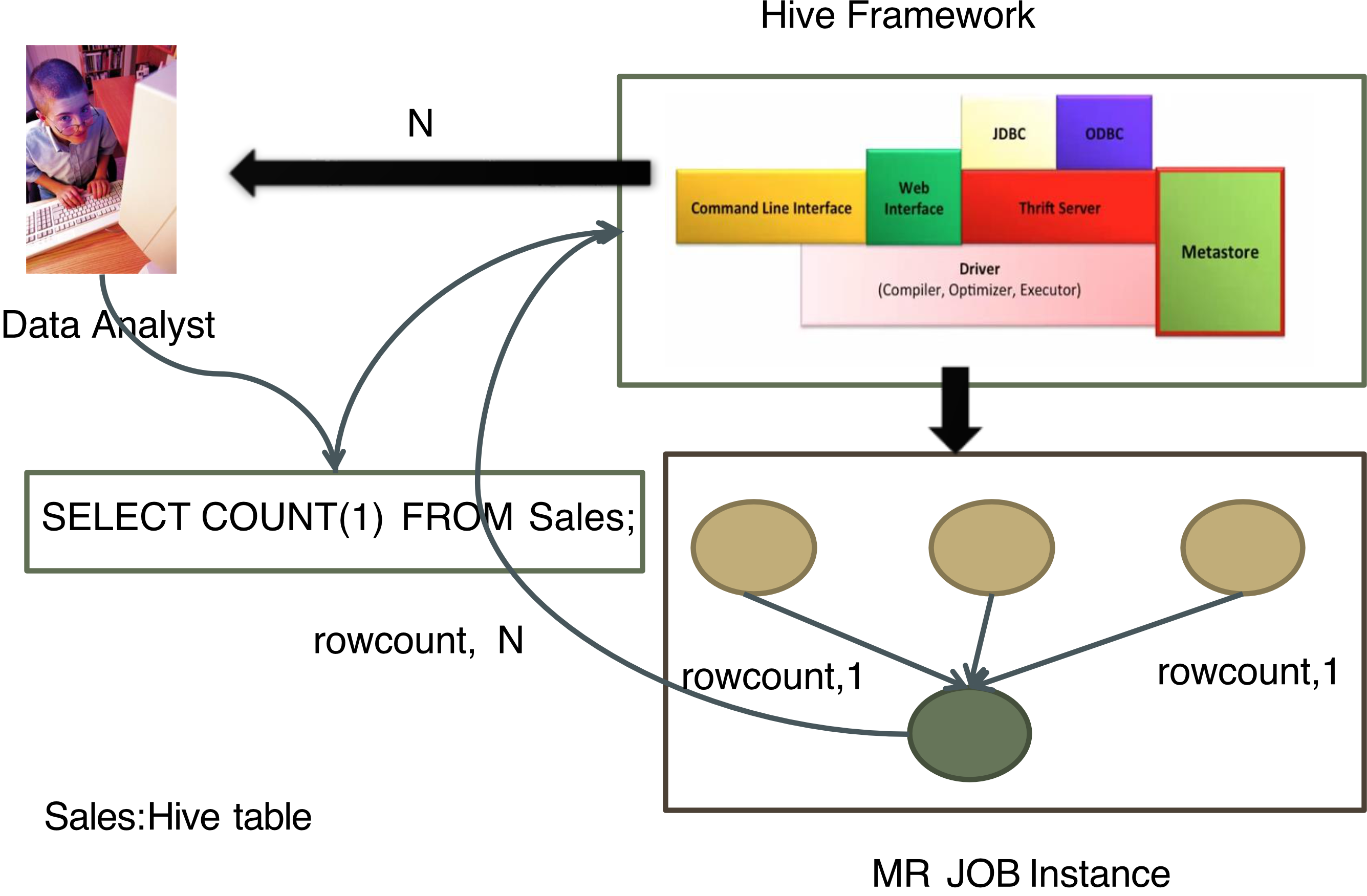
Hive Architecture
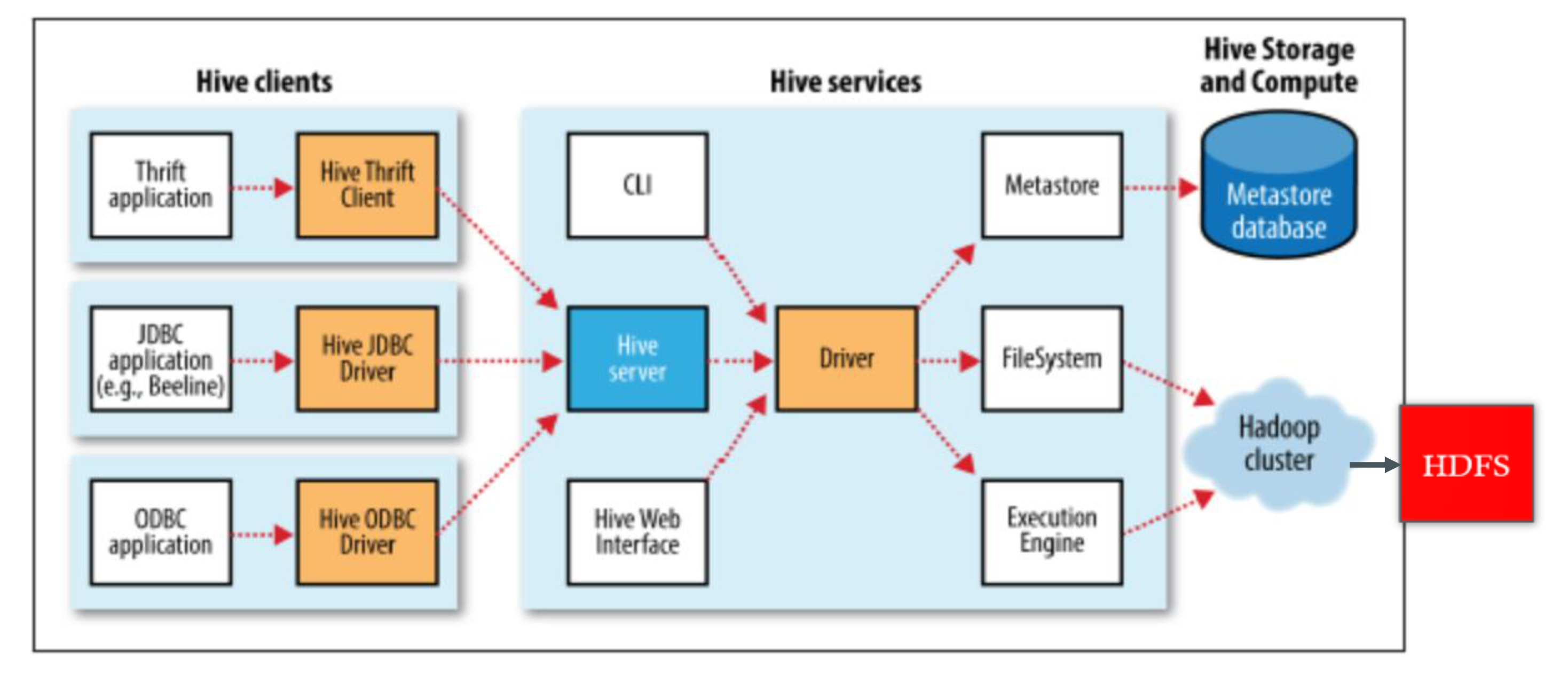
[Hive Clients]                [Hive Services]          [Storage & Compute]
Thrift App --> Hive Thrift    CLI                       Metastore DB
JDBC App   --> Hive JDBC  --> Hive Server --> Driver -> FileSystem
ODBC App   --> Hive ODBC      Hive Web UI   Execution   Hadoop Cluster -> HDFS
                                             Engine
- HiveServer is built on Apache Thrift™ — sometimes called the Thrift server
Hive Data Model
Tables
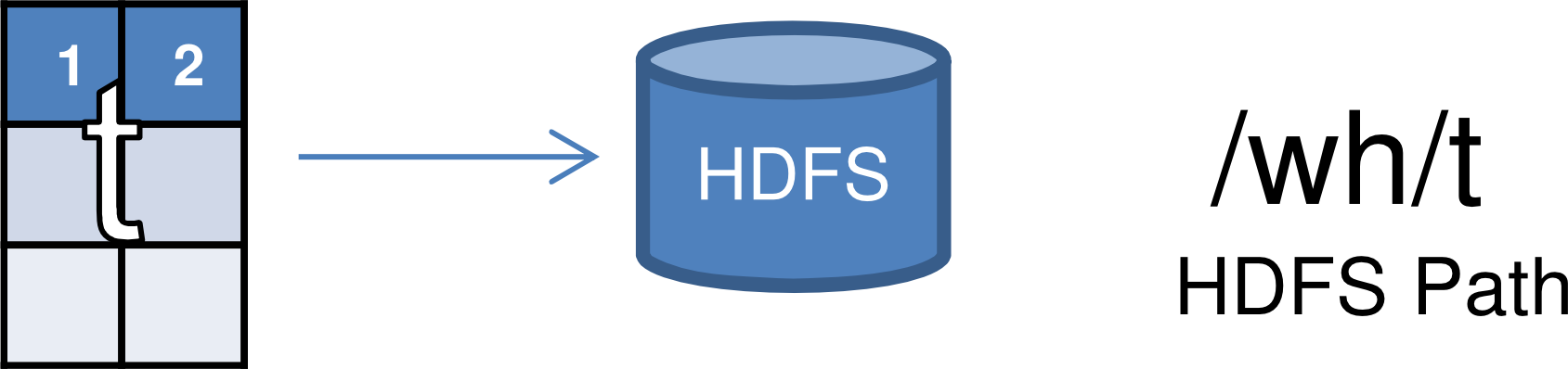
- Similar to Tables in RDBMS
- Each table is a unique directory in HDFS (
/wh/t) - Data serialized and stored as files within that directory
- Hive has default serialization with compression and lazy deserialization
- Users can specify custom SerDes (Serializer/Deserializer)
Partitions
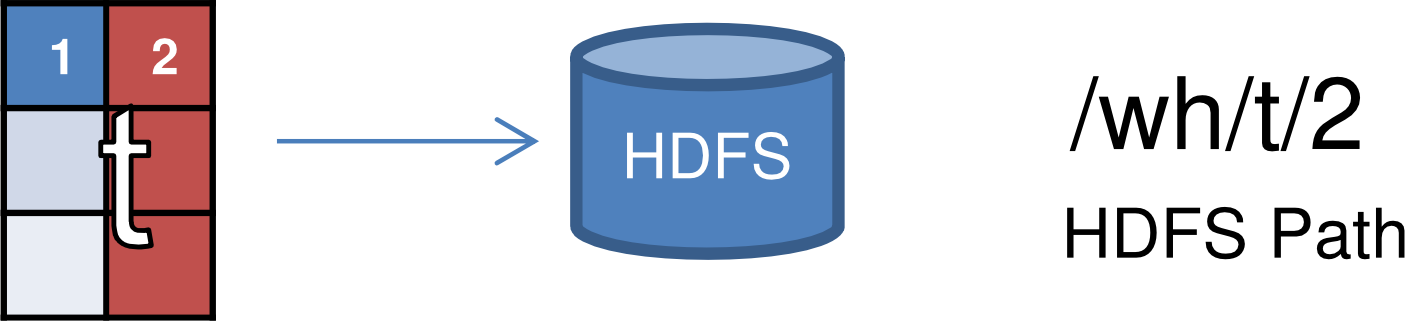
- Partitions determine the distribution of data within a table
- Each partition is a sub-directory of the main directory in HDFS (
/wh/t/2)
Buckets

- Partitions can be further divided into buckets
- Each bucket is stored as a file in the directory (
/wh/t/2/part-0000.part) - Based on hash function:
Analogy: Think of a table as a filing cabinet, partitions as drawers (organized by date/country), and buckets as folders within each drawer (organized by customer ID hash).
Hive Data Model — Partitions (Example)
CREATE TABLE Sales (sale_id INT, amount FLOAT)
PARTITIONED BY (country STRING, year INT, month INT)
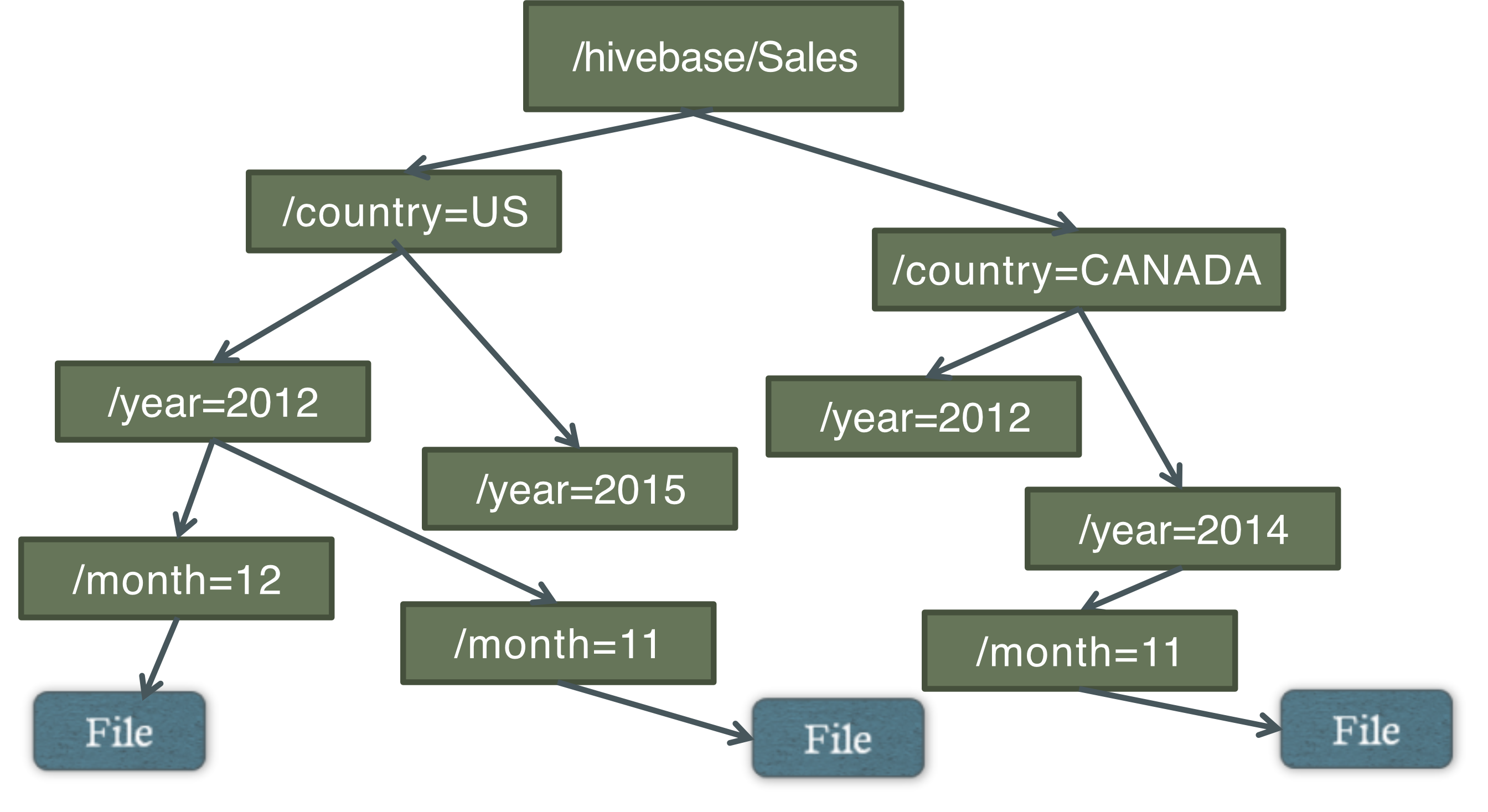
This creates a directory hierarchy:
Sales/country=US/year=2012/month=12/
Sales/country=CANADA/year=2014/month=11/
Hierarchy of Hive Partitions
/hivebase/Sales
├── /country=US
│   ├── /year=2012
│   │   └── /month=12 → File
│   └── /year=2015
│       └── /month=11 → File
└── /country=CANADA
    ├── /year=2012
    └── /year=2014
        └── /month=11 → File
Serialization & SerDe in Hive
Serialization
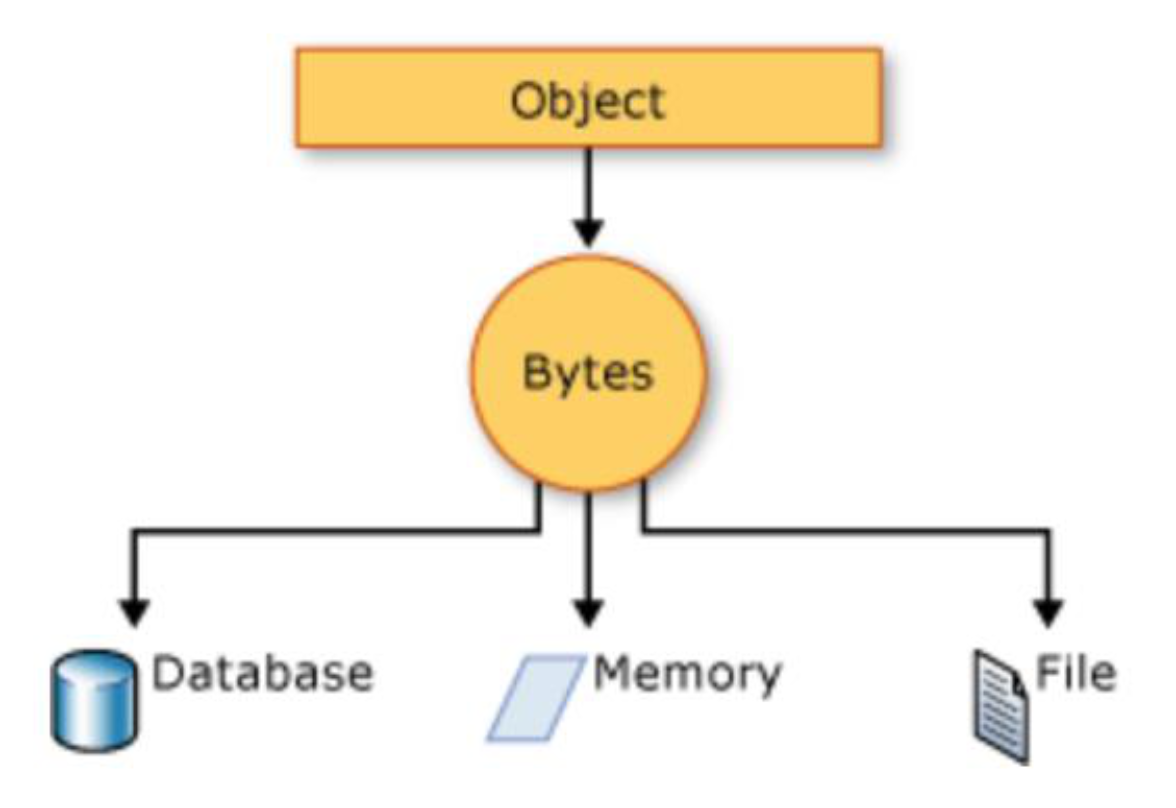
- Serialization is the process of converting an object into a stream of bytes to store the object or transmit it to memory, a database, or a file
- Its main purpose is to save the state of an object in order to be able to recreate it when needed
- The reverse process is called deserialization
Object → [Bytes] → Database / Memory / File
SerDe in Hive
- Serialization → Converting structured data (rows, columns) into a format that can be stored in files (e.g., text, JSON, ORC, Parquet)
- Parquet is. the proprietary file format for Apache
- Deserialization → Converting stored data back into Hive's internal table format when querying
| Operation | Direction |
|---|---|
| Write (INSERT) | Hive serializes data → stores it as files |
| Read (SELECT) | Hive deserializes data → converts files into rows/columns |
Why SerDe is Important?
ก็ PIG มัน support file format,
SerDe allows Hive to:
- Support multiple file formats (CSV, JSON, ORC, Parquet)
- Enable schema-on-read
- Improve performance (e.g., lazy deserialization, compression)
Lazy deserialization = perform on request
SerDe is the translator between Hive tables and raw data files in HDFS.
Hive SerDe SELECT Flow
SELECT Query
    → [Record Reader] ← Hive Table (HDFS files)
    → [Deserialize]
    → [Hive Row Object]
    → [Object Inspector / Map Fields]
    → End User
Built-in SerDes: Avro, ORC, Regex, etc. Can use Custom SerDes (e.g., for audio/video data, semi-structured XML data)
File Formats
Parquet (Apache Parquet)

- A columnar storage file format designed for big data systems like Hive, Spark, and Hadoop
| Storage Type | Format |
|---|---|
| Row-based (e.g., CSV) | Row1: id=1, name=Alice, age=20 |
| Column-based (Parquet) | id: [1,2], name: [Alice, Bob], age: [20, 25] |
For query SELECT age FROM users; → Column-based is much faster (reads only the age column) |
CREATE TABLE users (
  id   INT,
  name STRING,
  age  INT
)
STORED AS PARQUET;
Apache AVRO
- The leading serialization format for record data, and first choice for streaming data pipelines
- Offers excellent schema evolution
- Has implementations for JVM (Java, Kotlin, Scala), Python, C/C++/C#, PHP, Ruby, Rust, JavaScript, Perl
- https://avro.apache.org
ORC: Optimized Row Columnar
- File format providing a highly efficient way to store Hive data
- Optimized for Hive's query patterns
Hive Architecture (Detailed)
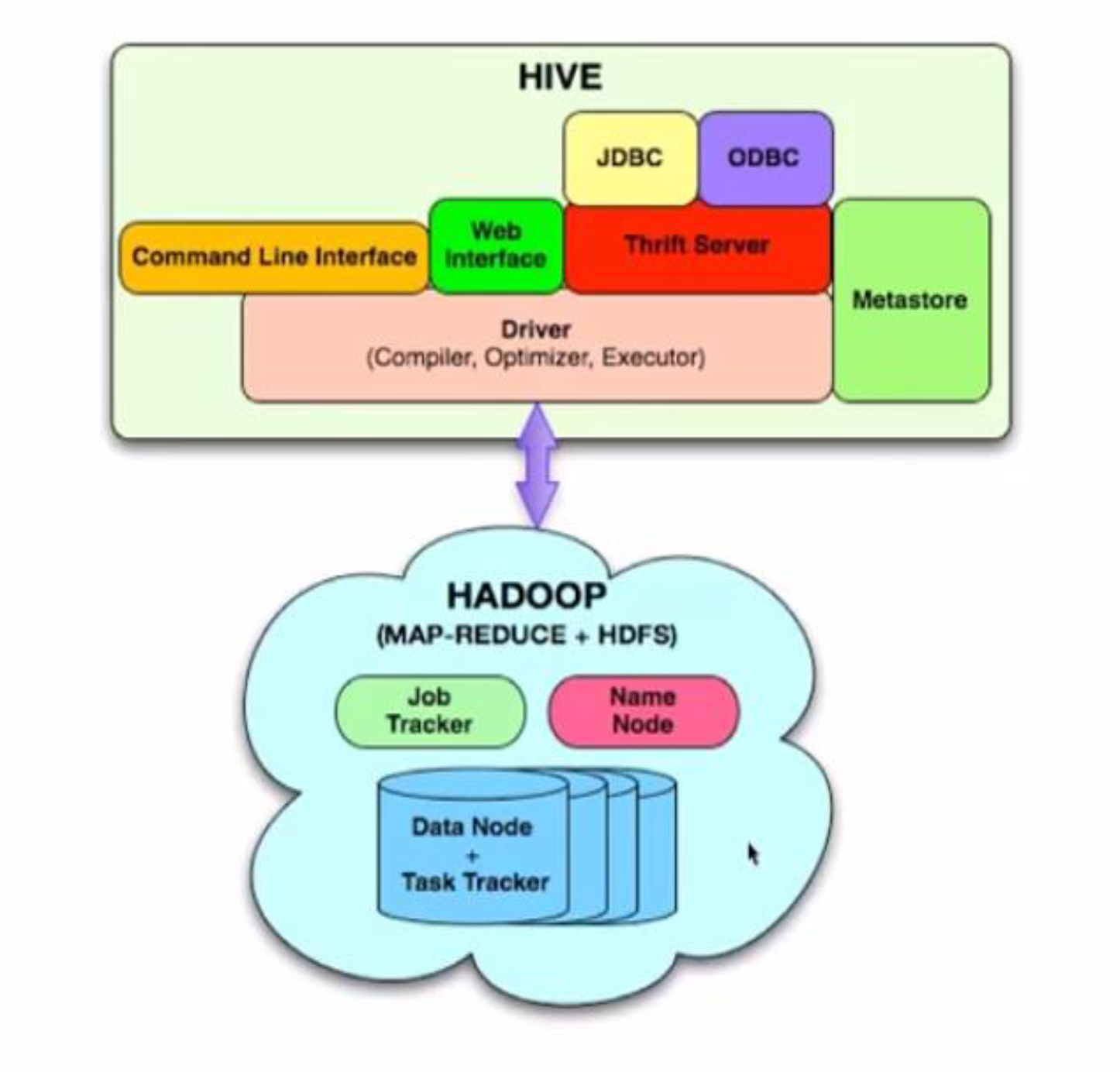
External Interfaces
- CLI, WebUI, JDBC, ODBC programming interfaces
Thrift Server
- Cross-Language service framework
- Server written in Java
- Support for clients: JDBC (Java), ODBC (C++), PHP, Perl, Python
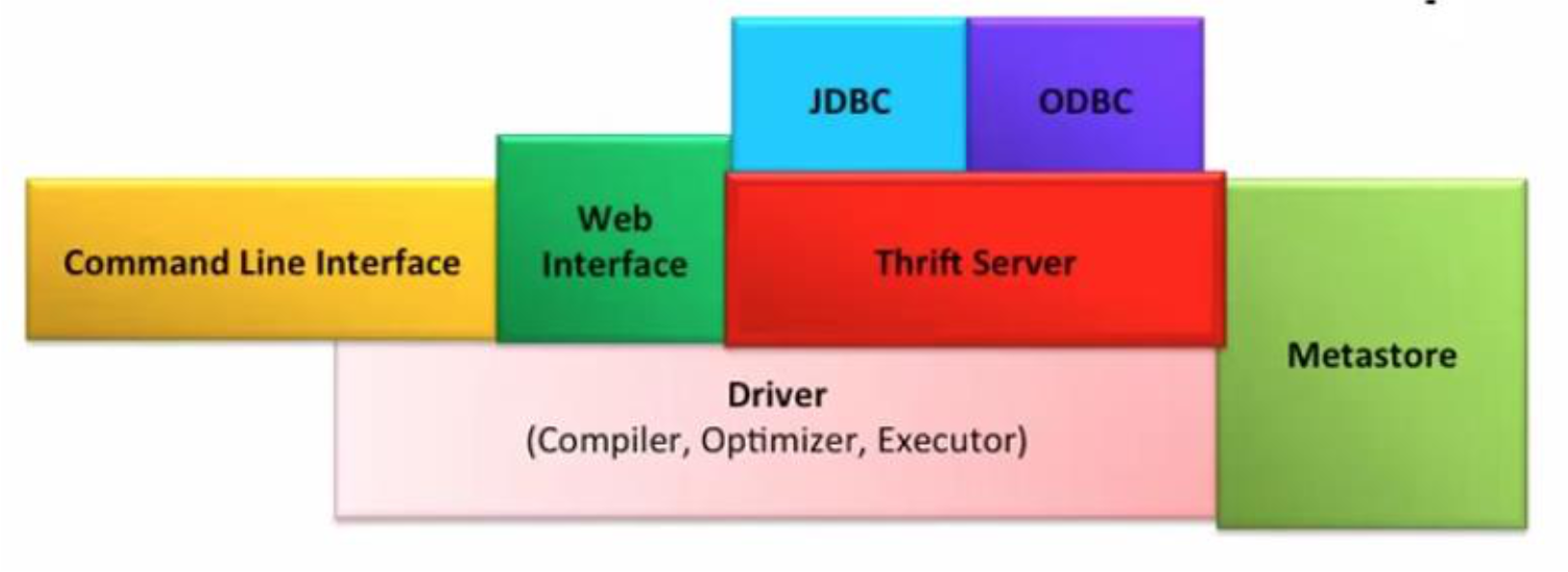
Metastore
- System catalog which contains metadata about the Hive tables
- Stored in RDBMS/local filesystem (HDFS too slow — not optimized for random access)
- Objects stored:
- Database — Namespace of tables
- Table — list of columns, types, owner, storage, SerDes
- Partition — Partition specific column, SerDes and storage
Hive Driver
- Driver — Maintains the lifecycle of HiveQL statement
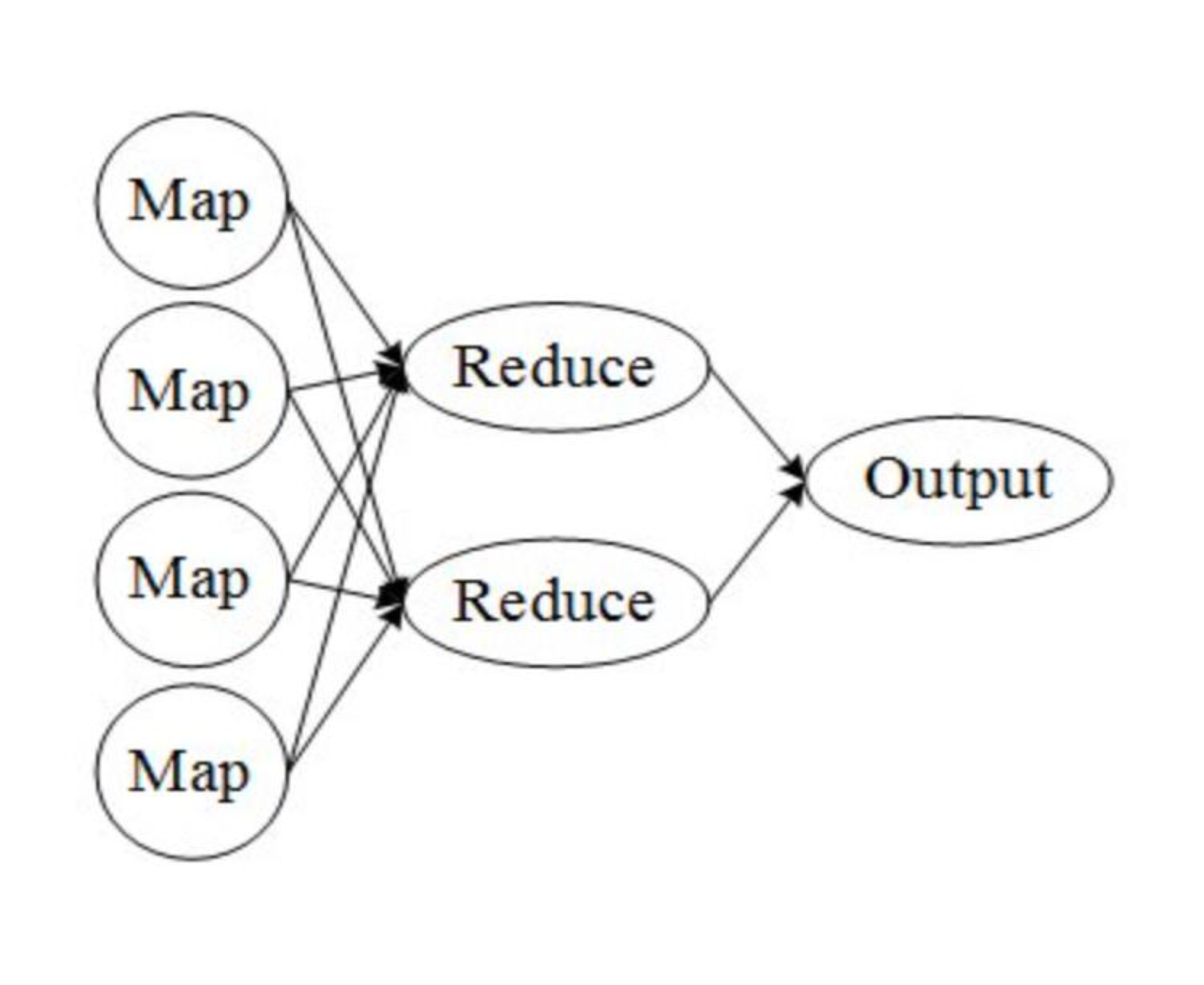
- Query Compiler — Compiles HiveQL into a DAG of MapReduce tasks
- Executor — Executes the task plan generated by the compiler in proper dependency order; interacts with the underlying Hadoop instance
Hive Driver = Brain of Hive! (output of hive drive is MapReduce job!)
เวลาทำ Project ไรงี้ให้แต่ Component loosly coubple, เพราะอยากลด degree of dependency
Compilation of Hive Programs
- Converts the HiveQL into a plan for execution
- Plans can give details of:
- Metadata operations for DDL statements e.g. CREATE
- HDFS operations e.g. LOAD
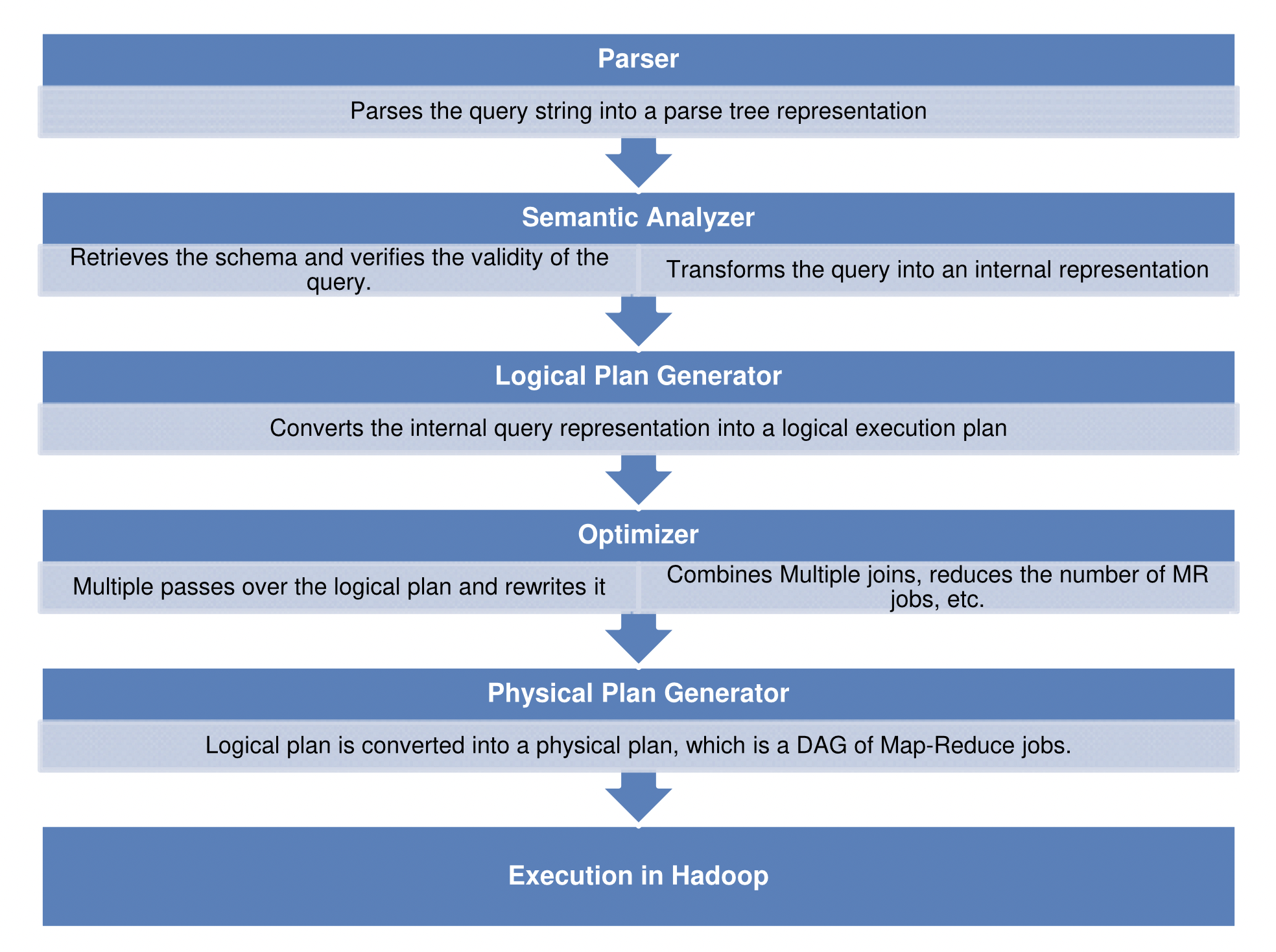
- Semantic Analyzer – checks schema information, type checking, implicit type conversion, column verification
- Optimizer – Finding the best logical plan e.g. Combines multiple joins in a way to reduce the number of map reduce jobs, Prune columns early to minimize data transfer
- Physical plan generator – creates the DAG of map-reduce jobs
[Parser]
  Parses the query string into a parse tree representation
          ↓
[Semantic Analyzer]
  Retrieves the schema and verifies validity
  Transforms the query into an internal representation
          ↓
[Logical Plan Generator]
  Converts the internal query representation into a logical execution plan
          ↓
[Optimizer]
  Multiple passes over the logical plan and rewrites it
  Combines multiple joins, reduces the number of MR jobs, etc.
          ↓
[Physical Plan Generator]
  Logical plan is converted into a physical plan, which is a DAG of MR jobs
          ↓
[Execution in Hadoop]
HiveQL
DDL (Data Definition Language)
CREATE DATABASE my_db;
CREATE TABLE my_table (...);
ALTER TABLE my_table ...;
SHOW TABLES;
DESCRIBE my_table;
DML (Data Manipulation Language)
LOAD DATA INPATH '/path/to/file' INTO TABLE my_table;
INSERT INTO my_table SELECT ...;
Query
SELECT col1, col2 FROM table WHERE ...;
SELECT col, COUNT(*) FROM table GROUP BY col;
SELECT * FROM t1 JOIN t2 ON t1.id = t2.id;
-- Multi Table Insert
FROM base_table
INSERT INTO table1 SELECT ...
INSERT INTO table2 SELECT ...;
User-Defined Functions in Hive
Four Types:
| Type | Description | Example |
|---|---|---|
| UDF (User Defined Functions) | Perform tasks on data elements | Substr, Trim |
| UDAF (User Defined Aggregation Functions) | Performed on columns | Sum, Average, Max, Min |
| UDTF (User Defined Table-Generating Functions) | Outputs a new table | Explode — similar to FLATTEN() in Pig |
| Custom MapReduce Scripts | Must read rows from standard output and write rows to standard input | Custom Java/Python scripts |
Optimization Strategies
| Optimization | What it does | Benefit |
|---|---|---|
| Predicate Pushdown | Filter early | Less data read |
| Column Pruning | Read only needed columns | Faster I/O |
| Partition Pruning | Read specific partitions | Huge speedup |
| Map Join | Broadcast small table | Avoid shuffle |
| Job Reduction | Fewer MR jobs | Lower latency |
Column/Partition Pruning → Reduce search space!
Example 1: Partition Pruning
-- Table: logs (date STRING, user STRING, action STRING) PARTITIONED BY (date)
SELECT * FROM logs WHERE date = '2026-01-01';- Without Optimization → Scan all partitions
- With Optimization → Scan ONLY partition:
date=2026-01-01
Example 2: Join Optimization (Map Join)
SELECT * FROM orders o JOIN customers c ON o.customer_id = c.id;- Without Optimization → Both tables shuffled across cluster
- With Optimization:
- Small table (
customers) → broadcast to all nodes - Large table (
orders) → processed locally
- Small table (
Example 3: Complex Query (Full Optimization Steps)
SELECT c.country, p.category, SUM(s.amount) AS total_sales
FROM sales s
JOIN customers c ON s.customer_id = c.id
JOIN products p ON s.product_id = p.id
WHERE s.sale_date = '2026-01-01'
  AND c.country = 'TH'
GROUP BY c.country, p.category;
Before Optimization: Scan sales → Join customers → Join products → Filter → Group By → Aggregate
Optimization Steps Applied:
- Partition Pruning — sales table: read ONLY partition
sale_date = '2026-01-01' - Predicate Pushdown — customers table: filter
country = 'TH'BEFORE join - Column Pruning:
sales→ read only (customer_id,product_id,amount)customers→ read only (id,country)products→ read only (id,category)
- Map Join (Broadcast Join) —
customers(small) → broadcast to all nodes - Join Re-ordering — (filtered customers) JOIN sales → then JOIN products
- Aggregation Pushdown (Partial Aggregation):
- Map Phase → partial
SUM(amount) - Reduce Phase → final aggregation
- Map Phase → partial
Summary Optimized Execution Plan:
- Read sales partition (
sale_date = '2026-01-01') - Apply column pruning on all tables
- Filter customers (
country = 'TH') - Broadcast customers (Map Join)
- Join sales + customers locally
- Join with products
- Perform partial aggregation (Map-side)
- Final aggregation (Reduce-side)
FILTER FIRST THEN JOIN!! → แค่นี้ก็ช่วย optimize แล้ว
Hive Data Model — Full Picture
[MetaStore]                 [HDFS]
- clicks table            /hive/clicks
  - Schema                /hive/clicks/ds=2008-03-25
  - Library (SerDe)       /hive/clicks/ds=2008-03-25/0
  - #Buckets=32
  - Bucketing Info        ← Hash Partitioning
  - Partitioning Cols     ← Logical Partitioning
Hive Pros and Cons
Good Things (Pros)
- Beneficial for Data Analysts — familiar SQL interface
- Easy learning curve for SQL users
- Completely transparent to underlying MapReduce
- Partitions provide huge speedup
- Flexibility to load data from local FS/HDFS into Hive tables
Cons and Possible Improvements
- Extending SQL query support (Updates, Deletes)
- Parallelize firing independent jobs from the work DAG
- Table Statistics in Metastore
- Explore methods for multi-query optimization
- Perform N-way generic joins in a single MapReduce job
- Better debug support in shell
Hive vs. Pig
Similarities
- Both high-level languages which work on top of MapReduce framework
- Can coexist since both use the underlying HDFS and MapReduce
Differences
| Dimension | Pig | Hive |
|---|---|---|
| Language Style | Procedural — A = load 'mydata'; dump A | Declarative — SELECT * FROM A |
| Work Type | More suited for ad-hoc analysis (click streams, search logs) | More suited as a reporting tool (weekly BI reporting) |
| Target Users | Researchers, Programmers (complex data pipelines, ML) | Business Analysts |
| Integration | No Thrift server (limited cross-language support) | Thrift server (JDBC, ODBC support) |
| User's Need | Better dev environments, debuggers expected | Better integration with technologies expected |
Declarative programming = you say what you want without saying how to do it (e.g., SQL) Procedural programming = you specify exact steps to get the result (e.g., C, Pig Latin)
MapReduce vs. Hive vs. Pig Comparison
| Feature | MapReduce | Hive | Pig |
|---|---|---|---|
| Language | Compiled language (Java) | SQL-like query | Scripting language |
| Code Complexity | Need to write long complex code | No need for complex code | No need for complex code |
| Data Types | Structured, semi-structured, unstructured | Only structured data | Structured, semi-structured, unstructured |
| Abstraction Level | Lower level | Higher level | Higher level |
Apache ZooKeeper
Why ZooKeeper?
- Writing distributed applications is hard — need to deal with:
- Synchronization, concurrency, naming, consensus, configuration, etc.
- Well-known algorithms exist for each of these problems
- But programmers have to re-implement them for each distributed application they write
- Master-slave architecture is popular for distributed applications — but:
- How do you deal with master failures?
- Single master can quickly become a performance bottleneck
What is Apache ZooKeeper?

- ZooKeeper is a distributed co-ordination service for large-scale distributed systems
- ZooKeeper allows application developers to build the following systems for their distributed application:
- Naming
- Configuration
- Synchronization
- Organization
- Heartbeat systems
- Democracy / Leader election
Analogy: ZooKeeper is like the conductor of an orchestra — it doesn't play music itself, but coordinates all the musicians (distributed nodes) to ensure they're synchronized and in agreement.
ZooKeeper Architecture
                    [ZooKeeper Ensemble]
         ┌──────────────────────────────────────┐
         │  Server  Server [Leader] Server Server│
         │    ↑       ↑       ↑      ↑     ↑    │
         └────┼───────┼───────┼──────┼─────┼────┘
              │       │       │      │     │
           Client  Client  Client Client Client Client Client Client
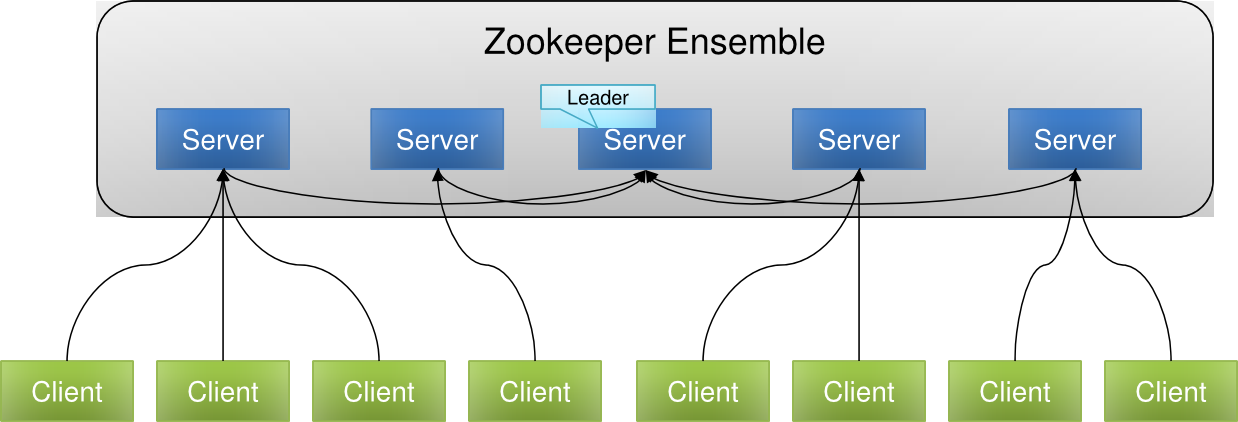
- A ZooKeeper Ensemble = a cluster of ZooKeeper servers
- One server is elected as the Leader, others are Followers
Client Interactions with ZooKeeper
- Clients must have the list of all the ZooKeeper servers in the ensemble
- Clients will attempt to connect to the next server in the ensemble if one fails
- Once a client connects to a server, it creates a new session
- The application can set the session timeout value
- Session is kept alive through the heartbeat mechanism
- Failure events are automatically handled and watch events are delivered to the client on reconnection
ZooKeeper Data Model
- Similar to a filesystem — hierarchical layout to denote a membership list
- Each node is known as a znode
Types of Znodes
| Type | Description |
|---|---|
| Ephemeral | Exists only as long as the session of the client who created it; cannot have children |
| Persistent | Survives client disconnection |
| Sequential | Persistent with a sequence number attached (e.g., /zoo/goat2) |
- Znodes can store data and have an associated ACL
- Size limit: 1 MB per znode (more than enough for config/state)
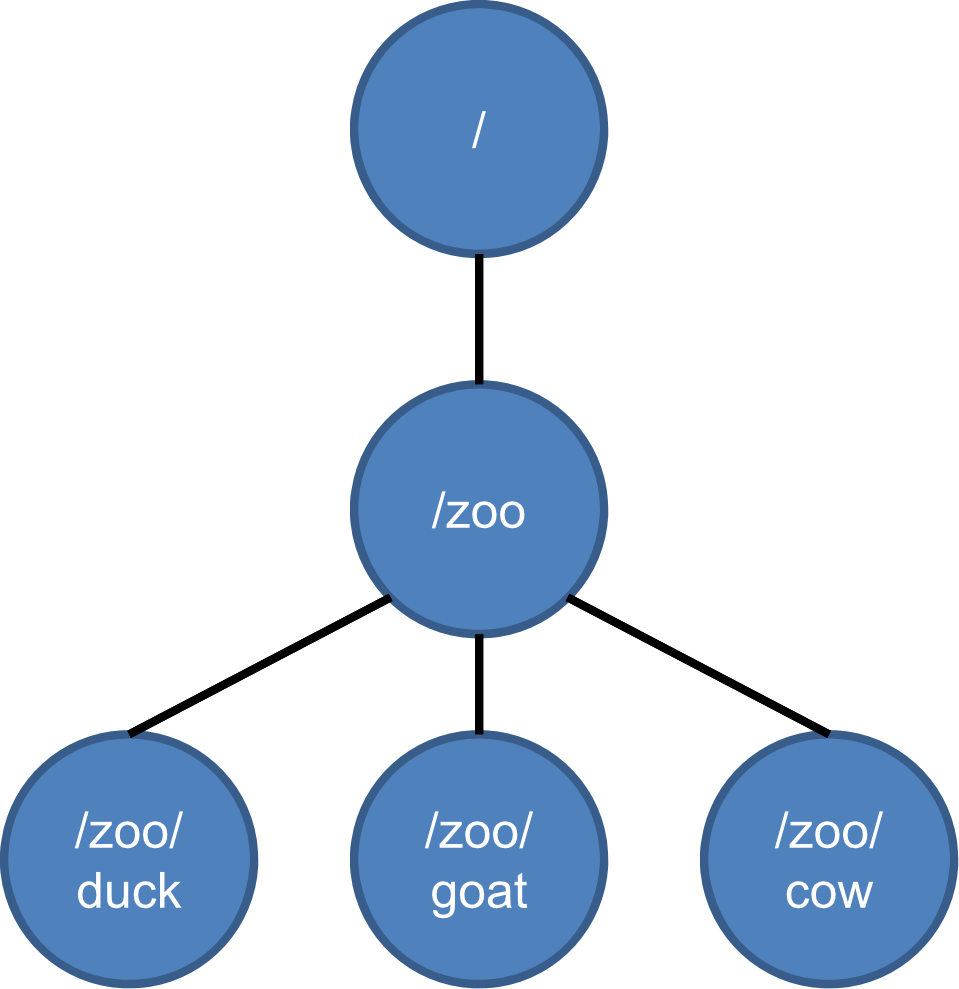
         /
         |
        /zoo
      /  |  \
  /duck /goat /cow
ZooKeeper API
| Operation | Description |
|---|---|
create | Creates a znode |
delete | Deletes a znode (znode should not have any children) |
exists | Tests if a znode exists and retrieves its metadata |
getACL, setACL | Gets/sets ACL for a znode |
getChildren | Gets a list of children for a znode |
getData, setData | Gets and sets data for a znode |
sync | Synchronizes a client's view of a znode with ZooKeeper |
Reads, Writes and Watches
- Reads can be collected from any server
- Write requests are always forwarded to the leader which commits the write to a majority of servers atomically
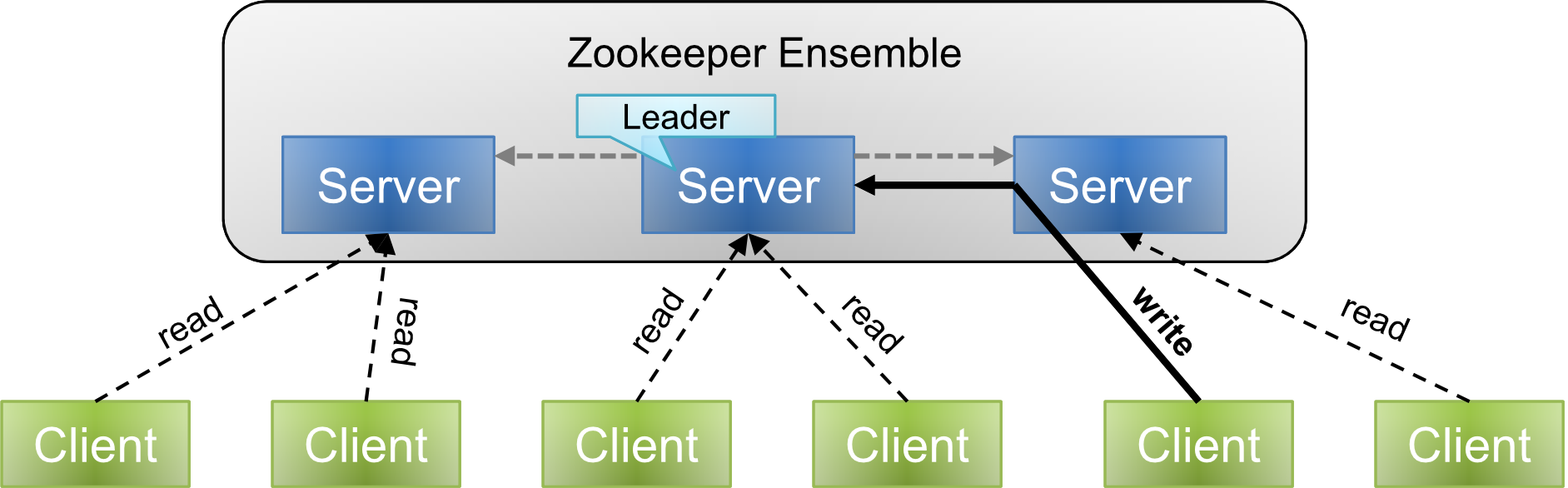
                [ZooKeeper Ensemble]
                      Leader
            Server ←------ Server ------→ Server
read ↑   read ↑   read ↑   read ↑   WRITE ↑   read ↑
Client  Client  Client  Client  Client  Client
- A watch can be optionally set on a znode after a read operation to monitor if it has been deleted or changed
- A watch is triggered when there is an update to a specific znode and it notifies clients that have read the znode
ZooKeeper Protocol: Zab
Zab (ZooKeeper Atomic Broadcast) ensures ZooKeeper can keep its promises to clients. It is a two-phase protocol:
Phase 1: Leader Election
- All members of the ensemble elect a distinguished member called the leader; other members are followers
- The election is declared complete when a majority (quorum) of followers have synchronized state with the leader
Phase 2: Atomic Broadcast
- Write requests are always forwarded to the leader
- The update is broadcast to all followers
- The leader then commits the update when a majority of followers (quorum) have persisted the change
- Writes happen atomically in accordance with a two-phase commit (2PC) protocol
Leader Election Process (Step-by-Step)
Given nodes in a cluster:
- All nodes create a sequential, ephemeral znode with the same path
/app/leader_election/guid_ - ZooKeeper ensemble appends a 10-digit sequence number → e.g.,
/app/leader_election/guid_0000000001,guid_0000000002, etc. - The node which creates the smallest number in the znode becomes the leader; all others are followers
- Each follower node watches the znode with the next smallest number (e.g.,
guid_0000000008watchesguid_0000000007) - If the leader goes down → its corresponding znode
/app/leader_electionNgets deleted - The next-in-line follower gets the notification through the watcher about the leader removal
- The next-in-line follower checks if there are other znodes with smaller numbers — if none, it assumes the role of leader
- Similarly, all other follower nodes elect the node which created the smallest znode as leader
Why odd number of nodes? ZooKeeper requires a majority quorum to commit writes and elect leaders. With an odd number (e.g., 3, 5, 7), you can always achieve a clear majority even when some nodes fail: 3 nodes can tolerate 1 failure, 5 can tolerate 2, etc. With an even number, split-brain scenarios are possible.
Higher-Level Constructs with ZooKeeper
Barrier
- A barrier is a primitive that enables a group of processes to synchronize the beginning and end of a computation
- A barrier node serves as the parent for individual process nodes
- Barrier node:
/b1; each processpcreates/b1/p - Once enough processes have created their nodes, they can start computation
- Barrier node:
Implementation:
Client calls exists("/barrier_node") with watch=true
    ↓
exists() returns true?
    YES → wait for watch event (barrier still up)
    NO  → barrier gone, client proceeds

When watch triggered → re-issue exists() and repeat
[Client] --exists()--> [/b]
           true ←──────────   Wait for barrier znode deletion watch event

[Client] --exists()--> [/b (deleted)]
           false ←─────────  Proceed!
Queue
- Use
create()to make sequential znodes under a parent to designate queue items - Queue processed using
getChildren()call on the/qitem - A watch can notify the client of new items on the queue
[Client] --create(/q/i-)--> [/q]
                              ├── /q/i-1
                              ├── /q/i-2
                              └── /q/i-n
ZooKeeper Guarantees
- Every modification to the znode tree is replicated to a majority of the ensemble
- Fault tolerance is achieved as long as a majority of the nodes in the ensemble are active (ensembles are typically configured to be an odd number)
- Every update is sequentially consistent
- All updates to the znode state are atomic
- Every client sees only a single system image
- Updates are durable and persist, in spite of server failures
- Client's view is timely and is not out-of-date
Summary — Tools Comparison
| Tool | Purpose | Interface |
|---|---|---|
| Hive | Hadoop processing with SQL | HiveQL (SQL-like) |
| Pig | Hadoop processing with scripting | Pig Latin (procedural) |
| HBase | Database model built on top of Hadoop | Column-family store |
| ZooKeeper | Distributed coordination service for large scale distributed systems | Zab protocol, znode API |
References
- https://hive.apache.org/
- https://cwiki.apache.org/confluence/display/Hive/Presentations
- https://developer.yahoo.com/blogs/hadoop/comparing-pig-latin-sql-constructing-data-processing-pipelines-444.html
- http://www.qubole.com/blog/big-data/hive-best-practices/
- Hortonworks tutorials (YouTube)
- Graph: https://issues.apache.org/jira/secure/attachment/12411185/hive_benchmark_2009-06-18.pdf
- Pig Tutorial: https://www.youtube.com/watch?v=qr_awo5vz0g
- Hive Tutorial: https://www.youtube.com/watch?v=rr17cbPGWGA
- Why ZooKeeper needs odd number of nodes: https://bikas-katwal.medium.com/why-zookeeper-needs-an-odd-number-of-nodes-bb8d6020e9e9
- Apache AVRO: https://avro.apache.org
- ORC: https://cwiki.apache.org/confluence/display/hive/languagemanual+orc