
Goals for a Data Center File System
Core Requirements
- Reliable
- Overcome server failures
- Ensure data is always available
- High Performance
- Provide good performance to applications
- Handle large-scale data processing efficiently
- Network (Disparities) Awareness
- Make data local to applications
- Minimize network transfer overhead
Analogy: Think of a data center file system like a library system across multiple cities. You want books (data) to be available at multiple locations (reliable), easy to access quickly (high performance), and preferably available at the library closest to you (network awareness).
Common Design Principles
1. Performance: Data Partitioning
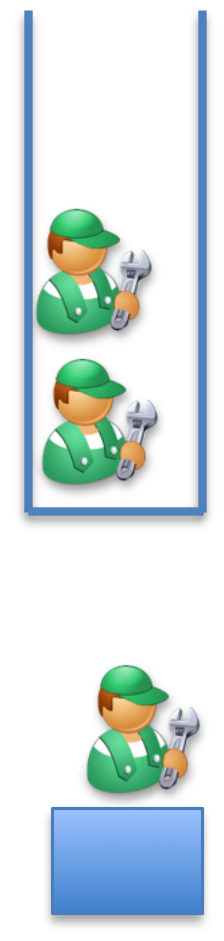
Concept: Split data into chunks and distribute across nodes
- Benefits:
- Provides high throughput
- Enables parallel reading
- Multiple users can read different chunks simultaneously
- Better than everyone reading from the same single file
Analogy: Instead of having one massive book that only one person can read at a time, you split it into chapters and give each chapter to different people. Everyone can read their chapter at the same time, dramatically speeding up the overall reading process.
Implementation: Data is partitioned across nodes
2. Reliability: Replication
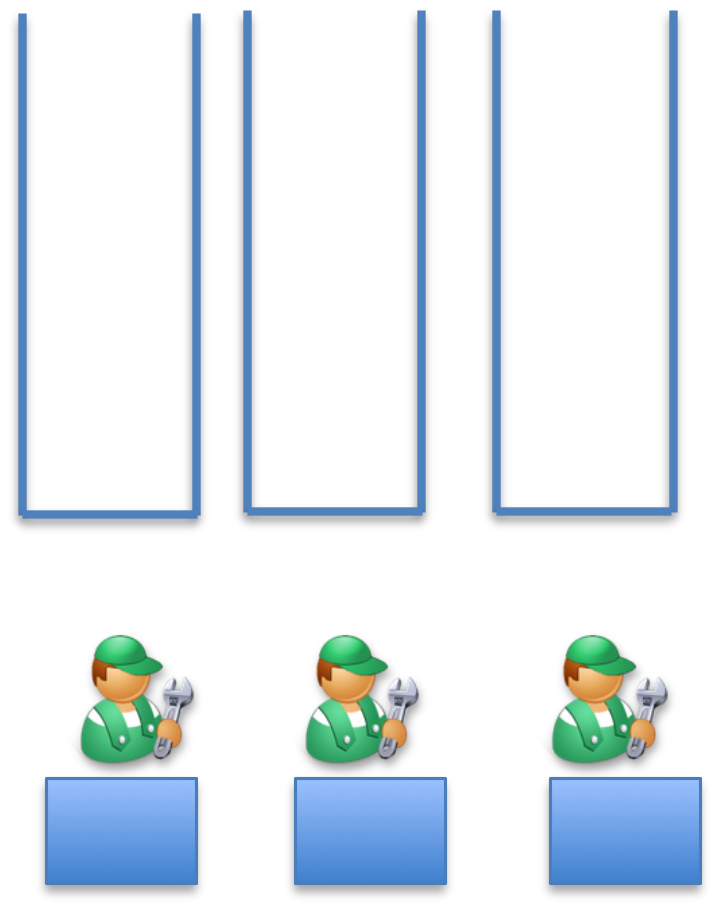
Concept: Overcome failure by making copies
- Strategy: Create multiple replicas of each data block
- Requirement: At least one copy should always be online
- Result: Even if servers fail, data remains accessible
Analogy: Like keeping photocopies of important documents in different safes across different buildings. If one building burns down, you still have copies elsewhere.
3. Network-Disparity: Rack-Aware Allocation
Concept: Optimize for network topology
- Read Strategy: Read from the closest block
- Write Strategy: Write to the closest location
- Goal: Minimize network latency and bandwidth usage
Real-world Usage: Netflix uses similar strategies in their Content Delivery Network (CDN). Popular shows are cached on servers closest to viewers to reduce buffering and improve streaming quality.
HDFS (Hadoop Distributed File System)
Overview
HDFS is a distributed file system designed to:
- Run on commodity hardware (cheap, standard computers)
- Be highly fault-tolerant
- Provide high throughput access to application data
- Handle large data sets efficiently
Key Characteristics:
- Designed for low-cost hardware
- Optimized for write-once, read-many workloads
- Suitable for applications with large data sets
Real-world Usage: Companies like Facebook, Yahoo, and LinkedIn use HDFS to store petabytes of data. Facebook processes over 600TB of data daily using HDFS as the storage layer.
How Hadoop Helps Companies Manage Big Data
Scale Examples (as of the lecture):
- Twitter:
- 6000 tweets every second
- 350,000 tweets per minute
- 50 million tweets per day
- Facebook:
- 1.55 billion active users per month
- 1.39 billion mobile active users
- Every minute: 510 comments posted, 293,000 statuses updated
- 136,000 photos uploaded per minute
Context: These numbers were from 2023, but they illustrate why distributed file systems like HDFS are essential for modern big data applications.
Apache Hadoop Ecosystem
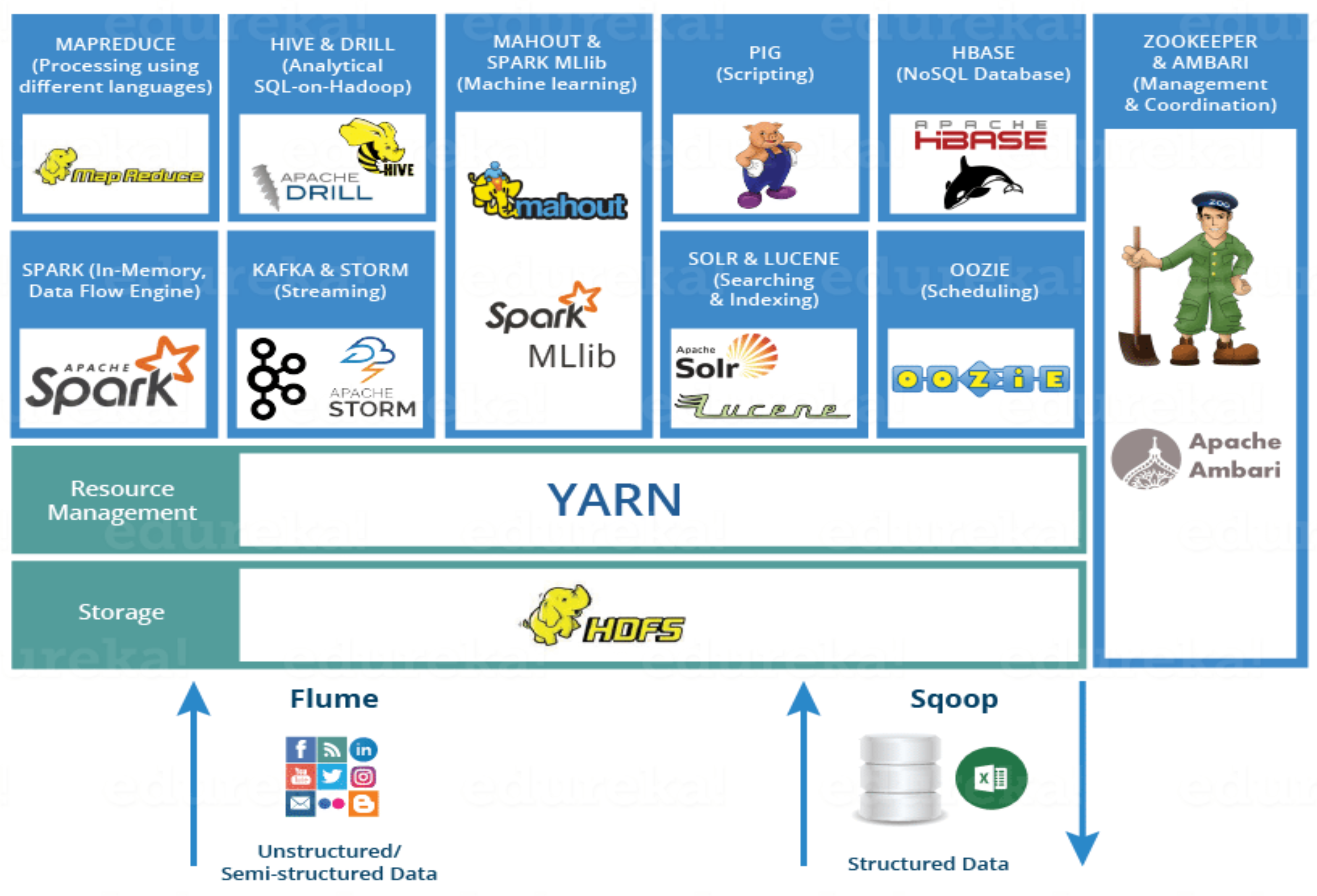
Storage Layer
- HDFS: Hadoop Distributed File System (the foundation)
Resource Management
- YARN: Yet Another Resource Negotiator
Data Processing
- MapReduce: Data processing using programming languages
- Spark: In-memory data processing engine
- PIG, HIVE: Data processing services using SQL-like queries
Databases
- HBase: NoSQL Database
Machine Learning
- Mahout, Spark MLlib: Machine learning libraries
Analytics
- Apache Drill: SQL on Hadoop
Coordination & Management
- Zookeeper & Ambari: Cluster management and coordination
Streaming
- Kafka & Storm: Real-time streaming data processing
Search & Indexing
- Solr & Lucene: Searching and indexing
Data Ingestion
- Flume, Sqoop: Data ingesting services
- Flume: For unstructured/semi-structured data
- Sqoop: For structured data (databases)
Workflow Scheduling
- Oozie: Job scheduling
HDFS Architecture
Components
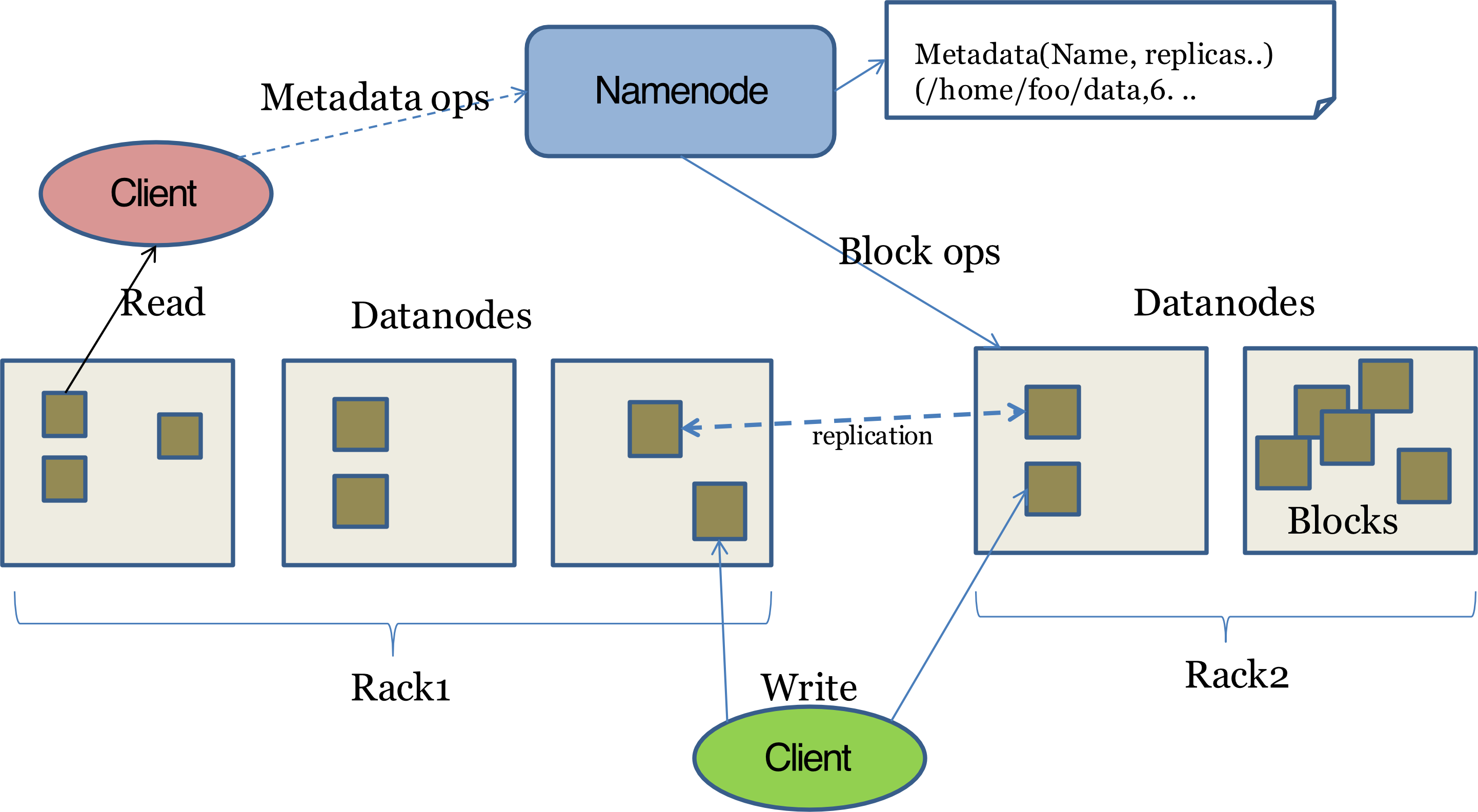
1. NameNode (Master)
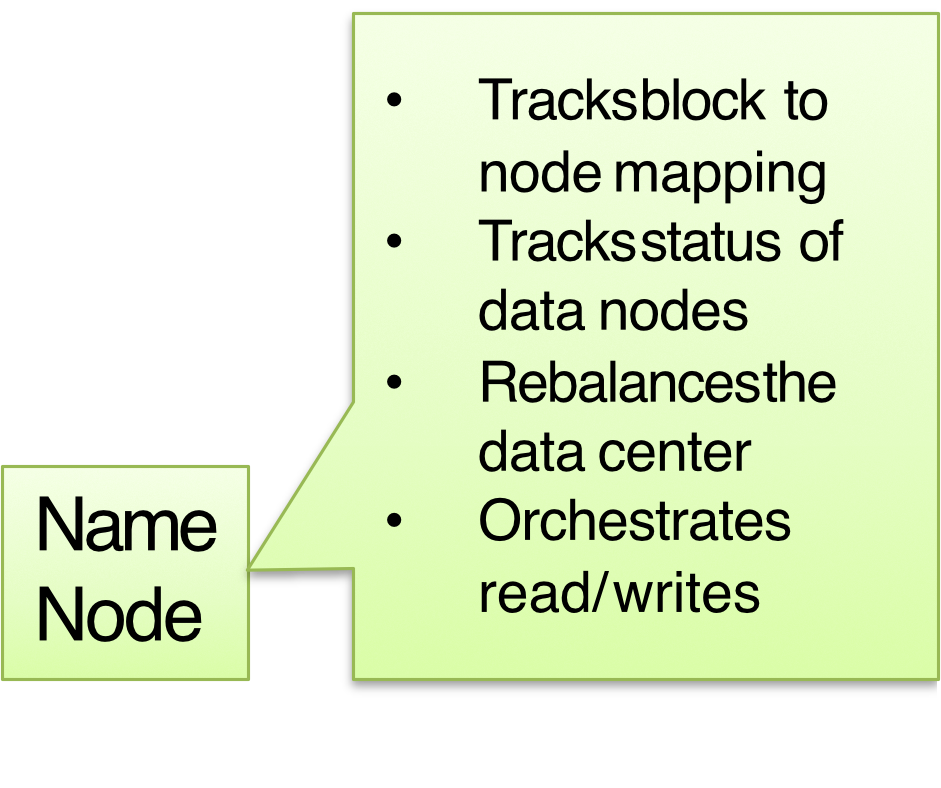
Role: Central coordinator - only ONE per data center
Responsibilities:
- All reads/writes go through the master
- Manages DataNodes
- Detects failures → triggers replication
- Tracks performance metrics
- Tracks location of blocks
- Tracks block-to-node mapping
- Tracks status of DataNodes
- Rebalances the data center
- Orchestrates read/write operations
เทียบเท่ากับ Master ใน GFS Chapter 3 - MapReduce
Analogy: The NameNode is like a librarian who knows where every book is stored, which shelves are broken, and directs people to the right location when they want to read or store books.
2. DataNode (Workers)
Role: Storage nodes - one per server
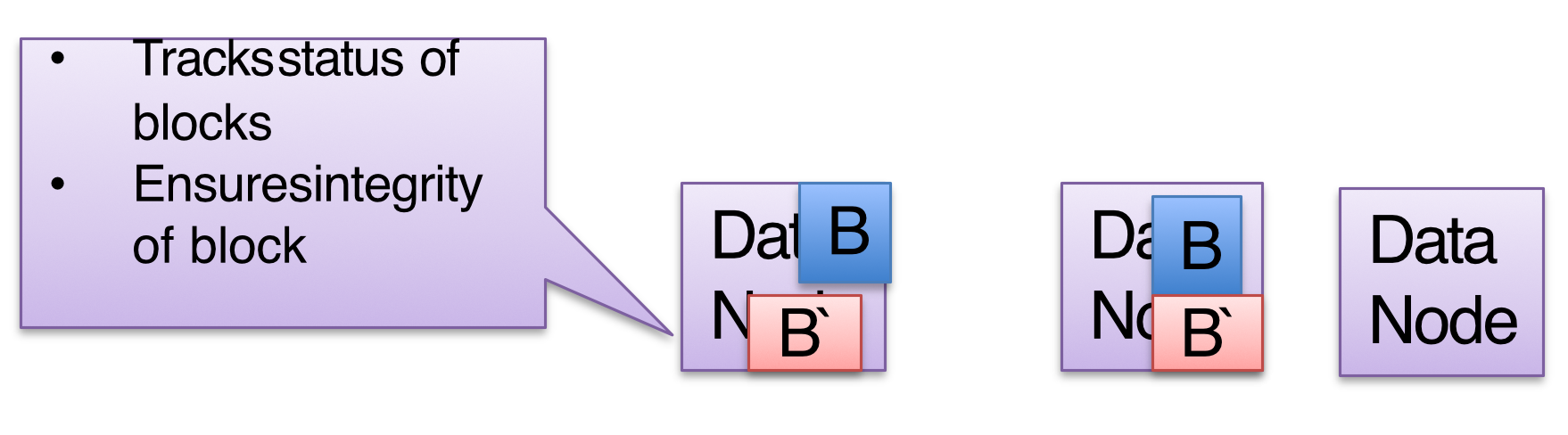
Responsibilities:
- Stores the actual data blocks
- Tracks status of blocks
- Ensures integrity of blocks (checksums)
- Reports health status via heartbeats to NameNode
Data Organization:
- Each block has replicas (default = 3)
- Example: Block B has replicas B', B''
Critical Point: The NameNode is a Single Point of Failure (SPOF) in basic HDFS. Modern implementations use backup NameNodes or High Availability configurations.
HDFS Block Structure
Block Sizes
Default: 128 MB
Common in Production: 256 MB (for high-performance workloads)
Why so large?
- Reduces NameNode memory overhead (fewer blocks to track)
- Optimizes for sequential reads
- Reduces seek time overhead
Compare this to traditional file systems (4KB-64KB blocks). HDFS blocks are 1000-2000x larger!
Comparison:
| File System | Block Size |
|---|---|
| Traditional FS | 4-64 KB |
| HDFS Default | 128 MB |
| HDFS Production | 256 MB |
Write Operations in HDFS
Write Process
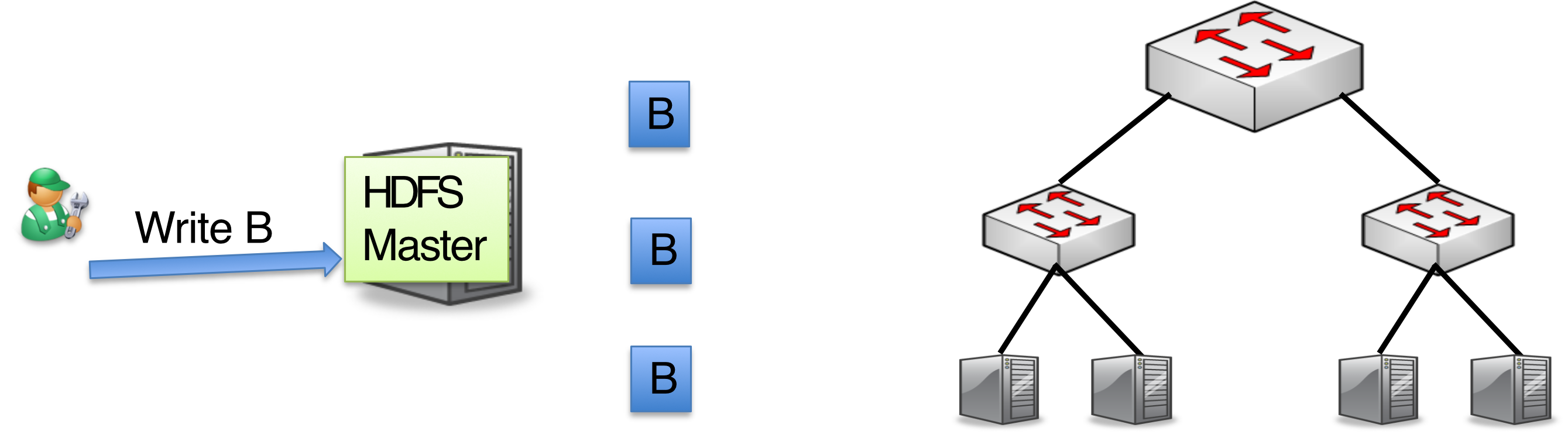
Step 1: Client Metadata Request
Client → NameNode:
- Create the file (or append)
- Check permissions
- Get block ID
- Get replica placement (list of DataNodes)
- Enforce write-once semantics
Step 2: NameNode Response
NameNode → Client:
- Returns a pipeline of DataNodes:
[DN1 → DN2 → DN3] - Provides block size information
- Specifies replication factor
Step 3: Data Transfer (Pipelined Write)
Client → DataNode Pipeline:
- Client streams data to DataNode 1
- Actual operation is happened in this stage, just forward or copy to other DataNode????? Check ด้วย
- DN1 forwards to DN2
- DN2 forwards to DN3
- Acknowledgments flow back through the pipeline
Pipelined Write Optimization: Instead of the client writing to each replica separately (3x network cost from client), it writes once to DN1, which forwards to DN2, etc. This reduces client network overhead significantly.
Client writes to DN1 → DN1 forwards to DN2 → DN2 forwards to DN3
   ←── ACK ←──── ACK ←──── ACK
Replication Strategy
Default Replication Factor:
Formula:
For default :
Why N=3?
- Balances reliability vs storage cost
- Survives 2 simultaneous failures
- Statistically sufficient for most failure scenarios
- Storage overhead = 3x (200% overhead)
Fault-Tolerant Placement
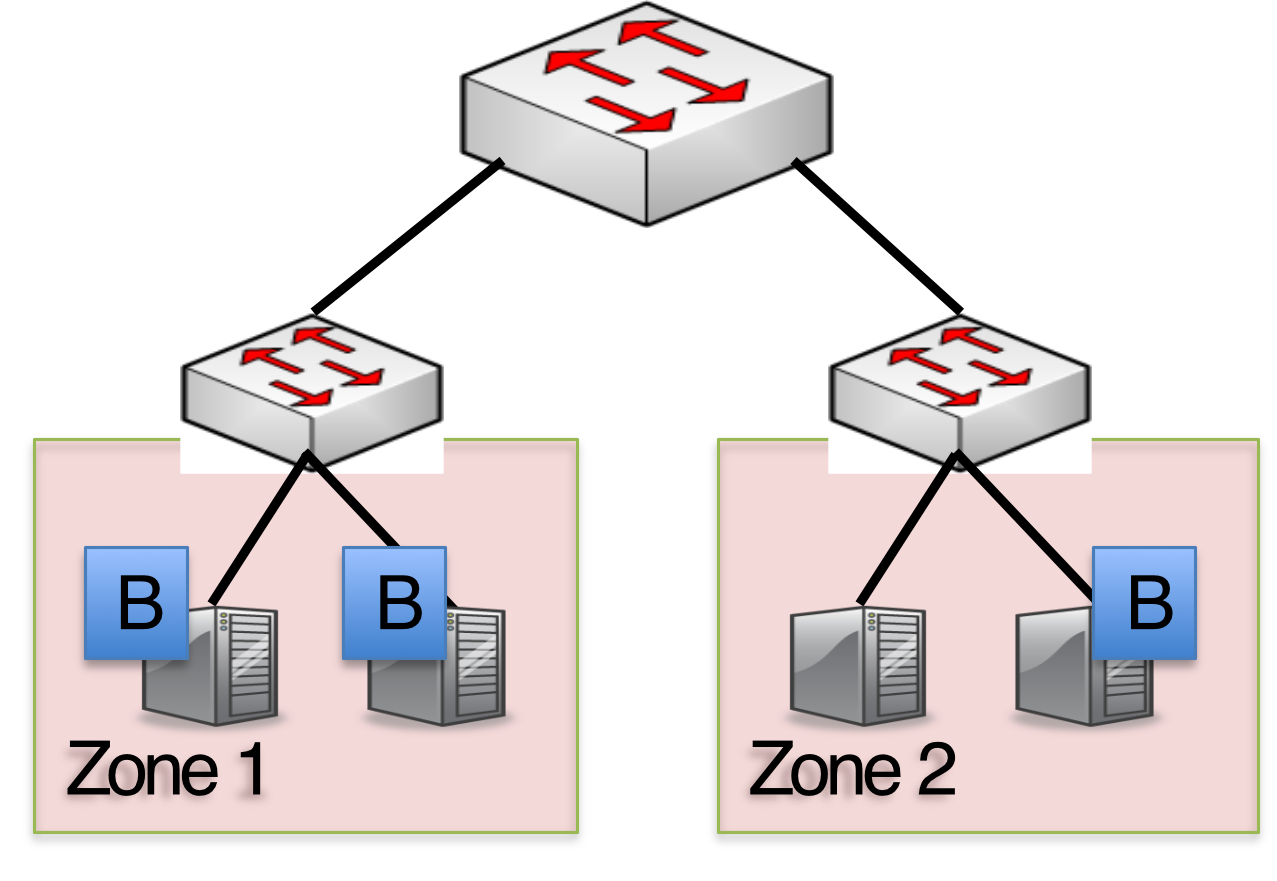
Strategy: Place replicas in two different fault domains
Default Placement:
- 2 copies in the same rack (fast local replication)
- 1 copy in a different rack (survives rack failure)
Zones/Racks:
Zone 1: [B, B']  (2 replicas)
Zone 2: [B]      (1 replica)
Analogy: You keep two backup hard drives at home (same rack) for quick access, and one backup in a bank vault (different rack) for disaster recovery.
Real-world: AWS EBS (Elastic Block Store) uses similar multi-zone replication. Data is replicated within an Availability Zone for performance and across zones for durability.
Network Awareness (Current Limitation)
Current HDFS Behavior: Picks two random racks for write placement
Note: HDFS doesn't currently optimize write placement based on network proximity or congestion (this is a research opportunity)
Read Operations in HDFS
Read Process
Client Flow:
- Client → NameNode: Request file metadata
- NameNode → Client: Returns list of DataNodes containing the blocks
- Client → DataNode: Reads from the closest replica
Network Awareness for Reads
Strategy: Pick the closest copy to read from
Distance Priority:
- Same node (local disk)
- Same rack
- Different rack in same data center
- Different data center
Analogy: When you want to borrow a book, you check: (1) your own bookshelf first, (2) then your roommate's shelf, (3) then the local library, (4) then interlibrary loan from another city.
Reliability During Reads
No specific reliability mechanism during reads
However:
- If a DataNode fails during read, client automatically tries another replica
- Checksums verify data integrity
- Corrupt blocks are reported to NameNode
Real-world: Google Cloud Storage and Amazon S3 use similar closest-replica strategies to minimize latency for users worldwide.
Implications of Read/Write Semantics
Write Cost
Consequences:
- Writes are expensive (3x storage, 3x network)
- HDFS is optimized for write-once, read-many workloads
- Updates are particularly costly
Update/Edit Operations
- Problem: How do you modify existing data?
- Solution: Delete old data + Write new data
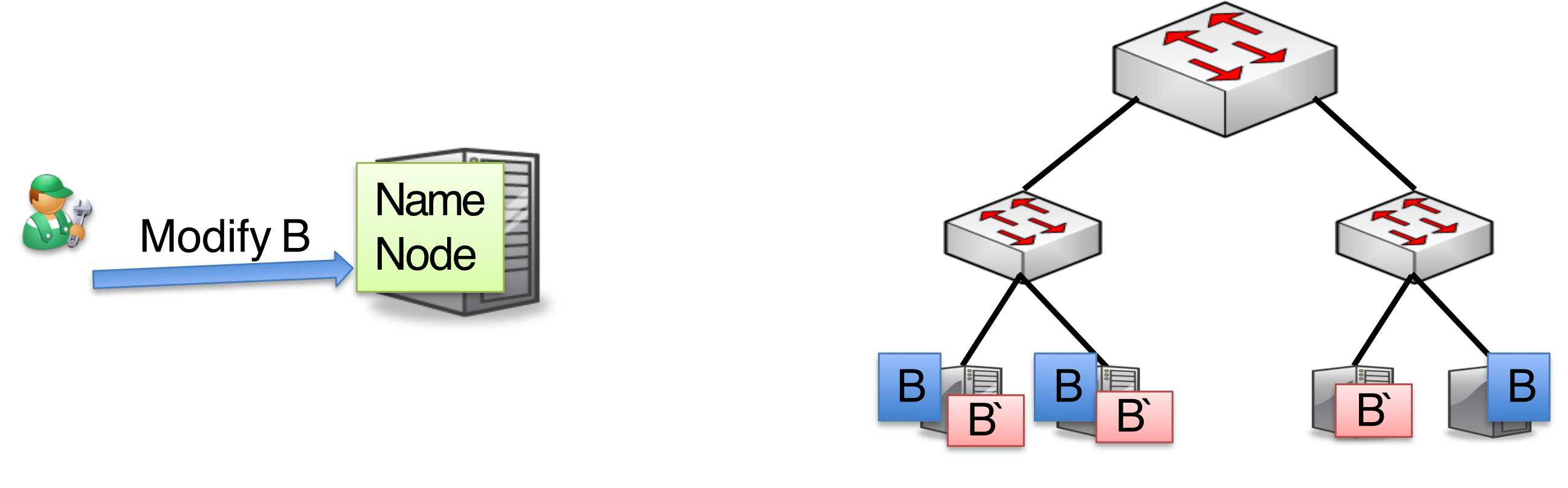
Process:
- Mark old blocks as deleted (B, B', B'')
- Write new blocks (B_new, B_new', B_new'')
- Update metadata in NameNode
- Garbage collection removes old blocks
Why no in-place updates?
- Simplifies consistency model
- Maintains immutability of blocks
- Easier to reason about failures
- Better for append-heavy workloads
Real-world: Log files, sensor data, social media posts are typically write-once. Even "edits" on Facebook/Twitter create new versions rather than modifying old data.
Coordinated by NameNode:
- Tracks old block locations
- Allocates new block IDs
- Ensures atomic metadata updates
Question: What if Client Skips NameNode?
Answer:
Cannot happen - the client doesn't know:
- Which DataNodes have space
- Where to place replicas for fault tolerance
- Which block IDs to use
- Authentication/authorization credentials
Security Implications:
- NameNode enforces access control
- Prevents unauthorized writes
- Ensures quota limits
- Validates permissions
Analogy: Like trying to deposit money in a bank vault without going through the teller. You don't have the vault combination, don't know which safe deposit box is yours, and can't verify you're authorized.
Interesting Research Challenges
1. Popularity-Based Optimization
Problem: Not all files are equally popular
Examples:
- More people search for "basketball" than "hockey"
- Yesterday's news vs last year's news
- Viral videos vs obscure content
Impact:
- Popular blocks have more contention
- Leads to slower performance
- Uneven load distribution
Theoretical Solution: Dynamic Replication
Concept:
Strategy:
- High popularity → More replicas
- 50 concurrent readers → 50 replicas
- Low popularity → Fewer replicas
- 3 concurrent readers → 3 replicas
Goal: Match replicas to readers for optimal parallelism
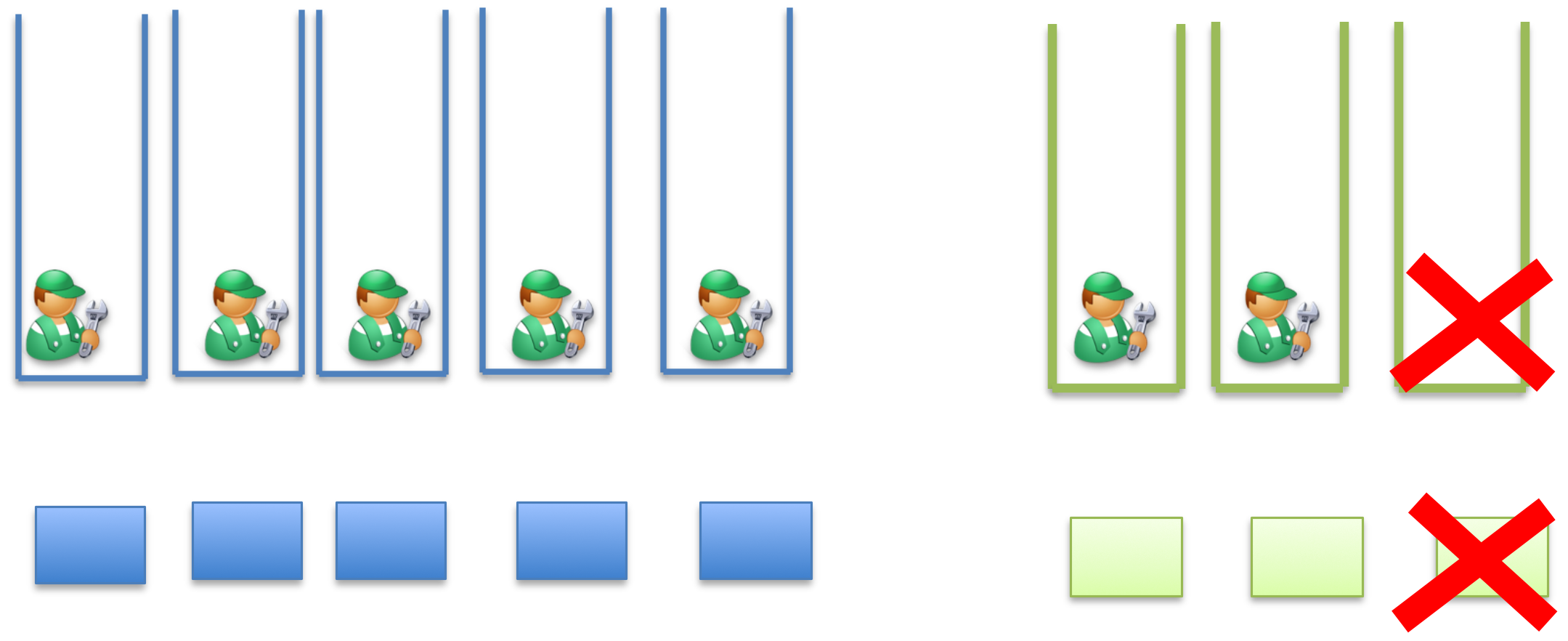
Analogy: A library keeps 20 copies of a bestselling novel on release day, but only 1 copy of an obscure academic journal. As the novel becomes less popular over months, they reduce it to 2-3 copies.
Age-Based Optimization
Observation: Old data becomes less popular over time
Strategy: Reduce replicas for old data
- Fresh data (< 1 week): 3 replicas
- Old data (> 1 week): 1 replica
Real-world: Facebook actually implements this. They found that photos older than 1 year are rarely accessed, so they move them to cold storage with reduced redundancy.
What HDFS Actually Does (Reality)
HDFS uses different strategies instead of popularity-based replication:
- Read Load Balancing
- Client chooses the closest replica
- Spreads readers across existing replicas
- No new replicas created
- Data Locality
- MapReduce/Spark schedule computation near data
- Brings computation to data instead of data to computation
- Reduces need for extra replicas
Analogy: Instead of making more copies of a popular book, you tell readers to come at different times or read different chapters simultaneously.
- OS-Level Caching
- Hot blocks served from page cache (RAM)
- Operating system automatically caches frequently accessed data
- No extra disk replicas needed
Cache hit, cache miss! น่าจะต้องการ Cache hit เยอะ ๆ
Real-world: This is why web servers can handle thousands of requests for the same image without disk access - it's all in RAM cache.
When Popularity-Based Replication IS Used
- HDFS + External Systems
- Facebook's custom HDFS extensions
- Research papers on adaptive replication
- HDFS + caching layers (Alluxio)
- HBase (Built on HDFS)
- Hot regions automatically split
- Load spreads across region servers
- Dynamic rebalancing
- Dedicated Caching Systems
- Alluxio (formerly Tachyon): High-performance distributed caching layer for AI workloads
- Redis/Memcached: For hot data caching
- In-memory cache
- CDNs: Content Delivery Networks for popular content
Real-world: Netflix uses Alluxio to cache popular shows in memory across their cluster, dramatically reducing latency for trending content.
2. Failures in Data Centers
Failure Statistics
Real-World Data:
- Facebook: 1% of servers fail after each reboot
- Google: At least one server fails per day
Context: In a data center with 10,000 servers, you can expect 100 failures on maintenance days, or 30+ failures per month during normal operations.
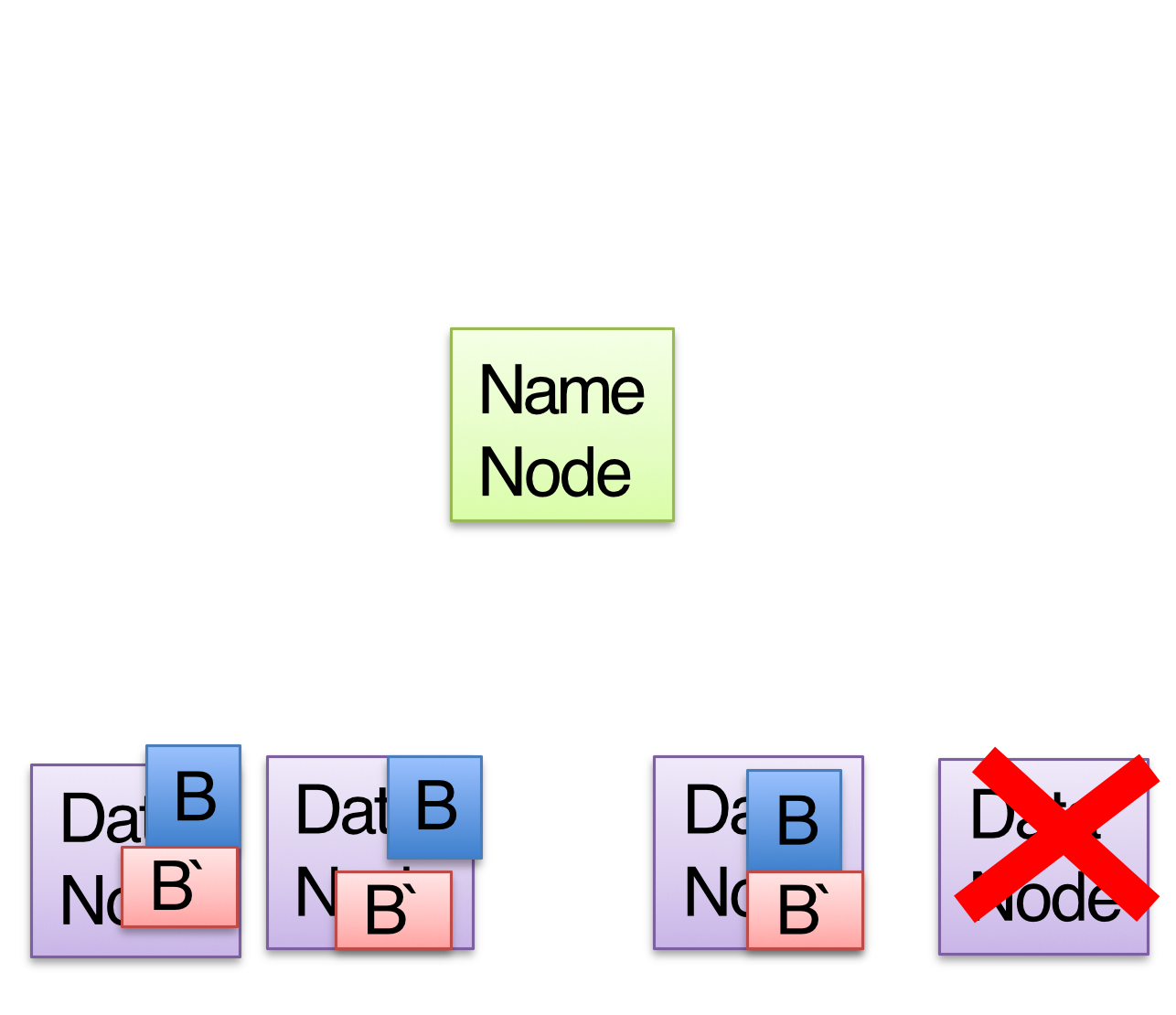
HDFS Failure Recovery
Detection Mechanism: Heartbeat monitoring
Process:
- Detection: Failed node stops sending heartbeats to NameNode
- Identification: NameNode determines which blocks were on failed node
- Recovery: NameNode triggers re-replication of under-replicated blocks
Timeline:
T=0: DataNode fails
T=10min: NameNode marks DataNode as dead (default timeout)
T=10min+: NameNode identifies under-replicated blocks
T=10min+: Re-replication begins
T=15-30min: System fully recovered
Example Scenario:
Before Failure:
DataNode1: [B, B']
DataNode2: [B, B']  ← Fails
DataNode3: [B, B']
DataNode4: Empty
After Recovery:
DataNode1: [B, B', B_copy]  ← New replica created
DataNode2: X (Failed)
DataNode3: [B, B']
DataNode4: [B_copy]         ← New replica placed
Analogy: If one of your backup hard drives fails, you immediately make a new backup from your remaining copies to maintain your 3-copy safety margin.
Can You Lose Data?
Theoretical Scenarios:
Safe (Common):
- 1 replica fails: Data still available from 2 others ✓
- 2 replicas fail: Data still available from 1 ✓
Unsafe (Rare):
- All 3 replicas fail simultaneously: Data loss ✗
Probability Calculation:
Given:
- Individual server failure rate: (1%)
- Replication factor:
Probability of losing a specific block:
Time Between Failures matters:
- If failures are independent and spread over days: Safe (re-replication happens)
- If correlated failures (rack power loss): Dangerous
Real-world: Amazon S3 promises 99.999999999% (11 nines) durability. This means losing 1 object out of 100 billion per year. They achieve this through aggressive replication and erasure coding.
Correlated Failures
Danger Scenarios:
- Rack power supply fails → Multiple servers fail simultaneously
- Network switch fails → Entire rack isolated
- Software bug → Same failure on all servers with that version
- Natural disaster → Entire data center lost
Mitigation:
- Multi-rack placement (HDFS does this)
- Multi-datacenter replication (geo-replication)
- Diverse hardware/software versions
- Erasure coding (more storage efficient than replication)
3. Network Contention Issues
Problem 1: I/O Contention on Servers
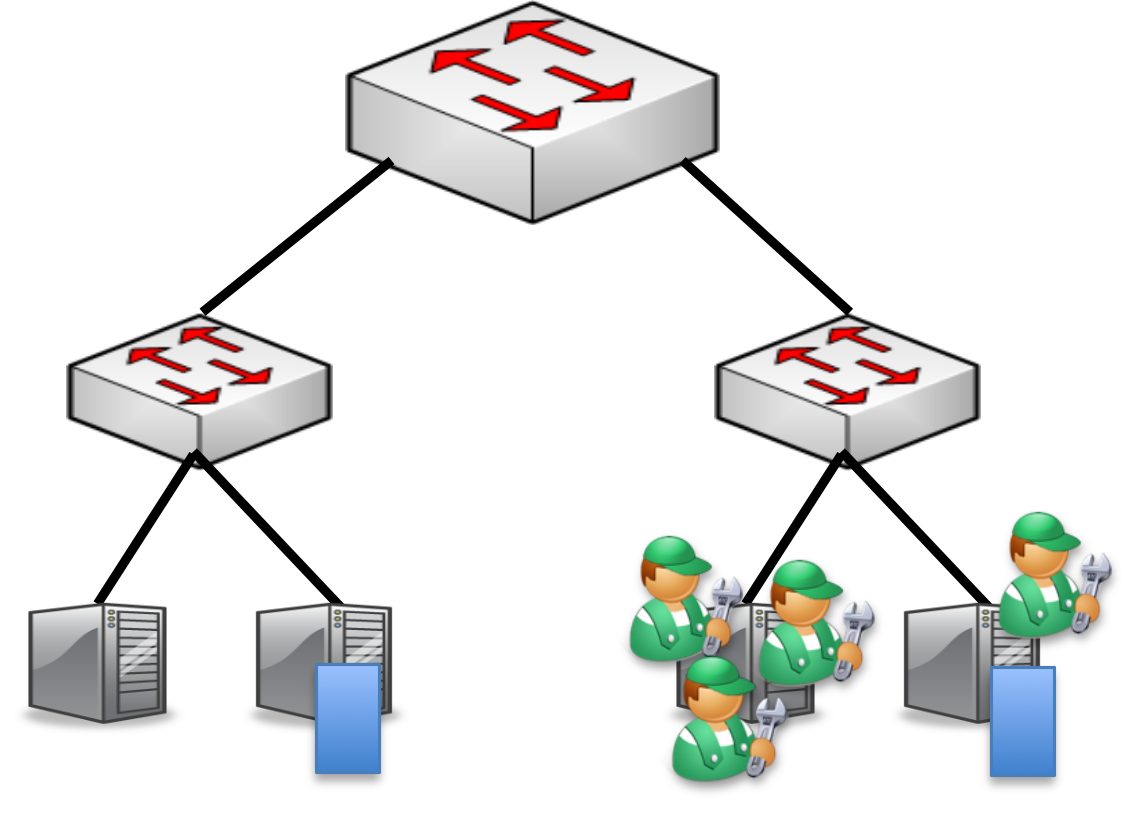
Definition: I/O contention occurs when multiple virtual machines or processes compete for limited I/O resources (disk bandwidth, CPU, memory).
Impact:
- Tasks put to sleep waiting for disk/device access
- Degraded performance
- Increased latency
- Wasted CPU cycles
Metrics: "I/O Device Contention" reports the number of times a task was put to sleep while waiting for a semaphore for a particular device
Analogy: Like a traffic jam at a single checkout lane in a supermarket. Even though there are many customers (tasks) ready to checkout (access disk), they all wait in line for the single cashier (disk I/O).
HDFS's Current Limitation:
- Locality-aware reads/writes ignore server load
- May send all requests to same "closest" server
- Creates hotspots
Visual Example:
Server A (Closest): [🔥🔥🔥🔥] ← Overloaded with 10 requests
Server B (Medium):  [___] ← Idle
Server C (Farthest): [___] ← Idle
Solutions:
- Load-aware scheduling: Check server load before assigning reads
- Redistribution (the task): Move tables/blocks across devices
- Add devices: Add more disks/SSDs to bottlenecked servers
- Rate limiting: Limit concurrent requests per server
Real-world: Google's Borg scheduler (Kubernetes predecessor) monitors CPU, memory, disk, and network utilization before placing workloads, preventing hotspots.
Problem 2: Network Contention
เหมือนจะไม่มี
Similar Issues:
- Network links have limited bandwidth
- Multiple transfers compete for same network path
- Rack uplinks become bottlenecks
Topology Example:
        [Core Switch]
           /      \
   [Rack Switch] [Rack Switch]
      /  |  \       /  |  \
    S1  S2  S3    S4  S5  S6
If many tasks in Rack1 need data from Rack2:
- Rack uplink becomes bottleneck
- Bandwidth shared among all transfers
- Performance degrades linearly with concurrent transfers
Current HDFS Behavior:
- "Pick closest replica" doesn't consider:
- Current network congestion
- Available bandwidth
- Competing transfers
Potential Solutions:
- Network-aware scheduling: Monitor link utilization
- Traffic engineering: Route around congested paths
- Bandwidth reservation: Reserve capacity for high-priority jobs
- Adaptive routing: Choose less congested paths even if slightly longer
Real-world: AWS uses VPC (Virtual Private Cloud) with Traffic Mirroring and VPC Flow Logs to detect and route around network congestion. They dynamically adjust routing based on real-time bandwidth availability.
Mitigation Strategies (Research Direction)
If significant contention detected:
- Redistribution: Move blocks across servers/racks
- Adding resources: Add more servers/network links
- Load balancing: Use less-loaded replicas
- Caching: Cache hot data in memory
- Scheduling: Time-slice access to shared resources
GFS vs. HDFS Comparison
| Feature | GFS (Google) | HDFS (Hadoop) |
|---|---|---|
| Master Node | Master | NameNode |
| Worker Node | Chunkserver | DataNode |
| Metadata Log | Operation log | Journal, Edit log |
| Data Unit | Chunk | Block |
| Write Model | Random file writes possible | Only append possible |
| Concurrency | Multiple writer, multiple reader | Single writer, multiple reader |
| Data Structure | Chunk: 64KB data + 32bit checksum pieces | Per block: data file + metadata file (checksums, timestamp) |
| Default Size | 64 MB chunks | 128 MB blocks |
Key Differences
1. Write Semantics:
- GFS: Supports random writes anywhere in file
- HDFS: Only supports appending to end of file
Why? HDFS made this simplification to ensure stronger consistency guarantees and simpler failure recovery.
2. Concurrency Model:
- GFS: Multiple concurrent writers allowed (with record append)
- HDFS: Only one writer at a time per file
3. Metadata Storage:
- GFS: Single operation log
- HDFS: Separate journal and edit log for better recovery
4. Block Size Evolution:
- GFS: 64 MB (2003)
- HDFS: Started at 64 MB, now 128 MB default, often 256 MB in production
Real-world: Google has since evolved GFS into Colossus, which handles exabyte-scale storage. HDFS remains popular in open-source big data ecosystems.
Summary
Key Properties of Distributed File Systems
1. Performance:
- Data partitioning for parallel access
- Large block sizes (128-256 MB)
- High throughput for sequential reads
2. Reliability:
- Replication (default 3x)
- Automatic failure detection and recovery
- Fault-tolerant placement across racks
3. Simplicity:
- Write-once, read-many model
- Append-only writes
- Immutable blocks
Research Challenges
1. Popularity-Based Optimization:
- Dynamic replication based on access patterns
- Age-based storage tiering
- Hot data caching strategies
2. Failure Handling:
- Correlated failure detection
- Faster recovery mechanisms
- Erasure coding vs. replication trade-offs
3. Data Placement:
- Load-aware scheduling
- Network-aware placement
- Contention-aware routing
- Multi-objective optimization (latency + bandwidth + load)
Real-World Production Usage
Companies Using HDFS
1. Facebook:
- Stores 300+ PB of data
- Uses modified HDFS with warm/cold storage tiers
- Implements f4 (erasure coding) for cold storage
2. Yahoo:
- One of the largest HDFS deployments (40,000+ nodes)
- Processes 100+ PB daily
- Pioneered many HDFS optimizations
3. Uber:
- Uses HDFS for data lake (100+ PB)
- Stores trip data, logs, analytics
- Feeds into real-time ML models
4. Spotify:
- Music recommendation engine backed by HDFS
- Stores user listening history
- Trains collaborative filtering models
Cloud Service Equivalents
AWS:
- EMR (Elastic MapReduce): Managed Hadoop/HDFS
- S3: Object storage (similar concepts, different implementation)
- EBS: Block storage with replication
Google Cloud:
- Cloud Dataproc: Managed Hadoop/Spark
- Cloud Storage: Object storage
- Colossus: Google's internal successor to GFS
Azure:
- HDInsight: Managed Hadoop
- Azure Blob Storage: Object storage with hot/cool/archive tiers
- Data Lake Storage: HDFS-compatible storage
Modern Alternatives & Evolution
1. Object Storage (S3-compatible):
- Decouples storage from compute
- Easier scaling
- Pay-per-use pricing
- Examples: MinIO, Ceph
2. Cloud-Native File Systems:
- Alluxio: Memory-speed virtual distributed storage
- JuiceFS: POSIX-compatible distributed file system
- CephFS: Unified storage system
3. Erasure Coding:
- Replaces 3x replication with 1.5x storage overhead
- Uses mathematical encoding (like RAID)
- Better storage efficiency for cold data
- Examples: Facebook's f4, Quantcast File System (QFS)
Exam Tips & Key Concepts
Must-Know Formulas
-
Replication Cost:
-
Data Loss Probability:
-
Block to Node Mapping:
- NameNode maintains: File → Block IDs
- NameNode maintains: Block ID → List of DataNodes
Critical Architecture Points
NameNode (Master):
- Single point of failure (use High Availability in production)
- Stores all metadata in memory
- Bottleneck for metadata operations
DataNode (Workers):
- Stateless (can be replaced easily)
- Report health via heartbeats (default 3 seconds)
- Timeout after 10 minutes of missed heartbeats
Replication Pipeline:
- Client → DN1 → DN2 → DN3
- Reduces client network bandwidth
- Failures handled gracefully (retry with new pipeline)
Common Exam Questions
Q: Why are HDFS blocks so large (128 MB)?
- Reduces NameNode memory (fewer blocks to track)
- Optimizes for sequential reads
- Minimizes seek time overhead
- Better for MapReduce workloads
Q: Can HDFS lose data?
- Yes, if all replicas fail simultaneously
- Extremely rare:
- Mitigated by rack-aware placement
Q: Why is HDFS write-once?
- Simpler consistency model
- Easier failure recovery
- Optimized for append-heavy workloads
- Updates = delete + write new
Q: What happens if NameNode fails?
- Entire cluster becomes unavailable
- Solution: Secondary NameNode (checkpointing only)
- Better: HA NameNode with ZooKeeper
Comparison Table for Quick Reference
| Aspect | Traditional FS | HDFS |
|---|---|---|
| Block Size | 4-64 KB | 128-256 MB |
| Replication | 0-1x | 3x (default) |
| Write Model | Random writes | Append-only |
| Optimization | Random access | Sequential reads |
| Typical Files | KBs-MBs | GBs-TBs |
| Metadata | Distributed | Centralized (NameNode) |
| Best For | General purpose | Big data batch processing |
Additional Resources
Official Documentation:
Research Papers:
- "The Google File System" (2003) - Original GFS paper
- "The Hadoop Distributed File System" (2010) - HDFS architecture
- "f4: Facebook's Warm BLOB Storage System" - Erasure coding implementation
Tools to Explore:
- Hadoop Sandbox: Hortonworks/Cloudera virtual machines
- MinIO: S3-compatible object storage for local testing
- LocalStack: Mock AWS services including S3
Practice Problems
Problem 1: Calculate storage requirements
- Given: 1 PB of data, replication factor = 3
- Find: Total storage needed
- Answer:
Problem 2: Estimate NameNode memory
- Given: 1 PB data, 128 MB blocks, 150 bytes per block metadata
- Find: NameNode memory needed
- Solution:
- Blocks = blocks
- Memory =
Problem 3: Recovery time calculation
- Given: 128 MB block, 100 MB/s network, 3 replicas needed
- Find: Time to re-replicate after failure
- Solution:
- For 2 new replicas: