Technique that most VM use to control (schedule) allocate to other VMs
Contents
- Resource management and scheduling
- Policies and mechanisms
- Case-study of CPU schedulers:
- Xen CPU schedulers: BVT, SEDF, Credit
- Based on the paper: "Comparison of the Three CPU Schedulers in Xen" by L. Cherkasova, D. Gupta, A. Vahdat — ACM SIGMETRICS Performance Evaluation Review, Vol. 35 Issue 2, Sep 2007, pp. 42–51
Cloud Resource Management Policies
Five key policies that govern cloud resource management:
- Admission control → Prevent the system from accepting workload in violation of high-level system policies
- ป้องกันไม่ให้ระบบรับงานเกิน policy ที่กำหนด
- บริษัทกำหนดว่า API server รับได้ไม่เกิน 10,000 requests/sec ถ้า traffic พุ่งไป 15,000 requests/sec → ระบบจะ Reject บาง request (HTTP 503) หรือยัดใส่ Queue งี้
- Capacity allocation → Allocate resources for individual activations of a service
- จัดสรรทรัพยากรให้แต่ละ service
- Service A ได้ 2 vCPU, 4 GB RAM
- Service B ได้ 1 vCPU, 2 GB RAM
- จัดสรรทรัพยากรให้แต่ละ service
- Load balancing → Distribute the workload evenly among the servers
- Energy optimisation → Minimisation of energy consumption
- Quality of service (QoS) guarantees → Ability to satisfy timing or other conditions specified by a Service Level Agreement (SLA)
- การรับประกันตาม SLA
- Uptime ≥ 99.9%
- Response time ≤ 200 ms
- Latency ≤ 50 ms
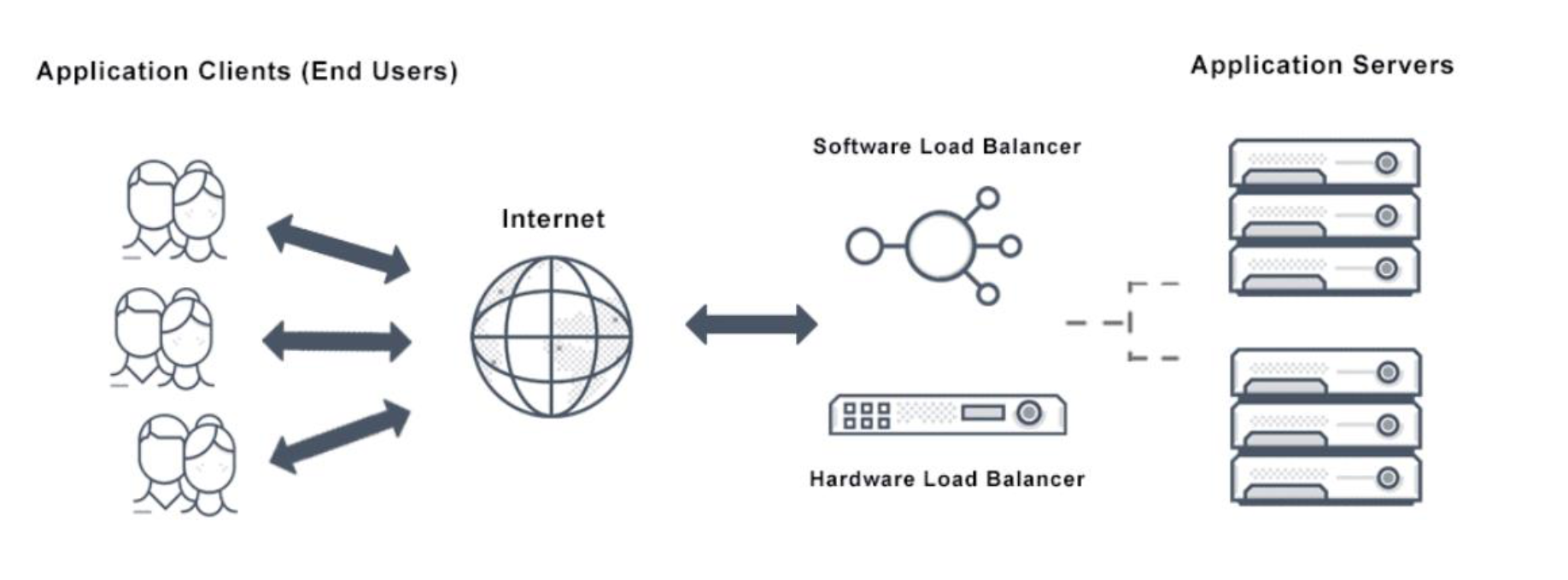
Server Load Balancing
- Server load balancing distributes client traffic to servers to ensure consistent, high-performance application delivery
- It ensures: application delivery, scalability, reliability, and high availability
- Works within two main types of load balancing:
- Transport-level load balancing — A DNS-based approach which acts independently of the application payload
- Application-level load balancing — Uses traffic load to make balancing decisions (e.g., Windows Server Load Balancing)
Think of a load balancer like a restaurant host — they seat customers (requests) across different tables (servers) so no single table gets overwhelmed.
Load Balancer Diagram
Resource Management and Scheduling
- Scheduling in a computing system → deciding how to ==allocate resources== (CPU cycles, memory, storage, I/O, network bandwidth) between users and tasks
- A scheduler → a program that implements a particular scheduling algorithm
- Scheduling is a critical function of any man-made system
Three Basic Criteria for System Evaluation
- Functionality — Does it work as it should?
- Performance — Does it perform well?
- Cost — How much does it cost?
- Processing Cost (computation cost, processing time)
- Communication Cost
- Storage Cost
Policies vs Mechanisms
- Policy → Principles guiding decisions (what to do)
- Mechanism → The means to implement policies (how to do it)
Policy is like a company rule ("prioritize premium customers"). Mechanism is the actual software/queue that enforces it.
Motivation — Why Cloud Resource Management is Hard
Cloud resource management is challenging because:
- It requires complex policies and decisions for multi-objective optimisation
- The system complexity makes it impossible to have accurate global state information
- Cloud service providers face large fluctuating loads which challenge Cloud elasticity
- Affected by unpredictable interactions with the environment (e.g., system failures, attacks)
Scheduling Algorithms
- Scheduling → responsible for resource sharing and multiplexing at several levels
- A server can be shared among several virtual machines
- A virtual machine could support several applications
- A scheduler decides:
- The amount of resources allocated
- The duration of the particular resource allocation
- A scheduling algorithm should be: efficient, fair, and starvation-free
- Efficient usually refer to performance (speed)
Starvation — A problem in concurrent computing where a process is perpetually denied necessary resources. Can be caused by scheduling errors, resource leaks, or deliberate attacks (e.g., fork bomb).
Scheduler Objectives (by application type)
| Application Type | Objective |
|---|---|
| Batch system | Maximise throughput |
| Real-time system | Meet (satisfy) the deadlines |
- Real-time system: (e.g. K-Plus,)
Common Scheduling Algorithms
- Round-robin
- First-Come-First-Serve (FCFS)
- Shortest-Job-First (SJF)
เหมือนมีบางอย่างหาย check!!
Deadline Types
| Type | Description |
|---|---|
| Hard deadlines | Strict — if missed, dependent tasks are affected and penalties apply. Expressed precisely in milliseconds or seconds |
| Soft deadlines | More of a guideline — no penalties if missed by a small margin (e.g., minutes if deadline is in hours) |
Resource Management in Virtualized Servers
Key considerations:
- Many different workloads
- Finite numbers of workloads can be hosted on each server
- Time-varying workload requirements
- Performance and resource isolation among the workloads
Terminology for CPU Schedulers
Proportional Share (PS) Scheduling
- PS scheduling allocates CPU in proportion to the number of shares (weights) that VMs have been assigned
- Every job has a weight, and jobs receive a share of CPU proportional to that weight
- Equal fairness (equal-priority case):
Like splitting a pizza — if you paid for 3 slices and your friend paid for 1, you get 3/4 of the pizza.
PS Example
| Process | Shares |
|---|---|
| P1 | 100 |
| P2 | 200 |
| P3 | 300 |
| Total shares = 600 | |
| So P3 gets twice as much CPU as P2, and three times P1. |
Pros and Cons of PS
| ✅ Pros | ❌ Cons |
|---|---|
| Works well under CPU overcommit (normal CPU usage) | Hard real-time systems |
| Prevents starvation (because each process can consume resource based on their weight (actual usage)) | Strict deadline guarantees |
| Allows VM-level guarantees | Deterministic latency requirements |
| Scales to many processes | |
| Simple to implement efficiently |
CPU overcommit = Virtual CPU > Physical CPU
Because PS guarantees share, not deadline.
บางอย่างหาย มากมาย check!!
Work-Conserving vs Non-Work-Conserving
- Work-Conserving (WC-mode)
- CPU shares are merely guarantees
- As long as there is work to be done and all clients have used their shares, the CPU will be used (no idle CPU)
- Schedule จะพยายามให้งานเสร็จ เมื่อเริ่มแล้ว no interruption is allowed
- Non Work-Conserving (NWC-mode)
- CPU shares are caps (fixed)
- Clients get their share of CPU and only that — even if CPU is free
WC = "If someone's done, let others use the leftover time."
NWC = "You get exactly your time slot, nothing more."
Preemptive vs Non-Preemptive Schedulers
- Non-preemptive schedulers
- The process takes the CPU and holds it until terminated or pushed to waiting state
- No process is interrupted until it completes
- Preemptive schedulers
- Works by dividing CPU into time slots
- The time slot may or may not complete the process
- When burst time > CPU cycle, process goes back to ready queue (wait for the next cycle)
| Feature | Preemptive | Non-Preemptive |
|---|---|---|
| Resource allocation | For a limited time (cycles) | Held until terminated |
| Interruption | Can be interrupted before completion | Not interrupted until complete |
| Starvation risk | Due to priority insertion | Due to large burst time monopoly |
| Overhead | Requires queue + remaining time tracking | No such overhead |
Why is preemption good for I/O intensive workloads? (Previous Exam Question #FinalExam)
I/O-bound processes often wait for disk/network. Preemption allows the CPU to serve other processes during those waits, rather than sitting idle.
Completely Fair Scheduler (Linux CFS)
- The CFS is the default CPU scheduler in Linux (since kernel 2.6.23)
- Designed to provide fair CPU time distribution among runnable processes
Key Concept: vruntime
- Each process tracks virtual runtime (vruntime) — increases as the process runs
- The process with the smallest vruntime runs next
- This ensures processes that received less CPU get priority
- Unlike fixed time-slice schedulers, CFS simulates an "ideal multitasking CPU":
- Every runnable process runs simultaneously and gets an equal share
- Since real CPUs can't do that, CFS approximates this mathematically
Idea ของ CFS = Fair Share (equal CPU allocation to no. of processes) + allocate to process having smallest
vruntime
Two Key Properties of CFS
- Long-term Fairness — All runnable processes (equal priority) receive approximately equal CPU time over time
- Immediate Scheduling Decision — At any scheduling point: run the process with smallest vruntime
💡 Think of vruntime like a debt counter. Whoever used the CPU less recently has the lowest "debt" and gets to go first. It levels out fairly over time.
Workload Management
- Workload management = the ability to precisely assign (CPU, memory, I/O) resources to applications
- Applications provide service levels on desired performance; workload managers assign resources to comply
Two Approaches
- Static
- Resources are estimated once and assigned statically despite varying workloads
- Problem: over-provisioning (wasted resources)
- Dynamic
- Dynamically allocate resources to match application workload demands
- Workload managers usually use PS schedulers in NWC mode → for performance isolation reasons
CPU Overcommit
- When a hypervisor allocates more virtual CPUs (vCPUs) than physical cores exist
Example:
- Server has 8 physical CPU cores
- Hypervisor creates 6 VMs, each with 4 vCPUs
- Total allocated = vCPUs
- Physical cores = 8
- The scheduler must time-share physical cores among 24 virtual CPUs
Like a hotel overbooking rooms, betting not everyone shows up at once — works fine until everyone actually arrives.
Case Study: Xen CPU Schedulers
Over the years, three CPU schedulers were proposed and used in Xen VMM:
- Borrowed Virtual Time (BVT) ← oldest
- Simple Earliest Deadline First (SEDF)
- Credit Scheduler ← current (used today)
1. Borrowed Virtual Time (BVT)
Overview
- A fair-share scheduler based on the concept of virtual time
- Dispatches the thread with the runnable VM that has the lowest virtual time first
- Thread execution time is monitored in terms of virtual time
Key Idea: Borrowing
- Latency-sensitive applications can "wrap back" in virtual time to gain scheduling priority
- Applications borrow virtual time from their future allocation
- The VM borrows from its future → does not disrupt long-term CPU sharing
How BVT Works
- Each thread has a virtual time counter
- The scheduler selects the thread with the smallest virtual time for execution
- If urgent execution is needed, a thread can borrow time → runs earlier
- The borrowed time is compensated later by penalizing the thread's virtual time
- Creates balance between fair scheduling and low-latency responsiveness
BVT Characteristics
- ✅ Preemptive, WC-mode only
- ✅ Optimally-fair
- ✅ Low-overhead on uni- and multiprocessors
- ❌ Does not support NWC-mode → limits isolation
BVT Example
Scheduler compares effective virtual time (EVT), not raw VT
| Thread | Raw VT | Borrowed | EVT |
|---|---|---|---|
| Thread-2 | 10 | 0 | 10 |
| Thread-3 | 15 | 5 | 10 |
| Thread-1 | 20 | 0 | 20 |
- Thread-2 runs first (EVT = 10)
- Thread-3 can run at same priority level as Thread-2 (EVT = 15 - 5 = 10)
- Thread-1 runs last (EVT = 20)
After Thread-3 executes, its virtual time increases, so it will run later in the next cycle — fairness is maintained.
What’s the problem of BVT (Disadvantage) #FinalExam
If the process keep borrowing and borrowing → How about the fairness? → Unfairness
2. Simple Earliest Deadline First (SEDF)
Overview
- A deadline-based scheduler — the runnable domain with the earliest deadline is scheduled next
- Each domain specifies three values:
| Parameter | Meaning |
|---|---|
| Slice — amount of CPU time the domain receives | |
| Period — how often it receives that slice | |
| Extra — whether domain can receive extra CPU time (WC-mode) |
- will receive units of time every period of length
- If WC-mode enabled: SEDF distributes slack time fairly among all runnable domains
Assigning 30% CPU
We need:
Two valid configurations:
(3ms, 10ms, 0)→ every 10ms, domain gets 3ms(30ms, 100ms, 0)→ every 100ms, domain gets 30ms
It depends on task (process)
What final output that can be used to determine the proper choice of choosing , ?
A. Communication Cost
B. Speed
C. Throughput (Correct Answer)
D. Reduced Error
Does Period Size Matter?
| Factor | Small Period (3ms, 10ms, 0) | Large Period (30ms, 100ms, 0) |
|---|---|---|
| Granularity | More frequent CPU slices | Less frequent CPU slices |
| Latency | Lower (better for interactive) | Higher (longer delay between bursts) |
| Burst Length | Short (3ms at a time) | Long (30ms uninterrupted) |
| System Overhead | Higher (frequent context switches) | Lower (fewer context switches) |
| Suitability | Real-time, low-latency tasks | Batch / compute-intensive workloads |
Burst Time = the time to process (time to execute)
SEDF Example 1
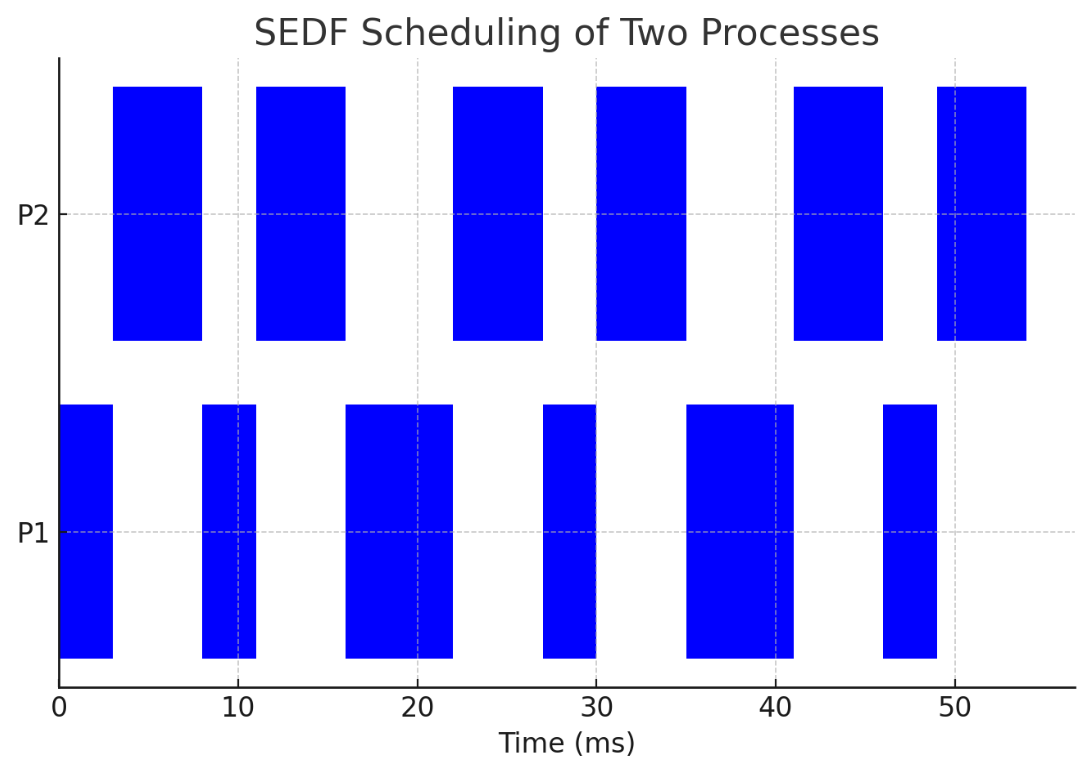
- P1:
(3ms, 10ms, 0)— runs 3ms every 10ms, deadline = 10ms - P2:
(5ms, 15ms, 0)— runs 5ms every 15ms, deadline = 15ms
Execution order (Earliest Deadline First):
- Time 0: P1 runs for 3ms (deadline 10ms)
- Time 3: P2 runs for 5ms (deadline 15ms)
- Time 8: P1 runs again (deadline 20ms)
- Time 11: P2 runs again (deadline 30ms)
- Pattern continues...
SEDF Example 2
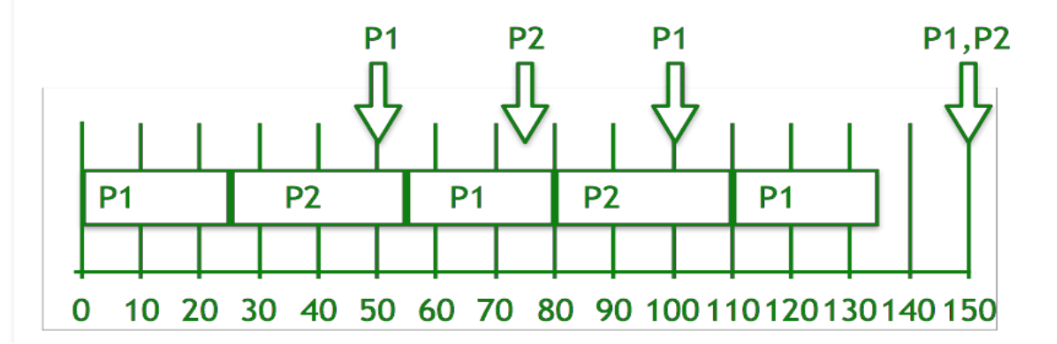
- P1: period , processing time
- P2: period , processing time
Steps:
- P1 has earlier deadline → priority P1 > P2
- P1 runs and completes at time 25
- P2 starts, runs until time 50 (when P1 is ready again)
- Deadlines now: P1 = 100, P2 = 75 → P2 has earlier deadline, continues
- P2 completes at time 55
- P1 starts, runs until time 75 (P2 ready again)
- Compare: P1 = 100, P2 = 150 → P1 continues
- At time 150: both have same deadline → P2 runs first then P1
SEDF Characteristics
- ✅ Preemptive, supports WC and NWC modes
- ⚠️ Fairness depends on period value
- ❌ Implements per-CPU queue but lacks global load balancing on multiprocessors
When to Use SEDF
| ✅ Suitable For | ❌ Not Suitable For |
|---|---|
| Hard real-time guarantees | Large numbers of VMs |
| Deterministic latency requirements | Non-real-time workloads |
| Mixed-criticality systems | Overcommit-heavy cloud environments |
| Safety-critical VMs coexisting with normal ones | |
| Automotive hypervisors, industrial control |
3. Credit Scheduler
Overview
- Xen's latest PS scheduler with automatic load balancing of vCPUs across physical CPUs on SMP hosts
- Before a physical CPU goes idle → scheduler considers other CPUs with runnable vCPUs
- Goal: No CPU idles when there is runnable work in the system
Parameters per VM
- Weight → determines proportional CPU share
- Cap → maximum CPU usage limit
- Cap = 0 → VM can receive extra time (WC-mode)
- Cap ≠ 0 → shows max time VM can receive (NWC-mode)
How the Credit Scheduler Works
- Each VM gets an initial credit allocation based on its weight
- When a VM runs → it spends credits
- Scheduler selects VM with the highest remaining credits
- If credits go negative → VM execution is delayed, letting other VMs run
- Idle VMs accumulate credits (but do not consume them)
- WC-mode allows borrowing CPU time if others are idle
Credit Allocation Example
| VM | Weight | CPU Allocation |
|---|---|---|
| VM1 | 200 | 40% |
| VM2 | 100 | 20% |
| VM3 | 300 | 60% |
- VM3 gets most CPU (highest weight)
- VM2 gets least CPU (lowest weight)
- If a VM becomes idle → scheduler redistributes to active VMs
Credit Scheduler Timing
- Works with 30ms slices — a vCPU receives 30ms before being preempted by another VM
- Every 30ms → priorities/credits of all runnable VMs are recalculated
- CPU usage monitored every 10ms
Credit Scheduler Characteristics
- Supports both WC and NWC modes
- Global load balancing on multiprocessors (key advantage over BVT and SEDF)
Credit Scheduler = fair share + dynamic load balancing. Like a taxi dispatcher that reassigns idle drivers to busy areas automatically.
BVT → SEDF → Credit: Evolution
| Improvement | What Changed |
|---|---|
| BVT → SEDF | Added NWC mode (performance isolation) |
| BVT, SEDF → Credit | Added automatic global load balancing on SMPs |
Comparison: Credit vs SEDF
| Feature | Credit Scheduler | SEDF Scheduler |
|---|---|---|
| Scheduling Basis | Credit-based (Weight) | Deadline-based |
| Fairness | Dynamic, adjusts CPU usage | Fixed allocation per period |
| Preemption | Yes, based on credit balance | Yes, based on earliest deadline |
| Work-Conserving | Yes (idle CPU reassignment) | No (strict allocation) |
| Best For | General-purpose VM scheduling | Real-time, periodic tasks |
Widely-Used Scheduler Models
- Credit-based schedulers (e.g., Xen Credit Scheduler)
- Completely Fair Scheduler (Linux CFS)
- Proportional share scheduling
- Work-conserving schedulers
Challenges on VMM Scheduler
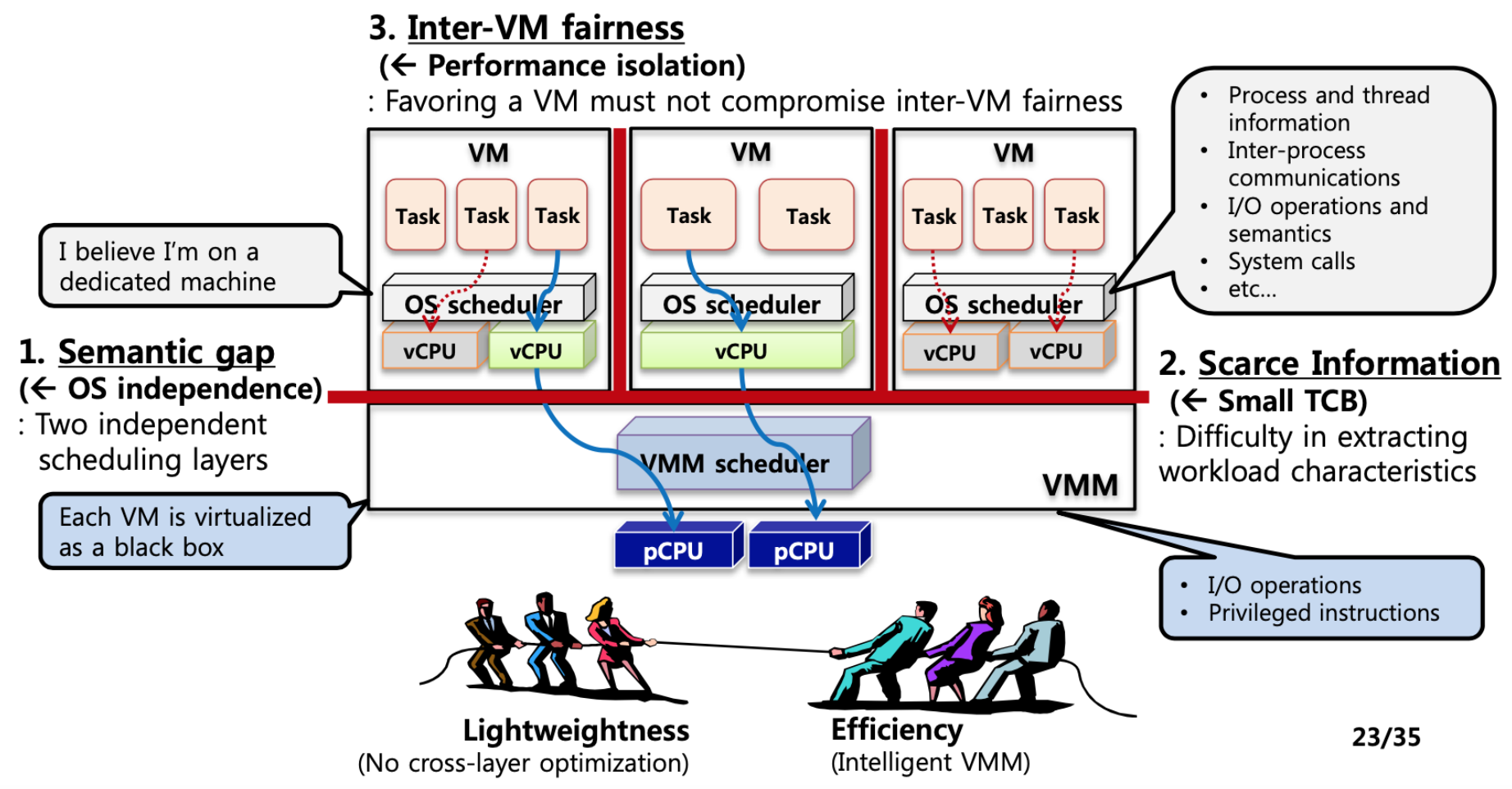
Three main challenges compared to OS scheduling research:
- Semantic gap (← OS independence)
- Two independent scheduling layers exist
- Each VM is virtualized as a black box — the VMM cannot see inside
- Scarce Information (← Small TCB)
- Difficulty in extracting workload characteristics
- Only I/O operations and privileged instructions are visible to VMM
- Inter-VM fairness (← Performance isolation)
- Favoring one VM must not compromise fairness among others
Two competing goals:
- Lightweightness — No cross-layer optimization
- Efficiency — Intelligent VMM
Experimental Comparison of the Three Schedulers
Setup
- Benchmarks used:
- Web server — measure web server throughput (req/sec)
- Iperf — measure maximum achievable network throughput (Mbits/s)
- Disk read — measure disk read throughput (MB/s)
- Machine specs: Dual CPU HP workstations LP200R, 1-GHz PIII processors, 2GB RAM, 1 Gbits NICs, running Xen 3.0.3
I/O Model for VMs in Xen
- Dom0 performs I/O processing on behalf of guest domains
- This means Dom0 also requires a certain CPU allocation to perform I/O for VMs
- Question: How much allocation is enough for Dom0?
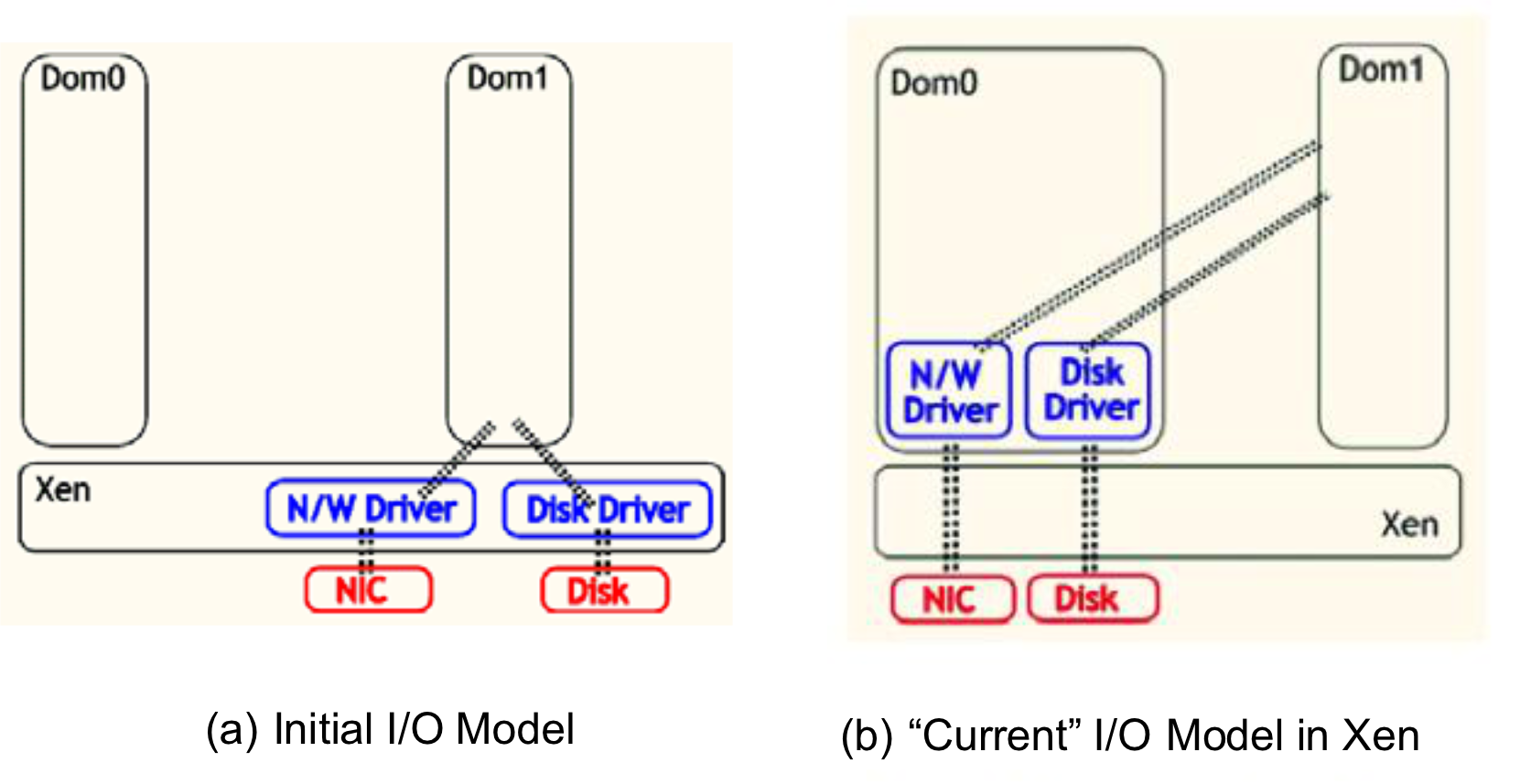
Effect of SEDF Parameter Values on Performance
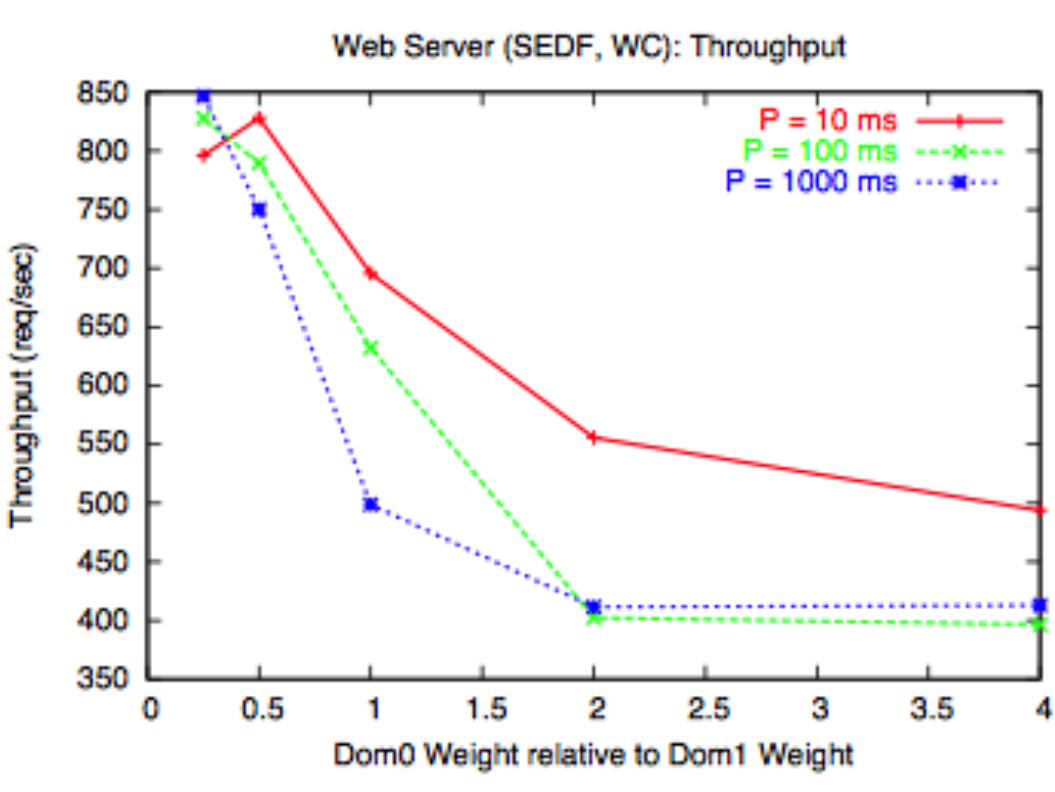
- Dom0 = x × Dom1 (x axis = Dom0 weight relative to Dom1 weight)
- Web server throughput decreases as Dom0 weight increases relative to Dom1
- More weight for Dom0 = less CPU for Dom1 (the web server) → lower throughput
- Web server throughput decreases as P (period) increases
- Larger period = longer gaps between CPU slices → higher latency → lower web server responsiveness
A web server handles many short requests. If CPU slices arrive infrequently (large P), requests pile up and throughput drops.
Comparison of Schedulers for Different Workloads
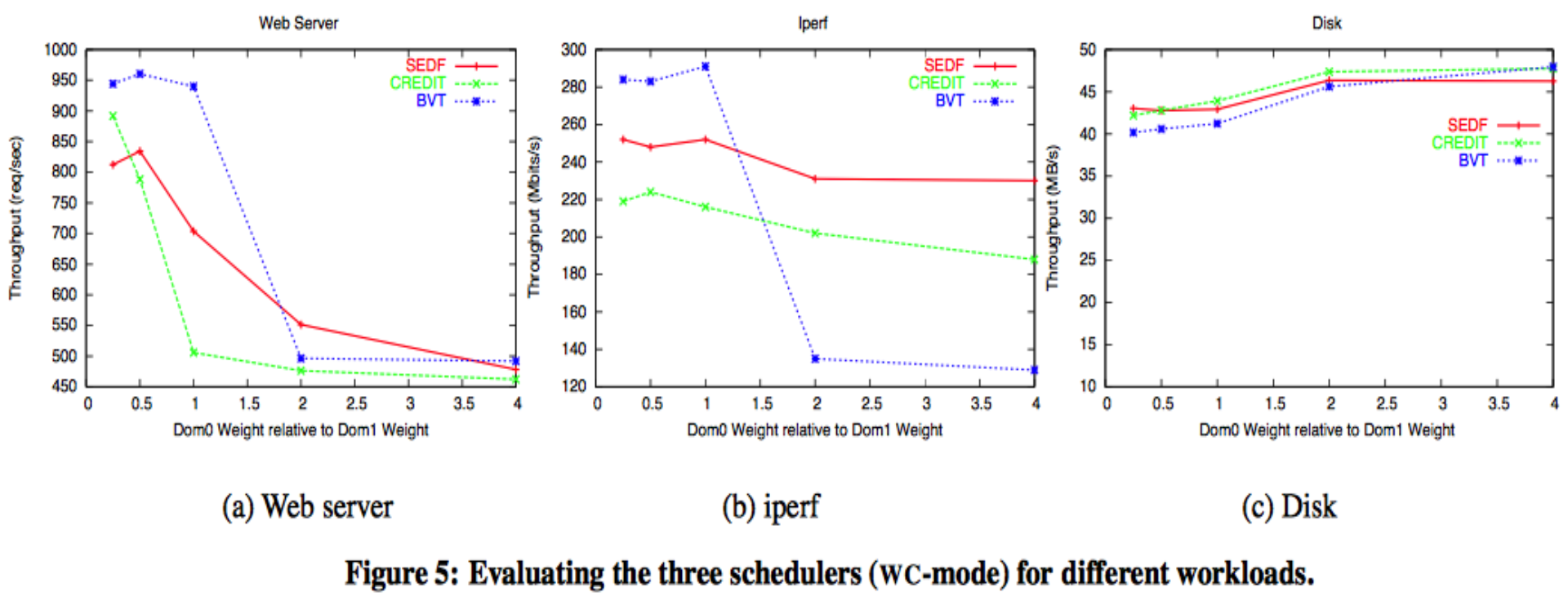
Key findings:
- Application performance varies significantly under different schedulers
- I/O applications are highly sensitive to the amount of CPU given to Dom0
Performance Comparison in SMP Case
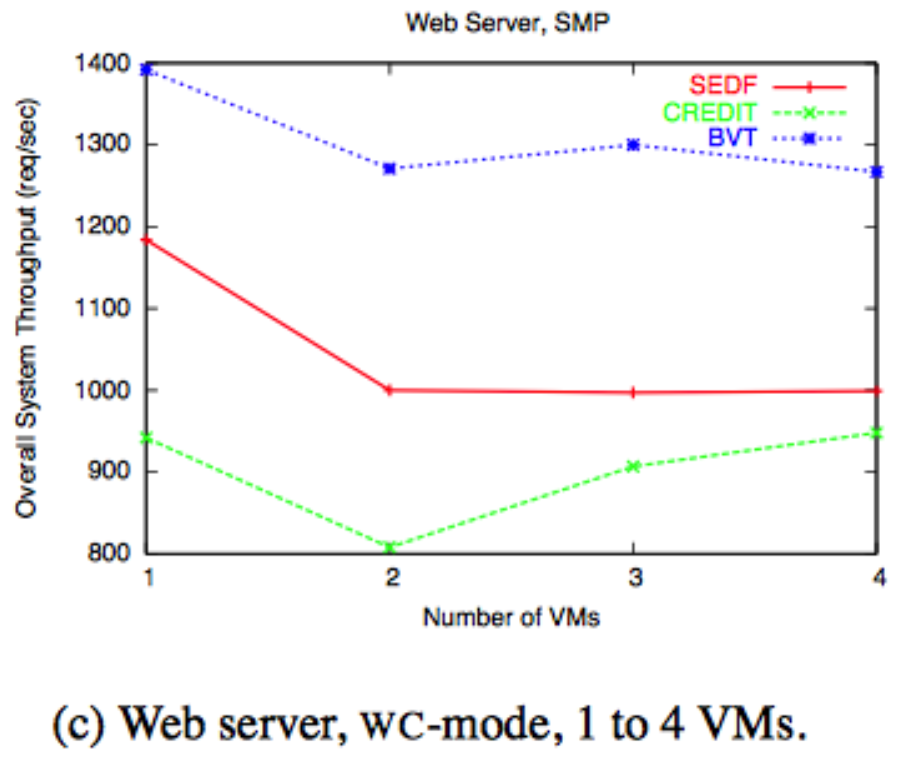
Setup:
- Dual CPU HP workstation
- 2 vCPUs for dom0, dom1
- Each VM given 2 vCPUs, runs web server, all domains given equal weights
Findings:
- Credit scheduler is able to increase throughput with more VMs (due to global load balancing)
- Credit throughput is lower than SEDF and BVT in single-node case
- Further analysis showed a high allocation error for Credit (Figure 11 from paper)
Summary
- Resource management and scheduling → critical for cloud systems
- Policies (what to do) and Mechanisms (how to do it)
- Three Xen CPU schedulers, in order of introduction:
| Scheduler | Key Feature | Mode | Load Balancing |
|---|---|---|---|
| BVT | Virtual time / fair-share | WC only | No |
| SEDF | Earliest deadline first | WC + NWC | No (per-CPU queue) |
| Credit | Weight + credit system | WC + NWC | ✅ Yes (global SMP) |
Current Xen uses the Credit Scheduler.