Road Map
- Ethernet (frame structure, standards, UTP cable)
- Switches (self-learning, forwarding, interconnecting)
- VLANs
- A Day in the Life of a Web Request (DHCP → ARP → DNS → TCP → HTTP)
Ethernet
- The dominant wired LAN technology
- First widely used LAN technology — simple and cheap
- Speed range: 10 Mbps → 400 Gbps
- Single chip can support multiple speeds (e.g., Broadcom BCM5761)
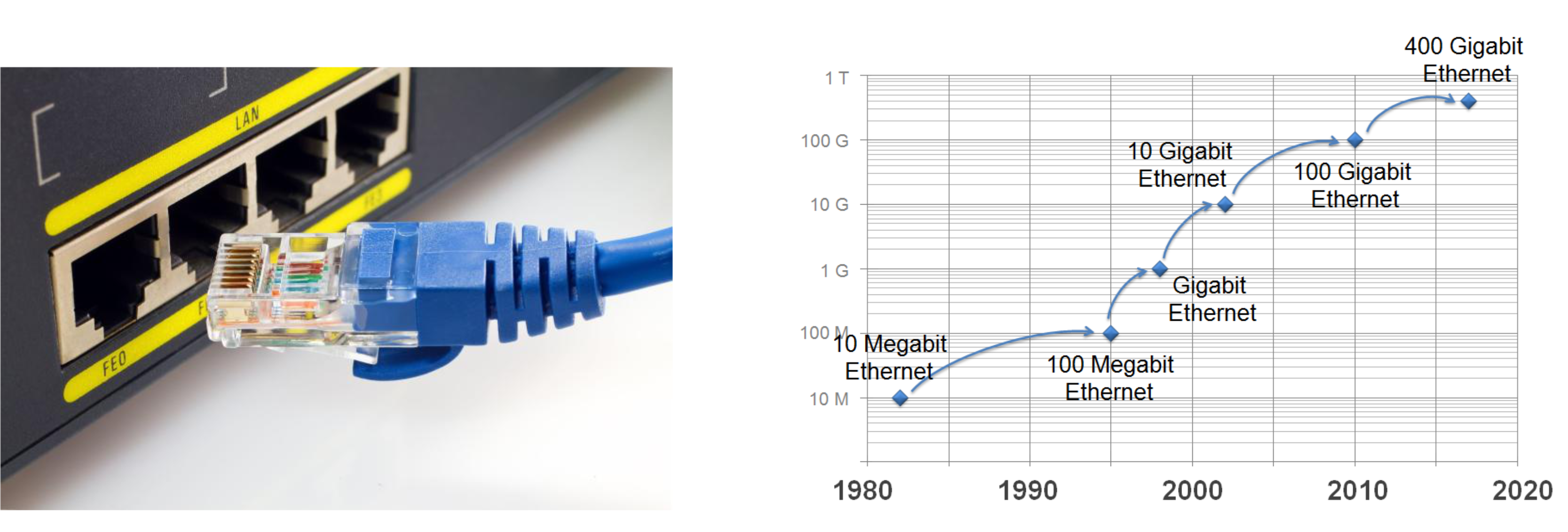
Analogy: Ethernet is like the "standard road" of networking — it was the first major highway built and has been widened over the decades to handle more traffic.
Ethernet ก็มีหลาย protocol นะ: gigabit ethernet, blah blah แต่ก็ต่างกันแค่ speed แค่นั้น
ถ้าอยากใช้ 10 Gb Ethernet
- NIC (in the computer) ต้อง support 10 Gb
- Switch ใน Network ก็ต้อง support 10 Gb
- Router ของเรา ก็ต้อง support 10 Gb
Ethernet Frame Structure

Each Ethernet frame contains:
- Preamble — 7 bytes of
10101010+ 1 byte10101011; used to synchronize sender and receiver clock rates - Destination Address (6 bytes MAC)
- Source Address (6 bytes MAC)
- Type — indicates the higher-layer protocol (e.g., IP =
0x0800, IPv6, ARP) - Data (Payload) — 46–1500 bytes
- IP Datagram
- CRC — Cyclic Redundancy Check for error detection; frame is dropped if error found
Address Behavior
- If the destination MAC matches the adapter's MAC → pass data up to network layer
- If it's a broadcast address (e.g., ARP packet) → also pass up
- Otherwise → discard the frame
อย่างที่บอกว่าถ้า Enable promiscuous mode, ทุกอย่างจะ pass up หมด ไม่เช็ค
เวลาเรา runtcpdump, Wireshark มันจะเปิดโหมดนี้ automatically
Type Field
- Used to demultiplex (identify the upper-layer protocol) at the receiver
- Mostly IPv4, IPv6, ARP, but can be Novell IPX, AppleTalk, etc.
Packet Sniffers (Wireshark / PCAP)
- Can capture packets from other PCs on the same LAN
- Uses promiscuous mode — adapter accepts all frames, not just its own
Ethernet: Unreliable, Connectionless
- Connectionless — No handshaking between sender and receiver NICs
- Unreliable — No ACK or NAK sent back to sender
- Lost/dropped frames only recovered if a higher-layer protocol (e.g., TCP) handles retransmission
- MAC protocol: CSMA/CD with binary exponential backoff
Analogy: Like sending a letter without tracking — it might arrive, but if it doesn't, only the sender (if they check) would know.
802.3 Ethernet Standards
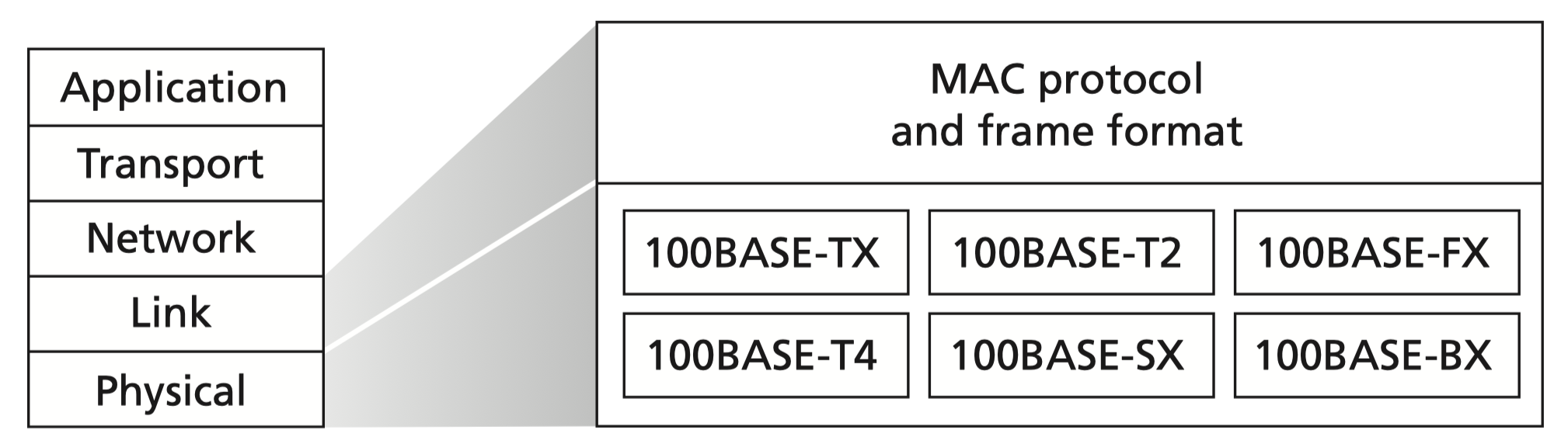
All Ethernet standards share:
- Same MAC protocol and frame format
- Different speeds and physical media
| Original IEEE Standard | Shorthand | Informal Name | Speed | Typical Cabling |
|---|---|---|---|---|
| 802.3i | 10BASE-T | Ethernet | 10 Mbps | UTP |
| 802.3u | 100BASE-T | Fast Ethernet | 100 Mbps | UTP |
| 802.3z | 1000BASE-X | Gigabit Ethernet | 1 Gbps | Fiber |
| 802.3ab | 1000BASE-T | Gigabit Ethernet | 1 Gbps | UTP |
| 802.3ae | 10GBASE-X | 10 GigE | 10 Gbps | Fiber |
| 802.3an | 10GBASE-T | 10 GigE | 10 Gbps | UTP |
| 802.3ba | 40GBASE-X | 40 GigE | 40 Gbps | Fiber |
| 802.3ba | 100GBASE-X | 100 GigE | 100 Gbps | Fiber |
Unshielded Twisted Pair (UTP)
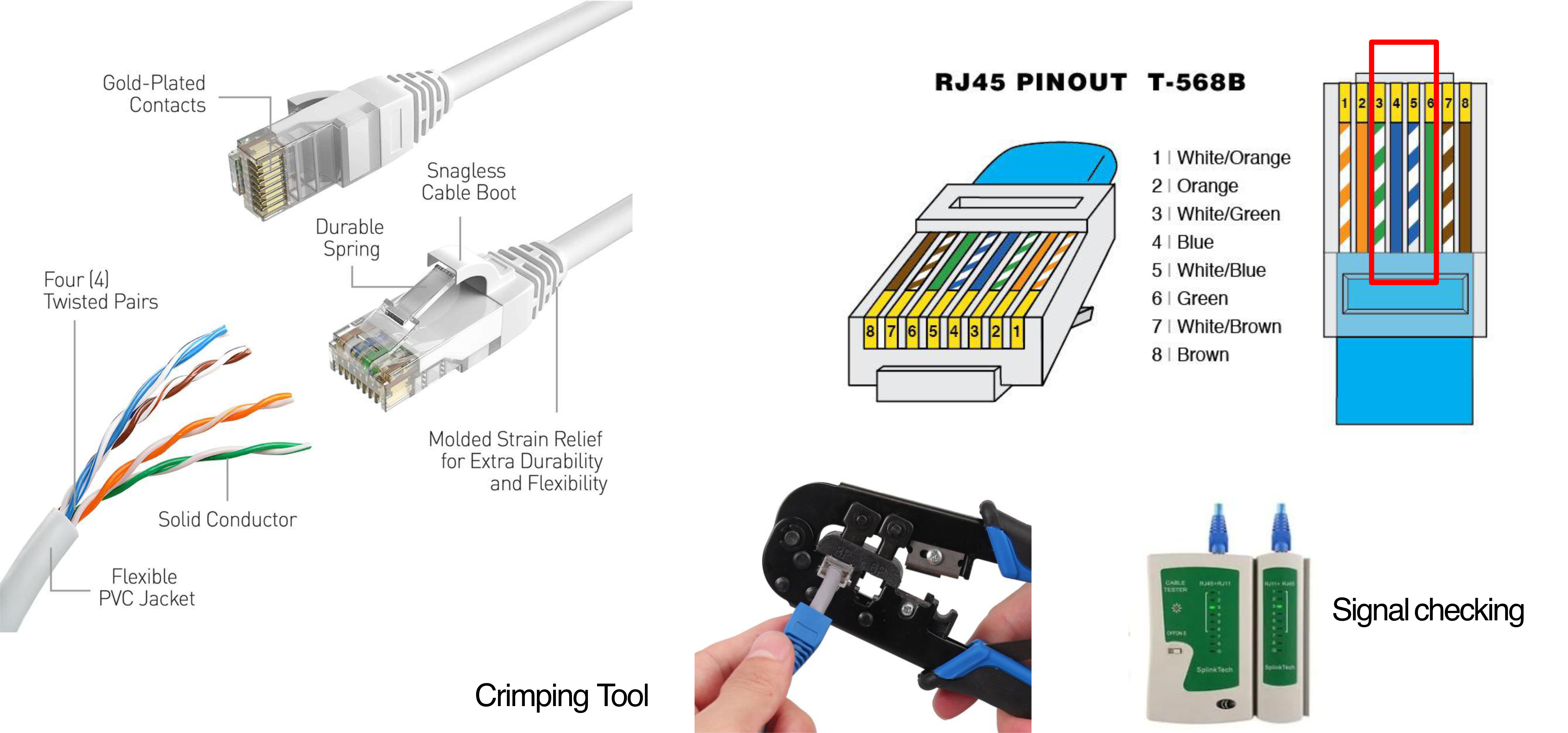
- Physical cable used for most Ethernet connections
- Uses RJ45 connector (T-568B standard wiring)
T-568B Pin Order
| Pin | Color |
|---|---|
| 1 | White/Orange |
| 2 | Orange |
| 3 | White/Green |
| 4 | Blue |
| 5 | White/Blue |
| 6 | Green |
| 7 | White/Brown |
| 8 | Brown |
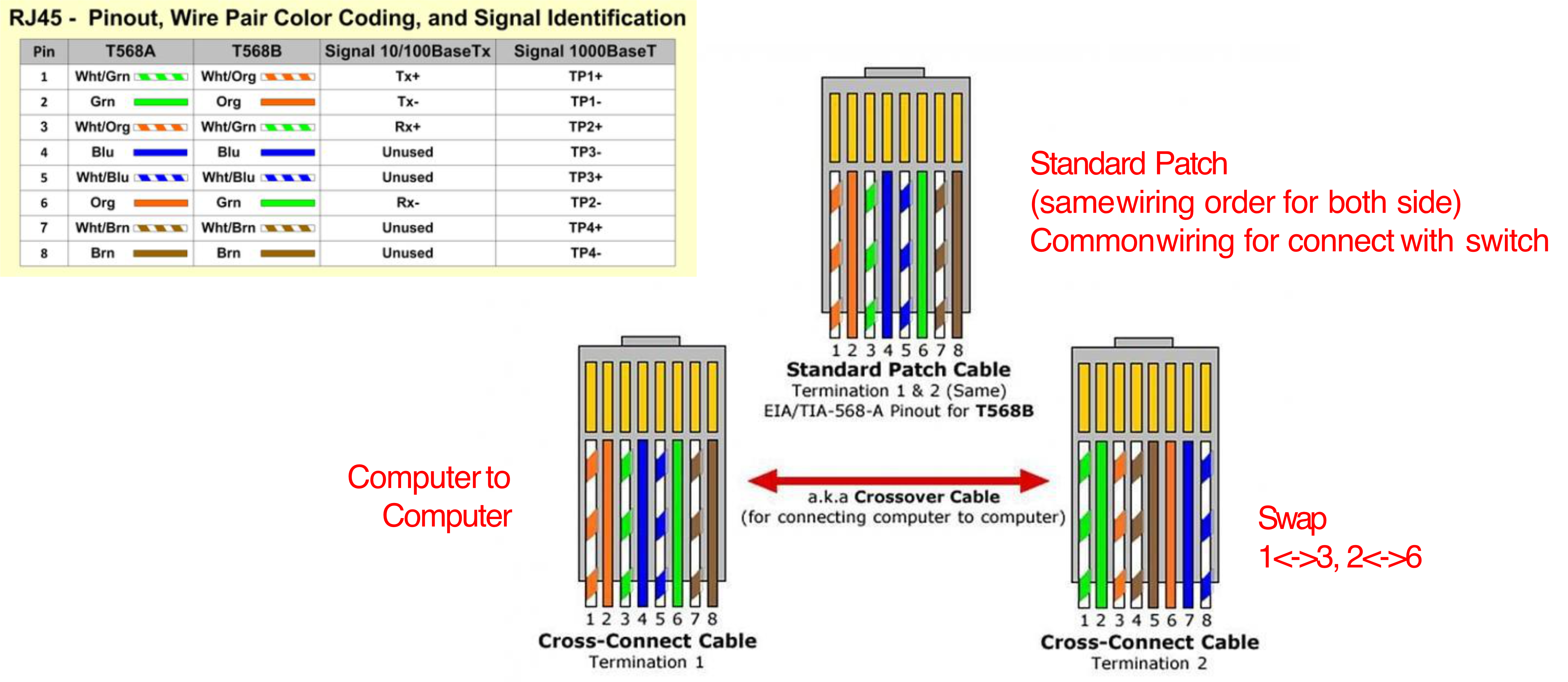
Patch Cable vs Crossover Cable
| Type | Usage |
|---|---|
| Standard Patch Cable | Same wiring both ends; used to connect PC → Switch |
| Crossover Cable | Swaps pins 1↔3 and 2↔6; used for PC → PC direct connection |
Modern NICs with auto-MDIX can auto-detect and adjust, so either cable works.
UTP Categories
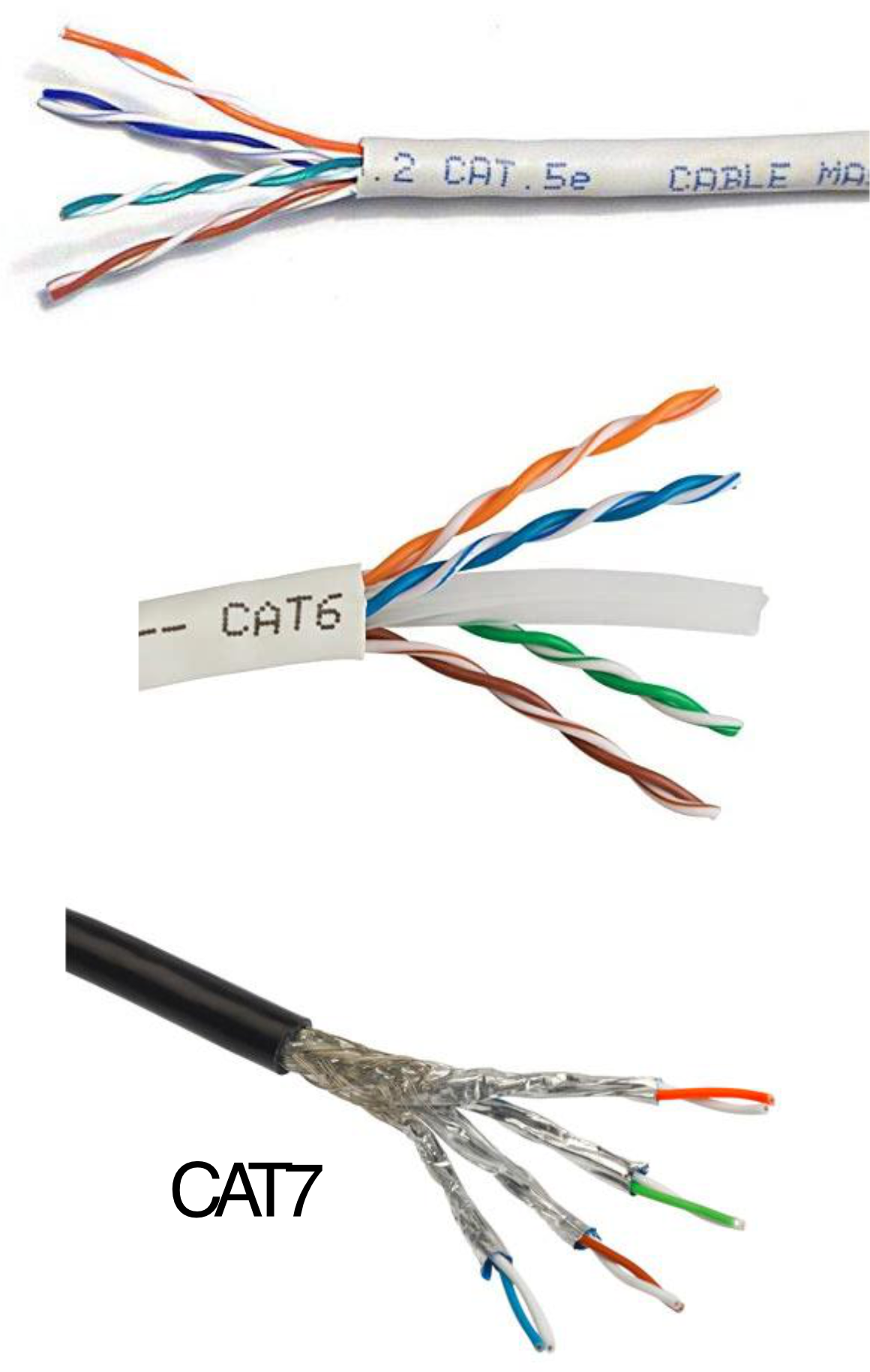
| Category | Data Rate | Max Length | Application |
|---|---|---|---|
| CAT1 | Up to 1 Mbps | — | Old Telephone |
| CAT2 | Up to 4 Mbps | — | Token Ring |
| CAT3 | Up to 10 Mbps | 100m | 10BASE-T Ethernet |
| CAT4 | Up to 16 Mbps | 100m | Token Ring |
| CAT5 | Up to 100 Mbps | 100m | FastEthernet |
| CAT5e | Up to 1 Gbps | 100m | Gigabit Ethernet |
| CAT6 | Up to 10 Gbps | 100m | 10G Ethernet (55m) |
| CAT6a | Up to 10 Gbps | 100m | 10G Ethernet (55m) |
| CAT7 | Up to 10 Gbps | 100m | 10G Ethernet (100m) |
Switches
Network Component Recap
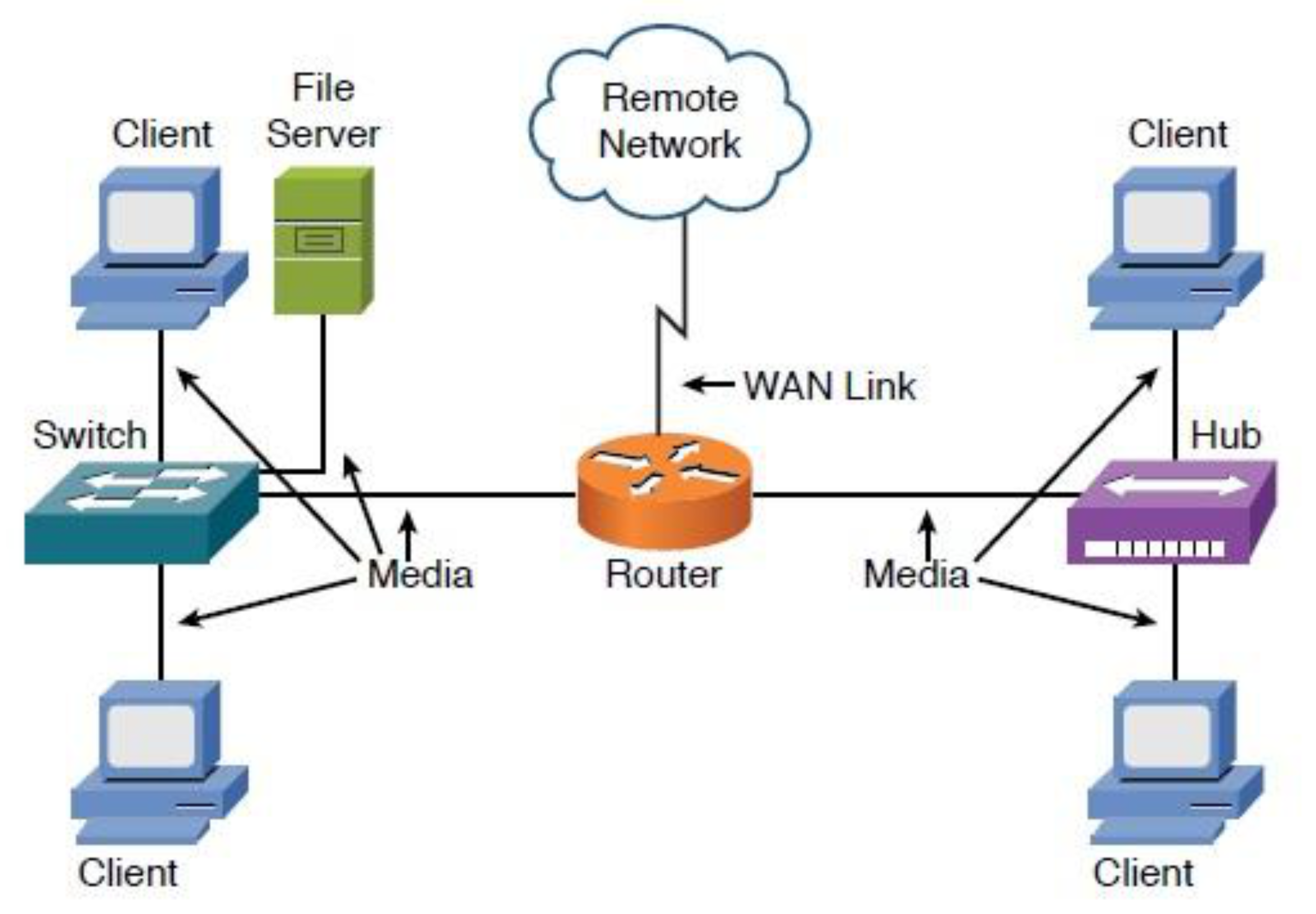
| Device | Layer | Address Used |
|---|---|---|
| Hub | Physical (L1) | — |
| Switch | Data Link (L2) | MAC Address |
| Router | Network (L3) | IP Address |
Ethernet Switch Basics
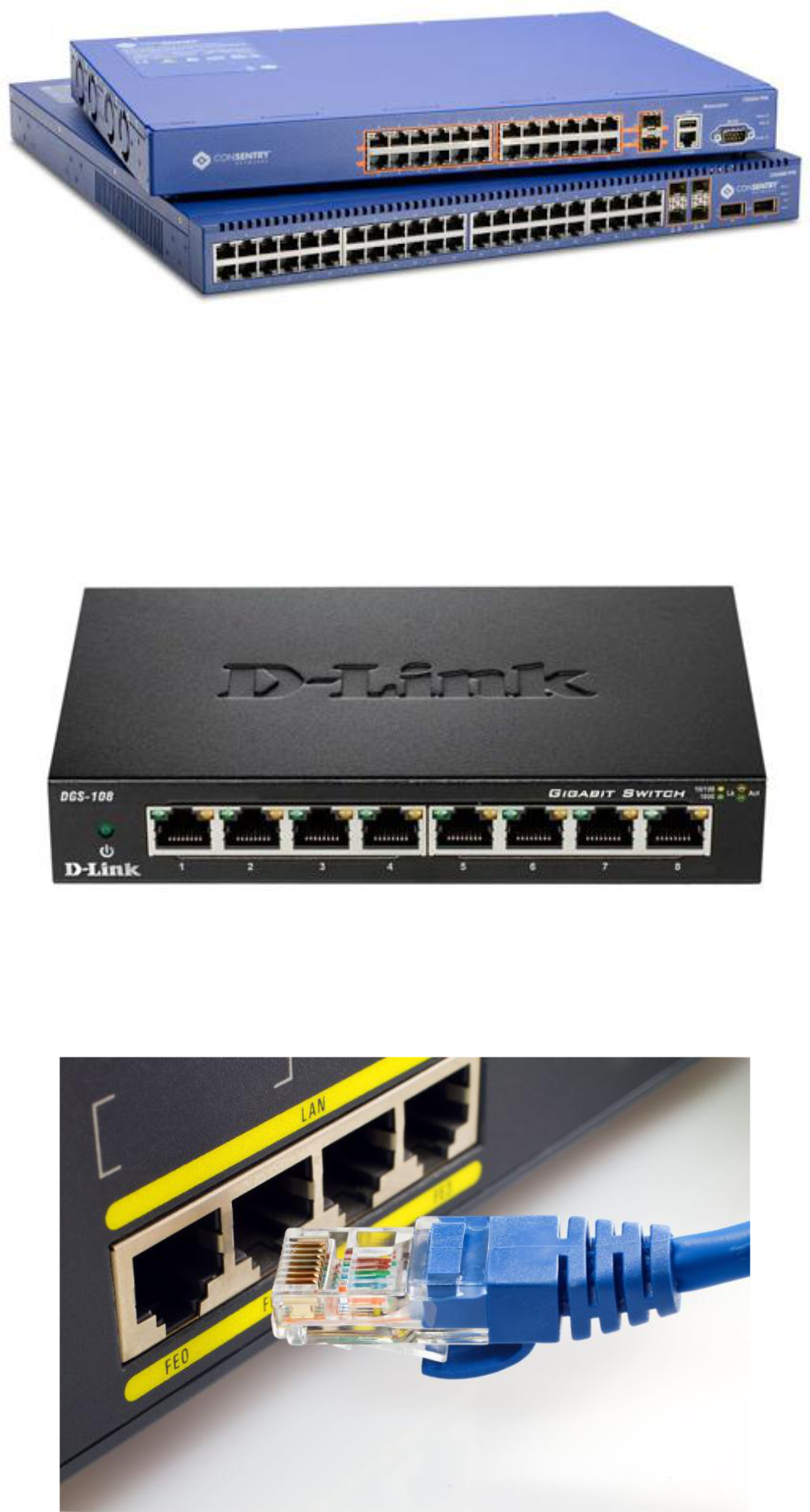
- A link-layer device (L2)
- Store-and-forward: receives full frame, examines MAC, then forwards
- Transparent: hosts are unaware that a switch is present
- ==Plug-and-play, self-learning==: no manual configuration needed
- Each link has its own collision domain → full duplex, no collisions
Analogy: A switch is like a smart post office — it reads the address on each envelope (MAC) and sends it only to the right mailbox. A hub just shouts the mail at everyone.
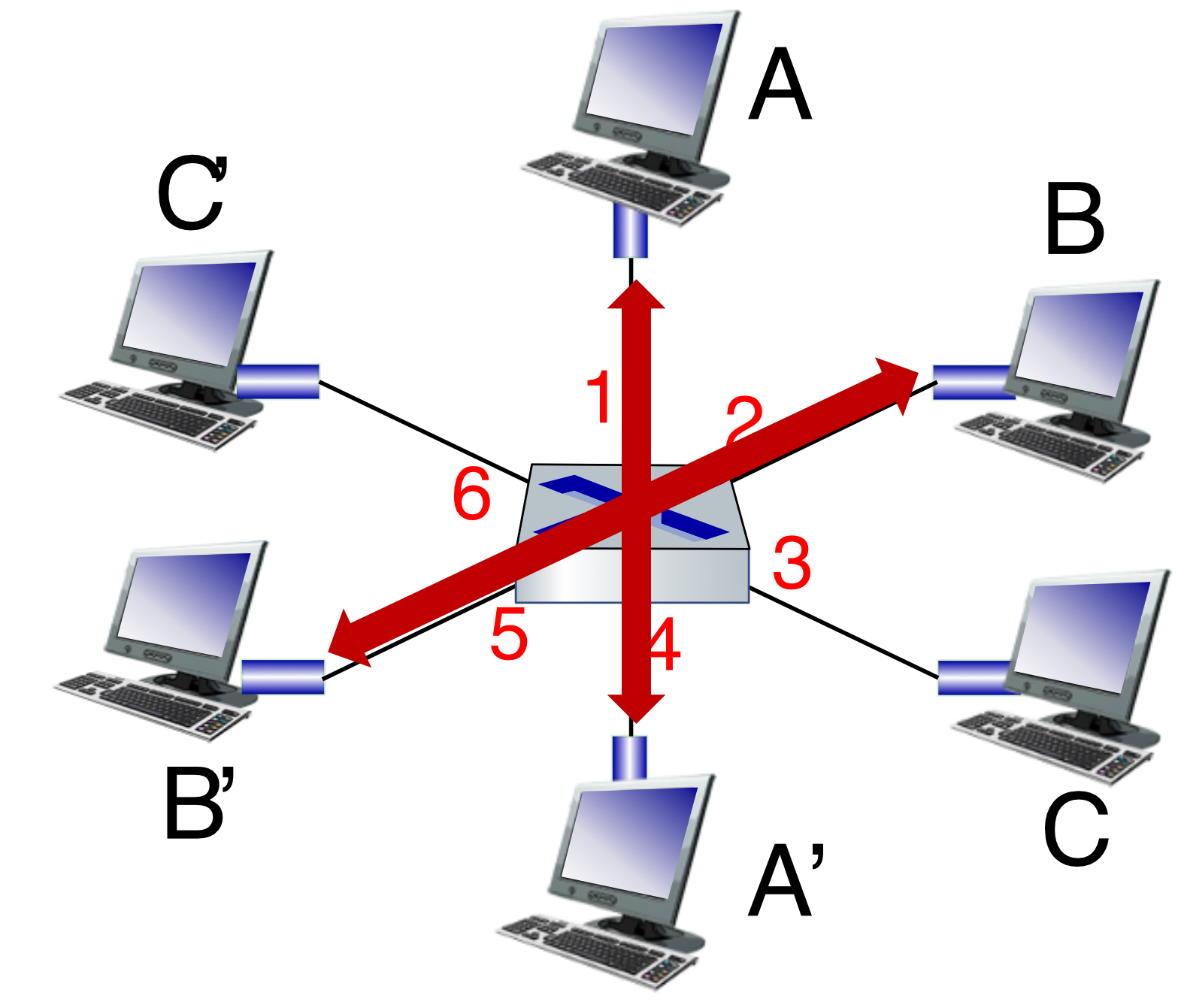
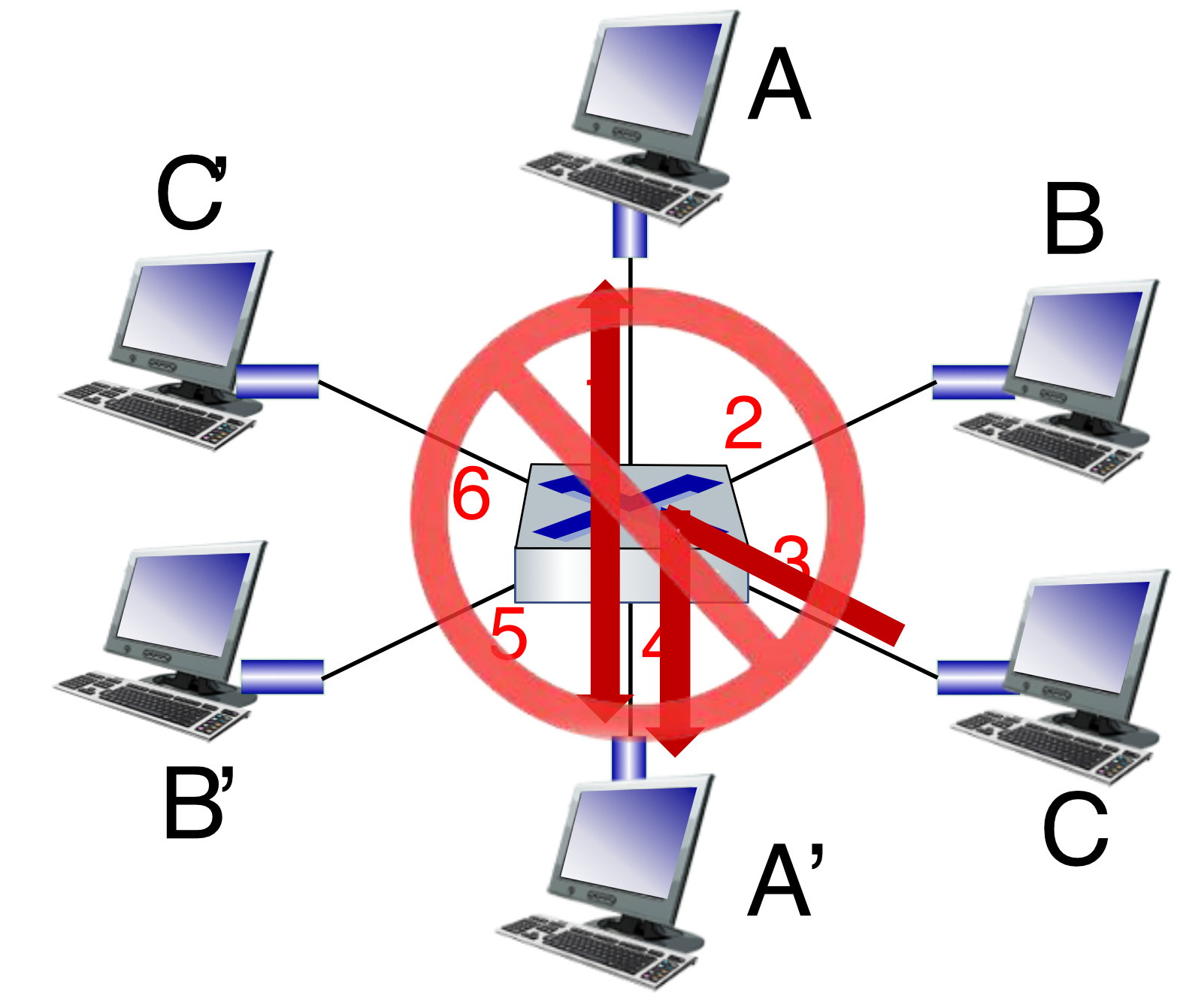
Switch: Multiple Simultaneous Transmissions
-
A-to-A' and B-to-B' can transmit simultaneously ✅
-
A-to-A' and C-to-A' cannot happen simultaneously ❌ (same destination port)
Switch Forwarding Table
Each entry:
- The switch learns which hosts are reachable through which interfaces
- Built dynamically via self-learning
Example (show mac address-table dynamic):
Vlan    Mac Address       Type      Ports
----    -----------       ------    -----
20      0200.1111.1111    DYNAMIC   Fa0/1
20      0200.2222.2222    DYNAMIC   Fa0/2
20      0200.3333.3333    DYNAMIC   Fa0/3
Switch: Self-Learning
- Frame arrives at switch on interface X
- Switch records
(source MAC, interface X, TTL)in table - Switch looks up destination MAC in table:
- Found → forward to that interface only
- Not found → flood (send to all interfaces except the one it came from)
- Destination is on same interface → drop the frame
Analogy: Like a new receptionist learning where each employee sits. First time someone calls, they transfer to all rooms. After the person answers, they note which room they're in for next time.
รอบแรกที Switch เห็น MAC Address (ไม่รู้หรอก ว่าต้องไป port ไหน), ดังนั้น Switch จะ flood ไปทุก port ของมันเลย—
สมมติ C’ เช็ค Data ที่เข้ามา แต่มันไม่ match กับ packet (header) ที่เข้ามาว่า dest ต้องมา A’ → Discard
แต่พอมันไป A’ ถูกต้องละ ก็ส่งกลับขึ้นไป upper layer
Self-Learning Example: A sends to A'
- Switch table is empty
- Frame from A (interface 1) arrives → records
A → interface 1 - A' location unknown → flood all interfaces
- A' replies → records
A' → interface 4 - Next time A sends to A' → selectively forward on interface 4 only
Interconnecting Switches
- Self-learning works the same way across multiple switches
- When C sends to I (across switches S1 → S4 → S3), each switch learns the path via flooding, then future frames are selectively forwarded
อาจจะแปะด้วย ที่ multi-switch อะ ว่ามันเรียนรู้ยังไงนะ
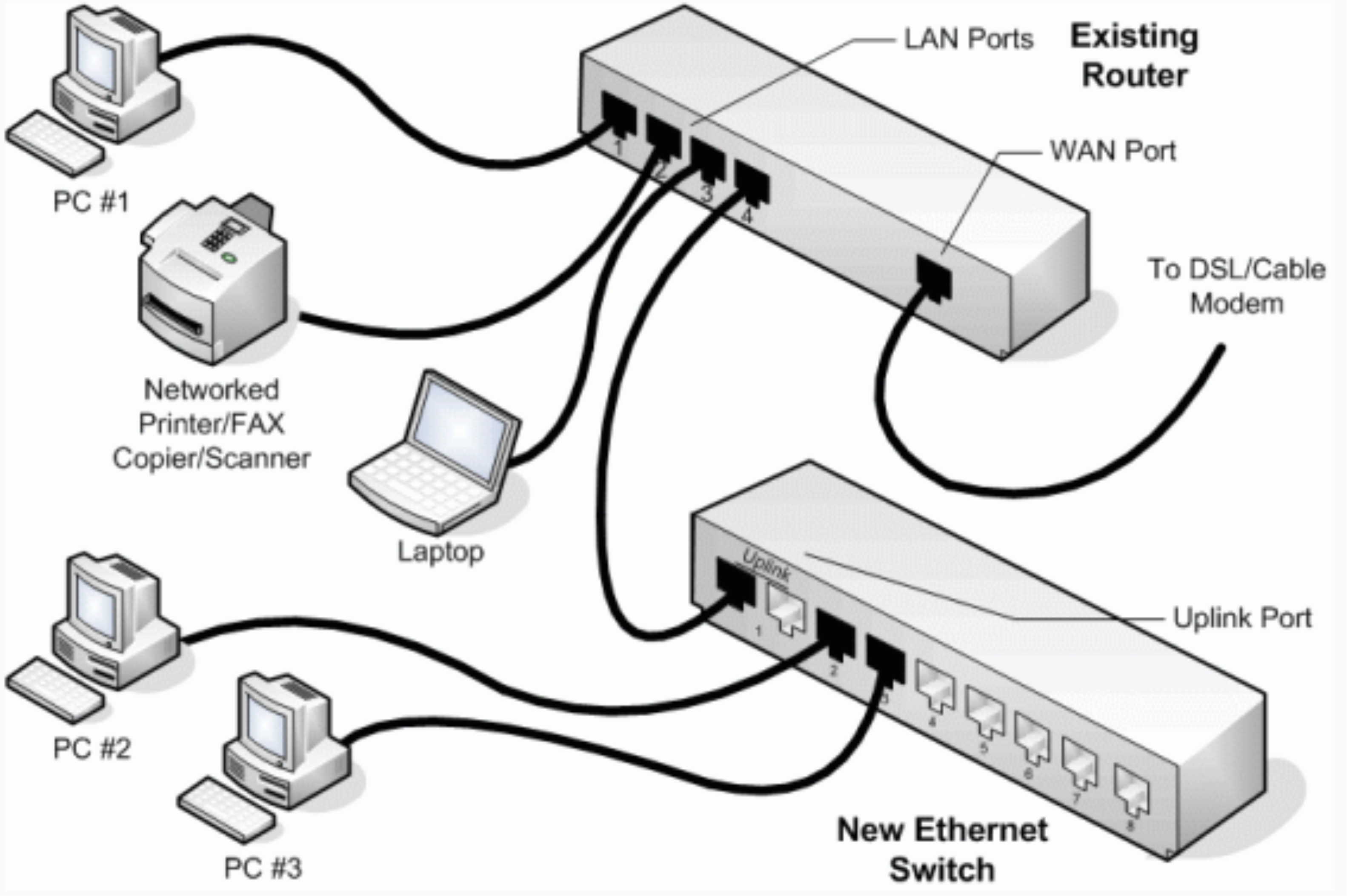
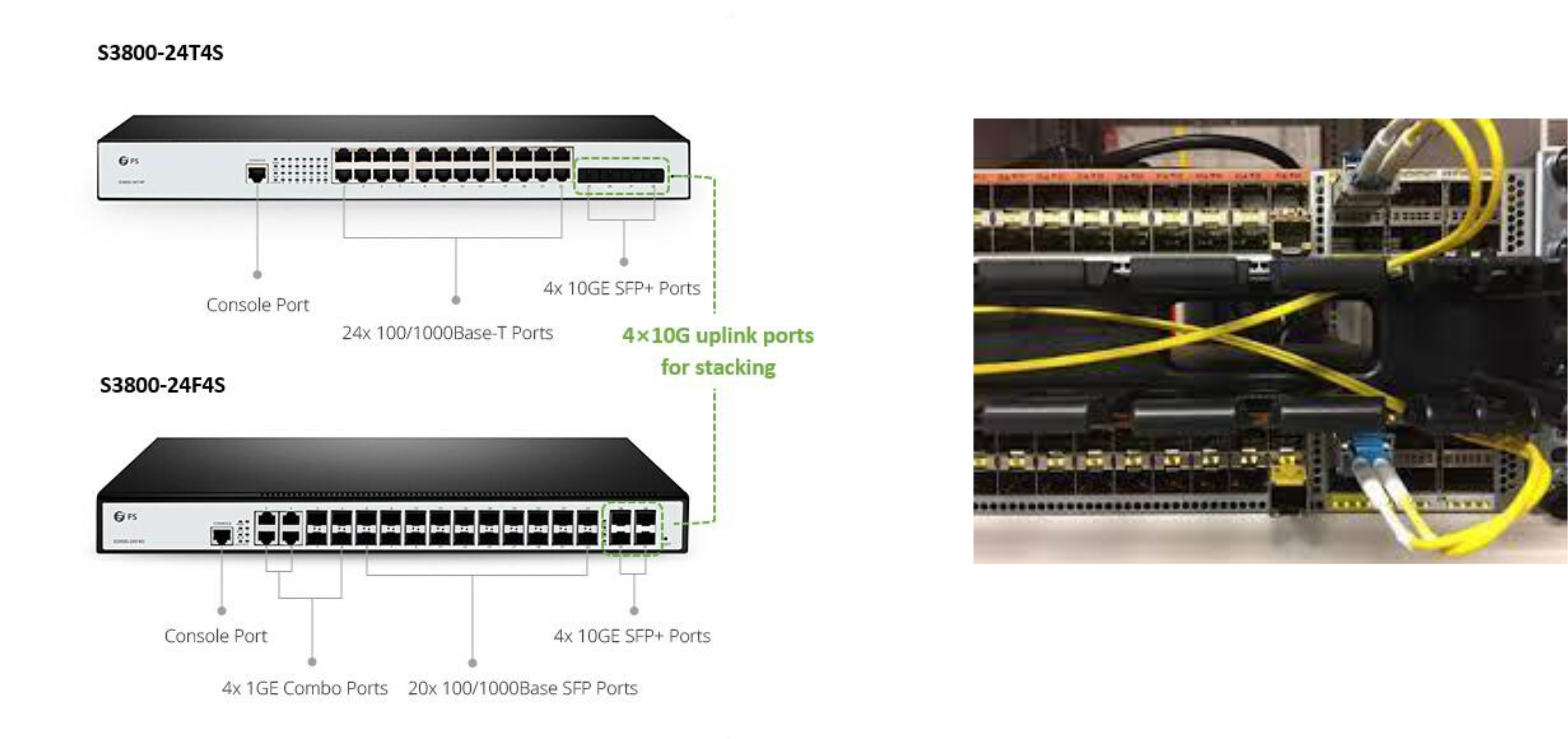
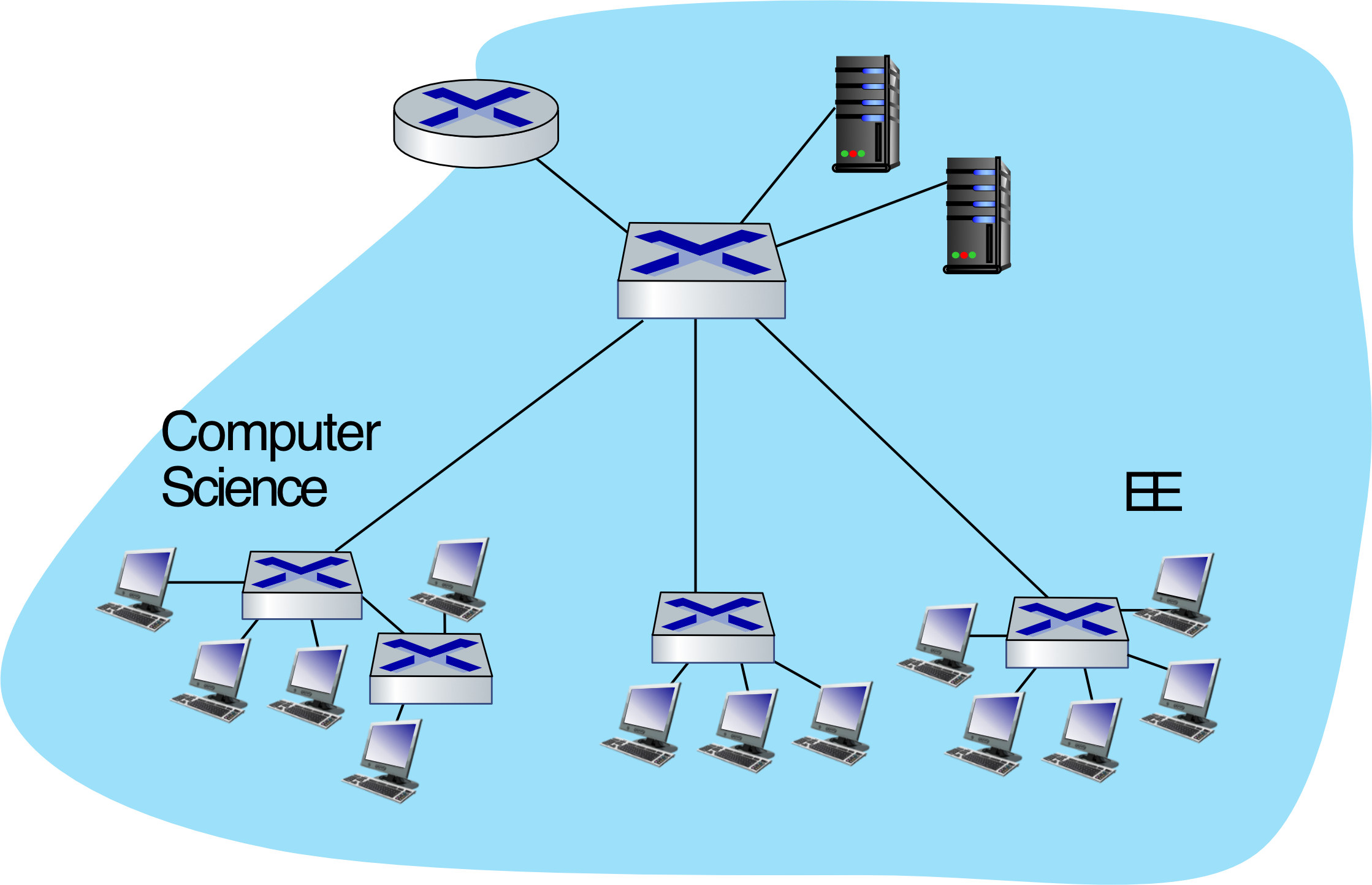
Small Institutional Network
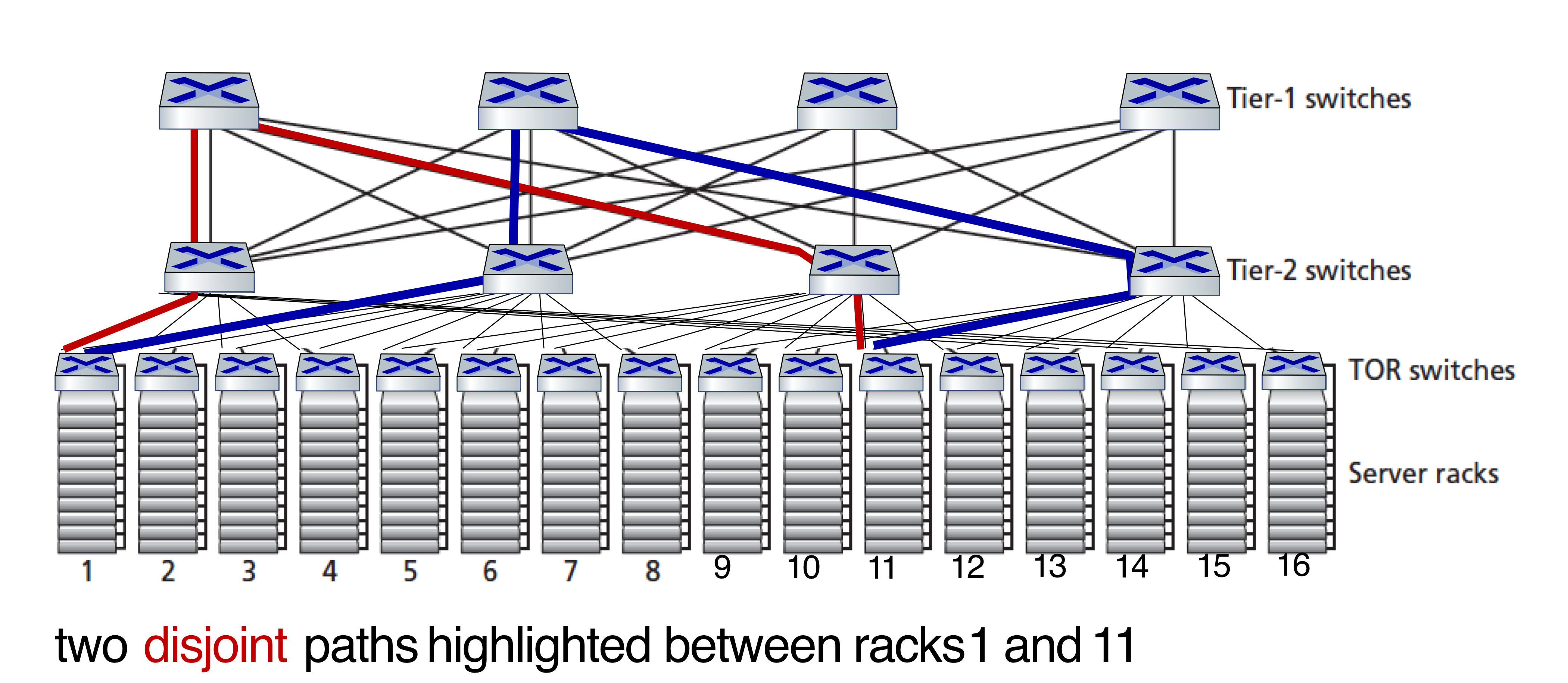
Datacenter Networks
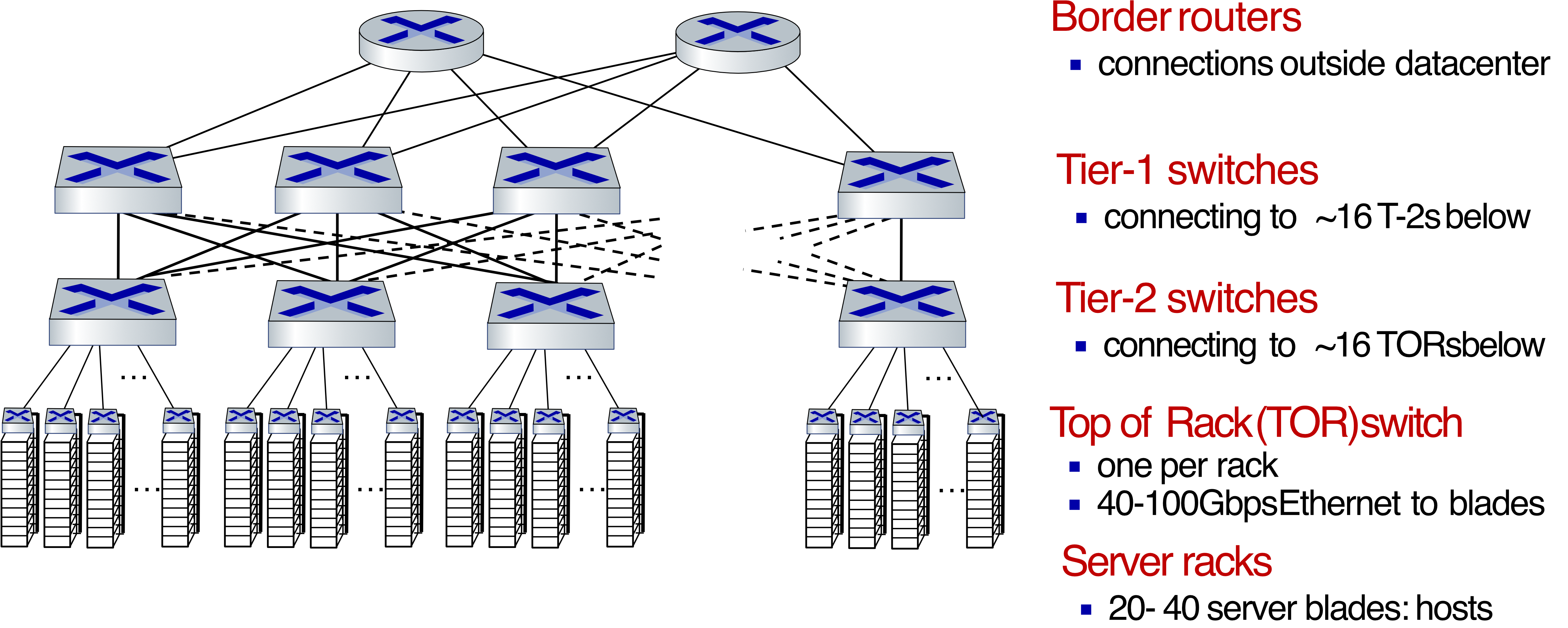
Multipath
- Rich interconnection among switches, racks:
- increased throughput between racks (multiple routing paths possible)
- increased reliability via redundancy
Switches vs. Routers
| Feature | Switch (L2) | Router (L3) |
|---|---|---|
| Layer | Data Link | Network |
| Address used | MAC | IP |
| Table built by | Flooding + self-learning | Routing algorithms (OSPF, BGP…) |
| Store-and-forward | ✅ | ✅ |
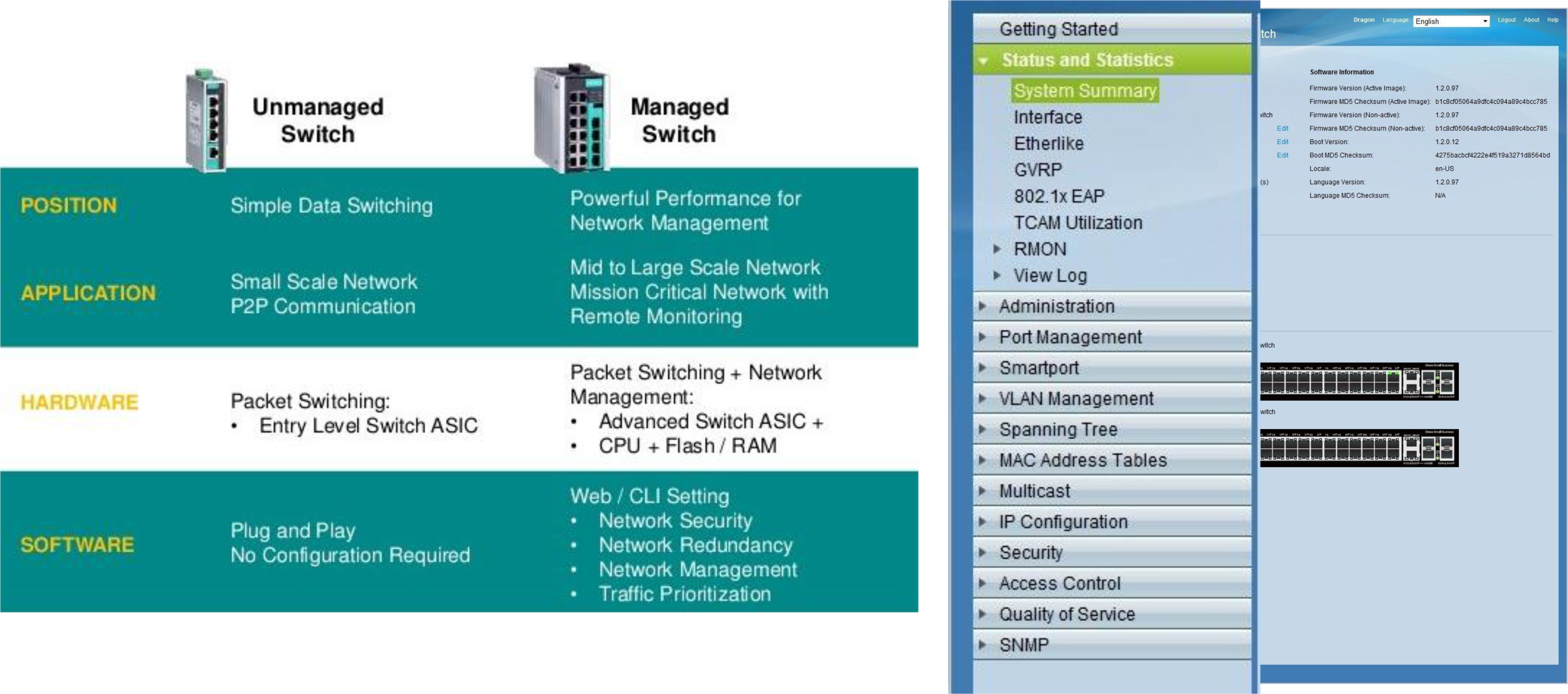
Switch Types
Layer 2 vs Layer 3 vs Router
| Device | Function |
|---|---|
| L2 Switch | Only handles MAC addresses, no IP awareness |
| L3 Switch | Combines switching + basic routing + VLAN support |
| Router | Full L3 features, WAN technologies |
| 
Power over Ethernet (PoE)
- Delivers both power and data over a single UTP cable (up to 100m)
- Powers IP Phones, Wireless APs, IP Cameras — no separate power cable needed
- Can use a PoE injector if switch doesn't support PoE natively
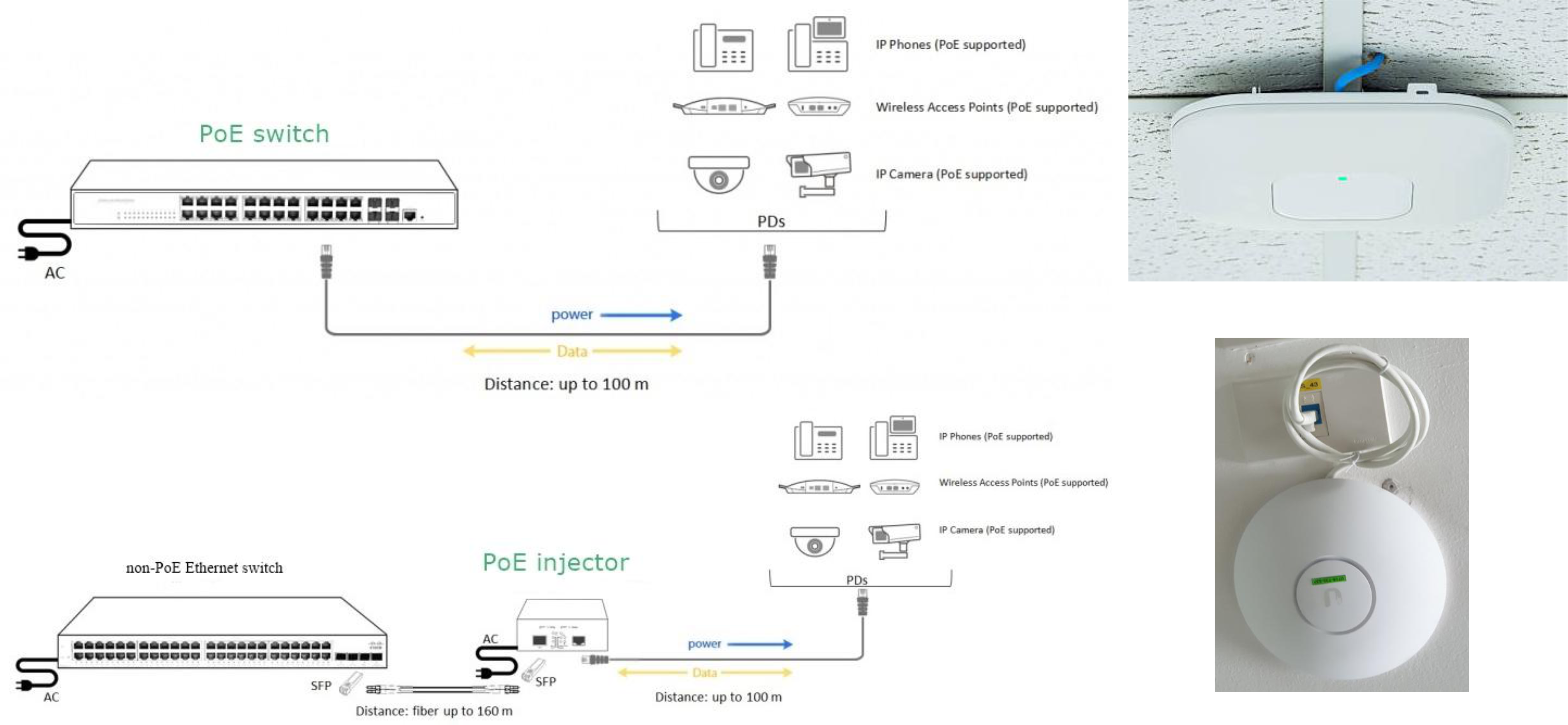
The switch itself, not only for providing data, but also the power!
VLANs (Virtual Local Area Networks)
1 physical switch (มีหลาย port เลยนะ) อาจจะ separate it เช่น ครึ่งนึงเป็นของ department นึง อีกครึ่งเป็นของอีก dept นึง → พอแบ่งกันแล้วอีกฝั่งก็จะต่อออีกฝั่งไม่ได้นะ จะทำได้ยังไง??
ก็เลยต้องมี VLANs เหมือนเรา setup border
Motivation
Problem with a single large LAN (single broadcast domain):
- All L2 broadcast traffic (ARP, DHCP, unknown MAC) must cross the entire LAN
- Security, privacy, and efficiency concerns
- Administrative issues: user moves physically but wants to stay in the same logical network group
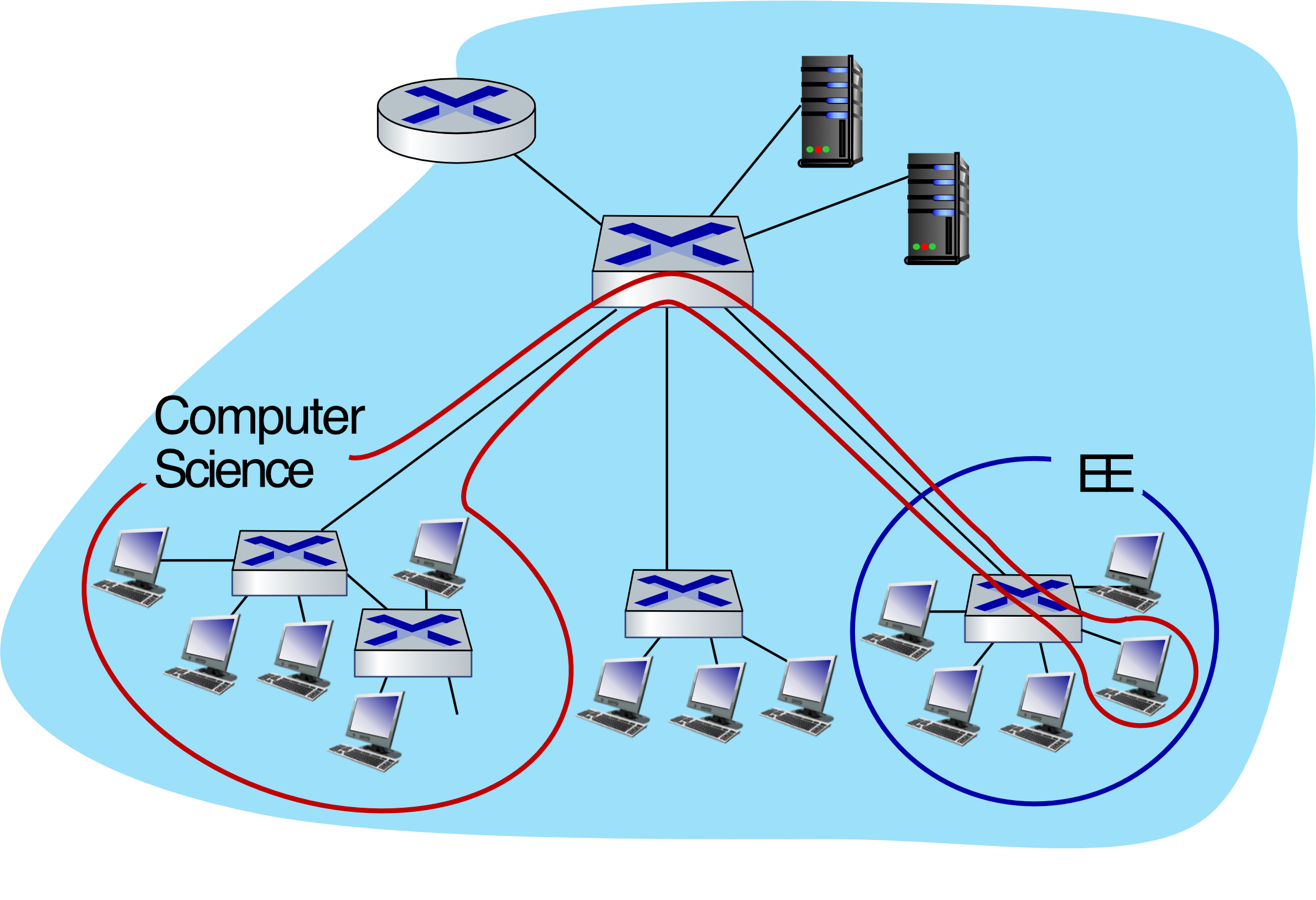
Analogy: Imagine a building where everyone shouts announcements — even finance hears the engineering team's internal updates. VLANs are like putting up soundproof walls between departments.
Port-Based VLANs
- Switch ports are grouped by management software into virtual LANs
- One physical switch behaves like multiple virtual switches
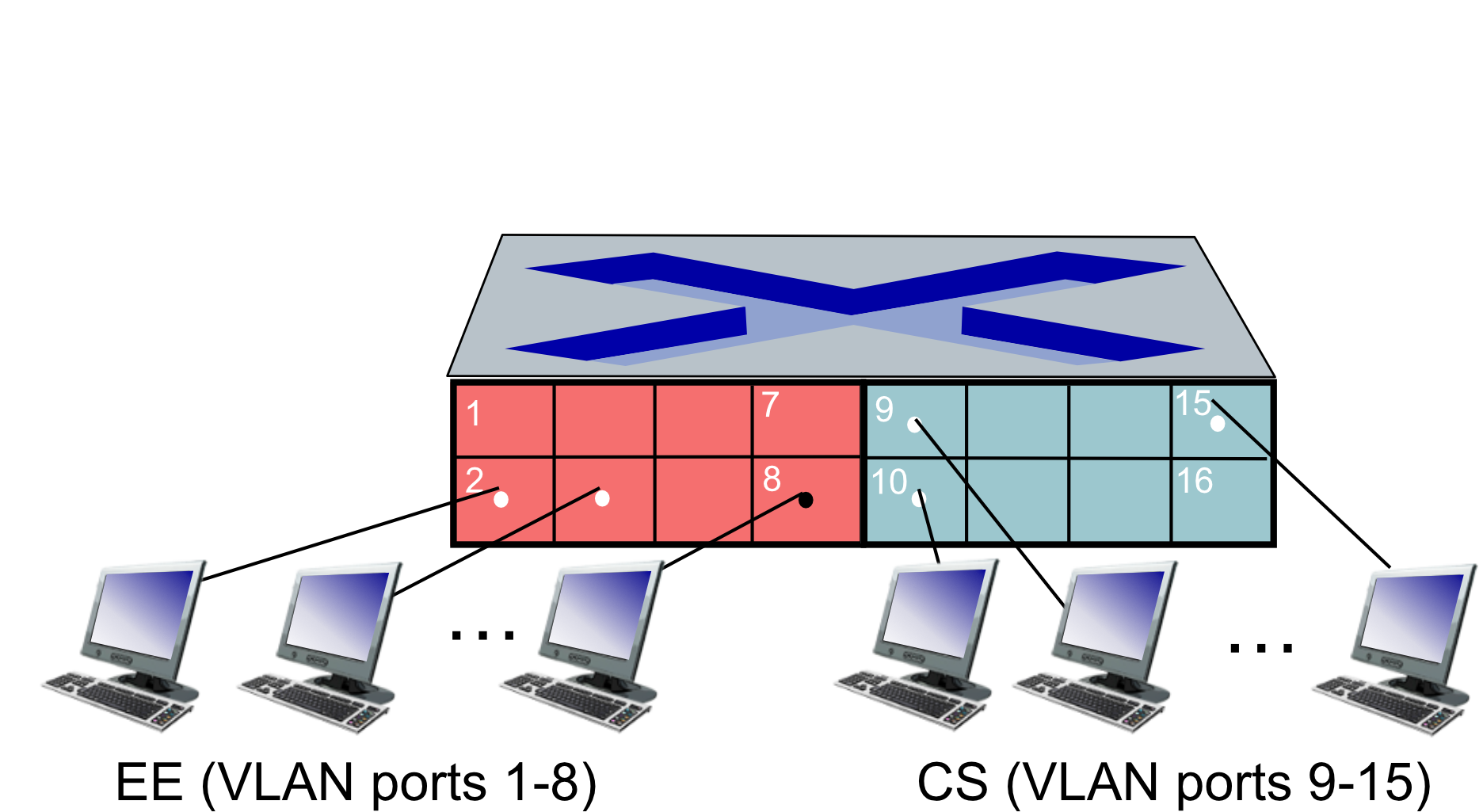
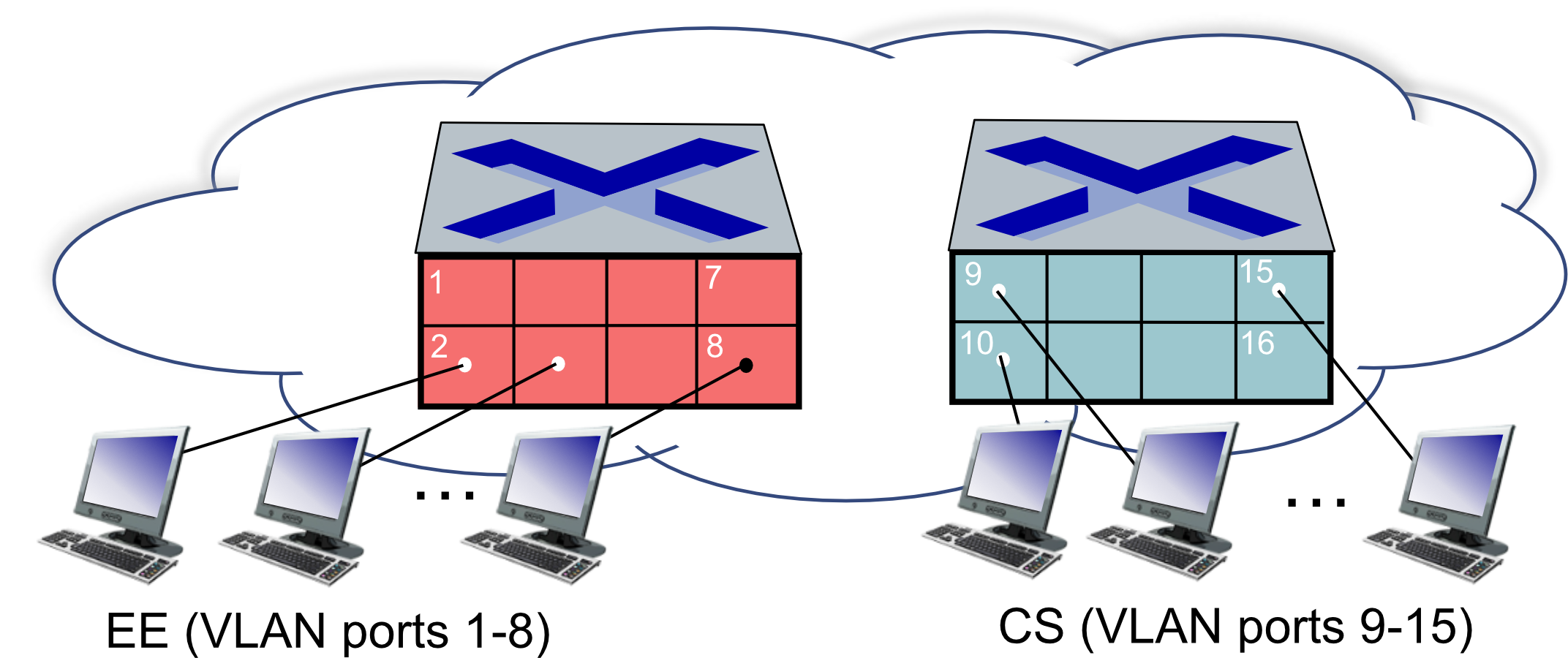
Properties:
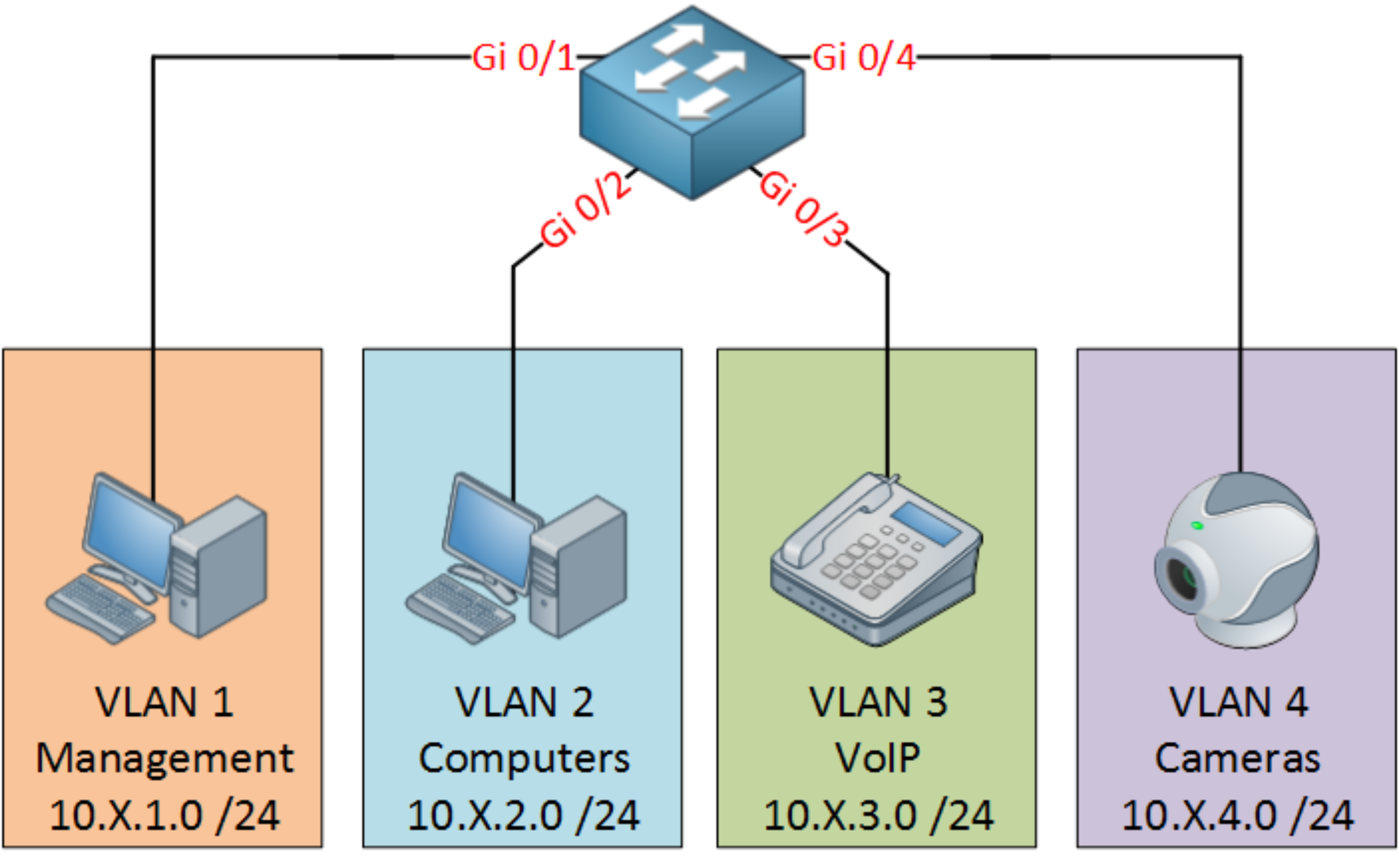
- Traffic isolation: frames from EE ports (1–8) can only reach EE ports
- Dynamic membership: ports can be reassigned between VLANs
- Forwarding between VLANs: requires a Layer 3 device (router or L3 switch)
- Can also define VLANs based on MAC addresses instead of ports
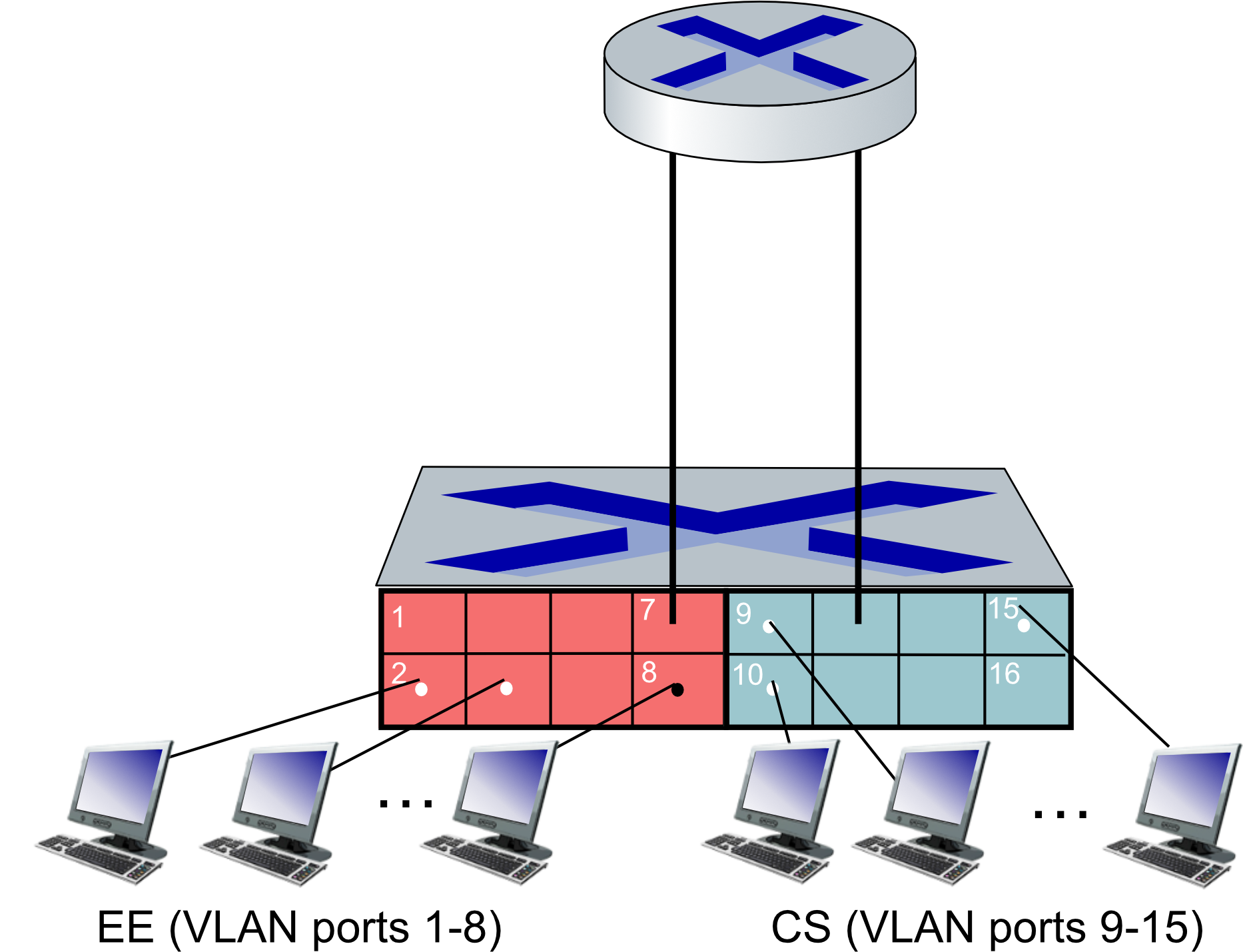
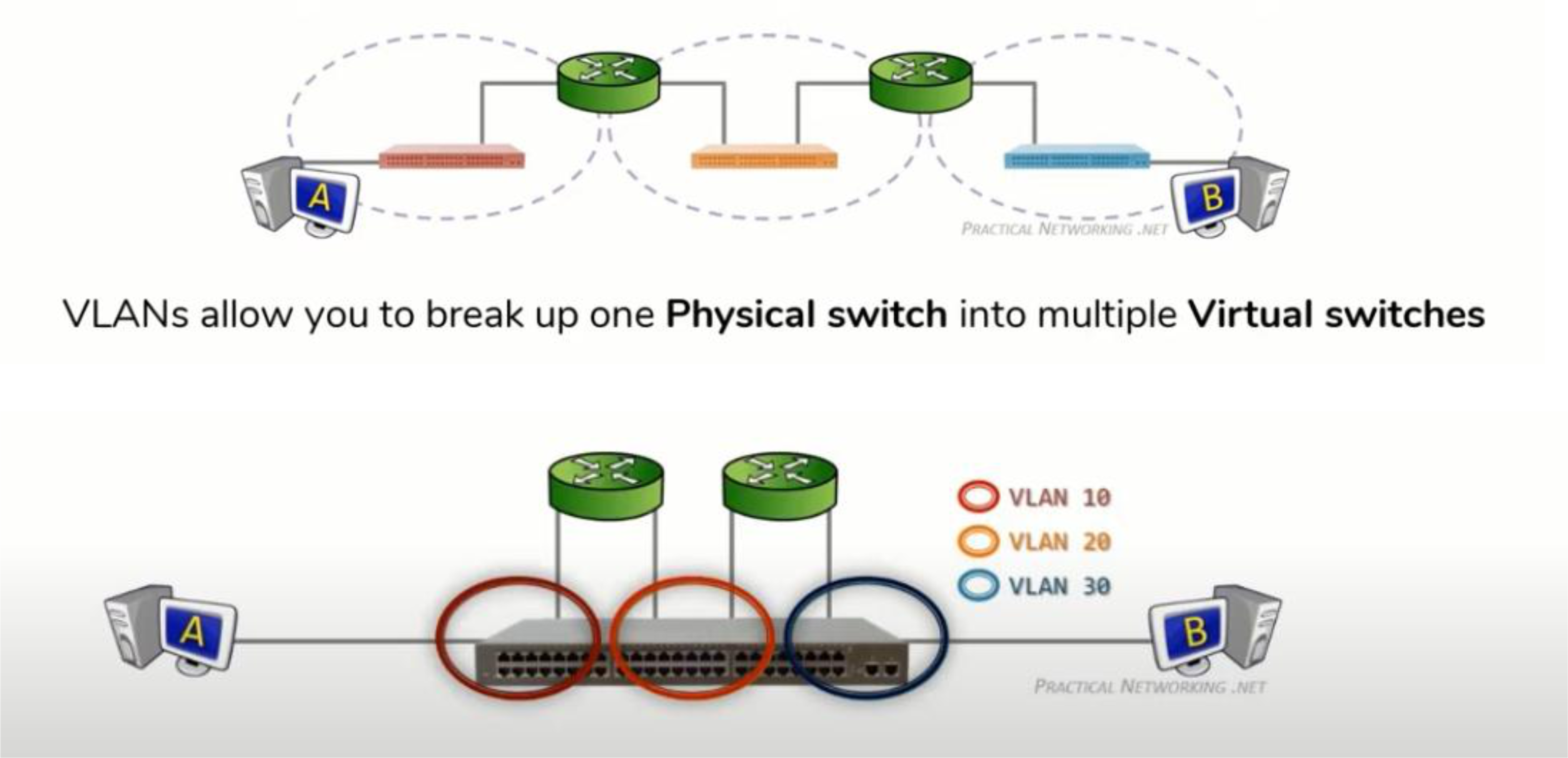
Extend virtual switches to another switch
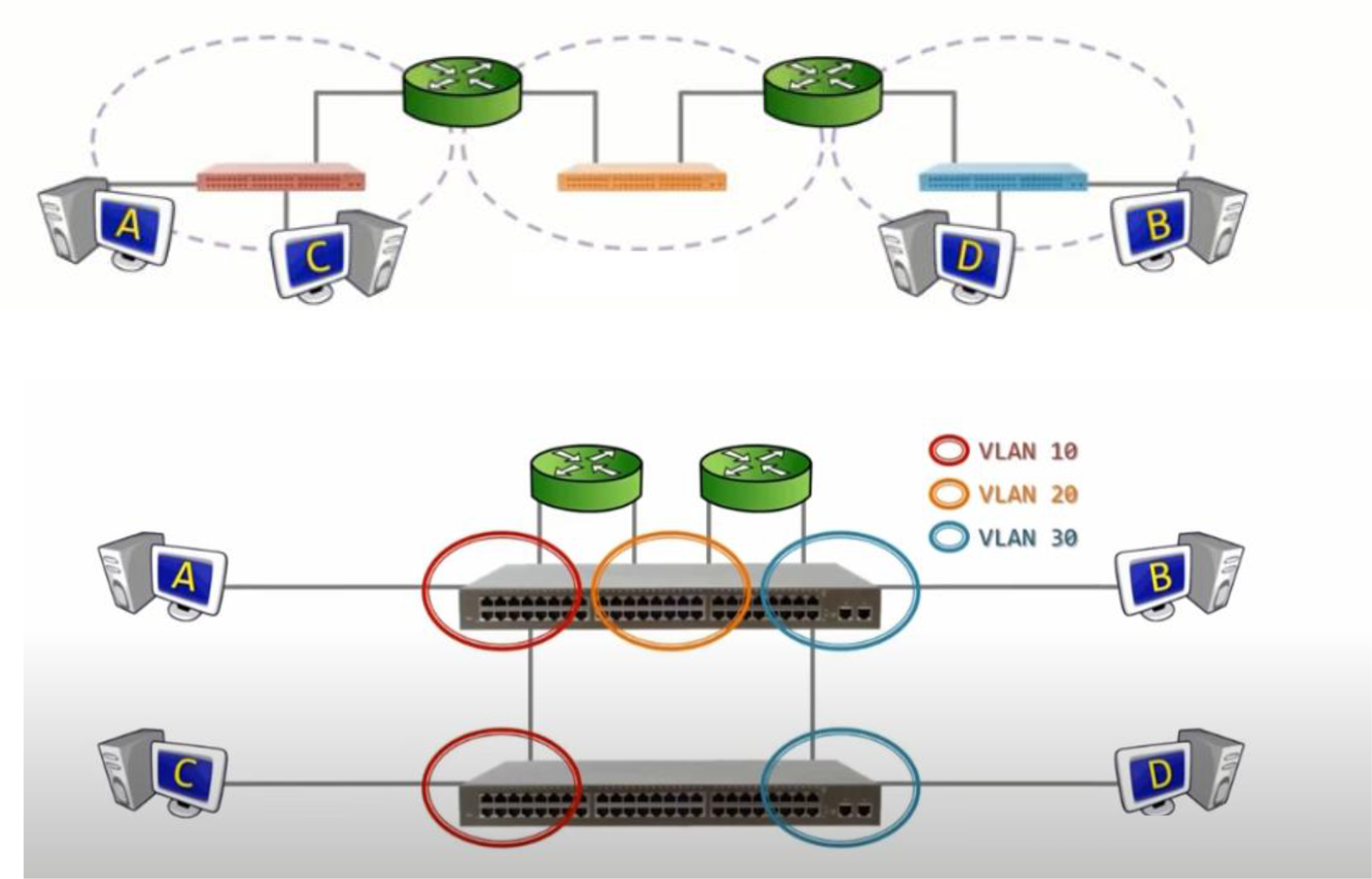
ก็คือถ้ามีหลายชั้น ก็ต้องเดินสายทีละเส้น ๆ ระหว่างชั้นหรอ ปรากฎว่ามีอีกวิธีก็คือ สามารถรวมเป็นสายเดียวได้นะ ใช้ concept ของ Trunk
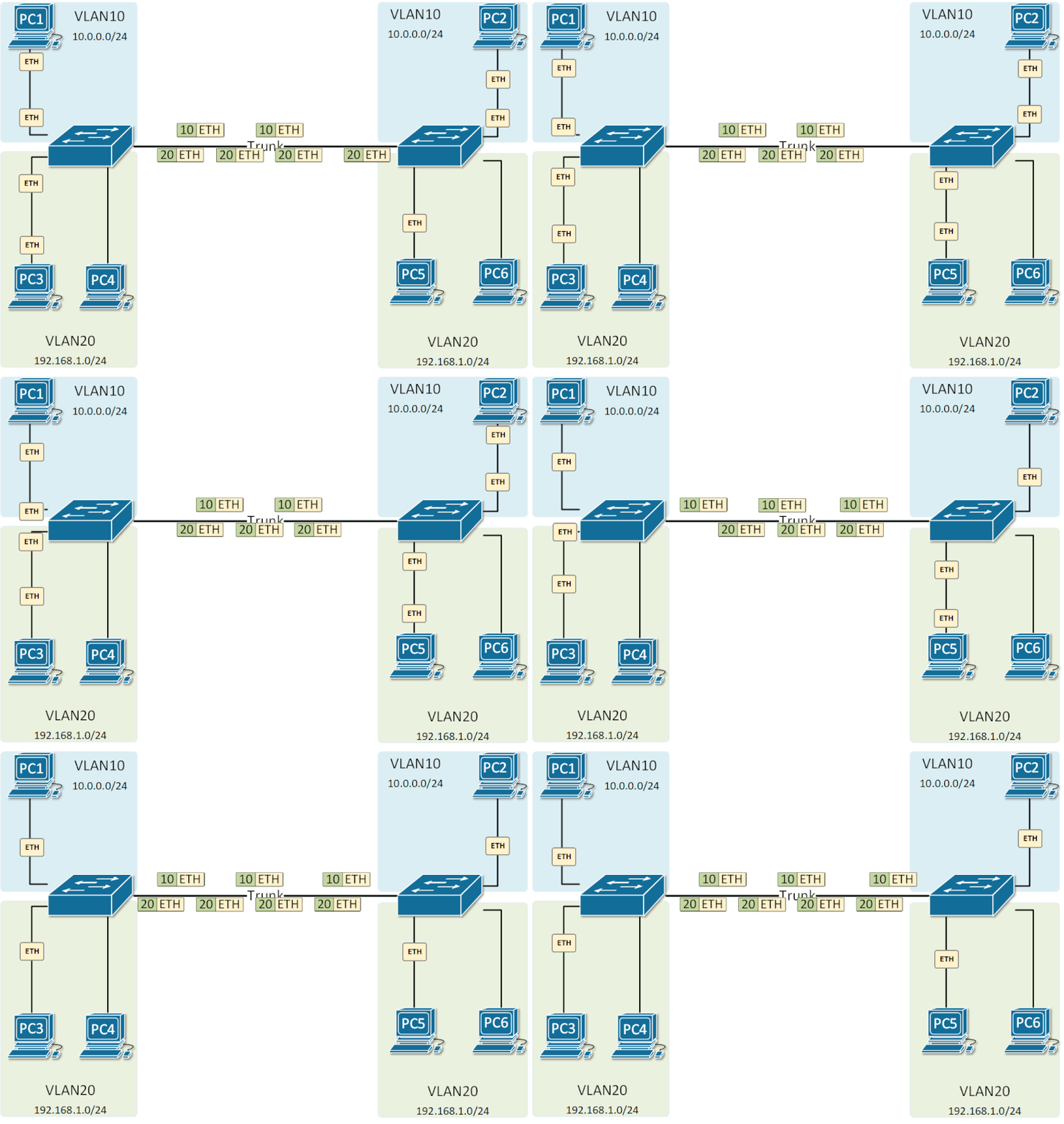
VLANs Spanning Multiple Switches (Trunk)
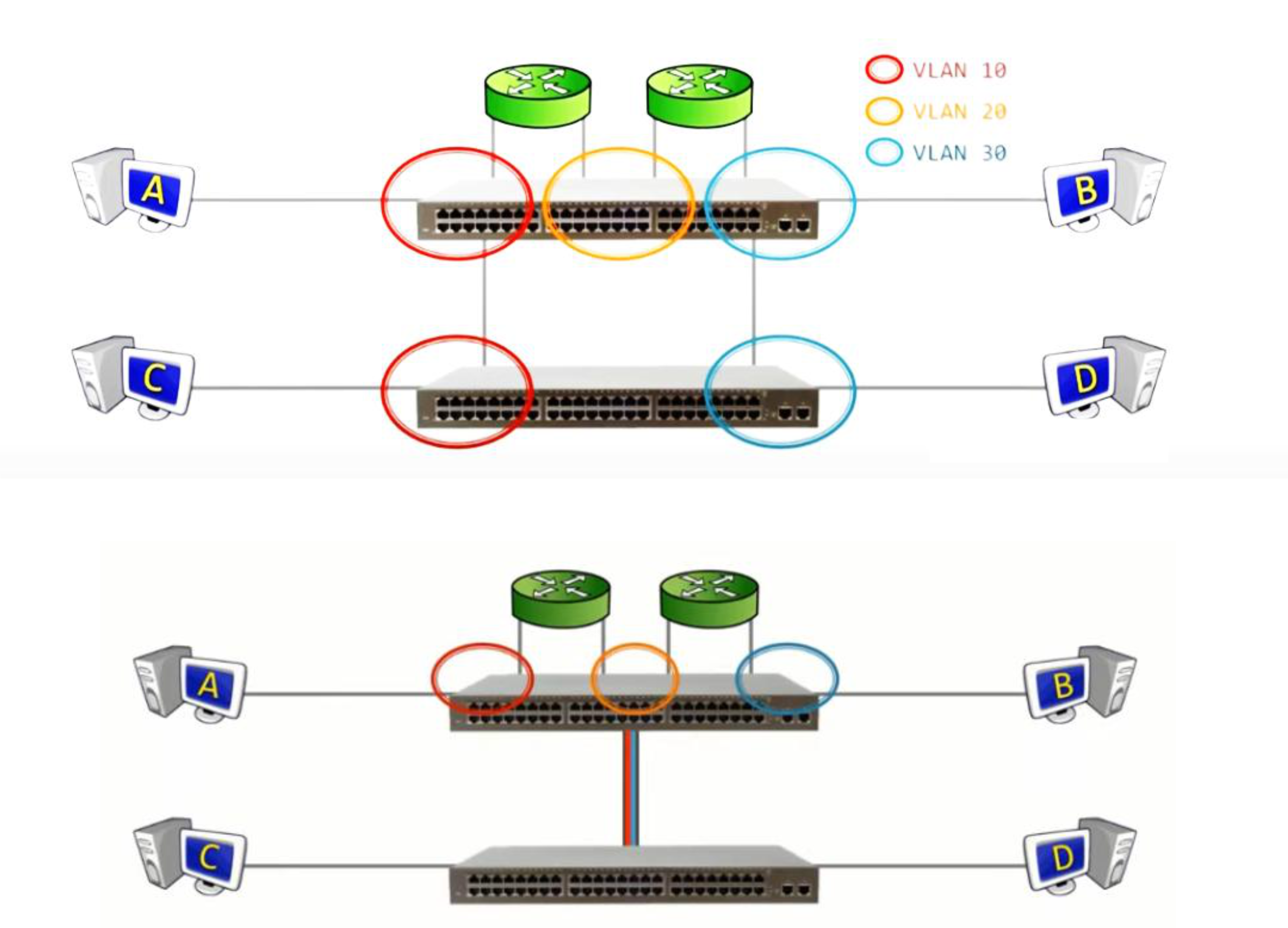
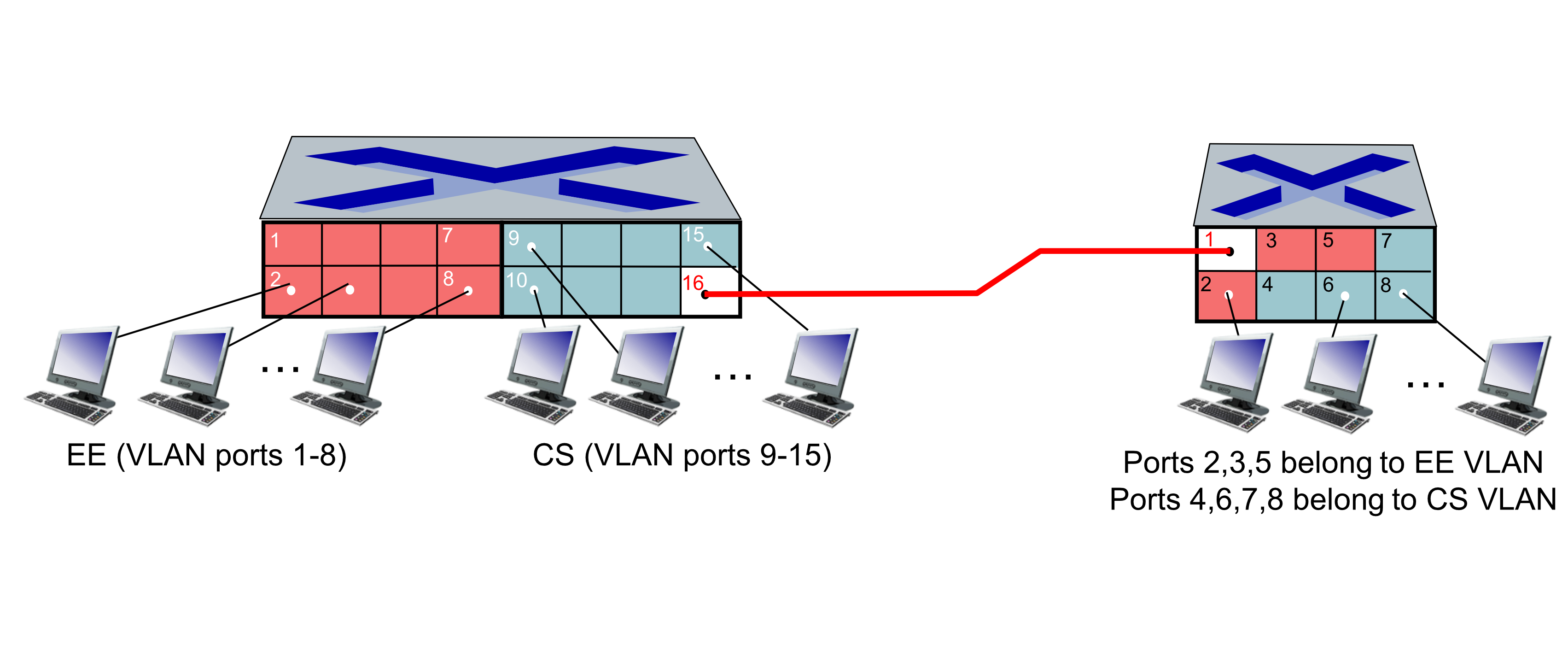
- A trunk port carries frames from multiple VLANs between switches over a single link
- Frames must carry VLAN ID information when crossing trunk links
- Uses IEEE 802.1Q (Dot1q) protocol to tag/untag frames
802.1Q VLAN Frame Format
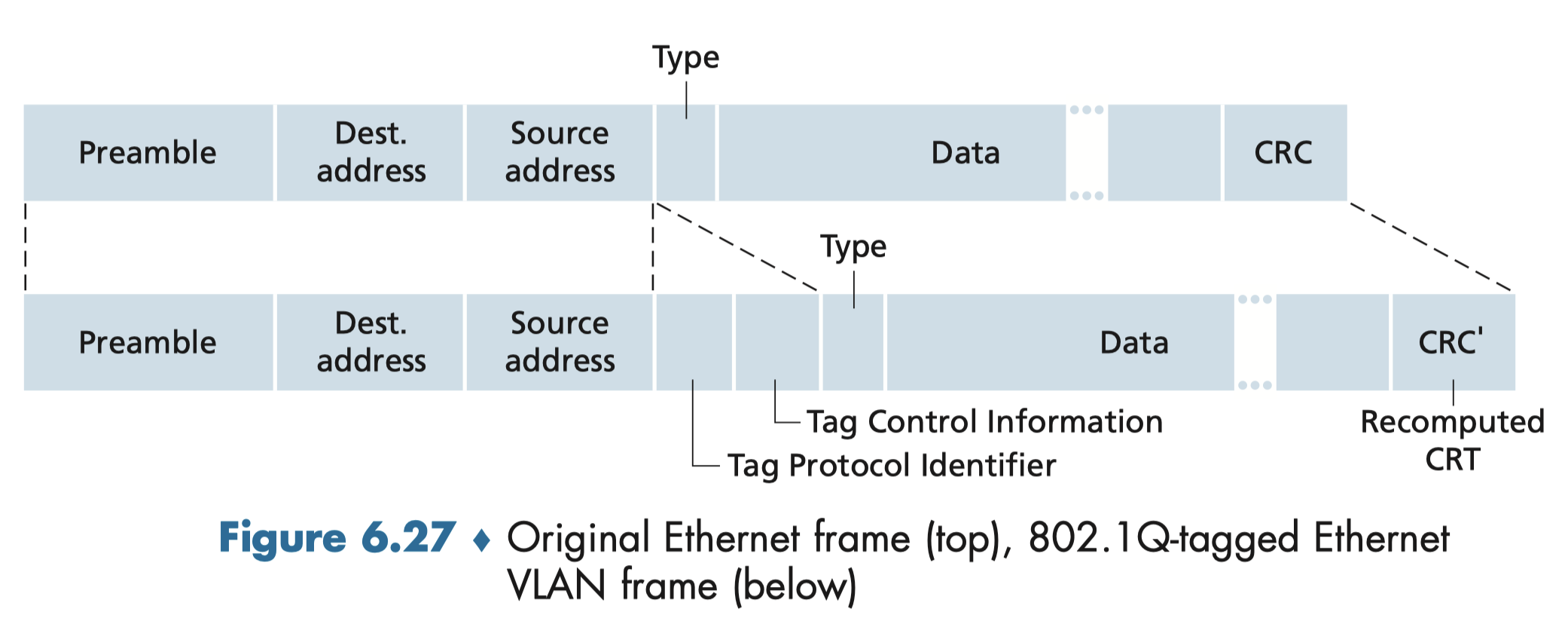
CRC ที่ต้อง recompute เพราะ size of data is different มี tag อะไรเพิ่มมากอีกมากมาย
The 802.1Q frame adds a 4-byte tag after the source address field:
| Field | Size | Description |
|---|---|---|
| Tag Protocol Identifier | 2 bytes | Always 0x8100 |
| Tag Control Information | 2 bytes | Contains 12-bit VLAN ID + 3-bit priority (like IP TOS) |
- CRC is recomputed after tagging
- VLAN ID = 12 bits → supports up to VLANs (max 4094 usable)
802.1Q Key Points
- VLAN 1 = Management VLAN (default)
- Inter-VLAN routing requires a Layer 3 device
- Multi-VLAN networks may need DHCP with multiple address pools
- Requires a managed switch
VLAN Example (Real Switch Config)
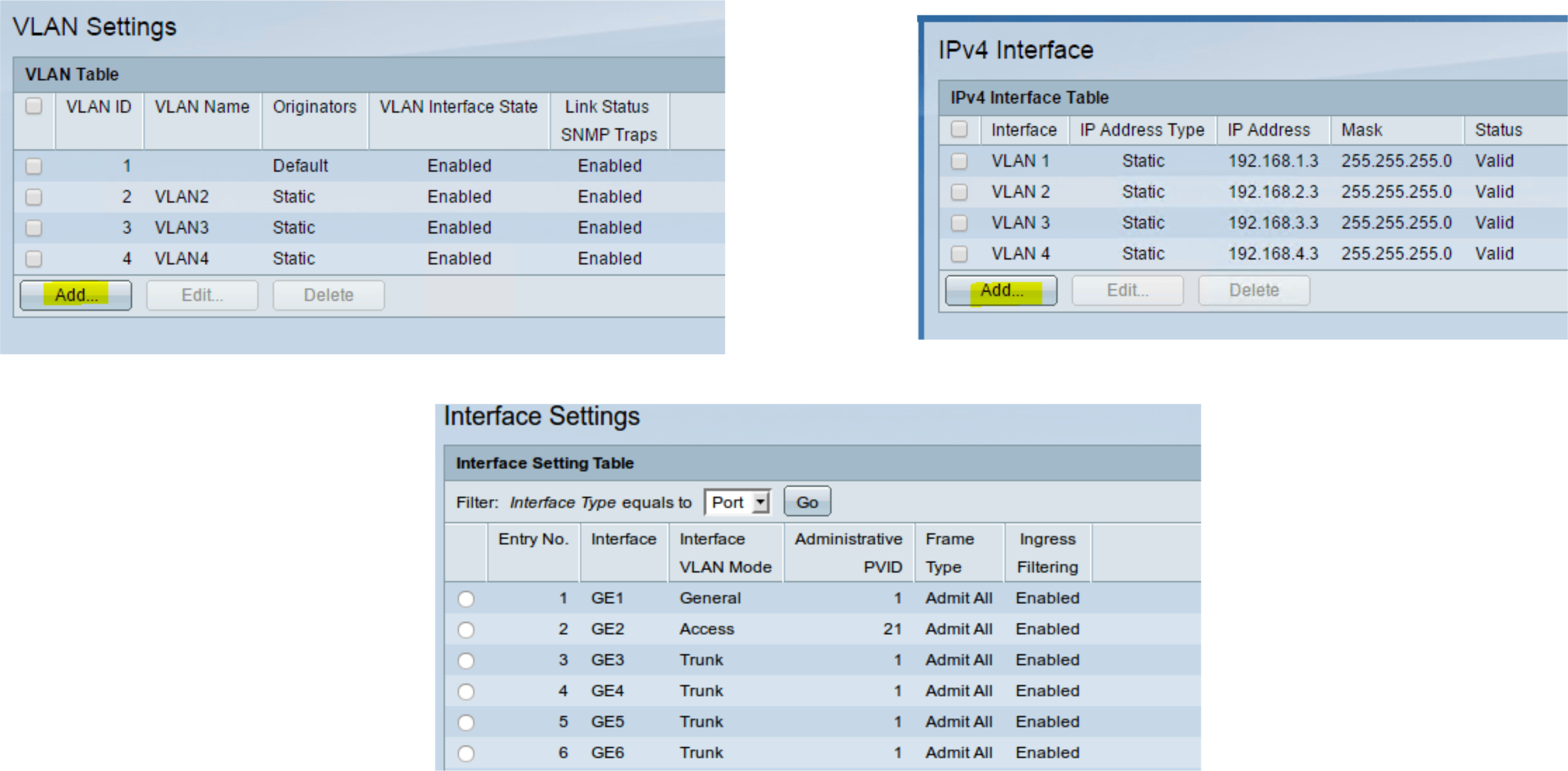
Port modes:
- Access port — belongs to a single VLAN, used for end devices
- Trunk port — carries multiple VLANs, used for switch-to-switch or switch-to-router links
- General port — flexible, can be configured for either
แล้ว VLAN มันต่างกับ Subnetting อย่างไรนะ อะไรเล็กกว่า ใหญ่กว่า??
Contents
A Day in the Life of a Web Request
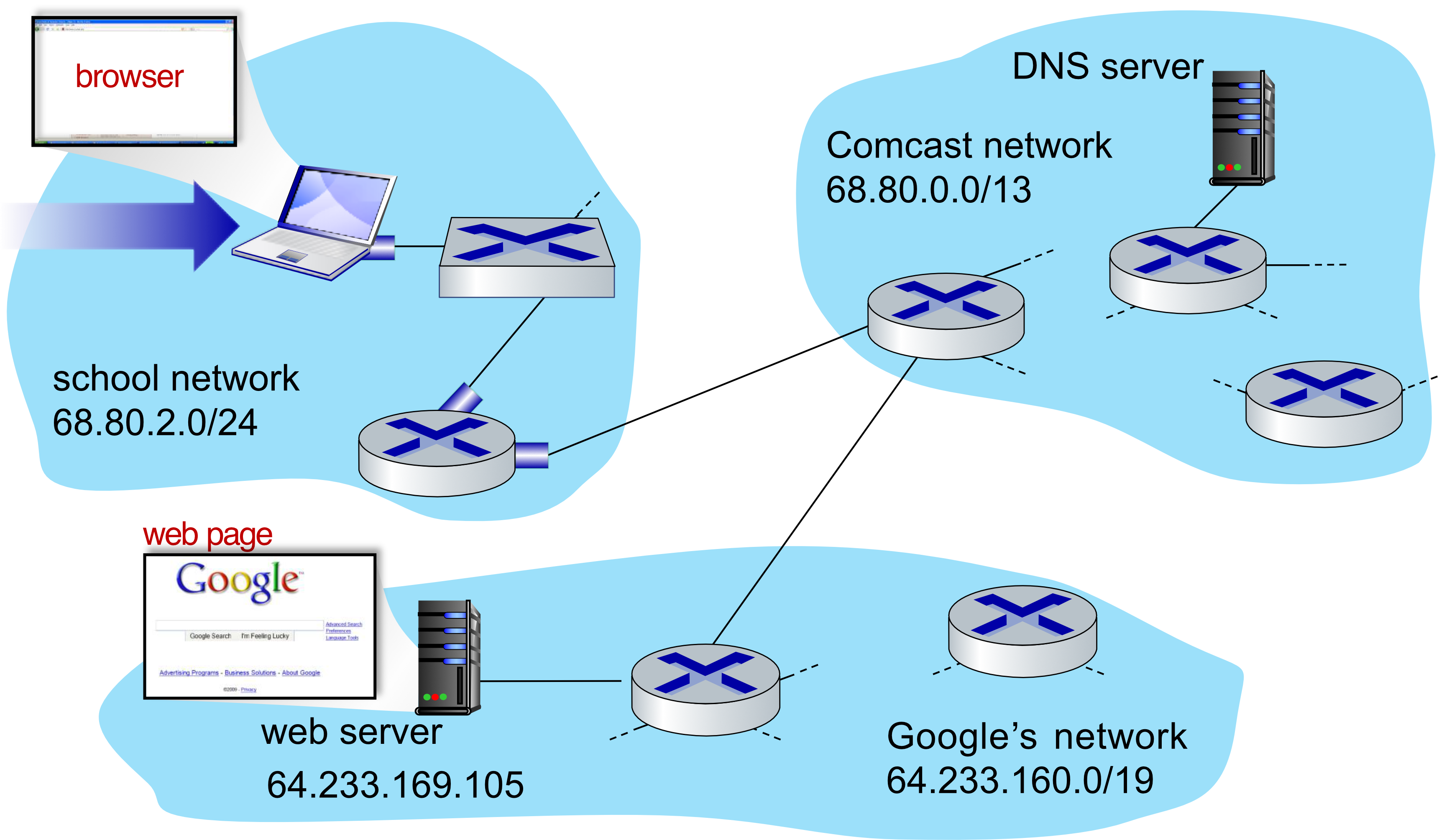
- Scenario: Laptop connects to school network, requests
www.google.com - Goal: Understand every protocol involved across all layers.
Step 1: DHCP — Getting an IP Address
When the laptop first connects, it has no IP address. It uses DHCP:
- DHCP Discover broadcast sent (dest MAC:
FF:FF:FF:FF:FF:FF)- Encapsulation: DHCP → UDP → IP → Ethernet (802.3)
- Router running DHCP server receives and processes the request
- DHCP ACK reply sent back to client containing:
- Client's IP address
- IP address of first-hop router (default gateway)
- IP address + name of DNS server
- Frame forwarded back via switch learning
After DHCP: Client has an IP, knows the router, knows the DNS server.
Step 2: ARP — Finding Router's MAC Address
Client needs to send a DNS query, but must first find the MAC address of the first-hop router (it only knows the router's IP from DHCP).
- Client sends ARP query broadcast: "Who has IP
x.x.x.x? Tell me your MAC." - Router responds with ARP reply containing its MAC address
- Client caches the router's MAC → can now build proper Ethernet frames
Step 3: DNS — Resolving www.google.com
- Client creates DNS query for
www.google.com - Encapsulated: DNS → UDP → IP → Ethernet
- Destination MAC = router's MAC (learned via ARP)
- Frame goes to router → routed through Comcast network → reaches DNS server
- Routing uses protocols like RIP, OSPF, IS-IS, BGP
- DNS server responds with IP address of
www.google.com
Step 4: TCP — 3-Way Handshake
Before sending HTTP, client opens a TCP connection to the web server:
- SYN → client sends to Google web server (inter-domain routed)
- SYNACK → Google responds
- ACK → client confirms
TCP connection established!
Step 5: HTTP — Actual Web Request
- Client sends HTTP GET request into the TCP socket
- IP datagram routed to
www.google.com(64.233.169.105) - Google web server responds with HTTP reply containing the web page
- IP datagram routed back to client
🎉 Web page displayed!
Summary: Full Protocol Stack for One Web Request
| Step | Protocol | Layer |
|---|---|---|
| Get IP address | DHCP (over UDP/IP/Eth) | Application / Network / Link |
| Find router's MAC | ARP | Link |
| Resolve hostname | DNS (over UDP/IP/Eth) | Application / Network / Link |
| Establish connection | TCP 3-way handshake | Transport |
| Request web page | HTTP (over TCP/IP/Eth) | Application → all layers |
Analogy: It's like ordering food from a new restaurant: First you look up the address (DNS), call a taxi (ARP/routing), the taxi takes you there (TCP connection), then you order and receive food (HTTP). Even "simple" actions involve many coordinated steps!
Chapter Summary
- Ethernet — dominant wired LAN; connectionless, unreliable; CSMA/CD
- Ethernet Frame — preamble, dest/src MAC, type, payload, CRC
- UTP — T-568B pinout; patch vs crossover; CAT5e for Gigabit
- Switches — L2 device; self-learning; store-and-forward; no collisions; full duplex
- VLANs — traffic isolation, dynamic membership, inter-VLAN needs L3; 802.1Q trunk
- Day in the Life — DHCP → ARP → DNS → TCP → HTTP (every protocol layer works together)