Learning Objectives
- Understand the concepts of user and system requirements and why these requirements should be written in different ways
- Understand the differences between functional and non-functional software requirements
- Understand how requirements may be organized in a software requirements document
- Understand the principal requirements engineering activities:
- Elicitation
- Analysis
- Validation
- Relationships between these activities
- Understand why requirements management is necessary and how it supports other requirements engineering activities
Topics Covered
- Functional and non-functional requirements
- The software requirements document
- Requirements specification
- Requirements engineering processes
- Requirements management
What is Requirements Engineering?
Requirements Engineering is the process of:
- Establishing the functions/services that the customer requires from a system
- Identifying the constraints under which the system:
- Operates
- Is developed
Requirements are the detailed descriptions of:
- System functions/services
- Constraints
Types of Requirements
1. User Requirements
Usually represent using User Stories, High-level.
- Definition: Statements in natural language plus diagrams describing:
- Functions/services the system provides
- Operational constraints
- Audience: Written for customers
- Purpose: High-level description that non-technical stakeholders can understand
2. System Requirements
- Definition: A structured document with detailed descriptions of:
- System's functions
- Services
- Operational constraints
- Purpose: Defines what should be implemented
- Usage: May be part of a contract between client and contractor
- Audience: Technical stakeholders (developers, architects)
User vs. System Requirements Example
User Requirement Example
"The MHC-PMS shall generate monthly management reports showing the cost of drugs prescribed by each clinic during that month."
System Requirements Specification Example
ไม่เข้าใจอะไรก็ถาม User ให้หมด เพราะ System Requirements ต้อง Detailed cover ALL, come up with a lot of questions to get the details
1.1 On the last working day of each month, a summary of the drugs prescribed, their cost and the prescribing clinics shall be generated.
1.2 The system shall automatically generate the report for printing after 17:30 on the last working day of the month.
1.3 A report shall be created for each clinic and shall list the individual drug names, the total number of prescriptions, the number of doses prescribed and the total cost of the prescribed drugs.
1.4 If drugs are available in different dose units (e.g. 10mg, 20 mg, etc.) separate reports shall be created for each dose unit.
1.5 Access to all cost reports shall be restricted to authorized users listed on a management access control list.
Readers of Different Types of Requirements
User Requirements
Read by:
- Client managers
- System end-users
- Client engineers
- Contractor managers
- System architects
System Requirements
Read by:
- System end-users
- Client engineers
- System architects
- Software developers
Functional and Non-Functional Requirements
Functional Requirements
Definition: Functions that system should react to particular inputs and how the system should behave in all possible situations.
Examples for MHC-PMS:
- A user shall be able to search the appointments lists for all clinics
- The system shall generate each day, for each clinic, a list of patients who are expected to attend appointments that day
- Each staff member using the system shall be uniquely identified by his or her 8-digit employee number
Requirements Imprecision
Problem: Requirements that are not precisely stated can lead to issues
Example: Consider the term 'search' in requirement 1
- User intention: Search for a patient name across all appointments in all clinics
- Developer interpretation: Search for a patient name in an individual clinic (user chooses clinic then searches)
Key Insight: Ambiguous requirements may be interpreted in different ways by developers and users
Requirements Completeness and Consistency
Principles
In principle, requirements should be both complete and consistent:
Complete
- They should include descriptions of all facilities required
Consistent
- There should be no conflicts or contradictions in the descriptions of the system facilities
Reality
In practice, it is impossible to produce a complete and consistent requirements document
Non-Functional Requirements
also called Quality Rquirement
Definition
These define:
- System properties: e.g., reliability, response time, storage requirements
- Constraints: e.g., I/O device capability, system representations
- Process requirements: May specify particular IDE, programming language, or development method
Importance
- Non-functional requirements may be more critical than functional requirements
- If these are not met, the system may be useless
Types of Non-Functional Requirements
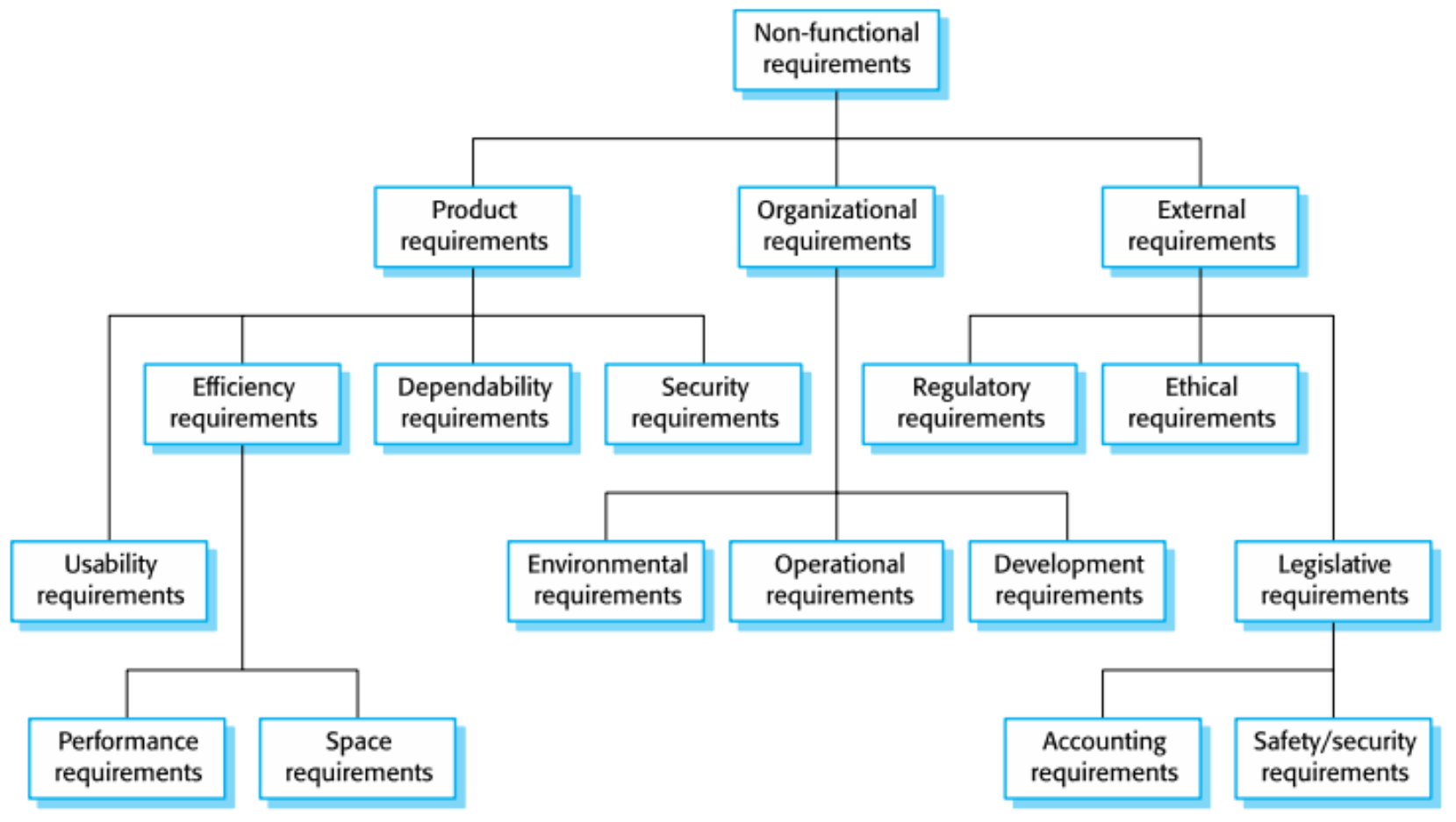
Main Categories
- Product Requirements
- Efficiency requirements
- Usability requirements
- Performance requirements
- Space requirements
- Usability requirements
- Dependability requirements
- Security requirements
- Efficiency requirements
- Organizational Requirements
- Environmental requirements
- Operational requirements
- Development requirements
- External Requirements
- Regulatory requirements
- Ethical requirements
- Legislative requirements
- Accounting requirements
- Safety/security requirements
ISO 9126 Quality Factors
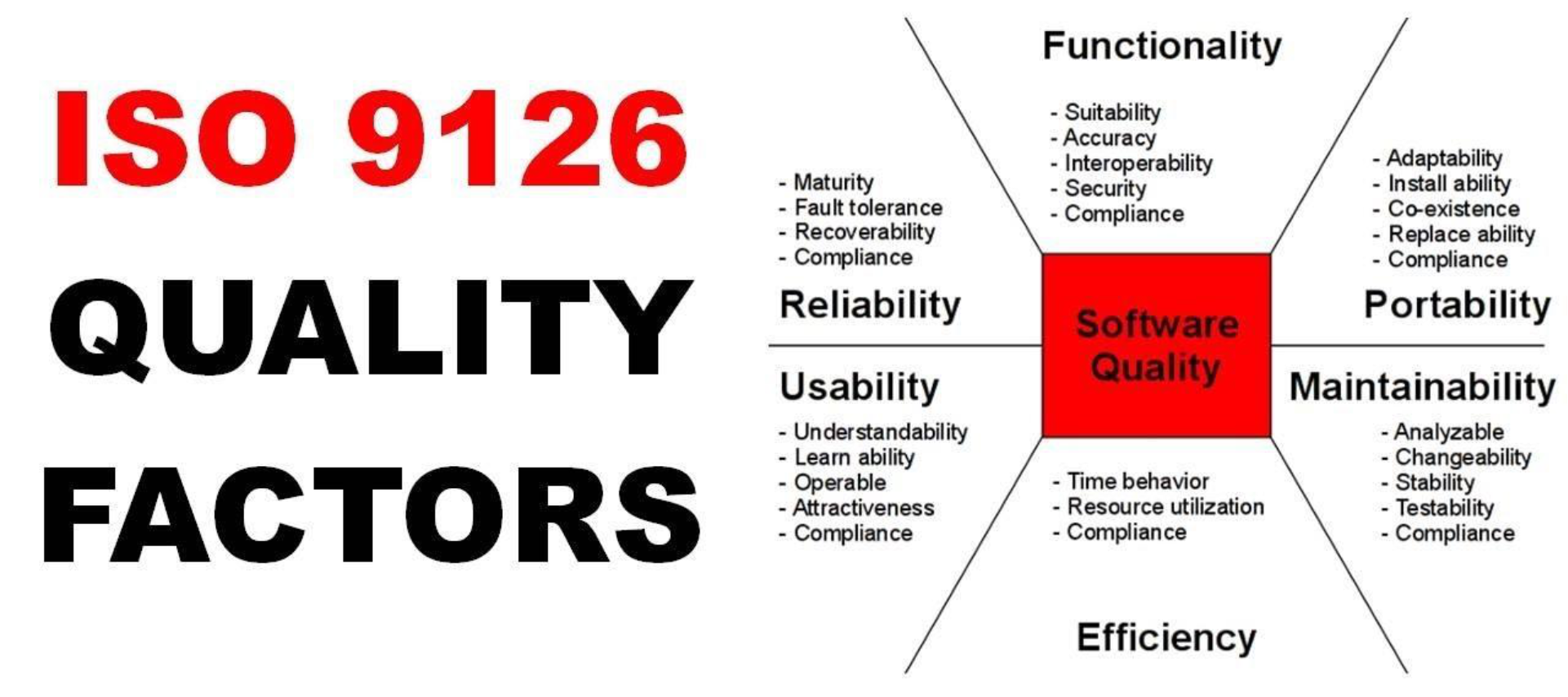
Six Main Quality Characteristics
- Functionality
- Suitability
- Accuracy
- Interoperability
- Security
- Compliance
- Reliability
- Maturity
- Fault tolerance
- Recoverability
- Compliance
- Usability
- Understandability
- Learn ability
- Operability
- Attractiveness
- Compliance
- Efficiency
- Time behavior
- Resource utilization
- Compliance
- Maintainability
- Analyzable
- Changeability
- Stability
- Testability
- Compliance
- Portability
- Adaptability
- Install ability
- Co-existence
- Replace ability
- Compliance
Non-Functional Requirements Implementation
Key Points
- Non-functional requirements may affect the overall architecture of a system rather than individual components
- Example: To ensure performance requirements are met, organize the system to minimize communications between components
- A single non-functional requirement (e.g., security requirement) may:
- Generate multiple related functional requirements that define required system services
- Generate requirements that restrict existing requirements
Non-Functional Classifications
1. Product Requirements
- Requirements which specify that the delivered product must behave in a particular way
- Examples: execution speed, reliability, etc.
2. Organizational Requirements
- Requirements which are a consequence of organizational policies and procedures
- Examples: process standards used, implementation requirements, etc.
3. External Requirements
- Requirements which arise from factors external to the system and its development process
- Examples: interoperability requirements, legislative requirements, etc.
Examples of Non-Functional Requirements in MHC-PMS
Product Requirement
"The MHC-PMS shall be available to all clinics during normal working hours (Mon–Fri, 0830–17.30). Downtime within normal working hours shall not exceed five seconds in any one day."
Organizational Requirement
"Users of the MHC-PMS system shall authenticate themselves using their health authority identity card."
External Requirement
"The system shall implement patient privacy provisions as set out in HStan-03-2006-priv."
Metrics for Specifying Non-Functional Requirements
| Property | Measure |
|---|---|
| Speed | • Processed transactions/second • User/event response time • Screen refresh time |
| Size | • Storage size |
| Ease of use | • Training time • Number of help frames |
| Reliability | • Mean time to failure • Probability of unavailability • Rate of failure occurrence • Availability |
| Robustness | • Time to restart after failure • Percentage of events causing failure • Probability of data corruption on failure |
| Portability | • Percentage of target dependent statements • Number of target systems |
Understanding User Requirements
Introduction to BPM and BPI
User requirements are often captured through business process analysis.
Business Process Management (BPM) and Business Process Improvement (BPI)
Why BPM and BPI?
Common Problems
- Long waiting times
- Customer dissatisfaction
- Inefficient processes
- Crowded systems (airports, service centers)
Goals
- Do it better
- Reduce error rates
- Increase business value
- Do it faster
- Reduce times
- Improve productivity
- Do it cheaper
- Cut costs
Objectives of BPM and BPI
To Increase Quality and Performance
- Reduce human errors (e.g., input mistakes, skipped steps)
- Resolve existing problems (e.g., uncertain outputs and time-consuming tasks)
To Increase Satisfaction
- Reduce negative outcomes (e.g., waiting time)
BPM vs BPI
Business Process Management (BPM)
- Manage end-to-end processes/operations to meet target objectives with satisfied quality
- Monitor and control process performance
- Manage problems and incidences
- Manage changes
Business Process Improvement (BPI)
- Increase stakeholder value
- Increase efficiency, productivity and quality
- Eliminate problems/incidences
- Reduce time, errors, cost
Factors Affecting Product/Service Quality
Key Factors
- Technology: Rapidly changes
- Cost, Time and Schedule: Always limited
- Resource Quality (e.g., People quality): Different levels of knowledge, skills, experiences
- Process/Operation Quality: Time consuming, Human/System errors, Not practical
- ส่วนใหญ่ Company จะ focus ข้อนี้แหละ เพราะข้ออื่น ๆ มันเปลี่ยนแปลงตลอดเวลา

- ส่วนใหญ่ Company จะ focus ข้อนี้แหละ เพราะข้ออื่น ๆ มันเปลี่ยนแปลงตลอดเวลา
What is a Business Process?
Definition: A business process is a collection of related activities, events and decisions that involve a number of actors and resources and that collectively lead to an outcome that is of value to an organization or its customers.
Examples
- Vaccine Registration Process: Register → Get Confirmation → Get Vaccinated → Get Certification
- Loan Assessment Process: Apply loan → Assess Loan Application → Approve/Reject
- Procurement Process: Request for price quotation → Order → Payment
- Insurance Claim Process: Claim Application → Assessment → Settlement
- Help Desk/Customer Service Process: Issue → Resolution
Business Process vs. Workflow
Business Process gives you a broader viewpoint??
Business Process
- A process is a set of repeatable activities that need to be carried out to accomplish some sort of organizational goal
- Involves accomplishing an organizational goal
Workflow
- A workflow is a series of repeatable activities that you need to carry out to finish a task
- Implies finishing a certain task
Processes and Outcomes
Key Concepts
- Every process leads to one or several outcomes (positive or negative)
- Positive outcomes deliver value
- Examples: reduce errors, reduce cost and time
- Negative outcomes reduce value
- Examples: customer waiting time
Example: Customer Service Process
There are several journeys (scenarios) that lead to different outcomes:
- Scenario 1: Repair and fully covered by warranty
- Scenario 2: Repair and partly covered by warranty
- Scenario 3: Repair but not covered by warranty (no warranty or warranty was expired)
- Scenario 4: No repair (customer withdrew request)
Important: We need to design all possible scenarios, NOT JUST a happy journey
Business Process Modeling with BPMN 2.0
What is BPMN?
BPMN (Business Process Model and Notation) is:
- A graphical representation for specifying business processes in a business process model
- Developed by Business Process Management Initiative (BPMI)
- Maintained by Object Management Group (OMG) since the two organizations merged in 2005
Versions
- BPMN v 2.0: Released in January 2011
- Latest version: BPMN 2.0.2, published in January 2014
Why BPMN?
Answer: Because it provides standard notations (symbols) and meaning
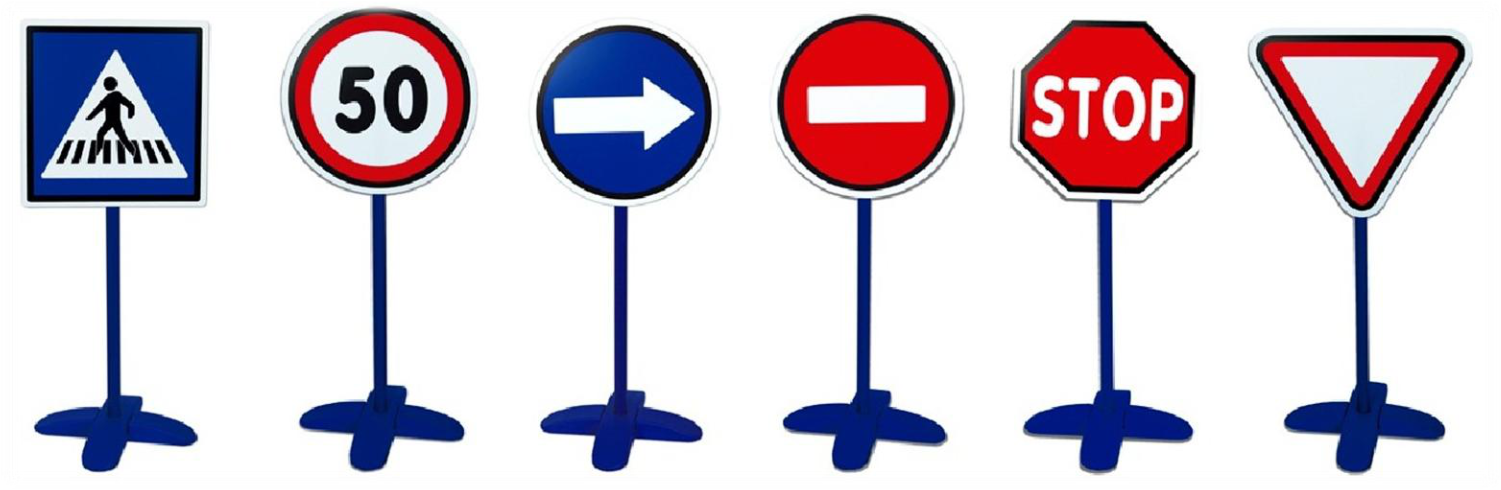
Just like traffic signs provide standard meanings that everyone understands!
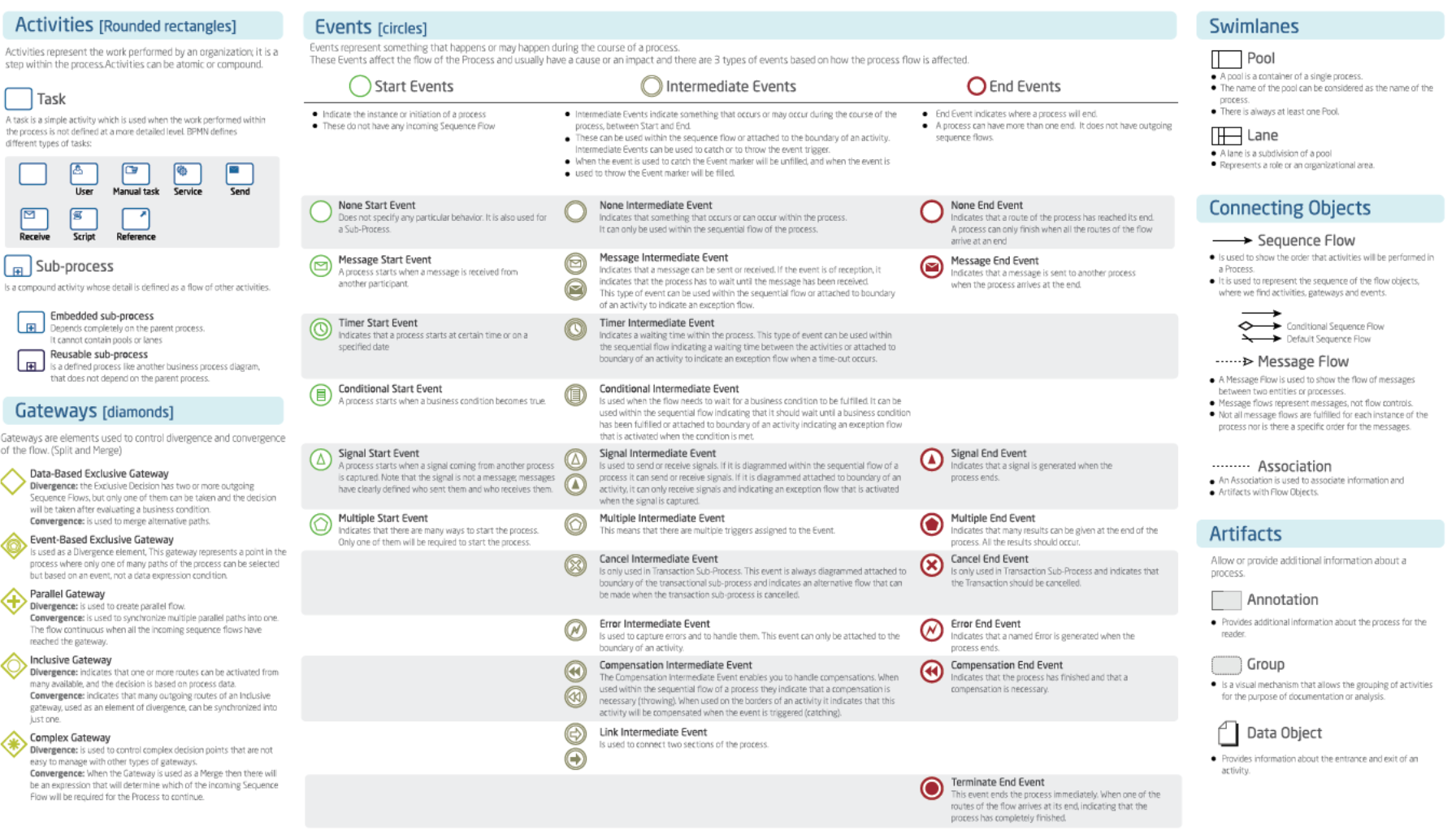
BPMN 2.0 Graphical Elements
Core Elements
- Pool/Swimlane
- A container of business process
- Represents participants
- Activities (Tasks)
- Work performed in the process
- Gateways (Decisions)
- Control flow divergence and convergence
- Events (Conditions)
- Things that happen during the process
- Artifacts
- Examples: Documents, annotations
- Connecting Objects
- Lines showing flow and relationships
BPMN: Pool and Swimlane
Definitions
- Pool: A container of a business process
- Swimlanes: Represent process participants
Example Structure
url: [[test.bpmn.txt]]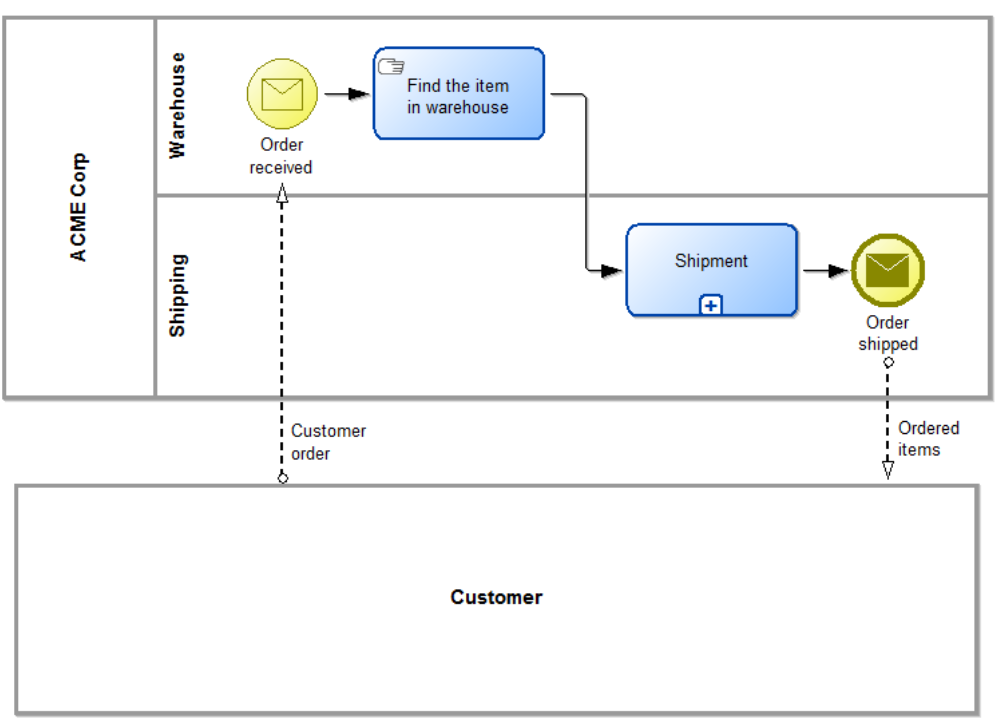
- A Pool of Credit Card Company
- A Pool of Customer
- A Pool of Store
- A Pool of Carrier (Logistics)
Each pool can contain multiple swimlanes representing different participants:
- ABC Company Pool
- Warehouse (swimlane)
- Shipping (swimlane)
BPMN: Activities
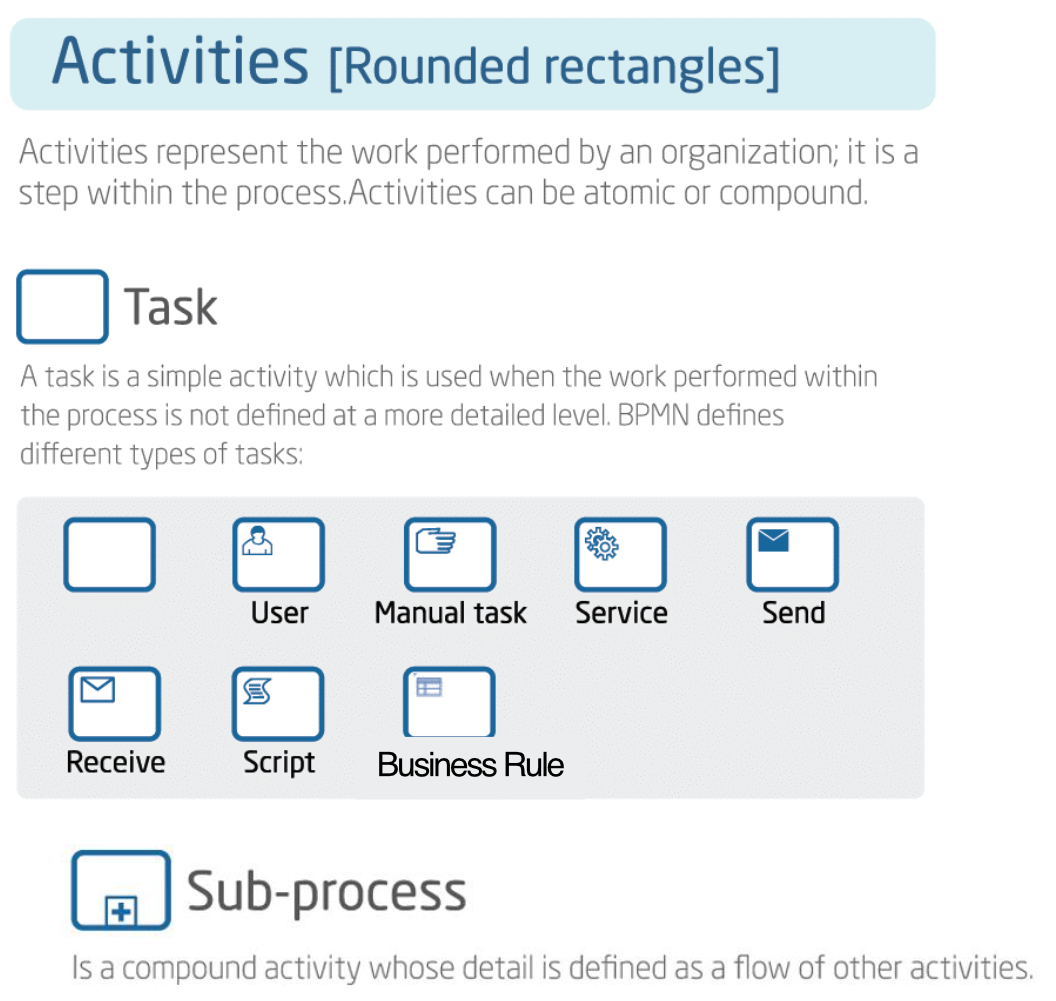
Definition
Activities represent the work performed by an organization; it is a step within the process. Activities can be atomic or compound.
Types of Tasks
1. Task (Generic)
- Simple activity
- Work performed within the process not defined at a more detailed level
2. User Task
- A human performer performs the task with the use of a software application
- Example: Order approval task done by buyer through shopping system
3. Manual Task
- Task performed without the aid of any business process execution engine or application
- Example: Cart inspection sign-off tasks performed manually
4. Service Task
- Uses a Web service, an automated application, or other kinds of service in completing the task
- Example: Publishing answer on Twitter through web service
5. Send Task
- Sends a message to another lane or pool
- Task is completed once the message has been sent
- Example: Sending rejection message from moderator to author
6. Receive Task
- Process waits for a message to arrive to continue
- Task is completed once the message has been received
- Example: Receiving pickup request in courier management
7. Script Task
- Executed by a business process engine
- Defines a script that the engine can interpret
- Task completed when the script is completed
- Example: Checking credit status using a pre-written script
8. Business Rule Task
- Newly added in BPMN 2.0
- Provides input to a Business Rules Engine and obtains output from it
- Example: Analyzing survey results using business rule engine
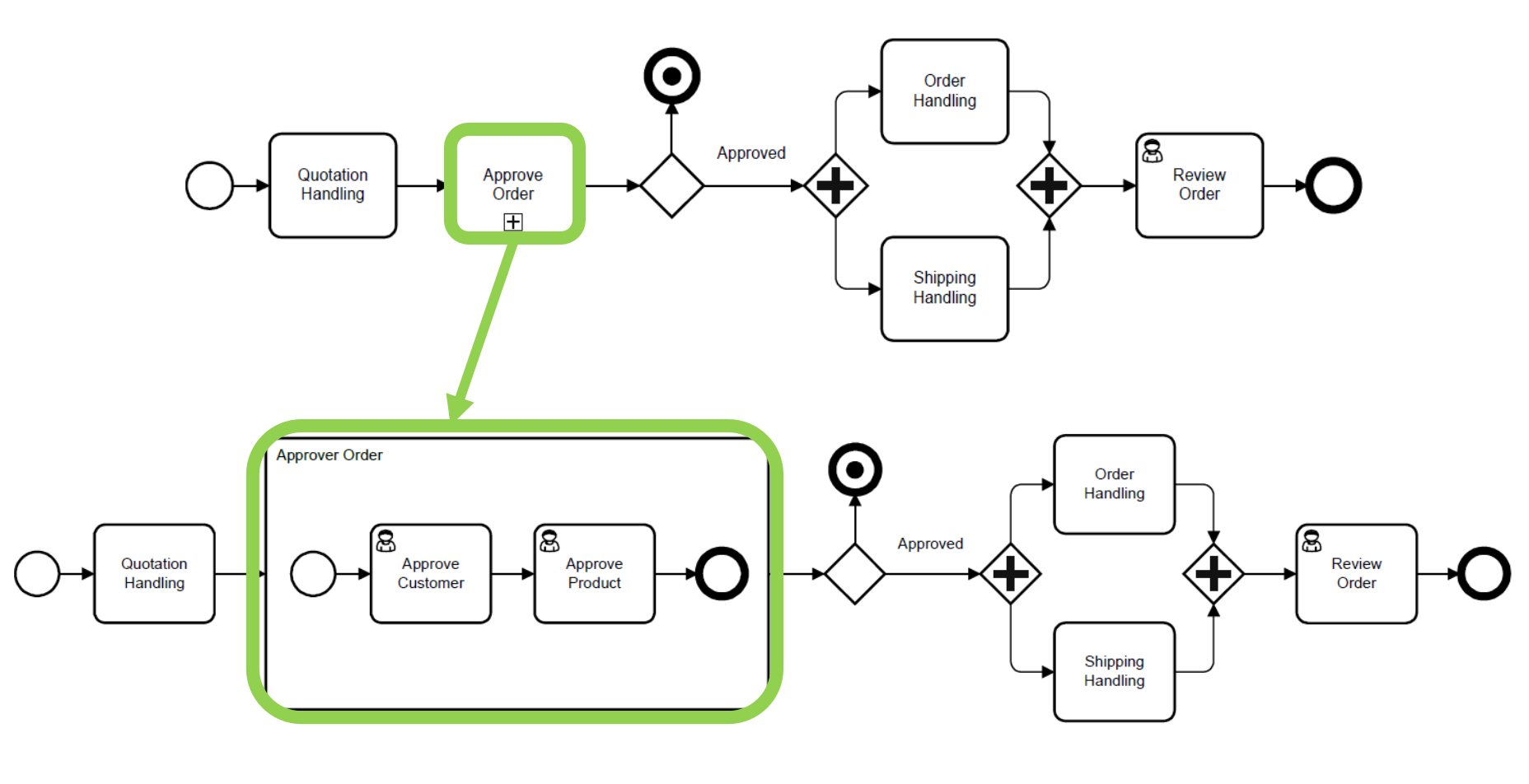
9. Sub-process
- Compound activity whose detail is defined as a flow of other activities
- Allows splitting complex process into multiple levels
BPMN: Gateways
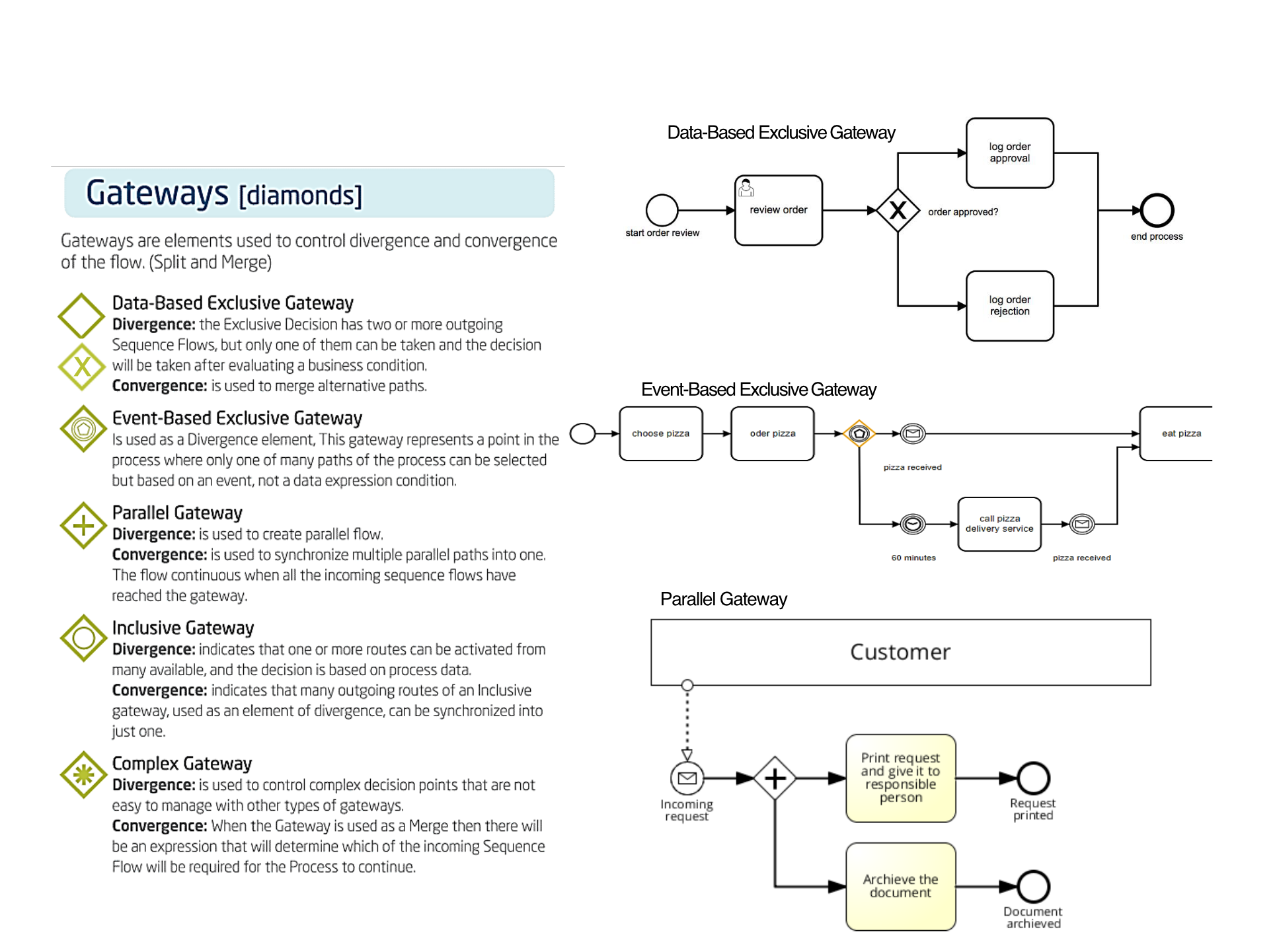
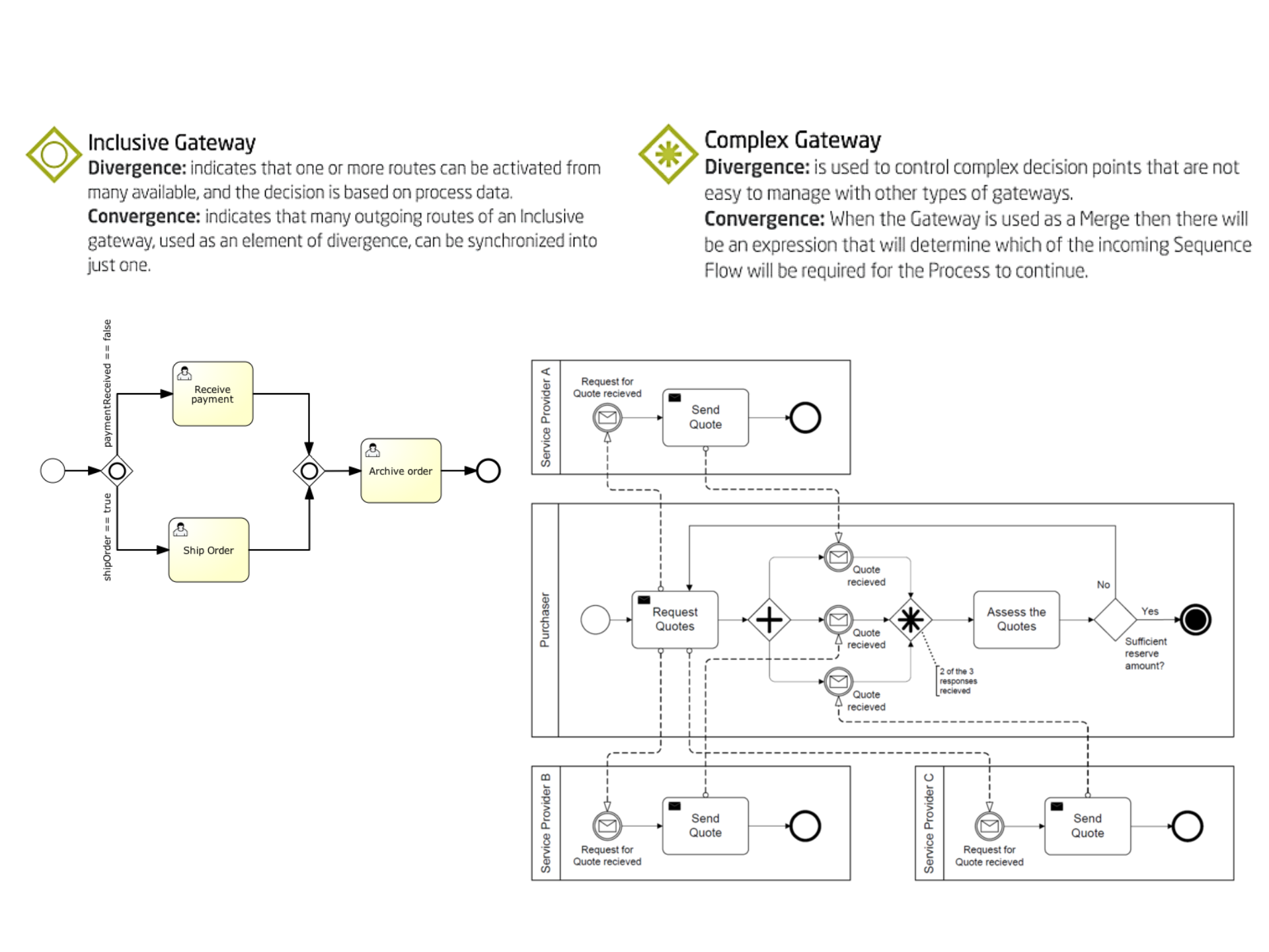
Inclusive Gateway เหมือนแบบ— More than one path!
if

if

if
Definition
Gateways are elements used to control divergence and convergence of the flow (Split and Merge)
Types of Gateways
1. Data-Based Exclusive Gateway ◇X
- Divergence: Two or more outgoing sequence flows, but only one can be taken based on a business condition
- Convergence: Merges alternative paths
2. Event-Based Exclusive Gateway ◇⊙
- Used as a divergence element
- Gateway represents a point in the process where only one of many paths can be selected
- Based on an event, not a data expression condition
3. Parallel Gateway ◇+
- Divergence: Creates parallel flow
- Convergence: Synchronizes multiple parallel paths into one
- Flow continues when all incoming sequence flows have reached the gateway
4. Inclusive Gateway ◇○
- Divergence: One or more routes can be activated (based on process data)
- Convergence: Many outgoing routes can be synchronized into just one
5. Complex Gateway ◇*
- Divergence: Used to control complex decision points not easy to manage with other gateways
- Convergence: Expression determines which incoming sequence flow is required for process to continue
BPMN: Events
Definition
Events represent something that happens or may happen during the course of a process. These events affect the flow of the process and usually have a cause or an impact.
Three Types Based on Process Flow Effect
-
Start Events ○
- Indicate the instance or initiation of a process
- Do not have any incoming sequence flows
-
Intermediate Events ⊙
- Indicate something that occurs or may occur during the course of the process, between Start and End
- Can be used within the sequence flow or attached to the boundary of an activity
- When used to catch: Event marker will be unfilled
- When used to throw: Event marker will be filled
-
End Events ⊚
- Indicate where a process will end
- A process can have more than one end, but it does not have outgoing sequence flows
BPMN: Start Events
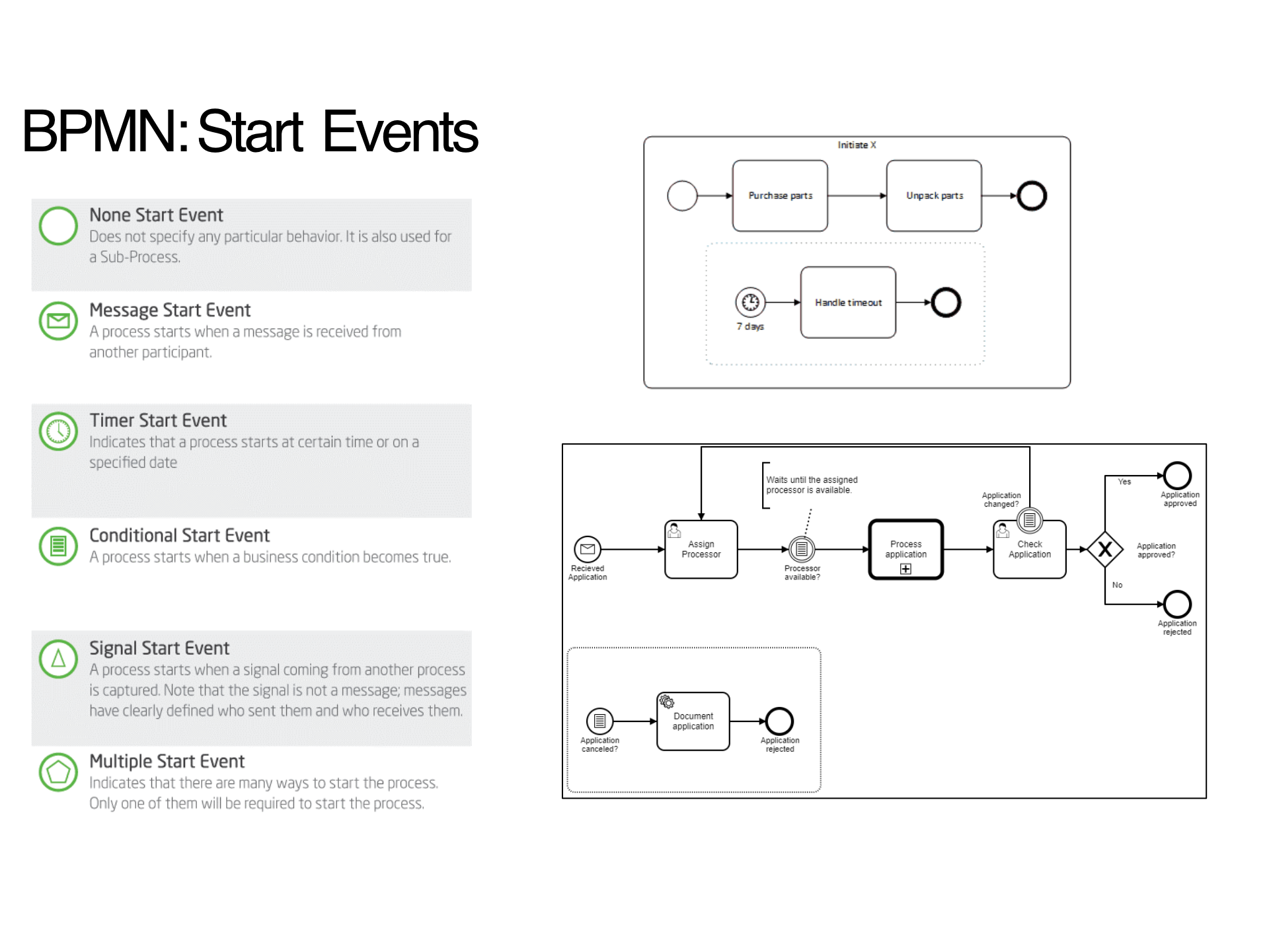
Types of Start Events
1. None Start Event ○
- Does not specify any particular behavior
- Also used for Sub-Process
2. Message Start Event ⊙✉
- Process starts when a message is received from another participant
3. Timer Start Event ⊙🕐
- Process starts at certain time or on a specified date
4. Conditional Start Event ⊙▤
- Process starts when a business condition becomes true
5. Signal Start Event ⊙△
- Process starts when a signal coming from another process is captured
- Note that the signal is not a message
- Messages have clearly defined who sent them and who receives them
6. Multiple Start Event ⊙⬟
- Indicates that there are many ways to start the process
- Only one of them will be required to start the process
BPMN: Intermediate Events
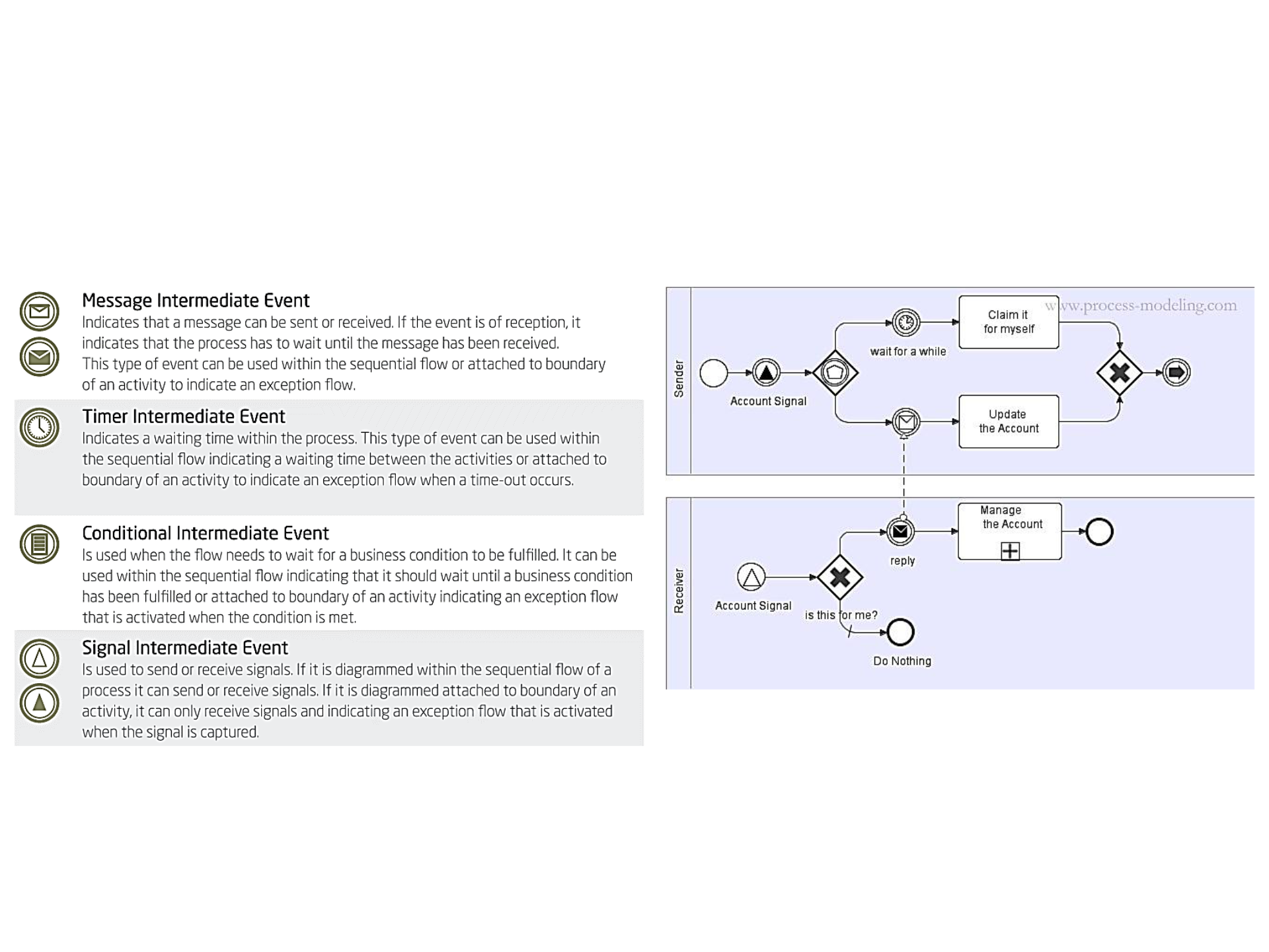
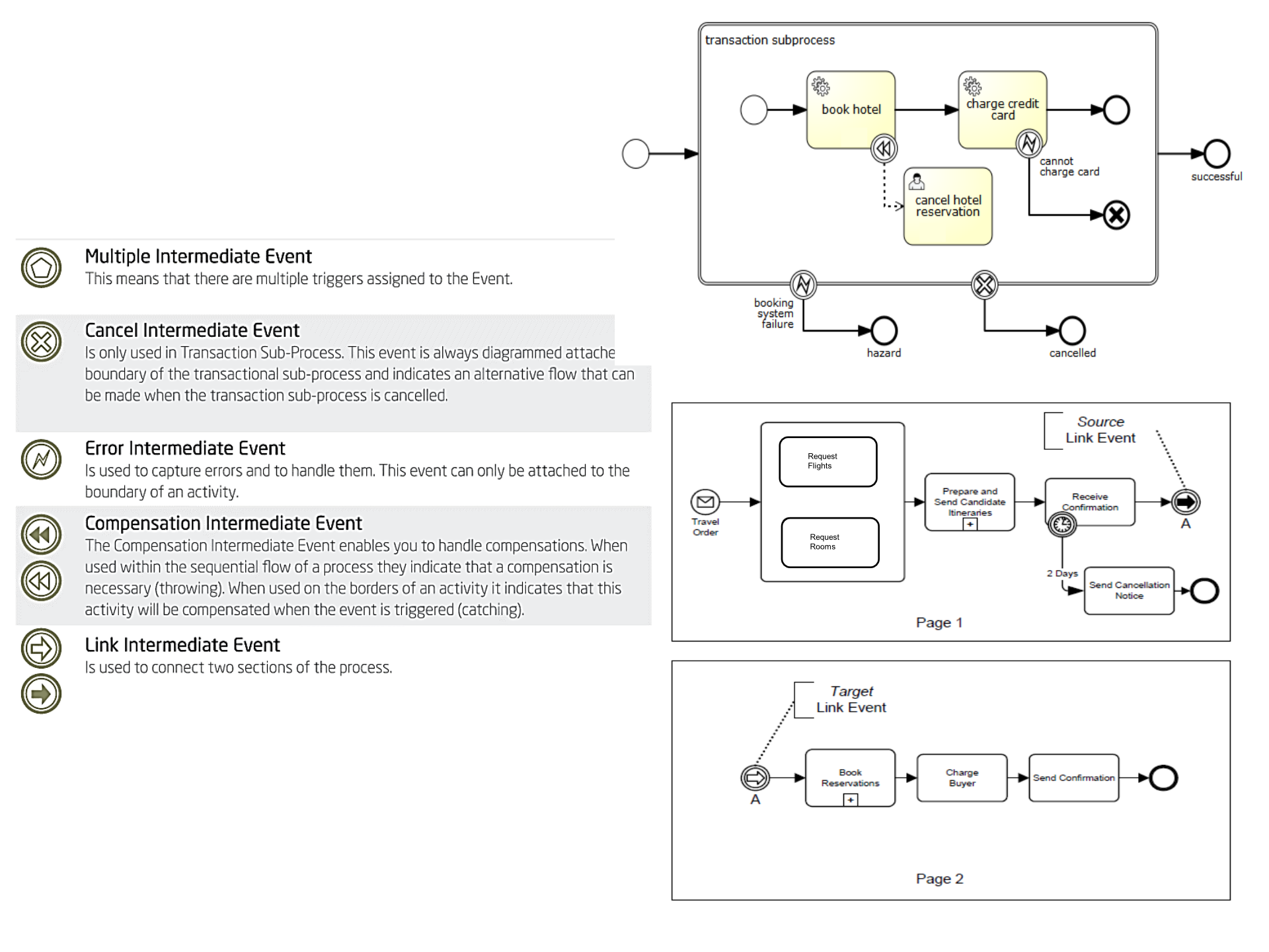
Types of Intermediate Events
1. Message Intermediate Event ⊙✉
- Indicates that a message can be sent or received
- If the event is of reception, it indicates that the process has to wait until the message has been received
- Can be used within the sequential flow or attached to boundary of an activity to indicate an exception flow
2. Timer Intermediate Event ⊙🕐
- Indicates a waiting time within the process
- Can be used within the sequential flow (waiting time between activities) or attached to boundary of an activity (exception flow when time-out occurs)
3. Conditional Intermediate Event ⊙▤
- Used when the flow needs to wait for a business condition to be fulfilled
- Can be used within sequential flow or attached to boundary (exception flow when condition is met)
4. Signal Intermediate Event ⊙△/⊙▲
- Used to send or receive signals
- If diagrammed within sequential flow: can send or receive signals
- If diagrammed attached to boundary: can only receive signals (indicating exception flow when signal is captured)
5. Multiple Intermediate Event ⊙⬟
- Means there are multiple triggers assigned to the event
6. Cancel Intermediate Event ⊙⊗
- Only used in Transaction Sub-Process
- Always diagrammed attached to the boundary of the transactional sub-process
- Indicates an alternative flow that can be made when the transaction sub-process is cancelled
7. Error Intermediate Event ⊙⚡
- Used to capture errors and to handle them
- Can only be attached to the boundary of an activity
8. Compensation Intermediate Event ⊙↶/⊙⇋
- Enables you to handle compensations
- When used within sequential flow: indicate that compensation is necessary (throwing)
- When used on borders of an activity: indicates that this activity will be compensated when the event is triggered (catching)
9. Link Intermediate Event ⊙➜
- Used to connect two sections of the process
BPMN: End Events
Types of End Events
1. None End Event ⊚
- Indicates that a route of the process has reached its end
- A process can only finish when all the routes arrive at an end
2. Message End Event ⊚✉
- Indicates that a message is sent to another process when the process arrives at the end
3. Signal End Event ⊚▲
- Indicates that a signal is generated when the process ends
4. Multiple End Event ⊚⬢
- Indicates that many results can be given at the end of the process
- All the results should occur
5. Cancel End Event ⊚⊗
- Only used in Transaction Sub-Process
- Indicates that the Transaction should be cancelled
6. Error End Event ⊚⚡
- Indicates that a named Error is generated when the process ends
7. Compensation End Event ⊚↶
- Indicates that the process has finished and that a compensation is necessary
8. Terminate End Event ⊚⊕
- Ends the process immediately
- When one of the routes of the flow arrives at its end, indicating that the process has completely finished
Note: While a normal (None End Event) end event indicates that a single process sequence ends, the Terminate End Event will end the whole process and thereby end every activity that may be running at that time.
Event Summary
Event Categories
None
- Untyped events
- Indicate start points, state changes, and final states
Message
- Receiving and sending messages
Timer
- Cyclic timer events, points in time, time spans, or timeouts
Escalation
- Escalating to a higher level of responsibility
Conditional
- Reacting to changed business conditions or integrating business rules
Link
- Off-page connectors
- Two corresponding link events equal a sequence flow
Error
- Catching or throwing named errors
Cancel
- Reacting to canceled transactions or triggering cancellation
Compensation
- Handling or triggering compensation
Signal
- Signaling across different processes
- A signal thrown can be caught multiple times
Multiple
- Catching one out of a set of events
- Throwing all events defined
Parallel Multiple
- Catching all out of a set of parallel events
Terminate
- Triggering the immediate termination of a process
BPMN: Connecting Objects
1. Sequence Flow →
- Used to show the order that activities will be performed in a process
- Represents the sequence of the flow objects (activities, gateways, events)
- Variations:
- Conditional Sequence Flow ◇→
- Default Sequence Flow ⤃
2. Message Flow ⋯→
- Used to show the flow of messages between two entities or processes
- Message flows represent messages, not flow controls
- Not all message flows are fulfilled for each instance of the process
- No specific order for the messages
3. Association ┄
- Used to associate information and Artifacts with Flow Objects
BPMN: Artifacts
Definition
Allow or provide additional information about a process
Types of Artifacts
1. Annotation ▭
- Provides additional information about the process for the reader
2. Group ┌─┐
- Visual mechanism that allows the grouping of activities for the purpose of documentation or analysis
3. Data Object 📄
- Provides information about the entrance and exit of an activity
Example 1: Shipping Process of a Hardware Retailer
Components Demonstrated
- Pool: Hardware Retailer
- Lanes:
- Logistics Manager
- Clerk
- Warehouse Worker
- Elements:
- Start Event
- Tasks
- Parallel Gateway
- Exclusive Gateway (X)
- Inclusive Gateway (◇)
- Synchronizing Gateways
- Stop Event
Process Flow
- Goods to ship trigger the process
- Decision on delivery mode (Normal Post vs. Special Carrier)
- Check if extra insurance is necessary
- Fill in post label
- Packaging goods
- Add paperwork and move package to pick area
Example 2: Vacation Leave Request Process
Participants (Lanes)
- Employee: Initiates request
- Boss: Approves/rejects request
- Administrative Department: Processes approved requests
Process Flow
- Employee verifies available vacation days
- Employee registers vacation leave request
- Decision point: Continue?
- If No: Process ends
- If Yes: Request goes to Boss
- Boss approves vacation leave request
- Decision: Approved?
- If No: Send rejection message to employee
- If Yes: Send approval message and update systems
- Administrative Department:
- Updates payroll system
- Updates payroll system (parallel tasks)
Example 3: Timesheet Reporting
Participants
- Student Worker
- Office Clerk
- Supervisor
- Payroll
Process Flow
- Student Worker fills in timecard
- Decision: Timesheet complete and submitted before 12 noon?
- If No: Return to employee (with error event)
- If Yes: Proceed to verification
- Supervisor verifies hours worked by employee
- Supervisor approves timesheet
- Payroll processes employees' pay
- Deposit made into employee account (message end event)
Example 4: Trouble Ticket System
Participants
- 1st Level Support
- 2nd Level Support
Process Flow
-
1st Level Support:
- Issue received (message start event)
- Open ticket
- Edit 1st level ticket
- Decision: Result?
- If issue resolved: Send mail to account manager → Close ticket
- If 2nd level issue: Escalate
-
2nd Level Support:
- Edit 2nd level ticket
- Decision: Result?
- If Issue resolved: Return to 1st level
- If Fix in next release: Insert issue into product backlog (service task)
Example 5: Sub-Process with Intermediate Boundary Event
Stock Maintenance Process
Main Flow:
- Stock level below minimum (conditional start event)
- Procurement (sub-process with + symbol)
- Article procured (end event)
Exception Flow (Boundary Event):
- Undeliverable (error intermediate event ⊙⚡ attached to Procurement)
- Remove article from catalogue
- Article removed (end event)
Key Concept: The error boundary event provides an exception path if the procurement sub-process fails
Example 6: Procurement Sub-Process
Detailed Procurement Flow
- Start
- Check availability with supplier
- Decision: Deliverable?
- If ≤ 2 days: Order from supplier → article received (message) → Article procured
- If > 2 days: Wait 2 days (timer intermediate event ⊙🕐) → Continue to order
- If no: Undeliverable (error end event ⊚⚡)
Late Delivery Handling
- Timer intermediate event (Late delivery) attached to "Order from supplier" task
- Triggers after 2 days wait period
Example 7: Collaboration Processes (Pizza Ordering)
Two Pools
Pizza Customer Pool
Flow:
- Start
- Select a pizza
- Order a pizza
- Decision gateway (◇⊙)
- Wait 60 minutes (timer intermediate event)
- Ask for the pizza
- Pizza received (message)
- Pay the pizza
- Eat the pizza
- Hunger satisfied (end event)
Pizza Vendor Pool
Lanes:
-
Clerk
- Order received (message)
- Parallel gateway: "where is my pizza?"
- Calm customer
-
Pizza chef
- Bake the pizza
-
Delivery boy
- Deliver the pizza
- Receive payment (with data object: receipt)
Message flows (dotted lines with envelopes) connect the two pools
Example 8: Order Fulfillment Process
Main Process Flow
- Order received (message start event)
- Check availability
- Decision: Article available?
- If yes: Ship article → Financial settlement (sub-process +) → Payment received
- If no: Procurement (sub-process with boundary events)
Procurement Sub-Process
Boundary Events:
-
Undeliverable (error ⊙⚡):
- Inform customer
- Remove article from catalogue
- Article removed (end event)
-
Late Delivery (signal ⊙△):
- Inform customer
- Customer informed (end event)
Multiple End Events
- Payment received
- Customer informed
- Article removed
Example 9: Trip Booking Process with Compensation
Simple Compensation Flow
Main Flow:
- Start
- Step 1 (with compensation marker ⊙↶)
- Step 2
- Decision: OK?
- If yes: End
- If no: Undo step 1 (compensation end event ⊚↶)
Compensation Handler:
- Cancel Step 1 (with compensation marker ⊙↶)
Trip Booking Example
Parallel Gateway Flow (all three booking tasks occur simultaneously):
- Book Car (with compensation: Cancel Car)
- Book Hotel (with compensation: Cancel Hotel)
- Book Flight (with compensation: Cancel Flight)
Purpose: If booking fails, all reservations can be cancelled via compensation handlers
Tools for BPMN Modeling
Bizagi Suites
Components:
-
Bizagi Modeler (Free to use)
- Design process maps
-
Bizagi Studio (Free to use)
- Build process apps
-
Bizagi Engine (Commercial)
- Run enterprise wide
Website: https://www.bizagi.com/
Alternative for Mac Users
Online Tool: https://demo.bpmn.io/
- Web-based BPMN modeler
- No installation required
- Works on any platform
Key Takeaways
Requirements Engineering
- Distinguish between user and system requirements
- Understand functional vs. non-functional requirements
- Requirements must be complete and consistent (in theory)
- Non-functional requirements can be more critical than functional ones
Business Process Modeling
- BPM: Manage processes to meet objectives
- BPI: Improve processes to increase value
- BPMN 2.0: Standard notation for process modeling
- Key elements: Pools, Lanes, Activities, Gateways, Events, Connecting Objects, Artifacts
BPMN Best Practices
- Design all possible scenarios, not just the "happy path"
- Use appropriate event types (start, intermediate, end)
- Leverage boundary events for exception handling
- Use sub-processes to manage complexity
- Apply compensation for transactional processes
Summary of BPMN Elements
Core Building Blocks
| Element Type | Purpose | Example Symbols |
|---|---|---|
| Pool/Lane | Container/Participants | Horizontal rectangles |
| Activities | Work/Tasks | Rounded rectangles |
| Gateways | Decisions/Splits | Diamonds (◇) |
| Events | Triggers/Results | Circles (○, ⊙, ⊚) |
| Flows | Connections | Arrows (→, ⋯→) |
| Artifacts | Additional Info | Annotations, data objects |
Remember
- BPMN provides standardized notation - like traffic signs for business processes
- Events have three types: Start (○), Intermediate (⊙), End (⊚)
- Gateways control flow: Exclusive (X), Parallel (+), Inclusive (○), Event-based (⊙), Complex (*)
- Process all scenarios: Include exception handling and alternative paths