MIME and S/MIME
MIME (Multipurpose Internet Mail Extensions)
- Extension to the old RFC 822 specification of an Internet mail format
- RFC 822 defines a simple heading with
To,From,Subject - Assumes ASCII text format only
- RFC 822 defines a simple heading with
- Provides a number of new header fields that define information about the body of the message
S/MIME (Secure/Multipurpose Internet Mail Extension)
- Security enhancement to the MIME Internet e-mail format
- Based on technology from RSA Data Security
- Provides the ability to sign and/or encrypt e-mail messages
- Supports Confidentially, Integrity ไงง, also non-repudiation
Analogy: MIME is like a plain envelope — it just defines how to structure the letter. S/MIME is like a sealed, tamper-proof envelope with a wax seal — it proves who sent it and hides the contents.
S/MIME Content Types
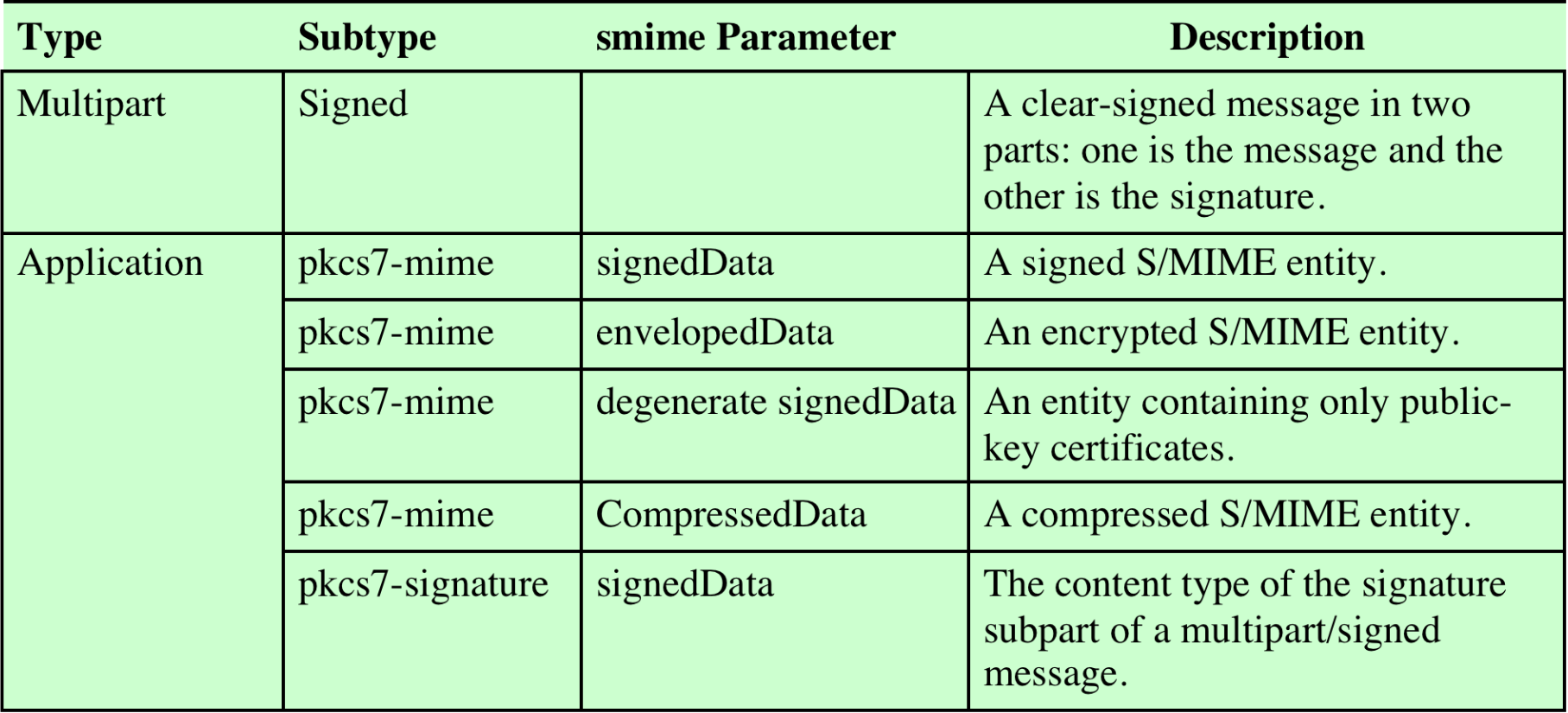
| Type | Subtype | smime Parameter | Description |
|---|---|---|---|
| Multipart | Signed | — | A clear-signed message in two parts: one is the message and the other is the signature |
| Application | pkcs7-mime | signedData | A signed S/MIME entity |
| Application | pkcs7-mime | envelopedData | An encrypted S/MIME entity |
| Application | pkcs7-mime | degenerate signedData | An entity containing only public-key certificates |
| Application | pkcs7-mime | CompressedData | A compressed S/MIME entity |
| Application | pkcs7-signature | signedData | The content type of the signature subpart of a multipart/signed message |
PKCS (Public-Key Cryptography Standards)
- PKCS #11
- Defines that the private key must be stored in hardware (smartcard, token)
- Prevents the key from being copied
- PKCS #12
- Key is stored in file format (e.g.,
.p12,.pfx) - Usually protected by passphrase ไงงง จำได้บ่
- Key is stored in file format (e.g.,
- PKCS #7
- Digital signature format
- Standard syntax for storing signed and/or encrypted data
Analogy: PKCS #11 is like keeping your house key physically locked in a safe — no copies allowed. PKCS #12 is like keeping it in a password-protected key file on your computer.
S/MIME Process (Signing + Encrypting)
Image: Figure 22.1 Typical S/MIME Process for Creating an S/MIME Message
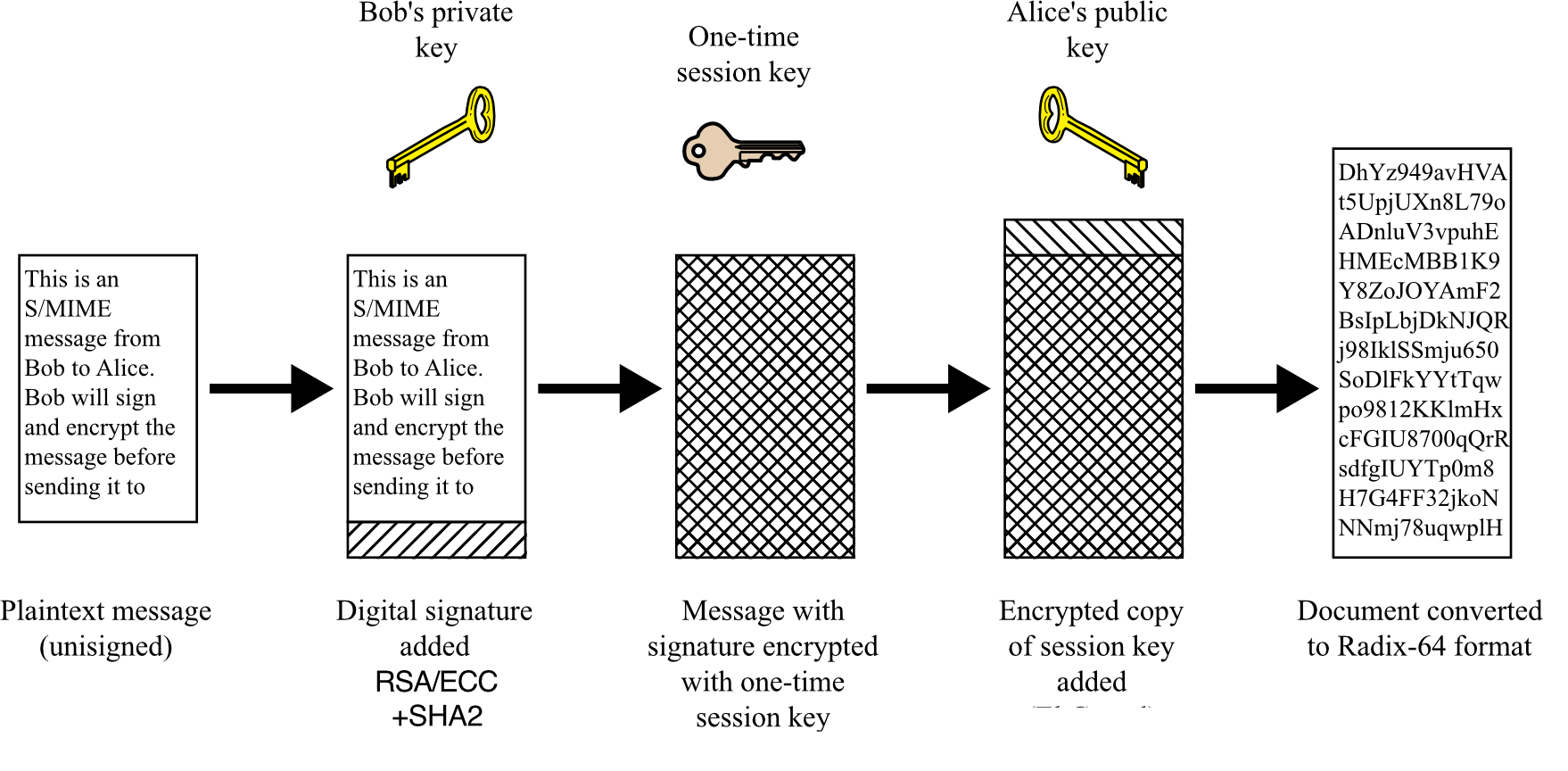
Steps (Bob → Alice):
- Plaintext message (unsigned)
- Digital signature added using Bob's private key → RSA/ECC + SHA-2
- Message + signature encrypted with a one-time session key (Triple DES / AES)
- Session key encrypted with Alice's public key (El Gamal / RSA)
- Document converted to Radix-64 (Base64) format for transmission
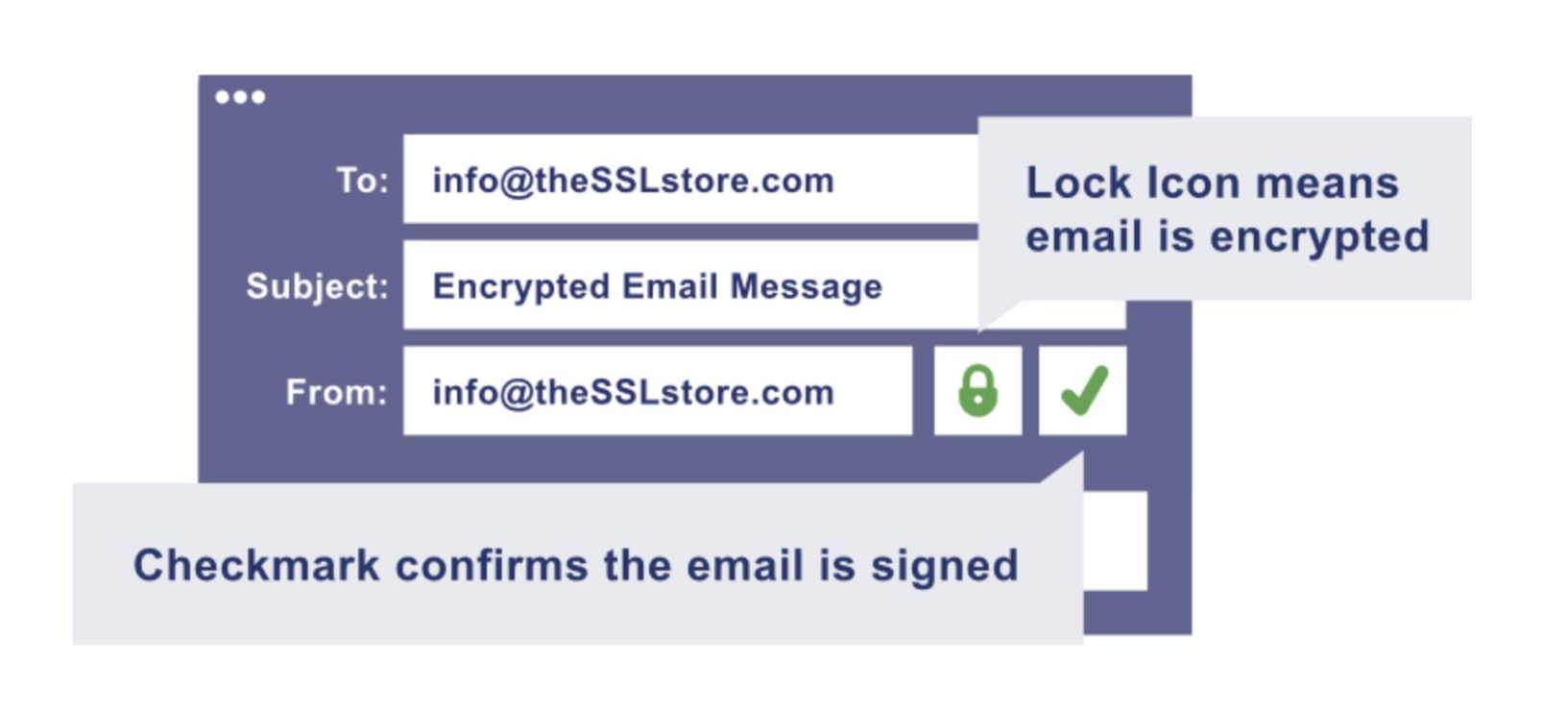
Signed and Clear-Signed Data
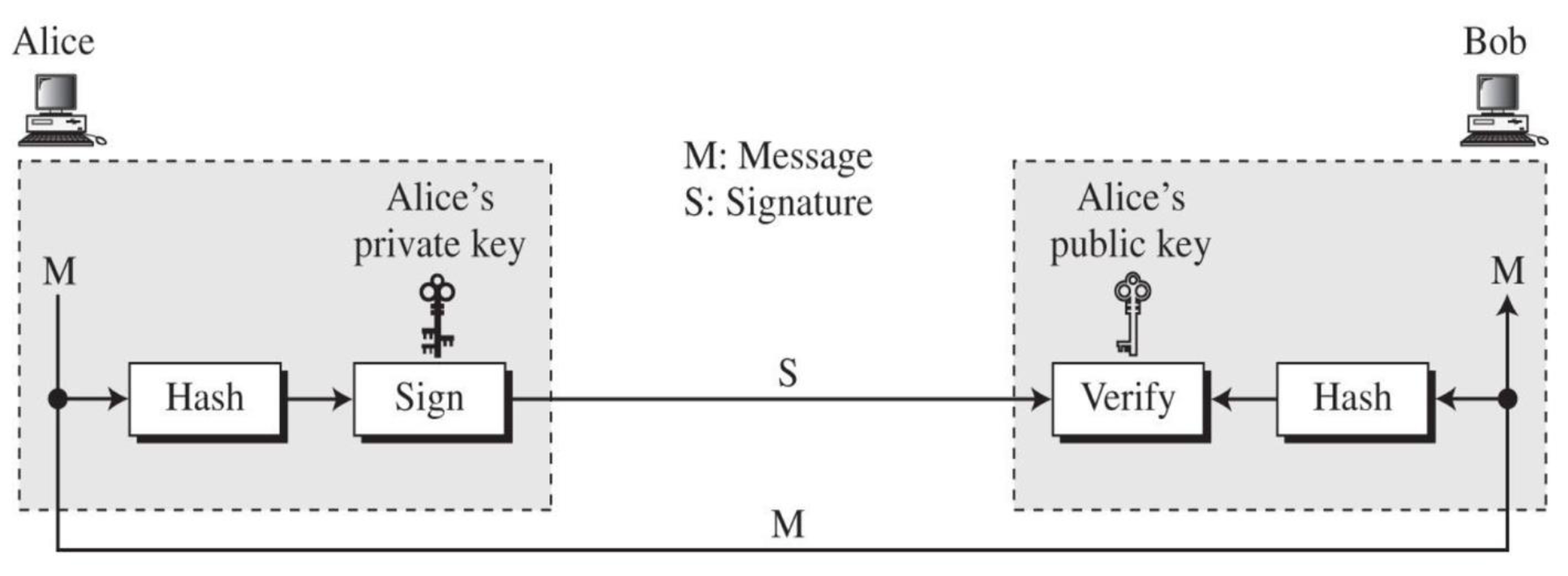
อย่าลืมรูปนี้นะ ถ้าลืมก็กลับไปดู Chapter 5 - Digital Signature and Certificates
- Default algorithms used for signing: RSA/ECC + SHA-2
- X.509 Certificate should be used by both sender and receiver
- Base64 mapping is used to map the signature and message into printable ASCII characters
S/MIME Public Key Certificates
- Default algorithm for encrypting S/MIME messages: AES
- If encryption is used alone, radix-64 converts ciphertext to ASCII
- RSA is commonly used for key encryption/signing
- The basic tool that permits widespread use of S/MIME is the public-key certificate
- ==S/MIME uses certificates conforming to X.509v3 standard==
X.509 Certificate Fields
- DN (Distinguished Name)
O= Organization (Citizen ID, Corporate ID)OU= Organization Unit (e.g., ICT, AC department)CN= Common Name (Personal: Name Surname; Organization: Company name e.g., SIIT, TU) → Certificate HolderC= Country (e.g., TH)StateEmail
- Public key
- Validity (expiry date)
- Fingerprint (Digital Signature)
- CRL distribution point — URL pointing to location of Certificate Revocation List (CRL)
Analogy: A certificate is like a national ID card — it has your name, photo (public key), expiry date, and an issuing authority's signature to prove it's authentic.
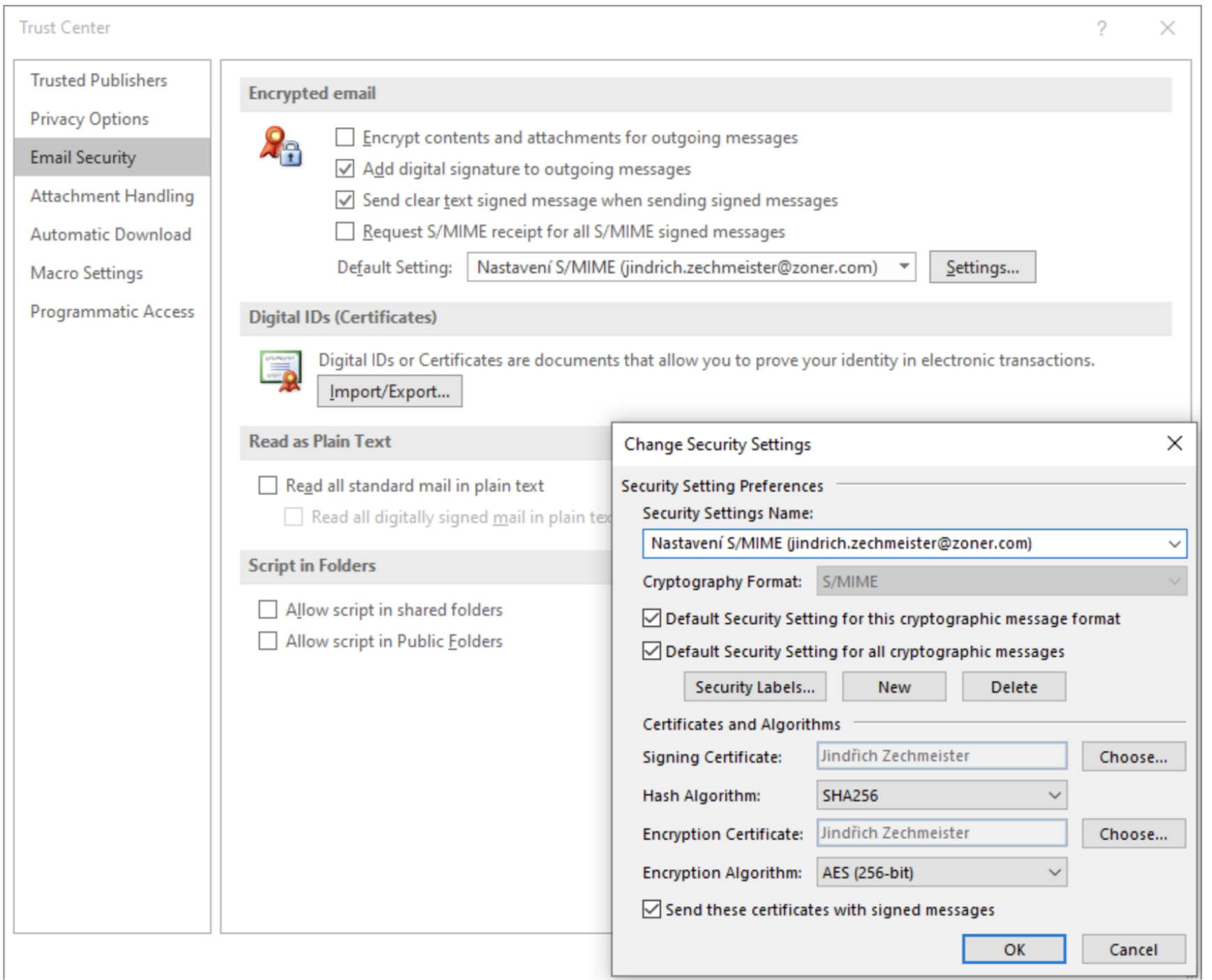
- เราต้อง import Receiver certificate (เพราะว่าจะเอา public key ไง)
- content ของ email จะ encrypted ด้วย symmetric key algorithm นะ อย่าง AES ไง
S/MIME Functions
| Function | Description |
|---|---|
| Enveloped data | Encrypted content + associated keys |
| Signed data | Encoded message (Base64) + signed digest |
| Clear-signed data | Cleartext message + encoded signed digest |
| Signed and enveloped data | Nesting of signed and encrypted entities |
S/MIME Example (Enveloped Data)
Content-Type: application/pkcs7-mime; mime-type=enveloped-data
Content-Transfer-Encoding: Radix-64
Content-Description: attachment
name="report.txt";
cb32ut67f4bhijHU21oi87eryb0287hmnklsgFDoY8bc659GhIGfH...
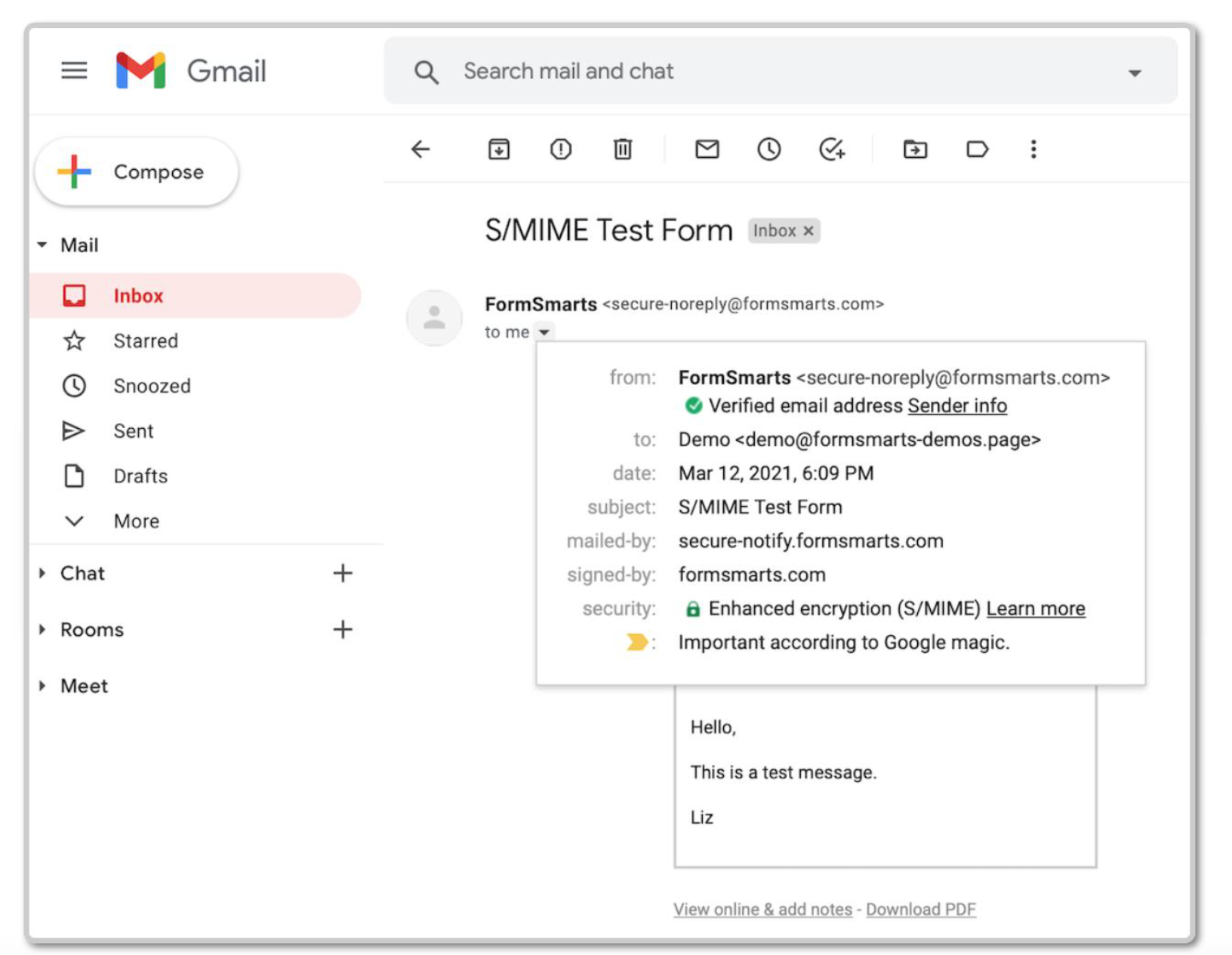
Managing S/MIME Certificates in Gmail
- The Gmail S/MIME API provides programmatic access to manage S/MIME email certificates for users in a Google Workspace domain
- An administrator must enable S/MIME for the domain
- Certificates must be uploaded to Gmail for hosted S/MIME encryption
- Certificate must meet current cryptographic standards and use PKCS #12 archive file format
SSL and TLS
Overview
- One of the most widely used security services
- General-purpose service implemented as a set of protocols that rely on TCP
- Subsequently became Internet standard: RFC 4346 – Transport Layer Security (TLS)
Two Implementation Choices:
- Provided as part of the underlying protocol suite
- Embedded in specific packages
Analogy: SSL/TLS is like a secure channel dug beneath a city street — all traffic using the road (HTTP, FTP, etc.) can optionally route through the secured tunnel underneath.
SSL vs TLS
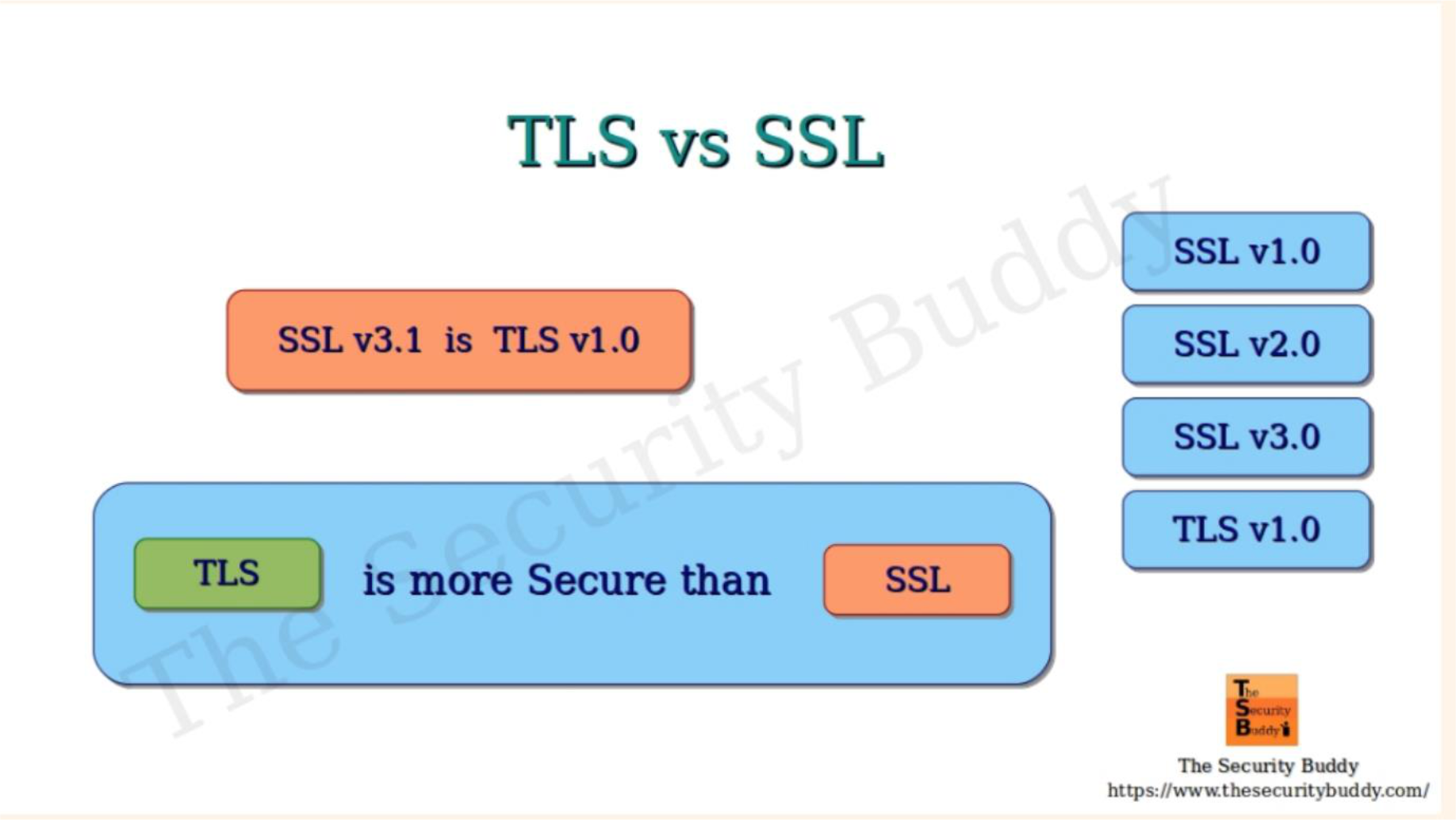
TLS > SSL แอบนะ ในเรื่องความปลอดภัย
| Aspect | SSL | TLS |
|---|---|---|
| Stands For | Secure Sockets Layer | Transport Layer Security |
| Version History | 1.0, 2.0, 3.0 | 1.0, 1.1, 1.2, 1.3 |
| Activity | All versions deprecated | 1.2 and 1.3 actively used |
| Alert Messages | Only 2 types, unencrypted | Encrypted and more diverse |
| Message Authentication | MACs | HMACs |
| Cipher Suites | Older algorithms with vulnerabilities | Advanced encryption algorithms |
| Handshake | Complex and slow | Fewer steps, faster |
Key fact: SSL v3.1 = TLS v1.0
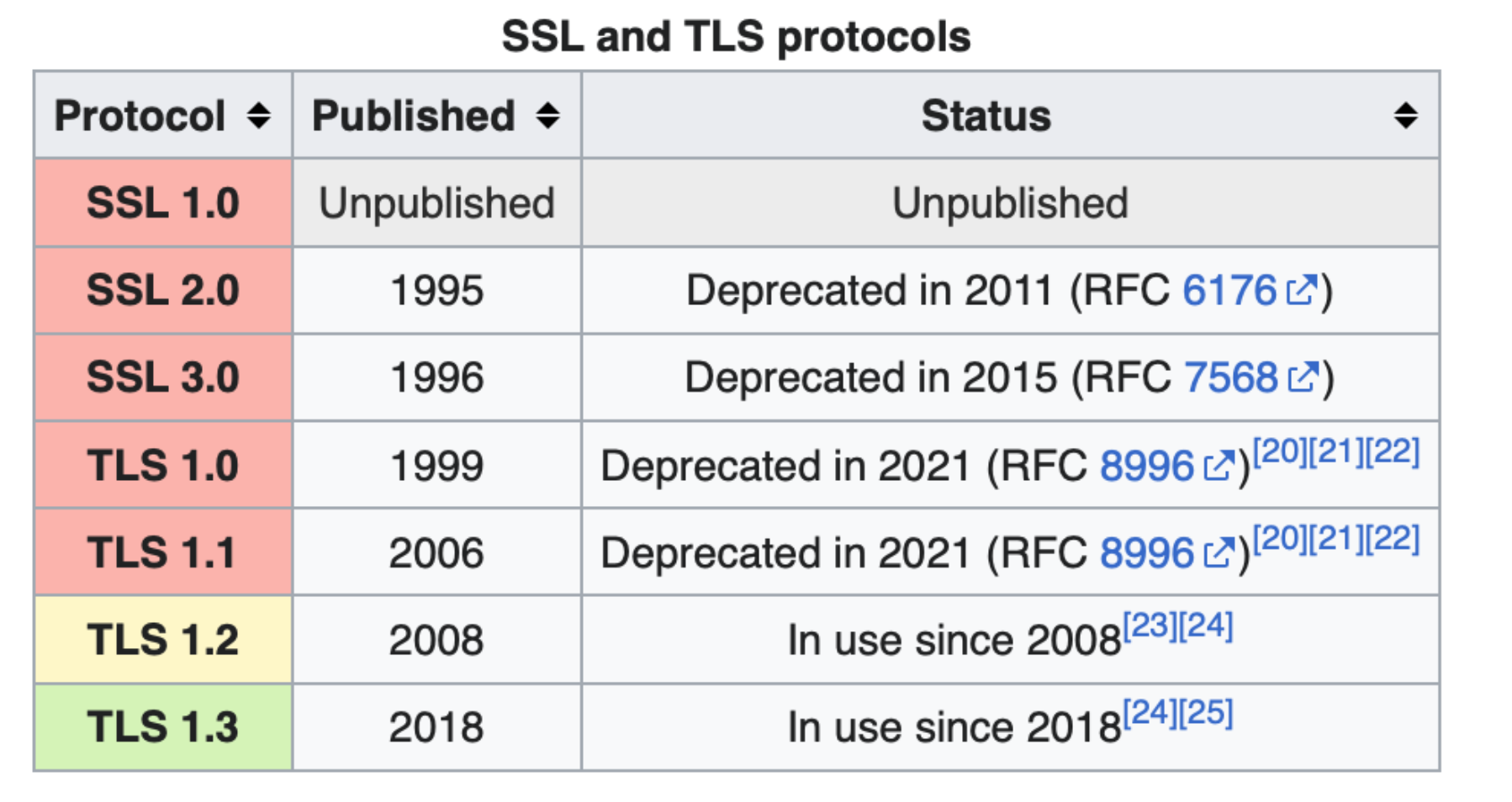
Protocol Status Table
| Protocol | Published | Status |
|---|---|---|
| SSL 1.0 | Unpublished | Unpublished |
| SSL 2.0 | 1995 | Deprecated 2011 (RFC 6176) |
| SSL 3.0 | 1996 | Deprecated 2015 (RFC 7568) |
| TLS 1.0 | 1999 | Deprecated 2021 (RFC 8996) |
| TLS 1.1 | 2006 | Deprecated 2021 (RFC 8996) |
| TLS 1.2 | 2008 | In use |
| TLS 1.3 | 2018 | In use |
Network Layers & Where TLS Fits
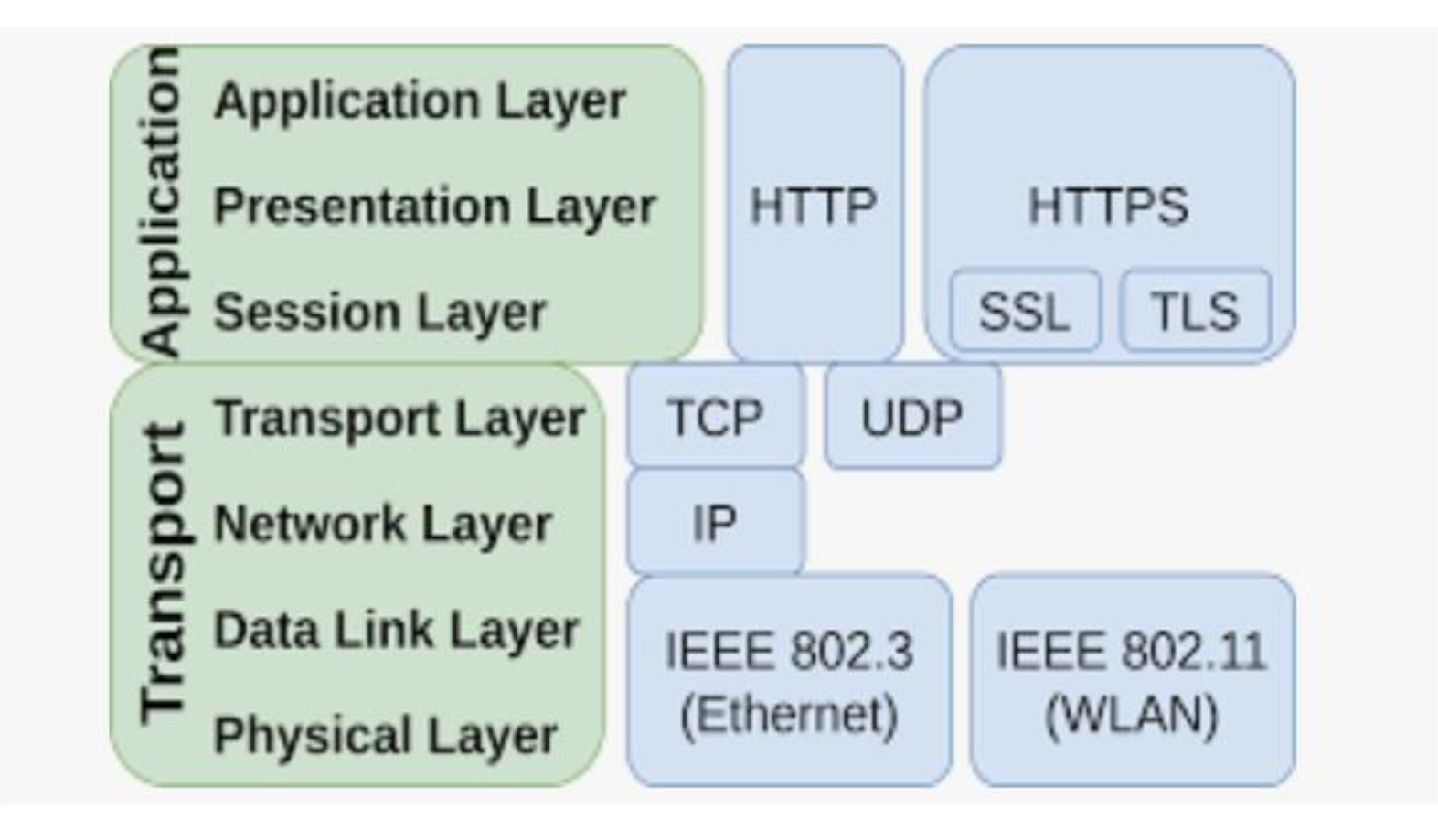
- TLS/SSL operates between the Application Layer and Transport Layer
- Sits above TCP, below HTTP
- HTTP + TLS = HTTPS
TLS 1.3 Cipher Suites
TLS 1.3 (RFC 8446) dramatically simplified cipher suites:
- Only 5 cipher suites defined (all strong)
- Removes support for RSA key exchange and static DH
- Uses AEAD ciphers (Authenticated Encryption with Associated Data)
- Always provides Forward Secrecy
| Cipher Suite | Notes |
|---|---|
TLS_AES_128_GCM_SHA256 | Default and widely supported |
TLS_AES_256_GCM_SHA384 | Stronger, higher overhead |
TLS_CHACHA20_POLY1305_SHA256 | Fast on mobile/low-power devices |
TLS_AES_128_CCM_SHA256 | Used in constrained environments |
TLS_AES_128_CCM_8_SHA256 | Shorter authentication tag |
Forward Secrecy
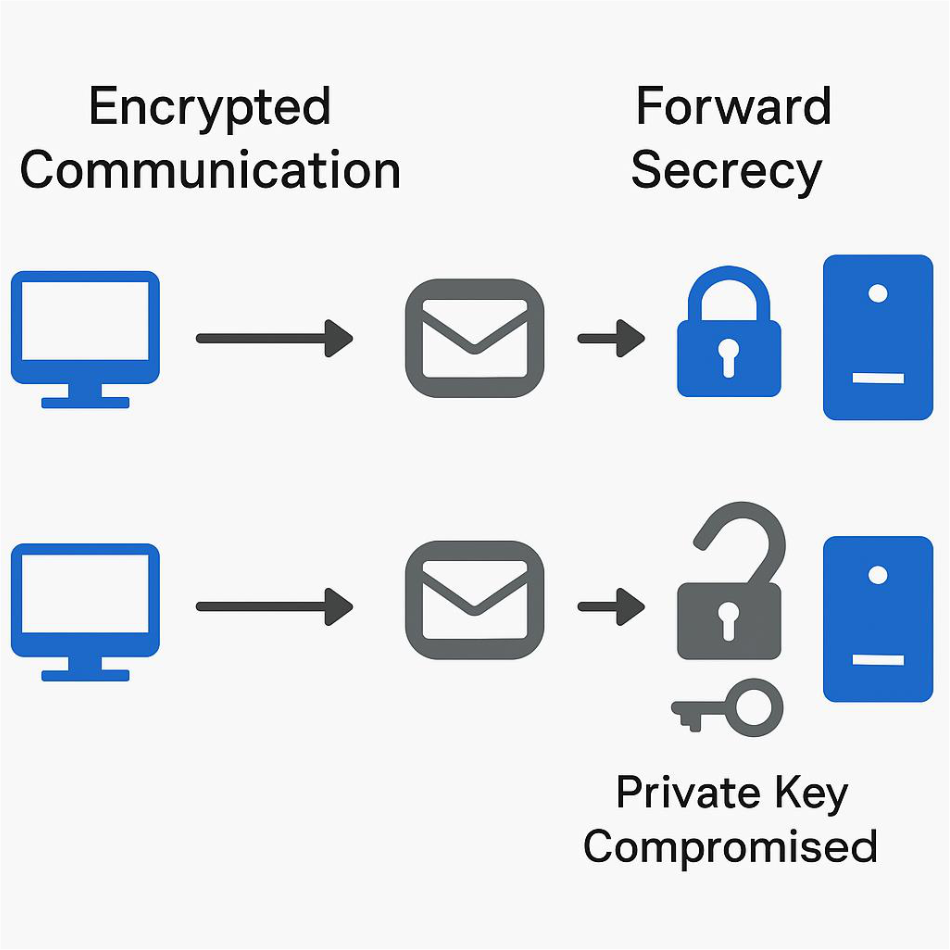
- Each session uses a unique, ephemeral encryption key (session key)
- Compromise of one key does not affect past sessions
Why it matters:
- Without Forward Secrecy: If attacker records traffic now and later gets the private key → can decrypt all past communications
- With Forward Secrecy: Even if private key is stolen later → previous sessions remain secure (temp key is gone)
| TLS Version | Forward Secrecy? | When Enabled |
|---|---|---|
| TLS 1.2 | Optional | Use DHE or ECDHE cipher suites |
| TLS 1.3 | Always Enabled | All key exchanges are ephemeral |
Analogy: Forward Secrecy is like using a different padlock for every box you send. Even if someone steals your master key, they still can't open the old boxes — because each was locked with a unique, now-destroyed key.
TLS Services
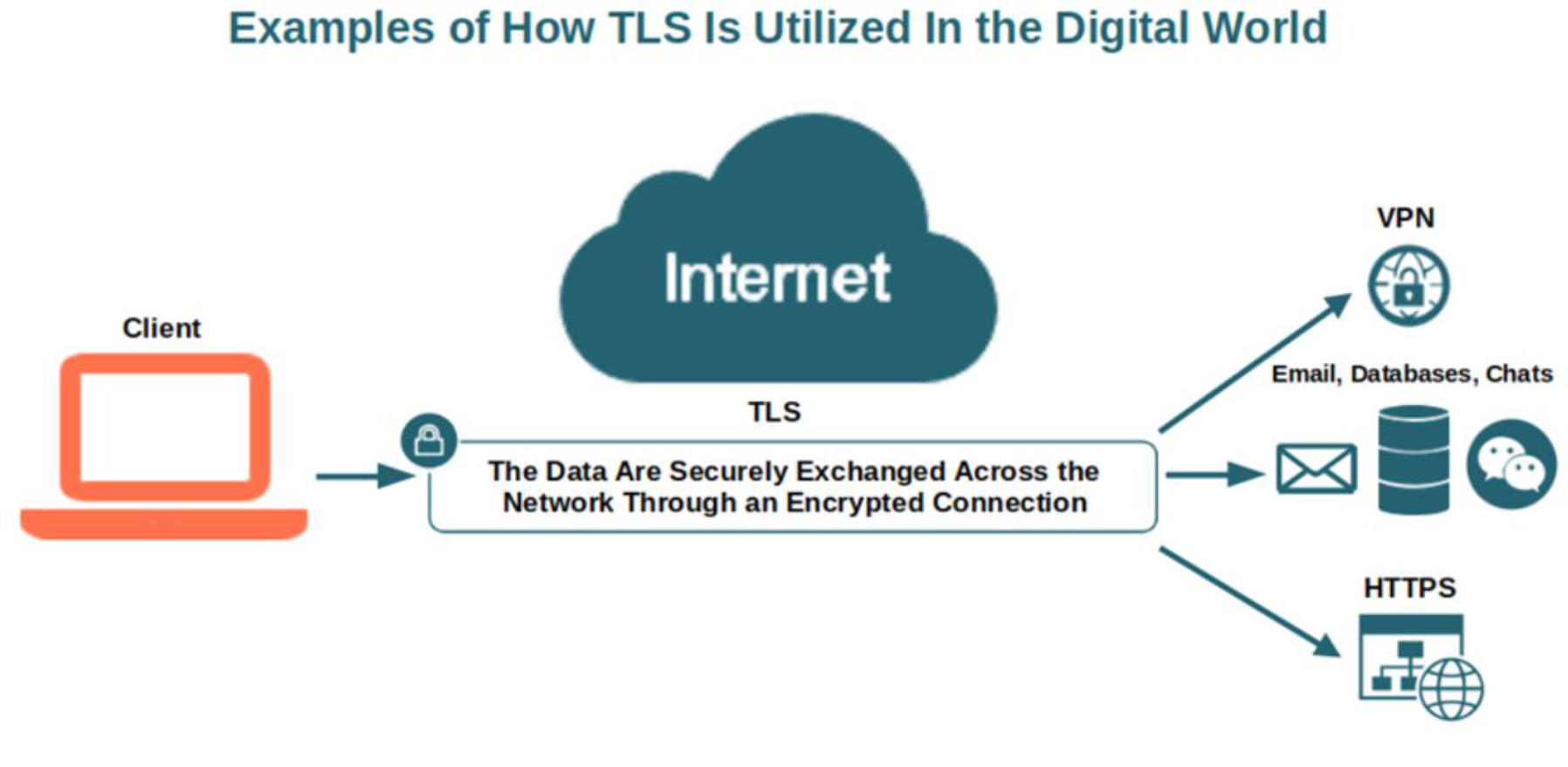
TLS provides three core services:
- Authentication — users know they're communicating with the legitimate party
- Data Integrity — users know data hasn't been modified since it was sent
- Encryption — data is secured; only authorized users can read it
SSL/TLS Protocol Stack
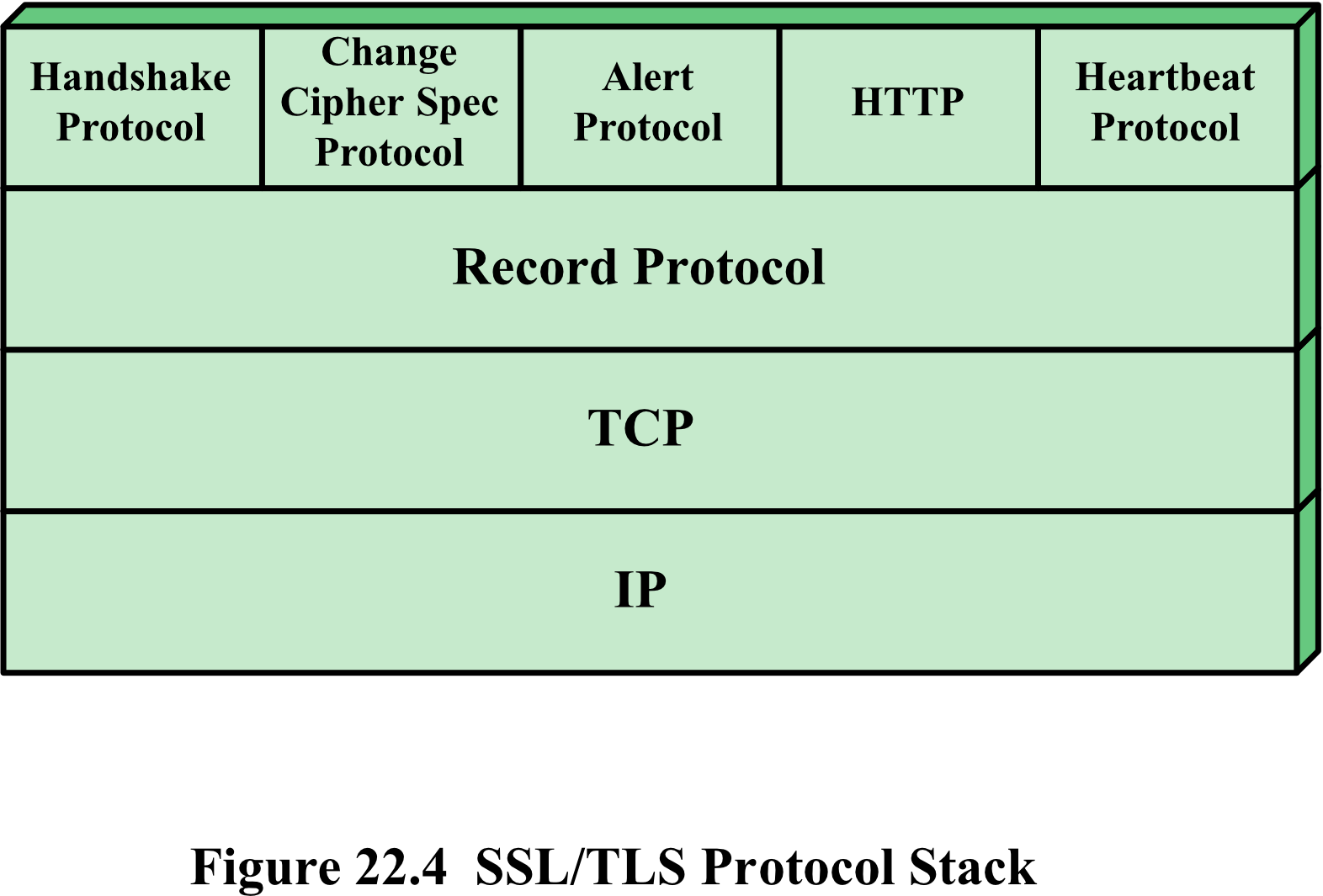
┌─────────────────────────────────────────────────────┐
│  Handshake │ Change Cipher │ Alert │ HTTP │ Heartbeat│
│  Protocol  │    Spec       │       │      │ Protocol │
├─────────────────────────────────────────────────────┤
│                    Record Protocol                   │
├─────────────────────────────────────────────────────┤
│                          TCP                        │
├─────────────────────────────────────────────────────┤
│                          IP                         │
└─────────────────────────────────────────────────────┘
TLS Concepts
TLS Session
- An association between a client and a server
- Created by the Handshake Protocol
- Defines a set of cryptographic security parameters
- Used to avoid expensive renegotiation of new parameters for each connection
TLS Connection
- A transport (OSI model definition) providing a suitable type of service
- Peer-to-peer relationships
- Client-server
- Transient
- Every connection is associated with one session
Analogy: A TLS Session is like a phone account setup (agreed once). A TLS Connection is like an individual phone call — you can make many calls on one account, but when the call ends, the line is gone.
TLS Record Protocol Operation
Image: Figure 22.5 TLS Record Protocol Operation
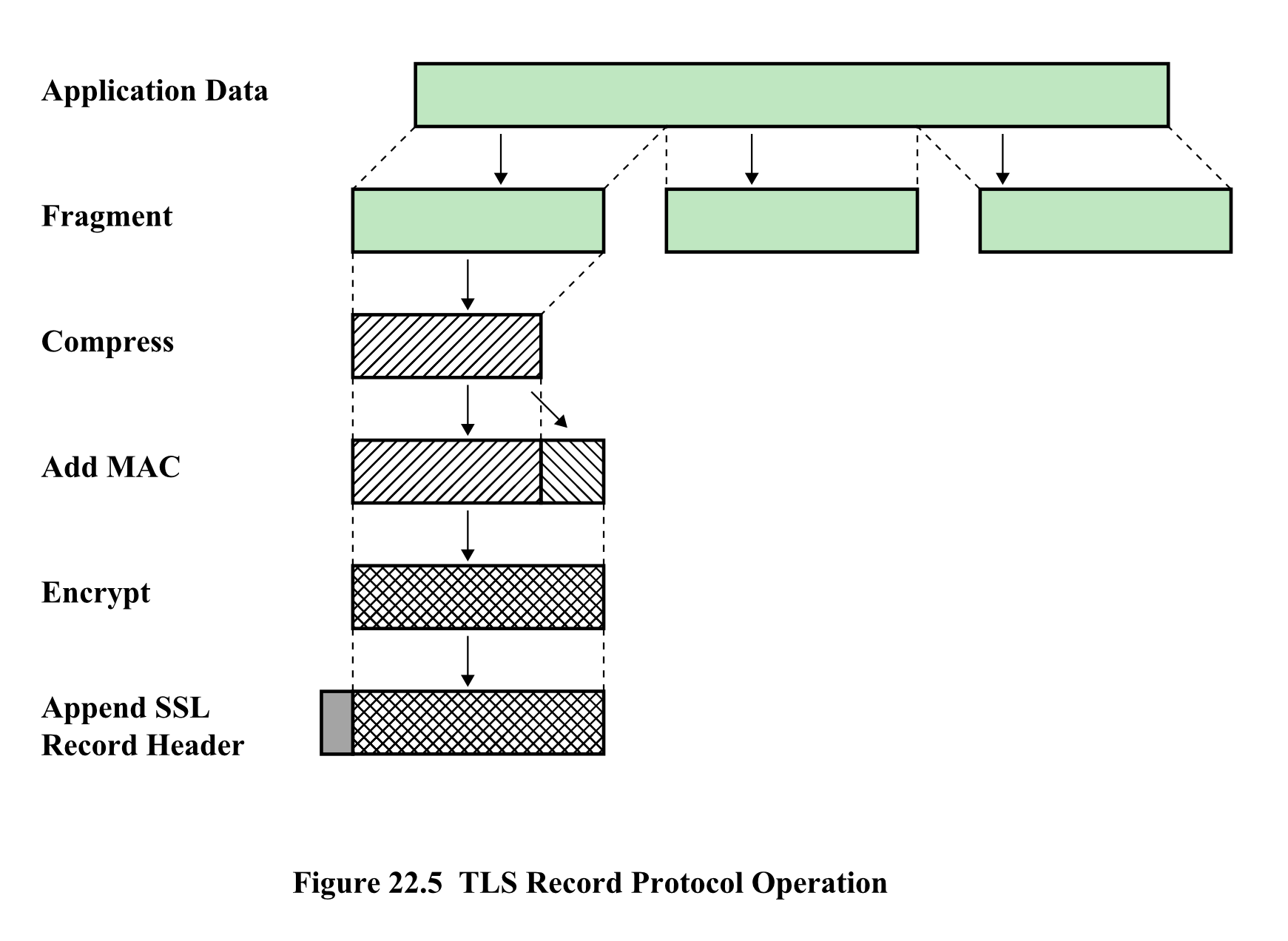
Steps:
- Fragment — Application data split into chunks
- Compress — (optional in older versions)
- Add MAC — Message Authentication Code appended
- ใส่มาทำไม? ก็สำหรับ Integrity check ไงง Chapter 2 - Symmetric Encryption
- Encrypt — Entire fragment encrypted
- Append SSL Record Header — Final record ready for transmission
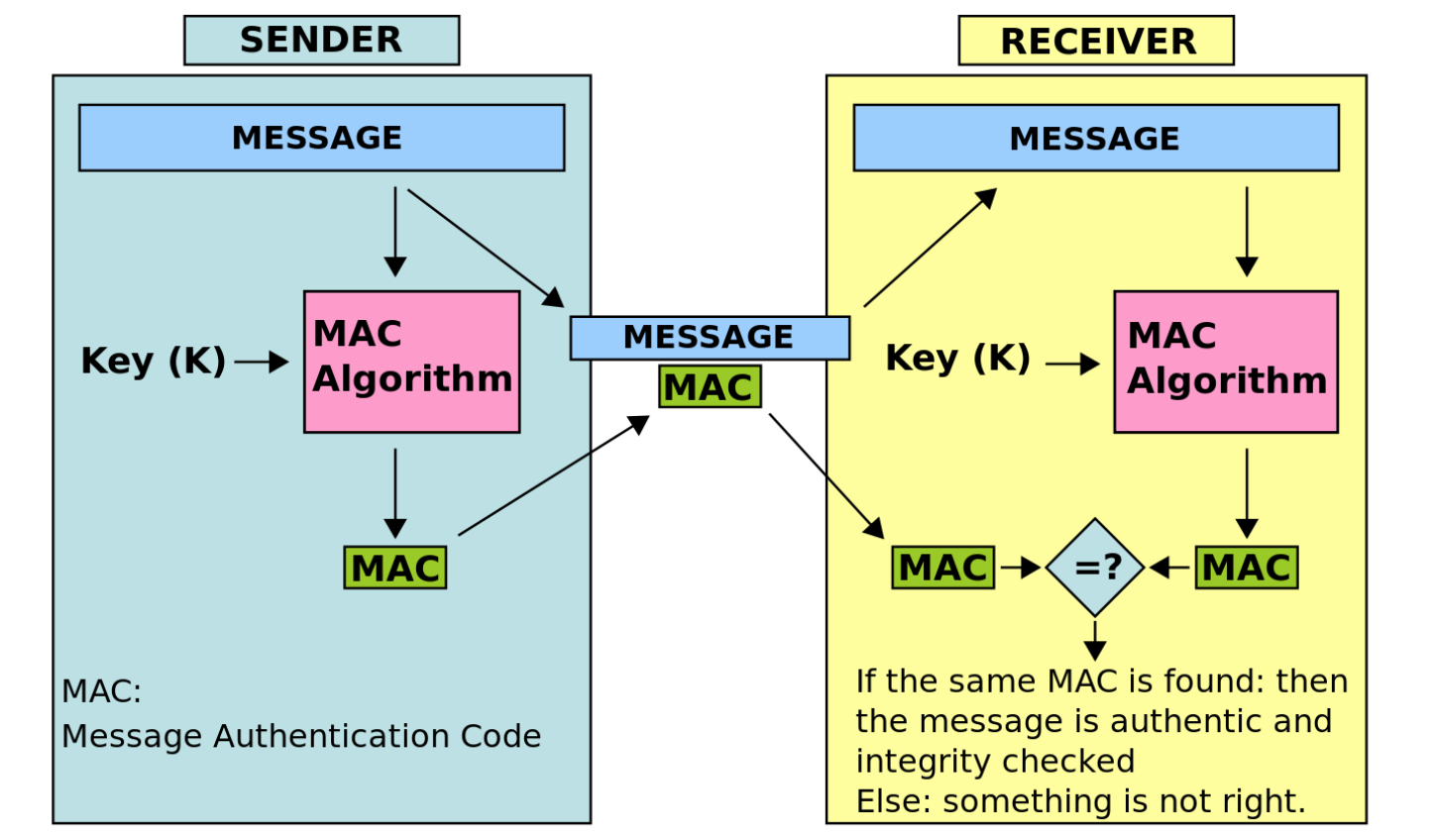
MAC vs HMAC in TLS
TLS 1.2 and earlier:
- Uses HMAC for integrity (e.g.,
HMAC-SHA256,HMAC-SHA384) - Example cipher suite:
TLS_ECDHE_RSA_WITH_AES_128_CBC_SHA256→ uses HMAC-SHA256
TLS 1.3:
- Does NOT use HMAC directly for record integrity
- ไม่ใช้แล้วจ้าาา555
- Uses AEAD ciphers (AES-GCM or ChaCha20-Poly1305)
- Because AEAD supports integrity and sender authentication too!
- MAC functionality is built into the AEAD cipher
What is AEAD?
AEAD = Authenticated Encryption with Associated Data
Combines:
- Confidentiality (encryption)
- Integrity (authentication/MAC)
- Optional: protection of unencrypted metadata ("associated data")
AEAD Equation in TLS 1.3
Encryption:
Where:
- = symmetric traffic key (derived from handshake secrets)
- = nonce (constructed per record):
- = plaintext (TLSInnerPlaintext)
- = associated data (record header)
- = ciphertext
- = authentication tag
Decryption:
- If tag verification fails → reject ()
TLS 1.3 AEAD Guarantees:
- IND-CPA confidentiality
- INT-CTXT integrity
- Replay protection (via sequence numbers) – protected by nonce น้าา
- No separate MAC → MAC-then-encrypt is removed
Change Cipher Spec Protocol
- One of four TLS-specific protocols that use the TLS Record Protocol
- The simplest protocol
- Consists of a single message = a single byte with value
1 - Used to indicate that communication is shifting from unencrypted to encrypted
- ถ้า Byte เปลี่ยนเป็น 1 → Encrypted state, and vice versa.
- New parameters are considered "pending" until the single byte is received
- Updates the cipher suite in use
Flow:
- Client Hello → Server Hello (Phase 1: negotiate)
- Key exchange + certificate verification (Phases 2–3)
- Client sends
change_cipher_spec→ "Let's start using what we negotiated" - Server responds with
change_cipher_spec
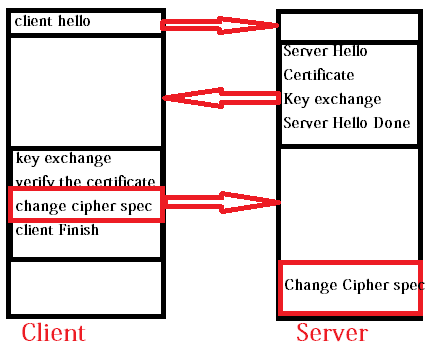
Analogy: It's like both sides agreeing to "switch to code language" — once you say the magic word (the single byte), all future messages use the new cipher.
Alert Protocol
- Conveys TLS-related alerts to the peer entity
- Alert messages are compressed and encrypted
- Each message consists of two bytes:
| Byte | Meaning |
|---|---|
| First byte | 1 = warning, 2 = fatal |
| Second byte | Code indicating the specific alert |
Alert Behavior:
- Fatal → TLS immediately terminates the connection; no new connections on this session
- Warning → Other connections on the same session may continue
Handshake Protocol 🤝
- The most complex part of TLS
- Used before any application data is transmitted
- Allows server and client to:
- Authenticate each other (ก็ certificate ไงล่ะะ)
- Negotiate encryption and MAC algorithms
- Negotiate cryptographic keys to be used
- Comprises a series of messages exchanged in four phases
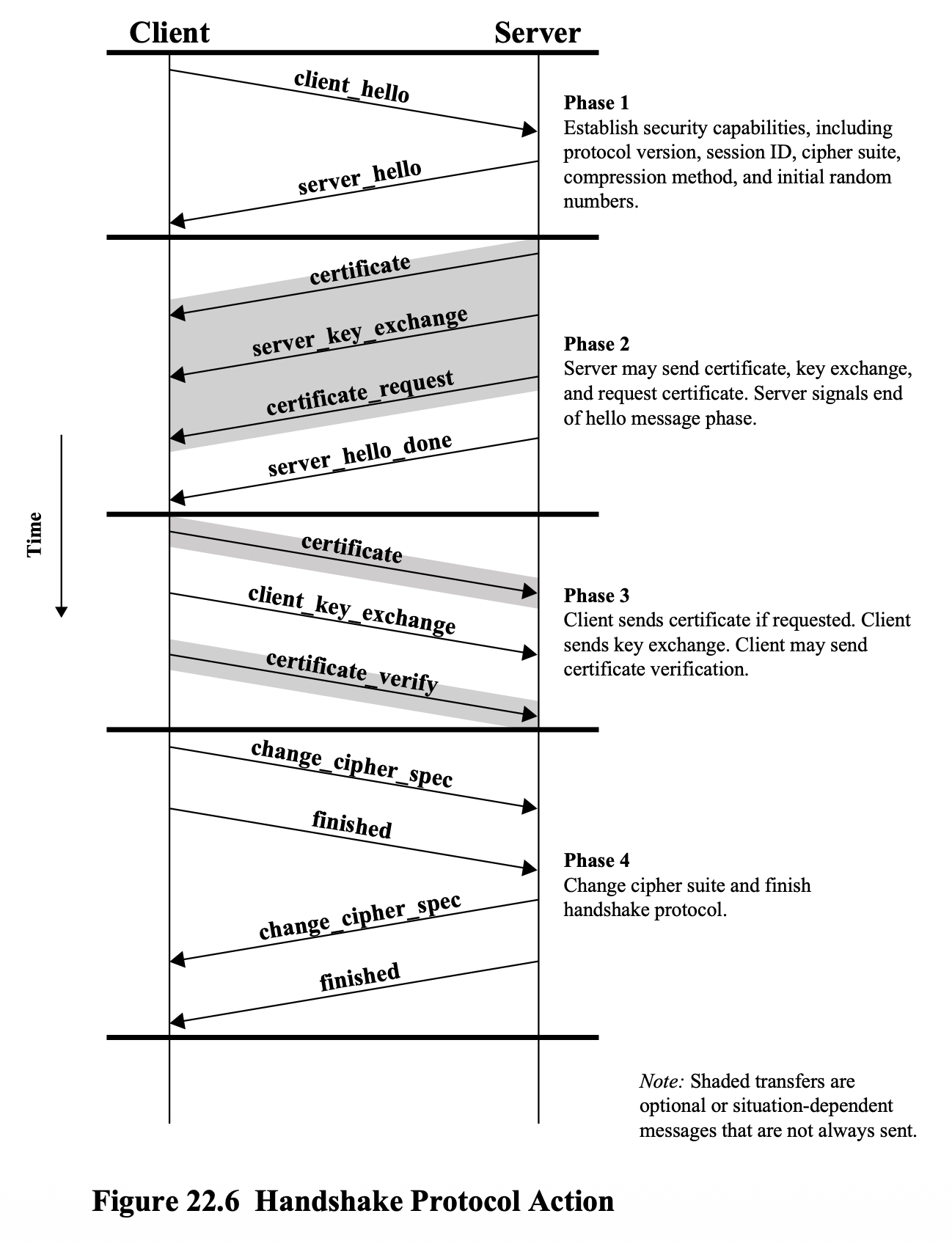
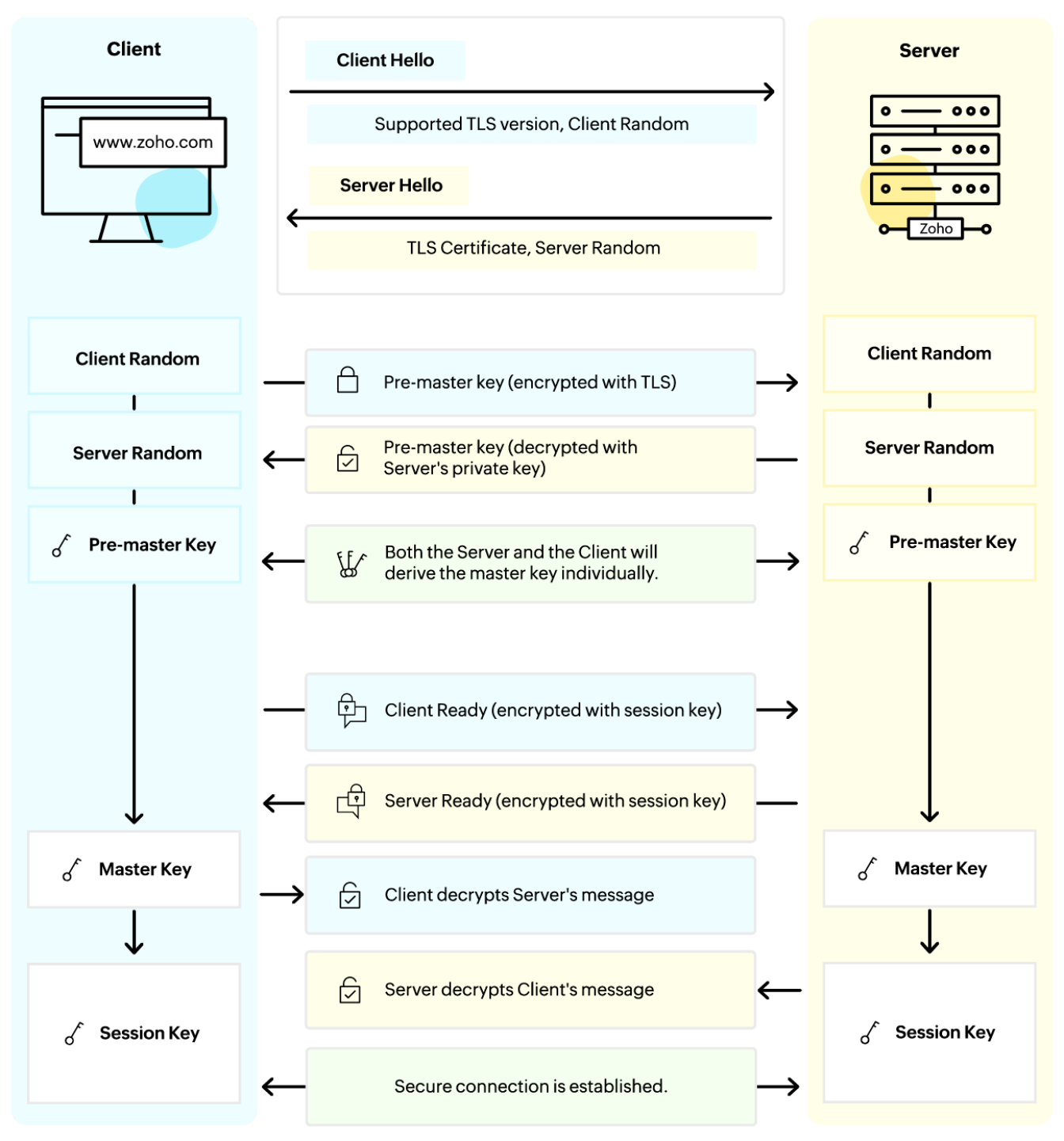
Image: Figure 22.6 Handshake Protocol Action
Phase 1 — Establish Security Capabilities
- Client sends
client_hello - Server responds with
server_hello - Negotiate: protocol version, session ID, cipher suite, compression method, random numbers
Phase 2 — Server Authentication and Key Exchange
- Server may send:
certificate,server_key_exchange,certificate_request - Server signals end with:
server_hello_done
Phase 3 — Client Authentication and Key Exchange
- Client sends
certificate(if requested) - Client sends
client_key_exchange - Client may send
certificate_verify
Phase 4 — Finish
- Both sides send
change_cipher_specandfinished
TLS Handshake Details
Client Hello
- Includes: TLS protocol version, cipher suites, Client Random
- Optional: Session ID, Compression Methods, Supported Extensions
Server Hello
- Includes: TLS version, selected cipher suite, Server Random
- Optional: Session ID, Compression Methods
Server Authentication
- Server presents its digital certificate
- Client validates against Certificate Authority (CA)
Premaster Key Generation
- Client generates a random premaster secret
- Unique for every TLS session → protects past sessions (Forward Secrecy)
Key Exchange
- Premaster secret encrypted with server's public key → sent to server
- Server decrypts with its private key
Session Key Generation
Both client and server compute this independently — must match.
Client/Server Finished
- Both send
finishedto confirm handshake is complete
Heartbeat Protocol
- A periodic signal to indicate normal operation or synchronize parts of a system
- Typically used to monitor availability of a protocol entity
- Defined in 2012, RFC 6520
- Runs on top of the TLS Record Protocol
- Use established during Phase 1 of Handshake Protocol
- Each peer indicates whether it supports heartbeats
Serves Two Purposes:
- Assures sender that recipient is still alive
- Generates activity across the connection during idle periods
SSL/TLS Attacks
Four general categories:
- จะมา Attack algorithm ไม่ได้ เช่น RSA (มันยังปลอดภัยอยู่ไง)
| Category | Description |
|---|---|
| Attacks on the Handshake Protocol | Exploit the negotiation phase, หรือว่าแบบ attack เพื่อเอา session key จะได้เอาไป decrypt ได้ ว่าคุยอะไรกันวะ |
| Attacks on the record and application data protocols | Exploit encrypted data handling |
| Attacks on the PKI | Target certificate infrastructure |
| Other attacks | Misc. side-channel, implementation flaws |
HTTPS (HTTP over SSL)
- Combination of HTTP and SSL to implement secure communication between a web browser and web server
- Built into all modern web browsers
- URL addresses begin with
https://
- URL addresses begin with
- Documented in RFC 2818: HTTP Over TLS
- The HTTP client also acts as the TLS client
- Closing HTTPS requires TLS to close the connection with the peer, which involves closing the underlying TCP connection
SSL Certificate Types:
Level of certificate → level of cryptography is the same, but validation process is more strict.
- Normal SSL — standard validation
- EV-SSL (Extended Validation SSL) — more rigorous validation process; higher trust
Analogy: HTTPS is HTTP wearing a security badge — every packet is encrypted and authenticated before it leaves the building.
A Certificate Signing Request (CSR) is a Base-64 encoded block of text generated on a server that contains public key information and identifying details (domain name, organization, location)
IP Security (IPsec)
หายเยอะเลย ไปตามหามา benefits of IPsec ก็หาย
มีคนเคยบอกว่า VPN is a technique to bypass firewall, แต่จริง ๆ not 100% true
แต่เวลาเรา configure firewall เราต้องระบุไงว่าให้ VPN access ได้มั้ย
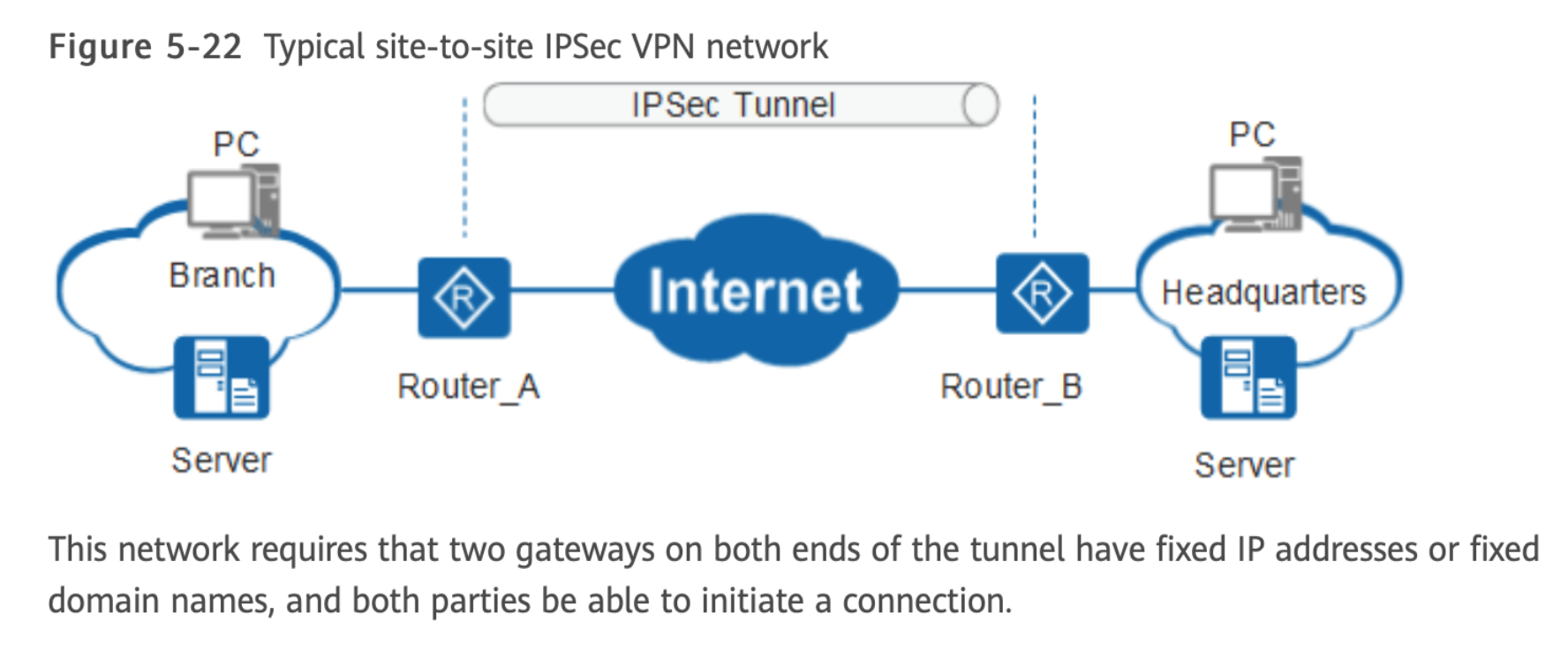
- Used to secure IP packets between hosts or networks — often in VPNs
- Security concerns cross protocol layers
- Provides security at the network layer → transparent to applications above
- Authentication and encryption features included in IPv6; also usable in IPv4
- ที่ Highlight ออกสอบแน่!
IPsec Provides Three Things:
| Function | Description |
|---|---|
| Authentication | Assures that a received packet was transmitted by the identified source and not altered in transit |
| Confidentiality | Encrypts messages to prevent eavesdropping by third parties |
| Key Management | Secure exchange of keys — provided by IKEv2 |
The Scope of IPsec
Two Main Functions:
- ESP (Encapsulating Security Payload) — combined authentication/encryption
- IKE (Internet Key Exchange) — key exchange function
Also:
- AH (Authentication Header) — authentication-only function
- AH included in IPsecv3 for backward compatibility
- Should NOT be used in new applications (ESP already provides authentication)
VPNs want both authentication and encryption → Use ESP
Internet Key Exchange (IKE)
IKE is a key management protocol used with IPsec to securely establish, negotiate, and maintain encrypted communication channels (Security Associations – SAs).
Functions:
- Establish secure communication channels
- Exchange cryptographic keys
- Authenticate communicating parties
IKE Phase I (for Security Gateways):
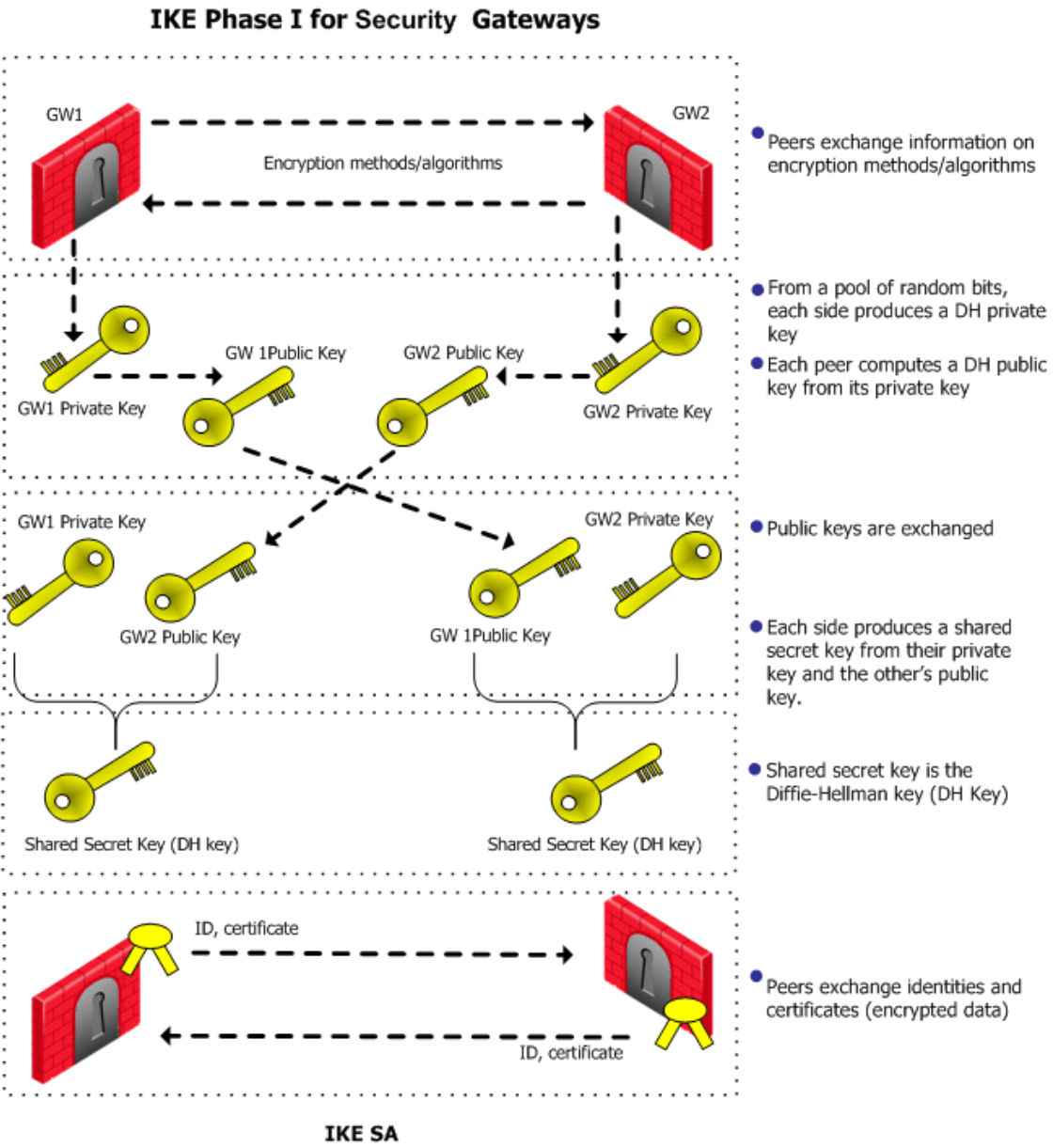
- Peers exchange information on encryption methods/algorithms
- Each side generates a DH private key from random bits
- Each peer computes a DH public key from its private key
- Public keys are exchanged
- Each side produces a shared secret from their private key + other's public key → Diffie-Hellman key
- Peers exchange identities and certificates (encrypted)
- → IKE SA established
VPN Security Based on IPsec
- A VPN creates a secure private tunnel through a public network
- IPsec in VPN requires:
- Authentication → to assure unauthorized users do not penetrate the VPN
- Encryption → to assure eavesdroppers/attackers on the internet cannot read messages
L2TP (Layer 2 Tunneling Protocol)
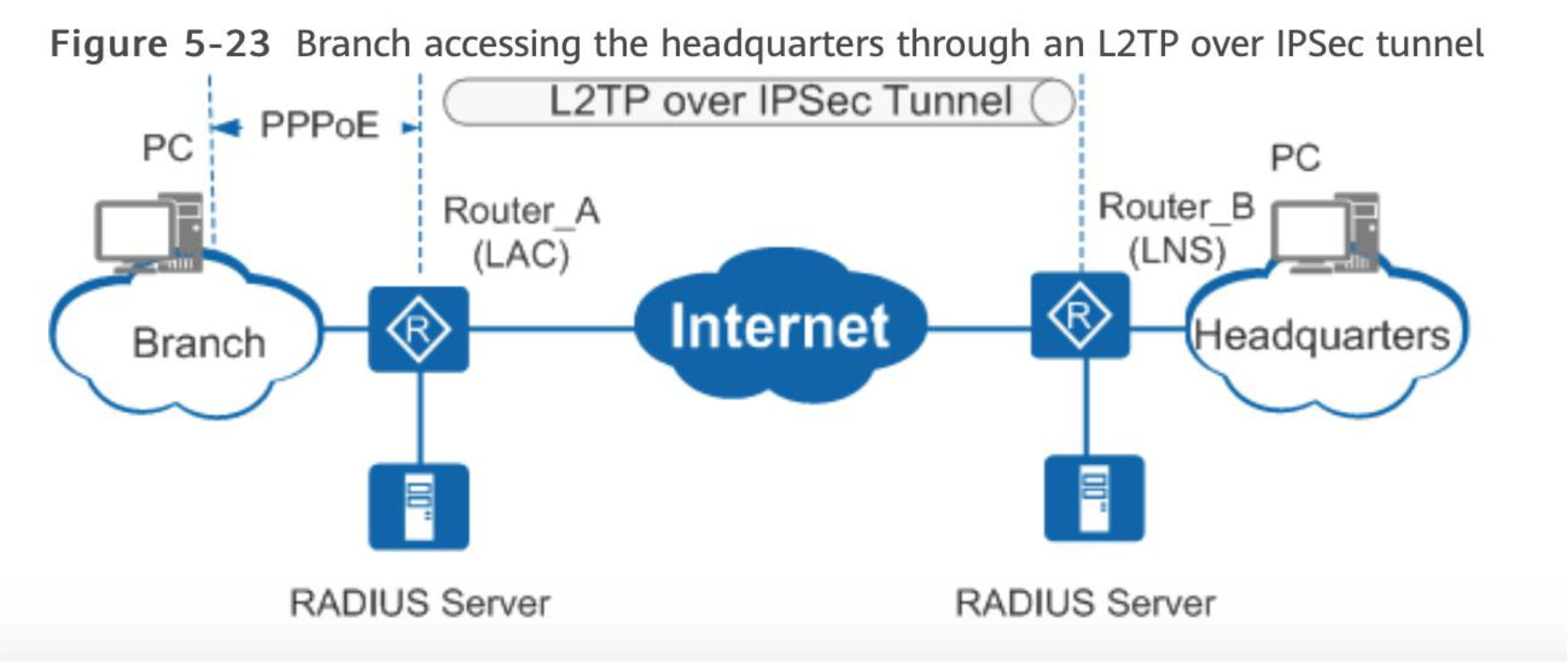
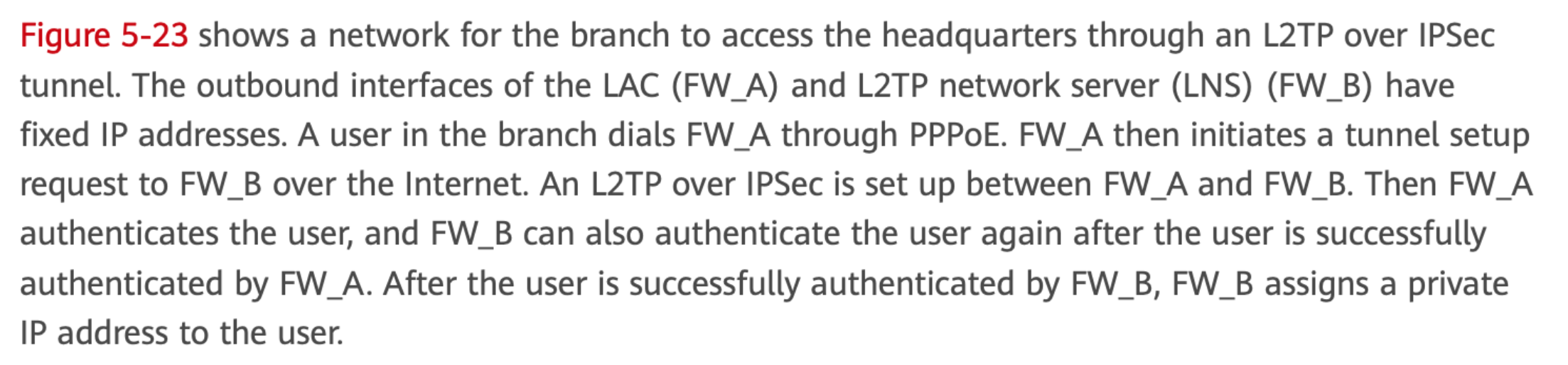
- Tunneling protocol used to create a virtual tunnel between a client and a VPN server
- Operates at Layer 2 (Data Link Layer)
- Encapsulates PPP (Point-to-Point Protocol) frames
- Uses UDP port 1701
- No encryption! (tunneling only)
Process:
- User connects to ISP or network
- L2TP creates a tunnel to VPN server
- PPP frames are encapsulated inside L2TP
- Data is transmitted through the tunnel (not encrypted)
L2TP/IPsec Combined:
- L2TP → provides tunneling
- IKE → negotiates keys
- IPsec → provides security (encryption)
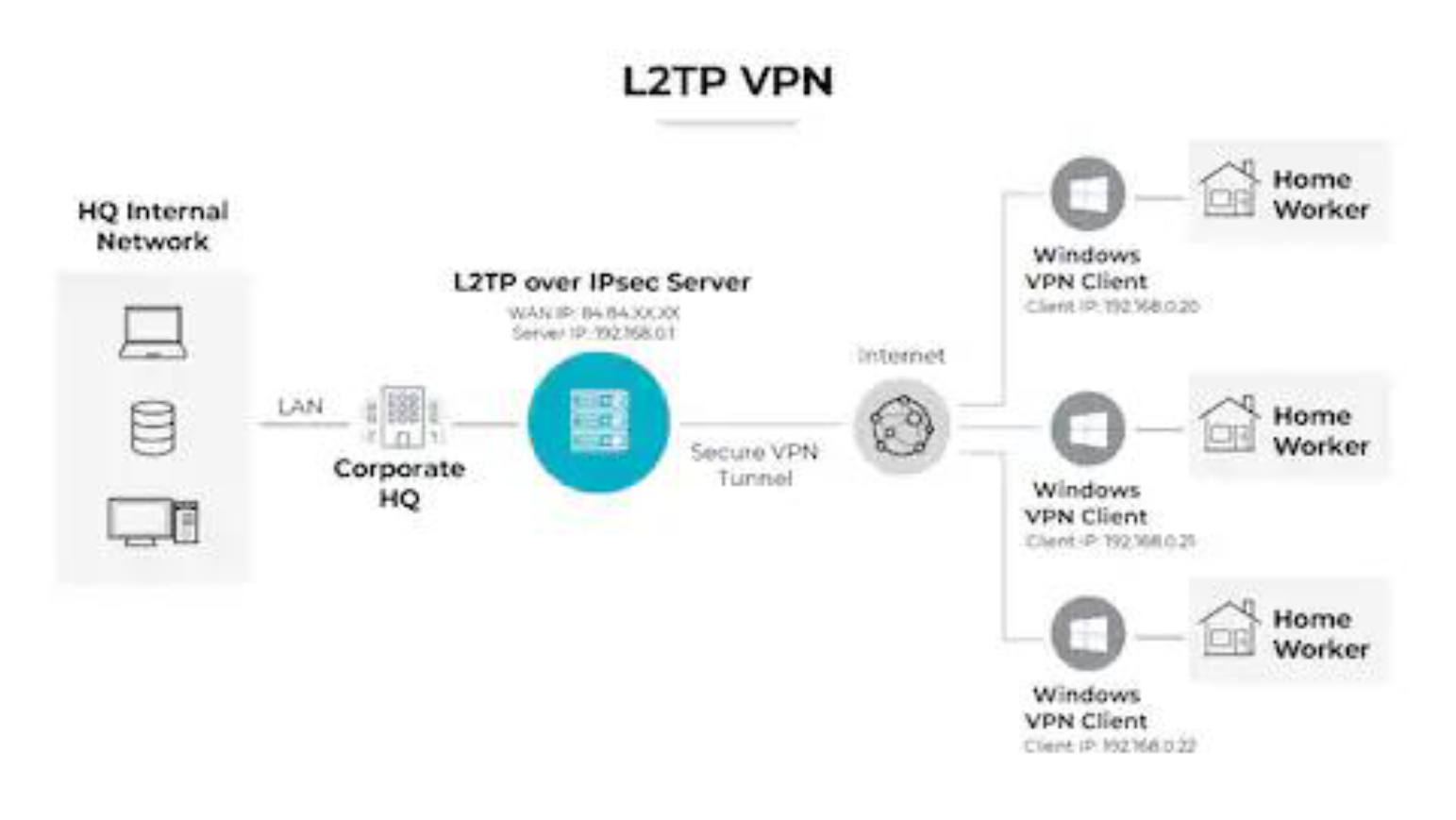
How L2TP/IPsec Works:
Original Data
  → PPP
  → L2TP
  → IPsec (ESP encryption)
  → IP packet
Security Associations (SA)
- A one-way relationship between sender and receiver that affords security for traffic flow
- Two-way secure exchange requires two SAs
- Uniquely identified by Destination Address + SPI in the extension header (AH or ESP)
Defined by 3 Parameters:
| Parameter | Description |
|---|---|
| Security Parameter Index (SPI) | Identifies the SA |
| IP Destination Address | Target of the SA |
| Protocol Identifier | AH or ESP |
IPsec ESP Format
Image: Figure 22.8 IPSec ESP Format
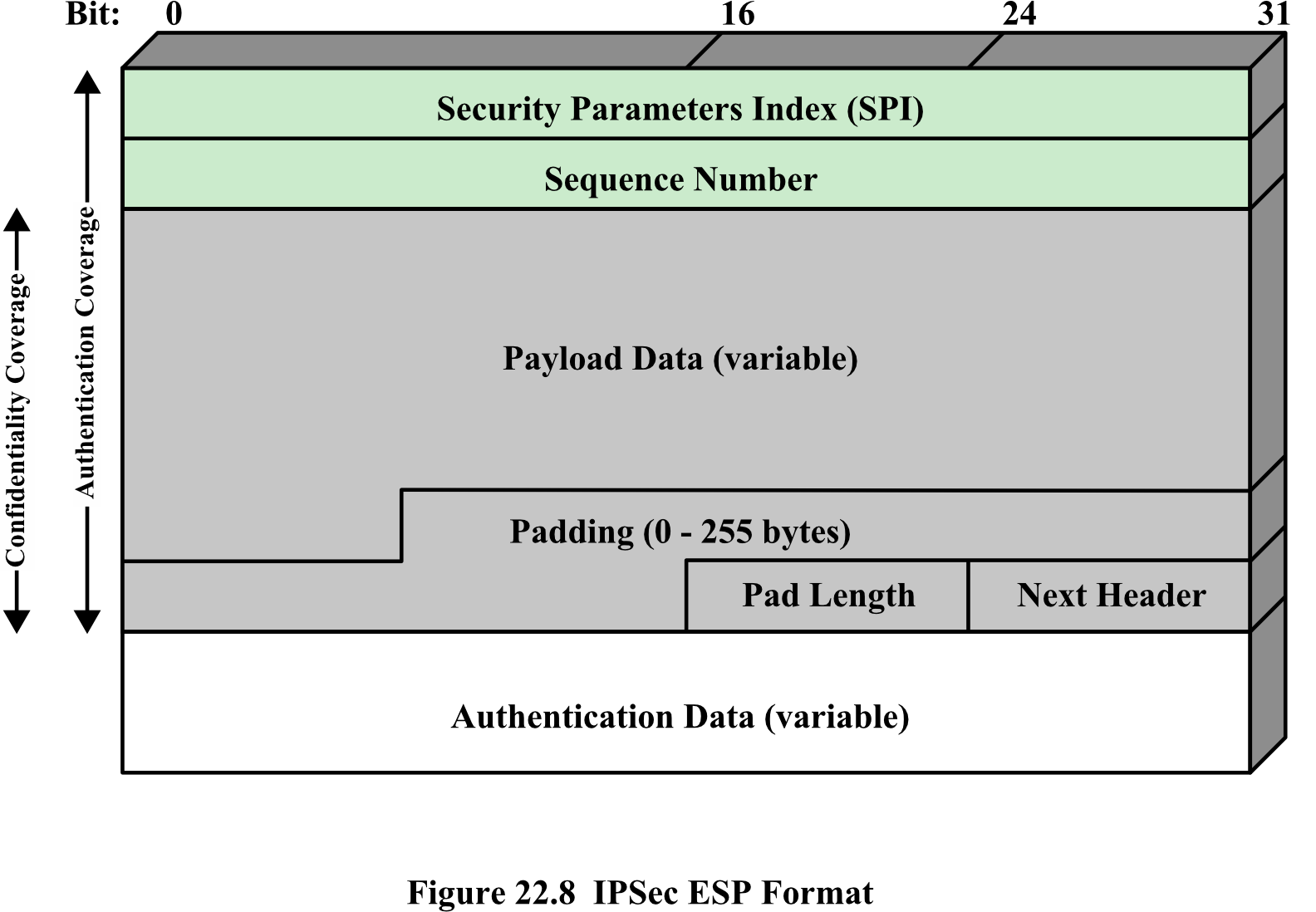
Fields:
┌──────────────────────────────────────────┐
│        Security Parameters Index (SPI)   │ ← Authentication Coverage
├──────────────────────────────────────────┤
│              Sequence Number             │ ← Authentication Coverage
├──────────────────────────────────────────┤  ┐
│           Payload Data (variable)        │  │ Confidentiality
├──────────────────────────────────────────┤  │ + Authentication
│          Padding (0-255 bytes)           │  │
├───────────────────┬──────────────────────┤  │
│    Pad Length     │     Next Header      │  ┘
├──────────────────────────────────────────┤
│       Authentication Data (variable)     │
└──────────────────────────────────────────┘
Transport vs. Tunnel Modes
| Aspect | Transport Mode | Tunnel Mode |
|---|---|---|
| IP Payload | Encrypted | Encrypted |
| IP Header | Not encrypted | Encrypted |
| IP Header Usage | Original IP header used for routing | New IP header wraps the encrypted original |
| Use Case | Host-to-host communication | Network-to-network (VPN) |
| Protection | Payload from end to end | Entire IP packet |
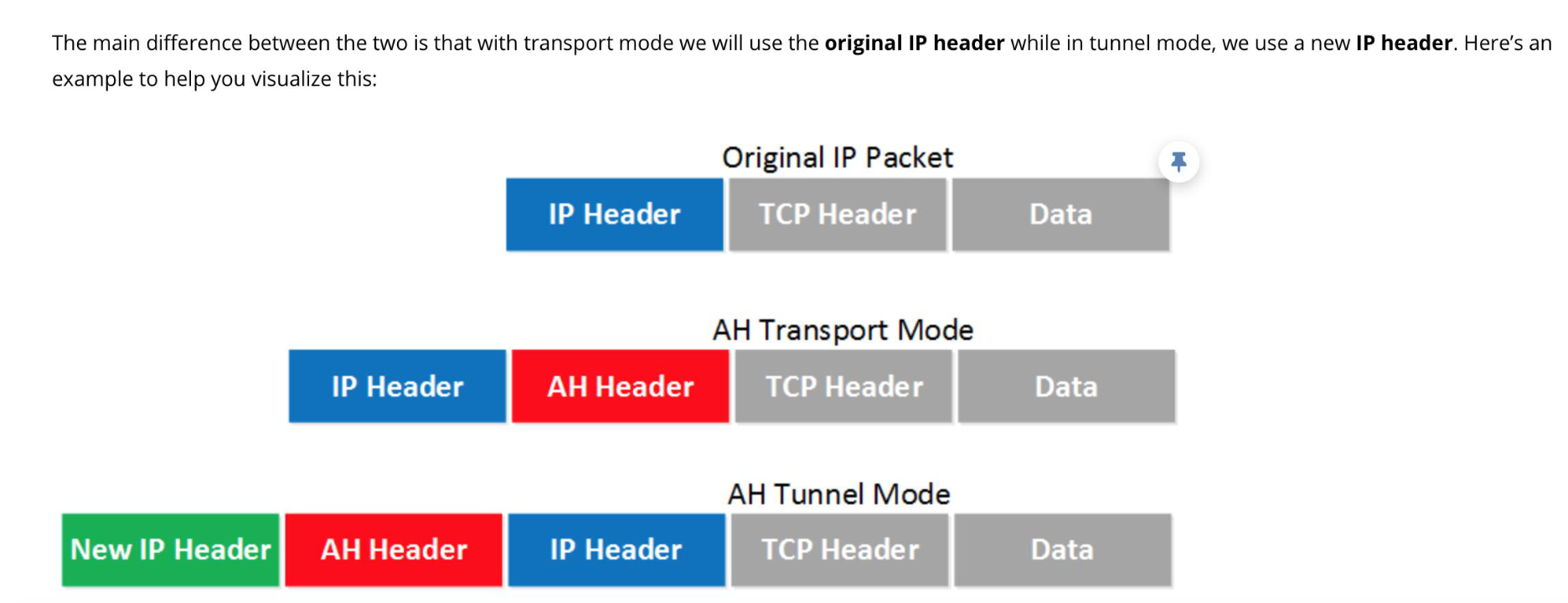 |
Analogy: Transport Mode is like sealing the letter inside an envelope but leaving the address label visible. Tunnel Mode is like putting that envelope inside another envelope with a new address — the original is completely hidden.
Kerberos Overview
- Initially developed at MIT
- Available in public domain and commercially supported versions
- Issued as an Internet standard — de facto standard for remote authentication
- Overall scheme: trusted third-party authentication service
- Requires that a user prove identity for each service invoked
- Servers must also prove their identity to clients
Kerberos Protocol
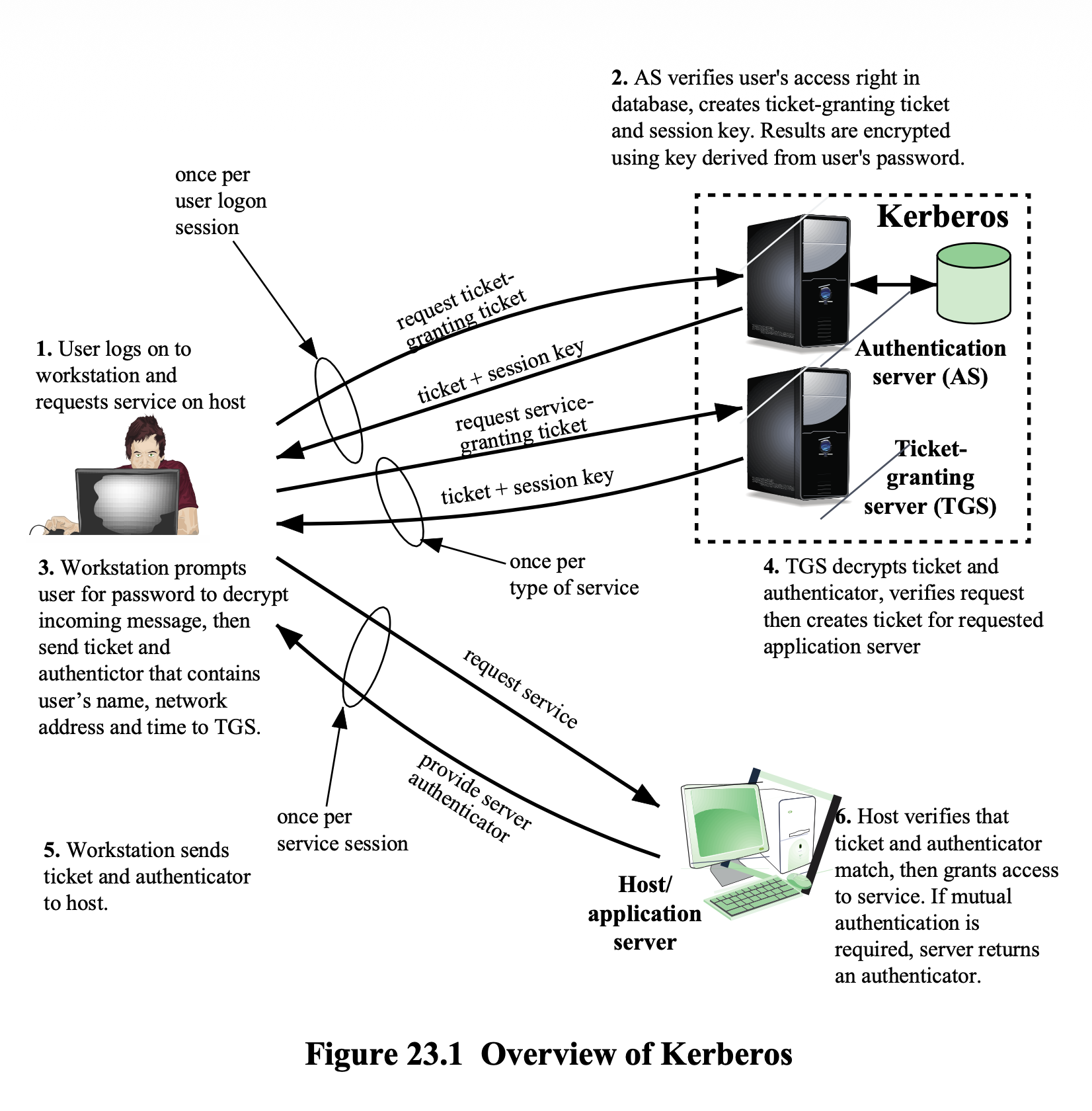
Involves:
- Clients
- Application Servers
- Kerberos Server (AS + TGS)
Key Concern:
- Sending password directly over network → opponent could observe it
- Opponent could impersonate AS → need a secure way
Flow:
- User logs on and requests service on host
- AS verifies user's access rights → creates Ticket-Granting Ticket (TGT) + session key; encrypted with key derived from user's password
- Workstation prompts user for password to decrypt → sends TGT + authenticator (name, network address, time) to TGS
- TGS decrypts and verifies → creates ticket for requested application server
- Workstation sends ticket + authenticator to host
- Host verifies ticket and authenticator → grants access (optionally returns authenticator for mutual authentication)
Analogy: Kerberos is like an amusement park — you check in at the gate (AS) and get a wristband (TGT), then show it at each ride booth (TGS) to get a specific ride ticket, so you don't need to verify your identity at every single ride.
Kerberos Realms
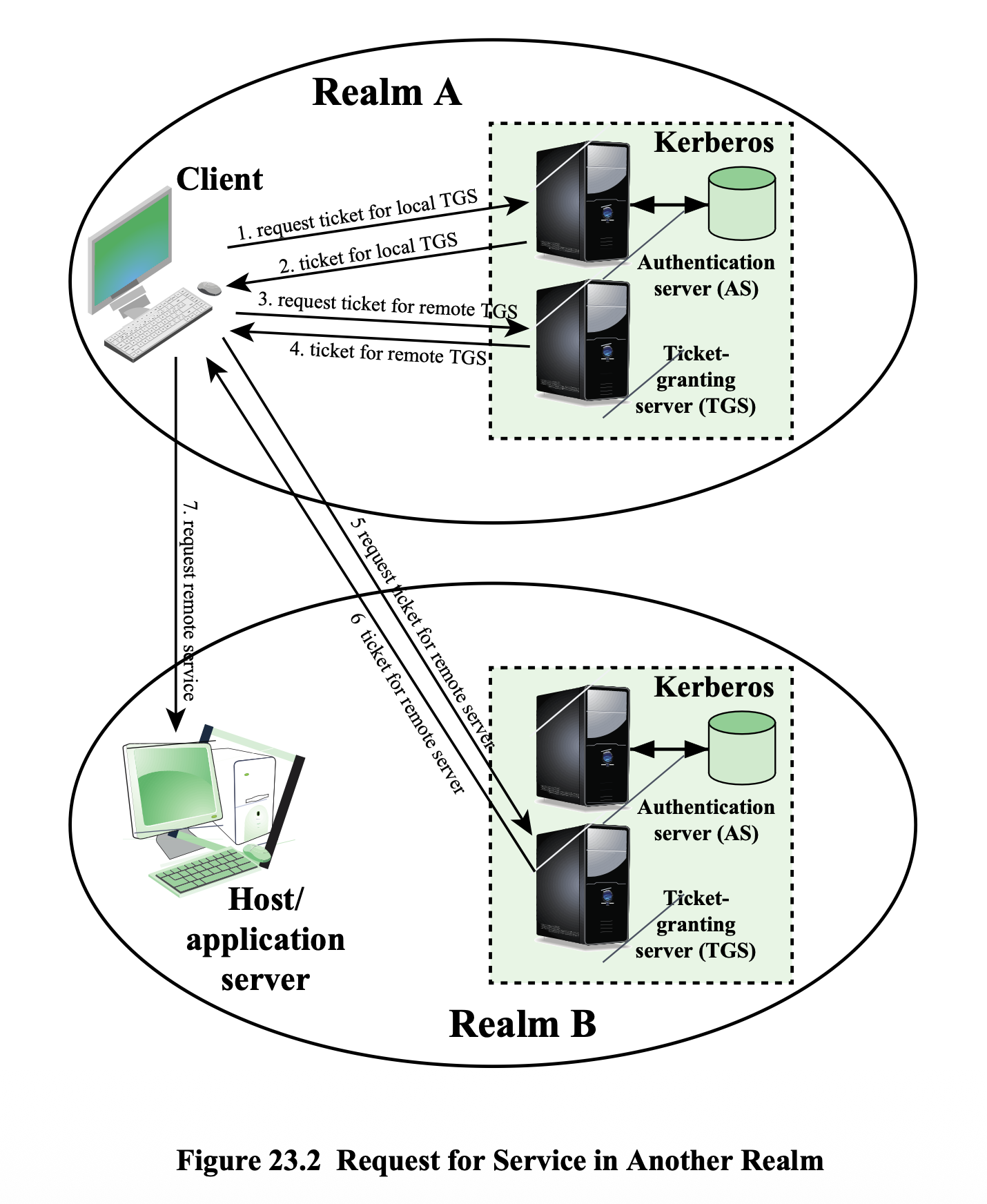
- A Kerberos realm = a Kerberos server + registered clients + application servers sharing keys
- Networks under different administrative organizations = different realms
Multi-Realm Requirements:
- Kerberos servers must share a secret key
- Must trust each other's Kerberos server to authenticate users
- Participating servers must accept authentication from the other realm's Kerberos
Kerberos Versions 4 and 5
- Kerberos v4 is most widely used
- Kerberos v5 improvements:
- Encrypted messages are tagged with encryption algorithm identifier → supports algorithms other than DES
- Supports authentication forwarding
- Client can access a server and have that server access another server on behalf of the client (through ticket)
- Supports interrealm authentication requiring fewer secure key exchanges
Kerberos Performance Issues
- Large client-server installations: very little performance impact if properly configured
- Best security practice: place Kerberos server on a separate, isolated machine
- แยกออกเป็น Authentication Server ไปเลย, we need to prevent security effects from other applications → แยกไปเล้ย!
- Motivation for multiple realms: administrative reasons, not performance
Summary — Topics Covered
- Secure E-mail and S/MIME
- MIME
- S/MIME
- DomainKeys Identified Mail (DKIM) - SKIPPED ไปคอร์สหน้านะ!
- Internet mail architecture
- DKIM strategy
- SSL and TLS
- TLS architecture
- TLS protocols
- TLS attacks
- SSL/TLS attacks
- HTTPS
- Connection initiation
- Connection closure
- IPv4 and IPv6 Security
- IP security overview
- Scope of IPsec
- Security associations
- Encapsulating Security Payload (ESP)
- Transport and Tunnel modes
- Kerberos
- The Kerberos Protocol
- Kerberos realms and multiple Kerberi
- Version 4 and Version 5
- Performance issues