Topics Overview
- Router
- Input ports
- Destination-based forwarding
- Longest prefix match
- Switching
- Output ports
- Buffer management, scheduling
- Routing
- Routing Types
- Static Route
- Default Route
- Dynamic Route
- Configure Routing
- Design subnet/IPs
- Set Routing Table
- Test connectivity
- Network Management
Two Key Network-Layer Functions (Revisit)
Data Plane — Forwarding
- Local, per-router function
- Determines how datagram arriving on router input port is forwarded to router output port
Analogy: Like getting through a single highway interchange — you just follow signs for that one junction.
Control Plane — Routing
- Network-wide logic
- Determines how datagram is routed among routers along end-to-end path from source host to destination host
- Includes Static Route (Manual, Simple)
- แล้วอันที่เป็น automatic แรกว่าอะไร - ก็พวก routing algorithm ไง
- Two control-plane approaches:
- Traditional routing algorithms: implemented in routers
- Software-Defined Networking (SDN): implemented in (remote) servers
Analogy: Like planning your entire road trip before you start — you decide the full route from A to Z.
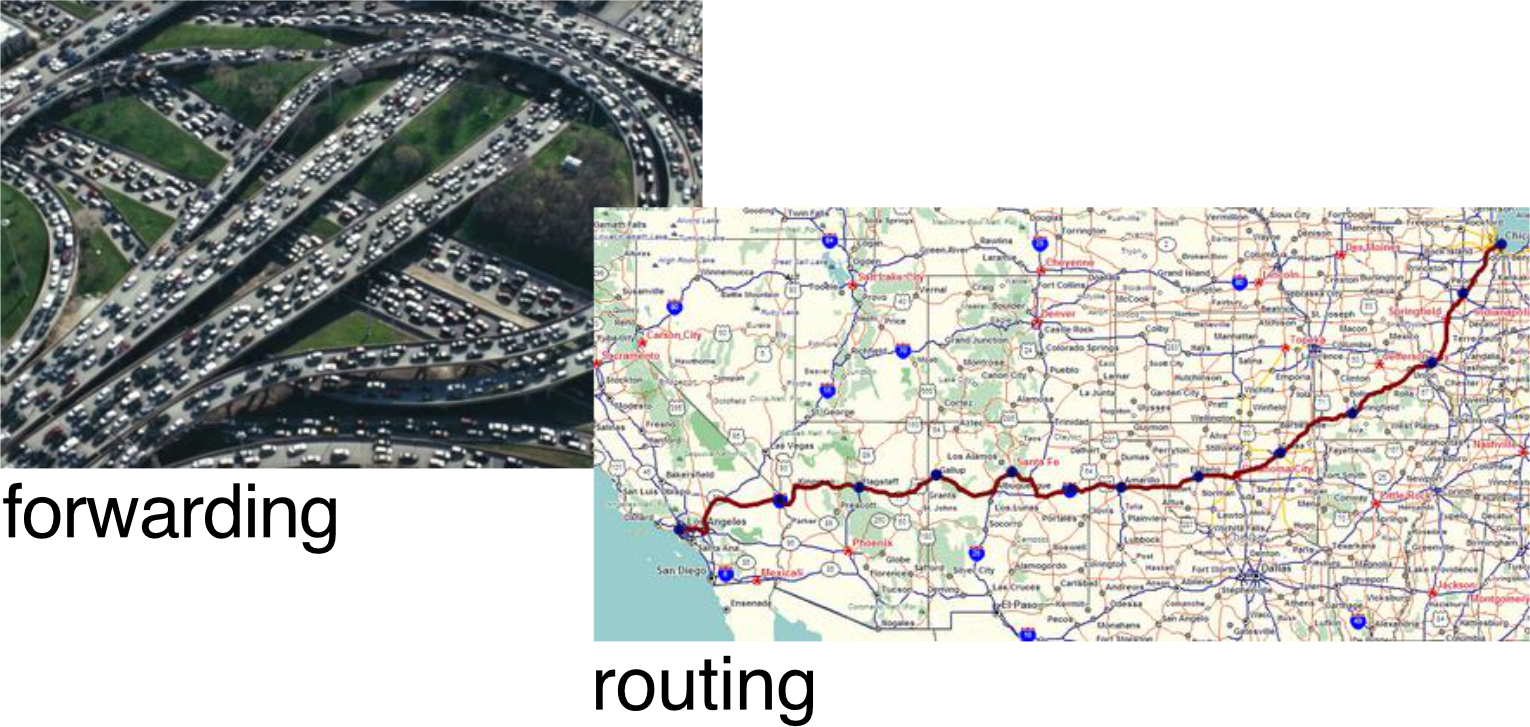
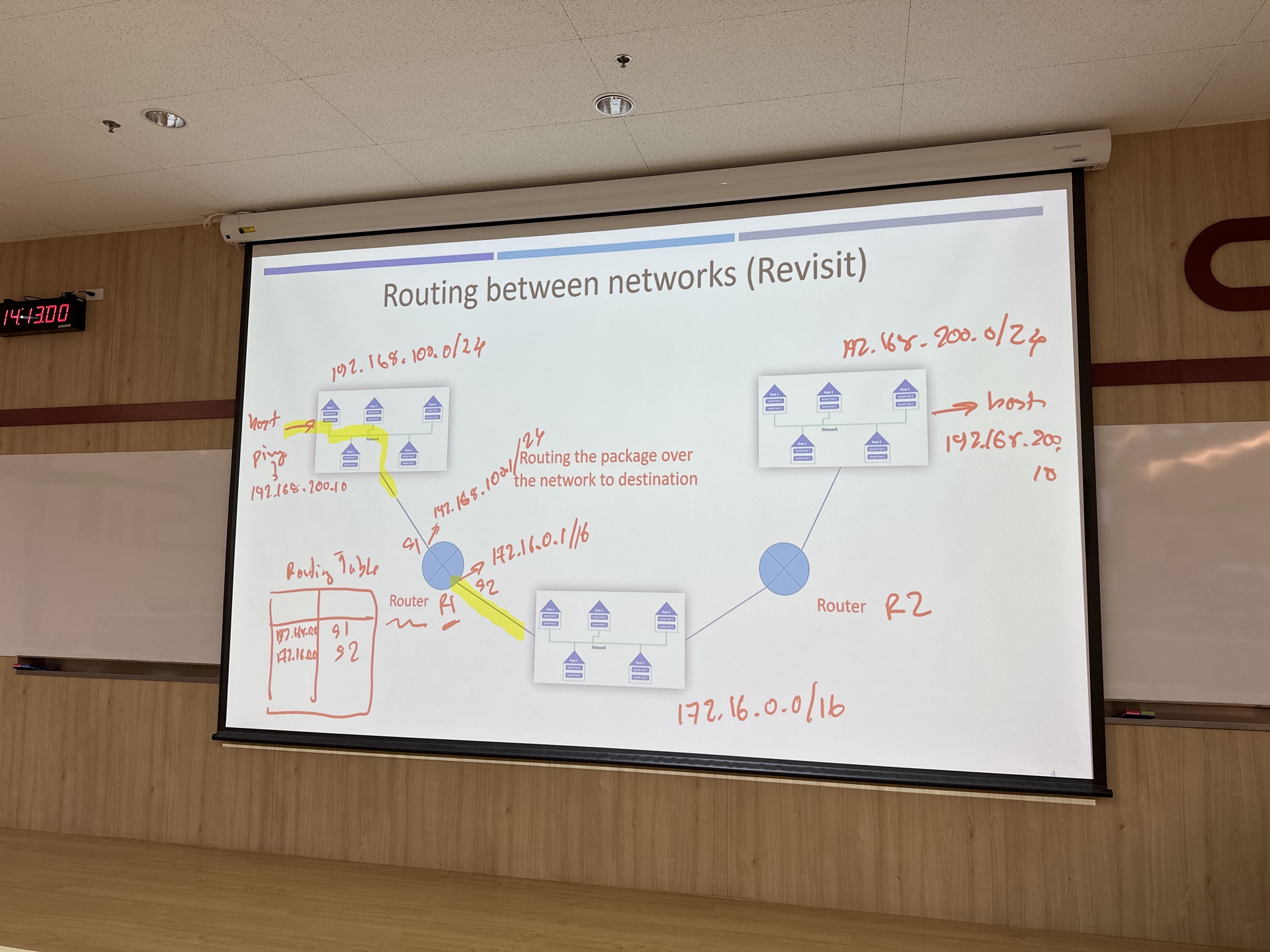
Table ใน R1 - ไอ่ที่ 2 connect กันสองอันจะ pop-up มาโดย automatically (เพราะว่ามันเชื่อมกัน) เหมือนกับ quiz เลย ที่ถามว่าต้องเพิ่มอันไหน manually บ้าง
Router Architecture Overview
- High-level view:
- Routing processor → Control plane (software), operates in millisecond timeframe
- Allows the router to do calculation, like for using in routing algorithm
- High-speed switching fabric + Input/Output ports → Data plane (hardware), operates in nanosecondtimeframe
- Routing processor → Control plane (software), operates in millisecond timeframe
Input Ports → [Switching Fabric] → Output Ports
                    ↑
            Routing Processor
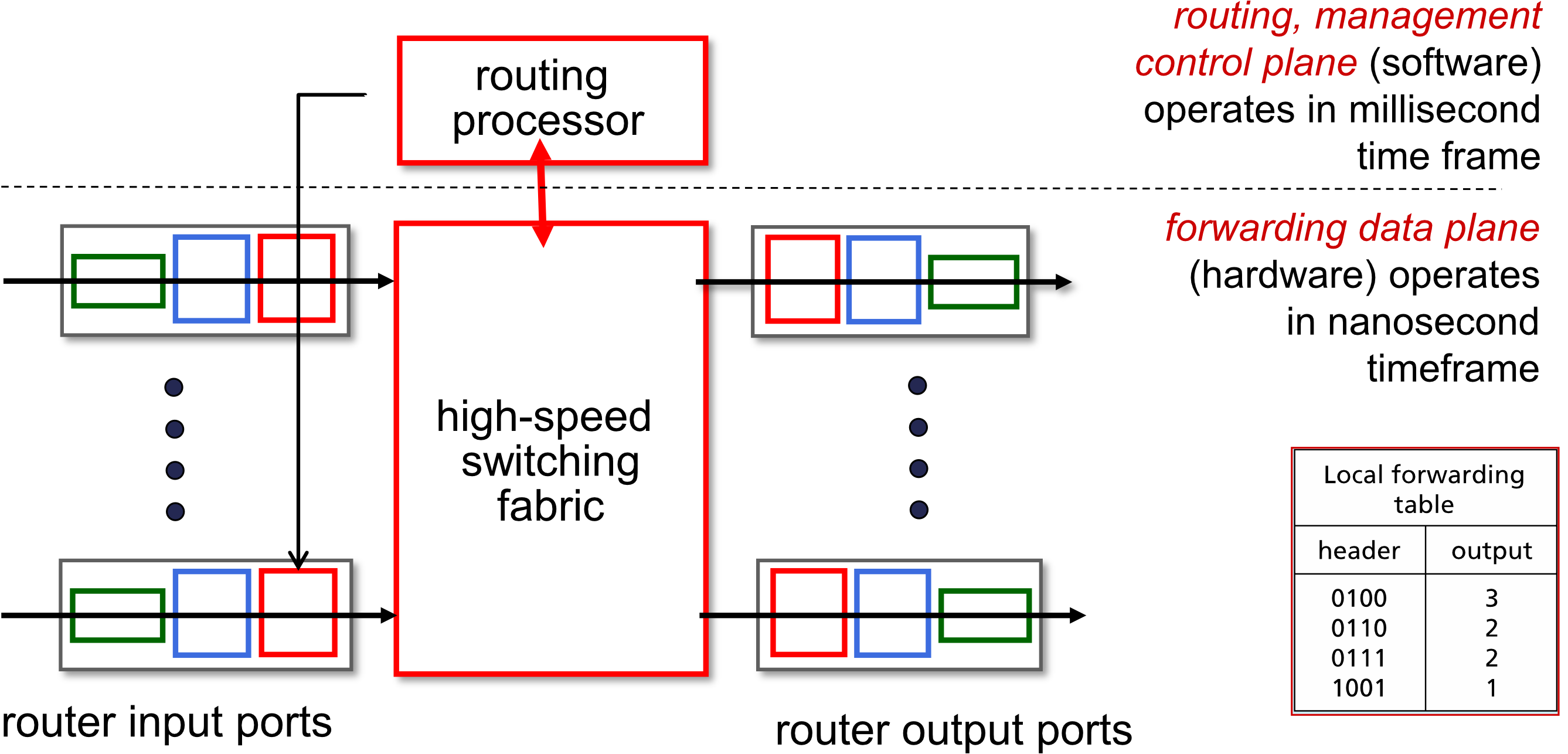
อาจารย์บอกว่า Speed ของ Switching Fabric ควรจะมี Speed = Incoming * Outgoing??
- Local forwarding table example:
| Header | Output |
|---|---|
| 0100 | 3 |
| 0110 | 2 |
| 0111 | 2 |
| 1001 | 1 |
Input Port Functions
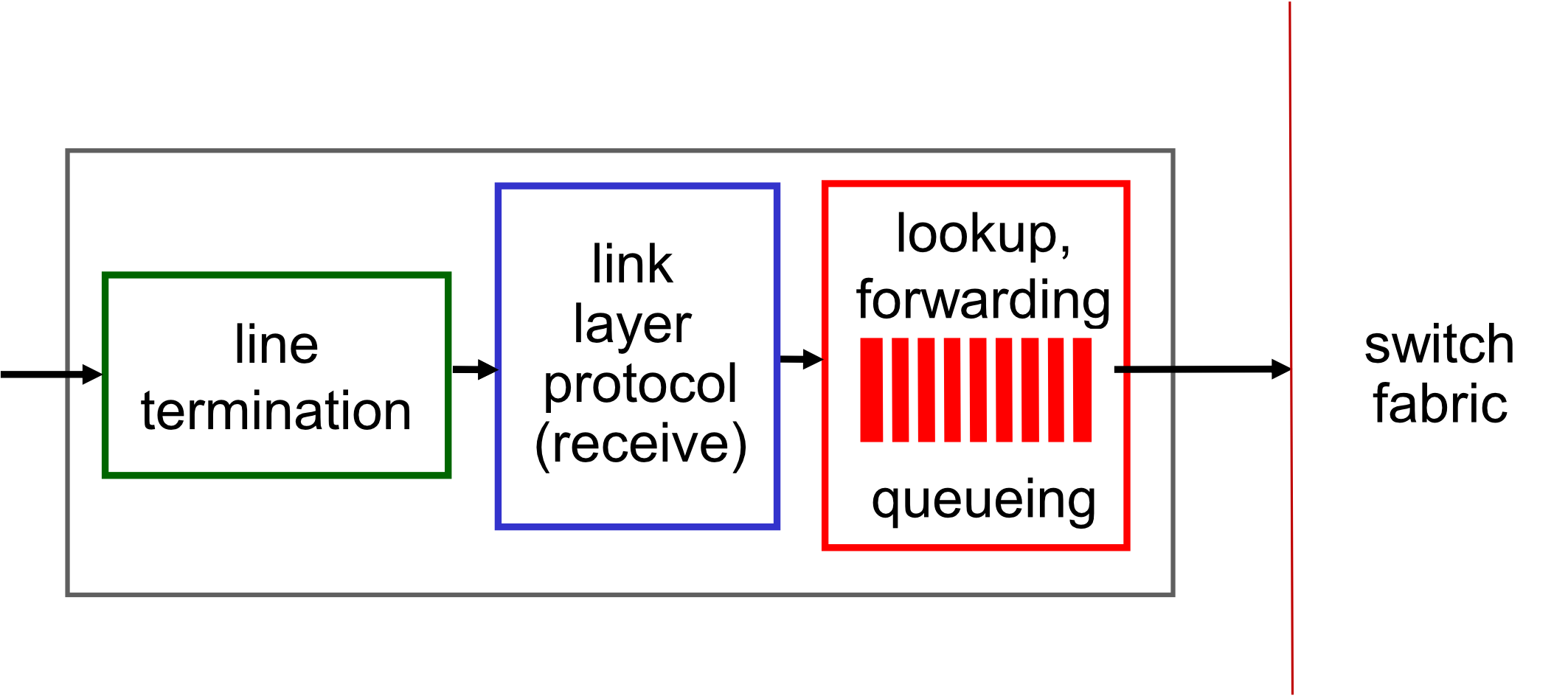
- Pipeline:
Line Termination → Link Layer Protocol (Receive) → Lookup/Forwarding/Queueing → Switch Fabric - Physical layer: bit-level reception
- Link layer: e.g., Ethernet
- Decentralized switching:
- Using header field values, lookup output port using forwarding table in input port memory ("match plus action")
- Goal: complete input port processing at line speed
- Input port queuing: if datagrams arrive faster than forwarding rate into switch fabric
- ถ้าสมมติ forward ไม่ทันก็ไปอยู่ใน queue ซะ
- Destination-based forwarding: forward based only on destination IP address (traditional)
- Generalized forwarding: forward based on any set of header field values
- Used with SDN (Software Defined Network), we use remote computer to calculate the routing and update that to the router.
- เดี๋ยวจะได้เรียนเรื่อง Flow Table
Destination-Based Forwarding
- The forwarding table maps destination address ranges to link interfaces
- Example: a range like
200.23.16.0→200.23.23.255maps to interface 3
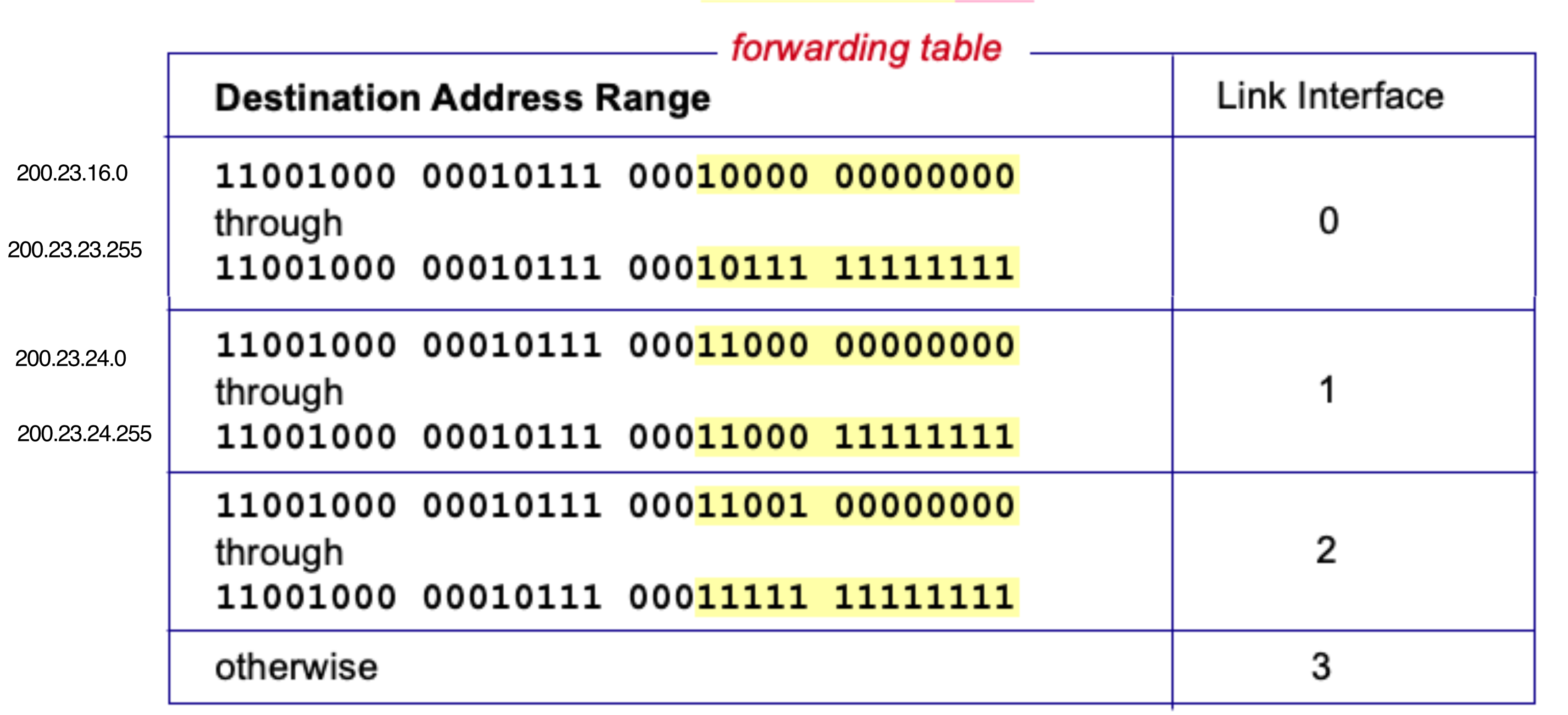
ถ้าอยู่ใน range นี้ ให้ forward ไปนี่ ๆ ๆ
แต่ชีวิตจริงมันไม่ใช่แบบนั้น สมมติว่างในระหว่างอันแรก มีบาง IP ที่ต้องการ forward ไป port 3
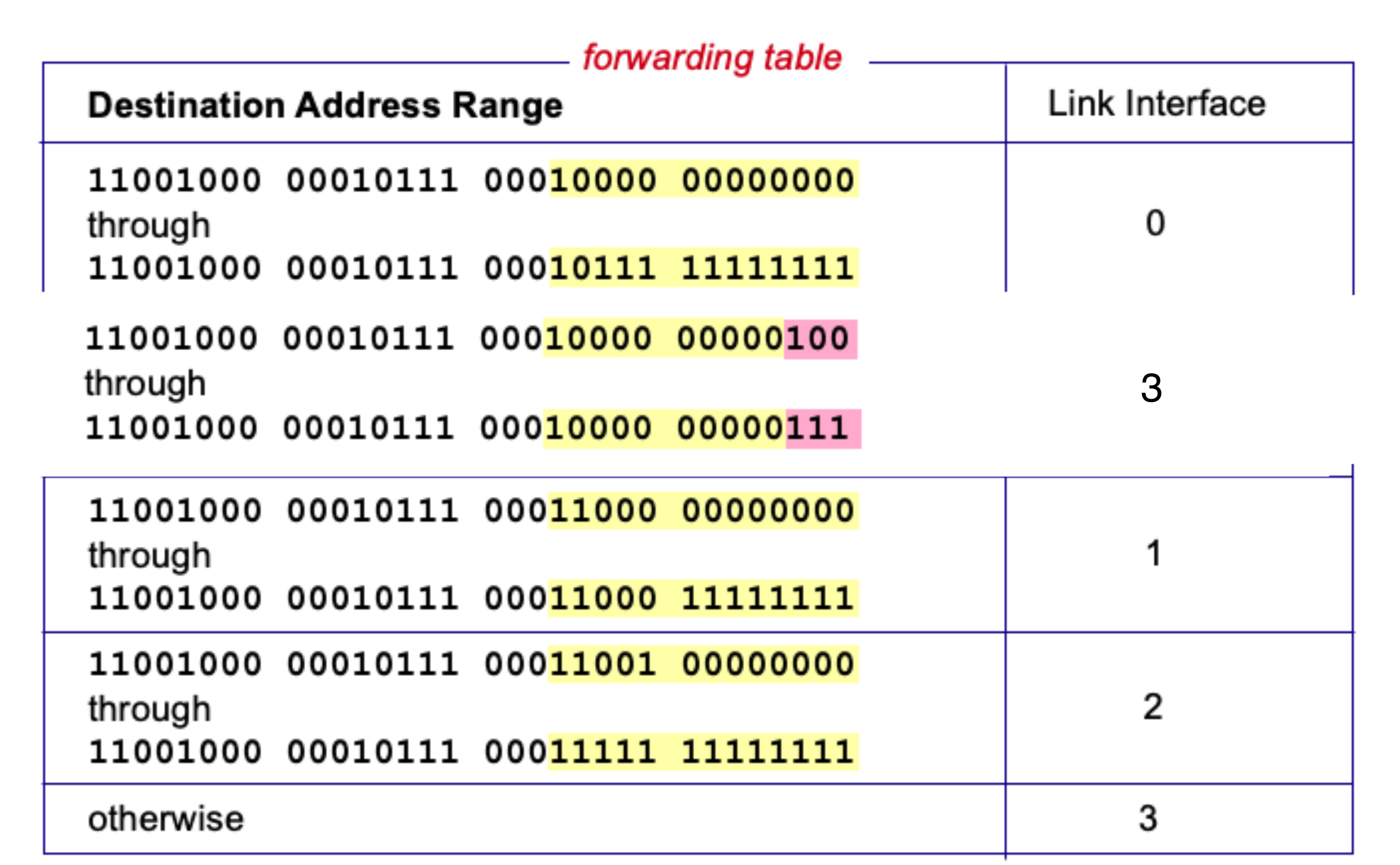
Q: But what happens if ranges don't divide up so nicely?
→ Answer: Longest Prefix Match!
Longest Prefix Matching
Rule: When looking for a forwarding table entry for a given destination address, use the longest address prefix (subnet mask) that matches the destination address.
- Example forwarding table:
| Destination Address Range | Link Interface |
|---|---|
11001000 00010111 00010*** ******** | 0 |
11001000 00010111 00011000 ******** | 1 |
11001000 00010111 00011*** ******** | 2 |
| otherwise | 3 |
- Algorithm:
- Search for a match on all 32 bits
- Search for a match on 31 bits
- …
- Search for a match on 0 bits (default route)
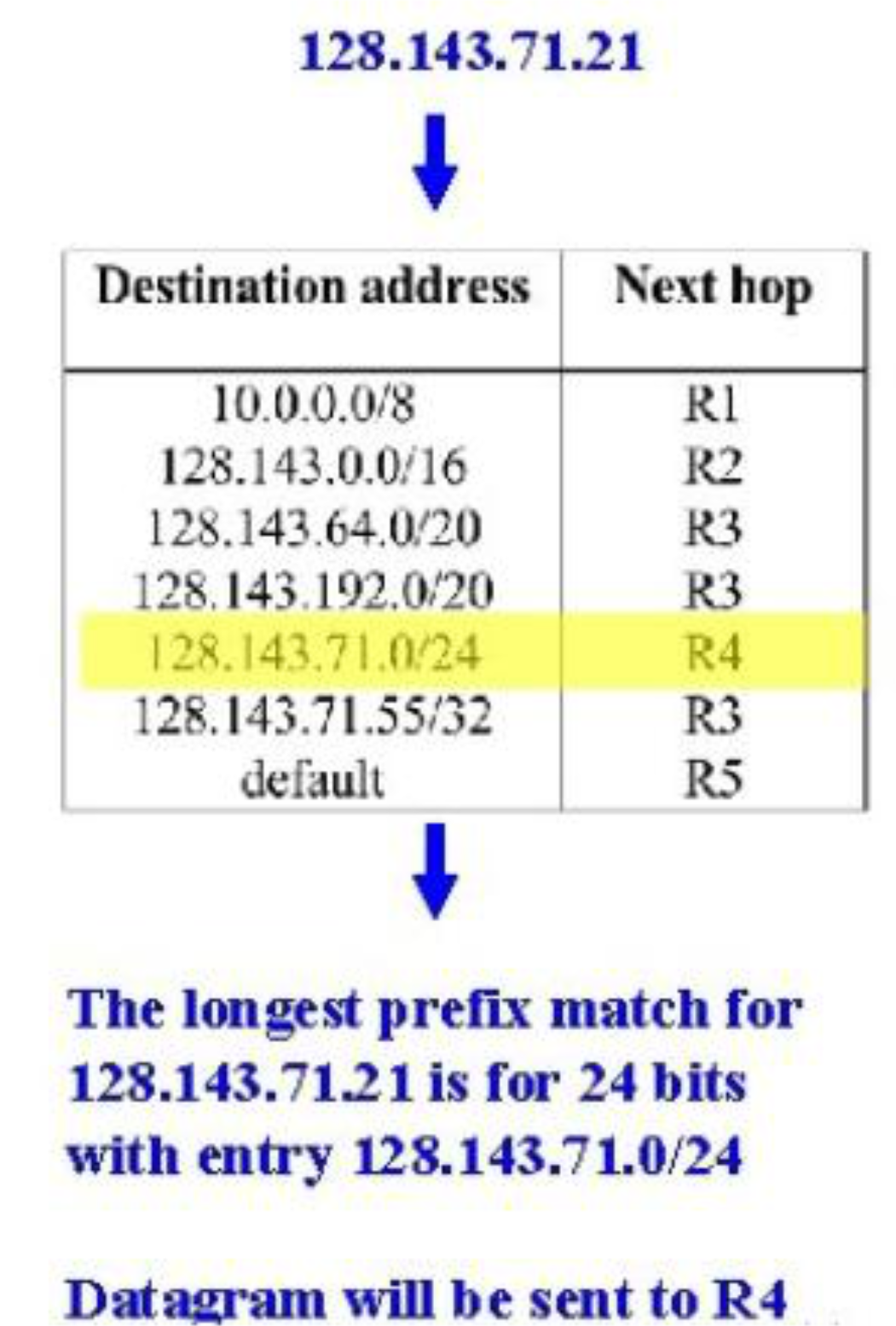
- Example for
128.143.71.21:- Table has
128.143.71.0/24as an entry → longest prefix match = 24 bits → sent to R4
- Table has
- แอบสังเกตนะ
/32แปลว่า เราให้ specific ONE ip ไปยัง hop นี้เท่านั้น!- ถ้าไม match เลย (match 0 bits) → ดังนั้นมันก็จะ forward ไป default gateway
0.0.0.0
-
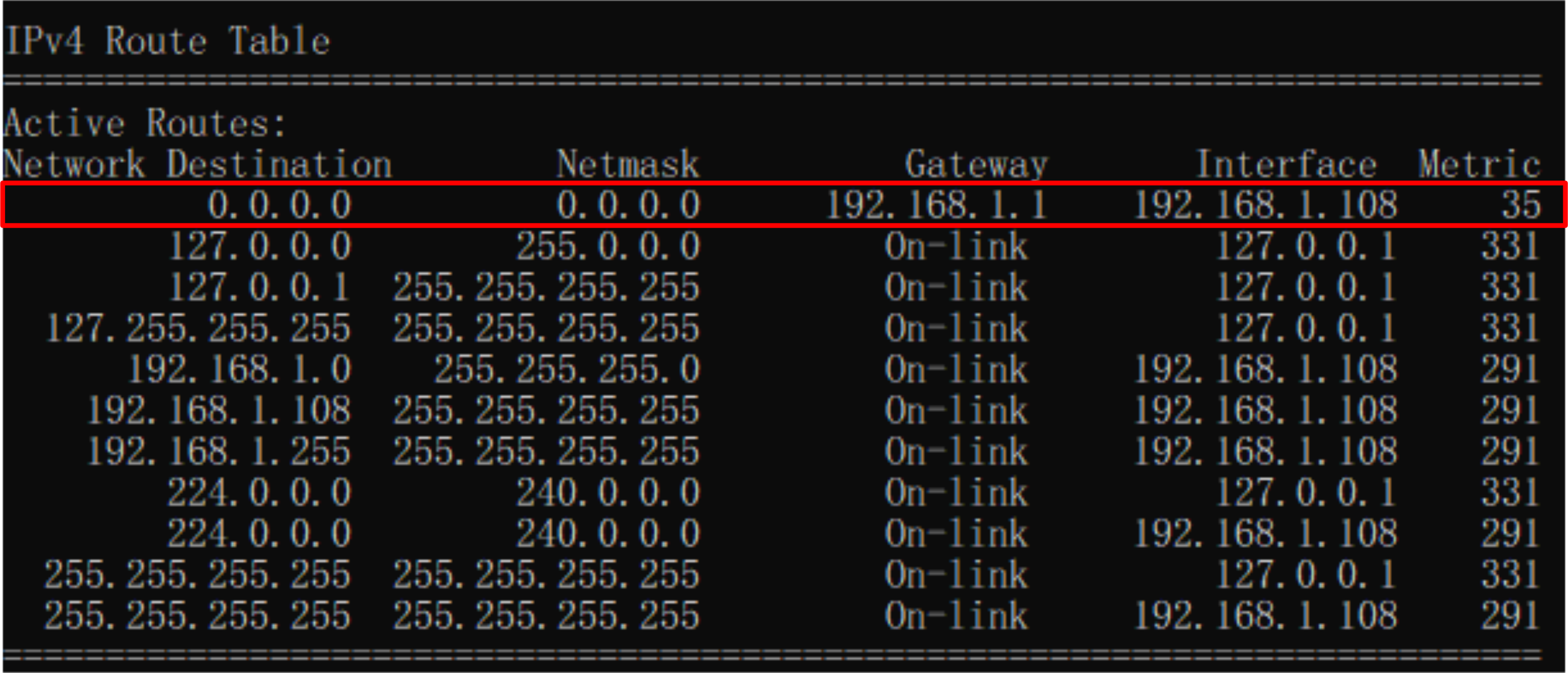
Check routing table on PC (Windows):
route /print
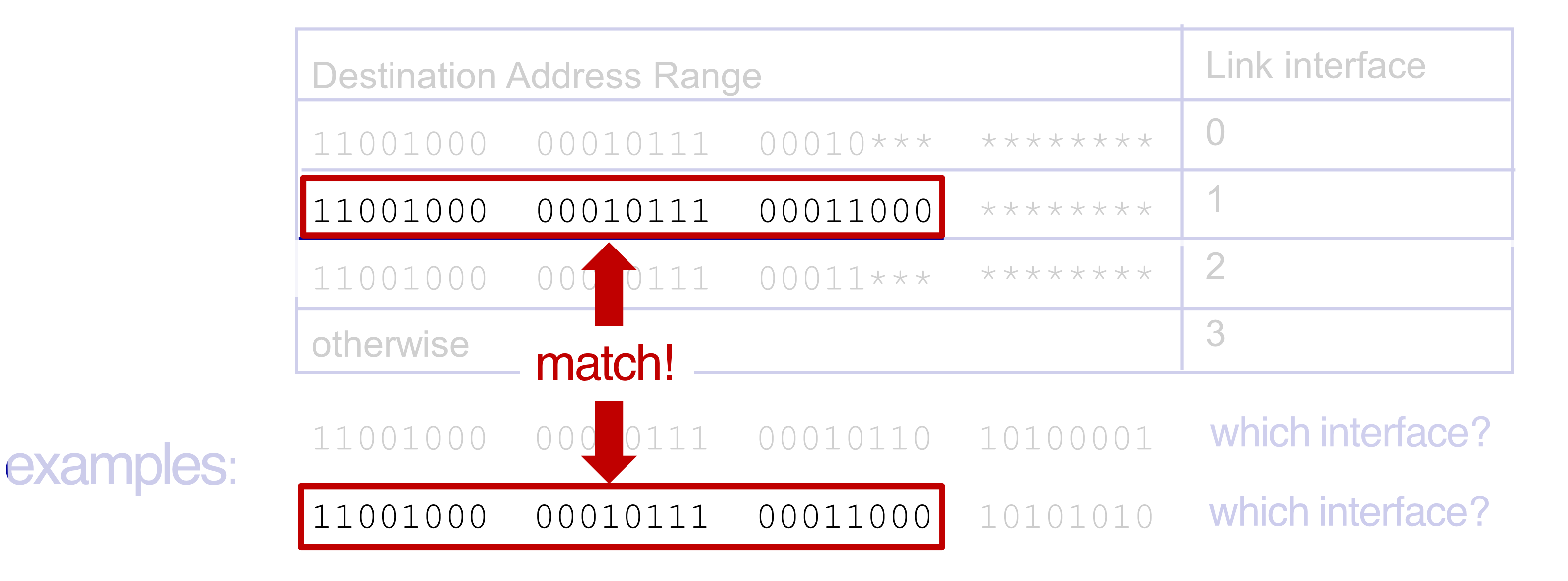
- อย่าเผลอไปเลือกอันที่ link ไป port 2 นะ — เพราะคืออะไร Longest Prefix Match!
Analogy: Like a phonebook — if you search "John Smith Jr.", you first try the most specific name before falling back to just "John".
Switching Fabrics
- Purpose: Transfer packet from input link to appropriate output link
- Switching rate: rate at which packets can be transferred from inputs to outputs
- Often measured as multiple of input/output line rate
- With inputs: switching rate line rate desirable
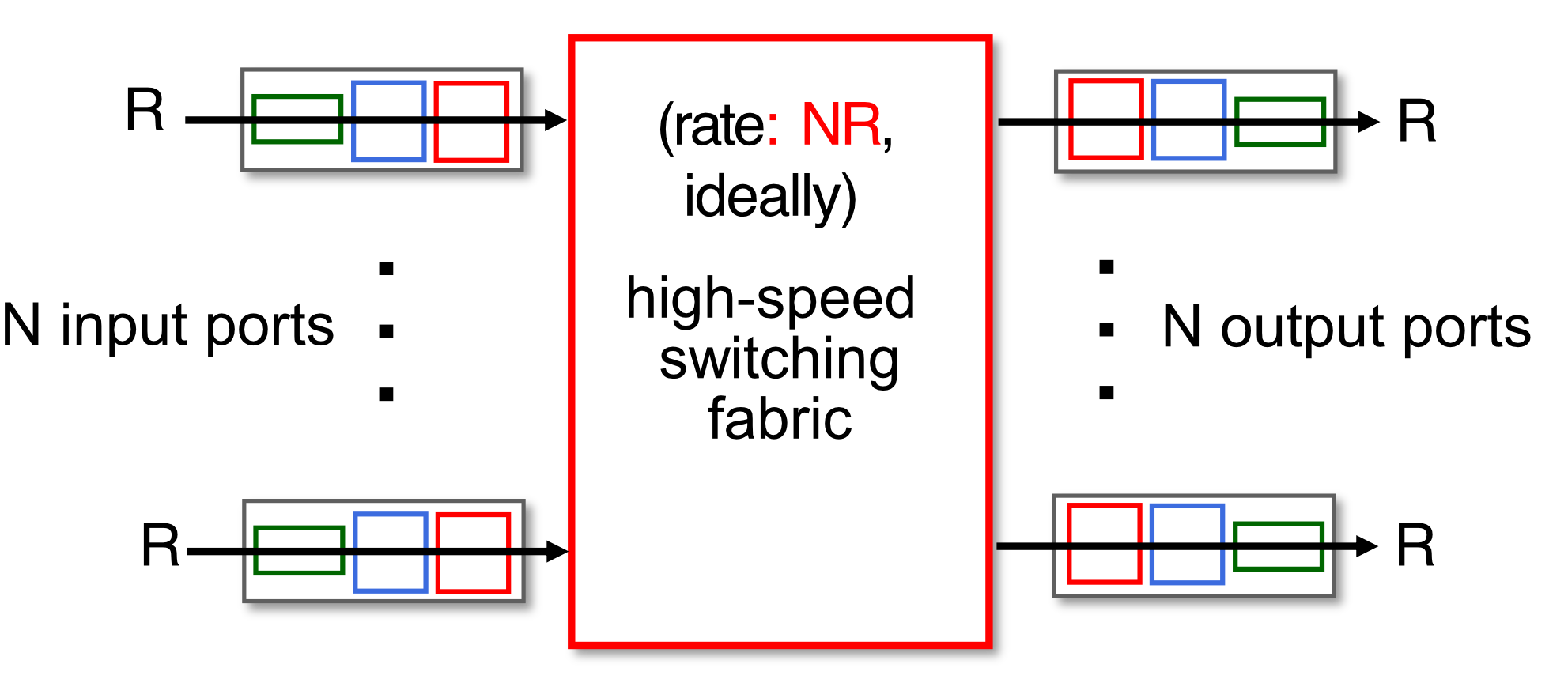
Three Major Types of Switching Fabrics
1. Switching via Memory
- First generation routers: traditional computers with switching under direct control of CPU
- Packet copied to system's memory
- Speed limited by memory bandwidth (2 bus crossings per datagram)
- พวก Consumer router ก็ใช้อันนี้กันหมด, router ที่มันถูก ๆ อะ
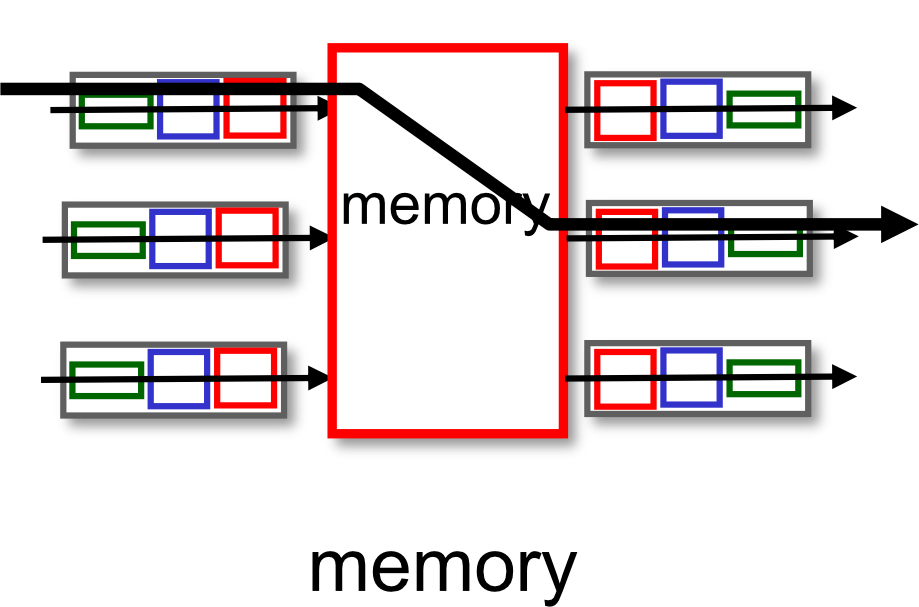
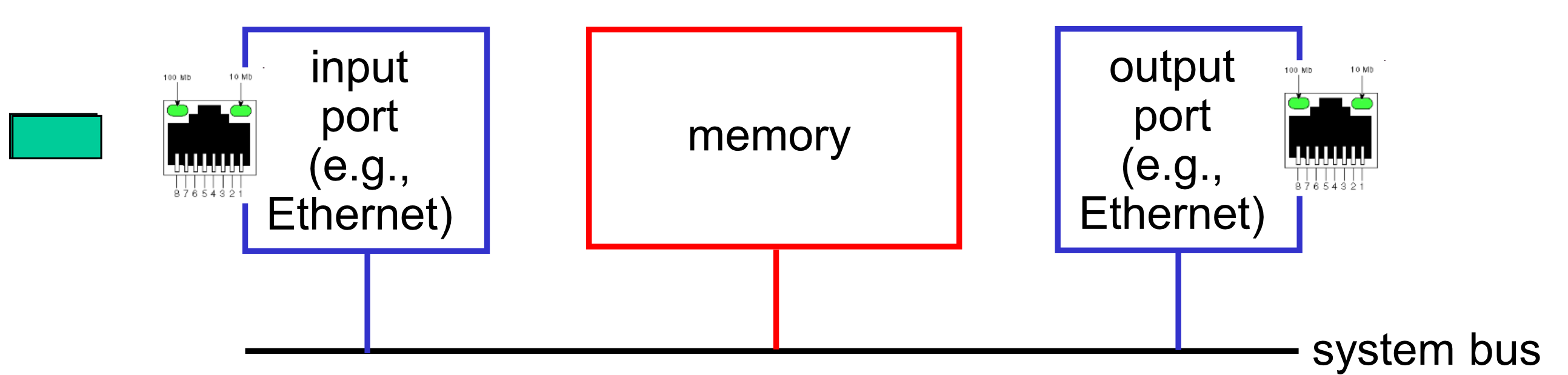
Analogy: Like a secretary who takes your letter, walks to the filing room, copies it, walks back and sends it. Slow because everything goes through one person.
2. Switching via a Bus
- Datagram from input port memory to output port memory via a shared bus
- Bus contention: switching speed limited by bus bandwidth
- อะไรล่ะที่จะมาวัดว่าเร็วหรือไม่เร็ว
- Bus size → 32 bit, 64 bit
- Bus clock
- อะไรล่ะที่จะมาวัดว่าเร็วหรือไม่เร็ว
- Example: 32 Gbps bus (Cisco 5600) — sufficient for access routers
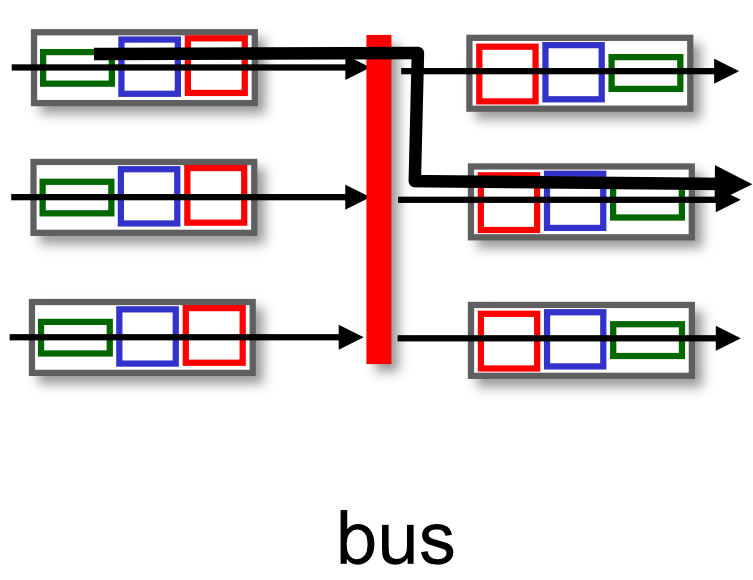
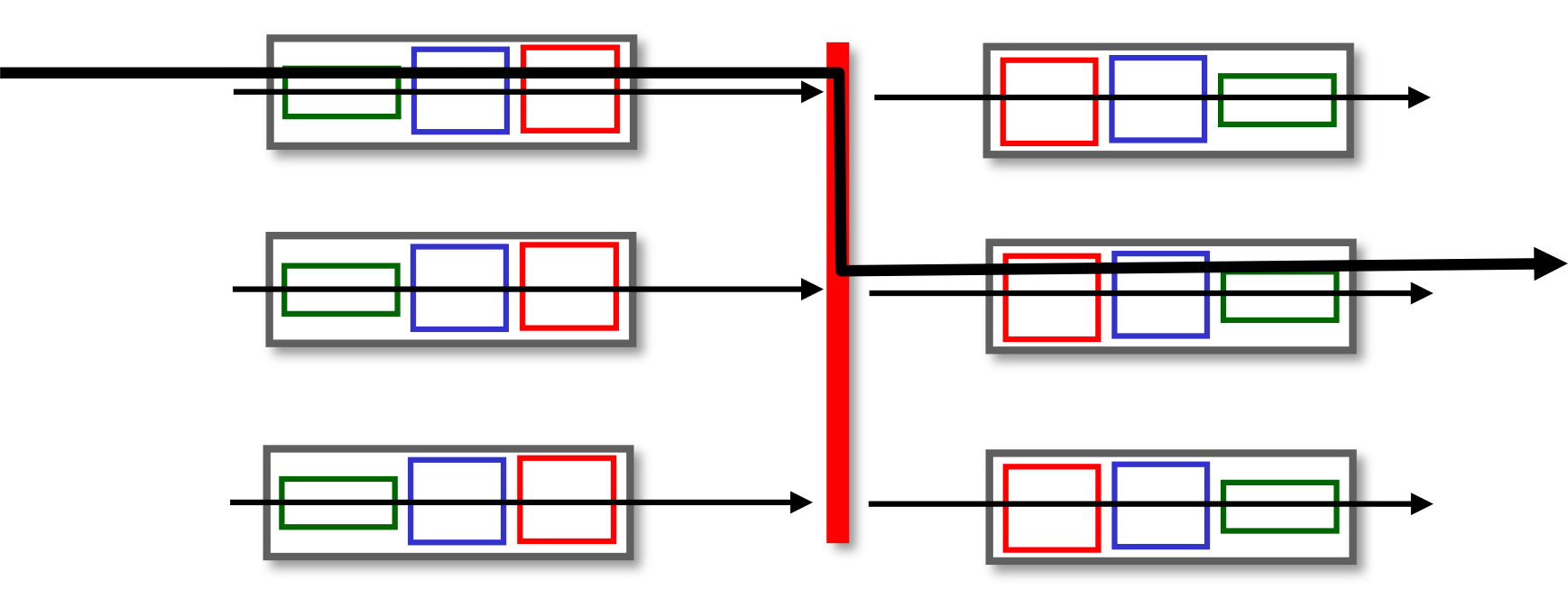
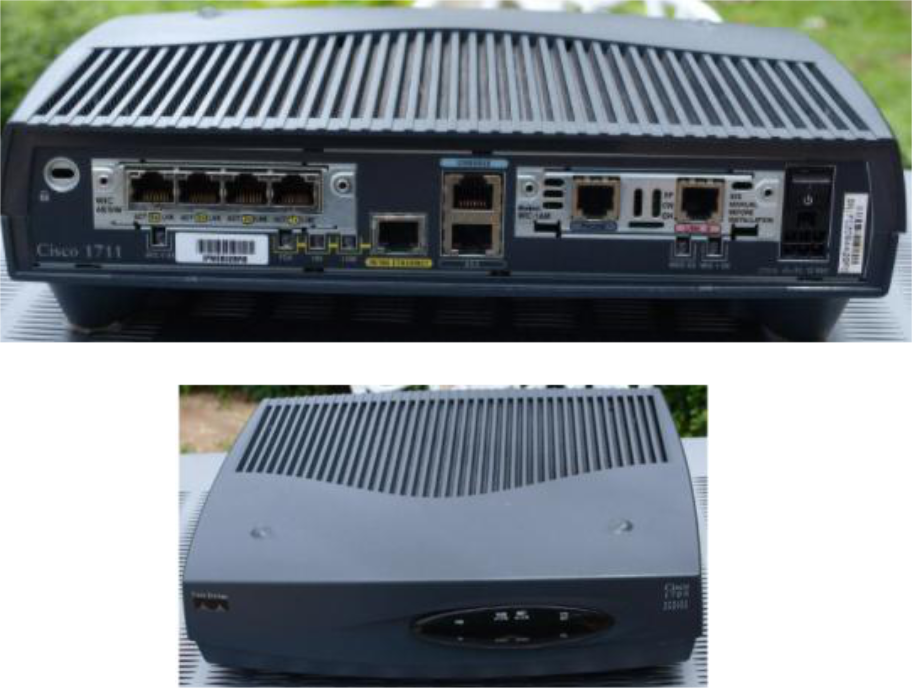
Analogy: Like a single hallway that everyone must share — only one person can walk through at a time.
3. Switching via Interconnection Network
Data center grade!!
-
Crossbar, Clos networks, other interconnection nets initially developed to connect processors in multiprocessors
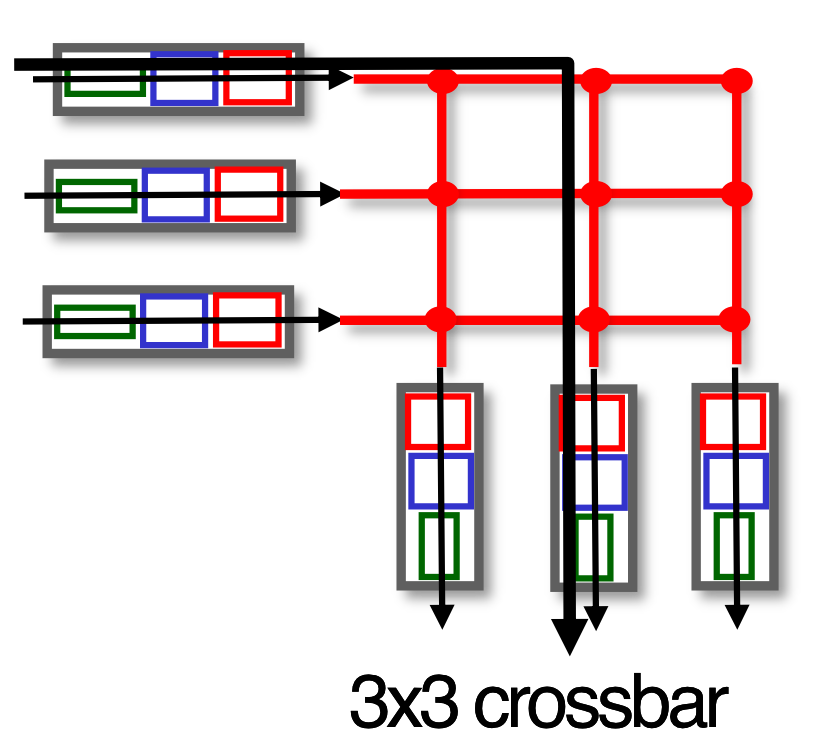
-
Multistage switch: switch built from multiple stages of smaller switches
-
Exploiting parallelism:
- Fragment datagram into fixed-length cells on entry
- Switch cells through the fabric, reassemble datagram at exit
-
Clos network is a kind of multistage circuit-switching network
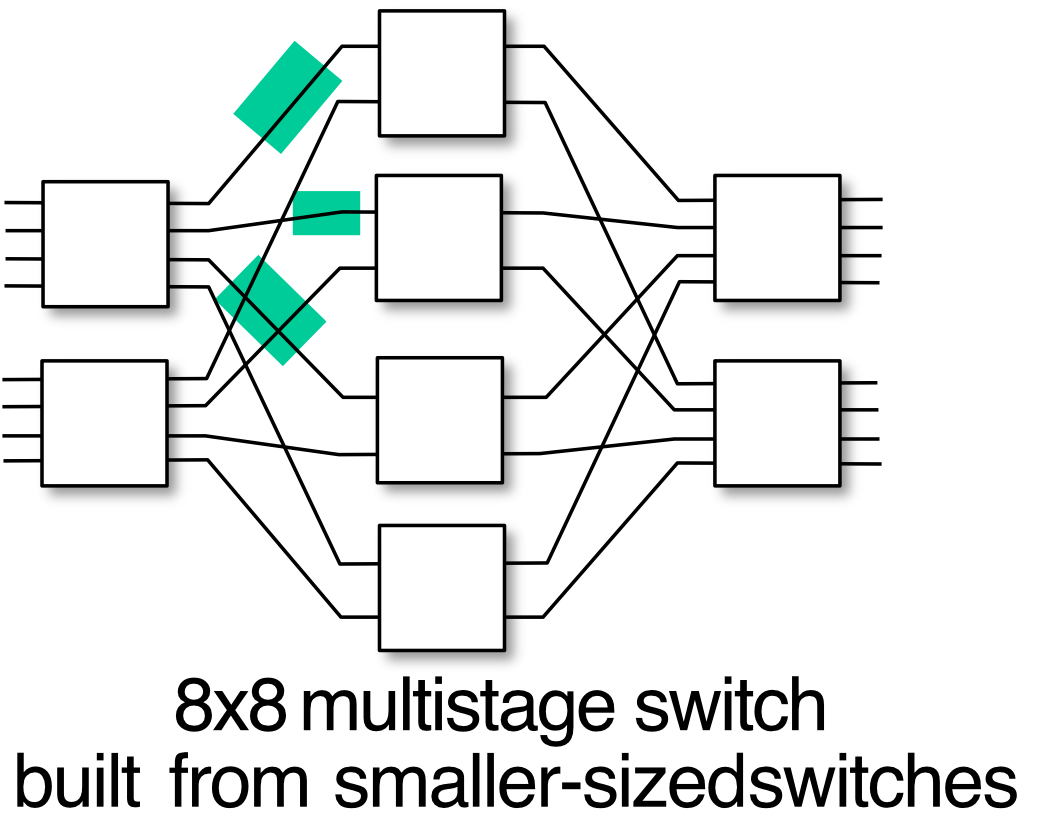
Analogy: Like a highway interchange with multiple lanes — many cars can travel simultaneously through different paths.
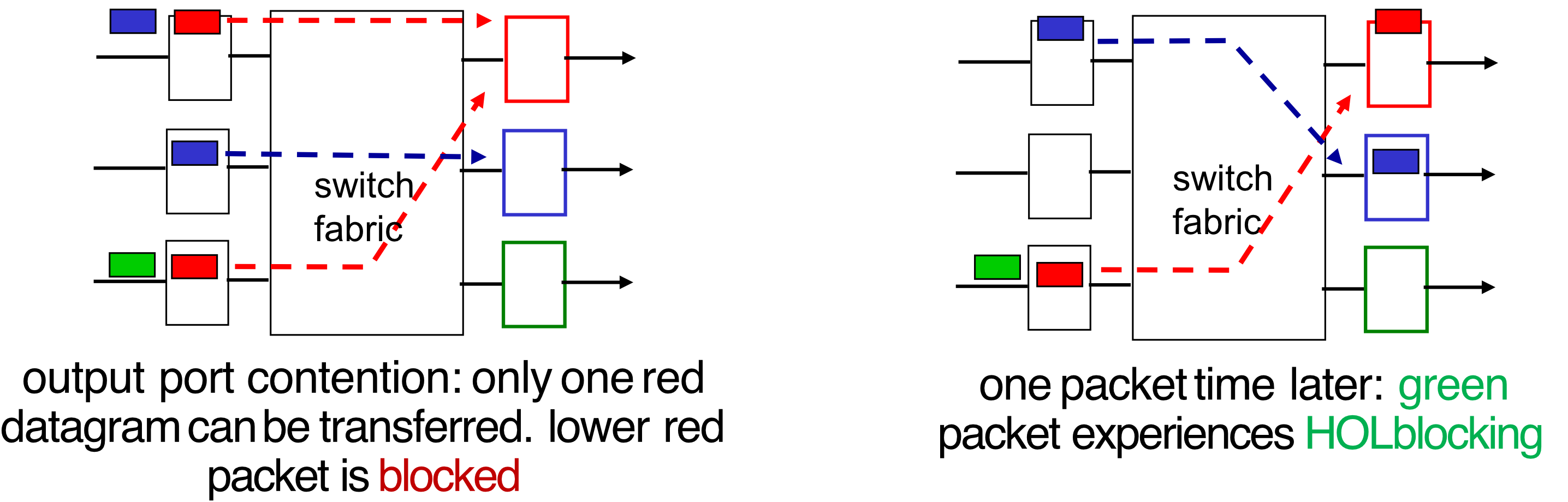
Input Port Queuing
- If switch fabric is slower than input ports combined → queuing may occur at input queues
- Queueing delay and loss due to input buffer overflow!
- Head-of-the-Line (HOL) Blocking: queued datagram at front of queue prevents others in queue from moving forward
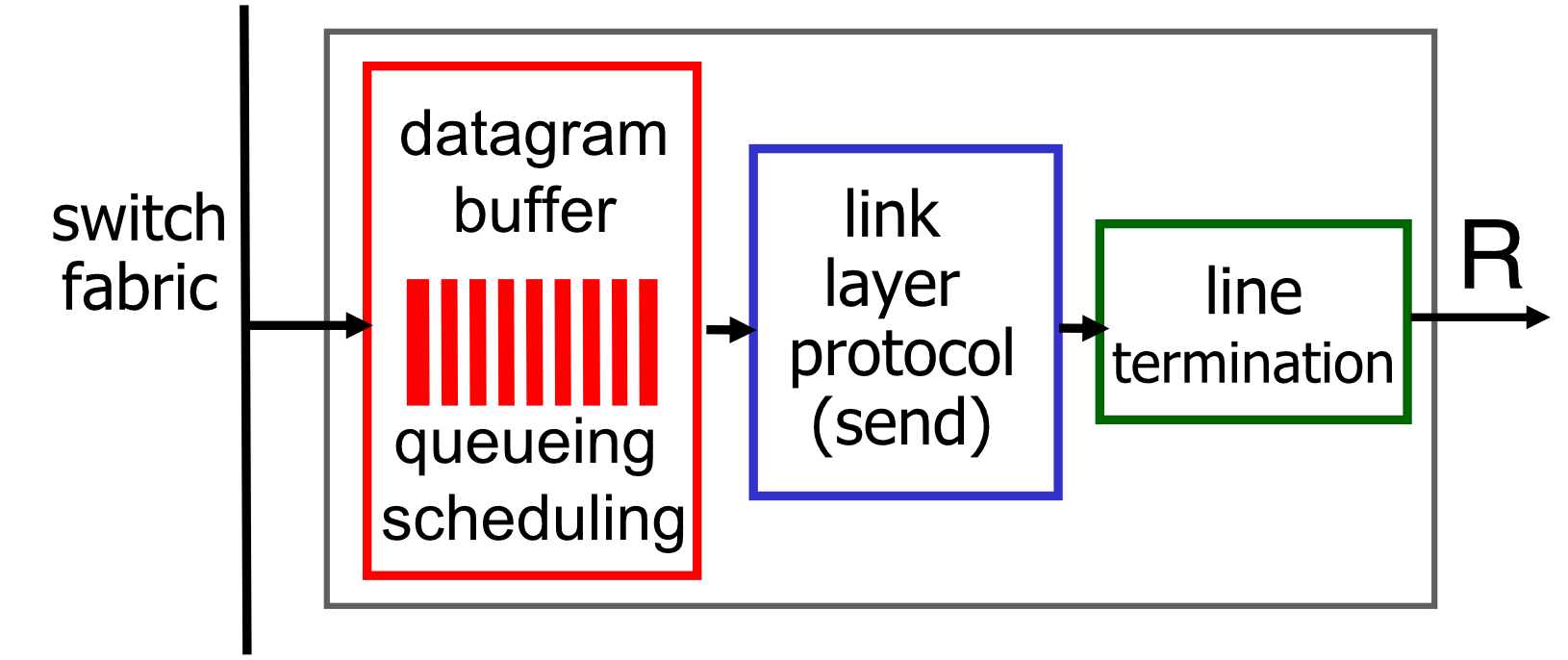
Output Port Queuing
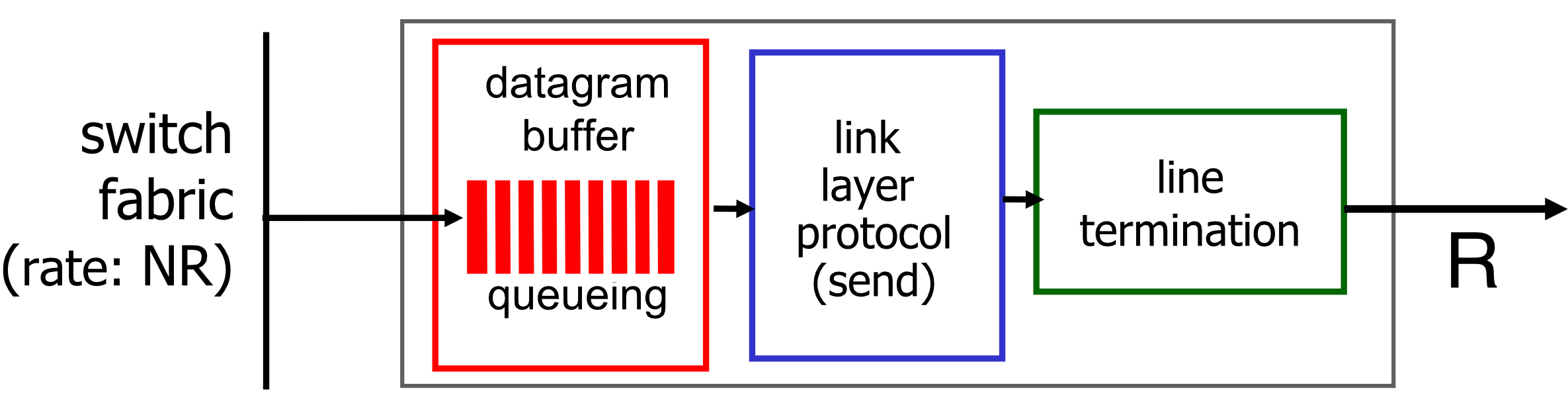
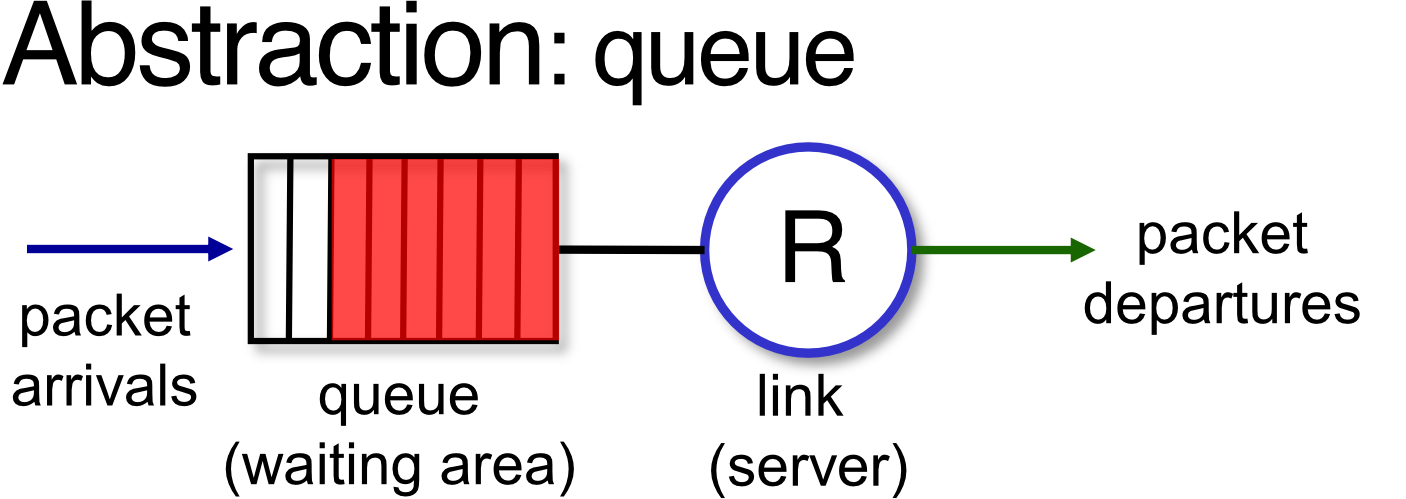
- Buffering required when datagrams arrive from fabric faster than link transmission rate
- Drop policy: which datagrams to drop if no free buffers?
- Scheduling discipline chooses among queued datagrams for transmission
- How should we send the data out?, priority?, FCFS?, Weight?
- Datagrams can be lost due to congestion, lack of buffers
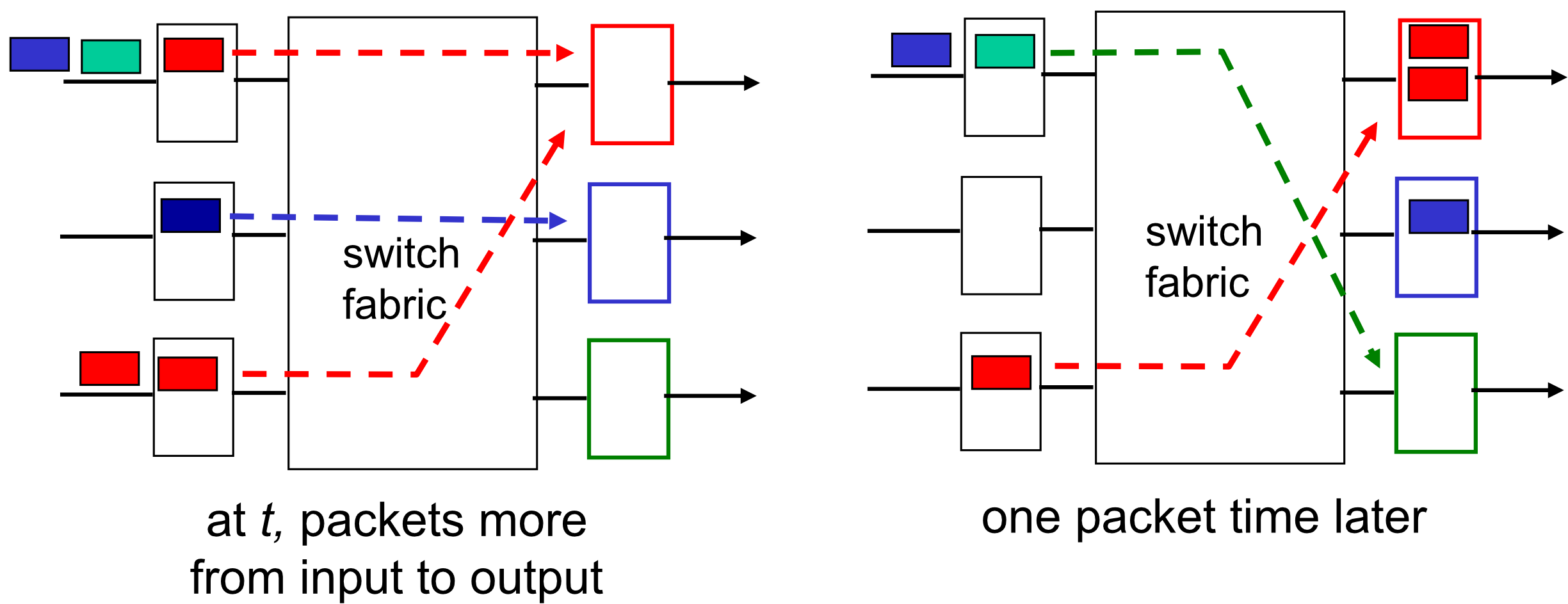
- buffering when arrival rate via switch exceeds output line speed
- queueing (delay) and loss due to output port buffer overflow!
How Much Buffering?
- RFC 3439 rule of thumb: (equal to “typical” RTT)
-
e.g., Gbps link: Gbit buffer ()
-
With flows, more recent recommendation:
-
Too much buffering can increase delays (especially in home routers):
- Long RTTs → poor performance for real-time apps
- Sluggish TCP response
- "Keep bottleneck link just full enough (busy) but no fuller"
Buffer Management
- Drop: which packet to add/drop when buffers are full
- Tail drop: drop arriving packet
- Priority: drop/remove on priority basis
- Marking: which packets to mark to signal congestion (ECN, RED)
Packet Scheduling
Deciding which packet to send next on link. Types:
- FCFS (First Come, First Served)
- Priority
- Round Robin
- Weighted Fair Queueing
1. FCFS / FIFO
- Packets transmitted in order of arrival to output port
- Also known as First-In-First-Out (FIFO)
2. Priority Scheduling
- Arriving traffic classified, queued by class (any header fields can be used)
- Send packet from highest priority queue that has buffered packets
- FCFS within priority class
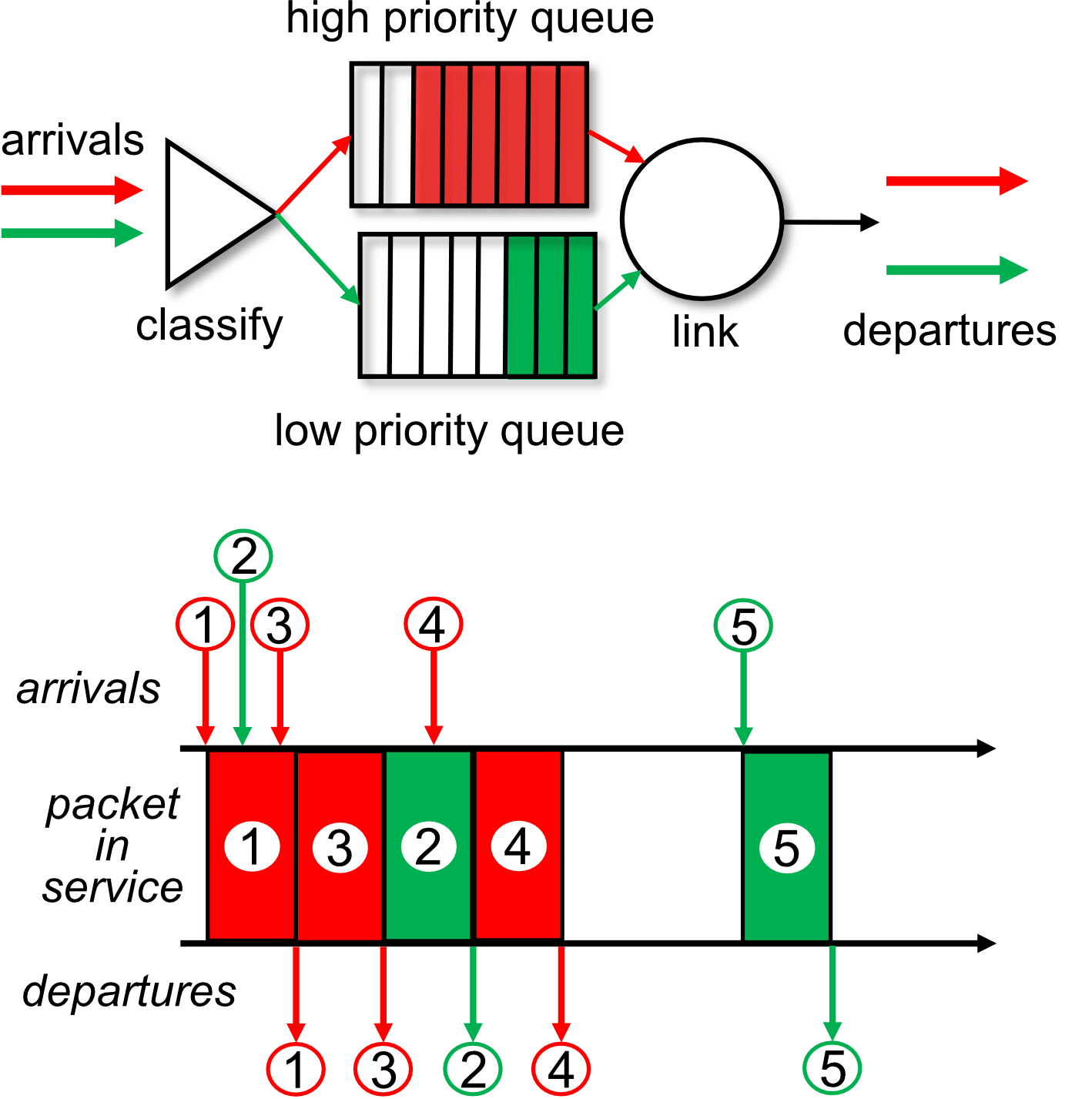
บางครั้งอันนี้เกิด Starvation กับ low priority job
Analogy: Like an airline boarding — first class boards first, regardless of when they arrived at the gate.
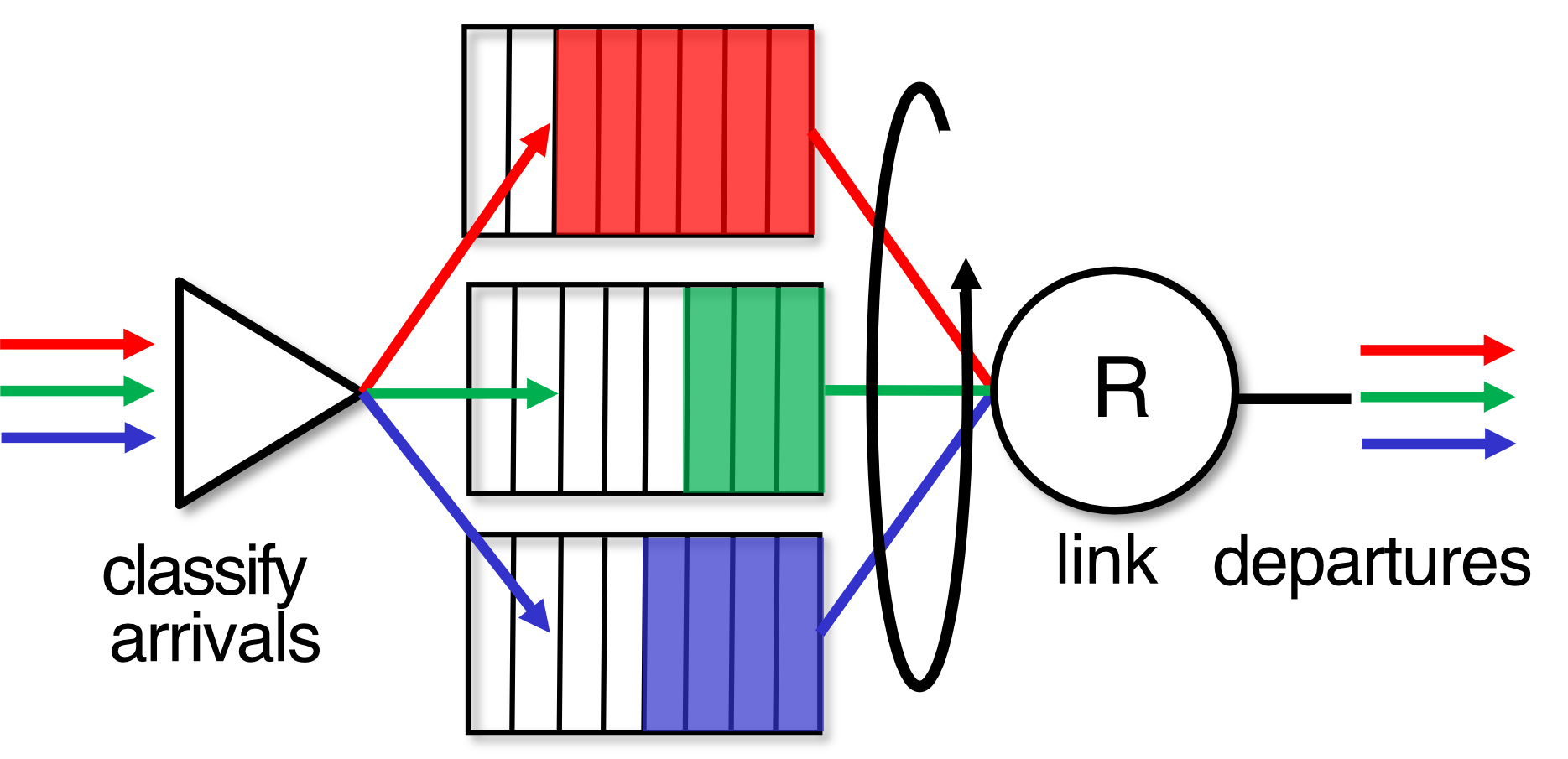
3. Round Robin (RR) Scheduling
- Arriving traffic classified, queued by class
- Server cyclically, repeatedly scans class queues
- Sends one complete packet from each class (if available) in turn
Analogy: Like a teacher calling on each student in the classroom in order — everyone gets a fair turn.
4. Weighted Fair Queueing (WFQ)
- Generalized Round Robin
- Each class has weight and gets weighted amount of service in each cycle:
- Provides minimum bandwidth guarantee (per-traffic-class)
- Considers bandwidth per class
- ใช้กันเยอะใน Commercial router
- ตะก่อนมี different type of traffic เช่น TCP (high priority - important data), UDP (low priority), ICMP (lowest priority ไปเลยล่ะ)
- นี่แหละเป็น เหตุผลทำไมใน
tracerouteresults (ทั้งที่จริง ๆ แล้ว hop ยิ่งไกล ตัวเลขก็ต้องมากขึ้น) แต่บางทีมันก็ลดลง มันก็ขึ้นอยู่กับ router ให้ความสำคัญกับ ICMP มากน้อยแค่ไหน
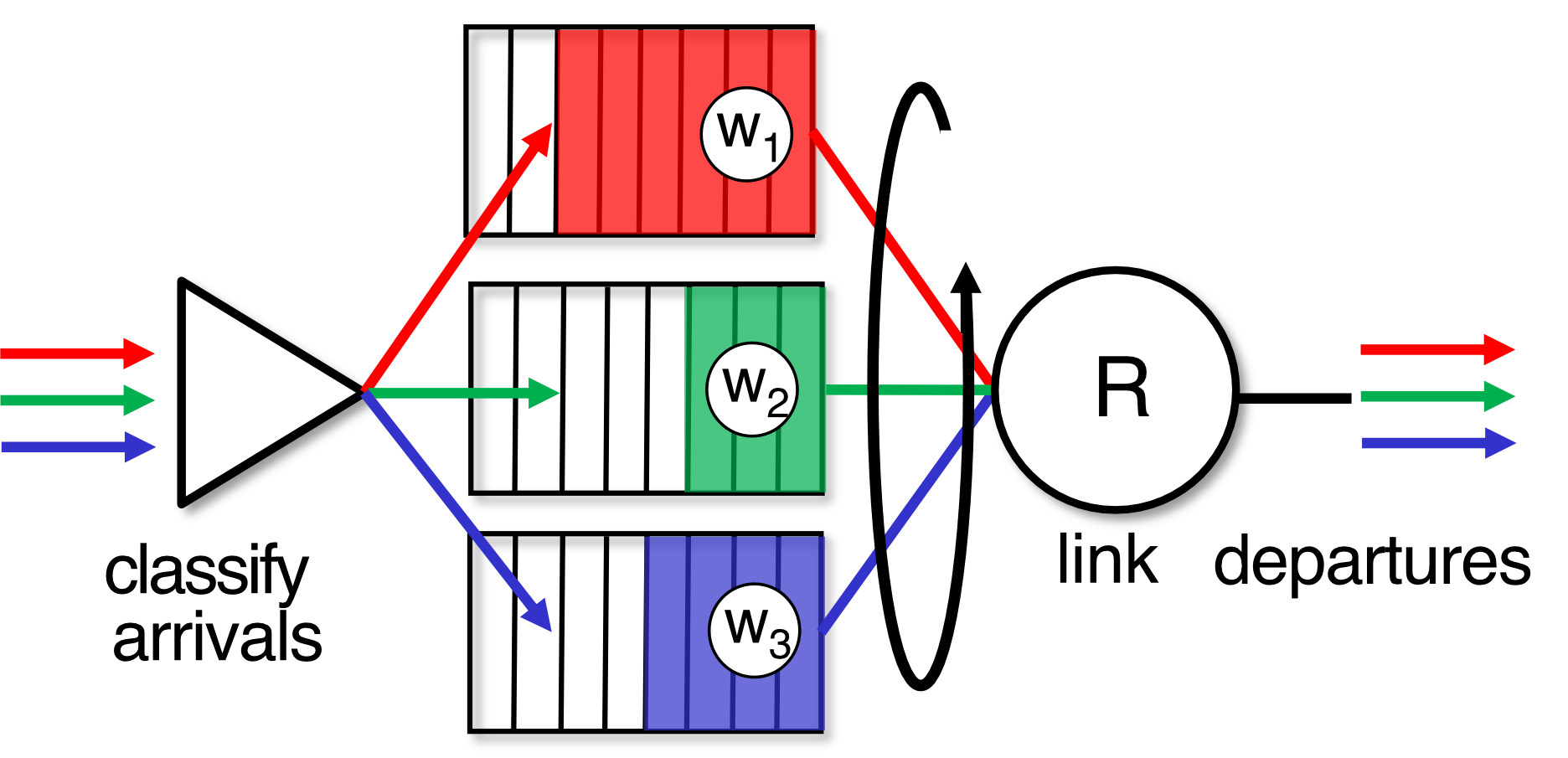
Analogy: Like splitting a pizza — each person gets a slice proportional to how many slices they "paid for".
Routing
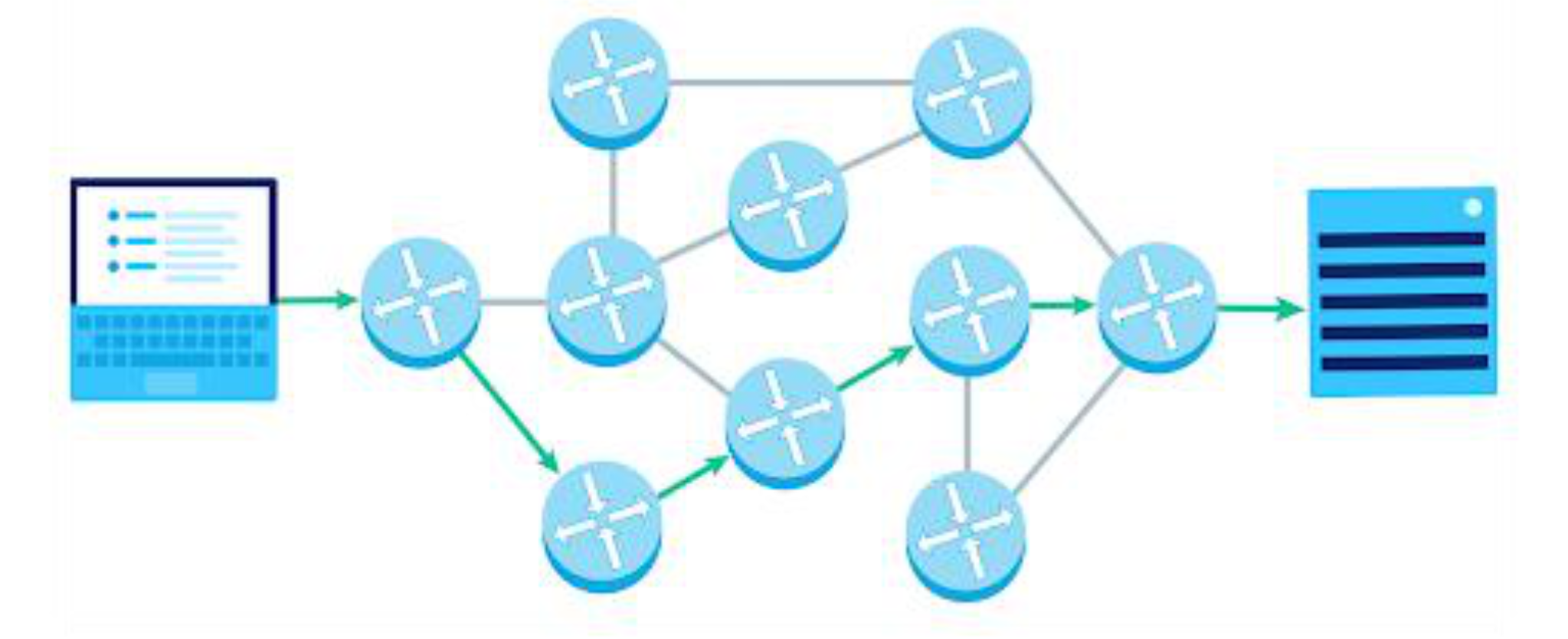
- Process of selecting path along which data can be transferred from source to destination
- Performed by a router
- Routing algorithms: software responsible for deciding the optimal path
- Routing protocols use a metric to determine the best path (แล้วแต่ว่าใช้ cost function เป็นอะไร):
- Hop count
- Bandwidth
- Delay
- etc.
Types of Routing
- Static Routing
- Dynamic Routing
- Default Routing
Static Routing
- Also known as Nonadaptive Routing
- ==Administrator manually adds routes in the routing table==
- Routing decisions are not made based on the condition or topology
Advantages:
- No Overhead: No CPU usage overhead on router → cheaper routers can be used
- Bandwidth: No bandwidth usage between routers
- Security: Admin controls routing to particular network
Disadvantages:
- For large networks, adding routes manually is very difficult
- Admin must have good knowledge of the topology
Example command (Cisco):
ip route 172.16.3.0 255.255.255.0 172.16.2.1
ip route 192.168.2.0 255.255.255.0 192.168.1.1
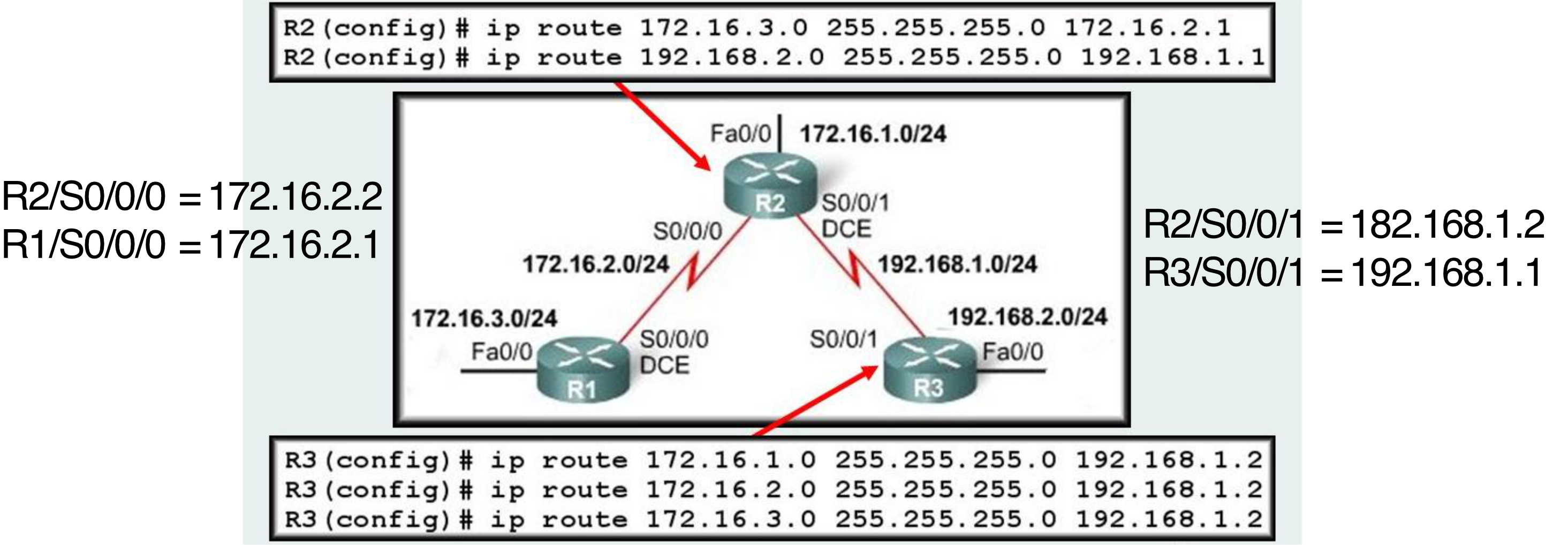
ดูอย่าง R2 เป็นตัวอย่าง มันเชื่อมกับ 3 network แล้ว ก็จะถูก add อัตโนมัติแหละ เลยต้อง Add เพิ่มแค่ 2
ทั้งรูปนี้มีทั้งหมด 5 networks!
Default Routing
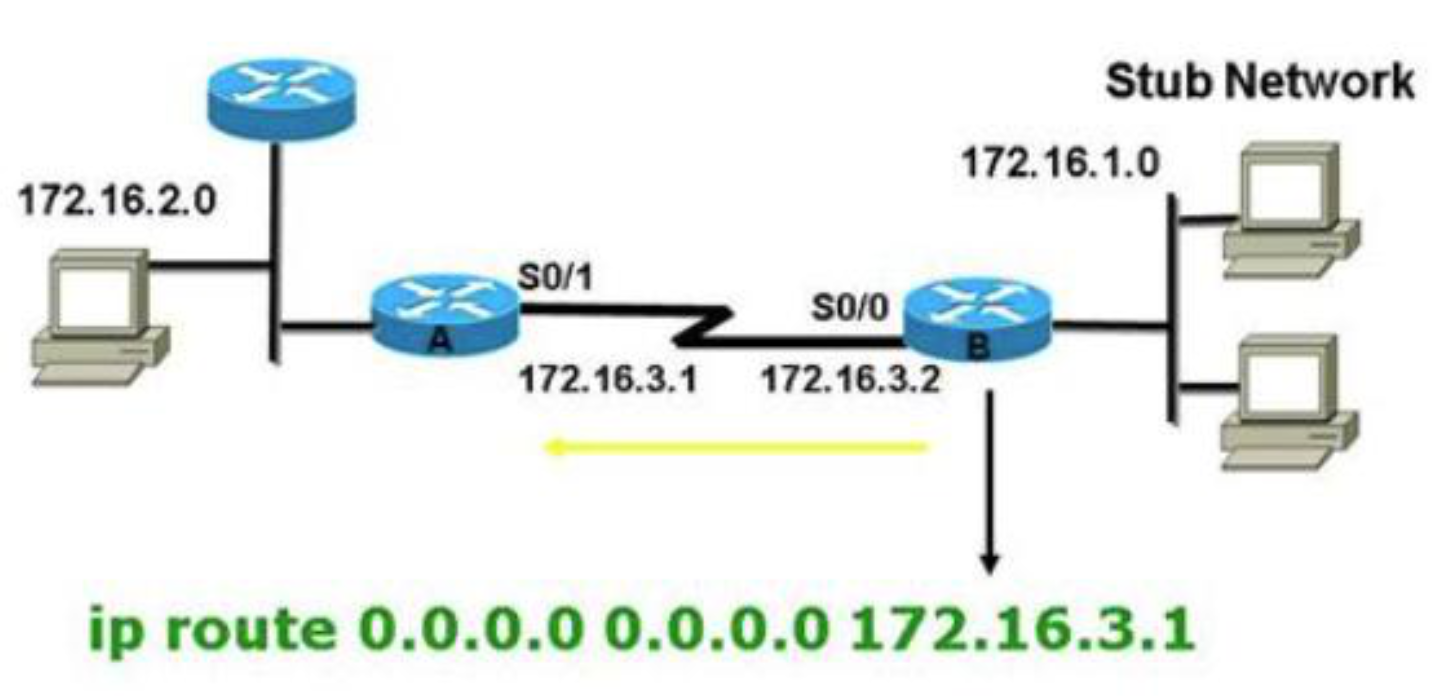
- Router configured to send all packets to the same hop device, regardless of whether it belongs to a particular network
- Used when networks deal with a single exit point
- When a specific route is in the routing table → router chooses specific route
- Default route chosen only when no specific route is mentioned
Example command:
ip route 0.0.0.0 0.0.0.0 172.16.3.1
- In routing table: destination
0.0.0.0, netmask0.0.0.0= default route
Analogy: Like a "catch-all" mail forwarding — if you don't know where to send it, forward it to headquarters.
Title
จบ class Mar 19
Dynamic Routing
- Also known as Adaptive Routing
- Router adds a new route in the routing table for each packet in response to changes in condition/topology
- Dynamic protocols discover new routes to reach destination
- If any route goes down → automatic adjustment made
Static Routing ก็ถ้ามันเกิดพังขึ้นมา ก็พังไปเลยทั้งคืน เดี๋ยวตอนเช้าคนมาแก้ manually 5555
ก็เลยต้องมี Dynamic Routing
Dynamic Routing Protocols:
Dynamic Routing
├── IGP (Interior Gateway Protocol)
│   ├── Distance Vector → RIP, IGRP
│   ├── Link State → OSPF
│   └── Hybrid → EIGRP
└── EGP (Exterior Gateway Protocol)
    └── Path Vector → BGP
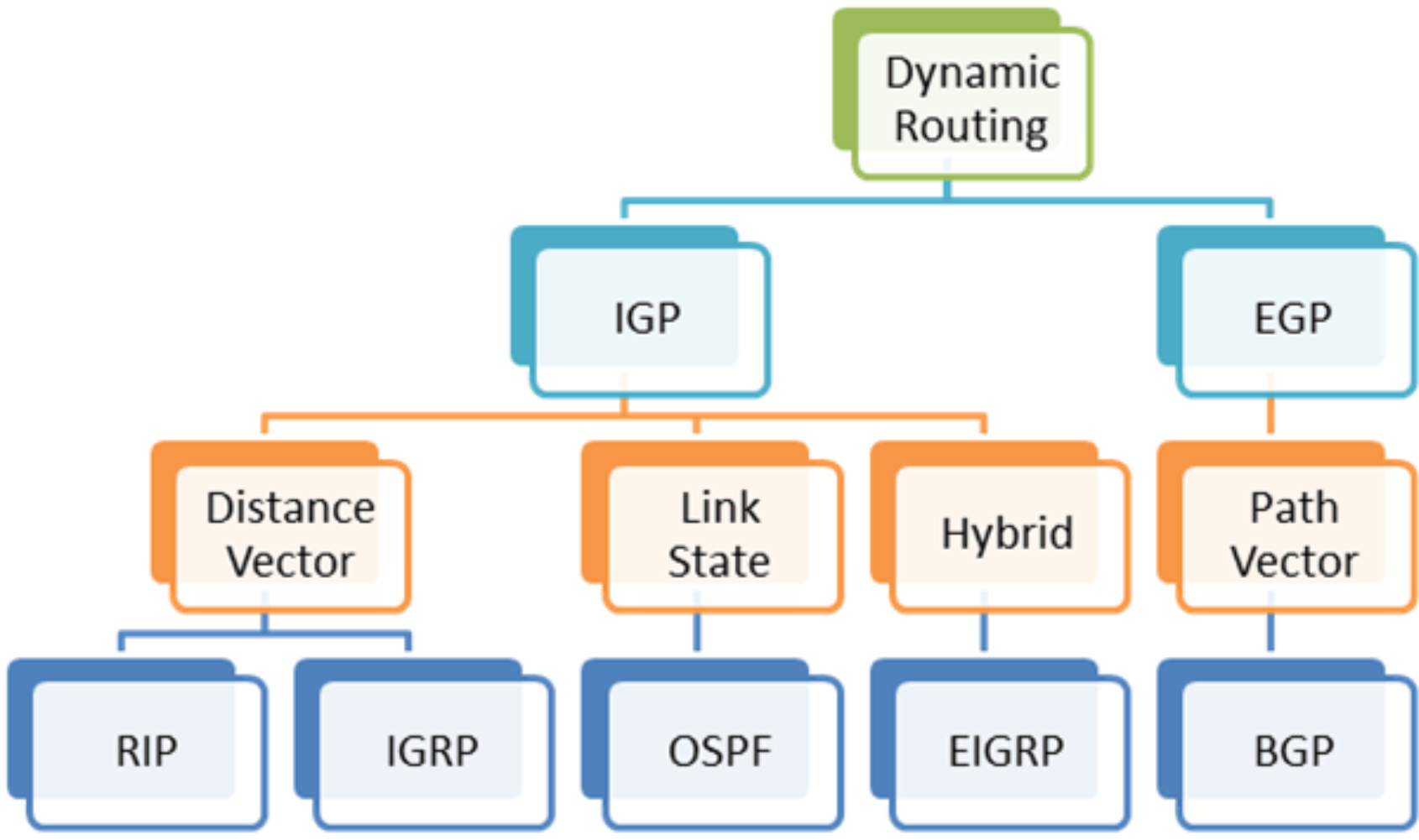
- EIGRP อย่างเช่นใน Singapore ยอมให้ใช้ router ตัวเองเป็นทางผ่าน เข้า internet
Configure Routing — Steps
- Design subnet/IPs — How many subnets?
- Assign IPs to Interfaces
- Computer interface
- Router interface
- Set Routing Table
- Static route
- Default route
- Test connectivity
- Ping test
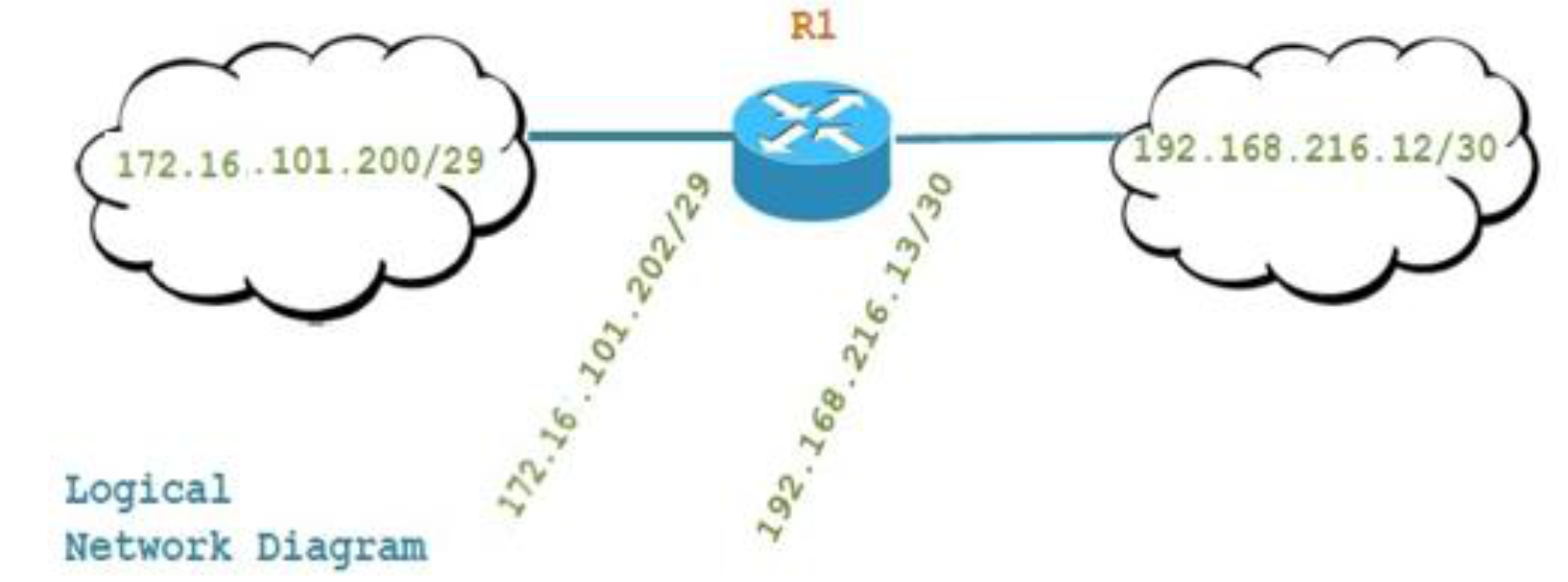
Logical Network ใน Cloud จะเป็น Network Address เสมอเด้อ!!
อย่าลืมว่า Logical and Physical วาดต่างกันนะ, Physical ให้เขียน Interfaceeth0ด้วย
ถ้า Computer นั้นมีหลาย interface ต้องรู้ว่า ….
Configure Routing — 2 Networks (Example)
Physical Network Diagram
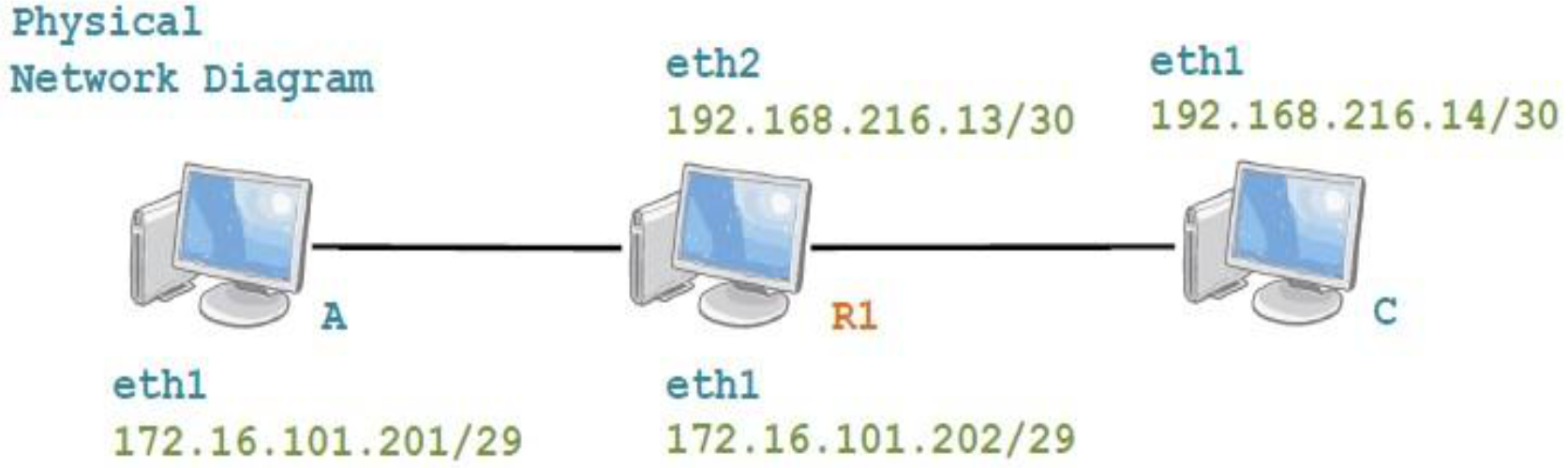
A (eth1: 172.16.101.201/29) ── R1 (eth1: 172.16.101.202/29, eth2: 192.168.216.13/30) ── C (eth1: 192.168.216.14/30)
On Computer A
# Set IP address
sudo ifconfig eth1 172.16.101.201/29

# Add default route (gateway = R1's eth1)
sudo route add default gw 172.16.101.202- เรา set default gateway อันเดียวให้เฉพาะ Computer A ก็เพราะมันมีทางออกเดียว
On Computer C
# Set IP address
sudo ifconfig eth1 192.168.216.14/30

# Add default route (gateway = R1's eth2)
sudo route add default gw 192.168.216.13
On Router R1
# Set IP on eth1
sudo ifconfig eth1 172.16.101.202/29

# Set IP on eth2
sudo ifconfig eth2 192.168.216.13/30

# Enable IP forwarding (critical!)
sudo sysctl -w net.ipv4.ip_forward=1- อย่างในรูปมี 2 subnet แล้วมัน connected to each other แล้ว (ก็ไม่ต้อง set up static route แล้วนะ)
Ping Test
# On A, ping C
ping -c 5 192.168.216.14

# On C, ping A
ping -c 5 172.16.101.201Key:
ip_forward=1allows the Linux machine to act as a router and forward packets between interfaces.
Configure Routing — 3 Networks (Example)
Network Topology (Logical)
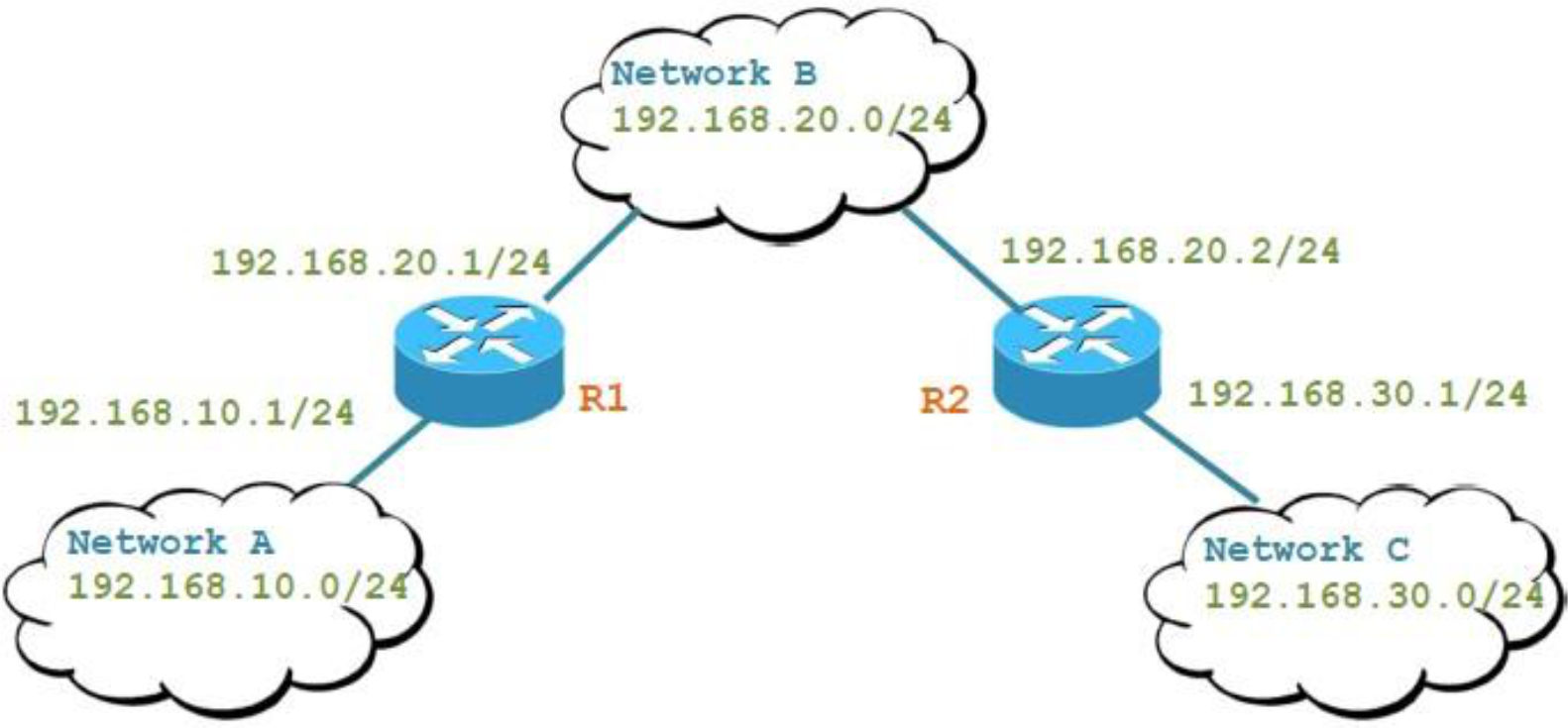
Network A (192.168.10.0/24)
    ↓
   R1 ←──── Network B (192.168.20.0/24) ────→ R2
                                                ↓
                                         Network C (192.168.30.0/24)
Physical Network Diagram
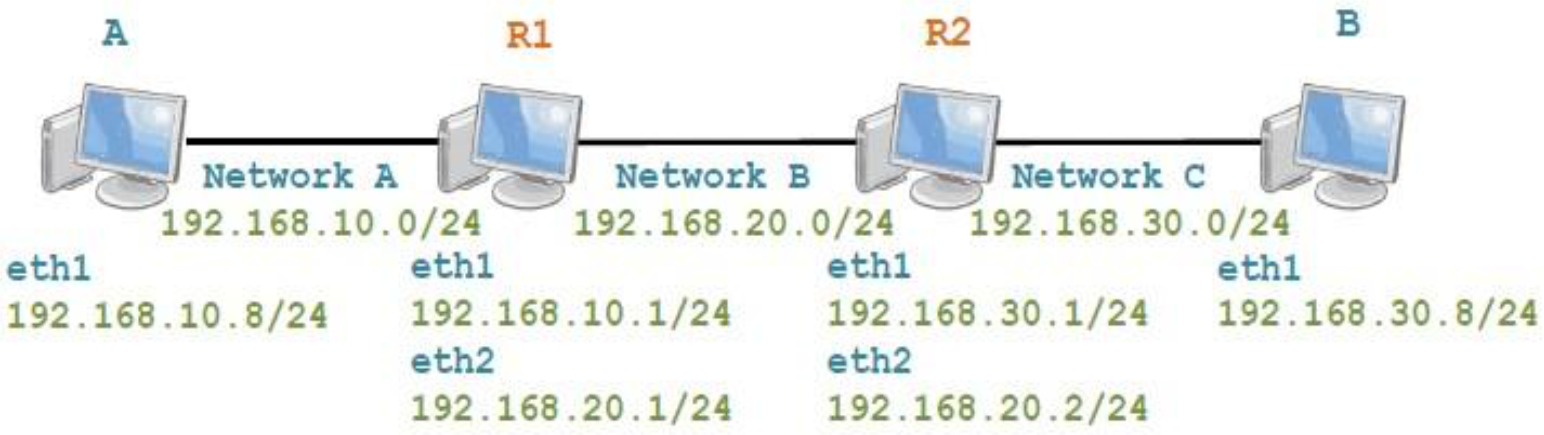
A (192.168.10.8/24) ── R1 (eth1:192.168.10.1/24, eth2:192.168.20.1/24) ── R2 (eth1:192.168.30.1/24, eth2:192.168.20.2/24) ── B (192.168.30.8/24)
Routing Table Summary
| Device | Network | Gateway |
|---|---|---|
| A | * | 192.168.10.1/24 |
| B | * | 192.168.30.1/24 |
| R1 → C | C (192.168.30.0/24) | 192.168.20.2 |
| R2 → A | A (192.168.10.0/24) | 192.168.20.1 |
Remark:
*= default route
Commands
# On Computer A
sudo ifconfig eth1 192.168.10.8/24
sudo route add default gw 192.168.10.1

# On Computer B
sudo ifconfig eth1 192.168.30.8/24
sudo route add default gw 192.168.30.1

# On R1
sudo ifconfig eth1 192.168.10.1/24
sudo ifconfig eth2 192.168.20.1/24
sudo sysctl -w net.ipv4.ip_forward=1
# Add static route to Network C (indirect — via R2)
sudo route add -net 192.168.30.0/24 gw 192.168.20.2

# On R2
sudo ifconfig eth1 192.168.30.1/24
sudo ifconfig eth2 192.168.20.2/24
sudo sysctl -w net.ipv4.ip_forward=1
# Add static route to Network A (indirect — via R1)
sudo route add -net 192.168.10.0/24 gw 192.168.20.1
Key Rule: Routers only need static routes for indirect networks (networks not directly connected). Direct networks are automatically in the routing table. (นี่แหละ ๆ ที่บอกว่าต้อง add static route อะไรที่ไม่ได้เชื่อมกับ router ตรง ๆ แค่นั้น)
Analogy: If you're in Bangkok and want to go to Chiang Mai, you only need directions for the roads between cities — not directions for walking around inside your own city.
Verification Strategy
- Verify by hop: start from nearest hop first
- e.g., A → R1 first, then A → R2, then A → B
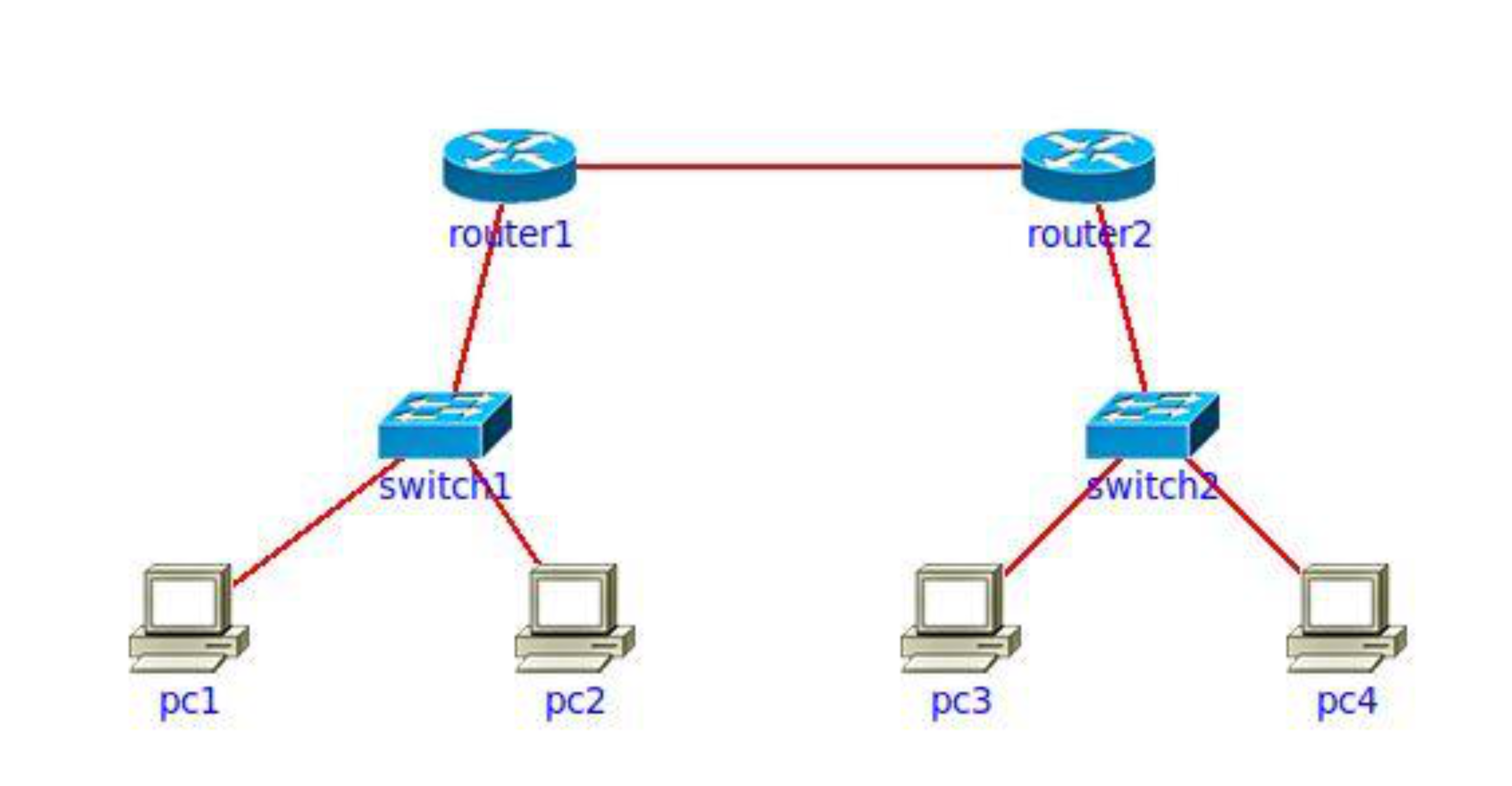
- #FinalExam มีแน่นอน ให้นับ Subnet อะนะ
- ข้อข้างบนตอบ 3
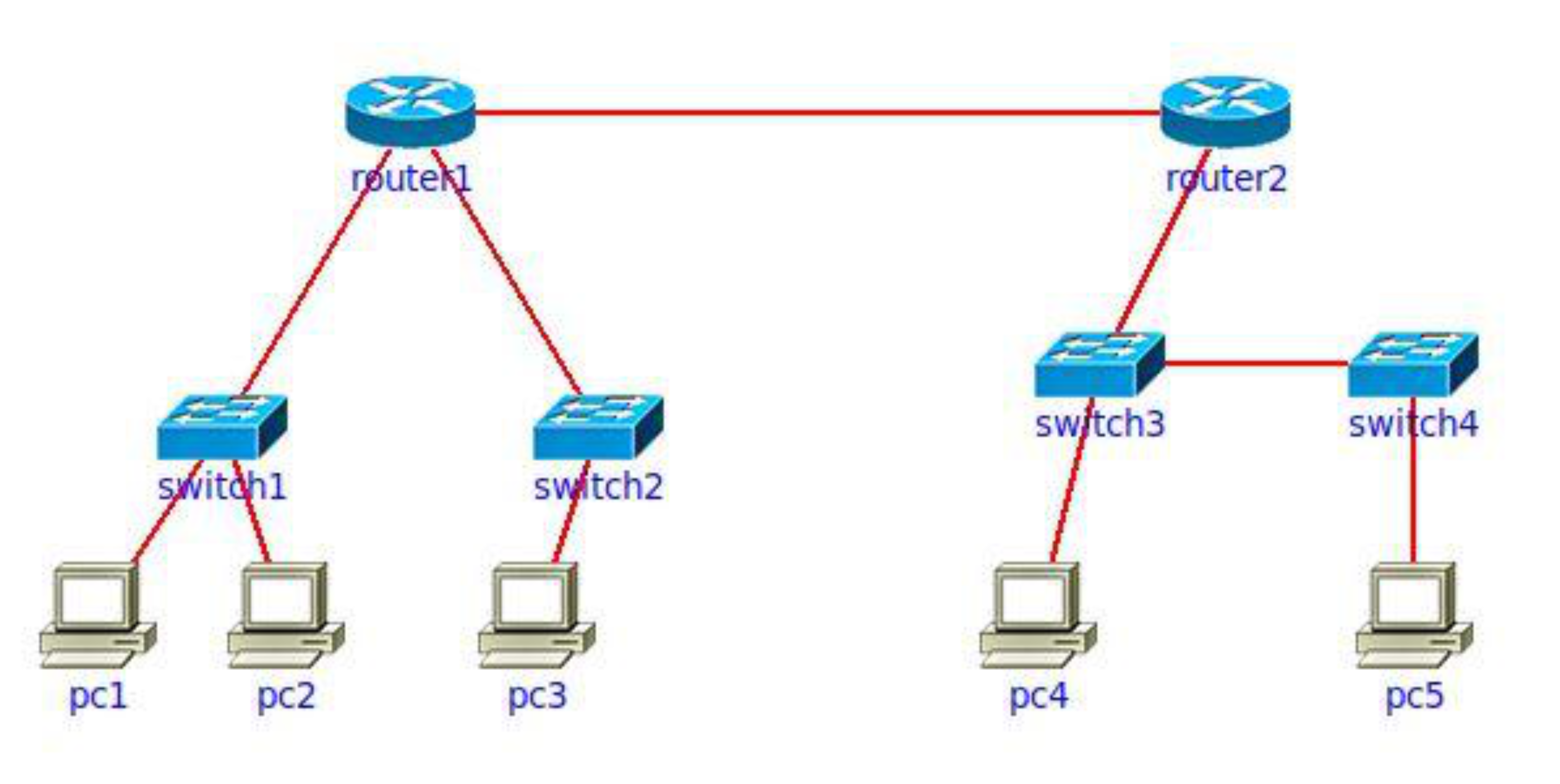
- ข้อนี้ตอบ 4
Network Management
เวลาเรามี network ที่มีหลาย equipment (multiple router, firework, DNS server, switches) เลยนะ
network admin จะ monitor, analyse ปัญหาที่อาจจะเกิดขึ้นได้ยังไง??!
What is Network Management?
"Network management includes the deployment, integration and coordination of the hardware, software, and human elements to monitor, test, poll, configure, analyze, evaluate, and control the network and element resources to meet the real-time, operational performance, and Quality of Service requirements at a reasonable cost."
- Autonomous systems (aka "network"): 1000s of interacting hardware/software components
- Similar complex systems: jet airplane, nuclear power plant
Components of Network Management
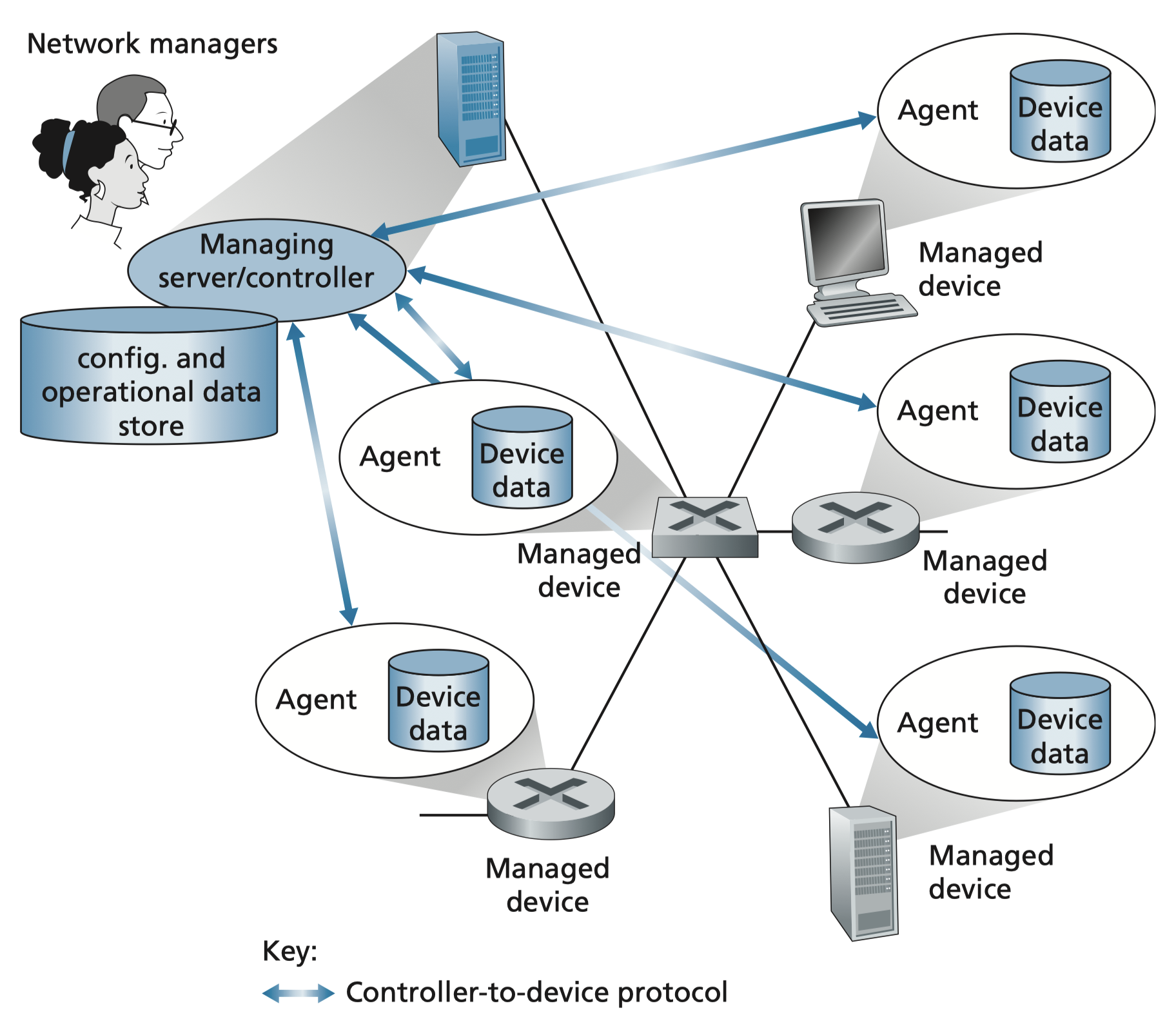
- ในแต่ละ Network device ต้องมี Agent (เพื่อที่จะรายงานสถานะ)
- CLI → SSH
- SNMP
- Service Agent
| Component | Description |
|---|---|
| Managing Server | Application, typically with network managers (humans) in the loop |
| Managed Device | Equipment with manageable, configurable hardware/software components |
| Data | Device "state" — configuration data, operational data, device statistics |
| Network Management Protocol | Used by server to query/configure/manage devices; used by devices to inform server of data/events |
Network Operator Approaches to Management
1. CLI (Command Line Interface)
- Operator issues commands directly to individual devices (e.g., via SSH)
2. SNMP/MIB
- Operator queries/sets device data (MIB) using Simple Network Management Protocol (SNMP)
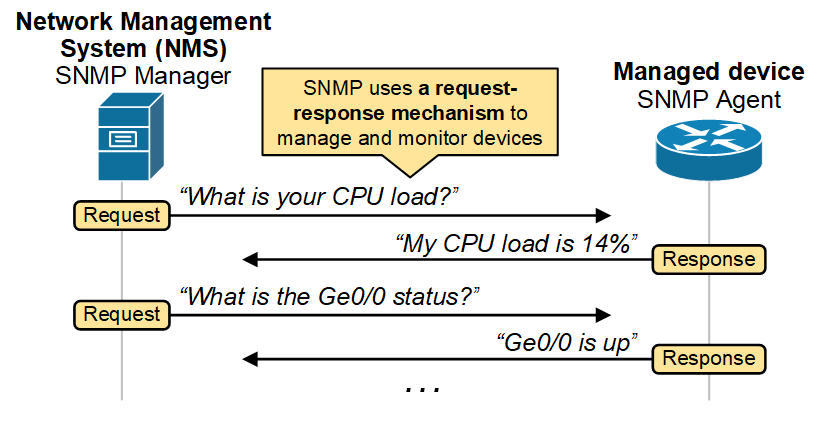
SNMP Protocol
Two Ways to Convey MIB Info/Commands
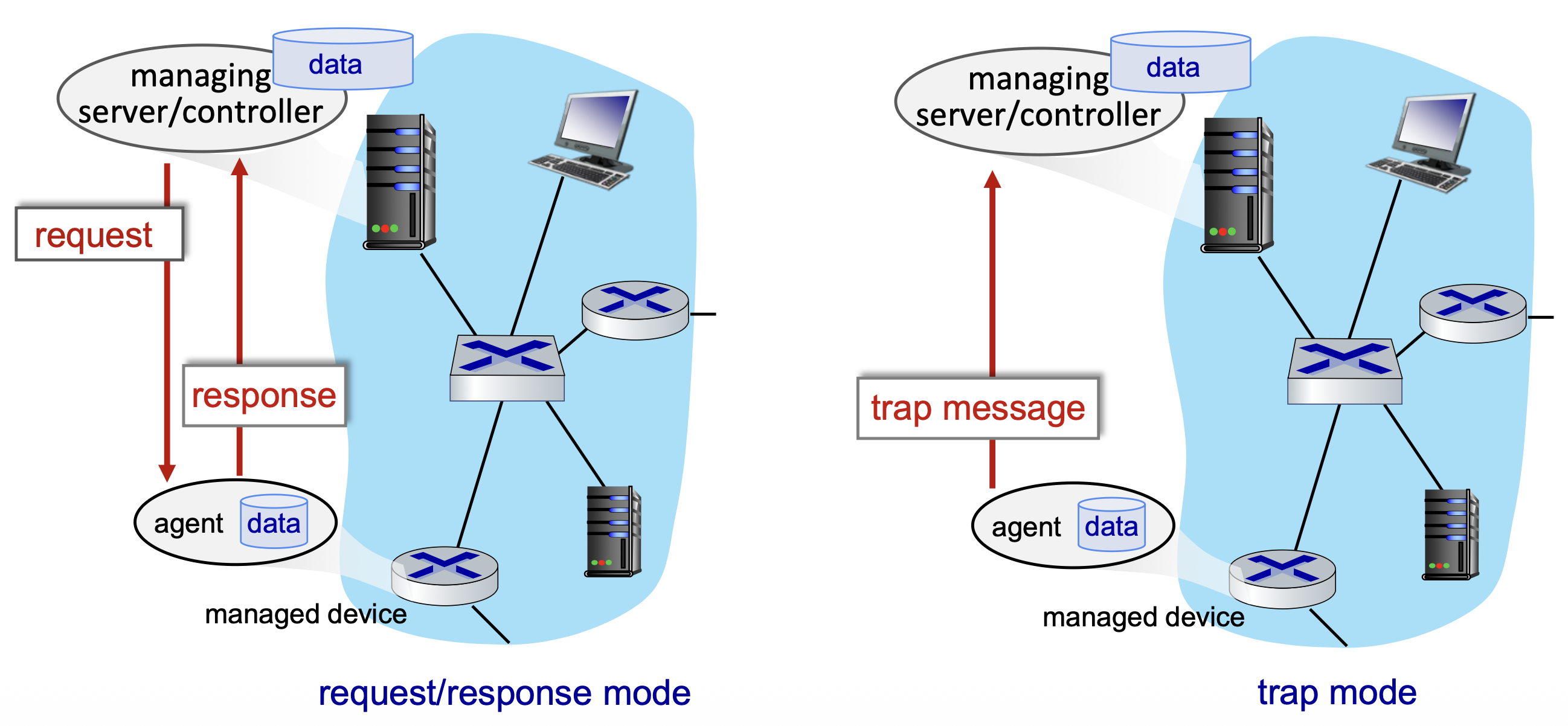
- Request/Response Mode: Managing server sends request → Agent responds
- Trap Mode: Agent proactively sends trap message to managing server (event-driven)
- ฟังเฉย ๆ ให้แต่ละ device report มาให้เป็น log file
- UDP
SNMP Message Types
| Message Type | Direction | Function |
|---|---|---|
GetRequest | Manager → Agent | "Get me data" (single instance) |
GetNextRequest | Manager → Agent | Get next data in list |
GetBulkRequest | Manager → Agent | Get block of data |
SetRequest | Manager → Agent | Set MIB value |
Response | Agent → Manager | Value/response to Request |
Trap | Agent → Manager | Inform manager of exceptional event |
Generic Trap Types
coldStart(0), warmStart(1), linkDown(2), linkUp(3),
authenticationFailure(4), egpNeighborLoss(5), enterpriseSpecific(6)
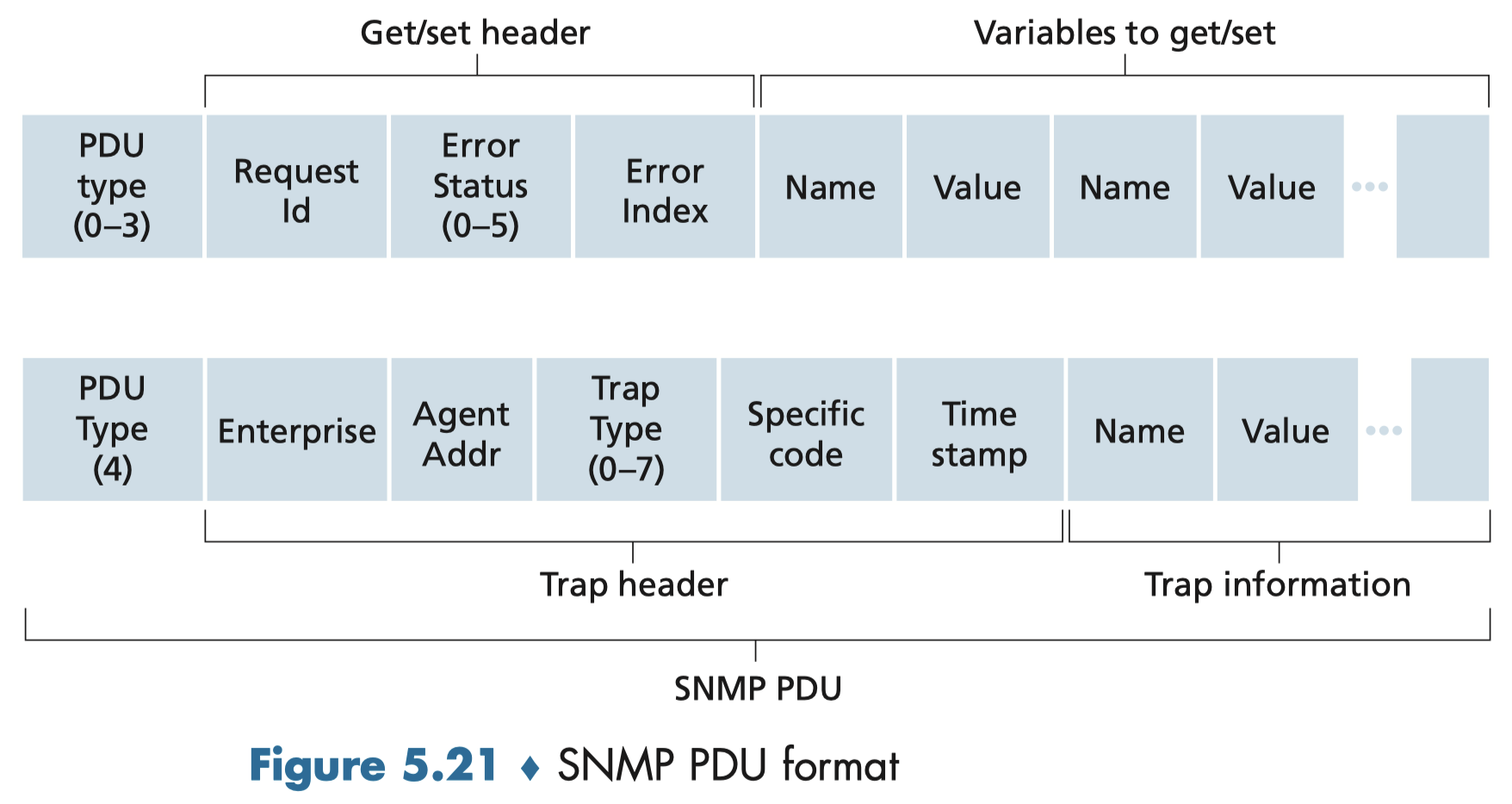
SNMP Message Format (GET/SET/RESPONSE — type 0–3)
| PDU Type (0-3) | Request ID | Error Status (0-5) | Error Index | Name | Value | … |
|---|
SNMP Message Format (TRAP — type 4)
| PDU Type (4) | Enterprise | Agent Addr | Trap Type (0-7) | Specific Code | Time Stamp | Name | Value | … |
|---|
Example SNMP Request
snmpget -v2c -c public 192.168.1.1 1.3.6.1.2.1.1.1.0
# Response: SNMPv2-MIB::sysDescr.0 = STRING: Cisco IOS Software, C2960
SNMP: Management Information Base (MIB)
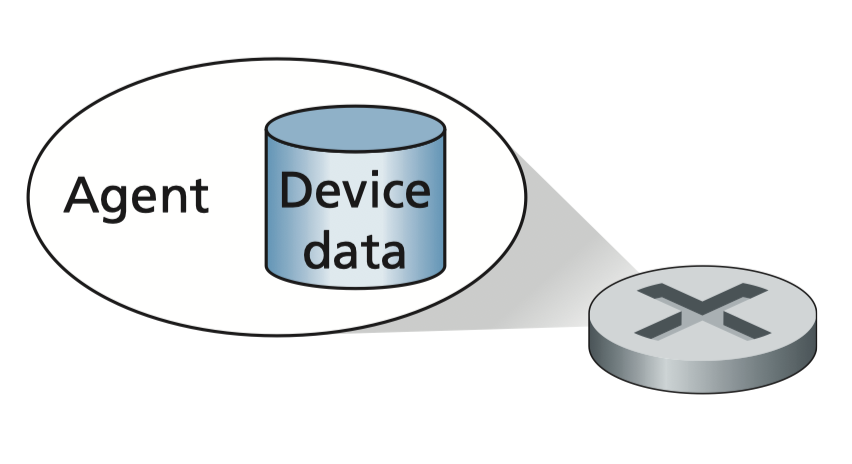
- Managed device's operational (and some configuration) data gathered into device MIB module
- 400 MIB modules defined in RFCs; many more vendor-specific MIBs
- Structure of Management Information (SMI): data definition language
Example MIB Variables for UDP Protocol
| Object ID | Name | Type | Comments |
|---|---|---|---|
| 1.3.6.1.2.1.7.1 | UDPInDatagrams | 32-bit counter | Total # datagrams delivered |
| 1.3.6.1.2.1.7.2 | UDPNoPorts | 32-bit counter | # undeliverable datagrams (no application at port) |
| 1.3.6.1.2.1.7.3 | UDInErrors | 32-bit counter | # undeliverable datagrams (all other reasons) |
| 1.3.6.1.2.1.7.4 | UDPOutDatagrams | 32-bit counter | Total # datagrams sent |
| 1.3.6.1.2.1.7.5 | udpTable | SEQUENCE | One entry for each port currently in use |
OID Tree Structure
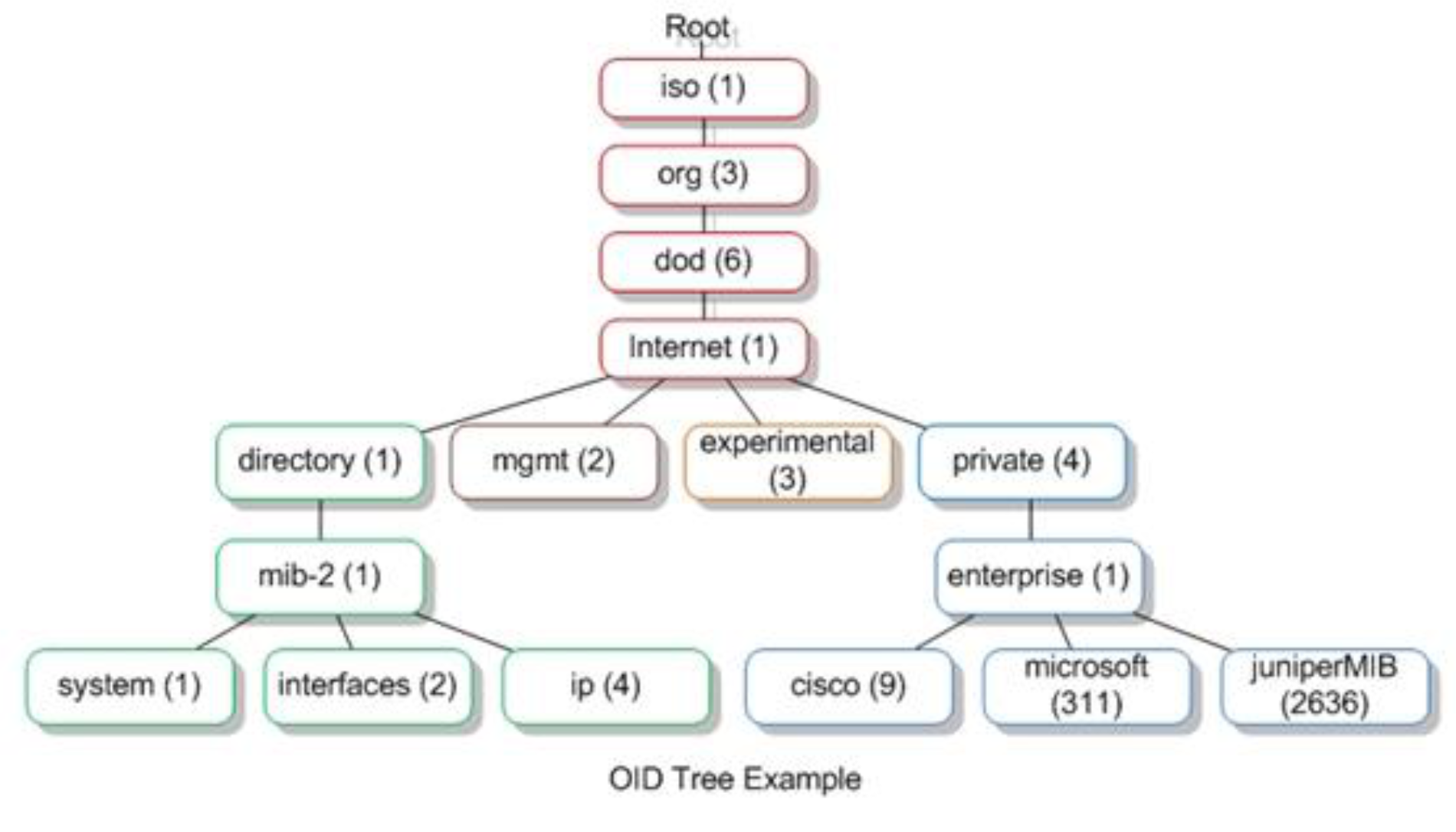
Root
└── iso (1)
    └── org (3)
        └── dod (6)
            └── internet (1)
                ├── directory (1)
                ├── mgmt (2)
                │   └── mib-2 (1)
                │       ├── system (1)
                │       ├── interfaces (2)
                │       ├── ip (4)
                │       └── cisco (9)
                ├── experimental (3)
                └── private (4)
                    └── enterprise (1)
                        ├── microsoft (311)
                        └── juniperMIB (2636)
Example snmpwalk Command
snmpwalkแปลว่า identify ทุกอย่างที่ match กับที่เราขอไป.1.1.3.6.1.4.1.2021.4
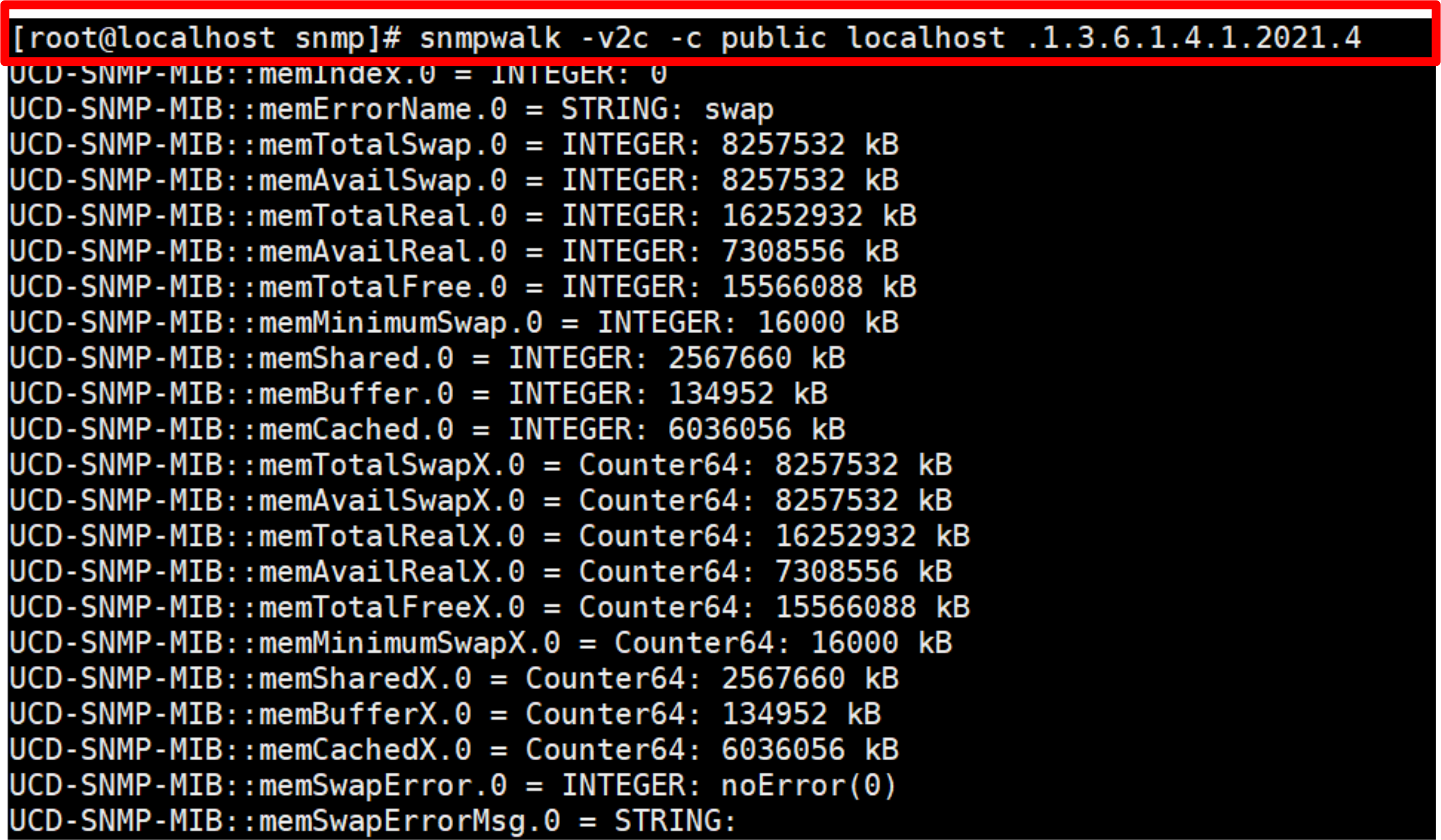
snmpwalk -v2c -c public localhost .1.3.6.1.4.1.2021.4
# Returns memory info: memTotalReal, memAvailReal, memTotalFree, etc.
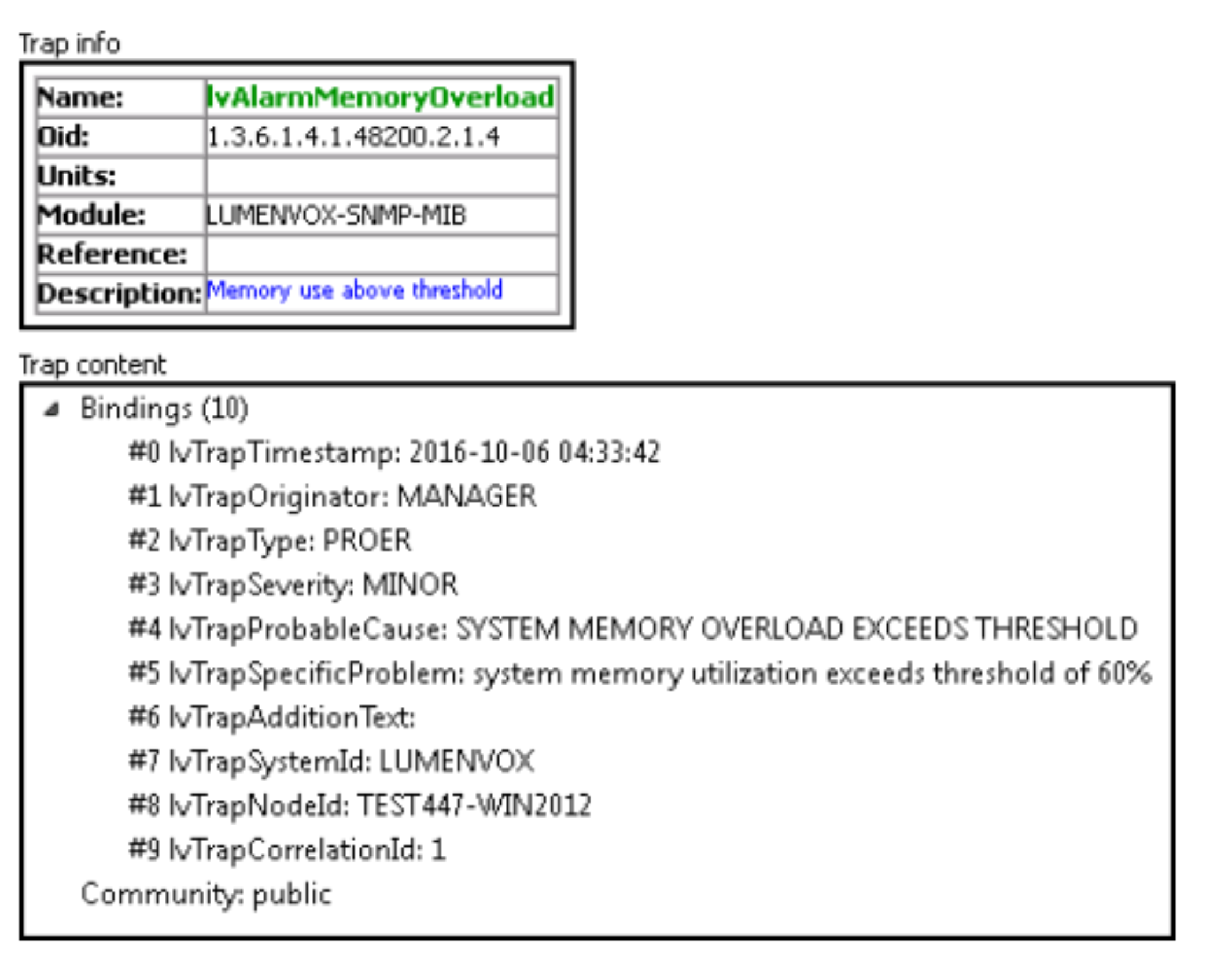
Example Trap Data
Trap info:
  Name: lvAlarmMemoryOverload
  OID:  1.3.6.1.4.1.48200.2.1.4
  Module: LUMENVOX-SNMP-MIB
  Description: Memory use above threshold

Trap content (Bindings):
  #0 lvTrapTimestamp: 2016-10-06 04:33:42
  #1 lvTrapOriginator: MANAGER
  #2 lvTrapType: PROER
  #3 lvTrapSeverity: MINOR
  #4 lvTrapProbableCause: SYSTEM MEMORY OVERLOAD EXCEEDS THRESHOLD
  #5 lvTrapSpecificProblem: system memory utilization exceeds threshold of 60%
  ...
  Community: public
Network Monitoring and Alarming System
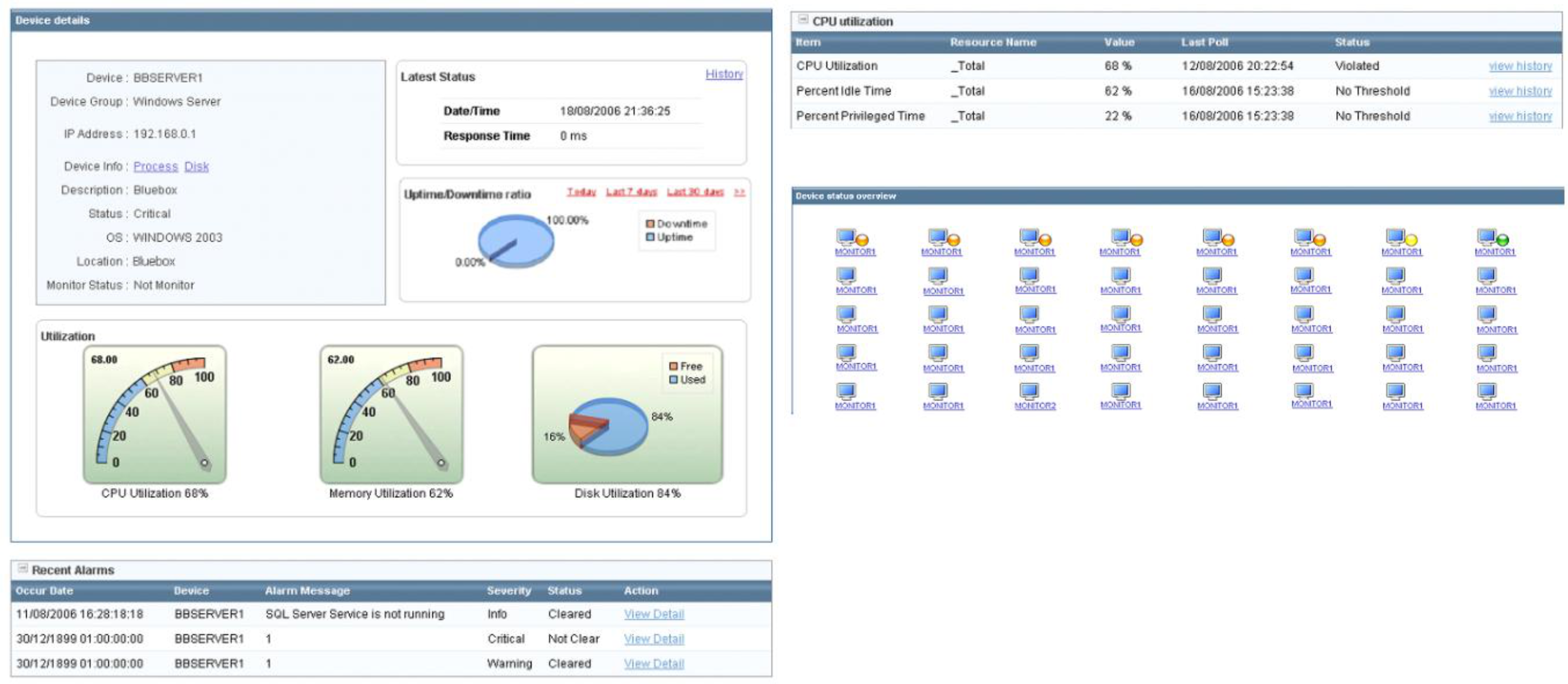
Real-world SNMP monitoring dashboards show: device details (IP, OS, status), CPU/Memory/Disk utilization gauges, uptime/downtime ratio, and recent alarms with severity levels (Info, Warning, Critical).
Summary
| Topic | Key Points |
|---|---|
| Input Ports | Destination-based & generalized forwarding, HOL blocking |
| Longest Prefix Match | Most specific route wins |
| Switching | Memory (slow) → Bus → Interconnection network (fast, parallel) |
| Output Ports | Buffer management, scheduling (FCFS/Priority/RR/WFQ) |
| Static Routing | Manual, no overhead, not scalable |
| Default Routing | Catch-all for single exit point |
| Dynamic Routing | Adaptive, auto-adjusts (RIP, OSPF, EIGRP, BGP) |
| Configure Routing | Design IPs → Assign → Set table → Ping test |
| SNMP/MIB | Network management protocol, OID-based data model |