Scenario of Interest
Process/thread synchronization is essential for coordinating multiple processes/threads to access shared resources in a controlled and predictable manner, ensuring correct output. Key considerations:
- Execution order matters – Different orders lead to different results.
- Shared resource access – Examples include:
- Multiple threads incrementing a shared variable (
Num += 1). - Multiple processes exchanging shared data.
- Multiple processes/threads editing a shared file.
- Multiple threads incrementing a shared variable (
Programming’s Point of View
From a programming perspective, key terms are interpreted as:
- Process/Thread: A segment of code (e.g., Python function).
- Resource: Hardware (monitor, printer), files, variables, etc.
- Shared Resource: A resource accessed by multiple processes/threads.
- Access: A set of operations (read, write, edit) on a resource.
Critical Section vs. Remainder Section
- Critical Section: A set of statements/commands that use shared resources.
- Remainder Section: Code that does not interact with shared resources.
Example: Two Processes Sharing a Monitor
Consider two processes, P1 and P2, that share a monitor:
P1.py
a = 1+1
b = 1+2
print("A beautiful day")  # Critical Section
c = 1+3
d = 1+4
P2.py
w = 1+1
x = 1+2
print("A cute dog")  # Critical Section
y = 1+3
z = 1+4
Critical Section vs. Remainder Section
- The
printfunction is the critical section, as it accesses the shared monitor. - All other operations are in the remainder section.
Synchronization vs. No Synchronization
-
With Synchronization (Monitor Controlled)
P1 → A beautiful day P2 → A cute dog- Processes execute in an orderly manner.
-
Without Synchronization
A cute dog, A beautiful day (Mixed Output)- Outputs from both processes may interleave unpredictably.
-
Critical section: A set of statements/commands relating to using this set of resources
-
Remainder section: The remaining code/statements/commands that are not related to using this set of resources
Example: Multiple Threads Displaying Their Names on a Monitor
import threading
from time import sleep

def TaskAdd(A):
	for _ in range (2):
		print(A+'\n')
		sleep (1)

if __name__ == "__main__":
	T1 = threading.Thread(target=TaskAdd, args=('Thread T1',))
	T2 = threading.Thread(target=TaskAdd, args=('Thread T2',))
	T1.start()
	T2.start()
	T1.join()
	T2.join()
Breakdown:
- Number of Processes: 1
- Number of Threads: 3
- Main Thread: 1
- Worker Threads: 2
- Shared Resource: Monitor (Output Screen)
Investigating the Output:
Expected correct output:
Thread T1
Thread T2
- If unsynchronized, the output may mix up unpredictably:
ThThrrreeadddT1T2- Characters from different threads may interleave, causing garbled output.
Example: Multiple processes cooperatively increase a shared variable
import multiprocessing

def TaskAdd(A) :
	for _ in range(A):
	Num.value = Num.value + 1

if __name__ =="__main__":
	Num = multiprocessing.Value('i', 0)
	P1 = multiprocessing.Process(target=TaskAdd, args=(500000,))
	P2 = multiprocessing.Process(target=TaskAdd, args=(500000,))
	P1.start()
	P2.start()
	P1.join()
	P2.join()
	print('Total = %d' % Num.value)
Num = multiprocessing.Value('i', 0): This allows multiple processes to access a shared variable. A global variable alone won't work.- ถึงแม้จะประกาศเป็น Global variable ก็ยังจะไม่ได้อยู่ดีนะ ต้องทำแบบนี้เท่านั้น
- เลข
0คือ initial value ของ variable นั้น ๆ
- Expected result: 1,000,000, but due to Race Condition, and attempt to update
Num.valueconcurrently, leading to incorrect results.
Breakdown:
- Number of Processes: 1+2=3
- Number of Threads: 3
- Main Thread: 3
- Worker Threads: 0
- Shared Resource:
Num.value
FYI: If we modify this to a multi-threaded program, the Python Global Interpreter Lock (GIL) would prevent race conditions.
🛑 The Problem: Limited Access
Only a certain number of processes/threads can access a shared resource at a time. Examples:
- Only one process/thread can print to the monitor at a time.
- Only one process/thread can update a variable’s value at a time.
Introduction to Synchronization Problems
- Process (thread) synchronization concerns how to let cooperating processes/programs/threads concurrently update/access/use shared resources properly/correctly such that data consistency is maintained.
- Concurrency means that many programs/processes/threads are able to run/execute concurrently (almost at the same time → while one process is running, other processes might start).
A Synchronization Problem – Race Condition
import multiprocessing

def TaskAdd(A):
    for _ in range(A):
        Num.value = Num.value + 1

if __name__ == "__main__":
    Num = multiprocessing.Value('i', 0)
    P1 = multiprocessing.Process(target=TaskAdd, args=(500000,))
    P2 = multiprocessing.Process(target=TaskAdd, args=(500000,))
    P1.start()
    P2.start()
    P1.join()
    P2.join()
    print('Total = %d' % Num.value)
In the previous example, we have experienced a synchronization problem where the answer is wrong from time to time, as shown below:
Total = 660130Total = 536587
This error is called a race-condition problem.
Race condition means the situation where the outcome of the execution depends on the particular order in which these instructions are executed.
A Problem with Increasing Num
The main reason for this error is that sometimes these two processes might run the command:
Num.value = Num.value + 1(almost) at the same time.
- The command
Num.value = Num.value + 1means increasing the value inNumby one. - Here, the command
Num.value = Num.value + 1is called the critical section. - To avoid this race condition, we must allow only one process to run this command at a time.
Critical section means the segment of the code that processes/threads will use to access shared resource(s).
High-Level Point of View
Assume that the value in the variable Num is 0. If the process P1 runs the command Num.value = Num.value + 1 and, almost at the same time, the process P2 runs the same command:
- We would think that, for example, P1 will execute this command first and then P2 executes next:
- P1 runs
Num.value = Num.value + 1 - P2 runs
Num.value = Num.value + 1
- P1 runs
- As a result, we would expect the value in the variable
Numto be 2 (which is the correct answer), assuming that P1 finishes running the command and then P2 executes. - ==However, this is not always true.==
Low-Level Point of View
At the machine level, execution works differently:
- When P1 runs the command
Num.value = Num.value + 1, the following machine instructions are executed:register1 = Num.value register1 = register1 + 1 Num.value = register1 - When P2 runs the same command, the following machine instructions are executed:
register2 = Num.value
register2 = register2 + 1
Num.value = register2
Consider a situation when both P1 and P2 run the command Num.value = Num.value + 1 almost at the same time or in parallel (on multiple cores/processors). The instructions of these commands might be interleaved, leading to an incorrect result.
Let us consider a scenario where the variable Num is 0, and both P1 and P2 execute the command Num.value = Num.value + 1. The following two cases could happen:

Key Takeaways on Synchronization Problems & Race Conditions
Why Do Synchronization Problems Happen?
- Processes/threads share resources.
- Too many enter the critical section at once.
- Instructions execute in the wrong order.
What’s a Race Condition?
- Multiple processes access the critical section at the same time.
- A single command might be split into multiple machine instructions.
- If instructions from different processes get interleaved, the final result becomes unpredictable.
- More common in multicore systems.
Without proper synchronization, your program might work sometimes—but break randomly when the execution order changes!
Solutions of Synchronization Problems
A critical section is a segment of code where a process modifies shared resources like variables, tables, or files.
A Pseudo Code to Represent a Process/Thread
When multiple processes (e.g., P1 and P2) share a resource, their execution follows this pattern:
do {
    some code of P1/P2;
    critical section;
    remainder of P1/P2;
    ...
} while(true);
The Critical-Section Problem
The critical-section problem involves designing a protocol that ensures safe and cooperative access to shared resources. A proper solution must ensure that only a limited number of processes can be in the critical section simultaneously.
Adding Entry and Exit Sections
To manage access, we introduce:
do {
    some code of P1/P2;
    **Entry Section;**
    critical section;
    **Exit Section;**
    remainder of P1/P2;
    ...
} while(true);- Entry Section: Ensures that a process enters only if the allowed number of processes in the critical section has not been exceeded; otherwise, it blocks.
- Exit Section: Signals other processes that a process has exited the critical section.
Requirements for a Solution
To properly manage access, a synchronization solution must satisfy:
- Mutual Exclusion - Only one process can execute in the critical section at a time.
- Progress - If no process is in the critical section, only those requesting access will decide which one enters, and this decision will not be indefinitely delayed.
- Bounded Waiting - A process waiting to enter the critical section will eventually get access within a finite number of turns.
Solution Approaches
To prevent concurrency issues, developers must implement synchronization mechanisms. Two major approaches are:
1. Software Synchronization
Implemented through programming techniques but vulnerable to interrupts.
- Peterson’s Solution
- Mutex Locks (covered in this lecture note)
- Semaphore (covered in this lecture note)
2. Hardware Synchronization
Relies on machine instructions that are not interruptible (คือ atomic operation ด้วยนะ).
- test_and_set() instruction
- compare_and_swap() instruction
Mutex Locks 🔒
A mutex lock allows multiple processes to share a critical section but ensures only one process can enter at a time. "Mutex" stands for mutual exclusion.
Key Idea
A process must acquire the mutex before entering the critical section and release it when exiting.
Warning
Only one process can access the resource at a time (i.e., only one process can enter the critical section).
Spin Lock
A spin lock (or busy wait) occurs when a process continuously checks a condition in a loop, waiting to exit once the condition is false.
- Format:
while (condition); - If
conditionis true, the process keeps looping (spin lock). - If
conditionis false, the process exits the loop and continues execution. - Spin locks are common in synchronization algorithms.
- Downside: It wastes CPU time, as the waiting process keeps running the loop without performing useful work.
Theoretical Concept of Mutex Locks
Mutex locks rely on two functions: acquire(key) and release(key).
- acquire(key): Used in the entry section.
- release(key): Used in the exit section.
- Boolean variable
key:true: No process in the critical section.false: One process in the critical section.
Pseudocode Implementation
Initial condition: key = true
do {
    acquire(key);
    critical section;
    release(key);
    remainder section;
    ...
} while(true);
acquire(key) Function
acquire(key) {
    while (!key);
    key = false;
}- Uses a busy-wait loop to check if the critical section is free.
- Once
key = true, it setskey = false, preventing other processes from entering.
release(key) Function
release(key) {
    key = true;
}- Simply resets
keytotrue, allowing another process to enter the critical section.
Disadvantages of Mutex Locks
- Busy Waiting (Spin Lock): The
acquire(key)function keeps checking the condition, wasting CPU time. - Single Process Limitation: Only one process can enter the critical section. It does not support cases where multiple processes should be allowed inside.
- Race Condition Risk: Since
acquire(key)consists of two steps, a context switch might occur in between, causing two processes to enter the critical section simultaneously.
Using Python Mutex Locks
Python Mutex Lock Basics
Python provides the multiprocessing.Lock() class to implement mutex locks for managing concurrent access to shared resources. Here's how it works:
| Python Command | Explanation |
|---|---|
import multiprocessing | Import the multiprocessing module |
lock = multiprocessing.Lock() | Create a mutex lock called "lock" |
lock.acquire() | Acquire the mutex lock "lock" |
lock.release() | Release the mutex lock "lock" |
Solving Race Conditions with Mutex Locks
Race conditions occur when multiple processes access and modify shared data simultaneously. Using mutex locks solves this problem by ensuring only one process can modify the shared data at a time.
import multiprocessing

def TaskAdd(A, lock):
    for _ in range(A):
        lock.acquire()
        Num.value = Num.value + 1
        lock.release()

if __name__ == "__main__":
    Num = multiprocessing.Value('i', 0)
    lock = multiprocessing.Lock()
    P1 = multiprocessing.Process(target=TaskAdd, args=(500000, lock, ))
    P2 = multiprocessing.Process(target=TaskAdd, args=(500000, lock, ))
    P1.start()
    P2.start()
    P1.join()
    P2.join()
    print('Total = %d' % Num.value)
Output: Total = 1000000 (correct result!)
Important Notes
- Simplified Syntax: For a more concise version, you can use the
with lockstatement, similar to how you would use Swift'ssynchronizedblocks. - Not 100% Foolproof: Sometimes race conditions can still occur despite using locks.
Semaphores
Previously, we allowed only one process in the critical section. In some situations, we might want to allow multiple processes to enter the critical section simultaneously. A semaphore is a synchronization method used for this purpose.
Types of Semaphores
- Classic (original) semaphores (spin lock)
- Waiting processes remain in a spin lock (busy waiting).
- Revised semaphores (blocking call)
- Waiting processes are blocked until the semaphore is available.
Theoretical Concept of Classic Semaphores
A semaphore (S) is an integer variable accessed only through two atomic operations:
- wait(S): Decrements S; if S is ≤ 0, the process waits.
- signal(S): Increments S, signaling availability.
Semaphores control access to shared resources:
- If S > 0, processes can enter the critical section.
- If S = 0, no process can enter.
Types of Classic Semaphores:
- Binary Semaphore (0 or 1) → Like mutex locks, allowing one process at a time.
- Counting Semaphore (0 to N) → Controls up to N processes in the critical section.
Implementation:
Initial value: S = N;
do {
    wait(S);
    // critical section
    signal(S);
    // remainder section
} while (true);- If S > 0, the process can enter.
- If S = 0, the process must wait.
Wait and Signal Definitions:
wait(S) {
    while (S <= 0);
    S--;
}

signal(S) {
    S++;
}
Example: Classic Semaphore
Two processes P1 and P2 share a critical section using a semaphore S, initially set to 1.
Process P1:
do {
    wait(S);
    // critical section
    signal(S);
    // remainder section of P1
} while (true);
Process P2:
do {
    wait(S);
    // critical section
    signal(S);
    // remainder section of P2
} while (true);
Analogy
Think of a semaphore like a concurrent queue with a limited number of workers in GCD (Grand Central Dispatch). (อันนี้เรื่องส่วนตัว ตัดออก)
- A binary semaphore is similar to a serial queue, allowing only one task at a time, while a
- Counting semaphore is like a concurrent queue with a limit on the number of concurrent tasks.
Theoretical Concept of Revised Semaphores
A semaphore is a synchronization primitive used to control access to shared resources in concurrent systems. Unlike classic semaphores, revised semaphores avoid busy-waiting by blocking processes instead of keeping them in a spin lock.
typedef struct {
    int value;
    struct process *list;
} semaphore;- Variable:
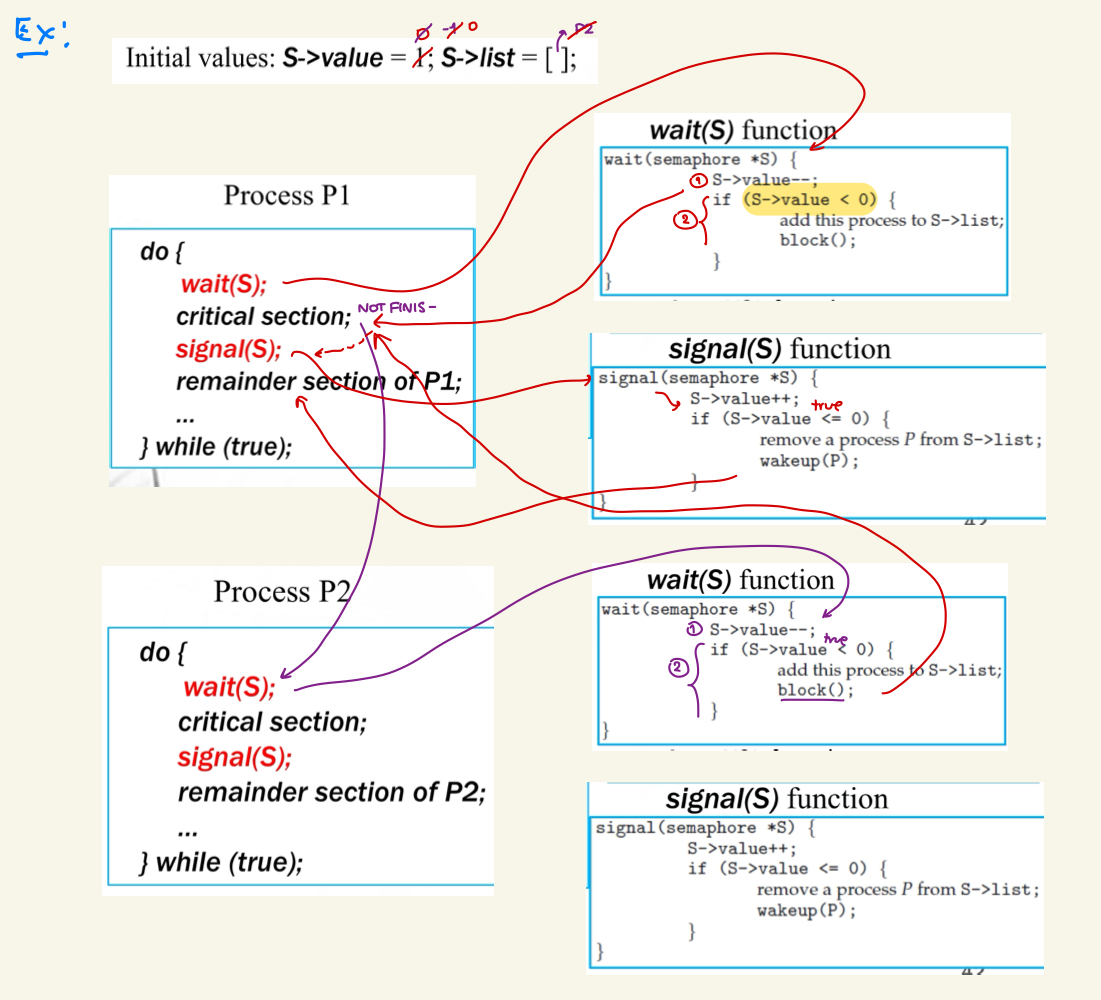
S->valuerepresents the number of processes allowed in the critical section simultaneously (or the number of available resources). It starts with a maximum value indicating resource availability.- Can be a negative value— There are processes waiting for entering critical section. ก็คือจะมีค่าเท่ากับ
S->list.count()นั่นแหละ
- Can be a negative value— There are processes waiting for entering critical section. ก็คือจะมีค่าเท่ากับ
- Variable:
S->liststores a list of processes waiting to enter the critical section. Initially empty.
wait(S) Operation
wait(semaphore *S) {
    S->value--;
    if (S->value < 0) {
        // add this process to S->list;
        block();
    }
}- Decreases
S->valueby 1 when a process attempts to enter the critical section. - If
S->valuedrops below 0, the process is blocked and added toS->list(waiting state).- แต่ถ้า ≥ 0 เนี่ย Process ที่เรียก function
wait(S)() มันก็จะเข้า Critical Section เลย
- แต่ถ้า ≥ 0 เนี่ย Process ที่เรียก function
- Key Difference: Unlike classic semaphores, waiting processes do not consume CPU cycles (no spin-locking), improving efficiency.
signal(S) Operation
signal(semaphore *S) {
    S->value++;
    if (S->value <= 0) {
        // remove a process P from S->list;
        wakeup(P);
    }
}- Increases
S->valueby 1 when a process leaves the critical section. - If
S->value ≤ 0, a waiting process is removed fromS->listand woken up to enter the critical section.
Question
Initially, S->Value = 2. What is the maximum number of processes can be in the critical section at the same time.
Two ไงงงง ถามไปเรื่อยอะ
Question
Continued from the previous question, at this moment S->Value = -4, How many processes currently in the critical section?
ก็ยัง Two อยู่ดี เราต้องดูที่ Initial value นะ
And how many processes are waiting for entering the critical section?
ก็ดูจากค่า S->Value จะบอกจำนวน Processes ที่รอเข้า Critical Section ดังนั้น 4 Processes
Example: Using Python Semaphores
Python provides the multiprocessing.Semaphore() class to work as a semaphore.
Python Command Explanation
| Command | Explanation |
|---|---|
import multiprocessing | Imports the multiprocessing module. |
semlock = multiprocessing.Semaphore(N) | Creates a semaphore semlock that allows up to N processes in the critical section. |
semlock.acquire() | Acquires the semaphore semlock, decrementing its internal counter. |
semlock.release() | Releases the semaphore semlock, incrementing its internal counter. |
A race-condition problem can be solved using Python semaphores as follows:
import multiprocessing

def TaskAdd(A, semlock):
    for _ in range(A):
        semlock.acquire()
        Num.value = Num.value + 1
        semlock.release()

if __name__ == "__main__":
    Num = multiprocessing.Value('i', 0)
    semlock = multiprocessing.Semaphore(1)
    P1 = multiprocessing.Process(target=TaskAdd, args=(500000, semlock,))
    P2 = multiprocessing.Process(target=TaskAdd, args=(500000, semlock,))
    P1.start()
    P2.start()
    P1.join()
    P2.join()
    print('Total = %d' % Num.value)
For a more concise version, we can use with semlock instead of explicitly calling acquire() and release().
สรุปปป
| Approach | System-wide variable | Entry Section | Exit Section |
|---|---|---|---|
| Mutex Lock | Key | acquire(key) | release(key) |
| Classic Semaphore | S | wait(S) | signal(S) |
| Revised Semaphore | S->value, and S->list | wait(S) | signal(S) |
Problems in Using Synchronization
A Deadlock Problem
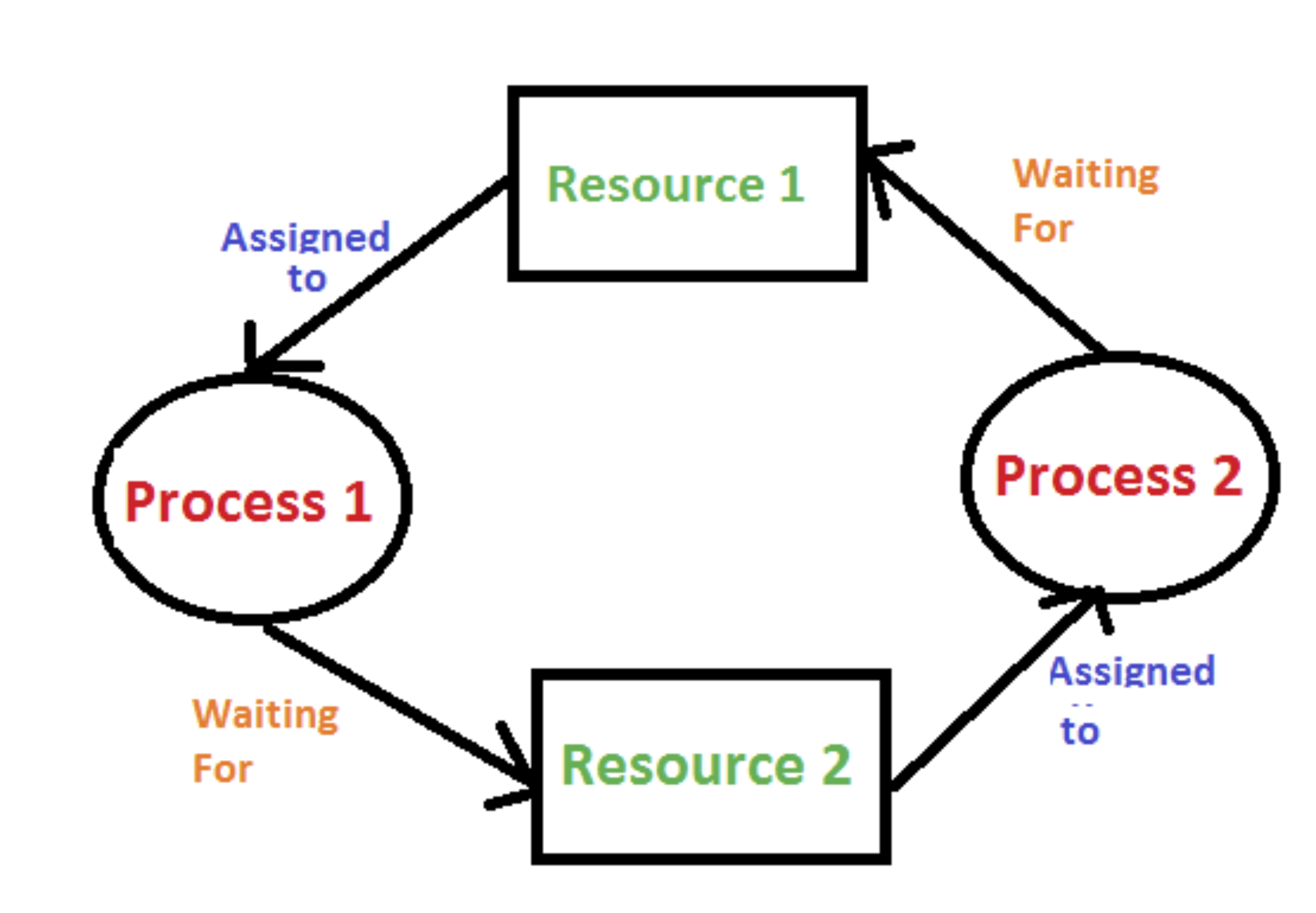
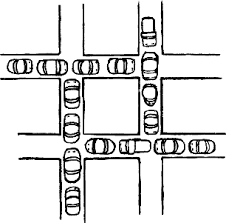
Deadlock occurs when a set of processes are blocked, each holding a resource and waiting for another resource held by another process.
Example: Deadlock due to Circular Wait
Consider two processes, P1 and P2, that share a resource. Each process requires two mutex locks: lockA and lockB.
- P1 acquires
lockAfirst, thenlockB. - P2 acquires
lockBfirst, thenlockA.
This can lead to a deadlock where:
- P1 (owns
lockA) is waiting forlockB(held by P2). - P2 (owns
lockB) is waiting forlockA(held by P1).
Now, both processes are stuck indefinitely.
from time import sleep
import multiprocessing

def ProcTask(ProcName, lock1, lock2):
    print(ProcName + ' would like to enter the critical section.')
    lock1.acquire()
    sleep(1)
    print(ProcName + ' owns his first lock and waiting for the second lock ...')
    lock2.acquire()
    print(ProcName + ' is in the critical section.')
    lock2.release()
    lock1.release()

if __name__ == '__main__':
    lockA = multiprocessing.Lock()
    lockB = multiprocessing.Lock()

    P1 = multiprocessing.Process(target=ProcTask, args=('P1', lockA, lockB))
    P2 = multiprocessing.Process(target=ProcTask, args=('P2', lockB, lockA))
    P1.start()
    P2.start()
    P1.join()
    P2.join()
Output
P1 would like to enter the critical section.
P2 would like to enter the critical section.
P1 owns his first lock and waiting for the second lock ...
P2 owns his first lock and waiting for the second lock ...
A Starvation Problem in Revised Semaphores
Starvation (indefinite blocking) occurs when a process is indefinitely kept in the waiting list after calling wait().
- If signal() removes the most recently added process first (LIFO order), the first process in the list might never get executed.
- This leads to some processes being stuck indefinitely.
A Priority-Inversion Problem
Priority inversion occurs when a high-priority process is forced to wait because a low-priority process is occupying a critical section.
Scenario:
- A low-priority process enters a critical section.
- A high-priority process tries to enter the same critical section but must wait.
- Meanwhile, a medium-priority process preempts the low-priority process, preventing it from releasing the lock.
- The high-priority process is now stuck waiting for the low-priority process to finish, causing an inversion of priorities.
Solution: Priority Inheritance Protocol
- The low-priority process temporarily inherits the high-priority process’s priority.
- This allows it to complete its critical section faster, releasing the lock and preventing priority inversion.