What is Mobile Cloud Computing?
- Mobile Cloud Computing (MCC) refers to an infrastructure where both data storage and data processinghappen outside of the mobile device
- Mobile device = ==resource-constrained device==
- MCC moves computing power and data storage away from mobile devices → into powerful, centralized computing platforms located in clouds
- Cloud services are accessed over a wireless connection based on a thin native client
Think of MCC like a dumb terminal plugged into a mainframe — the phone is just a screen and input device; the heavy lifting happens elsewhere in the cloud.
Why Mobile Cloud Computing?
- Mobile devices face many resource challenges: battery life, storage, bandwidth, etc.
- Cloud computing offers advantages by allowing use of infrastructure, platforms, and software at low cost and elastically in an on-demand fashion
- MCC provides mobile users with data storage and processing services in clouds → no need for powerful device configuration (CPU speed, memory capacity, etc.)
- All resource-intensive computing can be performed in the cloud
MCC Architecture
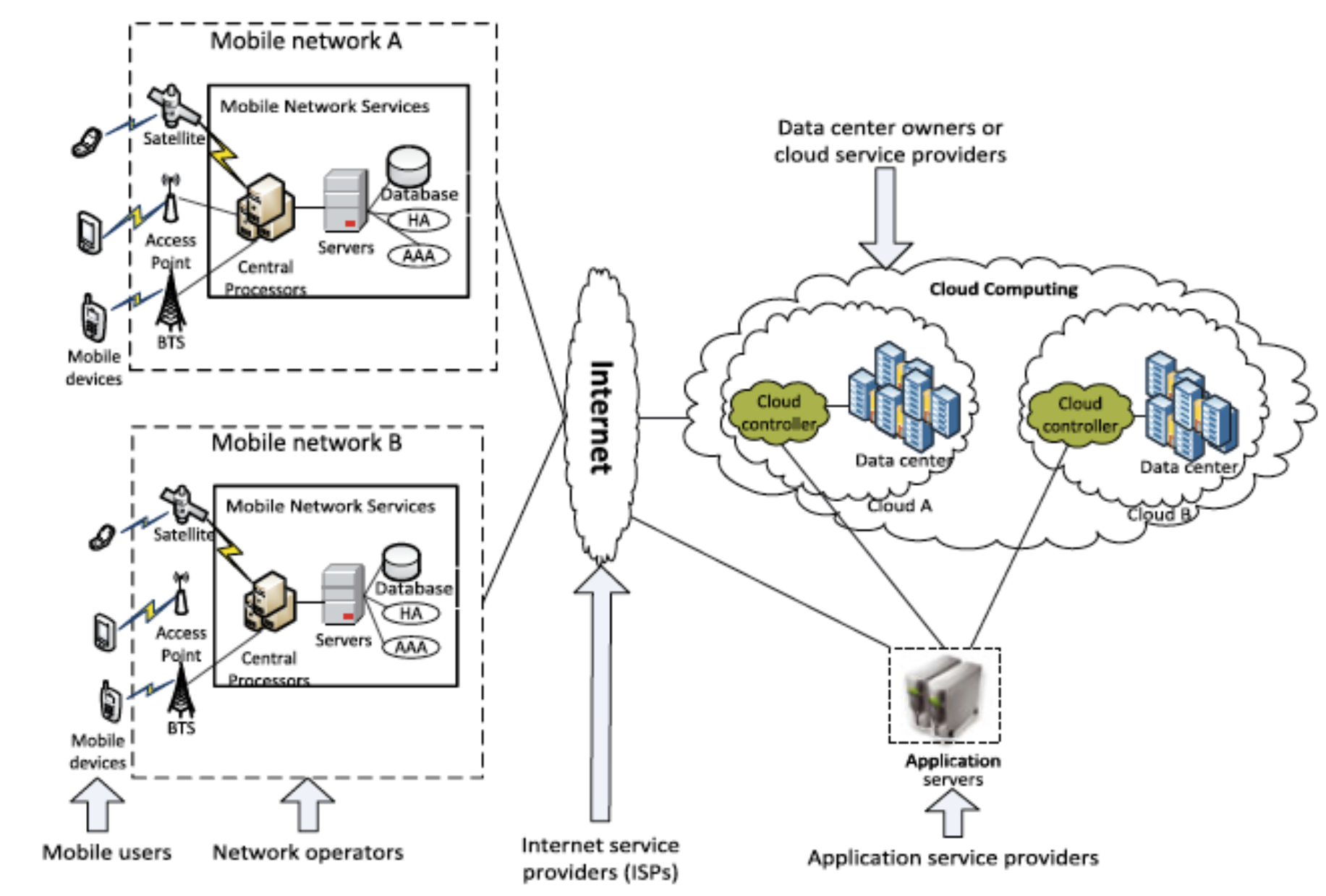
- Mobile devices connect to mobile networks via base stations that establish and control connections and functional interfaces between networks and mobile devices
- Mobile users' requests and information are transmitted to central processors connected to servers providing mobile network services
- Subscribers' requests are delivered to a cloud through the Internet
- In the cloud, cloud controllers process the requests to provide mobile users with corresponding cloud services
- Performance ก็สามารถวัดได้ด้วย latency
Key players in MCC architecture:
- Mobile users
- Network operators
- Internet Service Providers (ISPs)
- Data center owners / cloud service providers
- Application service providers
Advantages of MCC
1. Extending Battery Lifetime
- Computation offloading migrates large computations and complex processing from resource-limited mobile devices to resourceful cloud servers
- Remote application execution can save energy significantly
- Many mobile apps take advantage of task migration and remote processing
Like hiring a contractor to do heavy construction work instead of doing it yourself — your personal energy (battery) is preserved.
2. Improving Data Storage Capacity and Processing Power
- MCC enables users to store/access large data on the cloud
- Reduces running cost for computation-intensive applications
- Mobile applications are not constrained by device storage because data is stored in the cloud
3. Improving Reliability and Availability
- Keeping data and applications in the cloud reduces chance of data loss on mobile devices
- MCC can act as a comprehensive data security model for both service providers and users:
- Protect copyrighted digital content
- Provide virus scanning, malicious code detection, authentication
- Data and services in the cloud are always (almost) available even when users are mobile
4. Dynamic Provisioning
- Dynamic on-demand provisioning of resources on a fine-grained, self-service basis
- No need for advanced reservation
5. Scalability
- Mobile applications can be scaled to meet unpredictable user demands
- Service providers can easily add and expand a service
6. Multi-tenancy
- Service providers can share resources and costs to support a variety of applications and large numbers of users
7. Ease of Integration
- Multiple services from different providers can be easily integrated through the cloud and the Internet to meet user demands
MCC Applications
Mobile Commerce (M-Commerce)
- Allows business models for commerce using mobile devices
- Examples: mobile financial, mobile advertising, mobile shopping
- M-commerce challenges: low bandwidth, high device complexity, security
- Combining 5G + cloud → increases data processing speed and security level
Mobile Learning (M-Learning)
- Combines e-learning and mobility
- Traditional m-learning limitations: high cost of devices/network, low transmission rate, limited educational resources
- Cloud-based m-learning solutions:
- Enhanced communication quality between students and teachers
- Access to remote learning resources
- Natural environment for collaborative learning
Mobile Healthcare (M-Healthcare)
- Minimizes limitations of traditional medical treatment (small storage, security/privacy, medical errors)
- Provides convenient access to resources (e.g., medical records)
- Offers hospitals on-demand cloud services
- Examples:
- Comprehensive health monitoring services
- Intelligent emergency management system
- Health-aware mobile devices (detect pulse-rate, blood pressure, alcohol level)
- Pervasive access to healthcare information
- Pervasive lifestyle incentive management (manage healthcare expenses)
Mobile Gaming (M-Gaming)
- High potential market generating revenues for service providers
- Can completely offload game engine (e.g., graphic rendering) to cloud server
- Offloading can save energy and increase game playing time
- e.g., MAUI allows fine-grained energy-aware offloading of mobile code to cloud
- Rendering adaptation technique dynamically adjusts game rendering parameters based on communication constraints and gamers' demands
Assistive Technologies
- Pedestrian crossing guide for blind/visually impaired
- Mobile currency reader for blind/visually impaired
- Lecture transcription for hearing-impaired students
Other Applications
- Sharing photos/videos
- Keyword-based, voice-based, tag-based searching
- Monitoring a house / smart home systems
MCC Issues
Mobile Communication Issues
- Low bandwidth — radio resources for wireless networks are much scarcer than wired networks
- Service availability — users may not connect to cloud due to traffic congestion, network failures, or weak signal
- Heterogeneity — handling wireless connectivity with highly heterogeneous networks to satisfy MCC requirements (always-on connectivity, on-demand scalability, energy efficiency) is difficult
Computing Issues: Computation Offloading
- One of the main features of MCC
- Offloading is not always effective in saving energy
- Critical to determine:
- Whether to offload
- Which portions of the service code to offload
Offloading Techniques
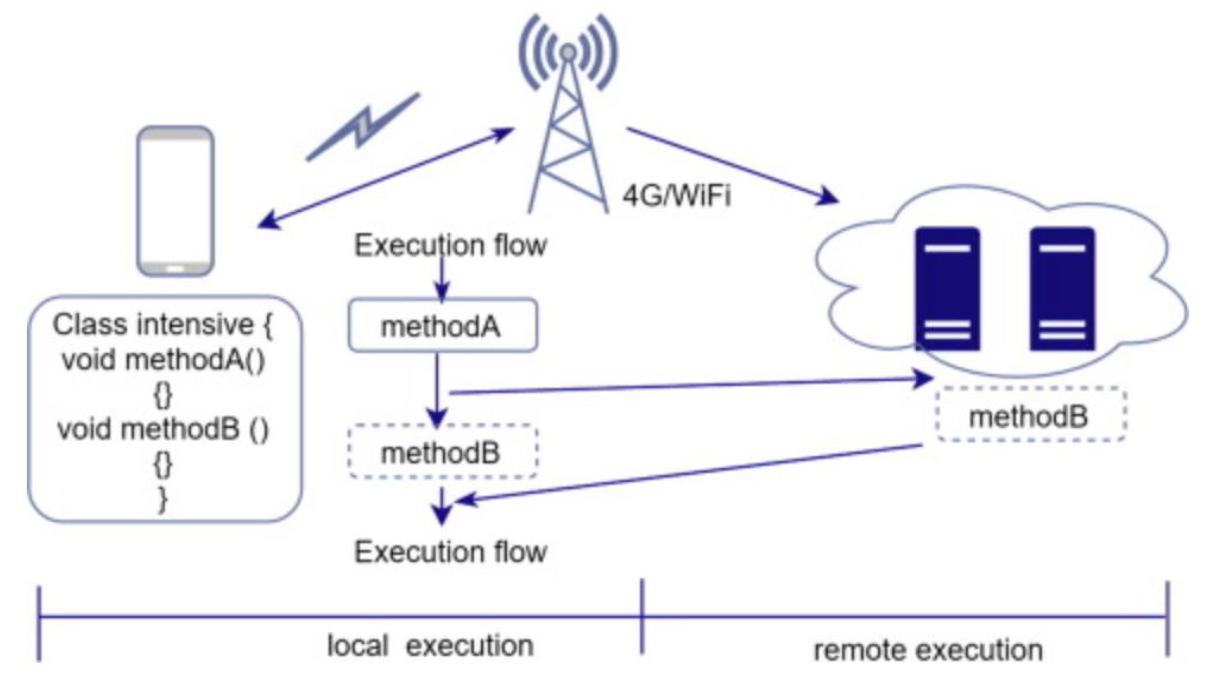
Computation offloading = the task of sending computation-intensive (heavy function) application components to a cloud server
Image: Offloading Technique Diagram — local vs remote execution with methodA/methodB
Technique 1: CloneCloud
Final Exam!!!! #FinalExam ออก เพราะบอกว่ายาก!
- CloneCloud aims to improve battery life and performance by offloading intensive components (methods, functions, procedures, tasks) to cloud servers
- Implements distributed execution inside an application-layer virtual machine
- Goal: find the optimal partition of an application process
How CloneCloud Works
- Partitioning component finds migration points using:
- Static analysis → finds constraints
- Dynamic profiling → builds cost model for execution and migration
- Optimizer → uses constraints and cost models to derive partitions
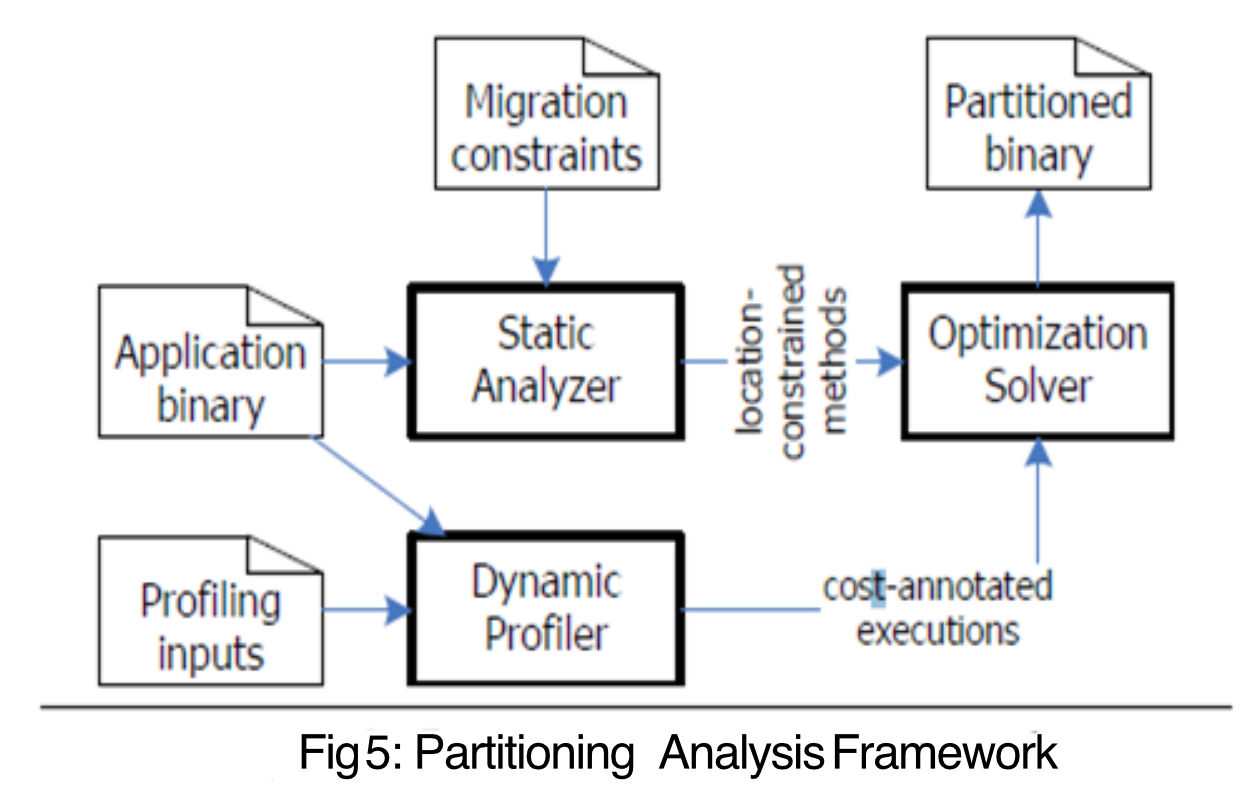
- Migration Constraints คือ สิ่งที่บอกว่า function นี้ไม่สามารถ migrate ไป run บน cloud ได้ เนื่องจาก อาจจะต้องใช้ local library or something like that
Like deciding which tasks to delegate to an assistant — you first analyze what tasks are delegable (static), then track how long each takes (dynamic profiling), then decide what to hand off (optimizer).
CloneCloud Mechanism
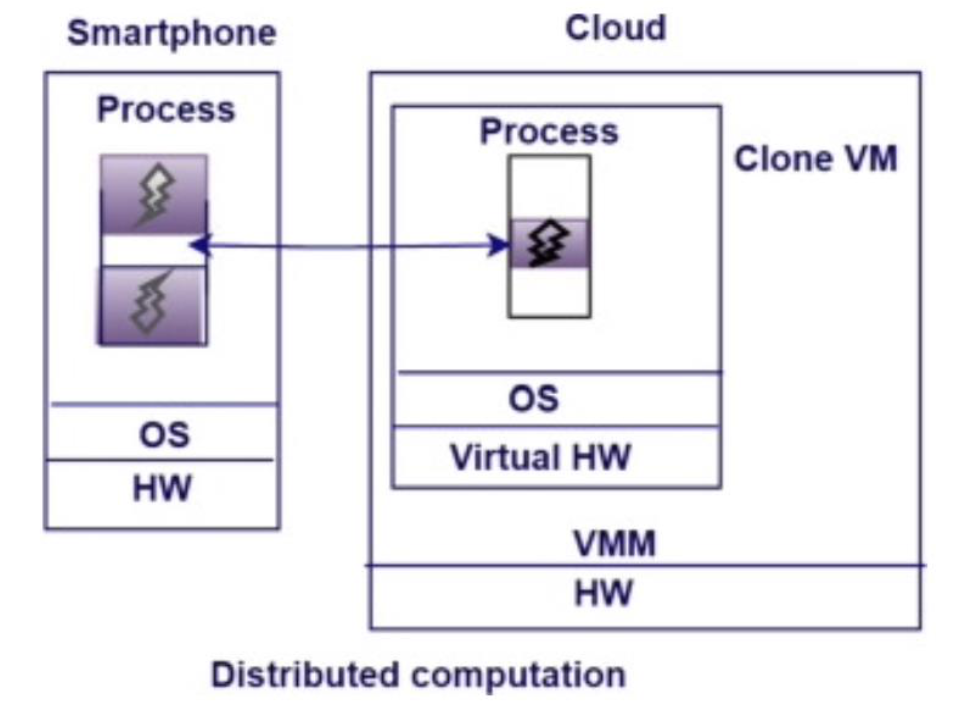
- It clones part of a mobile app and runs it in the cloud, then brings the result back to the device
Image: CloneCloud Diagram — Smartphone ↔ Clone VM (Distributed computation)
Static Analysis (in CloneCloud)
Partitioning Analysis Framework
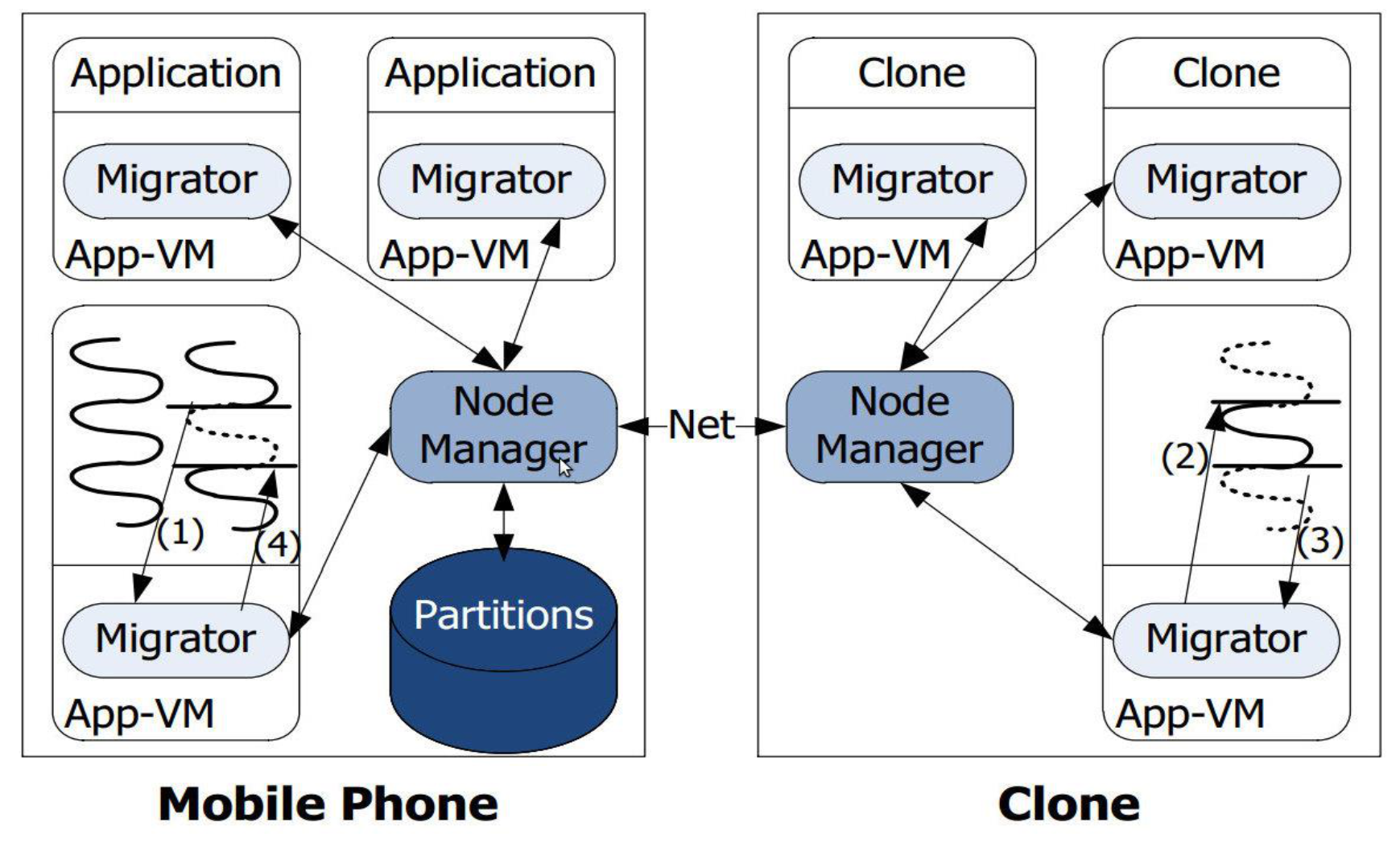
Static Analyzer
- Identifies legal partitions of the application executable according to constraints
- Migration is restricted to method entry and exit points
- Two key restrictions:
- Migration allowed only at application method boundaries, not core system library methods
- Migration allowed at VM-layer method boundaries, not native method boundaries
Key Concepts of Static Analysis
- Program Analysis: Control flow and data dependencies are analyzed
- Partitioning Points: Methods/code blocks marked as candidates for migration (e.g., CPU-intensive functions)
- Constraints: Respects code dependencies, data privacy constraints, and I/O limitations (e.g., UI must stay on device)
ทำไมไม่เอาทุก function ไป run บน cloud ทั้งหมดล่ะ ถ้าสมมติทั้งหมดไป run ได้ (ไม่นับ constraint)
แบบนั้นก็แลกมากับ Communication cost เยอะมากกก
Output of Static Analysis
- A set of migration points embedded in the application where the runtime can suspend execution and migrate state to a cloud clone
Advantages of Static Analysis
- Low runtime overhead
- Offloading decision logic is precomputed
Limitations of Static Analysis
- Not adaptive to dynamic conditions (e.g., network latency, device load, battery level)
Static Analyzer Example
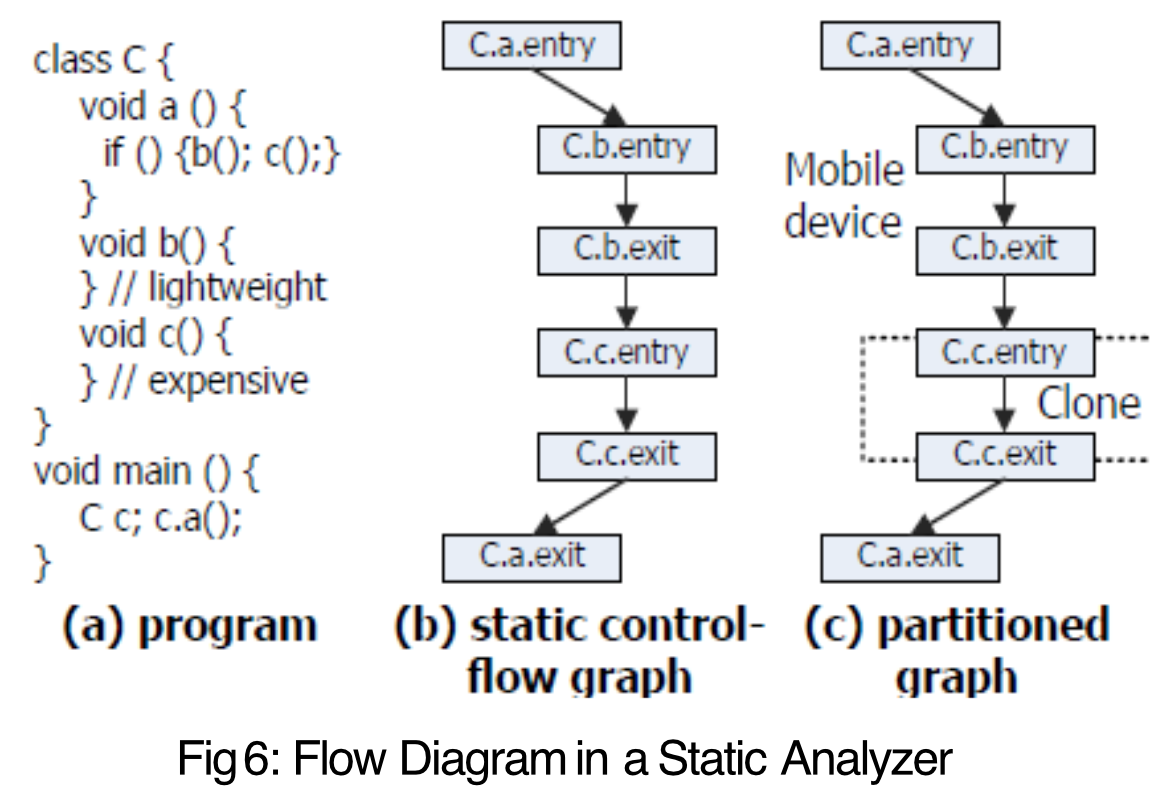
Three Properties of Any Legal Partition
- Methods that access specific features of a machine (device) must be pinned to that machine
- Methods that share native state must be collocated at the same machine
- ถ้ามี method ใด ที่ต้องพึ่งคำตอบของอีก method ก็ต้องไปอยู่ที่เดียวกัน (Cloud ไม่ก็ device)
- No nested migration allowed
Dynamic Profiling (in CloneCloud)
- Involves monitoring the application at runtime to gather performance metrics and make intelligent offloading decisions
What Dynamic Profiler Monitors
- Execution time of methods
- Resource usage: CPU, memory, energy
- Network conditions: latency, bandwidth
- Device status: battery level, current load
Execution Flow of Dynamic Profiler
- Profile collection while running app under different conditions
- Cost models constructed for local vs. remote execution
- Optimization engine uses profiles to select best partitioning strategy at runtime
How the Profiler Works
- Collects data to construct a cost model (computation cost, energy cost)
- Each execution run once on mobile device and once on cloud clone to compare cost
- Outputs a set of executions and a profile tree (mobile) and (cloud clone)
Profile Tree Structure
- One node per method invocation
- Every non-leaf node has a residual node child
- Residual node = cost of running the body excluding costs of sub-method calls
- For each invocation in profiling execution :
- Computation cost where = on mobile, = on clone
- Migration cost = suspend/resume cost + transfer cost
Dynamic Profiler Example
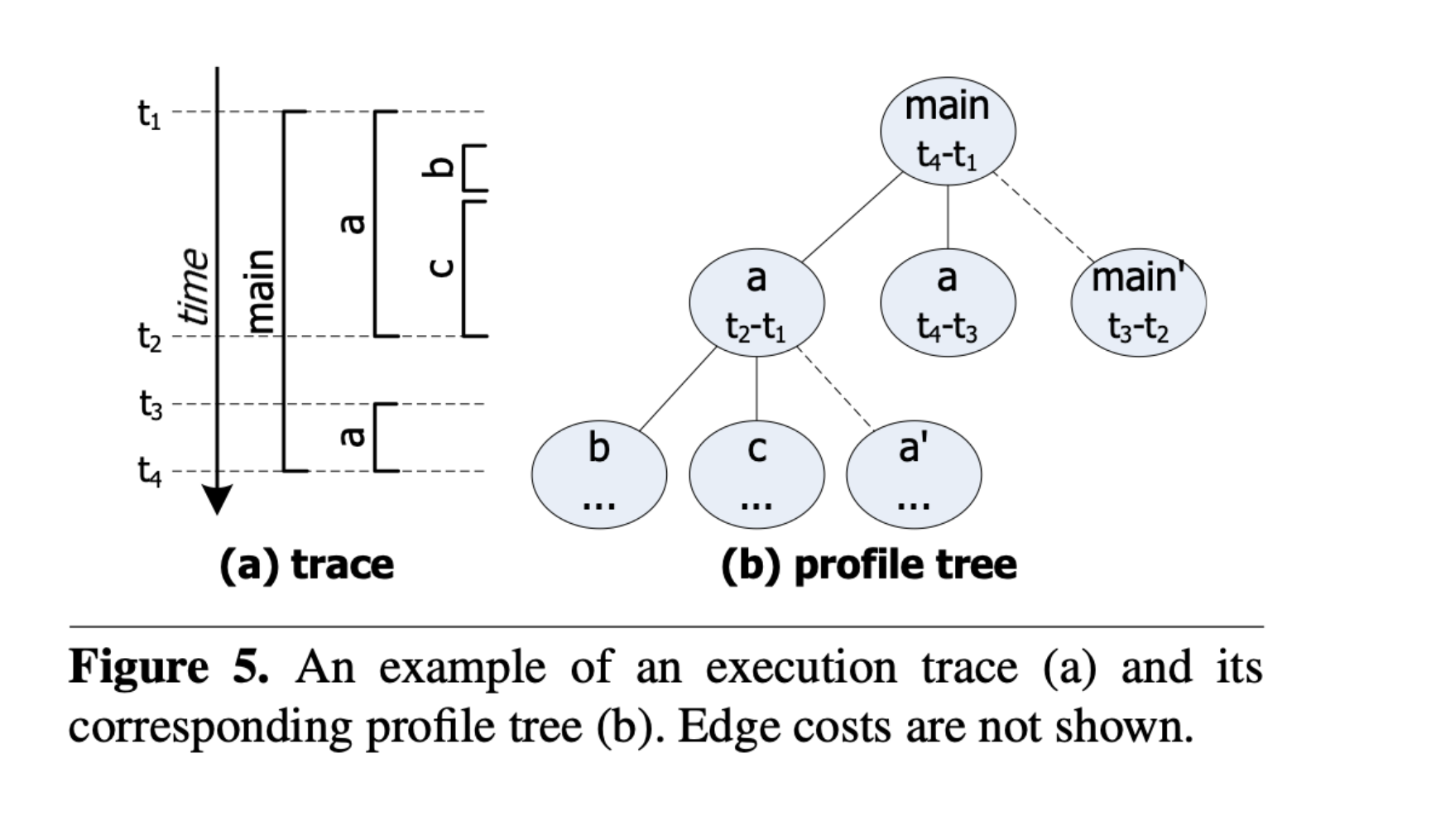
- Residual nodes (main', a') hold the difference between their parent's value and the sum of their sibling nodes
Like tracking your total work hours (main), subtracting the time on specific tasks (a, b, c), and the remainder (main') is the time spent on overhead/setup not counted elsewhere.
Advantages of Dynamic Profiling
- Adapts to changing environments
- Can make better offloading decisions in real-time
Limitations of Dynamic Profiling
- Profiling overhead
- Requires a good training phase to be accurate
How Profile Tree Guides Offloading
1. Cost Attribution per Node
- Each node represents a method/function call with an execution cost (CPU time, memory, energy)
- For each node (e.g., function a, b, c), the system knows:
- Average execution time
- Energy consumption on mobile
- Expected network transfer time and cost (if offloaded)
2. Aggregation of Subtree Costs
- Each subtree = a self-contained unit of execution
- System evaluates: "If I offload this entire subtree, what is the total cost vs. benefit?"
- Computes:
- Local execution cost: Time/energy to run on mobile
- Remote execution cost: Time to suspend, migrate state, transmit data, execute remotely, and return results
3. Decision Policy (Heuristic or Optimization)
- Choose nodes with high computation cost but low data dependency (no UI interaction)
- Avoid nodes with frequent I/O or tight latency constraints
- Consider network conditions (low bandwidth → avoid offloading large state)
| Node | Local Cost | Remote Cost | Decision |
|---|---|---|---|
| a | 300 ms | 120 ms | ✅ Offload |
| b | 50 ms | 80 ms | ❌ Execute Locally |
| c | 200 ms | 90 ms | ✅ Offload |
4. Residual Nodes Aid Fine-Grained Accounting
- Residual nodes ensure no computation is unaccounted for
- Helps avoid underestimating the cost of nodes with internal logic not covered by subcalls
- Prevents incorrect offloading due to hidden expensive operations
5. Selective Migration
- CloneCloud selects migration points (nodes) for offloading
- Packages state related to that subtree
- Resumes execution in cloud clone and merges the result back when done
Combined Use in CloneCloud
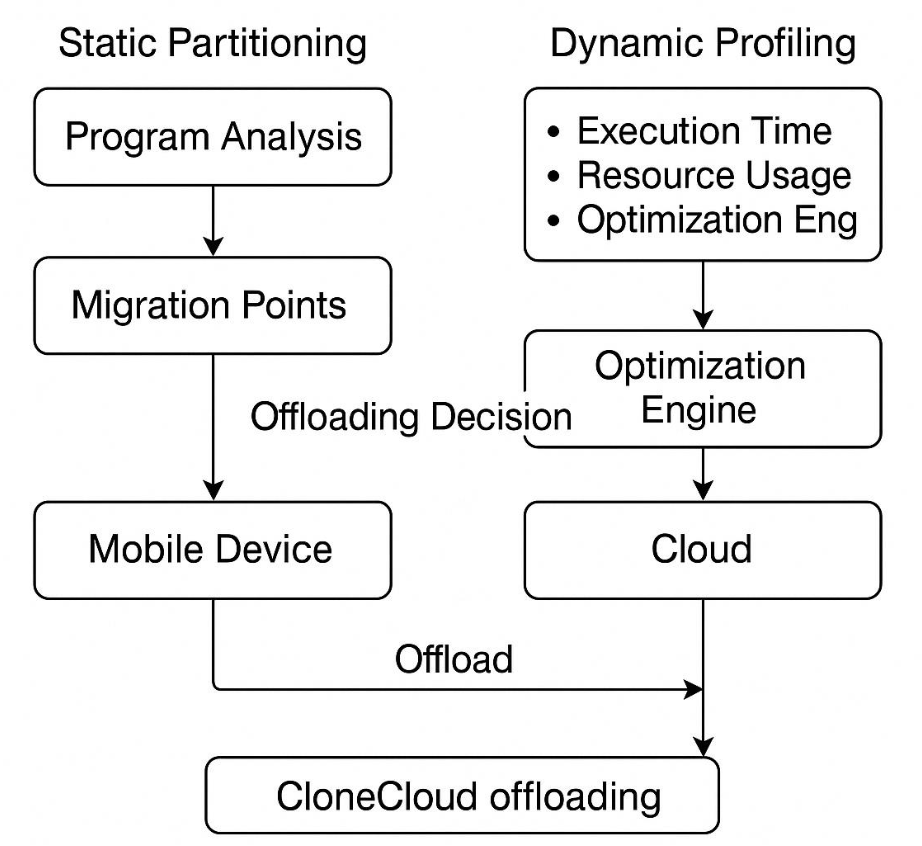
- CloneCloud uses static partitioning to define possible offload points
- Uses dynamic profiling to decide whether or not to offload at runtime depending on real-time conditions
- This hybrid model allows for both efficiency and adaptability
Image: Combined Use Diagram — Static Partitioning (Program Analysis → Migration Points) + Dynamic Profiling (Execution Time, Resource Usage, Optimization Eng) → Optimization Engine → Mobile Device / Cloud → CloneCloud offloading
Technique 2: Cloudlet
ไปทำความเข้าใจมา แล้วมีบางอันหาย หรือไม่รู้ไว้ตรงไหน ฝากเช็คด้วยจ้า future google!
- A one-hop connection from mobile device to internet is not efficient
- Humans are sensitive to current delay in clouds:
- Latency is unlikely to improve significantly
- Security and firewall issues prevent latency improvement (despite bandwidth increases)
What is a Cloudlet?
- Sits between mobile devices and cloud pools (Infrastructure)
- A cloudlet = micro edition of cloud — contains only soft states (cache copies of data or code)
- Definition: "A trusted, resource-rich computer or cluster of computers that is well-connected to the Internet and is available for use by nearby mobile devices"
- A small-scale data center or trusted server located at the edge of the network, much closer to mobile devices than traditional cloud data centers
Like a local convenience store vs. a large shopping mall — the cloudlet is nearby and fast for small needs, while the full cloud is the big mall for major requests.
Cloudlet Code Offloading
- Offload code to a nearby cloudlet server and execute it there
- Decreases latency using a single-hop network
- Lowers battery consumption by using Wi-Fi or short-range radio instead of broadband wireless
Key Characteristics of Cloudlet
| Feature | Description |
|---|---|
| Proximity | Deployed closer to mobile users (e.g., coffee shops, airports, hospitals) |
| Low Latency | Reduces round-trip time compared to cloud (10–30 ms instead of 100+ ms) |
| Compute Offload | Executes heavy computation offloaded from mobile devices |
| Data Caching | Stores relevant data (e.g., app images, models) for faster access |
| Trusted Environment | Assumes some level of physical or administrative trust |
Three-Tier Architecture for Code Offload
Image: Three-Tier Architecture — Central Core (Enterprise Cloud) → Multi/Single-Hop Network → Offload Elements (Cloudlets) → Single-Hop Network → Mobile Devices; Application Overlay Creation Process diagram
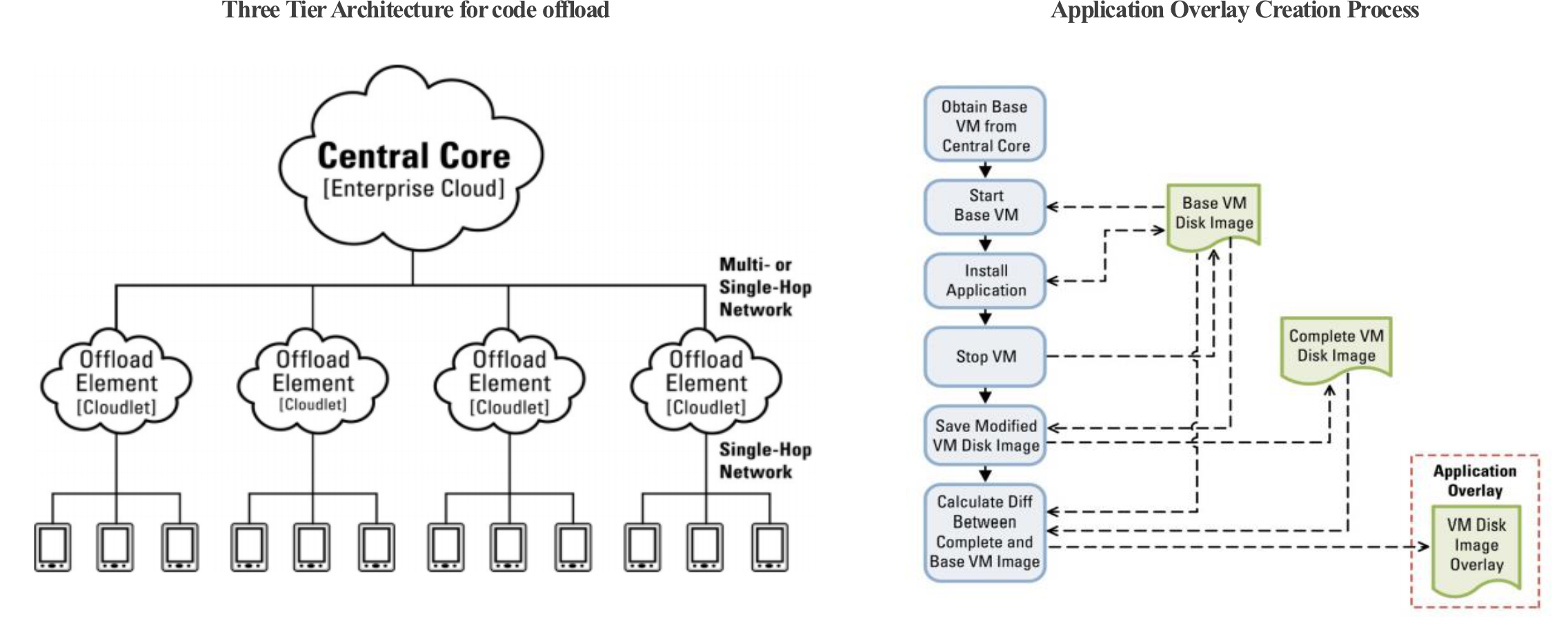
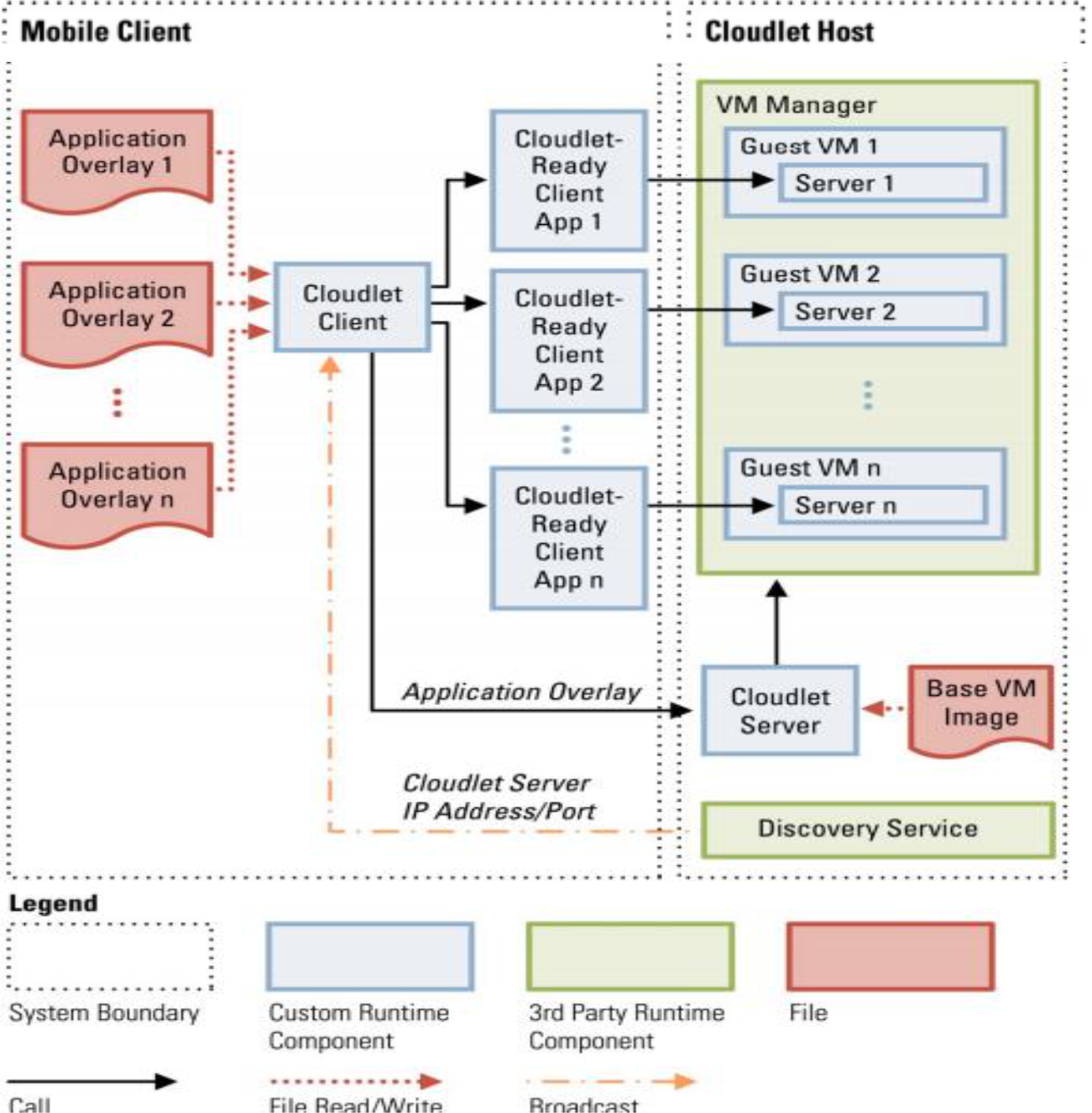
Cloudlet Host and Mobile Client
Cloudlet Host
The Cloudlet Host is a physical server that hosts:
- Discovery service — broadcasts cloudlet IP address and port to allow mobile devices to find it
- Base VM Image — used for VM synthesis
- Cloudlet Server — handles code offload via application overlays, performs VM synthesis, starts guest VM instances
- VM Manager — hosts all guest VM instances containing computation-intensive server components
Mobile Client
The Mobile Client (handheld/wearable device) hosts:
- Cloudlet Client app — discovers cloudlets and uploads application overlays
- Cloudlet-Ready Apps — operate as clients of server code running in the cloudlet
- Stores an application overlay for each cloudlet-ready app
- Each overlay is generated from the same Base VM Image residing in the cloudlet
Application Overlay vs. VM Overlay
- Both terms can sometimes be used interchangeably, but they serve different purposes:
- Application Overlay — deals with the overall software infrastructure needed to support application execution on cloudlets (middleware, security, optimization)
- VM Overlay — deals specifically with the virtualization layer, managing VMs, and abstracting physical resources for efficient resource utilization
- VM synthesis process generates VM configurations matching requirements:
- CPU allocation, memory allocation, disk space, network settings
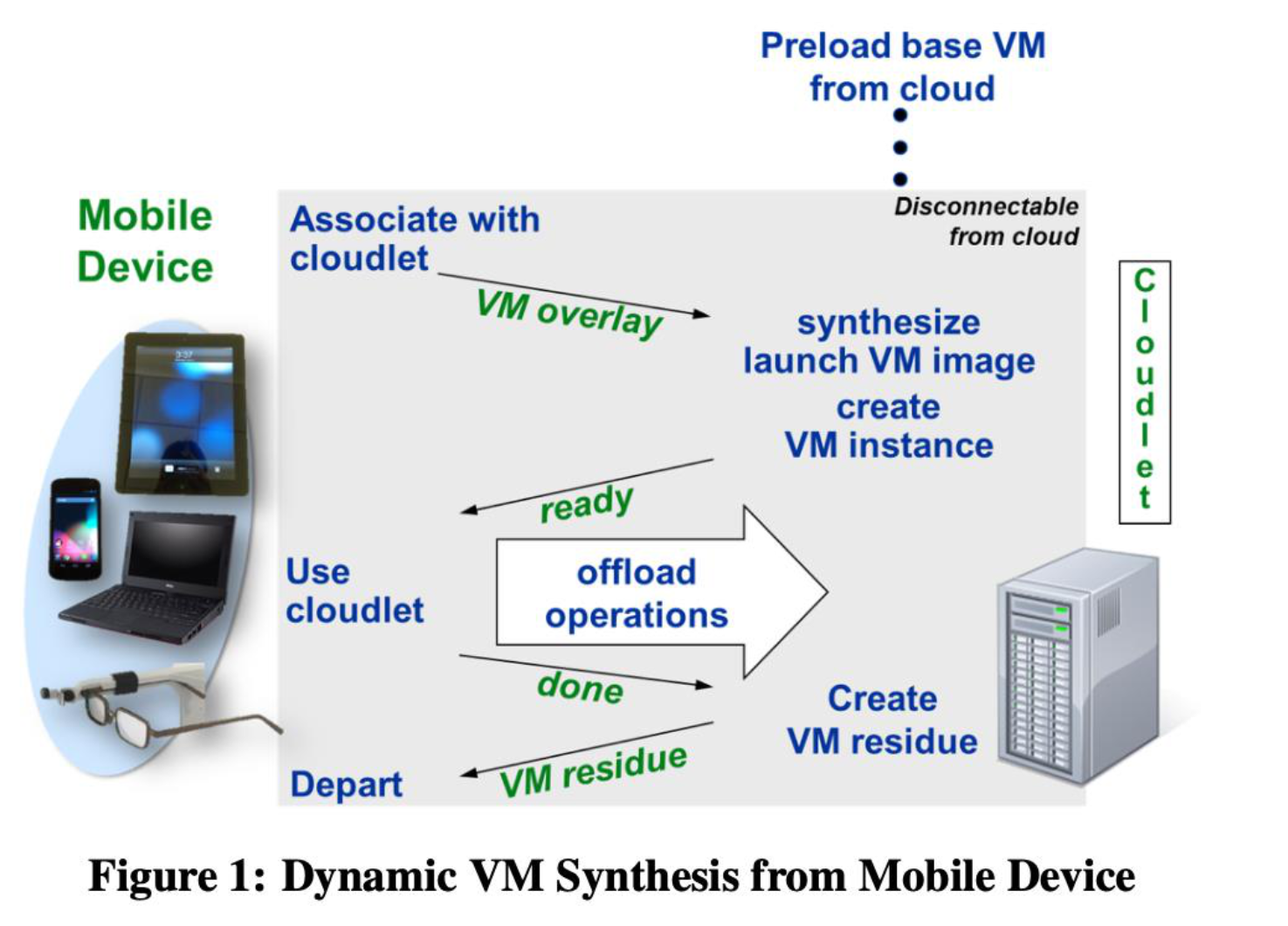
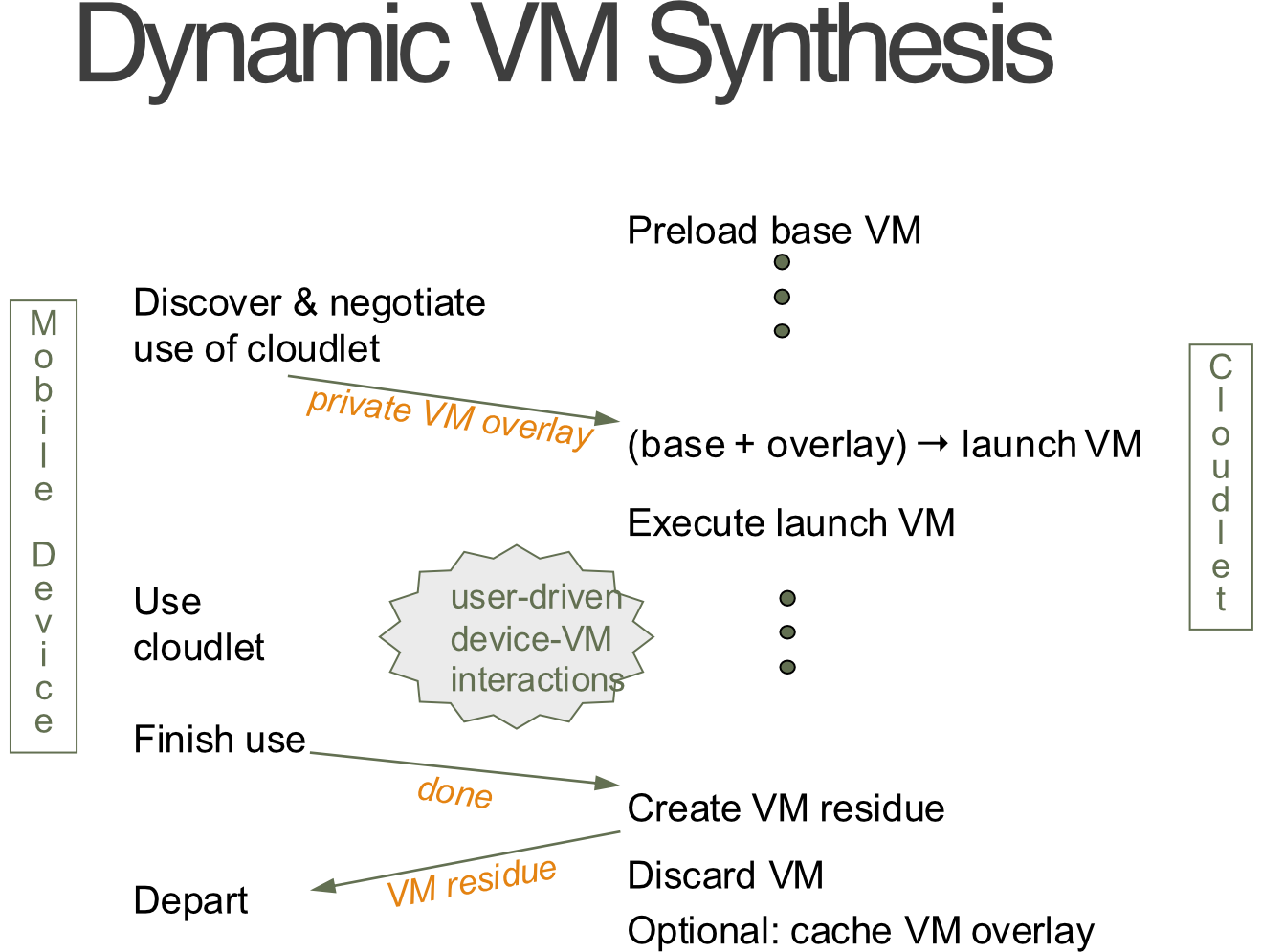
Dynamic VM Synthesis
- VM Overlay = the compressed binary difference between the base VM image and the launch VM image
- Used to reduce storage and network transfer costs
Dynamic VM Synthesis Process
- Mobile device delivers the VM overlay to a cloudlet that already has the base VM
- Cloudlet decompresses the overlay, applies it to the base → derives launch VM → creates a VM instance
- Mobile device begins offload operations on this instance
- Instance is destroyed at end of session, but launch VM image can be cached for future sessions
Image: Dynamic VM Synthesis from Mobile Device — Preload base VM from cloud → Associate with cloudlet → VM overlay sent → synthesize launch VM image → create VM instance → ready → offload operations → done → Create VM residue → VM residue returned → Depart / Discard VM
Complete VM = Base VM + Overlay = Ready VM of the App.
Dynamic VM Synthesis (Detailed Flow)
| Step | Actor | Action |
|---|---|---|
| 1 | Cloudlet | Preload base VM from cloud |
| 2 | Mobile Device | Discover & negotiate use of cloudlet |
| 3 | Mobile Device | Send VM overlay to cloudlet |
| 4 | Cloudlet | (base + overlay) → launch VM → Execute launch VM |
| 5 | Mobile Device | Use cloudlet (device-VM interactions) |
| 6 | Cloudlet | Create VM residue |
| 7 | Mobile Device | Finish use, depart |
| 8 | Cloudlet | Discard VM (optionally cache VM overlay) |
- VM residue = customized/specific code for mobile session; can be incorporated in VM overlay for next use
Cloudlet vs. Cloud
| Feature | Cloudlet | Cloud |
|---|---|---|
| State | Only soft state | Hard and soft state |
| Management | Appliance model: self-managed, little professional attention | Utility model: professionally administered, 24x7 operator coverage |
| Environment | "Data center in a box" at customer premises | Machine room with power conditioning and cooling |
| Ownership | Decentralized ownership by local business | Centralized ownership by Amazon, Yahoo!, etc. |
| Network | LAN latency and bandwidth | Internet latency and bandwidth |
| Sharing | Few users at a time | 100s to 1000s of users |
Cloudlet Key Challenges
- Trusting infrastructure
- Tamper-resistant hardware ("first-world infrastructure")
- Portable device as root of trust (e.g., TrustSniffer)
- Finding the right software on it
- Uniformity → deployer value
- Specificity → end-user value
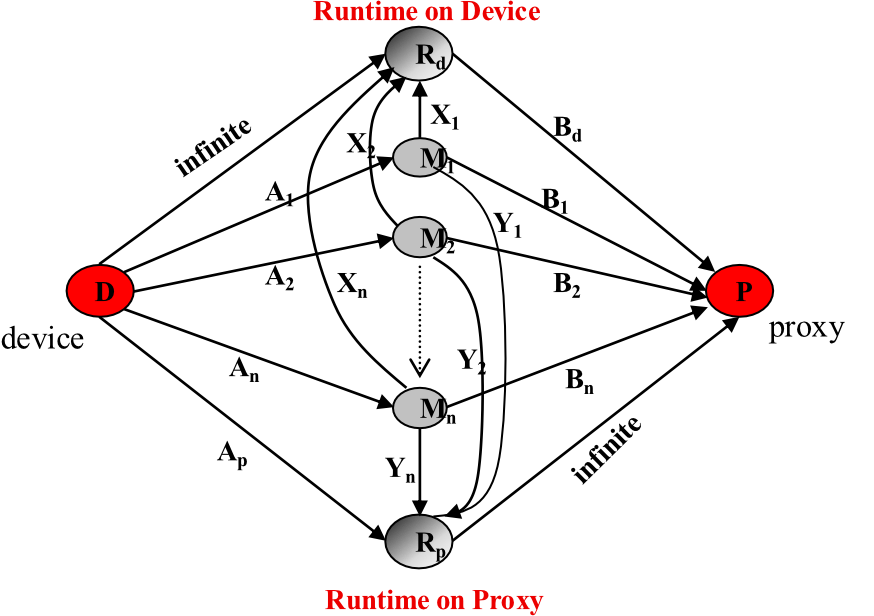
Dynamo: Dynamic Task Reconfiguration
- Problem: How to maintain an optimized component distribution under dynamic device power conditions?
- Solution: Cast the distribution problem as a "Source Parametric Flow Network"
- Use current residual energy at device to make the flow graph "source parametric"
Source Parametric Flow Graph
Image: Source Parametric Flow Graph — D (device) and P (proxy) nodes; M1…Mn tasks with Ai = energy cost at device, Bi = energy cost at proxy, Xi = communication cost if on device, Yi = communication cost if on proxy
- = Energy cost of executing task at the device
- = Energy cost of executing task at the proxy
- If is executing on Device: = communication costs in energy terms
- If is executing on Proxy: = communication costs in energy terms
- VM synthesis = process to generate complete VM
- VM synthesis = Base VM + Overlay = Complete VM
Transient Customization
- Problem: Delivering a fully configured VM to infrastructure is too large and too slow for transient use
- Solution: Assemble VM on the fly → dynamic VM synthesis
- Prefetch large, relatively static, widely-used piece = "Base VM"
- Deliver small patch just before use = "VM Overlay"
- Discard VM after use
- VM overlay can come from:
- Mobile device over wireless link
- Web site under control of mobile device (URL and decryption key)
VM Overlay (Detail)
- A VM overlay is a binary delta containing the user-customized part of the virtual machine
- In practice, it is a single zip-formatted file
- Example: If VM runs a face recognition server on Ubuntu 12.04 LTS, all bits related to the face recognition server installation are encapsulated into the VM overlay
- Contains all application state → delivered to cloudlet for backend server provisioning via VM synthesis
Like a software patch file — instead of downloading the entire OS again, you just get the diff/delta that updates what's changed.
Cloud Computing for Mobile and Pervasive Applications
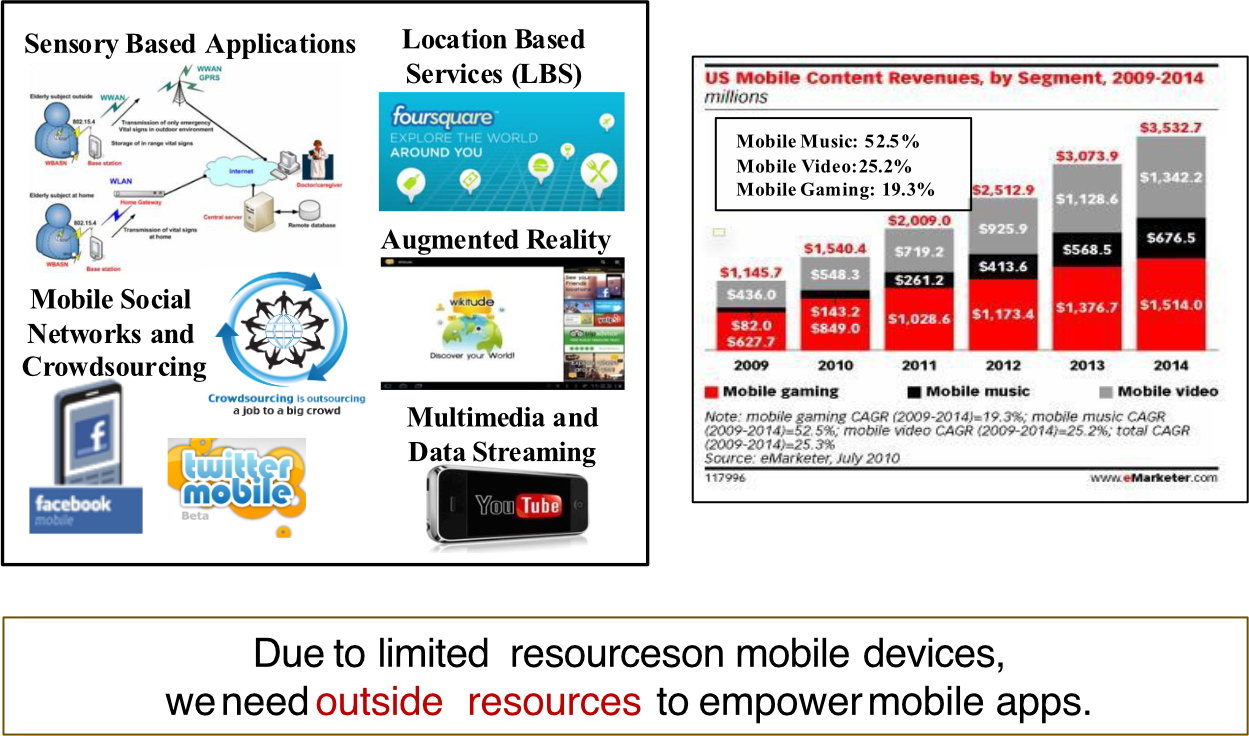
- Mobile Music: 52.5%
- Mobile Video: 25.2%
- Mobile Gaming: 19.3%
- Due to limited resources on mobile devices → need outside resources to empower mobile apps
Mobile Cloud Computing Ecosystem
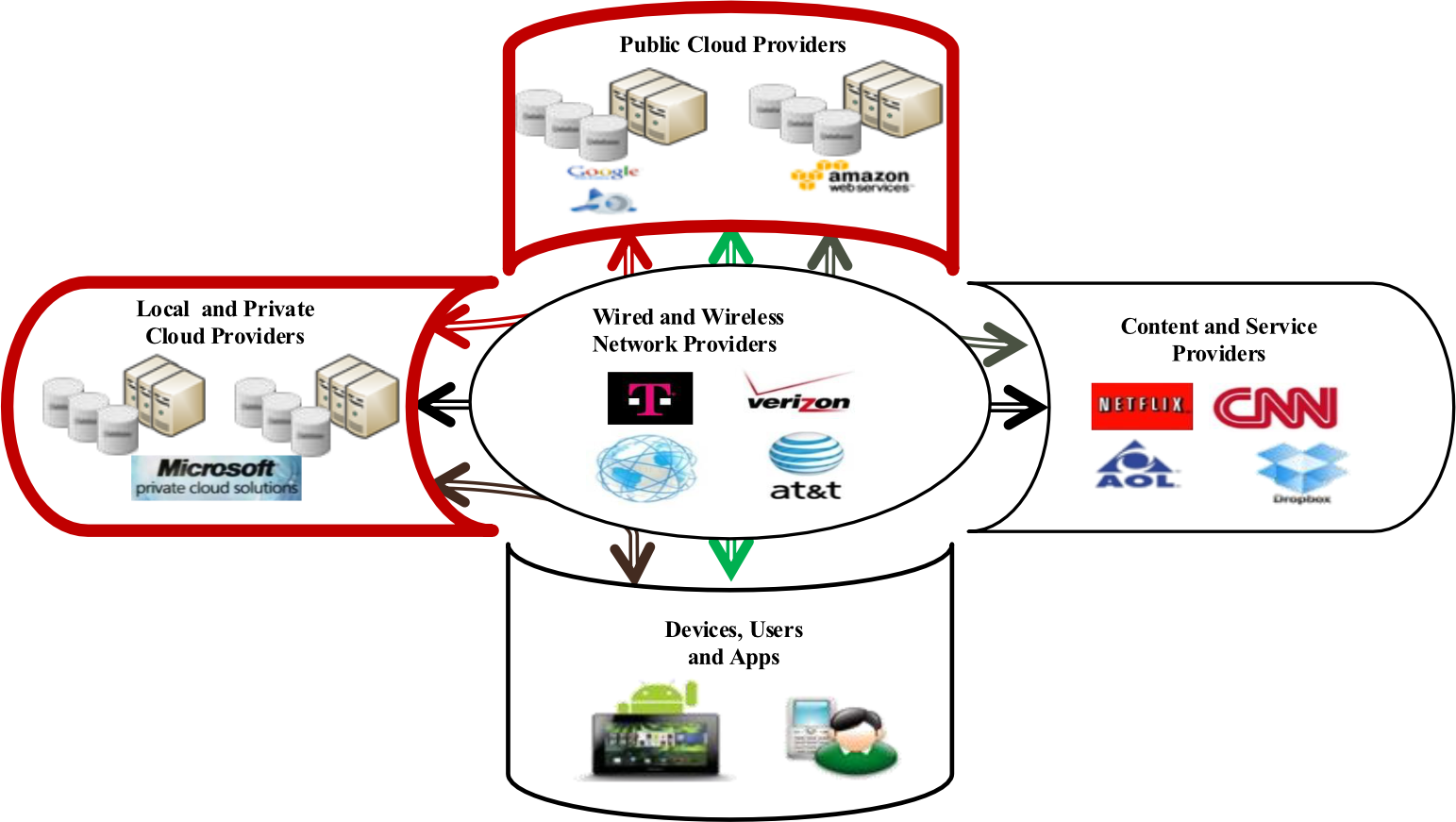
Key players:
- Public Cloud Providers
- Wired and Wireless Network Providers
- Local and Private Cloud Providers
- Content and Service Providers
- Devices, Users and Apps
2-Tier Cloud Architecture
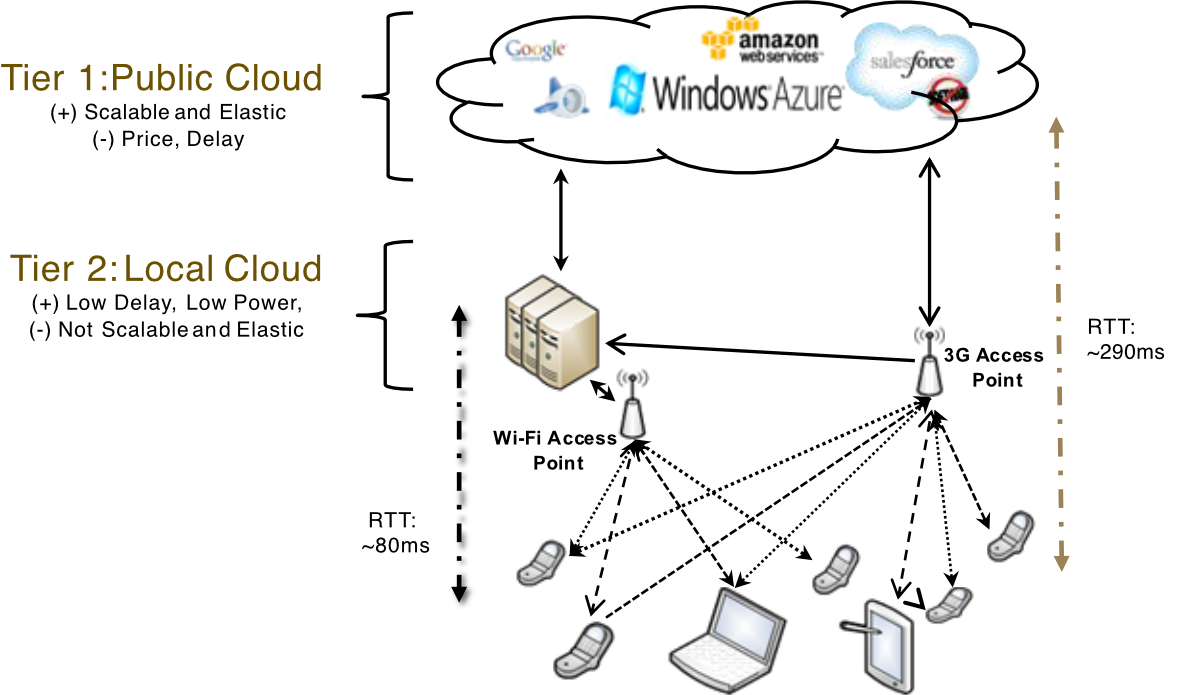
| Tier | Type | Pros | Cons |
|---|---|---|---|
| Tier 1 | Public Cloud | Scalable and Elastic | Price, Delay |
| Tier 2 | Local Cloud | Low Delay, Low Power | Not Scalable and Elastic |
- RTT via Wi-Fi (local): ~80 ms
- RTT via 3G (public cloud): ~290 ms
- IBM prediction: by 2017, 61% of enterprises likely to be on a tiered cloud
MCC Security Issues
- Protecting user privacy and data/application secrecy is key to establishing and maintaining consumer trust in MCC
- Two main categories:
- Security for mobile users
- Securing data on clouds
Security for Mobile Users
- Mobile devices are exposed to malicious codes and vulnerabilities
- GPS can cause privacy issues for subscribers
- Security for mobile applications:
- Installing and running security software is the simplest way to detect threats
- Mobile devices are resource-constrained → protecting them from threats is more difficult
Mobile User Security Approaches
CloudAV approach (Oberheide et al.):
- Move threat detection capabilities to clouds
- Extension of CloudAV platform: host agent + network service components
- Host agent runs on mobile device → inspects file activity
- If a file is not in cache of previously analyzed files → sent to in-cloud network service for verification
- Network service responsible for file verification
AV = Anti vulnerability
Like sending suspicious packages to a remote inspection center rather than trying to X-ray them with equipment you carry around.
Paranoid Android (Portokalidis et al.):
- Attack detection for smartphone performed on remote server in the cloud
- Smartphone records only a minimal execution trace → transmits it to security server in cloud
Privacy Issues in MCC
- Location Based Services (LBS) faces privacy issues — users must provide their current location
- Problem worsens if adversary knows user's important information
Privacy Solution: Location Trusted Server (LTS)
- Zhangwei and Mingjun propose LTS approach:
- LTS gathers mobile users' location information
- Cloaks the information into a "cloaked region" to conceal user identity
- "Cloaked region" is sent to LBS → LBS knows only general information but cannot identify individual users
Like telling a delivery service you're "somewhere in downtown Bangkok" instead of your exact address — they can still serve you, but they don't know exactly who/where you are.
Open Issues in MCC
1. Network Access Management
- Efficient network access management improves link performance and optimizes bandwidth usage
- Cognitive radio as a solution:
- Can automatically change transmission or reception parameters
- Achieves spectrum agility by selecting available wireless channels opportunistically
- Integrated with MCC for better spectrum utilization
2. Quality of Service (QoS)
- Ensuring QoS is a big issue, especially on network delay
- CloneCloud and Cloudlets expected to reduce network delay:
- CloneCloud: uses nearby computers/data centers to increase app speed by cloning data and apps to cloud
- Cloudlet: one-hop wireless connection provides low-latency, high-bandwidth access
- Can help overcome WAN latency and low bandwidth limitations
3. Pricing
- MCC involves both Mobile Service Provider (MSP) and Cloud Service Provider (CSP) with different:
- Services management
- Customer management
- Payment methods and prices
- Business model including pricing and revenue sharing must be carefully developed
4. Standard Interface
- Interoperability is important when mobile users interact with cloud
- Web interfaces may not be the best option:
- Not specifically designed for mobile devices
- More overhead
- Compatibility issues
- Standard protocol, signaling, and interface required (e.g., HTML5 & CSS3)
5. Service Convergence
- Services differentiated by type, cost, availability, and quality
- A single cloud may not be enough to meet user demands
- New scheme needed for unified use of multiple clouds:
- Must automatically discover and compose services for user
- Sky Computing: model where resources from multiple cloud providers are leveraged to create large-scale distributed infrastructure
- Mobile Sky Computing: enables cross-cloud communication and allows users to implement mobile services
- Service integration (convergence) needs to be explored
References
- M. Satyanarayanan, P. Bahl, R. Cáceres, N. Davies — "The Case for VM-Based Cloudlets in Mobile Computing", PerCom 2009
- M. Reza Rahimi et al. — "Mobile Cloud Computing: A Survey, State of Art and Future Directions", ACM/Springer MONET, Nov. 2013
- Reza Rahimi et al. — "MuSIC: On Mobility-Aware Optimal Service Allocation in Mobile Cloud Computing", IEEE Cloud 2013