Outline
- Wireless Introduction
- Elements of wireless network
- Wireless Links
- Network characteristics
- WiFi: 802.11 Wireless LANs
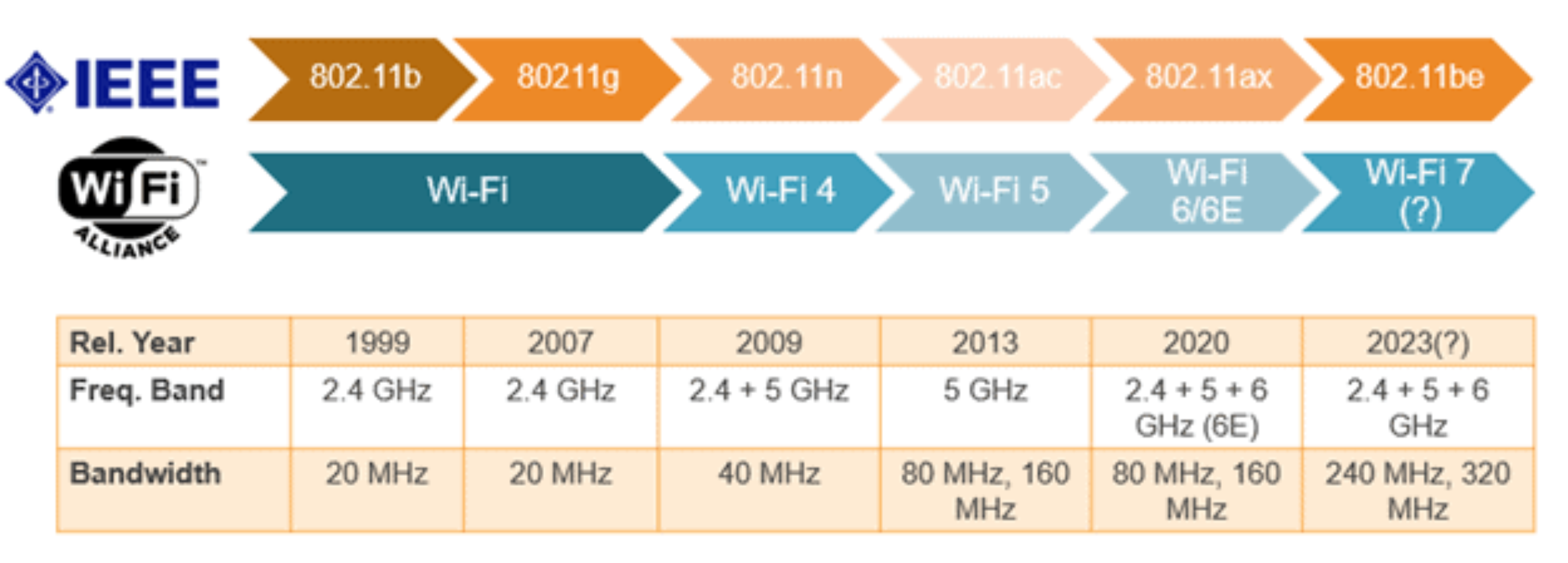
- Standards (b/g/n/ac/ax)
- Channel/Frequency (2.4 GHz, 5 GHz)
- เดี๋ยวนี้ก็เริ่มมี 6G แล้ว
- AP (SSID)
- CSMA/CA
- Security
- Ways to Protect Your Network
- Firewalls and IDS
1. Wireless Introduction
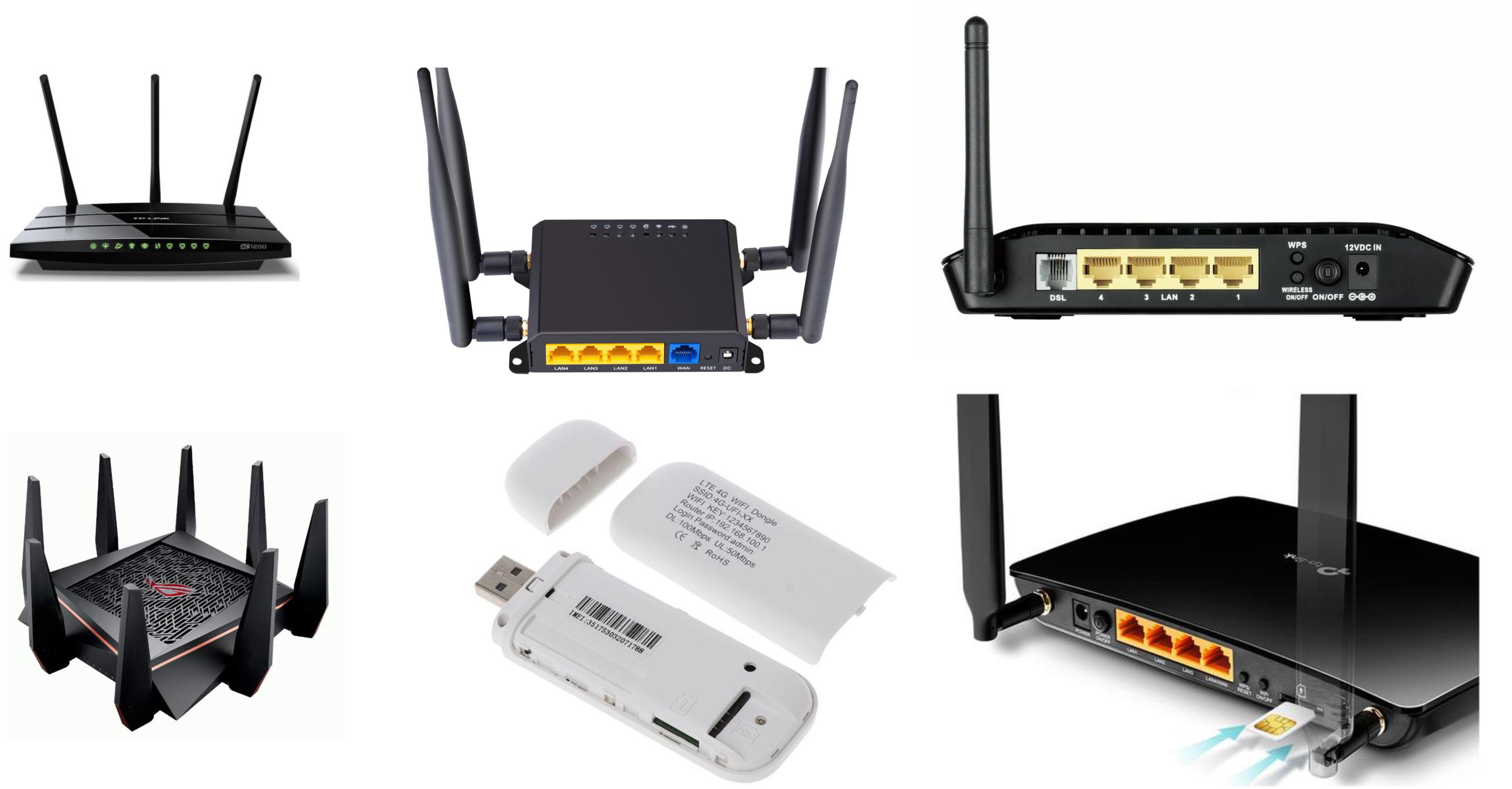
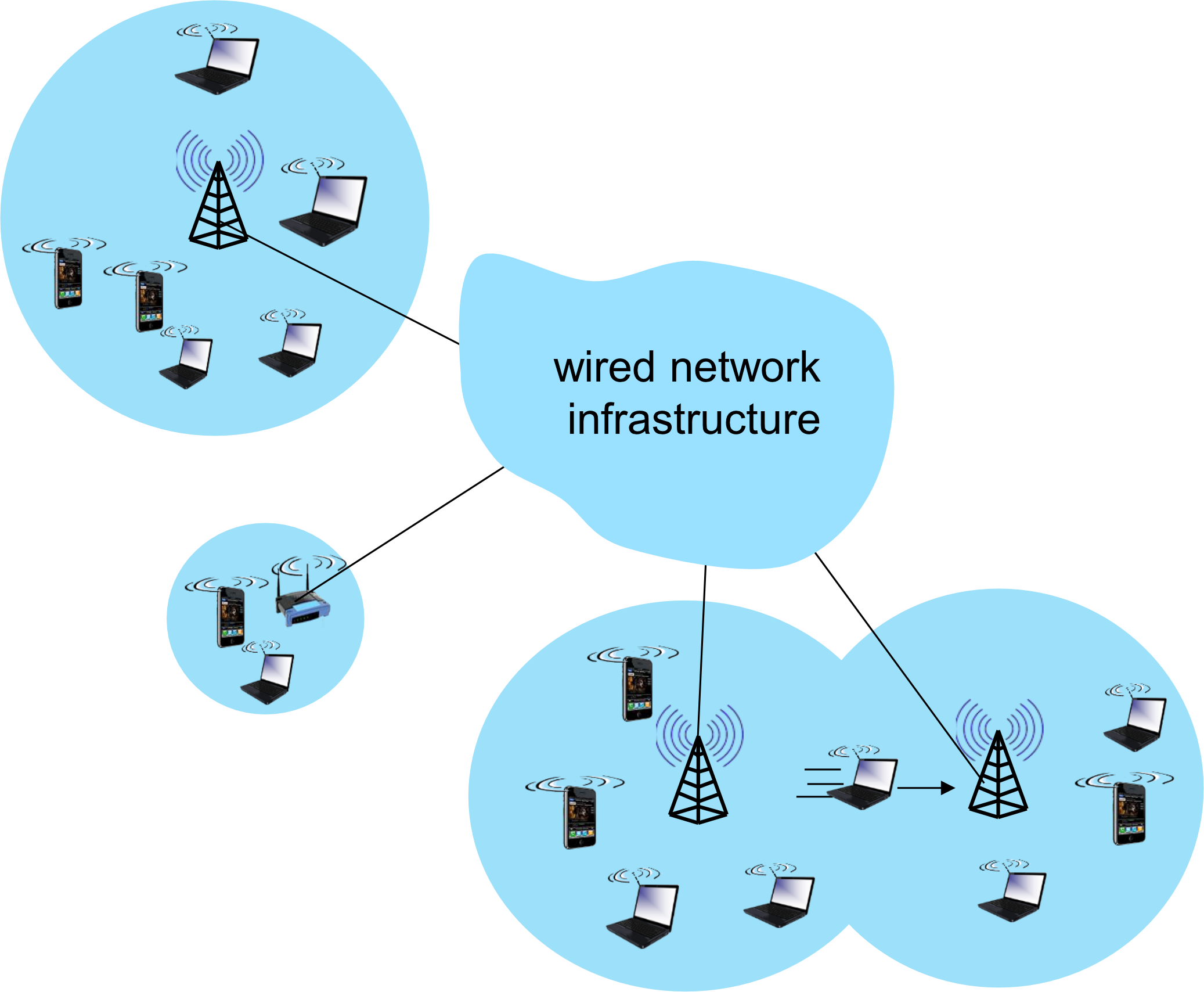
Elements of a Wireless Network
- Wireless Hosts — laptop, smartphone, IoT devices
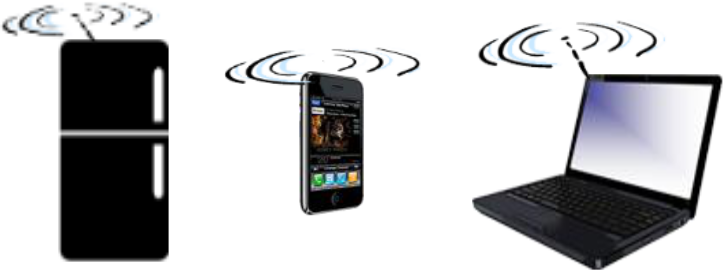
- Equipment that wants to connect to the network
- ต้องมี Network Adapter (ลองเข้าไปดู iPhone 17 specs ว่า support อะไรบ้าง)
- Run applications
- May be stationary (non-mobile) or mobile
- ⚠️ Wireless does not always mean mobility!
- Base Station (Access Point)
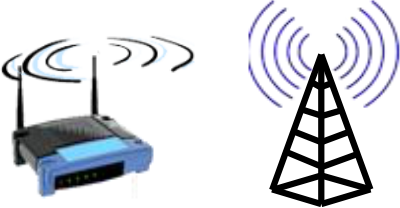
- Typically connected to wired network
- Acts as a relay — responsible for sending packets between the wired network and wireless hosts in its coverage area
- Examples: cell towers, 802.11 access points
- WiFi → Access Point, Cell Phone → Cell Tower เรียกต่างกันนะ
- Wireless Link
- Typically connects mobiles to a base station; also used as backbone links
- Multiple access protocol coordinates link access
- Various transmission rates, distances, and frequency bands
- ถ้าเขียนว่า 900 MHz จริง ๆ แล้วมันไม่ใช่เป๊ะ ๆ นะ มันก็เป็น range อยู่ 900 - 985 งี้
- บางทีอาจจะเบ่ง 900 - 985 เป็นหลาย slot ให้หลาย ๆ operator
- Connection Modes
- Infrastructure Mode — base station connects mobiles into wired network; supports handoff (mobile changes base station while maintaining connection)
- Ad-hoc Mode — no base stations; nodes transmit only to other nodes within link coverage; nodes self-organize and route among themselves
คิดเหมือนบ้านกับร้านสะดวกซื้อ: Infrastructure mode = ต้องผ่านเคาน์เตอร์ (AP) ก่อนออกไปโลกภายนอก, Ad-hoc = เพื่อนบ้านคุยกันตรงๆ โดยไม่ผ่านใคร
Wireless Link Characteristics
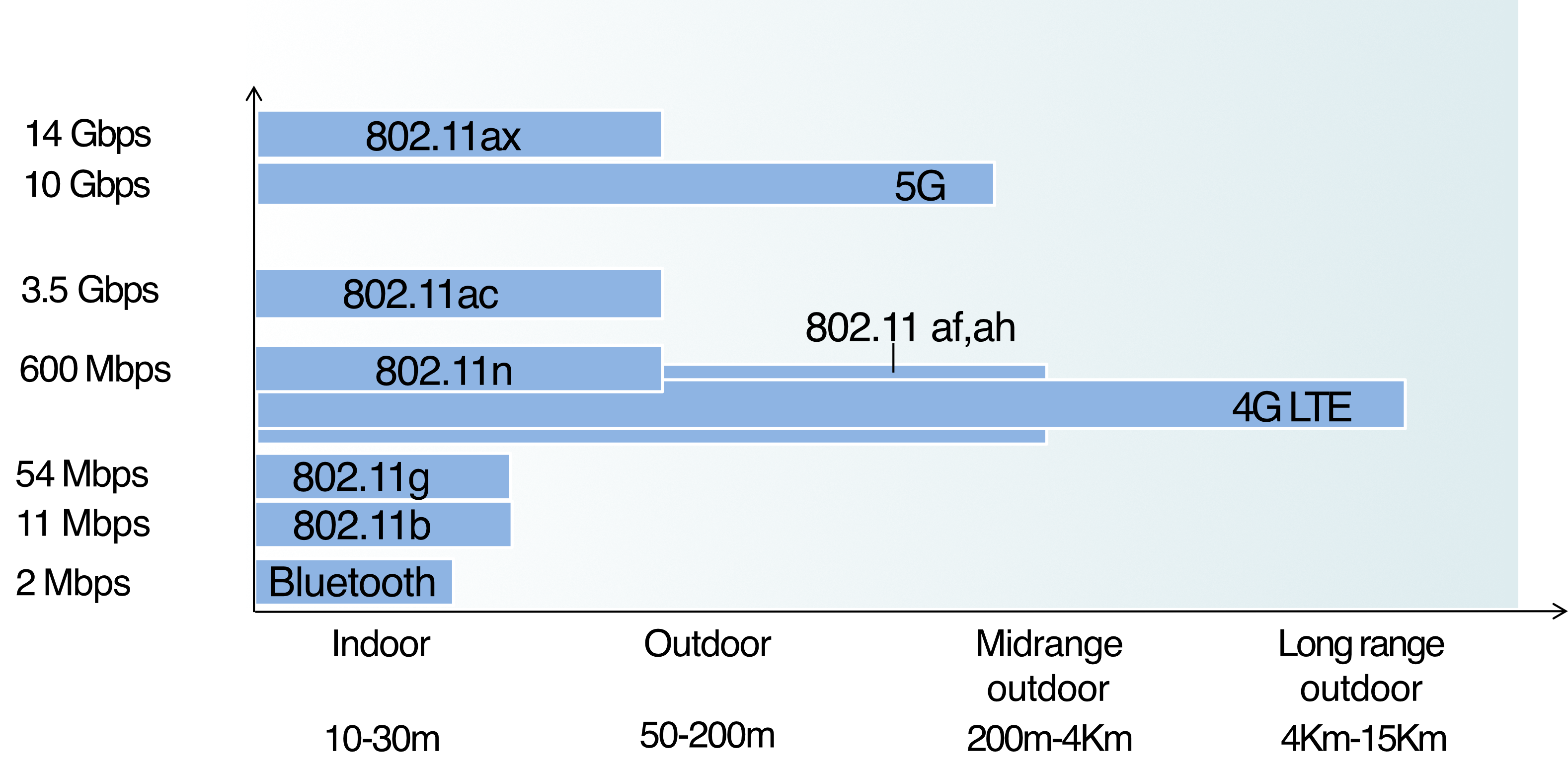
Challenges vs Wired Links
- Decreased Signal Strength — radio signal attenuates as it travels through matter (path loss)
- Interference from Other Sources — 2.4 GHz band is shared by many devices (WiFi, cellular, motors)
- Multipath Propagation — signal reflects off objects/ground, arriving at destination at slightly different times
สัญญาณวิทยุเหมือนเสียงตะโกน — ยิ่งไกลยิ่งเบาลง, มีสิ่งกีดขวางก็เสียหาย, และก้องสะท้อนได้
แล้วถ้าเราเปลี่ยน Channel หรือ Frequency หนีบ้านอื่นได้มั้ย แล้วมันจะได้ไม่ interfere
Contents
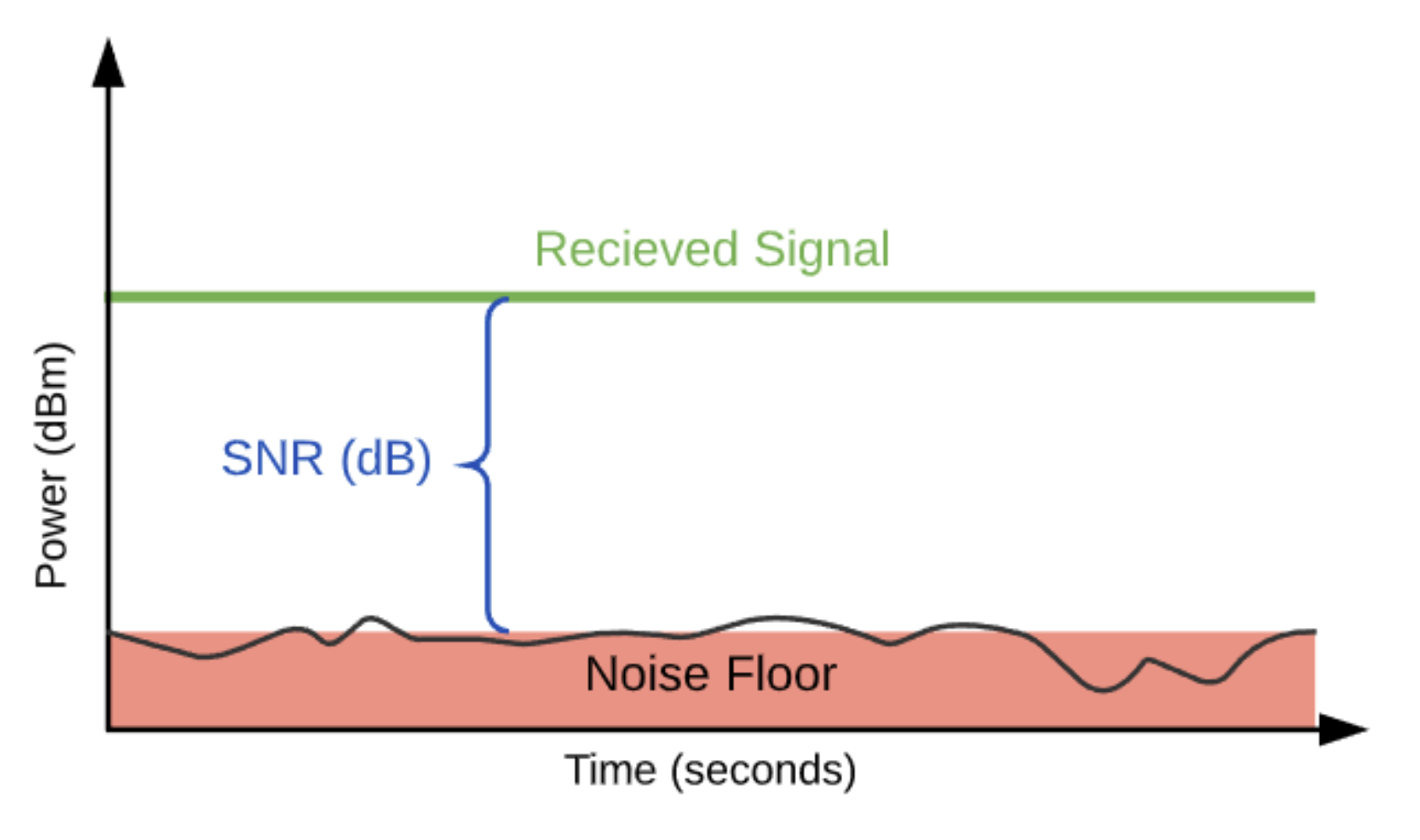
SNR: Signal-to-Noise Ratio
- Larger SNR = easier to extract signal from noise (a "good thing")
- Recommended SNR values:
- Data networks: ≥ 20 dB
- Voice applications: ≥ 25 dB
BER: Bit Error Rate
- Indicates the performance of a data link — lower BER = better
SNR vs BER Tradeoffs
- Increase power → Increase SNR → Decrease BER
- Given SNR: choose physical layer that meets BER requirement with highest throughput
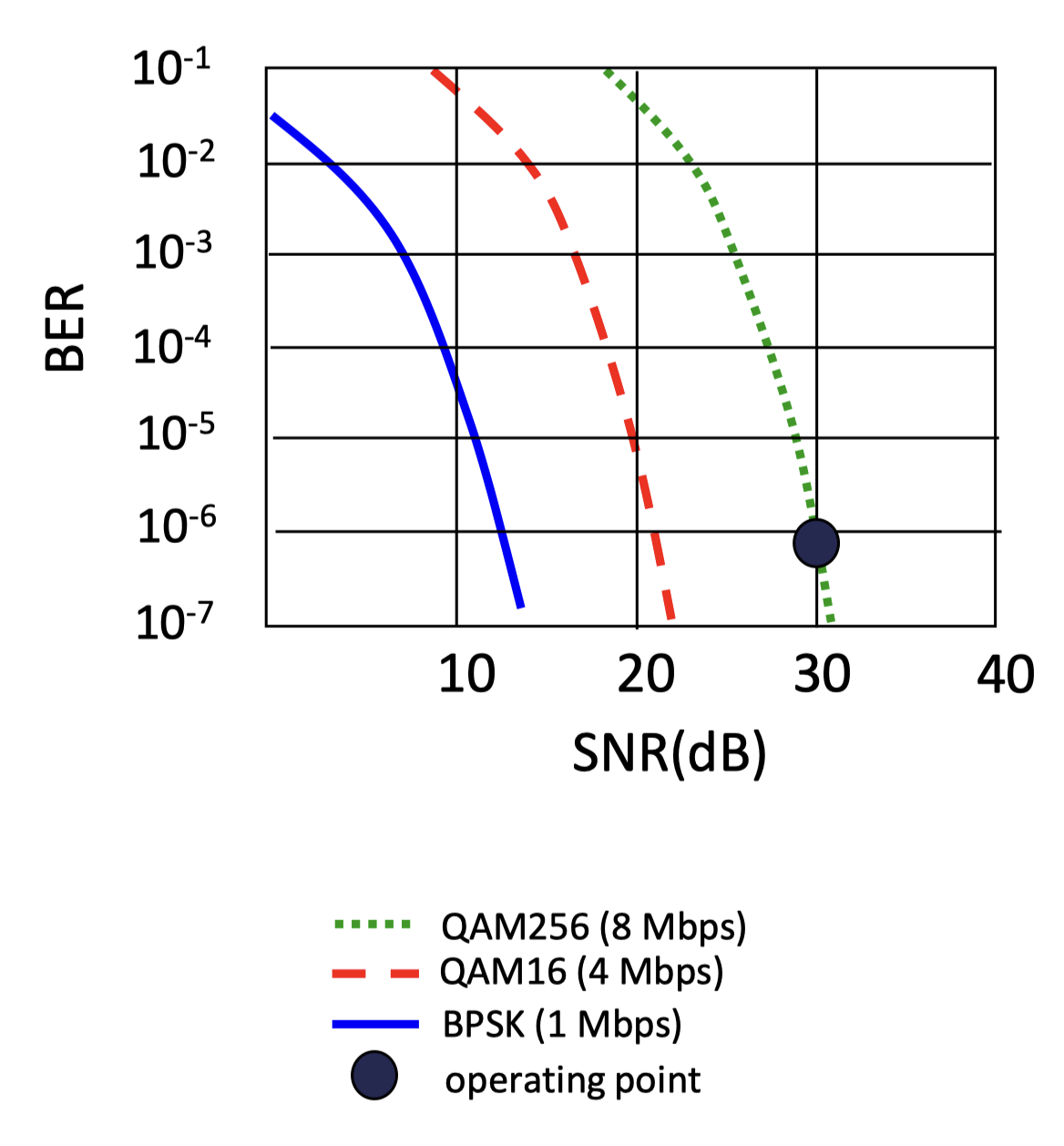
- SNR may change with mobility → dynamically adapt physical layer (modulation technique, rate)
- Modulation schemes (higher = faster but needs better SNR):
- BPSK — 1 Mbps
- QAM16 — 4 Mbps
- QAM256 — 8 Mbps
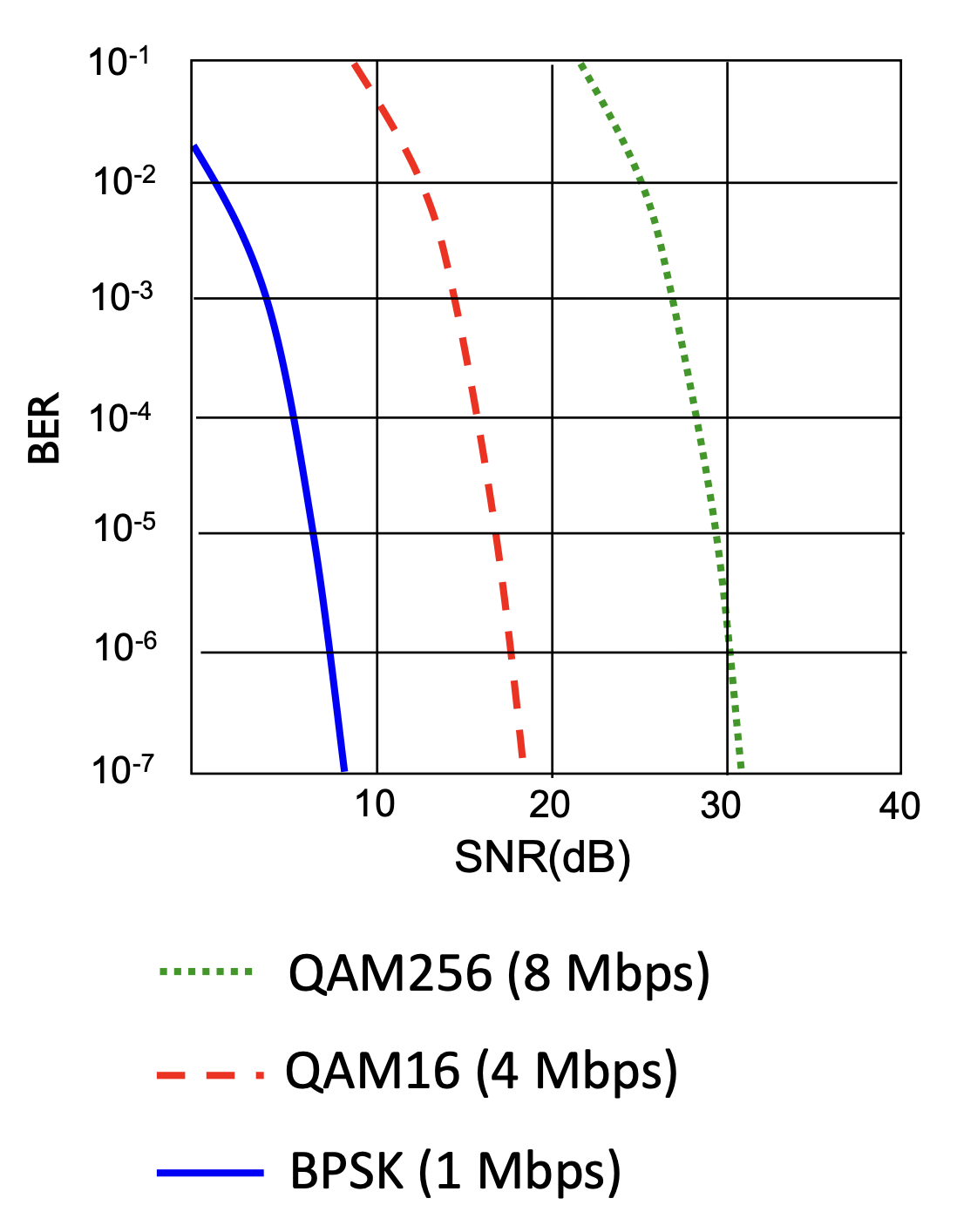
เหมือนการพูดในห้องเสียงดัง: ถ้าเสียงรบกวนมาก ต้องพูดช้าลงและชัดขึ้น (เลือก modulation ต่ำ) แต่ถ้าเงียบพอ พูดเร็วได้เลย (QAM256)
2. WiFi: 802.11 Wireless LANs
802.11 Standards
| Standard | Year | Max Data Rate | Range | Frequency |
|---|---|---|---|---|
| 802.11b | 1999 | 11 Mbps | 30m | 2.4 GHz |
| 802.11g | 2003 | 54 Mbps | 30m | 2.4 GHz |
| 802.11n (WiFi 4) | 2009 | 600 Mbps | 70m | 2.4, 5 GHz |
| 802.11ac (WiFi 5) | 2013 | 3.47 Gbps | 70m | 5 GHz |
| 802.11ax (WiFi 6) | 2020 | 14 Gbps | 70m | 2.4, 5 GHz |
| 802.11af | 2014 | 35–560 Mbps | 1 km | Unused TV bands (54–790 MHz) |
| 802.11ah | 2017 | 347 Mbps | 1 km | 900 MHz |
- All standards use CSMA/CA for multiple access
- Both infrastructure and ad-hoc versions exist
Frequency Bands: 2.4 GHz vs 5 GHz
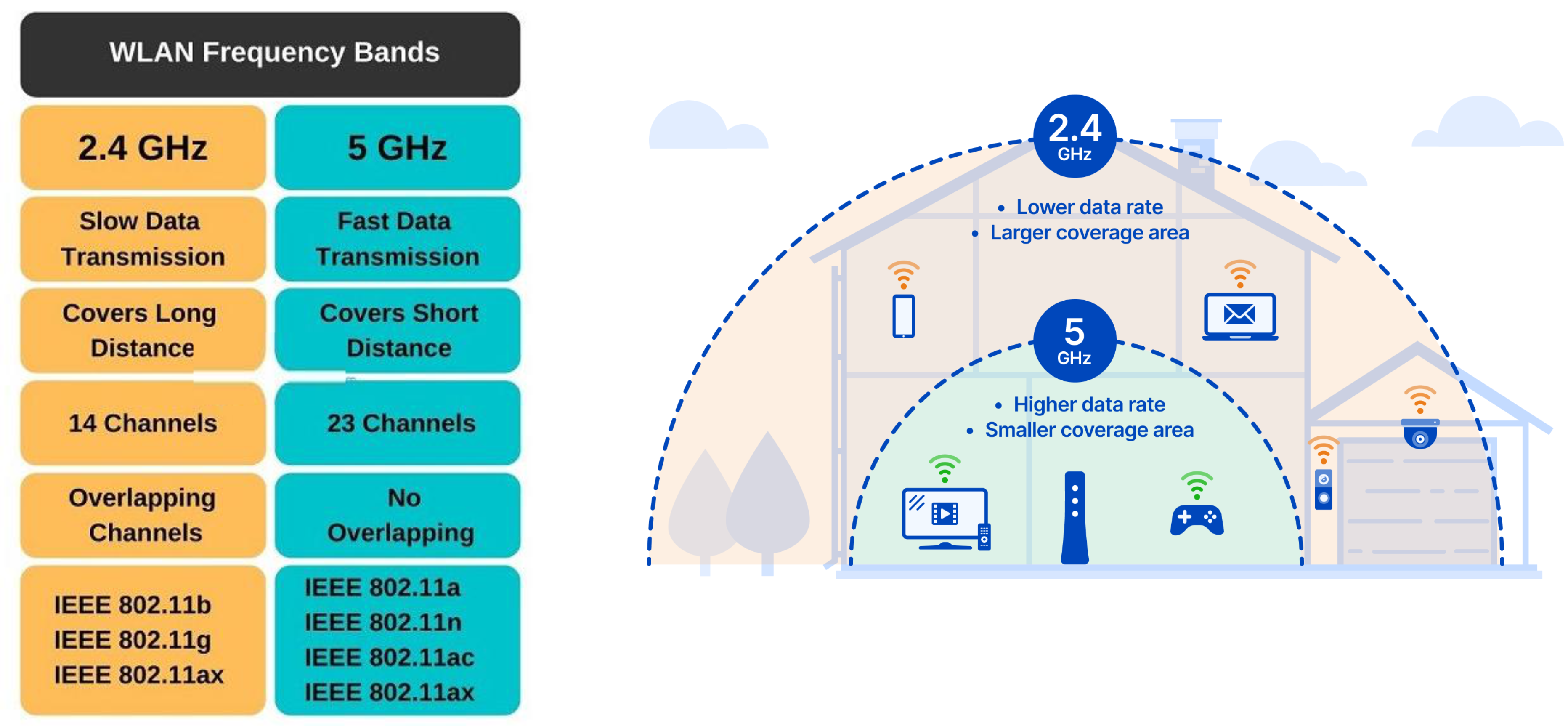
| Property | 2.4 GHz | 5 GHz |
|---|---|---|
| Data Rate | Slow | Fast |
| Coverage | Long distance | Short distance |
| Channels | 14 channels | 23 channels |
| Channel Overlap | Overlapping | No overlapping |
| Standards | 802.11b, g, ax | 802.11a, n, ac, ax |
2.4 GHz = ช้าแต่ไกล เหมือนสัญญาณวิทยุ FM. 5 GHz = เร็วแต่ใกล้ เหมือน Bluetooth ที่ไวแต่ต้องอยู่ใกล้ๆ
2.4 GHz Channel vs Frequency
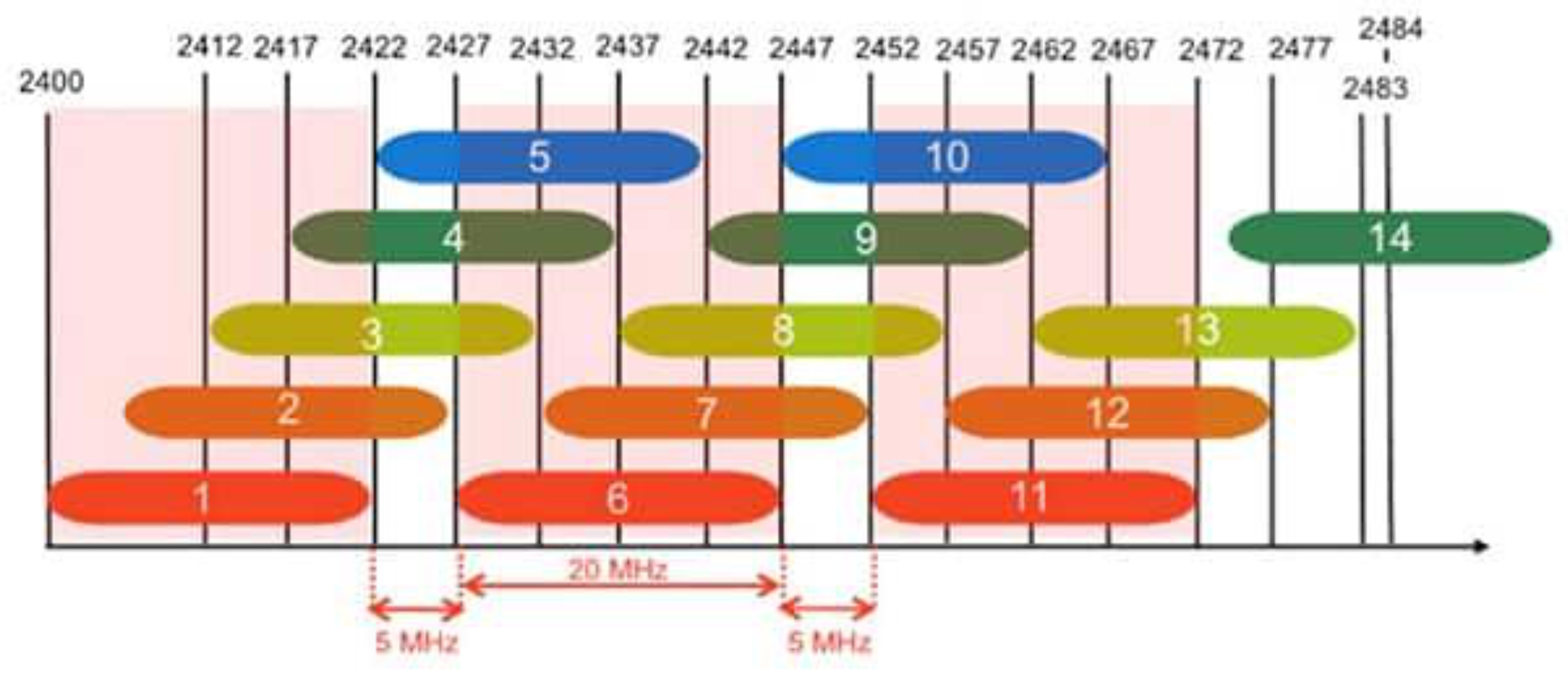
- Each channel is 20 MHz wide, spaced 5 MHz apart
- Only channels 1, 6, and 11 are truly non-overlapping
5 GHz Channel vs Frequency
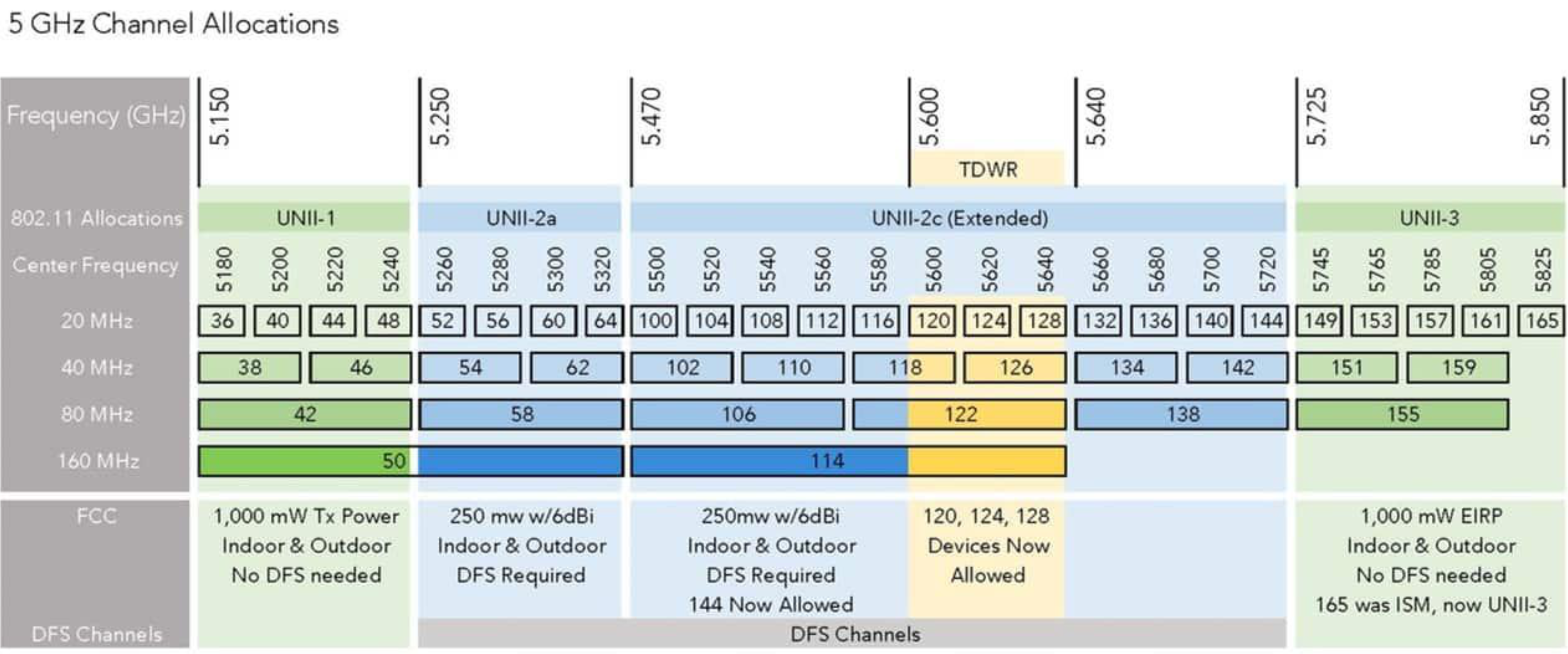
- More channels, no overlap
- Some channels require DFS (Dynamic Frequency Selection) due to TDWR (Terminal Doppler Weather Radar) conflict
802.11 LAN Architecture
- BSS (Basic Service Set) — aka "cell"
- Wireless hosts + Access Point (AP) in infrastructure mode
- AP = base station
- SSID (Service Set Identifier) — the name of a Wi-Fi network (sequence of characters)
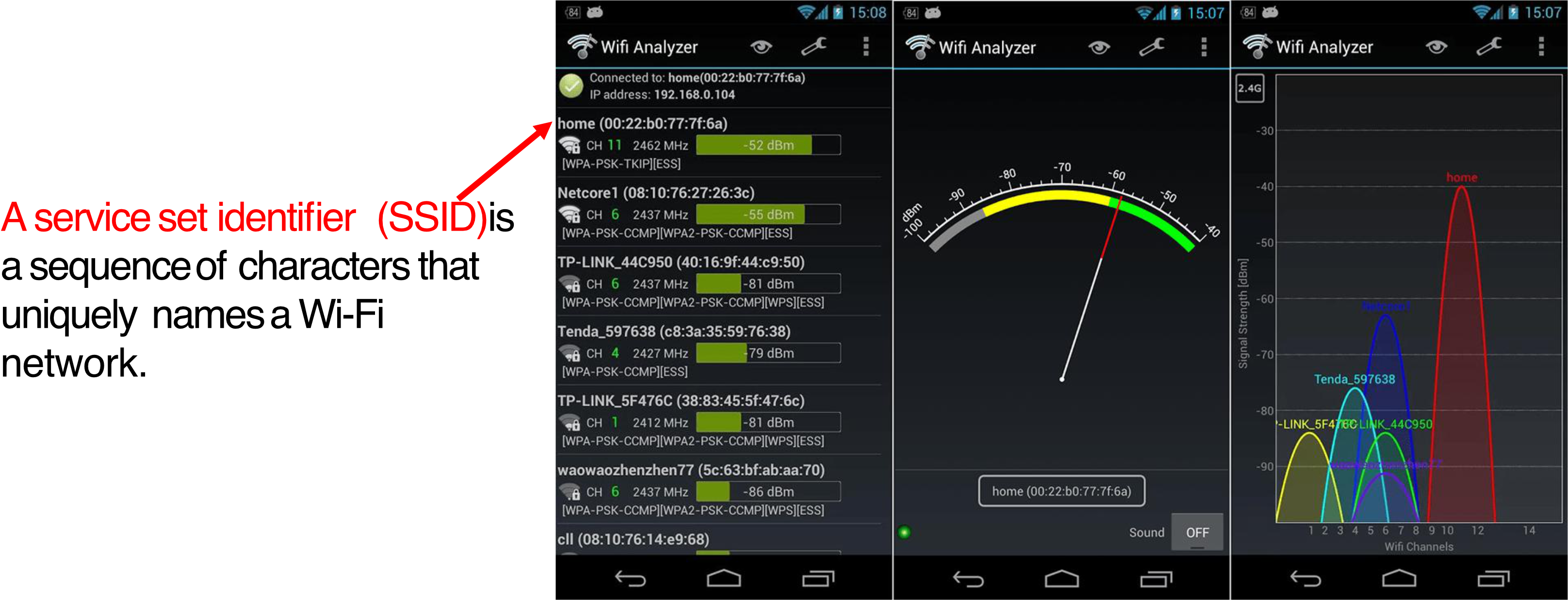
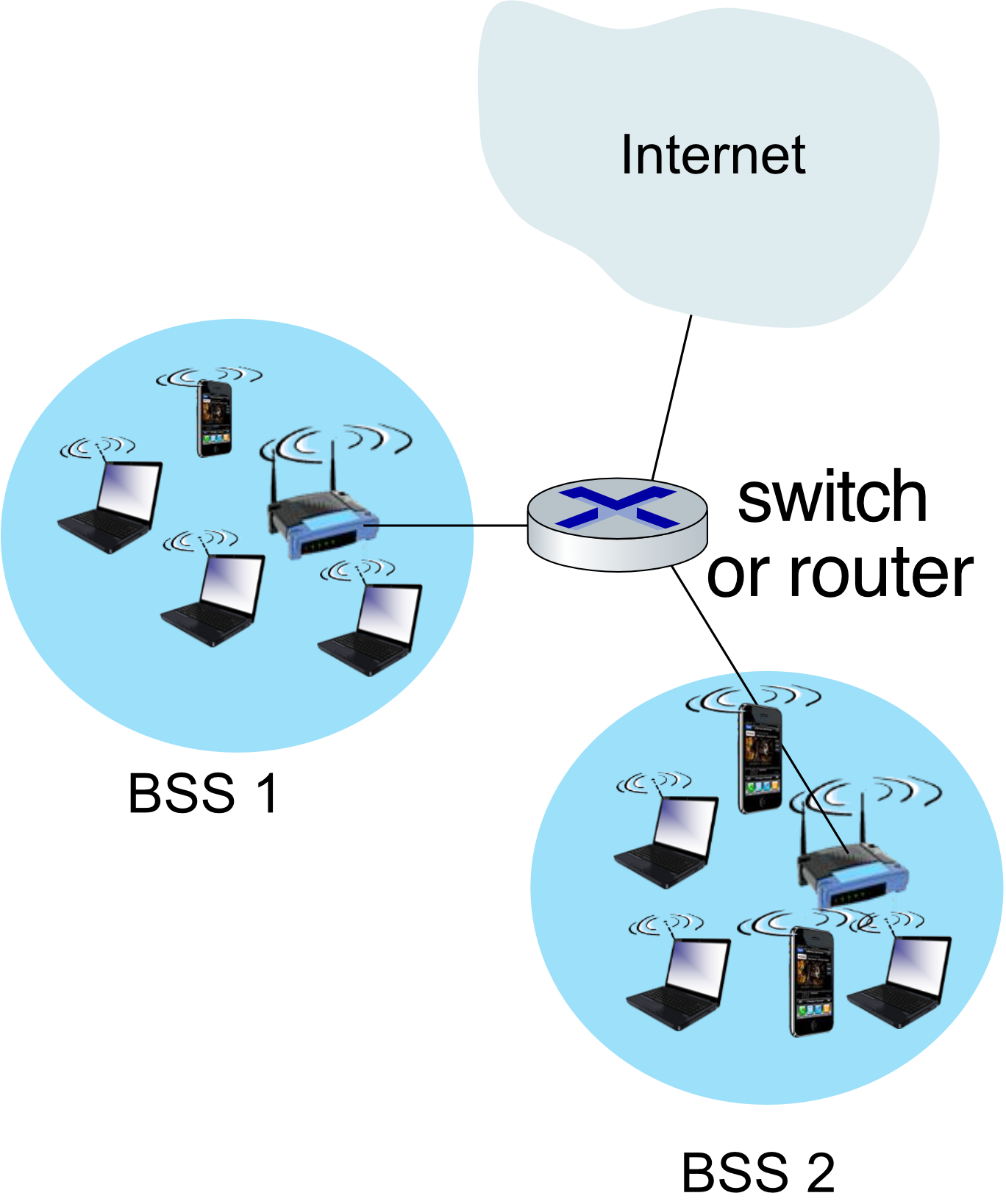
Associating with an AP (Arriving Host Process)
- Scan channels — listen for beacon frames (contain AP's SSID + MAC address)
- Select AP to associate with
- Authenticate (if required)
- Run DHCP to get IP address in AP's subnet
Passive vs Active Scanning
| Passive Scanning | Active Scanning (hidden SSID) | |
|---|---|---|
| Step 1 | Beacon frames sent from APs | Host broadcasts Probe Request |
| Step 2 | Host sends Association Request to chosen AP | APs send Probe Response |
| Step 3 | AP sends Association Response | Host sends Association Request to chosen AP |
| Step 4 | — | AP sends Association Response |
 |  |
Passive = นั่งรอฟังว่ามี WiFi อะไรบ้าง. Active = ตะโกนถามก่อนว่า "ใครอยู่บ้างไหม?" ใช้เมื่อ SSID ถูกซ่อน
802.11 Frame Addressing
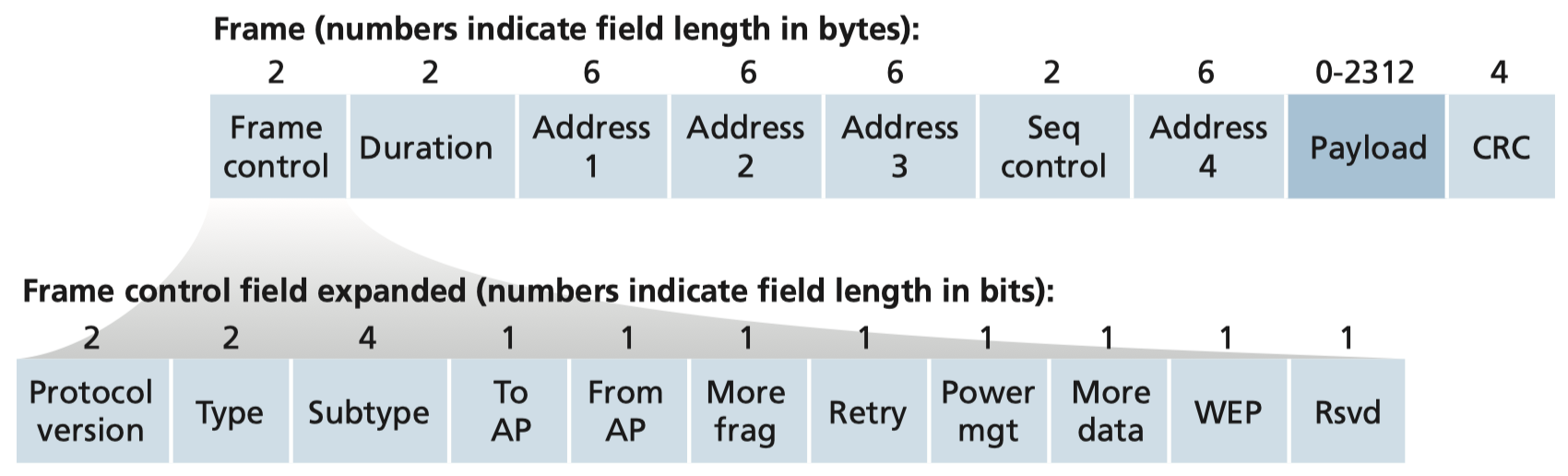
| frame control | duration | address1 | address2 | address3 | seq control | address4 | payload | CRC |
- Address 1 — MAC of wireless host or AP receiving this frame
- Address 2 — MAC of wireless host or AP transmitting this frame
- Address 3 — MAC of router interface to which AP is attached
- Address 4 — Used only in ad-hoc mode
Example: H1 → Internet via AP → Router R1
| Frame | Address 1 | Address 2 | Address 3 |
|---|---|---|---|
| 802.11 WiFi frame | AP MAC addr | H1 MAC addr | R1 MAC addr |
| 802.3 Ethernet frame | R1 MAC addr | AP MAC addr | — |
CSMA/CA: Multiple Access Protocol
Why Not CSMA/CD?
- 802.11 has NO collision detection!
- High transmitting signal + weak received signal due to fading → hard to sense
- Cannot detect all collisions (hidden terminal problem)
- Goal: avoid collisions → CSMA/CA (Collision Avoidance)
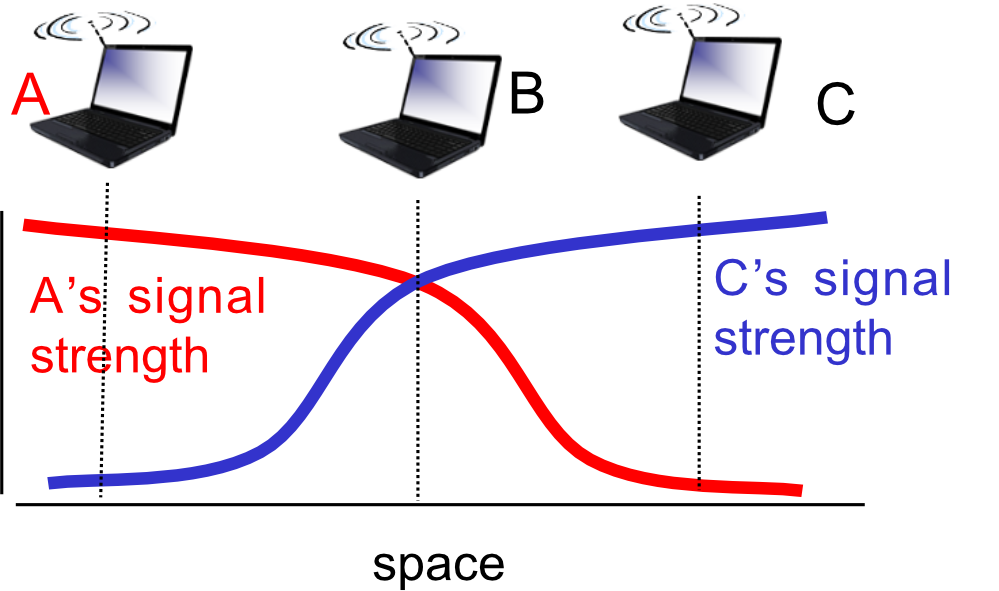
CSMA/CA Sender Algorithm
1. If channel idle for DIFS → transmit entire frame (no CD)
2. If channel busy → start random backoff timer
   - Timer counts down while channel is idle
   - Transmit when timer reaches 0
   - If no ACK received → increase backoff interval, repeat step 2
- DIFS (DCF Interframe Spacing) — continuously idle time before transmitting
- SIFS (Short Interframe Spacing) — waiting time before sending ACK/CTS
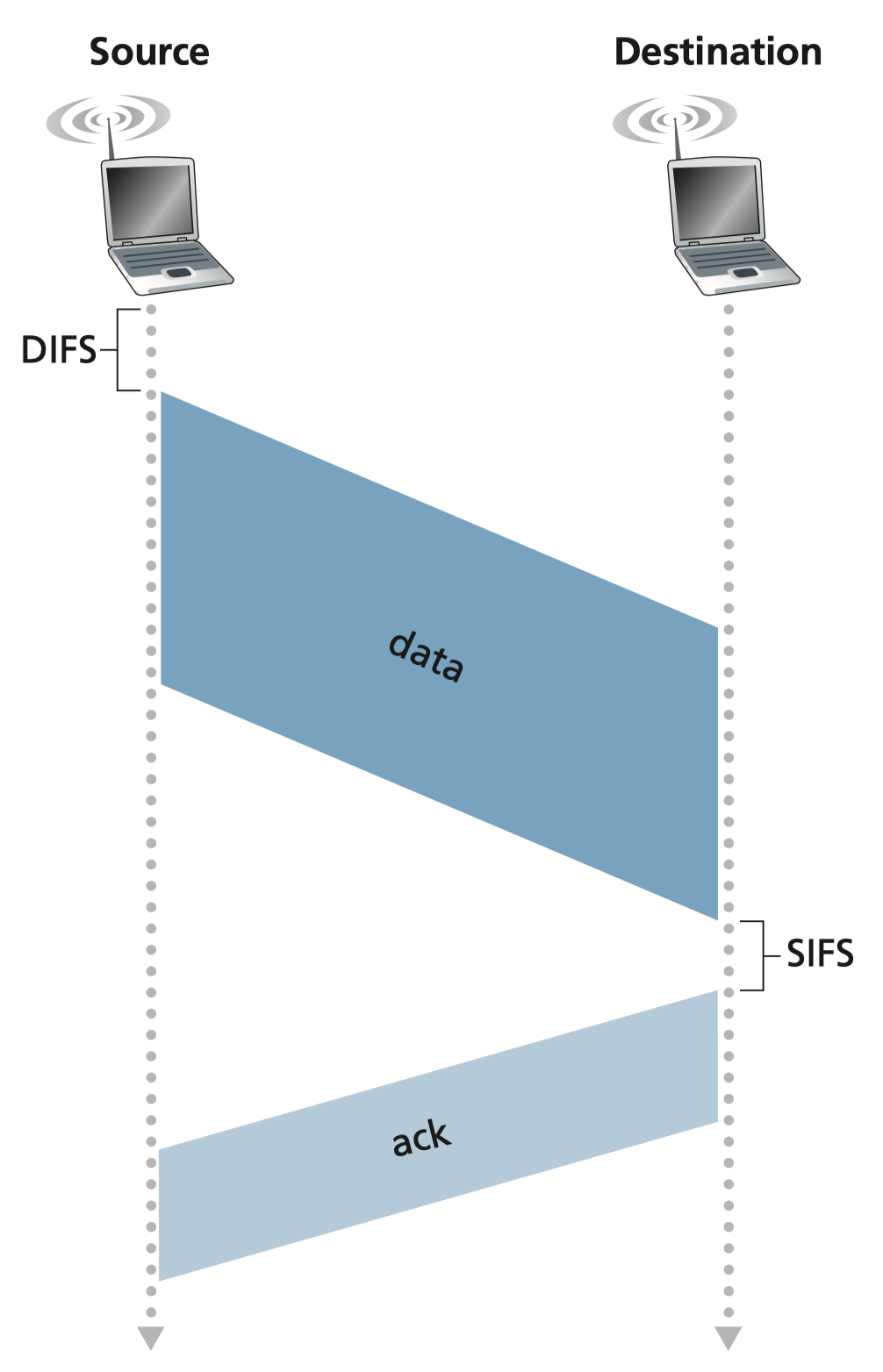
CSMA/CA เหมือนการประชุมที่สุภาพ: รอจนคนพูดเสร็จ + รอ DIFS เพิ่ม แล้วค่อยพูด ถ้าชนกันก็รอ random แล้วพูดใหม่
RTS/CTS: Collision Avoidance Enhancement
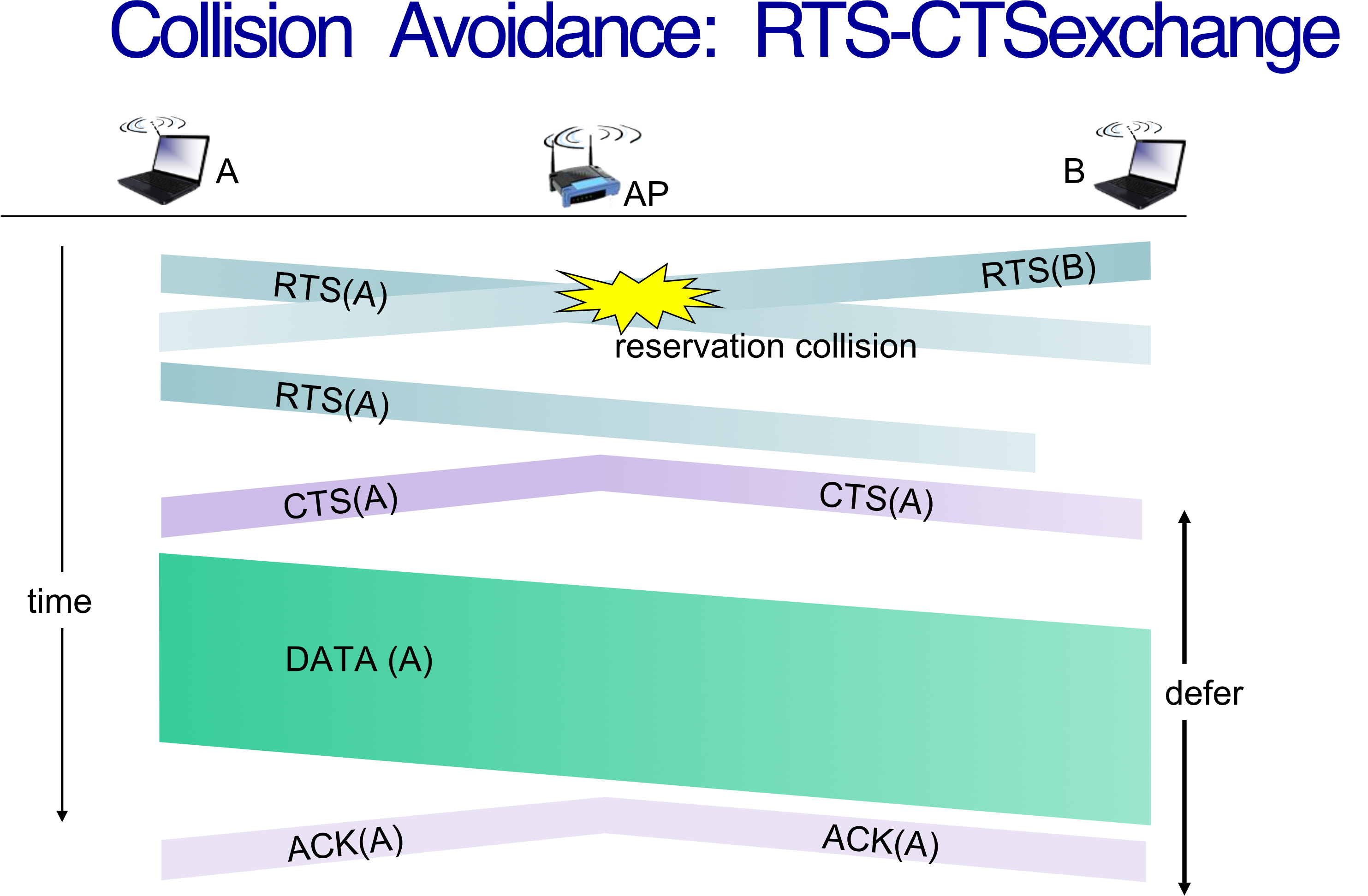
- Sender sends small RTS (Request-to-Send) packet to AP via CSMA
- AP broadcasts CTS (Clear-to-Send) in response
- All nodes hear CTS → defer their transmissions
- Sender transmits data frame
- AP sends ACK
- RTSs may still collide, but they're short → less wasted bandwidth than full data collision
RTS/CTS เหมือนการจองคิว: บอก AP ก่อนว่าจะส่ง, AP ประกาศให้ทุกคนรู้ว่า "A กำลังส่ง หยุดรบกวน", ทุกคนหยุดรอ
802.11 Mobility within same subnet
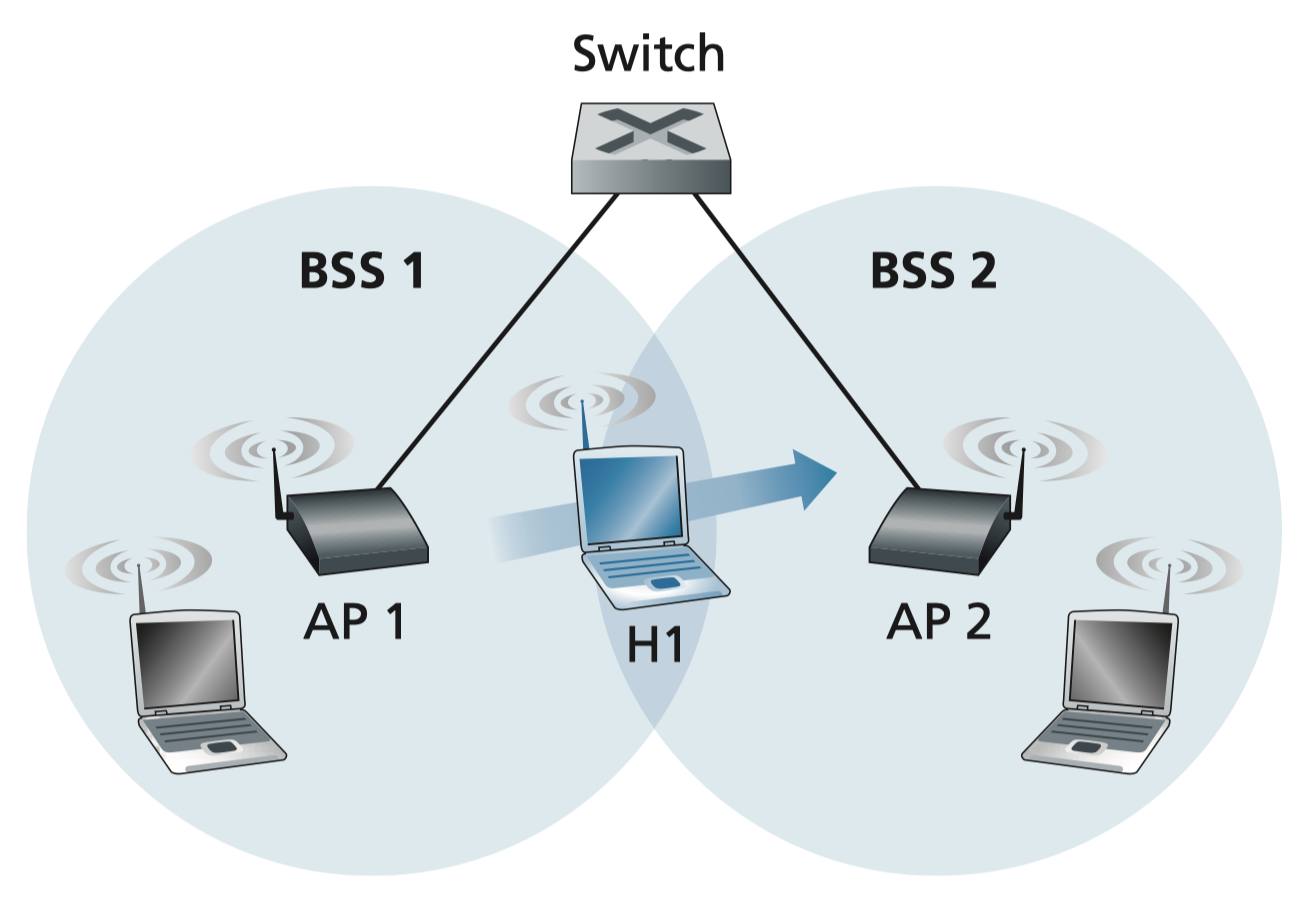
H1 remains in same IP subnet: IP address can remain same switch: which AP is associated with H1?
- self-learning : switch will see frame from H1 and “remember” which switch port can be used to reach H1
Advanced Capabilities
Rate Adaptation
- Base station + mobile dynamically change transmission rate as SNR varies
- SNR ↓ → BER ↑ → switch to lower rate (lower modulation) with lower BER
Power Management
- Node-to-AP: Node tells AP: "I am going to sleep until next beacon frame"
- AP holds frames for sleeping nodes
- Beacon frame contains list of mobiles with pending frames
- Node wakes up before next beacon, checks if frames are waiting → sleep or stay awake
3. 802.11 Wireless Security
Security Challenges
- External business requirements (guests, contractors)
office_2.4G,office_5G,office_guest,office_iot
- Growing use of mobile/endpoint devices
- Use of untrusted devices, networks, apps
- Interaction with cloud-based systems
- Use of untrusted contents
Signal Hiding Techniques
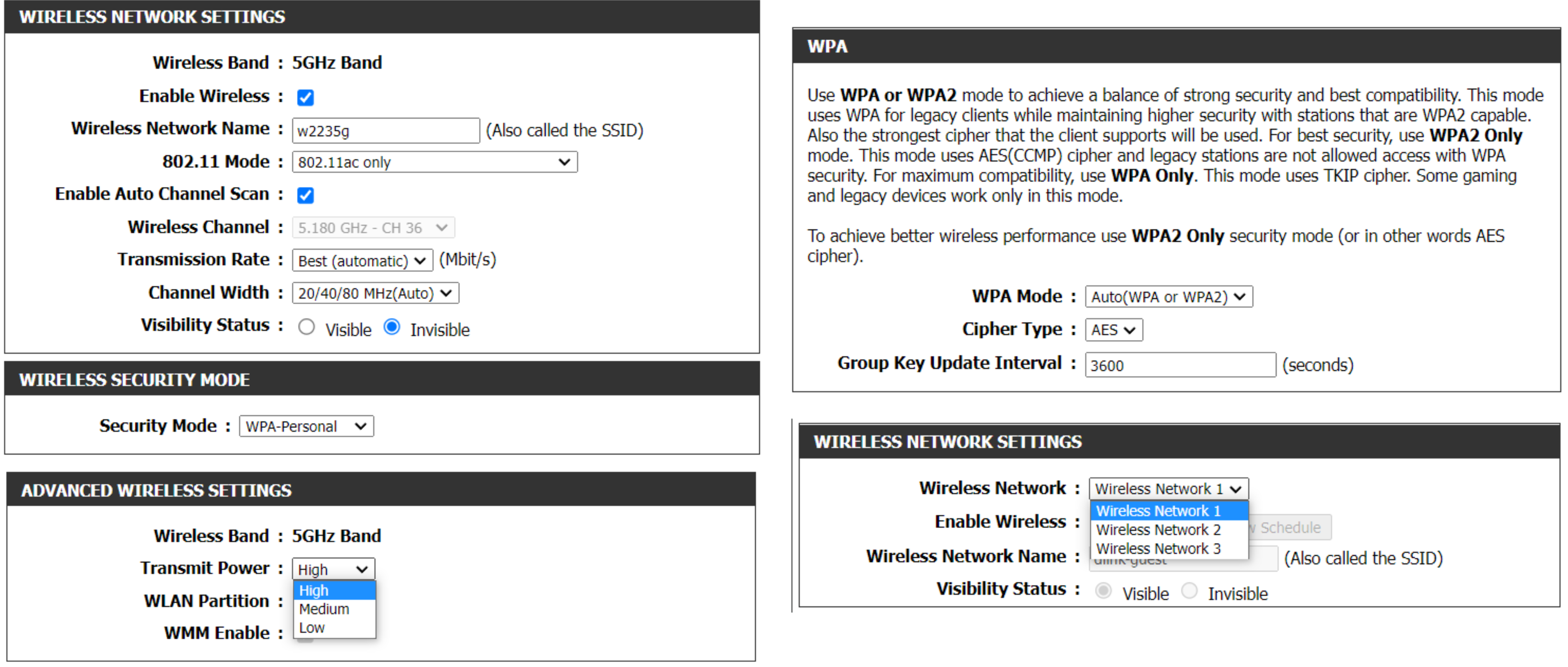
- Turn off SSID broadcasting (hidden SSID)
- Use cryptic/non-default SSID names
- Reduce signal strength (place AP away from windows and external walls)
- Use directional antennas
Encryption Enhancement Techniques
- Use encryption (WPA2)
- Enable anti-virus, anti-spyware, firewall
- Enable password for joining
- Use multiple SSIDs (e.g., separate guest network)
- Isolation → equipment that connected to SSID can have internet access, but not to local network at all!
- เหมาะกับพวก SSID for guests อะ!
WEP vs WPA vs WPA2
| Property | WEP | WPA | WPA2 |
|---|---|---|---|
| Data Encryption | RC4 (Rivest Cipher) | TKIP | AES |
| Authentication | Shared Key | Shared Key & 802.1X | Shared Key & 802.1X |
| Data Integrity | CRC-32 | Message Integrity Code | CBC-MAC |
| Key Management | None | Dynamic session key | Dynamic session key |
| Release Year | 1999 | 2003 | 2004 |
| Should use? | ❌ No (crackable in ~5 min) | ⚠️ Only if WPA2 unavailable | ✅ Yes |
WPA Details
- Released 2003 as replacement for WEP's security flaws
- Uses RC4 algorithm properly with dynamic/rotating keys per frame → minimizes shared secret key exposure
- Improved data encryption + stronger user authentication
WPA2 Details
- Based on IEEE 802.11i standard
- 2 versions: Personal & Enterprise
- Primary enhancement: AES (Advanced Encryption Standard) algorithm
- Personal mode — uses PSK (Pre-Shared Key); no separate user authentication
- Enterprise mode — requires separate user authentication via EAP protocol
WEP = กุญแจบ้านที่ทำสำเนาได้ง่ายมาก. WPA = เปลี่ยนรหัสทุกครั้งที่ใช้. WPA2 = ใช้ AES ซึ่งเป็น encryption ระดับ military
4. Ways to Protect Your Network: Firewall
What is a Firewall?
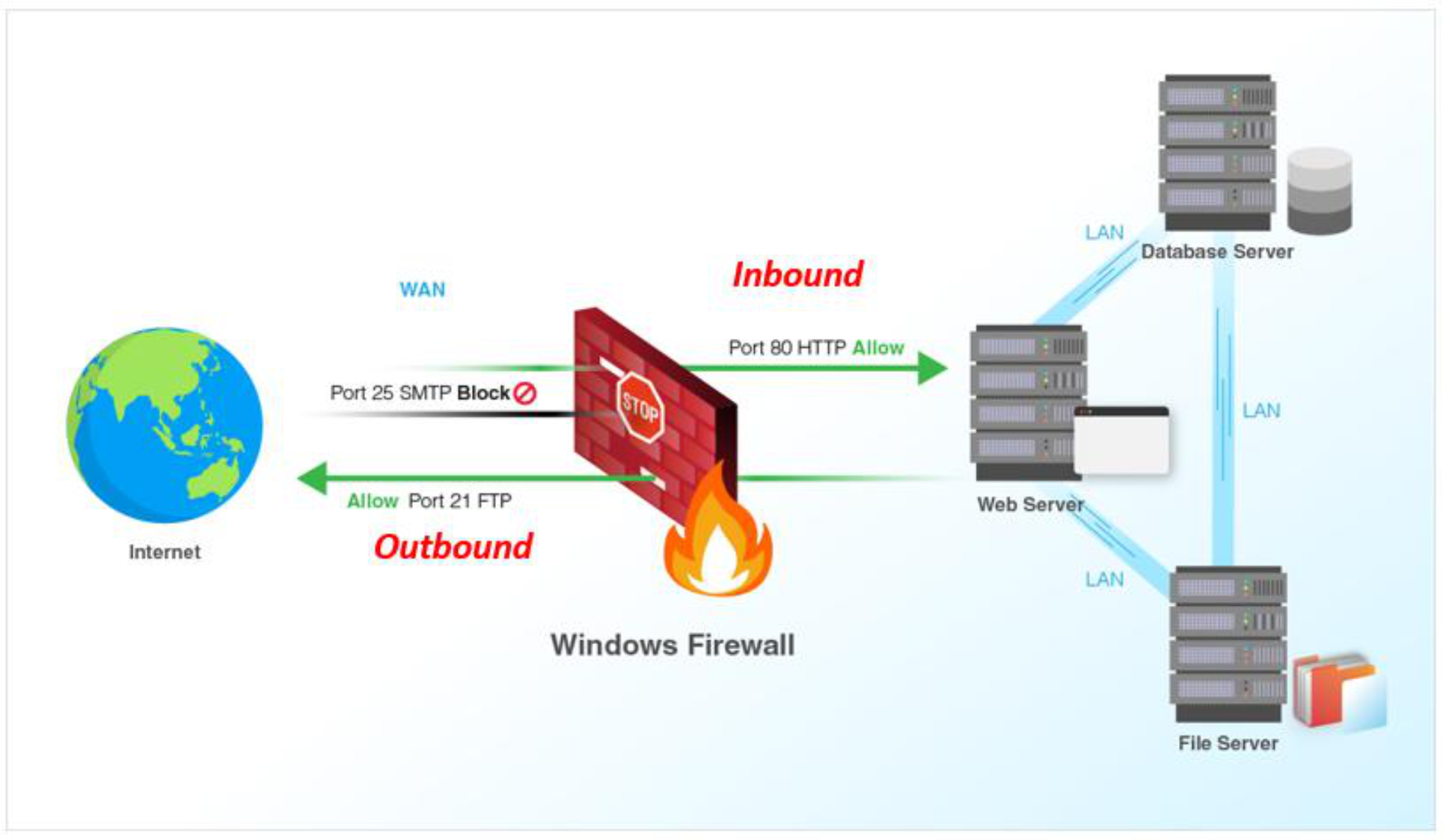
- Firewall — a security system that monitors and controls incoming/outgoing network traffic based on predetermined security rules
- Installed between the internal network and the rest of the Internet
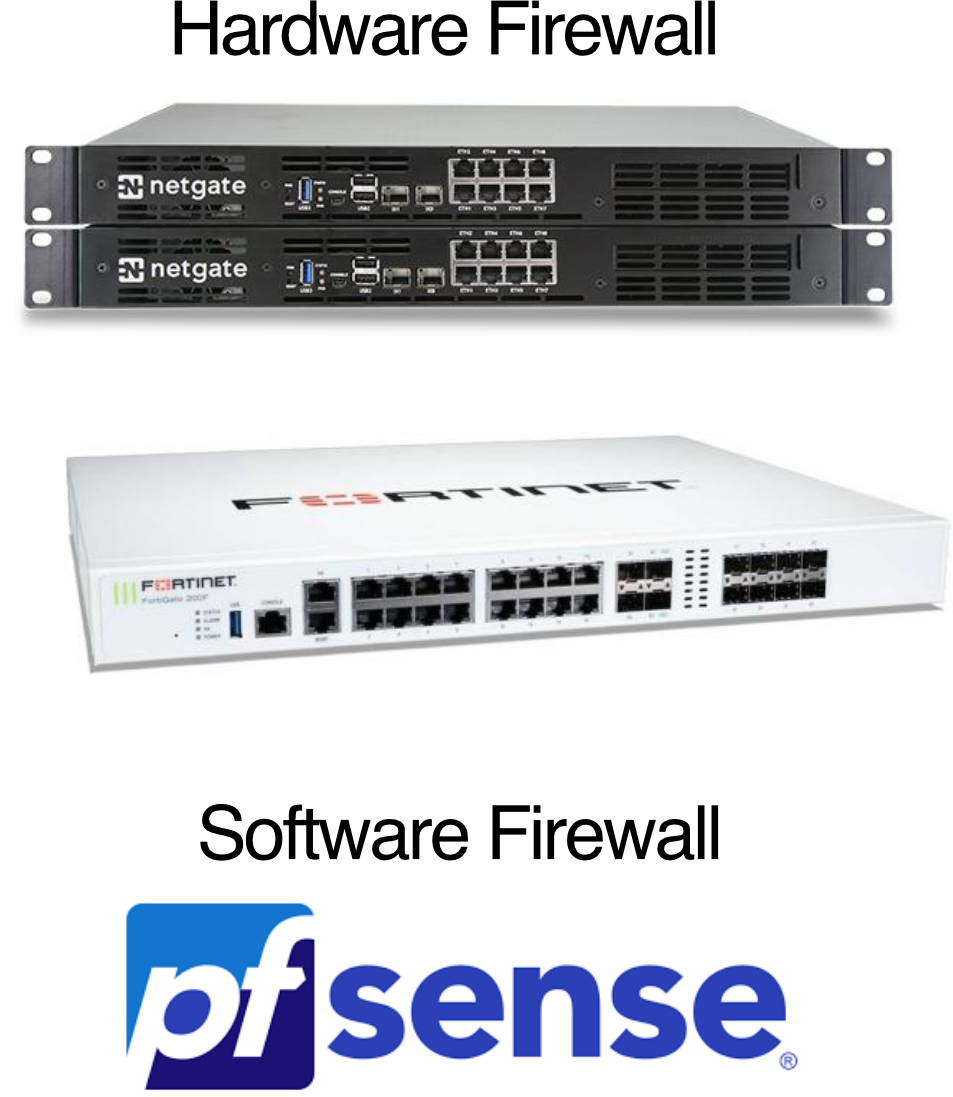
- Can be hardware or software
Why Firewalls?
- Prevent DoS attacks — e.g., SYN flooding (attacker creates many bogus TCP connections, exhausting resources)
- Prevent illegal modification/access of internal data
- Allow only authorized access to the internal network
- Privacy and Stealth — using a "Drop" policy makes your network invisible to port scans (connections simply time out)
Key Functions
- Packet Filtering — checking source, destination, and type of data
- Access Control — allowing specific users or applications to access certain resources
- Threat Prevention — blocking known malicious sites or unauthorized pings
Inbound vs Outbound Rules
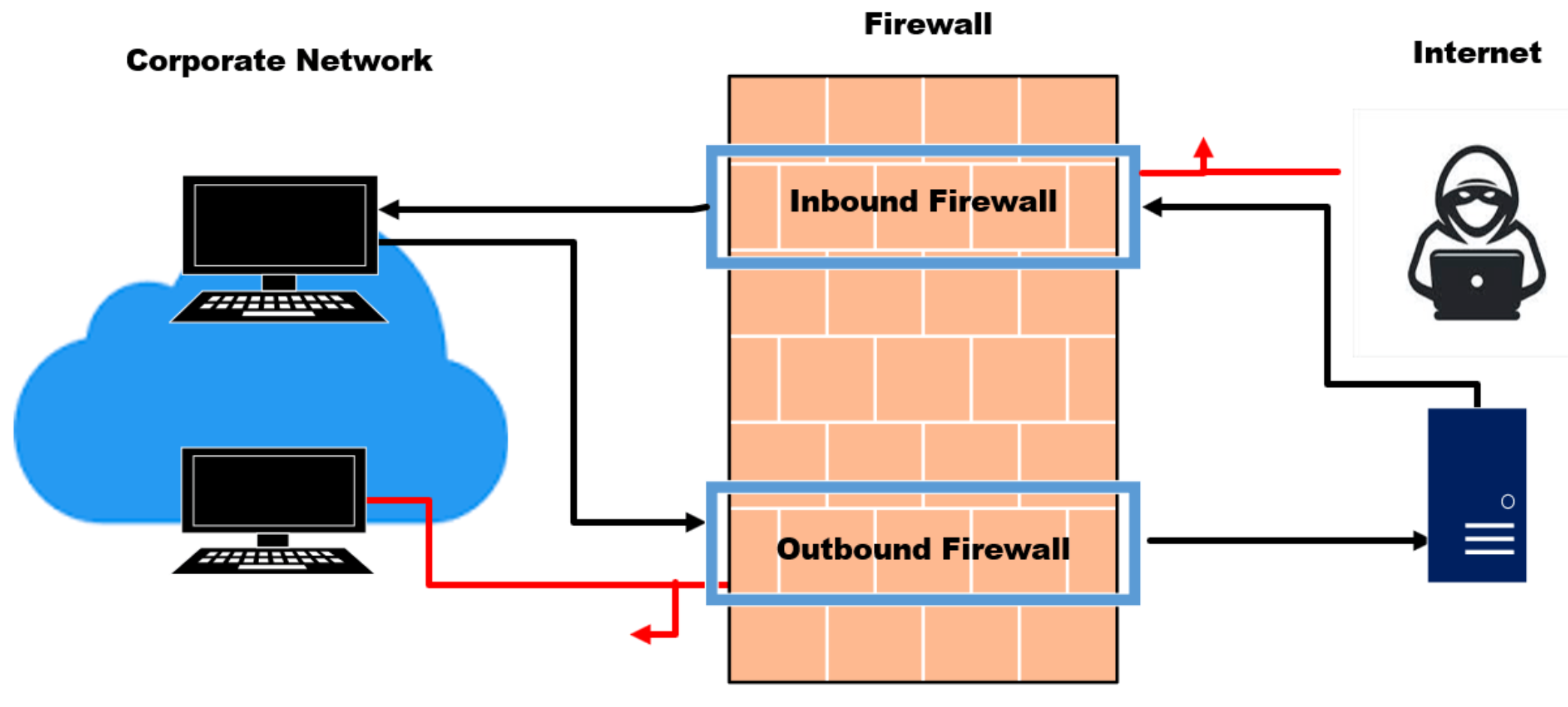
- Inbound rules — protect against incoming traffic (keeping hackers out): disallowed connections, malware, DoS attacks
- Outbound rules — protect against outgoing traffic originating inside the network (prevent a compromised node from becoming a weapon)
Firewall Strategies
a) Blacklisting Strategy
- Default policy: ACCEPT (allow all)
- Continuously insert rules to DROP malicious packets
- Use case: outbound (for flexibility)
b) Whitelisting Strategy
- Default policy: DROP (block all)
- Continuously insert rules to ACCEPT good packets
- Use case: inbound (common), outbound (maximum control)
Blacklisting = ประตูเปิดอยู่ แต่มีรายชื่อคนห้ามเข้า. Whitelisting = ประตูปิดอยู่ แต่มีรายชื่อคนที่ให้เข้าได้เท่านั้น

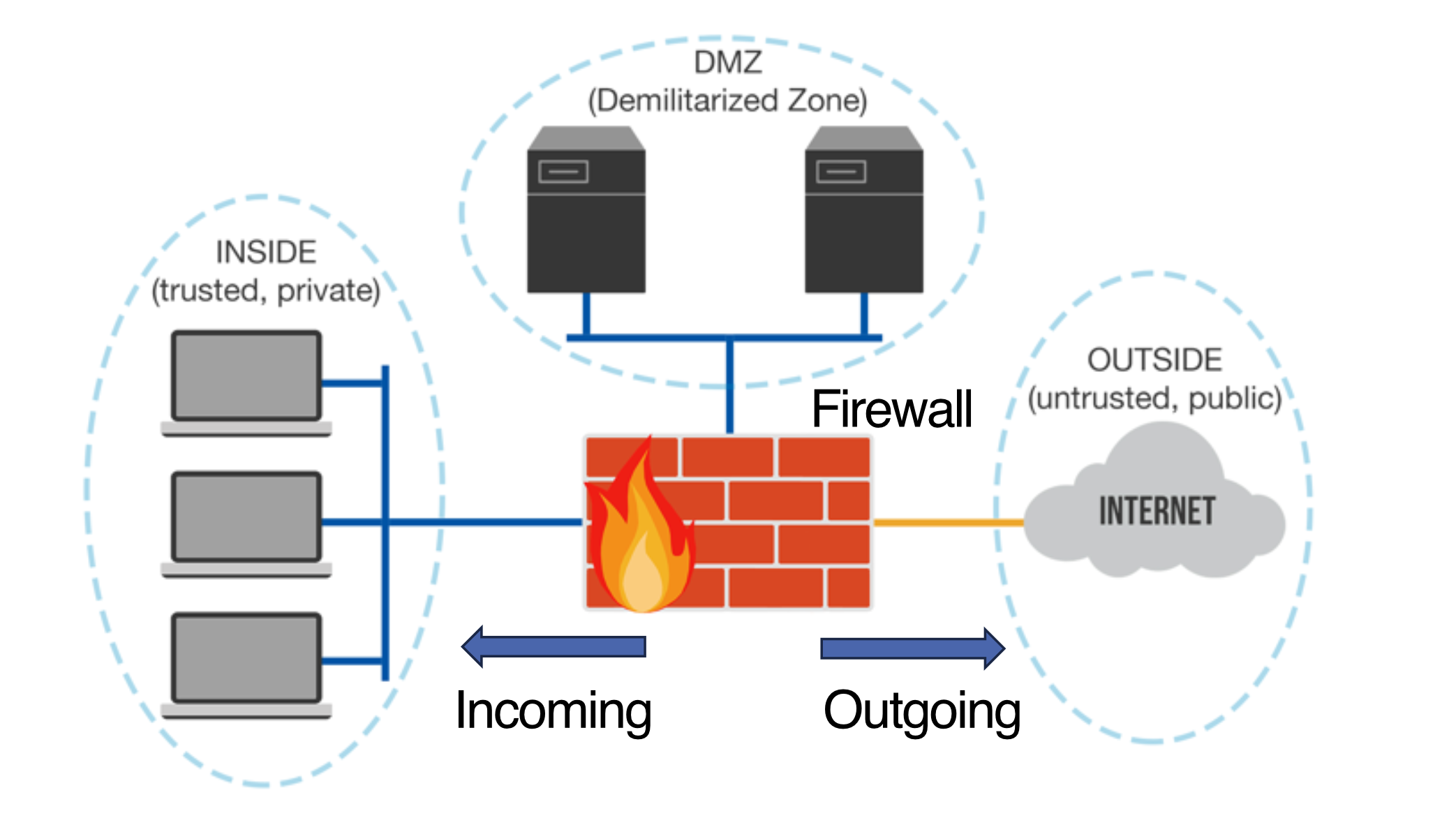
Firewall Zones / Network Segmentation
- Group network assets into logical zones based on Trust Level
- Assign devices to a zone → define how traffic flows between zones (instead of per-IP rules)
Three Zones
| Zone | Trust Level | Contents | Policy |
|---|---|---|---|
| Untrusted Zone (WAN/Internet) | Zero | Public internet | Assume everything is malicious; only specific inspected traffic allowed in |
| DMZ (Demilitarized Zone) | Low–Medium | Web Server, Mail Server, DNS, FTP | Can talk to internet; cannot initiate connections to internal network |
| Trusted Zone (LAN/Internal) | High | Employee workstations, internal servers, sensitive data | Can access internet & DMZ; heavily shielded from inbound requests |
| ![[Pasted image 20260423153858.png | center | 500]] |
Inter-Zone Traffic Flow (Zone Matrix)
| From Zone | To Zone | Default Action | Logic |
|---|---|---|---|
| Trusted | Untrusted | Allow | Users accessing the internet |
| Untrusted | Trusted | Block | Preventing external attacks |
| Untrusted | DMZ | Allow (Filtered) | Letting customers see your web server |
| DMZ | Trusted | Block | If web server is hacked, attacker stays in DMZ |
DMZ เหมือน "ลานด้านหน้าปราสาท": แขกภายนอกเข้าได้ แต่เข้าปราสาท (Internal) ไม่ได้
Types of Firewalls
| Type | Security Level | How It Operates |
|---|---|---|
| Stateless Packet Filtering | Basic | Inspects individual packets based on IP address and port number |
| Stateful Inspection | Moderate | Tracks the "state" of active connections to verify incoming data was actually requested |
| Next-Generation (NGFW) | High | Adds deep packet inspection, antivirus, encrypted traffic inspection, Application Awareness (Layer 7) |
| Proxy Firewall | Very High | Acts as middleman; external user never connects directly to your network |
Stateless Packet Filtering
- Filters packet-by-packet; no memory of past packets
- Decision based on:
- Source/Destination IP address
- TCP/UDP source/destination port numbers
- ICMP message type
- TCP SYN, ACK bits
Examples
- Block all UDP traffic and Telnet:
- Drop packets with IP protocol = 17 (UDP) AND source or dest port = 23
- Block external TCP connection initiations:
- Drop inbound TCP segments with ACK = 0 → prevents external clients from initiating connections, but allows internal clients to connect out
Access Control List (ACL) Format
| action | source addr | dest addr | protocol | source port | dest port | flag bit |
Example ACL rules:
| Action | Source | Destination | Protocol | Src Port | Dst Port | Flag |
|---|---|---|---|---|---|---|
| allow | 222.22/16 | outside 222.22/16 | TCP | > 1023 | 80 | any |
| allow | outside 222.22/16 | 222.22/16 | TCP | 80 | > 1023 | ACK |
| allow | 222.22/16 | outside 222.22/16 | UDP | > 1023 | 53 | — |
| allow | outside 222.22/16 | 222.22/16 | UDP | 53 | > 1023 | — |
| deny | all | all | all | all | all | all |
📋 ACL อ่านจากบนลงล่าง เหมือน if-else chain: match rule แรกที่ตรง แล้วหยุด
Common Stateless Filtering Policies
| Policy | Firewall Rule |
|---|---|
| No outside web access | Drop all outgoing packets to any IP, port 80 |
| No incoming TCP connections (except public web server) | Drop all incoming TCP SYN to any IP except 130.207.244.203, port 80 |
| Block web radio (bandwidth protection) | Drop all incoming UDP except DNS and router broadcasts |
| Anti-Smurf (DoS prevention) | Drop all ICMP to broadcast address (e.g. 130.207.255.255) |
| Stealth Mode (prevent traceroute) | Drop all outgoing ICMP TTL expired traffic |
Stateful Packet Filtering
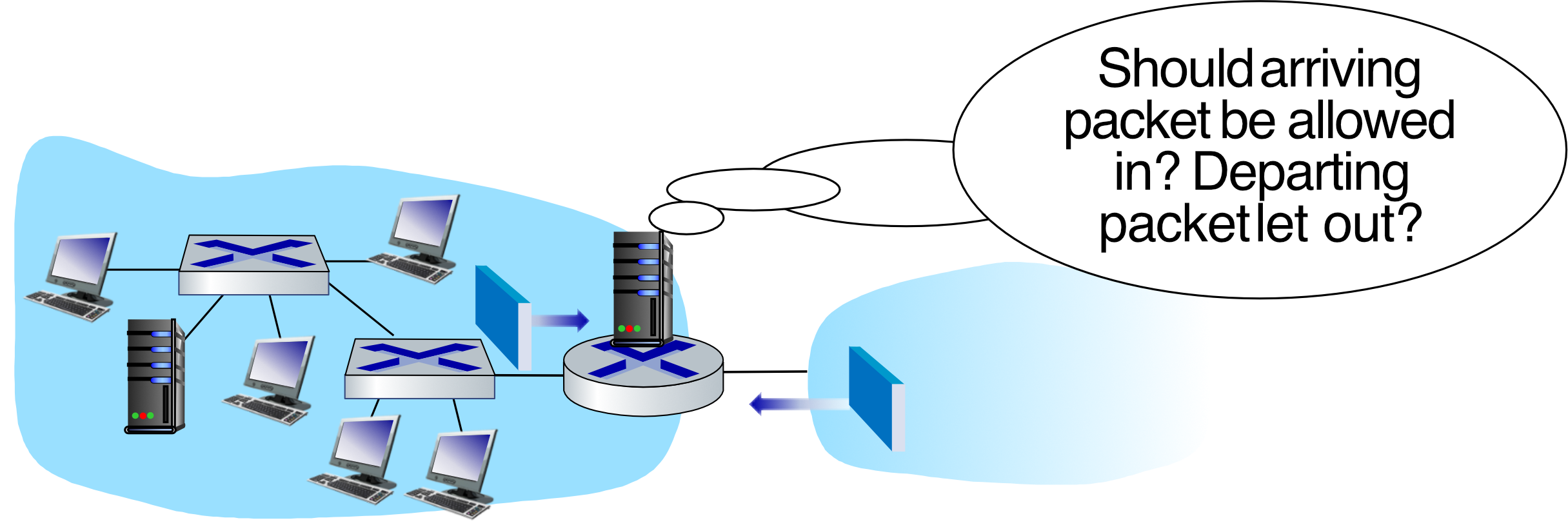
- Stateless flaw: admits packets that "make no sense" (e.g., ACK packet with no prior TCP connection)
- Stateful inspection: tracks state of every TCP connection
- Monitors connection setup (SYN) and teardown (FIN)
- Verifies incoming/outgoing packets match established sessions
- Times out inactive connections → stops admitting packets
🔒 Stateful = จำได้ว่าใครเคยโทรมาก่อน ถ้าไม่เคยโทร แต่รับสายกลับ ก็ผิดปกติ
Example: ACL Policy Table (Full)
| Policy | Direction | Protocol | Source | Destination | Action | Logic |
|---|---|---|---|---|---|---|
| No Outside Web Access | Outbound | TCP | Internal LAN | Any (Port 80) | DROP | Block unencrypted browsing |
| Public Web Hosting | Inbound | TCP | Any | Web Server (Port 80) | ALLOW | Only hole in inbound shield |
| Default Inbound Block | Inbound | TCP (SYN) | Any | Any | DROP | Prevents unauthorized new connections |
| Bandwidth Protection | Inbound | UDP | Any | Internal LAN | DROP | Blocks web-radio streaming |
| Anti-Smurf (DoS) | Inbound | ICMP | Any | Broadcast IP | DROP | Stops amplification attacks |
| Stealth Mode | Outbound | ICMP TTL Expired | Internal LAN | Any | DROP | Hides network topology from traceroute |
Firewall Examples
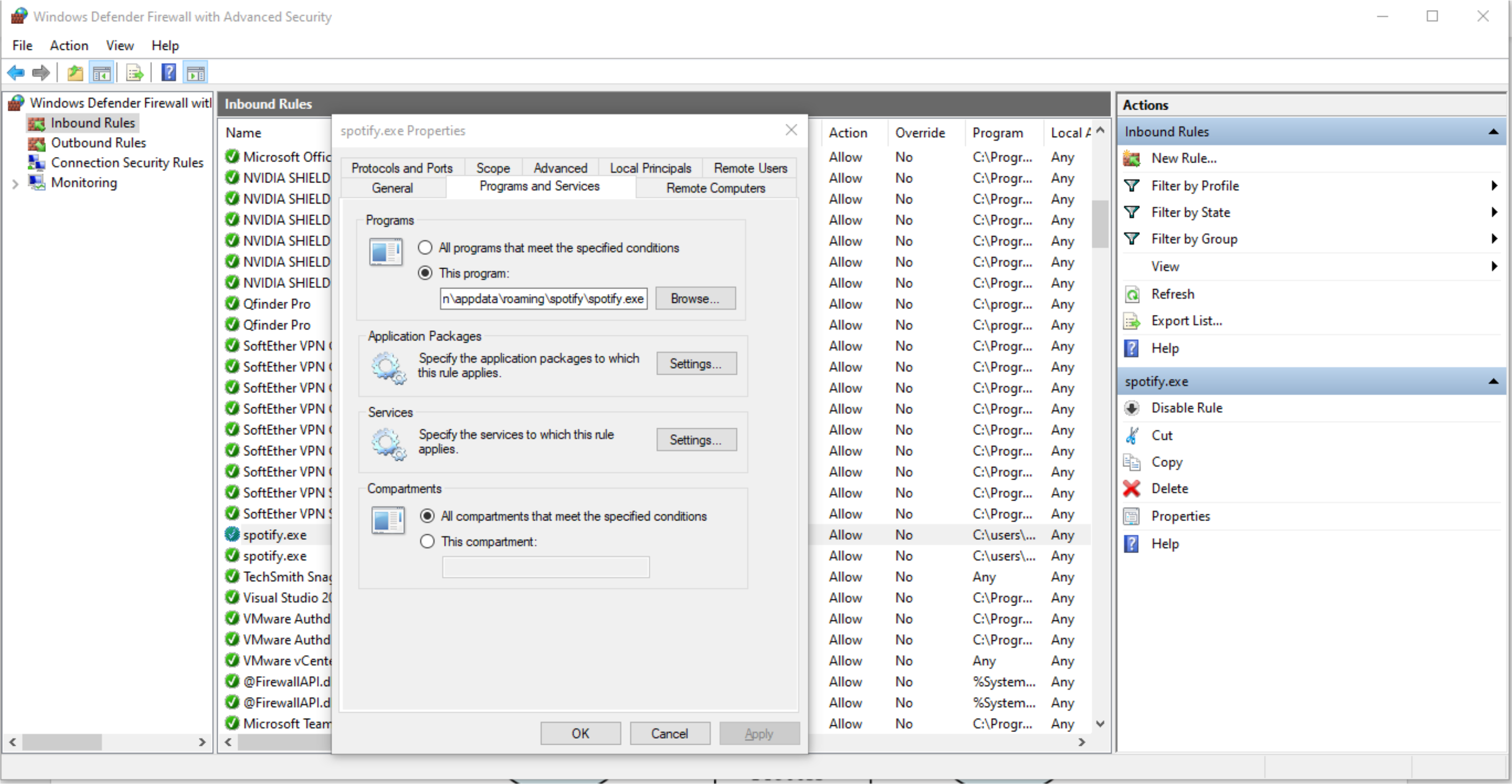
Linux iptables
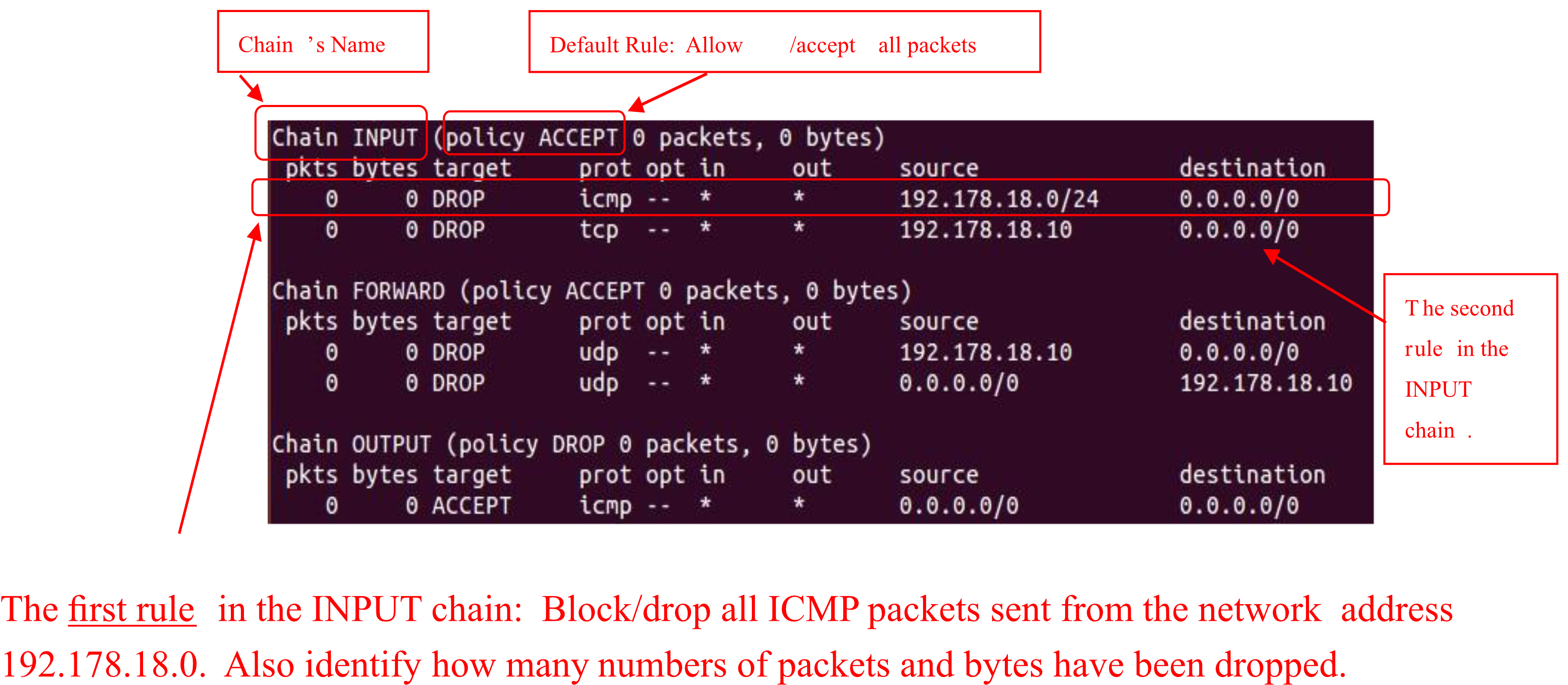
- Consists of 3 chains: INPUT, FORWARD, OUTPUT
- Each chain has a default policy + individual rules (applied top to bottom)
Chain INPUT (policy ACCEPT)
  DROP  icmp  *  *  192.178.18.0/24  0.0.0.0/0    ← Drop all ICMP from 192.178.18.0 network
  DROP  tcp   *  *  192.178.18.10    0.0.0.0/0    ← Drop all TCP from 192.178.18.10

Chain FORWARD (policy ACCEPT)
  DROP  udp  *  *  192.178.18.10  0.0.0.0/0
  DROP  udp  *  *  0.0.0.0/0     192.178.18.10

Chain OUTPUT (policy DROP)
  ACCEPT  icmp  *  *  0.0.0.0/0  0.0.0.0/0       ← Allow all ICMP output
AWS: Network ACL + Security Groups
- Uses defense-in-depth: both Network ACLs (subnet level) and Security Groups (instance level)
- A misconfiguration in one layer won't fully expose the host
Internet Gateway → Route Table → Network ACL → Public Subnet → Security Group → Instance
5. Intrusion Detection Systems (IDS)
Firewall Limitations
- Operates on TCP/IP headers only
- No correlation check among multiple sessions
IDS Capabilities
- Deep Packet Inspection — looks at packet contents (checks character strings against known virus/attack database)
- Correlation analysis across multiple packets:
- Port scanning detection
- Network mapping detection
- DoS attack detection
IDS Functions (NIDS Components)
| Component | Description |
|---|---|
| Network Traffic Processing | Convert traffic into network parameter patterns (signatures) |
| Anomaly Detection | Match input signatures vs normal traffic signatures → detect zero-day attacks |
| Signature Matching | Match input signature vs known threat signature patterns |
| Threat Classification | Classify threat based on signature matching |
| Threat Reporting | Report/log the threat |
| Prevention System | Act based on threat detected (IPS functionality) |
Types of IDS
- Host-based IDS (HIDS) — examines activity on an individual system (mail server, web server)
- Sources: audit log, file modification, syslog, kernel logs, error/event logs, SNMP trap
- Network-based IDS (NIDS) — examines activity on the network itself
- Sources: Packet Capture (PCAP), port mirroring
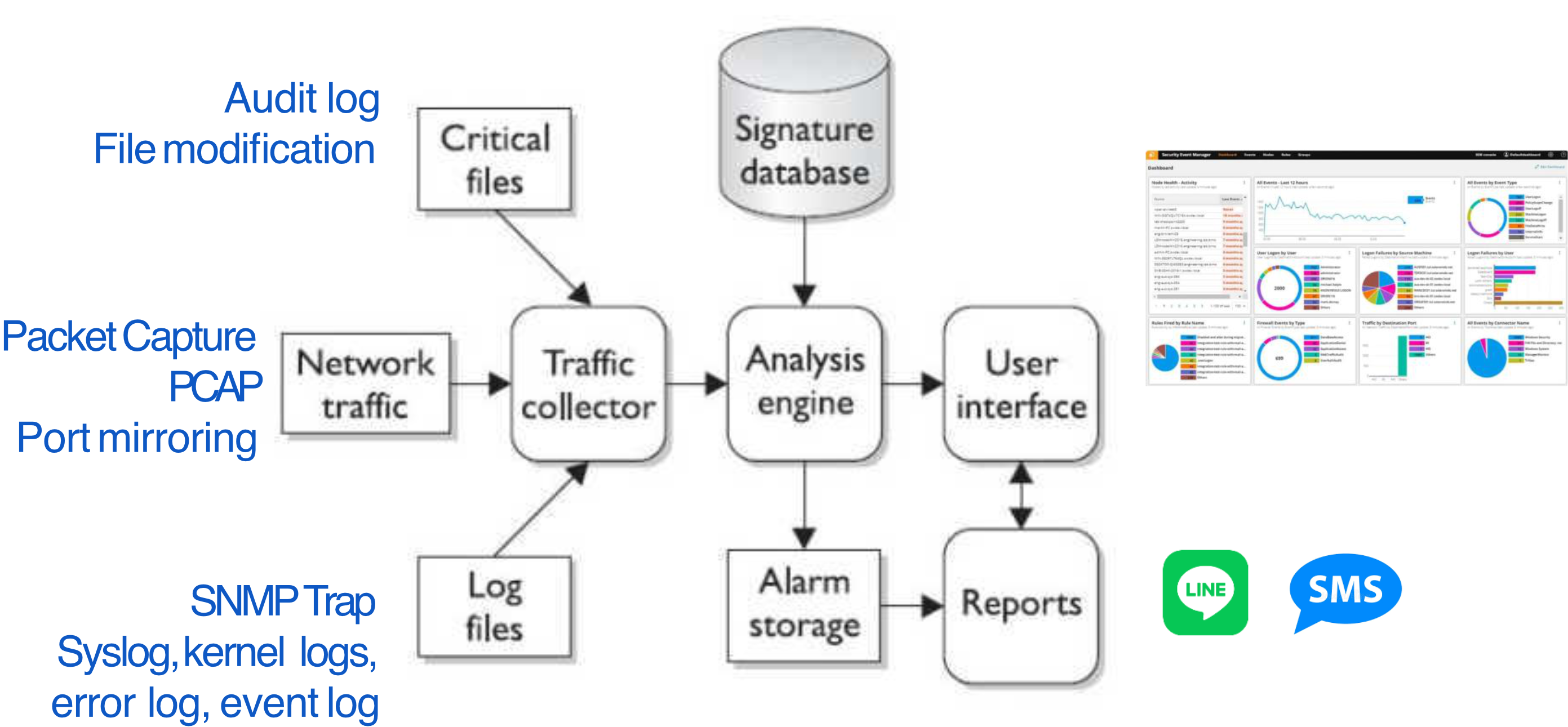
IDS Placement
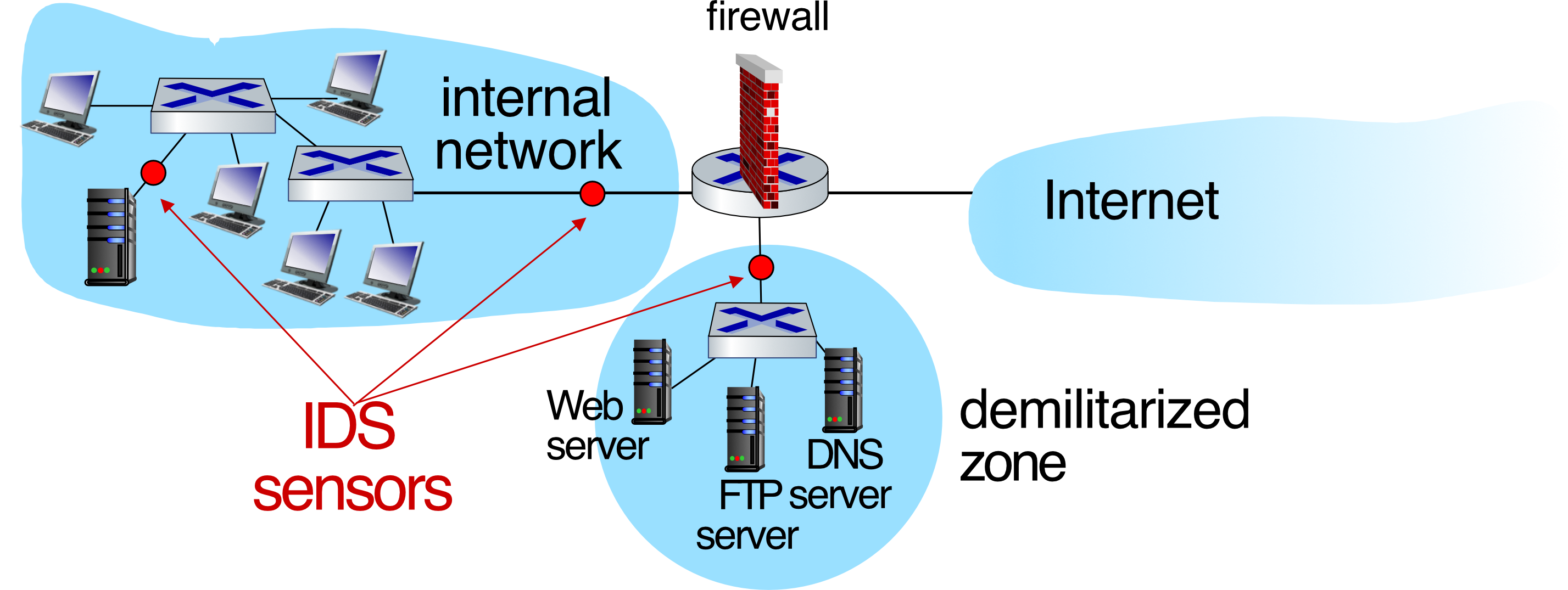
- Multiple IDS sensors at different locations = different types of checking
- IDS sensors typically placed:
- Inside the internal network (detects insider threats)
- In the DMZ (monitors public-facing servers)
IDS เหมือนกล้องวงจรปิด: Firewall คือประตู (บล็อคก่อน), IDS คือกล้องที่คอยดูว่ามีอะไรผิดปกติภายในหรือเปล่า
Summary
| Topic | Key Points |
|---|---|
| Wireless Network Elements | Wireless hosts, Base station (AP), Wireless link, Infrastructure/Ad-hoc mode |
| Wireless Link Issues | Path loss, interference, multipath propagation |
| SNR/BER | Higher SNR = lower BER; adapt modulation to conditions |
| 802.11 Standards | b(11Mbps) → g(54Mbps) → n(600Mbps) → ac(3.47Gbps) → ax(14Gbps) |
| Frequencies | 2.4GHz = long range slow; 5GHz = short range fast |
| CSMA/CA | Sense before transmit, random backoff, no CD; RTS/CTS optional |
| Wireless Security | WEP (broken) → WPA (TKIP) → WPA2 (AES, preferred) |
| Firewall | Controls traffic based on rules; hardware or software |
| Firewall Strategies | Blacklisting (ACCEPT default) vs Whitelisting (DROP default) |
| Zones | Untrusted (WAN) / DMZ / Trusted (LAN) |
| Firewall Types | Stateless → Stateful → NGFW → Proxy |
| IDS | Deep packet inspection; Host-based or Network-based |
Final exam: Homework ip calculation แน่นอน, CIDR, VLSM (ต้องทำแน่นอน), configure routing, homework very important, series of question คำถามต่อกันเรื่อย ๆ
design ip → use that ip to configure routing
Allowed 1 A4 paper.