Motivation
Title
Virtualization คือแนวคิดที่ทำให้
👉 ทรัพยากรจริง (เครื่อง, CPU, RAM, Network)
👉 ถูก “แยก” และ “จัดสรร” ให้เหมือนเป็น ทรัพยากรเสมือนหลายชุด
เครื่องจริง 1 เครื่อง
➡️ ทำตัวเหมือนมีหลายเครื่อง (Virtual Machines)
Three Fundamental Abstractions
Three fundamental abstractions are necessary to describe the operation of computing systems:
- Interpreters/Processors
- Memory
- Communications Links
ใน Virtualization VM แต่ละตัว “คิดว่าตัวเองมี CPU” ทั้งที่จริง ๆ ใช้ CPU เดียวกัน, Virtualization ช่วย:
แบ่ง RAM เป็นก้อน ๆ ให้แต่ละ VM, VM แต่ละตัวเหมือนมี network ของตัวเอง ทั้งที่จริงใช้สายเดียวกัน
Challenges in Resource Management
As the scale of a system and the size of its users grows, it becomes very challenging to manage its resources (the three abstractions mentioned above).
Resource management issues:
- Provision for peak demands → leads to overprovisioning
- Heterogeneity of hardware and software
- Machine failures
Why Virtualization is Essential
Virtualization is a basic enabler of Cloud Computing - it simplifies the management of physical resources for the three abstractions.
Key benefits:
- The state of a virtual machine (VM) running under a virtual machine monitor (VMM) or hypervisor can be saved and migrated to another server to balance the load
- Virtualization allows users to operate in environments they are familiar with, rather than forcing them to specific ones
Analogy: Think of virtualization like apartment buildings vs. individual houses. Instead of each person needing their own house (physical server), multiple people can live in separate apartments (VMs) within the same building (physical server), sharing the infrastructure efficiently while maintaining privacy and independence.
What is Virtualization?
Definition
"Virtualization, in computing, refers to the act of creating a virtual (rather than actual) version of something, including but not limited to a virtual computer hardware platform, operating system (OS), storage device, or computer network resources."
— Wikipedia
Core Capabilities
Virtualization abstracts the underlying resources; simplifies their use; isolates users from one another; and supports replication which increases the elasticity of a system.
Importance for Cloud Computing
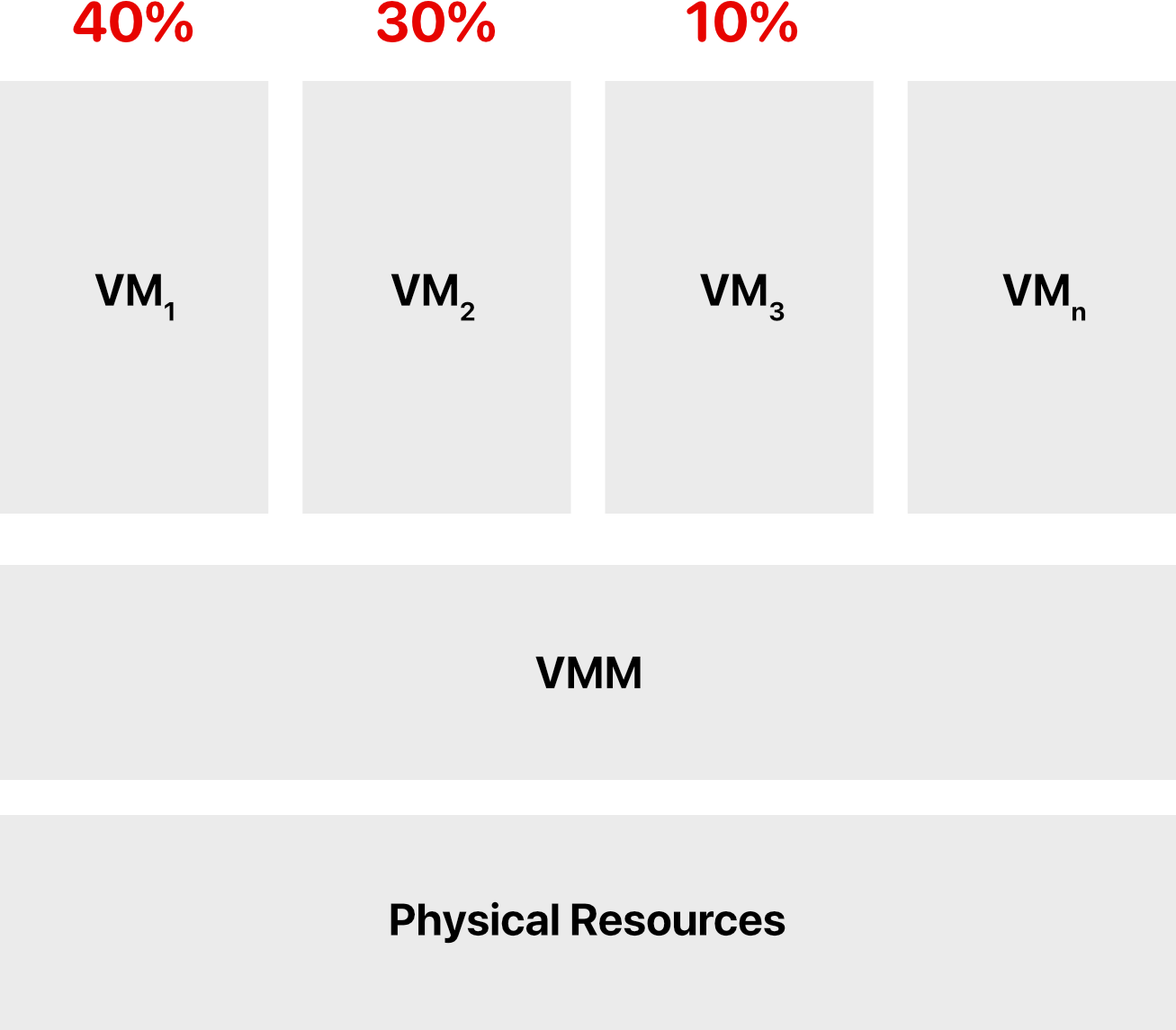
Cloud resource virtualization is important for:
- Performance isolation
- We can dynamically assign and account for resources across different applications
- System security
- Allows isolation of services running on the same hardware
- Performance and reliability
- Allows applications to migrate from one platform to another
- The development and management of services offered by a provider
Types of Virtualization
Virtualization simulates the interface to a physical object by three methods:
1. Multiplexing
Creates multiple virtual objects from one instance of a physical object.
- Relationship: Many virtual objects to one physical object
- Example: A processor is multiplexed among a number of processes or threads. Virtual memory with paging multiplexes real memory and disk.
- เหมือนเวลาเขียนโปรแกรมให้มันใช้หลาย thread (multi-thread programming) นี้ล่ะ ตัว multiplex
Rule of thumb: Sharing one thing among many users
Real-world analogy: Like time-sharing a conference room - multiple teams book different time slots to use the same physical room.
2. Aggregation
Creates one virtual object from multiple physical objects.
- Relationship: One virtual object to many physical objects
- Example: A number of physical disks are aggregated into a RAID disk
Rule of thumb: Combining many things into one
Real-world analogy: Like combining multiple small storage units into one large virtual storage space that appears as a single unit.
3. Emulation
Constructs a virtual object of a certain type from a different type of physical object.
- Example 1: A physical disk emulates (จำลอง) a Random Access Memory (RAM)
- Example 2: A software NIC (network interface card) emulates a physical network card by implementing the same interface and behavior that an OS expects from a real NIC, but in software instead of hardware
Rule of thumb: Pretending one thing is another
Real-world analogy: Like using a flight simulator - it's not a real airplane, but it behaves like one and provides the same experience.
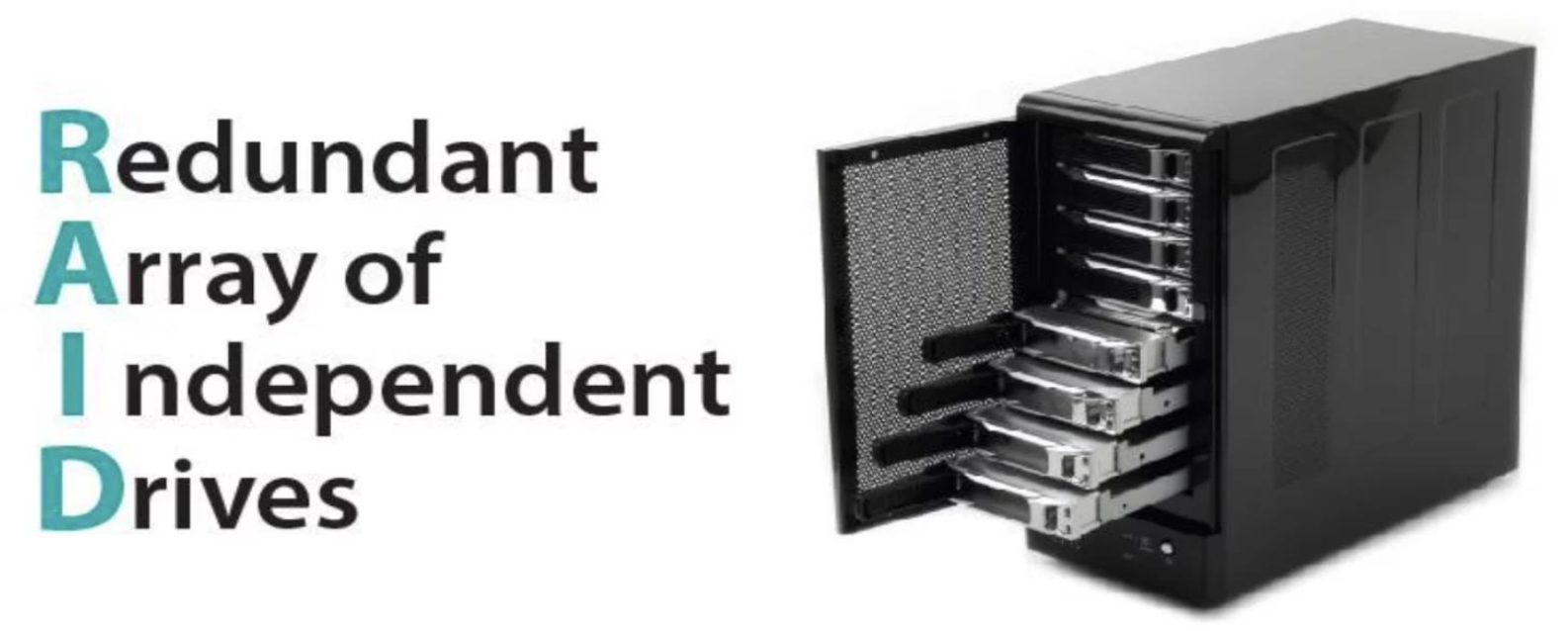
RAID (Redundant Array of Independent Drives)
RAID - What is it?
RAID is a Redundant Array of Independent Drives. The system shows it as a virtual storage device with block access. In essence, RAID is a virtual drive.
The purpose of assembling RAID is the creation of storage with:
- Higher access speed
- Larger capacity
- Greater reliability
Virtual Machine (VM) vs. Emulator
#MidtermExam
Virtual Machines
- Virtual machines make use of CPU self-virtualization, to whatever extent it exists, to provide a virtualized interface to the real hardware
- A virtual machine runs an OS on the same CPU architecture as the host, using hardware support
- Virtual machine runs code directly with a different set of domains in use language
Emulators
- Emulators emulate hardware without relying on the CPU being able to run code directly and redirect some operations to a hypervisor controlling the virtual container
- Unlike in virtualization, the emulation process requires a software bridge. In virtualization, you can directly access the hardware
- The basic emulation requires an interpreter. This interpreter translates the source code and converts it to the host system's readable format, to further process it
- Emulators are slow in comparison to the Virtual Machines. Emulators do not rely on CPU while the VMs make use of CPU
Key Difference: VMs run on the same architecture (like running Windows on an Intel processor in a VM on an Intel Mac), while emulators can run different architectures (like running ARM Android apps on an Intel PC).
Layering and Virtualization
Layering as a Design Approach
Layering is a common approach to manage system complexity:
- Simplifies the description of the subsystems; each subsystem is abstracted through its interfaces with the other subsystems
- Minimizes the interactions among the subsystems of a complex system
- With layering we are able to design, implement, and modify the individual subsystems independently
Layering in a Computer System
From bottom to top:
- Hardware
- Software
- Operating system
- Libraries
- Applications
Analogy: Think of layering like the floors in a building. Each floor has a specific purpose and communicates with adjacent floors through elevators/stairs (interfaces), but you don't need to know how the plumbing on the 3rd floor works to use the bathroom on the 5th floor.
Layering and Interfaces
Interface Diagram
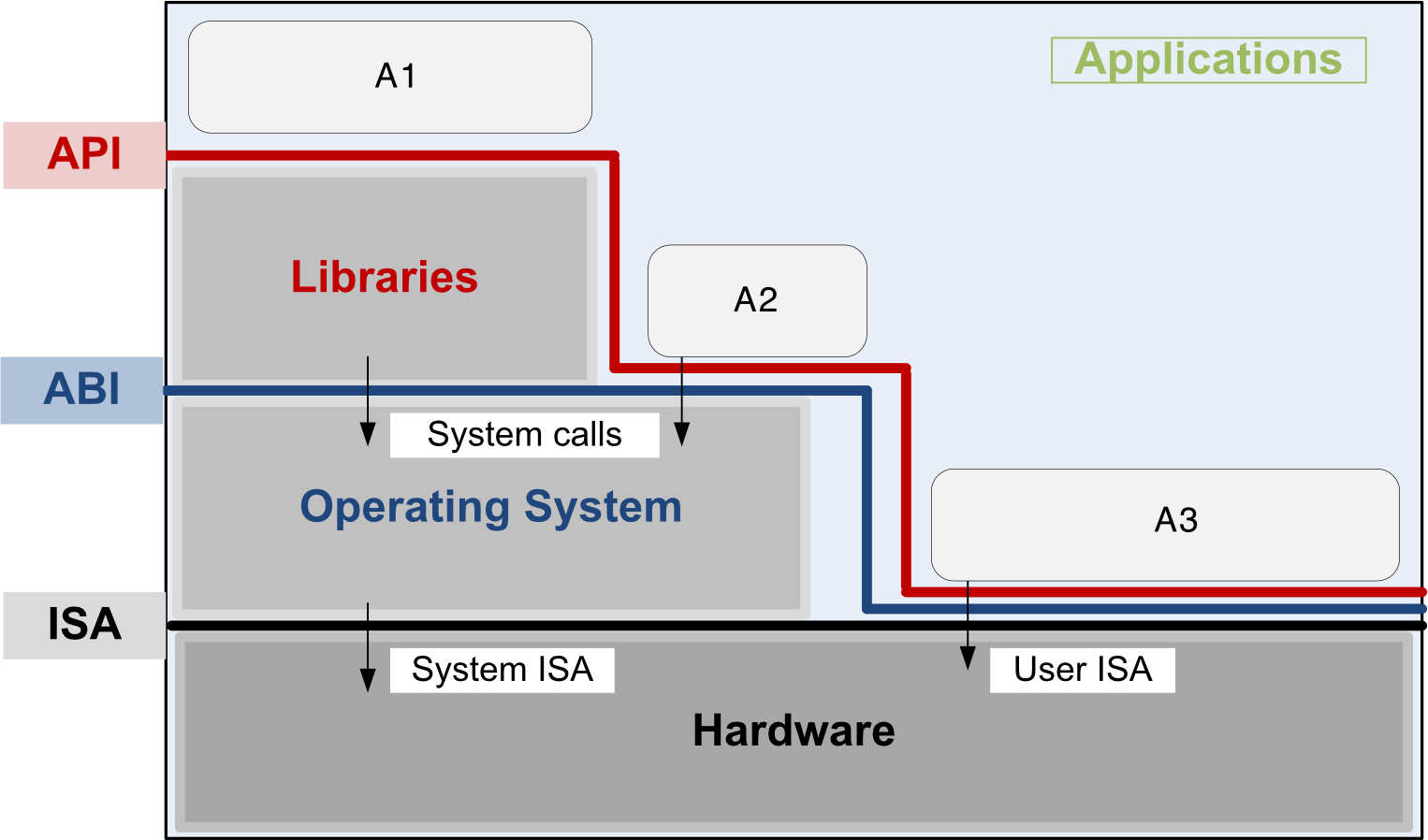
Key:
- A1: Application uses library functions
- A2: Application makes system calls
- A3: Application executes machine instructions
Key Interfaces
1. Instruction Set Architecture (ISA)
- Located at the boundary between hardware and software
- Defines the set of instructions the hardware was designed to execute
Components:
- System ISA: Privileged instructions (kernel mode)
- User ISA: Non-privileged instructions (user mode)
2. Application Binary Interface (ABI)
- Allows the ensemble consisting of the application and the library modules to access the hardware
- The ABI does not include privileged system instructions; instead it invokes system calls
- Privileged = instruction related to I/O
Example: When your app needs to write a file, it doesn't directly access the disk (privileged operation). Instead, it uses the ABI to make a system call that asks the OS to write the file.
3. Application Program Interface (API)
- Defines the set of instructions the hardware was designed to execute and gives the application access to the ISA
- It includes high-level language (HLL) library calls which often invoke system calls
Real-world usage: When you use Java's
System.out.println(), you're using the API. Behind the scenes, it eventually makes system calls through the ABI to write to the console.
Code Portability
The Problem with Traditional Compilation
Binaries created by a compiler for a specific ISA and a specific operating system are NOT portable.
Solution: Virtual Machine Approach
It is possible to compile a HLL (high-level language) program for a virtual machine (VM) environment where:
- Portable code is produced and distributed
- Then converted by binary translators to the ISA of the host system
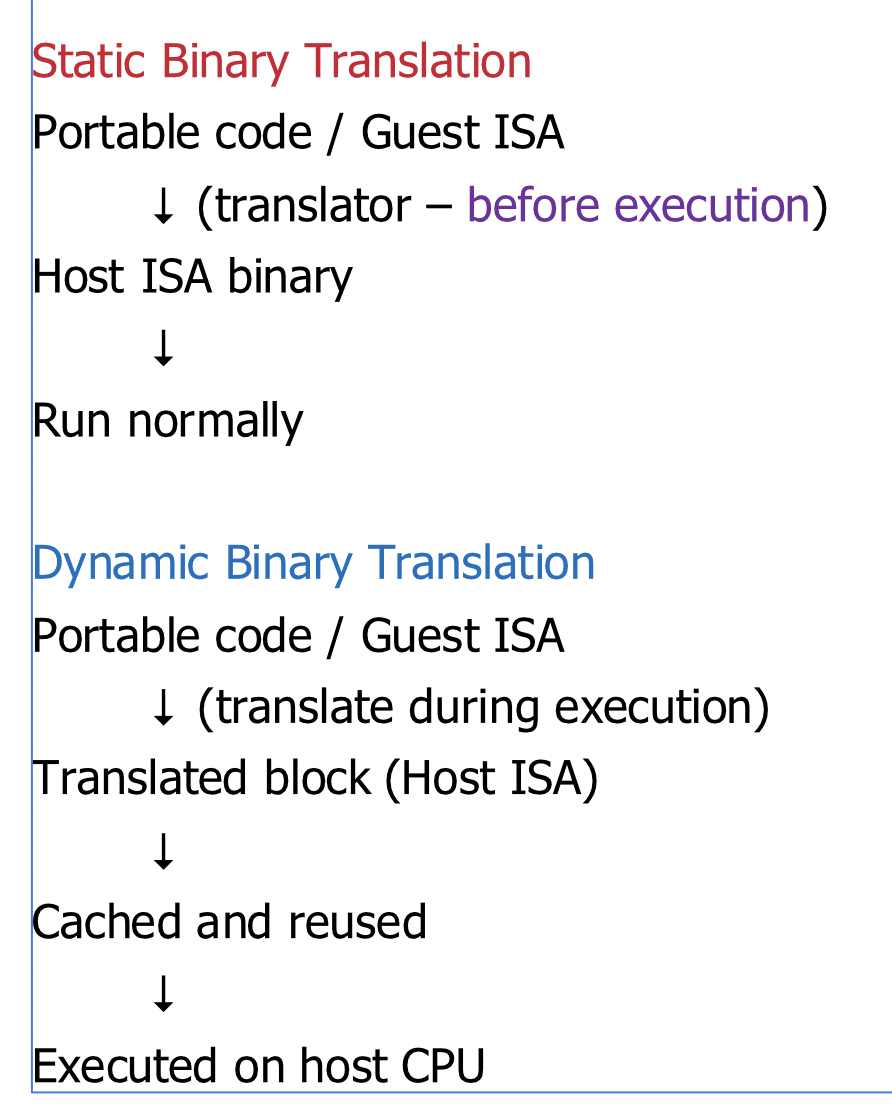
Flow:
Binary Translation Methods
Static Binary Translation
- Uses a processor to translate an image from an architecture to another before execution
- Translate once, run many times
Dynamic Binary Translation
- Individual instructions or groups of instructions are translated on the fly
- Improve กว่า static ยังไง: translate on the fly
- The translation is cached to allow for reuse in iterations without repeated translation
- Converts blocks of guest instructions from the portable code to the host instruction
- Leads to significant performance improvement, as such blocks are cached and reused
Real-world example: Java uses this approach. Java bytecode (portable code) is compiled once and can run on any platform with a JVM (Java Virtual Machine). The JVM uses Just-In-Time (JIT) compilation to dynamically translate bytecode to native machine code during runtime.
Modern VM Strategy
Most modern VMs aim for portability + performance, so they rely on:
- Dynamic translation (Just-In-Time compilation)
- Translate portable code → Host ISA at runtime
- Cache translated code for reuse
HLL Language Translations
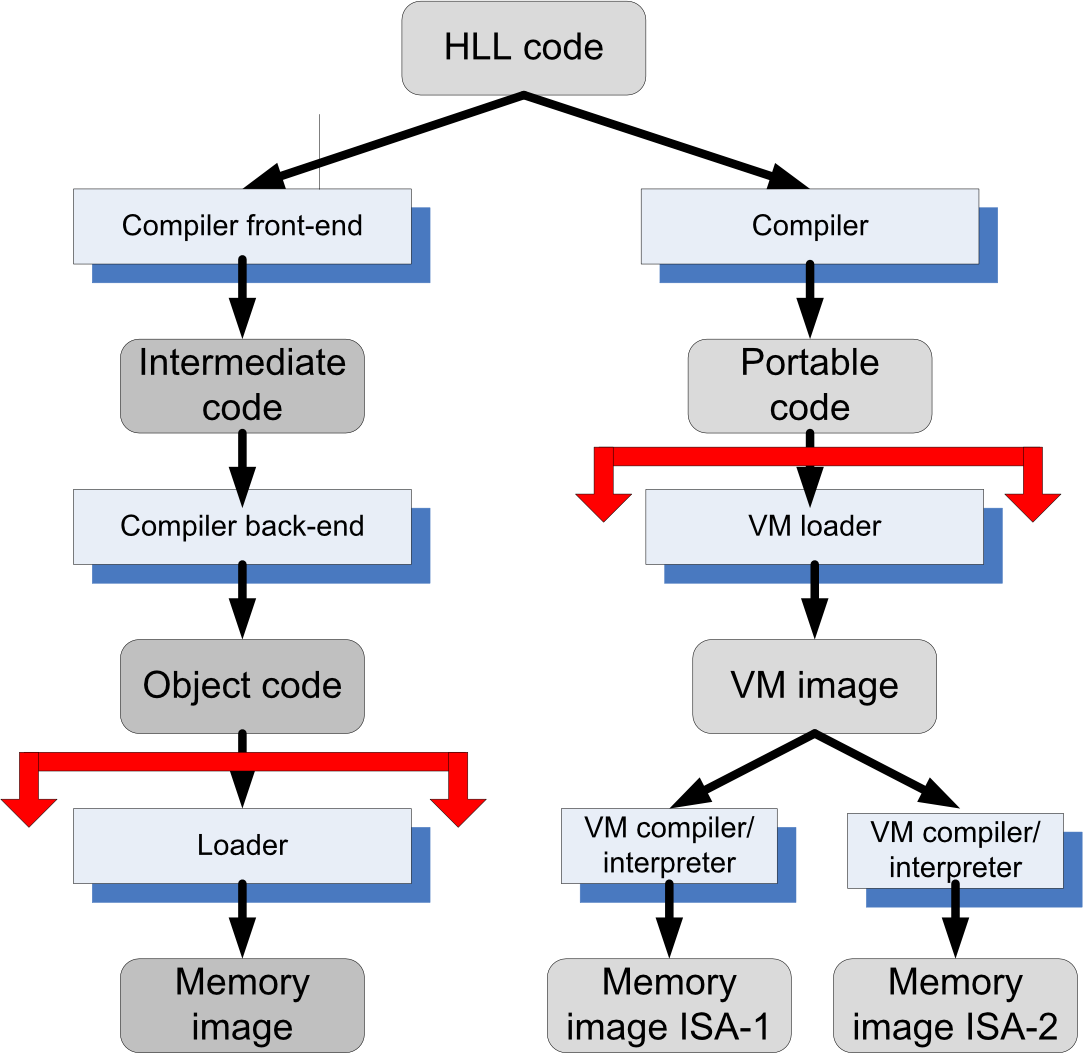
Production example: Python uses this approach. Your
.pyfiles are compiled to.pycbytecode files (portable), then the Python interpreter executes them on any platform.
History of Virtualization
Timeline
1960s - IBM: CP/CMS
- Control program: a virtual machine operating system for the IBM System/360 Model 67
- IBM was the first to produce and sell virtualization for the mainframe
1974 - Popek and Goldberg Paper
- Published "Formal Requirements for Virtualizable Third Generation Architectures"
- Listed the conditions a computer architecture should satisfy to support virtualization efficiently
- The popular x86 architecture that originated in the 1970s did not support these requirements for decades
1990s - Stanford Researchers & VMware
- Researchers developed a new hypervisor and founded VMware
- First virtualization solution was in 1999 for x86
- VMware popularized virtualization for the masses
2000 - IBM: z-series
- 64-bit virtual address spaces
- Backward compatible with the System/360
Today - Multiple Solutions
- Xen (from Cambridge)
- KVM (Kernel-based Virtual Machine)
- Hyper-V (Microsoft)
- And many more...
Note: IBM was the first to produce virtualization for mainframes, but VMware popularized virtualization for everyday x86 systems.
Virtual Machine Monitor (VMM / Hypervisor)
Definition
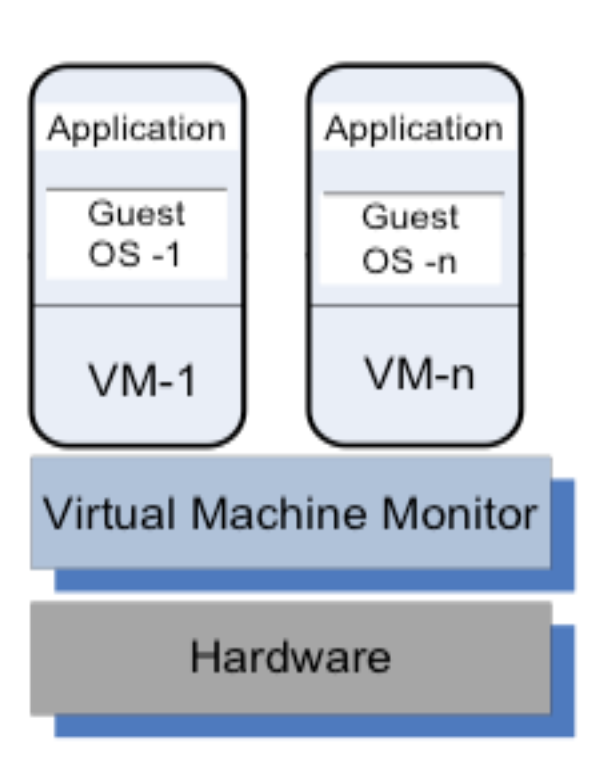
A virtual machine monitor (VMM/hypervisor) partitions the resources of a computer system into one or more virtual machines (VMs). It allows several operating systems to run concurrently on a single hardware platform.
What is a VM?
- A VM is an execution environment that runs an OS
- A VM is an isolated environment that appears to be a whole computer, but actually only has access to a portion of the computer resources
VMM Capabilities
A VMM allows:
- Multiple services to share the same platform (เพราะมันสามารถ allocate the hardware ได้ไง)
- Live migration - the movement of a server from one platform to another (ไม่ต้อง shutdown VM)
- System modification while maintaining backward compatibility with the original system
- Enforces isolation among the systems, thus ensuring security
- Isolate security ได้ด้วย บาง user ก็อาจจะมี security measurement ที่ต่างกัน ทั้ง ๆ ที่ทั้งหมด run บน hardware เดียวกัน
ถ้าอยากจะพังระบบก็เจาะไปที่ VMM เนี่ยแหละ bomb ไปเลย VM พังหมด เพราะบางครั้งเราไม่รู้ว่า Hardware อยู่ไหน??? (check info)
Guest Operating System
A guest operating system is an OS that runs in a VM under the control of the VMM.
Architecture Diagram
┌──────────────┐  ┌──────────────┐
│ Application  │  │ Application  │
│              │  │              │
│  Guest OS-1  │  │  Guest OS-n  │
│              │  │              │
│    VM-1      │  │    VM-n      │
└──────────────┘  └──────────────┘
┌────────────────────────────────┐
│  Virtual Machine Monitor       │
└────────────────────────────────┘
┌────────────────────────────────┐
│         Hardware               │
└────────────────────────────────┘
Real-world example: AWS EC2 (Elastic Compute Cloud) uses virtualization. Each EC2 instance is a VM running on AWS's physical servers. You get your own "virtual server" with dedicated resources, isolated from other customers' VMs.
How VMM Virtualizes CPU and Memory
VMM Responsibilities
A VMM (hypervisor) performs the following tasks:
- Traps privileged instructions executed by a guest OS and enforces the correctness and safety of the operation
- Traps interrupts and dispatches them to the individual guest operating systems
- Controls the virtual memory management
- Maintains a shadow page table for each guest OS and replicates any modification made by the guest OS in its own shadow page table
- This shadow page table points to the actual page frame
- Paging: when you need to translate the address, you need o translate first where it located.
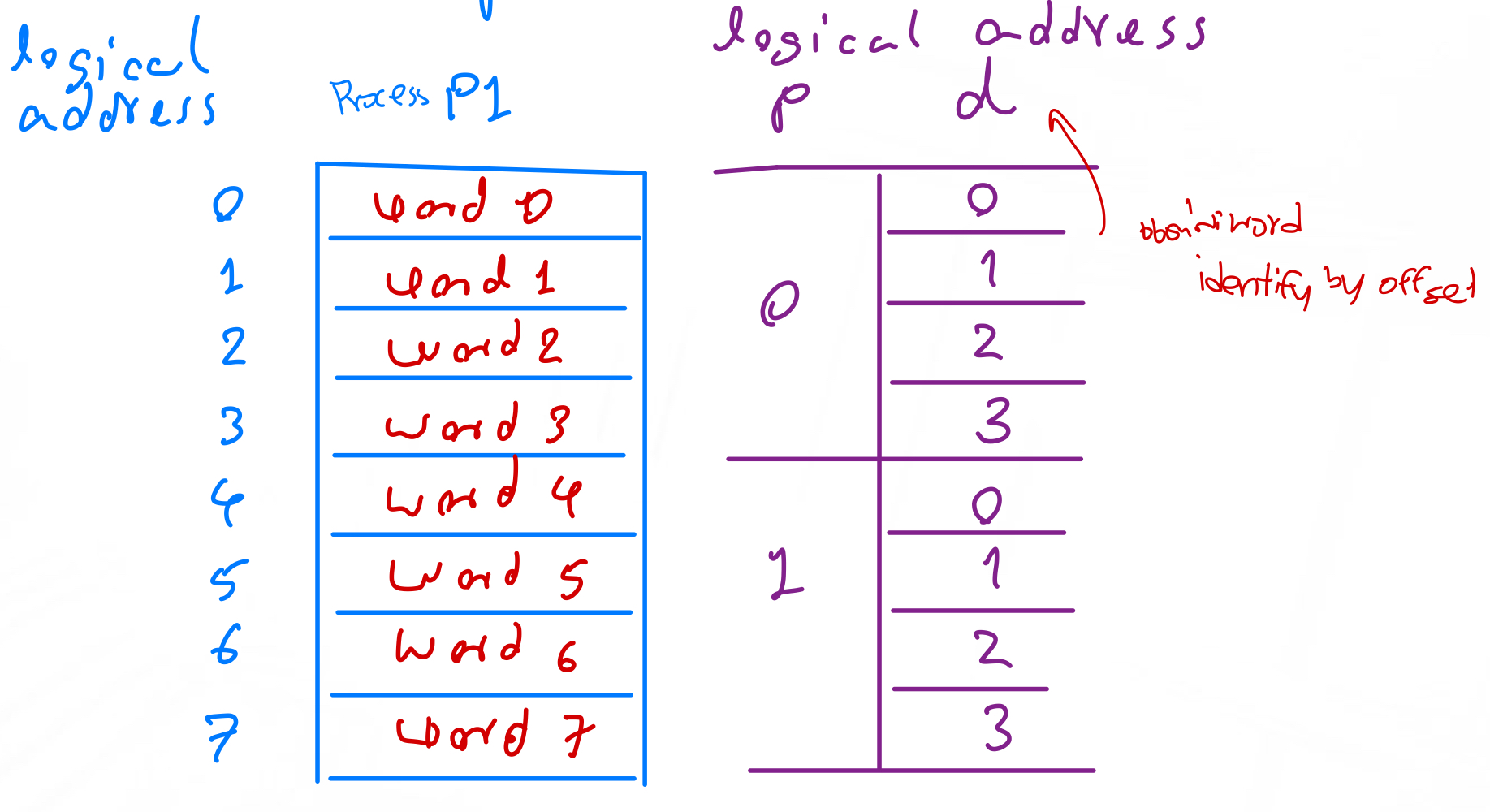
- Paging: when you need to translate the address, you need o translate first where it located.
- It is used by the Memory Management Unit (MMU) for dynamic address translation
- This shadow page table points to the actual page frame
- Monitors system performance and takes corrective actions to avoid performance degradation
- Example: The VMM may swap out a VM to avoid thrashing (when virtual memory is overused → excessive page faults)
- Page faults เยอะ ๆ ก็ทำให้ system hang
Analogy: The VMM is like a property manager for an apartment building. It ensures each tenant (VM) stays in their apartment, handles maintenance requests (system calls), manages the building's utilities (memory), and can even move tenants between apartments if needed (migration).
Types of Hypervisors
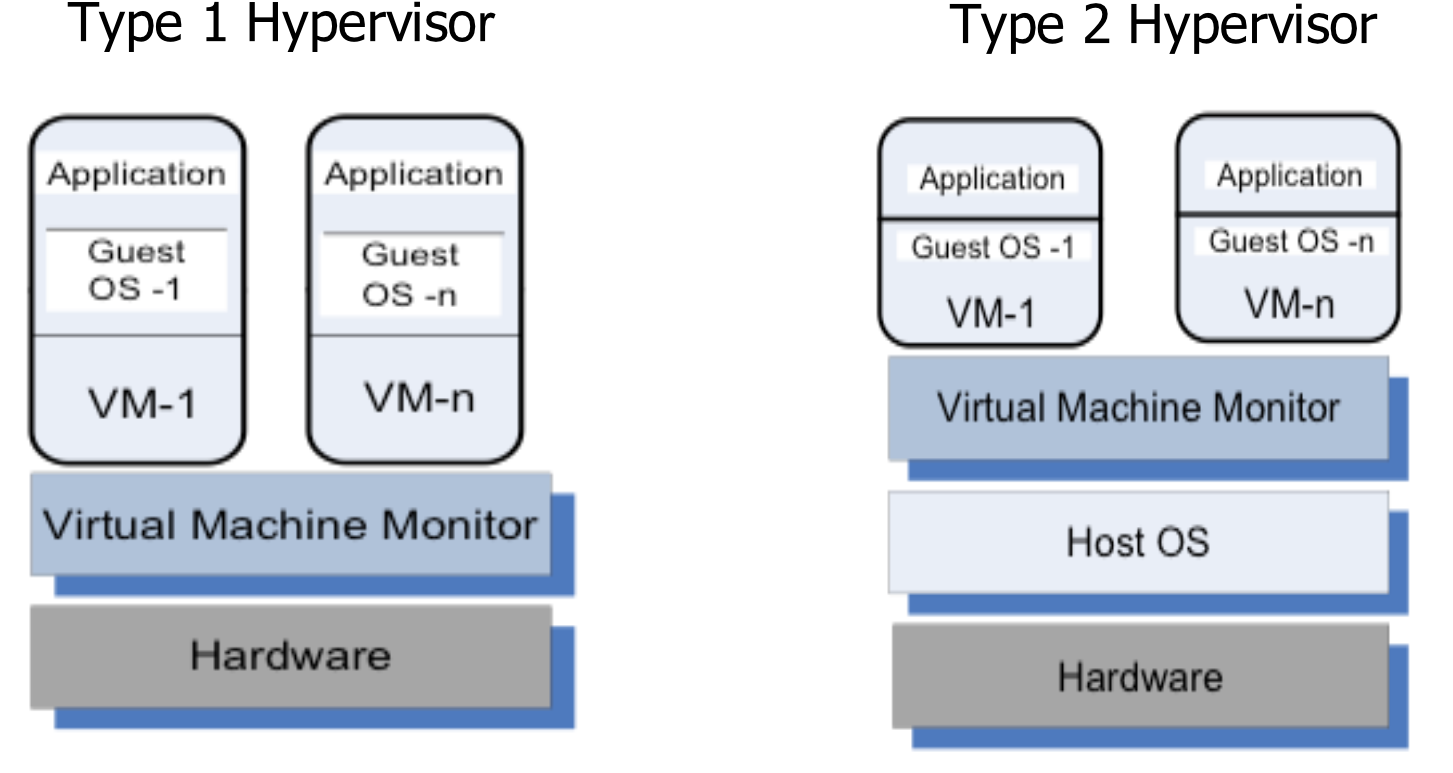
Type 1 Hypervisor (Bare Metal / Native)
Definition: There is no operating system between the virtualization software and the hardware. The virtualization software resides on the "bare metal" or the hard disk of the hardware.
Architecture:
┌───────┐  ┌───────┐
│App    │  │App    │
│       │  │       │
│GuestOS│  │GuestOS│
│  -1   │  │  -n   │
│       │  │       │
│ VM-1  │  │ VM-n  │
└───────┘  └───────┘
┌───────────────────┐
│  Virtual Machine  │
│     Monitor       │
└───────────────────┘
┌───────────────────┐
│    Hardware       │
└───────────────────┘
Advantages:
- Best performance because the software is designed for bare-metal virtualization
- High security, as no other applications are running on the hypervisor directly
- High stability, as no other services or applications interfere with hardware. Fewer patches and updates are required
- Additional features, like clustering, resource balancing, etc.
- Most Type 1 hypervisors have feature-rich web-interface, which means it can be managed from any web-browser
Disadvantages:
- Type 1 hypervisors are more complicated to deploy and manage than Type 2
- Some hypervisors require hardware components from an approved hardware compatibility list
- Most Type 1 hypervisors cannot be managed directly with monitor and keyboard. External devices (like laptop, desktop, mobile phone) with HTML browser are required for management
Examples:
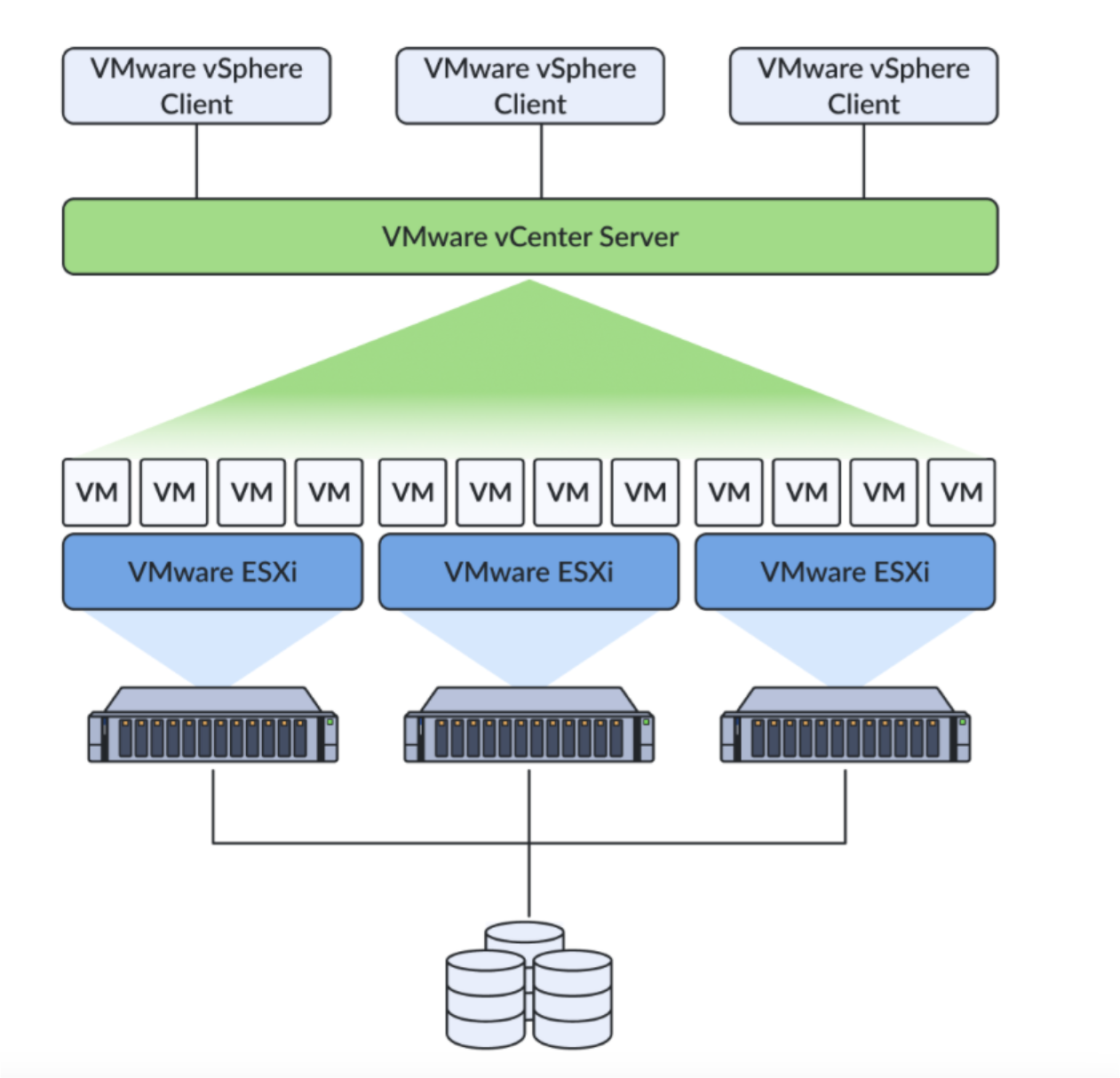
- VMware ESXi
- Xen
- Microsoft Hyper-V
- KVM
Production usage: VMware ESXi is used by many enterprises for server virtualization. AWS uses a modified Xen hypervisor (now migrating to their own Nitro hypervisor) for EC2 instances.
Type 2 Hypervisor (Hosted)
Definition: VM runs under a host operating system.
Architecture:
┌───────┐  ┌───────┐
│App    │  │App    │
│       │  │       │
│GuestOS│  │GuestOS│
│  -1   │  │  -n   │
│       │  │       │
│ VM-1  │  │ VM-n  │
└───────┘  └───────┘
┌───────────────────┐
│  Virtual Machine  │
│     Monitor       │
└───────────────────┘
┌───────────────────┐
│    Host OS        │
└───────────────────┘
┌───────────────────┐
│    Hardware       │
└───────────────────┘
Advantages:
- Hardware-agnostic, modern Type-2 hypervisors can run on any hardware, which is supported by the host OS
- Easy to install and manage. It is installed as a normal application
- Other applications and multiple Type-2 hypervisors may run parallel on top of OS
Disadvantages:
- Lower performance than with Type-1, because of resource sharing with other applications and using hardware resources via the host OS
- Less secure and stable. Crash of any other application may crash host OS
- Poor on additional features
Examples:
- VMware Fusion
- VMware Workstation Pro
- Oracle VirtualBox
- Oracle VM for x86
- Parallels Desktop
Personal usage: VirtualBox is commonly used by developers to run Linux VMs on their Windows/Mac laptops for testing. VMware Workstation is popular for running multiple OS environments on a single development machine.
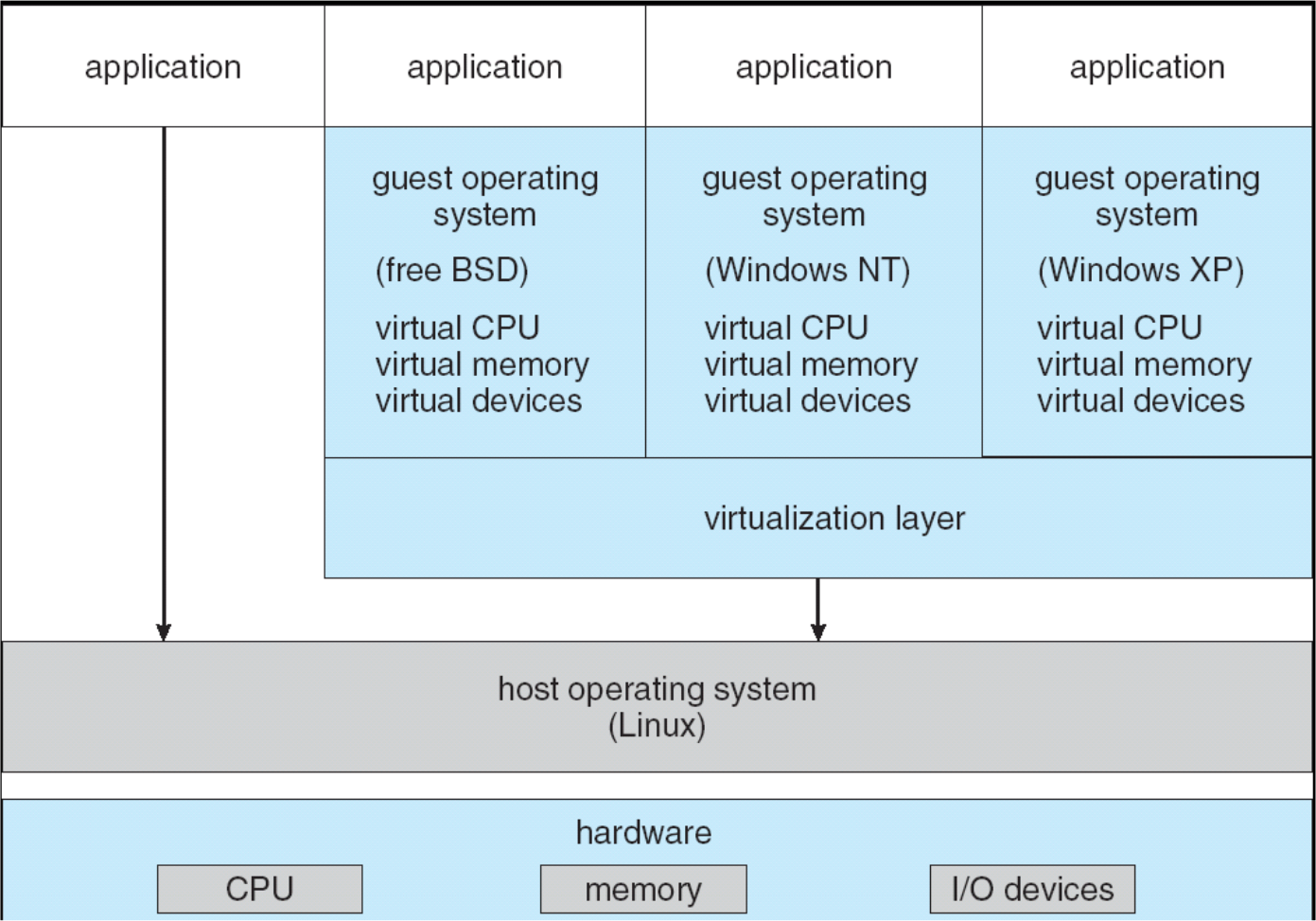
VMware Architecture Examples
VMware Workstation (Type-2 Hypervisor)
VMware ESXi (Type-1 Hypervisor)
Performance Comparison: Type-1 vs Type-2
| Aspect | Type-1 (ESXi) | Type-2 |
|---|---|---|
| CPU overhead | Very low | Higher |
| I/O latency | Low | Higher |
| Throughput | High | Moderate |
| Scalability | Excellent | Limited |
| Predictability | High | Lower |
ทวนกันอีกรอบ: Throughput = amount of transactions process in a certain period or point of time
Higher Throughput = (imply) => Higher scalability (ทำความเข้าใจหน่อย) แอบถามบ่อยว่ะ
ถ้า Plot graph แล้วจะเห็นว่า 500 transactions จะให้ throughput มากกว่า 10 transactions เพราะอะไร? — Higher transactions it will try to utilize to resources really well. That’s why! (Higher degree of resource utilization)
ถ้า 1000000 transactions จะเห็นเลยว่า graph drop เพราะว่า resource หมดแล้ว (used up)
Production note: For enterprise cloud services, Type-1 hypervisors are almost always used due to their superior performance and efficiency. Type-2 hypervisors are mainly used for development, testing, and desktop virtualization.
Performance and Security Isolation
Performance Isolation Challenge
The run-time behavior of an application is affected by other applications running concurrently on the same platform and competing for:
- CPU cycles
- Cache
- Main memory
- Disk access
- Network access
Result: It is difficult to predict the completion time!
Performance isolation is a critical condition for QoS guarantees in shared computing environments.
Security Advantages of VMMs
A VMM is a much simpler and better specified system than a traditional operating system.
Code complexity comparison:
- Xen: Approximately 60,000 lines of code
- Denali: Only about 30,000 lines of code
- Linux kernel: Millions of lines of code
The security vulnerability of VMMs is considerably reduced as the systems expose a much smaller number of privileged functions.
Example:
Security principle: Smaller attack surface = more secure. With fewer lines of code and fewer privileged operations, there are fewer potential vulnerabilities to exploit.
Migration and P2V
Physical-to-Virtual (P2V) Migration
Converting a physical server to a VM is often called P2V
Process:
- New VM created from image of existing OS and applications
- Turn off physical server
- Start VM
- Done!
Benefits:
- Rapid datacenter consolidation
- Reduce physical hardware requirements
- Simplify disaster recovery
- Enable workload mobility
Real-world scenario: A company with 50 physical servers running at 10% utilization can consolidate to 5-10 physical servers running VMs, reducing power, cooling, and space costs by 80-90%.
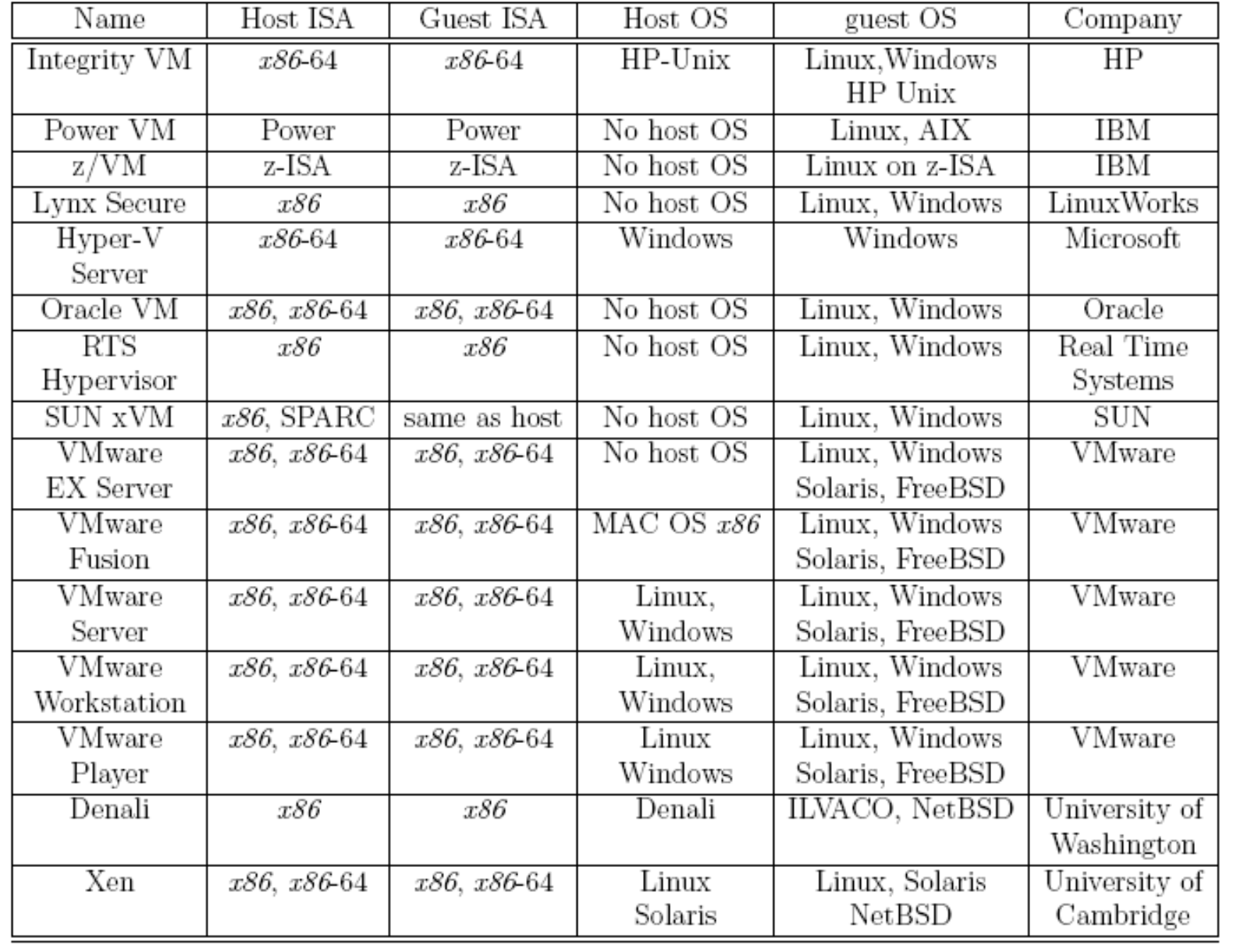
Examples of Hypervisors
| Name | Host ISA | Guest ISA | Host OS | Guest OS | Company |
|---|---|---|---|---|---|
| Integrity VM | x86-64 | x86-64 | HP-Unix | Linux, Windows, HP Unix | HP |
| Power VM | Power | Power | No host OS | Linux, AIX | IBM |
| z/VM | z-ISA | z-ISA | No host OS | Linux on z-ISA | IBM |
| Lynx Secure | x86 | x86 | No host OS | Linux, Windows | LinuxWorks |
| Hyper-V Server | x86-64 | x86-64 | Windows | Windows | Microsoft |
| Oracle VM | x86, x86-64 | x86, x86-64 | No host OS | Linux, Windows | Oracle |
| RTS Hypervisor | x86 | x86 | No host OS | Linux, Windows | Real Time Systems |
| SUN xVM | x86, SPARC | same as host | No host OS | Linux, Windows | SUN |
| VMware EX Server | x86, x86-64 | x86, x86-64 | No host OS | Linux, Windows, Solaris, FreeBSD | VMware |
| VMware Fusion | x86, x86-64 | x86, x86-64 | MAC OS x86 | Linux, Windows, Solaris, FreeBSD | VMware |
| VMware Server | x86, x86-64 | x86, x86-64 | Linux, Windows | Linux, Windows, Solaris, FreeBSD | VMware |
| VMware Workstation | x86, x86-64 | x86, x86-64 | Linux, Windows | Linux, Windows, Solaris, FreeBSD | VMware |
| VMware Player | x86, x86-64 | x86, x86-64 | Linux, Windows | Linux, Windows, Solaris, FreeBSD | VMware |
| Denali | x86 | x86 | Denali | ILWACO, NetBSD | University of Washington |
| Xen | x86, x86-64 | x86, x86-64 | Linux, Solaris | Linux, Solaris, NetBSD | University of Cambridge |
Why Use Virtual Machines?
Key Benefits
- Multiple Operating Systems
- Different VMs may run different operating systems
- Run Windows and Linux simultaneously on the same hardware
- Security: Complete Isolation
- The software running on each VM is totally isolated from the software running on other VMs
- A compromised VM doesn't affect others
- Server Consolidation
- Different servers that normally run on different hardware systems with low utilizations
- May run on fewer hardware systems but the same number of VMs
- Reduces costs for hardware, power, cooling, and space
- Improved Reliability
- Working configurations can be saved as VM images (a collection of files)
- Can be easily launched on the same hardware
- Quick recovery from failures
- Live Migration
- In the most recent virtualization systems it is possible to perform Live Migration
- Create and start a clone of an executing VM
- Move running VMs between physical servers with zero downtime
- Simplified Development and Testing
- Development and testing configurations can be preserved as VM images
- Can be rapidly reutilized
- Create snapshots for rollback
Real-world example: Netflix uses AWS and heavily relies on virtualization. They can:
- Scale up VMs during peak viewing hours
- Scale down during off-peak times
- Test new features in isolated VM environments
- Migrate workloads between AWS regions for optimal performance
- Recover quickly from failures by spinning up new VMs from snapshots
Conditions for Efficient Virtualization
Popek and Goldberg Requirements (1974)
For efficient virtualization, three conditions must be met:
- Fidelity (Identical Behavior)
- A program running under the VMM should exhibit a behavior essentially identical to that demonstrated when running on an equivalent machine directly
- Running on VMM must be equivalent on running on the machine (without any differences)
- Safety (Complete Control)
- The VMM should be in complete control of the virtualized resources
- Guest VMs cannot interfere with each other or the hypervisor
- Efficiency (Direct Execution)
- A statistically significant fraction of machine instructions must be executed without the intervention of the VMM
- Why? For performance! If the VMM had to intervene (trap into VMM, checked, resumed) for every instruction, virtualization would be too slow
Historical note: The x86 architecture (originated in the 1970s) did not meet these requirements for decades, making efficient virtualization very challenging until hardware-assisted virtualization (Intel VT-x, AMD-V) was introduced in the mid-2000s.
Dual-Mode Operation (Recap)
Purpose
Dual-mode operation allows the OS to protect itself and other system components.
Two Modes
- User mode
- Kernel mode
Hardware Support
- Mode bit provided by hardware
- Provides the ability to distinguish when system is running user or kernel code
Privileged Instructions
- Some instructions are privileged, only executable in kernel mode
- System call changes mode to kernel
- Return from system call resets mode to user
Execution Flow
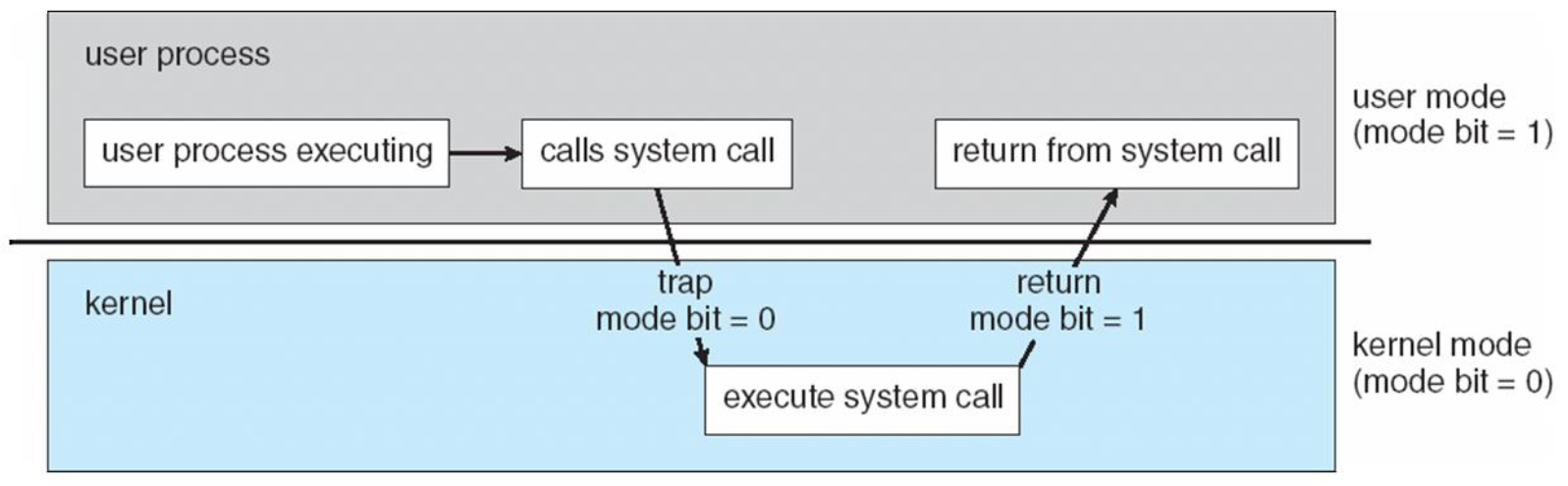
User Mode vs. Kernel Mode (Recap)
Kernel Mode (Privileged Mode)
Kernel-code (in particular, interrupt handlers) runs in kernel mode:
- The hardware allows all machine instructions to be executed
- Allows unrestricted access to memory and I/O ports
- Can execute privileged instructions
User Mode (Unprivileged Mode)
Everything else runs in user mode:
- Limited instruction set
- Cannot directly access hardware
- Cannot execute privileged instructions
- Must use system calls to request kernel services
OS Protection Mechanism
The OS relies very heavily on this hardware-enforced protection mechanism to:
- Prevent user programs from crashing the system
- Isolate user processes from each other
- Control access to hardware resources
- Maintain system security and stability
Virtualization challenge: When running an OS as a guest in a VM, that guest OS expects to run some instructions in kernel mode, but it's actually running in user mode on the physical hardware. The hypervisor must trap and handle these privileged instructions. This is one reason why hardware-assisted virtualization (Intel VT-x, AMD-V) was developed - to add a "hypervisor mode" below the kernel mode.
Types of Instructions
Classification of Instructions
1. Privileged Instructions
Definition: Instructions that if executed in user mode trap to kernel mode, but if executed in kernel mode they do not trap.
Examples:
- I/O operations
- Memory management operations
Analogy: Like security doors in a building - if a regular employee (user mode) tries to open them, an alarm triggers and security (kernel) must handle it. But if security personnel (kernel mode) opens them, they work normally.
2. Sensitive Instructions
Sensitive instructions are further divided into two categories:
a. Control Sensitive Instructions
Definition: Instructions that modify the system registers.
x86 Examples:
PUSHF(Push flags onto stack)POPF(Pop flags from stack)SGDT(Store Global Descriptor Table)SIDT(Store Interrupt Descriptor Table)SLDT(Store Local Descriptor Table)SMSW(Store Machine Status Word)
b. Behavior Sensitive Instructions
Definition: Instructions whose behavior depends on the mode or configuration of the hardware.
x86 Examples:
POP,PUSHCALL,JMPINT n(Interrupt)RET(Return)LAR(Load Access Rights)LSL(Load Segment Limit)VERR(Verify Read)VERW(Verify Write)MOV
3. Normal Instructions
Definition: The remaining instructions that are neither privileged nor sensitive.
x86 Architecture Background
x86 is a family of instruction set architectures initially developed by Intel based on the Intel 8086 microprocessor and its 8088 variant.
Challenges of x86 CPU Virtualization
x86 Privilege Rings
The x86 architecture has four layers of privilege execution → called rings:
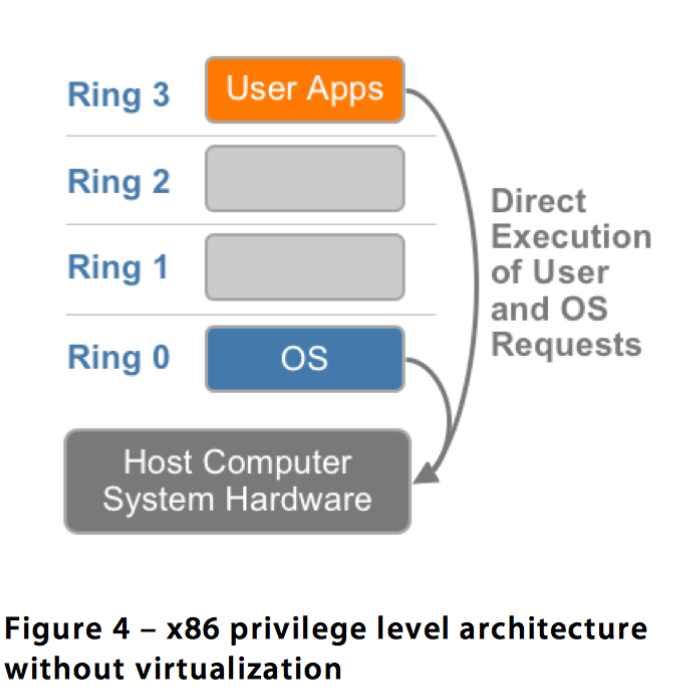
Ring 3: User Applications (Least Privileged)
Ring 2: (Unused in modern systems)
Ring 1: (Unused in modern systems)
Ring 0: Operating System (Most Privileged)
The Ring Problem for Virtualization
Where should the VMM run?
- In ring 0 → Same privileges as an OS → ❌ Wrong
- VMM and guest OS would conflict
- In rings 1, 2, 3 → OS has higher privileges than VMM → ❌ Wrong
- VMM couldn't control the guest OS
- Solution: Move the OS to ring 1 and the VMM to ring 0 → ✅ Correct
Three Classes of Machine Instructions
- Privileged instructions:
- Can be executed in kernel mode
- When attempted in user mode, they cause a trap and so are executed in kernel mode
- Nonprivileged instructions:
- Can be executed in user mode
- Sensitive instructions:
- Can be executed in either kernel or user mode
- But they behave differently based on privilege level
- Require special precautions at execution time
Critical Problem: ⚠️ Sensitive and nonprivileged instructions are hard to virtualize
Why Sensitive but Non-Privileged Instructions are the Problem
They have four problematic characteristics:
- Execute without trapping
- VMM cannot intercept them
- Behave differently based on privilege
- Different behavior in ring 0 vs ring 1
- Cannot be intercepted automatically
- No hardware trap mechanism
- Expose hardware details
- Guest OS can detect it's virtualized
Real-world analogy: Imagine a building where some doors behave differently depending on who opens them, but there's no security camera to monitor them. A guest could discover they're in a simulation by testing these doors, and security can't intervene because there's no alarm.
Historical Solutions
Before VT-x (Pre-2005)
Binary Translation (VMware approach):
- Rewrite sensitive instructions dynamically
- Scan guest code and replace problematic instructions
- Performance overhead from translation
Modern CPUs (2005+)
Intel VT-x / AMD-V:
- Introduce new privilege level (VMX root mode)
- Sensitive instructions now trap properly
- Hardware-assisted virtualization
Production Usage:
- VMware ESXi: Uses VT-x for modern virtualization
- KVM (Linux): Requires VT-x/AMD-V to function
- Hyper-V: Microsoft's hypervisor uses VT-x
- AWS EC2: Relies on hardware virtualization extensions
Three Techniques for Virtualizing CPU on x86
MOST IMPORTANT CONCEPT OF THIS CHAPTER!
- Full Virtualization with Binary Translation
- OS-Assisted Virtualization (Paravirtualization)
- Hardware-Assisted Virtualization
1. Full Virtualization with Binary Translation
Definition
Full virtualization: A guest OS can run unchanged under the VMM as if it was running directly on the hardware platform. Each VM runs an exact copy of the actual hardware.
How It Works
Binary translation rewrites parts of the code on the fly (Dynamic Binary Translation) to replace sensitive but not privileged instructions with safe code to emulate the original instruction.
- เพราะ privileged instructions ต้อง run only in kernel model ไง
- ดังนั้นอันนี้จะต้อง translate: Sensitive instructions (Three Classes of Machine Instructions)
"The hypervisor translates all operating system instructions on the fly and caches the results for future use, while user level instructions run unmodified at native speed."
— VMware White Paper
Architecture Diagram
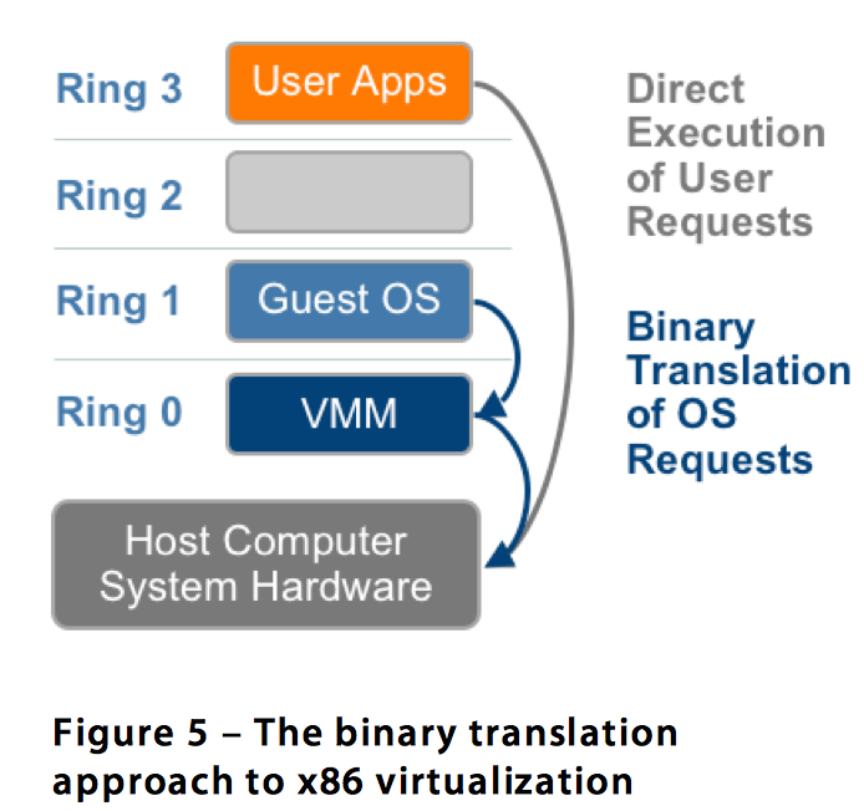
┌──────────────┐
│  User Apps   │ Ring 3 (Direct Execution)
└──────────────┘
┌──────────────┐
│  Guest OS    │ Ring 1 (Binary Translation of OS Requests)
└──────────────┘
┌──────────────┐
│     VMM      │ Ring 0
└──────────────┘
┌──────────────┐
│   Hardware   │
└──────────────┘
Advantages
- No hardware assistance required
- No modifications of the guest OS needed
- Strong isolation and security
Disadvantages
- Speed of execution (translation overhead)
- It needs translation, not directly executed
Examples
- VMware Workstation (early versions)
- Microsoft Virtual Server
- QEMU (without KVM)
Real-world analogy: Like a simultaneous interpreter at a UN meeting - they translate every sentence on the fly and remember common phrases for speed, but there's still a delay compared to everyone speaking the same language.
2. Paravirtualization (OS-Assisted Virtualization)
Definition
Paravirtualization involves modifying the OS kernel to replace non-virtualizable instructions with hypercalls that communicate directly with the virtualization layer hypervisor.
The hypervisor also provides hypercall interfaces for other critical kernel operations such as:
- Memory management
- Interrupt handling
- Time keeping
Hypercall เหมือนเป็น pointer จาก Guest OS to VMM ….? to allow those instruction to be executed
Hypercall = pointer (bridge) + interface → carries non-virtualizable instructions (e.g. sensitive instructions) to be executed in the lower layer.
Architecture Diagram
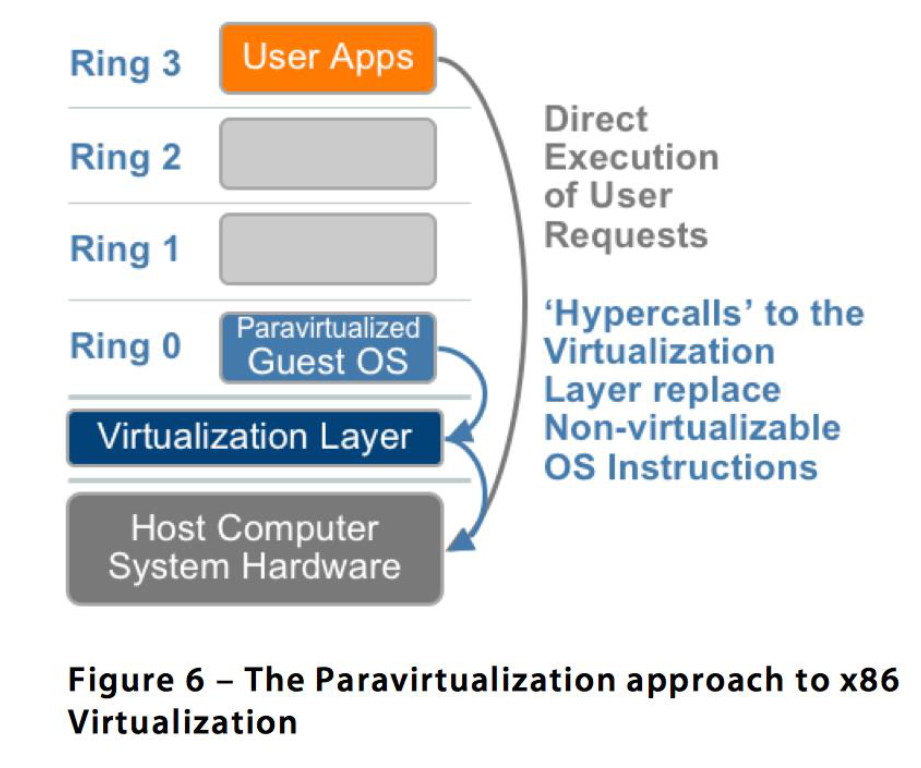
┌──────────────┐
│  User Apps   │ Ring 3 (Direct Execution of User Requests)
└──────────────┘
┌──────────────┐
│Paravirtualized│ Ring 1
│  Guest OS    │ ('Hypercalls' to the Virtualization Layer
└──────────────┘  replace Non-virtualizable OS Instructions)
┌──────────────┐
│Virtualization│ Ring 0
│    Layer     │
└──────────────┘
┌──────────────┐
│   Hardware   │
└──────────────┘
Advantages
- Faster execution than binary translation
- Lower virtualization overhead
Disadvantages
- Poor portability (requires OS modification)
- Cannot run unmodified operating systems
Examples
- Xen (original design)
- Denali
Real-world analogy: Like teaching all UN delegates to speak a common language (hypercalls) instead of using interpreters. Much faster, but requires training everyone first.
Full Virtualization vs. Paravirtualization
| Aspect | Full Virtualization | Paravirtualization |
|---|---|---|
| VM Capability | Executes instructions from unmodified OSes | Uses an API to port an OS to the hypervisor |
| OS Modification | OSes require no modification | OSes require modifications |
| Isolation | Provides complete logical isolation | Not fully isolated; poses security risks in the API |
| Portability | Highly portable and compatible (because it use Dynamic Binary Translation and it’s …) | Less portable and compatible |
| Mechanism | Uses binary translation and direct calls | Uses hypercalls through an API |
Key Difference
The main difference between full virtualization and paravirtualization in Cloud is that full virtualization allows multiple guest operating systems to execute on a host operating system independently while paravirtualization allows multiple guest operating systems to run on host operating systems while communicating with the hypervisor to improve performance.
3. Hardware-Assisted Virtualization
Definition
Hardware-assisted virtualization introduces a new CPU execution mode feature that allows the VMM to run in a new root mode below ring 0.
Key feature: Privileged and sensitive calls are set to automatically trap to the hypervisor, removing the need for either binary translation or paravirtualization.
Architecture Diagram
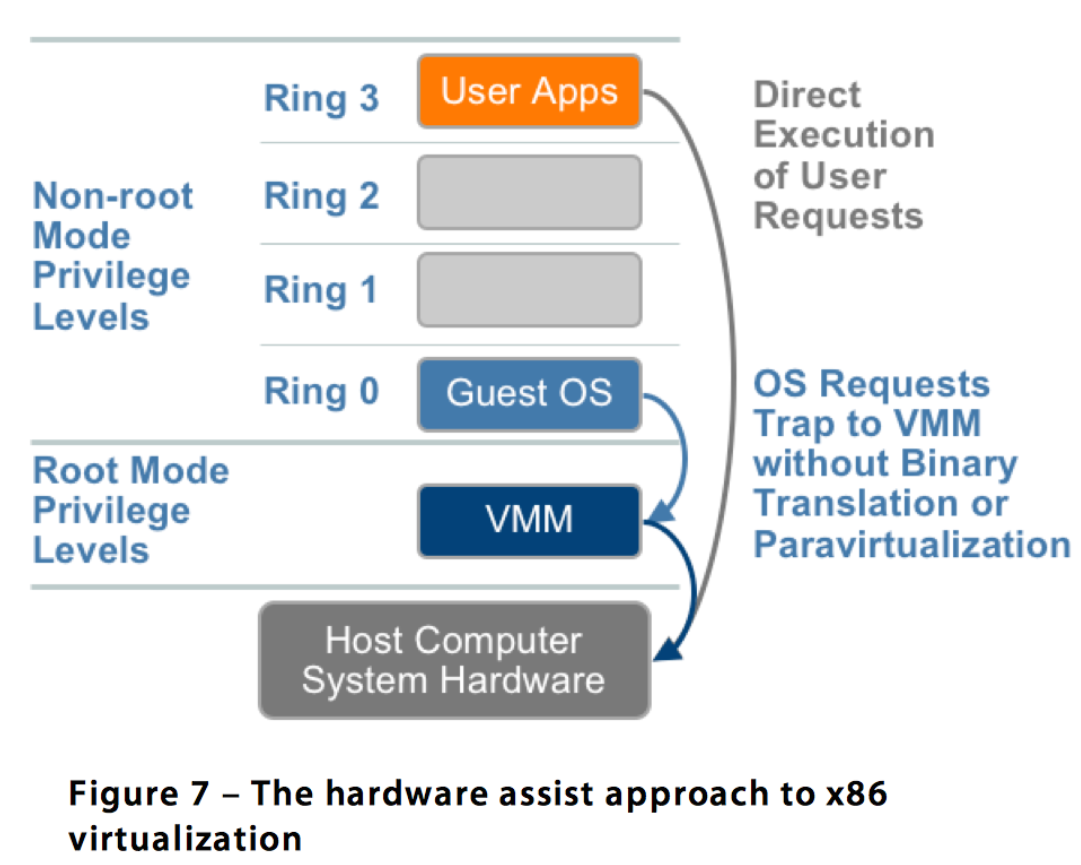
┌──────────────┐
│  User Apps   │ Ring 3 (Direct Execution of User Requests)
└──────────────┘
┌──────────────┐
│  Guest OS    │ Ring 0 (Non-root Mode)
└──────────────┘ (OS Requests Trap to VMM without
┌──────────────┐  Binary Translation or Paravirtualization)
│     VMM      │ Root Mode Privilege Levels
└──────────────┘
┌──────────────┐
│   Hardware   │
└──────────────┘
Advantages
- Even faster execution than both previous methods
- No OS modification needed
- No binary translation needed
Used By
- VMware ESXi
- KVM (Kernel-based Virtual Machine)
- Microsoft Hyper-V
- Modern Xen (3.x+)
Production Impact: This technology enabled the cloud computing revolution. AWS, Azure, and Google Cloud all rely on hardware-assisted virtualization for their infrastructure.
Intel VT-x: A Major Architectural Enhancement
Introduction
In 2005, Intel released two Pentium 4 models supporting VT-x (Virtualization Technology extensions).
Two Modes of Operation
- VMX root mode - for VMM operations
- VMX non-root mode - support a VM
Virtual Machine Control Structure (VMCS)
A new data structure that includes:
- Host-state area - VMM processor state
- Guest-state area - VM processor state
VM Entry and Exit
VM Entry Process:
- Processor state is loaded from the guest-state of the VM scheduled to run
- Control is transferred from VMM to the VM
VM Exit Process:
- Saves processor state in the guest-state area of the running VM
- Loads processor state from the host-state area
- Transfers control to the VMM
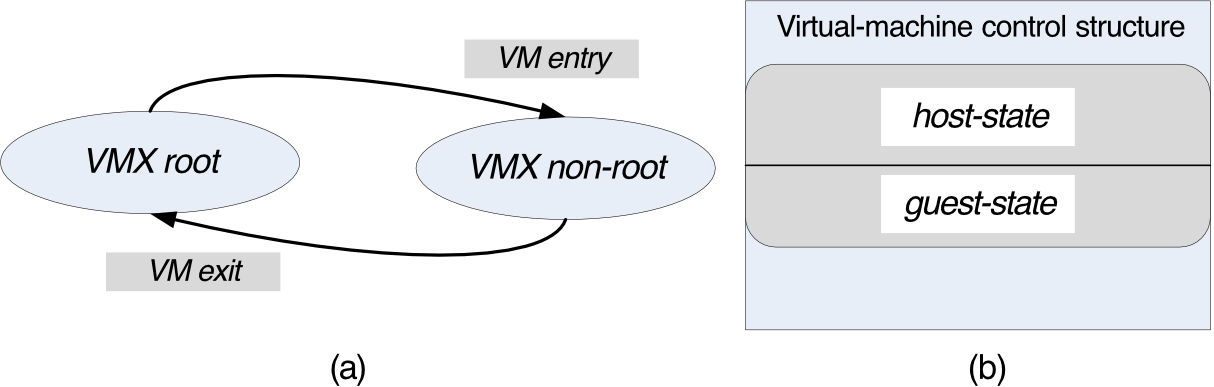
    ┌─────────────┐  VM Entry   ┌──────────────────┐
    │  VMX root   │────────────→│ VMX non-root     │
    │  (VMM)      │←────────────│ (Guest VM)       │
    └─────────────┘  VM Exit    └──────────────────┘
         ↑                               │
         │        ┌────────────────────────┐
         └────────│ Virtual-machine control│
                  │      structure         │
                  │  ┌──────────────────┐  │
                  │  │   host-state     │  │
                  │  ├──────────────────┤  │
                  │  │   guest-state    │  │
                  │  └──────────────────┘  │
                  └────────────────────────┘
Analogy: Think of VMCS as a context switch card. When switching between VMM and VM, the CPU saves/loads the entire state (like saving your game progress before switching to another player's turn).
Modern VT-x Architecture
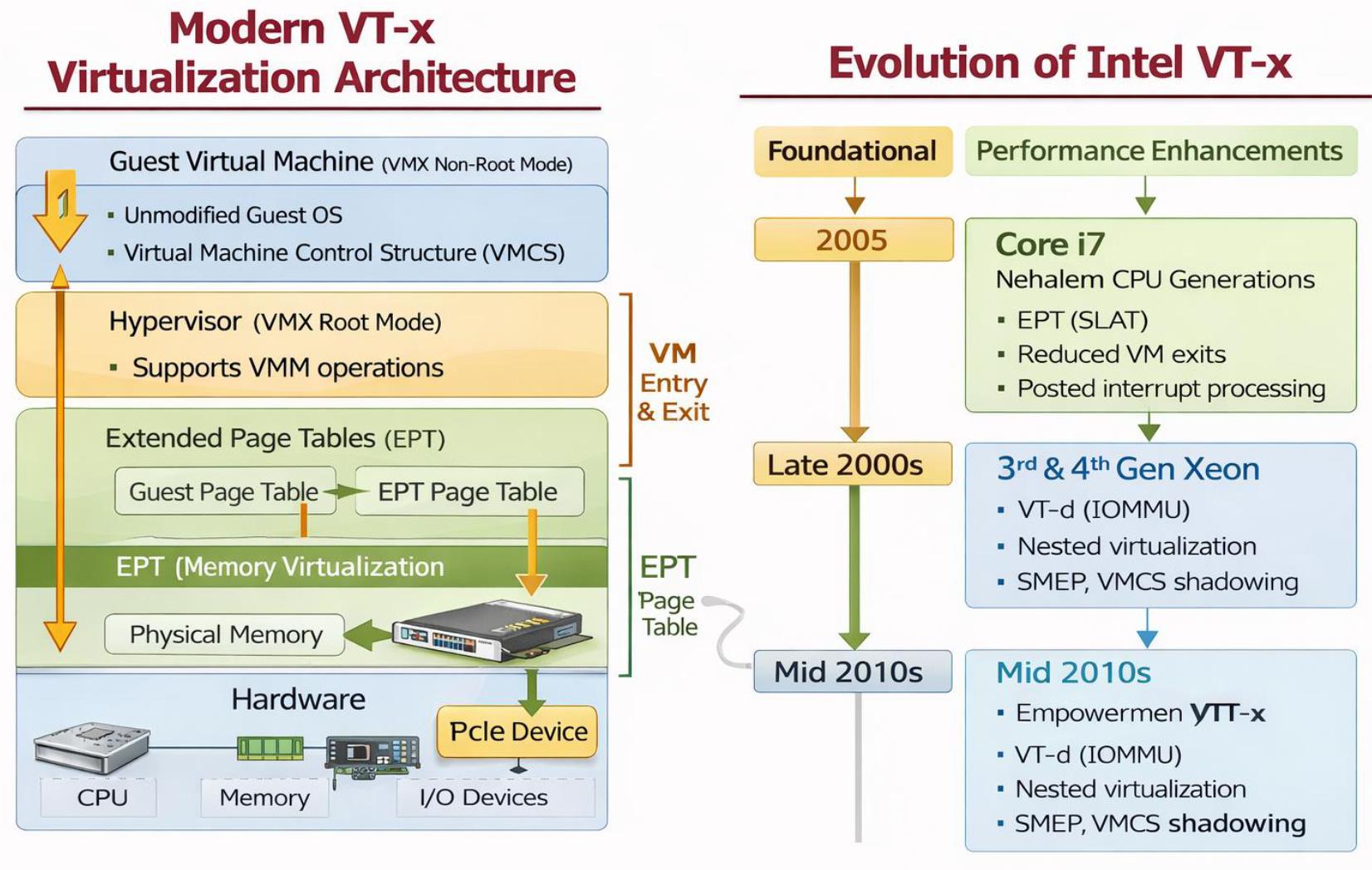
Evolution of Intel VT-x
| Timeline | Generation | Features |
|---|---|---|
| 2005 | Foundational | Basic VMX modes |
| Late 2000s (Core i7, Nehalem) | Performance Enhancements | EPT (SLAT), Reduced VM exits, Posted interrupt processing |
| Late 2000s (3rd & 4th Gen Xeon) | Advanced Features | VT-d (IOMMU), Nested virtualization, SMEP, VMCS shadowing |
| Mid 2010s (Empowermen VT-x) | Latest | Enhanced VT-x, VT-d (IOMMU), Nested virtualization, SMEP, VMCS shadowing |
Modern VT-x Virtualization Architecture
Components:
- Guest Virtual Machine (VMX Non-Root Mode)
- Unmodified Guest OS
- Virtual Machine Control Structure (VMCS)
- Hypervisor (VMX Root Mode)
- Supports VMM operations
- Extended Page Tables (EPT)
- Guest Page Table → EPT Page Table
- EPT (Memory Virtualization)
- Physical Memory
- Hardware
- CPU, Memory, I/O Devices, PCIe Device
Production Example: AWS's Nitro hypervisor uses these exact features. EPT allows each EC2 instance to have its own memory space without the hypervisor needing to maintain shadow page tables.
Memory Virtualization with EPT (Extended Page Tables)
Before EPT
Problems:
- Guest page table changes caused frequent VM exits
- Severe performance overhead
- Hypervisor had to maintain shadow page tables
With EPT
Solution: Two-level address translation in hardware
- Guest Virtual → Guest Physical (managed by guest OS)
- Guest Physical → Host Physical (managed by hypervisor via EPT)
Key Benefit:
- ✅ No hypervisor intervention on normal memory access
Result
- ✅ Faster memory access
- ✅ Fewer VM exits
- ✅ Scalable virtualization
Analogy: EPT is like having a two-step address system. First, you translate your apartment number to building coordinates (guest virtual to guest physical). Then, you translate building coordinates to city GPS coordinates (guest physical to host physical). The hypervisor only manages the second translation, not every address lookup.
Production Impact: EPT is critical for cloud providers. Without it, running hundreds of VMs on a single server would be impossible due to the overhead of shadow page tables.
Evolution of Xen
| Xen Version | Status | Notes |
|---|---|---|
| Xen 1.x-2.x | Obsolete | Research prototypes |
| Xen 3.0 | ❌ Very old | Paravirtualization era |
| Xen 4.x | ✅ Current | Production-grade, Hardware-assisted |
Xen - A VMM Based on Paravirtualization
Origins and Goals
Created by: Cambridge University Computing Laboratory (2003)
Goal: Design a VMM capable of scaling to about 100 VMs running standard applications and services without any modifications to the Application Binary Interface (ABI).
What is Xen?
Xen is a Type-1 hypervisor, providing services that allow multiple computer operating systems to execute on the same computer hardware concurrently.
Supported Operating Systems
Linux, Minix, NetBSD, FreeBSD, and others can operate as paravirtualized Xen guest OS running on:
- x86
- x86-64
- Itanium
- ARM architectures
Key Concepts
Xen Domain
Definition: An ensemble of address spaces hosting a guest OS and applications running under the guest OS. Runs on a virtual CPU.
Types of Domains:
- Dom0 (Domain 0)
- Dedicated to execution of Xen control functions
- Executes privileged instructions
- Manages other domains
- Required for system operation
- DomU (Domain U)
- User domains
- Guest VMs running applications
- Cannot execute privileged instructions directly
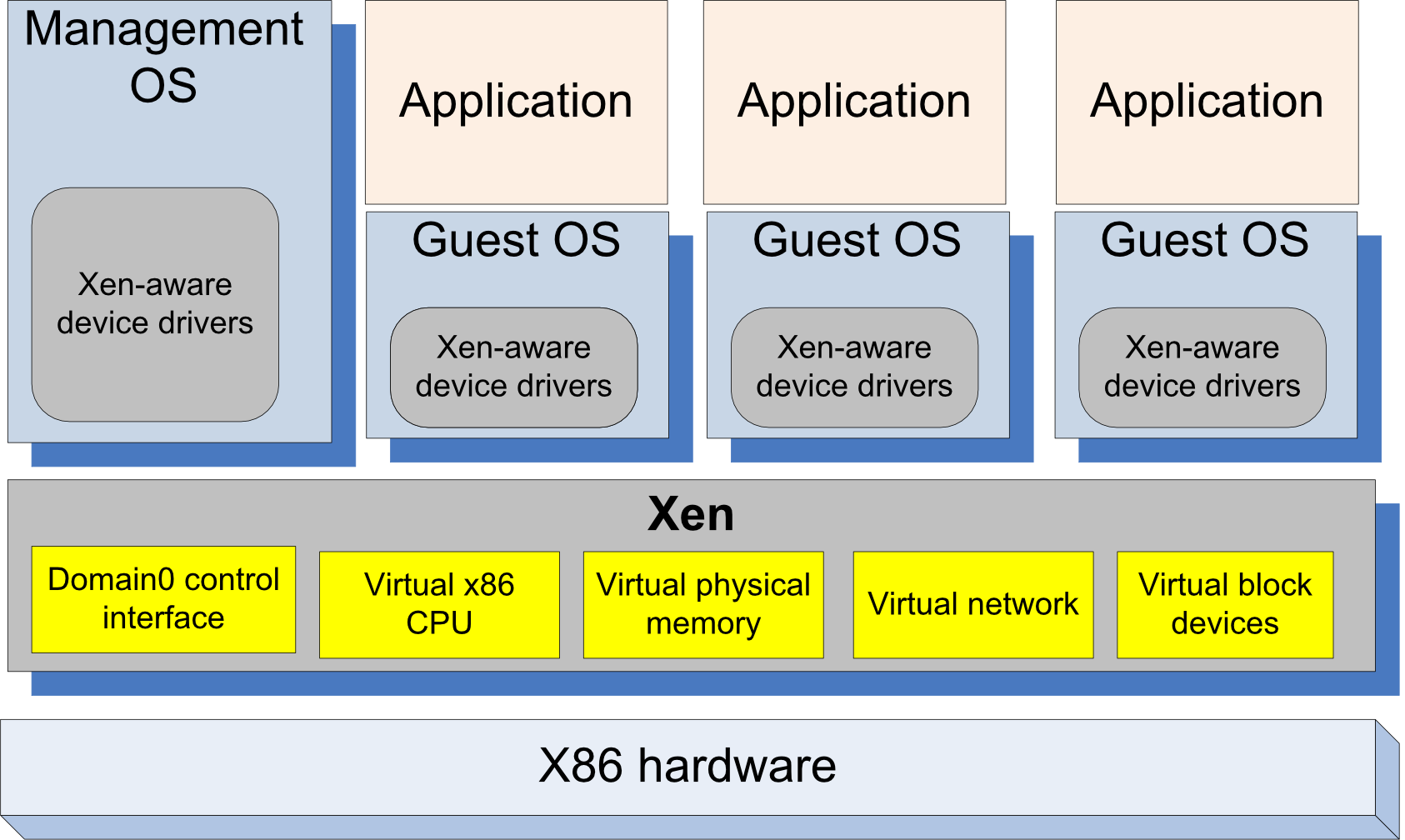
How Xen Works
- Applications make system calls using hypercalls processed by Xen
- Privileged instructions issued by a guest OS are paravirtualized and must be validated by Xen
Analogy: Dom0 is like the building manager who has master keys and can access all systems. DomU instances are like tenants who must request the manager (via hypercalls) to perform privileged operations.
Xen Architecture Diagram
┌──────────────┐  ┌─────────────┐  ┌─────────────┐  ┌─────────────┐
│ Management   │  │ Application │  │ Application │  │ Application │
│     OS       │  │             │  │             │  │             │
│              │  ├─────────────┤  ├─────────────┤  ├─────────────┤
│ ┌──────────┐ │  │  Guest OS   │  │  Guest OS   │  │  Guest OS   │
│ │Xen-aware │ │  │             │  │             │  │             │
│ │  device  │ │  │ ┌─────────┐ │  │ ┌─────────┐ │  │ ┌─────────┐ │
│ │ drivers  │ │  │ │Xen-aware│ │  │ │Xen-aware│ │  │ │Xen-aware│ │
│ └──────────┘ │  │ │ device  │ │  │ │ device  │ │  │ │ device  │ │
│              │  │ │ drivers │ │  │ │ drivers │ │  │ │ drivers │ │
└──────────────┘  │ └─────────┘ │  │ └─────────┘ │  │ └─────────┘ │
                  └─────────────┘  └─────────────┘  └─────────────┘
┌──────────────────────────────────────────────────────────────────┐
│                             Xen                                  │
│ ┌──────────┐ ┌──────────┐ ┌──────────┐ ┌──────────┐ ┌────────┐ │
│ │ Domain0  │ │ Virtual  │ │ Virtual  │ │ Virtual  │ │Virtual │ │
│ │ control  │ │   x86    │ │ physical │ │ network  │ │ block  │ │
│ │interface │ │   CPU    │ │  memory  │ │          │ │devices │ │
│ └──────────┘ └──────────┘ └──────────┘ └──────────┘ └────────┘ │
└──────────────────────────────────────────────────────────────────┘
┌──────────────────────────────────────────────────────────────────┐
│                        X86 hardware                              │
└──────────────────────────────────────────────────────────────────┘
Dom0 Components
1. XenStore
What is it? A Dom0 process that acts as a system-wide registry and naming service.
Functions:
- Supports a system-wide registry and naming service
- Used to store information about the domains during their execution
- Acts as a mechanism of creating and controlling Domain-U devices
- Implemented as a hierarchical key-value storage
- A watch function informs listeners of changes to keys they've subscribed to
- Communicates with guest VMs via shared memory using Dom0 privileges
Analogy: XenStore is like a centralized database or message board where all VMs and Dom0 post updates and check for information about other VMs.
2. Toolstack
What is it? The management interface responsible for creating, destroying, and managing the resources and privileges of VMs.
How it works:
- User provides a configuration file describing:
- Memory allocations
- CPU allocations
- Device configurations
- Toolstack parses this file
- Writes information to XenStore
- Takes advantage of Dom0 privileges to:
- Map guest memory
- Load a kernel and virtual BIOS
- Set up initial communication channels with XenStore
- Set up virtual console
Production Usage: When you launch an EC2 instance on AWS (which originally used Xen), the equivalent of the toolstack reads your instance configuration (instance type, storage, network) and provisions the VM accordingly.
Xen Architecture Detailed View
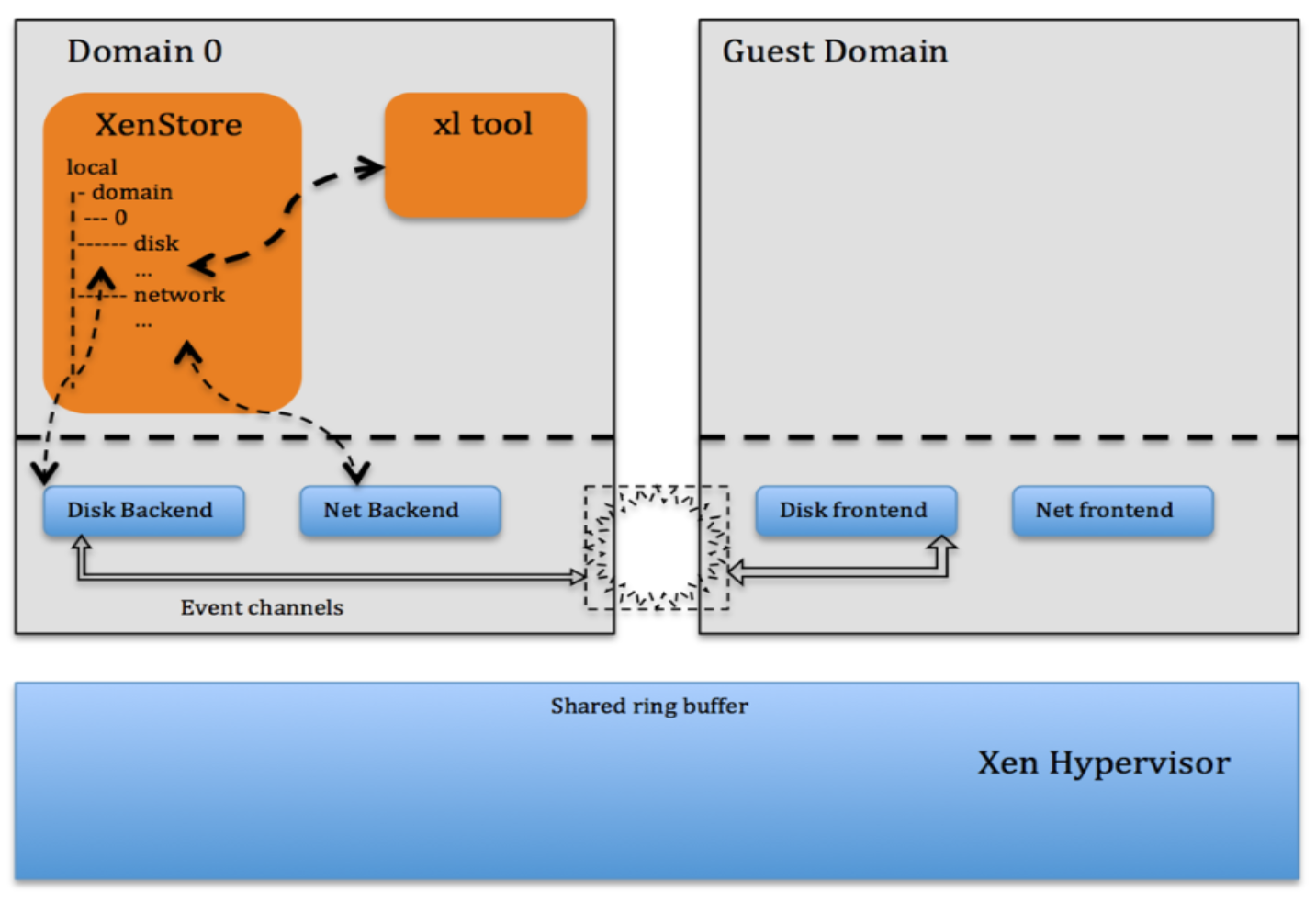
Strategies for Virtual Memory Management, CPU Multiplexing, and I/O Devices
| Function | Strategy |
|---|---|
| Paging | A domain may be allocated discontinuous pages. A guest OS has direct access to page tables and handles page faults directly for efficiency; page table updates are batched for performance and validated by Xen for safety. |
| Memory | Memory is statically partitioned between domains to provide strong isolation. XenoLinux implements a balloon driver to adjust domain memory. |
| Protection | A guest OS runs at a lower priority level, in ring 1, while Xen runs in ring 0. |
| Exceptions | A guest OS must register with Xen a description table with the addresses of exception handlers previously validated; exception handlers other than the page fault handler are identical with x86 native exception handlers. |
| System calls | To increase efficiency, a guest OS must install a "fast" handler to allow system calls from an application to the guest OS and avoid indirection through Xen. |
| Interrupts | A lightweight event system replaces hardware interrupts; synchronous system calls from a domain to Xen use hypercalls and notifications are delivered using the asynchronous event system. |
| Multiplexing | A guest OS may run multiple applications. |
| Time | Each guest OS has a timer interface and is aware of "real" and "virtual" time. |
| Network and I/O devices | Data is transferred using asynchronous I/O rings; a ring is a circular queue of descriptors allocated by a domain and accessible within Xen. |
| Disk access | Only Dom0 has direct access to IDE and SCSI disks; all other domains access persistent storage through the Virtual Block Device (VBD) abstraction. |
Memory Ballooning
What is Memory Ballooning?
- Memory ballooning is the memory reclamation technique which is used to reclaim the unused memory of physical host system and share it with others.
How It Works
Example:
- All virtual machines are allocated only 8GB of memory
- Some VMs use only half (4GB) of their allotted share
- But one VM needs 12GB of memory
- This additional memory can be obtained from unused memory of other VMs
ก็แค่อันไหนใช้เยอะ แล้วมีอันที่ไม่ได้ใช้แล้ว ก็สูบลมไปให้อันอื่น VM ตัวอื่นใช้ซะ
Visual Representation
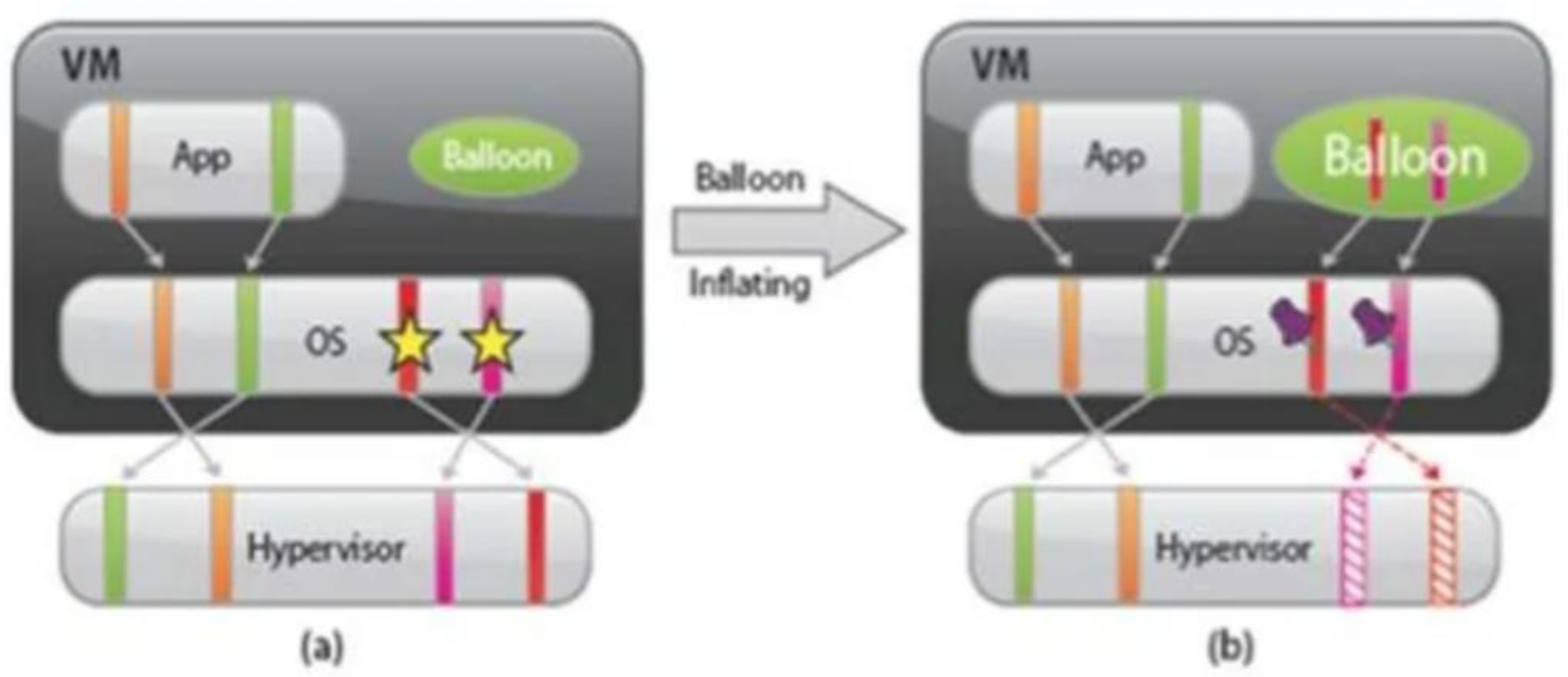
Before Ballooning:
┌────────────────┐
│ VM             │
│ ┌────┐         │
│ │App │ Balloon │
│ └────┘         │
│ ┌────────────┐ │
│ │     OS ☆☆  │ │ ← Unused memory
│ └────────────┘ │
└────────────────┘
     ↓ Inflating
After Ballooning:
┌────────────────┐
│ VM             │
│ ┌────┐ ┌─────┐ │
│ │App │ │Balln│ │ ← Balloon inflated
│ └────┘ │ ♦♦♦ │ │
│ ┌──────┴─────┐ │
│ │     OS  ♦♦ │ │
│ └────────────┘ │
└────────────────┘
        ↕
   Hypervisor can use this memory
Analogy: Think of memory ballooning like adjustable water balloons in a pool. If one person needs more space to swim, you inflate the balloons in idle areas (unused VMs) to push that water (memory) toward where it's needed.
Production Usage: VMware ESXi and Hyper-V use memory ballooning to over-commit memory. This allows cloud providers to run more VMs than physical RAM would normally allow, improving resource utilization.
Xen Abstractions for Networking and I/O
Virtual Network Interfaces (VIFs)
Each domain has one or more Virtual Network Interfaces (VIFs) which support the functionality of a network interface card.
A VIF is attached to a Virtual Firewall-Router (VFR).
Split Drivers Architecture
Components:
- Front-end driver - in the DomU (guest domain)
- Back-end driver - in Dom0 (privileged domain)
- Communication - via a ring in shared memory
I/O Ring
Definition: A circular queue of descriptors allocated by a domain and accessible within Xen.
Important: Descriptors do not contain data; the data buffers are allocated off-band by the guest OS.
Each descriptor identifies a block of contiguous physical memory allocated to the domain.
Network I/O Process
Two rings of buffer descriptors are supported:
- Send ring - for packet transmission
- Receive ring - for packet reception
To transmit a packet:
- Guest OS enqueues a buffer descriptor to the send ring
- Xen copies the descriptor and checks safety
- Xen copies only the packet header, not the payload
- Xen executes the matching rules
Architecture Diagram
┌─────────────────┐        I/O channel        ┌─────────────────┐
│  Driver domain  │◄──────────────────────────►│  Guest domain   │
│   ┌─────────┐   │                            │   ┌─────────┐   │
│   │ Bridge  │   │                            │   │Frontend │   │
│   └────┬────┘   │                            │   └────┬────┘   │
│        │        │        Event channel       │        │        │
│   ┌────┴────┐   │◄──────────────────────────►│        │        │
│   │ Backend │   │                            │        │        │
│   │Interface│   │                            │        │        │
│   └────┬────┘   │                            │        │        │
│        │        │                            │        │        │
│   ┌────┴────┐   │                            │        │        │
│   │ Network │   │                            │        │        │
│   │interface│   │                            │        │        │
│   └────┬────┘   │                            │        │        │
└────────┼────────┘                            └────────┼────────┘
         │                                              │
         └──────────────────┬───────────────────────────┘
                            │
                    ┌───────┴────────┐
                    │   XEN VMM      │
                    └───────┬────────┘
                            │
                    ┌───────┴────────┐
                    │  Physical NIC  │
                    └────────────────┘
Circular Ring Buffer Details
                  Request queue
                       ↓
        Consumer Request ────────────┐
     (private pointer in Xen)        │
                                     │
    ┌────────────────────────────────┼──────────┐
    │                                ▼          │
    │    ◄─────  Producer Request ─────         │
    │         (shared pointer updated          │
    │          by the guest OS)                │
    │                                          │
    │  ┌──────────────────────────────────┐   │
    │  │      Outstanding descriptors      │   │
    │  └──────────────────────────────────┘   │
    │                                          │
    │  ┌──────────────────────────────────┐   │
    │  │       Unused descriptors          │   │
    │  └──────────────────────────────────┘   │
    │                                          │
    │         Producer Response ─────►         │
    │        (shared pointer updated           │
    │             by Xen)        │             │
    │                            ▼             │
    └────────────────────────────┼─────────────┘
                                 │
                   Consumer Response ───────
                (private pointer maintained
                     by the guest OS)
                          │
                   Response queue
Zero-Copy Design: By using descriptors instead of copying data, Xen achieves zero-copy semantics - the actual packet data stays in place while only pointers are exchanged.
Production Impact: This design is highly efficient and has been adopted by modern frameworks like DPDK (Data Plane Development Kit) used in high-performance networking.
Xen 2.0 Optimizations (Obsolete - Skipped)
Three Key Optimizations
-
Virtual Interface Optimization
- Takes advantage of physical NIC capabilities
- Example: Checksum offload
- Physical NIC calculates checksums instead of CPU
-
I/O Channel Optimization
- Instead of copying data buffers
- Each packet is allocated in a new page
- Then the physical page containing the packet is re-mapped into the target domain
- Page remapping is faster than data copying
-
Virtual Memory Optimization
- Takes advantage of superpage and global page mapping hardware on Pentium and Pentium Pro processors
- A superpage entry covers 1,024 pages of physical memory
- Address translation mechanism maps contiguous pages to contiguous physical pages
- Helps reduce the number of TLB misses
Analogy: Superpages are like bulk shipping. Instead of sending 1,024 individual packages (pages) with 1,024 addresses (TLB entries), you send one large container (superpage) with one shipping label (TLB entry).
Xen Network Architecture Evolution
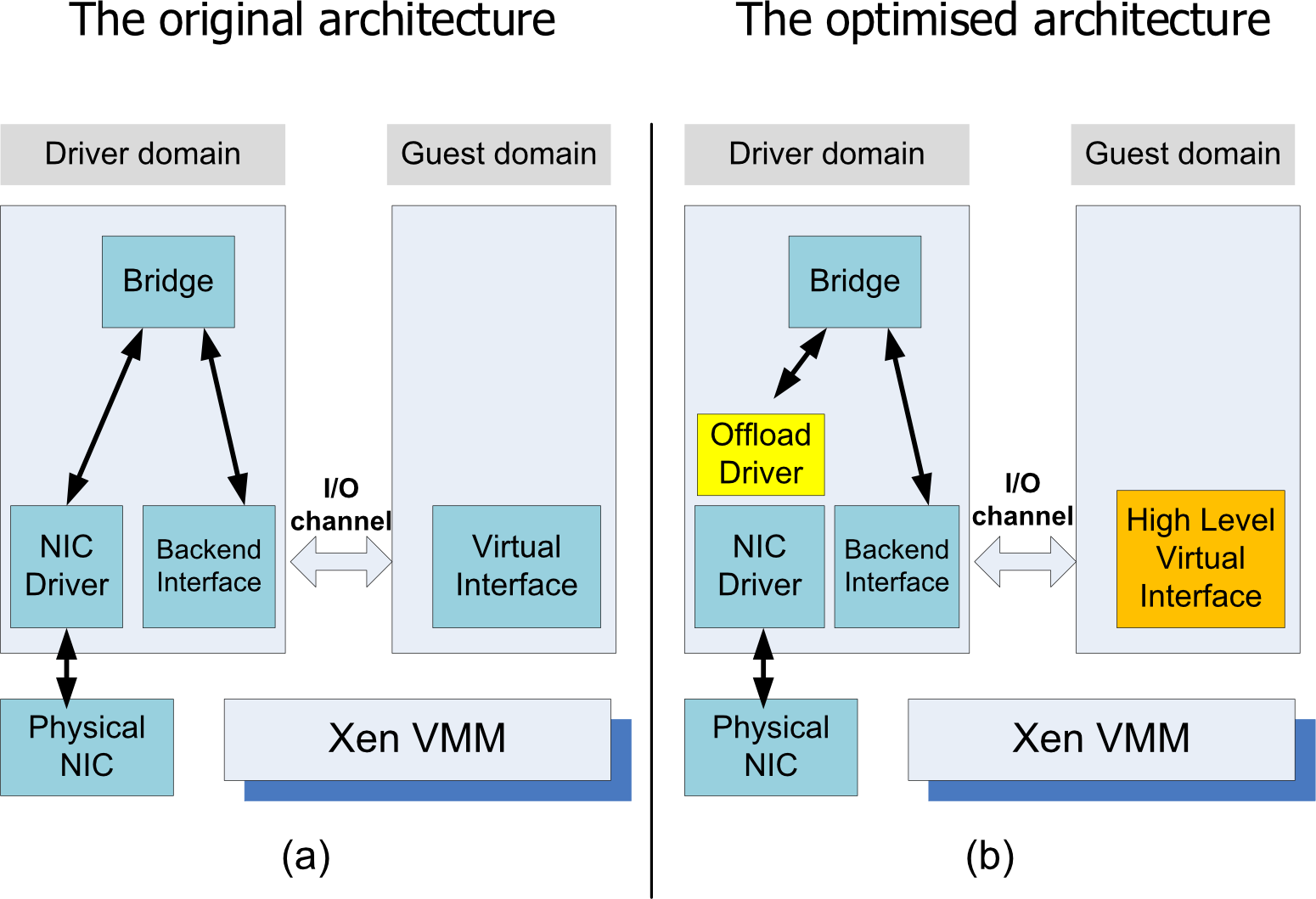
Key Improvement: Addition of Offload Driver to leverage hardware capabilities (checksumming, TCP segmentation offload, etc.)
Linux Containers
What are Linux Containers?
- A Linux Container is a Linux process (or processes) that is a virtual environment with its own process network space. (Lightweight process virtualization)
- Key Characteristic: Containers share portions of the host kernel
Technologies Used
Containers use:
- Namespaces: Per-process isolation of OS resources
- Filesystem
- Network
- User IDs
- Cgroups (Control Groups): Resource management and accounting per process
- CPU limits
- Memory limits
- I/O limits
Containers vs. Traditional Virtualization
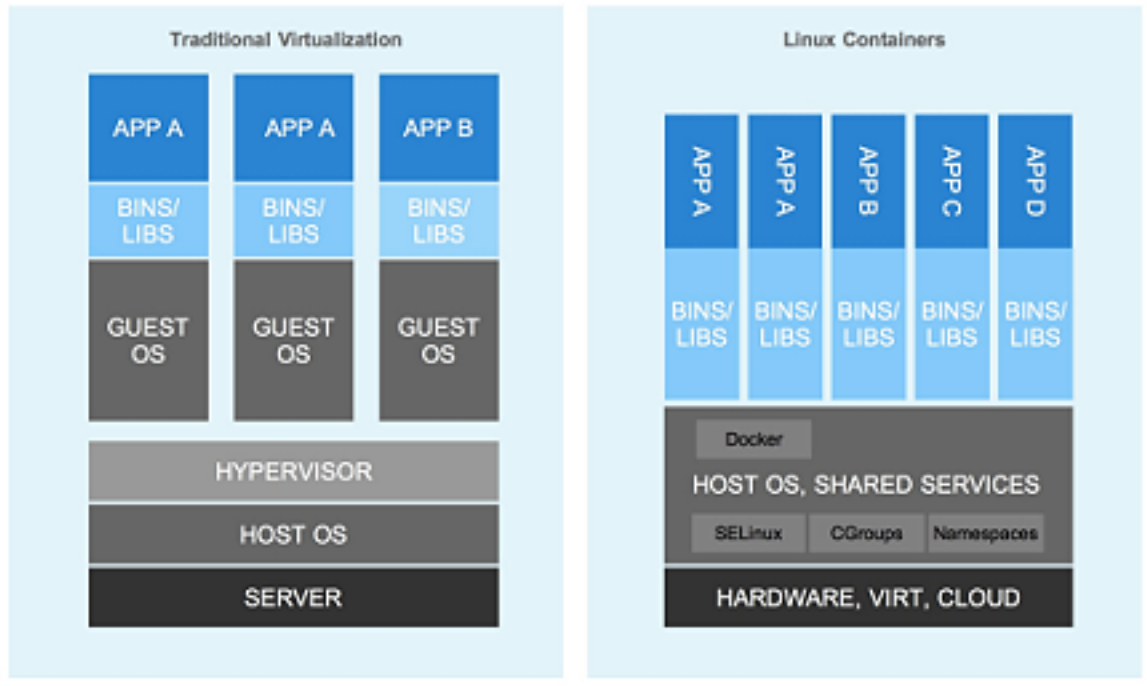
Examples Using Containers
- Docker - Most popular container platform
- DotCloud - https://www.dotcloud.com/
- Heroku - https://www.heroku.com/
Key Difference: VMs virtualize hardware; containers virtualize the OS. Containers are much lighter weight but less isolated than VMs.
Production Usage:
- Netflix: Uses Docker containers orchestrated by Kubernetes
- Google: Runs everything in containers (2+ billion containers per week)
- Amazon ECS/EKS: Container orchestration services
- Microsoft Azure: Azure Container Instances and AKS
Translation Lookaside Buffer (TLB)
What is TLB?
- A translation lookaside buffer (TLB) is a memory cache that is used to reduce the time taken to access a user memory location.
- Location: Part of the chip's memory-management unit (MMU)
- Function: The TLB stores the recent translations of virtual memory to physical memory and can be called an address-translation cache.
TLB Operation
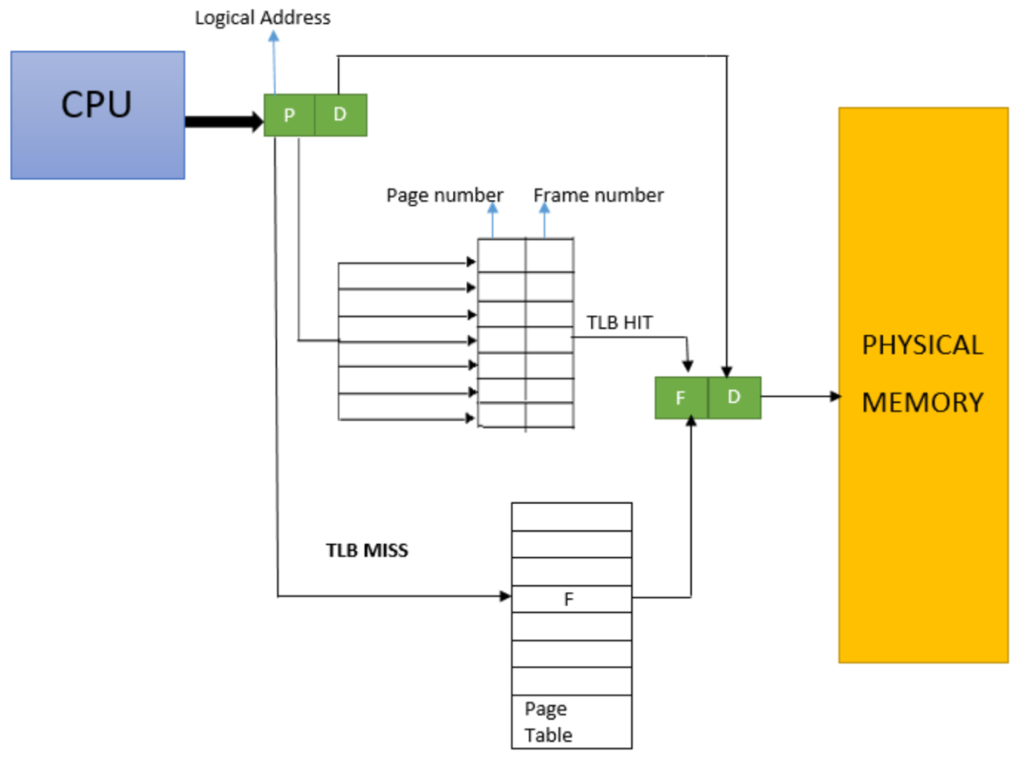
Why TLB Matters: Without TLB, every memory access would require two memory accesses (one for page table, one for data). TLB caching reduces this to ~1 memory access on average.
Virtualization Impact: In virtualized environments, there's an additional level of translation (guest physical → host physical), making TLB efficiency even more critical. This is why EPT/NPT (hardware page table walkers) are so important.
Modern Xen Architecture
PVH (Paravirtualized Hardware)
Modern Xen combines hardware-assisted virtualization (VT-x + EPT) with paravirtualized I/O to achieve:
- High performance
- Strong isolation
- Cloud scalability
PVH Guest Domains (DomU)
PVH = Paravirtualized Hardware
Guest OS:
- Linux / Windows
- Unmodified kernel ✅
Uses:
- Hardware virtualization for CPU & memory (VT-x + EPT)
- Paravirtualized I/O interfaces (faster than emulated devices)
Best balance of:
- Performance
- Compatibility
- Security
Driver Domain (DomD)
Characteristics:
- Separate, isolated service VM
- Hosts back-end drivers:
- Network
- Storage
Communication with DomU:
- Via shared memory
- Via event channels
Security benefit:
- Failure or compromise of DomD:
- Does not crash Xen
- Does not directly compromise other VMs
Modern Xen Architecture Diagram
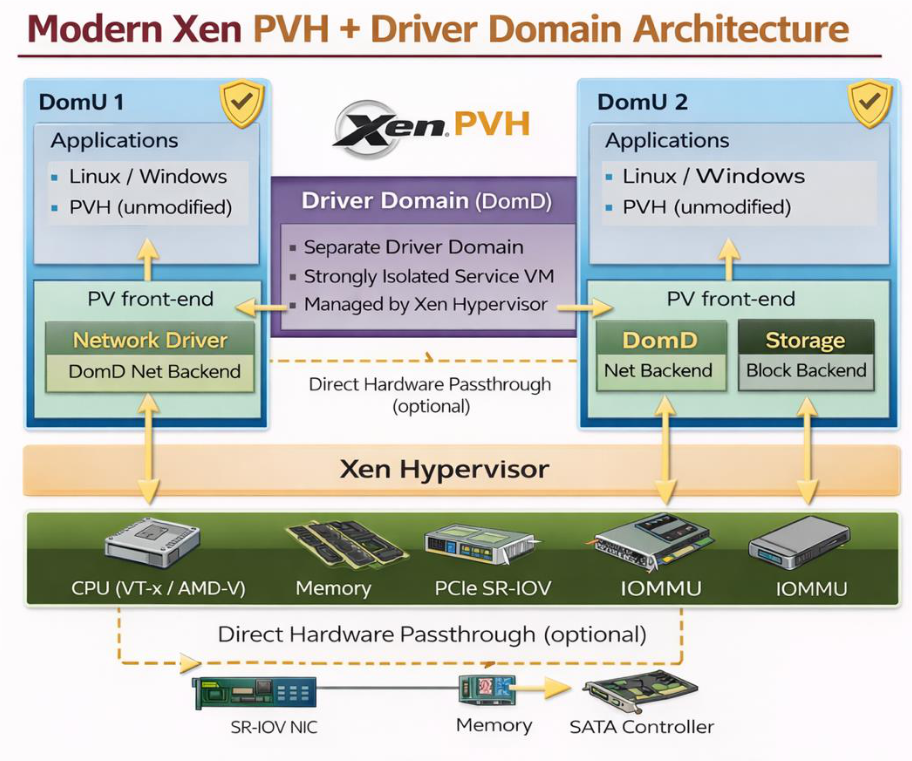
Xen Hypervisor (Type-1)
Runs directly on hardware
Executes in VMX root mode
Responsibilities:
- CPU scheduling
- Memory isolation (EPT / NPT)
- Interrupt routing
- VM lifecycle management
Key Advantage: Minimal codebase → smaller attack surface
Production Example: AWS originally used Xen for EC2. While they've now moved to their custom Nitro hypervisor, the architecture is similar: minimal hypervisor with hardware-assisted virtualization.
Xen 3.x vs Xen 4.x Comparison
| Aspect | Xen 3.x | Modern Xen (4.x) |
|---|---|---|
| CPU virtualization | Paravirtualized (OS modification required) | VT-x / AMD-V (hardware-assisted) |
| Guest OS | Modified kernel | Unmodified (PVH) |
| I/O | Dom0-centric | Driver domains (isolated) |
| Memory | Shadow paging (software) | EPT / NPT (hardware) |
| Security | Large TCB | Small TCB |
| Cloud readiness | Limited | Production-grade |
Trusted Computing Base (TCB)
Definition: The set of hardware and software components that must be trusted to correctly enforce a system's security policy.
Comparison:
- Linux kernel: ~20 million lines of code → huge TCB
- Xen hypervisor: ~100K lines → much smaller TCB
Why this matters: Every line of code is a potential vulnerability. A hypervisor with 100K lines is much easier to audit and secure than a kernel with 20M lines.
Smaller is better in security (more secure)
Xen 4.x Features
Latest Version: Xen 4.17
Website: https://xenbits.xen.org/docs/unstable/support-matrix.html
Key Features
Integration with MISRA-C guidelines:
- Guidelines for coding safely in C on embedded systems
- Improved code quality and safety
Static configuration options for ARM:
- VMs are allocated only the resources they've requested at boot time
- Better resource management
Tech preview implementation of VirtIO on ARM CPU:
- Standard I/O virtualization framework
- Better device compatibility
Support for x86 VMs with 12 terabytes of memory:
- Massive memory support for large workloads
ARM Architecture Note
ARM = Advanced RISC Machines (originally Acorn RISC Machine) is a family of reduced instruction set computer (RISC) instruction set architectures for computer processors, configured for various environments.
Production Usage: ARM-based cloud instances (like AWS Graviton) use Xen or KVM with ARM virtualization extensions for better power efficiency.
The Darker Side of Virtualization
Security Risks
Fundamental Problem: In a layered structure, a defense mechanism at some layer can be disabled by malware running at a layer below it.
Virtual-Machine Based Rootkit (VMBR)
What is it?
- A rogue VMM inserted between the physical hardware and an operating system
- Rootkit: Malware with privileged access to a system
How it works:
- The VMBR can enable a separate malicious OS to run surreptitiously
- Makes this malicious OS invisible to the guest OS and applications
Malicious Activities Under VMBR Protection
Under the protection of the VMBR, the malicious OS could:
- Observe the data, events, or state of the target system
- Steal passwords, credit cards, confidential documents
- Run malicious services:
- Spam relays
- Distributed denial-of-service (DDoS) attacks
- Cryptocurrency mining
- Interfere with the application
- Modify data
- Inject false information
- Manipulate program behavior
VMBR Insertion Scenarios
Scenario (a): VMBR below Operating System
┌─────────────┐
│ Application │
├─────────────┤
│Operating    │
│System (OS)  │
├─────────────┤
│  Malicious  │ ← VMBR inserted
│     OS      │
├─────────────┤
│Virtual      │
│machine based│
│  rootkit    │
├─────────────┤
│  Hardware   │
└─────────────┘

Scenario (b): VMBR below Legitimate VMM
┌─────────────┐
│ Application │
├─────────────┤
│  Guest OS   │
├─────────────┤
│  Malicious  │ ← VMBR inserted
│     OS      │
├─────────────┤
│   Virtual   │
│   machine   │
│   monitor   │
├─────────────┤
│Virtual      │
│machine based│
│  rootkit    │
├─────────────┤
│  Hardware   │
└─────────────┘
Why VMBRs are Dangerous
Detection is extremely difficult:
- The malicious OS is below the victim OS
- No way for the victim OS to inspect what's below it
- All integrity checks can be spoofed by the VMBR
Real-world example: Blue Pill rootkit (proof of concept) demonstrated this in 2006. It used AMD-V virtualization extensions to insert itself beneath Windows Vista without detection.
Defense Mechanisms
Modern Protections:
-
Trusted Boot / Secure Boot:
- UEFI firmware verifies bootloader signature
- Prevents unauthorized hypervisor installation
-
TPM (Trusted Platform Module):
- Hardware chip that stores cryptographic keys
- Can attest to system state
-
Intel TXT / AMD-V SKINIT:
- Measured launch of hypervisor
- Creates hardware root of trust
-
Regular security audits:
- Monitor for unexpected VM exits
- Check for anomalous hypervisor behavior
Cloud Provider Protection: AWS, Azure, and GCP use measured boot and hardware security modules to prevent VMBR attacks on their infrastructure.
Summary
Key Topics Covered
-
✅ Virtualization Layering and virtualization
- Three types: Multiplexing, Aggregation, Emulation
-
✅ Virtual machine monitor (VMM/Hypervisor)
- Type-1 (bare metal) vs Type-2 (hosted)
-
✅ Virtual machine concepts
- Guest OS, domains, isolation
-
✅ x86 support for virtualization
- Privilege rings, sensitive instructions
- Intel VT-x, AMD-V
- EPT/NPT for memory virtualization
-
✅ Three virtualization techniques:
- Full virtualization with binary translation
- Paravirtualization (OS modification)
- Hardware-assisted virtualization
-
✅ Xen hypervisor
- Evolution from paravirtualization to hardware-assisted
- Dom0 vs DomU architecture
- Modern PVH mode
-
✅ Security considerations
- Virtual-Machine Based Rootkits (VMBR)
- Defense mechanisms
Key Formulas and Concepts
Memory Address Translation
Superpage Efficiency
Virtualization Efficiency Criterion
For efficient virtualization: All sensitive instructions must be privileged (trap to VMM).
Problem: In x86, this was not true before VT-x/AMD-V!
Real-World Production Examples
Amazon Web Services (AWS) EC2
- Uses Xen hypervisor (Type-1) traditionally, now transitioning to Nitro hypervisor
- Provides virtualized compute instances with various sizes
- Supports live migration for maintenance
- Uses snapshots for backup and disaster recovery
Microsoft Azure
- Uses Hyper-V hypervisor (Type-1)
- Offers virtual machines running Windows and Linux
- Supports Azure Reserved VM Instances for cost savings
- Provides availability sets and availability zones for high availability
Google Cloud Platform (GCP)
- Uses KVM-based hypervisor (Type-1)
- Offers Compute Engine for VM instances
- Supports live migration without downtime
- Provides custom machine types for flexible resource allocation
VMware vSphere (Enterprise)
- Industry-standard Type-1 hypervisor (ESXi)
- Powers many private and hybrid clouds
- Features vMotion for live migration
- Includes Distributed Resource Scheduler (DRS) for automatic load balancing
- Supports High Availability (HA) for automatic failover
Docker (Containerization)
- While not traditional VMs, containers provide OS-level virtualization
- Share the host kernel but provide isolated environments
- Much lighter weight than VMs
- Used extensively in microservices architectures
Development and Testing
- VirtualBox (Type-2) - Popular for developers to run Linux on Windows/Mac
- VMware Workstation (Type-2) - Used for testing across multiple OS versions
- Parallels Desktop (Type-2) - Mac users running Windows
Key Takeaways
Core Concepts
-
Virtualization creates virtual versions of computing resources (CPU, memory, storage, network)
-
Three types of virtualization techniques:
- Multiplexing (sharing one among many)
- Aggregation (combining many into one)
- Emulation (pretending one thing is another)
-
Two main hypervisor types:
- Type-1 (Bare Metal): Best performance, used in production
- Type-2 (Hosted): Easier to use, used for development/testing
-
Key benefits:
- Server consolidation
- Security isolation
- Live migration
- Easy backup and recovery
- Cost reduction
-
Virtualization enables cloud computing by:
- Allowing dynamic resource allocation
- Enabling multi-tenancy
- Supporting elasticity and scalability
- Simplifying management
Performance Hierarchy
Study Questions
- What are the three fundamental abstractions in computing systems?
- Explain the difference between multiplexing, aggregation, and emulation.
- What is the difference between a VM and an emulator?
- Compare Type-1 and Type-2 hypervisors. When would you use each?
- What are the three conditions for efficient virtualization according to Popek and Goldberg?
- Why is the VMM considered more secure than a traditional OS?
- What is live migration and why is it important for cloud computing?
- Explain the concept of shadow page tables in virtualization.
- What is the difference between static and dynamic binary translation?
- How does virtualization enable server consolidation?
Additional Resources
Further Reading
- VMware Technical Papers: https://www.vmware.com/techpapers
- Xen Project Documentation: https://xenproject.org/
- KVM Documentation: https://www.linux-kvm.org/
- Original Popek and Goldberg Paper (1974)
Hands-On Practice
- Install VirtualBox and create VMs
- Try Docker for container-based virtualization
- Experiment with AWS Free Tier for cloud VMs
- Set up VMware ESXi on spare hardware (free version available)
Real-World Production Examples
AWS (Amazon Web Services)
Original Architecture:
- Started with Xen (paravirtualization)
- Required modified Linux kernels (XenLinux)
Modern Architecture:
- Custom Nitro hypervisor (KVM-based)
- Uses Intel VT-x + EPT
- Hardware offload for networking and storage
Why they changed:
- Better performance (hardware-assisted)
- Unmodified guest OS support
- Reduced overhead
Microsoft Azure
Architecture:
- Hyper-V hypervisor (Type-1)
- Uses Intel VT-x / AMD-V
- Supports both Windows and Linux guests
Features:
- Live migration (move VMs between hosts)
- Memory ballooning for overcommitment
- SR-IOV for high-performance networking
Google Cloud Platform
Architecture:
- KVM-based hypervisor
- Heavy use of hardware virtualization
- Custom security enhancements
Innovations:
- gVisor for container security (additional isolation layer)
- Custom ASIC networking (reduces hypervisor overhead)
Docker / Kubernetes (Containers)
Technology:
- Linux containers (not full virtualization)
- Namespaces + cgroups
- Shared kernel (lightweight)
Used by:
- Netflix: Microservices architecture
- Uber: Service mesh
- Airbnb: Continuous deployment
Trade-off:
- Lighter weight than VMs
- Less isolation than VMs
- Faster startup (milliseconds vs seconds)
Study Questions
-
Explain the three types of instruction classification in x86 architecture. Why are "sensitive but non-privileged" instructions problematic for virtualization?
-
Describe the x86 ring architecture. Why can't a traditional OS and VMM both run in ring 0?
-
Compare and contrast the three techniques for CPU virtualization: full virtualization, paravirtualization, and hardware-assisted virtualization.
-
What is Intel VT-x? Explain VMX root mode and VMX non-root mode.
-
How does EPT (Extended Page Tables) improve virtualization performance compared to shadow page tables?
-
Explain the Xen architecture. What are Dom0 and DomU?
-
What is memory ballooning and why is it useful in virtualization?
-
Compare VMs and containers. When would you use each?
-
Describe how split drivers work in Xen. Why use this architecture?
-
What is a Virtual-Machine Based Rootkit (VMBR) and why is it particularly dangerous?
Additional Resources
Further Reading
- Xen Project: https://xenproject.org/
- Intel VT-x Documentation: https://www.intel.com/content/www/us/en/virtualization/virtualization-technology/intel-virtualization-technology.html
- KVM Documentation: https://www.linux-kvm.org/
- Original Popek & Goldberg Paper (1974): "Formal Requirements for Virtualizable Third Generation Architectures"
Hands-On Practice
- Install VirtualBox (Type-2 hypervisor) and experiment with VMs
- Try KVM on Linux (requires VT-x/AMD-V support)
- Experiment with Docker containers
- Set up a Xen test environment
Advanced Topics
- IOMMU (Input-Output Memory Management Unit)
- SR-IOV (Single Root I/O Virtualization)
- NUMA (Non-Uniform Memory Access) in virtualization
- Live migration techniques
- Nested virtualization