Hadoop is a platform that most cloud uses to process data/big data
Contents
- Batch Processing: Processing large amounts of data at once, in one-go to deliver a result according to a query on the data
- การประมวลผลข้อมูลจำนวนมาก เป็นก้อน ๆ (batch) โดยไม่ต้องตอบกลับผู้ใช้ทันที
- Opposite คือ Online / Real-time Processing → ต้องตอบทันที เช่น API, search, payment
- Material is from the paper: "MapReduce: Simplified Data Processing on Large Clusters" by Jeffrey Dean and Sanjay Ghemawat from Google, published in Usenix OSDI conference, 2004
Motivation: Processing Large-sets of Data
The Need
- Need for many computations over large/huge sets of data — BIG DATA ไง:
- Input data: crawled documents, web request logs
- Output data: inverted indices, summary of pages crawled per host, the set of the most frequent queries in a given day, etc.
Challenges
- Most of these computations are relatively straightforward
- To speedup computation and shorten processing time, we can distribute data across 100s of machines and process them in parallel
- But, parallel computations are difficult and complex to manage:
- Race conditions
- Debugging
- Data distribution
- Fault-tolerance
- Load balancing
Goal
- Ideally, we would like to process data in parallel but not deal with the complexity of parallelization and data distribution
- ให้ engineer เขียนแค่ logic ส่วน parallelism ให้ระบบจัดการ (คุณแค่บอกว่าอยากทำอะไรกับข้อมูล ไม่ต้องสนใจว่าจะรันบนกี่เครื่อง)
- ก็คือเราต้องการ Parallelizism แต่ไม่อยากให้มันยุ่งยาก ในการเขียน code ไม่อยากสนใจเรื่องนั้นมาก เขียนไงดีวะ5555
Analogy: Think of a restaurant kitchen. Instead of one chef cooking an entire meal (sequential processing), you want multiple chefs working on different dishes simultaneously (parallel processing). However, coordinating multiple chefs without them bumping into each other, using the same ingredients at the same time, or burning food while waiting for others is extremely complex. MapReduce is like having a head chef (framework) who automatically coordinates all the workers.
Quality of Service (QoS) Goals
Increase
- Performance (Speed)
- Scalability
- Accuracy
- Availability
- Security
- Throughput = amount of outputs processed in a given period of time (transaction/sec/ms)
- อย่าลืมว่า throughput สามารถบอกถึง Scalability ได้ Chapter 2 - Virtualization I
Decrease
- Latency
- Communication cost
- Storage cost
- Computation cost
Parallel Computing Challenges
Race Condition
- Race condition occurs when multiple concurrently executing processes access a shared data item and result of execution depends on the order in which execution takes place
- An example may be seen on a multithreaded application where actions are being performed on the same data
- Race conditions, by their very nature, are difficult to test for
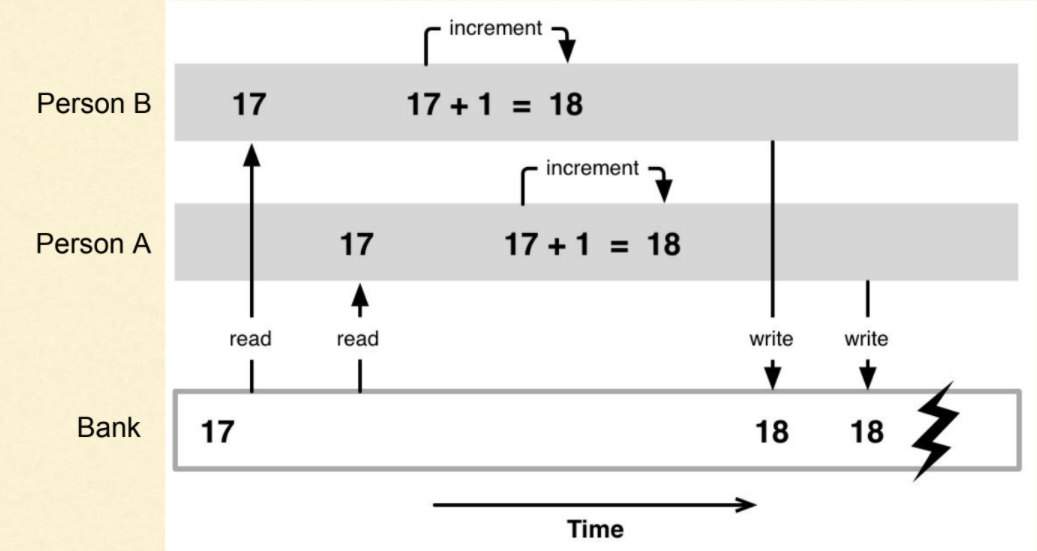
Solution: The usual solution to avoid race condition is to serialize access to the shared resource. If one process gains access first, the resource is "locked" so that other processes have to wait for the resource to become available.
Analogy: Imagine two people trying to edit the same Google Doc at the exact same time, typing in the same spot. Without proper coordination, the final text would be gibberish. The "lock" is like Google Docs showing "User A is editing here" to prevent conflicts.
Deadlock
- Deadlock occurs when each process holds a resource and waits for other resource held by any other process
- Process 1 is holding Resource 1 and waiting for resource 2 which is acquired by process 2, and process 2 is waiting for resource 1
- Hence both process 1 and process 2 are in deadlock
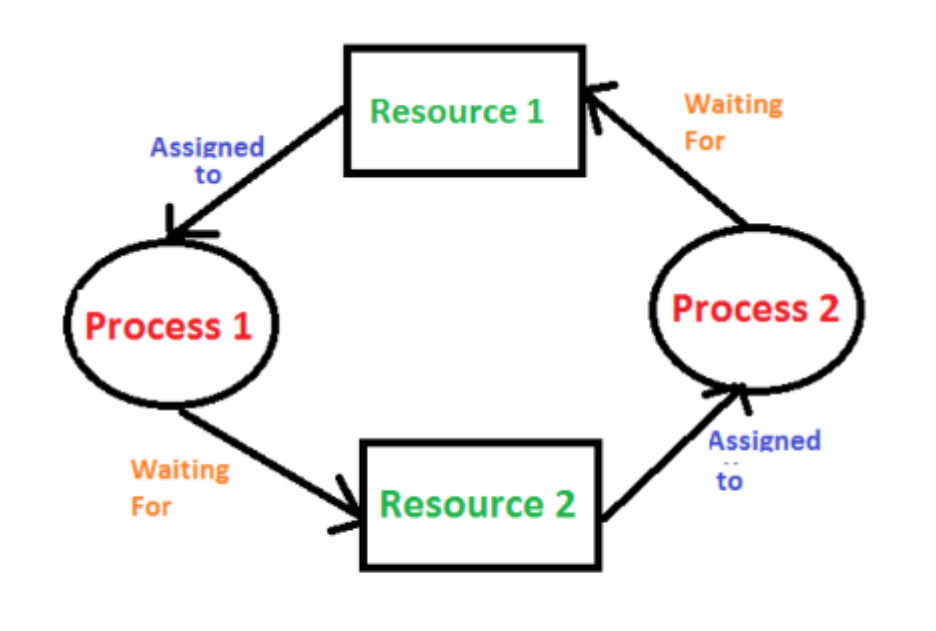
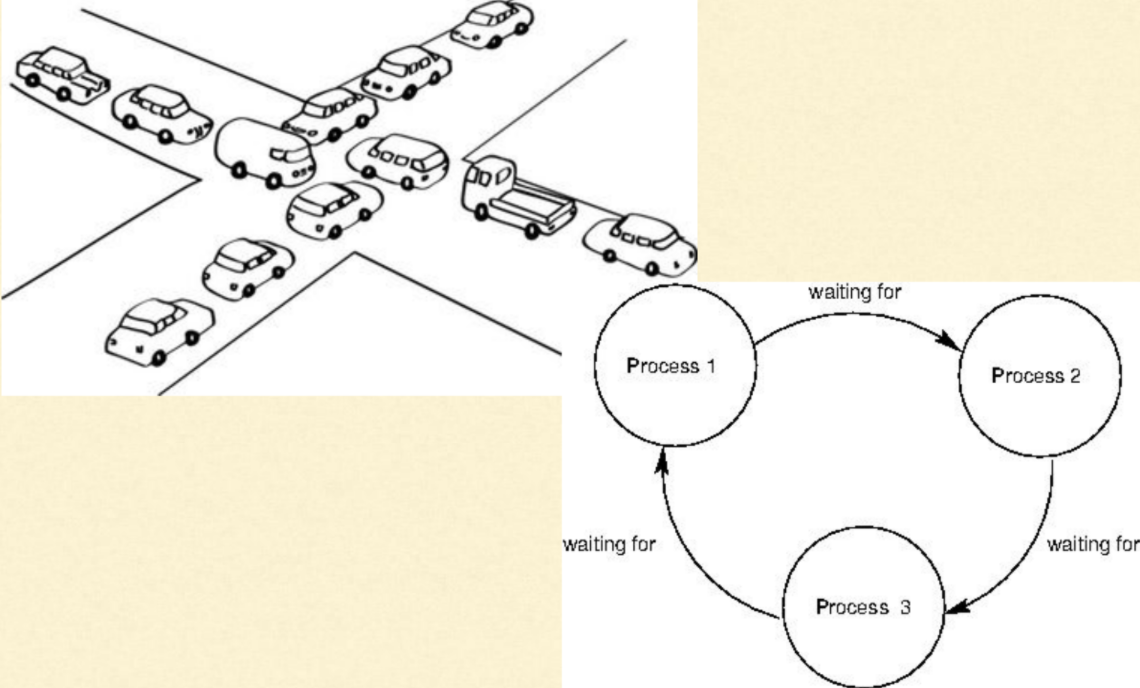
Analogy: Two cars facing each other on a narrow bridge, each waiting for the other to reverse first. Neither can move forward, and neither will back up. They're stuck forever.
Starvation (Live Lock)
- Starvation is the problem that occurs when high priority processes keep executing and low priority processes get blocked for indefinite time
- In heavily loaded computer systems, a steady stream of higher-priority processes can prevent a low-priority process from ever getting the CPU
Analogy: In a busy restaurant, if VIP customers keep arriving, regular customers might never get served. The regular customers are "starving" for service even though the restaurant is operating.
Deadlock vs. Starvation
| S.NO | Deadlock | Starvation |
|---|---|---|
| 1. | All processes keep waiting for each other to complete and none get executed | High priority processes keep executing and low priority processes are blocked |
| 2. | Resources are blocked by the processes | Resources are continuously utilized by high priority processes |
| 3. | Necessary conditions: Mutual Exclusion, Hold and Wait, No preemption, Circular Wait | Priorities are assigned to the processes |
| 4. | Also known as Circular wait | Also known as lived lock |
| 5. | It can be prevented by avoiding the necessary conditions for deadlock | It can be prevented by Aging (Low priority task will become high priority task) |
Real-world difference: Deadlock is like a traffic jam where nobody can move. Starvation is like a highway where fast cars keep zooming by, and slow cars can never merge in.
MapReduce
"A new abstraction that allows us to express the simple computations we were trying to perform but hides the messy details of parallelization, fault-tolerance, data distribution and load balancing in a library."
Components
- Programming model:
- Provides abstraction to express computation
- In terms of Key and value
- Library:
- To take care of the runtime parallelization of the computation
Analogy: MapReduce is like Amazon's fulfillment system. You (the programmer) just need to specify what products to pack (map) and where to ship them (reduce). Amazon's warehouse system (the framework) handles all the complex logistics: which warehouse processes what, how to route packages, what to do if a conveyor belt breaks, etc.
Typical Large-Data Problem
Pattern
- Iterate over a large number of records
- Extract something of interest from each
- Shuffle and sort intermediate results
- Aggregate intermediate results
- Generate final output
The Problem
- Diverse input format (data diversity & heterogeneity)
- Large Scale: Terabytes, Petabytes
- Parallelization
Key idea: Provide a functional abstraction for these two operations (Map and Reduce)
Example: Intermediate Output Handling
\usepackage{tikz}
\usetikzlibrary{arrows.meta, positioning}

\begin{document}

\begin{tikzpicture}[
    node distance=1cm,
    every node/.style={
        draw,
        rectangle,
        rounded corners,
        align=center,
        minimum width=3.8cm,
        minimum height=1cm
    },
    arrow/.style={->, thick}
]

% Nodes
\node (input) {Input Data\\Large Records};

\node (map) [below=of input] {Map Phase\\Extract (key,value)};

\node (intermediate) [below=of map] {Intermediate Output\\
$(b,2),(c,3),(b,4),(a,1),(d,2),(c,3)$};

\node (shuffle) [below=of intermediate] {Shuffle \& Combine\\
$(a,1),(b,6),(c,6),(d,2)$};

\node (reduce) [below=of shuffle] {Reduce Phase\\Aggregate by key};

\node (output) [below=of reduce] {Final Output};

% Arrows
\draw[arrow] (input) -- (map);
\draw[arrow] (map) -- (intermediate);
\draw[arrow] (intermediate) -- (shuffle);
\draw[arrow] (shuffle) -- (reduce);
\draw[arrow] (reduce) -- (output);

\end{tikzpicture}

\end{document}
Input -----> Process1 ---> Output1 (Int out)(b2, c3, b4, a1, d2, c3)
                           -> a1, b6, c6, d2 ----> Process 2 -> Final output
- Handling the intermediate output
- Save computation cost
- Save communication cost
Analogy: Instead of shipping raw materials from factory A to factory B, then from B to C, you pre-process materials at A (combine duplicates, sort), ship less data to B, which then sends refined output to C. This saves shipping costs and time.
How to Leverage Cheap Off-the-Shelf Computers?
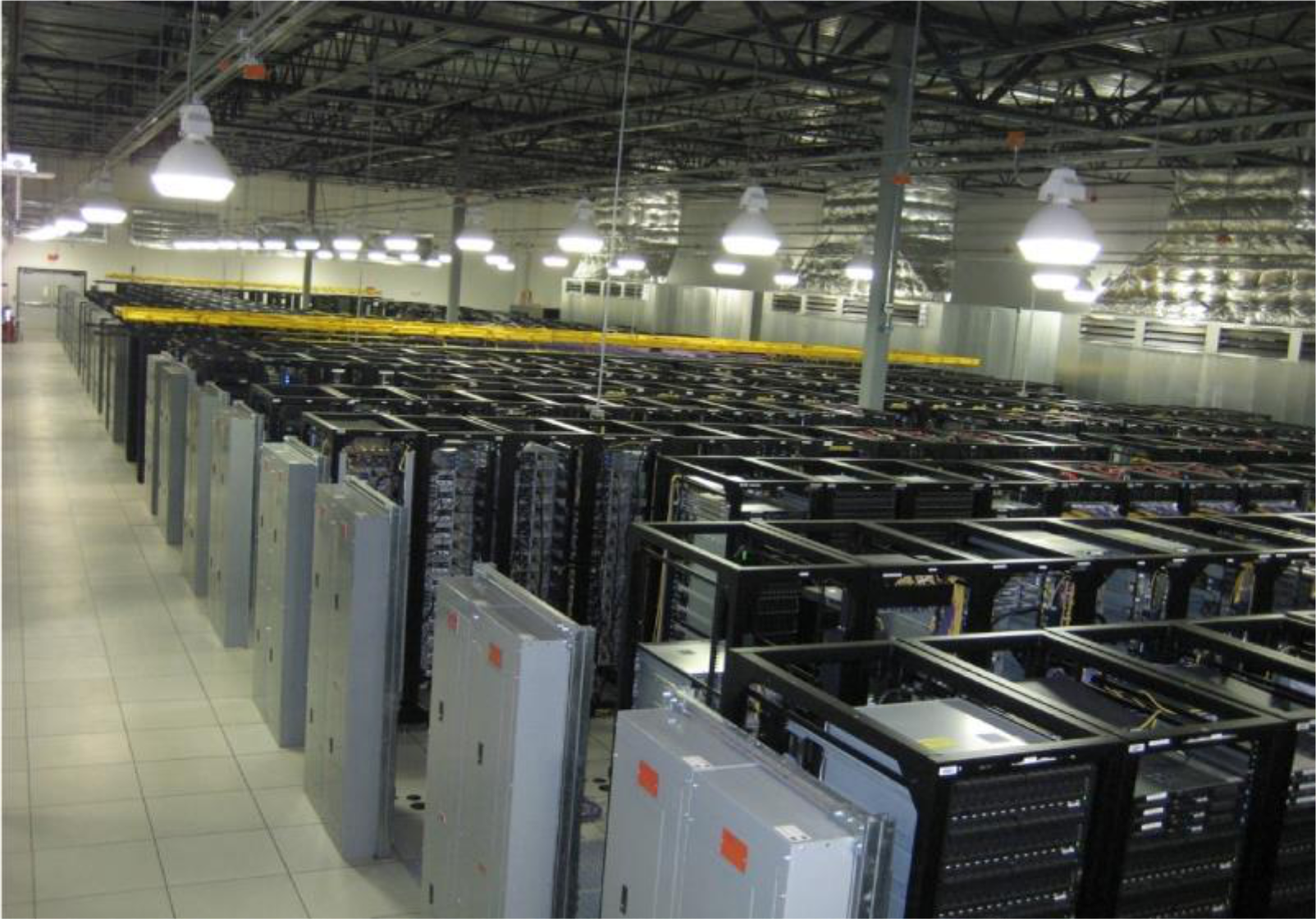
Move to cloud computing!
The Datacenter IS the Computer!
Real-world example: Google, Facebook, and Netflix don't buy expensive supercomputers. They buy thousands of cheap commodity servers (like the computers you'd buy at Best Buy) and coordinate them to work together. This is cheaper and more reliable than single powerful machines.
Divide and Conquer
                    "Work"
                      |
        +-------------+-------------+
        |             |             |
       w₁            w₂            w₃
        |             |             |
    "worker"      "worker"      "worker"
        |             |             |
       r₁            r₂            r₃
        |             |             |
        +-------------+-------------+
                      |
                  "Result"
Partition → Process in parallel → Combine
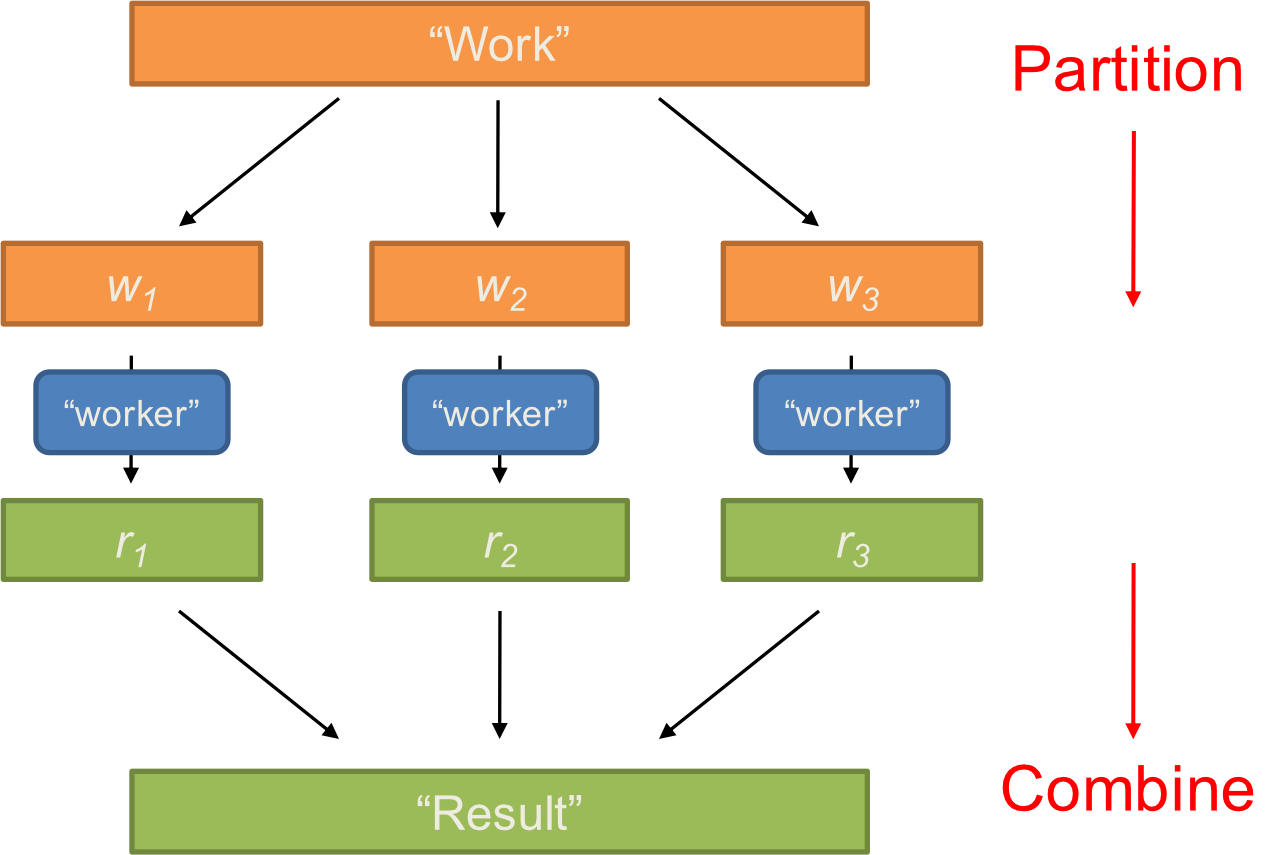
Parallelization Challenges
- How do we assign work units to workers?
- Equally distributed task, หรือบาง Workers อาจจะมีพลังเยอะกว่าก็ได้ ก็ให้มันเยอะหน่อย
- What if we have more work units than workers?
- What if workers need to share partial results?
- How do we aggregate partial results?
- How do we know all the workers have finished?
- What if workers die?
Common Theme?
- Parallelization problems arise from:
- Communication between workers (e.g., to exchange state)
- Access to shared resources (e.g., data)
- Thus, we need a synchronization mechanism
Managing Multiple Workers
Difficult because:
- We don't know the order in which workers run
- We don't know when workers interrupt each other
- We don't know the order in which workers access shared data
Thus, we need:
- Semaphores (lock, unlock) 05 Synchronization
- Conditional variables (wait, notify, broadcast)
- Barriers
Still, lots of problems:
- Deadlock, livelock, race conditions...
- Dining philosophers (limited resource and synchronization problem)
- Sleeping barbers (inter-process communication and synchronization problem)
- Cigarette smokers (concurrency and synchronization problem)
Moral of the story: Be careful!
Current Tools
Programming Models
- Shared memory (pthreads)
- Message passing (MPI)
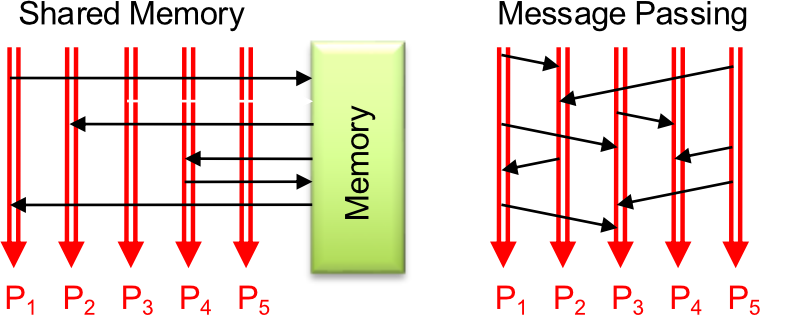
Design Patterns
- Master-slaves
- Problem: Single-point of failure ไง, bottleneck
- ถ้าอยาก Alleviate the problem ก็ have more master ไง
- Producer-consumer flows
- Shared work queues
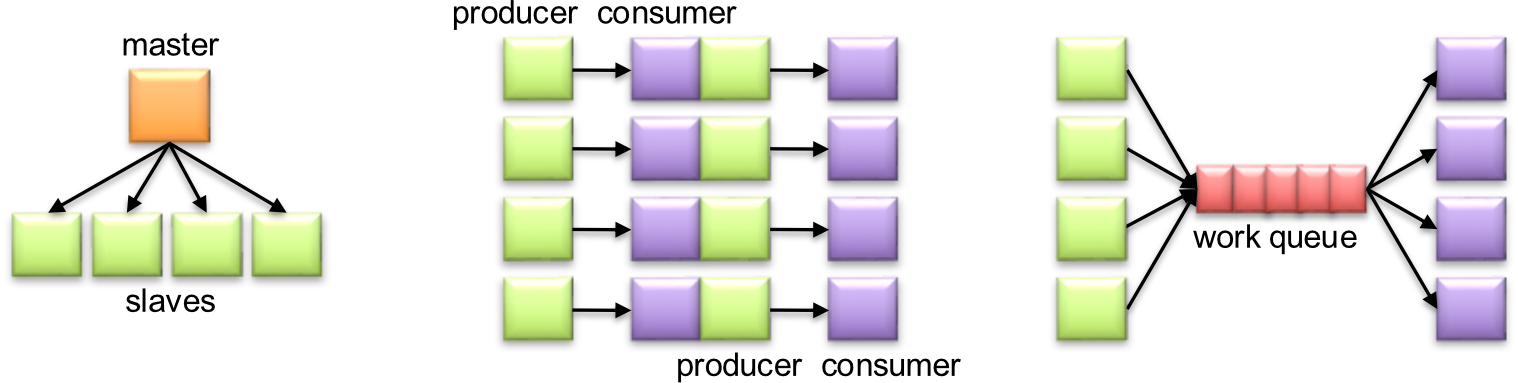
Concurrency Challenge!
Process and execute task simultaneously
Why it's difficult:
- Concurrency is difficult to reason about
- Concurrency is even more difficult to reason about:
- At the scale of datacenters (even across datacenters)
- In the presence of failures
- In terms of multiple interacting services
- Not to mention debugging...
The Reality:
- Lots of one-off solutions, custom code
- Write your own dedicated library, then program with it
- Burden on the programmer to explicitly manage everything
Real-world impact: Before MapReduce, engineers at Google would spend months writing custom distributed processing code for each new problem. With MapReduce, they can focus on the business logic and let the framework handle distribution.
In DBMS: There are concepts about concurrency: two phase locking (lock phase, release phase), timestamp ordering
What's the Point?
It's all about the right level of abstraction
- The von Neumann architecture has served us well, but is no longer appropriate for the multi-core/cluster environment
Goals:
- Hide system-level details from the developers
- No more race conditions, lock contention, etc.
- Separating the what from how
- Developer specifies the computation that needs to be performed
- Execution framework ("runtime") handles actual execution
Note: Von Neumann Architecture refers to a design model for computers where the processing unit, memory, and input-output devices are interconnected through a single, central system bus
Key Ideas
Scale "out", not "up"
- Limits of SMP and large shared-memory machines
- ==Scale out = horizontal scaling, scale up = vertical scaling==
Move processing to the data
- Clusters have limited bandwidth
- How to move process to the data, not wait for data to come!? ทำไงอะ
Process data sequentially, avoid random access
- Seeks are expensive, disk throughput is reasonable
Seamless scalability
- From the mythical man-month to the tradable machine-hour
Analogy: Instead of buying one giant crane (scale "up"), buy 10 smaller cranes (scale "out"). If one breaks, you still have 9 working. If you need more capacity, buy another crane. Much more flexible and fault-tolerant.
Architecture Types
SMP (Symmetric Multiprocessing)
- Contains multiple processors that share the same memory and operate under a single OS
- This architecture enables each processor to work on any task by accessing all I/O devices and data paths, regardless of the location of the data for that task in the centralized memory bank
AMP (Asymmetric Multiprocessing)
- Does not treat all processors equally
- The processing units remain interconnected; however, a primary processor typically runs the OS tasks and then assigns roles or specific tasks to the other processors
- For example, the primary processor can perform I/O operations, while the others handle less intensive tasks
MMP (Massively Multiprocessing)
- Each processor has its own dedicated resources and shares nothing
- Because each processor uses its own OS and memory, you can set up hundreds of processors in an MPP setup
- Enables you to crunch massive amounts of data in parallel
- MPP architecture handles huge amounts of data and provides faster analytics for large data sets
Analogy:
- SMP: Like a shared kitchen where all chefs use the same ingredients from one pantry
- AMP: Like a restaurant with a head chef who assigns tasks to sous chefs
- MMP: Like a food court where each restaurant has its own kitchen, staff, and supplies
Apache Hadoop
Scalable fault-tolerant distributed system for Big Data:
- Data Storage
- Data Processing
- A virtual Big Data machine
- Borrowed concepts/ideas from Google; Open source under the Apache license
Core Hadoop has two main systems:
-
Hadoop/MapReduce: distributed big data processing infrastructure
- Abstract/paradigm
- Fault-tolerant
- Scheduling
- Execution
-
HDFS (Hadoop Distributed File System): fault-tolerant, high-bandwidth, high availability distributed storage
Real-world usage:
- Netflix: Uses Hadoop to process viewing data and generate recommendations
- Facebook: Uses Hadoop to analyze user interactions and optimize news feed
- LinkedIn: Uses Hadoop for "People You May Know" recommendations
- Twitter: Uses Hadoop to analyze trends and optimize ad targeting
MapReduce: Big Data Processing Abstraction
Typical Large-Data Problem
The pattern:
- Iterate over a large number of records
- Extract something of interest from each
- Shuffle and sort intermediate results
- Aggregate intermediate results
- Generate final output
        Map
         ↓
    Intermediate
         ↓
      Reduce
Key idea: Provide a functional abstraction for these two operations
ทำทำไม: ก็ reduce computation cost, communication cost ไงงงงง
MapReduce Programming Model
Programmers specify two functions:
- All values with the same key are sent to the same reducer
- The execution framework handles everything else...
MapReduce Visual Flow
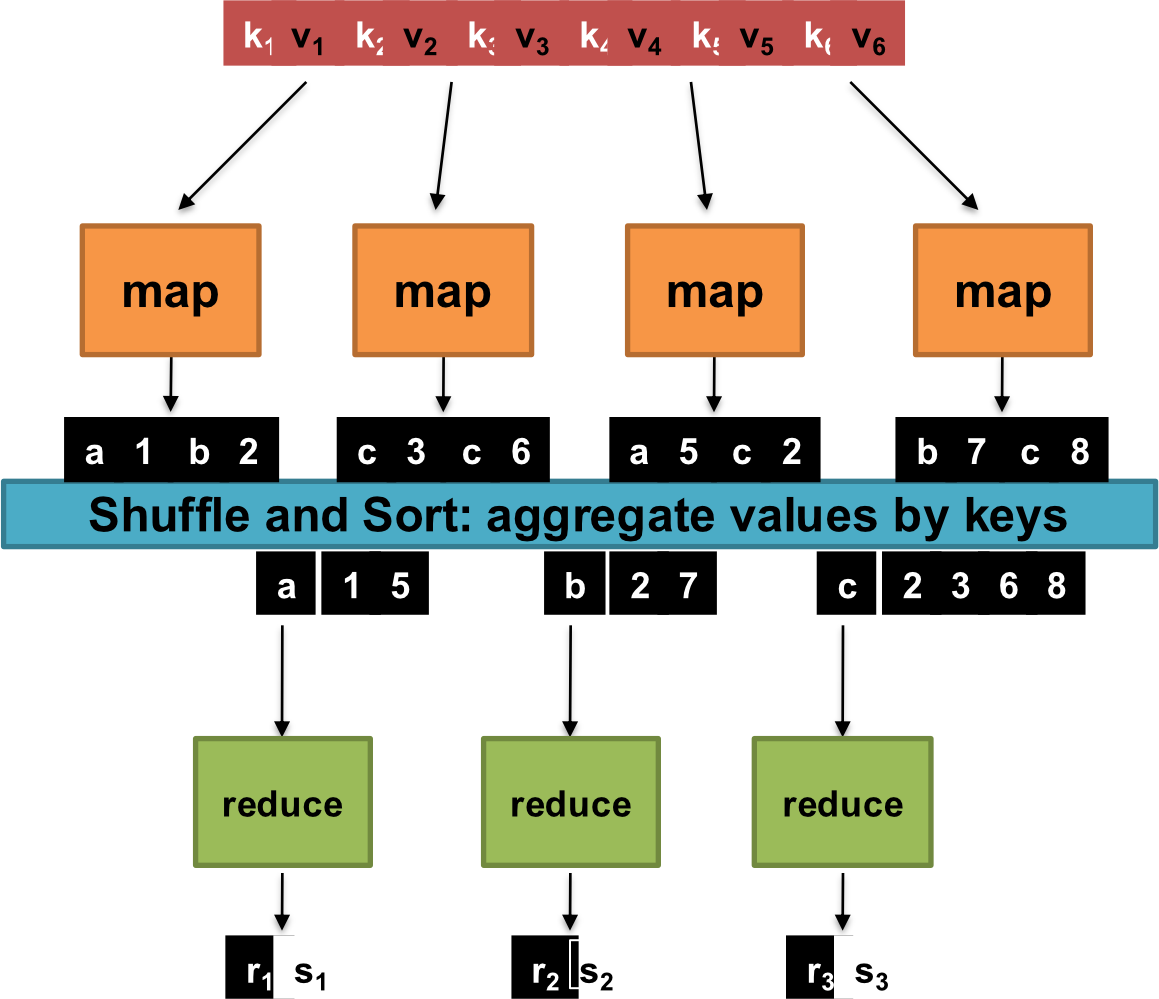
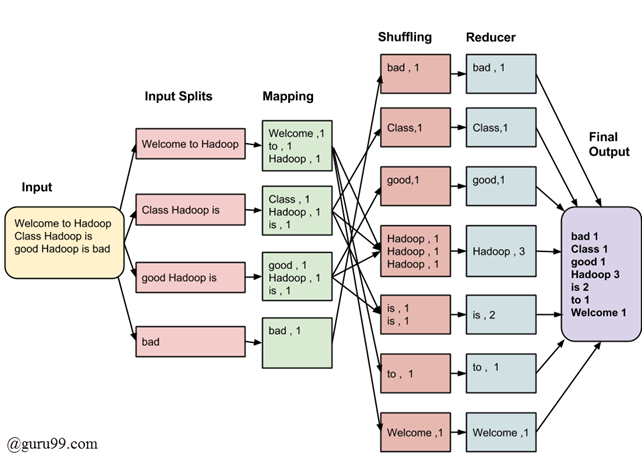
MapReduce Example Applications
The MapReduce model can be applied to many applications:
Distributed grep:
- map: emits a line, if line matched the pattern
- reduce: identity function
Other applications:
- Count of URL access Frequency
- Reverse Web-Link Graph
- Inverted Index
- คืออะไรไปหามา
- Distributed Sort
Note:
grepis a command-line utility for searching plain-text data sets for lines that match a regular expression. Its name comes from the ed command g/re/p (globally search for a regular expression and print matching lines)
MapReduce Runtime
The execution framework handles:
- Handles scheduling
- Assigns workers to map and reduce tasks
- Handles "data distribution"
- Moves processes to data
- Handles synchronization
- Gathers, sorts, and shuffles intermediate data
- Handles errors and faults
- Detects worker failures and restarts
- Everything happens on top of a distributed FS (later)
Additional MapReduce Components
Not quite... usually, programmers also specify:
Partition Function Partitioning in MapReduce
- Often a simple hash of the key, e.g.,
- Divides up key space for parallel reduce operations
Combine Function
- Mini-reducers that run in memory after the map phase
- Used as an optimization to reduce network traffic
Analogy: The combiner is like pre-sorting your recycling at home before the truck comes. Instead of sending 100 individual plastic bottles to the recycling center, you compress them into one bundle. Less to transport, same end result.
Partitioning in MapReduce
What is a partition?
A partition decides which reducer a key–value pair goes to after the map phase and before reduce.
Partition = routing rule for keys to reducers
Input
  ↓
Map
  ↓
(Intermediate key, value)
  ↓
Partition ← YOU are asking about this
  ↓
Shuffle & Sort
  ↓
Reduce
  ↓
Output
Partitioning in Hadoop
- By default, Hadoop uses:
where: - = key
- = number of reducers
Key rule: All identical keys always go to the same reducer
Example: Partitioning
Input
cat dog bird cat dog
Map Output
(cat,1) (dog,1) (bird,1) (cat,1) (dog,1)
Assume: 2 reducers (R = 2)
And (simplified hash):
| Key | hash(key) | hash % 2 | Reducer |
|---|---|---|---|
| cat | 5 | 1 | Reducer 1 |
| dog | 2 | 0 | Reducer 0 |
| bird | 3 | 1 | Reducer 1 |
Partition result:
- Reducer 0 gets:
(dog,1), (dog,1) - Reducer 1 gets:
(cat,1), (cat,1), (bird,1)
Then each reducer runs reduce() independently
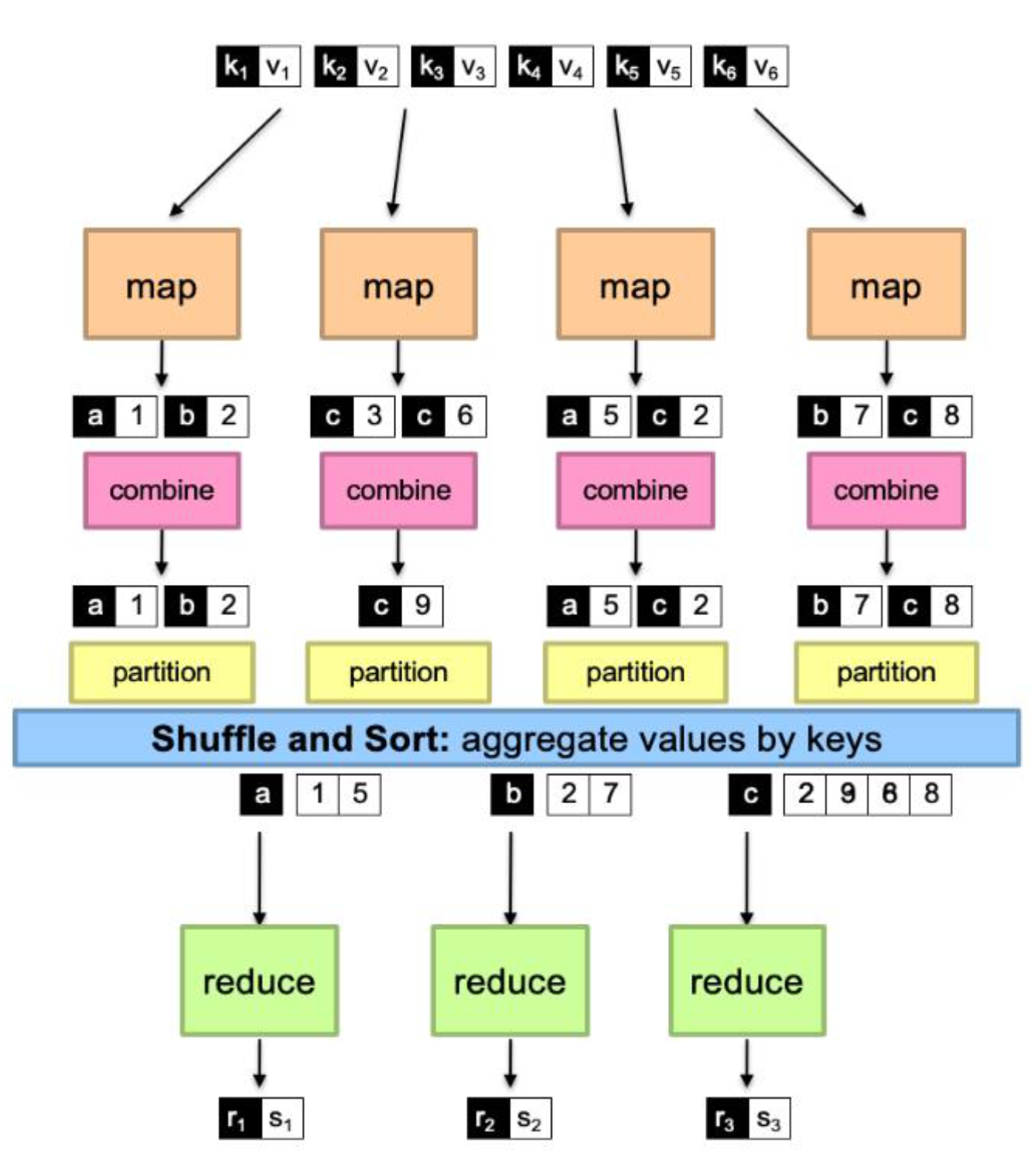
MapReduce with Partition and Combine
        k₁ v₁  k₂ v₂  k₃ v₃  k₄ v₄  k₅ v₅  k₆ v₆
         |      |      |      |
         ↓      ↓      ↓      ↓
       map    map    map    map
         ↓      ↓      ↓      ↓
       a 1    c 3    a 5    b 7
       b 2    c 6    c 2    c 8
         ↓      ↓      ↓      ↓
     combine combine combine combine
         ↓      ↓      ↓      ↓
       a 1    c 9    a 5    b 7
       b 2           c 2    c 8
         ↓      ↓      ↓      ↓
    partition partition partition partition
         |      |      |      |
         └──────┴──────┴──────┘
    Shuffle and Sort: aggregate values by keys
         ┌───────┼───────┐
       a│1 5   b│2 7   c│2 9 8
         ↓       ↓       ↓
      reduce  reduce  reduce
         ↓       ↓       ↓
       r₁ s₁   r₂ s₂   r₃ s₃
Exercise: Partitioning
Given:
- Reducers = 3
- Keys from mapper:
(A,1), (B,1), (C,1), (A,1), (D,1)
Assume hash values:
| Key | hash(key) |
|---|---|
| A | 6 |
| B | 2 |
| C | 7 |
| D | 4 |
Task: Which reducer does each key go to?
Solution:
Using :
- A: → Reducer 0
- B: → Reducer 2
- C: → Reducer 1
- D: → Reducer 1
Why Partitioning Matters?
1. Correctness
If the same key goes to different reducers → wrong results
(e.g., word count split across reducers)
2. Performance (load balancing)
Bad partitioning →
- One reducer overloaded
- Others idle (called data skew)
Real-world example: Imagine counting words in tweets. If your partition function sends all tweets containing "the" to Reducer 1, that reducer will be overwhelmed (since "the" appears in almost every tweet), while other reducers sit idle. Good partitioning distributes work evenly.
Two More Details...
Barrier between map and reduce phases
- But we can begin copying intermediate data earlier
Keys arrive at each reducer in sorted order
- No enforced ordering across reducers
Analogy: Think of an assembly line. Workers can't start packaging (reduce) until all parts are manufactured (map). However, as soon as some parts are ready, we can start moving them to the packaging area, even if manufacturing isn't 100% complete.
MapReduce Can Refer To...
- The programming model
- The execution framework (aka "runtime")
- The specific implementation
Usage is usually clear from context!
"Hello World": Word Count
Map Function
Map(String docid, String text):
    for each word w in text:
        Emit(w, 1);
Reduce Function
Reduce(String term, Iterator<Int> values):
    int sum = 0;
    for each v in values:
        sum += v;
Emit(term, sum);Walkthrough:
- Input: "hello world hello"
- Map output: (hello, 1), (world, 1), (hello, 1)
- After shuffle: hello → [1, 1], world → [1]
- Reduce output: (hello, 2), (world, 1)
MapReduce Implementations
- Has a proprietary implementation in C++
- Bindings in Java, Python
Hadoop
- Open-source implementation in Java
- Development led by Yahoo, used in production
- Now an Apache project
- Rapidly expanding software ecosystem
Custom implementations
- Lots of custom research implementations
- For GPUs, cell processors, etc.
Real-World Production Usage
- Search indexing: Processing web crawl data to build search indexes
- YouTube recommendations: Analyzing viewing patterns
- Gmail spam detection: Processing billions of emails
Amazon
- Product recommendations: "Customers who bought this also bought..."
- Click-stream analysis: Understanding user behavior
- Log analysis: Processing server logs for debugging and optimization
- News Feed ranking: Determining what posts to show users
- Friend suggestions: "People You May Know" feature
- Photo tagging: Processing images for face recognition
Netflix
- Recommendation engine: Processing viewing history for personalized recommendations
- A/B testing: Analyzing experiment results
- Video encoding: Distributed processing of video files
Uber
- Surge pricing: Real-time demand analysis
- Route optimization: Processing GPS data
- Fraud detection: Analyzing ride patterns
Spotify
- Music recommendations: Analyzing listening patterns
- Playlist generation: Processing user preferences
- Artist analytics: Aggregating streaming data
Key Takeaways
- MapReduce solves the parallel processing problem by providing a simple abstraction
- The framework handles all the hard parts: distribution, fault-tolerance, load balancing
- Programmers focus on business logic: just write map() and reduce()
- It scales horizontally: add more machines to process more data
- It's fault-tolerant: if a machine dies, the framework re-runs the task elsewhere
Final Analogy: MapReduce is like conducting an orchestra. The conductor (framework) doesn't play any instruments but coordinates all the musicians (workers) to create beautiful music (processed data). Each musician only needs to know their own part (map/reduce function), not how to coordinate with everyone else.
Notes and Clarifications
- Batch Processing = Processing accumulated data all at once, as opposed to stream processing which handles data as it arrives
- Distributed FS = A file system that stores data across multiple machines, providing redundancy and parallel access
- Intermediate data = The output of map tasks that becomes input to reduce tasks
- Shuffle and Sort = The automatic process of grouping all values for the same key together and sorting by key
Hadoop History
- Dec 2004 — Google GFS paper published
- July 2005 — Nutch uses MapReduce
- Feb 2006 — Becomes Lucene subproject
- Apr 2007 — Yahoo! on 1000-node cluster
- Jan 2008 — An Apache Top Level Project
- Jul 2008 — A 4000 node test cluster
- Sept 2008 — Hive becomes a Hadoop subproject
- Feb 2009 — The Yahoo! Search Webmap is a Hadoop application that runs on more than 10,000 core Linux cluster and produces data that is now used in every Yahoo! Web search query
- June 2009 — On June 10, 2009, Yahoo! made available the source code to the version of Hadoop it runs in production
- In 2010 — Facebook claimed that they have the largest Hadoop cluster in the world with 21 PB of storage. On July 27, 2011 they announced the data has grown to 30 PB
Who Uses Hadoop?
- Amazon/A9
- IBM
- Joost
- Last.fm
- New York Times
- PowerSet
- Veoh
- Yahoo!
Word Count Example
Map Function
public static class TokenizerMapper
    extends Mapper<Object, Text, Text, IntWritable>{

    private final static IntWritable one = new IntWritable(1);
    private Text word = new Text();

    public void map(Object key, Text value, Context context
    ) throws IOException, InterruptedException {
        StringTokenizer itr = new StringTokenizer(value.toString());
        while (itr.hasMoreTokens()) {
            word.set(itr.nextToken());
            context.write(word, one);
        }
    }
}
Reduce Function
public static class IntSumReducer
    extends Reducer<Text,IntWritable,Text,IntWritable> {
    private IntWritable result = new IntWritable();

    public void reduce(Text key, Iterable<IntWritable> values,
                      Context context
    ) throws IOException, InterruptedException {
        int sum = 0;
        for (IntWritable val : values) {
            sum += val.get();
        }
        result.set(sum);
        context.write(key, result);
    }
}
Driver Function
public static void main(String[] args) throws Exception {
    Configuration conf = new Configuration();
    String[] otherArgs = new GenericOptionsParser(conf,
        args).getRemainingArgs();
    if (otherArgs.length != 2) {
        System.err.println("Usage: wordcount <in> <out>");
        System.exit(2);
    }
    Job job = new Job(conf, "word count");
    job.setJarByClass(WordCount.class);
    job.setMapperClass(TokenizerMapper.class);
    job.setCombinerClass(IntSumReducer.class);
    job.setReducerClass(IntSumReducer.class);
    job.setOutputKeyClass(Text.class);
    job.setOutputValueClass(IntWritable.class);
    FileInputFormat.addInputPath(job, new Path(otherArgs[0]));
    FileOutputFormat.setOutputPath(job, new Path(otherArgs[1]));
    System.exit(job.waitForCompletion(true) ? 0 : 1);
}
Word Count Execution Flow
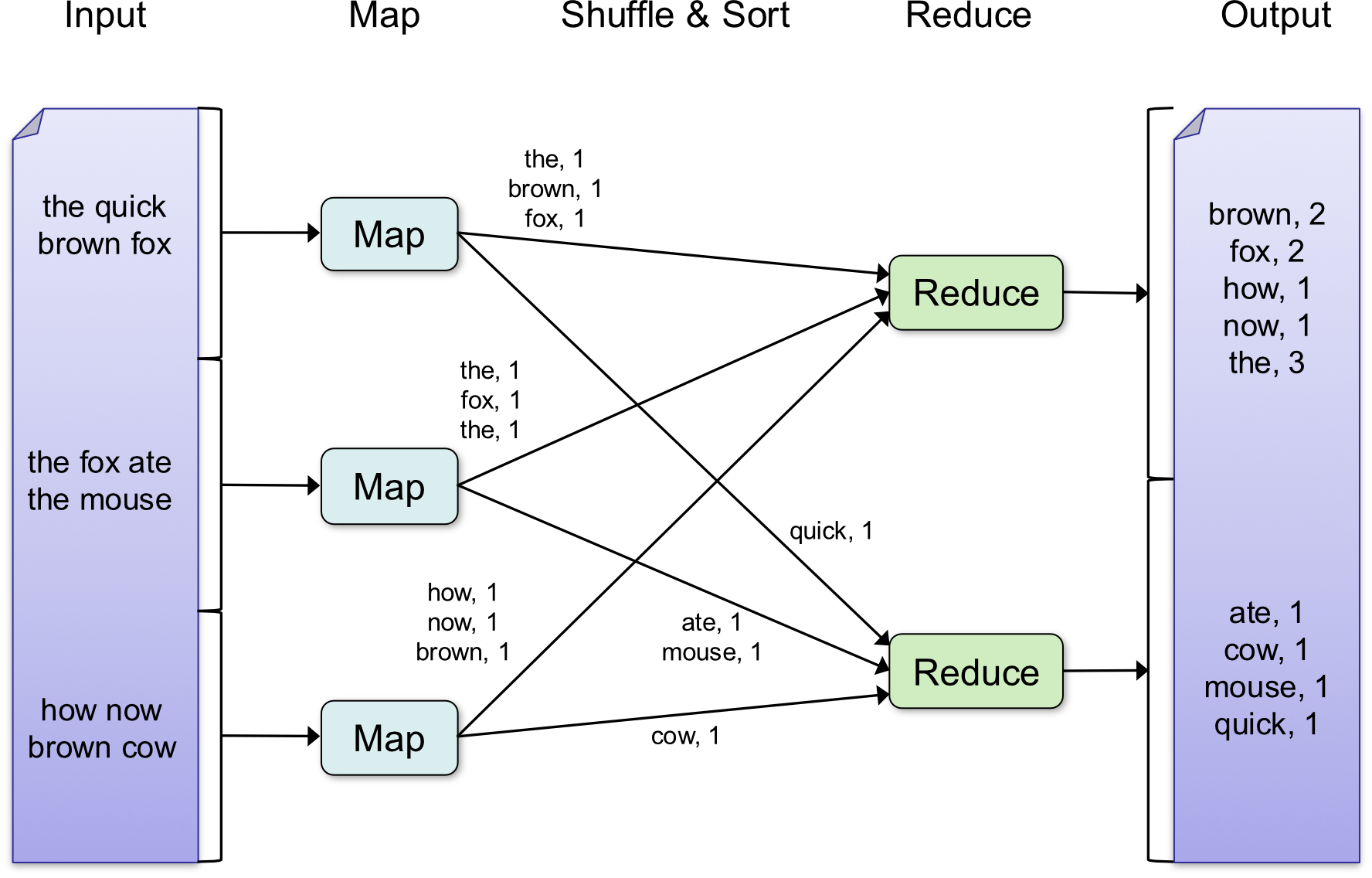
Input → Map → Shuffle & Sort → Reduce → Output
Example:
- Input: "the quick brown fox", "the fox ate the mouse", "how now brown cow"
- Map outputs: (the, 1), (brown, 1), (fox, 1), (quick, 1), etc.
- After Shuffle & Sort: (brown, [1,1]), (fox, [1,1]), (the, [1,1,1]), etc.
- Final Output: (brown, 2), (fox, 2), (how, 1), (now, 1), (the, 3), (ate, 1), (cow, 1), (mouse, 1), (quick, 1)
(the, 1)เลข 1 ข้างหลังนี่คือ Counter นะ
Analogy: Think of MapReduce like organizing a large library:
- Map phase: Different librarians (workers) go through sections and create index cards for each book
- Shuffle & Sort: All index cards are collected and sorted by category
- Reduce phase: Librarians count how many books are in each category
The Combiner Optimization
What is a Combiner?
- A combiner is a local aggregation function for repeated keys produced by same map
- Used for associative operations like sum, count, max
- Decreases size of intermediate data → reduces traffic → reduces communication cost
def combiner(key, values):
    output(key, sum(values))
Example: Word Count with Combiner
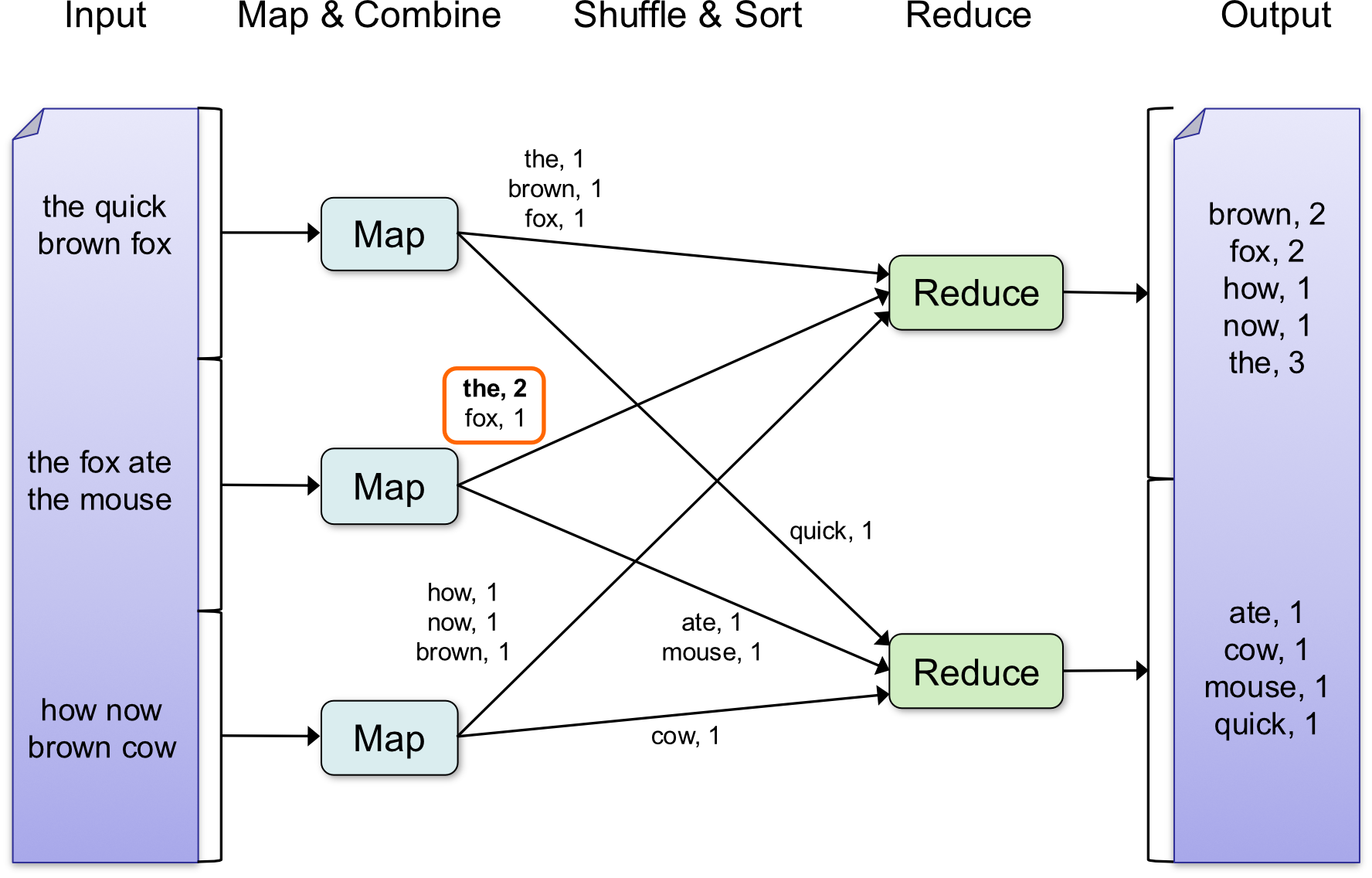
เห็นมั้ยอันนี้จะรวมกันก่อน ตรงสีส้ม ๆ อะ
Without combiner:
- Map 1 outputs: (the, 1), (fox, 1), (the, 1)
- Sent over network: 3 key-value pairs
With combiner:
- Map 1 outputs after combining: (the, 2), (fox, 1)
- Sent over network: 2 key-value pairs
Real-world benefit: In production systems, combiners can reduce network traffic by 50-90% for operations like word counting or log aggregation
Programming Model
Input/Output
- Input: a set of key/value pairs
- Output: a set of key/value pairs
Two Main Functions
- Map task: a single pair → a list of intermediate pairs
- Reduce task: all intermediate pairs with the same → a list of values
Example: Word Count Implementation
def map(input_key, input_value):
    # input_key: document name
    # input_value: document contents
    for word w in input_value:
        EmitIntermediate(w, "1")

def reduce(output_key, intermediate_values):
    # output_key: a word
    # output_values: a list of counts
    result = 0
    for v in intermediate_values:
        result += ParseInt(v)
    Emit(AsString(result))
Exercises #Review
Exercise 1: Inverted Index
Input documents:
- DocA: cloud security cloud
- DocB: security privacy
- DocC: cloud privacy
Task: Create an inverted index: word → list of documents containing it (unique docs only)
Solution approach:
- Map: emit (word, docID) for each word in each document
- Reduce: collect all unique docIDs for each word
Map Phase
Emit (word, docID) สำหรับทุกคำ
| Document | Emitted pairs |
|---|---|
| DocA | (cloud, DocA), (security, DocA), (cloud, DocA) |
| DocB | (security, DocB), (privacy, DocB) |
| DocC | (cloud, DocC), (privacy, DocC) |
Shuffle / Group by key
cloud    → [DocA, DocA, DocC]
security → [DocA, DocB]
privacy  → [DocB, DocC]
Reduce Phase (remove duplicates)
cloud    → [DocA, DocC]
security → [DocA, DocB]
privacy  → [DocB, DocC]
Final Output (Inverted Index)
cloud    → {DocA, DocC}
security → {DocA, DocB}
privacy  → {DocB, DocC}
Exercise 2: Average Score per Student
Input (student, score):
- (Ann, 80)
- (Bob, 70)
- (Ann, 90)
- (Bob, 100)
- (Cat, 60)
Task: Compute average score per student
Solution approach:
- Map: emit (student, score) as-is
- Reduce: calculate average of all scores for each student
Map Phase
Emit (student, score) (as-is)
Ann → 80
Bob → 70
Ann → 90
Bob → 100
Cat → 60
Shuffle / Group by key
Ann → [80, 90]
Bob → [70, 100]
Cat → [60]
Reduce Phase (average)
Ann → (80 + 90) / 2 = 85
Bob → (70 + 100) / 2 = 85
Cat → 60
Final Output
Ann → 85
Bob → 85
Cat → 60
MapReduce Example Applications
The MapReduce model can be applied to many applications:
- Distributed grep
- Map: emits a line if line matched the pattern
- Reduce: identity function
- Count of URL Access Frequency
- Reverse Web-Link Graph
- Inverted Index
- Distributed Sort
Note on grep: grep is a command-line utility for searching plain-text data sets for lines that match a regular expression. The name comes from the ed command g/re/p (globally search for a regular expression and print matching lines)
MapReduce Implementation
Infrastructure (circa 2004)
MapReduce implementation matched Google infrastructure at the time:
- Large cluster of commodity PCs connected via switched Ethernet
- Machines: Dual-processor x86, running Linux, 2-4GB of memory (slow by today's standards)
- Cluster of machines → failures are anticipated
- Storage: Google File System (GFS) on IDE disks attached to PCs
- GFS is a distributed file system
- Uses replication for availability and reliability
Scheduling System
- Users submit jobs
- Each job consists of tasks
- Scheduler assigns tasks to machines
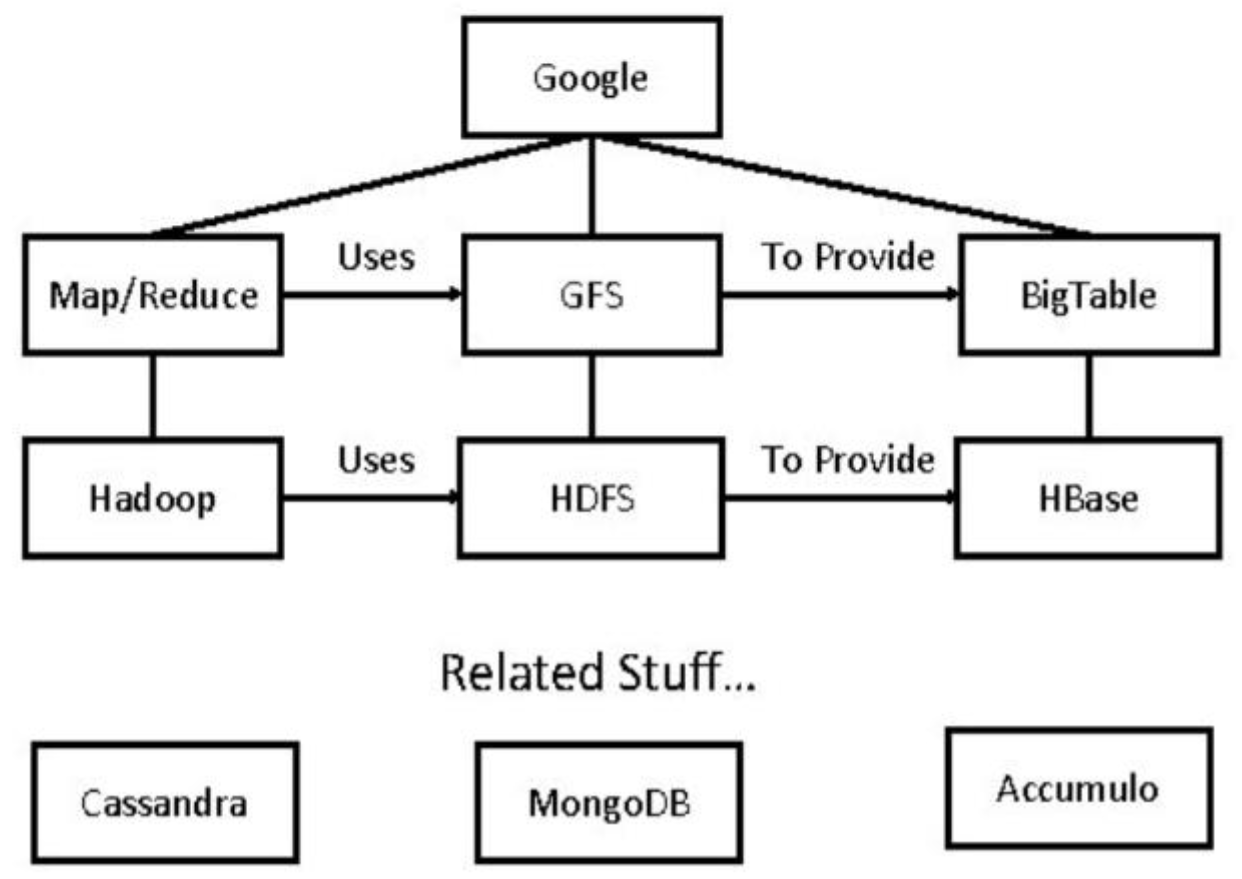
Google File System (GFS)
Key Characteristics
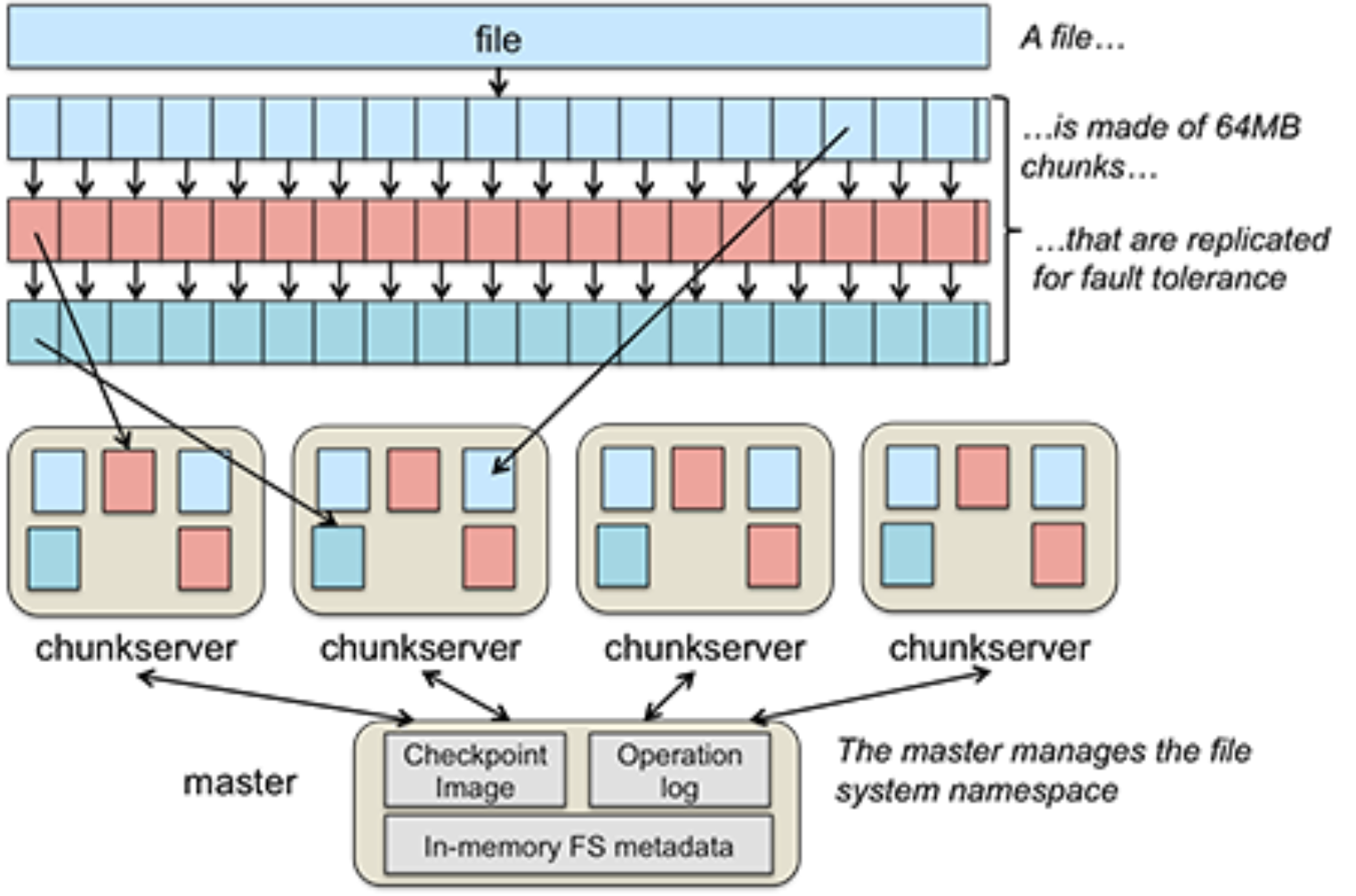
- File is divided into several chunks of predefined size
- Typically 16-64 MB
- The system replicates each chunk by a number
- Usually three replicas
- To achieve fault-tolerance, availability and reliability
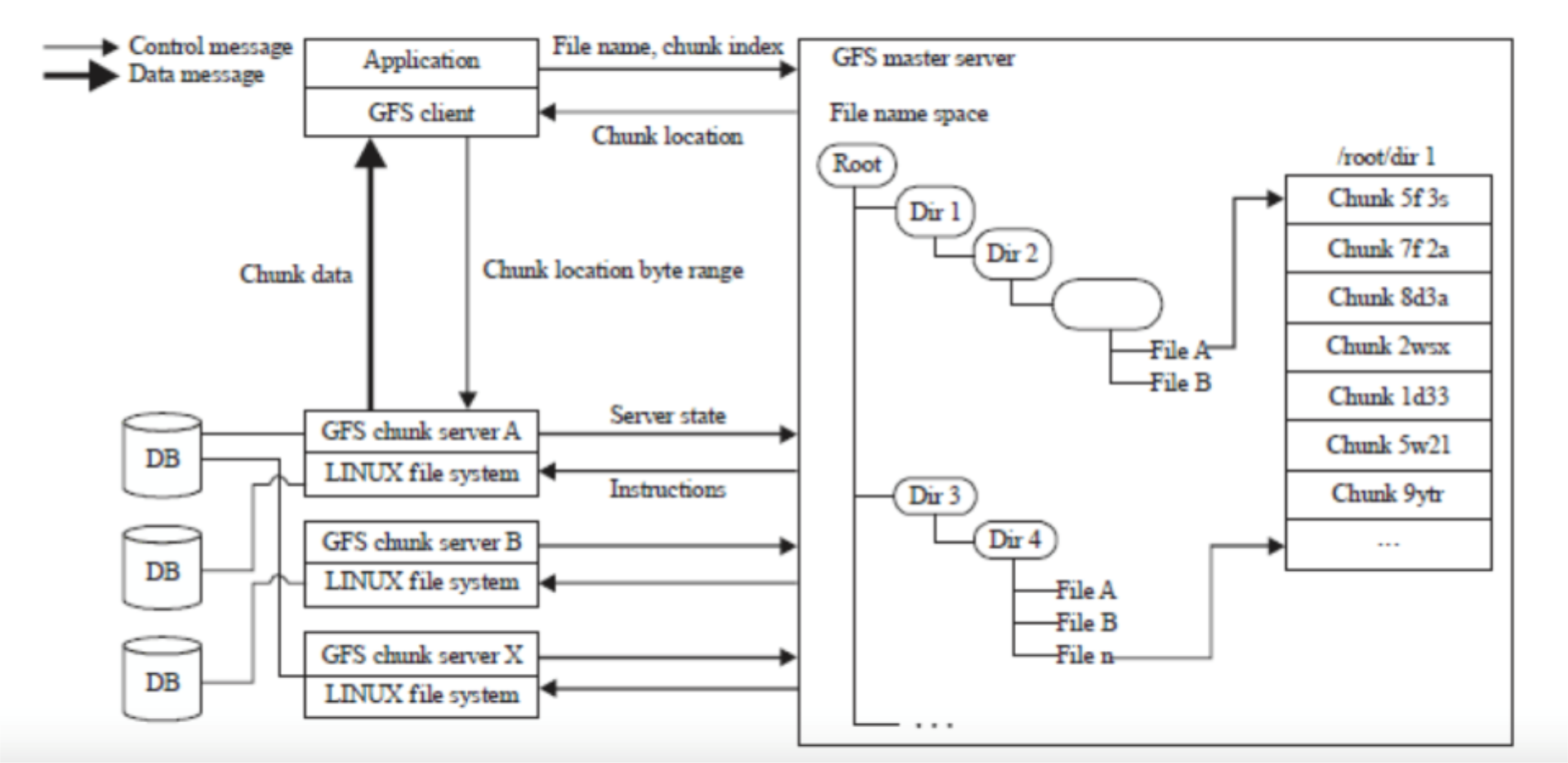
GFS Architecture
IMAGE: GFS Architecture diagram showing master server, chunk servers, and client interactions
Design Criteria & Assumptions
- Detect, tolerate, recover from failures automatically
- Large files, >= 100 MB in size
- Large, streaming reads (>= 1 MB in size)
- Read once
- Large, sequential writes that append
- Write once
- Concurrent appends by multiple clients (e.g., producer-consumer queues)
- Want atomicity for appends without synchronization overhead among clients
- Atomic → solid state of the data (commit or abort) = Self-contained and completed
How GFS Works at a High Level
Client Read
- Send file name and offset to master
- Master replies with chunk_handle + location (set of servers storing that chunk)
- Location: Maybe IP Address
- Clients cache that information for a little while
- Information ตรงนี้ก็คือ Location + chunk_handle ไงงง
- Read from nearest chunk server
Client Write
- Ask master where to store
- Master returns chunk_handle + location
- Send writes to the 3 chunk servers
- Need to ask master again whenever crossing 64 MB boundary
3 chunk servers ตรงนี้คือส่งไปอยู่ทั่วโลกหรอ แบบนี้ดีต่อโลกใบนี้มั้ย
Contents
Architecture Components
- One master server (state replicated on backups)
- Many chunk servers (100s – 1000s)
- Spread across racks; intra-rack bandwidth greater than inter-rack
- Chunk: 64 MB portion of file, identified by 64-bit, globally unique ID
- Many clients accessing same and different files stored on same cluster
Master Server
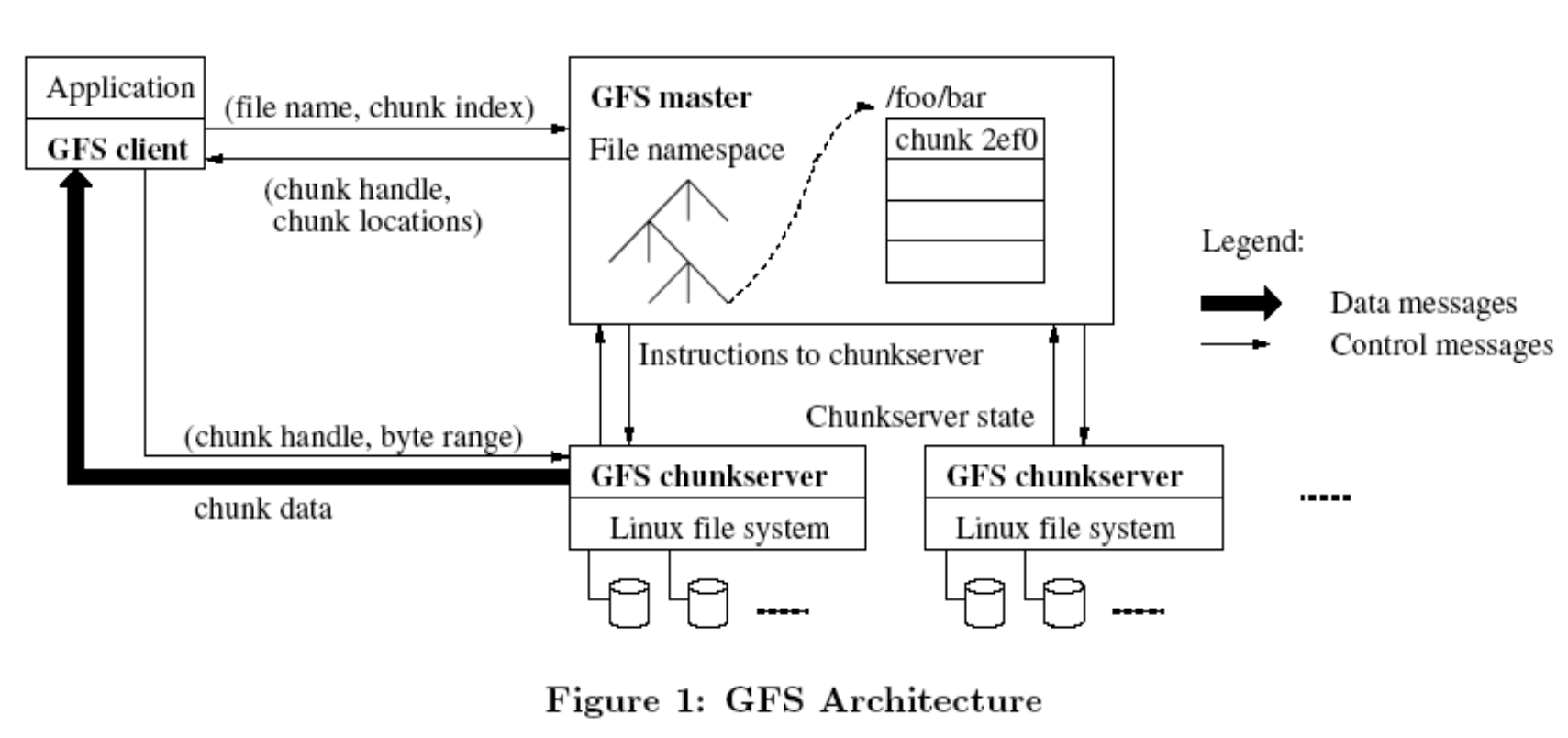
Responsibilities
Holds all metadata:
- Namespace (directory hierarchy)
- Access control information (per-file)
- Mapping from files to chunks
- Current locations of chunks (chunkservers)
Operations:
- Delegates consistency management
- Garbage collects orphaned chunks
- Migrates chunks between chunkservers
Key feature: Holds all metadata in RAM → very fast operations on file system metadata
Client
Client Characteristics
- Issues control (metadata) requests to master server
- Issues data requests directly to chunkservers
- Caches metadata
- Does no caching of data
- No consistency difficulties among clients
- Streaming reads (read once) and append writes (write once) don't benefit much from caching at client
Client Read Process
- Client sends master:
read(file name, chunk index) - Master's reply: chunk ID, chunk version number, locations of replicas
- Client sends "closest" chunkserver with replica:
read(chunk ID, byte range)- "Closest" determined by IP address on simple rack-based network topology
- Chunkserver replies with data
Client Write
Replica Placement
- 3 replicas for each block → must write to ALL
- When block created, Master decides placements
- Default: two within single rack, third on a different rack
- Why? Access time / safety tradeoff
Distribution Strategy
- 3 copies/replicas
- 2 copies → Same RACK
- 1 copy → different RACK
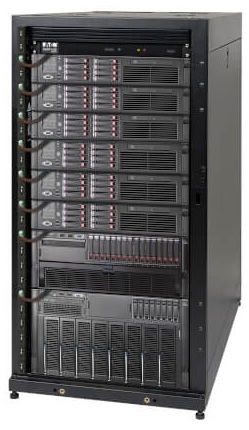
Analogy: Like keeping backups of important documents - you keep two copies in your office (same rack) for quick access, and one copy at home (different rack) in case the office burns down.
Atomic Record Appends
Process
- Client pushes data to all replicas
- Sends request to primary
- If record does not fit in chunk, primary pads current chunk and tells client to retry with new chunk
- Primary writes data, tells replicas to do the same at its chosen offset
Failure Handling
- If any replica fails, client retries
- Different replicas may end up storing different sequences of bits
- On success, data written everywhere at the same offset
- Clients need to handle inconsistencies (see before)
Parallel Execution
อยากให้ Parallel เยอะ ๆ ก็ specify Mapper เยอะ ๆ (CHECK?)
User Specifies
- M: number of map tasks
- R: number of reduce tasks
Map Phase
- MapReduce library splits the input file into M pieces
- Typically 16-64MB per piece
- Map tasks are distributed across the machines
Reduce Phase
- Partitioning the intermediate key space into R pieces
- This generates R reduce tasks (each responsible for different partition) that get mapped to different machines in parallel
Typical Setting
- 2,000 machines
- M = 200,000
- R = 5,000
Execution Flow
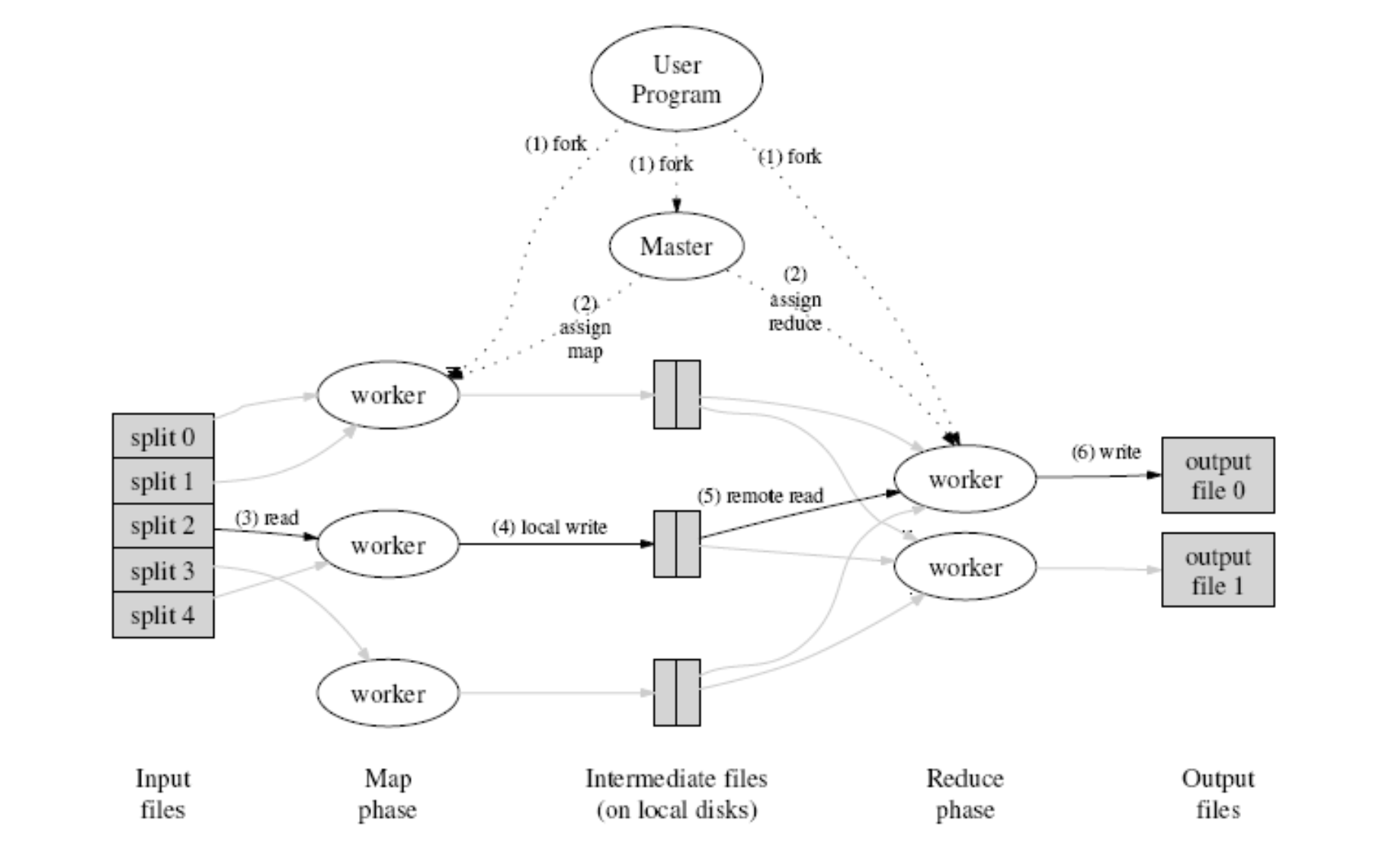
- User Program forks Master
- Master assigns map and reduce tasks to workers
- Workers read input splits
- Map phase processes data
- Intermediate files written to local disks
- Reduce workers read intermediate data
- Final output written to output files
Phases: Input files → Map phase → Intermediate files (on local disks) → Reduce phase → Output files
HDFS - MapReduce Integration
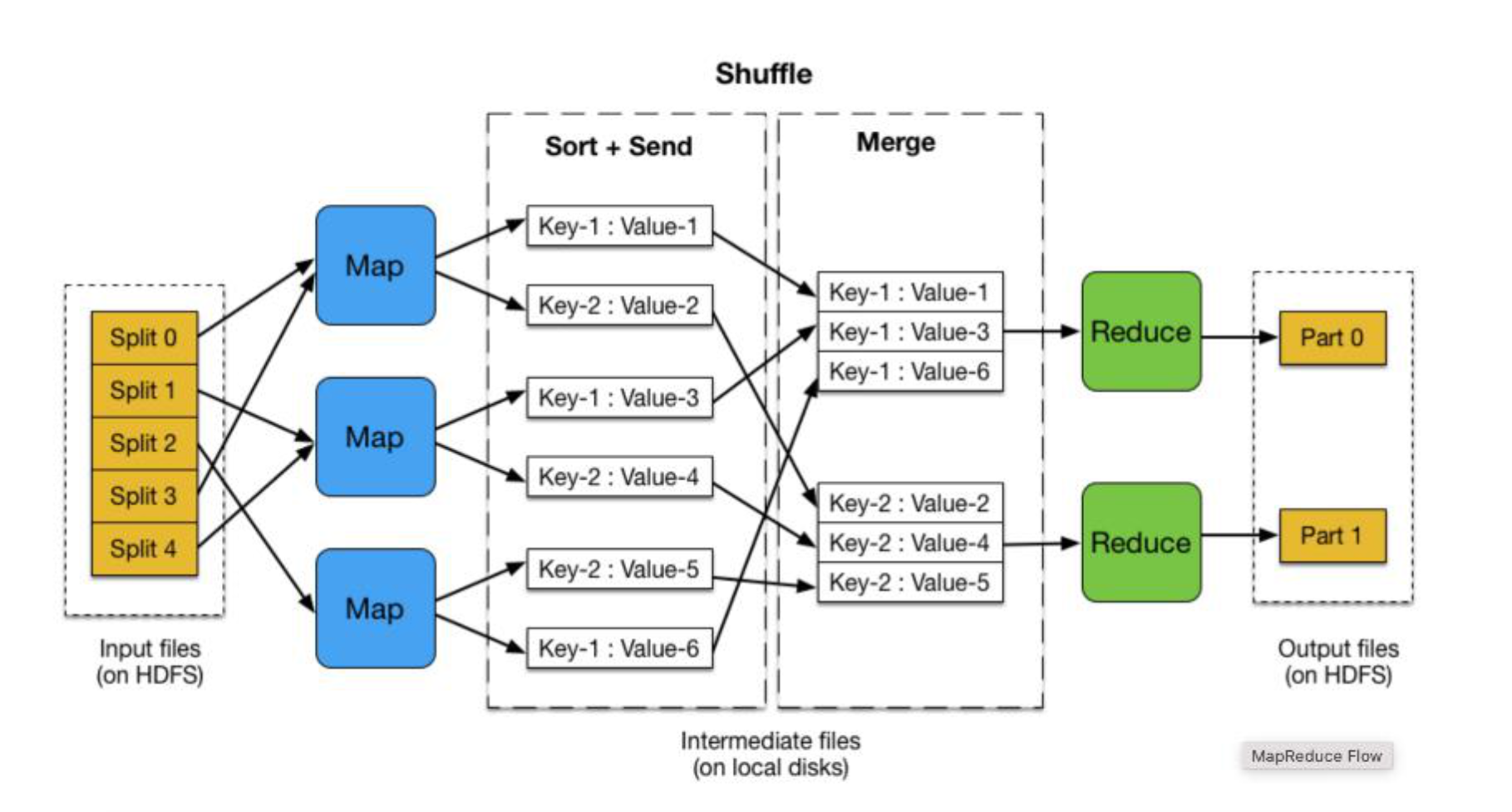
- Input files (on HDFS) → Split 0-4
- Map phase with multiple mappers
- Shuffle phase: Sort + Send and Merge operations
- Key-Value pairs grouped: (Key-1: Value-1), (Key-2: Value-2), etc.
- Reduce phase
- Output files (on HDFS)
- Intermediate files (on local disks)
Real-world usage: This architecture is used by companies like Netflix for processing billions of events per day for recommendation systems, and by Uber for analyzing trip data across millions of rides.
Word Count MapReduce Example
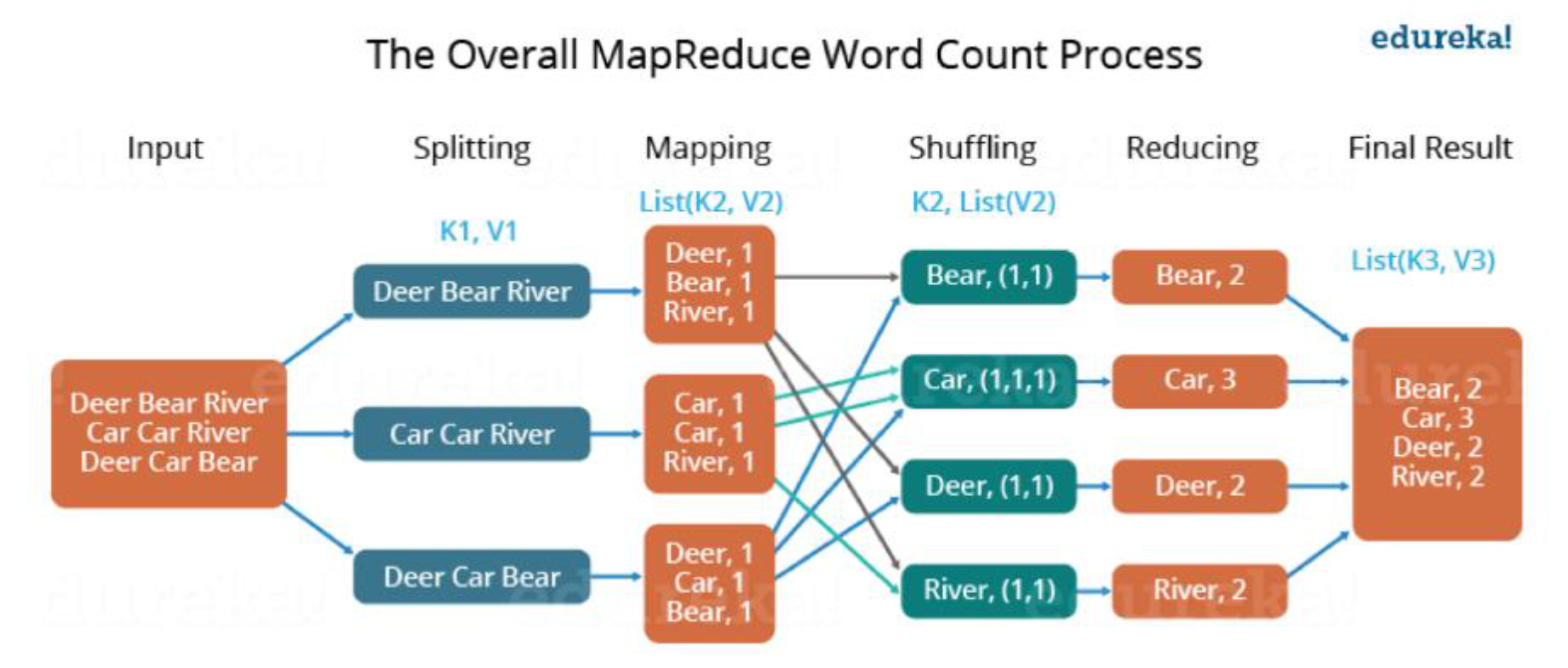
Input: "Deer Bear River Car Car River Deer Car Bear"
Splitting: Three splits with different word combinations
Mapping: Each word mapped to (word, 1)
- List(K2, V2) format
Shuffling:
- K2, List(V2) format
- Groups like: Bear(1,1), Car(1,1,1), Deer(1,1), River(1,1)
Reducing:
- Bear → 2
- Car → 3
- Deer → 2
- River → 2
Final Result: List(K3, V3)
Combiner → Shuffling
Combiner - Local Reduce
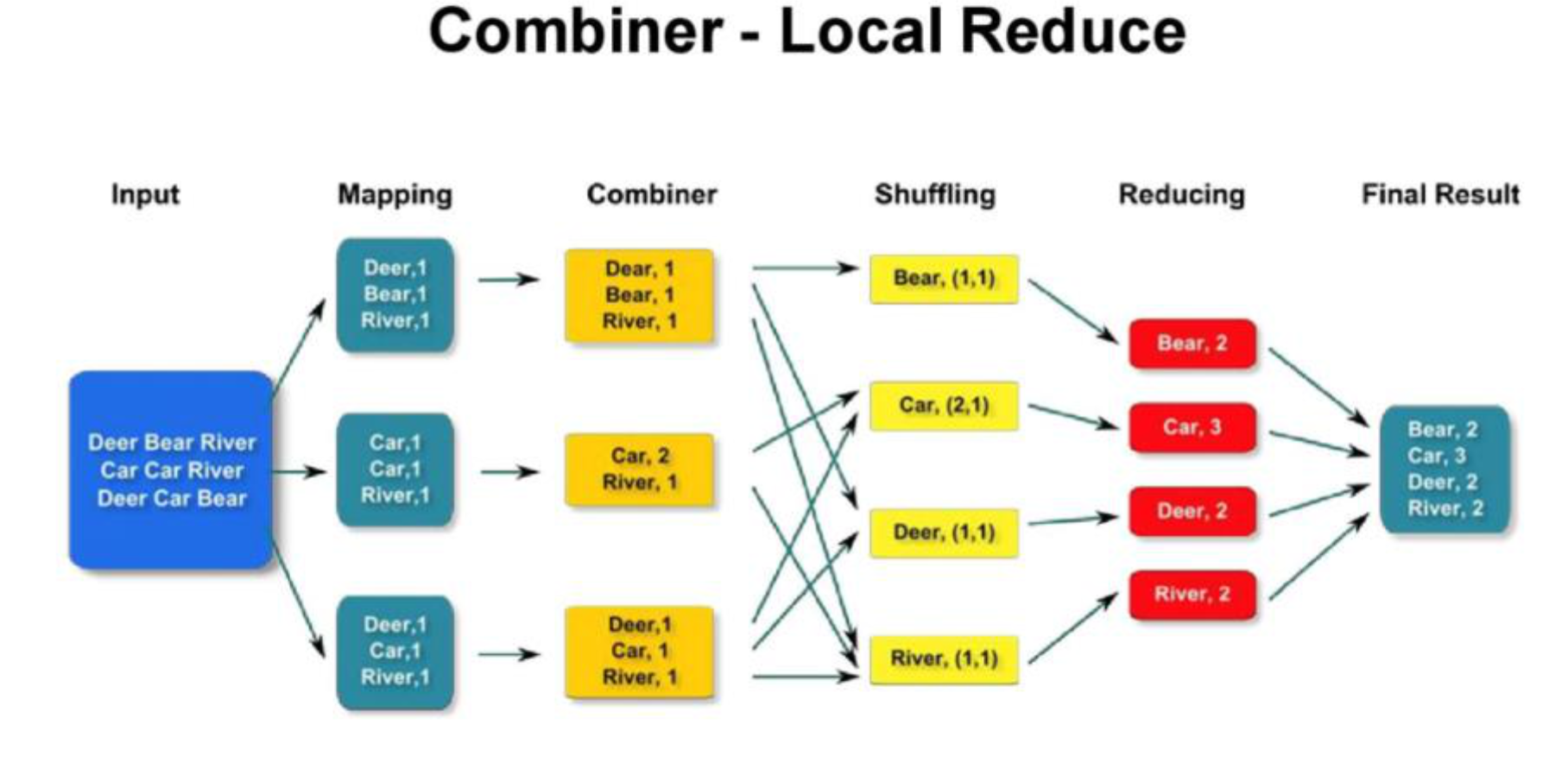
Input → Mapping → Combiner → Shuffling → Reducing → Final Result
Example process:
- Mapping: (Deer,1), (Bear,1), (River,1)
- After Combiner: (Dear,1), (Bear,1), (River,1) [local aggregation]
- Shuffling groups by key: Bear(1,1), Car(2,1), Deer(1,1), River(1,1)
- Reducing produces final counts: Bear:2, Car:3, Deer:2, River:2
Key benefit: Combiner reduces data transfer between Map and Reduce phases, which is crucial when dealing with petabytes of data in production systems.
More MapReduce Examples
Example: Movie Ratings
Writing the Mapper
Input data:
USER ID | MOVIE ID | RATING | TIMESTAMP
196 242 3    881250949        → Map → 3,1
186 302 3    891717742        → Map → 3,1
196 377 1    878887116        → Map → 1,1
244  51 2    880606923        → Map → 2,1
166 346 1    886397596        → Map → 1,1
186 474 4    884182806        → Map → 4,1
186 265 2    881171488        → Map → 2,1
After Shuffle & Sort:
- 1 → 1, 1
- 2 → 1, 1
- 3 → 1, 1
- 4 → 1
After Reduce:
- 1, 2
- 2, 2
- 3, 2
- 4, 1
Code:
def mapper_get_ratings(self, _, line):
    (userID, movieID, rating, timestamp) = line.split('\t')
    yield rating, 1

def reducer_count_ratings(self, key, values):
    yield key, sum(values)
Putting It All Together
from mrjob.job import MRJob
from mrjob.step import MRStep

class RatingsBreakdown(MRJob):
    def steps(self):
        return [
            MRStep(mapper=self.mapper_get_ratings,
                  reducer=self.reducer_count_ratings)
        ]

    def mapper_get_ratings(self, _, line):
        (userID, movieID, rating, timestamp) = line.split('\t')
        yield rating, 1

    def reducer_count_ratings(self, key, values):
        yield key, sum(values)

if __name__ == '__main__':
    RatingsBreakdown.run()
Master Data Structures
For Each Map/Reduce Task
- State status:
{idle, in-progress, completed} - Identity of the worker machine (for non-idle tasks)
Information Flow
- The location of intermediate file regions is passed from maps to reducers tasks through the master
- This information is pushed incrementally (as map tasks finish) to workers that have in-progress reduce tasks
Fault-Tolerance
Two Types of Failures
1. Worker Failures
Detection:
- Identified by sending heartbeat messages by the master
- If no response within a certain amount of time → worker is dead
Recovery:
- In-progress and completed map tasks are re-scheduled → idle
- In-progress reduce tasks are re-scheduled → idle
- Workers executing reduce tasks affected from failed map/workers are notified of re-scheduling
Question: Why do completed tasks have to be re-scheduled?
Answer: Map output is stored on local fs, while reduce output (final output) is stored on GFS
2. Master Failure
- Rare
- Can be recovered from checkpoints
- ต่างกับ Backups มั้ยน้ออออ
- Solution: aborts the MapReduce computation and starts again
Real-world example: Google's production systems automatically handle thousands of machine failures per day without human intervention, making the system highly reliable for critical applications.
Disk Locality
Motivation
- Network bandwidth is a relatively scarce resource and also increases latency
- Goal: Save network bandwidth
Implementation
- Use of GFS that stores typically three copies of the data block on different machines
- Map tasks are scheduled "close" to data*
- On nodes that have input data (local disk)
- If not, on nodes that are nearer to input data (e.g., same switch)
Analogy: Like assigning workers to warehouses closest to their homes - reduces commute time (network latency) and traffic congestion (bandwidth usage).
Task Granularity
Granularity = number of task that more than number of worker nodes
Design Considerations
- Number of map tasks > number of worker nodes
- Better load balancing
- Better recovery
- But, this increases load on the master
- More scheduling
- More states to be saved
Choosing M and R
- M could be chosen with respect to the block size of the file system
- For locality properties
- R is usually specified by users
- Each reduce task produces one output file
Stragglers
Problem
- Slow workers delay overall completion time → stragglers
- Bad disks with soft errors
- Other tasks using up resources
- Machine configuration problems, etc.
Solution: Backup Tasks
- Very close to end of MapReduce operation, master schedules backup execution of the remaining in-progress tasks
- A task is marked as complete whenever either the primary or the backup execution completes
Impact
Example: Sort operation takes 44% longer to complete when the backup task mechanism is disabled
Production insight: At scale, stragglers are inevitable. Netflix found that backup tasks reduced job completion time by 30-40% in their data processing pipelines.
Refinements: Partitioning Function
ซ้ำ แต่อาจจะมีอะไรน่าสนใจ ลองอ่านดูได้ อาจาย์ข้าม
Purpose
Partitioning function identifies the reduce task
Configuration
- Users specify the desired output files they want, R
- But, there may be more keys than R
- Uses the intermediate key and R
Default Function
Custom Partitioning
Important to choose well-balanced partitioning functions:
Example:
For output keys that are URLs
Why custom partitioning?: If you're processing web logs by domain, using hostname ensures all data for each domain goes to the same reducer, enabling domain-specific analytics.
Refinements: Combiner Function
Purpose
Introduce a mini-reduce phase before intermediate data is sent to reduce
When to Use
- When there is significant repetition of intermediate keys
- Merge values of intermediate keys before sending to reduce tasks
Example: Word Count
- Many records of the form
<word_name, 1> - Merge records with the same
word_name
Properties
- Similar to reduce function
- Saves network bandwidth
Performance impact: In production log processing systems, combiners typically reduce intermediate data by 80-95%, dramatically improving job performance.
Real-World Production Usage
Cloud Services Using MapReduce Principles
-
Amazon EMR (Elastic MapReduce)
- Managed Hadoop framework
- Used for: log analysis, data warehousing, machine learning
- Example: Yelp processes billions of log events daily
-
Google Cloud Dataproc
- Managed Spark and Hadoop service
- Used for: batch processing, streaming, machine learning
- Example: Spotify uses it for music recommendation algorithms
-
Azure HDInsight
- Cloud distribution of Hadoop components
- Used for: ETL operations, data warehousing, IoT data processing
- Example: Adobe processes petabytes of customer analytics data
-
AWS Athena
- Serverless query service using MapReduce principles
- Used for: querying data in S3 using SQL
- Example: Financial institutions analyze transaction logs
Modern Evolution
While traditional MapReduce has evolved, its principles are embedded in:
- Apache Spark - In-memory data processing (faster than Hadoop MapReduce)
- Apache Flink - Stream processing with batch capabilities
- Google Cloud Dataflow - Unified stream and batch processing
- AWS Glue - Serverless ETL service
Practical Applications
-
E-commerce: Product recommendation systems
- Map: User browsing behavior
- Reduce: Aggregate patterns to suggest products
-
Social Media: Trend analysis
- Map: Individual posts/tweets
- Reduce: Aggregate mentions, hashtags
-
Healthcare: Genomic data analysis
- Map: Process DNA sequences in parallel
- Reduce: Identify patterns and mutations
-
Finance: Fraud detection
- Map: Analyze individual transactions
- Reduce: Detect suspicious patterns
-
IoT: Sensor data processing
- Map: Process data from millions of devices
- Reduce: Aggregate for monitoring and alerts
Summary
- MapReduce is a very powerful and expressive model
- Performance depends a lot on implementation details
Original Paper
Material is from the paper:
"MapReduce: Simplified Data Processing on Large Clusters"
- Authors: Jeffrey Dean and Sanjay Ghemawat from Google
- Published in: Usenix OSDI conference, 2004
Key Takeaways
- Simplicity: Abstract complex distributed computing into two functions (map and reduce)
- Scalability: Handle petabytes of data across thousands of machines
- Fault-tolerance: Automatic handling of machine failures
- Locality: Process data where it's stored to minimize network traffic
- Load balancing: Distribute work evenly across cluster
Modern Impact
While newer systems have emerged, MapReduce principles remain fundamental to:
- Big data processing
- Distributed systems design
- Cloud computing architectures
- Data engineering workflows
Additional Notes and Tips
Best Practices
- Design for idempotency: Map and Reduce functions should produce same output for same input
- Minimize data shuffle: Use combiners when possible
- Optimize partitioning: Ensure balanced distribution across reducers
- Monitor stragglers: Identify and address slow workers
- Consider data locality: Schedule tasks near their data
Common Pitfalls
-
Small files problem: Too many small input files creates overhead
- Solution: Combine small files before processing
-
Data skew: Some keys have many more values than others
- Solution: Use better partitioning or handle hot keys specially
-
Memory issues: Reduce tasks run out of memory
- Solution: Increase memory or use secondary sorting
Performance Tuning
- Adjust M (map tasks) based on input size and cluster size
- Set R (reduce tasks) to balance parallelism and output files
- Use compression for intermediate data
- Enable speculative execution for stragglers
- Profile and identify bottlenecks
Glossary
- Chunk: Fixed-size portion of a file (typically 64MB in GFS)
- Combiner: Local aggregation function that runs after map, before reduce
- GFS: Google File System - distributed file system used by MapReduce
- HDFS: Hadoop Distributed File System - open-source equivalent of GFS
- Intermediate data: Output from map phase, input to reduce phase
- Partition: Subset of intermediate data assigned to a specific reducer
- Replica: Copy of data stored on different machines for fault tolerance
- Shuffle: Process of redistributing data between map and reduce phases
- Straggler: Slow worker that delays job completion
- Worker: Machine that executes map or reduce tasks