Background
Roles of the Main Memory
- Main memory is a large array of addressable units (bytes or words), each with a unique memory address.
- It is divided into:
- Kernel space: reserved for the OS and privileged operations.
- User space: allocated for user-level applications.
- CPU can directly access only:
- Registers: extremely fast, but limited in size.
- Main memory (RAM): larger, but slower than registers.
- Execution Dependency: The CPU only executes instructions/data in registers or RAM.
- If data resides in secondary storage (like SSDs), it must be loaded into RAM (e.g., via demand paging).
💡 iOS analogy: Think of registers as the CPU's "cache" in your Swift app — super quick for current variables. RAM is like app memory; if you’re calling large files from disk, they need to be loaded in first.
Memory Terminology
- Memory Word: A fixed-sized group of bits (e.g., 8, 16, 32, 64...128 bits).
- Word size affects how powerful a system is: larger words = faster data processing and larger address space.
- Byte: Always 8 bits.
- Word sizes in bytes:
- 8-bit word = 1 byte
- 16-bit word = 2 bytes
- 32-bit word = 4 bytes
- 64-bit word = 8 bytes
- Word sizes in bytes:
- Word-addressable memory (assumed in lecture):
- Each address refers to a full word (not just a byte).
- Modern systems use byte-addressable memory — each address maps to 1 byte.
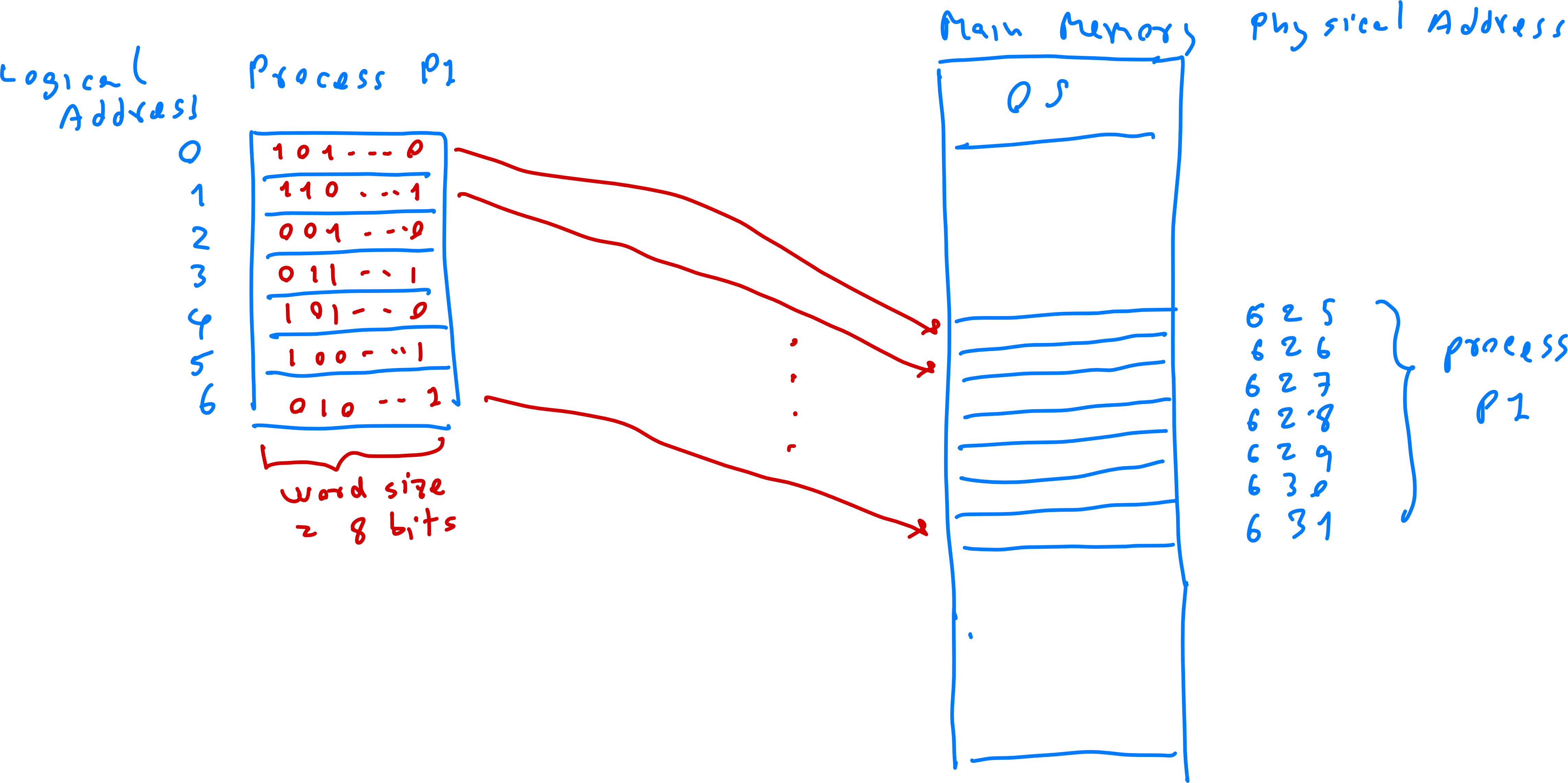
Logical Diagram of a Process
- A process is modeled as:
- A list of
Maxrows (instructions/process). - Each row has a logical address (from to ).
- Each row stores a word (machine code or data).
- Each word has a specific bit length (e.g., 8, 16...).
- A list of
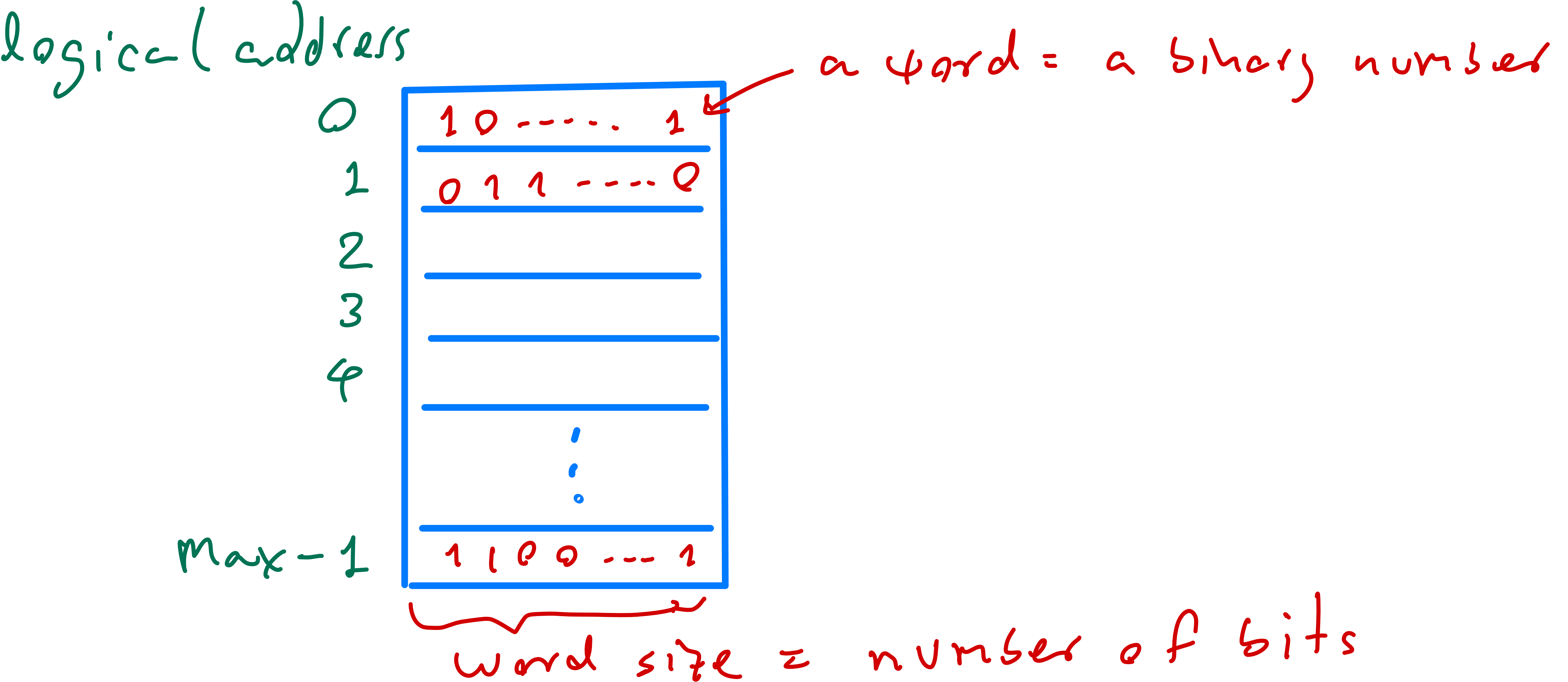
Main-Memory Diagram Storing Processes (Physical View)
- The main memory is:
- Split into kernel space and user space.
- User processes are stored only in user space.
- Made up of
Nrows (physical memory cells). - Each row has a physical address ( to ).
- Each row stores 1 word (same size as in the process).
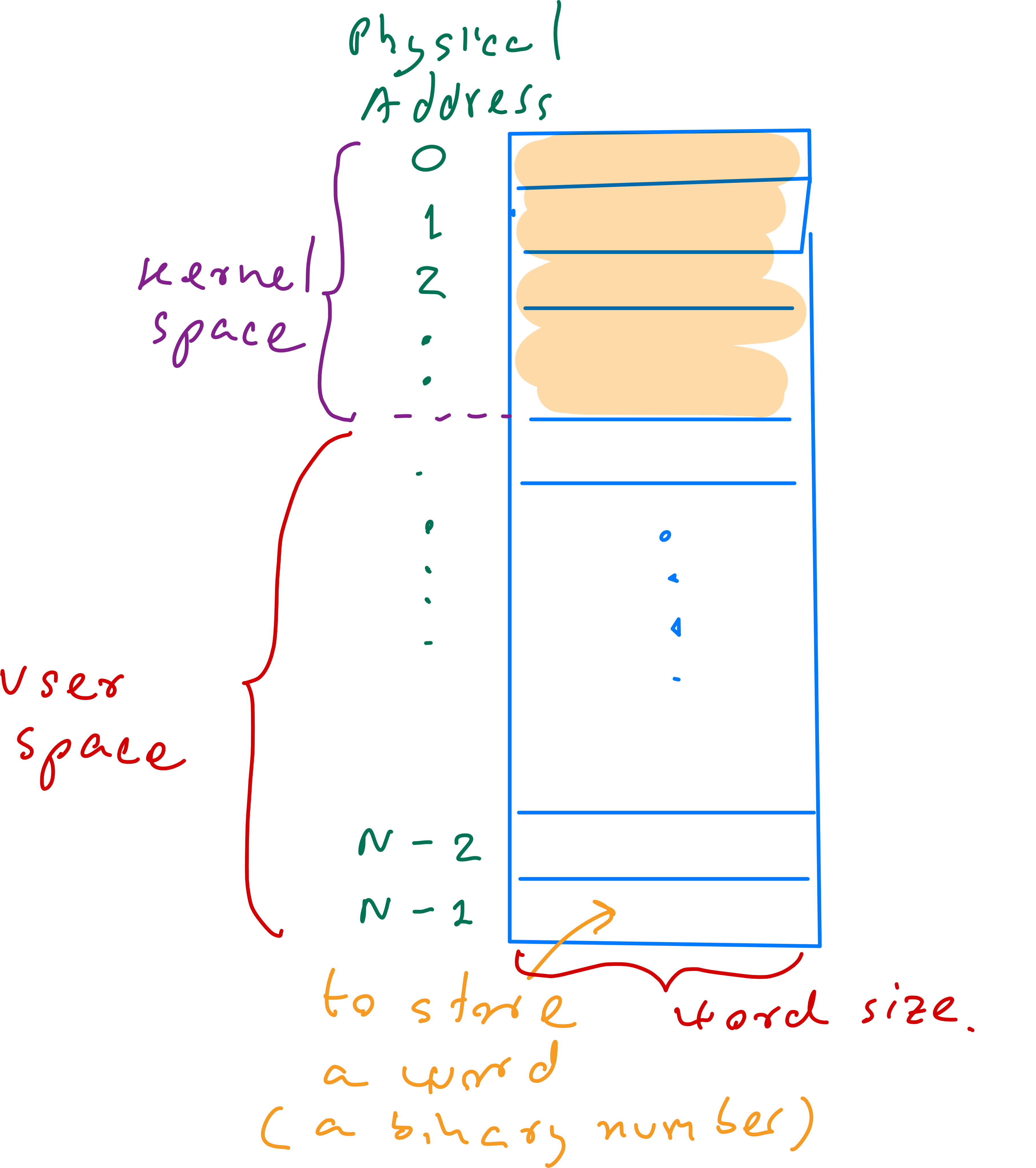
Example
Size of a process – Example 1
- Given: Process has 256 words, each of 16 bits.
- Find:
- Logical addresses: to
- Size:
- In bits: bits
- In bytes: bytes
- In kilobytes: KB
Size of a process – Example 2
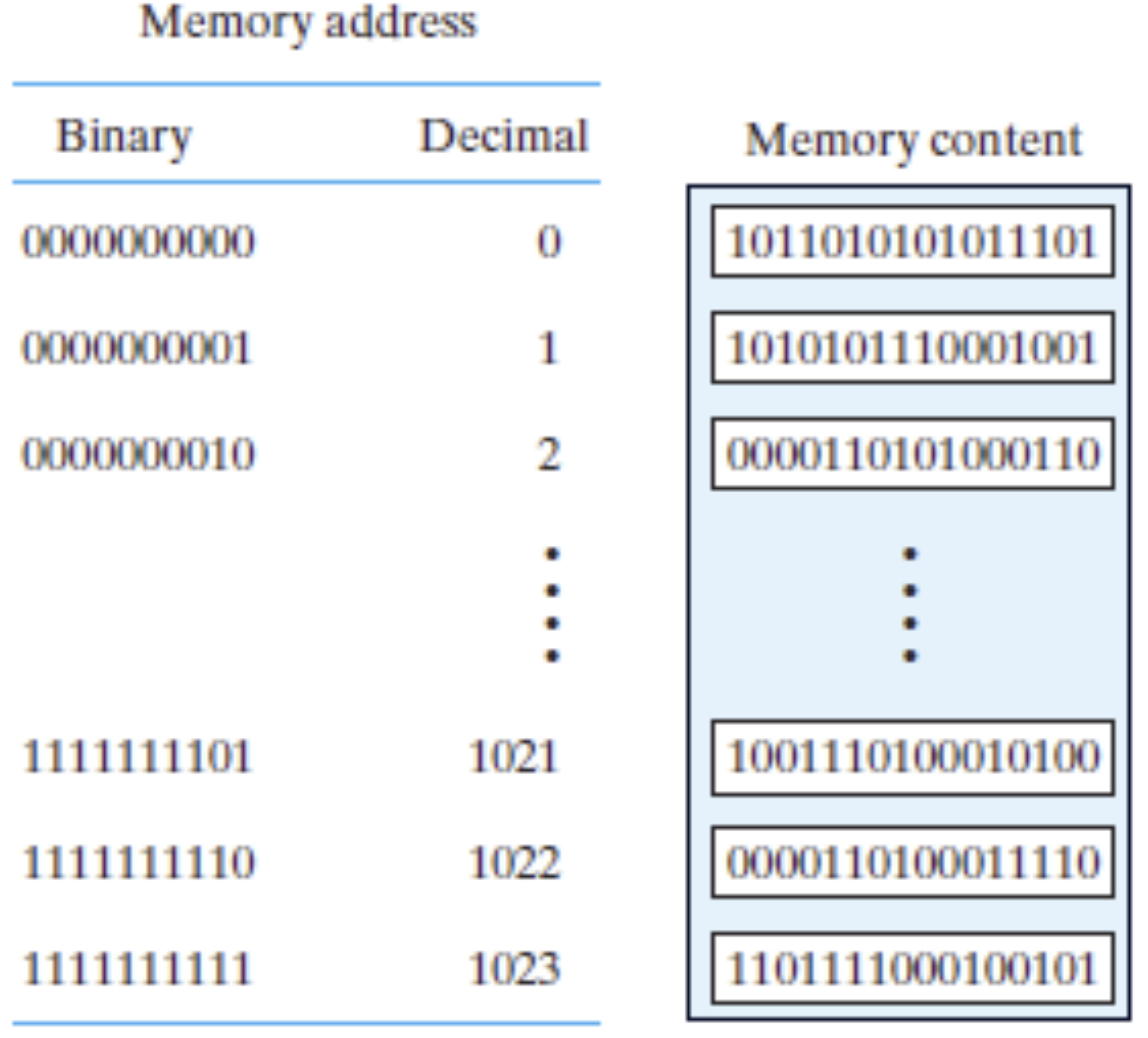
- Given: 1K words ( words), each of 16 bits = 2 bytes.
- Size: bytes = 2 KB
- Addresses:
- Decimal range: to
- Binary range: to
Logical Address vs Physical Address
- Logical/Virtual Address: Generated by the CPU during program execution
- Process-specific and exists within the program's logical address space
- Used directly by the program for memory references
- Physical Address: Actual location in RAM where data/instructions are stored
- Address Spaces:
- Logical address space: All possible addresses a process can generate
- Physical address space: All available physical memory locations
- Address Translation: Performed by the Memory Management Unit (MMU)
- Hardware component that dynamically maps logical to physical addresses at runtime
Memory Management Core Concepts
Memory management is a fundamental operating system function responsible for efficiently managing main memory, allocating sufficient memory to processes, tracking usage, and handling movement between main memory and secondary storage when necessary.
Three Primary Memory Management Tasks
1. Memory Allocation
- OS locates and assigns free memory space to processes
- Employs various allocation techniques:
2. Dynamic Memory Management
- Dynamically assigns and releases memory as processes need it
- Handles memory fragmentation issues:
- Internal fragmentation: Wasted space within allocated blocks
- External fragmentation: Free space scattered across memory
- Common allocation strategies:
- First-fit
- Best-fit
- Worst-fit
3. Address Translation (Logical to Physical Mapping)
- OS and MMU handle conversion between logical and physical addresses
- Allows processes to use logical addresses independent of actual memory locations
- Critical for virtual memory systems where processes can access more memory than physically available
- Enables demand paging
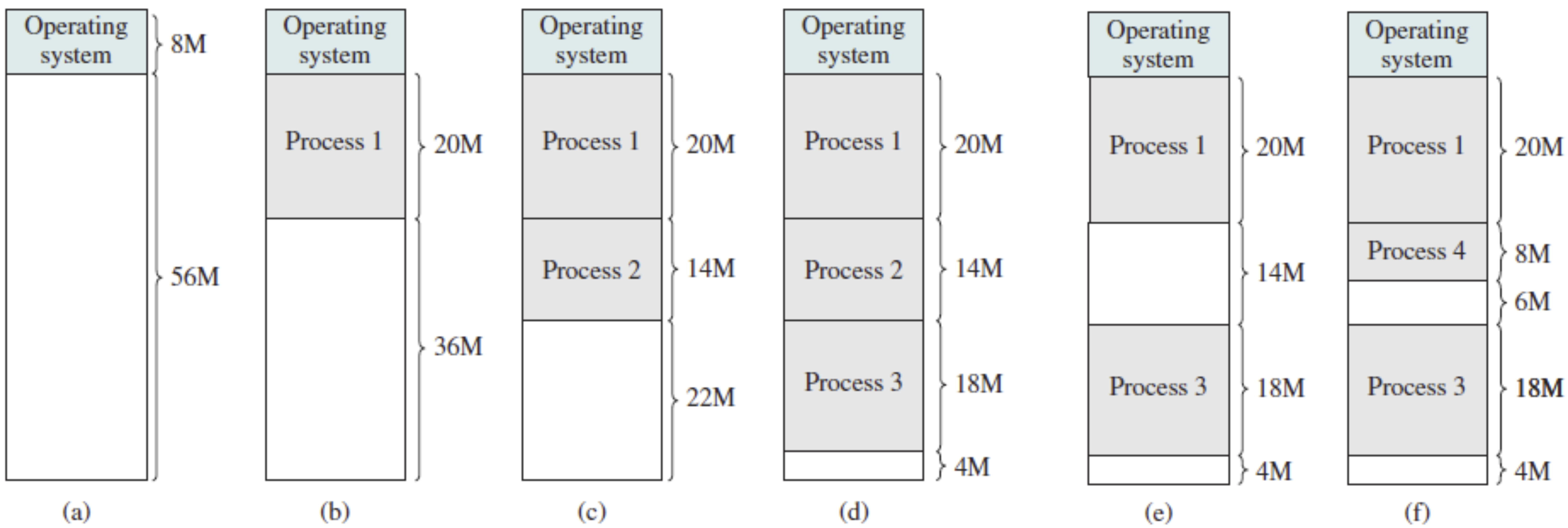
Memory Management – Example 1: Task 1 and 2
Examples on:
- Task 1: Find a free space in the main memory to store processes.
- Task 2: Dynamically allocate portions of memory to processes at their request, and free it for reuse when no longer needed.
Memory Management – Example: Task 3
Examples on:
- Task 3: Map process’s logical addresses to physical addresses.
Swapping
Technique ของ Memory management— Inactive process จะถูกย้ายไปอยู่ใน HD
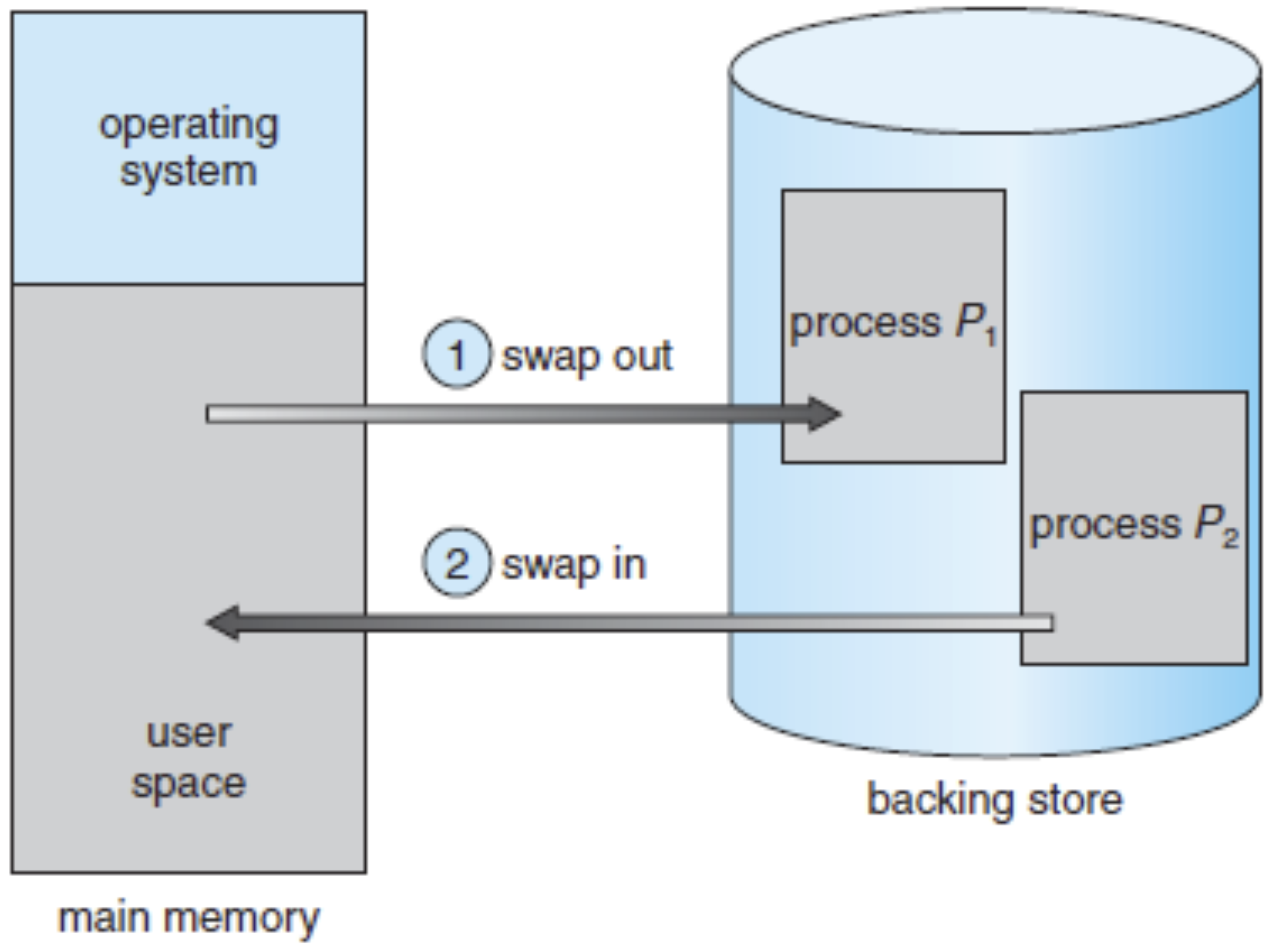
Swapping is a memory management technique where inactive processes (not using CPU) are temporarily moved from main memory (RAM) to secondary storage (backing store like hard drive or SSD), then swapped back when needed.
- OS moves idle/low-priority processes to swap space on disk, freeing memory for active processes
- When needed again, the process is reloaded to main memory, resuming from where it left off
- Enables running more concurrent processes than physical memory could normally accommodate
- Excessive swapping can cause thrashing - performance degradation due to excessive disk I/O
Standard Swapping
Swapping involves moving entire processes between main memory and backing store:
- Swapping in: Moving a process from backing store to memory for execution
- Swapping out: Moving a process from memory to backing store to free space
Disadvantage of Standard Swapping
The swap time (time to load/unload a process) is significant:
- Example: A 100 MB process with 50 MB/s transfer rate takes 2 seconds to swap
- This is extremely slow compared to CPU execution time (milliseconds/microseconds)
Swapping vs. Paging
Standard swapping is obsolete in modern operating systems: (ไม่ใช้กันแล้วอะ)
- Moving entire processes is too time-consuming
- Modern systems use paging-based virtual memory instead
- Paging moves fixed-size memory blocks (pages) between main memory and disk 08 Virtual-Memory Management
- More efficient than full-process swapping
Relocation: Fundamental for Process Management in Main Memory
- Shared Memory in Multiprogramming
- Main memory is shared among several concurrent processes
- Programmers can't predict which processes will be in memory during execution
- Processes include relocation information so OS can adjust memory references
- Dynamic Process Placement and Swapping
- OS maintains a pool of ready processes for maximum CPU utilization
- Inactive processes may be swapped out to free memory
- When swapped back in, processes might load to different memory locations
- Hardware components like MMU handle dynamic relocation during swap-in
- Multiple Relocation Events
- A process may be relocated multiple times during its lifetime
- Each relocation updates the mapping between logical and physical addresses
- Mapping maintained via data structures like page tables or segment tables
- MMU uses these to translate addresses regardless of process location
- Implications for Memory Addressing
- Process physical location isn't fixed, requiring dynamic address translation
- Logical address space remains constant for the process
- OS and MMU map logical addresses to physical memory locations
- This separation enables efficient memory management and scheduling flexibility
Method 1: Contiguous Memory Allocation
Contiguous Memory Allocation
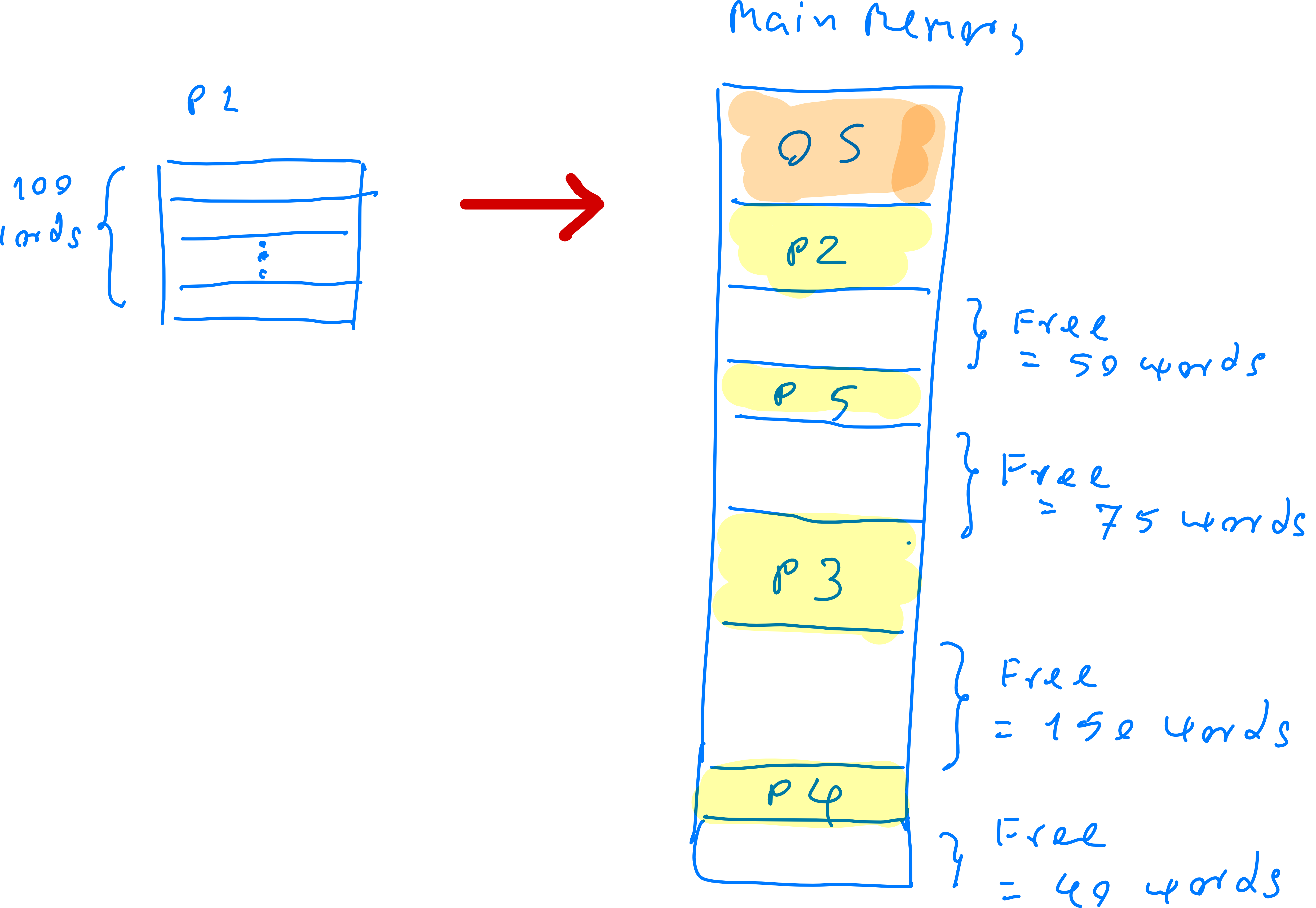
- Contiguous memory allocation assigns each process a single, uninterrupted block of memory. The process must be stored in one continuous region and cannot be split across multiple memory locations.
- Key concepts to learn:
- Strategies for selecting free memory spaces for process storage
- Logical-to-physical address translation (mapping)
Example: Contiguous Memory Allocation
The following example shows how to store processes in the main memory by using the contiguous memory allocation.
Methods
Two main types of contiguous memory allocation:
- Fixed-size partition method
- Equal-size partition
- Unequal-size partition
- Variable partition method
Method 1: Fixed-Sized Partition
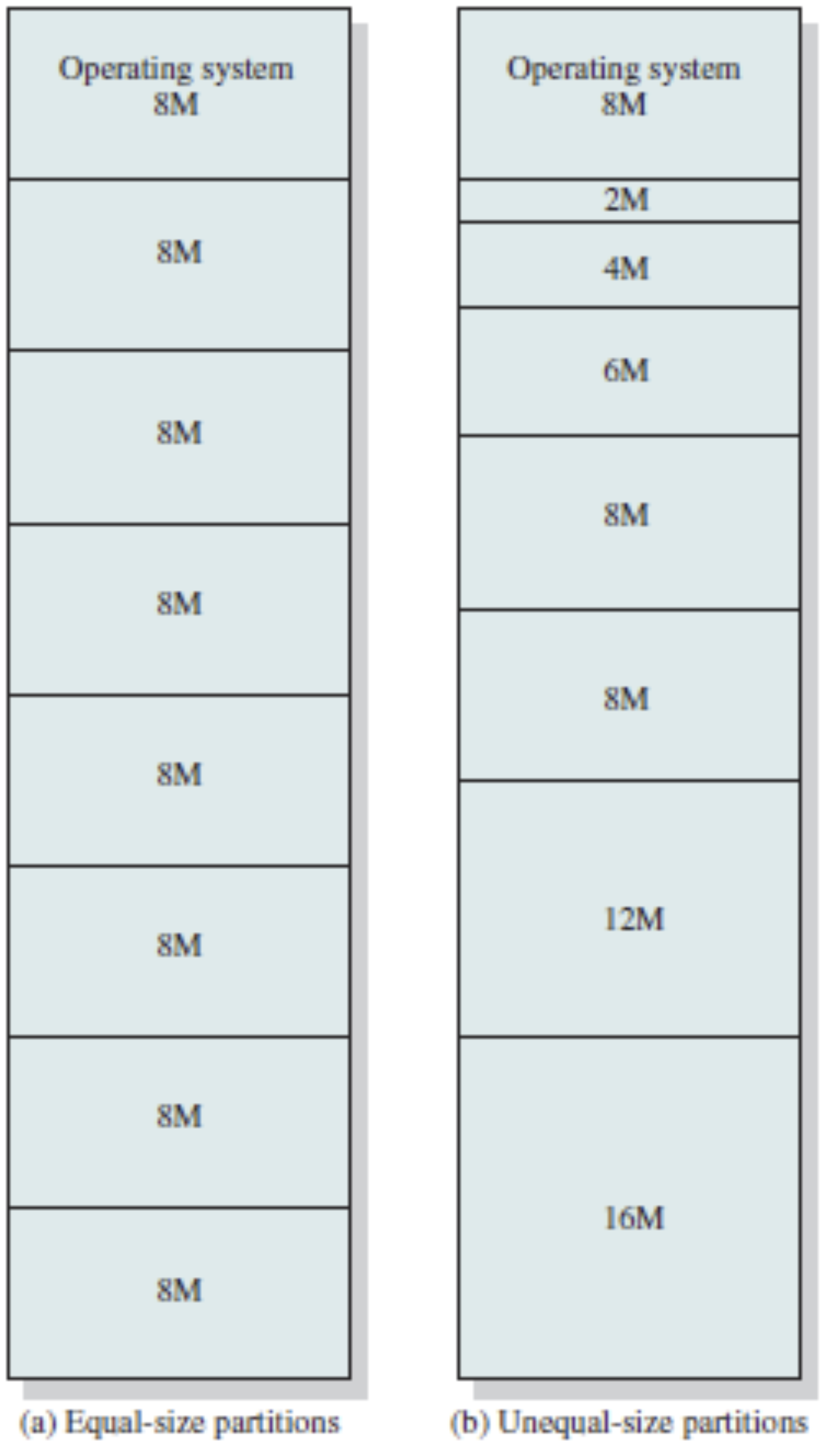
- Memory is divided into several fixed-sized partitions
- Each partition contains exactly one process
- Degree of multiprogramming is limited by the number of partitions
Two types of fixed-sized partitions:
- Equal-size partition
- Unequal-size partition
Example: Equal-size partition
Consider storing the following 3 processes: P1 (8 MB), P2 (5 MB), P3 (16 MB) in the
following main memory who is partitioned as follows.
Example: Unequal-size partition
Consider storing the following 3 processes: P1 (8 MB), P2 (5 MB), P3 (16 MB) in the
following main memory who is partitioned as follows.
Problem: Internal Fragmentation
- Internal fragmentation occurs when allocated memory blocks (partitions) are larger than what the process actually needs
- The unused space within an allocated block is wasted since no other process can use it
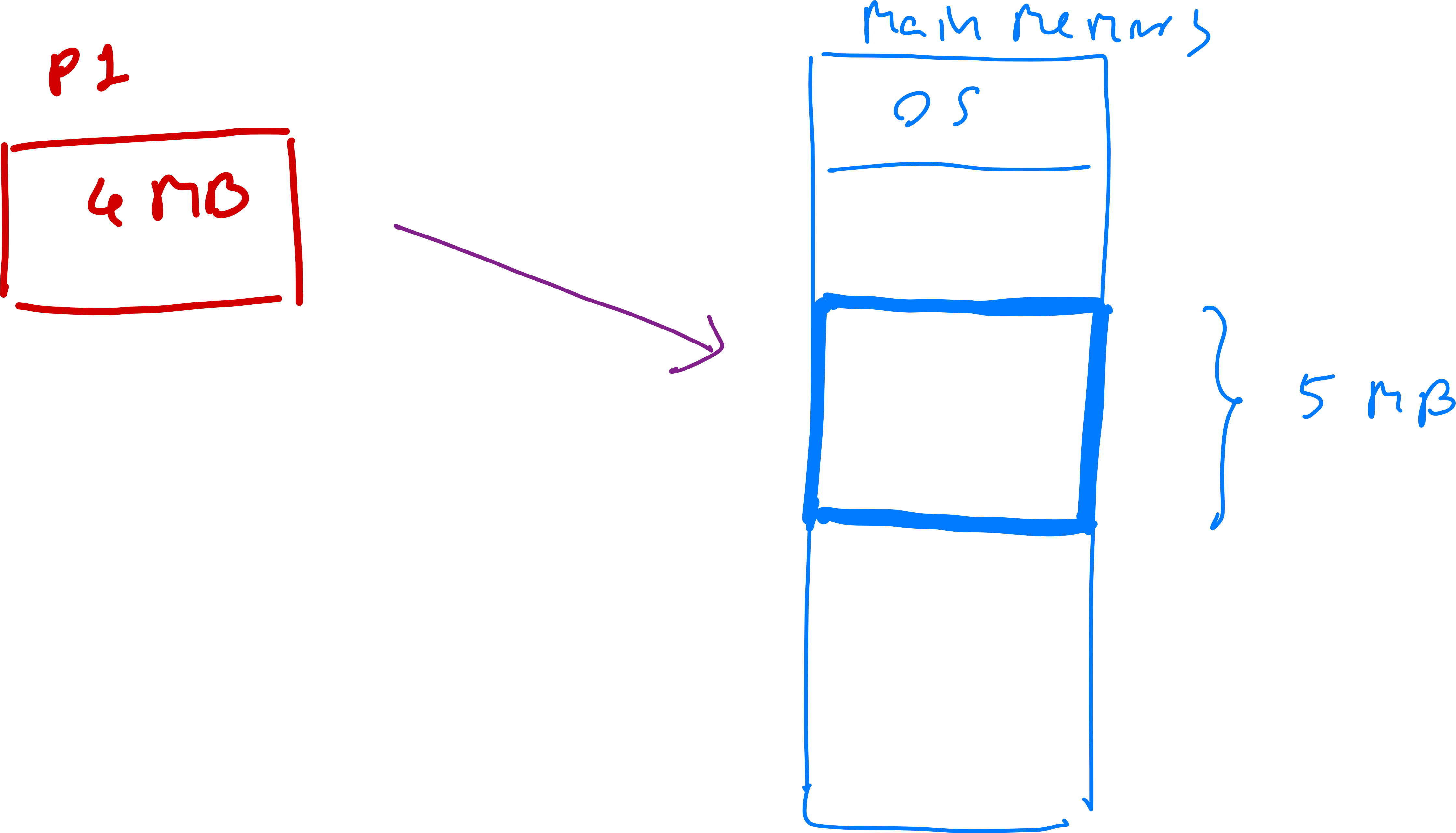
Method 2: Variable Partition
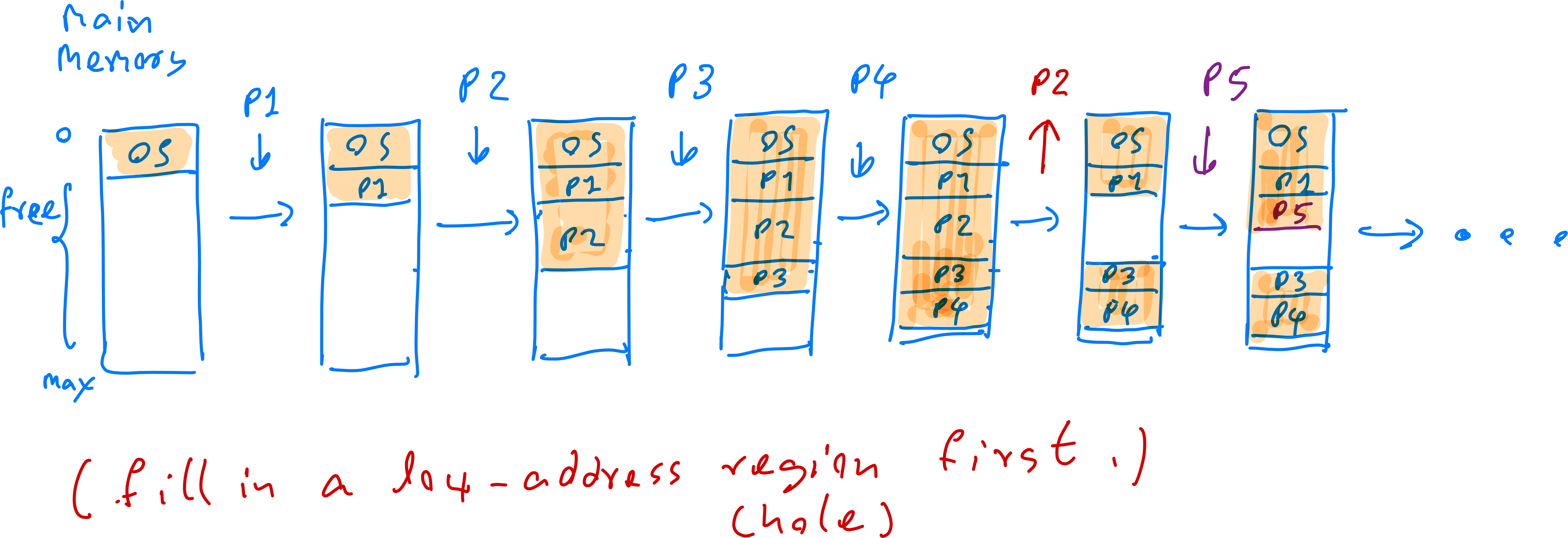
Unlike fixed-size partitioning, variable partition doesn't pre-divide memory into fixed partitions:
- Dynamic Memory Allocation:
- Processes are placed in "holes" (free memory regions) large enough to accommodate them
- Holes vary in size and location as processes enter and exit the system
- OS searches for suitable holes using allocation strategies (first-fit, best-fit, worst-fit)
- Variable-Sized Holes:
- Processes fit into memory holes of various sizes
- More efficient memory utilization compared to fixed partitions, especially for variable-sized processes
Variable Partition Example
The following example shows how to store processes in the main memory by using the
variation partition method.
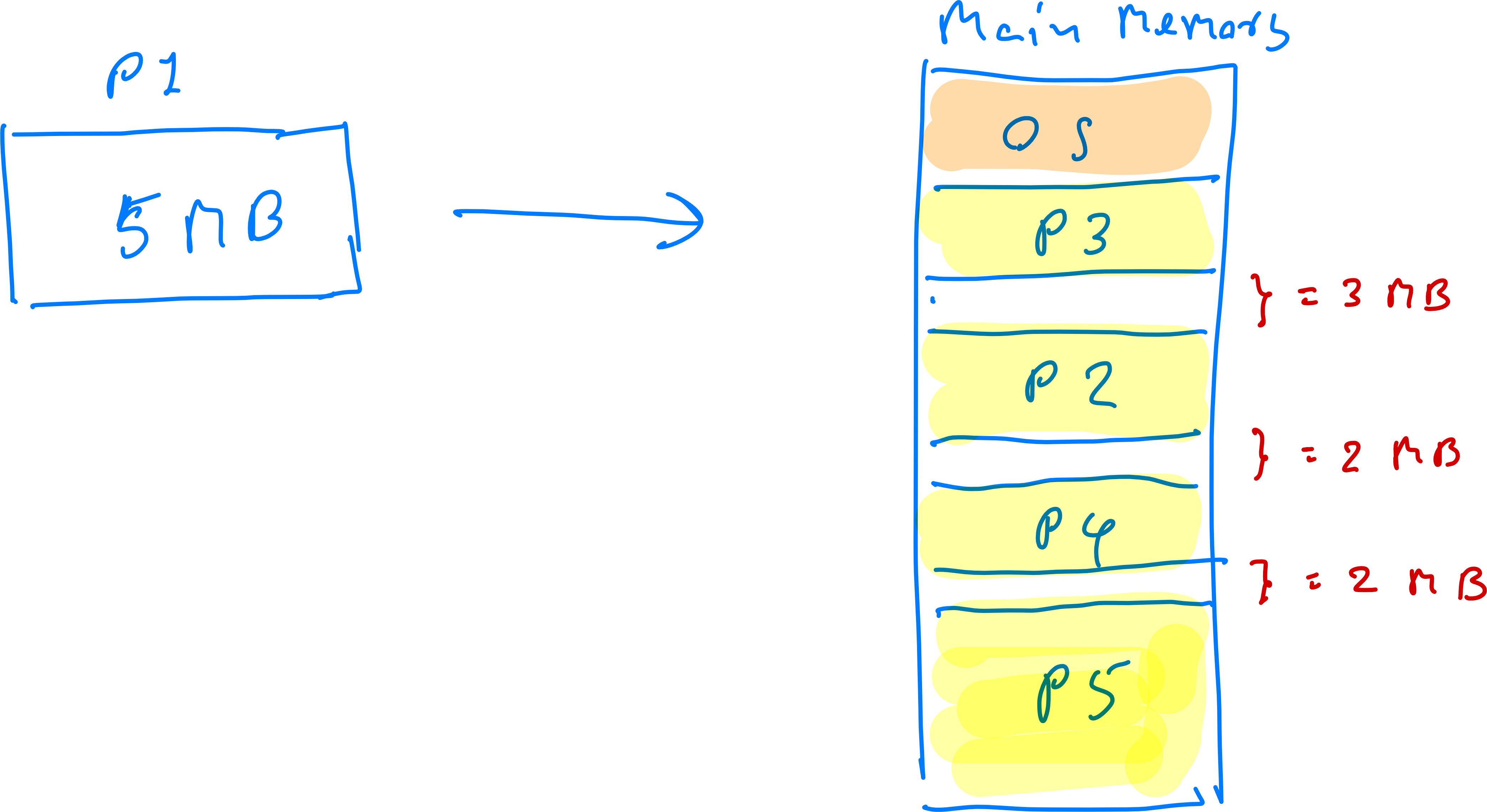
Problem: External Fragmentation
- As processes are allocated and deallocated, memory becomes fragmented into small, non-contiguous free regions
- No single hole may be large enough for a new process, despite having sufficient total free memory
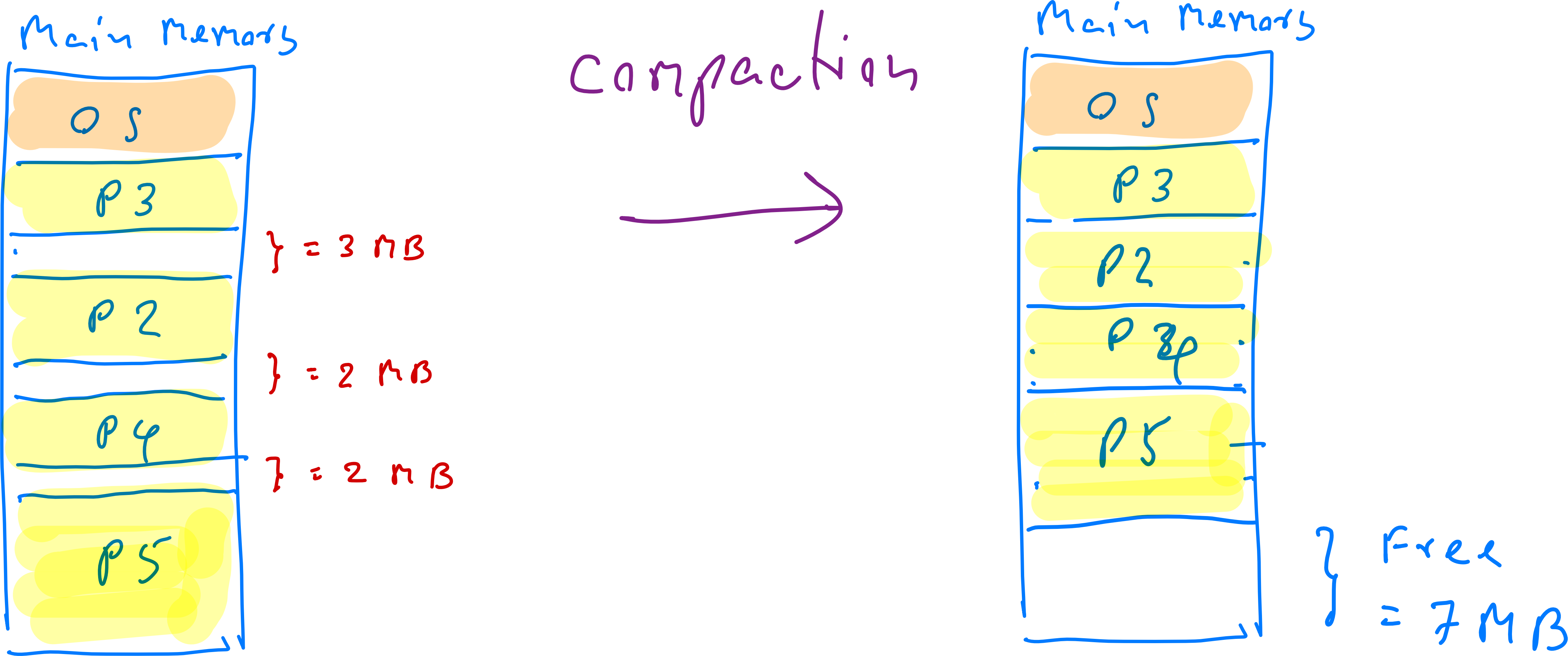
Solutions to External Fragmentation
- Compaction: Rearranges memory contents to combine free space into one large block
- Segmentation and Paging: Allow logical address space to be non-contiguous, storing processes wherever memory is available
Dynamic Storage-Allocation Strategy
Applied to unequal-size partitions and variable partitions:
When storing a process (e.g., 16 MB) with multiple free space regions available, which region should be selected?
Common strategies:
- First fit: Allocate the first free space that's big enough (searching from low to high address)
ตอนทำคือ ไล่ตั้งแต่ Low to High address จริง ๆ อันไหนมีที่วางพอใส่อันนั้นนะ!
- Best fit: Allocate the smallest free space that's big enough (must search entire list)
ตอนทำให้เช็ค All available partitions, choose the one the leaves the least leftover space. (PERFECTIONIST!)
- Worst fit: Allocate the largest free space (must search entire list)
อันนี้ตรงข้ามกับ Perfectionist เลย ตอนทำให้หาตัวที่ใหญ่ที่สุดที่ใส่เข้าไปได้
Dynamic Storage-Allocation Example
For allocating a 16 MB process to memory with free space as shown:
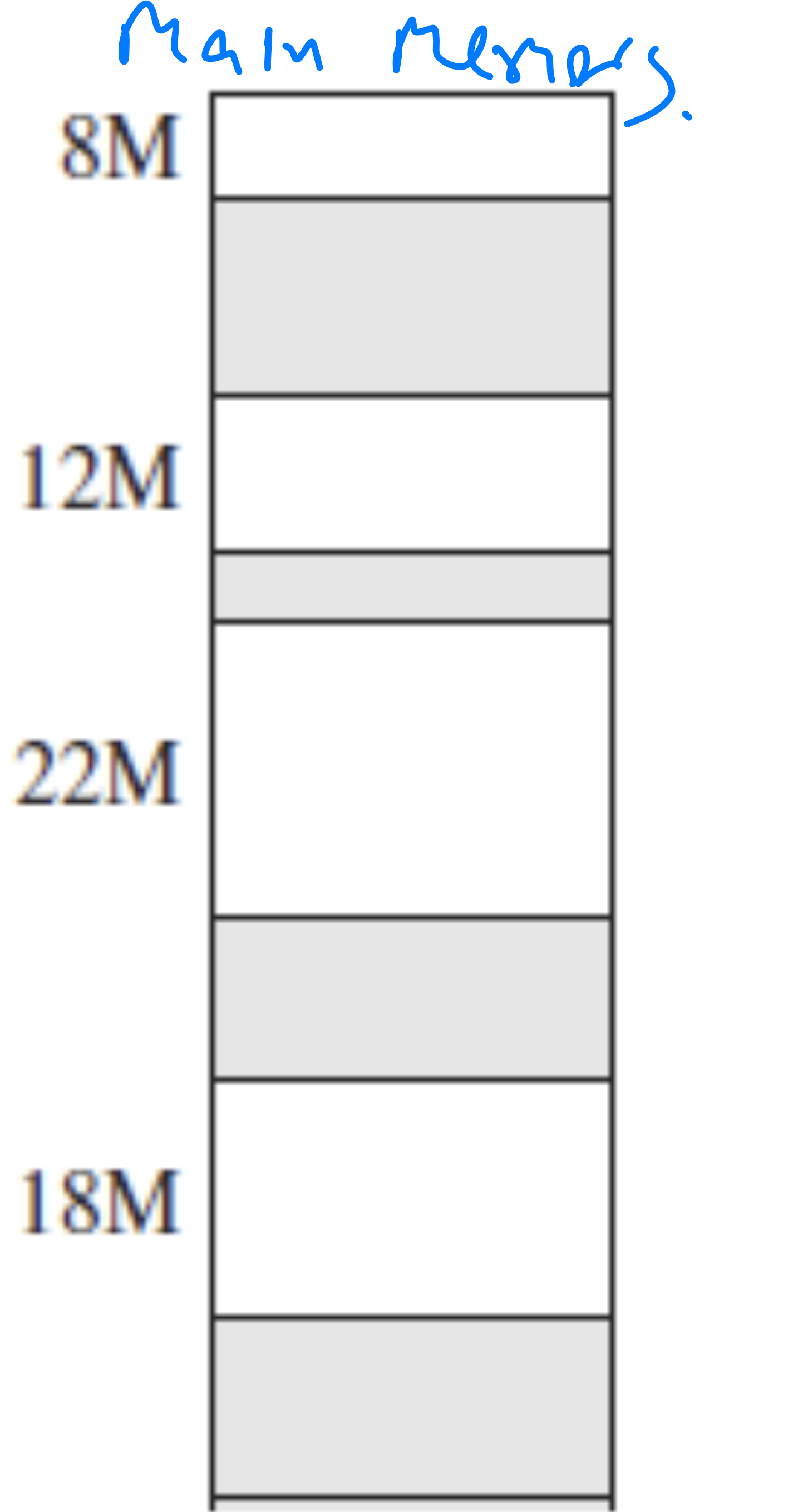
-
Using the first fit.
-
Using the best fit.
📄 HW7 Storage Allocation Strategy.pdf
Logical-Address and Physical-Address Mapping
In contiguous memory allocation, the whole process is stored in a single free space region. To find the physical address:
- A process contains "limit" words, with logical addresses from 0 to limit-1
- The first word (logical address 0) is stored at physical address "base" in memory
- The physical address for logical address k is calculated as:
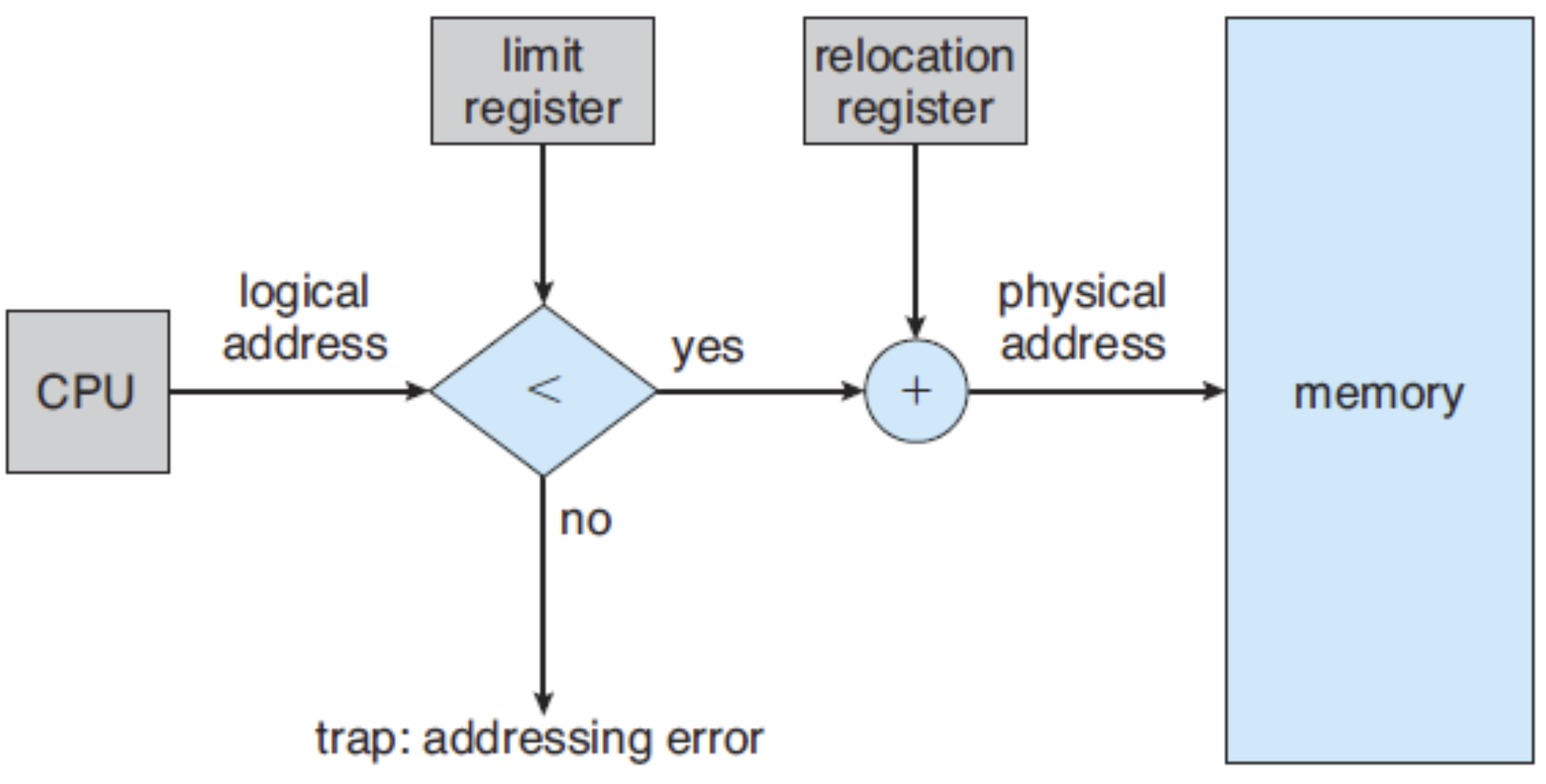
Implementation of Logical-Physical-Address Mapping
To convert a logical address to physical address:
- Compare logical address to "limit" value in the limit register
- If logical address > or = limit: error (address out of bounds)
- If logical address < limit: proceed to step 2
- Add logical address to "base" value stored in relocation register to get physical address
Example: Logical-Address and Physical-Address Mapping
For a process with 100 words stored starting at physical address 3155:
- What is the physical address corresponding to the logical address 30?
- 3155 + 30 = 3185
- What is the physical address corresponding to the logical address 99?
- 3155 + 99 = 3254
- What is the physical address corresponding to the logical address 100?
- Error (exceeds limit of 99)
- What is the physical address corresponding to the logical address 150?
- Error (exceeds limit of 99)
เช็คด้วย!
Method 2: Segmentation
Segmentation
- Segmentation is a memory management technique that divides a process into multiple segments based on its logical structure. Each segment represents a functional unit such as code, data structures, stack, or heap.
- We will learn:
- Strategies to select free spaces in main memory for process storage
- Logical-to-physical address translation (mapping)
Key Characteristics of Segmentation
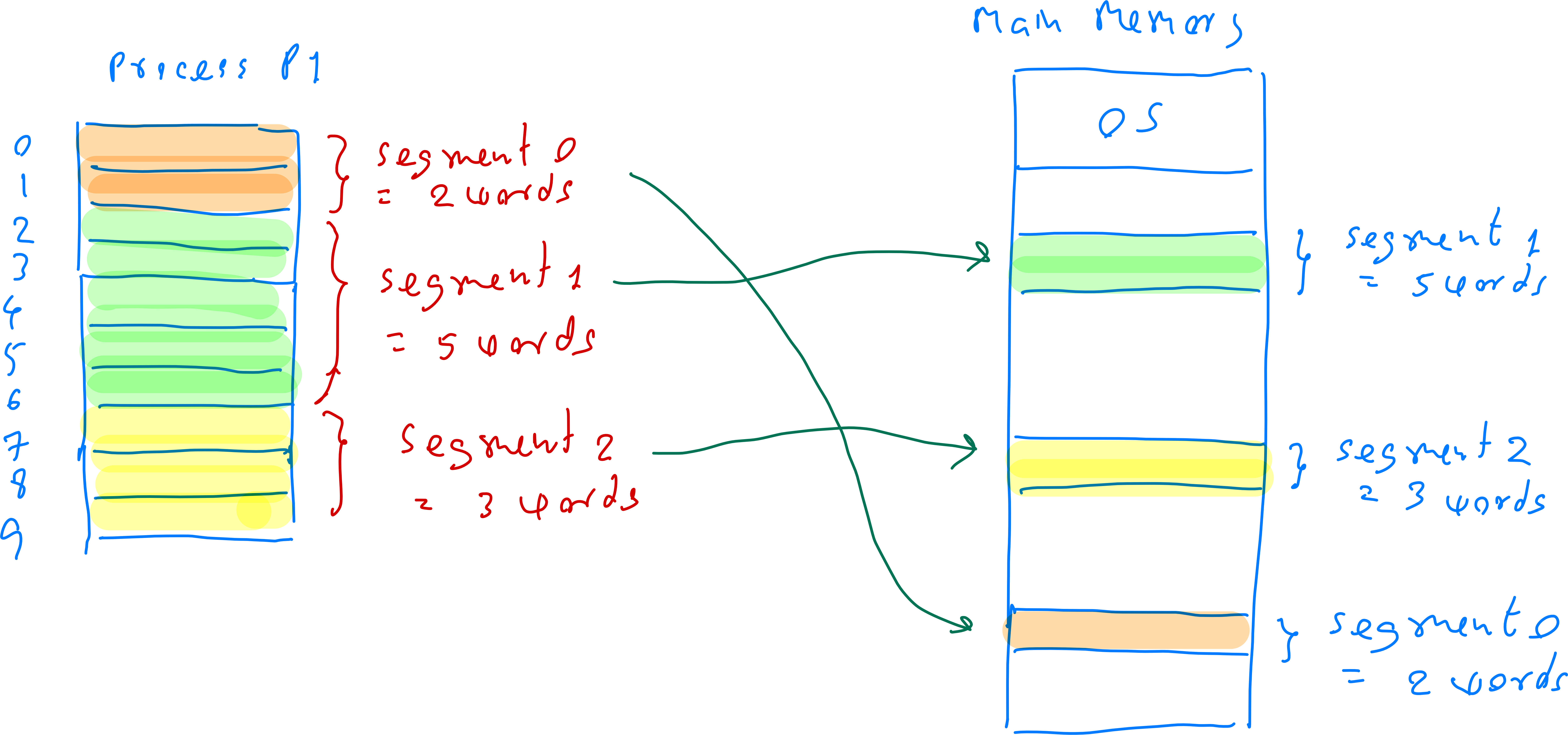
- A process is divided into multiple segments
- Unlike paging (fixed-size pages), segmentation divides processes into variable-sized segments corresponding to logical program divisions
- Examples: code segment, data segment, stack segment, heap segment
- Each segment has a different size
- Segments are not uniform in size; they're allocated based on actual requirements
- For example, a code segment might need 10KB while a stack segment only needs 2KB
- Segments are stored separately in main memory
- Segments don't need to be stored contiguously; they can be scattered across different physical memory locations
- The segment table tracks each segment's base address (starting location) and length (size)
- Segmentation can suffer from external fragmentation
Example: Segmentation
The following example shows how to store processes in the main memory by using the segmentation.
Logical Address in Segmentation
-
Segmentation supports a programmer's view of memory by dividing processes into logical segments
-
Each segment can have a different size
-
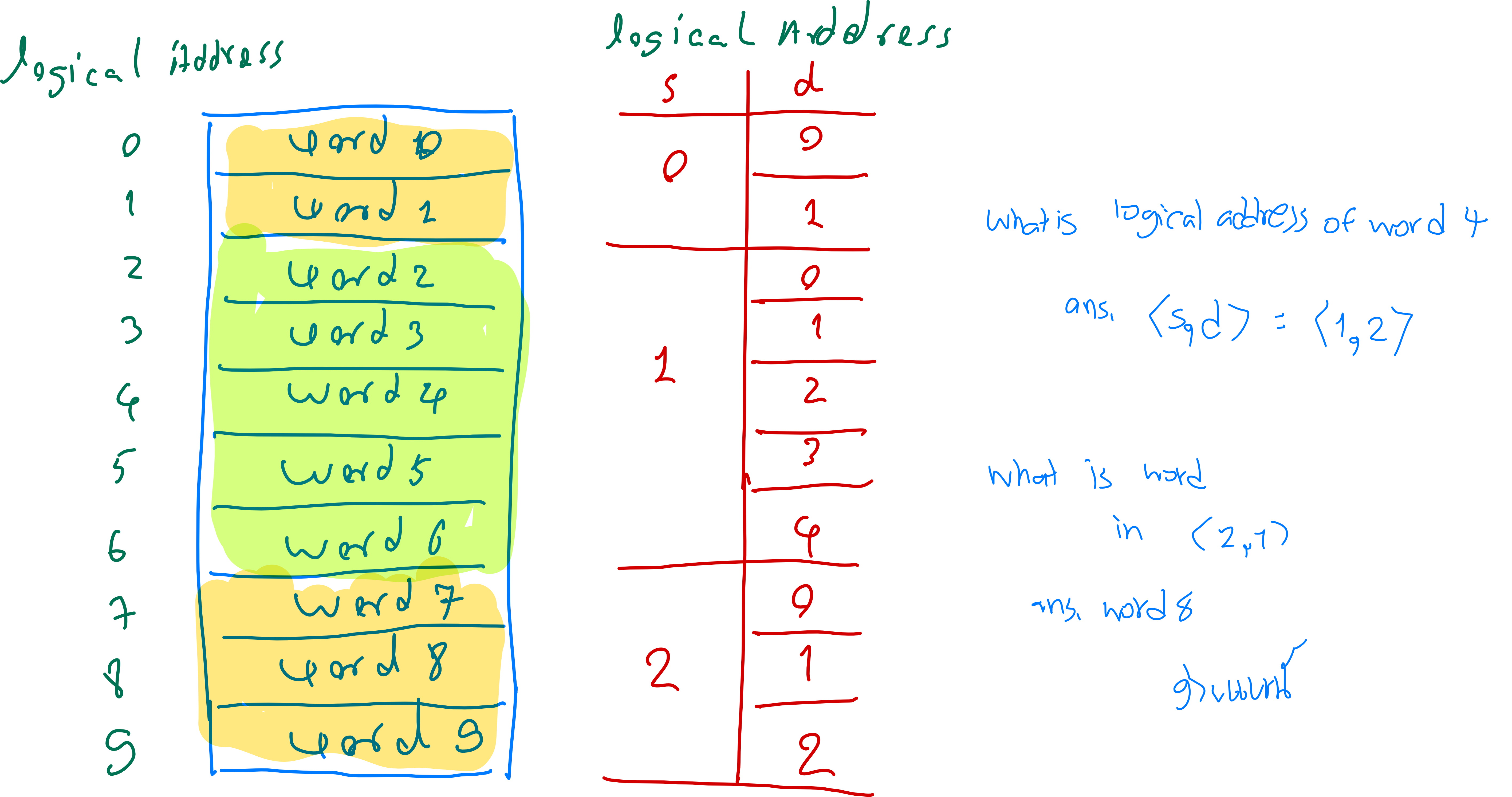
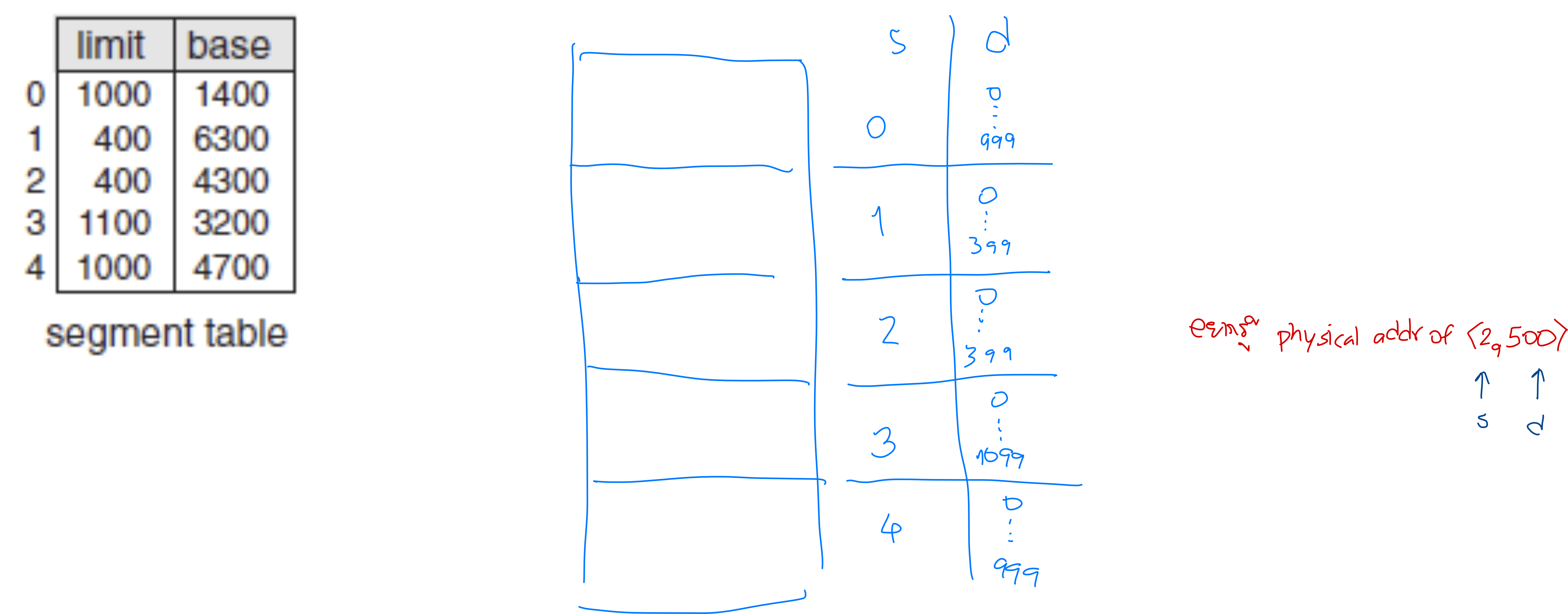
Each segment has its own logical address specified by two quantities (a tuple):
- Segment number (s): Identifies the segment within the process (integer starting from 0)
- Offset in segment (d): Specifies word location within the segment (integer starting from 0)
- Maximum offset is determined by the segment's size (limit)
Example: Logical address (segmentation)
The following example shows an example of logical addresses of a process according to segmentation.
Logical-Physical Mapping: Segment Table
- Segmentation identifies main memory locations for segments using the segment table
- Each process has its own segment table
- Each segment table entry contains:
- Segment limit: Specifies the length/size of the segment (number of words)
- Implies that offset d must be between 0 and limit-1
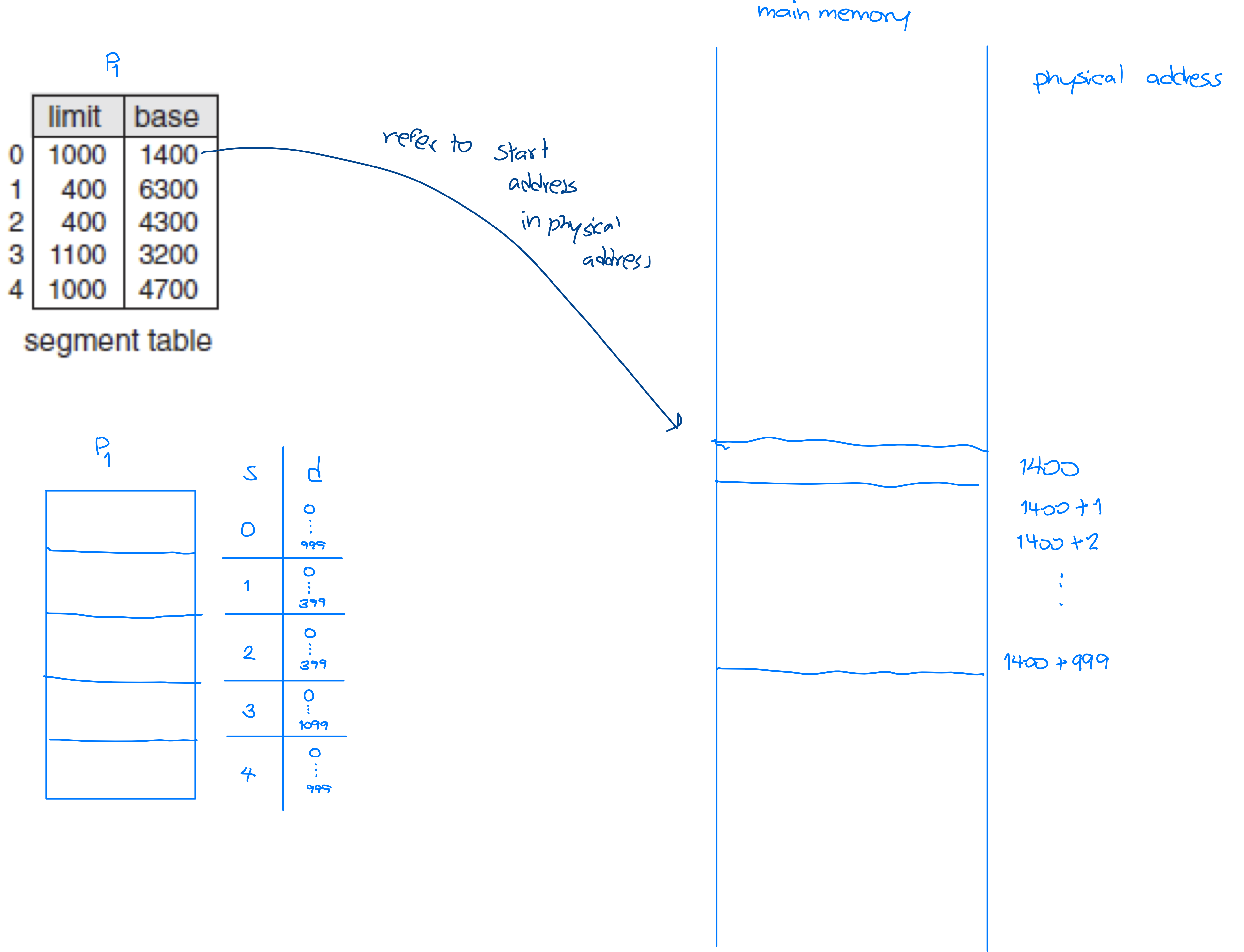
- Segment base: Contains the starting physical address where the segment resides
- Segment limit: Specifies the length/size of the segment (number of words)
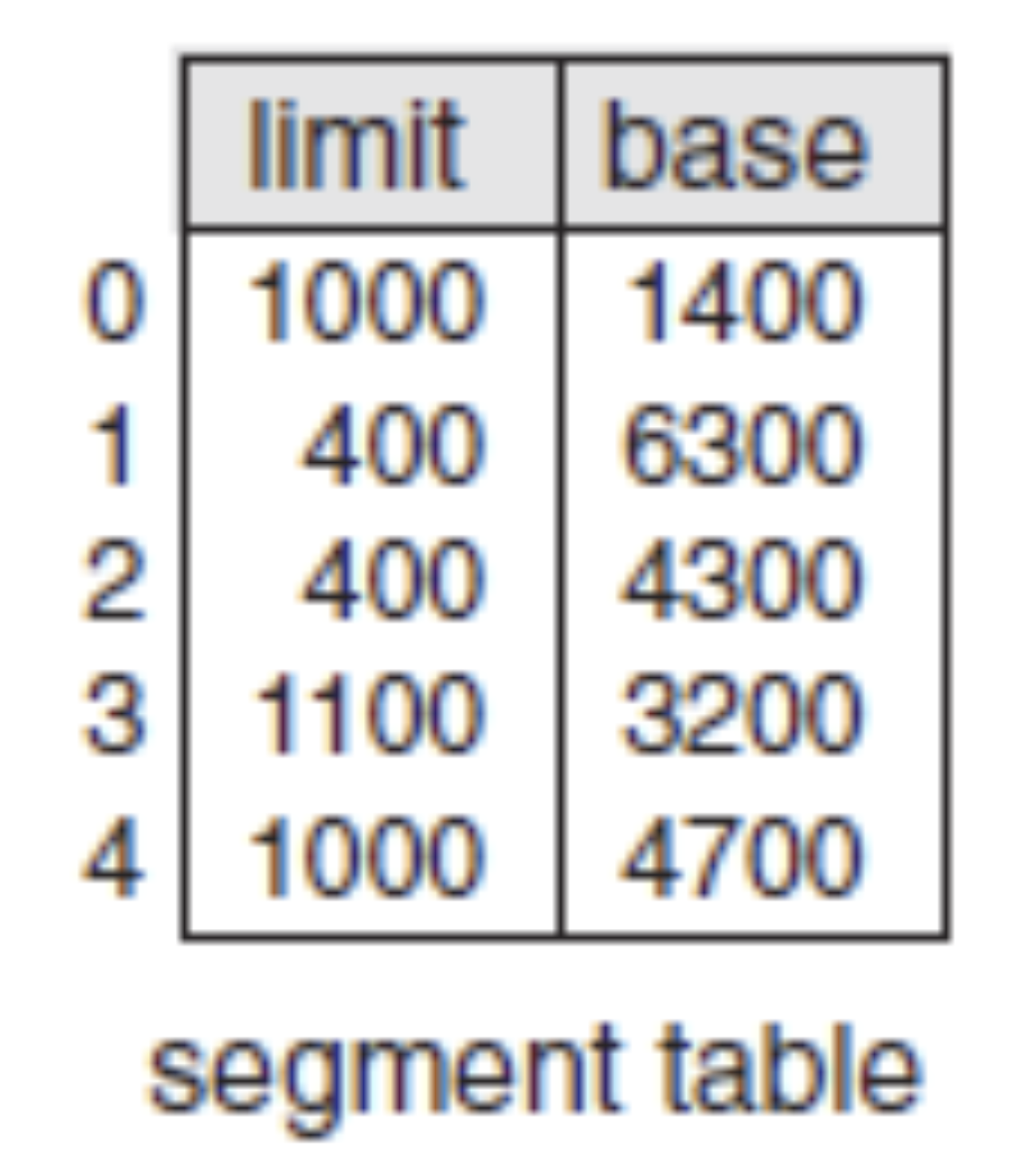
- Limit → size/length of each segment!
Example: Segment table and Logical Addresses
Consider the following segment table of a process:
- Draw a logical diagram of this process to show the logical addresses.
Logical-Physical Mapping: Physical Address
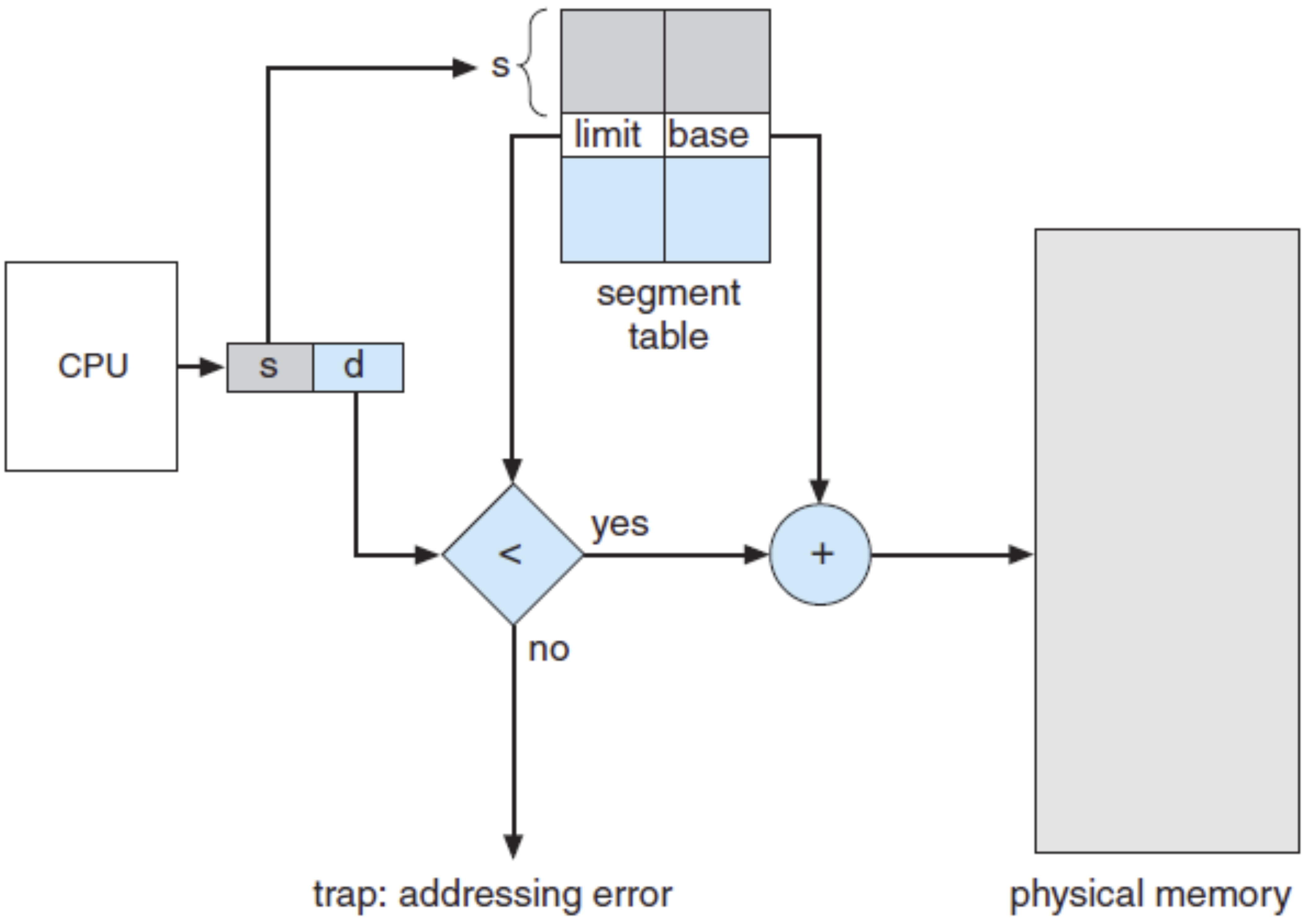
The physical address corresponding to logical address is computed as follows:
- Check if offset (d) is valid:
- If d < limit, proceed to Step 2
- If d ≥ limit, error (invalid address)
- Calculate physical address:
Example: Physical Addresses (Example 1)
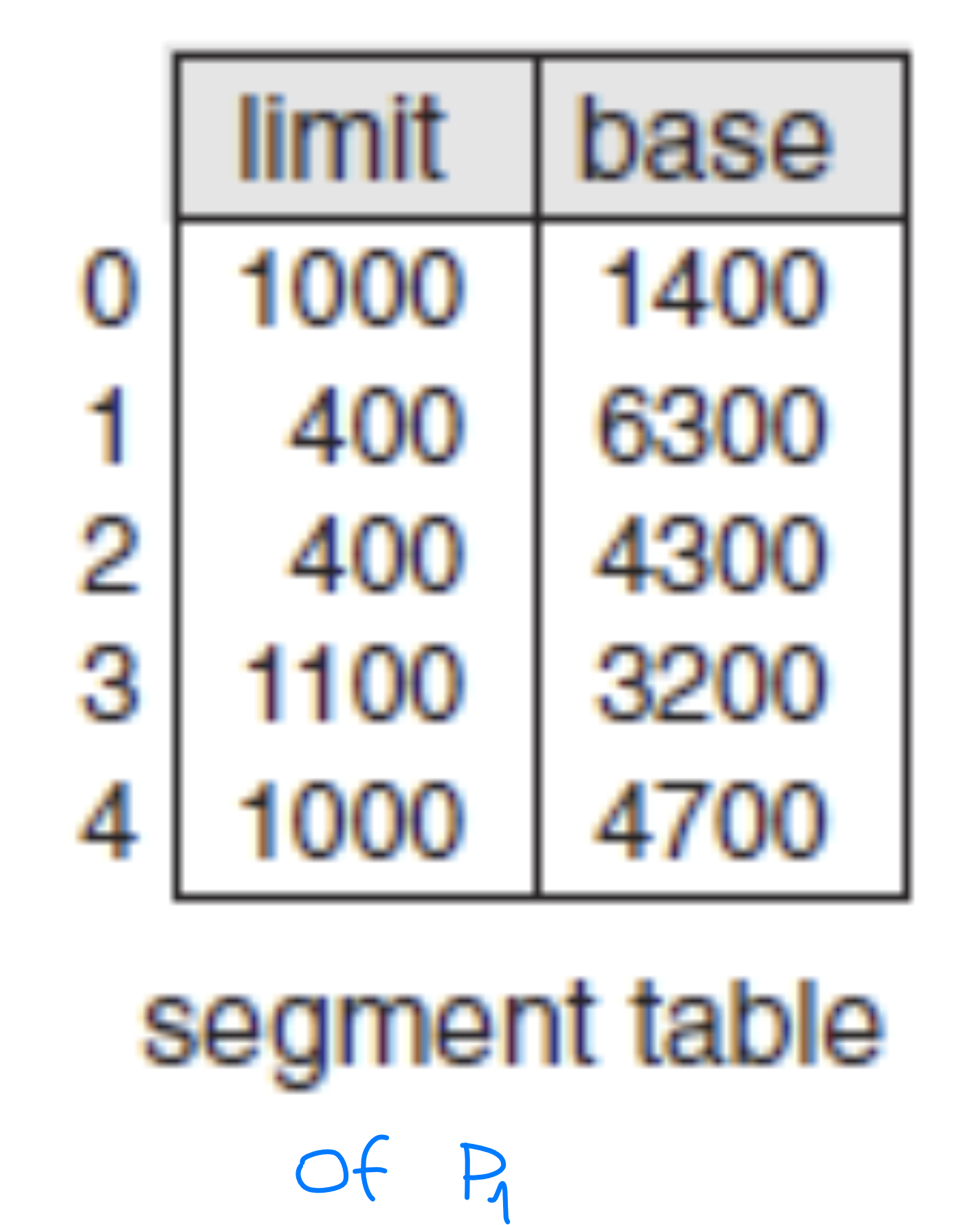
Given the segment table, answer the following:
- Physical address of logical address <2, 53>:
- ก็เช็คว่า 53 < Limit or not? → 53 < 400
- Physical address = base + d = 4300 + 53 = 4353
- Physical address of logical address <3, 852>:
- 852 < 1100
- Physical address = base + d = 3200 + 852 = 4052
- Physical address of logical address <1, 400>:
- 400 < 400— ERROR! ตัวสุดท้ายมันอยู่ที่ 399 ไง
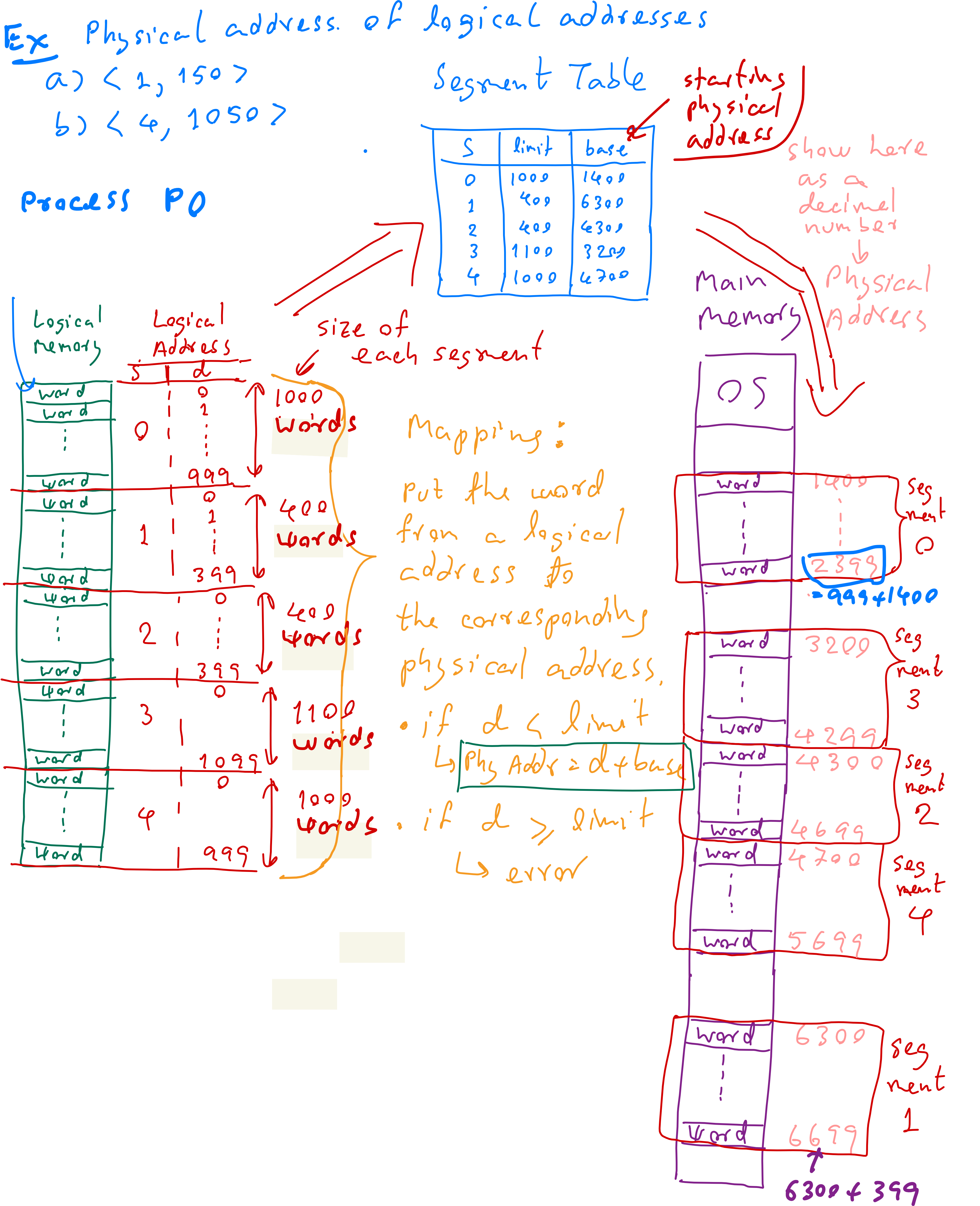
Example: Big Picture of Segmentation Method
Consider the segmentation method to store a process in the main memory. The following
segment table is given. Draw a diagram to show locations of these 5 segments in the main
memory.
Method 3: Paging
Paging is another memory-management scheme that permits the physical address space of a process to be non-contiguous. By using paging, we can avoid the external fragmentation problem.
Paging
- Paging is a memory management technique that allows the physical address space of a process to be non-contiguous, eliminating external fragmentation (but still suffering from internal fragmentation). Unlike segmentation, paging divides memory into fixed-size blocks, making it more efficient for memory management.
- We will learn:
- Strategies to select free spaces in main memory for process storage
- Logical-to-physical address translation (mapping)
Key Characteristics of Paging
- Processes are divided into fixed-size pages
- A process is split into equal-sized pages
- Each page contains the same number of words, ensuring uniform size
- Pages don't need to be stored contiguously in physical memory
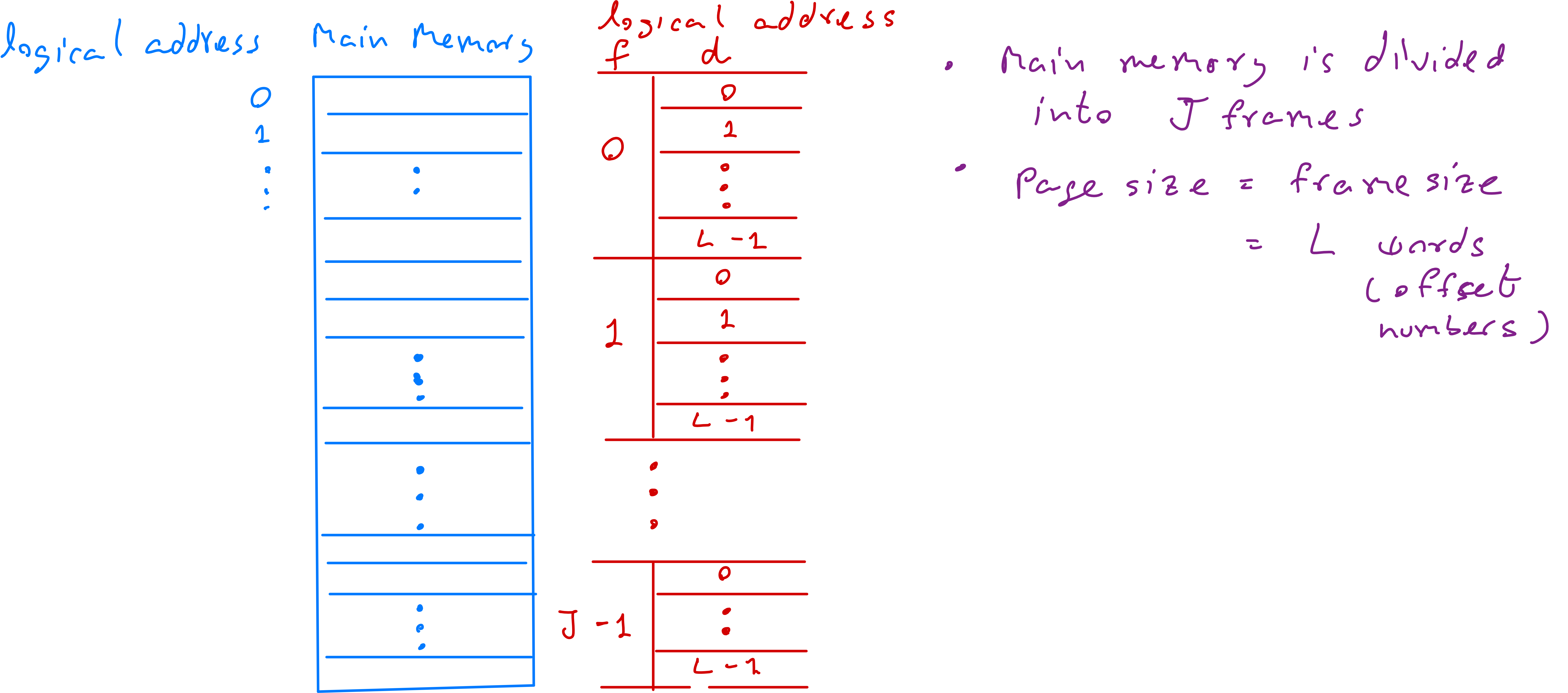
- Physical memory is divided into frames
- Main memory is partitioned into fixed-size frames, each holding exactly one page
- Frame size equals page size, ensuring compatibility
- Mapping Logical to Physical Address
- A page table maps a process's logical pages to available physical frames
- Each entry contains:
- Page number (index in the table)
- Frame number (location in physical memory)
- Paging can suffer from internal fragmentation
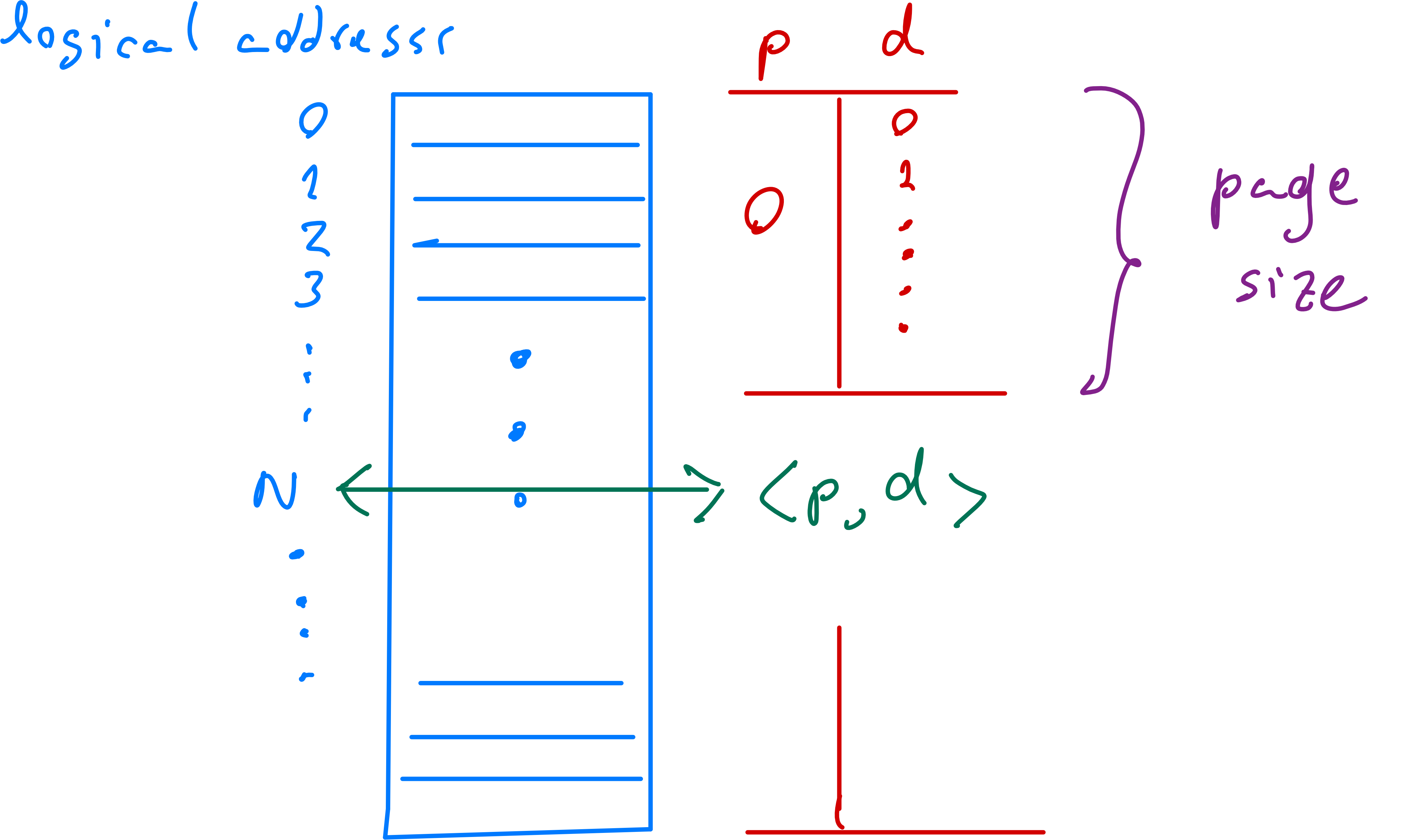
Logical Addresses in Paging
-
The logical addresses of a process are divided into fixed-size blocks called pages (p)
-
Each page consists of the same number of words (= page size)
-
Each word in a page is identified by an offset number (d)
-
A logical address of a word is represented by:
- Page number (p): Identifies the page within the process (integer starting from 0)
- Offset in page (d): Specifies the word location within the page (integer starting from 0)
- Maximum offset is determined by page size
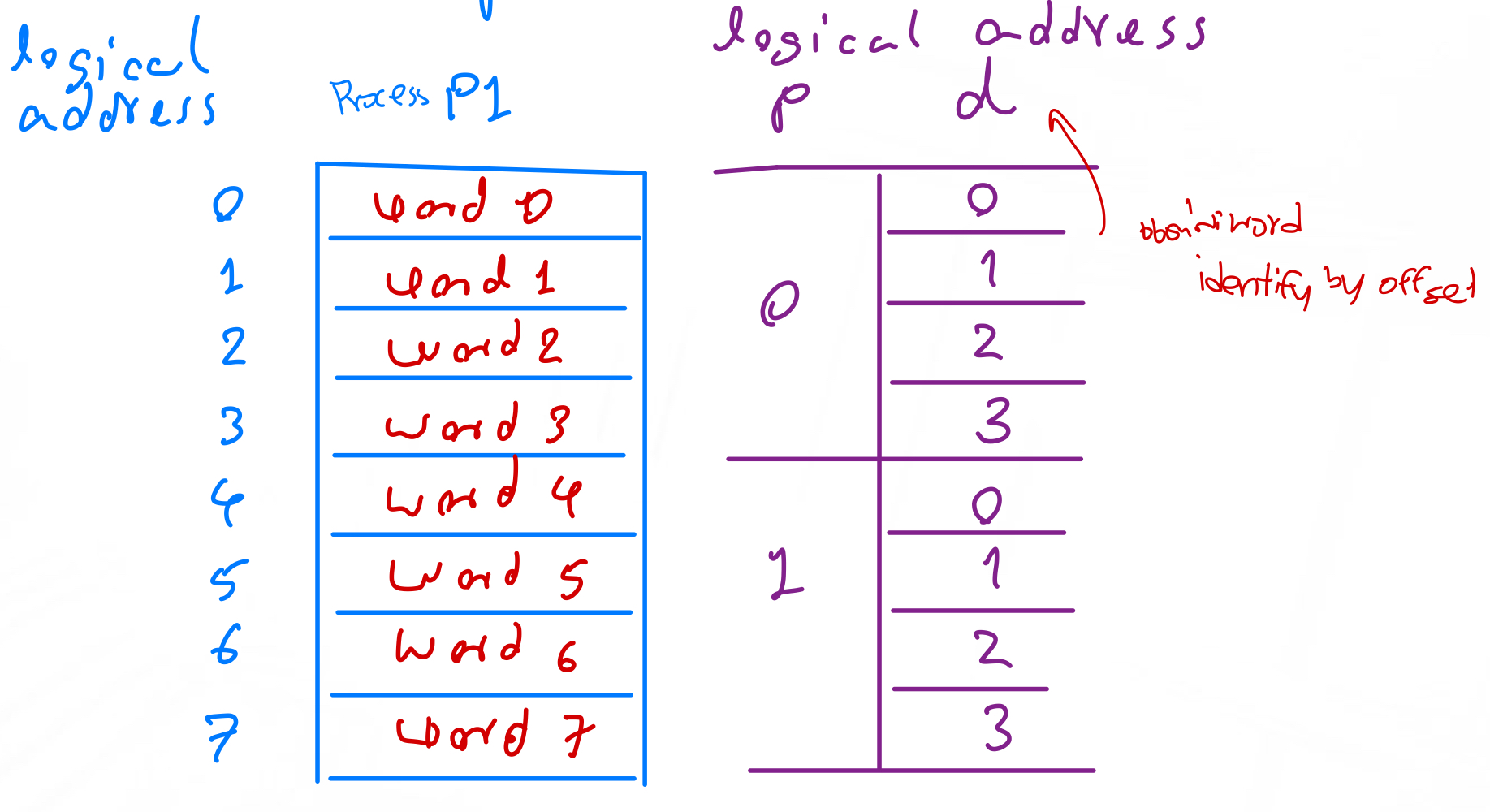
Example: Logical Addresses of a Process (1)
The following diagram shows an example of logical addresses of a process.
- Consider a paging method where each. page consists of 4 words
- Consider the process P1 consisting of 8 words
Question
What is <p,d> of “Word 6”?
อันนี้ก็ง่ายมาก มองตอบได้เลยว่า <1,2>
Question
Which word is at <0,2>?
Word 2 ไงจ๊ะ!
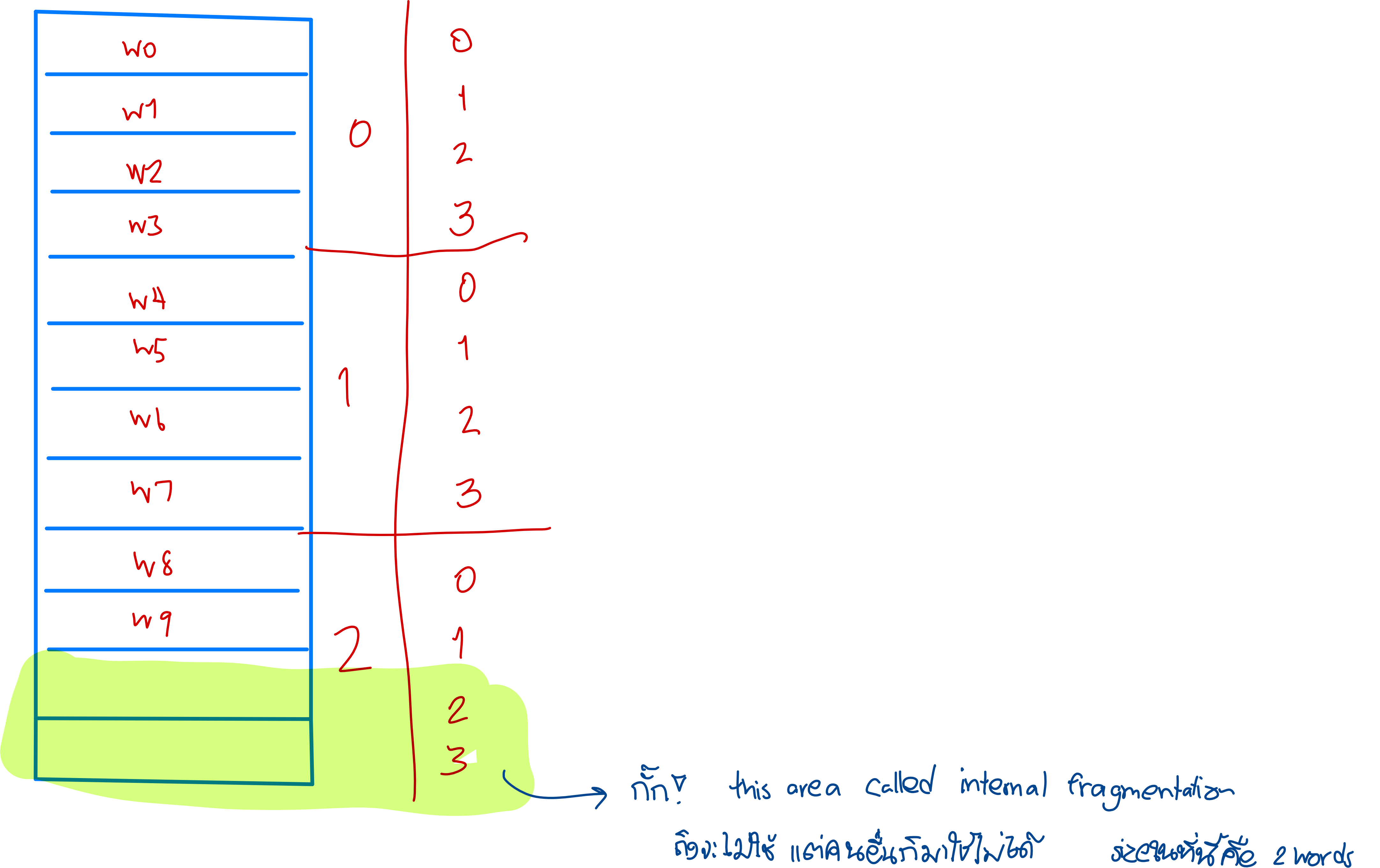
Example: Logical Addresses of a Process (2)
- Consider a paging method where each. page consists of 4 words
- Consider the process P1 consisting of 10 words (เปลี่ยนจากข้างบนเป็น 8)
Question
How many pages to store this process?
คิดยังไงล่ะทีนี้
ก็จะเป็น นั่นเองงงง
Physical Addresses in Paging (in Main Memory)
-
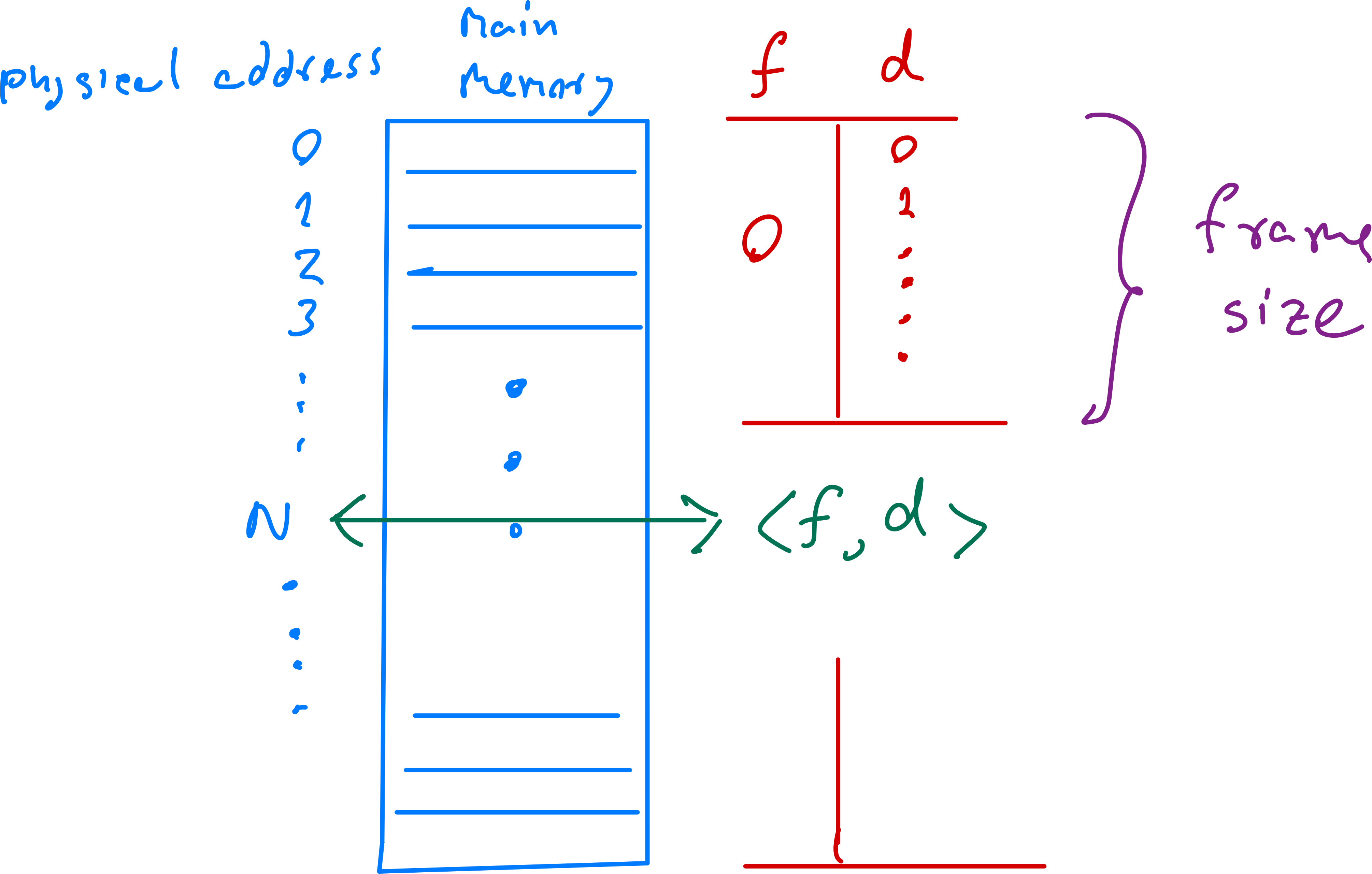
Physical addresses are divided into fixed-size blocks called frames (f)
-
Each frame consists of the same number of words (frame size = page size)
-
Each word in a frame is identified by an offset number (d)
-
A physical address is represented by:
- Frame number (f): Identifies the frame in main memory (integer starting from 0)
- Offset in frame (d): Specifies word location within the frame (same as page offset)
Example: Physical Addresses of Main Memory
The following diagram shows an example of physical addresses of the main memory
Page Table
The page table maps page numbers (p) to frame numbers (f), showing which physical frames store which logical pages:
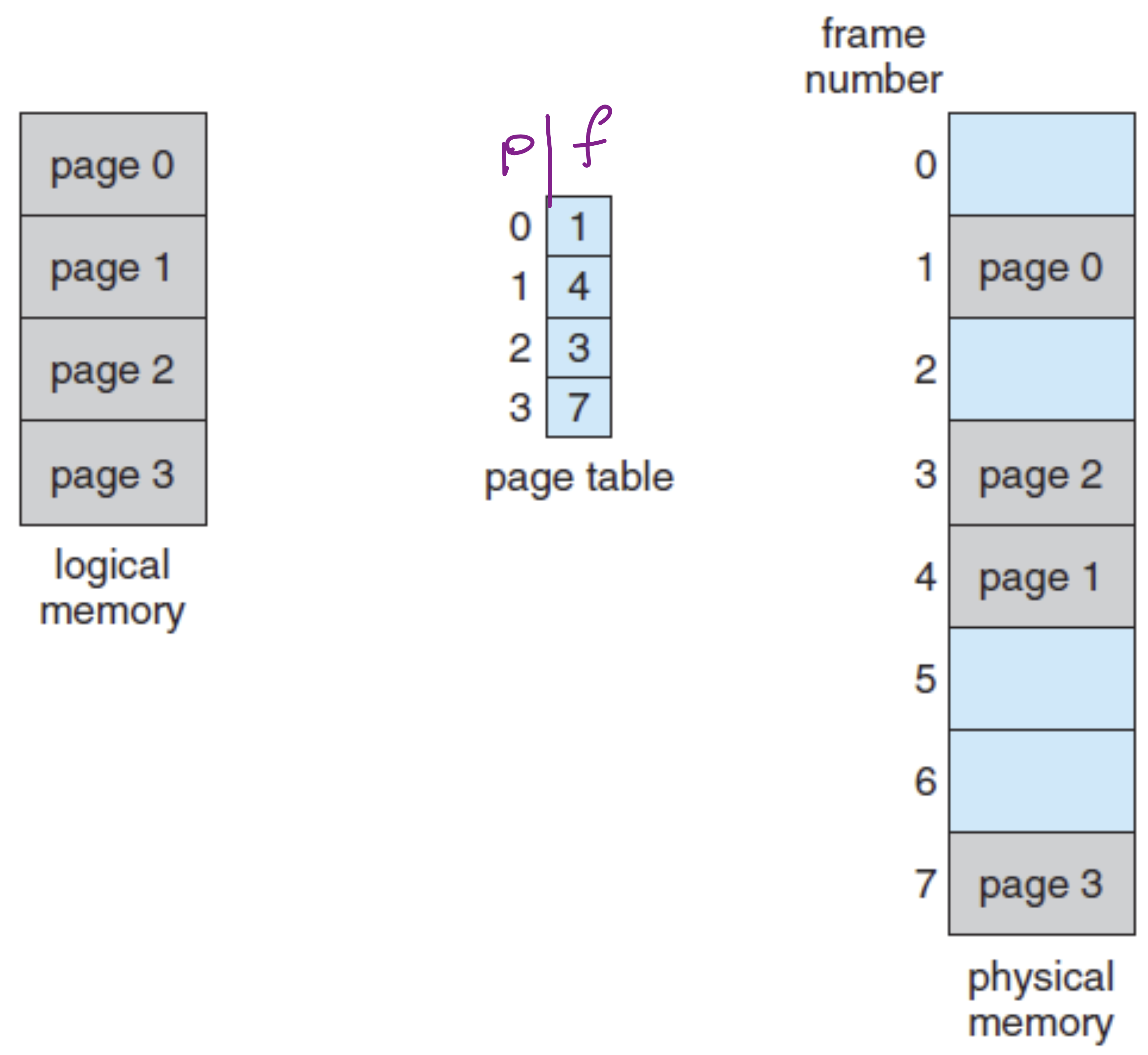
Example mappings:
- Page 0 → Frame 1
- Page 1 → Frame 4
- Page 2 → Frame 3
- Page 3 → Frame 7
Logical-Physical Mapping
Using the page table, we map logical address to physical address :

Note that d (offset) remains the same in both logical and physical addresses.
Example: Logical-Physical Mapping
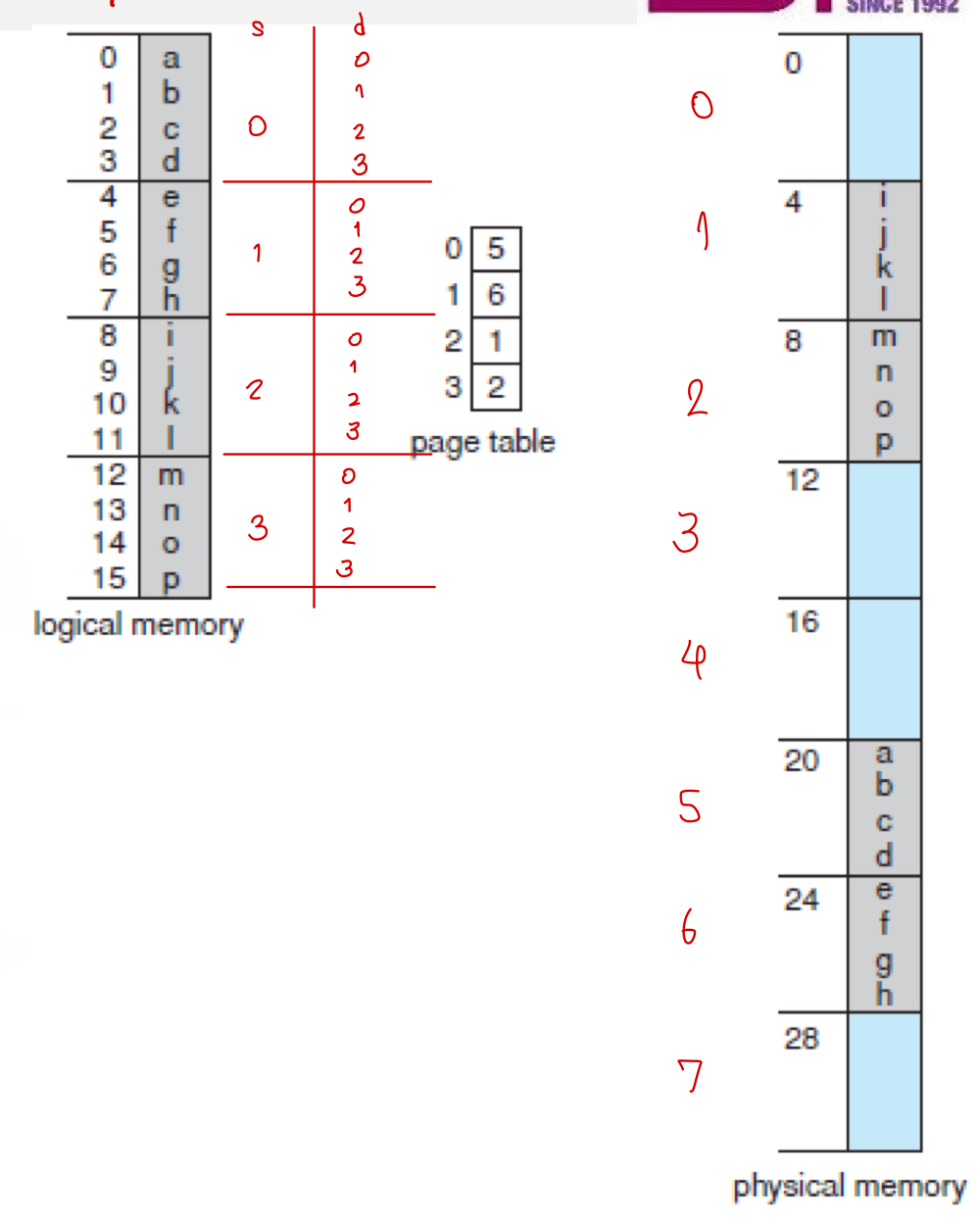
For a process with 16 words divided into 4 pages (4 words each) mapped to 8 frames:
- Words per frame: 4
- Logical address of word "i":
- Physical address of word "i":
- Physical address of word "d":
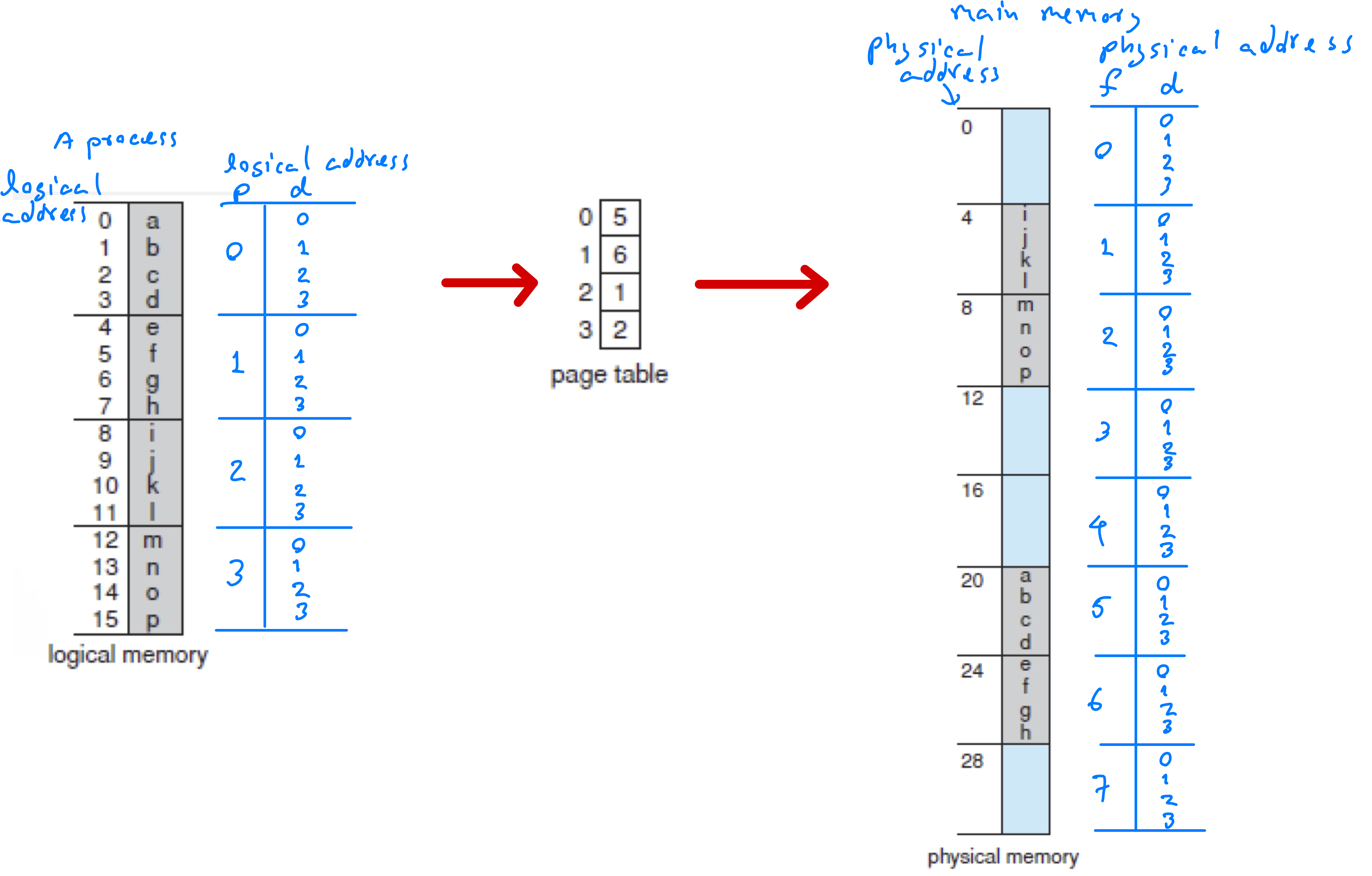
Example: Big Picture
The following diagram concludes the paging method.
Logical Address Conversion
A logical address can be represented by:
- A decimal number (e.g., 6)
- A tuple <p,d> (e.g., <1,2>)
- A binary number
Logical Address Conversion between Decimal and <p,d>
We can convert between decimal representation (N) and <p, d> representation as follows.
Example 1
Consider a paging method whose page size is equal to 4 words.
- Find the logical address <p, d> corresponding to the logical address 5 (decimal representation).
- Find the logical address in the decimal representation of the logical address <0, 2>.
Example: 2
Assuming a 2-KB (2048 bytes) page size, what are the page numbers and offsets for the
following address references (provided as decimal numbers): 15000?
(assume that 1 word,is equal to 1 byte)
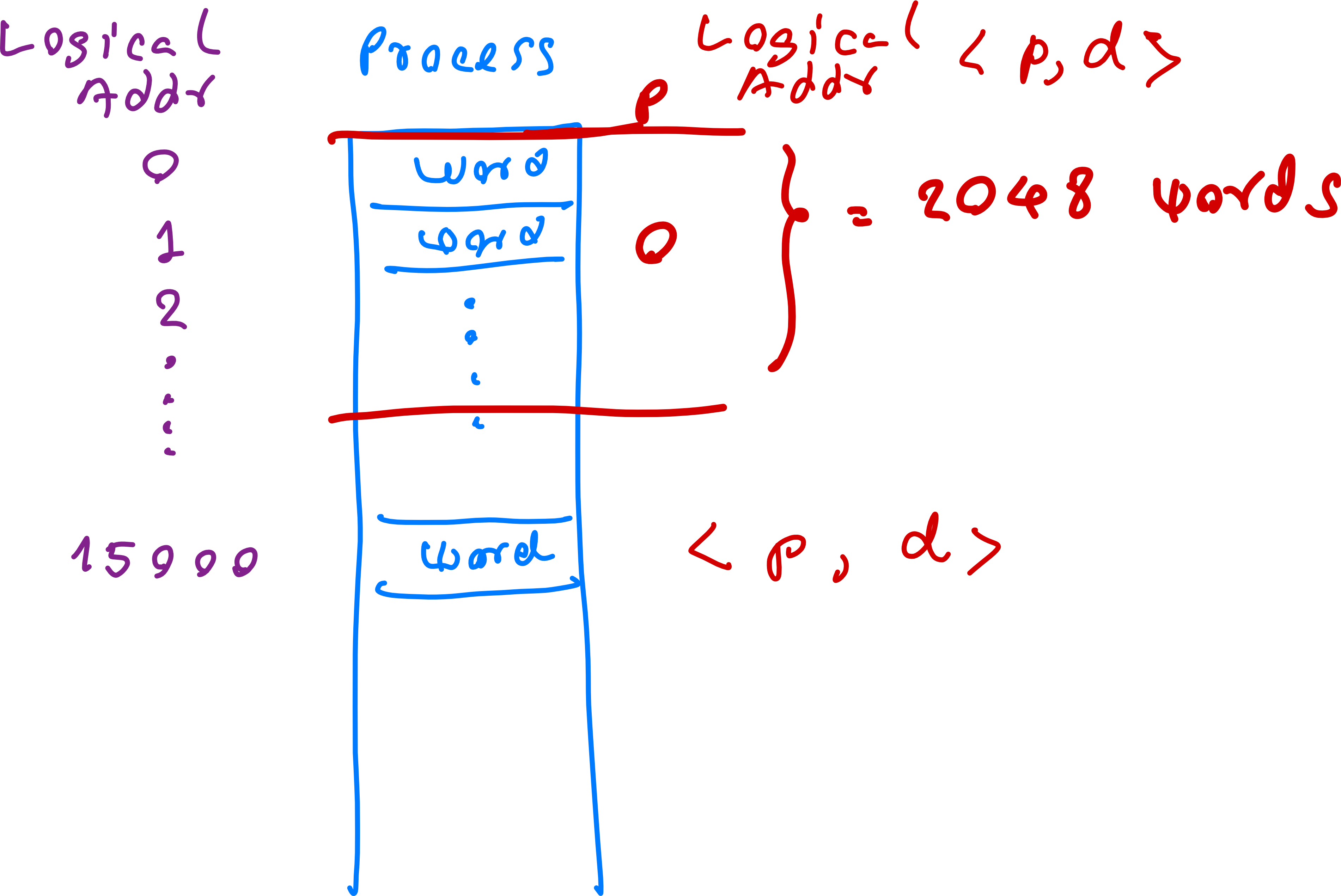
- หรือจะกดเครื่องคิดเลขแบบนี้
Logical Address Conversion between <p,d> and Binary
- A logical address can be represented by an m-bit binary number:

- Page number (p): First () bits
- Page offset (d): Last bits
- Number of pages =
- Page size = words
Example 1
Consider a paging method whose logical address can be represented by a 7-bit binary number and the offset number (d) can be represented by a 4-bit binary number.
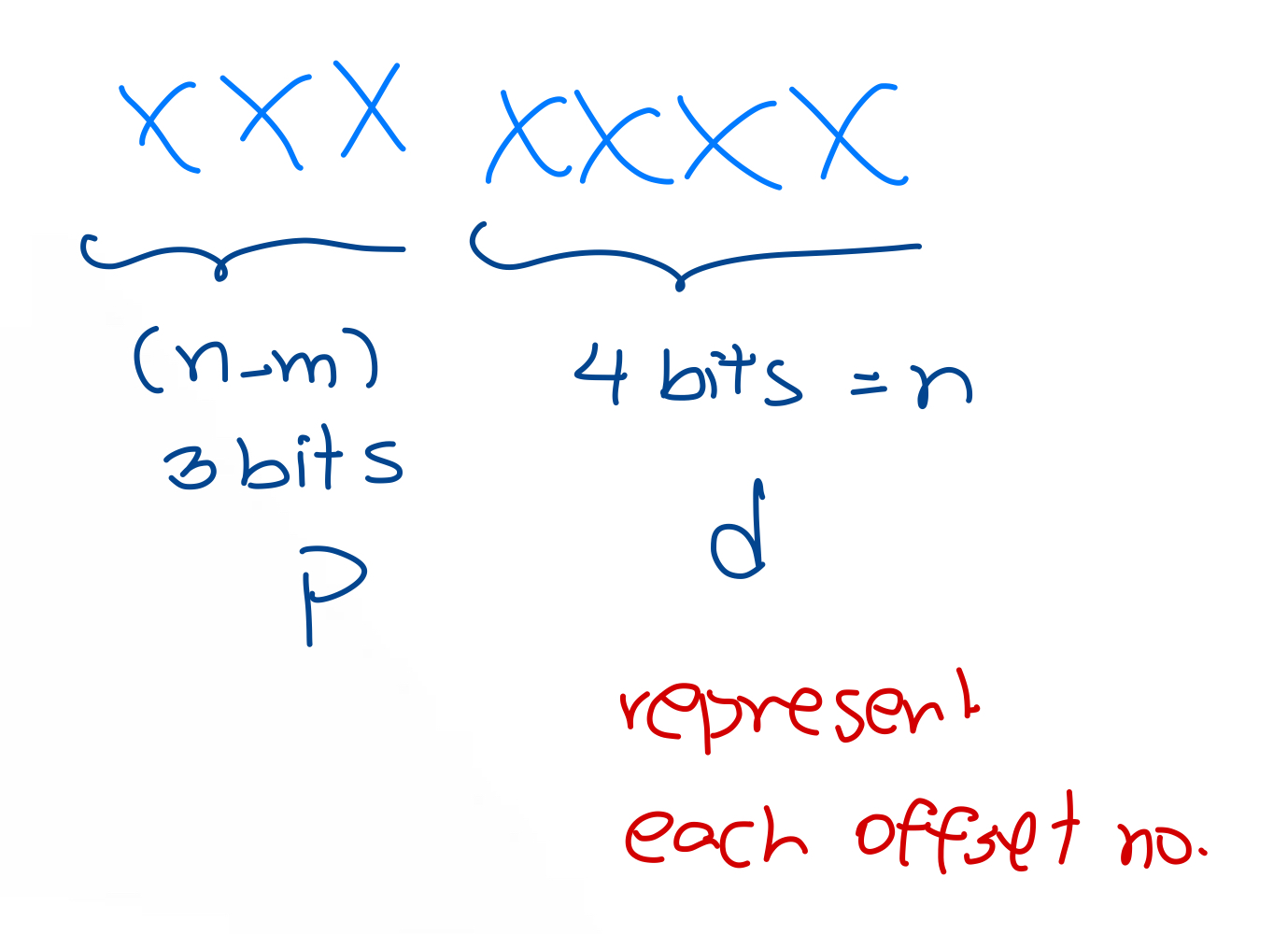
- What is the page size?
- What is the maximum number of pages that we can have?
Example 2
- If m=5 and n=3, what is the <p, d> of the logical address 10110 (binary number)?
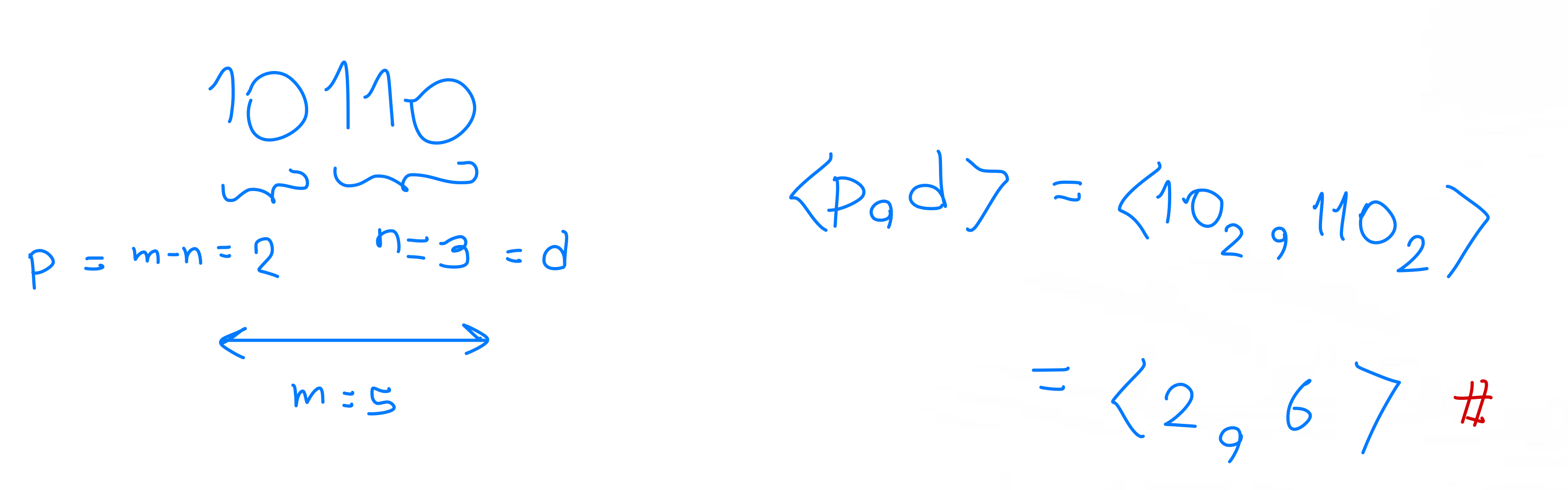
- If m=6 and n=2, what is the binary number to represent the logical address <5, 1>?
- ต้องเติม 0 ด้วย ไม่งั้นผิดนะ!
Physical Address Conversion
- ที่ทำมาก่อนหน้านี้เป็น Logical Address หมดเลยนะ
A physical address can be represented by:
- A decimal number
- A tuple <f,d>
- A binary number
Physical Address Conversion between Decimal and <f,d>
We can convert between decimal representation (N) and <f, d> representation as follows.
Example
Consider a paging method whose page size is equal to 32 words and page table is shown below. Find the physical address in the decimal representation of the logical address <2, 20>.
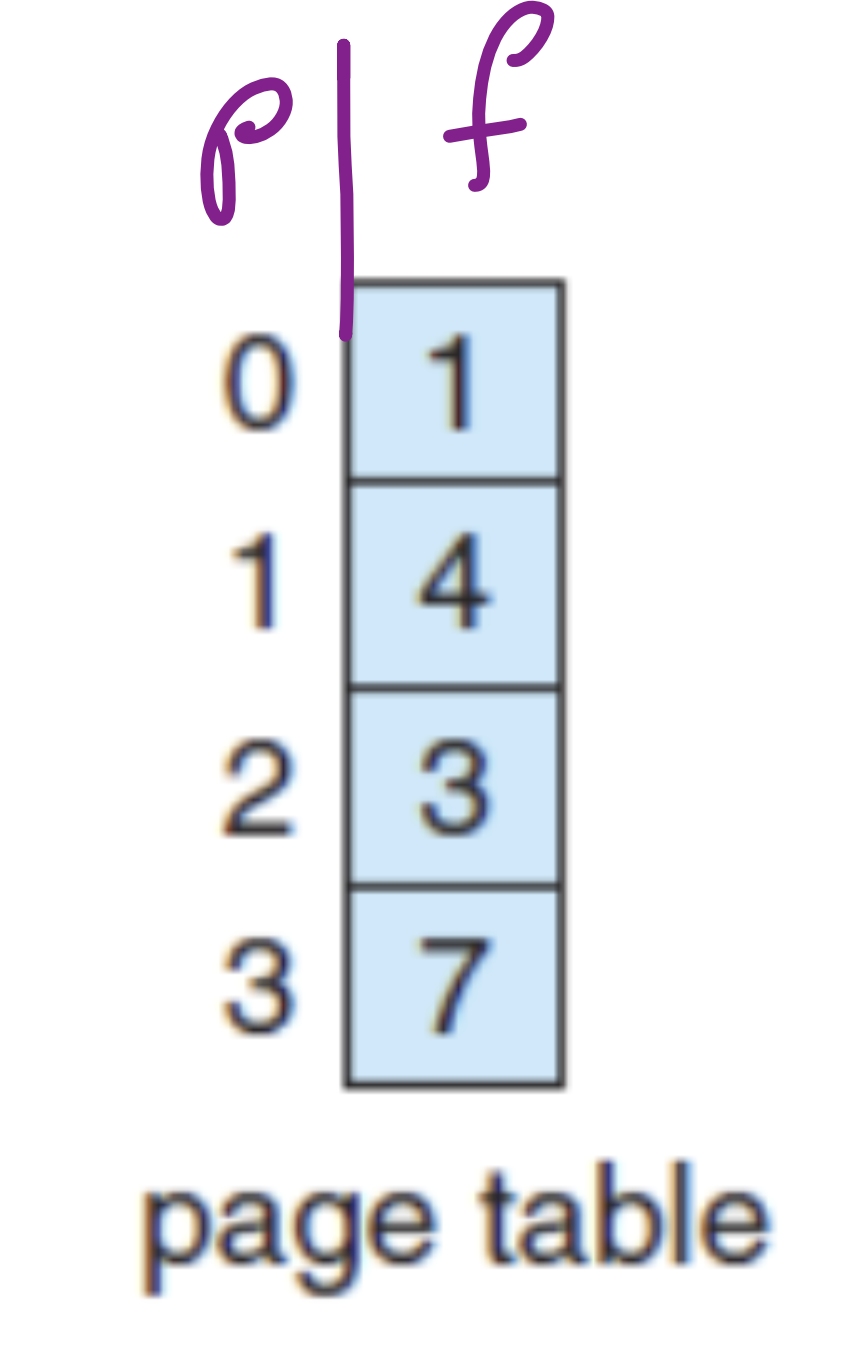
- Find the physical address
- <p,d> = <2,20> Logical
- <f,d> = <3,20> Physical
- Decimal physical address
Physical Address Conversion between <f,d> and Binary
A physical address can be represented by a k-bit binary number:
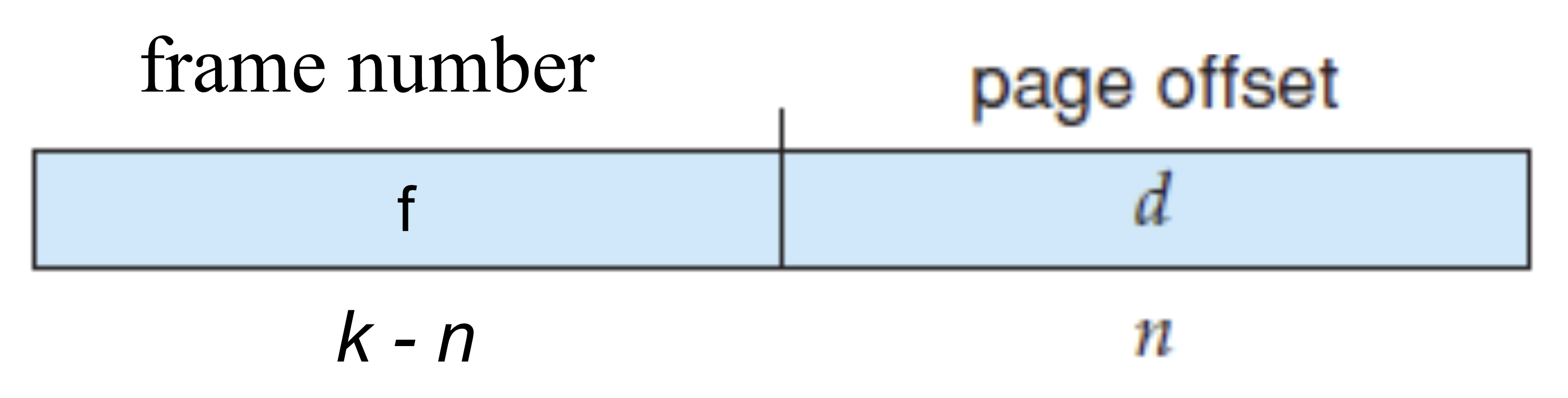
- Frame number (f): First () bits
- Offset (d): Last bits ==(same n as in logical address น่าออกสอบมากก)==
- Number of frames =
- Frame size = words
Example 1
Consider a paging method whose physical address can be represented by a 9-bit binary
number and the offset number (d) can be represented by a 5-bit binary number.
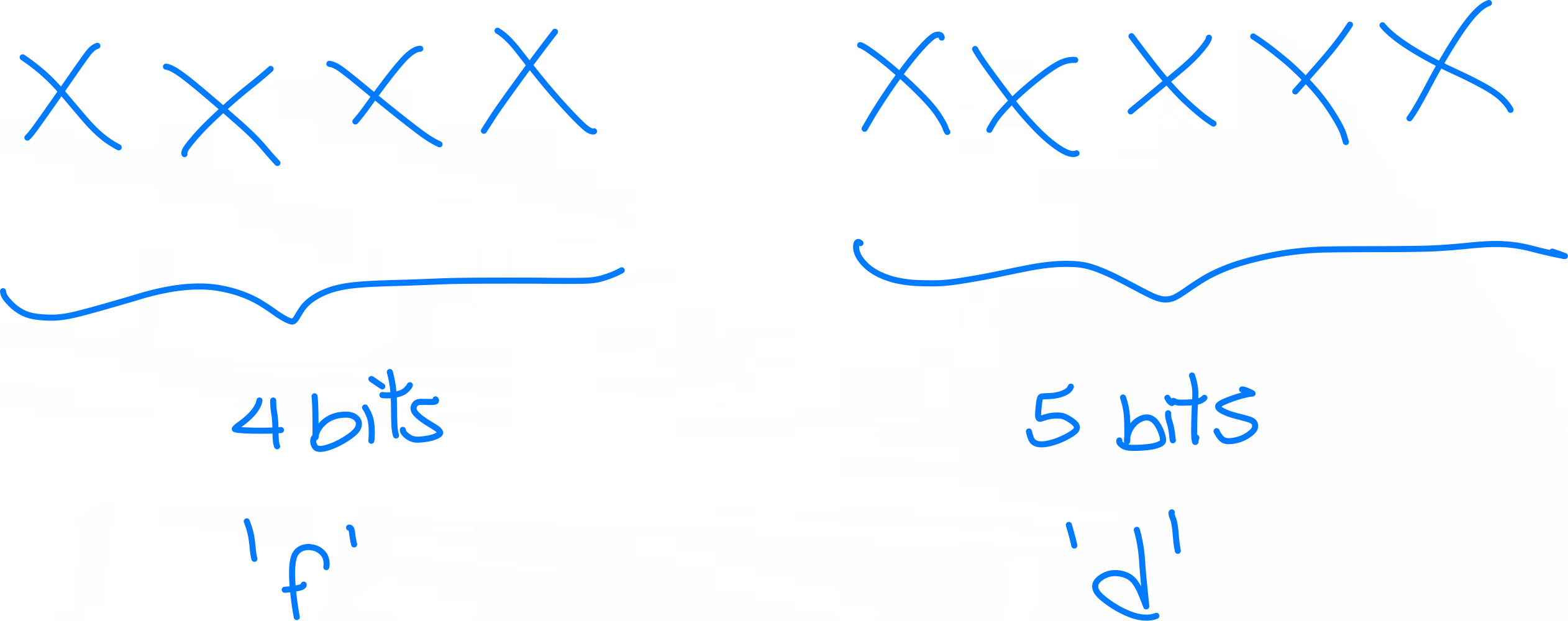
- What is the frame size?
- words
- What is the maximum number of frames in the main memory that we can have?
- frames
Example 2
- If k=6 and n=2, what is the <f, d> of the logical address 10110 (binary number)?
- xxxx (f)|xx (d)
- 0101(5)|10(2)
- <5,2>
- If k=7 and n=3, what is the binary number to represent the physical address <7, 2>?
- xxxx(f)|xx(d)
- f = (อย่าลืมเติม 0 ข้างหน้า)
- d
Example 3 (ออก Final Exam 100%)
Consider a logical address space of 64 pages of 1024 words each, mapped onto a physical memory of 512 frames.
512 =
- What are the minimum number of bits to represent logical addresses?
- bits
- What are the minimum number of bits to represent physical addresses?
- bits
- สังเกตว่า 10 เหมือนกัน เพราะว่า เดียวกันนะ
Internal Fragmentation
- Number of empty cells/rows in the last page
- Internal fragmentation refers to a free space (not usable) in a frame (physical address) and happens in the paging techniques.
- This happens because the size of a process (= the number of words) is not divisible by the page size.
Example 1
A process consists of 5 words. If we use a paging method with page size equal to 2 words. The process will be divided into 3 pages where the last page contains one word and a blank space. Corresponding, when we store this process into the main memory, the frame who store the last page will also have a blank space. This blank space is referred as an internal fragmentation.
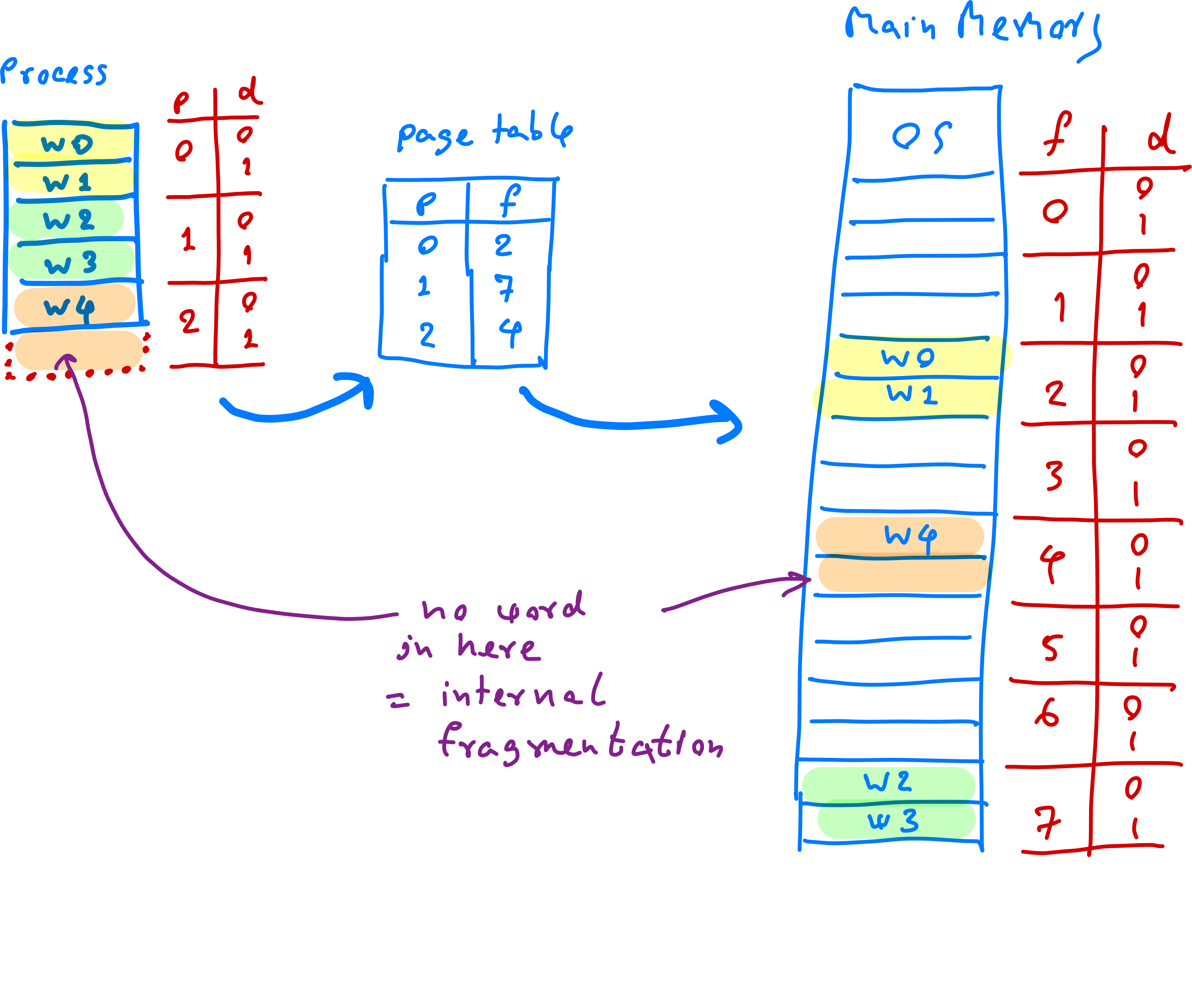
Step:
- Find the number of pages to store this process
- Find the maximum number of words covered by this
- Internal fragmentation =
Example 2
Consider a process of 72766 bytes and a page size is 2048 bytes. Assume that the word size is equal to 8 bits. How much is the internal fragmentation?
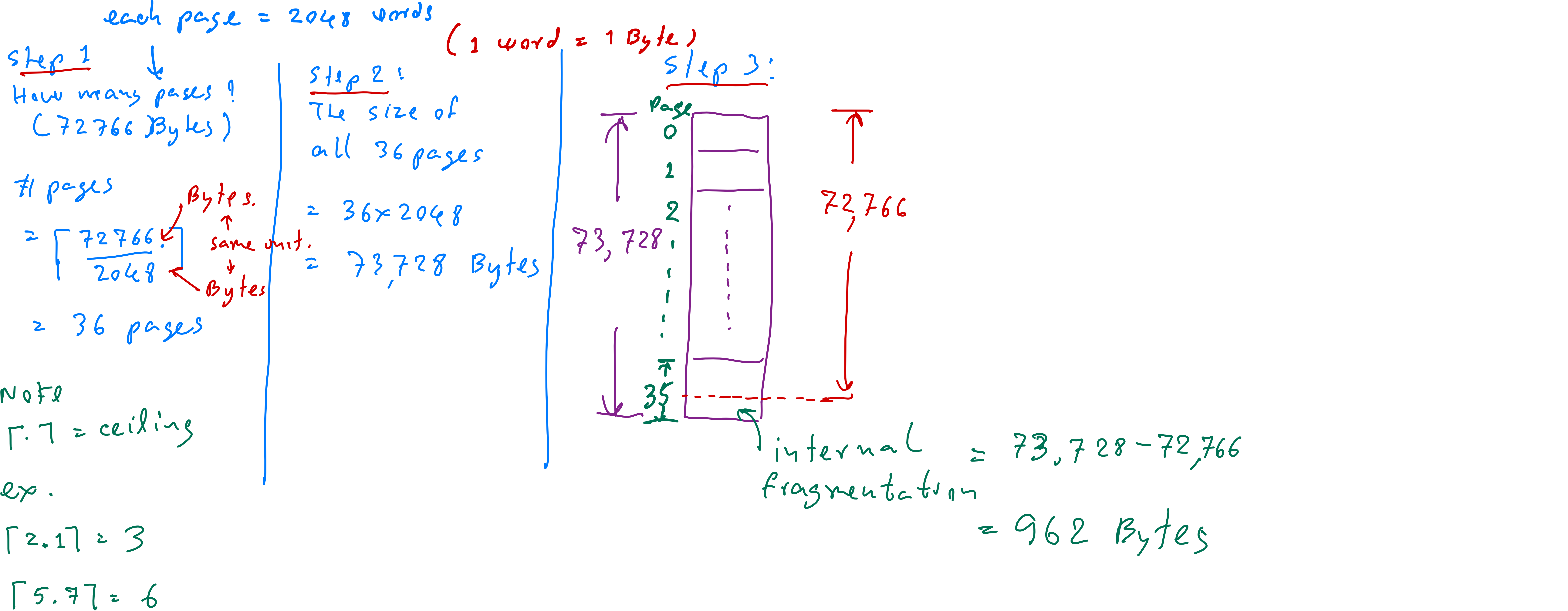
- Number of pages needed = ⌈72766/2048⌉ = 36 pages
- Maximum bytes covered = 36 × 2048 = 73728 bytes
- Internal fragmentation = 73728 - 72766 = 962 bytes
Page Table in Paging
- A page table is a data structure used in paging systems to translate logical addresses (generated by a process) into physical addresses (used by the memory hardware). It plays a critical role in memory management by mapping pages in a process's logical address space to frames in physical memory.
- Typically, a page table consists of the following entries.
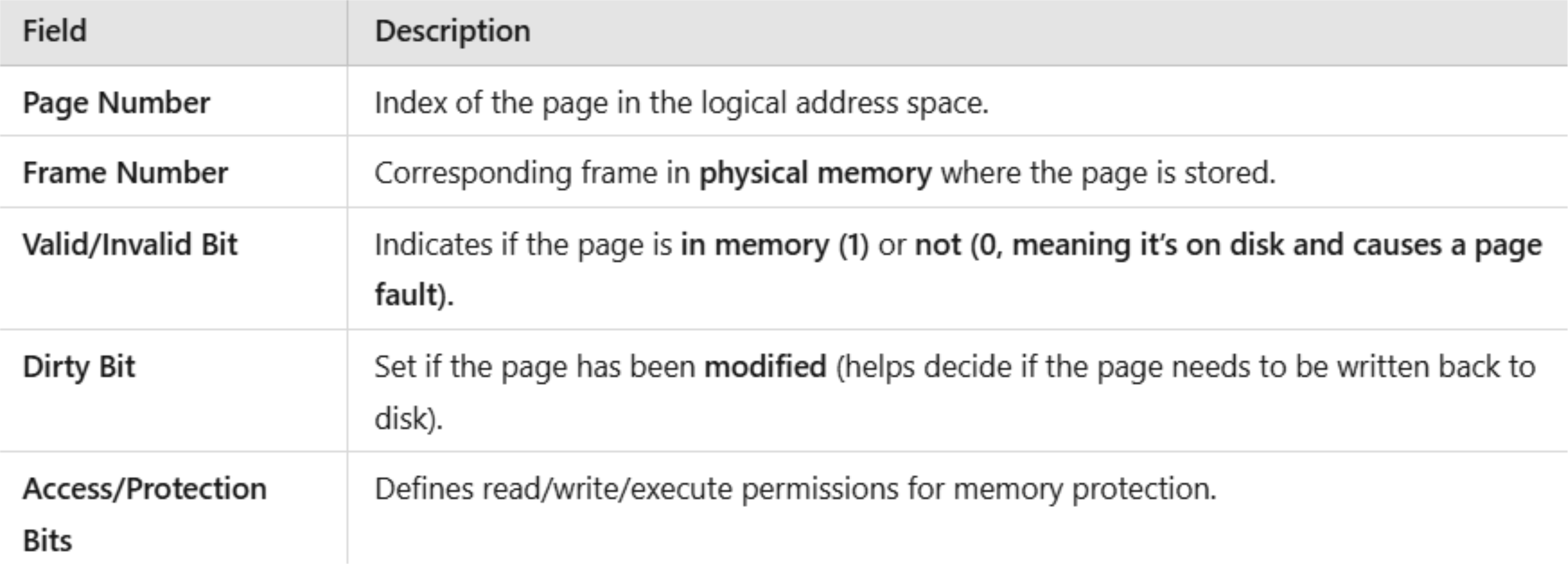
Valid and Invalid Bits in a Page Table
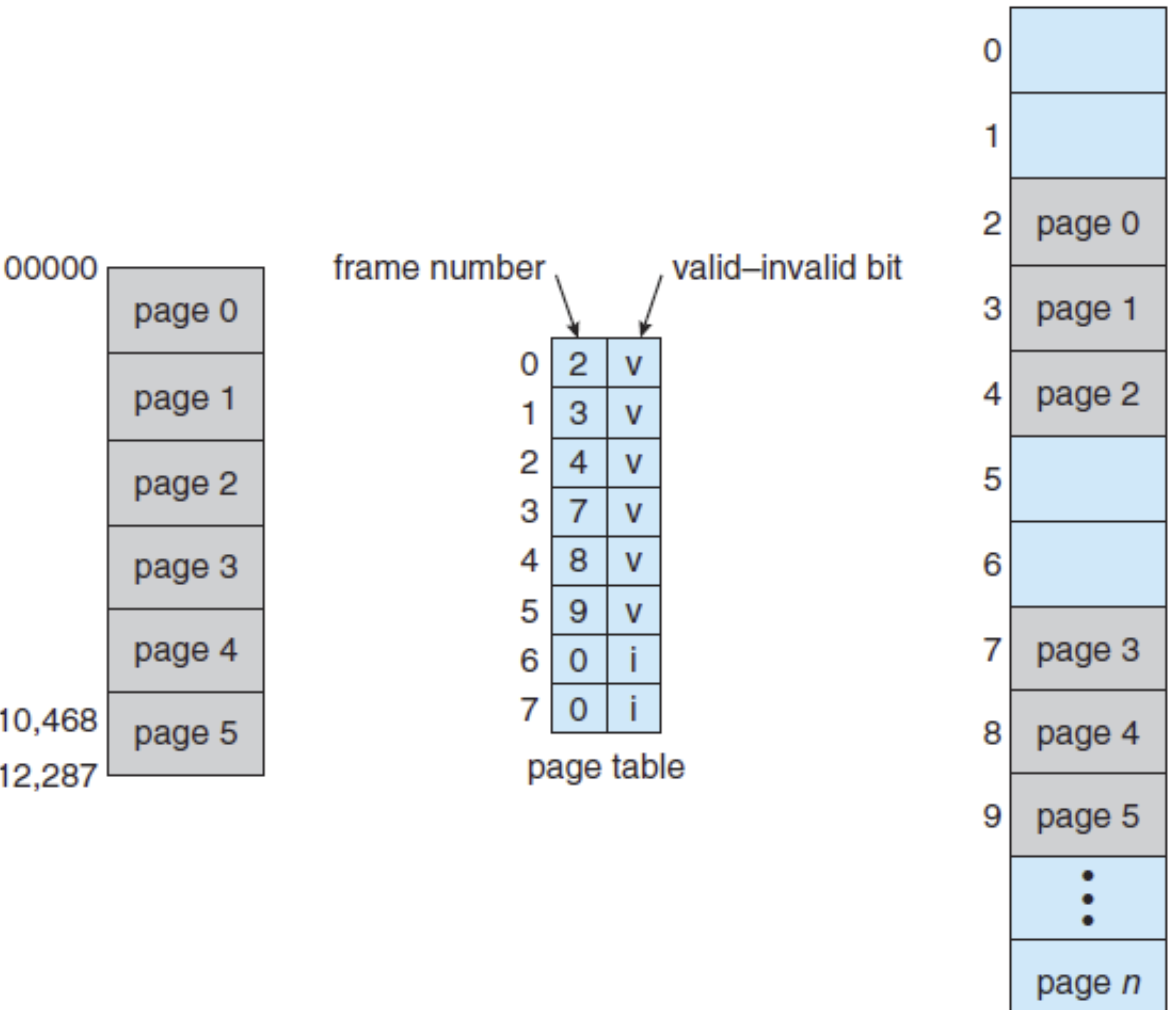
- Consider an m-bit logical space (consisting of logical addresses 0 to ). If a process has a size of (which is less than ), there might be some pages unused.
- In the page table, there is one more column to identify whether each page is valid (used) or invalid(unused).
- We use v or “1” to identify a valid page. Specifically, v identifies that this page is stored in the main memory.
- We use i or “0” to identify an invalid page. There are 2 possible meanings.
- i. We do not have this page.
- ii. On the other hand, if we have this page, now, this page is not stored in the main memory (i.e., it is currently in the hard disk). In the frame number we might put “-1” and we will have information on where it is in the hard disk.
- The unused/invalid pages will not be mapped to frames.
Dirty Bits in a Page Table
- If the dirty bit is set (1) → The page has been modified and must be written back (saved) to disk before being replaced (or removed/erased from the main memory).
- If the dirty bit is not set (0) → The page has not been modified, so it can be replaced without saving it.
Example: Page Table (1)
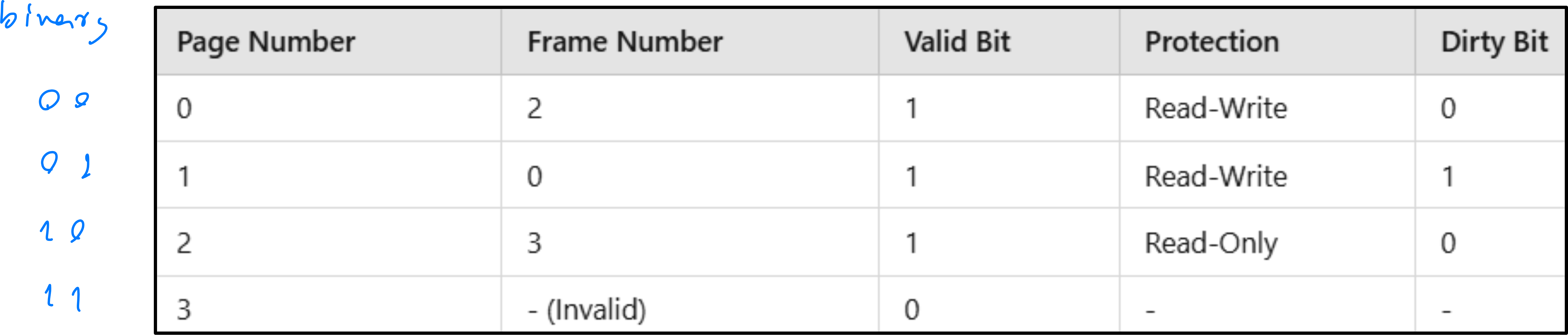
From the frame table above:
- Page 0 is stored in Frame 2.
- Page 1 is stored in Frame 0 with a dirty bit set (needs to be written back before replacement).
- If the dirty bit is set (1), the page has been modified and must be written (= saved) back to disk before being replaced (= removed/erased).
- If the dirty bit is not set (0), the page has not been modified, so it can be replaced without saving it.
- Page 3 is invalid (i.e., we might not have it or it is now stored in the hard disk).
Example: Page Table (2)
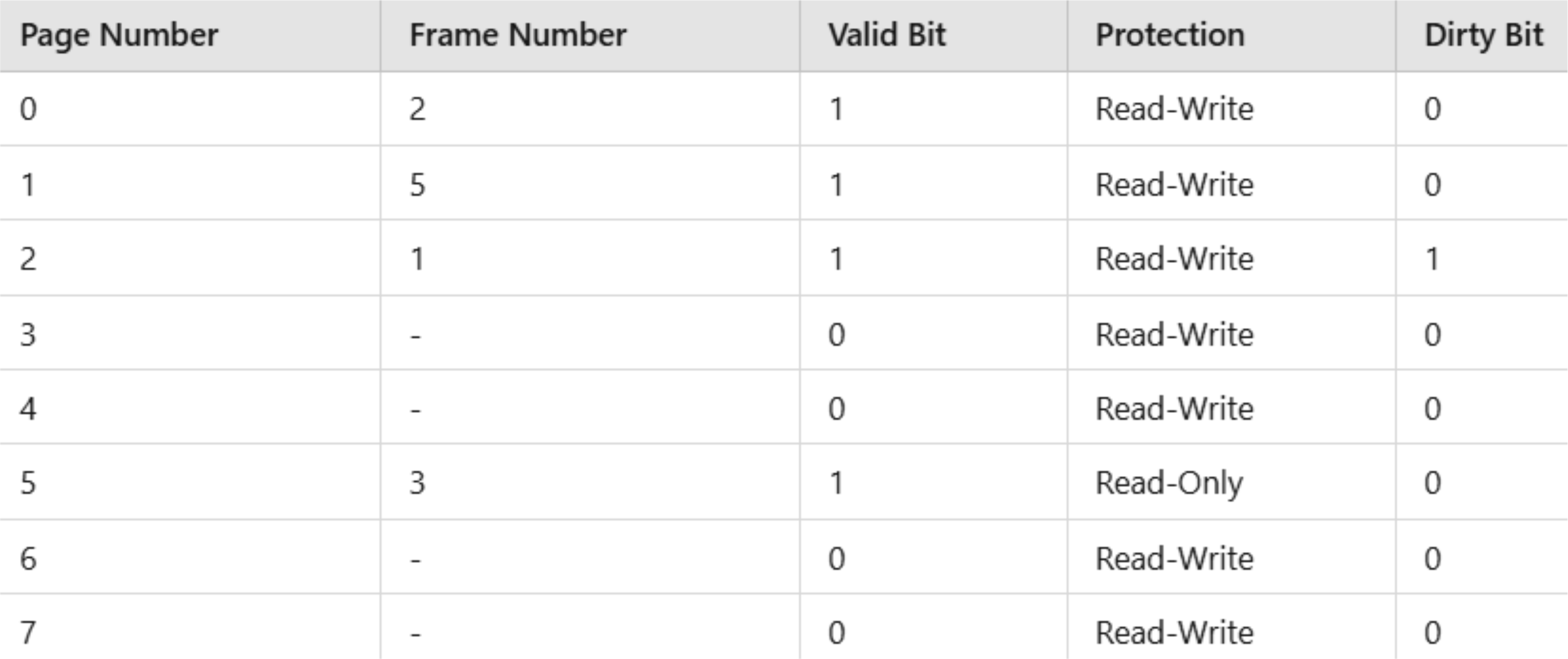
From the frame table above:
- Since the valid bit is 0, does this process have Page 3?
- Since the valid bit is 0, does this process have Page 6?
Example: Valid and Invalid Pages
Suppose, for example, that in a system with a 14-bit address space (0 to 16383), we have a program that should use only addresses 0 to 10468. Given a page size of 2 KB, we have the situation shown in the figure. Addresses in pages 0, 1, 2, 3, 4, and 5 are mapped normally through the page table.
Shared Pages
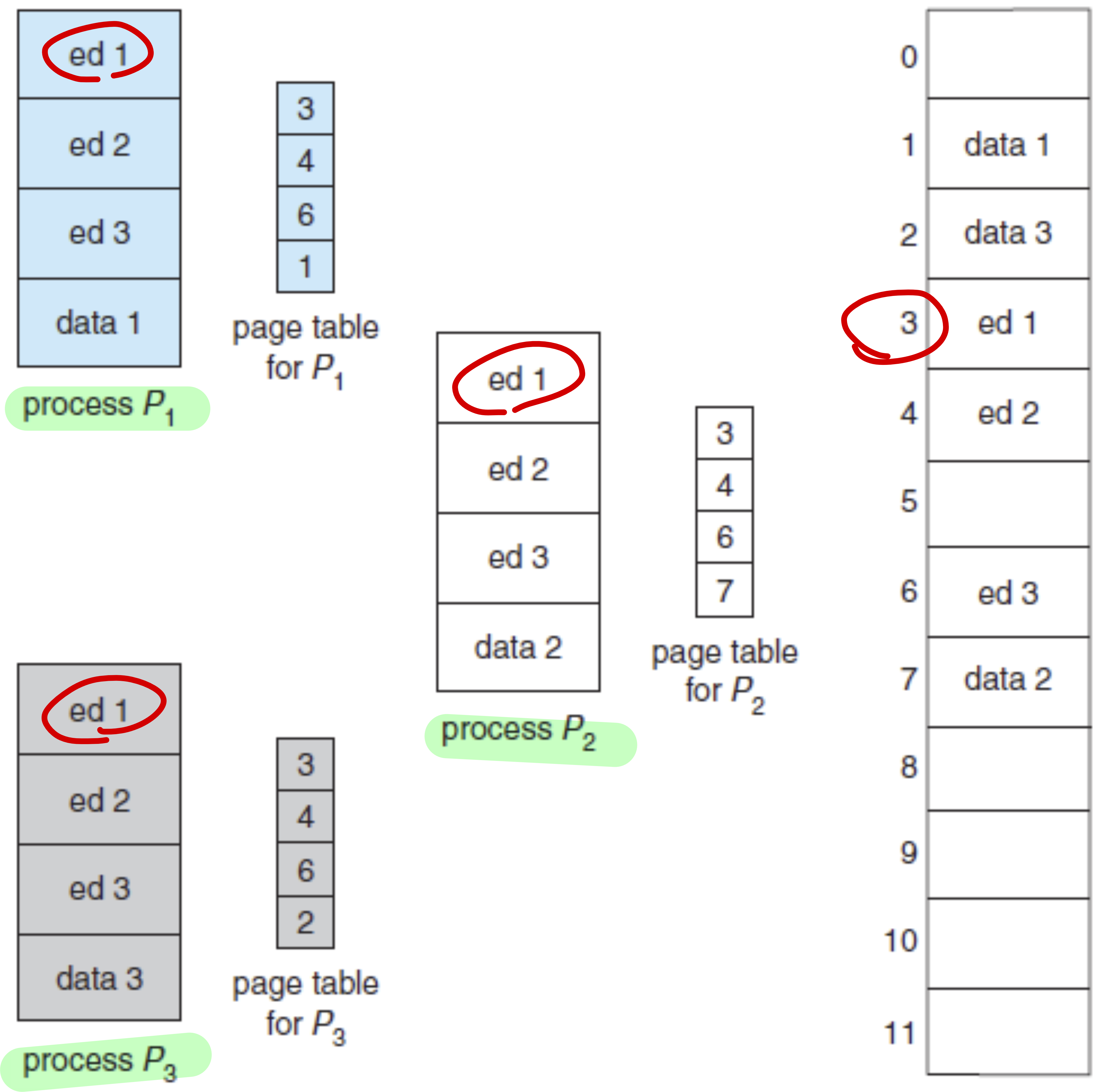
Many processes might have similar operations and segment of codes.
- As a result, some pages of these processes might be identical.
- When mapping to frames (physical address), these processes might share the same frames.
Frame Table
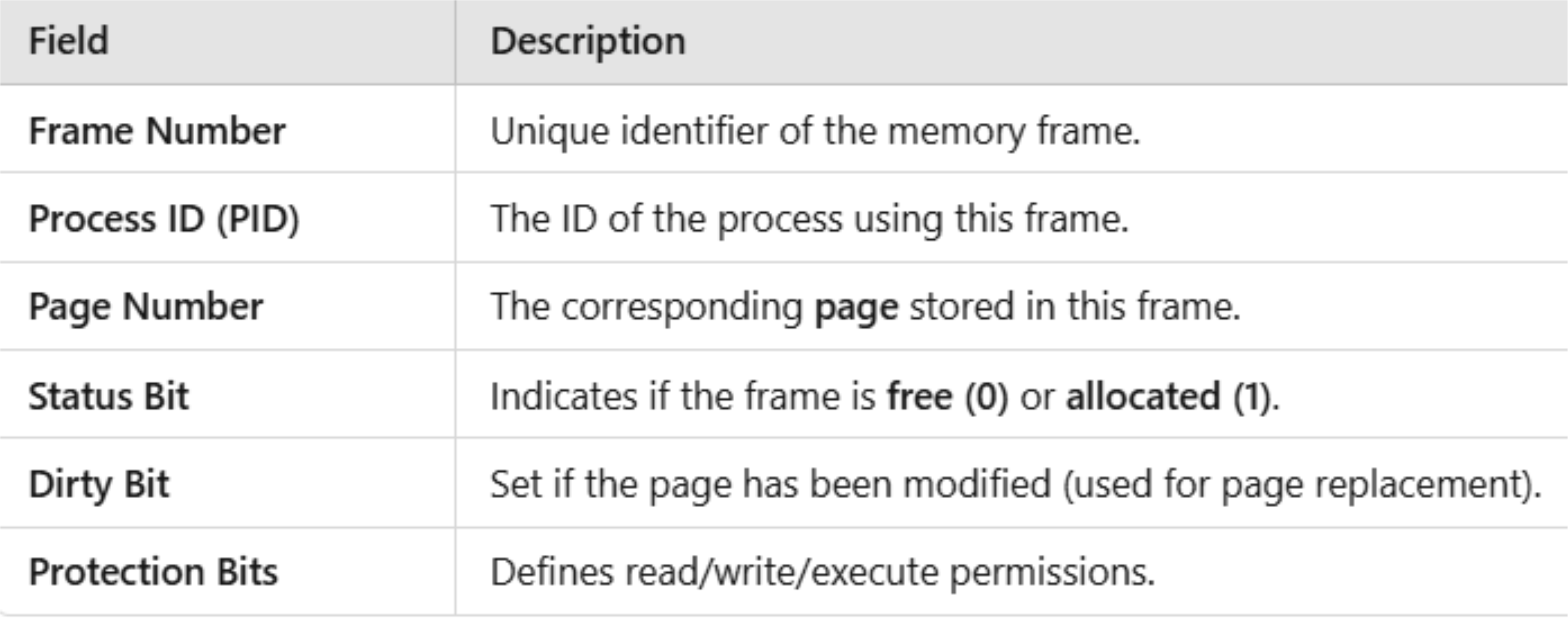
- A frame table is a data structure used in paging systems to manage physical memory allocation. It keeps track of which frames in main memory are currently allocated and which are available for use.
- Typically, a frame table consists of the following entries.
Example: Frame Table
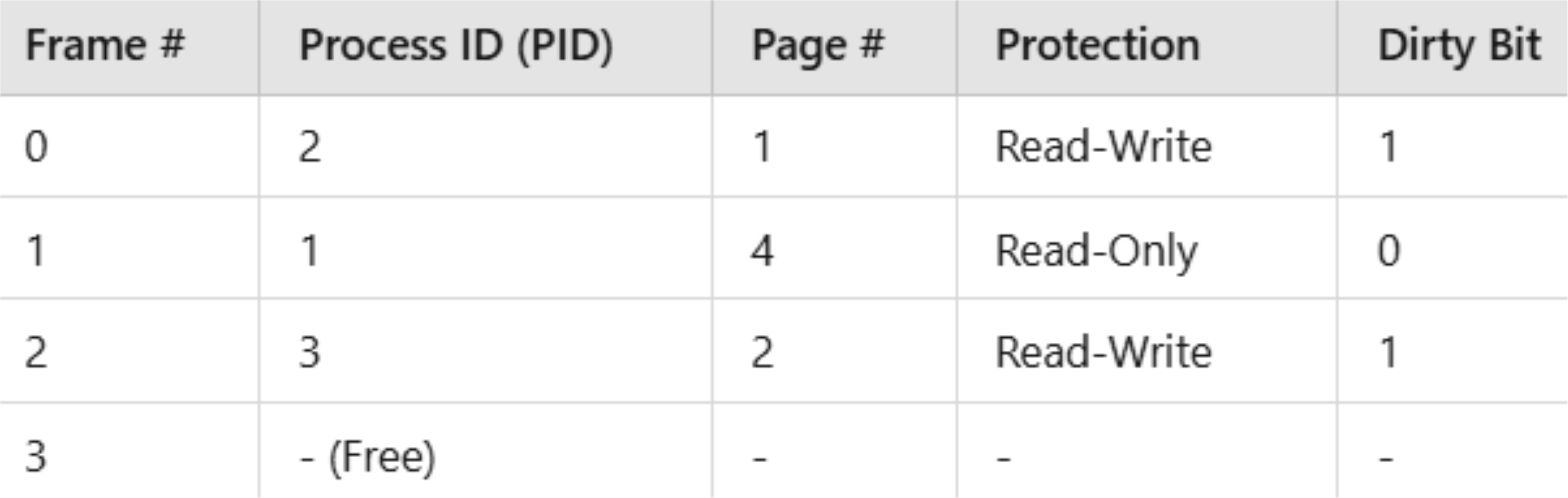
From the frame table above:
- Frame 0 belongs to process 2 and holds page 1 with a dirty bit set (needs to be written back before replacement).
- If the dirty bit is set (1), the page has been modified and must be written (= saved) back to disk before being replaced (= removed/erased).
- If the dirty bit is not set (0), the page has not been modified, so it can be replaced without saving it.
- Frame 1 belongs to process 1 and holds page 4.
- Frame 3 is free and available for allocation.