1. The Need for Firewalls
- Internet connectivity is essential — but it creates a threat
- Firewall = effective means of protecting LANs
- Inserted between the premises network and the Internet to establish a controlled link
- Can be a single computer system or a set of two or more systems working together
- Used as a perimeter defense
- Single choke point to impose security and auditing
- Insulates the internal systems from external networks
Perimeter = การเอาพวก control อะไรมาใช้ป้องกันระบบ
Analogy: คิดว่า Firewall เป็นเหมือน "ประตูหน้าบ้าน" ที่มีเจ้าหน้าที่รักษาความปลอดภัยคอยตรวจบัตรทุกคนที่จะเข้า-ออก ไม่มีใครข้ามไปได้โดยไม่ผ่านจุดนี้
2. Firewall Characteristics
Design Goals (3 ข้อสำคัญ)
- All traffic from inside to outside, and vice versa, must pass through the firewall
- จากในไปนอก สามารถป้องกัน Data leakage ได้ไง
- Only authorized traffic as defined by the local security policy will be allowed to pass
- The firewall itself is immune to penetration
3. Firewall Access Policy
- A critical component in planning and implementing a firewall is specifying a suitable access policy
- Lists the types of traffic authorized to pass through the firewall
- Includes address ranges, protocols, applications, and content types
- Policy should be developed from the organization's information security risk assessment
- Should start from a broad specification of which traffic types the organization needs to support
- Then refined to detail the filter elements → implemented within an appropriate firewall topology
4. Firewall Filter Characteristic
Characteristics that a firewall access policy could use to filter traffic:
| Filter Type | Description | Used By |
|---|---|---|
| IP address & protocol values | Filters based on source/destination IP, protocol | Packet filter & stateful inspection firewalls |
| Application protocol | Relays and monitors exchange of information for specific app protocols | Application-level gateway |
| User identity | Identifies inside users using secure authentication | Internal users |
| Network activity | Controls based on time of request, rate of requests, or activity patterns | — |
5. Firewall Capabilities and Limitations
Capabilities
- Defines a single check point
- Provides a location for monitoring security events
- Convenient platform for several Internet functions (not just security-related)
- Can serve as the platform for IPSec
Limitations
- Cannot protect against attacks bypassing the firewall
- May not protect fully against internal threats
- Improperly secured wireless LAN can be accessed from outside the organization
- Laptop, PDA, or portable storage device may be infected outside the corporate network then used internally
Analogy: Firewall เหมือนประตูหน้าบ้าน — ถ้าโจรปีนรั้วหลังบ้าน หรือคนในบ้านเองเป็นโจร Firewall ก็ช่วยไม่ได้
6. Types of Firewalls
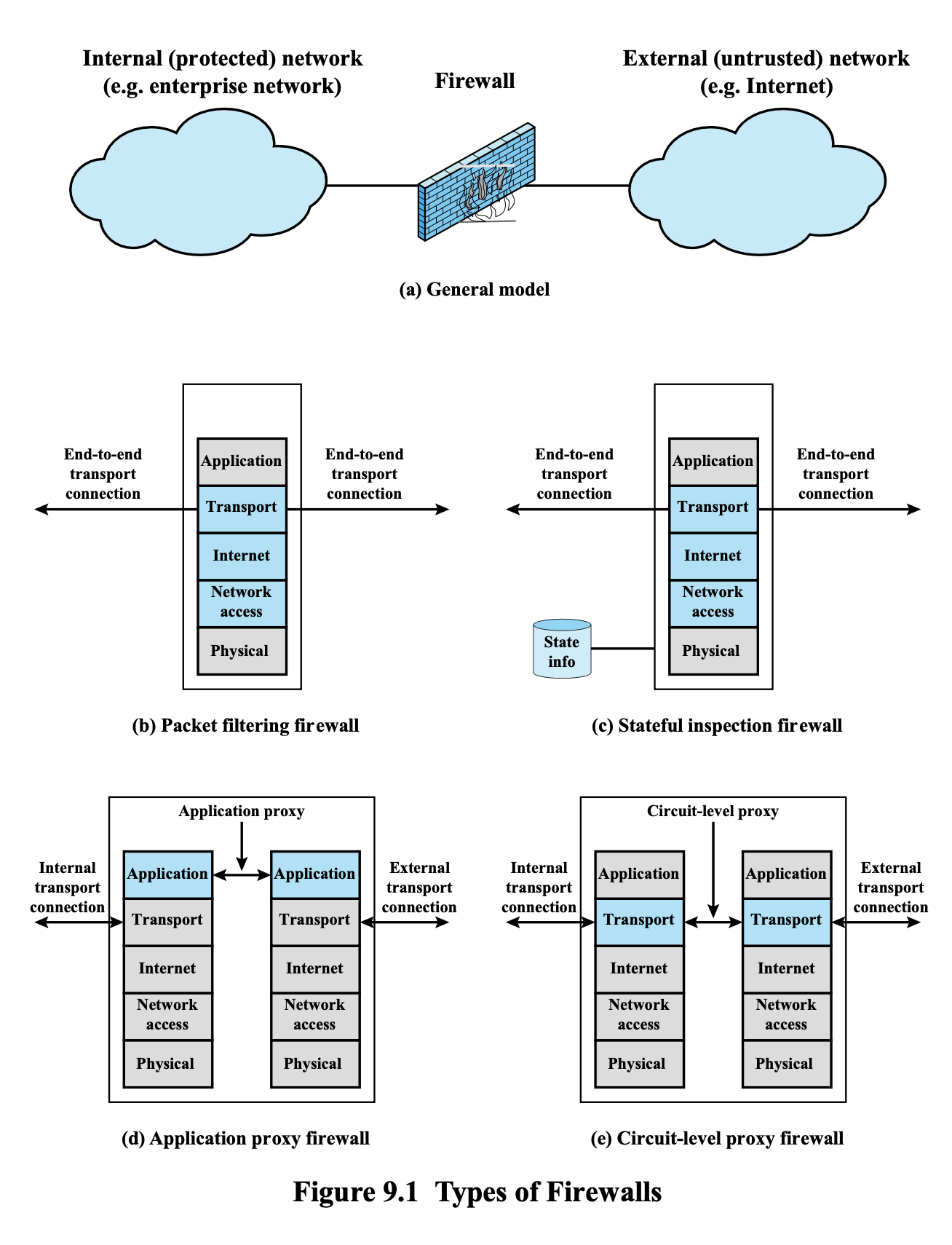
6.1 Packet Filtering Firewall (Stateless)
- Applies rules to each incoming and outgoing IP packet
- Typically a list of rules based on matches in the IP or TCP header
- Forwards or discards the packet based on rules match
Filtering rules are based on:
- Source IP address
- Destination IP address
- Source and destination transport-level address (port)
- IP protocol field
- Interface
Two default policies:
- Discard — prohibit unless expressly permitted
- More conservative, controlled, visible to users
- Forward — permit unless expressly prohibited
- Easier to manage and use but less secure
Example Packet-Filtering Rules (Table 9.1)
| Rule | Direction | Src Address | Dest Address | Protocol | Dest Port | Action |
|---|---|---|---|---|---|---|
| 1 | In | External | Internal | TCP | 25 | Permit |
| 2 | Out | Internal | External | TCP | >1023 | Permit |
| 3 | Out | Internal | External | TCP | 25 | Permit |
| 4 | In | External | Internal | TCP | >1023 | Permit |
| 5 | Either | Any | Any | Any | Any | Deny |
Analogy: Packet Filtering เหมือนยามที่ดูแค่ "บัตรประชาชน" (header) ว่าชื่อนี้ในลิสต์ไหม — ไม่สนว่าคนนั้นจะทำอะไรหลังผ่านเข้าไป
Packet Filter Advantages & Weaknesses
Advantages:
- Simplicity
- Typically transparent to users and very fast
Weaknesses:
- Cannot prevent attacks that employ application-specific vulnerabilities or functions
- Cannot determine whether the content of the request will negatively affect the application
- Limited logging functionality
- Do not support advanced user authentication
- Vulnerable to attacks on TCP/IP protocol bugs
- Improper configuration can lead to breaches
6.2 Stateful Inspection Firewall
Stateful firewalls remember information associated with previously passed packets and thus provide much better security.
Two key mechanisms:
- Tightens rules for TCP traffic by creating a directory of outbound TCP connections
- There is an entry for each currently established connection
- Packet filter allows incoming traffic to high-numbered ports only for those packets that fit the profile of one of the entries in this directory
- Reviews packet information but also records information about TCP connections
- Keeps track of TCP sequence numbers to prevent attacks that depend on the sequence number
- Inspects data for protocols like FTP, IM, and SIPS commands
Example Stateful Firewall Connection State Table (Table 9.2)
| Source Address | Source Port | Destination Address | Destination Port | Connection State |
|---|---|---|---|---|
| 192.168.1.100 | 1030 | 210.9.88.29 | 80 | Established |
| 192.168.1.102 | 1031 | 216.32.42.123 | 80 | Established |
| 192.168.1.101 | 1033 | 173.66.32.122 | 25 | Established |
| 192.168.1.106 | 1035 | 177.231.32.12 | 79 | Established |
| 223.43.21.231 | 1990 | 192.168.1.6 | 80 | Established |
| ![[Pasted image 20260407141624.png | center | 500]] |
Security Features of Stateful Firewall
- Stateful firewalls are active and intelligent defense mechanisms as compared to static firewalls which are "dumb"
- Attacks such as denial of service and spoofing are easily safeguarded
- Limitation: Stateful filtering occurs at lower layers of the OSI model (layers 3 and 4)
- Application layer is not protected
- Authentication of users to connections cannot be done
Analogy: Stateful = ยามที่จำได้ว่า "คนนี้เพิ่งออกไปซื้อของ รอบนี้กลับเข้ามาปกติ" — ไม่ใช่แค่ดูบัตรรอบเดียว แต่จำ context ด้วย
6.3 Deep Packet Inspection (DPI)
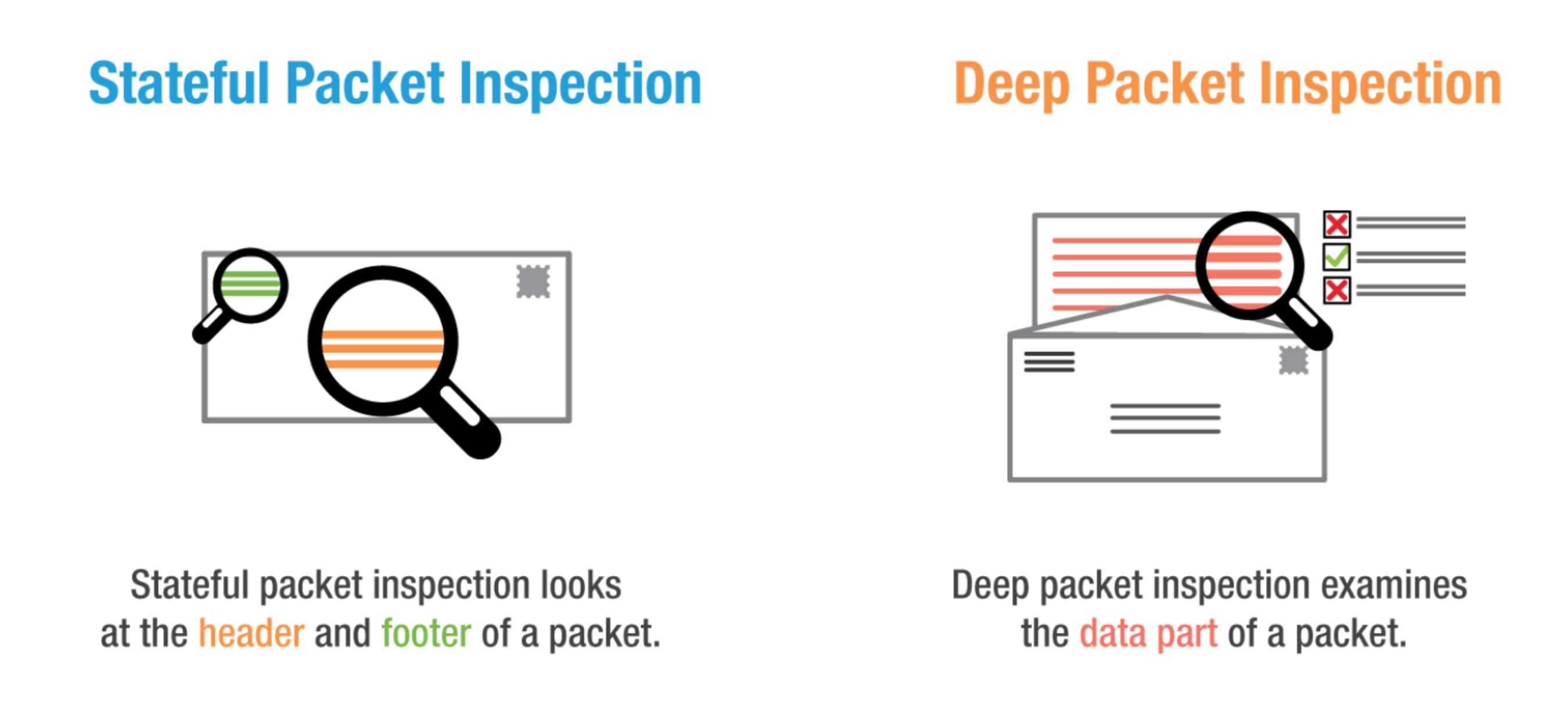
| Type | What it inspects |
|---|---|
| Stateful Packet Inspection | Looks at the header and footer of a packet |
| Deep Packet Inspection | Examines the data part of a packet |
6.4 Stateless vs. Stateful — Side-by-Side Comparison
| Feature | Packet Filtering Firewall (Stateless) | Stateful Firewall |
|---|---|---|
| Tracks Connection State | ❌ No | ✅ Yes |
| Speed | ⚡ Fast (low overhead) | Slightly slower (state tracking) |
| Security Level | Basic | Advanced |
| Dynamic Port Support | ❌ Manual configuration needed | ✅ Tracks sessions automatically |
| Return Traffic Handling | ❌ Explicit rules required | ✅ Allowed if session is established |
| Best For | Simple routers, stateless traffic | Enterprise networks, modern apps |
| DoS Resistance | ⚠️ Basic | ⚠️ Susceptible to state exhaustion (DoS พวกนี้ เก็บ State เยอะ จนอาจ crash ได้) |
Real-world Example
| Task | Stateless | Stateful |
|---|---|---|
| Allow a web server to serve HTTP (port 80) traffic | Allow TCP dst port 80 | Same, but also auto-allows return responses |
| Block unknown inbound TCP packets | Must manually block based on SYN flag | Automatically blocks unsolicited SYNs |
| Handle FTP or VoIP (uses dynamic ports) | Difficult | Easily managed using state tracking |
6.5 Application-Level Gateway (Proxy Firewall)
- Also called an application proxy or Proxy Firewall
- Acts as a relay of application-level traffic
- User contacts gateway using a TCP/IP application
- User is authenticated
- Gateway contacts application on remote host and relays TCP segments between server and user
- Must have proxy code for each application
- May restrict application features supported
- Proxy code = perform authentication for each applications
- Tend to be more secure than packet filters
- Disadvantage: Additional processing overhead on each connection
Proxy Firewall Details
- Operates at the application level and acts as an intermediary between two end systems
- The client's request is evaluated against security rules → permitted or blocked
- Uses both stateful and deep packet inspection
- Mostly used for monitoring 7th layer protocols like HTTP and FTP
Analogy: Proxy Firewall เหมือน "นายหน้า" ที่คุณต้องติดต่อผ่านเขาทุกครั้ง — เขาตรวจสอบก่อน แล้วค่อยไปติดต่อปลายทางให้คุณ
6.6 Web Application Firewall (WAF)
Web Application only นะ!! (Server)
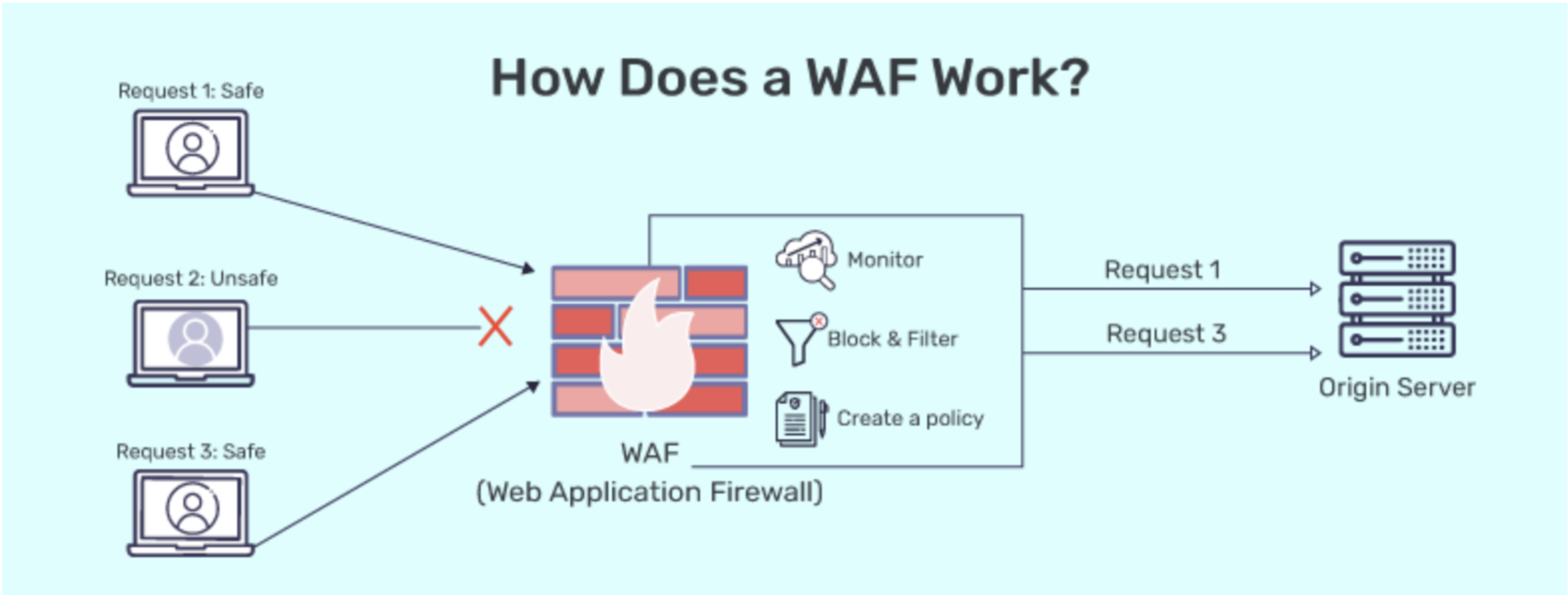
- Developed in the early 1990s to respond to threats beyond the scope of traditional firewalls
- Traditional firewalls were bypassed because attacks used authorized protocols (like HTTP) to attack the application
- Relies on a security policy enforcement point positioned between a web application and the client endpoint
- Can be implemented in software or hardware
WAF Security Models
- Positive Security Model (Whitelist)
- Explicitly defines allowed patterns and behaviors
- Permits only known legitimate traffic — rejects all other patterns
- Negative Security Model (Blacklist)
- Identifies and blocks known malicious patterns or signatures
- Assumes traffic matching predefined attack patterns is malicious
- Advanced Capabilities
- Leverages machine learning / AI and threat intelligence for proactive defence
What WAF Protects Against
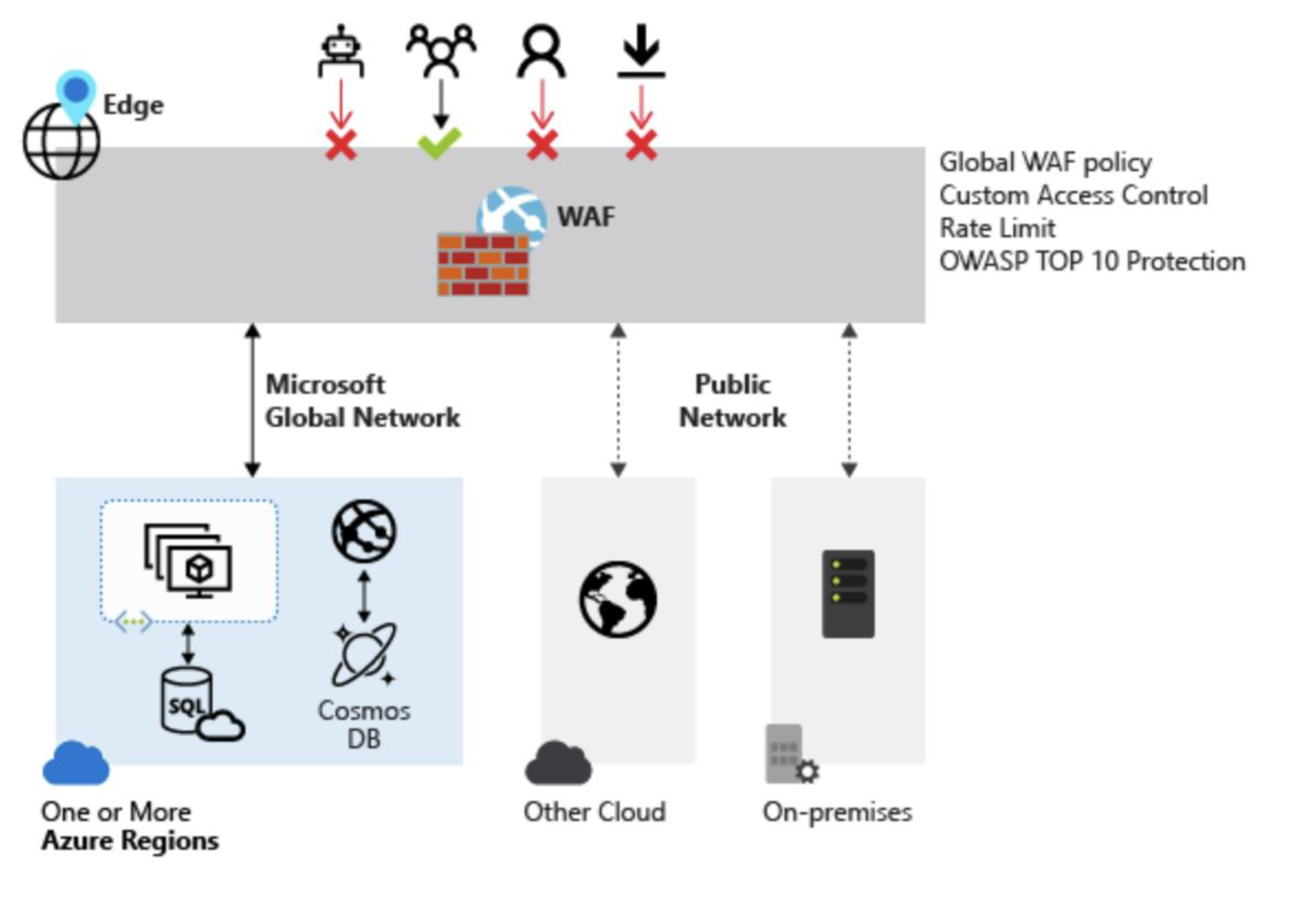
WAF protects the app layer and analyzes each HTTP/HTTPS request. It is user, session, and application aware.
- Injection attacks
- Broken Authentication
- Sensitive data exposure
- XML External Entities (XXE)
- Broken Access control
- Security misconfigurations
- Cross Site Scripting (XSS)
- Insecure Deserialization
Types of WAF
| Type | Description | Trade-offs |
|---|---|---|
| Network-based WAF | Usually hardware-based, installed locally | Most expensive; requires physical equipment |
| Host-based WAF | Integrated into the application software | Cheaper, more customizable; consumes server resources; complex to implement |
| Cloud-based WAF | SaaS subscription model, no upfront investment | Affordable, easily implemented; updated at no extra cost |
| ![[Pasted image 20260407142332.png | center | 600]] |
Analogy: WAF เหมือนยามที่ตรวจสอบ "เนื้อหาของจดหมาย" ไม่ใช่แค่ดูว่าจ่าหน้าถูกต้องไหม — Network Firewall แค่ดูซอง, WAF เปิดอ่านข้างใน
6.7 Circuit-Level Gateway
- Sets up two TCP connections: one between itself and a TCP user on an inner host, and one on an outside host
- Relays TCP segments from one connection to the other without examining contents
- Security function = determining which connections will be allowed
- Typically used when inside users are trusted
- May use application-level gateway inbound and circuit-level gateway outbound
- Lower overheads than application-level gateway
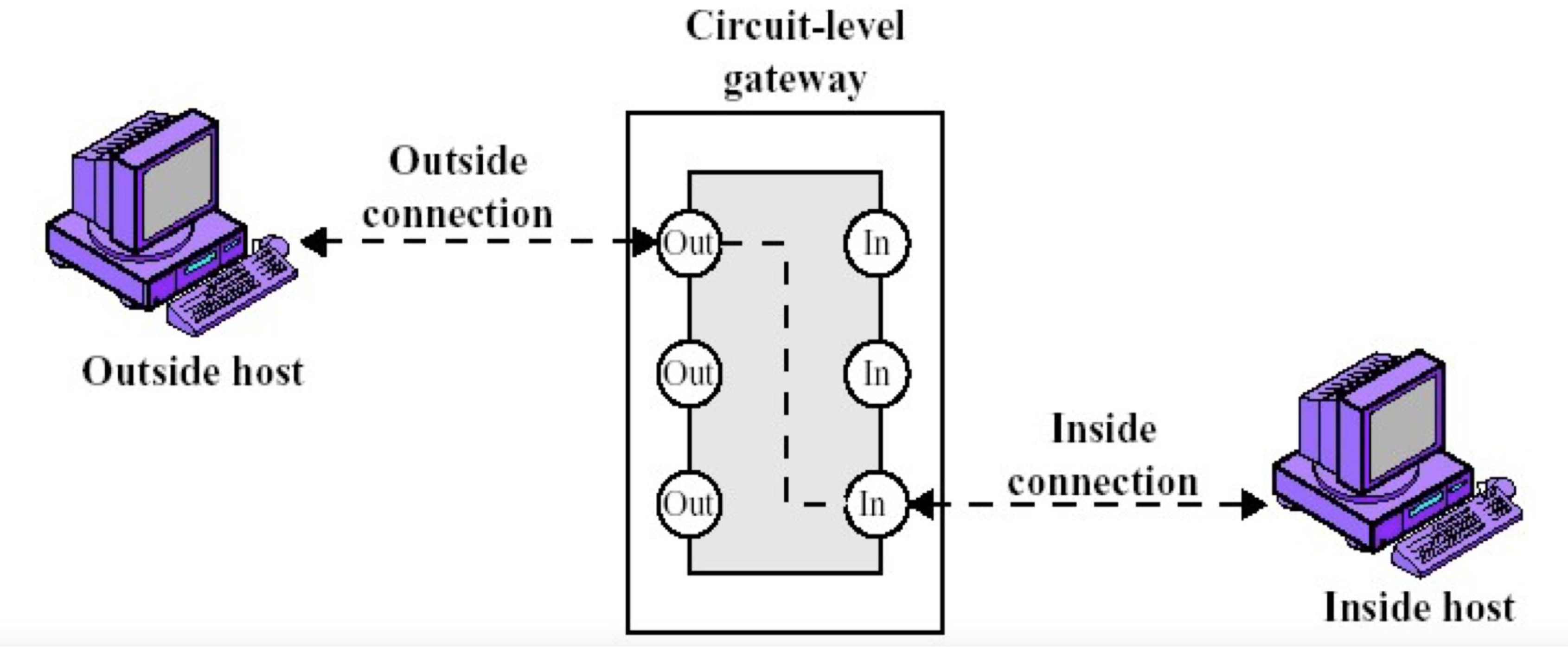
Analogy: Circuit-Level Gateway เหมือนช่างโทรศัพท์ที่ต่อสาย — เขาเชื่อมการเชื่อมต่อให้คุณ แต่ไม่ได้ฟังเนื้อหาสนทนา
7. Firewall Basing
7.1 Bastion Hosts
- System identified as a critical strong point in the network's security
- Serves as a platform for an application-level or circuit-level gateway
- Common characteristics:
- Runs secure O/S, only essential services
- May require user authentication to access proxy or host
- Each proxy can restrict features, hosts accessed
- Each proxy is small, simple, checked for security
- Each proxy is independent, non-privileged
- Limited disk use — hence read-only code
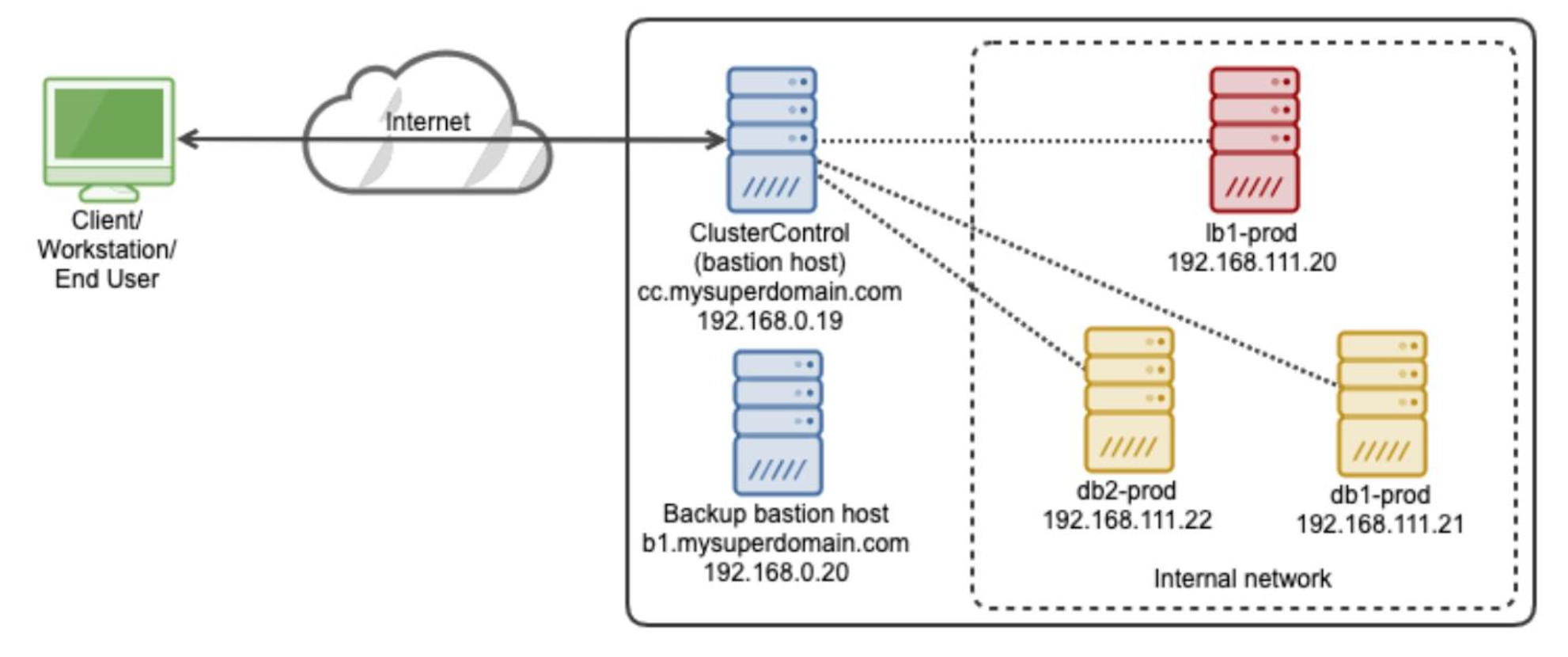
Analogy: Bastion Host เหมือน "ป้อมปราการ" ที่แข็งแกร่งที่สุดในเครือข่าย — ทุกอย่างถูก hardened และมีแค่สิ่งจำเป็นเท่านั้น
7.2 Host-Based Firewalls
- A software module used to secure an individual host
- Available in operating systems or can be provided as an add-on package
- Filter and restrict packet flows
- Common location is a server
Advantages:
- Filtering rules can be tailored to the host environment
- Protection is provided independent of topology
- Provides an additional layer of protection
7.3 Personal Firewall
- Controls traffic between a personal computer/workstation and the Internet or enterprise network
- For both home or corporate use
- Typically is a software module on a personal computer
- Can be housed in a router that connects all home computers to DSL, cable modem, or other Internet interface
- Typically much less complex than server-based or standalone firewalls
- Primary role is to deny unauthorized remote access
- May also monitor outgoing traffic to detect and block worms and malware activity
8. Firewall Topologies
| Topology | Description |
|---|---|
| Host-resident firewall | Includes personal firewall software and firewall software on servers |
| Screening router | Single router between internal and external networks with stateless or full packet filtering |
| Single bastion inline | Single firewall device between an internal and external router |
| Single bastion T | Has a third network interface on bastion to a DMZ where externally visible servers are placed |
| Double bastion inline | DMZ is sandwiched between bastion firewalls |
| Double bastion T | DMZ is on a separate network interface on the bastion firewall |
| Distributed firewall configuration | Used by large businesses and government organizations |
| 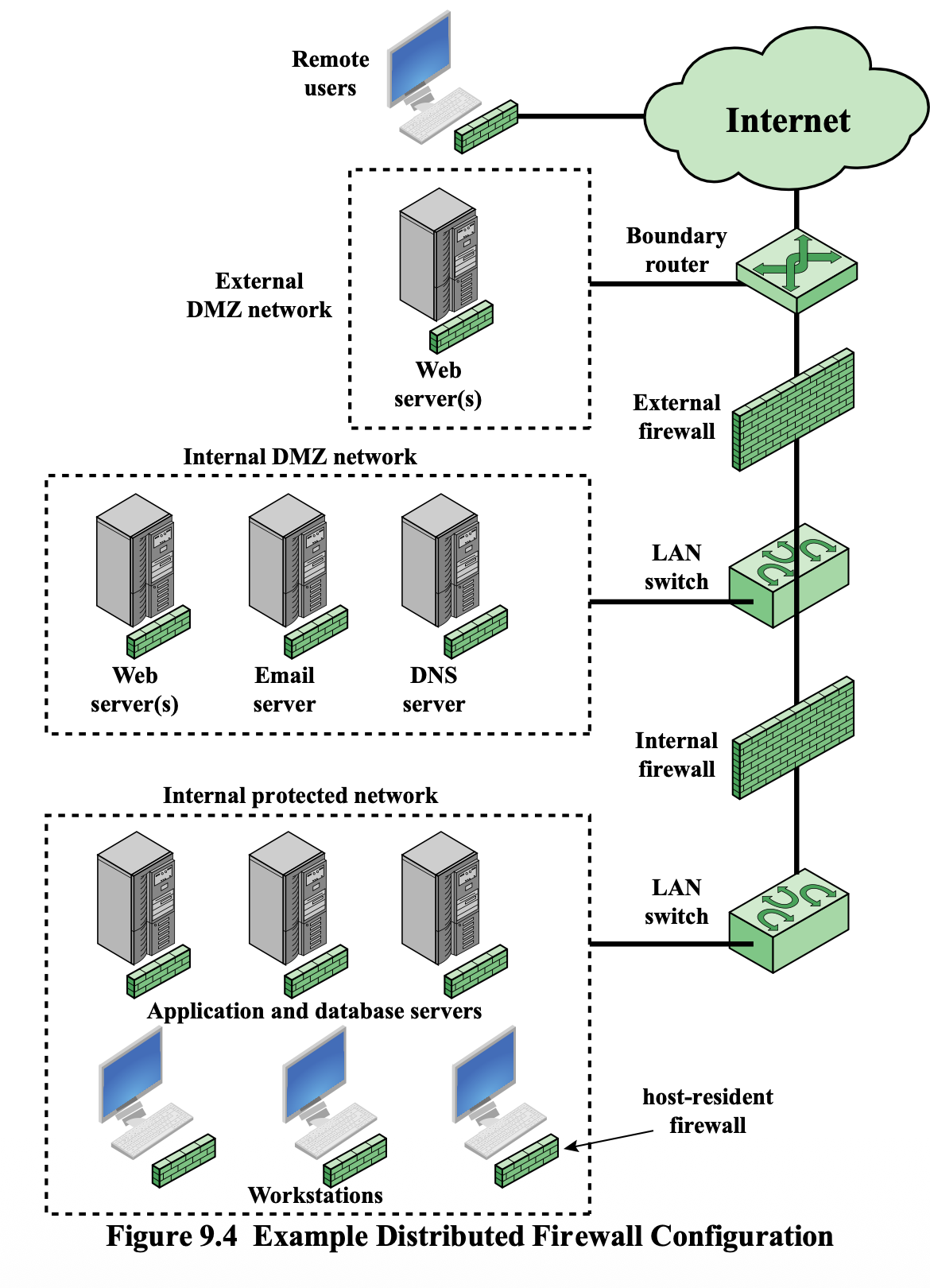
จำรูป 9.4 ไว้ ออก #FinalExam แน่นอน!
9. VPN and Firewalls
- VPNs are considered one of the best solutions to bypass firewalls (along with proxy servers)
- When you establish a VPN connection, it alters your routing tables
- IP layer routes outgoing traffic into the VPN
- VPN wraps the whole IP datagram into another TCP packet → sent to the VPN
- Original packet becomes practically invisible to the IP layer
- Once the packet passes through the VPN, it is unwrapped and sent to its final destination in its original form
- Creates the effect of a tunnel
⚠️ VPN can evade firewall inspection or restrictions if the firewall permits encrypted tunneling traffic.
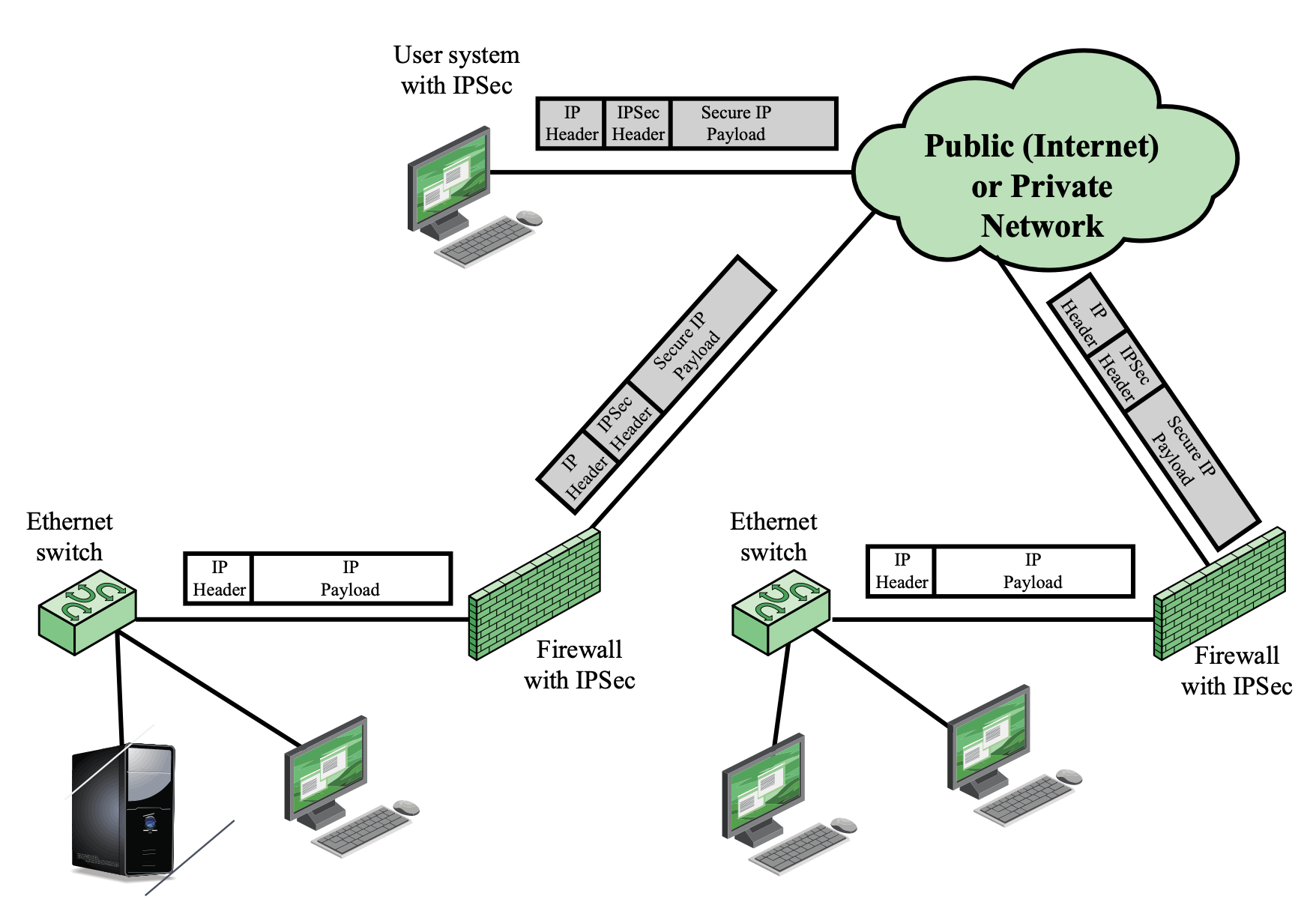
10. Ways a Firewall Can Get Breached
- Outdated software
- Weak passwords
- Malware infection
- Unsecured remote access
- Incorrectly configured rules
11. Methods of Evasion
- Encrypting data — Makes it more difficult for the firewall/IDS to detect malicious activity
- VPN — Bypass firewalls by routing traffic through a secure server
- Proxy server — Masks the origin of traffic
- TOR — Hides identity of user and origin of traffic
- Port hopping — Constantly changing the port used to transmit data
- Steganography — Hiding data within another file or message
- Application layer protocols — Using HTTP or SMTP to disguise malicious activity
- Malicious code — Using malware to evade detection
- Social engineering — Tricking users into divulging sensitive information
- Physical access — Physically accessing the network to bypass the firewall/IDS
12. TOR (The Onion Ring)
- Tor routes internet traffic through a three-layer proxy network, encrypting data at each step, and bouncing it off volunteer-operated servers to maintain anonymity
- Tor can access hidden services with
.oniondomain names - Each layer of the onion represents a level of encryption
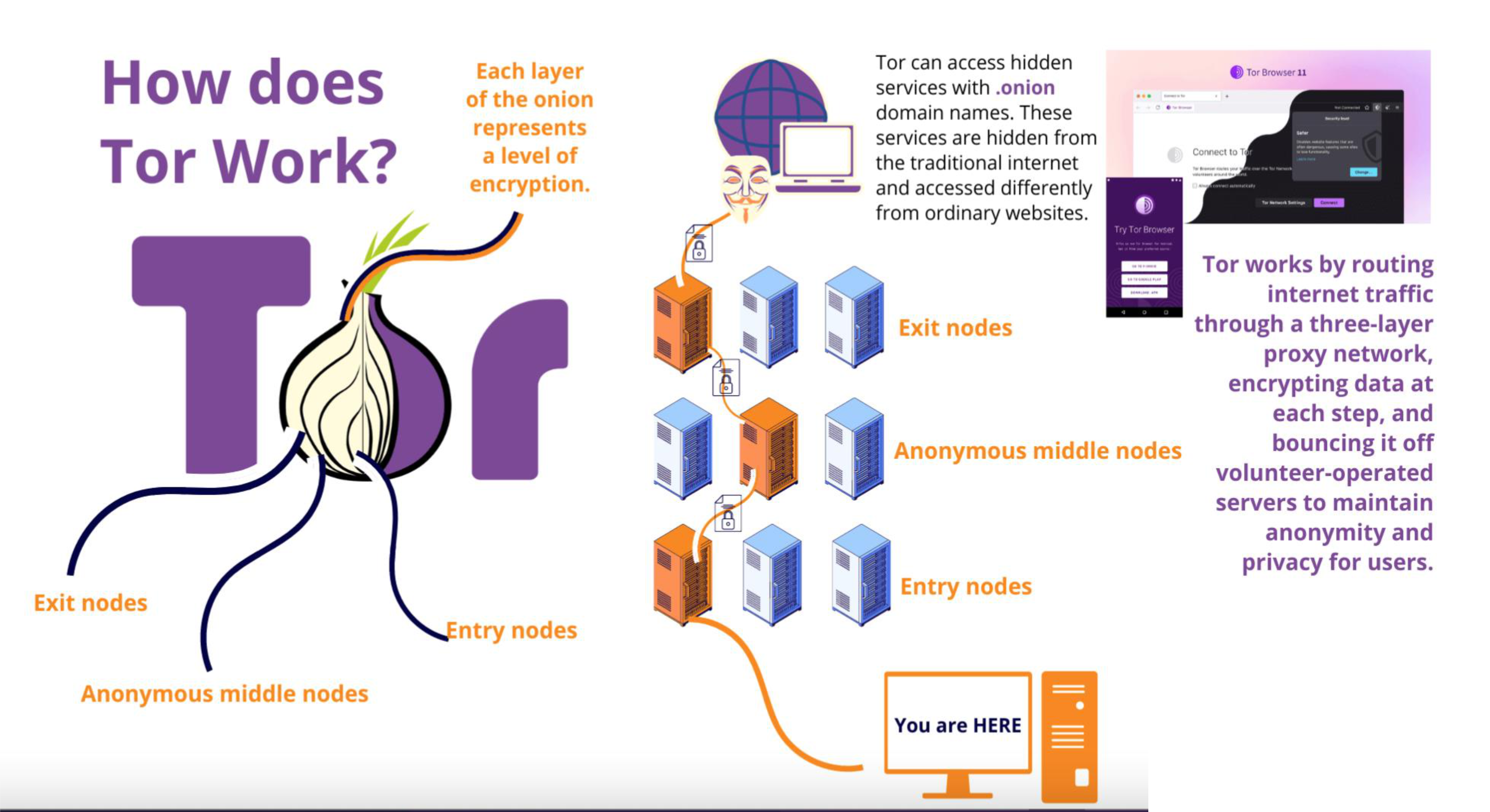
Tor Node Types
- Entry nodes — First point of contact
- Anonymous middle nodes — Middle relay, does not know origin or destination
- Exit nodes — Last node before destination
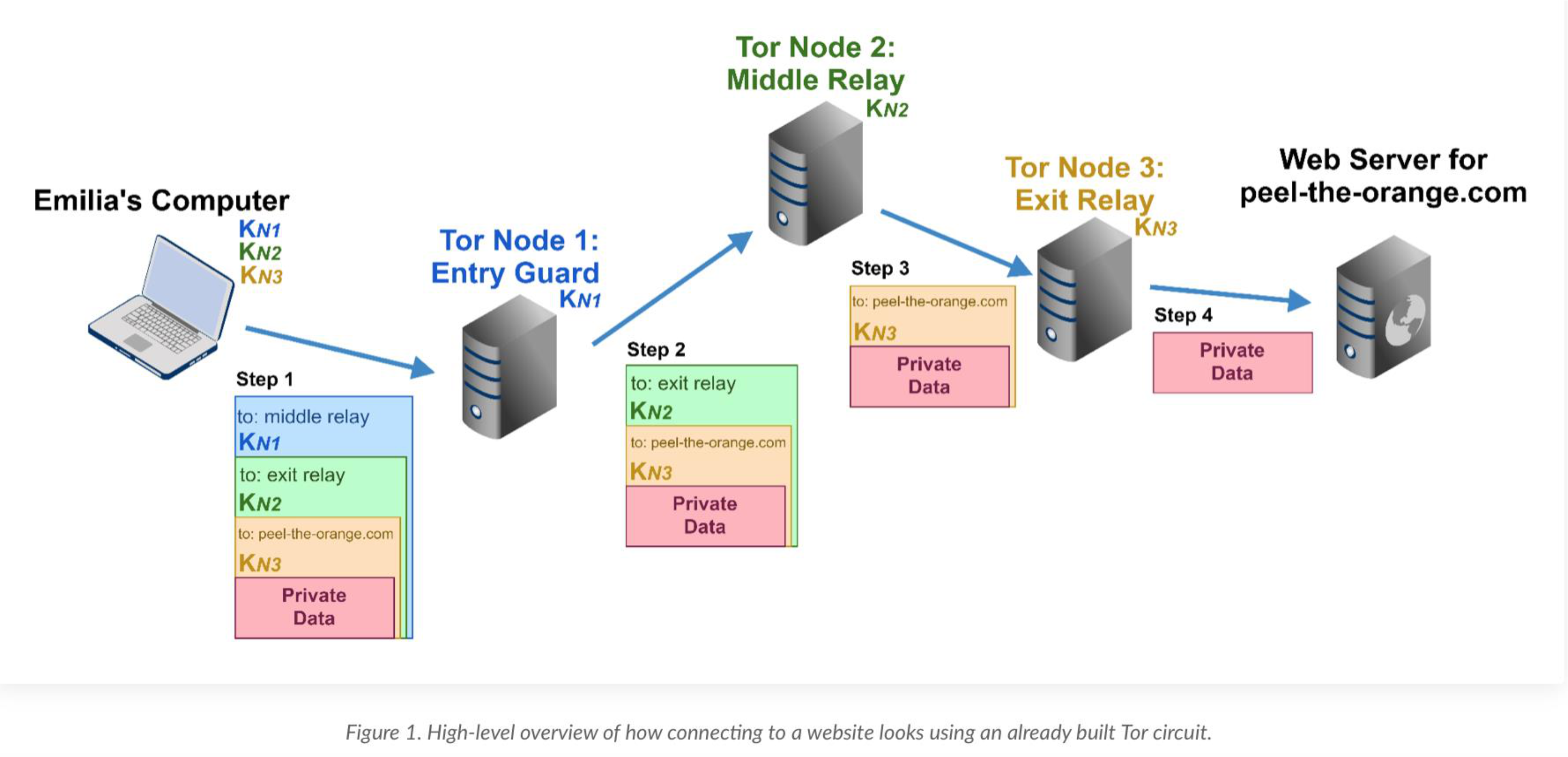
Why Firewalls Struggle Against TOR
| Feature | Reason |
|---|---|
| Dynamic exit IPs | Exit node IPs change constantly — hard to blacklist all |
| Encrypted traffic | Makes deep packet inspection (DPI) difficult |
| Bridges and pluggable transports | Obfuscate TOR to appear like normal web traffic |
| Non-standard routing | Routes traffic through arbitrary paths, avoiding IP-based geo-blocking or blacklists |
Uses of TOR (Good and Bad)
- ✅ Political activists use Tor to express views while staying out of sight of governments
- ❌ Cybercriminals use Tor to evade defenses and hide identity from law enforcement
- ❌ Tor enables the operation of dark web marketplaces (drugs, weapons, fake IDs)
- ❌ Malware authors use Tor for DoS attacks, hidden reconnaissance, command and control, and data exfiltration
Analogy: TOR เหมือนการส่งจดหมายผ่านคนกลางหลายๆ คน แต่ละคนรู้แค่ว่า "รับจากใคร ส่งให้ใคร" ไม่มีใครรู้ทั้งต้นทางและปลายทาง
Why is TOR diffcult to block?
- Use encryped and dynamic routing
What features make it effective for evasion?
- Dynamic exit nodes
- Encyption
- Non standard routing
Suggest mitigation strategies
- Block TOR nodes, use behavior analysis
- Advanced anomaly detection
13. Intrusion Prevention Systems (IPS)
IPS = IDS + Prevention Action
- Also known as Intrusion Detection and Prevention System (IDPS)
- An extension of IDS that includes the capability to attempt to block or prevent detected malicious activity
- Can be host-based, network-based, or distributed/hybrid
- Can use:
- Anomaly detection — identify behavior that is not that of legitimate users
- Signature/heuristic detection — identify known malicious behavior
- Can block traffic as a firewall does, but makes use of IDS algorithms to determine when to do so
13.1 Host-Based IPS (HIPS)
- Can use either signature/heuristic or anomaly detection techniques
- Signature: Focus is on specific content of application network traffic, or sequences of system calls — looking for patterns identified as malicious
- Anomaly: IPS is looking for behavior patterns that indicate malware
Types of malicious behavior addressed by HIPS:
- Modification of system resources
- Privilege-escalation exploits
- Buffer-overflow exploits
- Access to e-mail contact list
- Directory traversal
- AD = Active Directory = Source of user's identity → Authentication source
จะรู้ว่าระบบเรามี Privilege-escalation exploits หรือไม่ ก็ต้องทำ Pen test
Role of HIPS
- Enterprise endpoint (desktop and laptop) is now the main target for hackers
- Security vendors focus more on endpoint security products
- Traditionally: endpoint security = collection of distinct products (antivirus, antispyware, antispam, personal firewalls)
- Modern approach: integrated, single-product suite of functions
- Various tools work closely together
- Threat prevention is more comprehensive
- Management is easier
- Best practice: use HIPS as one element in a defense-in-depth strategy alongside network-level devices
13.2 Network-Based IPS (NIPS)
- Inline NIDS with the authority to modify or discard packets and tear down TCP connections
- Makes use of signature/heuristic detection and anomaly detection
- May provide flow data protection
- Requires that the application payload in a sequence of packets be reassembled
Methods used to identify malicious packets:
| Method | Description |
|---|---|
| Pattern matching | Each incoming packet matched with signatures |
| Stateful matching | Scans for attack signatures of a traffic stream |
| Protocol anomaly | Checks incoming protocol connections against RFC |
| Traffic anomaly | Detects unusual traffics against predefined rules/traffic table |
| Statistical anomaly | Compares normal stat of traffic pattern against incoming traffic |
| 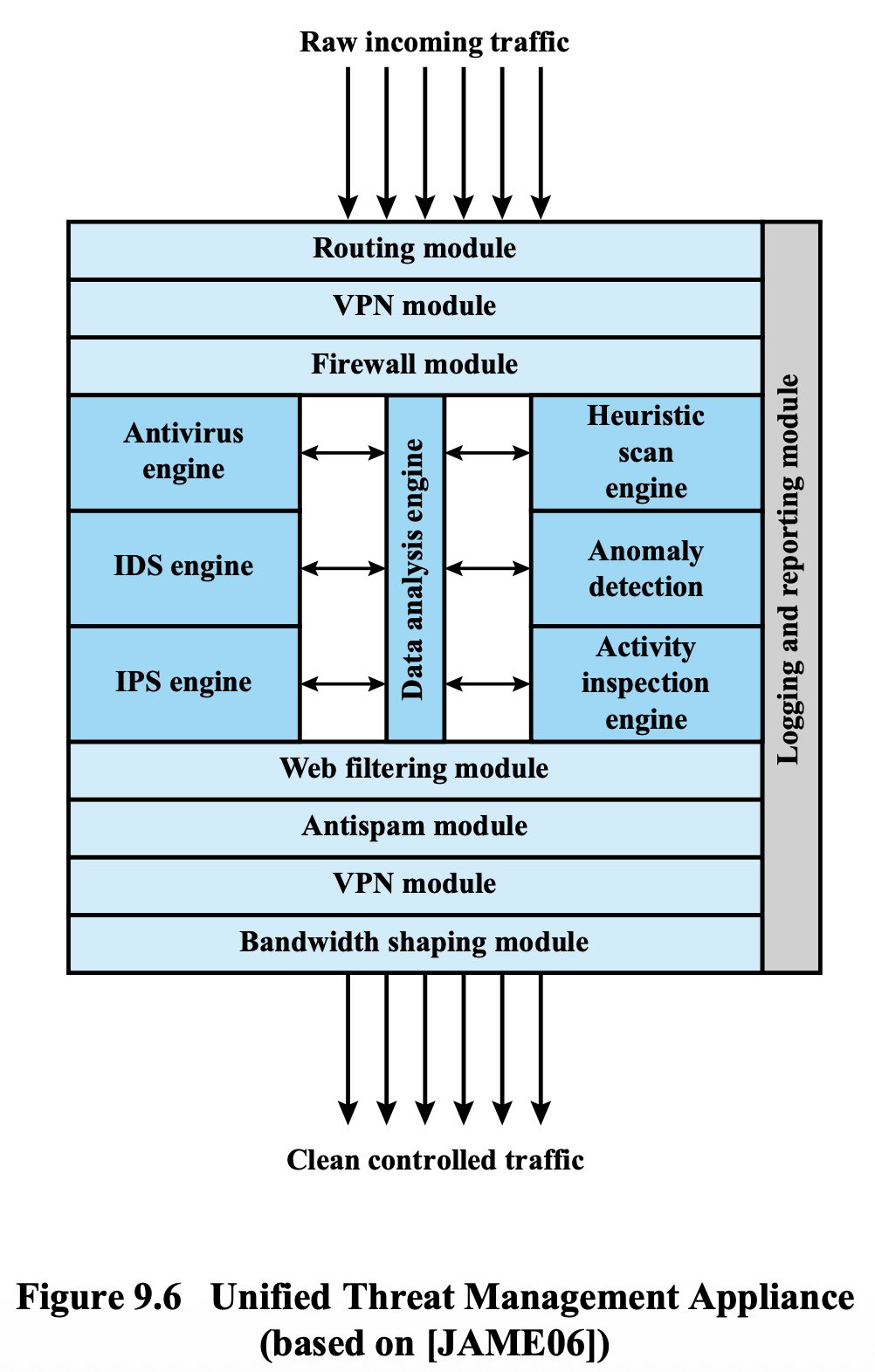
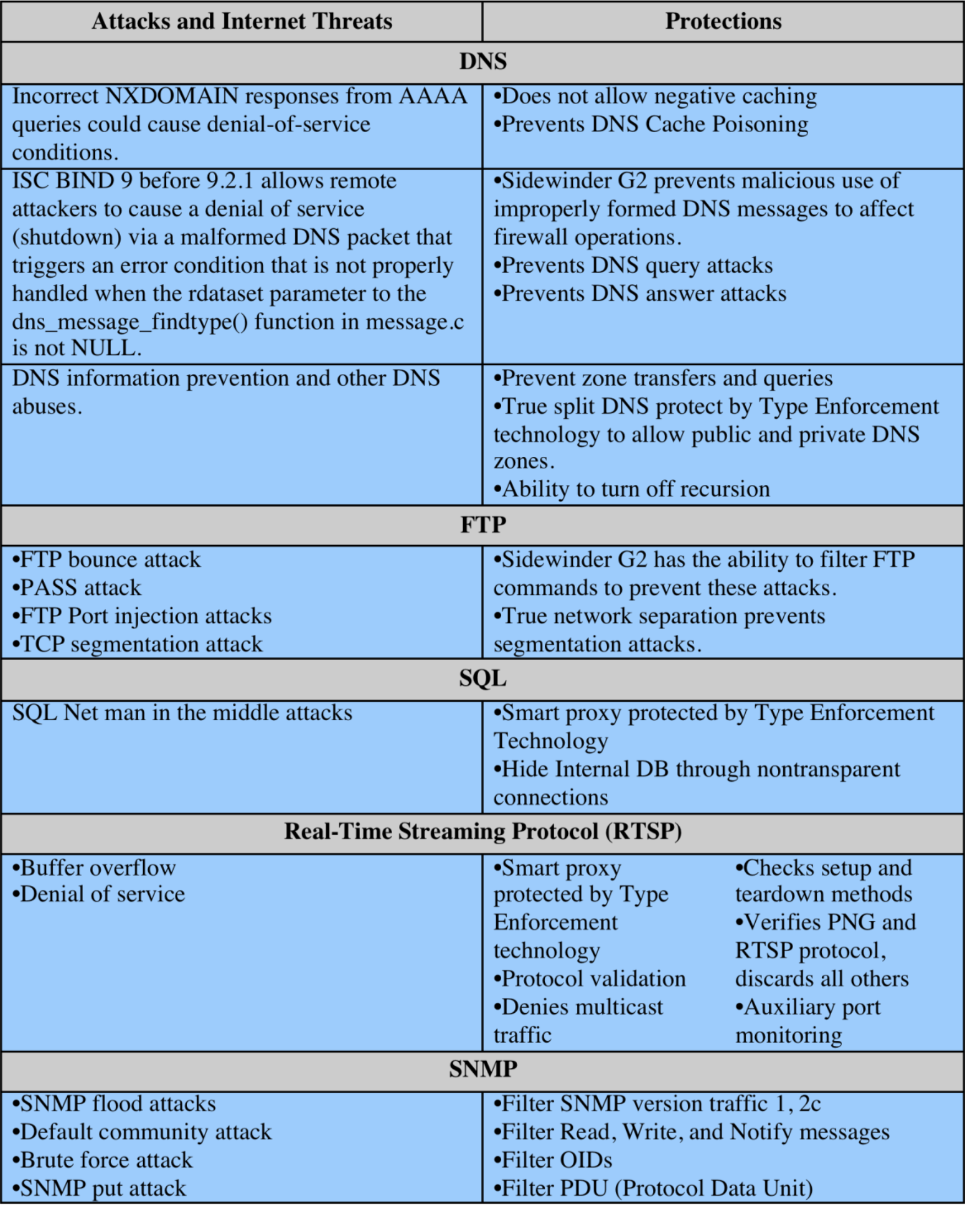
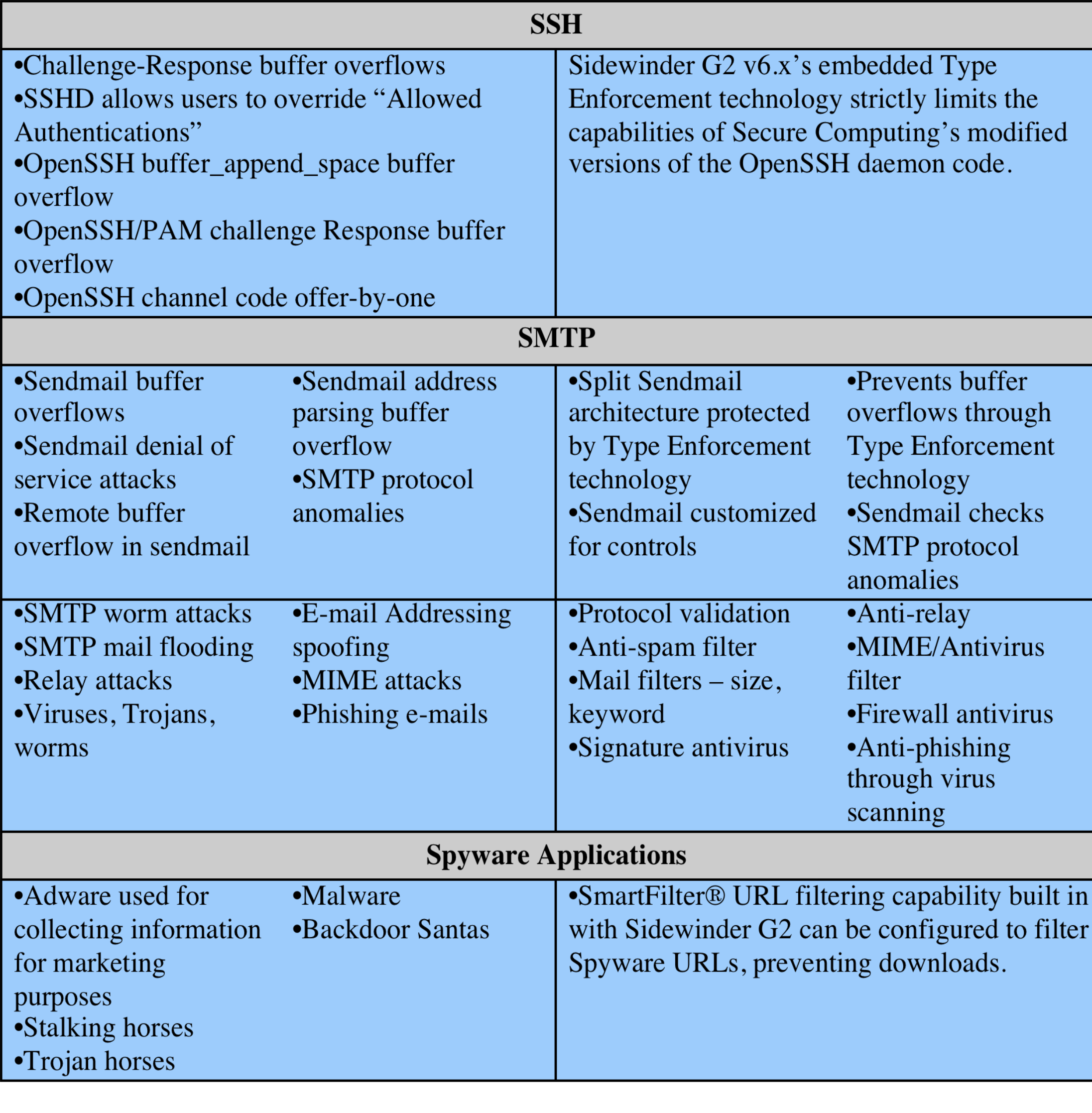
A UTM appliance processes traffic through multiple layers:
Inbound processing order:
- Routing module
- VPN module
- Firewall module
- Data analysis engine (with Antivirus, IDS, IPS engines)
- Heuristic scan engine
- Anomaly detection
- Activity inspection engine
- Web filtering module
- Antispam module
- VPN module
- Bandwidth shaping module
→ Clean controlled traffic output
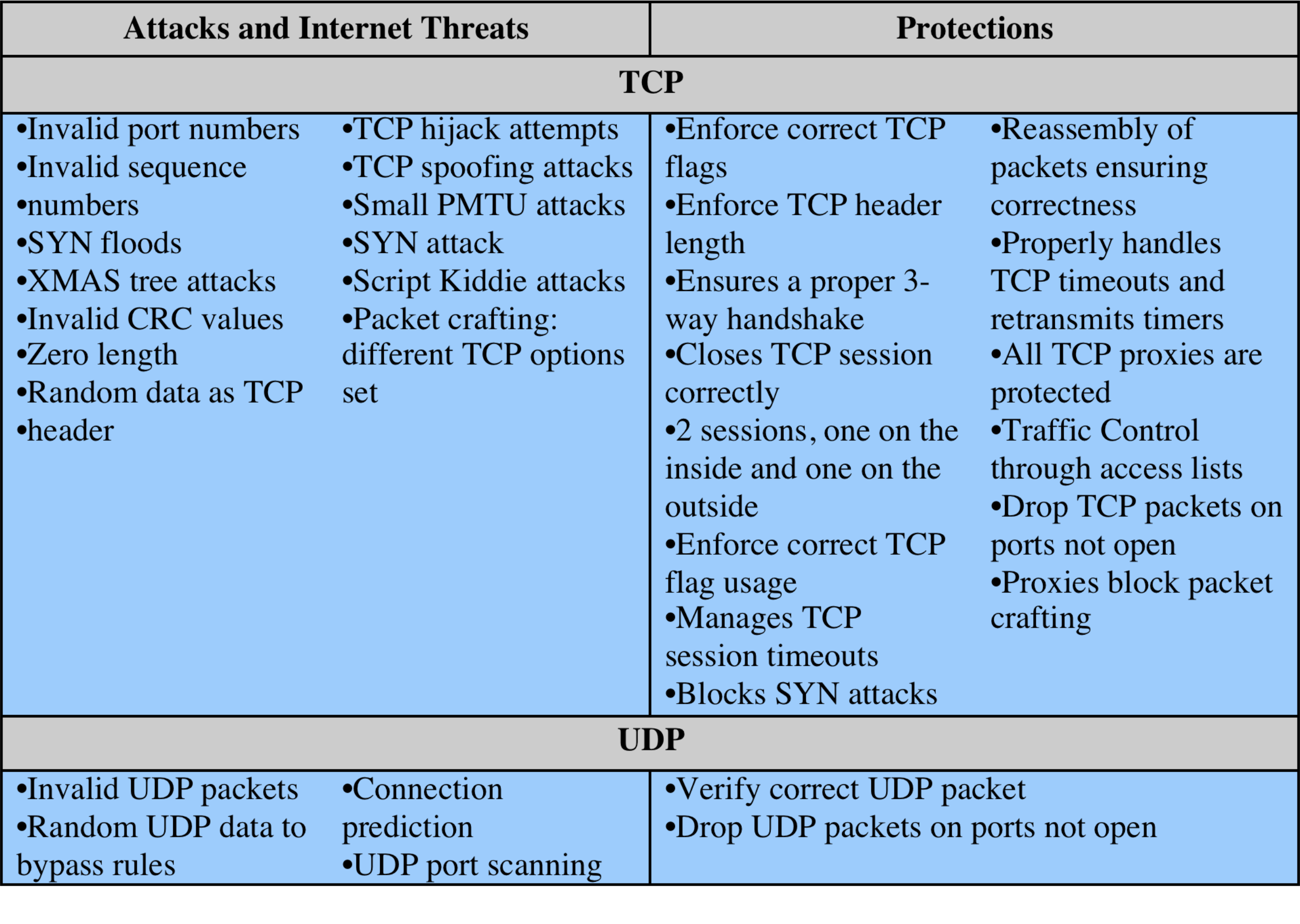
15. Common Port Numbers Reference
| Port Number | Usage |
|---|---|
| 20 | FTP Data Transfer |
| 21 | FTP Command Control |
| 22 | Secure Shell (SSH) |
| 23 | Telnet — Remote login, unencrypted |
| 25 | SMTP — E-mail Routing |
| 53 | DNS service |
| 80 | HTTP — World Wide Web |
| 110 | POP3 — E-mail retrieval |
| 119 | NNTP — Network News |
| 123 | NTP — Network Time Protocol |
| 143 | IMAP — Digital Mail management |
| 161 | SNMP — Network Management |
| 194 | IRC — Internet Relay Chat |
| 443 | HTTPS — HTTP over TLS/SSL |
Title
Why can it detect this attack?
- It inspects HTTP payload and request conetent
What layer does it operate on?
- Application Layer
Summary
| Topic | Key Types/Concepts |
|---|---|
| Types of Firewalls | Packet filtering, Stateful inspection, Application-level gateway, Circuit-level gateway |
| Firewall Basing | Bastion host, Host-based, Personal firewall |
| Firewall Topologies | Host-resident, Screening router, Single/Double bastion inline/T, Distributed |
| Firewall Locations | DMZ networks, VPN, Distributed firewalls |
| IPS Types | Host-based (HIPS), Network-based (NIPS), Distributed/hybrid, Snort inline |
| UTM | Unified Threat Management — combines all into one appliance |