Process Concept
A Process: Definition
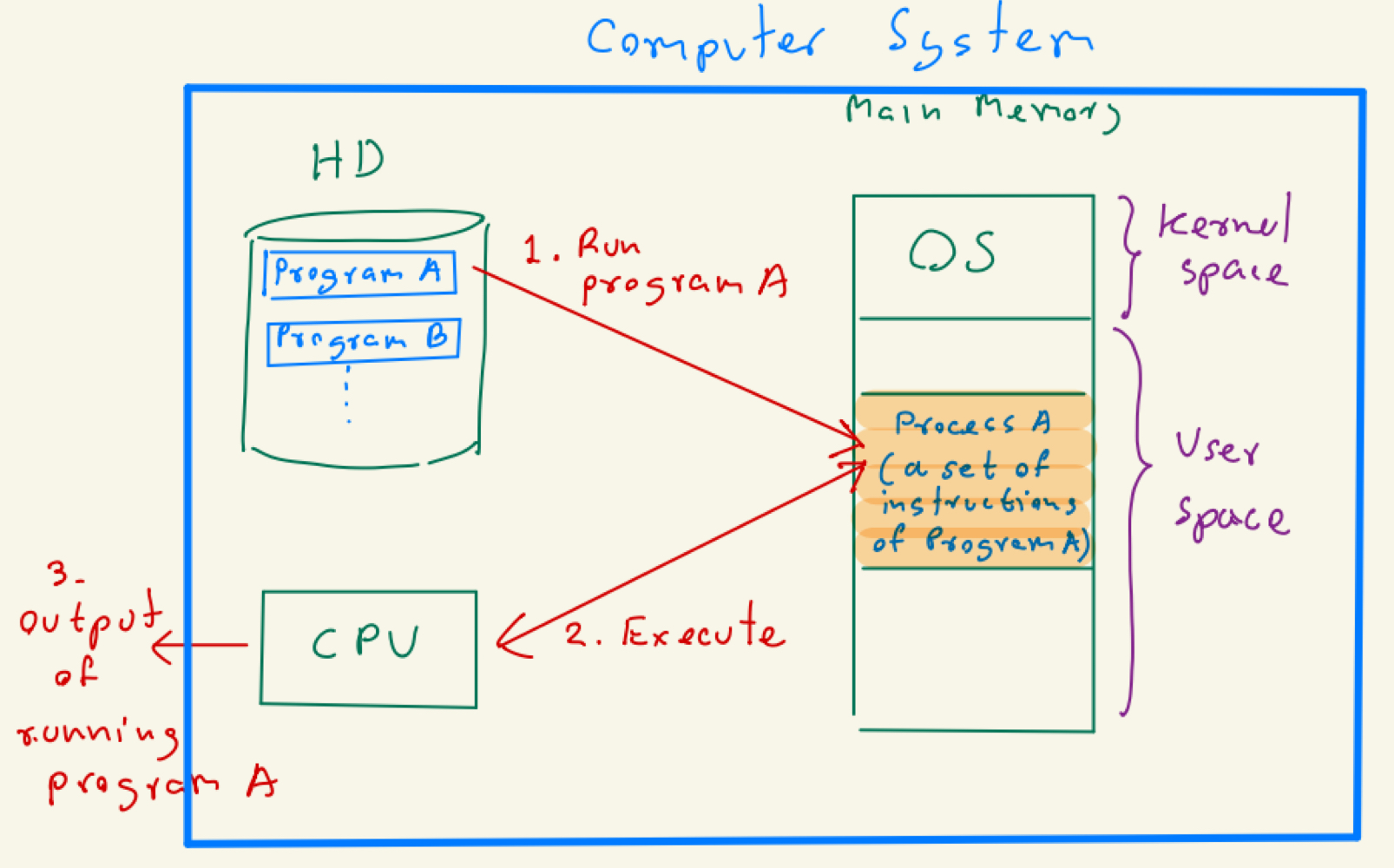
A process is an application program in execution by the CPU. It is an abstraction used by the OS to manage execution.
- An application program (a set of instructions) is stored in the hard drive.
- When executed, part of it is loaded into main memory (RAM).
- The CPU fetches and executes these instructions.
- ==A program loaded into memory can be considered a process.==
Diagram of Process Operations
Multiprogramming
- Modern operating systems support multiprogramming, allowing multiple processes to run concurrently by storing them in separate memory spaces.
- Each process are stored in independent, exclusive, separated* spaces.
A Process in the Main Memory
- In general, a program will be loaded into the main memory and stored in this structure.
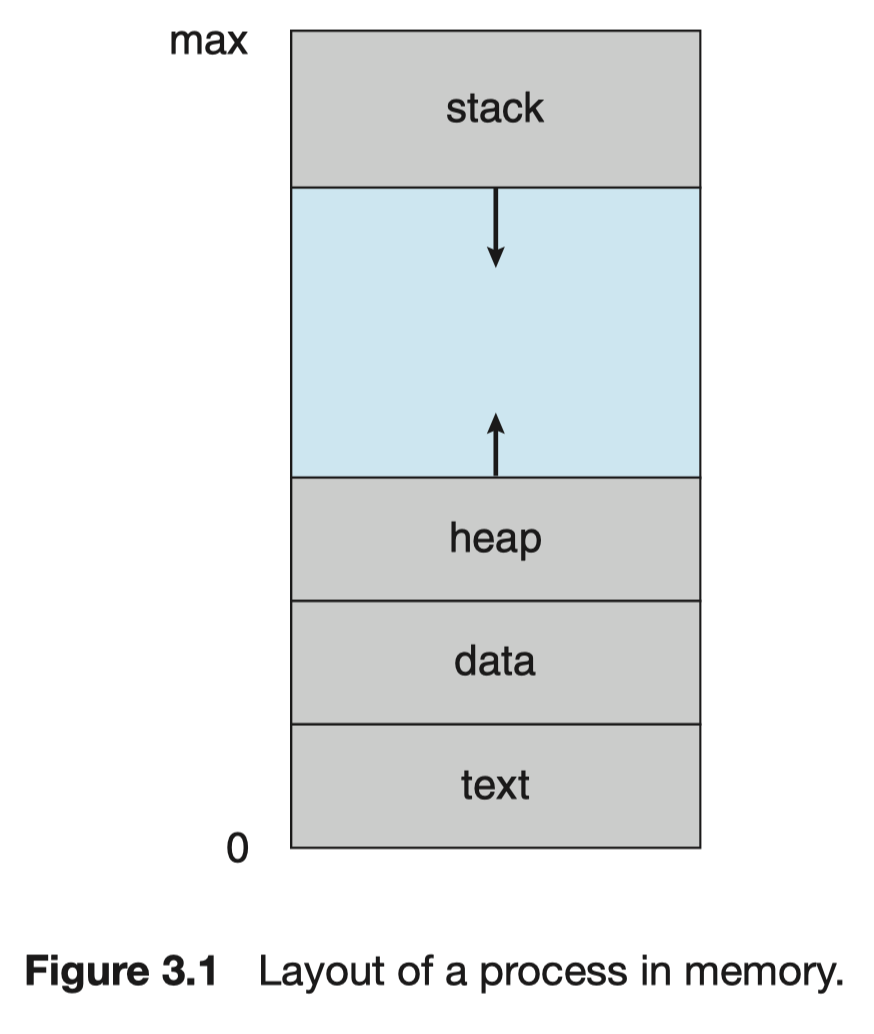
- Text section – The executable code.
- Data section – Values of global variables.
- Heap section – Temporary values during execution.
- Free space – Reserved space to allow heap expansion.
- คือว่างไว้เพราะเราไม่รู้ว่า ข้างล่างเนี่ยจะใช้มากแค่ไหน size of the heap อาจจะ expand ก็ได้ เราเลยต้องมี free space ตรงนี้ไว้
- Stack section – Stores temporary data for function calls (parameters, local variables).
Example
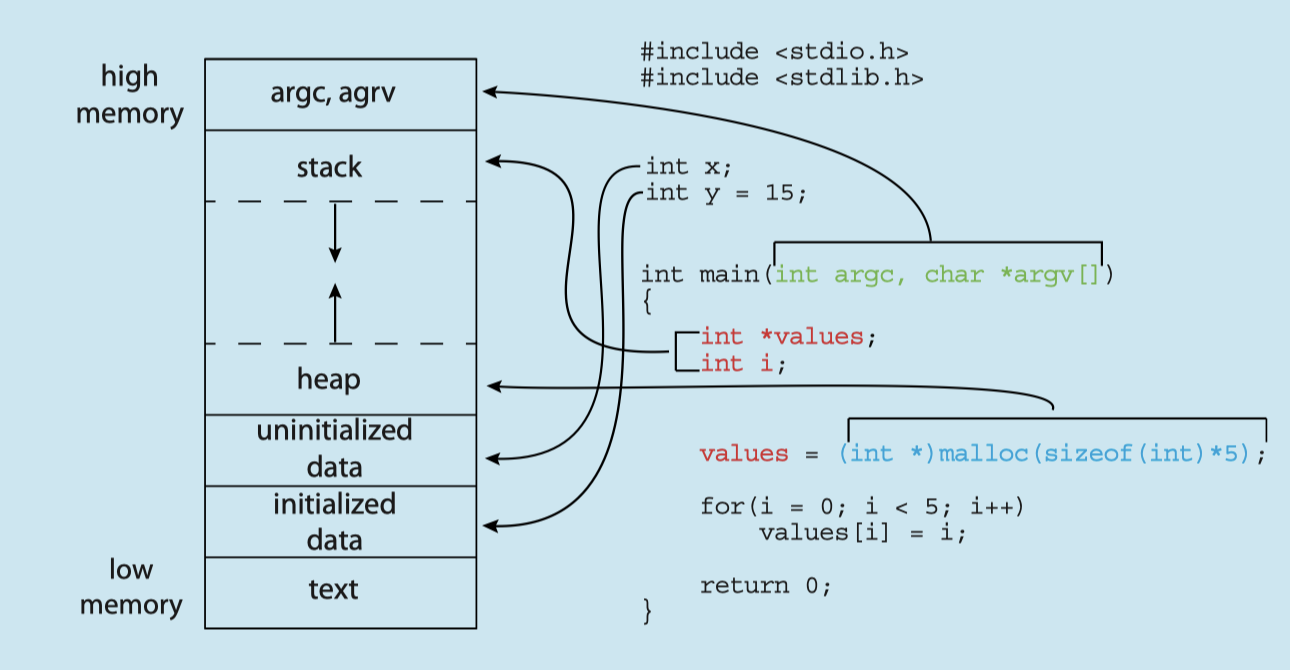
- Memory of a C program:
Process States of a Process
- As a process executes, it transitions through different states:
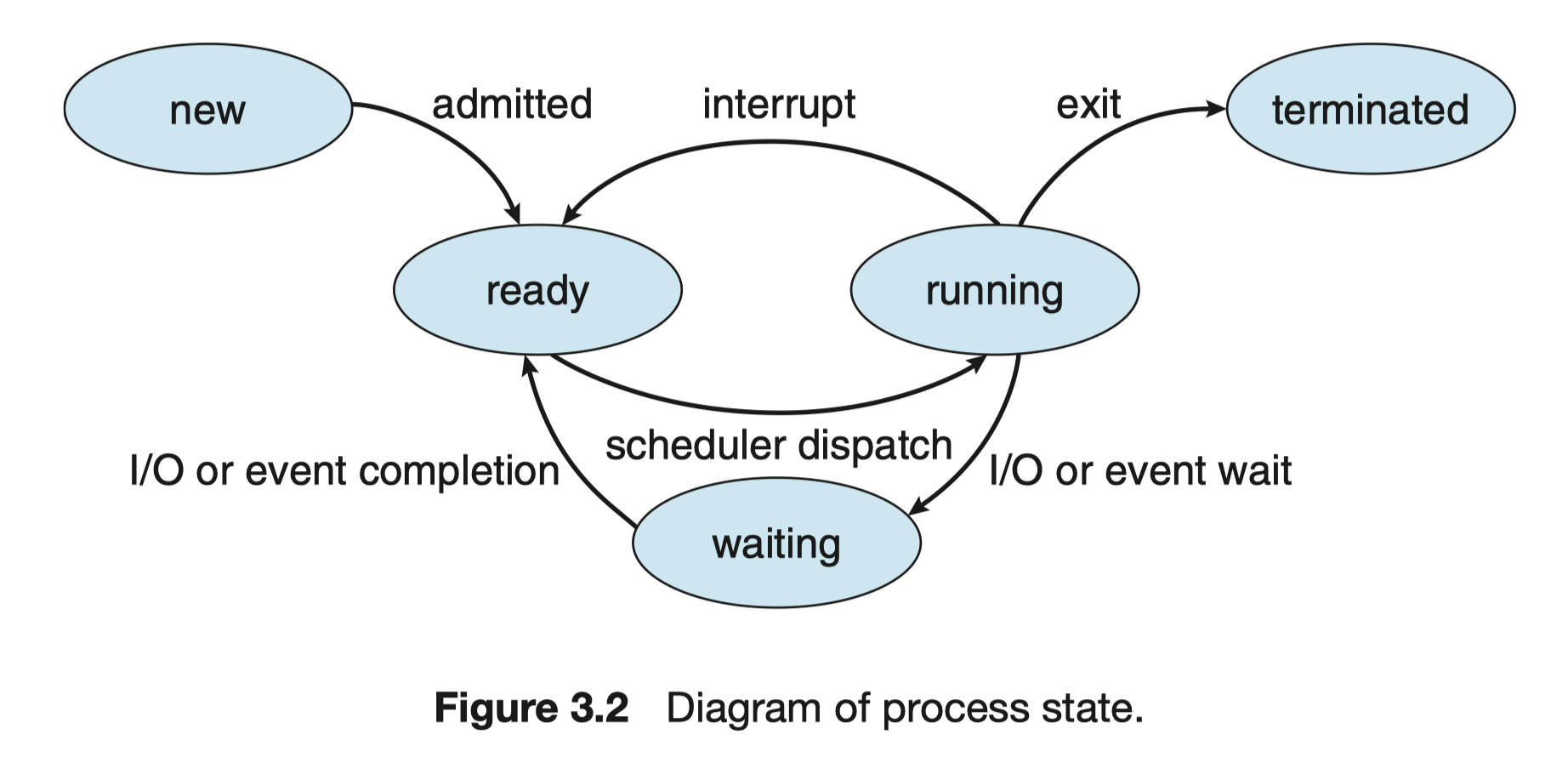
- New – The process is being created.
- เหมือนถามคำถามไป , (มีคำถามเป็นล้านเลย)
- Ready – The process is waiting for CPU execution.
- Waiting for the calculator
- Running – Instructions are being executed.
- A process runs within a time slice (CPU execution duration).
- If not completed, it must return the CPU and wait for another turn.
- Waiting – The process is waiting for an event (e.g., user input, printing output).
- Terminated – The process has completed execution.
Example 1
- Consider a computer with only one CPU core and two processes (A and B).
- Up to 1 process can use CPU core
Question
Is it possible to have Process A and Process B in the running state?
No, only one process can own a CPU
Question
Is it possible to have process A in the running state and process B in the waiting state?
Yes!
Example 2
- Consider a computer with two CPU core and two processes (A and B).
- Up to 2 processes can use a CPU
Question
Is it possible to have Process A and Process B in the running state?
Definitely! Yes!
Question
Is it possible to have process A in the running state and process B in the waiting state?
Yes!
Process Control Block (PCB)
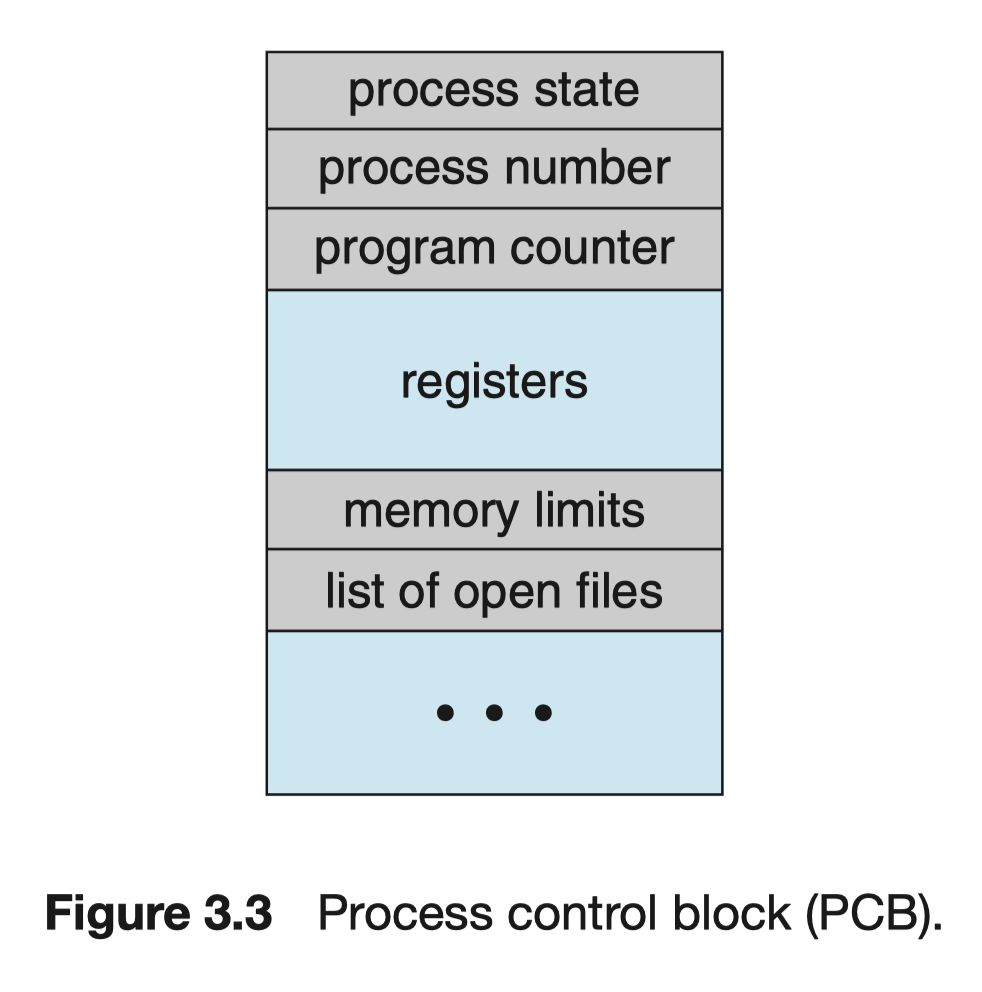
- The operating system tracks each process via the Process Control Block (PCB), a data structure storing process-related information.
- ==Each process has one PCB.==
- Key components of PCB:
- Process state – Running, waiting, etc.
- Process number (PID) – Unique identifier (lower PID means earlier creation).
- Program counter – Next instruction location.
- CPU registers – Stores all process-centric registers.
- CPU scheduling info – Priorities, scheduling queue pointers.
- Memory-management info – Allocated memory.
- Accounting info – CPU usage, elapsed time, limits.
- I/O status info – Allocated I/O devices, open files.
Context Switching
- When the CPU switches execution from one process to another, it performs a context switch
Steps in context switching:
- The OS saves the old process’s state in its PCB.
- The OS loads the new process’s state from its PCB.
Remark: Some books have a different definition of context switching.
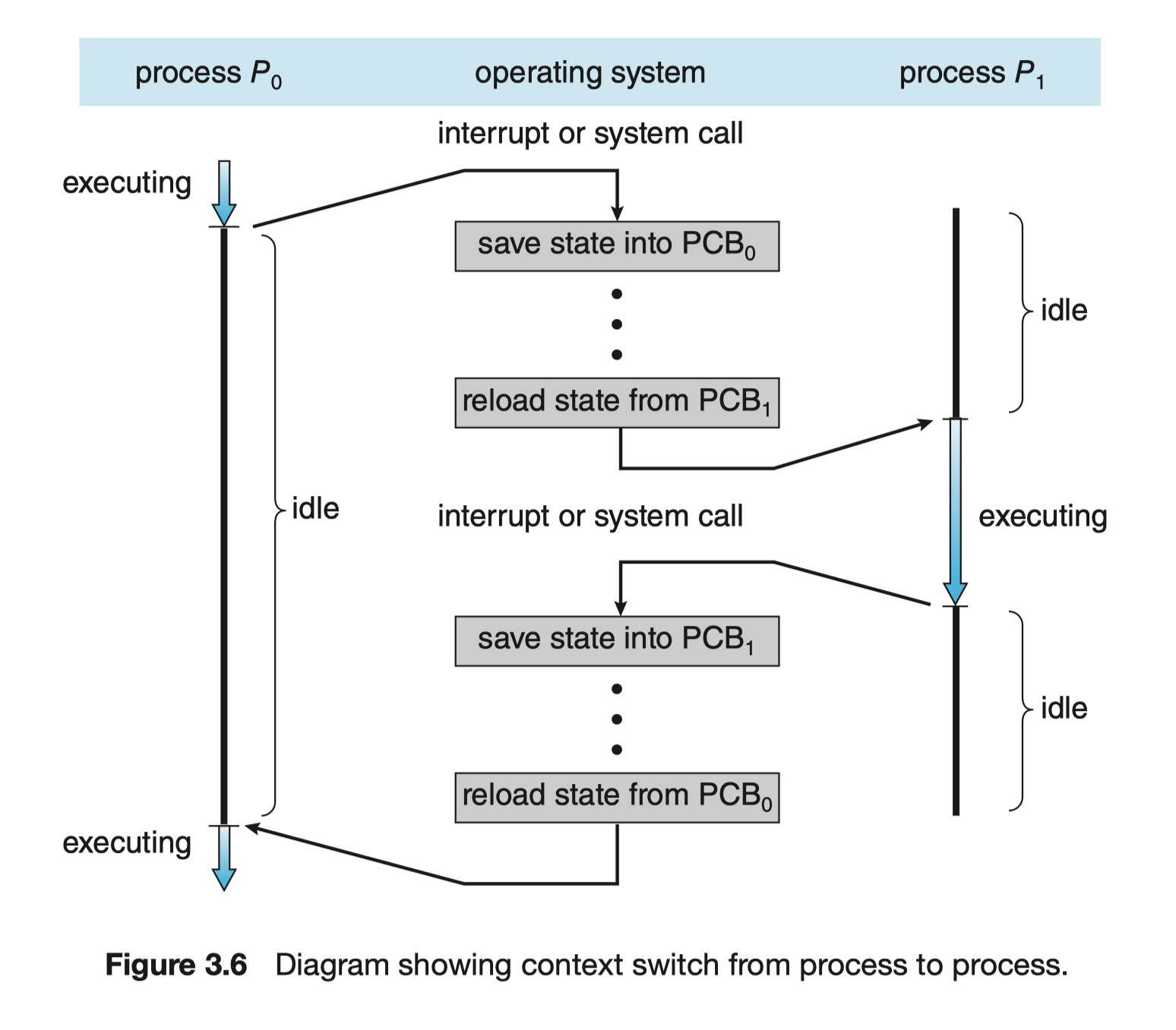
- During context switching, state is saved into and loaded from .
- This mechanism allows multiple programs to run smoothly on a system.
Multi-Process Program
- A program may consist of one or multiple processes, depending on its design.
- Single-process program – Runs as a single process on a CPU core.

- Multi-process program – Runs as multiple processes on separate CPU cores (parallel execution).
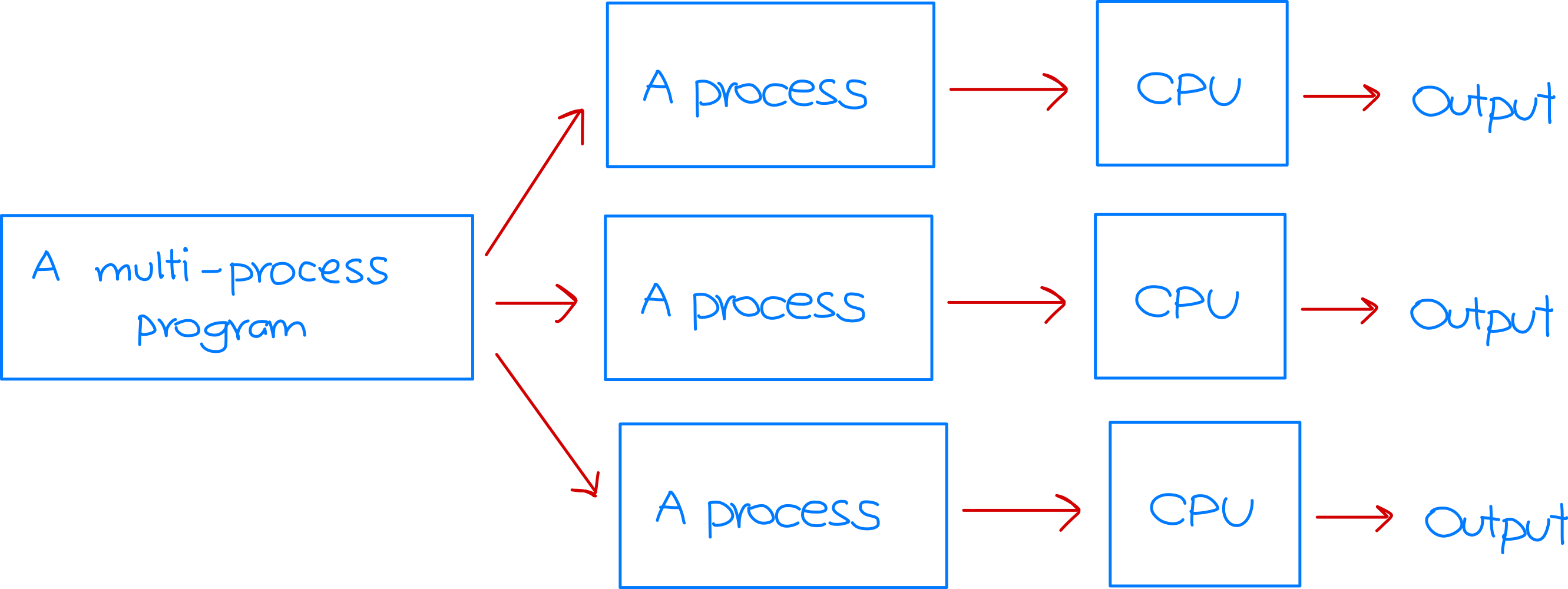
- Single-process program – Runs as a single process on a CPU core.
Threads
A thread is like a mini-process within a process.
- A process can be divided into multiple threads, allowing concurrent execution.
- Threads improve speed, especially on multi-core processors.
- ==A newly created process has one thread (main thread) by default, making it a single-threaded process.==
- More details are covered in Lecture Note 3.
Multi-Threaded Process
- A process can have at least one thread or multiple threads.
- Single-threaded process – Contains only one thread.
- Multi-threaded process – Contains multiple threads.
- Each thread is executed by a CPU core.
For this lecture, we assume a process is single-threaded, requiring only one CPU core for execution.
User Processes and Kernel Process
User Processes vs Kernel Process
- There are two types of processes:
- Kernel Process – Created when the OS runs. It operates in kernel mode and has full control over system resources.
- User Process – Created when an application runs. It operates in user mode and interacts with the OS for resource access.
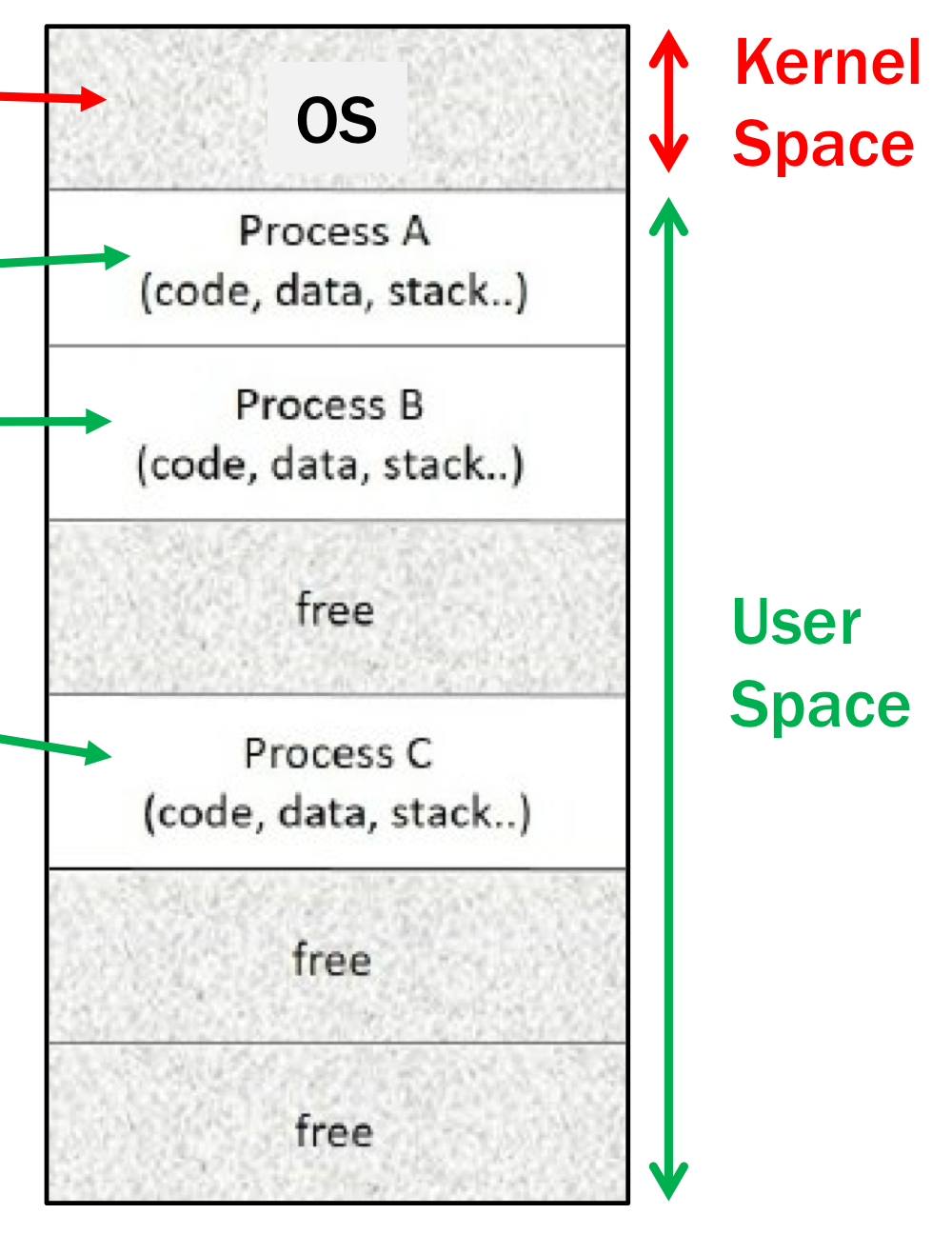
Differences:
Based on a monolithic kernel such as Linux.
- Kernel process is the first to load and execute.
- Only one kernel process, but multiple user processes.
- Kernel process is loaded by the bootloader, while user processes are created using system calls.
- Kernel process handles system calls, while user processes invoke system calls.
- Kernel process accesses physical memory and hardware, whereas user processes use virtual memory.
Queueing Diagram of Processes
We’re going look at many processes together
Process Scheduling = Managing many Processes
See Scheduling algorithms in Lecture Note 4.
The OS schedules multiple processes to maximize CPU usage:
- Multiprogramming – Multiple processes in memory.
- Multitasking/Time-sharing – CPU switches frequently between processes.
- Process scheduler selects which process runs next.
Queueing Diagram
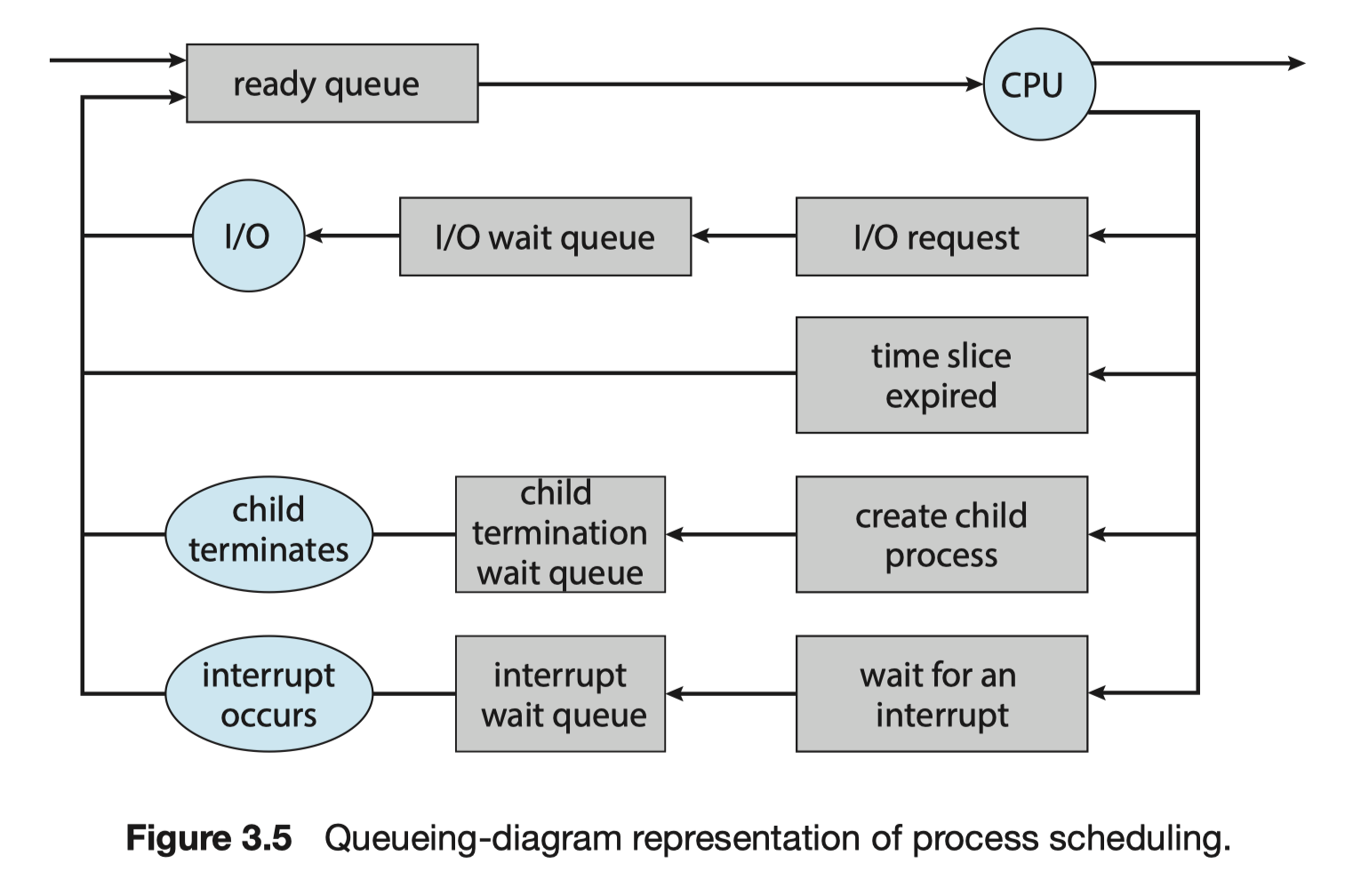
Scheduling Queues
- Ready Queue – Contains processes ready for CPU execution.
- Wait Queues – Contains processes waiting for events (e.g., I/O, interrupts).
Process Flow
-
New process enters the ready queue.
-
When CPU executes a process, it may:
- Return to ready queue (time-out).
- Move to I/O wait queue.
- Move to child termination wait queue.
- Move to interrupt wait queue.
When the cause ends, the process will goes to the ready queue.
-
The process repeats this cycle until termination.
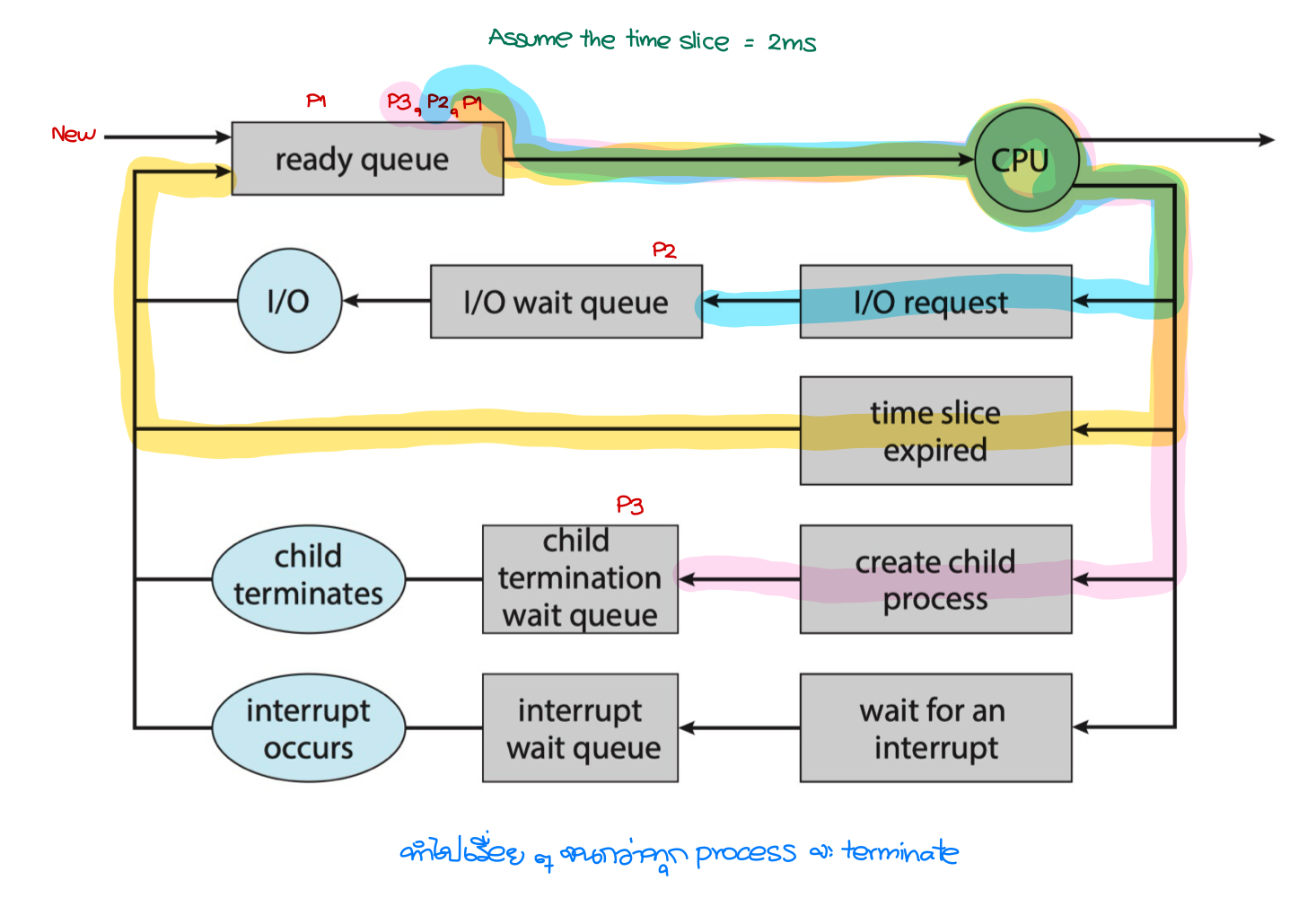
Example: Process Flow
- Assume that a user have run three processes:
- Process P1 deals with only computation (e.x., compute an addition).
- Process P2 shows a text on the screen (=needs to contact an I/O device).
- Process P3 create a child process.
Concept of Process Creation and Termination
Process API
- OS allows Programming languages (e.g., C, Python) to:
- Process creation.
- Process waiting (pause execution).
- Running another process.
- Process termination.
- At first, we will study the concepts of the process operations and, later, we will use Python to investigate these concepts.
Process Creation
During execution, a process (a running program) can create multiple new processes.
Parent and Child Processes
- The creating process is called a parent process.
- A new process created by the parent is called a child process.
- A process can create many child processes.
- A child process can create its own child processes, forming a process tree.
- Processes can be represented as a tree structure where each node is a process.
- Each process is uniquely identified by a Process ID (PID), which is an integer.
Process Address Space
- The parent process and child processes have separate address spaces in memory.
- A child process is a copy of its parent but exists in a separate memory region.
- The child is not stored within the parent’s memory.
Execution and Scheduling
- Parent and child processes can execute concurrently or in parallel.
- No inherent priority between parent and child; both can run independently.
Parent Process Behavior After Creation
After creating a child process, the parent has two options:
- Continue Execution Concurrently: The parent process keeps running alongside the child processes.
- Wait for Child Process Completion: The parent process is blocked until some or all child processes finish execution, then it resumes its tasks.
Analogy: macOS Process Management
Think of a macOS application like Xcode:
- When you launch Xcode, it is the parent process.
- Opening a new Swift project or starting a simulator instance creates child processes.
- These child processes (simulator, build tasks) can run independently or in parallel.
- Xcode might wait for a build process to complete before proceeding (blocking behavior).
Example
- Consider this time diagram about creating processes. At first, a user runs Program A. Program A is converted into Process A. Thereafter, Process A creates other processes.
- Process A creates Process B:
- Process A is the parent process of Process B and Process B is a child process of Process A.
- Process B creates Process D:
- Process B is the parent process of Process C and Process C is a child process of Process B.
- Process A creates Process B:
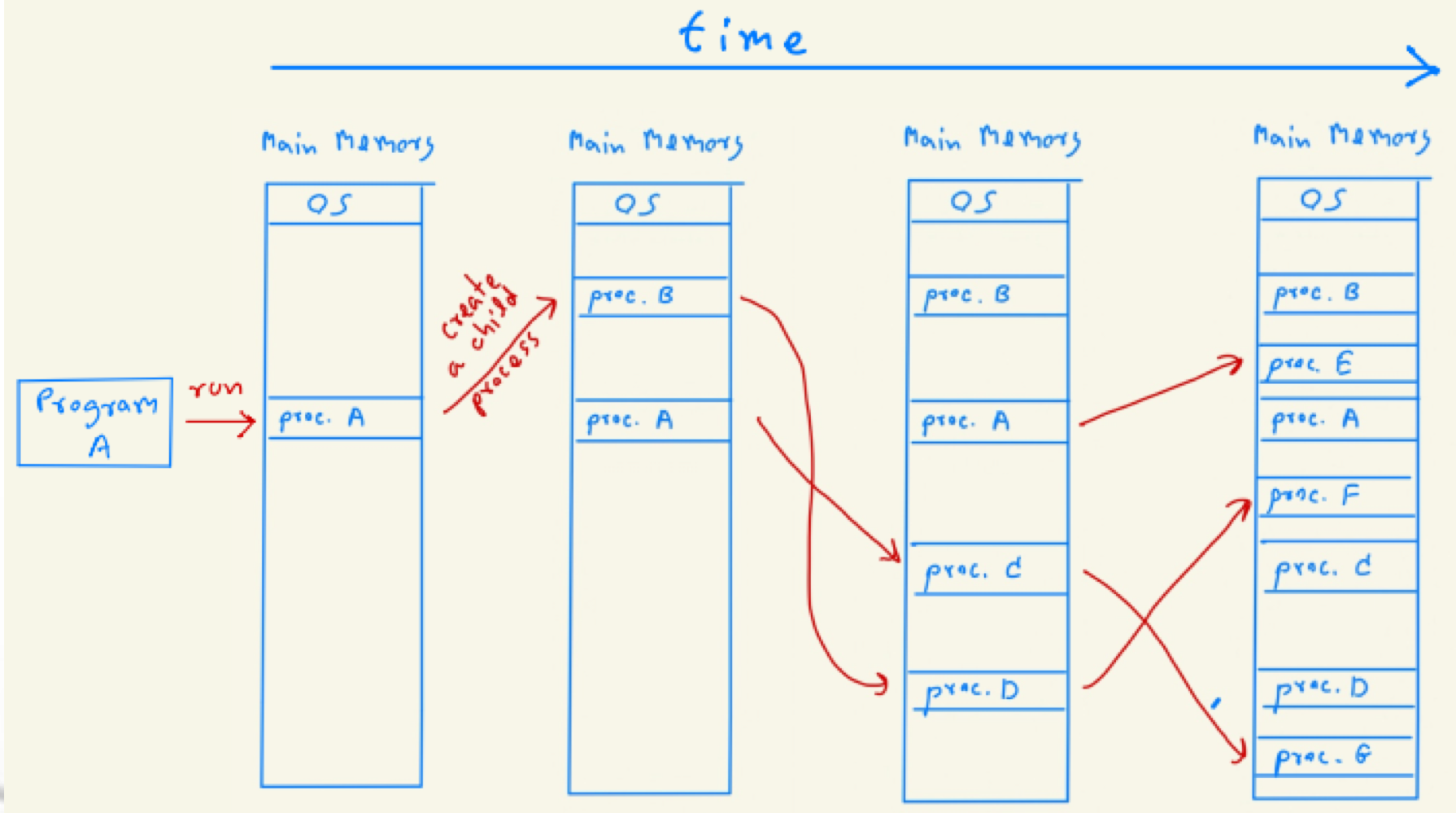
- Each process and data is separated, not shared
Question
What is the relationship between Process A and Process C?
A created C, A is the parent of C, C is a child process of A
Question
What is the relationship between Process C and Process G?
C created G, C is the parent process of G, G is the child process of C
Question
What is the relationship between Process A and Process G?
There’s no relationship between them, there’s no term such as grandparents!
Question
How many processes have been created?
7
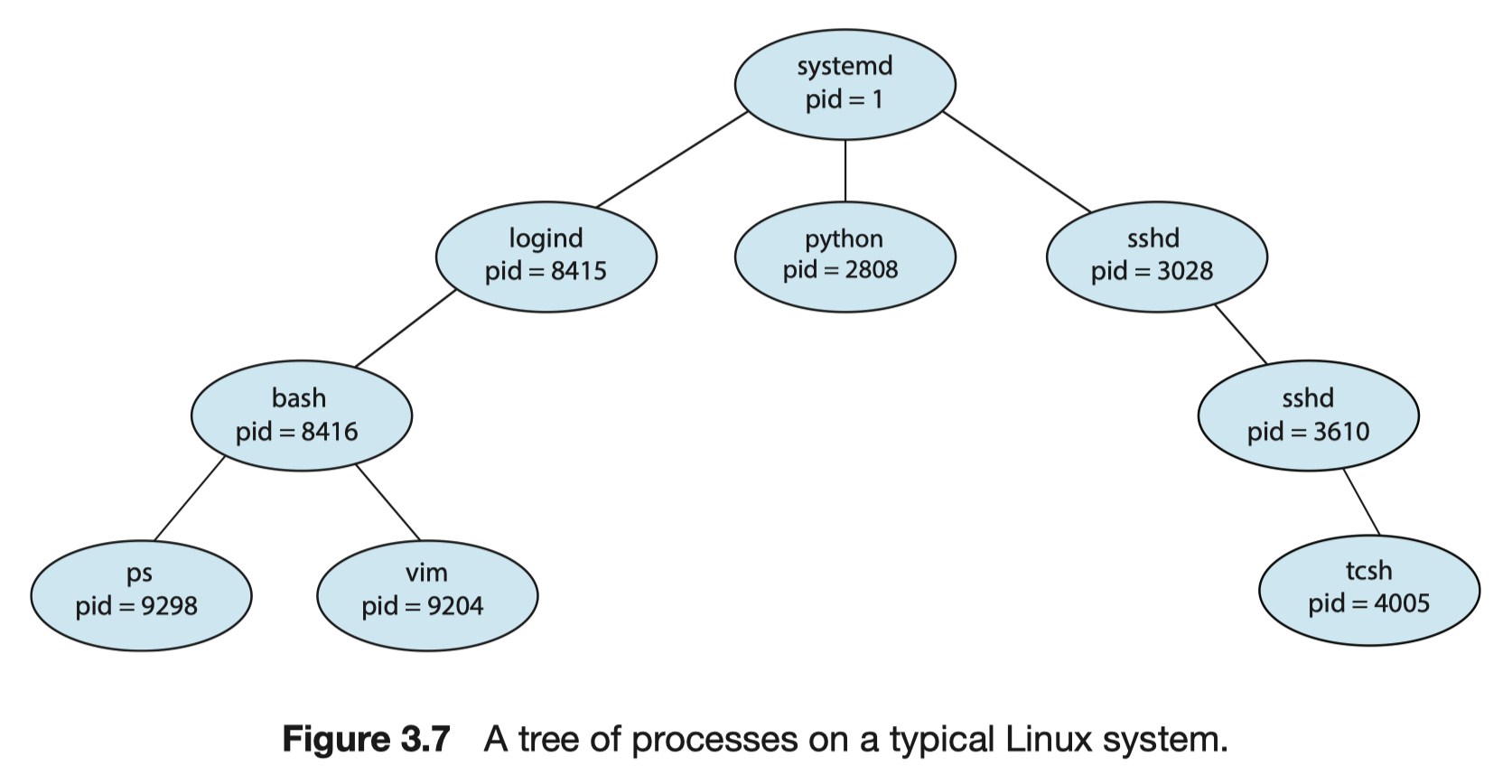
- From the previous example, we can draw a tree of processes as follows.

Example: A Tree of Processes (Linux)
- When the Linux OS starts, the systemd process (pid =1) is the first process to be created. Thereafter, it will create subsequent processes, which can be shown as the following tree of processes.
On UNIX and Linux systems, we can obtain a listing of processes by using the ps command. For example, the command ps -el will list complete information for all processes currently active in the system.
Process Termination
- A process terminates voluntarily when it finishes executing its final statement.
- A process may be terminated by another process via an appropriate system call, due to errors or misbehavior.
- A parent may terminate a child process.
- In modern OSs, if a parent process terminates, all its child processes are terminated automatically.
Process Investigation by fork Command (Python)
forkis used to spawn/create a child process.
Python Commands for Process Creation and Termination
| Python Command | Explanation |
|---|---|
import os | A necessary library. |
rc = os.fork() | Creating a child process using the os.fork() system call. After execution, there are two processes:1. Parent Process: The original process that called os.fork().2. Child Process: A duplicate of the parent process, including its program and data. The rc variable stores the return value from os.fork():- In the parent process, rc is set to the PID (Process ID) of the child process.- In the child process, rc is set to 0. |
os.getpid() | Returns the PID of the calling process. |
os.wait() | Used by the parent to wait for child termination. |
os._exit(os.EX_OK) | Used by a child process to terminate itself when done. |
The fork Rules
- After a successful fork, execution in both the parent and child process continues at the instruction following the fork.
- To determine whether you are running in the parent or child process, use the fork return value: it's always 0 in the child, and the PID of the child in the parent.
- After a successful fork, both the parent and child process execute code in parallel/concurrency.
- Data is copied across the fork, not shared.
- Each process has its own separated exclusive independent room ไงงง!
- After the fork, the order of execution between the parent and child process is indeterminate. (This introduces a race condition – studied in Lecture 5.)
Order of Parent and Child-Process Execution
- In this lecture, the parent process waits until child processes finish execution before continuing.
Example: Parent and Child Processes
- In this example, we write a python program to create a child process. When finished running this code, we have created two process.
import os

rc = os.fork()
if (rc > 0): # Identify the task of parent process
  os.wait()
  print('-> Print 1: I am the parent process (PID: %d) of a child process (PID: %d)\n' %(os.getpid(), rc))
elif (rc == 0): # Identify this as a child process
  print('-> Print 2:, I am a child process (PID: %d)\n' %os.getpid())
  os._exit(os.EX_OK)
else:
  print('Error!')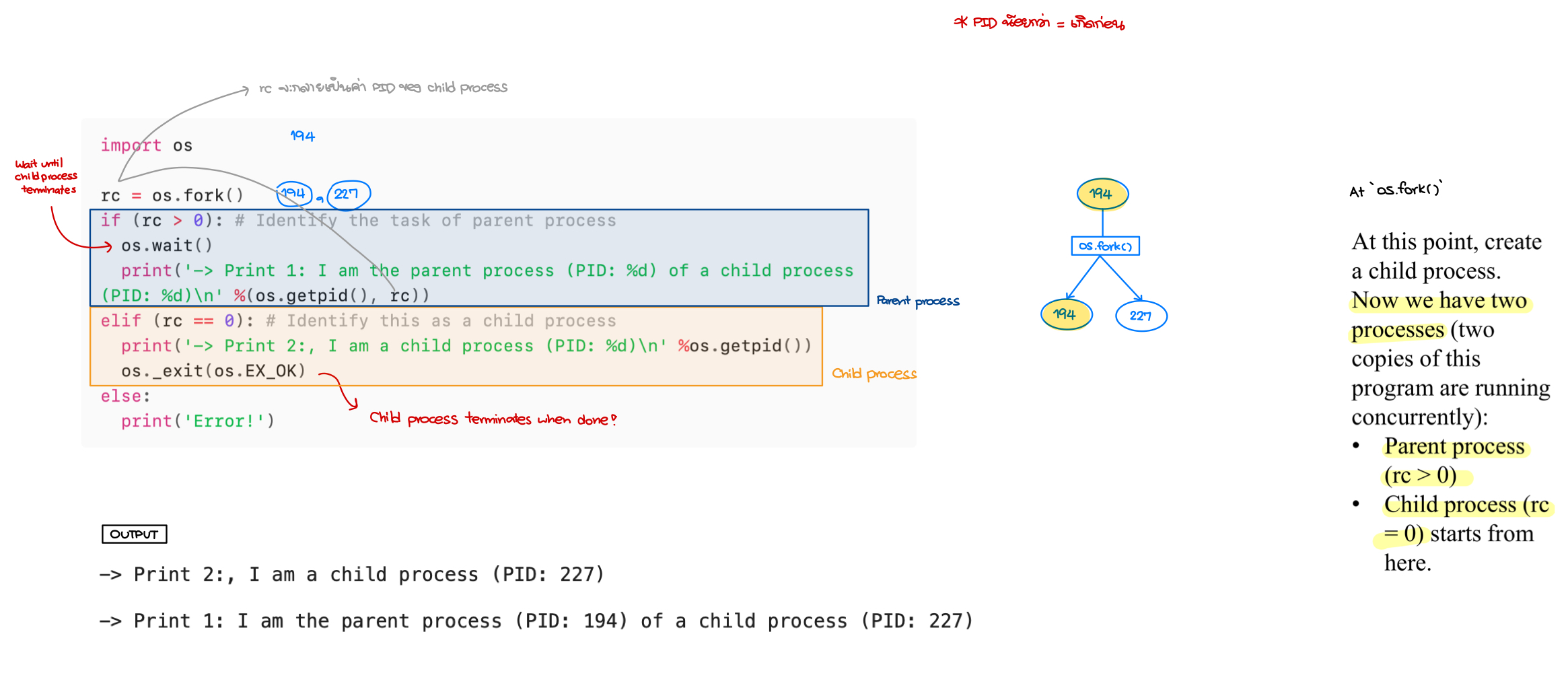
1. Calling os.fork()
- The
os.fork()system call is used to create a new process. - The parent process (e.g., PID=191) makes this call, and a new child process (e.g., PID=292) is created.
2. Process Duplication
- The child process is an almost exact copy of the parent, meaning:
- It has its own memory space.
- It has its own registers.
- It has its own Program Counter (PC).
- However, the key difference is the return value:
- The parent receives the child’s PID (
rc = 292). - The child receives
rc = 0.
- The parent receives the child’s PID (
3. Execution Flow
- The child process does not start at the beginning of the program. Instead, it begins executing immediately after the
os.fork()call. - The
ifcondition differentiates between the parent (rc > 0) and the child (rc == 0). - The parent waits (
os.wait()) for the child to complete before proceeding.
4. Order of Execution
- Since we assume a single CPU, either the parent or child could run first.
- In this program, the parent explicitly waits (
os.wait()) for the child to finish execution. - This ensures that the child prints its message before the parent does.
Example: Compute the Number of Processes
import os

rc1 = os.fork()
if (rc1 > 0):
  os.wait()
  print('-> Print 1:, I am the parent process (PID: %d) of \
  a child process (PID: %d)\n' %(os.getpid(), rc1))
elif (rc1 == 0):
  print('-> Print 2:, I am a child process (PID: %d)\n' %os.getpid())
  rc2 = os.fork()
  if (rc2 > 0):
    os.wait()
    print('-> Print 3: I am the parent process (PID: %d) of \
    a child process (PID: %d)\n' %(os.getpid(), rc2))
  elif (rc2 == 0):
    print('-> Print 4: I am a child process (PID: %d)\n' %os.getpid())
    os._exit(os.EX_OK)
  else:
    print('Error!')
  os._exit(os.EX_OK)
else:
  print('Error!')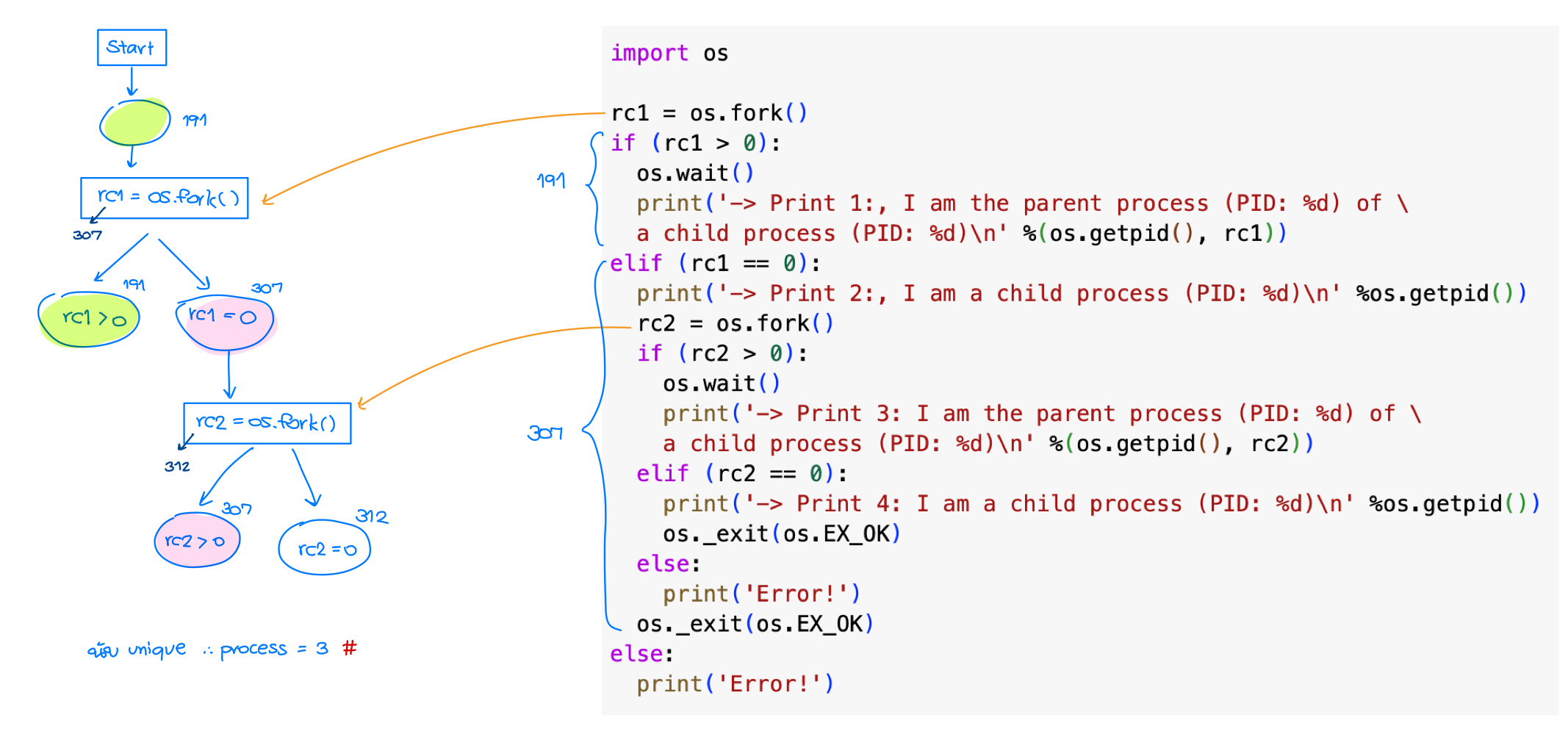
Example: How many processes will be created?
- Consider the following Python program (in the shared Colab).
- Note that this is not a complete script. 55555
import os

rc1 = os.fork()
print('-> Print 1: I am a process (PID: %d)\n' %os.getpid())
rc2 = os.fork()
print('-> Print 2: I am a process (PID: %d)\n' %os.getpid())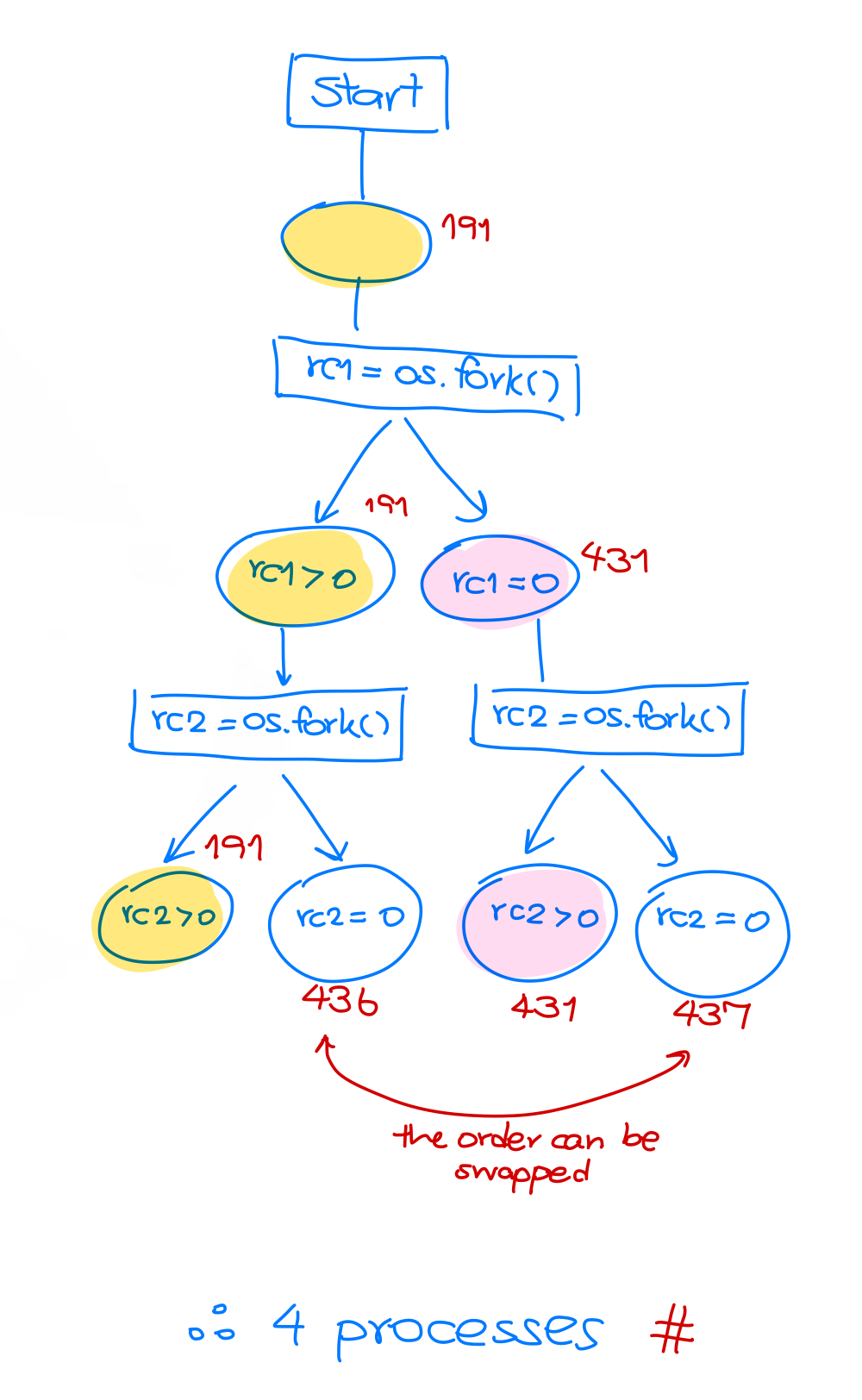
Example: Parent and Child Processes are in separated memory spaces
- แค่ Verify ให้ดูเฉย ๆ ไม่ได้ Shared กันจริง ๆ นะ
- This example shows that the child process duplicates the parent program and data. However, the parent and child processes are running separately. As seen, the values of the variable
Numprinted by the parent process and child process are different. They do not share the variable Num
import os

Num = 0
rc = os.fork()
if (rc > 0):
  os.wait()
  print('-> Print 1, I am the parent process (PID: %d); \
   Num is equal to %d.\n' %(os.getpid(), Num))
elif (rc == 0):
  Num = Num + 15
  print('-> Print 2, I am a child process (PID: %d); \
   Num is equal to %d.\n' %(os.getpid(), Num))
  os._exit(os.EX_OK)
else:
  print('Error!')
When we run this program, we create a parent process.
- After the
os.fork()system call, the parent process creates a child process, which will execute the code commands written after theos.fork()system call. - Note that since the child process is a copy of the parent process, the child process will have the same program code and data (i.e., the variable
Num = 0). - The variable
rcof the parent process is equal to the child process’s PID (>0). - Then, the parent process does not increase the variable
Num. - The variable
rcof the child process is equal to 0. - Then, the child process increases the variable
Numby 15.
Process Investigation by Using Python multiprocessing Module
- Not the same as using
fork() - Easier to be used
- More practical
- Popular
Python Commands for Process Creation
| Python Command | Explanation |
|---|---|
from multiprocessing import Process | To import Process class from multiprocessing module. |
Proc = Process(target= Func, arg = Arg) | To create a child process named Proc. This child process will execute the function named Func with its input argument Arg. Note that the name Proc can be changed to any name. |
Proc.start() | To start the child process Proc (created above). |
Proc.join() | To let the parent process waits for the child process Proc to finish its job. |
Example: Process Creation using multiprocessing
- In this program, the parent process will create 2 child processes to do Task_Add and Task_Sub. Here, unlike the
os.fork()command, we have 3 processes.
import os
from multiprocessing import Process

def Task_Add(a):
  global Num
  Num = Num + a
  print('Child process: Process PID = %d has Num = %d' %(os.getpid(), Num))

def Task_Sub(a):
  global Num
  Num = Num - a
  print('Child Process: Process PID = %d has Num = %d' %(os.getpid(), Num))

if __name__ == "__main__":
  Num = 10
  Proc1 = Process(target=Task_Add, args=(10,))
  Proc2 = Process(target=Task_Sub, args=(5,))
  Proc1.start()
  Proc2.start()
  Proc1.join()
  Proc2.join()
  print('Parent Process: Process PID = %d has Num = %d' %(os.getpid(), Num))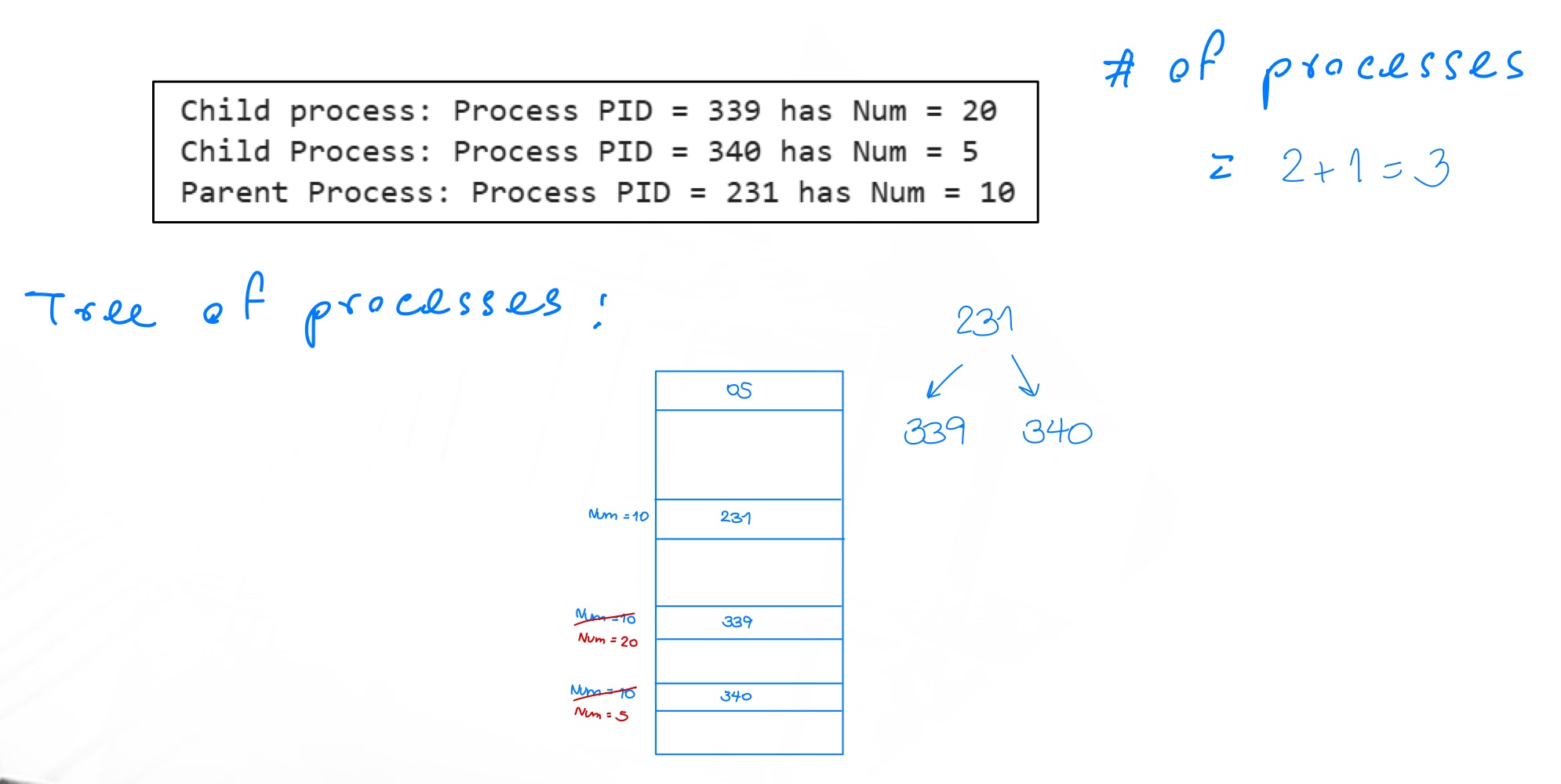
Example: Compute the Number of Processes
Consider the following Python program. Compute the number of processes that were created after finishing it.
import os
from multiprocessing import Process

def ChildTask():
  print('Child process: Process PID = %d' %os.getpid())

if __name__ == "__main__":
  Proc1 = Process(target=ChildTask)
  Proc2 = Process(target=ChildTask)
  Proc3 = Process(target=ChildTask)
  Proc4 = Process(target=ChildTask)
  Proc1.start()
  Proc2.start()
  Proc3.start()
  Proc4.start()
  Proc1.join()
  Proc2.join()
  Proc3.join()
  Proc4.join()
print('Parent Process: Process PID = %d' %os.getpid())- อันนี้ก็คือแค่สร้าง Process 4 อัน แล้วก็รวมกับ Main Process The number of processes is
Interprocess Communication
- Methods to exchange data among processes
No exam question for the examples
- In a computer systems, several processes executes concurrently.
- Some of them are working independently and no data exchanged among others.
- Some of them are working with others by exchanging data/information (called as Cooperating processes).
- These cooperating processes will exchange data/information via a mechanism called interprocess communication (IPC).
- Interprocess communication is very important in parallel programming.
Types of Interprocess Communication
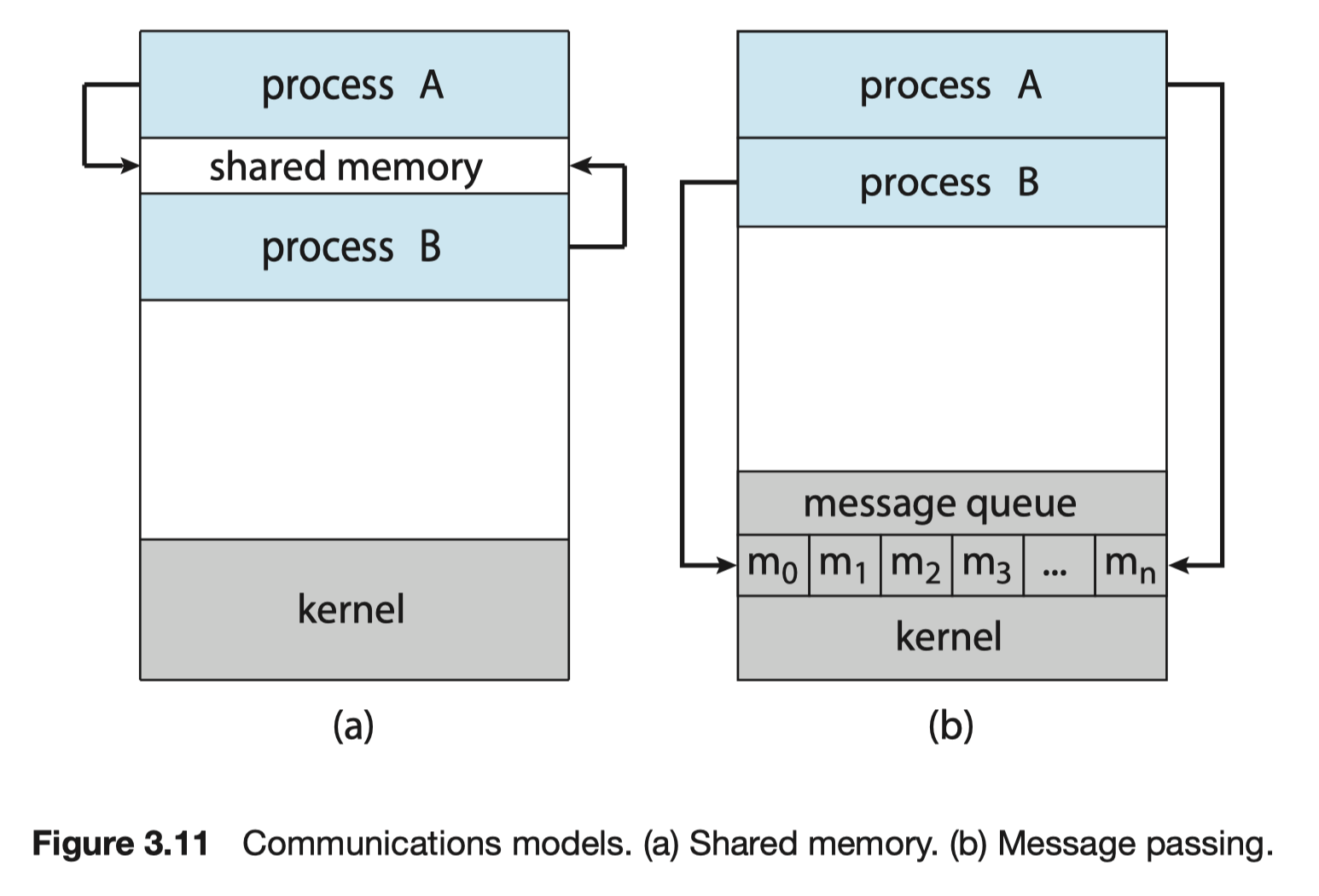
- An IPC technique generally refers to any means that is used by processes to communicate and transmit data. There are many types of IPC including shared memory, message queues/passing, pipes, signals, filesystem, and sockets. For example, the shared memory and message passing are briefly explained as below.
- Shared memory: A region of the main memory (store data) is shared/updated/revised/added by the cooperating processes (as shown in a).
- Specifically, these processes read and write the data to this region.
- Python Code ตัวอย่างต่อไปในเรื่องนี้จะ based on Shared memory
- Message-passing: The cooperating processes exchange data/information by sending/receiving messages to each other (as shown in b) via the message queue in the OS kernel.
IPC using Shared Memory
- IPC using shared-memory can be modeled as a producer-customer problem.
- There is a buffer of items which are filled by a producer and emptied by a consumer.
- A producer can produce one item while the consumer is consuming another item.
- The producer and consumer must be synchronized such that the consumer does not try to consume an item that has not yet been produced.
- These cooperating processes using shared memory must
- establish a region of shared memory (by one process will create a shared memory segment),
- allow the cooperating processes to access the shared memory,
- be synchronized such that they do not write data in a segment of shared memory at the same time.
Recall
#Recall
- Running a computer system
- Running application programs
- Running Processes
- A process = an entity the contain a set of instructions → Need CPU to execute and gives you the output (อย่าลืมว่าก็มี Time Slice ที่สามารถใช้ได้ด้วย) → เมื่อ Execute ทั้งหมดเสร็จก็จะนำไปสู่ Termination
- CPU Cores execute series of instructions