Topics Covered
- Development testing
- ระหว่าง dev
- Test-driven development (lifecycle)
- Release testing - after we release product to customer
- User testing
Program Testing
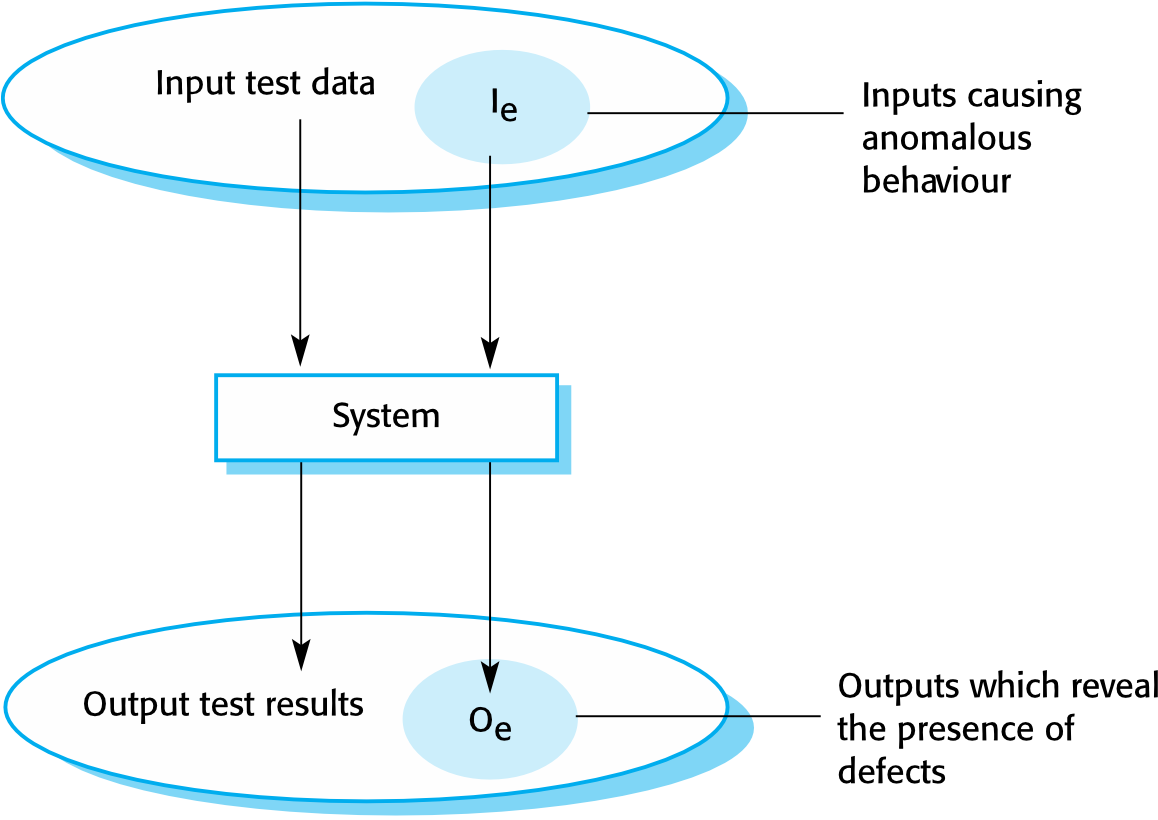
- Testing is intended to show that a program does what it is intended to do and to discover program defects before it is put into use
- When testing software, you execute a program using artificial data
- You check the results of the test run for errors, anomalies, or information about the program's non-functional attributes
- Testing can reveal the presence of errors, NOT their absence
- Testing is part of a more general Verification and Validation (V&V) process, which also includes static validation techniques
Think of testing like tasting food while cooking — you can find out something tastes wrong, but tasting it once doesn't guarantee every bite will be perfect.
Program Testing Goals
- Goal 1: Demonstrate to the developer and customer that the software meets its requirements
- For custom software: at least one test per requirement in the requirements document
- For generic software products: tests for all system features, plus combinations of features in the release
- Goal 2: Discover incorrect, undesirable, or non-conforming behavior
- Defect testing: rooting out undesirable system behavior such as system crashes, unwanted interactions, incorrect computations, and data corruption
Validation vs Defect Testing
| Type | Goal | What "success" means |
|---|---|---|
| Validation testing | Demonstrate system meets requirements | System operates as intended |
| Defect testing | Discover faults/defects in software | System performs incorrectly, exposing a defect |
- Validation testing: test cases reflect expected use
- Defect testing: test cases are deliberately obscure; need not reflect normal use
Major defect should be filtered out!!
An input-output model of program testing
Verification & Validation (V&V)
- Verification: "Are we building the product right?"
- The software should conform to its specification
- Testing against design of the system
- Validation: "Are we building the right product?"
- The software should do what the user really requires
- According to the requirement
Verification = following a recipe correctly. Validation = making sure the recipe is actually what the customer wanted to eat.
V&V Confidence
- Aim: establish confidence that the system is fit for purpose
- Depends on:
- Software purpose: confidence level depends on how critical the software is
- User expectations: users may have low expectations of certain software types
- Marketing environment: getting to market early may outweigh finding all defects
Inspections vs Testing
Software Inspections (Static Verification)
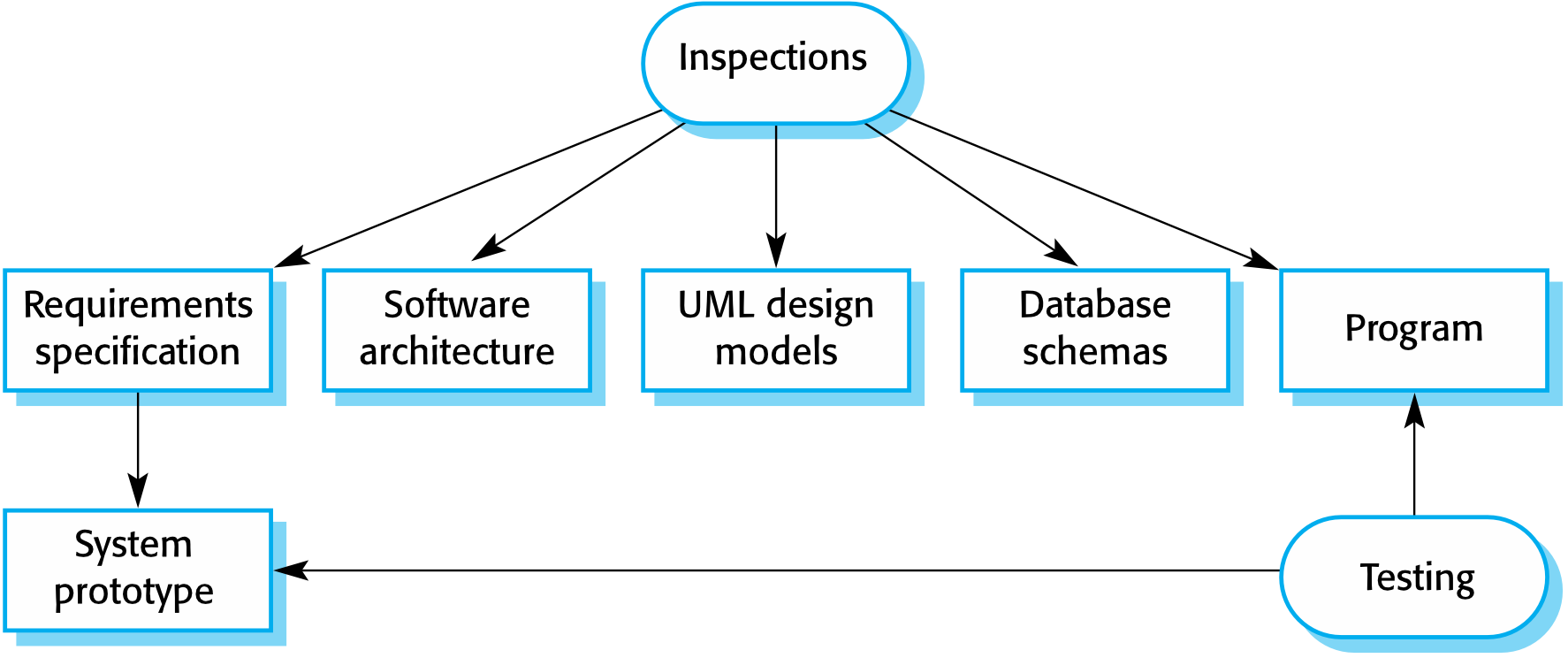
- Concerned with analysis of the static system representation to discover problems
- May be supplemented by tool-based document and code analysis
- Covers: Requirement, Design, and Code Reviews
Software Testing (Dynamic Verification)
- Concerned with exercising and observing product behaviour
- The system is executed with test data and its operational behaviour is observed
Inspection Targets
- Requirements specification
- Software architecture
- UML design models
- Database schemas
- Program code
Advantages of Inspections
- During testing, errors can mask other errors — inspection is static so you don't need to worry about error interactions
- Incomplete versions of a system can be inspected without additional costs (no need for specialized test harnesses)
- Can consider broader quality attributes: compliance with standards, portability, maintainability
Inspections and Testing Are Complementary
- Both should be used during the V&V process
- Inspections can check conformance with a specification but NOT the customer's real requirements
- Inspections cannot check non-functional characteristics like performance, usability, etc.
Software Testing Process Model
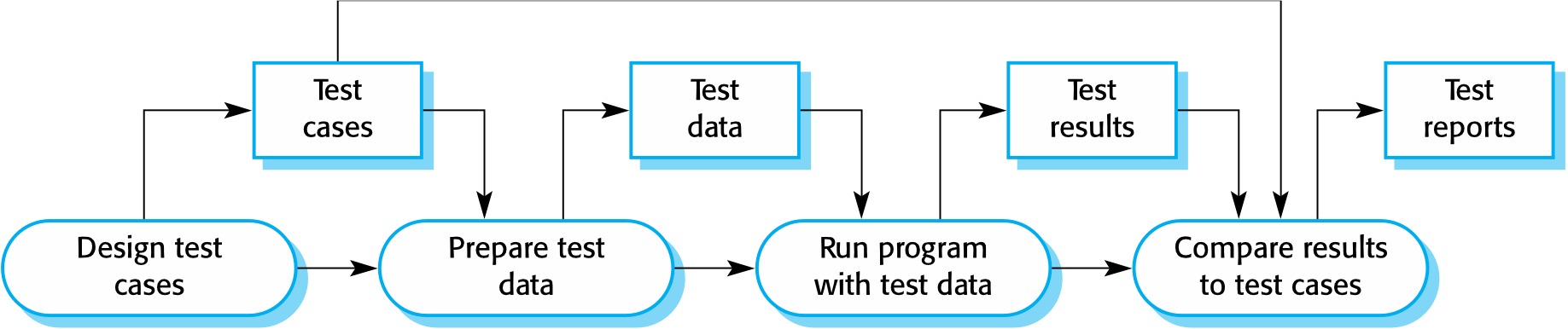
Steps:
- Design test cases → Test cases
- Prepare test data → Test data
- Run program with test data → Test results
- Compare results to test cases → Test reports
- (Loop back if needed)
Stages of Testing
- Development testing: system is tested during development to discover bugs and defects
- Release testing: a separate testing team tests a complete version before release to users
- User testing: users or potential users test the system in their own environment
Development Testing
Includes all testing activities carried out by the development team:
- Unit testing: individual program units or object classes are tested
- Focus on testing functionality of objects or methods
- Component testing: several units integrated into composite components
- Focus on testing component interfaces
- System testing: some or all components integrated and tested as a whole
- Focus on testing component interactions
Unit Testing
- The process of testing individual components in isolation
- It is a defect testing process
- Units may be:
- Individual functions or methods within an object
- Object classes with several attributes and methods
- Composite components with defined interfaces
Object Class Testing
- Complete test coverage involves:
- Testing all operations associated with an object
- Setting and interrogating all object attributes
- Exercising the object in all possible states

Example: Weather Station Testing
- Define test cases for:
reportWeather,calibrate,test,startup,shutdown - Use a state model to identify sequences of state transitions
- Example sequences:
Shutdown → Running → ShutdownConfiguring → Running → Testing → Transmitting → RunningRunning → Collecting → Running → Summarizing → Transmitting → Running
Automated Testing
- Unit testing should be automated whenever possible — run and checked without manual intervention
- Uses a test automation framework (e.g., JUnit) to write and run tests
- Frameworks provide generic test classes to extend for specific test cases
- Reports success/failure, often through a GUI
Automated Test Components
- Setup part: initialize the system with the test case (inputs + expected outputs)
- Call part: call the object or method to be tested
- Assertion part: compare the result with the expected result
true→ test passedfalse→ test failed
Like a math exam answer key: you prepare the question, solve it, then check against the answer.
Choosing Unit Test Cases
- Test cases should show the component does what it is supposed to do when used as expected
- If there are defects, the test cases should reveal them
- Two types:
- Normal operation tests: reflect normal operation, show component works as expected
- Abnormal input tests: use abnormal inputs to check proper processing and prevent crashes
Testing Strategies
1. Partition Testing
- Identify groups of inputs with common characteristics that should be processed the same way
- Each group = equivalence partition or domain
- Choose test cases from within each partition
Like testing a calculator's multiply function: no need to test 2×3 and 2×4 separately — they belong to the same "normal multiplication" partition.
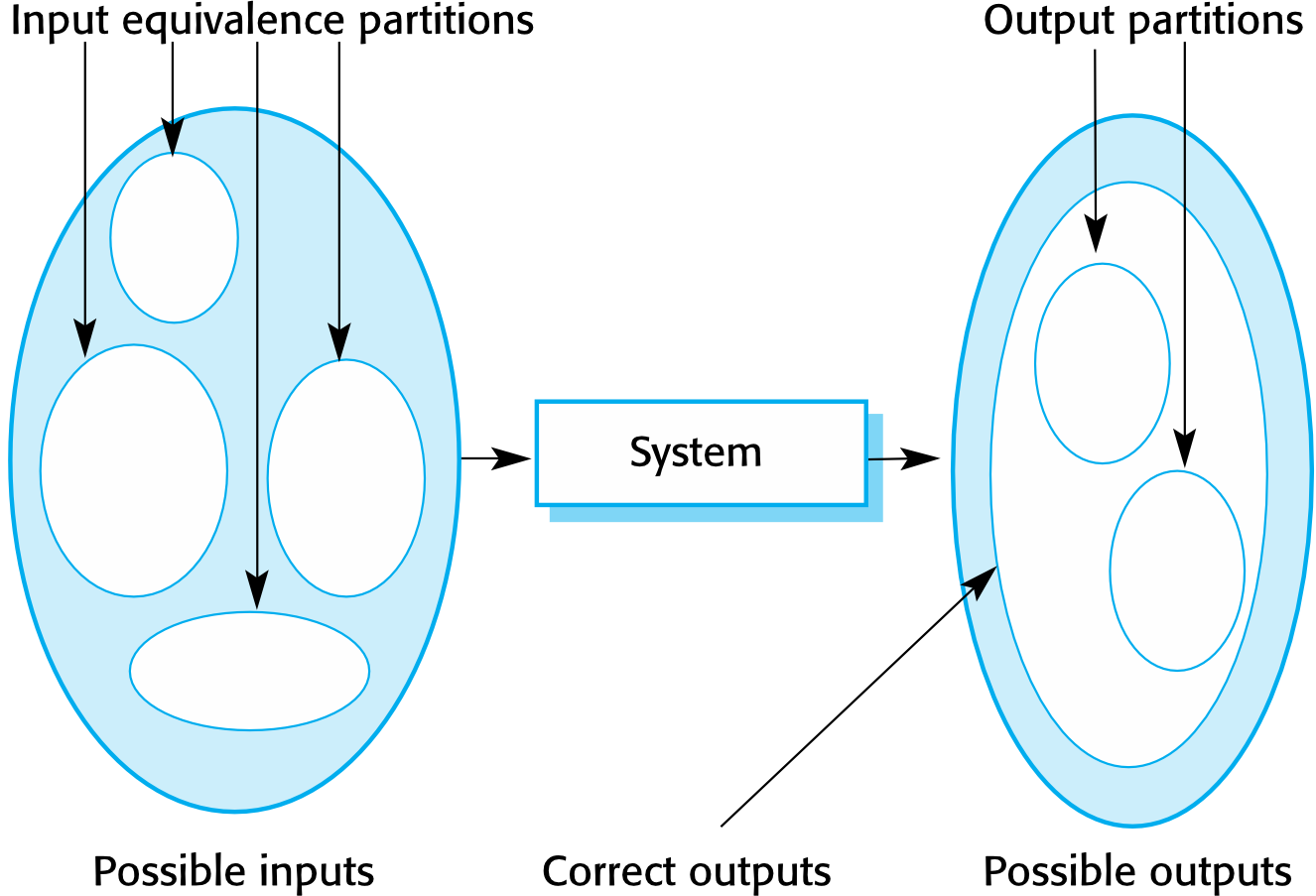
Example — Equivalence Partitions:
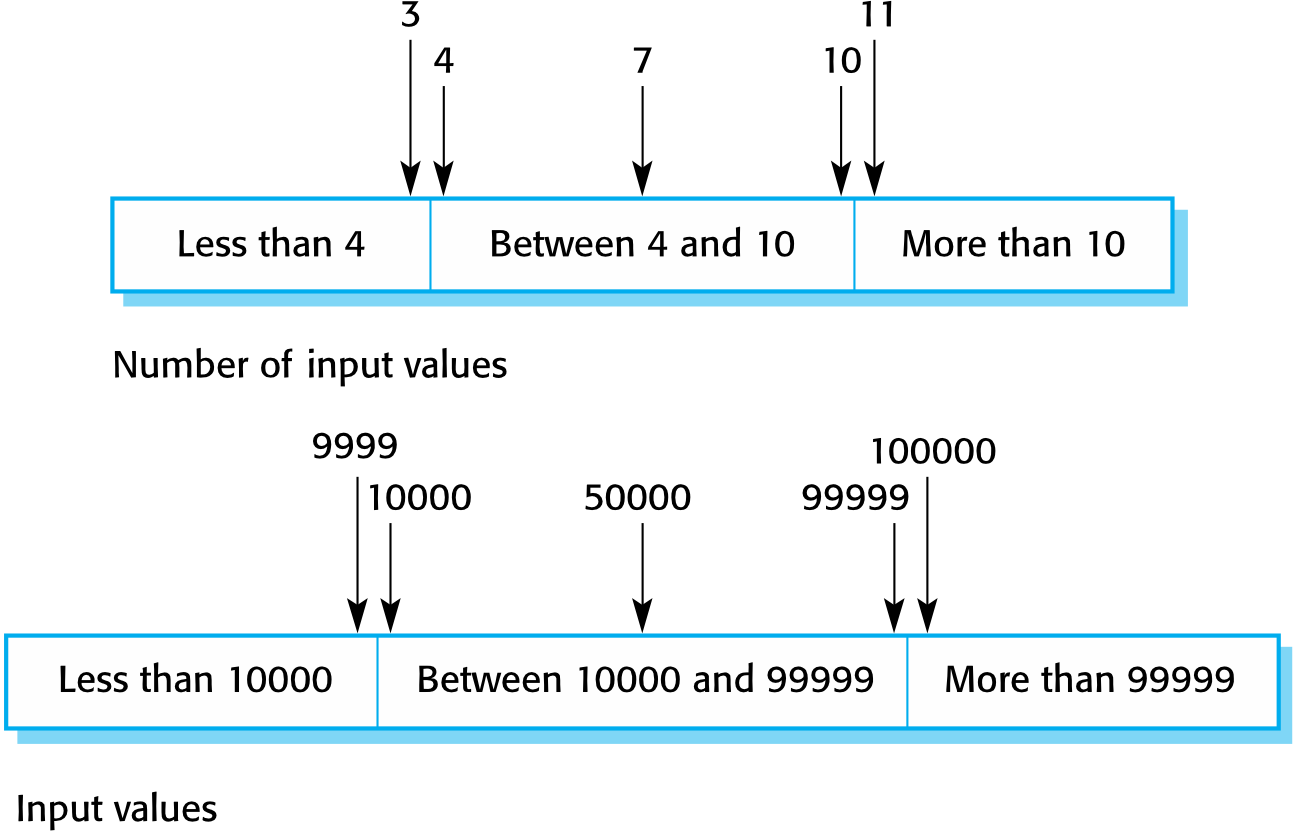
Number of input values:
| Partition | Values |
|---|---|
| Less than 4 | e.g., 3 |
| Between 4 and 10 | e.g., 7 |
| More than 10 | e.g., 11 |
| Input values: |
| Partition | Values |
|---|---|
| Less than 10000 | e.g., 9999 |
| Between 10000 and 99999 | e.g., 50000 |
| More than 99999 | e.g., 100000 |
2. Guideline-Based Testing
- Use testing guidelines based on previous experience of common programmer errors to choose test cases
Testing Guidelines (Sequences)
- Test with sequences that have only a single value
- Use sequences of different sizes in different tests
- Derive tests so that the first, middle, and last elements are accessed
- Test with sequences of zero length
General Testing Guidelines
- Choose inputs that force the system to generate all error messages
- Design inputs that cause input buffers to overflow
- Repeat the same input or series of inputs numerous times
- Force invalid outputs to be generated
- Force computation results to be too large or too small
Component Testing
- Software components are often composite (made up of several interacting objects)
- You access functionality through the defined component interface
- Focus on showing the component interface behaves according to its specification
- Assumes unit tests on individual objects are already completed
Interface Testing
- Objective: detect faults due to interface errors or invalid assumptions about interfaces
Interface types:
| Type | Description |
|---|---|
| Parameter interfaces | Data passed from one method/procedure to another |
| Shared memory interfaces | Block of memory shared between procedures/functions |
| Procedural interfaces | Sub-system encapsulates procedures called by other sub-systems |
| Message passing interfaces | Sub-systems request services from other sub-systems |
| 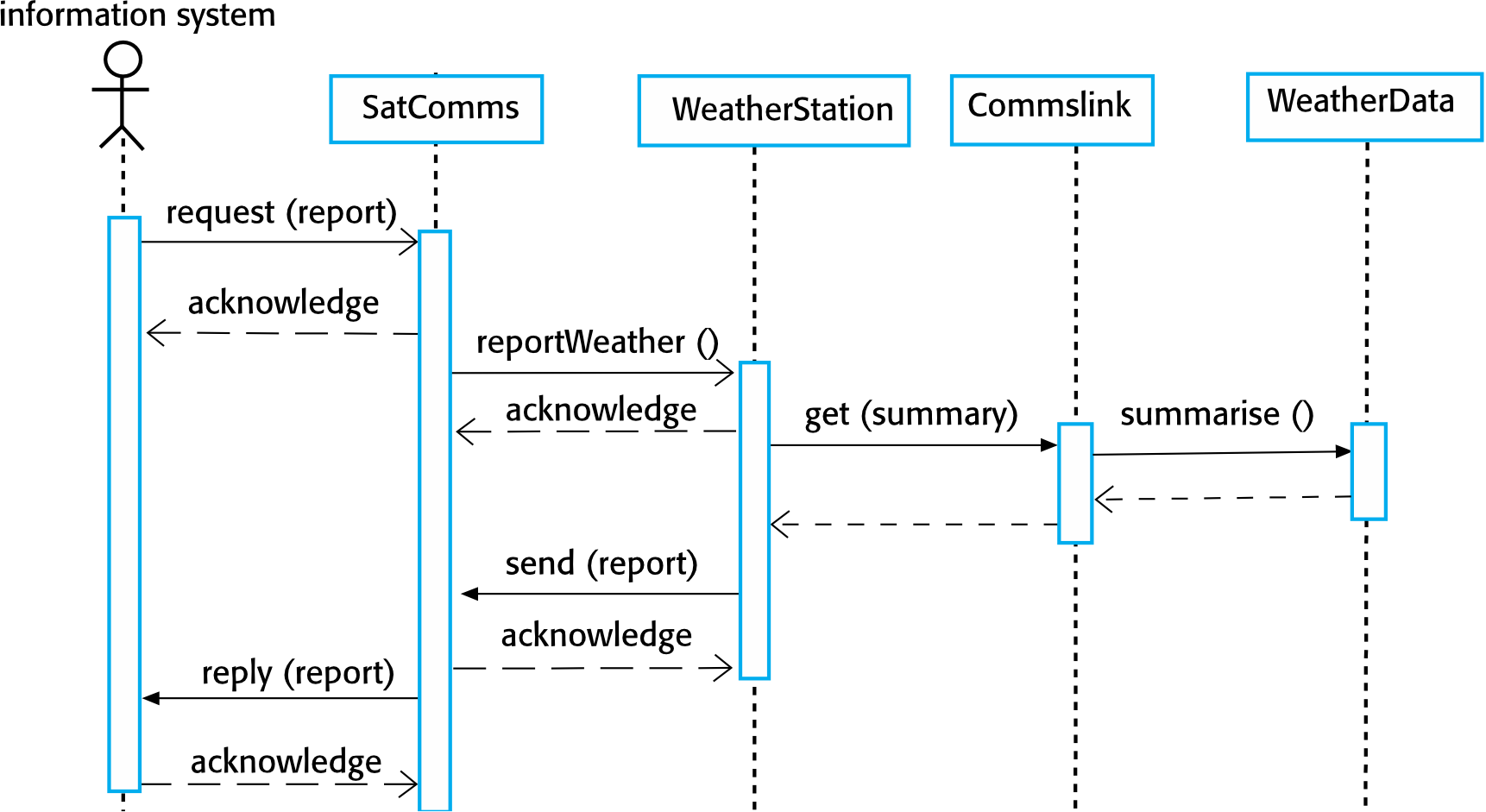
Test Cases Derived from Sequence Diagram
- A request for a report should have an associated acknowledgement, and a report should ultimately be returned
- Create summarized data to check the report is correctly organized
- A request to
WeatherStationresults in a summarized report being generated- Create raw data corresponding to the summary; check that WeatherStation correctly produces it
- This raw data is also used to test the
WeatherDataobject
Testing Policies
- Exhaustive system testing is impossible
- Examples of testing policies:
- All system functions accessed through menus should be tested
- Combinations of functions (e.g., text formatting) accessed through the same menu must be tested
- Where user input is provided, all functions must be tested with both correct and incorrect input
Test-Driven Development (TDD)
- An approach where testing and code development are interleaved
- Tests are written before code — passing tests is the critical driver of development
- Code is developed incrementally, along with a test for that increment
- You don't move to the next increment until the code passes its test
- Introduced as part of agile methods (e.g., Extreme Programming), but also usable in plan-driven processes
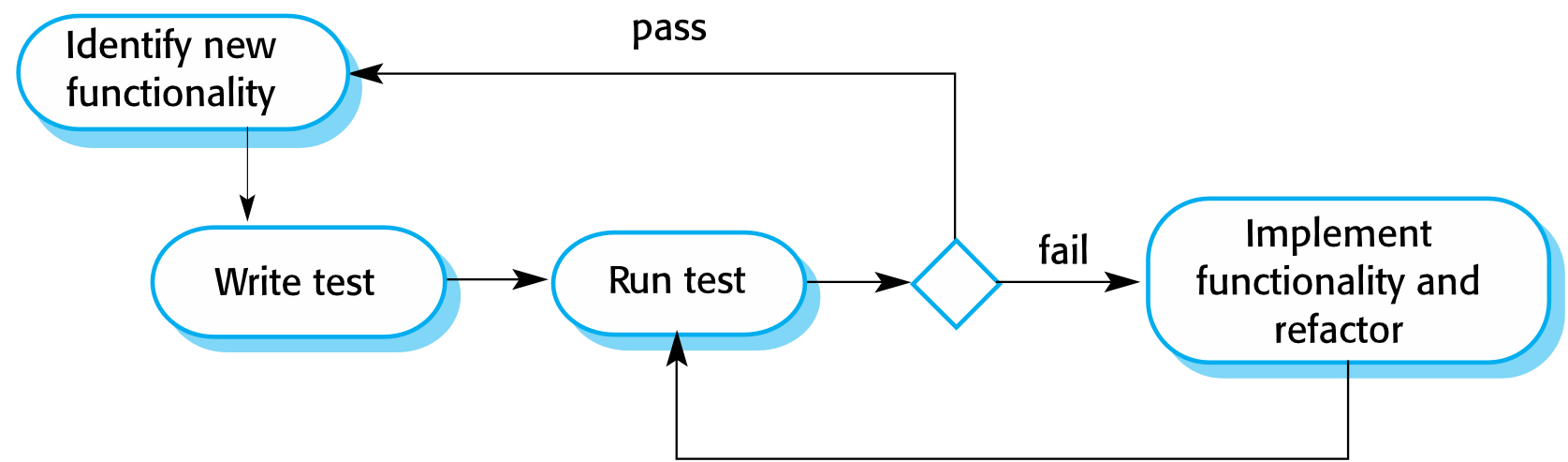
TDD Process Activities
- Identify the increment of functionality required (small, implementable in a few lines)
- Write a test for this functionality as an automated test
- Run the test — it will initially fail (functionality not yet implemented)
- Implement the functionality and re-run the test
- Once all tests pass, move on to the next chunk of functionality
Benefits of TDD
| Benefit | Description |
|---|---|
| Code coverage | Every code segment has at least one associated test |
| Regression testing | A regression test suite is developed incrementally as the program grows |
| Simplified debugging | When a test fails, the problem is obviously in the newly written code |
| System documentation | Tests themselves describe what the code should be doing |
Regression Testing
- Testing the system to check that changes have not broken previously working code
- In manual testing: expensive
- With automated testing: simple and straightforward — all tests are rerun every time a change is made
- Tests must run successfully before a change is committed
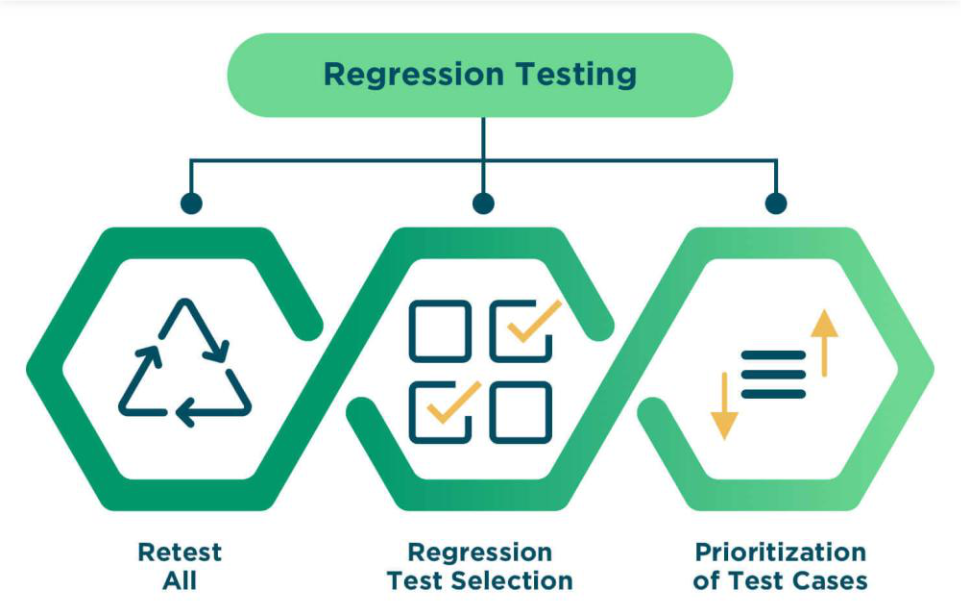
Like spell-checking a document every time you add a new paragraph — making sure your new edits didn't accidentally break the old text.
Release Testing
- The process of testing a particular release intended for use outside the development team
- Primary goal: convince the supplier that the system is good enough for use
- Shows system delivers specified functionality, performance, and dependability
- Shows system does not fail during normal use
- Usually a black-box testing process — tests derived only from the system specification
Release Testing vs System Testing
| Aspect | System Testing | Release Testing |
|---|---|---|
| Team | Development team | Separate team |
| Focus | Discovering bugs (defect testing) | Meeting requirements (validation testing) |
| Goal | Find defects | Confirm readiness for external use |
Requirements-Based Testing
- Involves examining each requirement and developing tests for it
- Example from Mentcare system:
- If a patient is allergic to a medication → prescribing it should issue a warning
- If a prescriber ignores an allergy warning → they must provide a reason
Example: Mentcare System Usage Scenario
George is a nurse who specializes in mental healthcare. One of his responsibilities is to visit patients at home to check that their treatment is effective and that they are not suffering from medication side effects.
On a day for home visits, George logs into the Mentcare system and uses it to print his schedule of home visits for that day, along with summary information about the patients to be visited. He requests that the records for these patients be downloaded to his laptop. He is prompted for his key phrase to encrypt the records on the laptop.
One of the patients that he visits is Jim, who is being treated with medication for depression. Jim feels that the medication is helping him but believes that it has the side effect of keeping him awake at night. George looks up Jim’s record and is prompted for his key phrase to decrypt the record. He checks the drug prescribed and queries its side effects. Sleeplessness is a known side effect so he notes the problem in Jim’s record and suggests that he visits the clinic to have his medication changed. Jim agrees so George enters a prompt to call him when he gets back to the clinic to make an appointment with a physician. George ends the consultation and the system re-encrypts Jim’s record.
After, finishing his consultations, George returns to the clinic and uploads the records of patients
visited to the database. The system generates a call list for George of those patients who He has to contact for follow-up information and make clinic appointments.
Requirements Tests
- Set up a patient with no known allergies → prescribe a medication → check no warning is issued
- Set up a patient with a known allergy → prescribe that medication → check warning is issued
- Set up a patient with two or more drug allergies → prescribe each separately → check correct warnings are issued
- Prescribe two drugs patient is allergic to → check two warnings are issued
- Prescribe a drug that issues a warning → overrule it → check system requires user to provide a reason
Features Tested by Scenario
- Authentication (logging on)
- Downloading/uploading patient records to a laptop
- Home visit scheduling
- Encryption and decryption of patient records on a mobile device
- Record retrieval and modification
- Links with the drugs database (side-effect information)
- The system for call prompting
Performance Testing
- Part of release testing — tests emergent properties (performance, reliability)
- Tests should reflect the profile of use of the system
- Usually involves planning a series of tests where load is steadily increased until performance becomes unacceptable
- Stress testing: deliberately overloads the system to test its failure behavior
Like testing a bridge by gradually adding more weight until it starts to bend — you want to know where the limit is before real traffic uses it.
User Testing
- Users or customers provide input and advice on system testing
- Essential even after comprehensive system and release testing
- Influences from the user's working environment affect reliability, performance, usability, and robustness
- These cannot be replicated in a testing environment
Types of User Testing
| Type | Description |
|---|---|
| Alpha testing | Users work with the development team to test software at the developer's site |
| Beta testing | A release is made available to users to experiment and raise problems with developers |
| Acceptance testing (UAT) | Customers test a system to decide whether to accept and deploy it; primarily for custom systems |
 |
Acceptance Testing Process
- Define acceptance criteria
- Plan acceptance testing
- Derive acceptance tests
- Run acceptance tests
- Negotiate test results
- Accept or reject system
Agile Methods and Acceptance Testing
- The user/customer is part of the development team and decides on acceptability
- Tests are defined by the user and integrated with automated tests
- No separate acceptance testing process
- Main problem: whether the embedded user is "typical" and can represent all stakeholders
Key Points
- Testing can only show the presence of errors — it cannot prove there are no remaining faults
- Development testing is the responsibility of the software development team; a separate team should test before release
- Development testing includes:
- Unit testing (individual objects/methods)
- Component testing (related groups of objects)
- System testing (partial or complete systems)
- Try to "break" the software using experience and guidelines to choose effective test types
- Write automated tests wherever possible — embedded in a program run every time a change is made
- Test-first development: tests written before the code to be tested
- Scenario testing: invent a typical usage scenario and use it to derive test cases
- Acceptance testing: user testing process to decide if software is good enough to be deployed