BCP, DRP หาย
Part I: Introduction
What Needs to Be Managed
- Information security must be viewed from three perspectives:
- Business perspective — how does information security support business goals?
- Customer (end user) perspective — focused on data privacy and user rights
- Service provider/supplier perspective — responsibilities in security assurance
เหมือนร้านอาหาร: เจ้าของร้าน (business) ต้องดูแลธุรกิจ, ลูกค้า (customer) ต้องการความปลอดภัยของข้อมูลส่วนตัว, และซัพพลายเออร์ (supplier) ต้องรับผิดชอบต่อคุณภาพสินค้าที่ส่งมา
What Is ISO 27001 About?
- ISO/IEC 27001:2022 provides a model for establishing, implementing, operating, monitoring, reviewing, maintaining and improving an ISMS
- The design and implementation of an organization's ISMS is influenced by:
- Needs and objectives
- Security requirements
- Processes employed
- Size and structure of the organization
- ISMS implementation is expected to be scaled in accordance with the needs of the organization
- (Source: ISO/IEC FDIS 27001:2005(E))
ISO/IEC 27001:2022 Overview
- The international standard for the establishment of an Information Security Management System (ISMS)
- Published in 2022 by:
- ISO — International Organization for Standardization
- IEC — International Electrotechnical Committee
- Used worldwide by organizations implementing information security based on a global standard
ISMS คือ "ระบบจัดการความมั่นคงปลอดภัยสารสนเทศ" — เหมือน ISO 9001 สำหรับคุณภาพ แต่นี่ใช้กับความปลอดภัยข้อมูลโดยเฉพาะ
How to Protect Information
- Controls (safeguards) — mechanisms to reduce risk
- Policy — rules and guidelines
- Procedures — step-by-step processes
- Password — access control mechanism
- Encryption — data scrambling to protect confidentiality
- Security Applications — software tools for security
- Coding — secure development practices
- Legal — laws and regulations
- Training and Awareness — educating employees
ISO/IEC 27001 Key Characteristics
- Concerns management of information security, not just IT/technical security
- Formally specifies a management system
- Uses Plan, Do, Check, Act (PDCA) cycle to achieve, maintain and improve alignment of security with risks
- Covers all types of organizations (commercial, government, non-profit) and all sizes
- Thousands of organizations worldwide are certified compliant
Part II: Gap Analysis and Risk Assessment
ISO/IEC 27001 Structure
- 0 Introduction — General introduction to the standard and the wider ISO/IEC 27000 series
- 1 Scope — ISMS generic requirements suitable for any size/type of organization
- 2 Normative references — Other ISO standards required to understand this standard
- 3 Terms and definitions — Main terms and definitions used by ISO/IEC 27001
- 4 Context of the organization — How organizations define scope for ISMS, manage stakeholder expectations, establish and maintain processes
- 5 Leadership — Role and responsibilities of Top Management regarding ISMS; define information security roles
- 6 Planning — Actions to identify, analyze and plan to treat information risks; define information security objectives
- 7 Support — Assign adequate/competent resources, create awareness, prepare and control documented processes/policies/procedures
- 8 Operation — Detailed actions to assess and treat risks, change management, documentation
- 9 Performance evaluation — Monitor, measure, analyze, evaluate/audit/review security controls and management system
- 10 Improvement — Continuously improve ISMS based on audit findings, management reviews, customer inputs
- Annex A Controls reference — Main information security controls that must be adopted; documented in the Statement of Applicability (SoA)
เหมือน PDCA วนซ้ำ: วางแผน (Clauses 4–6) → ทำ (7–8) → ตรวจสอบ (9) → ปรับปรุง (10)
Output of risk assessment → Assessment report → Apply control to mitigate those risks
ISO 27001 Certification Path (Overview)
The most common steps for ISMS implementation and certification:
- Plan the project
- Define scope and context of the ISMS
- Obtain management commitment
- Information security policy
- ISMS objectives and overall management system
- Risk assessment
- Statement of Applicability (SoA)
- Implement controls
- Internal audit
- Management review
- External audit stage one
- External audit stage two (certification)
Section 1 — Information Security Perspectives
Definition of the Subject
Information security deals with:
- The definition, implementation, maintenance, compliance and evaluation of an ISMS
- Risk management, leading to a coherent set of controls
- Safeguard the CIA — Confidentiality, Integrity and Availability of information
- The (manual and automated) information supply chain
This Implies…
- A management system such as ISO/IEC 27001
- A set of controls such as ISO/IEC 27002
- A focus on CIA — Confidentiality, Integrity, Availability
Service Provider/Supplier Security Assurance Responsibility
- Service providers need to understand their customers' business and requirements
- IT service management and information security need to be implemented using best-practice standards — SMART performance indicators are key
- Suppliers are not always transparent about security risks; third-party assessment is vital
- Perimeter security is still important but data security is even more so — requires a different mindset and different products/solutions
Section 2 — Risk Management
Gap Analysis vs. Risk Assessment
| Gap Analysis | Risk Assessment | |
|---|---|---|
| Tells you | What you're missing to comply with ISO 27001 | What controls you should apply |
| Does NOT tell you | Which controls to apply to address identified risks | What controls you already have |
Gap Analysis = รู้ว่าขาดอะไร / Risk Assessment = รู้ว่าควรทำอะไร
What Is Risk?
- Risk = the possibility (likelihood) that a threat exploits a vulnerability in an information asset, leading to an adverse impact on the organization
- Threat — something that might cause harm
- Vulnerability — a weakness that might be exploited
- Impact — financial damage, reputational damage, etc.
Risk Relationships
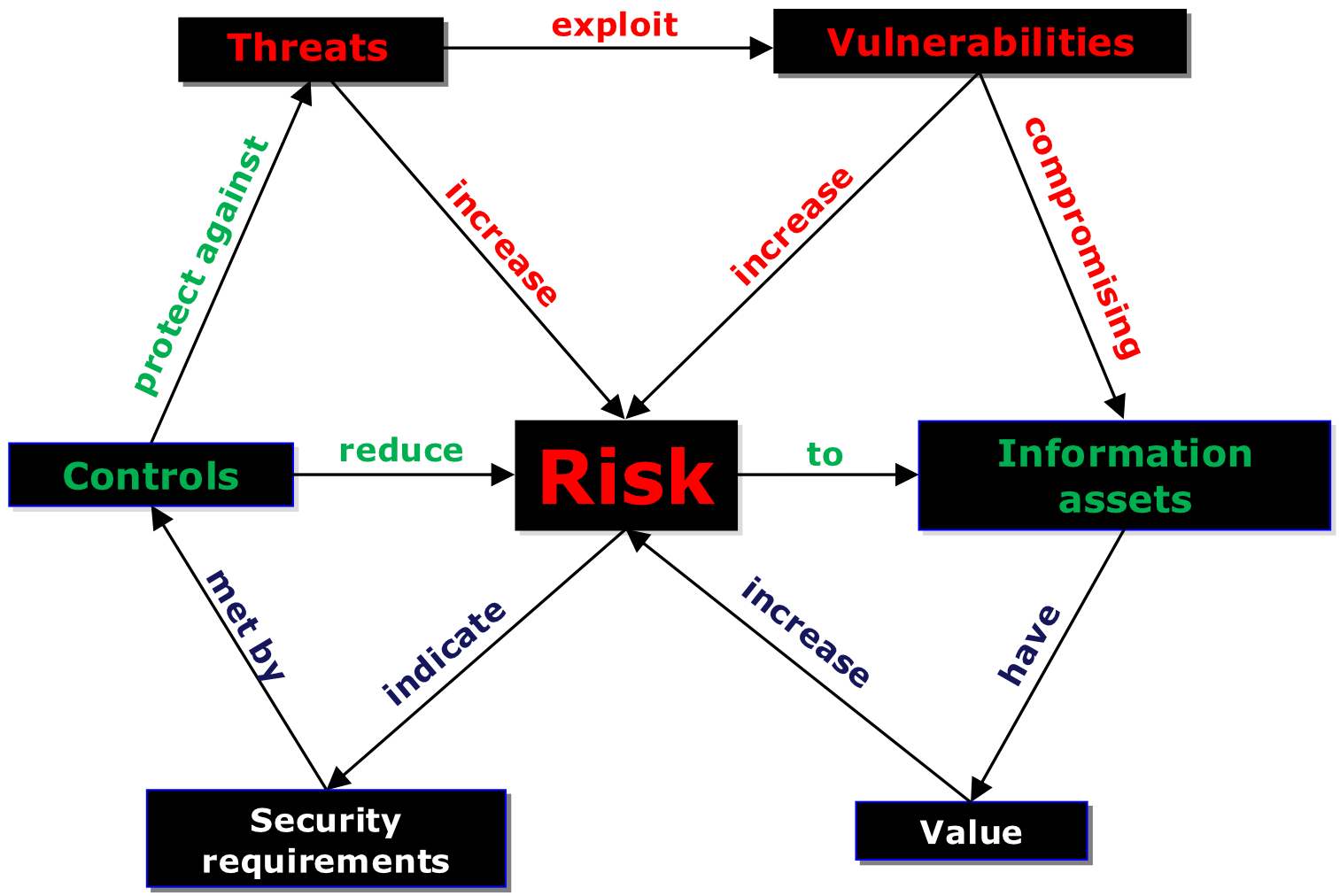
- Threats exploit vulnerabilities to affect information assets
- Controls reduce risks based on security requirements
Threat Agents
- The actor that represents, carries out, or catalyzes the threat:
- Human — malicious insiders, hackers, social engineers
- Machine — automated attacks, system failures
- Nature — floods, earthquakes, power outages
Goals of Risk Analysis
- Identify assets and their value to the organization
- Identify vulnerabilities and threats
- เรา identify vulnerabilities ได้ยังไง, VAPT — penetration test สิ
- Quantify the probability and business impact of potential threats
- Provide an economic balance between the impact of the threat and the cost of the countermeasure
Information Risk Assessment — Risk Domains
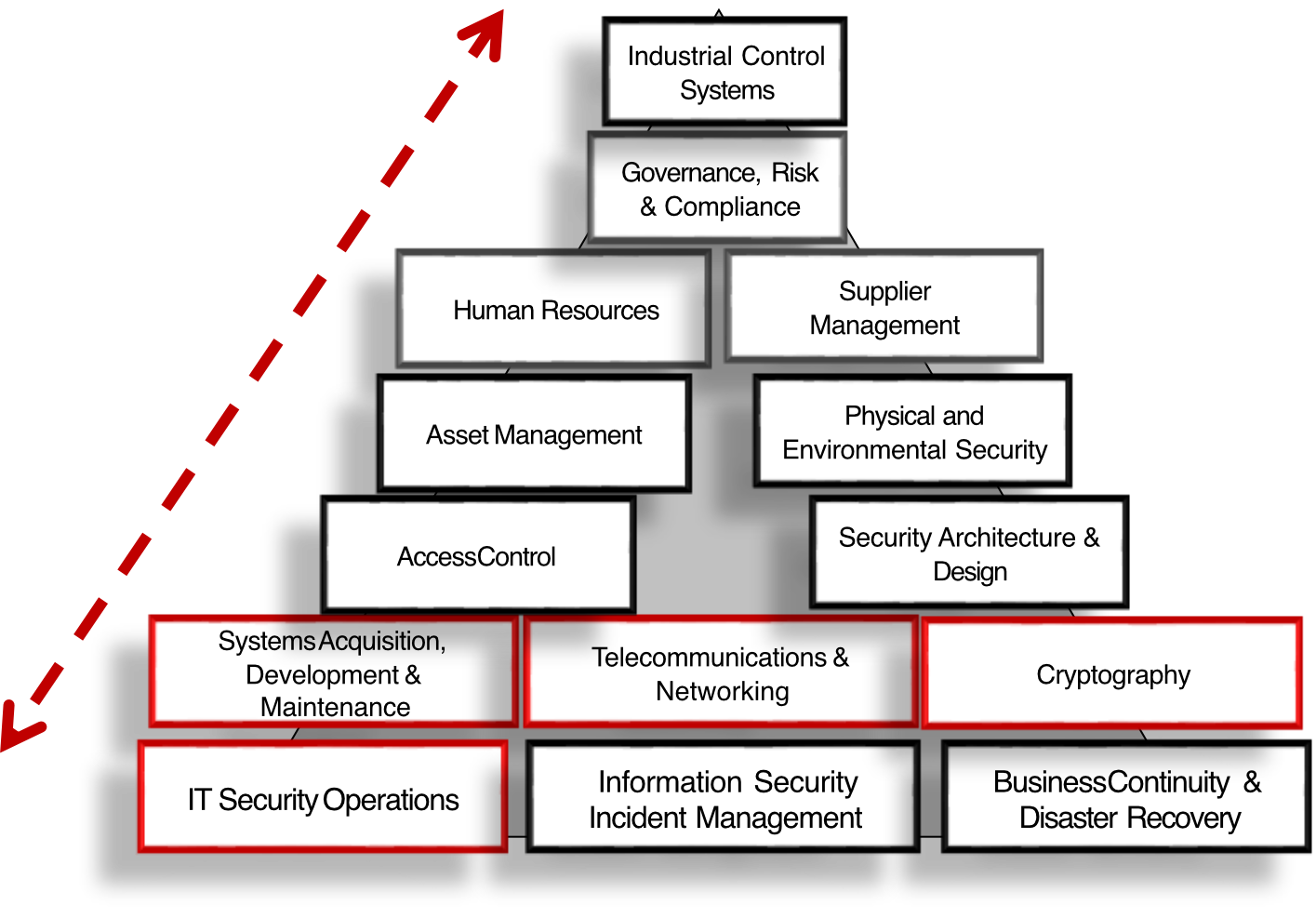
160 possible vulnerabilities were reviewed across major risk domains:
- Industrial Control Systems
- Governance, Risk & Compliance
- Human Resources
- Asset Management
- Access Control
- Supplier Management
- Physical and Environmental Security
- Security Architecture & Design
- Systems Acquisition, Development & Maintenance
- Telecommunications & Networking
- Cryptography
- IT Security Operations
- Information Security Incident Management
- Business Continuity & Disaster Recovery
Risk Assessment Process (NIST SP 800-30)
- Identify assets
- Identify vulnerabilities and threats
- Assess the business impact on each vulnerability/threat
- Conduct Risk Analysis
- Provide the controls/treatment plan
- Evaluate the controls
Risk Analysis Approaches
Quantitative Analysis
- Assigns monetary and numeric values to all elements of the risk analysis process
- Each element (asset value, threat frequency, severity of vulnerability, impact damage, safeguard costs, safeguard effectiveness, uncertainty, probability) is quantified and entered into equations
- More of a scientific or mathematical approach
- Example: "This risk will cost the organization $50,000"
Qualitative Analysis
- Assigns ratings to the risks, e.g., Red (High), Yellow (Medium), Green (Low)
- Simpler, faster, based on expert judgment
Quantitative = ใช้ตัวเลขและเงิน / Qualitative = ใช้ระดับ เช่น สูง/กลาง/ต่ำ
Relationship Between Assets, Threats and Vulnerabilities
Asset: paper document
- Threat: fire; Vulnerability: not stored in fire-proof cabinet → loss of availability
- Threat: fire; Vulnerability: no backup → loss of availability
- Threat: unauthorized access; Vulnerability: not locked in a cabinet → loss of confidentiality
Asset: digital document
- Threat: disk failure; Vulnerability: no backup → loss of availability
- Threat: virus; Vulnerability: anti-virus not updated → loss of CIA
- Threat: unauthorized access; Vulnerability: access control not properly defined → loss of CIA
- Threat: unauthorized access; Vulnerability: access given to too many people → loss of CIA
Asset: system administrator
- Threat: unavailability; Vulnerability: no replacement person → loss of availability
- Threat: frequent errors; Vulnerability: lack of training → loss of integrity and availability
Risk Assessment Calculation
Detailed risk assessment assesses three elements: asset value, threat, and vulnerability
Example:
- Asset: laptop
- Threat: theft
- Vulnerability: employees don't know how to protect their device
- Asset value: 3 (scale 0–4)
- Threat value: 2 (scale 0–2)
- Vulnerability value: 2 (scale 0–2)
- Consequences: 3 (scale 0–4)
- Likelihood: 4 (scale 0–4)
Risk Calculation Methods
Method 1 — Addition:
- Simple:
- Detailed:
Method 2 — Multiplication:
- Example:
ถ้าใช้ Low-Medium-High scale ก็เหมือนใช้ 1-2-3 แทน — ขอแค่ใช้สม่ำเสมอตลอดทั้งองค์กร
Rsk = Threat x
Risk Level Matrix
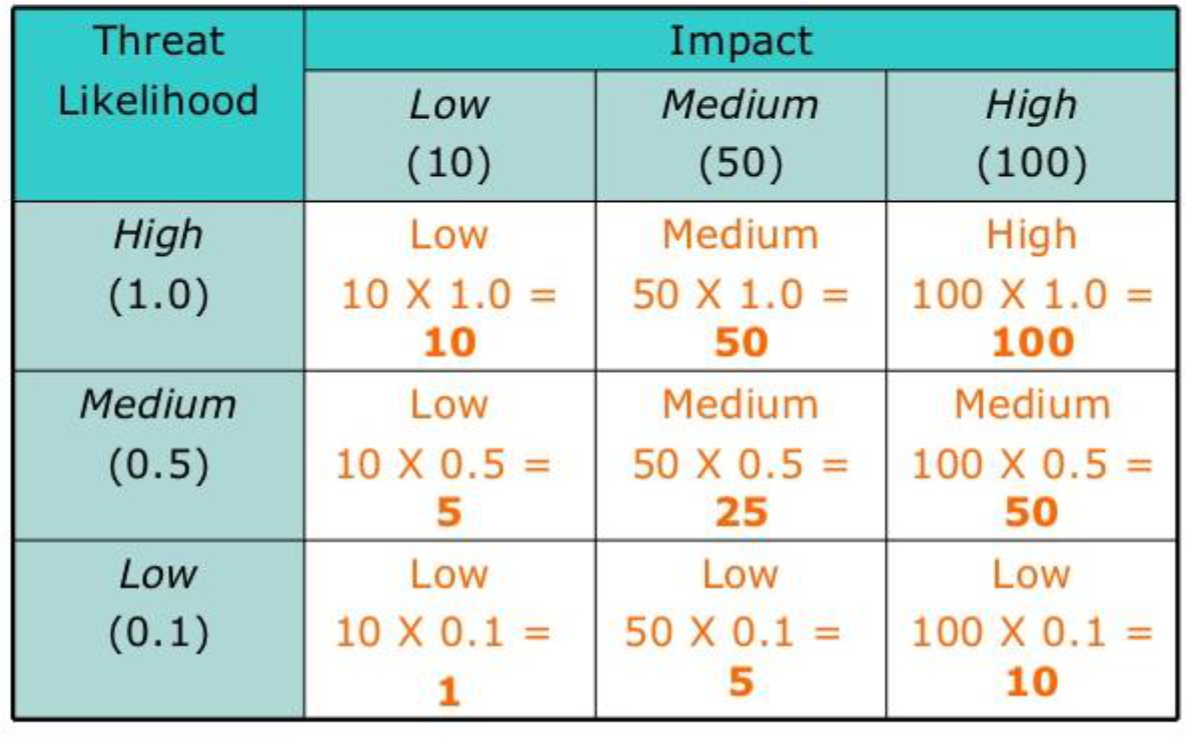
Qualitative Risk Matrix
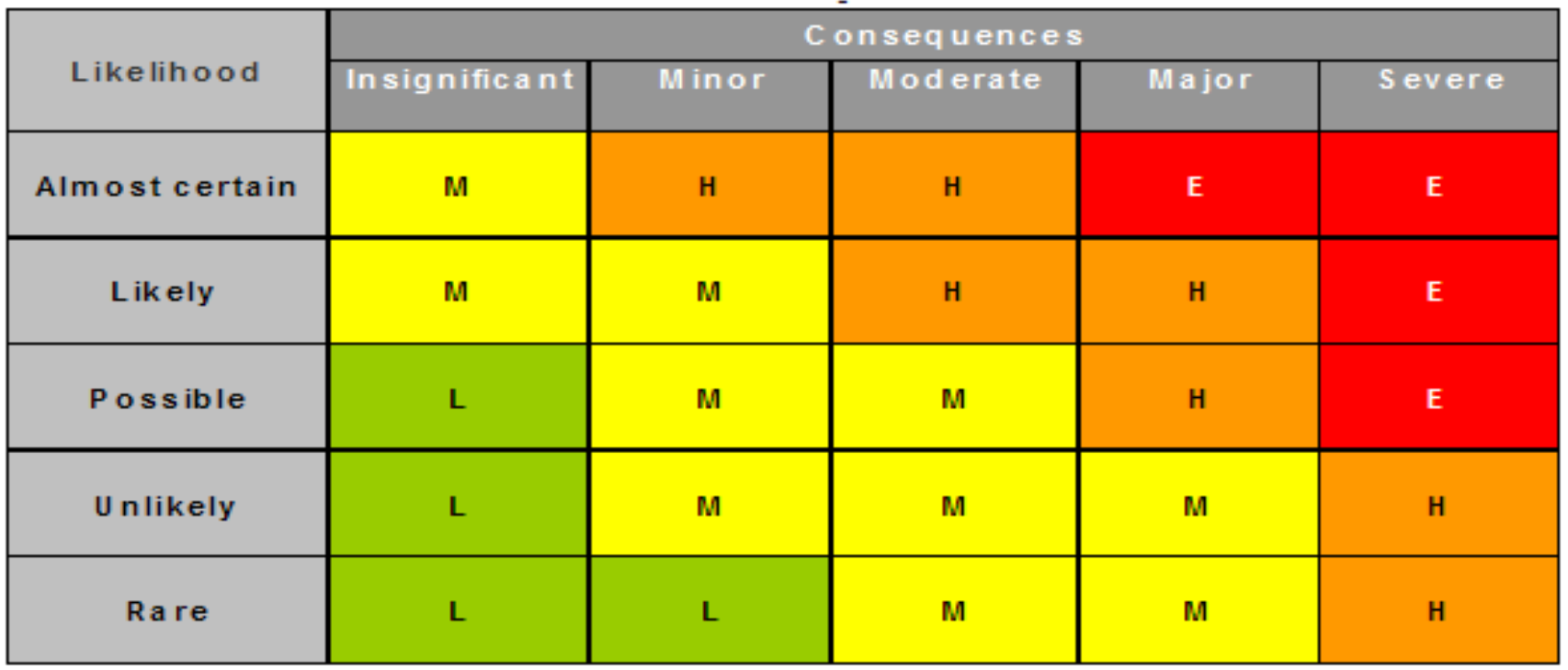
| Likelihood \ Consequences | Insignificant | Minor | Moderate | Major | Severe |
|---|---|---|---|---|---|
| Almost certain | M | H | H | E | E |
| Likely | M | M | H | H | E |
| Possible | L | M | M | H | E |
| Unlikely | L | M | M | M | H |
| Rare | L | L | M | M | H |
- E = Extreme (Red) — Immediate action required
- H = High (Orange) — Senior management attention needed
- M = Medium (Yellow) — Management responsibility specified
- L = Low (Green) — Manage by routine procedures
Risk Assessment — Asset Based Example (Database Team)
| # | Document | Purpose | Owner |
|---|---|---|---|
| 1 | Asset Register | Identify critical business information, where it exists, and who owns it | Database Team |
| 2 | Risk Assessment | Identify potential data loss or security threats and resulting impact to the business | InfoSec, Database Team |
| 3 | Risk Treatment Plan (RTP) | Define the preferred procedure in the event of a security breach; recommend additional security controls | Database Team |
| 4 | Implementation Procedure | Lists all current controls in place; once additional controls from RTP are implemented, they will be added here | Database Team |
Risk Treatment Options:
- Accept — acknowledge the risk and do nothing extra
- Mitigate — implement controls to reduce the risk
- Transfer — shift the risk to a third party (e.g., insurance)
- Avoid — stop the activity that causes the risk
Example of Business Impact Analysis (BIA)
BIA Questionnaire — Determining the Maximum Acceptable Outage:
- Qualitative scale: (1) marginal impact, (2) acceptable impact, (3) high impact, (4) catastrophic impact
| Question | 2 hrs | 4 hrs | 8 hrs | 24 hrs | 48 hrs | 1 week |
|---|---|---|---|---|---|---|
| How will clients react to a disruption? | 2 | 2 | 3 | 3 | 4 | 4 |
| What will be the impact to other activities? | 1 | 2 | 2 | 3 | 3 | 4 |
| How will disruption influence loss of reputation? | 1 | 2 | 2 | 3 | 4 | 4 |
| How difficult to catch up on backlog? | 1 | 1 | 2 | 2 | 3 | 3 |
| Legal/contractual penalties (USD) | 0 | 1,000 | 2,000 | 30,000 | 60,000 | 210,000 |
| Repair expenses (USD) | 0 | 0 | 5,000 | 20,000 | 25,000 | 40,000 |
| Revenue loss (USD) | 0 | 0 | 0 | 10,000 | 20,000 | 70,000 |
- Maximum Acceptable Outage = somewhere between 8 and 24 hours
- The Recovery Time Objective (RTO) is determined by examining dependencies on other activities
Recovery Point Objective (RPO)
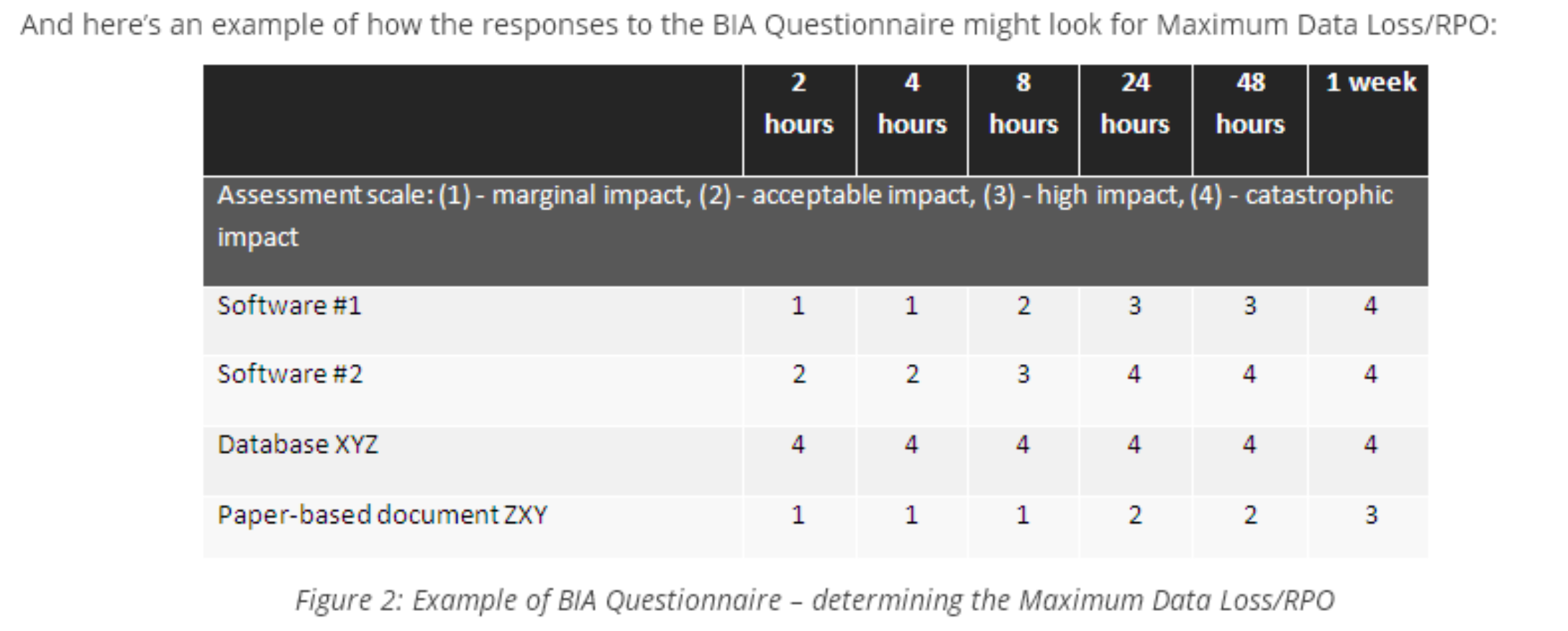
- RPO = the maximum amount of data that might be lost from a service due to a disruption
- Example RPOs:
- Software #1 → RPO = 24 hours
- Software #2 → RPO = 8 hours
- Database XYZ → RPO = less than 1 hour (near zero)
- Paper-based document ZXY → RPO = about 1 week
RTO = "กลับมาทำงานได้ภายใน X ชั่วโมง" / RPO = "ข้อมูลสูญหายได้ไม่เกิน X ชั่วโมงย้อนหลัง"
Criteria for Accepting Risks
- If risk calculation produces values from 2 to 10, you can define acceptable risk as, e.g., 7
- Only risks valued at 8, 9, or 10 need treatment
- Risk acceptance level must be formally defined and documented
Evaluating the Risk — Scales
| Likelihood | Severity | |
|---|---|---|
| 1. Highly unlikely | 1. Slight harm | |
| 2. Possibly | 2. Injury affecting work | |
| 3. Quite likely | 3. Serious injury | |
| 4. Very likely | 4. Possible fatality |
Part III: Information Security Controls
Strategies for Controls
- Information security can only be improved by implementing controls (the Plan activities of PDCA are most important)
- Implementing the right controls is crucial, and testing whether they actually work is even more important
Strategies for improvement:
- Focus on Plan — describing the planned controls
- Focus on Do — implementing controls
- Focus on Check/Act — continuous improvement
Protecting Confidentiality
- Preventing leakage relies on preventing access to the information
- When prevention cannot be guaranteed (e.g., public networks), encryption is required
Good access control covers three categories:
- Technical controls
- Programs (policies and procedures)
- Policies
Preventing unauthorized access requires:
- User identification and authorization is critical
- Subsequent access based on Access Control Lists (ACL) — describing what kind of access the user has: read, write, execute, create, delete, etc.
Encryption:
- Scrambles information so that legitimate users can easily descramble it, but adversaries cannot
- Requires a digital key and a one-way decryption method that will not allow descrambling without the key
ISO/IEC 27002:2022
- Contains 93 controls grouped into 4 themes:
| Theme | Controls Count |
|---|---|
| Organizational (Section 5) | 37 |
| Technological (Section 8) | 34 |
| Physical (Section 7) | 14 |
| People (Section 6) | 8 |
Attributes in Controls
Each control has attributes in five categories:
| Attribute Category | Values |
|---|---|
| Control type | Preventive, Detective, Corrective |
| InfoSec properties | Confidentiality, Integrity, Availability |
| Cybersecurity concepts | Identify, Protect, Detect, Respond, Recover |
| Operational capabilities | Governance, Asset management, Information protection, Human resource security, Physical security, System and network security, Application security, Secure configuration, Identity and access management, Threat and vulnerability management, Continuity, Supplier relationships security, Legal and Compliance, Information security event management, Information security assurance |
| Security domains | Governance and Ecosystem, Protection, Defense, Resilience |
3.1 Organizational Controls (Section 5)
Full List of Organizational Controls
| Control | Name |
|---|---|
| 5.1 | Policies for information security |
| 5.2 | Information security roles and responsibilities |
| 5.3 | Segregation of duties |
| 5.4 | Management responsibilities |
| 5.5 | Contact with authorities |
| 5.6 | Contact with special interest groups |
| 5.7 | Threat intelligence |
| 5.8 | Information security in project management |
| 5.9 | Inventory of information and other associated assets |
| 5.10 | Acceptable use of information and other associated assets |
| 5.11 | Return of assets |
| 5.12 | Classification of information |
| 5.13 | Labelling of information |
| 5.14 | Information transfer |
| 5.15 | Access control |
| 5.16 | Identity management |
| 5.17 | Authentication information |
| 5.18 | Access rights |
| 5.19 | Information security in supplier relationships |
| 5.20 | Addressing information security within supplier agreements |
| 5.21 | Managing information security in the ICT supply chain |
| 5.22 | Monitoring, review and change management of supplier services |
| 5.23 | Information security for use of cloud services |
| 5.24 | Information security incident management planning and preparation |
| 5.25 | Assessment and decision on information security events |
| 5.26 | Response to information security incidents |
| 5.27 | Learning from information security incidents |
| 5.28 | Collection of evidence |
| 5.29 | Information security during disruption |
| 5.30 | ICT readiness for business continuity |
| 5.31 | Legal, statutory, regulatory and contractual requirements |
| 5.32 | Intellectual property rights |
| 5.33 | Protection of records |
| 5.34 | Privacy and protection of PII |
| 5.35 | Independent review of information security |
| 5.36 | Compliance with policies, rules and standards for information security |
| 5.37 | Documented operating procedures |
Key Organizational Controls — Details
5.1 Policies for Information Security
- A document that helps all employees understand why information security is important and what their role is
- Includes the information security policy and its review process
5.37 Documented Operating Procedures
Key procedures to document:
- Information security policy and review process
- Management commitment
- Asset management including classification of assets/information
- Change management procedures
- Separation of duties
- Access control program & policy and review process
- Incident management procedures
- Identification of applicable legislation
- Protection of intellectual property rights
- Protection of personal information
5.12 Classification of Information
- Scope — Only secure what is required according to the ISMS scope; consider how to consistently label printed documents
- Labelling — Add a label to information: e.g., Highly Confidential, Confidential, or Public
- Classified documents can only be accessed by persons cleared for that level or higher
- Asset owners — Let asset owners classify information based on the impact of loss, damage, and/or disclosure
- Controls/Policy — Rules to deal with classification labels; e.g., confidential information should be encrypted or transported by registered mail
What is the major benefit/advantages of information classification #FinalExam
We can apply/decide appropriately access control for each class of information properly
5.7 Threat Intelligence
- The collection and analysis of information about information security threats
- Creates awareness of the organization's threat environment so that risks can be mitigated
- Threat intelligence itself is a control that may lead to the implementation of other controls
Three levels of threat intelligence:
- Strategic — high-level trends for executives
- Tactical — TTPs (Tactics, Techniques and Procedures) for security teams
- Operational — specific indicators of ongoing attacks
Threat intelligence program steps:
- Create a plan
- Know who needs the information
- Involve the right people
- Implement the right tools, techniques and procedures
- Understand the difference between threat data and threat intelligence
- Integrate with your organization's information security program
- Communicate
Threat intelligence should be:
- Relevant
- Insightful
- Contextual
- Actionable
Sources: Data Breach Investigation Report, CrowdStrike Global Threat Report, Hardware and software vendors
Flow:
5.9, 5.10, 5.11 Asset Management
- 5.9 — Inventory of information and other associated assets (maintain an Asset Management DB)
- 5.10 — Acceptable Use Policy for information and assets
- 5.11 — Return of assets — procedures for returning assets when employment ends
5.19–5.21 Information Security in Supplier Management
Suppliers come in various forms:
- Software (desktop, server, database, network)
- Hardware (desktop, server, network)
- Facilities (air conditioning, buildings, physical security)
- Business Process Outsourcing (BPO)
Controls:
- 5.19 — Information security in supplier relationships
- เราต้องการ support from them, ก็ต้องรักษา good relationship ไว้สิ
- 5.20 — Addressing information security within supplier agreements
- 5.21 — Managing information security in the ICT supply chain
Level of access determines contract type:
- Low access → Supplier T&Cs (Terms & Conditions)
- High access → Full Contractual Agreement
Continuity / Availability (5.29–5.30)
- Information security deals with the CIA triad
- 5.29 — "Information security during disruption" — aspects of Business Continuity Management (BCM)
- Continuity of security when facing a business continuity problem
- Availability of security systems, procedures and services during normal operation
- 5.30 — "ICT readiness for business continuity" — focuses on redundancy of ICT services (servers, network, applications)
Business Continuity Planning:
- Any BCP should be exercised periodically and must fully restore services within RTO and RPO
- All personnel involved should be knowledgeable in their roles
- Any organizational change should lead to changes in the BCP — requires interface with change management
ICT Business Continuity Planning — RTO & RPO
RTO (Recovery Time Objective):
- Dictates whether cold standby, hot standby, or mirrored data processing is required
- The BCP (Business Continuity Plan) or IT Continuity Plan documents this
- Activities should be described in large detail, often in a Gantt chart
- During a continuity incident, personnel may differ from normal operation — critical activities need detailed descriptions
RPO (Recovery Point Objective):
- Heavily depends on business risks when transactions are lost
- Dictates the service level target required
RPO คือห้ามเกินที่กำหนด, RTO คือกำหนดไว้ว่า…
RPO examples and required IT infrastructure:
| RPO | Required Infrastructure |
|---|---|
| 1–2 days | Daily back-up using network or cloud replication |
| 1–2 minutes | Mirrored disks |
Guidance for back-up and restore:
- 'Back-up' is not the real problem — being able to restore all relevant information under all circumstances within the required timeframe is the problem
- Back-up is only part of the solution
Requirements for proper restore:
- Understand the timeframe for restore
- Understand the order in which systems should be restored
- Availability of systems to restore on
- Personnel knowledgeable in restore activities
- Software required to do the restore
- Restore procedures describing the activities required
- Test procedures after a restore to decide whether production can restart
Guidance for Procedures
| Procedure Type | Description |
|---|---|
| Incident management procedures | How incidents are managed — escalation paths, who is responsible, how incidents are resolved, who is informed, how the organization learns from incidents |
| Change management procedures | How changes are defined, how risks are mitigated, who approves, how changes are controlled |
| Continuity management procedures | Actions, responsibilities and escalation paths for major incidents that might lead to a crisis — keeping the organization operational under unusual circumstances |
3.2 Physical Controls (Section 7)
Full List of Physical Controls
| Control | Name |
|---|---|
| 7.1 | Physical security perimeters |
| 7.2 | Physical entry |
| 7.3 | Securing offices, rooms and facilities |
| 7.4 | Physical security monitoring |
| 7.5 | Protecting against physical and environmental threats |
| 7.6 | Working in secure areas |
| 7.7 | Clear desk and clear screen |
| 7.8 | Equipment siting and protection |
| 7.9 | Security of assets off-premises |
| 7.10 | Storage media |
| 7.11 | Supporting utilities |
| 7.12 | Cabling security |
| 7.13 | Equipment maintenance |
| 7.14 | Secure disposal or re-use of equipment |
Key Physical Controls — Details
7.1 Physical Security Perimeters
- Dividing the physical area(s) into zones and clearly marking these zones (Public area vs. Restricted area)
Examples of perimeter protection:
- Landscaping
- Fences
- Gates
- Bollards
- Perimeter IDS (Intrusion Detection System)
- CCTV
7.2 Physical Entry / Physical Access Control & Biometrics
Access Control Process (3 steps):
- Identification — who are you? (User ID, badge, or biometrics)
- Authentication — prove it:
- Something you have (badge, key)
- Something you know (PIN, password)
- Something you are (fingerprint, iris scan)
- Authorization — what rights do you have? (Based on identity and ACL)
Biometrics error types:
- False Negative (Type I error) — legitimate user is rejected
- False Positive (Type II error) — unauthorized user is accepted
7.6 Working in Secure Areas
- Procedures describing conditions for working in protected areas
- Example rule: nobody may work alone in secure areas
7.11 Supporting Utilities
- Protection against loss of utilities (cooling, power, gas, water)
- Requires:
- UPS (Uninterruptible Power Supply) — for short outages
- No-break systems / generators — for longer outages
7.14 Secure Disposal or Re-use of Equipment
- Procedures and technical tooling for secure disposal of media (paper, disks) containing classified information
Guidance for Physical Controls
- Zoning helps decide which parts of the organization need strict physical entry controls (e.g., policy for a loading/unloading area)
- Access rights management needs a tight interface with the HR department when personnel is hired, fired, or changes position
- Check legislation when surveillance cameras and other privacy-sensitive equipment are installed
- Physical controls are often managed by the facilities management department — security officer/manager, ICT manager, and facility manager should work closely together
- IT systems are very vulnerable to electrical power problems — back-up power supply is always required
- Building management systems (controlling power, lighting, access, temperature) are computer systems themselves and need the same protection as other computer systems
- A thorough environmental risk assessment should dictate what kind of physical entry controls are required
- Physical barriers should not obstruct personnel leaving the premises in case of an emergency
3.3 People Controls (Section 6)
Full List of People Controls
| Control | Name |
|---|---|
| 6.1 | Screening |
| 6.2 | Terms and conditions of employment |
| 6.3 | Information security awareness, education and training |
| 6.4 | Disciplinary process |
| 6.5 | Responsibilities after termination or change of employment |
| 6.6 | Confidentiality or non-disclosure agreements |
| 6.7 | Remote working |
| 6.8 | Information security event reporting |
Key People Controls — Details
6.1 Screening
- Procedures for screening of personnel in positions where special risks could occur (e.g., financial positions, or high confidentiality roles)
- In case of fraud, investigating the employee's workstation might be the only legal option
6.3 Information Security Awareness, Education, and Training
Three aspects of information security awareness:
- Knowledge — understanding the rules
- Attitude — willingness to cooperate
- Behavior — obeying the rules
Key principles:
- The awareness program must be established in alignment with the target group and led by information security management
- The level of awareness of the target group should be measured (e.g., observed in a walkabout after office hours)
- Behavioral change will only happen when the target group has obtained all required knowledge and understands why security controls are required
- Tools: class-based training, e-learning, one-to-one talks, discussion, gaming
6.6 Confidentiality or Non-Disclosure Agreements
- Clarifies the legal responsibilities of personnel for the protection of information confidentiality
6.8 Information Security Event Reporting
- Clarifies the responsibilities of personnel for reporting security events
Guidance for People Controls
- Special care should be given to functions where high risks occur, especially where access privileges are granted
- Duties should be separated to reduce risk — e.g., administrators should only use admin rights when another administrator is present ("four-eye principle")
- Defining roles and responsibilities is of utmost importance — employees must understand their responsibilities and be aware that disciplinary steps may be taken if they abuse them
- All access rights should be reviewed periodically, especially when employees change roles — requires action from HR department and relevant managers
Important Issues Summary:
- Background screening
- Clear job description
- Segregation of duties
- Training
3.4 Technological Controls (Section 8)
Full List of Technological Controls
| Control | Name |
|---|---|
| 8.1 | User endpoint devices |
| 8.2 | Privileged access rights |
| 8.3 | Information access restriction |
| 8.4 | Access to source code |
| 8.5 | Secure authentication |
| 8.6 | Capacity management |
| 8.7 | Protection against malware |
| 8.8 | Management of technical vulnerabilities |
| 8.9 | Configuration management |
| 8.10 | Information deletion |
| 8.11 | Data masking |
| 8.12 | Data leakage prevention |
| 8.13 | Information back-up |
| 8.14 | Redundancy of information processing facilities |
| 8.15 | Logging |
| 8.16 | Monitoring activities |
| 8.17 | Clock synchronization |
| 8.18 | Use of privileged utility programs |
| 8.19 | Installation of software on operational systems |
| 8.20 | Networks security |
| 8.21 | Security of network services |
| 8.22 | Segregation of networks |
| 8.23 | Web filtering |
| 8.24 | Use of cryptography |
| 8.25 | Secure development life cycle |
| 8.26 | Application security requirements |
| 8.27 | Secure system architecture and engineering principles |
| 8.28 | Secure coding |
| 8.29 | Security testing in development and acceptance |
| 8.30 | Outsourced development |
| 8.31 | Separation of development, test and production environments |
| 8.32 | Change management |
| 8.33 | Test information |
| 8.34 | Protection of information systems during audit testing |
Key Technological Controls — Details
8.5 Secure Authentication
Purpose:
- Ensure that only authorized users and systems can access information systems
- Using robust authentication mechanisms that prevent impersonation, unauthorized access, and credential misuse
Control Objective:
- Establish and enforce secure, appropriate, and context-aware authentication methods for all users (human or machine), systems, and services, based on risk levels and sensitivity of access
Example Authentication Mapping Table:
| Access Type | Authentication Method |
|---|---|
| Internal web portal | Username + Password + MFA |
| VPN Access | Certificate + OTP Token |
| Developer API Access | OAuth 2.0 with scoped access tokens |
| Service-to-Service | Mutual TLS with rotated certificates |
| Admin Dashboard | Hardware Token + Biometric |
เหมือนระบบการเข้าออกอาคาร: พนักงานทั่วไปใช้บัตรแตะ, ผู้บริหารใช้สแกนนิ้ว, ห้อง Server ใช้ทั้งสองอย่างพร้อมกัน
8.11 Data Masking
Purpose:
- Protect sensitive data elements (PII, financial data, credentials) by replacing them with obfuscated or masked values that preserve format and usability without exposing real content — especially in non-production environments (testing, analytics)
Control Objective:
- Prevent unauthorized disclosure of sensitive data by ensuring it is rendered unrecognizable or inaccessible to users or systems without required privileges
Typical Use Cases:
- Software testing or development environments
- Data analytics or training sets
- Customer support systems
- Demonstration and training platforms
Data Masking Techniques:
| Technique | Description |
|---|---|
| Static Masking | Masked data is stored permanently in non-production environments |
| Dynamic Masking | Real data is masked on-the-fly during access, often via proxies or middleware |
| Tokenization | Sensitive values are replaced with tokens; the mapping is stored securely |
| Substitution | Data is replaced with realistic-looking but fake values (e.g., fake names) |
| Shuffling | Data is randomly rearranged within a column (e.g., in a dataset) |
| Nulling/Redaction | Replaces values with blanks, NULLs, or redacted text (e.g., ****) |
Masking Example:
| Field | Original | Masked |
|---|---|---|
| Name | "John Smith" | "Alex Lee" (substituted) |
| Credit Card Number | "4111-1111-1111-1234" | "4111---1234" |
| "jane.doe@company.com" | "j***.***@company.com" | |
| National ID | "1234567890123" | "1234******123" |
Tokenization:
- Use case: Storing credit card numbers securely for payment processing
- The real values are stored securely in a token vault, which maps each token to the original data
- Tokens retain the same format or pattern as needed (similar length or prefix) but cannot be reverse-engineeredwithout access to the vault
- Only authorized systems (e.g., the payment gateway) can de-tokenize the value for actual use
Masking vs. Tokenization vs. Encryption:
| Property | Masking | Tokenization | Encryption |
|---|---|---|---|
| Reversible? | No (for static masking) | Yes (via token vault) | Yes (via key) |
| Format preserved? | Yes | Yes (configurable) | No |
| Primary use case | Dev/test environments | Payment processing (PCI) | Data in transit/at rest |
8.12 Data Leakage Prevention (DLP)
Purpose:
- Prevent unauthorized disclosure, transmission, or exposure of sensitive or confidential information — whether accidental or intentional — by applying appropriate technical and procedural measures
Control Objective:
- Ensure that sensitive data does not leave the organization through unapproved channels or by unauthorized users — including via email, cloud apps, USB, screenshots, or APIs
What Is Data Leakage?
- Data leakage = unauthorized transfer of information outside an organization's boundaries
- Types:
- Unintentional leaks — misdirected emails, copy-paste into chat tools
- Malicious leaks — insider threats, exfiltration via backdoors
- Unsecured endpoints — file sharing via personal cloud drives
Implementation Guidance for DLP Control:
Step 1 — Identify Sensitive Data
- Classify data (personal, financial, intellectual property)
- Tag or label data for tracking (e.g., metadata tagging, MIP sensitivity labels)
Step 2 — Deploy DLP Technologies Use DLP tools to monitor, detect, and control data movement:
- Network DLP — Inspects data in motion across emails, web, FTP
- Endpoint DLP — Monitors USB, clipboard, print, screenshots, file transfers
- Cloud DLP — Protects data in SaaS (e.g., Microsoft 365, Google Workspace)
- Content-Aware Inspection — Detects keywords, regex (e.g., credit card numbers, national IDs)
Step 3 — Define DLP Policies Set rules based on content, context, and channel:
- Prevent sending documents with "Confidential" label via personal email
- Block upload of spreadsheets with >10 SSNs to public cloud
- Alert on downloads of >100 files by an employee in 1 hour
Step 4 — User Awareness and Training
- Educate employees on data handling and what constitutes leakage
- Warn users when violating policy via DLP tool pop-ups or email alerts
Step 5 — Monitor and Respond
- Log all DLP events
- Alert security teams for high-severity incidents
- Integrate with SIEM/SOAR for automated response
เหมือนระบบ CCTV สำหรับข้อมูล: มองดูว่ามีอะไรออกไปจากองค์กรโดยไม่ได้รับอนุญาต และแจ้งเตือนทันที
DLP is good! Control data to be sent out!
8.15 Logging
Event Management:
- Collects information from systems, applications and network elements
- Correlates this information to determine if there is an incident (outage or security incident)
- Depends partly on logging of events on the systems themselves (syslogs) or on logging servers
Information security events that should be logged:
- Unauthorized access attempts
- Changes to configuration or data
- Privileged access attempts
- Creation, modification or deletion of user IDs
- Alarms generated by the system
⚠️ Not all events lead to an incident, but all events should be analyzed to verify if an incident actually took place.
All logs should be protected to preserve their CIA in order to analyze the information in them.
8.19 Installation of Software on Operational Systems
- End users may be able to install software on their PCs — this brings high risk as this software cannot be controlled and may contain malware or other threats
Best Practices:
- Only authorized administrators may install software
- Software needs to be verified and tested for vulnerabilities before use
- Use a configuration management database (CMDB) to verify what software at what versions is installed on the systems
- Use an automated patch management system to install vendor patches as soon as they are released
8.23 Web Filtering
Control: Use of web filtering to restrict access to websites and web-based applications to reduce exposure to malicious content
Objectives:
- Prevent access to harmful or non-business-related websites
- Enforce internet usage policies
- Mitigate risks like phishing, malware distribution, and data leakage
Implementation Guidance:
- Deploy DNS filtering, URL filtering, or secure web gateways
- Define and enforce acceptable use policies
- Maintain logging and monitoring of web access
- Ensure filtering is updated with threat intelligence
DNS Filtering:
- A cybersecurity technique used to block access to malicious or unwanted websites by controlling DNS queries
- Instead of allowing a device to resolve a domain into its IP address, the DNS filter intercepts and evaluates the request, then allows or blocks it based on predefined policies or threat intelligence
How DNS Filtering Works:
- User types a URL (e.g.,
malicious-site.com) or clicks a link - The system sends a DNS query to resolve the domain name into an IP address
- The DNS filter checks the domain against:
- Threat intelligence feeds (blacklists of phishing or malware domains)
- Internal organization policies (e.g., block social media)
- Content categories (e.g., adult content, gambling)
Best Practices for Web Filtering:
- Apply the principle of least privilege to web access
- Regularly review and update filtering policies and blacklists/whitelists
- Combine technical controls (filters) with administrative controls (policies, training)
8.24 Use of Cryptography
Cryptography aims to achieve:
- Confidentiality — only authorized parties can read the data
- Integrity — data has not been tampered with
- Non-repudiation — sender cannot deny having sent the message
- Authentication — verify the identity of parties
The use of cryptography requires:
- A policy covering the principles for protecting information
- A link to data classification and what classification needs encryption
- The need for encryption on specific vulnerable devices (cell phones, USB sticks, etc.)
- Encryption standards to use, including key length, key management, algorithms, etc.
เหมือนการส่งจดหมายด้วยรหัส: ต้องมีกฎชัดว่าเมื่อไหร่ต้องเข้ารหัส และใช้รหัสแบบไหน
Hardware Security Module (HSM)
What is HSM?
- A dedicated hardware device that:
- Protects sensitive encryption keys — with a trusted and high-assurance operating environment
- Accelerates cryptographic operations — with its dedicated cryptographic processor
Weaknesses of Software Cryptography:
- Memory protection — cannot guarantee protection of computer memory; keys in memory can be read by other processes
- Integrity assurance — software cryptographic code can be tampered with
- Reverse engineering — code can be reverse-engineered to deduce the algorithm or find implementation flaws
- OS security dependence — depends on the underlying operating system security
- Key storage — encrypting keys in software is subject to brute-force attacks
- Performance — cryptographic operations are computationally intensive; performance may be unpredictable on different platforms
Strengths of Hardware Cryptography (HSM):
- Memory protection — HSM uses dedicated internal memory; intruder cannot access it
- Integrity assurance — tamper-proof HSM cannot be tampered with
- Reverse engineering — tamper-proof HSM is not accessible from the external world
- OS independence — provides its own micro-controller and cryptographic processor
- Key storage — provides a tamper-proof space; key generation, usage, storage, and destruction all performed within the HSM
- Performance — equipped with purpose-built cryptographic processor for encrypt, decrypt, hashing, signing
HSM Types and Standards:
| Type | Example |
|---|---|
| General Purpose | Luna SA |
| Network Attached | Luna SA |
| Payment HSM | Luna EFT2 |
| Authentication Token | iKey 5110 |
| PCI Card | Luna PCI-E / Protect Server External (PSE) |
FIPS Validation Standards:
- FIPS 140-1 Level 2
- FIPS 140-2 Level 3 (higher assurance) → อาจจจะ #FinalExam
8.20–8.22 Networks Security
(network diagram — image slide)
Firewall Types:
| Firewall Type | How It Works |
|---|---|
| Packet Filtering Firewall | Inspects individual packets; drops/rejects packets matching filter rules; based only on packet header info (source/destination address, protocol, port); does NOT track connection state |
| Stateful Firewall | Records all connections passing through it; determines whether a packet is a new connection, part of an existing one, or not part of any connection; rules can include connection state as a criterion |
| Application Layer Firewall | Understands certain application protocols (FTP, DNS, HTTP); can detect if an unwanted protocol is bypassing the firewall on an allowed port, or if a protocol is being abused |
เหมือนรปภ.: Packet Filter = ดูแค่บัตรว่าเป็นคนของบริษัทไหม, Stateful = ดูว่าเคยเข้ามาแล้วหรือยัง, Application Layer = ดูว่าคุณกำลังทำอะไรอยู่ในอาคาร
8.7 Protection Against Malware
- Malware comes in a variety of types; damages data/applications or steals information
- Detection systems rely on signatures (representing previously found malware code) or detect malicious behavior
- These systems generate false-positives and may fail to detect all known malware
- ISO/IEC 27002 uses the general term "malware" — includes hidden backdoors and logical bombs (sometimes only detectable by humans doing a code review of bespoke software)
- A lot of malware is transferred via USB sticks or by visiting infected websites
8.31 Separation of Development, Test and Production Environments
- Test environments should be controlled via authorization controls to protect the production environment's integrity
- An authorization must be made every time data is moved:
- From production to test
- From test to production
- This increases data integrity and guarantees that transferred data aligns with the information security policy
Service Oriented Architecture (SOA)
Definition:
- An architectural approach in which applications make use of services available in the network
- Services communicate in one of two ways:
- Through passing data
- Through two or more services coordinating an activity
Main SOA characteristics:
- Business value
- Strategic goals
- Intrinsic inter-operability
- Shared services
- Flexibility
- Evolutionary refinement
Two major roles within SOA:
- Service Provider — maintains the service; can publish services in a registry with a service contract specifying nature, usage requirements, and fees
- Service Consumer — locates service metadata in the registry and develops required client components to bind and use the service
SOA and Information Security:
- Information security architecture follows information security strategy
- When designing services or infrastructure based on SOA, the information security team must be involved in the project
- Define which security services will be provided and in which architecture to align requirements with services for customers
Open-Design Architecture
- Establishing a single, consistent, clearly defined control catalog provides an excellent means to simplify requirements from numerous standards, governance frameworks, legislation, and regulations
- Using OSA (Open Security Architect) patterns provides a fast start, improves solution quality, and reduces overall effort
- Open-design architectures are tested extensively, improving the security of services
Principles:
| Category | Principles |
|---|---|
| Architectural | Simplicity over flexibility, Usability over restriction, Defense in depth |
| Implementation | Open design, Secure coding practices, Black box and white box testing |
| Operations & Configuration | Complete mediation, Least privilege, Audit trails |
Common Criteria (ISO/IEC 15408)
- Purpose: Since firewalls and other access granting equipment are gate-keepers to information assets, independent certification is required
- ISO/IEC 15408 ("Common Criteria") is a framework in which:
- Users can specify their security functional and assurance requirements
- Vendors can implement and/or make claims about the security attributes of their products
- Testing laboratories can evaluate products to determine if they actually meet the claims
- When a security product is tested against ISO/IEC 15408, it receives an Evaluation Assurance Level (EAL)
- EAL levels range from 1 (basic) to 7 (most stringent)
- When users determine their assurance requirements, they can decide to install only equipment with the corresponding EAL
Five Tips for Successful ISO 27001 Implementation
-
Get the senior management team involved
- Supporting policy enforcement and budget allocation
-
Produce a gap analysis
- May need professional consultations
-
Gain cross-functional support from co-workers
-
Develop a project plan with key project milestones
-
Focus on continual improvement
References
- https://www.isms.online/iso-27001/
- https://advisera.com/27001academy/
- CISSP All-in-One Guidebook 6th Edition
- ISO/IEC FDIS 27001:2005(E)
- NIST SP 800-30