Learning Objectives
- Explain basic data design concepts, including data structures, DBMSs, and the evolution of the relational database model
- Explain the main components of a DBMS
- Define the major characteristics of web-based design
- Define data design terminology
- Draw entity-relationship diagrams (ERDs)
- Apply data normalization
- Utilize codes to simplify output, input, and data formats
- Explain data storage tools and techniques, including logical versus physical storage
- Explain data coding
- Explain data control measures
Data Design Concepts
Data Structures
- Data structure: a framework for organizing, storing, and managing data
- Comprises files or tables that interact in various ways
- Each file or table contains data about people, places, things, or events
เหมือนโรงเก็บของที่แบ่งเป็นชั้นๆ แต่ละชั้นเก็บสิ่งของต่างประเภท และมีป้ายบอกว่าอยู่ที่ไหน
File-Oriented vs. Relational Model (Mario vs. Danica Example)
- Mario's shop (file-oriented system):
- MECHANIC SYSTEM → uses MECHANIC file (stores employee data)
- JOB SYSTEM → uses JOB file (stores work data)
- Problem: certain data must be entered twice → data redundancy → inefficient and error-prone
- Danica's shop (relational model):
- SHOP OPERATIONS SYSTEM: tables are linked by a common field (
Mechanic No) - Data can be viewed as one large table regardless of physical storage location
- Eliminates duplication
- SHOP OPERATIONS SYSTEM: tables are linked by a common field (
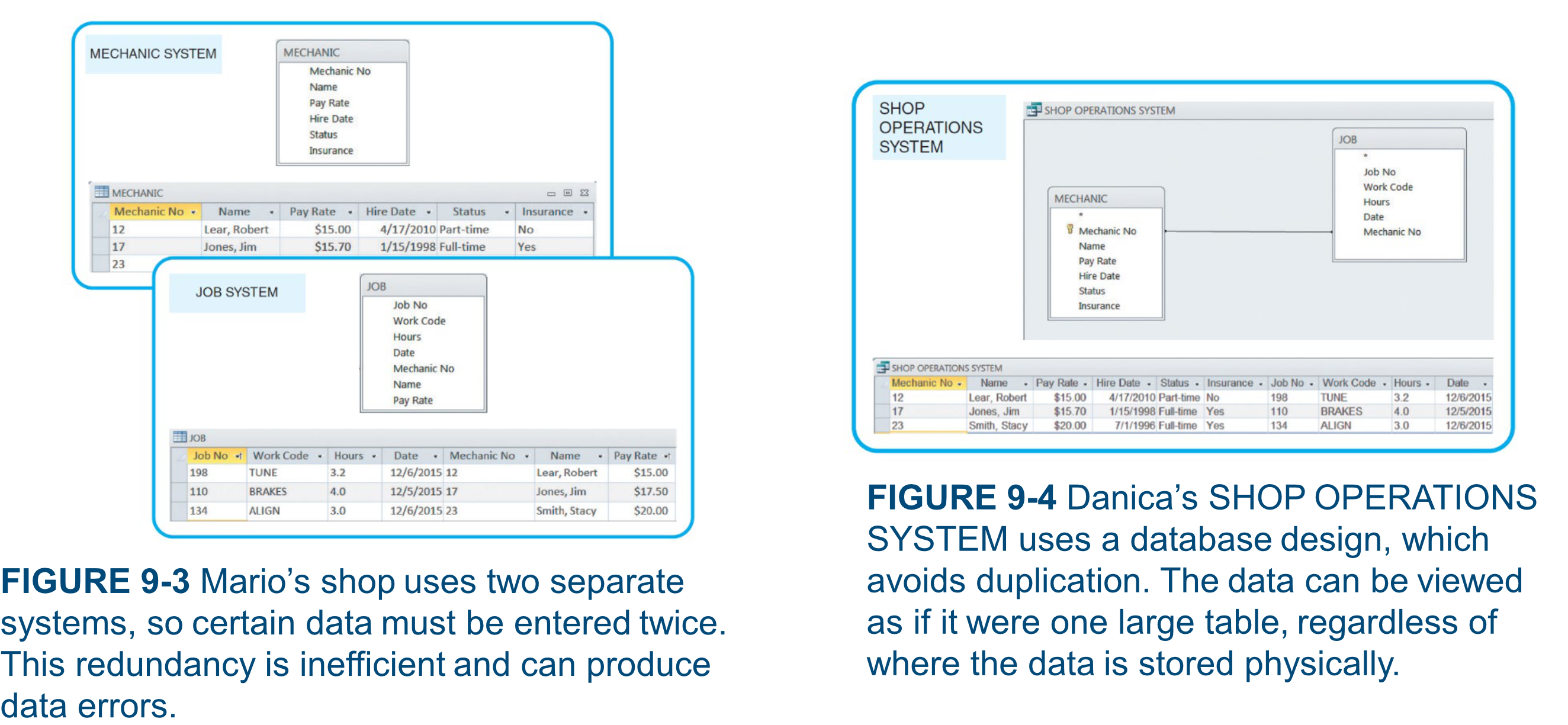
Mario เหมือนมีสมุดโน้ตสองเล่มแยกกัน ต้องจดชื่อช่างซ้ำในทั้งสองเล่ม — Danica มีฐานข้อมูลเดียวที่เชื่อมกันด้วย key เดียว ไม่ซ้ำซ้อน
Database Management System (DBMS)
- DBMS: a collection of tools, features, and interfaces that enables users to add, update, manage, access, and analyze data
- Advantages:
- Scalability
- Economy of scale
- Enterprise-wide application
- Stronger standards and better security
- Data independence
DBMS เหมือน Google Drive ที่ทุกคนในทีมเข้าถึงไฟล์เดียวกันได้ ไม่ต้องส่งไฟล์ทีละคน
- Example: a single sales database can support 4 separate business systems:
- Inventory System
- Accounting System
- Order System
- Production System
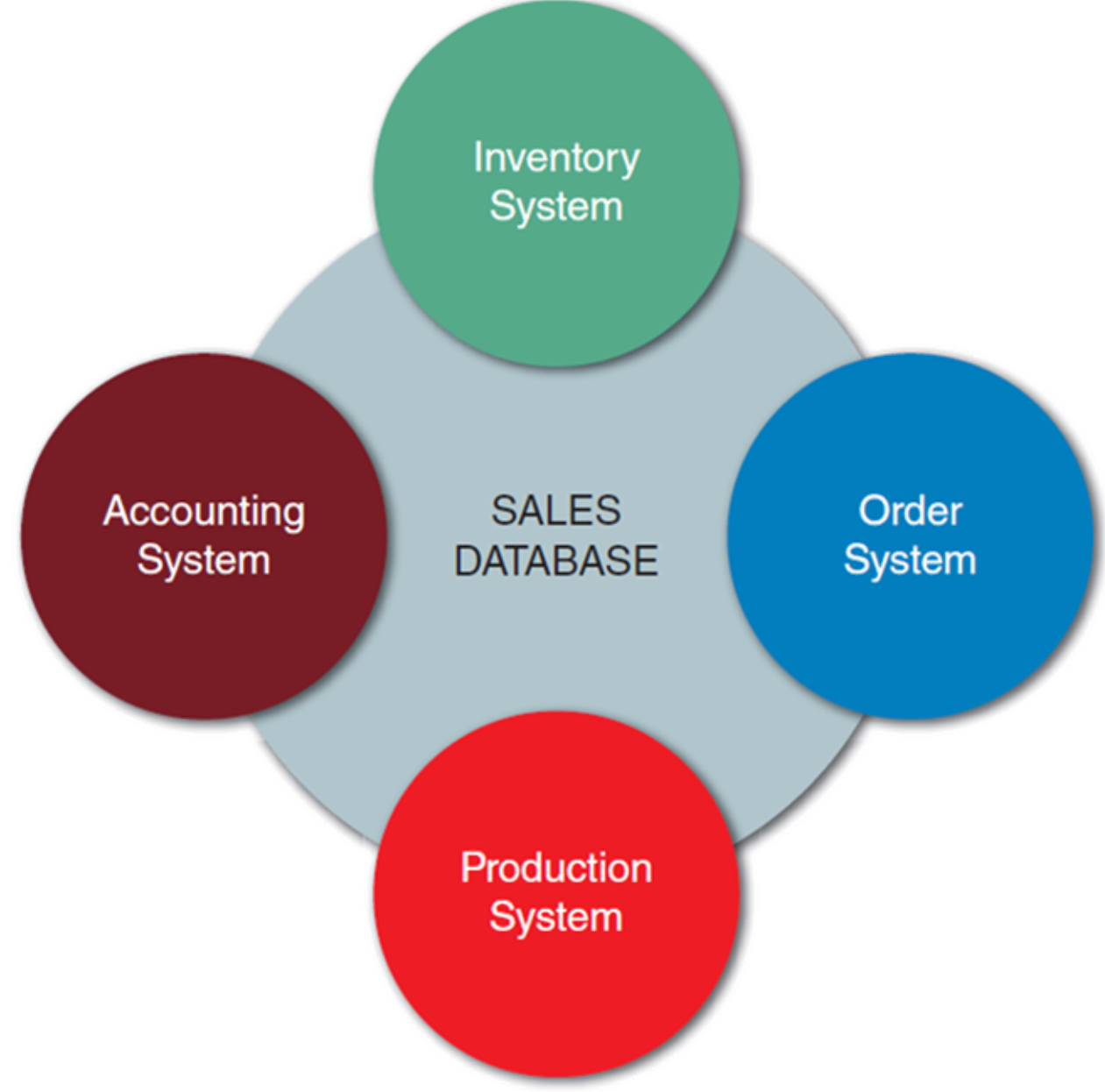
DBMS Components
Interfaces
- Users: work with predefined queries and switchboard commands
- Database administrators (DBAs): responsible for DBMS management and support
- Related information systems: DBMS provides support to related IS
Schema
- Schema: descriptions of all fields, tables, and relationships in the database
- Subschema: the portion of the database that a particular system or user is allowed to access
Schema คือแผนผังทั้งหมดของโกดัง, Subschema คือแผนที่เฉพาะโซนที่พนักงานแต่ละคนมีสิทธิ์เข้า
Physical Data Repository
- Contains the schema and subschemas
- Can be centralized or distributed
- Uses ODBC (Open Database Connectivity) compliant software
Web-Based Design
- Databases are created/managed using languages independent of HTML
- Objective: connect the database to the Web for viewing and updating data
- Middleware: used to integrate different applications and allow data exchange
- Web-based data must be secure yet accessible to authorized users
Web Request Flow (Figure 9-9)
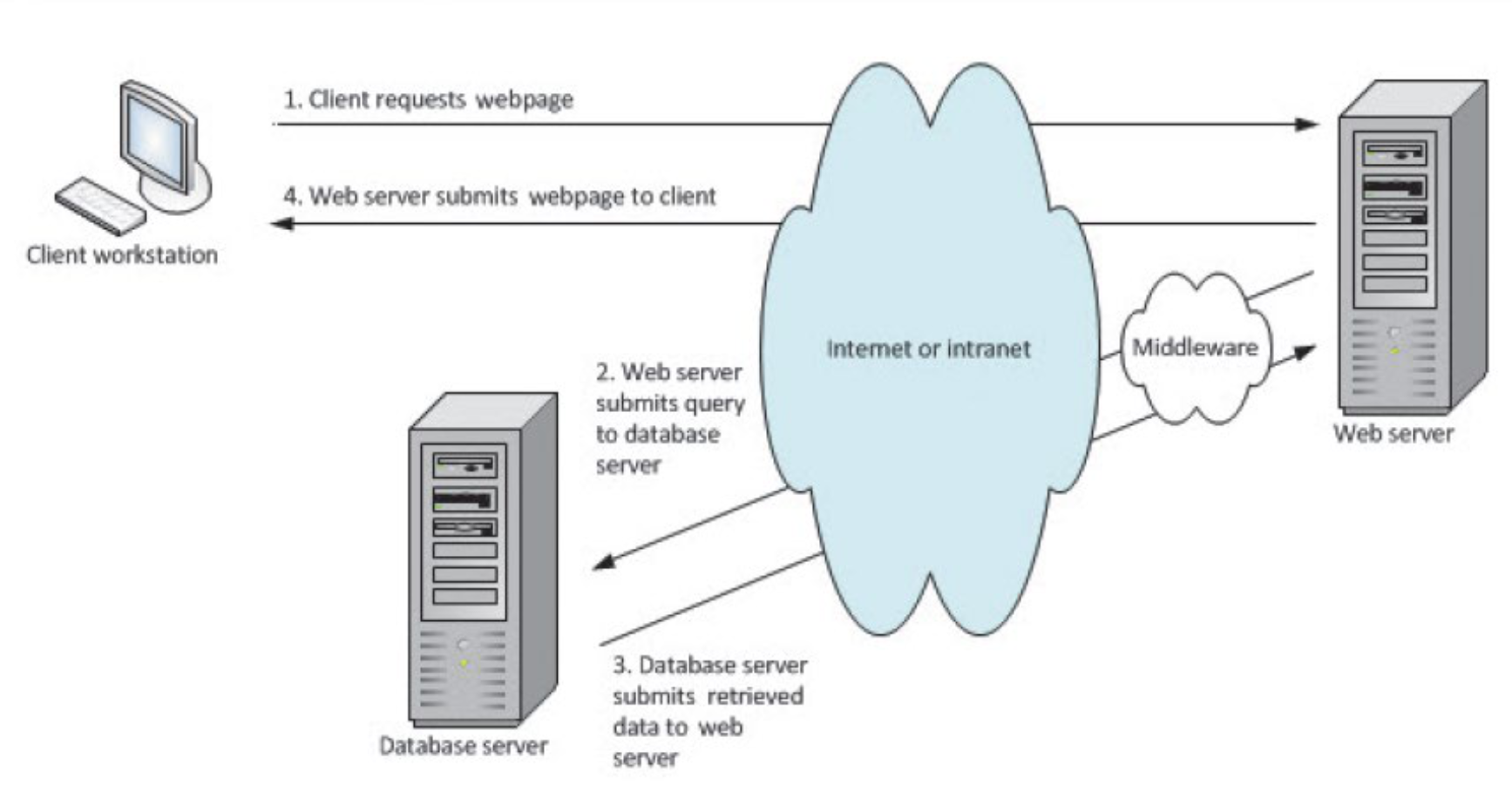
- Client workstation requests a web page
- Web server uses middleware to generate a data query to the database server
- Database server responds with data
- Middleware translates data into HTML → Web server sends page to client's browser
เหมือนสั่งอาหารในร้าน: ลูกค้า (client) สั่งกับพนักงาน (web server), พนักงานไปแจ้งครัว (database), ครัวส่งอาหารกลับมา, พนักงานเสิร์ฟให้ลูกค้า
Data Design Terminology
Basic Terms
| Term | Definition |
|---|---|
| Entity | Person, place, thing, or event for which data is collected |
| Table / File | Contains a set of related records storing data about a specific entity |
| Field (Attribute) | A single characteristic or fact about an entity |
| Common Field | An attribute that appears in more than one entity |
| Record (Tuple) | A set of related fields describing one instance of an entity |
Key Fields
- Primary Key: field(s) that uniquely and minimally identify a member of an entity
- Candidate Key: a field that could serve as a primary key
- Foreign Key: a field in one table that must match a primary key in another table to establish a relationship
- Secondary Key: field(s) used to access or retrieve records (not necessarily unique)
- แล้วจำ Superkey ได้มั้ยยย? ลองไปทวนด้วยนะ เผื่อออก #FinalExam
Primary Key เหมือนเลข ID นักศึกษา — ไม่ซ้ำกัน, Foreign Key เหมือนเลข ID ที่ถูกอ้างอิงในตารางอื่น เช่น ตารางลงทะเบียนที่มี student_id
Referential Integrity
- Referential integrity: a set of rules that avoids data inconsistency and quality problems
- Ensures that a foreign key value always refers to an existing primary key value in the related table
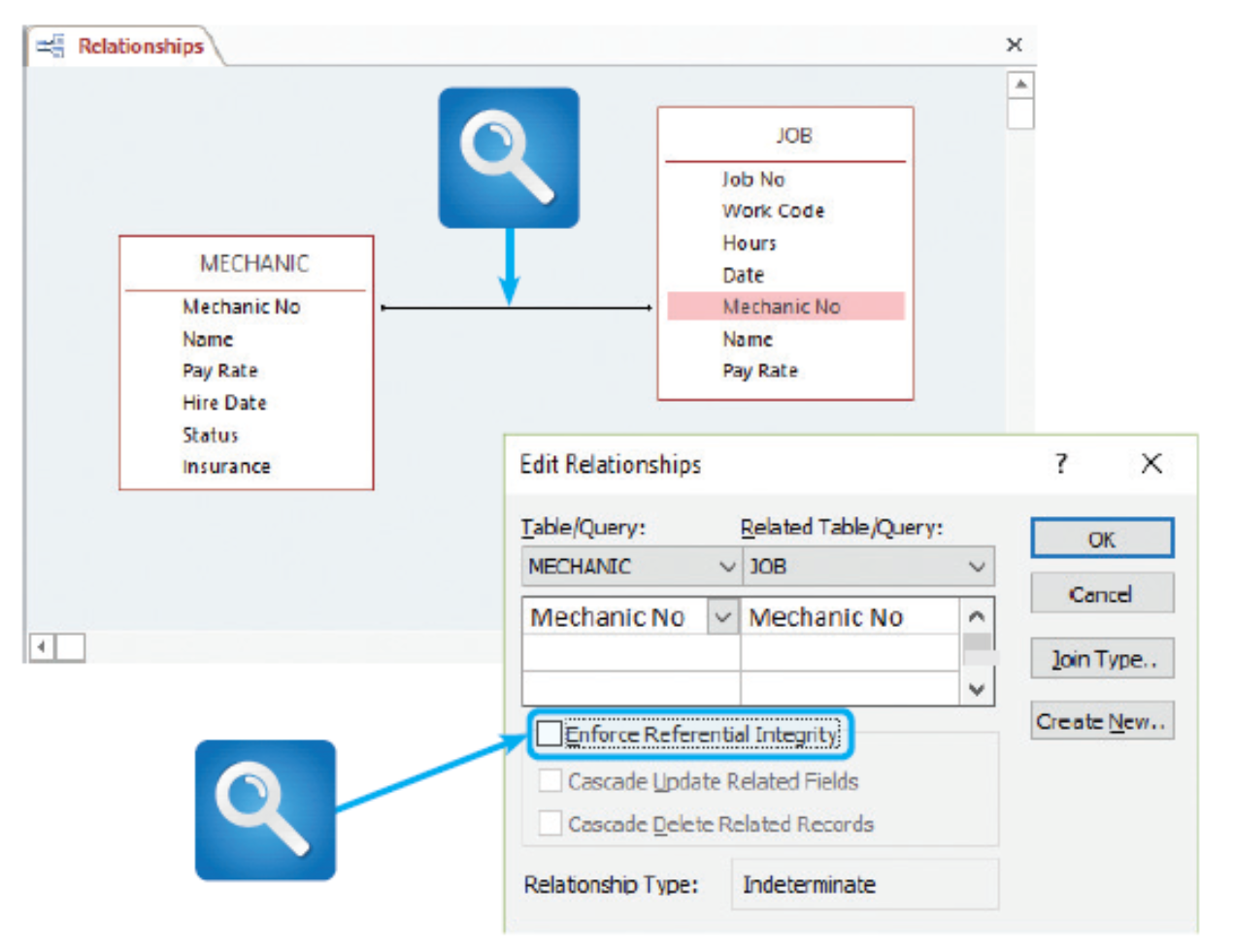
ถ้ามี Job ที่อ้างถึง Mechanic No ที่ไม่มีอยู่จริง — นั่นคือการละเมิด referential integrity
Entity-Relationship Diagrams (ERDs)
Drawing an ERD
- List entities identified during systems analysis
- Consider the nature of the relationships linking them
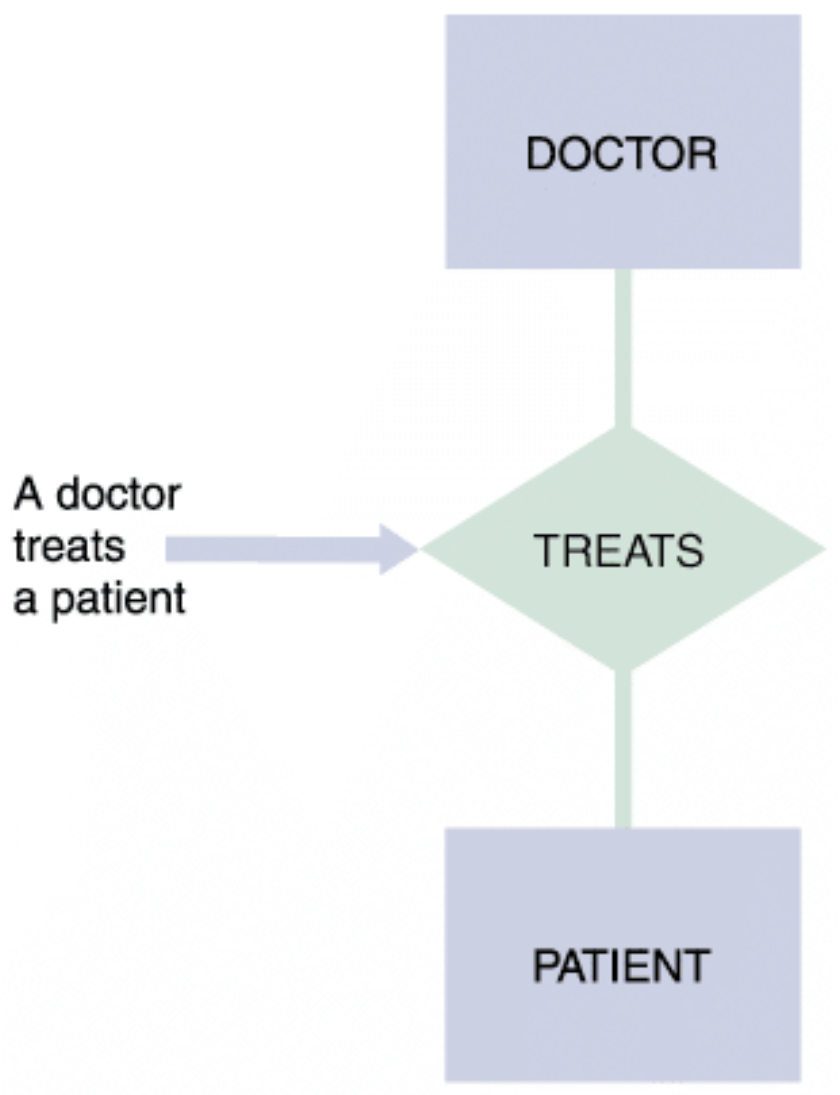
- Entities → labeled with singular nouns (rectangles)
- Relationships → labeled with verbs (diamonds)
- Read as a simple English sentence: e.g., "A doctor treats a patient"
Types of Relationships
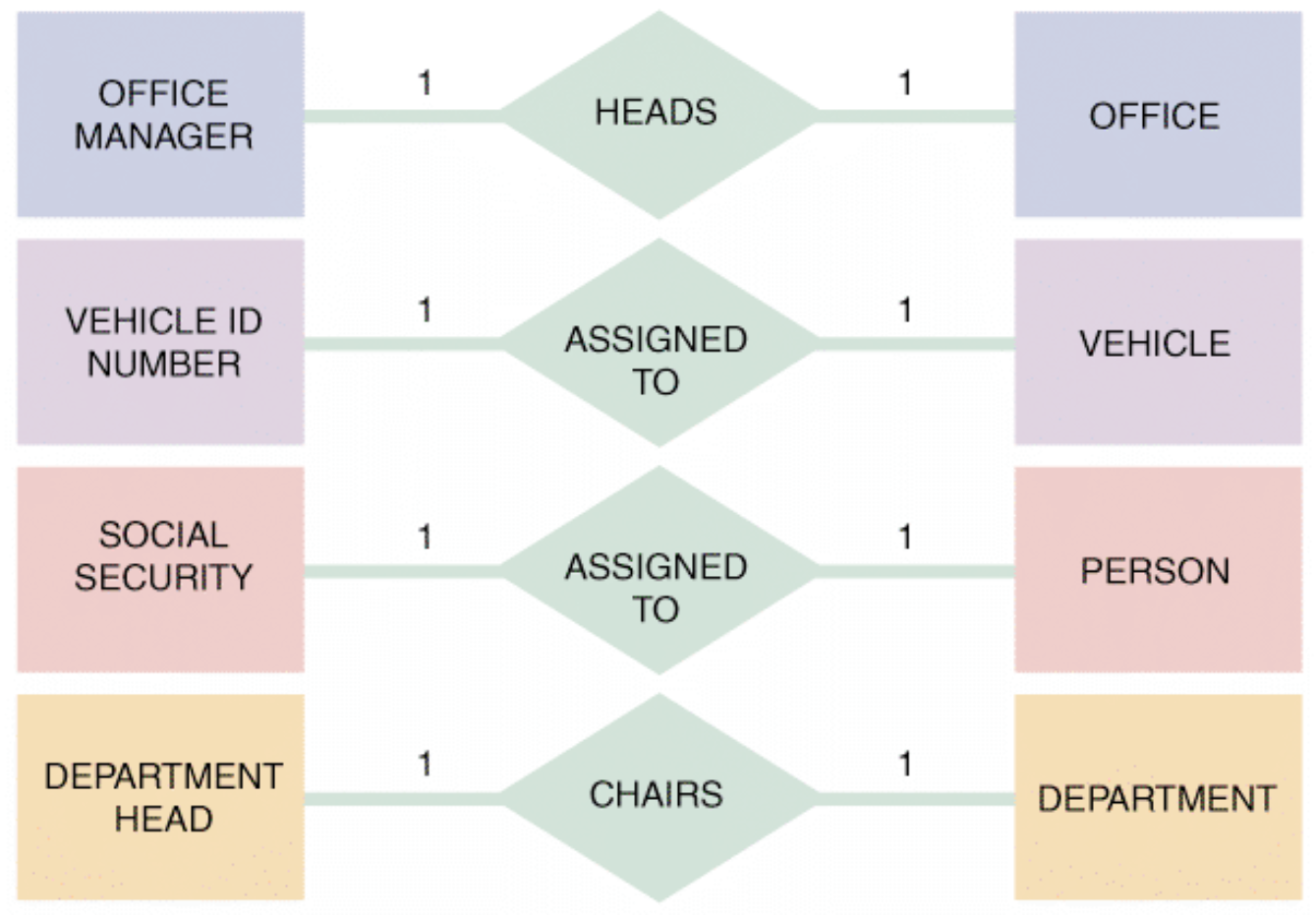
One-to-One (1:1)
- Exactly one of the second entity occurs for each instance of the first entity
- Examples:
- OFFICE MANAGER heads OFFICE
- VEHICLE ID NUMBER assigned to VEHICLE
- SOCIAL SECURITY assigned to PERSON
- DEPARTMENT HEAD chairs DEPARTMENT
One-to-Many (1:M)
- One occurrence of the first entity can relate to many instances of the second entity
- Each instance of the second entity associates with only one instance of the first
- Examples:
- DEPARTMENT employs EMPLOYEE
- INDIVIDUAL owns AUTOMOBILE
- CUSTOMER places ORDER
- FACULTY ADVISOR advises STUDENT
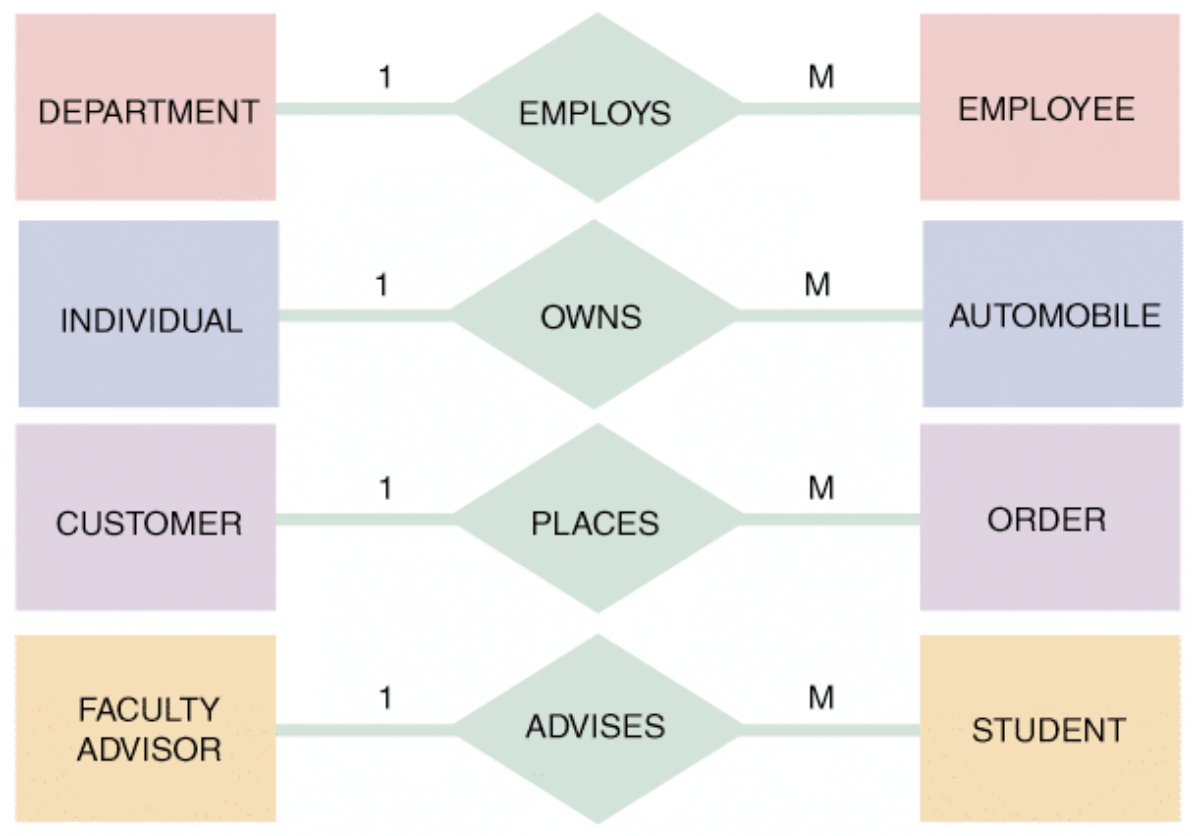
ครูหนึ่งคน (1) สอนนักเรียนหลายคน (M) — แต่นักเรียนแต่ละคนมีครูที่ปรึกษาได้แค่คนเดียว
Many-to-Many (M:N)
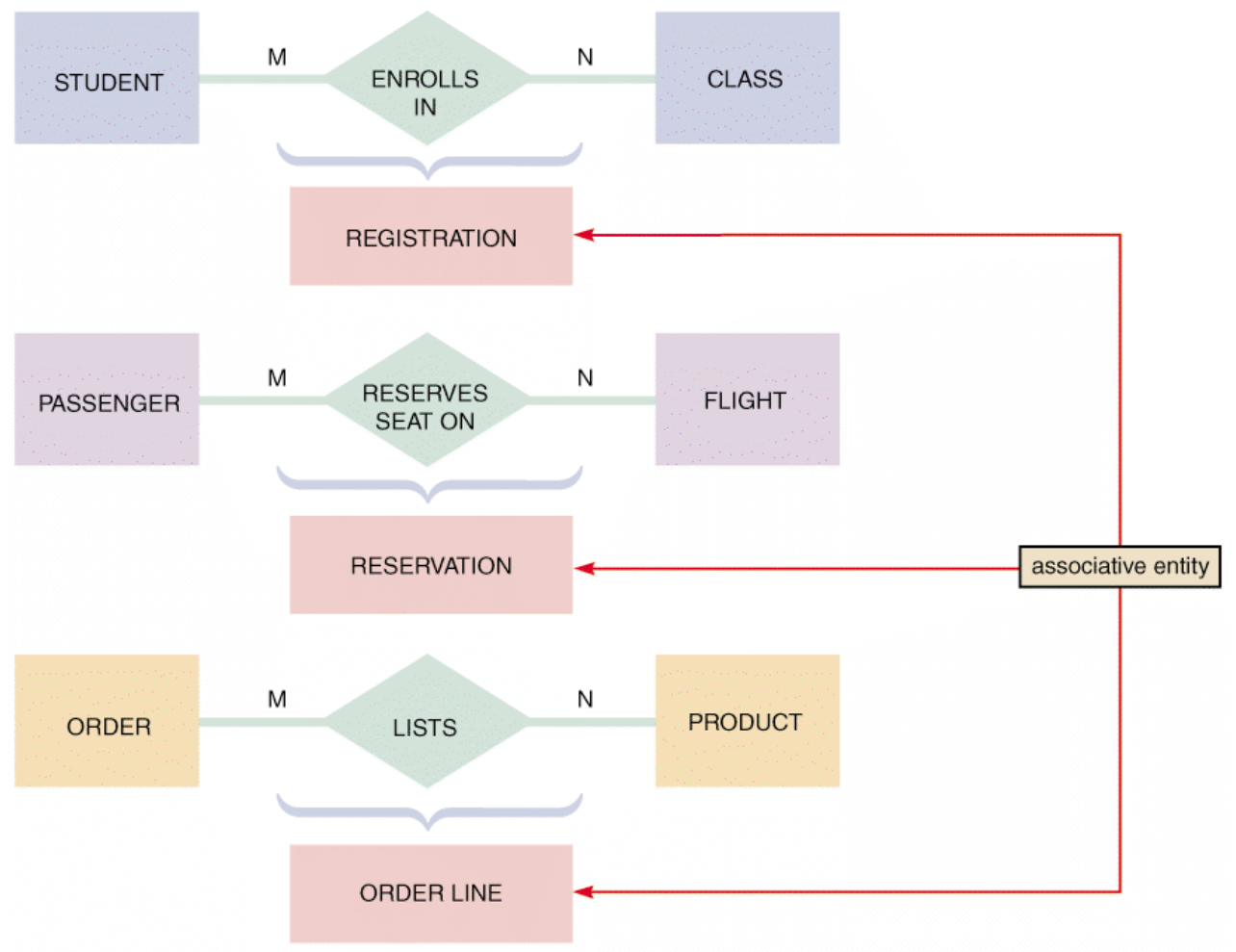
- One instance of the first entity can relate to many instances of the second, and vice versa
- Requires an associative entity to break down the relationship
- Examples:
- STUDENT enrolls in CLASS → associative: REGISTRATION
- PASSENGER reserves seat on FLIGHT → associative: RESERVATION
- ORDER lists PRODUCT → associative: ORDER LINE
นักศึกษาลงหลายวิชา, วิชาหนึ่งมีนักศึกษาหลายคน → ต้องมีตาราง REGISTRATION กลาง
Cardinality
- Cardinality: describes the numeric relationship between two entities
- Shows how instances of one entity relate to instances of another
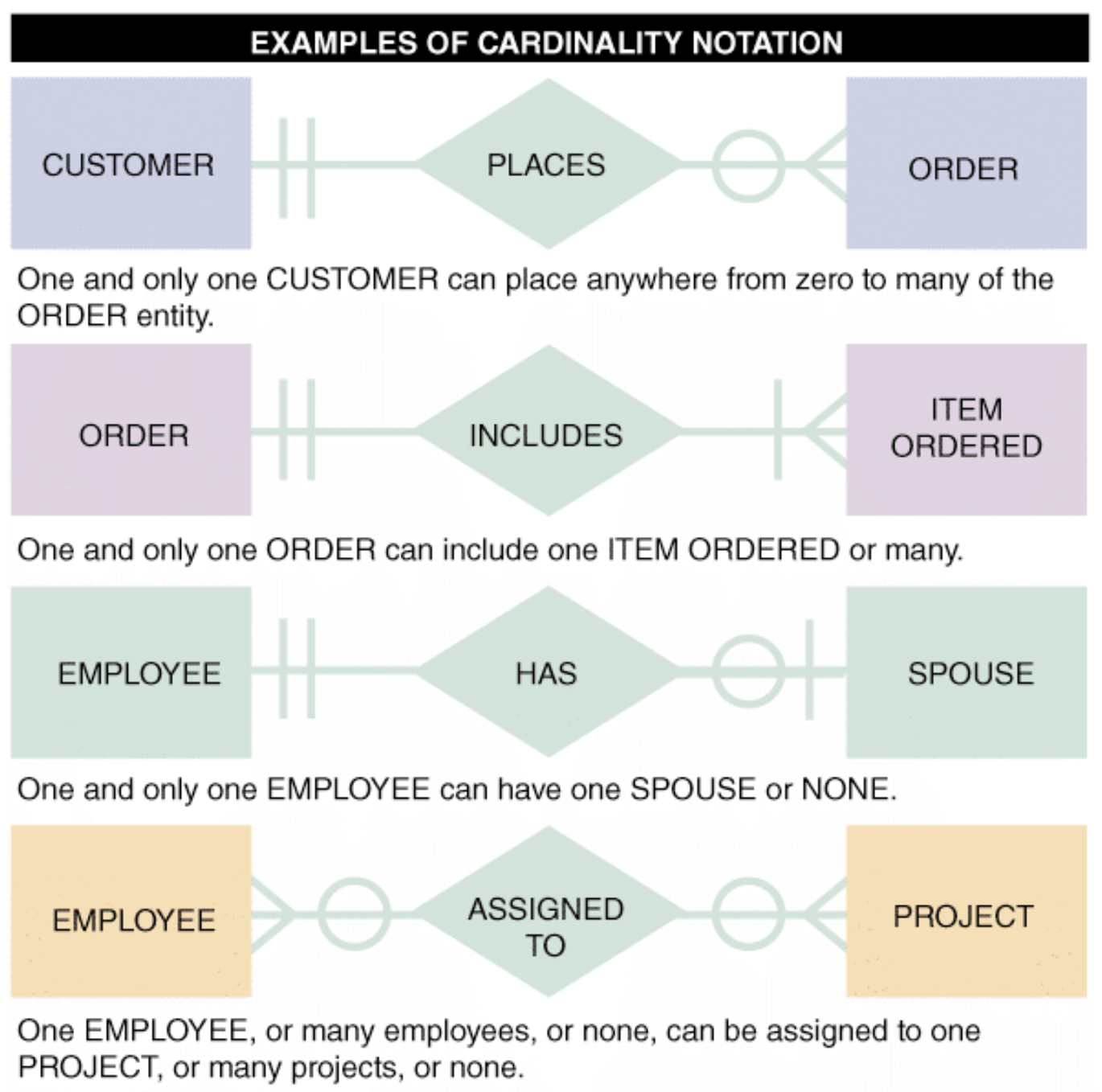
- Crow's foot notation uses circles, bars, and symbols:
| Symbol | Meaning | UML |
|---|---|---|
‖ | One and only one | 1 |
>‖ (crow's foot + bar) | One or many | 1..* |
>○ (crow's foot + circle) | Zero, one, or many | 0..* |
‖○ (bar + circle) | Zero or one | 0..1 |
| ![[Pasted image 20260403071550.png | center | 300]] |
Cardinality Examples (Figure 9-18)
- CUSTOMER
‖PLACES○>ORDER → one and only one CUSTOMER places zero to many ORDERs - ORDER
‖INCLUDES‖>ITEM ORDERED → one ORDER includes one or many ITEMS ORDERED - EMPLOYEE
‖HAS○‖SPOUSE → one EMPLOYEE has zero or one SPOUSE - EMPLOYEE
○>ASSIGNED TO○>PROJECT → zero/one/many EMPLOYEEs assigned to zero/one/many PROJECTs
ใน #FinalExam จะถามว่า สัญลักษณ์แบบนี้หมายความว่ายังไง ให้ explain หน่อย
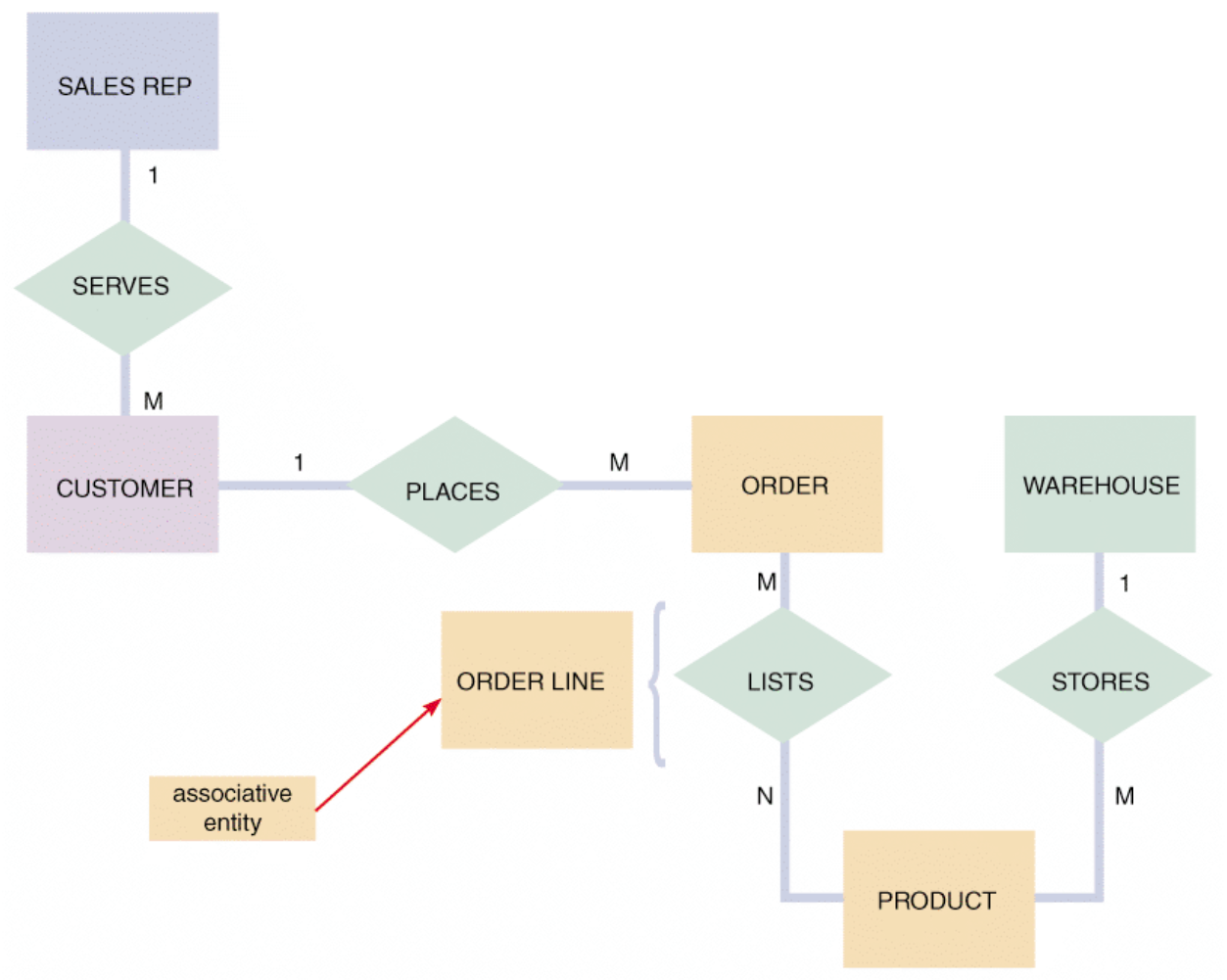
FIGURE 9-18 In the first example of cardinality notation, one and only one CUSTOMER can place anywhere from zero to many of the ORDER entity. In the second example, one and only one ORDER can include one ITEM ORDERED or many. In the third example, one and only one EMPLOYEE can have one SPOUSE or none. In the fourth example, one EMPLOYEE, or many employees, or none, can be assigned to one PROJECT, or many projects, or none.
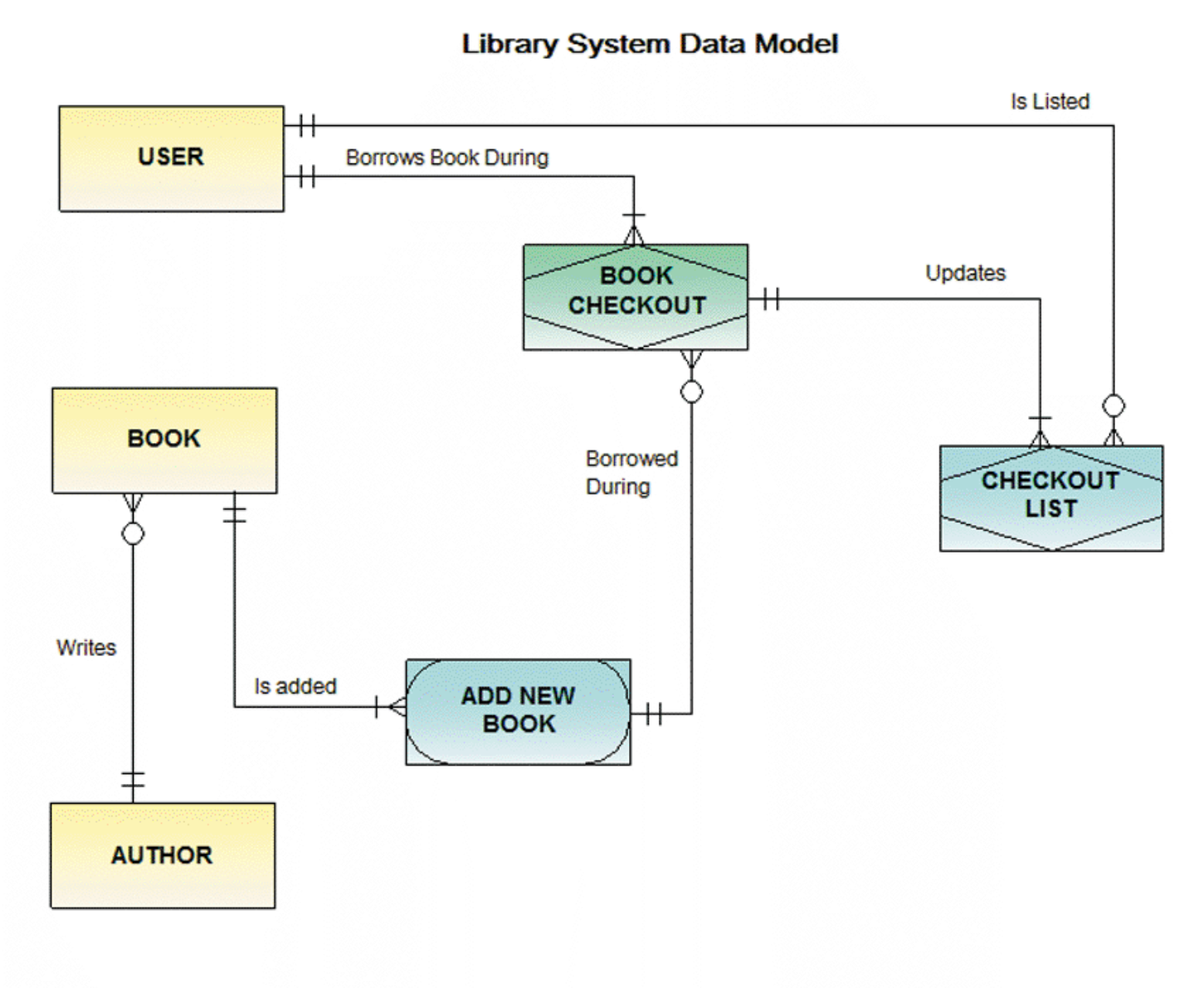
FIGURE 9-19 An ERD for a library system drawn with Visible Analyst. Notice that crow’s foot notation has been used and relationships are described in both directions.
Data Normalization
- Normalization: creating table designs by assigning specific fields/attributes to each table to eliminate redundancy and anomalies
- Table design: specifies fields and identifies the primary key
Standard Notation
- Primary key field(s) are underlined
Repeating Group
- Repeating group: a set of one or more fields that can occur any number of times in a single record, each with different values
- Presence of repeating groups = unnormalized table
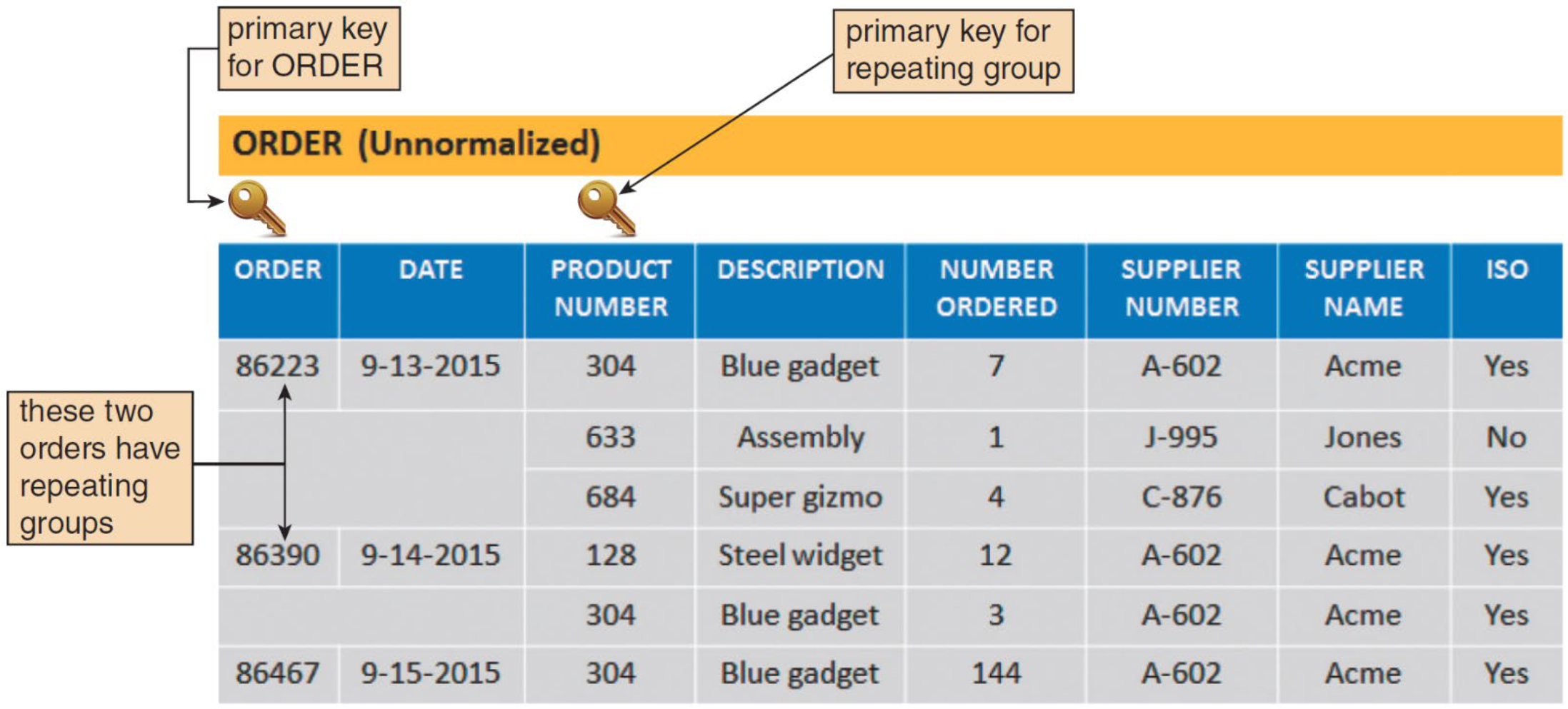
Normalization Stages
Unnormalized (UNF)
- Contains repeating groups
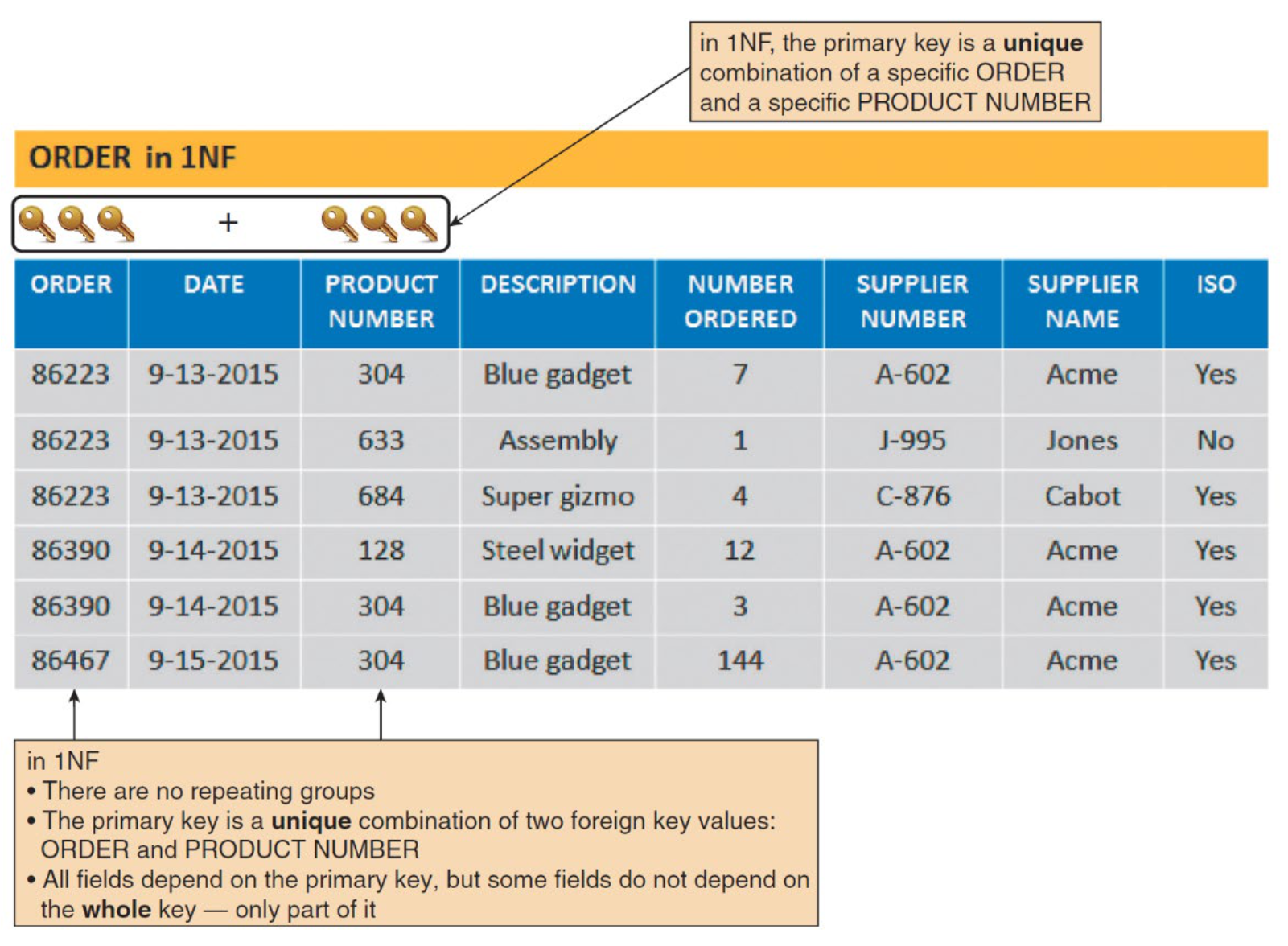
- Example: ORDER table where one order contains multiple products (304, 633, 684)
First Normal Form (1NF)
- Rule: does not contain a repeating group
- Converting UNF → 1NF:
- Expand the primary key to include the primary key of the repeating group
- Each repeating group becomes a separate record
- Result: primary key = composite key (ORDER + PRODUCT NUMBER)
เหมือนเปลี่ยนจากการจดสินค้าหลายชิ้นในช่องเดียว → แยกแต่ละชิ้นเป็นแถวของตัวเอง
Second Normal Form (2NF)
- Prerequisite: must be in 1NF
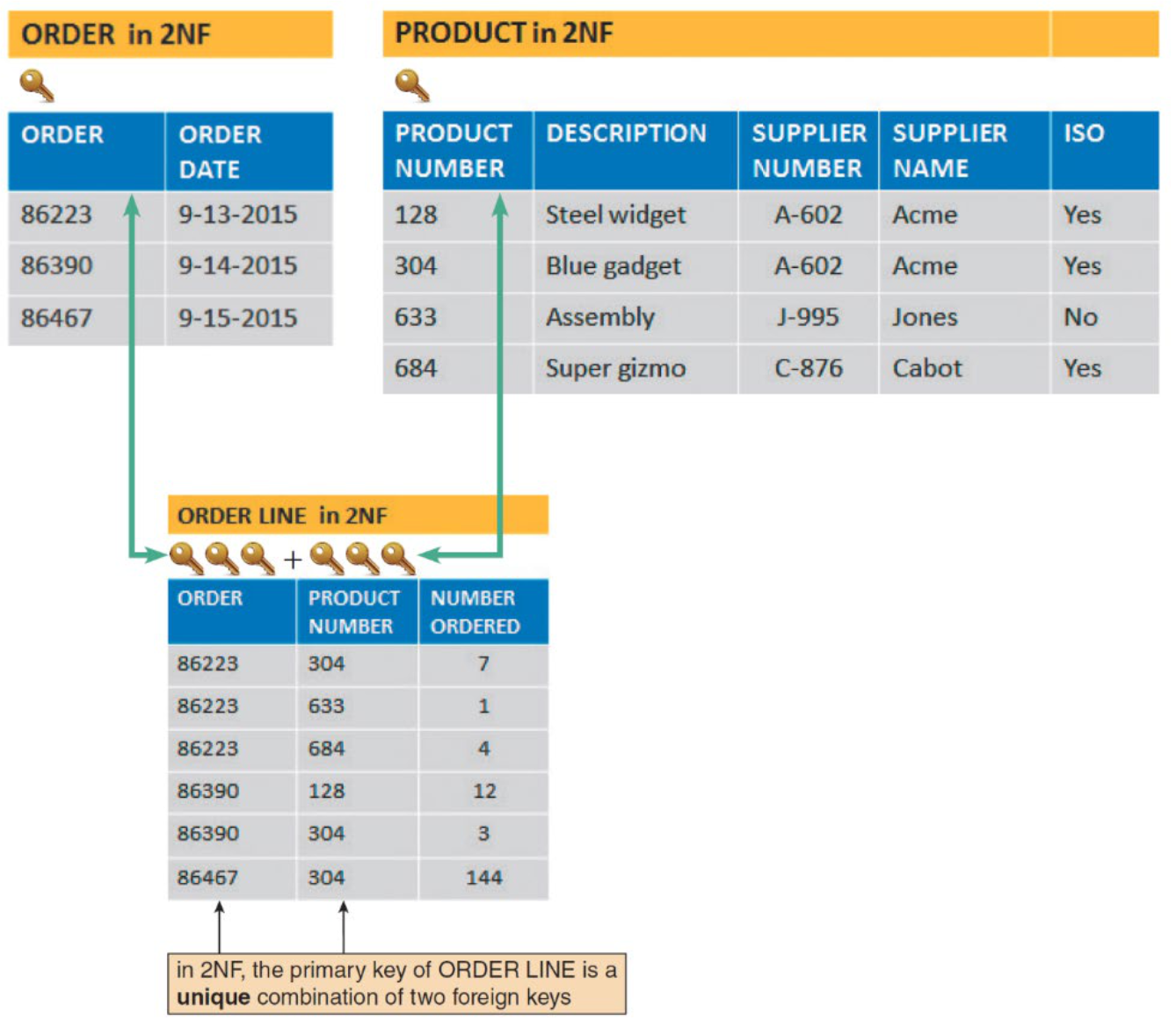
- Rule: all non-key fields must be functionally dependent on the entire primary key
- Functional dependence: Field A is functionally dependent on Field B if the value of A depends on B
- Fields that depend on only part of the composite key are moved to a separate table
- Result from ORDER example:
ORDERtable: ORDER, ORDER DATEPRODUCTtable: PRODUCT NUMBER, DESCRIPTION, SUPPLIER NUMBER, SUPPLIER NAME, ISOORDER LINEtable: ORDER, PRODUCT NUMBER, NUMBER ORDERED
ถ้า field "DESCRIPTION" ขึ้นอยู่กับแค่ PRODUCT NUMBER (ไม่ใช่ทั้ง ORDER+PRODUCT NUMBER) → ต้องแยกออกไปอยู่ตาราง PRODUCT แทน
Third Normal Form (3NF)
- Rule: every non-key field must depend on the key, the whole key, and nothing but the key
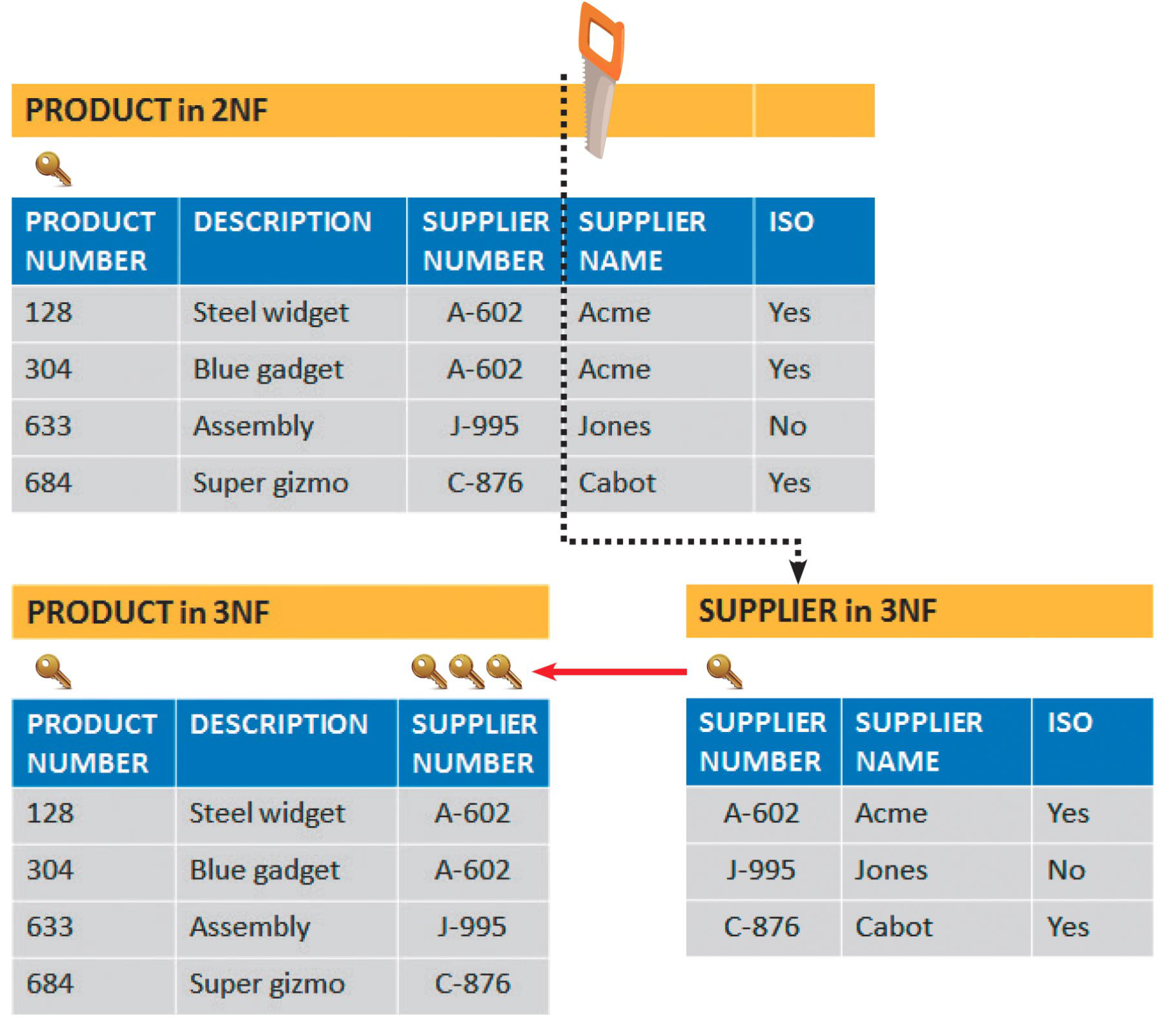
- Eliminates transitive dependencies (non-key field depends on another non-key field)
- In the PRODUCT table (2NF): SUPPLIER NAME depends on SUPPLIER NUMBER (not on PRODUCT NUMBER) → transitive dependency
- Fix: split into:
PRODUCT(3NF): PRODUCT NUMBER, DESCRIPTION, SUPPLIER NUMBERSUPPLIER(3NF): SUPPLIER NUMBER, SUPPLIER NAME, ISO
SUPPLIER NAME ขึ้นอยู่กับ SUPPLIER NUMBER ไม่ใช่ PRODUCT NUMBER → แยกออกไปเป็นตาราง SUPPLIER ใหม่
Codes
Overview
- Codes are shorter than the data they represent
- Benefits:
- Save storage space and costs
- Decrease data entry and transmission time
- Reveal or conceal information
- Reduce data input errors
- Easier to remember
Types of Codes
| Type | Description | Example |
|---|---|---|
| Sequence codes | Numbers/letters assigned in specific order | Employee #001, #002, ... |
| Block sequence codes | Blocks of numbers for classifications | 100–199: Sales, 200–299: HR |
| Alphabetic codes | Letters to distinguish items | — |
| → Category codes | Identify a group of related items | M = Male, F = Female |
| → Abbreviation codes | Alphabetic abbreviations | CA = California |
| → Mnemonic codes | Easy-to-remember letter combos | NYC = New York City |
| Significant digit codes | Series of subgroups of digits | 12-34-56 (dept-floor-room) |
| Derivation codes | Combine data from different attributes | First 3 letters of name + birth year |
| Cipher codes | Use a keyword to encode a number | Secret encoding |
| Action codes | Indicate what action to take | D = Delete, U = Update |
Designing Codes
- Keep codes concise and consistent
- Data governance ทำให้เป็น standard หน่อยย!
- Allow for expansion
- Keep codes stable and make them unique
- Use sortable codes and a simple structure
- Avoid confusion and make codes meaningful
- Use a code for a single purpose only
Data Storage and Access
Data Warehouse
- Data warehouse: an integrated collection of data that can include seemingly unrelated information, no matter where it is stored
- Stores data from multiple systems (e.g., Sales IS + HR IS)
- Users retrieve specific information by selecting data dimensions (e.g., Time Period, Customer, Sales Rep) without knowing where data is stored
Data warehouse เหมือนห้องเก็บข้อมูลรวมของทั้งบริษัท ดึงได้ทุกมุม ทุกมิติ โดยไม่ต้องรู้ว่าเก็บอยู่ที่ไหน
Data Mart
- Data mart: designed to serve the needs of a specific department
Data Mining
- Data mining: looks for meaningful data patterns and relationships
- Goals:
- Increase pages viewed per session
- Reduce clicks to close
- Increase checkouts per visit and average profit per checkout
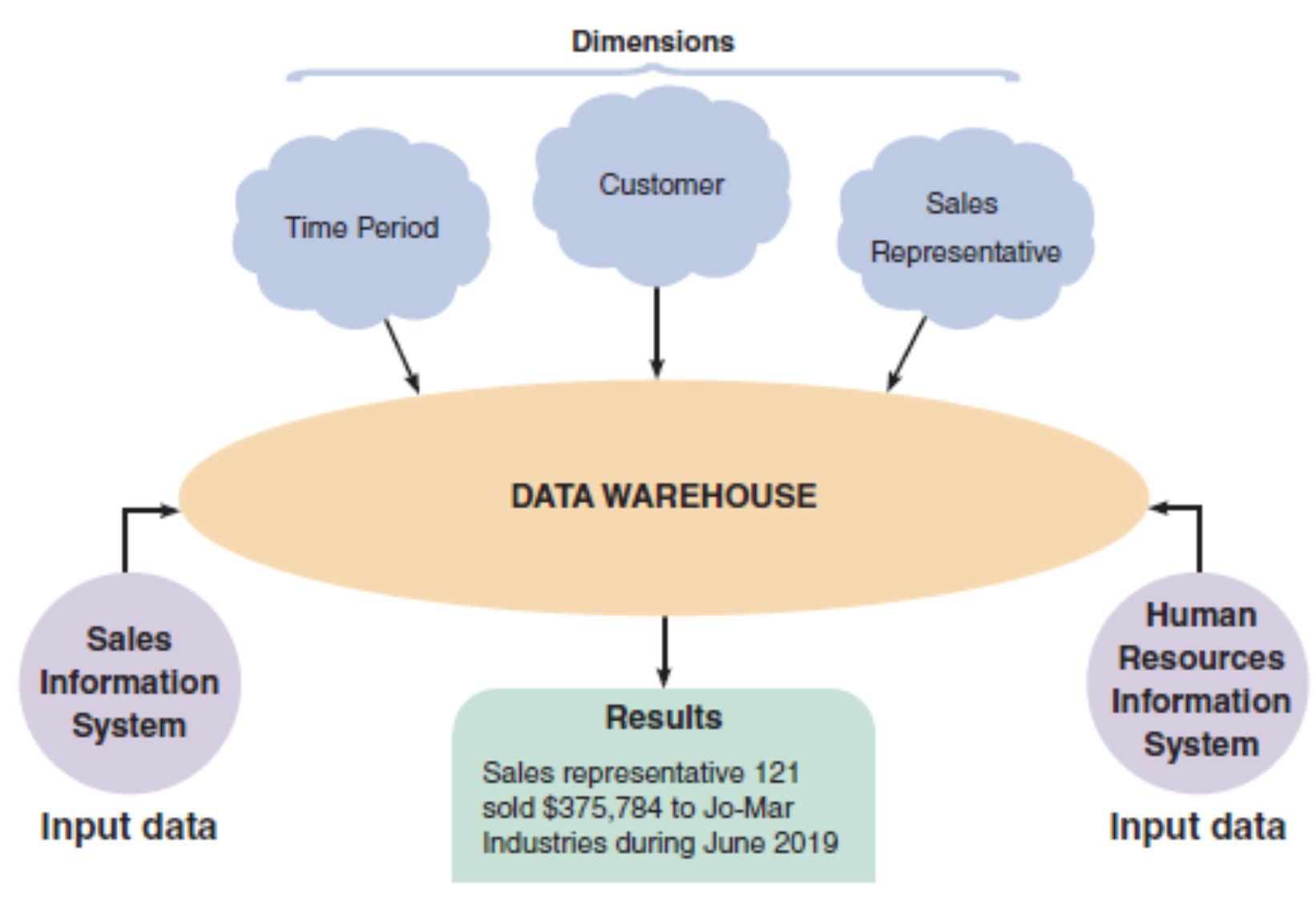
A data warehouse stores data from several systems. By selecting data dimensions, a user can retrieve specific information without having to know how or where the data is stored.
ก่อนจะ design Data warehouse ต้องรู้ก่อนว่า ใครจะเป็นคนใช้, ต้องการใช้ข้อมูลแบบไหน, what kind of entities, relationship. Focus on something users want
Logical vs. Physical Storage
| Type | Description |
|---|---|
| Logical storage | Data that a user can view/understand/access, regardless of how or where it's physically stored |
| Physical storage | Strictly hardware-related; involves reading/writing binary data to physical media |
Logical storage = สิ่งที่คุณเห็นใน Excel; Physical storage = bits ที่เขียนลง SSD จริงๆ
Data Coding (Character Encoding)
| Format | Used In |
|---|---|
| EBCDIC (Extended Binary Coded Decimal Interchange Code) | Mainframe computers and high-capacity servers |
| ASCII (American Standard Code for Information Interchange) | Most personal computers |
| Binary storage format | Represents numbers as actual binary values |
| Unicode | Uses 2 bytes (16 bits) per character; supports international languages |
Unicode คือมาตรฐานสากลที่รองรับภาษาไทย จีน อาหรับ ฯลฯ ในระบบเดียวกัน
Storing Dates
- ISO format: (4 digits year, 2 digits month, 2 digits day)
- Absolute date: total number of days from a specific base date
Data Control
- A well-designed DBMS must provide built-in control and security
- Forms of data protection:
- Limited access to files and databases
- User ID and passwords
- Permissions and encryption
- Backup copies must be retained for a specified period
- Recovery procedures to restore lost/damaged data
Summary
- A database consists of linked tables that form an overall data structure
- DBMS enables users to add, update, manage, access, and analyze data
- DBMS is more powerful and flexible than file-oriented systems
- Key fields: primary, candidate, foreign, secondary keys
- ERD: graphic representation of all system entities and relationships
- Normalization: process for avoiding data design problems (UNF → 1NF → 2NF → 3NF)
- Code: a set of letters/numbers used to represent data in a system
- Logical storage: information as seen by the user, regardless of physical location
- Data control measures: access limits, encryption, backups, audit trails, recovery