Learning Objectives
- Provide a checklist of issues to consider when selecting a system architecture
- Trace the evolution of system architecture from mainframes to current designs
- Explain client/server architecture
- Describe the impact of the Internet on system architecture
- Compare in-house e-commerce development with packaged solutions and service providers
- Explain online and batch processing
- Describe network models, including hierarchical, bus, ring, star, and mesh topologies
- Explain network devices, including routers, gateways, and proxy servers
- Describe wireless networking, including wireless standards, topologies, and trends
- Explain the final activities in the systems design phase
Architecture Checklist
Issues that influence architecture choice:
- Corporate organization and culture
- Enterprise Resource Planning (ERP)
- Initial and Total Cost of Ownership (TCO)
- Scalability
- Web integration
- Legacy system interface requirements
- Processing options
- Security issues
- Corporate portals
Corporate Organization and Culture
- A successful system performs well in a company's organization and culture
- The architecture must align with how the business actually operates
เหมือนกับการเลือกแบบบ้าน ต้องดูก่อนว่าครอบครัวใหญ่หรือเล็ก อยู่แบบไหน ถึงจะออกแบบได้พอดี
Enterprise Resource Planning (ERP)
- Objective: Establish a company-wide strategy for using IT that includes:
- A specific architecture
- Standards for data, processing, network, and user interface design
- Companies extend internal ERP systems using Supply Chain Management (SCM)
ERP = พิมพ์เขียวกลางของบริษัท ทุกระบบต้องเล่นตามกติกาเดียวกัน
Initial Cost and TCO
- TCO (Total Cost of Ownership) includes:
- Tangible purchases, fees, and contracts → called hard costs
- TCO analysis answers questions about:
- Validity and effectiveness of the system
- New trends in systems planning
- Impact on initial cost for a proposed system
TCO ไม่ใช่แค่ราคาซื้อ แต่รวมค่าดูแล ค่าอัปเกรด ค่าพนักงานทุกอย่างด้วย
Scalability (Extensibility)
- System's ability to expand, change, or downsize easily to meet changing needs of an enterprise
เหมือน SwiftUI layout ที่ adaptive — ขยายหรือย่อได้โดยไม่ต้อง rewrite ทั้งหมด
Web Integration
- Web-centric architecture enables a company to integrate new applications into its e-commerce strategy
- New systems should be designed with web connectivity in mind
Legacy Systems
- A new system might have to interface with legacy systems
- Involves analysis of:
- Data formats
- Compatibility between old and new systems
Legacy system = โค้ดเก่าที่ยังต้องใช้งานอยู่ ต้องหา adapter ให้มันคุยกับระบบใหม่ได้
Processing Options
- Systems can process data online or in batches
- (Covered in detail in Processing Methods section)
Security Issues
- Analysts must consider security issues and how the company will address them
- Security must be built into the architecture from the start, not added later
Corporate Portals
- Provide access for customers, employees, suppliers, and the public
- Integrates with various other systems
- Provides a consistent look and feel across organizational divisions
The Evolution of System Architecture
Functions of a Business Information System
- Manage applications that perform processing logic
- Handle data storage and access
- Provide an interface that allows user interaction
While planning system design:
- Determine where each function will be carried out
- Identify the advantages and disadvantages of each design approach
Mainframe Architecture
- Server: A computer that supplies data, processing services, or other support to one or more computers called clients
- Earliest servers were mainframe computers
- Advances in technology enabled installation of terminals at remote locations
Mainframe ยุคแรก = ห้องเซิร์ฟเวอร์ใหญ่หนึ่งห้อง ทุกคนต่อ terminal เข้ามา ไม่มี logic อยู่ที่ client เลย
Impact of the Personal Computer
- Individuals could work in stand-alone mode
- Lesser IT assistance resulted in increased productivity in certain tasks
- Shifted some computing power away from centralized servers to individual machines
Network Evolution
| Network Type | Description |
|---|---|
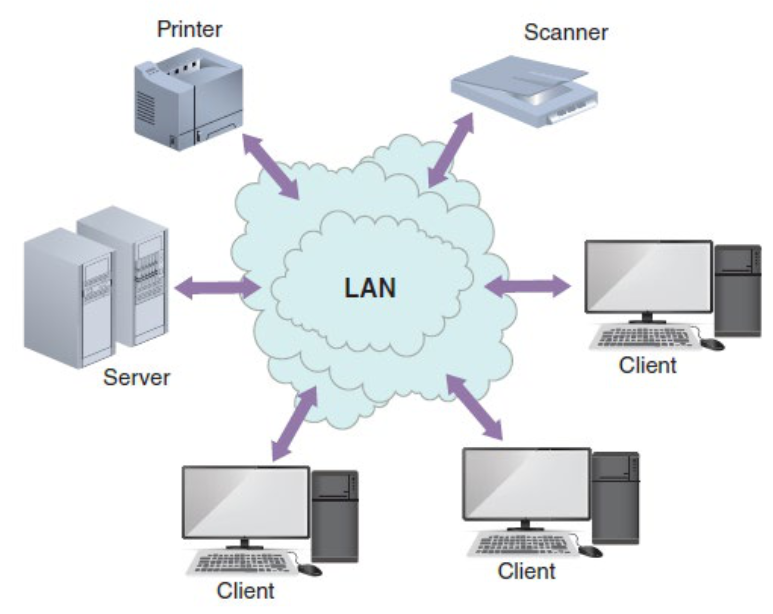
| LAN (Local Area Network) | Allows sharing of data and hardware resources within a limited area |
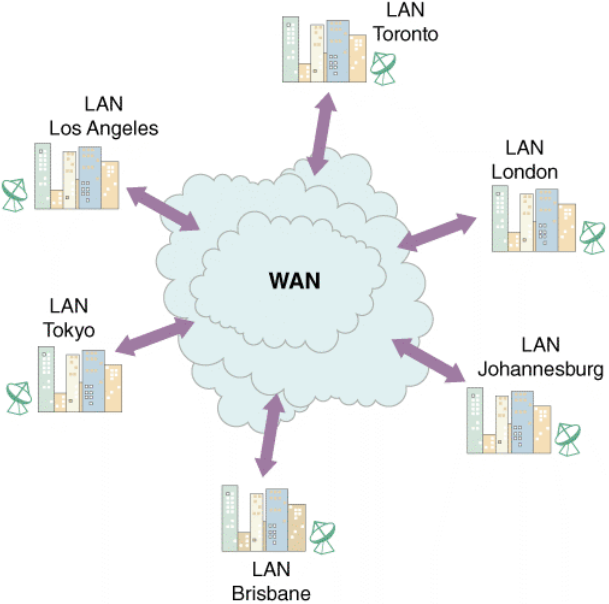
| WAN (Wide Area Network) | Spans long distances; can connect LANs that are continents apart |
- LAN: Connects devices like printers, scanners, and computers within a building or campus
- WAN: Interconnects multiple LANs across cities, countries, or continents
💻 Client/Server Architecture
- Systems divide processing between one or more networked clients and a central server
- Client handles the entire user interface
- Server stores data and provides data access and database management functions
เหมือน iOS app — iPhone (client) ทำ UI, backend server เก็บ database ไว้
The Client's Role
| Design Type | Description |
|---|---|
| Fat Client (Thick Client) | All or most application processing logic is at the client |
| Thin Client | All or most processing logic is at the server; better performance since code resides on server |
Client/Server Tiers
Two-Tier Design
- User interface resides on the client
- Data resides on the server
- Application logic can run on the server, client, or divided between both
Three-Tier (n-Tier) Design
- User interface runs on the client
- Data is stored on the server
- Has a middle layer (Application Server) between the client and server
- The middle layer handles business logic separately from both UI and data
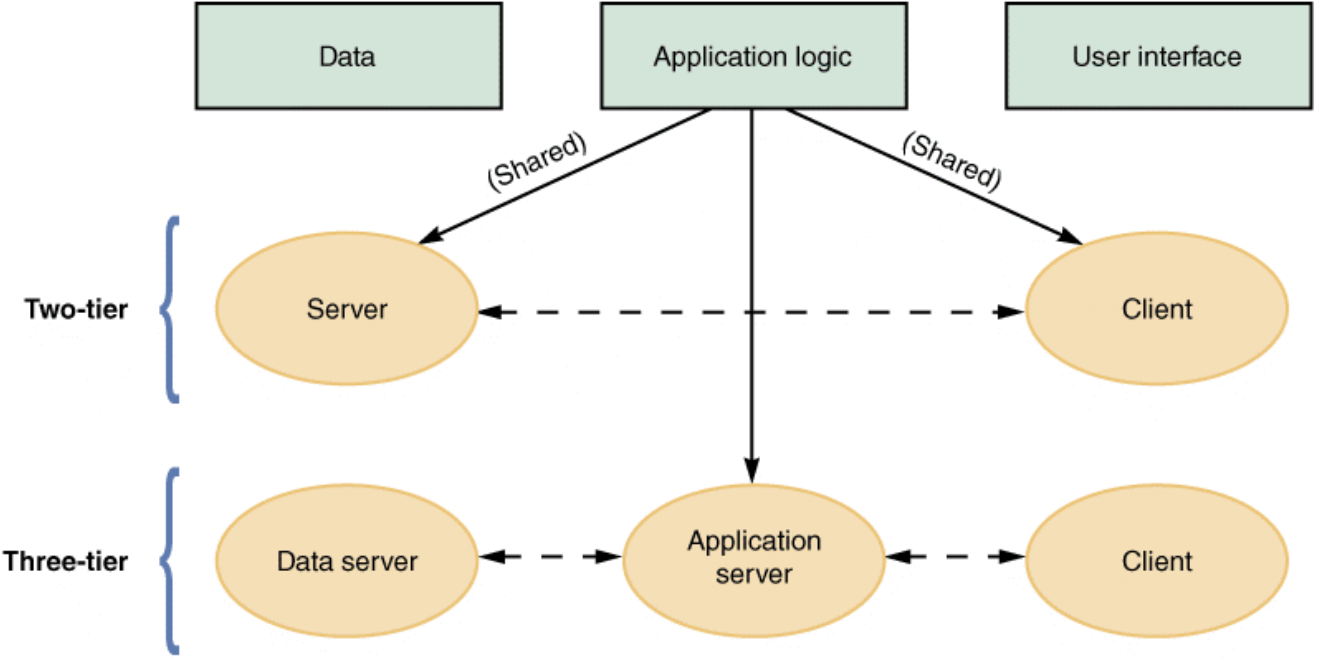
Three-tier = MVC architecture บน iOS — View (client), Controller/ViewModel (app server), Model/Database (data server)
Middleware
- Enables communication between tiers
- Also called "glueware"
- Connects two or more software components in a federated system architecture
Cost-Benefit Issues
- Client/server systems offer the best combination of features to meet information system requirements
- Must weigh upfront hardware/software cost vs. long-term flexibility
Performance Issues
- Knee of the curve: Response time to requests increases significantly as the system nears its capacity
- Client should contact the server only when necessary
- DDBMS (Distributed Database Management System) helps improve client/server performance
Knee of the curve เหมือน Bangkok traffic — ถนนรับได้ถึงจุดนึง พอเกินนั้นปุ๊บ ติดเต็มทันที
The Impact of the Internet
Internet-Based Architecture
- Entire user interface is provided by the web server in the form of HTML documents
- Shifting responsibility for the interface from client to server:
- Simplifies data transmission
- Results in lower hardware cost and complexity
Cloud Computing
- Refers to the cloud symbol often used to represent the Internet
- Envisions a cloud of remote computers providing a total online software and data environment, hosted by third parties
- Key advantages:
- Eliminates compatibility issues
- Provides scaling on demand
Cloud = ไม่ต้องซื้อเซิร์ฟเวอร์เอง ใช้ของ AWS/GCP แล้วจ่ายตามที่ใช้จริง เหมือนจ้างคนขับแทนการซื้อรถ
Web 2.0
- Second generation of the web
- Enables people to collaborate, interact, and share information more dynamically
- Considered a step towards the semantic web
- Wiki: Web-based repository of information run by social collaboration
- Users collaborate and add new layers of information to the Internet operating system
E-Commerce Architecture
In-House Solutions
Benefits:
- A unique website with a look and feel consistent with the company's other marketing efforts
- Complete control over the organization of the site
- A scalable structure to handle increases in sales and product offerings in the future
- More flexibility to modify and manage the site
- Opportunity to integrate the firm's web-based business systems with its other information systems
Packaged Solutions
- Viable alternative for medium- to large-sized firms
- Less complex to implement compared to in-house development
- Trade-off: less customization flexibility
Service Providers
- ASP (Application Service Provider): Provides applications or access to applications by charging a fee
- Many offer full-scale Internet business services for companies that decide to outsource functions
| Option | Best For | Control | Complexity |
|---|---|---|---|
| In-house | Large firms with unique needs | High | High |
| Packaged | Medium–large firms | Medium | Medium |
| ASP/Service Provider | Any firm wanting to outsource | Low | Low |
Processing Methods
Online Processing
- Online systems handle transactions when and where they occur
- Output is provided directly to users
- Advantages:
- Avoids delays
- Allows a constant dialog between the user and the system
- Can be used with file-oriented systems
Example — ATM Query Process:
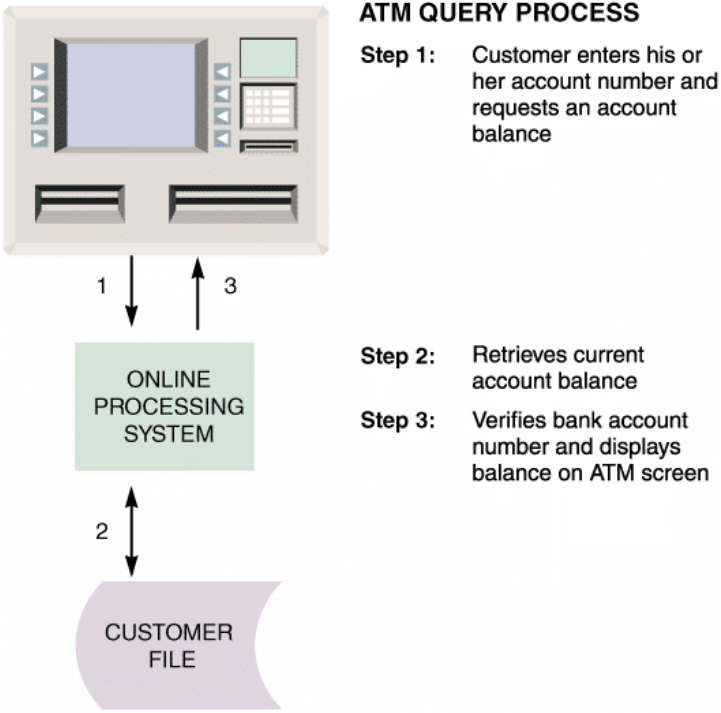
Step 1: Customer enters account number and requests balance
Step 2: System retrieves current account balance from Customer File
Step 3: Verifies bank account number and displays balance on ATM screen
Online processing = ถามปุ๊บ ได้คำตอบทันที เหมือนเรียก API แบบ synchronous
Batch Processing
- Data is managed and processed in groups
- Advantages:
- Tasks can be planned and run on a predetermined schedule without user involvement
- Programs requiring major network resources can run when costs and impact on other traffic will be lowest
- Well-suited to address security, audit, and privacy concerns
Example — POS (Point of Sale) Terminals:
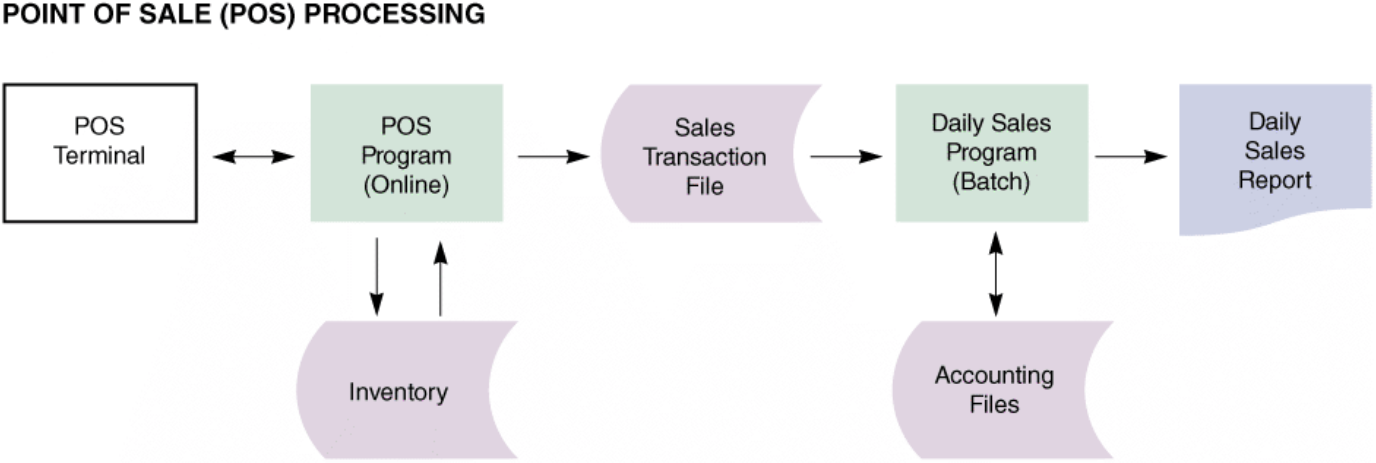
POS Terminal → POS Program (Online) → Sales Transaction File → Daily Sales Program (Batch) → Daily Sales Report
                        ↕                                                    ↕
                   Inventory                                         Accounting Files
- Online part: Retrieves item data, updates quantity in stock, produces transaction record
- Batch part: End of day — produces daily sales report and updates accounting system
Batch = การบ้านที่ส่งทีเดียวตอนเย็น ไม่ต้องส่งทีละข้อตลอดวัน เหมือน cron job ที่รัน background
| Feature | Online Processing | Batch Processing |
|---|---|---|
| Timing | Immediate (real-time) | Scheduled |
| User involvement | High | Low |
| Use case | ATM, e-commerce | Payroll, reports |
| Resource usage | Continuous | Off-peak |
Network Models
OSI Model (Open Systems Interconnection)
- Describes how data moves from an application on one computer to an application on another networked computer
- Provides physical design standards that assure seamless network connectivity, regardless of the specific hardware environment
Network Topology
- Physical topology: Actual network cabling and connections
- Logical topology: Describes the way the components interact
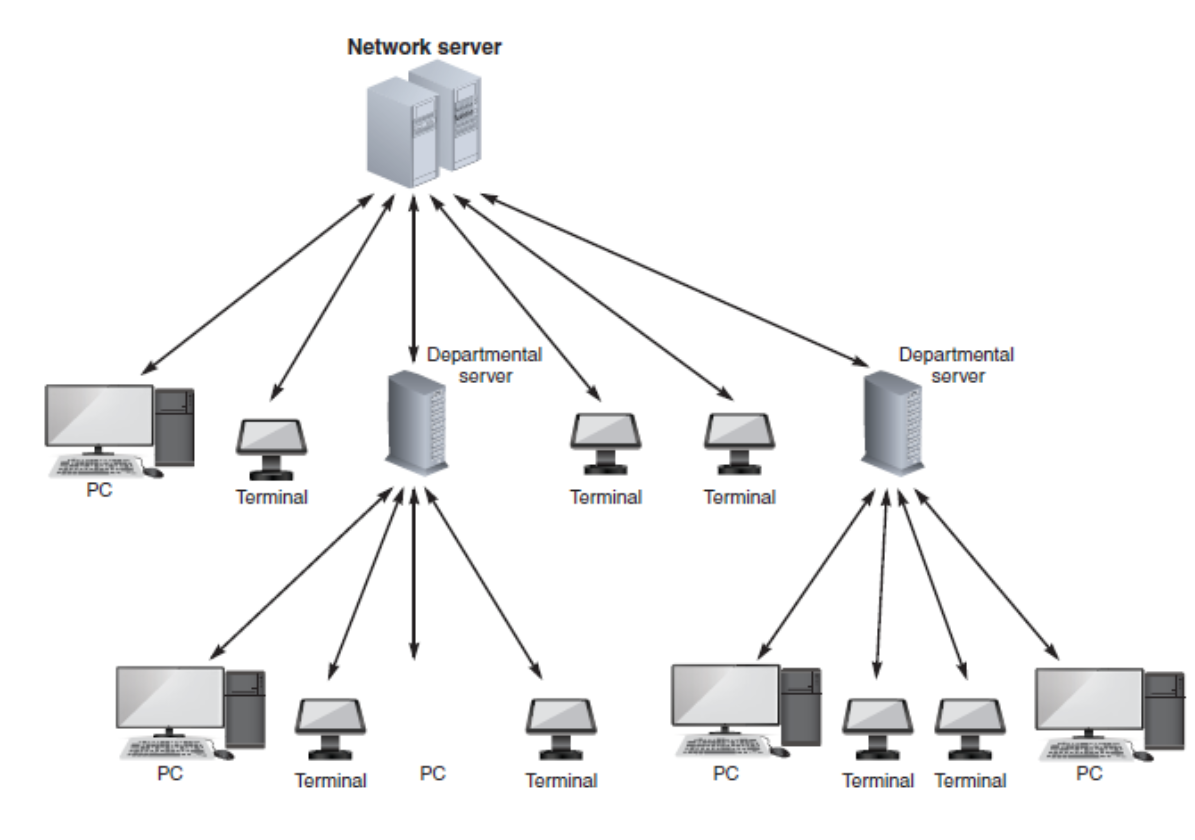
Hierarchical Network
- Departmental servers control lower levels of processing and network devices
- Tree-like structure with network server at the top
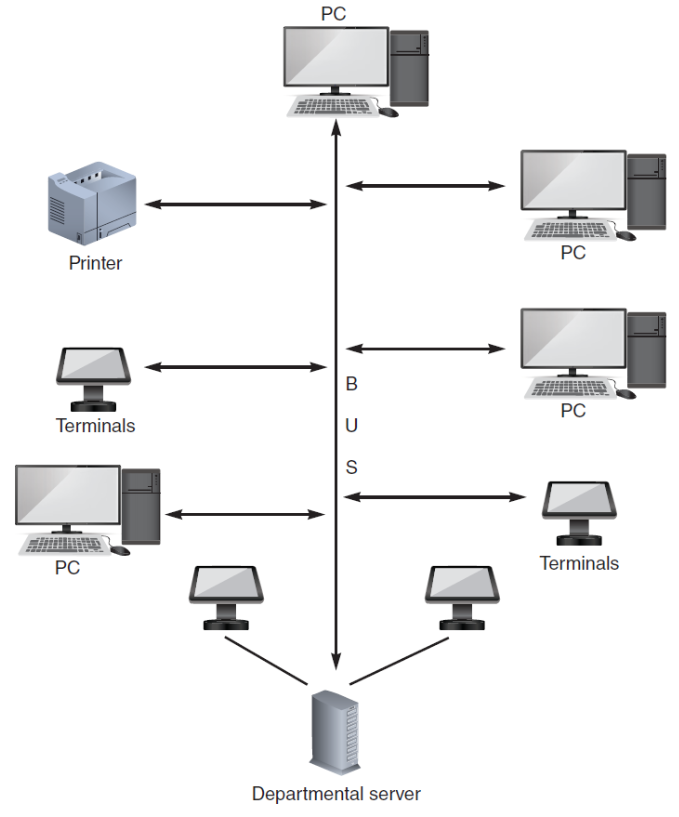
Bus Network
- A single communication path connects the central server, departmental servers, workstations, and peripheral devices
- All devices share one common line
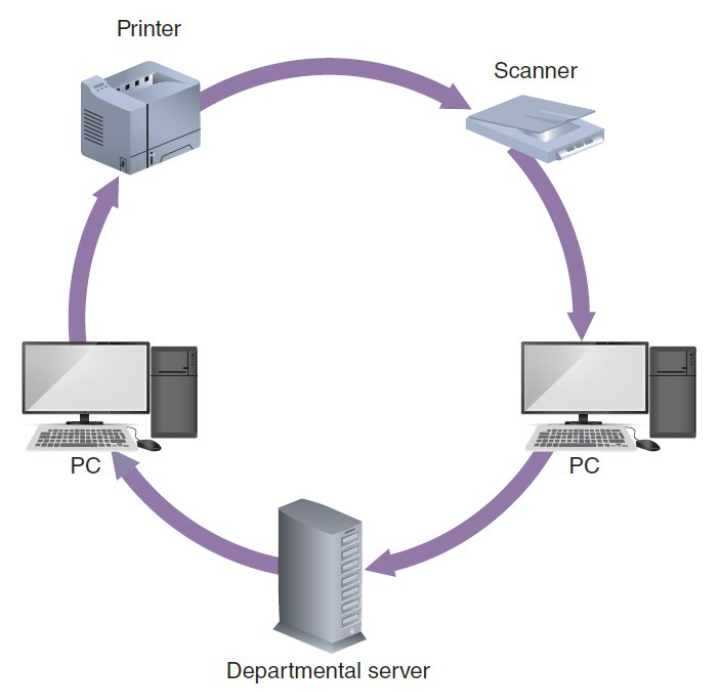
Ring Network
- Resembles a circle where data flows in only one direction from one device to the next
- Token-passing method commonly used
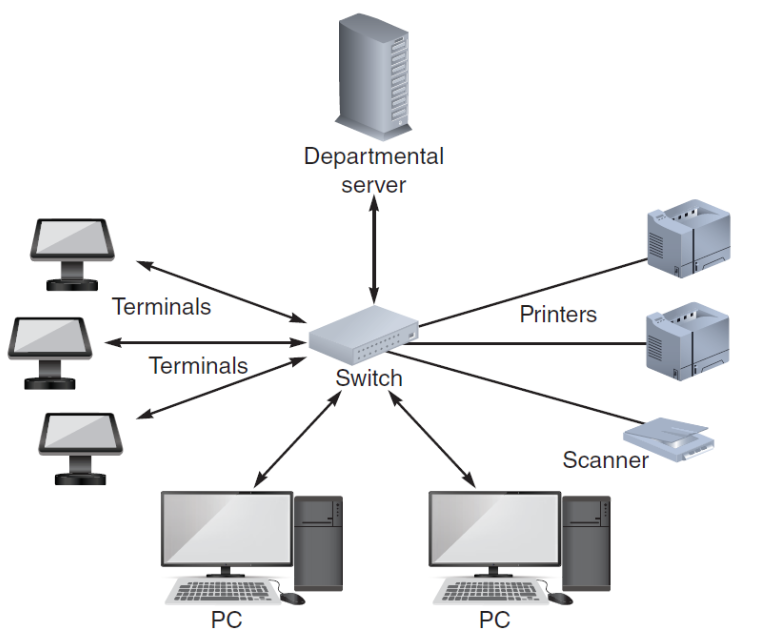
Star Network
- Has a central networking device called a switch which:
- Manages the network
- Acts as a communications conduit for all network traffic
- Most common modern LAN topology
Mesh Network
- Each node connects to every other node
- Provides a high degree of redundancy
- Used in military and mission-critical applications
- Provides alternate data paths, but is expensive to install and maintain
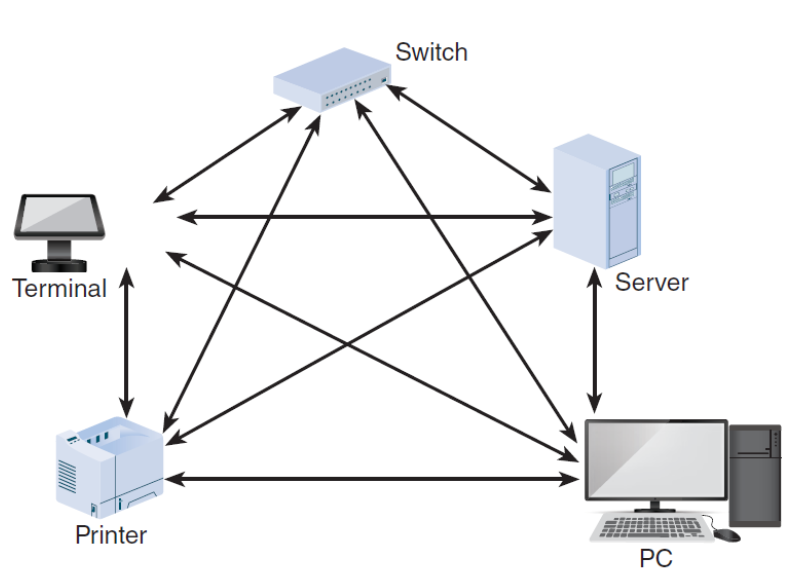
Mesh = เหมือน internet backbone — ถ้าเส้นนึงพัง ยังมีทางอื่นให้ข้อมูลวิ่งไปได้
| Topology | Structure | Fault Tolerance | Cost |
|---|---|---|---|
| Hierarchical | Tree | Medium | Medium |
| Bus | Single line | Low | Low |
| Ring | Circle | Low–Medium | Medium |
| Star | Hub/Switch | Medium | Medium |
| Mesh | Full connection | High | High |
Network Devices
- LANs or WANs can be interconnected using:
- Router: Connects network segments, determines most efficient data path, and guides flow of data
- Proxy Server: Provides Internet connectivity for internal LAN users
- Gateway: Created by routers to bridge between different network topologies and large, dissimilar networks (e.g., the Internet)
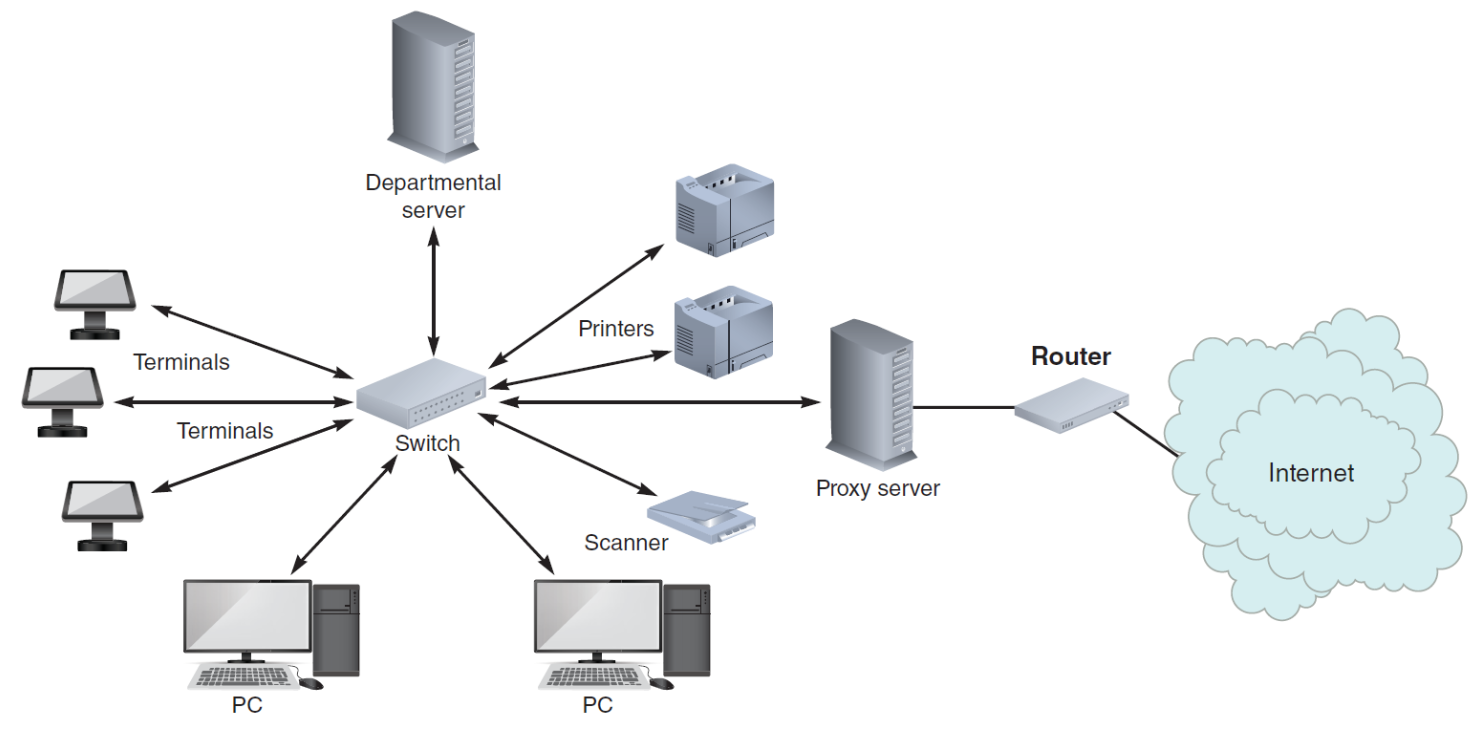
Router = ไปรษณีย์ — รับจดหมาย (packets) แล้วหาเส้นทางที่เร็วที่สุดไปส่ง
Wireless Networks
Standards
- IEEE 802.11 is a family of standards developed by the Institute of Electrical and Electronics Engineers (IEEE) for wireless LANs
- Current wireless networks are based on variations of the original 802.11 standard
- MIMO (Multiple Input/Multiple Output) technology boosts performance by using multiple antennas
Topologies
Network topologies available for IEEE 802.11 WLANs:
- BSS (Basic Service Set) — also called infrastructure mode: Devices connect through a central Access Point (AP)
- ESS (Extended Service Set): Multiple BSSs connected together, extending the wireless coverage area
Trends
- Wi-Fi Alliance:
- International association that certifies interoperability of wireless network products based on IEEE 802.11 specifications
- Products with Wi-Fi certification are guaranteed to work together
- Bluetooth:
- Used for short-distance wireless communication
- Typically within ~10 meters range
System Design Completion
System architecture marks the end of the systems design phase of the SDLC.
Final Activities in the Systems Design Phase
- Preparing a system design specification
- Obtaining user approval
- Delivering a presentation to management
System Design Specification
- A document that presents the complete design for a new information system
- Contains:
- Detailed costs
- Staffing requirements
- Scheduling for completing the next SDLC phase
- Used as a baseline to measure the operational system
Sections in a System Design Specification:
- Management summary
- System components
- System environment
- Implementation requirements
- Time and cost estimates
- Additional material
User Approval
- Users must review and approve:
- Interface design
- Report and menu designs
- Data entry screens
- Source documents
- Other areas that affect them
- Benefits:
- Ensures approvals are obtained as and when required
- Keeps the users involved with the system's development
- Provides feedback that can be used to guide efforts
- System design specification should also be reviewed by other IT department members
Presentations
Three-stage presentation process:
| Stage | Audience | Purpose |
|---|---|---|
| 1st | Systems analysts, programmers, technical support staff | Technical review |
| 2nd | Department managers and users from affected departments | Operational review |
| 3rd (Final) | Management | Final approval |
- Provide an opportunity to:
- Explain the system
- Answer questions
- Consider comments
- Secure final approval
- Management will reach a decision based on the final presentation
Summary
- An information system combines hardware, software, data, procedures, and people into a system architecture
- Before selecting an architecture, the analyst must consider: ERP, initial cost and TCO, scalability, web integration, legacy interface requirements, processing options, security issues, and corporate portals
- ERP establishes an enterprise-wide strategy for IT resources and specific standards
- Client/server architecture divides processing between one or more clients and a central server
- Thick client → processing logic at the client
- Thin client → processing logic at the server
- Can be two-tier or three-tier
- The Internet has had an enormous impact on system architecture (cloud, Web 2.0)
- The most prevalent processing method today is online processing
- Network topologies: hierarchical, bus, ring, star, mesh
- The system design specification presents the complete design and is the basis for the presentations that complete the systems design phase