Transport Layer Roadmap
- Transport-layer services
- Multiplexing and demultiplexing
- Connectionless transport: UDP
- Principles of reliable data transfer
- Connection-oriented transport: TCP
- Principles of congestion control
- TCP congestion control
TCP/IP and Communication
Web Request Example
Browser → Web Server Communication:
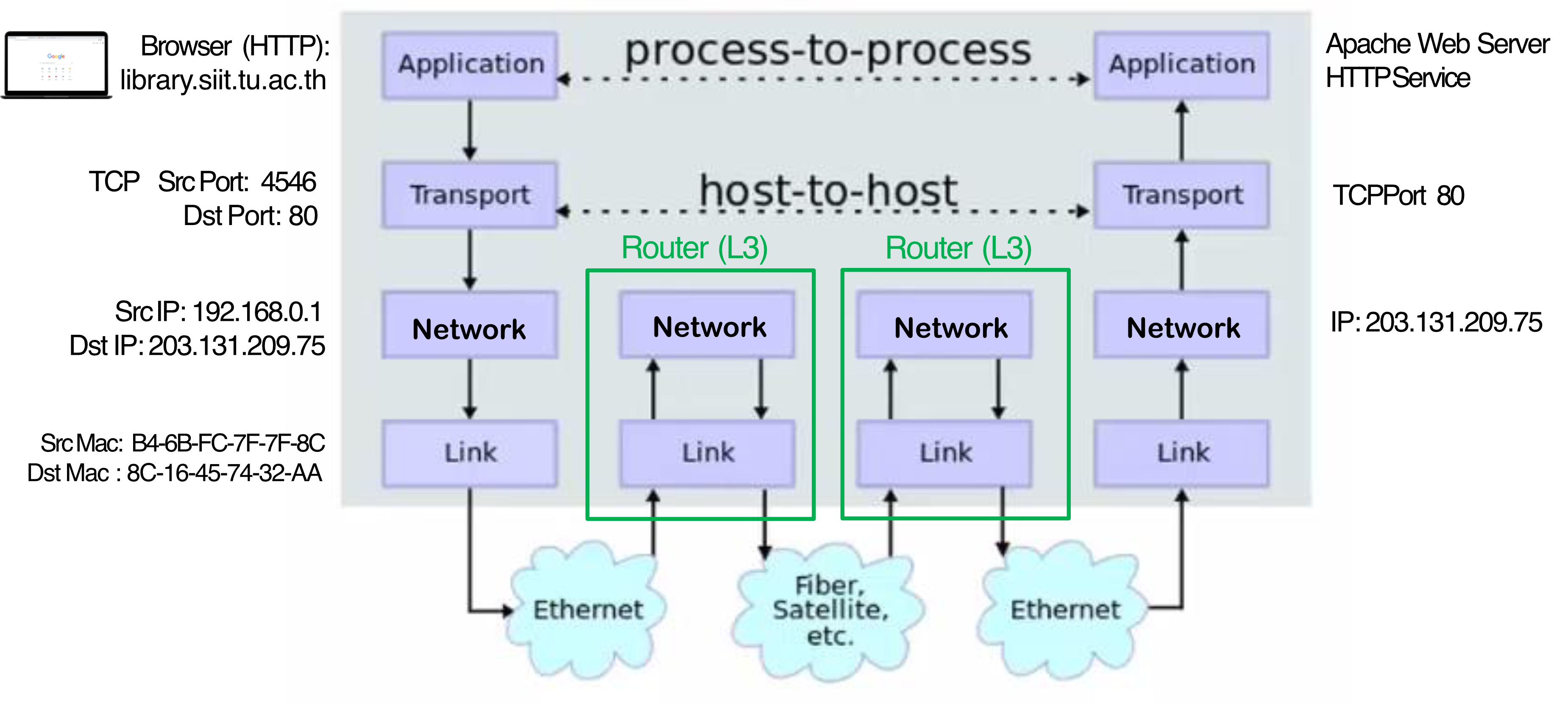
- Application Layer: Browser (HTTP) wants to access
library.siit.tu.ac.th - Transport Layer (TCP):
- Source Port: 4546
- Destination Port: 80
- Network Layer (IP):
- Source IP: 192.168.0.1
- Destination IP: 203.131.209.75
- Link Layer (MAC):
- Source Mac: B4-6B-FC-7F-7F-8C
- Destination Mac: 8C-16-45-74-32-AA
Analogy: Think of this like sending a letter through the postal system:
- Application layer = the actual letter content
- Transport layer = the envelope with "from" and "to" apartment numbers
- Network layer = the street addresses
- Link layer = the physical mail truck route between post offices
DNS Query Example
UDP Protocol Usage:
- DNS uses UDP (User Datagram Protocol)
- Source Port: 57938
- Destination Port: 53 (standard DNS port)
- Transaction ID: 0x034d
- Query for:
library.siit.tu.ac.thtype A (Host Address)
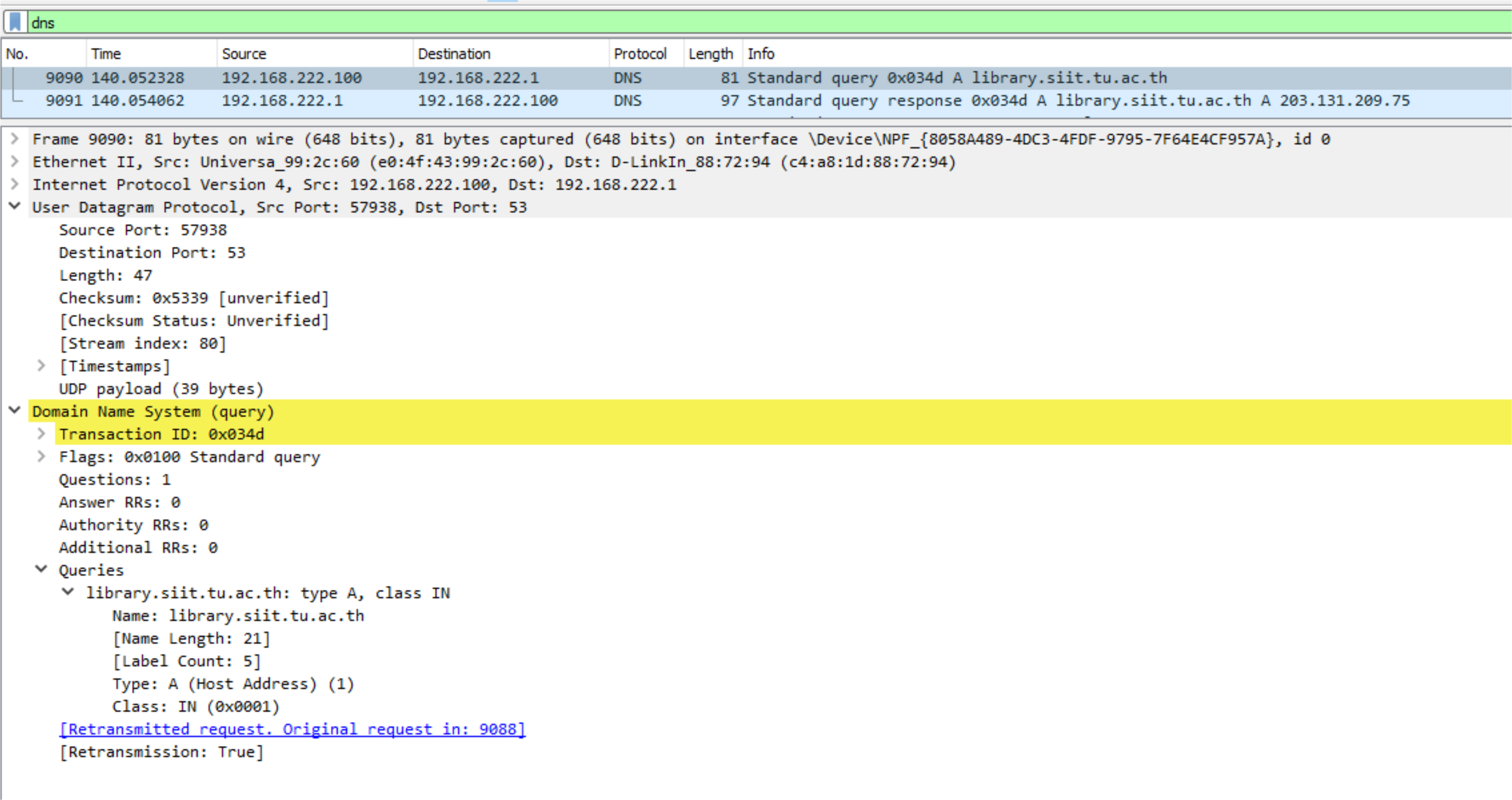
What inside the UDP payload? ก็คือ Domain Name System นั่นแหละ เพราะมันอยู่ใต้ Payload อีกที
เช็ค!!! Msg
เข้าใจถูกแล้ว
เหมือนว่า Header + Payload ของ Layer ก่อนหน้า จะไปเป็น Payload ของ Layer ต่อมาอีก!
HTTP Request Example
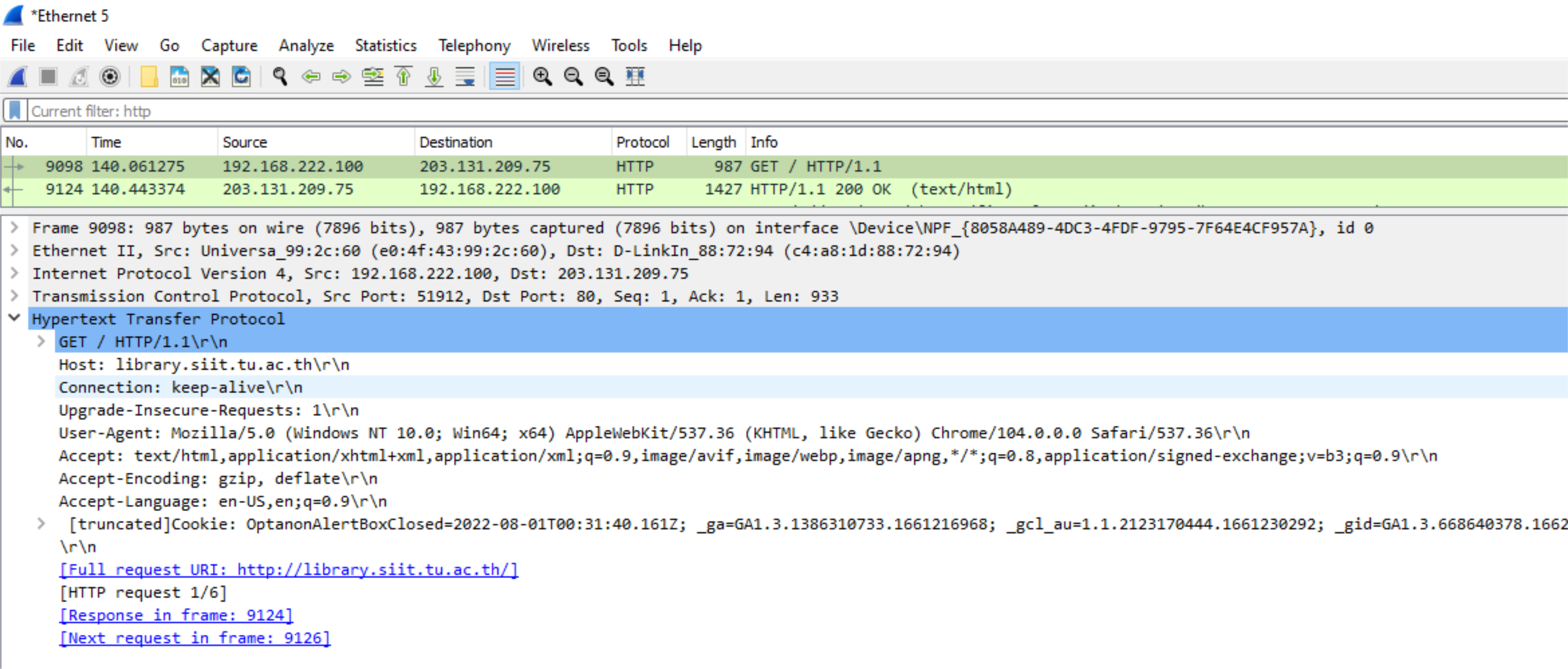
TCP Connection:
- TCP Source Port: 51912
- TCP Destination Port: 80
- Sequence number: 1
- Acknowledgment: 1
- HTTP GET request for
http://library.siit.tu.ac.th/
Transport Services and Protocols
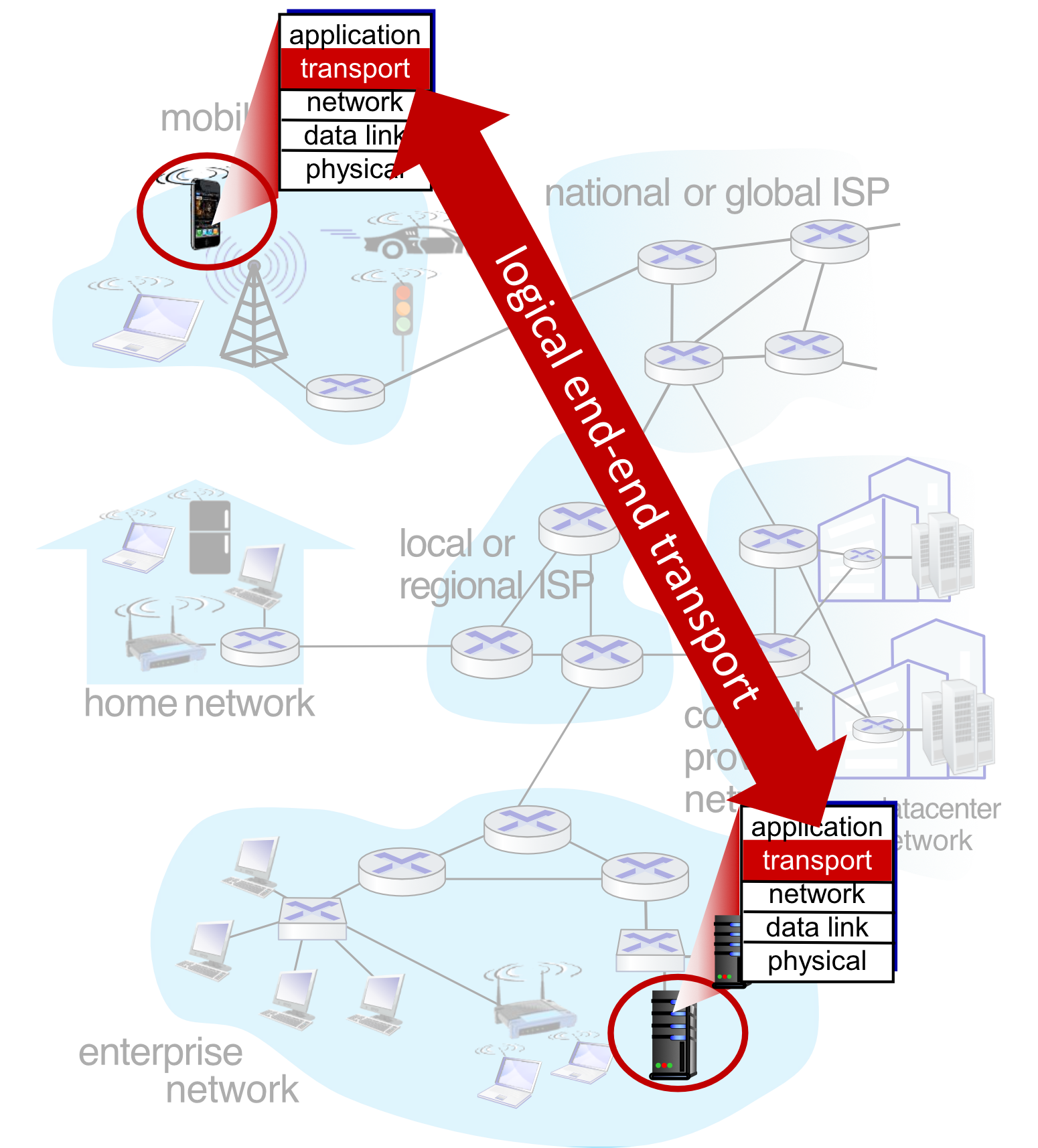
Core Functionality
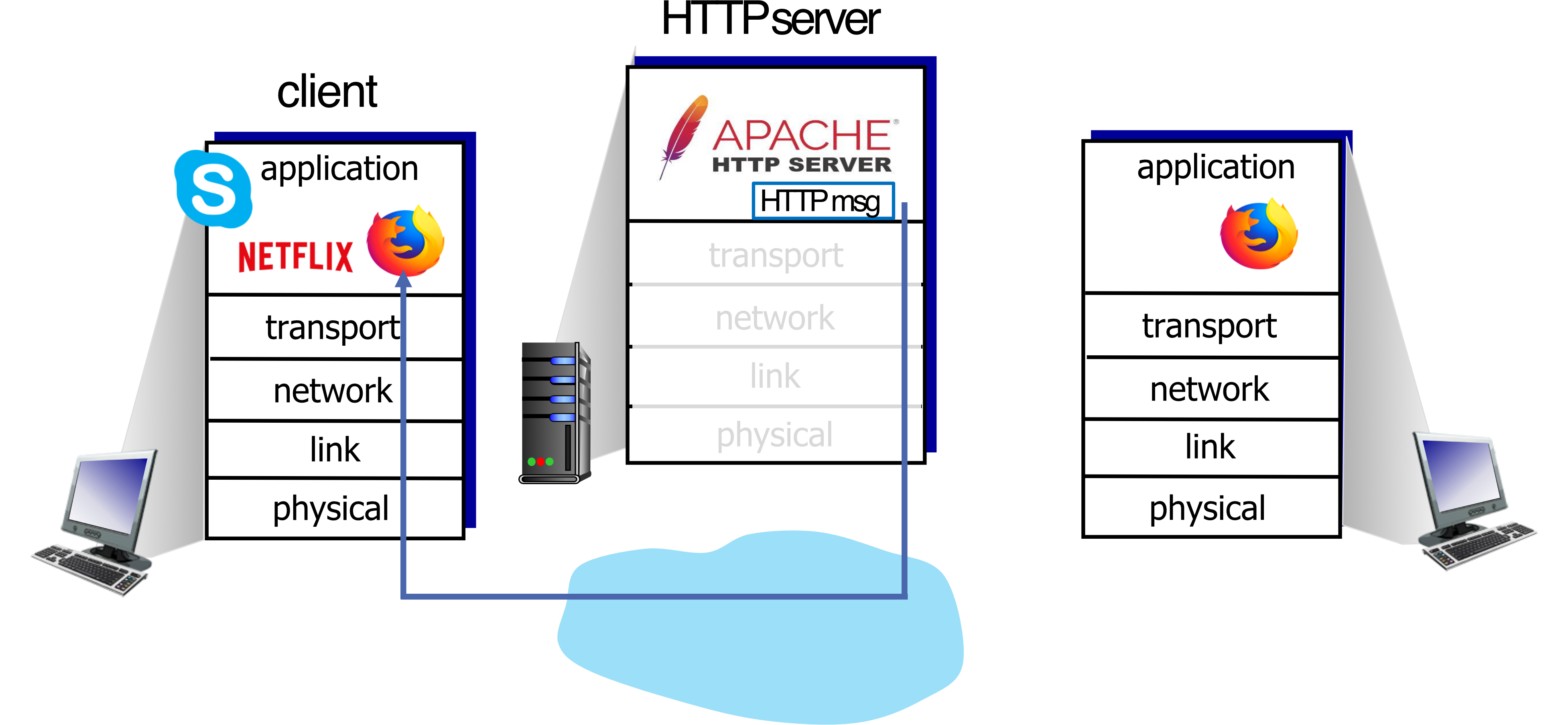
- Provide logical communication between application processes running on different hosts
Transport Protocol Actions in End Systems
Sender side:
- Breaks application messages into segments
- Application Layer: Message
- Network Layer: Datagram, Packet
- Data Link Layer: Frame
- เรียกต่างกันในแต่ละ Layer สับสน
- Passes segments to network layer
Receiver side:
- Reassembles segments into messages
- Passes messages to application layer
Two Transport Protocols Available
- TCP (Transmission Control Protocol)
- UDP (User Datagram Protocol)
Analogy: Transport layer is like a delivery service:
- The sender breaks packages (messages) into smaller boxes (segments)
- The delivery company (transport layer) handles shipping
- The receiver unpacks and combines boxes back into the original package
Transport vs. Network Layer
| Transport Layer | Network Layer |
|---|---|
| Logical communication between processes | Logical communication between hosts |
| Exists only in hosts | Exists in hosts and routers |
| Ignores network | Routes data through network |
| Port numbers used for routing in destination computer | IP addresses used for routing in network |
Analogy:
- Network layer is like the postal service delivering to a building (host)
- Transport layer is like the mailroom delivering to specific offices (processes) within that building
Transport Layer Actions
Sender Actions
- Is passed an application-layer message
- Determines segment header field values
- Creates segment
- Passes segment to IP
Application message → Transport Header + Message → Network Layer
Receiver Actions
- Receives segment from IP
- Checks header values
- Extracts application-layer message
- Demultiplexes message up to application via socket
Network Layer → Extract message from segment → Application Layer
Two Principal Internet Transport Protocols
TCP (Transmission Control Protocol)
Features:
- ✅ Reliable, in-order delivery
- ✅ Congestion control
- ✅ Flow control
- ✅ Connection setup
UDP (User Datagram Protocol)
Features:
- ❌ Unreliable, unordered delivery
- ✅ No-frills extension of "best-effort" IP
- ✅ Minimal overhead
Services NOT Available in Either
- ❌ Delay guarantees
- ❌ Bandwidth guarantees
TCP Analogy: Like registered mail with tracking and delivery confirmation
UDP Analogy: Like dropping a postcard in the mailbox – faster but no guarantee
แล้วจะเลือกอะไรระหว่าง TCP or UDP, ก็ต้องขึ้นอยู่กับ Task สิ ไม่ใช่ว่าจะคิดว่า TCP ดีกว่าอย่างเดียว การที่จะต้อง connection setup มันก็เหนื่อย ใช้ resource เหมือนกัน
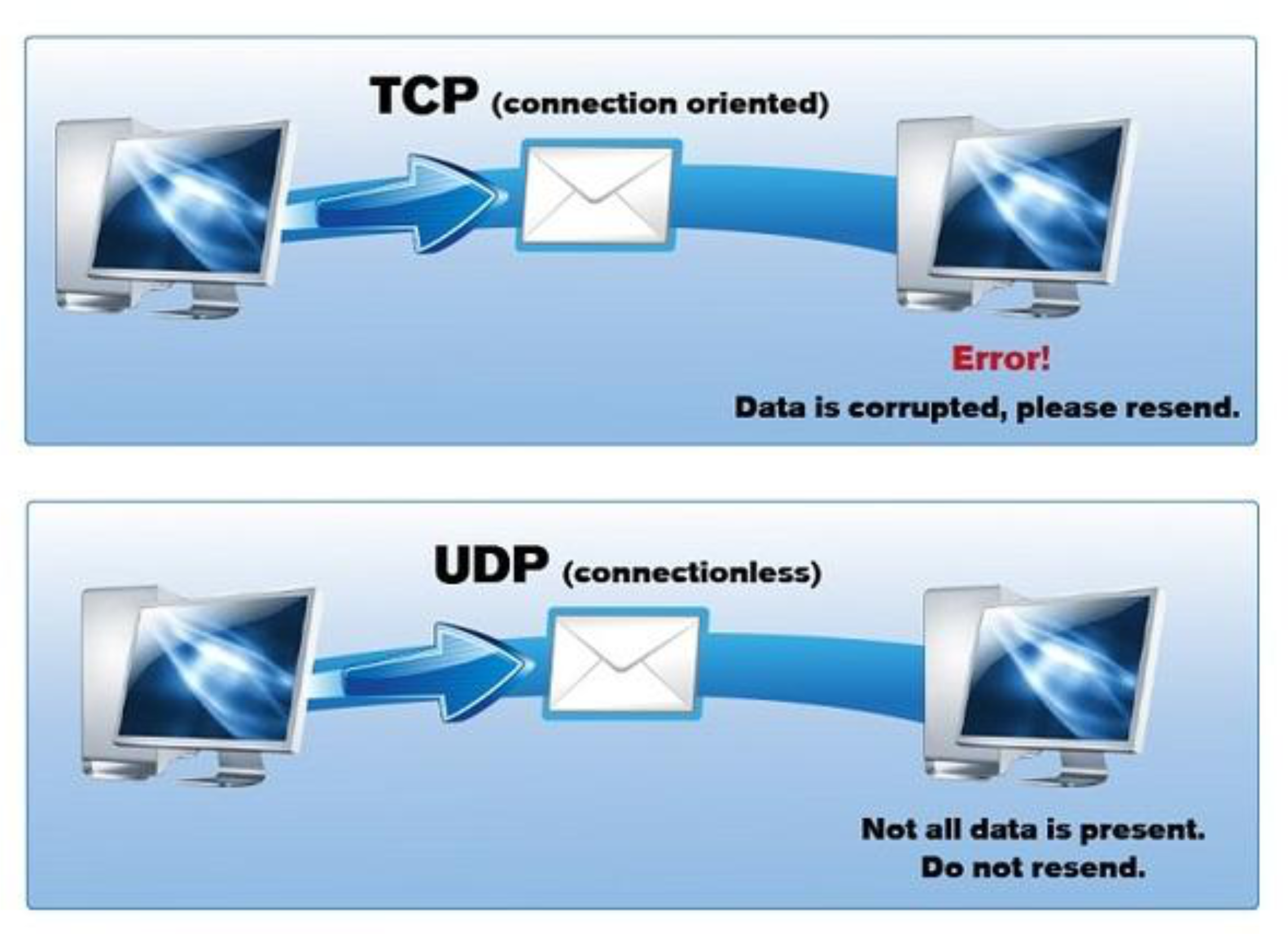
UDP แม้จะไม่ reliable: อยู่ชั้น Transport ถ้าอยากให้มัน Reliable ก็ไปปรับที่ Application Layer (on top สิ)
DNS → (wait 30 sections) → query → server
Implement reliable protocol on top: Retry, timeout งี้
Multiplexing and Demultiplexing
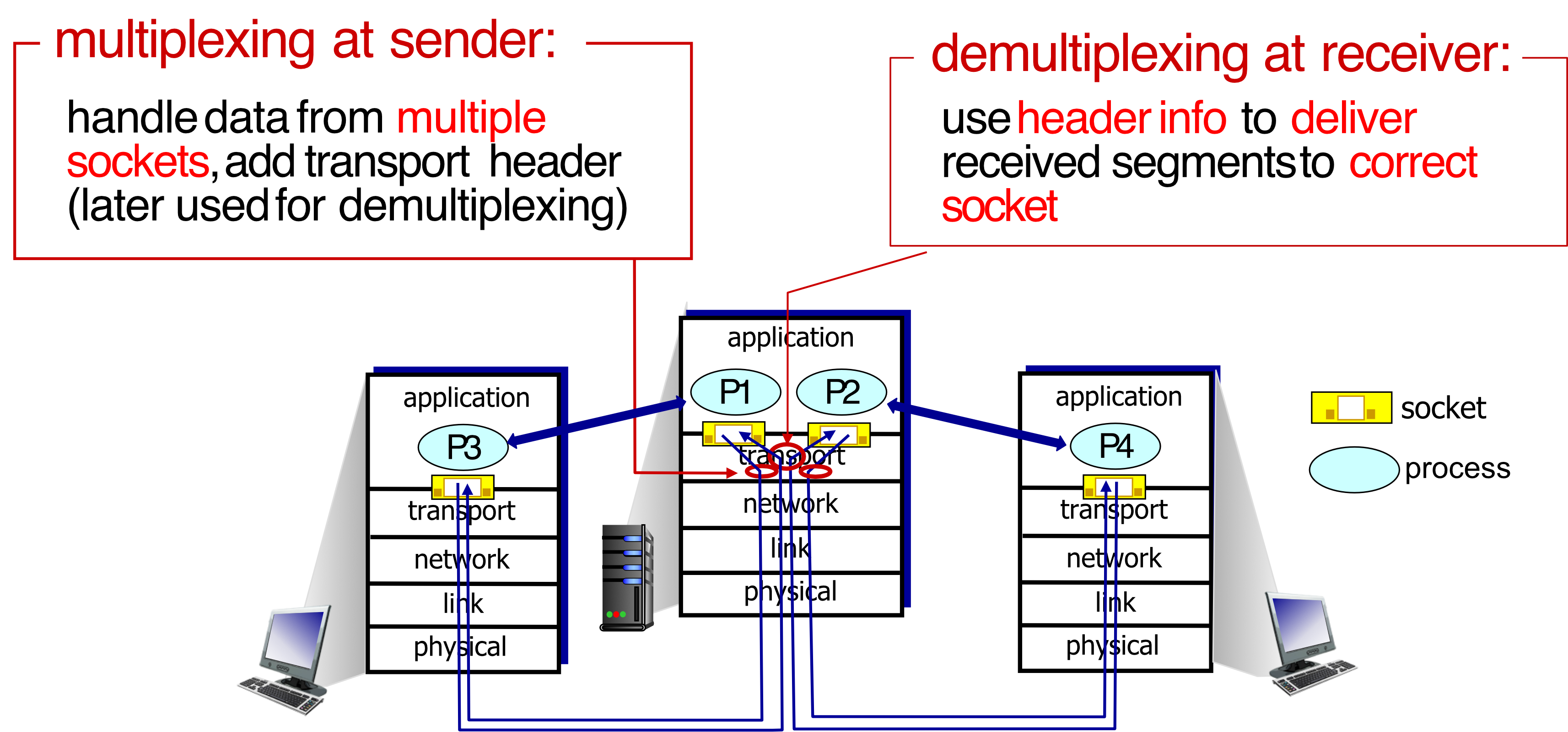
Key Concepts
Multiplexing (at sender):
- Handle data from multiple sockets
- Add transport header (later used for demultiplexing)
Demultiplexing (at receiver):
- Use header info to deliver received segments to correct socket
How Demultiplexing Works
Host receives IP datagrams:
- Each datagram has source IP address, destination IP address
- Each datagram carries one transport-layer segment
- Each segment has source port number, destination port number
Host uses IP addresses & port numbers to direct segment to appropriate socket
TCP/UDP Segment Format
┌──────────────┬──────────────┐
│ Source Port  │  Dest Port   │  ← 32 bits total
├──────────────┴──────────────┤
│    Other header fields      │
├─────────────────────────────┤
│    Application data         │
│       (payload)             │
└─────────────────────────────┘
Analogy: Multiplexing is like a post office collecting mail from many people and sorting them for delivery. Demultiplexing is like the mail carrier delivering letters to correct mailboxes at the destination.
Connectionless Demultiplexing (UDP)
Socket Creation
When creating a UDP socket, must specify host-local port number:
DatagramSocket mySocket1 = new DatagramSocket(12534);Sending to UDP Socket
When creating datagram to send, must specify:
- Destination IP address
- Destination port number
Key Behavior
Important: IP/UDP datagrams with:
- Same destination port number
- BUT different source IP addresses and/or source port numbers
- Will be directed to the same socket at receiving host
Analogy: UDP is like a mailbox at an apartment building – any letter sent to that mailbox number arrives there, regardless of who sent it.
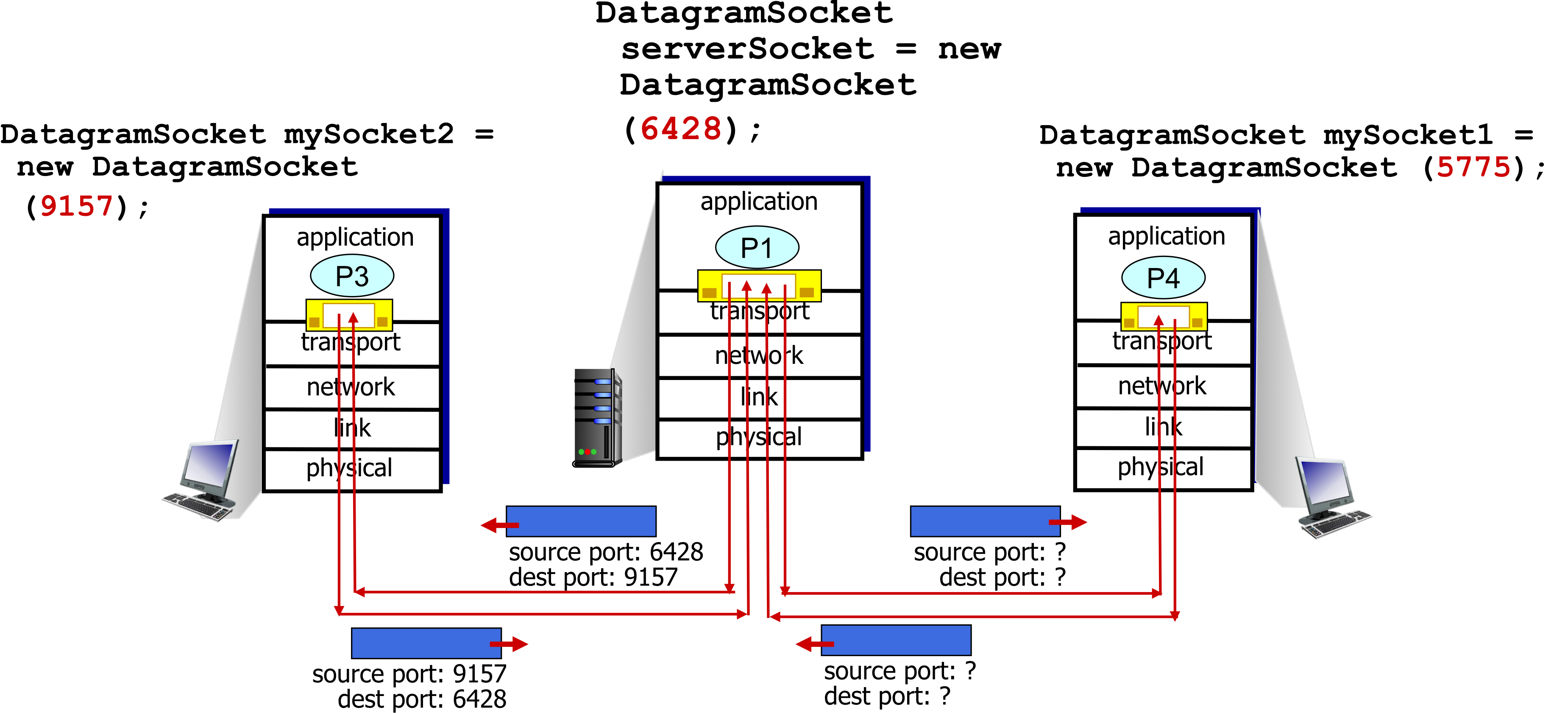
Connectionless Demultiplexing Example
Server:
DatagramSocket serverSocket = new DatagramSocket(6428);Client 1:
DatagramSocket mySocket1 = new DatagramSocket(5775);Client 2:
DatagramSocket mySocket2 = new DatagramSocket(9157);Communication flows:
- Client 2 → Server: source port 9157, dest port 6428
- Server → Client 2: source port 6428, dest port 9157
Connection-Oriented Demultiplexing (TCP)
TCP Socket Identification
TCP socket identified by 4-tuple:
Server Characteristics
- Server may support many simultaneous TCP sockets
- Each socket identified by its own 4-tuple
- Each socket associated with a different connecting client
Demultiplexing Process
Receiver uses all four values (4-tuple) to direct segment to appropriate socket
Analogy: TCP is like having separate phone lines for each conversation – each connection is uniquely identified by both caller and receiver information.
Connection-Oriented Demultiplexing Example
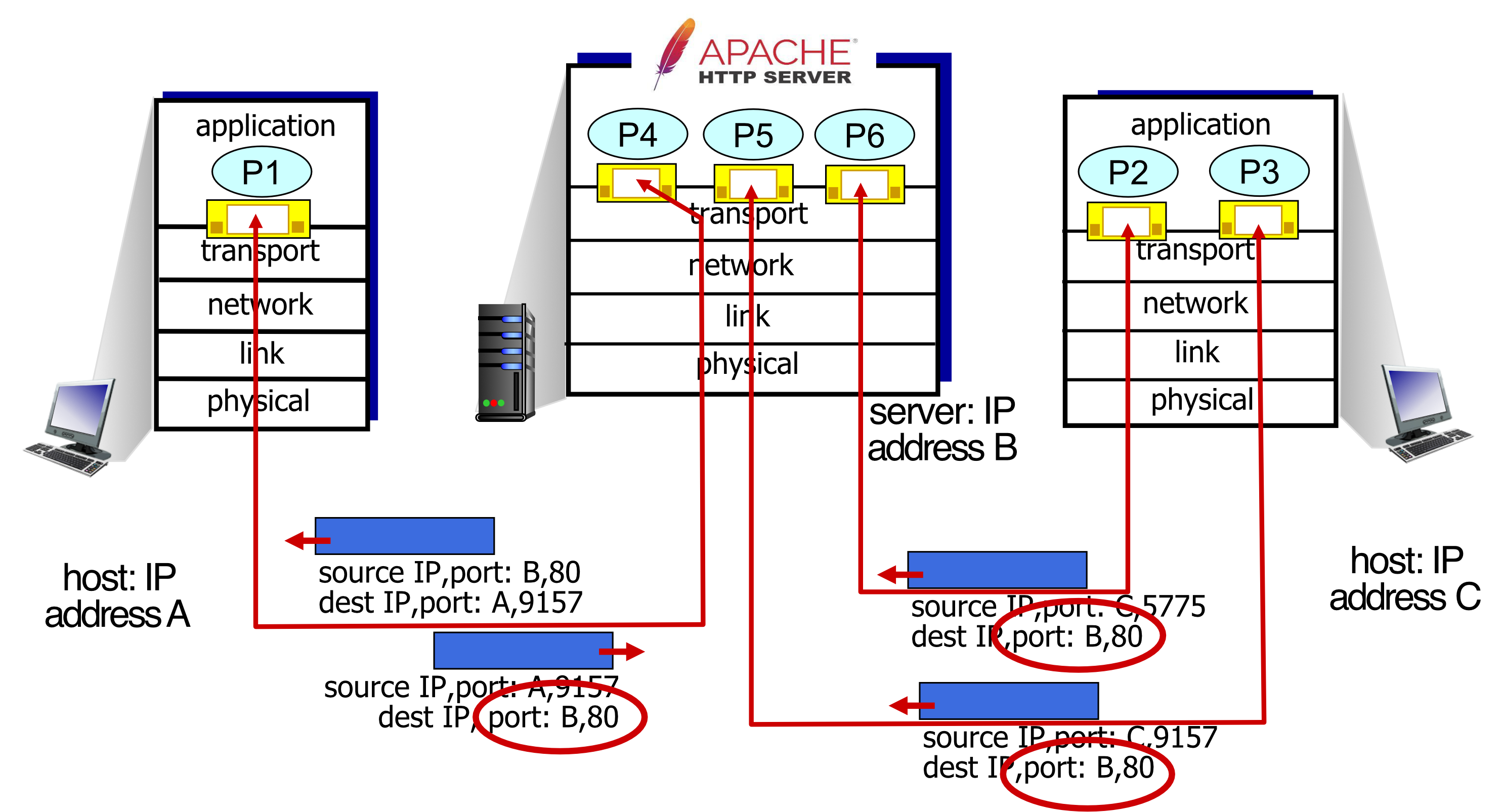
Three segments, all destined to:
- IP address: B
- Destination port: 80
BUT demultiplexed to DIFFERENT sockets because:
- Host A, port 9157 → Server B, port 80 (Socket P4)
- Host C, port 5775 → Server B, port 80 (Socket P5)
- Host C, port 9157 → Server B, port 80 (Socket P6)
Each has a unique 4-tuple!
Multiplexing Summary
Key Takeaways
- Multiplexing, demultiplexing: Based on segment/datagram header field values
- UDP demultiplexing: Using destination port number (only)
- TCP demultiplexing: Using 4-tuple:
- Source IP address
- Source port number
- Destination IP address
- Destination port number
UDP: User Datagram Protocol
Characteristics
"Bare bones" Internet transport protocol:
- ❌ No connection establishment (no handshaking)
- ❌ Each UDP segment handled independently
- ❌ "Best effort" service – segments may be:
- Lost
- Delivered out-of-order to application
Why Use UDP?
Advantages:
- No connection establishment (no RTT delay)
- Simple: No connection state at sender/receiver
- Small header size
- No congestion control: UDP can blast away as fast as desired
- Can function in the face of congestion
QUIC บางทีมีคนเรียก HTTP3: ก็ใช้ UDP Protocol (Reliable)
Analogy: UDP is like shouting across a crowded room – fast, no setup needed, but no guarantee everyone hears you correctly.
UDP Use Cases
Applications using UDP:
- 🎥 Streaming multimedia apps (loss tolerant, rate sensitive)
- 🌐 DNS (port 53)
- 📊 SNMP (Simple Network Management Protocol, ports 161, 162)
- 📝 Syslog (port 514)
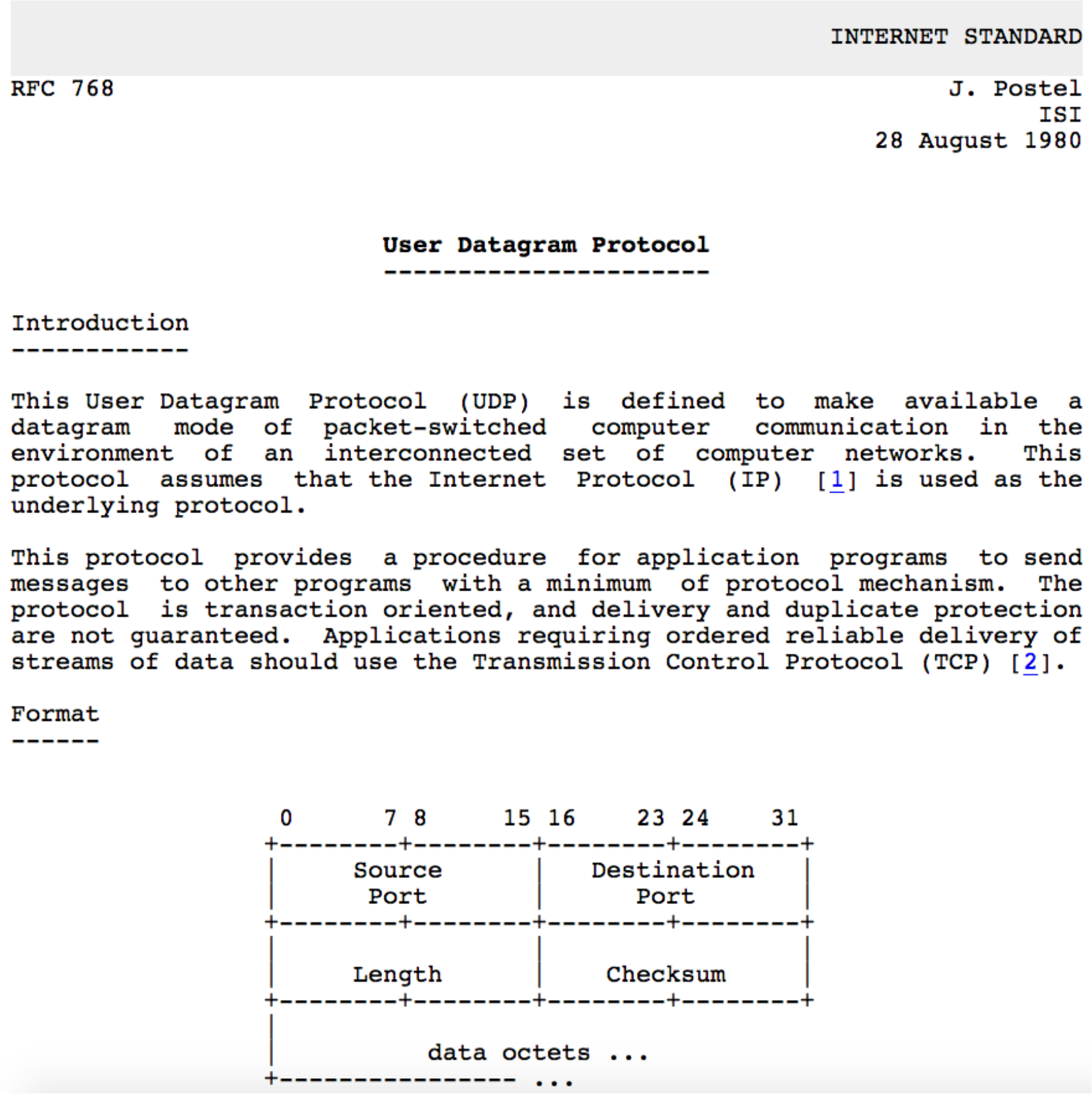
UDP RFC 768 Definition
From the standard:
"This User Datagram Protocol (UDP) is defined to make available a datagram mode of packet-switched computer communication in the environment of an interconnected set of computer networks. This protocol assumes that the Internet Protocol (IP) is used as the underlying protocol."
UDP: Transport Layer Actions
UDP Sender Actions
- Is passed an application-layer message (e.g., SNMP message)
- Determines UDP segment header field values
- Creates UDP segment
- Passes segment to IP
SNMP msg → UDP header + SNMP msg → IP layer
UDP Receiver Actions
- Receives segment from IP
- Checks UDP checksum header value
- Extracts application-layer message
- Demultiplexes message up to application via socket
IP layer → Extract SNMP msg from UDP segment → Application layer
UDP Segment Header
Header Format
  0                   16                  31
  ┌───────────────────┬───────────────────┐
  │   Source Port     │  Destination Port │
  ├───────────────────┼───────────────────┤
  │     Length        │     Checksum      │
  ├───────────────────┴───────────────────┤
  │                                       │
  │         Application Data              │
  │            (payload)                  │
  └───────────────────────────────────────┘
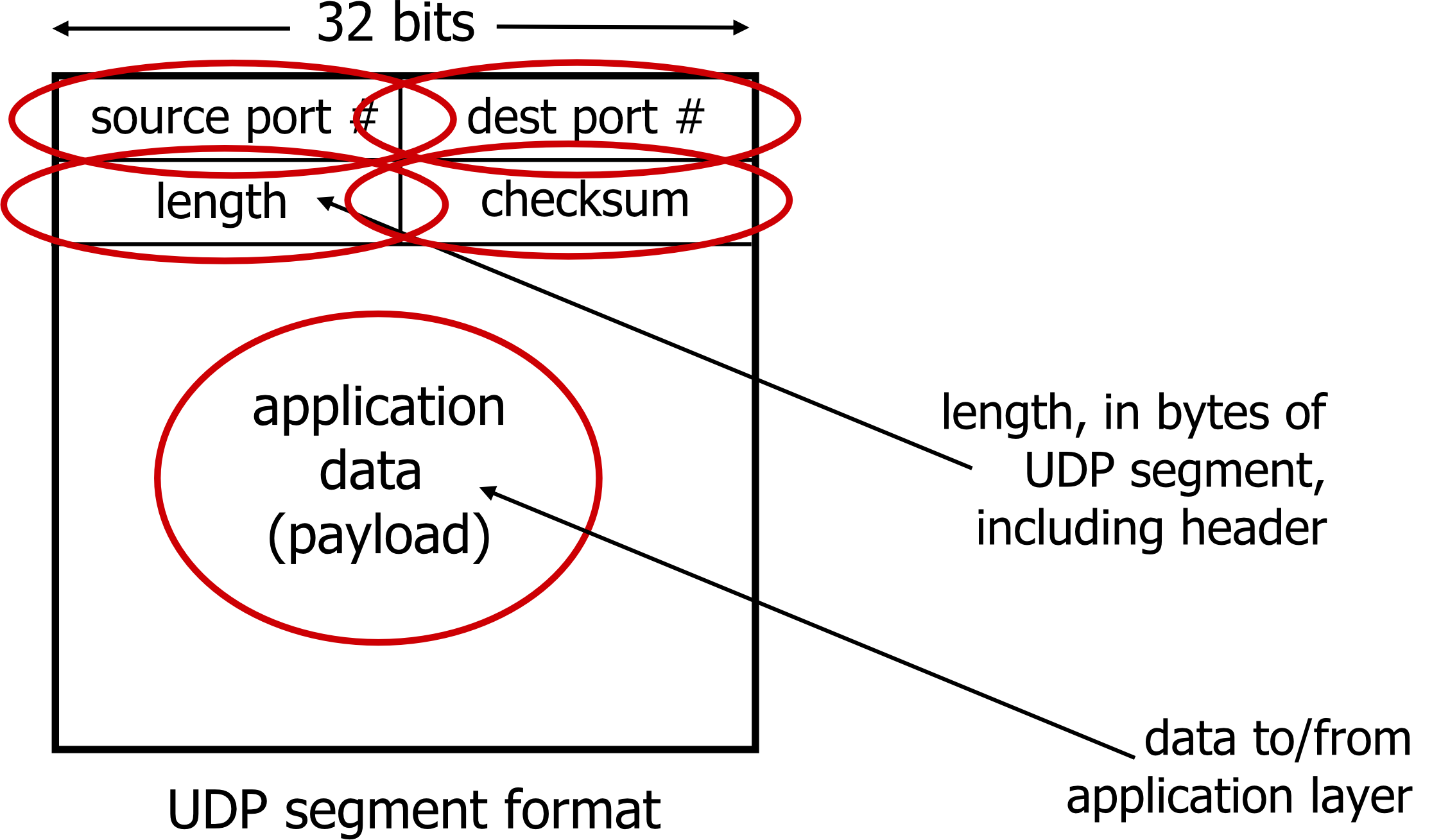
Fields:
- Source Port: 16 bits
- Destination Port: 16 bits
- Length: Length in bytes of UDP segment (including header)
- Checksum: For error detection
- Application Data: Payload from/to application layer
UDP Checksum
Goal
Detect errors (i.e., flipped bits) in transmitted segment
Sender Process
- Treat contents of UDP segment (including UDP header fields and IP addresses) as sequence of 16-bit integers
- Checksum: Addition (one's complement sum) of segment content
- Checksum value put into UDP checksum field
Receiver Process
- Compute checksum of received segment
- Check if computed checksum equals checksum field value:
- Not equal → error detected
- Equal → no error detected (but maybe errors nonetheless?)
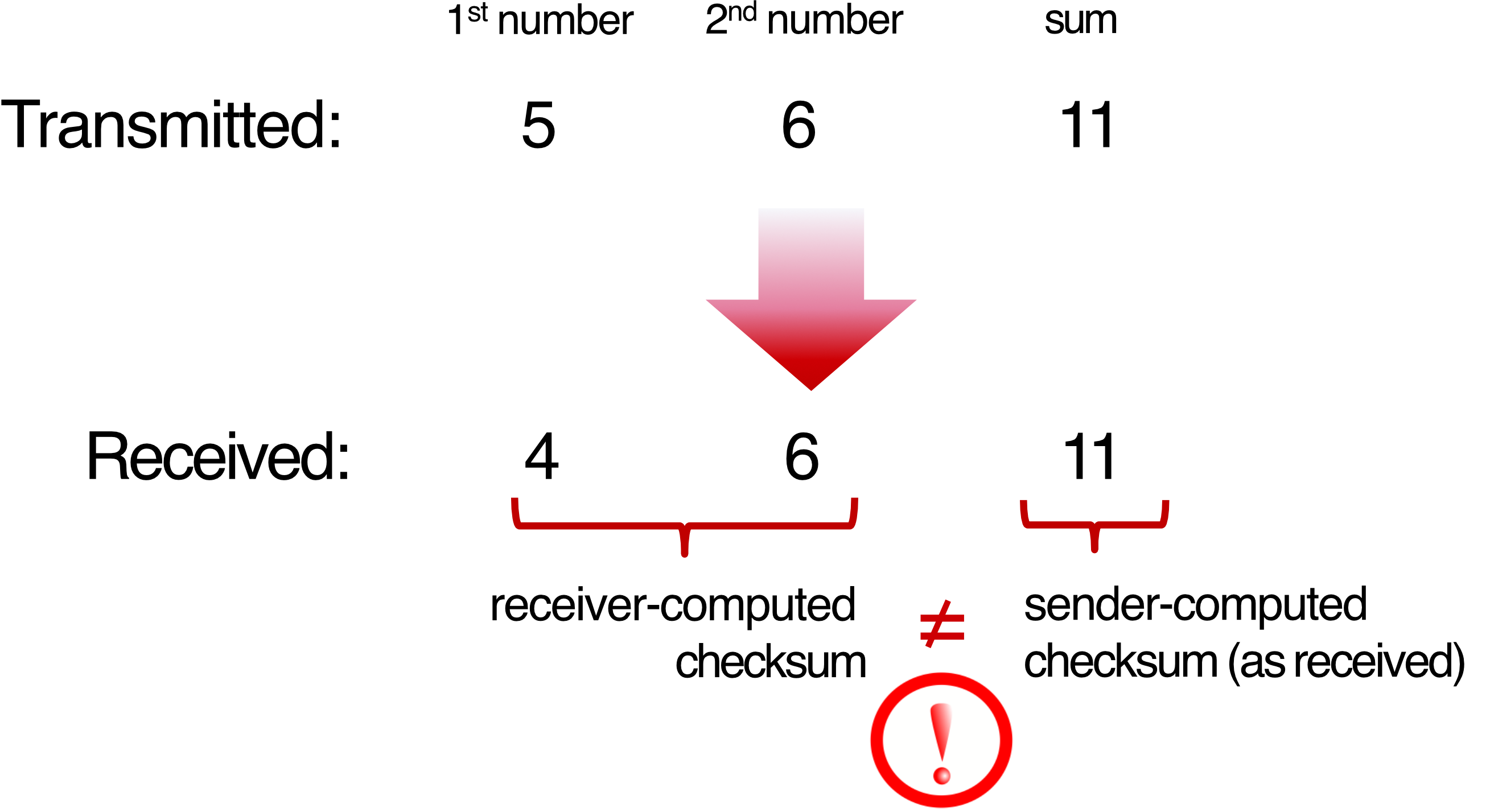
Example Calculation
Transmitted:
- 1st number: 5
- 2nd number: 6
- Sum: 11
Received:
- 1st number: 4 (error!)
- 2nd number: 6
- Receiver-computed checksum: 10
- Sender-computed checksum: 11
- Not equal → ❌ Error detected!
Internet Checksum Example (16-bit)
  1110 0110 0110 0110
+ 1101 0101 0101 0101
─────────────────────
1 1011 1011 1011 1011  (wraparound)
  1011 1011 1011 1100  (add carry)

Checksum (1's complement):
  0100 0100 0100 0011
จะอยู่ใน #MidtermExam แน่นอน บางคนลืม Carry 1+1 ต้องทดด้วย, Wraparound, แล้วก็อย่าลืม Complement
Process:
- Add 16-bit integers
- If carry from MSB, wrap around and add to result
- Take one's complement (flip all bits)
Weakness of Internet Checksum
Example showing weakness:
Original:
  1110 0110 0110 0110
+ 1101 0101 0101 0101
─────────────────────
  1011 1011 1011 1100

Changed bits (errors):
  0110 0110 0110 0110  (bits flipped)
+ 1101 0101 0101 0101
─────────────────────
  1011 1011 1011 1100  (same checksum!)
❌ Even though numbers changed, checksum didn't change!
Limitation: The Internet checksum can miss certain error patterns where bits flip in complementary ways.
UDP Summary
Key Characteristics
- "Bare bone" protocol:
- Segments may be lost
- Segments may be delivered out of order
- Best effort service: "send and hope for the best"
UDP Advantages
✅ No setup/handshaking needed (no RTT incurred)
✅ Can function when network service is compromised
✅ Helps with reliability (checksum)
Primary Uses
- 🌐 DNS
- 🎥 Streaming
- 📊 SNMP
Principles of Reliable Data Transfer
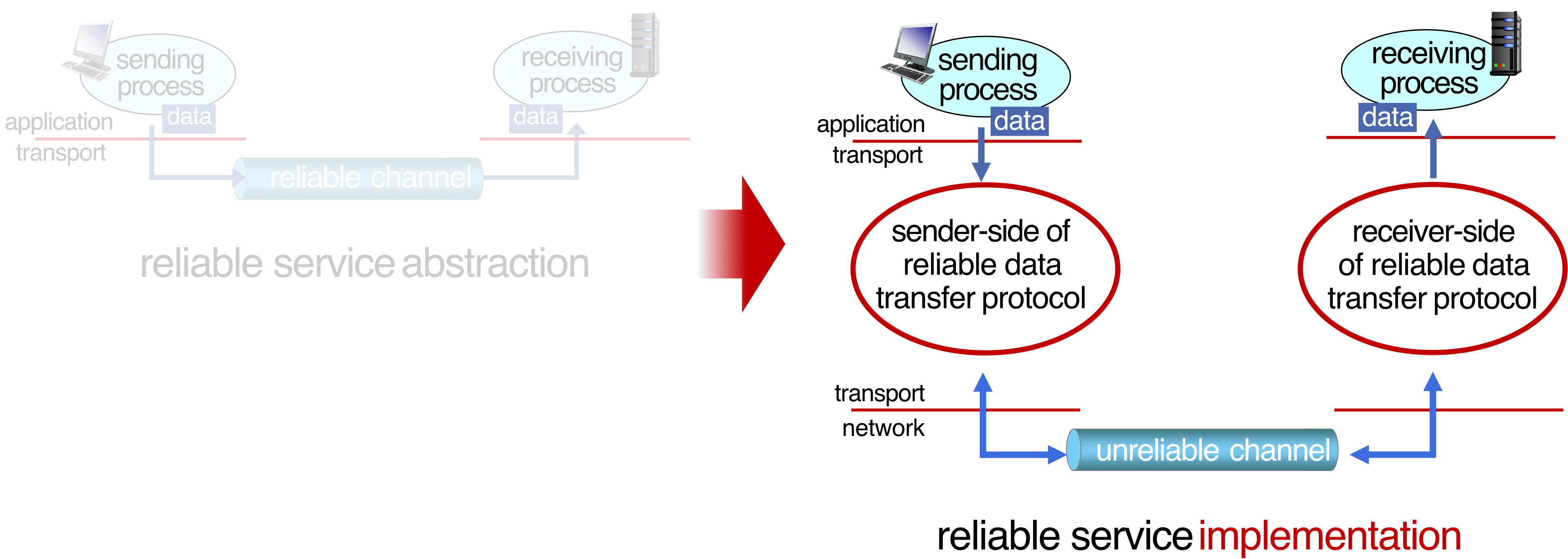
Service Abstraction
Sending process → [Reliable Channel] → Receiving process
     data                                    data
Goal: Create reliable communication over unreliable channel
Service Implementation
Sending process
     ↓
  Transport (sender-side of reliable data transfer protocol)
     ↓
  Network (unreliable channel)
     ↓
  Transport (receiver-side of reliable data transfer protocol)
     ↓
Receiving process
Key Insight
Complexity of reliable data transfer protocol will depend (strongly) on characteristics of unreliable channel:
- Does it lose packets?
- Does it corrupt data?
- Does it reorder packets?
Analogy: Building a reliable communication system over an unreliable channel is like having a conversation in a noisy room – you need protocols like "did you hear me?" and "can you repeat that?"
Important Note
Sender and receiver do not know the "state" of each other
- Example: Was a message received?
- Unless communicated via a message
This is why we need acknowledgments (ACKs) and protocols!
Reliable Data Transfer Protocol (rdt): Interfaces
Key Functions
Sender side:
rdt_send(): Called from above (e.g., by app). Passed data to deliver to receiver upper layerudt_send(): Called by rdt to transfer packet over unreliable channel to receiver
Receiver side:
rdt_rcv(): Called when packet arrives on receiver side of channeldeliver_data(): Called by rdt to deliver data to upper layer
Communication Flow
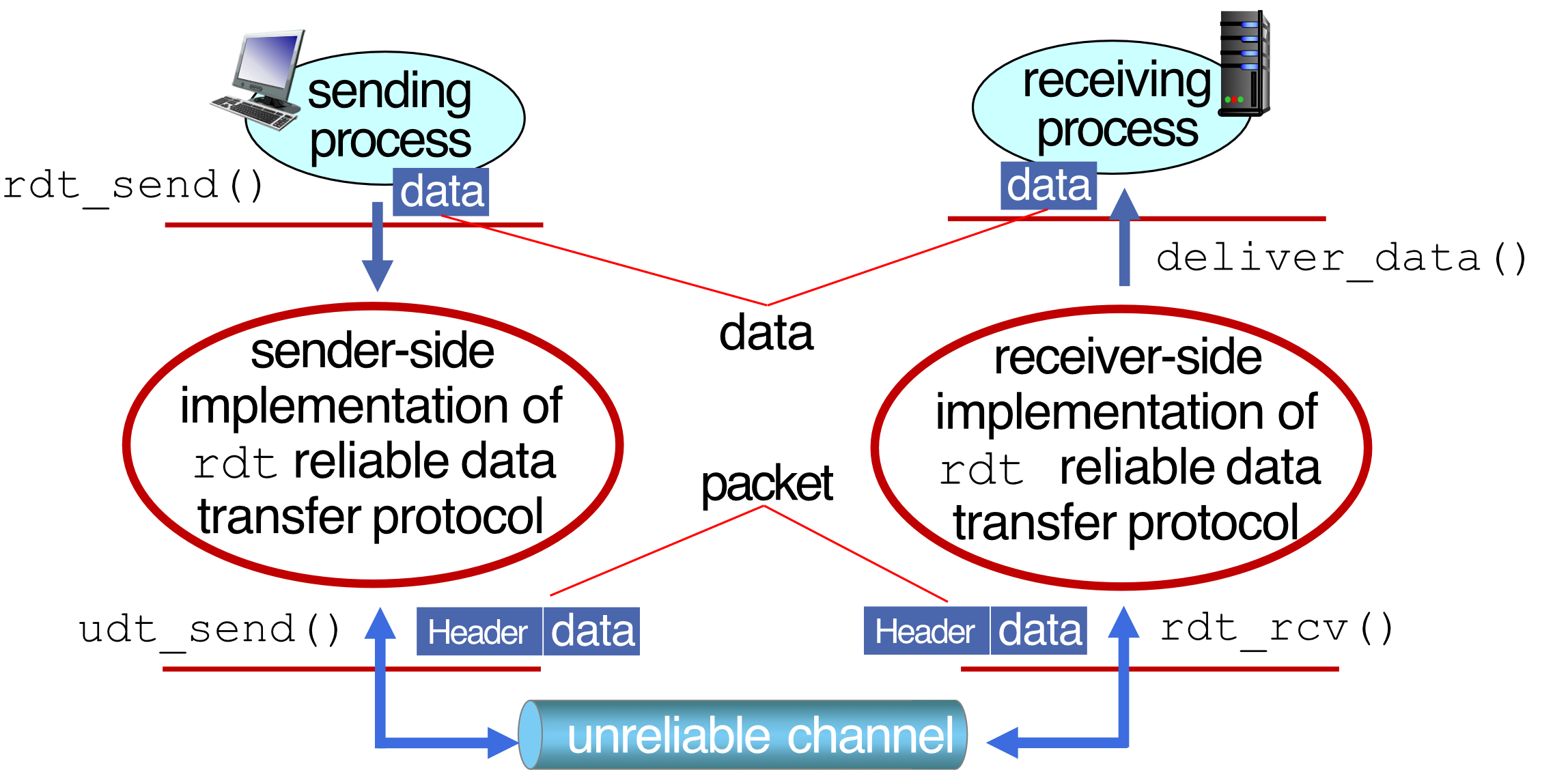
Sending process
     │ data
     ↓ rdt_send()
[Sender-side RDT protocol]
     │ packet (Header + data)
     ↓ udt_send()
──────────────────────────────
  Unreliable Channel
──────────────────────────────
     ↓ rdt_rcv()
[Receiver-side RDT protocol]
     │ data
     ↓ deliver_data()
Receiving process
rdt = reliable data transfer
udt = unreliable data transfer
Reliable Data Transfer: Getting Started
Development Approach
We will:
- Incrementally develop sender and receiver sides of reliable data transfer protocol (rdt)
- Consider only unidirectional data transfer
- But control info will flow in both directions!
Finite State Machines (FSM)
We use FSMs to specify sender and receiver:
     ┌─────────┐
     │ State 1 │
     └─────────┘
         │
    event │ actions
         ↓
     ┌─────────┐
     │ State 2 │
     └─────────┘
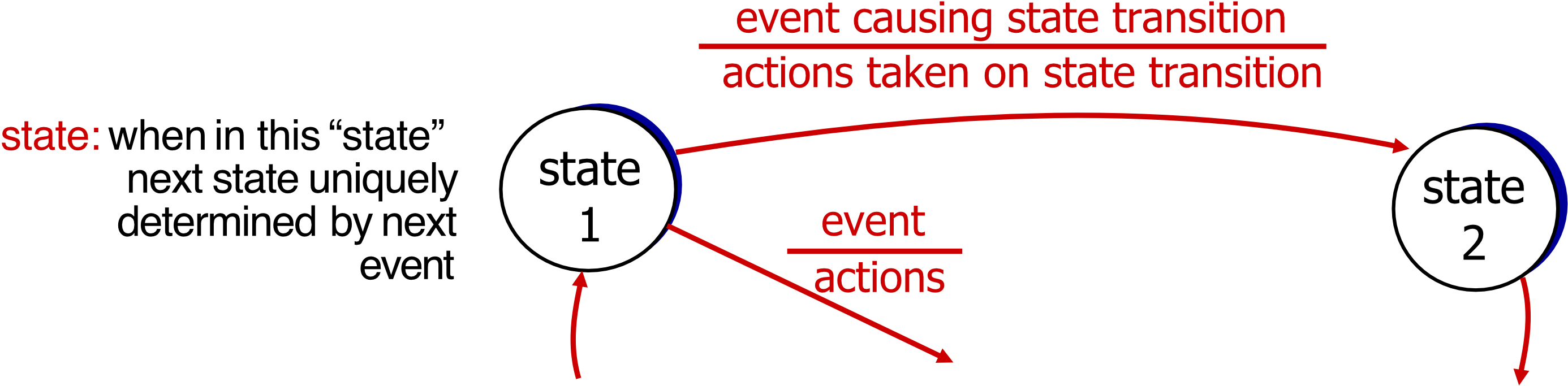
FSM Components:
- State: When in this state, next state uniquely determined by next event
- Event: Causing state transition
- Actions: Taken on state transition
rdt1.0: Reliable Transfer Over a Reliable Channel
Assumptions
Underlying channel perfectly reliable:
- ❌ No bit errors
- ❌ No loss of packets
FSM Specifications
Sender:
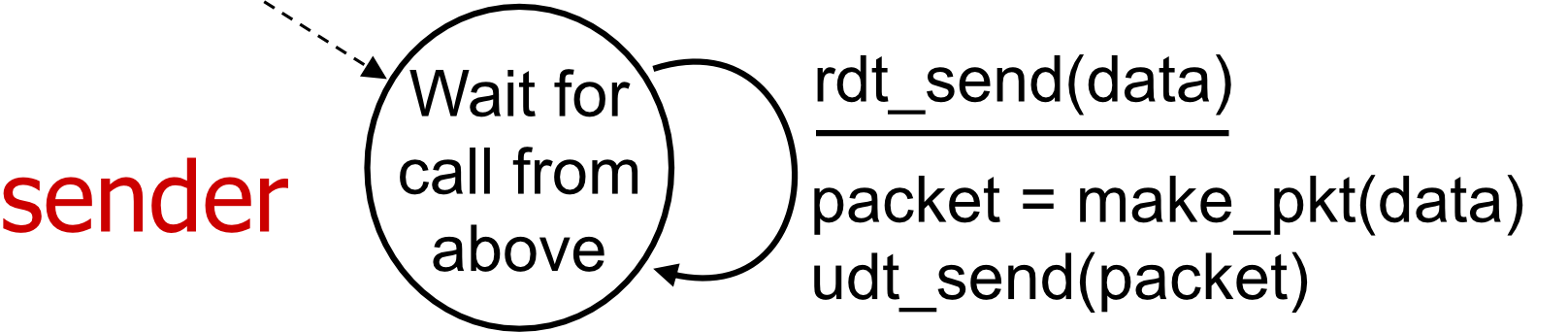
Receiver:
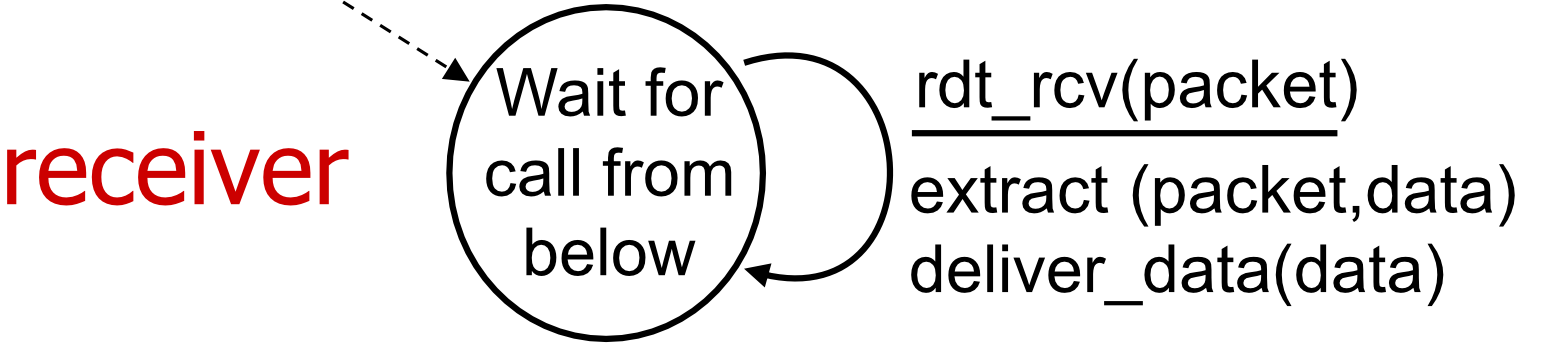
Characteristics
- ✅ Separate FSMs for sender and receiver
- Sender sends data into underlying channel
- Receiver reads data from underlying channel
- Very simple – no error handling needed
This is the ideal case – like having a perfect telephone line with no noise or disconnections.
rdt2.0: Channel with Bit Errors
Problem
Underlying channel may flip bits in packet
- Use checksum (e.g., Internet checksum) to detect bit errors
The Question
How to recover from errors?
Human analogy: How do humans recover from errors during conversation?
- "What did you say?"
- "Can you repeat that?"
- "OK, I got it"
Solution Mechanisms
Acknowledgments (ACKs):
- Receiver explicitly tells sender that packet received OK
Negative Acknowledgments (NAKs):
- Receiver explicitly tells sender that packet had errors
Retransmission:
- Sender retransmits packet on receipt of NAK
Stop and Wait
Protocol characteristic:
- Sender sends one packet
- Then waits for receiver response
rdt2.0: FSM Specifications
Sender FSM
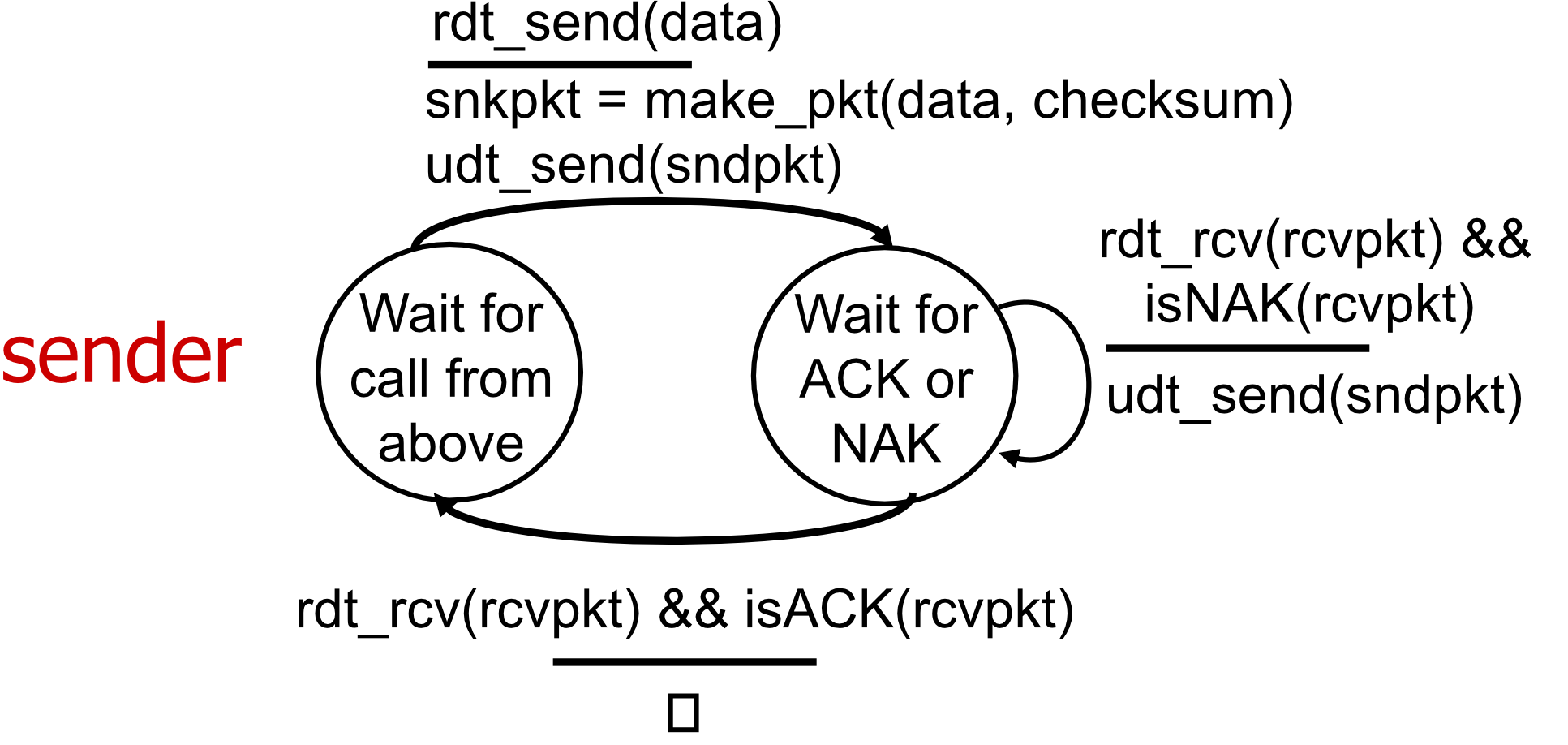
┌──────────────────┐
│  Wait for call   │ rdt_send(data)
│  from above      │────────────────→ sndpkt = make_pkt(data, checksum)
└──────────────────┘                  udt_send(sndpkt)
                                      ↓
                             ┌──────────────────┐
                             │ Wait for ACK     │
                             │ or NAK           │
                             └──────────────────┘
                                      ↓
                    ┌─────────────────┴─────────────────┐
                    ↓                                   ↓
         rdt_rcv(rcvpkt) &&              rdt_rcv(rcvpkt) &&
         isACK(rcvpkt)                   isNAK(rcvpkt)
                    │                                   │
                    └→ Λ                     udt_send(sndpkt) → │
                       │                                         │
                       └─────────────────────────────────────────┘
Receiver FSM
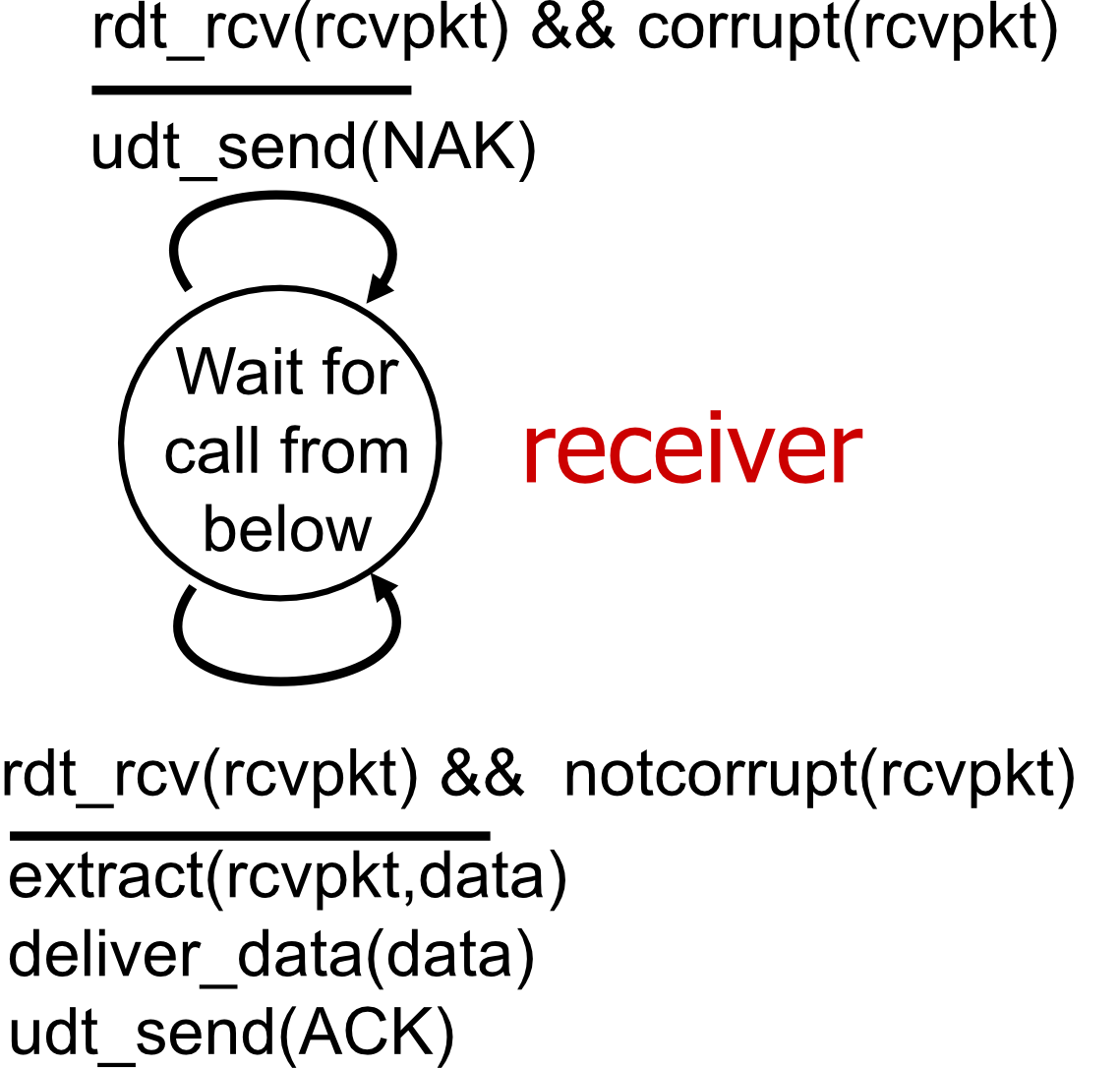
┌──────────────────┐
│  Wait for call   │
│  from below      │
└──────────────────┘
         │
         ↓
    ┌────────────────────────────────┐
    │ rdt_rcv(rcvpkt)                │
    └────────────────────────────────┘
         │
    ┌────┴────┐
    ↓         ↓
notcorrupt  corrupt
    │         │
    ↓         ↓
extract()   udt_send(NAK)
deliver_data()
udt_send(ACK)
Note: “state” of receiver (did the receiver get my
message correctly?) isn’t known to sender unless
somehow communicated from receiver to sender
▪ that’s why we need a protocol!
rdt2.0: Operation Scenarios
Scenario 1: No Errors
Sender                          Receiver
  │                                │
  │──── pkt ───────────────────→   │
  │                                │ (receive, no errors)
  │   ←─────────────────── ACK ──  │
  │                                │
✅ Packet received correctly, ACK sent back
Scenario 2: Corrupted Packet
Sender                          Receiver
  │                                │
  │──── pkt (corrupted) ────────→  │
  │                                │ (detect error)
  │   ←─────────────────── NAK ──  │
  │                                │
  │──── pkt (resend) ───────────→  │
  │                                │ (receive correctly)
  │   ←─────────────────── ACK ──  │
✅ Error detected, NAK sent, packet retransmitted
rdt2.0 Fatal Flaw!
The Problem
What happens if ACK/NAK is corrupted?
- ❌ Sender doesn't know what happened at receiver!
- ❌ Can't just retransmit: possible duplicate
Solution Approach
Handling duplicates:
- Sender: Retransmits current packet if ACK/NAK corrupted
- Sender: Adds sequence number to each packet
- Receiver: Discards (doesn't deliver up) duplicate packets
Stop and Wait
Sender sends one packet, then waits for receiver response
Analogy: Like confirming a text message was received – if the confirmation itself gets lost, you need a way to know if you should resend.
rdt2.1: Handling Corrupted ACK/NAKs
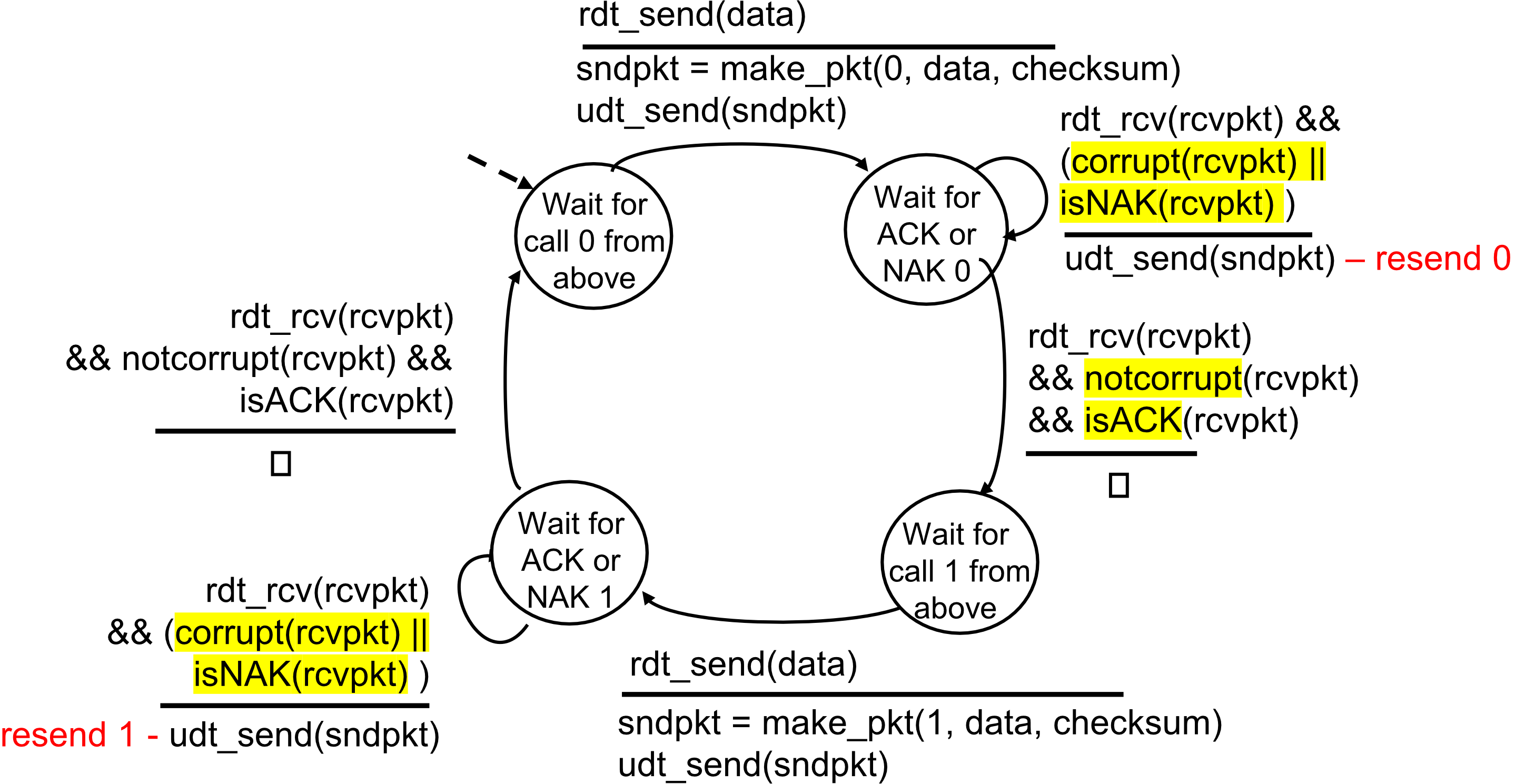
Sender FSM (Sequence Numbers 0 and 1)
State: Wait for call 0 from above
rdt_send(data)
  ↓
sndpkt = make_pkt(0, data, checksum)
udt_send(sndpkt)
  ↓
Wait for ACK or NAK 0
  │
  ├─→ rdt_rcv(rcvpkt) && notcorrupt(rcvpkt) && isACK(rcvpkt)
  │   → Move to "Wait for call 1 from above"
  │
  └─→ rdt_rcv(rcvpkt) && (corrupt(rcvpkt) || isNAK(rcvpkt))
      → udt_send(sndpkt) [resend packet 0]
State: Wait for call 1 from above
rdt_send(data)
  ↓
sndpkt = make_pkt(1, data, checksum)
udt_send(sndpkt)
  ↓
Wait for ACK or NAK 1
  │
  ├─→ rdt_rcv(rcvpkt) && notcorrupt(rcvpkt) && isACK(rcvpkt)
  │   → Move to "Wait for call 0 from above"
  │
  └─→ rdt_rcv(rcvpkt) && (corrupt(rcvpkt) || isNAK(rcvpkt))
      → udt_send(sndpkt) [resend packet 1]
Receiver FSM
State: Wait for 0 from below
rdt_rcv(rcvpkt) && notcorrupt(rcvpkt) && has_seq0(rcvpkt)
  ↓
extract(rcvpkt, data)
deliver_data(data)
sndpkt = make_pkt(ACK, chksum)
udt_send(sndpkt)
  ↓
Move to "Wait for 1 from below"

OR

rdt_rcv(rcvpkt) && (corrupt(rcvpkt) || has_seq1(rcvpkt))
  ↓
sndpkt = make_pkt(NAK, chksum)  [if corrupt]
OR
sndpkt = make_pkt(ACK, chksum)  [if has_seq1 - duplicate, discard]
udt_send(sndpkt)
State: Wait for 1 from below
rdt_rcv(rcvpkt) && notcorrupt(rcvpkt) && has_seq1(rcvpkt)
  ↓
extract(rcvpkt, data)
deliver_data(data)
sndpkt = make_pkt(ACK, chksum)
udt_send(sndpkt)
  ↓
Move to "Wait for 0 from below"

OR

rdt_rcv(rcvpkt) && (corrupt(rcvpkt) || has_seq0(rcvpkt))
  ↓
sndpkt = make_pkt(NAK, chksum)  [if corrupt]
OR
sndpkt = make_pkt(ACK, chksum)  [if has_seq0 - duplicate, discard]
udt_send(sndpkt)
rdt2.1: Discussion
Sender Characteristics
- Seq # added to packet
- Two seq #s (0, 1) will suffice
- Must check if received ACK/NAK is corrupted
- State must "remember" whether "expected" packet should have seq # of 0 or 1
Receiver Characteristics
- Must check if received packet is duplicate
- State indicates whether 0 or 1 is expected packet seq #
- Note: Receiver cannot know if its last ACK/NAK received OK at sender
Key insight: Only 2 sequence numbers needed because we're using stop-and-wait (one packet at a time).
rdt2.2: A NAK-free Protocol
Concept
Same functionality as rdt2.1, using ACKs only
Key Changes
- Instead of NAK: Receiver sends ACK for last packet received OK
- Receiver must explicitly include seq # of packet being ACKed
- Duplicate ACK at sender results in same action as NAK: retransmit current packet
Important: TCP uses this approach to be NAK-free
Sender FSM Modification
Changes from rdt2.1:
Old: rdt_rcv(rcvpkt) && (corrupt(rcvpkt) || isNAK(rcvpkt))
New: rdt_rcv(rcvpkt) && (corrupt(rcvpkt) || isACK(rcvpkt,1))
When expecting ACK0:
- Receiving ACK1 means the receiver is still waiting for packet 0
- This is equivalent to receiving a NAK
Receiver FSM Modification
Changes from rdt2.1:
Old: sndpkt = make_pkt(ACK, chksum)
New: sndpkt = make_pkt(ACK0, chksum)  [when receiving seq 0]
     sndpkt = make_pkt(ACK1, chksum)  [when receiving seq 1]

Old: sndpkt = make_pkt(NAK, chksum)
New: sndpkt = make_pkt(ACK0, chksum)  [if corrupt or has_seq1]
     sndpkt = make_pkt(ACK1, chksum)  [if corrupt or has_seq0]
rdt3.0: Channels with Errors AND Loss
New Problem
Underlying channel can also lose packets (data or ACKs)
Solution: Timeout Mechanism
Approach: Sender waits "reasonable" amount of time for ACK
- If no ACK received in this time: Retransmit
- If packet (or ACK) just delayed (not lost):
- Retransmission will be duplicate
- But seq #s already handle this!
- Receiver must specify seq # of packet being ACKed
Timeout Implementation
Use countdown timer to interrupt after "reasonable" amount of time
Analogy: Like waiting for a response to a text message – if you don't hear back after a while, you send it again.
rdt3.0: Sender FSM
State: Wait for call 0 from above
rdt_send(data)
  ↓
sndpkt = make_pkt(0, data, checksum)
udt_send(sndpkt)
start_timer
  ↓
Wait for ACK 0
  │
  ├─→ rdt_rcv(rcvpkt) && notcorrupt(rcvpkt) && isACK(rcvpkt,0)
  │   → stop_timer
  │   → Move to "Wait for call 1 from above"
  │
  ├─→ rdt_rcv(rcvpkt) && (corrupt(rcvpkt) || isACK(rcvpkt,1))
  │   → [Do nothing, wait for timeout]
  │
  └─→ timeout
      → udt_send(sndpkt)
      → start_timer
State: Wait for call 1 from above
rdt_send(data)
  ↓
sndpkt = make_pkt(1, data, checksum)
udt_send(sndpkt)
start_timer
  ↓
Wait for ACK 1
  │
  ├─→ rdt_rcv(rcvpkt) && notcorrupt(rcvpkt) && isACK(rcvpkt,1)
  │   → stop_timer
  │   → Move to "Wait for call 0 from above"
  │
  ├─→ rdt_rcv(rcvpkt) && (corrupt(rcvpkt) || isACK(rcvpkt,0))
  │   → [Do nothing, wait for timeout]
  │
  └─→ timeout
      → udt_send(sndpkt)
      → start_timer
rdt3.0 in Action
Scenario (a): No Loss
Sender                          Receiver
send pkt0 ─────────────────→    rcv pkt0
                                send ack0
rcv ack0  ←─────────────────
send pkt1 ─────────────────→    rcv pkt1
                                send ack1
rcv ack1  ←─────────────────
send pkt0 ─────────────────→    rcv pkt0
                                send ack0
rcv ack0  ←─────────────────
✅ All packets delivered successfully
Scenario (b): Packet Loss
Sender                          Receiver
send pkt0 ─────────────────→    rcv pkt0
                                send ack0
rcv ack0  ←─────────────────
send pkt1 ──────X               [pkt1 lost]
                ↓
          ⏰ timeout
resend pkt1 ───────────────→    rcv pkt1
                                send ack1
rcv ack1  ←─────────────────
send pkt0 ─────────────────→    rcv pkt0
                                send ack0
✅ Timeout triggers retransmission
Scenario (c): ACK Loss
Sender                          Receiver
send pkt0 ─────────────────→    rcv pkt0
                                send ack0
            X ←─────────────    [ack0 lost]
send pkt1 ─────────────────→    rcv pkt1
                                send ack1
          ⏰ timeout
resend pkt1 ───────────────→    rcv pkt1 (duplicate)
                                send ack1 (detect duplicate)
rcv ack1  ←─────────────────
send pkt0 ─────────────────→    rcv pkt0
                                send ack0
✅ Receiver detects and handles duplicate
Scenario (d): Premature Timeout / Delayed ACK
Sender                          Receiver
send pkt0 ─────────────────→    rcv pkt0
                                send ack0
          ⏰ timeout (early!)
resend pkt1 ───────────────→    rcv pkt1
                                send ack1
rcv ack1  ←─────────────────
                  (delayed)
rcv ack1  ←─────────────────    [duplicate ACK]
          (ignore)
send pkt0 ─────────────────→    rcv pkt0
                                send ack0
✅ System handles delayed/duplicate ACKs correctly
rdt3.0: Stop-and-Wait Performance Issue
Problem Illustration
Sender                          Receiver
  │
  ├─ first packet bit transmitted, t = 0
  │
  │──────────────────────────→
  │                              first packet bit arrives
  │                              ↓
  │                              last packet bit arrives, send ACK
  │                              │
  │  ←──────────────────────────┘
  │  ACK arrives, send next packet, t = RTT + L/R
  │
Where:
- = Round-Trip Time
- = Packet size (e.g., 8000 bits)
- = Link rate (e.g., 1 Gbps)
Performance Impact
❌ rdt3.0 protocol has performance issue! ❌ Protocol limits performance of underlying infrastructure (channel)
Problem: Sender spends most of its time waiting, not sending. The channel is underutilized.
Example calculation:
- bits
- Gbps
- ms
- μs
- Utilization (very low!)
rdt3.1: Pipelined Protocols
Concept
Pipelining: Sender allows multiple, "in-flight", yet-to-be-acknowledged packets
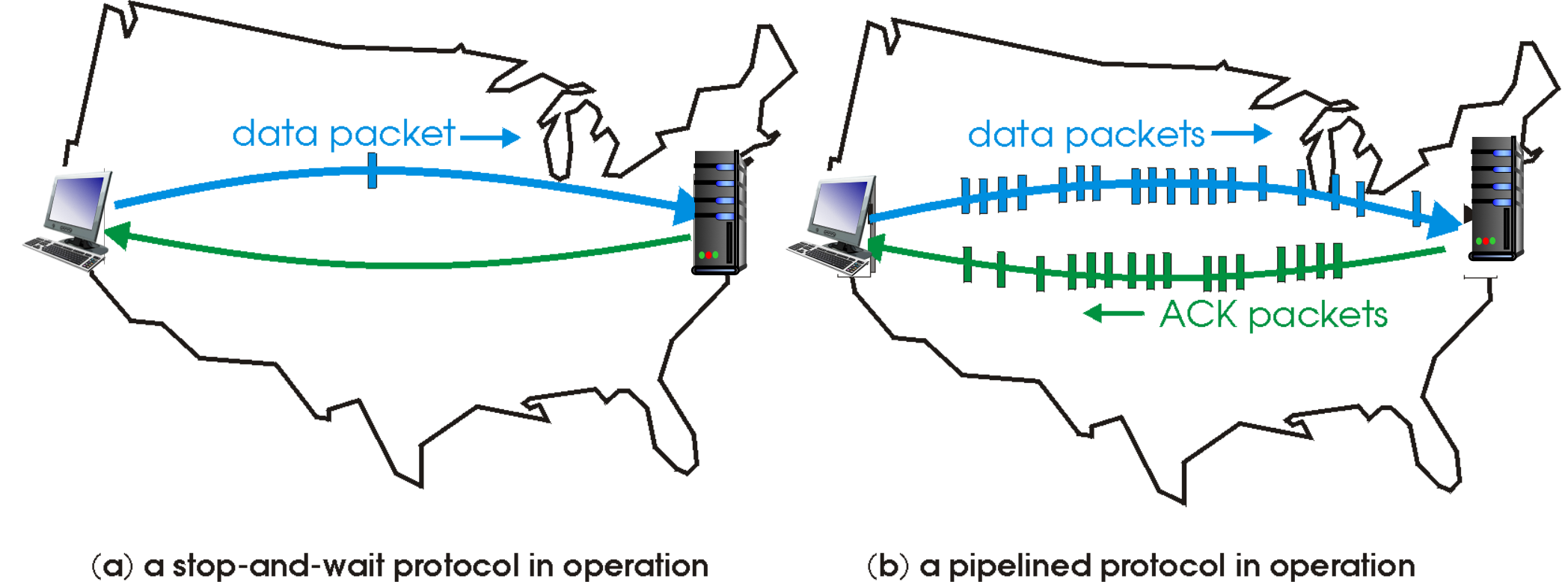
Requirements
- Range of sequence numbers must be increased
- Buffering at sender and/or receiver
Performance Improvement
Stop-and-wait:
│─ pkt ─→│        │        │        │
│        │← ack ──│        │        │
│        │        │─ pkt ─→│        │
│        │        │        │← ack ──│
Pipelined:
│─ pkt0 ─→│─ pkt1 ─→│─ pkt2 ─→│
│         │         │         │
│← ack0 ──│← ack1 ──│← ack2 ──│
Analogy: Instead of sending one package and waiting for confirmation before sending the next, you send multiple packages in quick succession. Like an assembly line vs. one-at-a-time production.
Utilization Improvement
With pipelining:
first packet bit transmitted, t = 0
last bit transmitted, t = L/R
  │─ pkt0 ─→│
  │─ pkt1 ─→│
  │─ pkt2 ─→│ first packet bit arrives
             │ last bit of 2nd packet arrives, send ACK
             │ last bit of 3rd packet arrives, send ACK
Much better channel utilization!
Go-Back-N (GBN)
Lecture 8 - Data Link Control ลองดูว่าเกี่ยวมั้ย
Sender Characteristics
Window: Up to N consecutive transmitted but unACKed packets
- -bit seq # in packet header
Cumulative ACK: acknowledges all packets up to and including seq #
- On receiving : move window forward to begin at
Timer: For oldest in-flight packet
Timeout: triggers retransmission of packet and all higher seq # packets in window
Receiver Characteristics
ACK-only: Always send ACK for correctly-received packet with highest in-order seq #
- May generate duplicate ACKs
- Need only remember
rcv_base
On receipt of out-of-order packet:
- Can discard (don't buffer) OR buffer (implementation decision)
- Re-ACK packet with highest in-order seq #
Analogy: Go-Back-N is like a conveyor belt – if one item falls off, you need to send that item and all subsequent items again, even if some already arrived.
Go-Back-N in Action (No Buffer at Receiver)
Scenario: Packet Loss
Sender window (N=4)          Sender              Receiver

[0 1 2 3] 4 5 6 7 8          send pkt0 ────→     receive pkt0, send ack0
[0 1 2 3] 4 5 6 7 8          send pkt1 ────→     receive pkt1, send ack1
[0 1 2 3] 4 5 6 7 8          send pkt2 ────X     [pkt2 lost]
[0 1 2 3] 4 5 6 7 8          send pkt3 ────→     receive pkt3, discard
                             (wait)               (re)send ack1

0 [1 2 3 4] 5 6 7 8          rcv ack0,
                             send pkt4 ────→     receive pkt4, discard
                                                  (re)send ack1
0 1 [2 3 4 5] 6 7 8          rcv ack1,
                             send pkt5 ────→     receive pkt5, discard
                                                  (re)send ack1

                             ⏰ pkt2 timeout
0 1 [2 3 4 5] 6 7 8          send pkt2 ────→     rcv pkt2, deliver
0 1 [2 3 4 5] 6 7 8          send pkt3 ────→     send ack2
0 1 [2 3 4 5] 6 7 8          send pkt4 ────→     rcv pkt3, deliver, send ack3
0 1 [2 3 4 5] 6 7 8          send pkt5 ────→     rcv pkt4, deliver, send ack4
                                                  rcv pkt5, deliver, send ack5
Key points:
- Out-of-order packets (3, 4, 5) are discarded
- Receiver keeps sending duplicate ACK1
- After timeout, sender goes back and resends pkt2, pkt3, pkt4, pkt5
Selective Repeat (SR)
Concept
Receiver individually acknowledges all correctly received packets
- Buffers packets as needed for eventual in-order delivery to upper layer
Sender times-out/retransmits individually for unACKed packets
- Sender maintains timer for each unACKed packet
Sender Window
- consecutive seq
#s - Limits seq
#sof sent, unACKed packets
Key Difference from Go-Back-N
- Go-Back-N: Retransmit everything from lost packet onward
- Selective Repeat: Only retransmit the specific lost packet
Analogy: Selective Repeat is like having numbered mailboxes – if one letter is lost, you only need to resend that specific letter, not all subsequent mail.
Selective Repeat in Action (Buffer at Receiver)
Scenario: Packet Loss with Buffering
Sender window (N=4)          Sender              Receiver

[0 1 2 3] 4 5 6 7 8          send pkt0 ────→     receive pkt0, send ack0
[0 1 2 3] 4 5 6 7 8          send pkt1 ────→     receive pkt1, send ack1
[0 1 2 3] 4 5 6 7 8          send pkt2 ────X     [pkt2 lost]
[0 1 2 3] 4 5 6 7 8          send pkt3 ────→     receive pkt3, BUFFER
                             (wait)               send ack3

0 [1 2 3 4] 5 6 7 8          rcv ack0,
                             send pkt4 ────→     receive pkt4, BUFFER
                                                  send ack4
                             record ack3

0 1 [2 3 4 5] 6 7 8          rcv ack1,
                             send pkt5 ────→     receive pkt5, BUFFER
                                                  send ack5

                             ⏰ pkt2 timeout
0 1 [2 3 4 5] 6 7 8          send pkt2 ────→     rcv pkt2
0 1 [2 3 4 5] 6 7 8          (but not 3,4,5)     DELIVER: pkt2, pkt3,
0 1 [2 3 4 5] 6 7 8                              pkt4, pkt5
0 1 [2 3 4 5] 6 7 8                              send ack2
Key differences:
- Out-of-order packets (3, 4, 5) are buffered, not discarded
- Individual ACKs sent: ack3, ack4, ack5
- After pkt2 timeout, only pkt2 is retransmitted
- Receiver delivers buffered packets in order once pkt2 arrives
Reliable Data Transfer (RDT) Summary
Protocol Evolution
- RDT 1.0: Over reliable channel
- Assumption: No errors, no loss
- Action: Simple send/receive
- RDT 2.0: Handle bit errors
- Mechanisms: ACK/NAK, checksum
- Problem: What if ACK/NAK corrupted?
- RDT 2.1: Handle corrupted ACK/NAK
- Mechanisms: Sequence numbers, duplicate detection, resend
- Improvement: Can handle corrupt acknowledgments
- RDT 2.2: NAK-free protocol
- Mechanism: Use ACK with seq# instead of NAK
- Benefit: Simpler protocol (only ACKs needed)
- RDT 3.0: Handle errors AND loss
- Mechanism: Timeout timer
- Problem: Performance issue (stop-and-wait)
- RDT 3.1: Handle performance issue
- Mechanism: Pipelining (multiple in-flight packets)
- Two approaches:
- Go-Back-N (no buffer at receiver)
- Selective Repeat (buffer at receiver)
Comparison Table
| Protocol | Errors | Loss | Duplicates | Method | Buffer |
|---|---|---|---|---|---|
| RDT 1.0 | ❌ | ❌ | ❌ | Simple | No |
| RDT 2.0 | ✅ | ❌ | ❌ | ACK/NAK | No |
| RDT 2.1 | ✅ | ❌ | ✅ | Seq#, ACK/NAK | No |
| RDT 2.2 | ✅ | ❌ | ✅ | Seq#, ACK only | No |
| RDT 3.0 | ✅ | ✅ | ✅ | Timeout | No |
| Go-Back-N | ✅ | ✅ | ✅ | Pipelined, cumulative ACK | No (discard) |
| Selective Repeat | ✅ | ✅ | ✅ | Pipelined, individual ACK | Yes |
Summary of Transport Layer Part 1
Topics Covered
✅ Transport-layer services
- Logical communication between processes
- Multiplexing and demultiplexing
✅ Connectionless transport: UDP
- Characteristics and use cases
- UDP segment structure
- Checksum mechanism
✅ Principles of reliable data transfer
- Evolution from RDT 1.0 to RDT 3.1
- Mechanisms: ACK/NAK, sequence numbers, timeouts
- Pipelining approaches: Go-Back-N, Selective Repeat
Next Week: Part 2
🔜 Connection-oriented transport: TCP 🔜 Principles of congestion control 🔜 TCP congestion control
Key Takeaways
Core Concepts to Remember
-
Transport Layer Purpose:
- Process-to-process communication
- Port numbers identify processes
- Two main protocols: TCP (reliable) and UDP (unreliable)
-
Multiplexing/Demultiplexing:
- UDP: Uses destination port only
- TCP: Uses 4-tuple (src IP, src port, dest IP, dest port)
-
UDP Characteristics:
- Connectionless, best-effort
- Fast but unreliable
- Used for DNS, streaming, SNMP
-
Building Reliable Protocols:
- Start simple, add complexity incrementally
- Key mechanisms: checksums, ACKs, sequence numbers, timeouts, pipelining
- Trade-offs between simplicity and performance
-
Pipelining Approaches:
- Go-Back-N: Simpler receiver (no buffer), but may retransmit unnecessarily
- Selective Repeat: More complex (buffering), but more efficient
Final thought: Reliable data transfer over unreliable networks requires careful protocol design with mechanisms to detect and recover from errors, losses, and timing issues.