Part I: Introduction
If Cloud Computing is So Great, Why Isn't Everyone Doing It?
- The cloud acts as a big black box — nothing inside the cloud is visible to clients
- Clients have no idea or control over what happens inside a cloud
- Even if the cloud provider is honest, it can have malicious system admins who can tamper with VMs and violate confidentiality and integrity
- Clouds are still subject to traditional threats:
- Data confidentiality
- Data integrity
- Data availability
- Privacy issues
- Plus additional cloud-specific attacks
เหมือนเราฝากเงินไว้กับธนาคาร แต่เราไม่รู้เลยว่าข้างในนั้นเขาทำอะไรกับเงินของเรา แม้ธนาคารจะซื่อสัตย์ แต่พนักงานอาจไม่ใช่
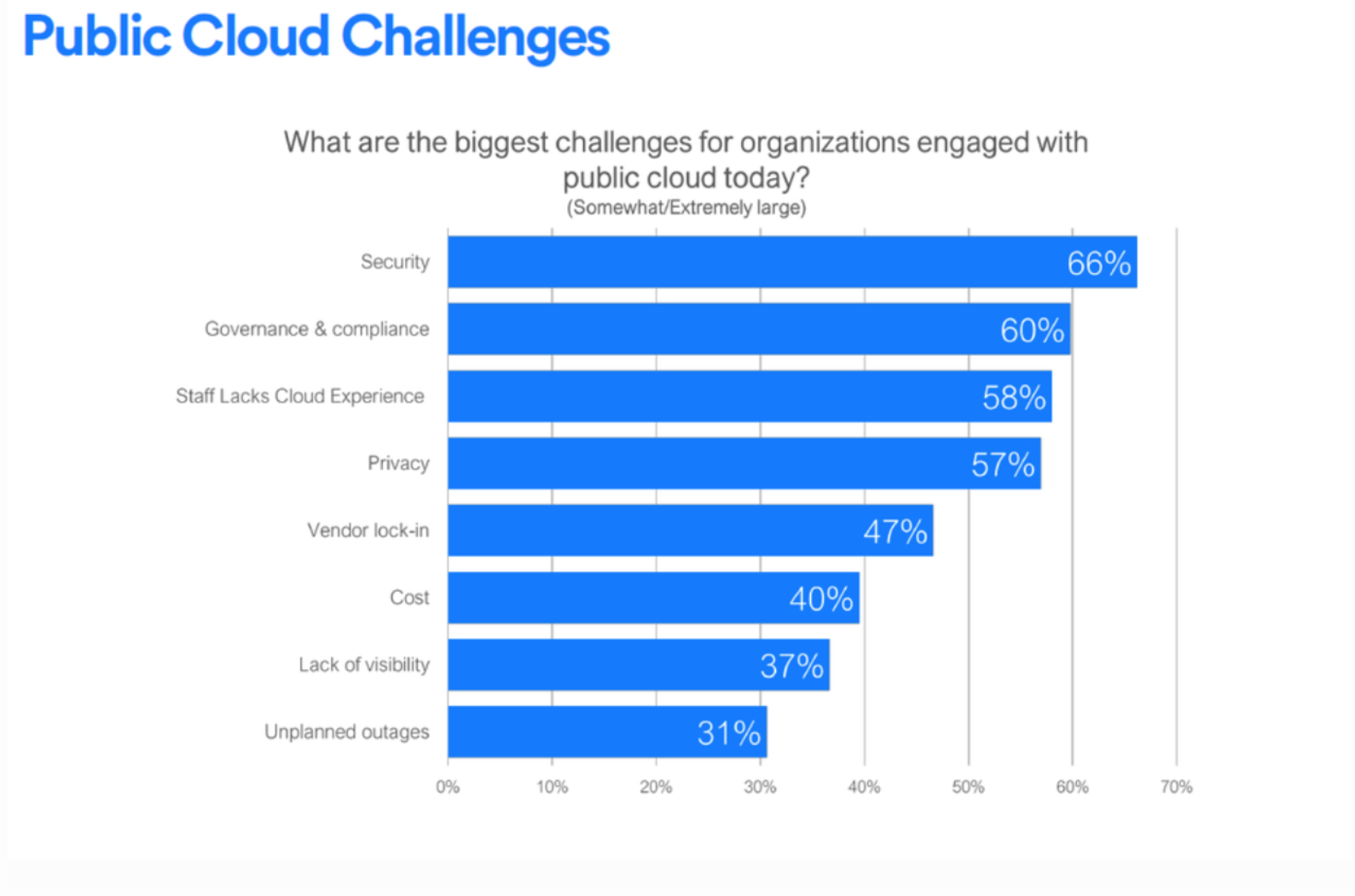
Causes of Problems Associated with Cloud Computing
- Most security problems stem from:
- Loss of control — data/resources are no longer in your hands
- Lack of trust (mechanisms) — hard to verify what the provider is doing
- Multi-tenancy — multiple users share the same physical infrastructure
- These problems exist mainly in 3rd-party management models
- Self-managed clouds still have security issues, but not related to the above
Loss of Control in the Cloud
- Consumer's loss of control:
- Data, applications, resources are located with the provider
- User identity management is handled by the cloud
- Access control rules, security policies and enforcement are managed by the cloud provider
- Consumer relies on provider to ensure:
- Data security and privacy
- Resource availability
- Monitoring and repairing of services/resources
เหมือนให้คนอื่นดูแลกุญแจบ้านแทนเรา — เราต้องเชื่อใจเขาทั้งหมด
Taxonomy of Fear
Confidentiality
- Fear of loss of control over data
- Will sensitive data stored on a cloud remain confidential?
- Will cloud compromises leak confidential client data?
- Will the cloud provider itself be honest and won't peek into the data?
Integrity
- How do I know that the cloud provider is doing computations correctly?
- How do I ensure that the cloud provider really stored my data without tampering?
Availability
- Will critical systems go down if the provider is attacked in a Denial of Service (DoS) attack?
- What happens if the cloud provider goes out of business?
- Would cloud scale well enough?
- Often-voiced concern:
- Although cloud providers argue their downtime compares well with client's own data centers
ถ้าใช้ Cloud เราจะ worried about Confidentiality มากที่สุด
Privacy
- Massive data mining issues:
- Cloud stores data from many clients → can run data mining algorithms to gather large amounts of information on clients
- Increased attack surface:
- Entity outside the organization now stores and computes data
- Attackers can target the communication link between cloud provider and client
- Cloud provider employees can be phished
Auditability and Forensics
- Difficult to audit data held outside the organization
- Forensics also made difficult — clients don't maintain data locally
ถ้าอยากจะ Audit ก็ implement เอง (พวก log file, auditing mechanism)
Legal Quagmire and Transitive Trust
- Who is responsible for complying with regulations?
- e.g., SOX, HIPAA, GLBA, GDPR, PDPA
- If cloud provider subcontracts to third-party clouds, will the data still be secure?
Quote: "Cloud Computing is a security nightmare and it can't be handled in traditional ways." — John Chambers, CISCO CEO
- Security is one of the most difficult tasks to implement in cloud computing
- Different forms of attacks on the application side and hardware components
- Attacks with catastrophic effects only need one security flaw
Threat Model
- A threat model helps in:
- Analyzing a security problem
- Designing mitigation strategies
- Evaluating solutions
- Steps:
- Identify attackers, assets, threats and other components
- Rank the threats
- Choose mitigation strategies (provide control)
- Build solutions based on the strategies
Basic Components of a Threat Model
- Attacker modeling
- Choose what attacker to consider:
- Insider vs. outsider?
- Single vs. collaborator?
- Attacker motivation and capabilities
- Choose what attacker to consider:
- Attacker goals
- Vulnerabilities / Threats
Cloud Computing Threats (from CSA)
- Data lose or leakage (T1): This threat is measured as the most critical and terrifying threat for businesses and consumers. Any data deletion by service provider or baleful accident such as fire can lead to lose the consumer's data
- Account or service hijacking (T2): This weakness allows attackers to steal credentials and access to critical areas of cloud computing services. The organization should prohibit the sharing of credentials between different services and users and use strong authentication techniques
- Insecure interface (T3): Cloud computing's customers use Application Programming Interface (API) or software interfaces to interact and manage cloud services. Authentication, access control and monitoring technologies for APIs protect computing resources from malicious attacks
- Denial of service (T4): Distributed Denial of Service (DDoS) is the major security threat to availability when it comes to increase reliability of organizations on public cloud services (Lohman, 2011). On the other hand, this attack prevents users from accessing their data or applications and there is no way to reach their destination. Cloud service providers need to be sure about availability protection and customers need to be sure about the level of availability protection within a provider
- Malicious insider (T5): The system has been damaged by authorized employee, business partner or administrator that has access to a network or resources. This dangerous threat affects the confidentiality, integrity or availability of business information
- Data breaches (T6): One of the worse situations for each organization is unauthorized access or illegal viewing data by competitors. Data encryption can reduce the risk of this threat, but should be careful about encryption key because if you lose it, you will lose your data as well
- Abuse of cloud services (T7): Cloud computing providers do not enforce any strong registration process and any user with a valid credit card can register to receive cloud services (Hamza et al., 2013). Integrating of registration faint and weak fraud detection allow attacker to leverage data by offensive cloud models same as PaaS and IaaS
- Insufficient due diligence (T8): The cost reduction, access to pool of resources and improving security are the most important interesting factors for organization to rush cloud computing. Without understanding of Cloud Service Provider (CSP) environment, mismatched expectation has been created as a critical issue on security control of cloud computing. However, for sufficient qualification of resources, organizations have to understand the service provider offerings and risks
- Insecure VM migration (T9): By migrating different VMs during hybrid and federated clouds, attackers can access data illegally and transfer VM to untrusted host (Hashizume et al., 2013). Virtualization as the main component of IaaS is the main goal to be targeted by attackers. Trusted cloud computing and encryption technology protect data resources from insecure VM migration
Due Diligence vs. Due Care
- Due Care = day-to-day habits, policies, and procedures to keep us safe and out of trouble
- Due Diligence = taking necessary precautions in a given situation (e.g., investigating a potential problem that has been detected)
- ==Due diligence comes before due care== — it is a management process used to gather facts before making a decision
- Implementation of controls = Due Care
- Verification that controls are being implemented = Due Diligence
Due Diligence = "ตรวจสอบก่อนทำ", Due Care = "ทำอย่างรอบคอบ" เหมือนก่อนซื้อของ (Due Diligence) vs. ใช้ของอย่างระวัง (Due Care)
What is the Issue?
- The core issue is levels of trust
- Many cloud providers trust their customers
- Each customer is physically mixing its data with data from anybody else using the cloud (while logically having its own virtual space)
- Cloud provider security is typically focused on: outsiders are evil, insiders are good
- But what if those inside are also evil?
Attacker Capability: Malicious Insiders
At the Client Side
- Learn passwords / authentication information
- Gain control of the VMs
At the Cloud Provider Side
- Log client communication
- Read unencrypted data
- Possibly peek into VMs, or make copies of VMs
- Monitor network communication, application patterns
- Why?
- Gain information about client data/behavior
- Sell the information or use it directly
Attacker Capability: Outside Attacker
- What can they do?
- Listen to network traffic (passive)
- Insert malicious traffic (active)
- Probe cloud structure (active)
- Launch DoS
- Goals:
- Intrusion
- Network analysis
- Man-in-the-Middle (MITM)
- Cartography (mapping the cloud infrastructure)
Challenges for the Attacker
- How to find out where the target is located in the cloud?
- How to become co-located with the target on the same physical machine?
- How to gather information about the target?
Part II: Security and Privacy Issues in Cloud Computing
Big Picture
- Infrastructure Security
- Data Security and Storage
- Identity and Access Management (IAM)
- Privacy
- And more…
Infrastructure Security
Three levels to consider:
- Network Level
- Host Level
- Application Level
The Network Level
- Ensuring confidentiality and integrity of data-in-transit to/from cloud provider
- Ensuring proper access control (authentication, authorization, auditing) for cloud resources
- Ensuring availability of Internet-facing resources in a public cloud
- Replacing the established model of network zones and tiers with domains
The Host Level
- SaaS / PaaS:
- Both abstract and hide the host OS from end users
- Host security responsibilities are transferred to the CSP (Cloud Service Provider)
- You do not have to worry about protecting hosts
- However, as a customer, you still own the risk of managing information hosted in cloud services
Local Host Security
- Local host machines are outside the security perimeter of the cloud
- While consumers worry about the cloud provider's security, they may forget to harden their own machines
- The lack of local device security can:
- Provide a way for malicious services on the cloud to attack local networks
- Compromise the cloud and its resources for other users
- Devices that access the cloud should have:
- Strong authentication mechanisms
- Tamper-resistant mechanisms
- Strong isolation between applications
- Methods to trust the OS
- Cryptographic functionality when traffic confidentiality is required
The Application Level
- DoS (Denial of Service) — classic availability attack
- EDoS (Economic Denial of Sustainability)
- An attack against the billing model with the goal of bankrupting the service itself
- Exploits the pay-per-use nature of cloud — makes the victim pay enormous bills
- End user security — who is responsible for web application security in the cloud?
- ก็ต้อง cloud provider + เราเนี่ยแหละ
- อย่างน้อง cloud proivder ก็ต้อง provide web application firewall
- #FinalExam ให้แนะนำ วิธีการป้องกันหน่อย web application
- Application security considerations:
- SaaS / PaaS / IaaS application security
- Customer-deployed application security
EDoS เหมือนให้คนมากดสั่งของ Grab ทิ้งไว้ตลอด จนร้านค้าต้องเสียค่าใช้จ่ายจนเจ๊ง
Data Security and Storage
Data States and Risks
- Data-in-transit
- Confidentiality + integrity using secured protocols (e.g., TLS)
- Confidentiality with non-secured protocol + encryption
- Data-at-rest
- Generally not encrypted since data is commingled with other users' data
- If encrypted — how about indexing and searching?
- Solutions: Homomorphic encryption vs. Predicate encryption
- Processing of data (multi-tenancy)
- For any application to process data, it must be decrypted
Data Remanence
- The residual representation of digital data that remains even after attempts to remove/erase it
- Inadvertent disclosure of sensitive information is possible
- Mitigation strategies:
- Do not place any sensitive data in a public cloud
- Encrypt data before placing it into the cloud
- Centralized large amounts of data → attractive target for criminals
- Physical security of the data center and trustworthiness of sysadmins take on new importance
เช่นแบบ เวลาจะ encrypt อะไร key ที่ใช้อาจจะไปอยู่ใน memory ก็ได้ อันนั้นแหละเราเรียกว่า Data Remanence
Typical Searchable Encryption Model
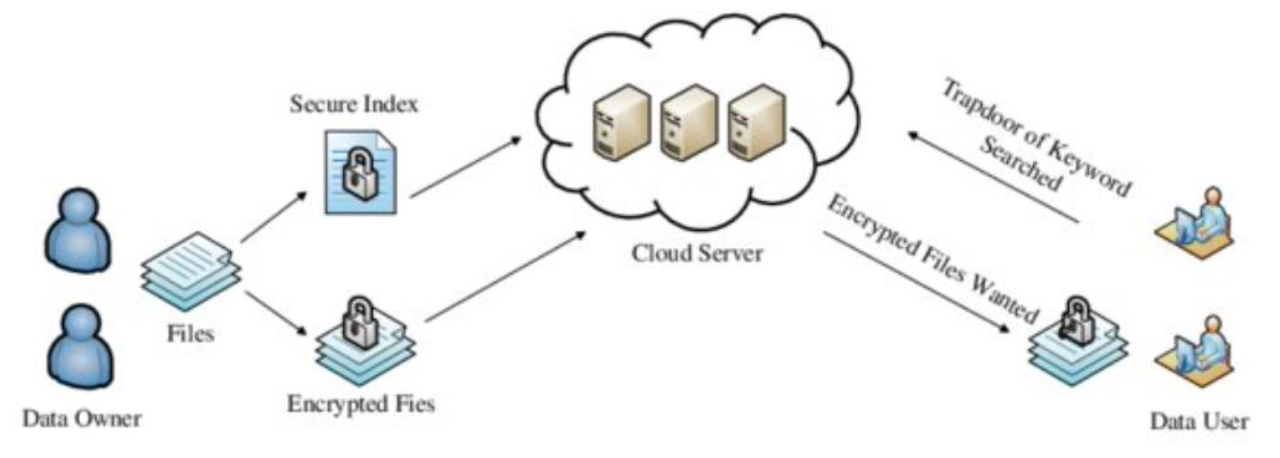
- We encrypt index, files
- Users need trapdoor to get those files??
Identity and Access Management (IAM)
Why IAM?
- Organization's trust boundary will become dynamic and extend into the service provider domain
- Managing access for diverse user populations (employees, contractors, partners)
- Increased demand for authentication:
- Personal, financial, medical data now hosted in the cloud
- Software applications hosted in the cloud require access control
- Need for higher-assurance authentication:
- Authentication in the cloud may mean authentication outside firewall
- Limits of password authentication
- Need for authentication from mobile devices
Privacy
What is Privacy?
- The concept of privacy varies widely among countries, cultures, and jurisdictions
- It is shaped by public expectations and legal interpretations
- Privacy rights/obligations relate to the collection, use, disclosure, storage, and destruction of personal data — Personally Identifiable Information (PII)
- At the end of the day, privacy is about:
- Accountability of organizations to data subjects
- Transparency around an organization's practices regarding personal information
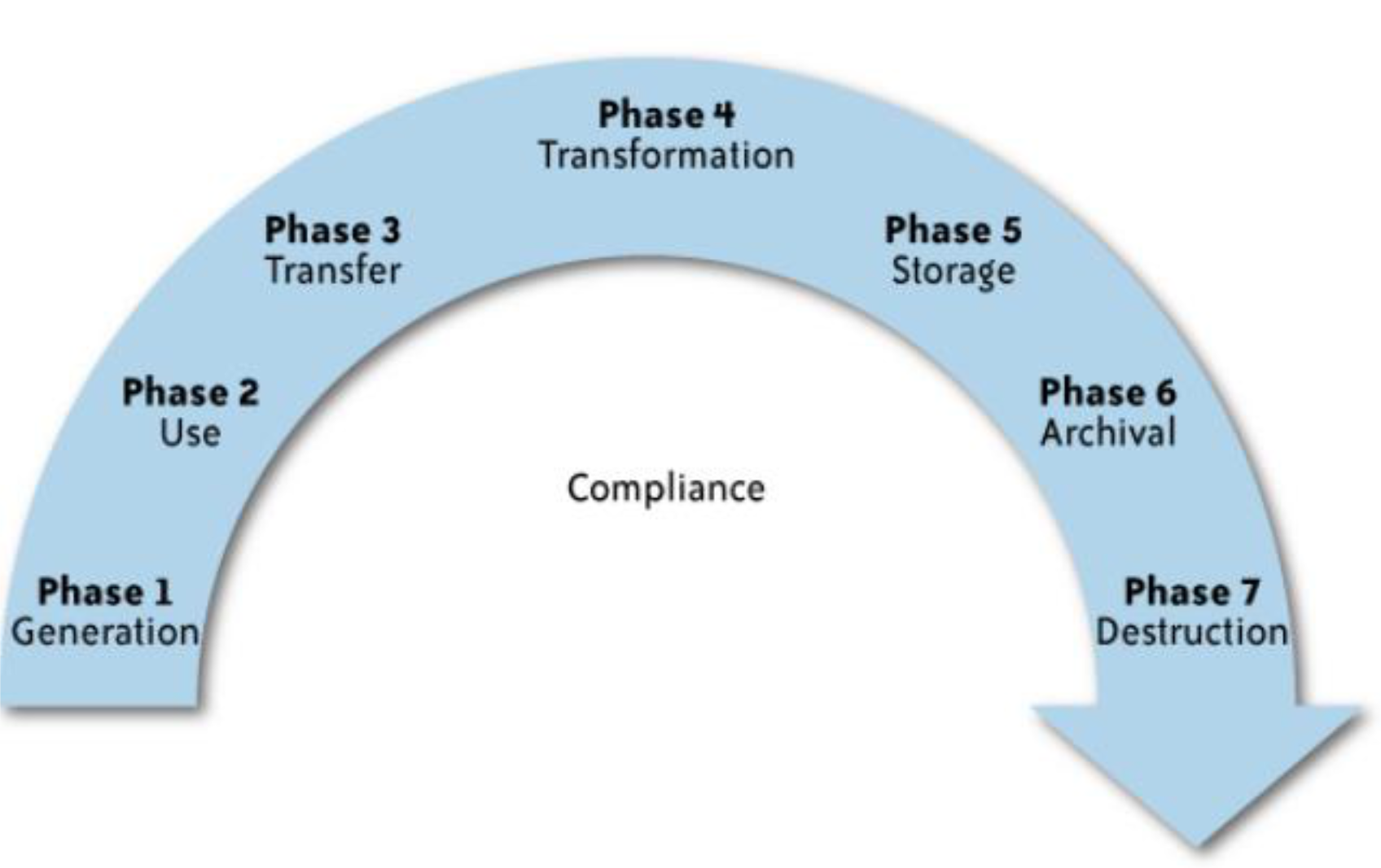
What is the Data Life Cycle?
- Personal information should be managed as part of the data used by the organization
- Protection of personal information should consider the impact of the cloud on each phase
Security vs Privacy
- Privacy for คนทั่วไป
- Security for developer
How can we get the PII?
Indentity provider, maybe system generate the PII
Key Privacy Concerns
- Typically mix security and privacy
- Considerations:
- Storage
- Retention
- Destruction
- Auditing, monitoring and risk management
- Privacy breaches
- Who is responsible for protecting privacy?
How can we make sure that our data/information is properly destroy (destruction) and cannot be recovered back?
- Magnetic field (degaussing)
- Strong magnetic fields scramble the magnetic domains on HDDs → data becomes unreadable.
- Doesn’t work well on SSDs.
- Shredding / Crushing / Incineration
- Literally destroying the disk (used by governments, data centers).
- Overwrite ไง
Storage
- Is data commingled with information from other organizations using the same CSP?
- Aggregation of data raises new privacy issues:
- Some governments may search through data without notifying the data owner, depending on where data resides
- Whether the cloud provider itself has any right to see and access customer data?
- Some services track user behavior for targeted advertising or service improvement
Retention
- How long is personal information retained in the cloud?
- Which retention policy governs the data?
- Does the organization own the data, or the CSP?
- Who enforces the retention policy, and how are exceptions (e.g., litigation holds) managed?
Destruction
- How does the cloud provider destroy PII at the end of the retention period?
- How do organizations ensure PII is actually destroyed and not available to other cloud users?
- Cloud storage providers replicate data across multiple systems and sites
- Did the CSP really destroy the data, or just make it inaccessible?
- Is the CSP keeping the information to mine it for its own use?
Auditing, Monitoring and Risk Management
- How can organizations monitor their CSP and provide assurance that privacy requirements are met?
- Are CSPs regularly audited?
- What happens in the event of an incident?
- If business-critical processes migrate to cloud, internal security processes must evolve to allow multiple cloud providers to participate
- Includes: security monitoring, auditing, forensics, incident response, business continuity
Privacy Breaches
- How do you know that a breach has occurred?
- How do you ensure that the CSP notifies you when a breach occurs?
- Who is responsible for managing the breach notification process (and costs)?
- If contracts include liability for breaches resulting from CSP negligence:
- How is the contract enforced?
- How is it determined who is at fault?
Who is Responsible for Protecting Privacy?
Example Scenario: A hacker breaks into Cloud Provider A and steals data from Company X. The compromised server also contains data from Companies Y and Z.
- Who investigates this crime?
- Is it the Cloud Provider, even though Company X fears the provider will absolve itself from responsibility?
- Does Company X have the right to see other data on that server, including logs?
- Data breaches have a cascading effect
- Full reliance on a third party to protect personal data
- In-depth understanding of responsible data stewardship
- Organizations can transfer liability, but not accountability
- Risk assessment and mitigation throughout the data life cycle is critical
- The overall complexity of privacy protection in the cloud represents a bigger challenge
Cloud DLP (Data Loss Prevention)
- DLP = process for protecting sensitive data at rest, in-transit, and on endpoints to reduce data theft or unauthorized exposure
- Cloud DLP specifically protects organizations that have adopted cloud storage:
- Ensures sensitive data is encrypted before entering the cloud
- Ensures data is only sent to authorized cloud applications
- Most cloud DLP solutions remove or alter classified/sensitive data before files are shared to the cloud
- Cloud DLP is normally deployed in the cloud, but:
- Can also integrate with on-premise systems
- Many organizations use a hybrid model for full coverage
เช็คไงว่าข้อมูล contain PII or not → if so ดังนั้นก็ block ไม่ให้ส่ง??
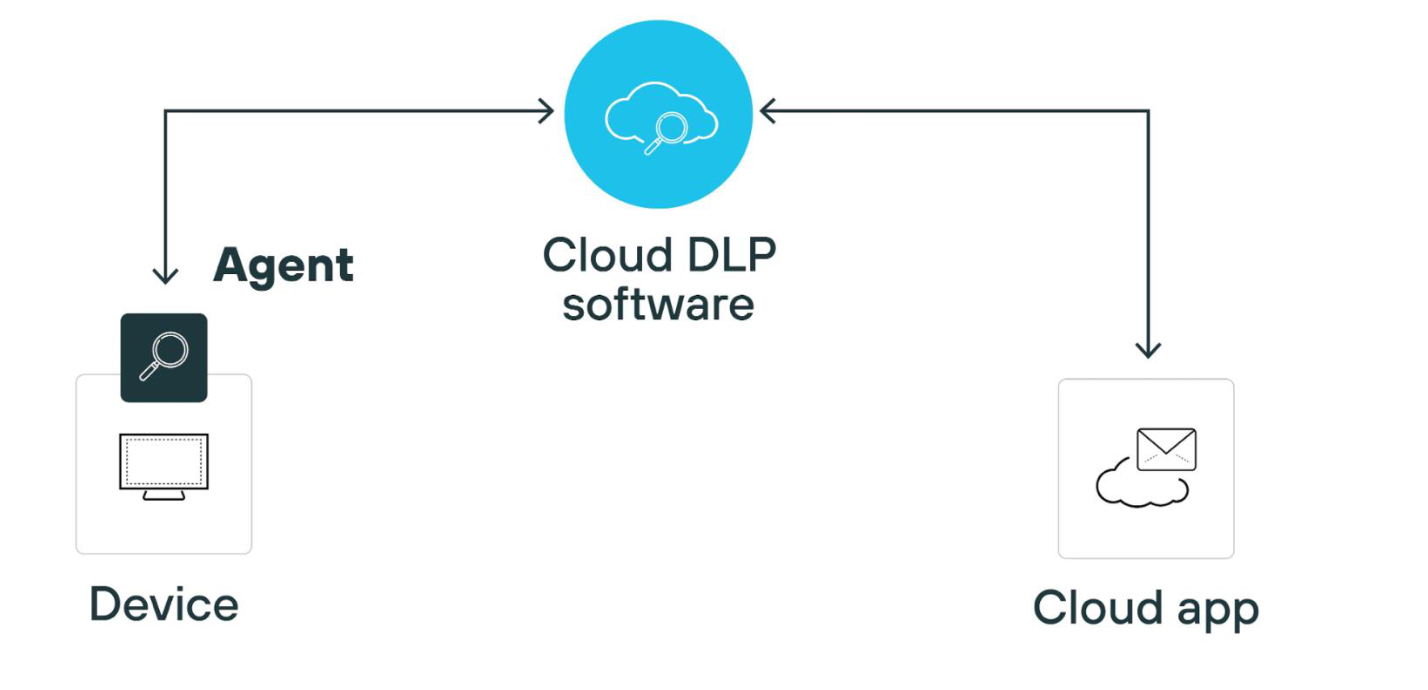
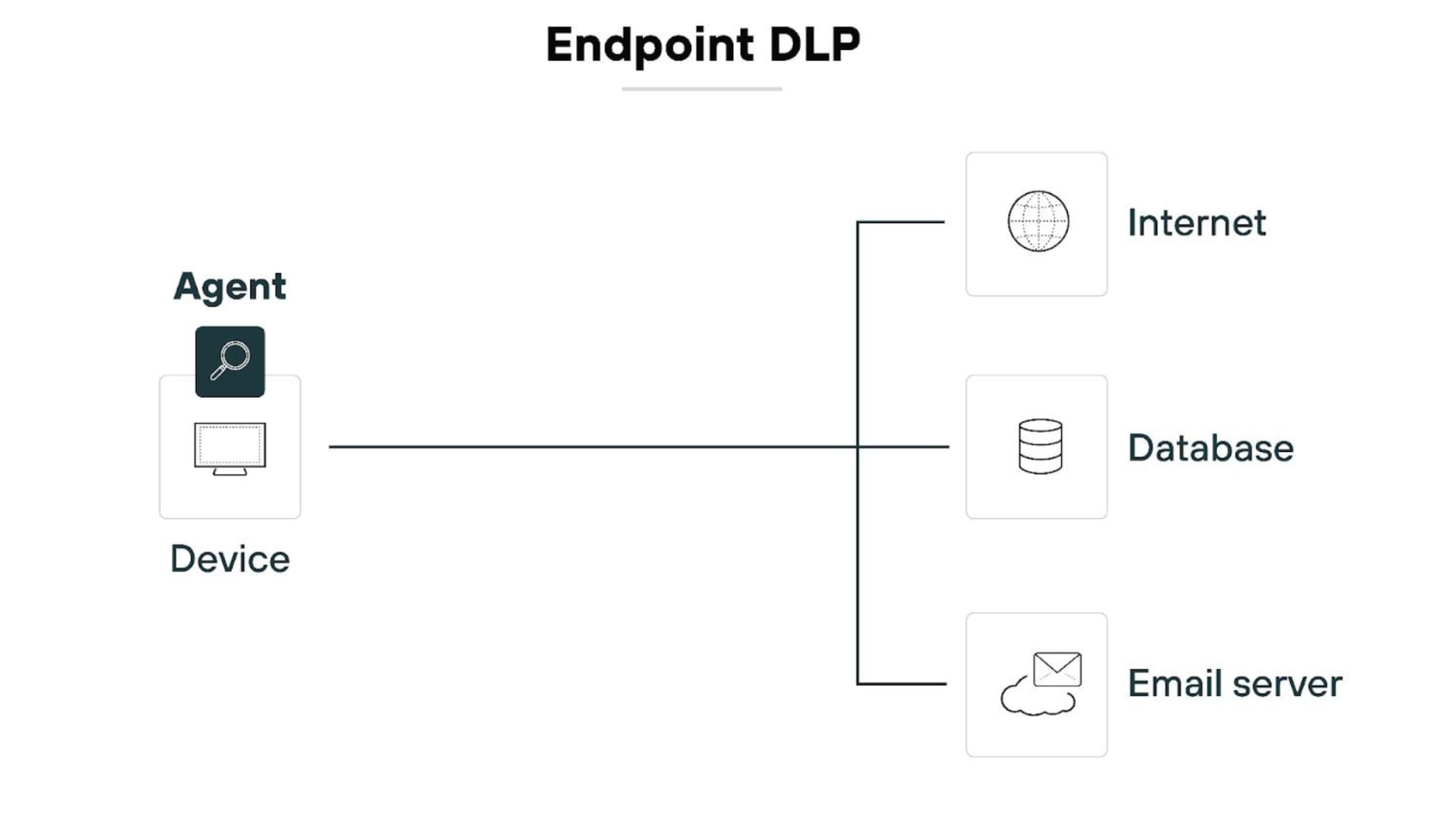
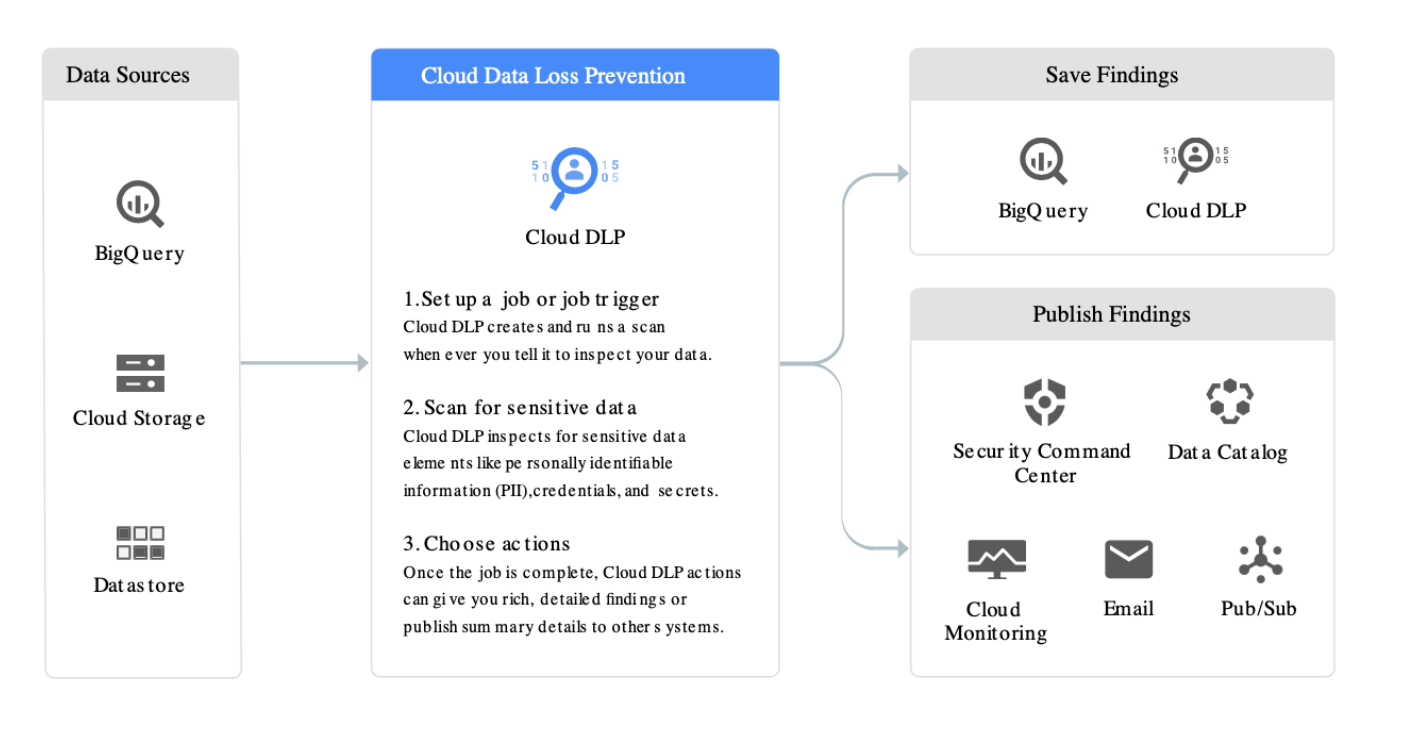
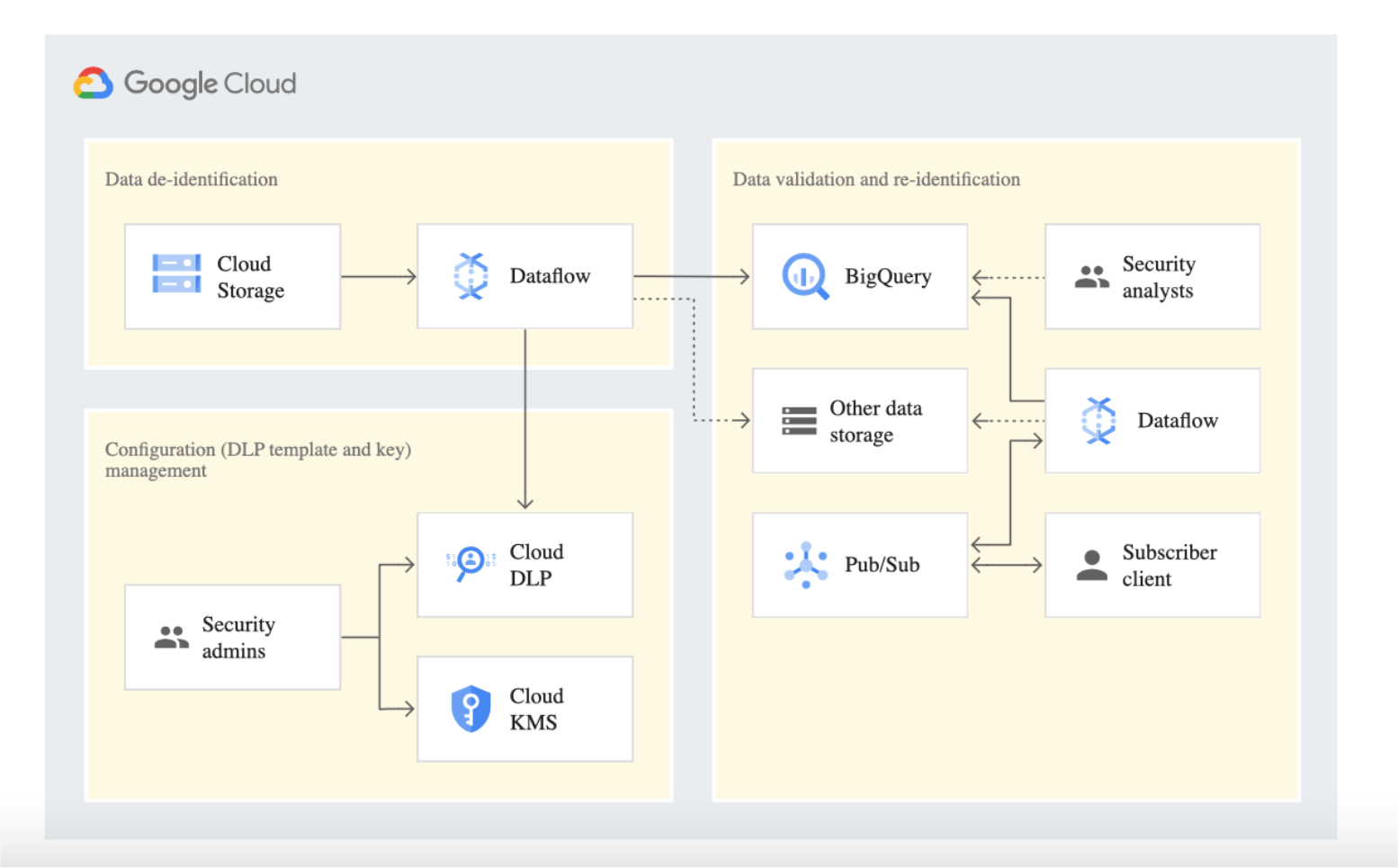
Key beenfits of leading cloud DLP solutions
- Integrate with cloud storage providers to scan servers, identify, and encrypt sensitive data before the file is shared in the cloud
- Scan data already stored in the cloud and audit it at any time
- Accurately discover sensitive data in the cloud
- Continuously audit uploaded files
- Automatically apply controls (prompt, block, encrypt) to sensitive data in accordance with enterprise policies
- Instantly alert appropriate administrators and data owners when data is put at risk
- Maintain the visibility and control needed to comply with privacy and data protection regulations
Part III: Possible Solutions
Overview of Solutions
- Minimize Lack of Trust:
- Policy Language
- Certification
- Minimize Loss of Control:
- Monitoring
- Utilizing different clouds
- Access control management
- Identity Management (IDM)
- Minimize Multi-tenancy
Security Issues in the Cloud – Mitigation Approaches
- Loss of Control → Take back control
- Data and apps may still need to be on the cloud
- But can they be managed by the consumer?
- Lack of Trust → Increase trust mechanisms
- Technology
- Policy, regulation
- Contracts (incentives)
- Multi-tenancy → Separation
- Private cloud – takes away the reasons to use cloud in the first place
- VPC (Virtual Private Cloud) – still not a completely separate system
- Strong separation between tenants
VPC (Virtual Private Cloud)
- Still on Cloud, but still have connection, like a dedicate VM, ?????
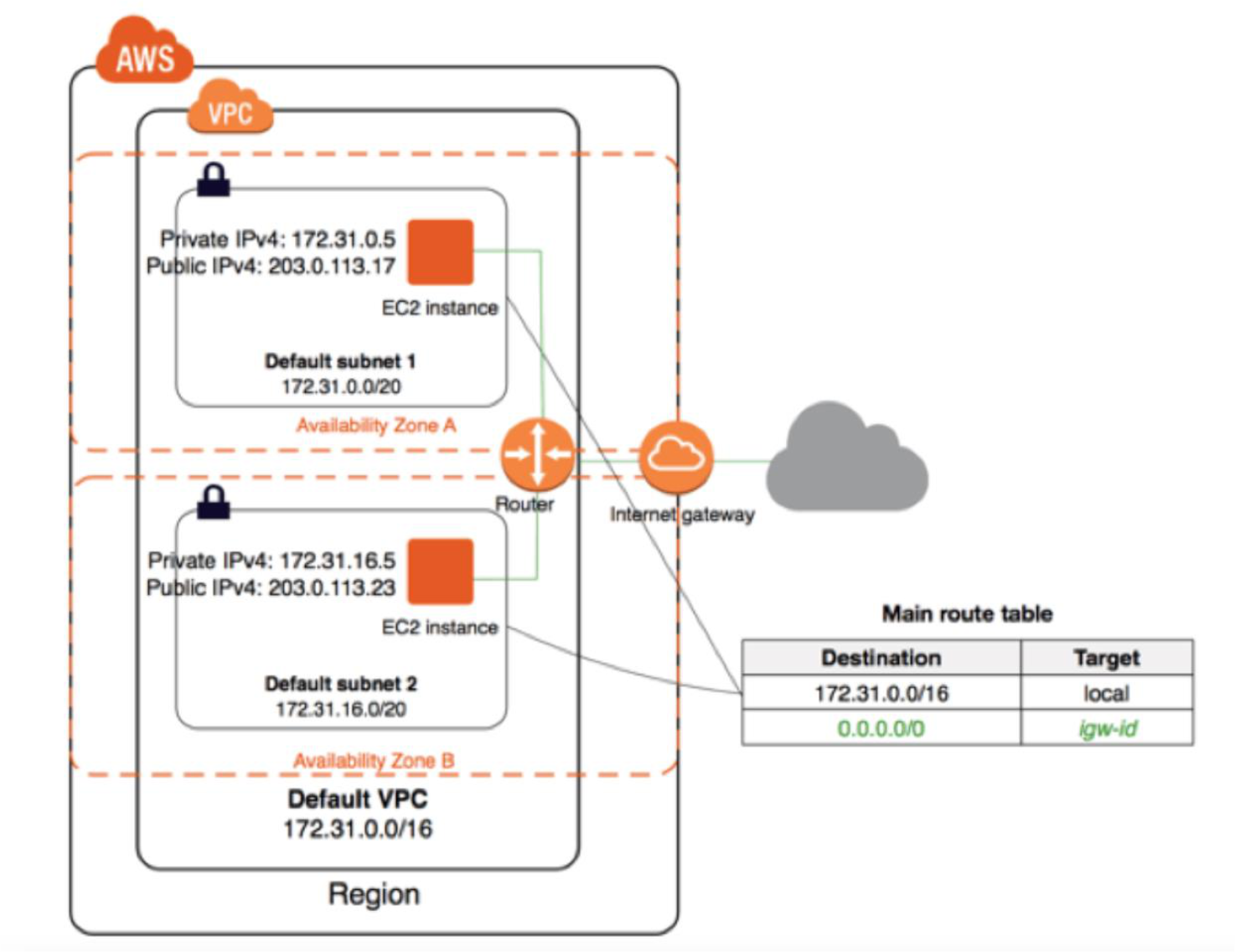
Third-Party Cloud Computing (e.g., Amazon EC2, Microsoft Azure)
- Allow users to instantiate Virtual Machines
- Allow users to purchase required quantity when required (on-demand)
- Allow service providers to maximize utilization of sunk capital costs
- Confidentiality is very important
New Vulnerabilities & Attacks in VM Environments
- Threats arise from other consumers (co-tenants)
- Due to subtleties of how physical resources are transparently shared between VMs
- Such attacks are based on placement and extraction
- A customer VM and its adversary can be assigned to the same physical server
- Adversary can penetrate the VM and violate customer confidentiality
Collaborative / Advanced Attacks
- Mapping of internal cloud infrastructure
- Identifying likely residence of a target VM
- Instantiating new VMs until one gets co-resident with the target
- ==Cross-VM side-channel attacks== — extract information from target VM on the same machine
Side-Channel Attack
- A side-channel attack gathers information from or influences program execution by measuring or exploiting indirect effects of the system or its hardware — rather than targeting the program or code directly
- Most commonly aims to exfiltrate sensitive information including cryptographic keys by measuring coincidental hardware emissions
- Also referred to as a sidebar attack or implementation attack
เหมือนแอบฟังเสียงพิมพ์คีย์บอร์ดของคนอื่น แทนที่จะแฮ็ครหัสผ่านตรงๆ
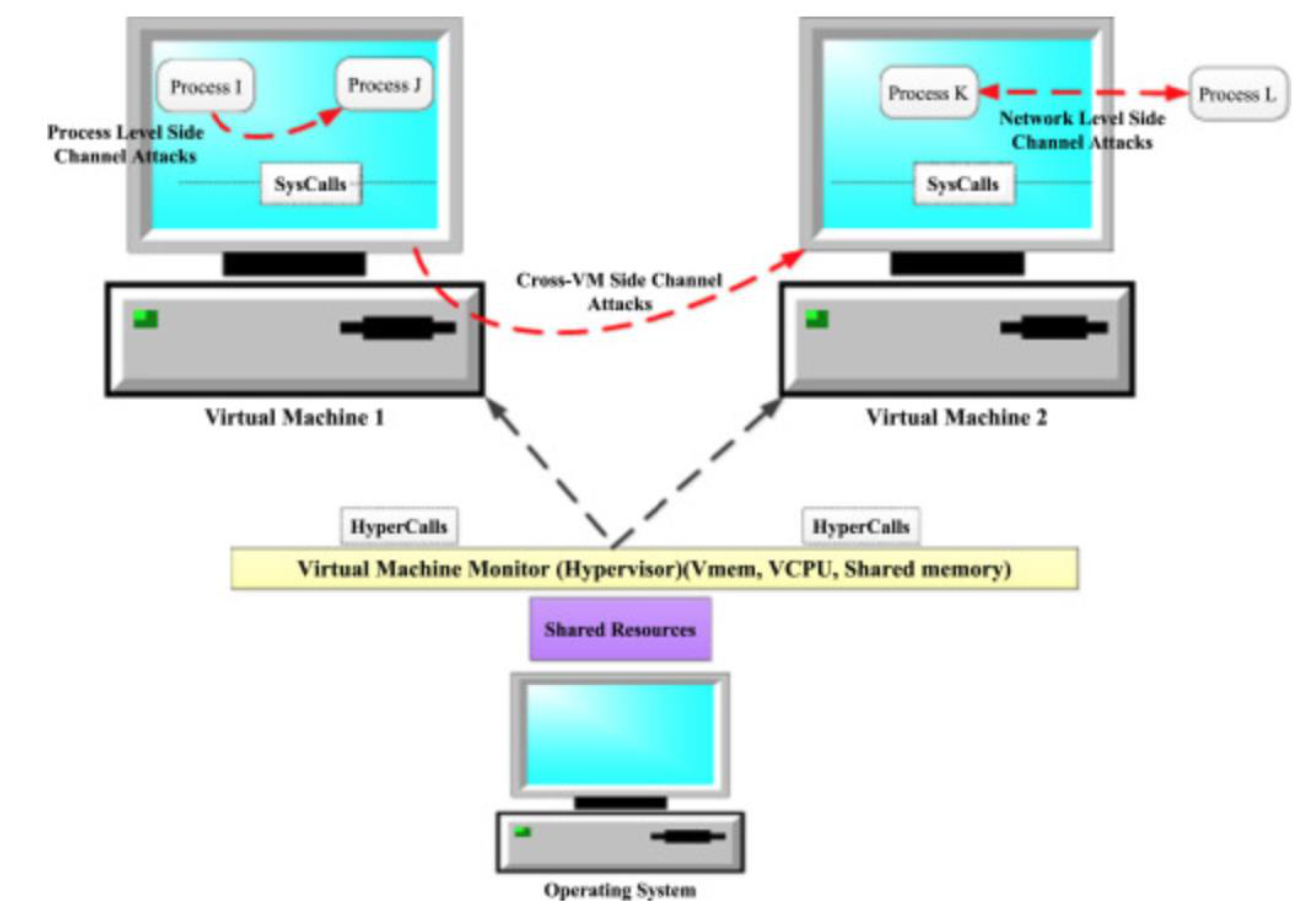
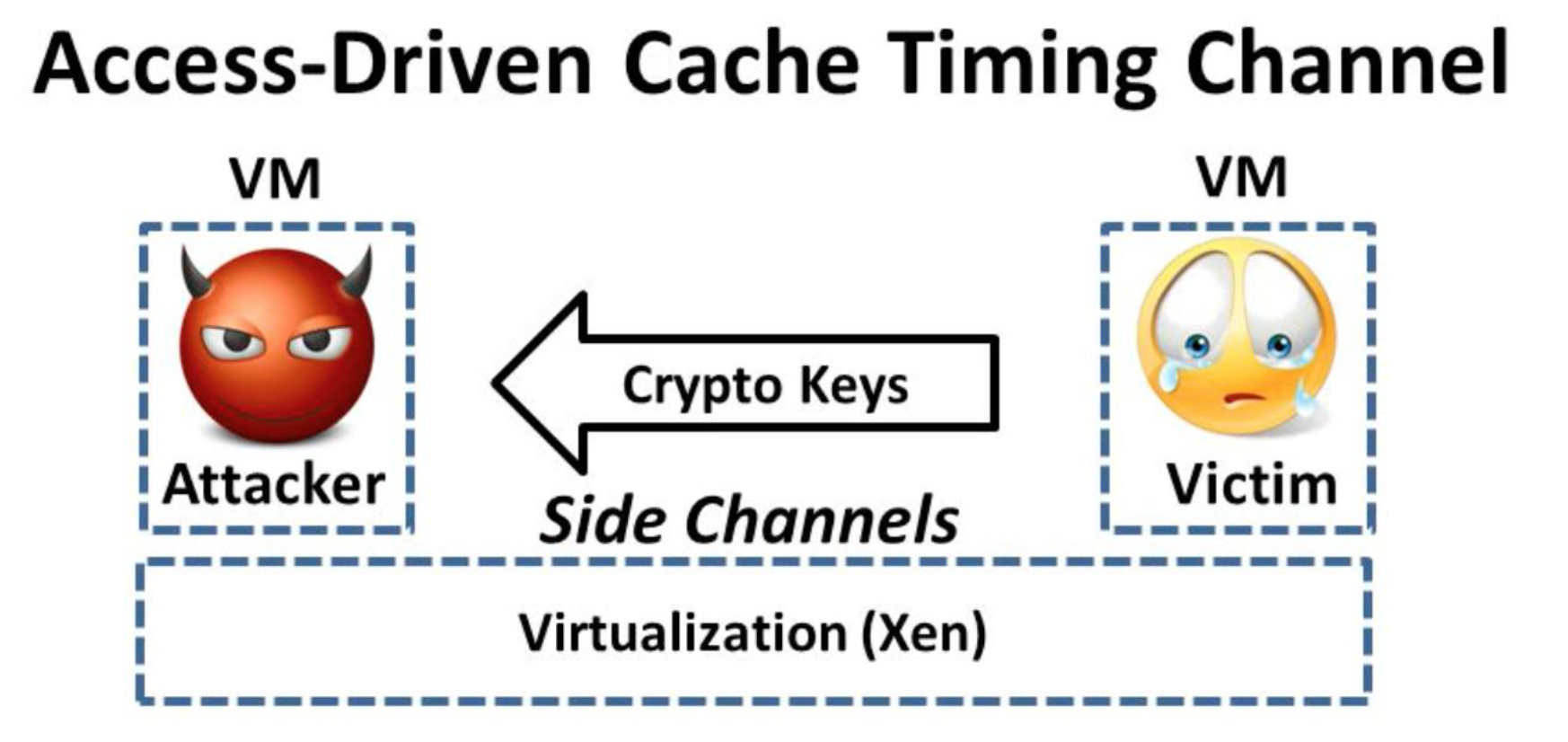
Are cyptographic side channel attacks possible in virtualization environment?
Yes, เพราะว่ามัน share physical resources (CPU, memory) กันใช่ป้ะ , almost all tenace and users share ไง ดังนั้น data ที่อยู่ใน resource ก็ leak ได้ไง
What is the Major Cause of Cross-VM Cache Timing Attack?
l
l
l
l
Prevention / Mitigation Techniques (Cross-VM Attacks)
A. Hardware-Level Defenses
- Cache Partitioning
- Intel CAT (Cache Allocation Technology)
- Prevents cache sharing between VMs
B. Hypervisor System Level Defenses
- VM Isolation Policy
- Avoid co-location of sensitive workloads
- Dedicated cores for high-security VMs
C. Oblivious RAM (ORAM) — Advanced
- Hides access patterns completely
The ORAM Issue
Even if data is encrypted, an attacker can still observe:
- Which memory locations are accessed
- Access frequency
- Access patterns over time
ORAM (Oblivious RAM)
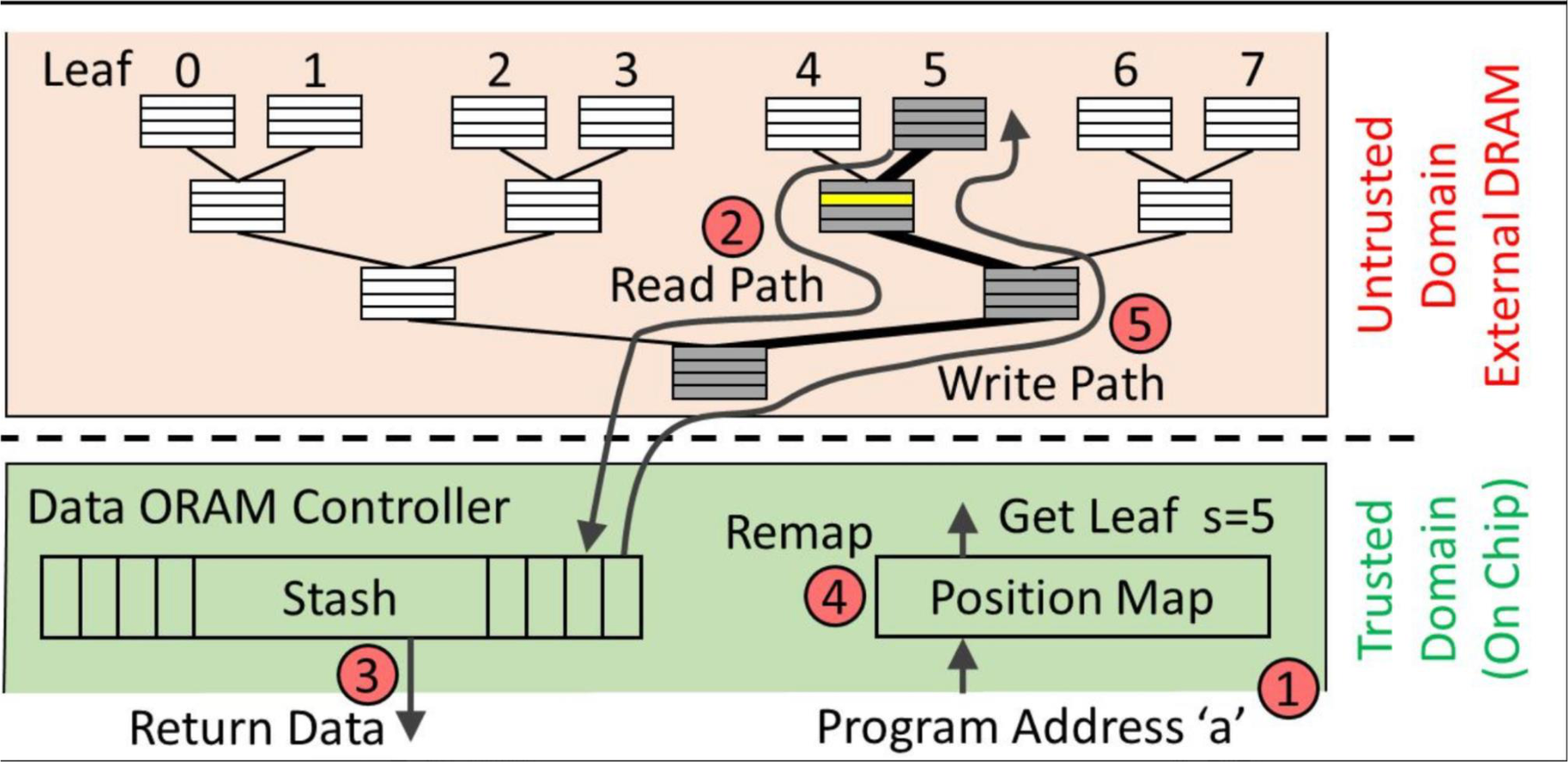
- A cryptographic technique that hides data access patterns so that an untrusted server cannot learn which data you are accessing — even if the data itself is encrypted
- Even with encrypted data, an attacker (e.g., cloud provider) can still observe:
- Which memory locations are accessed?
- How often? In what order?
- ORAM prevents this by making all access patterns look ==random and indistinguishable==
- Implemented inside:
- Secure processors
- Memory controllers
- TEEs like Intel SGX
| Scenario | Behavior |
|---|---|
| Without ORAM | Access record #5 → attacker sees "you accessed #5" |
| With ORAM | Access record #5 → system performs many random-looking reads/writes → attacker sees noise |
ORAM เหมือนเวลาเราไปหยิบหนังสือในห้องสมุด แต่แทนที่จะเดินตรงไปหยิบเล่มที่ต้องการ เราเดินวนหยิบหลายๆ เล่มสุ่มๆ ทำให้คนสังเกตไม่รู้ว่าเราต้องการเล่มไหนกันแน่
Data is remapped every time ที่ถูก access → try to obfuscate access pattern
แล้วข้อมูลใน ORAM มันจะหายไปตอนไหน
ก็ตอน power off คอมไง
ORAM overhead
Read and Write เยอะเกินไป → ตรงนี้ก็เป็น research area อีกอันอยู่นะ!
ORAM Steps (Path ORAM) #FinalExam
- Program requests data (address
a)- CPU queries the Position Map (trusted side)
- System learns that block
ais currently mapped to leaf
- Read Path (root → leaf 5)
- ORAM reads the entire path from root to leaf 5 from untrusted DRAM
- Includes multiple buckets (not just the needed block)
- A block can be stored in any node along the path from root → its assigned leaf
- Load into Stash and return data
- All blocks on that path are decrypted and temporarily stored in the Stash
- The required block
ais found in the stash and returned to the program
- Remap (assign new random leaf)
- Block
ais assigned a new random leaf - The Position Map is updated
- Example: Old leaf = 5 → New leaf = random (e.g., 2)
- Block
- Write Path back
- The system writes data back to the same path (root → leaf 5)
- Blocks are placed back into buckets: some real blocks, some dummy blocks
- This ensures: storage looks consistent + access pattern remains hidden
ORAM Step 3 Mechanisms (Path ORAM)
- Data shuffling (move blocks around)
- Dummy accesses (fake operations)
- Position map (client tracks real locations secretly)
- Stash (temporary secure buffer)
Can Attacks Be Launched in Practice?
- Can one determine where in the cloud an instance is located? ✅ Yes
- Can one determine if two instances are co-resident on the same physical machine? ✅ Yes
- Can an adversary launch instances that will be co-resident with other users? ✅ Yes
- Can an adversary exploit cross-VM information leakage once co-resident? ✅ Yes
Minimize Loss of Control
We lost the control, we need to get back the control!
Four Sub-Areas
- Monitoring
- Utilizing Different Clouds
- Access Control Management
- Identity Management (IDM)
Monitoring
- Cloud consumer needs situational awareness for critical applications:
- When underlying components fail, what is the effect on mission logic?
- What recovery measures can be taken?
- Requires an application-specific runtime monitoring and management tool for the consumer
- Cloud consumer and cloud provider have different views of the system
- Enable both provider and tenants to monitor components under their control
Monitoring Mechanisms
- Provider-side:
- Infrastructure remapping (create new or move existing fault domains)
- Shutting down offending components or targets
- Repairs
- Consumer-side (application-level):
- RAdAC (Risk-adaptable Access Control)
- VM porting with remote attestation of target physical host
- Ability to move the user's application to another cloud
Utilize Different Clouds
- Concept: "Don't put all your eggs in one basket"
- Consumer may use services from different clouds via intra-cloud or multi-cloud architecture
- Spread the risk
- Increase redundancy (per-task or per-application)
- Increase chance of mission completion for critical applications
- Possible issues to consider:
- Policy incompatibility (what is the overarching policy across clouds?)
- Data dependency between clouds
- Differing data semantics across clouds
- Knowing when to utilize the redundancy feature (requires monitoring)
- Is it worth spreading sensitive data across multiple clouds?
- Redundancy could increase risk of exposure
Access Control
- Many possible layers of access control:
- Access to the cloud, servers, services, databases (direct and via web services), VMs, and objects within a VM
- Depending on deployment model, some are controlled by provider, others by consumer
- Regardless of model, provider needs to manage user authentication and access control (to the cloud)
- Federated Identity Management:
- Access control management burden still lies with the provider
- Requires user to place large trust on the provider
- Can be burdensome when numerous users from different organizations with different policies are involved
Consumer-Managed Access Control
- Consumer retains decision-making to retain some control → PDP is in consumer's domain
- Requires client and provider to have:
- A pre-existing trust relationship
- A pre-negotiated standard way of describing resources, users, and access decisions
- Guarantee that the provider will uphold the consumer-side's access decisions
- Should be at least as secure as the traditional access control model
- Facebook and Google Apps do this to some degree, but not enough control
Access Control Architecture: SAML + XACML Flow
[Cloud Consumer Domain B]
  → 1. AuthN request → IDP
  ← 2. SAML Assertion
  → 3. Resource request (XACML Request) + SAML assertion → Cloud Provider Domain A
       → 4. Redirect to domain of resource owner
       → 5. Retrieve policy for specified resource → PDP
       → 6. PDP determines whether user can access resource
            + Creates ticket for grant/deny → ACM (XACML policies)
       ← 7. Send signed and encrypted ticket
  → 8. Decrypt and verify signature → PEP
  → 9. Retrieve capability from ticket
  → 10. Grant or deny access based on capability
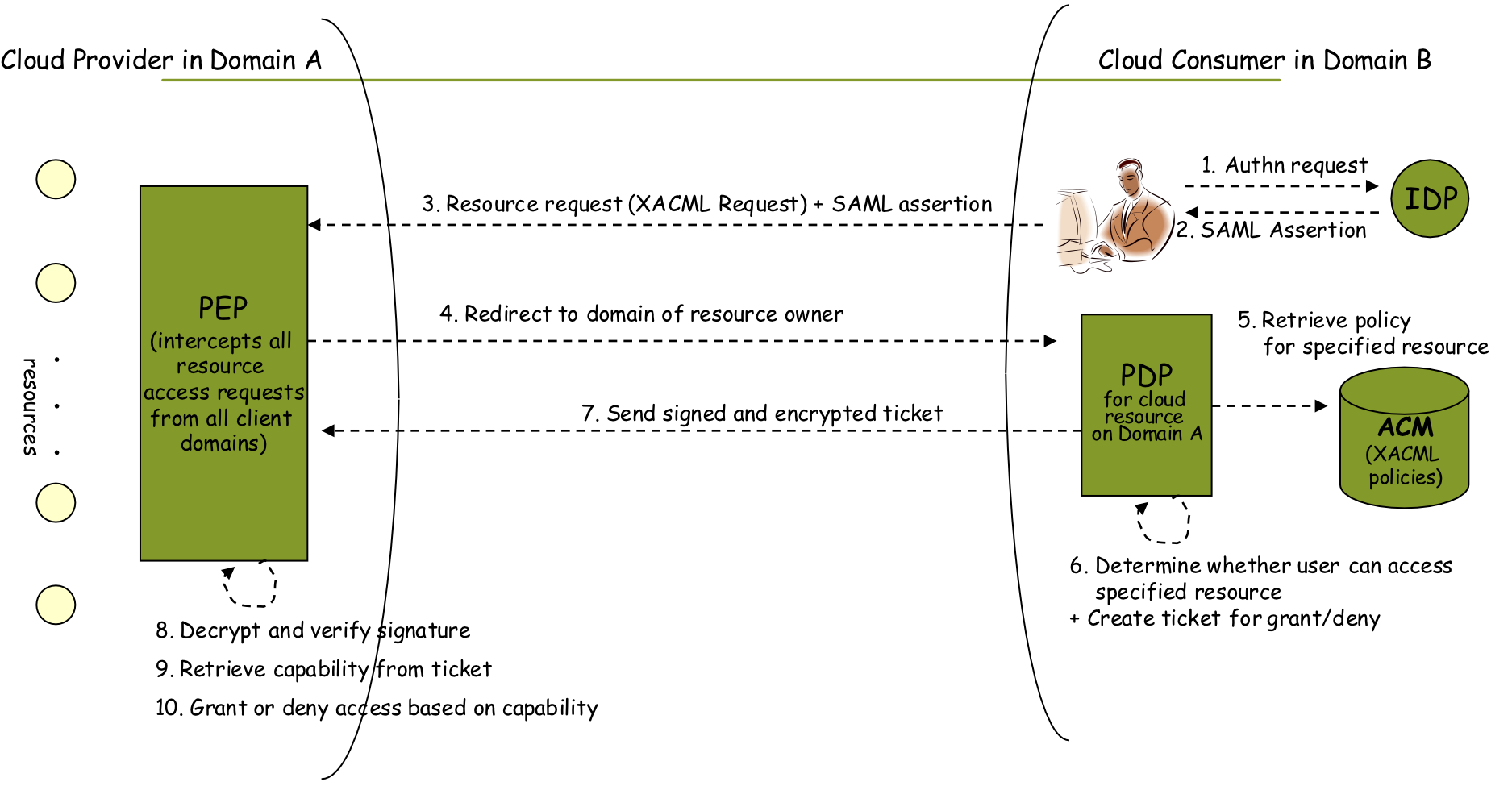
SAML and XACML Explained
- SAML (Security Assertion Markup Language) = XML-like format containing identity and authentication messages
- XACML (Extensible Access Control Markup Language) = defines the access control protocol framework
- Access Control Framework Components:
- PEP (Policy Enforcement Point) — intercepts all resource access requests from all client domains #Quiz #FinalExam
- PDP (Policy Decision Point) — determines whether user can access specified resource
- XACML Policies — define: Subject (User A, B, C), Resources (X, Y), Permissions (R, W)
SAML เหมือนบัตรประชาชน, XACML เหมือนกฎระเบียบของอาคาร, PEP เหมือนยามที่ประตู, PDP เหมือนฝ่าย HR ที่ตัดสินใจว่าใครเข้าได้
What’s the most imporantant component is this figure that show you’ll get control back from the cloud provider? #FinalExam
ACM, because it controls the policy
What’s is the key used to sign and encrypted ticket?
PEP Cloud’s Public Key
Identity Management (IDM)
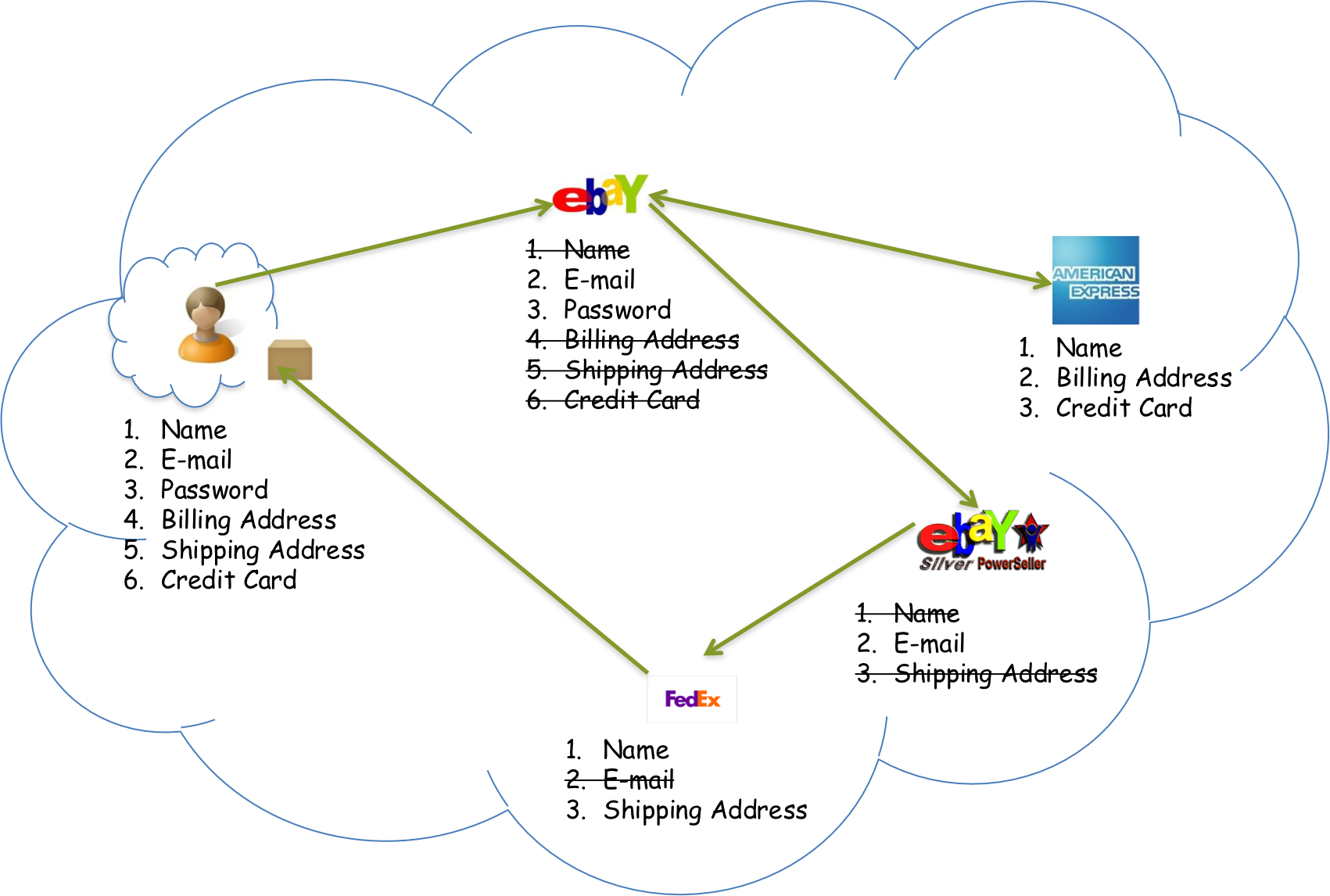
Motivation
- Users on Amazon Cloud must share many pieces of personal data (Name, E-mail, Password, Billing Address, Shipping Address, Credit Card) with Amazon and multiple services
- Problem: Too much identity information is disclosed unnecessarily to each service
Goals of Proposed User-Centric IDM for the Cloud
- Authenticate without disclosing identifying information
- Ability to securely use a service while on an untrusted host (VM on the cloud)
- Minimal disclosure and minimized risk of disclosure during communication (Man-in-the-Middle, Side Channel, and Correlation Attacks)
- Independence of Trusted Third Party
IDM Approach 1: IDM Wallet + Anonymous Identification
- IDM Wallet: Uses Active Bundle (AB) scheme to protect PII from untrusted hosts
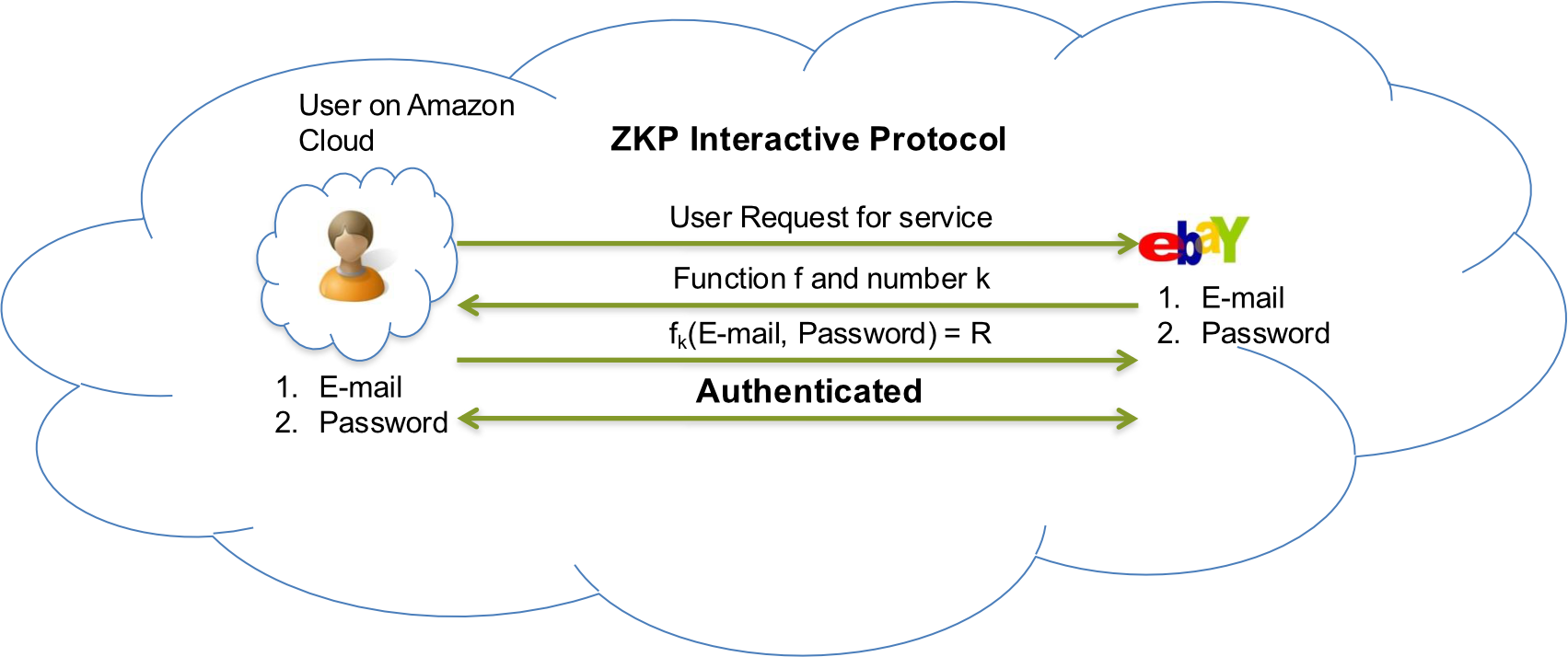
- Anonymous Identification: Uses Zero-Knowledge Proofing for authentication without disclosing the identifier
Components of Active Bundle (Approach 1)
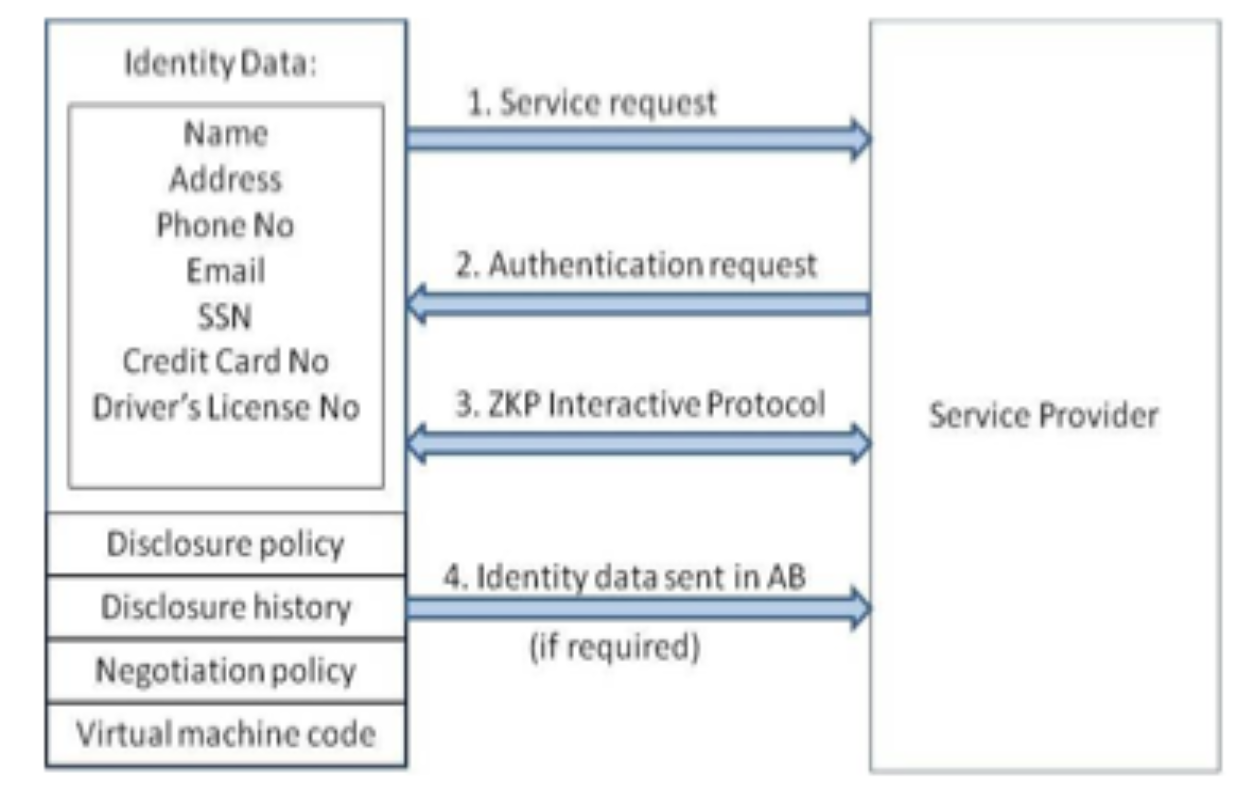
| Component | Description |
|---|---|
| Identity data | Data used during authentication and service usage (e.g., SSN, Date of Birth) |
| Disclosure policy | Set of rules for choosing Identity data from identities in IDM Wallet |
| Disclosure history | Used for logging and auditing purposes |
| Negotiation policy | Based on Zero-Knowledge Proofing (Anonymous Identification) |
| Virtual Machine | Code for protecting data on untrusted hosts; enforces disclosure policies |
Anonymous Identification (Shamir's Approach for Credit Cards)
- IdP provides Encrypted Identity Information to both the user and Service Provider (SP)
- SP and User interact
- Both run IdP's public function on certain bits of the encrypted data
- Both exchange results and agree if it matches
ZKP (Zero-Knowledge Proof) คือการพิสูจน์ว่าคุณรู้ความลับ โดยไม่ต้องบอกความลับนั้น — เหมือนพิสูจน์ว่าคุณรู้รหัสผ่าน โดยไม่ได้บอกรหัสผ่าน
IDM Approach 2: Predicate over Encrypted Data + Multi-Party Computing
- Active Bundle scheme to protect PII from untrusted hosts
- Predicates over encrypted data to authenticate without disclosing unencrypted identity data
- Multi-party computing to be independent of a trusted third party
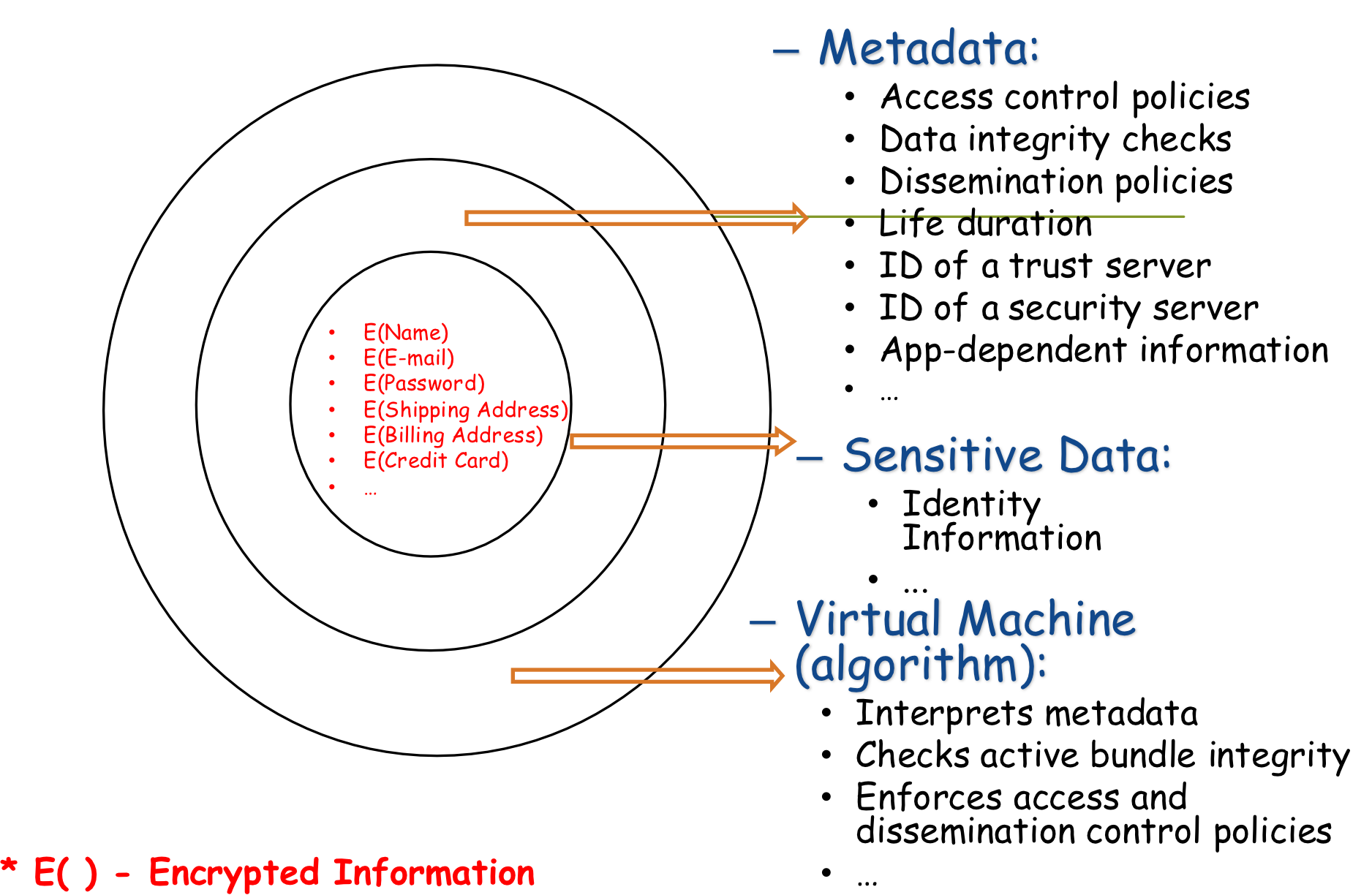
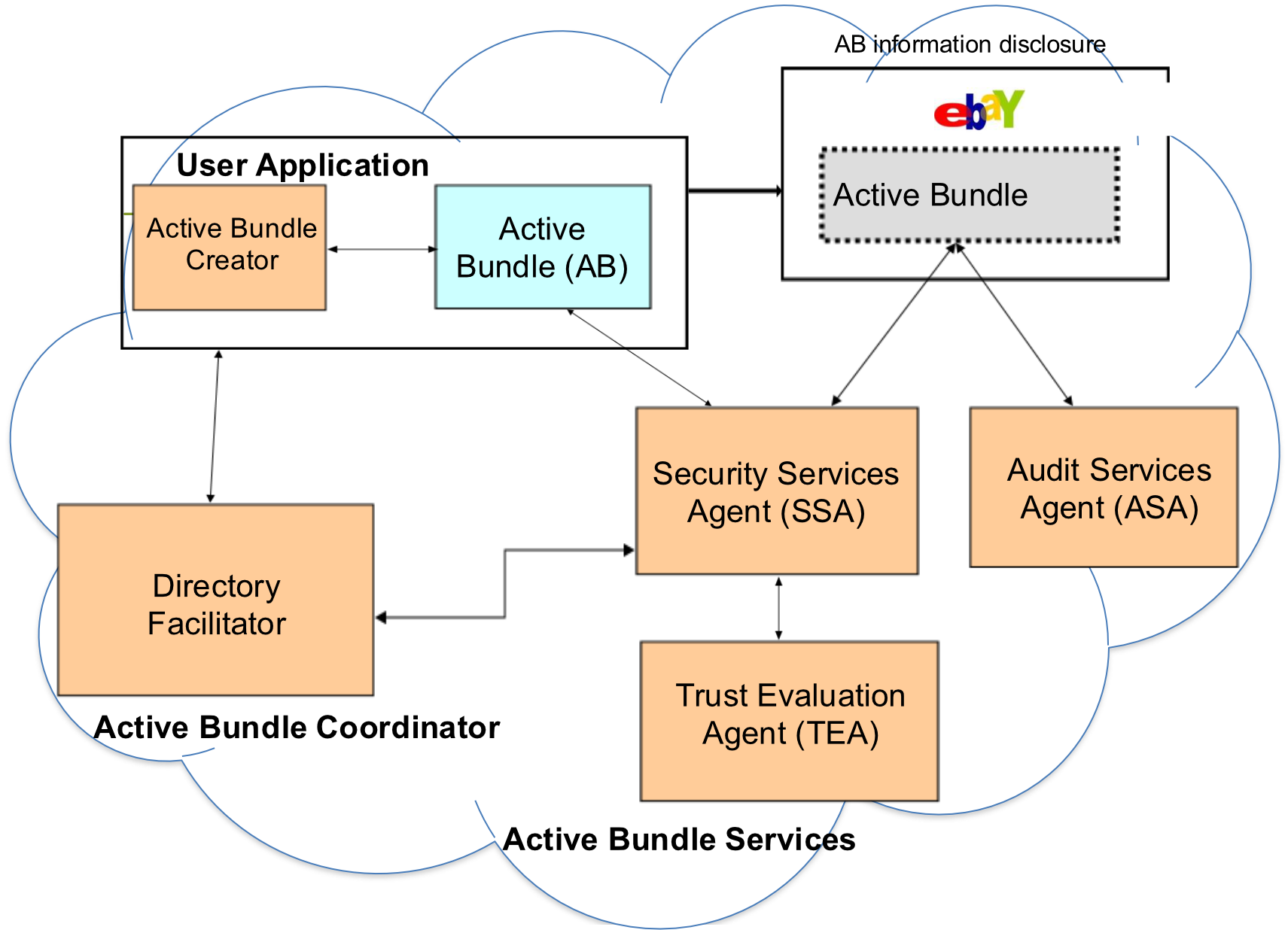
Proposed IDM: Active Bundle Mechanism
- Active Bundle (AB):
- An encapsulating mechanism protecting data carried within it
- Includes:
- Data (encrypted identity info): E(Name), E(Email), E(Password), E(Shipping Address), E(Billing Address), E(Credit Card)
- Metadata for managing confidentiality:
- Access control policies
- Data integrity checks
- Dissemination policies
- Life duration
- ID of a trust server
- ID of a security server
- Virtual Machine (algorithm):
- Interprets metadata
- Checks active bundle integrity
- Enforces access and dissemination control policies
= Encrypted Name, and so on. The VM inside the AB enforces all policies automatically.
Proposed IDM: Predicate over Encrypted Data
- Verification without disclosing unencrypted identity data
- Examples:
- Age Verification Request
- Credit Card Verification Request
- Predicate Request flow:
- User has: Email, Password, E(Name), E(Shipping Address), E(Billing Address), E(Credit Card)
- Service Provider receives: E(Name), E(Billing Address), E(Credit Card)
- SP verifies the predicate (e.g., age ≥ 18) without seeing the raw data
มีรูปอีกเยอะมาก ๆ ๆ เหนื่อย อย่าลืมเอามาด้วย #FinalExam
Proposed IDM: Multi-Party Computing
- Goal: Become independent of a trusted third party
- Multiple services hold shares of the secret key
- Minimize risk — no single party holds the full key
- Predicate Request → Key Management Services → Predicate Reply
- Decryption of information is handled by Key Management Services
- Result: Name, Billing Address, Credit Card (verified)
- Outcomes verified: Age Verified ✅ / Credit Card Verified ✅
Proposed IDM: Selective Disclosure
- User Policies in the Active Bundle dictate dissemination
- Only the minimum required information is shared with each service:
| User Has | Sent to eBay | Sent to FedEx |
|---|---|---|
| E(Email) | E(Email) | |
| E(Name) | E(Name) | E(Name) |
| E(Shipping Address) | E(Shipping Address) | E(Shipping Address) |
| E(Billing Address) | — | — |
| E(Credit Card) | — | — |
- Decryption is handled by Multi-Party Computing
- FedEx can now send the package to the user (only receives Name + Shipping Address)
Proposed IDM: Identity in the Cloud (Full Flow)
- User on Amazon Cloud has: Name, Email, Password, Billing Address, Shipping Address, Credit Card
- Amazon receives: Email + Password (for login), Name + Billing Address + Credit Card (for payment)
- FedEx receives: Name + Shipping Address (for delivery)
- E-mail service: Email only
Proposed IDM: Characteristics and Advantages
- Ability to use Identity data on untrusted hosts:
- Self Integrity Check
- If integrity compromised → apoptosis or evaporation (data self-destructs)
- Data should not remain on a compromised host
- Independent of Third Party:
- Prevents correlation attacks
- Establishes trust of users in IDM:
- By putting the user in control of who has their data
- Identity is used in the process of authentication, negotiation, and data exchange
- Minimal disclosure to the SP:
- SP receives only necessary information
Proposed IDM: Conclusion & Future Work
- Problems with IDM in Cloud Computing:
- Collusion of Identity Information
- Prohibited Untrusted Hosts
- Usage of Trusted Third Party
- Proposed Approaches:
- IDM based on Anonymous Identification
- IDM based on Predicate over Encrypted Data
- Future Work:
- Develop the prototype, conduct experiments and evaluate the approach
Amazon Cloud Example
- Store personal data: Simple Storage Service (S3)
- Perform computations on stored data: Elastic Compute Cloud (EC2)