Classes of Intruders
Cyber Criminals
- Individuals or members of an organized crime group motivated by financial reward
- Activities include:
- Identity theft
- Theft of financial credentials
- Corporate espionage
- Data theft
- Data ransoming
- Typically young individuals who operate on the Web
- Coordinate via underground forums to trade tips, data, and plan attacks
เหมือนแก๊งมิจฉาชีพออนไลน์ที่รวมตัวกันใน dark web เพื่อแบ่งปันเครื่องมือและข้อมูลเหยื่อ
Activists (Hacktivists)
- Individuals working as insiders or members of a larger group of outsider attackers
- Motivated by social or political causes
- Also known as hacktivists
- Skill level is often quite low
- Attack methods:
- Website defacement
- Denial of Service (DoS) attacks
- Theft and distribution of data to cause negative publicity
เหมือน activist ที่ใช้อินเทอร์เน็ตเป็นเครื่องมือประท้วง แทนการถือป้ายหน้าตึก
State-Sponsored Organizations
- Groups of hackers sponsored by governments to conduct espionage or sabotage
- Also known as Advanced Persistent Threats (APTs)
- "Advanced" = ทักษะสูง, ซับซ้อน
- "Persistent" = โจมตีต่อเนื่องเป็นระยะเวลานาน, ซ่อนตัวได้ดี
- Widespread activity by countries such as China, USA, UK, and their intelligence allies
เหมือนสายลับรัฐบาลที่ได้รับการสนับสนุนเต็มรูปแบบ เงินทุน และทรัพยากรไม่จำกัด
Others
- Classic hackers or crackers motivated by:
- Technical challenge
- Peer-group esteem and reputation
- Many who discover new buffer overflow vulnerability categories fall in this class
- "Hobby hackers" using widely available attack toolkits to explore systems
Intruder Skill Levels
Apprentice
- Minimal technical skill — primarily use existing attack toolkits
- Likely the largest number of attackers
- Includes many criminal and activist attackers
- Easiest to defend against (uses known tools)
- Also known as "Script-kiddies"
เหมือนคนที่ download เครื่องมือสำเร็จรูปมาใช้ โดยไม่รู้ว่ามันทำงานยังไง
Journeyman
- Sufficient technical skills to modify and extend existing toolkits
- Can use newly discovered or purchased vulnerabilities
- May discover new vulnerabilities similar to known ones
- Can adapt tools for use by others
- Found across all intruder classes
Master
- High-level technical skills — discovers brand new vulnerability categories
- Can write new powerful attack toolkits from scratch
- Some well-known classical hackers are of this level
- Some employed by state-sponsored organizations
- Hardest to defend against
เหมือนนักวิจัยด้าน security แต่ใช้ความรู้ในทางที่ผิด
Examples of Intrusion
- Remote root compromise
- Web server defacement
- Guessing/cracking passwords
- Copying databases containing credit card numbers
- Viewing sensitive data without authorization
- Running a packet sniffer
- Distributing pirated software
- Using an unsecured modem to access internal network
- Impersonating an executive to get information
- Using an unattended workstation
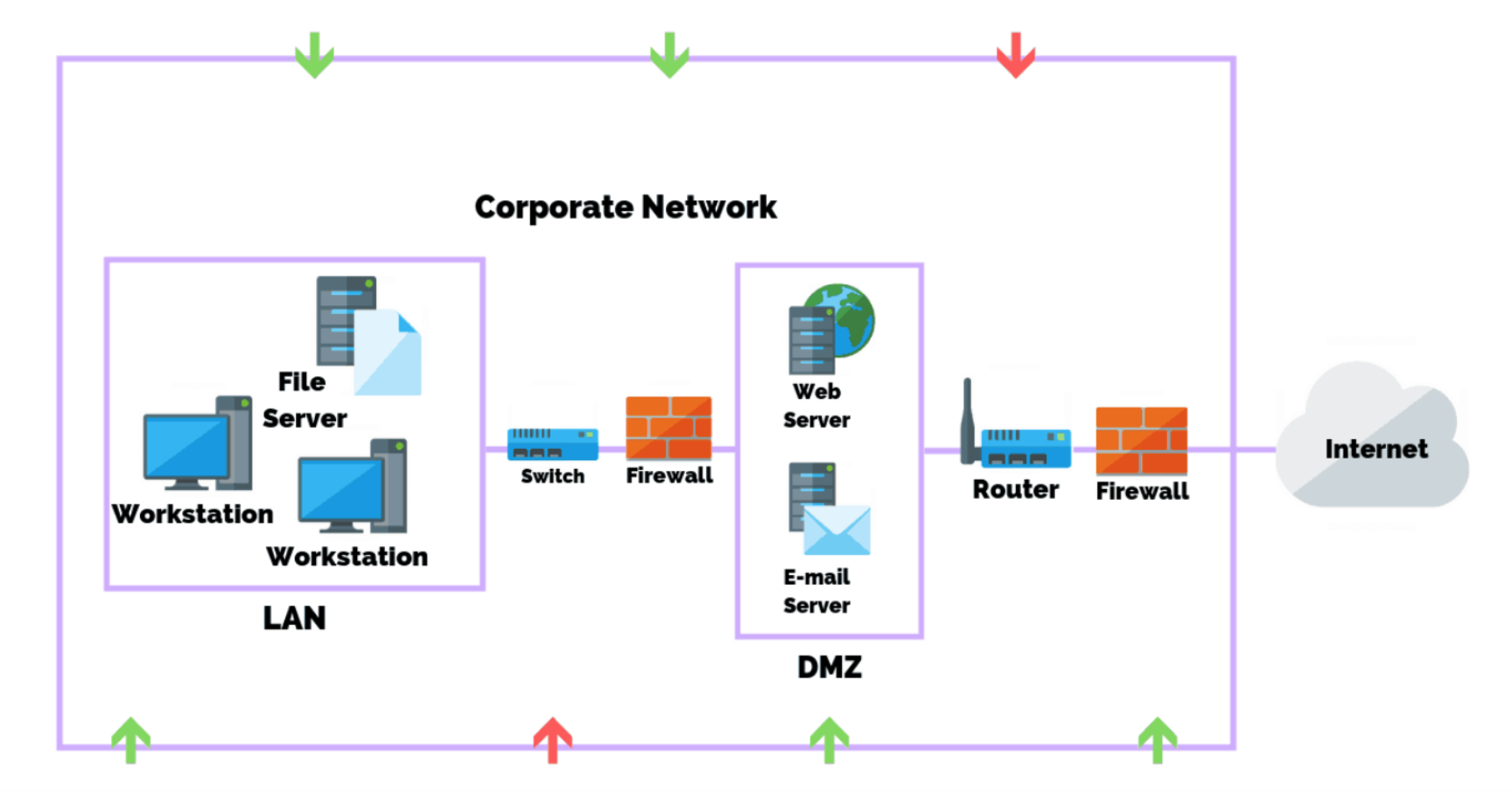
Security perimeter = …
Intruder Behavior (Attack Lifecycle)
Target Acquisition & Info Gathering
          ↓
     Initial Access
          ↓
  Privilege Escalation
          ↓
Info Gathering / System Exploit
          ↓
    Maintaining Access
          ↓
     Covering Tracks
(a) Target Acquisition and Information Gathering
- Explore corporate website (personnel, key systems, OS, web server)
- Use DNS tools:
dig,host, WHOIS database - Map network with NMAP to find accessible services
- Send query emails to gather mail client/server/OS info
- Identify vulnerable services (e.g., vulnerable web CMS)
(b) Initial Access
- Brute force CMS passwords
- Exploit vulnerability in web CMS plugin
- Send spear-phishing emails with browser exploit links
(c) Privilege Escalation
- Scan for applications with local exploits
- Exploit vulnerable apps to gain elevated privileges
- Install sniffers to capture administrator passwords
- Use captured passwords to access privileged information
- เช่นแบบ Guest → Admin – perform higher action
(d) Information Gathering or System Exploit
- Scan files for desired information
- Transfer large numbers of documents to external repository
- Use guessed/captured passwords on other network servers
(e) Maintaining Access
- Install remote administration tool or rootkit with backdoor
- Use admin password for later network access
- Disable/modify anti-virus or IDS programs
(f) Covering Tracks
- Use rootkit to hide installed files
- Edit log files to remove intrusion entries
Definitions (RFC 2828 — Internet Security Glossary)
- Security Intrusion: A security event (or combination of events) in which an intruder gains or attempts to gain access to a system without authorization
- Intrusion Detection: A security service that monitors and analyzes system events to provide real-time or near real-time warning of unauthorized access attempts
Intrusion Detection System (IDS)
Three Logical Components
- Sensors — collect data (traffic, pattern of request, blah blah)
- Analyzers — determine if intrusion has occurred
- User Interface — view output or control system behavior
Types of IDS
| Type | Description |
|---|---|
| HIDS (Host-based IDS) | Monitors characteristics of a single host for suspicious activity |
| NIDS (Network-based IDS) | Monitors network traffic and analyzes network/transport/application protocols |
| Distributed/Hybrid IDS | Combines info from multiple sensors (host + network) in a central analyzer |
HIDS เหมือนกล้อง CCTV ในห้อง, NIDS เหมือนกล้องที่จุดเชื่อมต่อทางเดิน, Distributed คือใช้ทั้งสองอย่างพร้อมกัน
Preliminaries — Why IDS Matters
- If intrusion is detected quickly → intruder can be identified and ejected before damage occurs
- Effective IDS can serve as a deterrent → prevents intrusions
- IDS enables collection of information about attack techniques → strengthens future defenses
Core Assumption of IDS
The behavior of the intruder differs from that of a legitimate user in ways that can be quantified.
- BUT: There will always be some overlap → leads to false positives/negatives
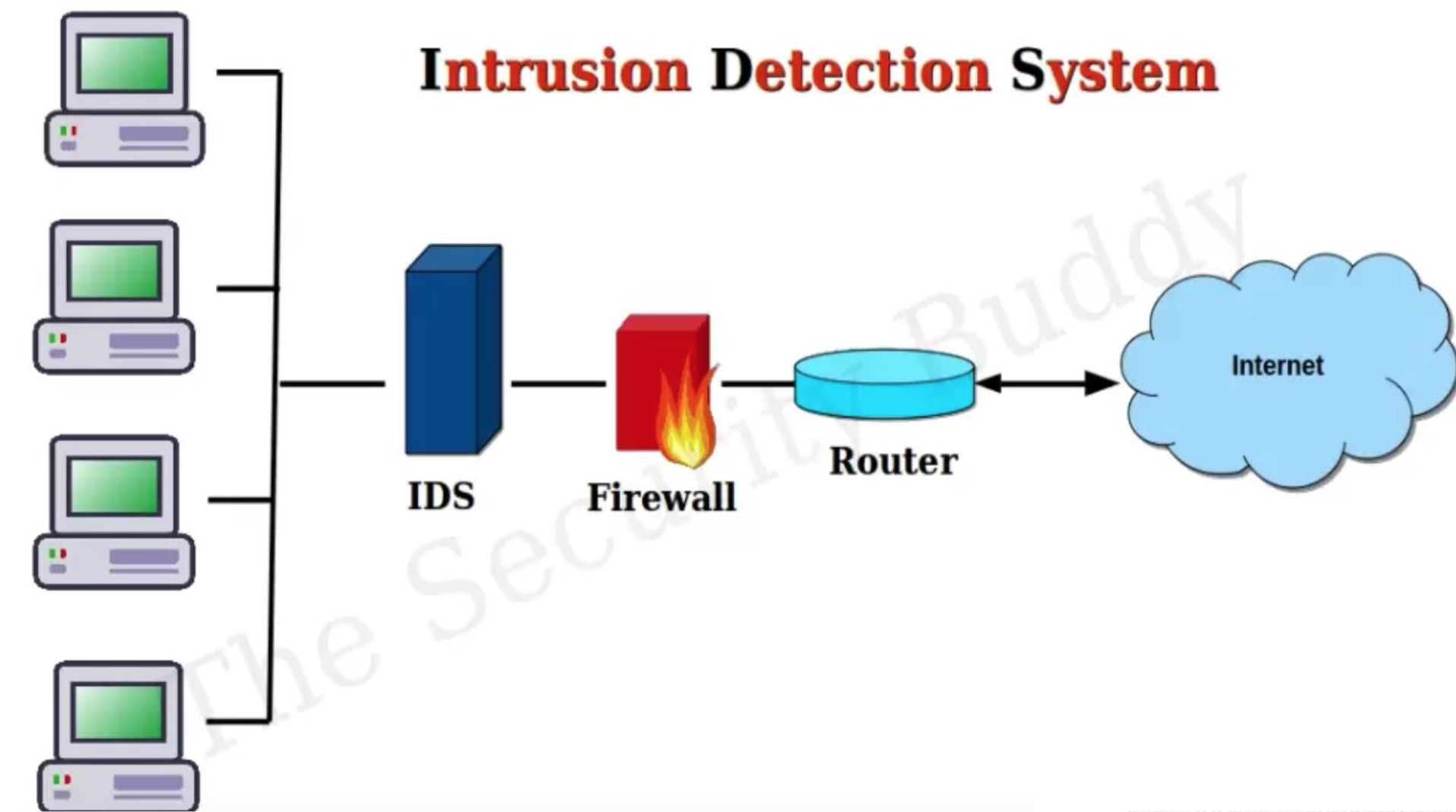
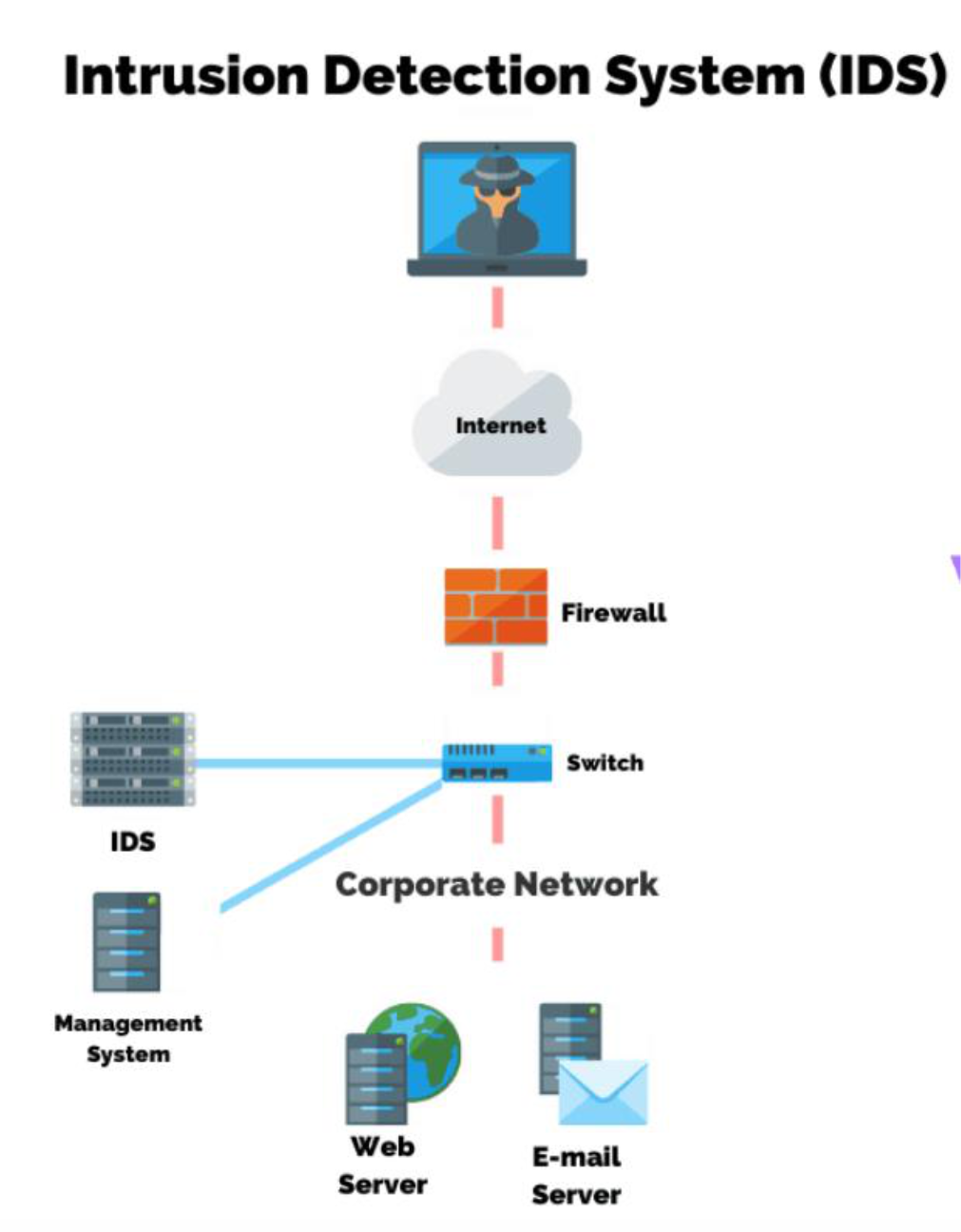
IDS Location
- After Firewall: Reduced noise because firewall already filters obvious malicious traffic → IDS analyzes cleaner, easier, more relevant traffic
- Focus on the real threats
- Lower processing load → IDS doesn’t get overwhelmed by irrelevant traffic
- Before Firewall:
- Full visibility of all incoming traffic (inbound traffic) → IDS will learn and see all incoming packets, if it’s use machine learning ก็ more input ไง
- Tradeoff with performance
- Hybrid (Before + After):
- If our system is sensitive
- Defense in Depth
IDS Requirements
| Requirement | Description |
|---|---|
| Run continually | Must operate 24/7 without downtime |
| Be fault tolerant | Must survive system failures |
| Resist subversion | Must protect itself from being disabled by attackers |
| Minimal overhead | Must not degrade system performance significantly |
| Configured to security policies | Must reflect organization's security rules |
| Adapt to changes | Must update as systems and user behaviors evolve |
| Scale to large systems | Must monitor large networks efficiently |
| Graceful degradation | Must still function (partially) under stress |
| Allow dynamic reconfiguration | Must be updateable without full restart |
Analysis Approaches
Anomaly Detection
- Collects data on legitimate user behavior over time → builds a baseline
- Compares current behavior against the baseline
- Alerts when behavior deviates significantly
- Can detect zero-day attacks, insider threats, unknown malware
- Zero-day attack → when security teams are unaware of their software vulnerability, and they've had “0” days to work on a security patch or an update to fix the issue
Classification approaches:
| Approach | Description |
|---|---|
| Statistical | Uses univariate, multivariate, or time-series models of observed metrics เช่น John login ผิดเวลาจากปกติ (weird) → ระงับ |
| Knowledge-based | Expert system classifies behavior using rules that model legitimate use |
| Machine-learning | Automatically determines classification model from training data (data mining) — can predict as well, rather than just classification! |
- Threat hunting → ……
- Threat intelligence → Security + AI
เหมือนธนาคารที่รู้ว่าคุณใช้บัตรที่ไหน เวลาไหน ถ้าโผล่ใช้ที่ต่างประเทศกลางดึก → ระงับทันที
Can you write Python to train an ML model on typical login patterns (e.g. time of day), and flag logins that occur at odd hours or from unusual locations?
Anomaly Detection Example
- IDS learns over a week:
johnlogs in 9am–5pm, runs onlyvim/nano/firefox, never accesses/etc/passwd - Suddenly
johnruns:bash→sudo cp /etc/shadow /tmp/ - IDS flags: unexpected
sudouse + outside normal hours + sensitive file access
Real-world Anomaly-based IDS Tools
| Tool | Type | Description |
|---|---|---|
| Wazuh / OSSEC | Host-based | Monitors logins, commands, file access anomalies |
| Snort + ML module | Network-based | Flags abnormal packet patterns (DoS, C2 beaconing) |
| Zeek (formerly Bro) | Network-based | Detects anomalies in DNS, HTTP, SSH behavior |
| Security Onion | Hybrid | Combines logs, PCAPs, ML-based anomaly detection |
| Suricata + Unsupervised ML | Network | Uses flow features (packet size, timing) for unknown malware |
Signature / Heuristic Detection
Signature Approaches
- Match known malicious data patterns against current traffic/system data
- Signatures must be specific enough to minimize false alarms
- Widely used in anti-virus products, traffic scanning proxies, NIDS
สำหรับ IDS ถ้าเลือกได้จะเอาอะไรระหว่าง False Positive | False Negative
ก็ต้อง False Positive สิ อย่างน้อยเอา normal มาดูก่อนก็ได้ว่ามันใช่ attack จริงป่าว Evaluation of IDS
Rule-based Heuristic Identification
- Uses rules identifying known penetrations or exploits of known weaknesses
- Can also flag suspicious behavior within normal usage patterns
- SNORT is a prime example of rule-based NIDS
เหมือนระบบกรองสแปม ที่รู้ว่า pattern แบบไหนคือสแปม แต่จับ spam ใหม่ ๆ ที่ยังไม่เคยเห็นไม่ได้
Anomaly Detection vs. Signature Detection
| Signature | Anomaly | |
|---|---|---|
| Pros | Simple, efficient, fast | Dynamic/adaptive, detects known & unknown |
| Cons | Cannot detect unknown patterns | Slower, more system overhead (you need to train model, do some analysis before) |
Known pattern เอามาจากไหน → มันก็มี Public dataset อยู่นะ ชื่อ SNORT ไรวะ
Evaluation of IDS
- False Positive ("Not but In")
- IDS detects normal activity as abnormal (non-intrusion events counted as intrusions)
- = ระบบ alert ทั้งที่ไม่มีอะไรผิดปกติ
- False Negative ("Yes but Out")
- IDS fails to detect actual malicious activity
- = ระบบปล่อยผ่าน attack จริงๆ โดยไม่รู้ตัว
เหมือน airport security: False Positive = จับคนบริสุทธิ์ขึ้นมาตรวจ, False Negative = ปล่อยคนพกอาวุธผ่านไป
Host-Based IDS (HIDS)
Host-based → installed on the server (monitored on the host)
- Adds specialized security software to vulnerable/sensitive systems
- Can use anomaly or signature/heuristic approaches
- Monitors activity to detect suspicious behavior
- Primary purpose: detect intrusions, log suspicious events, send alerts
- Can detect both external and internal intrusions
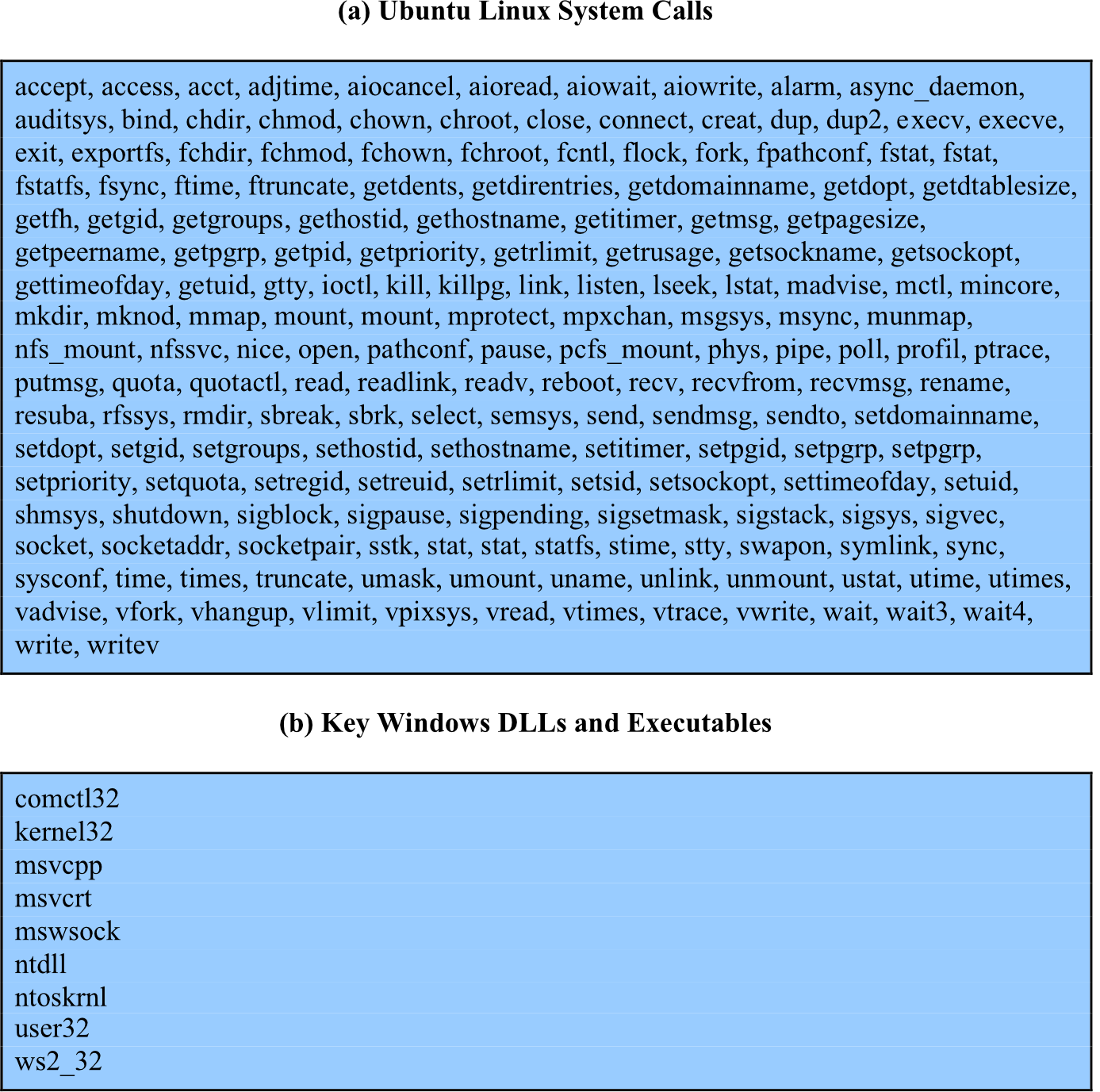
Data Sources and Sensors
- System call traces
- Audit (log file) records
- File integrity checksums
- Registry access
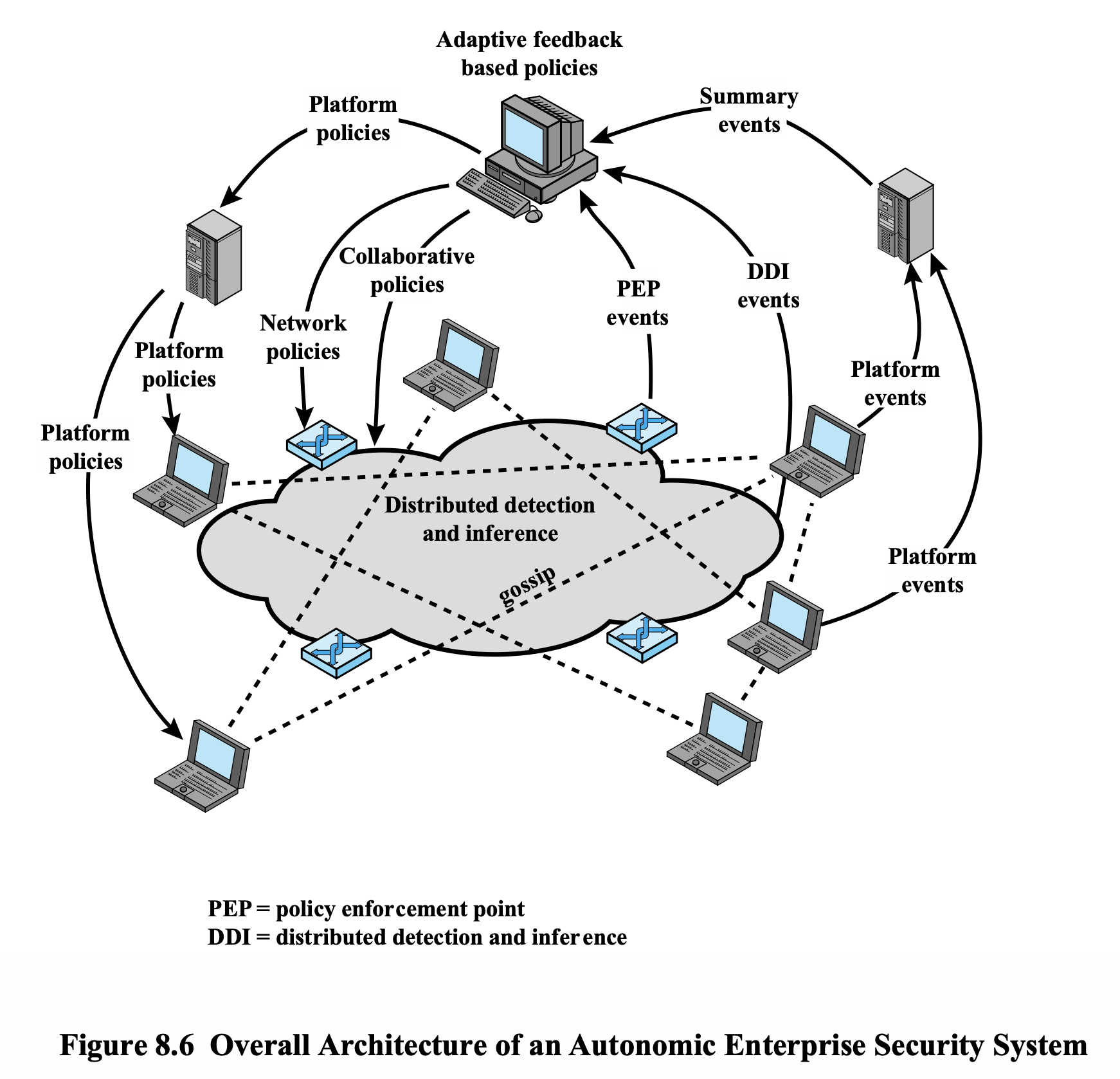
Distributed IDS Architecture
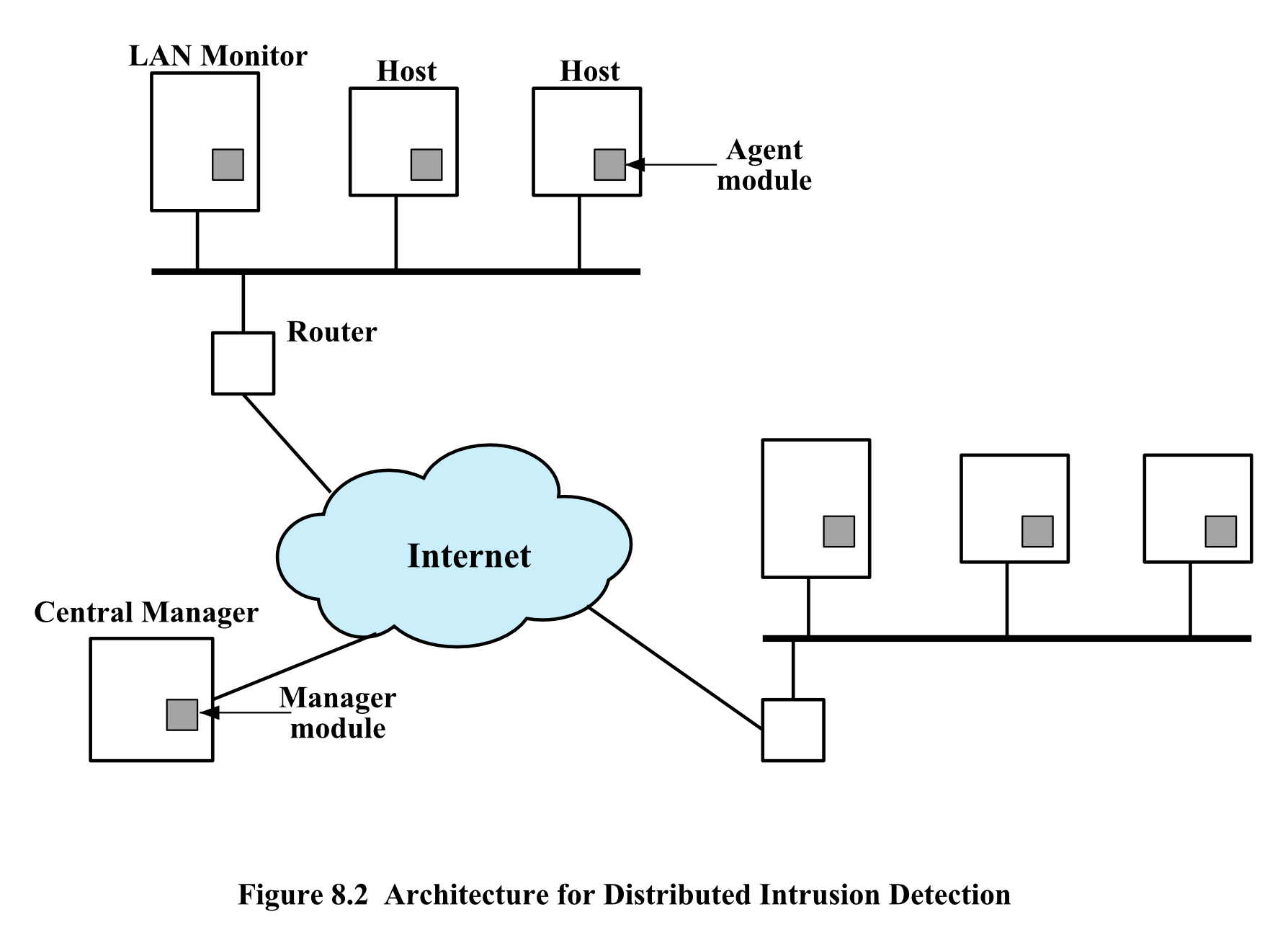
Three modules:
- Host Agent Module — audit collection background process; collects security-related events from host → transmits to central manager
- LAN Monitor Agent Module — analyzes LAN traffic → reports to central manager
- Central Manager Module — receives reports from all agents; processes and correlates to detect intrusion
Agent Architecture Flow
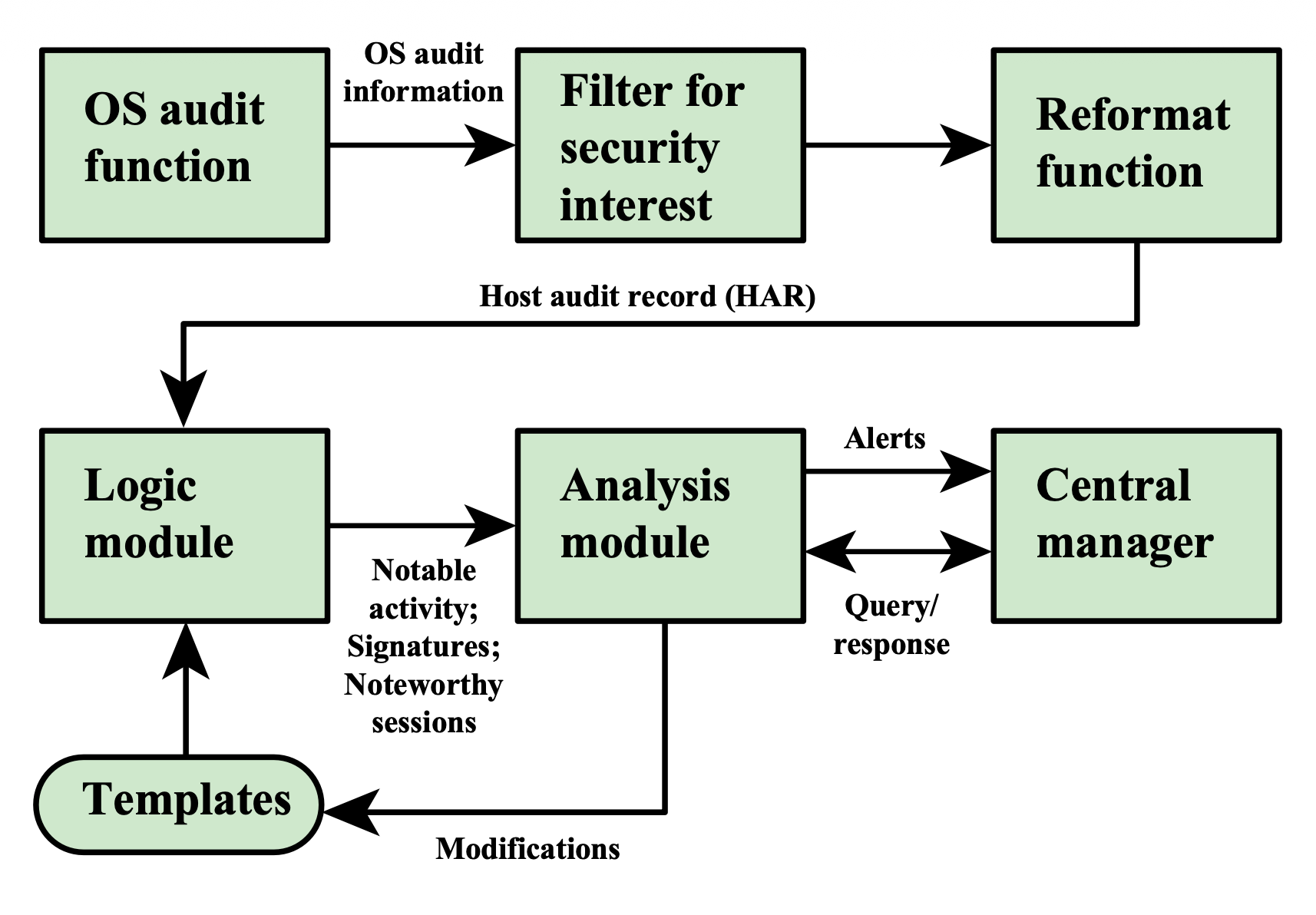
OS Audit Function
      ↓
Filter for Security Interest
      ↓
Reformat Function → Host Audit Record (HAR)
      ↓
Logic Module ←→ Templates (modified by analysis)
      ↓
Analysis Module ←→ Central Manager
      ↓ (Alerts sent to Central Manager)
Network-Based IDS (NIDS)
- Monitors traffic at selected network points
- Examines traffic packet by packet in real or near real time
- May examine network, transport, and/or application layer protocols
- Components:
- Number of sensors
- One or more NIDS management servers
- One or more management consoles (human interface)
- Analysis may occur at the sensor, management server, or both
NIDS Sensor Modes
Inline Sensor
- Inserted directly into the network path — all traffic must pass through
- Can be combined with firewall or LAN switch
- Advantage: no additional hardware needed; just software
- Primary motivation: can block attacks in real-time
- Placement: between firewall ↔ internal network, DMZ ↔ LAN, Internet ↔ gateway router
Block ระหว่างทางมาเลย
Acts like a “smart firewall” with deep packet inspection
- DPI (deep packet inspection) คืออะไรล่ะ
- ปกติแล้วเวลา Packet เข้ามา ผ่าน Firewall เนี่ย มันจะตรวจแค่ Header → อันนี้อาจจะพังได้ เพราะ Payload อาจจะถูกปลอมแปลง หรือมี Malicious code อยู่
- แต่ถ้า Firewall + DPI มันจะเช็คตัว Payload ด้วย!
- ถ้าอยากจะปลอมแปลง ไม่ให้ DPI อ่าน Payload หรือเช็คได้ ก็ต้อง Encrypt ตัว Payload นะ
- Pros: Real-time blocking, useful for zero-trust environments
- Cons: Can interrupt traffic if it fails; adds latency; requires careful tuning
Passive Sensor
- Monitors a copy of traffic — actual traffic does not pass through the device
- Connected to a SPAN port (port mirroring) or network tap
- Network tap = hardware used to sniff the network
- More efficient from a traffic flow perspective (no extra packet delay)
เอาทั้ง Network ที่ capture แล้วมาดู มา analyze
Just detect and send alert, แต่ inline sensor นี้มัน block ได้เลยนะ
- Pros: No traffic interruption risk, easy to deploy, safe for critical systems
- Cons: Cannot block attacks (detection only), may miss packets under heavy traffic
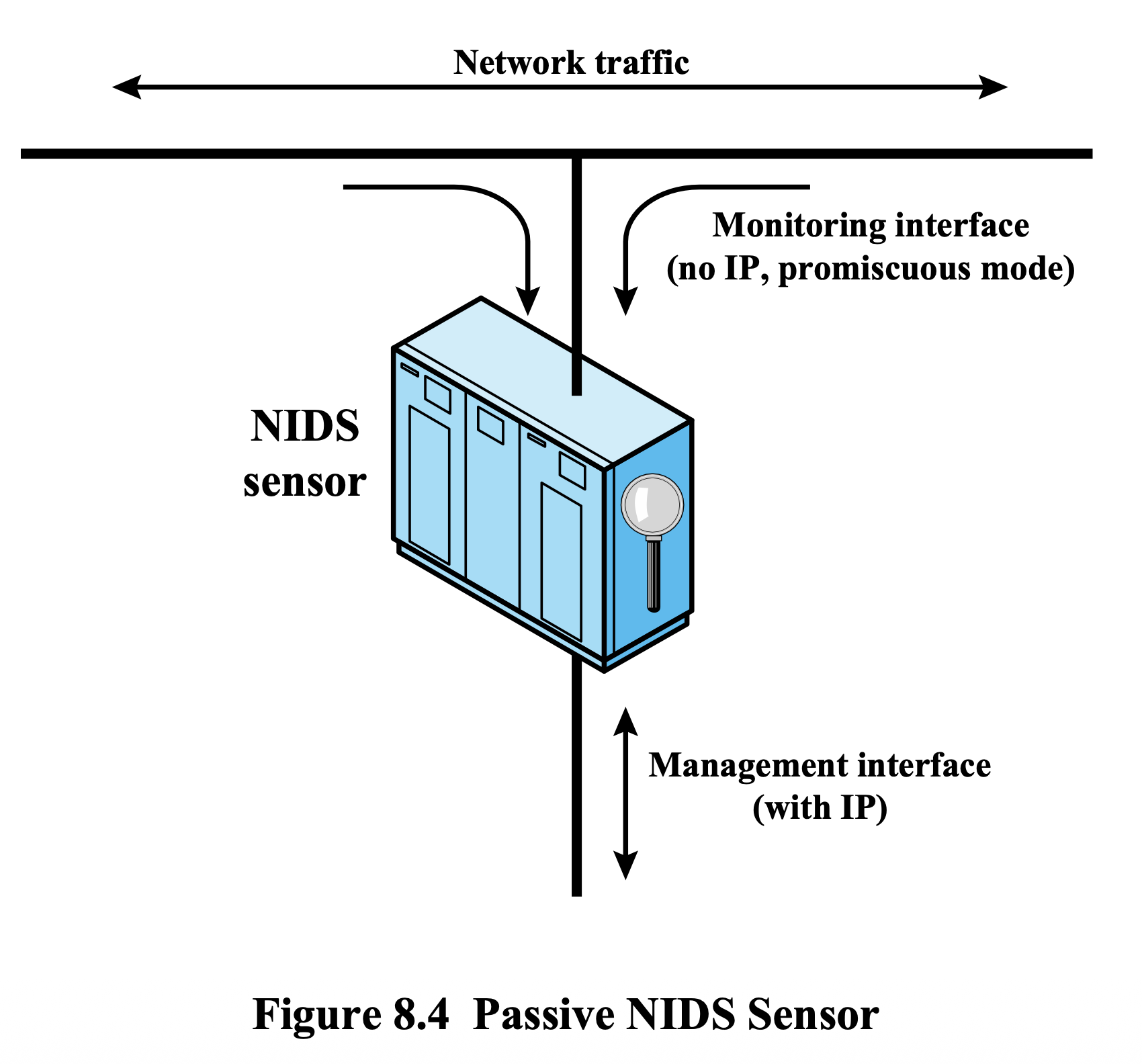
Inline = ยาม ที่ยืนกั้นประตู ห้ามไม่ให้ผ่าน | Passive = กล้อง CCTV ที่แค่ดูและบันทึก
NIDS Sensor Deployment Positions
Internet
   ↓
External Firewall
   ↓ ← Sensor [2] (between Internet and external firewall)
LAN Switch/Router ← Sensor [1] (between external FW and internal network)
   ├── Service Network (Web, Mail, DNS)
   ├── Internal Server/Data ← Sensor [3]
   └── Workstation Networks ← Sensor [4]
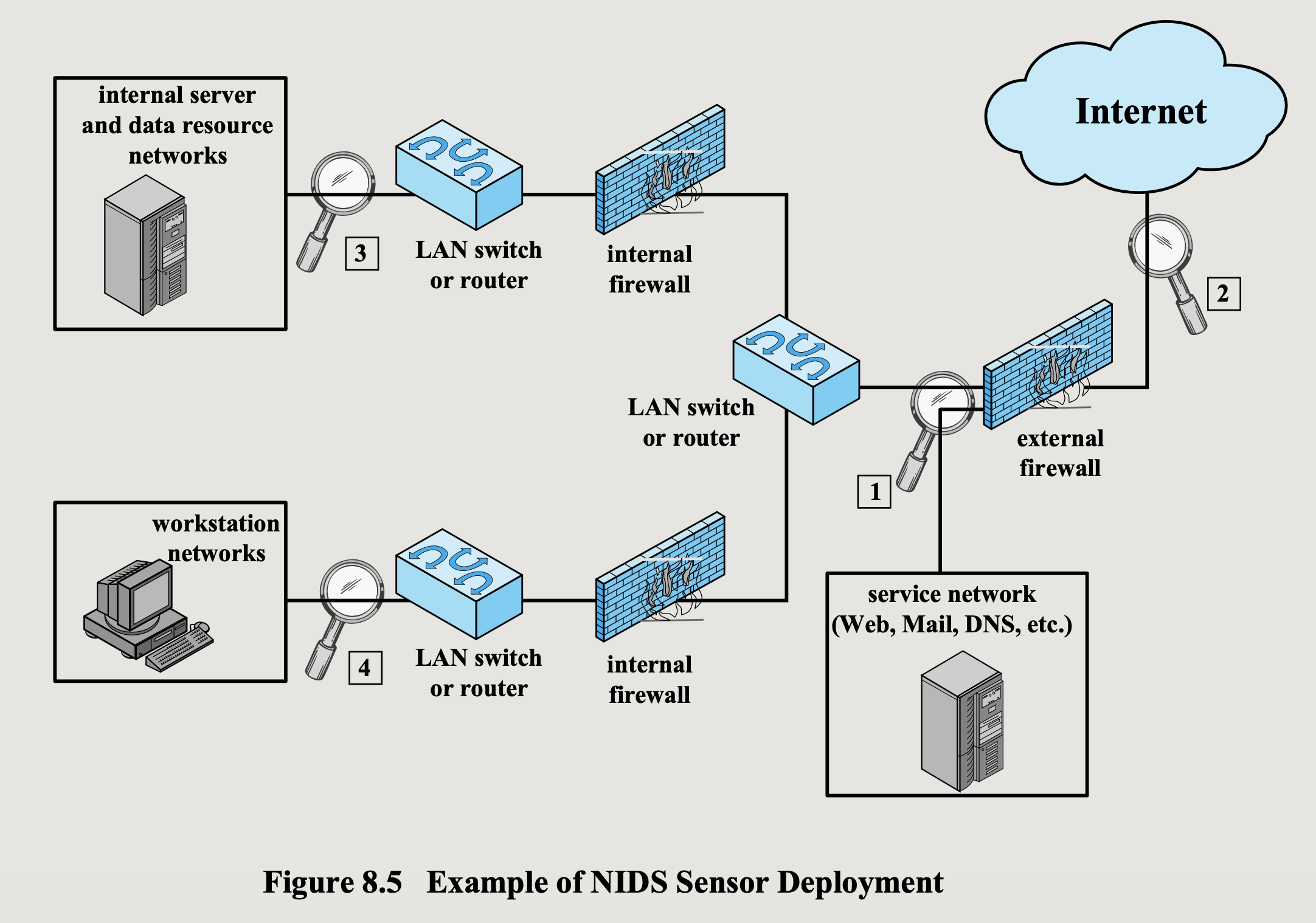
Intrusion Detection Techniques
| Type | Suitable Attacks |
|---|---|
| Signature Detection | Application/Transport/Network layer reconnaissance and attacks, Unexpected application services, Policy violations |
| Anomaly Detection | Denial-of-Service (DoS) attacks, Scanning, Worms |
- reconnaissance = data gathering (การลาดตระเวน)
- เวลาเราทำ Penetration test ก็ต้องทำอันนี้ก่อนนั่นแหละ
Logging of Alerts (NIDS)
Typical information logged by a NIDS sensor:
- Timestamp
- Connection or session ID
- Event or alert type
- Rating (severity)
- Network, transport, and application layer protocols
- Source and destination IP addresses
- Source and destination TCP/UDP ports, or ICMP types/codes
- Number of bytes transmitted
- Decoded payload data (application requests and responses)
- State-related information
IETF Intrusion Detection Working Group
Purpose: Define data formats and exchange procedures for sharing IDS information
RFCs issued in 2007:
| RFC | Name | Description |
|---|---|---|
| RFC 4766 | Intrusion Detection Message Exchange Requirements | Defines requirements for IDMEF format and communication protocol |
| RFC 4765 | Intrusion Detection Message Exchange Format (IDMEF) | Data model for IDS-exported info; implemented in XML |
| RFC 4767 | Intrusion Detection Exchange Protocol (IDXP) | Application-level protocol for exchanging data between IDS entities; supports mutual authentication, integrity, confidentiality |
Honeypots
- Decoy systems designed to:
- Lure attackers away from critical systems
- Collect information about attacker activity
- Keep attacker engaged long enough for administrators to respond
- Filled with fabricated information that legitimate users wouldn't access
- Have no production value → any incoming communication = likely probe/scan/attack
- Outbound communication from honeypot → system likely compromised
เหมือนกับดักที่วางเหยื่อไว้ ให้โจรสนใจและเสียเวลาอยู่กับของปลอม ขณะที่เราตามจับตัวได้
Honeypot Classifications
| Type | Description |
|---|---|
| Low Interaction | Software that emulates IT services; less realistic target; often used in distributed IDS to warn of imminent attacks |
| High Interaction | Real system with full OS, services, and apps; more realistic; keeps attacker longer; requires more resources; risk: if compromised, could be used to attack other systems |
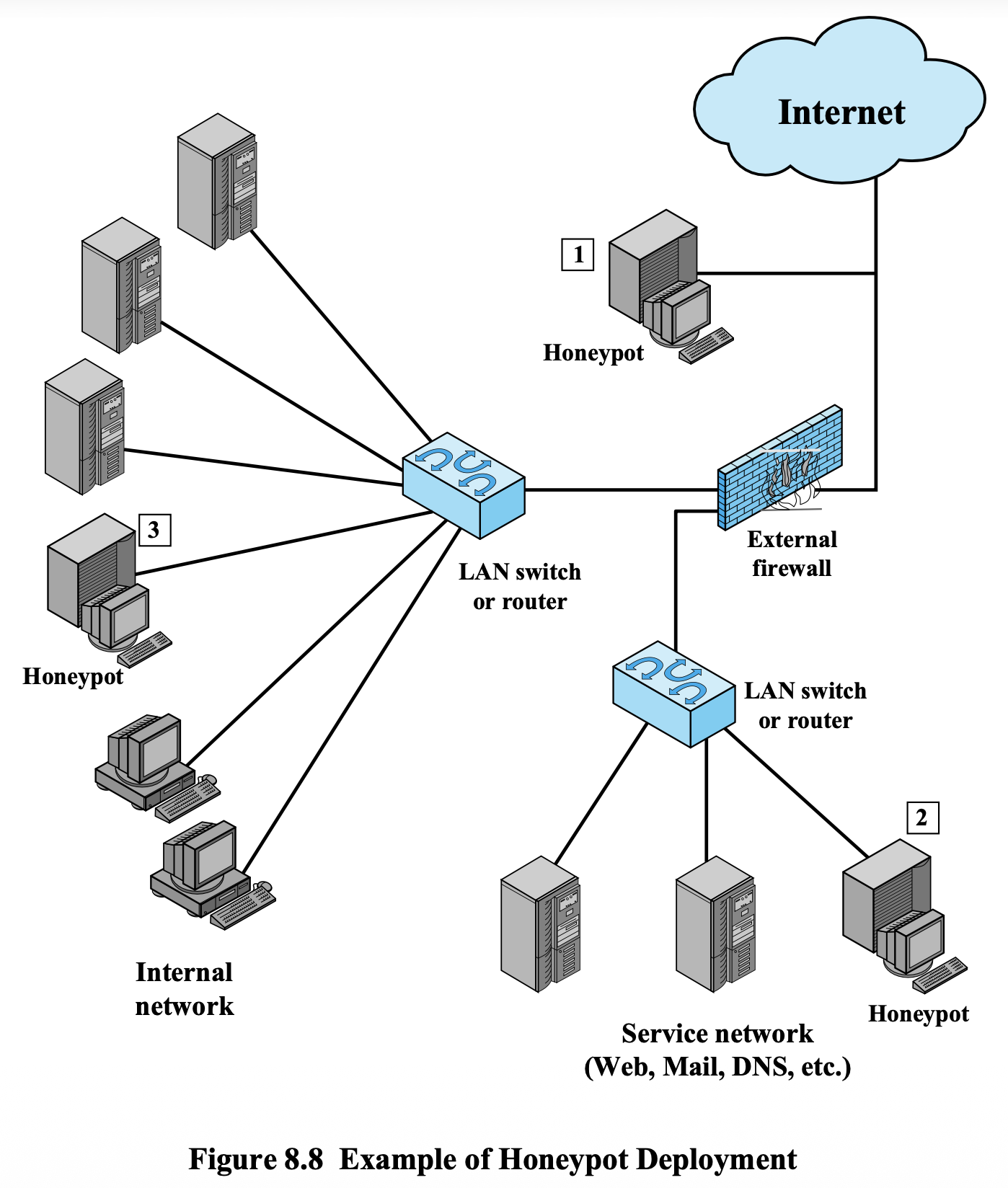
Honeypot Deployment Positions
- Position 1 — Before external firewall (faces internet directly)
- Position 2 — In service network (DMZ area)
- Position 3 — In internal network (detects insider threats)
SNORT
- Open source, highly configurable, portable HIDS or NIDS
- Known as a "lightweight IDS":
- Easily deployed on most nodes (host, server, router)
- Efficient — uses small amount of memory and processor time
- Easily configured by system administrators
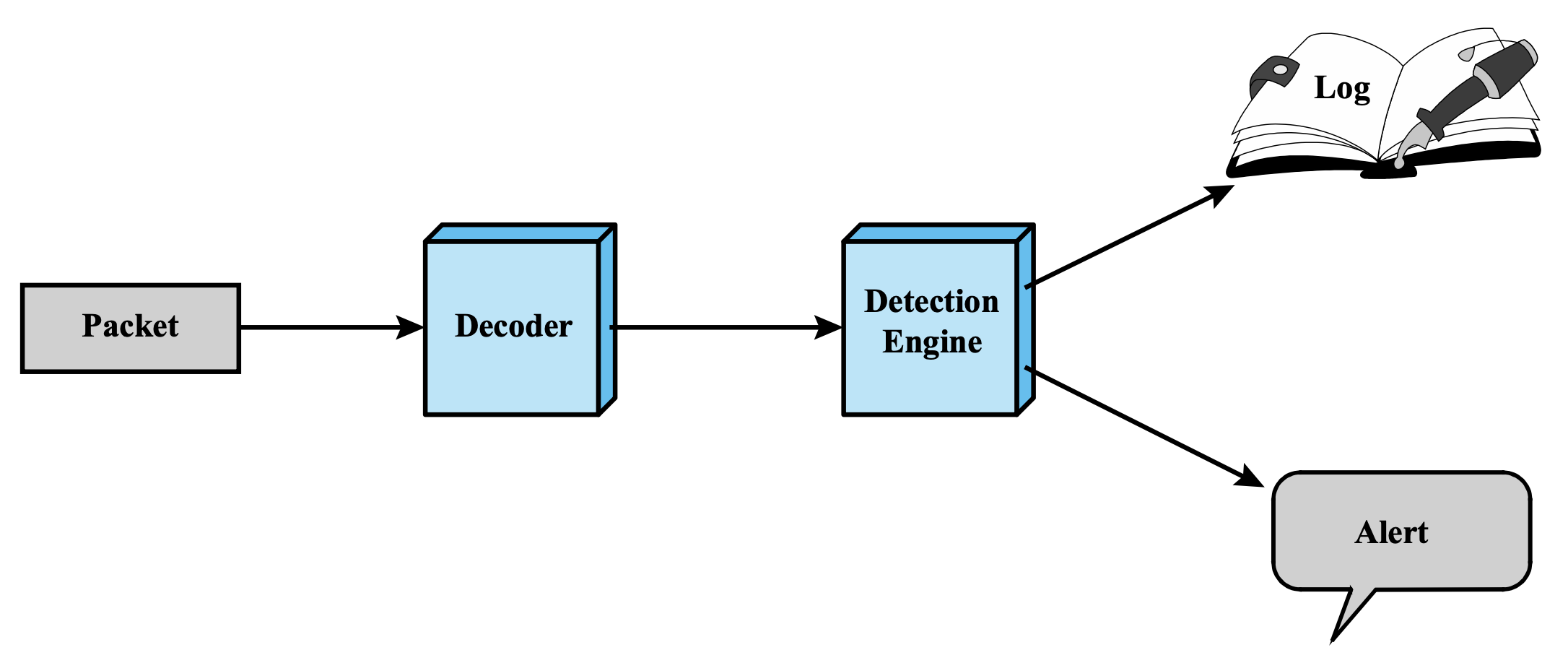
SNORT Architecture
Packet → Decoder → Detection Engine → Log
                                    → Alert
SNORT Components
| Component | Description |
|---|---|
| Packet Decoder | Processes each captured packet; identifies/isolates protocol headers at data link, network, transport, application layers |
| Detection Engine | Analyzes each packet against all defined rules; first matching rule triggers its action; unmatched packets are discarded |
| Logger | For packets matching a rule: stores detected packet in human-readable or compact binary format in a log file |
| Alerter | Sends alert for each detected packet; notification can go to a file, UNIX socket, or database; can be turned off during testing |
SNORT Rule Format
[Action] [Protocol] [Src IP] [Src Port] [Direction] [Dst IP] [Dst Port] ([Options])
Rule Header Fields
- Action — what to do when rule matches
- Protocol — tcp, udp, icmp, ip
- Source IP / Port
- Direction —
->(one-way) or<>(bidirectional) - Destination IP / Port
SNORT Rule Actions
| Action | Description |
|---|---|
alert | Generate alert, then log the packet |
log | Log the packet only |
pass | Ignore the packet |
activate | Alert, then turn on another dynamic rule |
dynamic | Idle until activated by activate rule, then act as log |
drop | iptables drop the packet + log it |
reject | iptables drop + log + send TCP reset (or ICMP unreachable for UDP) |
sdrop | iptables drop the packet, no log |
Rule Options Categories
| Category | Description |
|---|---|
| meta-data | Info about the rule; no effect during detection (e.g., msg, reference, classtype) |
| payload | Search inside packet payload (e.g., content, depth, offset, nocase) |
| non-payload | Check non-payload data (e.g., ttl, id, dsize, flags, seq, icmp-id) |
| post-detection | Triggers after rule matches (e.g., logto, session) |
Key Rule Option Examples
meta-data:
msg— message to send when packet triggers the rulereference— link to external attack ID systemclasstype— type of attack the packet attempted
payload:
content— case-sensitive search for specific content (text/binary) in payloaddepth— how far into packet to search for the patternoffset— where to start searching within the packetnocase— ignore case when matching content
non-payload:
ttl— check IP time-to-live (detect traceroute attempts)id— check IP ID field (value31337popular with some hackers)dsize— test payload size (useful for detecting buffer overflows)flags— test TCP flags for specified settingsseq— look for specific TCP sequence numbericmp-id— check for specific ICMP ID (detect covert channel programs like stacheldraht DDoS)
post-detection:
logto— log matching packets to specified filenamesession— extract user data from TCP sessions (telnet, rlogin, ftp, web sessions)
IDS Rule Breakdown Example (auditd)
-a always,exit -F arch=b64 -S execve -F exe=/usr/sbin/tcpdump -k sniffing| Segment | Meaning |
|---|---|
-a always,exit | Audit every invocation of the syscall on exit |
-F arch=b64 | Target 64-bit architecture (b32 for 32-bit) |
-S execve | Watch the execve syscall (used when a process is executed) |
-F exe=/usr/sbin/tcpdump | Only trigger when the executed binary is exactly tcpdump |
-k sniffing | Adds custom key sniffing for easy searching with ausearch -k sniffing |
Summary
| Topic | Key Points |
|---|---|
| Intruder Classes | Cyber criminals, Activists, State-sponsored (APT), Others |
| Skill Levels | Apprentice (script-kiddie) → Journeyman → Master |
| IDS Types | HIDS, NIDS, Distributed/Hybrid |
| Detection Approaches | Anomaly (behavior baseline), Signature/Heuristic (known patterns) |
| NIDS Sensors | Inline (can block) vs. Passive (monitoring only) |
| IDS Evaluation | False Positive (FP) and False Negative (FN) |
| Honeypots | Low interaction (emulated) vs. High interaction (real system) |
| SNORT | Lightweight rule-based NIDS: Decoder → Detection Engine → Log/Alert |