Overview
LAN Topologies
Two Types of Topologies
- Physical Topology
- Describes the geometric arrangement of components that make up the LAN
- The actual physical layout of cables and devices
Think of it like the floor plan of a house - shows where everything is physically located
อันนี้คือดูของจริงเลย ว่าสายลากไปไหนบ้าง อุปกรณ์วางอยู่ตรงไหน ต่อกันเป็นรูปทรงอะไร
- Logical Topology
- Describes the possible connections between pairs of networked end-points that can communicate
- How data actually flows through the network
Like the traffic flow patterns in a city - not about where roads are, but how traffic moves through them
เหมือนแผนที่การจราจรในเครือข่าย ดูว่าข้อมูลมันวิ่งหรือสื่อสารทางไหนได้บ้าง อาจจะไม่ตรงกับชีวิตจริงที่เราวางสายกันเนี่ยนะะะ
LAN Topologies (Physical)
รูปแบบการต่อสาย!
The six main types:
- Bus
- Star
- Ring
- Switched
- Daisy chains
- Hierarchies
1. Bus Topology
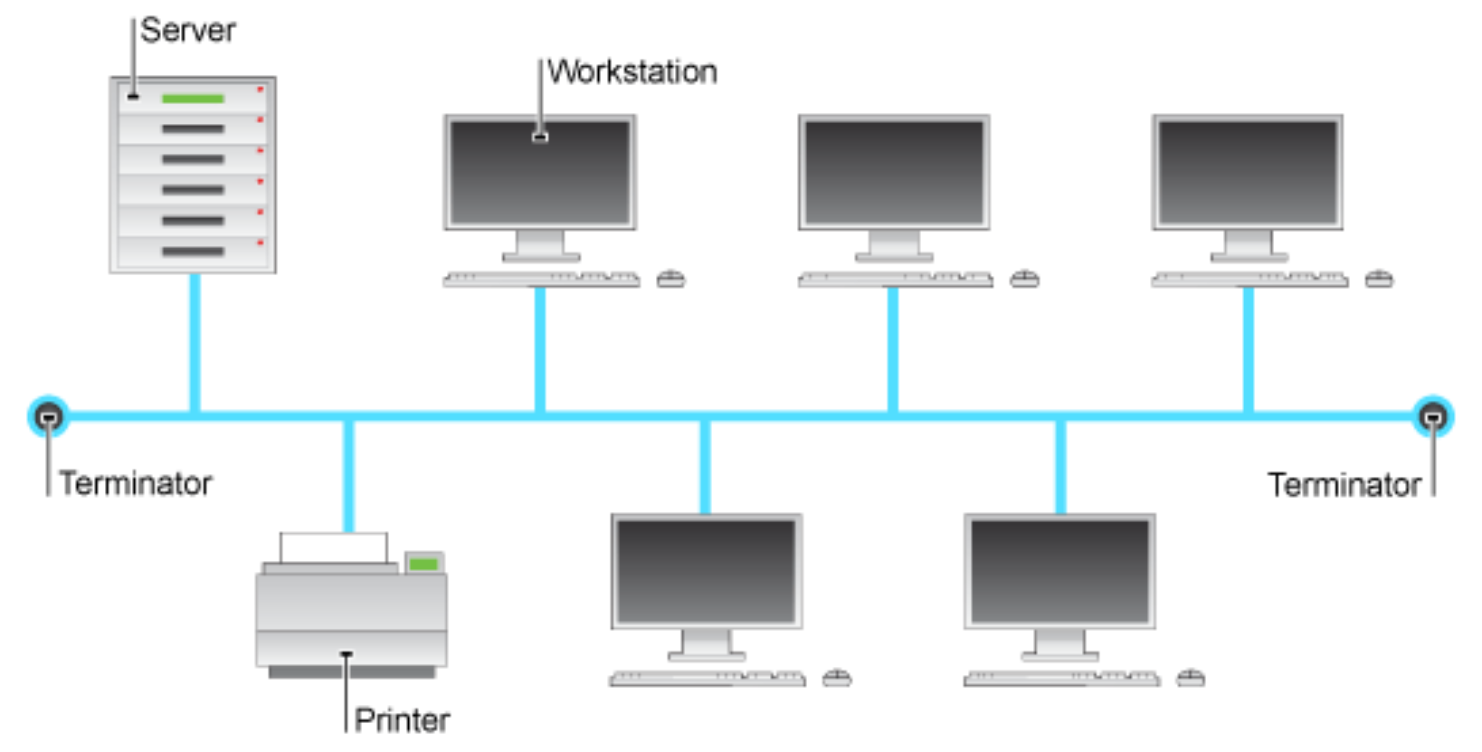
Classic สุด ทุกอุปกรณ์ต่อเข้าสายสัญญาณหลักเส้นเดียว เรียกว่า Bus — ข้อมูลส่งทีละทาง เป็น Half-duplex
สิ่งสำคัญที่ห้ามลืม ๆ ก็คือที่ปลายสายทั้งสองข้างต้องมีอุปกรณ์ปิดสัญญาณ (Terminator) อยู่ด้วย
Definition
- A bus network is a network topology in which nodes are directly connected to a common half-duplex link called a bus
- A host on a bus network is called a station
- In a bus network, every station will receive all network traffic
- The traffic generated by each station has equal transmission priority
- All networked nodes are interconnected, peer to peer, using a single, open-ended cable
- Both ends of the bus must be terminated with a terminating resistor to prevent signal bounce
ทำไม Bus Topology ถึงต้องมี Terminator ด้วยล่ะ? ถ้าไม่มีไม่ได้หรอ?
จ้า ถ้ามันไม่มี Terminator เนี่ย เวลาสัญญาณไฟฟ้าวิ่งไปจนสุดปลายสาย มันจะสะท้อนกลับเข้ามาในสาย ทำให้เกิด Interferance การรบกวนเกิดขึ้นได้ อาจจะทำให้ข้อมูลผิดเพี้ยนไปเลย
Think of a bus topology like a school bus route - everyone on the same bus hears all announcements, and the bus has a clear start and end point (terminators)
Advantages of Bus Topology
- Easy to implement and extend
- Well suited for temporary networks that must be set up in a hurry
- Typically the least cheapest topology to implement
- Failure of one station does not affect others
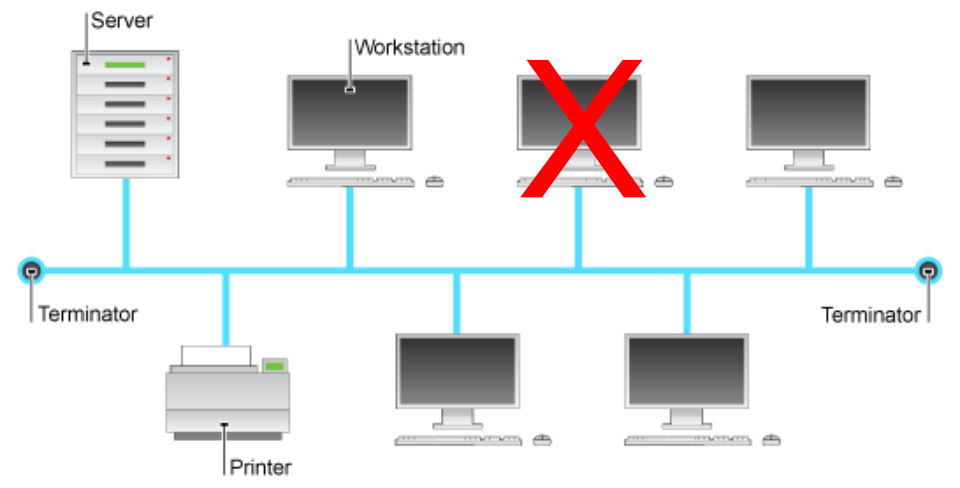
Like Christmas lights wired in parallel - if one bulb goes out, the others still work
Disadvantages of Bus Topology
- Difficult to administer/troubleshoot
- Limited cable length and number of stations
- ==A cable break can disable the entire network; no redundancy==
- Maintenance costs may be higher in the long run
- ==Performance degrades as additional computers are added==
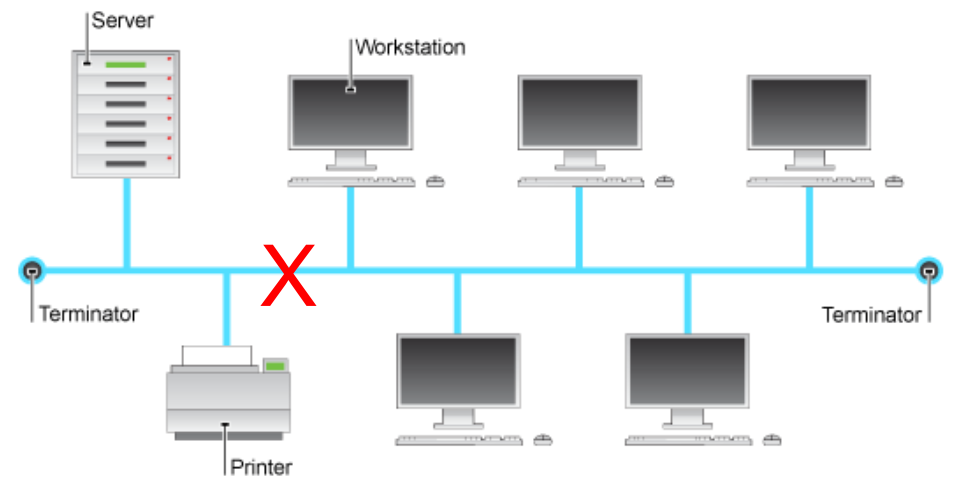
Like a highway with only one lane - the more cars (data) you add, the worse traffic gets
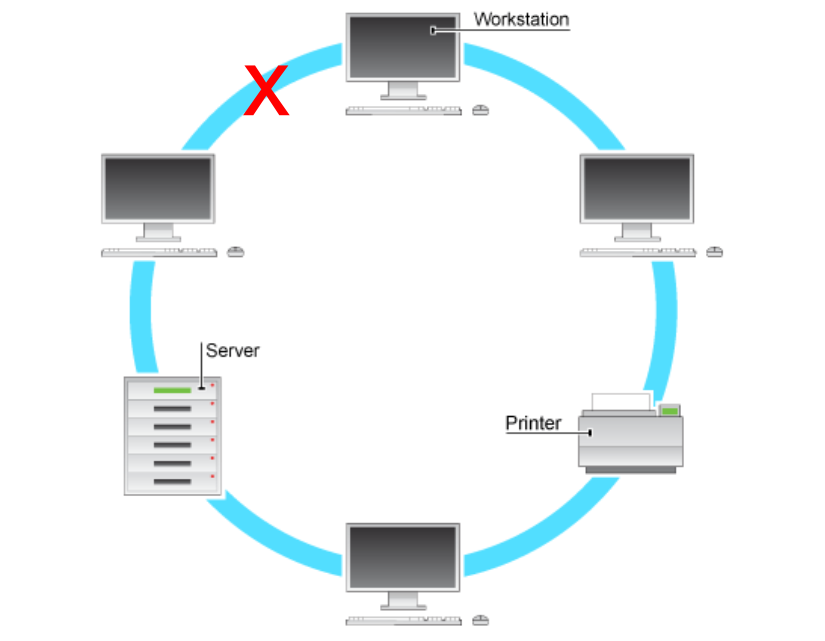
2. Ring Topology
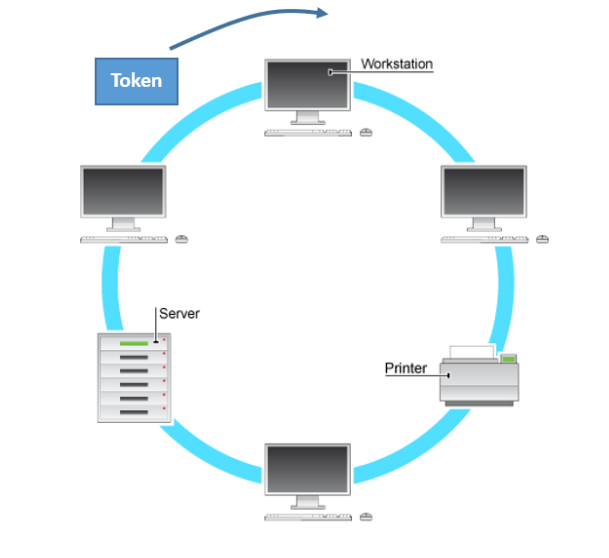
อันนี้แต่ละ Node จะต่อกับ Node ข้าง ๆ สองตัวเท่านั้น แล้วก็วนเชื่อมกันเป็นวงแหวน ข้อมูลวิ่งไปในทางเดียวเท่านั้น (Unidirectional)
Definition
- A ring network is a network topology in which each node connects to exactly two other nodes, forming a single continuous pathway for signals through each node - a ring
- Data travels from node to node, with each node along the way handling every packet
- This started out as a simple peer-to-peer LAN topology
- Each networked workstation had two connections: one to each of its nearest neighbors
- Data was transmitted unidirectional around the ring
- Sending and receiving of data takes place by the help of TOKEN
Like a relay race where runners pass a baton (token) around a circular track - only the runner with the baton can run
Token Passing
สิ่งที่ทำให้ Ring แตกต่างจากชาวบ้านเลย คือ มันใช้ Token เป็นตัวควบคุมในการส่งข้อมูล
Token เนี่ย (จริง ๆ แล้วเป็น Frame ข้อมูลพิเศษเล็ก ๆ) ขนาด 3 bytes วิ่งวนอยู่ใน Ring ตลอดเวลาเลย ใครอยากส่งข้อมูลเนี่ย ต้องรอให้ Token วิ่งมาถึงเราก่อน แล้วก็จับ Token นั้นไว้ → เปลี่ยนสถานะ Token ไม่ว่าง → แล้วก็แนบข้อมูลของตัวเองส่งออกไปกับ Token
พอข้อมูลถึงปลายทาง Receiver ทำ Copy ของข้อมูลเก็บไว้ → ส่ง Token (พร้อมข้อมูล) วนกลับมาหาต้นทาง → ผู้ส่งเห็นว่าข้อมูลของตัวเองกลับมาแล้ว → เอาข้อมูลออก → ปล่อย Token ว่าง
- It uses a special three-byte frame called a Token that travels around a logical ring of stations
- Token contains a piece of control information along with data, which is sent by the source computer
- Only a station that holds a token can send data, and tokens are released when receipt of the data is confirmed
- Token ring networks prevent data packets from colliding on a network segment because data can only be sent by a token holder and the number of tokens available is controlled
Think of it like a "talking stick" in a meeting - only the person holding the stick can speak, preventing everyone from talking at once
Advantages of Ring Topology
- Very organized network topology
- Performance is better than that of Bus topology
- No need for network server to control the connectivity between workstations
- Additional components do not affect the performance of network
- Each computer has equal access to resources
Disadvantages of Ring Topology
- Each packet of data must pass through all the computers between source and destination, slower than star topology
- Make sense เลยที่ช้าเนี่ย ข้อมูลส่งผ่านทุกเครื่อง
- If one workstation or port goes down, the entire network gets affected
- Network is highly dependent on the wire which connects different components
Like a chain - if one link breaks, the whole chain is compromised
3. Star Topology
นิยมที่สุดในปัจจุบัน!!!
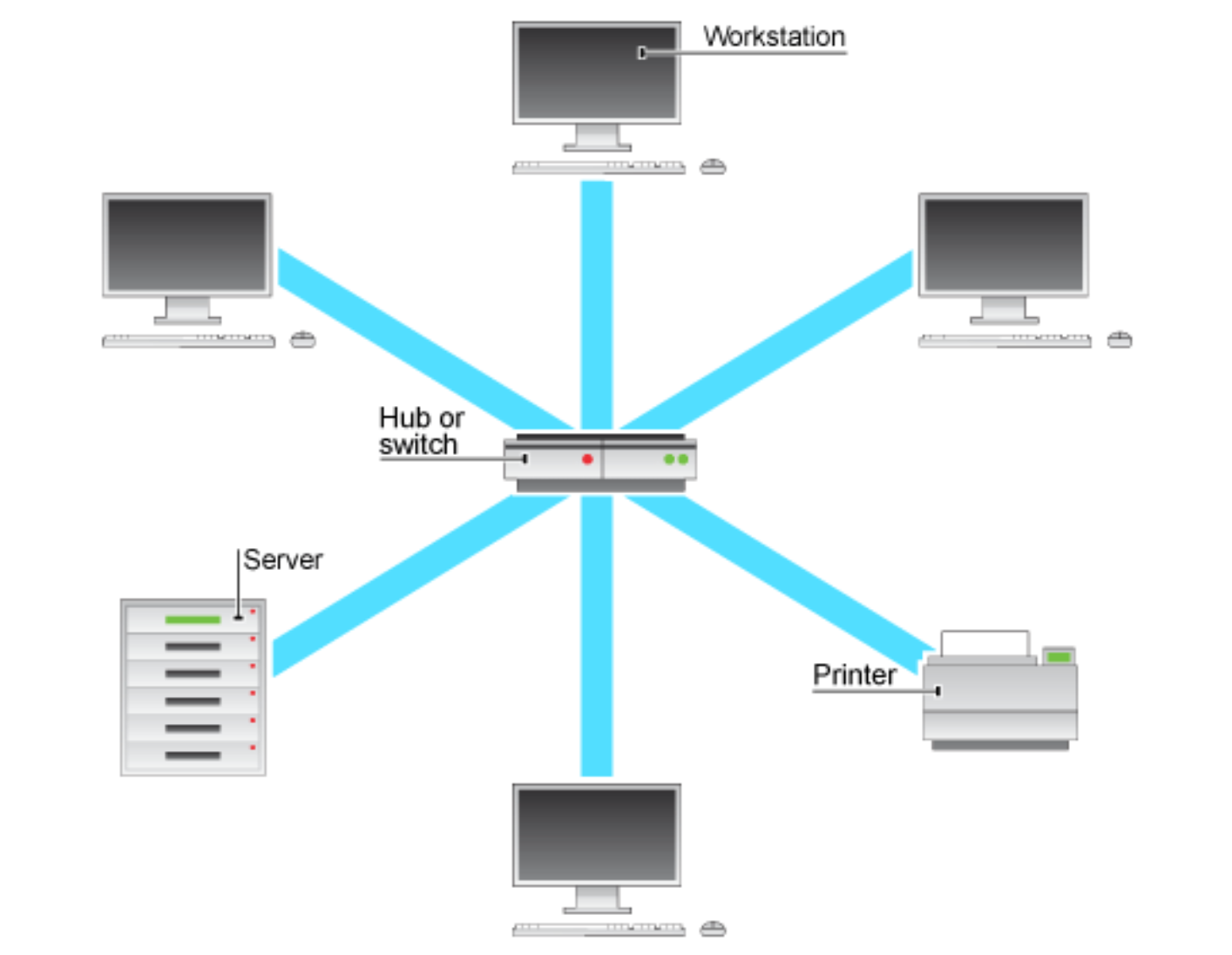
ทุก Station จะต่อสายตรงเข้าหาอุปกรณ์ศูนย์กลางตัวเดียวเลย (Hub or Switch) ที่นิยมมาก เพราะว่า ติดตั้งง่าย จัดการง่ายจากจุดศูนย์กลาง + ถ้าสายเส้นใดขาดหรือพัง ไม่เป็นไรหรอก
Definition
- In a star network, every station is connected to a central hub
- In its simplest form, one central hub acts as a conduit to transmit messages
- Have connections to networked devices that "radiate" out from a common point
- Each networked device in star topology can access the media independently
- The star network is one of the most common computer network topologies
- Have become the dominant topology type in contemporary LANs
- Stars have made buses and rings obsolete in LAN topologies
Like spokes on a bicycle wheel - everything connects to the central hub, just like spokes connect to the wheel's center
Advantages of Star Topology
- Better performance compared to Bus topology
- Easy to connect new nodes or devices
- Centralized management - helps in monitoring the network
- Failure of one node or link doesn't affect the rest of network
Like a power strip - if one device fails, others keep working, but if the strip itself fails, everything goes down
Disadvantages of Star Topology
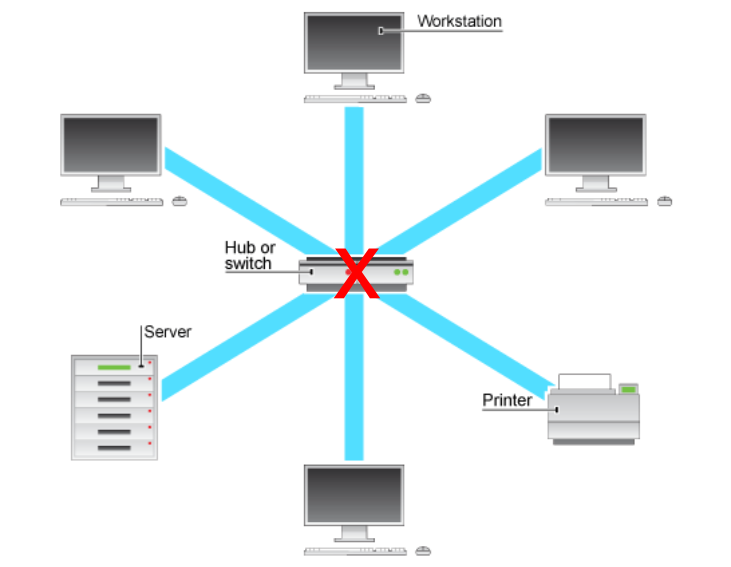
จุดอ่อนสำคัญเลยก็คือ ตัว Hub/Switch ตรงกลางเนี่ยแหละ ถ้าเจ้าตัวกลางเสียขึ้นมาาา ระบบเครือข่ายพังเลยทันที
- If central device fails whole network goes down
- The use of hub, router or switch as central device increases the overall cost of the network
- Performance and number of nodes which can be added in such topology is depended on capacity of central device
4. Switched Topology
ต่างจาก Star ที่ใช้ Hub ยังไง? เฉลย จริง ๆ มันก็คือ Physical Star Topology นั่นแหละ
แต่ว่าใช้อุปกรณ์กลางเป็น Switch แทนที่จะเป็น Hub
ความแตกต่างจะอยู่ตรงที่ความฉลาดของมัน
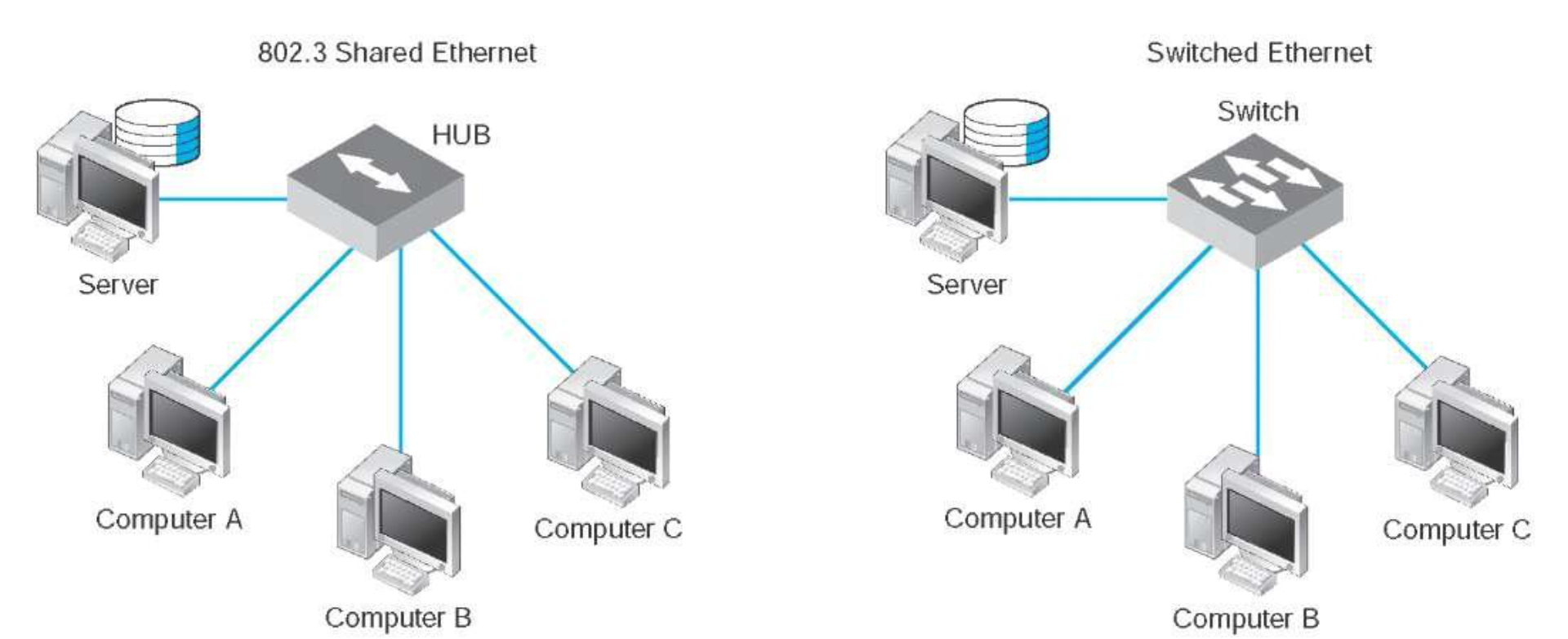
- Hub ทำหน้าที่เหมือนปลั๊กพ่วงเลย ได้ข้อมูลมาจาก Port ไหน ก็ส่งกระจายออกไปทุก Port ที่เหลือเลย ดังนั้นเครื่องอื่น ๆ เห็นข้อมูลหมด แล้วยังต้องแชร์ Bandwidth กัน
- Switch ทำงานที่ Data Link Layer มันฉลาดกว่า จะเรียนรู้ MAC Address ของอุปกรณ์ที่ต่ออยู่กับแต่ละ Port ของมัน แล้วสร้างตารางเก็บเอาไว้ พอมีข้อมูล/Frame เข้ามา Switch ก็จะส่งต่อข้อมูลไปยัง Port ที่เชื่อมกับปลายทางเท่านั้น
arp -aDefinition
- Both Logical and physical topology of the network becomes a star topology
- Instead of hubs, it uses switches (a Data Link Layer device that has multi-ports)
- It is designed to support a small set of computers (16 to 24) in one LAN
- Designed to support a group of point-to-point circuits
- No sharing of circuits
- Switch reads destination address of the frame and only sends it to the corresponding port, while a hub broadcasts frames to all ports
How It Works
- A switch "learns" Media Access Control (MAC) addresses and stores them in an internal lookup table
- Temporary, switched paths are created between the frame's originator and its intended recipient
- The frames are forwarded along the temporary path
- Switched topology features multiple connections to a switching Hub/Switch
- Each port, and the device to which it connects, has its own dedicated bandwidth
Like a smart postal system - instead of delivering every letter to every house, the switch knows which letter goes to which address
Advantages/Disadvantages of Switched Topology
Advantages:
- Can improve LAN performance by:
- Increasing the aggregate bandwidth available throughout the network
- Reducing the number of devices forced to share each segment of bandwidth
- Networks which use switches will have less frame collisions
- This is due to the fact that switches create collision domains for each connection
- ลดการชนกันของข้อมูลอย่างมหาศาลเลยล่ะ
Disadvantages:
- More expensive compared to other topologies
- Network connectivity issues are difficult to trace through the network switch
- Broadcast traffic may be troublesome
5. Daisy Chains
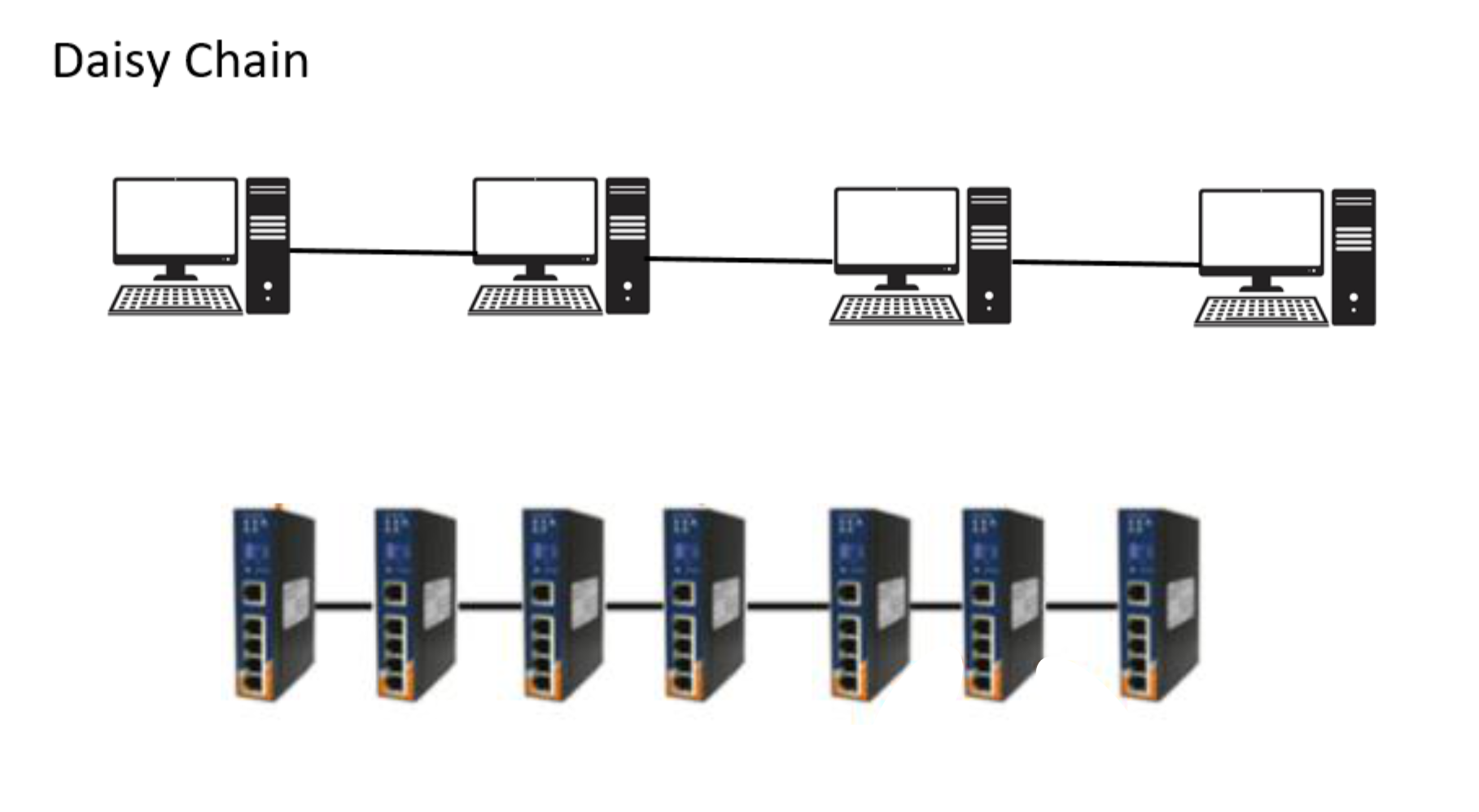
การเอา Hub/Switch มาต่อพ่วงกันไปเรื่อย ๆ แบบอนุกรม ง่าย ๆ เลยเพื่อเพิ่ม Port แต่ข้อเสียคือ Bandwidth ไม่พอ + Collision ได้ไง
Definition
- Developed by serially interconnecting all the hubs of a network
- This simple approach uses ports on existing hubs for interconnecting the hubs
- Daisy chains are easily built and don't require any special administrative skills
- Daisy chains were, historically, the interconnection method of choice for emerging, first-generation LANs
Like stringing multiple power strips together - simple but not ideal for heavy use
Advantages and Disadvantages
Advantage:
- Increases the number of connections, and therefore the number of devices, on a LAN
Disadvantage:
- Too many devices competing for the same amount of bandwidth can create collisions and quickly incapacitate a LAN
6. Hierarchies
อันนี้ใช้ใน LAN ขนาดกลาง-ใหญ่ จัดวาง Switch เป็นชั้น ๆ เพื่อรองรับเครือข่ายขนาดใหญ่
Definition
- Hierarchical topologies consist of more than one layer of hubs
- Each layer serves a different network function
- The bottom tier is reserved for user station and server connectivity
- Higher-level tiers provide aggregation of the user-level tier
- A hierarchical arrangement is best suited for medium-to-large-sized LANs that must be concerned with scalability of the network and with traffic aggregation
Like a corporate organizational chart - workers at the bottom, managers in the middle, executives at the top, each handling different levels of responsibility
Hierarchical Rings
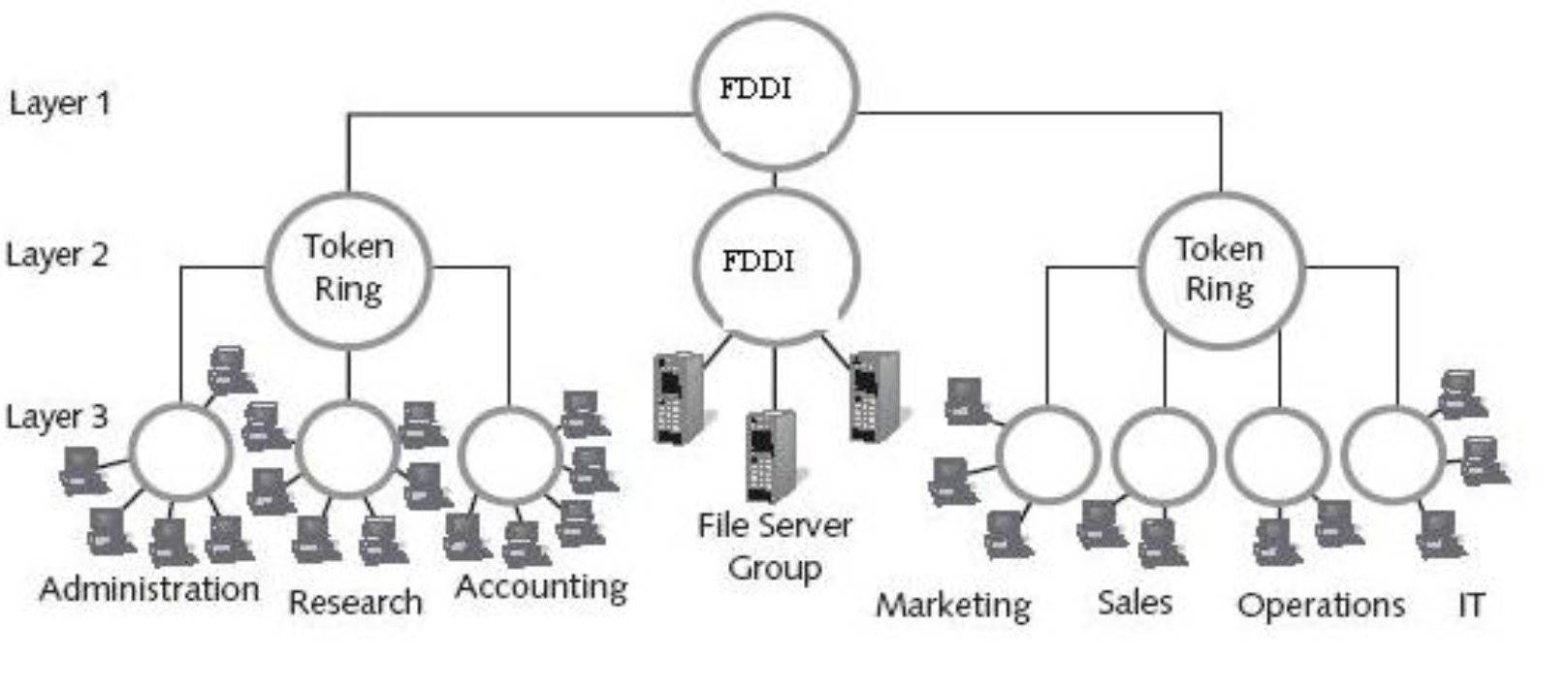
- Ring networks can be scaled up by interconnecting multiple rings in a hierarchical fashion
- User station and server connectivity can be provided by as many limited size rings as are necessary to provide the required level of performance
- A second-tier ring, either Token Ring or FDDI (Fiber Distributed Data Interface) can be used to:
- Interconnect all the user level rings
- Provide aggregated access to the Wide Area Network (WAN)
Note: FDDI (Fiber Distributed Data Interface) is a standard for data transmission (in light form) in a local area network
Hierarchical Stars (Tree Topology)
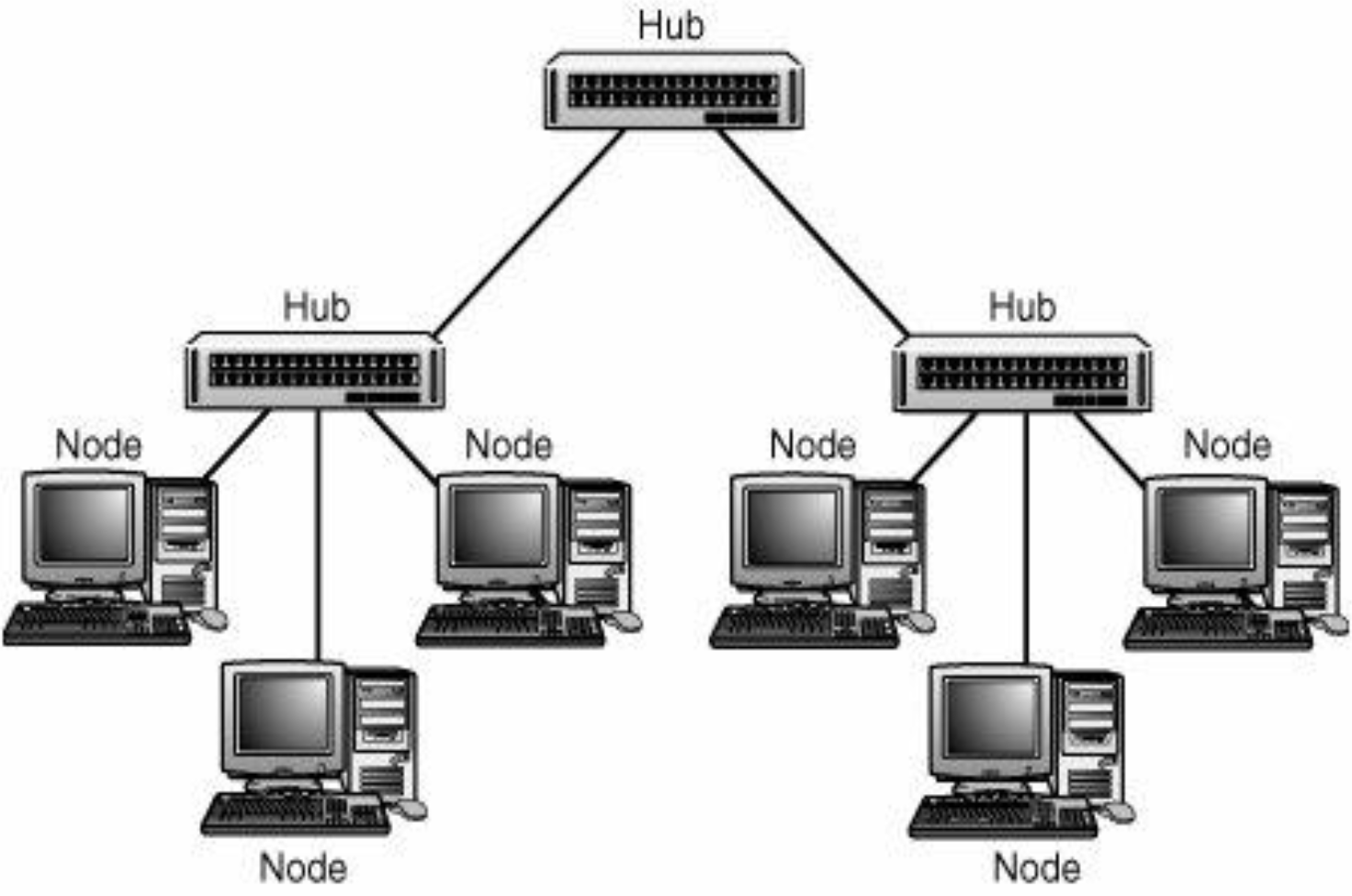
- Star topologies can be implemented in hierarchical arrangements of multiple stars
- Hierarchical stars can be implemented as:
- A single collision domain, OR
- Segmented into multiple collision domains using switches, routers or bridges
Note: A collision domain is a network segment connected by a shared medium or through repeaters where simultaneous data transmissions collide with one another
Hierarchical Combinations
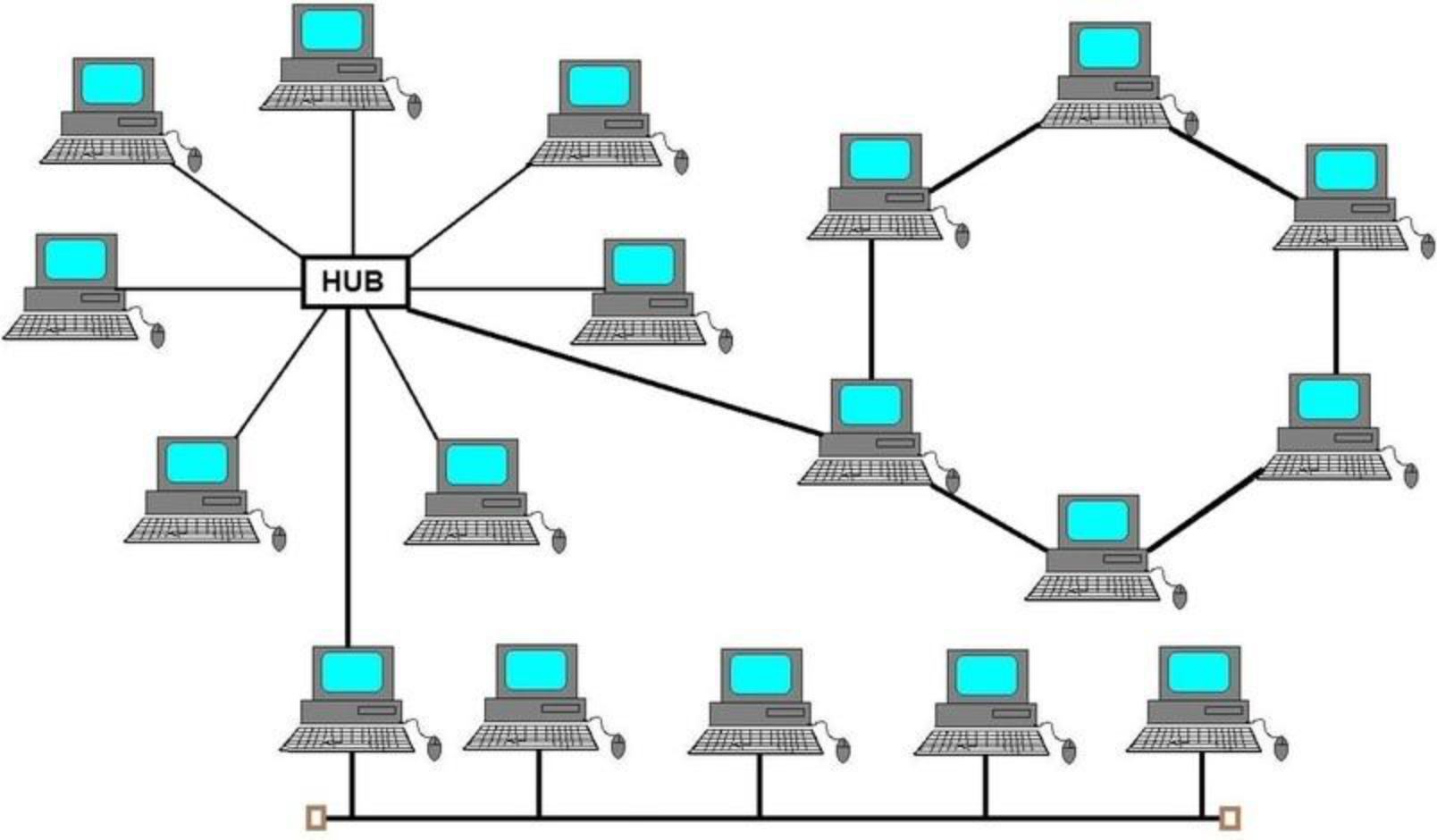
- Overall network performance can be enhanced by not force-fitting all the functional requirements of the LAN into a single solution
- Today's high-end switching hubs enable you to mix multiple technologies
Like a multi-tool - combining different functions in one device for better versatility
WAN Topologies
สำหรับ WAN เราจะเน้นเรื่องของการเชื่อมต่อ ระหว่าง สถานที่/Sites ที่อยู่ไกล e.g. สาขาต่าง ๆ ของบริษัท Peanut
Overview
- The topology of a WAN describes the way the transmission facilities are arranged relative to the locations that they interconnect
- Numerous topologies are possible, each one offering a different mix of cost, performance and scalability
- ปัจจัยที่ใช้ในการคิด
Types of WAN Topologies
- Peer-to-peer WANs
- Ring WANs
- Star WANs
- Full-mesh WANs
- Partial-mesh WANs
- Two-tiered
- Three-tiered
- Hybrids
1. Peer-to-Peer Topology
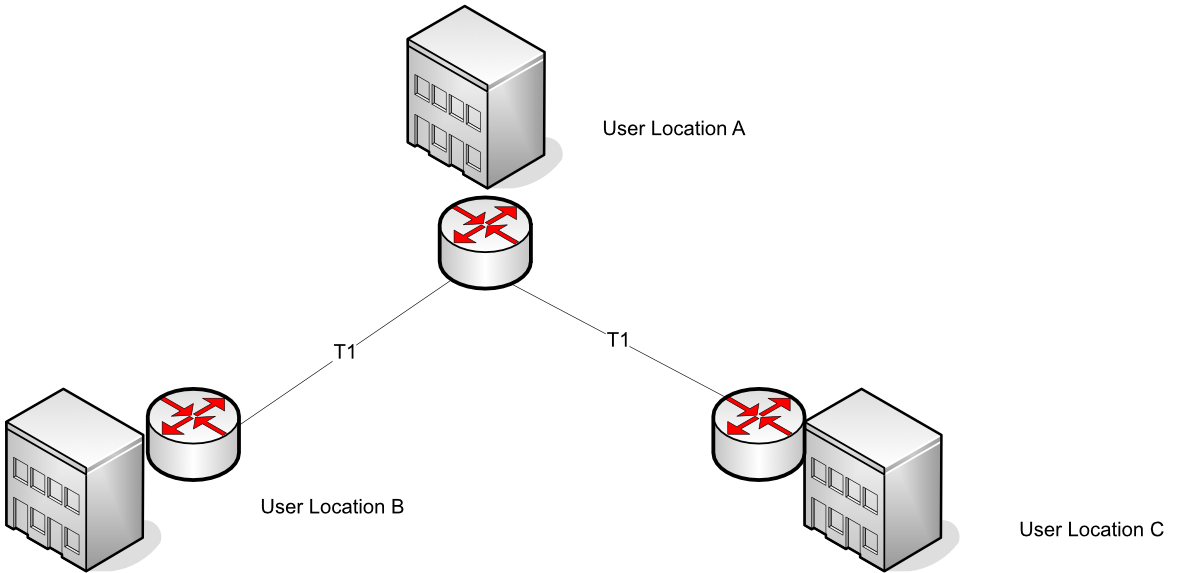
ง่าย ๆ เหมือน เชื่อมต่อบ้านสามหลังด้วยสายโทรศัพท์โดยตรงระหว่างเพื่อนบ้านแต่ละราย
Definition
- A peer-to-peer WAN can be developed using leased private lines or any other transmission facility
- This WAN topology is a relatively simple way of interconnecting a small number of sites
- Represents the least-cost solution for WANs that contain a small number of internetworked locations
Like connecting three houses with direct phone lines between each neighbor - simple but doesn't scale well
Advantages/Disadvantages
Advantage:
- Inexpensive relative to other options
Disadvantages:
- Don't scale very well
- As additional locations are introduced to the WAN, the number of hops between any given pair of locations remains highly inconsistent and has an upward trend
- An equipment or facility failure anywhere in a peer-to-peer WAN can split the WAN
2. Ring Topology (WAN)
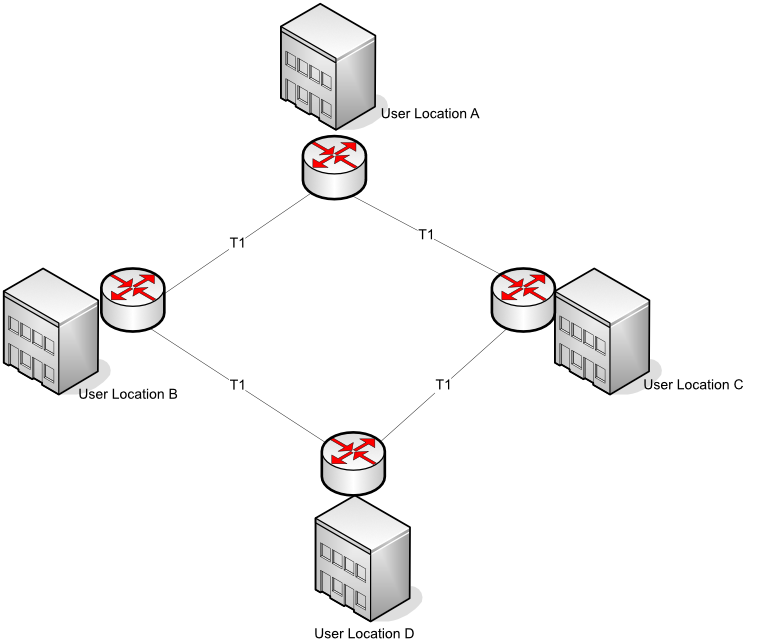
พัฒนามาจาก Peer-to-Peer: เพิ่มสายเชื่อมให้ครบวงจร เพื่อให้มีเส้นทางสำรอง ถ้าเส้นทางนึงขาดขึ้นมา ก็ยังมีอีกเส้นทางที่ให้ข้อมูลวิ่งไปได้
Definition
- Can be developed fairly easily from a peer-to-peer network by adding one transmission facility and an extra port on two routers
- A ring-shaped WAN constructed with point-to-point transmission facilities can be used to:
- Interconnect a small number of sites
- Provide route redundancy at a potentially minimal incremental cost
- Can use dynamic routing protocols
Like adding one more road to create a circular route - provides an alternate path if one road is blocked
Advantages/Disadvantages
Advantages:
- Provides alternative routes
- Less expensive than all but the peer-to-peer WAN
Disadvantages:
- Depending on the geographic dispersion of the locations, adding an extra transmission facility to complete the ring may be cost prohibitive
- Rings are not very scalable
3. Star Network Topology (WAN)
Definition
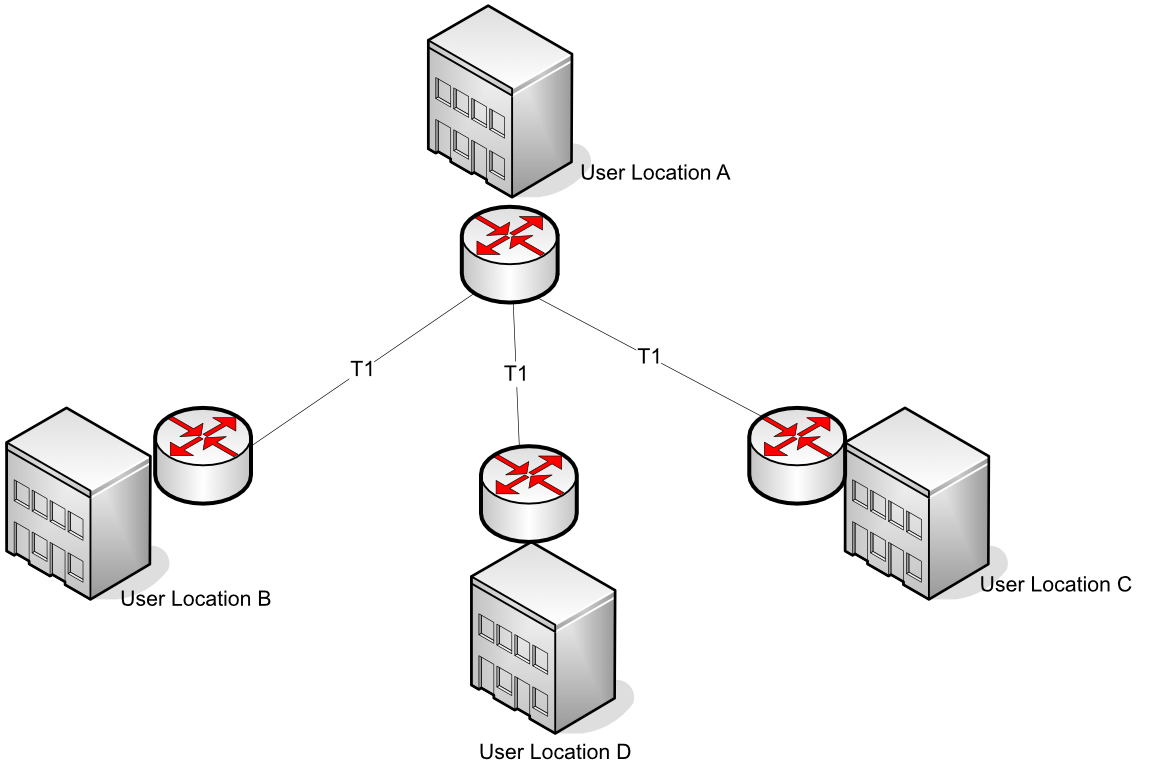
- Constructed by homing all locations into a common location
- The star topology can be constructed using almost any dedicated transmission facility including:
- Frame relay
- Point-to-point private lines
Like a hub airport - all flights go through one central location before connecting to their final destination
Advantages/Disadvantages
Advantages:
- More scalable than a peer-to-peer or ring network
- Improved network performance - Less hops
Disadvantages:
- Creates a single point of failure - ศูนย์กลางล่ม ทุกอย่างจบ
- No route redundancy
- ไม่มีเส้นทางสำรอง
4. Full-Mesh Topology
ที่สุดของ Reliability แล้วล่ะ + Tolerance
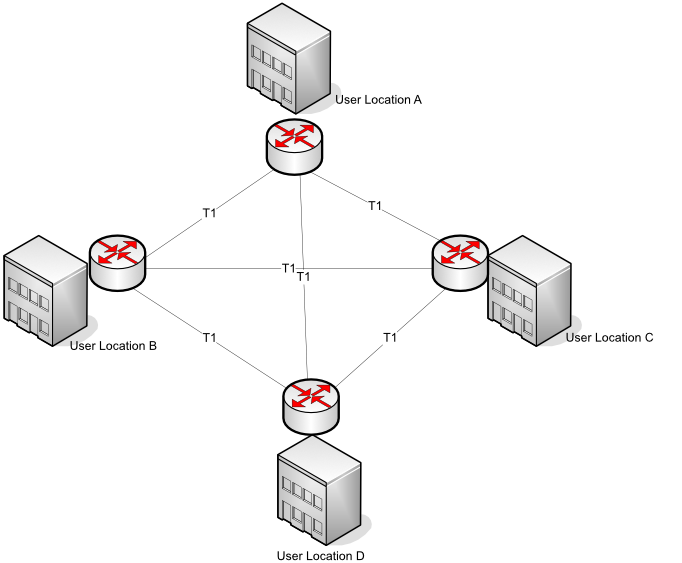
ทุก Sites เชื่อมต่อกันทั้งหมดเลย ทำให้มีเส้นทางสำรองเยอะมาก ๆ สายขาดเส้นเดียวไม่หวั่น ข้อเสียคือไร 🤑🤑🤑
Definition
- This topology features the ultimate reliability and fault tolerance
- Every networked node is directly connected to every other networked node
- Redundant routes to each location are plentiful, hence static routing impractical
- Use dynamic routing protocols
Applications
One application would be to provide interconnectivity for a limited number of routers that require high network availability
Another potential application is to fully mesh just parts of the WAN, such as:
- The backbone of a multi-tiered WAN
- Tightly coupled work centers
Like having direct flights between every pair of cities - maximum convenience but very expensive to maintain
Advantages/Disadvantages
Advantages:
- Minimizes the number of hops between any two network-connected machines
- Can be built with virtually any transmission technology
Disadvantages:
- Can be fairly expensive to build
- A finite (although substantial) limit on the scalability of the network
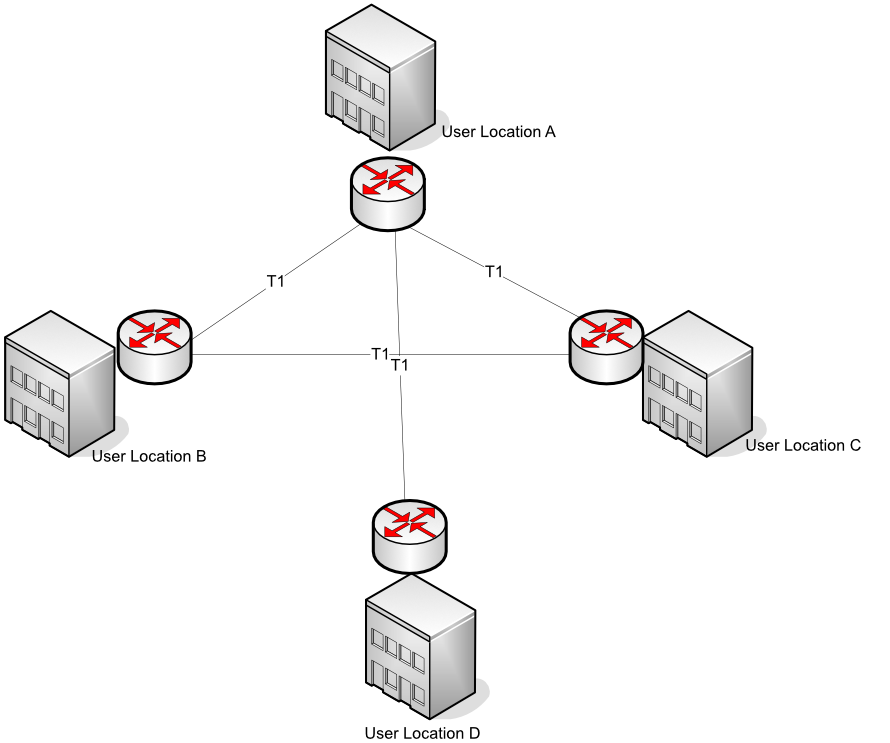
5. Partial-Mesh Topology
ทางออกที่สมเหตุสมผลมากกว่าด้านบนอะ
เชื่อมต่อหนาแน่นกว่า Star, Ring แต่ว่ามันก็ไม่ได้ขนาด Full-Mesh ขนาดนั้น (ไม่ครบคู่) อาจจะเลือก Site ที่มันสำคัญ ๆ หรือที่มีการคุยกันบ่อย ๆ ตรงหากัน
Definition
- Partial meshes are highly flexible topologies that can take a variety of very different configurations
- The routers are much more tightly coupled than any of the basic topologies but are not fully interconnected, as would be the case in a fully meshed network
- A partially meshed WAN topology is readily identified by the almost complete interconnection of every node with every other node in the network
Like a transportation network in a region - major cities are well-connected, but not every small town has direct routes to every other small town
Advantages
- Partial meshes offer the capability to minimize hops for the bulk of the WAN's users
- Unlike fully meshed networks, a partial mesh can reduce the startup and operational expenses by not interconnecting low-traffic segments of the WAN
- Hence more affordable and scalable
6. Two-Tiered Topology
Tiered Topology คือ การจัดการ WAN ที่มีขนาดใหญ่ ให้มีความน่าเชื่อถือและขยายได้ดีขึ้น
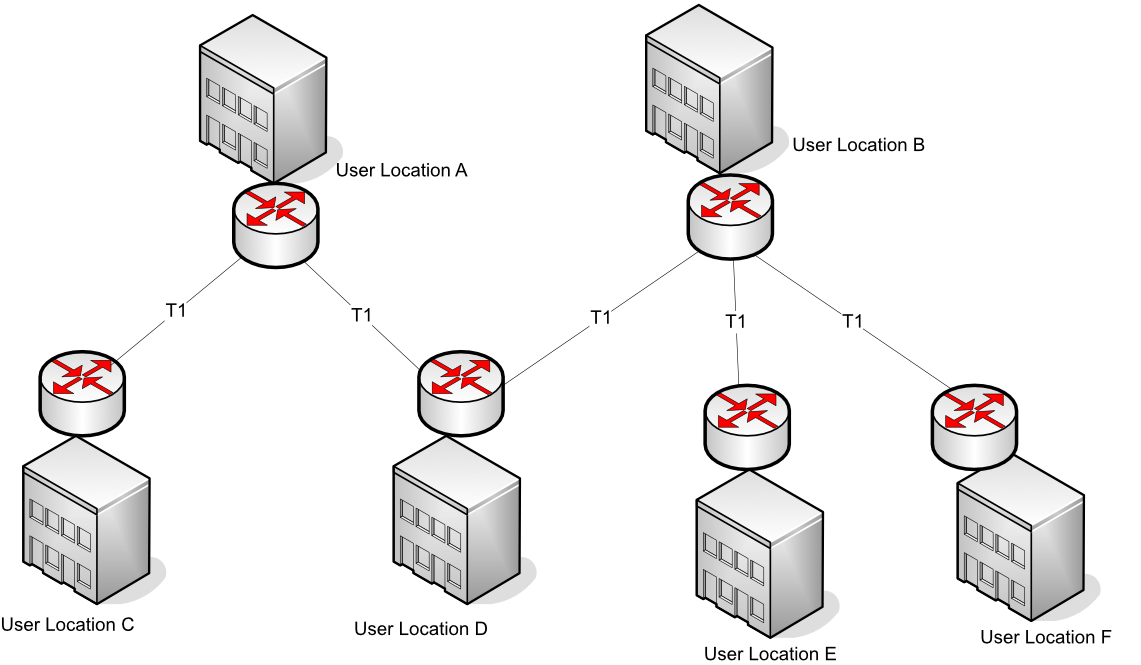
Two-Tiered เป็นการปรับปรุงของ Star WAN ที่แทนจะมี Router กลางแค่ตัวเดียว ที่เป็น single point of failure เนี่ย ก็ให้มีสองตัวหรือมากกว่า
Definition
- A two-tiered topology is a modified version of the basic star topology
- Rather than single concentrator routers, two or more routers are used
- A two-tiered WAN constructed with dedicated facilities offers improved fault tolerance over the simple star topology without compromising scalability
Like having two main distribution centers instead of one - if one fails, the other can still serve customers
7. Three-Tiered Topology
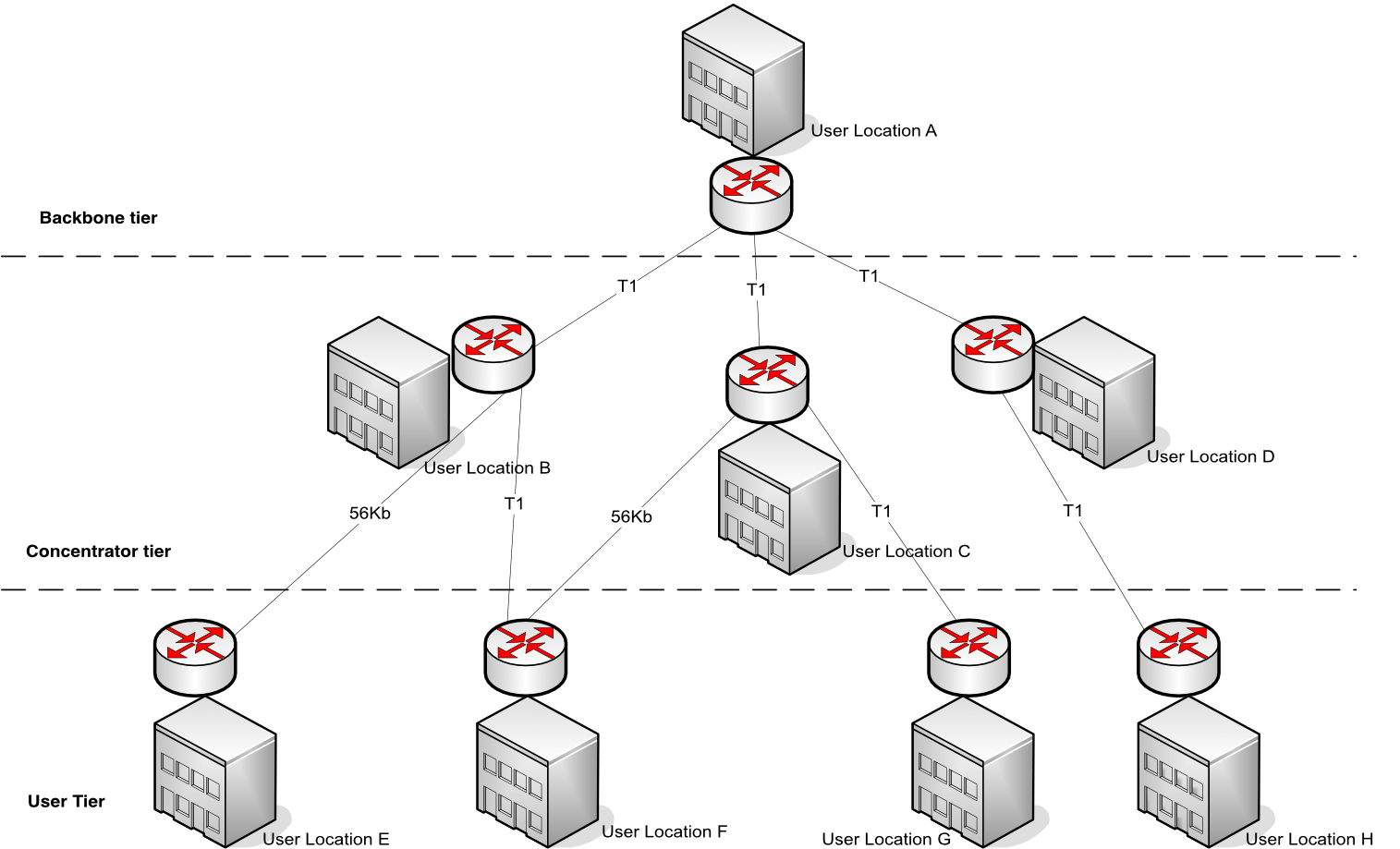
อันนี้ก็จะสำหรับ WAN ที่ใหญ่มาก ๆ ต้องการความยืดหยุ่นสูงมากขึ้นไปอีก โดยเราจะเพิ่มชั้นที่สาม Backbone Tier จะทำหน้าที่เชื่อมต่อ Concentrator Tier กันเองอีกที
Definition
- WANs that need to interconnect a very large number of sites, or are built using smaller routers that can support only a few serial connections, may find the two-tiered architecture insufficiently scalable
- Therefore, adding a third tier may well provide the additional scalability they require
Structure
The three tiers are:
- User Tier - Individual user locations
- Concentrator Tier - Regional aggregation points
- Backbone Tier - Main interconnection between concentrators
Like a postal system: local post offices (user tier) → regional sorting centers (concentrator tier) → national distribution centers (backbone tier)
Advantages/Disadvantages
Advantage:
- A three-tiered WAN constructed with dedicated facilities offers even greater fault tolerance and scalability than the two-tiered topology
Disadvantage:
- Expensive to build, operate and maintain
8. Hybrid Topologies
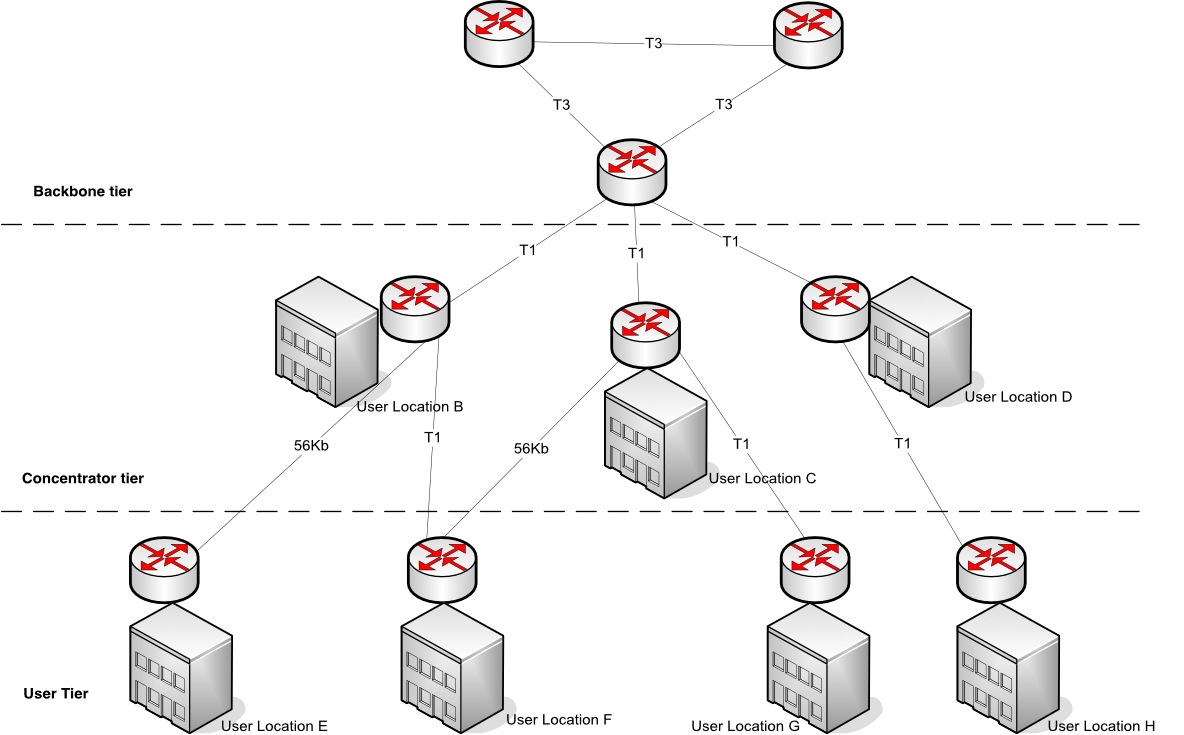
ผสมหลาย ๆ แบบที่กล่าวมาเข้าด้วยกัน5555 แล้วแต่เหมาะสม เช่น Backbone อาจจะให้เป็น Full-Mesh, สาขาย่อย ๆ อาจจะเป็น Star เพื่อความประหยัด
Definition
- Hybridization of multiple topologies is useful in larger, more complex networks
- Multitiered networks, in particular, lend themselves to hybridization
- A multitiered WAN can be hybridized by fully or partially meshing the backbone tier of routers
- An effective hybrid topology may be developed in a multitiered WAN by using a fully meshed topology for the backbone nodes only
Like a transportation system combining highways (backbone), state roads (concentrator), and local streets (user tier) - each level optimized for its purpose
Summary
LAN Topology Types
- Bus
- Star
- Ring
- Switched
- Daisy chains
- Hierarchies
WAN Topology Types
- Peer-to-peer WANs
- Ring WANs
- Star WANs
- Full-mesh WANs
- Partial-mesh WANs
- Two-tiered
- Three-tiered
- Hybrid
Network Topology Comparison Table
Star Bus Topology
| Aspect | Details |
|---|---|
| Information Transfer | All information passes through the central network connection |
| Setup | Each computer must be close to the central device. 100 meters maximum cable length. Up to 24 computers per network |
| Expansion | Add a new computer by plugging in a new cable from the computer to the connection device |
| Troubleshooting | When one computer goes down, the rest of the network is unaffected. If the connection device goes down, then the network is down |
| Cost | More expensive of the simple topologies, it requires costly connection device. Usually cheaper than a hybrid network |
| Cabling Concerns | Uses twisted pair cable. Requires large amounts of cable. No more than 100 meters from the computer to the connection device |
Bus Topology
| Aspect | Details |
|---|---|
| Information Transfer | One computer at a time sends information. Information goes along the cable and the computer accesses the information off the cable |
| Setup | Connect the cable from one computer to the next and so on to the end. A terminator is placed at each end of the network |
| Expansion | To add a computer, you must shut down the network and disconnect the cable from the existing computers |
| Troubleshooting | If one computer malfunctions, the entire network goes down |
| Cost | A cheaper network since there is usually one continuous copper cable |
| Cabling Concerns | Single continuous cable connects the devices. Terminator is required at each end of the cable. Uses coaxial or twisted pair cabling |
Ring Topology
| Aspect | Details |
|---|---|
| Information Transfer | Information goes in one direction around the ring and passes along the ring until it reaches the correct computer |
| Setup | Computers are located close to each other. Setup is easy. There is no connector. The ring has no beginning and no end |
| Expansion | Cable between the computers must be broken to add a new computer, so the network is down until the new device is back online |
| Troubleshooting | If there's a break in the cable or an error in the network, information continues to transfer through the rest of the ring until reaching the point of the break. This makes troubleshooting easy |
| Cost | One of the more expensive topologies due to high cable costs |
| Cabling Concerns | Requires more cabling than other topologies. Uses twisted pair |
Hybrid Mesh Topology
| Aspect | Details |
|---|---|
| Information Transfer | Often used across long distances. Information transfer can happen in different ways, depending on the other topologies |
| Setup | Often created when expanding an existing network. Can use a variety of connection devices |
| Expansion | Connection devices make combining different networks and different topologies easy |
| Troubleshooting | Troubleshooting is most difficult in this topology because of the variety of technologies |
| Cost | Expensive, large, and usually complicated |
| Cabling Concerns | Cabling depends on the types of networks. Can use twisted pair and coaxial cable. Also incorporates fiber optic cabling over long distances |
Key Formulas and Concepts
Number of Connections in Full Mesh
For a full mesh network with nodes:
This formula shows why full mesh becomes expensive quickly - with just 10 nodes, you need 45 connections!
Collision Domain
- A collision domain is a network segment connected by a shared medium or through repeaters where simultaneous data transmissions collide with one another
- Switches create separate collision domains for each port
- Hubs create one large collision domain
Bonus: Design Considerations
When choosing a topology, consider:
- Cost - Initial setup and ongoing maintenance
- Scalability - How easily can the network grow?
- Fault Tolerance - What happens when something fails?
- Performance - How many hops? What's the bandwidth?
- Management - How complex is administration?
- Geographic Distribution - How spread out are the locations?
General Rules of Thumb:
- Small networks (< 10 nodes): Star or Bus
- Medium networks (10-50 nodes): Star or Switched Star
- Large networks (50+ nodes): Hierarchical or Hybrid
- High availability required: Full or Partial Mesh
- Budget constrained: Bus or Simple Star
- WAN with few sites: Peer-to-peer or Ring
- WAN with many sites: Two-tiered, Three-tiered, or Hybrid