Today's Outline
- Part I: Data Dictionary
- Part II: Introduction to SQL
- Part III: DDL and DML Commands and Syntax
- Working with Database
- Working with Table
- Part IV: MySQL Workbench
Part I: Data Dictionary
Relational Diagram (Tinycollege Schema)
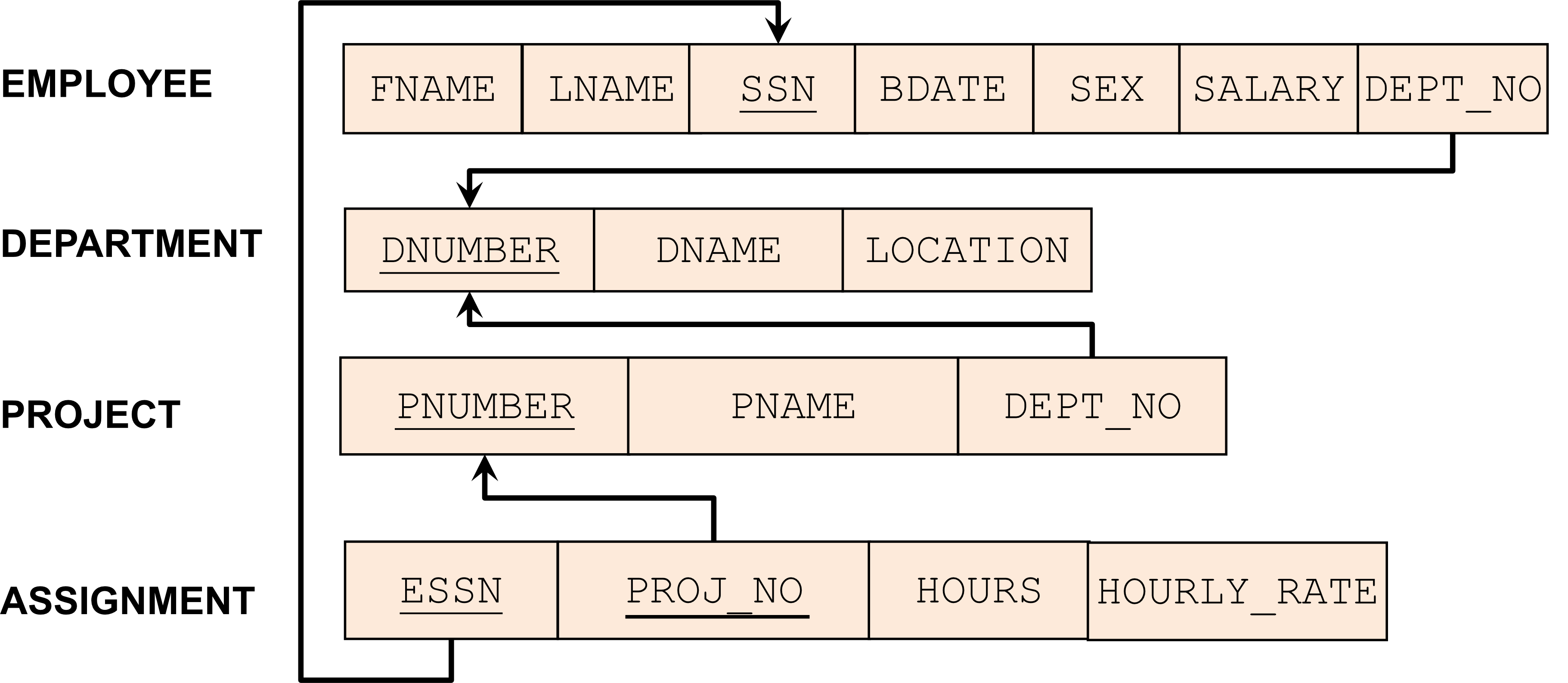
Data Dictionary Definition
In database system, a Data Dictionary is a collection of names, definitions, and attributes about data elements that are being used
Data Dictionary for Tinycollege Database
Key Indicators
- PK = Primary Key
- FK = Foreign Key
Data Dictionary Table
| Table Name | Attribute Name | Contents | Type | Format | Nullable | Range | Key | FK Referenced Table |
|---|---|---|---|---|---|---|---|---|
| Department | dnumber | Department's number | int | x | 1 to 20 | PK | ||
| dname | Department's name | varchar(20) | Xxxxx | |||||
| location | Department's main location | varchar(100) | Xxxxx | Y | ||||
| Employee | fname | Employee's first name | varchar(20) | Xxxxx | ||||
| lname | Employee's last name | varchar(20) | Xxxxx | |||||
| ssn | Social security number | char(9) | xxxxxxxxx | PK | ||||
| bdate | Employee's birthday | date | yyyy-mm-dd | |||||
| sex | Employee's gender | char(1) | X | M,F | ||||
| salary | Salary | decimal(12,2) | 1234567890.00 | Y | ||||
| dept_no | Department's number | int | x | Y | FK | dnumber [Department] | ||
| Project | pnumber | Project's number | int | x | PK | |||
| pname | Project's name | varchar(50) | Xxxxx | |||||
| dept_no | Department's number | int | x | FK | dnumber [Department] | |||
| Assignment | essn | Employee's SSN | char(9) | xxxxxxxxx | PK, FK | ssn [Employee] | ||
| proj_no | Project's number | int | x | PK, FK | pnumber [Project] | |||
| hours | Number of hours spent | decimal(9,2) | 1234567.89 | Y | ||||
| hourly_rate | Hourly rate | decimal(9,2) | 1234567.89 | Y |
Commonly Used Data Types
- CHAR = Fixed character length data
- NCHAR = Fixed character length data supporting Unicode text
- VARCHAR = Variable character length
- NVARCHAR = Variable character length supporting Unicode text
- INT = Integer number
- DECIMAL(P,S) = Number with precision P digits and S decimal point
- DATE / DATETIME = Date / Date and Time
- BIT = 1, 0 or NULL (suitable for true/false data)
- Numercic Data
- int
- decimla
- String data
- char
- varchar
- nchar
- nvarchar
-
Static แค่ char → reserve space → when not used, you’ll lose/waste???
-
Dynamic พวก varchar ไรงี้ → ใช้เท่าที่ใช้จริง ๆ ไม่ lose ตรงที่ไม่ใช้
- AKE 3 bytes
- ABCD 4 bytes
-
nchar → “Unicode static
-
nvarchar → univode dynamic
-
ไอ่พวก unicode เอาไว้เก็บพวก international language
- เวลาใช้จริงมันจะ reserve x2 – AKE ก็เป็น 6 bytes (แทนที่จะ 3 bytes)
#FinalExam เดี๋ยวจะมีข้อมูล Chinese มาให้ แล้วให้ออกแบบ CREATE TABLE command
Part II: Introduction to SQL
Structured Query Language (SQL)
- Pronounced as "S-Q-L" or "sequel"
- SQL is a standard language for querying and manipulating data in database
Main SQL Operations
- Manipulate DB and Schema (DDL)
- Insert / Update / Delete Data (DML)
- Retrieve Data (DQL)
Popular Database Systems Supporting SQL
- PostgreSQL
- MariaDB
- MySQL
- Microsoft SQL Server
- Oracle Database
- Amazon RDS
- Amazon Redshift
Part III: SQL Categories
Two Main Categories of SQL
- Data Definition Language (DDL)
- Define relational schema
- Create/Alter/Delete structure of tables
- หลังจากทำ 8 steps แล้ว
- Data Manipulation Language (DML)
- Query one or more tables
- Insert/Delete/Modify data in tables
Relational Schema Notation
- The schema of a table is the table name and its attributes
- A primary key (PK) is an attribute whose values are unique and cannot be NULL
- Primary keys are usually underlined in the schema
Examples:
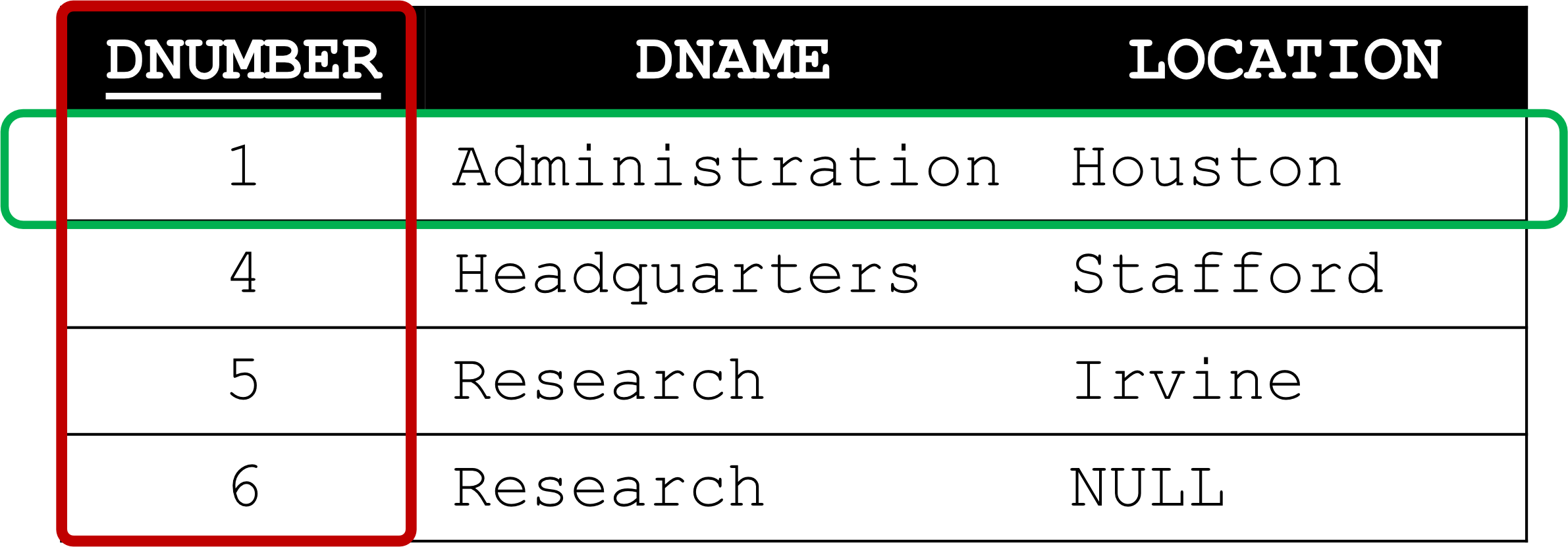
Department (dnumber, dname, location)
Department (dnumber, dname, location)  [with dnumber underlined]
Table Components in Relational Database
- Relation or Table = A set of tuples
- Tuple (or row or record) = A single entry in the table having the attributes specified by the schema
- Attribute (or column) = A typed data entry presented in each tuple in the relation
Example DEPARTMENT table:
Common SQL Data Types (MySQL)
| Data Type | Description |
|---|---|
| CHAR(size) | Holds a fixed length string (can contain letters, numbers, and special characters). The fixed size is specified in parenthesis. Can store up to 255 characters |
| VARCHAR(size) | Holds a variable length string (can contain letters, numbers, and special characters). The maximum size is specified in parenthesis. Can store up to 255 characters. Note: If you put a greater value than 255 it will be converted to a TEXT type |
| INT(size) | -2147483648 to 2147483647 normal. 0 to 4294967295 UNSIGNED. The maximum number of digits may be specified in parenthesis |
| DATE() | A date. Format: YYYY-MM-DD. Note: The supported range is from '1000-01-01' to '9999-12-31' |
| DATETIME() | A date and time combination. Format: YYYY-MM-DD HH:MI:SS. Note: The supported range is from '1000-01-01 00:00:00' to '9999-12-31 23:59:59' |
| TIMESTAMP() | A timestamp values are stored as the number of seconds since the Unix epoch ('1970-01-01 00:00:00' UTC). Format: YYYY-MM-DD HH:MI:SS. Note: The supported range is from '1970-01-01 00:00:01' UTC to '2038-01-09 03:14:07' UTC |
DDL: Data Definition Language
DDL Overview
Defining database objects, such as databases, tables, indexes, views, stored procedures.
Main DDL Commands:
- CREATE - to create a new database object
- ALTER - to modify an existing database object
- DROP - to delete an entire database object
Working with Databases
Create a Database
Syntax:
CREATE DATABASE [IF NOT EXISTS] databasename;Example:
CREATE DATABASE IF NOT EXISTS tinycompany;-
พอเรา Execute command นี้แล้ว DBMS ส่วนใหญ่จะสร้าง
tinycompany.dat- Maintain raw datatinycompany.log- (Transaction) ทุกอย่างที่เรา apply เข้า database นี้ จะถูก Log ไว้หมด- All SQL commands will store in
.log, mostly used for Recovery Process
- All SQL commands will store in
-
Table มี 2 แบบ
- Based Table/ Physical Table → In HD
- Permanent Data (Forever)
CREATE TABLE
- Permanent Data (Forever)
- Virtual Table/ In Memory Table → In Memory
CREATE VIEW- This will be faster!!
- Based Table/ Physical Table → In HD
Show All Available Databases
Syntax:
SHOW DATABASES; -- Do not forget 's' at the endUse or Set the Current Working Database
Syntax:
USE databasename;Example:
USE tinycompany;Drop (Delete) a Database Permanently
Syntax:
DROP DATABASE [IF EXISTS] databasename;Example:
DROP DATABASE IF EXISTS tinycompany;Working with Tables
Main Operations with Tables
- Create a table with primary keys
- Create a table with foreign keys
- Modify an existing table
- Drop a table
Create a Table / Schema
Basic Syntax
CREATE TABLE [IF NOT EXISTS] tablename (
    attrname1 datatype(size) [constraintname],
    attrname2 datatype(size) [constraintname],
    attrnameN datatype(size) [constraintname],
    [PRIMARY KEY (attrPK1 [, attrPK2])]
    [CONSTRAINT constraintname]
);
Best Practices:
- Use one line per column (attribute) definition
- Use spaces or tabs to line up attribute characteristics and constraints
Table Constraints
SQL constraints are used to specify rules for the data in a table. Used when CREATE or ALTER (modify) table.
Main Constraints:
- NOT NULL - a column cannot store NULL value
- UNIQUE - each row for a column must have a unique value
- PRIMARY KEY - a column or more columns have a unique identity and cannot be NULL value (combines NOT NULL and UNIQUE constraints)
Create Table Examples
Example 1: Create a Department Table (Option 1)
CREATE TABLE department(
    dnumber INT PRIMARY KEY,
    dname VARCHAR(20) NOT NULL,
    location VARCHAR(100)
);
Example 2: Create a Department Table (Option 2)
CREATE TABLE department(
    dnumber INT UNIQUE NOT NULL,
    dname VARCHAR(20) NOT NULL,
    location VARCHAR(100),
    PRIMARY KEY (dnumber)
);
Example 3: Create a Department Table (Option 3) - With Named Constraint
CREATE TABLE department(
    dnumber INT,
    dname VARCHAR(20) NOT NULL,
    location VARCHAR(100),
    CONSTRAINT PK_Dept PRIMARY KEY (dnumber)
);
Note: Option 3 uses a named constraint PK_Dept for the primary key
#FinalExam (Mock exam) ทำเหมือนใน Class มี Business rules มาให้ แล้วให้วาด ER ก่อน แล้วค่อย SQL Command create table
Create a Table with Foreign Keys
Understanding Foreign Keys
Foreign Key Relationships:
- Primary Key (PK) enforces Entity Integrity
- Foreign Key (FK) enforces Referential Integrity
Example Relationship:
DEPARTMENT                    PROJECT
┌──────────────────────┐     ┌──────────────────────┐
│ DNUMBER (PK)         │◄────│ PNUMBER (PK)         │
│ DNAME                │     │ PNAME                │
│ LOCATION             │     │ DEPT_NO (FK)         │
└──────────────────────┘     └──────────────────────┘
Sample Data:
DEPARTMENT:
| DNUMBER | DNAME | LOCATION |
|---|---|---|
| 1 | Administration | Houston |
| 4 | Headquarters | Stafford |
| 5 | Research | Irvine |
| 6 | Research | NULL |
PROJECT:
| PNUMBER | PNAME | DEPT_NO |
|---|---|---|
| 1 | ProductX | 5 |
| 2 | ProductY | 5 |
| 10 | Computerization | 4 |
| 20 | Recognization | 1 |
Example: Create a Project Table with Foreign Key
CREATE TABLE project(
    pnumber INT PRIMARY KEY,
    pname VARCHAR(50) NOT NULL,
    dept_no INT,
    CONSTRAINT FK_DeptProj FOREIGN KEY (dept_no)
        REFERENCES department(dnumber)
);- Important Question: Can we create the
projecttable before thedepartmenttable?- Answer: NO! The referenced table must exist first.
Sequence for Relational Schema Creation
Creation Order (following FK dependencies)
1. DEPARTMENT (no FK dependencies)
   ↓
2. EMPLOYEE (FK to DEPARTMENT)
   ↓
3. PROJECT (FK to DEPARTMENT)
   ↓
4. ASSIGNMENT (FK to EMPLOYEE and PROJECT)
- อาจารย์เฉลย DEPT, PROJ, EMP, ASS
Rule: Always create tables WITHOUT foreign keys first, then create tables WITH foreign keys that reference them.
#FinalExam ให้ตารางแบบนี้มา แล้วถามว่าตรง Create อะไรเป็นอันแรก
Modify an Existing Table
ALTER TABLE Operations
Syntax:
ALTER TABLE [table_name]
ADD | MODIFY | DROP ...
Available Modifications:
- Add a new column / constraint
- Modify a column / constraint
- Drop a column / constraint
- Modify primary key
- Modify foreign key
- Add/Drop CHECK constraint
- Add/Drop DEFAULT constraint
ALTER TABLE Examples
Add New Columns
ALTER TABLE project
ADD signdate DATE NOT NULL,
ADD pstatus CHAR(1) NOT NULL;
Check Table Schema
-- DESCRIBE: Check the table schema
DESCRIBE employee;
Modify Columns
-- Change varchar to char (fixed length)
ALTER TABLE employee
MODIFY ssn CHAR(9) NOT NULL,
MODIFY sex CHAR(1) NOT NULL;

DESCRIBE employee;
Drop a Column
Syntax and Restrictions
ALTER TABLE project
DROP signdate;
Important Note: RDBMS will allow you to drop columns if they are NOT referenced by other tables/columns
Example of Error:
-- dnumber is PK and FK in the project table
ALTER TABLE department
DROP dnumber;
Error Message:
Error Code: 1829. Cannot drop column 'dnumber': needed in a foreign key
constraint 'FK_DeptProj' of table 'project'
Modify Primary and Foreign Keys
Remove and Add Primary Key
-- Remove a current primary key
ALTER TABLE employee
DROP PRIMARY KEY;

-- Create a new composite primary key
ALTER TABLE employee
ADD PRIMARY KEY (fname, lname);
Modify Foreign Key
-- Remove FK
ALTER TABLE employee
DROP CONSTRAINT FK_EmpDept;

-- Add FK back
ALTER TABLE employee
ADD CONSTRAINT FK_EmpDept FOREIGN KEY (dept_no)
    REFERENCES department(dnumber);
Add Constraints
Add CHECK Constraint (for data validation)
-- Check if sex has value 'M' or 'F'
ALTER TABLE employee
ADD CONSTRAINT CHK_Gender CHECK (sex IN ('M', 'F'));
Add DEFAULT Constraint (for setting default value)
-- Set default location to 'Bangkok'
ALTER TABLE department
ALTER location SET DEFAULT 'Bangkok';
Drop (Delete) a Table / Schema
Syntax
DROP TABLE [IF EXISTS] tablename;Important Restrictions
- Remove the existing table permanently from the database
- The table can be dropped ONLY if it is NOT referenced by other tables
- RDBMS generates a foreign key integrity violation error message if the table is dropped
Example Error:
DROP TABLE IF EXISTS department;Error Message:
Error Code: 3730. Cannot drop table 'department' referenced by a foreign
key constraint 'FK_DeptProj' on table 'project'. 0.015 sec
Sequence for Relational Schema Deletion
Deletion Order (reverse of creation order)
- ตรงข้ามเด้อออ จากข้างบน
4. ASSIGNMENT (has FK to EMPLOYEE and PROJECT) - Delete FIRST
   ↑
5. PROJECT (has FK to DEPARTMENT)
   ↑
6. EMPLOYEE (has FK to DEPARTMENT)
   ↑
7. DEPARTMENT (no FK dependencies) - Delete LAST
Rule: Always delete tables WITH foreign keys first, then delete tables that are referenced by foreign keys.
DML: Data Manipulation Language
DML Overview
Commands used to retrieve and manipulate data in a relational database.
Main DML Commands:
- INSERT - Used to create a record
- UPDATE - Used to change records
- DELETE - Used to delete records
- SELECT - Used to retrieve data (Data Query Language)
Back to Our Tinycompany Database
Empty Tables After DDL
All tables are created by DDL. Next, let's fill in the data!
DEPARTMENT
| DNUMBER | DNAME | LOCATION |
|---|---|---|
EMPLOYEE
| FNAME | LNAME | SSN | BDATE | SEX | SALARY | DEPT_NO |
|---|---|---|---|---|---|---|
PROJECT
| PNUMBER | PNAME | DEPT_NO |
|---|---|---|
ASSIGNMENT
| ESSN | PROJ_NO | HOURS | HOURLY_RATE |
|---|---|---|---|
INSERT a New Tuple
Basic Syntax
INSERT INTO tablename(Column1, Column2, ..., ColumnN)
VALUES (value1, value2, ..., valueN);
Example 1: Insert into Department
INSERT INTO department (dnumber, dname, location)
VALUES (7, "IT", "2Fl. 2B01");
Shorter Version (without column names):
INSERT INTO department
VALUES (7, "IT", "2Fl. 2B01");
Note: You can ignore the list of column names, but your data must align with the columns
INSERT - Partial Records
Insert Part of Records into a Table
INSERT INTO employee(ssn, fname, lname, bdate, sex)
VALUES ("110033445", "Peter", "Parker", "1985-05-04", "M");
Result:
- Specified columns get the provided values
- Other columns (salary, dept_no) get NULL if no default value is set
Important: If there is no default value, NULL will be assigned to columns not included in the INSERT statement.
INSERT a Batch of Tuples
Insert Multiple Rows at Once
INSERT INTO department
VALUES (1, "Accounting", "2A101 Fl.1"),
       (2, "Human Resources", "2A104 Fl.1"),
       (3, "Research and Development", "2B401 Fl.4"),
       (4, "Information Technology", "2A404 Fl.4"),
       (5, "Public Relations", "2B201 Fl.2"),
       (6, "Administration", "2B301 Fl.3"),
       (7, "Academic Services", "2B302 Fl.3");
Resulting Table:
| DNUMBER | DNAME | LOCATION |
|---|---|---|
| 1 | Accounting | 2A101 Fl.1 |
| 2 | Human Resources | 2A104 Fl.1 |
| 3 | Research and Development | 2B401 Fl.4 |
| 4 | Information Technology | 2A404 Fl.4 |
| 5 | Public Relations | 2B201 Fl.2 |
| 6 | Administration | 2B301 Fl.3 |
| 7 | Academic Services | 2B302 Fl.3 |
Fill-in Order for Tinycompany Database
Question: Which order of tables should we fill in? Why?
Answer: Follow the foreign key dependencies!
Correct Order:
- DEPARTMENT (no FK dependencies) - Fill FIRST
- EMPLOYEE (FK to DEPARTMENT) - Fill SECOND
- PROJECT (FK to DEPARTMENT) - Fill THIRD
- ASSIGNMENT (FK to EMPLOYEE and PROJECT) - Fill LAST
Reason: You cannot insert a foreign key value that doesn't exist in the referenced table (referential integrity).
Tinycompany Database After INSERT
Sample Data
DEPARTMENT
| DNUMBER | DNAME | LOCATION |
|---|---|---|
| 1 | Accounting | 2A101 Fl.1 |
| 2 | Human Resources | 2A104 Fl.1 |
| 3 | Research and Development | 2B401 Fl.4 |
EMPLOYEE
| FNAME | LNAME | SSN | BDATE | SEX | SALARY | DEPT_NO |
|---|---|---|---|---|---|---|
| Peter | Parker | 110033445 | 1985-05-04 | M | NULL | NULL |
| MaryJane | Watson | 103849237 | 1983-08-19 | F | 3400.40 | 1 |
| Miles | Morales | 230563445 | 1990-08-31 | M | NULL | NULL |
PROJECT
| PNUMBER | PNAME | DEPT_NO |
|---|---|---|
| 1 | APTX4869 | 3 |
| 2 | APTX4742 | NULL |
ASSIGNMENT
| ESSN | PROJ_NO | HOURS | HOURLY_RATE |
|---|---|---|---|
| 110033445 | 1 | 20 | 50.50 |
| 103849237 | 1 | 10 | 55 |
| 103849237 | 2 | 10 | 58 |
UPDATE an Existing Tuple
Basic Syntax
UPDATE tablename
SET columnname=expression[, columnname=expression]
[WHERE conditionlist];
Example 1: Update dept_no in Project Table
UPDATE project
SET dept_no=2
WHERE pnumber=2;
Before:
| PNUMBER | PNAME | DEPT_NO |
|---|---|---|
| 2 | APTX4742 | NULL |
After:
| PNUMBER | PNAME | DEPT_NO |
|---|---|---|
| 2 | APTX4742 | 2 |
Important: Use the primary key as a condition to uniquely identify the row to be updated
Example 2: Update Peter's Salary and Dept_no
Before:
| FNAME | LNAME | SSN | BDATE | SEX | SALARY | DEPT_NO |
|---|---|---|---|---|---|---|
| Peter | Parker | 110033445 | 1985-05-04 | M | NULL | NULL |
Option 1: Using Name (works if name is unique)
UPDATE employee
SET salary=1800.5, dept_no=3
WHERE fname="Peter" AND lname="Parker";
Option 2: Using Primary Key (safer)
UPDATE employee
SET salary=1800.5, dept_no=3
WHERE ssn="110033445";  -- Use PK
After:
| FNAME | LNAME | SSN | BDATE | SEX | SALARY | DEPT_NO |
|---|---|---|---|---|---|---|
| Peter | Parker | 110033445 | 1985-05-04 | M | 1800.50 | 3 |
Note: We can use the name condition as long as we have only one Peter Parker.
UPDATE Without WHERE Clause
⚠️ Danger: UPDATE Without WHERE
#FinalExam ถ้าถามว่า Developer forgot the WHERE clause, imagine you’re DBA, what should we do? → Recovery
Question: What will happen if the UPDATE command is used WITHOUT the WHERE condition?
Example:
UPDATE department
SET dname="Gaming";
Before:
| dnumber | dname | location |
|---|---|---|
| 1 | Accounting | 2A101 Fl.1 |
| 2 | Human Resources | 2A104 Fl.1 |
| 3 | Research and Development | 2B401 Fl.4 |
| 4 | Information Technology | 2A404 Fl.4 |
| 5 | Public Relations | 2B201 Fl.2 |
| 6 | Administration | 2B301 Fl.3 |
| 7 | Academic Services | 2B302 Fl.3 |
After:
| dnumber | dname | location |
|---|---|---|
| 1 | Gaming | 2A101 Fl.1 |
| 2 | Gaming | 2A104 Fl.1 |
| 3 | Gaming | 2B401 Fl.4 |
| 4 | Gaming | 2A404 Fl.4 |
| 5 | Gaming | 2B201 Fl.2 |
| 6 | Gaming | 2B301 Fl.3 |
| 7 | Gaming | 2B302 Fl.3 |
Result: ALL rows are updated! 🚨
Tinycompany Database After UPDATE
Updated Data
DEPARTMENT
| DNUMBER | DNAME | LOCATION |
|---|---|---|
| 1 | Accounting | 2A101 Fl.1 |
| 2 | Human Resources | 2A104 Fl.1 |
| 3 | Research and Development | 2B401 Fl.4 |
EMPLOYEE
| FNAME | LNAME | SSN | BDATE | SEX | SALARY | DEPT_NO |
|---|---|---|---|---|---|---|
| Peter | Parker | 110033445 | 1985-05-04 | M | 1800.5 | 3 |
| MaryJane | Watson | 103849237 | 1983-08-19 | F | 3400.40 | 5 |
| Miles | Morales | 230563445 | 1990-08-31 | M | NULL | NULL |
PROJECT
| PNUMBER | PNAME | DEPT_NO |
|---|---|---|
| 1 | APTX4869 | 3 |
| 2 | APTX4742 | 2 |
ASSIGNMENT
| ESSN | PROJ_NO | HOURS | HOURLY_RATE |
|---|---|---|---|
| 110033445 | 1 | 20 | 50.50 |
| 103849237 | 1 | 10 | 55 |
| 103849237 | 2 | 10 | 58 |
DELETE an Existing Tuple
Basic Syntax
DELETE FROM tablename [WHERE conditionlist];Examples
Example 1: Delete Specific Record
DELETE FROM assignment
WHERE essn="103849237" AND proj_no=1;
Example 2: Delete Records with NULL Values
DELETE FROM department
WHERE location IS NULL;
DELETE Without WHERE Clause
⚠️ Danger: DELETE Without WHERE
Question: What will happen if the DELETE command is used WITHOUT the WHERE condition?
Example:
DELETE FROM department;Result: ALL rows in the table are deleted! 🚨
Important: Always use a WHERE clause with DELETE unless you intentionally want to delete all records.
Tinycompany Database After DELETE
Updated Data (After Deleting Assignment Record)
DEPARTMENT
| DNUMBER | DNAME | LOCATION |
|---|---|---|
| 1 | Accounting | 2A101 Fl.1 |
| 2 | Human Resources | 2A104 Fl.1 |
| 3 | Research and Development | 2B401 Fl.4 |
EMPLOYEE
| FNAME | LNAME | SSN | BDATE | SEX | SALARY | DEPT_NO |
|---|---|---|---|---|---|---|
| Peter | Parker | 110033445 | 1985-05-04 | M | 1800.5 | 3 |
| MaryJane | Watson | 103849237 | 1983-08-19 | F | 3400.40 | 1 |
| Miles | Morales | 230563445 | 1990-08-31 | M | NULL | NULL |
PROJECT
| PNUMBER | PNAME | DEPT_NO |
|---|---|---|
| 1 | APTX4869 | 3 |
| 2 | APTX4742 | 2 |
ASSIGNMENT
| ESSN | PROJ_NO | HOURS | HOURLY_RATE |
|---|---|---|---|
| 110033445 | 1 | 20 | 50.50 |
| 103849237 | 2 | 10 | 58 |
Note: The row with ESSN=103849237 and PROJ_NO=1 has been deleted.
Summary
DDL (Data Definition Language)
- CREATE DATABASE/TABLE - Create new database objects
- ALTER TABLE - Modify existing table structure
- DROP DATABASE/TABLE - Delete database objects permanently
- Key Constraints: PRIMARY KEY, FOREIGN KEY, UNIQUE, NOT NULL, CHECK, DEFAULT
DML (Data Manipulation Language)
- INSERT - Add new records
- UPDATE - Modify existing records
- DELETE - Remove records
- ⚠️ Always use WHERE clause with UPDATE and DELETE to avoid affecting all rows
Important Principles
- Foreign Key Dependencies: Create/fill parent tables before child tables
- Deletion Order: Reverse of creation order (delete child tables first)
- Referential Integrity: Cannot delete/modify records that are referenced by foreign keys
- Entity Integrity: Primary keys must be unique and NOT NULL
Best Practices
Schema Design
- Always use meaningful names for tables and columns
- Document your schema with a data dictionary
- Use appropriate data types and sizes
- Define all necessary constraints
Data Manipulation
- Always test UPDATE and DELETE commands with a SELECT first
- Use transactions for multiple related changes
- Use primary keys in WHERE clauses when updating specific records
- Be cautious with NULL values
Safety Tips
- ⚠️ Never use UPDATE or DELETE without WHERE clause unless intentional
- Always check foreign key dependencies before dropping tables
- Use IF EXISTS/IF NOT EXISTS clauses to prevent errors
- Back up data before major modifications