Manage multiple services (applications), สมมติแอปเรามี 20 microservices นี่หละ Kubernetes เป็น solution ในเรื่องนี้
Outline
- Recap
- Introduction to Kubernetes
- Advantages of using Kubernetes
- Deploying a Kubernetes Cluster
- Common kubectl Commands
Recap
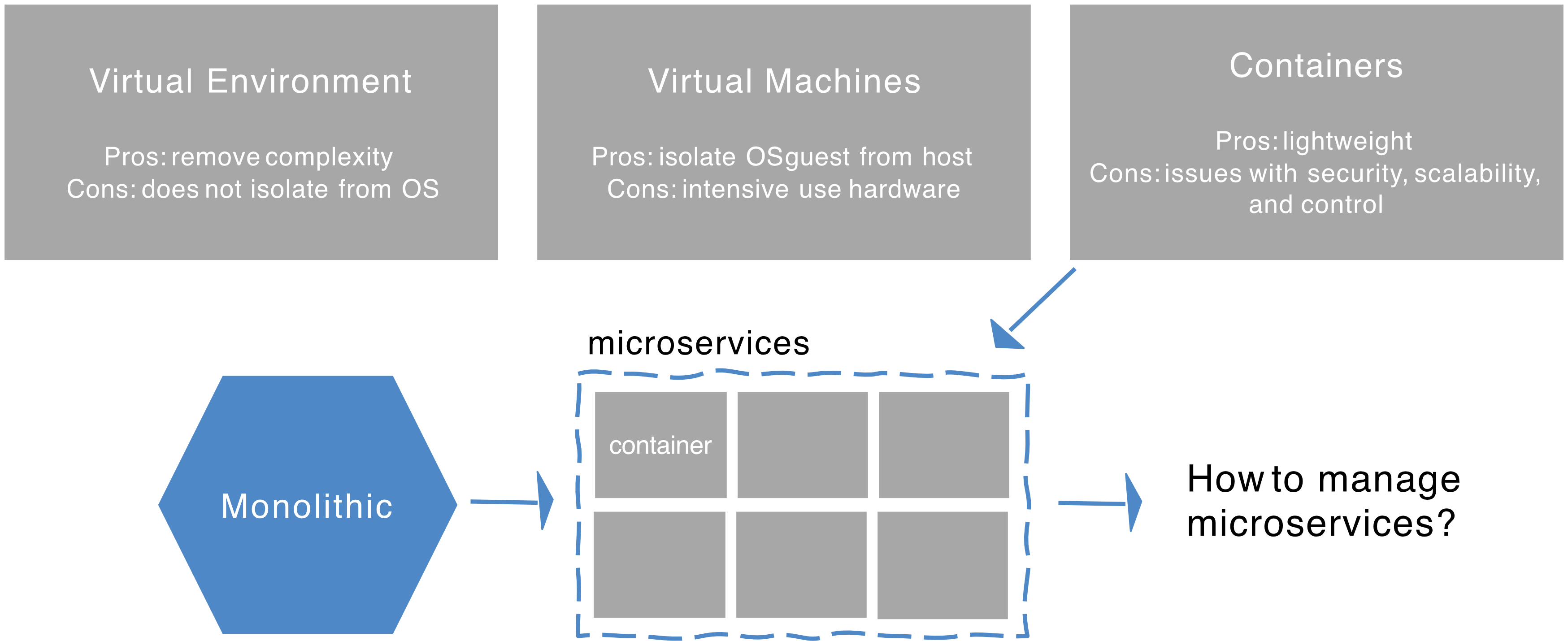
- Virtual Environment
- Pros: Remove complexity
- Cons: Does not isolate from OS
- Virtual Machines (VMs)
- Pros: Isolate guest OS from host
- Cons: Intensive use of hardware
- Containers
- Pros: Lightweight (take less resource)
- Cons: Issues with security, scalability, and control
- Evolution of Architecture:
- Monolithic → Container → Microservices
- Question: How to manage microservices?
VM vs. Container Architecture
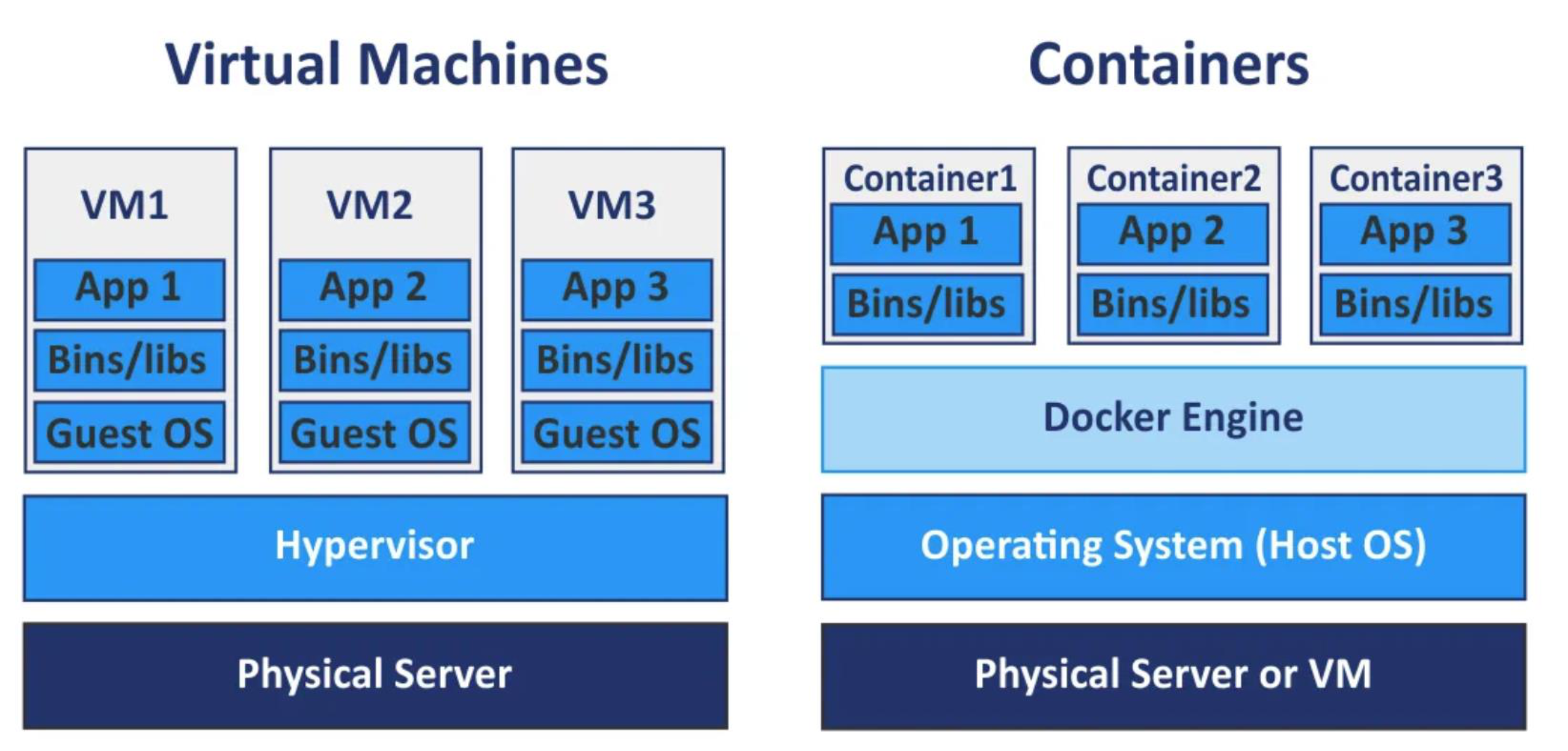
| Layer | Virtual Machines | Containers |
|---|---|---|
| App | App (inside VM) | App (inside Container) |
| Bins/libs | Per-VM | Per-Container |
| OS | Guest OS per VM | Shared Host OS |
| Virtualization | Hypervisor | Docker Engine |
| Hardware | Physical Server | Physical Server or VM |
Analogy: VMs are like renting separate apartments in different buildings (each has its own kitchen, bathroom, etc.), while containers are like renting rooms in the same house — you share the plumbing and structure, but your room is yours.
Issues Fixed So Far
- ✅ Conflicting/different operating systems
- ✅ Different dependencies
- ✅ "Inexplicable" strange behavior
Introduction to Kubernetes
What is Kubernetes?
- Kubernetes ("K8s") is an open-source solution for automating the deployment and dynamic scaling of containerized online applications.
- Uses containers — a Linux system that groups applications into logical units for centralized and secure management.
- Containers are designed to be ephemeral (temporary, disposable).
- Originally developed by Google, now maintained by the Cloud Native Computing Foundation (CNCF).
- Core definition: Kubernetes = Container Orchestration
🧠 Analogy: If containers are shipping boxes, Kubernetes is the port authority that decides which ship (server) carries which box, tracks all deliveries, and automatically re-routes if a ship sinks.
Microservice Architecture
A typical microservice app looks like:
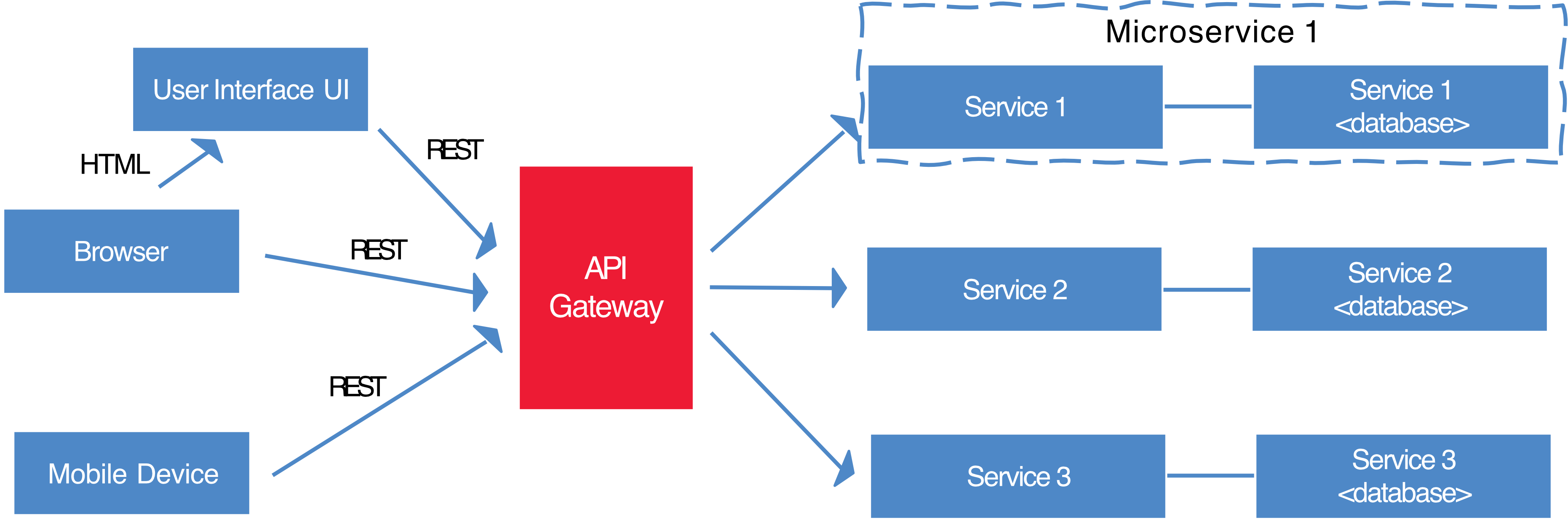
Browser / Mobile Device
        │
    [UI Layer]
        │
   [API Gateway]
    /    |    \
Service1 Service2 Service3
   │         │         │
  DB1       DB2       DB3
- Each service communicates via REST
- Each service has its own database
- Services are independently deployable
Kubernetes to the Rescue (K8s)
- K8s is an orchestration tool for managing distributed services or containerized applications across a distributed cluster of nodes.
- Follows client-server architecture with master and worker nodes.
- Core concepts:
- Pods — smallest unit of deployment
- Services — logical pods with a stable IP address
- Deployments — definition of the desired state for a pod or replica set
- K8s users define rules for container management → K8s handles the rest!
Pod
- Pods are the smallest unit of execution in Kubernetes, consisting of one or more containers, each with one or more application and its binaries.
- Nodes are the physical servers or VMs that comprise a Kubernetes Cluster.
- A Pod can contain more than one container — usually because those containers are tightly coupled.
- Reason for using Pod (instead of raw container): Kubernetes requires more metadata to orchestrate containers, such as:
restart policyliveness probereadiness probe
Analogy: A Pod is like a apartment unit. You might have just one person (container) living there, or roommates (multiple containers) who share the same address and network. But each apartment (pod) is its own unit with its own identity.
K8s Components & Architecture
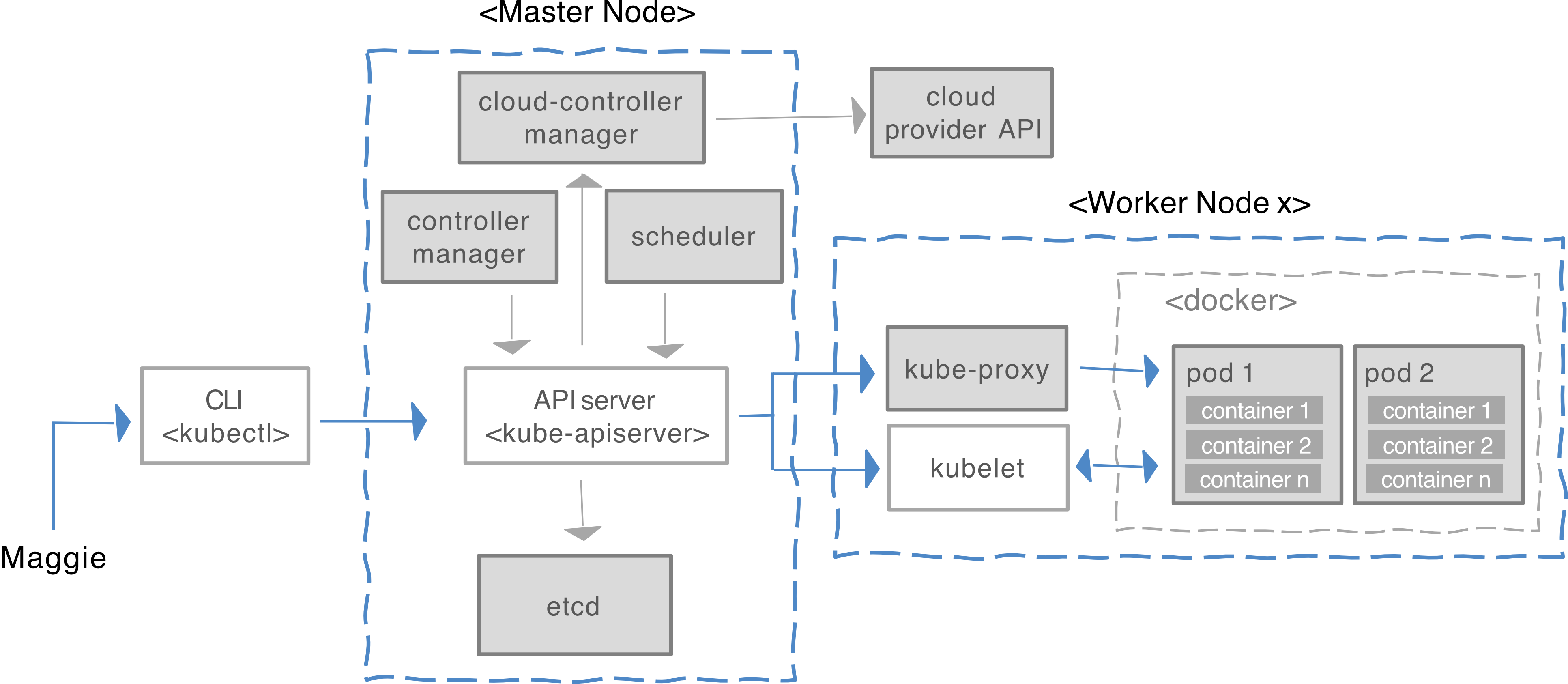
Master Node Components
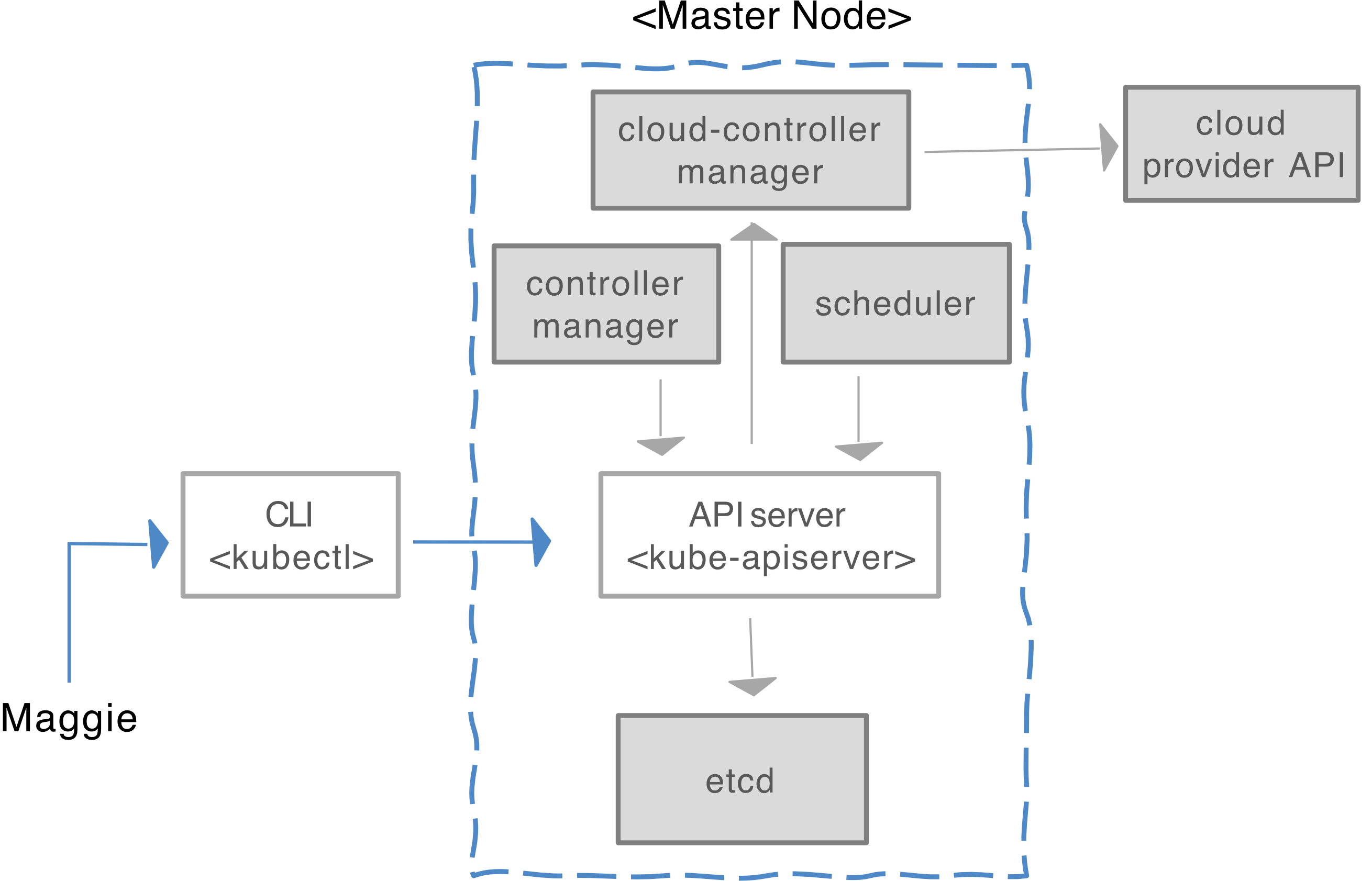
| Component | Role |
|---|---|
kube-apiserver | Contains various methods to directly access Kubernetes |
etcd | Backend key-value store; stores the cluster's state and configuration |
scheduler | Assigns applications to worker nodes |
controller-manager | Keeps track of worker nodes; handles failures; replicates as needed; provides external endpoints |
cloud-controller-manager | Communicates with cloud provider regarding resources (nodes, IP addresses) |
Worker Node Components
| Component | Role |
|---|---|
kubelet | Talks to the API server; manages containers on its node |
kube-proxy | Load-balances network traffic between application components and the outside world |
| Pods | The actual running containers |
Full Architecture Diagram (Textual)
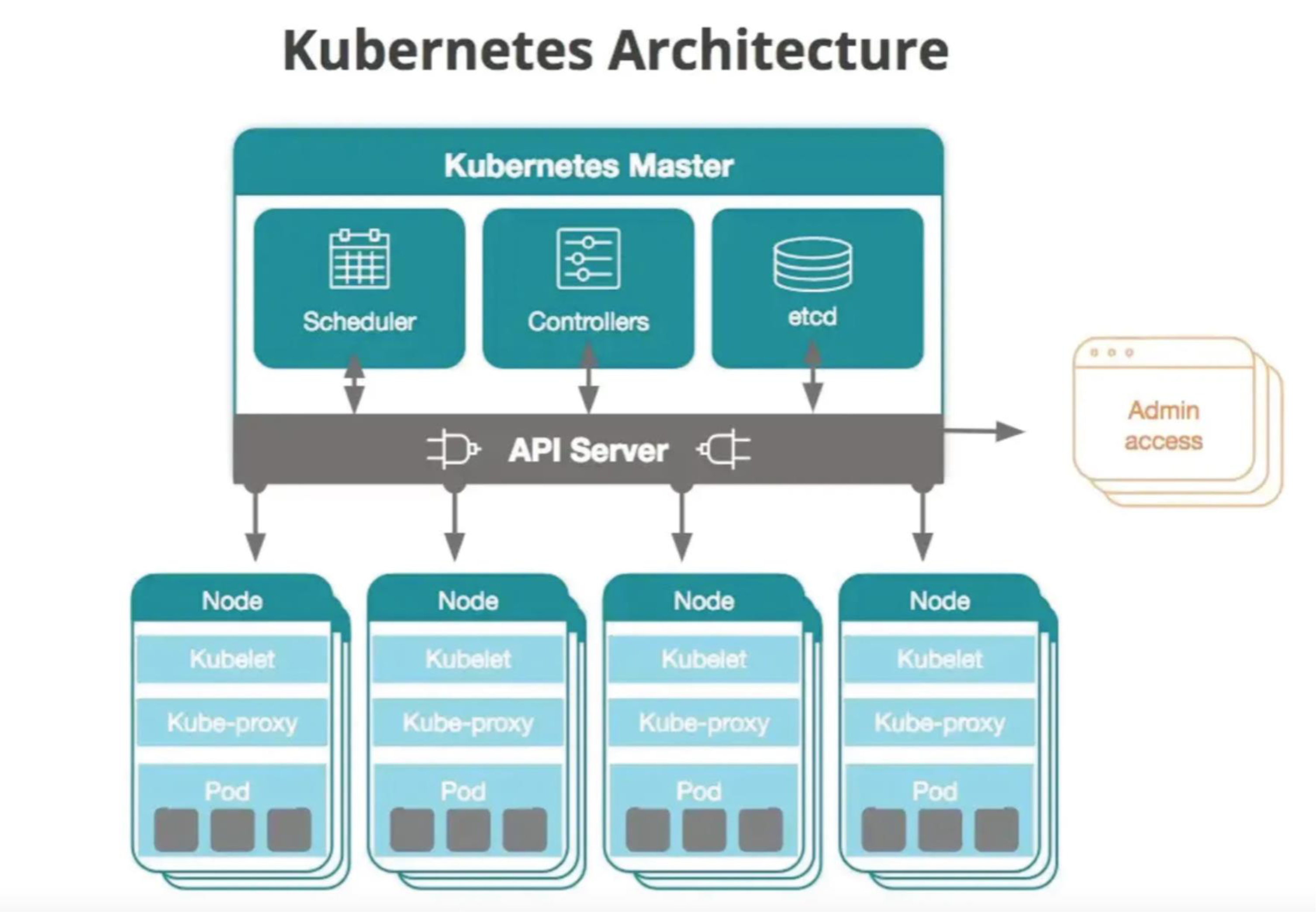
[Admin / kubectl]
       │
  ─────▼──────────────────────────────────────
  │           Kubernetes Master               │
  │  [Scheduler] [Controllers] [etcd]         │
  │              [API Server]                 │
  ─────────────────────────────────────────────
       │         │         │         │
  [Node 1]  [Node 2]  [Node 3]  [Node 4]
  kubelet   kubelet   kubelet   kubelet
  kube-proxy kube-proxy kube-proxy kube-proxy
  [Pod]     [Pod]     [Pod]     [Pod]
etcd — The Cluster Brain
etcd is a distributed key-value database used by Kubernetes to store all cluster data.
Purpose: Acts as a distributed key-value store that maintains the entire cluster state and configuration data.
What etcd Stores:
- Cluster configuration
- Node information
- Pod definitions
- Service definitions
- Secrets and ConfigMaps
- Desired vs. current state of the cluster
Key Facts:
- It is the single source of truth for Kubernetes.
- The Kubernetes control plane (API server, scheduler, controller manager) reads from and writes to etcd.
- ⚠️ If etcd fails and no backup exists, the cluster state may be lost.
Analogy: etcd is like the city's central registry — it knows every resident (pod), every address (service), and every rule (policy). If it burns down without a backup, no one knows who lives where.
etcd Security Considerations
Since etcd stores the entire cluster state, it is one of the most sensitive components in Kubernetes.
What etcd stores (security-critical):
- Secrets (API keys, passwords, tokens) (OMGGGG sensitive)
- Service account tokens
- RBAC configurations
- ใคร (Who) ทำอะไรได้บ้าง (What actions) กับ resource อะไร (On which resources)
- ถ้าไม่ตั้ง RBAC จะเกิดอะไรขึ้น? ทุกคนอาจเป็น admin หรือทุกคนอาจทำอะไรไม่ได้เลย (ขึ้นอยู่กับ config)
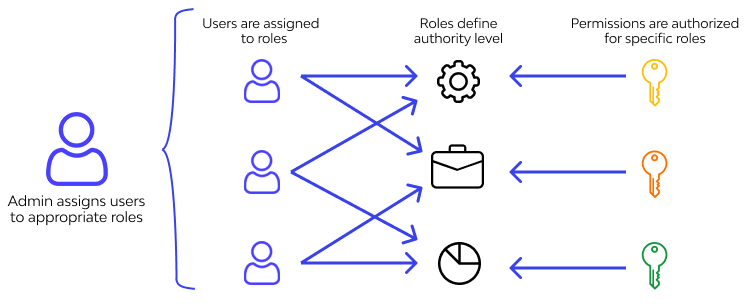
- เหมือน SIIT มีเด็กเป็นล้าน ถ้าจะมากำหนดแต่ละคนว่าทำอะไรได้บ้าง ก็ group ก่อน แล้วค่อยกำหนด role ให้ group → ถือว่าเป็น Coarse-grained
- Pod specs
- Network policies
- Admission control configurations
Threat: If an attacker gains read access to etcd:
- They can extract credentials
- They can escalate privileges
- They can compromise the entire cluster
⚠️ By default, Kubernetes stores Secrets in etcd base64-encoded (NOT encrypted).
Solutions for etcd Security Protection
1. Enable Secure Communication (mTLS)
- Use Mutual TLS (mTLS) between
kube-apiserver, etcd, and etcd cluster members - Use certificate-based authentication
2. Enable Encryption at Rest
Data at rest = File, database (locally on the machine)
Data in transition (Data in Motion) = Data being transferred (SSL, TLS supports สิ่งนี้)
Flow of encrypted secret storage:
- User creates a Secret via
kubectlor API kube-apiserver:- Encrypts the Secret using configured encryption provider
- Stores the encrypted data in etcd
- When retrieving:
kube-apiserverreads encrypted data from etcdkube-apiserverdecrypts it- Returns plaintext to authorized clients
แปลว่า API Server เป็นคนถือ Key สำหรับ encrypt etcd storage
Tradeoff: เวลา, performance (ถ้าเราป้องกันมากเกินไป) → Higher security
3. RBAC & API Exposure
- etcd should NEVER be exposed externally
- Must be isolated via firewall rules
- Only accessible from control-plane nodes
- Access should be mediated only via
kube-apiserver, not directly
etcd Scalability & Bottlenecks in Large / Federated Clusters
Why etcd Becomes a Bottleneck
In large clusters with:
- Thousands of Pods
- High churn (auto-scaling, rolling updates)
- Frequent watch operations
- Continuous status updates
This results in:
- Heavy write amplification → Writes require consensus
- Watch stream overload
- Increased I/O pressure
- ⚠️ ==Latency increases under load==
Federation Problem
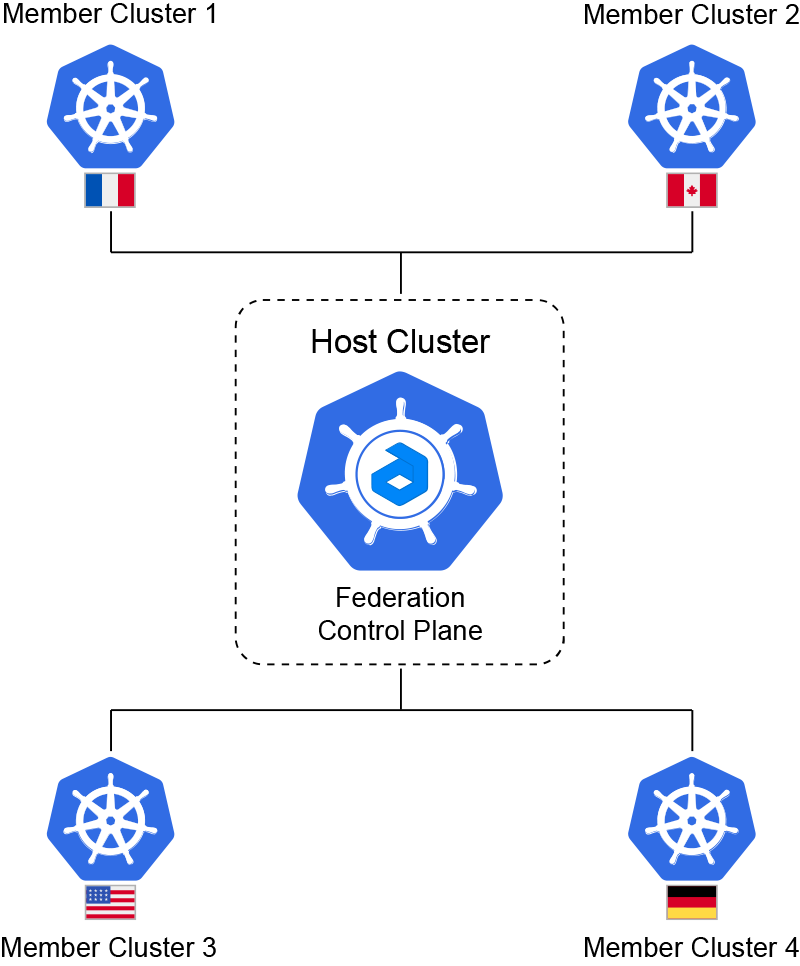
In multi-cluster / federated Kubernetes:
- Each cluster has its own etcd
- Cross-cluster state synchronization becomes complex
- Global policy enforcement cannot rely on a single etcd
This leads to:
- Consistency issues
- State propagation delays
- Governance complexity
Federated Dynamic Access Control Systems
- Traditional etcd:
- Stores static RBAC policies
- Cannot support dynamic trust scoring
- Not suitable for cross-domain verification
Solutions:
- Enable encryption at rest for Secrets and sensitive resources
- ส่วนใหญ่ก็ใช้ Symmetric Encryption (AES) กันนะ
- Blockchain-based anchoring of policies
- ZKP-based verification of authorization
- Decentralized trust layers
- Sharded control planes
In such designs:
etcdstores local state- Blockchain anchors global governance proofs
This avoids:
- ✅ Central bottlenecks
- ✅ Single point of failure
- ✅ Trust centralization
Pods Intercommunication
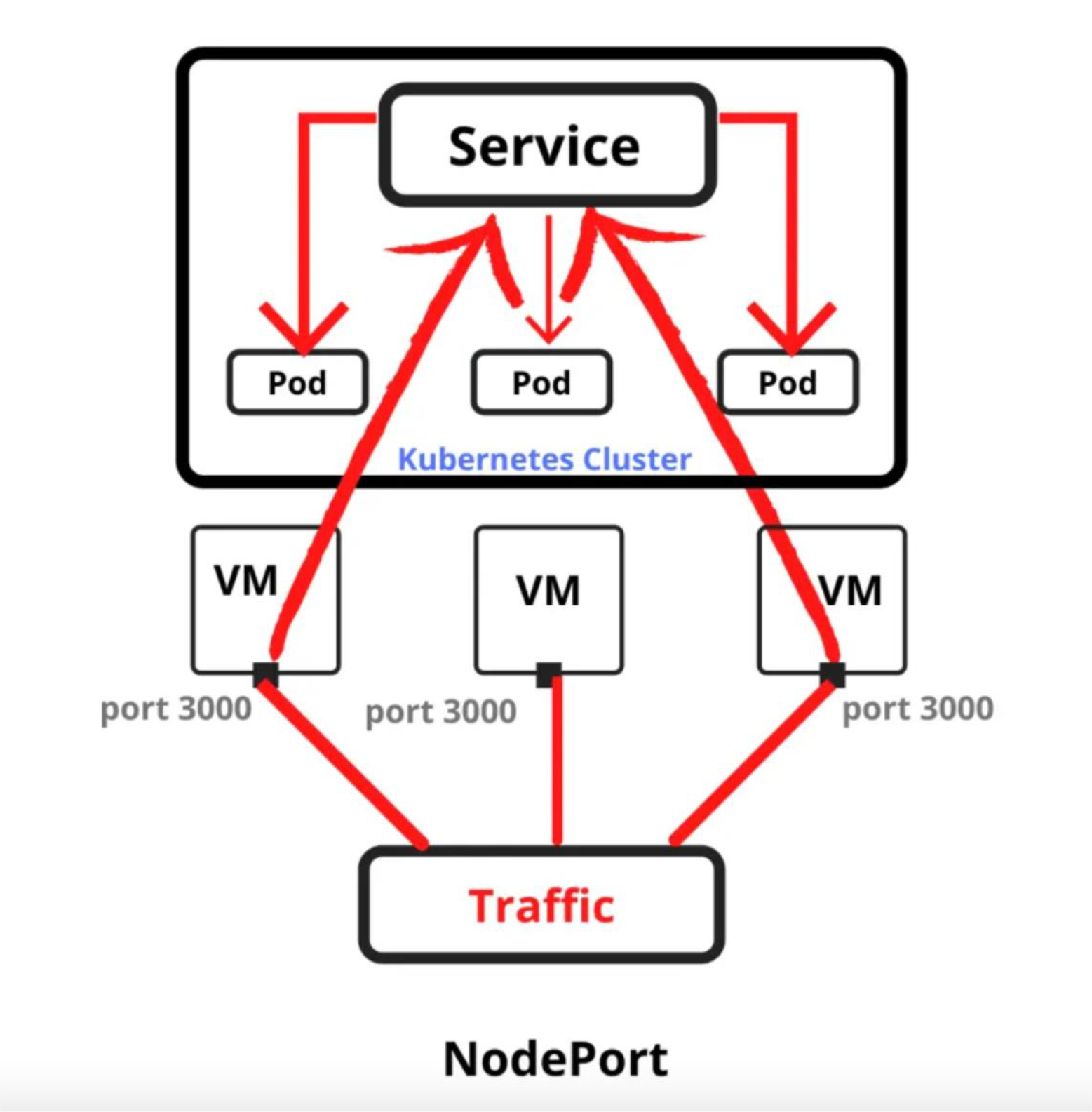
- Pods can be interconnected in Kubernetes through a Single IP
- Uses routing spec based on iptables rules / routing tables in the KubeProxy
- Traffic flows:
Traffic → NodePort → Service → Pods
            [Service]
           /    |    \
        [Pod] [Pod] [Pod]    ← Kubernetes Cluster
          |     |     |
         VM    VM    VM
       :3000 :3000 :3000
             |
          [Traffic]    ← NodePort
Advantages of using Kubernetes
There are four main advantages:
- Velocity — Speed of deploying and updating
- Scaling — Both software and teams
- Abstracting the infrastructure — Portability across environments
- Efficiency — Resource utilization
All these aspects relate to each other to speed up the process of reliably deploying software.
Can You Install a Virtual Machine (VM) in a Kubernetes Pod?
Yes! You can run a VM inside a Kubernetes Pod using solutions like:
- KubeVirt
- Virtlet
- Harvester
Kubernetes is traditionally designed for container orchestration, but with these tools, you can run VMs alongside containers in the same cluster.
Why Run a VM Inside a Kubernetes Pod?
- Legacy Applications
- Some workloads require a full VM environment rather than containers
- Running monolithic applications that are hard to containerize
- Security & Isolation
- Better isolation than traditional containers
- Compliance with strict security policies (e.g., financial or healthcare industries)
- Hybrid Workloads (Containers + VMs)
- Some applications require both VM-based and containerized workloads to run together
- Performance & Hardware Access
- VMs can have direct access to hardware (GPU, storage devices)
- Allows running Kernel-dependent applications that don't work in a container
Advantage 1: Velocity
Velocity = The speed with which you can respond to innovations (e.g., from shipping CDs → delivering over the network).
Velocity is measured not just in number of features shipped, but in reliable delivery while maintaining high availability.
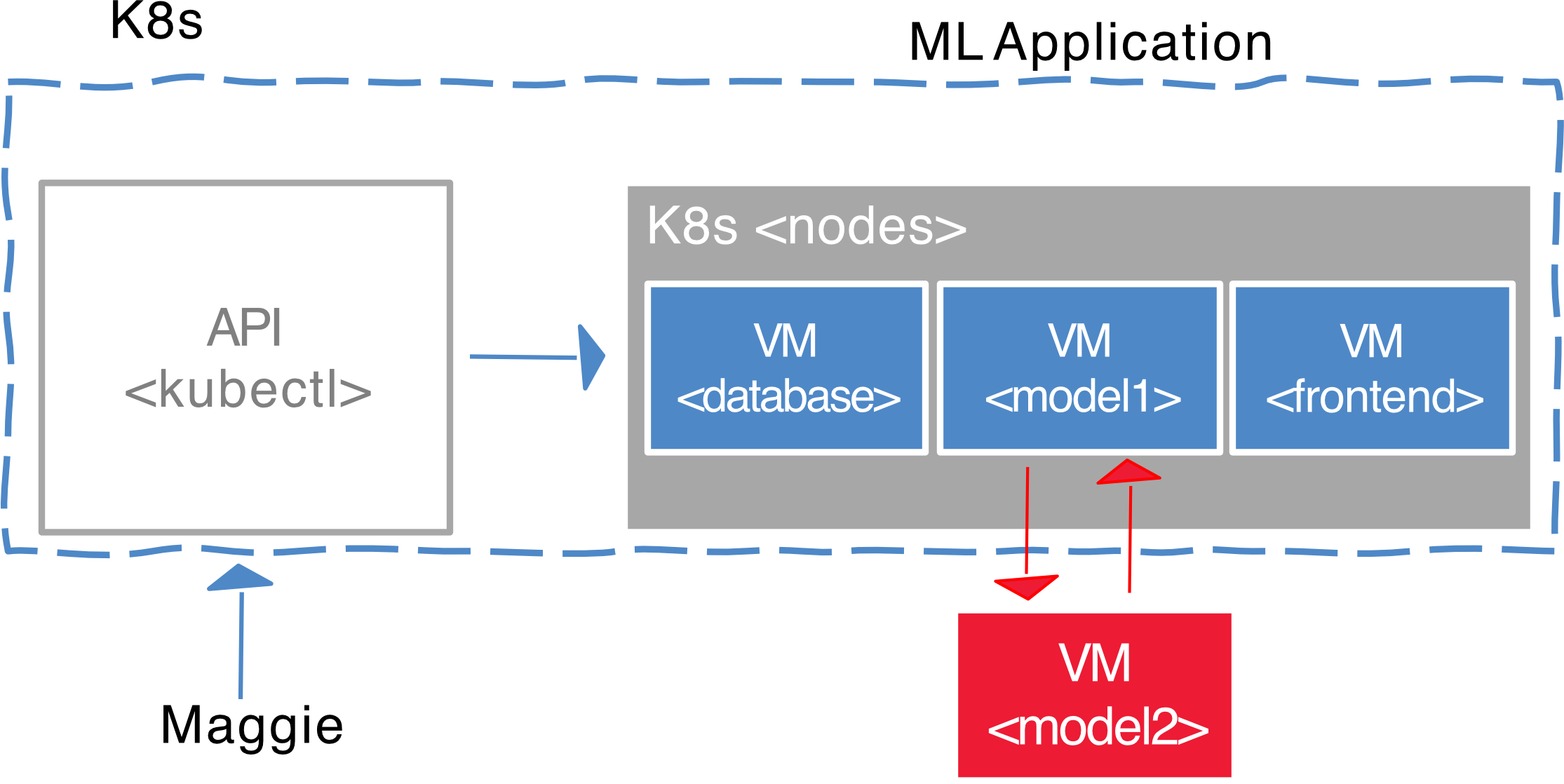
Velocity is enabled by:
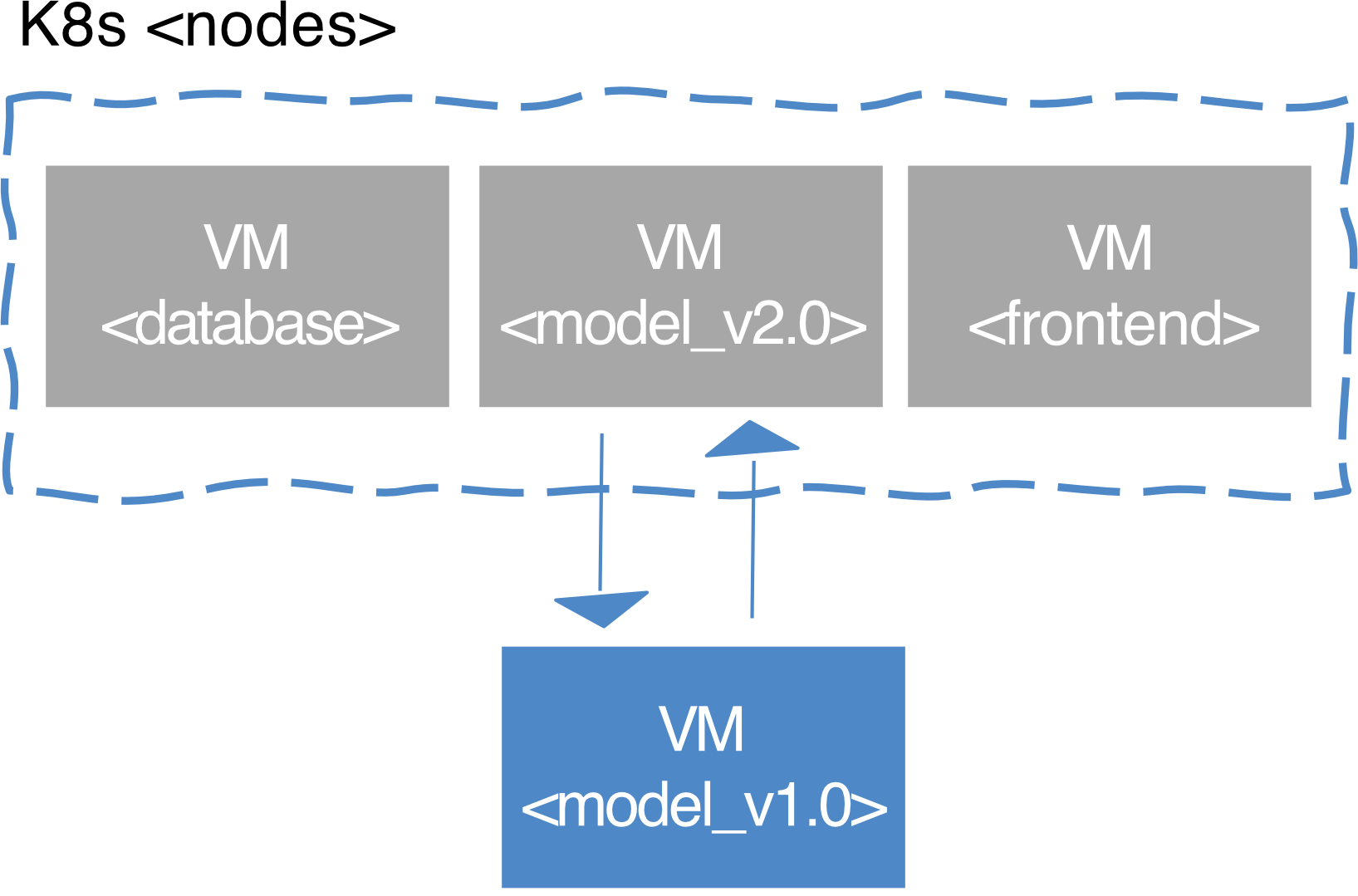
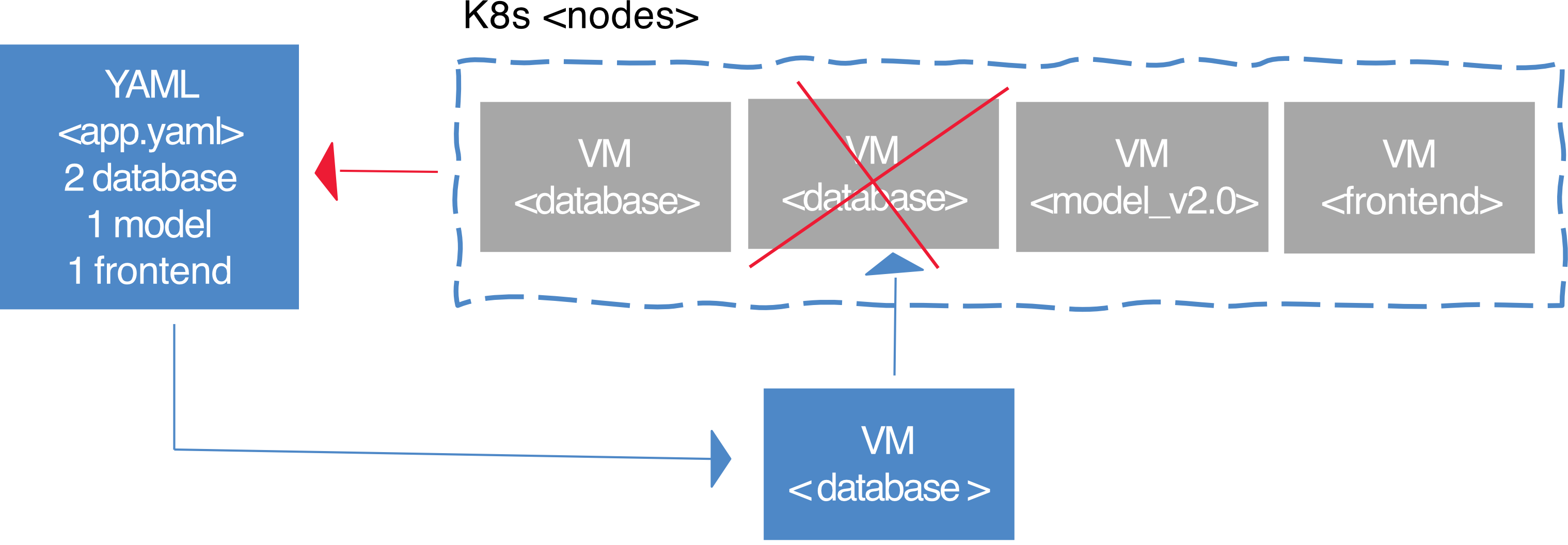
- Immutable System
- You cannot change a running container
- Instead, you create a new one and replace the old one in case of failure
- Allows keeping track of history and loading older images
- Example:
model_v1.0→model_v2.0rollout
- Declarative Configuration
- You define the desired state using YAML files
- To rollback, simply restate the previous declarative state
- Contrast with Imperative configuration: defined by a series of sequential instructions (hard to reverse)

# Example desired state
2 database
1 model
1 frontend- Online Self-Healing Systems
- K8s automatically takes actions to ensure the current state matches the desired state
- No need for a human operator to enact repair
- Example: If a database pod dies, K8s spins up a new one automatically
YAML
- YAML = Yet Another Markup Language (or recursively, YAML Ain't Markup Language)
- A human-readable data serialization format used for configuration files and data exchange
- Widely used in Kubernetes, CI/CD pipelines, and cloud applications for defining structured data
YAML Example — Create a Kubernetes Pod
apiVersion: v1
kind: Pod
metadata:
  name: nginx-pod
  labels:
    app: nginx
spec:
  containers:
    - name: nginx-container
      image: nginx:latest
      ports:
        - containerPort: 80
Explanation:
- Defines a Pod named
nginx-pod - Runs an Nginx container (
nginx:latest) - Exposes port 80 inside the container
Commands:
kubectl apply -f nginx-pod.yaml   # Apply config
kubectl get pods                  # Check Pod status
YAML Example — Deploy an Application (Deployment)
apiVersion: apps/v1
kind: Deployment
metadata:
  name: nginx-deployment
spec:
  replicas: 3
  selector:
    matchLabels:
      app: nginx
  template:
    metadata:
      labels:
        app: nginx
    spec:
      containers:
        - name: nginx-container
          image: nginx:latest
          ports:
            - containerPort: 80
Explanation:
- Creates a Deployment named
nginx-deployment - Runs 3 replicas of an Nginx container
- Uses labels to manage the Pods
Commands:
kubectl apply -f nginx-deployment.yaml   # Apply
kubectl get deployments                  # Check deployment
kubectl get pods                         # Check pods
Summary — YAML Components
| YAML Component | Description |
|---|---|
| Pod | Runs a single container inside Kubernetes |
| Deployment | Manages multiple replicas of an application |
| Service | Exposes Pods to internal/external traffic |
| PersistentVolumeClaim | Requests storage for applications |
Advantage 2: Scaling
As your product grows, you will inevitably need to scale:
- Software — handle more load
- Teams — more developers working on different services
Kubernetes provides advantages for scaling:
- Decoupled architectures — each component is separated by defined APIs and service load balancers
- Easy scaling for applications and clusters — simply change a number in a configuration file; K8s handles the rest (part of declarative config)
- Scaling development teams with microservices — small teams responsible for each service
- Optimal group size: "2 pizzas team" (a team small enough to be fed by 2 pizzas)
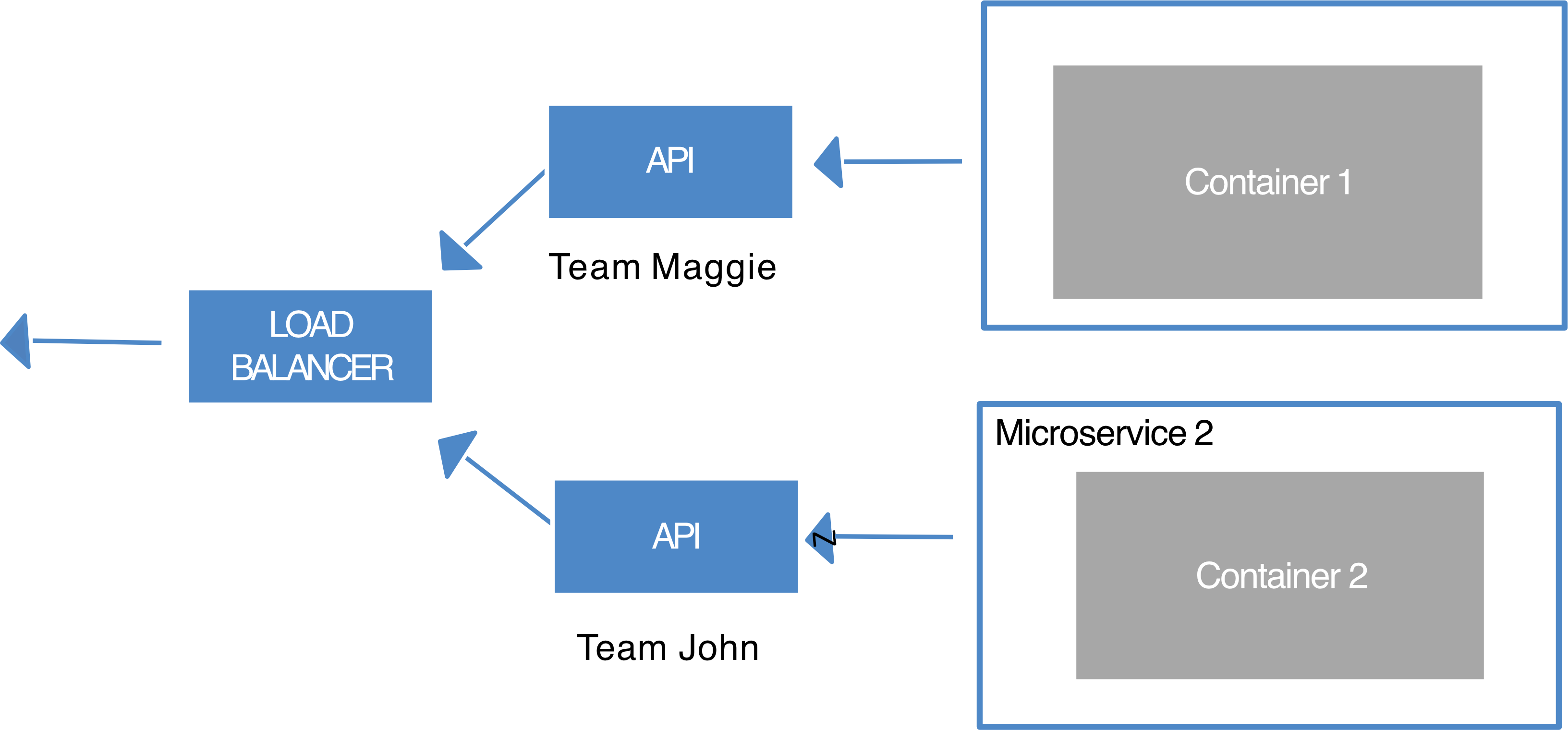
Example Architecture:
[Team John] → [Microservice 1 / Container 1] ─┐
                                               ├→ [LOAD BALANCER] → [API]
[Team Maggie] → [Microservice 2 / Container 2] ┘
Kubernetes Abstractions for Decoupling:
- Pods — group container images from different teams into a single deployable unit (similar to
docker-compose) - Services — isolate one microservice from another (load balancing, naming, and discovery)
- Namespaces — control the interaction among services
- Ingress — combine multiple microservices into a single externalized API (easy-to-use frontend)
K8s provides the full spectrum of solutions between doing it "the hard way" and a fully managed service.
Ingress — Domain Filtering
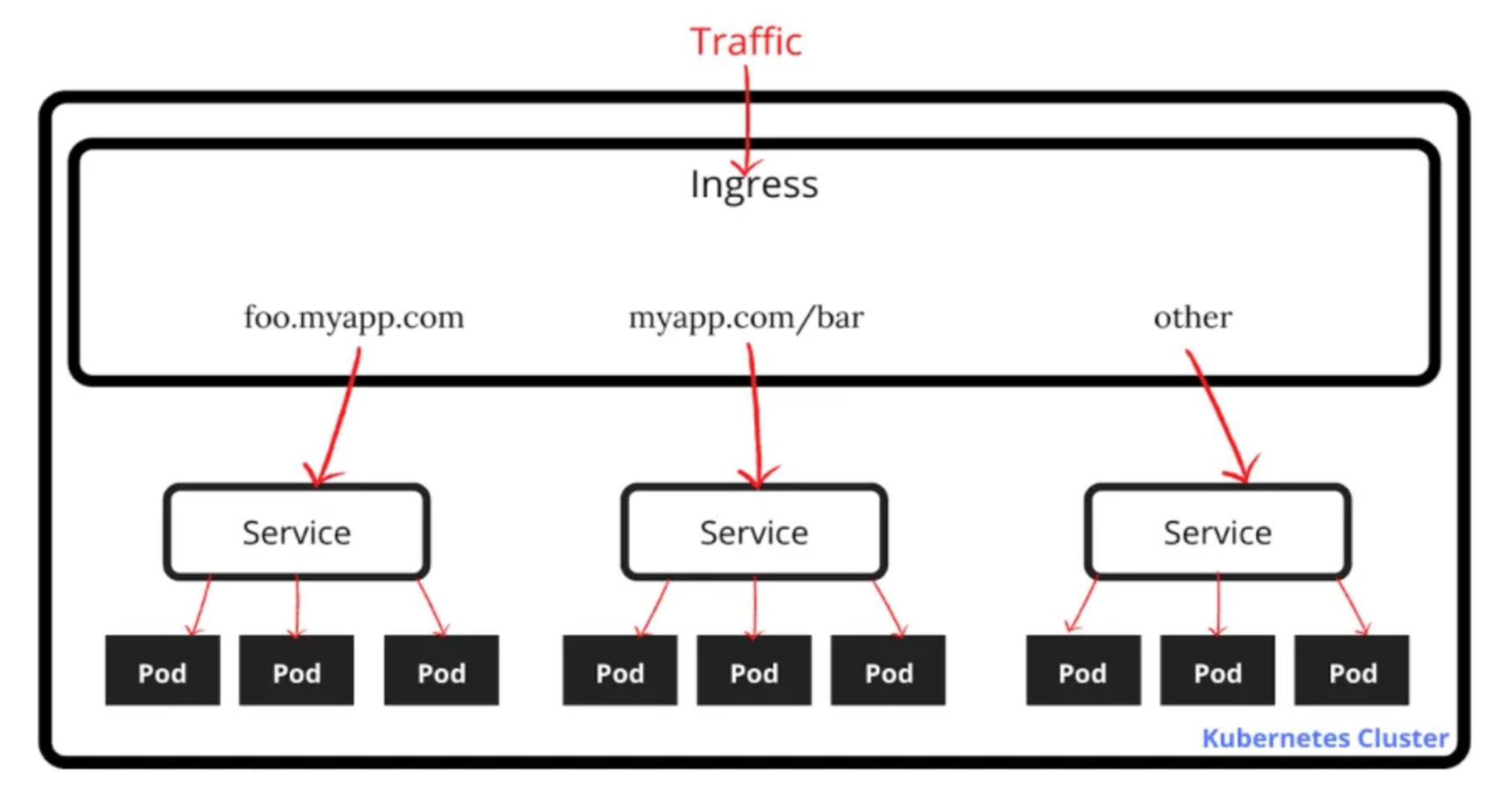
Ingress routes external traffic to different services based on domain/path:
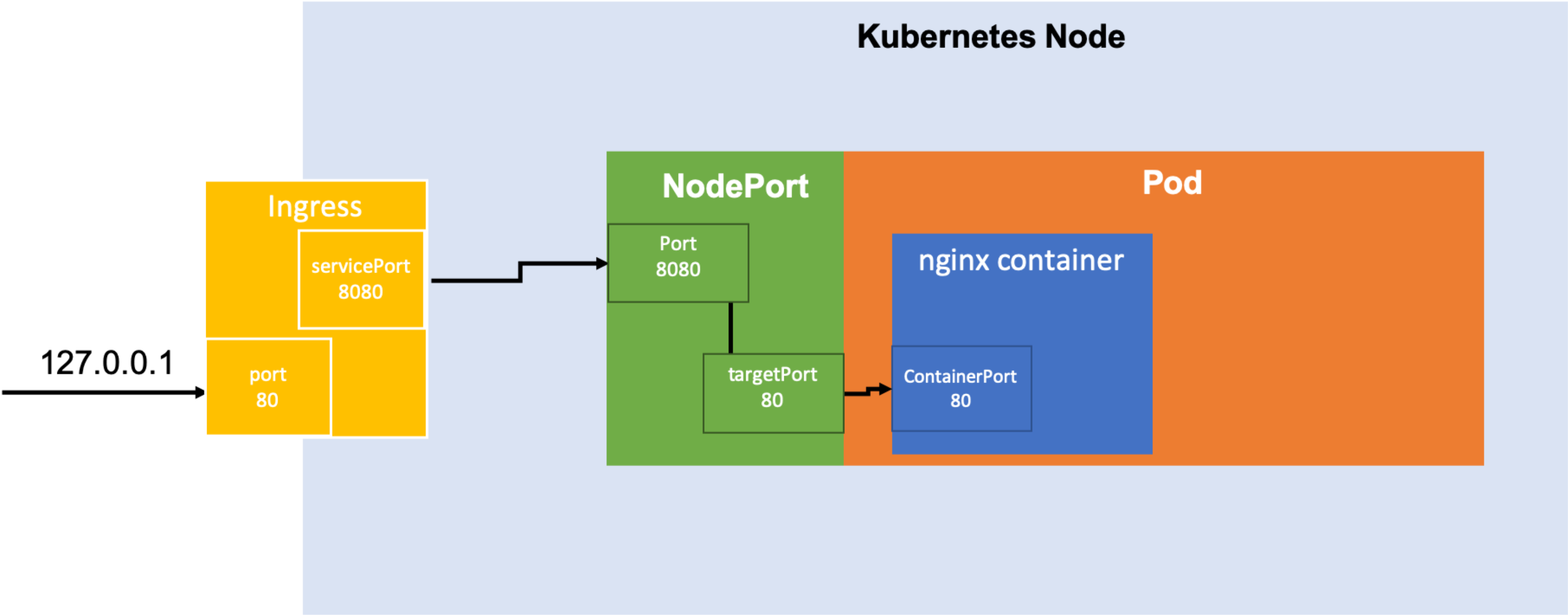
          [Traffic]
              │
          [Ingress]
         /     |      \
foo.myapp.com  myapp.com/bar  other
      │              │           │
  [Service]      [Service]   [Service]
  /  |  \        /  |  \     /  |  \
Pod Pod Pod    Pod Pod Pod  Pod Pod Pod
Analogy: Ingress is like a hotel receptionist — when you arrive (traffic comes in), they look at your reservation (domain/path) and direct you to the right floor and room (service and pods).
Advantage 3: Abstracting Your Infrastructure
In VM portable, we can migrate
- K8s allows you to build, deploy, and manage your application in a way that is portable across a wide variety of environments.
- Two concrete benefits of application-oriented container APIs like K8s:
- Separation — developers from specific machines
- Portability — simply a matter of sending the declarative config to a new cluster
- declarative config is done through
.yamlfile
- declarative config is done through
Analogy: It's like writing a recipe (YAML config). You can give that recipe to any kitchen (any cloud/cluster), and the same dish (app) will be produced. You're not tied to one specific chef or kitchen.
Advantage 4: Efficiency
- Tasks from multiple users can be packed tightly onto fewer machines (bin packing).
- Concrete economic benefits:
- Consume less energy (ratio of useful to total work)
- Limit costs of running a server (power, cooling, datacenter space, compute)
- Quickly create developer test environments as sets of containers
- Reduce cost of development instances, liberating resources for others that were previously cost-prohibitive
Deploying a Kubernetes Cluster
Using minikube (Local Mode)
To deploy your cluster locally, install Kubernetes with minikube:
minikube start    # Start cluster (creates a VM)
minikube stop     # Pause cluster
minikube delete   # Remove the VM entirely
Checking Cluster Status
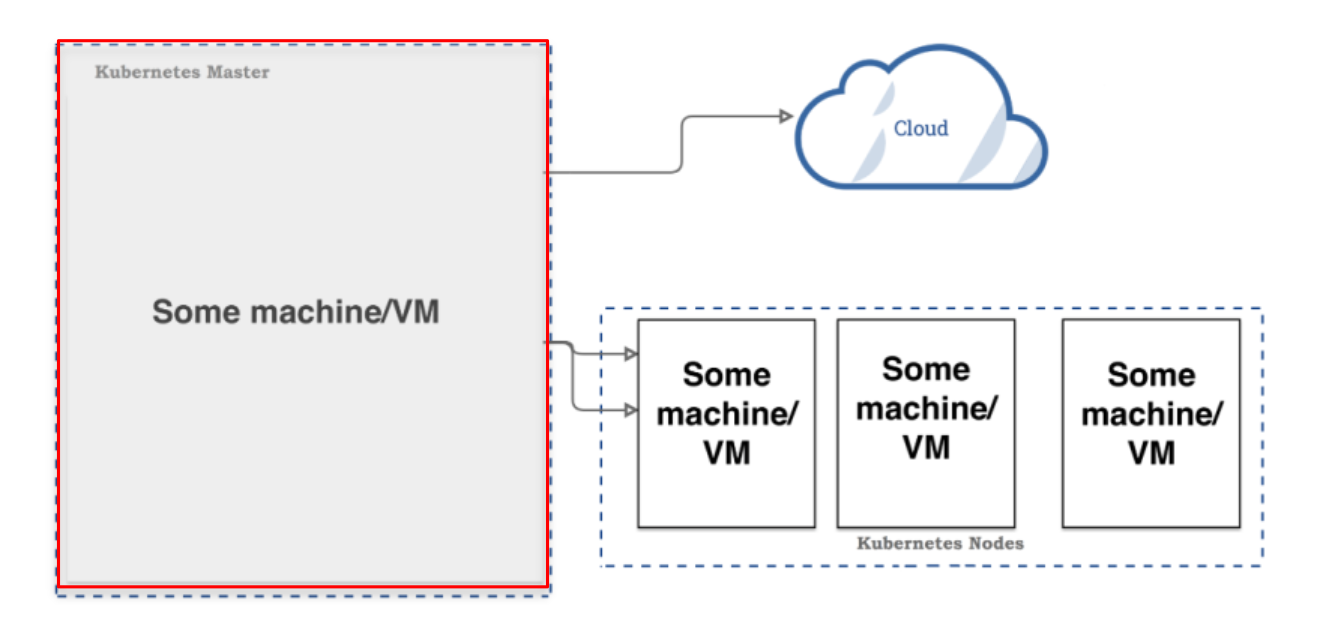
kubectl get componentstatusesExpected output:
| NAME | STATUS | MESSAGE | ERROR |
|---|---|---|---|
| scheduler | Healthy | ok | |
| controller-manager | Healthy | ok | |
| etcd-0 | Healthy | {"health": "true"} |
Listing Nodes
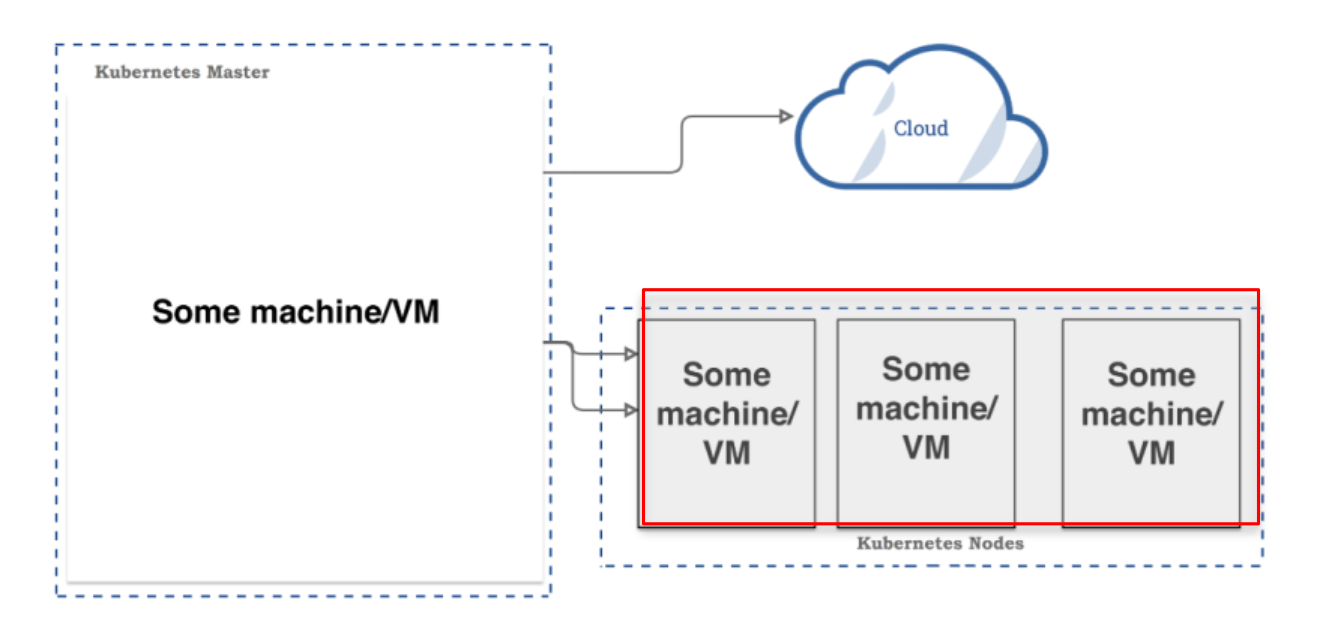
kubectl get nodesExpected output:
| NAME | STATUS | AGE | VERSION |
|---|---|---|---|
| kubernetes | Ready, master | 45d | v1.12.1 |
| node-1 | Ready | 45d | v1.12.1 |
| node-2 | Ready | 45d | v1.12.1 |
| node-3 | Ready | 45d | v1.12.1 |
Common kubectl Commands
# Create resources from YAML
kubectl create -f app-db-deployment.yaml

# Check deployments and pods
kubectl get deployment
kubectl get pods

# Get pods with custom columns (name + IP)
kubectl get pods -o=custom-columns=NAME:.metadata.name,IP:.status.podIP

# Deploy app server
kubectl create -f app-server-deployment.yaml

# Expose deployment as a LoadBalancer service on port 8080
kubectl expose deployment app-deployment --type=LoadBalancer --port=8080

# List all services
kubectl get services

# Cleanup
kubectl delete service app-deployment
kubectl delete deployment app-server-deployment
kubectl delete deployment app-db-deployment
Multi-Cloud Kubernetes Cluster
K8s can span across multiple cloud providers:
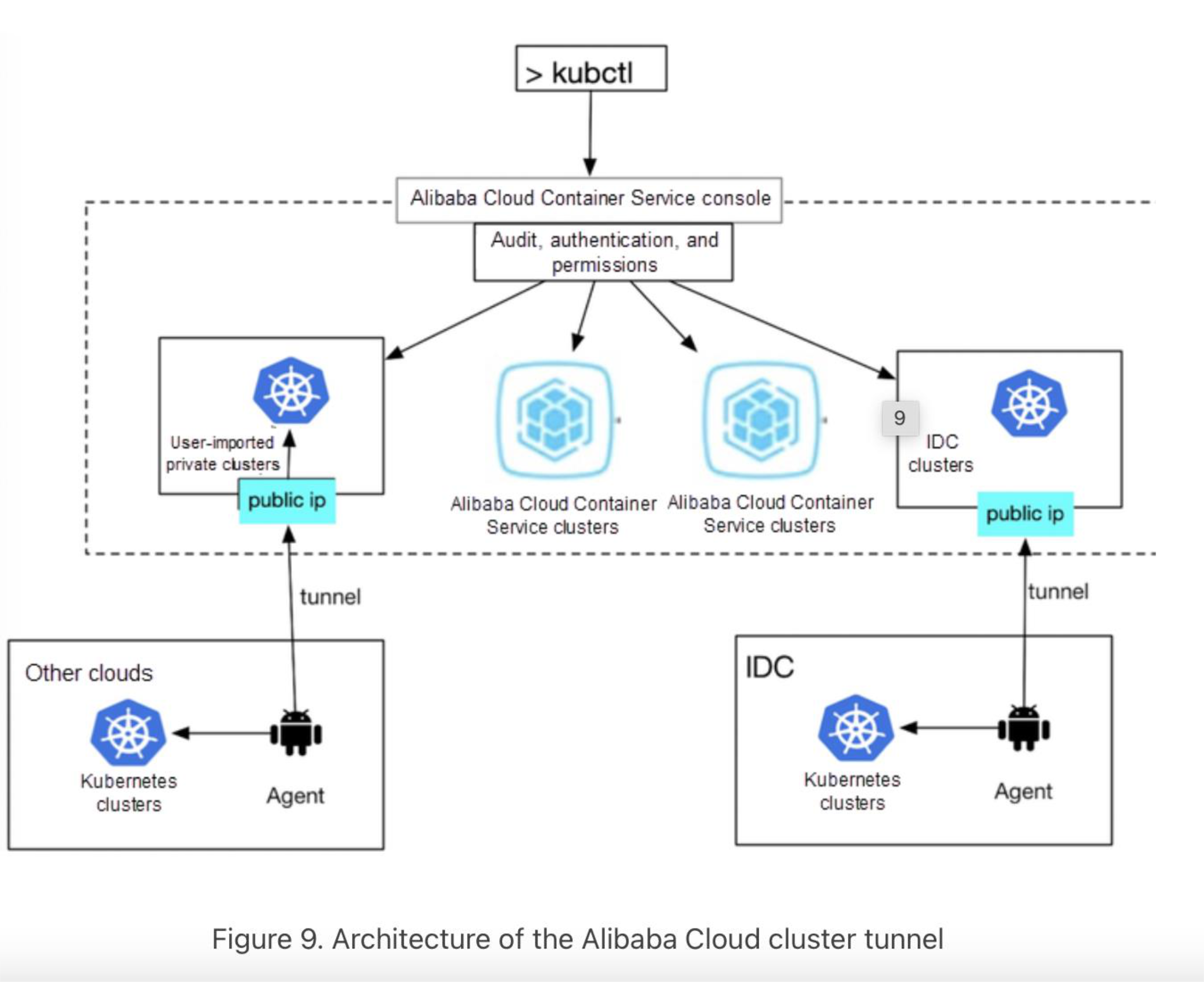
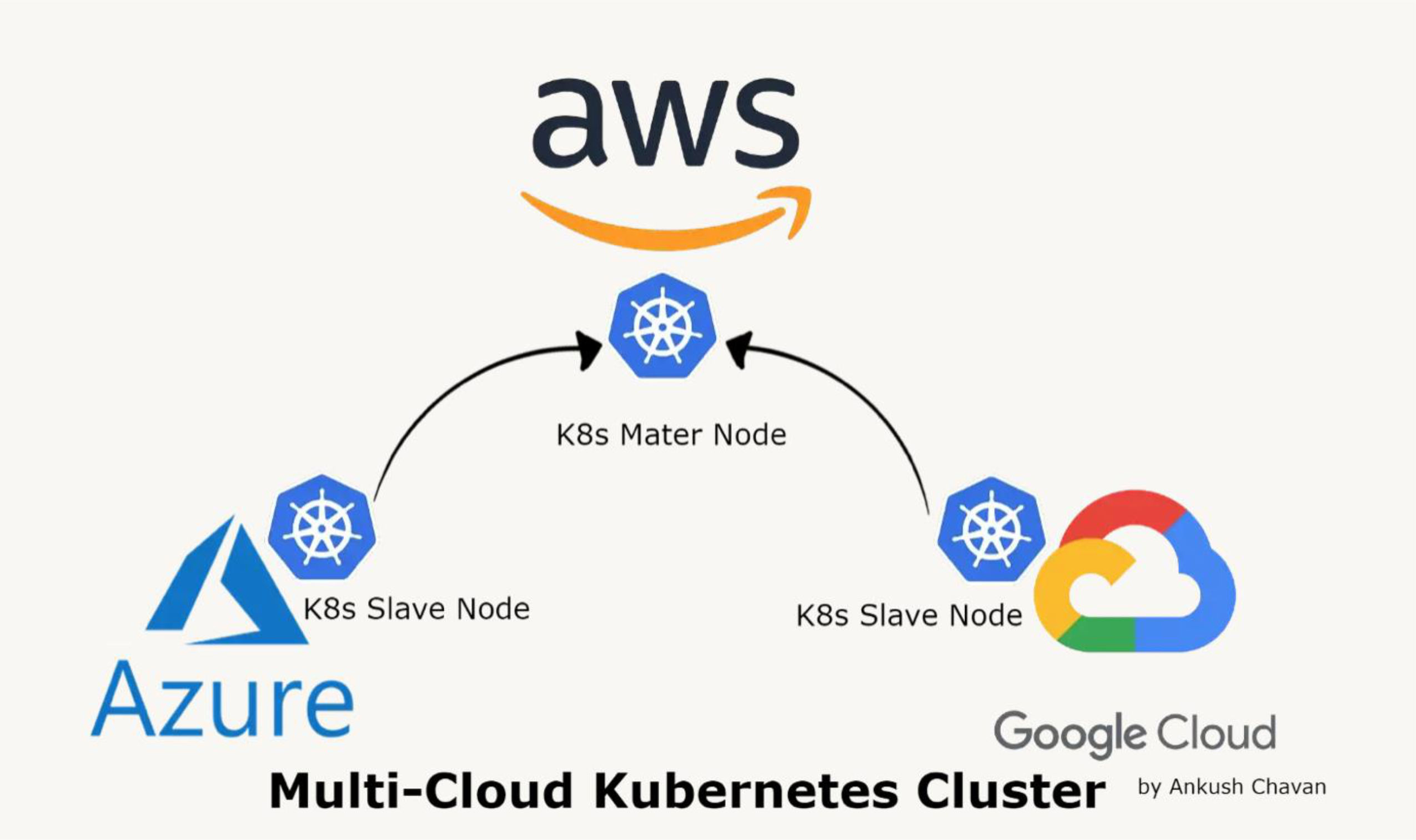
              [AWS]
                │
         [K8s Master Node]
        /                 \
  [Azure]                [Google Cloud]
  K8s Slave Node         K8s Slave Node
- One master controls worker nodes that can be spread across AWS, Azure, and Google Cloud
- Enables hybrid and redundant deployments
K8s vs. Docker Swarm vs. Apache Mesos
| Kubernetes | Docker Swarm | Apache Mesos | |
|---|---|---|---|
| Ease of Use | Medium | Easy | Complex |
| Cluster Scalability | Medium to Large | Small to Medium | Very Large |
| Minimum Cluster Size | 1 master, 1 slave | 1 server | 1 master, 1 slave |
| Cluster Installation | Complex | Easy | Medium |
| Container Deployment | YAML based | Docker based | JSON based |
| AWS, GCP, Azure | All | All | All |
| Scout Support | Yes | Yes | Yes |
Summary:
- Kubernetes — Best for most scenarios; industry standard; growing ecosystem
- Docker Swarm — Easiest to get started with; good for small-medium setups
- Apache Mesos — Most flexible; best for complex legacy + container hybrid environments
Kubernetes vs. Apache Mesos — Key Differences
| Category | Winner | Notes |
|---|---|---|
| Scalability | Mesos | Can manage containerized AND non-containerized loads; DC/OS offers full OS functionality for datacenters |
| Out-of-the-box functionality | Kubernetes | Offers 100% of functionality out-of-the-box; some DC/OS enterprise features are behind a paywall |
| Integration with other tools | Kubernetes (slight) | Both open to third-party tools, but K8s popularity means more available options |