How to manage project to meet deadlines, constraints, and also concern risk.
Learning Objectives
- Illustrate project priorities in the form of a project triangle
- Explain project planning, scheduling, monitoring, and reporting
- Create a work breakdown structure
- Identify task patterns
- Calculate a project's critical path
- Describe project monitoring and control techniques to keep a project on schedule
- Explain how project status is reported
- Describe project management software and how it can be of assistance
- Create a risk management plan
- Describe why projects sometimes fail
- Lack concern about risk
Overview of Project Management
อะไรที่ทำให้โครงการ ๆ นึง ประสบความสำเร็จ!
Definition
Project Management: Planning, scheduling, monitoring and controlling, and reporting on information system development
What Shapes a Project?
โครงการสำเร็จ เราวัดจากอะไร แค่ทำเสร็จตามที่สั่ง ถือว่าสำเร็จมั้ย?
Success Criteria: Successful projects must be:
- Completed on time
- Within budget (สำคัญมาก5555)
- Meet requirements
- Satisfy users
Analogy: Think of project management like planning a big road trip. You need to know your route (planning), when you'll reach each destination (scheduling), check if you're on track (monitoring), adjust when there's traffic (controlling), and update everyone on your progress (reporting).
The Project Triangle
สามเหลี่ยมโครงการ: แนวคิดที่ว่า "ประมาณว่า success criteria ที่กําหนดมาให้ 4 อัน" ข้างบนน่ะ มันเหมือนจะขัดแย้งกันนะ ถ้าสมมติอยากให้เสร็จเร็วก็อาจจะต้องใช้เงินมากขึ้นหรือเปล่า? อะไรประมาณนี้เลยเกิดเป็นสามเหลี่ยมนี้ขึ้นมา
IMAGE: Project Triangle with Cost, Scope, and Time as the three sides
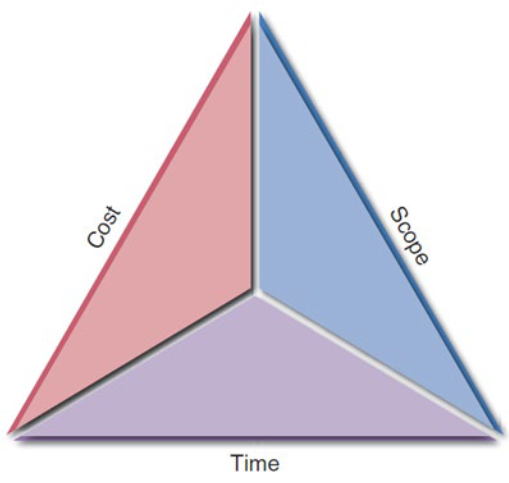
Three Key Factors:
- Cost - Budget and resources
- Scope - Features and requirements
- Time - Schedule and deadlines
Challenge: Find optimal balance among the factors
- Critical Rule: Any change in one leg will affect the other legs
Analogy: The project triangle is like a three-legged stool. If you shorten one leg (reduce time), you'll need to adjust the other legs (increase cost or reduce scope) to keep the stool balanced. You can't have everything: fast, cheap, and feature-rich - pick two!
What Does a Project Manager (PM) Do?
Four Main Responsibilities:
- Project Planning
- Identifying all project tasks
- Estimating completion time and costs
- Project Scheduling
- Creating a specific timetable
- Showing tasks and task dependencies
- Identifying critical tasks that might delay the project
- Project Monitoring
- Guiding the project team
- Supervising work
- Coordinating the project team's workload
- Project Reporting
- Creating regular progress reports for:
- Management
- Users
- The project team itself
- Creating regular progress reports for:
Analogy: A project manager is like an orchestra conductor. They don't play the instruments (planning = sheet music), but they set the tempo (scheduling), guide each section (monitoring), and ensure everyone knows how the performance is going (reporting).
Creating a Work Breakdown Structure (WBS)
Project จริงไม่ได้มีแค่ 3 อย่างด้านบน แต่มีงานยิบย่อยเป็นล้านนนน ก็เป็นความท้าทายของ Project Manager ต้องรับมือ วิธีมาตรฐานที่สุดก็คือต้องทำ WBS
Definition
Breaking down a project into a series of smaller, manageable tasks
Gantt Chart
- Definition: Horizontal bar chart representing a set of tasks
- Purpose: Shows planned and actual progress on a project
- Feature: Simplifies complex projects using task groups
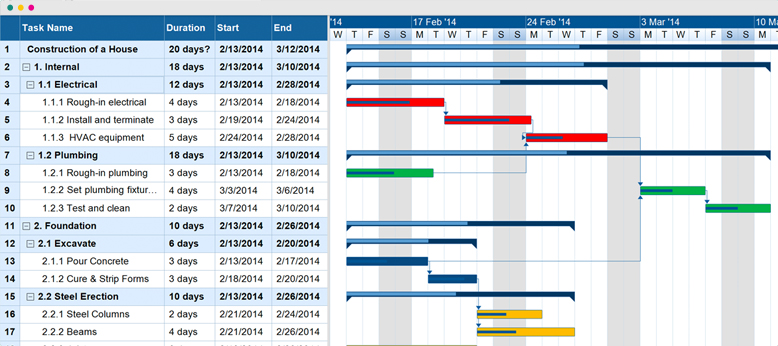
Analogy: A Gantt chart is like a horizontal timeline of your semester. Each course assignment is a bar showing when it starts and ends, making it easy to see what overlaps and what needs attention first.
Gantt Chart เก่งในการบอกเวลา แต่เรื่องของความเชื่อมโยง เอาไปทิ้ง (ไม่ได้เล้ย)
PERT/CPM Charts
Program Evaluation Review Technique (PERT)
- Developed by: U.S. Navy
- Approach: Utilizes a bottom-up technique
- Uses:
- Scheduling work
- Monitoring progress
- Controlling actual work
- Displaying complex task patterns and relationships
Critical Path Method (CPM)
- Developed by: Private industry
- Similar purpose to PERT
Analogy: If Gantt charts are like looking at your semester calendar horizontally, PERT/CPM charts are like a flowchart showing which assignments depend on others - you can't write the final paper until you finish the research phase.
IMAGE: Gantt Chart and PERT Chart comparison showing 6 tasks
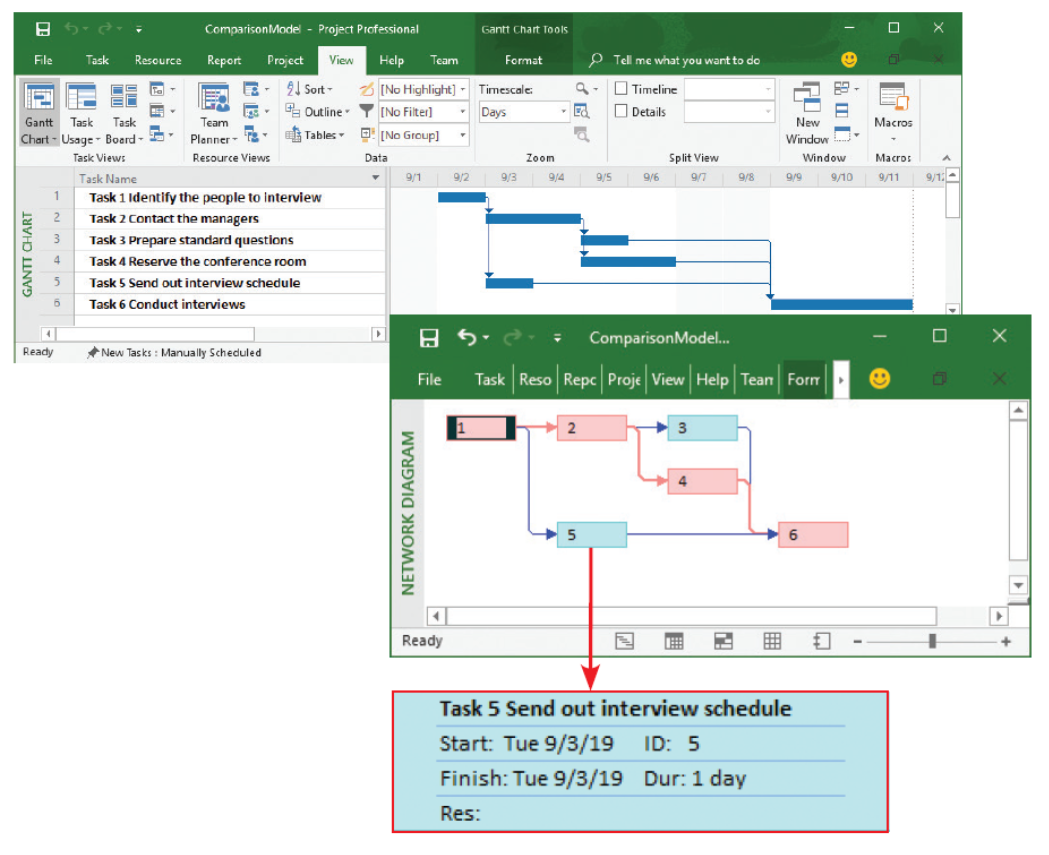 The top screen shows a Gantt chart with six tasks. The PERT chart in the
bottom screen displays an easy-to-follow task pattern for the same project. When the user
mouses over the summary box for Task 5, the details become visible.
Identifying Tasks in a WBS (Work Breakdown Structure)
Task or Activity
Definition: Any work that has a beginning and end
- Requires use of company resources:
- People
- Time
- Money
- Should be small and manageable
Events or Milestones
Definition: Recognizable reference points used to monitor progress
Analogy: Tasks are like individual homework problems, while milestones are like completing entire chapters or passing midterm exams - they're checkpoints that mark significant progress.
IMAGE: Questionnaire workflow showing tasks and milestones
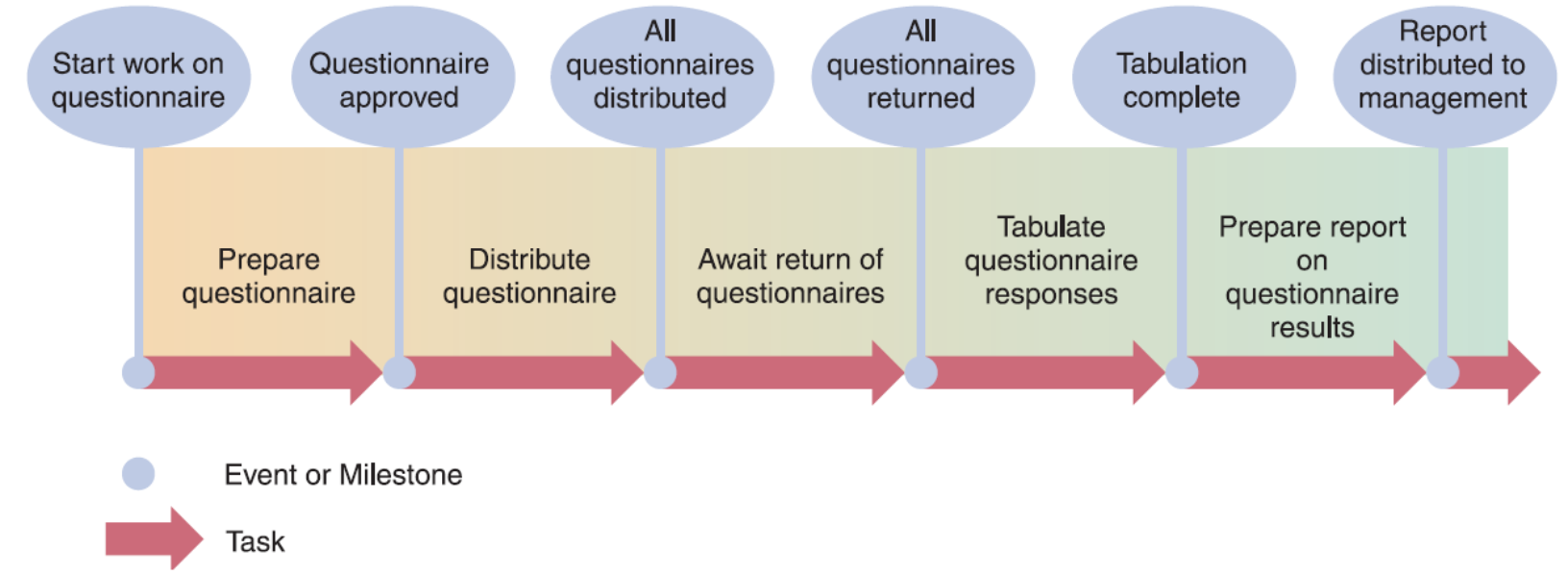
Using a questionnaire requires a series of tasks and events to track the progress.
The illustration shows the relationship between the tasks and the events, or milestones, that
mark the beginning and end of each task.
Listing the Tasks
- Tasks might be embedded in a document
- Need to extract and organize them
Estimating Task Duration
Time Units: Can be hours, days, or weeks
Three-Point Estimation Method:
- B: Best-case estimate
- P: Probable-case estimate (most likely)
- W: Worst-case estimate
Process:
- Project managers make estimates
- Assign weights to each estimate
- Calculate the task duration using:
Analogy: When estimating how long it takes to drive somewhere, you consider the best case (no traffic, all green lights), the probable case (normal traffic), and worst case (rush hour, construction). The weighted average gives you a realistic estimate.
Factors Affecting Duration
1. Project Size
- Identify all project tasks and time required
- Consider time taken for events affecting productivity
- Meetings
- Sick days
- Holidays
- Training
Analogy: Building a small shed vs. a full house - the house has exponentially more tasks, not just proportionally more.
2. Human Resources
- Assemble and guide a development team with:
- Required skills
- Necessary experience
- Deal with factors affecting the schedule:
- Staff turnover
- Training time
- Personality conflicts
- Communication overhead
Analogy: Having 5 experienced chefs doesn't mean you can cook a meal 5 times faster than 1 chef - coordination and communication add overhead.
3. Experience with Similar Projects
- Develop time and cost estimates based on:
- Resources used for similar projects
- Previously developed information systems
- Historical data provides realistic benchmarks
Analogy: If you've organized 3 birthday parties before, you can better estimate time and costs for the 4th one compared to your first attempt.
4. Constraints
- Define system requirements that can be achieved realistically
- Work within the required constraints:
- Budget limitations
- Deadline requirements
- Resource availability
- Technical limitations
Task Patterns
Definition
Arrangement of tasks in a logical sequence
Three Main Types
- Dependent tasks 1. Dependent Tasks
- Multiple successor tasks 2. Multiple Successor Tasks
- Multiple predecessor tasks 3. Multiple Predecessor Tasks
Using Task Boxes to Create a Model
Task Box Structure:
┌─────────────────────────────┐
│        Task Name            │
├───────────────┬─────────────┤
│ Start Day/Date│   Task ID   │
├───────────────┼─────────────┤
│Finish Day/Date│Task Duration│
└───────────────┴─────────────┘
Information in Each Task Box:
- Task Name
- Task ID
- Task Duration
- Start Day/Date
- Finish Day/Date
1. Dependent Tasks
Definition: Tasks completed in a sequence where one task can be initiated only after the prior task has been completed
Example:
[Prepare Outline] → [Create Document]
Start: Day 1        Start: Day 6
Finish: Day 5       Finish: Day 14
Duration: 5 days    Duration: 9 days
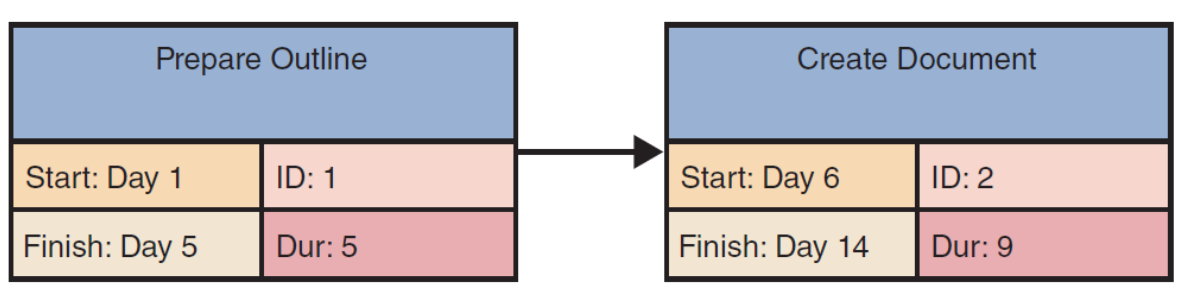
Key Rule: The finish time of Task 1 (Day 5) controls the start date of Task 2 (Day 6)
Analogy: You can't frost a cake before you bake it. The frosting task depends on the baking task being completed first.
2. Multiple Successor Tasks
Definition: Tasks that can be initiated simultaneously after a predecessor task completes
Also Called: Concurrent tasks
Example:
                    ┌─→ [Arrange Interviews]
[Develop Plan] ────┤    Start: Day 31
Start: Day 1       └─→ [Design Survey]
Finish: Day 30          Start: Day 31
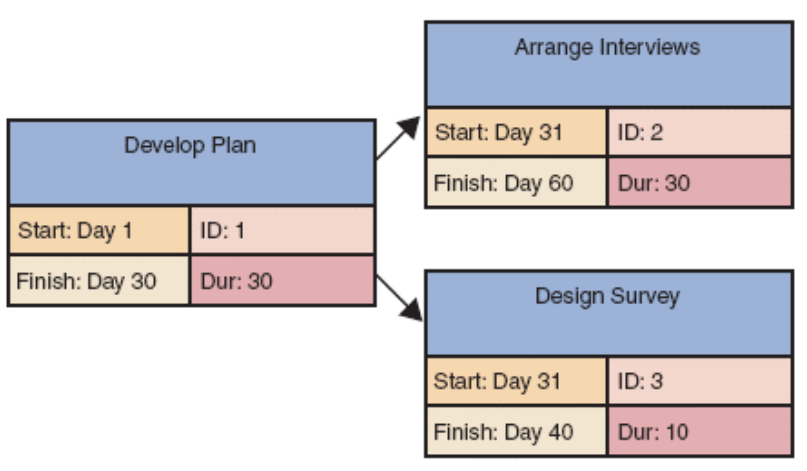
Key Rule: Both successor tasks can start at the same time (Day 31) after the predecessor finishes (Day 30)
Analogy: After getting approval for a party (predecessor), you can simultaneously send invitations and order food (concurrent successors) - both can happen at the same time.
3. Multiple Predecessor Tasks
Definition: Initiation of a task depends on completion of two or more prior tasks
Example:
[Obtain Authorization] ─┐
Finish: Day 15          ├─→ [Conduct Interviews]
                        │   Start: Day 16
[Create Job Description]│   Finish: Day 45
Finish: Day 5          ─┘
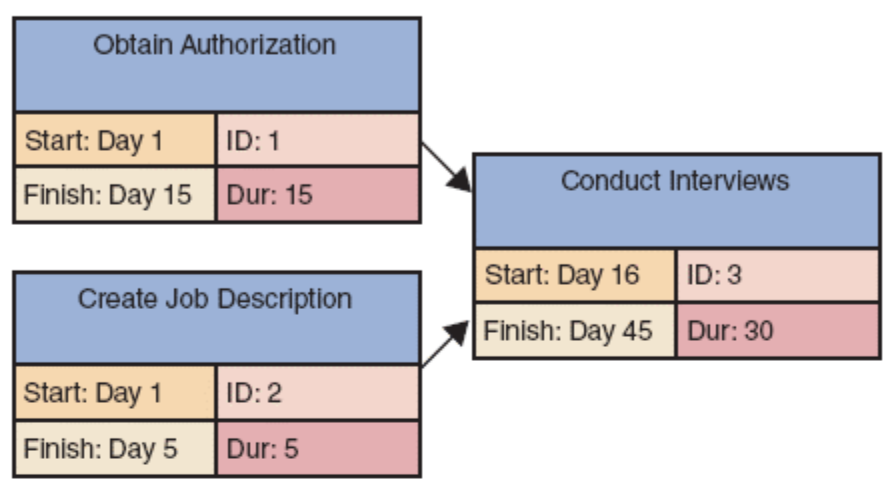
Key Rule: The start time for a successor task must be the latest (largest) finish time for any of its preceding tasks
- In this example: Task 1 ends on Day 15, Task 2 ends on Day 5
- Therefore, Task 3 starts on Day 16 (controlled by the later finishing task)
Analogy: To start building a house, you need both the building permit AND the materials delivered. If the permit arrives Day 10 and materials arrive Day 15, construction can't start until Day 16 (after both are complete).
Working with Complex Task Patterns
Important Notes:
- When several task patterns combine, study facts carefully
- Must understand the logic and sequence
- Critical Warning: A project schedule will not be accurate if the underlying task pattern is incorrect
Analogy: Complex task patterns are like a recipe that requires some ingredients to be prepared in order (dependent), some that can be prepared at the same time (concurrent), and some that all need to be ready before the final step (multiple predecessors). Get the order wrong, and the dish fails.
The Critical Path
การวางแผนงานช่วงแรกเนี่ย สำคัญมาก! ถ้าลำดับความสำคัญของงานผิด ตารางทั้งหมดของโครงการก็จะผิดพลาดตามไปด้วย — เกิดปัญหานิดเดียว ทุกอย่างจะพังไปด้วย นำมาสู่แนวคิดของ The Critical Path
Definition
Critical Path: Series of tasks which, if delayed, will affect the completion date of the overall project
Key Principle: If any task on the critical path falls behind schedule, the entire project will be delayed
Analogy: The critical path is like the longest line at airport security. Even if other checkpoints finish quickly, you're only as fast as the slowest checkpoint on your required route.
Calculating the Critical Path
Process:
- Review all task patterns
- Determine start and finish dates for each task
- Identify the path with the longest total duration
- This longest path defines the critical path
Critical Path Example
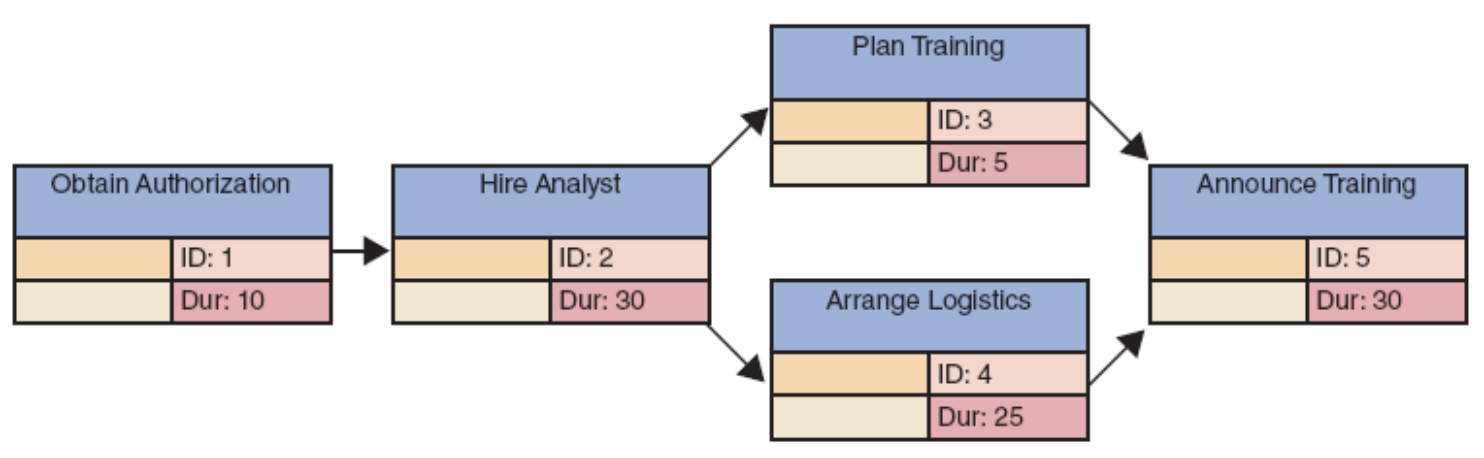
Task Structure:
- Task 1: Obtain Authorization (Duration: 10 days)
- Task 2: Hire Analyst (Duration: 30 days) - depends on Task 1
- Task 3: Plan Training (Duration: 5 days) - depends on Task 2
- Task 4: Arrange Logistics (Duration: 25 days) - depends on Task 2
- Task 5: Announce Training (Duration: 30 days) - depends on Tasks 3 and 4
Calculating Paths:
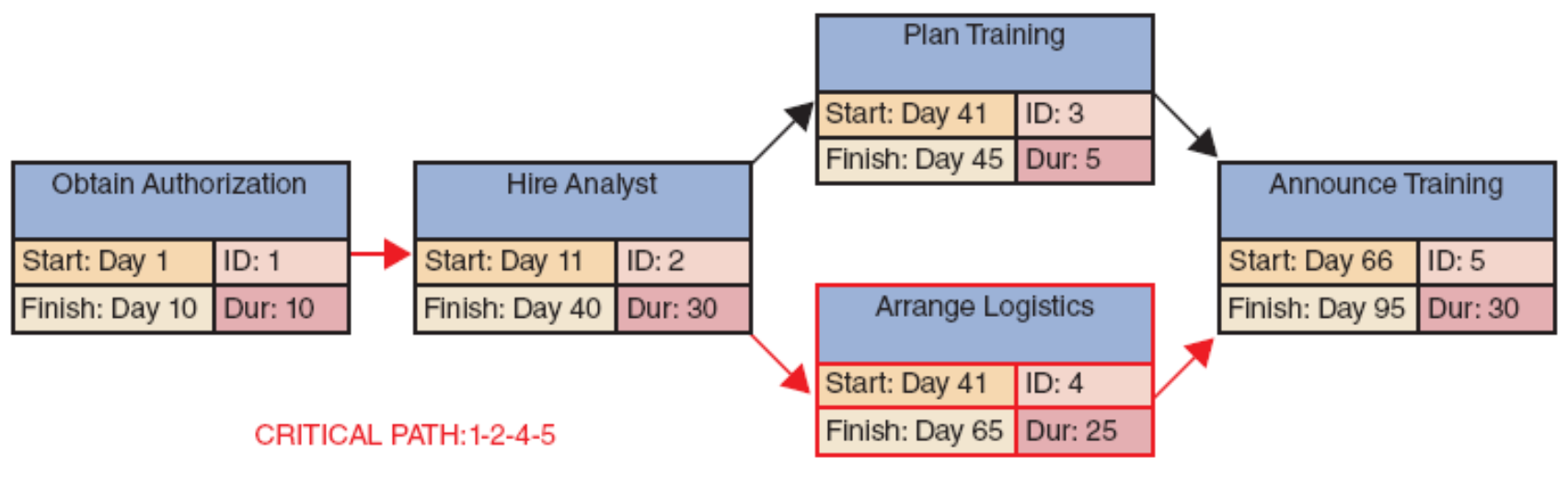
Path 1: Task 1 → Task 2 → Task 3 → Task 5
- Days: 10 + 30 + 5 + 30 = 75 days
Path 2: Task 1 → Task 2 → Task 4 → Task 5
- Days: 10 + 30 + 25 + 30 = 95 days ← CRITICAL PATH
Result:
- Total Project Duration: 95 days
- Tasks 1, 2, 4, and 5 are critical tasks
Dates:
- Task 1: Start Day 1, Finish Day 10
- Task 2: Start Day 11, Finish Day 40
- Task 3: Start Day 41, Finish Day 45 (has slack time)
- Task 4: Start Day 41, Finish Day 65
- Task 5: Start Day 66, Finish Day 95
Analogy: Imagine cooking a multi-course meal. The main course takes longest (critical path), so even if the salad is ready in 10 minutes, guests wait until the main course is done after 60 minutes. The salad has "slack time" - it can be delayed without affecting the meal.
Slack Time
Definition: The amount of time a task can be delayed without affecting the project completion date
Formula:
In the example:
- Task 3 can finish anytime between Day 45 and Day 65 without affecting the project
- Task 3 has 20 days of slack time
- Critical path tasks have zero slack time
Project Monitoring and Control
Monitoring and Control Techniques
จะแน่ใจได้ยังไงว่าทุกอย่างจะเป็นไปตาม Plan ที่วางไว้ Monitoring and Control Techniques
Structured Walk-Through
ให้เพื่อนร่วมทีมช่วยกันตรวจสอบงานของกันและกัน
Definition: Review of a project team member's work by other team members
Characteristics:
- Takes place throughout the SDLC
- Also known as:
- Design reviews
- Code reviews
- Testing reviews
- (Based on the phase in which they occur)
Purpose:
- Catch errors early
- Share knowledge
- Ensure quality standards
- Get fresh perspectives
Analogy: Like peer review in academic writing - having classmates review your essay before submission helps catch mistakes and improve quality.
Maintaining a Schedule
Reality: Projects run into problems or delays
Project Manager's Role: Monitor and control work to:
- Anticipate problems before they occur
- Avoid problems when possible
- Minimize impact when problems do occur
- Identify potential solutions
- Select the best way to solve the problem
Tasks and the Critical Path
Focus Area: Project managers spend most of their time tracking tasks along the critical path
Why: Any delay in critical path tasks directly delays the entire project
Strategies:
- Allocate best resources to critical tasks
- Add buffer time to risky critical tasks
- Monitor critical tasks more frequently
- Have contingency plans ready
Analogy: Like a coach focusing on the weakest player in a relay race - that person determines the team's overall time, so they need the most attention and support.
Reporting
Project Status Meetings
Purpose: Project managers schedule regular meetings to:
- Share updates
- Discuss common problems
- Explain new techniques
- Help collect data
- Foster team communication
- Maintain team alignment
Best Practices:
- Keep meetings focused and time-boxed
- Have clear agendas
- Document decisions and action items
- Ensure all stakeholders are informed
Analogy: Like family dinner check-ins - everyone shares their day, discusses problems, and coordinates plans for tomorrow.
Project Status Reports
Definition: Regular communications by project managers to:
- Supervisors
- Upper management
- Users
Contents Typically Include:
- Progress against schedule
- Budget status
- Completed milestones
- Upcoming milestones
- Issues and risks
- Resource utilization
Frequency:
- Weekly for active projects
- Monthly for longer-term projects
- Ad-hoc for critical issues
Analogy: Like a student's progress report - shows what's been accomplished, what's on track, what's behind, and what help is needed.
Dealing with Problems
Challenge: Deciding how to handle problems can be difficult
Considerations:
- Impact on schedule
- Impact on budget
- Impact on quality
- Impact on stakeholders
- Available solutions
- Trade-offs required
Decision Framework:
- Assess the problem severity
- Determine impact on critical path
- Identify possible solutions
- Evaluate trade-offs
- Escalate if necessary
- Implement and monitor
Analogy: Like a doctor diagnosing and treating an illness - assess symptoms, determine severity, consider treatment options, evaluate side effects, and monitor recovery.
Project Management Software
Overview
Project managers use software applications to help:
- Plan projects
- Schedule tasks
- Monitor progress
- Report on project status
Common Features
Most programs offer:
- PERT/CPM charts - Network diagrams showing task dependencies
- Gantt charts - Timeline views of tasks
- Resource scheduling - Allocation and tracking of team members
- Project calendars - Working days, holidays, availability
- Cost tracking - Budget monitoring and expense tracking
- Collaboration tools - Communication and file sharing
- Reporting tools - Customizable status reports
Analogy: Project management software is like a GPS navigation system for your project - it shows where you are, where you're going, the best route, and warns you of delays or obstacles.
Microsoft Project Example Features
Work Breakdown Structure:
- Hierarchical view of all tasks
- Shows task relationships
- Displays task hierarchy
Gantt Chart:
- Visual timeline of project
- Shows task duration and overlap
- Displays progress bars
Network Diagram:
- PERT/CPM chart view
- Shows task dependencies
- Highlights critical path
Calendar View:
- Shows tasks on actual calendar
- Identifies resource conflicts
- Plans around holidays and availability
Popular Tools
- Microsoft Project
- Asana
- Trello
- Jira (YESSS!!!!)
- Monday.com
- Basecamp
- Smartsheet
Risk Management
Definition
Proactive process of identifying, analyzing, and responding to project risks
Steps in Risk Management
1. Develop a Risk Management Plan
Purpose: Establish framework for risk management activities
Contents:
- Risk management approach
- Roles and responsibilities
- Risk categories
- Probability and impact definitions
- Risk documentation procedures
Analogy: Like creating an emergency preparedness plan before a storm - you decide what to track, who does what, and how to document everything.
2. Identify the Risks
Activities:
- Brainstorm potential risks
- Review historical data
- Consult with experts
- Analyze project characteristics
Common Project Risks:
- Schedule delays
- Budget overruns
- Scope creep
- Resource unavailability
- Technical challenges
- Stakeholder conflicts
- External dependencies
Analogy: Like listing everything that could go wrong on a camping trip - weather, equipment failure, getting lost, wildlife, injuries, etc.
3. Analyze the Risks
Two Types of Analysis:
A. Qualitative Risk Analysis:
- Assess probability: High, Medium, Low
- Assess impact: High, Medium, Low
- Prioritize risks based on probability × impact
- Quick and subjective assessment
B. Quantitative Risk Analysis:
- Calculate numerical values
- Use statistical methods
- Perform sensitivity analysis
- Estimate potential cost/schedule impacts
- More detailed and objective
Risk Matrix Example:
Impact/Probability │  Low  │ Medium │  High  │
───────────────────┼───────┼────────┼────────┤
High               │Medium │  High  │Critical│
Medium             │  Low  │ Medium │  High  │
Low                │  Low  │  Low   │ Medium │
Analogy: Analyzing risks is like checking weather forecasts before a trip. Qualitative is "looks like it might rain" while quantitative is "70% chance of 2 inches of rain between 2-4 PM."
4. Create a Risk Response Plan
Purpose: Proactive effort to anticipate a risk and describe an action plan to deal with it
Four Risk Response Strategies:
A. Avoid:
- Eliminate the risk entirely
- Change project plan to avoid risk
- Example: Use proven technology instead of experimental
B. Mitigate:
- Reduce probability or impact
- Implement preventive measures
- Example: Add buffer time to risky tasks
C. Transfer:
- Shift risk to third party
- Use insurance or contracts
- Example: Outsource risky components
D. Accept:
- Acknowledge the risk
- Prepare contingency plan
- Example: Set aside contingency budget
Analogy: Risk responses are like preparing for a test: avoid (skip a hard optional question), mitigate (study extra for difficult topics), transfer (form a study group), accept (know you might not get 100% and that's okay).
5. Monitor Risks
Activities:
- Track identified risks
- Identify new risks
- Execute response plans
- Evaluate effectiveness
- Update risk assessments
Continuous Process:
- Regular risk reviews
- Update probability and impact
- Adjust response plans as needed
Analogy: Like monitoring your health - regular checkups, watching for symptoms, adjusting diet/exercise, and addressing issues early.
Managing for Success
The Challenge
Project management is a challenging task requiring:
- Alertness - Constant vigilance for issues
- Technical competence - Understanding of technical aspects
- High resourcefulness - Creative problem-solving
Why Projects Get Derailed (Fail)
1. Business Issues
Common Problems:
- Changing business requirements
- Lack of stakeholder buy-in
- Unclear project objectives
- Poor communication with users
- Inadequate user involvement
- Shifting business priorities
Analogy: Like trying to build a house while the client keeps changing what rooms they want - foundation is done, but now they want different walls.
2. Budget Issues
Common Problems:
- Underestimated costs
- Unexpected expenses
- Poor cost tracking
- Inadequate funding
- Resource cost increases
- Scope creep without budget adjustment
Warning Signs:
- Actual costs exceeding estimates
- Unplanned expenses appearing
- Insufficient contingency funds
- Resource costs rising
Analogy: Like planning a vacation on a tight budget but forgetting to account for meals, parking, and tips - small oversights add up to big problems.
3. Schedule Issues
Common Problems:
- Unrealistic deadlines
- Poor task estimation
- Resource unavailability
- Task dependencies not understood
- Critical path delays
- Inadequate buffer time
- Scope creep extending timeline
Warning Signs:
- Tasks taking longer than estimated
- Critical path tasks delayed
- Milestones being missed
- Team working excessive overtime
Analogy: Like a domino effect - one task delay pushes the next, which pushes the next, until the entire project timeline collapses.
Keys to Success
Best Practices:
- Clear objectives - Everyone knows the goal
- Strong sponsorship - Management support
- Realistic planning - Honest estimates
- Good communication - Regular updates
- Risk management - Anticipate problems
- Change control - Manage scope carefully
- Team competence - Right skills and experience
- User involvement - Active participation
- Quality focus - Build it right
- Lessons learned - Learn from experience
Analogy: Success requires the same elements as a championship sports team: clear goals, coaching support, realistic training plans, good communication, injury prevention, adapting to opponents, skilled players, fan engagement, quality performance, and learning from each game.
Summary
Project Management Overview
Definition: Planning, scheduling, monitoring, and reporting on the development of an information system
Core Purpose: Deliver projects that are:
- On time
- Within budget
- Meeting requirements
- Satisfying users
The Project Triangle
Three Legs Requiring Balance:
- Project Cost - Budget and resources
- Project Scope - Features and requirements
- Project Time - Schedule and deadlines
Key Principle: These three factors are interdependent - changing one affects the others
Planning, Scheduling, Monitoring, and Reporting
These Activities Take Place Within a Larger Framework:
- Creating a work breakdown structure (WBS)
- Identifying task patterns
- Calculating the critical path
- Using monitoring techniques
- Providing regular reports
Task Patterns
Purpose: Establish the sequence of work in a project
Three Main Types:
- Dependent tasks - Sequential (one after another)
- Multiple successor tasks - Concurrent (multiple tasks start after one completes)
- Multiple predecessor tasks - Convergent (one task waits for multiple to complete)
Critical Path
Definition: A series of tasks that, if delayed, would affect the completion date of the overall project
Importance:
- Determines minimum project duration
- Identifies tasks requiring closest monitoring
- Shows where delays are most critical
- Guides resource allocation decisions
Formula:
Gantt Chart
Definition: Horizontal bar chart representing the project schedule
Features:
- Time on the horizontal axis
- Tasks arranged vertically
- Bars show task duration
- Shows task overlap
- Visual progress tracking
Analogy: Think of a Gantt chart as a visual schedule, like a TV guide showing what programs air when, and which ones overlap.
PERT/CPM Chart
Definition: Network diagram with tasks connected by arrows
Features:
- Shows task dependencies clearly
- Highlights critical path
- Displays parallel tasks
- Easy to trace task relationships
Analogy: PERT/CPM charts are like a subway map showing all the routes and connections - you can see which stations (tasks) you must go through and where you have choices.
Project Management Software
Most Project Managers Use Powerful Software To:
- Plan projects
- Schedule tasks
- Monitor progress
- Track resources
- Manage budgets
- Generate reports
Popular Example: Microsoft Project
Benefits:
- Automatic calculations
- Visual representations
- Real-time updates
- Collaboration features
- Historical data tracking
- "What-if" scenarios
Risk Management
Process:
- Develop risk management plan
- Identify risks
- Analyze risks (qualitative and quantitative)
- Create risk response plan
- Monitor risks continuously
Goal: Proactively address potential problems before they impact the project
Key Takeaways
Critical Success Factors
- Balance the project triangle (cost, scope, time)
- Understand and manage task dependencies
- Focus on the critical path
- Use appropriate tools and techniques
- Communicate regularly and clearly
- Anticipate and manage risks proactively
- Learn from experience
Common Pitfalls to Avoid
- Underestimating task duration
- Ignoring task dependencies
- Poor communication
- Inadequate risk planning
- Scope creep without adjustment
- Insufficient resource allocation
- Lack of stakeholder involvement
Project Manager Mindset
- Be proactive, not reactive
- Expect problems and plan for them
- Communicate early and often
- Focus on what matters most (critical path)
- Balance competing demands
- Learn and adapt continuously
- Support your team
Final Analogy: Managing a systems project is like conducting a symphony orchestra. You need the right score (plan), proper timing (schedule), constant attention (monitoring), clear direction (control), and regular check-ins (reporting). Every instrument (team member) must play their part at the right time, and the conductor (project manager) ensures everything comes together harmoniously to create a successful performance (completed project).
Formulas Reference
Task Duration Estimation (Weighted Average)
Where:
- = Best-case estimate
- = Probable-case estimate
- = Worst-case estimate
Slack Time Calculation
Critical Path
Project Duration
Quick Reference: Task Pattern Rules
Dependent Tasks
Rule: Next task starts when previous task finishes
Multiple Successor Tasks
Rule: All successors can start when predecessor finishes
Multiple Predecessor Tasks
Rule: Successor starts after ALL predecessors finish