Resource Allocation
What is Resource Allocation?
- A mechanism for distributing system resources among competing processes
- Managed centrally by the operating system (Centralized operation!)
- Resources include: CPU cycles, memory, storage, I/O devices, network bandwidth, variables, files, databases, etc.
Why is Resource Allocation Important?
- Multiple processes run concurrently, each requiring resources to complete their tasks
- The OS must allocate shared and limited resources efficiently so all processes can complete and terminate
print("Hello World")Even this simple program requires multiple resources:
- CPU (to execute instructions)
- Main memory (to store the program)
- Display (to show output)
Example: Allocating Resources in a Multitasking System
Scenario: Three processes (P1, P2, P3) require access to three types of resources:
- CPU time
- Memory (RAM)
- I/O devices (printer)
Limited Resources (Constraints):
- 2 CPUs
- 4 GB RAM
- 1 Printer
Step 1: Resource Request by Processes
- P1 needs: 1 CPU, 2 GB RAM, 1 printer
- P2 needs: 1 CPU, 2 GB RAM, 1 printer
- P3 needs: 2 CPUs, 1 GB RAM, 1 printer
Step 2: Allocating Resources
- P1 receives: 1 CPU, 2 GB RAM, and the printer
- P2 receives: 1 CPU, 2 GB RAM, but must wait for printer
- P3 must wait (no available CPUs)
Step 3: Execution and Resource Release
- P1 completes and releases resources
- P2 can now use the printer
- When P2 finishes, resources return to the system
- P3 receives: 2 CPUs, 1 GB RAM, 1 printer, and can complete its job
Step 4: Preventing Deadlocks
- OS may use Banker's Algorithm to verify if current allocation state is safe before granting new resource requests
For a resource-allocation problem, the system must:
- Determine if the system is in a safe state or deadlock
- If in a safe state, find a safe sequence
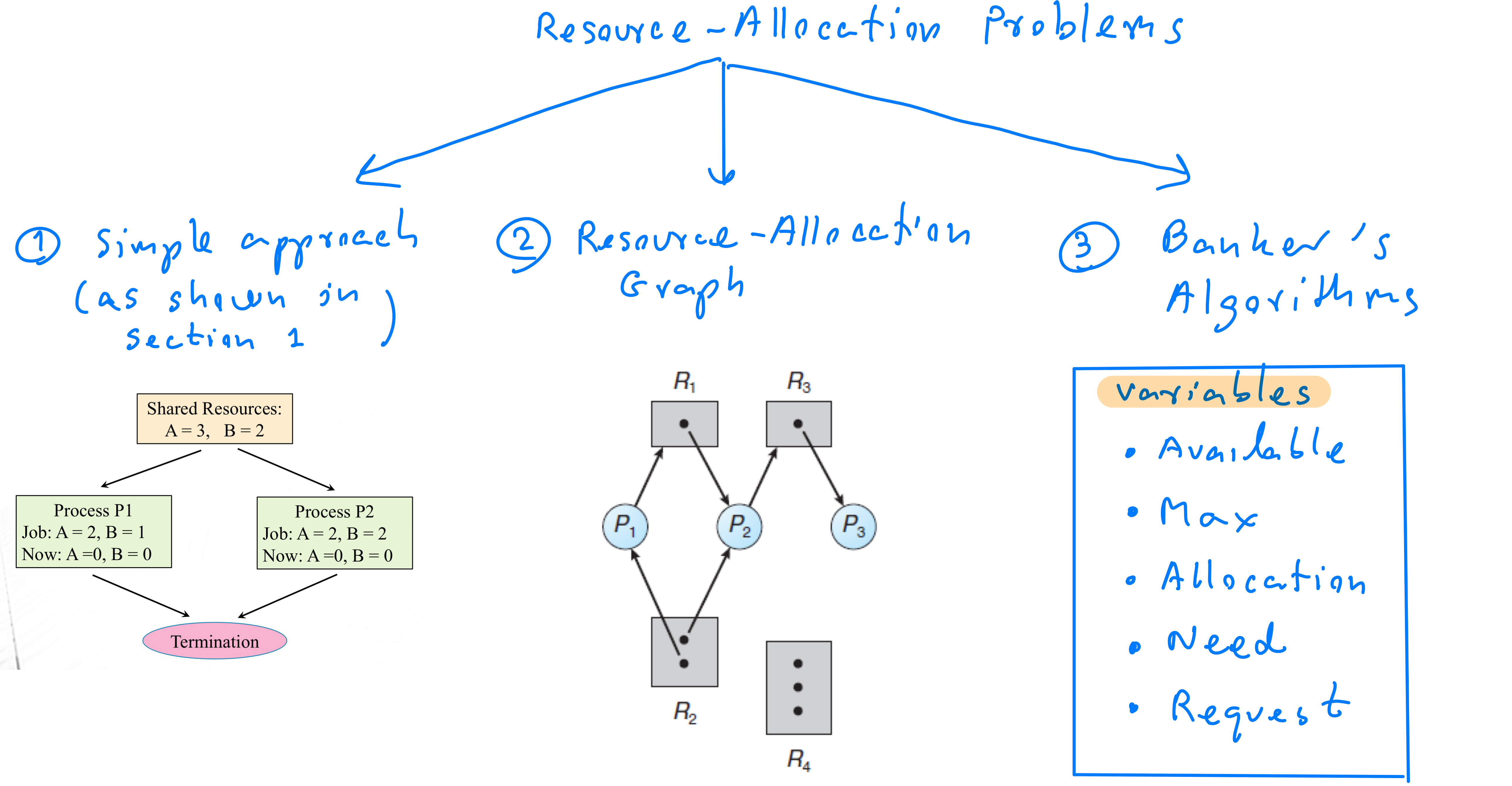
Outlines
- Graph
3. Resource-Allocation Graph
4. Resource-Allocation Graph for Deadlock Detection
5. Resource-Allocation Graph for Deadlock Avoidance (Not in the exam) - Banker's Algorithms
6. Banker’s Algorithms
7. Safety Algorithm
Resource Allocation and Deadlocks
Resource-Allocation Scenario/Problem
In a computer system, multiple processes compete for limited resources:
- Each process has a job to complete
- Processes must acquire/access/own necessary resources to execute their jobs
- The operating system (OS) allocates available resources to ensure all processes can complete efficiently (Centralized allocation)
- When finished, processes release all allocated resources and terminate, making them available to other processes
Resource Allocation Strategy
- Sufficient resources: OS may allocate resources to all processes simultaneously
- Limited resources: OS allocates resources sequentially, allowing processes to complete one at a time
- Completed processes return all owned resources to the system
Resource Allocation Problem
Given limited resources, the OS must efficiently allocate them to requesting processes ensuring all processes complete their tasks/jobs and terminate successfully.
- Complete their tasks/jobs → means owning all required resources!
Resource Allocation Rules
- Process-termination conditions:
- A process completes its job when it holds/owns all required resources
- Resource release:
- Once a process finishes, it releases all allocated resources and terminates
- OS can then reallocate these resources to other processes
- Resources are allocated sequentially
Resource Allocation Mechanisms
Given processes:
- OS selects a process and allocates resources to it
- Process completes its job and releases all resources
- Steps 1 and 2 repeat
- The allocation process stops when:
- All processes complete successfully (safe state) → the sequence of process completion is called a safe sequence
- OR, a deadlock occurs when:
- OS allocates resources to processes, but insufficient resources remain
- Unfinished processes wait indefinitely for additional resources
Two Types of System States: Safe State vs. Deadlock
- Safe State: The OS can allocate resources so every process eventually gets required resources, finishes its job, and terminates
- Safe Sequence: Ordered list of processes that have finished their jobs
- Deadlock: Processes are stuck waiting, each holding resources while waiting for additional resources held by other waiting processes
- No process can proceed, causing indefinite halting
Example: Meaning of a Safe Sequence
Given safe sequence <P2, P1, P4, P3>, this means:
- First, P2 owned all required resources, finished its job, returned resources, and terminated
- Second, P1 owned all required resources, finished its job, returned resources, and terminated
- Third, P4 owned all required resources, finished its job, returned resources, and terminated
- Lastly, P3 owned all required resources, finished its job, returned resources, and terminated
Resources: Resource Types and Instances
Resources are categorized into types, each with multiple identical instances:
- Example: A printer resource type may have 5 printer instances
- Example: A CPU resource type may have 3 CPU instances
Resource Allocation Problems (Exam)
Variables That May Be Given
- Resource types & instances
- Number of free resources (Available)
- Number of processes ()
- Requirements to finish a job
- Currently owned resources
- Needed resources: (4)-(5)
Resource-Allocation Steps
Step 1:
Compare:
- If Yes: Enough resources for all processes at once → "Simultaneous Allocation"
- All processes finish their jobs
- If No: "Insufficient resources" → Allocate free resources sequentially
Step 2:
For each , compare:
- If Yes:
- Give resources to
- Update Available:
- adds received resources to
- now owns:
- finishes its job & terminates
- returns all owned resources to the system
- Update Available:
- Return to step 2 for another process
- If No: Try another process (return to step 2)
Step 3:
- If all processes complete: System is in a safe state with a safe sequence
- If not all processes can complete: System is in a deadlock
Examples: Safe State
Case 1
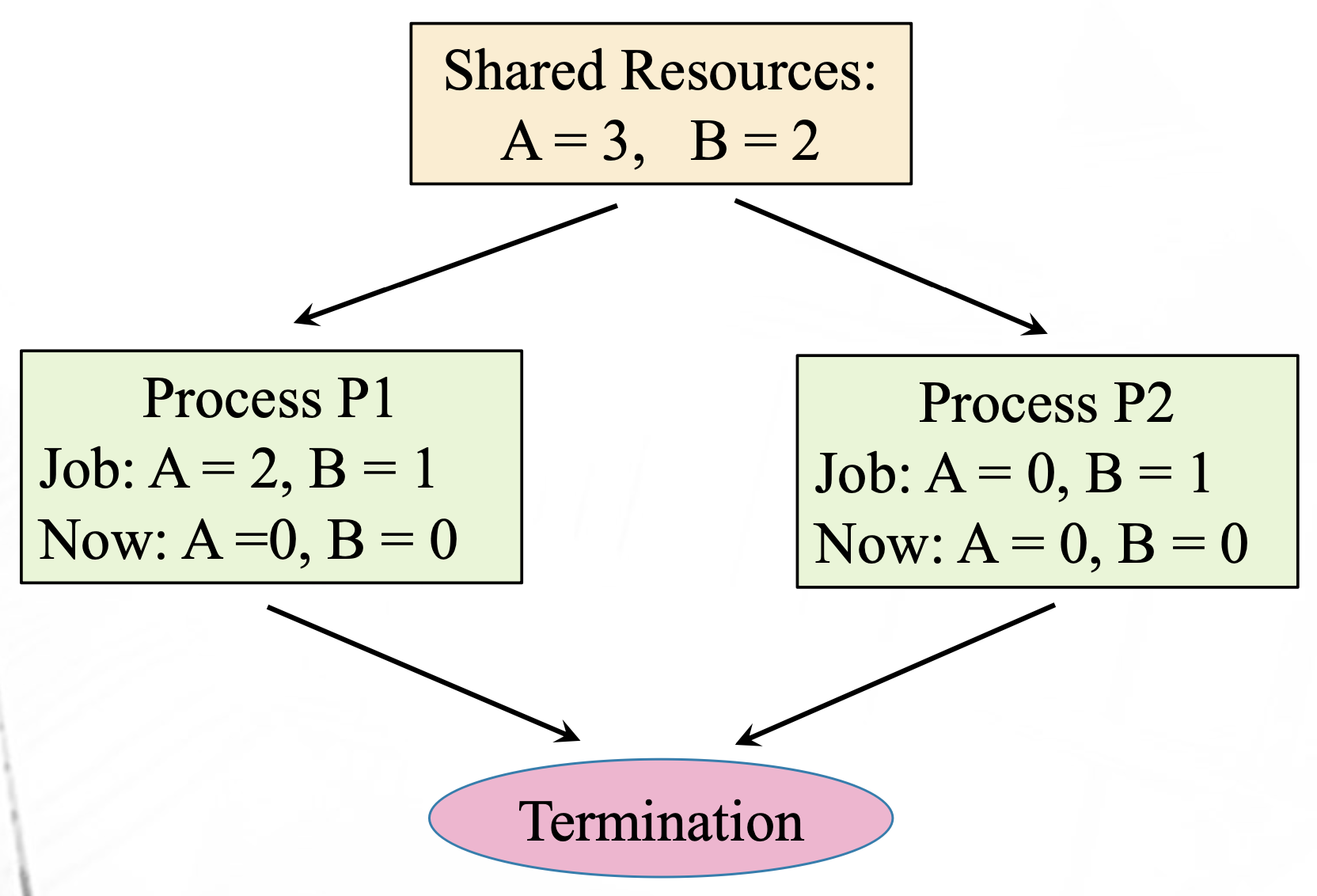
- Resource types: A and B
- Enough resources to fulfill requirements of P1 and P2 simultaneously
- Steps:
- Give P1: 2 of A and 1 of B
- Give P2: 0 of A and 1 of B
- P1 and P2 finish jobs and terminate
- System is in a safe state
Case 2 (Eliminating P1 first)
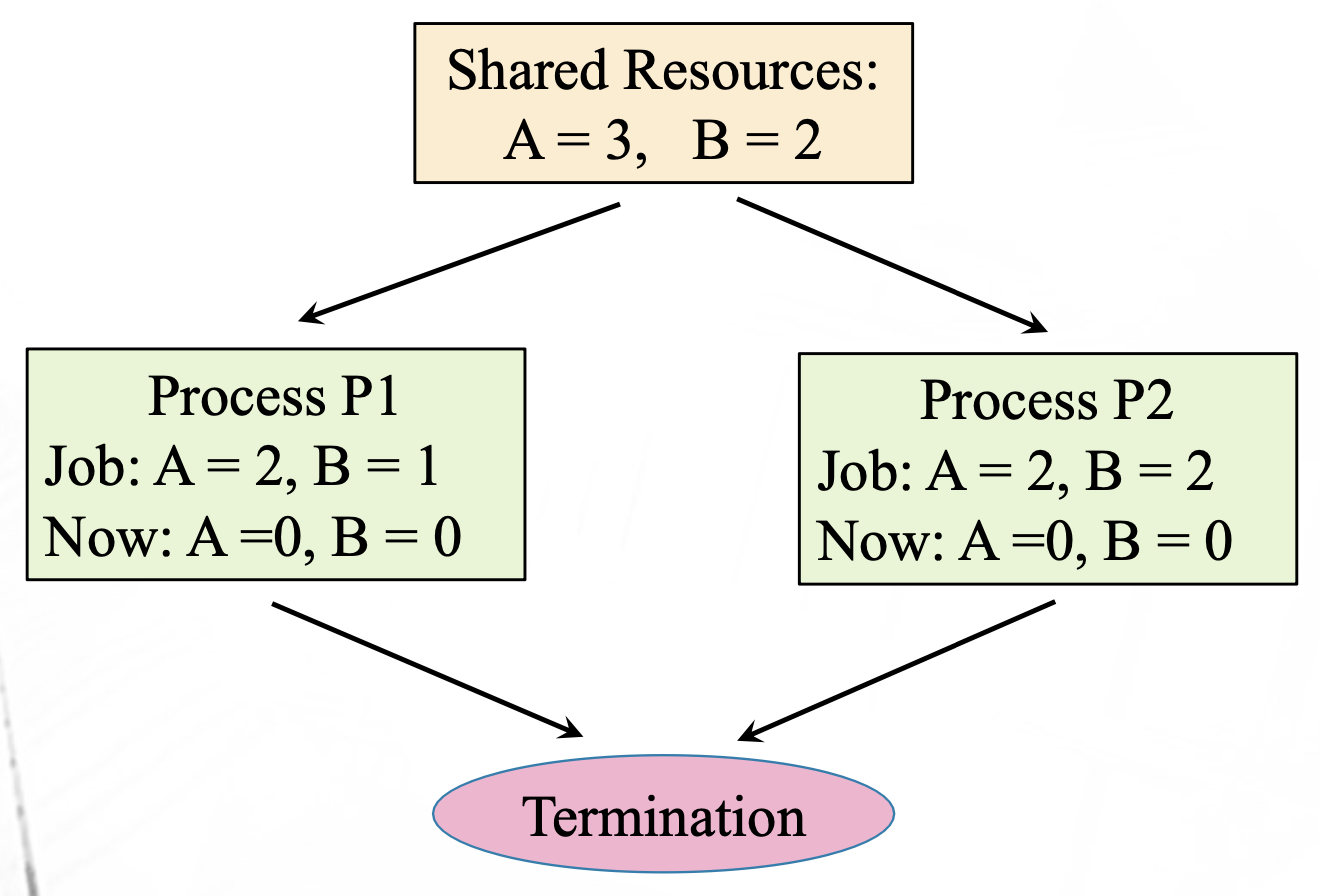
- Give P1: 2 of A and 1 of B
- P1 completes and releases resources
- Give P2: 2 of A and 2 of B
- P2 completes and releases resources
- Both processes finish
- Safe state with safe sequence
<P1, P2>
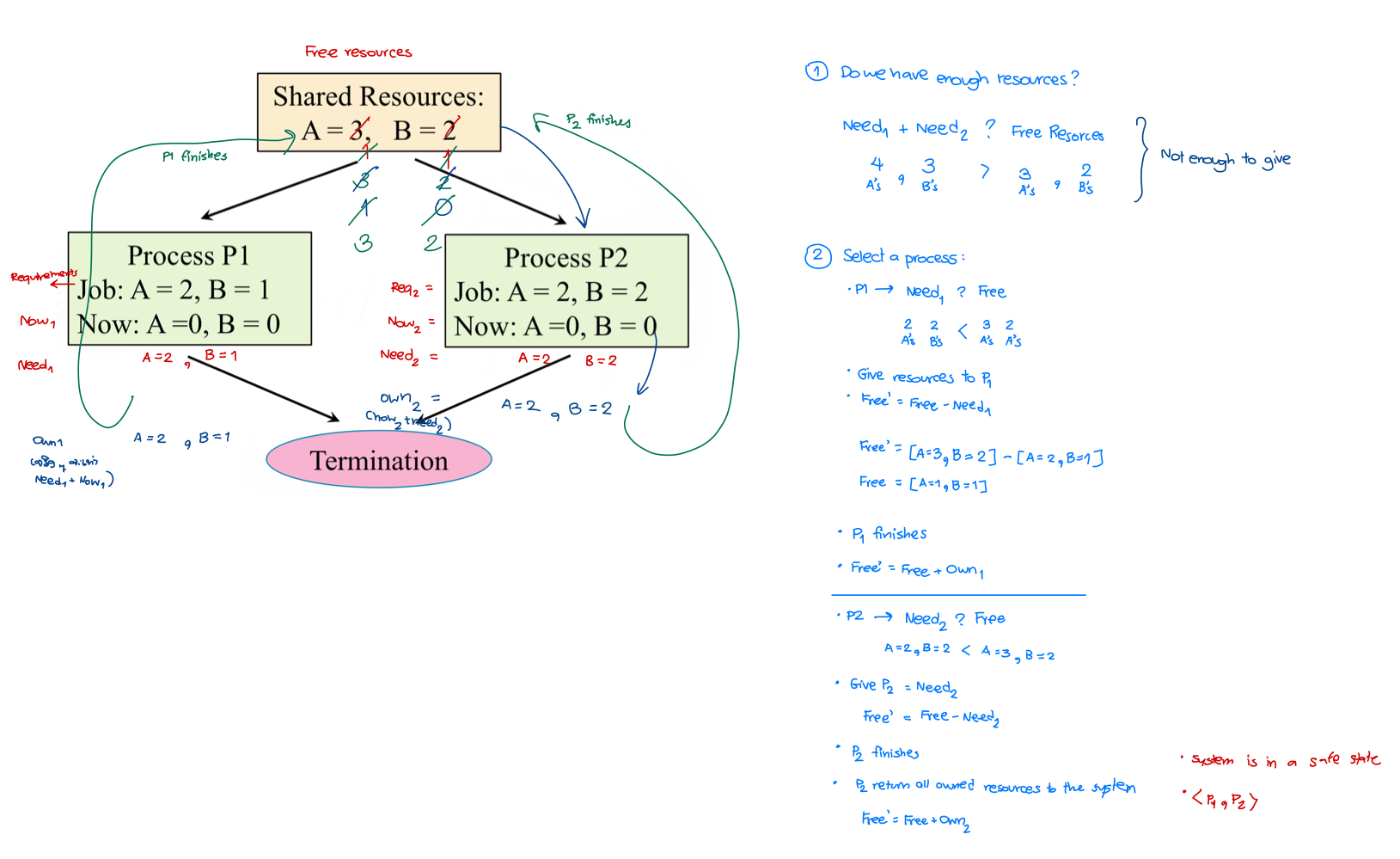
Case 3 (Eliminating P2 first)
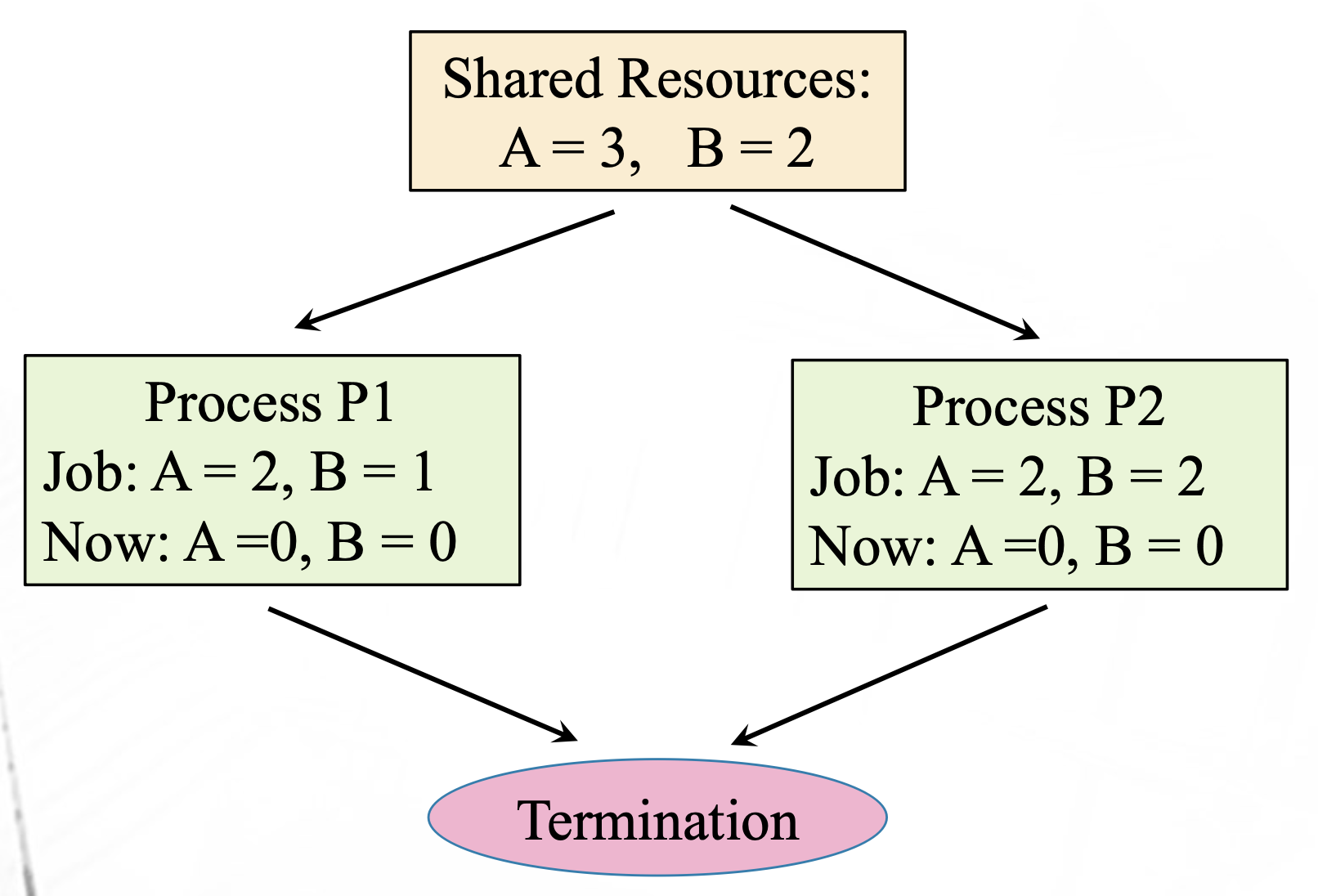
- Give P2: 2 of A and 2 of B
- P2 completes and releases resources
- Give P1: 2 of A and 1 of B
- P1 completes and releases resources
- Both processes finish
- Safe state with safe sequence
<P2, P1>
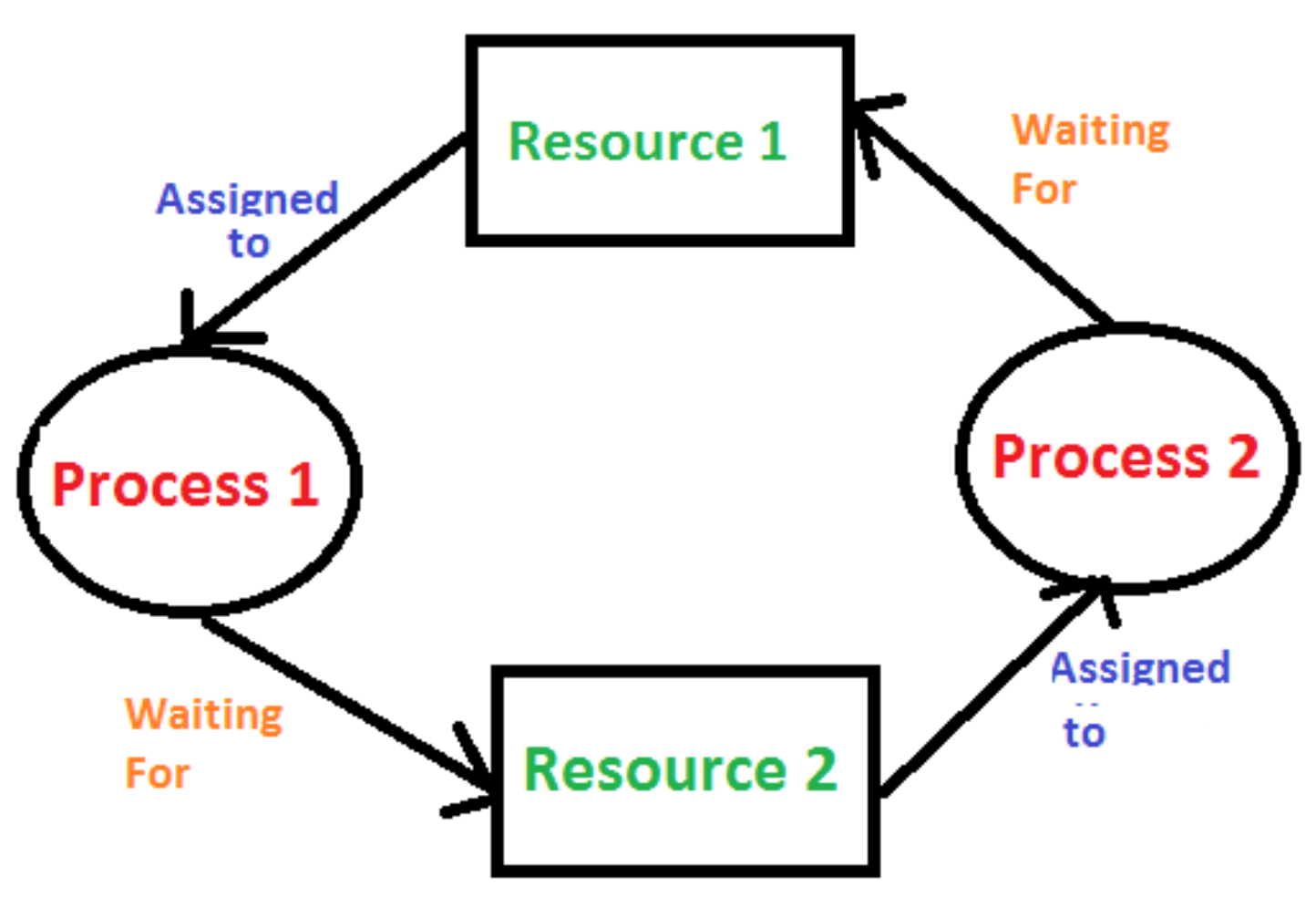
Deadlock Problem in Resource Allocation
- Limited resources can lead to deadlocks if not properly allocated
- Deadlock: Processes blocked because each holds resources while waiting for resources held by others
- Processes wait indefinitely, can't finish jobs or terminate
- Example below: Process 1 holds Resource 1 and waits for Resource 2 (held by Process 2), while Process 2 waits for Resource 1
Example: Deadlock
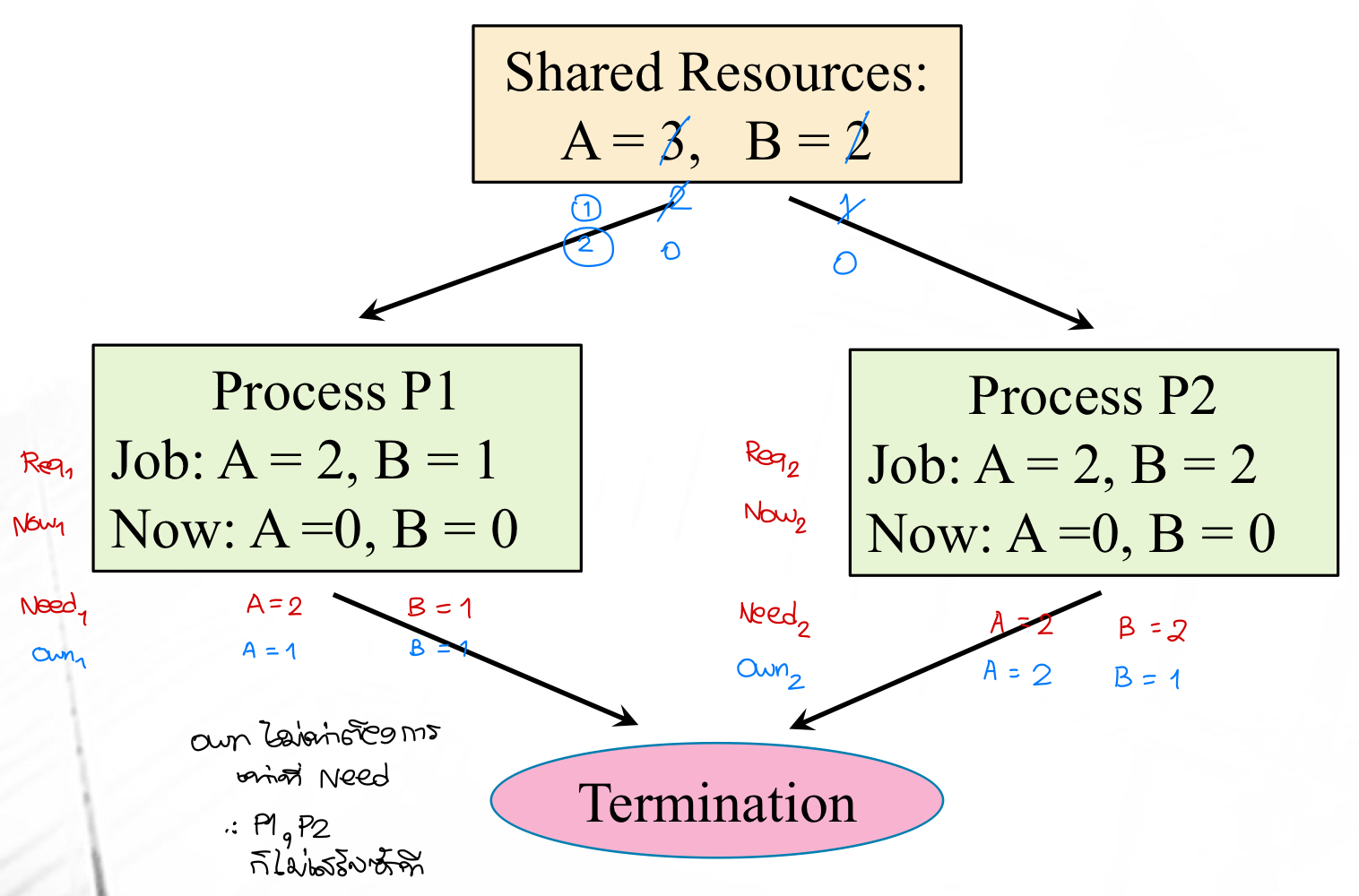
- Give P1: 1 of A and 1 of B
- Give P2: 2 of A and 1 of B
- P1 needs 1 more of A (waiting)
- P2 needs 1 more of B (waiting)
- Both processes are stuck in deadlock
Important
The OS could apply a different allocation strategy to keep the system in a safe state
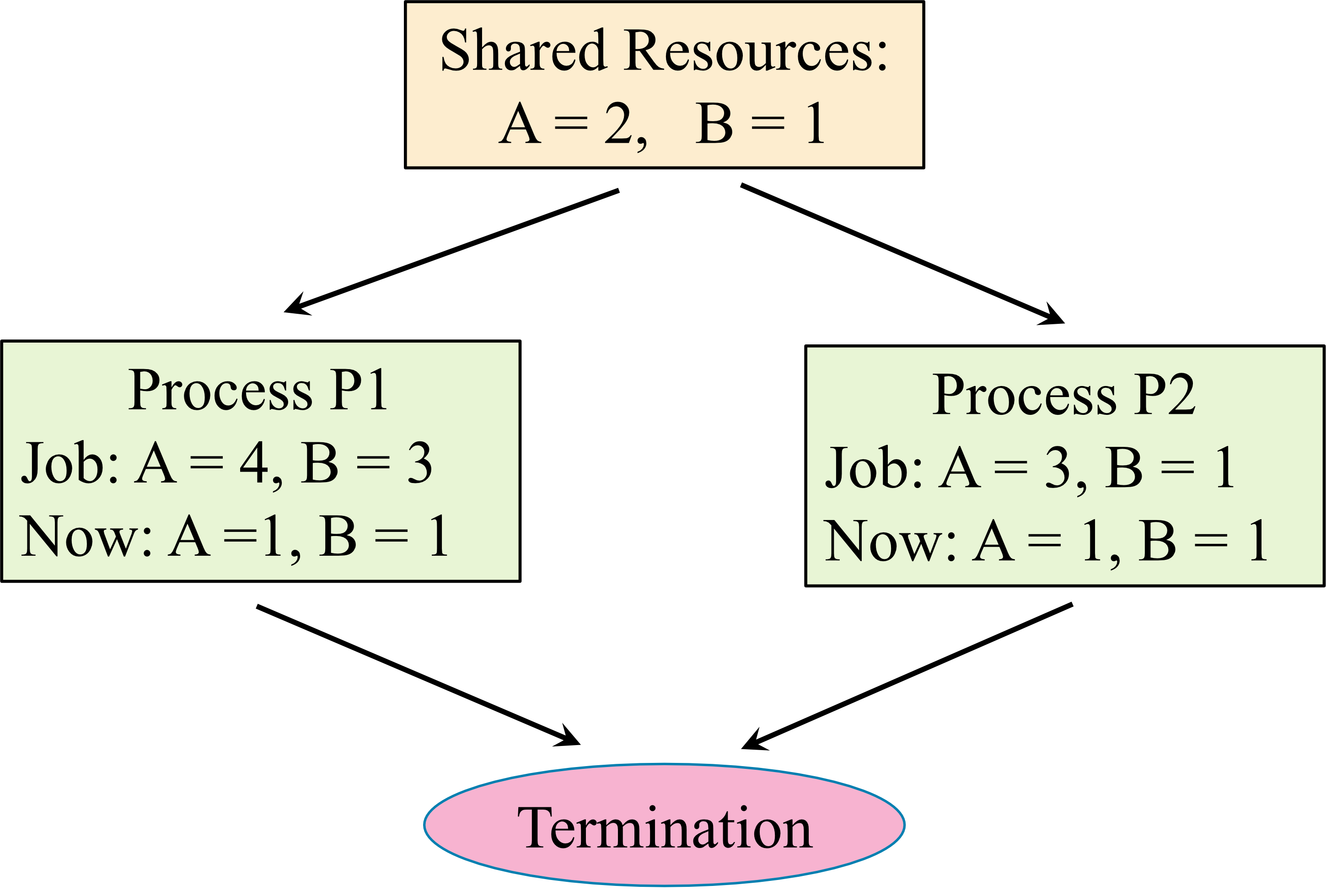
Example: Safe State or Deadlock – Case 1
- Consider the following scenario. Determine whether the system is in a safe state or a deadlock. If the system in a safe state, find a safe sequence.
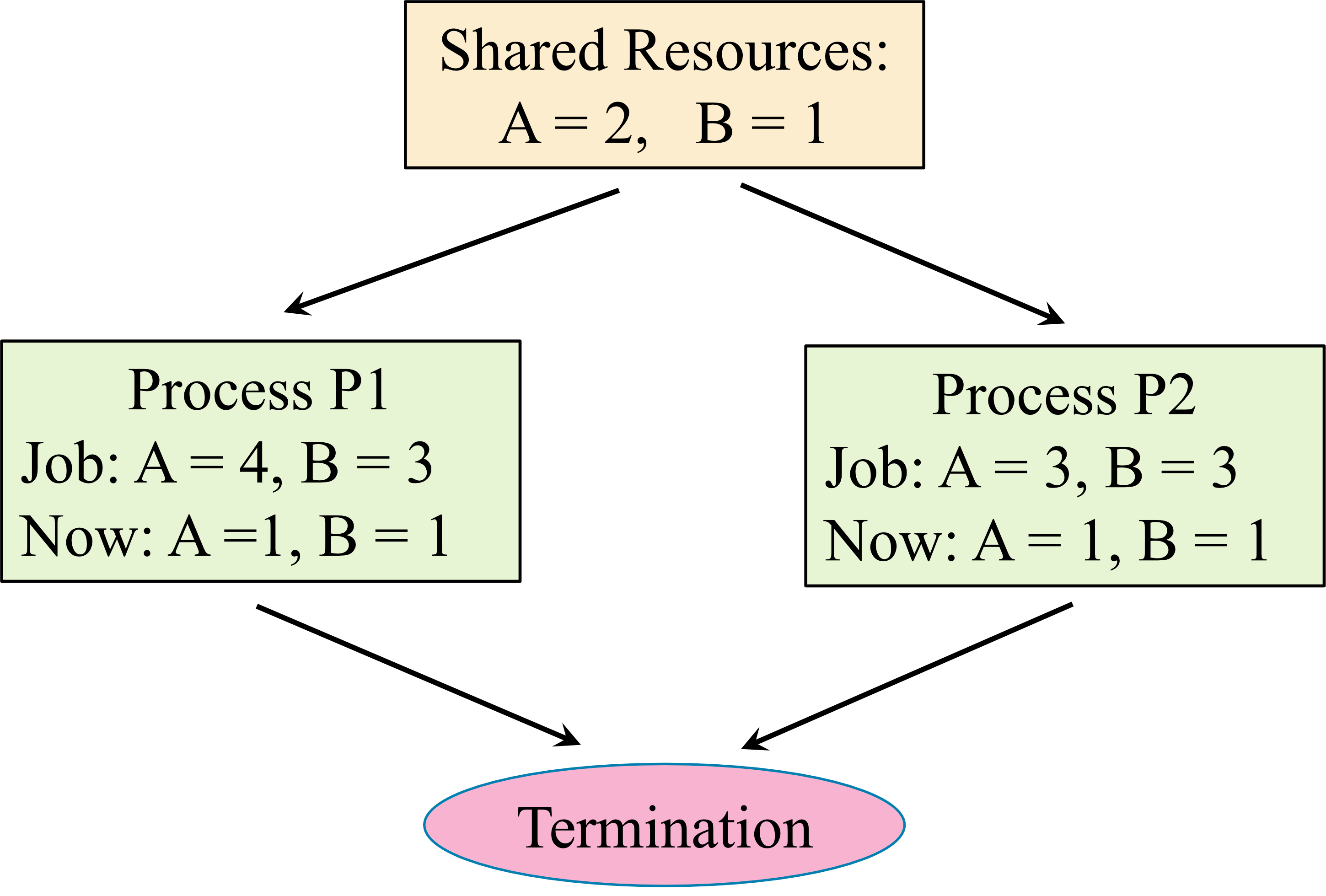
Example: Safe State or Deadlock – Case 2
- Consider the following scenario. Determine whether the system is in a safe state or a deadlock. If the system in a safe state, find a safe sequence.
Necessary vs. Sufficient Conditions
- Necessary condition: If A is necessary for B, when B happens, A must be present
- Without A → no B (but A doesn't guarantee B)
- Sufficient condition: If A is sufficient for B, when A is present, B happens
- (B can happen without A)
Necessary Conditions for Deadlock
A deadlock can occur when all of these conditions hold simultaneously:
- Mutual exclusion: At least one non-shareable resource that only one process can use at a time
- Hold and wait: Processes hold resources while waiting for additional resources held by others
- No preemption: Resources can only be released voluntarily by the process holding them
- Circular wait: Set of processes {} where each waits for a resource held by the next in a circular chain
- is waiting for the resource held by and
- is waiting for the resource held by and
- is waiting for the resource held by
Methods of Handling Deadlocks
Operating systems handle deadlocks in three ways:
- Prevention/Avoidance: Use protocols to ensure the system never enters a deadlocked state
- Detection and Recovery: Allow deadlocks to occur, but detect and recover from them
- Ignore: Pretend deadlocks never occur (used by most OS including Linux and Windows)
- Application developers must handle deadlocks in their code
Tools to Determine Safe State or Deadlock
- Resource-Allocation Graph:
- Banker's Algorithms:
Deadlock Prevention
We can prevent the occurrence of a deadlock by making sure that, at least, one of the necessary conditions cannot happen.
Examples of Deadlock Prevention
The following are some ideas with limited usages:
- No mutual exclusion:
- There will be no mutual exclusion if all resources are sharable. Many processes can access the resources without waiting.
- Each resource types provided enough instances to all processes.
- No hold and wait:
- Creating protocols such that, whenever a process requests a resource, it does not hold any other resources. For example.
- 1st protocol: Each process must request and be allocated all its needed resources before it begins execution.
- 2nd protocol: A process will request some resources only when it has none.
- Creating protocols such that, whenever a process requests a resource, it does not hold any other resources. For example.
- Allow preemption:
- If a process is holding some resources and requests another resource that cannot be immediately allocated to it (that is, the process must wait), then all resources the process is currently holding are preempted. In other words, these resources are implicitly released.
- No circular wait:
- Assign each resource type a number. A process can request an instance in a resource type if the requested resource-type number is higher than the currently held resource type-number(s).
- For example,
- Let is a function mapping from a resource type to a number.
- Consider that a process is holding an instance of the resource type .
- This process can request an instance in the resource type if and only if
Resource-Allocation Graph
- A graphical tool used to represent the current state of resource allocation in a system.
Resource-Allocation Graph Definition
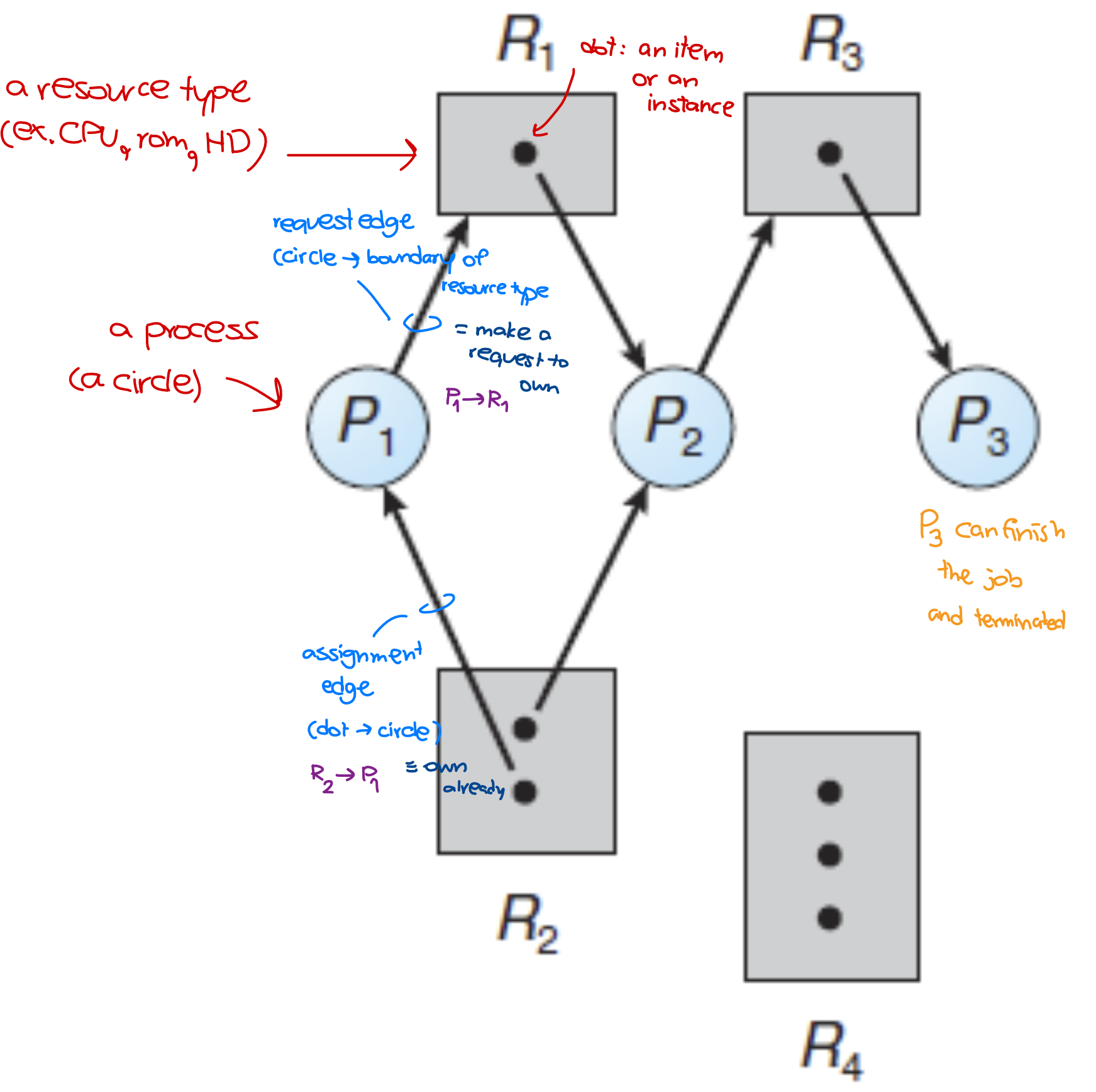
A resource-allocation graph consists of:
Vertices (Two Types)
- Processes: A set of n processes
- Resource Types: A set of m resource types
- Each resource type may consist of one or multiple instances
Edges (Two Types)
- Request Edge (): Indicates process has requested an instance of resource type and is waiting for it
- Assignment Edge (): Indicates an instance of resource type has been allocated to process
- Note: Request edges point to the rectangular (resource type), while assignment edges start from the dot (instance)
Example: Resource-Allocation Graph
ดูตัวอย่างจะเข้าใจไวกว่า Definition ข้างบนนะ!
Notation
- Circle: Represents a process
- Rectangle: Represents a resource type
- Dot: Represents an instance/item of a resource
The Sets of P, R, and E
Note: A graph can be represented either graphically or as sets (P, R, E) - they're interchangeable
Resource Instances
- Resource type : 1 instance
- Resource type : 2 instances
- Resource type : 1 instance
- Resource type : 3 instances
ออกสอบแน่ ๆ แล้ว ให้ Set มาแล้ว วาดกราฟ เอาอยู่ใน Mock Exam ด้วย
Meaning of the Example Graph
- Process holds an instance of resource type and is waiting for an instance of resource type
- Process holds an instance of and an instance of , and is waiting for an instance of
- Process holds an instance of
Example Questions
- Find the sets of , , and .
- How many instances are in each resource type? (แค่จำนวน Dot ในแต่ละ Resource Type)
- instance
- instances
- instance
- instances
Resource-Allocation Graph for Deadlock Detection
Problem Statement
Given a resource-allocation graph that represents the current system resource allocation:
- Determine whether the system is in a safe state or a deadlock
- If in a safe state, find at least one safe sequence (อย่างน้อยต้องมี 1 ถ้าอยู่ใน Safe state นะ)
Checking for Deadlocks Using the Graph
Follow these steps to determine the system's state:
- Select a process from the resource allocation graph (ONE AT A TIME)
- Check if the selected process has all required resources to complete execution:
- Determine if the process could finish its job?
- If yes: The process completes, releases all owned resources to the system, and terminates → Select another process and repeat Step 2
- If no: Select another process and repeat Step 2
- After evaluating all processes:
- If all processes can terminate: System is in a safe state, and the order of completion is the safe sequence
- If some processes cannot terminate: System is in a deadlock
Example 1
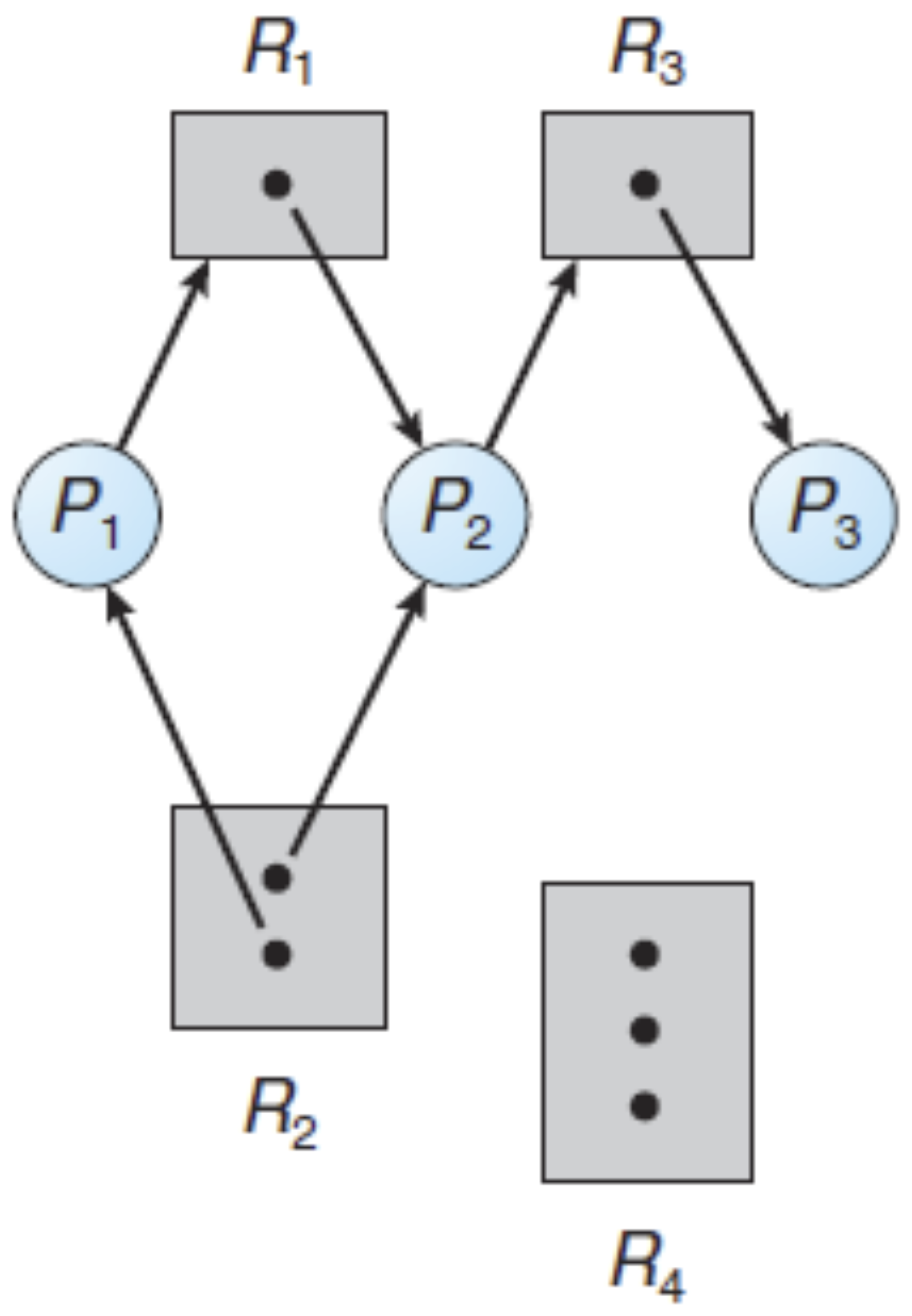
Consider a resource allocation problem shown by the following resource allocation graph. Determine whether the system is in a deadlock or a safe state. If the system in a safe state, find a safe sequence.
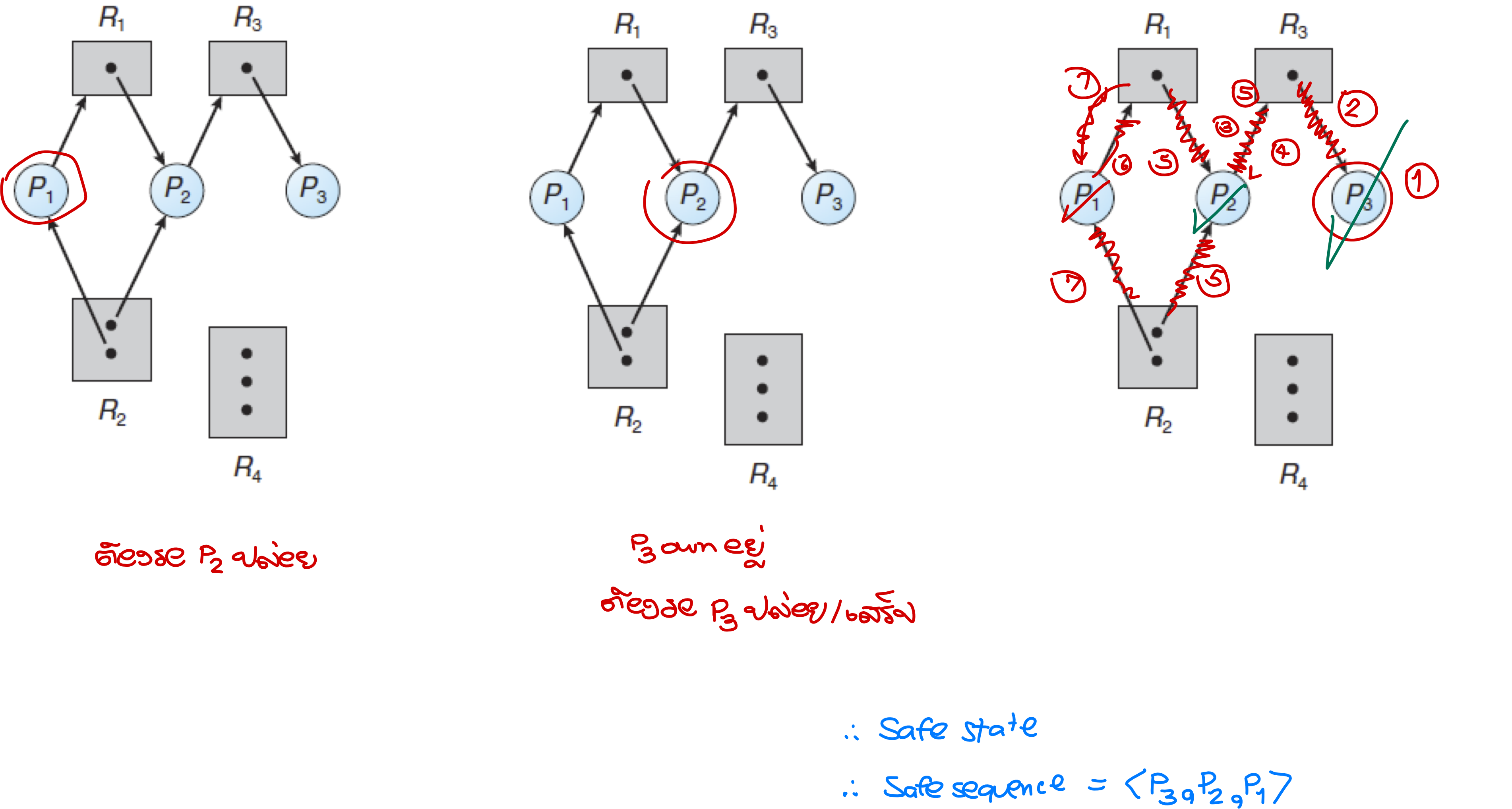
Example 2
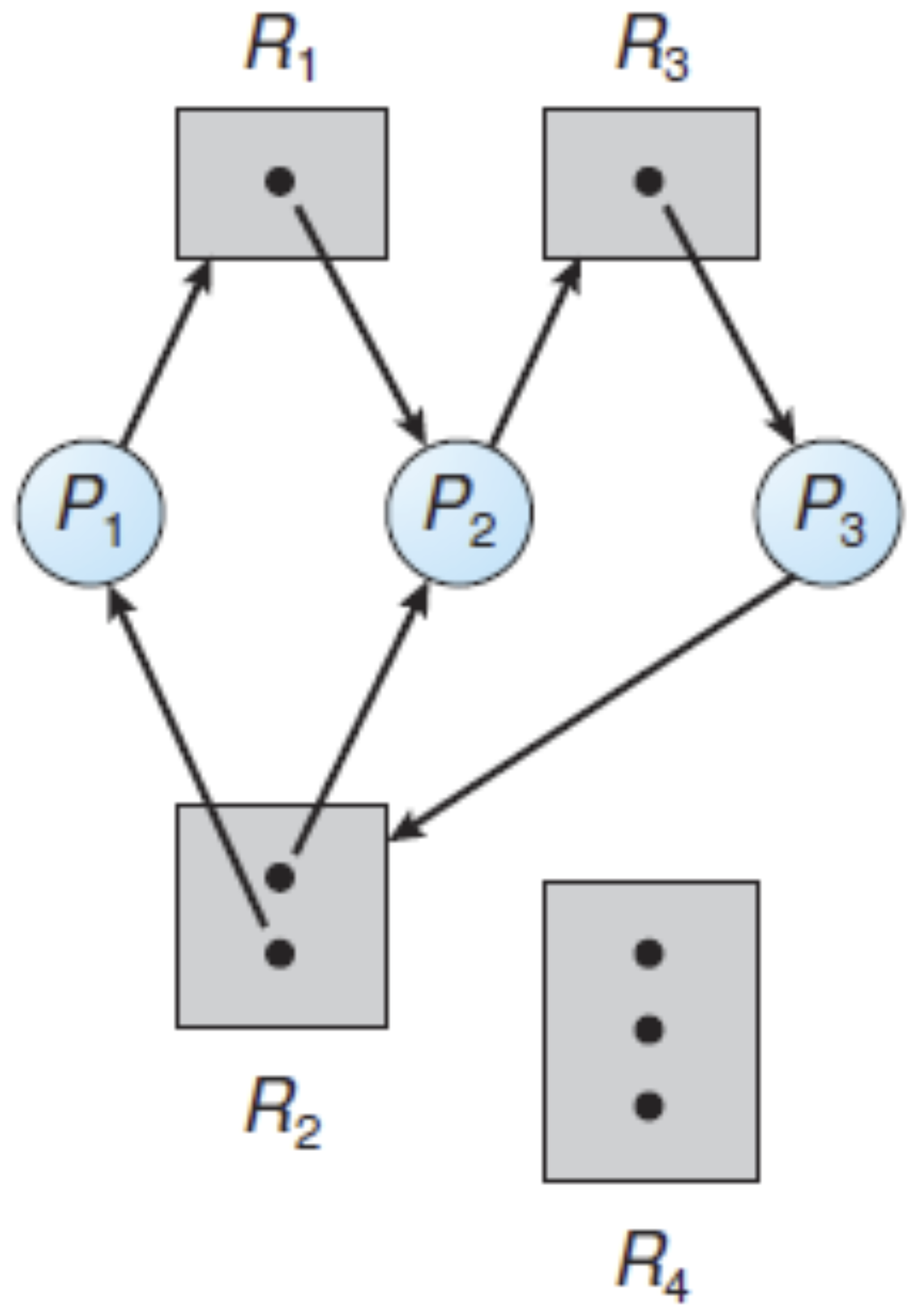
Consider a resource allocation problem shown by the following resource allocation graph. Determine whether the system is in a deadlock or a safe state. If the system in a safe state, find a safe sequence.
- ดูจากกราฟ อันนู้นก็ต้องรออันนี้— No one can finish!
- Deadlock!
Example 3
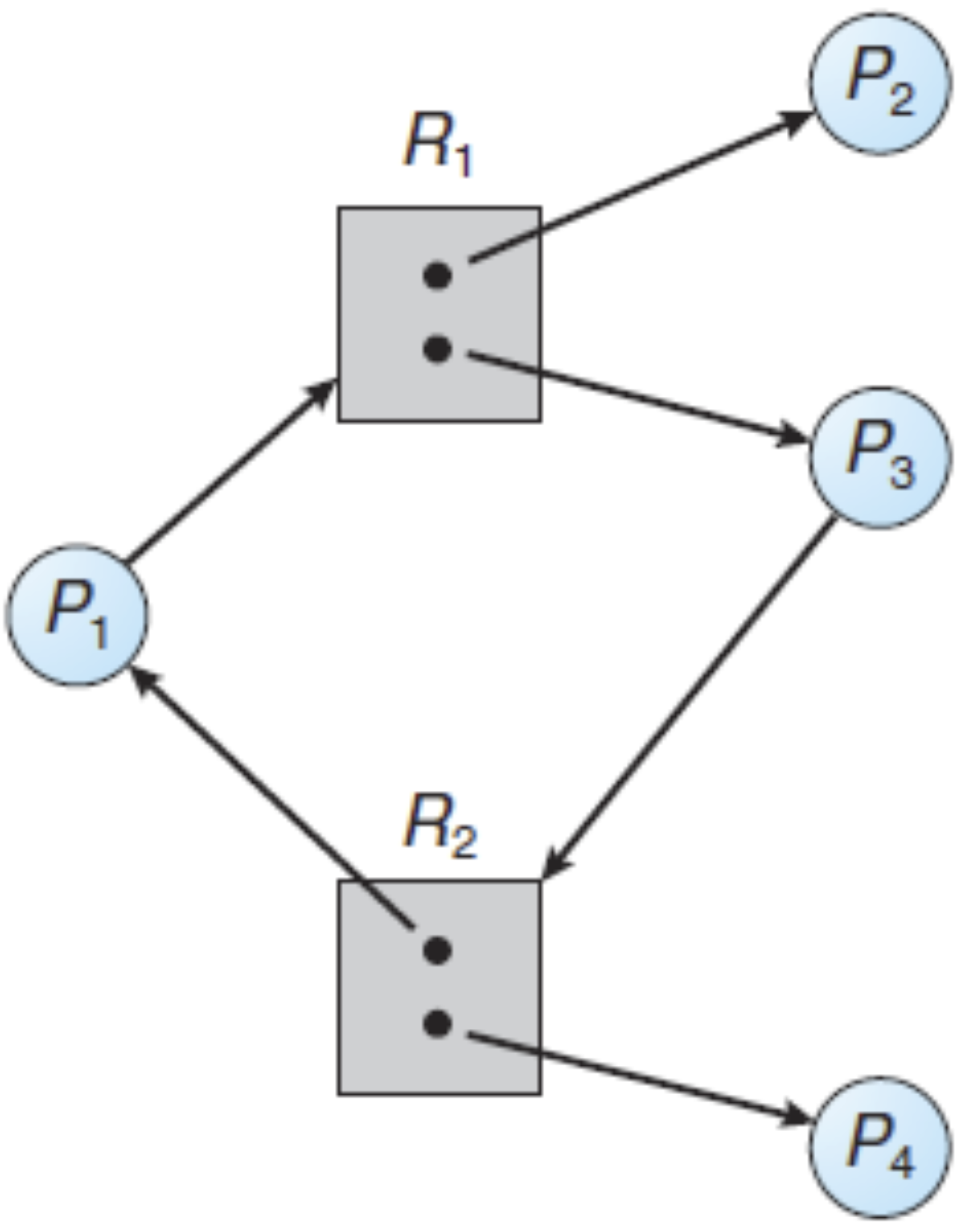
Consider a resource allocation problem shown by the following resource allocation graph. Determine whether the system is in a deadlock or a safe state. If the system in a safe state, find a safe sequence.
- State State
- Safe sequence จริง ๆ อาจมีมากกว่านี้นะ
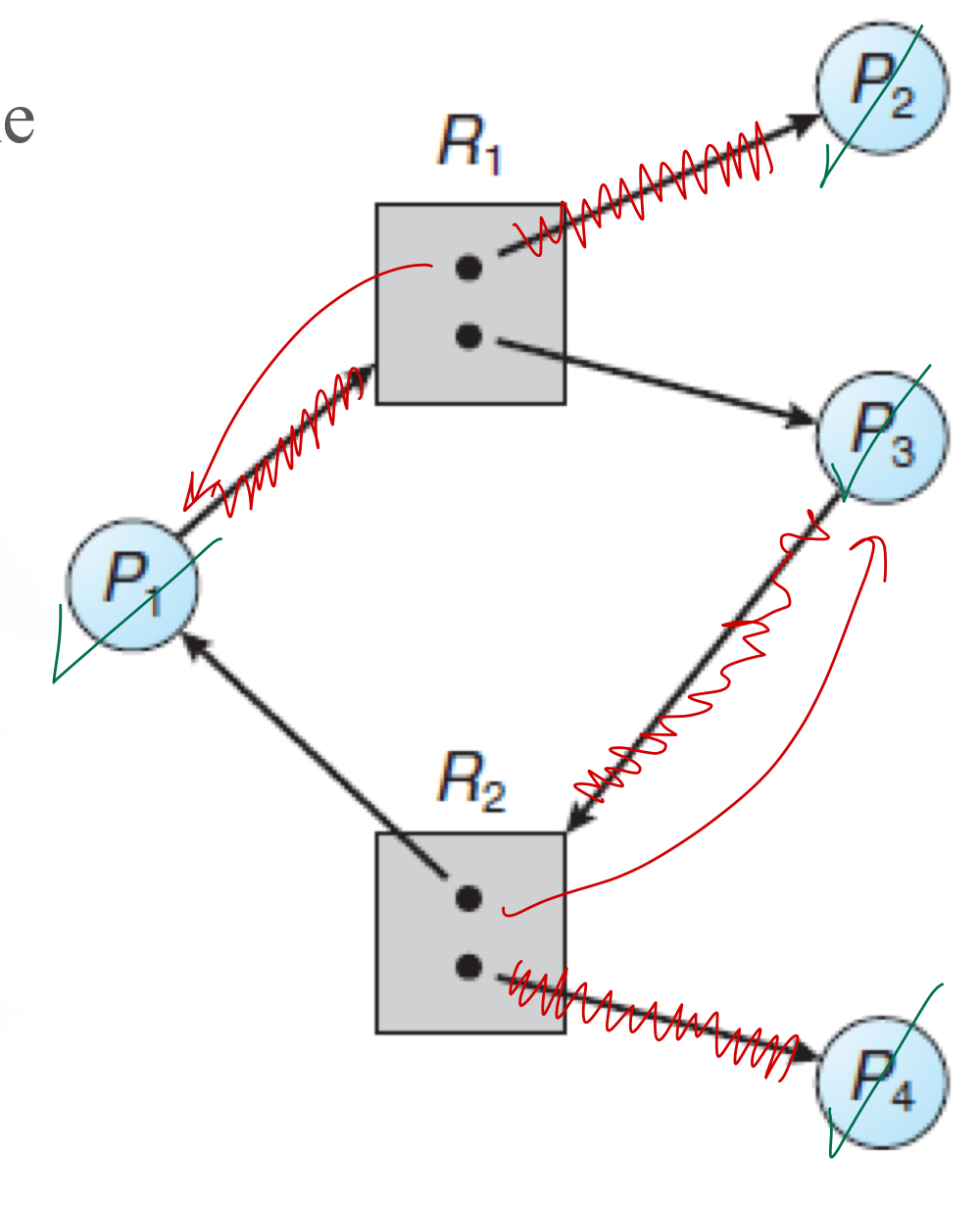
Example 4
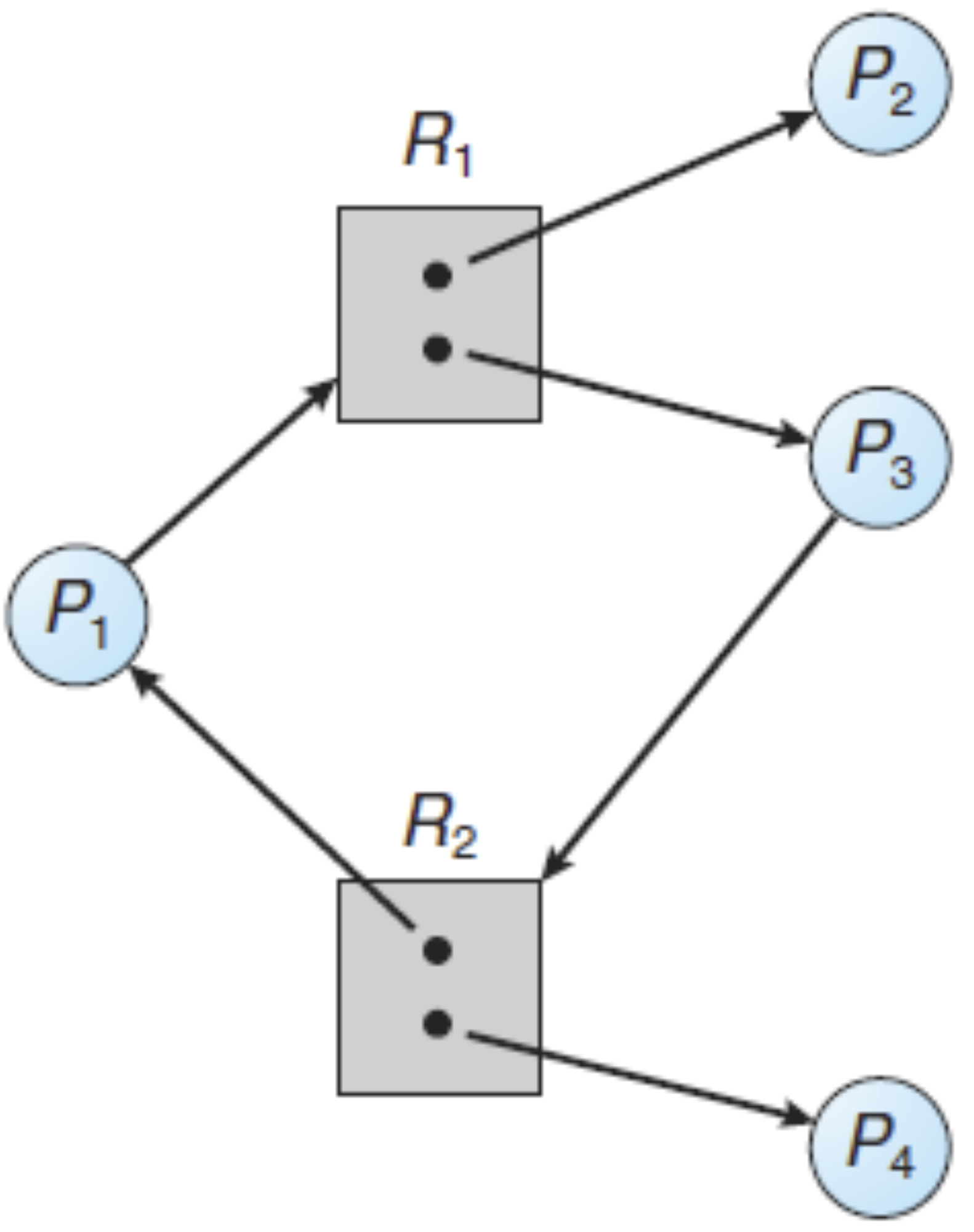
Consider a resource allocation problem shown by the following resource allocation graph.
เจอแบบนี้ทำยังไง? ก็เช็คด้วยการ Terminate In Order ที่เขาให้มา ถ้าทำแล้วมันสามารถ Terminate ได้หมดก็บอกว่ามันเข้า Safe State
- Is <P4, P2, P1, P3> a safe sequence?
- Is <P4, P2, P3, P1> a safe sequence?
- Is <P2, P4, P3, P1> a safe sequence?
- Is <P1, P2, P3, P4> a safe sequence?
Wait-For Graph
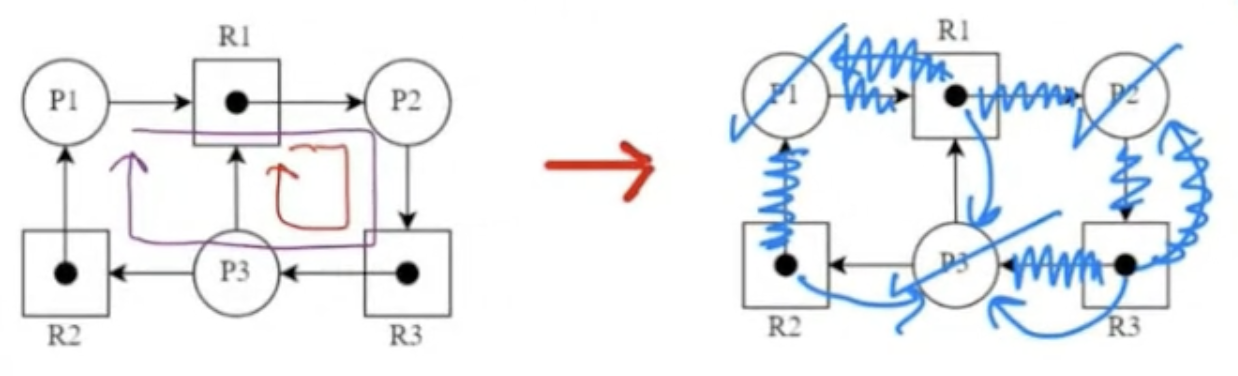
ถ้าแต่ละ มีแค่ 1 Dot inside เราสามารถแปลงให้เป็น Wait-For Graph ได้!!
- A wait-for graph is a simplified variant of the resource-allocation graph when all resource types have a single instance
- In a wait-for graph:
- Only process nodes are shown
- Resource nodes are removed and appropriate edges are linked together
- If process is waiting for a resource held by process , there's a directed edge from to
- If the wait-for graph contains a cycle, there is a deadlock in the system
Example: Applying a Wait-For Graph
Given a resource-allocation graph on the left, we can draw the corresponding wait-for graph on the right. As shown, there are deadlocks!
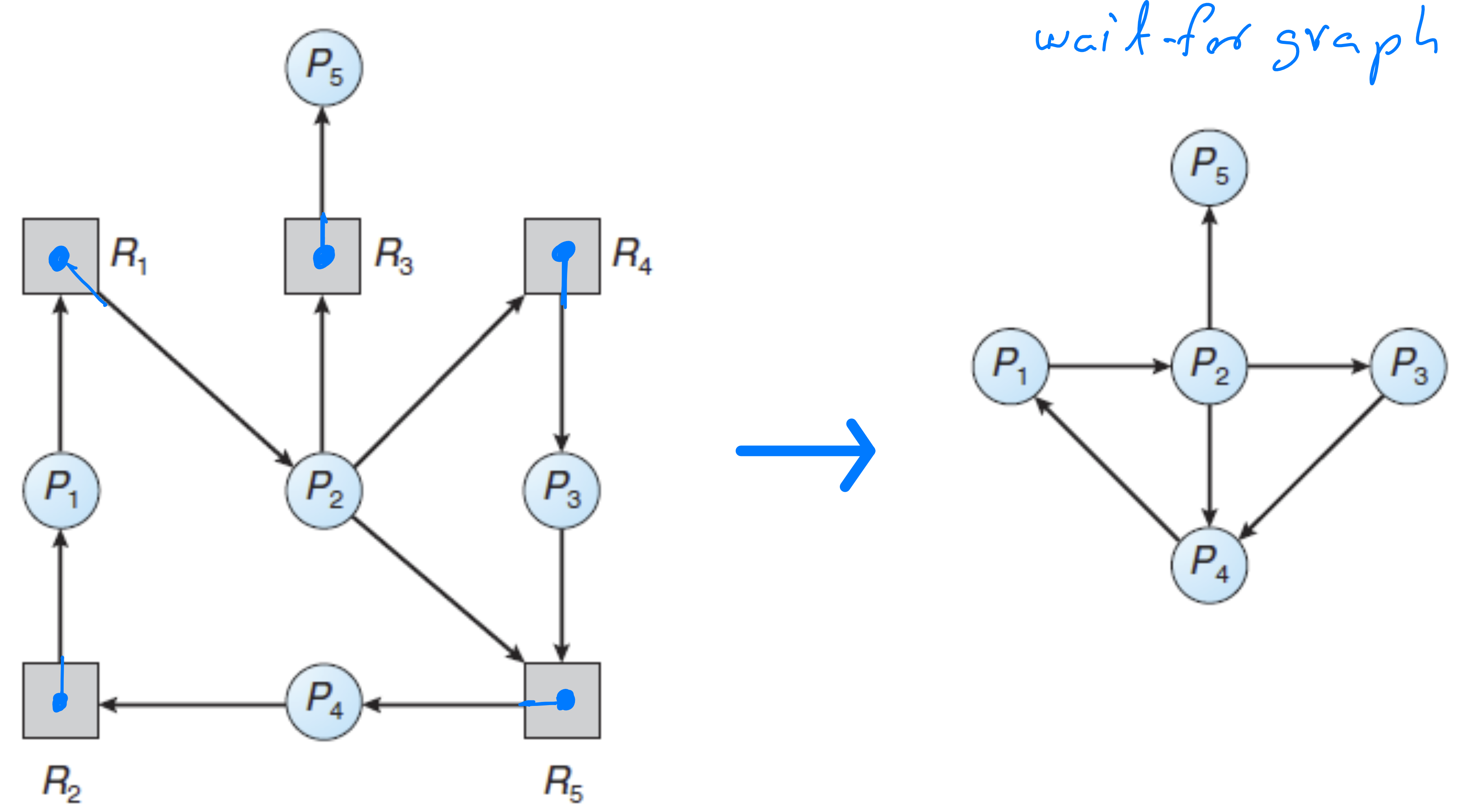
- แบบนี้จะดูง่ายกกว่า คือถ้าเจอ Cycle แม้แต่อันเดียว = เกิด Deadlock เลยนะ
- This visualization makes deadlock detection easier: Any cycle in the wait-for graph = Deadlock
Banker’s Algorithms
Used to solve more complicated resource allocation problems
- Complicated scenarios involving many processes, resource types, and instances
What the OS Must Know (Resource Allocation)
The operating system must plan ahead for resource allocation by knowing:
- Number of resource types and available/free instances in the system ()
- Resource requirements for each process (), broken down into:
- Number of instances currently owned by each process ()
- Number of additional instances needed by each process ()
- Number of requested instances by each process ()
- (Objective): The OS plans and schedules allocation of free instances to processes one by one, ensuring all processes can eventually complete. To achieve this, it determines whether granting a resource request will result in a safe state or lead to a deadlock.
Introduction to Banker’s Algorithms and Their Types
Banker's algorithms solve resource-allocation problems involving multiple instances of each resource type:
- Safety Algorithm: Determines if the system is in a safe state or at risk of deadlock (Section 6.7)
- Resource-Request Algorithm: Helps avoid deadlock by managing resource allocation requests (Section 6.8)
- Deadlock-Detection Algorithm: Detects whether the system is currently in a deadlock state (Section 6.9)
Variables in Banker's Algorithms
Where:
- m = number of resource types
- n = number of processes
- i = i-th process
- j = j-th resource type
Key Variables
- Available: A vector (length m) indicating available/free instances in resource types
Available[j]= number of free instances in resource type
- Max: An matrix defining maximum demand of each process
Max[i][j]= maximum instances requested by process for resource type
- Allocation: An matrix defining resources currently allocated (owned) by processes
Allocation[i][j]= instances of resource type currently allocated to process- = vector of i-th row in Allocation matrix
- Need: An matrix indicating additional instances needed by processes
Need[i][j]=Max[i][j]-Allocation[i][j]- = vector of i-th row in Need matrix
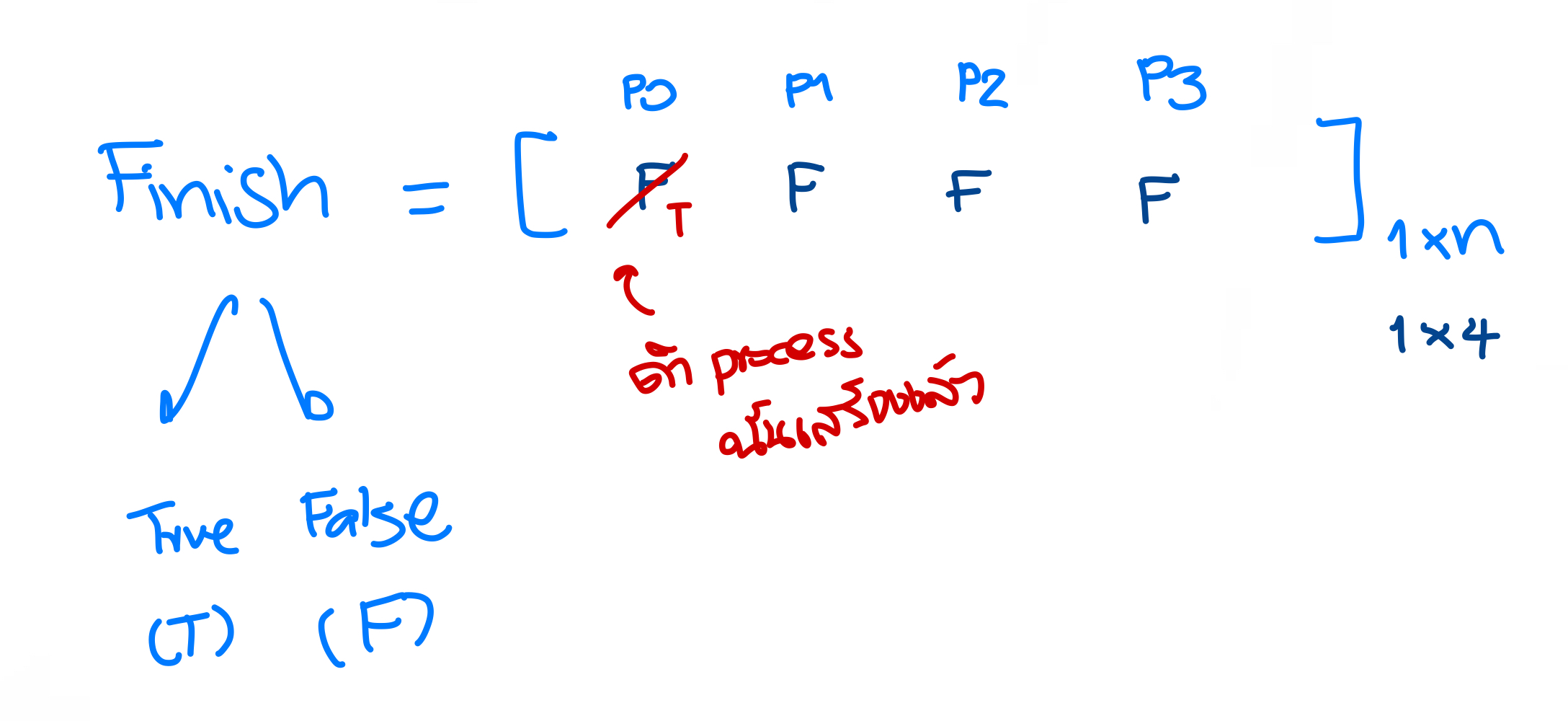
- Finish: A vector (length n) indicating process status
Finish[i]= status of process (true if finished job and terminated, false if waiting for more resources)
- Request: An matrix defining resources currently requested by processes
Request[i][j]= instances of resource type requested by process- = vector of i-th row in Request matrix
Vector Inequality
Definition: Let and be vectors of length . We say that if and only if for all .
Examples:
- is True
- is False (5 > 4 at index 2)
- is True
- is False (10 > 5 at index 0)
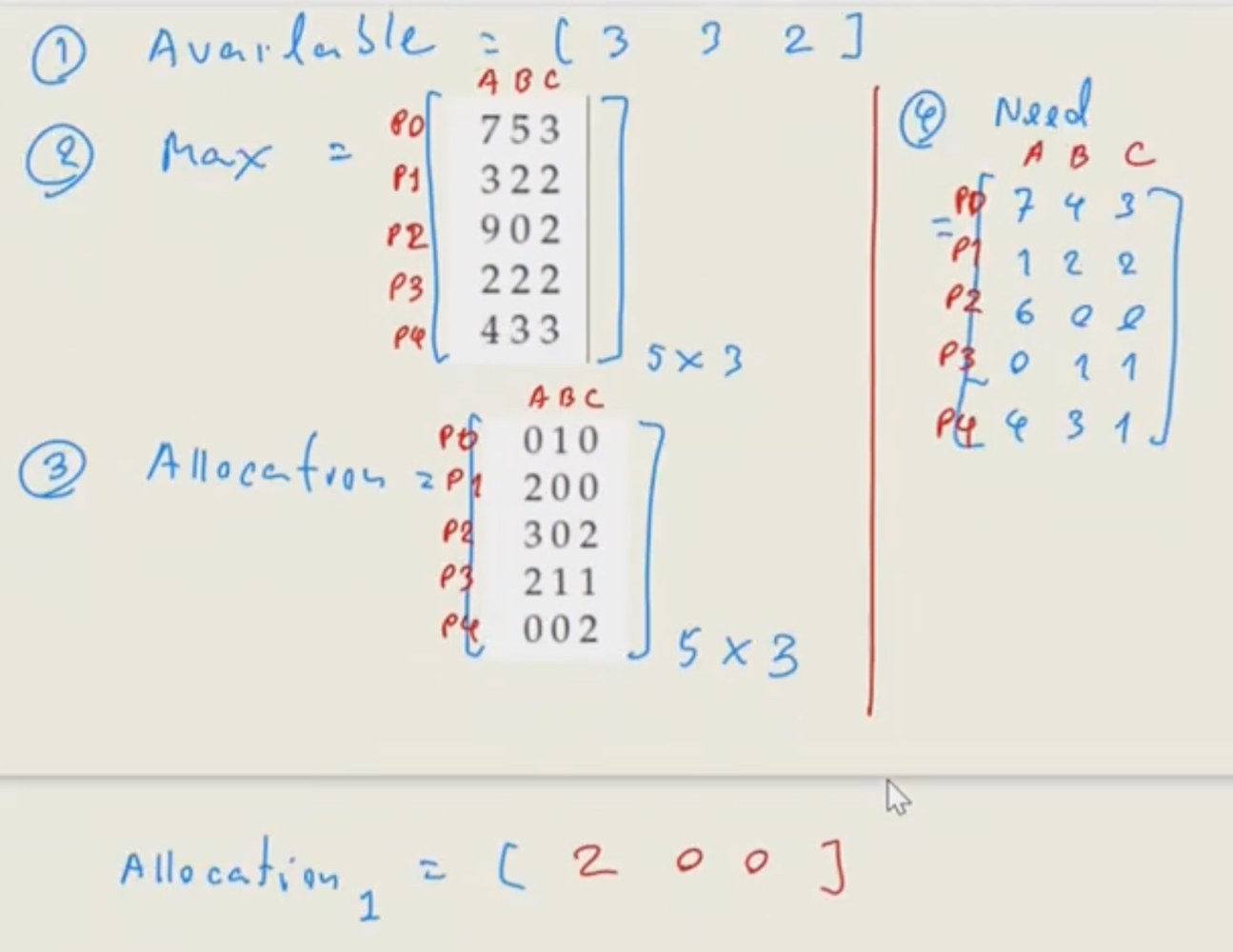
Example: Variables in Banker’s Algorithm
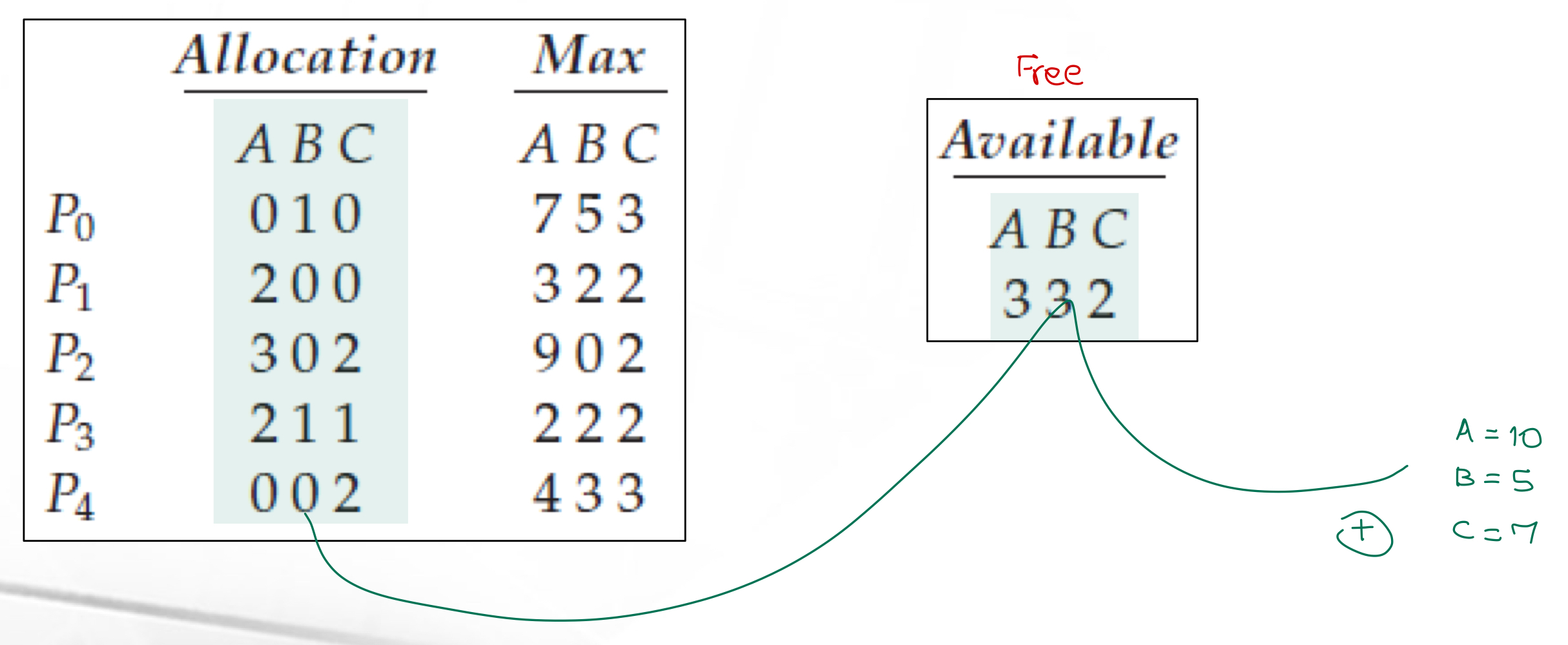
Consider a system with:
- Five processes: through
- Three resource types: A, B, and C
- Resource instances: A (10 instances), B (5 instances), C (7 instances)
- เอามาบวกกันแล้วนะ
Safety Algorithm
Problem Statement for Using the Safety Algorithm
Given a resource allocation scenario including:
- Number of available/free resources ()
- Number of processes
- Number of required instances ()
- Number of currently allocated resources ()
Problem Statement for Using Safety Algorithm:
- We need to determine the state of the system by:
- Determining whether the system is in a safe state or experiencing a deadlock
- If in a safe state, identifying the safe sequence of process execution
Safety Algorithm: Scenario
- Limited free instances in the system (represented by )
- Each process must own specific resource instances to finish its job ()
- Each process currently owns certain resource instances ()
- Each process requires additional instances to complete its task ( = - )
- When a process finishes, it returns all owned instances to the system (added to )
- The OS allocates free instances from to processes, one by one
- The safety algorithm determines if the system is in a safe state or deadlock, and identifies a safe sequence if possible
Safety Algorithm: Safe State and Safe Sequence
- A state is safe if the OS can allocate resources to each process (up to its maximum) in some sequential order while avoiding deadlock
- A safe sequence exists when the system is in a safe state
- A sequence of processes is a safe sequence if, for each , the resources requested by can be satisfied by currently available resources plus resources held by all previous (where )
- If resources needed by aren't immediately available, waits until some finishes
- Then obtains all needed resources, completes its task, returns allocated resources, and terminates
- If this sequence continues without deadlock, it's a safe sequence
- The safety algorithm helps find a safe sequence
Safety Algorithm: Steps
Given:
- n processes P₀ to P_{n-1}
- m resource types
- , , , and matrices/vectors
Algorithm:
- Initialize:
- =
- = false for
- Find an index i such that both:
- == false
- ≤
- If no such i exists, go to step 4
- Update:
- = +
- = true
- Go to step 2
- If == true for all i, then the system is in a safe state
- The sequence of i's represents a safe sequence
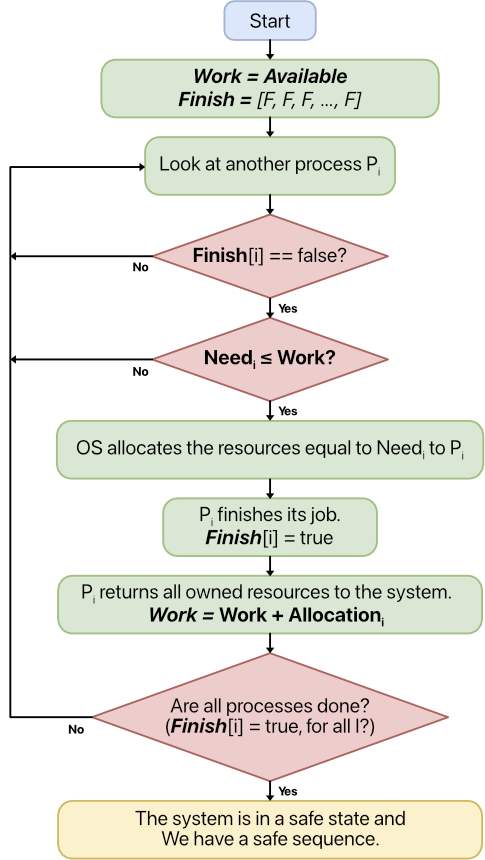
Flowchart
The flowchart shows the steps of the safety algorithm:
Example: Applying Safety Algorithm
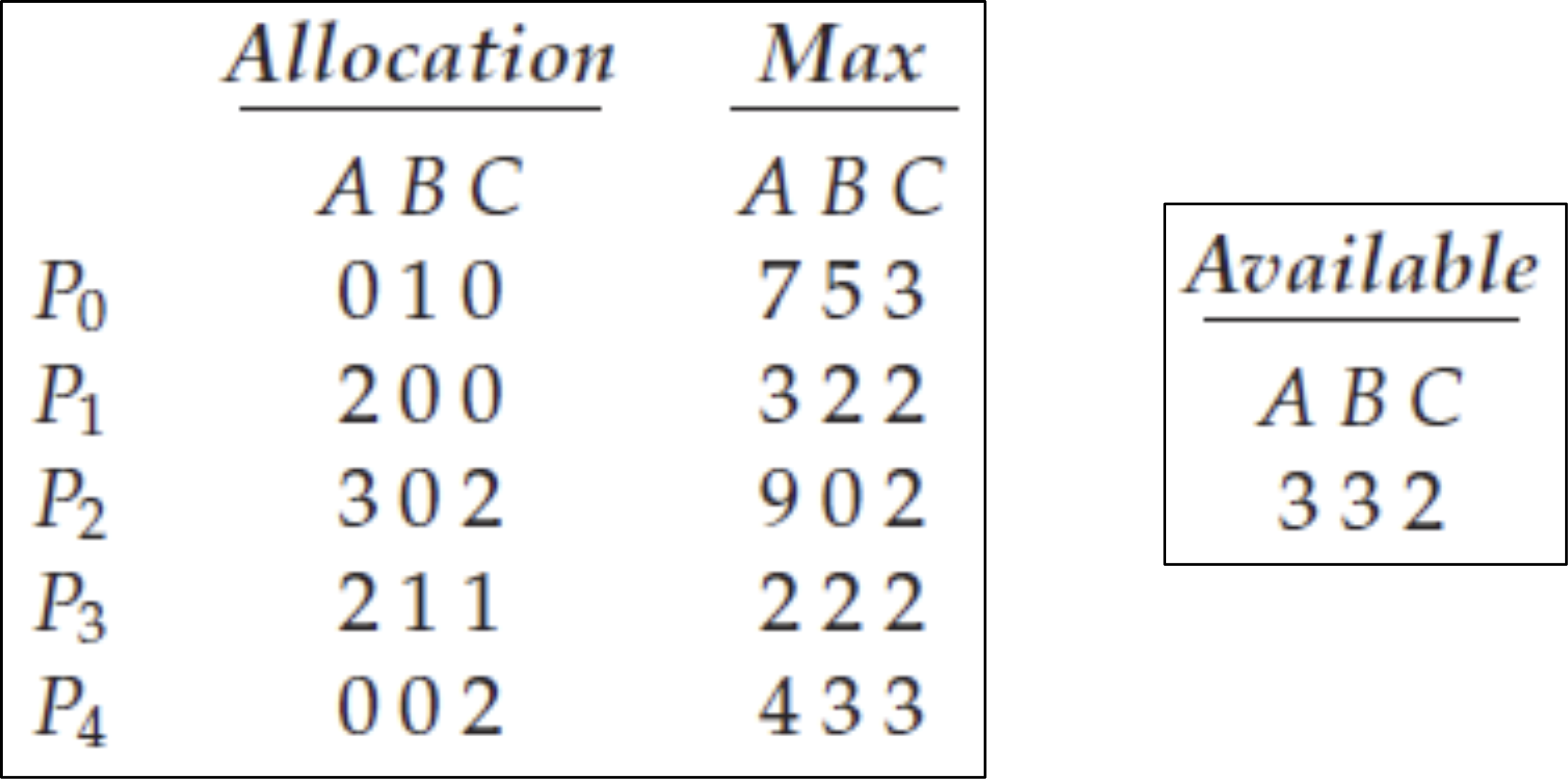
Consider a system with:
- Five processes through
- Three resource types A, B, and C
- Resource instances: A (10), B (5), C (7)
- At starting time, the allocation is shown in the table below
- resources: 3 instances of A, 3 of B, and 2 of C
The task is to determine whether the system is in a safe state and identify a safe sequence if it exists.
Resource-Request Algorithm for Deadlock Avoidance
Problem Statement for Using Resource-Request Algorithm and Criteria
Given: A scenario involving a resource allocation problem including (these variables must be provided):
- The number of available/free resources →
- The number of processes
- The number of required instances →
- The number of currently allocated resources →
Problem Statement for Using Resource-Request Algorithm:
- When a process () requests a specific number of resource instances (), the resource-request algorithm determines whether the operating system should grant or deny the request.
Criteria for Granting or Rejecting the Request:
- The operating system should grant the request and allocate the requested resources if doing so does not lead to a deadlock.
- The operating system should reject the request and withhold the resources if granting them would cause a deadlock.
Steps
During operation, a process might request additional instances (a vector)
Stage A. Revise the following variables: , , and :
- If ≤ , go to step 2. Otherwise, raise an error condition, since the process has exceeded its maximum claim.
- If ≤ , go to step 3. Otherwise, must wait, since the resources are not available.
- Assume that the OS allocates the requested resources to process by modifying the state as follows:
Stage B. Apply the safety algorithm to evaluate whether the system is in a safe state or a deadlock.
- The OS should grant the request and allocate the resource to the process if doing so does not lead to a deadlock in the system.
- The OS should reject the request and withhold the resource from the process if granting it would cause a deadlock in the system.
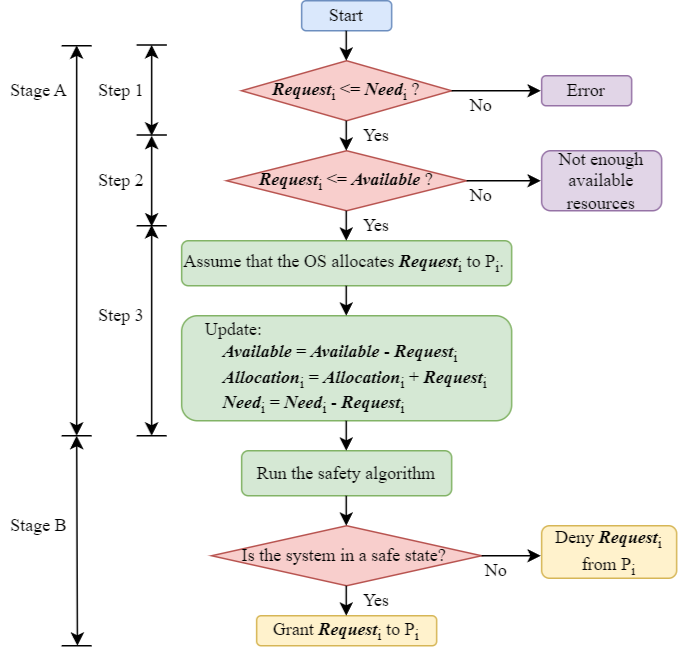
Flowchart
The following flowchart shows the steps of the resource-request algorithm:
0. There are n processes P0 to P(n-1)
- There are m resource types
- Find , , ,
- A process requests additional instances
Example
According to the previous example, if the process make an additional request . If the system allows this request, is the system still in a safe state?
📄 Resource Request Example.pdf
Deadlock-Detection Algorithm for Deadlock Detection
If a system does not implement either a deadlock prevention or deadlock avoidance algorithm, a deadlock may occur. In such cases, the system can:
- Detect a deadlock using deadlock detection algorithms (covered in this section)
- Resolve a deadlock using deadlock recovery techniques (covered in the next section)
Problem Statement for Using the Deadlock-Detection Algorithm
Given: A scenario involving a resource allocation problem including:
- The number of available/free resources,
- The number of processes
- The number of requested instances, (this assumption is new and different from the previous 2 algorithms)
- The number of currently allocated resources,
**Note that there's no "required resources" or variable!
- แต่จะมี Request ซึ่งคล้าย ๆ Need เลย (ซึ่ง Need ก่อนหน้านี้เราต้องหาเอง เอาอะไรมาลบกันก็ว่าไป)
Problem Statement for Using Deadlock-Detection Algorithm:
In a resource-allocation problem where multiple processes request specific resource instances and they will finish their jobs if they own these additional number of resource instances, we would like to determine the state of the system. We use the deadlock-detection algorithm to:
- Determine whether the system is in a safe state or experiencing a deadlock state
- If the system is in a safe state, identify the safe sequence of process execution
Problem Statement Summary
- In this scenario:
- No variable
- No variable
- But there's a new variable
- The condition for a process to finish its job is:
- We give the resource equal to to
Deadlock-Detection Algorithm
If some resource types have multiple instances, we apply this algorithm to find whether the system contains a deadlock:
-
Let and be vectors of length m and n, respectively. Initialize:
For i = 0, 1, …, n-1:- If , then
- If , then
-
Find an index i such that both:
If no such i exists, go to step 4.
-
Update:
Go to step 2.
-
If for some i, → the process is deadlocked and, then, the system is in a deadlocked state.
Note: This is similar to the safety algorithm. However, the differences are:
- Different initialization of values in
- In the safety algorithm, we use , but here we use
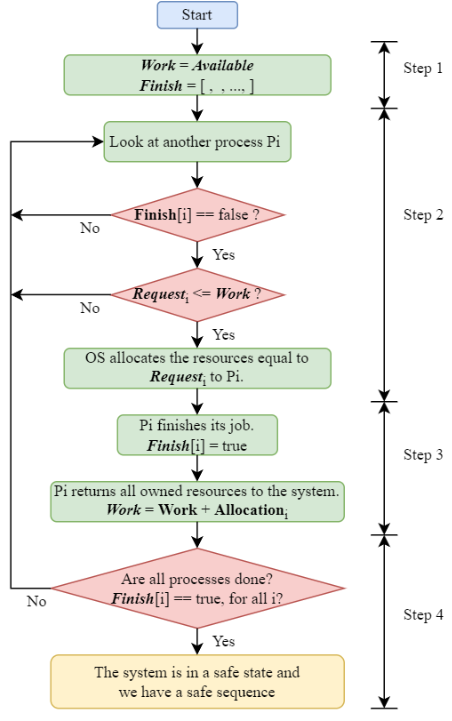
Flowchart
The following flowchart shows the steps of the deadlock-detection algorithm.
Step 0:
- There are n processes P0 to P(n-1)
- There are m resource types
- Find , ,
Example
Consider a system with five processes through and three resource types A, B, and C. Resource type A has seven instances, resource type B has two instances, and resource type C has six instances. Suppose that, at the starting time, we have the following resource-allocation state:
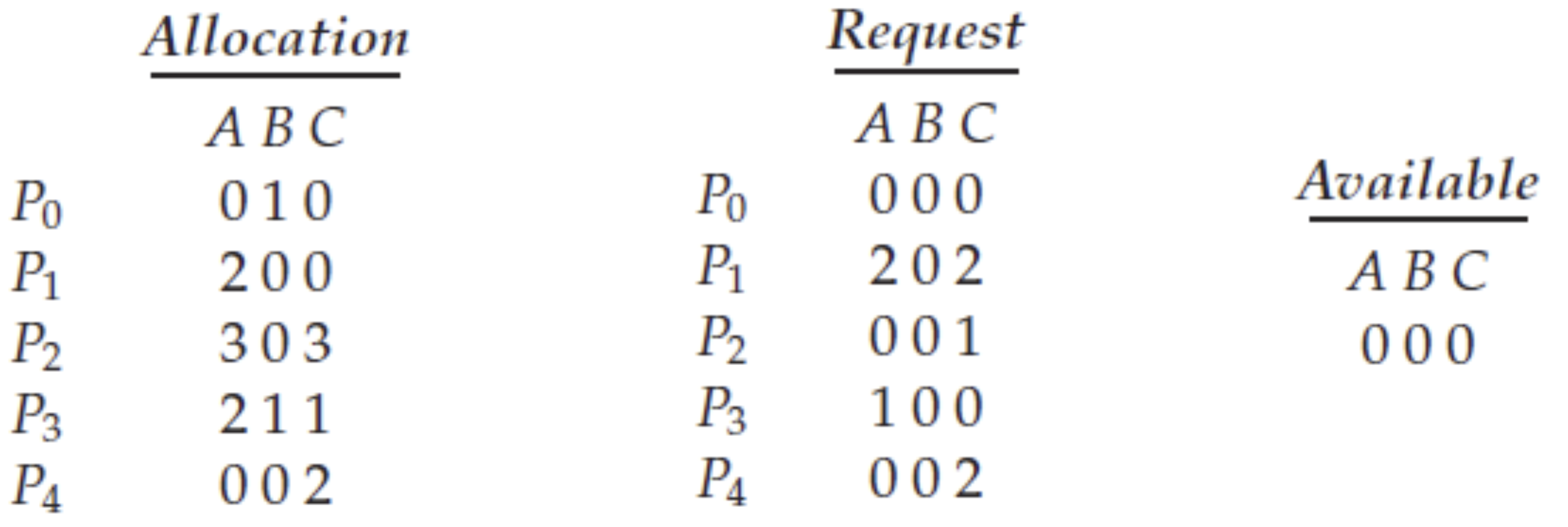
Determine whether a deadlock will occur in the system.
📄 Deadlock-Detection Example.pdf
Trade-Offs in Using the Deadlock Detection Algorithm
Running a deadlock detection algorithm incurs significant computational overhead.
Therefore, the decision on when to invoke it must be carefully considered.
- If deadlocks occur frequently, the algorithm may need to be run more often.
- When a deadlock occurs, the number of processes involved in the deadlock cycle may increase over time. Detecting it early helps minimize system disruption and potential damage.
If we do not detect deadlocks early, the number of processes may increase.
แทนที่จะได้ใช้ CPU เต็มที่ ต้องมา Detect เจอ Deadlock ตลอด
Recovery from Deadlock
When a detection algorithm determines that a deadlock exists, several alternatives are available.
- We consider 2 approaches here:
- Process termination
- Resource preemption
1. Process Termination
To eliminate deadlocks by process termination, we use one of two methods:
- Abort all deadlocked processes.
- This is the simplest approach
- Note that if a process has computed for a long time, it has to restart again from the beginning
- All computation done by deadlocked processes is lost
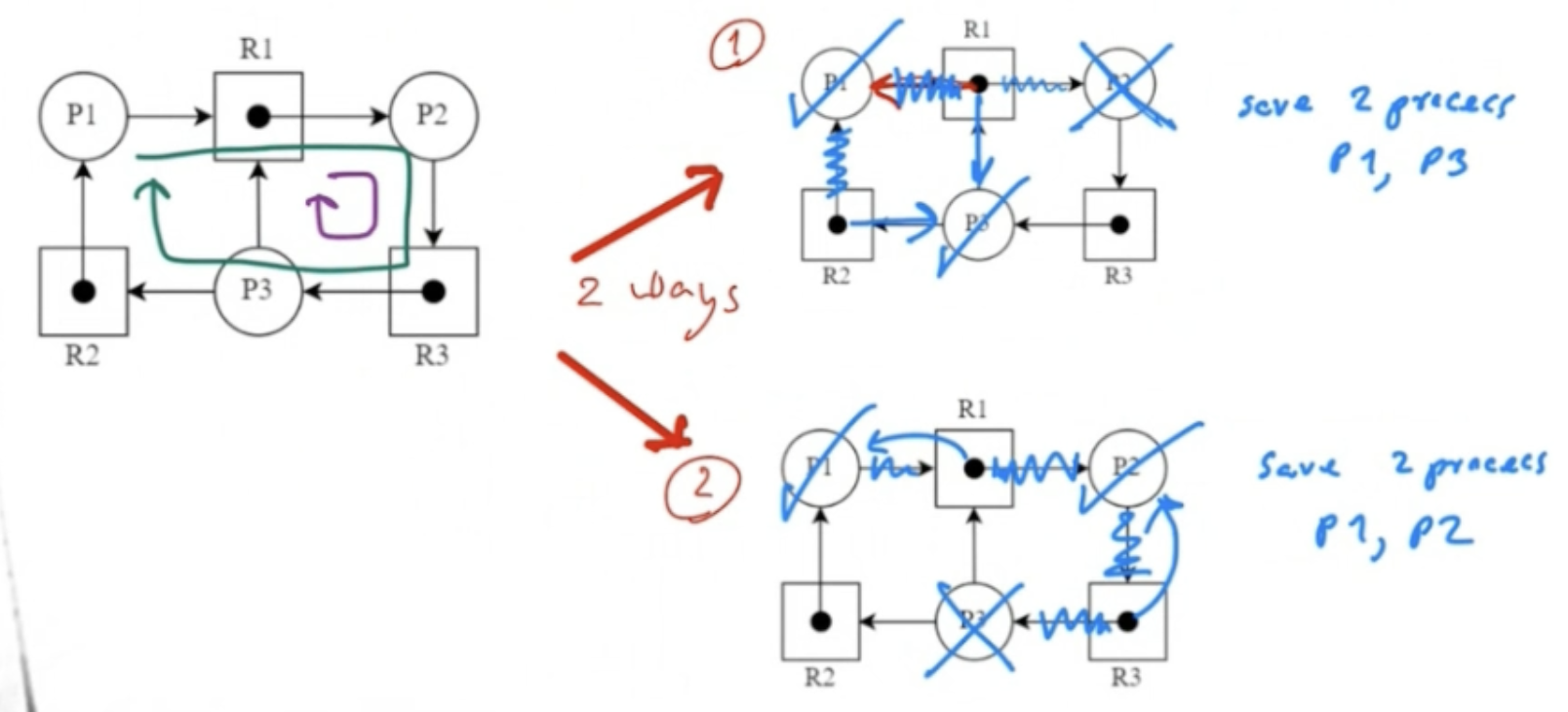
- Abort one process at a time until the deadlock cycle is eliminated.
- This method incurs considerable overhead
- After each process is aborted, a deadlock-detection algorithm must be invoked to determine whether any processes are still deadlocked
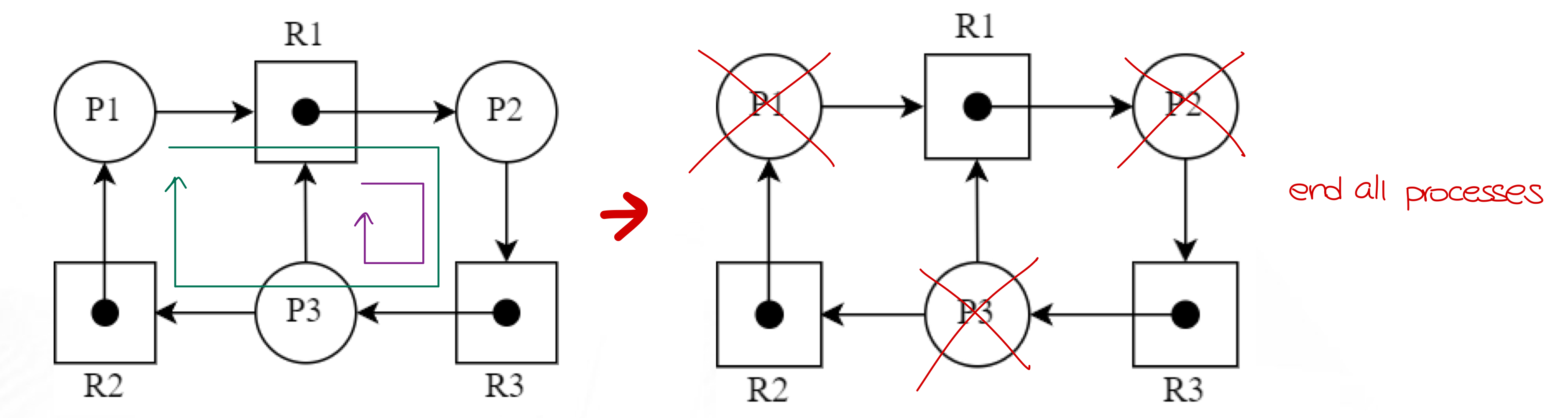
Example: Abort all deadlocked processes
Solve the following deadlock state by aborting all deadlocked processes:
Example: Abort one process at a time
Solve the following deadlock state by aborting one process at a time:
2. Resource Preemption
To eliminate deadlocks using resource preemption, we successively preempt some resources from processes and give these resources to other processes until the deadlock cycle is broken.
Three issues need to be considered:
- Select a victim process
- Choose which resources and which processes to preempt
- Minimize cost (consider factors like number of resources held, time process has computed)
- Roll back the victim process to a safe state
- Return to some safe state and restart from there
- Requires the system to keep track of the process's state
- Simplest solution is total rollback: abort the process and restart
- Ensure that starvation will not occur on the same processes
- A process may end up always being the victim of resource preemption
- Include the number of rollbacks in the cost factor to avoid this scenario
Example: Resource preemption
Solve the following deadlock state by resource preemption (There are many ways to do this):