Learning Objectives
- Describe the impact of information technology on society
- Describe the five main components of an information system
- Explain Internet business strategies and relationships, including B2C and B2B
- Explain how to use business profiles and models
- Understand the seven types of information systems used in business
- Describe the types of information the four classes of users need
- Distinguish among structured analysis, object-oriented analysis, and agile systems development methods
- List the tools that enable the systems analyst to develop, manage, and maintain large-scale information systems
- Explain the seven main functions of the information technology department
- Describe the roles and responsibilities of a systems analyst within the enterprise
Information Technology (IT)
อย่านึกว่า IT ต้องเป็นคอมเท่านั้น จริง ๆ แล้ว มันคือ คน + กระบวนการ
Definition
- Combination of hardware and software products and services
- Used to manage, access, communicate, and share information
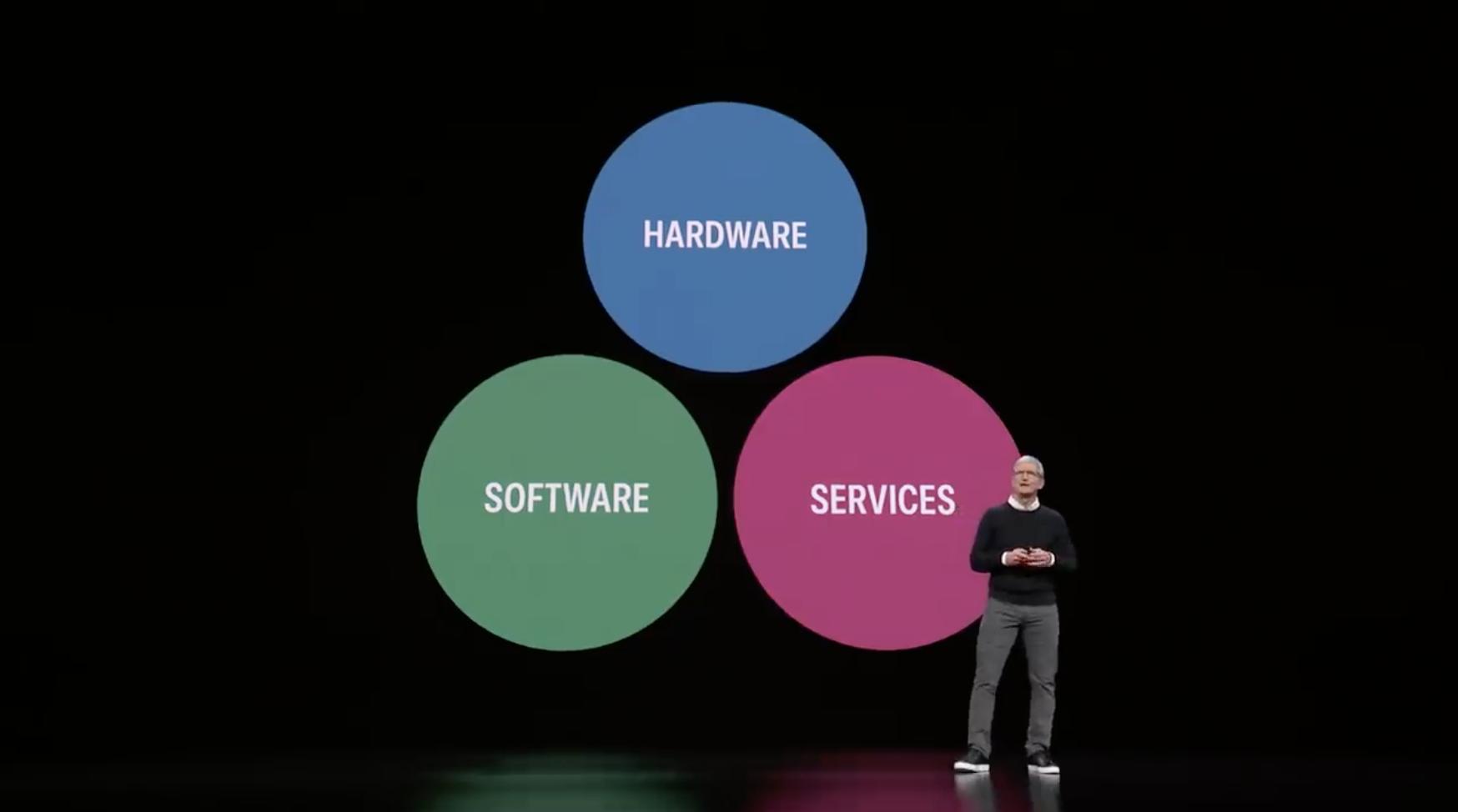
Think of IT like Apple's ecosystem: hardware (iPhone, Mac), software (iOS, macOS), and services (iCloud, Apple Music) all working together to manage and share your information seamlessly.
Changing Nature of IT
- Change is dramatic and continuous
- Advances in technology influence change in business organizations
- Organizations must adapt constantly to remain competitive
Just like how Apple evolves from iPhone 1 to iPhone 15, bringing new features and capabilities each year, businesses must continuously adapt their IT systems to stay relevant.
Systems Analysis and Design
- Step-by-step process for developing high-quality information systems
- Information Systems: combination of technology, people, and data performing certain business functions
What Does a Systems Analyst Do?
- Plans, develops, and maintains information systems
- Manages IT projects
- Conducts meetings (with stakeholders…)
- Delivers presentations
- Writes memos, reports, and documentation
A systems analyst is like Apple's product manager who bridges the gap between engineers (who build the technology) and users (who use it), ensuring the final product meets everyone's needs.
Information Systems
Basic Concepts
System
- Set of related components that produces specific results
- Mission-critical systems: vital to company operations
Apple's supply chain system is mission-critical—if it fails, iPhones don't get manufactured or delivered to customers.
Data vs Information
- Data: basic facts that serve as raw material
- Information: data transformed into useful output
ALL SYSTEMS REQUIRE INPUT DATA
Data is like individual sensor readings from your Apple Watch (heart rate: 72 bpm, steps: 5,234). Information is the fitness summary that tells you "You burned 500 calories today and completed your activity rings."
Five Main Components of an Information System
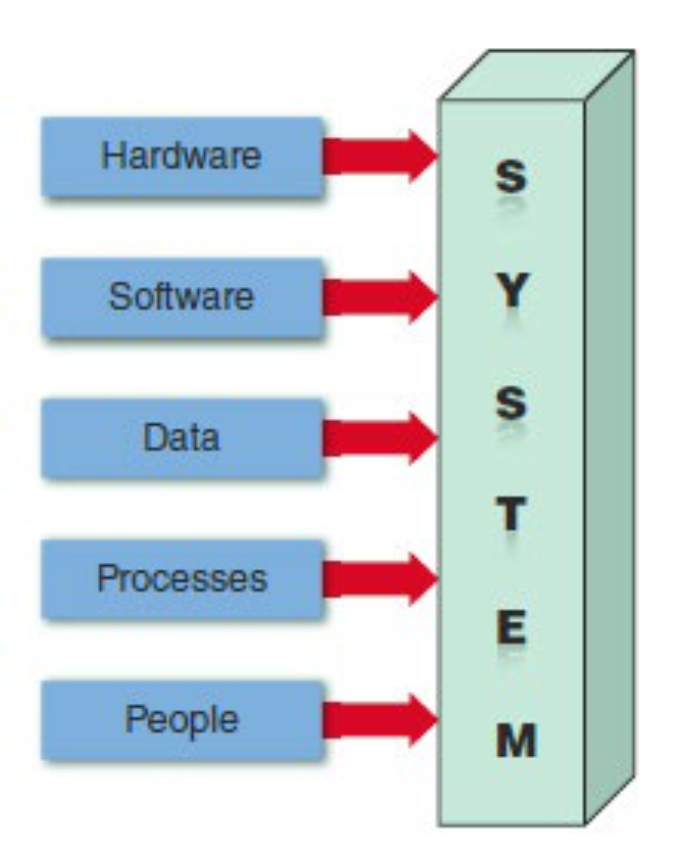
1. Hardware
- Physical layer of the information system
- Includes computers, servers, networks, and devices
- Moore's Law: The number of transistors on an integrated circuit chip doubles approximately every 24 months
Apple's M-series chips demonstrate Moore's Law—each generation (M1 → M2 → M3) packs more transistors, delivering better performance and efficiency. (ดังนั้น computer ก็ถูกลงทุกวัน ๆ)
2. Software
- Controls hardware components
- Two main types:
System Software
- Manages hardware components
- Examples: Operating systems (Windows, macOS, Linux)
macOS and iOS are system software that manage your Mac and iPhone hardware, handling tasks like memory management and file systems.
Application Software
- Supports day-to-day business operations
- Types:
- Horizontal applications: Used across many industries (email, word processing)
- Vertical applications: Designed for specific industries (medical records systems)
- Legacy systems: Older systems still in use
Safari (web browser) is horizontal—anyone can use it. Apple's retail management system for Apple Stores is vertical—designed specifically for retail operations.
3. Data
Data = ข้อมูลดิบ (ไม่มีความหมายในตัวเอง), Information (ข้อมูลที่ผ่านการวิเคราะห์มาแล้ว สามารถใช้ตัดสินใจต่อได้)
- Stored in tables within databases
- Organized in structured formats
- Tables are linked to form an overall database
- (Maybe sometimes it’s just a text file)
Your Apple ID database contains multiple tables: one for your personal info, one for purchases, one for devices—all linked together by your Apple ID.
4. Processes
- Describe tasks and business functions performed to achieve specific results
- Define workflows and procedures
- Transform inputs into outputs
The process of ordering an iPhone online involves multiple steps: check inventory → verify payment → schedule delivery → update order status.
5. People
- Stakeholders: individuals interested in an information system
- Include users, managers, developers, customers
- Most critical component—systems serve people!!
สำคัญสุด ทำระบบออกมาให้ คนนน ใช้ไง!
Everyone from Tim Cook (CEO) to Apple Store employees to iPhone users are stakeholders in Apple's information systems.
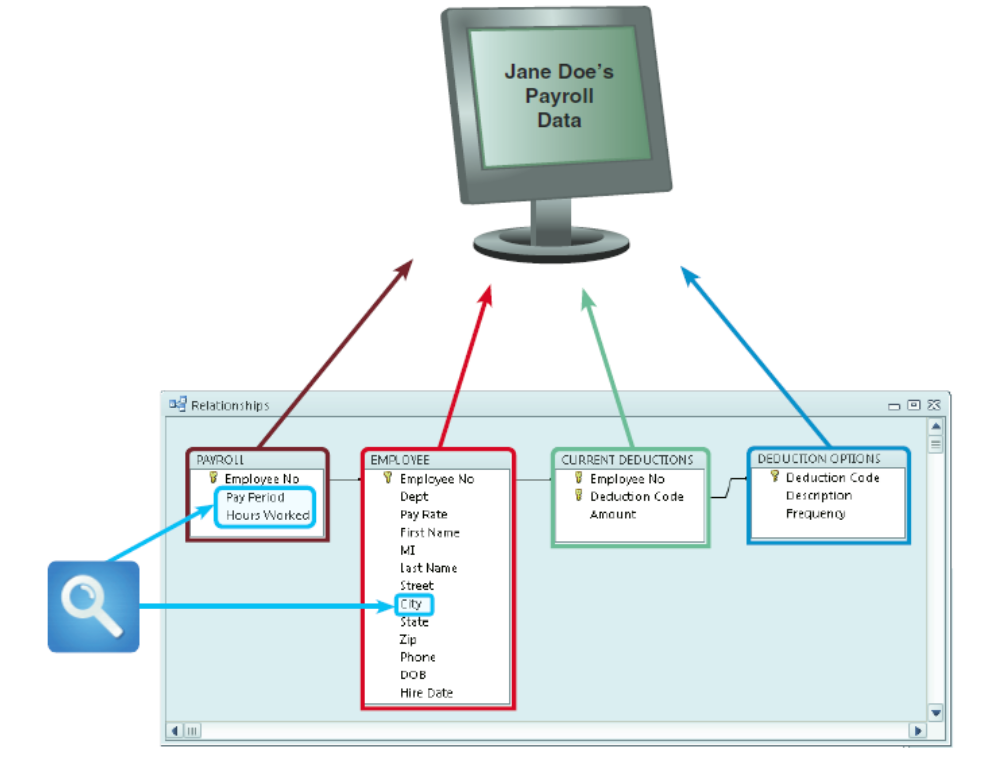
In a typical payroll system, data is stored in separate tables that are linked to form an overall database.
Internet Business Strategies
Key Trends
- Rapidly increasing globalization (ไม่ได้ขายของให้แต่ local แล้ว ขายให้ใครก็ได้ในโลกเลยอะ)
- Technology integration for seamless information access
- Rapid growth of cloud-based computing and services (ไม่ต้อง buy server anymore, we can establish the server in the cloud, very simple)
Apple's transition from locally-stored iTunes libraries to Apple Music in the cloud exemplifies this trend—your music is accessible anywhere, on any device.
The Internet Model
E-commerce (Electronic Commerce)
- User interface enables communication between database management software and web-based servers
- Mobile devices interact with systems using apps
The App Store is an e-commerce platform where the user interface (App Store app) connects to Apple's databases to let you browse, purchase, and download apps.
B2C (Business-to-Customer)
In a single convenient session, customers can:
- Research and compare prices and features
- Check availability and arrange delivery
- Choose payment methods
- Complete transactions
When you buy an iPhone from apple.com, you're experiencing B2C: you compare models, check store availability, choose delivery options, and pay—all in one session.
B2B (Business-to-Business)
- E-commerce initially used Electronic Data Interchange (EDI)
- Modern firms use Supply Chain Management (SCM) software
- Helps manage inventory levels, costs, and suppliers
Apple's relationship with TSMC (chip manufacturer) and Foxconn (assembly) is B2B—they use sophisticated systems to coordinate orders, inventory, and deliveries.
จะสร้างระบบเหล่านั้นมาต้องรู้อะไรบ้าง ต้องมี Blueprint อะไรก่อนรึเปล่า → Blueprint = Business Process Model (BPM)
Modeling Business Operations
Business Profile
- Overview of a company's:
- Mission
- Functions
- Organization
- Products and services
- Customers and suppliers
- Competitors
- Constraints
- Future direction
Apple's business profile includes: mission (bring the best user experience), products (iPhone, Mac, iPad), customers (consumers and enterprises), competitors (Samsung, Google), future direction (AR/VR, autonomous vehicles).
Business Process
- Specific set of transactions, events, and results that can be described and documented
- Can be modeled using:
- Business Process Model (BPM)
- Business Process Modeling Notation (BPMN)
Simple Business Model Example
A typical business model structure:
Event → Process 1 → Process 2 → Process 3 → Result
Example: Sales Order Processing
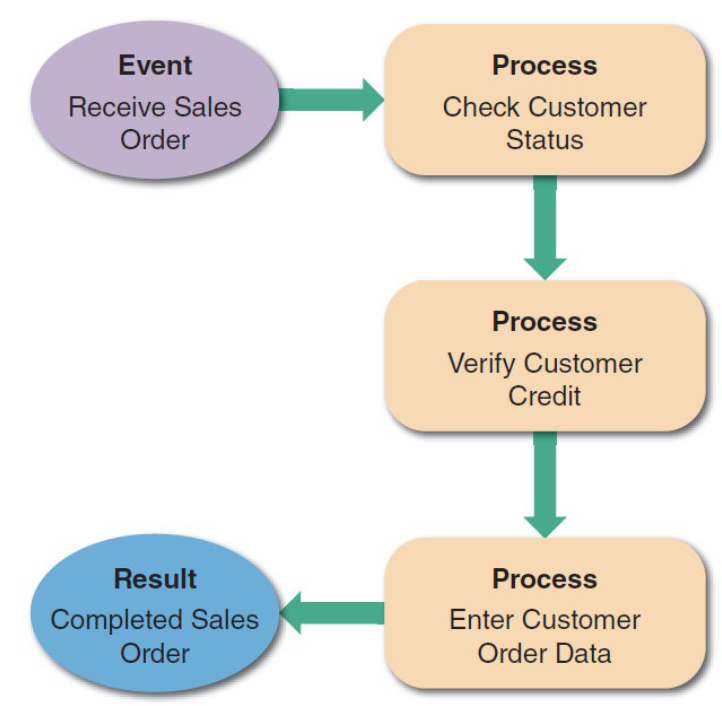
- Event: Receive Sales Order
- Process 1: Check Customer Status
- Process 2: Verify Customer Credit
- Process 3: Enter Customer Order Data
- Result: Completed Sales Order
When you order an iPhone online:
- Event: You place the order
- Process 1: System checks if you're an existing customer
- Process 2: System verifies your payment method
- Process 3: System creates your order record
- Result: Order confirmation sent to you
Most important skill is EMPATHY นะ we have to communicate a lot! (There are so many unsuccess project because their communicate skills)
BPMN (Business Process Modeling Notation)
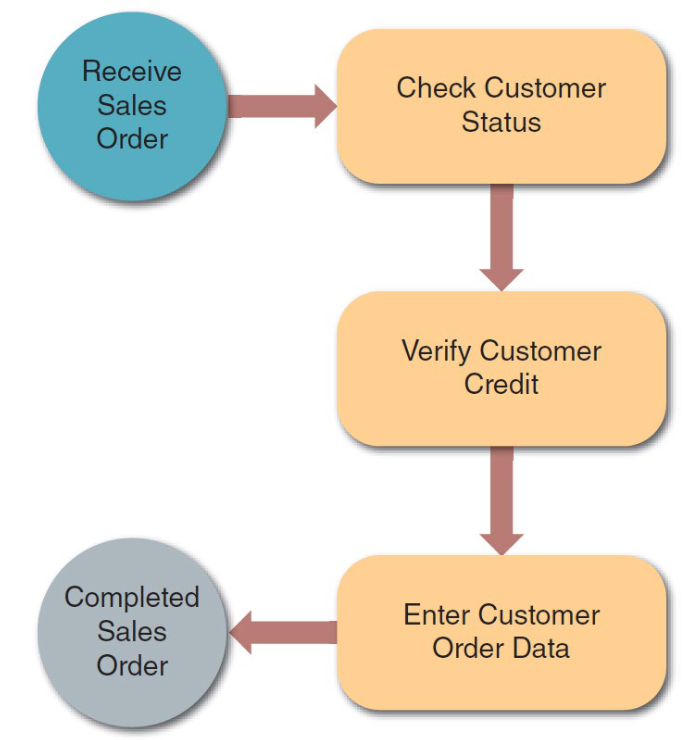
อย่างอันข้างบนเป็น BPM (ต้องเขียนบอกด้วยว่าแต่ละ block คืออะไร) แต่ถ้า BPMN ไม่ต้องนะ
- Standardized graphical notation for modeling business processes
- Uses circles for events, rectangles for processes, arrows for flow
- Provides clear visual representation of workflows
Business Information Systems
วิธีการปัจจุบัน:
- พนักงานทุกคน ใช้ ระบบเพิ่มผลิตภาพในสำนักงาน (Office Productivity Systems)
- เช่น Microsoft Office, Google Workspace, Email, Calendar
- เพื่อทำงานประจำวันทั่วไป
- ผู้ใช้ระดับปฏิบัติการ (Operational Users) ต้องการ ระบบสนับสนุนการตัดสินใจ (Decision Support System - DSS)
- เช่น ระบบวิเคราะห์ข้อมูล, Dashboard, Reporting Systems
- เพื่อช่วยในการตัดสินใจเชิงธุรกิจ
- ระบบถูกกำหนดโดย ฟังก์ชันและฟีเจอร์ (Functions and Features)
- คือ มองระบบในแง่ของ "ทำอะไรได้บ้าง" และ "มีความสามารถอะไร"
Enterprise Computing
- Supports company-wide operations and data management
- Enterprise Resource Planning (ERP) systems:
- Provide cost-effective support for users and managers throughout the company
- Integrate all business functions
Apple uses enterprise systems to integrate everything from product design to manufacturing to retail sales across its global operations.
Seven Types of Information Systems
1. Transaction Processing (TP) Systems
- Process data generated by day-to-day business operations
- Examples:
- Customer order processing
- Accounts receivable
- Warranty claim processing
Single Sales Transaction Components:
- Verify Customer Data
- Check Credit Status
- Check Stock Status
- Post to Accounts Receivable
- Adjust Inventory Levels
- Update Sales File
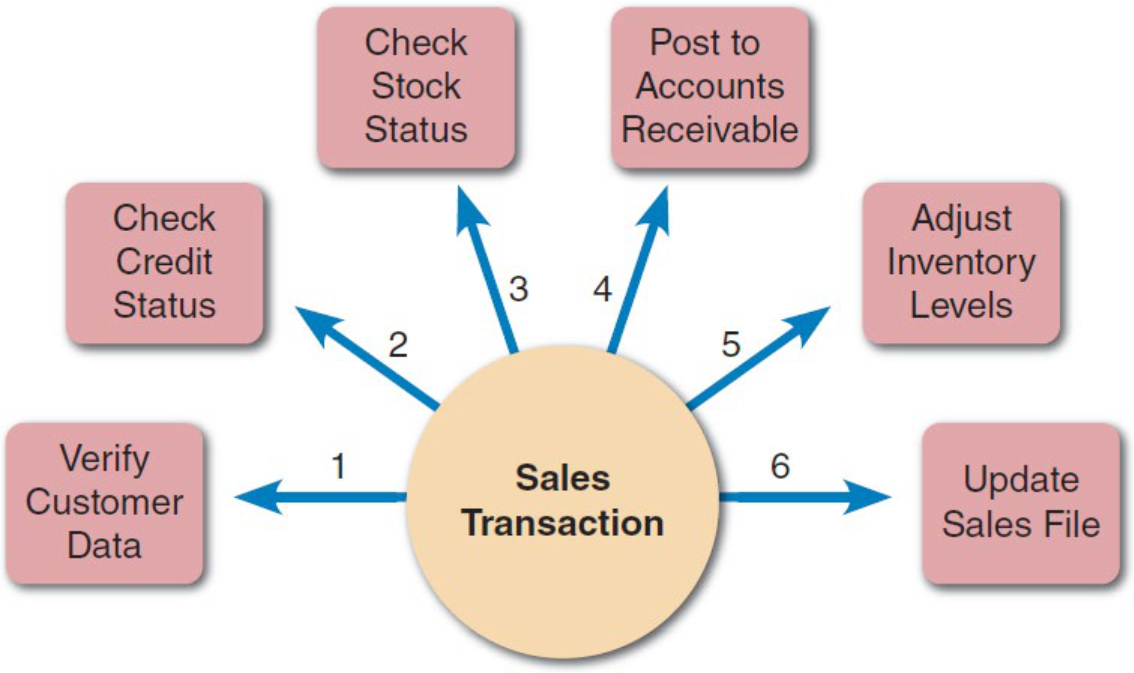
Every time you buy an app on the App Store, a TP system processes your transaction: verifies your Apple ID, checks payment method, confirms availability, charges your account, updates inventory, and records the sale.
2. Business Support Systems
- Provide job-related information support to users at all levels
- Include:
- Management Information Systems (MIS): Generate reports for managers
- Radio Frequency Identification (RFID): Track inventory and assets
Apple's retail management system helps store managers track which products are selling, monitor inventory levels, and make restocking decisions.
3. Knowledge Management Systems
- Use a knowledge base and inference rules
- Knowledge base: Large database that allows users to find information by entering keywords
- Inference rules: Identify data patterns and relationships
Apple Support's knowledge base contains thousands of articles. When you search "iPhone won't turn on," the system uses inference rules to suggest the most relevant solutions based on your device model and iOS version.
4. User Productivity Systems
- Technology that improves productivity
- Groupware: Enables data sharing and collaboration
- Examples: Email, calendars, document sharing
iWork (Pages, Numbers, Keynote) with iCloud collaboration is a user productivity system—multiple people can work on the same document simultaneously.
5. Digital Assistants
- Combinations of knowledge management systems and user productivity systems
- Provide intelligent assistance and automation
Siri is a digital assistant that combines knowledge management (answering questions) with productivity features (setting reminders, sending messages).
เหมือนจะมีอีก แล้วก็จบแค่อันต่อไป งงว่ะ มัน gen ไรมา
6. Office Productivity Systems
- Used by all employees
- Include word processing, spreadsheets, presentations
- Essential tools for daily work
Microsoft Office or Apple's iWork suite are office productivity systems used throughout companies.
7. Decision Support Systems
- Help operational users and managers make decisions
- Provide analysis and modeling capabilities
- Support strategic planning
Apple's executives use decision support systems to analyze sales data, market trends, and determine which products to develop or discontinue.
Systems Integration
- Combination of multiple system types:
- Transaction processing
- Business support
- Knowledge management
- User productivity features
- Creates comprehensive business solutions
Apple's retail system integrates transaction processing (sales), business support (inventory management), knowledge management (product information), and productivity tools (employee scheduling).
Organizational Information Models
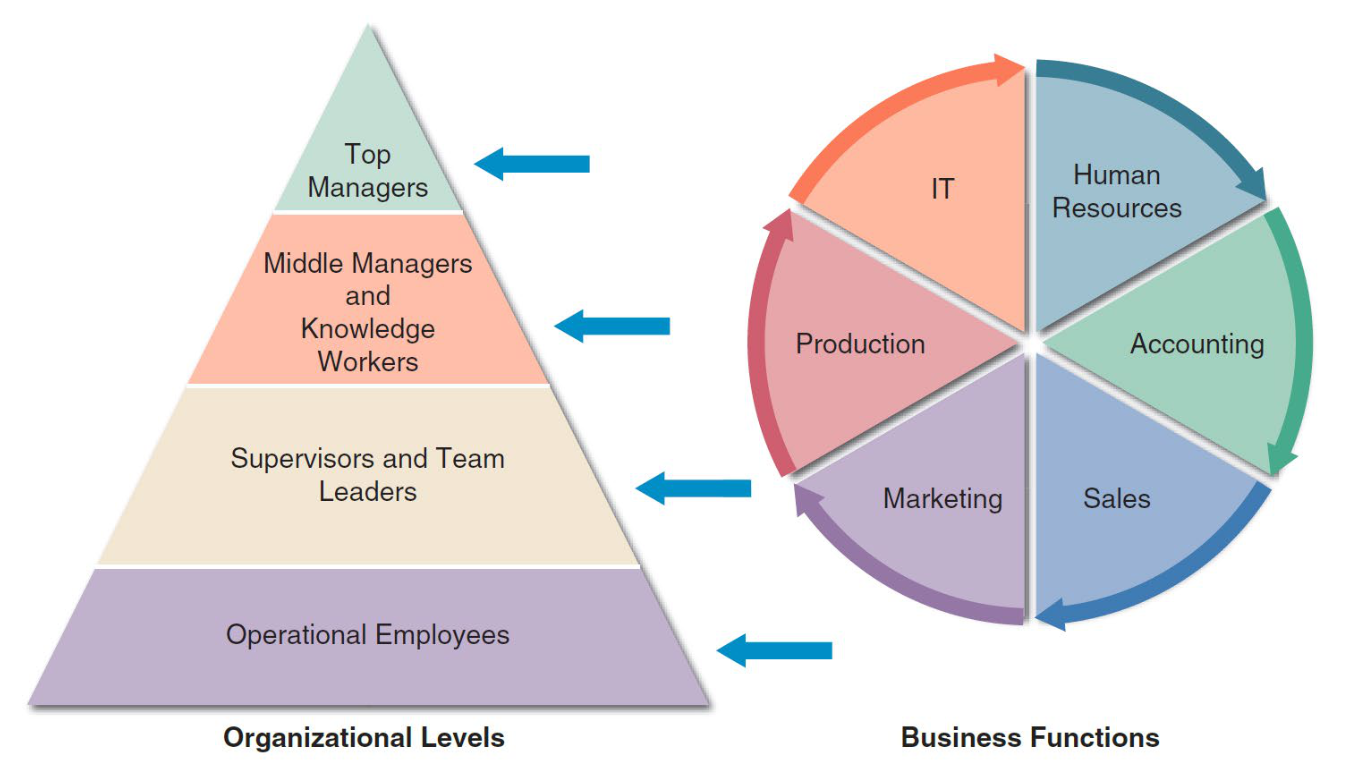
Four Organzational Levels
1. Top Managers
- Develop long-range strategic plans
- Make high-level decisions about company direction
- Focus on future growth and competitive positioning
Tim Cook and Apple's executive team decide on major strategic initiatives like entering new product categories (Apple Watch, Apple Vision Pro) or new markets (India expansion).
2. Middle Managers and Knowledge Workers
Middle Managers:
- Provide direction, resources, and performance feedback
- Bridge between top management and operational staff
- Implement strategic plans
Knowledge Workers:
- Provide support for the organization's basic functions
- Include engineers, analysts, specialists
- Apply expertise to solve problems
Apple's engineering managers (middle managers) oversee teams of software engineers (knowledge workers) who develop iOS features based on strategic direction from executives.
3. Supervisors and Team Leaders
- Oversee operational employees
- Carry out day-to-day functions
- Ensure tasks are completed efficiently
- Direct line management
An Apple Store manager supervises retail staff, ensuring they provide excellent customer service and meet daily sales goals.
4. Operational Employees
- Rely on TP systems to enter and receive data
- Perform routine business operations
- Increasingly empowered to handle tasks previously assigned to supervisors
- Make decisions within their scope
Apple Store Specialists use point-of-sale systems to process transactions, check inventory, and help customers—they're empowered to make decisions like offering accessories or AppleCare.
Business Functions
Typical business functions include:
- Human Resources: Employee management
- Accounting: Financial management
- Production: Creating products/services
- Marketing: Promoting products
- Sales: Selling to customers
- IT: Technology infrastructure
Apple has all these functions: HR manages 150,000+ employees, Accounting handles finances, Production oversees manufacturing, Marketing creates campaigns, Sales runs Apple Stores, IT maintains internal systems.
Systems Development Methods
1. Structured Analysis
- Uses Systems Development Life Cycle (SDLC)
- Five phases:
- Plan: Define project scope and objectives
- Analyze: Study current system and requirements
- Design: Create system specifications
- Implement: Build and deploy the system
- Support: Maintain and enhance the system
When Apple developed the first iPhone, they likely followed SDLC: planned the concept, analyzed user needs, designed the interface and hardware, implemented the product, and continue supporting it with iOS updates.
2. Object-Oriented Analysis (OOA)
- Combines data and processes as objects
- Objects have properties (data) and methods (processes)
- Promotes reusability and modularity
- More flexible than structured analysis
iOS apps are built using object-oriented programming—a "Button" object has properties (color, size, text) and methods (what happens when tapped). These objects can be reused across different apps.
3. Agile Methods
- Build a series of prototypes
- Constantly adjust to user requirements
- Emphasizes flexibility and rapid iteration
- Uses Spiral Model: Iterative development cycles
Apple's approach to iOS development is agile—they release beta versions to developers, gather feedback, make improvements, and iterate before the final release.
Prototyping
Definition
- Early working version of an information system
- Allows users to interact with a preliminary model
- Facilitates feedback and refinement
Advantages
- Users can see and test functionality early
- Identifies problems before full development
- Reduces misunderstandings about requirements
Disadvantages
- Important decisions might be made before issues are thoroughly understood
- Risk of rushing to implementation
- May create unrealistic expectations
Best Practice
- Prototypes based on careful fact-finding and modeling can be extremely valuable
- Should complement, not replace, thorough analysis
Apple often shows prototypes internally and to selected partners before public release—the first iPhone was prototyped multiple times before the final design was chosen.
Systems Development Tools
CASE Tools (Computer-Aided Systems Engineering)
Also known as:
- Computer-aided software engineering
Functions
- Provide an overall framework for development
- Support design methodologies (structured, OO, agile)
- Generate program code automatically
- Improve productivity and quality
Benefits
- Standardize development processes
- Reduce errors
- Speed up development
- Improve documentation
Modern development tools like Xcode (Apple's IDE) are CASE tools—they provide frameworks, support multiple methodologies, generate code snippets, and include debugging tools.
The Information Technology Department
Seven Main Functions
Organizational Structure
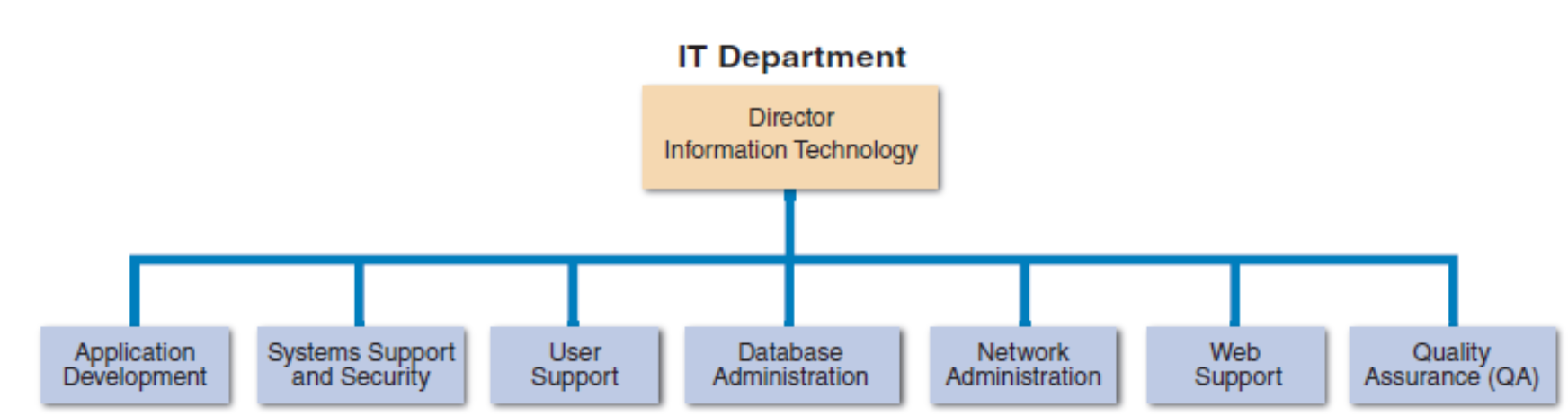
Apple's IT organization has all these functions, though they might call them different names or organize them differently at their scale.
1. Application Development
- Systems are developed by teams consisting of:
- Users (who will use the system)
- Managers (who define requirements)
- IT staff members (who build the system)
- Collaborative approach ensures systems meet business needs
When Apple develops internal apps for retail stores, teams include store managers (users), retail executives (managers), and software developers (IT staff).
2. Systems Support and Security
- Provides vital protection and maintenance services
- Includes:
- Cybersecurity
- System updates and patches
- Backup and recovery
- Incident response
Apple's security team protects systems from hackers, ensures data is backed up, and responds quickly if there's a security breach.
3. User Support
- Provides users with:
- Technical information
- Training
- Productivity support
- Often called a help desk or support center
Apple's internal IT help desk helps employees when they have computer problems, need software installed, or have questions about company systems.
4. Database Administration
- Involves:
- Data design: Structuring databases
- Management: Maintaining data integrity
- Security: Protecting sensitive data
- Backup: Preventing data loss
- Access control: Managing who can view/edit data
Apple's DBA team manages massive databases containing customer information, purchase history, App Store data—ensuring it's organized, secure, and always available.
5. Network Administration
- Includes:
- Hardware maintenance: Routers, switches, servers
- Software maintenance: Network operating systems
- Support: Troubleshooting connectivity issues
- Security: Firewalls, intrusion detection
Apple's network administrators ensure that all Apple Stores worldwide can connect to corporate systems, process transactions, and access inventory data.
6. Web Support
- Specialists design and construct web pages
- Monitor traffic and performance
- Manage hardware and software for web servers
- Ensure websites are fast, reliable, and secure
Apple's web team maintains apple.com, ensuring the site loads quickly for millions of visitors, especially during product launches when traffic spikes.
7. Quality Assurance (QA)
- QA team reviews and tests all applications and systems changes
- Verifies specifications are met
- Ensures software quality standards are maintained
- Catches bugs before release
Before Apple releases an iOS update, QA teams test it extensively on different iPhone models, checking for bugs, performance issues, and compatibility problems.
The Systems Analyst
Core Responsibilities
A systems analyst:
- Investigates business problems and opportunities
- Analyzes current systems and processes
- Designs new or improved systems
- Develops system specifications
- Installs new systems
- Evaluates system performance
- Maintains ongoing systems
Interaction
- Constantly interacts with users and managers
- Works within and outside the organization
- Bridges technical and business worlds
A systems analyst at Apple might work with the retail team to understand their needs, design a new inventory system, work with developers to build it, and ensure store employees can use it effectively.
Key Roles
1. Translator
- Acts as translator between:
- Managers (business language)
- Programmers (technical language)
- Ensures both sides understand each other
When Apple's executives want a new feature, the systems analyst translates "we need better customer insights" into technical requirements like "create a dashboard showing purchase patterns and customer demographics."
2. Defender
- Best line of defense in an IT disaster
- Plans for contingencies
- Implements safeguards
- Responds to crises
3. Listener
- Most valuable skill: ability to listen
- Seeks feedback from users
- Ensures systems don't go off track
- Understands real needs, not just stated wants
The best systems analysts listen when Apple Store employees say "this checkout process takes too long," dig deeper to understand why, and design solutions that truly address the problem.
Required Knowledge, Skills, and Education
Technical Knowledge
- Understanding of:
- Hardware and software
- Databases and networks
- Programming concepts
- Development methodologies
- Current technologies
Communication Skills
- Written communication (reports, documentation)
- Verbal communication (presentations, meetings)
- Listening skills
- Ability to explain technical concepts to non-technical people
Business Skills
- Understanding of business operations
- Financial awareness
- Industry knowledge
- Project management
- Problem-solving
Critical Thinking Skills
- Analytical ability
- Creative problem-solving
- Logical reasoning
- Attention to detail
Apple looks for systems analysts who understand both retail operations and technology—they need to know why a Point of Sale system matters to the business, not just how it works technically.
Education
- College degree in:
- Information systems
- Computer science
- Business
- Some IT experience required
- Continuous learning essential
Certification
- Helps IT professionals:
- Learn new skills
- Gain recognition for efforts
- Stay current with technology
- Examples: PMP, CISSP, AWS Certified, etc.
Career Opportunities
Why Demand is Growing
- Companies will need systems analysts to apply new information technology
- Explosion in e-commerce will fuel IT job growth
- Digital transformation drives demand
- Every industry needs IT expertise
Important Career Factors
- Job Titles
- Systems Analyst
- Business Analyst
- IT Consultant
- Solutions Architect
- May vary by company
- Company Organization
- Structure of IT department
- Reporting relationships
- Team dynamics
- Company Size
- Large corporations: Specialized roles
- Small companies: Generalist roles
- Startups: Broader responsibilities
- Salary, Location, and Future Growth
- Competitive compensation
- Geographic considerations
- Career advancement opportunities
- Industry growth potential
- Corporate Culture
- Work environment
- Values and mission
- Work-life balance
- Innovation vs. stability
Working as a systems analyst at Apple offers exposure to cutting-edge technology, but requires adapting to Apple's unique culture of secrecy, innovation, and attention to detail.
Trends in Information Technology
Importance
- IT is one of the fastest evolving industries
- Knowledge of current trends is vital for success
- Systems analysts must stay current
Six Key Trends
1. Agile Methods
- Rapid, iterative development
- Emphasis on flexibility
- Continuous feedback and adaptation
- Short development cycles
Apple increasingly uses agile methods for software development—iOS updates come frequently with incremental improvements rather than waiting years for major overhauls.
2. Cloud Computing
- Data and applications hosted remotely
- Accessible from anywhere
- Scalable resources
- Reduced infrastructure costs
iCloud is Apple's cloud service—your photos, documents, and backups are stored on remote servers, accessible from any Apple device.
3. Data Science
- Analyzing large datasets
- Extracting insights
- Predictive analytics
- Machine learning and AI
Apple uses data science to improve Siri's responses, recommend apps in the App Store, and predict which products customers might like.
4. Mobile Devices
- Smartphones and tablets ubiquitous
- Apps dominate software delivery
- Mobile-first design approach
- Touch and voice interfaces
Apple revolutionized mobile devices with the iPhone—now companies must ensure their systems work perfectly on mobile, not just desktop.
5. Service Orientation
- Software as a Service (SaaS)
- Focus on services over products
- Subscription models
- Continuous updates
Apple shifted from selling software (Final Cut Pro as a one-time purchase) to services (Apple Music, iCloud+, Apple TV+ as subscriptions).
6. Social Media
- Integration with social platforms
- User-generated content
- Viral marketing
- Customer engagement
Apple doesn't heavily use social media itself, but App Store developers must consider social media integration, and Apple monitors social sentiment about product launches.
Chapter Summary
Information Technology
- Combination of hardware, software, and services
- Used to manage, access, communicate, and share information
- Continuously evolving and changing
- Critical to modern business success
Five Essential Information System Components
- Hardware: Physical technology
- Software: Programs and instructions
- Data: Facts and figures
- Processes: Workflows and procedures
- People: Users and stakeholders
Business Strategies
- Successful companies offer a mix of products and services
- E-commerce (B2C and B2B) transforms business operations
- Business process modeling helps understand workflows
- Internet strategies enable global reach
Systems Analysts
Tools Used
- Modeling: Visual representations of systems
- Prototyping: Early working versions
- CASE tools: Computer-aided development
Essential Skills
- Must understand the business
- Must think critically
- Must communicate effectively
- Bridge technical and business worlds
Development Approaches
Three popular system development approaches:
-
Structured Analysis
- Traditional SDLC approach
- Sequential phases
- Detailed documentation
-
Object-Oriented Analysis
- Combines data and processes
- Reusable components
- Flexible design
-
Agile Methods
- Iterative development
- Rapid adaptation
- Continuous feedback
Just as Apple evolved from the structured development of early Macs to more agile approaches for iOS development, companies must choose the methodology that best fits their needs and culture.
Key Terms Quick Reference
- B2B: Business-to-Business commerce
- B2C: Business-to-Customer commerce
- BPMN: Business Process Modeling Notation
- CASE: Computer-Aided Systems Engineering
- Data: Basic facts serving as raw material
- EDI: Electronic Data Interchange
- ERP: Enterprise Resource Planning
- Information: Data transformed into useful output
- IT: Information Technology
- Knowledge Base: Large database searchable by keywords
- Legacy Systems: Older systems still in use
- MIS: Management Information System
- Mission-Critical Systems: Vital to operations
- Moore's Law: Transistor density doubles every ~24 months
- RFID: Radio Frequency Identification
- SCM: Supply Chain Management
- SDLC: Systems Development Life Cycle
- Stakeholders: Individuals interested in a system
- System: Set of related components producing results
- TP System: Transaction Processing System