Learning Objectives
- Explain quality assurance and three techniques to improve the finished product
- Outline application development
- Apply structured development
- Apply object-oriented development
- Apply agile development
- Explain coding
- Explain unit, integration, and system testing
- Differentiate between program, system, operations, and user documentation
- Explain the role of online documentation
- Describe the five tasks involved in system installation
1. Quality Assurance (QA)
- Companies in a competitive environment are intensely concerned with product/service quality
- Objective: avoid problems, or identify them as early as possible
- Poor quality can result from:
- Inaccurate requirements
- Design problems and coding errors
- Faulty documentation and ineffective testing
เหมือน QC ในโรงงาน — ถ้าพบ bug ตั้งแต่ต้น ค่าซ่อมถูกกว่าพบตอนส่งมอบ
1.1 Software Engineering
- Application of engineering principles to the creation of complex, long-lived applications
- Software Engineering Institute (SEI) at Carnegie Mellon University
- Provides quality standards and suggested procedures
1.2 Capability Maturity Model (CMM)
- Aims to improve software quality, reduce development time, and cut costs
- Has 5 maturity levels:
| Level | Name | Description |
|---|---|---|
| 1 | Initial | Essentially uncontrolled development |
| 2 | Repeatable | Product management procedures defined and used |
| 3 | Defined | Process management procedures defined and used |
| 4 | Managed | Quality management strategies defined and used |
| 5 | Optimizing | Process improvement strategies defined and used |
| ![[Pasted image 20260507165206.png | center | 500]] |
CMM เหมือน belt ใน Judo — ระดับขาว (Initial) ถึงระดับดำ (Optimizing) ยิ่งระดับสูง กระบวนการยิ่งมีระเบียบ
1.3 Systems Engineering
- Builds upon software engineering
- Includes other parts of the overall system: hardware, networks, interfaces
1.4 ISO Standards
- International Organization for Standardization (ISO): establishes internationally recognized quality standards
- ISO 9000-3:2004: provides a QA framework for developing and maintaining software
- ISO standards can be:
- Specified when purchasing software
- Used to guide in-house software development efforts
2. Application Development
- Definition: process of constructing the programs and code modules that serve as the building blocks of an information system
- Objective: translate the design into program/code modules that function properly
- Development options: Structured analysis, Object-Oriented (O-O) analysis, Agile methods
เหมือนการก่อสร้างบ้าน — design เสร็จแล้วต้องแปลงแบบเป็นอิฐ คาน หลังคา (modules) ที่ทำงานร่วมกันได้จริง
2.1 Reviewing the Systems Design
Tasks involved in creating systems design:
- Break down complex business operations using Functional Decomposition Diagrams (FDDs)
- Create Data Flow Diagrams (DFDs)
- Develop an object-oriented model of the new system
- Select a development strategy
- Design the user interface
- Construct Entity-Relationship Diagrams (ERDs)
- Consider an overall system architecture
2.2 Application Development Tasks (Traditional)
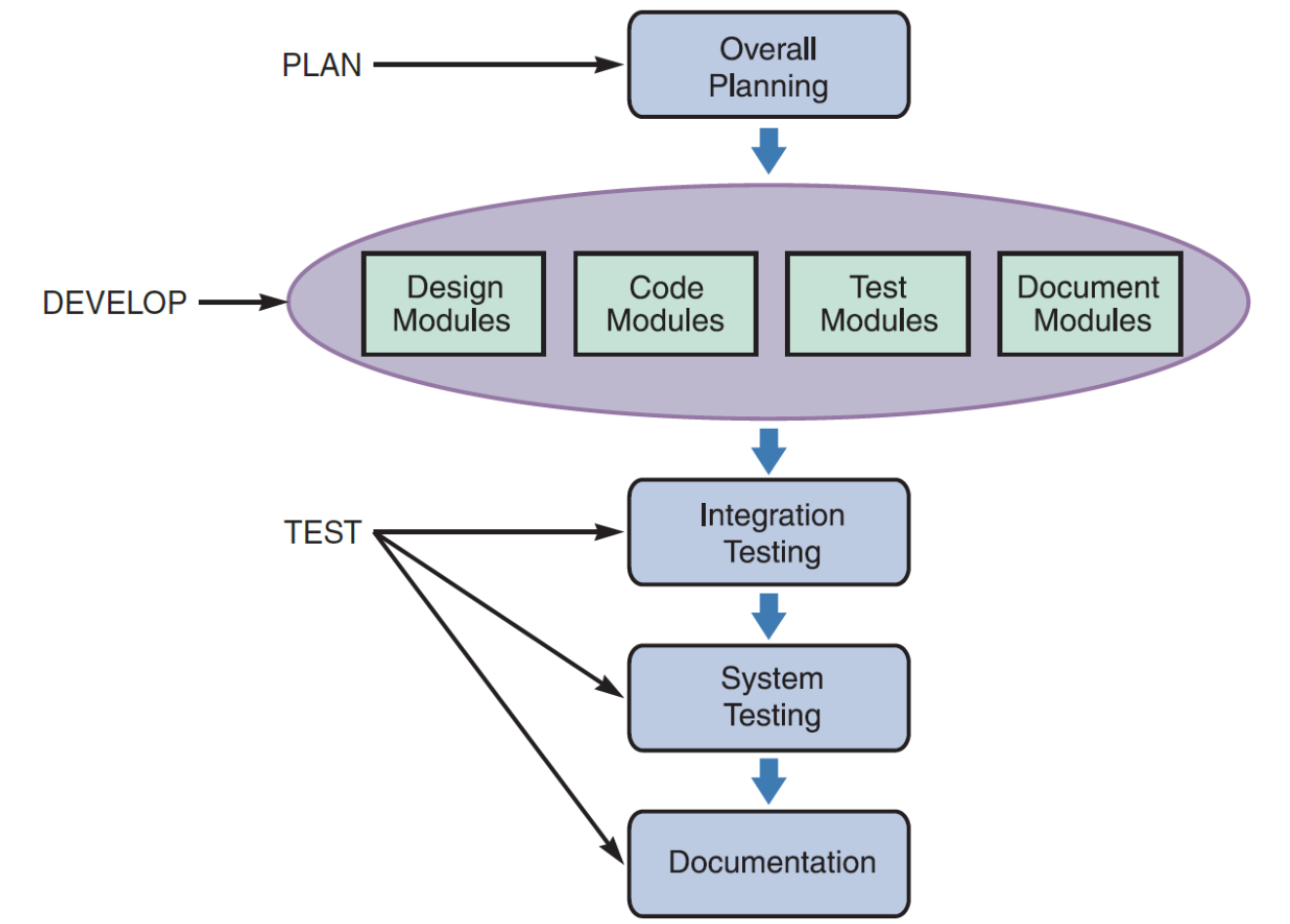
- Plan: Overall Planning
- Develop: Design → Code → Test → Document (individual modules)
- Test: Integration Testing → System Testing
- Document: Final Documentation
2.3 Agile Methods
#FinalExam ถาม Definition ของ Agile (ต้องมีคำว่า iterative)
- Objective: create a system through an iterative process of planning, designing, coding, and testing
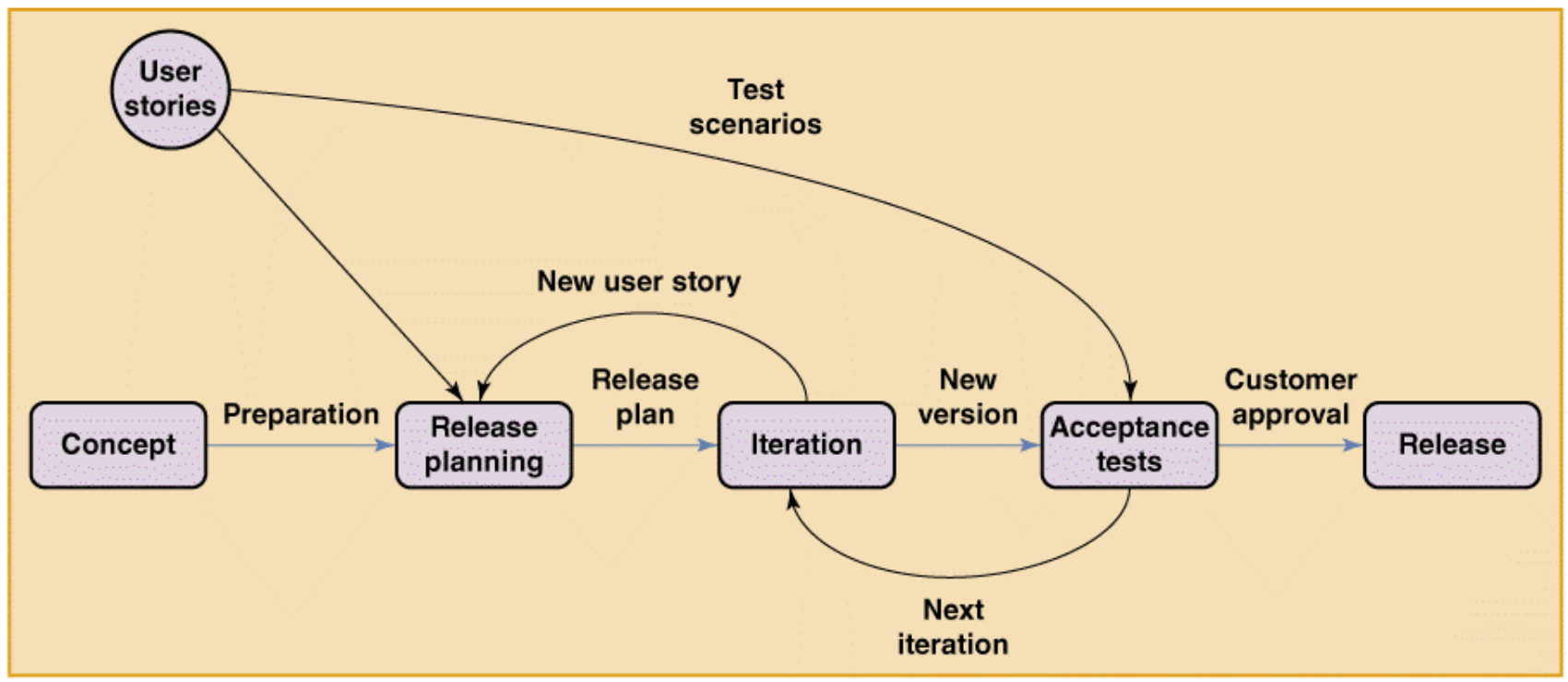
Flow: Concept → Preparation → Release Planning → Iteration → Acceptance Tests → Release
- Loops back for new iterations and new user stories
2.4 Systems Development Tools
- Entity-Relationship Diagrams (ERDs): show interaction among system entities/objects
- Flowcharts: represent logical rules and interactions graphically
- Pseudocode: describes program actions implementable in any language
- Decision tables and decision trees: model business logic for an information system
Example — Sales Promotion Policy (Pseudocode)
IF customer is a preferred customer, and
    IF customer orders more than $1,000 then
        Apply a 5% discount, and
        IF customer uses our charge card, then
            Apply an additional 5% discount
    ELSE
        Award a $25 bonus coupon
ELSE
    Award a $5 bonus coupon
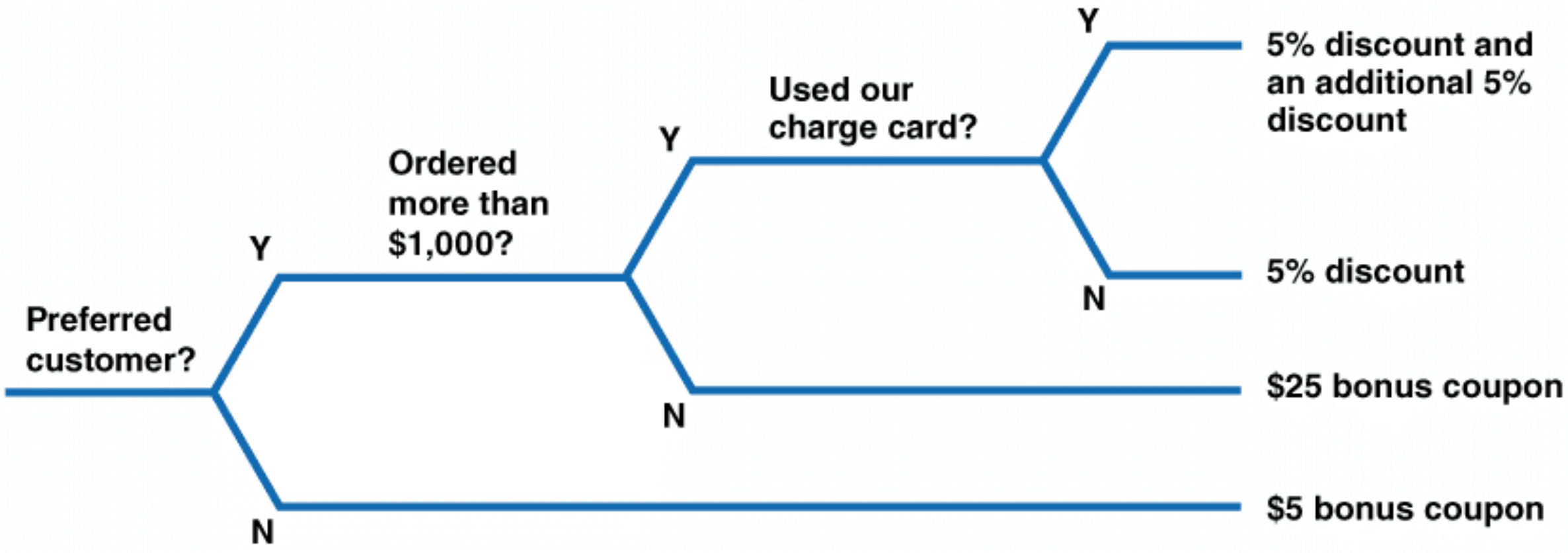
Example — Decision Tree (same policy)
Preferred customer?
├── Y → Ordered more than $1,000?
│        ├── Y → Used our charge card?
│        │        ├── Y → 5% discount + additional 5% discount
│        │        └── N → 5% discount only
│        └── N → $25 bonus coupon
└── N → $5 bonus coupon
3. Structured Development
เหมือนการ decompose function ใหญ่ใน Swift ออกเป็น smaller functions — แต่ละ module ทำหน้าที่เดียว
3.1 Partitioning
- System is broken down into subsystems and modules
3.2 Structure Charts
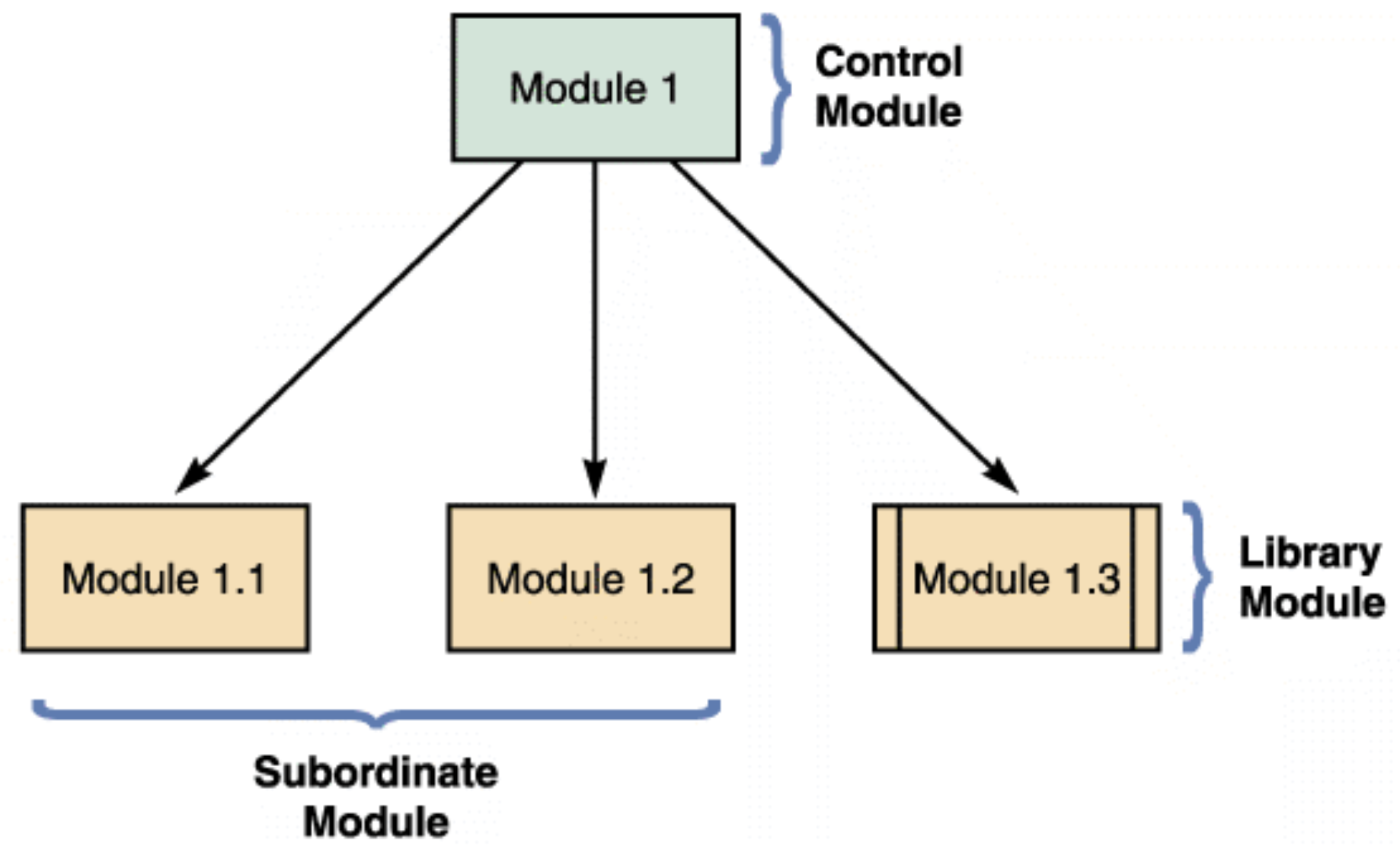
- Display program modules and relationships
- A module is represented by a rectangle
- Types of modules:
- Control module: higher-level module (the "boss")
- Subordinate module: lower-level modules (the "workers")
- Library module: reusable code (double-sided box)
3.3 Structure Chart Notation
| Symbol | Name | Meaning |
|---|---|---|
| Arrow + empty circle (○) | Data couple | Data passed from one module to another |
| Arrow + filled circle (●) | Control couple | Status flag passed between modules |
| Line + diamond (◇) | Condition | Control module decides which subordinate to invoke |
| Curved arrow (↺) | Loop | One or more modules are repeated |
3.4 Cohesion and Coupling
- Cohesion: measures a module's scope and processing characteristics
- A module that performs a single function has high cohesion ✅
- High cohesion = good design
- Coupling: describes the degree of interdependence among modules
- Loosely coupled: modules are independent ✅ (preferred)
- Tightly coupled: one module is linked to internal logic of another ❌ (avoid)
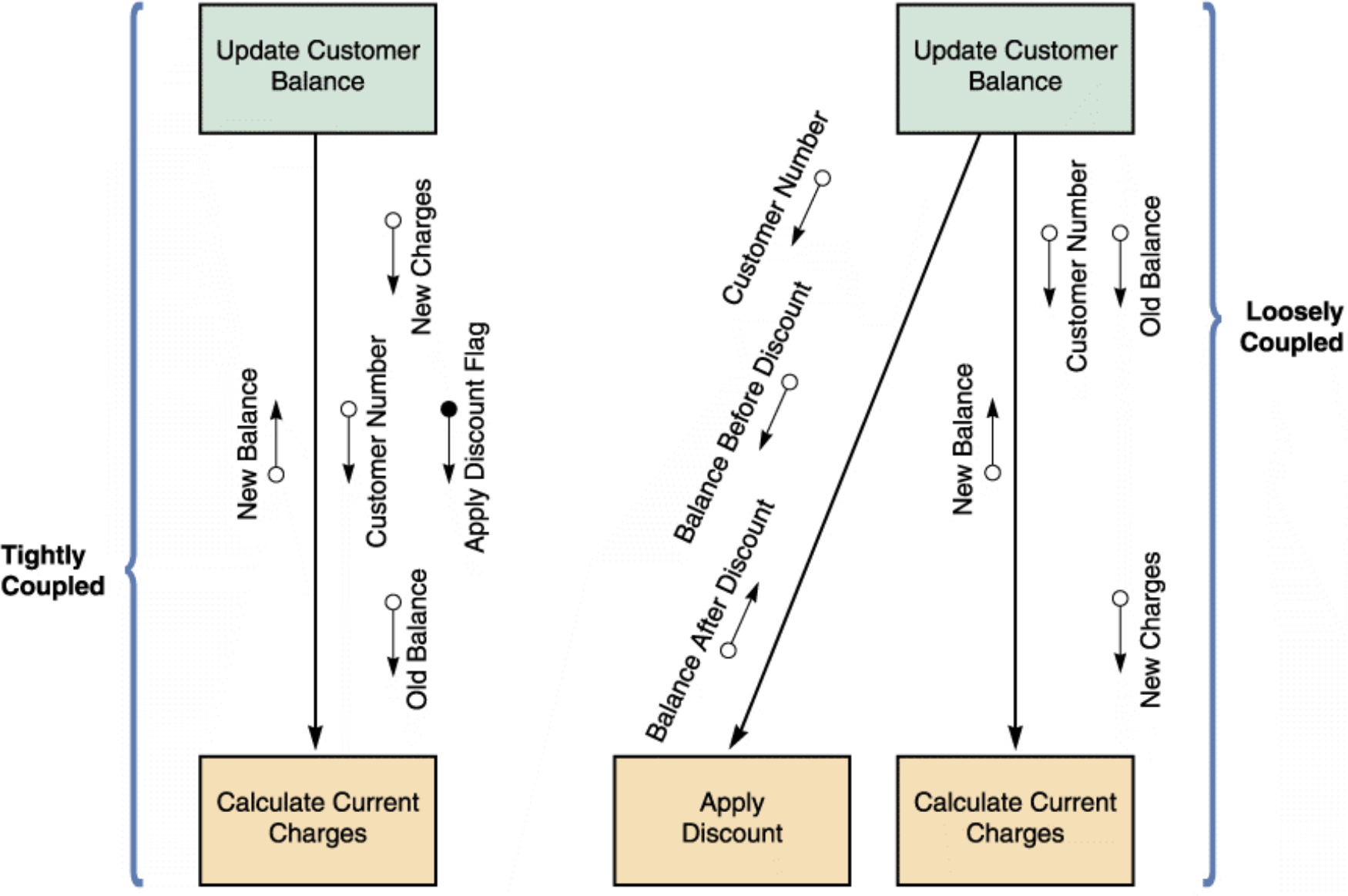
Cohesion เหมือน Single Responsibility Principle ใน iOS — ViewController ที่ทำแค่ display ไม่ยุ่งกับ networking ถือว่า highly cohesive
Coupling เหมือนการที่ View ต้อง import Model โดยตรง — ถ้า tightly coupled แก้ Model ทีนึง View พัง
3.5 Drawing a Structure Chart (3 Steps)
- Review DFDs
- Identify program modules and relationships
- Add couples, loops, and conditions
- After drawing: ensure consistency with all previous documentation
4. Object-Oriented Development (O-O)
4.1 Characteristics
- Individual object instances belong to classes with similar characteristics
- Relationships described using class diagrams
- Include class attributes and methods
- Object-relationship diagrams provide an overview of object interaction
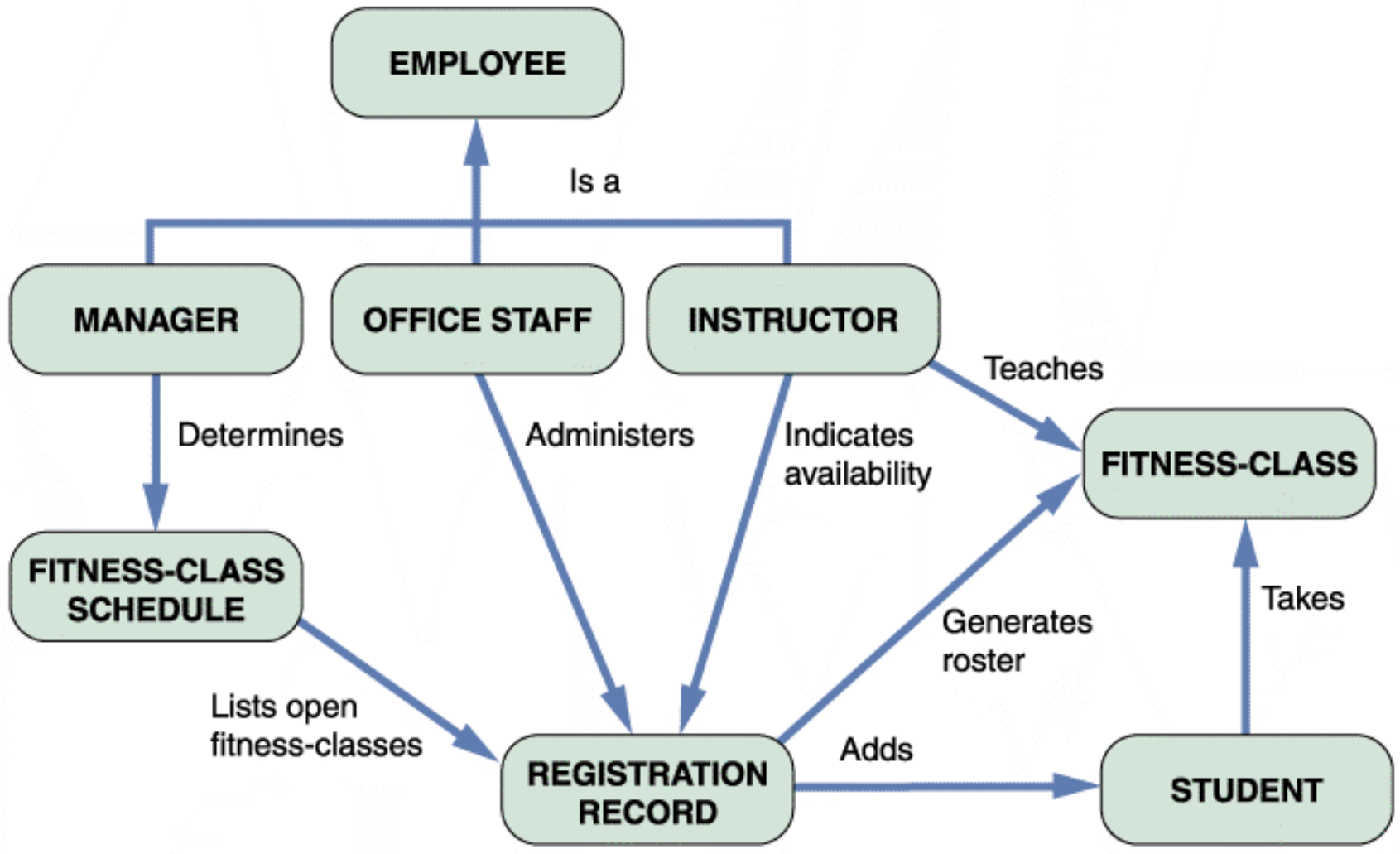
Example: Fitness Center O-O diagram
- EMPLOYEE (superclass) → MANAGER, OFFICE STAFF, INSTRUCTOR (subclasses)
- INSTRUCTOR teaches FITNESS-CLASS
- STUDENT takes FITNESS-CLASS
- REGISTRATION RECORD adds STUDENT, generates roster for FITNESS-CLASS
4.2 Implementation
- Objective: translate object methods into program code modules
- Determine what event or message will trigger each module
- O-O Cohesion & Coupling:
- Classes should be as loosely coupled as possible
- An object's methods should be loosely coupled and highly cohesive
5. Agile Development
- Highly iterative process
- Development team is in constant communication with the primary user (customer)
- Based on quick, nimble development that easily adapts to change
- Focuses on: small teams, intense communication, rapid development iterations
5.1 Extreme Programming (XP)
- Uses pair programming:
- Two programmers work on the same task on the same computer
- One programs while the other watches (and catches errors)
- Test-Driven Development (TDD):
- Focuses on end results from the beginning
- Prevents programmers from straying from goals
- User stories: short, simple requirements definitions written by the customer
Pair programming เหมือน navigator + driver ใน rally — คนขับ code คนนั่งข้างๆ คอย review real-time
5.2 Iterations and Releases
- Teams develop release plans
- User stories are implemented in a series of iteration cycles
- An iteration planning meeting is held at the beginning of each cycle
- Cycles continue until all user stories are implemented, tested, and accepted
6. Coding
- Definition: turning program logic into specific instructions
- Transform program logic into code statements
- Common programming languages: Visual Basic, Python, Java, HTML/XML, JavaScript, Swift
- Integrated Development Environment (IDE):
- Makes it easier to program interactive software
- Provides editing, compiling, debugging in one tool
Swift + Xcode = language + IDE — เหมือนกัน แค่ IDE ต่างกันตาม language
7. Testing
7.1 Pre-Testing Steps
- Program is compiled using a CASE tool or language compiler → detects syntax errors
- Desk checking: programmer manually traces through code → spots logic errors
- Structured walkthrough / Code review: team reviews code together
7.2 Testing Levels
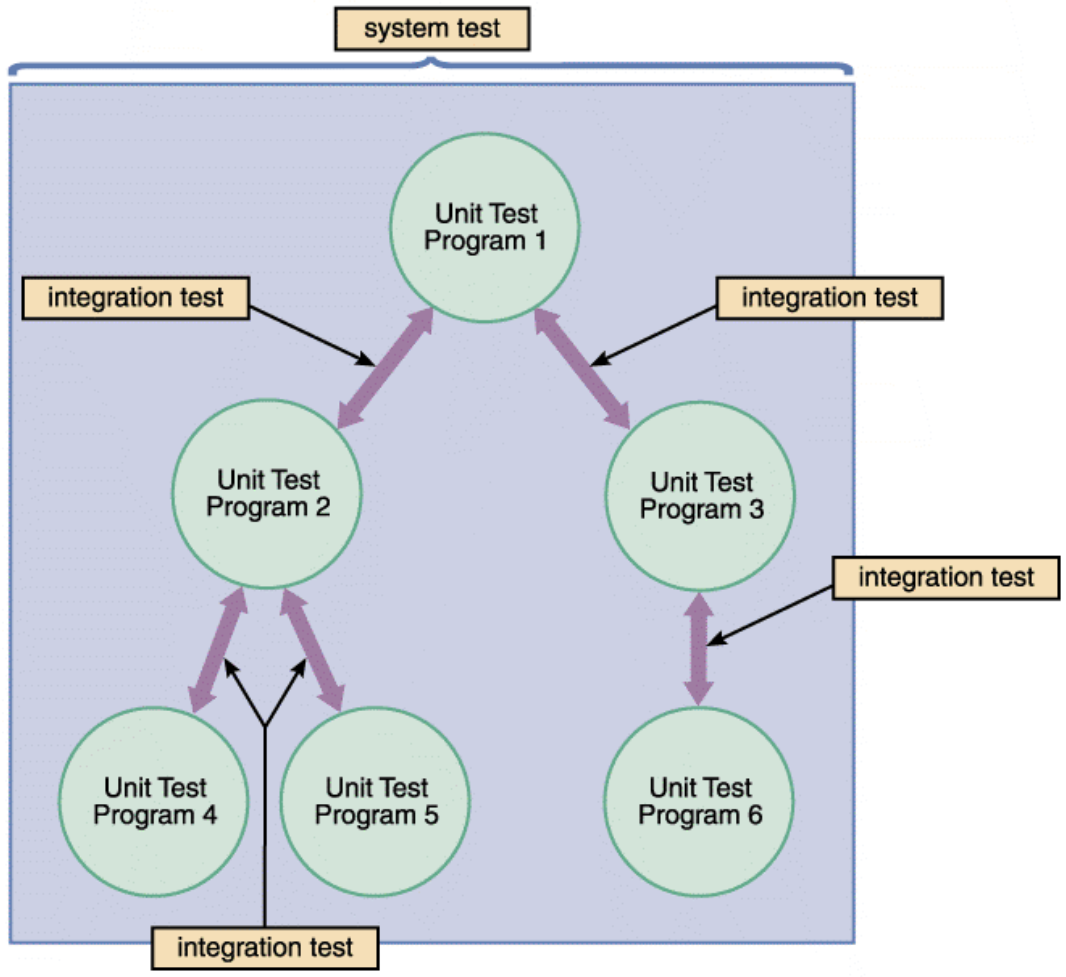
Unit Testing
- Testing of an individual program or module
- Aims to identify and eliminate:
- Execution errors: program crashes or does not run
- Logic errors: program runs but produces wrong output
- Test data should contain both accurate AND erroneous data
Unit Testing เหมือน XCTest ใน Xcode — ทดสอบแต่ละ function แยกกัน
Integration Testing
- Testing two or more programs that depend on each other
- Ensures programs work together properly
System Testing
- Final test of the entire system
- Includes acceptance tests: key to user and management approval
8. Documentation
- Describes an information system and helps users, managers, and IT staff interact with it
| Type | Description |
|---|---|
| Program documentation | Describes inputs, outputs, and processing logic for all program modules |
| System documentation | Describes the system's functions and how they are implemented |
| Operations documentation | Contains information needed for processing and distributing output |
| User documentation | Instructions and information for end users who interact with the system |
| Online documentation | Provides immediate help when users have questions or encounter problems |
User documentation เหมือน README.md หรือ App Store "What's New" — เขียนให้คนไม่รู้ technical เข้าใจได้
9. Installation
9.1 Presenting Test Results to Management
After system testing is complete, present:
- Description of test results
- Status of all required documentation
- Summary of input from users who participated
- Detailed time schedules, cost estimates, and staffing requirements
9.2 Installation Tasks
- Prepare separate operational and test environments
- Perform system changeover
- Perform data conversion
- Carry out post-implementation tasks
9.3 Operational vs. Test Environments
| Environment | Users | Purpose |
|---|---|---|
| Test environment | IT Staff only | Develop and maintain programs |
| Operational environment | End users only | Actual system operation |
- A separate test environment is necessary to maintain security, integrity, and protect the operational environment
- Changes move from test → operational only when authorized
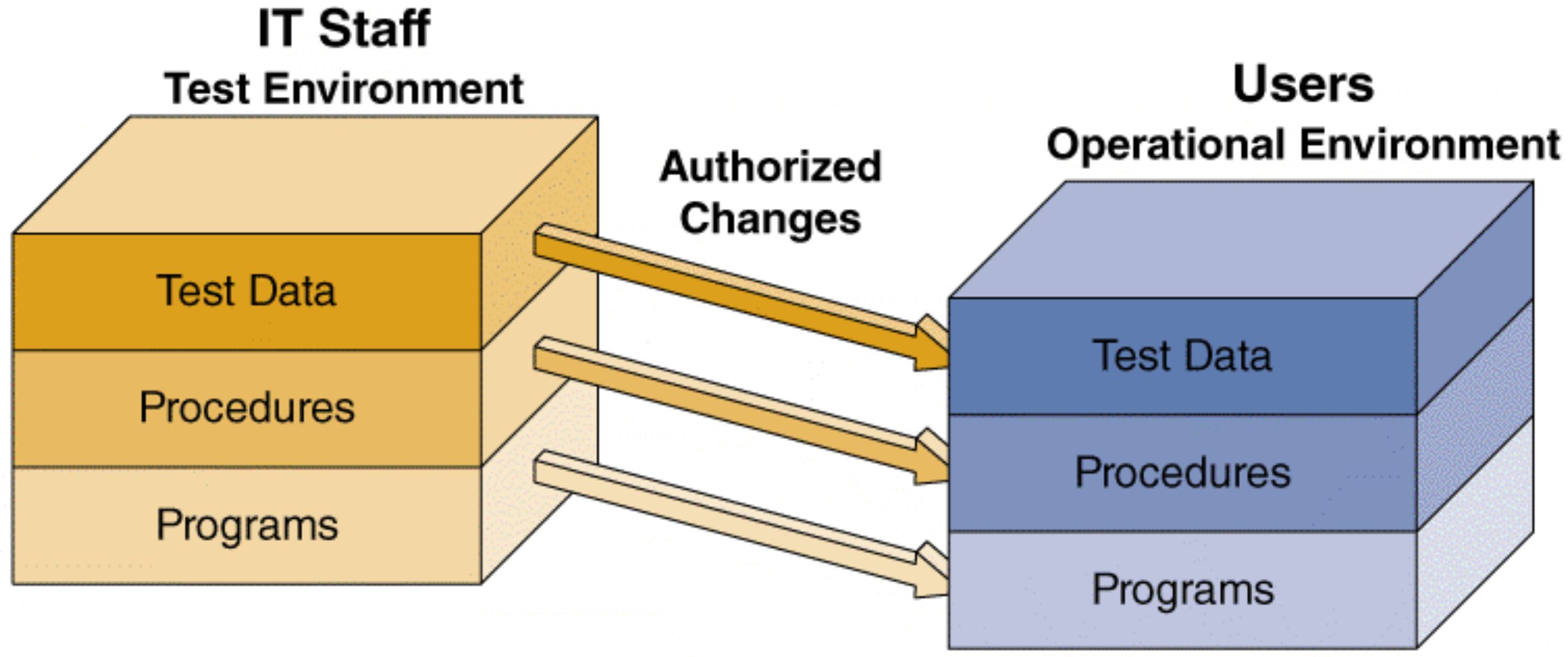
เหมือน staging server vs production server ใน DevOps — ห้าม push to production โดยไม่ผ่าน staging
9.4 System Changeover Methods
Definition: putting the new information system online and retiring the old system
Direct Cutover
- Switch from old to new immediately when new system becomes operational
- Least expensive changeover method
- IT only maintains one system at a time
- Risk: HIGH — no fallback if new system fails
Parallel Operation
- Both old and new systems operate fully for a specified period
- Advantage: lower risk — old system acts as backup
- Disadvantage: not practical if old and new systems are incompatible
- Cost: HIGH
Pilot Operation
- Implements the complete new system at a selected location (pilot site)
- Pilot site uses the new system first → reduces risk of widespread failure
- Less expensive than parallel operation
- Risk: MEDIUM
Phased Operation
- Implements the new system in stages/modules
- Combines direct cutover and parallel operation
- Only part of the system is given to all users at a time
- Risk of errors limited to the implemented module only
- Less expensive than full parallel operation
- Risk: MEDIUM
Risk vs. Cost Summary
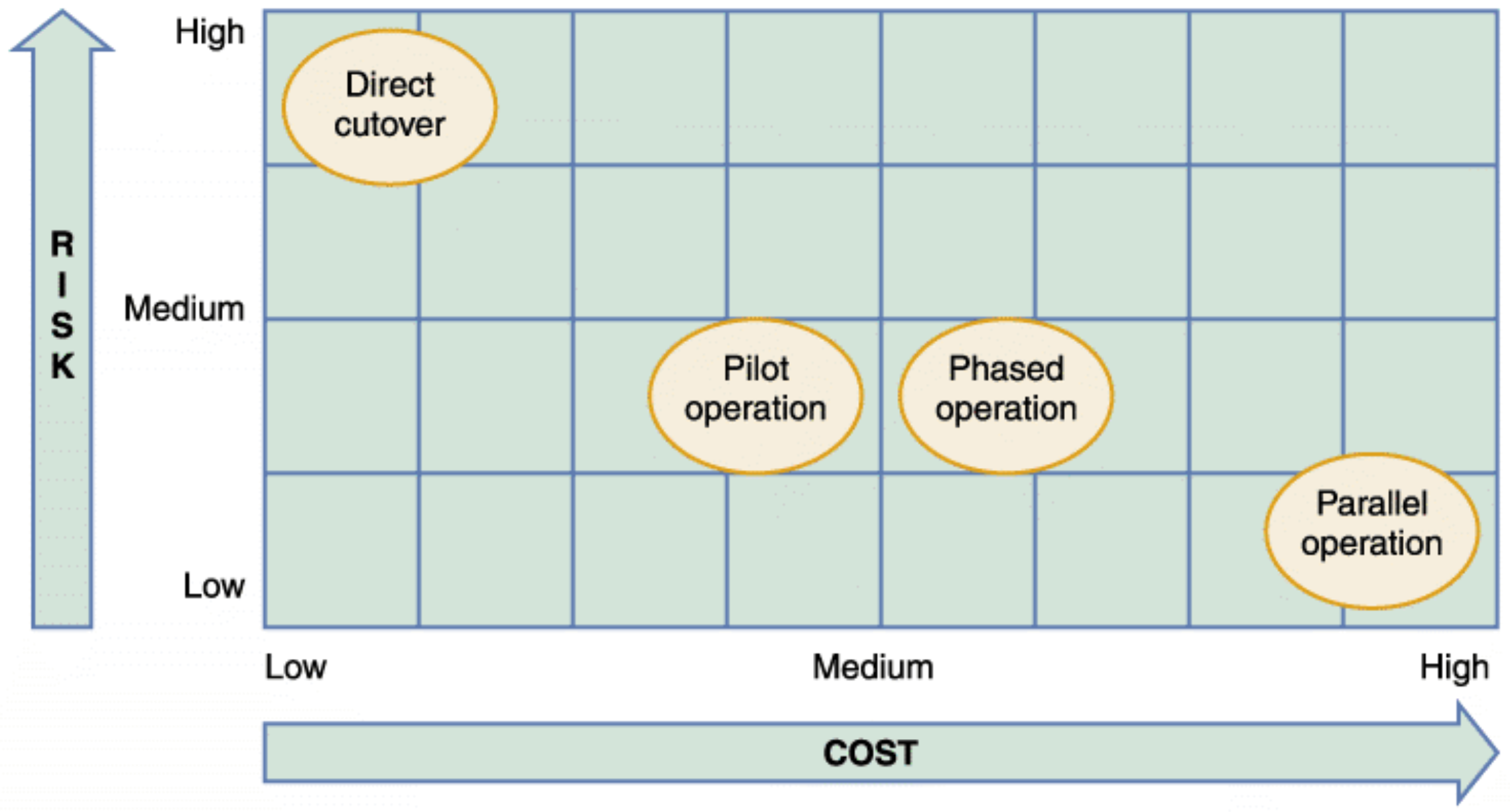
| Method | Risk | Cost |
|---|---|---|
| Direct Cutover | 🔴 High | 🟢 Low |
| Pilot Operation | 🟡 Medium | 🟡 Medium |
| Phased Operation | 🟡 Medium | 🟡 Medium |
| Parallel Operation | 🟢 Low | 🔴 High |
9.5 Data Conversion
- Definition: process in which existing data is loaded onto a new system
- Strategies:
- Automate the conversion process if possible
- Old systems may export data in ASCII or ODBC (Open Database Connectivity)
- If no standard format → develop a custom extraction program
- Security & Controls during conversion:
- Maintain strict input controls
- Ensure system control measures protect data from unauthorized access
- Ensure error-free data is fed into the new system
9.6 Training
Training Plan
- Identify who should receive training and what training is required
- Observe the organization to determine how the system will support operations
- Main groups for training:
- Users
- Managers
- IT Staff
Training Methods
| Method | Description |
|---|---|
| Vendor training | Required if system includes purchased hardware/software |
| Webinars, podcasts, tutorials | Web-based training options |
| Outside training | Viable alternative if vendor training is not practical |
| Interactive training | Effective, self-paced, multimedia-based |
Training Tips
- Train people in groups, with separate programs for distinct groups
- Select the most effective place to conduct training
- Provide learning by hearing, seeing, and doing
- Rely on previous trainees to help new ones
- Effective training is interactive, self-paced, and multimedia-based
Online Training
- Sophisticated training systems offer interactive sessions
- Include a reference section in training materials
- Conduct a full-scale test or simulation after training is complete
9.7 Post-Implementation Tasks
- Prepare a post-implementation evaluation: assesses overall quality of the new system
- Deliver a final report to management: marks the end of systems development work
- Includes final system documentation
- Describes any future system enhancements already identified
- Details project costs
Summary
| Topic | Key Point |
|---|---|
| Quality Assurance | Avoid/identify problems early; CMM has 5 levels; ISO 9000-3 is the QA framework |
| Application Development | Translate design into working code modules using structured, OO, or agile methods |
| Structured Development | Use structure charts; aim for high cohesion and loose coupling |
| OO Development | Use class diagrams and object-relationship diagrams; loosely couple classes |
| Agile Development | XP uses pair programming, TDD, and user stories; iterative cycles |
| Coding | Translate logic into code using IDE and appropriate language |
| Testing | Unit → Integration → System testing; use both valid and invalid test data |
| Documentation | Program, System, Operations, User, Online documentation |
| Installation | Separate environments; choose changeover method; convert data; train users; post-implementation eval |