A Computer System
A computer system consists of four layers:
- Computer hardware (CPU, RAM, etc.)
- Operating system (OS)
- Application programs (MS Word, Pages, etc.)
- Users
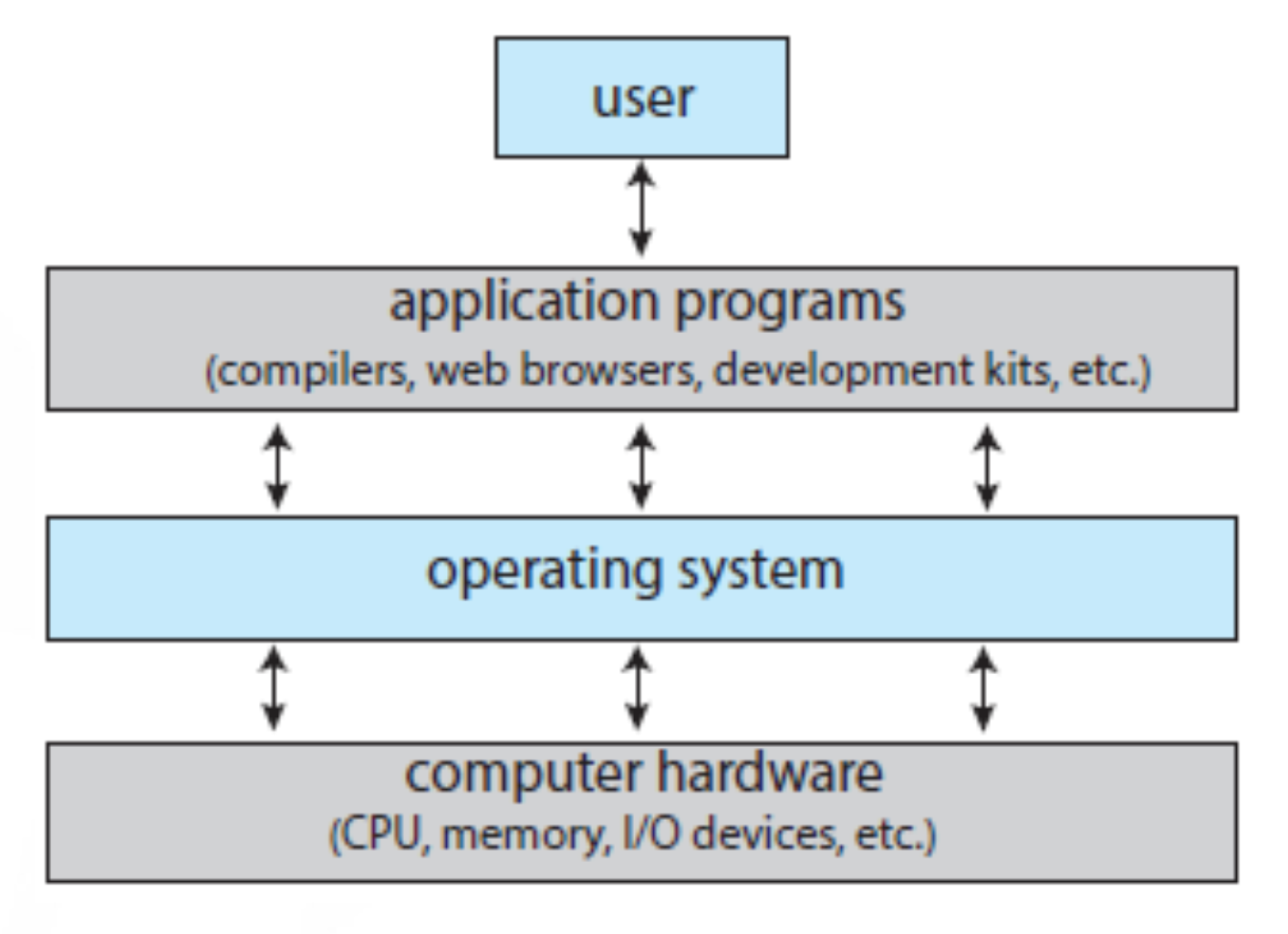
- Arrow ใน Diagram นี้หมายถึง Interaction ระหว่างต่าง ๆ แต่ก็สังเกตอย่าง Application Program ก็ไม่สามารถ Interact กับ Computer Hardware ได้โดยตรง
- อย่างถ้าสมมติจะ Print งานใน Pages → เราก็ต้องกดปริ้นเพื่อส่งไฟล์ให้ macOS (make request to the OS) ก่อน → จึงจะเชื่อมต่อไป Printer ได้
- OS เป็นคนเดียวจะรู้ว่าเชื่อมต่อกับ Printer ยังไง command เป็นแบบไหน โดยที่ Pages ไม่ต้องรู้ถูกมะ! (OS ก็มี Software Driver ซึ่งบางครั้งเราก็อาจต้อง install เอง)
- Apps communicate with the OS through APIs.
Programs use hardware via OS.
- Basically, computer consist of 2 main components, hardware and software. (เหมือนคนที่อาจารย์บอกมี Body + Soul ohhh~)
- Application Programs หมายถึง Software อะไรก็ตามที่อยู่บนเครื่อง แต่ที่ไม่ใช่ OS!
- แม้ว่า Python Script ก็ถือว่าเป็น Program นะ!
Roles of the Operating System
Since many apps share limited resources (e.g., 4 CPU cores, 16GB RAM, 1 monitor), the OS manages them— เดี๋ยวจะคุยอีกทีใน 01 Introduction to OSs
Two Main Roles of an OS:
-
Resource/Hardware Management 🛠️
- The OS manages and allocates hardware resources efficiently and fairly.
- Example: A MacBook has 16GB RAM and 1TB SSD, but it might run 100+ apps simultaneously.
- A single hardware resource can only be used by one process at a time.
-
Services 🏗️
- The OS acts as an interface between applications/users and hardware.
- Since an app cannot access hardware directly, it relies on the OS to do so.
A Review of Computer Hardware and Mechanisms
Computer-Hardware Organization
A computer hardware system consists of five fundamental components:
-
CPU(s)
-
Memory
-
Device controllers
-
I/O devices
-
System bus (interconnects the components)
-
Each device controller manages its own I/O devices.
-
A device driver is software that enables the OS to communicate with the device controller.
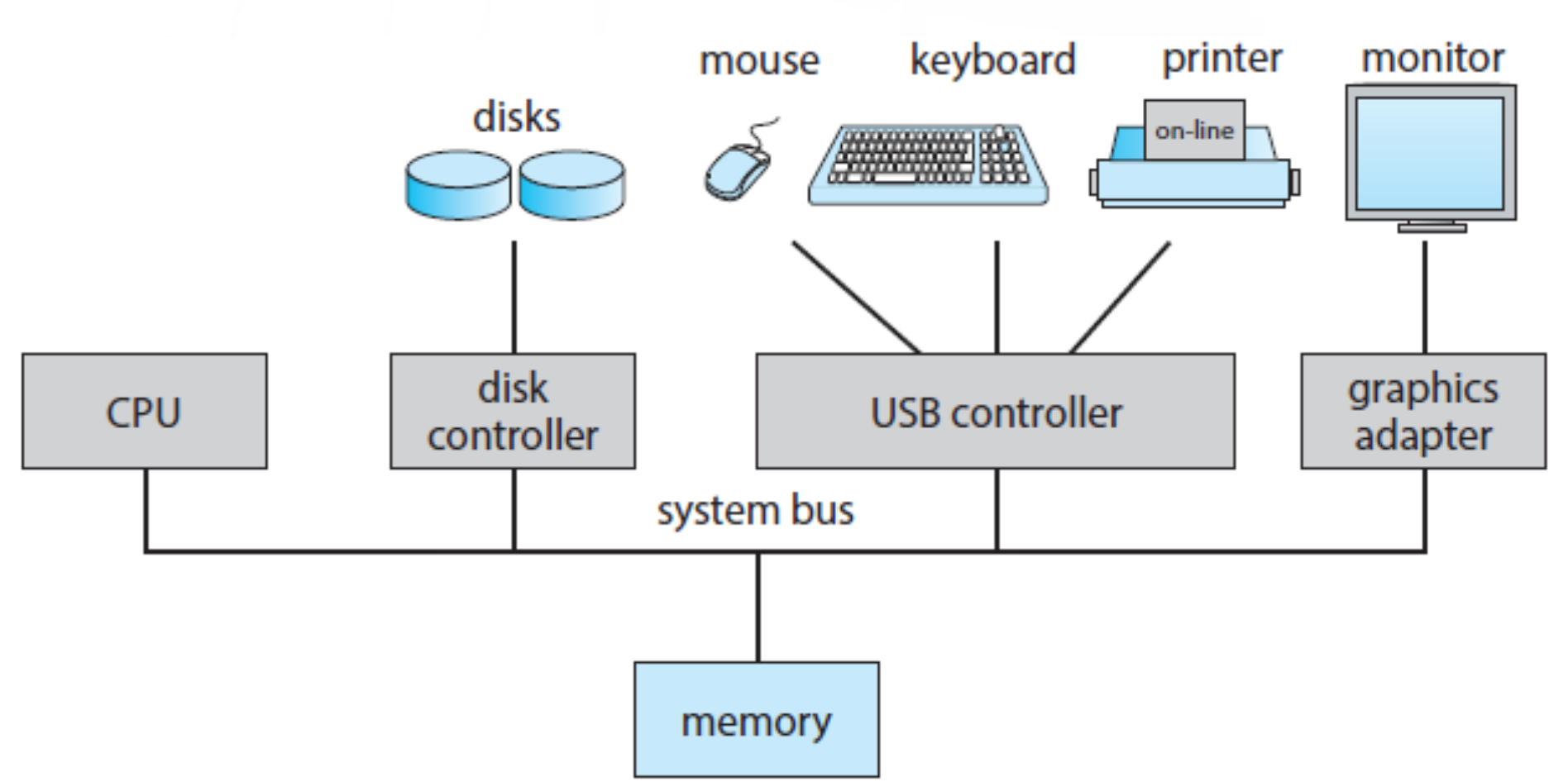
The main task of a CPU is to execute instruction.
- If the CPU has instructions to process, it is busy.
- If there are no instructions, it is idle.
Memory vs. Storage
- Memory (RAM) stores instructions temporarily while a program is running.
- Hard disk (or SSD) stores programs, data, and files permanently.
What happens when we run a program?
- The hard disk contains multiple applications. When we open an app, it converts into a set of machine instructions (process).
- These instructions are stored in main memory (RAM).
- The CPU fetches and executes the instructions, displaying the program output.
Key Components
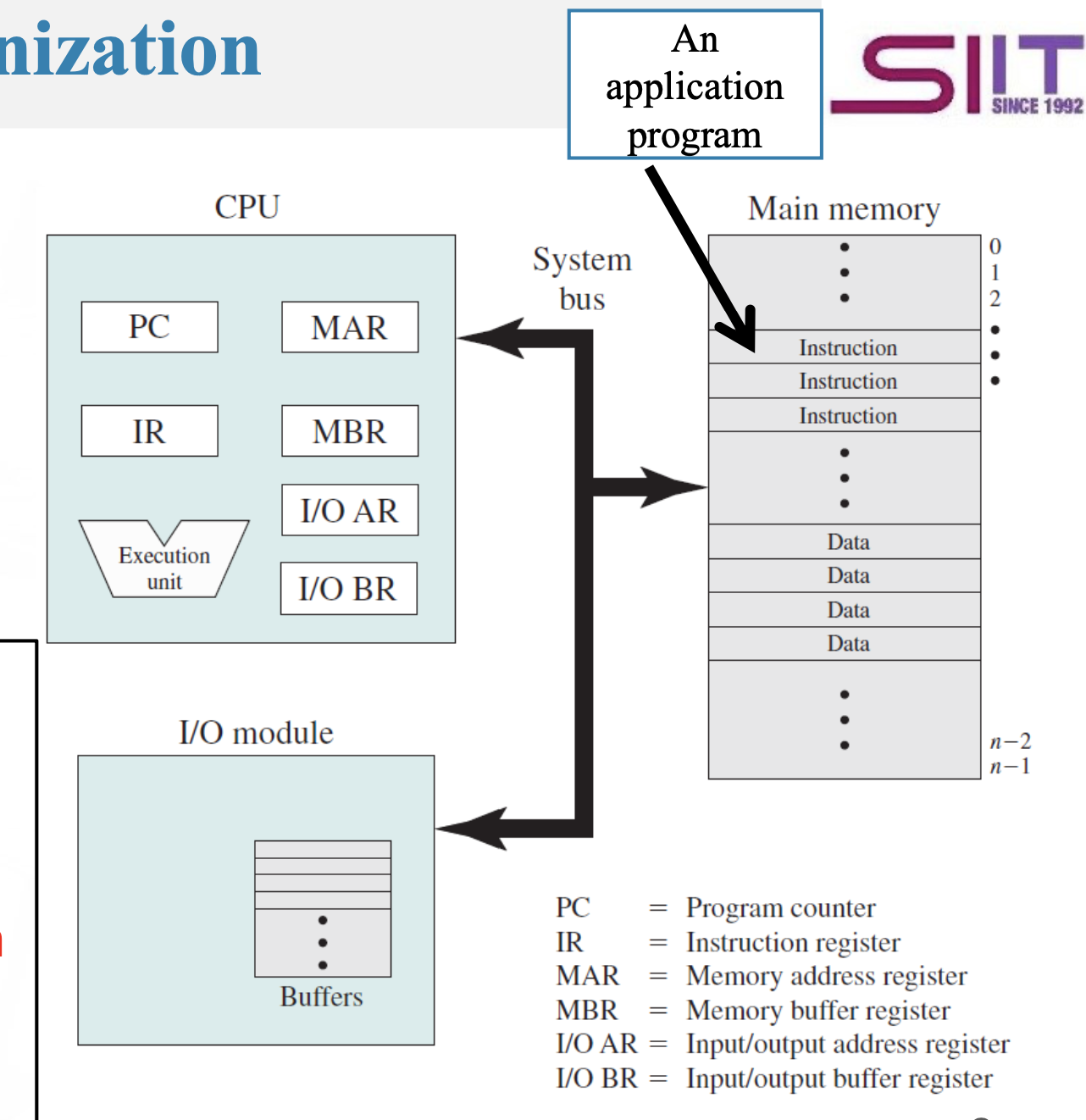
- Processor (CPU): Executes instructions and manages computations.
- Main Memory (RAM): Temporarily stores data and program instructions. Volatile—data is lost when power is off.
- I/O Modules: Facilitate data exchange between the computer and external devices (disks, keyboards, network devices, etc.).
- System Bus: A communication pathway between the processor, memory, and I/O modules.
CPU Cores
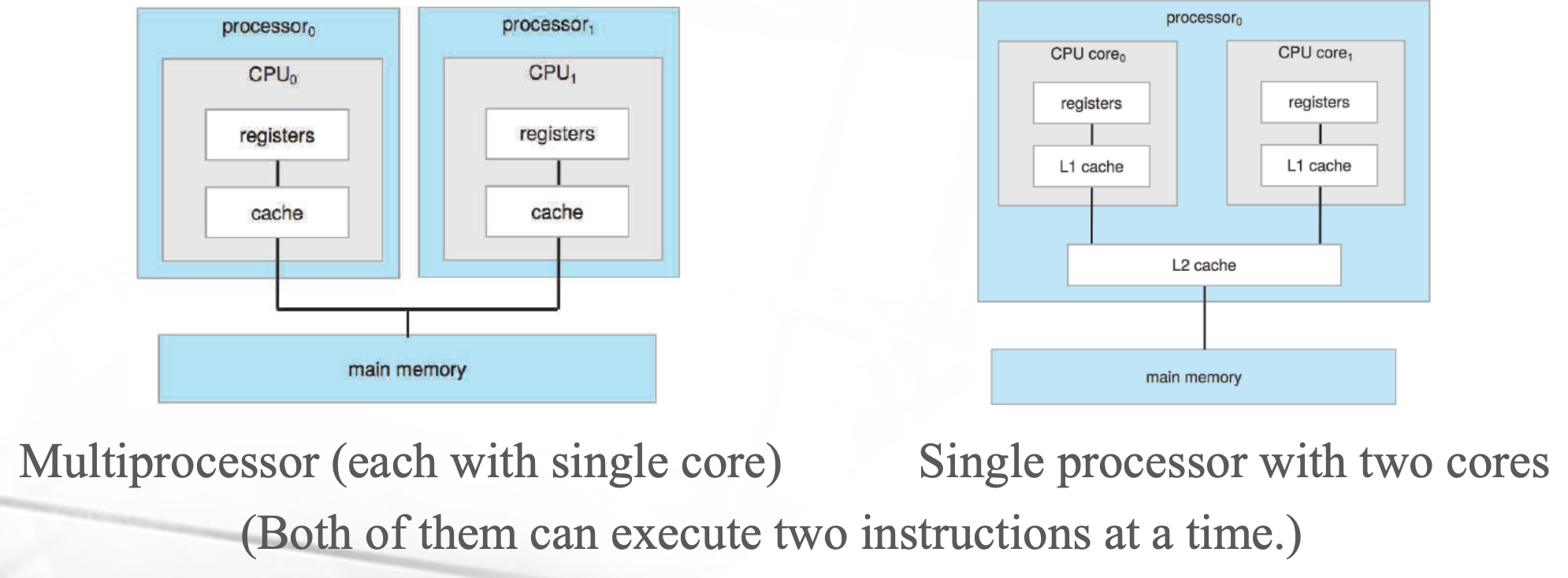
- A processor may have one or multiple cores.
- A core is the basic execution unit of a CPU.
- If a CPU has N cores, it can execute up to N instructions simultaneously (parallelism).
Think of a CPU core as a calculator—it processes calculations just like a calculator does.
- Example:
Programs in the Computer
Programs exist in two main forms:
- Source code: Human-readable code written in a programming language (e.g., Python, C).
- Binary (machine code): A low-level format that the CPU understands.
- A compiler converts source code → machine code before execution.
The two meanings of the term program are normally considered synonymous, since the step of compiling and linking converts source code into semantically equivalent binary machine code.
Running a Computer = Creating a Process
A process is an executing instance of a program.
Steps when running a program:
- The application (stored on disk) is loaded into main memory as a set of instructions.
- The CPU fetches and processes instructions from memory.
- Execution results are sent to memory or I/O devices.
A process = an executing program (or part of it).
CPU Operation: The Basic Instruction Cycle (Von Neumann Model)
A computer functions by having the CPU execute machine instructions.
- A program is a sequence of instructions.
- The CPU reads and executes these instructions.
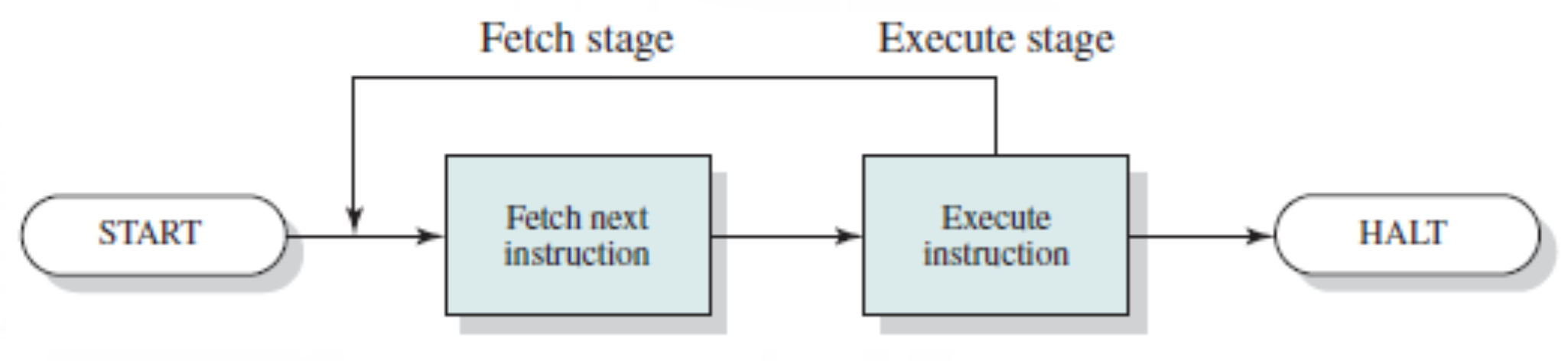
Two Stages of Execution:
- Fetch Stage:
- The CPU fetches an instruction from memory (address stored in the Program Counter (PC)).
- The instruction is stored in the Instruction Register (IR).
- Instructions are represented in binary format that the processor understands.
- Execution Stage:
- The CPU decodes and executes the instruction.
- The result is stored in memory or outputted via I/O devices.
Introduction to Hardware Interrupts
Overview
- Interrupts: Signals sent to the CPU to indicate that a job has finished.
- Effect on UX: Makes it seem like multiple tasks run in parallel (even though they don’t— จริง ๆ คือไม่ใช่นะะะ!).
Nature of Running a Program
A program involves two main tasks:
- Computation – CPU executes instructions.
- I/O Operations – Devices work according to instructions.
- I/O devices are much slower than CPUs.
- A 3.9 GHz CPU processes ~3.9 billion instructions per second, so waiting for I/O is inefficient.
I/O Mechanisms (3 Steps)
- An I/O device mechanism consists of three parts: (ยังไงนะ 3 steps คือไรนะ)
- I/O Request (labeled as 4): CPU executes a set of instructions to control this I/O device,
- make request to use monitor
- I/O Command (I/O working): the I/O device can work by itself,
- show the answer?????
- We don’t need the CPU in this step! → CPU is going to be idle (we don’t want this!)
- I/O Operation Complete (labeled as 5): CPU execute a set of instructions to complete the I/O operation.
- หรือ Step นี้เรียกว่า Termination
- สำคัญนะ เพราะเป็นการ Release Device, เพราะว่าหน่วยอื่นก็ต้องการใช้ต่อเหมือนกัน
- I/O Request (labeled as 4): CPU executes a set of instructions to control this I/O device,
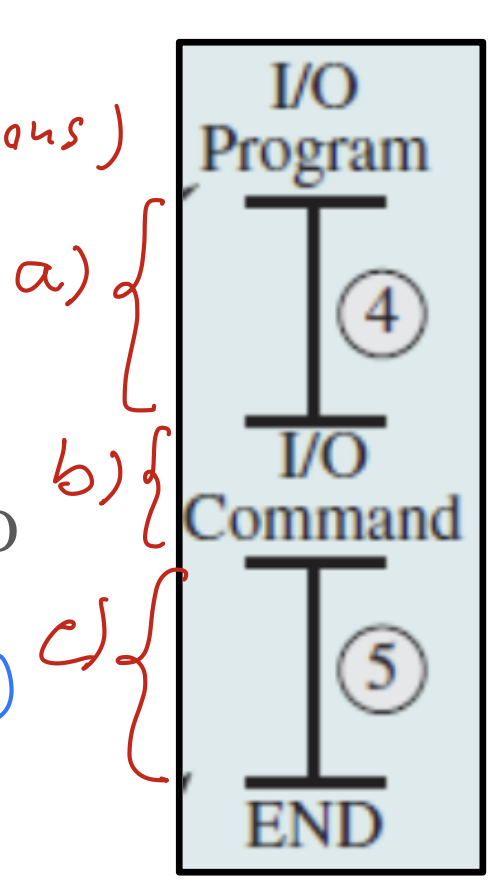
When work with an I/O device, there will be the time that we do not need a CPU, such that we can run the program faster
Should we assign the CPU to execute another set of instructions?
Example without Interrupts
Hardware Interrupts
- Definition: A technique where hardware (e.g., I/O devices) sends a signal to inform the CPU that its job is done.
- Purpose: Increases CPU utilization by preventing idle time.
- How it helps:
- Prevents CPU from waiting for slow I/O devices.
- Allows switching to another task while I/O processing happens.
- Uses an interrupt signal to notify the CPU when I/O is done.
Example with Interrupts
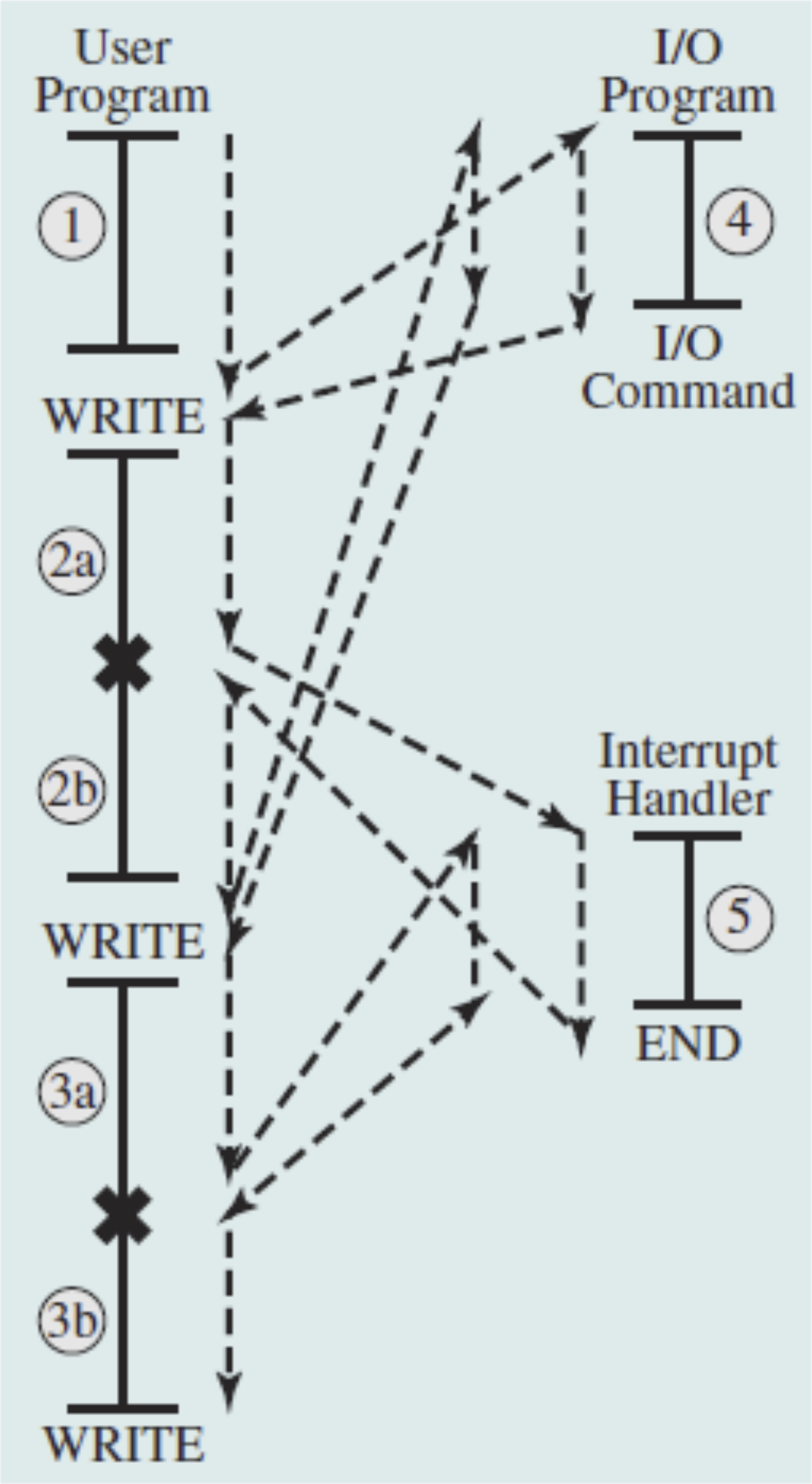
- While executing an I/O command, the CPU continues running user program instructions.
- When the I/O device is ready, it sends an interrupt request to the CPU. (located as the point x)
- The CPU temporarily stops the user program to handle the interrupt.
- Once done, the CPU resumes the suspended program.
Timing Diagram Comparison
Using interrupts reduces execution time, making programs complete faster.
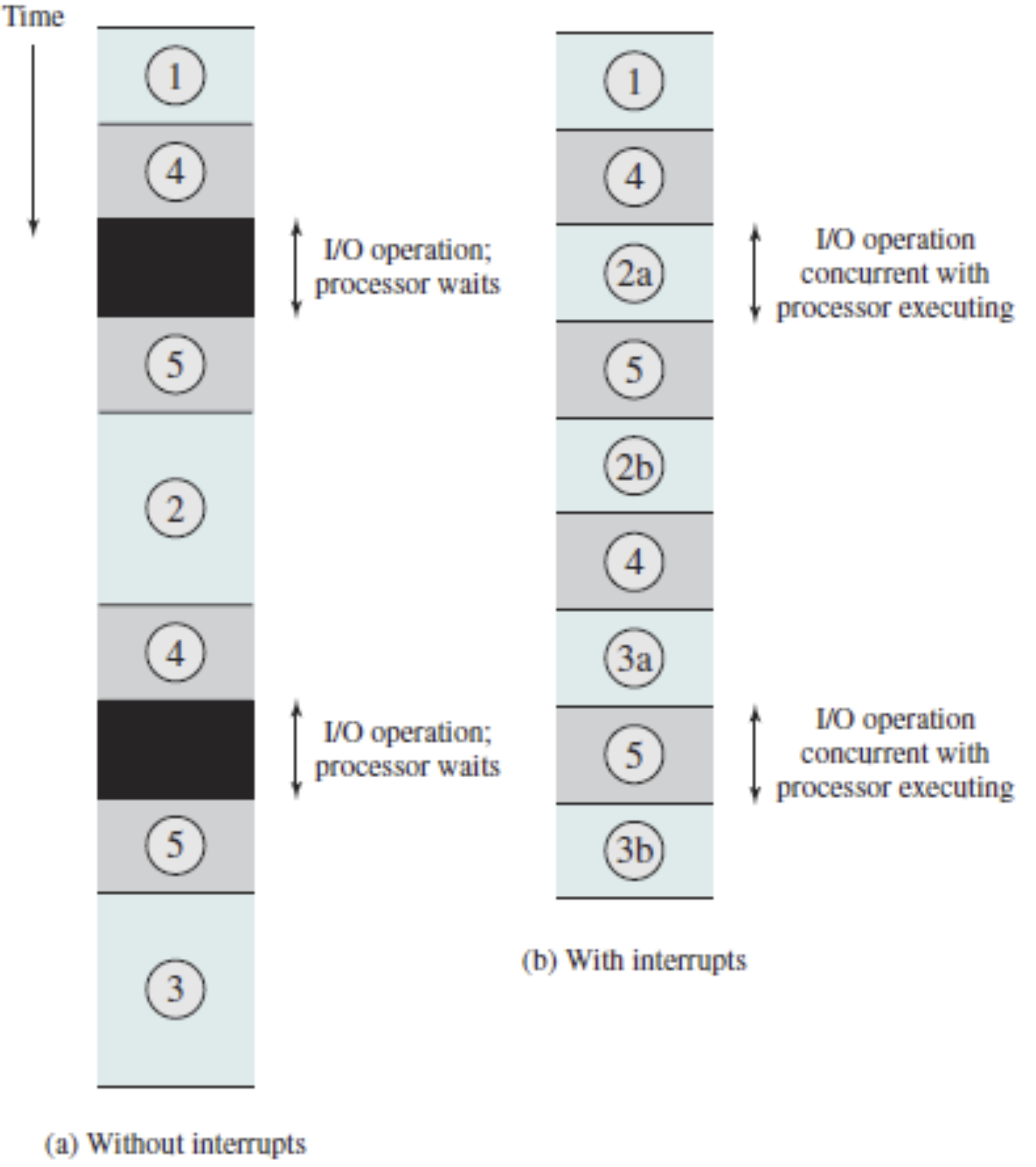
The dark areas in the diagram show wasted time when interrupts aren’t used.
Storage Structure
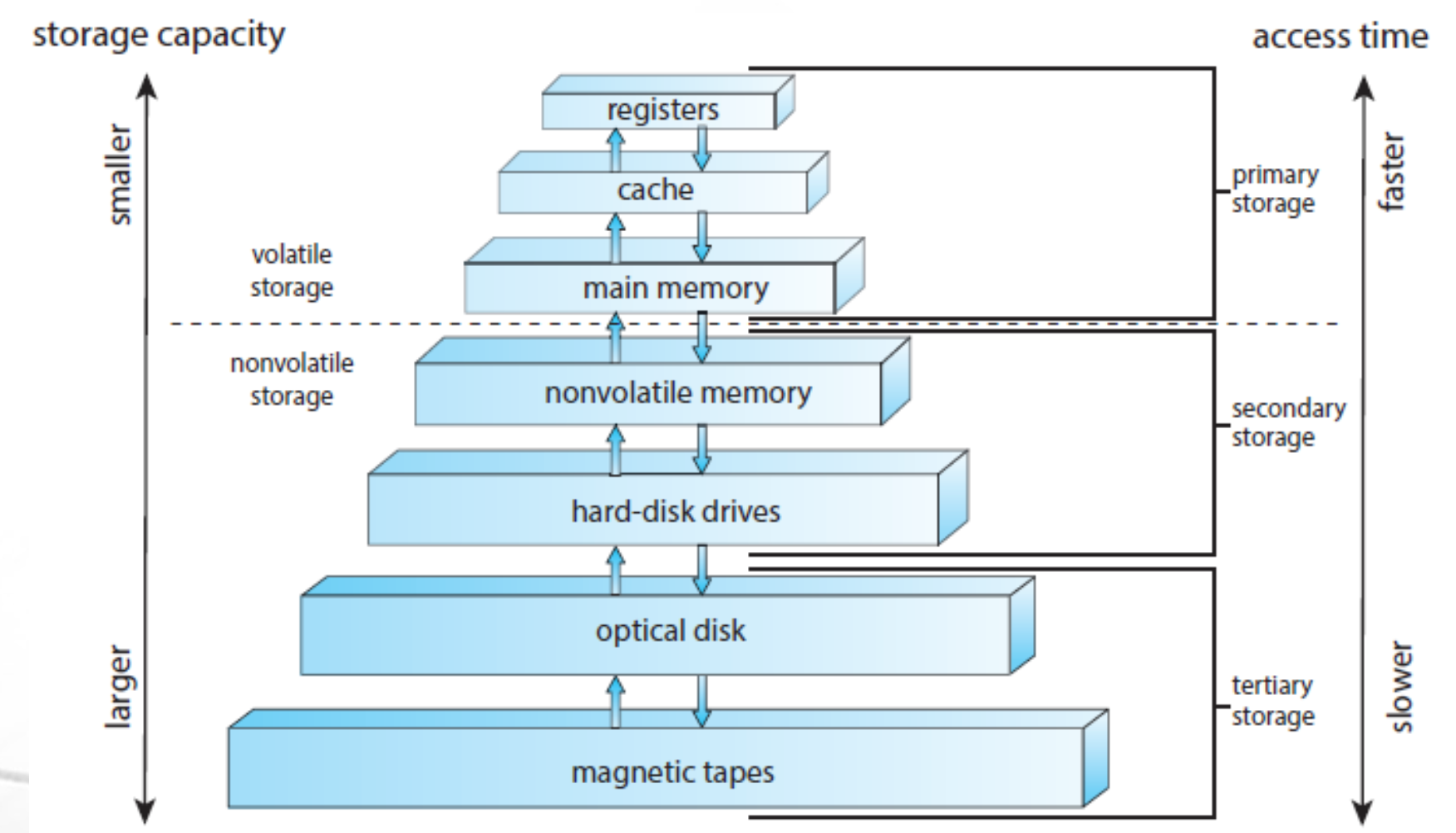
Types of Storage
- EEPROM: Stores the bootstrap program (loads the OS on startup).
- Main Memory (RAM, cache, registers):
- Stores active instructions and data.
- Volatile – loses content when power is off.
- Secondary Storage (HDD, SSD):
- Stores OS, applications, and user data.
- Nonvolatile – retains data when power is off.
- Tertiary Storage (CD-ROMs, tapes, etc.):
- Used for backup or specialized purposes.
- Nonvolatile – retains data when power is off.
- Four types of storages (to store program/software/OS/data) are available.
Storage Hierarchy
- Organized based on speed, cost, and capacity.
- Fastest (registers, cache) → Slowest (tapes, external drives).
Direct Memory Access
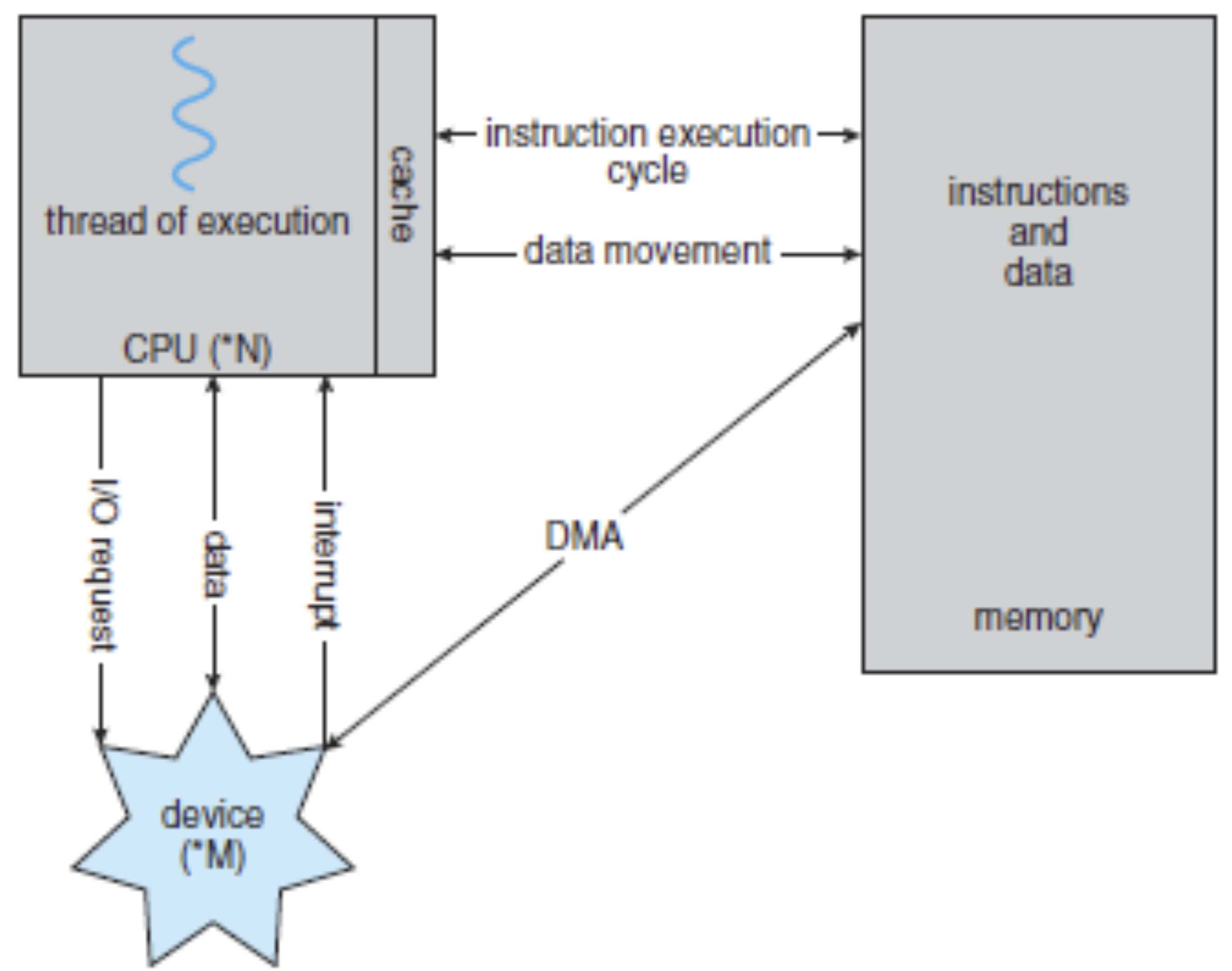
- In a conventional method, the CPU transfers data between an I/O device and memory by executing a series of instructions.
- Direct Memory Access (DMA) allows a DMA controller (hardware device) to handle data transfer without CPU intervention.
- Frees up CPU for other tasks, improving efficiency. (Let CPU handle other tasks)
Booting a Computer System: Starting the Operating System
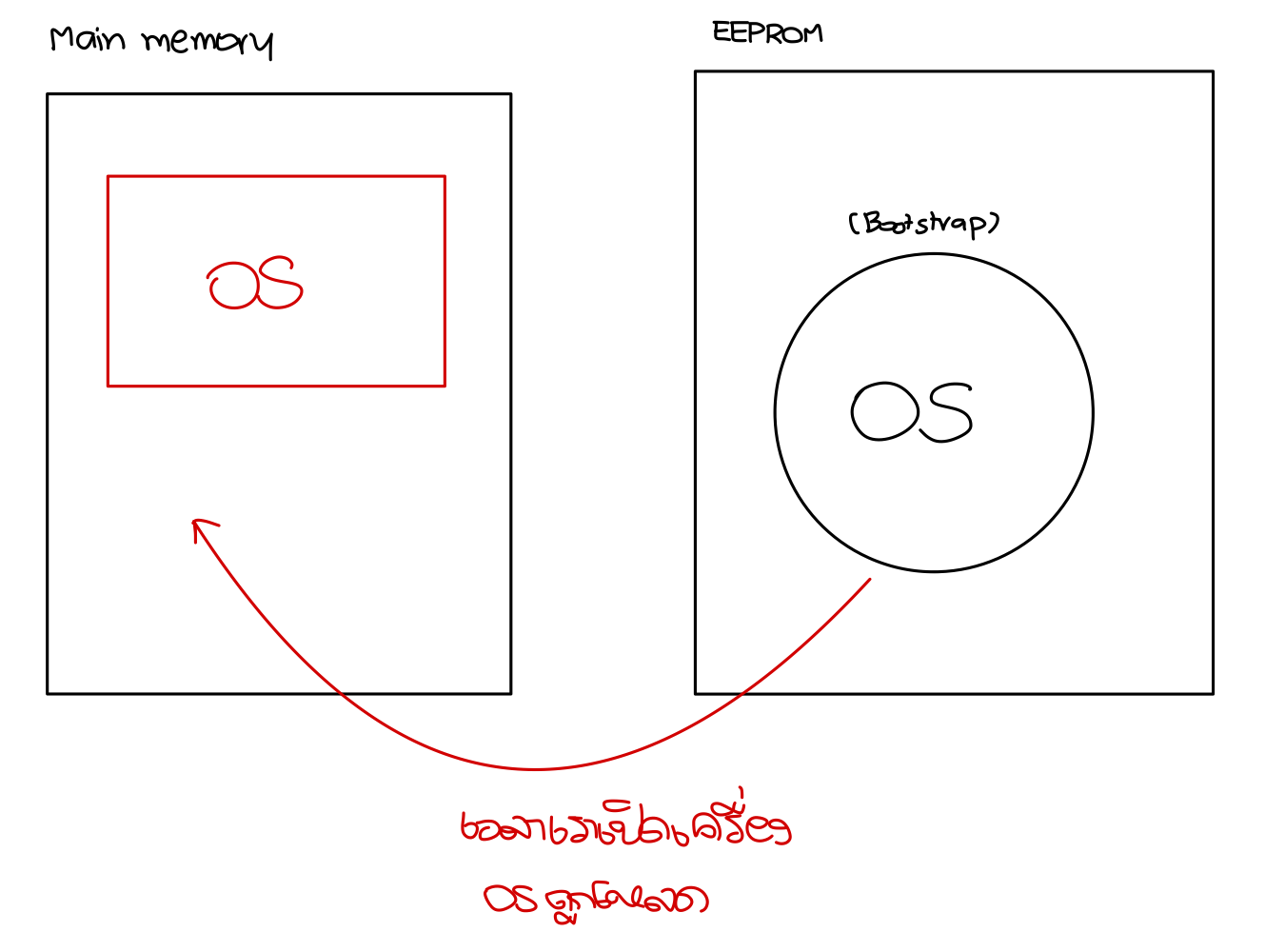
When pressing the power button to turn on the system:
- The bootstrap program in EEPROM:
- Activates system components (CPU, registers, memory, I/O controllers).
- Loads the operating system kernel into main memory.
- The CPU executes the OS kernel, making the system ready for use.
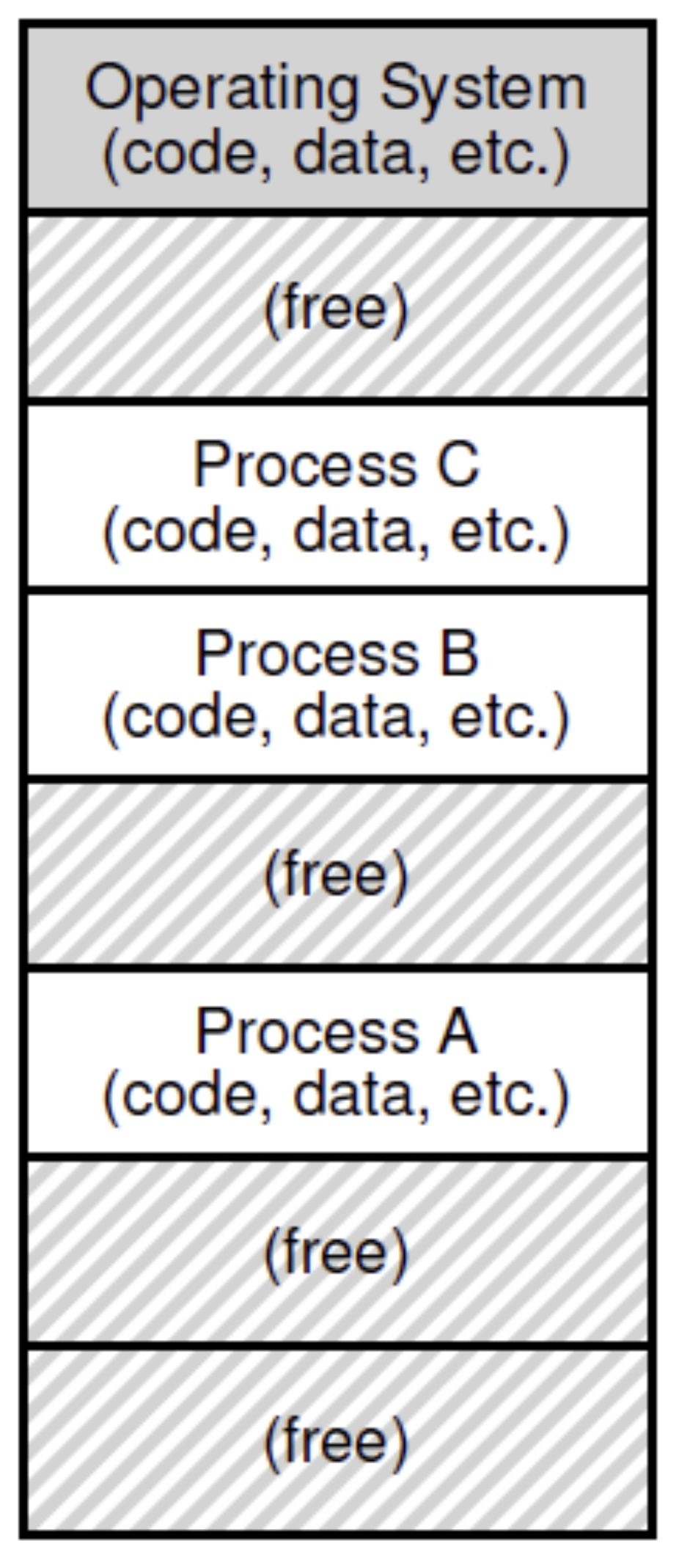
- When running an application, the OS converts it into a process stored in memory.
Operating Systems
An operating system (OS) is software that acts as an interface between hardware and application programs while managing hardware resources.
- Large and complex (millions of lines of code, mostly in C/C++).
- Examples: macOS, Windows, Linux, Unix.
What an Operating System Does
The OS has two main roles:
1. System View (Hardware Resource Manager)
- Determines which programs execute on the CPU and for how long.
- Manages main memory allocation.
- Controls I/O device access.
- Regulates file system access.
2. User/Developer View (Interface for Programs)
- Provides system calls (libraries/utilities) to interact with hardware.
- Application developers use these APIs instead of writing machine-level code.
- The OS interacts with hardware on behalf of applications.
Abstractions in an Operating System
The OS provides abstractions to simplify complex hardware operations:
- Process – A running program.
- Address space – Memory allocated for a process.
- File – A representation of stored data (e.g.,
.docx,.png).
A file is actually a sequence of binary numbers (
0110110000111...) split into segments and stored in different locations on a disk. The OS manages this process.
OS Kernel and System Programs
The modern operating system generally consists of two parts:
1. OS Kernel (Core Module of OS)
- Loaded into main memory during boot (via bootstrap program).
- Stays in memory until shutdown.
- Manages CPU, memory, I/O, and networking.
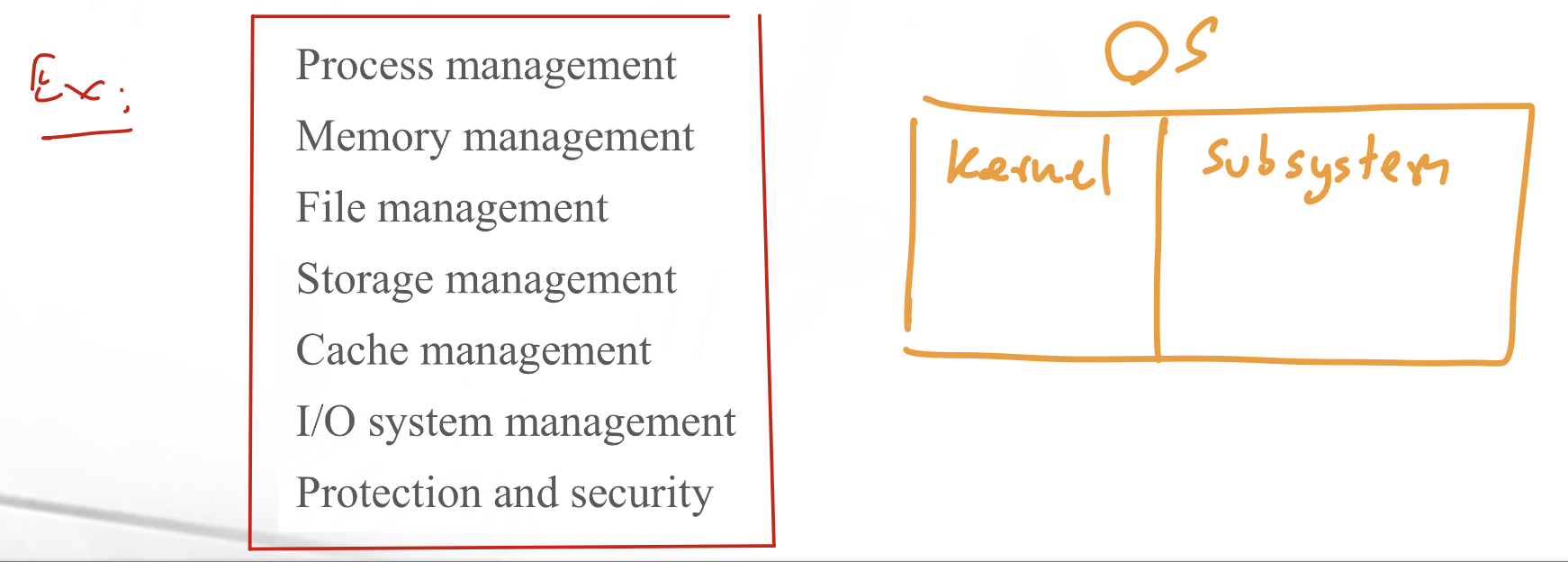
2. System Programs (User-Level OS Services)
- File Management: Create, delete, copy, rename files.
- Status Information: Provides system performance, logging, and debugging info.
- Communications: Enables inter-process, user, and network communication.
Operating-System Operations
Multiprogramming and Multitasking
One of the most important aspects of operating systems is the ability to run multiple programs. To achieve this, the operating system (OS) loads multiple processes (a process is a section of a user program) into the main memory and executes them.
- Multiprogramming: The capability to ==load multiple processes and store them in the main memory.==
- Multitasking (Time-Sharing, Concurrency): The capability to run multiple processes by using time-sharing. The CPU frequently switches between executing different processes, allocating a short execution time (time slice) to each.
- Execution occurs in a sequential manner. ก็คือไม่ได้ parallel นั่นเอง แต่มัน switch เร็วจนกระทั่งเหมือนว่าทำไปควบคู่กัน
Dual-Mode Operation
Computers operate in two modes:
- Kernel Mode (0): The OS runs in kernel mode (also known as supervisor mode), allowing it to access all hardware and execute all instructions with full control over the computer.
- User Mode (1): User/application programs run in user mode, where they are restricted from executing certain privileged instructions that control hardware.
How Can a User Program Use Hardware?
To interact with hardware, a user program must go through the OS by making system calls.
- User Mode: Application programs operate in user mode. When they need to perform a privileged operation (e.g., modifying hardware settings), they issue a system call.
- Kernel Mode: The OS operates in kernel mode and handles system calls, it will continue this job instead of the user program.
Reasons for Dual-Mode Operation:
- Prevents user applications from misusing system components.
- Privileged operations (such as hardware control) are restricted to the OS.
System Call: A CPU instruction that requests the OS to perform a privileged task.
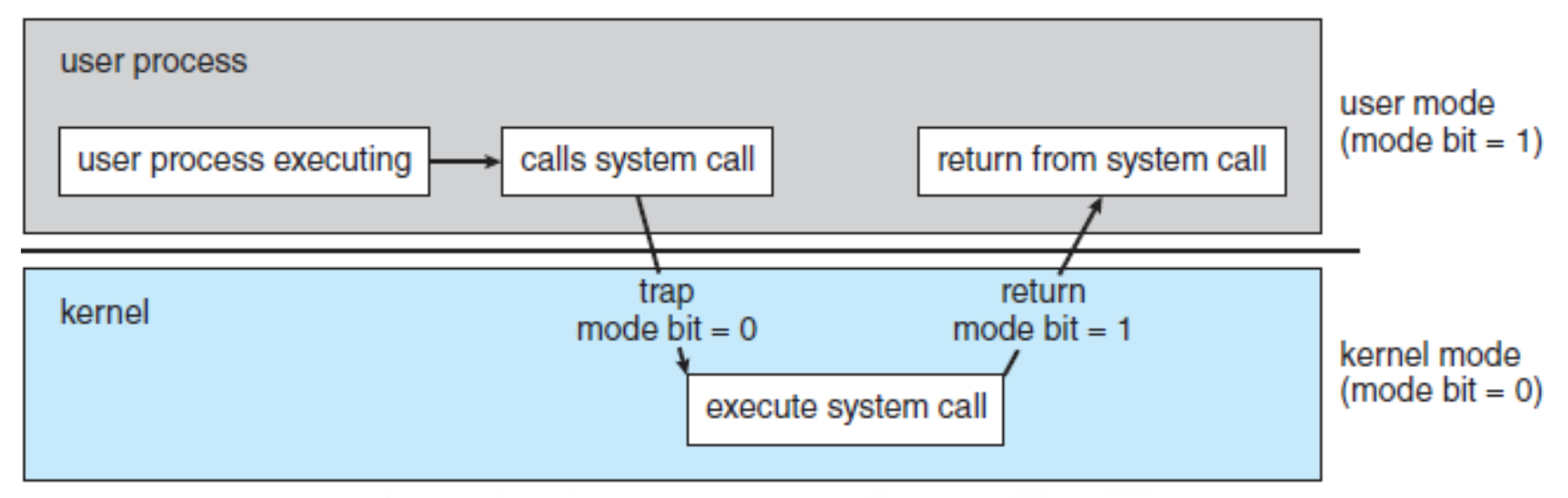
- System Call: Allows a user program to request privileged tasks from the OS.
- Trap (Software Interrupt): An exception that causes the system to switch from user mode to kernel mode.
- API (Application Programming Interface): A set of commands/functions provided by the OS to allow user applications to interact with hardware.
System call = when the CPU executes an instruction related to privileged job.
Context Switching
With multiprogramming and multitasking, the CPU frequently switches between processes, a mechanism known as context switching.
Context Switching Triggers:
- Hardware Interrupts: Signals sent by an I/O controller.
- Software Interrupts (Traps): Triggered when an error occurs or when a user program makes a system call.
- Timer Interrupts: To prevent indefinite execution, the processor allocates each process a fixed time slice. Once the time expires, a timer interrupt signals the OS to switch processes.
OS Role 1: Resource Management
The OS is responsible for managing various resources within the computer system:
- Process Management
- Memory Management
- File Management
- Storage Management
- Cache Management
- I/O System Management
- Protection and Security
We will explore some of these topics in future lectures.
Process management
The OS is responsible for:
- Creating and deleting user/system processes.
- Scheduling processes and threads on the CPU.
- Suspending and resuming processes.
- Providing mechanisms for process synchronization.
- Enabling inter-process communication.
Memory management
Main memory (RAM) is essential for computer operation. It consists of a large array of bytes, each with a unique address. The CPU can only process data from disk after it has been transferred into memory.
The OS handles:
- Tracking memory usage.
- Allocating and deallocating memory.
- Deciding which processes and data to move in/out of memory.
- Managing address space for each process.
File management
A file is an abstraction provided by the OS to organize and manage data storage conveniently.
The OS handles:
- Creating and deleting files.
- Organizing files into directories.
- Providing operations for file manipulation.
- Mapping files to mass storage.
- Managing backups on non-volatile storage.
I/O system management (Lecture 10)
Computers use various input/output devices (keyboards, monitors, printers, etc.), which require OS management.
- The OS includes an I/O subsystem to manage these devices.
- Some I/O devices require device drivers, which the OS loads to facilitate communication between software and hardware.
OS Role 2: Services (READ BY YOURSELF)
Operating System Services
The operating system provides the following services to application programs.
• Note that the OS provides routines (functions) to interact with hardware via system calls.
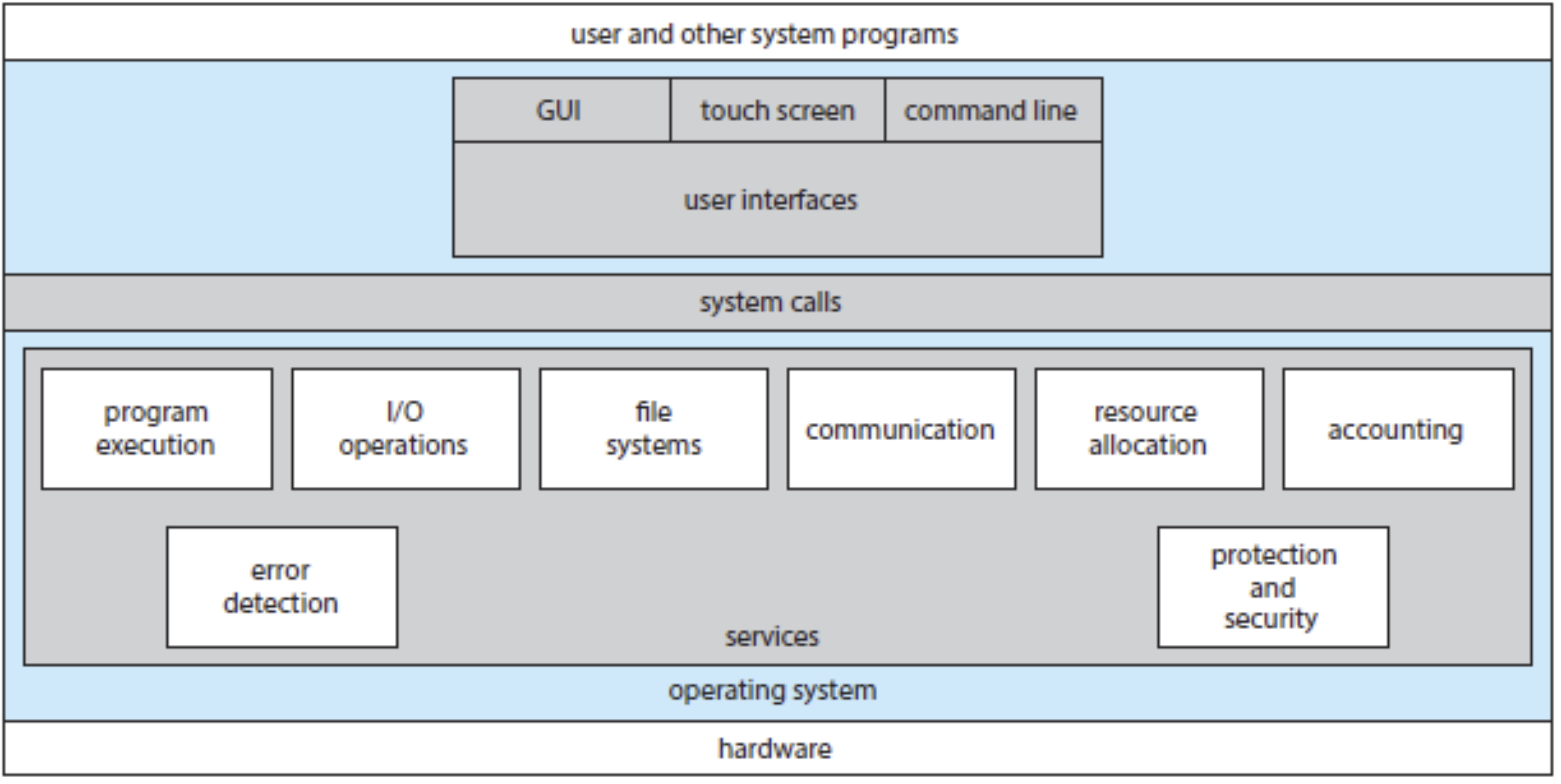
- User interface: All operating systems provide many ways for users to command a computer:
- A command line interface (CLI) or command interpreter where a user types a command and presses the Enter to execute this command.
center - A graphic user interface (GUI) where, for example, a user clicks twice on an icon to run its corresponding command.
- A touch screen
- A command line interface (CLI) or command interpreter where a user types a command and presses the Enter to execute this command.
- Program execution: The operating systems take care the process execution: load a set of instructions into the main memory and let the CPU execute these instruction.
- I/O operation: An application program might need to control I/O devices. It will ask the operating systems to control the I/O devices on its behalf via system calls.
- File-system manipulation: An application program might want to create or delete files/directories. It will ask the operating systems to do these via system calls.
- Communication: The operating system provides methods on how processes can exchange their data.
- Error detection: When an error happens on the computer, the operating system must take an appropriate action to solve this error.
- Logging: The operating systems will keep a record of programs’ resource usages.
Operating-System Structures
Structure ของ OS ชวนมึน!
Simple Structure
- Definition: Early operating systems were not well-structured since there were only a few applications.
- How it works: The OS mainly functions as device drivers to control hardware.
- Example: MS-DOS
- Applications can interact directly with the hardware.
- No strict protection between the OS and user applications.
- Single-tasking: Only one program can run at a time.
- If an application crashes, the entire system may crash.
📌 Analogy: Think of MS-DOS as a first-generation iPod that could only play one song at a time—no multitasking. If one song had an error, the whole device might freeze!
Example: A Single-Process OS
- MS-DOS is a single-tasking operating system, meaning it can only run one process at a time.
- How it starts:
- When the computer powers on, the OS kernel and command interpreter are loaded into main memory.
- The command interpreter (like a basic terminal) is responsible for:
- Reading user commands (e.g., opening a file).
- Converting commands into system calls (so the OS understands them).
- Executing those commands (e.g., launching an application).
- Limitation:
- Only one process can be in memory and running at a time.
- To run another program, you must close the current one first!
ใช้ได้โปรแกรมเดียวต่อครั้งเท่านั้น! ต้องปิดโปรแกรมก่อนนหน้า
Monolithic Structure
A monolithic OS is structured as one large program, with all functions packed into a single binary file running in one address space (kernel mode).
Key Characteristics
- Everything is inside the kernel – No separate modules or layers.
- All OS functionalities (e.g., file system, CPU scheduling, memory management) are handled by the kernel.
- Example OS:
- UNIX (original version) – Most functionalities exist directly in the kernel.
- Linux – Based on UNIX and follows the monolithic structure.
How It Works in Linux
- Applications communicate with the kernel via system calls (like a bridge between user programs & hardware).
- Although Linux follows a monolithic design, it allows modular updates (some changes can be made without rebooting).
Pros & Cons
- ✅ Advantages:
- ✔️ Fast execution – Since everything is packed in the kernel, system calls and communication are very fast.
- ✔️ Efficient – Less overhead compared to layered OS designs.
- ✔️ Used in major OS – UNIX, Linux, and even Windows still use monolithic elements because of their performance.
- ❌ Disadvantages:
- ❌ Hard to modify – Updating one part may require reinstalling the whole OS.
- ❌ Complex maintenance – If a bug exists in one part of the kernel, it can crash the entire system.
- ❌ Large & resource-heavy – The more features added, the bigger and more complex the kernel becomes.
📌 Analogy: Think of monolithic OS like macOS running entirely in kernel mode. Imagine if every macOS feature (Finder, Safari, Spotlight, etc.) was part of a single file—super fast, but if one feature crashes, everything crashes!
Modular Approach
- ก่อนหน้านี้ (monolithic) จะเรียกว่า Tightly coupled system → Changes to one part of the system can have wide-ranging effects
- แต่อันนี้เป็น Loosely coupled system → Divides the OS into smaller, independent components.
- Changes in one part won’t affect the whole system, making updates and modifications easier.
- Examples: Layered structure, microkernel structure, module structure.
Layered Structure
-
OS is divided into multiple layers from hardware (Layer 0) to the user interface (Top Layer).
-
==Each layer interacts only with its neighboring layers.==
-
Advantage:
- Modifications in one layer won’t break others.
- Easier to debug and maintain.
-
Disadvantage:
- Difficult to define each layer’s function clearly, making pure layered structures rare.
Microkernel Structure
- Only essential components stay in the kernel, while other OS services run in user space.
- The result is a smaller kernel.
- The kernel and OS services run in separate address spaces, leading to better stability but slower performance.
- However, we have to decided which OS services should remain in the kernel and which OS services should be implemented in user space.
Module Structure
- OS has a core kernel + loadable kernel modules (LKMs).
- Modules (e.g., file system support) can be loaded/unloaded dynamically (when starting a computer) as needed.
- เอาอะไรก็โหลด!
Like macOS Extensions, loading only when needed.
Hybrid Structure
- Most modern OSs are hybrids, combining different structures for performance, security, and usability. (ก็บอกแค่นี้ไม่มีอะไรเลย)
- Linux → Monolithic for fast performance but modular for flexibility.
- Windows → Monolithic but includes microkernel-like features, such as subsystems running in user mode.
- Both support dynamically loadable kernel modules for adding new functionality.
Question
Question
- Which of the following instructions should be privileged?
- a. Set value of timer.
- b. Read the clock.
- c. Clear memory.
- d. Turn off interrupts.
- e. Modify entries in device-status table.
- f. Show which programs are running.
Answer: The instructions that are related to make changes of I/O systems/devices are privileged. Therefore, from the given instructions above, the following instructions are privileged: a, c, d, e
Question
Whenever a computer system must interact with an I/O device, briefly explain how we can utilize the CPU efficiently.
Answer: The direct memory access (DMA) is a technique to improve the CPU efficiency when dealing with I/O devices. The device controller will take care the job of data transfer directly to or from its own buffer storage to memory, with no intervention by the CPU. While the device controller is performing these operations, the CPU is available to accomplish other work.
Question
In a computer with one CPU, why could a user experience that multiple programs are running simultaneously? Also, specify the terms related.
Answer: Many processes are loaded into memory (called multiprogramming) and wait for the CPU to execute. The CPU will execute these processes in a time-sharing format. Specifically, the CPU executes multiple processes by switching among them, but the switches occur so frequently such that the users can interact with each program/process while it is running.
Question
What is the main advantage of the microkernel approach to system design? What are the disadvantages of using the microkernel approach?
Answer:
- Benefits typically include the following: (a) adding a new service does not require modifying the kernel, (b) it is more secure as more operations are done in user mode than in kernel mode, and (c) a simpler kernel design and functionality typically results in a more reliable operating system.
- The primary disadvantages of the microkernel architecture are the overheads associated with interprocess communication and the frequent use of the operating system’s messaging functions in order to enable the user process and the system service to interact with each other. (Note that user programs and system services interact in a microkernel architecture by using interprocess communication mechanisms such as messaging. These messages are conveyed by the operating system).
Question
What are the advantages of using loadable kernel modules?
Answer: It is difficult to predict what features an operating system will need in the future when it is being designed. The advantage of using loadable kernel modules is that functionality can be added to and removed from the kernel while it is running. There is no need to either recompile or reboot the kernel.